




Mein nuc ist scheinbar am Limit
-
21710 iobroker 20 0 11,6g 637412 58140 R 101,0 3,9 92:47.54 iobroker.js-con 22260 iobroker 20 0 11,4g 254624 53740 S 27,9 1,6 26:31.40 io.web.0 21798 iobroker 20 0 11,4g 309652 58008 R 21,3 1,9 23:34.42 io.javascript.0 21754 iobroker 20 0 11,1g 120476 51988 S 15,6 0,7 14:58.15 io.history.0 22136 iobroker 20 0 11,4g 228100 53140 S 11,6 1,4 13:08.74 io.bambulab.2 22288 iobroker 20 0 11,4g 243636 53100 R 10,6 1,5 14:33.00 io.bambulab.3 22024 iobroker 20 0 11,3g 192760 57684 S 3,0 1,2 5:01.43 io.shelly.1 22008 iobroker 20 0 11,1g 153124 57688 S 1,7 0,9 2:22.85 io.shelly.0 21730 iobroker 20 0 21,5g 285724 59812 S 1,0 1,8 1:08.51 io.admin.0 22184 iobroker 20 0 11,1g 127260 57508 S 1,0 0,8 1:02.37 io.sourceanalyt 21814 iobroker 20 0 11,3g 117244 53976 S 0,3 0,7 0:40.79 io.sql.0 21830 iobroker 20 0 11,3g 130708 58600 S 0,3 0,8 0:44.88 io.telegram.0 21870 iobroker 20 0 11,1g 90308 52000 S 0,3 0,6 0:09.07 io.denon.0 21925 iobroker 20 0 11,1g 113356 52716 S 0,3 0,7 0:19.92 io.heos.0 23697 jens 20 0 11828 5388 3220 R 0,3 0,0 0:00.02 top 1 root 20 0 167808 12232 9184 S 0,0 0,1 0:01.47 systemd 2 root 20 0 0 0 0 S 0,0 0,0 0:00.01 kthreadd 3 root 0 -20 0 0 0 I 0,0 0,0 0:00.00 rcu_gp 4 root 0 -20 0 0 0 I 0,0 0,0 0:00.00 rcu_par_gp 5 root 0 -20 0 0 0 I 0,0 0,0 0:00.00 slub_flushwq 6 root 0 -20 0 0 0 I 0,0 0,0 0:00.00 netns 8 root 0 -20 0 0 0 I 0,0 0,0 0:00.00 kworker/0:0H-events_highpri 10 root 0 -20 0 0 0 I 0,0 0,0 0:00.00 mm_percpu_wq 11 root 20 0 0 0 0 I 0,0 0,0 0:00.00 rcu_tasks_kthread 12 root 20 0 0 0 0 I 0,0 0,0 0:00.00 rcu_tasks_rude_kthread 13 root 20 0 0 0 0 I 0,0 0,0 0:00.00 rcu_tasks_trace_kthread 14 root 20 0 0 0 0 R 0,0 0,0 0:15.75 ksoftirqd/0 15 root 20 0 0 0 0 I 0,0 0,0 0:42.74 rcu_preempt 16 root rt 0 0 0 0 S 0,0 0,0 0:00.62 migration/0 18 root 20 0 0 0 0 S 0,0 0,0 0:00.00 cpuhp/0 19 root 20 0 0 0 0 S 0,0 0,0 0:00.00 cpuhp/1 20 root rt 0 0 0 0 S 0,0 0,0 0:00.65 migration/1 21 root 20 0 0 0 0 S 0,0 0,0 0:05.75 ksoftirqd/1 23 root 0 -20 0 0 0 I 0,0 0,0 0:00.00 kworker/1:0H-events_highpri 24 root 20 0 0 0 0 S 0,0 0,0 0:00.00 cpuhp/2 25 root rt 0 0 0 0 S 0,0 0,0 0:00.25 migration/2 26 root 20 0 0 0 0 S 0,0 0,0 0:05.32 ksoftirqd/2 28 root 0 -20 0 0 0 I 0,0 0,0 0:00.00 kworker/2:0H-events_highpri 29 root 20 0 0 0 0 S 0,0 0,0 0:00.00 cpuhp/3 30 root rt 0 0 0 0 S 0,0 0,0 0:00.24 migration/3 31 root 20 0 0 0 0 S 0,0 0,0 0:05.27 ksoftirqd/3 33 root 0 -20 0 0 0 I 0,0 0,0 0:00.00 kworker/3:0H-events_highpri 38 root 20 0 0 0 0 S 0,0 0,0 0:00.00 kdevtmpfs 39 root 0 -20 0 0 0 I 0,0 0,0 0:00.00 inet_frag_wq 40 root 20 0 0 0 0 S 0,0 0,0 0:00.00 kauditd 41 root 20 0 0 0 0 S 0,0 0,0 0:00.03 khungtaskd 42 root 20 0 0 0 0 S 0,0 0,0 0:00.00 oom_reaper 43 root 0 -20 0 0 0 I 0,0 0,0 0:00.00 writeback 44 root 20 0 0 0 0 S 0,0 0,0 0:01.62 kcompactd0 45 root 25 5 0 0 0 S 0,0 0,0 0:00.00 ksmd 46 root 39 19 0 0 0 S 0,0 0,0 0:01.60 khugepaged 47 root 0 -20 0 0 0 I 0,0 0,0 0:00.00 kintegrityd 48 root 0 -20 0 0 0 I 0,0 0,0 0:00.00 kblockd 49 root 0 -20 0 0 0 I 0,0 0,0 0:00.00 blkcg_punt_bio 52 root 0 -20 0 0 0 I 0,0 0,0 0:00.00 tpm_dev_wq 53 root 0 -20 0 0 0 I 0,0 0,0 0:00.00 edac-poller 54 root 0 -20 0 0 0 I 0,0 0,0 0:00.00 devfreq_wq 56 root 0 -20 0 0 0 I 0,0 0,0 0:00.57 kworker/0:1H-kblockd 57 root 20 0 0 0 0 S 0,0 0,0 0:00.00 kswapd0 63 root 0 -20 0 0 0 I 0,0 0,0 0:00.00 kthrotld 65 root 0 -20 0 0 0 I 0,0 0,0 0:00.00 acpi_thermal_pm 66 root 20 0 0 0 0 S 0,0 0,0 0:01.93 hwrng 67 root 0 -20 0 0 0 I 0,0 0,0 0:00.00 mld 68 root 0 -20 0 0 0 I 0,0 0,0 0:00.54 kworker/3:1H-kblockd 69 root 0 -20 0 0 0 I 0,0 0,0 0:00.00 ipv6_addrconf 74 root 0 -20 0 0 0 I 0,0 0,0 0:00.00 kstrp 79 root 0 -20 0 0 0 I 0,0 0,0 0:00.00 zswap-shrink 80 root 0 -20 0 0 0 I 0,0 0,0 0:00.00 kworker/u9:0-hci0 133 root 0 -20 0 0 0 I 0,0 0,0 0:00.57 kworker/1:1H-kblockd 134 root 0 -20 0 0 0 I 0,0 0,0 0:00.54 kworker/2:1H-kblockd 155 root 0 -20 0 0 0 I 0,0 0,0 0:00.00 ata_sff 156 root 20 0 0 0 0 S 0,0 0,0 0:00.00 scsi_eh_0 157 root 0 -20 0 0 0 I 0,0 0,0 0:00.00 scsi_tmf_0 158 root 0 -20 0 0 0 I 0,0 0,0 0:00.00 nvme-wq 159 root 0 -20 0 0 0 I 0,0 0,0 0:00.00 nvme-reset-wq 160 root 0 -20 0 0 0 I 0,0 0,0 0:00.00 nvme-delete-wq 190 root 20 0 0 0 0 S 0,0 0,0 0:07.23 jbd2/nvme0n1p1-8 191 root 0 -20 0 0 0 I 0,0 0,0 0:00.00 ext4-rsv-conver 240 root 20 0 144840 60080 58884 S 0,0 0,4 0:00.81 systemd-journal 263 root 20 0 26904 6392 4744 S 0,0 0,0 0:00.34 systemd-udevd 350 root 20 0 5880 3476 2636 S 0,0 0,0 0:00.00 dhclient -
========== Start marking the full check here =========== ```bash Script v.2026-01-31 *** BASE SYSTEM *** Operating System: Debian GNU/Linux 12 (bookworm) Static hostname: nuc Icon name: computer-desktop Chassis: desktop 🖥️ Kernel: Linux 6.1.0-43-amd64 Architecture: x86-64 Hardware Vendor: Intel Corporation Hardware Model: NUC7i3BNK Firmware Version: BNKBL357.86A.0083.2020.0714.1344 OS is similar to: model name : Intel(R) Core(TM) i3-7100U CPU @ 2.40GHz Docker : false Virtualization : none Kernel : x86_64 Userland : 64 bit Systemuptime and Load: 17:51:24 up 1 day, 2:46, 2 users, load average: 2.65, 2.23, 2.25 CPU threads: 4 *** LIFE CYCLE STATUS *** Debian 'bookworm' is the current oldstable version. Please upgrade to the latest stable release 'trixie' in due time! *** TIME AND TIMEZONES *** Local time: Tue 2026-03-17 17:51:25 CET Universal time: Tue 2026-03-17 16:51:25 UTC RTC time: Tue 2026-03-17 16:51:25 Time zone: Europe/Berlin (CET, +0100) System clock synchronized: yes NTP service: n/a RTC in local TZ: no *** Users and Groups *** User that called 'iob diag': jens HOME=/home/jens GROUPS=jens cdrom floppy sudo audio dip video plugdev users netdev iobroker User that is running 'js-controller': iobroker HOME=/home/iobroker GROUPS=iobroker tty dialout audio video plugdev *** DISPLAY-SERVER SETUP *** Display-Server: false Unit display-manager.service could not be found. Display-Manager: Desktop: Session: tty *** MEMORY *** total used free shared buff/cache available Mem: 16G 3.7G 10G 1.0M 2.4G 12G Swap: 1.0G 0B 1.0G Total: 17G 3.7G 11G Active iob-Instances: 30 15876 M total memory 3498 M used memory 954 M active memory 4060 M inactive memory 10460 M free memory 460 M buffer memory 1792 M swap cache 975 M total swap 0 M used swap 975 M free swap *** top - Table Of Processes *** top - 17:51:25 up 1 day, 2:46, 2 users, load average: 2.65, 2.23, 2.25 Tasks: 150 total, 3 running, 147 sleeping, 0 stopped, 0 zombie %Cpu(s): 50.0 us, 25.0 sy, 0.0 ni, 25.0 id, 0.0 wa, 0.0 hi, 0.0 si, 0.0 st MiB Mem : 15876.1 total, 10460.4 free, 3497.9 used, 2253.5 buff/cache MiB Swap: 976.0 total, 976.0 free, 0.0 used. 12378.2 avail Mem *** FAILED SERVICES *** UNIT LOAD ACTIVE SUB DESCRIPTION 0 loaded units listed. *** DMESG CRITICAL ERRORS *** No critical errors detected *** FILESYSTEM *** Filesystem Type Size Used Avail Use% Mounted on udev devtmpfs 7.8G 0 7.8G 0% /dev tmpfs tmpfs 1.6G 792K 1.6G 1% /run /dev/nvme0n1p1 ext4 116G 14G 96G 13% / tmpfs tmpfs 7.8G 0 7.8G 0% /dev/shm tmpfs tmpfs 5.0M 0 5.0M 0% /run/lock tmpfs tmpfs 1.6G 0 1.6G 0% /run/user/1000 Messages concerning ext4 filesystem in dmesg: [Mon Mar 16 15:04:29 2026] EXT4-fs (nvme0n1p1): mounted filesystem with ordered data mode. Quota mode: none. [Mon Mar 16 15:04:30 2026] EXT4-fs (nvme0n1p1): re-mounted. Quota mode: none. Show mounted filesystems: TARGET SOURCE FSTYPE OPTIONS / /dev/nvme0n1p1 ext4 rw,relatime,errors=remount-ro Files in neuralgic directories: /var: 2.4G /var/ 1.8G /var/log/journal/71f4ccb046934bb889999d75429a60cc 1.8G /var/log/journal 1.8G /var/log 416M /var/cache Hint: You are currently not seeing messages from other users and the system. Users in groups 'adm', 'systemd-journal' can see all messages. Pass -q to turn off this notice. Archived and active journals take up 94.5M in the file system. /opt/iobroker/backups: 4.6G /opt/iobroker/backups/ /opt/iobroker/iobroker-data: 672M /opt/iobroker/iobroker-data/ 389M /opt/iobroker/iobroker-data/files 145M /opt/iobroker/iobroker-data/backup-objects 60M /opt/iobroker/iobroker-data/files/vis-2 47M /opt/iobroker/iobroker-data/history The five largest files in iobroker-data are: 46M /opt/iobroker/iobroker-data/objects.jsonl 37M /opt/iobroker/iobroker-data/states.jsonl 27M /opt/iobroker/iobroker-data/files/tankerkoenig.admin/build/index.js.map 19M /opt/iobroker/iobroker-data/files/text2command.admin/static/js/main.02fc3820.js.map 13M /opt/iobroker/iobroker-data/files/vis.0/main/vis-views.json USB-Devices by-id: USB-Sticks - Avoid direct links to /dev/tty* in your adapter setups, please always prefer the links 'by-id': No Devices found 'by-id' *** ZigBee Settings *** No nvbackup.json found. *** NodeJS-Installation *** /usr/bin/nodejs v22.22.1 /usr/bin/node v22.22.1 /usr/bin/npm 10.9.4 /usr/bin/npx 10.9.4 ✓ Node.js installation is correct nodejs: Installed: 22.22.1-1nodesource1 Candidate: 22.22.1-1nodesource1 Version table: *** 22.22.1-1nodesource1 1001 500 https://deb.nodesource.com/node_22.x nodistro/main amd64 Packages 100 /var/lib/dpkg/status 22.22.0-1nodesource1 1001 500 https://deb.nodesource.com/node_22.x nodistro/main amd64 Packages 22.21.0-1nodesource1 1001 500 https://deb.nodesource.com/node_22.x nodistro/main amd64 Packages 22.20.0-1nodesource1 1001 500 https://deb.nodesource.com/node_22.x nodistro/main amd64 Packages 22.19.0-1nodesource1 1001 500 https://deb.nodesource.com/node_22.x nodistro/main amd64 Packages 22.18.0-1nodesource1 1001 500 https://deb.nodesource.com/node_22.x nodistro/main amd64 Packages 22.17.1-1nodesource1 1001 500 https://deb.nodesource.com/node_22.x nodistro/main amd64 Packages 22.17.0-1nodesource1 1001 500 https://deb.nodesource.com/node_22.x nodistro/main amd64 Packages 22.16.0-1nodesource1 1001 500 https://deb.nodesource.com/node_22.x nodistro/main amd64 Packages 22.15.1-1nodesource1 1001 500 https://deb.nodesource.com/node_22.x nodistro/main amd64 Packages 22.15.0-1nodesource1 1001 500 https://deb.nodesource.com/node_22.x nodistro/main amd64 Packages 22.14.0-1nodesource1 1001 500 https://deb.nodesource.com/node_22.x nodistro/main amd64 Packages 22.13.1-1nodesource1 1001 500 https://deb.nodesource.com/node_22.x nodistro/main amd64 Packages 22.13.0-1nodesource1 1001 500 https://deb.nodesource.com/node_22.x nodistro/main amd64 Packages 22.12.0-1nodesource1 1001 500 https://deb.nodesource.com/node_22.x nodistro/main amd64 Packages 22.11.0-1nodesource1 1001 500 https://deb.nodesource.com/node_22.x nodistro/main amd64 Packages 22.10.0-1nodesource1 1001 500 https://deb.nodesource.com/node_22.x nodistro/main amd64 Packages 22.9.0-1nodesource1 1001 500 https://deb.nodesource.com/node_22.x nodistro/main amd64 Packages 22.8.0-1nodesource1 1001 500 https://deb.nodesource.com/node_22.x nodistro/main amd64 Packages 22.7.0-1nodesource1 1001 500 https://deb.nodesource.com/node_22.x nodistro/main amd64 Packages 22.6.0-1nodesource1 1001 500 https://deb.nodesource.com/node_22.x nodistro/main amd64 Packages 22.5.1-1nodesource1 1001 500 https://deb.nodesource.com/node_22.x nodistro/main amd64 Packages 22.5.0-1nodesource1 1001 500 https://deb.nodesource.com/node_22.x nodistro/main amd64 Packages 22.4.1-1nodesource1 1001 500 https://deb.nodesource.com/node_22.x nodistro/main amd64 Packages 22.4.0-1nodesource1 1001 500 https://deb.nodesource.com/node_22.x nodistro/main amd64 Packages 22.3.0-1nodesource1 1001 500 https://deb.nodesource.com/node_22.x nodistro/main amd64 Packages 22.2.0-1nodesource1 1001 500 https://deb.nodesource.com/node_22.x nodistro/main amd64 Packages 22.1.0-1nodesource1 1001 500 https://deb.nodesource.com/node_22.x nodistro/main amd64 Packages 22.0.0-1nodesource1 1001 500 https://deb.nodesource.com/node_22.x nodistro/main amd64 Packages 18.20.4+dfsg-1~deb12u1 500 500 http://deb.debian.org/debian bookworm/main amd64 Packages 500 http://security.debian.org/debian-security bookworm-security/main amd64 Packages Temp directories causing deletion problem: 0 No problems detected Errors in npm tree: 0 No problems detected Checking for nodejs vulnerability: █████ ██ ██ ██████ ██████ ██████ ██████ ██ ██ ██ ██ ██ ██ ██ ██ ██ ██ ██ ██ ██ ██ ███████ ██ ██ ██ ███ ██ ██ ██ ██ ██ ██ ██ ██ ██ ██ ██ ██ ██ ██ ██ ██ ██ ██ ██ ██ ██ ██ ██ ███████ ███████ ██████ ██████ ██████ ██████ ██ *** ioBroker-Installation *** ioBroker Status iobroker is running on this host. Objects type: jsonl States type: jsonl Hosts: nuc nuc (version: 7.0.7, hostname: nuc , alive, uptime: 5107) Core adapters versions js-controller: 7.0.7 admin: 7.7.22 javascript: 9.0.18 nodejs modules from github: 4 +-- iobroker.bambulab@0.4.2 (git+ssh://git@github.com/DrozmotiX/ioBroker.bambulab.git#53e3ab3393d16f1939ceadc25da611f21574cbc8) +-- iobroker.smartthings@0.2.2 (git+ssh://git@github.com/TA2k/ioBroker.smartthings.git#b055221990231cf4c8b7fbfd6bee94ff59b0fd75) +-- iobroker.sourceanalytix@0.4.15-alpha.1 (git+ssh://git@github.com/DrozmotiX/ioBroker.sourceanalytix.git#1010e11d126dc2e9639b70f17b79d082dead83ba) | +-- syno@3.0.0 (git+https://git@github.com/MeisterTR/syno.git#0104a973d33fe332aa6b1ab5be7fe8c57d3c68b0) Adapter State + system.adapter.admin.0 : admin : nuc - enabled, port: 8081, bind: 0.0.0.0, run as: admin + system.adapter.backitup.0 : backitup : nuc - enabled + system.adapter.bambulab.2 : bambulab : nuc - enabled, port: 8883 + system.adapter.bambulab.3 : bambulab : nuc - enabled, port: 8883 + system.adapter.daswetter.0 : daswetter : nuc - enabled + system.adapter.denon.0 : denon : nuc - enabled + system.adapter.discovery.0 : discovery : nuc - enabled + system.adapter.fb-checkpresence.0 : fb-checkpresence : nuc - enabled system.adapter.firetv.0 : firetv : nuc - disabled + system.adapter.fullybrowser.0 : fullybrowser : nuc - enabled + system.adapter.harmony.0 : harmony : nuc - enabled + system.adapter.heos.0 : heos : nuc - enabled + system.adapter.history.0 : history : nuc - enabled system.adapter.ical.0 : ical : nuc - enabled system.adapter.ical.1 : ical : nuc - enabled system.adapter.ical.2 : ical : nuc - enabled system.adapter.ical.3 : ical : nuc - enabled + system.adapter.javascript.0 : javascript : nuc - enabled + system.adapter.shelly.0 : shelly : nuc - enabled, port: 1882, bind: 0.0.0.0 + system.adapter.shelly.1 : shelly : nuc - enabled, port: 1882, bind: 0.0.0.0 system.adapter.smartthings.0 : smartthings : nuc - disabled + system.adapter.sourceanalytix.0 : sourceanalytix : nuc - enabled + system.adapter.sql.0 : sql : nuc - enabled system.adapter.synology.0 : synology : nuc - disabled, port: 5000 + system.adapter.synology.1 : synology : nuc - enabled, port: 5002 + system.adapter.synology.2 : synology : nuc - enabled, port: 5003 + system.adapter.tankerkoenig.0 : tankerkoenig : nuc - enabled + system.adapter.tankerkoenig.1 : tankerkoenig : nuc - enabled + system.adapter.telegram.0 : telegram : nuc - enabled, port: 8443, bind: 0.0.0.0 + system.adapter.tr-064.0 : tr-064 : nuc - enabled + system.adapter.tr-064.2 : tr-064 : nuc - enabled + system.adapter.tr-064.3 : tr-064 : nuc - enabled + system.adapter.upnp.0 : upnp : nuc - enabled system.adapter.vis-icontwo.0 : vis-icontwo : nuc - enabled + system.adapter.vis-inventwo.0 : vis-inventwo : nuc - enabled system.adapter.vis-lcars.0 : vis-lcars : nuc - enabled system.adapter.vis-materialdesign.0 : vis-materialdesign : nuc - enabled system.adapter.vis-rgraph.0 : vis-rgraph : nuc - enabled system.adapter.vis-timeandweather.0 : vis-timeandweather : nuc - enabled system.adapter.vis.0 : vis : nuc - enabled + system.adapter.web.0 : web : nuc - enabled, port: 8082, bind: 0.0.0.0, run as: admin + system.adapter.wled.0 : wled : nuc - enabled system.adapter.wled.1 : wled : nuc - disabled + instance is alive Enabled adapters with bindings + system.adapter.admin.0 : admin : nuc - enabled, port: 8081, bind: 0.0.0.0, run as: admin + system.adapter.bambulab.2 : bambulab : nuc - enabled, port: 8883 + system.adapter.bambulab.3 : bambulab : nuc - enabled, port: 8883 + system.adapter.shelly.0 : shelly : nuc - enabled, port: 1882, bind: 0.0.0.0 + system.adapter.shelly.1 : shelly : nuc - enabled, port: 1882, bind: 0.0.0.0 + system.adapter.synology.1 : synology : nuc - enabled, port: 5002 + system.adapter.synology.2 : synology : nuc - enabled, port: 5003 + system.adapter.telegram.0 : telegram : nuc - enabled, port: 8443, bind: 0.0.0.0 + system.adapter.web.0 : web : nuc - enabled, port: 8082, bind: 0.0.0.0, run as: admin ioBroker-Repositories ┌─────────┬──────────┬─────────────────────────────────────────────────────────┬──────────────┐ │ (index) │ name │ url │ auto upgrade │ ├─────────┼──────────┼─────────────────────────────────────────────────────────┼──────────────┤ │ 0 │ 'stable' │ 'http://download.iobroker.net/sources-dist.json' │ false │ │ 1 │ 'beta' │ 'http://download.iobroker.net/sources-dist-latest.json' │ false │ └─────────┴──────────┴─────────────────────────────────────────────────────────┴──────────────┘ Active repo(s): stable Upgrade policy: none Installed ioBroker-Adapters Used repository: stable Adapter "admin" : 7.7.22 , installed 7.7.22 Adapter "backitup" : 3.3.14 , installed 3.3.14 Adapter "daswetter" : 4.5.3 , installed 4.5.3 Adapter "denon" : 1.15.12 , installed 1.15.12 Adapter "discovery" : 5.0.0 , installed 5.0.0 Adapter "fb-checkpresence": 1.4.2 , installed 1.4.2 Adapter "firetv" : 2.1.0 , installed 2.1.0 Adapter "fullybrowser" : 3.1.2 , installed 3.1.2 Adapter "harmony" : 2.0.5 , installed 2.0.5 Adapter "heos" : 3.0.4 , installed 3.0.4 Adapter "history" : 3.0.1 , installed 3.0.1 Adapter "homeconnect" : 1.5.2 , installed 1.5.2 Adapter "ical" : 1.18.1 , installed 1.18.1 Adapter "javascript" : 9.0.18 , installed 9.0.18 Controller "js-controller": 7.0.7 , installed 7.0.7 Adapter "shelly" : 10.5.2 , installed 10.5.2 Adapter "socketio" : 6.7.1 , installed 7.0.8 Adapter "sql" : 3.0.1 , installed 3.0.1 Adapter "synology" : 3.1.0 , installed 3.1.0 Adapter "tankerkoenig" : 3.4.0 , installed 3.4.0 Adapter "telegram" : 4.1.0 , installed 4.1.0 Adapter "tr-064" : 4.3.0 , installed 4.3.0 Adapter "upnp" : 1.1.0 , installed 1.1.0 Adapter "vis" : 1.5.6 , installed 1.5.6 Adapter "vis-2" : 2.13.4 , installed 2.13.4 Adapter "vis-icontwo" : 2.11.1 , installed 2.11.1 Adapter "vis-inventwo" : 3.3.5 , installed 3.3.5 Adapter "vis-lcars" : 1.1.1 , installed 1.1.1 Adapter "vis-materialdesign": 0.5.9, installed 0.5.9 Adapter "vis-rgraph" : 0.0.2 , installed 0.0.2 Adapter "vis-timeandweather": 1.2.2, installed 1.2.2 Adapter "web" : 7.0.8 , installed 7.0.8 Adapter "wled" : 0.7.3 , installed 0.7.3 Adapter "ws" : 2.6.2 , installed 3.0.19 Objects and States Please stand by - This may take a while Objects: 39782 States: 32817 *** OS-Repositories and Updates *** Hit:1 http://deb.debian.org/debian bookworm InRelease Hit:2 http://security.debian.org/debian-security bookworm-security InRelease Hit:3 http://deb.debian.org/debian bookworm-updates InRelease Hit:4 https://deb.nodesource.com/node_22.x nodistro InRelease Hit:5 https://packagecloud.io/ookla/speedtest-cli/debian bookworm InRelease Reading package lists... Pending systemupdates: 0 *** Listening Ports *** Active Internet connections (only servers) Proto Recv-Q Send-Q Local Address Foreign Address State User Inode PID/Program name tcp 0 0 0.0.0.0:1882 0.0.0.0:* LISTEN 1001 2864918 22024/io.shelly.1 tcp 0 0 0.0.0.0:22 0.0.0.0:* LISTEN 0 13888 516/sshd: /usr/sbin tcp 0 0 0.0.0.0:111 0.0.0.0:* LISTEN 0 15799 1/init tcp 0 0 127.0.0.1:8088 0.0.0.0:* LISTEN 104 15158 494/influxd tcp 0 0 127.0.0.1:9001 0.0.0.0:* LISTEN 1001 2867453 21710/iobroker.js-c tcp 0 0 127.0.0.1:9000 0.0.0.0:* LISTEN 1001 2865443 21710/iobroker.js-c tcp6 0 0 :::22 :::* LISTEN 0 13890 516/sshd: /usr/sbin tcp6 0 0 :::111 :::* LISTEN 0 15801 1/init tcp6 0 0 :::61991 :::* LISTEN 1001 2865692 21905/io.harmony.0 tcp6 0 0 :::8000 :::* LISTEN 1001 2876776 22216/io.upnp.0 tcp6 0 0 :::8081 :::* LISTEN 1001 2867490 21730/io.admin.0 tcp6 0 0 :::8082 :::* LISTEN 1001 2869415 22260/io.web.0 tcp6 0 0 :::8086 :::* LISTEN 104 18913 494/influxd udp 0 0 0.0.0.0:52621 0.0.0.0:* 1001 2867621 21925/io.heos.0 udp 0 0 0.0.0.0:61991 0.0.0.0:* 1001 2865693 21905/io.harmony.0 udp 0 0 0.0.0.0:5353 0.0.0.0:* 1001 2869369 22276/io.wled.0 udp 0 0 192.168.178.28:5353 0.0.0.0:* 1001 2865856 22088/io.tr-064.0 udp 0 0 0.0.0.0:5683 0.0.0.0:* 1001 2864852 22008/io.shelly.0 udp 0 0 0.0.0.0:68 0.0.0.0:* 0 15116 350/dhclient udp 0 0 0.0.0.0:111 0.0.0.0:* 0 15800 1/init udp 0 0 192.168.178.28:123 0.0.0.0:* 0 20463 639/ntpd udp 0 0 127.0.0.1:123 0.0.0.0:* 0 20461 639/ntpd udp 0 0 0.0.0.0:123 0.0.0.0:* 0 20457 639/ntpd udp 0 0 0.0.0.0:50036 0.0.0.0:* 1001 2869281 22216/io.upnp.0 udp 0 0 0.0.0.0:1900 0.0.0.0:* 1001 2866138 22216/io.upnp.0 udp6 0 0 :::111 :::* 0 15802 1/init udp6 0 0 fe80::96c6:91ff:fea:123 :::* 0 20467 639/ntpd udp6 0 0 ::1:123 :::* 0 20465 639/ntpd udp6 0 0 :::123 :::* 0 20454 639/ntpd *** Log File - Last 25 Lines ***Ich hoffe mal das alles dabei ist
@Dr.Pie sagte in Mein nuc ist scheinbar am Limit:
Operating System: Debian GNU/Linux 12 (bookworm)
Bring es auf Debian 13 'Trixie'. Der Bücherwurm erreicht in ein paar Wochen das letzte Kapitel.
Siehe auch:
Debian 'bookworm' is the current oldstable version. Please upgrade to the latest stable release 'trixie' in due time!Hint: You are currently not seeing messages from other users and the system.
Users in groups 'adm', 'systemd-journal' can see all messages.Pack den jens in die Gruppe 'adm'.
-
21710 iobroker 20 0 11,6g 637412 58140 R 101,0 3,9 92:47.54 iobroker.js-con 22260 iobroker 20 0 11,4g 254624 53740 S 27,9 1,6 26:31.40 io.web.0 21798 iobroker 20 0 11,4g 309652 58008 R 21,3 1,9 23:34.42 io.javascript.0 21754 iobroker 20 0 11,1g 120476 51988 S 15,6 0,7 14:58.15 io.history.0 22136 iobroker 20 0 11,4g 228100 53140 S 11,6 1,4 13:08.74 io.bambulab.2 22288 iobroker 20 0 11,4g 243636 53100 R 10,6 1,5 14:33.00 io.bambulab.3 22024 iobroker 20 0 11,3g 192760 57684 S 3,0 1,2 5:01.43 io.shelly.1 22008 iobroker 20 0 11,1g 153124 57688 S 1,7 0,9 2:22.85 io.shelly.0 21730 iobroker 20 0 21,5g 285724 59812 S 1,0 1,8 1:08.51 io.admin.0 22184 iobroker 20 0 11,1g 127260 57508 S 1,0 0,8 1:02.37 io.sourceanalyt 21814 iobroker 20 0 11,3g 117244 53976 S 0,3 0,7 0:40.79 io.sql.0 21830 iobroker 20 0 11,3g 130708 58600 S 0,3 0,8 0:44.88 io.telegram.0 21870 iobroker 20 0 11,1g 90308 52000 S 0,3 0,6 0:09.07 io.denon.0 21925 iobroker 20 0 11,1g 113356 52716 S 0,3 0,7 0:19.92 io.heos.0 23697 jens 20 0 11828 5388 3220 R 0,3 0,0 0:00.02 top 1 root 20 0 167808 12232 9184 S 0,0 0,1 0:01.47 systemd 2 root 20 0 0 0 0 S 0,0 0,0 0:00.01 kthreadd 3 root 0 -20 0 0 0 I 0,0 0,0 0:00.00 rcu_gp 4 root 0 -20 0 0 0 I 0,0 0,0 0:00.00 rcu_par_gp 5 root 0 -20 0 0 0 I 0,0 0,0 0:00.00 slub_flushwq 6 root 0 -20 0 0 0 I 0,0 0,0 0:00.00 netns 8 root 0 -20 0 0 0 I 0,0 0,0 0:00.00 kworker/0:0H-events_highpri 10 root 0 -20 0 0 0 I 0,0 0,0 0:00.00 mm_percpu_wq 11 root 20 0 0 0 0 I 0,0 0,0 0:00.00 rcu_tasks_kthread 12 root 20 0 0 0 0 I 0,0 0,0 0:00.00 rcu_tasks_rude_kthread 13 root 20 0 0 0 0 I 0,0 0,0 0:00.00 rcu_tasks_trace_kthread 14 root 20 0 0 0 0 R 0,0 0,0 0:15.75 ksoftirqd/0 15 root 20 0 0 0 0 I 0,0 0,0 0:42.74 rcu_preempt 16 root rt 0 0 0 0 S 0,0 0,0 0:00.62 migration/0 18 root 20 0 0 0 0 S 0,0 0,0 0:00.00 cpuhp/0 19 root 20 0 0 0 0 S 0,0 0,0 0:00.00 cpuhp/1 20 root rt 0 0 0 0 S 0,0 0,0 0:00.65 migration/1 21 root 20 0 0 0 0 S 0,0 0,0 0:05.75 ksoftirqd/1 23 root 0 -20 0 0 0 I 0,0 0,0 0:00.00 kworker/1:0H-events_highpri 24 root 20 0 0 0 0 S 0,0 0,0 0:00.00 cpuhp/2 25 root rt 0 0 0 0 S 0,0 0,0 0:00.25 migration/2 26 root 20 0 0 0 0 S 0,0 0,0 0:05.32 ksoftirqd/2 28 root 0 -20 0 0 0 I 0,0 0,0 0:00.00 kworker/2:0H-events_highpri 29 root 20 0 0 0 0 S 0,0 0,0 0:00.00 cpuhp/3 30 root rt 0 0 0 0 S 0,0 0,0 0:00.24 migration/3 31 root 20 0 0 0 0 S 0,0 0,0 0:05.27 ksoftirqd/3 33 root 0 -20 0 0 0 I 0,0 0,0 0:00.00 kworker/3:0H-events_highpri 38 root 20 0 0 0 0 S 0,0 0,0 0:00.00 kdevtmpfs 39 root 0 -20 0 0 0 I 0,0 0,0 0:00.00 inet_frag_wq 40 root 20 0 0 0 0 S 0,0 0,0 0:00.00 kauditd 41 root 20 0 0 0 0 S 0,0 0,0 0:00.03 khungtaskd 42 root 20 0 0 0 0 S 0,0 0,0 0:00.00 oom_reaper 43 root 0 -20 0 0 0 I 0,0 0,0 0:00.00 writeback 44 root 20 0 0 0 0 S 0,0 0,0 0:01.62 kcompactd0 45 root 25 5 0 0 0 S 0,0 0,0 0:00.00 ksmd 46 root 39 19 0 0 0 S 0,0 0,0 0:01.60 khugepaged 47 root 0 -20 0 0 0 I 0,0 0,0 0:00.00 kintegrityd 48 root 0 -20 0 0 0 I 0,0 0,0 0:00.00 kblockd 49 root 0 -20 0 0 0 I 0,0 0,0 0:00.00 blkcg_punt_bio 52 root 0 -20 0 0 0 I 0,0 0,0 0:00.00 tpm_dev_wq 53 root 0 -20 0 0 0 I 0,0 0,0 0:00.00 edac-poller 54 root 0 -20 0 0 0 I 0,0 0,0 0:00.00 devfreq_wq 56 root 0 -20 0 0 0 I 0,0 0,0 0:00.57 kworker/0:1H-kblockd 57 root 20 0 0 0 0 S 0,0 0,0 0:00.00 kswapd0 63 root 0 -20 0 0 0 I 0,0 0,0 0:00.00 kthrotld 65 root 0 -20 0 0 0 I 0,0 0,0 0:00.00 acpi_thermal_pm 66 root 20 0 0 0 0 S 0,0 0,0 0:01.93 hwrng 67 root 0 -20 0 0 0 I 0,0 0,0 0:00.00 mld 68 root 0 -20 0 0 0 I 0,0 0,0 0:00.54 kworker/3:1H-kblockd 69 root 0 -20 0 0 0 I 0,0 0,0 0:00.00 ipv6_addrconf 74 root 0 -20 0 0 0 I 0,0 0,0 0:00.00 kstrp 79 root 0 -20 0 0 0 I 0,0 0,0 0:00.00 zswap-shrink 80 root 0 -20 0 0 0 I 0,0 0,0 0:00.00 kworker/u9:0-hci0 133 root 0 -20 0 0 0 I 0,0 0,0 0:00.57 kworker/1:1H-kblockd 134 root 0 -20 0 0 0 I 0,0 0,0 0:00.54 kworker/2:1H-kblockd 155 root 0 -20 0 0 0 I 0,0 0,0 0:00.00 ata_sff 156 root 20 0 0 0 0 S 0,0 0,0 0:00.00 scsi_eh_0 157 root 0 -20 0 0 0 I 0,0 0,0 0:00.00 scsi_tmf_0 158 root 0 -20 0 0 0 I 0,0 0,0 0:00.00 nvme-wq 159 root 0 -20 0 0 0 I 0,0 0,0 0:00.00 nvme-reset-wq 160 root 0 -20 0 0 0 I 0,0 0,0 0:00.00 nvme-delete-wq 190 root 20 0 0 0 0 S 0,0 0,0 0:07.23 jbd2/nvme0n1p1-8 191 root 0 -20 0 0 0 I 0,0 0,0 0:00.00 ext4-rsv-conver 240 root 20 0 144840 60080 58884 S 0,0 0,4 0:00.81 systemd-journal 263 root 20 0 26904 6392 4744 S 0,0 0,0 0:00.34 systemd-udevd 350 root 20 0 5880 3476 2636 S 0,0 0,0 0:00.00 dhclient@Dr.Pie Der Header fehlt.
kein Support per PN! - Fragen im Forum stellen - Benutzt das Voting rechts unten im Beitrag wenn er euch geholfen hat.
Das Forum freut sich über eine Spende. Benutzt dazu den Spendenbutton oben rechts. Danke!
der Installationsfixer: curl -fsL https://iobroker.net/fix.sh | bash - -
@Dr.Pie sagte in Mein nuc ist scheinbar am Limit:
Operating System: Debian GNU/Linux 12 (bookworm)
Bring es auf Debian 13 'Trixie'. Der Bücherwurm erreicht in ein paar Wochen das letzte Kapitel.
Siehe auch:
Debian 'bookworm' is the current oldstable version. Please upgrade to the latest stable release 'trixie' in due time!Hint: You are currently not seeing messages from other users and the system.
Users in groups 'adm', 'systemd-journal' can see all messages.Pack den jens in die Gruppe 'adm'.
@Thomas-Braun sagte in Mein nuc ist scheinbar am Limit:
Bring es auf Debian 13 'Trixie'. Der Bücherwurm erreicht in ein paar Wochen das letzte Kapitel.
Das hatte ich auch schon mal in Erwägung gezogen.
... ob das gut geht ???eine Anleitung hatte ich mal:
https://www.bjoerns-techblog.de/2025/08/upgrade-debian-bookworm-zu-trixie/ -
@Homoran sagte in Mein nuc ist scheinbar am Limit:
@Dr.Pie Der Header fehlt.
top - 18:34:07 up 1 day, 3:29, 1 user, load average: 2,06, 2,28, 2,24 Tasks: 142 total, 6 running, 136 sleeping, 0 stopped, 0 zombie %CPU(s): 43,1 us, 3,1 sy, 0,0 ni, 52,1 id, 0,0 wa, 0,0 hi, 1,6 si, 0,0 st MiB Spch: 15876,1 total, 10105,0 free, 3771,8 used, 2342,3 buff/cache MiB Swap: 976,0 total, 976,0 free, 0,0 used. 12104,3 avail Spch -
@Thomas-Braun sagte in Mein nuc ist scheinbar am Limit:
Bring es auf Debian 13 'Trixie'. Der Bücherwurm erreicht in ein paar Wochen das letzte Kapitel.
Das hatte ich auch schon mal in Erwägung gezogen.
... ob das gut geht ???eine Anleitung hatte ich mal:
https://www.bjoerns-techblog.de/2025/08/upgrade-debian-bookworm-zu-trixie/Da gibt es nix zu 'erwägen', das muss gemacht werden. Am besten bevor das EndOfLife erreicht wird.
Hier noch eine Anleitung:
https://forum.iobroker.net/topic/81187/upgrade-von-debian-12-bookworm-auf-debian-13-trixie/222 -
@Homoran sagte in Mein nuc ist scheinbar am Limit:
@Dr.Pie Der Header fehlt.
top - 18:34:07 up 1 day, 3:29, 1 user, load average: 2,06, 2,28, 2,24 Tasks: 142 total, 6 running, 136 sleeping, 0 stopped, 0 zombie %CPU(s): 43,1 us, 3,1 sy, 0,0 ni, 52,1 id, 0,0 wa, 0,0 hi, 1,6 si, 0,0 st MiB Spch: 15876,1 total, 10105,0 free, 3771,8 used, 2342,3 buff/cache MiB Swap: 976,0 total, 976,0 free, 0,0 used. 12104,3 avail Spch@Dr.Pie Die Tabelle fehlt 😉
topist immer eine Momentaufnahme.
Header und Tabelle ergeben nur zeitgleich Sinn.aber schonmal vorweg
@Dr.Pie sagte in Mein nuc ist scheinbar am Limit:
load average: 2,06, 2,28, 2,24
ist wahrscheinlich nicht kritisch aber nicht wenig.
Was für ein Professor?aber der Controller
@Dr.Pie sagte in Mein nuc ist scheinbar am Limit:
21710 iobroker 20 0 11,6g 637412 58140 R 101,0 3,9 92:47.54 iobroker.js-con
belegt einen Kern vollständig
kein Support per PN! - Fragen im Forum stellen - Benutzt das Voting rechts unten im Beitrag wenn er euch geholfen hat.
Das Forum freut sich über eine Spende. Benutzt dazu den Spendenbutton oben rechts. Danke!
der Installationsfixer: curl -fsL https://iobroker.net/fix.sh | bash - -
@Dr.Pie sagte in Mein nuc ist scheinbar am Limit:
Operating System: Debian GNU/Linux 12 (bookworm)
Bring es auf Debian 13 'Trixie'. Der Bücherwurm erreicht in ein paar Wochen das letzte Kapitel.
Siehe auch:
Debian 'bookworm' is the current oldstable version. Please upgrade to the latest stable release 'trixie' in due time!Hint: You are currently not seeing messages from other users and the system.
Users in groups 'adm', 'systemd-journal' can see all messages.Pack den jens in die Gruppe 'adm'.
@dr.pie Primär:
halte mal den history an. und den JavaScript sowie die beiden Bambulab und schaue ob es besser wird.
Könnte ein Javascript sein was ständig viele Datenpunkte ändert bzw. eine irgendwie geartete Schleife (hatten wir mit MQTT schon mal) die ständig viele Datenpunkte ändert. Könnte also auch aus einen der anderen Adapter kommen.ioBroker@Ubuntu 24.04 LTS (Proxmox VM) für: >260 Geräte, 6 Switche, 7 AP, 10 IP-Cam, 1 NAS 42TB, 1 Proxmox 128GB 15TB, 2 Proxmox 32GB 1TB, 1 Hyper-V 52GB 42TB, 14 x Echo, 5x FireTV, 5 x Tablett/Handy VIS || >=160 Tasmota/Shelly || >=95 ZigBee || PV 8.1kW / Akku 14kWh || 2x USV APC 750W kaskadiert || Kobra S1 Max
-
@dr.pie Primär:
halte mal den history an. und den JavaScript sowie die beiden Bambulab und schaue ob es besser wird.
Könnte ein Javascript sein was ständig viele Datenpunkte ändert bzw. eine irgendwie geartete Schleife (hatten wir mit MQTT schon mal) die ständig viele Datenpunkte ändert. Könnte also auch aus einen der anderen Adapter kommen.@BananaJoe sagte in Mein nuc ist scheinbar am Limit:
eine irgendwie geartete Schleife (hatten wir...schon mal
ich weiss nur nicht mehr wo das war, dass der Controller am Anschlag ist.
Javascript hat nur 27% eines Kerns. Das ist zum Zeitpunkt des Tops zumindest nicht kritisch. -
@Dr.Pie Die Tabelle fehlt 😉
topist immer eine Momentaufnahme.
Header und Tabelle ergeben nur zeitgleich Sinn.aber schonmal vorweg
@Dr.Pie sagte in Mein nuc ist scheinbar am Limit:
load average: 2,06, 2,28, 2,24
ist wahrscheinlich nicht kritisch aber nicht wenig.
Was für ein Professor?aber der Controller
@Dr.Pie sagte in Mein nuc ist scheinbar am Limit:
21710 iobroker 20 0 11,6g 637412 58140 R 101,0 3,9 92:47.54 iobroker.js-con
belegt einen Kern vollständig
sagte in Mein nuc ist scheinbar am Limit:
ist wahrscheinlich nicht kritisch aber nicht wenig.
doch! es ist bereits kritisch!
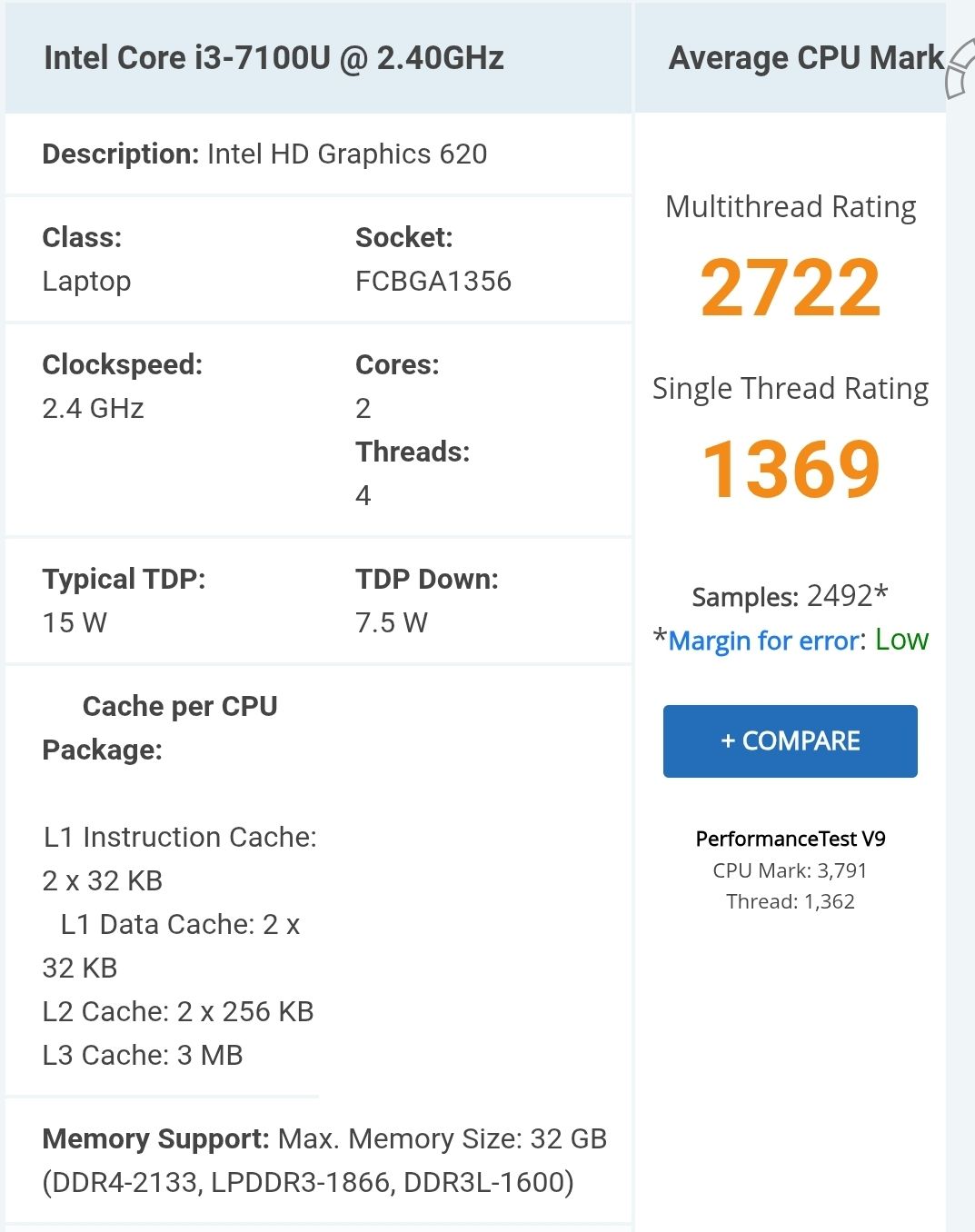
Dein Supercomputer hat nur einen 2-Kerner!!
Dann sind Werte >2 zu viel. -
Sooooo Update ist durch ...hoffe ich zumindest:
Script v.2026-01-31 *** BASE SYSTEM *** Operating System: Debian GNU/Linux 13 (trixie) Static hostname: nuc Icon name: computer-desktop Chassis: desktop 🖥️ Kernel: Linux 6.12.74+deb13+1-amd64 Architecture: x86-64 Hardware Vendor: Intel Corporation Hardware Model: NUC7i3BNK Firmware Version: BNKBL357.86A.0083.2020.0714.1344 Firmware Date: Tue 2020-07-14 Firmware Age: 5y 8month 3d OS is similar to: model name : Intel(R) Core(TM) i3-7100U CPU @ 2.40GHz Docker : false Virtualization : none Kernel : x86_64 Userland : 64 bit Systemuptime and Load: 20:09:12 up 1 min, 1 user, load average: 1.30, 0.43, 0.15 CPU threads: 4 *** LIFE CYCLE STATUS *** Operating System is the current Debian stable version codenamed 'trixie'! *** TIME AND TIMEZONES *** Local time: Tue 2026-03-17 20:09:13 CET Universal time: Tue 2026-03-17 19:09:13 UTC RTC time: Tue 2026-03-17 19:09:13 Time zone: Europe/Berlin (CET, +0100) System clock synchronized: no NTP service: active RTC in local TZ: no *** Users and Groups *** User that called 'iob diag': jens HOME=/home/jens GROUPS=jens cdrom floppy sudo audio dip video plugdev users netdev iobroker User that is running 'js-controller': iobroker HOME=/home/iobroker SUDO_HOME=/home/jens GROUPS=iobroker tty dialout audio video plugdev *** DISPLAY-SERVER SETUP *** Display-Server: false Unit display-manager.service could not be found. Display-Manager: Desktop: Session: tty *** MEMORY *** total used free shared buff/cache available Mem: 16G 2.1G 14G 2.0M 660M 14G Swap: 1.0G 0B 1.0G Total: 17G 2.1G 15G Active iob-Instances: 12 15882 M total memory 1955 M used memory 1648 M active memory 424 M inactive memory 13578 M free memory 52 M buffer memory 577 M swap cache 975 M total swap 0 M used swap 975 M free swap *** top - Table Of Processes *** top - 20:09:13 up 1 min, 1 user, load average: 1.30, 0.43, 0.15 Tasks: 161 total, 2 running, 159 sleeping, 0 stopped, 0 zombie %Cpu(s): 32.6 us, 2.3 sy, 0.0 ni, 65.1 id, 0.0 wa, 0.0 hi, 0.0 si, 0.0 st MiB Mem : 15882.7 total, 13565.5 free, 1968.1 used, 631.4 buff/cache MiB Swap: 976.0 total, 976.0 free, 0.0 used. 13914.6 avail Mem *** FAILED SERVICES *** UNIT LOAD ACTIVE SUB DESCRIPTION 0 loaded units listed. *** DMESG CRITICAL ERRORS *** No critical errors detected *** FILESYSTEM *** Filesystem Type Size Used Avail Use% Mounted on udev devtmpfs 7.8G 0 7.8G 0% /dev tmpfs tmpfs 1.6G 800K 1.6G 1% /run /dev/nvme0n1p1 ext4 116G 15G 96G 13% / tmpfs tmpfs 7.8G 0 7.8G 0% /dev/shm tmpfs tmpfs 5.0M 0 5.0M 0% /run/lock tmpfs tmpfs 1.0M 0 1.0M 0% /run/credentials/systemd-journald.service tmpfs tmpfs 7.8G 2.0M 7.8G 1% /tmp tmpfs tmpfs 1.0M 0 1.0M 0% /run/credentials/getty@tty1.service tmpfs tmpfs 1.6G 8.0K 1.6G 1% /run/user/1000 Messages concerning ext4 filesystem in dmesg: [Tue Mar 17 20:08:10 2026] EXT4-fs (nvme0n1p1): mounted filesystem 59b1f09e-4134-4f42-9ebd-23b24ce0ef05 ro with ordered data mode. Quota mode: none. [Tue Mar 17 20:08:11 2026] EXT4-fs (nvme0n1p1): re-mounted 59b1f09e-4134-4f42-9ebd-23b24ce0ef05 r/w. Show mounted filesystems: TARGET SOURCE FSTYPE OPTIONS / /dev/nvme0n1p1 ext4 rw,relatime,errors=remount-ro Files in neuralgic directories: /var: 2.4G /var/ 1.8G /var/log/journal/71f4ccb046934bb889999d75429a60cc 1.8G /var/log/journal 1.8G /var/log 433M /var/cache Hint: You are currently not seeing messages from other users and the system. Users in groups 'adm', 'systemd-journal' can see all messages. Pass -q to turn off this notice. Archived and active journals take up 102.5M in the file system. /opt/iobroker/backups: 4.6G /opt/iobroker/backups/ /opt/iobroker/iobroker-data: 628M /opt/iobroker/iobroker-data/ 329M /opt/iobroker/iobroker-data/files 145M /opt/iobroker/iobroker-data/backup-objects 47M /opt/iobroker/iobroker-data/history 47M /opt/iobroker/iobroker-data/files/admin.admin The five largest files in iobroker-data are: 58M /opt/iobroker/iobroker-data/states.jsonl 41M /opt/iobroker/iobroker-data/objects.jsonl 27M /opt/iobroker/iobroker-data/files/tankerkoenig.admin/build/index.js.map 19M /opt/iobroker/iobroker-data/files/text2command.admin/static/js/main.02fc3820.js.map 13M /opt/iobroker/iobroker-data/files/vis.0/main/vis-views.json USB-Devices by-id: USB-Sticks - Avoid direct links to /dev/tty* in your adapter setups, please always prefer the links 'by-id': No Devices found 'by-id' *** ZigBee Settings *** No nvbackup.json found. *** NodeJS-Installation *** /usr/bin/nodejs v22.22.1 /usr/bin/node v22.22.1 /usr/bin/npm 10.9.4 /usr/bin/npx 10.9.4 ✓ Node.js installation is correct nodejs: Installed: 22.22.1-1nodesource1 Candidate: 22.22.1-1nodesource1 Version table: *** 22.22.1-1nodesource1 1001 500 https://deb.nodesource.com/node_22.x nodistro/main amd64 Packages 100 /var/lib/dpkg/status 22.22.0-1nodesource1 1001 500 https://deb.nodesource.com/node_22.x nodistro/main amd64 Packages 22.21.0-1nodesource1 1001 500 https://deb.nodesource.com/node_22.x nodistro/main amd64 Packages 22.20.0-1nodesource1 1001 500 https://deb.nodesource.com/node_22.x nodistro/main amd64 Packages 22.19.0-1nodesource1 1001 500 https://deb.nodesource.com/node_22.x nodistro/main amd64 Packages 22.18.0-1nodesource1 1001 500 https://deb.nodesource.com/node_22.x nodistro/main amd64 Packages 22.17.1-1nodesource1 1001 500 https://deb.nodesource.com/node_22.x nodistro/main amd64 Packages 22.17.0-1nodesource1 1001 500 https://deb.nodesource.com/node_22.x nodistro/main amd64 Packages 22.16.0-1nodesource1 1001 500 https://deb.nodesource.com/node_22.x nodistro/main amd64 Packages 22.15.1-1nodesource1 1001 500 https://deb.nodesource.com/node_22.x nodistro/main amd64 Packages 22.15.0-1nodesource1 1001 500 https://deb.nodesource.com/node_22.x nodistro/main amd64 Packages 22.14.0-1nodesource1 1001 500 https://deb.nodesource.com/node_22.x nodistro/main amd64 Packages 22.13.1-1nodesource1 1001 500 https://deb.nodesource.com/node_22.x nodistro/main amd64 Packages 22.13.0-1nodesource1 1001 500 https://deb.nodesource.com/node_22.x nodistro/main amd64 Packages 22.12.0-1nodesource1 1001 500 https://deb.nodesource.com/node_22.x nodistro/main amd64 Packages 22.11.0-1nodesource1 1001 500 https://deb.nodesource.com/node_22.x nodistro/main amd64 Packages 22.10.0-1nodesource1 1001 500 https://deb.nodesource.com/node_22.x nodistro/main amd64 Packages 22.9.0-1nodesource1 1001 500 https://deb.nodesource.com/node_22.x nodistro/main amd64 Packages 22.8.0-1nodesource1 1001 500 https://deb.nodesource.com/node_22.x nodistro/main amd64 Packages 22.7.0-1nodesource1 1001 500 https://deb.nodesource.com/node_22.x nodistro/main amd64 Packages 22.6.0-1nodesource1 1001 500 https://deb.nodesource.com/node_22.x nodistro/main amd64 Packages 22.5.1-1nodesource1 1001 500 https://deb.nodesource.com/node_22.x nodistro/main amd64 Packages 22.5.0-1nodesource1 1001 500 https://deb.nodesource.com/node_22.x nodistro/main amd64 Packages 22.4.1-1nodesource1 1001 500 https://deb.nodesource.com/node_22.x nodistro/main amd64 Packages 22.4.0-1nodesource1 1001 500 https://deb.nodesource.com/node_22.x nodistro/main amd64 Packages 22.3.0-1nodesource1 1001 500 https://deb.nodesource.com/node_22.x nodistro/main amd64 Packages 22.2.0-1nodesource1 1001 500 https://deb.nodesource.com/node_22.x nodistro/main amd64 Packages 22.1.0-1nodesource1 1001 500 https://deb.nodesource.com/node_22.x nodistro/main amd64 Packages 22.0.0-1nodesource1 1001 500 https://deb.nodesource.com/node_22.x nodistro/main amd64 Packages 20.19.2+dfsg-1 500 500 http://deb.debian.org/debian trixie/main amd64 Packages Temp directories causing deletion problem: 0 No problems detected Errors in npm tree: 0 No problems detected Checking for nodejs vulnerability: █████ ██ ██ ██████ ██████ ██████ ██████ ██ ██ ██ ██ ██ ██ ██ ██ ██ ██ ██ ██ ██ ██ ███████ ██ ██ ██ ███ ██ ██ ██ ██ ██ ██ ██ ██ ██ ██ ██ ██ ██ ██ ██ ██ ██ ██ ██ ██ ██ ██ ██ ███████ ███████ ██████ ██████ ██████ ██████ ██ *** ioBroker-Installation *** ioBroker Status iobroker is running on this host. Objects type: jsonl States type: jsonl Hosts: nuc nuc (version: 7.0.7, hostname: nuc , alive, uptime: 63) Core adapters versions js-controller: 7.0.7 admin: 7.7.22 javascript: 9.0.18 nodejs modules from github: 4 +-- iobroker.bambulab@0.4.2 (git+ssh://git@github.com/DrozmotiX/ioBroker.bambulab.git#53e3ab3393d16f1939ceadc25da611f21574cbc8) +-- iobroker.smartthings@0.2.2 (git+ssh://git@github.com/TA2k/ioBroker.smartthings.git#b055221990231cf4c8b7fbfd6bee94ff59b0fd75) +-- iobroker.sourceanalytix@0.4.15-alpha.1 (git+ssh://git@github.com/DrozmotiX/ioBroker.sourceanalytix.git#1010e11d126dc2e9639b70f17b79d082dead83ba) | +-- syno@3.0.0 (git+https://git@github.com/MeisterTR/syno.git#0104a973d33fe332aa6b1ab5be7fe8c57d3c68b0) Adapter State + system.adapter.admin.0 : admin : nuc - enabled, port: 8081, bind: 0.0.0.0, run as: admin + system.adapter.backitup.0 : backitup : nuc - enabled system.adapter.bambulab.2 : bambulab : nuc - enabled, port: 8883 system.adapter.bambulab.3 : bambulab : nuc - enabled, port: 8883 system.adapter.daswetter.0 : daswetter : nuc - enabled + system.adapter.denon.0 : denon : nuc - enabled system.adapter.discovery.0 : discovery : nuc - enabled system.adapter.fb-checkpresence.0 : fb-checkpresence : nuc - enabled system.adapter.firetv.0 : firetv : nuc - disabled + system.adapter.fullybrowser.0 : fullybrowser : nuc - enabled + system.adapter.harmony.0 : harmony : nuc - enabled + system.adapter.heos.0 : heos : nuc - enabled + system.adapter.history.0 : history : nuc - enabled + system.adapter.ical.0 : ical : nuc - enabled system.adapter.ical.1 : ical : nuc - enabled system.adapter.ical.2 : ical : nuc - enabled system.adapter.ical.3 : ical : nuc - enabled + system.adapter.javascript.0 : javascript : nuc - enabled system.adapter.shelly.0 : shelly : nuc - enabled, port: 1882, bind: 0.0.0.0 system.adapter.shelly.1 : shelly : nuc - enabled, port: 1882, bind: 0.0.0.0 system.adapter.smartthings.0 : smartthings : nuc - disabled system.adapter.sourceanalytix.0 : sourceanalytix : nuc - enabled + system.adapter.sql.0 : sql : nuc - enabled system.adapter.synology.0 : synology : nuc - disabled, port: 5000 system.adapter.synology.1 : synology : nuc - enabled, port: 5002 system.adapter.synology.2 : synology : nuc - enabled, port: 5003 system.adapter.tankerkoenig.0 : tankerkoenig : nuc - enabled system.adapter.tankerkoenig.1 : tankerkoenig : nuc - enabled + system.adapter.telegram.0 : telegram : nuc - enabled, port: 8443, bind: 0.0.0.0 system.adapter.tr-064.0 : tr-064 : nuc - enabled system.adapter.tr-064.2 : tr-064 : nuc - enabled system.adapter.tr-064.3 : tr-064 : nuc - enabled system.adapter.upnp.0 : upnp : nuc - enabled system.adapter.vis-icontwo.0 : vis-icontwo : nuc - enabled system.adapter.vis-inventwo.0 : vis-inventwo : nuc - enabled system.adapter.vis-lcars.0 : vis-lcars : nuc - enabled system.adapter.vis-materialdesign.0 : vis-materialdesign : nuc - enabled system.adapter.vis-rgraph.0 : vis-rgraph : nuc - enabled system.adapter.vis-timeandweather.0 : vis-timeandweather : nuc - enabled system.adapter.vis.0 : vis : nuc - enabled system.adapter.web.0 : web : nuc - enabled, port: 8082, bind: 0.0.0.0, run as: admin system.adapter.wled.0 : wled : nuc - enabled system.adapter.wled.1 : wled : nuc - disabled + instance is alive Enabled adapters with bindings + system.adapter.admin.0 : admin : nuc - enabled, port: 8081, bind: 0.0.0.0, run as: admin system.adapter.bambulab.2 : bambulab : nuc - enabled, port: 8883 system.adapter.bambulab.3 : bambulab : nuc - enabled, port: 8883 system.adapter.shelly.0 : shelly : nuc - enabled, port: 1882, bind: 0.0.0.0 system.adapter.shelly.1 : shelly : nuc - enabled, port: 1882, bind: 0.0.0.0 system.adapter.synology.1 : synology : nuc - enabled, port: 5002 system.adapter.synology.2 : synology : nuc - enabled, port: 5003 + system.adapter.telegram.0 : telegram : nuc - enabled, port: 8443, bind: 0.0.0.0 system.adapter.web.0 : web : nuc - enabled, port: 8082, bind: 0.0.0.0, run as: admin ioBroker-Repositories ┌─────────┬──────────┬─────────────────────────────────────────────────────────┬──────────────┐ │ (index) │ name │ url │ auto upgrade │ ├─────────┼──────────┼─────────────────────────────────────────────────────────┼──────────────┤ │ 0 │ 'stable' │ 'http://download.iobroker.net/sources-dist.json' │ false │ │ 1 │ 'beta' │ 'http://download.iobroker.net/sources-dist-latest.json' │ false │ └─────────┴──────────┴─────────────────────────────────────────────────────────┴──────────────┘ Active repo(s): stable Upgrade policy: none Installed ioBroker-Adapters Used repository: stable Adapter "admin" : 7.7.22 , installed 7.7.22 Adapter "backitup" : 3.3.14 , installed 3.3.14 Adapter "daswetter" : 4.5.3 , installed 4.5.3 Adapter "denon" : 1.15.12 , installed 1.15.12 Adapter "discovery" : 5.0.0 , installed 5.0.0 Adapter "fb-checkpresence": 1.4.2 , installed 1.4.2 Adapter "firetv" : 2.1.0 , installed 2.1.0 Adapter "fullybrowser" : 3.1.2 , installed 3.1.2 Adapter "harmony" : 2.0.5 , installed 2.0.5 Adapter "heos" : 3.0.4 , installed 3.0.4 Adapter "history" : 3.0.1 , installed 3.0.1 Adapter "homeconnect" : 1.5.2 , installed 1.5.2 Adapter "ical" : 1.18.1 , installed 1.18.1 Adapter "javascript" : 9.0.18 , installed 9.0.18 Controller "js-controller": 7.0.7 , installed 7.0.7 Adapter "shelly" : 10.5.2 , installed 10.5.2 Adapter "socketio" : 6.7.1 , installed 7.0.8 Adapter "sql" : 3.0.1 , installed 3.0.1 Adapter "synology" : 3.1.0 , installed 3.1.0 Adapter "tankerkoenig" : 3.4.0 , installed 3.4.0 Adapter "telegram" : 4.1.0 , installed 4.1.0 Adapter "tr-064" : 4.3.0 , installed 4.3.0 Adapter "upnp" : 1.1.0 , installed 1.1.0 Adapter "vis" : 1.5.6 , installed 1.5.6 Adapter "vis-icontwo" : 2.11.1 , installed 2.11.1 Adapter "vis-inventwo" : 3.3.5 , installed 3.3.5 Adapter "vis-lcars" : 1.1.1 , installed 1.1.1 Adapter "vis-materialdesign": 0.5.9, installed 0.5.9 Adapter "vis-rgraph" : 0.0.2 , installed 0.0.2 Adapter "vis-timeandweather": 1.2.2, installed 1.2.2 Adapter "web" : 7.0.8 , installed 7.0.8 Adapter "wled" : 0.7.3 , installed 0.7.3 Adapter "ws" : 2.6.2 , installed 3.0.19 Objects and States Please stand by - This may take a while Objects: 39780 States: 32740 *** OS-Repositories and Updates *** Hit:1 http://security.debian.org/debian-security trixie-security InRelease Hit:2 http://deb.debian.org/debian trixie InRelease Hit:3 http://deb.debian.org/debian trixie-updates InRelease Hit:4 https://deb.nodesource.com/node_22.x nodistro InRelease Hit:5 https://packagecloud.io/ookla/speedtest-cli/debian trixie InRelease Reading package lists... Pending systemupdates: 0 *** Listening Ports *** Active Internet connections (only servers) Proto Recv-Q Send-Q Local Address Foreign Address State User Inode PID/Program name tcp 5 0 0.0.0.0:1882 0.0.0.0:* LISTEN 1001 12794 1733/io.shelly.1 tcp 0 0 0.0.0.0:22 0.0.0.0:* LISTEN 0 6046 757/sshd: /usr/sbin tcp 0 0 0.0.0.0:111 0.0.0.0:* LISTEN 0 1400 1/init tcp 0 0 127.0.0.1:9001 0.0.0.0:* LISTEN 1001 968 700/iobroker.js-con tcp 0 0 127.0.0.1:9000 0.0.0.0:* LISTEN 1001 7681 700/iobroker.js-con tcp 0 0 127.0.0.1:25 0.0.0.0:* LISTEN 0 6105 979/exim4 tcp 0 0 127.0.0.1:8088 0.0.0.0:* LISTEN 104 6694 699/influxd tcp6 0 0 :::22 :::* LISTEN 0 6048 757/sshd: /usr/sbin tcp6 0 0 :::111 :::* LISTEN 0 1402 1/init tcp6 0 0 ::1:25 :::* LISTEN 0 6106 979/exim4 tcp6 0 0 :::61991 :::* LISTEN 1001 7146 1314/io.harmony.0 tcp6 0 0 :::8086 :::* LISTEN 104 6732 699/influxd tcp6 0 0 :::8081 :::* LISTEN 1001 7789 1012/io.admin.0 udp 0 0 0.0.0.0:68 0.0.0.0:* 0 7575 661/dhclient udp 0 0 0.0.0.0:111 0.0.0.0:* 0 1401 1/init udp 0 0 192.168.178.28:123 0.0.0.0:* 0 9231 1057/ntpd udp 0 0 127.0.0.1:123 0.0.0.0:* 0 9229 1057/ntpd udp 0 0 0.0.0.0:123 0.0.0.0:* 0 9225 1057/ntpd udp 0 0 0.0.0.0:50497 0.0.0.0:* 1001 8651 1341/io.heos.0 udp 0 0 0.0.0.0:61991 0.0.0.0:* 1001 7147 1314/io.harmony.0 udp 0 0 192.168.178.28:5353 0.0.0.0:* 1001 10237 1911/io.tr-064.0 udp 0 0 0.0.0.0:5683 0.0.0.0:* 1001 11729 1670/io.shelly.0 udp6 0 0 :::111 :::* 0 1403 1/init udp6 0 0 fe80::96c6:91ff:fea:123 :::* 0 9235 1057/ntpd udp6 0 0 ::1:123 :::* 0 9233 1057/ntpd udp6 0 0 :::123 :::* 0 9222 1057/ntpd *** Log File - Last 25 Lines *** 2026-03-17 20:09:41.996 - info: synology.2 (1818) DSM 7 detected, set all to true 2026-03-17 20:09:42.767 - info: host.nuc instance system.adapter.tr-064.3 in version "4.3.0" started with pid 1981 2026-03-17 20:09:42.780 - info: tr-064.2 (1941) starting. Version 4.3.0 in /opt/iobroker/node_modules/iobroker.tr-064, node: v22.22.1, js-controller: 7.0.7 2026-03-17 20:09:43.567 - info: shelly.1 (1733) [MQTT] Device with client id "shellyplus1pm-4855199d1ee8" connected from 192.168.178.148! 2026-03-17 20:09:44.522 - info: admin.0 (1012) ==> Connected system.user.admin from ::ffff:192.168.178.10 2026-03-17 20:09:47.248 - info: host.nuc instance system.adapter.bambulab.2 in version "0.4.2" (non-npm: DrozmotiX/ioBroker.bambulab#53e3ab3393d16f1939ceadc25da611f21574cbc8) started with pid 2011 2026-03-17 20:09:48.363 - info: tr-064.3 (1981) starting. Version 4.3.0 in /opt/iobroker/node_modules/iobroker.tr-064, node: v22.22.1, js-controller: 7.0.7 2026-03-17 20:09:50.105 - info: shelly.1 (1733) [MQTT] Device with client id "shellyplus1pm-a0dd6c30eb80" connected from 192.168.178.80! 2026-03-17 20:09:51.477 - info: shelly.1 (1733) [MQTT] Device with client id "shellyplus1pm-d4d4da359380" connected from 192.168.178.118! 2026-03-17 20:09:52.718 - info: shelly.1 (1733) [MQTT] Device with client id "shellyplus1pm-485519995a74" connected from 192.168.178.155! 2026-03-17 20:09:53.022 - info: shelly.1 (1733) [MQTT] Device with client id "shellyplus1pm-e86beae6ad68" connected from 192.168.178.173! 2026-03-17 20:09:53.635 - info: host.nuc instance system.adapter.discovery.0 in version "5.0.0" started with pid 2052 2026-03-17 20:09:54.415 - info: shelly.1 (1733) [MQTT] Device with client id "shellyplus1pm-0cdc7ef659d8" connected from 192.168.178.145! 2026-03-17 20:09:54.423 - info: shelly.1 (1733) [MQTT] Device with client id "shellyplus1pm-485519999a18" connected from 192.168.178.158! 2026-03-17 20:09:55.456 - info: shelly.1 (1733) [MQTT] Device with client id "shellyplus1pm-0cdc7ef5a954" connected from 192.168.178.144! 2026-03-17 20:09:55.457 - info: shelly.1 (1733) [MQTT] Device with client id "shellyplus1pm-d4d4daeafe14" connected from 192.168.178.168! 2026-03-17 20:09:56.777 - info: shelly.1 (1733) [MQTT] Device with client id "shellyplus1pm-08b61f6ea000" connected from 192.168.178.170! 2026-03-17 20:09:56.911 - info: shelly.1 (1733) [MQTT] Device with client id "shellyplus1pm-4855199c1ee8" connected from 192.168.178.151! 2026-03-17 20:09:57.034 - info: shelly.1 (1733) [MQTT] Device with client id "shellyplus1pm-48551999cd30" connected from 192.168.178.182! 2026-03-17 20:09:57.252 - info: host.nuc instance system.adapter.fb-checkpresence.0 in version "1.4.2" started with pid 2082 2026-03-17 20:10:00.085 - info: shelly.1 (1733) [MQTT] Device with client id "shellyplus1pm-b0b21c1b2274" connected from 192.168.178.166! 2026-03-17 20:10:01.323 - info: shelly.1 (1733) [MQTT] Device with client id "shellyplus1pm-48551999cdcc" connected from 192.168.178.157! 2026-03-17 20:10:01.341 - info: shelly.1 (1733) [MQTT] Device with client id "shellyplus1pm-4855199c05e8" connected from 192.168.178.152! 2026-03-17 20:10:02.203 - info: shelly.1 (1733) [MQTT] Device with client id "shellyplus1pm-e86beae73c98" connected from 192.168.178.172! 2026-03-17 20:10:02.381 - info: shelly.1 (1733) [MQTT] Device with client id "shellyplus1pm-a0dd6c312d20" connected from 192.168.178.136!============ Mark until here for C&P =============
iob diag has finished.
-
sudo usermod -aG adm jens -
@Dr.Pie sagte in Mein nuc ist scheinbar am Limit:
Aber die CPU ist noch immer über 100%.
wo siehst du das?
@Dr.Pie sagte in Mein nuc ist scheinbar am Limit:
%Cpu(s): 32.6 us,
32,6% used
-
@dr.pie Primär:
halte mal den history an. und den JavaScript sowie die beiden Bambulab und schaue ob es besser wird.
Könnte ein Javascript sein was ständig viele Datenpunkte ändert bzw. eine irgendwie geartete Schleife (hatten wir mit MQTT schon mal) die ständig viele Datenpunkte ändert. Könnte also auch aus einen der anderen Adapter kommen.@BananaJoe sagte in Mein nuc ist scheinbar am Limit:
@dr.pie Primär:
halte mal den history an. und den JavaScript sowie die beiden Bambulab und schaue ob es besser wird.
Könnte ein Javascript sein was ständig viele Datenpunkte ändert bzw. eine irgendwie geartete Schleife (hatten wir mit MQTT schon mal) die ständig viele Datenpunkte ändert. Könnte also auch aus einen der anderen Adapter kommen.Also weder history noch JavaScript half die Last zu verringern.
Erst als ich die die beiden Bambulab gestoppt hatte viel die Last auf unter 10%. -
@BananaJoe sagte in Mein nuc ist scheinbar am Limit:
@dr.pie Primär:
halte mal den history an. und den JavaScript sowie die beiden Bambulab und schaue ob es besser wird.
Könnte ein Javascript sein was ständig viele Datenpunkte ändert bzw. eine irgendwie geartete Schleife (hatten wir mit MQTT schon mal) die ständig viele Datenpunkte ändert. Könnte also auch aus einen der anderen Adapter kommen.Also weder history noch JavaScript half die Last zu verringern.
Erst als ich die die beiden Bambulab gestoppt hatte viel die Last auf unter 10%.@Dr.Pie sagte in Mein nuc ist scheinbar am Limit:
Erst als ich die die beiden Bambulab gestoppt hatte viel die Last auf unter 10%.
Mein Ender hat diese Probleme zwar nicht. Aber trotzdem schalte ich den über eine NOUS ein und starte auch nur dann die Instanz.
"Any fool can write code that a computer can understand. Good programmers write code that humans can understand." (Martin Fowler, "Refactoring")
Proxmox 9.1.1 LXC|8 GB|Core i7-6700
HmIP|ZigBee|Tasmota|Unifi
Zabbix Certified Specialist
Konnte ich Dir helfen? Dann benutze bitte das Voting unten rechts im Beitrag -
@Dr.Pie sagte in Mein nuc ist scheinbar am Limit:
Erst als ich die die beiden Bambulab gestoppt hatte viel die Last auf unter 10%.
Mein Ender hat diese Probleme zwar nicht. Aber trotzdem schalte ich den über eine NOUS ein und starte auch nur dann die Instanz.
@Codierknecht sagte in Mein nuc ist scheinbar am Limit:
@Dr.Pie sagte in Mein nuc ist scheinbar am Limit:
Erst als ich die die beiden Bambulab gestoppt hatte viel die Last auf unter 10%.
Mein Ender hat diese Probleme zwar nicht. Aber trotzdem schalte ich den über eine NOUS ein und starte auch nur dann die Instanz.
NOUS ??????
-
@Codierknecht sagte in Mein nuc ist scheinbar am Limit:
@Dr.Pie sagte in Mein nuc ist scheinbar am Limit:
Erst als ich die die beiden Bambulab gestoppt hatte viel die Last auf unter 10%.
Mein Ender hat diese Probleme zwar nicht. Aber trotzdem schalte ich den über eine NOUS ein und starte auch nur dann die Instanz.
NOUS ??????
@Dr.Pie schaltbare Steckdose / Zwischenstecker, z.B. https://www.amazon.de/dp/B0054PSIPA
ioBroker@Ubuntu 24.04 LTS (Proxmox VM) für: >260 Geräte, 6 Switche, 7 AP, 10 IP-Cam, 1 NAS 42TB, 1 Proxmox 128GB 15TB, 2 Proxmox 32GB 1TB, 1 Hyper-V 52GB 42TB, 14 x Echo, 5x FireTV, 5 x Tablett/Handy VIS || >=160 Tasmota/Shelly || >=95 ZigBee || PV 8.1kW / Akku 14kWh || 2x USV APC 750W kaskadiert || Kobra S1 Max
-
@Dr.Pie schaltbare Steckdose / Zwischenstecker, z.B. https://www.amazon.de/dp/B0054PSIPA
@BananaJoe sagte in Mein nuc ist scheinbar am Limit:
@Dr.Pie schaltbare Steckdose / Zwischenstecker, z.B. https://www.amazon.de/dp/B0054PSIPA
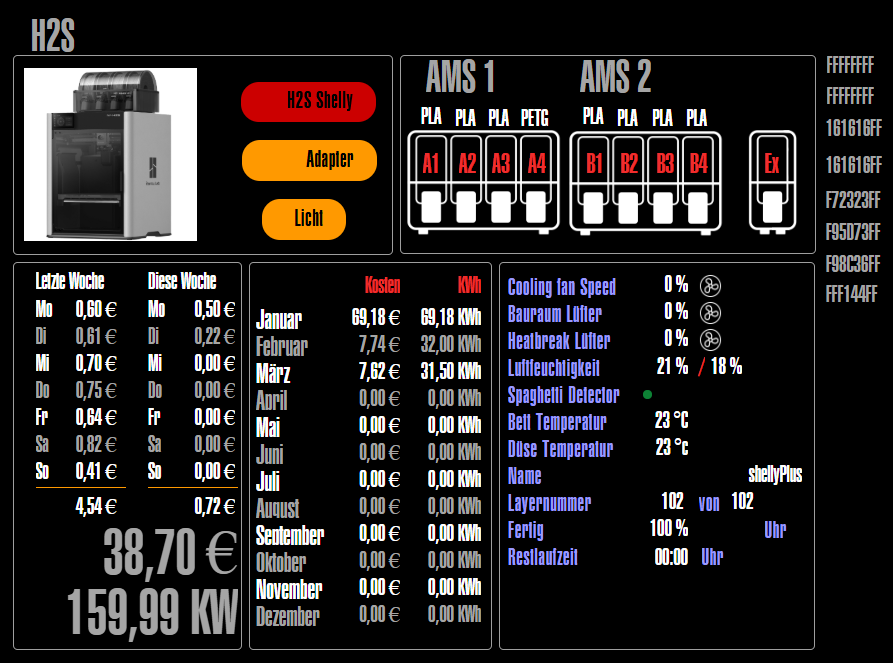
Aha ... bei mir läuft das alles über Shelly.
Aber Shellys ersetzen halt nicht den Adapter.In der Vis sieht das dann so aus.




Hey! Du scheinst an dieser Unterhaltung interessiert zu sein, hast aber noch kein Konto.
Hast du es satt, bei jedem Besuch durch die gleichen Beiträge zu scrollen? Wenn du dich für ein Konto anmeldest, kommst du immer genau dorthin zurück, wo du zuvor warst, und kannst dich über neue Antworten benachrichtigen lassen (entweder per E-Mail oder Push-Benachrichtigung). Du kannst auch Lesezeichen speichern und Beiträge positiv bewerten, um anderen Community-Mitgliedern deine Wertschätzung zu zeigen.
Mit deinem Input könnte dieser Beitrag noch besser werden 💗
Registrieren Anmelden218
Online33.0k
Benutzer83.6k
Themen1.3m
Beiträge