Skip to content
  • Home
  • Aktuell
  • Tags
  • 0 Ungelesen 0
  • Kategorien
  • Unreplied
  • Beliebt
  • GitHub
  • Docu
  • Hilfe
Skins
  • Light
  • Brite
  • Cerulean
  • Cosmo
  • Flatly
  • Journal
  • Litera
  • Lumen
  • Lux
  • Materia
  • Minty
  • Morph
  • Pulse
  • Sandstone
  • Simplex
  • Sketchy
  • Spacelab
  • United
  • Yeti
  • Zephyr
  • Dark
  • Cyborg
  • Darkly
  • Quartz
  • Slate
  • Solar
  • Superhero
  • Vapor

  • Standard: (Kein Skin)
  • Kein Skin
Einklappen
ioBroker Logo

Community Forum

donate donate
  1. ioBroker Community Home
  2. Deutsch
  3. Visualisierung
  4. [erledigt] VIS-2 Visualisierung funktioniert nicht mehr

NEWS

  • Monatsrückblick Januar/Februar 2026 ist online!
    BluefoxB
    Bluefox
    16
    1
    259

  • Jahresrückblick 2025 – unser neuer Blogbeitrag ist online! ✨
    BluefoxB
    Bluefox
    17
    1
    4.6k

  • Neuer Blogbeitrag: Monatsrückblick - Dezember 2025 🎄
    BluefoxB
    Bluefox
    13
    1
    1.3k

[erledigt] VIS-2 Visualisierung funktioniert nicht mehr

Geplant Angeheftet Gesperrt Verschoben Visualisierung
35 Beiträge 5 Kommentatoren 320 Aufrufe 5 Watching
  • Älteste zuerst
  • Neuste zuerst
  • Meiste Stimmen
Antworten
  • In einem neuen Thema antworten
Anmelden zum Antworten
Dieses Thema wurde gelöscht. Nur Nutzer mit entsprechenden Rechten können es sehen.
  • skvarelS Online
    skvarelS Online
    skvarel
    Developer
    schrieb am zuletzt editiert von
    #2

    Ich sehe den vis-2-widgets-inventwo Adapter nicht in der diag Ausgabe ?!

    #TeamInventwo
    • Autodarts by inventwo
    • FoxESS Cloud by inventwo
    • vis-inventwo & vis-2-widgets-inventwo
    • vis-icontwo & vis-2-widgets-icontwo

    fuzzy1955F 2 Antworten Letzte Antwort
    0
    • fuzzy1955F fuzzy1955

      Hallo VIS-2 Profis!

      Ich mache regelmäßig alle Updates im Linux und IOB. Seit ein paar Wochen habe ich nachher das Problem, dass nach dem Update der Editor und die Visualisierung nicht mehr funktioniert.
      VIS2_3.jpg
      Die Startseite "home" ist kurz zu sehen, dann kommt ein weißer Bildschirm. Es hängt mit dem Adapter "Vis 2 Widgets Material" und den Widgets "tpInventwoWidgetSlider" und "tpInventwoWidgetUniversal" zusammen, die ich für die Navigation verwende. Die beiden Widgets sind auf der Seite "home" eingefügt und werden auf allen Seiten angezeigt.

      Auch das hilft nicht:

      iob stop
      iob fix
      iob upload vis-2
      iob restart
      

      Wenn ich den Adapter lösche (iobroker del vis-2-widgets-material), dann öffnet sich die Seite sowohl im Editor als auch in der Visualisierung ohne der Navigation auf allen Seiten:
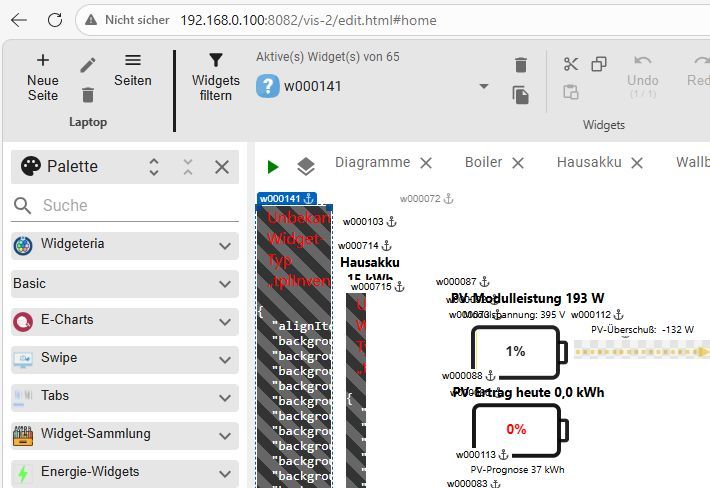
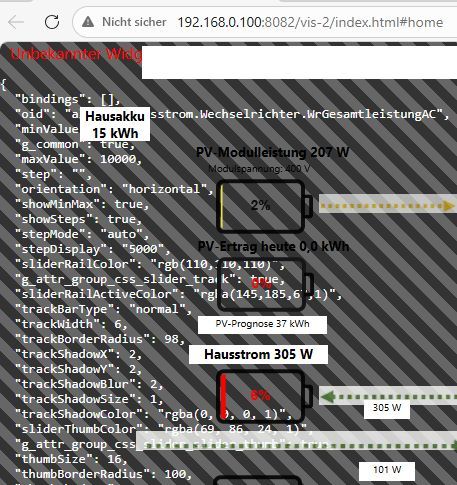
      VIS2_5.jpg
      VIS2_6.jpg

      Die IOB Diag sagt:


      ========== Start marking the full check here ===========

      Script v.2026-01-31
      
      *** BASE SYSTEM ***
      Operating System: Debian GNU/Linux 13 (trixie)
       Static hostname: raspberrypi
             Icon name: computer
                Kernel: Linux 6.12.62+rpt-rpi-2712
          Architecture: arm64
      OS is similar to:
      
      Model           : Raspberry Pi 5 Model B Rev 1.1
      Docker          : false
      Virtualization  : none
      Kernel          : aarch64
      Userland        : 64 bit
      
      Systemuptime and Load:
       07:13:58 up 14 min,  1 user,  load average: 0.16, 0.20, 0.18
      CPU threads: 4
      
      
      *** LIFE CYCLE STATUS ***
      Operating System is the current Debian stable version codenamed 'trixie'!
      
      *** RASPBERRY THROTTLING ***
      Current issues:
      No throttling issues detected.
      
      Previously detected issues:
      No throttling issues detected.
      
      *** TIME AND TIMEZONES ***
                     Local time: Wed 2026-03-04 07:13:59 CET
                 Universal time: Wed 2026-03-04 06:13:59 UTC
                       RTC time: Wed 2026-03-04 06:13:59
                      Time zone: Europe/Vienna (CET, +0100)
      System clock synchronized: yes
                    NTP service: active
                RTC in local TZ: no
      
      *** Users and Groups ***
      User that called 'iob diag':
      pi
      HOME=/home/pi
      GROUPS=pi adm dialout cdrom sudo audio video plugdev games users netdev gpio i2c spi render input iobroker
      
      User that is running 'js-controller':
      iobroker
      HOME=/home/iobroker
      SUDO_HOME=/home/pi
      GROUPS=iobroker tty dialout audio video plugdev bluetooth gpio i2c
      
      *** DISPLAY-SERVER SETUP ***
      Display-Server:         false
      Unit display-manager.service could not be found.
      Display-Manager:
      Desktop:
      Session:                tty
      
      *** MEMORY ***
                     total        used        free      shared  buff/cache   available
      Mem:             17G        2.4G         13G         28M        886M         14G
      Swap:           2.1G          0B        2.1G
      Total:           19G        2.4G         16G
      
      Active iob-Instances:   18
      
              16218 M total memory
               2290 M used memory
               2170 M active memory
                480 M inactive memory
              13214 M free memory
                 69 M buffer memory
                776 M swap cache
               2047 M total swap
                  0 M used swap
               2047 M free swap
      
      *** top - Table Of Processes  ***
      top - 07:13:59 up 14 min,  1 user,  load average: 0.16, 0.20, 0.18
      Tasks: 218 total,   1 running, 217 sleeping,   0 stopped,   0 zombie
      %Cpu(s):  0.0 us,  0.0 sy,  0.0 ni,100.0 id,  0.0 wa,  0.0 hi,  0.0 si,  0.0 st
      MiB Mem :  16218.9 total,  13213.5 free,   2290.2 used,    846.8 buff/cache
      MiB Swap:   2048.0 total,   2048.0 free,      0.0 used.  13928.7 avail Mem
      
      *** FAILED SERVICES ***
      
        UNIT LOAD ACTIVE SUB DESCRIPTION
      
      0 loaded units listed.
      
      
      *** DMESG CRITICAL ERRORS ***
      No critical errors detected
      
      *** FILESYSTEM ***
      Filesystem     Type      Size  Used Avail Use% Mounted on
      udev           devtmpfs  7.9G     0  7.9G   0% /dev
      tmpfs          tmpfs     3.2G   18M  3.2G   1% /run
      /dev/mmcblk0p2 ext4       48G  9.7G   36G  22% /
      tmpfs          tmpfs     8.0G     0  8.0G   0% /dev/shm
      tmpfs          tmpfs     5.0M   48K  5.0M   1% /run/lock
      tmpfs          tmpfs     1.0M     0  1.0M   0% /run/credentials/systemd-journald.service
      tmpfs          tmpfs     8.0G  9.6M  8.0G   1% /tmp
      /dev/mmcblk0p1 vfat      510M   66M  445M  13% /boot/firmware
      tmpfs          tmpfs     1.0M     0  1.0M   0% /run/credentials/getty@tty1.service
      tmpfs          tmpfs     1.0M     0  1.0M   0% /run/credentials/serial-getty@ttyAMA10.service
      tmpfs          tmpfs     1.6G   32K  1.6G   1% /run/user/1000
      
      Messages concerning ext4 filesystem in dmesg:
      [Wed Mar  4 06:59:54 2026] EXT4-fs (mmcblk0p2): orphan cleanup on readonly fs
      [Wed Mar  4 06:59:54 2026] EXT4-fs (mmcblk0p2): mounted filesystem 21724cc6-e5a3-48a1-8643-7917dba3a9fb ro with ordered data mode. Quota mode: none.
      [Wed Mar  4 06:59:56 2026] EXT4-fs (mmcblk0p2): re-mounted 21724cc6-e5a3-48a1-8643-7917dba3a9fb r/w.
      
      Show mounted filesystems:
      TARGET           SOURCE         FSTYPE OPTIONS
      /                /dev/mmcblk0p2 ext4   rw,noatime
      `-/boot/firmware /dev/mmcblk0p1 vfat   rw,relatime,fmask=0022,dmask=0022,codepage=437,iocharset=ascii,shortname=mixed,errors=remount-ro
      
      Files in neuralgic directories:
      
      /var:
      2.8G    /var/
      537M    /var/lib
      347M    /var/lib/mysql
      231M    /var/cache
      225M    /var/cache/apt
      
      Archived and active journals take up 8M in the file system.
      
      /opt/iobroker/backups:
      86M     /opt/iobroker/backups/
      
      /opt/iobroker/iobroker-data:
      449M    /opt/iobroker/iobroker-data/
      367M    /opt/iobroker/iobroker-data/files
      106M    /opt/iobroker/iobroker-data/files/vis-2
      67M     /opt/iobroker/iobroker-data/files/echarts.admin
      65M     /opt/iobroker/iobroker-data/files/vis-2/widgets
      
      The five largest files in iobroker-data are:
      26M     /opt/iobroker/iobroker-data/files/echarts/static/js/main.41cee985.js.map
      26M     /opt/iobroker/iobroker-data/files/echarts.admin/chart/static/js/main.41cee985.js.map
      24M     /opt/iobroker/iobroker-data/files/echarts.admin/static/js/main.70a15e1f.js.map
      18M     /opt/iobroker/iobroker-data/files/echarts/preview/static/js/main.5fe9c7da.js.map
      16M     /opt/iobroker/iobroker-data/objects.jsonl
      
      USB-Devices by-id:
      USB-Sticks - Avoid direct links to /dev/tty* in your adapter setups,
      please always prefer the links 'by-id':
      
      No Devices found 'by-id'
      
      *** ZigBee Settings ***
      No nvbackup.json found.
      
      *** NodeJS-Installation ***
      
      /usr/bin/nodejs         v22.22.0
      /usr/bin/node           v22.22.0
      /usr/bin/npm            10.9.4
      /usr/bin/npx            10.9.4
      
      ✓ Node.js installation is correct
      
      nodejs:
        Installed: 22.22.0-1nodesource1
        Candidate: 22.22.0-1nodesource1
        Version table:
       *** 22.22.0-1nodesource1 1001
              500 https://deb.nodesource.com/node_22.x nodistro/main arm64 Packages
              100 /var/lib/dpkg/status
           22.21.0-1nodesource1 1001
              500 https://deb.nodesource.com/node_22.x nodistro/main arm64 Packages
           22.20.0-1nodesource1 1001
              500 https://deb.nodesource.com/node_22.x nodistro/main arm64 Packages
           22.19.0-1nodesource1 1001
              500 https://deb.nodesource.com/node_22.x nodistro/main arm64 Packages
           22.18.0-1nodesource1 1001
              500 https://deb.nodesource.com/node_22.x nodistro/main arm64 Packages
           22.17.1-1nodesource1 1001
              500 https://deb.nodesource.com/node_22.x nodistro/main arm64 Packages
           22.17.0-1nodesource1 1001
              500 https://deb.nodesource.com/node_22.x nodistro/main arm64 Packages
           22.16.0-1nodesource1 1001
              500 https://deb.nodesource.com/node_22.x nodistro/main arm64 Packages
           22.15.1-1nodesource1 1001
              500 https://deb.nodesource.com/node_22.x nodistro/main arm64 Packages
           22.15.0-1nodesource1 1001
              500 https://deb.nodesource.com/node_22.x nodistro/main arm64 Packages
           22.14.0-1nodesource1 1001
              500 https://deb.nodesource.com/node_22.x nodistro/main arm64 Packages
           22.13.1-1nodesource1 1001
              500 https://deb.nodesource.com/node_22.x nodistro/main arm64 Packages
           22.13.0-1nodesource1 1001
              500 https://deb.nodesource.com/node_22.x nodistro/main arm64 Packages
           22.12.0-1nodesource1 1001
              500 https://deb.nodesource.com/node_22.x nodistro/main arm64 Packages
           22.11.0-1nodesource1 1001
              500 https://deb.nodesource.com/node_22.x nodistro/main arm64 Packages
           22.10.0-1nodesource1 1001
              500 https://deb.nodesource.com/node_22.x nodistro/main arm64 Packages
           22.9.0-1nodesource1 1001
              500 https://deb.nodesource.com/node_22.x nodistro/main arm64 Packages
           22.8.0-1nodesource1 1001
              500 https://deb.nodesource.com/node_22.x nodistro/main arm64 Packages
           22.7.0-1nodesource1 1001
              500 https://deb.nodesource.com/node_22.x nodistro/main arm64 Packages
           22.6.0-1nodesource1 1001
              500 https://deb.nodesource.com/node_22.x nodistro/main arm64 Packages
           22.5.1-1nodesource1 1001
              500 https://deb.nodesource.com/node_22.x nodistro/main arm64 Packages
           22.5.0-1nodesource1 1001
              500 https://deb.nodesource.com/node_22.x nodistro/main arm64 Packages
           22.4.1-1nodesource1 1001
              500 https://deb.nodesource.com/node_22.x nodistro/main arm64 Packages
           22.4.0-1nodesource1 1001
              500 https://deb.nodesource.com/node_22.x nodistro/main arm64 Packages
           22.3.0-1nodesource1 1001
              500 https://deb.nodesource.com/node_22.x nodistro/main arm64 Packages
           22.2.0-1nodesource1 1001
              500 https://deb.nodesource.com/node_22.x nodistro/main arm64 Packages
           22.1.0-1nodesource1 1001
              500 https://deb.nodesource.com/node_22.x nodistro/main arm64 Packages
           22.0.0-1nodesource1 1001
              500 https://deb.nodesource.com/node_22.x nodistro/main arm64 Packages
           20.19.2+dfsg-1 500
              500 http://deb.debian.org/debian trixie/main arm64 Packages
      
      Temp directories causing deletion problem: 0
      No problems detected
      
      Errors in npm tree: 0
      No problems detected
      
      Checking for nodejs vulnerability:
      
      
       █████  ██      ██           ██████   ██████   ██████  ██████         ██
      ██   ██ ██      ██          ██       ██    ██ ██    ██ ██   ██     ██  ██
      ███████ ██      ██          ██   ███ ██    ██ ██    ██ ██   ██         ██
      ██   ██ ██      ██          ██    ██ ██    ██ ██    ██ ██   ██     ██  ██
      ██   ██ ███████ ███████      ██████   ██████   ██████  ██████         ██


      *** ioBroker-Installation ***
      
      ioBroker Status
      iobroker is running on this host.
      
      
      Objects type: jsonl
      States  type: jsonl
      
      Hosts:
      raspberrypi         raspberrypi (version: 7.0.7, hostname: raspberrypi   , alive, uptime: 840)
      
      Core adapters versions
      js-controller:  7.0.7
      admin:          7.7.22
      javascript:     9.0.18
      
      nodejs modules from github:     2
      +-- iobroker.fronius-wattpilot@4.8.0 (git+ssh://git@github.com/tim2zg/ioBroker.fronius-wattpilot.git#d7c1a6f37fb8de5f8580e3b1d657a7ec2f7e20c1)
      +-- iobroker.shelly@10.6.0 (git+ssh://git@github.com/iobroker-community-adapters/ioBroker.shelly.git#fa498df59a9fa0b4e43c2854876e95effe3676b4)
      
      Adapter State
      + system.adapter.admin.0                  : admin                 : raspberrypi                              -  enabled, port: 8081, bind: 0.0.0.0, run as: admin
        system.adapter.apg-info.0               : apg-info              : raspberrypi                              -  enabled
      + system.adapter.backitup.0               : backitup              : raspberrypi                              -  enabled
      + system.adapter.echarts.0                : echarts               : raspberrypi                              -  enabled
      + system.adapter.email.0                  : email                 : raspberrypi                              -  enabled
      + system.adapter.emporia.1                : emporia               : raspberrypi                              -  enabled
        system.adapter.flexcharts.0             : flexcharts            : raspberrypi                              -  enabled
        system.adapter.flot.0                   : flot                  : raspberrypi                              - disabled
      + system.adapter.fronius-wattpilot.0      : fronius-wattpilot     : raspberrypi                              -  enabled
      + system.adapter.javascript.0             : javascript            : raspberrypi                              -  enabled
      + system.adapter.javascript.1             : javascript            : raspberrypi                              -  enabled
      + system.adapter.kecontact.0              : kecontact             : raspberrypi                              -  enabled
      + system.adapter.modbus.0                 : modbus                : raspberrypi                              -  enabled
      + system.adapter.modbus.1                 : modbus                : raspberrypi                              -  enabled
        system.adapter.modbus.2                 : modbus                : raspberrypi                              - disabled
      + system.adapter.ping.0                   : ping                  : raspberrypi                              -  enabled
      + system.adapter.shelly.0                 : shelly                : raspberrypi                              -  enabled, port: 1882, bind: 192.168.0.100
      + system.adapter.sql.0                    : sql                   : raspberrypi                              -  enabled, port: 3306
      + system.adapter.systeminfo.0             : systeminfo            : raspberrypi                              -  enabled
        system.adapter.vis-2-widgets-collection.0: vis-2-widgets-collection: raspberrypi                              - disabled
        system.adapter.vis-2-widgets-energy.0   : vis-2-widgets-energy  : raspberrypi                              - disabled
        system.adapter.vis-2-widgets-gauges.0   : vis-2-widgets-gauges  : raspberrypi                              - disabled
        system.adapter.vis-2-widgets-icontwo.0  : vis-2-widgets-icontwo : raspberrypi                              - disabled
        system.adapter.vis-2-widgets-material.0 : vis-2-widgets-material: raspberrypi                              - disabled
        system.adapter.vis-2-widgets-weather-and-heating.0: vis-2-widgets-weather-and-heating: raspberrypi                              - disabled
      + system.adapter.vis-2.0                  : vis-2                 : raspberrypi                              -  enabled
      + system.adapter.web.0                    : web                   : raspberrypi                              -  enabled, port: 8082, bind: 0.0.0.0, run as: admin
      
      + instance is alive
      
      Enabled adapters with bindings
      + system.adapter.admin.0                  : admin                 : raspberrypi                              -  enabled, port: 8081, bind: 0.0.0.0, run as: admin
      + system.adapter.shelly.0                 : shelly                : raspberrypi                              -  enabled, port: 1882, bind: 192.168.0.100
      + system.adapter.sql.0                    : sql                   : raspberrypi                              -  enabled, port: 3306
      + system.adapter.web.0                    : web                   : raspberrypi                              -  enabled, port: 8082, bind: 0.0.0.0, run as: admin
      
      ioBroker-Repositories
      ┌─────────┬──────────┬──────────────────────────────────────────────────┬──────────────┐
      │ (index) │ name     │ url                                              │ auto upgrade │
      ├─────────┼──────────┼──────────────────────────────────────────────────┼──────────────┤
      │ 0       │ 'stable' │ 'http://download.iobroker.net/sources-dist.json' │ true         │
      └─────────┴──────────┴──────────────────────────────────────────────────┴──────────────┘
      
      Active repo(s): stable
      Upgrade policy: minor
      
      Installed ioBroker-Adapters
      Used repository: stable
      Adapter    "admin"        : 7.7.22   , installed 7.7.22
      Adapter    "apg-info"     : 0.1.28   , installed 0.1.28
      Adapter    "backitup"     : 3.3.13   , installed 3.3.13
      Adapter    "echarts"      : 1.9.2    , installed 1.9.2
      Adapter    "email"        : 2.0.4    , installed 2.0.4
      Adapter    "emporia"      : 0.0.12   , installed 0.1.0
      Adapter    "flexcharts"   : 0.6.1    , installed 0.6.1
      Adapter    "flot"         : 1.12.0   , installed 1.12.0
      Adapter    "fronius-wattpilot": 4.8.0, installed 4.8.0
      Adapter    "javascript"   : 9.0.18   , installed 9.0.18
      Controller "js-controller": 7.0.7    , installed 7.0.7
      Adapter    "kecontact"    : 3.4.0    , installed 3.4.0
      Adapter    "modbus"       : 7.0.6    , installed 6.4.0  [Updatable]
      Adapter    "ping"         : 1.7.9    , installed 1.7.9
      Adapter    "shelly"       : 10.5.2   , installed 10.6.0
      Adapter    "socketio"     : 6.7.1    , installed 7.0.8
      Adapter    "sql"          : 3.0.1    , installed 3.0.1
      Adapter    "systeminfo"   : 1.3.0    , installed 1.3.0
      Adapter    "vis-2"        : 2.13.4   , installed 2.13.4
      Adapter    "vis-2-widgets-collection": 1.8.1, installed 1.8.1
      Adapter    "vis-2-widgets-energy": 1.0.2, installed 1.0.2
      Adapter    "vis-2-widgets-gauges": 2.0.1, installed 2.0.1
      Adapter    "vis-2-widgets-icontwo": 1.25.0, installed 1.25.0
      Adapter    "vis-2-widgets-material": 1.4.10, installed 1.4.10
      Adapter    "vis-2-widgets-weather-and-heating": 1.1.5, installed 1.1.5
      Adapter    "web"          : 7.0.8    , installed 7.0.8
      Adapter    "ws"           : 2.6.2    , installed 3.0.19
      
      Objects and States
      Please stand by - This may take a while
      Objects:        4825
      States:         4171
      
      *** OS-Repositories and Updates ***
      W: An error occurred during the signature verification. The repository is not updated and the previous index files will be used. OpenPGP signature verification failed: https://deb.nodesource.com/node_22.x nodistro InRelease: Sub-process /usr/bin/sqv returned an error code (1), error message is: Signing key on 6F71F525282841EEDAF851B42F59B5F99B1BE0B4 is not bound:            No binding signature at time 2026-01-23T18:12:38Z   because: Policy rejected non-revocation signature (PositiveCertification) requiring second pre-image resistance   because: SHA1 is not considered secure since 2026-02-01T00:00:00Z
      W: Failed to fetch https://deb.nodesource.com/node_22.x/dists/nodistro/InRelease  Sub-process /usr/bin/sqv returned an error code (1), error message is: Signing key on 6F71F525282841EEDAF851B42F59B5F99B1BE0B4 is not bound:            No binding signature at time 2026-01-23T18:12:38Z   because: Policy rejected non-revocation signature (PositiveCertification) requiring second pre-image resistance   because: SHA1 is not considered secure since 2026-02-01T00:00:00Z
      W: Some index files failed to download. They have been ignored, or old ones used instead.
      Hit:1 http://deb.debian.org/debian trixie InRelease
      Hit:2 http://deb.debian.org/debian trixie-updates InRelease
      Hit:3 http://deb.debian.org/debian-security trixie-security InRelease
      Hit:4 http://archive.raspberrypi.com/debian trixie InRelease
      Hit:5 https://deb.nodesource.com/node_22.x nodistro InRelease
      Err:5 https://deb.nodesource.com/node_22.x nodistro InRelease
        Sub-process /usr/bin/sqv returned an error code (1), error message is: Signing key on 6F71F525282841EEDAF851B42F59B5F99B1BE0B4 is not bound:            No binding signature at time 2026-01-23T18:12:38Z   because: Policy rejected non-revocation signature (PositiveCertification) requiring second pre-image resistance   because: SHA1 is not considered secure since 2026-02-01T00:00:00Z
      Reading package lists...
      W: An error occurred during the signature verification. The repository is not updated and the previous index files will be used. OpenPGP signature verification failed: https://deb.nodesource.com/node_22.x nodistro InRelease: Sub-process /usr/bin/sqv returned an error code (1), error message is: Signing key on 6F71F525282841EEDAF851B42F59B5F99B1BE0B4 is not bound:            No binding signature at time 2026-01-23T18:12:38Z   because: Policy rejected non-revocation signature (PositiveCertification) requiring second pre-image resistance   because: SHA1 is not considered secure since 2026-02-01T00:00:00Z
      W: Failed to fetch https://deb.nodesource.com/node_22.x/dists/nodistro/InRelease  Sub-process /usr/bin/sqv returned an error code (1), error message is: Signing key on 6F71F525282841EEDAF851B42F59B5F99B1BE0B4 is not bound:            No binding signature at time 2026-01-23T18:12:38Z   because: Policy rejected non-revocation signature (PositiveCertification) requiring second pre-image resistance   because: SHA1 is not considered secure since 2026-02-01T00:00:00Z
      W: Some index files failed to download. They have been ignored, or old ones used instead.
      Pending systemupdates: 0
      
      *** Listening Ports ***
      Active Internet connections (only servers)
      Proto Recv-Q Send-Q Local Address           Foreign Address         State       User       Inode      PID/Program name 
      tcp        0      0 192.168.0.100:1882      0.0.0.0:*               LISTEN      1001       10011      1400/io.shelly.0 
      tcp        0      0 0.0.0.0:22              0.0.0.0:*               LISTEN      0          8395       966/sshd: /usr/sbin
      tcp        0      0 0.0.0.0:111             0.0.0.0:*               LISTEN      0          2325       1/init           
      tcp        0      0 0.0.0.0:139             0.0.0.0:*               LISTEN      0          8581       1094/smbd        
      tcp        0      0 0.0.0.0:445             0.0.0.0:*               LISTEN      0          8580       1094/smbd        
      tcp        0      0 127.0.0.1:9000          0.0.0.0:*               LISTEN      1001       6915       949/iobroker.js-con
      tcp        0      0 127.0.0.1:9001          0.0.0.0:*               LISTEN      1001       6910       949/iobroker.js-con
      tcp        0      0 0.0.0.0:3306            0.0.0.0:*               LISTEN      104        7591       1019/mariadbd    
      tcp6       0      0 :::8081                 :::*                    LISTEN      1001       6973       1143/io.admin.0  
      tcp6       0      0 :::8082                 :::*                    LISTEN      1001       10237      1749/io.web.0    
      tcp6       0      0 :::22                   :::*                    LISTEN      0          8397       966/sshd: /usr/sbin
      tcp6       0      0 :::111                  :::*                    LISTEN      0          4612       1/init           
      tcp6       0      0 :::139                  :::*                    LISTEN      0          8579       1094/smbd        
      tcp6       0      0 :::445                  :::*                    LISTEN      0          8578       1094/smbd        
      udp        0      0 0.0.0.0:60126           0.0.0.0:*                           1001       10379      1367/io.kecontact.0
      udp        0      0 0.0.0.0:35664           0.0.0.0:*                           101        8201       745/avahi-daemon: r
      udp        0      0 0.0.0.0:5353            0.0.0.0:*                           101        8199       745/avahi-daemon: r
      udp        0      0 0.0.0.0:7090            0.0.0.0:*                           1001       10377      1367/io.kecontact.0
      udp        0      0 0.0.0.0:7092            0.0.0.0:*                           1001       10378      1367/io.kecontact.0
      udp        0      0 0.0.0.0:111             0.0.0.0:*                           0          3570       1/init           
      udp        0      0 192.168.0.255:137       0.0.0.0:*                           0          8490       1055/nmbd        
      udp        0      0 192.168.0.100:137       0.0.0.0:*                           0          8489       1055/nmbd        
      udp        0      0 0.0.0.0:137             0.0.0.0:*                           0          8477       1055/nmbd        
      udp        0      0 192.168.0.255:138       0.0.0.0:*                           0          8492       1055/nmbd        
      udp        0      0 192.168.0.100:138       0.0.0.0:*                           0          8491       1055/nmbd        
      udp        0      0 0.0.0.0:138             0.0.0.0:*                           0          8478       1055/nmbd        
      udp6       0      0 :::5353                 :::*                                101        8200       745/avahi-daemon: r
      udp6       0      0 :::111                  :::*                                0          2326       1/init           
      udp6       0      0 :::49443                :::*                                101        8202       745/avahi-daemon: r
      udp6       0      0 fe80::f731:ab58:82c:546 :::*                                0          6725       812/NetworkManager
      
      *** Log File - Last 25 Lines ***
      
      2026-03-04 07:10:41.914  - info: vis-2.0 (1807) Got terminate signal TERMINATE_YOURSELF
      2026-03-04 07:10:41.915  - info: vis-2.0 (1807) terminating
      2026-03-04 07:10:41.916  - info: vis-2.0 (1807) Terminated (ADAPTER_REQUESTED_TERMINATION): Without reason
      2026-03-04 07:10:41.918  - info: host.raspberrypi "system.adapter.vis-2.0" enabled
      2026-03-04 07:10:41.918  - info: host.raspberrypi stopInstance system.adapter.vis-2.0 (force=false, process=true)
      2026-03-04 07:10:41.920  - info: host.raspberrypi iobroker Adapter "system.adapter.vis-2.0" restarted.
      2026-03-04 07:10:41.920  - info: host.raspberrypi stopInstance system.adapter.vis-2.0 send kill signal
      2026-03-04 07:10:41.922  - info: vis-2.0 (1807) Got terminate signal TERMINATE_YOURSELF
      2026-03-04 07:10:41.973  - info: host.raspberrypi stopInstance system.adapter.vis-2.0 send kill signal
      2026-03-04 07:10:42.417  - info: vis-2.0 (1807) terminating
      2026-03-04 07:10:42.441  - info: host.raspberrypi instance system.adapter.vis-2.0 terminated with code 11 (ADAPTER_REQUESTED_TERMINATION)
      2026-03-04 07:10:42.930  - info: host.raspberrypi iobroker exit 0
      2026-03-04 07:10:45.632  - info: host.raspberrypi instance system.adapter.vis-2.0 in version "2.13.4" started with pid 2421
      2026-03-04 07:10:46.484  - info: vis-2.0 (2421) starting. Version 2.13.4 in /opt/iobroker/node_modules/iobroker.vis-2, node: v22.22.0, js-controller: 7.0.7
      2026-03-04 07:10:46.639  - info: vis-2.0 (2421) vis-2 license is OK.
      2026-03-04 07:10:50.966  - info: web.0 (1749) ==> Connected system.user.admin from ::ffff:192.168.0.2
      2026-03-04 07:10:53.115  - info: web.0 (1749) ==> Connected system.user.admin from ::ffff:192.168.0.2
      2026-03-04 07:12:02.278  - info: web.0 (1749) <== Disconnect system.user.admin from ::ffff:192.168.0.2
      2026-03-04 07:12:02.894  - info: web.0 (1749) ==> Connected system.user.admin from ::ffff:192.168.0.2
      2026-03-04 07:12:04.288  - info: web.0 (1749) ==> Connected system.user.admin from ::ffff:192.168.0.2
      2026-03-04 07:12:51.013  - info: web.0 (1749) <== Disconnect system.user.admin from ::ffff:192.168.0.2
      2026-03-04 07:12:51.022  - info: web.0 (1749) <== Disconnect system.user.admin from ::ffff:192.168.0.2
      2026-03-04 07:12:52.240  - info: web.0 (1749) <== Disconnect system.user.admin from ::ffff:192.168.0.2
      2026-03-04 07:12:58.510  - info: admin.0 (1143) ==> Connected system.user.admin from ::ffff:192.168.0.2
      2026-03-04 07:13:25.701  - warn: backitup.0 (1349) [iobroker/clean] No older backup files are deleted, because this backup was started manually


      ============ Mark until here for C&P =============

      iob diag has finished.

      Ich habe schon im Forum das Problem "VIS-2 weiße Seite" gefunden, komme jedoch damit nicht weiter. Hat jemand einen Lösung dazu? Vorweg danke!

      Gruß, Fuzzy

      Thomas BraunT Online
      Thomas BraunT Online
      Thomas Braun
      Most Active
      schrieb am zuletzt editiert von
      #3

      @fuzzy1955 sagte in [VIS-2] Visualisierung funktioniert nach Update nicht mehr:

      W: An error occurred during the signature verification. The repository is not updated and the previous index files will be used. OpenPGP signature verification failed: https://deb.nodesource.com/node_22.x nodistro InRelease: Sub-process /usr/bin/sqv returned an error code (1), error message is: Signing key on 6F71F525282841EEDAF851B42F59B5F99B1BE0B4 is not bound: No binding signature at time 2026-01-23T18:12:38Z because: Policy rejected non-revocation signature (PositiveCertification) requiring second pre-image resistance because: SHA1 is not considered secure since 2026-02-01T00:00:00Z

      Installier das nodesource-Repo nochmal neu:

      iob nodejs-update 22
      

      Rückfragen mit y bestätigen.

      Linux-Werkzeugkasten:
      https://forum.iobroker.net/topic/42952/der-kleine-iobroker-linux-werkzeugkasten
      NodeJS Fixer Skript:
      https://forum.iobroker.net/topic/68035/iob-node-fix-skript
      iob_diag: curl -sLf -o diag.sh https://iobroker.net/diag.sh && bash diag.sh

      fuzzy1955F 1 Antwort Letzte Antwort
      1
      • skvarelS skvarel

        Ich sehe den vis-2-widgets-inventwo Adapter nicht in der diag Ausgabe ?!

        fuzzy1955F Online
        fuzzy1955F Online
        fuzzy1955
        schrieb am zuletzt editiert von
        #4

        @skvarel sagte in [VIS-2] Visualisierung funktioniert nach Update nicht mehr:

        Ich sehe den vis-2-widgets-inventwo Adapter nicht in der diag Ausgabe

        Pardon, da hatte ich den Adapter gerade vorher gelöscht. Nochmals die iob diag:

        ========== Start marking the full check here ===========

        Script v.2026-01-31
        
        *** BASE SYSTEM ***
        Operating System: Debian GNU/Linux 13 (trixie)
         Static hostname: raspberrypi
               Icon name: computer
                  Kernel: Linux 6.12.62+rpt-rpi-2712
            Architecture: arm64
        OS is similar to:
        
        Model           : Raspberry Pi 5 Model B Rev 1.1
        Docker          : false
        Virtualization  : none
        Kernel          : aarch64
        Userland        : 64 bit
        
        Systemuptime and Load:
         08:08:13 up  1:08,  1 user,  load average: 0.08, 0.10, 0.13
        CPU threads: 4
        
        
        *** LIFE CYCLE STATUS ***
        Operating System is the current Debian stable version codenamed 'trixie'!
        
        *** RASPBERRY THROTTLING ***
        Current issues:
        No throttling issues detected.
        
        Previously detected issues:
        No throttling issues detected.
        
        *** TIME AND TIMEZONES ***
                       Local time: Wed 2026-03-04 08:08:13 CET
                   Universal time: Wed 2026-03-04 07:08:13 UTC
                         RTC time: Wed 2026-03-04 07:08:13
                        Time zone: Europe/Vienna (CET, +0100)
        System clock synchronized: yes
                      NTP service: active
                  RTC in local TZ: no
        
        *** Users and Groups ***
        User that called 'iob diag':
        pi
        HOME=/home/pi
        GROUPS=pi adm dialout cdrom sudo audio video plugdev games users netdev gpio i2c spi render input iobroker
        
        User that is running 'js-controller':
        iobroker
        HOME=/home/iobroker
        SUDO_HOME=/home/pi
        GROUPS=iobroker tty dialout audio video plugdev bluetooth gpio i2c
        
        *** DISPLAY-SERVER SETUP ***
        Display-Server:         false
        Unit display-manager.service could not be found.
        Display-Manager:
        Desktop:
        Session:                tty
        
        *** MEMORY ***
                       total        used        free      shared  buff/cache   available
        Mem:             17G        2.5G         13G         28M        1.3G         14G
        Swap:           2.1G          0B        2.1G
        Total:           19G        2.5G         15G
        
        Active iob-Instances:   18
        
                16218 M total memory
                 2428 M used memory
                 2200 M active memory
                  844 M inactive memory
                12699 M free memory
                  124 M buffer memory
                 1113 M swap cache
                 2047 M total swap
                    0 M used swap
                 2047 M free swap
        
        *** top - Table Of Processes  ***
        top - 08:08:13 up  1:08,  1 user,  load average: 0.08, 0.10, 0.13
        Tasks: 215 total,   1 running, 214 sleeping,   0 stopped,   0 zombie
        %Cpu(s):  2.4 us,  0.0 sy,  0.0 ni, 97.6 id,  0.0 wa,  0.0 hi,  0.0 si,  0.0 st
        MiB Mem :  16218.9 total,  12695.8 free,   2432.4 used,   1237.8 buff/cache
        MiB Swap:   2048.0 total,   2048.0 free,      0.0 used.  13786.5 avail Mem
        
        *** FAILED SERVICES ***
        
          UNIT LOAD ACTIVE SUB DESCRIPTION
        
        0 loaded units listed.
        
        
        *** DMESG CRITICAL ERRORS ***
        No critical errors detected
        
        *** FILESYSTEM ***
        Filesystem     Type      Size  Used Avail Use% Mounted on
        udev           devtmpfs  7.9G     0  7.9G   0% /dev
        tmpfs          tmpfs     3.2G   18M  3.2G   1% /run
        /dev/mmcblk0p2 ext4       48G  9.7G   36G  22% /
        tmpfs          tmpfs     8.0G     0  8.0G   0% /dev/shm
        tmpfs          tmpfs     5.0M   48K  5.0M   1% /run/lock
        tmpfs          tmpfs     1.0M     0  1.0M   0% /run/credentials/systemd-journald.service
        tmpfs          tmpfs     8.0G  9.7M  8.0G   1% /tmp
        /dev/mmcblk0p1 vfat      510M   66M  445M  13% /boot/firmware
        tmpfs          tmpfs     1.0M     0  1.0M   0% /run/credentials/getty@tty1.service
        tmpfs          tmpfs     1.0M     0  1.0M   0% /run/credentials/serial-getty@ttyAMA10.service
        tmpfs          tmpfs     1.6G   32K  1.6G   1% /run/user/1000
        
        Messages concerning ext4 filesystem in dmesg:
        [Wed Mar  4 06:59:54 2026] EXT4-fs (mmcblk0p2): orphan cleanup on readonly fs
        [Wed Mar  4 06:59:54 2026] EXT4-fs (mmcblk0p2): mounted filesystem 21724cc6-e5a3-48a1-8643-7917dba3a9fb ro with ordered data mode. Quota mode: none.
        [Wed Mar  4 06:59:56 2026] EXT4-fs (mmcblk0p2): re-mounted 21724cc6-e5a3-48a1-8643-7917dba3a9fb r/w.
        
        Show mounted filesystems:
        TARGET           SOURCE         FSTYPE OPTIONS
        /                /dev/mmcblk0p2 ext4   rw,noatime
        `-/boot/firmware /dev/mmcblk0p1 vfat   rw,relatime,fmask=0022,dmask=0022,codepage=437,iocharset=ascii,shortname=mixed,errors=remount-ro
        
        Files in neuralgic directories:
        
        /var:
        2.8G    /var/
        537M    /var/lib
        347M    /var/lib/mysql
        231M    /var/cache
        225M    /var/cache/apt
        
        Archived and active journals take up 8M in the file system.
        
        /opt/iobroker/backups:
        86M     /opt/iobroker/backups/
        
        /opt/iobroker/iobroker-data:
        441M    /opt/iobroker/iobroker-data/
        367M    /opt/iobroker/iobroker-data/files
        106M    /opt/iobroker/iobroker-data/files/vis-2
        67M     /opt/iobroker/iobroker-data/files/echarts.admin
        65M     /opt/iobroker/iobroker-data/files/vis-2/widgets
        
        The five largest files in iobroker-data are:
        26M     /opt/iobroker/iobroker-data/files/echarts/static/js/main.41cee985.js.map
        26M     /opt/iobroker/iobroker-data/files/echarts.admin/chart/static/js/main.41cee985.js.map
        24M     /opt/iobroker/iobroker-data/files/echarts.admin/static/js/main.70a15e1f.js.map
        18M     /opt/iobroker/iobroker-data/files/echarts/preview/static/js/main.5fe9c7da.js.map
        11M     /opt/iobroker/iobroker-data/objects.jsonl
        
        USB-Devices by-id:
        USB-Sticks - Avoid direct links to /dev/tty* in your adapter setups,
        please always prefer the links 'by-id':
        
        No Devices found 'by-id'
        
        *** ZigBee Settings ***
        No nvbackup.json found.
        
        *** NodeJS-Installation ***
        
        /usr/bin/nodejs         v22.22.0
        /usr/bin/node           v22.22.0
        /usr/bin/npm            10.9.4
        /usr/bin/npx            10.9.4
        
        ✓ Node.js installation is correct
        
        nodejs:
          Installed: 22.22.0-1nodesource1
          Candidate: 22.22.0-1nodesource1
          Version table:
         *** 22.22.0-1nodesource1 1001
                500 https://deb.nodesource.com/node_22.x nodistro/main arm64 Packages
                100 /var/lib/dpkg/status
             22.21.0-1nodesource1 1001
                500 https://deb.nodesource.com/node_22.x nodistro/main arm64 Packages
             22.20.0-1nodesource1 1001
                500 https://deb.nodesource.com/node_22.x nodistro/main arm64 Packages
             22.19.0-1nodesource1 1001
                500 https://deb.nodesource.com/node_22.x nodistro/main arm64 Packages
             22.18.0-1nodesource1 1001
                500 https://deb.nodesource.com/node_22.x nodistro/main arm64 Packages
             22.17.1-1nodesource1 1001
                500 https://deb.nodesource.com/node_22.x nodistro/main arm64 Packages
             22.17.0-1nodesource1 1001
                500 https://deb.nodesource.com/node_22.x nodistro/main arm64 Packages
             22.16.0-1nodesource1 1001
                500 https://deb.nodesource.com/node_22.x nodistro/main arm64 Packages
             22.15.1-1nodesource1 1001
                500 https://deb.nodesource.com/node_22.x nodistro/main arm64 Packages
             22.15.0-1nodesource1 1001
                500 https://deb.nodesource.com/node_22.x nodistro/main arm64 Packages
             22.14.0-1nodesource1 1001
                500 https://deb.nodesource.com/node_22.x nodistro/main arm64 Packages
             22.13.1-1nodesource1 1001
                500 https://deb.nodesource.com/node_22.x nodistro/main arm64 Packages
             22.13.0-1nodesource1 1001
                500 https://deb.nodesource.com/node_22.x nodistro/main arm64 Packages
             22.12.0-1nodesource1 1001
                500 https://deb.nodesource.com/node_22.x nodistro/main arm64 Packages
             22.11.0-1nodesource1 1001
                500 https://deb.nodesource.com/node_22.x nodistro/main arm64 Packages
             22.10.0-1nodesource1 1001
                500 https://deb.nodesource.com/node_22.x nodistro/main arm64 Packages
             22.9.0-1nodesource1 1001
                500 https://deb.nodesource.com/node_22.x nodistro/main arm64 Packages
             22.8.0-1nodesource1 1001
                500 https://deb.nodesource.com/node_22.x nodistro/main arm64 Packages
             22.7.0-1nodesource1 1001
                500 https://deb.nodesource.com/node_22.x nodistro/main arm64 Packages
             22.6.0-1nodesource1 1001
                500 https://deb.nodesource.com/node_22.x nodistro/main arm64 Packages
             22.5.1-1nodesource1 1001
                500 https://deb.nodesource.com/node_22.x nodistro/main arm64 Packages
             22.5.0-1nodesource1 1001
                500 https://deb.nodesource.com/node_22.x nodistro/main arm64 Packages
             22.4.1-1nodesource1 1001
                500 https://deb.nodesource.com/node_22.x nodistro/main arm64 Packages
             22.4.0-1nodesource1 1001
                500 https://deb.nodesource.com/node_22.x nodistro/main arm64 Packages
             22.3.0-1nodesource1 1001
                500 https://deb.nodesource.com/node_22.x nodistro/main arm64 Packages
             22.2.0-1nodesource1 1001
                500 https://deb.nodesource.com/node_22.x nodistro/main arm64 Packages
             22.1.0-1nodesource1 1001
                500 https://deb.nodesource.com/node_22.x nodistro/main arm64 Packages
             22.0.0-1nodesource1 1001
                500 https://deb.nodesource.com/node_22.x nodistro/main arm64 Packages
             20.19.2+dfsg-1 500
                500 http://deb.debian.org/debian trixie/main arm64 Packages
        
        Temp directories causing deletion problem: 0
        No problems detected
        
        Errors in npm tree: 0
        No problems detected
        
        Checking for nodejs vulnerability:
        
        
         █████  ██      ██           ██████   ██████   ██████  ██████         ██
        ██   ██ ██      ██          ██       ██    ██ ██    ██ ██   ██     ██  ██
        ███████ ██      ██          ██   ███ ██    ██ ██    ██ ██   ██         ██
        ██   ██ ██      ██          ██    ██ ██    ██ ██    ██ ██   ██     ██  ██
        ██   ██ ███████ ███████      ██████   ██████   ██████  ██████         ██


        *** ioBroker-Installation ***
        
        ioBroker Status
        iobroker is running on this host.
        
        
        Objects type: jsonl
        States  type: jsonl
        
        Hosts:
        raspberrypi         raspberrypi (version: 7.0.7, hostname: raspberrypi   , alive, uptime: 2251)
        
        Core adapters versions
        js-controller:  7.0.7
        admin:          7.7.22
        javascript:     9.0.18
        
        nodejs modules from github:     2
        +-- iobroker.fronius-wattpilot@4.8.0 (git+ssh://git@github.com/tim2zg/ioBroker.fronius-wattpilot.git#d7c1a6f37fb8de5f8580e3b1d657a7ec2f7e20c1)
        +-- iobroker.shelly@10.6.0 (git+ssh://git@github.com/iobroker-community-adapters/ioBroker.shelly.git#fa498df59a9fa0b4e43c2854876e95effe3676b4)
        
        Adapter State
        + system.adapter.admin.0                  : admin                 : raspberrypi                              -  enabled, port: 8081, bind: 0.0.0.0, run as: admin
          system.adapter.apg-info.0               : apg-info              : raspberrypi                              -  enabled
        + system.adapter.backitup.0               : backitup              : raspberrypi                              -  enabled
        + system.adapter.echarts.0                : echarts               : raspberrypi                              -  enabled
        + system.adapter.email.0                  : email                 : raspberrypi                              -  enabled
        + system.adapter.emporia.1                : emporia               : raspberrypi                              -  enabled
          system.adapter.flexcharts.0             : flexcharts            : raspberrypi                              -  enabled
          system.adapter.flot.0                   : flot                  : raspberrypi                              - disabled
        + system.adapter.fronius-wattpilot.0      : fronius-wattpilot     : raspberrypi                              -  enabled
        + system.adapter.javascript.0             : javascript            : raspberrypi                              -  enabled
        + system.adapter.javascript.1             : javascript            : raspberrypi                              -  enabled
        + system.adapter.kecontact.0              : kecontact             : raspberrypi                              -  enabled
        + system.adapter.modbus.0                 : modbus                : raspberrypi                              -  enabled
        + system.adapter.modbus.1                 : modbus                : raspberrypi                              -  enabled
          system.adapter.modbus.2                 : modbus                : raspberrypi                              - disabled
        + system.adapter.ping.0                   : ping                  : raspberrypi                              -  enabled
        + system.adapter.shelly.0                 : shelly                : raspberrypi                              -  enabled, port: 1882, bind: 192.168.0.100
        + system.adapter.sql.0                    : sql                   : raspberrypi                              -  enabled, port: 3306
        + system.adapter.systeminfo.0             : systeminfo            : raspberrypi                              -  enabled
          system.adapter.vis-2-widgets-collection.0: vis-2-widgets-collection: raspberrypi                              - disabled
          system.adapter.vis-2-widgets-energy.0   : vis-2-widgets-energy  : raspberrypi                              - disabled
          system.adapter.vis-2-widgets-gauges.0   : vis-2-widgets-gauges  : raspberrypi                              - disabled
          system.adapter.vis-2-widgets-icontwo.0  : vis-2-widgets-icontwo : raspberrypi                              - disabled
          system.adapter.vis-2-widgets-inventwo.0 : vis-2-widgets-inventwo: raspberrypi                              -  enabled
          system.adapter.vis-2-widgets-material.0 : vis-2-widgets-material: raspberrypi                              - disabled
          system.adapter.vis-2-widgets-weather-and-heating.0: vis-2-widgets-weather-and-heating: raspberrypi                              - disabled
        + system.adapter.vis-2.0                  : vis-2                 : raspberrypi                              -  enabled
        + system.adapter.web.0                    : web                   : raspberrypi                              -  enabled, port: 8082, bind: 0.0.0.0, run as: admin
        
        + instance is alive
        
        Enabled adapters with bindings
        + system.adapter.admin.0                  : admin                 : raspberrypi                              -  enabled, port: 8081, bind: 0.0.0.0, run as: admin
        + system.adapter.shelly.0                 : shelly                : raspberrypi                              -  enabled, port: 1882, bind: 192.168.0.100
        + system.adapter.sql.0                    : sql                   : raspberrypi                              -  enabled, port: 3306
        + system.adapter.web.0                    : web                   : raspberrypi                              -  enabled, port: 8082, bind: 0.0.0.0, run as: admin
        
        ioBroker-Repositories
        ┌─────────┬──────────┬──────────────────────────────────────────────────┬──────────────┐
        │ (index) │ name     │ url                                              │ auto upgrade │
        ├─────────┼──────────┼──────────────────────────────────────────────────┼──────────────┤
        │ 0       │ 'stable' │ 'http://download.iobroker.net/sources-dist.json' │ true         │
        └─────────┴──────────┴──────────────────────────────────────────────────┴──────────────┘
        
        Active repo(s): stable
        Upgrade policy: minor
        
        Installed ioBroker-Adapters
        Used repository: stable
        Adapter    "admin"        : 7.7.22   , installed 7.7.22
        Adapter    "apg-info"     : 0.1.28   , installed 0.1.28
        Adapter    "backitup"     : 3.3.13   , installed 3.3.13
        Adapter    "echarts"      : 1.9.2    , installed 1.9.2
        Adapter    "email"        : 2.0.4    , installed 2.0.4
        Adapter    "emporia"      : 0.0.12   , installed 0.1.0
        Adapter    "flexcharts"   : 0.6.1    , installed 0.6.1
        Adapter    "flot"         : 1.12.0   , installed 1.12.0
        Adapter    "fronius-wattpilot": 4.8.0, installed 4.8.0
        Adapter    "javascript"   : 9.0.18   , installed 9.0.18
        Controller "js-controller": 7.0.7    , installed 7.0.7
        Adapter    "kecontact"    : 3.4.0    , installed 3.4.0
        Adapter    "modbus"       : 7.0.6    , installed 6.4.0  [Updatable]
        Adapter    "ping"         : 1.7.9    , installed 1.7.9
        Adapter    "shelly"       : 10.5.2   , installed 10.6.0
        Adapter    "socketio"     : 6.7.1    , installed 7.0.8
        Adapter    "sql"          : 3.0.1    , installed 3.0.1
        Adapter    "systeminfo"   : 1.3.0    , installed 1.3.0
        Adapter    "vis-2"        : 2.13.4   , installed 2.13.4
        Adapter    "vis-2-widgets-collection": 1.8.1, installed 1.8.1
        Adapter    "vis-2-widgets-energy": 1.0.2, installed 1.0.2
        Adapter    "vis-2-widgets-gauges": 2.0.1, installed 2.0.1
        Adapter    "vis-2-widgets-icontwo": 1.25.0, installed 1.25.0
        Adapter    "vis-2-widgets-inventwo": 0.5.5, installed 0.5.5
        Adapter    "vis-2-widgets-material": 1.4.10, installed 1.4.10
        Adapter    "vis-2-widgets-weather-and-heating": 1.1.5, installed 1.1.5
        Adapter    "web"          : 7.0.8    , installed 7.0.8
        Adapter    "ws"           : 2.6.2    , installed 3.0.19
        
        Objects and States
        Please stand by - This may take a while
        Objects:        4828
        States:         4160
        
        *** OS-Repositories and Updates ***
        W: An error occurred during the signature verification. The repository is not updated and the previous index files will be used. OpenPGP signature verification failed: https://deb.nodesource.com/node_22.x nodistro InRelease: Sub-process /usr/bin/sqv returned an error code (1), error message is: Signing key on 6F71F525282841EEDAF851B42F59B5F99B1BE0B4 is not bound:            No binding signature at time 2026-01-23T18:12:38Z   because: Policy rejected non-revocation signature (PositiveCertification) requiring second pre-image resistance   because: SHA1 is not considered secure since 2026-02-01T00:00:00Z
        W: Failed to fetch https://deb.nodesource.com/node_22.x/dists/nodistro/InRelease  Sub-process /usr/bin/sqv returned an error code (1), error message is: Signing key on 6F71F525282841EEDAF851B42F59B5F99B1BE0B4 is not bound:            No binding signature at time 2026-01-23T18:12:38Z   because: Policy rejected non-revocation signature (PositiveCertification) requiring second pre-image resistance   because: SHA1 is not considered secure since 2026-02-01T00:00:00Z
        W: Some index files failed to download. They have been ignored, or old ones used instead.
        Hit:1 http://deb.debian.org/debian trixie InRelease
        Hit:2 http://deb.debian.org/debian trixie-updates InRelease
        Hit:3 http://deb.debian.org/debian-security trixie-security InRelease
        Hit:4 http://archive.raspberrypi.com/debian trixie InRelease
        Hit:5 https://deb.nodesource.com/node_22.x nodistro InRelease
        Err:5 https://deb.nodesource.com/node_22.x nodistro InRelease
          Sub-process /usr/bin/sqv returned an error code (1), error message is: Signing key on 6F71F525282841EEDAF851B42F59B5F99B1BE0B4 is not bound:            No binding signature at time 2026-01-23T18:12:38Z   because: Policy rejected non-revocation signature (PositiveCertification) requiring second pre-image resistance   because: SHA1 is not considered secure since 2026-02-01T00:00:00Z
        Reading package lists...
        W: An error occurred during the signature verification. The repository is not updated and the previous index files will be used. OpenPGP signature verification failed: https://deb.nodesource.com/node_22.x nodistro InRelease: Sub-process /usr/bin/sqv returned an error code (1), error message is: Signing key on 6F71F525282841EEDAF851B42F59B5F99B1BE0B4 is not bound:            No binding signature at time 2026-01-23T18:12:38Z   because: Policy rejected non-revocation signature (PositiveCertification) requiring second pre-image resistance   because: SHA1 is not considered secure since 2026-02-01T00:00:00Z
        W: Failed to fetch https://deb.nodesource.com/node_22.x/dists/nodistro/InRelease  Sub-process /usr/bin/sqv returned an error code (1), error message is: Signing key on 6F71F525282841EEDAF851B42F59B5F99B1BE0B4 is not bound:            No binding signature at time 2026-01-23T18:12:38Z   because: Policy rejected non-revocation signature (PositiveCertification) requiring second pre-image resistance   because: SHA1 is not considered secure since 2026-02-01T00:00:00Z
        W: Some index files failed to download. They have been ignored, or old ones used instead.
        Pending systemupdates: 0
        
        *** Listening Ports ***
        Active Internet connections (only servers)
        Proto Recv-Q Send-Q Local Address           Foreign Address         State       User       Inode      PID/Program name 
        tcp        0      0 192.168.0.100:1882      0.0.0.0:*               LISTEN      1001       60962      5162/io.shelly.0 
        tcp        0      0 0.0.0.0:22              0.0.0.0:*               LISTEN      0          8395       966/sshd: /usr/sbin
        tcp        0      0 0.0.0.0:111             0.0.0.0:*               LISTEN      0          2325       1/init           
        tcp        0      0 0.0.0.0:139             0.0.0.0:*               LISTEN      0          8581       1094/smbd        
        tcp        0      0 0.0.0.0:445             0.0.0.0:*               LISTEN      0          8580       1094/smbd        
        tcp        0      0 127.0.0.1:9000          0.0.0.0:*               LISTEN      1001       60585      4924/iobroker.js-co
        tcp        0      0 127.0.0.1:9001          0.0.0.0:*               LISTEN      1001       57903      4924/iobroker.js-co
        tcp        0      0 0.0.0.0:3306            0.0.0.0:*               LISTEN      104        7591       1019/mariadbd    
        tcp6       0      0 :::8081                 :::*                    LISTEN      1001       57954      4942/io.admin.0  
        tcp6       0      0 :::8082                 :::*                    LISTEN      1001       61150      5523/io.web.0    
        tcp6       0      0 :::22                   :::*                    LISTEN      0          8397       966/sshd: /usr/sbin
        tcp6       0      0 :::111                  :::*                    LISTEN      0          4612       1/init           
        tcp6       0      0 :::139                  :::*                    LISTEN      0          8579       1094/smbd        
        tcp6       0      0 :::445                  :::*                    LISTEN      0          8578       1094/smbd        
        udp        0      0 0.0.0.0:35664           0.0.0.0:*                           101        8201       745/avahi-daemon: r
        udp        0      0 0.0.0.0:45594           0.0.0.0:*                           1001       60960      5159/io.kecontact.0
        udp        0      0 0.0.0.0:5353            0.0.0.0:*                           101        8199       745/avahi-daemon: r
        udp        0      0 0.0.0.0:7090            0.0.0.0:*                           1001       60958      5159/io.kecontact.0
        udp        0      0 0.0.0.0:7092            0.0.0.0:*                           1001       60959      5159/io.kecontact.0
        udp        0      0 0.0.0.0:111             0.0.0.0:*                           0          3570       1/init           
        udp        0      0 192.168.0.255:137       0.0.0.0:*                           0          8490       1055/nmbd        
        udp        0      0 192.168.0.100:137       0.0.0.0:*                           0          8489       1055/nmbd        
        udp        0      0 0.0.0.0:137             0.0.0.0:*                           0          8477       1055/nmbd        
        udp        0      0 192.168.0.255:138       0.0.0.0:*                           0          8492       1055/nmbd        
        udp        0      0 192.168.0.100:138       0.0.0.0:*                           0          8491       1055/nmbd        
        udp        0      0 0.0.0.0:138             0.0.0.0:*                           0          8478       1055/nmbd        
        udp6       0      0 :::5353                 :::*                                101        8200       745/avahi-daemon: r
        udp6       0      0 :::111                  :::*                                0          2326       1/init           
        udp6       0      0 :::49443                :::*                                101        8202       745/avahi-daemon: r
        udp6       0      0 fe80::f731:ab58:82c:546 :::*                                0          6725       812/NetworkManager
        
        *** Log File - Last 25 Lines ***
        
        2026-03-04 08:07:28.932  - info: host.raspberrypi stopInstance system.adapter.vis-2.0 (force=false, process=true)
        2026-03-04 08:07:28.942  - info: host.raspberrypi stopInstance system.adapter.vis-2.0 send kill signal
        2026-03-04 08:07:28.945  - info: host.raspberrypi iobroker Adapter "system.adapter.vis-2.0" restarted.
        2026-03-04 08:07:28.945  - info: vis-2.0 (5581) Got terminate signal TERMINATE_YOURSELF
        2026-03-04 08:07:28.957  - info: host.raspberrypi iobroker host.raspberrypi object system.adapter.vis-2-widgets-inventwo created/updatedUpdating objects from io-package.json for adapter "vis-2-widgets-inventwo" with version "0.5.5"
        2026-03-04 08:07:28.958  - info: host.raspberrypi stopInstance system.adapter.vis-2.0 send kill signal
        2026-03-04 08:07:28.991  - info: host.raspberrypi "system.adapter.vis-2.0" disabled
        2026-03-04 08:07:28.992  - info: host.raspberrypi stopInstance system.adapter.vis-2.0 (force=false, process=true)
        2026-03-04 08:07:29.007  - info: vis-2.0 (5581) Got terminate signal TERMINATE_YOURSELF
        2026-03-04 08:07:29.017  - info: host.raspberrypi "system.adapter.vis-2.0" enabled
        2026-03-04 08:07:29.017  - info: host.raspberrypi stopInstance system.adapter.vis-2.0 (force=false, process=true)
        2026-03-04 08:07:29.032  - info: host.raspberrypi stopInstance system.adapter.vis-2.0 send kill signal
        2026-03-04 08:07:29.033  - info: host.raspberrypi iobroker Adapter "system.adapter.vis-2.0" restarted.
        2026-03-04 08:07:29.034  - info: vis-2.0 (5581) Got terminate signal TERMINATE_YOURSELF
        2026-03-04 08:07:29.042  - info: host.raspberrypi iobroker host.raspberrypi create instance vis-2-widgets-inventwo
        2026-03-04 08:07:29.043  - info: host.raspberrypi stopInstance system.adapter.vis-2.0 send kill signal
        2026-03-04 08:07:29.047  - info: host.raspberrypi iobroker host.raspberrypi object system.adapter.vis-2-widgets-inventwo.0 created
        2026-03-04 08:07:29.432  - info: vis-2.0 (5581) terminating
        2026-03-04 08:07:29.458  - info: host.raspberrypi instance system.adapter.vis-2.0 terminated with code 11 (ADAPTER_REQUESTED_TERMINATION)
        2026-03-04 08:07:30.069  - info: host.raspberrypi iobroker exit 0
        2026-03-04 08:07:32.585  - info: host.raspberrypi instance system.adapter.vis-2.0 in version "2.13.4" started with pid 7503
        2026-03-04 08:07:33.432  - info: vis-2.0 (7503) starting. Version 2.13.4 in /opt/iobroker/node_modules/iobroker.vis-2, node: v22.22.0, js-controller: 7.0.7
        2026-03-04 08:07:33.654  - info: vis-2.0 (7503) vis-2 license is OK.
        2026-03-04 08:07:42.377  - info: web.0 (5523) ==> Connected system.user.admin from ::ffff:192.168.0.2
        2026-03-04 08:07:44.414  - info: web.0 (5523) ==> Connected system.user.admin from ::ffff:192.168.0.2


        ============ Mark until here for C&P =============

        iob diag has finished.

        Raspberry PI5 mit Linux Debian 13, IoBroker v7.7.22, VIS-2, MariaDB (MySQL)
        Shellies: 1G4, 1MiniG3, PlusI4DC, PlusPlugS, Pro0110PM, ProSmoke. Modbus: Waveshare Relay 8 Channels, Waveshare RS485-TO-ETH.
        PV: 10 kWp Module, 2 x Deye WR SUN-10K, 3 x 10 kWh MeritSun LiFe Speicher, KEBA P30 Wallbox, Fronius Wattpilot home 11

        1 Antwort Letzte Antwort
        1
        • Thomas BraunT Thomas Braun

          @fuzzy1955 sagte in [VIS-2] Visualisierung funktioniert nach Update nicht mehr:

          W: An error occurred during the signature verification. The repository is not updated and the previous index files will be used. OpenPGP signature verification failed: https://deb.nodesource.com/node_22.x nodistro InRelease: Sub-process /usr/bin/sqv returned an error code (1), error message is: Signing key on 6F71F525282841EEDAF851B42F59B5F99B1BE0B4 is not bound: No binding signature at time 2026-01-23T18:12:38Z because: Policy rejected non-revocation signature (PositiveCertification) requiring second pre-image resistance because: SHA1 is not considered secure since 2026-02-01T00:00:00Z

          Installier das nodesource-Repo nochmal neu:

          iob nodejs-update 22
          

          Rückfragen mit y bestätigen.

          fuzzy1955F Online
          fuzzy1955F Online
          fuzzy1955
          schrieb am zuletzt editiert von fuzzy1955
          #5

          @Thomas-Braun sagte in [VIS-2] Visualisierung funktioniert nach Update nicht mehr:

          Installier das nodesource-Repo nochmal neu

          Hat leider nichts geholfen:
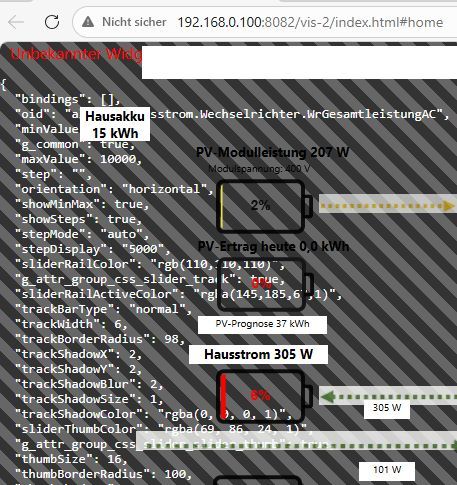
          VIS2_6.jpg

          [EDIT]

          VIS2_3.jpg

          Raspberry PI5 mit Linux Debian 13, IoBroker v7.7.22, VIS-2, MariaDB (MySQL)
          Shellies: 1G4, 1MiniG3, PlusI4DC, PlusPlugS, Pro0110PM, ProSmoke. Modbus: Waveshare Relay 8 Channels, Waveshare RS485-TO-ETH.
          PV: 10 kWp Module, 2 x Deye WR SUN-10K, 3 x 10 kWh MeritSun LiFe Speicher, KEBA P30 Wallbox, Fronius Wattpilot home 11

          Thomas BraunT 1 Antwort Letzte Antwort
          0
          • fuzzy1955F fuzzy1955

            @Thomas-Braun sagte in [VIS-2] Visualisierung funktioniert nach Update nicht mehr:

            Installier das nodesource-Repo nochmal neu

            Hat leider nichts geholfen:
            VIS2_6.jpg

            [EDIT]

            VIS2_3.jpg

            Thomas BraunT Online
            Thomas BraunT Online
            Thomas Braun
            Most Active
            schrieb am zuletzt editiert von
            #6

            @fuzzy1955 sagte in [VIS-2] Visualisierung funktioniert nach Update nicht mehr:

            Hat leider nichts geholfen:

            Ich habe auch nicht behauptet, dass es dein Problem mit vis behebt. Aber im Vorfeld umschiffst du da schon aufkommende andere Probleme.

            Linux-Werkzeugkasten:
            https://forum.iobroker.net/topic/42952/der-kleine-iobroker-linux-werkzeugkasten
            NodeJS Fixer Skript:
            https://forum.iobroker.net/topic/68035/iob-node-fix-skript
            iob_diag: curl -sLf -o diag.sh https://iobroker.net/diag.sh && bash diag.sh

            fuzzy1955F 1 Antwort Letzte Antwort
            0
            • Thomas BraunT Thomas Braun

              @fuzzy1955 sagte in [VIS-2] Visualisierung funktioniert nach Update nicht mehr:

              Hat leider nichts geholfen:

              Ich habe auch nicht behauptet, dass es dein Problem mit vis behebt. Aber im Vorfeld umschiffst du da schon aufkommende andere Probleme.

              fuzzy1955F Online
              fuzzy1955F Online
              fuzzy1955
              schrieb am zuletzt editiert von
              #7

              @Thomas-Braun sagte in [VIS-2] Visualisierung funktioniert nach Update nicht mehr:

              Aber im Vorfeld umschiffst du da schon aufkommende andere Probleme

              Ja, vielen Dank!

              Raspberry PI5 mit Linux Debian 13, IoBroker v7.7.22, VIS-2, MariaDB (MySQL)
              Shellies: 1G4, 1MiniG3, PlusI4DC, PlusPlugS, Pro0110PM, ProSmoke. Modbus: Waveshare Relay 8 Channels, Waveshare RS485-TO-ETH.
              PV: 10 kWp Module, 2 x Deye WR SUN-10K, 3 x 10 kWh MeritSun LiFe Speicher, KEBA P30 Wallbox, Fronius Wattpilot home 11

              1 Antwort Letzte Antwort
              0
              • mcm1957M Online
                mcm1957M Online
                mcm1957
                schrieb am zuletzt editiert von mcm1957
                #8

                Im ADMIN gab es das Problem dass nach einem Update veraltete Scripte aus dem Brwoser-Cache verwendet wurden die zu einem weißen Schirm geführt haben.
                Das wurde lt. Changelog in einer der allerletzen Versionen behoben.

                Das muss bei VIS-2 nicht dasselebe Problem sein - könnte es aber da beide dieselbe React (GUI) Softwareentwicklungsumgebung nutzen. Versuch daher mal nach einem Update den gesammten Browser Cache zu löschen. Frei nach dem Motto "nutzt nix schads nix". Wenn das hilft, erstell dazu ein Issue falls es das nicht gibt.

                EDIT:
                Das Problem in Admin ist noch WIP - sorry hatte es falsch im Kopf:
                https://github.com/ioBroker/ioBroker.admin/pull/3410

                Entwicklung u Betreuung: envertech-pv, hoymiles-ms, ns-client, pid, snmp Adapter;
                Support Repositoryverwaltung.

                Wer Danke sagen will, kann nen Kaffee spendieren: https://paypal.me/mcm1957atiobroker

                LESEN - gute Forenbeitrage

                fuzzy1955F 1 Antwort Letzte Antwort
                0
                • mcm1957M mcm1957

                  Im ADMIN gab es das Problem dass nach einem Update veraltete Scripte aus dem Brwoser-Cache verwendet wurden die zu einem weißen Schirm geführt haben.
                  Das wurde lt. Changelog in einer der allerletzen Versionen behoben.

                  Das muss bei VIS-2 nicht dasselebe Problem sein - könnte es aber da beide dieselbe React (GUI) Softwareentwicklungsumgebung nutzen. Versuch daher mal nach einem Update den gesammten Browser Cache zu löschen. Frei nach dem Motto "nutzt nix schads nix". Wenn das hilft, erstell dazu ein Issue falls es das nicht gibt.

                  EDIT:
                  Das Problem in Admin ist noch WIP - sorry hatte es falsch im Kopf:
                  https://github.com/ioBroker/ioBroker.admin/pull/3410

                  fuzzy1955F Online
                  fuzzy1955F Online
                  fuzzy1955
                  schrieb am zuletzt editiert von
                  #9

                  @mcm1957 sagte in [VIS-2] Visualisierung funktioniert nach Update nicht mehr:

                  nach einem Update den gesammten Browser Cache zu löschen

                  Das habe ich schon mehrmals gemacht, weil ich öfter davon gelesen habe.

                  Raspberry PI5 mit Linux Debian 13, IoBroker v7.7.22, VIS-2, MariaDB (MySQL)
                  Shellies: 1G4, 1MiniG3, PlusI4DC, PlusPlugS, Pro0110PM, ProSmoke. Modbus: Waveshare Relay 8 Channels, Waveshare RS485-TO-ETH.
                  PV: 10 kWp Module, 2 x Deye WR SUN-10K, 3 x 10 kWh MeritSun LiFe Speicher, KEBA P30 Wallbox, Fronius Wattpilot home 11

                  1 Antwort Letzte Antwort
                  0
                  • mcm1957M Online
                    mcm1957M Online
                    mcm1957
                    schrieb am zuletzt editiert von
                    #10

                    OK, sorry - war nur so ne Idee.

                    Entwicklung u Betreuung: envertech-pv, hoymiles-ms, ns-client, pid, snmp Adapter;
                    Support Repositoryverwaltung.

                    Wer Danke sagen will, kann nen Kaffee spendieren: https://paypal.me/mcm1957atiobroker

                    LESEN - gute Forenbeitrage

                    1 Antwort Letzte Antwort
                    0
                    • skvarelS skvarel

                      Ich sehe den vis-2-widgets-inventwo Adapter nicht in der diag Ausgabe ?!

                      fuzzy1955F Online
                      fuzzy1955F Online
                      fuzzy1955
                      schrieb am zuletzt editiert von
                      #11

                      @skvarel sagte in [VIS-2] Visualisierung funktioniert nach Update nicht mehr:

                      vis-2-widgets-inventwo Adapter

                      Hallo,

                      weißt du vielleicht, wie ich mein Problem beseitigen kann? Eine Vorgängerversion installieren? Jetzt läuft die V 0.5.5. Aber wie komme ich zurück auf eine vorige Version? Vorweg danke für deine Unterstützung!

                      Raspberry PI5 mit Linux Debian 13, IoBroker v7.7.22, VIS-2, MariaDB (MySQL)
                      Shellies: 1G4, 1MiniG3, PlusI4DC, PlusPlugS, Pro0110PM, ProSmoke. Modbus: Waveshare Relay 8 Channels, Waveshare RS485-TO-ETH.
                      PV: 10 kWp Module, 2 x Deye WR SUN-10K, 3 x 10 kWh MeritSun LiFe Speicher, KEBA P30 Wallbox, Fronius Wattpilot home 11

                      skvarelS 1 Antwort Letzte Antwort
                      0
                      • fuzzy1955F fuzzy1955

                        @skvarel sagte in [VIS-2] Visualisierung funktioniert nach Update nicht mehr:

                        vis-2-widgets-inventwo Adapter

                        Hallo,

                        weißt du vielleicht, wie ich mein Problem beseitigen kann? Eine Vorgängerversion installieren? Jetzt läuft die V 0.5.5. Aber wie komme ich zurück auf eine vorige Version? Vorweg danke für deine Unterstützung!

                        skvarelS Online
                        skvarelS Online
                        skvarel
                        Developer
                        schrieb am zuletzt editiert von skvarel
                        #12

                        @fuzzy1955 .. eigentlich sollte bei der v0.5.5 kein Probleme auftauchen. Ich würde hier mal die v0.6.0 testen

                        Downgrade geht bequem über die Adapterseite

                        Ein klick auf die drei Punkte:
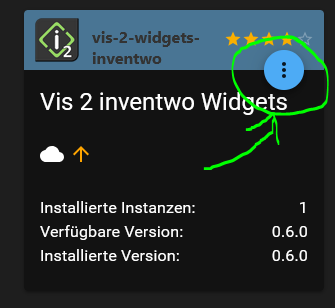
                        f9deff8c-2caa-4f97-9390-db202a632150-image.png

                        Dann hier:
                        ba5ef93a-eec6-4c4e-8c07-9ffafa91d907-image.png

                        Dann die gewünschte Version auswählen:
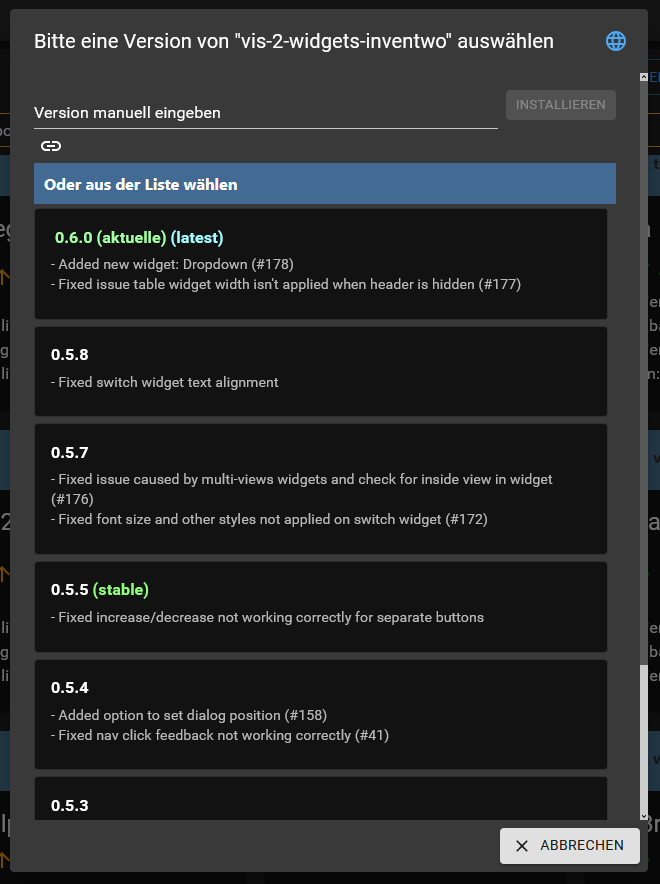
                        f636a2e7-f1b2-48be-86ce-d41650418b90-image.png

                        #TeamInventwo
                        • Autodarts by inventwo
                        • FoxESS Cloud by inventwo
                        • vis-inventwo & vis-2-widgets-inventwo
                        • vis-icontwo & vis-2-widgets-icontwo

                        fuzzy1955F 1 Antwort Letzte Antwort
                        0
                        • skvarelS skvarel

                          @fuzzy1955 .. eigentlich sollte bei der v0.5.5 kein Probleme auftauchen. Ich würde hier mal die v0.6.0 testen

                          Downgrade geht bequem über die Adapterseite

                          Ein klick auf die drei Punkte:
                          f9deff8c-2caa-4f97-9390-db202a632150-image.png

                          Dann hier:
                          ba5ef93a-eec6-4c4e-8c07-9ffafa91d907-image.png

                          Dann die gewünschte Version auswählen:
                          f636a2e7-f1b2-48be-86ce-d41650418b90-image.png

                          fuzzy1955F Online
                          fuzzy1955F Online
                          fuzzy1955
                          schrieb am zuletzt editiert von fuzzy1955
                          #13

                          @skvarel sagte in [VIS-2] Visualisierung funktioniert nach Update nicht mehr:

                          Ich würde hier mal die v0.6.0 testen

                          Ich habe jetzt 0.5.0, 0.5.5 und 0.6.0 probiert. Überall das gleiche Verhalten mit dem weißen Browserfenster.
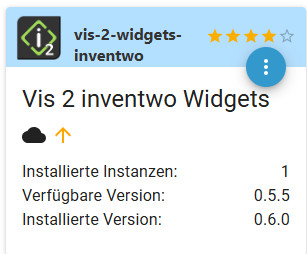
                          a5360ebc-1b32-45e2-8c9e-87dbb84867c1-image.png

                          Das Problem liegt offenbar außerhalb des Adapters - aber wo?

                          [EDIT]
                          Wenn ich den Adapter lösche, funktioniert aber alles übrige.
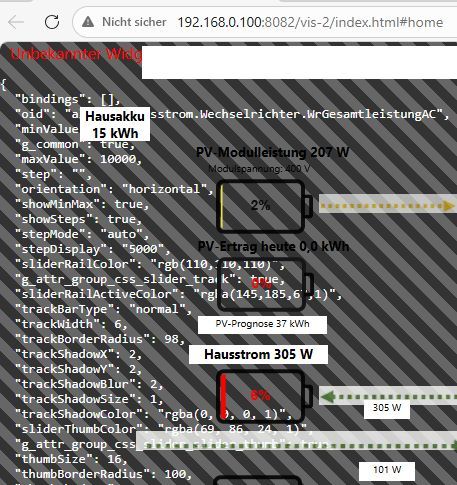
                          VIS2_6.jpg

                          Raspberry PI5 mit Linux Debian 13, IoBroker v7.7.22, VIS-2, MariaDB (MySQL)
                          Shellies: 1G4, 1MiniG3, PlusI4DC, PlusPlugS, Pro0110PM, ProSmoke. Modbus: Waveshare Relay 8 Channels, Waveshare RS485-TO-ETH.
                          PV: 10 kWp Module, 2 x Deye WR SUN-10K, 3 x 10 kWh MeritSun LiFe Speicher, KEBA P30 Wallbox, Fronius Wattpilot home 11

                          1 Antwort Letzte Antwort
                          0
                          • skvarelS Online
                            skvarelS Online
                            skvarel
                            Developer
                            schrieb am zuletzt editiert von
                            #14

                            Hast du irgendwelche alten VIS1 Widgets in der der VIS? Auf welchem Betriebssystem und Browser gehst du auf die VIS?

                            Uns sind nur Probleme bei Apple bekannt.

                            #TeamInventwo
                            • Autodarts by inventwo
                            • FoxESS Cloud by inventwo
                            • vis-inventwo & vis-2-widgets-inventwo
                            • vis-icontwo & vis-2-widgets-icontwo

                            1 Antwort Letzte Antwort
                            0
                            • skvarelS Online
                              skvarelS Online
                              skvarel
                              Developer
                              schrieb am zuletzt editiert von
                              #15

                              @jkvarel ... kommt das Fehlerbild durch unseren Adapter?

                              #TeamInventwo
                              • Autodarts by inventwo
                              • FoxESS Cloud by inventwo
                              • vis-inventwo & vis-2-widgets-inventwo
                              • vis-icontwo & vis-2-widgets-icontwo

                              fuzzy1955F 2 Antworten Letzte Antwort
                              0
                              • skvarelS skvarel

                                @jkvarel ... kommt das Fehlerbild durch unseren Adapter?

                                fuzzy1955F Online
                                fuzzy1955F Online
                                fuzzy1955
                                schrieb am zuletzt editiert von
                                #16

                                @skvarel sagte in [VIS-2] Visualisierung funktioniert nach Update nicht mehr:

                                kommt das Fehlerbild durch unseren Adapter?

                                Ja, eindeutig. Sobald ich den Adapter installiere, ist dieser Zustand da und nach dem Deinstallieren sehe ich alles Übrige, ausser diesen Widgets..

                                Hast du irgendwelche alten VIS1 Widgets in der der VIS? Auf welchem Betriebssystem und Browser gehst du auf die VIS?

                                Nein, das System ist ziemlich frisch aufgesetzt. VIS-1 habe ich nie verwendet. Ich verwende im WIN 11 die Browser Edge und zum Test den Google Chrome. Auf dem Android-Tablet ist es dasselbe Problem.

                                Raspberry PI5 mit Linux Debian 13, IoBroker v7.7.22, VIS-2, MariaDB (MySQL)
                                Shellies: 1G4, 1MiniG3, PlusI4DC, PlusPlugS, Pro0110PM, ProSmoke. Modbus: Waveshare Relay 8 Channels, Waveshare RS485-TO-ETH.
                                PV: 10 kWp Module, 2 x Deye WR SUN-10K, 3 x 10 kWh MeritSun LiFe Speicher, KEBA P30 Wallbox, Fronius Wattpilot home 11

                                skvarelS 1 Antwort Letzte Antwort
                                0
                                • fuzzy1955F fuzzy1955

                                  @skvarel sagte in [VIS-2] Visualisierung funktioniert nach Update nicht mehr:

                                  kommt das Fehlerbild durch unseren Adapter?

                                  Ja, eindeutig. Sobald ich den Adapter installiere, ist dieser Zustand da und nach dem Deinstallieren sehe ich alles Übrige, ausser diesen Widgets..

                                  Hast du irgendwelche alten VIS1 Widgets in der der VIS? Auf welchem Betriebssystem und Browser gehst du auf die VIS?

                                  Nein, das System ist ziemlich frisch aufgesetzt. VIS-1 habe ich nie verwendet. Ich verwende im WIN 11 die Browser Edge und zum Test den Google Chrome. Auf dem Android-Tablet ist es dasselbe Problem.

                                  skvarelS Online
                                  skvarelS Online
                                  skvarel
                                  Developer
                                  schrieb am zuletzt editiert von
                                  #17

                                  @fuzzy1955 .. ich habe meinen Bengel angetriggert. Wenn er nachher Feierabend hat, kann er sich das hier mal angucken.

                                  Ich bin nur der Grafiker und mache die Icons. Mein Sohn hat die Widgets programmiert.

                                  #TeamInventwo
                                  • Autodarts by inventwo
                                  • FoxESS Cloud by inventwo
                                  • vis-inventwo & vis-2-widgets-inventwo
                                  • vis-icontwo & vis-2-widgets-icontwo

                                  fuzzy1955F 1 Antwort Letzte Antwort
                                  1
                                  • skvarelS skvarel

                                    @fuzzy1955 .. ich habe meinen Bengel angetriggert. Wenn er nachher Feierabend hat, kann er sich das hier mal angucken.

                                    Ich bin nur der Grafiker und mache die Icons. Mein Sohn hat die Widgets programmiert.

                                    fuzzy1955F Online
                                    fuzzy1955F Online
                                    fuzzy1955
                                    schrieb am zuletzt editiert von
                                    #18

                                    @skvarel sagte in [VIS-2] Visualisierung funktioniert nach Update nicht mehr:

                                    Ich bin nur der Grafiker und mache die Icons

                                    Ja, danke vielmals!

                                    Raspberry PI5 mit Linux Debian 13, IoBroker v7.7.22, VIS-2, MariaDB (MySQL)
                                    Shellies: 1G4, 1MiniG3, PlusI4DC, PlusPlugS, Pro0110PM, ProSmoke. Modbus: Waveshare Relay 8 Channels, Waveshare RS485-TO-ETH.
                                    PV: 10 kWp Module, 2 x Deye WR SUN-10K, 3 x 10 kWh MeritSun LiFe Speicher, KEBA P30 Wallbox, Fronius Wattpilot home 11

                                    1 Antwort Letzte Antwort
                                    1
                                    • skvarelS skvarel

                                      @jkvarel ... kommt das Fehlerbild durch unseren Adapter?

                                      fuzzy1955F Online
                                      fuzzy1955F Online
                                      fuzzy1955
                                      schrieb am zuletzt editiert von
                                      #19

                                      @skvarel sagte in [VIS-2] Visualisierung funktioniert nach Update nicht mehr:

                                      kommt das Fehlerbild durch unseren Adapter?

                                      Hi, Skvarel!

                                      Nachdem ich das Problem mit dem vis-2-widgets-inventwo Adapter auch bei dem frisch aufgesetztem Raspi5 hatte, habe ich alle betroffenen Widgets von meinen VIS-2 Seiten entfernt und gestalte diese vorübergehend mit anderen Widgets. Leider bleibt mir auf meinem Produktivsystem in der Kürze nichts anderes übrig. Darauf läuft die gesamte Hausstromsteuerung inkl. PV und e-Auto (Inselanlage mit Stromzukaufoption), die Pelletsofensteuerung, die Boilersteuerung, die Rauchmeldungen, das Garagentor und natürlich das gesamte Berichtswesen.

                                      Das Ganze war sehr ärgerlich, weil das Produktivsystem stabil lief. Ich weiß jetzt nicht, wie ich künftige (automatische) Updates handhaben soll.

                                      cc: @mcm1957 @thomas-braun

                                      Raspberry PI5 mit Linux Debian 13, IoBroker v7.7.22, VIS-2, MariaDB (MySQL)
                                      Shellies: 1G4, 1MiniG3, PlusI4DC, PlusPlugS, Pro0110PM, ProSmoke. Modbus: Waveshare Relay 8 Channels, Waveshare RS485-TO-ETH.
                                      PV: 10 kWp Module, 2 x Deye WR SUN-10K, 3 x 10 kWh MeritSun LiFe Speicher, KEBA P30 Wallbox, Fronius Wattpilot home 11

                                      skvarelS Thomas BraunT 2 Antworten Letzte Antwort
                                      0
                                      • fuzzy1955F fuzzy1955

                                        @skvarel sagte in [VIS-2] Visualisierung funktioniert nach Update nicht mehr:

                                        kommt das Fehlerbild durch unseren Adapter?

                                        Hi, Skvarel!

                                        Nachdem ich das Problem mit dem vis-2-widgets-inventwo Adapter auch bei dem frisch aufgesetztem Raspi5 hatte, habe ich alle betroffenen Widgets von meinen VIS-2 Seiten entfernt und gestalte diese vorübergehend mit anderen Widgets. Leider bleibt mir auf meinem Produktivsystem in der Kürze nichts anderes übrig. Darauf läuft die gesamte Hausstromsteuerung inkl. PV und e-Auto (Inselanlage mit Stromzukaufoption), die Pelletsofensteuerung, die Boilersteuerung, die Rauchmeldungen, das Garagentor und natürlich das gesamte Berichtswesen.

                                        Das Ganze war sehr ärgerlich, weil das Produktivsystem stabil lief. Ich weiß jetzt nicht, wie ich künftige (automatische) Updates handhaben soll.

                                        cc: @mcm1957 @thomas-braun

                                        skvarelS Online
                                        skvarelS Online
                                        skvarel
                                        Developer
                                        schrieb am zuletzt editiert von
                                        #20

                                        @fuzzy1955 .. hast du es mal mit einer aktuelleren VIS2 Version versucht? Nach der 2.13.4 gab es einige Fixe.

                                        #TeamInventwo
                                        • Autodarts by inventwo
                                        • FoxESS Cloud by inventwo
                                        • vis-inventwo & vis-2-widgets-inventwo
                                        • vis-icontwo & vis-2-widgets-icontwo

                                        fuzzy1955F 2 Antworten Letzte Antwort
                                        0
                                        • skvarelS skvarel

                                          @fuzzy1955 .. hast du es mal mit einer aktuelleren VIS2 Version versucht? Nach der 2.13.4 gab es einige Fixe.

                                          fuzzy1955F Online
                                          fuzzy1955F Online
                                          fuzzy1955
                                          schrieb am zuletzt editiert von
                                          #21

                                          @skvarel sagte in [VIS-2] Visualisierung funktioniert nach Update nicht mehr:

                                          hast du es mal mit einer aktuelleren VIS2 Version versucht? Nach der 2.13.4 gab es einige Fixe.

                                          Ich spiele normalerweise nur die offiziellen Updates ein. Mir fehlen dazu auch die Infos und zum "Herumprobieren" habe ich leider zu wenig Zeit ;-)


                                          Raspberry PI5 mit Linux Debian 13, IoBroker v7.7.22, VIS-2, MariaDB (MySQL)
                                          Shellies: 1G4, 1MiniG3, PlusI4DC, PlusPlugS, Pro0110PM, ProSmoke. Modbus: Waveshare Relay 8 Channels, Waveshare RS485-TO-ETH.
                                          PV: 10 kWp Module, 2 x Deye WR SUN-10K, 3 x 10 kWh MeritSun LiFe Speicher, KEBA P30 Wallbox, Fronius Wattpilot home 11

                                          1 Antwort Letzte Antwort
                                          0
                                          Antworten
                                          • In einem neuen Thema antworten
                                          Anmelden zum Antworten
                                          • Älteste zuerst
                                          • Neuste zuerst
                                          • Meiste Stimmen


                                          Support us

                                          ioBroker
                                          Community Adapters
                                          Donate

                                          608

                                          Online

                                          32.7k

                                          Benutzer

                                          82.5k

                                          Themen

                                          1.3m

                                          Beiträge
                                          Community
                                          Impressum | Datenschutz-Bestimmungen | Nutzungsbedingungen | Einwilligungseinstellungen
                                          ioBroker Community 2014-2025
                                          logo
                                          • Anmelden

                                          • Du hast noch kein Konto? Registrieren

                                          • Anmelden oder registrieren, um zu suchen
                                          • Erster Beitrag
                                            Letzter Beitrag
                                          0
                                          • Home
                                          • Aktuell
                                          • Tags
                                          • Ungelesen 0
                                          • Kategorien
                                          • Unreplied
                                          • Beliebt
                                          • GitHub
                                          • Docu
                                          • Hilfe