




eCharts - kein sendTo nach Upgrade auf Node.js 22.x
-
Adaptername: iobroker.echarts
- Link zu Adapterrepository: https://github.com/ioBroker/ioBroker.echarts
- Adapterversion: v2.0.6
- js-controller Version: 7.0.7
- Admin Version: v7.7.2
- Hardwaresystem: VMware VM
Nach dem Upgrade auf NodeJS 22 ( siehe hier https://forum.iobroker.net/post/1287695 )
klappt das erstellen und versenden von Grafiken aus eCharts nicht mehr.Das Testskript:
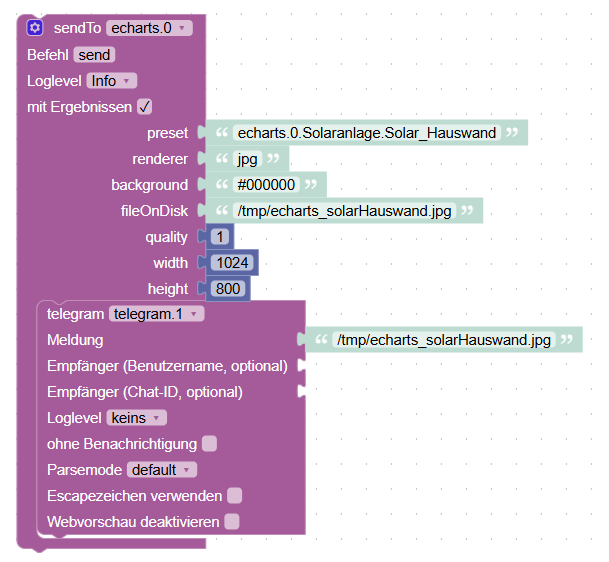
Log Ausgabe:
2025-08-11 14:12:03.387 - info: javascript.0 (6980) script.js.001_Routinen.Solaranlage.disabled.Test_echarts: sendTo[custom] echarts.0: preset: echarts.0.Solaranlage.Solar_Hauswand, renderer: jpg, background: #000000, fileOnDisk: /tmp/echarts_solarHauswand.jpg, quality: 1, width: 1024, height: 800Das hat bisher immer am
canvasPaket im eCharts Adapter gelegen. Einen Upload habe ich schon gemacht, der hat nichts gebracht.npm ls canvasim
/opt/iobroker/Verzeichnis ergibtiobroker.inst@2.0.3 /opt/iobroker └─┬ iobroker.echarts@2.0.6 ├── canvas@3.1.0 └─┬ jsdom@26.0.0 └── canvas@3.1.0 dedupedHier habe ich zusammengetragen was ich sonst gemacht habe: https://forum.iobroker.net/post/1242483
Hilft aber nichtIch habe auch ein
cd /opt/iobroker/node_modules/canvas/
sudo -u iobroker npm install --omit=dev
sowie die Reinstallation des Adapters mit
iob upgrade echarts@2.0.6versucht, ohne Erfolg. Die Bilddatei taucht im
/tmpVerzeichnis gar nicht auf.
Nach all den Versuchen siehtnpm ls cancasimmer noch so aus:
iobroker.inst@2.0.3 /opt/iobroker
└─┬ iobroker.echarts@2.0.6
  ├── canvas@3.1.2
  └─┬ jsdom@26.1.0
    └── canvas@3.1.2 deduped
Hier mein
iob diagScript v.2025-08-09 *** BASE SYSTEM *** Operating System: Ubuntu 24.04.3 LTS Static hostname: iobroker Icon name: computer-vm Chassis: vm 🖴 Virtualization: vmware Kernel: Linux 6.8.0-71-generic Architecture: x86-64 Hardware Vendor: VMware, Inc. Hardware Model: VMware Virtual Platform Firmware Version: 6.00 Firmware Date: Thu 2020-11-12 Firmware Age: 4y 8month 4w 1d OS is similar to: debian model name : AMD Ryzen 5 5600G with Radeon Graphics Docker : false Virtualization : vmware Kernel : x86_64 Userland : 64 bit Systemuptime and Load: 14:52:00 up 1:11, 2 users, load average: 0.56, 0.45, 0.80 CPU threads: 4 *** LIFE CYCLE STATUS *** Operating System is the current Ubuntu LTS release codenamed 'noble'! *** TIME AND TIMEZONES *** Local time: Mon 2025-08-11 14:52:00 CEST Universal time: Mon 2025-08-11 12:52:00 UTC RTC time: Mon 2025-08-11 12:52:00 Time zone: Europe/Berlin (CEST, +0200) System clock synchronized: yes NTP service: n/a RTC in local TZ: no *** Users and Groups *** User that called 'iob diag': bananajoe HOME=/home/bananajoe GROUPS=bananajoe sudo iobroker User that is running 'js-controller': iobroker HOME=/home/iobroker GROUPS=iobroker tty dialout audio video plugdev redis *** DISPLAY-SERVER SETUP *** Display-Server: false Unit display-manager.service could not be found. Display-Manager: Desktop: Session: System is booting into 'graphical.target'. Usually a server is running in 'multi-user.target'. Please set BootTarget to 'multi-user.target' or run 'iobroker fix' *** MEMORY *** total used free shared buff/cache available Mem: 12G 7.1G 2.2G 7.7M 3.4G 5.4G Swap: 2.1G 0B 2.1G Total: 14G 7.1G 4.4G Active iob-Instances: 66 11961 M total memory 6802 M used memory 7028 M active memory 1999 M inactive memory 2109 M free memory 432 M buffer memory 2776 M swap cache 2047 M total swap 0 M used swap 2047 M free swap *** top - Table Of Processes *** top - 14:52:01 up 1:11, 2 users, load average: 0.56, 0.45, 0.80 Tasks: 411 total, 1 running, 410 sleeping, 0 stopped, 0 zombie %Cpu(s): 2.4 us, 0.0 sy, 0.0 ni, 97.6 id, 0.0 wa, 0.0 hi, 0.0 si, 0.0 st MiB Mem : 11961.3 total, 2109.0 free, 6801.8 used, 3208.9 buff/cache MiB Swap: 2048.0 total, 2048.0 free, 0.0 used. 5159.5 avail Mem *** FAILED SERVICES *** UNIT LOAD ACTIVE SUB DESCRIPTION 0 loaded units listed. *** DMESG CRITICAL ERRORS *** No critical errors detected *** FILESYSTEM *** Filesystem Type Size Used Avail Use% Mounted on tmpfs tmpfs 1.2G 2.5M 1.2G 1% /run /dev/sda2 ext4 63G 37G 24G 62% / tmpfs tmpfs 5.9G 0 5.9G 0% /dev/shm tmpfs tmpfs 5.0M 0 5.0M 0% /run/lock tmpfs tmpfs 64M 0 64M 0% /RAMdisk tmpfs tmpfs 1.2G 16K 1.2G 1% /run/user/0 Messages concerning ext4 filesystem in dmesg: [Mon Aug 11 13:40:56 2025] EXT4-fs (sda2): mounted filesystem 4c5c00e6-ffac-4b4a-80a7-f6978f88afa0 ro with ordered data mode. Quota mode: none. [Mon Aug 11 13:40:57 2025] EXT4-fs (sda2): re-mounted 4c5c00e6-ffac-4b4a-80a7-f6978f88afa0 r/w. Quota mode: none. Show mounted filesystems: TARGET SOURCE FSTYPE OPTIONS / /dev/sda2 ext4 rw,relatime |-/snap/core18/2923 /dev/loop0 squashfs ro,nodev,relatime,errors=continue,threads=single |-/snap/core18/2934 /dev/loop1 squashfs ro,nodev,relatime,errors=continue,threads=single |-/snap/core20/2582 /dev/loop2 squashfs ro,nodev,relatime,errors=continue,threads=single |-/snap/core20/2599 /dev/loop3 squashfs ro,nodev,relatime,errors=continue,threads=single |-/snap/core22/2045 /dev/loop5 squashfs ro,nodev,relatime,errors=continue,threads=single |-/snap/core24/1006 /dev/loop6 squashfs ro,nodev,relatime,errors=continue,threads=single |-/snap/core22/2010 /dev/loop4 squashfs ro,nodev,relatime,errors=continue,threads=single |-/snap/core24/1055 /dev/loop7 squashfs ro,nodev,relatime,errors=continue,threads=single |-/snap/lxd/34099 /dev/loop8 squashfs ro,nodev,relatime,errors=continue,threads=single |-/snap/snapd/24718 /dev/loop9 squashfs ro,nodev,relatime,errors=continue,threads=single |-/snap/lxd/34285 /dev/loop10 squashfs ro,nodev,relatime,errors=continue,threads=single `-/snap/snapd/24792 /dev/loop11 squashfs ro,nodev,relatime,errors=continue,threads=single Files in neuralgic directories: /var: 11G /var/ 5.7G /var/lib 4.4G /var/log 4.0G /var/log/journal/26010950dd3a4d9ab8f579561945c3da 4.0G /var/log/journal Hint: You are currently not seeing messages from other users and the system. Users in groups 'adm', 'systemd-journal' can see all messages. Pass -q to turn off this notice. Archived and active journals take up 27.5M in the file system. /opt/iobroker/backups: 821M /opt/iobroker/backups/ /opt/iobroker/iobroker-data: 1.2G /opt/iobroker/iobroker-data/ 826M /opt/iobroker/iobroker-data/files 251M /opt/iobroker/iobroker-data/files/vis.0 238M /opt/iobroker/iobroker-data/backup-objects 227M /opt/iobroker/iobroker-data/files/vis The five largest files in iobroker-data are: 108M /opt/iobroker/iobroker-data/objects.jsonl 27M /opt/iobroker/iobroker-data/files/tankerkoenig.admin/build/index.js.map 24M /opt/iobroker/iobroker-data/objects.json.migrated 24M /opt/iobroker/iobroker-data/objects.json.bak.migrated 19M /opt/iobroker/iobroker-data/files/text2command.admin/static/js/main.02fc3820.js.map USB-Devices by-id: USB-Sticks - Avoid direct links to /dev/tty* in your adapter setups, please always prefer the links 'by-id': No Devices found 'by-id' *** ZigBee Settings *** HINT: Your zigbee.1 COM-Port is NOT matching 'by-id'. Please check your setting: tcp HINT: Your zigbee.2 COM-Port is NOT matching 'by-id'. Please check your setting: tcp Zigbee Network Settings on your coordinator/in nvbackup are: zigbee.X Extended Pan ID: *** MASKED *** Pan ID: *** MASKED *** Channel: *** MASKED *** Network Key: *** MASKED *** To unmask the settings run 'iob diag --unmask' *** NodeJS-Installation *** /usr/bin/nodejs v22.18.0 /usr/bin/node v22.18.0 /usr/bin/npm 10.9.3 /usr/bin/npx 10.9.3 /usr/bin/corepack 0.33.0 nodejs: Installed: 22.18.0-1nodesource1 Candidate: 22.18.0-1nodesource1 Version table: *** 22.18.0-1nodesource1 1001 500 https://deb.nodesource.com/node_22.x nodistro/main amd64 Packages 100 /var/lib/dpkg/status 22.17.1-1nodesource1 1001 500 https://deb.nodesource.com/node_22.x nodistro/main amd64 Packages 22.17.0-1nodesource1 1001 500 https://deb.nodesource.com/node_22.x nodistro/main amd64 Packages 22.16.0-1nodesource1 1001 500 https://deb.nodesource.com/node_22.x nodistro/main amd64 Packages 22.15.1-1nodesource1 1001 500 https://deb.nodesource.com/node_22.x nodistro/main amd64 Packages 22.15.0-1nodesource1 1001 500 https://deb.nodesource.com/node_22.x nodistro/main amd64 Packages 22.14.0-1nodesource1 1001 500 https://deb.nodesource.com/node_22.x nodistro/main amd64 Packages 22.13.1-1nodesource1 1001 500 https://deb.nodesource.com/node_22.x nodistro/main amd64 Packages 22.13.0-1nodesource1 1001 500 https://deb.nodesource.com/node_22.x nodistro/main amd64 Packages 22.12.0-1nodesource1 1001 500 https://deb.nodesource.com/node_22.x nodistro/main amd64 Packages 22.11.0-1nodesource1 1001 500 https://deb.nodesource.com/node_22.x nodistro/main amd64 Packages 22.10.0-1nodesource1 1001 500 https://deb.nodesource.com/node_22.x nodistro/main amd64 Packages 22.9.0-1nodesource1 1001 500 https://deb.nodesource.com/node_22.x nodistro/main amd64 Packages 22.8.0-1nodesource1 1001 500 https://deb.nodesource.com/node_22.x nodistro/main amd64 Packages 22.7.0-1nodesource1 1001 500 https://deb.nodesource.com/node_22.x nodistro/main amd64 Packages 22.6.0-1nodesource1 1001 500 https://deb.nodesource.com/node_22.x nodistro/main amd64 Packages 22.5.1-1nodesource1 1001 500 https://deb.nodesource.com/node_22.x nodistro/main amd64 Packages 22.5.0-1nodesource1 1001 500 https://deb.nodesource.com/node_22.x nodistro/main amd64 Packages 22.4.1-1nodesource1 1001 500 https://deb.nodesource.com/node_22.x nodistro/main amd64 Packages 22.4.0-1nodesource1 1001 500 https://deb.nodesource.com/node_22.x nodistro/main amd64 Packages 22.3.0-1nodesource1 1001 500 https://deb.nodesource.com/node_22.x nodistro/main amd64 Packages 22.2.0-1nodesource1 1001 500 https://deb.nodesource.com/node_22.x nodistro/main amd64 Packages 22.1.0-1nodesource1 1001 500 https://deb.nodesource.com/node_22.x nodistro/main amd64 Packages 22.0.0-1nodesource1 1001 500 https://deb.nodesource.com/node_22.x nodistro/main amd64 Packages 18.19.1+dfsg-6ubuntu5 500 500 http://de.archive.ubuntu.com/ubuntu noble/universe amd64 Packages Temp directories causing deletion problem: 0 No problems detected Errors in npm tree: 0 No problems detected Checking for nodejs vulnerability: █████ ██ ██ ██████ ██████ ██████ ██████ ██ ██ ██ ██ ██ ██ ██ ██ ██ ██ ██ ██ ██ ██ ███████ ██ ██ ██ ███ ██ ██ ██ ██ ██ ██ ██ ██ ██ ██ ██ ██ ██ ██ ██ ██ ██ ██ ██ ██ ██ ██ ██ ███████ ███████ ██████ ██████ ██████ ██████ ██ *** ioBroker-Installation *** ioBroker Status iobroker is running on this host. Objects type: jsonl States type: redis Hosts: iobroker iobroker (version: 7.0.7, hostname: iobroker , alive, uptime: 1822) Core adapters versions js-controller: 7.0.7 admin: 7.7.2 javascript: 8.9.2 nodejs modules from github: 4 +-- iobroker.google-sharedlocations@2.2.1 (git+ssh://git@github.com/Garfonso/ioBroker.google-sharedlocations.git#0db73d57d00aa5dff22ff22e853f1231ce141dc1) +-- iobroker.klipper-moonraker@0.0.4 (git+ssh://git@github.com/DrozmotiX/ioBroker.klipper-moonraker.git#4adef3ab69e5ff232d0d740fe3e0f560bca3c27e) +-- iobroker.life360@0.2.22 (git+ssh://git@github.com/MiGoller/ioBroker.life360.git#23166aab1b2e36d917a9b7b480d9faa7f73ca2d1) +-- iobroker.smartstate@0.0.4 (git+ssh://git@github.com/ChriD/ioBroker.smartstate.git#aa448478fd656fff055532b33decd1138d9222e3) Adapter State system.adapter.admin.0 : admin : iobroker - disabled, port: 8081, bind: 0.0.0.0 (SSL), run as: admin system.adapter.admin.1 : admin : iobroker - disabled, port: 60081, bind: 0.0.0.0, run as: admin + system.adapter.admin.2 : admin : iobroker - enabled, port: 60082, bind: 0.0.0.0, run as: admin + system.adapter.alexa-shoppinglist.0 : alexa-shoppinglist : iobroker - enabled + system.adapter.alexa-timer-vis.0 : alexa-timer-vis : iobroker - enabled + system.adapter.alexa2.0 : alexa2 : iobroker - enabled system.adapter.alias-manager.0 : alias-manager : iobroker - enabled + system.adapter.backitup.0 : backitup : iobroker - enabled + system.adapter.broadlink2.0 : broadlink2 : iobroker - enabled system.adapter.daswetter.0 : daswetter : iobroker - enabled + system.adapter.device-reminder.0 : device-reminder : iobroker - enabled + system.adapter.device-watcher.0 : device-watcher : iobroker - enabled system.adapter.devices.0 : devices : iobroker - enabled + system.adapter.discovery.0 : discovery : iobroker - enabled system.adapter.dwd.0 : dwd : iobroker - enabled + system.adapter.echarts.0 : echarts : iobroker - enabled + system.adapter.email.0 : email : iobroker - enabled + system.adapter.energiefluss-erweitert.0 : energiefluss-erweitert: iobroker - enabled + system.adapter.energiefluss-erweitert.1 : energiefluss-erweitert: iobroker - enabled system.adapter.feiertage.0 : feiertage : iobroker - enabled + system.adapter.followthesun.0 : followthesun : iobroker - enabled + system.adapter.fritzdect.0 : fritzdect : iobroker - enabled + system.adapter.fullybrowser.0 : fullybrowser : iobroker - enabled + system.adapter.google-sharedlocations.0 : google-sharedlocations: iobroker - enabled system.adapter.ham.0 : ham : iobroker - disabled + system.adapter.hass.0 : hass : iobroker - enabled, port: 8123 system.adapter.ical.0 : ical : iobroker - enabled + system.adapter.iot.0 : iot : iobroker - enabled + system.adapter.javascript.0 : javascript : iobroker - enabled + system.adapter.javascript.1 : javascript : iobroker - enabled + system.adapter.javascript.2 : javascript : iobroker - enabled system.adapter.klipper-moonraker.0 : klipper-moonraker : iobroker - disabled system.adapter.life360.0 : life360 : iobroker - disabled + system.adapter.logparser.0 : logparser : iobroker - enabled + system.adapter.midea.0 : midea : iobroker - enabled + system.adapter.mqtt-client.0 : mqtt-client : iobroker - enabled, port: 1884 + system.adapter.mqtt.0 : mqtt : iobroker - enabled, port: 1883, bind: 0.0.0.0 + system.adapter.notificationforandroidtv.0: notificationforandroidtv: iobroker - enabled + system.adapter.nut.0 : nut : iobroker - enabled system.adapter.nut.1 : nut : iobroker - disabled + system.adapter.operating-hours.0 : operating-hours : iobroker - enabled system.adapter.pi-hole.0 : pi-hole : iobroker - disabled system.adapter.pi-hole.1 : pi-hole : iobroker - disabled + system.adapter.ping.0 : ping : iobroker - enabled + system.adapter.places.0 : places : iobroker - enabled system.adapter.proxmox.0 : proxmox : iobroker - disabled + system.adapter.puppeteer.0 : puppeteer : iobroker - enabled + system.adapter.pvforecast.0 : pvforecast : iobroker - enabled + system.adapter.pvforecast.1 : pvforecast : iobroker - enabled + system.adapter.rest-api.0 : rest-api : iobroker - enabled, port: 8093, bind: 0.0.0.0, run as: admin + system.adapter.schedule-switcher.0 : schedule-switcher : iobroker - enabled + system.adapter.shelly.0 : shelly : iobroker - enabled, port: 1882, bind: 0.0.0.0 system.adapter.shelly.1 : shelly : iobroker - disabled, port: 1882, bind: 0.0.0.0 + system.adapter.simple-api.0 : simple-api : iobroker - enabled, port: 8087, bind: 0.0.0.0, run as: admin system.adapter.smartstate.0 : smartstate : iobroker - disabled + system.adapter.snmp.0 : snmp : iobroker - enabled + system.adapter.socketio.0 : socketio : iobroker - enabled, port: 50084, bind: 0.0.0.0, run as: admin + system.adapter.sourceanalytix.0 : sourceanalytix : iobroker - enabled + system.adapter.sql.0 : sql : iobroker - enabled, port: 3306 + system.adapter.tankerkoenig.0 : tankerkoenig : iobroker - enabled + system.adapter.telegram-menu.0 : telegram-menu : iobroker - enabled + system.adapter.telegram.0 : telegram : iobroker - enabled, port: 8443, bind: 0.0.0.0 + system.adapter.telegram.1 : telegram : iobroker - enabled, port: 8443, bind: 0.0.0.0 + system.adapter.telegram.2 : telegram : iobroker - enabled, port: 8443, bind: 0.0.0.0 + system.adapter.telegram.3 : telegram : iobroker - enabled, port: 8443, bind: 0.0.0.0 + system.adapter.text2command.0 : text2command : iobroker - enabled + system.adapter.time-switch.0 : time-switch : iobroker - enabled + system.adapter.tr-064.0 : tr-064 : iobroker - enabled + system.adapter.tr-064.1 : tr-064 : iobroker - enabled + system.adapter.traccar.0 : traccar : iobroker - enabled + system.adapter.trashschedule.0 : trashschedule : iobroker - enabled + system.adapter.tuya.0 : tuya : iobroker - enabled system.adapter.vis-2-widgets-energy.0 : vis-2-widgets-energy : iobroker - enabled system.adapter.vis-2-widgets-gauges.0 : vis-2-widgets-gauges : iobroker - enabled system.adapter.vis-2-widgets-material.0 : vis-2-widgets-material: iobroker - enabled + system.adapter.vis-2.0 : vis-2 : iobroker - enabled system.adapter.vis-canvas-gauges.0 : vis-canvas-gauges : iobroker - enabled system.adapter.vis-hqwidgets.0 : vis-hqwidgets : iobroker - enabled system.adapter.vis-icontwo.0 : vis-icontwo : iobroker - enabled + system.adapter.vis-inventwo.0 : vis-inventwo : iobroker - enabled system.adapter.vis-jqui-mfd.0 : vis-jqui-mfd : iobroker - enabled system.adapter.vis-map.0 : vis-map : iobroker - enabled system.adapter.vis-timeandweather.0 : vis-timeandweather : iobroker - enabled system.adapter.vis.0 : vis : iobroker - enabled + system.adapter.vw-connect.0 : vw-connect : iobroker - enabled + system.adapter.web.0 : web : iobroker - enabled, port: 8082, bind: 0.0.0.0, run as: admin + system.adapter.web.1 : web : iobroker - enabled, port: 60008, bind: 0.0.0.0, run as: admin + system.adapter.worx.0 : worx : iobroker - enabled + system.adapter.ws.0 : ws : iobroker - enabled, port: 60086, bind: 0.0.0.0, run as: admin + system.adapter.zigbee.1 : zigbee : iobroker - enabled, port: tcp://192.168.1.249:6638 + system.adapter.zigbee.2 : zigbee : iobroker - enabled, port: tcp://192.168.1.208:6638 + system.adapter.zigbee2mqtt.0 : zigbee2mqtt : iobroker - enabled + instance is alive Enabled adapters with bindings + system.adapter.admin.2 : admin : iobroker - enabled, port: 60082, bind: 0.0.0.0, run as: admin + system.adapter.hass.0 : hass : iobroker - enabled, port: 8123 + system.adapter.mqtt-client.0 : mqtt-client : iobroker - enabled, port: 1884 + system.adapter.mqtt.0 : mqtt : iobroker - enabled, port: 1883, bind: 0.0.0.0 + system.adapter.rest-api.0 : rest-api : iobroker - enabled, port: 8093, bind: 0.0.0.0, run as: admin + system.adapter.shelly.0 : shelly : iobroker - enabled, port: 1882, bind: 0.0.0.0 + system.adapter.simple-api.0 : simple-api : iobroker - enabled, port: 8087, bind: 0.0.0.0, run as: admin + system.adapter.socketio.0 : socketio : iobroker - enabled, port: 50084, bind: 0.0.0.0, run as: admin + system.adapter.sql.0 : sql : iobroker - enabled, port: 3306 + system.adapter.telegram.0 : telegram : iobroker - enabled, port: 8443, bind: 0.0.0.0 + system.adapter.telegram.1 : telegram : iobroker - enabled, port: 8443, bind: 0.0.0.0 + system.adapter.telegram.2 : telegram : iobroker - enabled, port: 8443, bind: 0.0.0.0 + system.adapter.telegram.3 : telegram : iobroker - enabled, port: 8443, bind: 0.0.0.0 + system.adapter.web.0 : web : iobroker - enabled, port: 8082, bind: 0.0.0.0, run as: admin + system.adapter.web.1 : web : iobroker - enabled, port: 60008, bind: 0.0.0.0, run as: admin + system.adapter.ws.0 : ws : iobroker - enabled, port: 60086, bind: 0.0.0.0, run as: admin + system.adapter.zigbee.1 : zigbee : iobroker - enabled, port: tcp://192.168.1.249:6638 + system.adapter.zigbee.2 : zigbee : iobroker - enabled, port: tcp://192.168.1.208:6638 ioBroker-Repositories ┌─────────┬──────────┬─────────────────────────────────────────────────────────┬──────────────┐ │ (index) │ name │ url │ auto upgrade │ ├─────────┼──────────┼─────────────────────────────────────────────────────────┼──────────────┤ │ 0 │ 'stable' │ 'http://download.iobroker.net/sources-dist.json' │ false │ │ 1 │ 'beta' │ 'http://download.iobroker.net/sources-dist-latest.json' │ false │ └─────────┴──────────┴─────────────────────────────────────────────────────────┴──────────────┘ Active repo(s): beta Upgrade policy: none Installed ioBroker-Adapters Used repository: beta Adapter "admin" : 7.7.2 , installed 7.7.2 Adapter "alexa-shoppinglist": 1.1.0, installed 1.1.0 Adapter "alexa-timer-vis": 2.1.1 , installed 2.1.1 Adapter "alexa2" : 3.27.3 , installed 3.27.3 Adapter "alias-manager": 2.0.0 , installed 2.0.0 Adapter "backitup" : 3.3.5 , installed 3.3.5 Adapter "broadlink2" : 2.3.0 , installed 2.3.0 Adapter "daswetter" : 3.2.3 , installed 3.2.3 Adapter "device-reminder": 3.1.2 , installed 3.1.2 Adapter "device-watcher": 2.12.6 , installed 2.12.5 [Updatable] Adapter "devices" : 1.2.8 , installed 1.2.8 Adapter "discovery" : 5.0.0 , installed 5.0.0 Adapter "dwd" : 2.8.5 , installed 2.8.5 Adapter "echarts" : 2.0.6 , installed 2.0.6 Adapter "email" : 2.0.4 , installed 2.0.4 Adapter "energiefluss-erweitert": 0.7.8, installed 0.7.8 Adapter "feiertage" : 1.2.1 , installed 1.2.1 Adapter "followthesun" : 0.5.2 , installed 0.5.2 Adapter "fritzdect" : 2.6.2 , installed 2.6.2 Adapter "fullybrowser" : 3.1.2 , installed 3.1.2 Adapter "ham" : 5.3.1 , installed 5.3.1 Adapter "hass" : 1.4.0 , installed 1.4.0 Adapter "ical" : 1.16.2 , installed 1.16.2 Adapter "iot" : 3.6.0 , installed 3.6.0 Adapter "javascript" : 9.0.11 , installed 8.9.2 [Updatable] Controller "js-controller": 7.0.7 , installed 7.0.7 Adapter "logparser" : 2.4.0 , installed 2.4.0 Adapter "midea" : 0.0.7 , installed 0.0.7 Adapter "mqtt" : 6.1.4 , installed 6.1.4 Adapter "mqtt-client" : 3.0.0 , installed 3.0.0 Adapter "notificationforandroidtv": 3.0.4, installed 3.0.4 Adapter "nut" : 1.6.0 , installed 1.6.0 Adapter "operating-hours": 1.3.0 , installed 1.3.0 Adapter "pi-hole" : 1.3.6 , installed 1.3.6 Adapter "ping" : 1.7.9 , installed 1.7.9 Adapter "places" : 1.3.0 , installed 1.3.0 Adapter "proxmox" : 2.4.0 , installed 2.4.0 Adapter "puppeteer" : 0.4.0 , installed 0.4.0 Adapter "pvforecast" : 5.0.0 , installed 5.0.0 Adapter "rest-api" : 3.0.1 , installed 3.0.1 Adapter "schedule-switcher": 0.0.10, installed 0.0.10 Adapter "shelly" : 10.1.0 , installed 10.1.0 Adapter "simple-api" : 3.0.7 , installed 3.0.7 Adapter "snmp" : 3.2.0 , installed 3.2.0 Adapter "socketio" : 7.0.8 , installed 7.0.8 Adapter "sourceanalytix": 0.4.14 , installed 0.4.14 Adapter "sql" : 3.0.1 , installed 3.0.1 Adapter "tankerkoenig" : 3.4.0 , installed 3.4.0 Adapter "telegram" : 4.1.0 , installed 4.1.0 Adapter "telegram-menu": 3.0.1 , installed 3.0.1 Adapter "text2command" : 3.0.3 , installed 3.0.3 Adapter "time-switch" : 2.2.2 , installed 2.2.2 Adapter "tr-064" : 4.3.0 , installed 4.3.0 Adapter "traccar" : 1.1.6 , installed 1.1.6 Adapter "trashschedule": 4.0.1 , installed 4.0.1 Adapter "tuya" : 3.17.0 , installed 3.17.0 Adapter "vis" : 1.5.6 , installed 1.5.6 Adapter "vis-2" : 2.12.12 , installed 2.12.12 Adapter "vis-2-widgets-energy": 1.0.2, installed 1.0.2 Adapter "vis-2-widgets-gauges": 2.0.1, installed 2.0.1 Adapter "vis-2-widgets-material": 1.4.10, installed 1.4.10 Adapter "vis-canvas-gauges": 1.0.1, installed 1.0.1 Adapter "vis-hqwidgets": 1.5.1 , installed 1.5.1 Adapter "vis-icontwo" : 1.17.0 , installed 1.17.0 Adapter "vis-inventwo" : 3.3.5 , installed 3.3.5 Adapter "vis-jqui-mfd" : 1.1.1 , installed 1.1.1 Adapter "vis-map" : 1.1.2 , installed 1.1.2 Adapter "vis-timeandweather": 1.2.2, installed 1.2.2 Adapter "vw-connect" : 0.7.12 , installed 0.7.12 Adapter "web" : 7.0.9 , installed 7.0.9 Adapter "worx" : 3.2.6 , installed 3.2.6 Adapter "ws" : 3.0.19 , installed 3.0.19 Adapter "zigbee" : 3.0.3 , installed 3.0.3 Adapter "zigbee2mqtt" : 3.0.9 , installed 3.0.9 Objects and States Please stand by - This may take a while Objects: 55674 States: 50690 *** OS-Repositories and Updates *** Hit:1 http://de.archive.ubuntu.com/ubuntu noble InRelease Hit:2 http://de.archive.ubuntu.com/ubuntu noble-updates InRelease Hit:3 http://de.archive.ubuntu.com/ubuntu noble-backports InRelease Hit:4 https://deb.nodesource.com/node_22.x nodistro InRelease Hit:5 http://security.ubuntu.com/ubuntu noble-security InRelease Hit:6 https://repo.zabbix.com/zabbix-tools/debian-ubuntu noble InRelease Hit:7 https://repo.zabbix.com/zabbix/7.0/ubuntu noble InRelease Reading package lists... Pending Updates: 0 *** Listening Ports *** Active Internet connections (only servers) Proto Recv-Q Send-Q Local Address Foreign Address State User Inode PID/Program name tcp 0 0 0.0.0.0:8093 0.0.0.0:* LISTEN 1000 149856 17406/io.rest-api.0 tcp 0 0 0.0.0.0:8082 0.0.0.0:* LISTEN 1000 145671 16914/io.web.0 tcp 0 0 0.0.0.0:8087 0.0.0.0:* LISTEN 1000 148031 17231/io.simple-api tcp 0 0 0.0.0.0:6379 0.0.0.0:* LISTEN 120 12661 1333/redis-server 0 tcp 0 0 127.0.0.53:53 0.0.0.0:* LISTEN 101 9388 877/systemd-resolve tcp 0 0 0.0.0.0:5002 0.0.0.0:* LISTEN 0 10756 1118/python3 tcp 0 0 127.0.0.1:44259 0.0.0.0:* LISTEN 1000 137999 16451/chrome tcp 0 0 0.0.0.0:20050 0.0.0.0:* LISTEN 115 12701 1337/zabbix_agent2 tcp 0 0 0.0.0.0:3306 0.0.0.0:* LISTEN 114 12773 1554/mariadbd tcp 0 0 0.0.0.0:60008 0.0.0.0:* LISTEN 1000 146934 17066/io.web.1 tcp 0 0 0.0.0.0:60082 0.0.0.0:* LISTEN 1000 132367 15736/io.admin.2 tcp 0 0 0.0.0.0:60086 0.0.0.0:* LISTEN 1000 149928 17466/io.ws.0 tcp 0 0 0.0.0.0:10051 0.0.0.0:* LISTEN 115 14225 1670/zabbix_proxy tcp 0 0 0.0.0.0:10050 0.0.0.0:* LISTEN 115 12699 1337/zabbix_agent2 tcp 0 0 0.0.0.0:1883 0.0.0.0:* LISTEN 119 9830 1408/mosquitto tcp 0 0 0.0.0.0:1893 0.0.0.0:* LISTEN 1000 139427 16155/io.fullybrows tcp 0 0 127.0.0.54:53 0.0.0.0:* LISTEN 101 9390 877/systemd-resolve tcp 0 0 0.0.0.0:9001 0.0.0.0:* LISTEN 1000 133315 15718/iobroker.js-c tcp 0 0 0.0.0.0:9090 0.0.0.0:* LISTEN 0 10536 1/init tcp 0 0 0.0.0.0:50084 0.0.0.0:* LISTEN 1000 143320 17161/io.socketio.0 tcp 0 0 0.0.0.0:21 0.0.0.0:* LISTEN 0 10879 1344/vsftpd tcp 0 0 0.0.0.0:22 0.0.0.0:* LISTEN 0 7773 1/init tcp 0 0 0.0.0.0:80 0.0.0.0:* LISTEN 0 9842 1445/apache2 tcp 0 0 0.0.0.0:111 0.0.0.0:* LISTEN 0 4222 1/init udp 0 0 0.0.0.0:5683 0.0.0.0:* 1000 138731 16189/io.shelly.0 udp 0 0 0.0.0.0:6666 0.0.0.0:* 1000 142358 16398/io.tuya.0 udp 0 0 0.0.0.0:6667 0.0.0.0:* 1000 142359 16398/io.tuya.0 udp 0 0 0.0.0.0:39493 0.0.0.0:* 1000 138856 16239/io.snmp.0 udp 0 0 0.0.0.0:15001 0.0.0.0:* 1000 136954 16262/io.broadlink2 udp 0 0 0.0.0.0:56668 0.0.0.0:* 1000 182269 16262/io.broadlink2 udp 0 0 127.0.0.54:53 0.0.0.0:* 101 9389 877/systemd-resolve udp 0 0 127.0.0.53:53 0.0.0.0:* 101 9387 877/systemd-resolve udp 0 0 0.0.0.0:111 0.0.0.0:* 0 1963 1/init udp 0 0 192.168.1.8:123 0.0.0.0:* 0 12626 1355/ntpd udp 0 0 127.0.0.1:123 0.0.0.0:* 0 12624 1355/ntpd udp 0 0 0.0.0.0:123 0.0.0.0:* 0 12620 1355/ntpd udp 0 0 0.0.0.0:42507 0.0.0.0:* 1000 138855 16239/io.snmp.0 udp 0 0 0.0.0.0:59832 0.0.0.0:* 1000 138854 16239/io.snmp.0 udp 0 0 0.0.0.0:60718 0.0.0.0:* 1000 136957 16262/io.broadlink2 *** Log File - Last 25 Lines *** 2025-08-11 14:50:00.008 - info: javascript.1 (15881) script.js.001_Routinen.Pylontech.LadesteuerungV2: Laden erlaubt: Solaranlage in Betrieb! 2025-08-11 14:50:00.008 - info: javascript.1 (15881) script.js.001_Routinen.Pylontech.LadesteuerungV2: Laden erlaubt: SoyoSource hat keine Einspeisung: 0W 2025-08-11 14:50:00.008 - info: javascript.1 (15881) script.js.001_Routinen.Pylontech.LadesteuerungV2: Laden erlaubt: SoyoSource Sentinel: 0W 2025-08-11 14:50:00.008 - info: javascript.1 (15881) script.js.001_Routinen.Pylontech.LadesteuerungV2: Laden verboten: SoC erreicht 2025-08-11 14:50:00.009 - info: javascript.1 (15881) script.js.001_Routinen.Pylontech.LadesteuerungV2: +--------------------------------------------------------------------+ 2025-08-11 14:51:00.009 - info: javascript.1 (15881) script.js.001_Routinen.Pylontech.LadesteuerungV2: +--------------------------------------------------------------------+ 2025-08-11 14:51:00.010 - info: javascript.1 (15881) script.js.001_Routinen.Pylontech.LadesteuerungV2: i_SoyoSourceSum der letzten 4 Minuten: 0 2025-08-11 14:51:00.010 - info: javascript.1 (15881) script.js.001_Routinen.Pylontech.LadesteuerungV2: Laden erlaubt: Solaranlage in Betrieb! 2025-08-11 14:51:00.010 - info: javascript.1 (15881) script.js.001_Routinen.Pylontech.LadesteuerungV2: Laden erlaubt: SoyoSource hat keine Einspeisung: 0W 2025-08-11 14:51:00.010 - info: javascript.1 (15881) script.js.001_Routinen.Pylontech.LadesteuerungV2: Laden erlaubt: SoyoSource Sentinel: 0W 2025-08-11 14:51:00.010 - info: javascript.1 (15881) script.js.001_Routinen.Pylontech.LadesteuerungV2: Laden verboten: SoC erreicht 2025-08-11 14:51:00.010 - info: javascript.1 (15881) script.js.001_Routinen.Pylontech.LadesteuerungV2: +--------------------------------------------------------------------+ 2025-08-11 14:51:00.930 - info: javascript.0 (15774) script.js.001_Routinen.OpenEPaper.Playwright2Apache: Hole Screenshots: START ####################### 2025-08-11 14:51:02.870 - info: web.1 (17066) ==> Connected system.user.admin from 192.168.1.8 2025-08-11 14:51:03.954 - info: web.1 (17066) <== Disconnect system.user.admin from 192.168.1.8 vis.0 2025-08-11 14:51:04.115 - info: javascript.0 (15774) script.js.001_Routinen.OpenEPaper.Playwright2Apache: Hole Screenshots: STOP ####################### 2025-08-11 14:52:00.013 - info: javascript.1 (15881) script.js.001_Routinen.Pylontech.LadesteuerungV2: +--------------------------------------------------------------------+ 2025-08-11 14:52:00.013 - info: javascript.1 (15881) script.js.001_Routinen.Pylontech.LadesteuerungV2: i_SoyoSourceSum der letzten 4 Minuten: 0 2025-08-11 14:52:00.014 - info: javascript.1 (15881) script.js.001_Routinen.Pylontech.LadesteuerungV2: Laden erlaubt: Solaranlage in Betrieb! 2025-08-11 14:52:00.014 - info: javascript.1 (15881) script.js.001_Routinen.Pylontech.LadesteuerungV2: Laden erlaubt: SoyoSource hat keine Einspeisung: 0W 2025-08-11 14:52:00.014 - info: javascript.1 (15881) script.js.001_Routinen.Pylontech.LadesteuerungV2: Laden erlaubt: SoyoSource Sentinel: 0W 2025-08-11 14:52:00.014 - info: javascript.1 (15881) script.js.001_Routinen.Pylontech.LadesteuerungV2: Laden verboten: SoC erreicht 2025-08-11 14:52:00.014 - info: javascript.1 (15881) script.js.001_Routinen.Pylontech.LadesteuerungV2: +--------------------------------------------------------------------+ 2025-08-11 14:52:06.547 - warn: fritzdect.0 (17190) State value to set for "fritzdect.0.DECT_087610299452.energy_stats.datatimem" has value "1754916726546" greater than max "2147483648" 2025-08-11 14:52:06.592 - warn: fritzdect.0 (17190) State value to set for "fritzdect.0.DECT_087610299452.energy_stats.datatimed" has value "1754916726592" greater than max "2147483648"@bananajoe kann ich bestätigen. Ich habe genau das selbe verhalten seit Node.js 22.x
-
-
@bananajoe blufox scheint daran gearbeitet zu haben und hat die Version 2.0.7 veröffentlicht. Ich werde mir diese Morgen mal installieren.
-
@bananajoe blufox scheint daran gearbeitet zu haben und hat die Version 2.0.7 veröffentlicht. Ich werde mir diese Morgen mal installieren.
-
Habs soeben installiert und scheint wieder alles zu funktionieren. Besten Dank für die rasche Hilfe.
-
Hallo zusammen, bei mir geht eCharts leider auch mit 2.0.7 nicht. Habe alles nochmal auf Node.js 20 zurück gedreht und warte nochmal etwas ab.
LG Boeck
@boeck said in eCharts - kein sendTo nach Upgrade auf Node.js 22.x:
Hallo zusammen, bei mir geht eCharts leider auch mit 2.0.7 nicht. Habe alles nochmal auf Node.js 20 zurück gedreht und warte nochmal etwas ab.
LG Boeck
host.raspberrypi
	2025-08-21 03:05:51.757	error	instance system.adapter.echarts.0 terminated with code 1 (JS_CONTROLLER_STOPPED)
host.raspberrypi
	2025-08-21 03:05:51.757	error	Caught by controller[0]: Node.js v22.18.0
host.raspberrypi
	2025-08-21 03:05:51.756	error	Caught by controller[0]: }
host.raspberrypi
	2025-08-21 03:05:51.756	error	Caught by controller[0]: code: 'ERR_DLOPEN_FAILED'
host.raspberrypi
	2025-08-21 03:05:51.756	error	Caught by controller[0]: at Object..js (node:internal/modules/cjs/loader:1820:10) {
host.raspberrypi
	2025-08-21 03:05:51.756	error	Caught by controller[0]: at Module._compile (node:internal/modules/cjs/loader:1688:14)
host.raspberrypi
	2025-08-21 03:05:51.756	error	Caught by controller[0]: at Object.<anonymous> (/opt/iobroker/node_modules/canvas/lib/bindings.js:3:18)
host.raspberrypi
	2025-08-21 03:05:51.756	error	Caught by controller[0]: at require (node:internal/modules/helpers:135:16)
host.raspberrypi
	2025-08-21 03:05:51.756	error	Caught by controller[0]: at Module.require (node:internal/modules/cjs/loader:1445:12)
host.raspberrypi
	2025-08-21 03:05:51.756	error	Caught by controller[0]: at wrapModuleLoad (node:internal/modules/cjs/loader:235:24)
host.raspberrypi
	2025-08-21 03:05:51.756	error	Caught by controller[0]: at TracingChannel.traceSync (node:diagnostics_channel:322:14)
host.raspberrypi
	2025-08-21 03:05:51.756	error	Caught by controller[0]: at Function._load (node:internal/modules/cjs/loader:1246:12)
host.raspberrypi
	2025-08-21 03:05:51.756	error	Caught by controller[0]: at Module.load (node:internal/modules/cjs/loader:1423:32)
host.raspberrypi
	2025-08-21 03:05:51.756	error	Caught by controller[0]: at Object..node (node:internal/modules/cjs/loader:1846:18)
host.raspberrypi
	2025-08-21 03:05:51.756	error	Caught by controller[0]: Error: libcairo.so.2: ELF load command address/offset not page-aligned
host.raspberrypi
	2025-08-21 03:05:51.756	error	Caught by controller[0]: ^
host.raspberrypi
	2025-08-21 03:05:51.756	error	Caught by controller[0]: return process.dlopen(module, path.toNamespacedPath(filename));
host.raspberrypi
	2025-08-21 03:05:51.756	error	Caught by controller[0]: node:internal/modules/cjs/loader:1846
MOD-EDIT: Code in code-tags gesetzt!
-
@boeck said in eCharts - kein sendTo nach Upgrade auf Node.js 22.x:
Hallo zusammen, bei mir geht eCharts leider auch mit 2.0.7 nicht. Habe alles nochmal auf Node.js 20 zurück gedreht und warte nochmal etwas ab.
LG Boeck
host.raspberrypi
	2025-08-21 03:05:51.757	error	instance system.adapter.echarts.0 terminated with code 1 (JS_CONTROLLER_STOPPED)
host.raspberrypi
	2025-08-21 03:05:51.757	error	Caught by controller[0]: Node.js v22.18.0
host.raspberrypi
	2025-08-21 03:05:51.756	error	Caught by controller[0]: }
host.raspberrypi
	2025-08-21 03:05:51.756	error	Caught by controller[0]: code: 'ERR_DLOPEN_FAILED'
host.raspberrypi
	2025-08-21 03:05:51.756	error	Caught by controller[0]: at Object..js (node:internal/modules/cjs/loader:1820:10) {
host.raspberrypi
	2025-08-21 03:05:51.756	error	Caught by controller[0]: at Module._compile (node:internal/modules/cjs/loader:1688:14)
host.raspberrypi
	2025-08-21 03:05:51.756	error	Caught by controller[0]: at Object.<anonymous> (/opt/iobroker/node_modules/canvas/lib/bindings.js:3:18)
host.raspberrypi
	2025-08-21 03:05:51.756	error	Caught by controller[0]: at require (node:internal/modules/helpers:135:16)
host.raspberrypi
	2025-08-21 03:05:51.756	error	Caught by controller[0]: at Module.require (node:internal/modules/cjs/loader:1445:12)
host.raspberrypi
	2025-08-21 03:05:51.756	error	Caught by controller[0]: at wrapModuleLoad (node:internal/modules/cjs/loader:235:24)
host.raspberrypi
	2025-08-21 03:05:51.756	error	Caught by controller[0]: at TracingChannel.traceSync (node:diagnostics_channel:322:14)
host.raspberrypi
	2025-08-21 03:05:51.756	error	Caught by controller[0]: at Function._load (node:internal/modules/cjs/loader:1246:12)
host.raspberrypi
	2025-08-21 03:05:51.756	error	Caught by controller[0]: at Module.load (node:internal/modules/cjs/loader:1423:32)
host.raspberrypi
	2025-08-21 03:05:51.756	error	Caught by controller[0]: at Object..node (node:internal/modules/cjs/loader:1846:18)
host.raspberrypi
	2025-08-21 03:05:51.756	error	Caught by controller[0]: Error: libcairo.so.2: ELF load command address/offset not page-aligned
host.raspberrypi
	2025-08-21 03:05:51.756	error	Caught by controller[0]: ^
host.raspberrypi
	2025-08-21 03:05:51.756	error	Caught by controller[0]: return process.dlopen(module, path.toNamespacedPath(filename));
host.raspberrypi
	2025-08-21 03:05:51.756	error	Caught by controller[0]: node:internal/modules/cjs/loader:1846
MOD-EDIT: Code in code-tags gesetzt!
@boeck
Das ist aber ein Problem der Installation und hat nichts mit dem Topic dieses Threads (kein sendTo) zu tun...EDIT:
Ev. lies dir auch mal das Topic durch:
https://forum.iobroker.net/topic/81969/fehlermeldung-e-carts-gelöstKann aber nicht versprechen, dass das bei dir hilft.
-
Habs soeben installiert und scheint wieder alles zu funktionieren. Besten Dank für die rasche Hilfe.
-
Hi.
Also ich habe auch von 1.9.2 auf die 2.0.10 geupdatet, nachdem sendto nicht mehr ging.
Das ging jetzt komplett schief :-(
Adapter lässt sich jetzt gar nicht mehr fehlerfrei starten, siehe Log:2026-02-09 19:58:14.259 error instance system.adapter.echarts.0 terminated with code 1 (JS_CONTROLLER_STOPPED) 2026-02-09 19:58:14.259 error Caught by controller[0]: Node.js v22.22.0 2026-02-09 19:58:14.259 error Caught by controller[0]: } 2026-02-09 19:58:14.259 error Caught by controller[0]: code: 'ERR_DLOPEN_FAILED' 2026-02-09 19:58:14.259 error Caught by controller[0]: at Object..js (node:internal/modules/cjs/loader:1839:10) { 2026-02-09 19:58:14.259 error Caught by controller[0]: at Module._compile (node:internal/modules/cjs/loader:1706:14) 2026-02-09 19:58:14.259 error Caught by controller[0]: at Object.<anonymous> (/opt/iobroker/node_modules/canvas/lib/bindings.js:3:18) 2026-02-09 19:58:14.259 error Caught by controller[0]: at require (node:internal/modules/helpers:147:16) 2026-02-09 19:58:14.259 error Caught by controller[0]: at Module.require (node:internal/modules/cjs/loader:1463:12) 2026-02-09 19:58:14.259 error Caught by controller[0]: at wrapModuleLoad (node:internal/modules/cjs/loader:237:24) 2026-02-09 19:58:14.259 error Caught by controller[0]: at TracingChannel.traceSync (node:diagnostics_channel:328:14) 2026-02-09 19:58:14.259 error Caught by controller[0]: at Function._load (node:internal/modules/cjs/loader:1263:12) 2026-02-09 19:58:14.259 error Caught by controller[0]: at Module.load (node:internal/modules/cjs/loader:1441:32) 2026-02-09 19:58:14.259 error Caught by controller[0]: at Object..node (node:internal/modules/cjs/loader:1865:18) 2026-02-09 19:58:14.259 error Caught by controller[0]: Error: libcairo.so.2: ELF load command address/offset not page-aligned 2026-02-09 19:58:14.259 error Caught by controller[0]: ^ 2026-02-09 19:58:14.259 error Caught by controller[0]: return process.dlopen(module, path.toNamespacedPath(filename)); 2026-02-09 19:58:14.259 error Caught by controller[0]: node:internal/modules/cjs/loader:1865 2026-02-09 19:58:13.770 info instance system.adapter.echarts.0 in version "2.0.10" (non-npm: ioBroker/ioBroker.echarts#v2.0.10) started with pid 155185 2026-02-09 19:58:13.404 info "system.adapter.echarts.0" enabled -
Hi.
Also ich habe auch von 1.9.2 auf die 2.0.10 geupdatet, nachdem sendto nicht mehr ging.
Das ging jetzt komplett schief :-(
Adapter lässt sich jetzt gar nicht mehr fehlerfrei starten, siehe Log:2026-02-09 19:58:14.259 error instance system.adapter.echarts.0 terminated with code 1 (JS_CONTROLLER_STOPPED) 2026-02-09 19:58:14.259 error Caught by controller[0]: Node.js v22.22.0 2026-02-09 19:58:14.259 error Caught by controller[0]: } 2026-02-09 19:58:14.259 error Caught by controller[0]: code: 'ERR_DLOPEN_FAILED' 2026-02-09 19:58:14.259 error Caught by controller[0]: at Object..js (node:internal/modules/cjs/loader:1839:10) { 2026-02-09 19:58:14.259 error Caught by controller[0]: at Module._compile (node:internal/modules/cjs/loader:1706:14) 2026-02-09 19:58:14.259 error Caught by controller[0]: at Object.<anonymous> (/opt/iobroker/node_modules/canvas/lib/bindings.js:3:18) 2026-02-09 19:58:14.259 error Caught by controller[0]: at require (node:internal/modules/helpers:147:16) 2026-02-09 19:58:14.259 error Caught by controller[0]: at Module.require (node:internal/modules/cjs/loader:1463:12) 2026-02-09 19:58:14.259 error Caught by controller[0]: at wrapModuleLoad (node:internal/modules/cjs/loader:237:24) 2026-02-09 19:58:14.259 error Caught by controller[0]: at TracingChannel.traceSync (node:diagnostics_channel:328:14) 2026-02-09 19:58:14.259 error Caught by controller[0]: at Function._load (node:internal/modules/cjs/loader:1263:12) 2026-02-09 19:58:14.259 error Caught by controller[0]: at Module.load (node:internal/modules/cjs/loader:1441:32) 2026-02-09 19:58:14.259 error Caught by controller[0]: at Object..node (node:internal/modules/cjs/loader:1865:18) 2026-02-09 19:58:14.259 error Caught by controller[0]: Error: libcairo.so.2: ELF load command address/offset not page-aligned 2026-02-09 19:58:14.259 error Caught by controller[0]: ^ 2026-02-09 19:58:14.259 error Caught by controller[0]: return process.dlopen(module, path.toNamespacedPath(filename)); 2026-02-09 19:58:14.259 error Caught by controller[0]: node:internal/modules/cjs/loader:1865 2026-02-09 19:58:13.770 info instance system.adapter.echarts.0 in version "2.0.10" (non-npm: ioBroker/ioBroker.echarts#v2.0.10) started with pid 155185 2026-02-09 19:58:13.404 info "system.adapter.echarts.0" enabled@Erwin-Lindemann sagte in eCharts - kein sendTo nach Upgrade auf Node.js 22.x:
ELF load command address/offset not page-aligned
Das lässt auf dein Betriebssystem schließen. Womit bist du da wie unterwegs?
Ausgabe voniob diagund
getconf PAGESIZEposten.
Edit: Typo + zusätzliche Abfrage der Pagesize.
-
IOB Diag:
========== Start marking the full check here ===========Script v.2026-01-31 *** BASE SYSTEM *** Operating System: Debian GNU/Linux 12 (bookworm) Static hostname: RaspberryPi5-Ede Icon name: computer Kernel: Linux 6.12.47+rpt-rpi-2712 Architecture: arm64 OS is similar to: Model : Raspberry Pi 5 Model B Rev 1.0 Docker : false Virtualization : none Kernel : aarch64 Userland : 64 bit Systemuptime and Load: 21:38:48 up 3:43, 2 users, load average: 0.08, 0.07, 0.08 CPU threads: 4 *** LIFE CYCLE STATUS *** Debian 'bookworm' is the current oldstable version. Please upgrade to the latest stable release 'trixie' in due time! *** RASPBERRY THROTTLING *** Current issues: No throttling issues detected. Previously detected issues: No throttling issues detected. *** TIME AND TIMEZONES *** Local time: Mon 2026-02-09 21:38:48 CET Universal time: Mon 2026-02-09 20:38:48 UTC RTC time: Mon 2026-02-09 20:38:48 Time zone: Europe/Berlin (CET, +0100) System clock synchronized: yes NTP service: active RTC in local TZ: no *** Users and Groups *** User that called 'iob diag': pi HOME=/home/pi GROUPS=pi adm dialout cdrom sudo audio video plugdev games users input render netdev gpio i2c spi iobroker User that is running 'js-controller': iobroker HOME=/home/iobroker GROUPS=iobroker tty dialout audio video plugdev bluetooth mysql gpio i2c spi systemd-journal *** DISPLAY-SERVER SETUP *** Display-Server: false Unit display-manager.service could not be found. Display-Manager: Desktop: Session: tty *** MEMORY *** total used free shared buff/cache available Mem: 8.5G 5.2G 3.9G 5.6M 1.7G 3.2G Swap: 2.1G 0B 2.1G Total: 10G 5.2G 6.1G Active iob-Instances: 17 8063 M total memory 4995 M used memory 2247 M active memory 1227 M inactive memory 3765 M free memory 146 M buffer memory 1462 M swap cache 2047 M total swap 0 M used swap 2047 M free swap *** top - Table Of Processes *** top - 21:38:48 up 3:43, 2 users, load average: 0.08, 0.07, 0.08 Tasks: 195 total, 1 running, 194 sleeping, 0 stopped, 0 zombie %Cpu(s): 0.0 us, 50.0 sy, 0.0 ni, 50.0 id, 0.0 wa, 0.0 hi, 0.0 si, 0.0 st MiB Mem : 8063.1 total, 3765.1 free, 4995.9 used, 1609.4 buff/cache MiB Swap: 2048.0 total, 2048.0 free, 0.0 used. 3067.2 avail Mem *** FAILED SERVICES *** UNIT LOAD ACTIVE SUB DESCRIPTION 0 loaded units listed. *** DMESG CRITICAL ERRORS *** No critical errors detected *** FILESYSTEM *** Filesystem Type Size Used Avail Use% Mounted on udev devtmpfs 3.9G 0 3.9G 0% /dev tmpfs tmpfs 1.6G 5.4M 1.6G 1% /run /dev/nvme0n1p2 ext4 61G 9.9G 48G 18% / tmpfs tmpfs 4.0G 0 4.0G 0% /dev/shm tmpfs tmpfs 5.0M 64K 5.0M 2% /run/lock /dev/nvme0n1p1 vfat 511M 67M 445M 14% /boot/firmware /dev/mmcblk0p3 ext4 63G 365M 59G 1% /mnt/sd/save tmpfs tmpfs 807M 0 807M 0% /run/user/1000 Messages concerning ext4 filesystem in dmesg: [Mon Feb 9 17:55:16 2026] EXT4-fs (nvme0n1p2): mounted filesystem 8068930e-c583-438e-8070-33695eeb24b6 ro with ordered data mode. Quota mode: none. [Mon Feb 9 17:55:16 2026] EXT4-fs (nvme0n1p2): re-mounted 8068930e-c583-438e-8070-33695eeb24b6 r/w. [Mon Feb 9 17:55:17 2026] EXT4-fs (mmcblk0p3): mounted filesystem c99165be-301e-4d9a-9b10-ce4428f997d8 r/w with ordered data mode. Quota mode: none. Show mounted filesystems: TARGET SOURCE FSTYPE OPTIONS / /dev/nvme0n1p2 ext4 rw,noatime,stripe=8191 |-/boot/firmware /dev/nvme0n1p1 vfat rw,relatime,fmask=0022,dmask=0022,codepage=437,iocharset=ascii,shortname=mixed,errors=remount-ro `-/mnt/sd/save /dev/mmcblk0p3 ext4 rw,noatime Files in neuralgic directories: /var: 3.0G /var/ 678M /var/lib 491M /var/lib/mysql 265M /var/cache 259M /var/cache/apt Archived and active journals take up 37.1M in the file system. /opt/iobroker/backups: 365M /opt/iobroker/backups/ /opt/iobroker/iobroker-data: 534M /opt/iobroker/iobroker-data/ 238M /opt/iobroker/iobroker-data/files 235M /opt/iobroker/iobroker-data/backup-objects 47M /opt/iobroker/iobroker-data/files/admin.admin 46M /opt/iobroker/iobroker-data/files/admin.admin/custom/assets The five largest files in iobroker-data are: 27M /opt/iobroker/iobroker-data/files/tankerkoenig.admin/build/index.js.map 24M /opt/iobroker/iobroker-data/files/modbus.admin/static/js/main.6a71b34c.js.map 22M /opt/iobroker/iobroker-data/states.jsonl 18M /opt/iobroker/iobroker-data/objects.jsonl 15M /opt/iobroker/iobroker-data/jarvis/0/jarvis.0.devices.json USB-Devices by-id: USB-Sticks - Avoid direct links to /dev/tty* in your adapter setups, please always prefer the links 'by-id': /dev/serial/by-id/usb-ITEAD_SONOFF_Zigbee_3.0_USB_Dongle_Plus_V2_20230830160953-if00 *** ZigBee Settings *** ✓ Your zigbee.0 COM-Port is matching 'by-id'. Very good! Zigbee Network Settings on your coordinator/in nvbackup are: zigbee.X Extended Pan ID: *** MASKED *** Pan ID: *** MASKED *** Channel: *** MASKED *** Network Key: *** MASKED *** To unmask the settings run 'iob diag --unmask' *** NodeJS-Installation *** /usr/bin/nodejs v22.22.0 /usr/bin/node v22.22.0 /usr/bin/npm 10.9.4 /usr/bin/npx 10.9.4 ✓ Node.js installation is correct nodejs: Installed: 22.22.0-1nodesource1 Candidate: 22.22.0-1nodesource1 Version table: *** 22.22.0-1nodesource1 1001 500 https://deb.nodesource.com/node_22.x nodistro/main arm64 Packages 100 /var/lib/dpkg/status 22.21.0-1nodesource1 1001 500 https://deb.nodesource.com/node_22.x nodistro/main arm64 Packages 22.20.0-1nodesource1 1001 500 https://deb.nodesource.com/node_22.x nodistro/main arm64 Packages 22.19.0-1nodesource1 1001 500 https://deb.nodesource.com/node_22.x nodistro/main arm64 Packages 22.18.0-1nodesource1 1001 500 https://deb.nodesource.com/node_22.x nodistro/main arm64 Packages 22.17.1-1nodesource1 1001 500 https://deb.nodesource.com/node_22.x nodistro/main arm64 Packages 22.17.0-1nodesource1 1001 500 https://deb.nodesource.com/node_22.x nodistro/main arm64 Packages 22.16.0-1nodesource1 1001 500 https://deb.nodesource.com/node_22.x nodistro/main arm64 Packages 22.15.1-1nodesource1 1001 500 https://deb.nodesource.com/node_22.x nodistro/main arm64 Packages 22.15.0-1nodesource1 1001 500 https://deb.nodesource.com/node_22.x nodistro/main arm64 Packages 22.14.0-1nodesource1 1001 500 https://deb.nodesource.com/node_22.x nodistro/main arm64 Packages 22.13.1-1nodesource1 1001 500 https://deb.nodesource.com/node_22.x nodistro/main arm64 Packages 22.13.0-1nodesource1 1001 500 https://deb.nodesource.com/node_22.x nodistro/main arm64 Packages 22.12.0-1nodesource1 1001 500 https://deb.nodesource.com/node_22.x nodistro/main arm64 Packages 22.11.0-1nodesource1 1001 500 https://deb.nodesource.com/node_22.x nodistro/main arm64 Packages 22.10.0-1nodesource1 1001 500 https://deb.nodesource.com/node_22.x nodistro/main arm64 Packages 22.9.0-1nodesource1 1001 500 https://deb.nodesource.com/node_22.x nodistro/main arm64 Packages 22.8.0-1nodesource1 1001 500 https://deb.nodesource.com/node_22.x nodistro/main arm64 Packages 22.7.0-1nodesource1 1001 500 https://deb.nodesource.com/node_22.x nodistro/main arm64 Packages 22.6.0-1nodesource1 1001 500 https://deb.nodesource.com/node_22.x nodistro/main arm64 Packages 22.5.1-1nodesource1 1001 500 https://deb.nodesource.com/node_22.x nodistro/main arm64 Packages 22.5.0-1nodesource1 1001 500 https://deb.nodesource.com/node_22.x nodistro/main arm64 Packages 22.4.1-1nodesource1 1001 500 https://deb.nodesource.com/node_22.x nodistro/main arm64 Packages 22.4.0-1nodesource1 1001 500 https://deb.nodesource.com/node_22.x nodistro/main arm64 Packages 22.3.0-1nodesource1 1001 500 https://deb.nodesource.com/node_22.x nodistro/main arm64 Packages 22.2.0-1nodesource1 1001 500 https://deb.nodesource.com/node_22.x nodistro/main arm64 Packages 22.1.0-1nodesource1 1001 500 https://deb.nodesource.com/node_22.x nodistro/main arm64 Packages 22.0.0-1nodesource1 1001 500 https://deb.nodesource.com/node_22.x nodistro/main arm64 Packages 18.20.4+dfsg-1~deb12u1 500 500 http://deb.debian.org/debian bookworm/main arm64 Packages 500 http://deb.debian.org/debian-security bookworm-security/main arm64 Packages Temp directories causing deletion problem: 0 No problems detected Errors in npm tree: 0 No problems detected Checking for nodejs vulnerability: █████ ██ ██ ██████ ██████ ██████ ██████ ██ ██ ██ ██ ██ ██ ██ ██ ██ ██ ██ ██ ██ ██ ███████ ██ ██ ██ ███ ██ ██ ██ ██ ██ ██ ██ ██ ██ ██ ██ ██ ██ ██ ██ ██ ██ ██ ██ ██ ██ ██ ██ ███████ ███████ ██████ ██████ ██████ ██████ ██ *** ioBroker-Installation *** ioBroker Status iobroker is running on this host. Objects type: jsonl States type: jsonl Hosts: RaspberryPi5-Ede RaspberryPi5-Ede (version: 7.0.7, hostname: RaspberryPi5-Ede, alive, uptime: 13412) Core adapters versions js-controller: 7.0.7 admin: 7.7.22 javascript: 9.0.11 nodejs modules from github: 3 +-- iobroker.echarts@2.0.10 (git+ssh://git@github.com/ioBroker/ioBroker.echarts.git#2ef1635da949c5d11f3004aa4af3964b040967c0) +-- iobroker.jarvis@3.2.0-rc.12 (git+ssh://git@github.com/Zefau/ioBroker.jarvis.git#2e8d693817c400667e0289ed12d0e017f7d6edfd) +-- iobroker.roborock@0.6.19 (git+ssh://git@github.com/copystring/ioBroker.roborock.git#f3edd1b109f8249d0cfd85ec72d358edc51af5d3) Adapter State + system.adapter.admin.0 : admin : RaspberryPi5-Ede - enabled, port: 8081, bind: 0.0.0.0, run as: admin + system.adapter.backitup.0 : backitup : RaspberryPi5-Ede - enabled system.adapter.cloud.0 : cloud : RaspberryPi5-Ede - disabled system.adapter.discovery.0 : discovery : RaspberryPi5-Ede - disabled system.adapter.echarts.0 : echarts : RaspberryPi5-Ede - disabled + system.adapter.email.0 : email : RaspberryPi5-Ede - enabled + system.adapter.jarvis.0 : jarvis : RaspberryPi5-Ede - enabled + system.adapter.javascript.0 : javascript : RaspberryPi5-Ede - enabled + system.adapter.lgtv.0 : lgtv : RaspberryPi5-Ede - enabled system.adapter.modbus.0 : modbus : RaspberryPi5-Ede - disabled + system.adapter.mqtt.0 : mqtt : RaspberryPi5-Ede - enabled, port: 1883, bind: 0.0.0.0 + system.adapter.reolink.0 : reolink : RaspberryPi5-Ede - enabled + system.adapter.roborock.0 : roborock : RaspberryPi5-Ede - enabled + system.adapter.snmp.0 : snmp : RaspberryPi5-Ede - enabled + system.adapter.sql.0 : sql : RaspberryPi5-Ede - enabled, port: 3306 + system.adapter.tankerkoenig.0 : tankerkoenig : RaspberryPi5-Ede - enabled + system.adapter.tr-064.0 : tr-064 : RaspberryPi5-Ede - enabled + system.adapter.web.0 : web : RaspberryPi5-Ede - enabled, port: 8082, bind: 0.0.0.0, run as: admin + system.adapter.welcome.0 : welcome : RaspberryPi5-Ede - enabled, port: 80, bind: 192.168.177.22, run as: admin + system.adapter.zigbee.0 : zigbee : RaspberryPi5-Ede - enabled, port: /dev/serial/by-id/usb-ITEAD_SONOFF_Zigbee_3.0_USB_Dongle_Plus_V2_20230830160953-if00 + instance is alive Enabled adapters with bindings + system.adapter.admin.0 : admin : RaspberryPi5-Ede - enabled, port: 8081, bind: 0.0.0.0, run as: admin + system.adapter.mqtt.0 : mqtt : RaspberryPi5-Ede - enabled, port: 1883, bind: 0.0.0.0 + system.adapter.sql.0 : sql : RaspberryPi5-Ede - enabled, port: 3306 + system.adapter.web.0 : web : RaspberryPi5-Ede - enabled, port: 8082, bind: 0.0.0.0, run as: admin + system.adapter.welcome.0 : welcome : RaspberryPi5-Ede - enabled, port: 80, bind: 192.168.177.22, run as: admin + system.adapter.zigbee.0 : zigbee : RaspberryPi5-Ede - enabled, port: /dev/serial/by-id/usb-ITEAD_SONOFF_Zigbee_3.0_USB_Dongle_Plus_V2_20230830160953-if00 ioBroker-Repositories ┌─────────┬──────────┬─────────────────────────────────────────────────────────┬──────────────┐ │ (index) │ name │ url │ auto upgrade │ ├─────────┼──────────┼─────────────────────────────────────────────────────────┼──────────────┤ │ 0 │ 'stable' │ 'http://download.iobroker.net/sources-dist.json' │ false │ │ 1 │ 'beta' │ 'http://download.iobroker.net/sources-dist-latest.json' │ false │ └─────────┴──────────┴─────────────────────────────────────────────────────────┴──────────────┘ Active repo(s): stable Upgrade policy: none Installed ioBroker-Adapters Used repository: stable Adapter "admin" : 7.7.22 , installed 7.7.22 Adapter "backitup" : 3.3.13 , installed 3.3.13 Adapter "cloud" : 5.0.1 , installed 5.0.1 Adapter "discovery" : 5.0.0 , installed 5.0.0 Adapter "echarts" : 1.9.2 , installed 2.0.10 Adapter "email" : 2.0.4 , installed 2.0.4 Adapter "jarvis" : 3.1.8 , installed 3.2.0-rc.12 Adapter "javascript" : 9.0.11 , installed 9.0.11 Controller "js-controller": 7.0.7 , installed 7.0.7 Adapter "lgtv" : 2.5.0 , installed 2.5.0 Adapter "modbus" : 6.3.2 , installed 6.3.2 Adapter "mqtt" : 6.1.4 , installed 6.1.4 Adapter "reolink" : 1.2.3 , installed 1.2.3 Adapter "roborock" : 0.6.18 , installed 0.6.19 Adapter "snmp" : 3.3.0 , installed 3.3.0 Adapter "socketio" : 6.7.1 , installed 7.0.8 Adapter "sql" : 3.0.1 , installed 3.0.1 Adapter "tankerkoenig" : 3.4.0 , installed 3.4.0 Adapter "tr-064" : 4.3.0 , installed 4.3.0 Adapter "web" : 7.0.8 , installed 7.0.8 Adapter "welcome" : 1.0.2 , installed 1.0.2 Adapter "ws" : 2.6.2 , installed 3.0.19 Adapter "zigbee" : 3.3.5 , installed 3.1.5 [Updatable] Objects and States Please stand by - This may take a while Objects: 3860 States: 2999 *** OS-Repositories and Updates *** Hit:1 http://deb.debian.org/debian bookworm InRelease Hit:2 http://deb.debian.org/debian-security bookworm-security InRelease Hit:3 http://deb.debian.org/debian bookworm-updates InRelease Hit:4 http://archive.raspberrypi.com/debian bookworm InRelease Hit:5 https://deb.nodesource.com/node_22.x nodistro InRelease Reading package lists... Pending systemupdates: 0 *** Listening Ports *** *** Log File - Last 25 Lines *** 2026-02-09 20:18:31.239 - info: javascript.0 (1184) script.js.common.Presence_Sensoren.Sensor1_ES1ZZ.Automatic-Controls: Presence Sensor, Occupancy now (false) 2026-02-09 20:18:32.923 - info: snmp.0 (1152) [Canon GX7050 Maxify] device disconnected - request timeout 2026-02-09 20:18:32.924 - info: snmp.0 (1152) instance disconnected from all devices 2026-02-09 20:20:00.004 - info: javascript.0 (1184) script.js.common.Shellys.Pro-3em_Ede.PV-Vebrauch_Today_berechnet: Aktualisiere PV-Vebrauch Today auf: 0 2026-02-09 20:21:09.958 - info: javascript.0 (1184) script.js.common.FritzBox.jsonListDevices: jsonListDevices: tr-064.0.devices.HomPC2-Win10-64-LAN1.active - false 2026-02-09 20:21:10.050 - info: javascript.0 (1184) script.js.common.FritzBox.jsonListDevices: jsonListDevices: tr-064.0.devices.HomPC2-Win10-64-LAN2.active - false 2026-02-09 20:30:00.010 - info: javascript.0 (1184) script.js.common.Shellys.Pro-3em_Ede.PV-Vebrauch_Today_berechnet: Aktualisiere PV-Vebrauch Today auf: 0 2026-02-09 20:40:00.005 - info: javascript.0 (1184) script.js.common.Shellys.Pro-3em_Ede.PV-Vebrauch_Today_berechnet: Aktualisiere PV-Vebrauch Today auf: 0 2026-02-09 20:50:00.005 - info: javascript.0 (1184) script.js.common.Shellys.Pro-3em_Ede.PV-Vebrauch_Today_berechnet: Aktualisiere PV-Vebrauch Today auf: 0 2026-02-09 20:56:26.083 - info: roborock.0 (1328) Resetting MQTT API instance... 2026-02-09 20:56:26.084 - info: roborock.0 (1328) == [MQTT] | Connecting to MQTT Broker at ssl://mqtt-eu-3.roborock.com:8883... 2026-02-09 20:56:26.086 - info: roborock.0 (1328) == [MQTT] | MQTT message listener initialized. 2026-02-09 20:56:26.180 - info: roborock.0 (1328) == [MQTT] | MQTT connection established. subscribing... 2026-02-09 20:56:26.200 - info: roborock.0 (1328) MQTT API instance has been reset. 2026-02-09 21:00:00.007 - info: javascript.0 (1184) script.js.common.Shellys.Pro-3em_Ede.PV-Vebrauch_Today_berechnet: Aktualisiere PV-Vebrauch Today auf: 0 2026-02-09 21:03:44.929 - error: zigbee.0 (1077) Send command to 0xa4c138fd18972ee7 failed with no error code ({"target":43914,"apsFrame":{"profileId":260,"clusterId":6,"sourceEndpoint":1,"destinationEndpoint":1,"options":4416,"groupId":0,"sequence":31},"zclSequence":188,"commandIdentifier":11} timed out after 10000ms) 2026-02-09 21:10:00.004 - info: javascript.0 (1184) script.js.common.Shellys.Pro-3em_Ede.PV-Vebrauch_Today_berechnet: Aktualisiere PV-Vebrauch Today auf: 0 2026-02-09 21:20:00.004 - info: javascript.0 (1184) script.js.common.Shellys.Pro-3em_Ede.PV-Vebrauch_Today_berechnet: Aktualisiere PV-Vebrauch Today auf: 0 2026-02-09 21:30:00.006 - info: javascript.0 (1184) script.js.common.Shellys.Pro-3em_Ede.PV-Vebrauch_Today_berechnet: Aktualisiere PV-Vebrauch Today auf: 0 2026-02-09 21:37:38.069 - info: javascript.0 (1184) script.js.common.Presence_Sensoren.Sensor1_ES1ZZ.Automatic-Controls: Presence Sensor, Occupancy now (true) 2026-02-09 21:38:05.117 - info: javascript.0 (1184) script.js.common.FritzBox.jsonListDevices: jsonListDevices: tr-064.0.devices.Canon-GX7050-LAN.active - true 2026-02-09 21:38:17.756 - info: javascript.0 (1184) script.js.common.FritzBox.jsonListDevices: jsonListDevices: tr-064.0.devices.HomPC2-Win10-64-LAN1.active - true 2026-02-09 21:38:17.858 - info: javascript.0 (1184) script.js.common.FritzBox.jsonListDevices: jsonListDevices: tr-064.0.devices.HomPC2-Win10-64-LAN2.active - true 2026-02-09 21:38:22.965 - info: snmp.0 (1152) [Canon GX7050 Maxify] device connected 2026-02-09 21:38:22.966 - info: snmp.0 (1152) instance connected to at least one device============ Mark until here for C&P =============
getconf PAGESIZE:
16384Typo + zusätzliche Abfrage der Pagesize verstehe ich nicht.
-
IOB Diag:
========== Start marking the full check here ===========Script v.2026-01-31 *** BASE SYSTEM *** Operating System: Debian GNU/Linux 12 (bookworm) Static hostname: RaspberryPi5-Ede Icon name: computer Kernel: Linux 6.12.47+rpt-rpi-2712 Architecture: arm64 OS is similar to: Model : Raspberry Pi 5 Model B Rev 1.0 Docker : false Virtualization : none Kernel : aarch64 Userland : 64 bit Systemuptime and Load: 21:38:48 up 3:43, 2 users, load average: 0.08, 0.07, 0.08 CPU threads: 4 *** LIFE CYCLE STATUS *** Debian 'bookworm' is the current oldstable version. Please upgrade to the latest stable release 'trixie' in due time! *** RASPBERRY THROTTLING *** Current issues: No throttling issues detected. Previously detected issues: No throttling issues detected. *** TIME AND TIMEZONES *** Local time: Mon 2026-02-09 21:38:48 CET Universal time: Mon 2026-02-09 20:38:48 UTC RTC time: Mon 2026-02-09 20:38:48 Time zone: Europe/Berlin (CET, +0100) System clock synchronized: yes NTP service: active RTC in local TZ: no *** Users and Groups *** User that called 'iob diag': pi HOME=/home/pi GROUPS=pi adm dialout cdrom sudo audio video plugdev games users input render netdev gpio i2c spi iobroker User that is running 'js-controller': iobroker HOME=/home/iobroker GROUPS=iobroker tty dialout audio video plugdev bluetooth mysql gpio i2c spi systemd-journal *** DISPLAY-SERVER SETUP *** Display-Server: false Unit display-manager.service could not be found. Display-Manager: Desktop: Session: tty *** MEMORY *** total used free shared buff/cache available Mem: 8.5G 5.2G 3.9G 5.6M 1.7G 3.2G Swap: 2.1G 0B 2.1G Total: 10G 5.2G 6.1G Active iob-Instances: 17 8063 M total memory 4995 M used memory 2247 M active memory 1227 M inactive memory 3765 M free memory 146 M buffer memory 1462 M swap cache 2047 M total swap 0 M used swap 2047 M free swap *** top - Table Of Processes *** top - 21:38:48 up 3:43, 2 users, load average: 0.08, 0.07, 0.08 Tasks: 195 total, 1 running, 194 sleeping, 0 stopped, 0 zombie %Cpu(s): 0.0 us, 50.0 sy, 0.0 ni, 50.0 id, 0.0 wa, 0.0 hi, 0.0 si, 0.0 st MiB Mem : 8063.1 total, 3765.1 free, 4995.9 used, 1609.4 buff/cache MiB Swap: 2048.0 total, 2048.0 free, 0.0 used. 3067.2 avail Mem *** FAILED SERVICES *** UNIT LOAD ACTIVE SUB DESCRIPTION 0 loaded units listed. *** DMESG CRITICAL ERRORS *** No critical errors detected *** FILESYSTEM *** Filesystem Type Size Used Avail Use% Mounted on udev devtmpfs 3.9G 0 3.9G 0% /dev tmpfs tmpfs 1.6G 5.4M 1.6G 1% /run /dev/nvme0n1p2 ext4 61G 9.9G 48G 18% / tmpfs tmpfs 4.0G 0 4.0G 0% /dev/shm tmpfs tmpfs 5.0M 64K 5.0M 2% /run/lock /dev/nvme0n1p1 vfat 511M 67M 445M 14% /boot/firmware /dev/mmcblk0p3 ext4 63G 365M 59G 1% /mnt/sd/save tmpfs tmpfs 807M 0 807M 0% /run/user/1000 Messages concerning ext4 filesystem in dmesg: [Mon Feb 9 17:55:16 2026] EXT4-fs (nvme0n1p2): mounted filesystem 8068930e-c583-438e-8070-33695eeb24b6 ro with ordered data mode. Quota mode: none. [Mon Feb 9 17:55:16 2026] EXT4-fs (nvme0n1p2): re-mounted 8068930e-c583-438e-8070-33695eeb24b6 r/w. [Mon Feb 9 17:55:17 2026] EXT4-fs (mmcblk0p3): mounted filesystem c99165be-301e-4d9a-9b10-ce4428f997d8 r/w with ordered data mode. Quota mode: none. Show mounted filesystems: TARGET SOURCE FSTYPE OPTIONS / /dev/nvme0n1p2 ext4 rw,noatime,stripe=8191 |-/boot/firmware /dev/nvme0n1p1 vfat rw,relatime,fmask=0022,dmask=0022,codepage=437,iocharset=ascii,shortname=mixed,errors=remount-ro `-/mnt/sd/save /dev/mmcblk0p3 ext4 rw,noatime Files in neuralgic directories: /var: 3.0G /var/ 678M /var/lib 491M /var/lib/mysql 265M /var/cache 259M /var/cache/apt Archived and active journals take up 37.1M in the file system. /opt/iobroker/backups: 365M /opt/iobroker/backups/ /opt/iobroker/iobroker-data: 534M /opt/iobroker/iobroker-data/ 238M /opt/iobroker/iobroker-data/files 235M /opt/iobroker/iobroker-data/backup-objects 47M /opt/iobroker/iobroker-data/files/admin.admin 46M /opt/iobroker/iobroker-data/files/admin.admin/custom/assets The five largest files in iobroker-data are: 27M /opt/iobroker/iobroker-data/files/tankerkoenig.admin/build/index.js.map 24M /opt/iobroker/iobroker-data/files/modbus.admin/static/js/main.6a71b34c.js.map 22M /opt/iobroker/iobroker-data/states.jsonl 18M /opt/iobroker/iobroker-data/objects.jsonl 15M /opt/iobroker/iobroker-data/jarvis/0/jarvis.0.devices.json USB-Devices by-id: USB-Sticks - Avoid direct links to /dev/tty* in your adapter setups, please always prefer the links 'by-id': /dev/serial/by-id/usb-ITEAD_SONOFF_Zigbee_3.0_USB_Dongle_Plus_V2_20230830160953-if00 *** ZigBee Settings *** ✓ Your zigbee.0 COM-Port is matching 'by-id'. Very good! Zigbee Network Settings on your coordinator/in nvbackup are: zigbee.X Extended Pan ID: *** MASKED *** Pan ID: *** MASKED *** Channel: *** MASKED *** Network Key: *** MASKED *** To unmask the settings run 'iob diag --unmask' *** NodeJS-Installation *** /usr/bin/nodejs v22.22.0 /usr/bin/node v22.22.0 /usr/bin/npm 10.9.4 /usr/bin/npx 10.9.4 ✓ Node.js installation is correct nodejs: Installed: 22.22.0-1nodesource1 Candidate: 22.22.0-1nodesource1 Version table: *** 22.22.0-1nodesource1 1001 500 https://deb.nodesource.com/node_22.x nodistro/main arm64 Packages 100 /var/lib/dpkg/status 22.21.0-1nodesource1 1001 500 https://deb.nodesource.com/node_22.x nodistro/main arm64 Packages 22.20.0-1nodesource1 1001 500 https://deb.nodesource.com/node_22.x nodistro/main arm64 Packages 22.19.0-1nodesource1 1001 500 https://deb.nodesource.com/node_22.x nodistro/main arm64 Packages 22.18.0-1nodesource1 1001 500 https://deb.nodesource.com/node_22.x nodistro/main arm64 Packages 22.17.1-1nodesource1 1001 500 https://deb.nodesource.com/node_22.x nodistro/main arm64 Packages 22.17.0-1nodesource1 1001 500 https://deb.nodesource.com/node_22.x nodistro/main arm64 Packages 22.16.0-1nodesource1 1001 500 https://deb.nodesource.com/node_22.x nodistro/main arm64 Packages 22.15.1-1nodesource1 1001 500 https://deb.nodesource.com/node_22.x nodistro/main arm64 Packages 22.15.0-1nodesource1 1001 500 https://deb.nodesource.com/node_22.x nodistro/main arm64 Packages 22.14.0-1nodesource1 1001 500 https://deb.nodesource.com/node_22.x nodistro/main arm64 Packages 22.13.1-1nodesource1 1001 500 https://deb.nodesource.com/node_22.x nodistro/main arm64 Packages 22.13.0-1nodesource1 1001 500 https://deb.nodesource.com/node_22.x nodistro/main arm64 Packages 22.12.0-1nodesource1 1001 500 https://deb.nodesource.com/node_22.x nodistro/main arm64 Packages 22.11.0-1nodesource1 1001 500 https://deb.nodesource.com/node_22.x nodistro/main arm64 Packages 22.10.0-1nodesource1 1001 500 https://deb.nodesource.com/node_22.x nodistro/main arm64 Packages 22.9.0-1nodesource1 1001 500 https://deb.nodesource.com/node_22.x nodistro/main arm64 Packages 22.8.0-1nodesource1 1001 500 https://deb.nodesource.com/node_22.x nodistro/main arm64 Packages 22.7.0-1nodesource1 1001 500 https://deb.nodesource.com/node_22.x nodistro/main arm64 Packages 22.6.0-1nodesource1 1001 500 https://deb.nodesource.com/node_22.x nodistro/main arm64 Packages 22.5.1-1nodesource1 1001 500 https://deb.nodesource.com/node_22.x nodistro/main arm64 Packages 22.5.0-1nodesource1 1001 500 https://deb.nodesource.com/node_22.x nodistro/main arm64 Packages 22.4.1-1nodesource1 1001 500 https://deb.nodesource.com/node_22.x nodistro/main arm64 Packages 22.4.0-1nodesource1 1001 500 https://deb.nodesource.com/node_22.x nodistro/main arm64 Packages 22.3.0-1nodesource1 1001 500 https://deb.nodesource.com/node_22.x nodistro/main arm64 Packages 22.2.0-1nodesource1 1001 500 https://deb.nodesource.com/node_22.x nodistro/main arm64 Packages 22.1.0-1nodesource1 1001 500 https://deb.nodesource.com/node_22.x nodistro/main arm64 Packages 22.0.0-1nodesource1 1001 500 https://deb.nodesource.com/node_22.x nodistro/main arm64 Packages 18.20.4+dfsg-1~deb12u1 500 500 http://deb.debian.org/debian bookworm/main arm64 Packages 500 http://deb.debian.org/debian-security bookworm-security/main arm64 Packages Temp directories causing deletion problem: 0 No problems detected Errors in npm tree: 0 No problems detected Checking for nodejs vulnerability: █████ ██ ██ ██████ ██████ ██████ ██████ ██ ██ ██ ██ ██ ██ ██ ██ ██ ██ ██ ██ ██ ██ ███████ ██ ██ ██ ███ ██ ██ ██ ██ ██ ██ ██ ██ ██ ██ ██ ██ ██ ██ ██ ██ ██ ██ ██ ██ ██ ██ ██ ███████ ███████ ██████ ██████ ██████ ██████ ██ *** ioBroker-Installation *** ioBroker Status iobroker is running on this host. Objects type: jsonl States type: jsonl Hosts: RaspberryPi5-Ede RaspberryPi5-Ede (version: 7.0.7, hostname: RaspberryPi5-Ede, alive, uptime: 13412) Core adapters versions js-controller: 7.0.7 admin: 7.7.22 javascript: 9.0.11 nodejs modules from github: 3 +-- iobroker.echarts@2.0.10 (git+ssh://git@github.com/ioBroker/ioBroker.echarts.git#2ef1635da949c5d11f3004aa4af3964b040967c0) +-- iobroker.jarvis@3.2.0-rc.12 (git+ssh://git@github.com/Zefau/ioBroker.jarvis.git#2e8d693817c400667e0289ed12d0e017f7d6edfd) +-- iobroker.roborock@0.6.19 (git+ssh://git@github.com/copystring/ioBroker.roborock.git#f3edd1b109f8249d0cfd85ec72d358edc51af5d3) Adapter State + system.adapter.admin.0 : admin : RaspberryPi5-Ede - enabled, port: 8081, bind: 0.0.0.0, run as: admin + system.adapter.backitup.0 : backitup : RaspberryPi5-Ede - enabled system.adapter.cloud.0 : cloud : RaspberryPi5-Ede - disabled system.adapter.discovery.0 : discovery : RaspberryPi5-Ede - disabled system.adapter.echarts.0 : echarts : RaspberryPi5-Ede - disabled + system.adapter.email.0 : email : RaspberryPi5-Ede - enabled + system.adapter.jarvis.0 : jarvis : RaspberryPi5-Ede - enabled + system.adapter.javascript.0 : javascript : RaspberryPi5-Ede - enabled + system.adapter.lgtv.0 : lgtv : RaspberryPi5-Ede - enabled system.adapter.modbus.0 : modbus : RaspberryPi5-Ede - disabled + system.adapter.mqtt.0 : mqtt : RaspberryPi5-Ede - enabled, port: 1883, bind: 0.0.0.0 + system.adapter.reolink.0 : reolink : RaspberryPi5-Ede - enabled + system.adapter.roborock.0 : roborock : RaspberryPi5-Ede - enabled + system.adapter.snmp.0 : snmp : RaspberryPi5-Ede - enabled + system.adapter.sql.0 : sql : RaspberryPi5-Ede - enabled, port: 3306 + system.adapter.tankerkoenig.0 : tankerkoenig : RaspberryPi5-Ede - enabled + system.adapter.tr-064.0 : tr-064 : RaspberryPi5-Ede - enabled + system.adapter.web.0 : web : RaspberryPi5-Ede - enabled, port: 8082, bind: 0.0.0.0, run as: admin + system.adapter.welcome.0 : welcome : RaspberryPi5-Ede - enabled, port: 80, bind: 192.168.177.22, run as: admin + system.adapter.zigbee.0 : zigbee : RaspberryPi5-Ede - enabled, port: /dev/serial/by-id/usb-ITEAD_SONOFF_Zigbee_3.0_USB_Dongle_Plus_V2_20230830160953-if00 + instance is alive Enabled adapters with bindings + system.adapter.admin.0 : admin : RaspberryPi5-Ede - enabled, port: 8081, bind: 0.0.0.0, run as: admin + system.adapter.mqtt.0 : mqtt : RaspberryPi5-Ede - enabled, port: 1883, bind: 0.0.0.0 + system.adapter.sql.0 : sql : RaspberryPi5-Ede - enabled, port: 3306 + system.adapter.web.0 : web : RaspberryPi5-Ede - enabled, port: 8082, bind: 0.0.0.0, run as: admin + system.adapter.welcome.0 : welcome : RaspberryPi5-Ede - enabled, port: 80, bind: 192.168.177.22, run as: admin + system.adapter.zigbee.0 : zigbee : RaspberryPi5-Ede - enabled, port: /dev/serial/by-id/usb-ITEAD_SONOFF_Zigbee_3.0_USB_Dongle_Plus_V2_20230830160953-if00 ioBroker-Repositories ┌─────────┬──────────┬─────────────────────────────────────────────────────────┬──────────────┐ │ (index) │ name │ url │ auto upgrade │ ├─────────┼──────────┼─────────────────────────────────────────────────────────┼──────────────┤ │ 0 │ 'stable' │ 'http://download.iobroker.net/sources-dist.json' │ false │ │ 1 │ 'beta' │ 'http://download.iobroker.net/sources-dist-latest.json' │ false │ └─────────┴──────────┴─────────────────────────────────────────────────────────┴──────────────┘ Active repo(s): stable Upgrade policy: none Installed ioBroker-Adapters Used repository: stable Adapter "admin" : 7.7.22 , installed 7.7.22 Adapter "backitup" : 3.3.13 , installed 3.3.13 Adapter "cloud" : 5.0.1 , installed 5.0.1 Adapter "discovery" : 5.0.0 , installed 5.0.0 Adapter "echarts" : 1.9.2 , installed 2.0.10 Adapter "email" : 2.0.4 , installed 2.0.4 Adapter "jarvis" : 3.1.8 , installed 3.2.0-rc.12 Adapter "javascript" : 9.0.11 , installed 9.0.11 Controller "js-controller": 7.0.7 , installed 7.0.7 Adapter "lgtv" : 2.5.0 , installed 2.5.0 Adapter "modbus" : 6.3.2 , installed 6.3.2 Adapter "mqtt" : 6.1.4 , installed 6.1.4 Adapter "reolink" : 1.2.3 , installed 1.2.3 Adapter "roborock" : 0.6.18 , installed 0.6.19 Adapter "snmp" : 3.3.0 , installed 3.3.0 Adapter "socketio" : 6.7.1 , installed 7.0.8 Adapter "sql" : 3.0.1 , installed 3.0.1 Adapter "tankerkoenig" : 3.4.0 , installed 3.4.0 Adapter "tr-064" : 4.3.0 , installed 4.3.0 Adapter "web" : 7.0.8 , installed 7.0.8 Adapter "welcome" : 1.0.2 , installed 1.0.2 Adapter "ws" : 2.6.2 , installed 3.0.19 Adapter "zigbee" : 3.3.5 , installed 3.1.5 [Updatable] Objects and States Please stand by - This may take a while Objects: 3860 States: 2999 *** OS-Repositories and Updates *** Hit:1 http://deb.debian.org/debian bookworm InRelease Hit:2 http://deb.debian.org/debian-security bookworm-security InRelease Hit:3 http://deb.debian.org/debian bookworm-updates InRelease Hit:4 http://archive.raspberrypi.com/debian bookworm InRelease Hit:5 https://deb.nodesource.com/node_22.x nodistro InRelease Reading package lists... Pending systemupdates: 0 *** Listening Ports *** *** Log File - Last 25 Lines *** 2026-02-09 20:18:31.239 - info: javascript.0 (1184) script.js.common.Presence_Sensoren.Sensor1_ES1ZZ.Automatic-Controls: Presence Sensor, Occupancy now (false) 2026-02-09 20:18:32.923 - info: snmp.0 (1152) [Canon GX7050 Maxify] device disconnected - request timeout 2026-02-09 20:18:32.924 - info: snmp.0 (1152) instance disconnected from all devices 2026-02-09 20:20:00.004 - info: javascript.0 (1184) script.js.common.Shellys.Pro-3em_Ede.PV-Vebrauch_Today_berechnet: Aktualisiere PV-Vebrauch Today auf: 0 2026-02-09 20:21:09.958 - info: javascript.0 (1184) script.js.common.FritzBox.jsonListDevices: jsonListDevices: tr-064.0.devices.HomPC2-Win10-64-LAN1.active - false 2026-02-09 20:21:10.050 - info: javascript.0 (1184) script.js.common.FritzBox.jsonListDevices: jsonListDevices: tr-064.0.devices.HomPC2-Win10-64-LAN2.active - false 2026-02-09 20:30:00.010 - info: javascript.0 (1184) script.js.common.Shellys.Pro-3em_Ede.PV-Vebrauch_Today_berechnet: Aktualisiere PV-Vebrauch Today auf: 0 2026-02-09 20:40:00.005 - info: javascript.0 (1184) script.js.common.Shellys.Pro-3em_Ede.PV-Vebrauch_Today_berechnet: Aktualisiere PV-Vebrauch Today auf: 0 2026-02-09 20:50:00.005 - info: javascript.0 (1184) script.js.common.Shellys.Pro-3em_Ede.PV-Vebrauch_Today_berechnet: Aktualisiere PV-Vebrauch Today auf: 0 2026-02-09 20:56:26.083 - info: roborock.0 (1328) Resetting MQTT API instance... 2026-02-09 20:56:26.084 - info: roborock.0 (1328) == [MQTT] | Connecting to MQTT Broker at ssl://mqtt-eu-3.roborock.com:8883... 2026-02-09 20:56:26.086 - info: roborock.0 (1328) == [MQTT] | MQTT message listener initialized. 2026-02-09 20:56:26.180 - info: roborock.0 (1328) == [MQTT] | MQTT connection established. subscribing... 2026-02-09 20:56:26.200 - info: roborock.0 (1328) MQTT API instance has been reset. 2026-02-09 21:00:00.007 - info: javascript.0 (1184) script.js.common.Shellys.Pro-3em_Ede.PV-Vebrauch_Today_berechnet: Aktualisiere PV-Vebrauch Today auf: 0 2026-02-09 21:03:44.929 - error: zigbee.0 (1077) Send command to 0xa4c138fd18972ee7 failed with no error code ({"target":43914,"apsFrame":{"profileId":260,"clusterId":6,"sourceEndpoint":1,"destinationEndpoint":1,"options":4416,"groupId":0,"sequence":31},"zclSequence":188,"commandIdentifier":11} timed out after 10000ms) 2026-02-09 21:10:00.004 - info: javascript.0 (1184) script.js.common.Shellys.Pro-3em_Ede.PV-Vebrauch_Today_berechnet: Aktualisiere PV-Vebrauch Today auf: 0 2026-02-09 21:20:00.004 - info: javascript.0 (1184) script.js.common.Shellys.Pro-3em_Ede.PV-Vebrauch_Today_berechnet: Aktualisiere PV-Vebrauch Today auf: 0 2026-02-09 21:30:00.006 - info: javascript.0 (1184) script.js.common.Shellys.Pro-3em_Ede.PV-Vebrauch_Today_berechnet: Aktualisiere PV-Vebrauch Today auf: 0 2026-02-09 21:37:38.069 - info: javascript.0 (1184) script.js.common.Presence_Sensoren.Sensor1_ES1ZZ.Automatic-Controls: Presence Sensor, Occupancy now (true) 2026-02-09 21:38:05.117 - info: javascript.0 (1184) script.js.common.FritzBox.jsonListDevices: jsonListDevices: tr-064.0.devices.Canon-GX7050-LAN.active - true 2026-02-09 21:38:17.756 - info: javascript.0 (1184) script.js.common.FritzBox.jsonListDevices: jsonListDevices: tr-064.0.devices.HomPC2-Win10-64-LAN1.active - true 2026-02-09 21:38:17.858 - info: javascript.0 (1184) script.js.common.FritzBox.jsonListDevices: jsonListDevices: tr-064.0.devices.HomPC2-Win10-64-LAN2.active - true 2026-02-09 21:38:22.965 - info: snmp.0 (1152) [Canon GX7050 Maxify] device connected 2026-02-09 21:38:22.966 - info: snmp.0 (1152) instance connected to at least one device============ Mark until here for C&P =============
getconf PAGESIZE:
16384Typo + zusätzliche Abfrage der Pagesize verstehe ich nicht.
@Erwin-Lindemann sagte in eCharts - kein sendTo nach Upgrade auf Node.js 22.x:
Typo + zusätzliche Abfrage der Pagesize verstehe ich nicht.
Ist nur ein Hinweis darauf, was ich nachträglich noch hinzugefügt habe.
Zum Thema:
Trag in die Datei /boot/firmware/config.txt den Text:
kernel=kernel8.imgin einer eigenen Zeile ein. Dann per
sudo rebootdie Kiste neustarten.
Und in Kürze solltest du auf RaspberryOS 13 gehen. Gut möglich, dass dieser Eintrag dann wieder entbehrlich ist. Also merken, dass du den getätigt hast, am besten in deiner Dokumentation notieren.
-
Hi.
Warum soll ich den anderen Kernel verwenden, wenn doch wirklich alles fehlerfrei läuft, außer dem eChart, welches wohl eh nicht mehr richtig gepflegt wird.
Seit über einem Jahr werden falsche Datumsreihen in Bar-Charts gemeldet und es passiert wirlich garnix.
Zu den Kernel:
The Raspberry Pi 5 firmware defaults to loading kernel_2712.img because this image contains optimisations specific to Raspberry Pi 5 (e.g. 16K page-size). If this file is not present then the common 64-bit kernel (kernel8.img) will be loaded instead.
Google:
kernel_2712.img: Der Standard-64-Bit-Kernel für den Raspberry Pi 5 (BCM2712).
kernel8.img: Ein generischer 64-Bit-Kernel, der auf älteren Modellen genutzt wird und als Fallback fungiert.Sollte dann nicht mal der Adapter korrigiert werden? Und wieso lief es zuvor noch mit der 1.9.2?
Bin verwirrt... -
Hi.
Warum soll ich den anderen Kernel verwenden, wenn doch wirklich alles fehlerfrei läuft, außer dem eChart, welches wohl eh nicht mehr richtig gepflegt wird.
Seit über einem Jahr werden falsche Datumsreihen in Bar-Charts gemeldet und es passiert wirlich garnix.
Zu den Kernel:
The Raspberry Pi 5 firmware defaults to loading kernel_2712.img because this image contains optimisations specific to Raspberry Pi 5 (e.g. 16K page-size). If this file is not present then the common 64-bit kernel (kernel8.img) will be loaded instead.
Google:
kernel_2712.img: Der Standard-64-Bit-Kernel für den Raspberry Pi 5 (BCM2712).
kernel8.img: Ein generischer 64-Bit-Kernel, der auf älteren Modellen genutzt wird und als Fallback fungiert.Sollte dann nicht mal der Adapter korrigiert werden? Und wieso lief es zuvor noch mit der 1.9.2?
Bin verwirrt...@Erwin-Lindemann sagte in eCharts - kein sendTo nach Upgrade auf Node.js 22.x:
Warum soll ich den anderen Kernel verwenden,
Weil der statt mit 16k pagesize mit 4k gebaut wurde und libcairo2 damit (vermutlich) wieder läuft.
Und canvas dann gegen libcairo2 baut. Und dann auch echarts rennt. -
Hmm, das sehe ich aber eigentlich eher als Rückschritt an, nur weil der Adapter veraltete Sachen nutzt.
Ich glaub, da schmeiß ich lieber den Adapter raus und befasse mich endlich mit grafana... -
Hmm, das sehe ich aber eigentlich eher als Rückschritt an, nur weil der Adapter veraltete Sachen nutzt.
Ich glaub, da schmeiß ich lieber den Adapter raus und befasse mich endlich mit grafana...Der Adapter nutzt die vom Betriebssystem gestellten Libraries. Der kann für (vermutliche) Fehler beim Bau dieser Libs nichts.
Mach bei Raspberry OS ein Issue auf.Im übrigen verwendest du 'alte Sachen'. Installier da das aktuelle Release 'Trixie'.
Edit:
Siehe auch
https://github.com/ioBroker/ioBroker.echarts/issues/927 -
Trixie bringt keine signifikanten Neuerungen.
Und da ich einiges (außer ioBroker) installiert, konfiguriert und noch einiges Python Scripte laufen habe,
ist mal soeben ein Upgrade nicht mal g'schwind gemacht.
Und ja, ich würde komplett neu aufsetzen, da ein InPlace Upgrade immer noch nicht empfohlen wird. -
Trixie bringt keine signifikanten Neuerungen.
Und da ich einiges (außer ioBroker) installiert, konfiguriert und noch einiges Python Scripte laufen habe,
ist mal soeben ein Upgrade nicht mal g'schwind gemacht.
Und ja, ich würde komplett neu aufsetzen, da ein InPlace Upgrade immer noch nicht empfohlen wird.@Erwin-Lindemann sagte in eCharts - kein sendTo nach Upgrade auf Node.js 22.x:
Und ja, ich würde komplett neu aufsetzen, da ein InPlace Upgrade immer noch nicht empfohlen wird.
InPlace-Upgrade werden auch nie empfohlen werden. Deine Ausgangsbasis ist aber solide, sollte funktionieren.
Debian 12 wird im Sommer (wohl schon im Juni) das EndOfLife erreichen. Du solltest vorher den Absprung machen. -
Ich bin leider auch hier gelandet nachdem ich das Problem mit dem echarts Adapter jetzt seit August 25 habe. Inzwischen habe ich Meinen RasPi 5 mit Trixie komplett neu aufgesetzt und iobroker neu installiert. Auch hier ist nach wie vor das DLOPEN Problem beim echarts Adapter vorhanden. Kann es sein dass der Adapter gar nicht mehr gepflegt wird? Es gibt inzwischen dort ein neues Ticket (von vor 3 Wochen) weil das alte (von August 2025) inzwischen so weit unten ist das es wohl jemand übersehen hat. Von den Devs leider keine Antwort seit Monaten in den Tickets. Das "externe Render" Feature das mit 2.0.10 des Adapters angeblich wieder gefixt war geht inzwischen mit Trixie auch nicht mehr. Wie ich das verstehe ist das Problem nur dass der Adapter eine veraltete Version von libCanvas nutzt die bei Trixie jetzt inzwischen gefixt sein sollte mit der neusten Version. Kann das jemand bestätigen?
-
Ich bin leider auch hier gelandet nachdem ich das Problem mit dem echarts Adapter jetzt seit August 25 habe. Inzwischen habe ich Meinen RasPi 5 mit Trixie komplett neu aufgesetzt und iobroker neu installiert. Auch hier ist nach wie vor das DLOPEN Problem beim echarts Adapter vorhanden. Kann es sein dass der Adapter gar nicht mehr gepflegt wird? Es gibt inzwischen dort ein neues Ticket (von vor 3 Wochen) weil das alte (von August 2025) inzwischen so weit unten ist das es wohl jemand übersehen hat. Von den Devs leider keine Antwort seit Monaten in den Tickets. Das "externe Render" Feature das mit 2.0.10 des Adapters angeblich wieder gefixt war geht inzwischen mit Trixie auch nicht mehr. Wie ich das verstehe ist das Problem nur dass der Adapter eine veraltete Version von libCanvas nutzt die bei Trixie jetzt inzwischen gefixt sein sollte mit der neusten Version. Kann das jemand bestätigen?
@CommanderXXL sagte in eCharts - kein sendTo nach Upgrade auf Node.js 22.x:
Wie ich das verstehe ist das Problem nur dass der Adapter eine veraltete Version von libCanvas nutzt die bei Trixie jetzt inzwischen gefixt sein sollte mit der neusten Version. Kann das jemand bestätigen?
Bei mir läuft der Adapter jedenfalls unter Trixie auf einem RPi4. Allerdings hab ich mir den (für nodejs>22) ein wenig gepatcht.
Du kannst ja mal schauen, ob das bei dir rennt:



Hey! Du scheinst an dieser Unterhaltung interessiert zu sein, hast aber noch kein Konto.
Hast du es satt, bei jedem Besuch durch die gleichen Beiträge zu scrollen? Wenn du dich für ein Konto anmeldest, kommst du immer genau dorthin zurück, wo du zuvor warst, und kannst dich über neue Antworten benachrichtigen lassen (entweder per E-Mail oder Push-Benachrichtigung). Du kannst auch Lesezeichen speichern und Beiträge positiv bewerten, um anderen Community-Mitgliedern deine Wertschätzung zu zeigen.
Mit deinem Input könnte dieser Beitrag noch besser werden 💗
Registrieren AnmeldenSupport us
350
Online33.1k
Benutzer84.0k
Themen1.4m
Beiträge