




Test Adapter open-meteo-weather v3.1.x GitHub/Latest
-
@Homoran sagte in Test Adapter open-meteo-weather v2.2.x GitHub/Lates:
wie ist denn die kleinstmögliche Widgetgröße ohne an den Schriftgrößen zu fummeln?
Da kannst du nur das Widget quetschen bis es das Design zerreist , ohne viel neu Schreiberei ist nicht viel möglich, du könntest
noch in den style Informationen im .w-header Container mit dem padding: und margin-bottom: rumspielen.@Homoran sagte in Test Adapter open-meteo-weather v2.2.x GitHub/Lates:
noch ein Designvorschlag: Die Temperaturen zentrieren
Das ist schnell erledigt:
suche im Script nach:
            <div>
                <div class="w-temp-big">${getVal(dpBase + '.current.temperature_2m', "°")}</div>
                <div style="font-weight: bold; margin-bottom: 10px;">
                    <span style="color:#f87171"> ${getVal(forecast + '.day0.temperature_2m_max', "°")}</span> |
                    <span style="color:#60a5fa"> ${getVal(forecast + '.day0.temperature_2m_min', "°")}</span>
                </div>
Und füge hinzu:
<div> <div style="text-align: center;"> // neu hinzufügen <div class="w-temp-big">${getVal(dpBase + '.current.temperature_2m', "°")}</div> <div style="font-weight: bold; margin-bottom: 10px;"> <span style="color:#f87171"> ${getVal(forecast + '.day0.temperature_2m_max', "°")}</span> | <span style="color:#60a5fa"> ${getVal(forecast + '.day0.temperature_2m_min', "°")}</span> </div> // neu hinzufügen </div>@H5N1 kann ich irgendwo und irgendwie im Script auch die Icons austauschen?
mein Uralt-Wandtablet mag das Regenwölkchen nicht
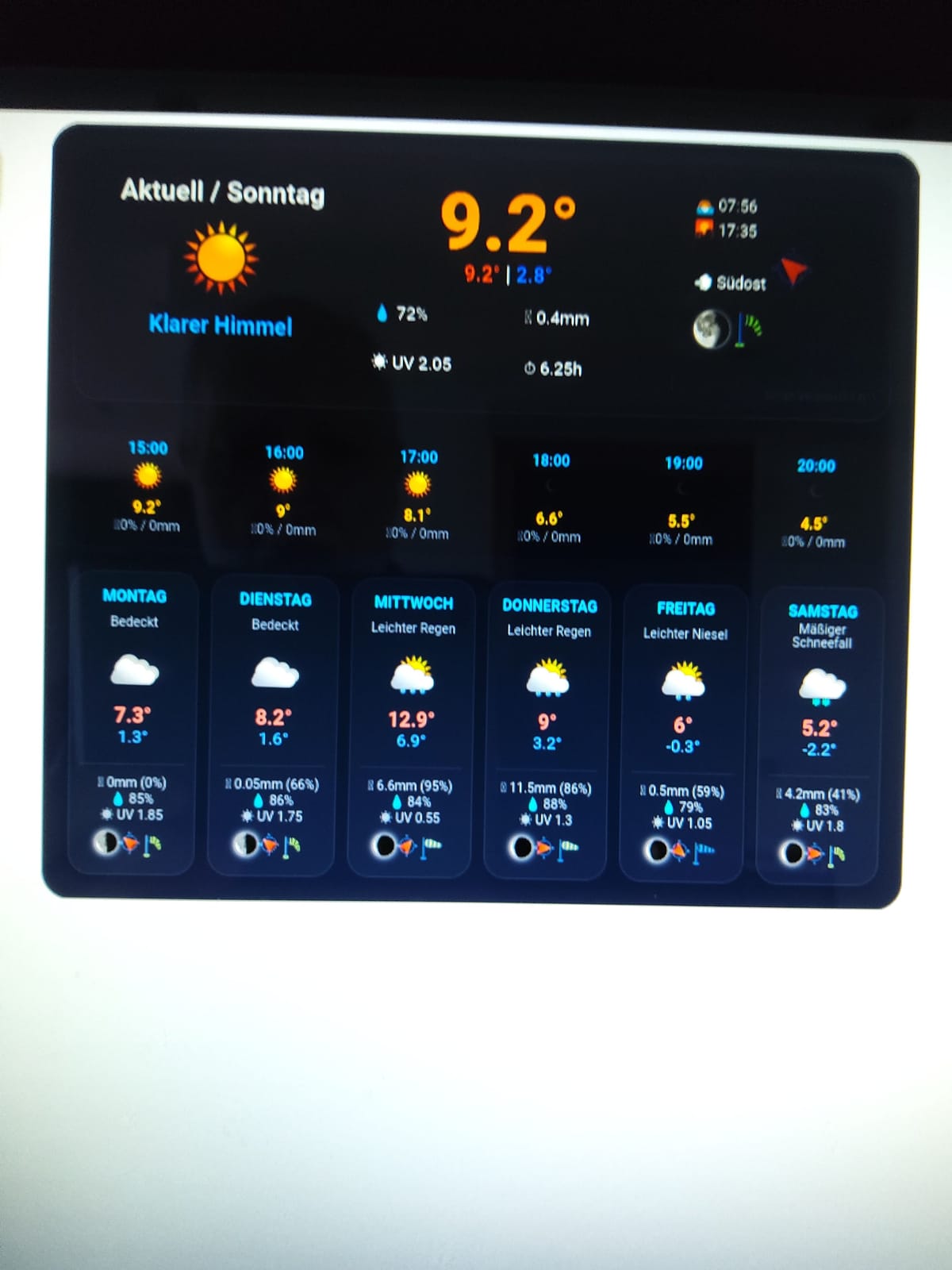
EDIT:
U+26C6 ⛆ Klappt auch nicht
EDIT2:
☔ klappt! -
und noch einen Wunsch:
was muss ich im Script ändern, damit das
javascript.1
2026-02-08 12:00:00.051	info	script.js.wetter: Weather widget: HTML successfully generated.

javascript.1
2026-02-08 11:55:00.044	info	script.js.wetter: Weather widget: HTML successfully generated.

javascript.1
2026-02-08 11:50:00.035	info	script.js.wetter: Weather widget: HTML successfully generated.

javascript.1
2026-02-08 11:46:30.648	info	script.js.wetter: Weather widget: HTML successfully generated.

javascript.1
2026-02-08 11:46:30.281	info	script.js.wetter: Weather widget: HTML successfully generated.

javascript.1
2026-02-08 11:45:00.036	info	script.js.wetter: Weather widget: HTML successfully generated.

javascript.1
2026-02-08 11:40:00.038	info	script.js.wetter: Weather widget: HTML successfully generated.

javascript.1
2026-02-08 11:35:00.034	info	script.js.wetter: Weather widget: HTML successfully generated.

javascript.1
2026-02-08 11:31:29.800	info	script.js.wetter: Weather widget: HTML successfully generated.

javascript.1
2026-02-08 11:31:29.420	info	script.js.wetter: Weather widget: HTML successfully generated.

javascript.1
2026-02-08 11:30:00.065	info	script.js.wetter: Weather widget: HTML successfully generated.

javascript.1
2026-02-08 11:25:00.035	info	script.js.wetter: Weather widget: HTML successfully generated.

javascript.1
2026-02-08 11:20:00.054	info	script.js.wetter: Weather widget: HTML successfully generated.

javascript.1
2026-02-08 11:16:30.041	info	script.js.wetter: Weather widget: HTML successfully generated.

javascript.1
2026-02-08 11:16:29.406	info	script.js.wetter: Weather widget: HTML successfully generated.

javascript.1
2026-02-08 11:15:00.038	info	script.js.wetter: Weather widget: HTML successfully generated.

javascript.1
2026-02-08 11:10:00.053	info	script.js.wetter: Weather widget: HTML successfully generated.

javascript.1
2026-02-08 11:05:00.054	info	script.js.wetter: Weather widget: HTML successfully
auf level debug kommt
ich hab jetzt erstmal die Zeile 226 (bei mir) mit
console.log... komplett auskommentiert@Homoran sagte in Test Adapter open-meteo-weather v2.2.x GitHub/Lates:
was muss ich im Script ändern, damit das
javascript.1
2026-02-08 12:00:00.051 info script.js.wetter: Weather widget: HTML successfully generated.
.....
.....
auf level debug kommtdu ersetzt einfach:
console.log("Weather widget: HTML successfully generated.");

#mit
log("Weather widget: HTML successfully generated.","debug");
und dann ist Ruhe.
@wendy2702 sagte in Test Adapter open-meteo-weather v2.2.x GitHub/Lates:
Sollte es den Adapter wie im Titel erwähnt schon im latest geben?
Dazu habe ich noch nichts veranlasst, wenn du das ioBroker Latest meinst. Sollte nur als Latest bei NPM und GitHub zu finden sein.
Ich muss mich damit noch beschäftigen wie die Aufnahme funktioniert um später ins offizielle Repository zu kommen.Grüße H5N1
To-Do Adapter Road-Maps
open-meteo-weather
nextcloud-monitoring -
@Homoran sagte in Test Adapter open-meteo-weather v2.2.x GitHub/Lates:
was muss ich im Script ändern, damit das
javascript.1
2026-02-08 12:00:00.051 info script.js.wetter: Weather widget: HTML successfully generated.
.....
.....
auf level debug kommtdu ersetzt einfach:
console.log("Weather widget: HTML successfully generated.");

#mit
log("Weather widget: HTML successfully generated.","debug");
und dann ist Ruhe.
@wendy2702 sagte in Test Adapter open-meteo-weather v2.2.x GitHub/Lates:
Sollte es den Adapter wie im Titel erwähnt schon im latest geben?
Dazu habe ich noch nichts veranlasst, wenn du das ioBroker Latest meinst. Sollte nur als Latest bei NPM und GitHub zu finden sein.
Ich muss mich damit noch beschäftigen wie die Aufnahme funktioniert um später ins offizielle Repository zu kommen.@H5N1 sagte in Test Adapter open-meteo-weather v2.2.x GitHub/Lates:
Ich muss mich damit noch beschäftigen wie die Aufnahme funktioniert um später ins offizielle Repository zu kommen.
@mcm1957 wird dir das gerne erzählen 😀
-
-
@Thisoft sagte in Test Adapter open-meteo-weather v2.2.x GitHub/Lates:
ich habe mir übrigens das Widget mal kräftig "eingedampft" und auf meine Wünsche angepasst ;-)
Kannst du bitte den Code zur Verfügung stellen?
(Am besten als Spoiler)
@oFbEQnpoLKKl6mbY5e13 sagte in Test Adapter open-meteo-weather v2.2.x GitHub/Lates:
Kannst du bitte den Code zur Verfügung stellen?
Bitteschön :-). Da sind jetzt aber schon "einige" Änderungen und persönliche Anpassungen drin... bei Unklarheiten einfach nochmal nachfragen
// version: 0.0.3 ////////////////////////////////////////////////// const locationName = 'xxxxxxx'; // <--- Your Location Name from Open-Meteo Adapter ////////////////////////////////////////////////// const version = '0.0.3'; const dpBase = 'open-meteo-weather.0.' + locationName + '.weather'; const forecast = dpBase + '.forecast'; const targetDP = '0_userdata.0.Wetter_Widget_HTML'; const modsurface = 8.6; //Paneloberfläche in m2 (Solar panel's surface in sq. meters) // Sprach-Check für ioBroker let sysLang = 'de'; try { const systemConfig = getObject("system.config"); sysLang = systemConfig.common.language || 'de'; } catch (e) { sysLang = 'de'; } // Übersetzungstabelle const i18n = { de: { current: "Aktuell" }, en: { current: "Current" }, uk: { current: "Зараз" }, ru: { current: "Сейчас" }, nl: { current: "Nu" }, fr: { current: "Actuel" }, it: { current: "Attuale" }, es: { current: "Actual" }, pl: { current: "Aktualnie" }, pt: { current: "Atual" }, zh: { current: "当前" } }; const lang = i18n[sysLang] || i18n['en']; // Prüfen, ob der Datenpunkt existiert, ansonsten erstellen if (!existsState(targetDP)) { createState(targetDP, '', { name: 'Weather Widget for VIS2', type: 'string', role: 'html' }, function () { console.log("Data point " + targetDP + " has been newly created."); }); } function updateWeatherWidget() { // Hilfsfunktion: Daten sicher lesen function getVal(id, unit = "") { let state = getState(id); if (!state || state.val === null || state.val === undefined) return "--" + unit; return state.val + unit; } function getUV(id) { let state = getState(id); if (!state || state.val === null || state.val === undefined || state.val == 0) return 0; return Math.round(state.val/11*100)/100; } function getPV(hPath) { let state = getState(hPath + '.global_tilted_irradiance'); if (!state || state.val === null || state.val === undefined || state.val == 0) return "0 W"; return Math.round(state.val*modsurface) + " W"; } // Hilfsfunktion: Bilder function getImg(urlId, size = "20px", className = "") { let url = getVal(urlId, ""); if (url === "" || url === "--") return ""; return `<img src="${url}" style="width:${size}; height:${size}; object-fit:contain;" class="${className}">`; } // CSS Styling let html = ` <style> .w-container { font-family: 'Segoe UI', sans-serif; background: linear-gradient(160deg, #1e293b 0%, #0f172a 100%); color: #f1f5f9; padding: 1px; border-radius: 24px; border: 1px solid #334155; box-shadow: 0 1px 3px rgba(0,0,0,0.5); } .w-header { display: grid; grid-template-columns: 1.2fr 1.5fr 1fr; gap: 5px; background: rgba(255,255,255,0.05); padding: 20px; border-radius: 20px; margin-bottom: 5px; border: 1px solid rgba(255,255,255,0.1); } .w-temp-big { font-size: 3.8rem; font-weight: 900; color: #fbbf24; line-height: 1; } .w-desc { font-size: 1.1rem; color: #38bdf8; font-weight: 600; } .w-info-grid { display: grid; grid-template-columns: 1fr 1fr; gap: 8px; font-size: 0.85rem; margin-top: 10px; } .w-info-item { background: rgba(0,0,0,0.2); padding: 6px 10px; border-radius: 10px; display: flex; align-items: center; gap: 5px; } .w-sun-moon { font-size: 0.8rem; line-height: 1.6; border-left: 1px solid rgba(255,255,255,0.1); padding-left: 15px; } .w-hourly { display: grid; grid-template-columns: repeat(12, 0.45fr); gap: 0px; margin-bottom: 2px; background: rgba(0,0,0,0.15); padding: 0px; border-radius: 5px; } .w-h-item { text-align: center; font-size: 0.75rem; } .w-h-time { font-weight: bold; color: #38bdf8; } .w-h-cloud { font-size: 0.65rem; color: #94a3b8; } .w-h-temp { font-weight: bold; color: #fbbf24; display: block; } .w-h-rain { font-size: 0.65rem; color: #94a3b8; } .w-forecast { display: grid; grid-template-columns: repeat(6, 1fr); gap: 5px; } .w-fc-day { background: rgba(255,255,255,0.03); padding: 12px 8px; border-radius: 18px; text-align: center; border: 1px solid rgba(255,255,255,0.05); display: flex; flex-direction: column; justify-content: space-between; } .w-fc-name { font-weight: bold; color: #38bdf8; font-size: 0.75rem; text-transform: uppercase; margin-bottom: 2px; } .w-fc-text { font-size: 0.65rem; color: #94a3b8; height: 2.2em; overflow: hidden; display: flex; align-items: center; justify-content: center; line-height: 1.1; margin-bottom: 0px; } .w-fc-temp-max { color: #f87171; font-weight: bold; font-size: 1rem; display: block; } .w-fc-temp-min { color: #60a5fa; font-size: 0.85rem; display: block; margin-bottom: 2px; } .w-fc-details { font-size: 0.65rem; color: #94a3b8; border-top: 1px solid rgba(255,255,255,0.05); margin-top: 2px; padding-top: 2px; } </style> <div class="w-container"> <!--<div class="w-header"> <div style="text-align: center;"> <div style="font-size: 1.3rem; font-weight: bold;">${lang.current} / ${getVal(forecast + '.day0.name_day')}</div> ${getImg(dpBase + '.current.icon_url', "80px")} <div class="w-desc">${getVal(dpBase + '.current.weather_text')}</div> </div> <div> <div class="w-temp-big">${getVal(dpBase + '.current.temperature_2m', "°")}</div> <div style="font-weight: bold; margin-bottom: 10px;"> <span style="color:#f87171"> ${getVal(forecast + '.day0.temperature_2m_max', "°")}</span> | <span style="color:#60a5fa"> ${getVal(forecast + '.day0.temperature_2m_min', "°")}</span> </div> <div class="w-info-grid"> <div class="w-info-item">💧 ${getVal(dpBase + '.current.relative_humidity_2m', "%")}</div> <div class="w-info-item">🌧️ ${getVal(forecast + '.day0.rain_sum', "mm")}</div> <div class="w-info-item">☀️ UV ${getVal(forecast + '.day0.uv_index_max')}</div> <div class="w-info-item">⏱️ ${getVal(forecast + '.day0.sunshine_duration', "h")}</div> </div> </div> <div class="w-sun-moon" style="position: relative;"> 🌅 ${getVal(forecast + '.day0.sunrise')}<br> 🌇 ${getVal(forecast + '.day0.sunset')}<br> 💨 ${getVal(dpBase + '.current.wind_direction_text')} ${getImg(dpBase + '.current.wind_direction_icon', "35px")}<br> <div style="margin-top:8px; display: flex; align-items: center; gap: 10px;"> ${getImg(forecast + '.day0.moon_phase_icon', "30px", "icon-moon")} ${getImg(dpBase + '.current.wind_gust_icon', "35px")} </div> <div style="position: absolute; bottom: -10px; right: 0; font-size: 0.6rem; color: #475569; opacity: 0.8;"> Script Version ${version} </div> </div> </div> --> <div class="w-hourly"> `; for (let h = 1; h < 13; h++) { let hPath = forecast + '.hourly.next_hours.hour' + h; html += ` <div class="w-h-item"> <div class="w-h-time">${getVal(hPath + '.time')}</div> ${getImg(hPath + '.icon_url', "30px")} <span class="w-h-cloud">🌤️${getPV(hPath)}</span> <span class="w-h-temp">${getVal(hPath + '.temperature_2m', "°")}</span> <span class="w-h-rain"> 🌧️${getVal(hPath + '.precipitation_probability', "%")} </span> </div> `; } html += ` </div> <div class="w-forecast"> `; for (let i = 1; i <= 6; i++) { let d = forecast + '.day' + i; html += ` <div class="w-fc-day"> <div> <div class="w-fc-name">${getVal(d + '.name_day')}</div> <div class="w-fc-text">${getVal(d + '.weather_text')}</div> ${getImg(d + '.icon_url', "45px")} <span class="w-fc-temp-max">${getVal(d + '.temperature_2m_max', "°")}</span> <span class="w-fc-temp-min">${getVal(d + '.temperature_2m_min', "°")}</span> </div> <div class="w-fc-details"> 🌧️ ${getVal(d + '.rain_sum', "mm")} (${getVal(d + '.precipitation_probability_max', "%")})<br> 💧 ${getVal(d + '.relative_humidity_2m_mean', "%")}<br> ☀️ UV ${getVal(d + '.uv_index_max')}<br> <div style="margin-top:5px; display: flex; justify-content: center; gap: 4px;"> <!--${getImg(d + '.moon_phase_icon', "18px", "icon-moon")}--> ${getImg(d + '.wind_direction_icon', "18px")} ${getImg(d + '.wind_gust_icon', "22px")} </div> </div> </div> `; } html += `</div></div>`; setState(targetDP, html, true); console.log("Weather widget: HTML successfully generated."); } // Start & Trigger updateWeatherWidget(); schedule("1 * * * *", updateWeatherWidget); on({id: dpBase + '.current.temperature_2m', change: 'any'}, updateWeatherWidget); on({id: forecast + '.hourly.next_hours.hour0.time', change: 'any'}, updateWeatherWidget); -
@oFbEQnpoLKKl6mbY5e13 sagte in Test Adapter open-meteo-weather v2.2.x GitHub/Lates:
Kannst du bitte den Code zur Verfügung stellen?
Bitteschön :-). Da sind jetzt aber schon "einige" Änderungen und persönliche Anpassungen drin... bei Unklarheiten einfach nochmal nachfragen
// version: 0.0.3 ////////////////////////////////////////////////// const locationName = 'xxxxxxx'; // <--- Your Location Name from Open-Meteo Adapter ////////////////////////////////////////////////// const version = '0.0.3'; const dpBase = 'open-meteo-weather.0.' + locationName + '.weather'; const forecast = dpBase + '.forecast'; const targetDP = '0_userdata.0.Wetter_Widget_HTML'; const modsurface = 8.6; //Paneloberfläche in m2 (Solar panel's surface in sq. meters) // Sprach-Check für ioBroker let sysLang = 'de'; try { const systemConfig = getObject("system.config"); sysLang = systemConfig.common.language || 'de'; } catch (e) { sysLang = 'de'; } // Übersetzungstabelle const i18n = { de: { current: "Aktuell" }, en: { current: "Current" }, uk: { current: "Зараз" }, ru: { current: "Сейчас" }, nl: { current: "Nu" }, fr: { current: "Actuel" }, it: { current: "Attuale" }, es: { current: "Actual" }, pl: { current: "Aktualnie" }, pt: { current: "Atual" }, zh: { current: "当前" } }; const lang = i18n[sysLang] || i18n['en']; // Prüfen, ob der Datenpunkt existiert, ansonsten erstellen if (!existsState(targetDP)) { createState(targetDP, '', { name: 'Weather Widget for VIS2', type: 'string', role: 'html' }, function () { console.log("Data point " + targetDP + " has been newly created."); }); } function updateWeatherWidget() { // Hilfsfunktion: Daten sicher lesen function getVal(id, unit = "") { let state = getState(id); if (!state || state.val === null || state.val === undefined) return "--" + unit; return state.val + unit; } function getUV(id) { let state = getState(id); if (!state || state.val === null || state.val === undefined || state.val == 0) return 0; return Math.round(state.val/11*100)/100; } function getPV(hPath) { let state = getState(hPath + '.global_tilted_irradiance'); if (!state || state.val === null || state.val === undefined || state.val == 0) return "0 W"; return Math.round(state.val*modsurface) + " W"; } // Hilfsfunktion: Bilder function getImg(urlId, size = "20px", className = "") { let url = getVal(urlId, ""); if (url === "" || url === "--") return ""; return `<img src="${url}" style="width:${size}; height:${size}; object-fit:contain;" class="${className}">`; } // CSS Styling let html = ` <style> .w-container { font-family: 'Segoe UI', sans-serif; background: linear-gradient(160deg, #1e293b 0%, #0f172a 100%); color: #f1f5f9; padding: 1px; border-radius: 24px; border: 1px solid #334155; box-shadow: 0 1px 3px rgba(0,0,0,0.5); } .w-header { display: grid; grid-template-columns: 1.2fr 1.5fr 1fr; gap: 5px; background: rgba(255,255,255,0.05); padding: 20px; border-radius: 20px; margin-bottom: 5px; border: 1px solid rgba(255,255,255,0.1); } .w-temp-big { font-size: 3.8rem; font-weight: 900; color: #fbbf24; line-height: 1; } .w-desc { font-size: 1.1rem; color: #38bdf8; font-weight: 600; } .w-info-grid { display: grid; grid-template-columns: 1fr 1fr; gap: 8px; font-size: 0.85rem; margin-top: 10px; } .w-info-item { background: rgba(0,0,0,0.2); padding: 6px 10px; border-radius: 10px; display: flex; align-items: center; gap: 5px; } .w-sun-moon { font-size: 0.8rem; line-height: 1.6; border-left: 1px solid rgba(255,255,255,0.1); padding-left: 15px; } .w-hourly { display: grid; grid-template-columns: repeat(12, 0.45fr); gap: 0px; margin-bottom: 2px; background: rgba(0,0,0,0.15); padding: 0px; border-radius: 5px; } .w-h-item { text-align: center; font-size: 0.75rem; } .w-h-time { font-weight: bold; color: #38bdf8; } .w-h-cloud { font-size: 0.65rem; color: #94a3b8; } .w-h-temp { font-weight: bold; color: #fbbf24; display: block; } .w-h-rain { font-size: 0.65rem; color: #94a3b8; } .w-forecast { display: grid; grid-template-columns: repeat(6, 1fr); gap: 5px; } .w-fc-day { background: rgba(255,255,255,0.03); padding: 12px 8px; border-radius: 18px; text-align: center; border: 1px solid rgba(255,255,255,0.05); display: flex; flex-direction: column; justify-content: space-between; } .w-fc-name { font-weight: bold; color: #38bdf8; font-size: 0.75rem; text-transform: uppercase; margin-bottom: 2px; } .w-fc-text { font-size: 0.65rem; color: #94a3b8; height: 2.2em; overflow: hidden; display: flex; align-items: center; justify-content: center; line-height: 1.1; margin-bottom: 0px; } .w-fc-temp-max { color: #f87171; font-weight: bold; font-size: 1rem; display: block; } .w-fc-temp-min { color: #60a5fa; font-size: 0.85rem; display: block; margin-bottom: 2px; } .w-fc-details { font-size: 0.65rem; color: #94a3b8; border-top: 1px solid rgba(255,255,255,0.05); margin-top: 2px; padding-top: 2px; } </style> <div class="w-container"> <!--<div class="w-header"> <div style="text-align: center;"> <div style="font-size: 1.3rem; font-weight: bold;">${lang.current} / ${getVal(forecast + '.day0.name_day')}</div> ${getImg(dpBase + '.current.icon_url', "80px")} <div class="w-desc">${getVal(dpBase + '.current.weather_text')}</div> </div> <div> <div class="w-temp-big">${getVal(dpBase + '.current.temperature_2m', "°")}</div> <div style="font-weight: bold; margin-bottom: 10px;"> <span style="color:#f87171"> ${getVal(forecast + '.day0.temperature_2m_max', "°")}</span> | <span style="color:#60a5fa"> ${getVal(forecast + '.day0.temperature_2m_min', "°")}</span> </div> <div class="w-info-grid"> <div class="w-info-item">💧 ${getVal(dpBase + '.current.relative_humidity_2m', "%")}</div> <div class="w-info-item">🌧️ ${getVal(forecast + '.day0.rain_sum', "mm")}</div> <div class="w-info-item">☀️ UV ${getVal(forecast + '.day0.uv_index_max')}</div> <div class="w-info-item">⏱️ ${getVal(forecast + '.day0.sunshine_duration', "h")}</div> </div> </div> <div class="w-sun-moon" style="position: relative;"> 🌅 ${getVal(forecast + '.day0.sunrise')}<br> 🌇 ${getVal(forecast + '.day0.sunset')}<br> 💨 ${getVal(dpBase + '.current.wind_direction_text')} ${getImg(dpBase + '.current.wind_direction_icon', "35px")}<br> <div style="margin-top:8px; display: flex; align-items: center; gap: 10px;"> ${getImg(forecast + '.day0.moon_phase_icon', "30px", "icon-moon")} ${getImg(dpBase + '.current.wind_gust_icon', "35px")} </div> <div style="position: absolute; bottom: -10px; right: 0; font-size: 0.6rem; color: #475569; opacity: 0.8;"> Script Version ${version} </div> </div> </div> --> <div class="w-hourly"> `; for (let h = 1; h < 13; h++) { let hPath = forecast + '.hourly.next_hours.hour' + h; html += ` <div class="w-h-item"> <div class="w-h-time">${getVal(hPath + '.time')}</div> ${getImg(hPath + '.icon_url', "30px")} <span class="w-h-cloud">🌤️${getPV(hPath)}</span> <span class="w-h-temp">${getVal(hPath + '.temperature_2m', "°")}</span> <span class="w-h-rain"> 🌧️${getVal(hPath + '.precipitation_probability', "%")} </span> </div> `; } html += ` </div> <div class="w-forecast"> `; for (let i = 1; i <= 6; i++) { let d = forecast + '.day' + i; html += ` <div class="w-fc-day"> <div> <div class="w-fc-name">${getVal(d + '.name_day')}</div> <div class="w-fc-text">${getVal(d + '.weather_text')}</div> ${getImg(d + '.icon_url', "45px")} <span class="w-fc-temp-max">${getVal(d + '.temperature_2m_max', "°")}</span> <span class="w-fc-temp-min">${getVal(d + '.temperature_2m_min', "°")}</span> </div> <div class="w-fc-details"> 🌧️ ${getVal(d + '.rain_sum', "mm")} (${getVal(d + '.precipitation_probability_max', "%")})<br> 💧 ${getVal(d + '.relative_humidity_2m_mean', "%")}<br> ☀️ UV ${getVal(d + '.uv_index_max')}<br> <div style="margin-top:5px; display: flex; justify-content: center; gap: 4px;"> <!--${getImg(d + '.moon_phase_icon', "18px", "icon-moon")}--> ${getImg(d + '.wind_direction_icon', "18px")} ${getImg(d + '.wind_gust_icon', "22px")} </div> </div> </div> `; } html += `</div></div>`; setState(targetDP, html, true); console.log("Weather widget: HTML successfully generated."); } // Start & Trigger updateWeatherWidget(); schedule("1 * * * *", updateWeatherWidget); on({id: dpBase + '.current.temperature_2m', change: 'any'}, updateWeatherWidget); on({id: forecast + '.hourly.next_hours.hour0.time', change: 'any'}, updateWeatherWidget);Super, vielen Dank!
-
Demnächst ein Minor Update für open-meteo-weather (2.3.0)
Ich habe mir was überlegt für die Luftqualität Enthusiasten. Da open meteo nur Stundenweise in vielen Daten die Werte bringt für Luftqualität habe ich es so gemacht das der Adapter im Hintergrund alle Stündlichen Daten abruft und jeweils den Maximalwert der an diesem Tag vorkommt Speichert und ablegt. Die Maximal abrufbaren Vorhersage Tage für Luftqualität beträgt 6 Tage, danach kommen keine Werte mehr. Kann aber noch 1-2 Tage dauern, der Adapter läuft auf meinem Dev-server bereits Smooth wie er soll, Trotzdem beobachte ich erst mal noch.
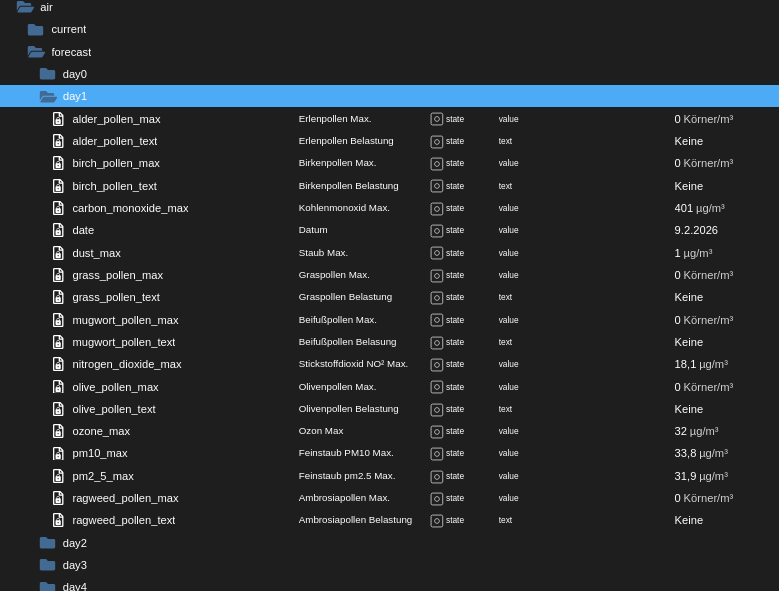
Grüße H5N1
To-Do Adapter Road-Maps
open-meteo-weather
nextcloud-monitoring -
Demnächst ein Minor Update für open-meteo-weather (2.3.0)
Ich habe mir was überlegt für die Luftqualität Enthusiasten. Da open meteo nur Stundenweise in vielen Daten die Werte bringt für Luftqualität habe ich es so gemacht das der Adapter im Hintergrund alle Stündlichen Daten abruft und jeweils den Maximalwert der an diesem Tag vorkommt Speichert und ablegt. Die Maximal abrufbaren Vorhersage Tage für Luftqualität beträgt 6 Tage, danach kommen keine Werte mehr. Kann aber noch 1-2 Tage dauern, der Adapter läuft auf meinem Dev-server bereits Smooth wie er soll, Trotzdem beobachte ich erst mal noch.@H5N1 sagte in Test Adapter open-meteo-weather v2.2.x GitHub/Lates:
in vielen Daten die Werte bringt für Luftqualität
jetzt wo du das sagst 😉
ich hab mich da mal durchgewühlt.
Alder ist wohl Erle, mugwort ist Beifuss und ragweed Ambrosia, aber was sind Olivenpollen?
Wörtlich wird das hier wohl keine große Rolle spielenkein Support per PN! - Fragen im Forum stellen - Benutzt das Voting rechts unten im Beitrag wenn er euch geholfen hat.
Das Forum freut sich über eine Spende. Benutzt dazu den Spendenbutton oben rechts. Danke!
der Installationsfixer: curl -fsL https://iobroker.net/fix.sh | bash - -
@H5N1 sagte in Test Adapter open-meteo-weather v2.2.x GitHub/Lates:
in vielen Daten die Werte bringt für Luftqualität
jetzt wo du das sagst 😉
ich hab mich da mal durchgewühlt.
Alder ist wohl Erle, mugwort ist Beifuss und ragweed Ambrosia, aber was sind Olivenpollen?
Wörtlich wird das hier wohl keine große Rolle spielen@Homoran sagte in Test Adapter open-meteo-weather v2.2.x GitHub/Lates:
Wörtlich wird das hier wohl keine große Rolle spielen
Da hast du recht, aber der adapter wird auch in vielen Sprachen ausgeliefert, wenn der Grieche diesen Adapter nimmt und allergisch ist auf Olivenpollen ist, isser evtl. froh wann er sehen kann das er lieber zuhause bleibt. :-D
Grüße H5N1
To-Do Adapter Road-Maps
open-meteo-weather
nextcloud-monitoring -
@Homoran sagte in Test Adapter open-meteo-weather v2.2.x GitHub/Lates:
Wörtlich wird das hier wohl keine große Rolle spielen
Da hast du recht, aber der adapter wird auch in vielen Sprachen ausgeliefert, wenn der Grieche diesen Adapter nimmt und allergisch ist auf Olivenpollen ist, isser evtl. froh wann er sehen kann das er lieber zuhause bleibt. :-D
kein Support per PN! - Fragen im Forum stellen - Benutzt das Voting rechts unten im Beitrag wenn er euch geholfen hat.
Das Forum freut sich über eine Spende. Benutzt dazu den Spendenbutton oben rechts. Danke!
der Installationsfixer: curl -fsL https://iobroker.net/fix.sh | bash - -
@Homoran sagte in Test Adapter open-meteo-weather v2.2.x GitHub/Lates:
das hier bietet der DWD als relevante Allergene an
ich kann nur das anzeigen lassen was open meteo anbietet, da habe ich schon alle verfügbaren Pollen, Roggen hat er dort gar nicht.
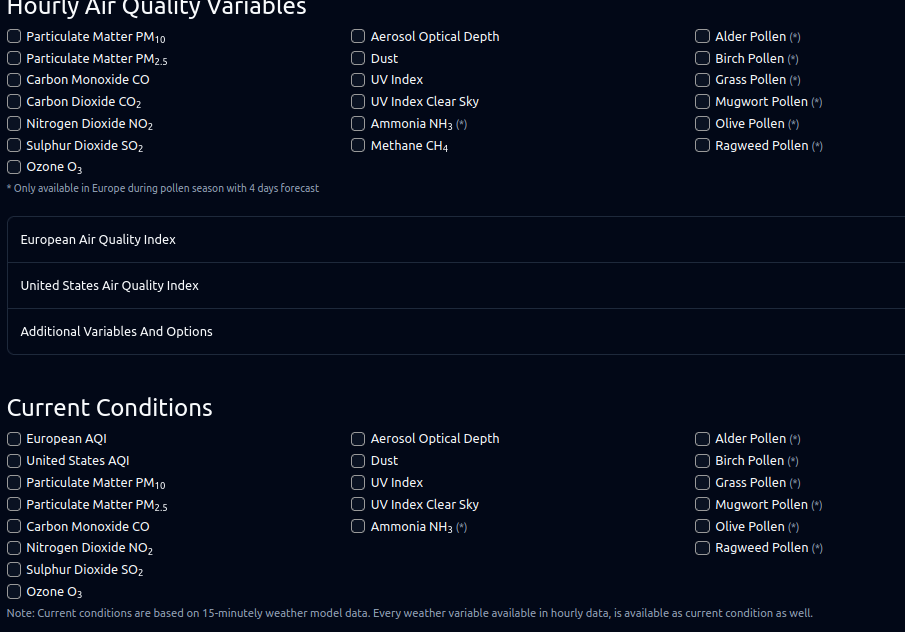
Grüße H5N1
To-Do Adapter Road-Maps
open-meteo-weather
nextcloud-monitoring -
@Homoran sagte in Test Adapter open-meteo-weather v2.2.x GitHub/Lates:
das hier bietet der DWD als relevante Allergene an
ich kann nur das anzeigen lassen was open meteo anbietet, da habe ich schon alle verfügbaren Pollen, Roggen hat er dort gar nicht.
@H5N1 alles gut, ich vermutete hinter olive nur irgendwas anderes
aber die ganzen Gase incl. Ozon sind auch klasse.
EDIT:
OOOHHH
Ole e 1 ist das Majorallergen für Olivenpollenallergiker und wird von 70% dieser Allergiepatienten erkannt. Ole e 1 hat eine erhbeliche Sequenzanalogie mit anderen Mitgliedern der Ole e 1-artigen Proteinfamilie. Zu dieser gehören Esche (Fra e 1 ), Liguster (Lig v 1) und Flieder (Syr v 1).
-
@homoran kannst du mir was zu Beitrag #140 Sagen?
Grüße H5N1
To-Do Adapter Road-Maps
open-meteo-weather
nextcloud-monitoring -
@H5N1 sagte in Test Adapter open-meteo-weather v2.2.x GitHub/Lates:
@homoran kannst du mir was zu Beitrag #140 Sagen?
sorry, den hab ich übersehen!
Diese Regel kenne ich nicht!Das kann man machen, einige tun das auch, aber mit 150 Post könnte man hier noch weitermachen.
edit
Vielleicht wenn's im latest ist. -
@homoran Nr3 aus dem Regelwerk: Tests werden geschlossen wenn die Version im Stable repository Veröffentlicht wird oder einen neue Minor oder Major Version zum Testen bereit steht.
Deswegen frage ich.Grüße H5N1
To-Do Adapter Road-Maps
open-meteo-weather
nextcloud-monitoring -
@homoran Nr3 aus dem Regelwerk: Tests werden geschlossen wenn die Version im Stable repository Veröffentlicht wird oder einen neue Minor oder Major Version zum Testen bereit steht.
Deswegen frage ich.@H5N1 sagte in Test Adapter open-meteo-weather v2.2.x GitHub/Lates:
Nr3 aus dem Regelwerk:
watt für ein Regelwerk?
ich hab sowas nicht 😀
wer hat das denn verzapft?
-
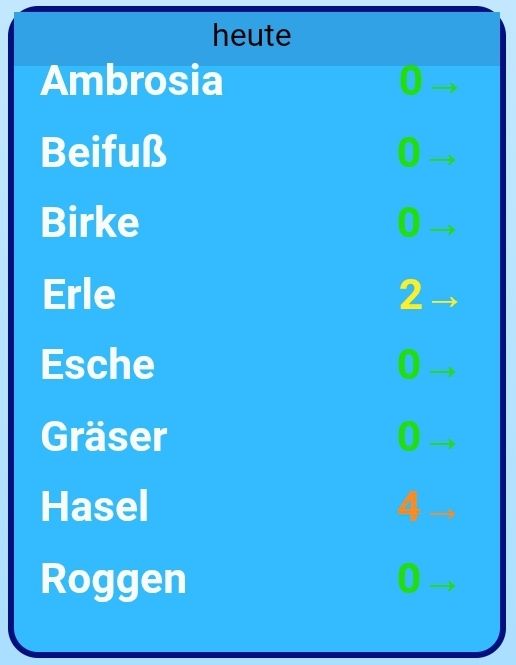
@ioT4db sagte in Test Adapter open-meteo-weather v2.2.x GitHub/Lates:
Noch eine Frage, kann man das verwendete Wettermodell der API-Abfrage ändern/sehen?
Die API Abfrage kannst du in der Debug Ausgabe sehen. Änderung ist im Admin nicht vorgesehen. Das Wettermodel wird per Default eine Mischung (Standard-Best Match) aus allen genommen.




Hey! Du scheinst an dieser Unterhaltung interessiert zu sein, hast aber noch kein Konto.
Hast du es satt, bei jedem Besuch durch die gleichen Beiträge zu scrollen? Wenn du dich für ein Konto anmeldest, kommst du immer genau dorthin zurück, wo du zuvor warst, und kannst dich über neue Antworten benachrichtigen lassen (entweder per E-Mail oder Push-Benachrichtigung). Du kannst auch Lesezeichen speichern und Beiträge positiv bewerten, um anderen Community-Mitgliedern deine Wertschätzung zu zeigen.
Mit deinem Input könnte dieser Beitrag noch besser werden 💗
Registrieren AnmeldenSupport us
466
Online33.0k
Benutzer83.6k
Themen1.3m
Beiträge