




Problem mit IO-Broker Reiter Adapter - Fehlermeldung
-
@Thomas-Braun
Also alle Updates erfolgreich erledigt.
Beim Start von IOBroker kann ich nun auch wieder den Reiter "Adapter" ohne Fehlermeldung öffnen.Bleibt damit "nur" noch das Problem mit den IO-Adressen (die aus dem alten System im Backup übernommen wurden und dass die VIS sich nicht starten lässt.
Was soll ich als nächster schritt machen ?
@Frank-KNX sagte in Problem mit IO-Broker Reiter Adapter - Fehlermeldung:
Was soll ich als nächster schritt machen ?
Nochmal
iob diagzeigen.
Den Befehl zum entbinden der IP hab ich gerade nicht parat. Steht bestimmt aber in der Doku drin. -
@Frank-KNX sagte in Problem mit IO-Broker Reiter Adapter - Fehlermeldung:
Was soll ich als nächster schritt machen ?
Nochmal
iob diagzeigen.
Den Befehl zum entbinden der IP hab ich gerade nicht parat. Steht bestimmt aber in der Doku drin.hier das Ergebnis von iob diag:
Script v.2025-08-09

*** BASE SYSTEM ***
Operating System: Debian GNU/Linux 13 (trixie)
 Static hostname: visu
       Icon name: computer
          Kernel: Linux 6.12.62+rpt-rpi-2712
    Architecture: arm64
OS is similar to:

Model           : Raspberry Pi 5 Model B Rev 1.1
Docker          : false
Virtualization  : none
Kernel          : aarch64
Userland        : 64 bit

Systemuptime and Load:
 14:08:22 up  1:24,  1 user,  load average: 0.71, 0.57, 0.49
CPU threads: 4


*** LIFE CYCLE STATUS ***
Operating System is the current Debian stable version codenamed 'trixie'!

*** RASPBERRY THROTTLING ***
Current issues:
No throttling issues detected.

Previously detected issues:
No throttling issues detected.

*** TIME AND TIMEZONES ***
               Local time: Sat 2026-01-10 14:08:22 CET
           Universal time: Sat 2026-01-10 13:08:22 UTC
                 RTC time: Sat 2026-01-10 13:08:22
                Time zone: Europe/Berlin (CET, +0100)
System clock synchronized: yes
              NTP service: active
          RTC in local TZ: no

*** Users and Groups ***
User that called 'iob diag':
visadmin
HOME=/home/visadmin
GROUPS=visadmin adm dialout cdrom sudo audio video plugdev games users netdev gpio i2c spi render input iobroker

User that is running 'js-controller':
iobroker
HOME=/home/iobroker
SUDO_HOME=/home/visadmin
GROUPS=iobroker tty dialout audio video plugdev bluetooth gpio i2c

*** DISPLAY-SERVER SETUP ***
Display-Server:         false
Unit display-manager.service could not be found.
Display-Manager:
Desktop:
Session:                tty

*** MEMORY ***
               total        used        free      shared  buff/cache   available
Mem:            8.5G        1.3G        6.6G         15M        614M        7.1G
Swap:           2.1G          0B        2.1G
Total:           10G        1.3G        8.8G

Active iob-Instances:   10

         8058 M total memory
         1261 M used memory
         1149 M active memory
          301 M inactive memory
         6306 M free memory
           68 M buffer memory
          516 M swap cache
         2047 M total swap
            0 M used swap
         2047 M free swap

*** top - Table Of Processes  ***
top - 14:08:23 up  1:24,  1 user,  load average: 0.71, 0.57, 0.49
Tasks: 192 total,   1 running, 191 sleeping,   0 stopped,   0 zombie
%Cpu(s):  2.2 us,  0.0 sy,  0.0 ni, 97.8 id,  0.0 wa,  0.0 hi,  0.0 si,  0.0 st
MiB Mem :   8058.9 total,   6303.0 free,   1263.7 used,    587.6 buff/cache
MiB Swap:   2048.0 total,   2048.0 free,      0.0 used.   6795.3 avail Mem

*** FAILED SERVICES ***

  UNIT LOAD ACTIVE SUB DESCRIPTION

0 loaded units listed.


*** DMESG CRITICAL ERRORS ***
No critical errors detected

*** FILESYSTEM ***
Filesystem     Type      Size  Used Avail Use% Mounted on
udev           devtmpfs  3.9G     0  3.9G   0% /dev
tmpfs          tmpfs     1.6G   14M  1.6G   1% /run
/dev/mmcblk0p2 ext4       58G  6.9G   48G  13% /
tmpfs          tmpfs     4.0G     0  4.0G   0% /dev/shm
tmpfs          tmpfs     5.0M   48K  5.0M   1% /run/lock
tmpfs          tmpfs     1.0M     0  1.0M   0% /run/credentials/systemd-journald.service
tmpfs          tmpfs     4.0G  1.5M  4.0G   1% /tmp
/dev/mmcblk0p1 vfat      510M   66M  445M  13% /boot/firmware
tmpfs          tmpfs     1.0M     0  1.0M   0% /run/credentials/getty@tty1.service
tmpfs          tmpfs     1.0M     0  1.0M   0% /run/credentials/serial-getty@ttyAMA10.service
tmpfs          tmpfs     806M   32K  806M   1% /run/user/1000

Messages concerning ext4 filesystem in dmesg:
[Sat Jan 10 12:44:12 2026] Kernel command line: reboot=w coherent_pool=1M 8250.nr_uarts=1 pci=pcie_bus_safe cgroup_disable=memory numa_policy=interleave nvme.max_host_mem_size_mb=0  numa=fake=8 system_heap.max_order=0 iommu_dma_numa_policy=interleave smsc95xx.macaddr=2C:CF:67:CC:31:18 vc_mem.mem_base=0x3fc00000 vc_mem.mem_size=0x40000000  console=ttyAMA10,115200 console=tty1 root=PARTUUID=45188717-02 rootfstype=ext4 fsck.repair=yes rootwait cfg80211.ieee80211_regdom=DE
[Sat Jan 10 12:44:16 2026] EXT4-fs (mmcblk0p2): orphan cleanup on readonly fs
[Sat Jan 10 12:44:16 2026] EXT4-fs (mmcblk0p2): mounted filesystem 21724cc6-e5a3-48a1-8643-7917dba3a9fb ro with ordered data mode. Quota mode: none.
[Sat Jan 10 12:44:18 2026] EXT4-fs (mmcblk0p2): re-mounted 21724cc6-e5a3-48a1-8643-7917dba3a9fb r/w.

Show mounted filesystems:
TARGET           SOURCE         FSTYPE OPTIONS
/                /dev/mmcblk0p2 ext4   rw,noatime,commit=600
`-/boot/firmware /dev/mmcblk0p1 vfat   rw,relatime,fmask=0022,dmask=0022,codepage=437,iocharset=ascii,shortname=mixed,errors=remount-ro

Files in neuralgic directories:

/var:
2.5G    /var/
231M    /var/cache
225M    /var/cache/apt
181M    /var/lib
145M    /var/lib/apt

Archived and active journals take up 8M in the file system.

/opt/iobroker/backups:
17M     /opt/iobroker/backups/

/opt/iobroker/iobroker-data:
256M    /opt/iobroker/iobroker-data/
230M    /opt/iobroker/iobroker-data/files
47M     /opt/iobroker/iobroker-data/files/admin.admin
46M     /opt/iobroker/iobroker-data/files/admin.admin/custom/assets
46M     /opt/iobroker/iobroker-data/files/admin.admin/custom

The five largest files in iobroker-data are:
30M     /opt/iobroker/iobroker-data/files/notification-manager.admin/build/index.js.map
11M     /opt/iobroker/iobroker-data/files/notification-manager.admin/build/index.js
9.8M    /opt/iobroker/iobroker-data/files/vis-2/material-icons/knx-uf.json
9.6M    /opt/iobroker/iobroker-data/objects.jsonl
8.1M    /opt/iobroker/iobroker-data/files/backitup.admin/assets/index-Djx0nwYT.js

USB-Devices by-id:
USB-Sticks -  Avoid direct links to /dev/tty* in your adapter setups, please always prefer the links 'by-id':

No Devices found 'by-id'

Zigbee Network Settings on your coordinator/in nvbackup are:

zigbee.X
Extended Pan ID:
*** MASKED ***
Pan ID:
*** MASKED ***
Channel:
*** MASKED ***
Network Key:
*** MASKED ***

To unmask the settings run 'iob diag --unmask'


*** NodeJS-Installation ***

/usr/bin/nodejs         v22.21.0
/usr/bin/node           v22.21.0
/usr/bin/npm            10.9.4
/usr/bin/npx            10.9.4
/usr/bin/corepack       0.34.0

nodejs:
  Installed: 22.21.0-1nodesource1
  Candidate: 22.21.0-1nodesource1
  Version table:
 *** 22.21.0-1nodesource1 1001
        500 https://deb.nodesource.com/node_22.x nodistro/main arm64 Packages
        100 /var/lib/dpkg/status
     22.20.0-1nodesource1 1001
        500 https://deb.nodesource.com/node_22.x nodistro/main arm64 Packages
     22.19.0-1nodesource1 1001
        500 https://deb.nodesource.com/node_22.x nodistro/main arm64 Packages
     22.18.0-1nodesource1 1001
        500 https://deb.nodesource.com/node_22.x nodistro/main arm64 Packages
     22.17.1-1nodesource1 1001
        500 https://deb.nodesource.com/node_22.x nodistro/main arm64 Packages
     22.17.0-1nodesource1 1001
        500 https://deb.nodesource.com/node_22.x nodistro/main arm64 Packages
     22.16.0-1nodesource1 1001
        500 https://deb.nodesource.com/node_22.x nodistro/main arm64 Packages
     22.15.1-1nodesource1 1001
        500 https://deb.nodesource.com/node_22.x nodistro/main arm64 Packages
     22.15.0-1nodesource1 1001
        500 https://deb.nodesource.com/node_22.x nodistro/main arm64 Packages
     22.14.0-1nodesource1 1001
        500 https://deb.nodesource.com/node_22.x nodistro/main arm64 Packages
     22.13.1-1nodesource1 1001
        500 https://deb.nodesource.com/node_22.x nodistro/main arm64 Packages
     22.13.0-1nodesource1 1001
        500 https://deb.nodesource.com/node_22.x nodistro/main arm64 Packages
     22.12.0-1nodesource1 1001
        500 https://deb.nodesource.com/node_22.x nodistro/main arm64 Packages
     22.11.0-1nodesource1 1001
        500 https://deb.nodesource.com/node_22.x nodistro/main arm64 Packages
     22.10.0-1nodesource1 1001
        500 https://deb.nodesource.com/node_22.x nodistro/main arm64 Packages
     22.9.0-1nodesource1 1001
        500 https://deb.nodesource.com/node_22.x nodistro/main arm64 Packages
     22.8.0-1nodesource1 1001
        500 https://deb.nodesource.com/node_22.x nodistro/main arm64 Packages
     22.7.0-1nodesource1 1001
        500 https://deb.nodesource.com/node_22.x nodistro/main arm64 Packages
     22.6.0-1nodesource1 1001
        500 https://deb.nodesource.com/node_22.x nodistro/main arm64 Packages
     22.5.1-1nodesource1 1001
        500 https://deb.nodesource.com/node_22.x nodistro/main arm64 Packages
     22.5.0-1nodesource1 1001
        500 https://deb.nodesource.com/node_22.x nodistro/main arm64 Packages
     22.4.1-1nodesource1 1001
        500 https://deb.nodesource.com/node_22.x nodistro/main arm64 Packages
     22.4.0-1nodesource1 1001
        500 https://deb.nodesource.com/node_22.x nodistro/main arm64 Packages
     22.3.0-1nodesource1 1001
        500 https://deb.nodesource.com/node_22.x nodistro/main arm64 Packages
     22.2.0-1nodesource1 1001
        500 https://deb.nodesource.com/node_22.x nodistro/main arm64 Packages
     22.1.0-1nodesource1 1001
        500 https://deb.nodesource.com/node_22.x nodistro/main arm64 Packages
     22.0.0-1nodesource1 1001
        500 https://deb.nodesource.com/node_22.x nodistro/main arm64 Packages
     20.19.2+dfsg-1 500
        500 http://deb.debian.org/debian trixie/main arm64 Packages

Temp directories causing deletion problem: 0
No problems detected

Errors in npm tree: 0
No problems detected

Checking for nodejs vulnerability:


 █████  ██      ██           ██████   ██████   ██████  ██████         ██
██   ██ ██      ██          ██       ██    ██ ██    ██ ██   ██     ██  ██
███████ ██      ██          ██   ███ ██    ██ ██    ██ ██   ██         ██
██   ██ ██      ██          ██    ██ ██    ██ ██    ██ ██   ██     ██  ██
██   ██ ███████ ███████      ██████   ██████   ██████  ██████         ██


*** ioBroker-Installation ***

ioBroker Status
iobroker is running on this host.


Objects type: jsonl
States  type: jsonl

Hosts:
visu                visu (version: 7.0.7, hostname: visu          , alive, uptime: 5044)

Core adapters versions
js-controller:  7.0.7
admin:          7.7.19
javascript:     9.0.11

nodejs modules from github:     0

Adapter State
+ system.adapter.admin.0                  : admin                 : visu                                     -  enabled, port: 8081, bind: 0.0.0.0, run as: admin
+ system.adapter.backitup.0               : backitup              : visu                                     -  enabled
+ system.adapter.discovery.0              : discovery             : visu                                     -  enabled
  system.adapter.ical.0                   : ical                  : visu                                     -  enabled
  system.adapter.icons-mfd-png.0          : icons-mfd-png         : visu                                     - disabled
  system.adapter.info.0                   : info                  : visu                                     -  enabled
+ system.adapter.javascript.0             : javascript            : visu                                     -  enabled
+ system.adapter.knx.0                    : knx                   : visu                                     -  enabled, bind: 192.168.2.98
+ system.adapter.linux-control.0          : linux-control         : visu                                     -  enabled
+ system.adapter.node-red.0               : node-red              : visu                                     -  enabled, port: 1880, bind: 192.168.2.98
+ system.adapter.trashschedule.0          : trashschedule         : visu                                     -  enabled
+ system.adapter.upnp.0                   : upnp                  : visu                                     -  enabled
  system.adapter.vis-bars.0               : vis-bars              : visu                                     - disabled
  system.adapter.vis-colorpicker.0        : vis-colorpicker       : visu                                     - disabled
  system.adapter.vis-fancyswitch.0        : vis-fancyswitch       : visu                                     - disabled
  system.adapter.vis-hqwidgets.0          : vis-hqwidgets         : visu                                     - disabled
  system.adapter.vis-jqui-mfd.0           : vis-jqui-mfd          : visu                                     - disabled
  system.adapter.vis-timeandweather.0     : vis-timeandweather    : visu                                     - disabled
  system.adapter.vis.0                    : vis                   : visu                                     -  enabled
  system.adapter.web.0                    : web                   : visu                                     - disabled, port: 8082, bind: 0.0.0.0, run as: admin

+ instance is alive

Enabled adapters with bindings
+ system.adapter.admin.0                  : admin                 : visu                                     -  enabled, port: 8081, bind: 0.0.0.0, run as: admin
+ system.adapter.node-red.0               : node-red              : visu                                     -  enabled, port: 1880, bind: 192.168.2.98

ioBroker-Repositories
┌────────────────────────────────────────────────────────────────────────────────────────────────────────
│ (index) │ name               │ url                                                     │ auto upgrade │
├────────────────────────────────────────────────────────────────────────────────────────────────────────
│ 0       │ 'Stable (default)' │ 'http://download.iobroker.net/sources-dist.json'        │ false        │
│ 1       │ 'Beta (latest)'    │ 'http://download.iobroker.net/sources-dist-latest.json' │ false        │
└────────────────────────────────────────────────────────────────────────────────────────────────────────

Active repo(s): Stable (default)
Upgrade policy: none

Installed ioBroker-Adapters
Used repository: Stable (default)
Adapter    "admin"        : 7.7.19   , installed 7.7.19
Adapter    "backitup"     : 3.3.13   , installed 3.3.13
Adapter    "discovery"    : 5.0.0    , installed 5.0.0
Adapter    "ical"         : 1.18.1   , installed 1.18.1
Adapter    "icons-mfd-png": 1.2.1    , installed 1.2.1
Adapter    "javascript"   : 9.0.11   , installed 9.0.11
Controller "js-controller": 7.0.7    , installed 7.0.7
Adapter    "knx"          : 2.0.30   , installed 2.0.30
Adapter    "linux-control": 1.1.5    , installed 1.1.5
Adapter    "node-red"     : 5.2.1    , installed 5.2.1
Adapter    "socketio"     : 6.7.1    , installed 7.0.8
Adapter    "trashschedule": 3.3.0    , installed 3.3.0
Adapter    "upnp"         : 1.1.0    , installed 1.1.0
Adapter    "vis"          : 1.5.6    , installed 1.5.6
Adapter    "vis-bars"     : 0.1.4    , installed 0.1.4
Adapter    "vis-colorpicker": 2.0.3  , installed 2.0.3
Adapter    "vis-fancyswitch": 1.1.0  , installed 1.1.0
Adapter    "vis-hqwidgets": 1.5.1    , installed 1.5.1
Adapter    "vis-jqui-mfd" : 1.1.1    , installed 1.1.1
Adapter    "vis-timeandweather": 1.2.2, installed 1.2.2
Adapter    "web"          : 7.0.8    , installed 7.0.8
Adapter    "ws"           : 2.6.2    , installed 2.6.2

Objects and States
Please stand by - This may take a while
Objects:        3148
States:         2244

*** OS-Repositories and Updates ***
W: https://deb.nodesource.com/node_22.x/dists/nodistro/InRelease: Policy will reject signature within a year, see --audit for details
Hit:1 http://deb.debian.org/debian trixie InRelease
Hit:2 http://archive.raspberrypi.com/debian trixie InRelease
Hit:3 http://deb.debian.org/debian trixie-updates InRelease
Hit:4 http://deb.debian.org/debian-security trixie-security InRelease
Hit:5 https://deb.nodesource.com/node_22.x nodistro InRelease
Reading package lists...
W: https://deb.nodesource.com/node_22.x/dists/nodistro/InRelease: Policy will reject signature within a year, see --audit for details
Pending Updates: 38

*** Listening Ports ***
Active Internet connections (only servers)
Proto Recv-Q Send-Q Local Address           Foreign Address         State       User       Inode      PID/Program name
tcp        0      0 0.0.0.0:22              0.0.0.0:*               LISTEN      0          6132       1179/sshd: /usr/sbi
tcp        0      0 0.0.0.0:111             0.0.0.0:*               LISTEN      0          895        1/init
tcp        0      0 127.0.0.1:9000          0.0.0.0:*               LISTEN      1001       7805       1165/iobroker.js-co
tcp        0      0 127.0.0.1:9001          0.0.0.0:*               LISTEN      1001       7800       1165/iobroker.js-co
tcp6       0      0 :::8081                 :::*                    LISTEN      1001       7054       1201/io.admin.0
tcp6       0      0 :::22                   :::*                    LISTEN      0          6134       1179/sshd: /usr/sbi
tcp6       0      0 :::111                  :::*                    LISTEN      0          4699       1/init
udp        0      0 0.0.0.0:36212           0.0.0.0:*                           1001       12839      1387/io.knx.0
udp        0      0 0.0.0.0:44405           0.0.0.0:*                           1001       51544      1387/io.knx.0
udp        0      0 0.0.0.0:44405           0.0.0.0:*                           1001       41357      1387/io.knx.0
udp        0      0 0.0.0.0:48503           0.0.0.0:*                           1001       32708      1387/io.knx.0
udp        0      0 0.0.0.0:56695           0.0.0.0:*                           1001       32257      1387/io.knx.0
   .....
udp
udp6       0      0 :::111                  :::*                                0          896        1/init
udp6       0      0 fe80::2ecf:67ff:fec:546 :::*                                0          8367       756/NetworkManager
udp6       0      0 :::5353                 :::*                                101        6665       692/avahi-daemon: r
udp6       0      0 :::43211                :::*                                101        6667       692/avahi-daemon: r

*** Log File - Last 25 Lines ***

2026-01-10 14:08:56.204  - info: knx.0 (1387) Change state from STATE_NOT_CONNECTED(0) to STATE_NOT_CONNECTED(0)
2026-01-10 14:08:56.204  - info: knx.0 (1387)  Connection persists.....closing now
2026-01-10 14:08:56.204  - info: knx.0 (1387)  ... not able to close connection, because already closed
2026-01-10 14:08:56.204  - info: knx.0 (1387)  STATE_NOT_CONNECTED : Stop connection :  STATE_NOT_CONNECTED(0) to STATE_NOT_CONNECTED(0).
2026-01-10 14:08:57.204  - info: knx.0 (1387) Using UDP with local IP: 192.168.2.98
2026-01-10 14:08:57.204  - info: knx.0 (1387) Change state from STATE_NOT_CONNECTED(0) to STATE_OPENING_PORT(1)
2026-01-10 14:08:57.204  - info: knx.0 (1387) Change state from STATE_OPENING_PORT(1) to STATE_NOT_CONNECTED(0)
2026-01-10 14:08:57.205  - info: knx.0 (1387)  Connection persists.....closing now
2026-01-10 14:08:57.205  - info: knx.0 (1387)  ... not able to close connection, because already closed
2026-01-10 14:08:57.205  - info: knx.0 (1387)  STATE_NOT_CONNECTED : Try to connect / reconnect :  STATE_OPENING_PORT(1) to STATE_NOT_CONNECTED(0).
2026-01-10 14:08:59.205  - info: knx.0 (1387) Event : UDP - listening
2026-01-10 14:08:59.205  - info: knx.0 (1387) Change state from STATE_NOT_CONNECTED(0) to STATE_PORT_OPENED(2)
2026-01-10 14:08:59.205  - info: knx.0 (1387)  STATE_PORT_OPENED : no defined handling for transition from State:  STATE_NOT_CONNECTED(0) to STATE_PORT_OPENED(2).
2026-01-10 14:08:59.205  - info: knx.0 (1387) Connected  - local UDP Server listening on 192.168.2.98:57067
2026-01-10 14:08:59.205  - info: knx.0 (1387) Send : UDP Connection State Request :  06 10 02 07 00 10 00 00 08 01 00 00 00 00 aa c6     sent from Port:  to 192.168.2.99:3671
2026-01-10 14:08:59.206  - info: knx.0 (1387) Change state from STATE_PORT_OPENED(2) to STATE_CONNECTION_STATE_REQUEST(5)
2026-01-10 14:08:59.206  - info: knx.0 (1387)  STATE_CONNECTION_STATE_REQUEST : no defined handling for transition from State:  STATE_PORT_OPENED(2) to STATE_CONNECTION_STATE_REQUEST(5).
2026-01-10 14:08:59.207  - info: knx.0 (1387) Received CONNECTIONSTATE_RESPONSE :    06 10 02 08 00 08 00 21                                                              192.168.2.99:3671 ChID : 0 SeqCntIN : 0 SeqCntOUT : 0  msgCode : [object Object]
2026-01-10 14:08:59.207  - info: knx.0 (1387) Change state from STATE_CONNECTION_STATE_REQUEST(5) to STATE_CONNECTION_STATE_RESPONSE(6)
2026-01-10 14:08:59.208  - info: knx.0 (1387) Change state from STATE_CONNECTION_STATE_RESPONSE(6) to STATE_DISCONNECT_REQUEST(15)
2026-01-10 14:08:59.208  - info: knx.0 (1387)  STATE_DISCONNECT_REQUEST : no defined handling for transition from State: STATE_CONNECTION_STATE_RESPONSE(6) to STATE_DISCONNECT_REQUEST(15).
2026-01-10 14:08:59.208  - info: knx.0 (1387) Change state from STATE_DISCONNECT_REQUEST(15) to STATE_NOT_CONNECTED(0)
2026-01-10 14:08:59.208  - info: knx.0 (1387)  Connection persists.....closing now
2026-01-10 14:08:59.208  - info: knx.0 (1387)  ... not able to close connection, because already closed
2026-01-10 14:08:59.208  - info: knx.0 (1387)  STATE_NOT_CONNECTED : Try to connect / reconnect :  STATE_DISCONNECT_REQUEST(15) to STATE_NOT_CONNECTED(0).
============ Mark until here for C&P =============
-
hier das Ergebnis von iob diag:
Script v.2025-08-09

*** BASE SYSTEM ***
Operating System: Debian GNU/Linux 13 (trixie)
 Static hostname: visu
       Icon name: computer
          Kernel: Linux 6.12.62+rpt-rpi-2712
    Architecture: arm64
OS is similar to:

Model           : Raspberry Pi 5 Model B Rev 1.1
Docker          : false
Virtualization  : none
Kernel          : aarch64
Userland        : 64 bit

Systemuptime and Load:
 14:08:22 up  1:24,  1 user,  load average: 0.71, 0.57, 0.49
CPU threads: 4


*** LIFE CYCLE STATUS ***
Operating System is the current Debian stable version codenamed 'trixie'!

*** RASPBERRY THROTTLING ***
Current issues:
No throttling issues detected.

Previously detected issues:
No throttling issues detected.

*** TIME AND TIMEZONES ***
               Local time: Sat 2026-01-10 14:08:22 CET
           Universal time: Sat 2026-01-10 13:08:22 UTC
                 RTC time: Sat 2026-01-10 13:08:22
                Time zone: Europe/Berlin (CET, +0100)
System clock synchronized: yes
              NTP service: active
          RTC in local TZ: no

*** Users and Groups ***
User that called 'iob diag':
visadmin
HOME=/home/visadmin
GROUPS=visadmin adm dialout cdrom sudo audio video plugdev games users netdev gpio i2c spi render input iobroker

User that is running 'js-controller':
iobroker
HOME=/home/iobroker
SUDO_HOME=/home/visadmin
GROUPS=iobroker tty dialout audio video plugdev bluetooth gpio i2c

*** DISPLAY-SERVER SETUP ***
Display-Server:         false
Unit display-manager.service could not be found.
Display-Manager:
Desktop:
Session:                tty

*** MEMORY ***
               total        used        free      shared  buff/cache   available
Mem:            8.5G        1.3G        6.6G         15M        614M        7.1G
Swap:           2.1G          0B        2.1G
Total:           10G        1.3G        8.8G

Active iob-Instances:   10

         8058 M total memory
         1261 M used memory
         1149 M active memory
          301 M inactive memory
         6306 M free memory
           68 M buffer memory
          516 M swap cache
         2047 M total swap
            0 M used swap
         2047 M free swap

*** top - Table Of Processes  ***
top - 14:08:23 up  1:24,  1 user,  load average: 0.71, 0.57, 0.49
Tasks: 192 total,   1 running, 191 sleeping,   0 stopped,   0 zombie
%Cpu(s):  2.2 us,  0.0 sy,  0.0 ni, 97.8 id,  0.0 wa,  0.0 hi,  0.0 si,  0.0 st
MiB Mem :   8058.9 total,   6303.0 free,   1263.7 used,    587.6 buff/cache
MiB Swap:   2048.0 total,   2048.0 free,      0.0 used.   6795.3 avail Mem

*** FAILED SERVICES ***

  UNIT LOAD ACTIVE SUB DESCRIPTION

0 loaded units listed.


*** DMESG CRITICAL ERRORS ***
No critical errors detected

*** FILESYSTEM ***
Filesystem     Type      Size  Used Avail Use% Mounted on
udev           devtmpfs  3.9G     0  3.9G   0% /dev
tmpfs          tmpfs     1.6G   14M  1.6G   1% /run
/dev/mmcblk0p2 ext4       58G  6.9G   48G  13% /
tmpfs          tmpfs     4.0G     0  4.0G   0% /dev/shm
tmpfs          tmpfs     5.0M   48K  5.0M   1% /run/lock
tmpfs          tmpfs     1.0M     0  1.0M   0% /run/credentials/systemd-journald.service
tmpfs          tmpfs     4.0G  1.5M  4.0G   1% /tmp
/dev/mmcblk0p1 vfat      510M   66M  445M  13% /boot/firmware
tmpfs          tmpfs     1.0M     0  1.0M   0% /run/credentials/getty@tty1.service
tmpfs          tmpfs     1.0M     0  1.0M   0% /run/credentials/serial-getty@ttyAMA10.service
tmpfs          tmpfs     806M   32K  806M   1% /run/user/1000

Messages concerning ext4 filesystem in dmesg:
[Sat Jan 10 12:44:12 2026] Kernel command line: reboot=w coherent_pool=1M 8250.nr_uarts=1 pci=pcie_bus_safe cgroup_disable=memory numa_policy=interleave nvme.max_host_mem_size_mb=0  numa=fake=8 system_heap.max_order=0 iommu_dma_numa_policy=interleave smsc95xx.macaddr=2C:CF:67:CC:31:18 vc_mem.mem_base=0x3fc00000 vc_mem.mem_size=0x40000000  console=ttyAMA10,115200 console=tty1 root=PARTUUID=45188717-02 rootfstype=ext4 fsck.repair=yes rootwait cfg80211.ieee80211_regdom=DE
[Sat Jan 10 12:44:16 2026] EXT4-fs (mmcblk0p2): orphan cleanup on readonly fs
[Sat Jan 10 12:44:16 2026] EXT4-fs (mmcblk0p2): mounted filesystem 21724cc6-e5a3-48a1-8643-7917dba3a9fb ro with ordered data mode. Quota mode: none.
[Sat Jan 10 12:44:18 2026] EXT4-fs (mmcblk0p2): re-mounted 21724cc6-e5a3-48a1-8643-7917dba3a9fb r/w.

Show mounted filesystems:
TARGET           SOURCE         FSTYPE OPTIONS
/                /dev/mmcblk0p2 ext4   rw,noatime,commit=600
`-/boot/firmware /dev/mmcblk0p1 vfat   rw,relatime,fmask=0022,dmask=0022,codepage=437,iocharset=ascii,shortname=mixed,errors=remount-ro

Files in neuralgic directories:

/var:
2.5G    /var/
231M    /var/cache
225M    /var/cache/apt
181M    /var/lib
145M    /var/lib/apt

Archived and active journals take up 8M in the file system.

/opt/iobroker/backups:
17M     /opt/iobroker/backups/

/opt/iobroker/iobroker-data:
256M    /opt/iobroker/iobroker-data/
230M    /opt/iobroker/iobroker-data/files
47M     /opt/iobroker/iobroker-data/files/admin.admin
46M     /opt/iobroker/iobroker-data/files/admin.admin/custom/assets
46M     /opt/iobroker/iobroker-data/files/admin.admin/custom

The five largest files in iobroker-data are:
30M     /opt/iobroker/iobroker-data/files/notification-manager.admin/build/index.js.map
11M     /opt/iobroker/iobroker-data/files/notification-manager.admin/build/index.js
9.8M    /opt/iobroker/iobroker-data/files/vis-2/material-icons/knx-uf.json
9.6M    /opt/iobroker/iobroker-data/objects.jsonl
8.1M    /opt/iobroker/iobroker-data/files/backitup.admin/assets/index-Djx0nwYT.js

USB-Devices by-id:
USB-Sticks -  Avoid direct links to /dev/tty* in your adapter setups, please always prefer the links 'by-id':

No Devices found 'by-id'

Zigbee Network Settings on your coordinator/in nvbackup are:

zigbee.X
Extended Pan ID:
*** MASKED ***
Pan ID:
*** MASKED ***
Channel:
*** MASKED ***
Network Key:
*** MASKED ***

To unmask the settings run 'iob diag --unmask'


*** NodeJS-Installation ***

/usr/bin/nodejs         v22.21.0
/usr/bin/node           v22.21.0
/usr/bin/npm            10.9.4
/usr/bin/npx            10.9.4
/usr/bin/corepack       0.34.0

nodejs:
  Installed: 22.21.0-1nodesource1
  Candidate: 22.21.0-1nodesource1
  Version table:
 *** 22.21.0-1nodesource1 1001
        500 https://deb.nodesource.com/node_22.x nodistro/main arm64 Packages
        100 /var/lib/dpkg/status
     22.20.0-1nodesource1 1001
        500 https://deb.nodesource.com/node_22.x nodistro/main arm64 Packages
     22.19.0-1nodesource1 1001
        500 https://deb.nodesource.com/node_22.x nodistro/main arm64 Packages
     22.18.0-1nodesource1 1001
        500 https://deb.nodesource.com/node_22.x nodistro/main arm64 Packages
     22.17.1-1nodesource1 1001
        500 https://deb.nodesource.com/node_22.x nodistro/main arm64 Packages
     22.17.0-1nodesource1 1001
        500 https://deb.nodesource.com/node_22.x nodistro/main arm64 Packages
     22.16.0-1nodesource1 1001
        500 https://deb.nodesource.com/node_22.x nodistro/main arm64 Packages
     22.15.1-1nodesource1 1001
        500 https://deb.nodesource.com/node_22.x nodistro/main arm64 Packages
     22.15.0-1nodesource1 1001
        500 https://deb.nodesource.com/node_22.x nodistro/main arm64 Packages
     22.14.0-1nodesource1 1001
        500 https://deb.nodesource.com/node_22.x nodistro/main arm64 Packages
     22.13.1-1nodesource1 1001
        500 https://deb.nodesource.com/node_22.x nodistro/main arm64 Packages
     22.13.0-1nodesource1 1001
        500 https://deb.nodesource.com/node_22.x nodistro/main arm64 Packages
     22.12.0-1nodesource1 1001
        500 https://deb.nodesource.com/node_22.x nodistro/main arm64 Packages
     22.11.0-1nodesource1 1001
        500 https://deb.nodesource.com/node_22.x nodistro/main arm64 Packages
     22.10.0-1nodesource1 1001
        500 https://deb.nodesource.com/node_22.x nodistro/main arm64 Packages
     22.9.0-1nodesource1 1001
        500 https://deb.nodesource.com/node_22.x nodistro/main arm64 Packages
     22.8.0-1nodesource1 1001
        500 https://deb.nodesource.com/node_22.x nodistro/main arm64 Packages
     22.7.0-1nodesource1 1001
        500 https://deb.nodesource.com/node_22.x nodistro/main arm64 Packages
     22.6.0-1nodesource1 1001
        500 https://deb.nodesource.com/node_22.x nodistro/main arm64 Packages
     22.5.1-1nodesource1 1001
        500 https://deb.nodesource.com/node_22.x nodistro/main arm64 Packages
     22.5.0-1nodesource1 1001
        500 https://deb.nodesource.com/node_22.x nodistro/main arm64 Packages
     22.4.1-1nodesource1 1001
        500 https://deb.nodesource.com/node_22.x nodistro/main arm64 Packages
     22.4.0-1nodesource1 1001
        500 https://deb.nodesource.com/node_22.x nodistro/main arm64 Packages
     22.3.0-1nodesource1 1001
        500 https://deb.nodesource.com/node_22.x nodistro/main arm64 Packages
     22.2.0-1nodesource1 1001
        500 https://deb.nodesource.com/node_22.x nodistro/main arm64 Packages
     22.1.0-1nodesource1 1001
        500 https://deb.nodesource.com/node_22.x nodistro/main arm64 Packages
     22.0.0-1nodesource1 1001
        500 https://deb.nodesource.com/node_22.x nodistro/main arm64 Packages
     20.19.2+dfsg-1 500
        500 http://deb.debian.org/debian trixie/main arm64 Packages

Temp directories causing deletion problem: 0
No problems detected

Errors in npm tree: 0
No problems detected

Checking for nodejs vulnerability:


 █████  ██      ██           ██████   ██████   ██████  ██████         ██
██   ██ ██      ██          ██       ██    ██ ██    ██ ██   ██     ██  ██
███████ ██      ██          ██   ███ ██    ██ ██    ██ ██   ██         ██
██   ██ ██      ██          ██    ██ ██    ██ ██    ██ ██   ██     ██  ██
██   ██ ███████ ███████      ██████   ██████   ██████  ██████         ██


*** ioBroker-Installation ***

ioBroker Status
iobroker is running on this host.


Objects type: jsonl
States  type: jsonl

Hosts:
visu                visu (version: 7.0.7, hostname: visu          , alive, uptime: 5044)

Core adapters versions
js-controller:  7.0.7
admin:          7.7.19
javascript:     9.0.11

nodejs modules from github:     0

Adapter State
+ system.adapter.admin.0                  : admin                 : visu                                     -  enabled, port: 8081, bind: 0.0.0.0, run as: admin
+ system.adapter.backitup.0               : backitup              : visu                                     -  enabled
+ system.adapter.discovery.0              : discovery             : visu                                     -  enabled
  system.adapter.ical.0                   : ical                  : visu                                     -  enabled
  system.adapter.icons-mfd-png.0          : icons-mfd-png         : visu                                     - disabled
  system.adapter.info.0                   : info                  : visu                                     -  enabled
+ system.adapter.javascript.0             : javascript            : visu                                     -  enabled
+ system.adapter.knx.0                    : knx                   : visu                                     -  enabled, bind: 192.168.2.98
+ system.adapter.linux-control.0          : linux-control         : visu                                     -  enabled
+ system.adapter.node-red.0               : node-red              : visu                                     -  enabled, port: 1880, bind: 192.168.2.98
+ system.adapter.trashschedule.0          : trashschedule         : visu                                     -  enabled
+ system.adapter.upnp.0                   : upnp                  : visu                                     -  enabled
  system.adapter.vis-bars.0               : vis-bars              : visu                                     - disabled
  system.adapter.vis-colorpicker.0        : vis-colorpicker       : visu                                     - disabled
  system.adapter.vis-fancyswitch.0        : vis-fancyswitch       : visu                                     - disabled
  system.adapter.vis-hqwidgets.0          : vis-hqwidgets         : visu                                     - disabled
  system.adapter.vis-jqui-mfd.0           : vis-jqui-mfd          : visu                                     - disabled
  system.adapter.vis-timeandweather.0     : vis-timeandweather    : visu                                     - disabled
  system.adapter.vis.0                    : vis                   : visu                                     -  enabled
  system.adapter.web.0                    : web                   : visu                                     - disabled, port: 8082, bind: 0.0.0.0, run as: admin

+ instance is alive

Enabled adapters with bindings
+ system.adapter.admin.0                  : admin                 : visu                                     -  enabled, port: 8081, bind: 0.0.0.0, run as: admin
+ system.adapter.node-red.0               : node-red              : visu                                     -  enabled, port: 1880, bind: 192.168.2.98

ioBroker-Repositories
┌────────────────────────────────────────────────────────────────────────────────────────────────────────
│ (index) │ name               │ url                                                     │ auto upgrade │
├────────────────────────────────────────────────────────────────────────────────────────────────────────
│ 0       │ 'Stable (default)' │ 'http://download.iobroker.net/sources-dist.json'        │ false        │
│ 1       │ 'Beta (latest)'    │ 'http://download.iobroker.net/sources-dist-latest.json' │ false        │
└────────────────────────────────────────────────────────────────────────────────────────────────────────

Active repo(s): Stable (default)
Upgrade policy: none

Installed ioBroker-Adapters
Used repository: Stable (default)
Adapter    "admin"        : 7.7.19   , installed 7.7.19
Adapter    "backitup"     : 3.3.13   , installed 3.3.13
Adapter    "discovery"    : 5.0.0    , installed 5.0.0
Adapter    "ical"         : 1.18.1   , installed 1.18.1
Adapter    "icons-mfd-png": 1.2.1    , installed 1.2.1
Adapter    "javascript"   : 9.0.11   , installed 9.0.11
Controller "js-controller": 7.0.7    , installed 7.0.7
Adapter    "knx"          : 2.0.30   , installed 2.0.30
Adapter    "linux-control": 1.1.5    , installed 1.1.5
Adapter    "node-red"     : 5.2.1    , installed 5.2.1
Adapter    "socketio"     : 6.7.1    , installed 7.0.8
Adapter    "trashschedule": 3.3.0    , installed 3.3.0
Adapter    "upnp"         : 1.1.0    , installed 1.1.0
Adapter    "vis"          : 1.5.6    , installed 1.5.6
Adapter    "vis-bars"     : 0.1.4    , installed 0.1.4
Adapter    "vis-colorpicker": 2.0.3  , installed 2.0.3
Adapter    "vis-fancyswitch": 1.1.0  , installed 1.1.0
Adapter    "vis-hqwidgets": 1.5.1    , installed 1.5.1
Adapter    "vis-jqui-mfd" : 1.1.1    , installed 1.1.1
Adapter    "vis-timeandweather": 1.2.2, installed 1.2.2
Adapter    "web"          : 7.0.8    , installed 7.0.8
Adapter    "ws"           : 2.6.2    , installed 2.6.2

Objects and States
Please stand by - This may take a while
Objects:        3148
States:         2244

*** OS-Repositories and Updates ***
W: https://deb.nodesource.com/node_22.x/dists/nodistro/InRelease: Policy will reject signature within a year, see --audit for details
Hit:1 http://deb.debian.org/debian trixie InRelease
Hit:2 http://archive.raspberrypi.com/debian trixie InRelease
Hit:3 http://deb.debian.org/debian trixie-updates InRelease
Hit:4 http://deb.debian.org/debian-security trixie-security InRelease
Hit:5 https://deb.nodesource.com/node_22.x nodistro InRelease
Reading package lists...
W: https://deb.nodesource.com/node_22.x/dists/nodistro/InRelease: Policy will reject signature within a year, see --audit for details
Pending Updates: 38

*** Listening Ports ***
Active Internet connections (only servers)
Proto Recv-Q Send-Q Local Address           Foreign Address         State       User       Inode      PID/Program name
tcp        0      0 0.0.0.0:22              0.0.0.0:*               LISTEN      0          6132       1179/sshd: /usr/sbi
tcp        0      0 0.0.0.0:111             0.0.0.0:*               LISTEN      0          895        1/init
tcp        0      0 127.0.0.1:9000          0.0.0.0:*               LISTEN      1001       7805       1165/iobroker.js-co
tcp        0      0 127.0.0.1:9001          0.0.0.0:*               LISTEN      1001       7800       1165/iobroker.js-co
tcp6       0      0 :::8081                 :::*                    LISTEN      1001       7054       1201/io.admin.0
tcp6       0      0 :::22                   :::*                    LISTEN      0          6134       1179/sshd: /usr/sbi
tcp6       0      0 :::111                  :::*                    LISTEN      0          4699       1/init
udp        0      0 0.0.0.0:36212           0.0.0.0:*                           1001       12839      1387/io.knx.0
udp        0      0 0.0.0.0:44405           0.0.0.0:*                           1001       51544      1387/io.knx.0
udp        0      0 0.0.0.0:44405           0.0.0.0:*                           1001       41357      1387/io.knx.0
udp        0      0 0.0.0.0:48503           0.0.0.0:*                           1001       32708      1387/io.knx.0
udp        0      0 0.0.0.0:56695           0.0.0.0:*                           1001       32257      1387/io.knx.0
   .....
udp
udp6       0      0 :::111                  :::*                                0          896        1/init
udp6       0      0 fe80::2ecf:67ff:fec:546 :::*                                0          8367       756/NetworkManager
udp6       0      0 :::5353                 :::*                                101        6665       692/avahi-daemon: r
udp6       0      0 :::43211                :::*                                101        6667       692/avahi-daemon: r

*** Log File - Last 25 Lines ***

2026-01-10 14:08:56.204  - info: knx.0 (1387) Change state from STATE_NOT_CONNECTED(0) to STATE_NOT_CONNECTED(0)
2026-01-10 14:08:56.204  - info: knx.0 (1387)  Connection persists.....closing now
2026-01-10 14:08:56.204  - info: knx.0 (1387)  ... not able to close connection, because already closed
2026-01-10 14:08:56.204  - info: knx.0 (1387)  STATE_NOT_CONNECTED : Stop connection :  STATE_NOT_CONNECTED(0) to STATE_NOT_CONNECTED(0).
2026-01-10 14:08:57.204  - info: knx.0 (1387) Using UDP with local IP: 192.168.2.98
2026-01-10 14:08:57.204  - info: knx.0 (1387) Change state from STATE_NOT_CONNECTED(0) to STATE_OPENING_PORT(1)
2026-01-10 14:08:57.204  - info: knx.0 (1387) Change state from STATE_OPENING_PORT(1) to STATE_NOT_CONNECTED(0)
2026-01-10 14:08:57.205  - info: knx.0 (1387)  Connection persists.....closing now
2026-01-10 14:08:57.205  - info: knx.0 (1387)  ... not able to close connection, because already closed
2026-01-10 14:08:57.205  - info: knx.0 (1387)  STATE_NOT_CONNECTED : Try to connect / reconnect :  STATE_OPENING_PORT(1) to STATE_NOT_CONNECTED(0).
2026-01-10 14:08:59.205  - info: knx.0 (1387) Event : UDP - listening
2026-01-10 14:08:59.205  - info: knx.0 (1387) Change state from STATE_NOT_CONNECTED(0) to STATE_PORT_OPENED(2)
2026-01-10 14:08:59.205  - info: knx.0 (1387)  STATE_PORT_OPENED : no defined handling for transition from State:  STATE_NOT_CONNECTED(0) to STATE_PORT_OPENED(2).
2026-01-10 14:08:59.205  - info: knx.0 (1387) Connected  - local UDP Server listening on 192.168.2.98:57067
2026-01-10 14:08:59.205  - info: knx.0 (1387) Send : UDP Connection State Request :  06 10 02 07 00 10 00 00 08 01 00 00 00 00 aa c6     sent from Port:  to 192.168.2.99:3671
2026-01-10 14:08:59.206  - info: knx.0 (1387) Change state from STATE_PORT_OPENED(2) to STATE_CONNECTION_STATE_REQUEST(5)
2026-01-10 14:08:59.206  - info: knx.0 (1387)  STATE_CONNECTION_STATE_REQUEST : no defined handling for transition from State:  STATE_PORT_OPENED(2) to STATE_CONNECTION_STATE_REQUEST(5).
2026-01-10 14:08:59.207  - info: knx.0 (1387) Received CONNECTIONSTATE_RESPONSE :    06 10 02 08 00 08 00 21                                                              192.168.2.99:3671 ChID : 0 SeqCntIN : 0 SeqCntOUT : 0  msgCode : [object Object]
2026-01-10 14:08:59.207  - info: knx.0 (1387) Change state from STATE_CONNECTION_STATE_REQUEST(5) to STATE_CONNECTION_STATE_RESPONSE(6)
2026-01-10 14:08:59.208  - info: knx.0 (1387) Change state from STATE_CONNECTION_STATE_RESPONSE(6) to STATE_DISCONNECT_REQUEST(15)
2026-01-10 14:08:59.208  - info: knx.0 (1387)  STATE_DISCONNECT_REQUEST : no defined handling for transition from State: STATE_CONNECTION_STATE_RESPONSE(6) to STATE_DISCONNECT_REQUEST(15).
2026-01-10 14:08:59.208  - info: knx.0 (1387) Change state from STATE_DISCONNECT_REQUEST(15) to STATE_NOT_CONNECTED(0)
2026-01-10 14:08:59.208  - info: knx.0 (1387)  Connection persists.....closing now
2026-01-10 14:08:59.208  - info: knx.0 (1387)  ... not able to close connection, because already closed
2026-01-10 14:08:59.208  - info: knx.0 (1387)  STATE_NOT_CONNECTED : Try to connect / reconnect :  STATE_DISCONNECT_REQUEST(15) to STATE_NOT_CONNECTED(0).
============ Mark until here for C&P =============
@Frank-KNX sagte in Problem mit IO-Broker Reiter Adapter - Fehlermeldung:
Pending Updates: 38
Einspielen. Das ist Trixie 13.3 dann.
-
@Frank-KNX sagte in Problem mit IO-Broker Reiter Adapter - Fehlermeldung:
Was soll ich als nächster schritt machen ?
Nochmal
iob diagzeigen.
Den Befehl zum entbinden der IP hab ich gerade nicht parat. Steht bestimmt aber in der Doku drin.@Thomas-Braun sagte in Problem mit IO-Broker Reiter Adapter - Fehlermeldung:
Den Befehl zum entbinden der IP hab ich gerade nicht parat
@frank-knx
muss doch auch in der Konfiguration der Instanz gehen.zeig die mal
-
@Frank-KNX sagte in Problem mit IO-Broker Reiter Adapter - Fehlermeldung:
Pending Updates: 38
Einspielen. Das ist Trixie 13.3 dann.
-
Ich kann deinem Kommentar leider nicht folgen. Ich stehe wohl "wieder" auf dem Schlauch.
Was soll ich machen ?
@Frank-KNX sagte in Problem mit IO-Broker Reiter Adapter - Fehlermeldung:
Was soll ich machen ?
Updates einspielen und damit das Betriebssystem auf Stand halten.
Wie üblich:sudo apt update iob stop sudo apt full-upgrade sudo reboot -
@Thomas-Braun sagte in Problem mit IO-Broker Reiter Adapter - Fehlermeldung:
Den Befehl zum entbinden der IP hab ich gerade nicht parat
@frank-knx
muss doch auch in der Konfiguration der Instanz gehen.zeig die mal
@Homoran
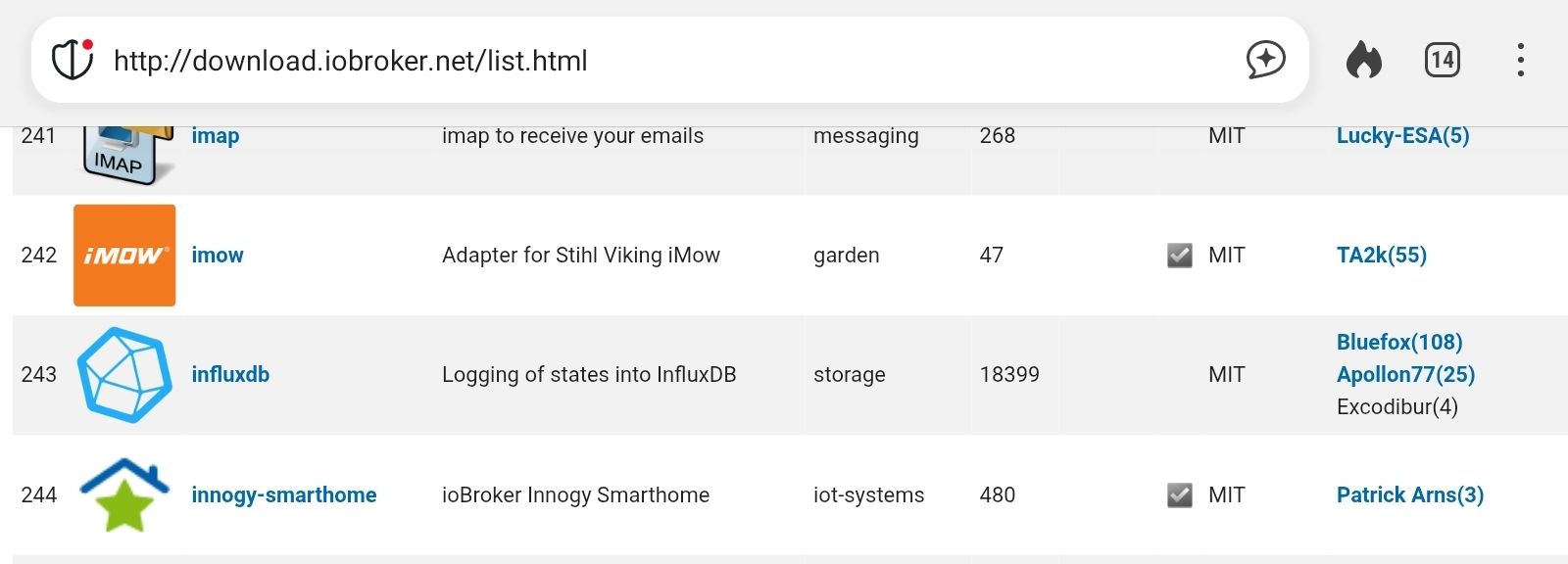
Ich konnte im ersten Bild (siehe Anhang keine Manuelle IP-Adresse eintragen. Lediglich aus einer Auswahl etwas auswählen. Nun tauchte auch die passende auf. Ich habe also die x.x.x.148 ausgewählt. In der Instanzen-Anzeige ist node-red nun auch grün ohne Fehlermeldung.
Allerdings in der Übersicht im IOBroker ist node-red unverändert mit der alten IP-Adresse x.x.x.98 gelistet (siehe zweites Bild).
Für mich ein Widerspruch und offenbar habe ich das Problem nicht ganz gelöst.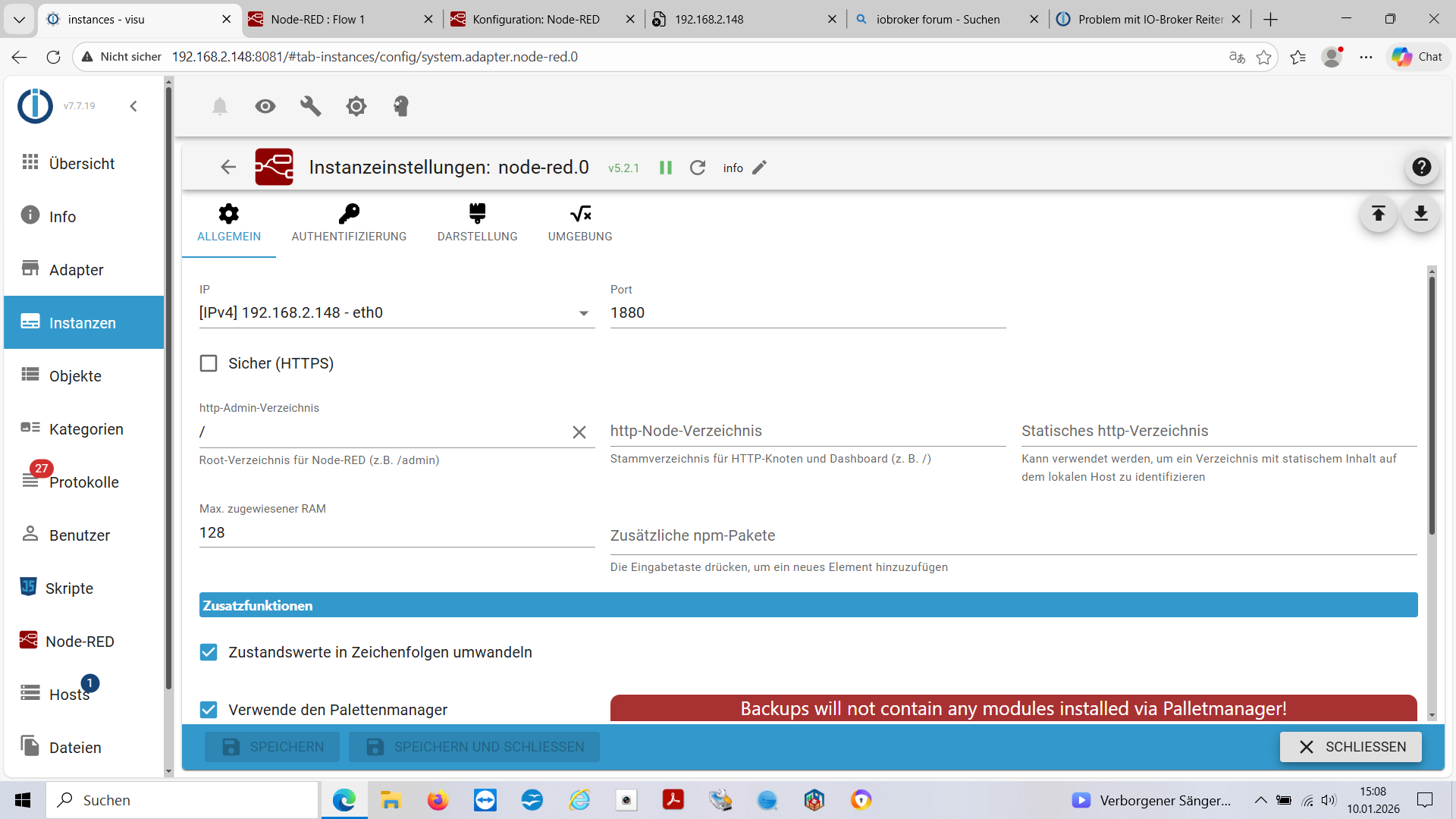
-
@Homoran
Ich konnte im ersten Bild (siehe Anhang keine Manuelle IP-Adresse eintragen. Lediglich aus einer Auswahl etwas auswählen. Nun tauchte auch die passende auf. Ich habe also die x.x.x.148 ausgewählt. In der Instanzen-Anzeige ist node-red nun auch grün ohne Fehlermeldung.
Allerdings in der Übersicht im IOBroker ist node-red unverändert mit der alten IP-Adresse x.x.x.98 gelistet (siehe zweites Bild).
Für mich ein Widerspruch und offenbar habe ich das Problem nicht ganz gelöst. -
@Homoran
Ich konnte im ersten Bild (siehe Anhang keine Manuelle IP-Adresse eintragen. Lediglich aus einer Auswahl etwas auswählen. Nun tauchte auch die passende auf. Ich habe also die x.x.x.148 ausgewählt. In der Instanzen-Anzeige ist node-red nun auch grün ohne Fehlermeldung.
Allerdings in der Übersicht im IOBroker ist node-red unverändert mit der alten IP-Adresse x.x.x.98 gelistet (siehe zweites Bild).
Für mich ein Widerspruch und offenbar habe ich das Problem nicht ganz gelöst.@Frank-KNX sagte in Problem mit IO-Broker Reiter Adapter - Fehlermeldung:
Allerdings in der Übersicht im IOBroker ist node-red unverändert mit der alten IP-Adresse x.x.x.98 gelistet (siehe zweites Bild).
Lad den Admin mal neu. Oder hau die Updates drauf und starte die Kiste komplett durch, dann erledigt sich das auch.
-
@Homoran
Ich konnte im ersten Bild (siehe Anhang keine Manuelle IP-Adresse eintragen. Lediglich aus einer Auswahl etwas auswählen. Nun tauchte auch die passende auf. Ich habe also die x.x.x.148 ausgewählt. In der Instanzen-Anzeige ist node-red nun auch grün ohne Fehlermeldung.
Allerdings in der Übersicht im IOBroker ist node-red unverändert mit der alten IP-Adresse x.x.x.98 gelistet (siehe zweites Bild).
Für mich ein Widerspruch und offenbar habe ich das Problem nicht ganz gelöst.@Frank-KNX sagte in Problem mit IO-Broker Reiter Adapter - Fehlermeldung:
Ich habe also die x.x.x.148
steht bei
@Frank-KNX sagte in Problem mit IO-Broker Reiter Adapter - Fehlermeldung:
einer Auswahl
nicht auch 0.0.0.0?
sonst rennst du da bald wieder rein.
-
@Homoran
Ich konnte im ersten Bild (siehe Anhang keine Manuelle IP-Adresse eintragen. Lediglich aus einer Auswahl etwas auswählen. Nun tauchte auch die passende auf. Ich habe also die x.x.x.148 ausgewählt. In der Instanzen-Anzeige ist node-red nun auch grün ohne Fehlermeldung.
Allerdings in der Übersicht im IOBroker ist node-red unverändert mit der alten IP-Adresse x.x.x.98 gelistet (siehe zweites Bild).
Für mich ein Widerspruch und offenbar habe ich das Problem nicht ganz gelöst.@Frank-KNX sagte in Problem mit IO-Broker Reiter Adapter - Fehlermeldung:
node-red unverändert mit der alten IP-Adresse x.x.x.98 gelistet (siehe zweites Bild).
Browsercache geleert?
-
@Frank-KNX sagte in Problem mit IO-Broker Reiter Adapter - Fehlermeldung:
Was soll ich machen ?
Updates einspielen und damit das Betriebssystem auf Stand halten.
Wie üblich:sudo apt update iob stop sudo apt full-upgrade sudo reboothier der Stand nach der ganzen Befehlskette:
========== Start marking the full check here ===========
Script v.2025-08-09

*** BASE SYSTEM ***
Operating System: Debian GNU/Linux 13 (trixie)
 Static hostname: visu
       Icon name: computer
          Kernel: Linux 6.12.62+rpt-rpi-2712
    Architecture: arm64
OS is similar to:

Model           : Raspberry Pi 5 Model B Rev 1.1
Docker          : false
Virtualization  : none
Kernel          : aarch64
Userland        : 64 bit

Systemuptime and Load:
 15:22:43 up 5 min,  1 user,  load average: 0.34, 0.27, 0.13
CPU threads: 4


*** LIFE CYCLE STATUS ***
Operating System is the current Debian stable version codenamed 'trixie'!

*** RASPBERRY THROTTLING ***
Current issues:
No throttling issues detected.

Previously detected issues:
No throttling issues detected.

*** TIME AND TIMEZONES ***
               Local time: Sat 2026-01-10 15:22:43 CET
           Universal time: Sat 2026-01-10 14:22:43 UTC
                 RTC time: Sat 2026-01-10 14:22:43
                Time zone: Europe/Berlin (CET, +0100)
System clock synchronized: yes
              NTP service: active
          RTC in local TZ: no

*** Users and Groups ***
User that called 'iob diag':
visadmin
HOME=/home/visadmin
GROUPS=visadmin adm dialout cdrom sudo audio video plugdev games users netdev gpio i2c spi render input iobroker

User that is running 'js-controller':
iobroker
HOME=/home/iobroker
SUDO_HOME=/home/visadmin
GROUPS=iobroker tty dialout audio video plugdev bluetooth gpio i2c

*** DISPLAY-SERVER SETUP ***
Display-Server:         false
Unit display-manager.service could not be found.
Display-Manager:
Desktop:
Session:                tty

*** MEMORY ***
               total        used        free      shared  buff/cache   available
Mem:            8.5G        1.4G        6.6G         15M        612M        7.1G
Swap:           2.1G          0B        2.1G
Total:           10G        1.4G        8.7G

Active iob-Instances:   10

         8058 M total memory
         1295 M used memory
         1194 M active memory
          302 M inactive memory
         6272 M free memory
           67 M buffer memory
          516 M swap cache
         2047 M total swap
            0 M used swap
         2047 M free swap

*** top - Table Of Processes  ***
top - 15:22:43 up 5 min,  1 user,  load average: 0.34, 0.27, 0.13
Tasks: 206 total,   1 running, 205 sleeping,   0 stopped,   0 zombie
%Cpu(s):  0.0 us,  2.2 sy,  0.0 ni, 97.8 id,  0.0 wa,  0.0 hi,  0.0 si,  0.0 st
MiB Mem :   8058.9 total,   6270.1 free,   1296.8 used,    586.8 buff/cache
MiB Swap:   2048.0 total,   2048.0 free,      0.0 used.   6762.2 avail Mem

*** FAILED SERVICES ***

  UNIT LOAD ACTIVE SUB DESCRIPTION

0 loaded units listed.


*** DMESG CRITICAL ERRORS ***
No critical errors detected

*** FILESYSTEM ***
Filesystem     Type      Size  Used Avail Use% Mounted on
udev           devtmpfs  3.9G     0  3.9G   0% /dev
tmpfs          tmpfs     1.6G   14M  1.6G   1% /run
/dev/mmcblk0p2 ext4       58G  6.9G   48G  13% /
tmpfs          tmpfs     4.0G     0  4.0G   0% /dev/shm
tmpfs          tmpfs     5.0M   48K  5.0M   1% /run/lock
tmpfs          tmpfs     1.0M     0  1.0M   0% /run/credentials/systemd-journald.service
tmpfs          tmpfs     4.0G  1.5M  4.0G   1% /tmp
/dev/mmcblk0p1 vfat      510M   66M  445M  13% /boot/firmware
tmpfs          tmpfs     1.0M     0  1.0M   0% /run/credentials/getty@tty1.service
tmpfs          tmpfs     1.0M     0  1.0M   0% /run/credentials/serial-getty@ttyAMA10.service
tmpfs          tmpfs     806M   32K  806M   1% /run/user/1000

Messages concerning ext4 filesystem in dmesg:
[Sat Jan 10 15:17:32 2026] Kernel command line: reboot=w coherent_pool=1M 8250.nr_uarts=1 pci=pcie_bus_safe cgroup_disable=memory numa_policy=interleave nvme.max_host_mem_size_mb=0  numa=fake=8 system_heap.max_order=0 iommu_dma_numa_policy=interleave smsc95xx.macaddr=2C:CF:67:CC:31:18 vc_mem.mem_base=0x3fc00000 vc_mem.mem_size=0x40000000  console=ttyAMA10,115200 console=tty1 root=PARTUUID=45188717-02 rootfstype=ext4 fsck.repair=yes rootwait cfg80211.ieee80211_regdom=DE
[Sat Jan 10 15:17:36 2026] EXT4-fs (mmcblk0p2): orphan cleanup on readonly fs
[Sat Jan 10 15:17:36 2026] EXT4-fs (mmcblk0p2): mounted filesystem 21724cc6-e5a3-48a1-8643-7917dba3a9fb ro with ordered data mode. Quota mode: none.
[Sat Jan 10 15:17:38 2026] EXT4-fs (mmcblk0p2): re-mounted 21724cc6-e5a3-48a1-8643-7917dba3a9fb r/w.

Show mounted filesystems:
TARGET           SOURCE         FSTYPE OPTIONS
/                /dev/mmcblk0p2 ext4   rw,noatime,commit=600
`-/boot/firmware /dev/mmcblk0p1 vfat   rw,relatime,fmask=0022,dmask=0022,codepage=437,iocharset=ascii,shortname=mixed,errors=remount-ro

Files in neuralgic directories:

/var:
2.5G    /var/
230M    /var/cache
225M    /var/cache/apt
180M    /var/lib
145M    /var/lib/apt

Archived and active journals take up 8M in the file system.

/opt/iobroker/backups:
17M     /opt/iobroker/backups/

/opt/iobroker/iobroker-data:
261M    /opt/iobroker/iobroker-data/
230M    /opt/iobroker/iobroker-data/files
47M     /opt/iobroker/iobroker-data/files/admin.admin
46M     /opt/iobroker/iobroker-data/files/admin.admin/custom/assets
46M     /opt/iobroker/iobroker-data/files/admin.admin/custom

The five largest files in iobroker-data are:
30M     /opt/iobroker/iobroker-data/files/notification-manager.admin/build/index.js.map
11M     /opt/iobroker/iobroker-data/objects.jsonl
11M     /opt/iobroker/iobroker-data/files/notification-manager.admin/build/index.js
9.8M    /opt/iobroker/iobroker-data/files/vis-2/material-icons/knx-uf.json
8.1M    /opt/iobroker/iobroker-data/files/backitup.admin/assets/index-Djx0nwYT.js

USB-Devices by-id:
USB-Sticks -  Avoid direct links to /dev/tty* in your adapter setups, please always prefer the links 'by-id':

No Devices found 'by-id'

Zigbee Network Settings on your coordinator/in nvbackup are:

zigbee.X
Extended Pan ID:
*** MASKED ***
Pan ID:
*** MASKED ***
Channel:
*** MASKED ***
Network Key:
*** MASKED ***

To unmask the settings run 'iob diag --unmask'


*** NodeJS-Installation ***

/usr/bin/nodejs         v22.21.0
/usr/bin/node           v22.21.0
/usr/bin/npm            10.9.4
/usr/bin/npx            10.9.4
/usr/bin/corepack       0.34.0

nodejs:
  Installed: 22.21.0-1nodesource1
  Candidate: 22.21.0-1nodesource1
  Version table:
 *** 22.21.0-1nodesource1 1001
        500 https://deb.nodesource.com/node_22.x nodistro/main arm64 Packages
        100 /var/lib/dpkg/status
     22.20.0-1nodesource1 1001
        500 https://deb.nodesource.com/node_22.x nodistro/main arm64 Packages
     22.19.0-1nodesource1 1001
        500 https://deb.nodesource.com/node_22.x nodistro/main arm64 Packages
     22.18.0-1nodesource1 1001
        500 https://deb.nodesource.com/node_22.x nodistro/main arm64 Packages
     22.17.1-1nodesource1 1001
        500 https://deb.nodesource.com/node_22.x nodistro/main arm64 Packages
     22.17.0-1nodesource1 1001
        500 https://deb.nodesource.com/node_22.x nodistro/main arm64 Packages
     22.16.0-1nodesource1 1001
        500 https://deb.nodesource.com/node_22.x nodistro/main arm64 Packages
     22.15.1-1nodesource1 1001
        500 https://deb.nodesource.com/node_22.x nodistro/main arm64 Packages
     22.15.0-1nodesource1 1001
        500 https://deb.nodesource.com/node_22.x nodistro/main arm64 Packages
     22.14.0-1nodesource1 1001
        500 https://deb.nodesource.com/node_22.x nodistro/main arm64 Packages
     22.13.1-1nodesource1 1001
        500 https://deb.nodesource.com/node_22.x nodistro/main arm64 Packages
     22.13.0-1nodesource1 1001
        500 https://deb.nodesource.com/node_22.x nodistro/main arm64 Packages
     22.12.0-1nodesource1 1001
        500 https://deb.nodesource.com/node_22.x nodistro/main arm64 Packages
     22.11.0-1nodesource1 1001
        500 https://deb.nodesource.com/node_22.x nodistro/main arm64 Packages
     22.10.0-1nodesource1 1001
        500 https://deb.nodesource.com/node_22.x nodistro/main arm64 Packages
     22.9.0-1nodesource1 1001
        500 https://deb.nodesource.com/node_22.x nodistro/main arm64 Packages
     22.8.0-1nodesource1 1001
        500 https://deb.nodesource.com/node_22.x nodistro/main arm64 Packages
     22.7.0-1nodesource1 1001
        500 https://deb.nodesource.com/node_22.x nodistro/main arm64 Packages
     22.6.0-1nodesource1 1001
        500 https://deb.nodesource.com/node_22.x nodistro/main arm64 Packages
     22.5.1-1nodesource1 1001
        500 https://deb.nodesource.com/node_22.x nodistro/main arm64 Packages
     22.5.0-1nodesource1 1001
        500 https://deb.nodesource.com/node_22.x nodistro/main arm64 Packages
     22.4.1-1nodesource1 1001
        500 https://deb.nodesource.com/node_22.x nodistro/main arm64 Packages
     22.4.0-1nodesource1 1001
        500 https://deb.nodesource.com/node_22.x nodistro/main arm64 Packages
     22.3.0-1nodesource1 1001
        500 https://deb.nodesource.com/node_22.x nodistro/main arm64 Packages
     22.2.0-1nodesource1 1001
        500 https://deb.nodesource.com/node_22.x nodistro/main arm64 Packages
     22.1.0-1nodesource1 1001
        500 https://deb.nodesource.com/node_22.x nodistro/main arm64 Packages
     22.0.0-1nodesource1 1001
        500 https://deb.nodesource.com/node_22.x nodistro/main arm64 Packages
     20.19.2+dfsg-1 500
        500 http://deb.debian.org/debian trixie/main arm64 Packages

Temp directories causing deletion problem: 0
No problems detected

Errors in npm tree: 0
No problems detected

Checking for nodejs vulnerability:


 █████  ██      ██           ██████   ██████   ██████  ██████         ██
██   ██ ██      ██          ██       ██    ██ ██    ██ ██   ██     ██  ██
███████ ██      ██          ██   ███ ██    ██ ██    ██ ██   ██         ██
██   ██ ██      ██          ██    ██ ██    ██ ██    ██ ██   ██     ██  ██
██   ██ ███████ ███████      ██████   ██████   ██████  ██████         ██


*** ioBroker-Installation ***

ioBroker Status
iobroker is running on this host.


Objects type: jsonl
States  type: jsonl

Hosts:
visu                visu (version: 7.0.7, hostname: visu          , alive, uptime: 304)

Core adapters versions
js-controller:  7.0.7
admin:          7.7.19
javascript:     9.0.11

nodejs modules from github:     0

Adapter State
+ system.adapter.admin.0                  : admin                 : visu                                     -  enabled, port: 8081, bind: 0.0.0.0, run as: admin
+ system.adapter.backitup.0               : backitup              : visu                                     -  enabled
+ system.adapter.discovery.0              : discovery             : visu                                     -  enabled
  system.adapter.ical.0                   : ical                  : visu                                     -  enabled
  system.adapter.icons-mfd-png.0          : icons-mfd-png         : visu                                     - disabled
  system.adapter.info.0                   : info                  : visu                                     -  enabled
+ system.adapter.javascript.0             : javascript            : visu                                     -  enabled
+ system.adapter.knx.0                    : knx                   : visu                                     -  enabled, bind: 192.168.2.148
+ system.adapter.linux-control.0          : linux-control         : visu                                     -  enabled
+ system.adapter.node-red.0               : node-red              : visu                                     -  enabled, port: 1880, bind: 192.168.2.148
+ system.adapter.trashschedule.0          : trashschedule         : visu                                     -  enabled
+ system.adapter.upnp.0                   : upnp                  : visu                                     -  enabled
  system.adapter.vis-bars.0               : vis-bars              : visu                                     - disabled
  system.adapter.vis-colorpicker.0        : vis-colorpicker       : visu                                     - disabled
  system.adapter.vis-fancyswitch.0        : vis-fancyswitch       : visu                                     - disabled
  system.adapter.vis-hqwidgets.0          : vis-hqwidgets         : visu                                     - disabled
  system.adapter.vis-jqui-mfd.0           : vis-jqui-mfd          : visu                                     - disabled
  system.adapter.vis-timeandweather.0     : vis-timeandweather    : visu                                     - disabled
  system.adapter.vis.0                    : vis                   : visu                                     -  enabled
  system.adapter.web.0                    : web                   : visu                                     - disabled, port: 8082, bind: 0.0.0.0, run as: admin

+ instance is alive

Enabled adapters with bindings
+ system.adapter.admin.0                  : admin                 : visu                                     -  enabled, port: 8081, bind: 0.0.0.0, run as: admin
+ system.adapter.node-red.0               : node-red              : visu                                     -  enabled, port: 1880, bind: 192.168.2.148

ioBroker-Repositories
┌────────────────────────────────────────────────────────────────────────────────────────────────────────
│ (index) │ name               │ url                                                     │ auto upgrade │
├────────────────────────────────────────────────────────────────────────────────────────────────────────
│ 0       │ 'Stable (default)' │ 'http://download.iobroker.net/sources-dist.json'        │ false        │
│ 1       │ 'Beta (latest)'    │ 'http://download.iobroker.net/sources-dist-latest.json' │ false        │
└────────────────────────────────────────────────────────────────────────────────────────────────────────

Active repo(s): Stable (default)
Upgrade policy: none

Installed ioBroker-Adapters
Used repository: Stable (default)
Adapter    "admin"        : 7.7.19   , installed 7.7.19
Adapter    "backitup"     : 3.3.13   , installed 3.3.13
Adapter    "discovery"    : 5.0.0    , installed 5.0.0
Adapter    "ical"         : 1.18.1   , installed 1.18.1
Adapter    "icons-mfd-png": 1.2.1    , installed 1.2.1
Adapter    "javascript"   : 9.0.11   , installed 9.0.11
Controller "js-controller": 7.0.7    , installed 7.0.7
Adapter    "knx"          : 2.0.30   , installed 2.0.30
Adapter    "linux-control": 1.1.5    , installed 1.1.5
Adapter    "node-red"     : 5.2.1    , installed 5.2.1
Adapter    "socketio"     : 6.7.1    , installed 7.0.8
Adapter    "trashschedule": 3.3.0    , installed 3.3.0
Adapter    "upnp"         : 1.1.0    , installed 1.1.0
Adapter    "vis"          : 1.5.6    , installed 1.5.6
Adapter    "vis-bars"     : 0.1.4    , installed 0.1.4
Adapter    "vis-colorpicker": 2.0.3  , installed 2.0.3
Adapter    "vis-fancyswitch": 1.1.0  , installed 1.1.0
Adapter    "vis-hqwidgets": 1.5.1    , installed 1.5.1
Adapter    "vis-jqui-mfd" : 1.1.1    , installed 1.1.1
Adapter    "vis-timeandweather": 1.2.2, installed 1.2.2
Adapter    "web"          : 7.0.8    , installed 7.0.8
Adapter    "ws"           : 2.6.2    , installed 2.6.2

Objects and States
Please stand by - This may take a while
Objects:        3148
States:         2265

*** OS-Repositories and Updates ***
W: https://deb.nodesource.com/node_22.x/dists/nodistro/InRelease: Policy will reject signature within a year, see --audit for details
Hit:1 http://deb.debian.org/debian trixie InRelease
Hit:2 http://deb.debian.org/debian trixie-updates InRelease
Hit:3 http://archive.raspberrypi.com/debian trixie InRelease
Hit:4 http://deb.debian.org/debian-security trixie-security InRelease
Hit:5 https://deb.nodesource.com/node_22.x nodistro InRelease
Reading package lists...
W: https://deb.nodesource.com/node_22.x/dists/nodistro/InRelease: Policy will reject signature within a year, see --audit for details
Pending Updates: 0

*** Listening Ports ***
Active Internet connections (only servers)
Proto Recv-Q Send-Q Local Address           Foreign Address         State       User       Inode      PID/Program name
tcp        0      0 127.0.0.1:9000          0.0.0.0:*               LISTEN      1001       9408       1168/iobroker.js-co
tcp        0      0 127.0.0.1:9001          0.0.0.0:*               LISTEN      1001       9399       1168/iobroker.js-co
tcp        0      0 0.0.0.0:22              0.0.0.0:*               LISTEN      0          6934       1184/sshd: /usr/sbi
tcp        0      0 0.0.0.0:111             0.0.0.0:*               LISTEN      0          282        1/init
tcp        0      0 192.168.2.148:1880      0.0.0.0:*               LISTEN      1001       7569       1292/node-red
tcp6       0      0 :::8081                 :::*                    LISTEN      1001       10527      1536/io.admin.0
tcp6       0      0 :::22                   :::*                    LISTEN      0          6936       1184/sshd: /usr/sbi
tcp6       0      0 :::111                  :::*                    LISTEN      0          1187       1/init
udp        0      0 0.0.0.0:38243           0.0.0.0:*                           1001       10336      1456/io.upnp.0
udp        0      0 0.0.0.0:1900            0.0.0.0:*                           1001       8907       1456/io.upnp.0
udp        0      0 0.0.0.0:1900            0.0.0.0:*                           1001       8906       1456/io.upnp.0
udp        0      0 0.0.0.0:57433           0.0.0.0:*                           101        6542       696/avahi-daemon: r
udp        0      0 0.0.0.0:111             0.0.0.0:*                           0          3458       1/init
udp        0      0 192.168.2.148:33747     0.0.0.0:*                           1001       9669       1348/io.knx.0
udp        0      0 0.0.0.0:5353            0.0.0.0:*                           101        6540       696/avahi-daemon: r
udp6       0      0 :::57217                :::*                                101        6543       696/avahi-daemon: r
udp6       0      0 :::111                  :::*                                0          283        1/init
udp6       0      0 fe80::2ecf:67ff:fec:546 :::*                                0          7453       757/NetworkManager
udp6       0      0 :::5353                 :::*                                101        6541       696/avahi-daemon: r

*** Log File - Last 25 Lines ***

2026-01-10 15:23:13.396  - info: knx.0 (1348) =====> STATE_TUNNELING_ACK
2026-01-10 15:23:13.397  - info: knx.0 (1348) ( 4 ) Sending Tunnel_Request ACK  : 06 10 04 21 00 0a 04 ab 75 00   ChID : 171 SeqCntIN : 117 SeqCntOUT : 29 queue length : 0
2026-01-10 15:23:13.397  - info: knx.0 (1348) ( 4.b ) return to STATE_READY, processing : false
2026-01-10 15:23:13.397  - info: knx.0 (1348) Change state from STATE_TUNNELLING_ACK(14) to STATE_READY(7)
2026-01-10 15:23:13.423  - info: knx.0 (1348) ( 3.2 ) Received TUNNEL_REQUEST (WRITE - send ACK )         :    06 10 04 20 00 19 04 ab 76 00 29 00 bc d0 10 10 28 41 05 00 80 42 04 00 00   ChID: 171
2026-01-10 15:23:13.424  - info: knx.0 (1348) WRITE : mappedName : Hauptzaehler Leisung P2    dest : 5/0/65  val: 33   (DPT14.056) Hauptzaehler_Leisung_P2
2026-01-10 15:23:13.424  - info: knx.0 (1348) Change state from STATE_READY(7) to STATE_TUNNELLING_REQUEST(13)
2026-01-10 15:23:13.424  - info: knx.0 (1348) Change state from STATE_TUNNELLING_REQUEST(13) to STATE_TUNNELLING_ACK(14)
2026-01-10 15:23:13.424  - info: knx.0 (1348) =====> STATE_TUNNELING_ACK
2026-01-10 15:23:13.424  - info: knx.0 (1348) ( 4 ) Sending Tunnel_Request ACK  : 06 10 04 21 00 0a 04 ab 76 00   ChID : 171 SeqCntIN : 118 SeqCntOUT : 29 queue length : 0
2026-01-10 15:23:13.424  - info: knx.0 (1348) ( 4.b ) return to STATE_READY, processing : false
2026-01-10 15:23:13.424  - info: knx.0 (1348) Change state from STATE_TUNNELLING_ACK(14) to STATE_READY(7)
2026-01-10 15:23:13.451  - info: knx.0 (1348) ( 3.2 ) Received TUNNEL_REQUEST (WRITE - send ACK )         :    06 10 04 20 00 19 04 ab 77 00 29 00 bc d0 10 10 28 42 05 00 80 42 8c 00 00   ChID: 171
2026-01-10 15:23:13.451  - info: knx.0 (1348) WRITE : mappedName : Hauptzaehler Leisung P3    dest : 5/0/66  val: 70   (DPT14.056) Hauptzaehler_Leisung_P3
2026-01-10 15:23:13.451  - info: knx.0 (1348) Change state from STATE_READY(7) to STATE_TUNNELLING_REQUEST(13)
2026-01-10 15:23:13.451  - info: knx.0 (1348) Change state from STATE_TUNNELLING_REQUEST(13) to STATE_TUNNELLING_ACK(14)
2026-01-10 15:23:13.451  - info: knx.0 (1348) =====> STATE_TUNNELING_ACK
2026-01-10 15:23:13.452  - info: knx.0 (1348) ( 4 ) Sending Tunnel_Request ACK  : 06 10 04 21 00 0a 04 ab 77 00   ChID : 171 SeqCntIN : 119 SeqCntOUT : 29 queue length : 0
2026-01-10 15:23:13.452  - info: knx.0 (1348) ( 4.b ) return to STATE_READY, processing : false
2026-01-10 15:23:13.452  - info: knx.0 (1348) Change state from STATE_TUNNELLING_ACK(14) to STATE_READY(7)
2026-01-10 15:23:15.452  - info: knx.0 (1348) Send : UDP Connection State Request :  06 10 02 07 00 10 ab 00 08 01 00 00 00 00 83 d3     sent from Port:  to 192.168.2.99:3671
2026-01-10 15:23:15.452  - info: knx.0 (1348) Change state from STATE_READY(7) to STATE_CONNECTION_STATE_REQUEST(5)
2026-01-10 15:23:15.454  - info: knx.0 (1348) Received CONNECTIONSTATE_RESPONSE :    06 10 02 08 00 08 ab 00                                                              192.168.2.99:3671 ChID : 171 SeqCntIN : 119 SeqCntOUT : 29  msgCode : [object Object]
2026-01-10 15:23:15.454  - info: knx.0 (1348) Change state from STATE_CONNECTION_STATE_REQUEST(5) to STATE_CONNECTION_STATE_RESPONSE(6)
2026-01-10 15:23:15.454  - info: knx.0 (1348) Change state from STATE_CONNECTION_STATE_RESPONSE(6) to STATE_READY(7)
============ Mark until here for C&P =============
-
Nun noch folgende 2 Fehlerbilder:
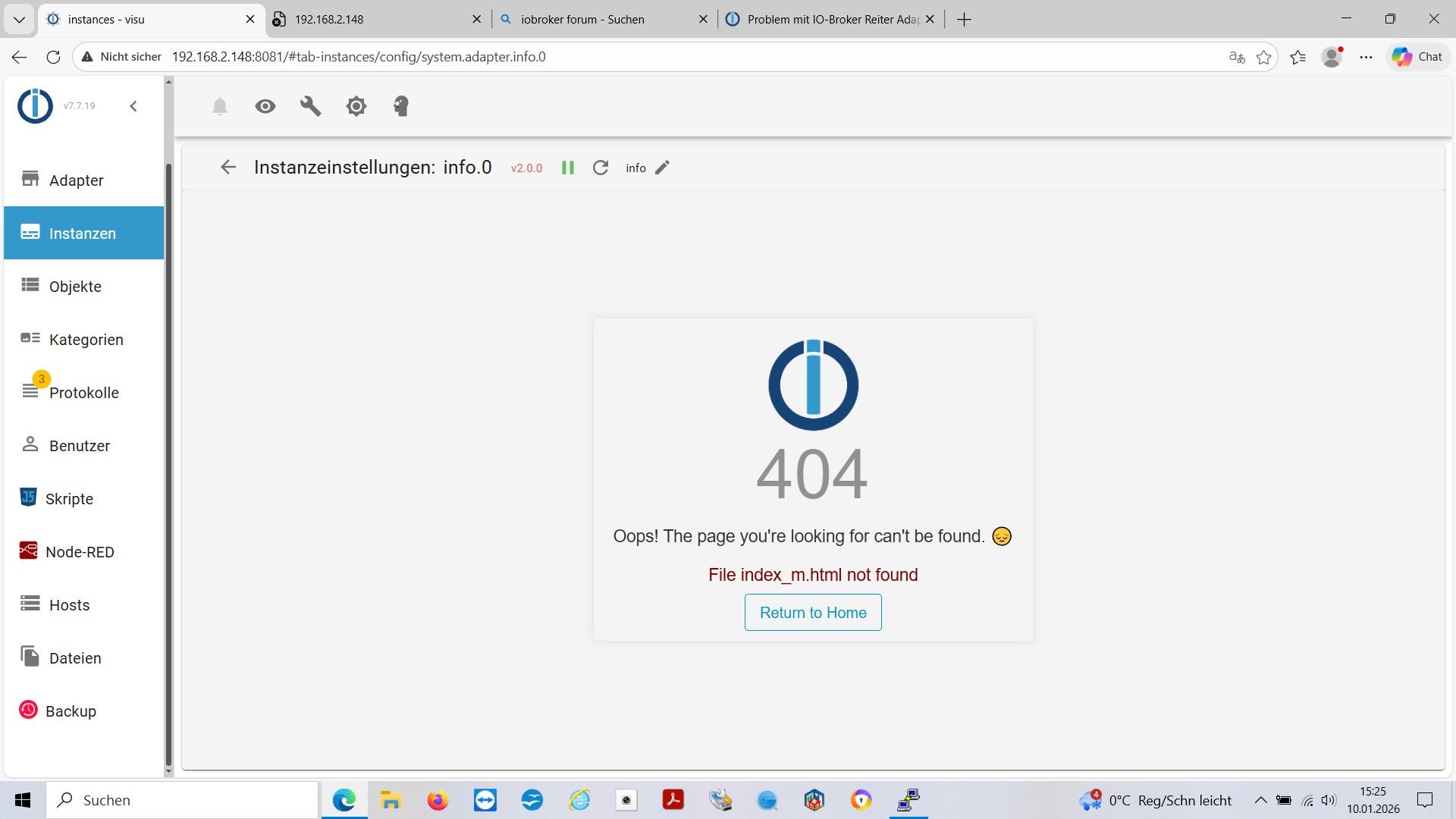
- Instanz info.0 fehlerhaft. Rot hinterlegt und beim Auswahl dieses Fehlerbild:
@Frank-KNX sagte in Problem mit IO-Broker Reiter Adapter - Fehlermeldung:
Instanz info.0 fehlerhaft
lösch die.
Den Adapter gibt es nicht mehr
- Instanz info.0 fehlerhaft. Rot hinterlegt und beim Auswahl dieses Fehlerbild:
-
@Frank-KNX sagte in Problem mit IO-Broker Reiter Adapter - Fehlermeldung:
Instanz info.0 fehlerhaft
lösch die.
Den Adapter gibt es nicht mehr
-
@Frank-KNX sagte in Problem mit IO-Broker Reiter Adapter - Fehlermeldung:
Fehler 2 ist Instanz VIS.0
web.0 läuft nicht
-
iob start vis -
Vielen Dank !
die Instanz web.0 war unterhalb des Bildschirmanzeigebereiches und tatsächlich aus.
Nach Start von web.0 hat auch die VIS erfolgreich funktioniert !Vielen Dank für eure großartige und geduldige Hilfe.
Die Backupfunktion hat erfolgreich alle Daten und auch die VIS-Einstellungen gesichert und ist auch auf dem deutlich moderneren neuen System ohne Fehler nutzbar.Nun noch meine "vorerst" letzte Frage:
Ich habe auf euren Rat beim Betriebssystem auf den Browser verzichtet.
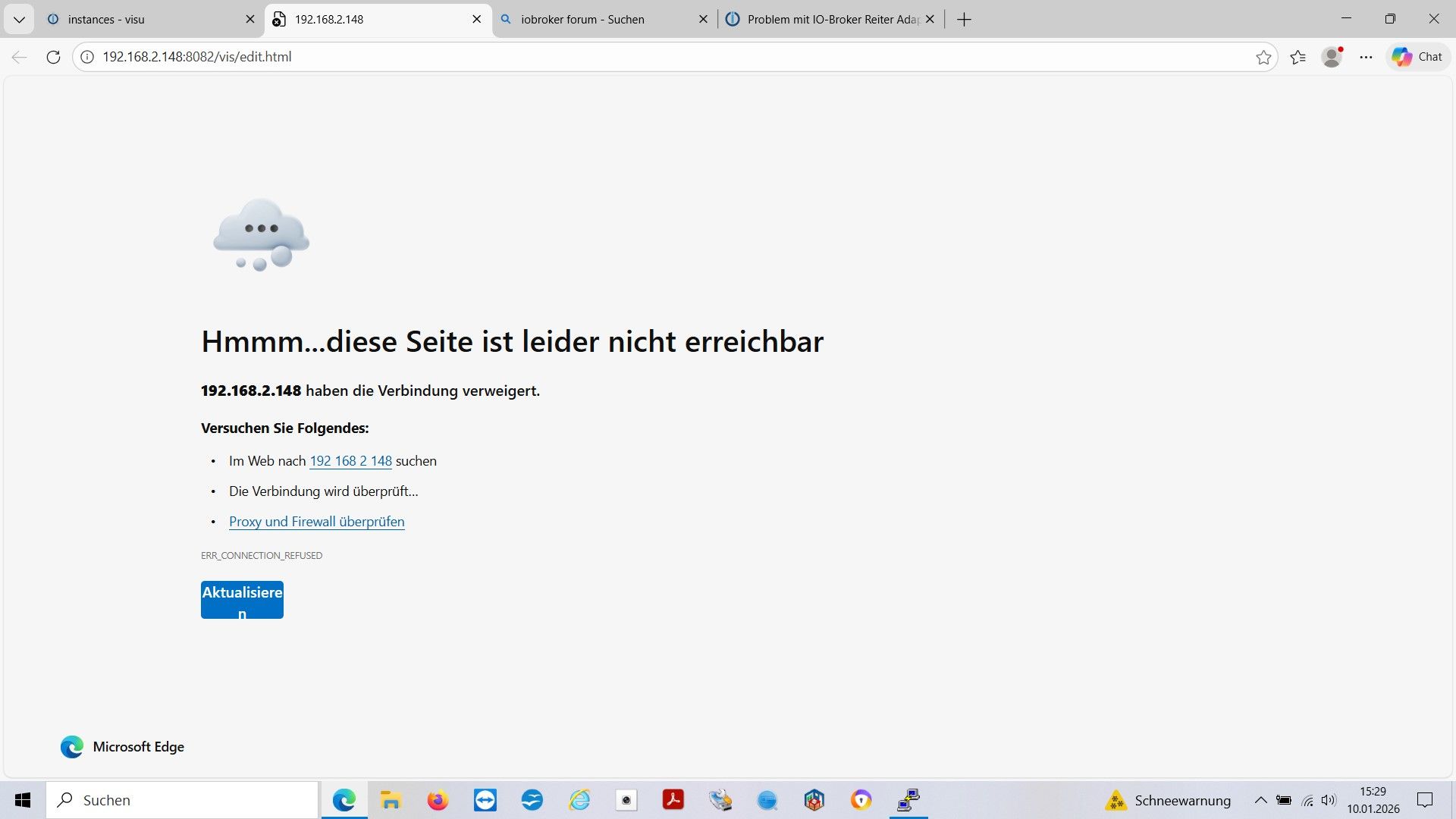
In der Vergangenheit konnte ich auf dem am PI selbst angeschlossenen Monitor mit den Browser über Kioskmode die VIS starten.
Dies ist nun aber nicht mehr möglich (weil ja gefordert nur die "lite"- Version installiert.)
Mit welchem Befehl von PC oder auch direkt am PI (mit angeschlossener Funktastatur kann ich die VIS starten ?Beste Grüße FRANK
-
Vielen Dank !
die Instanz web.0 war unterhalb des Bildschirmanzeigebereiches und tatsächlich aus.
Nach Start von web.0 hat auch die VIS erfolgreich funktioniert !Vielen Dank für eure großartige und geduldige Hilfe.
Die Backupfunktion hat erfolgreich alle Daten und auch die VIS-Einstellungen gesichert und ist auch auf dem deutlich moderneren neuen System ohne Fehler nutzbar.Nun noch meine "vorerst" letzte Frage:
Ich habe auf euren Rat beim Betriebssystem auf den Browser verzichtet.
In der Vergangenheit konnte ich auf dem am PI selbst angeschlossenen Monitor mit den Browser über Kioskmode die VIS starten.
Dies ist nun aber nicht mehr möglich (weil ja gefordert nur die "lite"- Version installiert.)
Mit welchem Befehl von PC oder auch direkt am PI (mit angeschlossener Funktastatur kann ich die VIS starten ?Beste Grüße FRANK
@Frank-KNX sagte in Problem mit IO-Broker Reiter Adapter - Fehlermeldung:
kann ich die VIS starten ?
die sollte immer laufen

Hey! Du scheinst an dieser Unterhaltung interessiert zu sein, hast aber noch kein Konto.
Hast du es satt, bei jedem Besuch durch die gleichen Beiträge zu scrollen? Wenn du dich für ein Konto anmeldest, kommst du immer genau dorthin zurück, wo du zuvor warst, und kannst dich über neue Antworten benachrichtigen lassen (entweder per E-Mail oder Push-Benachrichtigung). Du kannst auch Lesezeichen speichern und Beiträge positiv bewerten, um anderen Community-Mitgliedern deine Wertschätzung zu zeigen.
Mit deinem Input könnte dieser Beitrag noch besser werden 💗
Registrieren Anmelden443
Online33.0k
Benutzer83.5k
Themen1.3m
Beiträge