




Raspi 5 - 8Gb Arbeitsspeicher läuft voll
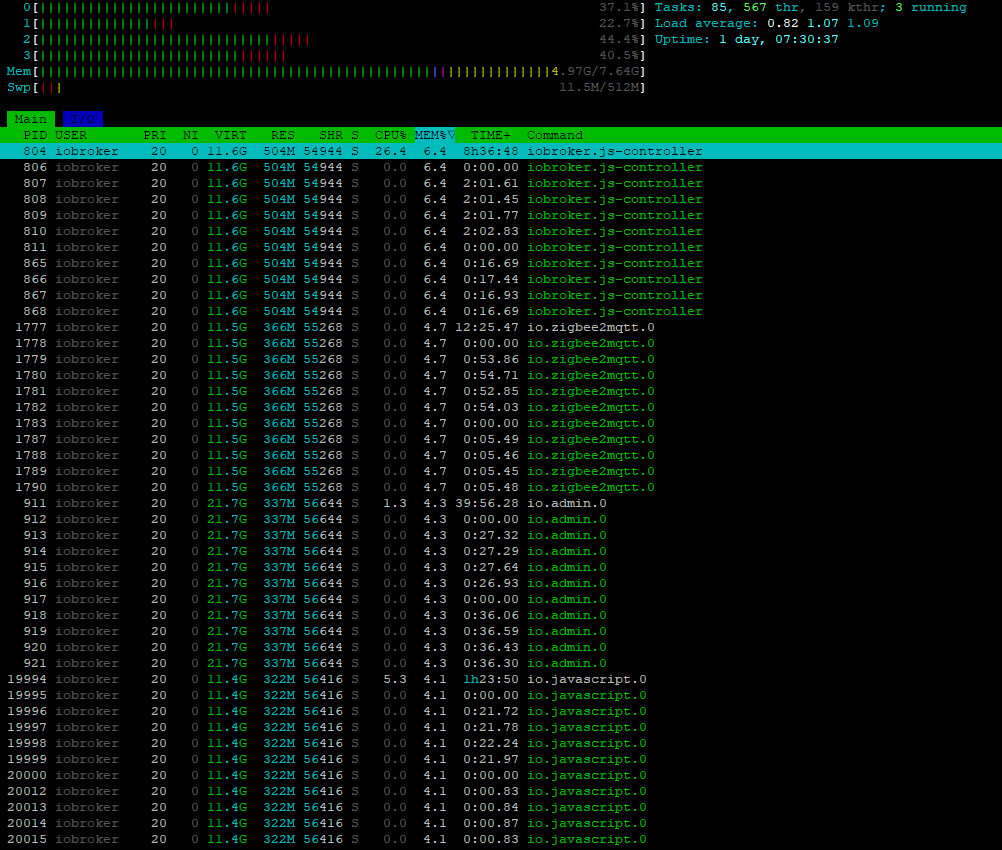
-
Nun bleibt noch ein Fehler:
z2m: Could not init sd_notify: The module '/opt/zigbee2mqtt/node_modules/.pnpm/unix-dgram@2.0.6/node_modules/unix-dgram/build/Release/unix_dgram.node' was compiled against a different Node.js version using NODE_MODULE_VERSION 115. This version of Node.js requires NODE_MODULE_VERSION 127. Please try re-compiling or re-installing the module (for instance, using `npm rebuild` or `npm install`).npm rebuild und npm install bringen keine Besserung.
*** NodeJS-Installation ***
/usr/bin/nodejs v22.21.0
/usr/bin/node v22.21.0
/usr/bin/npm 10.9.4
/usr/bin/npx 10.9.4
/usr/bin/corepack 0.34.0@Autodidakt sagte in Raspi 5 - 8Gb Arbeitsspeicher läuft voll:
npm rebuild und npm install bringen keine Besserung
Was genau wo genau ausgeführt?
-
npm rebuildundnpm installim Raspberry Home verzeichnis -
War das das falsche Verzeichnis?
-
npm rebuildundnpm installim Raspberry Home verzeichnis@Autodidakt sagte in Raspi 5 - 8Gb Arbeitsspeicher läuft voll:
npm rebuildundnpm installim Raspberry Home verzeichniswas hast du da denn von npm drin?
-
-
Vermutlich nichts, weil ein fehler kam.
@Autodidakt sagte in Raspi 5 - 8Gb Arbeitsspeicher läuft voll:
Vermutlich nichts, weil ein fehler kam.
dann versuch es mal in
/opt/iobroker -
sagte in Raspi 5 - 8Gb Arbeitsspeicher läuft voll:
npm rebuild
O weih...
pi@IoBMaster:/opt/iobroker $ npm rebuild npm error code 1 npm error path /opt/iobroker/node_modules/opengpio npm error command failed npm error command sh -c node-gyp rebuild npm error make: Entering directory '/opt/iobroker/node_modules/opengpio/build' npm error CXX(target) Release/obj.target/opengpio/cpp/opengpio.o npm error make: Leaving directory '/opt/iobroker/node_modules/opengpio/build' npm error gyp info it worked if it ends with ok npm error gyp info using node-gyp@8.4.1 npm error gyp info using node@22.21.0 | linux | arm64 npm error (node:186327) [DEP0060] DeprecationWarning: The `util._extend` API is deprecated. Please use Object.assign() instead. npm error (Use `node --trace-deprecation ...` to show where the warning was created) npm error gyp info find Python using Python version 3.13.5 found at "/usr/bin/python3" npm error gyp info spawn /usr/bin/python3 npm error gyp info spawn args [ npm error gyp info spawn args '/opt/iobroker/node_modules/node-gyp/gyp/gyp_main.py', npm error gyp info spawn args 'binding.gyp', npm error gyp info spawn args '-f', npm error gyp info spawn args 'make', npm error gyp info spawn args '-I', npm error gyp info spawn args '/opt/iobroker/node_modules/opengpio/build/config.gypi', npm error gyp info spawn args '-I', npm error gyp info spawn args '/opt/iobroker/node_modules/node-gyp/addon.gypi', npm error gyp info spawn args '-I', npm error gyp info spawn args '/home/iobroker/.cache/node-gyp/22.21.0/include/node/common.gypi', npm error gyp info spawn args '-Dlibrary=shared_library', npm error gyp info spawn args '-Dvisibility=default', npm error gyp info spawn args '-Dnode_root_dir=/home/iobroker/.cache/node-gyp/22.21.0', npm error gyp info spawn args '-Dnode_gyp_dir=/opt/iobroker/node_modules/node-gyp', npm error gyp info spawn args '-Dnode_lib_file=/home/iobroker/.cache/node-gyp/22.21.0/<(target_arch)/node.lib', npm error gyp info spawn args '-Dmodule_root_dir=/opt/iobroker/node_modules/opengpio', npm error gyp info spawn args '-Dnode_engine=v8', npm error gyp info spawn args '--depth=.', npm error gyp info spawn args '--no-parallel', npm error gyp info spawn args '--generator-output', npm error gyp info spawn args 'build', npm error gyp info spawn args '-Goutput_dir=.' npm error gyp info spawn args ] npm error gyp info spawn make npm error gyp info spawn args [ 'BUILDTYPE=Release', '-C', 'build' ] npm error ../cpp/opengpio.cpp: In function ‘Napi::Array GpioInput(const Napi::CallbackInfo&)’: npm error ../cpp/opengpio.cpp:14:17: error: expected primary-expression before ‘line’ npm error 14 | gpiod::line line = chip.get_line(lineNumber); npm error | ^~~~ npm error ../cpp/opengpio.cpp:19:9: error: ‘line’ was not declared in this scope; did you mean ‘gpiod::line’? npm error 19 | line.request({resourceName, gpiod::line_request::DIRECTION_INPUT, 0}); npm error | ^~~~ npm error | gpiod::line npm error In file included from /usr/include/gpiodcxx/chip.hpp:21, npm error from /usr/include/gpiod.hpp:27, npm error from ../cpp/opengpio.cpp:3: npm error /usr/include/gpiodcxx/line.hpp:24:11: note: ‘gpiod::line’ declared here npm error 24 | namespace line { npm error | ^~~~ npm error ../cpp/opengpio.cpp:19:58: error: ‘DIRECTION_INPUT’ is not a member of ‘gpiod::line_request’ npm error 19 | line.request({resourceName, gpiod::line_request::DIRECTION_INPUT, 0}); npm error | ^~~~~~~~~~~~~~~ npm error ../cpp/opengpio.cpp:28:62: error: ‘line’ was not declared in this scope; did you mean ‘gpiod::line’? npm error 28 | Napi::Function getter = Napi::Function::New(info.Env(), [line](const Napi::CallbackInfo &info) npm error | ^~~~ npm error | gpiod::line npm error /usr/include/gpiodcxx/line.hpp:24:11: note: ‘gpiod::line’ declared here npm error 24 | namespace line { npm error | ^~~~ npm error ../cpp/opengpio.cpp: In lambda function: npm error ../cpp/opengpio.cpp:30:22: error: ‘line’ is not captured npm error 30 | bool value = line.get_value(); npm error | ^~~~ npm error ../cpp/opengpio.cpp:28:66: note: the lambda has no capture-default npm error 28 | Napi::Function getter = Napi::Function::New(info.Env(), [line](const Napi::CallbackInfo &info) npm error | ^ npm error ../cpp/opengpio.cpp:28:62: note: ‘<typeprefixerror>line’ declared here npm error 28 | Napi::Function getter = Napi::Function::New(info.Env(), [line](const Napi::CallbackInfo &info) npm error | ^~~~ npm error ../cpp/opengpio.cpp: In lambda function: npm error ../cpp/opengpio.cpp:34:52: error: ‘line’ is not captured npm error 34 | { line.release(); }); npm error | ^~~~ npm error ../cpp/opengpio.cpp:33:67: note: the lambda has no capture-default npm error 33 | Napi::Function cleanup = Napi::Function::New(info.Env(), [line](const Napi::CallbackInfo &info) npm error | ^ npm error ../cpp/opengpio.cpp:28:62: note: ‘<typeprefixerror>line’ declared here npm error 28 | Napi::Function getter = Napi::Function::New(info.Env(), [line](const Napi::CallbackInfo &info) npm error | ^~~~ npm error ../cpp/opengpio.cpp: In function ‘Napi::Array GpioOutput(const Napi::CallbackInfo&)’: npm error ../cpp/opengpio.cpp:49:17: error: expected primary-expression before ‘line’ npm error 49 | gpiod::line line = chip.get_line(lineNumber); npm error | ^~~~ npm error ../cpp/opengpio.cpp:54:9: error: ‘line’ was not declared in this scope; did you mean ‘gpiod::line’? npm error 54 | line.request({resourceName, gpiod::line_request::DIRECTION_OUTPUT, 0}, 1); npm error | ^~~~ npm error | gpiod::line npm error /usr/include/gpiodcxx/line.hpp:24:11: note: ‘gpiod::line’ declared here npm error 24 | namespace line { npm error | ^~~~ npm error ../cpp/opengpio.cpp:54:58: error: ‘DIRECTION_OUTPUT’ is not a member of ‘gpiod::line_request’ npm error 54 | line.request({resourceName, gpiod::line_request::DIRECTION_OUTPUT, 0}, 1); npm error | ^~~~~~~~~~~~~~~~ npm error ../cpp/opengpio.cpp:63:62: error: ‘line’ was not declared in this scope; did you mean ‘gpiod::line’? npm error 63 | Napi::Function setter = Napi::Function::New(info.Env(), [line](const Napi::CallbackInfo &info) npm error | ^~~~ npm error | gpiod::line npm error /usr/include/gpiodcxx/line.hpp:24:11: note: ‘gpiod::line’ declared here npm error 24 | namespace line { npm error | ^~~~ npm error ../cpp/opengpio.cpp: In lambda function: npm error ../cpp/opengpio.cpp:66:9: error: ‘line’ is not captured npm error 66 | line.set_value(value); }); npm error | ^~~~ npm error ../cpp/opengpio.cpp:63:66: note: the lambda has no capture-default npm error 63 | Napi::Function setter = Napi::Function::New(info.Env(), [line](const Napi::CallbackInfo &info) npm error | ^ npm error ../cpp/opengpio.cpp:63:62: note: ‘<typeprefixerror>line’ declared here npm error 63 | Napi::Function setter = Napi::Function::New(info.Env(), [line](const Napi::CallbackInfo &info) npm error | ^~~~ npm error ../cpp/opengpio.cpp: In lambda function: npm error ../cpp/opengpio.cpp:69:52: error: ‘line’ is not captured npm error 69 | { line.release(); }); npm error | ^~~~ npm error ../cpp/opengpio.cpp:68:67: note: the lambda has no capture-default npm error 68 | Napi::Function cleanup = Napi::Function::New(info.Env(), [line](const Napi::CallbackInfo &info) npm error | ^ npm error ../cpp/opengpio.cpp:63:62: note: ‘<typeprefixerror>line’ declared here npm error 63 | Napi::Function setter = Napi::Function::New(info.Env(), [line](const Napi::CallbackInfo &info) npm error | ^~~~ npm error ../cpp/opengpio.cpp: At global scope: npm error ../cpp/opengpio.cpp:81:12: error: ‘line’ in namespace ‘gpiod’ does not name a type npm error 81 | gpiod::line line; npm error | ^~~~ npm error /usr/include/gpiodcxx/line.hpp:24:11: note: ‘gpiod::line’ declared here npm error 24 | namespace line { npm error | ^~~~ npm error ../cpp/opengpio.cpp: In function ‘Napi::Array GpioWatch(const Napi::CallbackInfo&)’: npm error ../cpp/opengpio.cpp:92:17: error: expected primary-expression before ‘line’ npm error 92 | gpiod::line line = chip.get_line(lineNumber); npm error | ^~~~ npm error ../cpp/opengpio.cpp:100:9: error: ‘line’ was not declared in this scope; did you mean ‘gpiod::line’? npm error 100 | line.request({resourceName, gpiod::line_request::EVENT_BOTH_EDGES, 0}, 0); npm error | ^~~~ npm error | gpiod::line npm error /usr/include/gpiodcxx/line.hpp:24:11: note: ‘gpiod::line’ declared here npm error 24 | namespace line { npm error | ^~~~ npm error ../cpp/opengpio.cpp:100:58: error: ‘EVENT_BOTH_EDGES’ is not a member of ‘gpiod::line_request’ npm error 100 | line.request({resourceName, gpiod::line_request::EVENT_BOTH_EDGES, 0}, 0); npm error | ^~~~~~~~~~~~~~~~ npm error ../cpp/opengpio.cpp:109:62: error: ‘line’ was not declared in this scope; did you mean ‘gpiod::line’? npm error 109 | Napi::Function getter = Napi::Function::New(info.Env(), [line](const Napi::CallbackInfo &info) npm error | ^~~~ npm error | gpiod::line npm error /usr/include/gpiodcxx/line.hpp:24:11: note: ‘gpiod::line’ declared here npm error 24 | namespace line { npm error | ^~~~ npm error ../cpp/opengpio.cpp: In lambda function: npm error ../cpp/opengpio.cpp:111:22: error: ‘line’ is not captured npm error 111 | bool value = line.get_value(); npm error | ^~~~ npm error ../cpp/opengpio.cpp:109:66: note: the lambda has no capture-default npm error 109 | Napi::Function getter = Napi::Function::New(info.Env(), [line](const Napi::CallbackInfo &info) npm error | ^ npm error ../cpp/opengpio.cpp:109:62: note: ‘<typeprefixerror>line’ declared here npm error 109 | Napi::Function getter = Napi::Function::New(info.Env(), [line](const Napi::CallbackInfo &info) npm error | ^~~~ npm error ../cpp/opengpio.cpp: In function ‘Napi::Array GpioWatch(const Napi::CallbackInfo&)’: npm error ../cpp/opengpio.cpp:115:11: error: ‘struct WatchContext’ has no member named ‘line’ npm error 115 | data->line = line; npm error | ^~~~ npm error ../cpp/opengpio.cpp: In lambda function: npm error ../cpp/opengpio.cpp:127:25: error: expected primary-expression before ‘line’ npm error 127 | gpiod::line line = data->line; npm error | ^~~~ npm error ../cpp/opengpio.cpp:131:33: error: ‘line’ is not captured npm error 131 | bool hasEvent = line.event_wait(chrono::milliseconds(1)); npm error | ^~~~ npm error ../cpp/opengpio.cpp:124:10: note: the lambda has no capture-default npm error 124 | [](uv_work_t *req) npm error | ^ npm error ../cpp/opengpio.cpp:109:62: note: ‘<typeprefixerror>line’ declared here npm error 109 | Napi::Function getter = Napi::Function::New(info.Env(), [line](const Napi::CallbackInfo &info) npm error | ^~~~ npm error ../cpp/opengpio.cpp:134:28: error: ‘line_event’ is not a member of ‘gpiod’; did you mean ‘info_event’? npm error 134 | gpiod::line_event event = line.event_read(); npm error | ^~~~~~~~~~ npm error | info_event npm error ../cpp/opengpio.cpp:135:34: error: ‘event’ was not declared in this scope; did you mean ‘servent’? npm error 135 | bool value = event.event_type == gpiod::line_event::RISING_EDGE ? true : false; npm error | ^~~~~ npm error | servent npm error ../cpp/opengpio.cpp:135:61: error: ‘gpiod::line_event’ has not been declared npm error 135 | bool value = event.event_type == gpiod::line_event::RISING_EDGE ? true : false; npm error | ^~~~~~~~~~ npm error ../cpp/opengpio.cpp: In lambda function: npm error ../cpp/opengpio.cpp:147:19: error: ‘struct WatchContext’ has no member named ‘line’ npm error 147 | data->line.release(); npm error | ^~~~ npm error ../cpp/opengpio.cpp: At global scope: npm error ../cpp/opengpio.cpp:168:12: error: ‘line’ in namespace ‘gpiod’ does not name a type npm error 168 | gpiod::line line; npm error | ^~~~ npm error /usr/include/gpiodcxx/line.hpp:24:11: note: ‘gpiod::line’ declared here npm error 24 | namespace line { npm error | ^~~~ npm error ../cpp/opengpio.cpp: In function ‘Napi::Array GpioPwm(const Napi::CallbackInfo&)’: npm error ../cpp/opengpio.cpp:196:17: error: expected primary-expression before ‘line’ npm error 196 | gpiod::line line = chip.get_line(lineNumber); npm error | ^~~~ npm error ../cpp/opengpio.cpp:201:9: error: ‘line’ was not declared in this scope; did you mean ‘gpiod::line’? npm error 201 | line.request({resourceName, gpiod::line_request::DIRECTION_OUTPUT, 0}, 1); npm error | ^~~~ npm error | gpiod::line npm error /usr/include/gpiodcxx/line.hpp:24:11: note: ‘gpiod::line’ declared here npm error 24 | namespace line { npm error | ^~~~ npm error ../cpp/opengpio.cpp:201:58: error: ‘DIRECTION_OUTPUT’ is not a member of ‘gpiod::line_request’ npm error 201 | line.request({resourceName, gpiod::line_request::DIRECTION_OUTPUT, 0}, 1); npm error | ^~~~~~~~~~~~~~~~ npm error ../cpp/opengpio.cpp:213:11: error: ‘struct PwmContext’ has no member named ‘line’ npm error 213 | data->line = line; npm error | ^~~~ npm error ../cpp/opengpio.cpp:213:18: error: ‘line’ was not declared in this scope; did you mean ‘gpiod::line’? npm error 213 | data->line = line; npm error | ^~~~ npm error | gpiod::line npm error /usr/include/gpiodcxx/line.hpp:24:11: note: ‘gpiod::line’ declared here npm error 24 | namespace line { npm error | ^~~~ npm error ../cpp/opengpio.cpp: In lambda function: npm error ../cpp/opengpio.cpp:224:25: error: expected primary-expression before ‘line’ npm error 224 | gpiod::line line = data->line; npm error | ^~~~ npm error ../cpp/opengpio.cpp:264:17: error: ‘line’ is not captured npm error 264 | line.set_value(true); npm error | ^~~~ npm error ../cpp/opengpio.cpp:221:10: note: the lambda has no capture-default npm error 221 | [](uv_work_t *req) npm error | ^ npm error ../cpp/opengpio.cpp:213:18: note: ‘<typeprefixerror>line’ declared here npm error 213 | data->line = line; npm error | ^~~~ npm error ../cpp/opengpio.cpp:278:17: error: ‘line’ is not captured npm error 278 | line.set_value(false); npm error | ^~~~ npm error ../cpp/opengpio.cpp:221:10: note: the lambda has no capture-default npm error 221 | [](uv_work_t *req) npm error | ^ npm error ../cpp/opengpio.cpp:213:18: note: ‘<typeprefixerror>line’ declared here npm error 213 | data->line = line; npm error | ^~~~ npm error ../cpp/opengpio.cpp: In lambda function: npm error ../cpp/opengpio.cpp:327:25: error: expected primary-expression before ‘line’ npm error 327 | gpiod::line line = data->line; npm error | ^~~~ npm error ../cpp/opengpio.cpp:328:13: error: ‘line’ is not captured npm error 328 | line.release(); npm error | ^~~~ npm error ../cpp/opengpio.cpp:324:10: note: the lambda has no capture-default npm error 324 | [](uv_work_t *req, int status) npm error | ^ npm error ../cpp/opengpio.cpp:213:18: note: ‘<typeprefixerror>line’ declared here npm error 213 | data->line = line; npm error | ^~~~ npm error make: *** [opengpio.target.mk:108: Release/obj.target/opengpio/cpp/opengpio.o] Error 1 npm error gyp ERR! build error npm error gyp ERR! stack Error: `make` failed with exit code: 2 npm error gyp ERR! stack at ChildProcess.onExit (/opt/iobroker/node_modules/node-gyp/lib/build.js:194:23) npm error gyp ERR! stack at ChildProcess.emit (node:events:519:28) npm error gyp ERR! stack at ChildProcess._handle.onexit (node:internal/child_process:293:12) npm error gyp ERR! System Linux 6.12.47+rpt-rpi-v8 npm error gyp ERR! command "/usr/bin/node" "/opt/iobroker/node_modules/.bin/node-gyp" "rebuild" npm error gyp ERR! cwd /opt/iobroker/node_modules/opengpio npm error gyp ERR! node -v v22.21.0 npm error gyp ERR! node-gyp -v v8.4.1 npm error gyp ERR! not ok npm error A complete log of this run can be found in: /home/iobroker/.npm/_logs/2025-12-10T07_17_34_569Z-debug-0.log pi@IoBMaster:/opt/iobroker $ -
npm install :
pi@IoBMaster:/opt/iobroker $ npm install

removed 69 packages in 24s

490 packages are looking for funding
  run `npm fund` for details
pi@IoBMaster:/opt/iobroker $
Jetzt sieht es gut aus. Der Fehler scheint behoben zu sein.
Danke euch für die Unterstützung.
-
npm install :
pi@IoBMaster:/opt/iobroker $ npm install

removed 69 packages in 24s

490 packages are looking for funding
  run `npm fund` for details
pi@IoBMaster:/opt/iobroker $
Jetzt sieht es gut aus. Der Fehler scheint behoben zu sein.
Danke euch für die Unterstützung.
-
@Thomas-Braun sagte in Raspi 5 - 8Gb Arbeitsspeicher läuft voll:
Du musst dich in das Verzeichnis
/opt/zigbee2mqtt/
stellen.
Der Fehler ist verschwunden, trotzdem nochmal in /opt/zigbee2mqtt/ ausführen?
Zu früh gefreut, Fehler ist noch da.
pi@IoBMaster:/opt/zigbee2mqtt $ npm rebuild
npm error code 127
npm error path /opt/zigbee2mqtt/node_modules/.pnpm/magicast@0.3.5/node_modules/magicast
npm error command failed
npm error command sh -c esno ./scripts/vendor.ts
npm error sh: 1: esno: not found
npm error A complete log of this run can be found in: /home/pi/.npm/_logs/2025-12-10T07_29_08_213Z-debug-0.log
pi@IoBMaster:/opt/zigbee2mqtt $ npm install npm error Cannot read properties of null (reading 'matches') npm error A complete log of this run can be found in: /home/pi/.npm/_logs/2025-12-10T07_29_22_260Z-debug-0.logpi@IoBMaster:~ $ tail /home/pi/.npm/_logs/2025-12-10T07_29_08_213Z-debug-0.log 42 silly unfinished npm timer build:run:prepare:node_modules/.pnpm/jackspeak@3.4.3/node_modules/jackspeak 1765351751604 43 silly unfinished npm timer build:run:prepare:node_modules/.pnpm/minimatch@9.0.5/node_modules/minimatch 1765351751623 44 silly unfinished npm timer build:run:prepare:node_modules/.pnpm/minipass@7.1.2/node_modules/minipass 1765351751636 45 verbose cwd /opt/zigbee2mqtt 46 verbose os Linux 6.12.47+rpt-rpi-v8 47 verbose node v22.21.0 48 verbose npm v10.9.4 49 verbose exit 127 50 verbose code 127 51 error A complete log of this run can be found in: /home/pi/.npm/_logs/2025-12-10T07_29_08_213Z-debug-0.log -
@Thomas-Braun sagte in Raspi 5 - 8Gb Arbeitsspeicher läuft voll:
Du musst dich in das Verzeichnis
/opt/zigbee2mqtt/
stellen.
Der Fehler ist verschwunden, trotzdem nochmal in /opt/zigbee2mqtt/ ausführen?
Zu früh gefreut, Fehler ist noch da.
pi@IoBMaster:/opt/zigbee2mqtt $ npm rebuild
npm error code 127
npm error path /opt/zigbee2mqtt/node_modules/.pnpm/magicast@0.3.5/node_modules/magicast
npm error command failed
npm error command sh -c esno ./scripts/vendor.ts
npm error sh: 1: esno: not found
npm error A complete log of this run can be found in: /home/pi/.npm/_logs/2025-12-10T07_29_08_213Z-debug-0.log
pi@IoBMaster:/opt/zigbee2mqtt $ npm install npm error Cannot read properties of null (reading 'matches') npm error A complete log of this run can be found in: /home/pi/.npm/_logs/2025-12-10T07_29_22_260Z-debug-0.logpi@IoBMaster:~ $ tail /home/pi/.npm/_logs/2025-12-10T07_29_08_213Z-debug-0.log 42 silly unfinished npm timer build:run:prepare:node_modules/.pnpm/jackspeak@3.4.3/node_modules/jackspeak 1765351751604 43 silly unfinished npm timer build:run:prepare:node_modules/.pnpm/minimatch@9.0.5/node_modules/minimatch 1765351751623 44 silly unfinished npm timer build:run:prepare:node_modules/.pnpm/minipass@7.1.2/node_modules/minipass 1765351751636 45 verbose cwd /opt/zigbee2mqtt 46 verbose os Linux 6.12.47+rpt-rpi-v8 47 verbose node v22.21.0 48 verbose npm v10.9.4 49 verbose exit 127 50 verbose code 127 51 error A complete log of this run can be found in: /home/pi/.npm/_logs/2025-12-10T07_29_08_213Z-debug-0.logIch kenne z2m nicht genau. Musste mal schauen wie man das neubaut. Sollte sich auf deren Homepage finden.
-
Google wusste die Lösung:
Re-compiling Zigbee2MQTT (Z2M) usually means fixing issues after an update or dependency change, often involving clearing the node_modules folder and reinstalling packages (e.g., rm -rf node_modules && npm install or pnpm i) or running npm rebuild for specific modules if you encounter errors like unix_dgram. This process helps resolve issues with missing or broken native Node.js modules, ensuring Z2M runs smoothly, especially after core updates or system changes like a new Node.js version.


Hey! Du scheinst an dieser Unterhaltung interessiert zu sein, hast aber noch kein Konto.
Hast du es satt, bei jedem Besuch durch die gleichen Beiträge zu scrollen? Wenn du dich für ein Konto anmeldest, kommst du immer genau dorthin zurück, wo du zuvor warst, und kannst dich über neue Antworten benachrichtigen lassen (entweder per E-Mail oder Push-Benachrichtigung). Du kannst auch Lesezeichen speichern und Beiträge positiv bewerten, um anderen Community-Mitgliedern deine Wertschätzung zu zeigen.
Mit deinem Input könnte dieser Beitrag noch besser werden 💗
Registrieren Anmelden480
Online33.0k
Benutzer83.6k
Themen1.3m
Beiträge