




Homematic RPC liefert keine Statusänderungen
-
Script v.2025-08-09 *** BASE SYSTEM *** Operating System: Debian GNU/Linux 12 (bookworm) Static hostname: PM-iObroker Icon name: computer-container Chassis: container ☐ Virtualization: lxc Kernel: Linux 6.14.11-4-pve Architecture: x86-64 OS is similar to: model name : 13th Gen Intel(R) Core(TM) i9-13900H Docker : false Virtualization : lxc Kernel : x86_64 Userland : 64 bit Systemuptime and Load: 01:33:36 up 4 min, 2 users, load average: 1.02, 1.35, 1.28 CPU threads: 2 *** LIFE CYCLE STATUS *** Debian 'bookworm' is the current oldstable version. Please upgrade to the latest stable release 'trixie' in due time! *** TIME AND TIMEZONES *** Local time: Sun 2025-10-26 01:33:36 CEST Universal time: Sat 2025-10-25 23:33:36 UTC RTC time: n/a Time zone: Europe/Berlin (CEST, +0200) System clock synchronized: yes NTP service: inactive RTC in local TZ: no *** Users and Groups *** User that called 'iob diag': admin HOME=/home/admin GROUPS=admin adm dialout sudo audio video plugdev users iobroker User that is running 'js-controller': iobroker HOME=/home/iobroker GROUPS=iobroker tty dialout audio video plugdev *** DISPLAY-SERVER SETUP *** Display-Server: false Unit display-manager.service could not be found. Display-Manager: Desktop: Session: *** MEMORY *** total used free shared buff/cache available Mem: 2.1G 1.5G 103M 118K 578M 682M Swap: 2.1G 0B 2.1G Total: 4.3G 1.5G 2.3G Active iob-Instances: 22 2048 M total memory 1398 M used memory 1456 M active memory 335 M inactive memory 97 M free memory 0 M buffer memory 552 M swap cache 2048 M total swap 0 M used swap 2048 M free swap *** top - Table Of Processes *** top - 01:33:37 up 4 min, 2 users, load average: 0.94, 1.33, 1.27 Tasks: 48 total, 1 running, 47 sleeping, 0 stopped, 0 zombie %Cpu(s): 0.0 us, 0.0 sy, 0.0 ni,100.0 id, 0.0 wa, 0.0 hi, 0.0 si, 0.0 st MiB Mem : 2048.0 total, 95.9 free, 1399.9 used, 552.3 buff/cache MiB Swap: 2048.0 total, 2048.0 free, 0.0 used. 648.1 avail Mem *** FAILED SERVICES *** UNIT LOAD ACTIVE SUB DESCRIPTION * run-rpc_pipefs.mount loaded failed failed RPC Pipe File System LOAD = Reflects whether the unit definition was properly loaded. ACTIVE = The high-level unit activation state, i.e. generalization of SUB. SUB = The low-level unit activation state, values depend on unit type. 1 loaded units listed. *** DMESG CRITICAL ERRORS *** dmesg: read kernel buffer failed: Operation not permitted No critical errors detected *** FILESYSTEM *** Filesystem Type Size Used Avail Use% Mounted on /dev/mapper/pve-vm--405--disk--0 ext4 20G 4.6G 14G 25% / none tmpfs 492K 4.0K 488K 1% /dev udev devtmpfs 32G 0 32G 0% /dev/tty tmpfs tmpfs 32G 0 32G 0% /dev/shm tmpfs tmpfs 13G 112K 13G 1% /run tmpfs tmpfs 5.0M 0 5.0M 0% /run/lock Messages concerning ext4 filesystem in dmesg: dmesg: read kernel buffer failed: Operation not permitted Show mounted filesystems: TARGET SOURCE FSTYPE OPTIONS / /dev/mapper/pve-vm--405--disk--0 ext4 rw,relatime,stripe=16 Files in neuralgic directories: /var: 635M /var/ 335M /var/cache 331M /var/cache/apt 255M /var/cache/apt/archives 152M /var/log/journal/c643c63321f8461eb5173bd401c846d2 Archived and active journals take up 151.5M in the file system. /opt/iobroker/backups: 500M /opt/iobroker/backups/ /opt/iobroker/iobroker-data: 499M /opt/iobroker/iobroker-data/ 374M /opt/iobroker/iobroker-data/files 104M /opt/iobroker/iobroker-data/backup-objects 78M /opt/iobroker/iobroker-data/files/icons-open-icon-library-png 48M /opt/iobroker/iobroker-data/files/iot.admin The five largest files in iobroker-data are: 38M /opt/iobroker/iobroker-data/files/iot.admin/static/js/main.d3d286bd.js.map 25M /opt/iobroker/iobroker-data/files/wireless-settings.admin/static/js/main.fe851d24.js.map 24M /opt/iobroker/iobroker-data/files/scenes.admin/static/js/main.c9369f6c.js.map 18M /opt/iobroker/iobroker-data/objects.jsonl 11M /opt/iobroker/iobroker-data/files/wireless-settings.admin/static/js/main.fe851d24.js USB-Devices by-id: USB-Sticks - Avoid direct links to /dev/tty* in your adapter setups, please always prefer the links 'by-id': No Devices found 'by-id' Zigbee Network Settings on your coordinator/in nvbackup are: zigbee.X Extended Pan ID: *** MASKED *** Pan ID: *** MASKED *** Channel: *** MASKED *** Network Key: *** MASKED *** To unmask the settings run 'iob diag --unmask' *** NodeJS-Installation *** /usr/bin/nodejs v20.19.5 /usr/bin/node v20.19.5 /usr/bin/npm 10.8.2 /usr/bin/npx 10.8.2 /usr/bin/corepack 0.33.0 nodejs: Installed: 20.19.5-1nodesource1 Candidate: 20.19.5-1nodesource1 Version table: *** 20.19.5-1nodesource1 1001 500 https://deb.nodesource.com/node_20.x nodistro/main amd64 Packages 100 /var/lib/dpkg/status 20.19.4-1nodesource1 1001 500 https://deb.nodesource.com/node_20.x nodistro/main amd64 Packages 20.19.3-1nodesource1 1001 500 https://deb.nodesource.com/node_20.x nodistro/main amd64 Packages 20.19.2-1nodesource1 1001 500 https://deb.nodesource.com/node_20.x nodistro/main amd64 Packages 20.19.1-1nodesource1 1001 500 https://deb.nodesource.com/node_20.x nodistro/main amd64 Packages 20.19.0-1nodesource1 1001 500 https://deb.nodesource.com/node_20.x nodistro/main amd64 Packages 20.18.3-1nodesource1 1001 500 https://deb.nodesource.com/node_20.x nodistro/main amd64 Packages 20.18.2-1nodesource1 1001 500 https://deb.nodesource.com/node_20.x nodistro/main amd64 Packages 20.18.1-1nodesource1 1001 500 https://deb.nodesource.com/node_20.x nodistro/main amd64 Packages 20.18.0-1nodesource1 1001 500 https://deb.nodesource.com/node_20.x nodistro/main amd64 Packages 20.17.0-1nodesource1 1001 500 https://deb.nodesource.com/node_20.x nodistro/main amd64 Packages 20.16.0-1nodesource1 1001 500 https://deb.nodesource.com/node_20.x nodistro/main amd64 Packages 20.15.1-1nodesource1 1001 500 https://deb.nodesource.com/node_20.x nodistro/main amd64 Packages 20.15.0-1nodesource1 1001 500 https://deb.nodesource.com/node_20.x nodistro/main amd64 Packages 20.14.0-1nodesource1 1001 500 https://deb.nodesource.com/node_20.x nodistro/main amd64 Packages 20.13.1-1nodesource1 1001 500 https://deb.nodesource.com/node_20.x nodistro/main amd64 Packages 20.13.0-1nodesource1 1001 500 https://deb.nodesource.com/node_20.x nodistro/main amd64 Packages 20.12.2-1nodesource1 1001 500 https://deb.nodesource.com/node_20.x nodistro/main amd64 Packages 20.12.1-1nodesource1 1001 500 https://deb.nodesource.com/node_20.x nodistro/main amd64 Packages 20.12.0-1nodesource1 1001 500 https://deb.nodesource.com/node_20.x nodistro/main amd64 Packages 20.11.1-1nodesource1 1001 500 https://deb.nodesource.com/node_20.x nodistro/main amd64 Packages 20.11.0-1nodesource1 1001 500 https://deb.nodesource.com/node_20.x nodistro/main amd64 Packages 20.10.0-1nodesource1 1001 500 https://deb.nodesource.com/node_20.x nodistro/main amd64 Packages 20.9.0-1nodesource1 1001 500 https://deb.nodesource.com/node_20.x nodistro/main amd64 Packages 20.8.1-1nodesource1 1001 500 https://deb.nodesource.com/node_20.x nodistro/main amd64 Packages 20.8.0-1nodesource1 1001 500 https://deb.nodesource.com/node_20.x nodistro/main amd64 Packages 20.7.0-1nodesource1 1001 500 https://deb.nodesource.com/node_20.x nodistro/main amd64 Packages 20.6.1-1nodesource1 1001 500 https://deb.nodesource.com/node_20.x nodistro/main amd64 Packages 20.6.0-1nodesource1 1001 500 https://deb.nodesource.com/node_20.x nodistro/main amd64 Packages 20.5.1-1nodesource1 1001 500 https://deb.nodesource.com/node_20.x nodistro/main amd64 Packages 20.5.0-1nodesource1 1001 500 https://deb.nodesource.com/node_20.x nodistro/main amd64 Packages 20.4.0-1nodesource1 1001 500 https://deb.nodesource.com/node_20.x nodistro/main amd64 Packages 20.3.1-1nodesource1 1001 500 https://deb.nodesource.com/node_20.x nodistro/main amd64 Packages 20.3.0-1nodesource1 1001 500 https://deb.nodesource.com/node_20.x nodistro/main amd64 Packages 20.2.0-1nodesource1 1001 500 https://deb.nodesource.com/node_20.x nodistro/main amd64 Packages 20.1.0-1nodesource1 1001 500 https://deb.nodesource.com/node_20.x nodistro/main amd64 Packages 20.0.0-1nodesource1 1001 500 https://deb.nodesource.com/node_20.x nodistro/main amd64 Packages 18.20.4+dfsg-1~deb12u1 500 500 http://deb.debian.org/debian bookworm/main amd64 Packages 500 http://security.debian.org bookworm-security/main amd64 Packages Temp directories causing deletion problem: 0 No problems detected Errors in npm tree: 0 No problems detected Checking for nodejs vulnerability: █████ ██ ██ ██████ ██████ ██████ ██████ ██ ██ ██ ██ ██ ██ ██ ██ ██ ██ ██ ██ ██ ██ ███████ ██ ██ ██ ███ ██ ██ ██ ██ ██ ██ ██ ██ ██ ██ ██ ██ ██ ██ ██ ██ ██ ██ ██ ██ ██ ██ ██ ███████ ███████ ██████ ██████ ██████ ██████ ██ *** ioBroker-Installation *** ioBroker Status iobroker is running on this host. Objects type: jsonl States type: jsonl Hosts: PM-iObroker PM-iObroker (version: 7.0.7, hostname: PM-iObroker , alive, uptime: 226) Core adapters versions js-controller: 7.0.7 admin: 7.7.2 javascript: 8.9.2 nodejs modules from github: 1 +-- iobroker.icons-open-icon-library-png@0.1.3 (git+ssh://git@github.com/ioBroker/ioBroker.icons-open-icon-library-png.git#0847a79d713ee6725ccb6ccfb044c025b73ec946) Adapter State + system.adapter.admin.0 : admin : PM-iObroker - enabled, port: 8081, bind: 0.0.0.0, run as: admin system.adapter.alexa2.0 : alexa2 : PM-iObroker - disabled + system.adapter.backitup.0 : backitup : PM-iObroker - enabled + system.adapter.discovery.0 : discovery : PM-iObroker - enabled + system.adapter.hm-rega.0 : hm-rega : PM-iObroker - enabled + system.adapter.hm-rega.1 : hm-rega : PM-iObroker - enabled + system.adapter.hm-rpc.0 : hm-rpc : PM-iObroker - enabled, port: 0 + system.adapter.hm-rpc.1 : hm-rpc : PM-iObroker - enabled, port: 0 + system.adapter.hm-rpc.2 : hm-rpc : PM-iObroker - enabled, port: 0 + system.adapter.hm-rpc.3 : hm-rpc : PM-iObroker - enabled, port: 0 + system.adapter.hm-rpc.4 : hm-rpc : PM-iObroker - enabled, port: 0 + system.adapter.hm-rpc.5 : hm-rpc : PM-iObroker - enabled, port: 0 + system.adapter.hue.0 : hue : PM-iObroker - enabled, port: 443 system.adapter.ical.0 : ical : PM-iObroker - enabled system.adapter.icons-icons8.0 : icons-icons8 : PM-iObroker - disabled system.adapter.icons-mfd-png.0 : icons-mfd-png : PM-iObroker - disabled system.adapter.icons-mfd-svg.0 : icons-mfd-svg : PM-iObroker - disabled system.adapter.icons-open-icon-library-png.0: icons-open-icon-library-png: PM-iObroker - disabled system.adapter.influxdb.1 : influxdb : PM-iObroker - disabled, port: 8086 + system.adapter.info.0 : info : PM-iObroker - enabled + system.adapter.iot.0 : iot : PM-iObroker - enabled + system.adapter.javascript.0 : javascript : PM-iObroker - enabled + system.adapter.lg-ess-home.0 : lg-ess-home : PM-iObroker - enabled system.adapter.mielecloudservice.0 : mielecloudservice : PM-iObroker - enabled + system.adapter.myenergi.1 : myenergi : PM-iObroker - enabled + system.adapter.myvbus.0 : myvbus : PM-iObroker - enabled + system.adapter.shelly.0 : shelly : PM-iObroker - enabled, port: 1883, bind: 0.0.0.0 + system.adapter.viessmannapi.0 : viessmannapi : PM-iObroker - enabled system.adapter.vis-canvas-gauges.0 : vis-canvas-gauges : PM-iObroker - disabled system.adapter.vis-colorpicker.0 : vis-colorpicker : PM-iObroker - disabled system.adapter.vis-fancyswitch.0 : vis-fancyswitch : PM-iObroker - disabled system.adapter.vis-history.0 : vis-history : PM-iObroker - disabled system.adapter.vis-hqwidgets.0 : vis-hqwidgets : PM-iObroker - disabled system.adapter.vis-jqui-mfd.0 : vis-jqui-mfd : PM-iObroker - disabled system.adapter.vis-justgage.0 : vis-justgage : PM-iObroker - disabled system.adapter.vis-metro.0 : vis-metro : PM-iObroker - disabled system.adapter.vis-plumb.0 : vis-plumb : PM-iObroker - disabled system.adapter.vis-rgraph.0 : vis-rgraph : PM-iObroker - disabled system.adapter.vis-timeandweather.0 : vis-timeandweather : PM-iObroker - disabled system.adapter.vis-weather.0 : vis-weather : PM-iObroker - disabled system.adapter.vis.0 : vis : PM-iObroker - enabled + system.adapter.web.0 : web : PM-iObroker - enabled, port: 8082, bind: 0.0.0.0, run as: admin system.adapter.zehnder-cloud.0 : zehnder-cloud : PM-iObroker - disabled + instance is alive Enabled adapters with bindings + system.adapter.admin.0 : admin : PM-iObroker - enabled, port: 8081, bind: 0.0.0.0, run as: admin + system.adapter.hm-rpc.0 : hm-rpc : PM-iObroker - enabled, port: 0 + system.adapter.hm-rpc.1 : hm-rpc : PM-iObroker - enabled, port: 0 + system.adapter.hm-rpc.2 : hm-rpc : PM-iObroker - enabled, port: 0 + system.adapter.hm-rpc.3 : hm-rpc : PM-iObroker - enabled, port: 0 + system.adapter.hm-rpc.4 : hm-rpc : PM-iObroker - enabled, port: 0 + system.adapter.hm-rpc.5 : hm-rpc : PM-iObroker - enabled, port: 0 + system.adapter.hue.0 : hue : PM-iObroker - enabled, port: 443 + system.adapter.shelly.0 : shelly : PM-iObroker - enabled, port: 1883, bind: 0.0.0.0 + system.adapter.web.0 : web : PM-iObroker - enabled, port: 8082, bind: 0.0.0.0, run as: admin ioBroker-Repositories ┌─────────┬──────────┬─────────────────────────────────────────────────────────┬──────────────┐ │ (index) │ name │ url │ auto upgrade │ ├─────────┼──────────┼─────────────────────────────────────────────────────────┼──────────────┤ │ 0 │ 'stable' │ 'http://download.iobroker.net/sources-dist.json' │ true │ │ 1 │ 'beta' │ 'http://download.iobroker.net/sources-dist-latest.json' │ false │ └─────────┴──────────┴─────────────────────────────────────────────────────────┴──────────────┘ Active repo(s): stable Upgrade policy: none Installed ioBroker-Adapters Used repository: stable Adapter "admin" : 7.7.2 , installed 7.7.2 Adapter "alexa2" : 3.27.3 , installed 3.27.3 Adapter "backitup" : 3.3.5 , installed 3.3.5 Adapter "discovery" : 5.0.0 , installed 5.0.0 Adapter "hm-rega" : 5.1.0 , installed 5.1.0 Adapter "hm-rpc" : 2.0.2 , installed 2.0.2 Adapter "hue" : 3.16.2 , installed 3.16.2 Adapter "ical" : 1.17.0 , installed 1.17.0 Adapter "icons-icons8" : 0.0.1 , installed 0.0.1 Adapter "icons-mfd-png": 1.2.1 , installed 1.2.1 Adapter "icons-mfd-svg": 1.2.0 , installed 1.2.0 Adapter "icons-open-icon-library-png": 0.1.2, installed 0.1.3 Adapter "influxdb" : 4.0.2 , installed 4.0.2 Adapter "iot" : 3.3.0 , installed 3.3.0 Adapter "javascript" : 8.9.2 , installed 8.9.2 Controller "js-controller": 7.0.7 , installed 7.0.7 Adapter "lg-ess-home" : 0.4.1 , installed 0.4.1 Adapter "mielecloudservice": 6.5.10, installed 6.5.10 Adapter "myenergi" : 0.0.3 , installed 0.0.3 Adapter "myvbus" : 0.6.0 , installed 0.6.0 Adapter "shelly" : 10.2.0 , installed 10.2.0 Adapter "socketio" : 6.7.1 , installed 6.7.1 Adapter "viessmannapi" : 2.3.0 , installed 2.3.0 Adapter "vis" : 1.5.6 , installed 1.5.6 Adapter "vis-canvas-gauges": 1.0.1, installed 1.0.1 Adapter "vis-colorpicker": 2.0.3 , installed 2.0.3 Adapter "vis-fancyswitch": 1.1.0 , installed 1.1.0 Adapter "vis-history" : 1.0.0 , installed 1.0.0 Adapter "vis-hqwidgets": 1.5.1 , installed 1.5.1 Adapter "vis-jqui-mfd" : 1.1.1 , installed 1.1.1 Adapter "vis-justgage" : 2.1.7 , installed 2.1.7 Adapter "vis-metro" : 1.2.0 , installed 1.2.0 Adapter "vis-plumb" : 1.0.2 , installed 1.0.2 Adapter "vis-rgraph" : 0.0.2 , installed 0.0.2 Adapter "vis-timeandweather": 1.2.2, installed 1.2.2 Adapter "vis-weather" : 2.5.12 , installed 2.5.12 Adapter "web" : 7.0.8 , installed 7.0.8 Adapter "wireless-settings": 1.0.2, installed 1.0.2 Adapter "ws" : 2.6.2 , installed 2.6.2 Adapter "zehnder-cloud": 0.0.7 , installed 0.0.7 Objects and States Please stand by - This may take a while Objects: 11176 States: 9748 *** OS-Repositories and Updates *** Hit:1 http://deb.debian.org/debian bookworm InRelease Hit:2 http://security.debian.org bookworm-security InRelease Hit:3 http://deb.debian.org/debian bookworm-updates InRelease Hit:4 https://deb.nodesource.com/node_20.x nodistro InRelease Reading package lists... Pending Updates: 0 *** Listening Ports *** Active Internet connections (only servers) Proto Recv-Q Send-Q Local Address Foreign Address State User Inode PID/Program name tcp 0 0 127.0.0.1:9000 0.0.0.0:* LISTEN 1000 99568770 1672/iobroker.js-co tcp 0 0 127.0.0.1:9001 0.0.0.0:* LISTEN 1000 99568765 1672/iobroker.js-co tcp 0 0 127.0.0.1:25 0.0.0.0:* LISTEN 0 99557635 314/master tcp 0 0 192.168.1.248:2000 0.0.0.0:* LISTEN 1000 99568364 1818/io.hm-rpc.1 tcp 0 0 192.168.1.248:2001 0.0.0.0:* LISTEN 1000 99569238 1803/io.hm-rpc.0 tcp 0 0 192.168.1.248:2002 0.0.0.0:* LISTEN 1000 99569420 1848/io.hm-rpc.3 tcp 0 0 192.168.1.248:2003 0.0.0.0:* LISTEN 1000 99569479 1863/io.hm-rpc.4 tcp 0 0 192.168.1.248:2010 0.0.0.0:* LISTEN 1000 99569379 1833/io.hm-rpc.2 tcp 0 0 192.168.1.248:2011 0.0.0.0:* LISTEN 1000 99568484 1878/io.hm-rpc.5 tcp 0 0 0.0.0.0:1883 0.0.0.0:* LISTEN 1000 99570725 1953/io.shelly.0 tcp 0 0 0.0.0.0:111 0.0.0.0:* LISTEN 0 99530558 1/init tcp6 0 0 ::1:25 :::* LISTEN 0 99557636 314/master tcp6 0 0 :::8082 :::* LISTEN 1000 99572886 2836/io.web.0 tcp6 0 0 :::8081 :::* LISTEN 1000 99568850 1690/io.admin.0 tcp6 0 0 :::22 :::* LISTEN 0 99540970 1/init tcp6 0 0 :::111 :::* LISTEN 0 99530560 1/init udp 0 0 0.0.0.0:68 0.0.0.0:* 0 99557450 95/dhclient udp 0 0 0.0.0.0:111 0.0.0.0:* 0 99530559 1/init udp6 0 0 :::111 :::* 0 99530561 1/init *** Log File - Last 25 Lines *** 2025-10-26 01:31:18.694 - info: vis.0 (2659) starting. Version 1.5.6 in /opt/iobroker/node_modules/iobroker.vis, node: v20.19.5, js-controller: 7.0.7 2025-10-26 01:31:19.401 - info: vis.0 (2659) Terminated (NO_ERROR): Without reason 2025-10-26 01:31:19.929 - info: host.PM-iObroker instance system.adapter.vis.0 terminated while should be started once 2025-10-26 01:31:22.120 - info: host.PM-iObroker instance system.adapter.web.0 in version "7.0.8" started with pid 2836 2025-10-26 01:31:22.740 - info: web.0 (2836) starting. Version 7.0.8 in /opt/iobroker/node_modules/iobroker.web, node: v20.19.5, js-controller: 7.0.7 2025-10-26 01:31:22.815 - info: web.0 (2836) http server listening on port 8082 2025-10-26 01:31:22.856 - info: web.0 (2836) socket.io server listening on port 8082 2025-10-26 01:31:26.149 - info: host.PM-iObroker instance system.adapter.myenergi.1 in version "0.0.3" started with pid 2905 2025-10-26 01:31:26.719 - info: myenergi.1 (2905) starting. Version 0.0.3 in /opt/iobroker/node_modules/iobroker.myenergi, node: v20.19.5, js-controller: 7.0.7 2025-10-26 01:31:27.036 - info: myenergi.1 (2905) Found device: eddi - 0 2025-10-26 01:31:27.036 - info: myenergi.1 (2905) Found device: harvi - 0 2025-10-26 01:31:27.036 - info: myenergi.1 (2905) Found device: libbi - 0 2025-10-26 01:31:27.036 - info: myenergi.1 (2905) Found device: zappi - 1 2025-10-26 01:31:27.079 - info: myenergi.1 (2905) skipping asn 2025-10-26 01:31:32.985 - info: shelly.0 (1953) [MQTT] Device with client id "shellyplugsg3-543204663b80" connected from 192.168.1.134! 2025-10-26 01:31:34.303 - info: shelly.0 (1953) [MQTT] Device with client id "shellyplug-s-6E9299" connected from 192.168.1.130! 2025-10-26 01:31:34.453 - info: shelly.0 (1953) [MQTT] Device with client id "shellyplugsg3-5432046797c4" connected from 192.168.1.132! 2025-10-26 01:31:35.364 - info: shelly.0 (1953) [MQTT] Device with client id "shellyplusplugs-d4d4daeb85e0" connected from 192.168.1.136! 2025-10-26 01:31:35.575 - info: shelly.0 (1953) [MQTT] Device with client id "shellyplugsg3-84fce63656c4" connected from 192.168.1.131! 2025-10-26 01:31:36.295 - info: shelly.0 (1953) [MQTT] Device with client id "shellypro3em-34987a449758" connected from 192.168.1.251! 2025-10-26 01:31:36.598 - info: shelly.0 (1953) [MQTT] Device with client id "shellyplugsg3-54320465e730" connected from 192.168.1.133! 2025-10-26 01:31:37.572 - info: shelly.0 (1953) [MQTT] Device with client id "shellyplug-s-0DA223" connected from 192.168.1.135! 2025-10-26 01:31:37.776 - info: shelly.0 (1953) [MQTT] Device with client id "shellyplusplugs-d4d4daeb55bc" connected from 192.168.1.119! 2025-10-26 01:31:45.052 - info: shelly.0 (1953) [MQTT] Device with client id "shellyplusplugs-d4d4daedbbb8" connected from 192.168.1.238! 2025-10-26 01:31:48.190 - info: shelly.0 (1953) [MQTT] Device with client id "shellyplugsg3-543204664428" connected from 192.168.1.139!Rein interessehalber, wozu brauchst Du 2 HM-Rega und 6 HM-RPC Instanzen?
Edit:
Nebenschauplatz: Node auf Stand bringen. Und eventuell kurz das Repo auf Beta stellen, die V3.0.1 vom HM-RPC installieren und wieder zurück auf Stable schalten.
Dann wäre man soweit erstmal aktuell. -
Rein interessehalber, wozu brauchst Du 2 HM-Rega und 6 HM-RPC Instanzen?
Edit:
Nebenschauplatz: Node auf Stand bringen. Und eventuell kurz das Repo auf Beta stellen, die V3.0.1 vom HM-RPC installieren und wieder zurück auf Stable schalten.
Dann wäre man soweit erstmal aktuell. -
@haselchen Habe 2 Homematiczentralen, 2 Wohnungen getrennt. Da jeweils Wired, ip-wired und normale sowie ip Komponenten.
@heldchen hab kein ipw, aber braucht das auch ne eigene Instanz?
ich hab alleine 3 Instanzen bei hm, hmip und hmw -
@heldchen hab kein ipw, aber braucht das auch ne eigene Instanz?
ich hab alleine 3 Instanzen bei hm, hmip und hmw -
Rein interessehalber, wozu brauchst Du 2 HM-Rega und 6 HM-RPC Instanzen?
Edit:
Nebenschauplatz: Node auf Stand bringen. Und eventuell kurz das Repo auf Beta stellen, die V3.0.1 vom HM-RPC installieren und wieder zurück auf Stable schalten.
Dann wäre man soweit erstmal aktuell. -
@haselchen Updates haben im Übrigen nichts verbessert in der Richtung
-
Hi,
ich schalte mein Licht über Homematic wired(nicht ip) über direkte Verknüpfung eines io 7/12er Moduls. Das klappt super. Auch das Schalten über den IObroker (Objekt switch) klappt super. Was aber nicht klappt, ist die Aktualisierung des States im iobroker wenn ich per Hardware Schalter oder über die WebUI der Homematic den Schalter drücke. Polling habe ich schon auf 5 Sekunden gestellt. Was kann ich evtl noch tun?
@heldchen Von Zeit zu Zeit (und zufällig auch gestern) habe ich dieses Problem auch. Was dann hilft ist ein Aufruf der Instanz hm-rpc.x in der ioBroker-Oberfläche, Klick auf den Schraubenschlüssel und dann das Häkchen setzen bei "Geräte neu einlesen (einmalig)".
Leider habe ich noch keine Option gefunden, dieses einmalige Neu-Einlesen über ein Skript zu starten ... -
@heldchen Von Zeit zu Zeit (und zufällig auch gestern) habe ich dieses Problem auch. Was dann hilft ist ein Aufruf der Instanz hm-rpc.x in der ioBroker-Oberfläche, Klick auf den Schraubenschlüssel und dann das Häkchen setzen bei "Geräte neu einlesen (einmalig)".
Leider habe ich noch keine Option gefunden, dieses einmalige Neu-Einlesen über ein Skript zu starten ... -
@vowill Danke für den Hinweis, das werde ich nachher direkt mal versuchen! Ich hoffe das Ganze hat dann keine Effekte für die eingebundenen Datenpunkte in VIS und Skripten?
-
@heldchen Nein, das ist tatsächlich nur eine erneute Synchronisation (und kann beliebig oft wiederholt werden).
-
@vowill Hat leider alles nix gebracht. Habe eine neue RPC Instanz angelegt, nun scheint es erstmal zu funktionieren.
@heldchen das sieht dann aber nach Fehlkonfiguration aus.
@haselchen sagte in Homematic RPC liefert keine Statusänderungen:
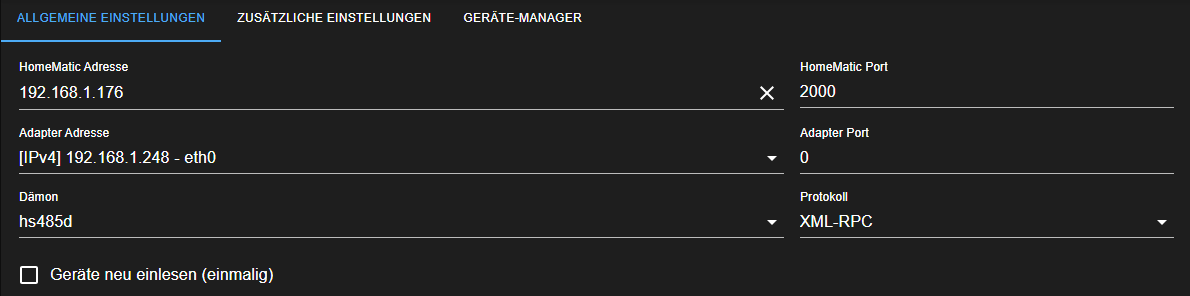
Einstellungen von den besagten Instanzen posten (HM Rega /HM RPC)
hast du leider nicht gemacht
-
@heldchen das sieht dann aber nach Fehlkonfiguration aus.
@haselchen sagte in Homematic RPC liefert keine Statusänderungen:
Einstellungen von den besagten Instanzen posten (HM Rega /HM RPC)
hast du leider nicht gemacht
-
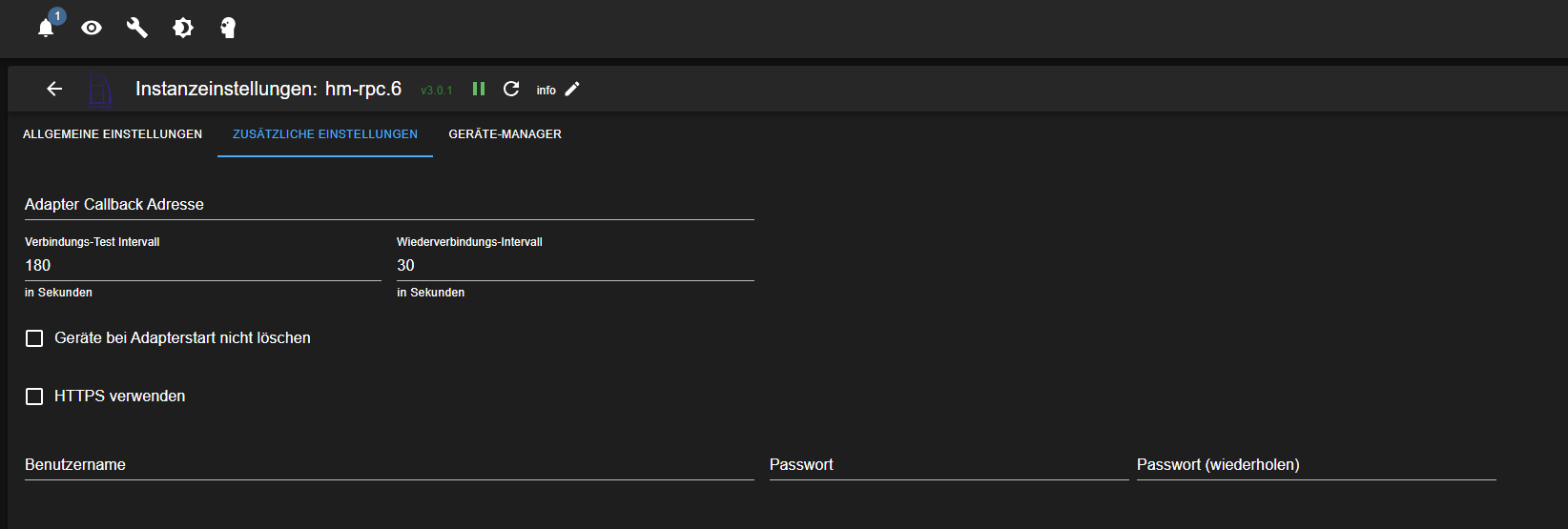
Hast du in den Einstellungen der Instanz etwas bei Callback Adresse eingetragen? Ich glaube da muss bei Verwendung von Containern bzw. Docker die Adresse vom ioBroker Host rein.
https://github.com/ioBroker/ioBroker.hm-rpc?tab=readme-ov-file#adapter-callback-address
-
Hast du in den Einstellungen der Instanz etwas bei Callback Adresse eingetragen? Ich glaube da muss bei Verwendung von Containern bzw. Docker die Adresse vom ioBroker Host rein.
https://github.com/ioBroker/ioBroker.hm-rpc?tab=readme-ov-file#adapter-callback-address
-
@heldchen das steht im zweiten Reiter
-
@heldchen da muss die IP des hosts eingetragen werden, sonst hast du das Problem bald wieder
-
@heldchen da muss die IP des hosts eingetragen werden, sonst hast du das Problem bald wieder
-
@heldchen keine Ahnung!
müsste eigentlich von Anfang an Probleme geben.
Ich kenne mich mit Containern nicht aus.
Vielleicht hat der die Route anfangs noch von der Installation. -
@heldchen keine Ahnung!
müsste eigentlich von Anfang an Probleme geben.
Ich kenne mich mit Containern nicht aus.
Vielleicht hat der die Route anfangs noch von der Installation.



Hey! Du scheinst an dieser Unterhaltung interessiert zu sein, hast aber noch kein Konto.
Hast du es satt, bei jedem Besuch durch die gleichen Beiträge zu scrollen? Wenn du dich für ein Konto anmeldest, kommst du immer genau dorthin zurück, wo du zuvor warst, und kannst dich über neue Antworten benachrichtigen lassen (entweder per E-Mail oder Push-Benachrichtigung). Du kannst auch Lesezeichen speichern und Beiträge positiv bewerten, um anderen Community-Mitgliedern deine Wertschätzung zu zeigen.
Mit deinem Input könnte dieser Beitrag noch besser werden 💗
Registrieren AnmeldenSupport us
478
Online33.0k
Benutzer83.6k
Themen1.3m
Beiträge