




js Controler auf 7.07 geht nicht Fehlermeldung iOb
-
Debian Release codenamed 'bullseye' reached its END OF LIFE and needs to be updated to the latest stable release 'trixie' NOW!
Und dann sind da 125 Updates in der Pipeline...
Und deine Paketquellen sind 'Kraut-und-Rüben'.Setz da einen frischen, konsistenten Container neu auf.
@thomas-braun habe ich versucht aber nicht hin bekommen
bleibt immer hängenlogin as: root root@10.10.50.16's password: Linux iobroker 6.8.12-13-pve #1 SMP PREEMPT_DYNAMIC PMX 6.8.12-13 (2025-07-22T10:00Z) x86_64 The programs included with the Debian GNU/Linux system are free software; the exact distribution terms for each program are described in the individual files in /usr/share/doc/*/copyright. Debian GNU/Linux comes with ABSOLUTELY NO WARRANTY, to the extent permitted by applicable law. You have mail. Last login: Fri Aug 22 14:37:59 2025 from 10.10.10.166 root@iobroker:~# sudo apt update Hit:1 http://deb.debian.org/debian trixie InRelease Hit:2 http://security.debian.org/debian-security trixie-security InRelease Hit:3 http://deb.debian.org/debian trixie-updates InRelease Get:4 https://repos.influxdata.com/debian buster InRelease [12.9 kB] Hit:5 https://deb.nodesource.com/node_22.x nodistro InRelease Err:6 https://dl.yarnpkg.co m/debian InRelease Could not connect to dl.yarnpkg.co:443 (54.164.204.90). - connect (111: Connection refused) Could not connect to dl.yarnpkg.co:443 (3.224.76.162). - connect (111: Connection refused) Err:4 https://repos.influxdata.com/debian buster InRelease The following signatures couldn't be verified because the public key is not available: NO_PUBKEY D8FF8E1F7DF8B07E Fetched 12.9 kB in 0s (47.0 kB/s) Reading package lists... Done Building dependency tree... Done Reading state information... Done 470 packages can be upgraded. Run 'apt list --upgradable' to see them. W: An error occurred during the signature verification. The repository is not updated and the previous index files will be used. GPG error: https://repos.influxdata.com/debian buster InRelease: The following signatures couldn't be verified because the public key is not available: NO_PUBKEY D8FF8E1F7DF8B07E W: Failed to fetch https://repos.influxdata.com/debian/dists/buster/InRelease The following signatures couldn't be verified because the public key is not available: NO_PUBKEY D8FF8E1F7DF8B07E W: Failed to fetch https://dl.yarnpkg.co/dists/m/debian/InRelease Could not connect to dl.yarnpkg.co:443 (54.164.204.90). - connect (111: Connection refused) Could not connect to dl.yarnpkg.co:443 (3.224.76.162). - connect (111: Connection refused) W: Some index files failed to download. They have been ignored, or old ones used instead.apt-listchanges: News --------------------- openssh (1:10.0p1-1) unstable; urgency=medium OpenSSH 10.0p1 includes a number of changes that may affect existing configurations: * This release removes support for the weak DSA signature algorithm, completing the deprecation process that began in 2015 (when DSA was disabled by default) and repeatedly warned over the last 12 months. * scp(1), sftp(1): pass "ControlMaster no" to ssh when invoked by scp & sftp. This disables implicit session creation by these tools when ControlMaster was set to yes/auto by configuration, which some users found surprising. This change will not prevent scp/sftp from using an existing multiplexing session if one had already been created. * sshd(8): this release disables finite field (a.k.a modp) Diffie-Hellman key exchange in sshd by default. Specifically, this removes the "diffie-hellman-group*" and "diffie-hellman-group-exchange-*" methods from the default KEXAlgorithms list. The client is unchanged and continues to support these methods by default. * sshd(8): this release removes the implicit fallback to compiled-in groups for Diffie-Hellman Group Exchange KEX when the moduli file exists but does not contain moduli within the client-requested range. The fallback behaviour remains for the case where the moduli file does not exist at all. This allows administrators more explicit control over which DH groups will be selected, but can lead to connection failures if the moduli file is edited incorrectly. -- Colin Watson <cjwatson@debian.org> Fri, 11 Apr 2025 11:16:19 +0100 openssh (1:9.9p1-1) unstable; urgency=medium OpenSSH 9.9p1 includes a number of changes that may affect existing configurations: * ssh(1): remove support for pre-authentication compression. OpenSSH has : wie geht es hier weiter?? -
@thomas-braun habe ich versucht aber nicht hin bekommen
bleibt immer hängenlogin as: root root@10.10.50.16's password: Linux iobroker 6.8.12-13-pve #1 SMP PREEMPT_DYNAMIC PMX 6.8.12-13 (2025-07-22T10:00Z) x86_64 The programs included with the Debian GNU/Linux system are free software; the exact distribution terms for each program are described in the individual files in /usr/share/doc/*/copyright. Debian GNU/Linux comes with ABSOLUTELY NO WARRANTY, to the extent permitted by applicable law. You have mail. Last login: Fri Aug 22 14:37:59 2025 from 10.10.10.166 root@iobroker:~# sudo apt update Hit:1 http://deb.debian.org/debian trixie InRelease Hit:2 http://security.debian.org/debian-security trixie-security InRelease Hit:3 http://deb.debian.org/debian trixie-updates InRelease Get:4 https://repos.influxdata.com/debian buster InRelease [12.9 kB] Hit:5 https://deb.nodesource.com/node_22.x nodistro InRelease Err:6 https://dl.yarnpkg.co m/debian InRelease Could not connect to dl.yarnpkg.co:443 (54.164.204.90). - connect (111: Connection refused) Could not connect to dl.yarnpkg.co:443 (3.224.76.162). - connect (111: Connection refused) Err:4 https://repos.influxdata.com/debian buster InRelease The following signatures couldn't be verified because the public key is not available: NO_PUBKEY D8FF8E1F7DF8B07E Fetched 12.9 kB in 0s (47.0 kB/s) Reading package lists... Done Building dependency tree... Done Reading state information... Done 470 packages can be upgraded. Run 'apt list --upgradable' to see them. W: An error occurred during the signature verification. The repository is not updated and the previous index files will be used. GPG error: https://repos.influxdata.com/debian buster InRelease: The following signatures couldn't be verified because the public key is not available: NO_PUBKEY D8FF8E1F7DF8B07E W: Failed to fetch https://repos.influxdata.com/debian/dists/buster/InRelease The following signatures couldn't be verified because the public key is not available: NO_PUBKEY D8FF8E1F7DF8B07E W: Failed to fetch https://dl.yarnpkg.co/dists/m/debian/InRelease Could not connect to dl.yarnpkg.co:443 (54.164.204.90). - connect (111: Connection refused) Could not connect to dl.yarnpkg.co:443 (3.224.76.162). - connect (111: Connection refused) W: Some index files failed to download. They have been ignored, or old ones used instead.apt-listchanges: News --------------------- openssh (1:10.0p1-1) unstable; urgency=medium OpenSSH 10.0p1 includes a number of changes that may affect existing configurations: * This release removes support for the weak DSA signature algorithm, completing the deprecation process that began in 2015 (when DSA was disabled by default) and repeatedly warned over the last 12 months. * scp(1), sftp(1): pass "ControlMaster no" to ssh when invoked by scp & sftp. This disables implicit session creation by these tools when ControlMaster was set to yes/auto by configuration, which some users found surprising. This change will not prevent scp/sftp from using an existing multiplexing session if one had already been created. * sshd(8): this release disables finite field (a.k.a modp) Diffie-Hellman key exchange in sshd by default. Specifically, this removes the "diffie-hellman-group*" and "diffie-hellman-group-exchange-*" methods from the default KEXAlgorithms list. The client is unchanged and continues to support these methods by default. * sshd(8): this release removes the implicit fallback to compiled-in groups for Diffie-Hellman Group Exchange KEX when the moduli file exists but does not contain moduli within the client-requested range. The fallback behaviour remains for the case where the moduli file does not exist at all. This allows administrators more explicit control over which DH groups will be selected, but can lead to connection failures if the moduli file is edited incorrectly. -- Colin Watson <cjwatson@debian.org> Fri, 11 Apr 2025 11:16:19 +0100 openssh (1:9.9p1-1) unstable; urgency=medium OpenSSH 9.9p1 includes a number of changes that may affect existing configurations: * ssh(1): remove support for pre-authentication compression. OpenSSH has : wie geht es hier weiter??Und wie immer: NIE, NIE, NIE als root herumkaspern.
-
Und wie immer: NIE, NIE, NIE als root herumkaspern.
auch als user geht es nicht
apt-listchanges: News
---------------------

openssh (1:10.0p1-1) unstable; urgency=medium

  OpenSSH 10.0p1 includes a number of changes that may affect existing
  configurations:

   * This release removes support for the weak DSA signature algorithm,
     completing the deprecation process that began in 2015 (when DSA was
     disabled by default) and repeatedly warned over the last 12 months.

   * scp(1), sftp(1): pass "ControlMaster no" to ssh when invoked by scp &
     sftp. This disables implicit session creation by these tools when
     ControlMaster was set to yes/auto by configuration, which some users
     found surprising. This change will not prevent scp/sftp from using an
     existing multiplexing session if one had already been created.

   * sshd(8): this release disables finite field (a.k.a modp) Diffie-Hellman
     key exchange in sshd by default. Specifically, this removes the
     "diffie-hellman-group*" and "diffie-hellman-group-exchange-*" methods
     from the default KEXAlgorithms list. The client is unchanged and
     continues to support these methods by default.
:
hängt an der Stelle, was muss ich hier machen?
-
auch als user geht es nicht
apt-listchanges: News
---------------------

openssh (1:10.0p1-1) unstable; urgency=medium

  OpenSSH 10.0p1 includes a number of changes that may affect existing
  configurations:

   * This release removes support for the weak DSA signature algorithm,
     completing the deprecation process that began in 2015 (when DSA was
     disabled by default) and repeatedly warned over the last 12 months.

   * scp(1), sftp(1): pass "ControlMaster no" to ssh when invoked by scp &
     sftp. This disables implicit session creation by these tools when
     ControlMaster was set to yes/auto by configuration, which some users
     found surprising. This change will not prevent scp/sftp from using an
     existing multiplexing session if one had already been created.

   * sshd(8): this release disables finite field (a.k.a modp) Diffie-Hellman
     key exchange in sshd by default. Specifically, this removes the
     "diffie-hellman-group*" and "diffie-hellman-group-exchange-*" methods
     from the default KEXAlgorithms list. The client is unchanged and
     continues to support these methods by default.
:
hängt an der Stelle, was muss ich hier machen?
@marcel-drzal sagte in js Controler auf 7.07 geht nicht Fehlermeldung iOb:
hängt an der Stelle, was muss ich hier machen?
Mit
qaus der Nachricht raus... -
@marcel-drzal sagte in js Controler auf 7.07 geht nicht Fehlermeldung iOb:
hängt an der Stelle, was muss ich hier machen?
Mit
qaus der Nachricht raus...@thomas-braun said in js Controler auf 7.07 geht nicht Fehlermeldung iOb:
@marcel-drzal sagte in js Controler auf 7.07 geht nicht Fehlermeldung iOb:
hängt an der Stelle, was muss ich hier machen?
Mit
qaus der Nachricht raus...@thomas-braun said in js Controler auf 7.07 geht nicht Fehlermeldung iOb:
@marcel-drzal sagte in js Controler auf 7.07 geht nicht Fehlermeldung iOb:
hängt an der Stelle, was muss ich hier machen?
Mit
qaus der Nachricht raus...Danke
470 upgraded, 165 newly installed, 34 to remove and 0 not upgraded.
Need to get 0 B/341 MB of archives.
After this operation, 743 MB of additional disk space will be used.
Do you want to continue? [Y/n] Y
Reading changelogs... Done
apt-listchanges: Mailing root: apt-listchanges: news for iobroker
Extracting templates from packages: 100%
Preconfiguring packages ...
(Reading database ... 43860 files and directories currently installed.)
Preparing to unpack .../base-files_13.8_amd64.deb ...


******************************************************************************
*
* The base-files package cannot be installed because
* /bin is a directory, but should be a symbolic link.
*
* Please install the usrmerge package to convert this system to merged-/usr.
*
* For more information please read https://wiki.debian.org/UsrMerge.
*
******************************************************************************


dpkg: error processing archive /var/cache/apt/archives/base-files_13.8_amd64.deb (--unpack):
 new base-files package pre-installation script subprocess returned error exit status 1
Errors were encountered while processing:
 /var/cache/apt/archives/base-files_13.8_amd64.deb
E: Sub-process /usr/bin/dpkg returned an error code (1)
marcel@iobroker:~$
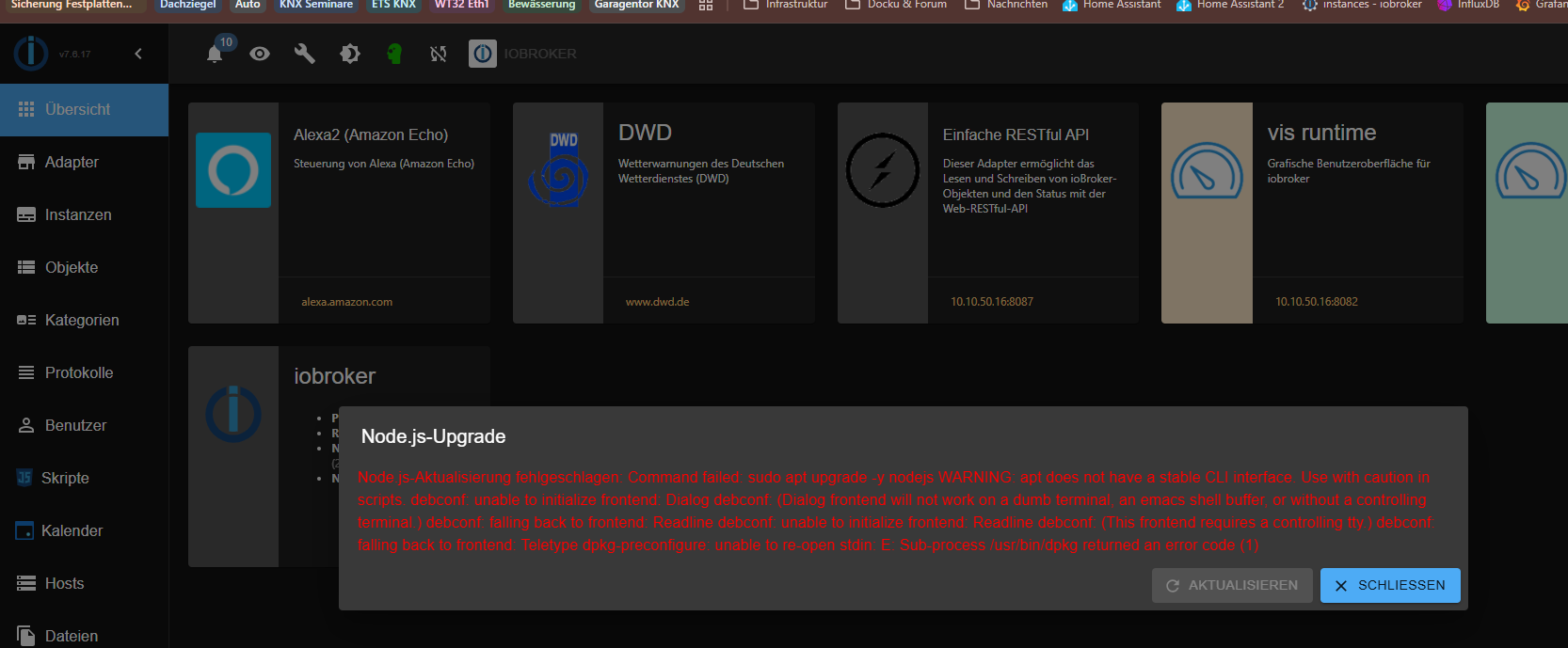
was ist das noch für ein error?
Jetzt hat sich auch der js-controler auf 7.0.7 geändert Danke dir das hat schon mal geklappt
Installieren von Adapter myuplink gibt unten noch Fehlermeldungen, kannst du mir da helfen. Danke dir
$ iobroker add myuplink auto --host iobroker --debug NPM version: 10.9.3 Installing iobroker.myuplink@0.8.4... (System call) added 1 package in 4s 408 packages are looking for funding run `npm fund` for details host.iobroker install adapter myuplink upload [12] myuplink.admin /opt/iobroker/node_modules/iobroker.myuplink/admin/i18n/de/translations.json i18n/de/translations.json application/json upload [11] myuplink.admin /opt/iobroker/node_modules/iobroker.myuplink/admin/i18n/en/translations.json i18n/en/translations.json application/json upload [10] myuplink.admin /opt/iobroker/node_modules/iobroker.myuplink/admin/i18n/es/translations.json i18n/es/translations.json application/json upload [9] myuplink.admin /opt/iobroker/node_modules/iobroker.myuplink/admin/i18n/fr/translations.json i18n/fr/translations.json application/json upload [8] myuplink.admin /opt/iobroker/node_modules/iobroker.myuplink/admin/i18n/it/translations.json i18n/it/translations.json application/json upload [6] myuplink.admin /opt/iobroker/node_modules/iobroker.myuplink/admin/i18n/pl/translations.json i18n/pl/translations.json application/json upload [5] myuplink.admin /opt/iobroker/node_modules/iobroker.myuplink/admin/i18n/pt/translations.json i18n/pt/translations.json application/json upload [4] myuplink.admin /opt/iobroker/node_modules/iobroker.myuplink/admin/i18n/ru/translations.json i18n/ru/translations.json application/json upload [3] myuplink.admin /opt/iobroker/node_modules/iobroker.myuplink/admin/i18n/uk/translations.json i18n/uk/translations.json application/json upload [2] myuplink.admin /opt/iobroker/node_modules/iobroker.myuplink/admin/i18n/zh-cn/translations.json i18n/zh-cn/translations.json application/json upload [1] myuplink.admin /opt/iobroker/node_modules/iobroker.myuplink/admin/jsonConfig.json jsonConfig.json application/json upload [0] myuplink.admin /opt/iobroker/node_modules/iobroker.myuplink/admin/myuplink.png myuplink.png image/png host.iobroker object system.adapter.myuplink created/updatedUpdating objects from io-package.json for adapter "myuplink" with version "0.8.4" host.iobroker object system.adapter.myuplink.0.compactMode created host.iobroker object system.adapter.myuplink.0.cpu created host.iobroker object system.adapter.myuplink.0.cputime created host.iobroker object system.adapter.myuplink.0.memHeapUsed created host.iobroker object system.adapter.myuplink.0.memHeapTotal created host.iobroker object system.adapter.myuplink.0.memRss created host.iobroker object system.adapter.myuplink.0.uptime created host.iobroker object system.adapter.myuplink.0.inputCount created host.iobroker object system.adapter.myuplink.0.outputCount created host.iobroker object system.adapter.myuplink.0.eventLoopLag created host.iobroker object system.adapter.myuplink.0.sigKill created host.iobroker object system.adapter.myuplink.0.logLevel created host.iobroker object myuplink.0.info created host.iobroker object myuplink.0.info.connection created host.iobroker object myuplink.0.info.currentError created host.iobroker object myuplink.0.info.updateTime created host.iobroker object myuplink.0.info.lastError created host.iobroker Set default value of myuplink.0.info.currentError: host.iobroker Set default value of myuplink.0.info.updateTime: host.iobroker Set default value of myuplink.0.info.lastErrorTime: host.iobroker object system.adapter.myuplink.0 created Process exited with code 0 -
@thomas-braun said in js Controler auf 7.07 geht nicht Fehlermeldung iOb:
@marcel-drzal sagte in js Controler auf 7.07 geht nicht Fehlermeldung iOb:
hängt an der Stelle, was muss ich hier machen?
Mit
qaus der Nachricht raus...@thomas-braun said in js Controler auf 7.07 geht nicht Fehlermeldung iOb:
@marcel-drzal sagte in js Controler auf 7.07 geht nicht Fehlermeldung iOb:
hängt an der Stelle, was muss ich hier machen?
Mit
qaus der Nachricht raus...Danke
470 upgraded, 165 newly installed, 34 to remove and 0 not upgraded.
Need to get 0 B/341 MB of archives.
After this operation, 743 MB of additional disk space will be used.
Do you want to continue? [Y/n] Y
Reading changelogs... Done
apt-listchanges: Mailing root: apt-listchanges: news for iobroker
Extracting templates from packages: 100%
Preconfiguring packages ...
(Reading database ... 43860 files and directories currently installed.)
Preparing to unpack .../base-files_13.8_amd64.deb ...


******************************************************************************
*
* The base-files package cannot be installed because
* /bin is a directory, but should be a symbolic link.
*
* Please install the usrmerge package to convert this system to merged-/usr.
*
* For more information please read https://wiki.debian.org/UsrMerge.
*
******************************************************************************


dpkg: error processing archive /var/cache/apt/archives/base-files_13.8_amd64.deb (--unpack):
 new base-files package pre-installation script subprocess returned error exit status 1
Errors were encountered while processing:
 /var/cache/apt/archives/base-files_13.8_amd64.deb
E: Sub-process /usr/bin/dpkg returned an error code (1)
marcel@iobroker:~$
was ist das noch für ein error?
Jetzt hat sich auch der js-controler auf 7.0.7 geändert Danke dir das hat schon mal geklapptInstallieren von Adapter myuplink gibt unten noch Fehlermeldungen, kannst du mir da helfen. Danke dir
$ iobroker add myuplink auto --host iobroker --debug NPM version: 10.9.3 Installing iobroker.myuplink@0.8.4... (System call) added 1 package in 4s 408 packages are looking for funding run `npm fund` for details host.iobroker install adapter myuplink upload [12] myuplink.admin /opt/iobroker/node_modules/iobroker.myuplink/admin/i18n/de/translations.json i18n/de/translations.json application/json upload [11] myuplink.admin /opt/iobroker/node_modules/iobroker.myuplink/admin/i18n/en/translations.json i18n/en/translations.json application/json upload [10] myuplink.admin /opt/iobroker/node_modules/iobroker.myuplink/admin/i18n/es/translations.json i18n/es/translations.json application/json upload [9] myuplink.admin /opt/iobroker/node_modules/iobroker.myuplink/admin/i18n/fr/translations.json i18n/fr/translations.json application/json upload [8] myuplink.admin /opt/iobroker/node_modules/iobroker.myuplink/admin/i18n/it/translations.json i18n/it/translations.json application/json upload [6] myuplink.admin /opt/iobroker/node_modules/iobroker.myuplink/admin/i18n/pl/translations.json i18n/pl/translations.json application/json upload [5] myuplink.admin /opt/iobroker/node_modules/iobroker.myuplink/admin/i18n/pt/translations.json i18n/pt/translations.json application/json upload [4] myuplink.admin /opt/iobroker/node_modules/iobroker.myuplink/admin/i18n/ru/translations.json i18n/ru/translations.json application/json upload [3] myuplink.admin /opt/iobroker/node_modules/iobroker.myuplink/admin/i18n/uk/translations.json i18n/uk/translations.json application/json upload [2] myuplink.admin /opt/iobroker/node_modules/iobroker.myuplink/admin/i18n/zh-cn/translations.json i18n/zh-cn/translations.json application/json upload [1] myuplink.admin /opt/iobroker/node_modules/iobroker.myuplink/admin/jsonConfig.json jsonConfig.json application/json upload [0] myuplink.admin /opt/iobroker/node_modules/iobroker.myuplink/admin/myuplink.png myuplink.png image/png host.iobroker object system.adapter.myuplink created/updatedUpdating objects from io-package.json for adapter "myuplink" with version "0.8.4" host.iobroker object system.adapter.myuplink.0.compactMode created host.iobroker object system.adapter.myuplink.0.cpu created host.iobroker object system.adapter.myuplink.0.cputime created host.iobroker object system.adapter.myuplink.0.memHeapUsed created host.iobroker object system.adapter.myuplink.0.memHeapTotal created host.iobroker object system.adapter.myuplink.0.memRss created host.iobroker object system.adapter.myuplink.0.uptime created host.iobroker object system.adapter.myuplink.0.inputCount created host.iobroker object system.adapter.myuplink.0.outputCount created host.iobroker object system.adapter.myuplink.0.eventLoopLag created host.iobroker object system.adapter.myuplink.0.sigKill created host.iobroker object system.adapter.myuplink.0.logLevel created host.iobroker object myuplink.0.info created host.iobroker object myuplink.0.info.connection created host.iobroker object myuplink.0.info.currentError created host.iobroker object myuplink.0.info.updateTime created host.iobroker object myuplink.0.info.lastError created host.iobroker Set default value of myuplink.0.info.currentError: host.iobroker Set default value of myuplink.0.info.updateTime: host.iobroker Set default value of myuplink.0.info.lastErrorTime: host.iobroker object system.adapter.myuplink.0 created Process exited with code 0Synology DS218+ & 2 x Fujitsu Esprimo (VM/Container) + FritzBox7590 + 2 AVM 3000 Repeater & Homematic & HUE & Osram & Xiaomi, NPM 10.9.8, Nodejs 22.23.2 ,JS Controller 7.2.2 ,Admin 8.0.4
-
@thomas-braun said in js Controler auf 7.07 geht nicht Fehlermeldung iOb:
@marcel-drzal sagte in js Controler auf 7.07 geht nicht Fehlermeldung iOb:
hängt an der Stelle, was muss ich hier machen?
Mit
qaus der Nachricht raus...@thomas-braun said in js Controler auf 7.07 geht nicht Fehlermeldung iOb:
@marcel-drzal sagte in js Controler auf 7.07 geht nicht Fehlermeldung iOb:
hängt an der Stelle, was muss ich hier machen?
Mit
qaus der Nachricht raus...Danke
470 upgraded, 165 newly installed, 34 to remove and 0 not upgraded.
Need to get 0 B/341 MB of archives.
After this operation, 743 MB of additional disk space will be used.
Do you want to continue? [Y/n] Y
Reading changelogs... Done
apt-listchanges: Mailing root: apt-listchanges: news for iobroker
Extracting templates from packages: 100%
Preconfiguring packages ...
(Reading database ... 43860 files and directories currently installed.)
Preparing to unpack .../base-files_13.8_amd64.deb ...


******************************************************************************
*
* The base-files package cannot be installed because
* /bin is a directory, but should be a symbolic link.
*
* Please install the usrmerge package to convert this system to merged-/usr.
*
* For more information please read https://wiki.debian.org/UsrMerge.
*
******************************************************************************


dpkg: error processing archive /var/cache/apt/archives/base-files_13.8_amd64.deb (--unpack):
 new base-files package pre-installation script subprocess returned error exit status 1
Errors were encountered while processing:
 /var/cache/apt/archives/base-files_13.8_amd64.deb
E: Sub-process /usr/bin/dpkg returned an error code (1)
marcel@iobroker:~$
was ist das noch für ein error?
Jetzt hat sich auch der js-controler auf 7.0.7 geändert Danke dir das hat schon mal geklapptInstallieren von Adapter myuplink gibt unten noch Fehlermeldungen, kannst du mir da helfen. Danke dir
$ iobroker add myuplink auto --host iobroker --debug NPM version: 10.9.3 Installing iobroker.myuplink@0.8.4... (System call) added 1 package in 4s 408 packages are looking for funding run `npm fund` for details host.iobroker install adapter myuplink upload [12] myuplink.admin /opt/iobroker/node_modules/iobroker.myuplink/admin/i18n/de/translations.json i18n/de/translations.json application/json upload [11] myuplink.admin /opt/iobroker/node_modules/iobroker.myuplink/admin/i18n/en/translations.json i18n/en/translations.json application/json upload [10] myuplink.admin /opt/iobroker/node_modules/iobroker.myuplink/admin/i18n/es/translations.json i18n/es/translations.json application/json upload [9] myuplink.admin /opt/iobroker/node_modules/iobroker.myuplink/admin/i18n/fr/translations.json i18n/fr/translations.json application/json upload [8] myuplink.admin /opt/iobroker/node_modules/iobroker.myuplink/admin/i18n/it/translations.json i18n/it/translations.json application/json upload [6] myuplink.admin /opt/iobroker/node_modules/iobroker.myuplink/admin/i18n/pl/translations.json i18n/pl/translations.json application/json upload [5] myuplink.admin /opt/iobroker/node_modules/iobroker.myuplink/admin/i18n/pt/translations.json i18n/pt/translations.json application/json upload [4] myuplink.admin /opt/iobroker/node_modules/iobroker.myuplink/admin/i18n/ru/translations.json i18n/ru/translations.json application/json upload [3] myuplink.admin /opt/iobroker/node_modules/iobroker.myuplink/admin/i18n/uk/translations.json i18n/uk/translations.json application/json upload [2] myuplink.admin /opt/iobroker/node_modules/iobroker.myuplink/admin/i18n/zh-cn/translations.json i18n/zh-cn/translations.json application/json upload [1] myuplink.admin /opt/iobroker/node_modules/iobroker.myuplink/admin/jsonConfig.json jsonConfig.json application/json upload [0] myuplink.admin /opt/iobroker/node_modules/iobroker.myuplink/admin/myuplink.png myuplink.png image/png host.iobroker object system.adapter.myuplink created/updatedUpdating objects from io-package.json for adapter "myuplink" with version "0.8.4" host.iobroker object system.adapter.myuplink.0.compactMode created host.iobroker object system.adapter.myuplink.0.cpu created host.iobroker object system.adapter.myuplink.0.cputime created host.iobroker object system.adapter.myuplink.0.memHeapUsed created host.iobroker object system.adapter.myuplink.0.memHeapTotal created host.iobroker object system.adapter.myuplink.0.memRss created host.iobroker object system.adapter.myuplink.0.uptime created host.iobroker object system.adapter.myuplink.0.inputCount created host.iobroker object system.adapter.myuplink.0.outputCount created host.iobroker object system.adapter.myuplink.0.eventLoopLag created host.iobroker object system.adapter.myuplink.0.sigKill created host.iobroker object system.adapter.myuplink.0.logLevel created host.iobroker object myuplink.0.info created host.iobroker object myuplink.0.info.connection created host.iobroker object myuplink.0.info.currentError created host.iobroker object myuplink.0.info.updateTime created host.iobroker object myuplink.0.info.lastError created host.iobroker Set default value of myuplink.0.info.currentError: host.iobroker Set default value of myuplink.0.info.updateTime: host.iobroker Set default value of myuplink.0.info.lastErrorTime: host.iobroker object system.adapter.myuplink.0 created Process exited with code 0@marcel-drzal sagte in js Controler auf 7.07 geht nicht Fehlermeldung iOb:
Jetzt hat sich auch der js-controler auf 7.0.7 geändert
ZUERST musst du die windschiefe Basis in Ordnung bringen. Auf das wackelige Fundament setzt man doch keinen Dienst drauf.
-
Die deinem Problem zugrunde liegende Fehlermeldung ist folgende:
error: host.iobroker iobroker npm error code EBADENGINEnpm error engine Unsupported enginenpm error engine Not compatible with your version of node/npm: @homebridge/ciao@1.2.0npm error notsup Not compatible with your version of node/npm: @homebridge/ciao@1.2.0npm error notsup Required: {"node":"^18 || ^20"}npm error notsup Actual: {"npm":"10.9.3","node":"v22.18.0"}npm error A complete log of this run can be found in: /home/iobroker/.npm/_logs/2025-08-22T13_13_53_260Z-debug-0.log
2025-08-22 15:13:55.721 - error: host.iobroker iobroker host.iobroker Cannot install iobroker.myuplink@0.8.4: 1
2025-08-22 15:13:56.732 - info: host.iobroker iobroker exit 25
2025-08-22 15:14:49.833 - info: influxdb.0 (24581) Do not store value "{"Time":"2025-08-22T14:14:48","Haus":{"Tariflos":0.0000,"Energy":332,"Power_p1":23,"Power_p2":95,"Power_p3":214},"Heizung":{"Tariflos":10418.5469,"Energy":0,"Power_p1":0,"Power_p2":0,"Power_p3":0}}" for StromHaus because no number
2025-08-22 15:14:50.069 - info: host.iobroker Updating repository "Stable (default)" under "http://download.iobroker.net/sources-dist.json"
2025-08-22 15:14:58.547 - info: host.iobroker iobroker upgrade yahka@1.1.5 --debug
2025-08-22 15:14:59.206 - info: host.iobroker iobroker Update yahka from @1.0.3 to @1.1.5
2025-08-22 15:14:59.275 - info: host.iobroker iobroker NPM version: 10.9.3
2025-08-22 15:14:59.275 - info: host.iobroker iobroker Installing iobroker.yahka@1.1.5... (System call)
2025-08-22 15:15:05.132 - info: host.iobroker iobroker added 1 package, removed 1 package, and changed 19 packages in 6s408 packages are looking for funding run `npm fund` for details
2025-08-22 15:15:06.399 - error: host.iobroker iobroker Cannot install "pam-devel": WARNING: apt does not have a stable CLI interface. Use with caution in scripts.E: Unable to locate package pam-devel
2025-08-22 15:15:06.399 - error: host.iobroker iobroker The following apt packages could not be installed: pam-devel. Please install them manually.
Oder extrahiert:
@homebridge/ciao@1.2.0npm error notsup Required: {"node":"^18 || ^20"}npm error notsup Actual: {"npm":"10.9.3","node":"v22.18.0"}
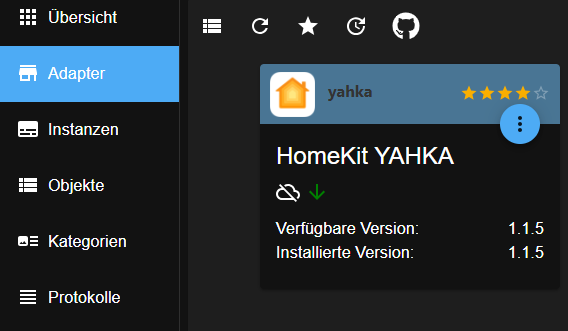
Diese wird (oder wurde?) durch YAHKA in einer Version älter als 1.1.5 ausgelöst. Da du anscheinend zwischenzeitlich yahka auf 1.1.5 gebracht hast sollte sich das primäre Problem behoben haben.
Was sonst noch zu sanieren wäre hat die @Thomas-Braun schon geschieben,
Entwicklung u Betreuung: envertech-pv, hoymiles-ms, ns-client, pid, snmp Adapter;
Support Repositoryverwaltung.Wer 'nen Kaffee spendieren will: https://paypal.me
-
Debian Release codenamed 'bullseye' reached its END OF LIFE and needs to be updated to the latest stable release 'trixie' NOW!
Und dann sind da 125 Updates in der Pipeline...
Und deine Paketquellen sind 'Kraut-und-Rüben'.Setz da einen frischen, konsistenten Container neu auf.
@thomas-braun said in js Controler auf 7.07 geht nicht Fehlermeldung iOb:
Debian Release codenamed 'bullseye' reached its END OF LIFE and needs to be updated to the latest stable release 'trixie' NOW!
Und dann sind da 125 Updates in der Pipeline...
Und deine Paketquellen sind 'Kraut-und-Rüben'.Setz da einen frischen, konsistenten Container neu auf.
wie kann ich die Packetquellen sauber ziehen
Linux iobroker 6.8.12-13-pve #1 SMP PREEMPT_DYNAMIC PMX 6.8.12-13 (2025-07-22T10 :00Z) x86_64 The programs included with the Debian GNU/Linux system are free software; the exact distribution terms for each program are described in the individual files in /usr/share/doc/*/copyright. Debian GNU/Linux comes with ABSOLUTELY NO WARRANTY, to the extent permitted by applicable law. Last login: Fri Aug 22 15:54:52 2025 from 10.10.10.166 marcel@iobroker:~$ iobroker repo show ┌─────────┬────────────────────┬──────────────────────────────────────────────── ─────────┬──────────────┐ │ (index) │ name │ url │ auto upgrade │ ├─────────┼────────────────────┼──────────────────────────────────────────────── ─────────┼──────────────┤ │ 0 │ 'Stable (default)' │ 'http://download.iobroker.net/sources-dist.json ' │ false │ │ 1 │ 'Beta (latest)' │ 'http://download.iobroker.net/sources-dist-late st.json' │ false │ └─────────┴────────────────────┴──────────────────────────────────────────────── ─────────┴──────────────┘ Active repo(s): Stable (default) Upgrade policy: none marcel@iobroker:~$ -
ich hoffe ihr könnt mir helfen. Versuche es nun erst einmal Sauber zu ziehen und dann Updaten.
Danke
========== Start marking the full check here =========== ```bash Script v.2025-08-09 *** BASE SYSTEM *** Operating System: Debian GNU/Linux 11 (bullseye) Static hostname: iobroker Icon name: computer-container Chassis: container Virtualization: lxc Kernel: Linux 6.8.12-13-pve Architecture: x86-64 OS is similar to: model name : Intel(R) Core(TM) i7-10710U CPU @ 1.10GHz Docker : false Virtualization : lxc Kernel : x86_64 Userland : 64 bit Systemuptime and Load: 11:54:07 up 16:14, 1 user, load average: 0.43, 0.23, 0.23 CPU threads: 2 *** LIFE CYCLE STATUS *** Debian Release codenamed 'bullseye' reached its END OF LIFE and needs to be updated to the latest stable release 'trixie' NOW! *** TIME AND TIMEZONES *** Local time: Sun 2025-08-24 11:54:07 CEST Universal time: Sun 2025-08-24 09:54:07 UTC RTC time: n/a Time zone: Europe/Berlin (CEST, +0200) System clock synchronized: yes NTP service: n/a RTC in local TZ: no *** Users and Groups *** User that called 'iob diag': marcel HOME=/home/marcel GROUPS=marcel sudo iobroker User that is running 'js-controller': iobroker HOME=/home/iobroker GROUPS=iobroker tty dialout audio video plugdev *** DISPLAY-SERVER SETUP *** Display-Server: false Unit display-manager.service could not be found. Display-Manager: Desktop: Session: tty *** MEMORY *** total used free shared buff/cache available Mem: 6.1G 1.9G 3.6G 0.0K 633M 4.3G Swap: 512M 0B 512M Total: 6.7G 1.9G 4.1G Active iob-Instances: 23 6144 M total memory 1892 M used memory 1886 M active memory 493 M inactive memory 3618 M free memory 0 M buffer memory 633 M swap cache 512 M total swap 0 M used swap 512 M free swap *** top - Table Of Processes *** top - 11:54:08 up 16:14, 1 user, load average: 0.43, 0.23, 0.23 Tasks: 52 total, 1 running, 51 sleeping, 0 stopped, 0 zombie %Cpu(s): 6.2 us, 0.0 sy, 0.0 ni, 93.8 id, 0.0 wa, 0.0 hi, 0.0 si, 0.0 st MiB Mem : 6144.0 total, 3617.9 free, 1892.3 used, 633.8 buff/cache MiB Swap: 512.0 total, 512.0 free, 0.0 used. 4251.6 avail Mem *** FAILED SERVICES *** UNIT LOAD ACTIVE SUB DESCRIPTION * run-rpc_pipefs.mount loaded failed failed RPC Pipe File System * sys-kernel-config.mount loaded failed failed Kernel Configuration File System * influxdb.service loaded failed failed InfluxDB is an open-source, distributed, time series database * systemd-journald-audit.socket loaded failed failed Journal Audit Socket LOAD = Reflects whether the unit definition was properly loaded. ACTIVE = The high-level unit activation state, i.e. generalization of SUB. SUB = The low-level unit activation state, values depend on unit type. 4 loaded units listed. *** DMESG CRITICAL ERRORS *** dmesg: read kernel buffer failed: Operation not permitted No critical errors detected *** FILESYSTEM *** Filesystem Type Size Used Avail Use% Mounted on /dev/mapper/pve-vm--160--disk--0 ext4 30G 11G 17G 39% / none tmpfs 492K 4.0K 488K 1% /dev udev devtmpfs 32G 0 32G 0% /dev/tty tmpfs tmpfs 32G 0 32G 0% /dev/shm tmpfs tmpfs 13G 108K 13G 1% /run tmpfs tmpfs 5.0M 0 5.0M 0% /run/lock tmpfs tmpfs 6.3G 0 6.3G 0% /run/user/1001 Messages concerning ext4 filesystem in dmesg: dmesg: read kernel buffer failed: Operation not permitted Show mounted filesystems: TARGET SOURCE FSTYPE OPTIONS / /dev/mapper/pve-vm--160--disk--0 ext4 rw,relatime,stripe=16 Files in neuralgic directories: /var: 1.7G /var/ 709M /var/cache 704M /var/cache/apt 669M /var/log 665M /var/log/journal/fe2dcc346dde445a9e95482e37c85663 Hint: You are currently not seeing messages from other users and the system. Users in groups 'adm', 'systemd-journal' can see all messages. Pass -q to turn off this notice. Archived and active journals take up 33.3M in the file system. /opt/iobroker/backups: 2.2G /opt/iobroker/backups/ /opt/iobroker/iobroker-data: 670M /opt/iobroker/iobroker-data/ 377M /opt/iobroker/iobroker-data/files 176M /opt/iobroker/iobroker-data/backup-objects 49M /opt/iobroker/iobroker-data/files/vis.0 48M /opt/iobroker/iobroker-data/files/iot.admin The five largest files in iobroker-data are: 38M /opt/iobroker/iobroker-data/files/iot.admin/static/js/main.d3d286bd.js.map 27M /opt/iobroker/iobroker-data/files/tankerkoenig.admin/build/index.js.map 26M /opt/iobroker/iobroker-data/objects.jsonl 20M /opt/iobroker/iobroker-data/files/fullcalendar.admin/static/js/main.c13d3761.js.map 19M /opt/iobroker/iobroker-data/states.jsonl USB-Devices by-id: USB-Sticks - Avoid direct links to /dev/tty* in your adapter setups, please always prefer the links 'by-id': No Devices found 'by-id' Zigbee Network Settings on your coordinator/in nvbackup are: zigbee.X Extended Pan ID: *** MASKED *** Pan ID: *** MASKED *** Channel: *** MASKED *** Network Key: *** MASKED *** To unmask the settings run 'iob diag --unmask' *** NodeJS-Installation *** /usr/bin/nodejs v22.18.0 /usr/bin/node v22.18.0 /usr/bin/npm 10.9.3 /usr/bin/npx 10.9.3 /usr/bin/corepack 0.33.0 nodejs: Installed: 22.18.0-1nodesource1 Candidate: 22.18.0-1nodesource1 Version table: *** 22.18.0-1nodesource1 600 500 https://deb.nodesource.com/node_22.x nodistro/main amd64 Packages 100 /var/lib/dpkg/status 22.17.1-1nodesource1 600 500 https://deb.nodesource.com/node_22.x nodistro/main amd64 Packages 22.17.0-1nodesource1 600 500 https://deb.nodesource.com/node_22.x nodistro/main amd64 Packages 22.16.0-1nodesource1 600 500 https://deb.nodesource.com/node_22.x nodistro/main amd64 Packages 22.15.1-1nodesource1 600 500 https://deb.nodesource.com/node_22.x nodistro/main amd64 Packages 22.15.0-1nodesource1 600 500 https://deb.nodesource.com/node_22.x nodistro/main amd64 Packages 22.14.0-1nodesource1 600 500 https://deb.nodesource.com/node_22.x nodistro/main amd64 Packages 22.13.1-1nodesource1 600 500 https://deb.nodesource.com/node_22.x nodistro/main amd64 Packages 22.13.0-1nodesource1 600 500 https://deb.nodesource.com/node_22.x nodistro/main amd64 Packages 22.12.0-1nodesource1 600 500 https://deb.nodesource.com/node_22.x nodistro/main amd64 Packages 22.11.0-1nodesource1 600 500 https://deb.nodesource.com/node_22.x nodistro/main amd64 Packages 22.10.0-1nodesource1 600 500 https://deb.nodesource.com/node_22.x nodistro/main amd64 Packages 22.9.0-1nodesource1 600 500 https://deb.nodesource.com/node_22.x nodistro/main amd64 Packages 22.8.0-1nodesource1 600 500 https://deb.nodesource.com/node_22.x nodistro/main amd64 Packages 22.7.0-1nodesource1 600 500 https://deb.nodesource.com/node_22.x nodistro/main amd64 Packages 22.6.0-1nodesource1 600 500 https://deb.nodesource.com/node_22.x nodistro/main amd64 Packages 22.5.1-1nodesource1 600 500 https://deb.nodesource.com/node_22.x nodistro/main amd64 Packages 22.5.0-1nodesource1 600 500 https://deb.nodesource.com/node_22.x nodistro/main amd64 Packages 22.4.1-1nodesource1 600 500 https://deb.nodesource.com/node_22.x nodistro/main amd64 Packages 22.4.0-1nodesource1 600 500 https://deb.nodesource.com/node_22.x nodistro/main amd64 Packages 22.3.0-1nodesource1 600 500 https://deb.nodesource.com/node_22.x nodistro/main amd64 Packages 22.2.0-1nodesource1 600 500 https://deb.nodesource.com/node_22.x nodistro/main amd64 Packages 22.1.0-1nodesource1 600 500 https://deb.nodesource.com/node_22.x nodistro/main amd64 Packages 22.0.0-1nodesource1 600 500 https://deb.nodesource.com/node_22.x nodistro/main amd64 Packages 20.19.2+dfsg-1 500 500 http://deb.debian.org/debian trixie/main amd64 Packages Temp directories causing deletion problem: 0 No problems detected Errors in npm tree: 0 No problems detected Checking for nodejs vulnerability: █████ ██ ██ ██████ ██████ ██████ ██████ ██ ██ ██ ██ ██ ██ ██ ██ ██ ██ ██ ██ ██ ██ ███████ ██ ██ ██ ███ ██ ██ ██ ██ ██ ██ ██ ██ ██ ██ ██ ██ ██ ██ ██ ██ ██ ██ ██ ██ ██ ██ ██ ███████ ███████ ██████ ██████ ██████ ██████ ██ *** ioBroker-Installation *** ioBroker Status iobroker is running on this host. Objects type: jsonl States type: jsonl Hosts: iobroker iobroker (version: 7.0.7, hostname: iobroker , alive, uptime: 58433) Core adapters versions js-controller: 7.0.7 admin: 7.6.17 javascript: 8.9.2 nodejs modules from github: 1 +-- iobroker.luxtronik2@0.3.0 (git+ssh://git@github.com/UncleSamSwiss/ioBroker.luxtronik2.git#e3a8b912a68cdb84c808a91c6a2250ae4f7ec1b9) Adapter State + system.adapter.admin.0 : admin : iobroker - enabled, port: 8081, bind: 0.0.0.0 (SSL), run as: admin + system.adapter.alexa2.0 : alexa2 : iobroker - enabled + system.adapter.cloud.0 : cloud : iobroker - enabled system.adapter.denon.0 : denon : iobroker - disabled + system.adapter.discovery.0 : discovery : iobroker - enabled system.adapter.dwd.0 : dwd : iobroker - enabled system.adapter.feiertage.0 : feiertage : iobroker - enabled + system.adapter.fullcalendar.0 : fullcalendar : iobroker - enabled system.adapter.icons-mfd-svg.0 : icons-mfd-svg : iobroker - disabled + system.adapter.influxdb.0 : influxdb : iobroker - enabled, port: 8086 system.adapter.influxdb.1 : influxdb : iobroker - disabled, port: 8086 + system.adapter.info.0 : info : iobroker - enabled + system.adapter.iot.0 : iot : iobroker - enabled + system.adapter.javascript.0 : javascript : iobroker - enabled + system.adapter.judoisoft.0 : judoisoft : iobroker - enabled + system.adapter.knx.0 : knx : iobroker - enabled, bind: 10.10.50.16 system.adapter.luxtronik2.0 : luxtronik2 : iobroker - disabled, port: 8214 + system.adapter.mqtt.0 : mqtt : iobroker - enabled, port: 1886, bind: 192.168.178.16 + system.adapter.myuplink.0 : myuplink : iobroker - enabled + system.adapter.proxmox.0 : proxmox : iobroker - enabled, port: 8006 + system.adapter.pushover.0 : pushover : iobroker - enabled + system.adapter.simple-api.0 : simple-api : iobroker - enabled, port: 8087, bind: 0.0.0.0, run as: admin + system.adapter.telegram.0 : telegram : iobroker - enabled, port: 8443, bind: 0.0.0.0 + system.adapter.telegram.1 : telegram : iobroker - enabled, port: 8443, bind: 0.0.0.0 + system.adapter.telegram.2 : telegram : iobroker - enabled, port: 8443, bind: 0.0.0.0 system.adapter.vis-bars.0 : vis-bars : iobroker - disabled system.adapter.vis-canvas-gauges.0 : vis-canvas-gauges : iobroker - disabled system.adapter.vis-colorpicker.0 : vis-colorpicker : iobroker - disabled system.adapter.vis-fancyswitch.0 : vis-fancyswitch : iobroker - disabled system.adapter.vis-history.0 : vis-history : iobroker - disabled system.adapter.vis-hqwidgets.0 : vis-hqwidgets : iobroker - disabled system.adapter.vis-icontwo.0 : vis-icontwo : iobroker - disabled + system.adapter.vis-inventwo.0 : vis-inventwo : iobroker - enabled system.adapter.vis-jqui-mfd.0 : vis-jqui-mfd : iobroker - disabled system.adapter.vis-justgage.0 : vis-justgage : iobroker - disabled system.adapter.vis-lcars.0 : vis-lcars : iobroker - disabled system.adapter.vis-material-advanced.0 : vis-material-advanced : iobroker - disabled system.adapter.vis-metro.0 : vis-metro : iobroker - disabled system.adapter.vis-players.0 : vis-players : iobroker - disabled system.adapter.vis-timeandweather.0 : vis-timeandweather : iobroker - disabled system.adapter.vis-weather.0 : vis-weather : iobroker - disabled system.adapter.vis.0 : vis : iobroker - enabled + system.adapter.web.0 : web : iobroker - enabled, port: 8082, bind: 0.0.0.0, run as: admin + system.adapter.wled.0 : wled : iobroker - enabled + instance is alive Enabled adapters with bindings + system.adapter.admin.0 : admin : iobroker - enabled, port: 8081, bind: 0.0.0.0 (SSL), run as: admin + system.adapter.influxdb.0 : influxdb : iobroker - enabled, port: 8086 + system.adapter.mqtt.0 : mqtt : iobroker - enabled, port: 1886, bind: 192.168.178.16 + system.adapter.proxmox.0 : proxmox : iobroker - enabled, port: 8006 + system.adapter.simple-api.0 : simple-api : iobroker - enabled, port: 8087, bind: 0.0.0.0, run as: admin + system.adapter.telegram.0 : telegram : iobroker - enabled, port: 8443, bind: 0.0.0.0 + system.adapter.telegram.1 : telegram : iobroker - enabled, port: 8443, bind: 0.0.0.0 + system.adapter.telegram.2 : telegram : iobroker - enabled, port: 8443, bind: 0.0.0.0 + system.adapter.web.0 : web : iobroker - enabled, port: 8082, bind: 0.0.0.0, run as: admin ioBroker-Repositories ┌─────────┬────────────────────┬─────────────────────────────────────────────────────────┬──────────────┐ │ (index) │ name │ url │ auto upgrade │ ├─────────┼────────────────────┼─────────────────────────────────────────────────────────┼──────────────┤ │ 0 │ 'Stable (default)' │ 'http://download.iobroker.net/sources-dist.json' │ false │ │ 1 │ 'Beta (latest)' │ 'http://download.iobroker.net/sources-dist-latest.json' │ false │ └─────────┴────────────────────┴─────────────────────────────────────────────────────────┴──────────────┘ Active repo(s): Stable (default) Upgrade policy: none Installed ioBroker-Adapters Used repository: Stable (default) Adapter "admin" : 7.6.17 , installed 7.6.17 Adapter "alexa2" : 3.27.3 , installed 3.27.3 Adapter "cloud" : 5.0.1 , installed 5.0.1 Adapter "denon" : 1.15.12 , installed 1.15.12 Adapter "discovery" : 5.0.0 , installed 5.0.0 Adapter "dwd" : 2.8.5 , installed 2.8.5 Adapter "feiertage" : 1.2.1 , installed 1.2.1 Adapter "fullcalendar" : 2.4.5 , installed 2.4.5 Adapter "homekit-controller": 0.5.11, installed 0.5.11 Adapter "icons-mfd-svg": 1.2.0 , installed 1.2.0 Adapter "influxdb" : 4.0.2 , installed 4.0.2 Adapter "iot" : 3.3.0 , installed 3.3.0 Adapter "javascript" : 8.9.2 , installed 8.9.2 Controller "js-controller": 7.0.7 , installed 7.0.7 Adapter "judoisoft" : 1.1.2 , installed 1.1.2 Adapter "klf200" : 1.3.5 , installed 1.3.5 Adapter "knx" : 2.0.30 , installed 2.0.30 Adapter "lg-thinq" : 1.1.0 , installed 1.1.0 Adapter "lgtv" : 2.4.0 , installed 2.4.0 Adapter "mihome-vacuum": 5.2.0 , installed 5.2.0 Adapter "mqtt" : 6.1.2 , installed 6.1.2 Adapter "mqtt-client" : 3.0.0 , installed 3.0.0 Adapter "myuplink" : 0.8.4 , installed 0.8.4 Adapter "pi-hole" : 1.3.6 , installed 1.3.6 Adapter "proxmox" : 2.4.0 , installed 2.4.0 Adapter "pushover" : 4.1.0 , installed 4.1.0 Adapter "shelly" : 10.1.0 , installed 10.1.0 Adapter "simple-api" : 2.8.0 , installed 2.8.0 Adapter "smartmeter" : 3.4.0 , installed 3.4.0 Adapter "socketio" : 6.7.1 , installed 6.7.1 Adapter "sonoff" : 3.1.2 , installed 3.1.2 Adapter "tankerkoenig" : 3.4.0 , installed 3.4.0 Adapter "telegram" : 4.1.0 , installed 4.1.0 Adapter "text2command" : 3.0.3 , installed 3.0.3 Adapter "trashschedule": 3.3.0 , installed 3.3.0 Adapter "vis" : 1.5.6 , installed 1.5.6 Adapter "vis-bars" : 0.1.4 , installed 0.1.4 Adapter "vis-canvas-gauges": 1.0.1, installed 1.0.1 Adapter "vis-colorpicker": 2.0.3 , installed 2.0.3 Adapter "vis-fancyswitch": 1.1.0 , installed 1.1.0 Adapter "vis-history" : 1.0.0 , installed 1.0.0 Adapter "vis-hqwidgets": 1.5.1 , installed 1.5.1 Adapter "vis-icontwo" : 1.12.0 , installed 1.12.0 Adapter "vis-inventwo" : 3.3.5 , installed 3.3.5 Adapter "vis-jqui-mfd" : 1.1.1 , installed 1.1.1 Adapter "vis-justgage" : 2.1.7 , installed 2.1.7 Adapter "vis-keyboard" : 0.0.2 , installed 0.0.2 Adapter "vis-lcars" : 1.1.1 , installed 1.1.1 Adapter "vis-map" : 1.1.2 , installed 1.1.2 Adapter "vis-material-advanced": 1.7.4, installed 1.7.4 Adapter "vis-metro" : 1.2.0 , installed 1.2.0 Adapter "vis-players" : 0.1.6 , installed 0.1.6 Adapter "vis-timeandweather": 1.2.2, installed 1.2.2 Adapter "vis-weather" : 2.5.12 , installed 2.5.12 Adapter "web" : 7.0.8 , installed 7.0.8 Adapter "wled" : 0.7.2 , installed 0.7.2 Adapter "ws" : 2.6.2 , installed 2.6.2 Objects and States Please stand by - This may take a while Objects: 8765 States: 6459 *** OS-Repositories and Updates *** W: An error occurred during the signature verification. The repository is not updated and the previous index files will be used. GPG error: https://repos.influxdata.com/debian buster InRelease: The following signatures couldn't be verified because the public key is not available: NO_PUBKEY D8FF8E1F7DF8B07E W: Failed to fetch https://repos.influxdata.com/debian/dists/buster/InRelease The following signatures couldn't be verified because the public key is not available: NO_PUBKEY D8FF8E1F7DF8B07E W: Failed to fetch https://dl.yarnpkg.co/dists/m/debian/InRelease Could not connect to dl.yarnpkg.co:443 (107.22.244.154). - connect (111: Connection refused) Could not connect to dl.yarnpkg.co:443 (52.203.127.137). - connect (111: Connection refused) W: Some index files failed to download. They have been ignored, or old ones used instead. Hit:1 http://security.debian.org/debian-security trixie-security InRelease Hit:2 http://deb.debian.org/debian trixie InRelease Hit:3 http://deb.debian.org/debian trixie-updates InRelease Get:4 https://repos.influxdata.com/debian buster InRelease [12.9 kB] Hit:5 https://deb.nodesource.com/node_22.x nodistro InRelease Err:6 https://dl.yarnpkg.co m/debian InRelease Could not connect to dl.yarnpkg.co:443 (52.203.127.137). - connect (111: Connection refused) Could not connect to dl.yarnpkg.co:443 (107.22.244.154). - connect (111: Connection refused) Err:4 https://repos.influxdata.com/debian buster InRelease The following signatures couldn't be verified because the public key is not available: NO_PUBKEY D8FF8E1F7DF8B07E Fetched 12.9 kB in 0s (46.8 kB/s) Reading package lists... W: An error occurred during the signature verification. The repository is not updated and the previous index files will be used. GPG error: https://repos.influxdata.com/debian buster InRelease: The following signatures couldn't be verified because the public key is not available: NO_PUBKEY D8FF8E1F7DF8B07E W: Failed to fetch https://repos.influxdata.com/debian/dists/buster/InRelease The following signatures couldn't be verified because the public key is not available: NO_PUBKEY D8FF8E1F7DF8B07E W: Failed to fetch https://dl.yarnpkg.co/dists/m/debian/InRelease Could not connect to dl.yarnpkg.co:443 (52.203.127.137). - connect (111: Connection refused) Could not connect to dl.yarnpkg.co:443 (107.22.244.154). - connect (111: Connection refused) W: Some index files failed to download. They have been ignored, or old ones used instead. Pending Updates: 125 *** Listening Ports *** Active Internet connections (only servers) Proto Recv-Q Send-Q Local Address Foreign Address State User Inode PID/Program name tcp 0 0 0.0.0.0:9001 0.0.0.0:* LISTEN 1000 22058 140/iobroker.js-con tcp 0 0 0.0.0.0:9000 0.0.0.0:* LISTEN 1000 17359 140/iobroker.js-con tcp 0 0 0.0.0.0:111 0.0.0.0:* LISTEN 0 11038 1/init tcp 0 0 0.0.0.0:22 0.0.0.0:* LISTEN 0 21672 193/sshd: /usr/sbin tcp 0 0 127.0.0.1:25 0.0.0.0:* LISTEN 0 21795 320/master tcp6 0 0 :::8082 :::* LISTEN 1000 32747 712/io.web.0 tcp6 0 0 :::8081 :::* LISTEN 1000 22163 342/io.admin.0 tcp6 0 0 :::8087 :::* LISTEN 1000 27465 667/io.simple-api.0 tcp6 0 0 ::1:25 :::* LISTEN 0 21796 320/master tcp6 0 0 :::111 :::* LISTEN 0 11040 1/init tcp6 0 0 :::22 :::* LISTEN 0 21674 193/sshd: /usr/sbin udp 0 0 10.10.50.16:50137 0.0.0.0:* 1000 435218 547/io.knx.0 udp 0 0 10.10.50.16:55244 0.0.0.0:* 1000 1650387 547/io.knx.0 udp 0 0 10.10.50.16:57540 0.0.0.0:* 1000 56405 547/io.knx.0 udp 0 0 0.0.0.0:68 0.0.0.0:* 0 16336 75/dhclient udp 0 0 0.0.0.0:111 0.0.0.0:* 0 11039 1/init udp 0 0 10.10.50.16:123 0.0.0.0:* 0 21644 172/ntpd udp 0 0 127.0.0.1:123 0.0.0.0:* 0 21642 172/ntpd udp 0 0 0.0.0.0:123 0.0.0.0:* 0 21638 172/ntpd udp 0 0 10.10.50.16:33034 0.0.0.0:* 1000 766879 547/io.knx.0 udp 0 0 10.10.50.16:33292 0.0.0.0:* 1000 42281 547/io.knx.0 udp 0 0 10.10.50.16:33516 0.0.0.0:* 1000 796516 547/io.knx.0 udp 0 0 10.10.50.16:35890 0.0.0.0:* 1000 2015188 547/io.knx.0 udp 0 0 0.0.0.0:5353 0.0.0.0:* 1000 34914 742/io.wled.0 udp 0 0 10.10.50.16:38368 0.0.0.0:* 1000 27253 547/io.knx.0 udp 0 0 10.10.50.16:42227 0.0.0.0:* 1000 144075 547/io.knx.0 udp 0 960 10.10.50.16:43259 0.0.0.0:* 1000 2062242 547/io.knx.0 udp 0 0 10.10.50.16:43538 0.0.0.0:* 1000 2015226 547/io.knx.0 udp 0 0 10.10.50.16:47107 0.0.0.0:* 1000 1431661 547/io.knx.0 udp6 0 0 :::111 :::* 0 11041 1/init udp6 0 0 fe80::7435:b2ff:fe7:123 :::* 109 22015 172/ntpd udp6 0 0 fd48:3919:e463:2897:123 :::* 109 22013 172/ntpd udp6 0 0 ::1:123 :::* 0 21646 172/ntpd udp6 0 0 :::123 :::* 0 21635 172/ntpd *** Log File - Last 25 Lines *** 2025-08-24 11:42:49.822 - info: influxdb.0 (442) Do not store value "{"Time":"2025-08-24T10:42:48","Haus":{"Tariflos":0.0000,"Energy":332,"Power_p1":23,"Power_p2":95,"Power_p3":214},"Heizung":{"Tariflos":10422.5612,"Energy":0,"Power_p1":0,"Power_p2":0,"Power_p3":0}}" for StromHaus because no number 2025-08-24 11:42:56.387 - info: myuplink.0 (592) State value to set for "myuplink.0.d1976750-145f-4fff-bd5c-dfbe6a1c62f5.hp24-r-20250814-00-09-82-21-7d-11.52" has to be type "number" but received type "string" 2025-08-24 11:42:56.430 - info: myuplink.0 (592) State value to set for "myuplink.0.d1976750-145f-4fff-bd5c-dfbe6a1c62f5.hp24-r-20250814-00-09-82-21-7d-11.58" has to be type "number" but received type "string" 2025-08-24 11:42:56.518 - info: myuplink.0 (592) State value to set for "myuplink.0.d1976750-145f-4fff-bd5c-dfbe6a1c62f5.hp24-r-20250814-00-09-82-21-7d-11.40011" has to be type "number" but received type "string" 2025-08-24 11:43:49.845 - info: influxdb.0 (442) Do not store value "{"Time":"2025-08-24T10:43:48","Haus":{"Tariflos":0.0000,"Energy":332,"Power_p1":23,"Power_p2":95,"Power_p3":214},"Heizung":{"Tariflos":10422.5612,"Energy":0,"Power_p1":0,"Power_p2":0,"Power_p3":0}}" for StromHaus because no number 2025-08-24 11:44:49.836 - info: influxdb.0 (442) Do not store value "{"Time":"2025-08-24T10:44:48","Haus":{"Tariflos":0.0000,"Energy":332,"Power_p1":23,"Power_p2":95,"Power_p3":214},"Heizung":{"Tariflos":10422.5612,"Energy":0,"Power_p1":0,"Power_p2":0,"Power_p3":0}}" for StromHaus because no number 2025-08-24 11:45:10.007 - info: host.iobroker instance system.adapter.dwd.0 in version "2.8.5" started with pid 3952 2025-08-24 11:45:10.613 - info: dwd.0 (3952) starting. Version 2.8.5 in /opt/iobroker/node_modules/iobroker.dwd, node: v22.18.0, js-controller: 7.0.7 2025-08-24 11:45:10.805 - info: dwd.0 (3952) Terminated (ADAPTER_REQUESTED_TERMINATION): Without reason 2025-08-24 11:45:11.314 - info: host.iobroker instance system.adapter.dwd.0 having pid 3952 terminated with code 11 (ADAPTER_REQUESTED_TERMINATION) 2025-08-24 11:45:49.834 - info: influxdb.0 (442) Do not store value "{"Time":"2025-08-24T10:45:48","Haus":{"Tariflos":0.0000,"Energy":332,"Power_p1":23,"Power_p2":95,"Power_p3":214},"Heizung":{"Tariflos":10422.5612,"Energy":0,"Power_p1":0,"Power_p2":0,"Power_p3":0}}" for StromHaus because no number 2025-08-24 11:46:49.854 - info: influxdb.0 (442) Do not store value "{"Time":"2025-08-24T10:46:48","Haus":{"Tariflos":0.0000,"Energy":332,"Power_p1":23,"Power_p2":95,"Power_p3":214},"Heizung":{"Tariflos":10422.5612,"Energy":0,"Power_p1":0,"Power_p2":0,"Power_p3":0}}" for StromHaus because no number 2025-08-24 11:47:49.843 - info: influxdb.0 (442) Do not store value "{"Time":"2025-08-24T10:47:48","Haus":{"Tariflos":0.0000,"Energy":332,"Power_p1":23,"Power_p2":95,"Power_p3":214},"Heizung":{"Tariflos":10422.5612,"Energy":0,"Power_p1":0,"Power_p2":0,"Power_p3":0}}" for StromHaus because no number 2025-08-24 11:47:56.999 - info: myuplink.0 (592) State value to set for "myuplink.0.d1976750-145f-4fff-bd5c-dfbe6a1c62f5.hp24-r-20250814-00-09-82-21-7d-11.52" has to be type "number" but received type "string" 2025-08-24 11:47:57.042 - info: myuplink.0 (592) State value to set for "myuplink.0.d1976750-145f-4fff-bd5c-dfbe6a1c62f5.hp24-r-20250814-00-09-82-21-7d-11.58" has to be type "number" but received type "string" 2025-08-24 11:47:57.134 - info: myuplink.0 (592) State value to set for "myuplink.0.d1976750-145f-4fff-bd5c-dfbe6a1c62f5.hp24-r-20250814-00-09-82-21-7d-11.40011" has to be type "number" but received type "string" 2025-08-24 11:48:49.850 - info: influxdb.0 (442) Do not store value "{"Time":"2025-08-24T10:48:48","Haus":{"Tariflos":0.0000,"Energy":332,"Power_p1":23,"Power_p2":95,"Power_p3":214},"Heizung":{"Tariflos":10422.5612,"Energy":0,"Power_p1":0,"Power_p2":0,"Power_p3":0}}" for StromHaus because no number 2025-08-24 11:49:49.839 - info: influxdb.0 (442) Do not store value "{"Time":"2025-08-24T10:49:48","Haus":{"Tariflos":0.0000,"Energy":332,"Power_p1":23,"Power_p2":95,"Power_p3":214},"Heizung":{"Tariflos":10422.5612,"Energy":0,"Power_p1":0,"Power_p2":0,"Power_p3":0}}" for StromHaus because no number 2025-08-24 11:50:49.820 - info: influxdb.0 (442) Do not store value "{"Time":"2025-08-24T10:50:48","Haus":{"Tariflos":0.0000,"Energy":332,"Power_p1":23,"Power_p2":95,"Power_p3":214},"Heizung":{"Tariflos":10422.5612,"Energy":0,"Power_p1":0,"Power_p2":0,"Power_p3":0}}" for StromHaus because no number 2025-08-24 11:51:49.850 - info: influxdb.0 (442) Do not store value "{"Time":"2025-08-24T10:51:48","Haus":{"Tariflos":0.0000,"Energy":332,"Power_p1":23,"Power_p2":95,"Power_p3":214},"Heizung":{"Tariflos":10422.5612,"Energy":0,"Power_p1":0,"Power_p2":0,"Power_p3":0}}" for StromHaus because no number 2025-08-24 11:52:49.858 - info: influxdb.0 (442) Do not store value "{"Time":"2025-08-24T10:52:48","Haus":{"Tariflos":0.0000,"Energy":332,"Power_p1":23,"Power_p2":95,"Power_p3":214},"Heizung":{"Tariflos":10422.5612,"Energy":0,"Power_p1":0,"Power_p2":0,"Power_p3":0}}" for StromHaus because no number 2025-08-24 11:52:57.648 - info: myuplink.0 (592) State value to set for "myuplink.0.d1976750-145f-4fff-bd5c-dfbe6a1c62f5.hp24-r-20250814-00-09-82-21-7d-11.52" has to be type "number" but received type "string" 2025-08-24 11:52:57.690 - info: myuplink.0 (592) State value to set for "myuplink.0.d1976750-145f-4fff-bd5c-dfbe6a1c62f5.hp24-r-20250814-00-09-82-21-7d-11.58" has to be type "number" but received type "string" 2025-08-24 11:52:57.782 - info: myuplink.0 (592) State value to set for "myuplink.0.d1976750-145f-4fff-bd5c-dfbe6a1c62f5.hp24-r-20250814-00-09-82-21-7d-11.40011" has to be type "number" but received type "string" 2025-08-24 11:53:49.823 - info: influxdb.0 (442) Do not store value "{"Time":"2025-08-24T10:53:48","Haus":{"Tariflos":0.0000,"Energy":332,"Power_p1":23,"Power_p2":95,"Power_p3":214},"Heizung":{"Tariflos":10422.5612,"Energy":0,"Power_p1":0,"Power_p2":0,"Power_p3":0}}" for StromHaus because no number============ Mark until here for C&P =============
iob diag has finished.
-
Die deinem Problem zugrunde liegende Fehlermeldung ist folgende:
error: host.iobroker iobroker npm error code EBADENGINEnpm error engine Unsupported enginenpm error engine Not compatible with your version of node/npm: @homebridge/ciao@1.2.0npm error notsup Not compatible with your version of node/npm: @homebridge/ciao@1.2.0npm error notsup Required: {"node":"^18 || ^20"}npm error notsup Actual: {"npm":"10.9.3","node":"v22.18.0"}npm error A complete log of this run can be found in: /home/iobroker/.npm/_logs/2025-08-22T13_13_53_260Z-debug-0.log
2025-08-22 15:13:55.721 - error: host.iobroker iobroker host.iobroker Cannot install iobroker.myuplink@0.8.4: 1
2025-08-22 15:13:56.732 - info: host.iobroker iobroker exit 25
2025-08-22 15:14:49.833 - info: influxdb.0 (24581) Do not store value "{"Time":"2025-08-22T14:14:48","Haus":{"Tariflos":0.0000,"Energy":332,"Power_p1":23,"Power_p2":95,"Power_p3":214},"Heizung":{"Tariflos":10418.5469,"Energy":0,"Power_p1":0,"Power_p2":0,"Power_p3":0}}" for StromHaus because no number
2025-08-22 15:14:50.069 - info: host.iobroker Updating repository "Stable (default)" under "http://download.iobroker.net/sources-dist.json"
2025-08-22 15:14:58.547 - info: host.iobroker iobroker upgrade yahka@1.1.5 --debug
2025-08-22 15:14:59.206 - info: host.iobroker iobroker Update yahka from @1.0.3 to @1.1.5
2025-08-22 15:14:59.275 - info: host.iobroker iobroker NPM version: 10.9.3
2025-08-22 15:14:59.275 - info: host.iobroker iobroker Installing iobroker.yahka@1.1.5... (System call)
2025-08-22 15:15:05.132 - info: host.iobroker iobroker added 1 package, removed 1 package, and changed 19 packages in 6s408 packages are looking for funding run `npm fund` for details
2025-08-22 15:15:06.399 - error: host.iobroker iobroker Cannot install "pam-devel": WARNING: apt does not have a stable CLI interface. Use with caution in scripts.E: Unable to locate package pam-devel
2025-08-22 15:15:06.399 - error: host.iobroker iobroker The following apt packages could not be installed: pam-devel. Please install them manually.
Oder extrahiert:
@homebridge/ciao@1.2.0npm error notsup Required: {"node":"^18 || ^20"}npm error notsup Actual: {"npm":"10.9.3","node":"v22.18.0"}
Diese wird (oder wurde?) durch YAHKA in einer Version älter als 1.1.5 ausgelöst. Da du anscheinend zwischenzeitlich yahka auf 1.1.5 gebracht hast sollte sich das primäre Problem behoben haben.
Was sonst noch zu sanieren wäre hat die @Thomas-Braun schon geschieben,
-
Danke für deine Hilfe.
Yahkara nutze ich nicht mehr. hatte ich eigendlich gelöscht@marcel-drzal
Zum Zeitpunkt der Fehlermeldung war yahka aber installiert.Bist du sicher, dass du den ADAPTER und nicht nur die INSTANZ gelöscht hast?EDIT:
Lt iob diag in commentar https://forum.iobroker.net/topic/81995/js-controler-auf-7-07-geht-nicht-fehlermeldung-iob/12 hast du jetzt yahka 1.1.5 installiert - allerdings ohne aktive instanz.
Du hast also offensichtlich nur die Instanz gelöscht :-)@Thomas-Braun
Anregung für iob diag: Warnung bei Adaptern die installiert sind aber keine Instanz besitzen wär zu überlegen.Entwicklung u Betreuung: envertech-pv, hoymiles-ms, ns-client, pid, snmp Adapter;
Support Repositoryverwaltung.Wer 'nen Kaffee spendieren will: https://paypal.me
-
@marcel-drzal
Zum Zeitpunkt der Fehlermeldung war yahka aber installiert.Bist du sicher, dass du den ADAPTER und nicht nur die INSTANZ gelöscht hast?EDIT:
Lt iob diag in commentar https://forum.iobroker.net/topic/81995/js-controler-auf-7-07-geht-nicht-fehlermeldung-iob/12 hast du jetzt yahka 1.1.5 installiert - allerdings ohne aktive instanz.
Du hast also offensichtlich nur die Instanz gelöscht :-)@Thomas-Braun
Anregung für iob diag: Warnung bei Adaptern die installiert sind aber keine Instanz besitzen wär zu überlegen. -
@marcel-drzal
Yep ist installiert. Wenn du ihn nicht mehr benutzt solltest du ihn deinstallieren. -
@marcel-drzal
Zum Zeitpunkt der Fehlermeldung war yahka aber installiert.Bist du sicher, dass du den ADAPTER und nicht nur die INSTANZ gelöscht hast?EDIT:
Lt iob diag in commentar https://forum.iobroker.net/topic/81995/js-controler-auf-7-07-geht-nicht-fehlermeldung-iob/12 hast du jetzt yahka 1.1.5 installiert - allerdings ohne aktive instanz.
Du hast also offensichtlich nur die Instanz gelöscht :-)@Thomas-Braun
Anregung für iob diag: Warnung bei Adaptern die installiert sind aber keine Instanz besitzen wär zu überlegen.@mcm1957 sagte in js Controler auf 7.07 geht nicht Fehlermeldung iOb:
Anregung für iob diag: Warnung bei Adaptern die installiert sind aber keine Instanz besitzen wär zu überlegen.
Schwierig zu checken. Können ja auch Adapter ohne Instanz sein oder die Nummerierung ist instanz.3 oder so.
-
@mcm1957 sagte in js Controler auf 7.07 geht nicht Fehlermeldung iOb:
Anregung für iob diag: Warnung bei Adaptern die installiert sind aber keine Instanz besitzen wär zu überlegen.
Schwierig zu checken. Können ja auch Adapter ohne Instanz sein oder die Nummerierung ist instanz.3 oder so.
@thomas-braun
Also zu checken of die Instanz .0 oder .99 ist wär sicher trivial machbar.Hast du Beispiele für Adapter ohne Instanz? Da gibts sicher ein Kriterium dazu.
-
@marcel-drzal
Zum Zeitpunkt der Fehlermeldung war yahka aber installiert.Bist du sicher, dass du den ADAPTER und nicht nur die INSTANZ gelöscht hast?EDIT:
Lt iob diag in commentar https://forum.iobroker.net/topic/81995/js-controler-auf-7-07-geht-nicht-fehlermeldung-iob/12 hast du jetzt yahka 1.1.5 installiert - allerdings ohne aktive instanz.
Du hast also offensichtlich nur die Instanz gelöscht :-)@Thomas-Braun
Anregung für iob diag: Warnung bei Adaptern die installiert sind aber keine Instanz besitzen wär zu überlegen.@mcm1957 Adapter habe ich gelöscht
habe nun einen error:
dpkg: error470 upgraded, 165 newly installed, 34 to remove and 0 not upgraded. Need to get 0 B/341 MB of archives. After this operation, 743 MB of additional disk space will be used. Do you want to continue? [Y/n] Y Reading changelogs... Done Extracting templates from packages: 100% Preconfiguring packages ... (Reading database ... 43860 files and directories currently installed.) Preparing to unpack .../base-files_13.8_amd64.deb ... ****************************************************************************** * * The base-files package cannot be installed because * /bin is a directory, but should be a symbolic link. * * Please install the usrmerge package to convert this system to merged-/usr. * * For more information please read https://wiki.debian.org/UsrMerge. * ****************************************************************************** dpkg: error processing archive /var/cache/apt/archives/base-files_13.8_amd64.deb (--unpack): new base-files package pre-installation script subprocess returned error exit s tatus 1 Errors were encountered while processing: /var/cache/apt/archives/base-files_13.8_amd64.deb E: Sub-process /usr/bin/dpkg returned an error code (1) -
@mcm1957 Adapter habe ich gelöscht
habe nun einen error:
dpkg: error470 upgraded, 165 newly installed, 34 to remove and 0 not upgraded. Need to get 0 B/341 MB of archives. After this operation, 743 MB of additional disk space will be used. Do you want to continue? [Y/n] Y Reading changelogs... Done Extracting templates from packages: 100% Preconfiguring packages ... (Reading database ... 43860 files and directories currently installed.) Preparing to unpack .../base-files_13.8_amd64.deb ... ****************************************************************************** * * The base-files package cannot be installed because * /bin is a directory, but should be a symbolic link. * * Please install the usrmerge package to convert this system to merged-/usr. * * For more information please read https://wiki.debian.org/UsrMerge. * ****************************************************************************** dpkg: error processing archive /var/cache/apt/archives/base-files_13.8_amd64.deb (--unpack): new base-files package pre-installation script subprocess returned error exit s tatus 1 Errors were encountered while processing: /var/cache/apt/archives/base-files_13.8_amd64.deb E: Sub-process /usr/bin/dpkg returned an error code (1)dpkg ist aber das Paketmanagement auf OS-Ebene. Da ist also eine Etage tiefer schon was schief.
sudo apt updatesagt?
-
dpkg ist aber das Paketmanagement auf OS-Ebene. Da ist also eine Etage tiefer schon was schief.
sudo apt updatesagt?
direcktes uptadt aus iobroker:
marcel@10.10.50.16's password:
Linux iobroker 6.14.8-2-pve #1 SMP PREEMPT_DYNAMIC PMX 6.14.8-2 (2025-07-22T10:0                                                       4Z) x86_64

The programs included with the Debian GNU/Linux system are free software;
the exact distribution terms for each program are described in the
individual files in /usr/share/doc/*/copyright.

Debian GNU/Linux comes with ABSOLUTELY NO WARRANTY, to the extent
permitted by applicable law.
Last login: Tue Aug 26 18:40:15 2025 from 10.10.10.166
marcel@iobroker:~$ sudo apt update
[sudo] password for marcel:
Hit:1 http://deb.debian.org/debian trixie InRelease
Get:2 http://security.debian.org/debian-security trixie-security InRelease [43.4                                                        kB]
Get:3 http://deb.debian.org/debian trixie-updates InRelease [47.1 kB]
Get:4 https://repos.influxdata.com/debian buster InRelease [12.9 kB]
Get:5 https://deb.nodesource.com/node_22.x nodistro InRelease [12.1 kB]
Get:6 http://security.debian.org/debian-security trixie-security/main amd64 Pack                                                       ages [33.1 kB]
Get:7 http://security.debian.org/debian-security trixie-security/main Translatio                                                       n-en [22.0 kB]
Err:4 https://repos.influxdata.com/debian buster InRelease
  The following signatures couldn't be verified because the public key is not av                                                       ailable: NO_PUBKEY D8FF8E1F7DF8B07E
Get:8 https://deb.nodesource.com/node_22.x nodistro/main amd64 Packages [7803 B]
Err:9 https://dl.yarnpkg.co m/debian InRelease
  Could not connect to dl.yarnpkg.co:443 (3.225.137.198). - connect (111: Connec                                                       tion refused) Could not connect to dl.yarnpkg.co:443 (44.207.185.150). - connect                                                        (111: Connection refused)
Fetched 178 kB in 1s (325 kB/s)
Reading package lists... Done
Building dependency tree... Done
Reading state information... Done
471 packages can be upgraded. Run 'apt list --upgradable' to see them.
W: An error occurred during the signature verification. The repository is not up                                                       dated and the previous index files will be used. GPG error: https://repos.influx                                                       data.com/debian buster InRelease: The following signatures couldn't be verified                                                        because the public key is not available: NO_PUBKEY D8FF8E1F7DF8B07E
W: Failed to fetch https://repos.influxdata.com/debian/dists/buster/InRelease  T                                                       he following signatures couldn't be verified because the public key is not avail                                                       able: NO_PUBKEY D8FF8E1F7DF8B07E
W: Failed to fetch https://dl.yarnpkg.co/dists/m/debian/InRelease  Could not con                                                       nect to dl.yarnpkg.co:443 (3.225.137.198). - connect (111: Connection refused) C                                                       ould not connect to dl.yarnpkg.co:443 (44.207.185.150). - connect (111: Connecti                                                       on refused)
W: Some index files failed to download. They have been ignored, or old ones used                                                        instead.
PlatformBetriebssystem:linux Architektur:x64 CPUs:2 Geschwindigkeit:4043 MHz Modell:unknown RAM:6 GB System-Betriebszeit:2 T. 00:15:05 Node.js:v22.18.0 Zeit:1756964837826 Zeitversatz:-120 NPM:10.9.3 Adapter-Anzahl:574 Datenträgergröße:29.4 GB Freier Festplattenspeicher:18.5 GB Aktive Instanzen:21 Pfad:/opt/iobroker/ Betriebszeit:2 T. 00:15:01 aktiv:true _nodeCurrent:22.18.0 _nodeNewest:22.19.0 _nodeNewestNext:22.19.0 _npmCurrent:10.9.3 _npmNewest:10.9.3 _npmNewestNext:10.9.3 -
direcktes uptadt aus iobroker:
marcel@10.10.50.16's password:
Linux iobroker 6.14.8-2-pve #1 SMP PREEMPT_DYNAMIC PMX 6.14.8-2 (2025-07-22T10:0                                                       4Z) x86_64

The programs included with the Debian GNU/Linux system are free software;
the exact distribution terms for each program are described in the
individual files in /usr/share/doc/*/copyright.

Debian GNU/Linux comes with ABSOLUTELY NO WARRANTY, to the extent
permitted by applicable law.
Last login: Tue Aug 26 18:40:15 2025 from 10.10.10.166
marcel@iobroker:~$ sudo apt update
[sudo] password for marcel:
Hit:1 http://deb.debian.org/debian trixie InRelease
Get:2 http://security.debian.org/debian-security trixie-security InRelease [43.4                                                        kB]
Get:3 http://deb.debian.org/debian trixie-updates InRelease [47.1 kB]
Get:4 https://repos.influxdata.com/debian buster InRelease [12.9 kB]
Get:5 https://deb.nodesource.com/node_22.x nodistro InRelease [12.1 kB]
Get:6 http://security.debian.org/debian-security trixie-security/main amd64 Pack                                                       ages [33.1 kB]
Get:7 http://security.debian.org/debian-security trixie-security/main Translatio                                                       n-en [22.0 kB]
Err:4 https://repos.influxdata.com/debian buster InRelease
  The following signatures couldn't be verified because the public key is not av                                                       ailable: NO_PUBKEY D8FF8E1F7DF8B07E
Get:8 https://deb.nodesource.com/node_22.x nodistro/main amd64 Packages [7803 B]
Err:9 https://dl.yarnpkg.co m/debian InRelease
  Could not connect to dl.yarnpkg.co:443 (3.225.137.198). - connect (111: Connec                                                       tion refused) Could not connect to dl.yarnpkg.co:443 (44.207.185.150). - connect                                                        (111: Connection refused)
Fetched 178 kB in 1s (325 kB/s)
Reading package lists... Done
Building dependency tree... Done
Reading state information... Done
471 packages can be upgraded. Run 'apt list --upgradable' to see them.
W: An error occurred during the signature verification. The repository is not up                                                       dated and the previous index files will be used. GPG error: https://repos.influx                                                       data.com/debian buster InRelease: The following signatures couldn't be verified                                                        because the public key is not available: NO_PUBKEY D8FF8E1F7DF8B07E
W: Failed to fetch https://repos.influxdata.com/debian/dists/buster/InRelease  T                                                       he following signatures couldn't be verified because the public key is not avail                                                       able: NO_PUBKEY D8FF8E1F7DF8B07E
W: Failed to fetch https://dl.yarnpkg.co/dists/m/debian/InRelease  Could not con                                                       nect to dl.yarnpkg.co:443 (3.225.137.198). - connect (111: Connection refused) C                                                       ould not connect to dl.yarnpkg.co:443 (44.207.185.150). - connect (111: Connecti                                                       on refused)
W: Some index files failed to download. They have been ignored, or old ones used                                                        instead.
PlatformBetriebssystem:linux Architektur:x64 CPUs:2 Geschwindigkeit:4043 MHz Modell:unknown RAM:6 GB System-Betriebszeit:2 T. 00:15:05 Node.js:v22.18.0 Zeit:1756964837826 Zeitversatz:-120 NPM:10.9.3 Adapter-Anzahl:574 Datenträgergröße:29.4 GB Freier Festplattenspeicher:18.5 GB Aktive Instanzen:21 Pfad:/opt/iobroker/ Betriebszeit:2 T. 00:15:01 aktiv:true _nodeCurrent:22.18.0 _nodeNewest:22.19.0 _nodeNewestNext:22.19.0 _npmCurrent:10.9.3 _npmNewest:10.9.3 _npmNewestNext:10.9.3Hau die 471 Updates rein, verdammt.
Die influxdb-Quelle ist veraltet. Leg die neu an.
Geht so:
https://forum.iobroker.net/topic/59231/phantastische-repositories-und-wo-sie-zu-finden-sindUnd dann schau, aus welcher Datei dieses yarn-Dingsi kommt.
cd /etc/apt/
grep -r yarn .
Die Zeile mit dem Eintrag zu yarn würde ich löschen.




Hey! Du scheinst an dieser Unterhaltung interessiert zu sein, hast aber noch kein Konto.
Hast du es satt, bei jedem Besuch durch die gleichen Beiträge zu scrollen? Wenn du dich für ein Konto anmeldest, kommst du immer genau dorthin zurück, wo du zuvor warst, und kannst dich über neue Antworten benachrichtigen lassen (entweder per E-Mail oder Push-Benachrichtigung). Du kannst auch Lesezeichen speichern und Beiträge positiv bewerten, um anderen Community-Mitgliedern deine Wertschätzung zu zeigen.
Mit deinem Input könnte dieser Beitrag noch besser werden 💗
Registrieren AnmeldenSupport us
430
Online33.0k
Benutzer83.6k
Themen1.3m
Beiträge