




ESPHome ESP32-S3 mit MQTT verliert Verbindung

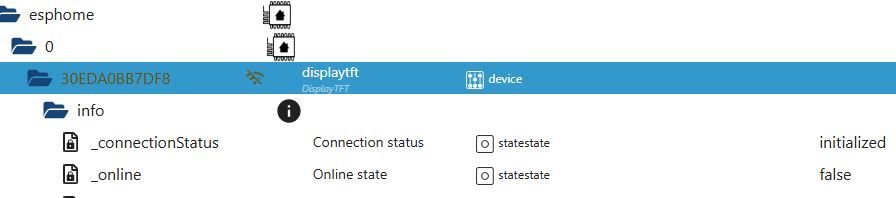
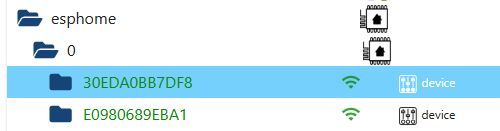
-
@wibear Bitte nicht alle 5 Tage einen neuen Thread aufmachen.
https://forum.iobroker.net/topic/81292/esphome-mqtt-error
Das sagt ChatPT dazu:🧠 Ursachenanalyse – warum funktioniert es ohne mqtt_subscribe, aber nicht mit?
ESP32-S3 hat (noch) Probleme mit mqtt_subscribeIn ESPHome gibt es bekannte Probleme mit dem ESP32-S3-Chip und der aktuellen MQTT-Client-Implementierung, besonders beim gleichzeitigen Subscriben auf Topics und Publizieren.
Der mqtt_subscribe-Sensor kann auf manchen Plattformen zu einem Crash oder Reboot Loop führen, insbesondere wenn das MQTT-Topic nicht existiert oder die Payload nicht wie erwartet ankommt.
Mismatch oder Fehler im Topic-Format
Wenn das Topic "esphome/DisplayTFT/Status/Batterie_SoC" nicht exakt so vom Broker (oder einem anderen Gerät) gesendet wird, kann die Verbindung abbrechen.
Einige MQTT-Server (z. B. Mosquitto mit bestimmten Settings) brechen die Verbindung bei "malformed packets".
Kein initialer Wert → Speicherproblem
Wenn der ESP32-S3 ein Topic abonniert, das noch nie eine gültige Nachricht hatte, kann ESPHome mit einem Nullwert oder ungültiger Payload crashen.
Unterschied zwischen ESP8266 und ESP32-S3
ESP8266 ist robuster bei solchen Fehlern, der ESP32-S3 hingegen ist noch relativ "jung" im ESPHome-Ökosystem.
✅ Lösungsansätze – Schritt für Schritt
✅ 1. Stelle sicher, dass deine Topics existieren und gültige Payloads liefern
Prüfe z. B. mit MQTT Explorer oder mosquitto_sub, ob die Topics wirklich Daten senden:mosquitto_sub -h 192.168.178.10 -t 'esphome/DisplayTFT/Status/#' -vWenn gar keine Nachrichten kommen oder nur leer/ungültig, könnte das der Auslöser sein.
✅ 2. Setze internal: true in deinen text_sensor-Definitionen
Das hilft manchmal, den Speicherbedarf beim MQTT-Verbindungsaufbau zu verringern:text_sensor: - platform: mqtt_subscribe id: Status_Batterie_SoC topic: esphome/DisplayTFT/Status/Batterie_SoC internal: true - platform: mqtt_subscribe id: Status_Ladegeraet topic: esphome/DisplayTFT/Status/Ladegeraet internal: true✅ 3. Baue ein Retry-Verhalten per on_value oder Default-Initialisierung ein
Füge das hinzu, um bei leerem Wert einen Standard zu setzen:on_value: then: - lambda: |- if (x == "") { id(Status_Batterie_SoC).publish_state("unbekannt"); }✅ 4. Testweise mqtt_subscribe deaktivieren, aber manuelles Logging des Topics testen
mqtt:
  on_message:
    - topic: esphome/DisplayTFT/Status/Batterie_SoC
      then:
        - logger.log: "Batterie_SoC empfangen"
Wenn das funktioniert, ist mqtt_subscribe selbst die Schwachstelle und du kannst auf Umwege ausweichen.
✅ 5. Firmware-Update von ESPHome & PlatformIO
Stelle sicher, dass du auf dem ESP32-S3 mit einer aktuellen ESPHome-Version (>= 2024.4.x) arbeitest und ggf. den richtigen Board-Typ (z. B. esp32-s3-devkitc-1) im YAML definiert hast:esphome: name: displaytft platform: ESP32 board: esp32-s3-devkitc-1🛠 Alternative: Statt mqtt_subscribe → Daten per mqtt: Node-Red / Home Assistant pushen
Wenn dein ESP nicht zuverlässig subscriben kann, kannst du den Wert serverseitig als sensor pushen, z. B. mit Home Assistant oder Node-Red:sensor: - platform: mqtt name: "Status Batterie SoC" state_topic: "esphome/DisplayTFT/Status/Batterie_SoC"Und dann einfach mit Home Assistant → MQTT → ESP pushen per mqtt.publish.
📌 Fazit:
Maßnahme Wirkung
internal: true setzen Reduziert Speicherlast
Topics prüfen Crash bei ungültigen Inhalten vermeiden
on_value mit Defaults Verhindert leere Zustände
on_message statt subscribe Bessere Kontrolle
ESPHome-Version updaten Bugfixes & bessere Board-UnterstützungBezogen auf Deiner YAML
🧨 Zusammenfassung deines Problems
Sobald du diesen Block einfügst:text_sensor: - platform: mqtt_subscribe id: Solar_Einspeisung_Jetzt topic: esphome/DisplayTFT/Solar/Einspeisung_Jetzt - platform: mqtt_subscribe id: Netz_Verbrauch_Jetzt topic: esphome/DisplayTFT/Netz/Verbrauch_Jetzt→ verliert das Gerät die MQTT-Verbindung, obwohl es ohne diesen Block funktioniert.
✅ Konkrete Lösungsvorschläge
✅ 1. Ergänze internal: true bei den mqtt_subscribe-Sensoren
Verhindert, dass ESPHome diese Sensoren an Home Assistant übermittelt, reduziert Speicherverbrauch & Komplexität:text_sensor: - platform: mqtt_subscribe id: Solar_Einspeisung_Jetzt topic: esphome/DisplayTFT/Solar/Einspeisung_Jetzt internal: true - platform: mqtt_subscribe id: Netz_Verbrauch_Jetzt topic: esphome/DisplayTFT/Netz/Verbrauch_Jetzt internal: true➡️ Erster Test: So neu flashen und schauen, ob das Gerät online bleibt.
✅ 2. Ersetze mqtt_subscribe probeweise durch on_message
Wenn das Gerät immer noch abschmiert, verwende folgenden alternativen Ansatz, um das Topic trotzdem zu verarbeiten – ohne text_sensor:mqtt: discovery: true broker: 192.168.178.10 port: 1883 username: !secret mqtt_username password: !secret mqtt_password client_id: DisplayTFT topic_prefix: esphome on_message: - topic: esphome/DisplayTFT/Solar/Einspeisung_Jetzt then: - logger.log: "Einspeisung empfangen" - topic: esphome/DisplayTFT/Netz/Verbrauch_Jetzt then: - logger.log: "Verbrauch empfangen"➡️ Vorteil: Volle Kontrolle über die Verarbeitung ohne text_sensor.
✅ 3. Verwende framework: esp-idf anstelle von arduino
Die ESP32-S3 hat noch nicht die volle Stabilität mit arduino in ESPHome. Wenn du esp-idf verwenden kannst, ist MQTT dort deutlich stabiler:esp32: board: esp32-s3-devkitc-1 framework: type: esp-idf➡️ ⚠️ Nach Umstellung einmal Clean Build in ESPHome machen!
✅ 4. Achte auf dein Topic-Format
Stelle sicher, dass deine MQTT-Topics auch tatsächlich gesendet werden. Wenn z. B. esphome/DisplayTFT/Solar/Einspeisung_Jetzt leer oder unbekannt ist, kann der ESP32-S3 instabil reagieren.→ Prüfe mit MQTT Explorer oder mosquitto_sub:
mosquitto_sub -h 192.168.178.10 -t 'esphome/DisplayTFT/#' -v✅ Mein Vorschlag zum Testen
- Füge internal: true hinzu
- Beobachte mit MQTT Explorer, ob Topics Daten liefern
- Alternativ auf mqtt.on_message umstellen, wenn Fehler bleiben
- Optional esp-idf-Framework testen für maximale MQTT-Stabilität
@mcu
Guten Morgen und vielen Dank für Deine ausführlichen Infos.@mcu sagte in ESPHome ESP32-S3 mit MQTT verliert Verbindung:
Stelle sicher, dass deine Topics existieren und gültige Payloads liefern
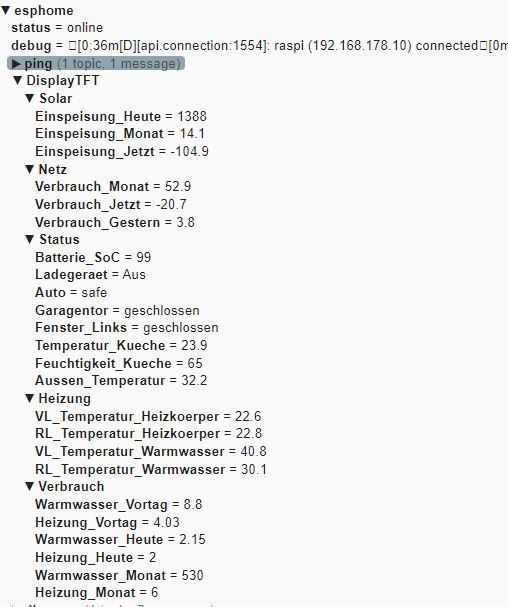
Alle topics existieren und liefern Payloads:
@mcu sagte in ESPHome ESP32-S3 mit MQTT verliert Verbindung:
Ergänze internal: true bei den mqtt_subscribe-Sensoren
hinzugefügt
@mcu sagte in ESPHome ESP32-S3 mit MQTT verliert Verbindung:
Baue ein Retry-Verhalten per on_value
habe aber bisher nie einen Wert mit unbekannt gehabt.
@mcu sagte in ESPHome ESP32-S3 mit MQTT verliert Verbindung:
Testweise mqtt_subscribe deaktivieren, aber manuelles Logging des Topics testen
Kein Problem festgestellt:
[16:44:35][C][esphome.ota:080]: Password configured [16:44:35][C][safe_mode:018]: Safe Mode: [16:44:35][C][safe_mode:025]: Boot considered successful after 60 seconds [16:44:35][C][safe_mode:025]: Invoke after 10 boot attempts [16:44:35][C][safe_mode:025]: Remain for 300 seconds [16:44:35][C][api:185]: API Server: [16:44:35][C][api:185]: Address: displaytft.local:6053 [16:44:35][C][api:187]: Using noise encryption: YES [16:44:35][C][mqtt:160]: MQTT: [16:44:35][C][mqtt:160]: Server Address: 192.168.178.10:1883 (192.168.178.10) [16:44:35][C][mqtt:160]: Username: 'mqttuser'[redacted] [16:44:35][C][mqtt:160]: Client ID: 'DisplayTFT'[redacted] [16:44:35][C][mqtt:160]: Clean Session: NO [16:44:35][C][mqtt:162]: Discovery IP enabled [16:44:35][C][mqtt:168]: Discovery prefix: 'homeassistant' [16:44:35][C][mqtt:168]: Discovery retain: YES [16:44:35][C][mqtt:170]: Topic Prefix: 'esphome' [16:44:35][C][mqtt:172]: Log Topic: 'esphome/debug' [16:44:35][C][mqtt:175]: Availability: 'esphome/status' [16:44:35][C][mdns:125]: mDNS: [16:44:35][C][mdns:125]: Hostname: displaytft [16:44:35][C][mqtt:733]: MQTT Message Trigger: [16:44:35][C][mqtt:733]: Topic: 'esphome/DisplayTFT/Solar/Einspeisung_Jetzt' [16:44:35][C][mqtt:733]: QoS: 0 [16:44:35][C][mqtt:733]: MQTT Message Trigger: [16:44:35][C][mqtt:733]: Topic: 'esphome/DisplayTFT/Netz/Verbrauch_Jetzt' [16:44:35][C][mqtt:733]: QoS: 0 [16:44:35][C][mqtt:733]: MQTT Message Trigger: [16:44:35][C][mqtt:733]: Topic: 'esphome/DisplayTFT/Solar/Einspeisung_Monat' [16:44:35][C][mqtt:733]: QoS: 0 [16:44:35][C][mqtt:733]: MQTT Message Trigger: [16:44:35][C][mqtt:733]: Topic: 'esphome/DisplayTFT/Solar/Einspeisung_Heute' [16:44:35][C][mqtt:733]: QoS: 0 [16:44:35][C][mqtt:733]: MQTT Message Trigger: [16:44:35][C][mqtt:733]: Topic: 'esphome/DisplayTFT/Netz/Verbrauch_Monat' [16:44:35][C][mqtt:733]: QoS: 0 [16:44:35][C][mqtt:733]: MQTT Message Trigger: [16:44:35][C][mqtt:733]: Topic: 'esphome/DisplayTFT/Netz/Verbrauch_Gestern' [16:44:35][C][mqtt:733]: QoS: 0 [16:44:36][C][mqtt:733]: MQTT Message Trigger: [16:44:36][C][mqtt:733]: Topic: 'esphome/DisplayTFT/Status/Batterie_SoC' [16:44:36][C][mqtt:733]: QoS: 0 [16:44:36][C][mqtt:733]: MQTT Message Trigger: [16:44:36][C][mqtt:733]: Topic: 'esphome/DisplayTFT/Status/Ladegeraet' [16:44:36][C][mqtt:733]: QoS: 0 [16:44:36][C][mqtt:733]: MQTT Message Trigger: [16:44:36][C][mqtt:733]: Topic: 'esphome/DisplayTFT/Status/Auto' [16:44:36][C][mqtt:733]: QoS: 0 [16:44:36][C][mqtt:733]: MQTT Message Trigger: [16:44:36][C][mqtt:733]: Topic: 'esphome/DisplayTFT/Status/Garagentor' [16:44:36][C][mqtt:733]: QoS: 0 [16:44:36][C][mqtt:733]: MQTT Message Trigger: [16:44:36][C][mqtt:733]: Topic: 'esphome/DisplayTFT/Status/Fenster_Links' [16:44:36][C][mqtt:733]: QoS: 0 [16:44:36][C][mqtt:733]: MQTT Message Trigger: [16:44:36][C][mqtt:733]: Topic: 'esphome/DisplayTFT/Status/Temperatur_Kueche' [16:44:36][C][mqtt:733]: QoS: 0 [16:44:36][C][mqtt:733]: MQTT Message Trigger: [16:44:36][C][mqtt:733]: Topic: 'esphome/DisplayTFT/Status/Aussen_Temperatur' [16:44:36][C][mqtt:733]: QoS: 0 [16:44:36][C][mqtt:733]: MQTT Message Trigger: [16:44:36][C][mqtt:733]: Topic: 'esphome/DisplayTFT/Status/Feuchtigkeit_Kueche' [16:44:36][C][mqtt:733]: QoS: 0 [16:44:36][C][mqtt:733]: MQTT Message Trigger: [16:44:36][C][mqtt:733]: Topic: 'esphome/DisplayTFT/Heizung/VL_Temperatur_Heizkoerper' [16:44:36][C][mqtt:733]: QoS: 0 [16:44:36][C][mqtt:733]: MQTT Message Trigger: [16:44:36][C][mqtt:733]: Topic: 'esphome/DisplayTFT/Heizung/RL_Temperatur_Heizkoerper' [16:44:36][C][mqtt:733]: QoS: 0 [16:44:36][C][mqtt:733]: MQTT Message Trigger: [16:44:36][C][mqtt:733]: Topic: 'esphome/DisplayTFT/Heizung/VL_Temperatur_Warmwasser' [16:44:36][C][mqtt:733]: QoS: 0 [16:44:36][C][mqtt:733]: MQTT Message Trigger: [16:44:36][C][mqtt:733]: Topic: 'esphome/DisplayTFT/Heizung/RL_Temperatur_Warmwasser' [16:44:36][C][mqtt:733]: QoS: 0 [16:44:36][C][mqtt:733]: MQTT Message Trigger: [16:44:36][C][mqtt:733]: Topic: 'esphome/DisplayTFT/Verbrauch/Warmwasser_Vortag' [16:44:36][C][mqtt:733]: QoS: 0 [16:44:36][C][mqtt:733]: MQTT Message Trigger: [16:44:36][C][mqtt:733]: Topic: 'esphome/DisplayTFT/Verbrauch/Heizung_Vortag' [16:44:36][C][mqtt:733]: QoS: 0 [16:44:36][C][mqtt:733]: MQTT Message Trigger: [16:44:36][C][mqtt:733]: Topic: 'esphome/DisplayTFT/Verbrauch/Warmwasser_Heute' [16:44:36][C][mqtt:733]: QoS: 0 [16:44:36][C][mqtt:733]: MQTT Message Trigger: [16:44:36][C][mqtt:733]: Topic: 'esphome/DisplayTFT/Verbrauch/Heizung_Heute' [16:44:36][C][mqtt:733]: QoS: 0 [16:44:36][C][mqtt:733]: MQTT Message Trigger: [16:44:36][C][mqtt:733]: Topic: 'esphome/DisplayTFT/Verbrauch/Warmwasser_Monat' [16:44:36][C][mqtt:733]: QoS: 0 [16:44:36][C][mqtt:733]: MQTT Message Trigger: [16:44:36][C][mqtt:733]: Topic: 'esphome/DisplayTFT/Verbrauch/Heizung_Monat' [16:44:36][C][mqtt:733]: QoS: 0 [16:44:44][D][main:618]: Einspeisung Heute empfangen [16:44:44][D][main:600]: Verbrauch jetzt empfangen [16:44:51][D][main:735]: VL_Temperatur_Warmwasser empfangen [16:45:00][D][main:591]: Einspeisung jetzt empfangen [16:45:01][D][main:600]: Verbrauch jetzt empfangen [16:46:00][D][main:591]: Einspeisung jetzt empfangen [16:46:01][D][main:600]: Verbrauch jetzt empfangen [16:46:43][D][main:600]: Verbrauch jetzt empfangen [16:46:48][D][main:717]: VL_Temperatur_Heizkoerper empfangen [16:47:00][D][main:591]: Einspeisung jetzt empfangen [16:47:01][D][main:600]: Verbrauch jetzt empfangen [16:48:00][D][main:591]: Einspeisung jetzt empfangen [16:48:01][D][main:618]: Einspeisung Heute empfangen [16:48:01][D][main:600]: Verbrauch jetzt empfangen [16:48:08][D][main:744]: RL_Temperatur_Warmwasser empfangen [16:48:08][D][main:699]: Aussen Temperatur empfangen [16:48:36][D][main:591]: Einspeisung jetzt empfangen [16:48:37][D][main:600]: Verbrauch jetzt empfangen [16:48:44][D][main:699]: Aussen Temperatur empfangen@mcu sagte in ESPHome ESP32-S3 mit MQTT verliert Verbindung:
Firmware-Update von ESPHome & PlatformIO
ESPHome v0.6.1, Dashboard 2025.6.0b1
@mcu sagte in ESPHome ESP32-S3 mit MQTT verliert Verbindung:
Verwende framework: esp-idf anstelle von arduino
esphome: name: displaytft friendly_name: DisplayTFT esp32: board: esp32-s3-devkitc-1 framework: type: esp-idf@mcu sagte in ESPHome ESP32-S3 mit MQTT verliert Verbindung:
Ersetze mqtt_subscribe probeweise durch on_message
INFO ESPHome 2025.6.0b1
INFO Reading configuration /opt/iobroker/iobroker-data/esphome.0/displaytft.yaml...
INFO Generating C++ source...
INFO Compiling app...
Processing displaytft (board: esp32-s3-devkitc-1; framework: arduino; platform: platformio/espressif32@5.4.0)
--------------------------------------------------------------------------------
HARDWARE: ESP32S3 240MHz, 320KB RAM, 8MB Flash
 - toolchain-riscv32-esp @ 8.4.0+2021r2-patch5
 - toolchain-xtensa-esp32s3 @ 8.4.0+2021r2-patch5
Dependency Graph
|-- AsyncTCP-esphome @ 2.1.4
|-- WiFi @ 2.0.0
|-- FS @ 2.0.0
|-- Update @ 2.0.0
|-- ESPAsyncWebServer-esphome @ 3.3.0
|-- DNSServer @ 2.0.0
|-- ESPmDNS @ 2.0.0
|-- noise-c @ 0.1.6
|-- SPI @ 2.0.0
|-- ArduinoJson @ 6.18.5
Compiling .pioenvs/displaytft/src/esphome/components/api/api_connection.cpp.o
Compiling .pioenvs/displaytft/src/esphome/components/api/api_frame_helper.cpp.o
Compiling .pioenvs/displaytft/src/esphome/components/api/api_pb2.cpp.o
Compiling .pioenvs/displaytft/src/esphome/components/api/api_pb2_service.cpp.o
Compiling .pioenvs/displaytft/src/esphome/components/api/api_server.cpp.o
Compiling .pioenvs/displaytft/src/esphome/components/api/list_entities.cpp.o
Compiling .pioenvs/displaytft/src/esphome/components/api/proto.cpp.o
Compiling .pioenvs/displaytft/src/esphome/components/api/subscribe_state.cpp.o
Compiling .pioenvs/displaytft/src/esphome/components/api/user_services.cpp.o
Compiling .pioenvs/displaytft/src/esphome/components/captive_portal/captive_portal.cpp.o
Compiling .pioenvs/displaytft/src/esphome/components/display/display.cpp.o
Compiling .pioenvs/displaytft/src/esphome/components/display/display_buffer.cpp.o
Compiling .pioenvs/displaytft/src/esphome/components/display/rect.cpp.o
Compiling .pioenvs/displaytft/src/esphome/components/esp32/gpio.cpp.o
Compiling .pioenvs/displaytft/src/esphome/components/esp32/preferences.cpp.o
Compiling .pioenvs/displaytft/src/esphome/components/esphome/ota/ota_esphome.cpp.o
Compiling .pioenvs/displaytft/src/esphome/components/ili9xxx/ili9xxx_display.cpp.o
Compiling .pioenvs/displaytft/src/esphome/components/json/json_util.cpp.o
Compiling .pioenvs/displaytft/src/esphome/components/logger/logger.cpp.o
Compiling .pioenvs/displaytft/src/esphome/components/logger/logger_esp32.cpp.o
Compiling .pioenvs/displaytft/src/esphome/components/logger/logger_esp8266.cpp.o
Compiling .pioenvs/displaytft/src/esphome/components/logger/logger_host.cpp.o
Compiling .pioenvs/displaytft/src/esphome/components/logger/logger_libretiny.cpp.o
Compiling .pioenvs/displaytft/src/esphome/components/logger/logger_rp2040.cpp.o
Compiling .pioenvs/displaytft/src/esphome/components/logger/task_log_buffer.cpp.o
Compiling .pioenvs/displaytft/src/esphome/components/md5/md5.cpp.o
Compiling .pioenvs/displaytft/src/esphome/components/mdns/mdns_component.cpp.o
Compiling .pioenvs/displaytft/src/esphome/components/mdns/mdns_esp32.cpp.o
Compiling .pioenvs/displaytft/src/esphome/components/mdns/mdns_esp8266.cpp.o
Compiling .pioenvs/displaytft/src/esphome/components/mdns/mdns_host.cpp.o
Compiling .pioenvs/displaytft/src/esphome/components/mdns/mdns_libretiny.cpp.o
Compiling .pioenvs/displaytft/src/esphome/components/mdns/mdns_rp2040.cpp.o
Compiling .pioenvs/displaytft/src/esphome/components/mqtt/custom_mqtt_device.cpp.o
Compiling .pioenvs/displaytft/src/esphome/components/mqtt/mqtt_alarm_control_panel.cpp.o
Compiling .pioenvs/displaytft/src/esphome/components/mqtt/mqtt_backend_esp32.cpp.o
Compiling .pioenvs/displaytft/src/esphome/components/mqtt/mqtt_binary_sensor.cpp.o
Compiling .pioenvs/displaytft/src/esphome/components/mqtt/mqtt_button.cpp.o
Compiling .pioenvs/displaytft/src/esphome/components/mqtt/mqtt_client.cpp.o
Compiling .pioenvs/displaytft/src/esphome/components/mqtt/mqtt_climate.cpp.o
Compiling .pioenvs/displaytft/src/esphome/components/mqtt/mqtt_component.cpp.o
Compiling .pioenvs/displaytft/src/esphome/components/mqtt/mqtt_cover.cpp.o
Compiling .pioenvs/displaytft/src/esphome/components/mqtt/mqtt_date.cpp.o
Compiling .pioenvs/displaytft/src/esphome/components/mqtt/mqtt_datetime.cpp.o
Compiling .pioenvs/displaytft/src/esphome/components/mqtt/mqtt_event.cpp.o
Compiling .pioenvs/displaytft/src/esphome/components/mqtt/mqtt_fan.cpp.o
Compiling .pioenvs/displaytft/src/esphome/components/mqtt/mqtt_light.cpp.o
Compiling .pioenvs/displaytft/src/esphome/components/mqtt/mqtt_lock.cpp.o
Compiling .pioenvs/displaytft/src/esphome/components/mqtt/mqtt_number.cpp.o
Compiling .pioenvs/displaytft/src/esphome/components/mqtt/mqtt_select.cpp.o
Compiling .pioenvs/displaytft/src/esphome/components/mqtt/mqtt_sensor.cpp.o
Compiling .pioenvs/displaytft/src/esphome/components/mqtt/mqtt_switch.cpp.o
Compiling .pioenvs/displaytft/src/esphome/components/mqtt/mqtt_text.cpp.o
Compiling .pioenvs/displaytft/src/esphome/components/mqtt/mqtt_text_sensor.cpp.o
Compiling .pioenvs/displaytft/src/esphome/components/mqtt/mqtt_time.cpp.o
Compiling .pioenvs/displaytft/src/esphome/components/mqtt/mqtt_update.cpp.o
Compiling .pioenvs/displaytft/src/esphome/components/mqtt/mqtt_valve.cpp.o
Compiling .pioenvs/displaytft/src/esphome/components/network/util.cpp.o
Compiling .pioenvs/displaytft/src/esphome/components/ota/ota_backend.cpp.o
Compiling .pioenvs/displaytft/src/esphome/components/ota/ota_backend_arduino_esp32.cpp.o
Compiling .pioenvs/displaytft/src/esphome/components/ota/ota_backend_arduino_esp8266.cpp.o
Compiling .pioenvs/displaytft/src/esphome/components/ota/ota_backend_arduino_libretiny.cpp.o
Compiling .pioenvs/displaytft/src/esphome/components/ota/ota_backend_arduino_rp2040.cpp.o
Compiling .pioenvs/displaytft/src/esphome/components/ota/ota_backend_esp_idf.cpp.o
Compiling .pioenvs/displaytft/src/esphome/components/psram/psram.cpp.o
Compiling .pioenvs/displaytft/src/esphome/components/safe_mode/safe_mode.cpp.o
Compiling .pioenvs/displaytft/src/esphome/components/socket/bsd_sockets_impl.cpp.o
Compiling .pioenvs/displaytft/src/esphome/components/socket/lwip_raw_tcp_impl.cpp.o
Compiling .pioenvs/displaytft/src/esphome/components/socket/lwip_sockets_impl.cpp.o
Compiling .pioenvs/displaytft/src/esphome/components/socket/socket.cpp.o
Compiling .pioenvs/displaytft/src/esphome/components/spi/spi.cpp.o
Compiling .pioenvs/displaytft/src/esphome/components/spi/spi_arduino.cpp.o
Compiling .pioenvs/displaytft/src/esphome/components/spi/spi_esp_idf.cpp.o
Compiling .pioenvs/displaytft/src/esphome/components/web_server_base/web_server_base.cpp.o
Compiling .pioenvs/displaytft/src/esphome/components/wifi/wifi_component.cpp.o
Compiling .pioenvs/displaytft/src/esphome/components/wifi/wifi_component_esp32_arduino.cpp.o
Compiling .pioenvs/displaytft/src/esphome/components/wifi/wifi_component_esp8266.cpp.o
Compiling .pioenvs/displaytft/src/esphome/components/wifi/wifi_component_esp_idf.cpp.o
Compiling .pioenvs/displaytft/src/esphome/components/wifi/wifi_component_libretiny.cpp.o
Compiling .pioenvs/displaytft/src/esphome/components/wifi/wifi_component_pico_w.cpp.o
Compiling .pioenvs/displaytft/src/esphome/core/application.cpp.o
Compiling .pioenvs/displaytft/src/esphome/core/component.cpp.o
Compiling .pioenvs/displaytft/src/esphome/core/component_iterator.cpp.o
Compiling .pioenvs/displaytft/src/esphome/core/controller.cpp.o
Compiling .pioenvs/displaytft/src/esphome/core/entity_base.cpp.o
Compiling .pioenvs/displaytft/src/esphome/core/helpers.cpp.o
Compiling .pioenvs/displaytft/src/esphome/core/log.cpp.o
Compiling .pioenvs/displaytft/src/esphome/core/ring_buffer.cpp.o
Compiling .pioenvs/displaytft/src/esphome/core/scheduler.cpp.o
Compiling .pioenvs/displaytft/src/esphome/core/string_ref.cpp.o
Compiling .pioenvs/displaytft/src/esphome/core/util.cpp.o
Compiling .pioenvs/displaytft/src/main.cpp.o
Linking .pioenvs/displaytft/firmware.elf
RAM:   [=         ]  12.9% (used 42196 bytes from 327680 bytes)
Flash: [======    ]  59.4% (used 1089741 bytes from 1835008 bytes)
Building .pioenvs/displaytft/firmware.bin
Creating esp32s3 image...
Successfully created esp32s3 image.
esp32_create_combined_bin([".pioenvs/displaytft/firmware.bin"], [".pioenvs/displaytft/firmware.elf"])
SHA digest in image updated
Wrote 0x11a250 bytes to file /opt/iobroker/iobroker-data/esphome.0/.esphome/build/displaytft/.pioenvs/displaytft/firmware.factory.bin, ready to flash to offset 0x0
esp32_copy_ota_bin([".pioenvs/displaytft/firmware.bin"], [".pioenvs/displaytft/firmware.elf"])
======================== [SUCCESS] Took 163.10 seconds ========================
INFO Successfully compiled program.
INFO Connecting to 192.168.178.160 port 3232...
INFO Connected to 192.168.178.160
INFO Uploading /opt/iobroker/iobroker-data/esphome.0/.esphome/build/displaytft/.pioenvs/displaytft/firmware.bin (1090128 bytes)
Uploading: [============================================================] 100% Done...

INFO Upload took 12.48 seconds, waiting for result...
INFO OTA successful
INFO Successfully uploaded program.
INFO Starting log output from 192.168.178.160 using esphome API
INFO Successfully resolved displaytft @ 192.168.178.160 in 0.000s
INFO Successfully connected to displaytft @ 192.168.178.160 in 7.145s
INFO Successful handshake with displaytft @ 192.168.178.160 in 0.094s
[17:05:19][D][text_sensor:064]: 'Heizung_VL_Temperatur_Warmwasser': Sending state '39'
[17:05:19][I][app:135]: ESPHome version 2025.6.0b1 compiled on Jun 13 2025, 17:04:03
[17:05:19][C][wifi:613]: WiFi:
[17:05:19][C][wifi:434]:   Local MAC: 30:ED:A0:BB:7D:F8
[17:05:19][C][wifi:439]:   SSID: 'wibear'[redacted]
[17:05:19][C][wifi:442]:   IP Address: 192.168.178.160
[17:05:19][C][wifi:451]:   BSSID: E0:28:6D:FA:32:5C[redacted]
[17:05:19][C][wifi:451]:   Hostname: 'displaytft'
[17:05:19][C][wifi:451]:   Signal strength: -38 dB ▂▄▆█
[17:05:19][C][wifi:462]:   Channel: 11
[17:05:19][C][wifi:462]:   Subnet: 255.255.255.0
[17:05:19][C][wifi:462]:   Gateway: 192.168.178.1
[17:05:19][C][wifi:462]:   DNS1: 192.168.178.1
[17:05:19][C][wifi:462]:   DNS2: 0.0.0.0
[17:05:19][D][text_sensor:064]: 'Heizung_RL_Temperatur_Warmwasser': Sending state '27.4'
[17:05:19][C][logger:228]: Logger:
[17:05:19][C][logger:228]:   Max Level: DEBUG
[17:05:19][C][logger:228]:   Initial Level: DEBUG
[17:05:19][C][logger:233]:   Log Baud Rate: 115200
[17:05:19][C][logger:233]:   Hardware UART: USB_CDC
[17:05:19][C][logger:237]:   Task Log Buffer Size: 768
[17:05:19][C][spi:068]: SPI bus:
[17:05:19][C][spi:069]:   CLK Pin: GPIO12
[17:05:19][C][spi:070]:   SDI Pin:
[17:05:19][C][spi:071]:   SDO Pin: GPIO11
[17:05:19][C][spi:076]:   Using HW SPI: SPI
[17:05:19][C][ili9xxx:091]: ili9xxx
[17:05:19][C][ili9xxx:091]:   Rotations: 90 °
[17:05:19][C][ili9xxx:091]:   Dimensions: 480px x 320px
[17:05:19][C][ili9xxx:095]:   Width Offset: 0
[17:05:19][C][ili9xxx:095]:   Height Offset: 0
[17:05:19][C][ili9xxx:101]:   Color mode: 16bit
[17:05:19][C][ili9xxx:108]:   18-Bit Mode: YES
[17:05:19][C][ili9xxx:110]:   Data rate: 40MHz
[17:05:19][C][ili9xxx:112]:   Reset Pin: GPIO8
[17:05:19][C][ili9xxx:113]:   CS Pin: GPIO10
[17:05:19][C][ili9xxx:114]:   DC Pin: GPIO9
[17:05:19][C][ili9xxx:123]:   Color order: BGR
[17:05:19][C][ili9xxx:123]:   Swap_xy: NO
[17:05:19][C][ili9xxx:123]:   Mirror_x: NO
[17:05:19][C][ili9xxx:123]:   Mirror_y: NO
[17:05:19][C][ili9xxx:123]:   Invert colors: NO
[17:05:19][C][ili9xxx:128]:   Update Interval: 1.0s
[17:05:19][C][psram:018]: PSRAM:
[17:05:19][C][psram:033]:   Available: YES
[17:05:19][C][psram:040]:   Size: 8192 KB
[17:05:19][C][captive_portal:089]: Captive Portal:
[17:05:19][C][esphome.ota:077]: Over-The-Air updates:
[17:05:19][C][esphome.ota:077]:   Address: displaytft.local:3232
[17:05:19][C][esphome.ota:077]:   Version: 2
[17:05:19][C][esphome.ota:080]:   Password configured
[17:05:19][C][safe_mode:018]: Safe Mode:
[17:05:19][C][safe_mode:025]:   Boot considered successful after 60 seconds
[17:05:19][C][safe_mode:025]:   Invoke after 10 boot attempts
[17:05:19][C][safe_mode:025]:   Remain for 300 seconds
[17:05:19][C][api:185]: API Server:
[17:05:19][C][api:185]:   Address: displaytft.local:6053
[17:05:19][C][api:187]:   Using noise encryption: YES
[17:05:19][C][mqtt:160]: MQTT:
[17:05:19][C][mqtt:160]:   Server Address: 192.168.178.10:1883 (192.168.178.10)
[17:05:19][C][mqtt:160]:   Username: 'mqttuser'[redacted]
[17:05:19][C][mqtt:160]:   Client ID: 'DisplayTFT'[redacted]
[17:05:19][C][mqtt:160]:   Clean Session: NO
[17:05:19][C][mqtt:162]:   Discovery IP enabled
[17:05:19][C][mqtt:168]:   Discovery prefix: 'homeassistant'
[17:05:19][C][mqtt:168]:   Discovery retain: YES
[17:05:19][C][mqtt:170]:   Topic Prefix: 'esphome'
[17:05:19][C][mqtt:172]:   Log Topic: 'esphome/debug'
[17:05:19][C][mqtt:175]:   Availability: 'esphome/status'
[17:05:19][C][mdns:125]: mDNS:
[17:05:19][C][mdns:125]:   Hostname: displaytft
[17:05:19][C][mqtt_subscribe.text_sensor:021]: MQTT Subscribe Text Sensor 'Solar_Einspeisung_Jetzt'
[17:05:20][C][mqtt_subscribe.text_sensor:022]:   Topic: esphome/DisplayTFT/Solar/Einspeisung_Jetzt
[17:05:20][C][mqtt_subscribe.text_sensor:021]: MQTT Subscribe Text Sensor 'Netz_Verbrauch_Jetzt'
[17:05:20][C][mqtt_subscribe.text_sensor:022]:   Topic: esphome/DisplayTFT/Netz/Verbrauch_Jetzt
[17:05:20][C][mqtt_subscribe.text_sensor:021]: MQTT Subscribe Text Sensor 'Solar_Einspeisung_Monat'
[17:05:20][C][mqtt_subscribe.text_sensor:022]:   Topic: esphome/DisplayTFT/Solar/Einspeisung_Monat
[17:05:20][C][mqtt_subscribe.text_sensor:021]: MQTT Subscribe Text Sensor 'Solar_Einspeisung_Heute'
[17:05:20][C][mqtt_subscribe.text_sensor:022]:   Topic: esphome/DisplayTFT/Solar/Einspeisung_Heute
[17:05:20][C][mqtt_subscribe.text_sensor:021]: MQTT Subscribe Text Sensor 'Netz_Verbrauch_Monat'
[17:05:20][C][mqtt_subscribe.text_sensor:022]:   Topic: esphome/DisplayTFT/Netz/Verbrauch_Monat
[17:05:20][C][mqtt_subscribe.text_sensor:021]: MQTT Subscribe Text Sensor 'Netz_Verbrauch_Gestern'
[17:05:20][C][mqtt_subscribe.text_sensor:022]:   Topic: esphome/DisplayTFT/Netz/Verbrauch_Gestern
[17:05:20][C][mqtt_subscribe.text_sensor:021]: MQTT Subscribe Text Sensor 'Status_Batterie_SoC'
[17:05:20][C][mqtt_subscribe.text_sensor:022]:   Topic: esphome/DisplayTFT/Status/Batterie_SoC
[17:05:20][C][mqtt_subscribe.text_sensor:021]: MQTT Subscribe Text Sensor 'Status_Ladegeraet'
[17:05:20][C][mqtt_subscribe.text_sensor:022]:   Topic: esphome/DisplayTFT/Status/Ladegeraet
[17:05:20][C][mqtt_subscribe.text_sensor:021]: MQTT Subscribe Text Sensor 'Status_Auto'
[17:05:20][C][mqtt_subscribe.text_sensor:022]:   Topic: esphome/DisplayTFT/Status/Auto
[17:05:20][C][mqtt_subscribe.text_sensor:021]: MQTT Subscribe Text Sensor 'Status_Garagentor'
[17:05:20][C][mqtt_subscribe.text_sensor:022]:   Topic: esphome/DisplayTFT/Status/Garagentor
[17:05:20][C][mqtt_subscribe.text_sensor:021]: MQTT Subscribe Text Sensor 'Status_Fenster_Links'
[17:05:20][C][mqtt_subscribe.text_sensor:022]:   Topic: esphome/DisplayTFT/Status/Fenster_Links
[17:05:20][C][mqtt_subscribe.text_sensor:021]: MQTT Subscribe Text Sensor 'Status_Temperatur_Kueche'
[17:05:20][C][mqtt_subscribe.text_sensor:022]:   Topic: esphome/DisplayTFT/Status/Temperatur_Kueche
[17:05:20][C][mqtt_subscribe.text_sensor:021]: MQTT Subscribe Text Sensor 'Status_Aussen_Temperatur'
[17:05:20][C][mqtt_subscribe.text_sensor:022]:   Topic: esphome/DisplayTFT/Status/Aussen_Temperatur
[17:05:20][C][mqtt_subscribe.text_sensor:021]: MQTT Subscribe Text Sensor 'Status_Feuchtigkeit_Kueche'
[17:05:20][C][mqtt_subscribe.text_sensor:022]:   Topic: esphome/DisplayTFT/Status/Feuchtigkeit_Kueche
[17:05:20][C][mqtt_subscribe.text_sensor:021]: MQTT Subscribe Text Sensor 'Heizung_VL_Temperatur_Heizkoerper'
[17:05:20][C][mqtt_subscribe.text_sensor:022]:   Topic: esphome/DisplayTFT/Heizung/VL_Temperatur_Heizkoerper
[17:05:20][C][mqtt_subscribe.text_sensor:021]: MQTT Subscribe Text Sensor 'Heizung_RL_Temperatur_Heizkoerper'
[17:05:20][C][mqtt_subscribe.text_sensor:022]:   Topic: esphome/DisplayTFT/Heizung/RL_Temperatur_Heizkoerper
[17:05:20][C][mqtt_subscribe.text_sensor:021]: MQTT Subscribe Text Sensor 'Heizung_VL_Temperatur_Warmwasser'
[17:05:20][C][mqtt_subscribe.text_sensor:022]:   Topic: esphome/DisplayTFT/Heizung/VL_Temperatur_Warmwasser
[17:05:20][C][mqtt_subscribe.text_sensor:021]: MQTT Subscribe Text Sensor 'Heizung_RL_Temperatur_Warmwasser'
[17:05:20][C][mqtt_subscribe.text_sensor:022]:   Topic: esphome/DisplayTFT/Heizung/RL_Temperatur_Warmwasser
[17:05:22][D][api:133]: Accepted 192.168.178.10
[17:05:22][D][api.connection:1554]: raspi (192.168.178.10) connected
[17:05:23][D][text_sensor:064]: 'Solar_Einspeisung_Heute': Sending state '1486'
[17:05:23][D][text_sensor:064]: 'Netz_Verbrauch_Monat': Sending state '52.9'
[17:05:23][D][text_sensor:064]: 'Status_Batterie_SoC': Sending state '99'
[17:05:23][D][text_sensor:064]: 'Status_Ladegeraet': Sending state 'Aus'
[17:05:23][D][text_sensor:064]: 'Status_Auto': Sending state 'safe'
[17:05:23][D][text_sensor:064]: 'Status_Garagentor': Sending state 'geschlossen'
[17:05:23][D][text_sensor:064]: 'Status_Fenster_Links': Sending state 'geschlossen'
[17:05:23][D][text_sensor:064]: 'Status_Temperatur_Kueche': Sending state '23.9'
[17:05:23][D][text_sensor:064]: 'Status_Feuchtigkeit_Kueche': Sending state '66'
[17:05:23][D][text_sensor:064]: 'Heizung_VL_Temperatur_Heizkoerper': Sending state '22.8'
[17:05:23][D][text_sensor:064]: 'Heizung_RL_Temperatur_Heizkoerper': Sending state '22.9'
[17:05:23][D][text_sensor:064]: 'Heizung_VL_Temperatur_Warmwasser': Sending state '39'
[17:05:23][D][text_sensor:064]: 'Heizung_RL_Temperatur_Warmwasser': Sending state '27.4'
[17:05:23][D][text_sensor:064]: 'Solar_Einspeisung_Monat': Sending state '14.2'
[17:05:23][D][text_sensor:064]: 'Solar_Einspeisung_Jetzt': Sending state '-22.6'
[17:05:23][D][text_sensor:064]: 'Netz_Verbrauch_Jetzt': Sending state '82.3'
[17:05:23][D][text_sensor:064]: 'Netz_Verbrauch_Gestern': Sending state '3.8'
[17:05:23][D][text_sensor:064]: 'Status_Aussen_Temperatur': Sending state '35.8'
[17:05:44][D][text_sensor:064]: 'Solar_Einspeisung_Heute': Sending state '1487'
[17:05:45][D][text_sensor:064]: 'Netz_Verbrauch_Jetzt': Sending state '71.8'
[17:05:51][D][text_sensor:064]: 'Heizung_VL_Temperatur_Warmwasser': Sending state '38.9'
[17:06:11][I][safe_mode:042]: Boot seems successful; resetting boot loop counter
[17:06:11][D][esp32.preferences:143]: Writing 1 items: 0 cached, 1 written, 0 failed
[17:07:00][D][text_sensor:064]: 'Solar_Einspeisung_Jetzt': Sending state '-22.5'
[17:07:01][D][text_sensor:064]: 'Netz_Verbrauch_Jetzt': Sending state '70.7'
[17:07:08][D][text_sensor:064]: 'Heizung_RL_Temperatur_Warmwasser': Sending state '27.3'
[17:08:00][D][text_sensor:064]: 'Solar_Einspeisung_Jetzt': Sending state '-22.4'
[17:08:01][D][text_sensor:064]: 'Netz_Verbrauch_Jetzt': Sending state '71.1'
[17:08:08][D][text_sensor:064]: 'Heizung_RL_Temperatur_Warmwasser': Sending state '27.2'
[17:08:08][D][text_sensor:064]: 'Status_Aussen_Temperatur': Sending state '35.9'
[17:09:00][D][text_sensor:064]: 'Solar_Einspeisung_Jetzt': Sending state '-22.2'
[17:09:01][D][text_sensor:064]: 'Solar_Einspeisung_Heute': Sending state '1488'
[17:09:01][D][text_sensor:064]: 'Netz_Verbrauch_Jetzt': Sending state '75.1'
[17:09:02][D][text_sensor:064]: 'Netz_Verbrauch_Monat': Sending state '53'
[17:09:30][D][text_sensor:064]: 'Netz_Verbrauch_Jetzt': Sending state '76.1'
[17:09:36][D][text_sensor:064]: 'Heizung_VL_Temperatur_Warmwasser': Sending state '38.8'
[17:10:00][D][text_sensor:064]: 'Solar_Einspeisung_Jetzt': Sending state '-22.1'
[17:10:01][D][text_sensor:064]: 'Netz_Verbrauch_Jetzt': Sending state '78.1'
[17:10:08][D][text_sensor:064]: 'Heizung_RL_Temperatur_Warmwasser': Sending state '27.1'
[17:12:46][D][text_sensor:064]: 'Solar_Einspeisung_Jetzt': Sending state '-21.9'
[17:12:47][D][text_sensor:064]: 'Solar_Einspeisung_Heute': Sending state '1489'
[17:12:48][D][text_sensor:064]: 'Netz_Verbrauch_Jetzt': Sending state '107.5'
[17:12:54][D][text_sensor:064]: 'Heizung_RL_Temperatur_Warmwasser': Sending state '27'
[17:12:55][D][text_sensor:064]: 'Status_Aussen_Temperatur': Sending state '36.2'
[17:14:00][D][text_sensor:064]: 'Solar_Einspeisung_Jetzt': Sending state '-22'
Das hat leider nichts gebracht. Weiterhin mqtt event error:
INFO ESPHome 2025.6.0b1 INFO Reading configuration /opt/iobroker/iobroker-data/esphome.0/displaytft.yaml... INFO Generating C++ source... INFO Updating https://github.com/espressif/esp-protocols.git@mdns-v1.8.2 INFO Compiling app... Processing displaytft (board: esp32-s3-devkitc-1; framework: espidf; platform: https://github.com/pioarduino/platform-espressif32/releases/download/53.03.13/platform-espressif32.zip) -------------------------------------------------------------------------------- Platform Manager: Installing https://github.com/pioarduino/platform-espressif32/releases/download/53.03.13/platform-espressif32.zip INFO Installing https://github.com/pioarduino/platform-espressif32/releases/download/53.03.13/platform-espressif32.zip Downloading [####################################] 100% Unpacking [####################################] 100% Platform Manager: espressif32@53.3.13 has been installed! INFO espressif32@53.3.13 has been installed! Tool Manager: Installing https://github.com/pioarduino/esp-idf/releases/download/v5.3.2/esp-idf-v5.3.2.zip INFO Installing https://github.com/pioarduino/esp-idf/releases/download/v5.3.2/esp-idf-v5.3.2.zip Downloading [####################################] 100% Unpacking [####################################] 100% Tool Manager: framework-espidf@3.50302.0 has been installed! INFO framework-espidf@3.50302.0 has been installed! Tool Manager: Installing platformio/toolchain-xtensa-esp-elf @ 13.2.0+20240530 INFO Installing platformio/toolchain-xtensa-esp-elf @ 13.2.0+20240530 Downloading [####################################] 100% Unpacking [####################################] 100% Tool Manager: toolchain-xtensa-esp-elf@13.2.0+20240530 has been installed! INFO toolchain-xtensa-esp-elf@13.2.0+20240530 has been installed! Tool Manager: Installing platformio/toolchain-riscv32-esp @ 13.2.0+20240530 INFO Installing platformio/toolchain-riscv32-esp @ 13.2.0+20240530 Downloading [####################################] 100% Unpacking [####################################] 100% Tool Manager: toolchain-riscv32-esp@13.2.0+20240530 has been installed! INFO toolchain-riscv32-esp@13.2.0+20240530 has been installed! Tool Manager: Installing espressif/toolchain-esp32ulp @ 2.35.0-20220830 INFO Installing espressif/toolchain-esp32ulp @ 2.35.0-20220830 Downloading [####################################] 100% Unpacking [####################################] 100% Tool Manager: toolchain-esp32ulp@2.35.0-20220830 has been installed! INFO toolchain-esp32ulp@2.35.0-20220830 has been installed! Tool Manager: Installing platformio/tool-xtensa-esp-elf-gdb @ 14.2.0+20240403 INFO Installing platformio/tool-xtensa-esp-elf-gdb @ 14.2.0+20240403 Downloading [####################################] 100% Unpacking [####################################] 100% Tool Manager: tool-xtensa-esp-elf-gdb@14.2.0+20240403 has been installed! INFO tool-xtensa-esp-elf-gdb@14.2.0+20240403 has been installed! Tool Manager: Installing platformio/tool-riscv32-esp-elf-gdb @ 14.2.0+20240403 INFO Installing platformio/tool-riscv32-esp-elf-gdb @ 14.2.0+20240403 Downloading [####################################] 100% Unpacking [####################################] 100% Tool Manager: tool-riscv32-esp-elf-gdb@14.2.0+20240403 has been installed! INFO tool-riscv32-esp-elf-gdb@14.2.0+20240403 has been installed! Tool Manager: Installing https://github.com/pioarduino/esptool/releases/download/v4.8.6/esptool.zip INFO Installing https://github.com/pioarduino/esptool/releases/download/v4.8.6/esptool.zip Downloading [####################################] 100% Unpacking [####################################] 100% Tool Manager: tool-esptoolpy@4.8.6 has been installed! INFO tool-esptoolpy@4.8.6 has been installed! Tool Manager: Installing tasmota/tool-mklittlefs @ ^3.2.0 INFO Installing tasmota/tool-mklittlefs @ ^3.2.0 Downloading [####################################] 100% Unpacking [####################################] 100% Tool Manager: tool-mklittlefs@3.2.0 has been installed! INFO tool-mklittlefs@3.2.0 has been installed! Tool Manager: Installing platformio/tool-cmake @ ~3.30.2 INFO Installing platformio/tool-cmake @ ~3.30.2 Downloading [####################################] 100% Unpacking [####################################] 100% Tool Manager: tool-cmake@3.30.2 has been installed! INFO tool-cmake@3.30.2 has been installed! Tool Manager: Installing platformio/tool-ninja @ ^1.7.0 INFO Installing platformio/tool-ninja @ ^1.7.0 Downloading [####################################] 100% Unpacking [####################################] 100% Tool Manager: tool-ninja@1.10.2 has been installed! INFO tool-ninja@1.10.2 has been installed! Library Manager: Installing esphome/noise-c @ 0.1.6 INFO Installing esphome/noise-c @ 0.1.6 Unpacking [####################################] 100% Library Manager: noise-c@0.1.6 has been installed! INFO noise-c@0.1.6 has been installed! Library Manager: Resolving dependencies... INFO Resolving dependencies... Library Manager: Installing esphome/libsodium @ 1.10018.4 INFO Installing esphome/libsodium @ 1.10018.4 Unpacking [####################################] 100% Library Manager: libsodium@1.10018.4 has been installed! INFO libsodium@1.10018.4 has been installed! Library Manager: Installing bblanchon/ArduinoJson @ 6.18.5 INFO Installing bblanchon/ArduinoJson @ 6.18.5 Unpacking [####################################] 100% Library Manager: ArduinoJson@6.18.5 has been installed! INFO ArduinoJson@6.18.5 has been installed! HARDWARE: ESP32S3 240MHz, 320KB RAM, 8MB Flash - framework-espidf @ 3.50302.0 (5.3.2) - tool-cmake @ 3.30.2 - tool-esptoolpy @ 4.8.6 - tool-mklittlefs @ 3.2.0 - tool-ninja @ 1.10.2 - tool-riscv32-esp-elf-gdb @ 14.2.0+20240403 - tool-xtensa-esp-elf-gdb @ 14.2.0+20240403 - toolchain-esp32ulp @ 2.35.0-20220830 - toolchain-riscv32-esp @ 13.2.0+20240530 - toolchain-xtensa-esp-elf @ 13.2.0+20240530 Installing standard Python dependencies Looking in indexes: https://pypi.org/simple, https://www.piwheels.org/simple Collecting wheel>=0.35.1 Downloading https://www.piwheels.org/simple/wheel/wheel-0.45.1-py3-none-any.whl (72 kB) Installing collected packages: wheel Successfully installed wheel-0.45.1 [notice] A new release of pip is available: 25.0.1 -> 25.1.1 [notice] To update, run: pip install --upgrade pip Creating a new virtual environment for IDF Python dependencies Installing ESP-IDF's Python dependencies Looking in indexes: https://pypi.org/simple, https://www.piwheels.org/simple Collecting wheel>=0.35.1 Using cached https://www.piwheels.org/simple/wheel/wheel-0.45.1-py3-none-any.whl (72 kB) Collecting urllib3<2 Downloading https://www.piwheels.org/simple/urllib3/urllib3-1.26.20-py2.py3-none-any.whl (144 kB) Collecting cryptography~=41.0.1 Downloading cryptography-41.0.7-cp37-abi3-manylinux_2_28_aarch64.whl.metadata (5.2 kB) Collecting future>=0.18.3 Downloading https://www.piwheels.org/simple/future/future-1.0.0-py3-none-any.whl (491 kB) Collecting pyparsing<4,>=3.1.0 Using cached https://www.piwheels.org/simple/pyparsing/pyparsing-3.2.3-py3-none-any.whl (111 kB) Collecting kconfiglib~=14.1.0 Downloading https://www.piwheels.org/simple/kconfiglib/kconfiglib-14.1.0-py2.py3-none-any.whl (145 kB) Collecting idf-component-manager~=2.0.1 Downloading https://www.piwheels.org/simple/idf-component-manager/idf_component_manager-2.0.4-py3-none-any.whl (151 kB) Collecting esp-idf-kconfig<2.0.0,>=1.4.2 Downloading https://www.piwheels.org/simple/esp-idf-kconfig/esp_idf_kconfig-1.5.0-py3-none-any.whl (44 kB) Collecting cffi>=1.12 (from cryptography~=41.0.1) Using cached cffi-1.17.1-cp313-cp313-manylinux_2_17_aarch64.manylinux2014_aarch64.whl.metadata (1.5 kB) Collecting click (from idf-component-manager~=2.0.1) Downloading click-8.2.1-py3-none-any.whl.metadata (2.5 kB) Collecting colorama (from idf-component-manager~=2.0.1) Using cached https://www.piwheels.org/simple/colorama/colorama-0.4.6-py2.py3-none-any.whl (25 kB) Collecting pyyaml (from idf-component-manager~=2.0.1) Using cached PyYAML-6.0.2-cp313-cp313-manylinux_2_17_aarch64.manylinux2014_aarch64.whl.metadata (2.1 kB) Collecting requests (from idf-component-manager~=2.0.1) Downloading requests-2.32.4-py3-none-any.whl.metadata (4.9 kB) Collecting requests-file (from idf-component-manager~=2.0.1) Downloading https://www.piwheels.org/simple/requests-file/requests_file-2.1.0-py2.py3-none-any.whl (4.2 kB) Collecting requests-toolbelt (from idf-component-manager~=2.0.1) Downloading https://www.piwheels.org/simple/requests-toolbelt/requests_toolbelt-1.0.0-py2.py3-none-any.whl (51 kB) Collecting tqdm (from idf-component-manager~=2.0.1) Downloading https://www.piwheels.org/simple/tqdm/tqdm-4.67.1-py3-none-any.whl (78 kB) Collecting jsonref (from idf-component-manager~=2.0.1) Downloading https://www.piwheels.org/simple/jsonref/jsonref-1.1.0-py3-none-any.whl (9.4 kB) Collecting pydantic (from idf-component-manager~=2.0.1) Downloading pydantic-2.11.6-py3-none-any.whl.metadata (67 kB) Collecting pydantic-core (from idf-component-manager~=2.0.1) Downloading pydantic_core-2.35.1-cp313-cp313-manylinux_2_17_aarch64.manylinux2014_aarch64.whl.metadata (6.8 kB) Collecting pydantic-settings (from idf-component-manager~=2.0.1) Downloading pydantic_settings-2.9.1-py3-none-any.whl.metadata (3.8 kB) Collecting pycparser (from cffi>=1.12->cryptography~=41.0.1) Using cached https://www.piwheels.org/simple/pycparser/pycparser-2.22-py3-none-any.whl (117 kB) Collecting annotated-types>=0.6.0 (from pydantic->idf-component-manager~=2.0.1) Downloading https://www.piwheels.org/simple/annotated-types/annotated_types-0.7.0-py3-none-any.whl (13 kB) Collecting pydantic-core (from idf-component-manager~=2.0.1) Downloading pydantic_core-2.33.2-cp313-cp313-manylinux_2_17_aarch64.manylinux2014_aarch64.whl.metadata (6.8 kB) Collecting typing-extensions>=4.12.2 (from pydantic->idf-component-manager~=2.0.1) Downloading typing_extensions-4.14.0-py3-none-any.whl.metadata (3.0 kB) Collecting typing-inspection>=0.4.0 (from pydantic->idf-component-manager~=2.0.1) Downloading typing_inspection-0.4.1-py3-none-any.whl.metadata (2.6 kB) Collecting python-dotenv>=0.21.0 (from pydantic-settings->idf-component-manager~=2.0.1) Downloading https://www.piwheels.org/simple/python-dotenv/python_dotenv-1.1.0-py3-none-any.whl (20 kB) Collecting charset_normalizer<4,>=2 (from requests->idf-component-manager~=2.0.1) Using cached charset_normalizer-3.4.2-cp313-cp313-manylinux_2_17_aarch64.manylinux2014_aarch64.whl.metadata (35 kB) Collecting idna<4,>=2.5 (from requests->idf-component-manager~=2.0.1) Using cached https://www.piwheels.org/simple/idna/idna-3.10-py3-none-any.whl (70 kB) Collecting certifi>=2017.4.17 (from requests->idf-component-manager~=2.0.1) Using cached certifi-2025.4.26-py3-none-any.whl.metadata (2.5 kB) Downloading cryptography-41.0.7-cp37-abi3-manylinux_2_28_aarch64.whl (4.1 MB) ━━━━━━━━━━━━━━━━━━━━━━━━━━━━━━━━━━━━━━━━ 4.1/4.1 MB 5.3 MB/s eta 0:00:00 Using cached cffi-1.17.1-cp313-cp313-manylinux_2_17_aarch64.manylinux2014_aarch64.whl (478 kB) Downloading click-8.2.1-py3-none-any.whl (102 kB) Downloading pydantic-2.11.6-py3-none-any.whl (444 kB) Downloading pydantic_core-2.33.2-cp313-cp313-manylinux_2_17_aarch64.manylinux2014_aarch64.whl (1.9 MB) ━━━━━━━━━━━━━━━━━━━━━━━━━━━━━━━━━━━━━━━━ 1.9/1.9 MB 5.5 MB/s eta 0:00:00 Downloading pydantic_settings-2.9.1-py3-none-any.whl (44 kB) Using cached PyYAML-6.0.2-cp313-cp313-manylinux_2_17_aarch64.manylinux2014_aarch64.whl (733 kB) Downloading requests-2.32.4-py3-none-any.whl (64 kB) Using cached certifi-2025.4.26-py3-none-any.whl (159 kB) Using cached charset_normalizer-3.4.2-cp313-cp313-manylinux_2_17_aarch64.manylinux2014_aarch64.whl (143 kB) Downloading typing_extensions-4.14.0-py3-none-any.whl (43 kB) Downloading typing_inspection-0.4.1-py3-none-any.whl (14 kB) Installing collected packages: wheel, urllib3, typing-extensions, tqdm, pyyaml, python-dotenv, pyparsing, pycparser, kconfiglib, jsonref, idna, future, colorama, click, charset_normalizer, certifi, annotated-types, typing-inspection, requests, pydantic-core, esp-idf-kconfig, cffi, requests-toolbelt, requests-file, pydantic, cryptography, pydantic-settings, idf-component-manager Successfully installed annotated-types-0.7.0 certifi-2025.4.26 cffi-1.17.1 charset_normalizer-3.4.2 click-8.2.1 colorama-0.4.6 cryptography-41.0.7 esp-idf-kconfig-1.5.0 future-1.0.0 idf-component-manager-2.0.4 idna-3.10 jsonref-1.1.0 kconfiglib-14.1.0 pycparser-2.22 pydantic-2.11.6 pydantic-core-2.33.2 pydantic-settings-2.9.1 pyparsing-3.2.3 python-dotenv-1.1.0 pyyaml-6.0.2 requests-2.32.4 requests-file-2.1.0 requests-toolbelt-1.0.0 tqdm-4.67.1 typing-extensions-4.14.0 typing-inspection-0.4.1 urllib3-1.26.20 wheel-0.45.1 [notice] A new release of pip is available: 25.0.1 -> 25.1.1 [notice] To update, run: python -m pip install --upgrade pip INFO Successfully compiled program. INFO Connecting to 192.168.178.160 port 3232... INFO Connected to 192.168.178.160 INFO Uploading /opt/iobroker/iobroker-data/esphome.0/.esphome/build/displaytft/.pioenvs/displaytft/firmware.bin (1117552 bytes) Uploading: [============================================================] 100% Done... INFO Upload took 10.23 seconds, waiting for result... INFO OTA successful INFO Successfully uploaded program. INFO Starting log output from 192.168.178.160 using esphome API INFO Successfully resolved displaytft @ 192.168.178.160 in 0.000s INFO Successfully connected to displaytft @ 192.168.178.160 in 7.148s INFO Successful handshake with displaytft @ 192.168.178.160 in 0.120s [09:55:42][I][app:135]: ESPHome version 2025.6.0b1 compiled on Jun 14 2025, 09:50:05 [09:55:42][C][wifi:613]: WiFi: [09:55:42][C][wifi:434]: Local MAC: 30:ED:A0:BB:7D:F8 [09:55:42][C][wifi:439]: SSID: 'wibear'[redacted] [09:55:42][C][wifi:442]: IP Address: 192.168.178.160 [09:55:42][C][wifi:446]: BSSID: E0:28:6D:FA:32:5C[redacted] [09:55:42][C][wifi:446]: Hostname: 'displaytft' [09:55:42][C][wifi:446]: Signal strength: -39 dB ▂▄▆█ [09:55:43][C][wifi:455]: Channel: 1 [09:55:43][C][wifi:455]: Subnet: 255.255.255.0 [09:55:43][C][wifi:455]: Gateway: 192.168.178.1 [09:55:43][C][wifi:455]: DNS1: 192.168.178.1 [09:55:43][C][wifi:455]: DNS2: 0.0.0.0 [09:55:43][C][logger:224]: Logger: [09:55:43][C][logger:224]: Max Level: DEBUG [09:55:43][C][logger:224]: Initial Level: DEBUG [09:55:43][C][logger:230]: Log Baud Rate: 115200 [09:55:43][C][logger:230]: Hardware UART: USB_SERIAL_JTAG [09:55:43][C][logger:237]: Task Log Buffer Size: 768 [09:55:43][C][spi:068]: SPI bus: [09:55:43][C][spi:069]: CLK Pin: GPIO12 [09:55:43][C][spi:070]: SDI Pin: [09:55:43][C][spi:071]: SDO Pin: GPIO11 [09:55:43][C][spi:076]: Using HW SPI: SPI2_HOST [09:55:43][C][ili9xxx:091]: ili9xxx [09:55:43][C][ili9xxx:091]: Rotations: 90 ° [09:55:43][C][ili9xxx:091]: Dimensions: 480px x 320px [09:55:43][C][ili9xxx:092]: Width Offset: 0 [09:55:43][C][ili9xxx:092]: Height Offset: 0 [09:55:43][C][ili9xxx:101]: Color mode: 16bit [09:55:43][C][ili9xxx:108]: 18-Bit Mode: YES [09:55:43][C][captive_portal:089]: Captive Portal: [09:55:43][C][web_server:285]: Web Server: [09:55:43][C][web_server:285]: Address: displaytft.local:80 [09:55:43][C][safe_mode:018]: Safe Mode: [09:55:43][C][safe_mode:019]: Boot considered successful after 60 seconds [09:55:43][C][safe_mode:019]: Invoke after 10 boot attempts [09:55:43][C][safe_mode:019]: Remain for 300 seconds [09:55:43][C][mqtt_subscribe.text_sensor:021]: MQTT Subscribe Text Sensor 'Solar_Einspeisung_Jetzt' [09:55:43][C][mqtt_subscribe.text_sensor:022]: Topic: esphome/DisplayTFT/Solar/Einspeisung_Jetzt [09:55:43][C][mqtt_subscribe.text_sensor:021]: MQTT Subscribe Text Sensor 'Solar_Einspeisung_Monat' [09:55:43][C][mqtt_subscribe.text_sensor:022]: Topic: esphome/DisplayTFT/Solar/Einspeisung_Monat [09:55:43][C][mqtt_subscribe.text_sensor:021]: MQTT Subscribe Text Sensor 'Netz_Verbrauch_Monat' [09:55:43][C][mqtt_subscribe.text_sensor:022]: Topic: esphome/DisplayTFT/Netz/Verbrauch_Monat [09:55:43][C][mqtt_subscribe.text_sensor:021]: MQTT Subscribe Text Sensor 'Status_Batterie_SoC' [09:55:43][C][mqtt_subscribe.text_sensor:022]: Topic: esphome/DisplayTFT/Status/Batterie_SoC [09:55:43][C][mqtt_subscribe.text_sensor:021]: MQTT Subscribe Text Sensor 'Status_Auto' [09:55:43][C][mqtt_subscribe.text_sensor:022]: Topic: esphome/DisplayTFT/Status/Auto [09:55:43][C][mqtt_subscribe.text_sensor:021]: MQTT Subscribe Text Sensor 'Status_Fenster_Links' [09:55:43][C][mqtt_subscribe.text_sensor:022]: Topic: esphome/DisplayTFT/Status/Fenster_Links [09:55:43][C][mqtt_subscribe.text_sensor:021]: MQTT Subscribe Text Sensor 'Status_Temperatur_Kueche' [09:55:43][C][mqtt_subscribe.text_sensor:022]: Topic: esphome/DisplayTFT/Status/Temperatur_Kueche [09:55:43][C][mqtt_subscribe.text_sensor:021]: MQTT Subscribe Text Sensor 'Heizung_VL_Temperatur_Heizkoerper' [09:55:43][C][mqtt_subscribe.text_sensor:022]: Topic: esphome/DisplayTFT/Heizung/VL_Temperatur_Heizkoerper [09:55:43][C][mqtt_subscribe.text_sensor:021]: MQTT Subscribe Text Sensor 'Heizung_RL_Temperatur_Heizkoerper' [09:55:43][C][mqtt_subscribe.text_sensor:022]: Topic: esphome/DisplayTFT/Heizung/RL_Temperatur_Heizkoerper [09:55:43][C][mqtt_subscribe.text_sensor:021]: MQTT Subscribe Text Sensor 'Heizung_VL_Temperatur_Warmwasser' [09:55:43][C][mqtt_subscribe.text_sensor:022]: Topic: esphome/DisplayTFT/Heizung/VL_Temperatur_Warmwasser [09:55:43][C][mqtt_subscribe.text_sensor:021]: MQTT Subscribe Text Sensor 'Heizung_RL_Temperatur_Warmwasser' [09:55:43][C][mqtt_subscribe.text_sensor:022]: Topic: esphome/DisplayTFT/Heizung/RL_Temperatur_Warmwasser [09:55:46][W][component:167]: Component mqtt set Warning flag: unspecified [09:55:46][I][mqtt:259]: Connecting [09:55:46][D][esp-idf:000]: I (13213) mqtt_client: Client asked to disconnect [09:55:46][D][api:133]: Accepted 192.168.178.10 [09:55:47][D][api.connection:1554]: raspi (192.168.178.10) connected [09:56:06][W][component:182]: Component mqtt cleared Warning flag [09:56:08][I][mqtt:300]: Connected [09:56:08][W][component:257]: Component mqtt took a long time for an operation (121 ms). [09:56:08][W][component:258]: Components should block for at most 30 ms. [09:56:08][D][text_sensor:064]: 'Netz_Verbrauch_Jetzt': Sending state '-69.2' [09:56:08][D][esp-idf:000][mqtt_task]: E (32445) mqtt_client: mqtt_message_receive: received a message with an invalid header=0x39 [09:56:08][D][esp-idf:000]: W (32459) mqtt_client: Publish: Losing qos0 data when client not connected [09:56:08][D][esp-idf:000][mqtt_task]: E (32446) mqtt_client: mqtt_process_receive: mqtt_message_receive() returned -2 [09:56:08][D][esp-idf:000]: W (32463) mqtt_client: Publish: Losing qos0 data when client not connected [09:56:08][D][text_sensor:064]: 'Heizung_RL_Temperatur_Warmwasser': Sending state '26.2' [09:56:08][D][text_sensor:064]: 'Solar_Einspeisung_Jetzt': Sending state '-200.8' [09:56:08][D][text_sensor:064]: 'Solar_Einspeisung_Monat': Sending state '14.6' [09:56:08][D][text_sensor:064]: 'Solar_Einspeisung_Heute': Sending state '319' [09:56:08][E][mqtt.idf:162]: MQTT_EVENT_ERROR [09:56:08][E][mqtt.idf:164]: Last error code reported from esp-tls: 0x0 [09:56:08][E][mqtt.idf:165]: Last tls stack error number: 0x0 [09:56:08][E][mqtt.idf:166]: Last captured errno : 0 (Success) [09:56:08][D][api:133]: Accepted 192.168.178.10 [09:56:10][D][api.connection:1554]: raspi (192.168.178.10) connected [09:56:11][W][api.connection:121]: raspi (192.168.178.10): Connection reset [09:56:25][W][component:182]: Component mqtt cleared Warning flag [09:56:25][I][mqtt:300]: Connected [09:56:25][D][esp-idf:000]: E (52002) mqtt_client: Client has not connected [09:56:25][W][component:167]: Component mqtt set Warning flag: unspecified [09:56:25][D][esp-idf:000]: E (52009) mqtt_client: Client has not connected [09:56:25][D][esp-idf:000]: E (52016) mqtt_client: Client has not connected [09:56:25][D][esp-idf:000]: E (52023) mqtt_client: Client has not connected [09:56:25][D][esp-idf:000]: E (52029) mqtt_client: Client has not connected [09:56:25][D][esp-idf:000]: E (52035) mqtt_client: Client has not connected [09:56:25][D][esp-idf:000]: E (52041) mqtt_client: Client has not connected [09:56:25][D][esp-idf:000]: E (52048) mqtt_client: Client has not connected [09:56:25][D][esp-idf:000]: E (52054) mqtt_client: Client has not connected [09:56:25][D][esp-idf:000]: E (52060) mqtt_client: Client has not connected [09:56:25][D][esp-idf:000]: E (52066) mqtt_client: Client has not connected [09:56:26][D][esp-idf:000]: E (52073) mqtt_client: Client has not connected [09:56:26][D][esp-idf:000]: E (52079) mqtt_client: Client has not connected [09:56:26][D][esp-idf:000]: E (52085) mqtt_client: Client has not connected [09:56:26][D][esp-idf:000]: E (52092) mqtt_client: Client has not connected [09:56:26][D][esp-idf:000]: E (52098) mqtt_client: Client has not connected [09:56:26][D][esp-idf:000]: E (52116) mqtt_client: Client has not connected [09:56:26][D][esp-idf:000][mqtt_task]: E (51999) mqtt_client: mqtt_message_receive: received a message with an invalid header=0x39 [09:56:26][D][esp-idf:000]: W (52439) mqtt_client: Publish: Losing qos0 data when client not connected [09:56:26][D][esp-idf:000][mqtt_task]: E (51999) mqtt_client: mqtt_process_receive: mqtt_message_receive() returned -2 [09:56:26][D][esp-idf:000]: W (52443) mqtt_client: Publish: Losing qos0 data when client not connected [09:56:26][E][mqtt.idf:162]: MQTT_EVENT_ERROR [09:56:26][E][mqtt.idf:164]: Last error code reported from esp-tls: 0x0 [09:56:26][E][mqtt.idf:165]: Last tls stack error number: 0x0 [09:56:26][E][mqtt.idf:166]: Last captured errno : 0 (Success) [09:56:26][W][component:182]: Component mqtt cleared Warning flag@mcu sagte in ESPHome ESP32-S3 mit MQTT verliert Verbindung:
Alternative: Statt mqtt_subscribe → Daten per mqtt: Node-Red / Home Assistant pushen
werde noch überprüfen
Habe ich das richtig verstanden?
Danke im Voraus und viele Grüße -
@wibear Bitte nicht alle 5 Tage einen neuen Thread aufmachen.
https://forum.iobroker.net/topic/81292/esphome-mqtt-error
Das sagt ChatPT dazu:🧠 Ursachenanalyse – warum funktioniert es ohne mqtt_subscribe, aber nicht mit?
ESP32-S3 hat (noch) Probleme mit mqtt_subscribeIn ESPHome gibt es bekannte Probleme mit dem ESP32-S3-Chip und der aktuellen MQTT-Client-Implementierung, besonders beim gleichzeitigen Subscriben auf Topics und Publizieren.
Der mqtt_subscribe-Sensor kann auf manchen Plattformen zu einem Crash oder Reboot Loop führen, insbesondere wenn das MQTT-Topic nicht existiert oder die Payload nicht wie erwartet ankommt.
Mismatch oder Fehler im Topic-Format
Wenn das Topic "esphome/DisplayTFT/Status/Batterie_SoC" nicht exakt so vom Broker (oder einem anderen Gerät) gesendet wird, kann die Verbindung abbrechen.
Einige MQTT-Server (z. B. Mosquitto mit bestimmten Settings) brechen die Verbindung bei "malformed packets".
Kein initialer Wert → Speicherproblem
Wenn der ESP32-S3 ein Topic abonniert, das noch nie eine gültige Nachricht hatte, kann ESPHome mit einem Nullwert oder ungültiger Payload crashen.
Unterschied zwischen ESP8266 und ESP32-S3
ESP8266 ist robuster bei solchen Fehlern, der ESP32-S3 hingegen ist noch relativ "jung" im ESPHome-Ökosystem.
✅ Lösungsansätze – Schritt für Schritt
✅ 1. Stelle sicher, dass deine Topics existieren und gültige Payloads liefern
Prüfe z. B. mit MQTT Explorer oder mosquitto_sub, ob die Topics wirklich Daten senden:mosquitto_sub -h 192.168.178.10 -t 'esphome/DisplayTFT/Status/#' -vWenn gar keine Nachrichten kommen oder nur leer/ungültig, könnte das der Auslöser sein.
✅ 2. Setze internal: true in deinen text_sensor-Definitionen
Das hilft manchmal, den Speicherbedarf beim MQTT-Verbindungsaufbau zu verringern:text_sensor: - platform: mqtt_subscribe id: Status_Batterie_SoC topic: esphome/DisplayTFT/Status/Batterie_SoC internal: true - platform: mqtt_subscribe id: Status_Ladegeraet topic: esphome/DisplayTFT/Status/Ladegeraet internal: true✅ 3. Baue ein Retry-Verhalten per on_value oder Default-Initialisierung ein
Füge das hinzu, um bei leerem Wert einen Standard zu setzen:on_value: then: - lambda: |- if (x == "") { id(Status_Batterie_SoC).publish_state("unbekannt"); }✅ 4. Testweise mqtt_subscribe deaktivieren, aber manuelles Logging des Topics testen
mqtt:
  on_message:
    - topic: esphome/DisplayTFT/Status/Batterie_SoC
      then:
        - logger.log: "Batterie_SoC empfangen"
Wenn das funktioniert, ist mqtt_subscribe selbst die Schwachstelle und du kannst auf Umwege ausweichen.
✅ 5. Firmware-Update von ESPHome & PlatformIO
Stelle sicher, dass du auf dem ESP32-S3 mit einer aktuellen ESPHome-Version (>= 2024.4.x) arbeitest und ggf. den richtigen Board-Typ (z. B. esp32-s3-devkitc-1) im YAML definiert hast:esphome: name: displaytft platform: ESP32 board: esp32-s3-devkitc-1🛠 Alternative: Statt mqtt_subscribe → Daten per mqtt: Node-Red / Home Assistant pushen
Wenn dein ESP nicht zuverlässig subscriben kann, kannst du den Wert serverseitig als sensor pushen, z. B. mit Home Assistant oder Node-Red:sensor: - platform: mqtt name: "Status Batterie SoC" state_topic: "esphome/DisplayTFT/Status/Batterie_SoC"Und dann einfach mit Home Assistant → MQTT → ESP pushen per mqtt.publish.
📌 Fazit:
Maßnahme Wirkung
internal: true setzen Reduziert Speicherlast
Topics prüfen Crash bei ungültigen Inhalten vermeiden
on_value mit Defaults Verhindert leere Zustände
on_message statt subscribe Bessere Kontrolle
ESPHome-Version updaten Bugfixes & bessere Board-UnterstützungBezogen auf Deiner YAML
🧨 Zusammenfassung deines Problems
Sobald du diesen Block einfügst:text_sensor: - platform: mqtt_subscribe id: Solar_Einspeisung_Jetzt topic: esphome/DisplayTFT/Solar/Einspeisung_Jetzt - platform: mqtt_subscribe id: Netz_Verbrauch_Jetzt topic: esphome/DisplayTFT/Netz/Verbrauch_Jetzt→ verliert das Gerät die MQTT-Verbindung, obwohl es ohne diesen Block funktioniert.
✅ Konkrete Lösungsvorschläge
✅ 1. Ergänze internal: true bei den mqtt_subscribe-Sensoren
Verhindert, dass ESPHome diese Sensoren an Home Assistant übermittelt, reduziert Speicherverbrauch & Komplexität:text_sensor: - platform: mqtt_subscribe id: Solar_Einspeisung_Jetzt topic: esphome/DisplayTFT/Solar/Einspeisung_Jetzt internal: true - platform: mqtt_subscribe id: Netz_Verbrauch_Jetzt topic: esphome/DisplayTFT/Netz/Verbrauch_Jetzt internal: true➡️ Erster Test: So neu flashen und schauen, ob das Gerät online bleibt.
✅ 2. Ersetze mqtt_subscribe probeweise durch on_message
Wenn das Gerät immer noch abschmiert, verwende folgenden alternativen Ansatz, um das Topic trotzdem zu verarbeiten – ohne text_sensor:mqtt: discovery: true broker: 192.168.178.10 port: 1883 username: !secret mqtt_username password: !secret mqtt_password client_id: DisplayTFT topic_prefix: esphome on_message: - topic: esphome/DisplayTFT/Solar/Einspeisung_Jetzt then: - logger.log: "Einspeisung empfangen" - topic: esphome/DisplayTFT/Netz/Verbrauch_Jetzt then: - logger.log: "Verbrauch empfangen"➡️ Vorteil: Volle Kontrolle über die Verarbeitung ohne text_sensor.
✅ 3. Verwende framework: esp-idf anstelle von arduino
Die ESP32-S3 hat noch nicht die volle Stabilität mit arduino in ESPHome. Wenn du esp-idf verwenden kannst, ist MQTT dort deutlich stabiler:esp32: board: esp32-s3-devkitc-1 framework: type: esp-idf➡️ ⚠️ Nach Umstellung einmal Clean Build in ESPHome machen!
✅ 4. Achte auf dein Topic-Format
Stelle sicher, dass deine MQTT-Topics auch tatsächlich gesendet werden. Wenn z. B. esphome/DisplayTFT/Solar/Einspeisung_Jetzt leer oder unbekannt ist, kann der ESP32-S3 instabil reagieren.→ Prüfe mit MQTT Explorer oder mosquitto_sub:
mosquitto_sub -h 192.168.178.10 -t 'esphome/DisplayTFT/#' -v✅ Mein Vorschlag zum Testen
- Füge internal: true hinzu
- Beobachte mit MQTT Explorer, ob Topics Daten liefern
- Alternativ auf mqtt.on_message umstellen, wenn Fehler bleiben
- Optional esp-idf-Framework testen für maximale MQTT-Stabilität
-
@mcu sagte in ESPHome ESP32-S3 mit MQTT verliert Verbindung:
Alternative: Statt mqtt_subscribe → Daten per mqtt:
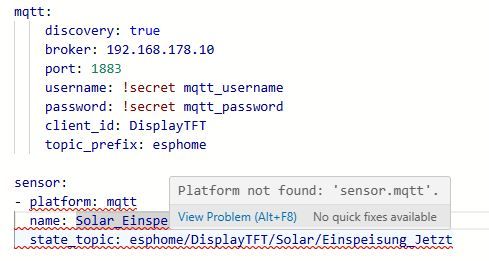
ich bekomme hier einen Fehler. Stimmt was mit der Syntax nicht?
@wibear Bitte als Code
</>senden .
Ich kann Dir nicht im Detail helfen, wollte mit den Antworten von ChatGPT nur ein Anstoß geben.
Damit ich es an ChatGPT weitergeben kann bitte als Code schicken.NUC i7 64GB mit Proxmox ---- Jarvis Infos Aktualisierungen der Doku auf Instagram verfolgen -> mcuiobroker Instagram
Wenn Euch mein Vorschlag geholfen hat, bitte rechts "^" klicken. -
@mcu
Guten Morgen und vielen Dank für Deine ausführlichen Infos.@mcu sagte in ESPHome ESP32-S3 mit MQTT verliert Verbindung:
Stelle sicher, dass deine Topics existieren und gültige Payloads liefern
Alle topics existieren und liefern Payloads:
@mcu sagte in ESPHome ESP32-S3 mit MQTT verliert Verbindung:
Ergänze internal: true bei den mqtt_subscribe-Sensoren
hinzugefügt
@mcu sagte in ESPHome ESP32-S3 mit MQTT verliert Verbindung:
Baue ein Retry-Verhalten per on_value
habe aber bisher nie einen Wert mit unbekannt gehabt.
@mcu sagte in ESPHome ESP32-S3 mit MQTT verliert Verbindung:
Testweise mqtt_subscribe deaktivieren, aber manuelles Logging des Topics testen
Kein Problem festgestellt:
[16:44:35][C][esphome.ota:080]: Password configured [16:44:35][C][safe_mode:018]: Safe Mode: [16:44:35][C][safe_mode:025]: Boot considered successful after 60 seconds [16:44:35][C][safe_mode:025]: Invoke after 10 boot attempts [16:44:35][C][safe_mode:025]: Remain for 300 seconds [16:44:35][C][api:185]: API Server: [16:44:35][C][api:185]: Address: displaytft.local:6053 [16:44:35][C][api:187]: Using noise encryption: YES [16:44:35][C][mqtt:160]: MQTT: [16:44:35][C][mqtt:160]: Server Address: 192.168.178.10:1883 (192.168.178.10) [16:44:35][C][mqtt:160]: Username: 'mqttuser'[redacted] [16:44:35][C][mqtt:160]: Client ID: 'DisplayTFT'[redacted] [16:44:35][C][mqtt:160]: Clean Session: NO [16:44:35][C][mqtt:162]: Discovery IP enabled [16:44:35][C][mqtt:168]: Discovery prefix: 'homeassistant' [16:44:35][C][mqtt:168]: Discovery retain: YES [16:44:35][C][mqtt:170]: Topic Prefix: 'esphome' [16:44:35][C][mqtt:172]: Log Topic: 'esphome/debug' [16:44:35][C][mqtt:175]: Availability: 'esphome/status' [16:44:35][C][mdns:125]: mDNS: [16:44:35][C][mdns:125]: Hostname: displaytft [16:44:35][C][mqtt:733]: MQTT Message Trigger: [16:44:35][C][mqtt:733]: Topic: 'esphome/DisplayTFT/Solar/Einspeisung_Jetzt' [16:44:35][C][mqtt:733]: QoS: 0 [16:44:35][C][mqtt:733]: MQTT Message Trigger: [16:44:35][C][mqtt:733]: Topic: 'esphome/DisplayTFT/Netz/Verbrauch_Jetzt' [16:44:35][C][mqtt:733]: QoS: 0 [16:44:35][C][mqtt:733]: MQTT Message Trigger: [16:44:35][C][mqtt:733]: Topic: 'esphome/DisplayTFT/Solar/Einspeisung_Monat' [16:44:35][C][mqtt:733]: QoS: 0 [16:44:35][C][mqtt:733]: MQTT Message Trigger: [16:44:35][C][mqtt:733]: Topic: 'esphome/DisplayTFT/Solar/Einspeisung_Heute' [16:44:35][C][mqtt:733]: QoS: 0 [16:44:35][C][mqtt:733]: MQTT Message Trigger: [16:44:35][C][mqtt:733]: Topic: 'esphome/DisplayTFT/Netz/Verbrauch_Monat' [16:44:35][C][mqtt:733]: QoS: 0 [16:44:35][C][mqtt:733]: MQTT Message Trigger: [16:44:35][C][mqtt:733]: Topic: 'esphome/DisplayTFT/Netz/Verbrauch_Gestern' [16:44:35][C][mqtt:733]: QoS: 0 [16:44:36][C][mqtt:733]: MQTT Message Trigger: [16:44:36][C][mqtt:733]: Topic: 'esphome/DisplayTFT/Status/Batterie_SoC' [16:44:36][C][mqtt:733]: QoS: 0 [16:44:36][C][mqtt:733]: MQTT Message Trigger: [16:44:36][C][mqtt:733]: Topic: 'esphome/DisplayTFT/Status/Ladegeraet' [16:44:36][C][mqtt:733]: QoS: 0 [16:44:36][C][mqtt:733]: MQTT Message Trigger: [16:44:36][C][mqtt:733]: Topic: 'esphome/DisplayTFT/Status/Auto' [16:44:36][C][mqtt:733]: QoS: 0 [16:44:36][C][mqtt:733]: MQTT Message Trigger: [16:44:36][C][mqtt:733]: Topic: 'esphome/DisplayTFT/Status/Garagentor' [16:44:36][C][mqtt:733]: QoS: 0 [16:44:36][C][mqtt:733]: MQTT Message Trigger: [16:44:36][C][mqtt:733]: Topic: 'esphome/DisplayTFT/Status/Fenster_Links' [16:44:36][C][mqtt:733]: QoS: 0 [16:44:36][C][mqtt:733]: MQTT Message Trigger: [16:44:36][C][mqtt:733]: Topic: 'esphome/DisplayTFT/Status/Temperatur_Kueche' [16:44:36][C][mqtt:733]: QoS: 0 [16:44:36][C][mqtt:733]: MQTT Message Trigger: [16:44:36][C][mqtt:733]: Topic: 'esphome/DisplayTFT/Status/Aussen_Temperatur' [16:44:36][C][mqtt:733]: QoS: 0 [16:44:36][C][mqtt:733]: MQTT Message Trigger: [16:44:36][C][mqtt:733]: Topic: 'esphome/DisplayTFT/Status/Feuchtigkeit_Kueche' [16:44:36][C][mqtt:733]: QoS: 0 [16:44:36][C][mqtt:733]: MQTT Message Trigger: [16:44:36][C][mqtt:733]: Topic: 'esphome/DisplayTFT/Heizung/VL_Temperatur_Heizkoerper' [16:44:36][C][mqtt:733]: QoS: 0 [16:44:36][C][mqtt:733]: MQTT Message Trigger: [16:44:36][C][mqtt:733]: Topic: 'esphome/DisplayTFT/Heizung/RL_Temperatur_Heizkoerper' [16:44:36][C][mqtt:733]: QoS: 0 [16:44:36][C][mqtt:733]: MQTT Message Trigger: [16:44:36][C][mqtt:733]: Topic: 'esphome/DisplayTFT/Heizung/VL_Temperatur_Warmwasser' [16:44:36][C][mqtt:733]: QoS: 0 [16:44:36][C][mqtt:733]: MQTT Message Trigger: [16:44:36][C][mqtt:733]: Topic: 'esphome/DisplayTFT/Heizung/RL_Temperatur_Warmwasser' [16:44:36][C][mqtt:733]: QoS: 0 [16:44:36][C][mqtt:733]: MQTT Message Trigger: [16:44:36][C][mqtt:733]: Topic: 'esphome/DisplayTFT/Verbrauch/Warmwasser_Vortag' [16:44:36][C][mqtt:733]: QoS: 0 [16:44:36][C][mqtt:733]: MQTT Message Trigger: [16:44:36][C][mqtt:733]: Topic: 'esphome/DisplayTFT/Verbrauch/Heizung_Vortag' [16:44:36][C][mqtt:733]: QoS: 0 [16:44:36][C][mqtt:733]: MQTT Message Trigger: [16:44:36][C][mqtt:733]: Topic: 'esphome/DisplayTFT/Verbrauch/Warmwasser_Heute' [16:44:36][C][mqtt:733]: QoS: 0 [16:44:36][C][mqtt:733]: MQTT Message Trigger: [16:44:36][C][mqtt:733]: Topic: 'esphome/DisplayTFT/Verbrauch/Heizung_Heute' [16:44:36][C][mqtt:733]: QoS: 0 [16:44:36][C][mqtt:733]: MQTT Message Trigger: [16:44:36][C][mqtt:733]: Topic: 'esphome/DisplayTFT/Verbrauch/Warmwasser_Monat' [16:44:36][C][mqtt:733]: QoS: 0 [16:44:36][C][mqtt:733]: MQTT Message Trigger: [16:44:36][C][mqtt:733]: Topic: 'esphome/DisplayTFT/Verbrauch/Heizung_Monat' [16:44:36][C][mqtt:733]: QoS: 0 [16:44:44][D][main:618]: Einspeisung Heute empfangen [16:44:44][D][main:600]: Verbrauch jetzt empfangen [16:44:51][D][main:735]: VL_Temperatur_Warmwasser empfangen [16:45:00][D][main:591]: Einspeisung jetzt empfangen [16:45:01][D][main:600]: Verbrauch jetzt empfangen [16:46:00][D][main:591]: Einspeisung jetzt empfangen [16:46:01][D][main:600]: Verbrauch jetzt empfangen [16:46:43][D][main:600]: Verbrauch jetzt empfangen [16:46:48][D][main:717]: VL_Temperatur_Heizkoerper empfangen [16:47:00][D][main:591]: Einspeisung jetzt empfangen [16:47:01][D][main:600]: Verbrauch jetzt empfangen [16:48:00][D][main:591]: Einspeisung jetzt empfangen [16:48:01][D][main:618]: Einspeisung Heute empfangen [16:48:01][D][main:600]: Verbrauch jetzt empfangen [16:48:08][D][main:744]: RL_Temperatur_Warmwasser empfangen [16:48:08][D][main:699]: Aussen Temperatur empfangen [16:48:36][D][main:591]: Einspeisung jetzt empfangen [16:48:37][D][main:600]: Verbrauch jetzt empfangen [16:48:44][D][main:699]: Aussen Temperatur empfangen@mcu sagte in ESPHome ESP32-S3 mit MQTT verliert Verbindung:
Firmware-Update von ESPHome & PlatformIO
ESPHome v0.6.1, Dashboard 2025.6.0b1
@mcu sagte in ESPHome ESP32-S3 mit MQTT verliert Verbindung:
Verwende framework: esp-idf anstelle von arduino
esphome: name: displaytft friendly_name: DisplayTFT esp32: board: esp32-s3-devkitc-1 framework: type: esp-idf@mcu sagte in ESPHome ESP32-S3 mit MQTT verliert Verbindung:
Ersetze mqtt_subscribe probeweise durch on_message
INFO ESPHome 2025.6.0b1
INFO Reading configuration /opt/iobroker/iobroker-data/esphome.0/displaytft.yaml...
INFO Generating C++ source...
INFO Compiling app...
Processing displaytft (board: esp32-s3-devkitc-1; framework: arduino; platform: platformio/espressif32@5.4.0)
--------------------------------------------------------------------------------
HARDWARE: ESP32S3 240MHz, 320KB RAM, 8MB Flash
 - toolchain-riscv32-esp @ 8.4.0+2021r2-patch5
 - toolchain-xtensa-esp32s3 @ 8.4.0+2021r2-patch5
Dependency Graph
|-- AsyncTCP-esphome @ 2.1.4
|-- WiFi @ 2.0.0
|-- FS @ 2.0.0
|-- Update @ 2.0.0
|-- ESPAsyncWebServer-esphome @ 3.3.0
|-- DNSServer @ 2.0.0
|-- ESPmDNS @ 2.0.0
|-- noise-c @ 0.1.6
|-- SPI @ 2.0.0
|-- ArduinoJson @ 6.18.5
Compiling .pioenvs/displaytft/src/esphome/components/api/api_connection.cpp.o
Compiling .pioenvs/displaytft/src/esphome/components/api/api_frame_helper.cpp.o
Compiling .pioenvs/displaytft/src/esphome/components/api/api_pb2.cpp.o
Compiling .pioenvs/displaytft/src/esphome/components/api/api_pb2_service.cpp.o
Compiling .pioenvs/displaytft/src/esphome/components/api/api_server.cpp.o
Compiling .pioenvs/displaytft/src/esphome/components/api/list_entities.cpp.o
Compiling .pioenvs/displaytft/src/esphome/components/api/proto.cpp.o
Compiling .pioenvs/displaytft/src/esphome/components/api/subscribe_state.cpp.o
Compiling .pioenvs/displaytft/src/esphome/components/api/user_services.cpp.o
Compiling .pioenvs/displaytft/src/esphome/components/captive_portal/captive_portal.cpp.o
Compiling .pioenvs/displaytft/src/esphome/components/display/display.cpp.o
Compiling .pioenvs/displaytft/src/esphome/components/display/display_buffer.cpp.o
Compiling .pioenvs/displaytft/src/esphome/components/display/rect.cpp.o
Compiling .pioenvs/displaytft/src/esphome/components/esp32/gpio.cpp.o
Compiling .pioenvs/displaytft/src/esphome/components/esp32/preferences.cpp.o
Compiling .pioenvs/displaytft/src/esphome/components/esphome/ota/ota_esphome.cpp.o
Compiling .pioenvs/displaytft/src/esphome/components/ili9xxx/ili9xxx_display.cpp.o
Compiling .pioenvs/displaytft/src/esphome/components/json/json_util.cpp.o
Compiling .pioenvs/displaytft/src/esphome/components/logger/logger.cpp.o
Compiling .pioenvs/displaytft/src/esphome/components/logger/logger_esp32.cpp.o
Compiling .pioenvs/displaytft/src/esphome/components/logger/logger_esp8266.cpp.o
Compiling .pioenvs/displaytft/src/esphome/components/logger/logger_host.cpp.o
Compiling .pioenvs/displaytft/src/esphome/components/logger/logger_libretiny.cpp.o
Compiling .pioenvs/displaytft/src/esphome/components/logger/logger_rp2040.cpp.o
Compiling .pioenvs/displaytft/src/esphome/components/logger/task_log_buffer.cpp.o
Compiling .pioenvs/displaytft/src/esphome/components/md5/md5.cpp.o
Compiling .pioenvs/displaytft/src/esphome/components/mdns/mdns_component.cpp.o
Compiling .pioenvs/displaytft/src/esphome/components/mdns/mdns_esp32.cpp.o
Compiling .pioenvs/displaytft/src/esphome/components/mdns/mdns_esp8266.cpp.o
Compiling .pioenvs/displaytft/src/esphome/components/mdns/mdns_host.cpp.o
Compiling .pioenvs/displaytft/src/esphome/components/mdns/mdns_libretiny.cpp.o
Compiling .pioenvs/displaytft/src/esphome/components/mdns/mdns_rp2040.cpp.o
Compiling .pioenvs/displaytft/src/esphome/components/mqtt/custom_mqtt_device.cpp.o
Compiling .pioenvs/displaytft/src/esphome/components/mqtt/mqtt_alarm_control_panel.cpp.o
Compiling .pioenvs/displaytft/src/esphome/components/mqtt/mqtt_backend_esp32.cpp.o
Compiling .pioenvs/displaytft/src/esphome/components/mqtt/mqtt_binary_sensor.cpp.o
Compiling .pioenvs/displaytft/src/esphome/components/mqtt/mqtt_button.cpp.o
Compiling .pioenvs/displaytft/src/esphome/components/mqtt/mqtt_client.cpp.o
Compiling .pioenvs/displaytft/src/esphome/components/mqtt/mqtt_climate.cpp.o
Compiling .pioenvs/displaytft/src/esphome/components/mqtt/mqtt_component.cpp.o
Compiling .pioenvs/displaytft/src/esphome/components/mqtt/mqtt_cover.cpp.o
Compiling .pioenvs/displaytft/src/esphome/components/mqtt/mqtt_date.cpp.o
Compiling .pioenvs/displaytft/src/esphome/components/mqtt/mqtt_datetime.cpp.o
Compiling .pioenvs/displaytft/src/esphome/components/mqtt/mqtt_event.cpp.o
Compiling .pioenvs/displaytft/src/esphome/components/mqtt/mqtt_fan.cpp.o
Compiling .pioenvs/displaytft/src/esphome/components/mqtt/mqtt_light.cpp.o
Compiling .pioenvs/displaytft/src/esphome/components/mqtt/mqtt_lock.cpp.o
Compiling .pioenvs/displaytft/src/esphome/components/mqtt/mqtt_number.cpp.o
Compiling .pioenvs/displaytft/src/esphome/components/mqtt/mqtt_select.cpp.o
Compiling .pioenvs/displaytft/src/esphome/components/mqtt/mqtt_sensor.cpp.o
Compiling .pioenvs/displaytft/src/esphome/components/mqtt/mqtt_switch.cpp.o
Compiling .pioenvs/displaytft/src/esphome/components/mqtt/mqtt_text.cpp.o
Compiling .pioenvs/displaytft/src/esphome/components/mqtt/mqtt_text_sensor.cpp.o
Compiling .pioenvs/displaytft/src/esphome/components/mqtt/mqtt_time.cpp.o
Compiling .pioenvs/displaytft/src/esphome/components/mqtt/mqtt_update.cpp.o
Compiling .pioenvs/displaytft/src/esphome/components/mqtt/mqtt_valve.cpp.o
Compiling .pioenvs/displaytft/src/esphome/components/network/util.cpp.o
Compiling .pioenvs/displaytft/src/esphome/components/ota/ota_backend.cpp.o
Compiling .pioenvs/displaytft/src/esphome/components/ota/ota_backend_arduino_esp32.cpp.o
Compiling .pioenvs/displaytft/src/esphome/components/ota/ota_backend_arduino_esp8266.cpp.o
Compiling .pioenvs/displaytft/src/esphome/components/ota/ota_backend_arduino_libretiny.cpp.o
Compiling .pioenvs/displaytft/src/esphome/components/ota/ota_backend_arduino_rp2040.cpp.o
Compiling .pioenvs/displaytft/src/esphome/components/ota/ota_backend_esp_idf.cpp.o
Compiling .pioenvs/displaytft/src/esphome/components/psram/psram.cpp.o
Compiling .pioenvs/displaytft/src/esphome/components/safe_mode/safe_mode.cpp.o
Compiling .pioenvs/displaytft/src/esphome/components/socket/bsd_sockets_impl.cpp.o
Compiling .pioenvs/displaytft/src/esphome/components/socket/lwip_raw_tcp_impl.cpp.o
Compiling .pioenvs/displaytft/src/esphome/components/socket/lwip_sockets_impl.cpp.o
Compiling .pioenvs/displaytft/src/esphome/components/socket/socket.cpp.o
Compiling .pioenvs/displaytft/src/esphome/components/spi/spi.cpp.o
Compiling .pioenvs/displaytft/src/esphome/components/spi/spi_arduino.cpp.o
Compiling .pioenvs/displaytft/src/esphome/components/spi/spi_esp_idf.cpp.o
Compiling .pioenvs/displaytft/src/esphome/components/web_server_base/web_server_base.cpp.o
Compiling .pioenvs/displaytft/src/esphome/components/wifi/wifi_component.cpp.o
Compiling .pioenvs/displaytft/src/esphome/components/wifi/wifi_component_esp32_arduino.cpp.o
Compiling .pioenvs/displaytft/src/esphome/components/wifi/wifi_component_esp8266.cpp.o
Compiling .pioenvs/displaytft/src/esphome/components/wifi/wifi_component_esp_idf.cpp.o
Compiling .pioenvs/displaytft/src/esphome/components/wifi/wifi_component_libretiny.cpp.o
Compiling .pioenvs/displaytft/src/esphome/components/wifi/wifi_component_pico_w.cpp.o
Compiling .pioenvs/displaytft/src/esphome/core/application.cpp.o
Compiling .pioenvs/displaytft/src/esphome/core/component.cpp.o
Compiling .pioenvs/displaytft/src/esphome/core/component_iterator.cpp.o
Compiling .pioenvs/displaytft/src/esphome/core/controller.cpp.o
Compiling .pioenvs/displaytft/src/esphome/core/entity_base.cpp.o
Compiling .pioenvs/displaytft/src/esphome/core/helpers.cpp.o
Compiling .pioenvs/displaytft/src/esphome/core/log.cpp.o
Compiling .pioenvs/displaytft/src/esphome/core/ring_buffer.cpp.o
Compiling .pioenvs/displaytft/src/esphome/core/scheduler.cpp.o
Compiling .pioenvs/displaytft/src/esphome/core/string_ref.cpp.o
Compiling .pioenvs/displaytft/src/esphome/core/util.cpp.o
Compiling .pioenvs/displaytft/src/main.cpp.o
Linking .pioenvs/displaytft/firmware.elf
RAM:   [=         ]  12.9% (used 42196 bytes from 327680 bytes)
Flash: [======    ]  59.4% (used 1089741 bytes from 1835008 bytes)
Building .pioenvs/displaytft/firmware.bin
Creating esp32s3 image...
Successfully created esp32s3 image.
esp32_create_combined_bin([".pioenvs/displaytft/firmware.bin"], [".pioenvs/displaytft/firmware.elf"])
SHA digest in image updated
Wrote 0x11a250 bytes to file /opt/iobroker/iobroker-data/esphome.0/.esphome/build/displaytft/.pioenvs/displaytft/firmware.factory.bin, ready to flash to offset 0x0
esp32_copy_ota_bin([".pioenvs/displaytft/firmware.bin"], [".pioenvs/displaytft/firmware.elf"])
======================== [SUCCESS] Took 163.10 seconds ========================
INFO Successfully compiled program.
INFO Connecting to 192.168.178.160 port 3232...
INFO Connected to 192.168.178.160
INFO Uploading /opt/iobroker/iobroker-data/esphome.0/.esphome/build/displaytft/.pioenvs/displaytft/firmware.bin (1090128 bytes)
Uploading: [============================================================] 100% Done...

INFO Upload took 12.48 seconds, waiting for result...
INFO OTA successful
INFO Successfully uploaded program.
INFO Starting log output from 192.168.178.160 using esphome API
INFO Successfully resolved displaytft @ 192.168.178.160 in 0.000s
INFO Successfully connected to displaytft @ 192.168.178.160 in 7.145s
INFO Successful handshake with displaytft @ 192.168.178.160 in 0.094s
[17:05:19][D][text_sensor:064]: 'Heizung_VL_Temperatur_Warmwasser': Sending state '39'
[17:05:19][I][app:135]: ESPHome version 2025.6.0b1 compiled on Jun 13 2025, 17:04:03
[17:05:19][C][wifi:613]: WiFi:
[17:05:19][C][wifi:434]:   Local MAC: 30:ED:A0:BB:7D:F8
[17:05:19][C][wifi:439]:   SSID: 'wibear'[redacted]
[17:05:19][C][wifi:442]:   IP Address: 192.168.178.160
[17:05:19][C][wifi:451]:   BSSID: E0:28:6D:FA:32:5C[redacted]
[17:05:19][C][wifi:451]:   Hostname: 'displaytft'
[17:05:19][C][wifi:451]:   Signal strength: -38 dB ▂▄▆█
[17:05:19][C][wifi:462]:   Channel: 11
[17:05:19][C][wifi:462]:   Subnet: 255.255.255.0
[17:05:19][C][wifi:462]:   Gateway: 192.168.178.1
[17:05:19][C][wifi:462]:   DNS1: 192.168.178.1
[17:05:19][C][wifi:462]:   DNS2: 0.0.0.0
[17:05:19][D][text_sensor:064]: 'Heizung_RL_Temperatur_Warmwasser': Sending state '27.4'
[17:05:19][C][logger:228]: Logger:
[17:05:19][C][logger:228]:   Max Level: DEBUG
[17:05:19][C][logger:228]:   Initial Level: DEBUG
[17:05:19][C][logger:233]:   Log Baud Rate: 115200
[17:05:19][C][logger:233]:   Hardware UART: USB_CDC
[17:05:19][C][logger:237]:   Task Log Buffer Size: 768
[17:05:19][C][spi:068]: SPI bus:
[17:05:19][C][spi:069]:   CLK Pin: GPIO12
[17:05:19][C][spi:070]:   SDI Pin:
[17:05:19][C][spi:071]:   SDO Pin: GPIO11
[17:05:19][C][spi:076]:   Using HW SPI: SPI
[17:05:19][C][ili9xxx:091]: ili9xxx
[17:05:19][C][ili9xxx:091]:   Rotations: 90 °
[17:05:19][C][ili9xxx:091]:   Dimensions: 480px x 320px
[17:05:19][C][ili9xxx:095]:   Width Offset: 0
[17:05:19][C][ili9xxx:095]:   Height Offset: 0
[17:05:19][C][ili9xxx:101]:   Color mode: 16bit
[17:05:19][C][ili9xxx:108]:   18-Bit Mode: YES
[17:05:19][C][ili9xxx:110]:   Data rate: 40MHz
[17:05:19][C][ili9xxx:112]:   Reset Pin: GPIO8
[17:05:19][C][ili9xxx:113]:   CS Pin: GPIO10
[17:05:19][C][ili9xxx:114]:   DC Pin: GPIO9
[17:05:19][C][ili9xxx:123]:   Color order: BGR
[17:05:19][C][ili9xxx:123]:   Swap_xy: NO
[17:05:19][C][ili9xxx:123]:   Mirror_x: NO
[17:05:19][C][ili9xxx:123]:   Mirror_y: NO
[17:05:19][C][ili9xxx:123]:   Invert colors: NO
[17:05:19][C][ili9xxx:128]:   Update Interval: 1.0s
[17:05:19][C][psram:018]: PSRAM:
[17:05:19][C][psram:033]:   Available: YES
[17:05:19][C][psram:040]:   Size: 8192 KB
[17:05:19][C][captive_portal:089]: Captive Portal:
[17:05:19][C][esphome.ota:077]: Over-The-Air updates:
[17:05:19][C][esphome.ota:077]:   Address: displaytft.local:3232
[17:05:19][C][esphome.ota:077]:   Version: 2
[17:05:19][C][esphome.ota:080]:   Password configured
[17:05:19][C][safe_mode:018]: Safe Mode:
[17:05:19][C][safe_mode:025]:   Boot considered successful after 60 seconds
[17:05:19][C][safe_mode:025]:   Invoke after 10 boot attempts
[17:05:19][C][safe_mode:025]:   Remain for 300 seconds
[17:05:19][C][api:185]: API Server:
[17:05:19][C][api:185]:   Address: displaytft.local:6053
[17:05:19][C][api:187]:   Using noise encryption: YES
[17:05:19][C][mqtt:160]: MQTT:
[17:05:19][C][mqtt:160]:   Server Address: 192.168.178.10:1883 (192.168.178.10)
[17:05:19][C][mqtt:160]:   Username: 'mqttuser'[redacted]
[17:05:19][C][mqtt:160]:   Client ID: 'DisplayTFT'[redacted]
[17:05:19][C][mqtt:160]:   Clean Session: NO
[17:05:19][C][mqtt:162]:   Discovery IP enabled
[17:05:19][C][mqtt:168]:   Discovery prefix: 'homeassistant'
[17:05:19][C][mqtt:168]:   Discovery retain: YES
[17:05:19][C][mqtt:170]:   Topic Prefix: 'esphome'
[17:05:19][C][mqtt:172]:   Log Topic: 'esphome/debug'
[17:05:19][C][mqtt:175]:   Availability: 'esphome/status'
[17:05:19][C][mdns:125]: mDNS:
[17:05:19][C][mdns:125]:   Hostname: displaytft
[17:05:19][C][mqtt_subscribe.text_sensor:021]: MQTT Subscribe Text Sensor 'Solar_Einspeisung_Jetzt'
[17:05:20][C][mqtt_subscribe.text_sensor:022]:   Topic: esphome/DisplayTFT/Solar/Einspeisung_Jetzt
[17:05:20][C][mqtt_subscribe.text_sensor:021]: MQTT Subscribe Text Sensor 'Netz_Verbrauch_Jetzt'
[17:05:20][C][mqtt_subscribe.text_sensor:022]:   Topic: esphome/DisplayTFT/Netz/Verbrauch_Jetzt
[17:05:20][C][mqtt_subscribe.text_sensor:021]: MQTT Subscribe Text Sensor 'Solar_Einspeisung_Monat'
[17:05:20][C][mqtt_subscribe.text_sensor:022]:   Topic: esphome/DisplayTFT/Solar/Einspeisung_Monat
[17:05:20][C][mqtt_subscribe.text_sensor:021]: MQTT Subscribe Text Sensor 'Solar_Einspeisung_Heute'
[17:05:20][C][mqtt_subscribe.text_sensor:022]:   Topic: esphome/DisplayTFT/Solar/Einspeisung_Heute
[17:05:20][C][mqtt_subscribe.text_sensor:021]: MQTT Subscribe Text Sensor 'Netz_Verbrauch_Monat'
[17:05:20][C][mqtt_subscribe.text_sensor:022]:   Topic: esphome/DisplayTFT/Netz/Verbrauch_Monat
[17:05:20][C][mqtt_subscribe.text_sensor:021]: MQTT Subscribe Text Sensor 'Netz_Verbrauch_Gestern'
[17:05:20][C][mqtt_subscribe.text_sensor:022]:   Topic: esphome/DisplayTFT/Netz/Verbrauch_Gestern
[17:05:20][C][mqtt_subscribe.text_sensor:021]: MQTT Subscribe Text Sensor 'Status_Batterie_SoC'
[17:05:20][C][mqtt_subscribe.text_sensor:022]:   Topic: esphome/DisplayTFT/Status/Batterie_SoC
[17:05:20][C][mqtt_subscribe.text_sensor:021]: MQTT Subscribe Text Sensor 'Status_Ladegeraet'
[17:05:20][C][mqtt_subscribe.text_sensor:022]:   Topic: esphome/DisplayTFT/Status/Ladegeraet
[17:05:20][C][mqtt_subscribe.text_sensor:021]: MQTT Subscribe Text Sensor 'Status_Auto'
[17:05:20][C][mqtt_subscribe.text_sensor:022]:   Topic: esphome/DisplayTFT/Status/Auto
[17:05:20][C][mqtt_subscribe.text_sensor:021]: MQTT Subscribe Text Sensor 'Status_Garagentor'
[17:05:20][C][mqtt_subscribe.text_sensor:022]:   Topic: esphome/DisplayTFT/Status/Garagentor
[17:05:20][C][mqtt_subscribe.text_sensor:021]: MQTT Subscribe Text Sensor 'Status_Fenster_Links'
[17:05:20][C][mqtt_subscribe.text_sensor:022]:   Topic: esphome/DisplayTFT/Status/Fenster_Links
[17:05:20][C][mqtt_subscribe.text_sensor:021]: MQTT Subscribe Text Sensor 'Status_Temperatur_Kueche'
[17:05:20][C][mqtt_subscribe.text_sensor:022]:   Topic: esphome/DisplayTFT/Status/Temperatur_Kueche
[17:05:20][C][mqtt_subscribe.text_sensor:021]: MQTT Subscribe Text Sensor 'Status_Aussen_Temperatur'
[17:05:20][C][mqtt_subscribe.text_sensor:022]:   Topic: esphome/DisplayTFT/Status/Aussen_Temperatur
[17:05:20][C][mqtt_subscribe.text_sensor:021]: MQTT Subscribe Text Sensor 'Status_Feuchtigkeit_Kueche'
[17:05:20][C][mqtt_subscribe.text_sensor:022]:   Topic: esphome/DisplayTFT/Status/Feuchtigkeit_Kueche
[17:05:20][C][mqtt_subscribe.text_sensor:021]: MQTT Subscribe Text Sensor 'Heizung_VL_Temperatur_Heizkoerper'
[17:05:20][C][mqtt_subscribe.text_sensor:022]:   Topic: esphome/DisplayTFT/Heizung/VL_Temperatur_Heizkoerper
[17:05:20][C][mqtt_subscribe.text_sensor:021]: MQTT Subscribe Text Sensor 'Heizung_RL_Temperatur_Heizkoerper'
[17:05:20][C][mqtt_subscribe.text_sensor:022]:   Topic: esphome/DisplayTFT/Heizung/RL_Temperatur_Heizkoerper
[17:05:20][C][mqtt_subscribe.text_sensor:021]: MQTT Subscribe Text Sensor 'Heizung_VL_Temperatur_Warmwasser'
[17:05:20][C][mqtt_subscribe.text_sensor:022]:   Topic: esphome/DisplayTFT/Heizung/VL_Temperatur_Warmwasser
[17:05:20][C][mqtt_subscribe.text_sensor:021]: MQTT Subscribe Text Sensor 'Heizung_RL_Temperatur_Warmwasser'
[17:05:20][C][mqtt_subscribe.text_sensor:022]:   Topic: esphome/DisplayTFT/Heizung/RL_Temperatur_Warmwasser
[17:05:22][D][api:133]: Accepted 192.168.178.10
[17:05:22][D][api.connection:1554]: raspi (192.168.178.10) connected
[17:05:23][D][text_sensor:064]: 'Solar_Einspeisung_Heute': Sending state '1486'
[17:05:23][D][text_sensor:064]: 'Netz_Verbrauch_Monat': Sending state '52.9'
[17:05:23][D][text_sensor:064]: 'Status_Batterie_SoC': Sending state '99'
[17:05:23][D][text_sensor:064]: 'Status_Ladegeraet': Sending state 'Aus'
[17:05:23][D][text_sensor:064]: 'Status_Auto': Sending state 'safe'
[17:05:23][D][text_sensor:064]: 'Status_Garagentor': Sending state 'geschlossen'
[17:05:23][D][text_sensor:064]: 'Status_Fenster_Links': Sending state 'geschlossen'
[17:05:23][D][text_sensor:064]: 'Status_Temperatur_Kueche': Sending state '23.9'
[17:05:23][D][text_sensor:064]: 'Status_Feuchtigkeit_Kueche': Sending state '66'
[17:05:23][D][text_sensor:064]: 'Heizung_VL_Temperatur_Heizkoerper': Sending state '22.8'
[17:05:23][D][text_sensor:064]: 'Heizung_RL_Temperatur_Heizkoerper': Sending state '22.9'
[17:05:23][D][text_sensor:064]: 'Heizung_VL_Temperatur_Warmwasser': Sending state '39'
[17:05:23][D][text_sensor:064]: 'Heizung_RL_Temperatur_Warmwasser': Sending state '27.4'
[17:05:23][D][text_sensor:064]: 'Solar_Einspeisung_Monat': Sending state '14.2'
[17:05:23][D][text_sensor:064]: 'Solar_Einspeisung_Jetzt': Sending state '-22.6'
[17:05:23][D][text_sensor:064]: 'Netz_Verbrauch_Jetzt': Sending state '82.3'
[17:05:23][D][text_sensor:064]: 'Netz_Verbrauch_Gestern': Sending state '3.8'
[17:05:23][D][text_sensor:064]: 'Status_Aussen_Temperatur': Sending state '35.8'
[17:05:44][D][text_sensor:064]: 'Solar_Einspeisung_Heute': Sending state '1487'
[17:05:45][D][text_sensor:064]: 'Netz_Verbrauch_Jetzt': Sending state '71.8'
[17:05:51][D][text_sensor:064]: 'Heizung_VL_Temperatur_Warmwasser': Sending state '38.9'
[17:06:11][I][safe_mode:042]: Boot seems successful; resetting boot loop counter
[17:06:11][D][esp32.preferences:143]: Writing 1 items: 0 cached, 1 written, 0 failed
[17:07:00][D][text_sensor:064]: 'Solar_Einspeisung_Jetzt': Sending state '-22.5'
[17:07:01][D][text_sensor:064]: 'Netz_Verbrauch_Jetzt': Sending state '70.7'
[17:07:08][D][text_sensor:064]: 'Heizung_RL_Temperatur_Warmwasser': Sending state '27.3'
[17:08:00][D][text_sensor:064]: 'Solar_Einspeisung_Jetzt': Sending state '-22.4'
[17:08:01][D][text_sensor:064]: 'Netz_Verbrauch_Jetzt': Sending state '71.1'
[17:08:08][D][text_sensor:064]: 'Heizung_RL_Temperatur_Warmwasser': Sending state '27.2'
[17:08:08][D][text_sensor:064]: 'Status_Aussen_Temperatur': Sending state '35.9'
[17:09:00][D][text_sensor:064]: 'Solar_Einspeisung_Jetzt': Sending state '-22.2'
[17:09:01][D][text_sensor:064]: 'Solar_Einspeisung_Heute': Sending state '1488'
[17:09:01][D][text_sensor:064]: 'Netz_Verbrauch_Jetzt': Sending state '75.1'
[17:09:02][D][text_sensor:064]: 'Netz_Verbrauch_Monat': Sending state '53'
[17:09:30][D][text_sensor:064]: 'Netz_Verbrauch_Jetzt': Sending state '76.1'
[17:09:36][D][text_sensor:064]: 'Heizung_VL_Temperatur_Warmwasser': Sending state '38.8'
[17:10:00][D][text_sensor:064]: 'Solar_Einspeisung_Jetzt': Sending state '-22.1'
[17:10:01][D][text_sensor:064]: 'Netz_Verbrauch_Jetzt': Sending state '78.1'
[17:10:08][D][text_sensor:064]: 'Heizung_RL_Temperatur_Warmwasser': Sending state '27.1'
[17:12:46][D][text_sensor:064]: 'Solar_Einspeisung_Jetzt': Sending state '-21.9'
[17:12:47][D][text_sensor:064]: 'Solar_Einspeisung_Heute': Sending state '1489'
[17:12:48][D][text_sensor:064]: 'Netz_Verbrauch_Jetzt': Sending state '107.5'
[17:12:54][D][text_sensor:064]: 'Heizung_RL_Temperatur_Warmwasser': Sending state '27'
[17:12:55][D][text_sensor:064]: 'Status_Aussen_Temperatur': Sending state '36.2'
[17:14:00][D][text_sensor:064]: 'Solar_Einspeisung_Jetzt': Sending state '-22'
Das hat leider nichts gebracht. Weiterhin mqtt event error:
INFO ESPHome 2025.6.0b1 INFO Reading configuration /opt/iobroker/iobroker-data/esphome.0/displaytft.yaml... INFO Generating C++ source... INFO Updating https://github.com/espressif/esp-protocols.git@mdns-v1.8.2 INFO Compiling app... Processing displaytft (board: esp32-s3-devkitc-1; framework: espidf; platform: https://github.com/pioarduino/platform-espressif32/releases/download/53.03.13/platform-espressif32.zip) -------------------------------------------------------------------------------- Platform Manager: Installing https://github.com/pioarduino/platform-espressif32/releases/download/53.03.13/platform-espressif32.zip INFO Installing https://github.com/pioarduino/platform-espressif32/releases/download/53.03.13/platform-espressif32.zip Downloading [####################################] 100% Unpacking [####################################] 100% Platform Manager: espressif32@53.3.13 has been installed! INFO espressif32@53.3.13 has been installed! Tool Manager: Installing https://github.com/pioarduino/esp-idf/releases/download/v5.3.2/esp-idf-v5.3.2.zip INFO Installing https://github.com/pioarduino/esp-idf/releases/download/v5.3.2/esp-idf-v5.3.2.zip Downloading [####################################] 100% Unpacking [####################################] 100% Tool Manager: framework-espidf@3.50302.0 has been installed! INFO framework-espidf@3.50302.0 has been installed! Tool Manager: Installing platformio/toolchain-xtensa-esp-elf @ 13.2.0+20240530 INFO Installing platformio/toolchain-xtensa-esp-elf @ 13.2.0+20240530 Downloading [####################################] 100% Unpacking [####################################] 100% Tool Manager: toolchain-xtensa-esp-elf@13.2.0+20240530 has been installed! INFO toolchain-xtensa-esp-elf@13.2.0+20240530 has been installed! Tool Manager: Installing platformio/toolchain-riscv32-esp @ 13.2.0+20240530 INFO Installing platformio/toolchain-riscv32-esp @ 13.2.0+20240530 Downloading [####################################] 100% Unpacking [####################################] 100% Tool Manager: toolchain-riscv32-esp@13.2.0+20240530 has been installed! INFO toolchain-riscv32-esp@13.2.0+20240530 has been installed! Tool Manager: Installing espressif/toolchain-esp32ulp @ 2.35.0-20220830 INFO Installing espressif/toolchain-esp32ulp @ 2.35.0-20220830 Downloading [####################################] 100% Unpacking [####################################] 100% Tool Manager: toolchain-esp32ulp@2.35.0-20220830 has been installed! INFO toolchain-esp32ulp@2.35.0-20220830 has been installed! Tool Manager: Installing platformio/tool-xtensa-esp-elf-gdb @ 14.2.0+20240403 INFO Installing platformio/tool-xtensa-esp-elf-gdb @ 14.2.0+20240403 Downloading [####################################] 100% Unpacking [####################################] 100% Tool Manager: tool-xtensa-esp-elf-gdb@14.2.0+20240403 has been installed! INFO tool-xtensa-esp-elf-gdb@14.2.0+20240403 has been installed! Tool Manager: Installing platformio/tool-riscv32-esp-elf-gdb @ 14.2.0+20240403 INFO Installing platformio/tool-riscv32-esp-elf-gdb @ 14.2.0+20240403 Downloading [####################################] 100% Unpacking [####################################] 100% Tool Manager: tool-riscv32-esp-elf-gdb@14.2.0+20240403 has been installed! INFO tool-riscv32-esp-elf-gdb@14.2.0+20240403 has been installed! Tool Manager: Installing https://github.com/pioarduino/esptool/releases/download/v4.8.6/esptool.zip INFO Installing https://github.com/pioarduino/esptool/releases/download/v4.8.6/esptool.zip Downloading [####################################] 100% Unpacking [####################################] 100% Tool Manager: tool-esptoolpy@4.8.6 has been installed! INFO tool-esptoolpy@4.8.6 has been installed! Tool Manager: Installing tasmota/tool-mklittlefs @ ^3.2.0 INFO Installing tasmota/tool-mklittlefs @ ^3.2.0 Downloading [####################################] 100% Unpacking [####################################] 100% Tool Manager: tool-mklittlefs@3.2.0 has been installed! INFO tool-mklittlefs@3.2.0 has been installed! Tool Manager: Installing platformio/tool-cmake @ ~3.30.2 INFO Installing platformio/tool-cmake @ ~3.30.2 Downloading [####################################] 100% Unpacking [####################################] 100% Tool Manager: tool-cmake@3.30.2 has been installed! INFO tool-cmake@3.30.2 has been installed! Tool Manager: Installing platformio/tool-ninja @ ^1.7.0 INFO Installing platformio/tool-ninja @ ^1.7.0 Downloading [####################################] 100% Unpacking [####################################] 100% Tool Manager: tool-ninja@1.10.2 has been installed! INFO tool-ninja@1.10.2 has been installed! Library Manager: Installing esphome/noise-c @ 0.1.6 INFO Installing esphome/noise-c @ 0.1.6 Unpacking [####################################] 100% Library Manager: noise-c@0.1.6 has been installed! INFO noise-c@0.1.6 has been installed! Library Manager: Resolving dependencies... INFO Resolving dependencies... Library Manager: Installing esphome/libsodium @ 1.10018.4 INFO Installing esphome/libsodium @ 1.10018.4 Unpacking [####################################] 100% Library Manager: libsodium@1.10018.4 has been installed! INFO libsodium@1.10018.4 has been installed! Library Manager: Installing bblanchon/ArduinoJson @ 6.18.5 INFO Installing bblanchon/ArduinoJson @ 6.18.5 Unpacking [####################################] 100% Library Manager: ArduinoJson@6.18.5 has been installed! INFO ArduinoJson@6.18.5 has been installed! HARDWARE: ESP32S3 240MHz, 320KB RAM, 8MB Flash - framework-espidf @ 3.50302.0 (5.3.2) - tool-cmake @ 3.30.2 - tool-esptoolpy @ 4.8.6 - tool-mklittlefs @ 3.2.0 - tool-ninja @ 1.10.2 - tool-riscv32-esp-elf-gdb @ 14.2.0+20240403 - tool-xtensa-esp-elf-gdb @ 14.2.0+20240403 - toolchain-esp32ulp @ 2.35.0-20220830 - toolchain-riscv32-esp @ 13.2.0+20240530 - toolchain-xtensa-esp-elf @ 13.2.0+20240530 Installing standard Python dependencies Looking in indexes: https://pypi.org/simple, https://www.piwheels.org/simple Collecting wheel>=0.35.1 Downloading https://www.piwheels.org/simple/wheel/wheel-0.45.1-py3-none-any.whl (72 kB) Installing collected packages: wheel Successfully installed wheel-0.45.1 [notice] A new release of pip is available: 25.0.1 -> 25.1.1 [notice] To update, run: pip install --upgrade pip Creating a new virtual environment for IDF Python dependencies Installing ESP-IDF's Python dependencies Looking in indexes: https://pypi.org/simple, https://www.piwheels.org/simple Collecting wheel>=0.35.1 Using cached https://www.piwheels.org/simple/wheel/wheel-0.45.1-py3-none-any.whl (72 kB) Collecting urllib3<2 Downloading https://www.piwheels.org/simple/urllib3/urllib3-1.26.20-py2.py3-none-any.whl (144 kB) Collecting cryptography~=41.0.1 Downloading cryptography-41.0.7-cp37-abi3-manylinux_2_28_aarch64.whl.metadata (5.2 kB) Collecting future>=0.18.3 Downloading https://www.piwheels.org/simple/future/future-1.0.0-py3-none-any.whl (491 kB) Collecting pyparsing<4,>=3.1.0 Using cached https://www.piwheels.org/simple/pyparsing/pyparsing-3.2.3-py3-none-any.whl (111 kB) Collecting kconfiglib~=14.1.0 Downloading https://www.piwheels.org/simple/kconfiglib/kconfiglib-14.1.0-py2.py3-none-any.whl (145 kB) Collecting idf-component-manager~=2.0.1 Downloading https://www.piwheels.org/simple/idf-component-manager/idf_component_manager-2.0.4-py3-none-any.whl (151 kB) Collecting esp-idf-kconfig<2.0.0,>=1.4.2 Downloading https://www.piwheels.org/simple/esp-idf-kconfig/esp_idf_kconfig-1.5.0-py3-none-any.whl (44 kB) Collecting cffi>=1.12 (from cryptography~=41.0.1) Using cached cffi-1.17.1-cp313-cp313-manylinux_2_17_aarch64.manylinux2014_aarch64.whl.metadata (1.5 kB) Collecting click (from idf-component-manager~=2.0.1) Downloading click-8.2.1-py3-none-any.whl.metadata (2.5 kB) Collecting colorama (from idf-component-manager~=2.0.1) Using cached https://www.piwheels.org/simple/colorama/colorama-0.4.6-py2.py3-none-any.whl (25 kB) Collecting pyyaml (from idf-component-manager~=2.0.1) Using cached PyYAML-6.0.2-cp313-cp313-manylinux_2_17_aarch64.manylinux2014_aarch64.whl.metadata (2.1 kB) Collecting requests (from idf-component-manager~=2.0.1) Downloading requests-2.32.4-py3-none-any.whl.metadata (4.9 kB) Collecting requests-file (from idf-component-manager~=2.0.1) Downloading https://www.piwheels.org/simple/requests-file/requests_file-2.1.0-py2.py3-none-any.whl (4.2 kB) Collecting requests-toolbelt (from idf-component-manager~=2.0.1) Downloading https://www.piwheels.org/simple/requests-toolbelt/requests_toolbelt-1.0.0-py2.py3-none-any.whl (51 kB) Collecting tqdm (from idf-component-manager~=2.0.1) Downloading https://www.piwheels.org/simple/tqdm/tqdm-4.67.1-py3-none-any.whl (78 kB) Collecting jsonref (from idf-component-manager~=2.0.1) Downloading https://www.piwheels.org/simple/jsonref/jsonref-1.1.0-py3-none-any.whl (9.4 kB) Collecting pydantic (from idf-component-manager~=2.0.1) Downloading pydantic-2.11.6-py3-none-any.whl.metadata (67 kB) Collecting pydantic-core (from idf-component-manager~=2.0.1) Downloading pydantic_core-2.35.1-cp313-cp313-manylinux_2_17_aarch64.manylinux2014_aarch64.whl.metadata (6.8 kB) Collecting pydantic-settings (from idf-component-manager~=2.0.1) Downloading pydantic_settings-2.9.1-py3-none-any.whl.metadata (3.8 kB) Collecting pycparser (from cffi>=1.12->cryptography~=41.0.1) Using cached https://www.piwheels.org/simple/pycparser/pycparser-2.22-py3-none-any.whl (117 kB) Collecting annotated-types>=0.6.0 (from pydantic->idf-component-manager~=2.0.1) Downloading https://www.piwheels.org/simple/annotated-types/annotated_types-0.7.0-py3-none-any.whl (13 kB) Collecting pydantic-core (from idf-component-manager~=2.0.1) Downloading pydantic_core-2.33.2-cp313-cp313-manylinux_2_17_aarch64.manylinux2014_aarch64.whl.metadata (6.8 kB) Collecting typing-extensions>=4.12.2 (from pydantic->idf-component-manager~=2.0.1) Downloading typing_extensions-4.14.0-py3-none-any.whl.metadata (3.0 kB) Collecting typing-inspection>=0.4.0 (from pydantic->idf-component-manager~=2.0.1) Downloading typing_inspection-0.4.1-py3-none-any.whl.metadata (2.6 kB) Collecting python-dotenv>=0.21.0 (from pydantic-settings->idf-component-manager~=2.0.1) Downloading https://www.piwheels.org/simple/python-dotenv/python_dotenv-1.1.0-py3-none-any.whl (20 kB) Collecting charset_normalizer<4,>=2 (from requests->idf-component-manager~=2.0.1) Using cached charset_normalizer-3.4.2-cp313-cp313-manylinux_2_17_aarch64.manylinux2014_aarch64.whl.metadata (35 kB) Collecting idna<4,>=2.5 (from requests->idf-component-manager~=2.0.1) Using cached https://www.piwheels.org/simple/idna/idna-3.10-py3-none-any.whl (70 kB) Collecting certifi>=2017.4.17 (from requests->idf-component-manager~=2.0.1) Using cached certifi-2025.4.26-py3-none-any.whl.metadata (2.5 kB) Downloading cryptography-41.0.7-cp37-abi3-manylinux_2_28_aarch64.whl (4.1 MB) ━━━━━━━━━━━━━━━━━━━━━━━━━━━━━━━━━━━━━━━━ 4.1/4.1 MB 5.3 MB/s eta 0:00:00 Using cached cffi-1.17.1-cp313-cp313-manylinux_2_17_aarch64.manylinux2014_aarch64.whl (478 kB) Downloading click-8.2.1-py3-none-any.whl (102 kB) Downloading pydantic-2.11.6-py3-none-any.whl (444 kB) Downloading pydantic_core-2.33.2-cp313-cp313-manylinux_2_17_aarch64.manylinux2014_aarch64.whl (1.9 MB) ━━━━━━━━━━━━━━━━━━━━━━━━━━━━━━━━━━━━━━━━ 1.9/1.9 MB 5.5 MB/s eta 0:00:00 Downloading pydantic_settings-2.9.1-py3-none-any.whl (44 kB) Using cached PyYAML-6.0.2-cp313-cp313-manylinux_2_17_aarch64.manylinux2014_aarch64.whl (733 kB) Downloading requests-2.32.4-py3-none-any.whl (64 kB) Using cached certifi-2025.4.26-py3-none-any.whl (159 kB) Using cached charset_normalizer-3.4.2-cp313-cp313-manylinux_2_17_aarch64.manylinux2014_aarch64.whl (143 kB) Downloading typing_extensions-4.14.0-py3-none-any.whl (43 kB) Downloading typing_inspection-0.4.1-py3-none-any.whl (14 kB) Installing collected packages: wheel, urllib3, typing-extensions, tqdm, pyyaml, python-dotenv, pyparsing, pycparser, kconfiglib, jsonref, idna, future, colorama, click, charset_normalizer, certifi, annotated-types, typing-inspection, requests, pydantic-core, esp-idf-kconfig, cffi, requests-toolbelt, requests-file, pydantic, cryptography, pydantic-settings, idf-component-manager Successfully installed annotated-types-0.7.0 certifi-2025.4.26 cffi-1.17.1 charset_normalizer-3.4.2 click-8.2.1 colorama-0.4.6 cryptography-41.0.7 esp-idf-kconfig-1.5.0 future-1.0.0 idf-component-manager-2.0.4 idna-3.10 jsonref-1.1.0 kconfiglib-14.1.0 pycparser-2.22 pydantic-2.11.6 pydantic-core-2.33.2 pydantic-settings-2.9.1 pyparsing-3.2.3 python-dotenv-1.1.0 pyyaml-6.0.2 requests-2.32.4 requests-file-2.1.0 requests-toolbelt-1.0.0 tqdm-4.67.1 typing-extensions-4.14.0 typing-inspection-0.4.1 urllib3-1.26.20 wheel-0.45.1 [notice] A new release of pip is available: 25.0.1 -> 25.1.1 [notice] To update, run: python -m pip install --upgrade pip INFO Successfully compiled program. INFO Connecting to 192.168.178.160 port 3232... INFO Connected to 192.168.178.160 INFO Uploading /opt/iobroker/iobroker-data/esphome.0/.esphome/build/displaytft/.pioenvs/displaytft/firmware.bin (1117552 bytes) Uploading: [============================================================] 100% Done... INFO Upload took 10.23 seconds, waiting for result... INFO OTA successful INFO Successfully uploaded program. INFO Starting log output from 192.168.178.160 using esphome API INFO Successfully resolved displaytft @ 192.168.178.160 in 0.000s INFO Successfully connected to displaytft @ 192.168.178.160 in 7.148s INFO Successful handshake with displaytft @ 192.168.178.160 in 0.120s [09:55:42][I][app:135]: ESPHome version 2025.6.0b1 compiled on Jun 14 2025, 09:50:05 [09:55:42][C][wifi:613]: WiFi: [09:55:42][C][wifi:434]: Local MAC: 30:ED:A0:BB:7D:F8 [09:55:42][C][wifi:439]: SSID: 'wibear'[redacted] [09:55:42][C][wifi:442]: IP Address: 192.168.178.160 [09:55:42][C][wifi:446]: BSSID: E0:28:6D:FA:32:5C[redacted] [09:55:42][C][wifi:446]: Hostname: 'displaytft' [09:55:42][C][wifi:446]: Signal strength: -39 dB ▂▄▆█ [09:55:43][C][wifi:455]: Channel: 1 [09:55:43][C][wifi:455]: Subnet: 255.255.255.0 [09:55:43][C][wifi:455]: Gateway: 192.168.178.1 [09:55:43][C][wifi:455]: DNS1: 192.168.178.1 [09:55:43][C][wifi:455]: DNS2: 0.0.0.0 [09:55:43][C][logger:224]: Logger: [09:55:43][C][logger:224]: Max Level: DEBUG [09:55:43][C][logger:224]: Initial Level: DEBUG [09:55:43][C][logger:230]: Log Baud Rate: 115200 [09:55:43][C][logger:230]: Hardware UART: USB_SERIAL_JTAG [09:55:43][C][logger:237]: Task Log Buffer Size: 768 [09:55:43][C][spi:068]: SPI bus: [09:55:43][C][spi:069]: CLK Pin: GPIO12 [09:55:43][C][spi:070]: SDI Pin: [09:55:43][C][spi:071]: SDO Pin: GPIO11 [09:55:43][C][spi:076]: Using HW SPI: SPI2_HOST [09:55:43][C][ili9xxx:091]: ili9xxx [09:55:43][C][ili9xxx:091]: Rotations: 90 ° [09:55:43][C][ili9xxx:091]: Dimensions: 480px x 320px [09:55:43][C][ili9xxx:092]: Width Offset: 0 [09:55:43][C][ili9xxx:092]: Height Offset: 0 [09:55:43][C][ili9xxx:101]: Color mode: 16bit [09:55:43][C][ili9xxx:108]: 18-Bit Mode: YES [09:55:43][C][captive_portal:089]: Captive Portal: [09:55:43][C][web_server:285]: Web Server: [09:55:43][C][web_server:285]: Address: displaytft.local:80 [09:55:43][C][safe_mode:018]: Safe Mode: [09:55:43][C][safe_mode:019]: Boot considered successful after 60 seconds [09:55:43][C][safe_mode:019]: Invoke after 10 boot attempts [09:55:43][C][safe_mode:019]: Remain for 300 seconds [09:55:43][C][mqtt_subscribe.text_sensor:021]: MQTT Subscribe Text Sensor 'Solar_Einspeisung_Jetzt' [09:55:43][C][mqtt_subscribe.text_sensor:022]: Topic: esphome/DisplayTFT/Solar/Einspeisung_Jetzt [09:55:43][C][mqtt_subscribe.text_sensor:021]: MQTT Subscribe Text Sensor 'Solar_Einspeisung_Monat' [09:55:43][C][mqtt_subscribe.text_sensor:022]: Topic: esphome/DisplayTFT/Solar/Einspeisung_Monat [09:55:43][C][mqtt_subscribe.text_sensor:021]: MQTT Subscribe Text Sensor 'Netz_Verbrauch_Monat' [09:55:43][C][mqtt_subscribe.text_sensor:022]: Topic: esphome/DisplayTFT/Netz/Verbrauch_Monat [09:55:43][C][mqtt_subscribe.text_sensor:021]: MQTT Subscribe Text Sensor 'Status_Batterie_SoC' [09:55:43][C][mqtt_subscribe.text_sensor:022]: Topic: esphome/DisplayTFT/Status/Batterie_SoC [09:55:43][C][mqtt_subscribe.text_sensor:021]: MQTT Subscribe Text Sensor 'Status_Auto' [09:55:43][C][mqtt_subscribe.text_sensor:022]: Topic: esphome/DisplayTFT/Status/Auto [09:55:43][C][mqtt_subscribe.text_sensor:021]: MQTT Subscribe Text Sensor 'Status_Fenster_Links' [09:55:43][C][mqtt_subscribe.text_sensor:022]: Topic: esphome/DisplayTFT/Status/Fenster_Links [09:55:43][C][mqtt_subscribe.text_sensor:021]: MQTT Subscribe Text Sensor 'Status_Temperatur_Kueche' [09:55:43][C][mqtt_subscribe.text_sensor:022]: Topic: esphome/DisplayTFT/Status/Temperatur_Kueche [09:55:43][C][mqtt_subscribe.text_sensor:021]: MQTT Subscribe Text Sensor 'Heizung_VL_Temperatur_Heizkoerper' [09:55:43][C][mqtt_subscribe.text_sensor:022]: Topic: esphome/DisplayTFT/Heizung/VL_Temperatur_Heizkoerper [09:55:43][C][mqtt_subscribe.text_sensor:021]: MQTT Subscribe Text Sensor 'Heizung_RL_Temperatur_Heizkoerper' [09:55:43][C][mqtt_subscribe.text_sensor:022]: Topic: esphome/DisplayTFT/Heizung/RL_Temperatur_Heizkoerper [09:55:43][C][mqtt_subscribe.text_sensor:021]: MQTT Subscribe Text Sensor 'Heizung_VL_Temperatur_Warmwasser' [09:55:43][C][mqtt_subscribe.text_sensor:022]: Topic: esphome/DisplayTFT/Heizung/VL_Temperatur_Warmwasser [09:55:43][C][mqtt_subscribe.text_sensor:021]: MQTT Subscribe Text Sensor 'Heizung_RL_Temperatur_Warmwasser' [09:55:43][C][mqtt_subscribe.text_sensor:022]: Topic: esphome/DisplayTFT/Heizung/RL_Temperatur_Warmwasser [09:55:46][W][component:167]: Component mqtt set Warning flag: unspecified [09:55:46][I][mqtt:259]: Connecting [09:55:46][D][esp-idf:000]: I (13213) mqtt_client: Client asked to disconnect [09:55:46][D][api:133]: Accepted 192.168.178.10 [09:55:47][D][api.connection:1554]: raspi (192.168.178.10) connected [09:56:06][W][component:182]: Component mqtt cleared Warning flag [09:56:08][I][mqtt:300]: Connected [09:56:08][W][component:257]: Component mqtt took a long time for an operation (121 ms). [09:56:08][W][component:258]: Components should block for at most 30 ms. [09:56:08][D][text_sensor:064]: 'Netz_Verbrauch_Jetzt': Sending state '-69.2' [09:56:08][D][esp-idf:000][mqtt_task]: E (32445) mqtt_client: mqtt_message_receive: received a message with an invalid header=0x39 [09:56:08][D][esp-idf:000]: W (32459) mqtt_client: Publish: Losing qos0 data when client not connected [09:56:08][D][esp-idf:000][mqtt_task]: E (32446) mqtt_client: mqtt_process_receive: mqtt_message_receive() returned -2 [09:56:08][D][esp-idf:000]: W (32463) mqtt_client: Publish: Losing qos0 data when client not connected [09:56:08][D][text_sensor:064]: 'Heizung_RL_Temperatur_Warmwasser': Sending state '26.2' [09:56:08][D][text_sensor:064]: 'Solar_Einspeisung_Jetzt': Sending state '-200.8' [09:56:08][D][text_sensor:064]: 'Solar_Einspeisung_Monat': Sending state '14.6' [09:56:08][D][text_sensor:064]: 'Solar_Einspeisung_Heute': Sending state '319' [09:56:08][E][mqtt.idf:162]: MQTT_EVENT_ERROR [09:56:08][E][mqtt.idf:164]: Last error code reported from esp-tls: 0x0 [09:56:08][E][mqtt.idf:165]: Last tls stack error number: 0x0 [09:56:08][E][mqtt.idf:166]: Last captured errno : 0 (Success) [09:56:08][D][api:133]: Accepted 192.168.178.10 [09:56:10][D][api.connection:1554]: raspi (192.168.178.10) connected [09:56:11][W][api.connection:121]: raspi (192.168.178.10): Connection reset [09:56:25][W][component:182]: Component mqtt cleared Warning flag [09:56:25][I][mqtt:300]: Connected [09:56:25][D][esp-idf:000]: E (52002) mqtt_client: Client has not connected [09:56:25][W][component:167]: Component mqtt set Warning flag: unspecified [09:56:25][D][esp-idf:000]: E (52009) mqtt_client: Client has not connected [09:56:25][D][esp-idf:000]: E (52016) mqtt_client: Client has not connected [09:56:25][D][esp-idf:000]: E (52023) mqtt_client: Client has not connected [09:56:25][D][esp-idf:000]: E (52029) mqtt_client: Client has not connected [09:56:25][D][esp-idf:000]: E (52035) mqtt_client: Client has not connected [09:56:25][D][esp-idf:000]: E (52041) mqtt_client: Client has not connected [09:56:25][D][esp-idf:000]: E (52048) mqtt_client: Client has not connected [09:56:25][D][esp-idf:000]: E (52054) mqtt_client: Client has not connected [09:56:25][D][esp-idf:000]: E (52060) mqtt_client: Client has not connected [09:56:25][D][esp-idf:000]: E (52066) mqtt_client: Client has not connected [09:56:26][D][esp-idf:000]: E (52073) mqtt_client: Client has not connected [09:56:26][D][esp-idf:000]: E (52079) mqtt_client: Client has not connected [09:56:26][D][esp-idf:000]: E (52085) mqtt_client: Client has not connected [09:56:26][D][esp-idf:000]: E (52092) mqtt_client: Client has not connected [09:56:26][D][esp-idf:000]: E (52098) mqtt_client: Client has not connected [09:56:26][D][esp-idf:000]: E (52116) mqtt_client: Client has not connected [09:56:26][D][esp-idf:000][mqtt_task]: E (51999) mqtt_client: mqtt_message_receive: received a message with an invalid header=0x39 [09:56:26][D][esp-idf:000]: W (52439) mqtt_client: Publish: Losing qos0 data when client not connected [09:56:26][D][esp-idf:000][mqtt_task]: E (51999) mqtt_client: mqtt_process_receive: mqtt_message_receive() returned -2 [09:56:26][D][esp-idf:000]: W (52443) mqtt_client: Publish: Losing qos0 data when client not connected [09:56:26][E][mqtt.idf:162]: MQTT_EVENT_ERROR [09:56:26][E][mqtt.idf:164]: Last error code reported from esp-tls: 0x0 [09:56:26][E][mqtt.idf:165]: Last tls stack error number: 0x0 [09:56:26][E][mqtt.idf:166]: Last captured errno : 0 (Success) [09:56:26][W][component:182]: Component mqtt cleared Warning flag@mcu sagte in ESPHome ESP32-S3 mit MQTT verliert Verbindung:
Alternative: Statt mqtt_subscribe → Daten per mqtt: Node-Red / Home Assistant pushen
werde noch überprüfen
Habe ich das richtig verstanden?
Danke im Voraus und viele Grüße@wibear sagte in ESPHome ESP32-S3 mit MQTT verliert Verbindung:
INFO ESPHome 2025.6.0b1
letzte LOGDein ESPHome-Log zeigt, dass der MQTT-Client auf deinem ESP32-S3-Board regelmäßig Verbindungsprobleme hat, nachdem MQTT-Subscribe-Textsensoren aktiviert wurden. Hier ist eine Analyse der Ursache und mögliche Lösungen:
🧠 Problemüberblick
Der entscheidende Fehler lautet:python-repl
Kopieren
Bearbeiten
mqtt_message_receive: received a message with an invalid header=0x39
...
MQTT_EVENT_ERROR
...
Client has not connected
Das bedeutet:Der ESP empfängt fehlerhaft formatierte MQTT-Nachrichten (ungültige Header).
Danach bricht die Verbindung ab oder wird als instabil markiert.
Die Verbindung wird ständig neu aufgebaut (Connected, dann wieder Client has not connected usw.)
🧪 Wahrscheinliche Ursachen
🔹 1. Fehlende oder falsche Payloads für mqtt_subscribe-Sensoren
Dein ESP erwartet Textnachrichten auf z. B. folgendem Topic:topic: esphome/DisplayTFT/Status/Batterie_SoCWenn hier z. B. ein anderer MQTT-Client binäre Daten, JSON, oder nicht-lesbaren Text sendet, kann das zu einem ungültigen MQTT-Header führen.
⚠️ Das passiert häufiger mit ioBroker oder Node-RED, wenn z. B. msg.payload nicht als einfacher String gesendet wird.
🔹 2. Mismatch zwischen Publisher und ESPHome-Abo
Beispiel: Wenn mqtt_subscribe einen Textsensor erwartet, aber das Topic z. B. retain-Nachrichten mit falschem Format enthält (z. B. boolean statt String), stürzt der MQTT-Parser im ESP ab.✅ Lösungsvorschläge
✔️ 1. Überprüfe die Payloads auf den Topics
Nutze MQTT.fx, MQTT Explorer o. ä., um z. B. das hier zu prüfen:esphome/DisplayTFT/Status/Batterie_SoC
esphome/DisplayTFT/Solar/Einspeisung_Jetzt
usw.
Stelle sicher, dass ausschließlich gültige Textwerte (Strings) gesendet werden, z. B.:
"33.2"
"An"
"Aus"
Nicht:
true      // → falscher Typ
{...}     // → JSON-Objekt, falsch
"some\ninvalid\0text" // → ungültige Steuerzeichen
✔️ 2. Teste das MQTT-Abonnement temporär mit nur einem mqtt_subscribe
Kommentiere alle text_sensor außer einem:text_sensor: - platform: mqtt_subscribe id: Test_Topic topic: esphome/DisplayTFT/TestDann sende gezielt gültige Testwerte und schau, ob der ESP stabil bleibt.
✔️ 3. MQTT-Log im Broker aktivieren
In ioBroker (wenn du Mosquitto nutzt), aktiviere Debug-Logs, um zu sehen, was genau an den ESP gesendet wird. Es hilft dir auch, retain-Werte zu analysieren.✔️ 4. ESPHome auf Arduino statt ESP-IDF framework setzen
Der Fehler tritt in der esp-idf MQTT-Client-Implementierung auf:esp32: framework: type: arduino # ← statt "espidf"→ Arduino verwendet eine robustere MQTT-Client-Bibliothek für einfache Fälle.
📌 Fazit
Dein ESP32-S3 erhält MQTT-Nachrichten mit ungültigen Inhalten oder Format, was zu instabiler Verbindung führt. Am wahrscheinlichsten sind:Falsches Datenformat im MQTT-Topic
Binärdaten oder Nicht-Strings bei mqtt_subscribe
Fehlerhafte retain-Nachrichten aus früheren Tests
-
@wibear Bitte als Code
</>senden .
Ich kann Dir nicht im Detail helfen, wollte mit den Antworten von ChatGPT nur ein Anstoß geben.
Damit ich es an ChatGPT weitergeben kann bitte als Code schicken.@mcu sagte in ESPHome ESP32-S3 mit MQTT verliert Verbindung:
Ich kann Dir nicht im Detail helfen
aber vielleicht mir ;-)
geht es um ESP Home = offTopic - microcontroller oder um den ESP-Home Adapter?
Die
@wibear sagte in ESPHome ESP32-S3 mit MQTT verliert Verbindung:
Entwickler von ESPHome
wären ja ganz woanders zu suchen.
-
@mcu
Guten Morgen und vielen Dank für Deine ausführlichen Infos.@mcu sagte in ESPHome ESP32-S3 mit MQTT verliert Verbindung:
Stelle sicher, dass deine Topics existieren und gültige Payloads liefern
Alle topics existieren und liefern Payloads:
@mcu sagte in ESPHome ESP32-S3 mit MQTT verliert Verbindung:
Ergänze internal: true bei den mqtt_subscribe-Sensoren
hinzugefügt
@mcu sagte in ESPHome ESP32-S3 mit MQTT verliert Verbindung:
Baue ein Retry-Verhalten per on_value
habe aber bisher nie einen Wert mit unbekannt gehabt.
@mcu sagte in ESPHome ESP32-S3 mit MQTT verliert Verbindung:
Testweise mqtt_subscribe deaktivieren, aber manuelles Logging des Topics testen
Kein Problem festgestellt:
[16:44:35][C][esphome.ota:080]: Password configured [16:44:35][C][safe_mode:018]: Safe Mode: [16:44:35][C][safe_mode:025]: Boot considered successful after 60 seconds [16:44:35][C][safe_mode:025]: Invoke after 10 boot attempts [16:44:35][C][safe_mode:025]: Remain for 300 seconds [16:44:35][C][api:185]: API Server: [16:44:35][C][api:185]: Address: displaytft.local:6053 [16:44:35][C][api:187]: Using noise encryption: YES [16:44:35][C][mqtt:160]: MQTT: [16:44:35][C][mqtt:160]: Server Address: 192.168.178.10:1883 (192.168.178.10) [16:44:35][C][mqtt:160]: Username: 'mqttuser'[redacted] [16:44:35][C][mqtt:160]: Client ID: 'DisplayTFT'[redacted] [16:44:35][C][mqtt:160]: Clean Session: NO [16:44:35][C][mqtt:162]: Discovery IP enabled [16:44:35][C][mqtt:168]: Discovery prefix: 'homeassistant' [16:44:35][C][mqtt:168]: Discovery retain: YES [16:44:35][C][mqtt:170]: Topic Prefix: 'esphome' [16:44:35][C][mqtt:172]: Log Topic: 'esphome/debug' [16:44:35][C][mqtt:175]: Availability: 'esphome/status' [16:44:35][C][mdns:125]: mDNS: [16:44:35][C][mdns:125]: Hostname: displaytft [16:44:35][C][mqtt:733]: MQTT Message Trigger: [16:44:35][C][mqtt:733]: Topic: 'esphome/DisplayTFT/Solar/Einspeisung_Jetzt' [16:44:35][C][mqtt:733]: QoS: 0 [16:44:35][C][mqtt:733]: MQTT Message Trigger: [16:44:35][C][mqtt:733]: Topic: 'esphome/DisplayTFT/Netz/Verbrauch_Jetzt' [16:44:35][C][mqtt:733]: QoS: 0 [16:44:35][C][mqtt:733]: MQTT Message Trigger: [16:44:35][C][mqtt:733]: Topic: 'esphome/DisplayTFT/Solar/Einspeisung_Monat' [16:44:35][C][mqtt:733]: QoS: 0 [16:44:35][C][mqtt:733]: MQTT Message Trigger: [16:44:35][C][mqtt:733]: Topic: 'esphome/DisplayTFT/Solar/Einspeisung_Heute' [16:44:35][C][mqtt:733]: QoS: 0 [16:44:35][C][mqtt:733]: MQTT Message Trigger: [16:44:35][C][mqtt:733]: Topic: 'esphome/DisplayTFT/Netz/Verbrauch_Monat' [16:44:35][C][mqtt:733]: QoS: 0 [16:44:35][C][mqtt:733]: MQTT Message Trigger: [16:44:35][C][mqtt:733]: Topic: 'esphome/DisplayTFT/Netz/Verbrauch_Gestern' [16:44:35][C][mqtt:733]: QoS: 0 [16:44:36][C][mqtt:733]: MQTT Message Trigger: [16:44:36][C][mqtt:733]: Topic: 'esphome/DisplayTFT/Status/Batterie_SoC' [16:44:36][C][mqtt:733]: QoS: 0 [16:44:36][C][mqtt:733]: MQTT Message Trigger: [16:44:36][C][mqtt:733]: Topic: 'esphome/DisplayTFT/Status/Ladegeraet' [16:44:36][C][mqtt:733]: QoS: 0 [16:44:36][C][mqtt:733]: MQTT Message Trigger: [16:44:36][C][mqtt:733]: Topic: 'esphome/DisplayTFT/Status/Auto' [16:44:36][C][mqtt:733]: QoS: 0 [16:44:36][C][mqtt:733]: MQTT Message Trigger: [16:44:36][C][mqtt:733]: Topic: 'esphome/DisplayTFT/Status/Garagentor' [16:44:36][C][mqtt:733]: QoS: 0 [16:44:36][C][mqtt:733]: MQTT Message Trigger: [16:44:36][C][mqtt:733]: Topic: 'esphome/DisplayTFT/Status/Fenster_Links' [16:44:36][C][mqtt:733]: QoS: 0 [16:44:36][C][mqtt:733]: MQTT Message Trigger: [16:44:36][C][mqtt:733]: Topic: 'esphome/DisplayTFT/Status/Temperatur_Kueche' [16:44:36][C][mqtt:733]: QoS: 0 [16:44:36][C][mqtt:733]: MQTT Message Trigger: [16:44:36][C][mqtt:733]: Topic: 'esphome/DisplayTFT/Status/Aussen_Temperatur' [16:44:36][C][mqtt:733]: QoS: 0 [16:44:36][C][mqtt:733]: MQTT Message Trigger: [16:44:36][C][mqtt:733]: Topic: 'esphome/DisplayTFT/Status/Feuchtigkeit_Kueche' [16:44:36][C][mqtt:733]: QoS: 0 [16:44:36][C][mqtt:733]: MQTT Message Trigger: [16:44:36][C][mqtt:733]: Topic: 'esphome/DisplayTFT/Heizung/VL_Temperatur_Heizkoerper' [16:44:36][C][mqtt:733]: QoS: 0 [16:44:36][C][mqtt:733]: MQTT Message Trigger: [16:44:36][C][mqtt:733]: Topic: 'esphome/DisplayTFT/Heizung/RL_Temperatur_Heizkoerper' [16:44:36][C][mqtt:733]: QoS: 0 [16:44:36][C][mqtt:733]: MQTT Message Trigger: [16:44:36][C][mqtt:733]: Topic: 'esphome/DisplayTFT/Heizung/VL_Temperatur_Warmwasser' [16:44:36][C][mqtt:733]: QoS: 0 [16:44:36][C][mqtt:733]: MQTT Message Trigger: [16:44:36][C][mqtt:733]: Topic: 'esphome/DisplayTFT/Heizung/RL_Temperatur_Warmwasser' [16:44:36][C][mqtt:733]: QoS: 0 [16:44:36][C][mqtt:733]: MQTT Message Trigger: [16:44:36][C][mqtt:733]: Topic: 'esphome/DisplayTFT/Verbrauch/Warmwasser_Vortag' [16:44:36][C][mqtt:733]: QoS: 0 [16:44:36][C][mqtt:733]: MQTT Message Trigger: [16:44:36][C][mqtt:733]: Topic: 'esphome/DisplayTFT/Verbrauch/Heizung_Vortag' [16:44:36][C][mqtt:733]: QoS: 0 [16:44:36][C][mqtt:733]: MQTT Message Trigger: [16:44:36][C][mqtt:733]: Topic: 'esphome/DisplayTFT/Verbrauch/Warmwasser_Heute' [16:44:36][C][mqtt:733]: QoS: 0 [16:44:36][C][mqtt:733]: MQTT Message Trigger: [16:44:36][C][mqtt:733]: Topic: 'esphome/DisplayTFT/Verbrauch/Heizung_Heute' [16:44:36][C][mqtt:733]: QoS: 0 [16:44:36][C][mqtt:733]: MQTT Message Trigger: [16:44:36][C][mqtt:733]: Topic: 'esphome/DisplayTFT/Verbrauch/Warmwasser_Monat' [16:44:36][C][mqtt:733]: QoS: 0 [16:44:36][C][mqtt:733]: MQTT Message Trigger: [16:44:36][C][mqtt:733]: Topic: 'esphome/DisplayTFT/Verbrauch/Heizung_Monat' [16:44:36][C][mqtt:733]: QoS: 0 [16:44:44][D][main:618]: Einspeisung Heute empfangen [16:44:44][D][main:600]: Verbrauch jetzt empfangen [16:44:51][D][main:735]: VL_Temperatur_Warmwasser empfangen [16:45:00][D][main:591]: Einspeisung jetzt empfangen [16:45:01][D][main:600]: Verbrauch jetzt empfangen [16:46:00][D][main:591]: Einspeisung jetzt empfangen [16:46:01][D][main:600]: Verbrauch jetzt empfangen [16:46:43][D][main:600]: Verbrauch jetzt empfangen [16:46:48][D][main:717]: VL_Temperatur_Heizkoerper empfangen [16:47:00][D][main:591]: Einspeisung jetzt empfangen [16:47:01][D][main:600]: Verbrauch jetzt empfangen [16:48:00][D][main:591]: Einspeisung jetzt empfangen [16:48:01][D][main:618]: Einspeisung Heute empfangen [16:48:01][D][main:600]: Verbrauch jetzt empfangen [16:48:08][D][main:744]: RL_Temperatur_Warmwasser empfangen [16:48:08][D][main:699]: Aussen Temperatur empfangen [16:48:36][D][main:591]: Einspeisung jetzt empfangen [16:48:37][D][main:600]: Verbrauch jetzt empfangen [16:48:44][D][main:699]: Aussen Temperatur empfangen@mcu sagte in ESPHome ESP32-S3 mit MQTT verliert Verbindung:
Firmware-Update von ESPHome & PlatformIO
ESPHome v0.6.1, Dashboard 2025.6.0b1
@mcu sagte in ESPHome ESP32-S3 mit MQTT verliert Verbindung:
Verwende framework: esp-idf anstelle von arduino
esphome: name: displaytft friendly_name: DisplayTFT esp32: board: esp32-s3-devkitc-1 framework: type: esp-idf@mcu sagte in ESPHome ESP32-S3 mit MQTT verliert Verbindung:
Ersetze mqtt_subscribe probeweise durch on_message
INFO ESPHome 2025.6.0b1
INFO Reading configuration /opt/iobroker/iobroker-data/esphome.0/displaytft.yaml...
INFO Generating C++ source...
INFO Compiling app...
Processing displaytft (board: esp32-s3-devkitc-1; framework: arduino; platform: platformio/espressif32@5.4.0)
--------------------------------------------------------------------------------
HARDWARE: ESP32S3 240MHz, 320KB RAM, 8MB Flash
 - toolchain-riscv32-esp @ 8.4.0+2021r2-patch5
 - toolchain-xtensa-esp32s3 @ 8.4.0+2021r2-patch5
Dependency Graph
|-- AsyncTCP-esphome @ 2.1.4
|-- WiFi @ 2.0.0
|-- FS @ 2.0.0
|-- Update @ 2.0.0
|-- ESPAsyncWebServer-esphome @ 3.3.0
|-- DNSServer @ 2.0.0
|-- ESPmDNS @ 2.0.0
|-- noise-c @ 0.1.6
|-- SPI @ 2.0.0
|-- ArduinoJson @ 6.18.5
Compiling .pioenvs/displaytft/src/esphome/components/api/api_connection.cpp.o
Compiling .pioenvs/displaytft/src/esphome/components/api/api_frame_helper.cpp.o
Compiling .pioenvs/displaytft/src/esphome/components/api/api_pb2.cpp.o
Compiling .pioenvs/displaytft/src/esphome/components/api/api_pb2_service.cpp.o
Compiling .pioenvs/displaytft/src/esphome/components/api/api_server.cpp.o
Compiling .pioenvs/displaytft/src/esphome/components/api/list_entities.cpp.o
Compiling .pioenvs/displaytft/src/esphome/components/api/proto.cpp.o
Compiling .pioenvs/displaytft/src/esphome/components/api/subscribe_state.cpp.o
Compiling .pioenvs/displaytft/src/esphome/components/api/user_services.cpp.o
Compiling .pioenvs/displaytft/src/esphome/components/captive_portal/captive_portal.cpp.o
Compiling .pioenvs/displaytft/src/esphome/components/display/display.cpp.o
Compiling .pioenvs/displaytft/src/esphome/components/display/display_buffer.cpp.o
Compiling .pioenvs/displaytft/src/esphome/components/display/rect.cpp.o
Compiling .pioenvs/displaytft/src/esphome/components/esp32/gpio.cpp.o
Compiling .pioenvs/displaytft/src/esphome/components/esp32/preferences.cpp.o
Compiling .pioenvs/displaytft/src/esphome/components/esphome/ota/ota_esphome.cpp.o
Compiling .pioenvs/displaytft/src/esphome/components/ili9xxx/ili9xxx_display.cpp.o
Compiling .pioenvs/displaytft/src/esphome/components/json/json_util.cpp.o
Compiling .pioenvs/displaytft/src/esphome/components/logger/logger.cpp.o
Compiling .pioenvs/displaytft/src/esphome/components/logger/logger_esp32.cpp.o
Compiling .pioenvs/displaytft/src/esphome/components/logger/logger_esp8266.cpp.o
Compiling .pioenvs/displaytft/src/esphome/components/logger/logger_host.cpp.o
Compiling .pioenvs/displaytft/src/esphome/components/logger/logger_libretiny.cpp.o
Compiling .pioenvs/displaytft/src/esphome/components/logger/logger_rp2040.cpp.o
Compiling .pioenvs/displaytft/src/esphome/components/logger/task_log_buffer.cpp.o
Compiling .pioenvs/displaytft/src/esphome/components/md5/md5.cpp.o
Compiling .pioenvs/displaytft/src/esphome/components/mdns/mdns_component.cpp.o
Compiling .pioenvs/displaytft/src/esphome/components/mdns/mdns_esp32.cpp.o
Compiling .pioenvs/displaytft/src/esphome/components/mdns/mdns_esp8266.cpp.o
Compiling .pioenvs/displaytft/src/esphome/components/mdns/mdns_host.cpp.o
Compiling .pioenvs/displaytft/src/esphome/components/mdns/mdns_libretiny.cpp.o
Compiling .pioenvs/displaytft/src/esphome/components/mdns/mdns_rp2040.cpp.o
Compiling .pioenvs/displaytft/src/esphome/components/mqtt/custom_mqtt_device.cpp.o
Compiling .pioenvs/displaytft/src/esphome/components/mqtt/mqtt_alarm_control_panel.cpp.o
Compiling .pioenvs/displaytft/src/esphome/components/mqtt/mqtt_backend_esp32.cpp.o
Compiling .pioenvs/displaytft/src/esphome/components/mqtt/mqtt_binary_sensor.cpp.o
Compiling .pioenvs/displaytft/src/esphome/components/mqtt/mqtt_button.cpp.o
Compiling .pioenvs/displaytft/src/esphome/components/mqtt/mqtt_client.cpp.o
Compiling .pioenvs/displaytft/src/esphome/components/mqtt/mqtt_climate.cpp.o
Compiling .pioenvs/displaytft/src/esphome/components/mqtt/mqtt_component.cpp.o
Compiling .pioenvs/displaytft/src/esphome/components/mqtt/mqtt_cover.cpp.o
Compiling .pioenvs/displaytft/src/esphome/components/mqtt/mqtt_date.cpp.o
Compiling .pioenvs/displaytft/src/esphome/components/mqtt/mqtt_datetime.cpp.o
Compiling .pioenvs/displaytft/src/esphome/components/mqtt/mqtt_event.cpp.o
Compiling .pioenvs/displaytft/src/esphome/components/mqtt/mqtt_fan.cpp.o
Compiling .pioenvs/displaytft/src/esphome/components/mqtt/mqtt_light.cpp.o
Compiling .pioenvs/displaytft/src/esphome/components/mqtt/mqtt_lock.cpp.o
Compiling .pioenvs/displaytft/src/esphome/components/mqtt/mqtt_number.cpp.o
Compiling .pioenvs/displaytft/src/esphome/components/mqtt/mqtt_select.cpp.o
Compiling .pioenvs/displaytft/src/esphome/components/mqtt/mqtt_sensor.cpp.o
Compiling .pioenvs/displaytft/src/esphome/components/mqtt/mqtt_switch.cpp.o
Compiling .pioenvs/displaytft/src/esphome/components/mqtt/mqtt_text.cpp.o
Compiling .pioenvs/displaytft/src/esphome/components/mqtt/mqtt_text_sensor.cpp.o
Compiling .pioenvs/displaytft/src/esphome/components/mqtt/mqtt_time.cpp.o
Compiling .pioenvs/displaytft/src/esphome/components/mqtt/mqtt_update.cpp.o
Compiling .pioenvs/displaytft/src/esphome/components/mqtt/mqtt_valve.cpp.o
Compiling .pioenvs/displaytft/src/esphome/components/network/util.cpp.o
Compiling .pioenvs/displaytft/src/esphome/components/ota/ota_backend.cpp.o
Compiling .pioenvs/displaytft/src/esphome/components/ota/ota_backend_arduino_esp32.cpp.o
Compiling .pioenvs/displaytft/src/esphome/components/ota/ota_backend_arduino_esp8266.cpp.o
Compiling .pioenvs/displaytft/src/esphome/components/ota/ota_backend_arduino_libretiny.cpp.o
Compiling .pioenvs/displaytft/src/esphome/components/ota/ota_backend_arduino_rp2040.cpp.o
Compiling .pioenvs/displaytft/src/esphome/components/ota/ota_backend_esp_idf.cpp.o
Compiling .pioenvs/displaytft/src/esphome/components/psram/psram.cpp.o
Compiling .pioenvs/displaytft/src/esphome/components/safe_mode/safe_mode.cpp.o
Compiling .pioenvs/displaytft/src/esphome/components/socket/bsd_sockets_impl.cpp.o
Compiling .pioenvs/displaytft/src/esphome/components/socket/lwip_raw_tcp_impl.cpp.o
Compiling .pioenvs/displaytft/src/esphome/components/socket/lwip_sockets_impl.cpp.o
Compiling .pioenvs/displaytft/src/esphome/components/socket/socket.cpp.o
Compiling .pioenvs/displaytft/src/esphome/components/spi/spi.cpp.o
Compiling .pioenvs/displaytft/src/esphome/components/spi/spi_arduino.cpp.o
Compiling .pioenvs/displaytft/src/esphome/components/spi/spi_esp_idf.cpp.o
Compiling .pioenvs/displaytft/src/esphome/components/web_server_base/web_server_base.cpp.o
Compiling .pioenvs/displaytft/src/esphome/components/wifi/wifi_component.cpp.o
Compiling .pioenvs/displaytft/src/esphome/components/wifi/wifi_component_esp32_arduino.cpp.o
Compiling .pioenvs/displaytft/src/esphome/components/wifi/wifi_component_esp8266.cpp.o
Compiling .pioenvs/displaytft/src/esphome/components/wifi/wifi_component_esp_idf.cpp.o
Compiling .pioenvs/displaytft/src/esphome/components/wifi/wifi_component_libretiny.cpp.o
Compiling .pioenvs/displaytft/src/esphome/components/wifi/wifi_component_pico_w.cpp.o
Compiling .pioenvs/displaytft/src/esphome/core/application.cpp.o
Compiling .pioenvs/displaytft/src/esphome/core/component.cpp.o
Compiling .pioenvs/displaytft/src/esphome/core/component_iterator.cpp.o
Compiling .pioenvs/displaytft/src/esphome/core/controller.cpp.o
Compiling .pioenvs/displaytft/src/esphome/core/entity_base.cpp.o
Compiling .pioenvs/displaytft/src/esphome/core/helpers.cpp.o
Compiling .pioenvs/displaytft/src/esphome/core/log.cpp.o
Compiling .pioenvs/displaytft/src/esphome/core/ring_buffer.cpp.o
Compiling .pioenvs/displaytft/src/esphome/core/scheduler.cpp.o
Compiling .pioenvs/displaytft/src/esphome/core/string_ref.cpp.o
Compiling .pioenvs/displaytft/src/esphome/core/util.cpp.o
Compiling .pioenvs/displaytft/src/main.cpp.o
Linking .pioenvs/displaytft/firmware.elf
RAM:   [=         ]  12.9% (used 42196 bytes from 327680 bytes)
Flash: [======    ]  59.4% (used 1089741 bytes from 1835008 bytes)
Building .pioenvs/displaytft/firmware.bin
Creating esp32s3 image...
Successfully created esp32s3 image.
esp32_create_combined_bin([".pioenvs/displaytft/firmware.bin"], [".pioenvs/displaytft/firmware.elf"])
SHA digest in image updated
Wrote 0x11a250 bytes to file /opt/iobroker/iobroker-data/esphome.0/.esphome/build/displaytft/.pioenvs/displaytft/firmware.factory.bin, ready to flash to offset 0x0
esp32_copy_ota_bin([".pioenvs/displaytft/firmware.bin"], [".pioenvs/displaytft/firmware.elf"])
======================== [SUCCESS] Took 163.10 seconds ========================
INFO Successfully compiled program.
INFO Connecting to 192.168.178.160 port 3232...
INFO Connected to 192.168.178.160
INFO Uploading /opt/iobroker/iobroker-data/esphome.0/.esphome/build/displaytft/.pioenvs/displaytft/firmware.bin (1090128 bytes)
Uploading: [============================================================] 100% Done...

INFO Upload took 12.48 seconds, waiting for result...
INFO OTA successful
INFO Successfully uploaded program.
INFO Starting log output from 192.168.178.160 using esphome API
INFO Successfully resolved displaytft @ 192.168.178.160 in 0.000s
INFO Successfully connected to displaytft @ 192.168.178.160 in 7.145s
INFO Successful handshake with displaytft @ 192.168.178.160 in 0.094s
[17:05:19][D][text_sensor:064]: 'Heizung_VL_Temperatur_Warmwasser': Sending state '39'
[17:05:19][I][app:135]: ESPHome version 2025.6.0b1 compiled on Jun 13 2025, 17:04:03
[17:05:19][C][wifi:613]: WiFi:
[17:05:19][C][wifi:434]:   Local MAC: 30:ED:A0:BB:7D:F8
[17:05:19][C][wifi:439]:   SSID: 'wibear'[redacted]
[17:05:19][C][wifi:442]:   IP Address: 192.168.178.160
[17:05:19][C][wifi:451]:   BSSID: E0:28:6D:FA:32:5C[redacted]
[17:05:19][C][wifi:451]:   Hostname: 'displaytft'
[17:05:19][C][wifi:451]:   Signal strength: -38 dB ▂▄▆█
[17:05:19][C][wifi:462]:   Channel: 11
[17:05:19][C][wifi:462]:   Subnet: 255.255.255.0
[17:05:19][C][wifi:462]:   Gateway: 192.168.178.1
[17:05:19][C][wifi:462]:   DNS1: 192.168.178.1
[17:05:19][C][wifi:462]:   DNS2: 0.0.0.0
[17:05:19][D][text_sensor:064]: 'Heizung_RL_Temperatur_Warmwasser': Sending state '27.4'
[17:05:19][C][logger:228]: Logger:
[17:05:19][C][logger:228]:   Max Level: DEBUG
[17:05:19][C][logger:228]:   Initial Level: DEBUG
[17:05:19][C][logger:233]:   Log Baud Rate: 115200
[17:05:19][C][logger:233]:   Hardware UART: USB_CDC
[17:05:19][C][logger:237]:   Task Log Buffer Size: 768
[17:05:19][C][spi:068]: SPI bus:
[17:05:19][C][spi:069]:   CLK Pin: GPIO12
[17:05:19][C][spi:070]:   SDI Pin:
[17:05:19][C][spi:071]:   SDO Pin: GPIO11
[17:05:19][C][spi:076]:   Using HW SPI: SPI
[17:05:19][C][ili9xxx:091]: ili9xxx
[17:05:19][C][ili9xxx:091]:   Rotations: 90 °
[17:05:19][C][ili9xxx:091]:   Dimensions: 480px x 320px
[17:05:19][C][ili9xxx:095]:   Width Offset: 0
[17:05:19][C][ili9xxx:095]:   Height Offset: 0
[17:05:19][C][ili9xxx:101]:   Color mode: 16bit
[17:05:19][C][ili9xxx:108]:   18-Bit Mode: YES
[17:05:19][C][ili9xxx:110]:   Data rate: 40MHz
[17:05:19][C][ili9xxx:112]:   Reset Pin: GPIO8
[17:05:19][C][ili9xxx:113]:   CS Pin: GPIO10
[17:05:19][C][ili9xxx:114]:   DC Pin: GPIO9
[17:05:19][C][ili9xxx:123]:   Color order: BGR
[17:05:19][C][ili9xxx:123]:   Swap_xy: NO
[17:05:19][C][ili9xxx:123]:   Mirror_x: NO
[17:05:19][C][ili9xxx:123]:   Mirror_y: NO
[17:05:19][C][ili9xxx:123]:   Invert colors: NO
[17:05:19][C][ili9xxx:128]:   Update Interval: 1.0s
[17:05:19][C][psram:018]: PSRAM:
[17:05:19][C][psram:033]:   Available: YES
[17:05:19][C][psram:040]:   Size: 8192 KB
[17:05:19][C][captive_portal:089]: Captive Portal:
[17:05:19][C][esphome.ota:077]: Over-The-Air updates:
[17:05:19][C][esphome.ota:077]:   Address: displaytft.local:3232
[17:05:19][C][esphome.ota:077]:   Version: 2
[17:05:19][C][esphome.ota:080]:   Password configured
[17:05:19][C][safe_mode:018]: Safe Mode:
[17:05:19][C][safe_mode:025]:   Boot considered successful after 60 seconds
[17:05:19][C][safe_mode:025]:   Invoke after 10 boot attempts
[17:05:19][C][safe_mode:025]:   Remain for 300 seconds
[17:05:19][C][api:185]: API Server:
[17:05:19][C][api:185]:   Address: displaytft.local:6053
[17:05:19][C][api:187]:   Using noise encryption: YES
[17:05:19][C][mqtt:160]: MQTT:
[17:05:19][C][mqtt:160]:   Server Address: 192.168.178.10:1883 (192.168.178.10)
[17:05:19][C][mqtt:160]:   Username: 'mqttuser'[redacted]
[17:05:19][C][mqtt:160]:   Client ID: 'DisplayTFT'[redacted]
[17:05:19][C][mqtt:160]:   Clean Session: NO
[17:05:19][C][mqtt:162]:   Discovery IP enabled
[17:05:19][C][mqtt:168]:   Discovery prefix: 'homeassistant'
[17:05:19][C][mqtt:168]:   Discovery retain: YES
[17:05:19][C][mqtt:170]:   Topic Prefix: 'esphome'
[17:05:19][C][mqtt:172]:   Log Topic: 'esphome/debug'
[17:05:19][C][mqtt:175]:   Availability: 'esphome/status'
[17:05:19][C][mdns:125]: mDNS:
[17:05:19][C][mdns:125]:   Hostname: displaytft
[17:05:19][C][mqtt_subscribe.text_sensor:021]: MQTT Subscribe Text Sensor 'Solar_Einspeisung_Jetzt'
[17:05:20][C][mqtt_subscribe.text_sensor:022]:   Topic: esphome/DisplayTFT/Solar/Einspeisung_Jetzt
[17:05:20][C][mqtt_subscribe.text_sensor:021]: MQTT Subscribe Text Sensor 'Netz_Verbrauch_Jetzt'
[17:05:20][C][mqtt_subscribe.text_sensor:022]:   Topic: esphome/DisplayTFT/Netz/Verbrauch_Jetzt
[17:05:20][C][mqtt_subscribe.text_sensor:021]: MQTT Subscribe Text Sensor 'Solar_Einspeisung_Monat'
[17:05:20][C][mqtt_subscribe.text_sensor:022]:   Topic: esphome/DisplayTFT/Solar/Einspeisung_Monat
[17:05:20][C][mqtt_subscribe.text_sensor:021]: MQTT Subscribe Text Sensor 'Solar_Einspeisung_Heute'
[17:05:20][C][mqtt_subscribe.text_sensor:022]:   Topic: esphome/DisplayTFT/Solar/Einspeisung_Heute
[17:05:20][C][mqtt_subscribe.text_sensor:021]: MQTT Subscribe Text Sensor 'Netz_Verbrauch_Monat'
[17:05:20][C][mqtt_subscribe.text_sensor:022]:   Topic: esphome/DisplayTFT/Netz/Verbrauch_Monat
[17:05:20][C][mqtt_subscribe.text_sensor:021]: MQTT Subscribe Text Sensor 'Netz_Verbrauch_Gestern'
[17:05:20][C][mqtt_subscribe.text_sensor:022]:   Topic: esphome/DisplayTFT/Netz/Verbrauch_Gestern
[17:05:20][C][mqtt_subscribe.text_sensor:021]: MQTT Subscribe Text Sensor 'Status_Batterie_SoC'
[17:05:20][C][mqtt_subscribe.text_sensor:022]:   Topic: esphome/DisplayTFT/Status/Batterie_SoC
[17:05:20][C][mqtt_subscribe.text_sensor:021]: MQTT Subscribe Text Sensor 'Status_Ladegeraet'
[17:05:20][C][mqtt_subscribe.text_sensor:022]:   Topic: esphome/DisplayTFT/Status/Ladegeraet
[17:05:20][C][mqtt_subscribe.text_sensor:021]: MQTT Subscribe Text Sensor 'Status_Auto'
[17:05:20][C][mqtt_subscribe.text_sensor:022]:   Topic: esphome/DisplayTFT/Status/Auto
[17:05:20][C][mqtt_subscribe.text_sensor:021]: MQTT Subscribe Text Sensor 'Status_Garagentor'
[17:05:20][C][mqtt_subscribe.text_sensor:022]:   Topic: esphome/DisplayTFT/Status/Garagentor
[17:05:20][C][mqtt_subscribe.text_sensor:021]: MQTT Subscribe Text Sensor 'Status_Fenster_Links'
[17:05:20][C][mqtt_subscribe.text_sensor:022]:   Topic: esphome/DisplayTFT/Status/Fenster_Links
[17:05:20][C][mqtt_subscribe.text_sensor:021]: MQTT Subscribe Text Sensor 'Status_Temperatur_Kueche'
[17:05:20][C][mqtt_subscribe.text_sensor:022]:   Topic: esphome/DisplayTFT/Status/Temperatur_Kueche
[17:05:20][C][mqtt_subscribe.text_sensor:021]: MQTT Subscribe Text Sensor 'Status_Aussen_Temperatur'
[17:05:20][C][mqtt_subscribe.text_sensor:022]:   Topic: esphome/DisplayTFT/Status/Aussen_Temperatur
[17:05:20][C][mqtt_subscribe.text_sensor:021]: MQTT Subscribe Text Sensor 'Status_Feuchtigkeit_Kueche'
[17:05:20][C][mqtt_subscribe.text_sensor:022]:   Topic: esphome/DisplayTFT/Status/Feuchtigkeit_Kueche
[17:05:20][C][mqtt_subscribe.text_sensor:021]: MQTT Subscribe Text Sensor 'Heizung_VL_Temperatur_Heizkoerper'
[17:05:20][C][mqtt_subscribe.text_sensor:022]:   Topic: esphome/DisplayTFT/Heizung/VL_Temperatur_Heizkoerper
[17:05:20][C][mqtt_subscribe.text_sensor:021]: MQTT Subscribe Text Sensor 'Heizung_RL_Temperatur_Heizkoerper'
[17:05:20][C][mqtt_subscribe.text_sensor:022]:   Topic: esphome/DisplayTFT/Heizung/RL_Temperatur_Heizkoerper
[17:05:20][C][mqtt_subscribe.text_sensor:021]: MQTT Subscribe Text Sensor 'Heizung_VL_Temperatur_Warmwasser'
[17:05:20][C][mqtt_subscribe.text_sensor:022]:   Topic: esphome/DisplayTFT/Heizung/VL_Temperatur_Warmwasser
[17:05:20][C][mqtt_subscribe.text_sensor:021]: MQTT Subscribe Text Sensor 'Heizung_RL_Temperatur_Warmwasser'
[17:05:20][C][mqtt_subscribe.text_sensor:022]:   Topic: esphome/DisplayTFT/Heizung/RL_Temperatur_Warmwasser
[17:05:22][D][api:133]: Accepted 192.168.178.10
[17:05:22][D][api.connection:1554]: raspi (192.168.178.10) connected
[17:05:23][D][text_sensor:064]: 'Solar_Einspeisung_Heute': Sending state '1486'
[17:05:23][D][text_sensor:064]: 'Netz_Verbrauch_Monat': Sending state '52.9'
[17:05:23][D][text_sensor:064]: 'Status_Batterie_SoC': Sending state '99'
[17:05:23][D][text_sensor:064]: 'Status_Ladegeraet': Sending state 'Aus'
[17:05:23][D][text_sensor:064]: 'Status_Auto': Sending state 'safe'
[17:05:23][D][text_sensor:064]: 'Status_Garagentor': Sending state 'geschlossen'
[17:05:23][D][text_sensor:064]: 'Status_Fenster_Links': Sending state 'geschlossen'
[17:05:23][D][text_sensor:064]: 'Status_Temperatur_Kueche': Sending state '23.9'
[17:05:23][D][text_sensor:064]: 'Status_Feuchtigkeit_Kueche': Sending state '66'
[17:05:23][D][text_sensor:064]: 'Heizung_VL_Temperatur_Heizkoerper': Sending state '22.8'
[17:05:23][D][text_sensor:064]: 'Heizung_RL_Temperatur_Heizkoerper': Sending state '22.9'
[17:05:23][D][text_sensor:064]: 'Heizung_VL_Temperatur_Warmwasser': Sending state '39'
[17:05:23][D][text_sensor:064]: 'Heizung_RL_Temperatur_Warmwasser': Sending state '27.4'
[17:05:23][D][text_sensor:064]: 'Solar_Einspeisung_Monat': Sending state '14.2'
[17:05:23][D][text_sensor:064]: 'Solar_Einspeisung_Jetzt': Sending state '-22.6'
[17:05:23][D][text_sensor:064]: 'Netz_Verbrauch_Jetzt': Sending state '82.3'
[17:05:23][D][text_sensor:064]: 'Netz_Verbrauch_Gestern': Sending state '3.8'
[17:05:23][D][text_sensor:064]: 'Status_Aussen_Temperatur': Sending state '35.8'
[17:05:44][D][text_sensor:064]: 'Solar_Einspeisung_Heute': Sending state '1487'
[17:05:45][D][text_sensor:064]: 'Netz_Verbrauch_Jetzt': Sending state '71.8'
[17:05:51][D][text_sensor:064]: 'Heizung_VL_Temperatur_Warmwasser': Sending state '38.9'
[17:06:11][I][safe_mode:042]: Boot seems successful; resetting boot loop counter
[17:06:11][D][esp32.preferences:143]: Writing 1 items: 0 cached, 1 written, 0 failed
[17:07:00][D][text_sensor:064]: 'Solar_Einspeisung_Jetzt': Sending state '-22.5'
[17:07:01][D][text_sensor:064]: 'Netz_Verbrauch_Jetzt': Sending state '70.7'
[17:07:08][D][text_sensor:064]: 'Heizung_RL_Temperatur_Warmwasser': Sending state '27.3'
[17:08:00][D][text_sensor:064]: 'Solar_Einspeisung_Jetzt': Sending state '-22.4'
[17:08:01][D][text_sensor:064]: 'Netz_Verbrauch_Jetzt': Sending state '71.1'
[17:08:08][D][text_sensor:064]: 'Heizung_RL_Temperatur_Warmwasser': Sending state '27.2'
[17:08:08][D][text_sensor:064]: 'Status_Aussen_Temperatur': Sending state '35.9'
[17:09:00][D][text_sensor:064]: 'Solar_Einspeisung_Jetzt': Sending state '-22.2'
[17:09:01][D][text_sensor:064]: 'Solar_Einspeisung_Heute': Sending state '1488'
[17:09:01][D][text_sensor:064]: 'Netz_Verbrauch_Jetzt': Sending state '75.1'
[17:09:02][D][text_sensor:064]: 'Netz_Verbrauch_Monat': Sending state '53'
[17:09:30][D][text_sensor:064]: 'Netz_Verbrauch_Jetzt': Sending state '76.1'
[17:09:36][D][text_sensor:064]: 'Heizung_VL_Temperatur_Warmwasser': Sending state '38.8'
[17:10:00][D][text_sensor:064]: 'Solar_Einspeisung_Jetzt': Sending state '-22.1'
[17:10:01][D][text_sensor:064]: 'Netz_Verbrauch_Jetzt': Sending state '78.1'
[17:10:08][D][text_sensor:064]: 'Heizung_RL_Temperatur_Warmwasser': Sending state '27.1'
[17:12:46][D][text_sensor:064]: 'Solar_Einspeisung_Jetzt': Sending state '-21.9'
[17:12:47][D][text_sensor:064]: 'Solar_Einspeisung_Heute': Sending state '1489'
[17:12:48][D][text_sensor:064]: 'Netz_Verbrauch_Jetzt': Sending state '107.5'
[17:12:54][D][text_sensor:064]: 'Heizung_RL_Temperatur_Warmwasser': Sending state '27'
[17:12:55][D][text_sensor:064]: 'Status_Aussen_Temperatur': Sending state '36.2'
[17:14:00][D][text_sensor:064]: 'Solar_Einspeisung_Jetzt': Sending state '-22'
Das hat leider nichts gebracht. Weiterhin mqtt event error:
INFO ESPHome 2025.6.0b1 INFO Reading configuration /opt/iobroker/iobroker-data/esphome.0/displaytft.yaml... INFO Generating C++ source... INFO Updating https://github.com/espressif/esp-protocols.git@mdns-v1.8.2 INFO Compiling app... Processing displaytft (board: esp32-s3-devkitc-1; framework: espidf; platform: https://github.com/pioarduino/platform-espressif32/releases/download/53.03.13/platform-espressif32.zip) -------------------------------------------------------------------------------- Platform Manager: Installing https://github.com/pioarduino/platform-espressif32/releases/download/53.03.13/platform-espressif32.zip INFO Installing https://github.com/pioarduino/platform-espressif32/releases/download/53.03.13/platform-espressif32.zip Downloading [####################################] 100% Unpacking [####################################] 100% Platform Manager: espressif32@53.3.13 has been installed! INFO espressif32@53.3.13 has been installed! Tool Manager: Installing https://github.com/pioarduino/esp-idf/releases/download/v5.3.2/esp-idf-v5.3.2.zip INFO Installing https://github.com/pioarduino/esp-idf/releases/download/v5.3.2/esp-idf-v5.3.2.zip Downloading [####################################] 100% Unpacking [####################################] 100% Tool Manager: framework-espidf@3.50302.0 has been installed! INFO framework-espidf@3.50302.0 has been installed! Tool Manager: Installing platformio/toolchain-xtensa-esp-elf @ 13.2.0+20240530 INFO Installing platformio/toolchain-xtensa-esp-elf @ 13.2.0+20240530 Downloading [####################################] 100% Unpacking [####################################] 100% Tool Manager: toolchain-xtensa-esp-elf@13.2.0+20240530 has been installed! INFO toolchain-xtensa-esp-elf@13.2.0+20240530 has been installed! Tool Manager: Installing platformio/toolchain-riscv32-esp @ 13.2.0+20240530 INFO Installing platformio/toolchain-riscv32-esp @ 13.2.0+20240530 Downloading [####################################] 100% Unpacking [####################################] 100% Tool Manager: toolchain-riscv32-esp@13.2.0+20240530 has been installed! INFO toolchain-riscv32-esp@13.2.0+20240530 has been installed! Tool Manager: Installing espressif/toolchain-esp32ulp @ 2.35.0-20220830 INFO Installing espressif/toolchain-esp32ulp @ 2.35.0-20220830 Downloading [####################################] 100% Unpacking [####################################] 100% Tool Manager: toolchain-esp32ulp@2.35.0-20220830 has been installed! INFO toolchain-esp32ulp@2.35.0-20220830 has been installed! Tool Manager: Installing platformio/tool-xtensa-esp-elf-gdb @ 14.2.0+20240403 INFO Installing platformio/tool-xtensa-esp-elf-gdb @ 14.2.0+20240403 Downloading [####################################] 100% Unpacking [####################################] 100% Tool Manager: tool-xtensa-esp-elf-gdb@14.2.0+20240403 has been installed! INFO tool-xtensa-esp-elf-gdb@14.2.0+20240403 has been installed! Tool Manager: Installing platformio/tool-riscv32-esp-elf-gdb @ 14.2.0+20240403 INFO Installing platformio/tool-riscv32-esp-elf-gdb @ 14.2.0+20240403 Downloading [####################################] 100% Unpacking [####################################] 100% Tool Manager: tool-riscv32-esp-elf-gdb@14.2.0+20240403 has been installed! INFO tool-riscv32-esp-elf-gdb@14.2.0+20240403 has been installed! Tool Manager: Installing https://github.com/pioarduino/esptool/releases/download/v4.8.6/esptool.zip INFO Installing https://github.com/pioarduino/esptool/releases/download/v4.8.6/esptool.zip Downloading [####################################] 100% Unpacking [####################################] 100% Tool Manager: tool-esptoolpy@4.8.6 has been installed! INFO tool-esptoolpy@4.8.6 has been installed! Tool Manager: Installing tasmota/tool-mklittlefs @ ^3.2.0 INFO Installing tasmota/tool-mklittlefs @ ^3.2.0 Downloading [####################################] 100% Unpacking [####################################] 100% Tool Manager: tool-mklittlefs@3.2.0 has been installed! INFO tool-mklittlefs@3.2.0 has been installed! Tool Manager: Installing platformio/tool-cmake @ ~3.30.2 INFO Installing platformio/tool-cmake @ ~3.30.2 Downloading [####################################] 100% Unpacking [####################################] 100% Tool Manager: tool-cmake@3.30.2 has been installed! INFO tool-cmake@3.30.2 has been installed! Tool Manager: Installing platformio/tool-ninja @ ^1.7.0 INFO Installing platformio/tool-ninja @ ^1.7.0 Downloading [####################################] 100% Unpacking [####################################] 100% Tool Manager: tool-ninja@1.10.2 has been installed! INFO tool-ninja@1.10.2 has been installed! Library Manager: Installing esphome/noise-c @ 0.1.6 INFO Installing esphome/noise-c @ 0.1.6 Unpacking [####################################] 100% Library Manager: noise-c@0.1.6 has been installed! INFO noise-c@0.1.6 has been installed! Library Manager: Resolving dependencies... INFO Resolving dependencies... Library Manager: Installing esphome/libsodium @ 1.10018.4 INFO Installing esphome/libsodium @ 1.10018.4 Unpacking [####################################] 100% Library Manager: libsodium@1.10018.4 has been installed! INFO libsodium@1.10018.4 has been installed! Library Manager: Installing bblanchon/ArduinoJson @ 6.18.5 INFO Installing bblanchon/ArduinoJson @ 6.18.5 Unpacking [####################################] 100% Library Manager: ArduinoJson@6.18.5 has been installed! INFO ArduinoJson@6.18.5 has been installed! HARDWARE: ESP32S3 240MHz, 320KB RAM, 8MB Flash - framework-espidf @ 3.50302.0 (5.3.2) - tool-cmake @ 3.30.2 - tool-esptoolpy @ 4.8.6 - tool-mklittlefs @ 3.2.0 - tool-ninja @ 1.10.2 - tool-riscv32-esp-elf-gdb @ 14.2.0+20240403 - tool-xtensa-esp-elf-gdb @ 14.2.0+20240403 - toolchain-esp32ulp @ 2.35.0-20220830 - toolchain-riscv32-esp @ 13.2.0+20240530 - toolchain-xtensa-esp-elf @ 13.2.0+20240530 Installing standard Python dependencies Looking in indexes: https://pypi.org/simple, https://www.piwheels.org/simple Collecting wheel>=0.35.1 Downloading https://www.piwheels.org/simple/wheel/wheel-0.45.1-py3-none-any.whl (72 kB) Installing collected packages: wheel Successfully installed wheel-0.45.1 [notice] A new release of pip is available: 25.0.1 -> 25.1.1 [notice] To update, run: pip install --upgrade pip Creating a new virtual environment for IDF Python dependencies Installing ESP-IDF's Python dependencies Looking in indexes: https://pypi.org/simple, https://www.piwheels.org/simple Collecting wheel>=0.35.1 Using cached https://www.piwheels.org/simple/wheel/wheel-0.45.1-py3-none-any.whl (72 kB) Collecting urllib3<2 Downloading https://www.piwheels.org/simple/urllib3/urllib3-1.26.20-py2.py3-none-any.whl (144 kB) Collecting cryptography~=41.0.1 Downloading cryptography-41.0.7-cp37-abi3-manylinux_2_28_aarch64.whl.metadata (5.2 kB) Collecting future>=0.18.3 Downloading https://www.piwheels.org/simple/future/future-1.0.0-py3-none-any.whl (491 kB) Collecting pyparsing<4,>=3.1.0 Using cached https://www.piwheels.org/simple/pyparsing/pyparsing-3.2.3-py3-none-any.whl (111 kB) Collecting kconfiglib~=14.1.0 Downloading https://www.piwheels.org/simple/kconfiglib/kconfiglib-14.1.0-py2.py3-none-any.whl (145 kB) Collecting idf-component-manager~=2.0.1 Downloading https://www.piwheels.org/simple/idf-component-manager/idf_component_manager-2.0.4-py3-none-any.whl (151 kB) Collecting esp-idf-kconfig<2.0.0,>=1.4.2 Downloading https://www.piwheels.org/simple/esp-idf-kconfig/esp_idf_kconfig-1.5.0-py3-none-any.whl (44 kB) Collecting cffi>=1.12 (from cryptography~=41.0.1) Using cached cffi-1.17.1-cp313-cp313-manylinux_2_17_aarch64.manylinux2014_aarch64.whl.metadata (1.5 kB) Collecting click (from idf-component-manager~=2.0.1) Downloading click-8.2.1-py3-none-any.whl.metadata (2.5 kB) Collecting colorama (from idf-component-manager~=2.0.1) Using cached https://www.piwheels.org/simple/colorama/colorama-0.4.6-py2.py3-none-any.whl (25 kB) Collecting pyyaml (from idf-component-manager~=2.0.1) Using cached PyYAML-6.0.2-cp313-cp313-manylinux_2_17_aarch64.manylinux2014_aarch64.whl.metadata (2.1 kB) Collecting requests (from idf-component-manager~=2.0.1) Downloading requests-2.32.4-py3-none-any.whl.metadata (4.9 kB) Collecting requests-file (from idf-component-manager~=2.0.1) Downloading https://www.piwheels.org/simple/requests-file/requests_file-2.1.0-py2.py3-none-any.whl (4.2 kB) Collecting requests-toolbelt (from idf-component-manager~=2.0.1) Downloading https://www.piwheels.org/simple/requests-toolbelt/requests_toolbelt-1.0.0-py2.py3-none-any.whl (51 kB) Collecting tqdm (from idf-component-manager~=2.0.1) Downloading https://www.piwheels.org/simple/tqdm/tqdm-4.67.1-py3-none-any.whl (78 kB) Collecting jsonref (from idf-component-manager~=2.0.1) Downloading https://www.piwheels.org/simple/jsonref/jsonref-1.1.0-py3-none-any.whl (9.4 kB) Collecting pydantic (from idf-component-manager~=2.0.1) Downloading pydantic-2.11.6-py3-none-any.whl.metadata (67 kB) Collecting pydantic-core (from idf-component-manager~=2.0.1) Downloading pydantic_core-2.35.1-cp313-cp313-manylinux_2_17_aarch64.manylinux2014_aarch64.whl.metadata (6.8 kB) Collecting pydantic-settings (from idf-component-manager~=2.0.1) Downloading pydantic_settings-2.9.1-py3-none-any.whl.metadata (3.8 kB) Collecting pycparser (from cffi>=1.12->cryptography~=41.0.1) Using cached https://www.piwheels.org/simple/pycparser/pycparser-2.22-py3-none-any.whl (117 kB) Collecting annotated-types>=0.6.0 (from pydantic->idf-component-manager~=2.0.1) Downloading https://www.piwheels.org/simple/annotated-types/annotated_types-0.7.0-py3-none-any.whl (13 kB) Collecting pydantic-core (from idf-component-manager~=2.0.1) Downloading pydantic_core-2.33.2-cp313-cp313-manylinux_2_17_aarch64.manylinux2014_aarch64.whl.metadata (6.8 kB) Collecting typing-extensions>=4.12.2 (from pydantic->idf-component-manager~=2.0.1) Downloading typing_extensions-4.14.0-py3-none-any.whl.metadata (3.0 kB) Collecting typing-inspection>=0.4.0 (from pydantic->idf-component-manager~=2.0.1) Downloading typing_inspection-0.4.1-py3-none-any.whl.metadata (2.6 kB) Collecting python-dotenv>=0.21.0 (from pydantic-settings->idf-component-manager~=2.0.1) Downloading https://www.piwheels.org/simple/python-dotenv/python_dotenv-1.1.0-py3-none-any.whl (20 kB) Collecting charset_normalizer<4,>=2 (from requests->idf-component-manager~=2.0.1) Using cached charset_normalizer-3.4.2-cp313-cp313-manylinux_2_17_aarch64.manylinux2014_aarch64.whl.metadata (35 kB) Collecting idna<4,>=2.5 (from requests->idf-component-manager~=2.0.1) Using cached https://www.piwheels.org/simple/idna/idna-3.10-py3-none-any.whl (70 kB) Collecting certifi>=2017.4.17 (from requests->idf-component-manager~=2.0.1) Using cached certifi-2025.4.26-py3-none-any.whl.metadata (2.5 kB) Downloading cryptography-41.0.7-cp37-abi3-manylinux_2_28_aarch64.whl (4.1 MB) ━━━━━━━━━━━━━━━━━━━━━━━━━━━━━━━━━━━━━━━━ 4.1/4.1 MB 5.3 MB/s eta 0:00:00 Using cached cffi-1.17.1-cp313-cp313-manylinux_2_17_aarch64.manylinux2014_aarch64.whl (478 kB) Downloading click-8.2.1-py3-none-any.whl (102 kB) Downloading pydantic-2.11.6-py3-none-any.whl (444 kB) Downloading pydantic_core-2.33.2-cp313-cp313-manylinux_2_17_aarch64.manylinux2014_aarch64.whl (1.9 MB) ━━━━━━━━━━━━━━━━━━━━━━━━━━━━━━━━━━━━━━━━ 1.9/1.9 MB 5.5 MB/s eta 0:00:00 Downloading pydantic_settings-2.9.1-py3-none-any.whl (44 kB) Using cached PyYAML-6.0.2-cp313-cp313-manylinux_2_17_aarch64.manylinux2014_aarch64.whl (733 kB) Downloading requests-2.32.4-py3-none-any.whl (64 kB) Using cached certifi-2025.4.26-py3-none-any.whl (159 kB) Using cached charset_normalizer-3.4.2-cp313-cp313-manylinux_2_17_aarch64.manylinux2014_aarch64.whl (143 kB) Downloading typing_extensions-4.14.0-py3-none-any.whl (43 kB) Downloading typing_inspection-0.4.1-py3-none-any.whl (14 kB) Installing collected packages: wheel, urllib3, typing-extensions, tqdm, pyyaml, python-dotenv, pyparsing, pycparser, kconfiglib, jsonref, idna, future, colorama, click, charset_normalizer, certifi, annotated-types, typing-inspection, requests, pydantic-core, esp-idf-kconfig, cffi, requests-toolbelt, requests-file, pydantic, cryptography, pydantic-settings, idf-component-manager Successfully installed annotated-types-0.7.0 certifi-2025.4.26 cffi-1.17.1 charset_normalizer-3.4.2 click-8.2.1 colorama-0.4.6 cryptography-41.0.7 esp-idf-kconfig-1.5.0 future-1.0.0 idf-component-manager-2.0.4 idna-3.10 jsonref-1.1.0 kconfiglib-14.1.0 pycparser-2.22 pydantic-2.11.6 pydantic-core-2.33.2 pydantic-settings-2.9.1 pyparsing-3.2.3 python-dotenv-1.1.0 pyyaml-6.0.2 requests-2.32.4 requests-file-2.1.0 requests-toolbelt-1.0.0 tqdm-4.67.1 typing-extensions-4.14.0 typing-inspection-0.4.1 urllib3-1.26.20 wheel-0.45.1 [notice] A new release of pip is available: 25.0.1 -> 25.1.1 [notice] To update, run: python -m pip install --upgrade pip INFO Successfully compiled program. INFO Connecting to 192.168.178.160 port 3232... INFO Connected to 192.168.178.160 INFO Uploading /opt/iobroker/iobroker-data/esphome.0/.esphome/build/displaytft/.pioenvs/displaytft/firmware.bin (1117552 bytes) Uploading: [============================================================] 100% Done... INFO Upload took 10.23 seconds, waiting for result... INFO OTA successful INFO Successfully uploaded program. INFO Starting log output from 192.168.178.160 using esphome API INFO Successfully resolved displaytft @ 192.168.178.160 in 0.000s INFO Successfully connected to displaytft @ 192.168.178.160 in 7.148s INFO Successful handshake with displaytft @ 192.168.178.160 in 0.120s [09:55:42][I][app:135]: ESPHome version 2025.6.0b1 compiled on Jun 14 2025, 09:50:05 [09:55:42][C][wifi:613]: WiFi: [09:55:42][C][wifi:434]: Local MAC: 30:ED:A0:BB:7D:F8 [09:55:42][C][wifi:439]: SSID: 'wibear'[redacted] [09:55:42][C][wifi:442]: IP Address: 192.168.178.160 [09:55:42][C][wifi:446]: BSSID: E0:28:6D:FA:32:5C[redacted] [09:55:42][C][wifi:446]: Hostname: 'displaytft' [09:55:42][C][wifi:446]: Signal strength: -39 dB ▂▄▆█ [09:55:43][C][wifi:455]: Channel: 1 [09:55:43][C][wifi:455]: Subnet: 255.255.255.0 [09:55:43][C][wifi:455]: Gateway: 192.168.178.1 [09:55:43][C][wifi:455]: DNS1: 192.168.178.1 [09:55:43][C][wifi:455]: DNS2: 0.0.0.0 [09:55:43][C][logger:224]: Logger: [09:55:43][C][logger:224]: Max Level: DEBUG [09:55:43][C][logger:224]: Initial Level: DEBUG [09:55:43][C][logger:230]: Log Baud Rate: 115200 [09:55:43][C][logger:230]: Hardware UART: USB_SERIAL_JTAG [09:55:43][C][logger:237]: Task Log Buffer Size: 768 [09:55:43][C][spi:068]: SPI bus: [09:55:43][C][spi:069]: CLK Pin: GPIO12 [09:55:43][C][spi:070]: SDI Pin: [09:55:43][C][spi:071]: SDO Pin: GPIO11 [09:55:43][C][spi:076]: Using HW SPI: SPI2_HOST [09:55:43][C][ili9xxx:091]: ili9xxx [09:55:43][C][ili9xxx:091]: Rotations: 90 ° [09:55:43][C][ili9xxx:091]: Dimensions: 480px x 320px [09:55:43][C][ili9xxx:092]: Width Offset: 0 [09:55:43][C][ili9xxx:092]: Height Offset: 0 [09:55:43][C][ili9xxx:101]: Color mode: 16bit [09:55:43][C][ili9xxx:108]: 18-Bit Mode: YES [09:55:43][C][captive_portal:089]: Captive Portal: [09:55:43][C][web_server:285]: Web Server: [09:55:43][C][web_server:285]: Address: displaytft.local:80 [09:55:43][C][safe_mode:018]: Safe Mode: [09:55:43][C][safe_mode:019]: Boot considered successful after 60 seconds [09:55:43][C][safe_mode:019]: Invoke after 10 boot attempts [09:55:43][C][safe_mode:019]: Remain for 300 seconds [09:55:43][C][mqtt_subscribe.text_sensor:021]: MQTT Subscribe Text Sensor 'Solar_Einspeisung_Jetzt' [09:55:43][C][mqtt_subscribe.text_sensor:022]: Topic: esphome/DisplayTFT/Solar/Einspeisung_Jetzt [09:55:43][C][mqtt_subscribe.text_sensor:021]: MQTT Subscribe Text Sensor 'Solar_Einspeisung_Monat' [09:55:43][C][mqtt_subscribe.text_sensor:022]: Topic: esphome/DisplayTFT/Solar/Einspeisung_Monat [09:55:43][C][mqtt_subscribe.text_sensor:021]: MQTT Subscribe Text Sensor 'Netz_Verbrauch_Monat' [09:55:43][C][mqtt_subscribe.text_sensor:022]: Topic: esphome/DisplayTFT/Netz/Verbrauch_Monat [09:55:43][C][mqtt_subscribe.text_sensor:021]: MQTT Subscribe Text Sensor 'Status_Batterie_SoC' [09:55:43][C][mqtt_subscribe.text_sensor:022]: Topic: esphome/DisplayTFT/Status/Batterie_SoC [09:55:43][C][mqtt_subscribe.text_sensor:021]: MQTT Subscribe Text Sensor 'Status_Auto' [09:55:43][C][mqtt_subscribe.text_sensor:022]: Topic: esphome/DisplayTFT/Status/Auto [09:55:43][C][mqtt_subscribe.text_sensor:021]: MQTT Subscribe Text Sensor 'Status_Fenster_Links' [09:55:43][C][mqtt_subscribe.text_sensor:022]: Topic: esphome/DisplayTFT/Status/Fenster_Links [09:55:43][C][mqtt_subscribe.text_sensor:021]: MQTT Subscribe Text Sensor 'Status_Temperatur_Kueche' [09:55:43][C][mqtt_subscribe.text_sensor:022]: Topic: esphome/DisplayTFT/Status/Temperatur_Kueche [09:55:43][C][mqtt_subscribe.text_sensor:021]: MQTT Subscribe Text Sensor 'Heizung_VL_Temperatur_Heizkoerper' [09:55:43][C][mqtt_subscribe.text_sensor:022]: Topic: esphome/DisplayTFT/Heizung/VL_Temperatur_Heizkoerper [09:55:43][C][mqtt_subscribe.text_sensor:021]: MQTT Subscribe Text Sensor 'Heizung_RL_Temperatur_Heizkoerper' [09:55:43][C][mqtt_subscribe.text_sensor:022]: Topic: esphome/DisplayTFT/Heizung/RL_Temperatur_Heizkoerper [09:55:43][C][mqtt_subscribe.text_sensor:021]: MQTT Subscribe Text Sensor 'Heizung_VL_Temperatur_Warmwasser' [09:55:43][C][mqtt_subscribe.text_sensor:022]: Topic: esphome/DisplayTFT/Heizung/VL_Temperatur_Warmwasser [09:55:43][C][mqtt_subscribe.text_sensor:021]: MQTT Subscribe Text Sensor 'Heizung_RL_Temperatur_Warmwasser' [09:55:43][C][mqtt_subscribe.text_sensor:022]: Topic: esphome/DisplayTFT/Heizung/RL_Temperatur_Warmwasser [09:55:46][W][component:167]: Component mqtt set Warning flag: unspecified [09:55:46][I][mqtt:259]: Connecting [09:55:46][D][esp-idf:000]: I (13213) mqtt_client: Client asked to disconnect [09:55:46][D][api:133]: Accepted 192.168.178.10 [09:55:47][D][api.connection:1554]: raspi (192.168.178.10) connected [09:56:06][W][component:182]: Component mqtt cleared Warning flag [09:56:08][I][mqtt:300]: Connected [09:56:08][W][component:257]: Component mqtt took a long time for an operation (121 ms). [09:56:08][W][component:258]: Components should block for at most 30 ms. [09:56:08][D][text_sensor:064]: 'Netz_Verbrauch_Jetzt': Sending state '-69.2' [09:56:08][D][esp-idf:000][mqtt_task]: E (32445) mqtt_client: mqtt_message_receive: received a message with an invalid header=0x39 [09:56:08][D][esp-idf:000]: W (32459) mqtt_client: Publish: Losing qos0 data when client not connected [09:56:08][D][esp-idf:000][mqtt_task]: E (32446) mqtt_client: mqtt_process_receive: mqtt_message_receive() returned -2 [09:56:08][D][esp-idf:000]: W (32463) mqtt_client: Publish: Losing qos0 data when client not connected [09:56:08][D][text_sensor:064]: 'Heizung_RL_Temperatur_Warmwasser': Sending state '26.2' [09:56:08][D][text_sensor:064]: 'Solar_Einspeisung_Jetzt': Sending state '-200.8' [09:56:08][D][text_sensor:064]: 'Solar_Einspeisung_Monat': Sending state '14.6' [09:56:08][D][text_sensor:064]: 'Solar_Einspeisung_Heute': Sending state '319' [09:56:08][E][mqtt.idf:162]: MQTT_EVENT_ERROR [09:56:08][E][mqtt.idf:164]: Last error code reported from esp-tls: 0x0 [09:56:08][E][mqtt.idf:165]: Last tls stack error number: 0x0 [09:56:08][E][mqtt.idf:166]: Last captured errno : 0 (Success) [09:56:08][D][api:133]: Accepted 192.168.178.10 [09:56:10][D][api.connection:1554]: raspi (192.168.178.10) connected [09:56:11][W][api.connection:121]: raspi (192.168.178.10): Connection reset [09:56:25][W][component:182]: Component mqtt cleared Warning flag [09:56:25][I][mqtt:300]: Connected [09:56:25][D][esp-idf:000]: E (52002) mqtt_client: Client has not connected [09:56:25][W][component:167]: Component mqtt set Warning flag: unspecified [09:56:25][D][esp-idf:000]: E (52009) mqtt_client: Client has not connected [09:56:25][D][esp-idf:000]: E (52016) mqtt_client: Client has not connected [09:56:25][D][esp-idf:000]: E (52023) mqtt_client: Client has not connected [09:56:25][D][esp-idf:000]: E (52029) mqtt_client: Client has not connected [09:56:25][D][esp-idf:000]: E (52035) mqtt_client: Client has not connected [09:56:25][D][esp-idf:000]: E (52041) mqtt_client: Client has not connected [09:56:25][D][esp-idf:000]: E (52048) mqtt_client: Client has not connected [09:56:25][D][esp-idf:000]: E (52054) mqtt_client: Client has not connected [09:56:25][D][esp-idf:000]: E (52060) mqtt_client: Client has not connected [09:56:25][D][esp-idf:000]: E (52066) mqtt_client: Client has not connected [09:56:26][D][esp-idf:000]: E (52073) mqtt_client: Client has not connected [09:56:26][D][esp-idf:000]: E (52079) mqtt_client: Client has not connected [09:56:26][D][esp-idf:000]: E (52085) mqtt_client: Client has not connected [09:56:26][D][esp-idf:000]: E (52092) mqtt_client: Client has not connected [09:56:26][D][esp-idf:000]: E (52098) mqtt_client: Client has not connected [09:56:26][D][esp-idf:000]: E (52116) mqtt_client: Client has not connected [09:56:26][D][esp-idf:000][mqtt_task]: E (51999) mqtt_client: mqtt_message_receive: received a message with an invalid header=0x39 [09:56:26][D][esp-idf:000]: W (52439) mqtt_client: Publish: Losing qos0 data when client not connected [09:56:26][D][esp-idf:000][mqtt_task]: E (51999) mqtt_client: mqtt_process_receive: mqtt_message_receive() returned -2 [09:56:26][D][esp-idf:000]: W (52443) mqtt_client: Publish: Losing qos0 data when client not connected [09:56:26][E][mqtt.idf:162]: MQTT_EVENT_ERROR [09:56:26][E][mqtt.idf:164]: Last error code reported from esp-tls: 0x0 [09:56:26][E][mqtt.idf:165]: Last tls stack error number: 0x0 [09:56:26][E][mqtt.idf:166]: Last captured errno : 0 (Success) [09:56:26][W][component:182]: Component mqtt cleared Warning flag@mcu sagte in ESPHome ESP32-S3 mit MQTT verliert Verbindung:
Alternative: Statt mqtt_subscribe → Daten per mqtt: Node-Red / Home Assistant pushen
werde noch überprüfen
Habe ich das richtig verstanden?
Danke im Voraus und viele Grüße@wibear sagte in ESPHome ESP32-S3 mit MQTT verliert Verbindung:
Ersetze mqtt_subscribe probeweise durch on_message
und anschließendes LOGDas ist eine sehr gute Nachricht: Dein ESP32-S3 funktioniert jetzt stabil mit den mqtt_subscribe-Textsensoren, nachdem du den ESPHome-Code erfolgreich neu kompiliert und geflasht hast. Du musst on_message offenbar nicht als Workaround einsetzen – die ursprüngliche mqtt_subscribe:-Konfiguration läuft jetzt fehlerfrei.
🔎 Was ist passiert?
Dein aktueller Log zeigt:Verbindung bleibt stabil
Alle text_sensor vom Typ mqtt_subscribe empfangen korrekt ihre Werte
Keine Abbrüche oder MQTT-Fehler
Sogar die boot loop counter-Logik wurde erfolgreich zurückgesetzt → kein Crash oder Absturz mehr
🧠 Vermutliche Ursache vorher
Basierend auf deinem vorherigen Problemverlauf war wahrscheinlich einer dieser Punkte ausschlaggebend:Falsche oder beschädigte MQTT-Nachricht (z. B. nicht lesbarer Header bei retained topics)
Framework oder ESPHome-Version war nicht 100 % kompatibel
Früherer mqtt_subscribe-Sensor war nicht korrekt definiert (z. B. Tippfehler oder ungültige Zeichen)
✅ Empfehlung
Da es jetzt läuft:Lass mqtt_subscribe aktiv – du brauchst on_message nicht.
Falls du einzelne Topics manuell steuerst (z. B. aus ioBroker), achte immer darauf, nur gültige Textwerte (Strings) zu veröffentlichen.
🔧 Bonus: Retained-Messages prüfen
Wenn du wieder auf Probleme stößt: Nutze MQTT Explorer oder einen MQTT-Client, um retained Topics zu prüfen und bei Bedarf zu löschen – ungültige Daten bleiben sonst dauerhaft im Broker. -
@wibear Bitte als Code
</>senden .
Ich kann Dir nicht im Detail helfen, wollte mit den Antworten von ChatGPT nur ein Anstoß geben.
Damit ich es an ChatGPT weitergeben kann bitte als Code schicken.@mcu sagte in ESPHome ESP32-S3 mit MQTT verliert Verbindung:
Bitte als Code </> senden
esphome: name: displaytft friendly_name: DisplayTFT esp32: board: esp32-s3-devkitc-1 framework: type: esp-idf # Enable logging logger: # Enable Home Assistant API api: encryption: key: "oLqhzrUCfhqRKZXIH6+wajtLeBwaVt03e/YAfM8woSU=" ota: - platform: esphome password: "0cb05a749c68876ca294cc4b645222ca" wifi: ssid: !secret wifi_ssid password: !secret wifi_password # Enable fallback hotspot (captive portal) in case wifi connection fails ap: ssid: "Displaytft Fallback Hotspot" password: "O4s50tPm0qCc" captive_portal: # Enable MQTT mqtt: discovery: true broker: 192.168.178.10 port: 1883 username: !secret mqtt_username password: !secret mqtt_password client_id: DisplayTFT topic_prefix: esphome # Subscribe data sensor: - platform: mqtt name: Solar_Einspeisung_Jetzt state_topic: esphome/DisplayTFT/Solar/Einspeisung_Jetzt -
@wibear sagte in ESPHome ESP32-S3 mit MQTT verliert Verbindung:
INFO ESPHome 2025.6.0b1
letzte LOGDein ESPHome-Log zeigt, dass der MQTT-Client auf deinem ESP32-S3-Board regelmäßig Verbindungsprobleme hat, nachdem MQTT-Subscribe-Textsensoren aktiviert wurden. Hier ist eine Analyse der Ursache und mögliche Lösungen:
🧠 Problemüberblick
Der entscheidende Fehler lautet:python-repl
Kopieren
Bearbeiten
mqtt_message_receive: received a message with an invalid header=0x39
...
MQTT_EVENT_ERROR
...
Client has not connected
Das bedeutet:Der ESP empfängt fehlerhaft formatierte MQTT-Nachrichten (ungültige Header).
Danach bricht die Verbindung ab oder wird als instabil markiert.
Die Verbindung wird ständig neu aufgebaut (Connected, dann wieder Client has not connected usw.)
🧪 Wahrscheinliche Ursachen
🔹 1. Fehlende oder falsche Payloads für mqtt_subscribe-Sensoren
Dein ESP erwartet Textnachrichten auf z. B. folgendem Topic:topic: esphome/DisplayTFT/Status/Batterie_SoCWenn hier z. B. ein anderer MQTT-Client binäre Daten, JSON, oder nicht-lesbaren Text sendet, kann das zu einem ungültigen MQTT-Header führen.
⚠️ Das passiert häufiger mit ioBroker oder Node-RED, wenn z. B. msg.payload nicht als einfacher String gesendet wird.
🔹 2. Mismatch zwischen Publisher und ESPHome-Abo
Beispiel: Wenn mqtt_subscribe einen Textsensor erwartet, aber das Topic z. B. retain-Nachrichten mit falschem Format enthält (z. B. boolean statt String), stürzt der MQTT-Parser im ESP ab.✅ Lösungsvorschläge
✔️ 1. Überprüfe die Payloads auf den Topics
Nutze MQTT.fx, MQTT Explorer o. ä., um z. B. das hier zu prüfen:esphome/DisplayTFT/Status/Batterie_SoC
esphome/DisplayTFT/Solar/Einspeisung_Jetzt
usw.
Stelle sicher, dass ausschließlich gültige Textwerte (Strings) gesendet werden, z. B.:
"33.2"
"An"
"Aus"
Nicht:
true      // → falscher Typ
{...}     // → JSON-Objekt, falsch
"some\ninvalid\0text" // → ungültige Steuerzeichen
✔️ 2. Teste das MQTT-Abonnement temporär mit nur einem mqtt_subscribe
Kommentiere alle text_sensor außer einem:text_sensor: - platform: mqtt_subscribe id: Test_Topic topic: esphome/DisplayTFT/TestDann sende gezielt gültige Testwerte und schau, ob der ESP stabil bleibt.
✔️ 3. MQTT-Log im Broker aktivieren
In ioBroker (wenn du Mosquitto nutzt), aktiviere Debug-Logs, um zu sehen, was genau an den ESP gesendet wird. Es hilft dir auch, retain-Werte zu analysieren.✔️ 4. ESPHome auf Arduino statt ESP-IDF framework setzen
Der Fehler tritt in der esp-idf MQTT-Client-Implementierung auf:esp32: framework: type: arduino # ← statt "espidf"→ Arduino verwendet eine robustere MQTT-Client-Bibliothek für einfache Fälle.
📌 Fazit
Dein ESP32-S3 erhält MQTT-Nachrichten mit ungültigen Inhalten oder Format, was zu instabiler Verbindung führt. Am wahrscheinlichsten sind:Falsches Datenformat im MQTT-Topic
Binärdaten oder Nicht-Strings bei mqtt_subscribe
Fehlerhafte retain-Nachrichten aus früheren Tests
@mcu
In meinem vorherigen Post habe ich die topics überprüft: sie scheinen alle die Daten zu liefern.
Debug in MQTT habe ich jetzt aktiviert.@mcu sagte in ESPHome ESP32-S3 mit MQTT verliert Verbindung:
Arduino verwendet eine robustere MQTT-Client-Bibliothek für einfache Fälle.
Da war doch ursprünglich Arduino. Ich habe auf Deinen Vorschlag hin, das mit ESP-IDF versucht: keine Änderung.
-
@mcu sagte in ESPHome ESP32-S3 mit MQTT verliert Verbindung:
Ich kann Dir nicht im Detail helfen
aber vielleicht mir ;-)
geht es um ESP Home = offTopic - microcontroller oder um den ESP-Home Adapter?
Die
@wibear sagte in ESPHome ESP32-S3 mit MQTT verliert Verbindung:
Entwickler von ESPHome
wären ja ganz woanders zu suchen.
-
@mcu
In meinem vorherigen Post habe ich die topics überprüft: sie scheinen alle die Daten zu liefern.
Debug in MQTT habe ich jetzt aktiviert.@mcu sagte in ESPHome ESP32-S3 mit MQTT verliert Verbindung:
Arduino verwendet eine robustere MQTT-Client-Bibliothek für einfache Fälle.
Da war doch ursprünglich Arduino. Ich habe auf Deinen Vorschlag hin, das mit ESP-IDF versucht: keine Änderung.
@wibear Es sind Antworten von ChatGPT, da kann man nur probieren.
Du nutzt in deinem aktuellen ESPHome YAML folgenden Block:
sensor:
 - platform: mqtt
   name: Solar_Einspeisung_Jetzt
   state_topic: esphome/DisplayTFT/Solar/Einspeisung_Jetzt
Das sieht fast korrekt aus – aber ein wichtiger Hinweis:
⚠️ mqtt als sensor-Plattform wird von ESPHome nicht unterstützt
ESPHome unterstützt keine direkte Verwendung von:platform: mqttfür einen Sensor. Das ist ein Feature von Home Assistant, nicht ESPHome.
✅ Was stattdessen funktioniert in ESPHome
Du musst den mqtt_subscribe-Ansatz nutzen:📌 Beispiel für einen mqtt_subscribe Sensor als text_sensor:
text_sensor:
  - platform: mqtt_subscribe
    id: solar_einspeisung_jetzt
    name: "Solar Einspeisung Jetzt"
    topic: esphome/DisplayTFT/Solar/Einspeisung_Jetzt
Falls du numerische Werte brauchst, kannst du zusätzlich einen internen Sensor anlegen, der den Text in eine Zahl wandelt (z. B. über einen Lambda-Ausdruck).
🧠 Alternativen (nur in Sonderfällen nötig)
Wenn du wirklich aus ESPHome heraus jede beliebige MQTT-Nachricht abfangen und verarbeiten willst, kannst du on_message mit mqtt.on_message verwenden (fortgeschritten):mqtt: on_message: - topic: esphome/DisplayTFT/Solar/Einspeisung_Jetzt then: - lambda: |- ESP_LOGD("mqtt", "Nachricht: %s", x.c_str());Aber: Damit kannst du nicht direkt einen Sensor erzeugen, sondern musst die Werte selbst puffern/verarbeiten.
✅ Empfehlung für dich
Wenn du die Daten wie üblich über MQTT übergibst und im Display zeigen willst:Nutze mqtt_subscribe (wie oben)
Bleibe bei text_sensor, es sei denn, du brauchst einen sensor mit float-Werten (dann: Lambda wandeln)
Lass framework: esp-idf aktiv, wenn jetzt alles stabil läuft
Komplettbeispiel von ChatGPT
esphome: name: displaytft friendly_name: DisplayTFT esp32: board: esp32-s3-devkitc-1 framework: type: esp-idf # Enable logging logger: # Enable Home Assistant API api: encryption: key: "oLqhzrUCfhqRKZXIH6+wajtLeBwaVt03e/YAfM8woSU=" ota: password: "0cb05a749c68876ca294cc4b645222ca" wifi: ssid: !secret wifi_ssid password: !secret wifi_password ap: ssid: "Displaytft Fallback Hotspot" password: "O4s50tPm0qCc" captive_portal: mqtt: discovery: true broker: 192.168.178.10 port: 1883 username: !secret mqtt_username password: !secret mqtt_password client_id: DisplayTFT topic_prefix: esphome # 🔹 Schritt 1: Text-Sensor, empfängt MQTT-String text_sensor: - platform: mqtt_subscribe id: solar_einspeisung_jetzt_text topic: esphome/DisplayTFT/Solar/Einspeisung_Jetzt internal: true on_value: then: - lambda: |- // 🔹 Schritt 2: Text in float umwandeln und setzen float val = atof(x.c_str()); id(solar_einspeisung_jetzt_sensor).publish_state(val); # 🔹 Schritt 3: Eigener float-Sensor, der aus Text gespeist wird sensor: - platform: template id: solar_einspeisung_jetzt_sensor name: "Solar Einspeisung Jetzt" unit_of_measurement: "W" accuracy_decimals: 1 -
@wibear Es sind Antworten von ChatGPT, da kann man nur probieren.
Du nutzt in deinem aktuellen ESPHome YAML folgenden Block:
sensor:
 - platform: mqtt
   name: Solar_Einspeisung_Jetzt
   state_topic: esphome/DisplayTFT/Solar/Einspeisung_Jetzt
Das sieht fast korrekt aus – aber ein wichtiger Hinweis:
⚠️ mqtt als sensor-Plattform wird von ESPHome nicht unterstützt
ESPHome unterstützt keine direkte Verwendung von:platform: mqttfür einen Sensor. Das ist ein Feature von Home Assistant, nicht ESPHome.
✅ Was stattdessen funktioniert in ESPHome
Du musst den mqtt_subscribe-Ansatz nutzen:📌 Beispiel für einen mqtt_subscribe Sensor als text_sensor:
text_sensor:
  - platform: mqtt_subscribe
    id: solar_einspeisung_jetzt
    name: "Solar Einspeisung Jetzt"
    topic: esphome/DisplayTFT/Solar/Einspeisung_Jetzt
Falls du numerische Werte brauchst, kannst du zusätzlich einen internen Sensor anlegen, der den Text in eine Zahl wandelt (z. B. über einen Lambda-Ausdruck).
🧠 Alternativen (nur in Sonderfällen nötig)
Wenn du wirklich aus ESPHome heraus jede beliebige MQTT-Nachricht abfangen und verarbeiten willst, kannst du on_message mit mqtt.on_message verwenden (fortgeschritten):mqtt: on_message: - topic: esphome/DisplayTFT/Solar/Einspeisung_Jetzt then: - lambda: |- ESP_LOGD("mqtt", "Nachricht: %s", x.c_str());Aber: Damit kannst du nicht direkt einen Sensor erzeugen, sondern musst die Werte selbst puffern/verarbeiten.
✅ Empfehlung für dich
Wenn du die Daten wie üblich über MQTT übergibst und im Display zeigen willst:Nutze mqtt_subscribe (wie oben)
Bleibe bei text_sensor, es sei denn, du brauchst einen sensor mit float-Werten (dann: Lambda wandeln)
Lass framework: esp-idf aktiv, wenn jetzt alles stabil läuft
Komplettbeispiel von ChatGPT
esphome: name: displaytft friendly_name: DisplayTFT esp32: board: esp32-s3-devkitc-1 framework: type: esp-idf # Enable logging logger: # Enable Home Assistant API api: encryption: key: "oLqhzrUCfhqRKZXIH6+wajtLeBwaVt03e/YAfM8woSU=" ota: password: "0cb05a749c68876ca294cc4b645222ca" wifi: ssid: !secret wifi_ssid password: !secret wifi_password ap: ssid: "Displaytft Fallback Hotspot" password: "O4s50tPm0qCc" captive_portal: mqtt: discovery: true broker: 192.168.178.10 port: 1883 username: !secret mqtt_username password: !secret mqtt_password client_id: DisplayTFT topic_prefix: esphome # 🔹 Schritt 1: Text-Sensor, empfängt MQTT-String text_sensor: - platform: mqtt_subscribe id: solar_einspeisung_jetzt_text topic: esphome/DisplayTFT/Solar/Einspeisung_Jetzt internal: true on_value: then: - lambda: |- // 🔹 Schritt 2: Text in float umwandeln und setzen float val = atof(x.c_str()); id(solar_einspeisung_jetzt_sensor).publish_state(val); # 🔹 Schritt 3: Eigener float-Sensor, der aus Text gespeist wird sensor: - platform: template id: solar_einspeisung_jetzt_sensor name: "Solar Einspeisung Jetzt" unit_of_measurement: "W" accuracy_decimals: 1@mcu sagte in ESPHome ESP32-S3 mit MQTT verliert Verbindung:
Lass framework: esp-idf aktiv, wenn jetzt alles stabil läuft
Das Problem ist, dass es eine kurze Weile läuft und danach nicht mehr mit unzähligen Warnmeldungen:
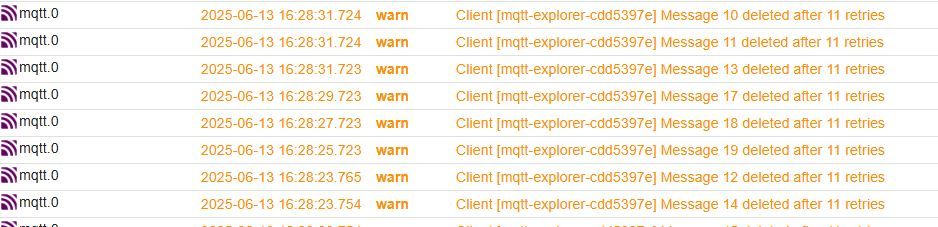
Ich überlege es mir, eine 2. MQTT Instanz extra dafür zu benutzen?
Auf jeden Fall vielen Dank für Deine Unterstützung und einen schönen Sonnabend.
-
@mcu sagte in ESPHome ESP32-S3 mit MQTT verliert Verbindung:
Lass framework: esp-idf aktiv, wenn jetzt alles stabil läuft
Das Problem ist, dass es eine kurze Weile läuft und danach nicht mehr mit unzähligen Warnmeldungen:
Ich überlege es mir, eine 2. MQTT Instanz extra dafür zu benutzen?
Auf jeden Fall vielen Dank für Deine Unterstützung und einen schönen Sonnabend.
@wibear sagte in ESPHome ESP32-S3 mit MQTT verliert Verbindung:
Das Problem ist, dass es eine kurze Weile läuft und danach nicht mehr mit unzähligen Warnmeldungen:
Danke für den Hinweis – wenn der ESP nach kurzer Laufzeit unzählige Warnungen ausgibt und die MQTT-Verarbeitung stoppt, liegt sehr wahrscheinlich ein Speicher- oder Ressourcenproblem vor, vor allem bei vielen mqtt_subscribe-Topics und gleichzeitiger Verarbeitung über Lambda-Funktionen.
🧠 Mögliche Ursachen für dein Problem:
- Zu viele MQTT-Subscriptions
ESPHome (besonders auf dem ESP32-S3 mit esp-idf) ist bei vielen mqtt_subscribe-Textsensoren empfindlich, insbesondere wenn:
Jeder Sensor in kurzer Zeit aktualisiert wird
Viele Topics gleichzeitig abonniert sind
Jede Nachricht per lambda ausgewertet wird (wie bei der Float-Umwandlung)
→ Das kann den Task-Speicher oder den MQTT-Handler überlasten.
- Fehlende Speicherfreigabe / Buffer-Überlauf
Der on_value:-Lambda legt ggf. bei jeder MQTT-Nachricht einen Float-Wert an, ohne Pufferung oder Zeitabstand → das kann zu einer Flut von Speicheroperationen führen, besonders bei vielen Topics mit hoher Update-Rate.
✅ Lösungsvorschläge (step-by-step)
✅ 1. Begrenze Anzahl gleichzeitig aktiver mqtt_subscribe-Sensoren
Teste probeweise nur mit 2 oder 3 Topics, z. B.:text_sensor: - platform: mqtt_subscribe id: test_1 topic: esphome/DisplayTFT/Test1 on_value: then: - lambda: |- id(sensor_test_1).publish_state(atof(x.c_str()));✅ 2. Füge Logging bei jedem Empfang hinzu (nur Debugzwecke)
logger:
  level: DEBUG
Oder in der Lambda:
cpp
ESP_LOGD("mqtt", "MQTT-Wert empfangen: %s", x.c_str());Damit siehst du, ob Nachrichten zu oft oder zu schnell kommen.
✅ 3. Füge einen Filter hinzu, um nur Werte zu publizieren, wenn sie sich wirklich ändern
on_value:
  then:
    - lambda: |-
        float val = atof(x.c_str());
        if (fabs(val - id(sensor_test_1).state) > 0.1) {
          id(sensor_test_1).publish_state(val);
        }
Das reduziert die Anzahl der publish_state()-Aufrufe und entlastet die CPU.
✅ 4. Nutze dedizierte text_sensor nur für Strings, und fasse Daten ggf. zusammen
Wenn du z. B. mehrere Werte gleichzeitig senden kannst (z. B. JSON wie {"solar": 82.5, "netz": 71.2}), kannst du:einen einzigen mqtt_subscribe verwenden
und die Werte intern verteilen
💡 Alternativ (stabilster Weg): on_message: zentral verwenden
Anstelle von 15× mqtt_subscribe, kannst du mit mqtt.on_message: alle Nachrichten zentral verarbeiten:mqtt: on_message: - topic: esphome/DisplayTFT/Solar/Einspeisung_Jetzt then: - lambda: |- float val = atof(x.c_str()); id(sensor_solar).publish_state(val); sensor: - platform: template id: sensor_solar name: "Solar Einspeisung Jetzt"→ Spart massiv Ressourcen und ist deutlich robuster.
📌 Fazit
Wenn du viele MQTT-Werte brauchst und es stabil bleiben soll:Verwende lieber mqtt.on_message zentral statt viele mqtt_subscribe.
Begrenze Aktualisierungsfrequenz und publish_state-Events.
Optional: aggregiere Daten in JSON-Form.
- Zu viele MQTT-Subscriptions
-
@wibear Es sind Antworten von ChatGPT, da kann man nur probieren.
Du nutzt in deinem aktuellen ESPHome YAML folgenden Block:
sensor:
 - platform: mqtt
   name: Solar_Einspeisung_Jetzt
   state_topic: esphome/DisplayTFT/Solar/Einspeisung_Jetzt
Das sieht fast korrekt aus – aber ein wichtiger Hinweis:
⚠️ mqtt als sensor-Plattform wird von ESPHome nicht unterstützt
ESPHome unterstützt keine direkte Verwendung von:platform: mqttfür einen Sensor. Das ist ein Feature von Home Assistant, nicht ESPHome.
✅ Was stattdessen funktioniert in ESPHome
Du musst den mqtt_subscribe-Ansatz nutzen:📌 Beispiel für einen mqtt_subscribe Sensor als text_sensor:
text_sensor:
  - platform: mqtt_subscribe
    id: solar_einspeisung_jetzt
    name: "Solar Einspeisung Jetzt"
    topic: esphome/DisplayTFT/Solar/Einspeisung_Jetzt
Falls du numerische Werte brauchst, kannst du zusätzlich einen internen Sensor anlegen, der den Text in eine Zahl wandelt (z. B. über einen Lambda-Ausdruck).
🧠 Alternativen (nur in Sonderfällen nötig)
Wenn du wirklich aus ESPHome heraus jede beliebige MQTT-Nachricht abfangen und verarbeiten willst, kannst du on_message mit mqtt.on_message verwenden (fortgeschritten):mqtt: on_message: - topic: esphome/DisplayTFT/Solar/Einspeisung_Jetzt then: - lambda: |- ESP_LOGD("mqtt", "Nachricht: %s", x.c_str());Aber: Damit kannst du nicht direkt einen Sensor erzeugen, sondern musst die Werte selbst puffern/verarbeiten.
✅ Empfehlung für dich
Wenn du die Daten wie üblich über MQTT übergibst und im Display zeigen willst:Nutze mqtt_subscribe (wie oben)
Bleibe bei text_sensor, es sei denn, du brauchst einen sensor mit float-Werten (dann: Lambda wandeln)
Lass framework: esp-idf aktiv, wenn jetzt alles stabil läuft
Komplettbeispiel von ChatGPT
esphome: name: displaytft friendly_name: DisplayTFT esp32: board: esp32-s3-devkitc-1 framework: type: esp-idf # Enable logging logger: # Enable Home Assistant API api: encryption: key: "oLqhzrUCfhqRKZXIH6+wajtLeBwaVt03e/YAfM8woSU=" ota: password: "0cb05a749c68876ca294cc4b645222ca" wifi: ssid: !secret wifi_ssid password: !secret wifi_password ap: ssid: "Displaytft Fallback Hotspot" password: "O4s50tPm0qCc" captive_portal: mqtt: discovery: true broker: 192.168.178.10 port: 1883 username: !secret mqtt_username password: !secret mqtt_password client_id: DisplayTFT topic_prefix: esphome # 🔹 Schritt 1: Text-Sensor, empfängt MQTT-String text_sensor: - platform: mqtt_subscribe id: solar_einspeisung_jetzt_text topic: esphome/DisplayTFT/Solar/Einspeisung_Jetzt internal: true on_value: then: - lambda: |- // 🔹 Schritt 2: Text in float umwandeln und setzen float val = atof(x.c_str()); id(solar_einspeisung_jetzt_sensor).publish_state(val); # 🔹 Schritt 3: Eigener float-Sensor, der aus Text gespeist wird sensor: - platform: template id: solar_einspeisung_jetzt_sensor name: "Solar Einspeisung Jetzt" unit_of_measurement: "W" accuracy_decimals: 1 -
@wibear sagte in ESPHome ESP32-S3 mit MQTT verliert Verbindung:
Das Problem ist, dass es eine kurze Weile läuft und danach nicht mehr mit unzähligen Warnmeldungen:
Danke für den Hinweis – wenn der ESP nach kurzer Laufzeit unzählige Warnungen ausgibt und die MQTT-Verarbeitung stoppt, liegt sehr wahrscheinlich ein Speicher- oder Ressourcenproblem vor, vor allem bei vielen mqtt_subscribe-Topics und gleichzeitiger Verarbeitung über Lambda-Funktionen.
🧠 Mögliche Ursachen für dein Problem:
- Zu viele MQTT-Subscriptions
ESPHome (besonders auf dem ESP32-S3 mit esp-idf) ist bei vielen mqtt_subscribe-Textsensoren empfindlich, insbesondere wenn:
Jeder Sensor in kurzer Zeit aktualisiert wird
Viele Topics gleichzeitig abonniert sind
Jede Nachricht per lambda ausgewertet wird (wie bei der Float-Umwandlung)
→ Das kann den Task-Speicher oder den MQTT-Handler überlasten.
- Fehlende Speicherfreigabe / Buffer-Überlauf
Der on_value:-Lambda legt ggf. bei jeder MQTT-Nachricht einen Float-Wert an, ohne Pufferung oder Zeitabstand → das kann zu einer Flut von Speicheroperationen führen, besonders bei vielen Topics mit hoher Update-Rate.
✅ Lösungsvorschläge (step-by-step)
✅ 1. Begrenze Anzahl gleichzeitig aktiver mqtt_subscribe-Sensoren
Teste probeweise nur mit 2 oder 3 Topics, z. B.:text_sensor: - platform: mqtt_subscribe id: test_1 topic: esphome/DisplayTFT/Test1 on_value: then: - lambda: |- id(sensor_test_1).publish_state(atof(x.c_str()));✅ 2. Füge Logging bei jedem Empfang hinzu (nur Debugzwecke)
logger:
  level: DEBUG
Oder in der Lambda:
cpp
ESP_LOGD("mqtt", "MQTT-Wert empfangen: %s", x.c_str());Damit siehst du, ob Nachrichten zu oft oder zu schnell kommen.
✅ 3. Füge einen Filter hinzu, um nur Werte zu publizieren, wenn sie sich wirklich ändern
on_value:
  then:
    - lambda: |-
        float val = atof(x.c_str());
        if (fabs(val - id(sensor_test_1).state) > 0.1) {
          id(sensor_test_1).publish_state(val);
        }
Das reduziert die Anzahl der publish_state()-Aufrufe und entlastet die CPU.
✅ 4. Nutze dedizierte text_sensor nur für Strings, und fasse Daten ggf. zusammen
Wenn du z. B. mehrere Werte gleichzeitig senden kannst (z. B. JSON wie {"solar": 82.5, "netz": 71.2}), kannst du:einen einzigen mqtt_subscribe verwenden
und die Werte intern verteilen
💡 Alternativ (stabilster Weg): on_message: zentral verwenden
Anstelle von 15× mqtt_subscribe, kannst du mit mqtt.on_message: alle Nachrichten zentral verarbeiten:mqtt: on_message: - topic: esphome/DisplayTFT/Solar/Einspeisung_Jetzt then: - lambda: |- float val = atof(x.c_str()); id(sensor_solar).publish_state(val); sensor: - platform: template id: sensor_solar name: "Solar Einspeisung Jetzt"→ Spart massiv Ressourcen und ist deutlich robuster.
📌 Fazit
Wenn du viele MQTT-Werte brauchst und es stabil bleiben soll:Verwende lieber mqtt.on_message zentral statt viele mqtt_subscribe.
Begrenze Aktualisierungsfrequenz und publish_state-Events.
Optional: aggregiere Daten in JSON-Form.
@mcu sagte in ESPHome ESP32-S3 mit MQTT verliert Verbindung:
Teste probeweise nur mit 2 oder 3 Topics, z. B.:
Das habe ich schon auch ausprobiert: immer dasselbe...
@mcu sagte in ESPHome ESP32-S3 mit MQTT verliert Verbindung:
Zu viele MQTT-Subscriptions
Deswegen musste ich extra ESP32-S3 mit PSRAM nehmen.
@mcu sagte in ESPHome ESP32-S3 mit MQTT verliert Verbindung:
Füge Logging bei jedem Empfang hinzu (nur Debugzwecke)
Gute Idee, mache ich.
@mcu sagte in ESPHome ESP32-S3 mit MQTT verliert Verbindung:
Füge einen Filter hinzu, um nur Werte zu publizieren, wenn sie sich wirklich ändern
Sehr gute Sache, mache ich auch.
@mcu sagte in ESPHome ESP32-S3 mit MQTT verliert Verbindung:
Verwende lieber mqtt.on_message zentral statt viele mqtt_subscribe.
Muss ich erstmal rausbekommen, wie das geht...
- Zu viele MQTT-Subscriptions
-
@mcu sagte in ESPHome ESP32-S3 mit MQTT verliert Verbindung:
Teste probeweise nur mit 2 oder 3 Topics, z. B.:
Das habe ich schon auch ausprobiert: immer dasselbe...
@mcu sagte in ESPHome ESP32-S3 mit MQTT verliert Verbindung:
Zu viele MQTT-Subscriptions
Deswegen musste ich extra ESP32-S3 mit PSRAM nehmen.
@mcu sagte in ESPHome ESP32-S3 mit MQTT verliert Verbindung:
Füge Logging bei jedem Empfang hinzu (nur Debugzwecke)
Gute Idee, mache ich.
@mcu sagte in ESPHome ESP32-S3 mit MQTT verliert Verbindung:
Füge einen Filter hinzu, um nur Werte zu publizieren, wenn sie sich wirklich ändern
Sehr gute Sache, mache ich auch.
@mcu sagte in ESPHome ESP32-S3 mit MQTT verliert Verbindung:
Verwende lieber mqtt.on_message zentral statt viele mqtt_subscribe.
Muss ich erstmal rausbekommen, wie das geht...
@wibear sagte in ESPHome ESP32-S3 mit MQTT verliert Verbindung:
Muss ich erstmal rausbekommen, wie das geht...
Super Entscheidung – die zentrale Nutzung von mqtt.on_message: ist deutlich effizienter und stabiler, vor allem bei vielen Topics. Ich zeige dir jetzt, wie du das sauber aufbaust:
✅ Zentrales MQTT-Handling mit mqtt.on_message
Statt für jeden Wert einen eigenen mqtt_subscribe zu verwenden, fängst du alle Nachrichten in einem zentralen Block ab – und entscheidest dann per topic, was damit passiert.🔧 Beispiel: Zwei MQTT-Werte zentral empfangen und verarbeiten
esphome: name: displaytft friendly_name: DisplayTFT esp32: board: esp32-s3-devkitc-1 framework: type: esp-idf logger: api: encryption: key: "DEIN_KEY" ota: password: "DEIN_PASSWORT" wifi: ssid: !secret wifi_ssid password: !secret wifi_password ap: ssid: "Displaytft Fallback Hotspot" password: "O4s50tPm0qCc" captive_portal: mqtt: broker: 192.168.178.10 username: !secret mqtt_username password: !secret mqtt_password client_id: DisplayTFT topic_prefix: esphome on_message: - topic: esphome/DisplayTFT/Solar/Einspeisung_Jetzt then: - lambda: |- float val = atof(x.c_str()); id(sensor_solar_einspeisung).publish_state(val); - topic: esphome/DisplayTFT/Netz/Verbrauch_Jetzt then: - lambda: |- float val = atof(x.c_str()); id(sensor_netz_verbrauch).publish_state(val); sensor: - platform: template id: sensor_solar_einspeisung name: "Solar Einspeisung Jetzt" unit_of_measurement: "W" accuracy_decimals: 1 - platform: template id: sensor_netz_verbrauch name: "Netz Verbrauch Jetzt" unit_of_measurement: "W" accuracy_decimals: 1 `` 💡 Erklärung Abschnitt Bedeutung mqtt.on_message: Fängt MQTT-Nachrichten für bestimmte Topics ab lambda: Verarbeitet den empfangenen Wert (x) atof(x.c_str()) Wandelt den Text in eine Zahl um template sensor Hält den aktuellen Float-Wert, damit du ihn anzeigen oder weiterverwenden kannst 🔁 Vorteile gegenüber mqtt_subscribe ✅ Kein RAM-Leak bei vielen Topics ✅ Bessere Performance ✅ Saubere zentrale Logik ✅ Keine 20× text_sensor, sondern alles an einem Ort -
@wibear sagte in ESPHome ESP32-S3 mit MQTT verliert Verbindung:
Muss ich erstmal rausbekommen, wie das geht...
Super Entscheidung – die zentrale Nutzung von mqtt.on_message: ist deutlich effizienter und stabiler, vor allem bei vielen Topics. Ich zeige dir jetzt, wie du das sauber aufbaust:
✅ Zentrales MQTT-Handling mit mqtt.on_message
Statt für jeden Wert einen eigenen mqtt_subscribe zu verwenden, fängst du alle Nachrichten in einem zentralen Block ab – und entscheidest dann per topic, was damit passiert.🔧 Beispiel: Zwei MQTT-Werte zentral empfangen und verarbeiten
esphome:
  name: displaytft
  friendly_name: DisplayTFT

esp32:
  board: esp32-s3-devkitc-1
  framework:
    type: esp-idf

logger:

api:
  encryption:
    key: "DEIN_KEY"

ota:
  password: "DEIN_PASSWORT"

wifi:
  ssid: !secret wifi_ssid
  password: !secret wifi_password
  ap:
    ssid: "Displaytft Fallback Hotspot"
    password: "O4s50tPm0qCc"

captive_portal:

mqtt:
  broker: 192.168.178.10
  username: !secret mqtt_username
  password: !secret mqtt_password
  client_id: DisplayTFT
  topic_prefix: esphome

  on_message:
    - topic: esphome/DisplayTFT/Solar/Einspeisung_Jetzt
      then:
        - lambda: |-
            float val = atof(x.c_str());
            id(sensor_solar_einspeisung).publish_state(val);

    - topic: esphome/DisplayTFT/Netz/Verbrauch_Jetzt
      then:
        - lambda: |-
            float val = atof(x.c_str());
            id(sensor_netz_verbrauch).publish_state(val);

sensor:
  - platform: template
    id: sensor_solar_einspeisung
    name: "Solar Einspeisung Jetzt"
    unit_of_measurement: "W"
    accuracy_decimals: 1

  - platform: template
    id: sensor_netz_verbrauch
    name: "Netz Verbrauch Jetzt"
    unit_of_measurement: "W"
    accuracy_decimals: 1
``
💡 Erklärung
Abschnitt	Bedeutung
mqtt.on_message:	Fängt MQTT-Nachrichten für bestimmte Topics ab
lambda:	Verarbeitet den empfangenen Wert (x)
atof(x.c_str())	Wandelt den Text in eine Zahl um
template sensor	Hält den aktuellen Float-Wert, damit du ihn anzeigen oder weiterverwenden kannst

🔁 Vorteile gegenüber mqtt_subscribe
✅ Kein RAM-Leak bei vielen Topics
✅ Bessere Performance
✅ Saubere zentrale Logik
✅ Keine 20× text_sensor, sondern alles an einem Ort
Hey! Du scheinst an dieser Unterhaltung interessiert zu sein, hast aber noch kein Konto.
Hast du es satt, bei jedem Besuch durch die gleichen Beiträge zu scrollen? Wenn du dich für ein Konto anmeldest, kommst du immer genau dorthin zurück, wo du zuvor warst, und kannst dich über neue Antworten benachrichtigen lassen (entweder per E-Mail oder Push-Benachrichtigung). Du kannst auch Lesezeichen speichern und Beiträge positiv bewerten, um anderen Community-Mitgliedern deine Wertschätzung zu zeigen.
Mit deinem Input könnte dieser Beitrag noch besser werden 💗
Registrieren Anmelden250
Online33.0k
Benutzer83.6k
Themen1.3m
Beiträge