



Test Adapter rpi2 2.x
-
@dock07 said in Test Adapter rpi2 2.x:
Für GPIO-Ausgänge habe ich definierte true/false Zustände erst mal in Bookworm ohne rpi2 über Blockly und simple-ssh bash-Scripts mit pinctrl erreicht.
Da würde mich interessieren, was das Skript anders macht. Wie hast du die Ausgänge definiert? Wenn die keinen Startwert haben, schaltet der Adapter da nichts.
@garfonso
lieber Garfonso, erst mal vielen Dank das du versuchst die Adapterfunktion zu verbessern.
Was das Skript eventuell anders macht kann ich dir leider mit meinen rudimentären Programmierkenntnissen die größtenteils aus paste and copy bestehen nicht beantworten.
Definierter Startwert ist meinerseits nicht ganz richtig formuliert.
nach Reboot dürfte ebenfalls da eine null stehen weil die boot-config die GPIO-Startwerte nicht mehr setzen kann. Ich denke ich liege richtig mit der Vermutung das rpi2 mit dem kurzem false true false genau diesen definierten Startwert erzeugt?
Wichtig ist halt für mich das die GPIOs die Füße bei reboot still halten und ein false, oder von mir aus auch Null, ausgeben. Danach schalten die o.g. Javascripts die GPIOs sauber auf true und später auch auf false.Außer dem Startverhalten funktioniert der rpi2 Adapter für mich. Lasse halt zur Zeit die GPIOs nicht durch RPI initialisieren bei welchen das kurze "true" für mich schädlich ist.
-
@garfonso
lieber Garfonso, erst mal vielen Dank das du versuchst die Adapterfunktion zu verbessern.
Was das Skript eventuell anders macht kann ich dir leider mit meinen rudimentären Programmierkenntnissen die größtenteils aus paste and copy bestehen nicht beantworten.
Definierter Startwert ist meinerseits nicht ganz richtig formuliert.
nach Reboot dürfte ebenfalls da eine null stehen weil die boot-config die GPIO-Startwerte nicht mehr setzen kann. Ich denke ich liege richtig mit der Vermutung das rpi2 mit dem kurzem false true false genau diesen definierten Startwert erzeugt?
Wichtig ist halt für mich das die GPIOs die Füße bei reboot still halten und ein false, oder von mir aus auch Null, ausgeben. Danach schalten die o.g. Javascripts die GPIOs sauber auf true und später auch auf false.Außer dem Startverhalten funktioniert der rpi2 Adapter für mich. Lasse halt zur Zeit die GPIOs nicht durch RPI initialisieren bei welchen das kurze "true" für mich schädlich ist.
@dock07 said in Test Adapter rpi2 2.x:
Ich denke ich liege richtig mit der Vermutung das rpi2 mit dem kurzem false true false genau diesen definierten Startwert erzeugt?
Nein, es gibt kein false / true / false. Zumindest nicht im Adaptercode.
Du kannst im Adapter für einen Ausgang einstellen, ob er nur ein "Ausgang" ein "Ausgant, Startwert 0" oder ein "Ausgang, Startwert 1" ist. Bei nur "Ausgang" macht der Adapter beim start gar nichts (bzw. neuerdings fragt er beim System an, welchen Zustand der Ausgang hat und setzt den in iobroker). Bei "Startwert 0" bzw. "Startwert 1" wird fest dieser Wert beim Adapter-Start gesetzt.
Mehr kann ich an der Stelle nicht tun.
Mir ist irgendwie unklar, ob da was anderes im System an den GPIOs was schaltet... aber eigentlich müsste das dann auch ohne Adapter passieren. Oder es liegt an der node-Bibliothek, aber da hab ich bisher auch nichts zu gefunden, im Code oder der Beschreibung.Bei den Eingängen gibt es einen User, der berichtet, dass die am Anfang noch falsche Werte liefern. Das kann ich hier auch nicht nachstellen...
@dock07 said in Test Adapter rpi2 2.x:
Wichtig ist halt für mich das die GPIOs die Füße bei reboot still halten und ein false, oder von mir aus auch Null, ausgeben. Danach schalten die o.g. Javascripts die GPIOs sauber auf true und später auch auf false.
Hm.. das deutet darauf hin, dass es vielleicht doch ein Problem mit den Eingängen sein kann?
Ultimativer Lovelace Leitfaden: https://forum.iobroker.net/topic/35937/der-ultimative-iobroker-lovelace-leitfaden-dokumentation
Lovelace UI Beispiele: https://forum.iobroker.net/topic/35950/zeigt-her-eure-lovelace-visualisierung
-
@dock07 said in Test Adapter rpi2 2.x:
Ich denke ich liege richtig mit der Vermutung das rpi2 mit dem kurzem false true false genau diesen definierten Startwert erzeugt?
Nein, es gibt kein false / true / false. Zumindest nicht im Adaptercode.
Du kannst im Adapter für einen Ausgang einstellen, ob er nur ein "Ausgang" ein "Ausgant, Startwert 0" oder ein "Ausgang, Startwert 1" ist. Bei nur "Ausgang" macht der Adapter beim start gar nichts (bzw. neuerdings fragt er beim System an, welchen Zustand der Ausgang hat und setzt den in iobroker). Bei "Startwert 0" bzw. "Startwert 1" wird fest dieser Wert beim Adapter-Start gesetzt.
Mehr kann ich an der Stelle nicht tun.
Mir ist irgendwie unklar, ob da was anderes im System an den GPIOs was schaltet... aber eigentlich müsste das dann auch ohne Adapter passieren. Oder es liegt an der node-Bibliothek, aber da hab ich bisher auch nichts zu gefunden, im Code oder der Beschreibung.Bei den Eingängen gibt es einen User, der berichtet, dass die am Anfang noch falsche Werte liefern. Das kann ich hier auch nicht nachstellen...
@dock07 said in Test Adapter rpi2 2.x:
Wichtig ist halt für mich das die GPIOs die Füße bei reboot still halten und ein false, oder von mir aus auch Null, ausgeben. Danach schalten die o.g. Javascripts die GPIOs sauber auf true und später auch auf false.
Hm.. das deutet darauf hin, dass es vielleicht doch ein Problem mit den Eingängen sein kann?
@garfonso >Bei nur "Ausgang" macht der Adapter beim start gar nichts|<
Kann ich so nicht bestätigen. In dem Moment beglückt mich der GPIO beim Start mit einem unerwünschten "true", eigentlich genau so wie bei eingestelltem Anfangswert 1
mit Ausgang Anfangswert 0 kommt es bei mir, und wahrscheinlich z.B. auch bei @Hasont, zu dem ungewünschten false true false bei Neustart.
Ohne die Initialisierung des jeweiligen GPIO durch den Adapter bleibt dieser auf null/ false, also so wie von mir gewünscht.
-
@garfonso >Bei nur "Ausgang" macht der Adapter beim start gar nichts|<
Kann ich so nicht bestätigen. In dem Moment beglückt mich der GPIO beim Start mit einem unerwünschten "true", eigentlich genau so wie bei eingestelltem Anfangswert 1
mit Ausgang Anfangswert 0 kommt es bei mir, und wahrscheinlich z.B. auch bei @Hasont, zu dem ungewünschten false true false bei Neustart.
Ohne die Initialisierung des jeweiligen GPIO durch den Adapter bleibt dieser auf null/ false, also so wie von mir gewünscht.
@dock07 sagte in Test Adapter rpi2 2.x:
@garfonso >Bei nur "Ausgang" macht der Adapter beim start gar nichts|<
Kann ich so nicht bestätigen. In dem Moment beglückt mich der GPIO beim Start mit einem unerwünschten "true", eigentlich genau so wie bei eingestelltem Anfangswert 1
mit Ausgang Anfangswert 0 kommt es bei mir, und wahrscheinlich z.B. auch bei @Hasont, zu dem ungewünschten false true false bei Neustart.
Ohne die Initialisierung des jeweiligen GPIO durch den Adapter bleibt dieser auf null/ false, also so wie von mir gewünscht.
@Garfonso
@dock07
Hallo, also bei mir in der 2.3.2 ist es genau so wie bei dock07.
Wie bereits weiter oben schon mal geschrieben sind mir folgende Dinge aufgefallen:
1.) Startverhalten mit false/true/false bei Ausgang = 0
2.) Wenn ich den rpi2 Prozess pausiere und den Raspie neu reboote bleibt alles false wie es sein soll!
Starte ich den rpi2 Prozess wieder gehen alle Relaise auf true/false.
3.) Wenn ich bei Ausgang = Ausgang 4 GPIOs der Relais 1-4 auf true stelle und 4 GPIOs der Relaise 5 - 8 auf false und dann die Instanz rpi2 neu starte werden erstmal alle Ausgänge auf true gesetzt und die GPIOs der Relais 1 - 4 bleiben true und die GPIOs der Relais 5 - 8 gehen true/false. Die GPIOs der Relais 5 - 8 werden somit auch erstmal falsch auf true gesetzt.
Meine Relaise sind true wenn an den GPIOs 3,3V anliegen. So ist es Standard beim Raspie.Bei den Eingängen ist es bei mir tatsächlich so, dass ein mit 3,3V dauerhaft auf true gesetzter Eingang manchmal für eine ganze Zeit lang nach Reboot vom Raspie oder der rpi2 Instanz als false im Objekt ansteht. Das ändert sich komischerweise erst wenn irgendein Trigger anliegt. Ich hab das bisher nur in den Objekten beobachtet. Trigger kann eine geschaltete Neonröhre oder ein Login über die App sein.
Ev. könnte ich da ja mal den Status mit pinctrl im Raspi selbst abfragen.Ich kann das leider nur schlecht beschreiben da es nicht sauber nachvollziehbar ist.
-
@dock07 said in Test Adapter rpi2 2.x:
Ich denke ich liege richtig mit der Vermutung das rpi2 mit dem kurzem false true false genau diesen definierten Startwert erzeugt?
Nein, es gibt kein false / true / false. Zumindest nicht im Adaptercode.
Du kannst im Adapter für einen Ausgang einstellen, ob er nur ein "Ausgang" ein "Ausgant, Startwert 0" oder ein "Ausgang, Startwert 1" ist. Bei nur "Ausgang" macht der Adapter beim start gar nichts (bzw. neuerdings fragt er beim System an, welchen Zustand der Ausgang hat und setzt den in iobroker). Bei "Startwert 0" bzw. "Startwert 1" wird fest dieser Wert beim Adapter-Start gesetzt.
Mehr kann ich an der Stelle nicht tun.
Mir ist irgendwie unklar, ob da was anderes im System an den GPIOs was schaltet... aber eigentlich müsste das dann auch ohne Adapter passieren. Oder es liegt an der node-Bibliothek, aber da hab ich bisher auch nichts zu gefunden, im Code oder der Beschreibung.Bei den Eingängen gibt es einen User, der berichtet, dass die am Anfang noch falsche Werte liefern. Das kann ich hier auch nicht nachstellen...
@dock07 said in Test Adapter rpi2 2.x:
Wichtig ist halt für mich das die GPIOs die Füße bei reboot still halten und ein false, oder von mir aus auch Null, ausgeben. Danach schalten die o.g. Javascripts die GPIOs sauber auf true und später auch auf false.
Hm.. das deutet darauf hin, dass es vielleicht doch ein Problem mit den Eingängen sein kann?
@garfonso leider keine Verbesserung in 2.4 bei Start des Adapters.
ich fasse meine Probleme noch mal zusammen:
"Ausgang Anfangswert 0" Adapter startet GPIO mit false true false
"Ausgang" Adapter startet GPIO mit true
ohne Initialisierung der GPIOs durch den Adapter startet Bookworm auf Rasp.4 die Ausgänge mit null/false, genau so wie es sein soll. -
@dock07 said in Test Adapter rpi2 2.x:
Ich denke ich liege richtig mit der Vermutung das rpi2 mit dem kurzem false true false genau diesen definierten Startwert erzeugt?
Nein, es gibt kein false / true / false. Zumindest nicht im Adaptercode.
Du kannst im Adapter für einen Ausgang einstellen, ob er nur ein "Ausgang" ein "Ausgant, Startwert 0" oder ein "Ausgang, Startwert 1" ist. Bei nur "Ausgang" macht der Adapter beim start gar nichts (bzw. neuerdings fragt er beim System an, welchen Zustand der Ausgang hat und setzt den in iobroker). Bei "Startwert 0" bzw. "Startwert 1" wird fest dieser Wert beim Adapter-Start gesetzt.
Mehr kann ich an der Stelle nicht tun.
Mir ist irgendwie unklar, ob da was anderes im System an den GPIOs was schaltet... aber eigentlich müsste das dann auch ohne Adapter passieren. Oder es liegt an der node-Bibliothek, aber da hab ich bisher auch nichts zu gefunden, im Code oder der Beschreibung.Bei den Eingängen gibt es einen User, der berichtet, dass die am Anfang noch falsche Werte liefern. Das kann ich hier auch nicht nachstellen...
@dock07 said in Test Adapter rpi2 2.x:
Wichtig ist halt für mich das die GPIOs die Füße bei reboot still halten und ein false, oder von mir aus auch Null, ausgeben. Danach schalten die o.g. Javascripts die GPIOs sauber auf true und später auch auf false.
Hm.. das deutet darauf hin, dass es vielleicht doch ein Problem mit den Eingängen sein kann?
@garfonso
Hallo Garfonso,ich habe die 2.4 jetzt auch zum testen installiert?
Habe wie dock07 keine Änderung zur 2.3.2 bei dem Startverhalten festgestellt.
Auch mein dauerhaft auf 3,3V gelegter Eingang GPIO17 ist erst false und wird erst später true.
Edit 11.03.25
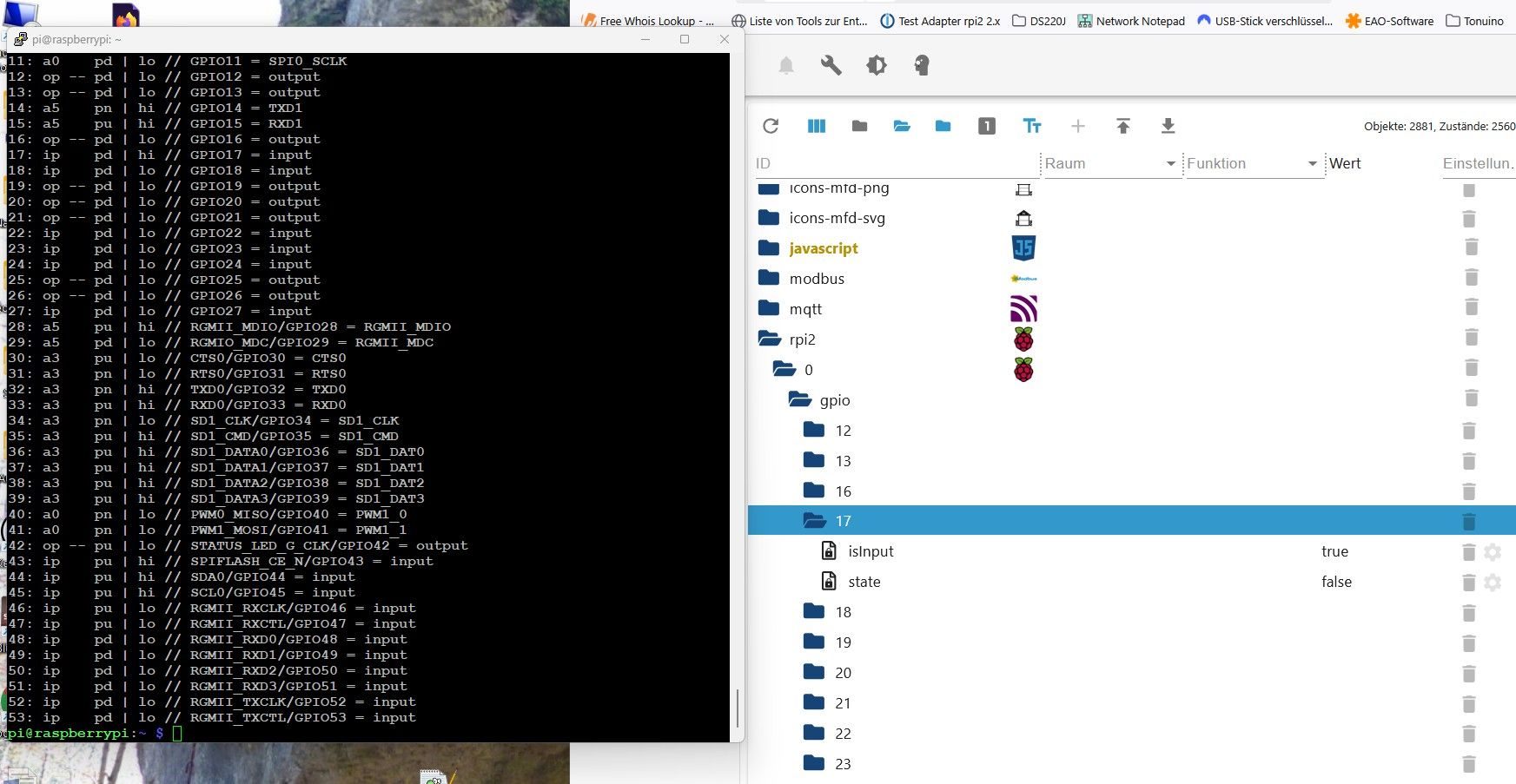
Der Eingang blieb über 20min auf false obwohl eindeutig true.
Habe das 10 mal wiederholt. 9 mal falsch. Sobald ich die 3,3V wegnehme und wieder anlege funktioniert es sofort.
Nur beim Start der rpi2 Instanz und bereits vorher angelegten 3,3V wird der falsche Wert false anstatt true angezeigt.
Das ist auch auf allen meinen Eingängen so.
Wenn ich was testen soll sag Bescheid.LG
Horst -
@searcher57
Hi,
danke für das Log. Könntest du den rpi2 adapter auf debug umstellen und mir dann nochmal ein log vom neustart geben? (der sollte beim umstellen direkt neugestartet werden, sonst bitte von Hand).Irgendwie ist mir noch nicht klar, warum das GPIO Objekt da undefined ist.
@garfonso said in Test Adapter rpi2 2.x:
@searcher57
Hi,
danke für das Log. Könntest du den rpi2 adapter auf debug umstellen und mir dann nochmal ein log vom neustart geben? (der sollte beim umstellen direkt neugestartet werden, sonst bitte von Hand).Irgendwie ist mir noch nicht klar, warum das GPIO Objekt da undefined ist.
Hallo,
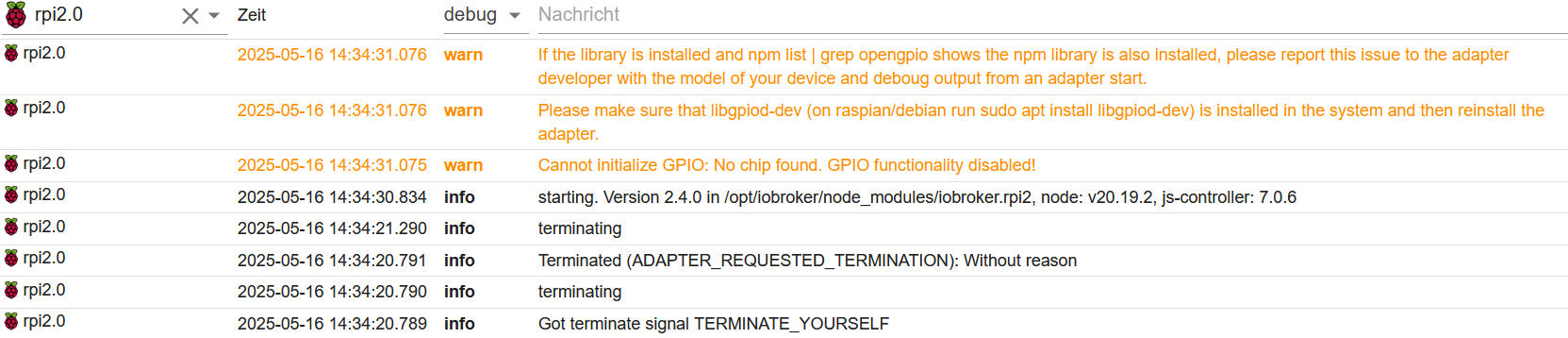
der Adapter lief jetzt 8 Monate ohne Probleme. Doch seitdem ich gestern ein update und ein upgrade gemacht habe, hängt er schon wieder. Ich weiss nicht, ob sich schon jemand bei Dir diesbezüglich gemeldet hat.Hier das aktuelle Log:
das aktuelle iob diag:
```bash Script v.2025-02-23 *** BASE SYSTEM *** Static hostname: Raspi58GB Icon name: computer Operating System: Debian GNU/Linux 12 (bookworm) Kernel: Linux 6.12.25+rpt-rpi-2712 Architecture: arm64 OS is similar to: Model : Raspberry Pi 5 Model B Rev 1.0 Docker : false Virtualization : none Kernel : aarch64 Userland : 64 bit Systemuptime and Load: 14:43:09 up 21:18, 2 users, load average: 0.99, 0.39, 0.21 CPU threads: 4 *** LIFE CYCLE STATUS *** Operating System is the current Debian stable version codenamed 'bookworm'! *** RASPBERRY THROTTLING *** Current issues: No throttling issues detected. Previously detected issues: No throttling issues detected. *** TIME AND TIMEZONES *** Local time: Fri 2025-05-16 14:43:09 CEST Universal time: Fri 2025-05-16 12:43:09 UTC RTC time: Fri 2025-05-16 12:43:09 Time zone: Europe/Berlin (CEST, +0200) System clock synchronized: yes NTP service: active RTC in local TZ: no *** Users and Groups *** User that called 'iob diag': pi HOME=/home/pi GROUPS=pi adm dialout cdrom sudo audio video plugdev games users input render netdev gpio i2c spi iobroker User that is running 'js-controller': iobroker HOME=/home/iobroker GROUPS=iobroker tty dialout audio video plugdev bluetooth gpio i2c *** DISPLAY-SERVER SETUP *** Display-Server: false Desktop: Terminal: tty *** MEMORY *** total used free shared buff/cache available Mem: 8.4G 3.3G 1.1G 5.6M 4.1G 5.1G Swap: 209M 0B 209M Total: 8.7G 3.3G 1.3G Active iob-Instances: 30 8051 M total memory 3189 M used memory 3148 M active memory 3357 M inactive memory 1025 M free memory 197 M buffer memory 3741 M swap cache 199 M total swap 0 M used swap 199 M free swap *** top - Table Of Processes *** top - 14:43:10 up 21:18, 2 users, load average: 0.99, 0.39, 0.21 Tasks: 196 total, 1 running, 195 sleeping, 0 stopped, 0 zombie %Cpu(s): 0.0 us, 0.0 sy, 0.0 ni,100.0 id, 0.0 wa, 0.0 hi, 0.0 si, 0.0 st MiB Mem : 8051.8 total, 1025.6 free, 3189.4 used, 3939.1 buff/cache MiB Swap: 200.0 total, 200.0 free, 0.0 used. 4862.4 avail Mem *** FAILED SERVICES *** UNIT LOAD ACTIVE SUB DESCRIPTION 0 loaded units listed. *** DMESG CRITICAL ERRORS *** No critical errors detected *** FILESYSTEM *** Filesystem Type Size Used Avail Use% Mounted on udev devtmpfs 3.9G 0 3.9G 0% /dev tmpfs tmpfs 806M 5.4M 800M 1% /run /dev/mmcblk0p2 ext4 59G 12G 44G 21% / tmpfs tmpfs 4.0G 0 4.0G 0% /dev/shm tmpfs tmpfs 5.0M 48K 5.0M 1% /run/lock /dev/sda1 exfat 29G 7.2G 22G 25% /mnt/usb0 /dev/mmcblk0p1 vfat 510M 66M 445M 13% /boot/firmware tmpfs tmpfs 806M 0 806M 0% /run/user/1000 Messages concerning ext4 filesystem in dmesg: [Thu May 15 17:24:44 2025] Kernel command line: reboot=w coherent_pool=1M 8250.nr_uarts=1 pci=pcie_bus_safe cgroup_disable=memory numa_policy=interleave smsc95xx.macaddr=2C:CF:67:2F:A6:31 vc_mem.mem_base=0x3fc00000 vc_mem.mem_size=0x40000000 console=tty1 console=ttyAMA10,115200 root=PARTUUID=70767922-02 rootfstype=ext4 fsck.repair=yes rootwait [Thu May 15 17:24:48 2025] EXT4-fs (mmcblk0p2): mounted filesystem 56f80fa2-e005-4cca-86e6-19da1069914d ro with ordered data mode. Quota mode: none. [Thu May 15 17:24:51 2025] EXT4-fs (mmcblk0p2): re-mounted 56f80fa2-e005-4cca-86e6-19da1069914d r/w. Quota mode: none. Show mounted filesystems: TARGET SOURCE FSTYPE OPTIONS / /dev/mmcblk0p2 ext4 rw,noatime |-/mnt/usb0 /dev/sda1 exfat rw,relatime,fmask=0000,dmask=0000,allow_utime=0022,iocharset=utf8,errors=remount-ro `-/boot/firmware /dev/mmcblk0p1 vfat rw,relatime,fmask=0022,dmask=0022,codepage=437,iocharset=ascii,shortname=mixed,errors=remount-ro Files in neuralgic directories: /var: 1.7G /var/ 1.1G /var/log/journal/61b86e93a3bd4c4e97ff911079b6083e 1.1G /var/log/journal 1.1G /var/log 209M /var/cache Archived and active journals take up 1.0G in the file system. /opt/iobroker/backups: 321M /opt/iobroker/backups/ /opt/iobroker/iobroker-data: 1.4G /opt/iobroker/iobroker-data/ 1.2G /opt/iobroker/iobroker-data/files 617M /opt/iobroker/iobroker-data/files/javascript.admin 560M /opt/iobroker/iobroker-data/files/javascript.admin/static 558M /opt/iobroker/iobroker-data/files/javascript.admin/static/js The five largest files in iobroker-data are: 46M /opt/iobroker/iobroker-data/objects.jsonl 38M /opt/iobroker/iobroker-data/files/iot.admin/static/js/main.d3d286bd.js.map 35M /opt/iobroker/iobroker-data/files/devices.admin/static/js/main.24f2bb56.js.map 27M /opt/iobroker/iobroker-data/files/tankerkoenig.admin/build/index.js.map 26M /opt/iobroker/iobroker-data/files/echarts/static/js/main.41cee985.js.map USB-Devices by-id: USB-Sticks - Avoid direct links to /dev/tty* in your adapter setups, please always prefer the links 'by-id': No Devices found 'by-id' *** ZigBee Settings *** Zigbee Network Settings on your coordinator/in nvbackup are: zigbee.X Extended Pan ID: *** MASKED *** Pan ID: *** MASKED *** Channel: *** MASKED *** Network Key: *** MASKED *** To unmask the settings run 'iob diag --unmask' *** NodeJS-Installation *** /usr/bin/nodejs v20.19.2 /usr/bin/node v20.19.2 /usr/bin/npm 10.8.2 /usr/bin/npx 10.8.2 /usr/bin/corepack 0.31.0 nodejs: Installed: 20.19.2-1nodesource1 Candidate: 20.19.2-1nodesource1 Version table: *** 20.19.2-1nodesource1 1001 500 https://deb.nodesource.com/node_20.x nodistro/main arm64 Packages 100 /var/lib/dpkg/status 20.19.1-1nodesource1 1001 500 https://deb.nodesource.com/node_20.x nodistro/main arm64 Packages 20.19.0-1nodesource1 1001 500 https://deb.nodesource.com/node_20.x nodistro/main arm64 Packages 20.18.3-1nodesource1 1001 500 https://deb.nodesource.com/node_20.x nodistro/main arm64 Packages 20.18.2-1nodesource1 1001 500 https://deb.nodesource.com/node_20.x nodistro/main arm64 Packages 20.18.1-1nodesource1 1001 500 https://deb.nodesource.com/node_20.x nodistro/main arm64 Packages 20.18.0-1nodesource1 1001 500 https://deb.nodesource.com/node_20.x nodistro/main arm64 Packages 20.17.0-1nodesource1 1001 500 https://deb.nodesource.com/node_20.x nodistro/main arm64 Packages 20.16.0-1nodesource1 1001 500 https://deb.nodesource.com/node_20.x nodistro/main arm64 Packages 20.15.1-1nodesource1 1001 500 https://deb.nodesource.com/node_20.x nodistro/main arm64 Packages 20.15.0-1nodesource1 1001 500 https://deb.nodesource.com/node_20.x nodistro/main arm64 Packages 20.14.0-1nodesource1 1001 500 https://deb.nodesource.com/node_20.x nodistro/main arm64 Packages 20.13.1-1nodesource1 1001 500 https://deb.nodesource.com/node_20.x nodistro/main arm64 Packages 20.13.0-1nodesource1 1001 500 https://deb.nodesource.com/node_20.x nodistro/main arm64 Packages 20.12.2-1nodesource1 1001 500 https://deb.nodesource.com/node_20.x nodistro/main arm64 Packages 20.12.1-1nodesource1 1001 500 https://deb.nodesource.com/node_20.x nodistro/main arm64 Packages 20.12.0-1nodesource1 1001 500 https://deb.nodesource.com/node_20.x nodistro/main arm64 Packages 20.11.1-1nodesource1 1001 500 https://deb.nodesource.com/node_20.x nodistro/main arm64 Packages 20.11.0-1nodesource1 1001 500 https://deb.nodesource.com/node_20.x nodistro/main arm64 Packages 20.10.0-1nodesource1 1001 500 https://deb.nodesource.com/node_20.x nodistro/main arm64 Packages 20.9.0-1nodesource1 1001 500 https://deb.nodesource.com/node_20.x nodistro/main arm64 Packages 20.8.1-1nodesource1 1001 500 https://deb.nodesource.com/node_20.x nodistro/main arm64 Packages 20.8.0-1nodesource1 1001 500 https://deb.nodesource.com/node_20.x nodistro/main arm64 Packages 20.7.0-1nodesource1 1001 500 https://deb.nodesource.com/node_20.x nodistro/main arm64 Packages 20.6.1-1nodesource1 1001 500 https://deb.nodesource.com/node_20.x nodistro/main arm64 Packages 20.6.0-1nodesource1 1001 500 https://deb.nodesource.com/node_20.x nodistro/main arm64 Packages 20.5.1-1nodesource1 1001 500 https://deb.nodesource.com/node_20.x nodistro/main arm64 Packages 20.5.0-1nodesource1 1001 500 https://deb.nodesource.com/node_20.x nodistro/main arm64 Packages 20.4.0-1nodesource1 1001 500 https://deb.nodesource.com/node_20.x nodistro/main arm64 Packages 20.3.1-1nodesource1 1001 500 https://deb.nodesource.com/node_20.x nodistro/main arm64 Packages 20.3.0-1nodesource1 1001 500 https://deb.nodesource.com/node_20.x nodistro/main arm64 Packages 20.2.0-1nodesource1 1001 500 https://deb.nodesource.com/node_20.x nodistro/main arm64 Packages 20.1.0-1nodesource1 1001 500 https://deb.nodesource.com/node_20.x nodistro/main arm64 Packages 20.0.0-1nodesource1 1001 500 https://deb.nodesource.com/node_20.x nodistro/main arm64 Packages 18.19.0+dfsg-6~deb12u2 500 500 http://deb.debian.org/debian bookworm/main arm64 Packages 18.19.0+dfsg-6~deb12u1 500 500 http://deb.debian.org/debian-security bookworm-security/main arm64 Packages Temp directories causing deletion problem: 0 No problems detected Errors in npm tree: 0 No problems detected *** ioBroker-Installation *** ioBroker Status iobroker is running on this host. Objects type: jsonl States type: jsonl Hosts: Raspi58GB Raspi58GB (version: 7.0.6, hostname: Raspi58GB , alive, uptime: 75787) Core adapters versions js-controller: 7.0.6 admin: 7.6.3 javascript: 8.8.3 nodejs modules from github: 0 Adapter State + system.adapter.admin.0 : admin : Raspi58GB - enabled, port: 8081, bind: 0.0.0.0, run as: admin + system.adapter.alexa2.0 : alexa2 : Raspi58GB - enabled system.adapter.alias-manager.0 : alias-manager : Raspi58GB - disabled + system.adapter.awtrix-light.0 : awtrix-light : Raspi58GB - enabled + system.adapter.backitup.0 : backitup : Raspi58GB - enabled + system.adapter.broadlink2.0 : broadlink2 : Raspi58GB - enabled system.adapter.devices.0 : devices : Raspi58GB - disabled + system.adapter.discovery.0 : discovery : Raspi58GB - enabled + system.adapter.doorbird.0 : doorbird : Raspi58GB - enabled + system.adapter.echarts.0 : echarts : Raspi58GB - enabled + system.adapter.followthesun.0 : followthesun : Raspi58GB - enabled + system.adapter.fritzdect.0 : fritzdect : Raspi58GB - enabled + system.adapter.frontier_silicon.0 : frontier_silicon : Raspi58GB - enabled system.adapter.frontier_silicon.1 : frontier_silicon : Raspi58GB - disabled system.adapter.frontier_silicon.2 : frontier_silicon : Raspi58GB - disabled system.adapter.frontier_silicon.3 : frontier_silicon : Raspi58GB - disabled + system.adapter.hm-rega.0 : hm-rega : Raspi58GB - enabled + system.adapter.hm-rpc.0 : hm-rpc : Raspi58GB - enabled, port: 0 + system.adapter.hm-rpc.1 : hm-rpc : Raspi58GB - enabled, port: 0 + system.adapter.influxdb.0 : influxdb : Raspi58GB - enabled, port: 8086 + system.adapter.iot.0 : iot : Raspi58GB - enabled + system.adapter.javascript.0 : javascript : Raspi58GB - enabled + system.adapter.mqtt.0 : mqtt : Raspi58GB - enabled, port: 1883, bind: 0.0.0.0 system.adapter.openweathermap.0 : openweathermap : Raspi58GB - enabled + system.adapter.rpi2.0 : rpi2 : Raspi58GB - enabled + system.adapter.shelly.0 : shelly : Raspi58GB - enabled, port: 1882, bind: 0.0.0.0 + system.adapter.shelly.1 : shelly : Raspi58GB - enabled, port: 1882, bind: 0.0.0.0 + system.adapter.simple-api.0 : simple-api : Raspi58GB - enabled, port: 8087, bind: 0.0.0.0, run as: admin + system.adapter.smartmeter.0 : smartmeter : Raspi58GB - enabled + system.adapter.tankerkoenig.0 : tankerkoenig : Raspi58GB - enabled + system.adapter.telegram.0 : telegram : Raspi58GB - enabled, port: 8443, bind: 0.0.0.0 + system.adapter.text2command.0 : text2command : Raspi58GB - enabled + system.adapter.tr-064.0 : tr-064 : Raspi58GB - enabled + system.adapter.vis-2.0 : vis-2 : Raspi58GB - enabled + system.adapter.web.0 : web : Raspi58GB - enabled, port: 8082, bind: 0.0.0.0, run as: admin system.adapter.yr.0 : yr : Raspi58GB - enabled + instance is alive Enabled adapters with bindings + system.adapter.admin.0 : admin : Raspi58GB - enabled, port: 8081, bind: 0.0.0.0, run as: admin + system.adapter.hm-rpc.0 : hm-rpc : Raspi58GB - enabled, port: 0 + system.adapter.hm-rpc.1 : hm-rpc : Raspi58GB - enabled, port: 0 + system.adapter.influxdb.0 : influxdb : Raspi58GB - enabled, port: 8086 + system.adapter.mqtt.0 : mqtt : Raspi58GB - enabled, port: 1883, bind: 0.0.0.0 + system.adapter.shelly.0 : shelly : Raspi58GB - enabled, port: 1882, bind: 0.0.0.0 + system.adapter.shelly.1 : shelly : Raspi58GB - enabled, port: 1882, bind: 0.0.0.0 + system.adapter.simple-api.0 : simple-api : Raspi58GB - enabled, port: 8087, bind: 0.0.0.0, run as: admin + system.adapter.telegram.0 : telegram : Raspi58GB - enabled, port: 8443, bind: 0.0.0.0 + system.adapter.web.0 : web : Raspi58GB - enabled, port: 8082, bind: 0.0.0.0, run as: admin ioBroker-Repositories ┌─────────┬──────────┬─────────────────────────────────────────────────────────┬──────────────┐ │ (index) │ name │ url │ auto upgrade │ ├─────────┼──────────┼─────────────────────────────────────────────────────────┼──────────────┤ │ 0 │ 'stable' │ 'http://download.iobroker.net/sources-dist.json' │ false │ │ 1 │ 'beta' │ 'http://download.iobroker.net/sources-dist-latest.json' │ false │ └─────────┴──────────┴─────────────────────────────────────────────────────────┴──────────────┘ Active repo(s): stable Upgrade policy: none Installed ioBroker-Adapters Used repository: stable Adapter "admin" : 7.6.3 , installed 7.6.3 Adapter "alexa2" : 3.26.5 , installed 3.26.5 Adapter "alias-manager": 2.0.0 , installed 2.0.0 Adapter "awtrix-light" : 1.7.0 , installed 1.7.0 Adapter "backitup" : 3.0.31 , installed 3.0.31 Adapter "broadlink2" : 2.3.0 , installed 2.3.0 Adapter "devices" : 1.1.5 , installed 1.1.5 Adapter "discovery" : 5.0.0 , installed 5.0.0 Adapter "doorbird" : 3.0.0 , installed 3.0.0 Adapter "echarts" : 1.9.2 , installed 1.9.2 Adapter "followthesun" : 0.5.2 , installed 0.5.2 Adapter "fritzdect" : 2.6.1 , installed 2.6.1 Adapter "frontier_silicon": 0.4.0 , installed 0.4.0 Adapter "hm-rega" : 5.1.0 , installed 5.1.0 Adapter "hm-rpc" : 2.0.2 , installed 2.0.2 Adapter "influxdb" : 4.0.2 , installed 4.0.2 Adapter "iot" : 3.3.0 , installed 3.3.0 Adapter "javascript" : 8.8.3 , installed 8.8.3 Controller "js-controller": 7.0.6 , installed 7.0.6 Adapter "mqtt" : 6.1.2 , installed 6.1.2 Adapter "openweathermap": 1.1.2 , installed 1.1.2 Adapter "rpi2" : 2.4.0 , installed 2.4.0 Adapter "shelly" : 9.2.0 , installed 9.2.0 Adapter "simple-api" : 2.8.0 , installed 2.8.0 Adapter "smartmeter" : 3.4.0 , installed 3.4.0 Adapter "socketio" : 6.7.1 , installed 7.0.8 Adapter "tankerkoenig" : 3.4.0 , installed 3.4.0 Adapter "telegram" : 4.1.0 , installed 4.1.0 Adapter "text2command" : 3.0.3 , installed 3.0.3 Adapter "tr-064" : 4.3.0 , installed 4.3.0 Adapter "vis-2" : 2.9.64 , installed 2.9.64 Adapter "web" : 7.0.8 , installed 7.0.8 Adapter "ws" : 2.6.2 , installed 3.0.19 Adapter "yr" : 5.3.0 , installed 5.3.0 Objects and States Please stand by - This may take a while Objects: 13149 States: 10485 *** OS-Repositories and Updates *** Hit:1 http://deb.debian.org/debian bookworm InRelease Hit:2 http://deb.debian.org/debian-security bookworm-security InRelease Hit:3 http://deb.debian.org/debian bookworm-updates InRelease Hit:4 https://repos.influxdata.com/debian stable InRelease Hit:5 http://archive.raspberrypi.com/debian bookworm InRelease Hit:6 https://deb.nodesource.com/node_20.x nodistro InRelease Hit:7 https://repo.mosquitto.org/debian bookworm InRelease Reading package lists... Pending Updates: 0 *** Listening Ports *** Active Internet connections (only servers) Proto Recv-Q Send-Q Local Address Foreign Address State User Inode PID/Program name tcp 0 0 192.168.178.57:8100 0.0.0.0:* LISTEN 1001 33015 8448/io.doorbird.0 tcp 0 0 0.0.0.0:1882 0.0.0.0:* LISTEN 1001 963839 36337/io.shelly.1 tcp 0 0 0.0.0.0:1883 0.0.0.0:* LISTEN 106 4458 808/mosquitto tcp 0 0 0.0.0.0:9000 0.0.0.0:* LISTEN 1001 26626 6013/iobroker.js-co tcp 0 0 0.0.0.0:9001 0.0.0.0:* LISTEN 1001 25031 6013/iobroker.js-co tcp 0 0 0.0.0.0:22 0.0.0.0:* LISTEN 0 6560 812/sshd: /usr/sbin tcp 0 0 192.168.178.57:2001 0.0.0.0:* LISTEN 1001 28780 6911/io.hm-rpc.1 tcp 0 0 192.168.178.57:42010 0.0.0.0:* LISTEN 1001 28093 6835/io.hm-rpc.0 tcp6 0 0 :::1883 :::* LISTEN 106 4459 808/mosquitto tcp6 0 0 :::22 :::* LISTEN 0 6562 812/sshd: /usr/sbin tcp6 0 0 :::8086 :::* LISTEN 999 8159 875/influxd tcp6 0 0 :::8087 :::* LISTEN 1001 34549 9274/io.simple-api. tcp6 0 0 :::8081 :::* LISTEN 1001 26719 6045/io.admin.0 tcp6 0 0 :::8082 :::* LISTEN 1001 36962 9420/io.web.0 udp 0 0 0.0.0.0:39134 0.0.0.0:* 1001 27094 6569/io.broadlink2. udp 0 0 0.0.0.0:60044 0.0.0.0:* 1001 27095 6569/io.broadlink2. udp 0 0 0.0.0.0:15001 0.0.0.0:* 1001 27091 6569/io.broadlink2. udp 0 0 0.0.0.0:56453 0.0.0.0:* 1001 27103 6569/io.broadlink2. udp 0 0 0.0.0.0:48376 0.0.0.0:* 1001 27098 6569/io.broadlink2. udp 0 0 0.0.0.0:40380 0.0.0.0:* 1001 27096 6569/io.broadlink2. udp 0 0 0.0.0.0:56933 0.0.0.0:* 104 4418 693/avahi-daemon: r udp 0 0 0.0.0.0:45271 0.0.0.0:* 1001 27097 6569/io.broadlink2. udp 0 0 0.0.0.0:49610 0.0.0.0:* 1001 27101 6569/io.broadlink2. udp 0 0 0.0.0.0:54076 0.0.0.0:* 1001 27099 6569/io.broadlink2. udp 0 0 0.0.0.0:37719 0.0.0.0:* 1001 26259 6569/io.broadlink2. udp 0 0 0.0.0.0:5353 0.0.0.0:* 104 4416 693/avahi-daemon: r udp 0 0 0.0.0.0:50548 0.0.0.0:* 1001 27100 6569/io.broadlink2. udp 0 0 0.0.0.0:38433 0.0.0.0:* 1001 27102 6569/io.broadlink2. udp 0 0 0.0.0.0:5683 0.0.0.0:* 1001 963800 36322/io.shelly.0 udp6 0 0 :::43364 :::* 104 4419 693/avahi-daemon: r udp6 0 0 fe80::2ca:bf0f:5188:546 :::* 0 7774 771/NetworkManager udp6 0 0 :::5353 :::* 104 4417 693/avahi-daemon: r *** Log File - Last 25 Lines *** 2025-05-16 14:34:20.785 - info: host.Raspi58GB "system.adapter.rpi2.0" disabled 2025-05-16 14:34:20.785 - info: host.Raspi58GB stopInstance system.adapter.rpi2.0 (force=false, process=true) 2025-05-16 14:34:20.789 - info: rpi2.0 (39863) Got terminate signal TERMINATE_YOURSELF 2025-05-16 14:34:20.790 - info: rpi2.0 (39863) terminating 2025-05-16 14:34:20.791 - info: rpi2.0 (39863) Terminated (ADAPTER_REQUESTED_TERMINATION): Without reason 2025-05-16 14:34:20.833 - info: host.Raspi58GB stopInstance system.adapter.rpi2.0 send kill signal 2025-05-16 14:34:21.290 - info: rpi2.0 (39863) terminating 2025-05-16 14:34:21.329 - info: host.Raspi58GB instance system.adapter.rpi2.0 terminated with code 11 (ADAPTER_REQUESTED_TERMINATION) 2025-05-16 14:34:29.501 - info: host.Raspi58GB "system.adapter.rpi2.0" enabled 2025-05-16 14:34:30.023 - info: host.Raspi58GB instance system.adapter.rpi2.0 in version "2.4.0" started with pid 40276 2025-05-16 14:34:30.834 - info: rpi2.0 (40276) starting. Version 2.4.0 in /opt/iobroker/node_modules/iobroker.rpi2, node: v20.19.2, js-controller: 7.0.6 2025-05-16 14:34:31.075 - warn: rpi2.0 (40276) Cannot initialize GPIO: No chip found. GPIO functionality disabled! 2025-05-16 14:34:31.076 - warn: rpi2.0 (40276) Please make sure that libgpiod-dev (on raspian/debian run sudo apt install libgpiod-dev) is installed in the system and then reinstall the adapter. 2025-05-16 14:34:31.076 - warn: rpi2.0 (40276) If the library is installed and npm list | grep opengpio shows the npm library is also installed, please report this issue to the adapter developer with the model of your device and deboug output from an adapter start. 2025-05-16 14:38:38.630 - info: smartmeter.0 (7948) Received 13 values, 5 updated 2025-05-16 14:40:58.024 - info: host.Raspi58GB instance system.adapter.yr.0 in version "5.3.0" started with pid 40455 2025-05-16 14:40:58.986 - info: yr.0 (40455) starting. Version 5.3.0 in /opt/iobroker/node_modules/iobroker.yr, node: v20.19.2, js-controller: 7.0.6 2025-05-16 14:40:58.996 - info: yr.0 (40455) longitude/longitude will be set by self-Config - longitude: 7.0362624235667255 latitude: 50.622376836807405 2025-05-16 14:41:15.080 - info: yr.0 (40455) Data updated. 2025-05-16 14:41:15.081 - info: yr.0 (40455) Terminated (ADAPTER_REQUESTED_TERMINATION): Without reason 2025-05-16 14:41:15.592 - info: host.Raspi58GB instance system.adapter.yr.0 having pid 40455 terminated with code 11 (ADAPTER_REQUESTED_TERMINATION) 2025-05-16 14:42:29.474 - error: host.Raspi58GB cannot call visUtils: Not exists -
@garfonso said in Test Adapter rpi2 2.x:
@searcher57
Hi,
danke für das Log. Könntest du den rpi2 adapter auf debug umstellen und mir dann nochmal ein log vom neustart geben? (der sollte beim umstellen direkt neugestartet werden, sonst bitte von Hand).Irgendwie ist mir noch nicht klar, warum das GPIO Objekt da undefined ist.
Hallo,
der Adapter lief jetzt 8 Monate ohne Probleme. Doch seitdem ich gestern ein update und ein upgrade gemacht habe, hängt er schon wieder. Ich weiss nicht, ob sich schon jemand bei Dir diesbezüglich gemeldet hat.Hier das aktuelle Log:
das aktuelle iob diag:
```bash Script v.2025-02-23 *** BASE SYSTEM *** Static hostname: Raspi58GB Icon name: computer Operating System: Debian GNU/Linux 12 (bookworm) Kernel: Linux 6.12.25+rpt-rpi-2712 Architecture: arm64 OS is similar to: Model : Raspberry Pi 5 Model B Rev 1.0 Docker : false Virtualization : none Kernel : aarch64 Userland : 64 bit Systemuptime and Load: 14:43:09 up 21:18, 2 users, load average: 0.99, 0.39, 0.21 CPU threads: 4 *** LIFE CYCLE STATUS *** Operating System is the current Debian stable version codenamed 'bookworm'! *** RASPBERRY THROTTLING *** Current issues: No throttling issues detected. Previously detected issues: No throttling issues detected. *** TIME AND TIMEZONES *** Local time: Fri 2025-05-16 14:43:09 CEST Universal time: Fri 2025-05-16 12:43:09 UTC RTC time: Fri 2025-05-16 12:43:09 Time zone: Europe/Berlin (CEST, +0200) System clock synchronized: yes NTP service: active RTC in local TZ: no *** Users and Groups *** User that called 'iob diag': pi HOME=/home/pi GROUPS=pi adm dialout cdrom sudo audio video plugdev games users input render netdev gpio i2c spi iobroker User that is running 'js-controller': iobroker HOME=/home/iobroker GROUPS=iobroker tty dialout audio video plugdev bluetooth gpio i2c *** DISPLAY-SERVER SETUP *** Display-Server: false Desktop: Terminal: tty *** MEMORY *** total used free shared buff/cache available Mem: 8.4G 3.3G 1.1G 5.6M 4.1G 5.1G Swap: 209M 0B 209M Total: 8.7G 3.3G 1.3G Active iob-Instances: 30 8051 M total memory 3189 M used memory 3148 M active memory 3357 M inactive memory 1025 M free memory 197 M buffer memory 3741 M swap cache 199 M total swap 0 M used swap 199 M free swap *** top - Table Of Processes *** top - 14:43:10 up 21:18, 2 users, load average: 0.99, 0.39, 0.21 Tasks: 196 total, 1 running, 195 sleeping, 0 stopped, 0 zombie %Cpu(s): 0.0 us, 0.0 sy, 0.0 ni,100.0 id, 0.0 wa, 0.0 hi, 0.0 si, 0.0 st MiB Mem : 8051.8 total, 1025.6 free, 3189.4 used, 3939.1 buff/cache MiB Swap: 200.0 total, 200.0 free, 0.0 used. 4862.4 avail Mem *** FAILED SERVICES *** UNIT LOAD ACTIVE SUB DESCRIPTION 0 loaded units listed. *** DMESG CRITICAL ERRORS *** No critical errors detected *** FILESYSTEM *** Filesystem Type Size Used Avail Use% Mounted on udev devtmpfs 3.9G 0 3.9G 0% /dev tmpfs tmpfs 806M 5.4M 800M 1% /run /dev/mmcblk0p2 ext4 59G 12G 44G 21% / tmpfs tmpfs 4.0G 0 4.0G 0% /dev/shm tmpfs tmpfs 5.0M 48K 5.0M 1% /run/lock /dev/sda1 exfat 29G 7.2G 22G 25% /mnt/usb0 /dev/mmcblk0p1 vfat 510M 66M 445M 13% /boot/firmware tmpfs tmpfs 806M 0 806M 0% /run/user/1000 Messages concerning ext4 filesystem in dmesg: [Thu May 15 17:24:44 2025] Kernel command line: reboot=w coherent_pool=1M 8250.nr_uarts=1 pci=pcie_bus_safe cgroup_disable=memory numa_policy=interleave smsc95xx.macaddr=2C:CF:67:2F:A6:31 vc_mem.mem_base=0x3fc00000 vc_mem.mem_size=0x40000000 console=tty1 console=ttyAMA10,115200 root=PARTUUID=70767922-02 rootfstype=ext4 fsck.repair=yes rootwait [Thu May 15 17:24:48 2025] EXT4-fs (mmcblk0p2): mounted filesystem 56f80fa2-e005-4cca-86e6-19da1069914d ro with ordered data mode. Quota mode: none. [Thu May 15 17:24:51 2025] EXT4-fs (mmcblk0p2): re-mounted 56f80fa2-e005-4cca-86e6-19da1069914d r/w. Quota mode: none. Show mounted filesystems: TARGET SOURCE FSTYPE OPTIONS / /dev/mmcblk0p2 ext4 rw,noatime |-/mnt/usb0 /dev/sda1 exfat rw,relatime,fmask=0000,dmask=0000,allow_utime=0022,iocharset=utf8,errors=remount-ro `-/boot/firmware /dev/mmcblk0p1 vfat rw,relatime,fmask=0022,dmask=0022,codepage=437,iocharset=ascii,shortname=mixed,errors=remount-ro Files in neuralgic directories: /var: 1.7G /var/ 1.1G /var/log/journal/61b86e93a3bd4c4e97ff911079b6083e 1.1G /var/log/journal 1.1G /var/log 209M /var/cache Archived and active journals take up 1.0G in the file system. /opt/iobroker/backups: 321M /opt/iobroker/backups/ /opt/iobroker/iobroker-data: 1.4G /opt/iobroker/iobroker-data/ 1.2G /opt/iobroker/iobroker-data/files 617M /opt/iobroker/iobroker-data/files/javascript.admin 560M /opt/iobroker/iobroker-data/files/javascript.admin/static 558M /opt/iobroker/iobroker-data/files/javascript.admin/static/js The five largest files in iobroker-data are: 46M /opt/iobroker/iobroker-data/objects.jsonl 38M /opt/iobroker/iobroker-data/files/iot.admin/static/js/main.d3d286bd.js.map 35M /opt/iobroker/iobroker-data/files/devices.admin/static/js/main.24f2bb56.js.map 27M /opt/iobroker/iobroker-data/files/tankerkoenig.admin/build/index.js.map 26M /opt/iobroker/iobroker-data/files/echarts/static/js/main.41cee985.js.map USB-Devices by-id: USB-Sticks - Avoid direct links to /dev/tty* in your adapter setups, please always prefer the links 'by-id': No Devices found 'by-id' *** ZigBee Settings *** Zigbee Network Settings on your coordinator/in nvbackup are: zigbee.X Extended Pan ID: *** MASKED *** Pan ID: *** MASKED *** Channel: *** MASKED *** Network Key: *** MASKED *** To unmask the settings run 'iob diag --unmask' *** NodeJS-Installation *** /usr/bin/nodejs v20.19.2 /usr/bin/node v20.19.2 /usr/bin/npm 10.8.2 /usr/bin/npx 10.8.2 /usr/bin/corepack 0.31.0 nodejs: Installed: 20.19.2-1nodesource1 Candidate: 20.19.2-1nodesource1 Version table: *** 20.19.2-1nodesource1 1001 500 https://deb.nodesource.com/node_20.x nodistro/main arm64 Packages 100 /var/lib/dpkg/status 20.19.1-1nodesource1 1001 500 https://deb.nodesource.com/node_20.x nodistro/main arm64 Packages 20.19.0-1nodesource1 1001 500 https://deb.nodesource.com/node_20.x nodistro/main arm64 Packages 20.18.3-1nodesource1 1001 500 https://deb.nodesource.com/node_20.x nodistro/main arm64 Packages 20.18.2-1nodesource1 1001 500 https://deb.nodesource.com/node_20.x nodistro/main arm64 Packages 20.18.1-1nodesource1 1001 500 https://deb.nodesource.com/node_20.x nodistro/main arm64 Packages 20.18.0-1nodesource1 1001 500 https://deb.nodesource.com/node_20.x nodistro/main arm64 Packages 20.17.0-1nodesource1 1001 500 https://deb.nodesource.com/node_20.x nodistro/main arm64 Packages 20.16.0-1nodesource1 1001 500 https://deb.nodesource.com/node_20.x nodistro/main arm64 Packages 20.15.1-1nodesource1 1001 500 https://deb.nodesource.com/node_20.x nodistro/main arm64 Packages 20.15.0-1nodesource1 1001 500 https://deb.nodesource.com/node_20.x nodistro/main arm64 Packages 20.14.0-1nodesource1 1001 500 https://deb.nodesource.com/node_20.x nodistro/main arm64 Packages 20.13.1-1nodesource1 1001 500 https://deb.nodesource.com/node_20.x nodistro/main arm64 Packages 20.13.0-1nodesource1 1001 500 https://deb.nodesource.com/node_20.x nodistro/main arm64 Packages 20.12.2-1nodesource1 1001 500 https://deb.nodesource.com/node_20.x nodistro/main arm64 Packages 20.12.1-1nodesource1 1001 500 https://deb.nodesource.com/node_20.x nodistro/main arm64 Packages 20.12.0-1nodesource1 1001 500 https://deb.nodesource.com/node_20.x nodistro/main arm64 Packages 20.11.1-1nodesource1 1001 500 https://deb.nodesource.com/node_20.x nodistro/main arm64 Packages 20.11.0-1nodesource1 1001 500 https://deb.nodesource.com/node_20.x nodistro/main arm64 Packages 20.10.0-1nodesource1 1001 500 https://deb.nodesource.com/node_20.x nodistro/main arm64 Packages 20.9.0-1nodesource1 1001 500 https://deb.nodesource.com/node_20.x nodistro/main arm64 Packages 20.8.1-1nodesource1 1001 500 https://deb.nodesource.com/node_20.x nodistro/main arm64 Packages 20.8.0-1nodesource1 1001 500 https://deb.nodesource.com/node_20.x nodistro/main arm64 Packages 20.7.0-1nodesource1 1001 500 https://deb.nodesource.com/node_20.x nodistro/main arm64 Packages 20.6.1-1nodesource1 1001 500 https://deb.nodesource.com/node_20.x nodistro/main arm64 Packages 20.6.0-1nodesource1 1001 500 https://deb.nodesource.com/node_20.x nodistro/main arm64 Packages 20.5.1-1nodesource1 1001 500 https://deb.nodesource.com/node_20.x nodistro/main arm64 Packages 20.5.0-1nodesource1 1001 500 https://deb.nodesource.com/node_20.x nodistro/main arm64 Packages 20.4.0-1nodesource1 1001 500 https://deb.nodesource.com/node_20.x nodistro/main arm64 Packages 20.3.1-1nodesource1 1001 500 https://deb.nodesource.com/node_20.x nodistro/main arm64 Packages 20.3.0-1nodesource1 1001 500 https://deb.nodesource.com/node_20.x nodistro/main arm64 Packages 20.2.0-1nodesource1 1001 500 https://deb.nodesource.com/node_20.x nodistro/main arm64 Packages 20.1.0-1nodesource1 1001 500 https://deb.nodesource.com/node_20.x nodistro/main arm64 Packages 20.0.0-1nodesource1 1001 500 https://deb.nodesource.com/node_20.x nodistro/main arm64 Packages 18.19.0+dfsg-6~deb12u2 500 500 http://deb.debian.org/debian bookworm/main arm64 Packages 18.19.0+dfsg-6~deb12u1 500 500 http://deb.debian.org/debian-security bookworm-security/main arm64 Packages Temp directories causing deletion problem: 0 No problems detected Errors in npm tree: 0 No problems detected *** ioBroker-Installation *** ioBroker Status iobroker is running on this host. Objects type: jsonl States type: jsonl Hosts: Raspi58GB Raspi58GB (version: 7.0.6, hostname: Raspi58GB , alive, uptime: 75787) Core adapters versions js-controller: 7.0.6 admin: 7.6.3 javascript: 8.8.3 nodejs modules from github: 0 Adapter State + system.adapter.admin.0 : admin : Raspi58GB - enabled, port: 8081, bind: 0.0.0.0, run as: admin + system.adapter.alexa2.0 : alexa2 : Raspi58GB - enabled system.adapter.alias-manager.0 : alias-manager : Raspi58GB - disabled + system.adapter.awtrix-light.0 : awtrix-light : Raspi58GB - enabled + system.adapter.backitup.0 : backitup : Raspi58GB - enabled + system.adapter.broadlink2.0 : broadlink2 : Raspi58GB - enabled system.adapter.devices.0 : devices : Raspi58GB - disabled + system.adapter.discovery.0 : discovery : Raspi58GB - enabled + system.adapter.doorbird.0 : doorbird : Raspi58GB - enabled + system.adapter.echarts.0 : echarts : Raspi58GB - enabled + system.adapter.followthesun.0 : followthesun : Raspi58GB - enabled + system.adapter.fritzdect.0 : fritzdect : Raspi58GB - enabled + system.adapter.frontier_silicon.0 : frontier_silicon : Raspi58GB - enabled system.adapter.frontier_silicon.1 : frontier_silicon : Raspi58GB - disabled system.adapter.frontier_silicon.2 : frontier_silicon : Raspi58GB - disabled system.adapter.frontier_silicon.3 : frontier_silicon : Raspi58GB - disabled + system.adapter.hm-rega.0 : hm-rega : Raspi58GB - enabled + system.adapter.hm-rpc.0 : hm-rpc : Raspi58GB - enabled, port: 0 + system.adapter.hm-rpc.1 : hm-rpc : Raspi58GB - enabled, port: 0 + system.adapter.influxdb.0 : influxdb : Raspi58GB - enabled, port: 8086 + system.adapter.iot.0 : iot : Raspi58GB - enabled + system.adapter.javascript.0 : javascript : Raspi58GB - enabled + system.adapter.mqtt.0 : mqtt : Raspi58GB - enabled, port: 1883, bind: 0.0.0.0 system.adapter.openweathermap.0 : openweathermap : Raspi58GB - enabled + system.adapter.rpi2.0 : rpi2 : Raspi58GB - enabled + system.adapter.shelly.0 : shelly : Raspi58GB - enabled, port: 1882, bind: 0.0.0.0 + system.adapter.shelly.1 : shelly : Raspi58GB - enabled, port: 1882, bind: 0.0.0.0 + system.adapter.simple-api.0 : simple-api : Raspi58GB - enabled, port: 8087, bind: 0.0.0.0, run as: admin + system.adapter.smartmeter.0 : smartmeter : Raspi58GB - enabled + system.adapter.tankerkoenig.0 : tankerkoenig : Raspi58GB - enabled + system.adapter.telegram.0 : telegram : Raspi58GB - enabled, port: 8443, bind: 0.0.0.0 + system.adapter.text2command.0 : text2command : Raspi58GB - enabled + system.adapter.tr-064.0 : tr-064 : Raspi58GB - enabled + system.adapter.vis-2.0 : vis-2 : Raspi58GB - enabled + system.adapter.web.0 : web : Raspi58GB - enabled, port: 8082, bind: 0.0.0.0, run as: admin system.adapter.yr.0 : yr : Raspi58GB - enabled + instance is alive Enabled adapters with bindings + system.adapter.admin.0 : admin : Raspi58GB - enabled, port: 8081, bind: 0.0.0.0, run as: admin + system.adapter.hm-rpc.0 : hm-rpc : Raspi58GB - enabled, port: 0 + system.adapter.hm-rpc.1 : hm-rpc : Raspi58GB - enabled, port: 0 + system.adapter.influxdb.0 : influxdb : Raspi58GB - enabled, port: 8086 + system.adapter.mqtt.0 : mqtt : Raspi58GB - enabled, port: 1883, bind: 0.0.0.0 + system.adapter.shelly.0 : shelly : Raspi58GB - enabled, port: 1882, bind: 0.0.0.0 + system.adapter.shelly.1 : shelly : Raspi58GB - enabled, port: 1882, bind: 0.0.0.0 + system.adapter.simple-api.0 : simple-api : Raspi58GB - enabled, port: 8087, bind: 0.0.0.0, run as: admin + system.adapter.telegram.0 : telegram : Raspi58GB - enabled, port: 8443, bind: 0.0.0.0 + system.adapter.web.0 : web : Raspi58GB - enabled, port: 8082, bind: 0.0.0.0, run as: admin ioBroker-Repositories ┌─────────┬──────────┬─────────────────────────────────────────────────────────┬──────────────┐ │ (index) │ name │ url │ auto upgrade │ ├─────────┼──────────┼─────────────────────────────────────────────────────────┼──────────────┤ │ 0 │ 'stable' │ 'http://download.iobroker.net/sources-dist.json' │ false │ │ 1 │ 'beta' │ 'http://download.iobroker.net/sources-dist-latest.json' │ false │ └─────────┴──────────┴─────────────────────────────────────────────────────────┴──────────────┘ Active repo(s): stable Upgrade policy: none Installed ioBroker-Adapters Used repository: stable Adapter "admin" : 7.6.3 , installed 7.6.3 Adapter "alexa2" : 3.26.5 , installed 3.26.5 Adapter "alias-manager": 2.0.0 , installed 2.0.0 Adapter "awtrix-light" : 1.7.0 , installed 1.7.0 Adapter "backitup" : 3.0.31 , installed 3.0.31 Adapter "broadlink2" : 2.3.0 , installed 2.3.0 Adapter "devices" : 1.1.5 , installed 1.1.5 Adapter "discovery" : 5.0.0 , installed 5.0.0 Adapter "doorbird" : 3.0.0 , installed 3.0.0 Adapter "echarts" : 1.9.2 , installed 1.9.2 Adapter "followthesun" : 0.5.2 , installed 0.5.2 Adapter "fritzdect" : 2.6.1 , installed 2.6.1 Adapter "frontier_silicon": 0.4.0 , installed 0.4.0 Adapter "hm-rega" : 5.1.0 , installed 5.1.0 Adapter "hm-rpc" : 2.0.2 , installed 2.0.2 Adapter "influxdb" : 4.0.2 , installed 4.0.2 Adapter "iot" : 3.3.0 , installed 3.3.0 Adapter "javascript" : 8.8.3 , installed 8.8.3 Controller "js-controller": 7.0.6 , installed 7.0.6 Adapter "mqtt" : 6.1.2 , installed 6.1.2 Adapter "openweathermap": 1.1.2 , installed 1.1.2 Adapter "rpi2" : 2.4.0 , installed 2.4.0 Adapter "shelly" : 9.2.0 , installed 9.2.0 Adapter "simple-api" : 2.8.0 , installed 2.8.0 Adapter "smartmeter" : 3.4.0 , installed 3.4.0 Adapter "socketio" : 6.7.1 , installed 7.0.8 Adapter "tankerkoenig" : 3.4.0 , installed 3.4.0 Adapter "telegram" : 4.1.0 , installed 4.1.0 Adapter "text2command" : 3.0.3 , installed 3.0.3 Adapter "tr-064" : 4.3.0 , installed 4.3.0 Adapter "vis-2" : 2.9.64 , installed 2.9.64 Adapter "web" : 7.0.8 , installed 7.0.8 Adapter "ws" : 2.6.2 , installed 3.0.19 Adapter "yr" : 5.3.0 , installed 5.3.0 Objects and States Please stand by - This may take a while Objects: 13149 States: 10485 *** OS-Repositories and Updates *** Hit:1 http://deb.debian.org/debian bookworm InRelease Hit:2 http://deb.debian.org/debian-security bookworm-security InRelease Hit:3 http://deb.debian.org/debian bookworm-updates InRelease Hit:4 https://repos.influxdata.com/debian stable InRelease Hit:5 http://archive.raspberrypi.com/debian bookworm InRelease Hit:6 https://deb.nodesource.com/node_20.x nodistro InRelease Hit:7 https://repo.mosquitto.org/debian bookworm InRelease Reading package lists... Pending Updates: 0 *** Listening Ports *** Active Internet connections (only servers) Proto Recv-Q Send-Q Local Address Foreign Address State User Inode PID/Program name tcp 0 0 192.168.178.57:8100 0.0.0.0:* LISTEN 1001 33015 8448/io.doorbird.0 tcp 0 0 0.0.0.0:1882 0.0.0.0:* LISTEN 1001 963839 36337/io.shelly.1 tcp 0 0 0.0.0.0:1883 0.0.0.0:* LISTEN 106 4458 808/mosquitto tcp 0 0 0.0.0.0:9000 0.0.0.0:* LISTEN 1001 26626 6013/iobroker.js-co tcp 0 0 0.0.0.0:9001 0.0.0.0:* LISTEN 1001 25031 6013/iobroker.js-co tcp 0 0 0.0.0.0:22 0.0.0.0:* LISTEN 0 6560 812/sshd: /usr/sbin tcp 0 0 192.168.178.57:2001 0.0.0.0:* LISTEN 1001 28780 6911/io.hm-rpc.1 tcp 0 0 192.168.178.57:42010 0.0.0.0:* LISTEN 1001 28093 6835/io.hm-rpc.0 tcp6 0 0 :::1883 :::* LISTEN 106 4459 808/mosquitto tcp6 0 0 :::22 :::* LISTEN 0 6562 812/sshd: /usr/sbin tcp6 0 0 :::8086 :::* LISTEN 999 8159 875/influxd tcp6 0 0 :::8087 :::* LISTEN 1001 34549 9274/io.simple-api. tcp6 0 0 :::8081 :::* LISTEN 1001 26719 6045/io.admin.0 tcp6 0 0 :::8082 :::* LISTEN 1001 36962 9420/io.web.0 udp 0 0 0.0.0.0:39134 0.0.0.0:* 1001 27094 6569/io.broadlink2. udp 0 0 0.0.0.0:60044 0.0.0.0:* 1001 27095 6569/io.broadlink2. udp 0 0 0.0.0.0:15001 0.0.0.0:* 1001 27091 6569/io.broadlink2. udp 0 0 0.0.0.0:56453 0.0.0.0:* 1001 27103 6569/io.broadlink2. udp 0 0 0.0.0.0:48376 0.0.0.0:* 1001 27098 6569/io.broadlink2. udp 0 0 0.0.0.0:40380 0.0.0.0:* 1001 27096 6569/io.broadlink2. udp 0 0 0.0.0.0:56933 0.0.0.0:* 104 4418 693/avahi-daemon: r udp 0 0 0.0.0.0:45271 0.0.0.0:* 1001 27097 6569/io.broadlink2. udp 0 0 0.0.0.0:49610 0.0.0.0:* 1001 27101 6569/io.broadlink2. udp 0 0 0.0.0.0:54076 0.0.0.0:* 1001 27099 6569/io.broadlink2. udp 0 0 0.0.0.0:37719 0.0.0.0:* 1001 26259 6569/io.broadlink2. udp 0 0 0.0.0.0:5353 0.0.0.0:* 104 4416 693/avahi-daemon: r udp 0 0 0.0.0.0:50548 0.0.0.0:* 1001 27100 6569/io.broadlink2. udp 0 0 0.0.0.0:38433 0.0.0.0:* 1001 27102 6569/io.broadlink2. udp 0 0 0.0.0.0:5683 0.0.0.0:* 1001 963800 36322/io.shelly.0 udp6 0 0 :::43364 :::* 104 4419 693/avahi-daemon: r udp6 0 0 fe80::2ca:bf0f:5188:546 :::* 0 7774 771/NetworkManager udp6 0 0 :::5353 :::* 104 4417 693/avahi-daemon: r *** Log File - Last 25 Lines *** 2025-05-16 14:34:20.785 - info: host.Raspi58GB "system.adapter.rpi2.0" disabled 2025-05-16 14:34:20.785 - info: host.Raspi58GB stopInstance system.adapter.rpi2.0 (force=false, process=true) 2025-05-16 14:34:20.789 - info: rpi2.0 (39863) Got terminate signal TERMINATE_YOURSELF 2025-05-16 14:34:20.790 - info: rpi2.0 (39863) terminating 2025-05-16 14:34:20.791 - info: rpi2.0 (39863) Terminated (ADAPTER_REQUESTED_TERMINATION): Without reason 2025-05-16 14:34:20.833 - info: host.Raspi58GB stopInstance system.adapter.rpi2.0 send kill signal 2025-05-16 14:34:21.290 - info: rpi2.0 (39863) terminating 2025-05-16 14:34:21.329 - info: host.Raspi58GB instance system.adapter.rpi2.0 terminated with code 11 (ADAPTER_REQUESTED_TERMINATION) 2025-05-16 14:34:29.501 - info: host.Raspi58GB "system.adapter.rpi2.0" enabled 2025-05-16 14:34:30.023 - info: host.Raspi58GB instance system.adapter.rpi2.0 in version "2.4.0" started with pid 40276 2025-05-16 14:34:30.834 - info: rpi2.0 (40276) starting. Version 2.4.0 in /opt/iobroker/node_modules/iobroker.rpi2, node: v20.19.2, js-controller: 7.0.6 2025-05-16 14:34:31.075 - warn: rpi2.0 (40276) Cannot initialize GPIO: No chip found. GPIO functionality disabled! 2025-05-16 14:34:31.076 - warn: rpi2.0 (40276) Please make sure that libgpiod-dev (on raspian/debian run sudo apt install libgpiod-dev) is installed in the system and then reinstall the adapter. 2025-05-16 14:34:31.076 - warn: rpi2.0 (40276) If the library is installed and npm list | grep opengpio shows the npm library is also installed, please report this issue to the adapter developer with the model of your device and deboug output from an adapter start. 2025-05-16 14:38:38.630 - info: smartmeter.0 (7948) Received 13 values, 5 updated 2025-05-16 14:40:58.024 - info: host.Raspi58GB instance system.adapter.yr.0 in version "5.3.0" started with pid 40455 2025-05-16 14:40:58.986 - info: yr.0 (40455) starting. Version 5.3.0 in /opt/iobroker/node_modules/iobroker.yr, node: v20.19.2, js-controller: 7.0.6 2025-05-16 14:40:58.996 - info: yr.0 (40455) longitude/longitude will be set by self-Config - longitude: 7.0362624235667255 latitude: 50.622376836807405 2025-05-16 14:41:15.080 - info: yr.0 (40455) Data updated. 2025-05-16 14:41:15.081 - info: yr.0 (40455) Terminated (ADAPTER_REQUESTED_TERMINATION): Without reason 2025-05-16 14:41:15.592 - info: host.Raspi58GB instance system.adapter.yr.0 having pid 40455 terminated with code 11 (ADAPTER_REQUESTED_TERMINATION) 2025-05-16 14:42:29.474 - error: host.Raspi58GB cannot call visUtils: Not exists@searcher57 said in Test Adapter rpi2 2.x:
@garfonso said in Test Adapter rpi2 2.x:
@searcher57
Hi,
danke für das Log. Könntest du den rpi2 adapter auf debug umstellen und mir dann nochmal ein log vom neustart geben? (der sollte beim umstellen direkt neugestartet werden, sonst bitte von Hand).Irgendwie ist mir noch nicht klar, warum das GPIO Objekt da undefined ist.
Hallo,
der Adapter lief jetzt 8 Monate ohne Probleme. Doch seitdem ich gestern ein update und ein upgrade gemacht habe, hängt er schon wieder. Ich weiss nicht, ob sich schon jemand bei Dir diesbezüglich gemeldet hat.Hier das aktuelle Log:
das aktuelle iob diag:
```bash Script v.2025-02-23 *** BASE SYSTEM *** Static hostname: Raspi58GB Icon name: computer Operating System: Debian GNU/Linux 12 (bookworm) Kernel: Linux 6.12.25+rpt-rpi-2712 Architecture: arm64 OS is similar to: Model : Raspberry Pi 5 Model B Rev 1.0 Docker : false Virtualization : none Kernel : aarch64 Userland : 64 bit Systemuptime and Load: 14:43:09 up 21:18, 2 users, load average: 0.99, 0.39, 0.21 CPU threads: 4 *** LIFE CYCLE STATUS *** Operating System is the current Debian stable version codenamed 'bookworm'! *** RASPBERRY THROTTLING *** Current issues: No throttling issues detected. Previously detected issues: No throttling issues detected. *** TIME AND TIMEZONES *** Local time: Fri 2025-05-16 14:43:09 CEST Universal time: Fri 2025-05-16 12:43:09 UTC RTC time: Fri 2025-05-16 12:43:09 Time zone: Europe/Berlin (CEST, +0200) System clock synchronized: yes NTP service: active RTC in local TZ: no *** Users and Groups *** User that called 'iob diag': pi HOME=/home/pi GROUPS=pi adm dialout cdrom sudo audio video plugdev games users input render netdev gpio i2c spi iobroker User that is running 'js-controller': iobroker HOME=/home/iobroker GROUPS=iobroker tty dialout audio video plugdev bluetooth gpio i2c *** DISPLAY-SERVER SETUP *** Display-Server: false Desktop: Terminal: tty *** MEMORY *** total used free shared buff/cache available Mem: 8.4G 3.3G 1.1G 5.6M 4.1G 5.1G Swap: 209M 0B 209M Total: 8.7G 3.3G 1.3G Active iob-Instances: 30 8051 M total memory 3189 M used memory 3148 M active memory 3357 M inactive memory 1025 M free memory 197 M buffer memory 3741 M swap cache 199 M total swap 0 M used swap 199 M free swap *** top - Table Of Processes *** top - 14:43:10 up 21:18, 2 users, load average: 0.99, 0.39, 0.21 Tasks: 196 total, 1 running, 195 sleeping, 0 stopped, 0 zombie %Cpu(s): 0.0 us, 0.0 sy, 0.0 ni,100.0 id, 0.0 wa, 0.0 hi, 0.0 si, 0.0 st MiB Mem : 8051.8 total, 1025.6 free, 3189.4 used, 3939.1 buff/cache MiB Swap: 200.0 total, 200.0 free, 0.0 used. 4862.4 avail Mem *** FAILED SERVICES *** UNIT LOAD ACTIVE SUB DESCRIPTION 0 loaded units listed. *** DMESG CRITICAL ERRORS *** No critical errors detected *** FILESYSTEM *** Filesystem Type Size Used Avail Use% Mounted on udev devtmpfs 3.9G 0 3.9G 0% /dev tmpfs tmpfs 806M 5.4M 800M 1% /run /dev/mmcblk0p2 ext4 59G 12G 44G 21% / tmpfs tmpfs 4.0G 0 4.0G 0% /dev/shm tmpfs tmpfs 5.0M 48K 5.0M 1% /run/lock /dev/sda1 exfat 29G 7.2G 22G 25% /mnt/usb0 /dev/mmcblk0p1 vfat 510M 66M 445M 13% /boot/firmware tmpfs tmpfs 806M 0 806M 0% /run/user/1000 Messages concerning ext4 filesystem in dmesg: [Thu May 15 17:24:44 2025] Kernel command line: reboot=w coherent_pool=1M 8250.nr_uarts=1 pci=pcie_bus_safe cgroup_disable=memory numa_policy=interleave smsc95xx.macaddr=2C:CF:67:2F:A6:31 vc_mem.mem_base=0x3fc00000 vc_mem.mem_size=0x40000000 console=tty1 console=ttyAMA10,115200 root=PARTUUID=70767922-02 rootfstype=ext4 fsck.repair=yes rootwait [Thu May 15 17:24:48 2025] EXT4-fs (mmcblk0p2): mounted filesystem 56f80fa2-e005-4cca-86e6-19da1069914d ro with ordered data mode. Quota mode: none. [Thu May 15 17:24:51 2025] EXT4-fs (mmcblk0p2): re-mounted 56f80fa2-e005-4cca-86e6-19da1069914d r/w. Quota mode: none. Show mounted filesystems: TARGET SOURCE FSTYPE OPTIONS / /dev/mmcblk0p2 ext4 rw,noatime |-/mnt/usb0 /dev/sda1 exfat rw,relatime,fmask=0000,dmask=0000,allow_utime=0022,iocharset=utf8,errors=remount-ro `-/boot/firmware /dev/mmcblk0p1 vfat rw,relatime,fmask=0022,dmask=0022,codepage=437,iocharset=ascii,shortname=mixed,errors=remount-ro Files in neuralgic directories: /var: 1.7G /var/ 1.1G /var/log/journal/61b86e93a3bd4c4e97ff911079b6083e 1.1G /var/log/journal 1.1G /var/log 209M /var/cache Archived and active journals take up 1.0G in the file system. /opt/iobroker/backups: 321M /opt/iobroker/backups/ /opt/iobroker/iobroker-data: 1.4G /opt/iobroker/iobroker-data/ 1.2G /opt/iobroker/iobroker-data/files 617M /opt/iobroker/iobroker-data/files/javascript.admin 560M /opt/iobroker/iobroker-data/files/javascript.admin/static 558M /opt/iobroker/iobroker-data/files/javascript.admin/static/js The five largest files in iobroker-data are: 46M /opt/iobroker/iobroker-data/objects.jsonl 38M /opt/iobroker/iobroker-data/files/iot.admin/static/js/main.d3d286bd.js.map 35M /opt/iobroker/iobroker-data/files/devices.admin/static/js/main.24f2bb56.js.map 27M /opt/iobroker/iobroker-data/files/tankerkoenig.admin/build/index.js.map 26M /opt/iobroker/iobroker-data/files/echarts/static/js/main.41cee985.js.map USB-Devices by-id: USB-Sticks - Avoid direct links to /dev/tty* in your adapter setups, please always prefer the links 'by-id': No Devices found 'by-id' *** ZigBee Settings *** Zigbee Network Settings on your coordinator/in nvbackup are: zigbee.X Extended Pan ID: *** MASKED *** Pan ID: *** MASKED *** Channel: *** MASKED *** Network Key: *** MASKED *** To unmask the settings run 'iob diag --unmask' *** NodeJS-Installation *** /usr/bin/nodejs v20.19.2 /usr/bin/node v20.19.2 /usr/bin/npm 10.8.2 /usr/bin/npx 10.8.2 /usr/bin/corepack 0.31.0 nodejs: Installed: 20.19.2-1nodesource1 Candidate: 20.19.2-1nodesource1 Version table: *** 20.19.2-1nodesource1 1001 500 https://deb.nodesource.com/node_20.x nodistro/main arm64 Packages 100 /var/lib/dpkg/status 20.19.1-1nodesource1 1001 500 https://deb.nodesource.com/node_20.x nodistro/main arm64 Packages 20.19.0-1nodesource1 1001 500 https://deb.nodesource.com/node_20.x nodistro/main arm64 Packages 20.18.3-1nodesource1 1001 500 https://deb.nodesource.com/node_20.x nodistro/main arm64 Packages 20.18.2-1nodesource1 1001 500 https://deb.nodesource.com/node_20.x nodistro/main arm64 Packages 20.18.1-1nodesource1 1001 500 https://deb.nodesource.com/node_20.x nodistro/main arm64 Packages 20.18.0-1nodesource1 1001 500 https://deb.nodesource.com/node_20.x nodistro/main arm64 Packages 20.17.0-1nodesource1 1001 500 https://deb.nodesource.com/node_20.x nodistro/main arm64 Packages 20.16.0-1nodesource1 1001 500 https://deb.nodesource.com/node_20.x nodistro/main arm64 Packages 20.15.1-1nodesource1 1001 500 https://deb.nodesource.com/node_20.x nodistro/main arm64 Packages 20.15.0-1nodesource1 1001 500 https://deb.nodesource.com/node_20.x nodistro/main arm64 Packages 20.14.0-1nodesource1 1001 500 https://deb.nodesource.com/node_20.x nodistro/main arm64 Packages 20.13.1-1nodesource1 1001 500 https://deb.nodesource.com/node_20.x nodistro/main arm64 Packages 20.13.0-1nodesource1 1001 500 https://deb.nodesource.com/node_20.x nodistro/main arm64 Packages 20.12.2-1nodesource1 1001 500 https://deb.nodesource.com/node_20.x nodistro/main arm64 Packages 20.12.1-1nodesource1 1001 500 https://deb.nodesource.com/node_20.x nodistro/main arm64 Packages 20.12.0-1nodesource1 1001 500 https://deb.nodesource.com/node_20.x nodistro/main arm64 Packages 20.11.1-1nodesource1 1001 500 https://deb.nodesource.com/node_20.x nodistro/main arm64 Packages 20.11.0-1nodesource1 1001 500 https://deb.nodesource.com/node_20.x nodistro/main arm64 Packages 20.10.0-1nodesource1 1001 500 https://deb.nodesource.com/node_20.x nodistro/main arm64 Packages 20.9.0-1nodesource1 1001 500 https://deb.nodesource.com/node_20.x nodistro/main arm64 Packages 20.8.1-1nodesource1 1001 500 https://deb.nodesource.com/node_20.x nodistro/main arm64 Packages 20.8.0-1nodesource1 1001 500 https://deb.nodesource.com/node_20.x nodistro/main arm64 Packages 20.7.0-1nodesource1 1001 500 https://deb.nodesource.com/node_20.x nodistro/main arm64 Packages 20.6.1-1nodesource1 1001 500 https://deb.nodesource.com/node_20.x nodistro/main arm64 Packages 20.6.0-1nodesource1 1001 500 https://deb.nodesource.com/node_20.x nodistro/main arm64 Packages 20.5.1-1nodesource1 1001 500 https://deb.nodesource.com/node_20.x nodistro/main arm64 Packages 20.5.0-1nodesource1 1001 500 https://deb.nodesource.com/node_20.x nodistro/main arm64 Packages 20.4.0-1nodesource1 1001 500 https://deb.nodesource.com/node_20.x nodistro/main arm64 Packages 20.3.1-1nodesource1 1001 500 https://deb.nodesource.com/node_20.x nodistro/main arm64 Packages 20.3.0-1nodesource1 1001 500 https://deb.nodesource.com/node_20.x nodistro/main arm64 Packages 20.2.0-1nodesource1 1001 500 https://deb.nodesource.com/node_20.x nodistro/main arm64 Packages 20.1.0-1nodesource1 1001 500 https://deb.nodesource.com/node_20.x nodistro/main arm64 Packages 20.0.0-1nodesource1 1001 500 https://deb.nodesource.com/node_20.x nodistro/main arm64 Packages 18.19.0+dfsg-6~deb12u2 500 500 http://deb.debian.org/debian bookworm/main arm64 Packages 18.19.0+dfsg-6~deb12u1 500 500 http://deb.debian.org/debian-security bookworm-security/main arm64 Packages Temp directories causing deletion problem: 0 No problems detected Errors in npm tree: 0 No problems detected *** ioBroker-Installation *** ioBroker Status iobroker is running on this host. Objects type: jsonl States type: jsonl Hosts: Raspi58GB Raspi58GB (version: 7.0.6, hostname: Raspi58GB , alive, uptime: 75787) Core adapters versions js-controller: 7.0.6 admin: 7.6.3 javascript: 8.8.3 nodejs modules from github: 0 Adapter State + system.adapter.admin.0 : admin : Raspi58GB - enabled, port: 8081, bind: 0.0.0.0, run as: admin + system.adapter.alexa2.0 : alexa2 : Raspi58GB - enabled system.adapter.alias-manager.0 : alias-manager : Raspi58GB - disabled + system.adapter.awtrix-light.0 : awtrix-light : Raspi58GB - enabled + system.adapter.backitup.0 : backitup : Raspi58GB - enabled + system.adapter.broadlink2.0 : broadlink2 : Raspi58GB - enabled system.adapter.devices.0 : devices : Raspi58GB - disabled + system.adapter.discovery.0 : discovery : Raspi58GB - enabled + system.adapter.doorbird.0 : doorbird : Raspi58GB - enabled + system.adapter.echarts.0 : echarts : Raspi58GB - enabled + system.adapter.followthesun.0 : followthesun : Raspi58GB - enabled + system.adapter.fritzdect.0 : fritzdect : Raspi58GB - enabled + system.adapter.frontier_silicon.0 : frontier_silicon : Raspi58GB - enabled system.adapter.frontier_silicon.1 : frontier_silicon : Raspi58GB - disabled system.adapter.frontier_silicon.2 : frontier_silicon : Raspi58GB - disabled system.adapter.frontier_silicon.3 : frontier_silicon : Raspi58GB - disabled + system.adapter.hm-rega.0 : hm-rega : Raspi58GB - enabled + system.adapter.hm-rpc.0 : hm-rpc : Raspi58GB - enabled, port: 0 + system.adapter.hm-rpc.1 : hm-rpc : Raspi58GB - enabled, port: 0 + system.adapter.influxdb.0 : influxdb : Raspi58GB - enabled, port: 8086 + system.adapter.iot.0 : iot : Raspi58GB - enabled + system.adapter.javascript.0 : javascript : Raspi58GB - enabled + system.adapter.mqtt.0 : mqtt : Raspi58GB - enabled, port: 1883, bind: 0.0.0.0 system.adapter.openweathermap.0 : openweathermap : Raspi58GB - enabled + system.adapter.rpi2.0 : rpi2 : Raspi58GB - enabled + system.adapter.shelly.0 : shelly : Raspi58GB - enabled, port: 1882, bind: 0.0.0.0 + system.adapter.shelly.1 : shelly : Raspi58GB - enabled, port: 1882, bind: 0.0.0.0 + system.adapter.simple-api.0 : simple-api : Raspi58GB - enabled, port: 8087, bind: 0.0.0.0, run as: admin + system.adapter.smartmeter.0 : smartmeter : Raspi58GB - enabled + system.adapter.tankerkoenig.0 : tankerkoenig : Raspi58GB - enabled + system.adapter.telegram.0 : telegram : Raspi58GB - enabled, port: 8443, bind: 0.0.0.0 + system.adapter.text2command.0 : text2command : Raspi58GB - enabled + system.adapter.tr-064.0 : tr-064 : Raspi58GB - enabled + system.adapter.vis-2.0 : vis-2 : Raspi58GB - enabled + system.adapter.web.0 : web : Raspi58GB - enabled, port: 8082, bind: 0.0.0.0, run as: admin system.adapter.yr.0 : yr : Raspi58GB - enabled + instance is alive Enabled adapters with bindings + system.adapter.admin.0 : admin : Raspi58GB - enabled, port: 8081, bind: 0.0.0.0, run as: admin + system.adapter.hm-rpc.0 : hm-rpc : Raspi58GB - enabled, port: 0 + system.adapter.hm-rpc.1 : hm-rpc : Raspi58GB - enabled, port: 0 + system.adapter.influxdb.0 : influxdb : Raspi58GB - enabled, port: 8086 + system.adapter.mqtt.0 : mqtt : Raspi58GB - enabled, port: 1883, bind: 0.0.0.0 + system.adapter.shelly.0 : shelly : Raspi58GB - enabled, port: 1882, bind: 0.0.0.0 + system.adapter.shelly.1 : shelly : Raspi58GB - enabled, port: 1882, bind: 0.0.0.0 + system.adapter.simple-api.0 : simple-api : Raspi58GB - enabled, port: 8087, bind: 0.0.0.0, run as: admin + system.adapter.telegram.0 : telegram : Raspi58GB - enabled, port: 8443, bind: 0.0.0.0 + system.adapter.web.0 : web : Raspi58GB - enabled, port: 8082, bind: 0.0.0.0, run as: admin ioBroker-Repositories ┌─────────┬──────────┬─────────────────────────────────────────────────────────┬──────────────┐ │ (index) │ name │ url │ auto upgrade │ ├─────────┼──────────┼─────────────────────────────────────────────────────────┼──────────────┤ │ 0 │ 'stable' │ 'http://download.iobroker.net/sources-dist.json' │ false │ │ 1 │ 'beta' │ 'http://download.iobroker.net/sources-dist-latest.json' │ false │ └─────────┴──────────┴─────────────────────────────────────────────────────────┴──────────────┘ Active repo(s): stable Upgrade policy: none Installed ioBroker-Adapters Used repository: stable Adapter "admin" : 7.6.3 , installed 7.6.3 Adapter "alexa2" : 3.26.5 , installed 3.26.5 Adapter "alias-manager": 2.0.0 , installed 2.0.0 Adapter "awtrix-light" : 1.7.0 , installed 1.7.0 Adapter "backitup" : 3.0.31 , installed 3.0.31 Adapter "broadlink2" : 2.3.0 , installed 2.3.0 Adapter "devices" : 1.1.5 , installed 1.1.5 Adapter "discovery" : 5.0.0 , installed 5.0.0 Adapter "doorbird" : 3.0.0 , installed 3.0.0 Adapter "echarts" : 1.9.2 , installed 1.9.2 Adapter "followthesun" : 0.5.2 , installed 0.5.2 Adapter "fritzdect" : 2.6.1 , installed 2.6.1 Adapter "frontier_silicon": 0.4.0 , installed 0.4.0 Adapter "hm-rega" : 5.1.0 , installed 5.1.0 Adapter "hm-rpc" : 2.0.2 , installed 2.0.2 Adapter "influxdb" : 4.0.2 , installed 4.0.2 Adapter "iot" : 3.3.0 , installed 3.3.0 Adapter "javascript" : 8.8.3 , installed 8.8.3 Controller "js-controller": 7.0.6 , installed 7.0.6 Adapter "mqtt" : 6.1.2 , installed 6.1.2 Adapter "openweathermap": 1.1.2 , installed 1.1.2 Adapter "rpi2" : 2.4.0 , installed 2.4.0 Adapter "shelly" : 9.2.0 , installed 9.2.0 Adapter "simple-api" : 2.8.0 , installed 2.8.0 Adapter "smartmeter" : 3.4.0 , installed 3.4.0 Adapter "socketio" : 6.7.1 , installed 7.0.8 Adapter "tankerkoenig" : 3.4.0 , installed 3.4.0 Adapter "telegram" : 4.1.0 , installed 4.1.0 Adapter "text2command" : 3.0.3 , installed 3.0.3 Adapter "tr-064" : 4.3.0 , installed 4.3.0 Adapter "vis-2" : 2.9.64 , installed 2.9.64 Adapter "web" : 7.0.8 , installed 7.0.8 Adapter "ws" : 2.6.2 , installed 3.0.19 Adapter "yr" : 5.3.0 , installed 5.3.0 Objects and States Please stand by - This may take a while Objects: 13149 States: 10485 *** OS-Repositories and Updates *** Hit:1 http://deb.debian.org/debian bookworm InRelease Hit:2 http://deb.debian.org/debian-security bookworm-security InRelease Hit:3 http://deb.debian.org/debian bookworm-updates InRelease Hit:4 https://repos.influxdata.com/debian stable InRelease Hit:5 http://archive.raspberrypi.com/debian bookworm InRelease Hit:6 https://deb.nodesource.com/node_20.x nodistro InRelease Hit:7 https://repo.mosquitto.org/debian bookworm InRelease Reading package lists... Pending Updates: 0 *** Listening Ports *** Active Internet connections (only servers) Proto Recv-Q Send-Q Local Address Foreign Address State User Inode PID/Program name tcp 0 0 192.168.178.57:8100 0.0.0.0:* LISTEN 1001 33015 8448/io.doorbird.0 tcp 0 0 0.0.0.0:1882 0.0.0.0:* LISTEN 1001 963839 36337/io.shelly.1 tcp 0 0 0.0.0.0:1883 0.0.0.0:* LISTEN 106 4458 808/mosquitto tcp 0 0 0.0.0.0:9000 0.0.0.0:* LISTEN 1001 26626 6013/iobroker.js-co tcp 0 0 0.0.0.0:9001 0.0.0.0:* LISTEN 1001 25031 6013/iobroker.js-co tcp 0 0 0.0.0.0:22 0.0.0.0:* LISTEN 0 6560 812/sshd: /usr/sbin tcp 0 0 192.168.178.57:2001 0.0.0.0:* LISTEN 1001 28780 6911/io.hm-rpc.1 tcp 0 0 192.168.178.57:42010 0.0.0.0:* LISTEN 1001 28093 6835/io.hm-rpc.0 tcp6 0 0 :::1883 :::* LISTEN 106 4459 808/mosquitto tcp6 0 0 :::22 :::* LISTEN 0 6562 812/sshd: /usr/sbin tcp6 0 0 :::8086 :::* LISTEN 999 8159 875/influxd tcp6 0 0 :::8087 :::* LISTEN 1001 34549 9274/io.simple-api. tcp6 0 0 :::8081 :::* LISTEN 1001 26719 6045/io.admin.0 tcp6 0 0 :::8082 :::* LISTEN 1001 36962 9420/io.web.0 udp 0 0 0.0.0.0:39134 0.0.0.0:* 1001 27094 6569/io.broadlink2. udp 0 0 0.0.0.0:60044 0.0.0.0:* 1001 27095 6569/io.broadlink2. udp 0 0 0.0.0.0:15001 0.0.0.0:* 1001 27091 6569/io.broadlink2. udp 0 0 0.0.0.0:56453 0.0.0.0:* 1001 27103 6569/io.broadlink2. udp 0 0 0.0.0.0:48376 0.0.0.0:* 1001 27098 6569/io.broadlink2. udp 0 0 0.0.0.0:40380 0.0.0.0:* 1001 27096 6569/io.broadlink2. udp 0 0 0.0.0.0:56933 0.0.0.0:* 104 4418 693/avahi-daemon: r udp 0 0 0.0.0.0:45271 0.0.0.0:* 1001 27097 6569/io.broadlink2. udp 0 0 0.0.0.0:49610 0.0.0.0:* 1001 27101 6569/io.broadlink2. udp 0 0 0.0.0.0:54076 0.0.0.0:* 1001 27099 6569/io.broadlink2. udp 0 0 0.0.0.0:37719 0.0.0.0:* 1001 26259 6569/io.broadlink2. udp 0 0 0.0.0.0:5353 0.0.0.0:* 104 4416 693/avahi-daemon: r udp 0 0 0.0.0.0:50548 0.0.0.0:* 1001 27100 6569/io.broadlink2. udp 0 0 0.0.0.0:38433 0.0.0.0:* 1001 27102 6569/io.broadlink2. udp 0 0 0.0.0.0:5683 0.0.0.0:* 1001 963800 36322/io.shelly.0 udp6 0 0 :::43364 :::* 104 4419 693/avahi-daemon: r udp6 0 0 fe80::2ca:bf0f:5188:546 :::* 0 7774 771/NetworkManager udp6 0 0 :::5353 :::* 104 4417 693/avahi-daemon: r *** Log File - Last 25 Lines *** 2025-05-16 14:34:20.785 - info: host.Raspi58GB "system.adapter.rpi2.0" disabled 2025-05-16 14:34:20.785 - info: host.Raspi58GB stopInstance system.adapter.rpi2.0 (force=false, process=true) 2025-05-16 14:34:20.789 - info: rpi2.0 (39863) Got terminate signal TERMINATE_YOURSELF 2025-05-16 14:34:20.790 - info: rpi2.0 (39863) terminating 2025-05-16 14:34:20.791 - info: rpi2.0 (39863) Terminated (ADAPTER_REQUESTED_TERMINATION): Without reason 2025-05-16 14:34:20.833 - info: host.Raspi58GB stopInstance system.adapter.rpi2.0 send kill signal 2025-05-16 14:34:21.290 - info: rpi2.0 (39863) terminating 2025-05-16 14:34:21.329 - info: host.Raspi58GB instance system.adapter.rpi2.0 terminated with code 11 (ADAPTER_REQUESTED_TERMINATION) 2025-05-16 14:34:29.501 - info: host.Raspi58GB "system.adapter.rpi2.0" enabled 2025-05-16 14:34:30.023 - info: host.Raspi58GB instance system.adapter.rpi2.0 in version "2.4.0" started with pid 40276 2025-05-16 14:34:30.834 - info: rpi2.0 (40276) starting. Version 2.4.0 in /opt/iobroker/node_modules/iobroker.rpi2, node: v20.19.2, js-controller: 7.0.6 2025-05-16 14:34:31.075 - warn: rpi2.0 (40276) Cannot initialize GPIO: No chip found. GPIO functionality disabled! 2025-05-16 14:34:31.076 - warn: rpi2.0 (40276) Please make sure that libgpiod-dev (on raspian/debian run sudo apt install libgpiod-dev) is installed in the system and then reinstall the adapter. 2025-05-16 14:34:31.076 - warn: rpi2.0 (40276) If the library is installed and npm list | grep opengpio shows the npm library is also installed, please report this issue to the adapter developer with the model of your device and deboug output from an adapter start. 2025-05-16 14:38:38.630 - info: smartmeter.0 (7948) Received 13 values, 5 updated 2025-05-16 14:40:58.024 - info: host.Raspi58GB instance system.adapter.yr.0 in version "5.3.0" started with pid 40455 2025-05-16 14:40:58.986 - info: yr.0 (40455) starting. Version 5.3.0 in /opt/iobroker/node_modules/iobroker.yr, node: v20.19.2, js-controller: 7.0.6 2025-05-16 14:40:58.996 - info: yr.0 (40455) longitude/longitude will be set by self-Config - longitude: 7.0362624235667255 latitude: 50.622376836807405 2025-05-16 14:41:15.080 - info: yr.0 (40455) Data updated. 2025-05-16 14:41:15.081 - info: yr.0 (40455) Terminated (ADAPTER_REQUESTED_TERMINATION): Without reason 2025-05-16 14:41:15.592 - info: host.Raspi58GB instance system.adapter.yr.0 having pid 40455 terminated with code 11 (ADAPTER_REQUESTED_TERMINATION) 2025-05-16 14:42:29.474 - error: host.Raspi58GB cannot call visUtils: Not existsHi,
also ich war nicht untätig und habe es auch mit einem Reserve-Pi 4 getestet, leider ohne Erfolg. Ich verstehe nicht, dass sonst niemand die Probleme hat.
LG RWM -
@searcher57 said in Test Adapter rpi2 2.x:
@garfonso said in Test Adapter rpi2 2.x:
@searcher57
Hi,
danke für das Log. Könntest du den rpi2 adapter auf debug umstellen und mir dann nochmal ein log vom neustart geben? (der sollte beim umstellen direkt neugestartet werden, sonst bitte von Hand).Irgendwie ist mir noch nicht klar, warum das GPIO Objekt da undefined ist.
Hallo,
der Adapter lief jetzt 8 Monate ohne Probleme. Doch seitdem ich gestern ein update und ein upgrade gemacht habe, hängt er schon wieder. Ich weiss nicht, ob sich schon jemand bei Dir diesbezüglich gemeldet hat.Hier das aktuelle Log:
das aktuelle iob diag:
```bash Script v.2025-02-23 *** BASE SYSTEM *** Static hostname: Raspi58GB Icon name: computer Operating System: Debian GNU/Linux 12 (bookworm) Kernel: Linux 6.12.25+rpt-rpi-2712 Architecture: arm64 OS is similar to: Model : Raspberry Pi 5 Model B Rev 1.0 Docker : false Virtualization : none Kernel : aarch64 Userland : 64 bit Systemuptime and Load: 14:43:09 up 21:18, 2 users, load average: 0.99, 0.39, 0.21 CPU threads: 4 *** LIFE CYCLE STATUS *** Operating System is the current Debian stable version codenamed 'bookworm'! *** RASPBERRY THROTTLING *** Current issues: No throttling issues detected. Previously detected issues: No throttling issues detected. *** TIME AND TIMEZONES *** Local time: Fri 2025-05-16 14:43:09 CEST Universal time: Fri 2025-05-16 12:43:09 UTC RTC time: Fri 2025-05-16 12:43:09 Time zone: Europe/Berlin (CEST, +0200) System clock synchronized: yes NTP service: active RTC in local TZ: no *** Users and Groups *** User that called 'iob diag': pi HOME=/home/pi GROUPS=pi adm dialout cdrom sudo audio video plugdev games users input render netdev gpio i2c spi iobroker User that is running 'js-controller': iobroker HOME=/home/iobroker GROUPS=iobroker tty dialout audio video plugdev bluetooth gpio i2c *** DISPLAY-SERVER SETUP *** Display-Server: false Desktop: Terminal: tty *** MEMORY *** total used free shared buff/cache available Mem: 8.4G 3.3G 1.1G 5.6M 4.1G 5.1G Swap: 209M 0B 209M Total: 8.7G 3.3G 1.3G Active iob-Instances: 30 8051 M total memory 3189 M used memory 3148 M active memory 3357 M inactive memory 1025 M free memory 197 M buffer memory 3741 M swap cache 199 M total swap 0 M used swap 199 M free swap *** top - Table Of Processes *** top - 14:43:10 up 21:18, 2 users, load average: 0.99, 0.39, 0.21 Tasks: 196 total, 1 running, 195 sleeping, 0 stopped, 0 zombie %Cpu(s): 0.0 us, 0.0 sy, 0.0 ni,100.0 id, 0.0 wa, 0.0 hi, 0.0 si, 0.0 st MiB Mem : 8051.8 total, 1025.6 free, 3189.4 used, 3939.1 buff/cache MiB Swap: 200.0 total, 200.0 free, 0.0 used. 4862.4 avail Mem *** FAILED SERVICES *** UNIT LOAD ACTIVE SUB DESCRIPTION 0 loaded units listed. *** DMESG CRITICAL ERRORS *** No critical errors detected *** FILESYSTEM *** Filesystem Type Size Used Avail Use% Mounted on udev devtmpfs 3.9G 0 3.9G 0% /dev tmpfs tmpfs 806M 5.4M 800M 1% /run /dev/mmcblk0p2 ext4 59G 12G 44G 21% / tmpfs tmpfs 4.0G 0 4.0G 0% /dev/shm tmpfs tmpfs 5.0M 48K 5.0M 1% /run/lock /dev/sda1 exfat 29G 7.2G 22G 25% /mnt/usb0 /dev/mmcblk0p1 vfat 510M 66M 445M 13% /boot/firmware tmpfs tmpfs 806M 0 806M 0% /run/user/1000 Messages concerning ext4 filesystem in dmesg: [Thu May 15 17:24:44 2025] Kernel command line: reboot=w coherent_pool=1M 8250.nr_uarts=1 pci=pcie_bus_safe cgroup_disable=memory numa_policy=interleave smsc95xx.macaddr=2C:CF:67:2F:A6:31 vc_mem.mem_base=0x3fc00000 vc_mem.mem_size=0x40000000 console=tty1 console=ttyAMA10,115200 root=PARTUUID=70767922-02 rootfstype=ext4 fsck.repair=yes rootwait [Thu May 15 17:24:48 2025] EXT4-fs (mmcblk0p2): mounted filesystem 56f80fa2-e005-4cca-86e6-19da1069914d ro with ordered data mode. Quota mode: none. [Thu May 15 17:24:51 2025] EXT4-fs (mmcblk0p2): re-mounted 56f80fa2-e005-4cca-86e6-19da1069914d r/w. Quota mode: none. Show mounted filesystems: TARGET SOURCE FSTYPE OPTIONS / /dev/mmcblk0p2 ext4 rw,noatime |-/mnt/usb0 /dev/sda1 exfat rw,relatime,fmask=0000,dmask=0000,allow_utime=0022,iocharset=utf8,errors=remount-ro `-/boot/firmware /dev/mmcblk0p1 vfat rw,relatime,fmask=0022,dmask=0022,codepage=437,iocharset=ascii,shortname=mixed,errors=remount-ro Files in neuralgic directories: /var: 1.7G /var/ 1.1G /var/log/journal/61b86e93a3bd4c4e97ff911079b6083e 1.1G /var/log/journal 1.1G /var/log 209M /var/cache Archived and active journals take up 1.0G in the file system. /opt/iobroker/backups: 321M /opt/iobroker/backups/ /opt/iobroker/iobroker-data: 1.4G /opt/iobroker/iobroker-data/ 1.2G /opt/iobroker/iobroker-data/files 617M /opt/iobroker/iobroker-data/files/javascript.admin 560M /opt/iobroker/iobroker-data/files/javascript.admin/static 558M /opt/iobroker/iobroker-data/files/javascript.admin/static/js The five largest files in iobroker-data are: 46M /opt/iobroker/iobroker-data/objects.jsonl 38M /opt/iobroker/iobroker-data/files/iot.admin/static/js/main.d3d286bd.js.map 35M /opt/iobroker/iobroker-data/files/devices.admin/static/js/main.24f2bb56.js.map 27M /opt/iobroker/iobroker-data/files/tankerkoenig.admin/build/index.js.map 26M /opt/iobroker/iobroker-data/files/echarts/static/js/main.41cee985.js.map USB-Devices by-id: USB-Sticks - Avoid direct links to /dev/tty* in your adapter setups, please always prefer the links 'by-id': No Devices found 'by-id' *** ZigBee Settings *** Zigbee Network Settings on your coordinator/in nvbackup are: zigbee.X Extended Pan ID: *** MASKED *** Pan ID: *** MASKED *** Channel: *** MASKED *** Network Key: *** MASKED *** To unmask the settings run 'iob diag --unmask' *** NodeJS-Installation *** /usr/bin/nodejs v20.19.2 /usr/bin/node v20.19.2 /usr/bin/npm 10.8.2 /usr/bin/npx 10.8.2 /usr/bin/corepack 0.31.0 nodejs: Installed: 20.19.2-1nodesource1 Candidate: 20.19.2-1nodesource1 Version table: *** 20.19.2-1nodesource1 1001 500 https://deb.nodesource.com/node_20.x nodistro/main arm64 Packages 100 /var/lib/dpkg/status 20.19.1-1nodesource1 1001 500 https://deb.nodesource.com/node_20.x nodistro/main arm64 Packages 20.19.0-1nodesource1 1001 500 https://deb.nodesource.com/node_20.x nodistro/main arm64 Packages 20.18.3-1nodesource1 1001 500 https://deb.nodesource.com/node_20.x nodistro/main arm64 Packages 20.18.2-1nodesource1 1001 500 https://deb.nodesource.com/node_20.x nodistro/main arm64 Packages 20.18.1-1nodesource1 1001 500 https://deb.nodesource.com/node_20.x nodistro/main arm64 Packages 20.18.0-1nodesource1 1001 500 https://deb.nodesource.com/node_20.x nodistro/main arm64 Packages 20.17.0-1nodesource1 1001 500 https://deb.nodesource.com/node_20.x nodistro/main arm64 Packages 20.16.0-1nodesource1 1001 500 https://deb.nodesource.com/node_20.x nodistro/main arm64 Packages 20.15.1-1nodesource1 1001 500 https://deb.nodesource.com/node_20.x nodistro/main arm64 Packages 20.15.0-1nodesource1 1001 500 https://deb.nodesource.com/node_20.x nodistro/main arm64 Packages 20.14.0-1nodesource1 1001 500 https://deb.nodesource.com/node_20.x nodistro/main arm64 Packages 20.13.1-1nodesource1 1001 500 https://deb.nodesource.com/node_20.x nodistro/main arm64 Packages 20.13.0-1nodesource1 1001 500 https://deb.nodesource.com/node_20.x nodistro/main arm64 Packages 20.12.2-1nodesource1 1001 500 https://deb.nodesource.com/node_20.x nodistro/main arm64 Packages 20.12.1-1nodesource1 1001 500 https://deb.nodesource.com/node_20.x nodistro/main arm64 Packages 20.12.0-1nodesource1 1001 500 https://deb.nodesource.com/node_20.x nodistro/main arm64 Packages 20.11.1-1nodesource1 1001 500 https://deb.nodesource.com/node_20.x nodistro/main arm64 Packages 20.11.0-1nodesource1 1001 500 https://deb.nodesource.com/node_20.x nodistro/main arm64 Packages 20.10.0-1nodesource1 1001 500 https://deb.nodesource.com/node_20.x nodistro/main arm64 Packages 20.9.0-1nodesource1 1001 500 https://deb.nodesource.com/node_20.x nodistro/main arm64 Packages 20.8.1-1nodesource1 1001 500 https://deb.nodesource.com/node_20.x nodistro/main arm64 Packages 20.8.0-1nodesource1 1001 500 https://deb.nodesource.com/node_20.x nodistro/main arm64 Packages 20.7.0-1nodesource1 1001 500 https://deb.nodesource.com/node_20.x nodistro/main arm64 Packages 20.6.1-1nodesource1 1001 500 https://deb.nodesource.com/node_20.x nodistro/main arm64 Packages 20.6.0-1nodesource1 1001 500 https://deb.nodesource.com/node_20.x nodistro/main arm64 Packages 20.5.1-1nodesource1 1001 500 https://deb.nodesource.com/node_20.x nodistro/main arm64 Packages 20.5.0-1nodesource1 1001 500 https://deb.nodesource.com/node_20.x nodistro/main arm64 Packages 20.4.0-1nodesource1 1001 500 https://deb.nodesource.com/node_20.x nodistro/main arm64 Packages 20.3.1-1nodesource1 1001 500 https://deb.nodesource.com/node_20.x nodistro/main arm64 Packages 20.3.0-1nodesource1 1001 500 https://deb.nodesource.com/node_20.x nodistro/main arm64 Packages 20.2.0-1nodesource1 1001 500 https://deb.nodesource.com/node_20.x nodistro/main arm64 Packages 20.1.0-1nodesource1 1001 500 https://deb.nodesource.com/node_20.x nodistro/main arm64 Packages 20.0.0-1nodesource1 1001 500 https://deb.nodesource.com/node_20.x nodistro/main arm64 Packages 18.19.0+dfsg-6~deb12u2 500 500 http://deb.debian.org/debian bookworm/main arm64 Packages 18.19.0+dfsg-6~deb12u1 500 500 http://deb.debian.org/debian-security bookworm-security/main arm64 Packages Temp directories causing deletion problem: 0 No problems detected Errors in npm tree: 0 No problems detected *** ioBroker-Installation *** ioBroker Status iobroker is running on this host. Objects type: jsonl States type: jsonl Hosts: Raspi58GB Raspi58GB (version: 7.0.6, hostname: Raspi58GB , alive, uptime: 75787) Core adapters versions js-controller: 7.0.6 admin: 7.6.3 javascript: 8.8.3 nodejs modules from github: 0 Adapter State + system.adapter.admin.0 : admin : Raspi58GB - enabled, port: 8081, bind: 0.0.0.0, run as: admin + system.adapter.alexa2.0 : alexa2 : Raspi58GB - enabled system.adapter.alias-manager.0 : alias-manager : Raspi58GB - disabled + system.adapter.awtrix-light.0 : awtrix-light : Raspi58GB - enabled + system.adapter.backitup.0 : backitup : Raspi58GB - enabled + system.adapter.broadlink2.0 : broadlink2 : Raspi58GB - enabled system.adapter.devices.0 : devices : Raspi58GB - disabled + system.adapter.discovery.0 : discovery : Raspi58GB - enabled + system.adapter.doorbird.0 : doorbird : Raspi58GB - enabled + system.adapter.echarts.0 : echarts : Raspi58GB - enabled + system.adapter.followthesun.0 : followthesun : Raspi58GB - enabled + system.adapter.fritzdect.0 : fritzdect : Raspi58GB - enabled + system.adapter.frontier_silicon.0 : frontier_silicon : Raspi58GB - enabled system.adapter.frontier_silicon.1 : frontier_silicon : Raspi58GB - disabled system.adapter.frontier_silicon.2 : frontier_silicon : Raspi58GB - disabled system.adapter.frontier_silicon.3 : frontier_silicon : Raspi58GB - disabled + system.adapter.hm-rega.0 : hm-rega : Raspi58GB - enabled + system.adapter.hm-rpc.0 : hm-rpc : Raspi58GB - enabled, port: 0 + system.adapter.hm-rpc.1 : hm-rpc : Raspi58GB - enabled, port: 0 + system.adapter.influxdb.0 : influxdb : Raspi58GB - enabled, port: 8086 + system.adapter.iot.0 : iot : Raspi58GB - enabled + system.adapter.javascript.0 : javascript : Raspi58GB - enabled + system.adapter.mqtt.0 : mqtt : Raspi58GB - enabled, port: 1883, bind: 0.0.0.0 system.adapter.openweathermap.0 : openweathermap : Raspi58GB - enabled + system.adapter.rpi2.0 : rpi2 : Raspi58GB - enabled + system.adapter.shelly.0 : shelly : Raspi58GB - enabled, port: 1882, bind: 0.0.0.0 + system.adapter.shelly.1 : shelly : Raspi58GB - enabled, port: 1882, bind: 0.0.0.0 + system.adapter.simple-api.0 : simple-api : Raspi58GB - enabled, port: 8087, bind: 0.0.0.0, run as: admin + system.adapter.smartmeter.0 : smartmeter : Raspi58GB - enabled + system.adapter.tankerkoenig.0 : tankerkoenig : Raspi58GB - enabled + system.adapter.telegram.0 : telegram : Raspi58GB - enabled, port: 8443, bind: 0.0.0.0 + system.adapter.text2command.0 : text2command : Raspi58GB - enabled + system.adapter.tr-064.0 : tr-064 : Raspi58GB - enabled + system.adapter.vis-2.0 : vis-2 : Raspi58GB - enabled + system.adapter.web.0 : web : Raspi58GB - enabled, port: 8082, bind: 0.0.0.0, run as: admin system.adapter.yr.0 : yr : Raspi58GB - enabled + instance is alive Enabled adapters with bindings + system.adapter.admin.0 : admin : Raspi58GB - enabled, port: 8081, bind: 0.0.0.0, run as: admin + system.adapter.hm-rpc.0 : hm-rpc : Raspi58GB - enabled, port: 0 + system.adapter.hm-rpc.1 : hm-rpc : Raspi58GB - enabled, port: 0 + system.adapter.influxdb.0 : influxdb : Raspi58GB - enabled, port: 8086 + system.adapter.mqtt.0 : mqtt : Raspi58GB - enabled, port: 1883, bind: 0.0.0.0 + system.adapter.shelly.0 : shelly : Raspi58GB - enabled, port: 1882, bind: 0.0.0.0 + system.adapter.shelly.1 : shelly : Raspi58GB - enabled, port: 1882, bind: 0.0.0.0 + system.adapter.simple-api.0 : simple-api : Raspi58GB - enabled, port: 8087, bind: 0.0.0.0, run as: admin + system.adapter.telegram.0 : telegram : Raspi58GB - enabled, port: 8443, bind: 0.0.0.0 + system.adapter.web.0 : web : Raspi58GB - enabled, port: 8082, bind: 0.0.0.0, run as: admin ioBroker-Repositories ┌─────────┬──────────┬─────────────────────────────────────────────────────────┬──────────────┐ │ (index) │ name │ url │ auto upgrade │ ├─────────┼──────────┼─────────────────────────────────────────────────────────┼──────────────┤ │ 0 │ 'stable' │ 'http://download.iobroker.net/sources-dist.json' │ false │ │ 1 │ 'beta' │ 'http://download.iobroker.net/sources-dist-latest.json' │ false │ └─────────┴──────────┴─────────────────────────────────────────────────────────┴──────────────┘ Active repo(s): stable Upgrade policy: none Installed ioBroker-Adapters Used repository: stable Adapter "admin" : 7.6.3 , installed 7.6.3 Adapter "alexa2" : 3.26.5 , installed 3.26.5 Adapter "alias-manager": 2.0.0 , installed 2.0.0 Adapter "awtrix-light" : 1.7.0 , installed 1.7.0 Adapter "backitup" : 3.0.31 , installed 3.0.31 Adapter "broadlink2" : 2.3.0 , installed 2.3.0 Adapter "devices" : 1.1.5 , installed 1.1.5 Adapter "discovery" : 5.0.0 , installed 5.0.0 Adapter "doorbird" : 3.0.0 , installed 3.0.0 Adapter "echarts" : 1.9.2 , installed 1.9.2 Adapter "followthesun" : 0.5.2 , installed 0.5.2 Adapter "fritzdect" : 2.6.1 , installed 2.6.1 Adapter "frontier_silicon": 0.4.0 , installed 0.4.0 Adapter "hm-rega" : 5.1.0 , installed 5.1.0 Adapter "hm-rpc" : 2.0.2 , installed 2.0.2 Adapter "influxdb" : 4.0.2 , installed 4.0.2 Adapter "iot" : 3.3.0 , installed 3.3.0 Adapter "javascript" : 8.8.3 , installed 8.8.3 Controller "js-controller": 7.0.6 , installed 7.0.6 Adapter "mqtt" : 6.1.2 , installed 6.1.2 Adapter "openweathermap": 1.1.2 , installed 1.1.2 Adapter "rpi2" : 2.4.0 , installed 2.4.0 Adapter "shelly" : 9.2.0 , installed 9.2.0 Adapter "simple-api" : 2.8.0 , installed 2.8.0 Adapter "smartmeter" : 3.4.0 , installed 3.4.0 Adapter "socketio" : 6.7.1 , installed 7.0.8 Adapter "tankerkoenig" : 3.4.0 , installed 3.4.0 Adapter "telegram" : 4.1.0 , installed 4.1.0 Adapter "text2command" : 3.0.3 , installed 3.0.3 Adapter "tr-064" : 4.3.0 , installed 4.3.0 Adapter "vis-2" : 2.9.64 , installed 2.9.64 Adapter "web" : 7.0.8 , installed 7.0.8 Adapter "ws" : 2.6.2 , installed 3.0.19 Adapter "yr" : 5.3.0 , installed 5.3.0 Objects and States Please stand by - This may take a while Objects: 13149 States: 10485 *** OS-Repositories and Updates *** Hit:1 http://deb.debian.org/debian bookworm InRelease Hit:2 http://deb.debian.org/debian-security bookworm-security InRelease Hit:3 http://deb.debian.org/debian bookworm-updates InRelease Hit:4 https://repos.influxdata.com/debian stable InRelease Hit:5 http://archive.raspberrypi.com/debian bookworm InRelease Hit:6 https://deb.nodesource.com/node_20.x nodistro InRelease Hit:7 https://repo.mosquitto.org/debian bookworm InRelease Reading package lists... Pending Updates: 0 *** Listening Ports *** Active Internet connections (only servers) Proto Recv-Q Send-Q Local Address Foreign Address State User Inode PID/Program name tcp 0 0 192.168.178.57:8100 0.0.0.0:* LISTEN 1001 33015 8448/io.doorbird.0 tcp 0 0 0.0.0.0:1882 0.0.0.0:* LISTEN 1001 963839 36337/io.shelly.1 tcp 0 0 0.0.0.0:1883 0.0.0.0:* LISTEN 106 4458 808/mosquitto tcp 0 0 0.0.0.0:9000 0.0.0.0:* LISTEN 1001 26626 6013/iobroker.js-co tcp 0 0 0.0.0.0:9001 0.0.0.0:* LISTEN 1001 25031 6013/iobroker.js-co tcp 0 0 0.0.0.0:22 0.0.0.0:* LISTEN 0 6560 812/sshd: /usr/sbin tcp 0 0 192.168.178.57:2001 0.0.0.0:* LISTEN 1001 28780 6911/io.hm-rpc.1 tcp 0 0 192.168.178.57:42010 0.0.0.0:* LISTEN 1001 28093 6835/io.hm-rpc.0 tcp6 0 0 :::1883 :::* LISTEN 106 4459 808/mosquitto tcp6 0 0 :::22 :::* LISTEN 0 6562 812/sshd: /usr/sbin tcp6 0 0 :::8086 :::* LISTEN 999 8159 875/influxd tcp6 0 0 :::8087 :::* LISTEN 1001 34549 9274/io.simple-api. tcp6 0 0 :::8081 :::* LISTEN 1001 26719 6045/io.admin.0 tcp6 0 0 :::8082 :::* LISTEN 1001 36962 9420/io.web.0 udp 0 0 0.0.0.0:39134 0.0.0.0:* 1001 27094 6569/io.broadlink2. udp 0 0 0.0.0.0:60044 0.0.0.0:* 1001 27095 6569/io.broadlink2. udp 0 0 0.0.0.0:15001 0.0.0.0:* 1001 27091 6569/io.broadlink2. udp 0 0 0.0.0.0:56453 0.0.0.0:* 1001 27103 6569/io.broadlink2. udp 0 0 0.0.0.0:48376 0.0.0.0:* 1001 27098 6569/io.broadlink2. udp 0 0 0.0.0.0:40380 0.0.0.0:* 1001 27096 6569/io.broadlink2. udp 0 0 0.0.0.0:56933 0.0.0.0:* 104 4418 693/avahi-daemon: r udp 0 0 0.0.0.0:45271 0.0.0.0:* 1001 27097 6569/io.broadlink2. udp 0 0 0.0.0.0:49610 0.0.0.0:* 1001 27101 6569/io.broadlink2. udp 0 0 0.0.0.0:54076 0.0.0.0:* 1001 27099 6569/io.broadlink2. udp 0 0 0.0.0.0:37719 0.0.0.0:* 1001 26259 6569/io.broadlink2. udp 0 0 0.0.0.0:5353 0.0.0.0:* 104 4416 693/avahi-daemon: r udp 0 0 0.0.0.0:50548 0.0.0.0:* 1001 27100 6569/io.broadlink2. udp 0 0 0.0.0.0:38433 0.0.0.0:* 1001 27102 6569/io.broadlink2. udp 0 0 0.0.0.0:5683 0.0.0.0:* 1001 963800 36322/io.shelly.0 udp6 0 0 :::43364 :::* 104 4419 693/avahi-daemon: r udp6 0 0 fe80::2ca:bf0f:5188:546 :::* 0 7774 771/NetworkManager udp6 0 0 :::5353 :::* 104 4417 693/avahi-daemon: r *** Log File - Last 25 Lines *** 2025-05-16 14:34:20.785 - info: host.Raspi58GB "system.adapter.rpi2.0" disabled 2025-05-16 14:34:20.785 - info: host.Raspi58GB stopInstance system.adapter.rpi2.0 (force=false, process=true) 2025-05-16 14:34:20.789 - info: rpi2.0 (39863) Got terminate signal TERMINATE_YOURSELF 2025-05-16 14:34:20.790 - info: rpi2.0 (39863) terminating 2025-05-16 14:34:20.791 - info: rpi2.0 (39863) Terminated (ADAPTER_REQUESTED_TERMINATION): Without reason 2025-05-16 14:34:20.833 - info: host.Raspi58GB stopInstance system.adapter.rpi2.0 send kill signal 2025-05-16 14:34:21.290 - info: rpi2.0 (39863) terminating 2025-05-16 14:34:21.329 - info: host.Raspi58GB instance system.adapter.rpi2.0 terminated with code 11 (ADAPTER_REQUESTED_TERMINATION) 2025-05-16 14:34:29.501 - info: host.Raspi58GB "system.adapter.rpi2.0" enabled 2025-05-16 14:34:30.023 - info: host.Raspi58GB instance system.adapter.rpi2.0 in version "2.4.0" started with pid 40276 2025-05-16 14:34:30.834 - info: rpi2.0 (40276) starting. Version 2.4.0 in /opt/iobroker/node_modules/iobroker.rpi2, node: v20.19.2, js-controller: 7.0.6 2025-05-16 14:34:31.075 - warn: rpi2.0 (40276) Cannot initialize GPIO: No chip found. GPIO functionality disabled! 2025-05-16 14:34:31.076 - warn: rpi2.0 (40276) Please make sure that libgpiod-dev (on raspian/debian run sudo apt install libgpiod-dev) is installed in the system and then reinstall the adapter. 2025-05-16 14:34:31.076 - warn: rpi2.0 (40276) If the library is installed and npm list | grep opengpio shows the npm library is also installed, please report this issue to the adapter developer with the model of your device and deboug output from an adapter start. 2025-05-16 14:38:38.630 - info: smartmeter.0 (7948) Received 13 values, 5 updated 2025-05-16 14:40:58.024 - info: host.Raspi58GB instance system.adapter.yr.0 in version "5.3.0" started with pid 40455 2025-05-16 14:40:58.986 - info: yr.0 (40455) starting. Version 5.3.0 in /opt/iobroker/node_modules/iobroker.yr, node: v20.19.2, js-controller: 7.0.6 2025-05-16 14:40:58.996 - info: yr.0 (40455) longitude/longitude will be set by self-Config - longitude: 7.0362624235667255 latitude: 50.622376836807405 2025-05-16 14:41:15.080 - info: yr.0 (40455) Data updated. 2025-05-16 14:41:15.081 - info: yr.0 (40455) Terminated (ADAPTER_REQUESTED_TERMINATION): Without reason 2025-05-16 14:41:15.592 - info: host.Raspi58GB instance system.adapter.yr.0 having pid 40455 terminated with code 11 (ADAPTER_REQUESTED_TERMINATION) 2025-05-16 14:42:29.474 - error: host.Raspi58GB cannot call visUtils: Not existsHi,
also ich war nicht untätig und habe es auch mit einem Reserve-Pi 4 getestet, leider ohne Erfolg. Ich verstehe nicht, dass sonst niemand die Probleme hat.
LG RWM@searcher57 sagte in Test Adapter rpi2 2.x:
2025-05-16 14:34:31.075 - warn: rpi2.0 (40276) Cannot initialize GPIO: No chip found. GPIO functionality disabled!
2025-05-16 14:34:31.076 - warn: rpi2.0 (40276) Please make sure that libgpiod-dev (on raspian/debian run sudo apt install libgpiod-dev) is installed in the system and then reinstall the adapter.
2025-05-16 14:34:31.076 - warn: rpi2.0 (40276) If the library is installed and npm list | grep opengpio shows the npm library is also installed, please report this issue to the adapter developer with the model of your device and deboug output from an adapter start.Hast du das denn geprüft? Mit welchem Ergebnis?
apt policy libgpio*
cd /opt/iobroker/ && npm ls opengpio
anschauen.
-
@searcher57 sagte in Test Adapter rpi2 2.x:
2025-05-16 14:34:31.075 - warn: rpi2.0 (40276) Cannot initialize GPIO: No chip found. GPIO functionality disabled!
2025-05-16 14:34:31.076 - warn: rpi2.0 (40276) Please make sure that libgpiod-dev (on raspian/debian run sudo apt install libgpiod-dev) is installed in the system and then reinstall the adapter.
2025-05-16 14:34:31.076 - warn: rpi2.0 (40276) If the library is installed and npm list | grep opengpio shows the npm library is also installed, please report this issue to the adapter developer with the model of your device and deboug output from an adapter start.Hast du das denn geprüft? Mit welchem Ergebnis?
apt policy libgpio*
cd /opt/iobroker/ && npm ls opengpio
anschauen.
@thomas-braun said in Test Adapter rpi2 2.x:
apt policy libgpio*
Habe ich nicht, aber hier die Ausgaben:
pi@Raspi58GB:~ $ apt policy libgpio*
libgpiod-dev:
  Installiert:           1.6.3-1+b3
  Installationskandidat: 1.6.3-1+b3
  Versionstabelle:
 *** 1.6.3-1+b3 500
        500 http://deb.debian.org/debian bookworm/main arm64 Packages
        100 /var/lib/dpkg/status
libgpiod-doc:
  Installiert:           (keine)
  Installationskandidat: 1.6.3-1
  Versionstabelle:
     1.6.3-1 500
        500 http://deb.debian.org/debian bookworm/main arm64 Packages
        500 http://deb.debian.org/debian bookworm/main armhf Packages
libgpiod2:
  Installiert:           1.6.3-1+b3
  Installationskandidat: 1.6.3-1+b3
  Versionstabelle:
 *** 1.6.3-1+b3 500
        500 http://deb.debian.org/debian bookworm/main arm64 Packages
        100 /var/lib/dpkg/status
pi@Raspi58GB:~ $ cd /opt/iobroker/ && npm ls opengpio iobroker.inst@3.0.0 /opt/iobroker └─┬ iobroker.rpi2@2.4.0 └── opengpio@1.1.0 -
@thomas-braun said in Test Adapter rpi2 2.x:
apt policy libgpio*
Habe ich nicht, aber hier die Ausgaben:
pi@Raspi58GB:~ $ apt policy libgpio*
libgpiod-dev:
  Installiert:           1.6.3-1+b3
  Installationskandidat: 1.6.3-1+b3
  Versionstabelle:
 *** 1.6.3-1+b3 500
        500 http://deb.debian.org/debian bookworm/main arm64 Packages
        100 /var/lib/dpkg/status
libgpiod-doc:
  Installiert:           (keine)
  Installationskandidat: 1.6.3-1
  Versionstabelle:
     1.6.3-1 500
        500 http://deb.debian.org/debian bookworm/main arm64 Packages
        500 http://deb.debian.org/debian bookworm/main armhf Packages
libgpiod2:
  Installiert:           1.6.3-1+b3
  Installationskandidat: 1.6.3-1+b3
  Versionstabelle:
 *** 1.6.3-1+b3 500
        500 http://deb.debian.org/debian bookworm/main arm64 Packages
        100 /var/lib/dpkg/status
pi@Raspi58GB:~ $ cd /opt/iobroker/ && npm ls opengpio iobroker.inst@3.0.0 /opt/iobroker └─┬ iobroker.rpi2@2.4.0 └── opengpio@1.1.0@searcher57 sagte in Test Adapter rpi2 2.x:
opengpio@1.1.0
Die Version wurde soweit ich weiß zurückgezogen.
Hier ist jedenfallsopengpio@1.0.17installiert. -
@thomas-braun said in Test Adapter rpi2 2.x:
apt policy libgpio*
Habe ich nicht, aber hier die Ausgaben:
pi@Raspi58GB:~ $ apt policy libgpio*
libgpiod-dev:
  Installiert:           1.6.3-1+b3
  Installationskandidat: 1.6.3-1+b3
  Versionstabelle:
 *** 1.6.3-1+b3 500
        500 http://deb.debian.org/debian bookworm/main arm64 Packages
        100 /var/lib/dpkg/status
libgpiod-doc:
  Installiert:           (keine)
  Installationskandidat: 1.6.3-1
  Versionstabelle:
     1.6.3-1 500
        500 http://deb.debian.org/debian bookworm/main arm64 Packages
        500 http://deb.debian.org/debian bookworm/main armhf Packages
libgpiod2:
  Installiert:           1.6.3-1+b3
  Installationskandidat: 1.6.3-1+b3
  Versionstabelle:
 *** 1.6.3-1+b3 500
        500 http://deb.debian.org/debian bookworm/main arm64 Packages
        100 /var/lib/dpkg/status
pi@Raspi58GB:~ $ cd /opt/iobroker/ && npm ls opengpio iobroker.inst@3.0.0 /opt/iobroker └─┬ iobroker.rpi2@2.4.0 └── opengpio@1.1.0@searcher57 said in Test Adapter rpi2 2.x:
@thomas-braun said in Test Adapter rpi2 2.x:
apt policy libgpio*
Habe ich nicht, aber hier die Ausgaben:
pi@Raspi58GB:~ $ apt policy libgpio*
libgpiod-dev:
  Installiert:           1.6.3-1+b3
  Installationskandidat: 1.6.3-1+b3
  Versionstabelle:
 *** 1.6.3-1+b3 500
        500 http://deb.debian.org/debian bookworm/main arm64 Packages
        100 /var/lib/dpkg/status
libgpiod-doc:
  Installiert:           (keine)
  Installationskandidat: 1.6.3-1
  Versionstabelle:
     1.6.3-1 500
        500 http://deb.debian.org/debian bookworm/main arm64 Packages
        500 http://deb.debian.org/debian bookworm/main armhf Packages
libgpiod2:
  Installiert:           1.6.3-1+b3
  Installationskandidat: 1.6.3-1+b3
  Versionstabelle:
 *** 1.6.3-1+b3 500
        500 http://deb.debian.org/debian bookworm/main arm64 Packages
        100 /var/lib/dpkg/status
pi@Raspi58GB:~ $ cd /opt/iobroker/ && npm ls opengpio iobroker.inst@3.0.0 /opt/iobroker └─┬ iobroker.rpi2@2.4.0 └── opengpio@1.1.0Wie ich ja oben schon schrieb, hat es ja 8 Monate funktioniert und natürlich habe ich libgpiod-dev installiert. Danke für Deine Hilfe!
-
@searcher57 said in Test Adapter rpi2 2.x:
@thomas-braun said in Test Adapter rpi2 2.x:
apt policy libgpio*
Habe ich nicht, aber hier die Ausgaben:
pi@Raspi58GB:~ $ apt policy libgpio*
libgpiod-dev:
  Installiert:           1.6.3-1+b3
  Installationskandidat: 1.6.3-1+b3
  Versionstabelle:
 *** 1.6.3-1+b3 500
        500 http://deb.debian.org/debian bookworm/main arm64 Packages
        100 /var/lib/dpkg/status
libgpiod-doc:
  Installiert:           (keine)
  Installationskandidat: 1.6.3-1
  Versionstabelle:
     1.6.3-1 500
        500 http://deb.debian.org/debian bookworm/main arm64 Packages
        500 http://deb.debian.org/debian bookworm/main armhf Packages
libgpiod2:
  Installiert:           1.6.3-1+b3
  Installationskandidat: 1.6.3-1+b3
  Versionstabelle:
 *** 1.6.3-1+b3 500
        500 http://deb.debian.org/debian bookworm/main arm64 Packages
        100 /var/lib/dpkg/status
pi@Raspi58GB:~ $ cd /opt/iobroker/ && npm ls opengpio iobroker.inst@3.0.0 /opt/iobroker └─┬ iobroker.rpi2@2.4.0 └── opengpio@1.1.0Wie ich ja oben schon schrieb, hat es ja 8 Monate funktioniert und natürlich habe ich libgpiod-dev installiert. Danke für Deine Hilfe!
@searcher57 sagte in Test Adapter rpi2 2.x:
hat es ja 8 Monate funktioniert
Das ist so eine Null-Aussage...
JETZT funktioniert es aber nicht mehr. Vollkommen unerheblich, ob und wie lange das zuvor mal funktioniert hat.
Das haben defekte Geräte so an sich, das die zuvor mal funktioniert haben.
Meine Autoreifen hatten auch zuletzt einen zu niedrigen Luftdruck, dabei war der zuvor monatelang in Ordnung... -
@searcher57 sagte in Test Adapter rpi2 2.x:
hat es ja 8 Monate funktioniert
Das ist so eine Null-Aussage...
JETZT funktioniert es aber nicht mehr. Vollkommen unerheblich, ob und wie lange das zuvor mal funktioniert hat.
Das haben defekte Geräte so an sich, das die zuvor mal funktioniert haben.
Meine Autoreifen hatten auch zuletzt einen zu niedrigen Luftdruck, dabei war der zuvor monatelang in Ordnung...@thomas-braun said in Test Adapter rpi2 2.x:
@searcher57 sagte in Test Adapter rpi2 2.x:
hat es ja 8 Monate funktioniert
Das ist so eine Null-Aussage...
JETZT funktioniert es aber nicht mehr. Vollkommen unerheblich, ob und wie lange das zuvor mal funktioniert hat.
Das haben defekte Geräte so an sich, das die zuvor mal funktioniert haben.
Meine Autoreifen hatten auch zuletzt einen zu niedrigen Luftdruck, dabei war der zuvor monatelang in Ordnung...Entschuldigung! Du hast mich missverstanden. Ich bin ehrenamtlich in einem Repair-Cafe tätig und kenne die Aussage. Es sollte keine Kritik sein!

-
@thomas-braun said in Test Adapter rpi2 2.x:
apt policy libgpio*
Habe ich nicht, aber hier die Ausgaben:
pi@Raspi58GB:~ $ apt policy libgpio*
libgpiod-dev:
  Installiert:           1.6.3-1+b3
  Installationskandidat: 1.6.3-1+b3
  Versionstabelle:
 *** 1.6.3-1+b3 500
        500 http://deb.debian.org/debian bookworm/main arm64 Packages
        100 /var/lib/dpkg/status
libgpiod-doc:
  Installiert:           (keine)
  Installationskandidat: 1.6.3-1
  Versionstabelle:
     1.6.3-1 500
        500 http://deb.debian.org/debian bookworm/main arm64 Packages
        500 http://deb.debian.org/debian bookworm/main armhf Packages
libgpiod2:
  Installiert:           1.6.3-1+b3
  Installationskandidat: 1.6.3-1+b3
  Versionstabelle:
 *** 1.6.3-1+b3 500
        500 http://deb.debian.org/debian bookworm/main arm64 Packages
        100 /var/lib/dpkg/status
pi@Raspi58GB:~ $ cd /opt/iobroker/ && npm ls opengpio iobroker.inst@3.0.0 /opt/iobroker └─┬ iobroker.rpi2@2.4.0 └── opengpio@1.1.0opengio 1.1.0 ist vermutlich das Problem... hm... wie kriegt man das am besten Weg? Wenn du damit leben kannst, den Adapter neu einzurichten am besten mal deinstallieren und nochmal neu installieren (am besten den Befehl
cd /opt/iobroker/ && npm ls opengpionach Adapter deinistallieren nochmal ausführen, da sollte dann nichts mehr kommen).Dann nimmt er hoffentlich die 1.0.17 Version und mit der gehts wieder.
-
opengio 1.1.0 ist vermutlich das Problem... hm... wie kriegt man das am besten Weg? Wenn du damit leben kannst, den Adapter neu einzurichten am besten mal deinstallieren und nochmal neu installieren (am besten den Befehl
cd /opt/iobroker/ && npm ls opengpionach Adapter deinistallieren nochmal ausführen, da sollte dann nichts mehr kommen).Dann nimmt er hoffentlich die 1.0.17 Version und mit der gehts wieder.
@garfonso said in Test Adapter rpi2 2.x:
opengio 1.1.0 ist vermutlich das Problem... hm... wie kriegt man das am besten Weg? Wenn du damit leben kannst, den Adapter neu einzurichten am besten mal deinstallieren und nochmal neu installieren (am besten den Befehl
cd /opt/iobroker/ && npm ls opengpionach Adapter deinistallieren nochmal ausführen, da sollte dann nichts mehr kommen).Dann nimmt er hoffentlich die 1.0.17 Version und mit der gehts wieder.
Hi,
Bingo! Es funktioniert!

pi@Raspi58GB:~ $ cd /opt/iobroker/ && npm ls opengpio
iobroker.inst@3.0.0 /opt/iobroker
└─┬ iobroker.rpi2@2.4.0
  └── opengpio@1.0.17
VielenDank für Deine Hilfe!
LG
-
@dock07 sagte in Test Adapter rpi2 2.x:
@garfonso >Bei nur "Ausgang" macht der Adapter beim start gar nichts|<
Kann ich so nicht bestätigen. In dem Moment beglückt mich der GPIO beim Start mit einem unerwünschten "true", eigentlich genau so wie bei eingestelltem Anfangswert 1
mit Ausgang Anfangswert 0 kommt es bei mir, und wahrscheinlich z.B. auch bei @Hasont, zu dem ungewünschten false true false bei Neustart.
Ohne die Initialisierung des jeweiligen GPIO durch den Adapter bleibt dieser auf null/ false, also so wie von mir gewünscht.
@Garfonso
@dock07
Hallo, also bei mir in der 2.3.2 ist es genau so wie bei dock07.
Wie bereits weiter oben schon mal geschrieben sind mir folgende Dinge aufgefallen:
1.) Startverhalten mit false/true/false bei Ausgang = 0
2.) Wenn ich den rpi2 Prozess pausiere und den Raspie neu reboote bleibt alles false wie es sein soll!
Starte ich den rpi2 Prozess wieder gehen alle Relaise auf true/false.
3.) Wenn ich bei Ausgang = Ausgang 4 GPIOs der Relais 1-4 auf true stelle und 4 GPIOs der Relaise 5 - 8 auf false und dann die Instanz rpi2 neu starte werden erstmal alle Ausgänge auf true gesetzt und die GPIOs der Relais 1 - 4 bleiben true und die GPIOs der Relais 5 - 8 gehen true/false. Die GPIOs der Relais 5 - 8 werden somit auch erstmal falsch auf true gesetzt.
Meine Relaise sind true wenn an den GPIOs 3,3V anliegen. So ist es Standard beim Raspie.Bei den Eingängen ist es bei mir tatsächlich so, dass ein mit 3,3V dauerhaft auf true gesetzter Eingang manchmal für eine ganze Zeit lang nach Reboot vom Raspie oder der rpi2 Instanz als false im Objekt ansteht. Das ändert sich komischerweise erst wenn irgendein Trigger anliegt. Ich hab das bisher nur in den Objekten beobachtet. Trigger kann eine geschaltete Neonröhre oder ein Login über die App sein.
Ev. könnte ich da ja mal den Status mit pinctrl im Raspi selbst abfragen.Ich kann das leider nur schlecht beschreiben da es nicht sauber nachvollziehbar ist.
@hasont Das Problem hab ich aktuell auch. Zwischenzeitlich wechselt er seit neuesten ohne Grund den Status. Dachte schon der Eingang hat den A...hoch gerissen, da bin ich ja jetzt beruhigt.
-
Jemand eine Idee, warum mein Admin Adapter jetzt ohne ersichtlichen Auslöser diese Meldung bringt?
rpi2 has an invalid jsonConfig: [{"instancePath":"/items/_gpios/items/_pullUpWarning/hidden","schemaPath":"#/patternProperties/%5E.%2B/properties/hidden/type","keyword":"type","params":{"type":"string"},"message":"must be string"},{"instancePath":"/items/_gpios","schemaPath":"#/properties/items/patternProperties/%5E.%2B/allOf/9/if","keyword":"if","params":{"failingKeyword":"then"},"message":"must match \"then\" schema"},{"instancePath":"","schemaPath":"#/if","keyword":"if","params":{"failingKeyword":"then"},"message":"must match \"then\" schema"}] -
@hasont Das Problem hab ich aktuell auch. Zwischenzeitlich wechselt er seit neuesten ohne Grund den Status. Dachte schon der Eingang hat den A...hoch gerissen, da bin ich ja jetzt beruhigt.
@Hasont Das ein und ausschalten einer FritzDect Dose in dem Raum hat eben Augenscheinlich eine Änderung von False auf true bewirkt. Soeben validiert:
Ist ja die Frage, liegt der falsche Wert wirklich an, oder bewirkt die Scriptausführung ein neues Lesen des GPIO Zustands ?javascript.0 2025-05-28 14:59:49.576 warn script.js.Alarmanlage.GaragenTorÜberwachung: pushover: Garage geschlossenAktuelle Zeit: 14:59:49 DECT: Licht ist aus durch GPIO 17 fritzdect.1 2025-05-28 14:59:48.917 info DECT ID: 116570542089 identified for command (state) : false fritzdect.1 2025-05-28 14:59:47.917 info DECT ID: 116570542089 identified for command (state) : true -
@Hasont Das ein und ausschalten einer FritzDect Dose in dem Raum hat eben Augenscheinlich eine Änderung von False auf true bewirkt. Soeben validiert:
Ist ja die Frage, liegt der falsche Wert wirklich an, oder bewirkt die Scriptausführung ein neues Lesen des GPIO Zustands ?javascript.0 2025-05-28 14:59:49.576 warn script.js.Alarmanlage.GaragenTorÜberwachung: pushover: Garage geschlossenAktuelle Zeit: 14:59:49 DECT: Licht ist aus durch GPIO 17 fritzdect.1 2025-05-28 14:59:48.917 info DECT ID: 116570542089 identified for command (state) : false fritzdect.1 2025-05-28 14:59:47.917 info DECT ID: 116570542089 identified for command (state) : true@smallfeuer
hallo die Fehlermeldung oben kommt bei mir auch wenn ich RPI2 Instanz aufrufe, auch ohne Änderung. Hab ich schon öffter mal gefragt und ignoriere das halt jetzt. Zum Thema mit den Eingängen hab ich lange probiert und auch immer wieder geschrieben, dass es diesen sporatischen Wechsel (bei mir manchmal auch mehrfach am Tag) gibt. Entprellen erhöht und kleinere Widerstände am Eingang mit Kondensator alles schon probiert aber alles ohne Erfolg. Schaltung seit 4 Jahren gleich. Der Eingang steuert meine Giesanlage vorm Haus für die Nachbarn. Damit gebe ich dann 3min Wasser frei. Ist nicht schlimm solange der Schlauch dicht ist. Ich bekomme über Telegram dann Hauswasser vorne ein gemeldet. Ich dachte anfangs auch, dass das nur bei Neonlicht ein, Wasserventile ein oder Heizung ein passiert. Ist da auch sehr häufig zu beobachten. Nachts um 2:00 passiert da aber definitiv nichts und auch da hatte ich schon diese Art von meldungen. Entprellung steht mittlerweile auf 1000ms und trotzdem ist das so. Auch beim hochfahren vom Raspie wird ein vorher fest auf High gelegter Kontakt nur sporatisch erkannt. Ich kann mich nur widerholen und würde hier keinesfalls RPI2 für Torsteuerungen oder sowas verwenden. Ich baue grad mit ESP32 und Tasmota eine Torsteuerung da meine Einhell kaputt gegangen ist. Alle meine ESP32 Projekte laufen seit Jahren problemlos. Wenn hier keine Verbesserung mehr kommt nutze ich den Raspie nur noch zur Virtuellen Steuerung.


Hey! Du scheinst an dieser Unterhaltung interessiert zu sein, hast aber noch kein Konto.
Hast du es satt, bei jedem Besuch durch die gleichen Beiträge zu scrollen? Wenn du dich für ein Konto anmeldest, kommst du immer genau dorthin zurück, wo du zuvor warst, und kannst dich über neue Antworten benachrichtigen lassen (entweder per E-Mail oder Push-Benachrichtigung). Du kannst auch Lesezeichen speichern und Beiträge positiv bewerten, um anderen Community-Mitgliedern deine Wertschätzung zu zeigen.
Mit deinem Input könnte dieser Beitrag noch besser werden 💗
Registrieren AnmeldenSupport us
445
Online33.1k
Benutzende83.8k
Themen1.4m
Beiträge