



Skip to content
  • Home
  • Aktuell
  • Tags
  • 0 Ungelesen 0
  • Kategorien
  • Unreplied
  • Beliebt
  • GitHub
  • Docu
  • Hilfe
Skins
  • Light
  • Brite
  • Cerulean
  • Cosmo
  • Flatly
  • Journal
  • Litera
  • Lumen
  • Lux
  • Materia
  • Minty
  • Morph
  • Pulse
  • Sandstone
  • Simplex
  • Sketchy
  • Spacelab
  • United
  • Yeti
  • Zephyr
  • Dark
  • Cyborg
  • Darkly
  • Quartz
  • Slate
  • Solar
  • Superhero
  • Vapor

  • Standard: (Kein Skin)
  • Kein Skin
Einklappen
ioBroker Logo

Community Forum

donate donate
  1. ioBroker Community Home
  2. Deutsch
  3. ioBroker Allgemein
  4. Node.js Downgrade in ioBroker (Docker Cont, Synology)

NEWS

  • Weihnachtsangebot 2025! 🎄
    BluefoxB
    Bluefox
    22
    1
    1.2k

  • UPDATE 31.10.: Amazon Alexa - ioBroker Skill läuft aus ?
    apollon77A
    apollon77
    48
    3
    9.2k

  • Monatsrückblick – September 2025
    BluefoxB
    Bluefox
    14
    1
    2.5k

Node.js Downgrade in ioBroker (Docker Cont, Synology)

Geplant Angeheftet Gesperrt Verschoben ioBroker Allgemein
36 Beiträge 10 Kommentatoren 2.4k Aufrufe 7 Watching
  • Älteste zuerst
  • Neuste zuerst
  • Meiste Stimmen
Antworten
  • In einem neuen Thema antworten
Anmelden zum Antworten
Dieses Thema wurde gelöscht. Nur Nutzer mit entsprechenden Rechten können es sehen.
  • entavioE entavio

    anbei noch der diagnose Auszug

                            v.2025-02-23                                                                                                 
                                                                                                                                         
                                                                                                                                         
    /home/iobroker/.diag.sh: line 979: hostnamectl: command not found                                                                    
                                                                                                                                         
    Installation:                                                                                                                        
    Kernel:                 x86_64                                                                                                       
    Userland:               64 bit                                                                                                       
    /home/iobroker/.diag.sh: line 988: timedatectl: command not found                                                                    
    Timezone:                                                                                                                            
    User-ID:                0                                                                                                            
    Display-Server:         false                                                                                                        
    /home/iobroker/.diag.sh: line 995: systemctl: command not found                                                                      
    Boot Target:                                                                                                                         
                                                                                                                                         
    Pending OS-Updates:     0                                                                                                            
    Pending iob updates:    0                                                                                                            
                                                                                                                                         
    Nodejs-Installation:                                                                                                                 
    /usr/bin/nodejs         v22.15.0                                                                                                     
    /usr/bin/node           v22.15.0                                                                                                     
    /usr/bin/npm            10.9.2                                                                                                       
    /usr/bin/npx            10.9.2
    /usr/bin/corepack       0.32.0                                                                                                       
                                                                                                                                         
    Recommended versions are nodejs 20.19.1 and npm 10.8.2                                                                               
    nodeJS installation is correct                                                                                                       
                                                                                                                                         
    MEMORY:                                                                                                                              
                  total        used        free      shared  buff/cache   available                                                      
    Mem:           3.9G        2.6G        623M         30M        715M        1.1G                                                      
    Swap:          4.4G        726M        3.7G                                                                                          
    Total:         8.4G        3.3G        4.3G                                                                                          
                                                                                                                                         
    Active iob-Instances:   18                                                                                                           
    Upgrade policy: none                                                                                                                 
                                                                                                                                         
    ioBroker Core:          js-controller           7.0.7                                                                                
                            admin                   7.6.14                                                                               
                                                                                                                                         
    ioBroker Status:        iobroker is running on this host.                                                                            
                                                                                                                                         
                                                                                                                                         
    Objects type: jsonl                                                                                                                  
    States  type: jsonl                                                                                                                  
                                                                                                                                         
    Status admin and web instance:                                                                                                       
    + system.adapter.admin.0                  : admin                 : buanet-iobroker1                         -  enabled, port: 8081, 
    bind: 0.0.0.0, run as: admin                                                                                                         
    + system.adapter.web.0                    : web                   : buanet-iobroker1                         -  enabled, port: 8082, 
    bind: 0.0.0.0, run as: admin                                                                                                         
                                                                                                                                         
    Objects:                4455                                                                                                         
    States:                 3890                                                                                                         
                                                                                                                                         
    Size of iob-Database:                                                                                                                
                                                                                                                                         
    35M     /opt/iobroker/iobroker-data/objects.jsonl                                                                                    
    8.8M    /opt/iobroker/iobroker-data/objects.json.migrated8.8M    /opt/iobroker/iobroker-data/objects.json.bak.migrated                                                                        
    7.0M    /opt/iobroker/iobroker-data/states.jsonl                                                                                     
    1.2M    /opt/iobroker/iobroker-data/states.json.migrated                                                                             
    1.2M    /opt/iobroker/iobroker-data/states.json.bak.migrated                                                                         
    0       /opt/iobroker/iobroker-data/states.json.broken                                                                               
                                                                                                                                         
                                                                                                                                         
    Debian Release codenamed 'buster' reached its END OF LIFE and needs to be updated to the latest stable release 'bookworm' NOW!       
                                                                                                                                         
    =================== END OF SUMMARY ====================     
    
    mcm1957M Online
    mcm1957M Online
    mcm1957
    schrieb am zuletzt editiert von
    #13

    @entavio

    Ich hab im Moment eher die Vermutung dass da was krumm installiert ist. Mir fällt eigentlich nicht ein, auf welchem Weg der Parser Adapter (ioBroker.parser) da hap-nodejs einschleppen sollte.

    HAP-NodeJS is an implementation of the HomeKit Accessory Server as specified in the HomeKit Accessory Protocol (HAP), which is defined by Apple as part of the HomeKit Framework.

    hap-nodejs ist auch auf meiner eben erst erfolgten Testinstallation weder als file unter node_modules vorhanden noch in package-lock.json als indirelte dependency gelistet.

    Dein iob diag ist leider nur die Zusammenfassung. Da sieht man nicht viel.In jedem Fall können dir aber andere beim npm dependency Problem besser helfen.

    Entwicklung u Betreuung: envertech-pv, hoymiles-ms, ns-client, pid, snmp Adapter;
    Support Repositoryverwaltung.

    Wer Danke sagen will, kann nen Kaffee spendieren: https://paypal.me/mcm1957atiobroker

    LESEN - gute Forenbeitrage

    1 Antwort Letzte Antwort
    0
    • entavioE entavio

      anbei noch der diagnose Auszug

                              v.2025-02-23                                                                                                 
                                                                                                                                           
                                                                                                                                           
      /home/iobroker/.diag.sh: line 979: hostnamectl: command not found                                                                    
                                                                                                                                           
      Installation:                                                                                                                        
      Kernel:                 x86_64                                                                                                       
      Userland:               64 bit                                                                                                       
      /home/iobroker/.diag.sh: line 988: timedatectl: command not found                                                                    
      Timezone:                                                                                                                            
      User-ID:                0                                                                                                            
      Display-Server:         false                                                                                                        
      /home/iobroker/.diag.sh: line 995: systemctl: command not found                                                                      
      Boot Target:                                                                                                                         
                                                                                                                                           
      Pending OS-Updates:     0                                                                                                            
      Pending iob updates:    0                                                                                                            
                                                                                                                                           
      Nodejs-Installation:                                                                                                                 
      /usr/bin/nodejs         v22.15.0                                                                                                     
      /usr/bin/node           v22.15.0                                                                                                     
      /usr/bin/npm            10.9.2                                                                                                       
      /usr/bin/npx            10.9.2
      /usr/bin/corepack       0.32.0                                                                                                       
                                                                                                                                           
      Recommended versions are nodejs 20.19.1 and npm 10.8.2                                                                               
      nodeJS installation is correct                                                                                                       
                                                                                                                                           
      MEMORY:                                                                                                                              
                    total        used        free      shared  buff/cache   available                                                      
      Mem:           3.9G        2.6G        623M         30M        715M        1.1G                                                      
      Swap:          4.4G        726M        3.7G                                                                                          
      Total:         8.4G        3.3G        4.3G                                                                                          
                                                                                                                                           
      Active iob-Instances:   18                                                                                                           
      Upgrade policy: none                                                                                                                 
                                                                                                                                           
      ioBroker Core:          js-controller           7.0.7                                                                                
                              admin                   7.6.14                                                                               
                                                                                                                                           
      ioBroker Status:        iobroker is running on this host.                                                                            
                                                                                                                                           
                                                                                                                                           
      Objects type: jsonl                                                                                                                  
      States  type: jsonl                                                                                                                  
                                                                                                                                           
      Status admin and web instance:                                                                                                       
      + system.adapter.admin.0                  : admin                 : buanet-iobroker1                         -  enabled, port: 8081, 
      bind: 0.0.0.0, run as: admin                                                                                                         
      + system.adapter.web.0                    : web                   : buanet-iobroker1                         -  enabled, port: 8082, 
      bind: 0.0.0.0, run as: admin                                                                                                         
                                                                                                                                           
      Objects:                4455                                                                                                         
      States:                 3890                                                                                                         
                                                                                                                                           
      Size of iob-Database:                                                                                                                
                                                                                                                                           
      35M     /opt/iobroker/iobroker-data/objects.jsonl                                                                                    
      8.8M    /opt/iobroker/iobroker-data/objects.json.migrated8.8M    /opt/iobroker/iobroker-data/objects.json.bak.migrated                                                                        
      7.0M    /opt/iobroker/iobroker-data/states.jsonl                                                                                     
      1.2M    /opt/iobroker/iobroker-data/states.json.migrated                                                                             
      1.2M    /opt/iobroker/iobroker-data/states.json.bak.migrated                                                                         
      0       /opt/iobroker/iobroker-data/states.json.broken                                                                               
                                                                                                                                           
                                                                                                                                           
      Debian Release codenamed 'buster' reached its END OF LIFE and needs to be updated to the latest stable release 'bookworm' NOW!       
                                                                                                                                           
      =================== END OF SUMMARY ====================     
      
      Thomas BraunT Online
      Thomas BraunT Online
      Thomas Braun
      Most Active
      schrieb am zuletzt editiert von
      #14

      @entavio sagte in Node.js Downgrade in ioBroker (Docker Cont, Synology):

      Debian Release codenamed 'buster' reached its END OF LIFE and needs to be updated to the latest stable release 'bookworm' NOW!

      Zu alt. Da muss was lebendiges installiert werden.

      Linux-Werkzeugkasten:
      https://forum.iobroker.net/topic/42952/der-kleine-iobroker-linux-werkzeugkasten
      NodeJS Fixer Skript:
      https://forum.iobroker.net/topic/68035/iob-node-fix-skript
      iob_diag: curl -sLf -o diag.sh https://iobroker.net/diag.sh && bash diag.sh

      1 Antwort Letzte Antwort
      0
      • arteckA Offline
        arteckA Offline
        arteck
        Developer Most Active
        schrieb am zuletzt editiert von
        #15

        das ist doch uralt was du da laufen hast.. zieh einen neuen Container

        zigbee hab ich, zwave auch, nuc's genauso und HA auch

        1 Antwort Letzte Antwort
        0
        • T Nicht stören
          T Nicht stören
          toralt
          schrieb am zuletzt editiert von
          #16

          Mach doch einfach nen Rebuild mit aktuellem image. Wenn das nicht funktioniert, neu aufsetzen und backup. Das ist doch schnell erledigt.

          Oder, wenn Du zukünftig weiterhin beta tests machen willst, setz Dir ein Linux auf und installier ioBroker dort. Container sind dazu ungeeignet.

          << ioBroker im Docker auf Synology DS1821+, 10GBit, 32GB RAM>>

          entavioE 1 Antwort Letzte Antwort
          0
          • T toralt

            Mach doch einfach nen Rebuild mit aktuellem image. Wenn das nicht funktioniert, neu aufsetzen und backup. Das ist doch schnell erledigt.

            Oder, wenn Du zukünftig weiterhin beta tests machen willst, setz Dir ein Linux auf und installier ioBroker dort. Container sind dazu ungeeignet.

            entavioE Offline
            entavioE Offline
            entavio
            schrieb am zuletzt editiert von
            #17

            @toralt einfach? hab ich noch nie gemacht muss ich mir erstmal anschauen was da zu sichern, im einzelnen zu tun ist

            entavioE 1 Antwort Letzte Antwort
            0
            • entavioE entavio

              @toralt einfach? hab ich noch nie gemacht muss ich mir erstmal anschauen was da zu sichern, im einzelnen zu tun ist

              entavioE Offline
              entavioE Offline
              entavio
              schrieb am zuletzt editiert von
              #18

              buanet-iobroker image scheint nur mit Debian-bullseye statt bookworm zur verfügung zu stehen?

              Samson71S 1 Antwort Letzte Antwort
              0
              • entavioE entavio

                buanet-iobroker image scheint nur mit Debian-bullseye statt bookworm zur verfügung zu stehen?

                Samson71S Offline
                Samson71S Offline
                Samson71
                Global Moderator
                schrieb am zuletzt editiert von Samson71
                #19

                @entavio
                Seit Release 9 definitiv Debian 12

                https://github.com/buanet/ioBroker.docker/releases?page=2

                Du musst natürlich das aktuelleste Image ziehen und nicht versuchen den alten Kram neu zu installieren

                Markus

                Bitte beachten:
                Hinweise für gute Forenbeiträge
                Maßnahmen zum Schutz des Forums

                entavioE 1 Antwort Letzte Antwort
                0
                • Samson71S Samson71

                  @entavio
                  Seit Release 9 definitiv Debian 12

                  https://github.com/buanet/ioBroker.docker/releases?page=2

                  Du musst natürlich das aktuelleste Image ziehen und nicht versuchen den alten Kram neu zu installieren

                  entavioE Offline
                  entavioE Offline
                  entavio
                  schrieb am zuletzt editiert von
                  #20

                  @samson71 na ja ich zieh mir ein neues buanet-iobroker latest image
                  wie gesagt steht direkt dabei das bullseye als Debian verwendet wird

                  J CodierknechtC 2 Antworten Letzte Antwort
                  0
                  • entavioE entavio

                    @samson71 na ja ich zieh mir ein neues buanet-iobroker latest image
                    wie gesagt steht direkt dabei das bullseye als Debian verwendet wird

                    J Offline
                    J Offline
                    Jan1
                    schrieb am zuletzt editiert von
                    #21

                    @entavio
                    Ne, da steht klar dabei dass es mit bookworm ist:
                    2e628bc6-0597-42fa-be69-9c9b8d23f0bf-image.png

                    entavioE 1 Antwort Letzte Antwort
                    0
                    • J Jan1

                      @entavio
                      Ne, da steht klar dabei dass es mit bookworm ist:
                      2e628bc6-0597-42fa-be69-9c9b8d23f0bf-image.png

                      entavioE Offline
                      entavioE Offline
                      entavio
                      schrieb am zuletzt editiert von entavio
                      #22

                      @jan1 ich kann nur in dem Docker Container auf der Synology hier das image laden und dann sieht das so aus

                      -entfernt-

                      außer ich gebe eine repository url ein, aber wie lautet die?

                      CodierknechtC 1 Antwort Letzte Antwort
                      0
                      • entavioE entavio

                        @jan1 ich kann nur in dem Docker Container auf der Synology hier das image laden und dann sieht das so aus

                        -entfernt-

                        außer ich gebe eine repository url ein, aber wie lautet die?

                        CodierknechtC Offline
                        CodierknechtC Offline
                        Codierknecht
                        Developer Most Active
                        schrieb am zuletzt editiert von
                        #23

                        @entavio
                        bitte keine Bilder auf externen Servern ablegen sondern hier über die Zwischenablage oder die Uploadfunktion hochladen.

                        "Any fool can write code that a computer can understand. Good programmers write code that humans can understand." (Martin Fowler, "Refactoring")

                        Proxmox 9.1.1 LXC|8 GB|Core i7-6700
                        HmIP|ZigBee|Tasmota|Unifi
                        Zabbix Certified Specialist
                        Konnte ich Dir helfen? Dann benutze bitte das Voting unten rechts im Beitrag

                        1 Antwort Letzte Antwort
                        0
                        • entavioE entavio

                          @samson71 na ja ich zieh mir ein neues buanet-iobroker latest image
                          wie gesagt steht direkt dabei das bullseye als Debian verwendet wird

                          CodierknechtC Offline
                          CodierknechtC Offline
                          Codierknecht
                          Developer Most Active
                          schrieb am zuletzt editiert von
                          #24

                          @entavio sagte in Node.js Downgrade in ioBroker (Docker Cont, Synology):

                          ich zieh mir ein neues buanet-iobroker latest image
                          wie gesagt steht direkt dabei das bullseye als Debian verwendet wird

                          Mit Sicherheit nicht. Du ziehst offenbar das falsche Image.
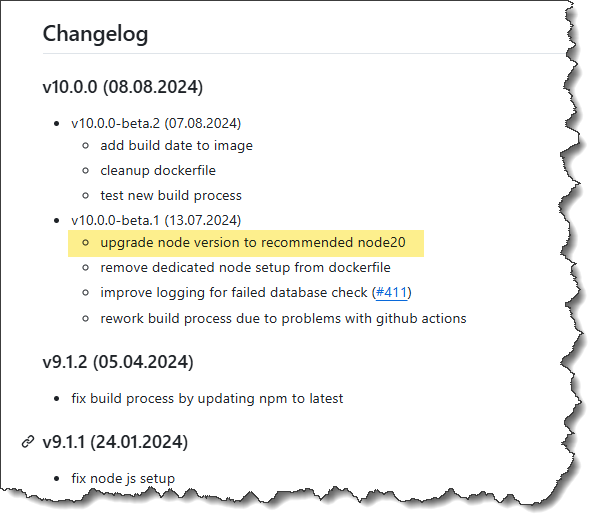
                          05e83c4b-88a0-4b50-ac85-daeb75eee9bb-image.png

                          Nimm als Tag das :latest-v10

                          "Any fool can write code that a computer can understand. Good programmers write code that humans can understand." (Martin Fowler, "Refactoring")

                          Proxmox 9.1.1 LXC|8 GB|Core i7-6700
                          HmIP|ZigBee|Tasmota|Unifi
                          Zabbix Certified Specialist
                          Konnte ich Dir helfen? Dann benutze bitte das Voting unten rechts im Beitrag

                          entavioE 1 Antwort Letzte Antwort
                          1
                          • CodierknechtC Codierknecht

                            @entavio sagte in Node.js Downgrade in ioBroker (Docker Cont, Synology):

                            ich zieh mir ein neues buanet-iobroker latest image
                            wie gesagt steht direkt dabei das bullseye als Debian verwendet wird

                            Mit Sicherheit nicht. Du ziehst offenbar das falsche Image.

                            05e83c4b-88a0-4b50-ac85-daeb75eee9bb-image.png

                            Nimm als Tag das :latest-v10

                            entavioE Offline
                            entavioE Offline
                            entavio
                            schrieb am zuletzt editiert von
                            #25

                            @codierknecht hab das bild / url wieder entfernt

                            hab jetzt latest v-10 gezogen, die Beschreibung bleibt gleich :face_with_rolling_eyes:

                            Ohne Titel.jpeg

                            Marc BergM 1 Antwort Letzte Antwort
                            0
                            • entavioE entavio

                              @codierknecht hab das bild / url wieder entfernt

                              hab jetzt latest v-10 gezogen, die Beschreibung bleibt gleich :face_with_rolling_eyes:

                              Ohne Titel.jpeg

                              Marc BergM Offline
                              Marc BergM Offline
                              Marc Berg
                              Most Active
                              schrieb am zuletzt editiert von Marc Berg
                              #26

                              @entavio sagte in Node.js Downgrade in ioBroker (Docker Cont, Synology):

                              die Beschreibung bleibt gleich

                              Die Beschreibung auf Docker Hub ist noch falsch. Es ist Bookworm.

                              Ergänzung: Ich habe einen PR eingestellt. Mal schauen, wann André das aufnehmen kann.

                              NUC10I3+Ubuntu+Docker+ioBroker+influxDB2+Node Red+RabbitMQ+Grafana

                              Pi-hole, Traefik, Checkmk, Conbee II+Zigbee2MQTT, ESPSomfy-RTS, LoRaWAN, Arduino, KiCad

                              Benutzt das Voting im Beitrag, wenn er euch geholfen hat.

                              entavioE 1 Antwort Letzte Antwort
                              2
                              • Marc BergM Marc Berg

                                @entavio sagte in Node.js Downgrade in ioBroker (Docker Cont, Synology):

                                die Beschreibung bleibt gleich

                                Die Beschreibung auf Docker Hub ist noch falsch. Es ist Bookworm.

                                Ergänzung: Ich habe einen PR eingestellt. Mal schauen, wann André das aufnehmen kann.

                                entavioE Offline
                                entavioE Offline
                                entavio
                                schrieb am zuletzt editiert von entavio
                                #27

                                also konnte das neue image installieren, meine Daten wieder einfügen und komme auch wieder auf die admin Oberfläche.
                                der parser Adapter lässt sich jetzt einwandfrei installieren (den Adapter selbst schaue ich mir dann an)

                                leider macht aber jetzt der yahka Adapter Probleme und startet nicht mehr :-(

                                im log werden jetzt unzählige Fehler geworfen

                                Thomas BraunT 1 Antwort Letzte Antwort
                                0
                                • entavioE entavio

                                  also konnte das neue image installieren, meine Daten wieder einfügen und komme auch wieder auf die admin Oberfläche.
                                  der parser Adapter lässt sich jetzt einwandfrei installieren (den Adapter selbst schaue ich mir dann an)

                                  leider macht aber jetzt der yahka Adapter Probleme und startet nicht mehr :-(

                                  im log werden jetzt unzählige Fehler geworfen

                                  Thomas BraunT Online
                                  Thomas BraunT Online
                                  Thomas Braun
                                  Most Active
                                  schrieb am zuletzt editiert von
                                  #28

                                  @entavio sagte in Node.js Downgrade in ioBroker (Docker Cont, Synology):

                                  im log werden jetzt unzählige Fehler geworfen

                                  Und die sind geheim und dürfen nicht bekannt gemacht werden?
                                  Dann wird dir wohl auch niemand helfen können und dürfen.

                                  Linux-Werkzeugkasten:
                                  https://forum.iobroker.net/topic/42952/der-kleine-iobroker-linux-werkzeugkasten
                                  NodeJS Fixer Skript:
                                  https://forum.iobroker.net/topic/68035/iob-node-fix-skript
                                  iob_diag: curl -sLf -o diag.sh https://iobroker.net/diag.sh && bash diag.sh

                                  entavioE 1 Antwort Letzte Antwort
                                  1
                                  • Thomas BraunT Thomas Braun

                                    @entavio sagte in Node.js Downgrade in ioBroker (Docker Cont, Synology):

                                    im log werden jetzt unzählige Fehler geworfen

                                    Und die sind geheim und dürfen nicht bekannt gemacht werden?
                                    Dann wird dir wohl auch niemand helfen können und dürfen.

                                    entavioE Offline
                                    entavioE Offline
                                    entavio
                                    schrieb am zuletzt editiert von
                                    #29

                                    @thomas-braun natürlich nicht sry. geht nicht alles so schnell

                                    das sich an der Namensgebung der gerate gestört wird, sehe ich selbst..... wundere mich nur warum es vorhin noch ging
                                    reicht es aus alles umzubenennen?!

                                    2025-05-06 12:52:23.456 - info: yahka.0 (2824) publishing bridge yahka on 0.0.0.0 using bonjour-hap
                                    2025-05-06 12:52:23.464 - info: yahka.0 (2824) publishing device DG-Schlafzimmer Fernseher on 0.0.0.0 using avahi
                                    2025-05-06 12:52:23.759 - info: yahka.0 (2824) publishing device OG-Wohnzimmer Fernseher on 0.0.0.0 using avahi
                                    2025-05-06 12:52:23.823 - error: yahka.0 (2824) Unhandled promise rejection. This error originated either by throwing inside of an async function without a catch block, or by rejecting a promise which was not handled with .catch().
                                    2025-05-06 12:52:23.824 - error: yahka.0 (2824) unhandled promise rejection: EISDIR: illegal operation on a directory, read
                                    2025-05-06 12:52:24.185 - error: yahka.0 (2824) Error: EISDIR: illegal operation on a directory, read
                                    at Object.readFileSync (node:fs:449:20)
                                    at LocalStorage.parseDirSync (/opt/iobroker/node_modules/hap-nodejs/node_modules/node-persist/src/local-storage.js:637:35)
                                    at LocalStorage.parseDataDirSync (/opt/iobroker/node_modules/hap-nodejs/node_modules/node-persist/src/local-storage.js:572:21)
                                    at LocalStorage.initSync (/opt/iobroker/node_modules/hap-nodejs/node_modules/node-persist/src/local-storage.js:145:14)
                                    at HAPStorage.storage (/opt/iobroker/node_modules/hap-nodejs/src/lib/model/HAPStorage.ts:28:25)
                                    at Function.storage (/opt/iobroker/node_modules/hap-nodejs/src/lib/model/HAPStorage.ts:16:26)
                                    at Function.load (/opt/iobroker/node_modules/hap-nodejs/src/lib/model/AccessoryInfo.ts:278:30)
                                    at Bridge.publish (/opt/iobroker/node_modules/hap-nodejs/src/lib/Accessory.ts:1126:41)
                                    at devicesToPublish (/opt/iobroker/node_modules/iobroker.yahka/webpack:/yahka.homekit-bridge.ts:34:35)
                                    at /opt/iobroker/node_modules/iobroker.yahka/webpack:/yahka.homekit-bridge.ts:77:41
                                    2025-05-06 12:52:24.186 - error: yahka.0 (2824) Exception-Code: EISDIR: EISDIR: illegal operation on a directory, read
                                    2025-05-06 12:52:24.235 - info: yahka.0 (2824) cleaning up ...
                                    2025-05-06 12:52:24.236 - info: yahka.0 (2824) cleaned up ...
                                    2025-05-06 12:52:24.238 - info: yahka.0 (2824) terminating
                                    2025-05-06 12:52:24.240 - warn: yahka.0 (2824) Terminated (UNCAUGHT_EXCEPTION): Without reason
                                    2025-05-06 12:52:24.745 - info: yahka.0 (2824) terminating
                                    2025-05-06 12:52:24.875 - error: host.buanet-iobroker1 Caught by controller[0]: HAP-NodeJS WARNING: The accessory 'DG-Schlafzimmer Ventilator' has an invalid 'Name' characteristic ('DG-Schlafzimmer Ventilator'). Please use only alphanumeric, space, and apostrophe characters. Ensure it starts and ends with an alphabetic or numeric character, and avoid emojis. This may prevent the accessory from being added in the Home App or cause unresponsiveness.
                                    2025-05-06 12:52:24.875 - error: host.buanet-iobroker1 Caught by controller[1]: HAP-NodeJS WARNING: The accessory 'DG-Schlafzimmer Ventilator' has an invalid 'Name' characteristic ('DG-Schlafzimmer Ventilator'). Please use only alphanumeric, space, and apostrophe characters. Ensure it starts and ends with an alphabetic or numeric character, and avoid emojis. This may prevent the accessory from being added in the Home App or cause unresponsiveness.
                                    2025-05-06 12:52:24.876 - error: host.buanet-iobroker1 Caught by controller[2]: HAP-NodeJS WARNING: The accessory 'OG-Wohnzimmer Stehlampe' has an invalid 'Name' characteristic ('OG-Wohnzimmer Stehlampe'). Please use only alphanumeric, space, and apostrophe characters. Ensure it starts and ends with an alphabetic or numeric character, and avoid emojis. This may prevent the accessory from being added in the Home App or cause unresponsiveness.
                                    2025-05-06 12:52:24.877 - error: host.buanet-iobroker1 Caught by controller[3]: HAP-NodeJS WARNING: The accessory 'OG-Wohnzimmer Stehlampe' has an invalid 'Name' characteristic ('OG-Wohnzimmer Stehlampe'). Please use only alphanumeric, space, and apostrophe characters. Ensure it starts and ends with an alphabetic or numeric character, and avoid emojis. This may prevent the accessory from being added in the Home App or cause unresponsiveness.
                                    2025-05-06 12:52:24.877 - error: host.buanet-iobroker1 Caught by controller[4]: HAP-NodeJS WARNING: The accessory 'DG-Schlafzimmer Fernseher' has an invalid 'Name' characteristic ('DG-Schlafzimmer Fernseher'). Please use only alphanumeric, space, and apostrophe characters. Ensure it starts and ends with an alphabetic or numeric character, and avoid emojis. This may prevent the accessory from being added in the Home App or cause unresponsiveness.
                                    2025-05-06 12:52:24.878 - error: host.buanet-iobroker1 Caught by controller[5]: HAP-NodeJS WARNING: The accessory 'DG-Schlafzimmer Fernseher' has an invalid 'Name' characteristic ('DG-Schlafzimmer Fernseher'). Please use only alphanumeric, space, and apostrophe characters. Ensure it starts and ends with an alphabetic or numeric character, and avoid emojis. This may prevent the accessory from being added in the Home App or cause unresponsiveness.
                                    2025-05-06 12:52:24.878 - error: host.buanet-iobroker1 Caught by controller[6]: HAP-NodeJS WARNING: The accessory 'OG-Wohnzimmer Fernseher' has an invalid 'Name' characteristic ('OG-Wohnzimmer Fernseher'). Please use only alphanumeric, space, and apostrophe characters. Ensure it starts and ends with an alphabetic or numeric character, and avoid emojis. This may prevent the accessory from being added in the Home App or cause unresponsiveness.
                                    2025-05-06 12:52:24.879 - error: host.buanet-iobroker1 Caught by controller[7]: HAP-NodeJS WARNING: The accessory 'OG-Wohnzimmer Fernseher' has an invalid 'Name' characteristic ('OG-Wohnzimmer Fernseher'). Please use only alphanumeric, space, and apostrophe characters. Ensure it starts and ends with an alphabetic or numeric character, and avoid emojis. This may prevent the accessory from being added in the Home App or cause unresponsiveness.
                                    2025-05-06 12:52:24.879 - error: host.buanet-iobroker1 Caught by controller[8]: HAP-NodeJS WARNING: The accessory '' has an invalid 'Name' characteristic (''). Please use only alphanumeric, space, and apostrophe characters. Ensure it starts and ends with an alphabetic or numeric character, and avoid emojis. This may prevent the accessory from being added in the Home App or cause unresponsiveness.
                                    2025-05-06 12:52:24.880 - error: host.buanet-iobroker1 Caught by controller[9]: HAP-NodeJS WARNING: The accessory 'DG-Schlafzimmer Fernseher 47C3' has an invalid 'Name' characteristic ('DG-Schlafzimmer Fernseher 47C3'). Please use only alphanumeric, space, and apostrophe characters. Ensure it starts and ends with an alphabetic or numeric character, and avoid emojis. This may prevent the accessory from being added in the Home App or cause unresponsiveness.
                                    2025-05-06 12:52:24.880 - error: host.buanet-iobroker1 Caught by controller[10]: HAP-NodeJS WARNING: The accessory 'OG-Wohnzimmer Fernseher 2564' has an invalid 'Name' characteristic ('OG-Wohnzimmer Fernseher 2564'). Please use only alphanumeric, space, and apostrophe characters. Ensure it starts and ends with an alphabetic or numeric character, and avoid emojis. This may prevent the accessory from being added in the Home App or cause unresponsiveness.
                                    2025-05-06 12:52:24.881 - error: host.buanet-iobroker1 Caught by controller[11]: [DG-Schlafzimmer Fernseher 47C3] The selected advertiser, "avahi", isn't available on this platform. Reverting to "ciao"
                                    2025-05-06 12:52:24.881 - error: host.buanet-iobroker1 Caught by controller[12]: [OG-Wohnzimmer Fernseher 2564] The selected advertiser, "avahi", isn't available on this platform. Reverting to "ciao"
                                    2025-05-06 12:52:24.882 - error: host.buanet-iobroker1 Caught by controller[13]: [yahka 818C@DG-Schlafzimmer Ventilator@DG-Schlafzimmer Ventilator@Lock Physical Controls] characteristic value expected valid finite number and received "undefined" (undefined)
                                    2025-05-06 12:52:24.882 - error: host.buanet-iobroker1 Caught by controller[14]: [yahka 818C@DG-Schlafzimmer Ventilator@DG-Schlafzimmer Ventilator@Swing Mode] characteristic value expected valid finite number and received "undefined" (undefined)
                                    2025-05-06 12:52:24.882 - error: host.buanet-iobroker1 Caught by controller[15]: [yahka 818C@DG-Schlafzimmer Ventilator@DG-Schlafzimmer Ventilator@Active] characteristic value expected valid finite number and received "undefined" (undefined)
                                    2025-05-06 12:52:24.883 - error: host.buanet-iobroker1 Caught by controller[16]: [yahka 818C@Schlafzimmer Rack@Schlafzimmer Rack@Name] characteristic was supplied illegal value: number instead of string, supplying illegal values will throw errors in the future
                                    2025-05-06 12:52:24.883 - error: host.buanet-iobroker1 Caught by controller[17]: [yahka 818C@Schlafzimmer Rack 2@Schlafzimmer Rack 2@Name] characteristic was supplied illegal value: number instead of string, supplying illegal values will throw errors in the future
                                    2025-05-06 12:52:24.884 - error: host.buanet-iobroker1 instance system.adapter.yahka.0 terminated with code 6 (UNCAUGHT_EXCEPTION)
                                    2025-05-06 12:52:24.885 - info: host.buanet-iobroker1 Restart adapter system.adapter.yahka.0 because enabled
                                    2025-05-06 12:52:24.885 - warn: host.buanet-iobroker1 Do not restart adapter system.adapter.yahka.0 because restart loop detected
                                    
                                    CodierknechtC 1 Antwort Letzte Antwort
                                    0
                                    • entavioE entavio

                                      @thomas-braun natürlich nicht sry. geht nicht alles so schnell

                                      das sich an der Namensgebung der gerate gestört wird, sehe ich selbst..... wundere mich nur warum es vorhin noch ging
                                      reicht es aus alles umzubenennen?!

                                      2025-05-06 12:52:23.456 - info: yahka.0 (2824) publishing bridge yahka on 0.0.0.0 using bonjour-hap
                                      2025-05-06 12:52:23.464 - info: yahka.0 (2824) publishing device DG-Schlafzimmer Fernseher on 0.0.0.0 using avahi
                                      2025-05-06 12:52:23.759 - info: yahka.0 (2824) publishing device OG-Wohnzimmer Fernseher on 0.0.0.0 using avahi
                                      2025-05-06 12:52:23.823 - error: yahka.0 (2824) Unhandled promise rejection. This error originated either by throwing inside of an async function without a catch block, or by rejecting a promise which was not handled with .catch().
                                      2025-05-06 12:52:23.824 - error: yahka.0 (2824) unhandled promise rejection: EISDIR: illegal operation on a directory, read
                                      2025-05-06 12:52:24.185 - error: yahka.0 (2824) Error: EISDIR: illegal operation on a directory, read
                                      at Object.readFileSync (node:fs:449:20)
                                      at LocalStorage.parseDirSync (/opt/iobroker/node_modules/hap-nodejs/node_modules/node-persist/src/local-storage.js:637:35)
                                      at LocalStorage.parseDataDirSync (/opt/iobroker/node_modules/hap-nodejs/node_modules/node-persist/src/local-storage.js:572:21)
                                      at LocalStorage.initSync (/opt/iobroker/node_modules/hap-nodejs/node_modules/node-persist/src/local-storage.js:145:14)
                                      at HAPStorage.storage (/opt/iobroker/node_modules/hap-nodejs/src/lib/model/HAPStorage.ts:28:25)
                                      at Function.storage (/opt/iobroker/node_modules/hap-nodejs/src/lib/model/HAPStorage.ts:16:26)
                                      at Function.load (/opt/iobroker/node_modules/hap-nodejs/src/lib/model/AccessoryInfo.ts:278:30)
                                      at Bridge.publish (/opt/iobroker/node_modules/hap-nodejs/src/lib/Accessory.ts:1126:41)
                                      at devicesToPublish (/opt/iobroker/node_modules/iobroker.yahka/webpack:/yahka.homekit-bridge.ts:34:35)
                                      at /opt/iobroker/node_modules/iobroker.yahka/webpack:/yahka.homekit-bridge.ts:77:41
                                      2025-05-06 12:52:24.186 - error: yahka.0 (2824) Exception-Code: EISDIR: EISDIR: illegal operation on a directory, read
                                      2025-05-06 12:52:24.235 - info: yahka.0 (2824) cleaning up ...
                                      2025-05-06 12:52:24.236 - info: yahka.0 (2824) cleaned up ...
                                      2025-05-06 12:52:24.238 - info: yahka.0 (2824) terminating
                                      2025-05-06 12:52:24.240 - warn: yahka.0 (2824) Terminated (UNCAUGHT_EXCEPTION): Without reason
                                      2025-05-06 12:52:24.745 - info: yahka.0 (2824) terminating
                                      2025-05-06 12:52:24.875 - error: host.buanet-iobroker1 Caught by controller[0]: HAP-NodeJS WARNING: The accessory 'DG-Schlafzimmer Ventilator' has an invalid 'Name' characteristic ('DG-Schlafzimmer Ventilator'). Please use only alphanumeric, space, and apostrophe characters. Ensure it starts and ends with an alphabetic or numeric character, and avoid emojis. This may prevent the accessory from being added in the Home App or cause unresponsiveness.
                                      2025-05-06 12:52:24.875 - error: host.buanet-iobroker1 Caught by controller[1]: HAP-NodeJS WARNING: The accessory 'DG-Schlafzimmer Ventilator' has an invalid 'Name' characteristic ('DG-Schlafzimmer Ventilator'). Please use only alphanumeric, space, and apostrophe characters. Ensure it starts and ends with an alphabetic or numeric character, and avoid emojis. This may prevent the accessory from being added in the Home App or cause unresponsiveness.
                                      2025-05-06 12:52:24.876 - error: host.buanet-iobroker1 Caught by controller[2]: HAP-NodeJS WARNING: The accessory 'OG-Wohnzimmer Stehlampe' has an invalid 'Name' characteristic ('OG-Wohnzimmer Stehlampe'). Please use only alphanumeric, space, and apostrophe characters. Ensure it starts and ends with an alphabetic or numeric character, and avoid emojis. This may prevent the accessory from being added in the Home App or cause unresponsiveness.
                                      2025-05-06 12:52:24.877 - error: host.buanet-iobroker1 Caught by controller[3]: HAP-NodeJS WARNING: The accessory 'OG-Wohnzimmer Stehlampe' has an invalid 'Name' characteristic ('OG-Wohnzimmer Stehlampe'). Please use only alphanumeric, space, and apostrophe characters. Ensure it starts and ends with an alphabetic or numeric character, and avoid emojis. This may prevent the accessory from being added in the Home App or cause unresponsiveness.
                                      2025-05-06 12:52:24.877 - error: host.buanet-iobroker1 Caught by controller[4]: HAP-NodeJS WARNING: The accessory 'DG-Schlafzimmer Fernseher' has an invalid 'Name' characteristic ('DG-Schlafzimmer Fernseher'). Please use only alphanumeric, space, and apostrophe characters. Ensure it starts and ends with an alphabetic or numeric character, and avoid emojis. This may prevent the accessory from being added in the Home App or cause unresponsiveness.
                                      2025-05-06 12:52:24.878 - error: host.buanet-iobroker1 Caught by controller[5]: HAP-NodeJS WARNING: The accessory 'DG-Schlafzimmer Fernseher' has an invalid 'Name' characteristic ('DG-Schlafzimmer Fernseher'). Please use only alphanumeric, space, and apostrophe characters. Ensure it starts and ends with an alphabetic or numeric character, and avoid emojis. This may prevent the accessory from being added in the Home App or cause unresponsiveness.
                                      2025-05-06 12:52:24.878 - error: host.buanet-iobroker1 Caught by controller[6]: HAP-NodeJS WARNING: The accessory 'OG-Wohnzimmer Fernseher' has an invalid 'Name' characteristic ('OG-Wohnzimmer Fernseher'). Please use only alphanumeric, space, and apostrophe characters. Ensure it starts and ends with an alphabetic or numeric character, and avoid emojis. This may prevent the accessory from being added in the Home App or cause unresponsiveness.
                                      2025-05-06 12:52:24.879 - error: host.buanet-iobroker1 Caught by controller[7]: HAP-NodeJS WARNING: The accessory 'OG-Wohnzimmer Fernseher' has an invalid 'Name' characteristic ('OG-Wohnzimmer Fernseher'). Please use only alphanumeric, space, and apostrophe characters. Ensure it starts and ends with an alphabetic or numeric character, and avoid emojis. This may prevent the accessory from being added in the Home App or cause unresponsiveness.
                                      2025-05-06 12:52:24.879 - error: host.buanet-iobroker1 Caught by controller[8]: HAP-NodeJS WARNING: The accessory '' has an invalid 'Name' characteristic (''). Please use only alphanumeric, space, and apostrophe characters. Ensure it starts and ends with an alphabetic or numeric character, and avoid emojis. This may prevent the accessory from being added in the Home App or cause unresponsiveness.
                                      2025-05-06 12:52:24.880 - error: host.buanet-iobroker1 Caught by controller[9]: HAP-NodeJS WARNING: The accessory 'DG-Schlafzimmer Fernseher 47C3' has an invalid 'Name' characteristic ('DG-Schlafzimmer Fernseher 47C3'). Please use only alphanumeric, space, and apostrophe characters. Ensure it starts and ends with an alphabetic or numeric character, and avoid emojis. This may prevent the accessory from being added in the Home App or cause unresponsiveness.
                                      2025-05-06 12:52:24.880 - error: host.buanet-iobroker1 Caught by controller[10]: HAP-NodeJS WARNING: The accessory 'OG-Wohnzimmer Fernseher 2564' has an invalid 'Name' characteristic ('OG-Wohnzimmer Fernseher 2564'). Please use only alphanumeric, space, and apostrophe characters. Ensure it starts and ends with an alphabetic or numeric character, and avoid emojis. This may prevent the accessory from being added in the Home App or cause unresponsiveness.
                                      2025-05-06 12:52:24.881 - error: host.buanet-iobroker1 Caught by controller[11]: [DG-Schlafzimmer Fernseher 47C3] The selected advertiser, "avahi", isn't available on this platform. Reverting to "ciao"
                                      2025-05-06 12:52:24.881 - error: host.buanet-iobroker1 Caught by controller[12]: [OG-Wohnzimmer Fernseher 2564] The selected advertiser, "avahi", isn't available on this platform. Reverting to "ciao"
                                      2025-05-06 12:52:24.882 - error: host.buanet-iobroker1 Caught by controller[13]: [yahka 818C@DG-Schlafzimmer Ventilator@DG-Schlafzimmer Ventilator@Lock Physical Controls] characteristic value expected valid finite number and received "undefined" (undefined)
                                      2025-05-06 12:52:24.882 - error: host.buanet-iobroker1 Caught by controller[14]: [yahka 818C@DG-Schlafzimmer Ventilator@DG-Schlafzimmer Ventilator@Swing Mode] characteristic value expected valid finite number and received "undefined" (undefined)
                                      2025-05-06 12:52:24.882 - error: host.buanet-iobroker1 Caught by controller[15]: [yahka 818C@DG-Schlafzimmer Ventilator@DG-Schlafzimmer Ventilator@Active] characteristic value expected valid finite number and received "undefined" (undefined)
                                      2025-05-06 12:52:24.883 - error: host.buanet-iobroker1 Caught by controller[16]: [yahka 818C@Schlafzimmer Rack@Schlafzimmer Rack@Name] characteristic was supplied illegal value: number instead of string, supplying illegal values will throw errors in the future
                                      2025-05-06 12:52:24.883 - error: host.buanet-iobroker1 Caught by controller[17]: [yahka 818C@Schlafzimmer Rack 2@Schlafzimmer Rack 2@Name] characteristic was supplied illegal value: number instead of string, supplying illegal values will throw errors in the future
                                      2025-05-06 12:52:24.884 - error: host.buanet-iobroker1 instance system.adapter.yahka.0 terminated with code 6 (UNCAUGHT_EXCEPTION)
                                      2025-05-06 12:52:24.885 - info: host.buanet-iobroker1 Restart adapter system.adapter.yahka.0 because enabled
                                      2025-05-06 12:52:24.885 - warn: host.buanet-iobroker1 Do not restart adapter system.adapter.yahka.0 because restart loop detected
                                      
                                      CodierknechtC Offline
                                      CodierknechtC Offline
                                      Codierknecht
                                      Developer Most Active
                                      schrieb am zuletzt editiert von Codierknecht
                                      #30

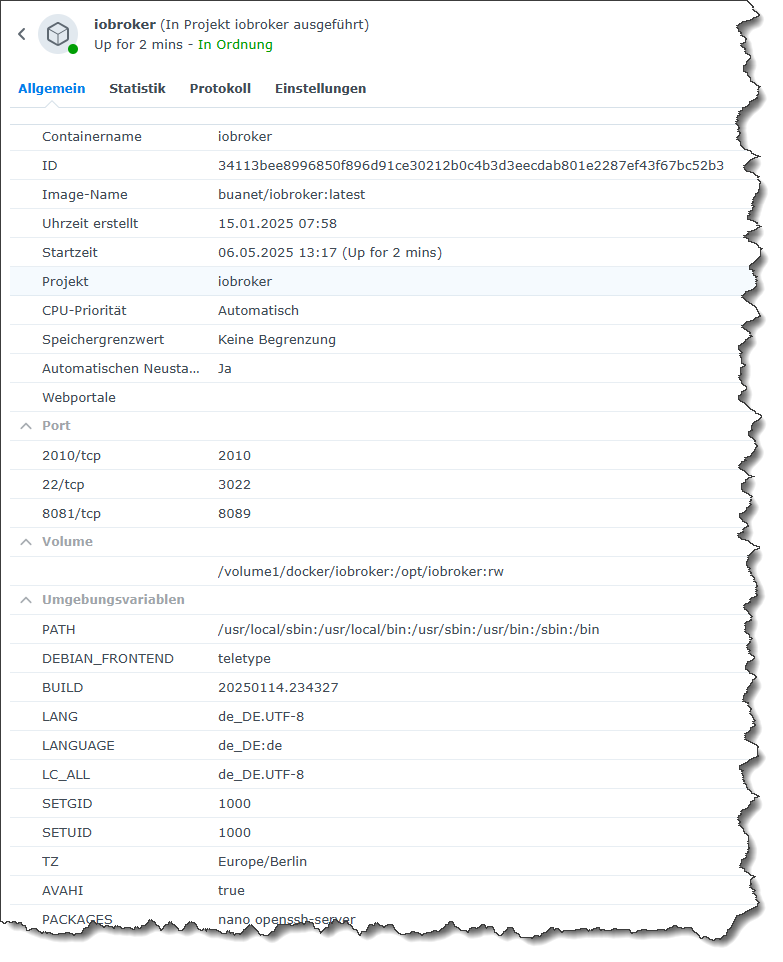
                                      @entavio
                                      Du musst im Container die Umgebungsvariable AVAHI auf "true" setzen.

                                      Hier mal meine Projekteinstellungen:

                                      services:
                                        iobroker:
                                          container_name: iobroker
                                          image: buanet/iobroker:latest
                                          hostname: iobroker
                                          volumes:
                                            - /volume1/docker/iobroker:/opt/iobroker
                                          ports:
                                            - "8089:8081"
                                            - "3022:22"
                                            - "2010:2010"
                                          environment:
                                            PACKAGES: "nano openssh-server"
                                            AVAHI: "true"
                                          tty: true
                                          stdin_open: true
                                          restart: unless-stopped
                                      

                                      cfdc182f-8da0-4403-b664-6b574205a1fe-image.png

                                      "Any fool can write code that a computer can understand. Good programmers write code that humans can understand." (Martin Fowler, "Refactoring")

                                      Proxmox 9.1.1 LXC|8 GB|Core i7-6700
                                      HmIP|ZigBee|Tasmota|Unifi
                                      Zabbix Certified Specialist
                                      Konnte ich Dir helfen? Dann benutze bitte das Voting unten rechts im Beitrag

                                      entavioE 1 Antwort Letzte Antwort
                                      0
                                      • CodierknechtC Codierknecht

                                        @entavio
                                        Du musst im Container die Umgebungsvariable AVAHI auf "true" setzen.

                                        Hier mal meine Projekteinstellungen:

                                        services:
                                          iobroker:
                                            container_name: iobroker
                                            image: buanet/iobroker:latest
                                            hostname: iobroker
                                            volumes:
                                              - /volume1/docker/iobroker:/opt/iobroker
                                            ports:
                                              - "8089:8081"
                                              - "3022:22"
                                              - "2010:2010"
                                            environment:
                                              PACKAGES: "nano openssh-server"
                                              AVAHI: "true"
                                            tty: true
                                            stdin_open: true
                                            restart: unless-stopped
                                        

                                        cfdc182f-8da0-4403-b664-6b574205a1fe-image.png

                                        entavioE Offline
                                        entavioE Offline
                                        entavio
                                        schrieb am zuletzt editiert von entavio
                                        #31

                                        @codierknecht die variable hab ich gesetzt, immer noch der Fehler

                                        ggfs. weil ich jetzt mit dem neuen image wieder auf node.js Version 20 bin und yahka sich irgendwas von der 22. Version gemerkt hat?!

                                        Thomas BraunT 1 Antwort Letzte Antwort
                                        0
                                        • entavioE entavio

                                          @codierknecht die variable hab ich gesetzt, immer noch der Fehler

                                          ggfs. weil ich jetzt mit dem neuen image wieder auf node.js Version 20 bin und yahka sich irgendwas von der 22. Version gemerkt hat?!

                                          Thomas BraunT Online
                                          Thomas BraunT Online
                                          Thomas Braun
                                          Most Active
                                          schrieb am zuletzt editiert von
                                          #32

                                          @entavio

                                          Die Adapter 'merken' sich nix, die nehmen das was bereitgestellt wird.
                                          Und nodejs@20 ist die derzeitig vorgesehene und empfohlene Version für den ioBroker. Damit müssen alle stabilen Adapter mindestens kompatibel sein.

                                          Linux-Werkzeugkasten:
                                          https://forum.iobroker.net/topic/42952/der-kleine-iobroker-linux-werkzeugkasten
                                          NodeJS Fixer Skript:
                                          https://forum.iobroker.net/topic/68035/iob-node-fix-skript
                                          iob_diag: curl -sLf -o diag.sh https://iobroker.net/diag.sh && bash diag.sh

                                          entavioE 2 Antworten Letzte Antwort
                                          0
                                          Antworten
                                          • In einem neuen Thema antworten
                                          Anmelden zum Antworten
                                          • Älteste zuerst
                                          • Neuste zuerst
                                          • Meiste Stimmen


                                          Support us

                                          ioBroker
                                          Community Adapters
                                          Donate
                                          FAQ Cloud / IOT
                                          HowTo: Node.js-Update
                                          HowTo: Backup/Restore
                                          Downloads
                                          BLOG

                                          662

                                          Online

                                          32.5k

                                          Benutzer

                                          81.7k

                                          Themen

                                          1.3m

                                          Beiträge
                                          Community
                                          Impressum | Datenschutz-Bestimmungen | Nutzungsbedingungen | Einwilligungseinstellungen
                                          ioBroker Community 2014-2025
                                          logo
                                          • Anmelden

                                          • Du hast noch kein Konto? Registrieren

                                          • Anmelden oder registrieren, um zu suchen
                                          • Erster Beitrag
                                            Letzter Beitrag
                                          0
                                          • Home
                                          • Aktuell
                                          • Tags
                                          • Ungelesen 0
                                          • Kategorien
                                          • Unreplied
                                          • Beliebt
                                          • GitHub
                                          • Docu
                                          • Hilfe




