



Skip to content
  • Home
  • Aktuell
  • Tags
  • 0 Ungelesen 0
  • Kategorien
  • Unreplied
  • Beliebt
  • GitHub
  • Docu
  • Hilfe
Skins
  • Light
  • Brite
  • Cerulean
  • Cosmo
  • Flatly
  • Journal
  • Litera
  • Lumen
  • Lux
  • Materia
  • Minty
  • Morph
  • Pulse
  • Sandstone
  • Simplex
  • Sketchy
  • Spacelab
  • United
  • Yeti
  • Zephyr
  • Dark
  • Cyborg
  • Darkly
  • Quartz
  • Slate
  • Solar
  • Superhero
  • Vapor

  • Standard: (Kein Skin)
  • Kein Skin
Einklappen
ioBroker Logo

Community Forum

donate donate
  1. ioBroker Community Home
  2. Deutsch
  3. ioBroker Allgemein
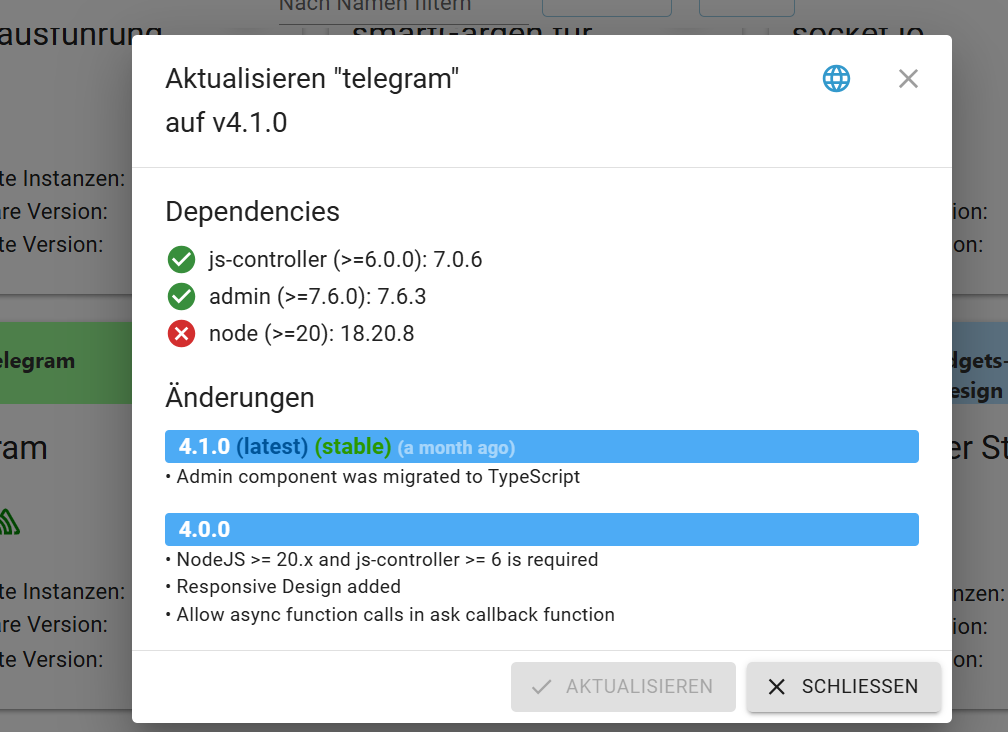
  4. Telegram Adapter kein updat möglich
NEWS

  • Weihnachtsangebot 2025! 🎄
    BluefoxB
    Bluefox
    12
    1
    328

  • UPDATE 31.10.: Amazon Alexa - ioBroker Skill läuft aus ?
    apollon77A
    apollon77
    48
    3
    8.9k

  • Monatsrückblick – September 2025
    BluefoxB
    Bluefox
    14
    1
    2.3k

Telegram Adapter kein updat möglich
Geplant Angeheftet Gesperrt Verschoben ioBroker Allgemein
27 Beiträge 5 Kommentatoren 2.0k Aufrufe 4 Watching
  • Älteste zuerst
  • Neuste zuerst
  • Meiste Stimmen
Antworten
  • In einem neuen Thema antworten
Anmelden zum Antworten
Dieses Thema wurde gelöscht. Nur Nutzer mit entsprechenden Rechten können es sehen.
  • P Pistus

    @homoran ist der Befehl

    iob diag --unmask
    

    für die Langfassung richtig?

    Ich hatte

    sudo apt update
    sudo apt full-upgrade
    sudo reboot
    iobroker update- i
    iobroker upgrade


    durchgeführt

    kommt vor

    iob node-js-update

    kein sudo?

    CodierknechtC Offline
    CodierknechtC Offline
    Codierknecht
    Developer Most Active
    schrieb am zuletzt editiert von
    #15

    @pistus sagte in Telegram Adapter kein updat möglich:

    für die Langfassung richtig?

    Nein - der de-maskiert nur persönliche Einstellungen.

    kommt vor
    iob node-js-update
    kein sudo?

    Nein. Vor ioBroker Befehle kommt niemals ein sudo.

    "Any fool can write code that a computer can understand. Good programmers write code that humans can understand." (Martin Fowler, "Refactoring")

    Proxmox 9.1.1 LXC|8 GB|Core i7-6700
    HmIP|ZigBee|Tasmota|Unifi
    Zabbix Certified Specialist
    Konnte ich Dir helfen? Dann benutze bitte das Voting unten rechts im Beitrag

    P 1 Antwort Letzte Antwort
    0
    • CodierknechtC Codierknecht

      @pistus sagte in Telegram Adapter kein updat möglich:

      für die Langfassung richtig?

      Nein - der de-maskiert nur persönliche Einstellungen.

      kommt vor
      iob node-js-update
      kein sudo?

      Nein. Vor ioBroker Befehle kommt niemals ein sudo.

      P Offline
      P Offline
      Pistus
      schrieb am zuletzt editiert von
      #16

      @codierknecht iob node-js update war nicht erfolgreich

      iobroker@iobroker:~ $ iob node.js update
      iobroker [command]
      
      Commands:
        iobroker setup                                               Setup ioBroker
        iobroker start [all|<adapter>.<instance>|<adapter>]          Starts the js-con                 troller or a specified adapter instance or all instances of an adapter
        iobroker stop [<adapter>.<instance>|<adapter>]               stops the js-cont                 roller or a specified adapter instance or all instances of an adapter
        iobroker restart [<adapter>.<instance>|<adapter>]            Restarts js-contr                 oller or a specified adapter instance or all instances of an adapter  [aliases:                  r]
        iobroker debug <adapter>[.<instance>]                        Starts a Node.js                  debugging session for the adapter instance
        iobroker info                                                Shows the host in                 fo
        iobroker logs [<adapter>]                                    Monitor log
        iobroker add <adapter> [desiredNumber]                       Add instance of a                 dapter  [aliases: a]
        iobroker install <adapter>                                   Installs a specif                 ied adapter  [aliases: i]
        iobroker rebuild [<module>]                                  Rebuild all nativ                 e modules or path
        iobroker url <url> [<name>]                                  Install adapter f                 rom specified url, e.g. GitHub, if a package name is provided instead of an url,                  it will be installed from npm
        iobroker del <adapter>                                       Remove adapter an                 d all instances from this host  [aliases: delete]
        iobroker del <adapter>.<instance>                            Remove adapter in                 stance  [aliases: delete]
        iobroker update [<repositoryUrl>]                            Update repository                  and list adapters
        iobroker upgrade                                             Upgrade managemen                 t
        iobroker upload [all|<adapter>]                              Upload management                   [aliases: u]
        iobroker object                                              Object management                   [aliases: o]
        iobroker state                                               State management                   [aliases: s]
        iobroker message <adapter>[.instance] <command> [<message>]  Send message to a                 dapter instance/s
        iobroker list <type> [<filter>]                              List all entries,                  like objects
        iobroker chmod <mode> <file>                                 Change file right                 s
        iobroker chown <user> <group> <file>                         Change file owner                 ship
        iobroker touch <file>                                        Touch file
        iobroker rm <file>                                           Remove file
        iobroker file                                                File management
        iobroker user                                                User commands
        iobroker group                                               group management
        iobroker host <hostname>                                     Set host to given                  hostname
        iobroker set <adapter>.<instance>                            Change settings o                 f adapter config
        iobroker license <license.file or license.text>              Update license by                  given file
        iobroker cert                                                Certificate manag                 ement
        iobroker clean <yes>                                         Clears all object                 s and states
        iobroker backup                                              Create backup
        iobroker restore <backup name or path>                       Restore a specifi                 ed backup
        iobroker validate <backup name or path>                      Validate a specif                 ied backup
        iobroker status [all|<adapter>.<instance>]                   Status of ioBroke                 r or adapter instance  [aliases: isrun]
        iobroker repo                                                Show repo informa                 tion
        iobroker uuid                                                Show uuid of the                  installation  [aliases: id]
        iobroker unsetup                                             Reset license, in                 stallation secret and language
        iobroker fix                                                 Execute the insta                 llation fixer script, this updates your ioBroker installation
        iobroker nodejs-update [<major-version>]                     Upgrade the Node.                 JS installation to the current LTS
        iobroker multihost                                           Multihost managem                 ent
        iobroker compact                                             compact group man                 agement
        iobroker plugin                                              Plugin management
        iobroker vendor <passphrase> [<vendor.json>]                 Update the vendor                  information using given passphrase
        iobroker version [<adapter>]                                 Show version of j                 s-controller or specified adapter  [aliases: v]
      
      Options:
        --help  Show help  [boolean]
      iobroker@iobroker:~ $
      
      
      FeuersturmF Thomas BraunT 2 Antworten Letzte Antwort
      0
      • P Pistus

        @codierknecht iob node-js update war nicht erfolgreich

        iobroker@iobroker:~ $ iob node.js update
        iobroker [command]
        
        Commands:
          iobroker setup                                               Setup ioBroker
          iobroker start [all|<adapter>.<instance>|<adapter>]          Starts the js-con                 troller or a specified adapter instance or all instances of an adapter
          iobroker stop [<adapter>.<instance>|<adapter>]               stops the js-cont                 roller or a specified adapter instance or all instances of an adapter
          iobroker restart [<adapter>.<instance>|<adapter>]            Restarts js-contr                 oller or a specified adapter instance or all instances of an adapter  [aliases:                  r]
          iobroker debug <adapter>[.<instance>]                        Starts a Node.js                  debugging session for the adapter instance
          iobroker info                                                Shows the host in                 fo
          iobroker logs [<adapter>]                                    Monitor log
          iobroker add <adapter> [desiredNumber]                       Add instance of a                 dapter  [aliases: a]
          iobroker install <adapter>                                   Installs a specif                 ied adapter  [aliases: i]
          iobroker rebuild [<module>]                                  Rebuild all nativ                 e modules or path
          iobroker url <url> [<name>]                                  Install adapter f                 rom specified url, e.g. GitHub, if a package name is provided instead of an url,                  it will be installed from npm
          iobroker del <adapter>                                       Remove adapter an                 d all instances from this host  [aliases: delete]
          iobroker del <adapter>.<instance>                            Remove adapter in                 stance  [aliases: delete]
          iobroker update [<repositoryUrl>]                            Update repository                  and list adapters
          iobroker upgrade                                             Upgrade managemen                 t
          iobroker upload [all|<adapter>]                              Upload management                   [aliases: u]
          iobroker object                                              Object management                   [aliases: o]
          iobroker state                                               State management                   [aliases: s]
          iobroker message <adapter>[.instance] <command> [<message>]  Send message to a                 dapter instance/s
          iobroker list <type> [<filter>]                              List all entries,                  like objects
          iobroker chmod <mode> <file>                                 Change file right                 s
          iobroker chown <user> <group> <file>                         Change file owner                 ship
          iobroker touch <file>                                        Touch file
          iobroker rm <file>                                           Remove file
          iobroker file                                                File management
          iobroker user                                                User commands
          iobroker group                                               group management
          iobroker host <hostname>                                     Set host to given                  hostname
          iobroker set <adapter>.<instance>                            Change settings o                 f adapter config
          iobroker license <license.file or license.text>              Update license by                  given file
          iobroker cert                                                Certificate manag                 ement
          iobroker clean <yes>                                         Clears all object                 s and states
          iobroker backup                                              Create backup
          iobroker restore <backup name or path>                       Restore a specifi                 ed backup
          iobroker validate <backup name or path>                      Validate a specif                 ied backup
          iobroker status [all|<adapter>.<instance>]                   Status of ioBroke                 r or adapter instance  [aliases: isrun]
          iobroker repo                                                Show repo informa                 tion
          iobroker uuid                                                Show uuid of the                  installation  [aliases: id]
          iobroker unsetup                                             Reset license, in                 stallation secret and language
          iobroker fix                                                 Execute the insta                 llation fixer script, this updates your ioBroker installation
          iobroker nodejs-update [<major-version>]                     Upgrade the Node.                 JS installation to the current LTS
          iobroker multihost                                           Multihost managem                 ent
          iobroker compact                                             compact group man                 agement
          iobroker plugin                                              Plugin management
          iobroker vendor <passphrase> [<vendor.json>]                 Update the vendor                  information using given passphrase
          iobroker version [<adapter>]                                 Show version of j                 s-controller or specified adapter  [aliases: v]
        
        Options:
          --help  Show help  [boolean]
        iobroker@iobroker:~ $
        
        
        FeuersturmF Online
        FeuersturmF Online
        Feuersturm
        schrieb am zuletzt editiert von
        #17

        @pistus sagte in Telegram Adapter kein updat möglich:

        @codierknecht iob node-js update war nicht erfolgreich

        Du hast auch nicht den richtigen Befehl ausgeführt ;-) (siehe https://forum.iobroker.net/topic/64032/update-nodejs-best-practise-supported-16-und-18)

        iob nodejs-update
        

        Bevor du aber willkürliche Updatebefehle in dein System schießt, poste doch bitte einmal die Langfassung von

        iob diag
        
        1 Antwort Letzte Antwort
        0
        • P Pistus

          @codierknecht iob node-js update war nicht erfolgreich

          iobroker@iobroker:~ $ iob node.js update
          iobroker [command]
          
          Commands:
            iobroker setup                                               Setup ioBroker
            iobroker start [all|<adapter>.<instance>|<adapter>]          Starts the js-con                 troller or a specified adapter instance or all instances of an adapter
            iobroker stop [<adapter>.<instance>|<adapter>]               stops the js-cont                 roller or a specified adapter instance or all instances of an adapter
            iobroker restart [<adapter>.<instance>|<adapter>]            Restarts js-contr                 oller or a specified adapter instance or all instances of an adapter  [aliases:                  r]
            iobroker debug <adapter>[.<instance>]                        Starts a Node.js                  debugging session for the adapter instance
            iobroker info                                                Shows the host in                 fo
            iobroker logs [<adapter>]                                    Monitor log
            iobroker add <adapter> [desiredNumber]                       Add instance of a                 dapter  [aliases: a]
            iobroker install <adapter>                                   Installs a specif                 ied adapter  [aliases: i]
            iobroker rebuild [<module>]                                  Rebuild all nativ                 e modules or path
            iobroker url <url> [<name>]                                  Install adapter f                 rom specified url, e.g. GitHub, if a package name is provided instead of an url,                  it will be installed from npm
            iobroker del <adapter>                                       Remove adapter an                 d all instances from this host  [aliases: delete]
            iobroker del <adapter>.<instance>                            Remove adapter in                 stance  [aliases: delete]
            iobroker update [<repositoryUrl>]                            Update repository                  and list adapters
            iobroker upgrade                                             Upgrade managemen                 t
            iobroker upload [all|<adapter>]                              Upload management                   [aliases: u]
            iobroker object                                              Object management                   [aliases: o]
            iobroker state                                               State management                   [aliases: s]
            iobroker message <adapter>[.instance] <command> [<message>]  Send message to a                 dapter instance/s
            iobroker list <type> [<filter>]                              List all entries,                  like objects
            iobroker chmod <mode> <file>                                 Change file right                 s
            iobroker chown <user> <group> <file>                         Change file owner                 ship
            iobroker touch <file>                                        Touch file
            iobroker rm <file>                                           Remove file
            iobroker file                                                File management
            iobroker user                                                User commands
            iobroker group                                               group management
            iobroker host <hostname>                                     Set host to given                  hostname
            iobroker set <adapter>.<instance>                            Change settings o                 f adapter config
            iobroker license <license.file or license.text>              Update license by                  given file
            iobroker cert                                                Certificate manag                 ement
            iobroker clean <yes>                                         Clears all object                 s and states
            iobroker backup                                              Create backup
            iobroker restore <backup name or path>                       Restore a specifi                 ed backup
            iobroker validate <backup name or path>                      Validate a specif                 ied backup
            iobroker status [all|<adapter>.<instance>]                   Status of ioBroke                 r or adapter instance  [aliases: isrun]
            iobroker repo                                                Show repo informa                 tion
            iobroker uuid                                                Show uuid of the                  installation  [aliases: id]
            iobroker unsetup                                             Reset license, in                 stallation secret and language
            iobroker fix                                                 Execute the insta                 llation fixer script, this updates your ioBroker installation
            iobroker nodejs-update [<major-version>]                     Upgrade the Node.                 JS installation to the current LTS
            iobroker multihost                                           Multihost managem                 ent
            iobroker compact                                             compact group man                 agement
            iobroker plugin                                              Plugin management
            iobroker vendor <passphrase> [<vendor.json>]                 Update the vendor                  information using given passphrase
            iobroker version [<adapter>]                                 Show version of j                 s-controller or specified adapter  [aliases: v]
          
          Options:
            --help  Show help  [boolean]
          iobroker@iobroker:~ $
          
          
          Thomas BraunT Online
          Thomas BraunT Online
          Thomas Braun
          Most Active
          schrieb am zuletzt editiert von
          #18

          @pistus sagte in Telegram Adapter kein updat möglich:

          iob node-js update war nicht erfolgreich

          Weil der Befehl auch

          iob nodejs-update
          

          lautet...

          Linux-Werkzeugkasten:
          https://forum.iobroker.net/topic/42952/der-kleine-iobroker-linux-werkzeugkasten
          NodeJS Fixer Skript:
          https://forum.iobroker.net/topic/68035/iob-node-fix-skript
          iob_diag: curl -sLf -o diag.sh https://iobroker.net/diag.sh && bash diag.sh

          P 1 Antwort Letzte Antwort
          1
          • Thomas BraunT Thomas Braun

            @pistus sagte in Telegram Adapter kein updat möglich:

            iob node-js update war nicht erfolgreich

            Weil der Befehl auch

            iob nodejs-update
            

            lautet...

            P Offline
            P Offline
            Pistus
            schrieb am zuletzt editiert von Pistus
            #19

            @thomas-braun
            funktionier auch nicht

            Thomas BraunT 1 Antwort Letzte Antwort
            0
            • P Pistus

              @thomas-braun
              funktionier auch nicht

              Thomas BraunT Online
              Thomas BraunT Online
              Thomas Braun
              Most Active
              schrieb am zuletzt editiert von Thomas Braun
              #20

              @pistus sagte in Telegram Adapter kein updat möglich:

              funktionier auch nicht

              Heißt konkret? Was gibst du ein, und was gibt die Kiste an Meldungen zurück?
              Du solltest auch einen user anlegen, der NICHT root ist und NICHT iobroker heißt.

              Linux-Werkzeugkasten:
              https://forum.iobroker.net/topic/42952/der-kleine-iobroker-linux-werkzeugkasten
              NodeJS Fixer Skript:
              https://forum.iobroker.net/topic/68035/iob-node-fix-skript
              iob_diag: curl -sLf -o diag.sh https://iobroker.net/diag.sh && bash diag.sh

              P 1 Antwort Letzte Antwort
              1
              • Thomas BraunT Thomas Braun

                @pistus sagte in Telegram Adapter kein updat möglich:

                funktionier auch nicht

                Heißt konkret? Was gibst du ein, und was gibt die Kiste an Meldungen zurück?
                Du solltest auch einen user anlegen, der NICHT root ist und NICHT iobroker heißt.

                P Offline
                P Offline
                Pistus
                schrieb am zuletzt editiert von
                #21

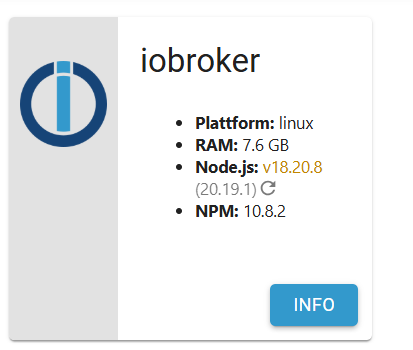
                @thomas-braun Du hast recht nodejs durfte nicht mit Bindestrich getrennt werden und hinter nodejs musste ein Bindestrich

                iob nodejs-update
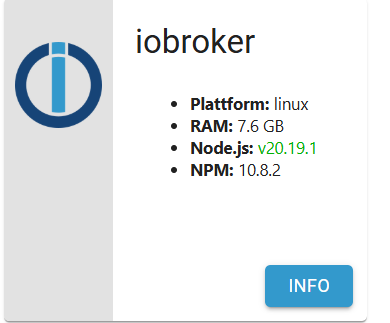
                

                Admin1.png

                Mein Gott, welch schere Geburt.
                Euch allen vielen Dank un einen schönen Sonntag

                Thomas BraunT 1 Antwort Letzte Antwort
                0
                • P Pistus

                  @thomas-braun Du hast recht nodejs durfte nicht mit Bindestrich getrennt werden und hinter nodejs musste ein Bindestrich

                  iob nodejs-update
                  

                  Admin1.png

                  Mein Gott, welch schere Geburt.
                  Euch allen vielen Dank un einen schönen Sonntag

                  Thomas BraunT Online
                  Thomas BraunT Online
                  Thomas Braun
                  Most Active
                  schrieb am zuletzt editiert von Thomas Braun
                  #22

                  @pistus sagte in Telegram Adapter kein updat möglich:

                  Mein Gott, welch schere Geburt.

                  Eigentlich nicht. Wenn du dir nicht irgendwas ausdenken würdest und die vorgesehenen Befehle verwendest ist das alles kein Hexenwerk...

                  Du solltest auch den

                  iob stop
                  iob fix
                  iob start
                  

                  mal ausführen.

                  Linux-Werkzeugkasten:
                  https://forum.iobroker.net/topic/42952/der-kleine-iobroker-linux-werkzeugkasten
                  NodeJS Fixer Skript:
                  https://forum.iobroker.net/topic/68035/iob-node-fix-skript
                  iob_diag: curl -sLf -o diag.sh https://iobroker.net/diag.sh && bash diag.sh

                  P 1 Antwort Letzte Antwort
                  0
                  • Thomas BraunT Thomas Braun

                    @pistus sagte in Telegram Adapter kein updat möglich:

                    Mein Gott, welch schere Geburt.

                    Eigentlich nicht. Wenn du dir nicht irgendwas ausdenken würdest und die vorgesehenen Befehle verwendest ist das alles kein Hexenwerk...

                    Du solltest auch den

                    iob stop
                    iob fix
                    iob start
                    

                    mal ausführen.

                    P Offline
                    P Offline
                    Pistus
                    schrieb am zuletzt editiert von
                    #23

                    @thomas-braun mache ich. Gibt es irgendwo eine Auflistung der Befehle.
                    Ich habe mir den Befehl nicht ausgedacht, sondern irgendwann falsch notiert.
                    Kann ich die Zusammenfassung aus iob diag im Thread so stehen lassen, oder ist das zu gefährlich. Ich tue mich halt sehr schwer.

                    Thomas BraunT 1 Antwort Letzte Antwort
                    0
                    • P Pistus

                      @thomas-braun mache ich. Gibt es irgendwo eine Auflistung der Befehle.
                      Ich habe mir den Befehl nicht ausgedacht, sondern irgendwann falsch notiert.
                      Kann ich die Zusammenfassung aus iob diag im Thread so stehen lassen, oder ist das zu gefährlich. Ich tue mich halt sehr schwer.

                      Thomas BraunT Online
                      Thomas BraunT Online
                      Thomas Braun
                      Most Active
                      schrieb am zuletzt editiert von
                      #24

                      @pistus

                      Die Liste, die dir oben präsentiert wurde reicht nicht?

                      Commands:
                      
                        iobroker setup                                               Setup ioBroker
                      
                        iobroker start [all|<adapter>.<instance>|<adapter>]          Starts the js-con                 troller or a specified adapter instance or all instances of an adapter
                      
                        iobroker stop [<adapter>.<instance>|<adapter>]               stops the js-cont                 roller or a specified adapter instance or all instances of an adapter
                      
                        iobroker restart [<adapter>.<instance>|<adapter>]            Restarts js-contr                 oller or a specified adapter instance or all instances of an adapter  [aliases:                  r]
                      
                        iobroker debug <adapter>[.<instance>]                        Starts a Node.js                  debugging session for the adapter instance
                      
                        iobroker info                                                Shows the host in                 fo
                      
                        iobroker logs [<adapter>]                                    Monitor log
                      
                        iobroker add <adapter> [desiredNumber]                       Add instance of a                 dapter  [aliases: a]
                      
                        iobroker install <adapter>                                   Installs a specif                 ied adapter  [aliases: i]
                      
                        iobroker rebuild [<module>]                                  Rebuild all nativ                 e modules or path
                      
                        iobroker url <url> [<name>]                                  Install adapter f                 rom specified url, e.g. GitHub, if a package name is provided instead of an url,                  it will be installed from npm
                      
                        iobroker del <adapter>                                       Remove adapter an                 d all instances from this host  [aliases: delete]
                      
                        iobroker del <adapter>.<instance>                            Remove adapter in                 stance  [aliases: delete]
                      
                        iobroker update [<repositoryUrl>]                            Update repository                  and list adapters
                      
                        iobroker upgrade                                             Upgrade managemen                 t
                      
                        iobroker upload [all|<adapter>]                              Upload management                   [aliases: u]
                      
                        iobroker object                                              Object management                   [aliases: o]
                      
                        iobroker state                                               State management                   [aliases: s]
                      
                        iobroker message <adapter>[.instance] <command> [<message>]  Send message to a                 dapter instance/s
                      
                        iobroker list <type> [<filter>]                              List all entries,                  like objects
                      
                        iobroker chmod <mode> <file>                                 Change file right                 s
                      
                        iobroker chown <user> <group> <file>                         Change file owner                 ship
                      
                        iobroker touch <file>                                        Touch file
                      
                        iobroker rm <file>                                           Remove file
                      
                        iobroker file                                                File management
                      
                        iobroker user                                                User commands
                      
                        iobroker group                                               group management
                      
                        iobroker host <hostname>                                     Set host to given                  hostname
                      
                        iobroker set <adapter>.<instance>                            Change settings o                 f adapter config
                      
                        iobroker license <license.file or license.text>              Update license by                  given file
                      
                        iobroker cert                                                Certificate manag                 ement
                      
                        iobroker clean <yes>                                         Clears all object                 s and states
                      
                        iobroker backup                                              Create backup
                      
                        iobroker restore <backup name or path>                       Restore a specifi                 ed backup
                      
                        iobroker validate <backup name or path>                      Validate a specif                 ied backup
                      
                        iobroker status [all|<adapter>.<instance>]                   Status of ioBroke                 r or adapter instance  [aliases: isrun]
                      
                        iobroker repo                                                Show repo informa                 tion
                      
                        iobroker uuid                                                Show uuid of the                  installation  [aliases: id]
                      
                        iobroker unsetup                                             Reset license, in                 stallation secret and language
                      
                        iobroker fix                                                 Execute the insta                 llation fixer script, this updates your ioBroker installation
                      
                        iobroker nodejs-update [<major-version>]                     Upgrade the Node.                 JS installation to the current LTS
                      
                        iobroker multihost                                           Multihost managem                 ent
                      
                        iobroker compact                                             compact group man                 agement
                      
                        iobroker plugin                                              Plugin management
                      
                        iobroker vendor <passphrase> [<vendor.json>]                 Update the vendor                  information using given passphrase
                      
                        iobroker version [<adapter>]                                 Show version of j                 s-controller or specified adapter  [aliases: v]


                      Linux-Werkzeugkasten:
                      https://forum.iobroker.net/topic/42952/der-kleine-iobroker-linux-werkzeugkasten
                      NodeJS Fixer Skript:
                      https://forum.iobroker.net/topic/68035/iob-node-fix-skript
                      iob_diag: curl -sLf -o diag.sh https://iobroker.net/diag.sh && bash diag.sh

                      P 1 Antwort Letzte Antwort
                      0
                      • Thomas BraunT Thomas Braun

                        @pistus

                        Die Liste, die dir oben präsentiert wurde reicht nicht?

                        Commands:
                        
                          iobroker setup                                               Setup ioBroker
                        
                          iobroker start [all|<adapter>.<instance>|<adapter>]          Starts the js-con                 troller or a specified adapter instance or all instances of an adapter
                        
                          iobroker stop [<adapter>.<instance>|<adapter>]               stops the js-cont                 roller or a specified adapter instance or all instances of an adapter
                        
                          iobroker restart [<adapter>.<instance>|<adapter>]            Restarts js-contr                 oller or a specified adapter instance or all instances of an adapter  [aliases:                  r]
                        
                          iobroker debug <adapter>[.<instance>]                        Starts a Node.js                  debugging session for the adapter instance
                        
                          iobroker info                                                Shows the host in                 fo
                        
                          iobroker logs [<adapter>]                                    Monitor log
                        
                          iobroker add <adapter> [desiredNumber]                       Add instance of a                 dapter  [aliases: a]
                        
                          iobroker install <adapter>                                   Installs a specif                 ied adapter  [aliases: i]
                        
                          iobroker rebuild [<module>]                                  Rebuild all nativ                 e modules or path
                        
                          iobroker url <url> [<name>]                                  Install adapter f                 rom specified url, e.g. GitHub, if a package name is provided instead of an url,                  it will be installed from npm
                        
                          iobroker del <adapter>                                       Remove adapter an                 d all instances from this host  [aliases: delete]
                        
                          iobroker del <adapter>.<instance>                            Remove adapter in                 stance  [aliases: delete]
                        
                          iobroker update [<repositoryUrl>]                            Update repository                  and list adapters
                        
                          iobroker upgrade                                             Upgrade managemen                 t
                        
                          iobroker upload [all|<adapter>]                              Upload management                   [aliases: u]
                        
                          iobroker object                                              Object management                   [aliases: o]
                        
                          iobroker state                                               State management                   [aliases: s]
                        
                          iobroker message <adapter>[.instance] <command> [<message>]  Send message to a                 dapter instance/s
                        
                          iobroker list <type> [<filter>]                              List all entries,                  like objects
                        
                          iobroker chmod <mode> <file>                                 Change file right                 s
                        
                          iobroker chown <user> <group> <file>                         Change file owner                 ship
                        
                          iobroker touch <file>                                        Touch file
                        
                          iobroker rm <file>                                           Remove file
                        
                          iobroker file                                                File management
                        
                          iobroker user                                                User commands
                        
                          iobroker group                                               group management
                        
                          iobroker host <hostname>                                     Set host to given                  hostname
                        
                          iobroker set <adapter>.<instance>                            Change settings o                 f adapter config
                        
                          iobroker license <license.file or license.text>              Update license by                  given file
                        
                          iobroker cert                                                Certificate manag                 ement
                        
                          iobroker clean <yes>                                         Clears all object                 s and states
                        
                          iobroker backup                                              Create backup
                        
                          iobroker restore <backup name or path>                       Restore a specifi                 ed backup
                        
                          iobroker validate <backup name or path>                      Validate a specif                 ied backup
                        
                          iobroker status [all|<adapter>.<instance>]                   Status of ioBroke                 r or adapter instance  [aliases: isrun]
                        
                          iobroker repo                                                Show repo informa                 tion
                        
                          iobroker uuid                                                Show uuid of the                  installation  [aliases: id]
                        
                          iobroker unsetup                                             Reset license, in                 stallation secret and language
                        
                          iobroker fix                                                 Execute the insta                 llation fixer script, this updates your ioBroker installation
                        
                          iobroker nodejs-update [<major-version>]                     Upgrade the Node.                 JS installation to the current LTS
                        
                          iobroker multihost                                           Multihost managem                 ent
                        
                          iobroker compact                                             compact group man                 agement
                        
                          iobroker plugin                                              Plugin management
                        
                          iobroker vendor <passphrase> [<vendor.json>]                 Update the vendor                  information using given passphrase
                        
                          iobroker version [<adapter>]                                 Show version of j                 s-controller or specified adapter  [aliases: v]


                        P Offline
                        P Offline
                        Pistus
                        schrieb am zuletzt editiert von
                        #25

                        @thomas-braun Du schreibst:
                        Du solltest auch einen user anlegen, der NICHT root ist und NICHT iobroker heißt.
                        kann ich das jetzt noch ändern?

                        Thomas BraunT 1 Antwort Letzte Antwort
                        0
                        • P Pistus

                          @thomas-braun Du schreibst:
                          Du solltest auch einen user anlegen, der NICHT root ist und NICHT iobroker heißt.
                          kann ich das jetzt noch ändern?

                          Thomas BraunT Online
                          Thomas BraunT Online
                          Thomas Braun
                          Most Active
                          schrieb am zuletzt editiert von
                          #26

                          @pistus sagte in Telegram Adapter kein updat möglich:

                          kann ich das jetzt noch ändern?

                          Weitere User kannst du jederzeit anlegen. Geht u. a. mit dem

                          iob fix
                          

                          Linux-Werkzeugkasten:
                          https://forum.iobroker.net/topic/42952/der-kleine-iobroker-linux-werkzeugkasten
                          NodeJS Fixer Skript:
                          https://forum.iobroker.net/topic/68035/iob-node-fix-skript
                          iob_diag: curl -sLf -o diag.sh https://iobroker.net/diag.sh && bash diag.sh

                          1 Antwort Letzte Antwort
                          0
                          • P Pistus

                            @homoran ist der Befehl

                            iob diag --unmask
                            

                            für die Langfassung richtig?

                            Ich hatte

                            sudo apt update
                            sudo apt full-upgrade
                            sudo reboot
                            iobroker update- i
                            iobroker upgrade


                            durchgeführt

                            kommt vor

                            iob node-js-update

                            kein sudo?

                            HomoranH Nicht stören
                            HomoranH Nicht stören
                            Homoran
                            Global Moderator Administrators
                            schrieb am zuletzt editiert von
                            #27

                            @pistus sagte in Telegram Adapter kein updat möglich:

                            ist der Befehl

                            ganz einfach iob diag und dann keine Taste drücken wenn die Ausgabe stoppt. sonst wird das Summary ausgegeben.

                            @pistus sagte in Telegram Adapter kein updat möglich:

                            kommt vor
                            iob node-js-update
                            kein sudo?

                            nie nicht niemals vor Befehle mit iob do something ein sudo setzen!

                            kein Support per PN! - Fragen im Forum stellen - es gibt fast nichts, was nicht auch für andere interessant ist.

                            Benutzt das Voting rechts unten im Beitrag wenn er euch geholfen hat.

                            der Installationsfixer: curl -fsL https://iobroker.net/fix.sh | bash -

                            1 Antwort Letzte Antwort
                            2
                            Antworten
                            • In einem neuen Thema antworten
                            Anmelden zum Antworten
                            • Älteste zuerst
                            • Neuste zuerst
                            • Meiste Stimmen


                            Support us

                            ioBroker
                            Community Adapters
                            Donate
                            FAQ Cloud / IOT
                            HowTo: Node.js-Update
                            HowTo: Backup/Restore
                            Downloads
                            BLOG

                            475

                            Online

                            32.5k

                            Benutzer

                            81.6k

                            Themen

                            1.3m

                            Beiträge
                            Community
                            Impressum | Datenschutz-Bestimmungen | Nutzungsbedingungen | Einwilligungseinstellungen
                            ioBroker Community 2014-2025
                            logo
                            • Anmelden

                            • Du hast noch kein Konto? Registrieren

                            • Anmelden oder registrieren, um zu suchen
                            • Erster Beitrag
                              Letzter Beitrag
                            0
                            • Home
                            • Aktuell
                            • Tags
                            • Ungelesen 0
                            • Kategorien
                            • Unreplied
                            • Beliebt
                            • GitHub
                            • Docu
                            • Hilfe

