Skip to content
  • Home
  • Aktuell
  • Tags
  • 0 Ungelesen 0
  • Kategorien
  • Unreplied
  • Beliebt
  • GitHub
  • Docu
  • Hilfe
Skins
  • Light
  • Brite
  • Cerulean
  • Cosmo
  • Flatly
  • Journal
  • Litera
  • Lumen
  • Lux
  • Materia
  • Minty
  • Morph
  • Pulse
  • Sandstone
  • Simplex
  • Sketchy
  • Spacelab
  • United
  • Yeti
  • Zephyr
  • Dark
  • Cyborg
  • Darkly
  • Quartz
  • Slate
  • Solar
  • Superhero
  • Vapor

  • Standard: (Kein Skin)
  • Kein Skin
Einklappen
ioBroker Logo

Community Forum

donate donate
  1. ioBroker Community Home
  2. Deutsch
  3. ioBroker Allgemein
  4. [gelöst]yr.no Wetter Adapter "Error while requesting data"

NEWS

  • Jahresrückblick 2025 – unser neuer Blogbeitrag ist online! ✨
    BluefoxB
    Bluefox
    14
    1
    320

  • Neuer Blogbeitrag: Monatsrückblick - Dezember 2025 🎄
    BluefoxB
    Bluefox
    13
    1
    600

  • Weihnachtsangebot 2025! 🎄
    BluefoxB
    Bluefox
    25
    1
    1.8k

[gelöst]yr.no Wetter Adapter "Error while requesting data"

Geplant Angeheftet Gesperrt Verschoben ioBroker Allgemein
wetteryr adapter
17 Beiträge 6 Kommentatoren 1.5k Aufrufe 3 Watching
  • Älteste zuerst
  • Neuste zuerst
  • Meiste Stimmen
Antworten
  • In einem neuen Thema antworten
Anmelden zum Antworten
Dieses Thema wurde gelöscht. Nur Nutzer mit entsprechenden Rechten können es sehen.
  • HomoranH Homoran

    @fredf sagte in yr.no Wetter Adapter "Error while requesting data":

    Falsche Werte

    falls du die Geokoordinaten mrinst, die habe ich entfernt

    FredFF Online
    FredFF Online
    FredF
    Most Active Forum Testing
    schrieb am zuletzt editiert von
    #6

    @homoran Ach so...

    1 Antwort Letzte Antwort
    0
    • HomoranH Homoran

      @fredf sagte in yr.no Wetter Adapter "Error while requesting data":

      Falsche Werte

      falls du die Geokoordinaten mrinst, die habe ich entfernt

      mcm1957M Online
      mcm1957M Online
      mcm1957
      schrieb am zuletzt editiert von
      #7

      @Darth2010

      Also bei mir tut der Adapter was er soll.
      Allerdings sind deinem Log unsinnige Geokoordinaten drinnen:

      https://aa0465pwwdn1nx8wo.api.met.no/weatherapi/locationforecast/2.0/compact?lat=7&lon=53&altitude=74

      Entwicklung u Betreuung: envertech-pv, hoymiles-ms, ns-client, pid, snmp Adapter;
      Support Repositoryverwaltung.

      Wer Danke sagen will, kann nen Kaffee spendieren: https://paypal.me/mcm1957atiobroker

      LESEN - gute Forenbeitrage

      HomoranH 1 Antwort Letzte Antwort
      1
      • FredFF FredF

        @darth2010 sagte in yr.no Wetter Adapter "Error while requesting data":

        Get forecast from: https://aa0465pwwdn1nx8wo.api.met.no/weatherapi/locationforecast/2.0/compact?lat=7&lon=53&altitude=74

        Falsche Werte für Längen- und Breitenrad in den Instanzeinstellungen verwendet?

        D Offline
        D Offline
        Darth2010
        schrieb am zuletzt editiert von
        #8

        @fredf
        Hab beispielhaft die Geo-Daten von Berlin genommen, daher kein Problem, kann jeder sehen und ausprobieren.

        HomoranH mcm1957M 2 Antworten Letzte Antwort
        0
        • mcm1957M mcm1957

          @Darth2010

          Also bei mir tut der Adapter was er soll.
          Allerdings sind deinem Log unsinnige Geokoordinaten drinnen:

          https://aa0465pwwdn1nx8wo.api.met.no/weatherapi/locationforecast/2.0/compact?lat=7&lon=53&altitude=74

          HomoranH Nicht stören
          HomoranH Nicht stören
          Homoran
          Global Moderator Administrators
          schrieb am zuletzt editiert von
          #9

          @mcm1957 sagte in yr.no Wetter Adapter "Error while requesting data":

          Allerdings sind deinem Log unsinnige Geokoordinaten drinnen:

          @homoran sagte in yr.no Wetter Adapter "Error while requesting data":

          @fredf sagte in yr.no Wetter Adapter "Error while requesting data":

          Falsche Werte

          falls du die Geokoordinaten mrinst, die habe ich entfernt

          kein Support per PN! - Fragen im Forum stellen - es gibt fast nichts, was nicht auch für andere interessant ist.

          Benutzt das Voting rechts unten im Beitrag wenn er euch geholfen hat.

          der Installationsfixer: curl -fsL https://iobroker.net/fix.sh | bash -

          1 Antwort Letzte Antwort
          0
          • D Darth2010

            @fredf
            Hab beispielhaft die Geo-Daten von Berlin genommen, daher kein Problem, kann jeder sehen und ausprobieren.

            HomoranH Nicht stören
            HomoranH Nicht stören
            Homoran
            Global Moderator Administrators
            schrieb am zuletzt editiert von
            #10

            @darth2010 sagte in yr.no Wetter Adapter "Error while requesting data":

            Hab beispielhaft die Geo-Daten von Berlin genommen, daher kein Problem, kann jeder sehen und ausprobieren.

            hab ich ja nicht gewusst

            kein Support per PN! - Fragen im Forum stellen - es gibt fast nichts, was nicht auch für andere interessant ist.

            Benutzt das Voting rechts unten im Beitrag wenn er euch geholfen hat.

            der Installationsfixer: curl -fsL https://iobroker.net/fix.sh | bash -

            D 1 Antwort Letzte Antwort
            0
            • D Darth2010

              @fredf
              Hab beispielhaft die Geo-Daten von Berlin genommen, daher kein Problem, kann jeder sehen und ausprobieren.

              mcm1957M Online
              mcm1957M Online
              mcm1957
              schrieb am zuletzt editiert von
              #11

              @darth2010
              761495a5-3d5e-4343-8376-bc3488e5b404-image.png

              yr.0 81859 2025-03-20 16:21:52.028 debug Get forecast from: https://aa0465pwwdn1nx8wo.api.met.no/weatherapi/locationforecast/2.0/compact?lat=7&lon=53&altitude=74

              Also in der URL stehen da sicher nicht die Geodaten von Berlin...

              Entwicklung u Betreuung: envertech-pv, hoymiles-ms, ns-client, pid, snmp Adapter;
              Support Repositoryverwaltung.

              Wer Danke sagen will, kann nen Kaffee spendieren: https://paypal.me/mcm1957atiobroker

              LESEN - gute Forenbeitrage

              HomoranH 1 Antwort Letzte Antwort
              0
              • mcm1957M mcm1957

                @darth2010
                761495a5-3d5e-4343-8376-bc3488e5b404-image.png

                yr.0 81859 2025-03-20 16:21:52.028 debug Get forecast from: https://aa0465pwwdn1nx8wo.api.met.no/weatherapi/locationforecast/2.0/compact?lat=7&lon=53&altitude=74

                Also in der URL stehen da sicher nicht die Geodaten von Berlin...

                HomoranH Nicht stören
                HomoranH Nicht stören
                Homoran
                Global Moderator Administrators
                schrieb am zuletzt editiert von
                #12

                @mcm1957 sagte in yr.no Wetter Adapter "Error while requesting data":

                Also in der URL stehen da sicher nicht die Geodaten von Berlin...

                und Was da stand waren andere

                kein Support per PN! - Fragen im Forum stellen - es gibt fast nichts, was nicht auch für andere interessant ist.

                Benutzt das Voting rechts unten im Beitrag wenn er euch geholfen hat.

                der Installationsfixer: curl -fsL https://iobroker.net/fix.sh | bash -

                1 Antwort Letzte Antwort
                0
                • HomoranH Homoran

                  @darth2010 sagte in yr.no Wetter Adapter "Error while requesting data":

                  Hab beispielhaft die Geo-Daten von Berlin genommen, daher kein Problem, kann jeder sehen und ausprobieren.

                  hab ich ja nicht gewusst

                  D Offline
                  D Offline
                  Darth2010
                  schrieb am zuletzt editiert von Darth2010
                  #13

                  @homoran
                  Ja ist mir beim Antworten auch aufgefallen :anguished: .

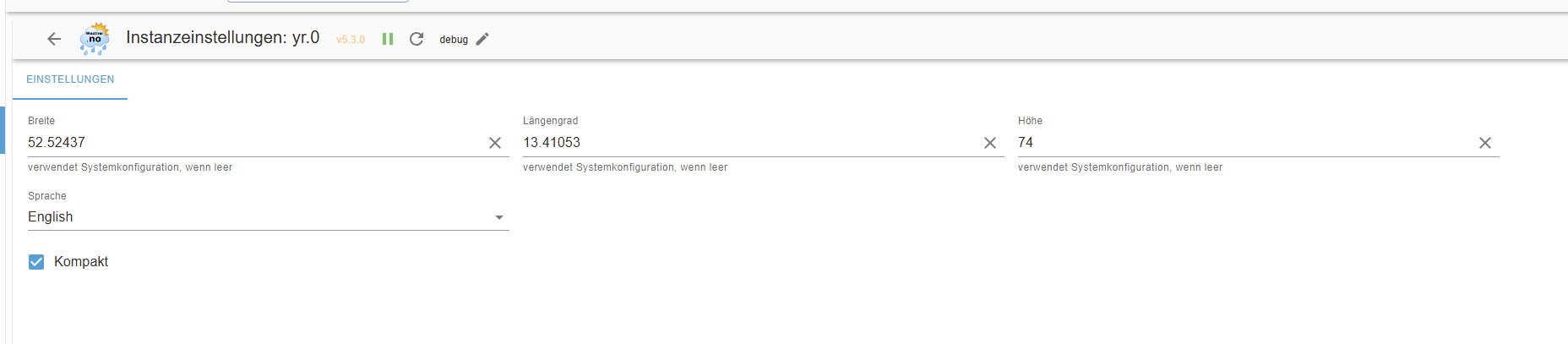
                  Hier die Adapter Settings:
                  901b0062-2e4b-45ce-b15e-4ad7d30188f9-grafik.png

                  @mcm1957
                  Und noch mal das Log dazu:

                  yr.082737	2025-03-20 17:35:32.093	info	Terminated (ADAPTER_REQUESTED_TERMINATION): Without reason
                  yr.082737	2025-03-20 17:35:32.093	debug	Plugin sentry destroyed
                  yr.082737	2025-03-20 17:35:32.092	debug	Update of data done, existing ...
                  yr.082737	2025-03-20 17:35:32.092	info	Data updated.
                  yr.082737	2025-03-20 17:35:32.092	info	Please check your settings!
                  yr.082737	2025-03-20 17:35:32.091	info	Error while requesting data:
                  yr.082737	2025-03-20 17:35:32.015	debug	Get forecast from: https://aa0465pwwdn1nx8wo.api.met.no/weatherapi/locationforecast/2.0/compact?lat=52.52437&lon=13.41053&altitude=74
                  yr.082737	2025-03-20 17:35:12.132	debug	Delay execution by 19883ms to better spread API calls
                  yr.082737	2025-03-20 17:35:12.131	debug	Configured version: {"val":"5.3.0","ack":true,"ts":1742481262686,"q":0,"from":"system.adapter.yr.0","user":"system.user.admin","lc":1742481262686}
                  yr.082737	2025-03-20 17:35:12.119	info	longitude/longitude will be set by self-Config - longitude: 13.41053 latitude: 52.52437
                  yr.082737	2025-03-20 17:35:12.096	info	starting. Version 5.3.0 in /opt/iobroker/node_modules/iobroker.yr, node: v20.18.3, js-controller: 7.0.6
                  yr.082737	2025-03-20 17:35:12.021	debug	Plugin sentry Do not initialize Plugin (enabled=false)
                  yr.082737	2025-03-20 17:35:12.006	debug	States connected to redis: 127.0.0.1:6379
                  yr.082737	2025-03-20 17:35:12.002	debug	States create User PubSub Client
                  yr.082737	2025-03-20 17:35:12.001	debug	States create System PubSub Client
                  yr.082737	2025-03-20 17:35:11.998	debug	Redis States: Use Redis connection: 127.0.0.1:6379
                  yr.082737	2025-03-20 17:35:11.972	debug	Objects connected to redis: 127.0.0.1:6379
                  yr.082737	2025-03-20 17:35:11.969	debug	Objects client initialize lua scripts
                  yr.082737	2025-03-20 17:35:11.941	debug	Objects create User PubSub Client
                  yr.082737	2025-03-20 17:35:11.941	debug	Objects create System PubSub Client
                  yr.082737	2025-03-20 17:35:11.940	debug	Objects client ready ... initialize now
                  yr.082737	2025-03-20 17:35:11.921	debug	Redis Objects: Use Redis connection: 127.0.0.1:6379
                  
                  HomoranH 1 Antwort Letzte Antwort
                  0
                  • D Darth2010

                    Fehlerbeschreibung:
                    Nachdem der DasWetter Adapter nicht mehr funktioniert, wollte ich yr.no Wetter ausprobieren.
                    Nach der Installation, Konfiguration und Start des Adapter liefert das Log folgende Einträge:

                    yr.0 81859	2025-03-20 16:21:52.106	info	Terminated (ADAPTER_REQUESTED_TERMINATION): Without reason
                    yr.0 81859	2025-03-20 16:21:52.106	debug	Plugin sentry destroyed
                    yr.0 81859	2025-03-20 16:21:52.105	debug	Update of data done, existing ...
                    yr.0 81859	2025-03-20 16:21:52.105	info	Data updated.
                    yr.0 81859	2025-03-20 16:21:52.105	info	Please check your settings!
                    yr.0 81859	2025-03-20 16:21:52.104	info	Error while requesting data:
                    yr.0 81859	2025-03-20 16:21:52.028	debug	Get forecast from: https://aa0465pwwdn1nx8wo.api.met.no/weatherapi/locationforecast/2.0/compact?lat=7&lon=53&altitude=74
                    yr.0 81859	2025-03-20 16:21:28.685	debug	Delay execution by 23339ms to better spread API calls
                    yr.0 81859	2025-03-20 16:21:28.684	debug	Configured version: {"val":"5.3.0","ack":true,"ts":1742481262686,"q":0,"from":"system.adapter.yr.0","user":"system.user.admin","lc":1742481262686}
                    yr.0 81859	2025-03-20 16:21:28.669	info	longitude/longitude will be set by self-Config - longitude: 6.757311447027663 latitude: 50.73762218877986
                    yr.0 81859	2025-03-20 16:21:28.649	info	starting. Version 5.3.0 in /opt/iobroker/node_modules/iobroker.yr, node: v20.18.3, js-controller: 7.0.6
                    yr.0 81859	2025-03-20 16:21:28.577	debug	Plugin sentry Do not initialize Plugin (enabled=false)
                    yr.0 81859	2025-03-20 16:21:28.561	debug	States connected to redis: 127.0.0.1:6379
                    yr.0 81859	2025-03-20 16:21:28.557	debug	States create User PubSub Client
                    yr.0 81859	2025-03-20 16:21:28.556	debug	States create System PubSub Client
                    yr.0 81859	2025-03-20 16:21:28.553	debug	Redis States: Use Redis connection: 127.0.0.1:6379
                    yr.0 81859	2025-03-20 16:21:28.528	debug	Objects connected to redis: 127.0.0.1:6379
                    yr.0 81859	2025-03-20 16:21:28.525	debug	Objects client initialize lua scripts
                    yr.0 81859	2025-03-20 16:21:28.498	debug	Objects create User PubSub Client
                    yr.0 81859	2025-03-20 16:21:28.497	debug	Objects create System PubSub Client
                    yr.0 81859	2025-03-20 16:21:28.496	debug	Objects client ready ... initialize now
                    yr.0 81859	2025-03-20 16:21:28.482	debug	Redis Objects: Use Redis connection: 127.0.0.1:6379
                    

                    Entsprechend enthalten die Datenpunkte des Adapters auch keine Daten:

                    3ab5c5be-0045-4153-8250-f82c131e63df-grafik.png

                    Wenn man den Link jedoch per Postman oder Browser abruft kommt ein "korrektes" JSON zurück:
                    response.json

                    Hat sonst noch jemand dieses Problem?

                    Infos zum System:

                    • Adaptername: yr.no Wetter
                    • Adapterversion: 5.3.0
                    • js-controller Version: 7.0.6
                    • Admin Version: 7.4.10
                    • Hardwaresystem: Proxmox LXC mit 1 Cores, 4 GB RAM und 10 GB SSD auf (Lenovo ThinkCentre M700 Tiny i5-6500T 4x2.5GHz mit 16 GB RAM)
                    • Arbeitsspeicher: 4GB
                    • Festplattenart: SSD
                    • Betriebssystem: Ububtu 22.04
                    • Nodejs-Version: v20.18.3
                    • NPM-Version: 10.8.2
                    • Installationsart: Skript
                    • Image, Docker genutzt: Nein

                    iob diag:

                    ========== Start marking the full check here ===========
                    
                    bash
                    Script v.2025-02-23
                    
                    *** BASE SYSTEM ***
                    Static hostname: iobroker-master
                          Icon name: computer-container
                            Chassis: container
                     Virtualization: lxc
                    Operating System: Ubuntu 22.04.5 LTS
                             Kernel: Linux 6.8.12-8-pve
                       Architecture: x86-64
                    OS is similar to: debian
                    
                    model name      : Intel(R) Core(TM) i5-6500T CPU @ 2.50GHz
                    Docker          : false
                    Virtualization  : lxc
                    Kernel          : x86_64
                    Userland        : 64 bit
                    
                    Systemuptime and Load:
                    16:31:43 up 23 days,  8:53,  2 users,  load average: 2.70, 1.62, 1.34
                    CPU threads: 1
                    
                    
                    *** LIFE CYCLE STATUS ***
                    Operating System codenamed 'jammy' is an aging Ubuntu release! Please upgrade to the latest LTS release 'noble' in due time!
                    
                    *** TIME AND TIMEZONES ***
                                  Local time: Thu 2025-03-20 16:31:43 CET
                              Universal time: Thu 2025-03-20 15:31:43 UTC
                                    RTC time: n/a
                                   Time zone: Europe/Berlin (CET, +0100)
                    System clock synchronized: yes
                                 NTP service: inactive
                             RTC in local TZ: no
                    
                    *** Users and Groups ***
                    User that called 'iob diag':
                    darth
                    HOME=/home/darth
                    GROUPS=darth sudo iobroker
                    
                    User that is running 'js-controller':
                    iobroker
                    HOME=/home/iobroker
                    GROUPS=iobroker tty dialout audio video redis
                    
                    *** DISPLAY-SERVER SETUP ***
                    Display-Server: false
                    Desktop:
                    Terminal:       tty
                    
                    System is booting into 'graphical.target'. Usually a server is running in 'multi-user.target'. Please set BootTarget to 'multi-user.target' or run 'iobroker fix'
                    
                    *** MEMORY ***
                                  total        used        free      shared  buff/cache   available
                    Mem:            4.1G        2.9G        973M        5.0M        243M        1.2G
                    Swap:             0B          0B          0B
                    Total:          4.1G        2.9G        973M
                    
                    Active iob-Instances:   28
                    
                            4096 M total memory
                            2879 M used memory
                            1476 M active memory
                            1546 M inactive memory
                             972 M free memory
                               0 M buffer memory
                             243 M swap cache
                               0 M total swap
                               0 M used swap
                               0 M free swap
                    
                    *** top - Table Of Processes  ***
                    top - 16:31:43 up 23 days,  8:53,  2 users,  load average: 2.70, 1.62, 1.34
                    Tasks:  60 total,   1 running,  59 sleeping,   0 stopped,   0 zombie
                    %Cpu(s):  0.0 us,  6.7 sy,  0.0 ni, 93.3 id,  0.0 wa,  0.0 hi,  0.0 si,  0.0 st
                    MiB Mem :   4096.0 total,    972.0 free,   2879.9 used,    244.1 buff/cache
                    MiB Swap:      0.0 total,      0.0 free,      0.0 used.   1211.1 avail Mem
                    
                    *** FAILED SERVICES ***
                    
                     UNIT                 LOAD   ACTIVE SUB    DESCRIPTION
                    * run-rpc_pipefs.mount loaded failed failed RPC Pipe File System
                    
                    LOAD   = Reflects whether the unit definition was properly loaded.
                    ACTIVE = The high-level unit activation state, i.e. generalization of SUB.
                    SUB    = The low-level unit activation state, values depend on unit type.
                    1 loaded units listed.
                    
                    
                    *** DMESG CRITICAL ERRORS ***
                    dmesg: read kernel buffer failed: Operation not permitted
                    No critical errors detected
                    
                    *** FILESYSTEM ***
                    Filesystem                       Type      Size  Used Avail Use% Mounted on
                    /dev/mapper/pve-vm--110--disk--0 ext4      9.8G  7.1G  2.2G  77% /
                    /dev/mapper/pve-root             ext4       94G   55G   35G  62% /shared
                    none                             tmpfs     492K  4.0K  488K   1% /dev
                    efivarfs                         efivarfs  128K  101K   23K  82% /sys/firmware/efi/efivars
                    tmpfs                            tmpfs     7.8G     0  7.8G   0% /dev/shm
                    tmpfs                            tmpfs     3.2G  144K  3.2G   1% /run
                    tmpfs                            tmpfs     5.0M     0  5.0M   0% /run/lock
                    log2ram                          tmpfs     500M  4.7M  496M   1% /var/log
                    log2ram                          tmpfs     500M  252K  500M   1% /opt/iobroker/log
                    tmpfs                            tmpfs     1.6G     0  1.6G   0% /run/user/1001
                    
                    Messages concerning ext4 filesystem in dmesg:
                    dmesg: read kernel buffer failed: Operation not permitted
                    
                    Show mounted filesystems:
                    TARGET                  SOURCE                                              FSTYPE OPTIONS
                    /                       /dev/mapper/pve-vm--110--disk--0                    ext4   rw,relatime,stripe=16
                    |-/var/hdd.log          /dev/mapper/pve-vm--110--disk--0[/var/log]          ext4   rw,relatime,stripe=16
                    |-/shared               /dev/mapper/pve-root[/home/darth/shared]            ext4   rw,relatime,errors=remount-ro
                    `-/opt/iobroker/hdd.log /dev/mapper/pve-vm--110--disk--0[/opt/iobroker/log] ext4   rw,relatime,stripe=16
                    
                    Files in neuralgic directories:
                    
                    /var:
                    1.2G    /var/
                    934M    /var/lib
                    582M    /var/lib/redis
                    220M    /var/cache
                    213M    /var/lib/apt/lists
                    
                    Hint: You are currently not seeing messages from other users and the system.
                         Users in groups 'adm', 'systemd-journal' can see all messages.
                         Pass -q to turn off this notice.
                    Archived and active journals take up 512.0K in the file system.
                    
                    /opt/iobroker/backups:
                    96M     /opt/iobroker/backups/
                    4.0K    /opt/iobroker/backups/redistmp
                    
                    /opt/iobroker/iobroker-data:
                    406M    /opt/iobroker/iobroker-data/
                    219M    /opt/iobroker/iobroker-data/files
                    137M    /opt/iobroker/iobroker-data/backup-objects
                    67M     /opt/iobroker/iobroker-data/files/javascript.admin
                    48M     /opt/iobroker/iobroker-data/files/javascript.admin/static
                    
                    The five largest files in iobroker-data are:
                    27M     /opt/iobroker/iobroker-data/objects.jsonl
                    21M     /opt/iobroker/iobroker-data/files/web.admin/static/js/main.aaea95f8.js.map
                    12M     /opt/iobroker/iobroker-data/objects.json.migrated
                    12M     /opt/iobroker/iobroker-data/objects.json.bak.migrated
                    9.9M    /opt/iobroker/iobroker-data/files/material/static/js/main.c5478f66.js
                    
                    USB-Devices by-id:
                    USB-Sticks -  Avoid direct links to /dev/tty* in your adapter setups, please always prefer the links 'by-id':
                    
                    No Devices found 'by-id'
                    
                    Zigbee Network Settings on your coordinator/in nvbackup are:
                    
                    zigbee.X
                    Extended Pan ID:
                    *** MASKED ***
                    Pan ID:
                    *** MASKED ***
                    Channel:
                    *** MASKED ***
                    Network Key:
                    *** MASKED ***
                    
                    To unmask the settings run 'iob diag --unmask'
                    
                    
                    *** NodeJS-Installation ***
                    
                    /usr/bin/nodejs         v20.18.3
                    /usr/bin/node           v20.18.3
                    /usr/bin/npm            10.8.2
                    /usr/bin/npx            10.8.2
                    /usr/bin/corepack       0.30.0
                    
                    nodejs:
                     Installed: 20.18.3-1nodesource1
                     Candidate: 20.18.3-1nodesource1
                     Version table:
                    *** 20.18.3-1nodesource1 1001
                           500 https://deb.nodesource.com/node_20.x nodistro/main amd64 Packages
                           100 /var/lib/dpkg/status
                        20.18.2-1nodesource1 1001
                           500 https://deb.nodesource.com/node_20.x nodistro/main amd64 Packages
                        20.18.1-1nodesource1 1001
                           500 https://deb.nodesource.com/node_20.x nodistro/main amd64 Packages
                        20.18.0-1nodesource1 1001
                           500 https://deb.nodesource.com/node_20.x nodistro/main amd64 Packages
                        20.17.0-1nodesource1 1001
                           500 https://deb.nodesource.com/node_20.x nodistro/main amd64 Packages
                        20.16.0-1nodesource1 1001
                           500 https://deb.nodesource.com/node_20.x nodistro/main amd64 Packages
                        20.15.1-1nodesource1 1001
                           500 https://deb.nodesource.com/node_20.x nodistro/main amd64 Packages
                        20.15.0-1nodesource1 1001
                           500 https://deb.nodesource.com/node_20.x nodistro/main amd64 Packages
                        20.14.0-1nodesource1 1001
                           500 https://deb.nodesource.com/node_20.x nodistro/main amd64 Packages
                        20.13.1-1nodesource1 1001
                           500 https://deb.nodesource.com/node_20.x nodistro/main amd64 Packages
                        20.13.0-1nodesource1 1001
                           500 https://deb.nodesource.com/node_20.x nodistro/main amd64 Packages
                        20.12.2-1nodesource1 1001
                           500 https://deb.nodesource.com/node_20.x nodistro/main amd64 Packages
                        20.12.1-1nodesource1 1001
                           500 https://deb.nodesource.com/node_20.x nodistro/main amd64 Packages
                        20.12.0-1nodesource1 1001
                           500 https://deb.nodesource.com/node_20.x nodistro/main amd64 Packages
                        20.11.1-1nodesource1 1001
                           500 https://deb.nodesource.com/node_20.x nodistro/main amd64 Packages
                        20.11.0-1nodesource1 1001
                           500 https://deb.nodesource.com/node_20.x nodistro/main amd64 Packages
                        20.10.0-1nodesource1 1001
                           500 https://deb.nodesource.com/node_20.x nodistro/main amd64 Packages
                        20.9.0-1nodesource1 1001
                           500 https://deb.nodesource.com/node_20.x nodistro/main amd64 Packages
                        20.8.1-1nodesource1 1001
                           500 https://deb.nodesource.com/node_20.x nodistro/main amd64 Packages
                        20.8.0-1nodesource1 1001
                           500 https://deb.nodesource.com/node_20.x nodistro/main amd64 Packages
                        20.7.0-1nodesource1 1001
                           500 https://deb.nodesource.com/node_20.x nodistro/main amd64 Packages
                        20.6.1-1nodesource1 1001
                           500 https://deb.nodesource.com/node_20.x nodistro/main amd64 Packages
                        20.6.0-1nodesource1 1001
                           500 https://deb.nodesource.com/node_20.x nodistro/main amd64 Packages
                        20.5.1-1nodesource1 1001
                           500 https://deb.nodesource.com/node_20.x nodistro/main amd64 Packages
                        20.5.0-1nodesource1 1001
                           500 https://deb.nodesource.com/node_20.x nodistro/main amd64 Packages
                        20.4.0-1nodesource1 1001
                           500 https://deb.nodesource.com/node_20.x nodistro/main amd64 Packages
                        20.3.1-1nodesource1 1001
                           500 https://deb.nodesource.com/node_20.x nodistro/main amd64 Packages
                        20.3.0-1nodesource1 1001
                           500 https://deb.nodesource.com/node_20.x nodistro/main amd64 Packages
                        20.2.0-1nodesource1 1001
                           500 https://deb.nodesource.com/node_20.x nodistro/main amd64 Packages
                        20.1.0-1nodesource1 1001
                           500 https://deb.nodesource.com/node_20.x nodistro/main amd64 Packages
                        20.0.0-1nodesource1 1001
                           500 https://deb.nodesource.com/node_20.x nodistro/main amd64 Packages
                        12.22.9~dfsg-1ubuntu3.6 500
                           500 http://archive.ubuntu.com/ubuntu jammy-updates/universe amd64 Packages
                           500 http://archive.ubuntu.com/ubuntu jammy-security/universe amd64 Packages
                        12.22.9~dfsg-1ubuntu3 500
                           500 http://archive.ubuntu.com/ubuntu jammy/universe amd64 Packages
                    
                    Temp directories causing deletion problem: 0
                    No problems detected
                    
                    Errors in npm tree: 0
                    No problems detected
                    
                    *** ioBroker-Installation ***
                    
                    ioBroker Status
                    iobroker is running on this host.
                    
                    At least one iobroker host is running.
                    
                    Objects type: redis
                    States  type: redis
                    
                    Hosts:
                    iobroker-master     iobroker-master (version: 7.0.6, hostname: iobroker-master, alive, uptime: 2019220)
                    iobroker-slave-Flur iobroker-slave-Flur (version: 7.0.6, hostname: iobroker-slave-Flur, alive, uptime: 4174563)
                    
                    Core adapters versions
                    js-controller:  7.0.6
                    admin:          7.4.10
                    javascript:     8.8.3
                    
                    nodejs modules from github:     1
                    | +-- syno@3.0.0 (git+https://git@github.com/MeisterTR/syno.git#0104a973d33fe332aa6b1ab5be7fe8c57d3c68b0)
                    
                    Adapter State
                    + system.adapter.admin.0                  : admin                 : iobroker-master                          -  enabled, port: 8081, bind: 0.0.0.0 (SSL), run as: admin
                     system.adapter.alias-manager.0          : alias-manager         : iobroker-master                          -  enabled
                     system.adapter.backitup.0               : backitup              : iobroker-master                          - disabled
                     system.adapter.cloud.0                  : cloud                 : iobroker-master                          - disabled
                     system.adapter.daswetter.0              : daswetter             : iobroker-master                          - disabled
                     system.adapter.device-reminder.0        : device-reminder       : iobroker-master                          - disabled
                     system.adapter.discovery.0              : discovery             : iobroker-master                          - disabled
                    + system.adapter.email.0                  : email                 : iobroker-master                          -  enabled
                     system.adapter.feiertage.0              : feiertage             : iobroker-master                          -  enabled
                     system.adapter.flot.0                   : flot                  : iobroker-master                          - disabled
                     system.adapter.hikvision-alarmserver.0  : hikvision-alarmserver : iobroker-master                          - disabled, port: 7070, bind: 192.168.12.34
                     system.adapter.history.0                : history               : iobroker-master                          - disabled
                    + system.adapter.hm-rega.0                : hm-rega               : iobroker-master                          -  enabled
                    + system.adapter.hm-rpc.0                 : hm-rpc                : iobroker-master                          -  enabled, port: 0
                    + system.adapter.hm-rpc.1                 : hm-rpc                : iobroker-master                          -  enabled, port: 0
                     system.adapter.ical.0                   : ical                  : iobroker-master                          -  enabled
                     system.adapter.icons-mfd-svg.0          : icons-mfd-svg         : iobroker-master                          - disabled
                    + system.adapter.javascript.0             : javascript            : iobroker-master                          -  enabled
                    + system.adapter.jeelink.0                : jeelink               : iobroker-slave-Flur                      -  enabled
                     system.adapter.lgtv.0                   : lgtv                  : iobroker-master                          - disabled
                     system.adapter.linux-control.0          : linux-control         : iobroker-master                          - disabled
                    + system.adapter.logparser.0              : logparser             : iobroker-master                          -  enabled
                     system.adapter.material.0               : material              : iobroker-master                          - disabled
                     system.adapter.mobile.0                 : mobile                : iobroker-master                          - disabled
                    + system.adapter.modbus.0                 : modbus                : iobroker-master                          -  enabled
                    + system.adapter.modbus.1                 : modbus                : iobroker-master                          -  enabled
                    + system.adapter.mqtt.0                   : mqtt                  : iobroker-master                          -  enabled, port: 1883, bind: 0.0.0.0
                    + system.adapter.nut.0                    : nut                   : iobroker-master                          -  enabled
                    + system.adapter.ping.0                   : ping                  : iobroker-master                          -  enabled
                    + system.adapter.plenticore.0             : plenticore            : iobroker-master                          -  enabled, port: 80
                    + system.adapter.proxmox.0                : proxmox               : iobroker-master                          -  enabled, port: 8006
                    + system.adapter.proxmox.1                : proxmox               : iobroker-master                          -  enabled, port: 8006
                    + system.adapter.proxmox.2                : proxmox               : iobroker-master                          -  enabled, port: 8006
                    + system.adapter.scenes.0                 : scenes                : iobroker-master                          -  enabled
                     system.adapter.schoolfree.0             : schoolfree            : iobroker-master                          -  enabled
                     system.adapter.shelly.0                 : shelly                : iobroker-master                          - disabled, port: 1883, bind: 0.0.0.0
                    + system.adapter.simple-api.0             : simple-api            : iobroker-master                          -  enabled, port: 8087, bind: 0.0.0.0, run as: admin
                    + system.adapter.smartmeter.0             : smartmeter            : iobroker-master                          -  enabled
                    + system.adapter.smartmeter.1             : smartmeter            : iobroker-master                          -  enabled
                    + system.adapter.socketio.0               : socketio              : iobroker-master                          -  enabled, port: 8084, bind: 0.0.0.0, run as: admin
                    + system.adapter.sonoff.0                 : sonoff                : iobroker-master                          -  enabled, port: 1884, bind: 0.0.0.0
                    + system.adapter.sql.0                    : sql                   : iobroker-master                          -  enabled, port: 3306
                     system.adapter.synology.0               : synology              : iobroker-master                          - disabled, port: 5001
                    + system.adapter.tr-064.0                 : tr-064                : iobroker-master                          -  enabled
                    + system.adapter.unifi.0                  : unifi                 : iobroker-master                          -  enabled
                     system.adapter.viessmann.0              : viessmann             : iobroker-master                          - disabled, port: 3002
                     system.adapter.vis-history.0            : vis-history           : iobroker-master                          - disabled
                     system.adapter.vis-jqui-mfd.0           : vis-jqui-mfd          : iobroker-master                          - disabled
                     system.adapter.vis.0                    : vis                   : iobroker-master                          - disabled
                    + system.adapter.web.0                    : web                   : iobroker-master                          -  enabled, port: 8082, bind: 0.0.0.0, run as: admin
                     system.adapter.yr.0                     : yr                    : iobroker-master                          - disabled
                     system.adapter.zigbee2mqtt.0            : zigbee2mqtt           : iobroker-master                          - disabled
                    
                    + instance is alive
                    
                    Enabled adapters with bindings
                    + system.adapter.admin.0                  : admin                 : iobroker-master                          -  enabled, port: 8081, bind: 0.0.0.0 (SSL), run as: admin
                    + system.adapter.hm-rpc.0                 : hm-rpc                : iobroker-master                          -  enabled, port: 0
                    + system.adapter.hm-rpc.1                 : hm-rpc                : iobroker-master                          -  enabled, port: 0
                    + system.adapter.mqtt.0                   : mqtt                  : iobroker-master                          -  enabled, port: 1883, bind: 0.0.0.0
                    + system.adapter.plenticore.0             : plenticore            : iobroker-master                          -  enabled, port: 80
                    + system.adapter.proxmox.0                : proxmox               : iobroker-master                          -  enabled, port: 8006
                    + system.adapter.proxmox.1                : proxmox               : iobroker-master                          -  enabled, port: 8006
                    + system.adapter.proxmox.2                : proxmox               : iobroker-master                          -  enabled, port: 8006
                    + system.adapter.simple-api.0             : simple-api            : iobroker-master                          -  enabled, port: 8087, bind: 0.0.0.0, run as: admin
                    + system.adapter.socketio.0               : socketio              : iobroker-master                          -  enabled, port: 8084, bind: 0.0.0.0, run as: admin
                    + system.adapter.sonoff.0                 : sonoff                : iobroker-master                          -  enabled, port: 1884, bind: 0.0.0.0
                    + system.adapter.sql.0                    : sql                   : iobroker-master                          -  enabled, port: 3306
                    + system.adapter.web.0                    : web                   : iobroker-master                          -  enabled, port: 8082, bind: 0.0.0.0, run as: admin
                    
                    ioBroker-Repositories
                    ┌─────────┬─────────────────┬─────────────────────────────────────────────────────────┬──────────────┐
                    │ (index) │ name            │ url                                                     │ auto upgrade │
                    ├─────────┼─────────────────┼─────────────────────────────────────────────────────────┼──────────────┤
                    │ 0       │ 'stable'        │ 'http://download.iobroker.net/sources-dist.json'        │ false        │
                    │ 1       │ 'Beta (latest)' │ 'http://download.iobroker.net/sources-dist-latest.json' │ false        │
                    └─────────┴─────────────────┴─────────────────────────────────────────────────────────┴──────────────┘
                    
                    Active repo(s): stable
                    Upgrade policy: none
                    
                    Installed ioBroker-Adapters
                    Used repository: stable
                    Adapter    "admin"        : 7.4.10   , installed 7.4.10
                    Adapter    "alias-manager": 2.0.0    , installed 2.0.0
                    Adapter    "backitup"     : 3.0.31   , installed 3.0.31
                    Adapter    "cloud"        : 5.0.1    , installed 5.0.1
                    Adapter    "daswetter"    : 3.2.2    , installed 3.2.2
                    Adapter    "device-reminder": 3.1.2  , installed 3.1.2
                    ...
                    Adapter    "javascript"   : 8.8.3    , installed 8.8.3
                    Adapter    "jeelink"      : 1.2.5    , installed 1.2.5
                    Controller "js-controller": 7.0.6    , installed 7.0.6
                    ...
                    Adapter    "vis-metro"    : 1.2.0    , installed 1.2.0
                    Adapter    "vis-timeandweather": 1.2.2, installed 1.2.2
                    Adapter    "web"          : 6.2.5    , installed 6.2.5
                    Adapter    "ws"           : 2.6.2    , installed 2.6.2
                    Adapter    "yr"           : 5.3.0    , installed 5.3.0
                    Adapter    "zigbee2mqtt"  : 3.0.2    , installed 3.0.2
                    
                    Objects and States
                    Please stand by - This may take a while
                    Objects:        6615
                    States:         5438
                    
                    ...
                    
                    *** Log File - Last 25 Lines ***
                    
                    2025-03-20 16:21:28.557  - debug: yr.0 (81859) States create User PubSub Client
                    2025-03-20 16:21:28.561  - debug: yr.0 (81859) States connected to redis: 127.0.0.1:6379
                    2025-03-20 16:21:28.577  - debug: yr.0 (81859) Plugin sentry Do not initialize Plugin (enabled=false)
                    2025-03-20 16:21:28.649  - info: yr.0 (81859) starting. Version 5.3.0 in /opt/iobroker/node_modules/iobroker.yr, node: v20.18.3, js-controller: 7.0.6
                    2025-03-20 16:21:28.669  - info: yr.0 (81859) longitude/longitude will be set by self-Config - longitude: 6.457311447027663 latitude: 50.63762218877986
                    2025-03-20 16:21:28.684  - debug: yr.0 (81859) Configured version: {"val":"5.3.0","ack":true,"ts":1742481262686,"q":0,"from":"system.adapter.yr.0","user":"system.user.admin","lc":1742481262686}
                    2025-03-20 16:21:28.685  - debug: yr.0 (81859) Delay execution by 23339ms to better spread API calls
                    2025-03-20 16:21:52.028  - debug: yr.0 (81859) Get forecast from: https://aa0465pwwdn1nx8wo.api.met.no/weatherapi/locationforecast/2.0/compact?lat=5&lon=6.&altitude=255
                    2025-03-20 16:21:52.104  - info: yr.0 (81859) Error while requesting data:
                    2025-03-20 16:21:52.105  - info: yr.0 (81859) Please check your settings!
                    2025-03-20 16:21:52.105  - info: yr.0 (81859) Data updated.
                    2025-03-20 16:21:52.105  - debug: yr.0 (81859) Update of data done, existing ...
                    2025-03-20 16:21:52.106  - debug: yr.0 (81859) Plugin sentry destroyed
                    2025-03-20 16:21:52.106  - info: yr.0 (81859) Terminated (ADAPTER_REQUESTED_TERMINATION): Without reason
                    
                    ============ Mark until here for C&P =============
                    

                    MOD-EDIT: private Daten entfernt

                    Gruß
                    Darth

                    T Nicht stören
                    T Nicht stören
                    ticaki
                    schrieb am zuletzt editiert von ticaki
                    #14

                    @darth2010
                    das Wetter geht noch mal muss die api anpassen, wie das geht steht in einem issue auf GitHub beim adapter

                    Weather-Warnings Espresense NSPanel-Lovelace-ui Tagesschau

                    Spenden

                    1 Antwort Letzte Antwort
                    1
                    • D Darth2010

                      @homoran
                      Ja ist mir beim Antworten auch aufgefallen :anguished: .

                      Hier die Adapter Settings:
                      901b0062-2e4b-45ce-b15e-4ad7d30188f9-grafik.png

                      @mcm1957
                      Und noch mal das Log dazu:

                      yr.082737	2025-03-20 17:35:32.093	info	Terminated (ADAPTER_REQUESTED_TERMINATION): Without reason
                      yr.082737	2025-03-20 17:35:32.093	debug	Plugin sentry destroyed
                      yr.082737	2025-03-20 17:35:32.092	debug	Update of data done, existing ...
                      yr.082737	2025-03-20 17:35:32.092	info	Data updated.
                      yr.082737	2025-03-20 17:35:32.092	info	Please check your settings!
                      yr.082737	2025-03-20 17:35:32.091	info	Error while requesting data:
                      yr.082737	2025-03-20 17:35:32.015	debug	Get forecast from: https://aa0465pwwdn1nx8wo.api.met.no/weatherapi/locationforecast/2.0/compact?lat=52.52437&lon=13.41053&altitude=74
                      yr.082737	2025-03-20 17:35:12.132	debug	Delay execution by 19883ms to better spread API calls
                      yr.082737	2025-03-20 17:35:12.131	debug	Configured version: {"val":"5.3.0","ack":true,"ts":1742481262686,"q":0,"from":"system.adapter.yr.0","user":"system.user.admin","lc":1742481262686}
                      yr.082737	2025-03-20 17:35:12.119	info	longitude/longitude will be set by self-Config - longitude: 13.41053 latitude: 52.52437
                      yr.082737	2025-03-20 17:35:12.096	info	starting. Version 5.3.0 in /opt/iobroker/node_modules/iobroker.yr, node: v20.18.3, js-controller: 7.0.6
                      yr.082737	2025-03-20 17:35:12.021	debug	Plugin sentry Do not initialize Plugin (enabled=false)
                      yr.082737	2025-03-20 17:35:12.006	debug	States connected to redis: 127.0.0.1:6379
                      yr.082737	2025-03-20 17:35:12.002	debug	States create User PubSub Client
                      yr.082737	2025-03-20 17:35:12.001	debug	States create System PubSub Client
                      yr.082737	2025-03-20 17:35:11.998	debug	Redis States: Use Redis connection: 127.0.0.1:6379
                      yr.082737	2025-03-20 17:35:11.972	debug	Objects connected to redis: 127.0.0.1:6379
                      yr.082737	2025-03-20 17:35:11.969	debug	Objects client initialize lua scripts
                      yr.082737	2025-03-20 17:35:11.941	debug	Objects create User PubSub Client
                      yr.082737	2025-03-20 17:35:11.941	debug	Objects create System PubSub Client
                      yr.082737	2025-03-20 17:35:11.940	debug	Objects client ready ... initialize now
                      yr.082737	2025-03-20 17:35:11.921	debug	Redis Objects: Use Redis connection: 127.0.0.1:6379
                      
                      HomoranH Nicht stören
                      HomoranH Nicht stören
                      Homoran
                      Global Moderator Administrators
                      schrieb am zuletzt editiert von
                      #15

                      @darth2010 sagte in yr.no Wetter Adapter "Error while requesting data":

                      Hier die Adapter Settings:

                      ich habe sllerdings deutsch und bei compact nicht den Haken

                      kein Support per PN! - Fragen im Forum stellen - es gibt fast nichts, was nicht auch für andere interessant ist.

                      Benutzt das Voting rechts unten im Beitrag wenn er euch geholfen hat.

                      der Installationsfixer: curl -fsL https://iobroker.net/fix.sh | bash -

                      D 1 Antwort Letzte Antwort
                      1
                      • HomoranH Homoran

                        @darth2010 sagte in yr.no Wetter Adapter "Error while requesting data":

                        Hier die Adapter Settings:

                        ich habe sllerdings deutsch und bei compact nicht den Haken

                        D Offline
                        D Offline
                        Darth2010
                        schrieb am zuletzt editiert von Darth2010
                        #16

                        @homoran

                        Shame on me ... nachdem ich api.met.no im Pihole für ioBroker freigeschaltet habe läuft auch alles :confounded:.

                        Aber vielen Dank für eure blitzschnellen Antworten.
                        Manchmal braucht man einfach Sparrings-Partner um einen anderen Blickwinkel zu bekommen.

                        Danke und Gruß
                        Darth

                        Meister MopperM 1 Antwort Letzte Antwort
                        2
                        • D Darth2010

                          @homoran

                          Shame on me ... nachdem ich api.met.no im Pihole für ioBroker freigeschaltet habe läuft auch alles :confounded:.

                          Aber vielen Dank für eure blitzschnellen Antworten.
                          Manchmal braucht man einfach Sparrings-Partner um einen anderen Blickwinkel zu bekommen.

                          Danke und Gruß
                          Darth

                          Meister MopperM Offline
                          Meister MopperM Offline
                          Meister Mopper
                          schrieb am zuletzt editiert von
                          #17

                          @darth2010 sagte in yr.no Wetter Adapter "Error while requesting data":

                          Shame on me ... nachdem ich api.met.no im Pihole für ioBroker freigeschaltet habe läuft auch alles .

                          Na ja, erfahrene pihole-Nutzer suchen bei Fehlern als Erstes dort.

                          Proxmox und HA

                          1 Antwort Letzte Antwort
                          1
                          Antworten
                          • In einem neuen Thema antworten
                          Anmelden zum Antworten
                          • Älteste zuerst
                          • Neuste zuerst
                          • Meiste Stimmen


                          Support us

                          ioBroker
                          Community Adapters
                          Donate
                          FAQ Cloud / IOT
                          HowTo: Node.js-Update
                          HowTo: Backup/Restore
                          Downloads
                          BLOG

                          550

                          Online

                          32.5k

                          Benutzer

                          81.9k

                          Themen

                          1.3m

                          Beiträge
                          Community
                          Impressum | Datenschutz-Bestimmungen | Nutzungsbedingungen | Einwilligungseinstellungen
                          ioBroker Community 2014-2025
                          logo
                          • Anmelden

                          • Du hast noch kein Konto? Registrieren

                          • Anmelden oder registrieren, um zu suchen
                          • Erster Beitrag
                            Letzter Beitrag
                          0
                          • Home
                          • Aktuell
                          • Tags
                          • Ungelesen 0
                          • Kategorien
                          • Unreplied
                          • Beliebt
                          • GitHub
                          • Docu
                          • Hilfe