




[gelöst] Startseite des web-Adapters ist leer
-
- Adaptername: iobroker.web
- Link zu Adapterrepository: https://github.com/ioBroker/ioBroker.web
- Adapterversion: 7.0.6
- js-controller Version: 7.0.6
- Admin Version: 7.6.2
- Hardwaresystem: VMware VM
- Arbeitsspeicher: 14GiB
- Festplattenart: NVMe
- Betriebssystem: Ubuntu 22.04 LTS
- Nodejs-Version: v20.18.3
- NPM-Version: 10.8.2
- Installationsart: GUI
- Image, Docker genutzt: Nein
Die Startseite des Adapters bleibt leer, Editor oder Views direkt aufrufen geht aber:
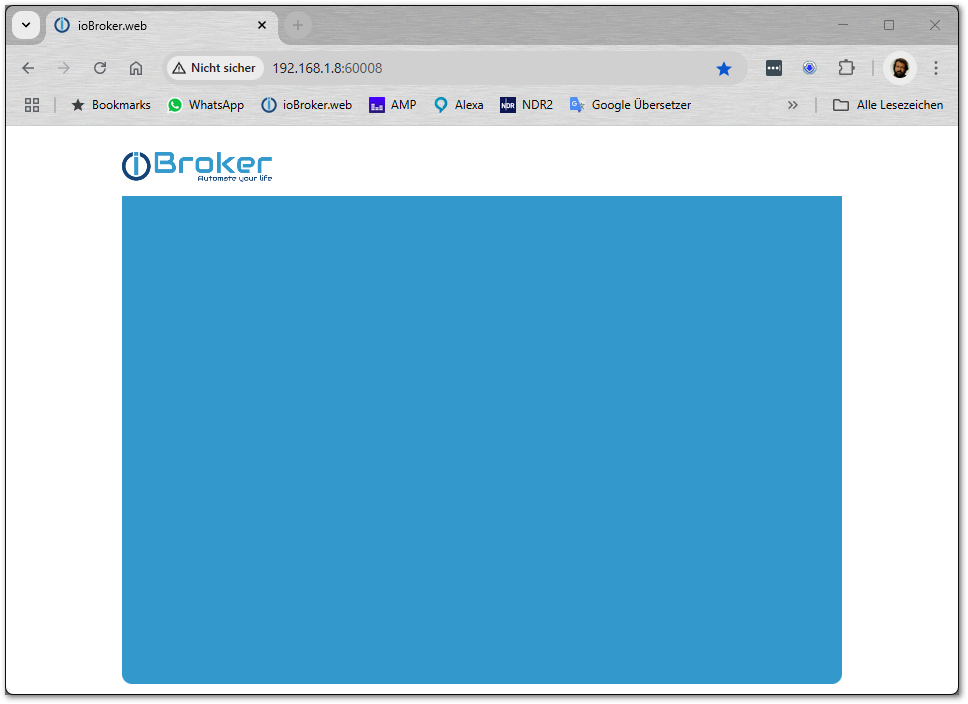
Ob es am Web Adapter oder an einem anderen liegt kann ich nicht sagen, ich meine das hatten wir von langer Zeit schon mal.Kann mal jemand prüfen ob das bei ihm auch so ist? Wenn ja mache ich heute Abend einen Issue auf
Und ja, ich bin mit Absicht auf der Beta unterwegs.
Script v.2025-02-23 *** BASE SYSTEM *** Static hostname: iobroker Icon name: computer-vm Chassis: vm Virtualization: vmware Operating System: Ubuntu 22.04.5 LTS Kernel: Linux 5.15.0-134-generic Architecture: x86-64 Hardware Vendor: VMware, Inc. Hardware Model: VMware Virtual Platform OS is similar to: debian model name : AMD Ryzen 5 5600G with Radeon Graphics Docker : false Virtualization : vmware Kernel : x86_64 Userland : 64 bit Systemuptime and Load: 10:34:11 up 4 days, 14 min, 3 users, load average: 0.32, 0.38, 0.31 CPU threads: 4 *** LIFE CYCLE STATUS *** Operating System codenamed 'jammy' is an aging Ubuntu release! Please upgrade to the latest LTS release 'noble' in due time! *** TIME AND TIMEZONES *** Local time: Tue 2025-03-11 10:34:11 CET Universal time: Tue 2025-03-11 09:34:11 UTC RTC time: Tue 2025-03-11 09:34:11 Time zone: Europe/Berlin (CET, +0100) System clock synchronized: yes NTP service: n/a RTC in local TZ: no *** Users and Groups *** User that called 'iob diag': bananajoe HOME=/home/bananajoe GROUPS=bananajoe sudo iobroker User that is running 'js-controller': iobroker HOME=/home/iobroker GROUPS=iobroker tty dialout audio video plugdev redis *** DISPLAY-SERVER SETUP *** Display-Server: false Desktop: Terminal: System is booting into 'graphical.target'. Usually a server is running in 'multi-user.target'. Please set BootTarget to 'multi-user.target' or run 'iobroker fix' *** MEMORY *** total used free shared buff/cache available Mem: 11G 7.5G 1.0G 6.0M 3.5G 4.1G Swap: 2.0G 2.0M 2.0G Total: 14G 7.5G 3.1G Active iob-Instances: 62 11957 M total memory 7486 M used memory 1914 M active memory 7883 M inactive memory 1016 M free memory 598 M buffer memory 2856 M swap cache 2047 M total swap 2 M used swap 2045 M free swap *** top - Table Of Processes *** top - 10:34:11 up 4 days, 14 min, 3 users, load average: 0.32, 0.38, 0.31 Tasks: 391 total, 1 running, 390 sleeping, 0 stopped, 0 zombie %Cpu(s): 3.1 us, 3.1 sy, 0.0 ni, 93.8 id, 0.0 wa, 0.0 hi, 0.0 si, 0.0 st MiB Mem : 11957.4 total, 1017.4 free, 7484.7 used, 3455.3 buff/cache MiB Swap: 2048.0 total, 2045.2 free, 2.8 used. 4148.4 avail Mem *** FAILED SERVICES *** UNIT LOAD ACTIVE SUB DESCRIPTION * openipmi.service loaded failed failed LSB: OpenIPMI Driver init script * snmptrapd.service loaded failed failed Simple Network Management Protocol (SNMP) Trap Daemon. * snmptrapd.socket loaded failed failed sockets for SNMP trap messages LOAD = Reflects whether the unit definition was properly loaded. ACTIVE = The high-level unit activation state, i.e. generalization of SUB. SUB = The low-level unit activation state, values depend on unit type. 3 loaded units listed. *** DMESG CRITICAL ERRORS *** No critical errors detected *** FILESYSTEM *** Filesystem Type Size Used Avail Use% Mounted on tmpfs tmpfs 1.2G 1.7M 1.2G 1% /run /dev/sda2 ext4 63G 35G 25G 59% / tmpfs tmpfs 5.9G 0 5.9G 0% /dev/shm tmpfs tmpfs 5.0M 0 5.0M 0% /run/lock tmpfs tmpfs 64M 0 64M 0% /RAMdisk tmpfs tmpfs 1.2G 4.0K 1.2G 1% /run/user/0 Messages concerning ext4 filesystem in dmesg: [Fri Mar 7 10:19:31 2025] EXT4-fs (sda2): mounted filesystem with ordered data mode. Opts: (null). Quota mode: none. [Fri Mar 7 10:19:32 2025] EXT4-fs (sda2): re-mounted. Opts: (null). Quota mode: none. Show mounted filesystems: TARGET SOURCE FSTYPE OPTIONS / /dev/sda2 ext4 rw,relatime |-/snap/core18/2855 /dev/loop1 squashfs ro,nodev,relatime,errors=continue |-/snap/core18/2846 /dev/loop0 squashfs ro,nodev,relatime,errors=continue |-/snap/core20/2434 /dev/loop2 squashfs ro,nodev,relatime,errors=continue |-/snap/core20/2496 /dev/loop3 squashfs ro,nodev,relatime,errors=continue |-/snap/core22/1722 /dev/loop4 squashfs ro,nodev,relatime,errors=continue |-/snap/core22/1748 /dev/loop5 squashfs ro,nodev,relatime,errors=continue |-/snap/lxd/31571 /dev/loop6 squashfs ro,nodev,relatime,errors=continue |-/snap/lxd/31820 /dev/loop7 squashfs ro,nodev,relatime,errors=continue |-/snap/snapd/23545 /dev/loop8 squashfs ro,nodev,relatime,errors=continue `-/snap/snapd/23771 /dev/loop10 squashfs ro,nodev,relatime,errors=continue Files in neuralgic directories: /var: 11G /var/ 5.7G /var/lib 4.4G /var/log 4.1G /var/log/journal/26010950dd3a4d9ab8f579561945c3da 4.1G /var/log/journal Hint: You are currently not seeing messages from other users and the system. Users in groups 'adm', 'systemd-journal' can see all messages. Pass -q to turn off this notice. Archived and active journals take up 32.0M in the file system. /opt/iobroker/backups: 821M /opt/iobroker/backups/ /opt/iobroker/iobroker-data: 1.3G /opt/iobroker/iobroker-data/ 967M /opt/iobroker/iobroker-data/files 250M /opt/iobroker/iobroker-data/files/vis.0 224M /opt/iobroker/iobroker-data/files/vis 217M /opt/iobroker/iobroker-data/files/vis/widgets The five largest files in iobroker-data are: 57M /opt/iobroker/iobroker-data/objects.jsonl 35M /opt/iobroker/iobroker-data/files/devices.admin/static/js/main.24f2bb56.js.map 27M /opt/iobroker/iobroker-data/files/tankerkoenig.admin/build/index.js.map 24M /opt/iobroker/iobroker-data/objects.json.migrated 24M /opt/iobroker/iobroker-data/objects.json.bak.migrated USB-Devices by-id: USB-Sticks - Avoid direct links to /dev/tty* in your adapter setups, please always prefer the links 'by-id': No Devices found 'by-id' *** ZigBee Settings *** HINT: Your zigbee.1 COM-Port is NOT matching 'by-id'. Please check your setting: tcp HINT: Your zigbee.2 COM-Port is NOT matching 'by-id'. Please check your setting: tcp Zigbee Network Settings on your coordinator/in nvbackup are: zigbee.X Extended Pan ID: *** MASKED *** Pan ID: *** MASKED *** Channel: *** MASKED *** Network Key: *** MASKED *** To unmask the settings run 'iob diag --unmask' *** NodeJS-Installation *** /usr/bin/nodejs v20.18.3 /usr/bin/node v20.18.3 /usr/bin/npm 10.8.2 /usr/bin/npx 10.8.2 /usr/bin/corepack 0.30.0 nodejs: Installed: 20.18.3-1nodesource1 Candidate: 20.18.3-1nodesource1 Version table: *** 20.18.3-1nodesource1 1001 500 https://deb.nodesource.com/node_20.x nodistro/main amd64 Packages 100 /var/lib/dpkg/status 20.18.2-1nodesource1 1001 500 https://deb.nodesource.com/node_20.x nodistro/main amd64 Packages 20.18.1-1nodesource1 1001 500 https://deb.nodesource.com/node_20.x nodistro/main amd64 Packages 20.18.0-1nodesource1 1001 500 https://deb.nodesource.com/node_20.x nodistro/main amd64 Packages 20.17.0-1nodesource1 1001 500 https://deb.nodesource.com/node_20.x nodistro/main amd64 Packages 20.16.0-1nodesource1 1001 500 https://deb.nodesource.com/node_20.x nodistro/main amd64 Packages 20.15.1-1nodesource1 1001 500 https://deb.nodesource.com/node_20.x nodistro/main amd64 Packages 20.15.0-1nodesource1 1001 500 https://deb.nodesource.com/node_20.x nodistro/main amd64 Packages 20.14.0-1nodesource1 1001 500 https://deb.nodesource.com/node_20.x nodistro/main amd64 Packages 20.13.1-1nodesource1 1001 500 https://deb.nodesource.com/node_20.x nodistro/main amd64 Packages 20.13.0-1nodesource1 1001 500 https://deb.nodesource.com/node_20.x nodistro/main amd64 Packages 20.12.2-1nodesource1 1001 500 https://deb.nodesource.com/node_20.x nodistro/main amd64 Packages 20.12.1-1nodesource1 1001 500 https://deb.nodesource.com/node_20.x nodistro/main amd64 Packages 20.12.0-1nodesource1 1001 500 https://deb.nodesource.com/node_20.x nodistro/main amd64 Packages 20.11.1-1nodesource1 1001 500 https://deb.nodesource.com/node_20.x nodistro/main amd64 Packages 20.11.0-1nodesource1 1001 500 https://deb.nodesource.com/node_20.x nodistro/main amd64 Packages 20.10.0-1nodesource1 1001 500 https://deb.nodesource.com/node_20.x nodistro/main amd64 Packages 20.9.0-1nodesource1 1001 500 https://deb.nodesource.com/node_20.x nodistro/main amd64 Packages 20.8.1-1nodesource1 1001 500 https://deb.nodesource.com/node_20.x nodistro/main amd64 Packages 20.8.0-1nodesource1 1001 500 https://deb.nodesource.com/node_20.x nodistro/main amd64 Packages 20.7.0-1nodesource1 1001 500 https://deb.nodesource.com/node_20.x nodistro/main amd64 Packages 20.6.1-1nodesource1 1001 500 https://deb.nodesource.com/node_20.x nodistro/main amd64 Packages 20.6.0-1nodesource1 1001 500 https://deb.nodesource.com/node_20.x nodistro/main amd64 Packages 20.5.1-1nodesource1 1001 500 https://deb.nodesource.com/node_20.x nodistro/main amd64 Packages 20.5.0-1nodesource1 1001 500 https://deb.nodesource.com/node_20.x nodistro/main amd64 Packages 20.4.0-1nodesource1 1001 500 https://deb.nodesource.com/node_20.x nodistro/main amd64 Packages 20.3.1-1nodesource1 1001 500 https://deb.nodesource.com/node_20.x nodistro/main amd64 Packages 20.3.0-1nodesource1 1001 500 https://deb.nodesource.com/node_20.x nodistro/main amd64 Packages 20.2.0-1nodesource1 1001 500 https://deb.nodesource.com/node_20.x nodistro/main amd64 Packages 20.1.0-1nodesource1 1001 500 https://deb.nodesource.com/node_20.x nodistro/main amd64 Packages 20.0.0-1nodesource1 1001 500 https://deb.nodesource.com/node_20.x nodistro/main amd64 Packages 12.22.9~dfsg-1ubuntu3.6 500 500 http://de.archive.ubuntu.com/ubuntu jammy-updates/universe amd64 Packages 500 http://de.archive.ubuntu.com/ubuntu jammy-security/universe amd64 Packages 12.22.9~dfsg-1ubuntu3 500 500 http://de.archive.ubuntu.com/ubuntu jammy/universe amd64 Packages Temp directories causing deletion problem: 0 No problems detected Errors in npm tree: 0 No problems detected *** ioBroker-Installation *** ioBroker Status iobroker is running on this host. Objects type: jsonl States type: redis Hosts: iobroker iobroker (version: 7.0.6, hostname: iobroker , alive, uptime: 346475) Core adapters versions js-controller: 7.0.6 admin: 7.6.2 javascript: 8.9.1 nodejs modules from github: 5 +-- iobroker.euhome@0.1.5 (git+ssh://git@github.com/TA2k/ioBroker.euhome.git#ac492a47b1697c1fd77df345c06a399414deda09) +-- iobroker.google-sharedlocations@2.2.1 (git+ssh://git@github.com/Garfonso/ioBroker.google-sharedlocations.git#0db73d57d00aa5dff22ff22e853f1231ce141dc1) +-- iobroker.klipper-moonraker@0.0.4 (git+ssh://git@github.com/DrozmotiX/ioBroker.klipper-moonraker.git#4adef3ab69e5ff232d0d740fe3e0f560bca3c27e) +-- iobroker.life360@0.2.22 (git+ssh://git@github.com/MiGoller/ioBroker.life360.git#23166aab1b2e36d917a9b7b480d9faa7f73ca2d1) +-- iobroker.smartstate@0.0.4 (git+ssh://git@github.com/ChriD/ioBroker.smartstate.git#aa448478fd656fff055532b33decd1138d9222e3) Adapter State system.adapter.admin.0 : admin : iobroker - disabled, port: 8081, bind: 0.0.0.0 (SSL), run as: admin system.adapter.admin.1 : admin : iobroker - disabled, port: 60081, bind: 0.0.0.0, run as: admin + system.adapter.admin.2 : admin : iobroker - enabled, port: 60082, bind: 0.0.0.0, run as: admin + system.adapter.alexa-shoppinglist.0 : alexa-shoppinglist : iobroker - enabled + system.adapter.alexa-timer-vis.0 : alexa-timer-vis : iobroker - enabled + system.adapter.alexa2.0 : alexa2 : iobroker - enabled system.adapter.alias-manager.0 : alias-manager : iobroker - enabled + system.adapter.backitup.0 : backitup : iobroker - enabled + system.adapter.broadlink2.0 : broadlink2 : iobroker - enabled system.adapter.daswetter.0 : daswetter : iobroker - enabled + system.adapter.device-reminder.0 : device-reminder : iobroker - enabled + system.adapter.device-watcher.0 : device-watcher : iobroker - enabled system.adapter.devices.0 : devices : iobroker - enabled + system.adapter.discovery.0 : discovery : iobroker - enabled system.adapter.dwd.0 : dwd : iobroker - enabled + system.adapter.echarts.0 : echarts : iobroker - enabled + system.adapter.email.0 : email : iobroker - enabled + system.adapter.energiefluss-erweitert.0 : energiefluss-erweitert: iobroker - enabled + system.adapter.energiefluss-erweitert.1 : energiefluss-erweitert: iobroker - enabled system.adapter.euhome.0 : euhome : iobroker - disabled system.adapter.feiertage.0 : feiertage : iobroker - enabled + system.adapter.followthesun.0 : followthesun : iobroker - enabled + system.adapter.fritzdect.0 : fritzdect : iobroker - enabled + system.adapter.fullybrowser.0 : fullybrowser : iobroker - enabled + system.adapter.google-sharedlocations.0 : google-sharedlocations: iobroker - enabled system.adapter.ham.0 : ham : iobroker - disabled system.adapter.hass.0 : hass : iobroker - disabled, port: 8123 system.adapter.ical.0 : ical : iobroker - enabled + system.adapter.iot.0 : iot : iobroker - enabled + system.adapter.javascript.0 : javascript : iobroker - enabled + system.adapter.javascript.1 : javascript : iobroker - enabled system.adapter.klipper-moonraker.0 : klipper-moonraker : iobroker - disabled system.adapter.life360.0 : life360 : iobroker - disabled + system.adapter.logparser.0 : logparser : iobroker - enabled + system.adapter.midea.0 : midea : iobroker - enabled + system.adapter.mqtt.0 : mqtt : iobroker - enabled, port: 1883, bind: 0.0.0.0 + system.adapter.notificationforandroidtv.0: notificationforandroidtv: iobroker - enabled + system.adapter.nut.0 : nut : iobroker - enabled system.adapter.nut.1 : nut : iobroker - disabled + system.adapter.operating-hours.0 : operating-hours : iobroker - enabled system.adapter.pi-hole.0 : pi-hole : iobroker - disabled system.adapter.pi-hole.1 : pi-hole : iobroker - disabled + system.adapter.ping.0 : ping : iobroker - enabled + system.adapter.places.0 : places : iobroker - enabled system.adapter.proxmox.0 : proxmox : iobroker - disabled + system.adapter.puppeteer.0 : puppeteer : iobroker - enabled + system.adapter.pvforecast.0 : pvforecast : iobroker - enabled + system.adapter.pvforecast.1 : pvforecast : iobroker - enabled system.adapter.pylontech.0 : pylontech : iobroker - disabled, port: 4196 + system.adapter.rest-api.0 : rest-api : iobroker - enabled, port: 8093, bind: 0.0.0.0, run as: admin + system.adapter.schedule-switcher.0 : schedule-switcher : iobroker - enabled + system.adapter.shelly.0 : shelly : iobroker - enabled, port: 1882, bind: 0.0.0.0 system.adapter.shelly.1 : shelly : iobroker - disabled, port: 1882, bind: 0.0.0.0 + system.adapter.simple-api.0 : simple-api : iobroker - enabled, port: 8087, bind: 0.0.0.0, run as: admin system.adapter.smartstate.0 : smartstate : iobroker - disabled + system.adapter.snmp.0 : snmp : iobroker - enabled + system.adapter.socketio.0 : socketio : iobroker - enabled, port: 50084, bind: 0.0.0.0, run as: admin + system.adapter.sourceanalytix.0 : sourceanalytix : iobroker - enabled + system.adapter.sql.0 : sql : iobroker - enabled, port: 3306 + system.adapter.tankerkoenig.0 : tankerkoenig : iobroker - enabled + system.adapter.telegram-menu.0 : telegram-menu : iobroker - enabled + system.adapter.telegram.0 : telegram : iobroker - enabled, port: 8443, bind: 0.0.0.0 + system.adapter.telegram.1 : telegram : iobroker - enabled, port: 8443, bind: 0.0.0.0 + system.adapter.telegram.2 : telegram : iobroker - enabled, port: 8443, bind: 0.0.0.0 + system.adapter.telegram.3 : telegram : iobroker - enabled, port: 8443, bind: 0.0.0.0 + system.adapter.text2command.0 : text2command : iobroker - enabled + system.adapter.time-switch.0 : time-switch : iobroker - enabled + system.adapter.tr-064.0 : tr-064 : iobroker - enabled + system.adapter.tr-064.1 : tr-064 : iobroker - enabled + system.adapter.traccar.0 : traccar : iobroker - enabled + system.adapter.trashschedule.0 : trashschedule : iobroker - enabled + system.adapter.tuya.0 : tuya : iobroker - enabled system.adapter.vis-2-widgets-energy.0 : vis-2-widgets-energy : iobroker - enabled system.adapter.vis-2-widgets-gauges.0 : vis-2-widgets-gauges : iobroker - enabled system.adapter.vis-2-widgets-material.0 : vis-2-widgets-material: iobroker - enabled + system.adapter.vis-2.0 : vis-2 : iobroker - enabled system.adapter.vis-canvas-gauges.0 : vis-canvas-gauges : iobroker - enabled system.adapter.vis-hqwidgets.0 : vis-hqwidgets : iobroker - enabled system.adapter.vis-icontwo.0 : vis-icontwo : iobroker - enabled + system.adapter.vis-inventwo.0 : vis-inventwo : iobroker - enabled system.adapter.vis-jqui-mfd.0 : vis-jqui-mfd : iobroker - enabled system.adapter.vis-map.0 : vis-map : iobroker - enabled system.adapter.vis-timeandweather.0 : vis-timeandweather : iobroker - enabled system.adapter.vis.0 : vis : iobroker - enabled + system.adapter.vw-connect.0 : vw-connect : iobroker - enabled + system.adapter.web.0 : web : iobroker - enabled, port: 8082, bind: 0.0.0.0, run as: admin + system.adapter.web.1 : web : iobroker - enabled, port: 60008, bind: 0.0.0.0, run as: admin + system.adapter.ws.0 : ws : iobroker - enabled, port: 60086, bind: 0.0.0.0, run as: admin + system.adapter.zigbee.1 : zigbee : iobroker - enabled, port: tcp://192.168.1.249:6638 + system.adapter.zigbee.2 : zigbee : iobroker - enabled, port: tcp://192.168.1.208:6638 + system.adapter.zigbee2mqtt.0 : zigbee2mqtt : iobroker - enabled + instance is alive Enabled adapters with bindings + system.adapter.admin.2 : admin : iobroker - enabled, port: 60082, bind: 0.0.0.0, run as: admin + system.adapter.mqtt.0 : mqtt : iobroker - enabled, port: 1883, bind: 0.0.0.0 + system.adapter.rest-api.0 : rest-api : iobroker - enabled, port: 8093, bind: 0.0.0.0, run as: admin + system.adapter.shelly.0 : shelly : iobroker - enabled, port: 1882, bind: 0.0.0.0 + system.adapter.simple-api.0 : simple-api : iobroker - enabled, port: 8087, bind: 0.0.0.0, run as: admin + system.adapter.socketio.0 : socketio : iobroker - enabled, port: 50084, bind: 0.0.0.0, run as: admin + system.adapter.sql.0 : sql : iobroker - enabled, port: 3306 + system.adapter.telegram.0 : telegram : iobroker - enabled, port: 8443, bind: 0.0.0.0 + system.adapter.telegram.1 : telegram : iobroker - enabled, port: 8443, bind: 0.0.0.0 + system.adapter.telegram.2 : telegram : iobroker - enabled, port: 8443, bind: 0.0.0.0 + system.adapter.telegram.3 : telegram : iobroker - enabled, port: 8443, bind: 0.0.0.0 + system.adapter.web.0 : web : iobroker - enabled, port: 8082, bind: 0.0.0.0, run as: admin + system.adapter.web.1 : web : iobroker - enabled, port: 60008, bind: 0.0.0.0, run as: admin + system.adapter.ws.0 : ws : iobroker - enabled, port: 60086, bind: 0.0.0.0, run as: admin + system.adapter.zigbee.1 : zigbee : iobroker - enabled, port: tcp://192.168.1.249:6638 + system.adapter.zigbee.2 : zigbee : iobroker - enabled, port: tcp://192.168.1.208:6638 ioBroker-Repositories ┌─────────┬──────────┬─────────────────────────────────────────────────────────┬──────────────┐ │ (index) │ name │ url │ auto upgrade │ ├─────────┼──────────┼─────────────────────────────────────────────────────────┼──────────────┤ │ 0 │ 'stable' │ 'http://download.iobroker.net/sources-dist.json' │ false │ │ 1 │ 'beta' │ 'http://download.iobroker.net/sources-dist-latest.json' │ false │ └─────────┴──────────┴─────────────────────────────────────────────────────────┴──────────────┘ Active repo(s): beta Upgrade policy: none Installed ioBroker-Adapters Used repository: beta Adapter "admin" : 7.6.2 , installed 7.6.2 Adapter "alexa-shoppinglist": 1.0.3, installed 1.0.3 Adapter "alexa-timer-vis": 2.0.8 , installed 2.0.8 Adapter "alexa2" : 3.26.7 , installed 3.26.7 Adapter "alias-manager": 2.0.0 , installed 2.0.0 Adapter "backitup" : 3.1.0 , installed 3.1.0 Adapter "broadlink2" : 2.3.0 , installed 2.3.0 Adapter "daswetter" : 3.2.3 , installed 3.2.3 Adapter "device-reminder": 3.1.2 , installed 3.1.2 Adapter "device-watcher": 2.12.1 , installed 2.12.1 Adapter "devices" : 1.1.5 , installed 1.1.5 Adapter "discovery" : 5.0.0 , installed 5.0.0 Adapter "dwd" : 2.8.5 , installed 2.8.5 Adapter "echarts" : 2.0.6 , installed 2.0.6 Adapter "email" : 1.3.1 , installed 1.3.1 Adapter "energiefluss-erweitert": 0.6.2, installed 0.6.2 Adapter "feiertage" : 1.2.1 , installed 1.2.1 Adapter "followthesun" : 0.5.1 , installed 0.5.1 Adapter "fritzdect" : 2.6.0 , installed 2.6.0 Adapter "fullybrowser" : 3.1.1 , installed 3.1.1 Adapter "ham" : 5.3.1 , installed 5.3.1 Adapter "hass" : 1.4.0 , installed 1.4.0 Adapter "ical" : 1.16.1 , installed 1.16.1 Adapter "iot" : 3.5.0 , installed 3.5.0 Adapter "javascript" : 8.9.1 , installed 8.9.1 Controller "js-controller": 7.0.6 , installed 7.0.6 Adapter "logparser" : 2.3.0 , installed 2.3.0 Adapter "midea" : 0.0.7 , installed 0.0.7 Adapter "mqtt" : 6.1.2 , installed 6.1.2 Adapter "notificationforandroidtv": 3.0.4, installed 3.0.4 Adapter "nut" : 1.6.0 , installed 1.6.0 Adapter "operating-hours": 1.3.0 , installed 1.3.0 Adapter "pi-hole" : 1.3.6 , installed 1.3.6 Adapter "ping" : 1.7.9 , installed 1.7.9 Adapter "places" : 1.2.0 , installed 1.2.0 Adapter "proxmox" : 2.4.0 , installed 2.4.0 Adapter "puppeteer" : 0.4.0 , installed 0.4.0 Adapter "pvforecast" : 4.1.0 , installed 4.1.0 Adapter "pylontech" : 0.0.10 , installed 0.0.10 Adapter "rest-api" : 2.0.3 , installed 2.0.3 Adapter "schedule-switcher": 0.0.10, installed 0.0.10 Adapter "shelly" : 9.1.0 , installed 9.1.0 Adapter "simple-api" : 3.0.0 , installed 3.0.0 Adapter "snmp" : 3.2.0 , installed 3.2.0 Adapter "socketio" : 7.0.8 , installed 7.0.8 Adapter "sourceanalytix": 0.4.14 , installed 0.4.14 Adapter "sql" : 3.0.1 , installed 3.0.1 Adapter "tankerkoenig" : 3.4.0 , installed 3.4.0 Adapter "telegram" : 4.0.0 , installed 4.0.0 Adapter "telegram-menu": 2.2.1 , installed 2.2.1 Adapter "text2command" : 3.0.3 , installed 3.0.3 Adapter "time-switch" : 2.2.2 , installed 2.2.2 Adapter "tr-064" : 4.3.0 , installed 4.3.0 Adapter "traccar" : 1.1.6 , installed 1.1.6 Adapter "trashschedule": 4.0.0 , installed 4.0.0 Adapter "tuya" : 3.17.0 , installed 3.17.0 Adapter "vis" : 1.5.6 , installed 1.5.6 Adapter "vis-2" : 2.11.2 , installed 2.11.2 Adapter "vis-2-widgets-energy": 1.0.2, installed 1.0.2 Adapter "vis-2-widgets-gauges": 1.1.1, installed 1.1.1 Adapter "vis-2-widgets-material": 1.4.10, installed 1.4.10 Adapter "vis-canvas-gauges": 1.0.1, installed 1.0.1 Adapter "vis-hqwidgets": 1.5.1 , installed 1.5.1 Adapter "vis-icontwo" : 1.11.0 , installed 1.11.0 Adapter "vis-inventwo" : 3.3.4 , installed 3.3.4 Adapter "vis-jqui-mfd" : 1.1.1 , installed 1.1.1 Adapter "vis-map" : 1.1.2 , installed 1.1.2 Adapter "vis-timeandweather": 1.2.2, installed 1.2.2 Adapter "vw-connect" : 0.7.7 , installed 0.7.7 Adapter "web" : 7.0.6 , installed 7.0.6 Adapter "ws" : 3.0.19 , installed 3.0.19 Adapter "zigbee" : 2.0.4 , installed 2.0.2 [Updatable] Adapter "zigbee2mqtt" : 3.0.3 , installed 3.0.3 Objects and States Please stand by - This may take a while Objects: 51273 States: 46546 *** OS-Repositories and Updates *** Hit:1 http://de.archive.ubuntu.com/ubuntu jammy InRelease Hit:2 https://packages.grafana.com/oss/deb stable InRelease Hit:3 http://de.archive.ubuntu.com/ubuntu jammy-updates InRelease Hit:4 http://de.archive.ubuntu.com/ubuntu jammy-backports InRelease Hit:5 https://deb.nodesource.com/node_20.x nodistro InRelease Hit:6 http://de.archive.ubuntu.com/ubuntu jammy-security InRelease Hit:7 https://repo.zabbix.com/zabbix-agent2-plugins/1/ubuntu jammy InRelease Hit:8 https://repo.zabbix.com/zabbix-tools/debian-ubuntu jammy InRelease Hit:9 https://repo.zabbix.com/zabbix/7.0/ubuntu jammy InRelease Reading package lists... Pending Updates: 4 *** Listening Ports *** Active Internet connections (only servers) Proto Recv-Q Send-Q Local Address Foreign Address State User Inode PID/Program name tcp 0 0 0.0.0.0:3000 0.0.0.0:* LISTEN 123 20380 1016/grafana tcp 0 0 0.0.0.0:60082 0.0.0.0:* LISTEN 1000 15011854 1116412/io.admin.2 tcp 0 0 0.0.0.0:60086 0.0.0.0:* LISTEN 1000 49658 4155/io.ws.0 tcp 0 0 0.0.0.0:60008 0.0.0.0:* LISTEN 1000 15011414 1116882/io.web.1 tcp 0 0 0.0.0.0:3306 0.0.0.0:* LISTEN 114 24256 981/mariadbd tcp 0 0 0.0.0.0:20050 0.0.0.0:* LISTEN 115 26675 837/zabbix_agent2 tcp 0 0 0.0.0.0:22 0.0.0.0:* LISTEN 0 20163 873/sshd: /usr/sbin tcp 0 0 0.0.0.0:21 0.0.0.0:* LISTEN 0 25609 843/vsftpd tcp 0 0 0.0.0.0:16384 0.0.0.0:* LISTEN 1000 33168 1555/io.javascript. tcp 0 0 0.0.0.0:111 0.0.0.0:* LISTEN 0 17659 1/init tcp 0 0 0.0.0.0:80 0.0.0.0:* LISTEN 0 25563 923/apache2 tcp 0 0 0.0.0.0:50084 0.0.0.0:* LISTEN 1000 45932 3796/io.socketio.0 tcp 0 0 127.0.0.1:40065 0.0.0.0:* LISTEN 1000 38777 2443/chrome tcp 0 0 0.0.0.0:9001 0.0.0.0:* LISTEN 1000 20468 992/iobroker.js-con tcp 0 0 0.0.0.0:1893 0.0.0.0:* LISTEN 1000 36155 1975/io.fullybrowse tcp 0 0 0.0.0.0:1883 0.0.0.0:* LISTEN 119 25634 857/mosquitto tcp 0 0 0.0.0.0:10051 0.0.0.0:* LISTEN 115 20234 1028/zabbix_proxy tcp 0 0 0.0.0.0:10050 0.0.0.0:* LISTEN 115 26673 837/zabbix_agent2 tcp 0 0 0.0.0.0:6379 0.0.0.0:* LISTEN 120 24204 824/redis-server 0. tcp 0 0 0.0.0.0:8093 0.0.0.0:* LISTEN 1000 47081 4109/io.rest-api.0 tcp 0 0 0.0.0.0:8082 0.0.0.0:* LISTEN 1000 15011418 1116876/io.web.0 tcp 0 0 0.0.0.0:8087 0.0.0.0:* LISTEN 1000 15013014 1116770/io.simple-a tcp 0 0 127.0.0.53:53 0.0.0.0:* LISTEN 101 23721 725/systemd-resolve tcp 0 0 0.0.0.0:5002 0.0.0.0:* LISTEN 0 25714 762/python3 udp 0 0 0.0.0.0:35315 0.0.0.0:* 1000 35792 2017/io.snmp.0 udp 0 0 0.0.0.0:52173 0.0.0.0:* 1000 35791 2017/io.snmp.0 udp 0 0 0.0.0.0:5683 0.0.0.0:* 1000 32422 1996/io.shelly.0 udp 0 0 0.0.0.0:55216 0.0.0.0:* 1000 17117767 2052/io.broadlink2. udp 0 0 0.0.0.0:47390 0.0.0.0:* 1000 34297 2052/io.broadlink2. udp 0 0 0.0.0.0:6666 0.0.0.0:* 1000 37049 2397/io.tuya.0 udp 0 0 0.0.0.0:6667 0.0.0.0:* 1000 37050 2397/io.tuya.0 udp 0 0 0.0.0.0:15001 0.0.0.0:* 1000 34294 2052/io.broadlink2. udp 0 0 0.0.0.0:56238 0.0.0.0:* 1000 35790 2017/io.snmp.0 udp 0 0 127.0.0.53:53 0.0.0.0:* 101 23720 725/systemd-resolve udp 0 0 0.0.0.0:111 0.0.0.0:* 0 17660 1/init udp 0 0 192.168.1.8:123 0.0.0.0:* 0 24156 878/ntpd udp 0 0 127.0.0.1:123 0.0.0.0:* 0 24154 878/ntpd udp 0 0 0.0.0.0:123 0.0.0.0:* 0 24150 878/ntpd *** Log File - Last 25 Lines *** 2025-03-11 10:33:00.013 - info: javascript.1 (1555) script.js.001_Routinen.Pylontech.LadesteuerungV2: mqtt.0.Huawei.Huawei_1c35ac.MaxPower bis 90%: 2200W (unverändert) 2025-03-11 10:33:00.013 - info: javascript.1 (1555) script.js.001_Routinen.Pylontech.LadesteuerungV2: Huawei 1 Ausgangsleistung aktuell: 0W 2025-03-11 10:33:00.013 - info: javascript.1 (1555) script.js.001_Routinen.Pylontech.LadesteuerungV2: Huawei 2 Ausgangsleistung aktuell: 0W 2025-03-11 10:33:00.013 - info: javascript.1 (1555) script.js.001_Routinen.Pylontech.LadesteuerungV2: Pylontech heute geladen Total: 0.18kWh 2025-03-11 10:33:00.013 - info: javascript.1 (1555) script.js.001_Routinen.Pylontech.LadesteuerungV2: Aktueller Stromverbrauch: 2930.33W 2025-03-11 10:33:00.013 - info: javascript.1 (1555) script.js.001_Routinen.Pylontech.LadesteuerungV2: +--------------------------------------------------------------------+ 2025-03-11 10:33:01.340 - info: javascript.0 (1413) script.js.001_Routinen.OpenEPaper.Playwright2Apache: Hole Screenshots: START 2025-03-11 10:33:03.032 - info: web.1 (1116882) ==> Connected system.user.admin from 192.168.1.8 2025-03-11 10:33:04.216 - info: web.1 (1116882) <== Disconnect system.user.admin from 192.168.1.8 vis.0 2025-03-11 10:33:04.387 - info: javascript.0 (1413) script.js.001_Routinen.OpenEPaper.Playwright2Apache: Hole Screenshots: STOP 2025-03-11 10:34:00.013 - info: javascript.1 (1555) script.js.001_Routinen.Pylontech.LadesteuerungV2: +--------------------------------------------------------------------+ 2025-03-11 10:34:00.014 - info: javascript.1 (1555) script.js.001_Routinen.Pylontech.LadesteuerungV2: i_SoyoSourceSum der letzten 4 Minuten: 0 2025-03-11 10:34:00.015 - info: javascript.1 (1555) script.js.001_Routinen.Pylontech.LadesteuerungV2: i_PowerConsumptionSum der letzten 5 Minuten: 1985 2025-03-11 10:34:00.015 - info: javascript.1 (1555) script.js.001_Routinen.Pylontech.LadesteuerungV2: Laden erlaubt: Solaranlage in Betrieb! 2025-03-11 10:34:00.015 - info: javascript.1 (1555) script.js.001_Routinen.Pylontech.LadesteuerungV2: Laden erlaubt: SoyoSource hat keine Einspeisung: 0W 2025-03-11 10:34:00.015 - info: javascript.1 (1555) script.js.001_Routinen.Pylontech.LadesteuerungV2: Laden erlaubt: SoyoSource Sentinel: 0W 2025-03-11 10:34:00.015 - info: javascript.1 (1555) script.js.001_Routinen.Pylontech.LadesteuerungV2: Laden erlaubt: Ziel SoC 95% noch nicht erreicht (27% | 29% | 32%) 2025-03-11 10:34:00.015 - info: javascript.1 (1555) script.js.001_Routinen.Pylontech.LadesteuerungV2: Vollständige Prüfung 2025-03-11 10:34:00.015 - info: javascript.1 (1555) script.js.001_Routinen.Pylontech.LadesteuerungV2: mqtt.0.Huawei.Huawei_1cea67.MaxPower bis 90%: 2200W (unverändert) 2025-03-11 10:34:00.015 - info: javascript.1 (1555) script.js.001_Routinen.Pylontech.LadesteuerungV2: mqtt.0.Huawei.Huawei_1c35ac.MaxPower bis 90%: 2200W (unverändert) 2025-03-11 10:34:00.015 - info: javascript.1 (1555) script.js.001_Routinen.Pylontech.LadesteuerungV2: Huawei 1 Ausgangsleistung aktuell: 0W 2025-03-11 10:34:00.015 - info: javascript.1 (1555) script.js.001_Routinen.Pylontech.LadesteuerungV2: Huawei 2 Ausgangsleistung aktuell: 0W 2025-03-11 10:34:00.015 - info: javascript.1 (1555) script.js.001_Routinen.Pylontech.LadesteuerungV2: Pylontech heute geladen Total: 0.18kWh 2025-03-11 10:34:00.015 - info: javascript.1 (1555) script.js.001_Routinen.Pylontech.LadesteuerungV2: Aktueller Stromverbrauch: 915.92W 2025-03-11 10:34:00.015 - info: javascript.1 (1555) script.js.001_Routinen.Pylontech.LadesteuerungV2: +--------------------------------------------------------------------+======================= SUMMARY ======================= v.2025-02-23 Static hostname: iobroker Icon name: computer-vm Chassis: vm Virtualization: vmware Operating System: Ubuntu 22.04.5 LTS Kernel: Linux 5.15.0-134-generic Architecture: x86-64 Hardware Vendor: VMware, Inc. Hardware Model: VMware Virtual Platform Installation: vmware Kernel: x86_64 Userland: 64 bit Timezone: Europe/Berlin (CET, +0100) User-ID: 1002 Display-Server: false Boot Target: graphical.target Pending OS-Updates: 4 Pending iob updates: 1 Nodejs-Installation: /usr/bin/nodejs v20.18.3 /usr/bin/node v20.18.3 /usr/bin/npm 10.8.2 /usr/bin/npx 10.8.2 /usr/bin/corepack 0.30.0 Recommended versions are nodejs 20.18.3 and npm 10.8.2 nodeJS installation is correct MEMORY: total used free shared buff/cache available Mem: 11G 7.5G 1.4G 6.0M 3.1G 4.2G Swap: 2.0G 2.0M 2.0G Total: 14G 7.5G 3.5G Active iob-Instances: 62 Upgrade policy: none ioBroker Core: js-controller 7.0.6 admin 7.6.2 ioBroker Status: iobroker is running on this host. Objects type: jsonl States type: redis Status admin and web instance: system.adapter.admin.0 : admin : iobroker - disabled, port: 8081, bind: 0.0.0.0 (SSL), run as: admin system.adapter.admin.1 : admin : iobroker - disabled, port: 60081, bind: 0.0.0.0, run as: admin + system.adapter.admin.2 : admin : iobroker - enabled, port: 60082, bind: 0.0.0.0, run as: admin + system.adapter.web.0 : web : iobroker - enabled, port: 8082, bind: 0.0.0.0, run as: admin + system.adapter.web.1 : web : iobroker - enabled, port: 60008, bind: 0.0.0.0, run as: admin Objects: 51273 States: 46546 Size of iob-Database: 65M /opt/iobroker/iobroker-data/objects.jsonl 24M /opt/iobroker/iobroker-data/objects.json.migrated 24M /opt/iobroker/iobroker-data/objects.json.bak.migrated 1.8M /opt/iobroker/iobroker-data/states.json.bak 1.8M /opt/iobroker/iobroker-data/states.json Operating System codenamed 'jammy' is an aging Ubuntu release! Please upgrade to the latest LTS release 'noble' in due time! =================== END OF SUMMARY ====================@bananajoe , Issue erstellt.
Benutzt das Voting im Beitrag, wenn er euch geholfen hat.
-
@bananajoe bei dir ist auch keine Standard Installation bezüglich Anzahl der instanzen/Ports
@crunchip sagte in Startseite des web-Adapters ist leer:
@bananajoe bei dir ist auch keine Standard Installation bezüglich Anzahl der instanzen/Ports
Das stimmt. Die Instanz auf Port 8082 ist aber genauso leer
-
@bananajoe , Issue erstellt.
-
(Index):271  Uncaught TypeError: list[i].localLink.replace is not a function
    at HTMLDocument.<anonymous> ((Index):271:62)
    at j (jquery-1.11.2.min.js:2:27295)
    at Object.fireWith [as resolveWith] (jquery-1.11.2.min.js:2:28108)
    at m.ready (jquery-1.11.2.min.js:2:29942)
    at HTMLDocument.J (jquery-1.11.2.min.js:2:30308)
web-client-content-script.js:2  Uncaught (in promise) Error: Access to storage is not allowed from this context.
[NEU] Konsolenfehler mit Copilot in Edge erklären: Klicken Sie auf

         , um einen Fehler zu erklären.
        Weitere Informationen
        Nicht mehr anzeigen
Wir hatten schon mal so etwas ähnliches, da kam dann gar nichts:
https://forum.iobroker.net/topic/69154/gelöst-web-adapter-zeigt-500-error-als-startseite -
https://github.com/ioBroker/ioBroker.web/issues/530
Habe jetzt extra über verschiedene System und Browser gegen getestet, es ist überall gleich.
Die Konsole meldet ja einen Zugriffsfehler (und in den letzten Changes wurde ja unter anderem wegen der Anmeldung etwas geändert) -
@bananajoe und die Einstellung im Adapter selbst? nicht das irgendeine Einstellung du diesem Verhalten führt (im Zusammenspiel mit socketio/ws/simple-api)
umgestiegen von Proxmox auf Unraid
-
@bananajoe und die Einstellung im Adapter selbst? nicht das irgendeine Einstellung du diesem Verhalten führt (im Zusammenspiel mit socketio/ws/simple-api)
@crunchip
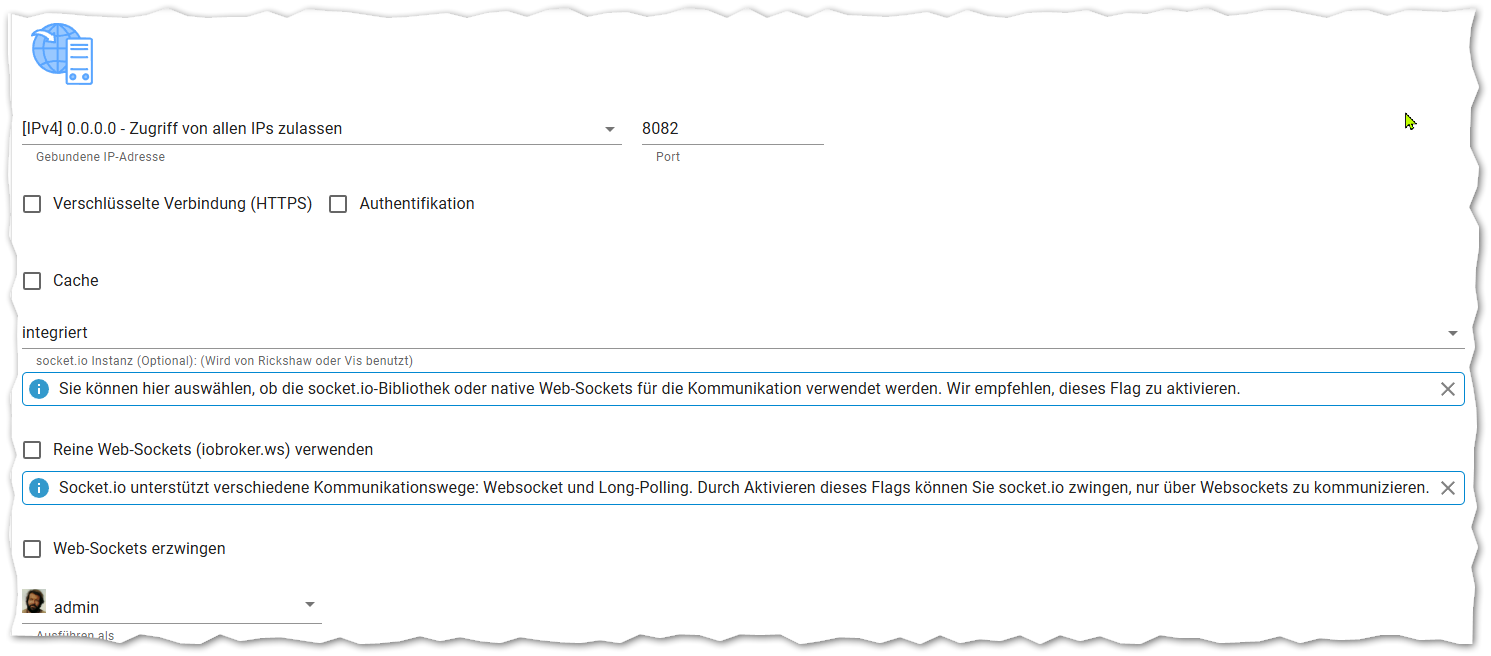
und
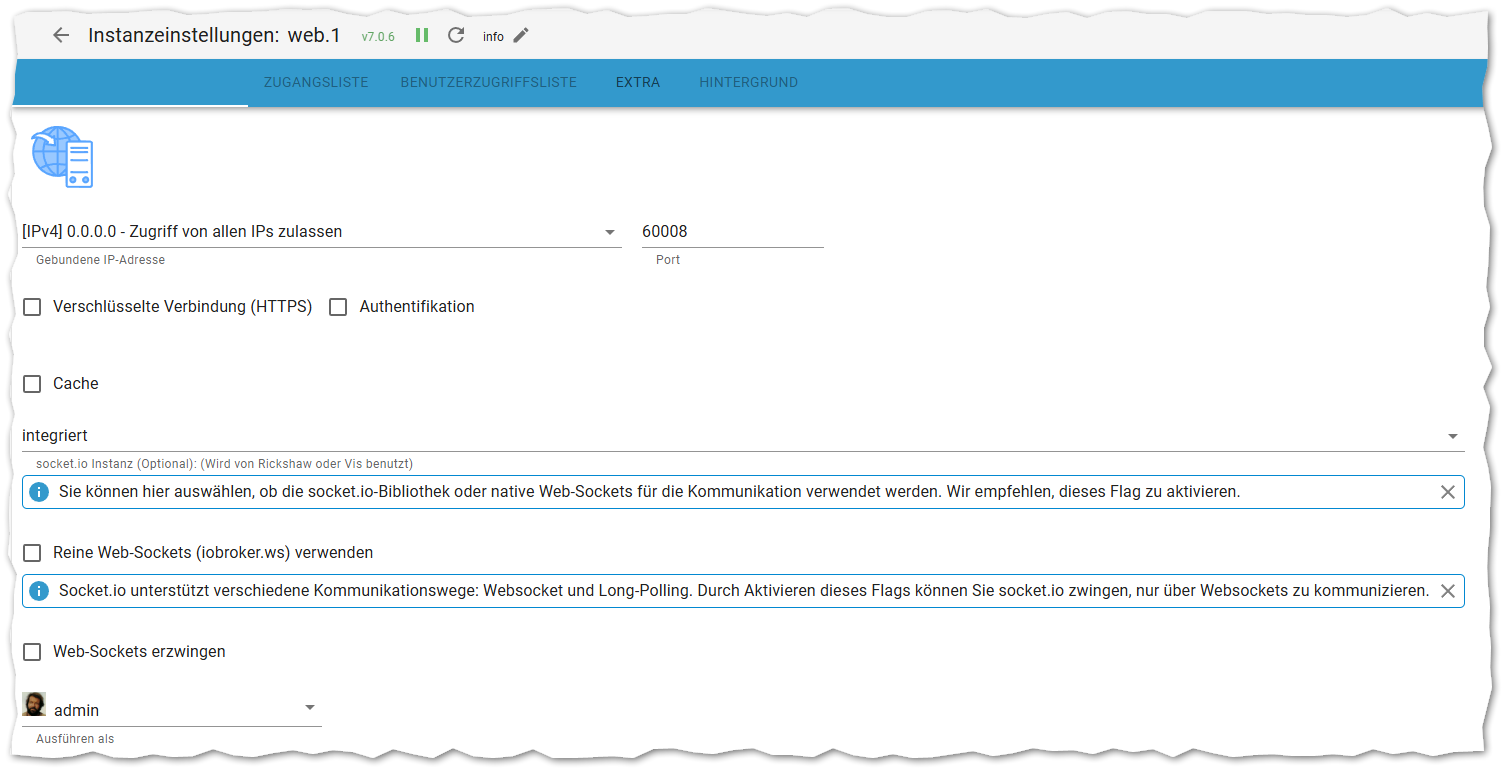
ioBroker@Ubuntu 24.04 LTS (Proxmox VM) für: >260 Geräte, 6 Switche, 7 AP, 10 IP-Cam, 1 NAS 42TB, 1 Proxmox 128GB 15TB, 2 Proxmox 32GB 1TB, 1 Hyper-V 52GB 42TB, 14 x Echo, 5x FireTV, 5 x Tablett/Handy VIS || >=160 Tasmota/Shelly || >=95 ZigBee || PV 8.1kW / Akku 14kWh || 2x USV APC 750W kaskadiert || Kobra S1 Max
-
@bananajoe integriert hab ich auch und ich nutze Reine Web-sockets(ws)
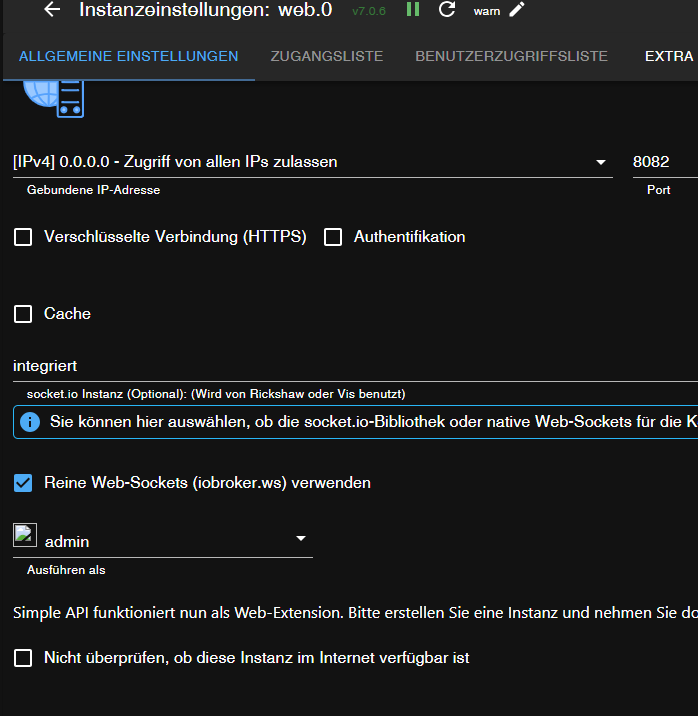
ansonsten
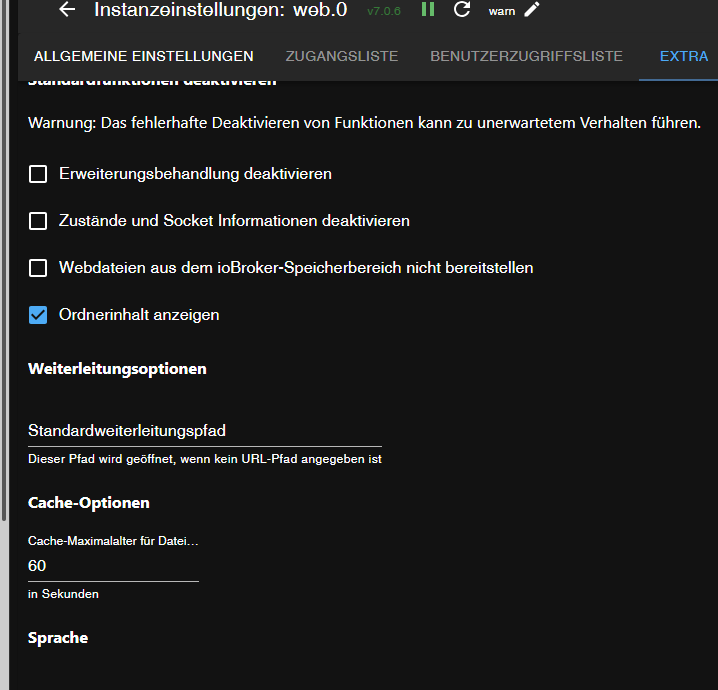
umgestiegen von Proxmox auf Unraid
-
@bananajoe , Bei mir so.
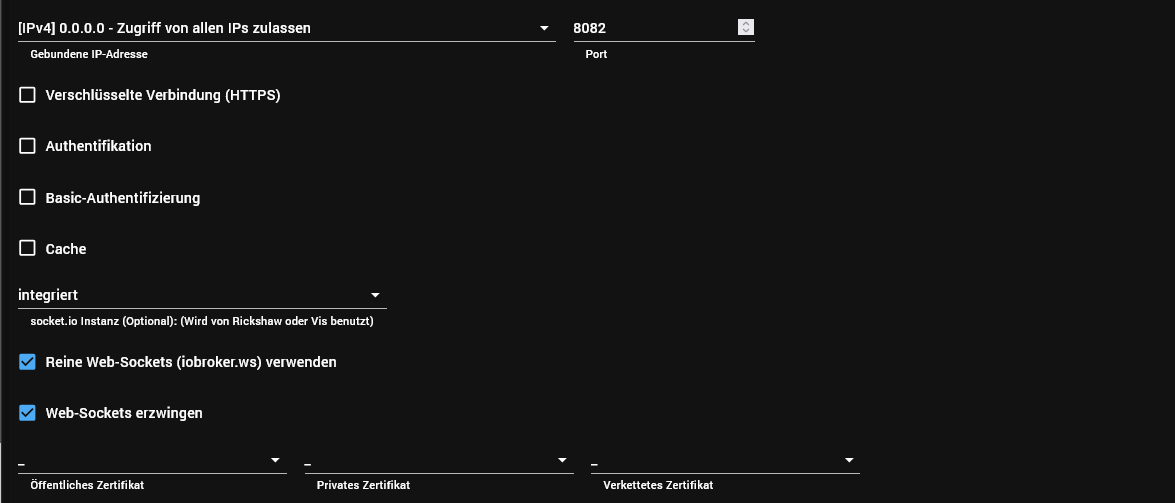
@esp8266 ein drehende Kreisel in der vis kommt aber woanders her und hat nichts mit der leeren Web Seite zu tun.
Läuft der ws Adapter?
Lass mal das Erzwingen weg.umgestiegen von Proxmox auf Unraid
-
@bananajoe integriert hab ich auch und ich nutze Reine Web-sockets(ws)
ansonsten
-
also, extra noch mal getestet:
- Web Adapter Version 6.3.1 => Seite funktioniert wie gewohnt
- Web Adapter Version 7.0.3 (aka "Das Problem mit den Nutzer Rechten korrigiert) und höher => leere Seite.
ioBroker@Ubuntu 24.04 LTS (Proxmox VM) für: >260 Geräte, 6 Switche, 7 AP, 10 IP-Cam, 1 NAS 42TB, 1 Proxmox 128GB 15TB, 2 Proxmox 32GB 1TB, 1 Hyper-V 52GB 42TB, 14 x Echo, 5x FireTV, 5 x Tablett/Handy VIS || >=160 Tasmota/Shelly || >=95 ZigBee || PV 8.1kW / Akku 14kWh || 2x USV APC 750W kaskadiert || Kobra S1 Max
-
also, extra noch mal getestet:
- Web Adapter Version 6.3.1 => Seite funktioniert wie gewohnt
- Web Adapter Version 7.0.3 (aka "Das Problem mit den Nutzer Rechten korrigiert) und höher => leere Seite.
Synology DS218+ & 2 x Fujitsu Esprimo (VM/Container) + FritzBox7590 + 2 AVM 3000 Repeater & Homematic & HUE & Osram & Xiaomi, NPM 10.9.7, Nodejs 22.22.2 ,JS Controller 7.0.7 ,Admin 7.8.24
-
@esp8266 ein drehende Kreisel in der vis kommt aber woanders her und hat nichts mit der leeren Web Seite zu tun.
Läuft der ws Adapter?
Lass mal das Erzwingen weg.@crunchip , das erzwingen gibt es in der 7.0.6 Version nicht mehr.
Jetzt hat er sich mal verbunden mit einem zerstückelten VIS Oberfläche.
Aber sonst sehr Träge. Jetzt wieder der Spinner mit drei Punkten in der Mitte.
Spinner = aus dem Enigma 2 Jargon. Runder drehender Kreis oder etwas anderes
Animiertes.
Also wieder zurück.
Ob der WS Adapter läuft k.A.
Wo kann man das überprüfen. Den gibt es nicht in den Instanzen.
Als ich aktualisiert habe, kamen wieder die Ausgaben im Log, wie die, die ich schon im Git gepostet habe. Meldungen kommen bei jeder Aktualisierung. -
@haselchen sagte in Startseite des web-Adapters ist leer:
Kannst Du in den Einstellungen ws.0 auswählen?
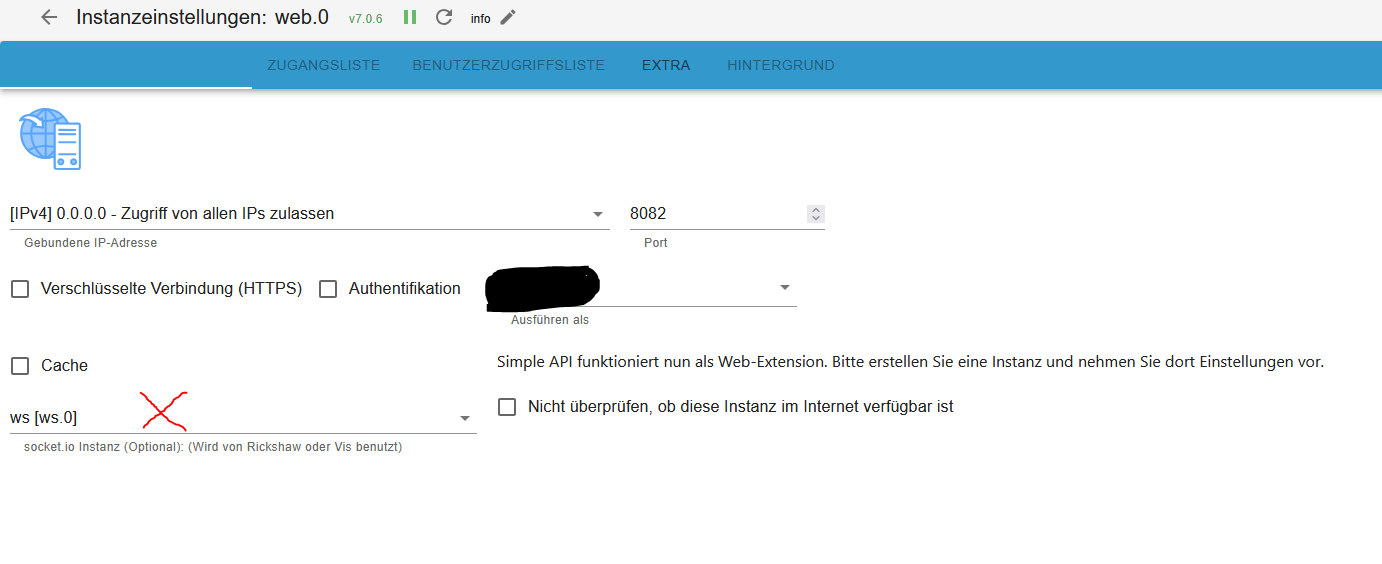
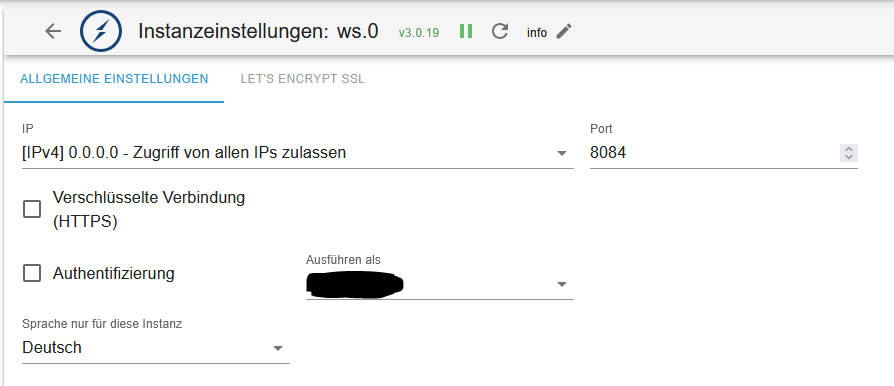
Ja, beide Varianten der Websockets,
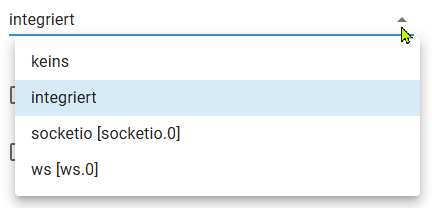
Macht aber keinen Unterschied, egal ob erzwingen oder nicht, obe integriert oder aus oder oder oder.
Das Problm ist ja auch nur die Startseite, die Views selbst und der Editor funktionieren noch wenn man die URLs kennt
ioBroker@Ubuntu 24.04 LTS (Proxmox VM) für: >260 Geräte, 6 Switche, 7 AP, 10 IP-Cam, 1 NAS 42TB, 1 Proxmox 128GB 15TB, 2 Proxmox 32GB 1TB, 1 Hyper-V 52GB 42TB, 14 x Echo, 5x FireTV, 5 x Tablett/Handy VIS || >=160 Tasmota/Shelly || >=95 ZigBee || PV 8.1kW / Akku 14kWh || 2x USV APC 750W kaskadiert || Kobra S1 Max
-
@haselchen sagte in Startseite des web-Adapters ist leer:
Kannst Du in den Einstellungen ws.0 auswählen?
Ja, beide Varianten der Websockets,
Macht aber keinen Unterschied, egal ob erzwingen oder nicht, obe integriert oder aus oder oder oder.
Das Problm ist ja auch nur die Startseite, die Views selbst und der Editor funktionieren noch wenn man die URLs kennt
-
@bananajoe , WS.0 bekam ich erst nach einer neu Installation zu Gesicht.
@esp8266 ne, die Instanz muss manuell installiert werden, der Adapter ist Default schon vorhanden und erst dann kann es im Web angewendet werden
-
@haselchen sagte in Startseite des web-Adapters ist leer:
Kannst Du in den Einstellungen ws.0 auswählen?
Ja, beide Varianten der Websockets,
Macht aber keinen Unterschied, egal ob erzwingen oder nicht, obe integriert oder aus oder oder oder.
Das Problm ist ja auch nur die Startseite, die Views selbst und der Editor funktionieren noch wenn man die URLs kennt
@bananajoe sagte in Startseite des web-Adapters ist leer:
Das Problm ist ja auch nur die Startseite
Ist es dann Vllt möglich, das dies der Admin verursacht
umgestiegen von Proxmox auf Unraid
-
@bananajoe sagte in Startseite des web-Adapters ist leer:
Das Problm ist ja auch nur die Startseite
Ist es dann Vllt möglich, das dies der Admin verursacht
@BananaJoe @ESP8266
ich habe aktuell ein ähnliches Problem. Ich befinde mich aber hinter einem Reverse Proxy (Traefik), wenn ich den Admin oder die Vis über den DNS Eintrag aufrufen will bleibt der Bildschirm weiß. Rufe aber die Seiten mit der IP Adresse auf läd alles wie gewohnt. -
@BananaJoe @ESP8266
ich habe aktuell ein ähnliches Problem. Ich befinde mich aber hinter einem Reverse Proxy (Traefik), wenn ich den Admin oder die Vis über den DNS Eintrag aufrufen will bleibt der Bildschirm weiß. Rufe aber die Seiten mit der IP Adresse auf läd alles wie gewohnt.@thomas-huber ich rufe direkt über die IP auf, bin im gleichen Netzwerk
ioBroker@Ubuntu 24.04 LTS (Proxmox VM) für: >260 Geräte, 6 Switche, 7 AP, 10 IP-Cam, 1 NAS 42TB, 1 Proxmox 128GB 15TB, 2 Proxmox 32GB 1TB, 1 Hyper-V 52GB 42TB, 14 x Echo, 5x FireTV, 5 x Tablett/Handy VIS || >=160 Tasmota/Shelly || >=95 ZigBee || PV 8.1kW / Akku 14kWh || 2x USV APC 750W kaskadiert || Kobra S1 Max




Hey! Du scheinst an dieser Unterhaltung interessiert zu sein, hast aber noch kein Konto.
Hast du es satt, bei jedem Besuch durch die gleichen Beiträge zu scrollen? Wenn du dich für ein Konto anmeldest, kommst du immer genau dorthin zurück, wo du zuvor warst, und kannst dich über neue Antworten benachrichtigen lassen (entweder per E-Mail oder Push-Benachrichtigung). Du kannst auch Lesezeichen speichern und Beiträge positiv bewerten, um anderen Community-Mitgliedern deine Wertschätzung zu zeigen.
Mit deinem Input könnte dieser Beitrag noch besser werden 💗
Registrieren AnmeldenSupport us
408
Online33.0k
Benutzer83.5k
Themen1.3m
Beiträge