




iobroker nach zigbee installation nicht mehr ansprechbar
-
iob start admin@meister-mopper allerdings stimmt da auch anderweitig etwas nicht
SyntaxError: Error parsing /opt/iobroker/node_modules/side-channel/package.json: Unexpected end of JSON input -
@w-m-77 sagte in iobroker nach zigbee installation nicht mehr ansprechbar:
host.iobroker instance system.adapter.web.0 terminated with code 1 (JS_CONTROLLER_STOPPED)
der WEB adapter schmeisst einen Fehler wasndas ??
und
Cannot read or parse /opt/iobroker/node_modules/@iobroker/js-controller-common-db/build/esm/lib/common//../node_modules/iobroker.zigbee2mqtt/io-package.json:
da stimmt allgemein was nicht
-
iob start admin -
hat jemand eine Idee wie ich hier weiter komme ??
========== Start marking the full check here ===========
Script v.2025-02-23

*** BASE SYSTEM ***
 Static hostname: iobroker
       Icon name: computer
Operating System: Debian GNU/Linux 12 (bookworm)
          Kernel: Linux 6.6.74+rpt-rpi-v8
    Architecture: arm64
OS is similar to:

Model           : Raspberry Pi 4 Model B Rev 1.1
Docker          : false
Virtualization  : none
Kernel          : aarch64
Userland        : 64 bit

Systemuptime and Load:
 20:34:32 up  4:10,  3 users,  load average: 2.01, 3.00, 3.38
CPU threads: 4


*** LIFE CYCLE STATUS ***
Operating System is the current Debian stable version codenamed 'bookworm'!

*** RASPBERRY THROTTLING ***
Current issues:
No throttling issues detected.

Previously detected issues:
No throttling issues detected.

*** TIME AND TIMEZONES ***
               Local time: Mon 2025-03-03 20:34:32 CET
           Universal time: Mon 2025-03-03 19:34:32 UTC
                 RTC time: n/a
                Time zone: Europe/Berlin (CET, +0100)
System clock synchronized: yes
              NTP service: active
          RTC in local TZ: no

*** Users and Groups ***
User that called 'iob diag':
pi
HOME=/home/pi
GROUPS=pi adm dialout cdrom sudo audio video plugdev games users input render netdev gpio i2c spi iobroker

User that is running 'js-controller':
iobroker
HOME=/home/iobroker
GROUPS=iobroker tty dialout audio video plugdev bluetooth gpio i2c

*** DISPLAY-SERVER SETUP ***
Display-Server: false
Desktop:
Terminal:       tty

*** MEMORY ***
               total        used        free      shared  buff/cache   available
Mem:            1.9G        837M        221M        1.2M        950M        1.1G
Swap:           209M        262K        209M
Total:          2.1G        837M        430M

Active iob-Instances:   12

         1846 M total memory
          798 M used memory
          744 M active memory
          731 M inactive memory
          210 M free memory
           41 M buffer memory
          864 M swap cache
          199 M total swap
            0 M used swap
          199 M free swap

*** top - Table Of Processes  ***
top - 20:34:32 up  4:10,  3 users,  load average: 2.01, 3.00, 3.38
Tasks: 180 total,   2 running, 178 sleeping,   0 stopped,   0 zombie
%Cpu(s):  0.0 us, 20.0 sy,  0.0 ni, 80.0 id,  0.0 wa,  0.0 hi,  0.0 si,  0.0 st
MiB Mem :   1846.8 total,    210.2 free,    799.2 used,    906.7 buff/cache
MiB Swap:    200.0 total,    199.7 free,      0.2 used.   1047.6 avail Mem

*** FAILED SERVICES ***

  UNIT                               LOAD   ACTIVE SUB    DESCRIPTION
* NetworkManager-wait-online.service loaded failed failed Network Manager Wait Online

LOAD   = Reflects whether the unit definition was properly loaded.
ACTIVE = The high-level unit activation state, i.e. generalization of SUB.
SUB    = The low-level unit activation state, values depend on unit type.
1 loaded units listed.


*** DMESG CRITICAL ERRORS ***
No critical errors detected

*** FILESYSTEM ***
Filesystem     Type      Size  Used Avail Use% Mounted on
udev           devtmpfs  660M     0  660M   0% /dev
tmpfs          tmpfs     185M  1.3M  184M   1% /run
/dev/mmcblk0p2 ext4       14G  7.8G  5.3G  60% /
tmpfs          tmpfs     924M     0  924M   0% /dev/shm
tmpfs          tmpfs     5.0M   16K  5.0M   1% /run/lock
/dev/mmcblk0p1 vfat      510M   65M  446M  13% /boot/firmware
tmpfs          tmpfs     185M     0  185M   0% /run/user/1000

Messages concerning ext4 filesystem in dmesg:
[Mon Mar  3 16:24:11 2025] Kernel command line: coherent_pool=1M 8250.nr_uarts=0 snd_bcm2835.enable_headphones=0 cgroup_disable=memory numa_policy=interleave snd_bcm2835.enable_headphones=1 snd_bcm2835.enable_hdmi=1 snd_bcm2835.enable_hdmiize=0x40000000  console=ttyS0,115200 console=tty1 root=PARTUUID=089bb4f7-02 rootfstype=ext4 fsck.repair=yes rootwait cfg80211.ieee80211_regdom=AT
[Mon Mar  3 16:24:26 2025] EXT4-fs (mmcblk0p2): mounted filesystem 56f80fa2-e005-4cca-86e6-19da1069914d ro with ordered data mode. Quota mode: none.
[Mon Mar  3 16:24:28 2025] EXT4-fs (mmcblk0p2): re-mounted 56f80fa2-e005-4cca-86e6-19da1069914d r/w. Quota mode: none.

Show mounted filesystems:
TARGET           SOURCE         FSTYPE OPTIONS
/                /dev/mmcblk0p2 ext4   rw,noatime
`-/boot/firmware /dev/mmcblk0p1 vfat   rw,relatime,fmask=0022,dmask=0022,codepage=437,iocharset=ascii,shortname=mixed,errors=remount-ro

Files in neuralgic directories:

/var:
1.4G    /var/
677M    /var/log/journal/4a8789595c9241c69387c9238a2f02df
677M    /var/log/journal
677M    /var/log
292M    /var/cache

Archived and active journals take up 676.4M in the file system.

/opt/iobroker/backups:
203M    /opt/iobroker/backups/

/opt/iobroker/iobroker-data:
2.3G    /opt/iobroker/iobroker-data/
1.3G    /opt/iobroker/iobroker-data/files
980M    /opt/iobroker/iobroker-data/0_userdata.0
617M    /opt/iobroker/iobroker-data/files/javascript.admin
560M    /opt/iobroker/iobroker-data/files/javascript.admin/static

The five largest files in iobroker-data are:
38M     /opt/iobroker/iobroker-data/files/iot.admin/static/js/main.d3d286bd.js.map
26M     /opt/iobroker/iobroker-data/files/echarts/static/js/main.41cee985.js.map
26M     /opt/iobroker/iobroker-data/files/echarts.admin/chart/static/js/main.41cee985.js.map
24M     /opt/iobroker/iobroker-data/files/web.admin/static/js/main.135279a0.js.map
24M     /opt/iobroker/iobroker-data/files/scenes.admin/static/js/main.1e6546bb.js.map

USB-Devices by-id:
USB-Sticks -  Avoid direct links to /dev/tty* in your adapter setups, please always prefer the links 'by-id':

No Devices found 'by-id'

Zigbee Network Settings on your coordinator/in nvbackup are:

zigbee.X
Extended Pan ID:
*** MASKED ***
Pan ID:
*** MASKED ***
Channel:
*** MASKED ***
Network Key:
*** MASKED ***

To unmask the settings run 'iob diag --unmask'


*** NodeJS-Installation ***

/usr/bin/nodejs         v20.18.3
/usr/bin/node           v20.18.3
/usr/bin/npm            10.8.2
/usr/bin/npx            10.8.2
/usr/bin/corepack       0.30.0

nodejs:
  Installed: 20.18.3-1nodesource1
  Candidate: 20.18.3-1nodesource1
  Version table:
 *** 20.18.3-1nodesource1 600
        500 https://deb.nodesource.com/node_20.x nodistro/main arm64 Packages
        100 /var/lib/dpkg/status
     20.18.2-1nodesource1 600
        500 https://deb.nodesource.com/node_20.x nodistro/main arm64 Packages
     20.18.1-1nodesource1 600
        500 https://deb.nodesource.com/node_20.x nodistro/main arm64 Packages
     20.18.0-1nodesource1 600
        500 https://deb.nodesource.com/node_20.x nodistro/main arm64 Packages
     20.17.0-1nodesource1 600
        500 https://deb.nodesource.com/node_20.x nodistro/main arm64 Packages
     20.16.0-1nodesource1 600
        500 https://deb.nodesource.com/node_20.x nodistro/main arm64 Packages
     20.15.1-1nodesource1 600
        500 https://deb.nodesource.com/node_20.x nodistro/main arm64 Packages
     20.15.0-1nodesource1 600
        500 https://deb.nodesource.com/node_20.x nodistro/main arm64 Packages
     20.14.0-1nodesource1 600
        500 https://deb.nodesource.com/node_20.x nodistro/main arm64 Packages
     20.13.1-1nodesource1 600
        500 https://deb.nodesource.com/node_20.x nodistro/main arm64 Packages
     20.13.0-1nodesource1 600
        500 https://deb.nodesource.com/node_20.x nodistro/main arm64 Packages
     20.12.2-1nodesource1 600
        500 https://deb.nodesource.com/node_20.x nodistro/main arm64 Packages
     20.12.1-1nodesource1 600
        500 https://deb.nodesource.com/node_20.x nodistro/main arm64 Packages
     20.12.0-1nodesource1 600
        500 https://deb.nodesource.com/node_20.x nodistro/main arm64 Packages
     20.11.1-1nodesource1 600
        500 https://deb.nodesource.com/node_20.x nodistro/main arm64 Packages
     20.11.0-1nodesource1 600
        500 https://deb.nodesource.com/node_20.x nodistro/main arm64 Packages
     20.10.0-1nodesource1 600
        500 https://deb.nodesource.com/node_20.x nodistro/main arm64 Packages
     20.9.0-1nodesource1 600
        500 https://deb.nodesource.com/node_20.x nodistro/main arm64 Packages
     20.8.1-1nodesource1 600
        500 https://deb.nodesource.com/node_20.x nodistro/main arm64 Packages
     20.8.0-1nodesource1 600
        500 https://deb.nodesource.com/node_20.x nodistro/main arm64 Packages
     20.7.0-1nodesource1 600
        500 https://deb.nodesource.com/node_20.x nodistro/main arm64 Packages
     20.6.1-1nodesource1 600
        500 https://deb.nodesource.com/node_20.x nodistro/main arm64 Packages
     20.6.0-1nodesource1 600
        500 https://deb.nodesource.com/node_20.x nodistro/main arm64 Packages
     20.5.1-1nodesource1 600
        500 https://deb.nodesource.com/node_20.x nodistro/main arm64 Packages
     20.5.0-1nodesource1 600
        500 https://deb.nodesource.com/node_20.x nodistro/main arm64 Packages
     20.4.0-1nodesource1 600
        500 https://deb.nodesource.com/node_20.x nodistro/main arm64 Packages
     20.3.1-1nodesource1 600
        500 https://deb.nodesource.com/node_20.x nodistro/main arm64 Packages
     20.3.0-1nodesource1 600
        500 https://deb.nodesource.com/node_20.x nodistro/main arm64 Packages
     20.2.0-1nodesource1 600
        500 https://deb.nodesource.com/node_20.x nodistro/main arm64 Packages
     20.1.0-1nodesource1 600
        500 https://deb.nodesource.com/node_20.x nodistro/main arm64 Packages
     20.0.0-1nodesource1 600
        500 https://deb.nodesource.com/node_20.x nodistro/main arm64 Packages
     18.19.0+dfsg-6~deb12u2 500
        500 http://deb.debian.org/debian bookworm/main arm64 Packages
     18.19.0+dfsg-6~deb12u1 500
        500 http://deb.debian.org/debian-security bookworm-security/main arm64 Packages

Temp directories causing deletion problem: 0
No problems detected

Errors in npm tree: 0
No problems detected

*** ioBroker-Installation ***

ioBroker Status
iobroker is running on this host.


Objects type: jsonl
States  type: jsonl

Hosts:
iobroker            iobroker (version: 7.0.6, hostname: iobroker      , alive, uptime: 413)

Core adapters versions
js-controller:  7.0.6
admin:          7.4.10
javascript:     8.8.3

nodejs modules from github:     0

Adapter State
  system.adapter.admin.0                  : admin                 : iobroker                                 -  enabled, port: 8081, bind: 0.0.0.0, run as: admin
+ system.adapter.backitup.0               : backitup              : iobroker                                 -  enabled
  system.adapter.bydbatt.0                : bydbatt               : iobroker                                 - disabled
+ system.adapter.discovery.0              : discovery             : iobroker                                 -  enabled
  system.adapter.flot.0                   : flot                  : iobroker                                 - disabled
  system.adapter.fronius-solarweb.0       : fronius-solarweb      : iobroker                                 - disabled
  system.adapter.fronius-wattpilot.0      : fronius-wattpilot     : iobroker                                 - disabled
+ system.adapter.g-homa.0                 : g-homa                : iobroker                                 -  enabled
  system.adapter.habpanel.0               : habpanel              : iobroker                                 - disabled
+ system.adapter.history.0                : history               : iobroker                                 -  enabled
+ system.adapter.javascript.0             : javascript            : iobroker                                 -  enabled
+ system.adapter.modbus.0                 : modbus                : iobroker                                 -  enabled
+ system.adapter.modbus.1                 : modbus                : iobroker                                 -  enabled
+ system.adapter.mqtt.0                   : mqtt                  : iobroker                                 -  enabled, port: 1880, bind: 0.0.0.0
  system.adapter.opendtu.0                : opendtu               : iobroker                                 - disabled
  system.adapter.rickshaw.0               : rickshaw              : iobroker                                 - disabled
+ system.adapter.shelly.0                 : shelly                : iobroker                                 -  enabled, port: 1882, bind: ::
+ system.adapter.sonoff.0                 : sonoff                : iobroker                                 -  enabled, port: 1886, bind: 0.0.0.0
  system.adapter.web.0                    : web                   : iobroker                                 -  enabled, port: 8082, bind: 10.0.0.99, run as: admin
+ system.adapter.ws.0                     : ws                    : iobroker                                 -  enabled, port: 8084, bind: 0.0.0.0, run as: admin

+ instance is alive

Enabled adapters with bindings
  system.adapter.admin.0                  : admin                 : iobroker                                 -  enabled, port: 8081, bind: 0.0.0.0, run as: admin
+ system.adapter.mqtt.0                   : mqtt                  : iobroker                                 -  enabled, port: 1880, bind: 0.0.0.0
+ system.adapter.shelly.0                 : shelly                : iobroker                                 -  enabled, port: 1882, bind: ::
+ system.adapter.sonoff.0                 : sonoff                : iobroker                                 -  enabled, port: 1886, bind: 0.0.0.0
  system.adapter.web.0                    : web                   : iobroker                                 -  enabled, port: 8082, bind: 10.0.0.99, run as: admin
+ system.adapter.ws.0                     : ws                    : iobroker                                 -  enabled, port: 8084, bind: 0.0.0.0, run as: admin

ioBroker-Repositories
┌─────────┬──────────┬─────────────────────────────────────────────────────────┬──────────────┐
│ (index) │ name     │ url                                                     │ auto upgrade │
├─────────┼──────────┼─────────────────────────────────────────────────────────┼──────────────┤
│ 0       │ 'stable' │ 'http://download.iobroker.net/sources-dist.json'        │ false        │
│ 1       │ 'beta'   │ 'http://download.iobroker.net/sources-dist-latest.json' │ false        │
└─────────┴──────────┴─────────────────────────────────────────────────────────┴──────────────┘

Active repo(s): stable
Upgrade policy: none

Installed ioBroker-Adapters
Used repository: stable
Cannot read or parse /opt/iobroker/node_modules/@iobroker/js-controller-common-db/build/esm/lib/common//../node_modules/iobroker.zigbee2mqtt/io-package.json: /opt/iobroker/node_modules/iobroker.zigbee2mqtt/io-package.json: Unexpected end o
Cannot read or parse /opt/iobroker/node_modules/@iobroker/js-controller-common-db/build/esm/lib/common//../node_modules/iobroker.zigbee2mqtt/io-package.json: /opt/iobroker/node_modules/iobroker.zigbee2mqtt/io-package.json: Unexpected end o
Adapter    "admin"        : 7.4.10   , installed 7.4.10
Adapter    "backitup"     : 3.0.31   , installed 3.0.31
Adapter    "bydbatt"      : 1.1.0    , installed 1.1.0
Adapter    "discovery"    : 5.0.0    , installed 5.0.0
Adapter    "flot"         : 1.12.0   , installed 1.12.0
Adapter    "fronius-solarweb": 0.0.3 , installed 0.0.3
Adapter    "fronius-wattpilot": 4.6.3, installed 4.6.3
Adapter    "g-homa"       : 0.5.3    , installed 0.5.3
Adapter    "habpanel"     : 0.5.0    , installed 0.5.0
Adapter    "history"      : 3.0.1    , installed 3.0.1
Adapter    "javascript"   : 8.8.3    , installed 8.8.3
Controller "js-controller": 7.0.6    , installed 7.0.6
Adapter    "modbus"       : 6.3.2    , installed 6.3.2
Adapter    "mqtt"         : 6.1.2    , installed 6.1.2
Adapter    "opendtu"      : 3.1.0    , installed 3.1.0
Adapter    "rickshaw"     : 1.0.0    , installed 1.0.0
Adapter    "shelly"       : 8.5.1    , installed 8.5.1
Adapter    "simple-api"   : 2.8.0    , installed 2.8.0
Adapter    "socketio"     : 6.7.1    , installed 6.7.1
Adapter    "sonoff"       : 3.1.2    , installed 3.1.2
Adapter    "web"          : 6.2.5    , installed 6.2.5
Adapter    "ws"           : 2.6.2    , installed 2.6.2

Objects and States
Please stand by - This may take a while
Objects:        7875
States:         6378

*** OS-Repositories and Updates ***
Hit:1 http://deb.debian.org/debian bookworm InRelease
Hit:2 http://deb.debian.org/debian-security bookworm-security InRelease
Hit:3 http://deb.debian.org/debian bookworm-updates InRelease
Hit:4 http://archive.raspberrypi.com/debian bookworm InRelease
Hit:5 https://deb.nodesource.com/node_20.x nodistro InRelease
Reading package lists...
Pending Updates: 0

*** Listening Ports ***
Active Internet connections (only servers)
Proto Recv-Q Send-Q Local Address           Foreign Address         State       User       Inode      PID/Program name
tcp        0      0 0.0.0.0:22              0.0.0.0:*               LISTEN      0          5655       667/sshd: /usr/sbin
tcp        0      0 127.0.0.1:9000          0.0.0.0:*               LISTEN      1001       52181      14177/iobroker.js-c
tcp        0      0 127.0.0.1:9001          0.0.0.0:*               LISTEN      1001       52176      14177/iobroker.js-c
tcp        0      0 0.0.0.0:1880            0.0.0.0:*               LISTEN      1001       54979      14423/io.mqtt.0
tcp        0      0 0.0.0.0:1886            0.0.0.0:*               LISTEN      1001       54903      14390/io.sonoff.0
tcp6       0      0 :::22                   :::*                    LISTEN      0          5657       667/sshd: /usr/sbin
tcp6       0      0 :::1882                 :::*                    LISTEN      1001       52842      14354/io.shelly.0
tcp6       0      0 :::50000                :::*                    LISTEN      1001       53981      14466/io.g-homa.0
tcp6       0      0 :::8084                 :::*                    LISTEN      1001       52945      14648/io.ws.0
udp        0      0 0.0.0.0:51304           0.0.0.0:*                           104        4990       504/avahi-daemon: r
udp        0      0 0.0.0.0:5353            0.0.0.0:*                           104        4988       504/avahi-daemon: r
udp6       0      0 :::35924                :::*                                104        4991       504/avahi-daemon: r
udp6       0      0 :::5353                 :::*                                104        4989       504/avahi-daemon: r
udp6       0      0 fe80::fd4e:3335:540:546 :::*                                0          6458       607/NetworkManager

*** Log File - Last 25 Lines ***

2025-03-03 20:35:52.298  - warn: modbus.1 (14339) [DevID_201] Poll error count: 1 code: {"errorCode":131,"exceptionCode":11,"message":"GATEWAY TARGET DEVICE FAILED TO RESPOND"}
2025-03-03 20:35:46.948  - error: host.iobroker Caught by controller[0]: node:internal/modules/package_json_reader:93
2025-03-03 20:35:46.948  - error: host.iobroker Caught by controller[0]:         throw error;
2025-03-03 20:35:46.948  - error: host.iobroker Caught by controller[0]:         ^
2025-03-03 20:35:46.949  - error: host.iobroker Caught by controller[0]: SyntaxError: Error parsing /opt/iobroker/node_modules/side-channel/package.json: Unexpected end of JSON input
2025-03-03 20:35:46.949  - error: host.iobroker Caught by controller[0]:     at parse (<anonymous>)
2025-03-03 20:35:46.949  - error: host.iobroker Caught by controller[0]:     at read (node:internal/modules/package_json_reader:80:16)
2025-03-03 20:35:46.949  - error: host.iobroker Caught by controller[0]:     at readPackage (node:internal/modules/package_json_reader:141:10)
2025-03-03 20:35:46.950  - error: host.iobroker Caught by controller[0]:     at resolveExports (node:internal/modules/cjs/loader:630:15)
2025-03-03 20:35:46.950  - error: host.iobroker Caught by controller[0]:     at Module._findPath (node:internal/modules/cjs/loader:724:31)
2025-03-03 20:35:46.950  - error: host.iobroker Caught by controller[0]:     at Module._resolveFilename (node:internal/modules/cjs/loader:1211:27)
2025-03-03 20:35:46.951  - error: host.iobroker Caught by controller[0]:     at Module._load (node:internal/modules/cjs/loader:1051:27)
2025-03-03 20:35:46.951  - error: host.iobroker Caught by controller[0]:     at Module.require (node:internal/modules/cjs/loader:1311:19)
2025-03-03 20:35:46.951  - error: host.iobroker Caught by controller[0]:     at require (node:internal/modules/helpers:179:18)
2025-03-03 20:35:46.951  - error: host.iobroker Caught by controller[0]:     at Object.<anonymous> (/opt/iobroker/node_modules/qs/lib/stringify.js:3:22) {
2025-03-03 20:35:46.952  - error: host.iobroker Caught by controller[0]:   path: '/opt/iobroker/node_modules/side-channel/package.json'
2025-03-03 20:35:46.952  - error: host.iobroker Caught by controller[0]: }
2025-03-03 20:35:46.953  - error: host.iobroker Caught by controller[0]: Node.js v20.18.3
2025-03-03 20:35:46.954  - error: host.iobroker instance system.adapter.web.0 terminated with code 1 (JS_CONTROLLER_STOPPED)
2025-03-03 20:35:46.954  - info: host.iobroker Restart adapter system.adapter.web.0 because enabled
2025-03-03 20:36:02.376  - info: shelly.0 (14354) [Sys.timezone] 10.0.0.52 (shellyplus1pm / shellyplus1pm-fcb467ba5318 / shellyplus1pm#fcb467ba5318#1): Configured timezone "Europe/Vienna" and system timezone "Europe/Berlin" do not match. P
2025-03-03 20:36:02.447  - warn: modbus.1 (14339) [DevID_1/holdingRegs/40314] Calculation of a scaleFactor which is based on another scaleFactor seems strange. Please check the config for address 40314 !
2025-03-03 20:36:02.721  - warn: modbus.1 (14339) [DevID_201] Poll error count: 1 code: {"errorCode":131,"exceptionCode":11,"message":"GATEWAY TARGET DEVICE FAILED TO RESPOND"}
2025-03-03 20:36:03.343  - info: javascript.0 (14271) script.js.leistungssteuerung: schalter 6 of
2025-03-03 20:36:03.501  - info: host.iobroker instance system.adapter.admin.0 in version "7.4.10" started with pid 17168
============ Mark until here for C&P =============
@w-m-77 sagte in iobroker nach zigbee installation nicht mehr ansprechbar:
bind: 10.0.0.99
Ist das bewusst?
-
@w-m-77 sagte in iobroker nach zigbee installation nicht mehr ansprechbar:
bind: 10.0.0.99
Ist das bewusst?
-
@w-m-77 sagte in iobroker nach zigbee installation nicht mehr ansprechbar:
leider mit wenig Erfolg
mit welcher Meldung?
iob start admin --debugggf kommen deine Probleme auch daher
@w-m-77 sagte in iobroker nach zigbee installation nicht mehr ansprechbar:
NetworkManager-wait-online.service loaded failed failed Network Manager Wait Online
-
Also da ist was ziemlich faul:
Used repository: stable
Cannot read or parse /opt/iobroker/node_modules/@iobroker/js-controller-common-db/build/esm/lib/common//../node_modules/iobroker.zigbee2mqtt/io-package.json: /opt/iobroker/node_modules/iobroker.zigbee2mqtt/io-package.json: Unexpected end o
Cannot read or parse /opt/iobroker/node_modules/@iobroker/js-controller-common-db/build/esm/lib/common//../node_modules/iobroker.zigbee2mqtt/io-package.json: /opt/iobroker/node_modules/iobroker.zigbee2mqtt/io-package.json: Unexpected end o
Adapter    "admin"        : 7.4.10   , installed 7.4.10
Die Zigbee Installation selbst ist da schief gelaufen. Aus welcher Quelle hast du denn ZigBee installiert? Ich würd in jedem Fall mal versuchen den Adapter neu zu (re-)installieren.
Außerdem schreibst du dass das Problem nach der Installtion von Zigbee aufgetreten ist. Die defekten Files gehören aber zu zigbee2mqtt. Was hast du genau imstalliert?
Der Diskspace ist dir nicjht zufällig bei der Installation augegangen? Derzeit sond zwar 40% frei - aber es gab schon user die es nicht für wichtig empfunden haben zu schreiben, dass sie ein Installtionsproblem hatte und nachher erst Platz geschaffen haben ...
-
Also da ist was ziemlich faul:
Used repository: stable
Cannot read or parse /opt/iobroker/node_modules/@iobroker/js-controller-common-db/build/esm/lib/common//../node_modules/iobroker.zigbee2mqtt/io-package.json: /opt/iobroker/node_modules/iobroker.zigbee2mqtt/io-package.json: Unexpected end o
Cannot read or parse /opt/iobroker/node_modules/@iobroker/js-controller-common-db/build/esm/lib/common//../node_modules/iobroker.zigbee2mqtt/io-package.json: /opt/iobroker/node_modules/iobroker.zigbee2mqtt/io-package.json: Unexpected end o
Adapter    "admin"        : 7.4.10   , installed 7.4.10
Die Zigbee Installation selbst ist da schief gelaufen. Aus welcher Quelle hast du denn ZigBee installiert? Ich würd in jedem Fall mal versuchen den Adapter neu zu (re-)installieren.
Außerdem schreibst du dass das Problem nach der Installtion von Zigbee aufgetreten ist. Die defekten Files gehören aber zu zigbee2mqtt. Was hast du genau imstalliert?
Der Diskspace ist dir nicjht zufällig bei der Installation augegangen? Derzeit sond zwar 40% frei - aber es gab schon user die es nicht für wichtig empfunden haben zu schreiben, dass sie ein Installtionsproblem hatte und nachher erst Platz geschaffen haben ...
@mcm1957
Hallo,
stimmt da war ich wohl etwas ungenau in der Ausfürhrung ...war im Detail der "Zigbee2mqtt" adapter direkt über die IOB Oberflächeden verfügbaren Speicherplatz habe ich vor der installation nicht kontrolliert... allerdings danach auch nicht aufgeräumt..
reinstallieren über die Konsole.. wie müsste das aussehen??
-
@mcm1957
Hallo,
stimmt da war ich wohl etwas ungenau in der Ausfürhrung ...war im Detail der "Zigbee2mqtt" adapter direkt über die IOB Oberflächeden verfügbaren Speicherplatz habe ich vor der installation nicht kontrolliert... allerdings danach auch nicht aufgeräumt..
reinstallieren über die Konsole.. wie müsste das aussehen??
iob update
iob upgrade zigbee2mqtt@3.0.2 --debug
versuchen, wenn du auf stable unterwegs bist.
-
@thomas-braun sagte in iobroker nach zigbee installation nicht mehr ansprechbar:
upgrade
ist das nicht eher
install, bzwadd, da der Adapter ja gar nicht installiert istunabhängig davon,
@w-m-77 sagte in iobroker nach zigbee installation nicht mehr ansprechbar:
war im Detail der "Zigbee2mqtt" adapter
bewusst?, das dieser aber nicht eigenständig läuft, ist hoffentlich bekannt
umgestiegen von Proxmox auf Unraid
-
@thomas-braun sagte in iobroker nach zigbee installation nicht mehr ansprechbar:
upgrade
ist das nicht eher
install, bzwadd, da der Adapter ja gar nicht installiert istunabhängig davon,
@w-m-77 sagte in iobroker nach zigbee installation nicht mehr ansprechbar:
war im Detail der "Zigbee2mqtt" adapter
bewusst?, das dieser aber nicht eigenständig läuft, ist hoffentlich bekannt
Wenn ich
stimmt da war ich wohl etwas ungenau in der Ausfürhrung ...war im Detail der "Zigbee2mqtt" adapter direkt über die IOB Oberfläche
richtig interpretiere ist der Adapter schon installiert. Wenn auch irgendwie 'krumm'.
Edit: Hast wohl Recht, der Adapter taucht oben im
iob diagnicht auf. -
Wenn ich
stimmt da war ich wohl etwas ungenau in der Ausfürhrung ...war im Detail der "Zigbee2mqtt" adapter direkt über die IOB Oberfläche
richtig interpretiere ist der Adapter schon installiert. Wenn auch irgendwie 'krumm'.
Edit: Hast wohl Recht, der Adapter taucht oben im
iob diagnicht auf.@thomas-braun sehe ich jedoch nicht so
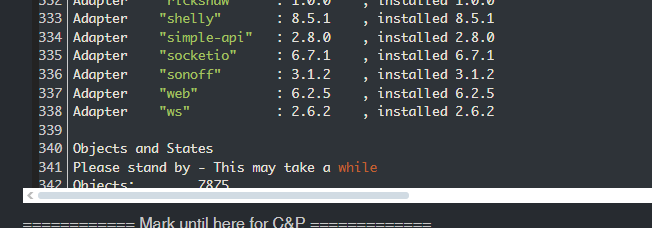
dann müsste er ja da gelistet sein, oder nicht?umgestiegen von Proxmox auf Unraid
-
@thomas-braun sehe ich jedoch nicht so
dann müsste er ja da gelistet sein, oder nicht?Das ist wohl eine krumme/unvollständige Installation.
Cannot read or parse /opt/iobroker/node_modules/@iobroker/js-controller-common-db/build/esm/lib/common//../node_modules/iobroker.zigbee2mqtt/io-package.json: /opt/iobroker/node_modules/iobroker.zigbee2mqtt/io-package.json: Unexpected end o
sollte ja auch nicht auftauchen.
-
Das ist wohl eine krumme/unvollständige Installation.
Cannot read or parse /opt/iobroker/node_modules/@iobroker/js-controller-common-db/build/esm/lib/common//../node_modules/iobroker.zigbee2mqtt/io-package.json: /opt/iobroker/node_modules/iobroker.zigbee2mqtt/io-package.json: Unexpected end o
sollte ja auch nicht auftauchen.

pi@iobroker:~ $ iob upgrade zigbee2mqtt@3.0.2 --debug
Cannot upgrade: /opt/iobroker/node_modules/iobroker.zigbee2mqtt/io-package.json: Unexpected end of JSON input
pi@iobroker:~ $ iob install zigbee2mqtt@3.0.2 --debug
adapter "zigbee2mqtt" already installed. Use "upgrade" to upgrade to a newer version.
MOD-EDIT: Code in code-tags gesetzt!
-
pi@iobroker:~ $ iob upgrade zigbee2mqtt@3.0.2 --debug
Cannot upgrade: /opt/iobroker/node_modules/iobroker.zigbee2mqtt/io-package.json: Unexpected end of JSON input
pi@iobroker:~ $ iob install zigbee2mqtt@3.0.2 --debug
adapter "zigbee2mqtt" already installed. Use "upgrade" to upgrade to a newer version.
MOD-EDIT: Code in code-tags gesetzt!
Und deinstallieren geht vermutlich auch nicht?
-
Und deinstallieren geht vermutlich auch nicht?
@thomas-braun
schätze das ist der seltene Fall wo die Leiche mit npm oder rm weg muss. Bin nur am Handy. Ev kannst du ha die richtigen Befehle vorschlagen.Danje.
-
pi@iobroker:~ $ iob upgrade zigbee2mqtt@3.0.2 --debug
Cannot upgrade: /opt/iobroker/node_modules/iobroker.zigbee2mqtt/io-package.json: Unexpected end of JSON input
pi@iobroker:~ $ iob install zigbee2mqtt@3.0.2 --debug
adapter "zigbee2mqtt" already installed. Use "upgrade" to upgrade to a newer version.
MOD-EDIT: Code in code-tags gesetzt!
@w-m-77 sagte in iobroker nach zigbee installation nicht mehr ansprechbar:
Versuch mal
cd /opt/iobroker && npm uninstall iobroker.zigbee2mqtt -
@w-m-77 sagte in iobroker nach zigbee installation nicht mehr ansprechbar:
Versuch mal
cd /opt/iobroker && npm uninstall iobroker.zigbee2mqttHerzlichen Dank Thomas !!

läuft wieder ... jetzt werd ich mich mal mit folgendem Thema beschäftigen: wie kann man am besten externe Backups erstellen und auf einem neuen System wiederherstellen ...
p.s: !!ich hoffe meine kleine Kaffeespende kommt den mir helfenden Händen irgendwie zu gute!! -
Herzlichen Dank Thomas !!
läuft wieder ... jetzt werd ich mich mal mit folgendem Thema beschäftigen: wie kann man am besten externe Backups erstellen und auf einem neuen System wiederherstellen ...
p.s: !!ich hoffe meine kleine Kaffeespende kommt den mir helfenden Händen irgendwie zu gute!!@w-m-77 sagte in iobroker nach zigbee installation nicht mehr ansprechbar:
wie kann man am besten externe Backups erstellen und auf einem neuen System wiederherstellen ...
mit backitup
-
@w-m-77 sagte in iobroker nach zigbee installation nicht mehr ansprechbar:
Versuch mal
cd /opt/iobroker && npm uninstall iobroker.zigbee2mqtt@thomas-braun said in iobroker nach zigbee installation nicht mehr ansprechbar:
@w-m-77 sagte in iobroker nach zigbee installation nicht mehr ansprechbar:
Versuch mal
cd /opt/iobroker && npm uninstall iobroker.zigbee2mqtt





Hey! Du scheinst an dieser Unterhaltung interessiert zu sein, hast aber noch kein Konto.
Hast du es satt, bei jedem Besuch durch die gleichen Beiträge zu scrollen? Wenn du dich für ein Konto anmeldest, kommst du immer genau dorthin zurück, wo du zuvor warst, und kannst dich über neue Antworten benachrichtigen lassen (entweder per E-Mail oder Push-Benachrichtigung). Du kannst auch Lesezeichen speichern und Beiträge positiv bewerten, um anderen Community-Mitgliedern deine Wertschätzung zu zeigen.
Mit deinem Input könnte dieser Beitrag noch besser werden 💗
Registrieren AnmeldenSupport us
286
Online33.0k
Benutzer83.6k
Themen1.3m
Beiträge