




Update von Node 18 auf Node 20 bricht ab
-
@smart-thomas said in Update von Node 18 auf Node 20 bricht ab:
@homoran den Beitrag hatte ich schon gefunden und die Keys auch gelöscht. Das hat aber am Anfang irgendwie nicht hingehauen, mittlerweile war ich aber erfolgreich. Zusammen mit dieser Anleitung (https://internet-artikel.de/ar/gpg-error-in-grafana-apt-key-erneuern) hat es dann aber geklappt. Node 20 läuft!
Danke dir für den Gedankenanstoss.
Hallo,
also ich habe das gleiche Problem wie Du. Aber ich habe kein Grafana, somit hilft mir Dein Link nicht weiter. Auch über die Konsole lässt sich Node nicht auf v20.18.2 aktualisieren. Hast Du noch einen Lösungsvorschlag?@searcher57 sagte in Update von Node 18 auf Node 20 bricht ab:
ich habe das gleiche Problem wie Du. Aber ich habe kein Grafana
Dann ist es wohl kaum "das gleiche Problem".
Wie bist Du denn da insgesamt unterwegs?
Zeig mal die Ausgabe voniob diag -
@smart-thomas said in Update von Node 18 auf Node 20 bricht ab:
@homoran den Beitrag hatte ich schon gefunden und die Keys auch gelöscht. Das hat aber am Anfang irgendwie nicht hingehauen, mittlerweile war ich aber erfolgreich. Zusammen mit dieser Anleitung (https://internet-artikel.de/ar/gpg-error-in-grafana-apt-key-erneuern) hat es dann aber geklappt. Node 20 läuft!
Danke dir für den Gedankenanstoss.
Hallo,
also ich habe das gleiche Problem wie Du. Aber ich habe kein Grafana, somit hilft mir Dein Link nicht weiter. Auch über die Konsole lässt sich Node nicht auf v20.18.2 aktualisieren. Hast Du noch einen Lösungsvorschlag?@searcher57 sagte in Update von Node 18 auf Node 20 bricht ab:
@smart-thomas said in Update von Node 18 auf Node 20 bricht ab:
@homoran den Beitrag hatte ich schon gefunden und die Keys auch gelöscht. Das hat aber am Anfang irgendwie nicht hingehauen, mittlerweile war ich aber erfolgreich. Zusammen mit dieser Anleitung (https://internet-artikel.de/ar/gpg-error-in-grafana-apt-key-erneuern) hat es dann aber geklappt. Node 20 läuft!
Danke dir für den Gedankenanstoss.
Hallo,
also ich habe das gleiche Problem wie Du. Aber ich habe kein Grafana, somit hilft mir Dein Link nicht weiter. Auch über die Konsole lässt sich Node nicht auf v20.18.2 aktualisieren. Hast Du noch einen Lösungsvorschlag?Dann zeig doch mal bitte deine Fehlermeldungen. Wie soll man das Problem sonst ergründen können?
-
@smart-thomas said in Update von Node 18 auf Node 20 bricht ab:
@homoran den Beitrag hatte ich schon gefunden und die Keys auch gelöscht. Das hat aber am Anfang irgendwie nicht hingehauen, mittlerweile war ich aber erfolgreich. Zusammen mit dieser Anleitung (https://internet-artikel.de/ar/gpg-error-in-grafana-apt-key-erneuern) hat es dann aber geklappt. Node 20 läuft!
Danke dir für den Gedankenanstoss.
Hallo,
also ich habe das gleiche Problem wie Du. Aber ich habe kein Grafana, somit hilft mir Dein Link nicht weiter. Auch über die Konsole lässt sich Node nicht auf v20.18.2 aktualisieren. Hast Du noch einen Lösungsvorschlag?@searcher57
Schuss ins Blaue: Noch Debian 10 (Buster) im Einsatz? -
@searcher57 sagte in Update von Node 18 auf Node 20 bricht ab:
ich habe das gleiche Problem wie Du. Aber ich habe kein Grafana
Dann ist es wohl kaum "das gleiche Problem".
Wie bist Du denn da insgesamt unterwegs?
Zeig mal die Ausgabe voniob diag@codierknecht said in Update von Node 18 auf Node 20 bricht ab:
@searcher57 sagte in Update von Node 18 auf Node 20 bricht ab:
ich habe das gleiche Problem wie Du. Aber ich habe kein Grafana
Dann ist es wohl kaum "das gleiche Problem".
Wie bist Du denn da insgesamt unterwegs?
Zeig mal die Ausgabe voniob diagEntschuldigung! hier die Infos:
```bash Script v.2025-02-02 *** BASE SYSTEM *** Static hostname: Raspi48GB Icon name: computer Operating System: Debian GNU/Linux 12 (bookworm) Kernel: Linux 6.6.62+rpt-rpi-v8 Architecture: arm64 OS is similar to: Model : Raspberry Pi 4 Model B Rev 1.5 Docker : false Virtualization : none Kernel : aarch64 Userland : 64 bit Systemuptime and Load: 17:49:00 up 10 days, 22:20, 2 users, load average: 0.16, 0.18, 0.45 CPU threads: 4 *** LIFE CYCLE STATUS *** Operating System is the current Debian stable version codenamed 'bookworm'! *** RASPBERRY THROTTLING *** Current issues: No throttling issues detected. Previously detected issues: No throttling issues detected. *** TIME AND TIMEZONES *** Local time: Sat 2025-02-08 17:49:00 CET Universal time: Sat 2025-02-08 16:49:00 UTC RTC time: n/a Time zone: Europe/Berlin (CET, +0100) System clock synchronized: yes NTP service: active RTC in local TZ: no *** Users and Groups *** User that called 'iob diag': pi HOME=/home/pi GROUPS=pi adm dialout cdrom sudo audio video plugdev games users input render netdev gpio i2c spi iobroker User that is running 'js-controller': iobroker HOME=/home/iobroker GROUPS=iobroker tty dialout audio video plugdev bluetooth gpio i2c *** DISPLAY-SERVER SETUP *** Display-Server: false Desktop: Terminal: tty *** MEMORY *** total used free shared buff/cache available Mem: 8.2G 1.7G 4.9G 1.3M 1.6G 6.5G Swap: 209M 0B 209M Total: 8.4G 1.7G 5.2G Active iob-Instances: 18 7809 M total memory 1648 M used memory 1690 M active memory 1164 M inactive memory 4715 M free memory 226 M buffer memory 1343 M swap cache 199 M total swap 0 M used swap 199 M free swap *** top - Table Of Processes *** top - 17:49:01 up 10 days, 22:20, 2 users, load average: 0.16, 0.18, 0.45 Tasks: 185 total, 3 running, 182 sleeping, 0 stopped, 0 zombie %Cpu(s): 0.0 us, 25.0 sy, 0.0 ni, 75.0 id, 0.0 wa, 0.0 hi, 0.0 si, 0.0 st MiB Mem : 7809.9 total, 4714.8 free, 1649.0 used, 1569.3 buff/cache MiB Swap: 200.0 total, 200.0 free, 0.0 used. 6160.9 avail Mem *** FAILED SERVICES *** UNIT LOAD ACTIVE SUB DESCRIPTION 0 loaded units listed. *** DMESG CRITICAL ERRORS *** No critical errors detected *** FILESYSTEM *** Filesystem Type Size Used Avail Use% Mounted on udev devtmpfs 3.6G 0 3.6G 0% /dev tmpfs tmpfs 781M 1.2M 780M 1% /run /dev/mmcblk0p2 ext4 59G 9.6G 46G 18% / tmpfs tmpfs 3.9G 0 3.9G 0% /dev/shm tmpfs tmpfs 5.0M 16K 5.0M 1% /run/lock /dev/mmcblk0p1 vfat 510M 65M 446M 13% /boot/firmware /dev/sda1 exfat 3.9G 195M 3.7G 5% /mnt/usb0 tmpfs tmpfs 781M 0 781M 0% /run/user/1000 Messages concerning ext4 filesystem in dmesg: [Tue Jan 28 19:28:38 2025] Kernel command line: coherent_pool=1M 8250.nr_uarts=1 snd_bcm2835.enable_headphones=0 cgroup_disable=memory numa_policy=interleave snd_bcm2835.enable_headphones=1 snd_bcm2835.enable_hdmi=1 snd_bcm2835.enable_hdmi=0 smsc95xx.macaddr=D8:3A:DD:43:B6:26 vc_mem.mem_base=0x3ec00000 vc_mem.mem_size=0x40000000 console=tty1 root=PARTUUID=8ebf6d55-02 rootfstype=ext4 fsck.repair=yes rootwait [Tue Jan 28 19:28:41 2025] EXT4-fs (mmcblk0p2): mounted filesystem 93c89e92-8f2e-4522-ad32-68faed883d2f ro with ordered data mode. Quota mode: none. [Tue Jan 28 19:28:42 2025] EXT4-fs (mmcblk0p2): re-mounted 93c89e92-8f2e-4522-ad32-68faed883d2f r/w. Quota mode: none. Show mounted filesystems: TARGET SOURCE FSTYPE OPTIONS / /dev/mmcblk0p2 ext4 rw,noatime |-/boot/firmware /dev/mmcblk0p1 vfat rw,relatime,fmask=0022,dmask=0022,codepage=437,iocharset=ascii,shortname=mixed,errors=remount-ro `-/mnt/usb0 /dev/sda1 exfat rw,relatime,fmask=0000,dmask=0000,allow_utime=0022,iocharset=utf8,errors=remount-ro Files in neuralgic directories: /var: 1.3G /var/ 729M /var/log 728M /var/log/journal/0e010272fae14c1784990c1fc7429731 728M /var/log/journal 206M /var/cache Journal file /var/log/journal/0e010272fae14c1784990c1fc7429731/user-1001@00062a7f4e38fbb1-0ae92bb7e00931f0.journal~ is truncated, ignoring file. Archived and active journals take up 727.5M in the file system. /opt/iobroker/backups: 193M /opt/iobroker/backups/ /opt/iobroker/iobroker-data: 1.2G /opt/iobroker/iobroker-data/ 1.1G /opt/iobroker/iobroker-data/files 617M /opt/iobroker/iobroker-data/files/javascript.admin 560M /opt/iobroker/iobroker-data/files/javascript.admin/static 558M /opt/iobroker/iobroker-data/files/javascript.admin/static/js The five largest files in iobroker-data are: 35M /opt/iobroker/iobroker-data/files/devices.admin/static/js/main.24f2bb56.js.map 24M /opt/iobroker/iobroker-data/files/web.admin/static/js/main.135279a0.js.map 24M /opt/iobroker/iobroker-data/files/vis-2/static/js/main.f305bc29.js.map 24M /opt/iobroker/iobroker-data/files/vis-2/static/js/main.8e80ccb0.js.map 24M /opt/iobroker/iobroker-data/files/vis-2/customWidgets.js.map USB-Devices by-id: USB-Sticks - Avoid direct links to /dev/tty* in your adapter setups, please always prefer the links 'by-id': /dev/serial/by-id/usb-ITead_Sonoff_Zigbee_3.0_USB_Dongle_Plus_0867d5d6b78ded11959b02f6b86ce6f8-if00-port0 Your zigbee.0 COM-Port is matching 'by-id'. Very good! *** NodeJS-Installation *** /usr/bin/nodejs v18.20.6 /usr/bin/node v18.20.6 /usr/bin/npm 10.8.2 /usr/bin/npx 10.8.2 /usr/bin/corepack 0.29.4 nodejs: Installed: 18.20.6-1nodesource1 Candidate: 18.20.6-1nodesource1 Version table: *** 18.20.6-1nodesource1 100 100 /var/lib/dpkg/status 18.19.0+dfsg-6~deb12u2 500 500 http://deb.debian.org/debian bookworm/main arm64 Packages 18.19.0+dfsg-6~deb12u1 500 500 http://deb.debian.org/debian-security bookworm-security/main arm64 Packages Temp directories causing deletion problem: 0 No problems detected Errors in npm tree: 0 No problems detected *** ioBroker-Installation *** ioBroker Status iobroker is running on this host. Objects type: jsonl States type: jsonl Hosts: Raspi48GB Raspi48GB (version: 7.0.6, hostname: Raspi48GB , alive, uptime: 1234) Core adapters versions js-controller: 7.0.6 admin: 7.4.10 javascript: 8.8.3 nodejs modules from github: 0 Adapter State + system.adapter.admin.0 : admin : Raspi48GB - enabled, port: 8081, bind: 0.0.0.0, run as: admin + system.adapter.backitup.0 : backitup : Raspi48GB - enabled + system.adapter.discovery.0 : discovery : Raspi48GB - enabled + system.adapter.followthesun.0 : followthesun : Raspi48GB - enabled + system.adapter.frontier_silicon.0 : frontier_silicon : Raspi48GB - enabled + system.adapter.hm-rega.0 : hm-rega : Raspi48GB - enabled + system.adapter.hm-rpc.0 : hm-rpc : Raspi48GB - enabled, port: 0 + system.adapter.hm-rpc.1 : hm-rpc : Raspi48GB - enabled, port: 0 + system.adapter.javascript.0 : javascript : Raspi48GB - enabled + system.adapter.mqtt.0 : mqtt : Raspi48GB - enabled, port: 1883, bind: 0.0.0.0 + system.adapter.shelly.0 : shelly : Raspi48GB - enabled, port: 1882, bind: 0.0.0.0 + system.adapter.shelly.1 : shelly : Raspi48GB - enabled, port: 1882, bind: 0.0.0.0 + system.adapter.telegram.0 : telegram : Raspi48GB - enabled, port: 8443, bind: 0.0.0.0 + system.adapter.text2command.0 : text2command : Raspi48GB - enabled + system.adapter.vis-2.0 : vis-2 : Raspi48GB - enabled + system.adapter.web.0 : web : Raspi48GB - enabled, port: 8082, bind: 0.0.0.0, run as: admin system.adapter.yr.0 : yr : Raspi48GB - enabled + system.adapter.zigbee.0 : zigbee : Raspi48GB - enabled, port: /dev/serial/by-id/usb-ITead_Sonoff_Zigbee_3.0_USB_Dongle_Plus_0867d5d6b78ded11959b02f6b86ce6f8-if00-port0 + instance is alive Enabled adapters with bindings + system.adapter.admin.0 : admin : Raspi48GB - enabled, port: 8081, bind: 0.0.0.0, run as: admin + system.adapter.hm-rpc.0 : hm-rpc : Raspi48GB - enabled, port: 0 + system.adapter.hm-rpc.1 : hm-rpc : Raspi48GB - enabled, port: 0 + system.adapter.mqtt.0 : mqtt : Raspi48GB - enabled, port: 1883, bind: 0.0.0.0 + system.adapter.shelly.0 : shelly : Raspi48GB - enabled, port: 1882, bind: 0.0.0.0 + system.adapter.shelly.1 : shelly : Raspi48GB - enabled, port: 1882, bind: 0.0.0.0 + system.adapter.telegram.0 : telegram : Raspi48GB - enabled, port: 8443, bind: 0.0.0.0 + system.adapter.web.0 : web : Raspi48GB - enabled, port: 8082, bind: 0.0.0.0, run as: admin + system.adapter.zigbee.0 : zigbee : Raspi48GB - enabled, port: /dev/serial/by-id/usb-ITead_Sonoff_Zigbee_3.0_USB_Dongle_Plus_0867d5d6b78ded11959b02f6b86ce6f8-if00-port0 ioBroker-Repositories ┌─────────┬──────────┬─────────────────────────────────────────────────────────┬──────────────┐ │ (index) │ name │ url │ auto upgrade │ ├─────────┼──────────┼─────────────────────────────────────────────────────────┼──────────────┤ │ 0 │ 'stable' │ 'http://download.iobroker.net/sources-dist.json' │ false │ │ 1 │ 'beta' │ 'http://download.iobroker.net/sources-dist-latest.json' │ false │ └─────────┴──────────┴─────────────────────────────────────────────────────────┴──────────────┘ Active repo(s): stable Upgrade policy: none Installed ioBroker-Instances Used repository: stable Adapter "admin" : 7.4.10 , installed 7.4.10 Adapter "backitup" : 3.0.31 , installed 3.0.31 Adapter "discovery" : 5.0.0 , installed 5.0.0 Adapter "followthesun" : 0.5.1 , installed 0.5.1 Adapter "frontier_silicon": 0.3.0 , installed 0.3.0 Adapter "hm-rega" : 5.1.0 , installed 5.1.0 Adapter "hm-rpc" : 2.0.2 , installed 2.0.2 Adapter "javascript" : 8.8.3 , installed 8.8.3 Controller "js-controller": 7.0.6 , installed 7.0.6 Adapter "mqtt" : 6.1.2 , installed 6.1.2 Adapter "shelly" : 8.5.1 , installed 8.5.1 Adapter "simple-api" : 2.8.0 , installed 2.8.0 Adapter "socketio" : 6.7.1 , installed 6.7.1 Adapter "telegram" : 4.0.0 , installed 3.9.0 [Updatable] Adapter "text2command" : 3.0.3 , installed 3.0.3 Adapter "vis-2" : 2.9.64 , installed 2.9.64 Adapter "web" : 6.2.5 , installed 6.2.5 Adapter "ws" : 2.6.2 , installed 2.6.2 Adapter "yr" : 5.3.0 , installed 5.3.0 Adapter "zigbee" : 1.10.14 , installed 1.10.14 Objects and States Please stand by - This may take a while Objects: 8172 States: 6793 *** OS-Repositories and Updates *** E: The repository 'https://deb.nodesource.com/node_v.x nodistro Release' does not have a Release file. Pending Updates: 0 *** Listening Ports *** Active Internet connections (only servers) Proto Recv-Q Send-Q Local Address Foreign Address State User Inode PID/Program name tcp 0 0 0.0.0.0:22 0.0.0.0:* LISTEN 0 4788 713/sshd: /usr/sbin tcp 0 0 0.0.0.0:9001 0.0.0.0:* LISTEN 1001 3534819 38462/iobroker.js-c tcp 0 0 0.0.0.0:9000 0.0.0.0:* LISTEN 1001 3534826 38462/iobroker.js-c tcp 0 0 0.0.0.0:1882 0.0.0.0:* LISTEN 1001 3537357 38662/io.shelly.1 tcp 0 0 192.168.178.74:42010 0.0.0.0:* LISTEN 1001 3536535 38587/io.hm-rpc.0 tcp 0 0 192.168.178.74:2001 0.0.0.0:* LISTEN 1001 3538243 38605/io.hm-rpc.1 tcp6 0 0 :::22 :::* LISTEN 0 4790 713/sshd: /usr/sbin tcp6 0 0 :::8081 :::* LISTEN 1001 3537977 38480/io.admin.0 tcp6 0 0 :::8082 :::* LISTEN 1001 3536731 38768/io.web.0 tcp6 0 0 :::8086 :::* LISTEN 999 7040 777/influxd udp 0 0 0.0.0.0:51871 0.0.0.0:* 1001 3548191 38643/io.shelly.0 udp 0 0 0.0.0.0:58021 0.0.0.0:* 104 4738 584/avahi-daemon: r udp 0 0 0.0.0.0:5353 0.0.0.0:* 104 4736 584/avahi-daemon: r udp 0 0 0.0.0.0:5683 0.0.0.0:* 1001 3539173 38643/io.shelly.0 udp6 0 0 :::48050 :::* 104 4739 584/avahi-daemon: r udp6 0 0 fe80::29e3:a8b6:106:546 :::* 0 5892 662/NetworkManager udp6 0 0 :::5353 :::* 104 4737 584/avahi-daemon: r *** Log File - Last 25 Lines *** 2025-02-08 17:46:39.490 - info: frontier_silicon.0 (38692) Session 819918816 with Device Büro Rainer @ 192.168.178.32 created 2025-02-08 17:46:49.771 - info: frontier_silicon.0 (38692) Session error, trying to reestablish session... 2025-02-08 17:46:49.782 - info: frontier_silicon.0 (38692) Trying to create session with Büro Rainer @ 192.168.178.32 ... 2025-02-08 17:46:49.812 - info: frontier_silicon.0 (38692) Session 345056851 with Device Büro Rainer @ 192.168.178.32 created 2025-02-08 17:47:00.120 - info: frontier_silicon.0 (38692) Session error, trying to reestablish session... 2025-02-08 17:47:00.140 - info: frontier_silicon.0 (38692) Trying to create session with Büro Rainer @ 192.168.178.32 ... 2025-02-08 17:47:00.194 - info: frontier_silicon.0 (38692) Session 606066577 with Device Büro Rainer @ 192.168.178.32 created 2025-02-08 17:47:22.181 - info: frontier_silicon.0 (38692) Session error, trying to reestablish session... 2025-02-08 17:47:22.192 - info: frontier_silicon.0 (38692) Trying to create session with Büro Rainer @ 192.168.178.32 ... 2025-02-08 17:47:22.216 - info: frontier_silicon.0 (38692) Session 1468659069 with Device Büro Rainer @ 192.168.178.32 created 2025-02-08 17:47:32.523 - info: frontier_silicon.0 (38692) Session error, trying to reestablish session... 2025-02-08 17:47:32.534 - info: frontier_silicon.0 (38692) Trying to create session with Büro Rainer @ 192.168.178.32 ... 2025-02-08 17:47:32.585 - info: frontier_silicon.0 (38692) Session 1463604767 with Device Büro Rainer @ 192.168.178.32 created 2025-02-08 17:47:42.880 - info: frontier_silicon.0 (38692) Session error, trying to reestablish session... 2025-02-08 17:47:42.890 - info: frontier_silicon.0 (38692) Trying to create session with Büro Rainer @ 192.168.178.32 ... 2025-02-08 17:47:42.951 - info: frontier_silicon.0 (38692) Session 732863143 with Device Büro Rainer @ 192.168.178.32 created 2025-02-08 17:47:53.235 - info: frontier_silicon.0 (38692) Session error, trying to reestablish session... 2025-02-08 17:47:53.247 - info: frontier_silicon.0 (38692) Trying to create session with Büro Rainer @ 192.168.178.32 ... 2025-02-08 17:47:53.311 - info: frontier_silicon.0 (38692) Session 1881711608 with Device Büro Rainer @ 192.168.178.32 created 2025-02-08 17:48:03.614 - info: frontier_silicon.0 (38692) Session error, trying to reestablish session... 2025-02-08 17:48:03.620 - info: frontier_silicon.0 (38692) Trying to create session with Büro Rainer @ 192.168.178.32 ... 2025-02-08 17:48:03.646 - info: frontier_silicon.0 (38692) Session 319879140 with Device Büro Rainer @ 192.168.178.32 created 2025-02-08 17:48:13.920 - info: frontier_silicon.0 (38692) Session error, trying to reestablish session... 2025-02-08 17:48:13.932 - info: frontier_silicon.0 (38692) Trying to create session with Büro Rainer @ 192.168.178.32 ... 2025-02-08 17:48:13.956 - info: frontier_silicon.0 (38692) Session 363528562 with Device Büro Rainer @ 192.168.178.32 created -
@searcher57 sagte in Update von Node 18 auf Node 20 bricht ab:
@smart-thomas said in Update von Node 18 auf Node 20 bricht ab:
@homoran den Beitrag hatte ich schon gefunden und die Keys auch gelöscht. Das hat aber am Anfang irgendwie nicht hingehauen, mittlerweile war ich aber erfolgreich. Zusammen mit dieser Anleitung (https://internet-artikel.de/ar/gpg-error-in-grafana-apt-key-erneuern) hat es dann aber geklappt. Node 20 läuft!
Danke dir für den Gedankenanstoss.
Hallo,
also ich habe das gleiche Problem wie Du. Aber ich habe kein Grafana, somit hilft mir Dein Link nicht weiter. Auch über die Konsole lässt sich Node nicht auf v20.18.2 aktualisieren. Hast Du noch einen Lösungsvorschlag?Dann zeig doch mal bitte deine Fehlermeldungen. Wie soll man das Problem sonst ergründen können?
@meister-mopper said in Update von Node 18 auf Node 20 bricht ab:
@searcher57 sagte in Update von Node 18 auf Node 20 bricht ab:
@smart-thomas said in Update von Node 18 auf Node 20 bricht ab:
@homoran den Beitrag hatte ich schon gefunden und die Keys auch gelöscht. Das hat aber am Anfang irgendwie nicht hingehauen, mittlerweile war ich aber erfolgreich. Zusammen mit dieser Anleitung (https://internet-artikel.de/ar/gpg-error-in-grafana-apt-key-erneuern) hat es dann aber geklappt. Node 20 läuft!
Danke dir für den Gedankenanstoss.
Hallo,
also ich habe das gleiche Problem wie Du. Aber ich habe kein Grafana, somit hilft mir Dein Link nicht weiter. Auch über die Konsole lässt sich Node nicht auf v20.18.2 aktualisieren. Hast Du noch einen Lösungsvorschlag?Dann zeig doch mal bitte deine Fehlermeldungen. Wie soll man das Problem sonst ergründen können?
Aufgefallen ist mir das Problem erst nachdem ich den Telegram-Adapter nicht von 3.9.0 auf 4.0.0 aktualiseren kann.
-
@meister-mopper said in Update von Node 18 auf Node 20 bricht ab:
@searcher57 sagte in Update von Node 18 auf Node 20 bricht ab:
@smart-thomas said in Update von Node 18 auf Node 20 bricht ab:
@homoran den Beitrag hatte ich schon gefunden und die Keys auch gelöscht. Das hat aber am Anfang irgendwie nicht hingehauen, mittlerweile war ich aber erfolgreich. Zusammen mit dieser Anleitung (https://internet-artikel.de/ar/gpg-error-in-grafana-apt-key-erneuern) hat es dann aber geklappt. Node 20 läuft!
Danke dir für den Gedankenanstoss.
Hallo,
also ich habe das gleiche Problem wie Du. Aber ich habe kein Grafana, somit hilft mir Dein Link nicht weiter. Auch über die Konsole lässt sich Node nicht auf v20.18.2 aktualisieren. Hast Du noch einen Lösungsvorschlag?Dann zeig doch mal bitte deine Fehlermeldungen. Wie soll man das Problem sonst ergründen können?
Aufgefallen ist mir das Problem erst nachdem ich den Telegram-Adapter nicht von 3.9.0 auf 4.0.0 aktualiseren kann.
@searcher57 sagte in Update von Node 18 auf Node 20 bricht ab:
@meister-mopper said in Update von Node 18 auf Node 20 bricht ab:
@searcher57 sagte in Update von Node 18 auf Node 20 bricht ab:
@smart-thomas said in Update von Node 18 auf Node 20 bricht ab:
@homoran den Beitrag hatte ich schon gefunden und die Keys auch gelöscht. Das hat aber am Anfang irgendwie nicht hingehauen, mittlerweile war ich aber erfolgreich. Zusammen mit dieser Anleitung (https://internet-artikel.de/ar/gpg-error-in-grafana-apt-key-erneuern) hat es dann aber geklappt. Node 20 läuft!
Danke dir für den Gedankenanstoss.
Hallo,
also ich habe das gleiche Problem wie Du. Aber ich habe kein Grafana, somit hilft mir Dein Link nicht weiter. Auch über die Konsole lässt sich Node nicht auf v20.18.2 aktualisieren. Hast Du noch einen Lösungsvorschlag?Dann zeig doch mal bitte deine Fehlermeldungen. Wie soll man das Problem sonst ergründen können?
Aufgefallen ist mir das Problem erst nachdem ich den Telegram-Adapter nicht von 3.9.0 auf 4.0.0 aktualiseren kann.
Genau diese error Meldungen können aber zur Lösung deines Problems beitragen.
-
@searcher57 sagte in Update von Node 18 auf Node 20 bricht ab:
@meister-mopper said in Update von Node 18 auf Node 20 bricht ab:
@searcher57 sagte in Update von Node 18 auf Node 20 bricht ab:
@smart-thomas said in Update von Node 18 auf Node 20 bricht ab:
@homoran den Beitrag hatte ich schon gefunden und die Keys auch gelöscht. Das hat aber am Anfang irgendwie nicht hingehauen, mittlerweile war ich aber erfolgreich. Zusammen mit dieser Anleitung (https://internet-artikel.de/ar/gpg-error-in-grafana-apt-key-erneuern) hat es dann aber geklappt. Node 20 läuft!
Danke dir für den Gedankenanstoss.
Hallo,
also ich habe das gleiche Problem wie Du. Aber ich habe kein Grafana, somit hilft mir Dein Link nicht weiter. Auch über die Konsole lässt sich Node nicht auf v20.18.2 aktualisieren. Hast Du noch einen Lösungsvorschlag?Dann zeig doch mal bitte deine Fehlermeldungen. Wie soll man das Problem sonst ergründen können?
Aufgefallen ist mir das Problem erst nachdem ich den Telegram-Adapter nicht von 3.9.0 auf 4.0.0 aktualiseren kann.
Genau diese error Meldungen können aber zur Lösung deines Problems beitragen.
@meister-mopper said in Update von Node 18 auf Node 20 bricht ab:
@searcher57 sagte in Update von Node 18 auf Node 20 bricht ab:
@meister-mopper said in Update von Node 18 auf Node 20 bricht ab:
@searcher57 sagte in Update von Node 18 auf Node 20 bricht ab:
@smart-thomas said in Update von Node 18 auf Node 20 bricht ab:
@homoran den Beitrag hatte ich schon gefunden und die Keys auch gelöscht. Das hat aber am Anfang irgendwie nicht hingehauen, mittlerweile war ich aber erfolgreich. Zusammen mit dieser Anleitung (https://internet-artikel.de/ar/gpg-error-in-grafana-apt-key-erneuern) hat es dann aber geklappt. Node 20 läuft!
Danke dir für den Gedankenanstoss.
Hallo,
also ich habe das gleiche Problem wie Du. Aber ich habe kein Grafana, somit hilft mir Dein Link nicht weiter. Auch über die Konsole lässt sich Node nicht auf v20.18.2 aktualisieren. Hast Du noch einen Lösungsvorschlag?Dann zeig doch mal bitte deine Fehlermeldungen. Wie soll man das Problem sonst ergründen können?
Aufgefallen ist mir das Problem erst nachdem ich den Telegram-Adapter nicht von 3.9.0 auf 4.0.0 aktualiseren kann.
Genau diese error Meldungen können aber zur Lösung deines Problems beitragen.
Sorry, aber ich kann Dir kein Protokoll liefern, sondern einen Screen-shot:
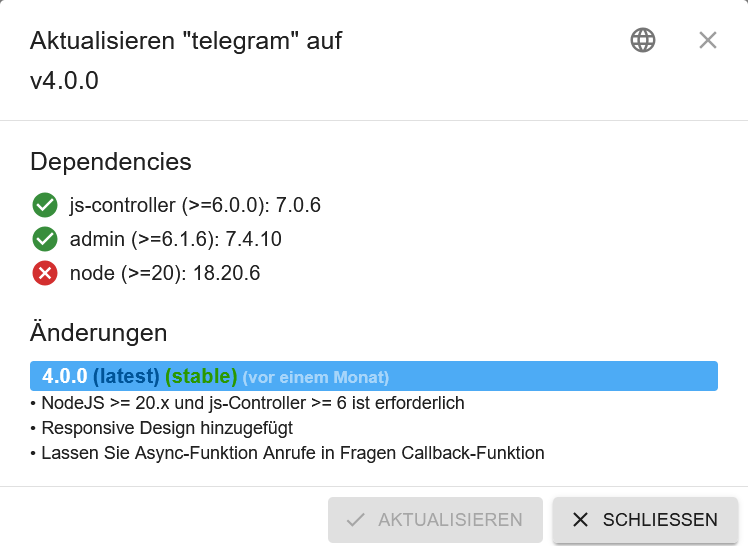
-
@meister-mopper said in Update von Node 18 auf Node 20 bricht ab:
@searcher57 sagte in Update von Node 18 auf Node 20 bricht ab:
@meister-mopper said in Update von Node 18 auf Node 20 bricht ab:
@searcher57 sagte in Update von Node 18 auf Node 20 bricht ab:
@smart-thomas said in Update von Node 18 auf Node 20 bricht ab:
@homoran den Beitrag hatte ich schon gefunden und die Keys auch gelöscht. Das hat aber am Anfang irgendwie nicht hingehauen, mittlerweile war ich aber erfolgreich. Zusammen mit dieser Anleitung (https://internet-artikel.de/ar/gpg-error-in-grafana-apt-key-erneuern) hat es dann aber geklappt. Node 20 läuft!
Danke dir für den Gedankenanstoss.
Hallo,
also ich habe das gleiche Problem wie Du. Aber ich habe kein Grafana, somit hilft mir Dein Link nicht weiter. Auch über die Konsole lässt sich Node nicht auf v20.18.2 aktualisieren. Hast Du noch einen Lösungsvorschlag?Dann zeig doch mal bitte deine Fehlermeldungen. Wie soll man das Problem sonst ergründen können?
Aufgefallen ist mir das Problem erst nachdem ich den Telegram-Adapter nicht von 3.9.0 auf 4.0.0 aktualiseren kann.
Genau diese error Meldungen können aber zur Lösung deines Problems beitragen.
Sorry, aber ich kann Dir kein Protokoll liefern, sondern einen Screen-shot:
@searcher57 sagte in Update von Node 18 auf Node 20 bricht ab:
einen Screen-shot:
da steht's doch ganz deutlich und rot markiert
@searcher57 sagte in Update von Node 18 auf Node 20 bricht ab:
usr/bin/nodejs v18.20.6
ist zu alt
du brauchst v20
-
@meister-mopper said in Update von Node 18 auf Node 20 bricht ab:
@searcher57 sagte in Update von Node 18 auf Node 20 bricht ab:
@meister-mopper said in Update von Node 18 auf Node 20 bricht ab:
@searcher57 sagte in Update von Node 18 auf Node 20 bricht ab:
@smart-thomas said in Update von Node 18 auf Node 20 bricht ab:
@homoran den Beitrag hatte ich schon gefunden und die Keys auch gelöscht. Das hat aber am Anfang irgendwie nicht hingehauen, mittlerweile war ich aber erfolgreich. Zusammen mit dieser Anleitung (https://internet-artikel.de/ar/gpg-error-in-grafana-apt-key-erneuern) hat es dann aber geklappt. Node 20 läuft!
Danke dir für den Gedankenanstoss.
Hallo,
also ich habe das gleiche Problem wie Du. Aber ich habe kein Grafana, somit hilft mir Dein Link nicht weiter. Auch über die Konsole lässt sich Node nicht auf v20.18.2 aktualisieren. Hast Du noch einen Lösungsvorschlag?Dann zeig doch mal bitte deine Fehlermeldungen. Wie soll man das Problem sonst ergründen können?
Aufgefallen ist mir das Problem erst nachdem ich den Telegram-Adapter nicht von 3.9.0 auf 4.0.0 aktualiseren kann.
Genau diese error Meldungen können aber zur Lösung deines Problems beitragen.
Sorry, aber ich kann Dir kein Protokoll liefern, sondern einen Screen-shot:
-
@searcher57 sagte in Update von Node 18 auf Node 20 bricht ab:
einen Screen-shot:
da steht's doch ganz deutlich und rot markiert
@searcher57 sagte in Update von Node 18 auf Node 20 bricht ab:
usr/bin/nodejs v18.20.6
ist zu alt
du brauchst v20
@homoran said in Update von Node 18 auf Node 20 bricht ab:
@searcher57 sagte in Update von Node 18 auf Node 20 bricht ab:
einen Screen-shot:
da steht's doch ganz deutlich und rot markiert
@searcher57 sagte in Update von Node 18 auf Node 20 bricht ab:
usr/bin/nodejs v18.20.6
ist zu alt
du brauchst v20
Und genau das ist doch mein Problem! Ich bekomme kein Update hin!
-
@homoran said in Update von Node 18 auf Node 20 bricht ab:
@searcher57 sagte in Update von Node 18 auf Node 20 bricht ab:
einen Screen-shot:
da steht's doch ganz deutlich und rot markiert
@searcher57 sagte in Update von Node 18 auf Node 20 bricht ab:
usr/bin/nodejs v18.20.6
ist zu alt
du brauchst v20
Und genau das ist doch mein Problem! Ich bekomme kein Update hin!
@searcher57 sagte in Update von Node 18 auf Node 20 bricht ab:
Ich bekomme kein Update hin!
Weil du keine Quellen dafür mehr hast.
-
@searcher57 sagte in Update von Node 18 auf Node 20 bricht ab:
Ich bekomme kein Update hin!
Weil du keine Quellen dafür mehr hast.
@thomas-braun said in Update von Node 18 auf Node 20 bricht ab:
@searcher57 sagte in Update von Node 18 auf Node 20 bricht ab:
Ich bekomme kein Update hin!
Weil du keine Quellen dafür mehr hast.
Wenn ich versuche es auf den neuesten Stand zu bringen, dann kommt das:
sudo apt update OK:1 http://deb.debian.org/debian bookworm InRelease OK:2 http://deb.debian.org/debian-security bookworm-security InRelease OK:3 http://archive.raspberrypi.com/debian bookworm InRelease OK:4 http://deb.debian.org/debian bookworm-updates InRelease OK:5 https://repos.influxdata.com/debian stable InRelease Ign:6 https://deb.nodesource.com/node_v.x nodistro InRelease Fehl:7 https://deb.nodesource.com/node_v.x nodistro Release 404 Not Found [IP: 2606:4700:10::6816:51a 443] Paketlisten werden gelesen… Fertig E: Das Depot »https://deb.nodesource.com/node_v.x nodistro Release« enthält keine Release-Datei. N: Eine Aktualisierung von solch einem Depot kann nicht auf eine sichere Art durchgeführt werden, daher ist es standardmäßig deaktiviert. N: Weitere Details zur Erzeugung von Paketdepots sowie zu deren Benutzerkonfiguration finden Sie in der Handbuchseite apt-secure(8). -
@homoran said in Update von Node 18 auf Node 20 bricht ab:
@searcher57 sagte in Update von Node 18 auf Node 20 bricht ab:
einen Screen-shot:
da steht's doch ganz deutlich und rot markiert
@searcher57 sagte in Update von Node 18 auf Node 20 bricht ab:
usr/bin/nodejs v18.20.6
ist zu alt
du brauchst v20
Und genau das ist doch mein Problem! Ich bekomme kein Update hin!
@searcher57 und warum postest du nicht die entsprechenden Meldungen?
hab bisher deine nicht gesehen, nur die von @Smart-Thomas .und deine werden ziemlich sicher nicht identisch sein.
-
@thomas-braun said in Update von Node 18 auf Node 20 bricht ab:
@searcher57 sagte in Update von Node 18 auf Node 20 bricht ab:
Ich bekomme kein Update hin!
Weil du keine Quellen dafür mehr hast.
Wenn ich versuche es auf den neuesten Stand zu bringen, dann kommt das:
sudo apt update OK:1 http://deb.debian.org/debian bookworm InRelease OK:2 http://deb.debian.org/debian-security bookworm-security InRelease OK:3 http://archive.raspberrypi.com/debian bookworm InRelease OK:4 http://deb.debian.org/debian bookworm-updates InRelease OK:5 https://repos.influxdata.com/debian stable InRelease Ign:6 https://deb.nodesource.com/node_v.x nodistro InRelease Fehl:7 https://deb.nodesource.com/node_v.x nodistro Release 404 Not Found [IP: 2606:4700:10::6816:51a 443] Paketlisten werden gelesen… Fertig E: Das Depot »https://deb.nodesource.com/node_v.x nodistro Release« enthält keine Release-Datei. N: Eine Aktualisierung von solch einem Depot kann nicht auf eine sichere Art durchgeführt werden, daher ist es standardmäßig deaktiviert. N: Weitere Details zur Erzeugung von Paketdepots sowie zu deren Benutzerkonfiguration finden Sie in der Handbuchseite apt-secure(8).@searcher57 sagte in Update von Node 18 auf Node 20 bricht ab:
Ign:6 https://deb.nodesource.com/node_v. x nodistro InRelease
wo kommt das denn her?
@searcher57 sagte in Update von Node 18 auf Node 20 bricht ab:
Ich bekomme kein Update hin!
wie hast du es versucht?
mit
iob nodejs-update?? -
@searcher57 und warum postest du nicht die entsprechenden Meldungen?
hab bisher deine nicht gesehen, nur die von @Smart-Thomas .und deine werden ziemlich sicher nicht identisch sein.
@homoran said in Update von Node 18 auf Node 20 bricht ab:
@searcher57 und warum postest du nicht die entsprechenden Meldungen?
hab bisher deine nicht gesehen, nur die von @Smart-Thomas .und drine werden ziemlich sicher nicht identisch sein.
Was brauchst Du noch für Infos?
-
@thomas-braun said in Update von Node 18 auf Node 20 bricht ab:
@searcher57 sagte in Update von Node 18 auf Node 20 bricht ab:
Ich bekomme kein Update hin!
Weil du keine Quellen dafür mehr hast.
Wenn ich versuche es auf den neuesten Stand zu bringen, dann kommt das:
sudo apt update OK:1 http://deb.debian.org/debian bookworm InRelease OK:2 http://deb.debian.org/debian-security bookworm-security InRelease OK:3 http://archive.raspberrypi.com/debian bookworm InRelease OK:4 http://deb.debian.org/debian bookworm-updates InRelease OK:5 https://repos.influxdata.com/debian stable InRelease Ign:6 https://deb.nodesource.com/node_v.x nodistro InRelease Fehl:7 https://deb.nodesource.com/node_v.x nodistro Release 404 Not Found [IP: 2606:4700:10::6816:51a 443] Paketlisten werden gelesen… Fertig E: Das Depot »https://deb.nodesource.com/node_v.x nodistro Release« enthält keine Release-Datei. N: Eine Aktualisierung von solch einem Depot kann nicht auf eine sichere Art durchgeführt werden, daher ist es standardmäßig deaktiviert. N: Weitere Details zur Erzeugung von Paketdepots sowie zu deren Benutzerkonfiguration finden Sie in der Handbuchseite apt-secure(8).iob nodejs-update 20 -
iob nodejs-update 20@thomas-braun said in Update von Node 18 auf Node 20 bricht ab:
iob nodejs-update 20@thomas-braun said in Update von Node 18 auf Node 20 bricht ab:
iob nodejs-update 20Danach bekomme ich folgendes;
ioBroker nodejs fixer 2024-10-10 You requested to install latest version from nodejs v20 tree. Your current setup is: /usr/bin/nodejs v20.18.2 /usr/bin/node v20.18.2 /usr/bin/npm 10.8.2 /usr/bin/npx 10.8.2 /usr/bin/corepack 0.29.4 We found these nodejs versions available for installation: nodejs: Installed: 20.18.2-1nodesource1 Candidate: 20.18.2-1nodesource1 Version table: *** 20.18.2-1nodesource1 1001 500 https://deb.nodesource.com/node_20.x nodistro/main arm64 Packages 100 /var/lib/dpkg/status 20.18.1-1nodesource1 1001 500 https://deb.nodesource.com/node_20.x nodistro/main arm64 Packages 20.18.0-1nodesource1 1001 500 https://deb.nodesource.com/node_20.x nodistro/main arm64 Packages 20.17.0-1nodesource1 1001 500 https://deb.nodesource.com/node_20.x nodistro/main arm64 Packages 20.16.0-1nodesource1 1001 500 https://deb.nodesource.com/node_20.x nodistro/main arm64 Packages 20.15.1-1nodesource1 1001 500 https://deb.nodesource.com/node_20.x nodistro/main arm64 Packages 20.15.0-1nodesource1 1001 500 https://deb.nodesource.com/node_20.x nodistro/main arm64 Packages 20.14.0-1nodesource1 1001 500 https://deb.nodesource.com/node_20.x nodistro/main arm64 Packages 20.13.1-1nodesource1 1001 500 https://deb.nodesource.com/node_20.x nodistro/main arm64 Packages 20.13.0-1nodesource1 1001 500 https://deb.nodesource.com/node_20.x nodistro/main arm64 Packages 20.12.2-1nodesource1 1001 500 https://deb.nodesource.com/node_20.x nodistro/main arm64 Packages 20.12.1-1nodesource1 1001 500 https://deb.nodesource.com/node_20.x nodistro/main arm64 Packages 20.12.0-1nodesource1 1001 500 https://deb.nodesource.com/node_20.x nodistro/main arm64 Packages 20.11.1-1nodesource1 1001 500 https://deb.nodesource.com/node_20.x nodistro/main arm64 Packages 20.11.0-1nodesource1 1001 500 https://deb.nodesource.com/node_20.x nodistro/main arm64 Packages 20.10.0-1nodesource1 1001 500 https://deb.nodesource.com/node_20.x nodistro/main arm64 Packages 20.9.0-1nodesource1 1001 500 https://deb.nodesource.com/node_20.x nodistro/main arm64 Packages 20.8.1-1nodesource1 1001 500 https://deb.nodesource.com/node_20.x nodistro/main arm64 Packages 20.8.0-1nodesource1 1001 500 https://deb.nodesource.com/node_20.x nodistro/main arm64 Packages 20.7.0-1nodesource1 1001 500 https://deb.nodesource.com/node_20.x nodistro/main arm64 Packages 20.6.1-1nodesource1 1001 500 https://deb.nodesource.com/node_20.x nodistro/main arm64 Packages 20.6.0-1nodesource1 1001 500 https://deb.nodesource.com/node_20.x nodistro/main arm64 Packages 20.5.1-1nodesource1 1001 500 https://deb.nodesource.com/node_20.x nodistro/main arm64 Packages 20.5.0-1nodesource1 1001 500 https://deb.nodesource.com/node_20.x nodistro/main arm64 Packages 20.4.0-1nodesource1 1001 500 https://deb.nodesource.com/node_20.x nodistro/main arm64 Packages 20.3.1-1nodesource1 1001 500 https://deb.nodesource.com/node_20.x nodistro/main arm64 Packages 20.3.0-1nodesource1 1001 500 https://deb.nodesource.com/node_20.x nodistro/main arm64 Packages 20.2.0-1nodesource1 1001 500 https://deb.nodesource.com/node_20.x nodistro/main arm64 Packages 20.1.0-1nodesource1 1001 500 https://deb.nodesource.com/node_20.x nodistro/main arm64 Packages 20.0.0-1nodesource1 1001 500 https://deb.nodesource.com/node_20.x nodistro/main arm64 Packages 18.19.0+dfsg-6~deb12u2 500 500 http://deb.debian.org/debian bookworm/main arm64 Packages 18.19.0+dfsg-6~deb12u1 500 500 http://deb.debian.org/debian-security bookworm-security/main arm64 Packages Nothing to do - Your installation is using the correct paths. You are running nodejs v20.18.2. Do you want to install latest version from nodejs v.20 tree? Press <y> to continue or any other key to quit Trying to fix your installation now. Please be patient. rm: cannot remove '/etc/apt/keyrings/nodesource.gpg 2> /dev/null': No such file or directory Waiting for ioBroker to shut down - Give me a minute... ############################################################ Removing dfsg-nodejs *** These repos are active on your system: Hit:1 http://deb.debian.org/debian bookworm InRelease Hit:2 http://deb.debian.org/debian-security bookworm-security InRelease Hit:3 http://deb.debian.org/debian bookworm-updates InRelease Hit:4 http://archive.raspberrypi.com/debian bookworm InRelease Hit:5 https://repos.influxdata.com/debian stable InRelease Reading package lists... Done *** Installing ca-certificates, curl and gnupg, just in case they are missing. *** Creating new /etc/apt/sources.list.d/nodesource.list and pinning source deb [signed-by=/etc/apt/keyrings/nodesource.gpg] https://deb.nodesource.com/node_20.x nodistro main Package: nodejs Pin: origin deb.nodesource.com Pin-Priority: 1001 *** These repos are active after the adjustments: Hit:1 http://deb.debian.org/debian bookworm InRelease Hit:2 http://deb.debian.org/debian-security bookworm-security InRelease Hit:3 http://archive.raspberrypi.com/debian bookworm InRelease Hit:4 http://deb.debian.org/debian bookworm-updates InRelease Hit:5 https://repos.influxdata.com/debian stable InRelease Get:6 https://deb.nodesource.com/node_20.x nodistro InRelease [12.1 kB] Get:7 https://deb.nodesource.com/node_20.x nodistro/main armhf Packages [10.4 kB] Get:8 https://deb.nodesource.com/node_20.x nodistro/main arm64 Packages [10.4 kB] Fetched 33.0 kB in 1s (26.6 kB/s) Reading package lists... Done Installing nodejs now! Installing the nodejs! We tried our best to fix your nodejs. Please run iob diag again to verify. *** RESTARTING ioBroker NOW! *** Please refresh or restart your browser in a few moments. -
@thomas-braun said in Update von Node 18 auf Node 20 bricht ab:
iob nodejs-update 20@thomas-braun said in Update von Node 18 auf Node 20 bricht ab:
iob nodejs-update 20Danach bekomme ich folgendes;
ioBroker nodejs fixer 2024-10-10 You requested to install latest version from nodejs v20 tree. Your current setup is: /usr/bin/nodejs v20.18.2 /usr/bin/node v20.18.2 /usr/bin/npm 10.8.2 /usr/bin/npx 10.8.2 /usr/bin/corepack 0.29.4 We found these nodejs versions available for installation: nodejs: Installed: 20.18.2-1nodesource1 Candidate: 20.18.2-1nodesource1 Version table: *** 20.18.2-1nodesource1 1001 500 https://deb.nodesource.com/node_20.x nodistro/main arm64 Packages 100 /var/lib/dpkg/status 20.18.1-1nodesource1 1001 500 https://deb.nodesource.com/node_20.x nodistro/main arm64 Packages 20.18.0-1nodesource1 1001 500 https://deb.nodesource.com/node_20.x nodistro/main arm64 Packages 20.17.0-1nodesource1 1001 500 https://deb.nodesource.com/node_20.x nodistro/main arm64 Packages 20.16.0-1nodesource1 1001 500 https://deb.nodesource.com/node_20.x nodistro/main arm64 Packages 20.15.1-1nodesource1 1001 500 https://deb.nodesource.com/node_20.x nodistro/main arm64 Packages 20.15.0-1nodesource1 1001 500 https://deb.nodesource.com/node_20.x nodistro/main arm64 Packages 20.14.0-1nodesource1 1001 500 https://deb.nodesource.com/node_20.x nodistro/main arm64 Packages 20.13.1-1nodesource1 1001 500 https://deb.nodesource.com/node_20.x nodistro/main arm64 Packages 20.13.0-1nodesource1 1001 500 https://deb.nodesource.com/node_20.x nodistro/main arm64 Packages 20.12.2-1nodesource1 1001 500 https://deb.nodesource.com/node_20.x nodistro/main arm64 Packages 20.12.1-1nodesource1 1001 500 https://deb.nodesource.com/node_20.x nodistro/main arm64 Packages 20.12.0-1nodesource1 1001 500 https://deb.nodesource.com/node_20.x nodistro/main arm64 Packages 20.11.1-1nodesource1 1001 500 https://deb.nodesource.com/node_20.x nodistro/main arm64 Packages 20.11.0-1nodesource1 1001 500 https://deb.nodesource.com/node_20.x nodistro/main arm64 Packages 20.10.0-1nodesource1 1001 500 https://deb.nodesource.com/node_20.x nodistro/main arm64 Packages 20.9.0-1nodesource1 1001 500 https://deb.nodesource.com/node_20.x nodistro/main arm64 Packages 20.8.1-1nodesource1 1001 500 https://deb.nodesource.com/node_20.x nodistro/main arm64 Packages 20.8.0-1nodesource1 1001 500 https://deb.nodesource.com/node_20.x nodistro/main arm64 Packages 20.7.0-1nodesource1 1001 500 https://deb.nodesource.com/node_20.x nodistro/main arm64 Packages 20.6.1-1nodesource1 1001 500 https://deb.nodesource.com/node_20.x nodistro/main arm64 Packages 20.6.0-1nodesource1 1001 500 https://deb.nodesource.com/node_20.x nodistro/main arm64 Packages 20.5.1-1nodesource1 1001 500 https://deb.nodesource.com/node_20.x nodistro/main arm64 Packages 20.5.0-1nodesource1 1001 500 https://deb.nodesource.com/node_20.x nodistro/main arm64 Packages 20.4.0-1nodesource1 1001 500 https://deb.nodesource.com/node_20.x nodistro/main arm64 Packages 20.3.1-1nodesource1 1001 500 https://deb.nodesource.com/node_20.x nodistro/main arm64 Packages 20.3.0-1nodesource1 1001 500 https://deb.nodesource.com/node_20.x nodistro/main arm64 Packages 20.2.0-1nodesource1 1001 500 https://deb.nodesource.com/node_20.x nodistro/main arm64 Packages 20.1.0-1nodesource1 1001 500 https://deb.nodesource.com/node_20.x nodistro/main arm64 Packages 20.0.0-1nodesource1 1001 500 https://deb.nodesource.com/node_20.x nodistro/main arm64 Packages 18.19.0+dfsg-6~deb12u2 500 500 http://deb.debian.org/debian bookworm/main arm64 Packages 18.19.0+dfsg-6~deb12u1 500 500 http://deb.debian.org/debian-security bookworm-security/main arm64 Packages Nothing to do - Your installation is using the correct paths. You are running nodejs v20.18.2. Do you want to install latest version from nodejs v.20 tree? Press <y> to continue or any other key to quit Trying to fix your installation now. Please be patient. rm: cannot remove '/etc/apt/keyrings/nodesource.gpg 2> /dev/null': No such file or directory Waiting for ioBroker to shut down - Give me a minute... ############################################################ Removing dfsg-nodejs *** These repos are active on your system: Hit:1 http://deb.debian.org/debian bookworm InRelease Hit:2 http://deb.debian.org/debian-security bookworm-security InRelease Hit:3 http://deb.debian.org/debian bookworm-updates InRelease Hit:4 http://archive.raspberrypi.com/debian bookworm InRelease Hit:5 https://repos.influxdata.com/debian stable InRelease Reading package lists... Done *** Installing ca-certificates, curl and gnupg, just in case they are missing. *** Creating new /etc/apt/sources.list.d/nodesource.list and pinning source deb [signed-by=/etc/apt/keyrings/nodesource.gpg] https://deb.nodesource.com/node_20.x nodistro main Package: nodejs Pin: origin deb.nodesource.com Pin-Priority: 1001 *** These repos are active after the adjustments: Hit:1 http://deb.debian.org/debian bookworm InRelease Hit:2 http://deb.debian.org/debian-security bookworm-security InRelease Hit:3 http://archive.raspberrypi.com/debian bookworm InRelease Hit:4 http://deb.debian.org/debian bookworm-updates InRelease Hit:5 https://repos.influxdata.com/debian stable InRelease Get:6 https://deb.nodesource.com/node_20.x nodistro InRelease [12.1 kB] Get:7 https://deb.nodesource.com/node_20.x nodistro/main armhf Packages [10.4 kB] Get:8 https://deb.nodesource.com/node_20.x nodistro/main arm64 Packages [10.4 kB] Fetched 33.0 kB in 1s (26.6 kB/s) Reading package lists... Done Installing nodejs now! Installing the nodejs! We tried our best to fix your nodejs. Please run iob diag again to verify. *** RESTARTING ioBroker NOW! *** Please refresh or restart your browser in a few moments.Dann ist jetzt nodejs@20 richtig installiert.
-
iob nodejs-update 20@thomas-braun said in Update von Node 18 auf Node 20 bricht ab:
iob nodejs-update 20So, meine Einstellungen sind endlich aktuallisiert. Trotzdem bekomme ich den Telegram- Adapter nicht auf den neuesten Stand.
-
@thomas-braun said in Update von Node 18 auf Node 20 bricht ab:
iob nodejs-update 20So, meine Einstellungen sind endlich aktuallisiert. Trotzdem bekomme ich den Telegram- Adapter nicht auf den neuesten Stand.
@searcher57 sagte in Update von Node 18 auf Node 20 bricht ab:
Trotzdem bekomme ich den Telegram- Adapter nicht auf den neuesten Stand.
Das heißt konktet mit welchen Meldungen?
iob update
iob upgrade all




Hey! Du scheinst an dieser Unterhaltung interessiert zu sein, hast aber noch kein Konto.
Hast du es satt, bei jedem Besuch durch die gleichen Beiträge zu scrollen? Wenn du dich für ein Konto anmeldest, kommst du immer genau dorthin zurück, wo du zuvor warst, und kannst dich über neue Antworten benachrichtigen lassen (entweder per E-Mail oder Push-Benachrichtigung). Du kannst auch Lesezeichen speichern und Beiträge positiv bewerten, um anderen Community-Mitgliedern deine Wertschätzung zu zeigen.
Mit deinem Input könnte dieser Beitrag noch besser werden 💗
Registrieren Anmelden438
Online33.0k
Benutzer83.7k
Themen1.3m
Beiträge