Skip to content
  • Home
  • Aktuell
  • Tags
  • 0 Ungelesen 0
  • Kategorien
  • Unreplied
  • Beliebt
  • GitHub
  • Docu
  • Hilfe
Skins
  • Light
  • Brite
  • Cerulean
  • Cosmo
  • Flatly
  • Journal
  • Litera
  • Lumen
  • Lux
  • Materia
  • Minty
  • Morph
  • Pulse
  • Sandstone
  • Simplex
  • Sketchy
  • Spacelab
  • United
  • Yeti
  • Zephyr
  • Dark
  • Cyborg
  • Darkly
  • Quartz
  • Slate
  • Solar
  • Superhero
  • Vapor

  • Standard: (Kein Skin)
  • Kein Skin
Einklappen
ioBroker Logo

Community Forum

donate donate
  1. ioBroker Community Home
  2. Deutsch
  3. Einsteigerfragen
  4. Umzug von Raspberry auf Wyse Box 5070

NEWS

  • Neuer Blogbeitrag: Monatsrückblick - Dezember 2025 🎄
    BluefoxB
    Bluefox
    5
    1
    44

  • Weihnachtsangebot 2025! 🎄
    BluefoxB
    Bluefox
    24
    1
    1.4k

  • UPDATE 31.10.: Amazon Alexa - ioBroker Skill läuft aus ?
    apollon77A
    apollon77
    48
    3
    9.3k

Umzug von Raspberry auf Wyse Box 5070

Geplant Angeheftet Gesperrt Verschoben Einsteigerfragen
wyse box 5070umzug
29 Beiträge 6 Kommentatoren 2.5k Aufrufe 5 Watching
  • Älteste zuerst
  • Neuste zuerst
  • Meiste Stimmen
Antworten
  • In einem neuen Thema antworten
Anmelden zum Antworten
Dieses Thema wurde gelöscht. Nur Nutzer mit entsprechenden Rechten können es sehen.
  • P PB74

    Hallo zusammen,

    durch Zufall bin ich günstig an eine Dell Wyse Box mit 8GB RAM und 128 GB SSD gekommen. Nun trage ich mich mit dem Gedanken, vom Raspberry auf die Wyse Box umzuziehen.

    Ein wenig habe ich dazu schon gelesen; einige empfehlen eine Proxmox-Grundinstallation und dort dann den iobroker in einer VM laufen zu lassen. Andere bevorzugen Debian als OS und dann die iobroker-Installation.

    Wie ist eure Meinung dazu, wäre der günstigere Weg? Was muss bei beiden Varianten beachtet werden?

    Kann ich bei dem "VM-Weg" meine bisherigen Raspberry-Backups (iobroker, Grafana, InfluxDB, VIS) problemlos auf die Wyse-Box zurückspielen?

    Ich bin für jede Information dankbar.....

    HomoranH Nicht stören
    HomoranH Nicht stören
    Homoran
    Global Moderator Administrators
    schrieb am zuletzt editiert von
    #2

    @pb74 Erst mal OT:
    Warum umsteigen?
    Was hat die Box für sonstige Kennzahlen?

    @pb74 sagte in Umzug von Raspberry auf Wyse Box 5070:

    wäre der günstigere Weg?

    je nach Kennzahlen wären möglicherweise schon 8GB RAM zu wenig um weitere VMs unter Proxmox laufen zu lassen.
    Und nur für eine VM brauchst du kein Proxmox, dann eher Debian nativ.

    Ob der Umzug lohnt hängt auch von dem jetzigen Pi ab.
    Das war ein Pi4 mit 4GB???

    Auch der Energieverbrauch der Box wäre u.U. zu beachten, da diese ja 24/7 läuft.

    kein Support per PN! - Fragen im Forum stellen - es gibt fast nichts, was nicht auch für andere interessant ist.

    Benutzt das Voting rechts unten im Beitrag wenn er euch geholfen hat.

    der Installationsfixer: curl -fsL https://iobroker.net/fix.sh | bash -

    P 1 Antwort Letzte Antwort
    0
    • P PB74

      Hallo zusammen,

      durch Zufall bin ich günstig an eine Dell Wyse Box mit 8GB RAM und 128 GB SSD gekommen. Nun trage ich mich mit dem Gedanken, vom Raspberry auf die Wyse Box umzuziehen.

      Ein wenig habe ich dazu schon gelesen; einige empfehlen eine Proxmox-Grundinstallation und dort dann den iobroker in einer VM laufen zu lassen. Andere bevorzugen Debian als OS und dann die iobroker-Installation.

      Wie ist eure Meinung dazu, wäre der günstigere Weg? Was muss bei beiden Varianten beachtet werden?

      Kann ich bei dem "VM-Weg" meine bisherigen Raspberry-Backups (iobroker, Grafana, InfluxDB, VIS) problemlos auf die Wyse-Box zurückspielen?

      Ich bin für jede Information dankbar.....

      CodierknechtC Online
      CodierknechtC Online
      Codierknecht
      Developer Most Active
      schrieb am zuletzt editiert von
      #3

      @pb74 sagte in Umzug von Raspberry auf Wyse Box 5070:

      Proxmox-Grundinstallation ... "VM-Weg"

      Ich würde statt VM auf LXC setzen. Nutzt die vorhandenen Ressourcen besser.
      Aber 8 GB RAM sind da etwas knapp. Die hat mein ioBroker als LXC schon alleine.

      "Any fool can write code that a computer can understand. Good programmers write code that humans can understand." (Martin Fowler, "Refactoring")

      Proxmox 9.1.1 LXC|8 GB|Core i7-6700
      HmIP|ZigBee|Tasmota|Unifi
      Zabbix Certified Specialist
      Konnte ich Dir helfen? Dann benutze bitte das Voting unten rechts im Beitrag

      P 1 Antwort Letzte Antwort
      0
      • BananaJoeB Offline
        BananaJoeB Offline
        BananaJoe
        Most Active
        schrieb am zuletzt editiert von BananaJoe
        #4

        Und ich würde immer eine VM nehmen, sichert sich vielseitiger und lässt sich einfacher Migrieren, sogar Live auf ein anderes System ohne herunterfahren.
        Aber 8GB finde ich inzwischen auch knapp.
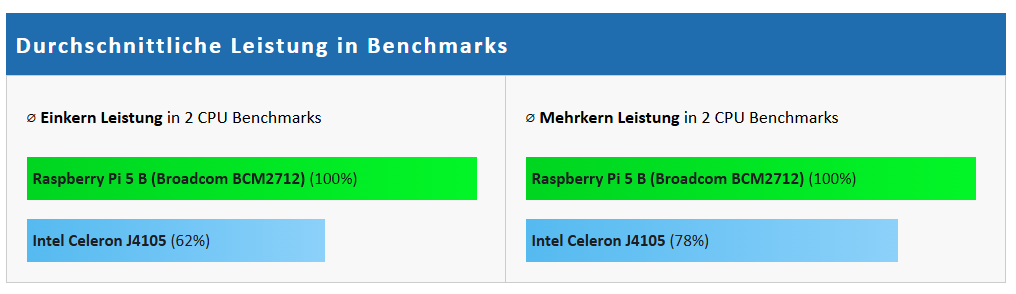
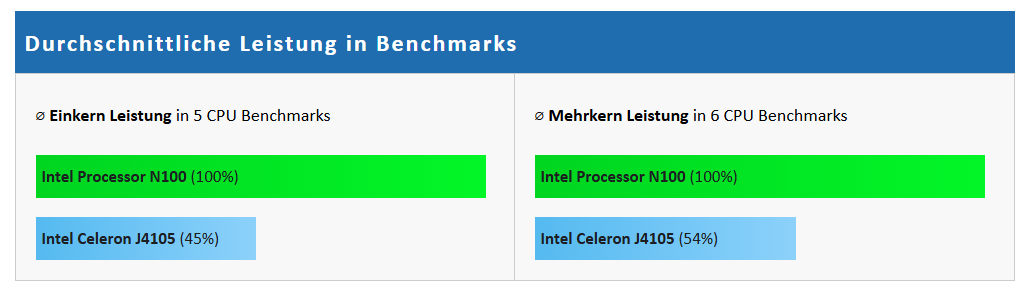
        Und so ein Intel J4105 ist inzwischen echt lahm.
        Mini PC mit 16GB RAM, Intel N100 / N95 und 512GB SSD gibt es um die 200 Euro, für 150 im Sale.
        Mehr als doppelt so schnell, Proxmox funktioniert darauf ohne Probleme und es dürfen dann auch mehrere VMs sein
        794b8e65-609a-4380-b935-a4627f139bfb-image.png

        selbst ein Raspi ist schneller:
        33b2b35a-5dc7-4a8f-902e-d7dd092deb6a-image.png
        außer du hast noch einen 4er, dann wäre die Wise Box zumindest von der CPU her schneller

        ioBroker@Ubuntu 24.04 LTS (VMware) für: >260 Geräte, 5 Switche, 7 AP, 9 IP-Cam, 1 NAS 42TB, 1 ESXi 15TB, 4 Proxmox 1TB, 1 Hyper-V 48TB, 14 x Echo, 5x FireTV, 5 x Tablett/Handy VIS || >=160 Tasmota/Shelly || >=95 ZigBee || PV 8.1kW / Akku 14kWh || 2x USV 750W kaskadiert || Creality CR-10 SE 3D-Drucker

        P 1 Antwort Letzte Antwort
        0
        • HomoranH Homoran

          @pb74 Erst mal OT:
          Warum umsteigen?
          Was hat die Box für sonstige Kennzahlen?

          @pb74 sagte in Umzug von Raspberry auf Wyse Box 5070:

          wäre der günstigere Weg?

          je nach Kennzahlen wären möglicherweise schon 8GB RAM zu wenig um weitere VMs unter Proxmox laufen zu lassen.
          Und nur für eine VM brauchst du kein Proxmox, dann eher Debian nativ.

          Ob der Umzug lohnt hängt auch von dem jetzigen Pi ab.
          Das war ein Pi4 mit 4GB???

          Auch der Energieverbrauch der Box wäre u.U. zu beachten, da diese ja 24/7 läuft.

          P Offline
          P Offline
          PB74
          schrieb am zuletzt editiert von
          #5

          @homoran sagte in Umzug von Raspberry auf Wyse Box 5070:

          Das war ein Pi4 mit 4GB???

          Genau, es ist ein Raspberry 4 mit 4 GB RAM.

          @homoran sagte in Umzug von Raspberry auf Wyse Box 5070:

          Auch der Energieverbrauch der Box wäre u.U. zu beachten, da diese ja 24/7 läuft.

          Das würde ich im Vorfeld mal testen, d.h. erstmal den iobroker drauf und dann schauen welche Leistungsaufnahme im "Leerlauf" stattfindet. Vielleicht hat jemand auch eine solche Box in Benutzung und kann etwas dazu sagen, wie viel Leistung aufgenommen wird wenn der iobroker arbeiten muss...

          1 Antwort Letzte Antwort
          0
          • CodierknechtC Codierknecht

            @pb74 sagte in Umzug von Raspberry auf Wyse Box 5070:

            Proxmox-Grundinstallation ... "VM-Weg"

            Ich würde statt VM auf LXC setzen. Nutzt die vorhandenen Ressourcen besser.
            Aber 8 GB RAM sind da etwas knapp. Die hat mein ioBroker als LXC schon alleine.

            P Offline
            P Offline
            PB74
            schrieb am zuletzt editiert von
            #6

            @codierknecht sagte in Umzug von Raspberry auf Wyse Box 5070:

            Aber 8 GB RAM sind da etwas knapp.

            Der RAM lässt sich aufrüsten; ohne es getestet zu haben sollen bis zu 32GB möglich sein.

            1 Antwort Letzte Antwort
            0
            • BananaJoeB BananaJoe

              Und ich würde immer eine VM nehmen, sichert sich vielseitiger und lässt sich einfacher Migrieren, sogar Live auf ein anderes System ohne herunterfahren.
              Aber 8GB finde ich inzwischen auch knapp.
              Und so ein Intel J4105 ist inzwischen echt lahm.
              Mini PC mit 16GB RAM, Intel N100 / N95 und 512GB SSD gibt es um die 200 Euro, für 150 im Sale.
              Mehr als doppelt so schnell, Proxmox funktioniert darauf ohne Probleme und es dürfen dann auch mehrere VMs sein

              794b8e65-609a-4380-b935-a4627f139bfb-image.png

              selbst ein Raspi ist schneller:
              33b2b35a-5dc7-4a8f-902e-d7dd092deb6a-image.png
              außer du hast noch einen 4er, dann wäre die Wise Box zumindest von der CPU her schneller

              P Offline
              P Offline
              PB74
              schrieb am zuletzt editiert von
              #7

              @bananajoe sagte in Umzug von Raspberry auf Wyse Box 5070:

              Aber 8GB finde ich inzwischen auch knapp.

              Wie oben schon beschrieben kann der RAM aufgerüstet werden.

              @bananajoe sagte in Umzug von Raspberry auf Wyse Box 5070:

              Mini PC mit 16GB RAM, Intel N100 / N95 und 512GB SSD gibt es um die 200 Euro, für 150 im Sale.

              Wieviel Leistung nimmt dann diese Kombination auf?

              @bananajoe sagte in Umzug von Raspberry auf Wyse Box 5070:

              außer du hast noch einen 4er,

              Richtig, Raspberry mit 4GB RAM...

              BananaJoeB 1 Antwort Letzte Antwort
              0
              • P PB74

                @bananajoe sagte in Umzug von Raspberry auf Wyse Box 5070:

                Aber 8GB finde ich inzwischen auch knapp.

                Wie oben schon beschrieben kann der RAM aufgerüstet werden.

                @bananajoe sagte in Umzug von Raspberry auf Wyse Box 5070:

                Mini PC mit 16GB RAM, Intel N100 / N95 und 512GB SSD gibt es um die 200 Euro, für 150 im Sale.

                Wieviel Leistung nimmt dann diese Kombination auf?

                @bananajoe sagte in Umzug von Raspberry auf Wyse Box 5070:

                außer du hast noch einen 4er,

                Richtig, Raspberry mit 4GB RAM...

                BananaJoeB Offline
                BananaJoeB Offline
                BananaJoe
                Most Active
                schrieb am zuletzt editiert von BananaJoe
                #8

                @pb74 sagte in Umzug von Raspberry auf Wyse Box 5070:

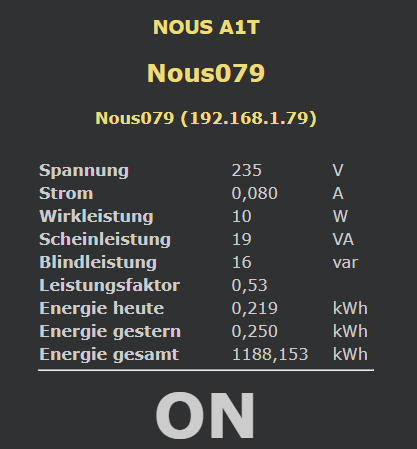
                Wieviel Leistung nimmt dann diese Kombination auf?

                Laut Zwischenstecker ziemlich genau 10W
                3a47e313-c852-4018-8edc-a340e74b798f-image.png
                Den Gesamtzähler nicht beachten, da war vorher etwas anderes dran.
                Das ist dieser Mini PC: https://www.amazon.de/dp/B0CJ2P1WTK der wegen dem Display etwas mehr verbraucht.
                Wobei das Display zwar nett ist (Windows Software ist vorinstalliert, für Debian gibt es Projekt das auch unter Proxmox läuft), Aber in Wirklichkeit schaue ich da natürlich nicht soviel drauf.
                Im BIOS fehlt leider eine Option für den Neustart nach einem Stromausfall.

                Ich habe noch einen 2. ohne Display, bei dem kann man einstellen das der nach einem Stromausfall von alleine wieder anspringt, der ist aber weiter weg verbaut und ohne Messsteckdose dazwischen, der sollte dann etwas weniger verbrauchen.

                Sämtliche Tuning und Stromspartipps für Proxmox habe ich geflissentlich ignoriert.

                Die beiden Mini-PCs hatte ich wegen der 2 NICs genommen, so habe ich ein Port für die Kommunikation der VMs und einen für den Traffic zwischen den Proxmox, z.B. wenn ich eine VM verschiebe. Wenn ich Update, verschiebe ich die VMs "live" auf den jeweils anderen, Patche den, schiebe dann zurück, patche den anderen und dann verteile ich die VMs wieder. Die VMs sind auf beide Proxmox gegenseitig repliziert.
                Für einen Cluster braucht es dann noch eine 3. Stelle, das kann eine beliebige andere Linux-Büchse sein (auch ein Raspberry), bei mir ist es ein 3. Proxmox der als VM auf einem VMware System läuft (aus der VMware Welt komme ich halt)

                Edit: ich habe gerade mal in meinen Testbericht des anderen Mini-PCs geschaut, der liegt bei 8W.
                Wenn die VMs bei der CPU gas geben, geht der Wert natürlich hoch

                ioBroker@Ubuntu 24.04 LTS (VMware) für: >260 Geräte, 5 Switche, 7 AP, 9 IP-Cam, 1 NAS 42TB, 1 ESXi 15TB, 4 Proxmox 1TB, 1 Hyper-V 48TB, 14 x Echo, 5x FireTV, 5 x Tablett/Handy VIS || >=160 Tasmota/Shelly || >=95 ZigBee || PV 8.1kW / Akku 14kWh || 2x USV 750W kaskadiert || Creality CR-10 SE 3D-Drucker

                1 Antwort Letzte Antwort
                0
                • P PB74

                  Hallo zusammen,

                  durch Zufall bin ich günstig an eine Dell Wyse Box mit 8GB RAM und 128 GB SSD gekommen. Nun trage ich mich mit dem Gedanken, vom Raspberry auf die Wyse Box umzuziehen.

                  Ein wenig habe ich dazu schon gelesen; einige empfehlen eine Proxmox-Grundinstallation und dort dann den iobroker in einer VM laufen zu lassen. Andere bevorzugen Debian als OS und dann die iobroker-Installation.

                  Wie ist eure Meinung dazu, wäre der günstigere Weg? Was muss bei beiden Varianten beachtet werden?

                  Kann ich bei dem "VM-Weg" meine bisherigen Raspberry-Backups (iobroker, Grafana, InfluxDB, VIS) problemlos auf die Wyse-Box zurückspielen?

                  Ich bin für jede Information dankbar.....

                  MartinPM Online
                  MartinPM Online
                  MartinP
                  schrieb am zuletzt editiert von MartinP
                  #9

                  @pb74 Mein System... siehe Signatur.
                  Drauf läuft Iobroker, Influxdb, Grafana, ein Fileserver, radicale, zigbee2mqtt, Frigate mit einer ESP32cam, gitea - alles unter Proxmox. Fünf LXC Container. Läuft aber ziemlich am Anschlag. Serverlast immer bei um die 2...2,5 bei zwei CPU Cores.
                  Würde aber durchaus mit ersten Experimenten auf die Wyse Kiste aufbauen.
                  Die CPU ist ja schon schneller als meine lahme Ente....

                  Intel(R) Celeron(R) CPU N3000 @ 1.04GHz 8G RAM 480G SSD
                  Virtualization : unprivileged lxc container (debian 12 on Proxmox 8.4.14)
                  Linux pve 6.8.12-16-pve
                  6 GByte RAM für den Container
                  Fritzbox 6591 FW 8.03 (Vodafone Leih-Box)
                  Remote-Access über Wireguard der Fritzbox

                  1 Antwort Letzte Antwort
                  0
                  • P Offline
                    P Offline
                    PB74
                    schrieb am zuletzt editiert von
                    #10

                    Hab jetzt das debian auf der Wyse Box und die Installation von iobroker mittels curl durchgeführt.

                    Das hat auch alles geklappt aber zum Abschluss soll man iob fix nach einem relogin ausführen. Wie man den relogin ausführt weiß ich leider nicht und hab dazu auch keine Info gefunden. Nach einem Neustart wollte ich iob fix ausführen und erhalte diese Ausgabe (meinen Benutzernamen habe ich mit [user] ersetzt):

                    [sudo] Passwort für [user]:
                    library: loaded
                    Library version=2024-10-22
                    ioBroker or some processes are still running:
                    529 iobroker.js-con
                    599 io.backitup.0
                    623 io.discovery.0
                    815 io.javascript.0
                    835 io.admin.0
                    Please stop them first and try again!
                    [user]@iobroker002:~$


                    Wie kann ich diese Prozesse beenden?
                    Steh grade auf dem Schlauch als Anfänger.... danke für eure Hilfe....

                    Thomas BraunT 1 Antwort Letzte Antwort
                    0
                    • P PB74

                      Hab jetzt das debian auf der Wyse Box und die Installation von iobroker mittels curl durchgeführt.

                      Das hat auch alles geklappt aber zum Abschluss soll man iob fix nach einem relogin ausführen. Wie man den relogin ausführt weiß ich leider nicht und hab dazu auch keine Info gefunden. Nach einem Neustart wollte ich iob fix ausführen und erhalte diese Ausgabe (meinen Benutzernamen habe ich mit [user] ersetzt):

                      [sudo] Passwort für [user]:
                      library: loaded
                      Library version=2024-10-22
                      ioBroker or some processes are still running:
                      529 iobroker.js-con
                      599 io.backitup.0
                      623 io.discovery.0
                      815 io.javascript.0
                      835 io.admin.0
                      Please stop them first and try again!
                      [user]@iobroker002:~$


                      Wie kann ich diese Prozesse beenden?
                      Steh grade auf dem Schlauch als Anfänger.... danke für eure Hilfe....

                      Thomas BraunT Online
                      Thomas BraunT Online
                      Thomas Braun
                      Most Active
                      schrieb am zuletzt editiert von Thomas Braun
                      #11

                      @pb74 sagte in Umzug von Raspberry auf Wyse Box 5070:

                      Wie man den relogin ausführt weiß ich leider nicht und hab dazu auch keine Info gefunden.

                      exit
                      

                      ioBroker or some processes are still running

                      iob stop
                      

                      Linux-Werkzeugkasten:
                      https://forum.iobroker.net/topic/42952/der-kleine-iobroker-linux-werkzeugkasten
                      NodeJS Fixer Skript:
                      https://forum.iobroker.net/topic/68035/iob-node-fix-skript
                      iob_diag: curl -sLf -o diag.sh https://iobroker.net/diag.sh && bash diag.sh

                      P 1 Antwort Letzte Antwort
                      0
                      • Thomas BraunT Thomas Braun

                        @pb74 sagte in Umzug von Raspberry auf Wyse Box 5070:

                        Wie man den relogin ausführt weiß ich leider nicht und hab dazu auch keine Info gefunden.

                        exit
                        

                        ioBroker or some processes are still running

                        iob stop
                        
                        P Offline
                        P Offline
                        PB74
                        schrieb am zuletzt editiert von
                        #12

                        @thomas-braun
                        Danke...hat alles bestens geklappt !

                        Thomas BraunT 1 Antwort Letzte Antwort
                        0
                        • P PB74

                          @thomas-braun
                          Danke...hat alles bestens geklappt !

                          Thomas BraunT Online
                          Thomas BraunT Online
                          Thomas Braun
                          Most Active
                          schrieb am zuletzt editiert von
                          #13

                          @pb74

                          Und wie schaut dein >Setup nun aus?
                          Verrät dir

                          iob diag
                          

                          Linux-Werkzeugkasten:
                          https://forum.iobroker.net/topic/42952/der-kleine-iobroker-linux-werkzeugkasten
                          NodeJS Fixer Skript:
                          https://forum.iobroker.net/topic/68035/iob-node-fix-skript
                          iob_diag: curl -sLf -o diag.sh https://iobroker.net/diag.sh && bash diag.sh

                          1 Antwort Letzte Antwort
                          0
                          • P Offline
                            P Offline
                            PB74
                            schrieb am zuletzt editiert von
                            #14

                            @thomas-braun
                            Erst heute abend kann ich iob_diag ausführen, da die Wyse Box im Moment nicht am Netz ist und ich nicht vor Ort bin. Aber die Installation von Debian Bookworm und iobroker ging erstmal ohne große Probleme...natürlich nur dank der wirklich tollen Unterstützung hier im Forum!!!

                            Als nächstes steht das Restore von grafana, influxdb, javascript und iobroker auf der Wyse Box an. Ich lasse von diesen vier Anwendungen täglich über den Backitup-Adapter eine Sicherung auf meinem NAS erstellen.

                            Wie ich u.a. unter https://forum.iobroker.net/topic/77524/iobroker-neuinstallation-mit-iob-backupdateien-des-adapters bzw. den Links in diesem Thread gelesen habe, ist VOR dem Restore des iobrokers unbedingt die manuelle Installation von grafana und influxdb auf dem "neuen" System notwendig. Natürlich auch die Anpassung der .ini-Dateien.

                            Wie verhält es sich beim Restore des Javascript-Backups? Muss da auch etwas vorher installiert werden?

                            Nach der Installation von iobroker habe ich den Assistenten gestartet und die dort vorgeschlagene Suche der Adapter. War das falsch bzw. sollte ich die Installation nochmal durchführen ohne die Adaptersuche?

                            Ich hatte gestern auch eine Art Schritt-für-Schritt-Anleitung von 2024 hier im Forum gefunden. Leider habe ich mir den Link nicht abgespeichert bzw. ein Lesezeichen gesetzt.
                            Vielleicht kann mir einer der Profis bitte noch nen Tipp geben, welche Anleitung am besten zu benutzen wäre.

                            Danke euch allen im Voraus!

                            1 Antwort Letzte Antwort
                            0
                            • P Offline
                              P Offline
                              PB74
                              schrieb am zuletzt editiert von
                              #15

                              ...hier die Ausgabe von iob_diag der Wyse Box 5070:

                              Script v.2024-12-09 Raspbian+zigbee diag+masking
                              
                              *** BASE SYSTEM ***
                               Static hostname: iobroker002
                                     Icon name: computer-desktop
                                       Chassis: desktop 🖥️
                              Operating System: Debian GNU/Linux 12 (bookworm)
                                        Kernel: Linux 6.1.0-30-amd64
                                  Architecture: x86-64
                               Hardware Vendor: Dell Inc.
                                Hardware Model: Wyse 5070 Thin Client
                              Firmware Version: 1.34.0
                              OS is similar to:
                              
                              model name      : Intel(R) Celeron(R) J4105 CPU @ 1.50GHz
                              Docker          : false
                              Virtualization  : none
                              Kernel          : x86_64
                              Userland        : 64 bit
                              
                              Systemuptime and Load:
                               17:34:46 up 2 min,  1 user,  load average: 0.23, 0.13, 0.05
                              CPU threads: 4
                              
                              
                              *** LIFE CYCLE STATUS ***
                              Operating System is the current Debian stable version codenamed 'bookworm'!
                              
                              *** TIME AND TIMEZONES ***
                                             Local time: Thu 2025-02-06 17:34:46 CET
                                         Universal time: Thu 2025-02-06 16:34:46 UTC
                                               RTC time: Thu 2025-02-06 16:34:46
                                              Time zone: Europe/Berlin (CET, +0100)
                              System clock synchronized: yes
                                            NTP service: active
                                        RTC in local TZ: no
                              
                              *** Users and Groups ***
                              User that called 'iob diag':
                              peter
                              HOME=/home/peter
                              GROUPS=peter cdrom floppy sudo audio dip video plugdev users netdev iobroker
                              
                              User that is running 'js-controller':
                              iobroker
                              [sudo] password for peter:
                              HOME=/home/iobroker
                              GROUPS=iobroker tty dialout audio video plugdev
                              
                              *** DISPLAY-SERVER SETUP ***
                              Display-Server: false
                              Desktop:
                              Terminal:       tty
                              
                              *** MEMORY ***
                                             total        used        free      shared  buff/cache   available
                              Mem:            8.1G        742M        7.4G        1.2M        241M        7.4G
                              Swap:           1.0G          0B        1.0G
                              Total:          9.2G        742M        8.4G
                              
                              Active iob-Instances:   5
                              
                                       7761 M total memory
                                        693 M used memory
                                        113 M active memory
                                        423 M inactive memory
                                       7072 M free memory
                                         23 M buffer memory
                                        207 M swap cache
                                        976 M total swap
                                          0 M used swap
                                        976 M free swap
                              
                              *** top - Table Of Processes  ***
                              top - 17:35:04 up 2 min,  1 user,  load average: 0.17, 0.12, 0.05
                              Tasks: 119 total,   1 running, 118 sleeping,   0 stopped,   0 zombie
                              %Cpu(s): 20.0 us,  0.0 sy,  0.0 ni, 80.0 id,  0.0 wa,  0.0 hi,  0.0 si,  0.0 st
                              MiB Mem :   7761.7 total,   7070.8 free,    695.8 used,    230.6 buff/cache
                              MiB Swap:    977.0 total,    977.0 free,      0.0 used.   7065.9 avail Mem
                              
                              *** FAILED SERVICES ***
                              
                                UNIT LOAD ACTIVE SUB DESCRIPTION
                              0 loaded units listed.
                              
                              
                              *** DMESG CRITICAL ERRORS ***
                              No critical errors detected
                              
                              *** FILESYSTEM ***
                              Filesystem     Type      Size  Used Avail Use% Mounted on
                              udev           devtmpfs  3.8G     0  3.8G   0% /dev
                              tmpfs          tmpfs     777M  892K  776M   1% /run
                              /dev/sda2      ext4      116G  4.9G  105G   5% /
                              tmpfs          tmpfs     3.8G     0  3.8G   0% /dev/shm
                              tmpfs          tmpfs     5.0M     0  5.0M   0% /run/lock
                              /dev/sda1      vfat      511M  5.9M  506M   2% /boot/efi
                              tmpfs          tmpfs     777M     0  777M   0% /run/user/1000
                              
                              Messages concerning ext4 filesystem in dmesg:
                              [Thu Feb  6 17:32:33 2025] EXT4-fs (sda2): mounted filesystem with ordered data mode. Quota mode: none.
                              [Thu Feb  6 17:32:34 2025] EXT4-fs (sda2): re-mounted. Quota mode: none.
                              
                              Show mounted filesystems:
                              TARGET      SOURCE    FSTYPE OPTIONS
                              /           /dev/sda2 ext4   rw,relatime,errors=remount-ro
                              `-/boot/efi /dev/sda1 vfat   rw,relatime,fmask=0077,dmask=0077,codepage=437,iocharset=ascii,shortname=mixed,utf8,errors=remount-ro
                              
                              Files in neuralgic directories:
                              
                              /var:
                              464M    /var/
                              251M    /var/cache
                              244M    /var/cache/apt
                              175M    /var/lib
                              168M    /var/cache/apt/archives
                              
                              Hint: You are currently not seeing messages from other users and the system.
                                    Users in groups 'adm', 'systemd-journal' can see all messages.
                                    Pass -q to turn off this notice.
                              Archived and active journals take up 8.0M in the file system.
                              
                              /opt/iobroker/backups:
                              4.0K    /opt/iobroker/backups/
                              
                              /opt/iobroker/iobroker-data:
                              799M    /opt/iobroker/iobroker-data/
                              793M    /opt/iobroker/iobroker-data/files
                              617M    /opt/iobroker/iobroker-data/files/javascript.admin
                              560M    /opt/iobroker/iobroker-data/files/javascript.admin/static
                              558M    /opt/iobroker/iobroker-data/files/javascript.admin/static/js
                              
                              The five largest files in iobroker-data are:
                              8.7M    /opt/iobroker/iobroker-data/files/javascript.admin/static/js/838.0aa41cb0.chunk.js.map
                              8.6M    /opt/iobroker/iobroker-data/files/javascript.admin/static/js/310.89a60ae1.chunk.js.map
                              7.4M    /opt/iobroker/iobroker-data/files/admin.admin/custom/static/js/vendors-node_modules_iobroker_adapter-react-v5_node_modules_mui_icons-material_esm_index_js.d7ed606b.chunk.js.map
                              7.0M    /opt/iobroker/iobroker-data/files/javascript.admin/static/js/675.a9c6d34a.chunk.js.map
                              7.0M    /opt/iobroker/iobroker-data/files/javascript.admin/static/js/675.7e9d7842.chunk.js.map
                              
                              USB-Devices by-id:
                              USB-Sticks -  Avoid direct links to /dev/tty* in your adapter setups, please always prefer the links 'by-id':
                              
                              No Devices found 'by-id'
                              
                              Zigbee Network Settings on your coordinator/in nvbackup are:
                              
                              zigbee.X
                              Extended Pan ID:
                              *** MASKED ***
                              Pan ID:
                              *** MASKED ***
                              Channel:
                              *** MASKED ***
                              Network Key:
                              *** MASKED ***
                              
                              To unmask the settings run 'iob diag --unmask'
                              
                              
                              *** NodeJS-Installation ***
                              
                              /usr/bin/nodejs         v20.18.2
                              /usr/bin/node           v20.18.2
                              /usr/bin/npm            10.8.2
                              /usr/bin/npx            10.8.2
                              /usr/bin/corepack       0.29.4
                              
                              nodejs:
                                Installed: 20.18.2-1nodesource1
                                Candidate: 20.18.2-1nodesource1
                                Version table:
                               *** 20.18.2-1nodesource1 1001
                                      500 https://deb.nodesource.com/node_20.x nodistro/main amd64 Packages
                                      100 /var/lib/dpkg/status
                                   20.18.1-1nodesource1 1001
                                      500 https://deb.nodesource.com/node_20.x nodistro/main amd64 Packages
                                   20.18.0-1nodesource1 1001
                                      500 https://deb.nodesource.com/node_20.x nodistro/main amd64 Packages
                                   20.17.0-1nodesource1 1001
                                      500 https://deb.nodesource.com/node_20.x nodistro/main amd64 Packages
                                   20.16.0-1nodesource1 1001
                                      500 https://deb.nodesource.com/node_20.x nodistro/main amd64 Packages
                                   20.15.1-1nodesource1 1001
                                      500 https://deb.nodesource.com/node_20.x nodistro/main amd64 Packages
                                   20.15.0-1nodesource1 1001
                                      500 https://deb.nodesource.com/node_20.x nodistro/main amd64 Packages
                                   20.14.0-1nodesource1 1001
                                      500 https://deb.nodesource.com/node_20.x nodistro/main amd64 Packages
                                   20.13.1-1nodesource1 1001
                                      500 https://deb.nodesource.com/node_20.x nodistro/main amd64 Packages
                                   20.13.0-1nodesource1 1001
                                      500 https://deb.nodesource.com/node_20.x nodistro/main amd64 Packages
                                   20.12.2-1nodesource1 1001
                                      500 https://deb.nodesource.com/node_20.x nodistro/main amd64 Packages
                                   20.12.1-1nodesource1 1001
                                      500 https://deb.nodesource.com/node_20.x nodistro/main amd64 Packages
                                   20.12.0-1nodesource1 1001
                                      500 https://deb.nodesource.com/node_20.x nodistro/main amd64 Packages
                                   20.11.1-1nodesource1 1001
                                      500 https://deb.nodesource.com/node_20.x nodistro/main amd64 Packages
                                   20.11.0-1nodesource1 1001
                                      500 https://deb.nodesource.com/node_20.x nodistro/main amd64 Packages
                                   20.10.0-1nodesource1 1001
                                      500 https://deb.nodesource.com/node_20.x nodistro/main amd64 Packages
                                   20.9.0-1nodesource1 1001
                                      500 https://deb.nodesource.com/node_20.x nodistro/main amd64 Packages
                                   20.8.1-1nodesource1 1001
                                      500 https://deb.nodesource.com/node_20.x nodistro/main amd64 Packages
                                   20.8.0-1nodesource1 1001
                                      500 https://deb.nodesource.com/node_20.x nodistro/main amd64 Packages
                                   20.7.0-1nodesource1 1001
                                      500 https://deb.nodesource.com/node_20.x nodistro/main amd64 Packages
                                   20.6.1-1nodesource1 1001
                                      500 https://deb.nodesource.com/node_20.x nodistro/main amd64 Packages
                                   20.6.0-1nodesource1 1001
                                      500 https://deb.nodesource.com/node_20.x nodistro/main amd64 Packages
                                   20.5.1-1nodesource1 1001
                                      500 https://deb.nodesource.com/node_20.x nodistro/main amd64 Packages
                                   20.5.0-1nodesource1 1001
                                      500 https://deb.nodesource.com/node_20.x nodistro/main amd64 Packages
                                   20.4.0-1nodesource1 1001
                                      500 https://deb.nodesource.com/node_20.x nodistro/main amd64 Packages
                                   20.3.1-1nodesource1 1001
                                      500 https://deb.nodesource.com/node_20.x nodistro/main amd64 Packages
                                   20.3.0-1nodesource1 1001
                                      500 https://deb.nodesource.com/node_20.x nodistro/main amd64 Packages
                                   20.2.0-1nodesource1 1001
                                      500 https://deb.nodesource.com/node_20.x nodistro/main amd64 Packages
                                   20.1.0-1nodesource1 1001
                                      500 https://deb.nodesource.com/node_20.x nodistro/main amd64 Packages
                                   20.0.0-1nodesource1 1001
                                      500 https://deb.nodesource.com/node_20.x nodistro/main amd64 Packages
                                   18.19.0+dfsg-6~deb12u2 500
                                      500 http://deb.debian.org/debian bookworm/main amd64 Packages
                                   18.19.0+dfsg-6~deb12u1 500
                                      500 http://security.debian.org/debian-security bookworm-security/main amd64 Packages
                              
                              Temp directories causing deletion problem: 0
                              No problems detected
                              
                              Errors in npm tree: 0
                              No problems detected
                              
                              *** ioBroker-Installation ***
                              
                              ioBroker Status
                              iobroker is running on this host.
                              
                              
                              Objects type: jsonl
                              States  type: jsonl
                              
                              Hosts:
                              iobroker002         iobroker002 (version: 7.0.6, hostname: iobroker002   , alive, uptime: 152)
                              
                              Core adapters versions
                              js-controller:  7.0.6
                              admin:          7.4.10
                              javascript:     8.8.3
                              
                              nodejs modules from github:     0
                              
                              Adapter State
                              + system.adapter.admin.0                  : admin                 : iobroker002                              -  enabled, port: 8081, bind: 0.0.0.0, run as: admin
                              + system.adapter.backitup.0               : backitup              : iobroker002                              -  enabled
                              + system.adapter.discovery.0              : discovery             : iobroker002                              -  enabled
                              + system.adapter.javascript.0             : javascript            : iobroker002                              -  enabled
                                system.adapter.telegram.0               : telegram              : iobroker002                              - disabled, port: 8443, bind: 0.0.0.0
                              
                              + instance is alive
                              
                              Enabled adapters with bindings
                              + system.adapter.admin.0                  : admin                 : iobroker002                              -  enabled, port: 8081, bind: 0.0.0.0, run as: admin
                              
                              ioBroker-Repositories
                              ┌──────────────────────────────────────────────────────────────────────────────────────────────
                              │ (index) │ name     │ url                                                     │ auto upgrade │
                              ├──────────────────────────────────────────────────────────────────────────────────────────────
                              │ 0       │ 'stable' │ 'http://download.iobroker.net/sources-dist.json'        │ false        │
                              │ 1       │ 'beta'   │ 'http://download.iobroker.net/sources-dist-latest.json' │ false        │
                              └──────────────────────────────────────────────────────────────────────────────────────────────
                              
                              Active repo(s): stable
                              Upgrade policy: none
                              
                              Installed ioBroker-Instances
                              Used repository: stable
                              Adapter    "admin"        : 7.4.10   , installed 7.4.10
                              Adapter    "backitup"     : 3.0.31   , installed 3.0.31
                              Adapter    "discovery"    : 5.0.0    , installed 5.0.0
                              Adapter    "javascript"   : 8.8.3    , installed 8.8.3
                              Controller "js-controller": 7.0.6    , installed 7.0.6
                              Adapter    "telegram"     : 4.0.0    , installed 4.0.0
                              
                              Objects and States
                              Please stand by - This may take a while
                              Objects:        230
                              States:         139
                              
                              *** OS-Repositories and Updates ***
                              Hit:1 http://deb.debian.org/debian bookworm InRelease
                              Hit:2 http://security.debian.org/debian-security bookworm-security InRelease
                              Hit:3 http://deb.debian.org/debian bookworm-updates InRelease
                              Hit:4 https://deb.nodesource.com/node_20.x nodistro InRelease
                              Reading package lists... Done
                              Pending Updates: 0
                              
                              *** Listening Ports ***
                              Active Internet connections (only servers)
                              Proto Recv-Q Send-Q Local Address           Foreign Address         State       User       Inode      PID/Program name
                              tcp        0      0 0.0.0.0:111             0.0.0.0:*               LISTEN      0          14370      1/init
                              tcp        0      0 0.0.0.0:22              0.0.0.0:*               LISTEN      0          14711      555/sshd: /usr/sbin
                              tcp        0      0 127.0.0.1:9000          0.0.0.0:*               LISTEN      1001       14723      536/iobroker.js-con
                              tcp        0      0 127.0.0.1:9001          0.0.0.0:*               LISTEN      1001       14718      536/iobroker.js-con
                              tcp6       0      0 :::111                  :::*                    LISTEN      0          14371      1/init
                              tcp6       0      0 :::22                   :::*                    LISTEN      0          14713      555/sshd: /usr/sbin
                              tcp6       0      0 :::8081                 :::*                    LISTEN      1001       14764      587/io.admin.0
                              udp        0      0 0.0.0.0:68              0.0.0.0:*                           0          17024      503/dhclient
                              udp        0      0 0.0.0.0:111             0.0.0.0:*                           0          13117      1/init
                              udp6       0      0 :::111                  :::*                                0          14305      1/init
                              
                              *** Log File - Last 25 Lines ***
                              
                              2025-02-06 17:32:37.852  - info: host.iobroker002 Delete state "system.host.iobroker002.versions.nodeNewestNext"
                              2025-02-06 17:32:37.855  - info: host.iobroker002 Delete state "system.host.iobroker002.versions.npmCurrent"
                              2025-02-06 17:32:37.858  - info: host.iobroker002 Delete state "system.host.iobroker002.versions.npmNewest"
                              2025-02-06 17:32:37.861  - info: host.iobroker002 Delete state "system.host.iobroker002.versions.npmNewestNext"
                              2025-02-06 17:32:37.863  - info: host.iobroker002 Some obsolete host states deleted.
                              2025-02-06 17:32:39.257  - info: admin.0 (587) starting. Version 7.4.10 in /opt/iobroker/node_modules/iobroker.admin, node: v20.18.2, js-controller: 7.0.6
                              2025-02-06 17:32:39.286  - info: admin.0 (587) requesting all objects
                              2025-02-06 17:32:39.379  - warn: admin.0 (587) Cannot check node.js versions: Error: getaddrinfo EAI_AGAIN nodejs.org
                              2025-02-06 17:32:39.727  - info: admin.0 (587) received all objects
                              2025-02-06 17:32:39.767  - warn: admin.0 (587) Cannot update news: getaddrinfo EAI_AGAIN iobroker.live
                              2025-02-06 17:32:39.952  - info: admin.0 (587) socket.io server listening on port 8081
                              2025-02-06 17:32:39.955  - info: admin.0 (587) http server listening on port 8081
                              2025-02-06 17:32:39.955  - info: admin.0 (587) Use link "http://127.0.0.1:8081" to configure.
                              2025-02-06 17:32:39.967  - warn: admin.0 (587) Cannot update rating: getaddrinfo EAI_AGAIN rating.iobroker.net
                              2025-02-06 17:32:41.874  - info: host.iobroker002 instance system.adapter.javascript.0 in version "8.8.3" started with pid 603
                              2025-02-06 17:32:43.377  - info: javascript.0 (603) starting. Version 8.8.3 in /opt/iobroker/node_modules/iobroker.javascript, node: v20.18.2, js-controller: 7.0.6
                              2025-02-06 17:32:43.545  - info: javascript.0 (603) requesting all states
                              2025-02-06 17:32:43.546  - info: javascript.0 (603) requesting all objects
                              2025-02-06 17:32:43.827  - info: javascript.0 (603) received all objects
                              2025-02-06 17:32:43.828  - info: javascript.0 (603) received all states
                              2025-02-06 17:32:45.848  - info: host.iobroker002 instance system.adapter.backitup.0 in version "3.0.31" started with pid 627
                              2025-02-06 17:32:46.871  - info: backitup.0 (627) starting. Version 3.0.31 in /opt/iobroker/node_modules/iobroker.backitup, node: v20.18.2, js-controller: 7.0.6
                              2025-02-06 17:32:46.908  - info: backitup.0 (627) [iobroker] backup will be activated at 02:48 every 1 day(s)
                              2025-02-06 17:32:49.838  - info: host.iobroker002 instance system.adapter.discovery.0 in version "5.0.0" started with pid 643
                              2025-02-06 17:32:50.802  - info: discovery.0 (643) starting. Version 5.0.0 in /opt/iobroker/node_modules/iobroker.discovery, node: v20.18.2, js-controller: 7.0.6


                              Thomas BraunT 1 Antwort Letzte Antwort
                              0
                              • P Offline
                                P Offline
                                PB74
                                schrieb am zuletzt editiert von
                                #16

                                ... die Langversion von top:

                                top - 17:41:23 up 8 min,  1 user,  load average: 0,00, 0,09, 0,07
                                Tasks: 102 total,   1 running, 101 sleeping,   0 stopped,   0 zombie
                                %CPU(s):  0,9 us,  0,2 sy,  0,0 ni, 98,8 id,  0,1 wa,  0,0 hi,  0,0 si,  0,0 st
                                MiB Spch:   7761,7 total,   6811,9 free,    753,3 used,    438,1 buff/cache
                                MiB Swap:    977,0 total,    977,0 free,      0,0 used.   7008,4 avail Spch
                                
                                    PID USER      PR  NI    VIRT    RES    SHR S  %CPU  %MEM     ZEIT+ BEFEHL
                                    536 iobroker  20   0   21,1g 176212  44552 S   2,7   2,2   0:13.50 iobroker.js-con
                                    603 iobroker  20   0   21,1g 148772  45028 S   0,7   1,9   0:06.00 io.javascript.0
                                    587 iobroker  20   0   21,2g 116048  50036 S   0,3   1,5   0:04.60 io.admin.0
                                    643 iobroker  20   0   21,0g  72664  44336 S   0,3   0,9   0:02.27 io.discovery.0
                                      1 root      20   0  167680  12040   9052 S   0,0   0,2   0:00.91 systemd
                                      2 root      20   0       0      0      0 S   0,0   0,0   0:00.00 kthreadd
                                      3 root       0 -20       0      0      0 I   0,0   0,0   0:00.00 rcu_gp
                                      4 root       0 -20       0      0      0 I   0,0   0,0   0:00.00 rcu_par_gp
                                      5 root       0 -20       0      0      0 I   0,0   0,0   0:00.00 slub_flushwq
                                      6 root       0 -20       0      0      0 I   0,0   0,0   0:00.00 netns
                                      9 root      20   0       0      0      0 I   0,0   0,0   0:00.08 kworker/u8:0-events_unbound
                                     10 root       0 -20       0      0      0 I   0,0   0,0   0:00.00 mm_percpu_wq
                                     11 root      20   0       0      0      0 I   0,0   0,0   0:00.00 rcu_tasks_kthread
                                     12 root      20   0       0      0      0 I   0,0   0,0   0:00.00 rcu_tasks_rude_kthread
                                     13 root      20   0       0      0      0 I   0,0   0,0   0:00.00 rcu_tasks_trace_kthread
                                     14 root      20   0       0      0      0 S   0,0   0,0   0:00.01 ksoftirqd/0
                                     15 root      20   0       0      0      0 I   0,0   0,0   0:00.15 rcu_preempt
                                     16 root      rt   0       0      0      0 S   0,0   0,0   0:00.00 migration/0
                                     18 root      20   0       0      0      0 S   0,0   0,0   0:00.00 cpuhp/0
                                     19 root      20   0       0      0      0 S   0,0   0,0   0:00.00 cpuhp/1
                                     20 root      rt   0       0      0      0 S   0,0   0,0   0:00.18 migration/1
                                     21 root      20   0       0      0      0 S   0,0   0,0   0:00.01 ksoftirqd/1
                                     23 root       0 -20       0      0      0 I   0,0   0,0   0:00.00 kworker/1:0H-events_highpri
                                     24 root      20   0       0      0      0 S   0,0   0,0   0:00.00 cpuhp/2
                                     25 root      rt   0       0      0      0 S   0,0   0,0   0:00.19 migration/2
                                     26 root      20   0       0      0      0 S   0,0   0,0   0:00.01 ksoftirqd/2
                                     28 root       0 -20       0      0      0 I   0,0   0,0   0:00.00 kworker/2:0H-events_highpri
                                     29 root      20   0       0      0      0 S   0,0   0,0   0:00.00 cpuhp/3
                                     30 root      rt   0       0      0      0 S   0,0   0,0   0:00.20 migration/3
                                     31 root      20   0       0      0      0 S   0,0   0,0   0:00.01 ksoftirqd/3
                                     33 root       0 -20       0      0      0 I   0,0   0,0   0:00.00 kworker/3:0H-events_highpri
                                     35 root      20   0       0      0      0 I   0,0   0,0   0:00.21 kworker/u8:1-events_unbound
                                     38 root      20   0       0      0      0 S   0,0   0,0   0:00.00 kdevtmpfs
                                     39 root       0 -20       0      0      0 I   0,0   0,0   0:00.00 inet_frag_wq
                                     40 root      20   0       0      0      0 S   0,0   0,0   0:00.00 kauditd
                                     41 root      20   0       0      0      0 S   0,0   0,0   0:00.00 khungtaskd
                                     42 root      20   0       0      0      0 S   0,0   0,0   0:00.00 oom_reaper
                                     43 root       0 -20       0      0      0 I   0,0   0,0   0:00.00 writeback
                                     44 root      20   0       0      0      0 S   0,0   0,0   0:00.04 kcompactd0
                                     45 root      25   5       0      0      0 S   0,0   0,0   0:00.00 ksmd
                                     47 root      39  19       0      0      0 S   0,0   0,0   0:00.06 khugepaged
                                     48 root       0 -20       0      0      0 I   0,0   0,0   0:00.00 kintegrityd
                                     49 root       0 -20       0      0      0 I   0,0   0,0   0:00.00 kblockd
                                     50 root       0 -20       0      0      0 I   0,0   0,0   0:00.00 blkcg_punt_bio
                                     51 root       0 -20       0      0      0 I   0,0   0,0   0:00.00 tpm_dev_wq
                                     52 root       0 -20       0      0      0 I   0,0   0,0   0:00.00 edac-poller
                                     53 root       0 -20       0      0      0 I   0,0   0,0   0:00.00 devfreq_wq
                                     54 root      20   0       0      0      0 I   0,0   0,0   0:00.00 kworker/2:1-cgroup_destroy
                                     55 root       0 -20       0      0      0 I   0,0   0,0   0:00.01 kworker/0:1H-kblockd
                                     56 root      20   0       0      0      0 S   0,0   0,0   0:00.00 kswapd0
                                     58 root      20   0       0      0      0 I   0,0   0,0   0:00.03 kworker/3:1-rcu_gp
                                     63 root       0 -20       0      0      0 I   0,0   0,0   0:00.00 kthrotld
                                     65 root       0 -20       0      0      0 I   0,0   0,0   0:00.00 acpi_thermal_pm
                                     66 root      20   0       0      0      0 S   0,0   0,0   0:00.01 hwrng
                                     67 root      20   0       0      0      0 I   0,0   0,0   0:00.04 kworker/1:2-events
                                     68 root       0 -20       0      0      0 I   0,0   0,0   0:00.00 mld
                                
                                
                                1 Antwort Letzte Antwort
                                0
                                • P PB74

                                  ...hier die Ausgabe von iob_diag der Wyse Box 5070:

                                  Script v.2024-12-09 Raspbian+zigbee diag+masking
                                  
                                  *** BASE SYSTEM ***
                                   Static hostname: iobroker002
                                         Icon name: computer-desktop
                                           Chassis: desktop 🖥️
                                  Operating System: Debian GNU/Linux 12 (bookworm)
                                            Kernel: Linux 6.1.0-30-amd64
                                      Architecture: x86-64
                                   Hardware Vendor: Dell Inc.
                                    Hardware Model: Wyse 5070 Thin Client
                                  Firmware Version: 1.34.0
                                  OS is similar to:
                                  
                                  model name      : Intel(R) Celeron(R) J4105 CPU @ 1.50GHz
                                  Docker          : false
                                  Virtualization  : none
                                  Kernel          : x86_64
                                  Userland        : 64 bit
                                  
                                  Systemuptime and Load:
                                   17:34:46 up 2 min,  1 user,  load average: 0.23, 0.13, 0.05
                                  CPU threads: 4
                                  
                                  
                                  *** LIFE CYCLE STATUS ***
                                  Operating System is the current Debian stable version codenamed 'bookworm'!
                                  
                                  *** TIME AND TIMEZONES ***
                                                 Local time: Thu 2025-02-06 17:34:46 CET
                                             Universal time: Thu 2025-02-06 16:34:46 UTC
                                                   RTC time: Thu 2025-02-06 16:34:46
                                                  Time zone: Europe/Berlin (CET, +0100)
                                  System clock synchronized: yes
                                                NTP service: active
                                            RTC in local TZ: no
                                  
                                  *** Users and Groups ***
                                  User that called 'iob diag':
                                  peter
                                  HOME=/home/peter
                                  GROUPS=peter cdrom floppy sudo audio dip video plugdev users netdev iobroker
                                  
                                  User that is running 'js-controller':
                                  iobroker
                                  [sudo] password for peter:
                                  HOME=/home/iobroker
                                  GROUPS=iobroker tty dialout audio video plugdev
                                  
                                  *** DISPLAY-SERVER SETUP ***
                                  Display-Server: false
                                  Desktop:
                                  Terminal:       tty
                                  
                                  *** MEMORY ***
                                                 total        used        free      shared  buff/cache   available
                                  Mem:            8.1G        742M        7.4G        1.2M        241M        7.4G
                                  Swap:           1.0G          0B        1.0G
                                  Total:          9.2G        742M        8.4G
                                  
                                  Active iob-Instances:   5
                                  
                                           7761 M total memory
                                            693 M used memory
                                            113 M active memory
                                            423 M inactive memory
                                           7072 M free memory
                                             23 M buffer memory
                                            207 M swap cache
                                            976 M total swap
                                              0 M used swap
                                            976 M free swap
                                  
                                  *** top - Table Of Processes  ***
                                  top - 17:35:04 up 2 min,  1 user,  load average: 0.17, 0.12, 0.05
                                  Tasks: 119 total,   1 running, 118 sleeping,   0 stopped,   0 zombie
                                  %Cpu(s): 20.0 us,  0.0 sy,  0.0 ni, 80.0 id,  0.0 wa,  0.0 hi,  0.0 si,  0.0 st
                                  MiB Mem :   7761.7 total,   7070.8 free,    695.8 used,    230.6 buff/cache
                                  MiB Swap:    977.0 total,    977.0 free,      0.0 used.   7065.9 avail Mem
                                  
                                  *** FAILED SERVICES ***
                                  
                                    UNIT LOAD ACTIVE SUB DESCRIPTION
                                  0 loaded units listed.
                                  
                                  
                                  *** DMESG CRITICAL ERRORS ***
                                  No critical errors detected
                                  
                                  *** FILESYSTEM ***
                                  Filesystem     Type      Size  Used Avail Use% Mounted on
                                  udev           devtmpfs  3.8G     0  3.8G   0% /dev
                                  tmpfs          tmpfs     777M  892K  776M   1% /run
                                  /dev/sda2      ext4      116G  4.9G  105G   5% /
                                  tmpfs          tmpfs     3.8G     0  3.8G   0% /dev/shm
                                  tmpfs          tmpfs     5.0M     0  5.0M   0% /run/lock
                                  /dev/sda1      vfat      511M  5.9M  506M   2% /boot/efi
                                  tmpfs          tmpfs     777M     0  777M   0% /run/user/1000
                                  
                                  Messages concerning ext4 filesystem in dmesg:
                                  [Thu Feb  6 17:32:33 2025] EXT4-fs (sda2): mounted filesystem with ordered data mode. Quota mode: none.
                                  [Thu Feb  6 17:32:34 2025] EXT4-fs (sda2): re-mounted. Quota mode: none.
                                  
                                  Show mounted filesystems:
                                  TARGET      SOURCE    FSTYPE OPTIONS
                                  /           /dev/sda2 ext4   rw,relatime,errors=remount-ro
                                  `-/boot/efi /dev/sda1 vfat   rw,relatime,fmask=0077,dmask=0077,codepage=437,iocharset=ascii,shortname=mixed,utf8,errors=remount-ro
                                  
                                  Files in neuralgic directories:
                                  
                                  /var:
                                  464M    /var/
                                  251M    /var/cache
                                  244M    /var/cache/apt
                                  175M    /var/lib
                                  168M    /var/cache/apt/archives
                                  
                                  Hint: You are currently not seeing messages from other users and the system.
                                        Users in groups 'adm', 'systemd-journal' can see all messages.
                                        Pass -q to turn off this notice.
                                  Archived and active journals take up 8.0M in the file system.
                                  
                                  /opt/iobroker/backups:
                                  4.0K    /opt/iobroker/backups/
                                  
                                  /opt/iobroker/iobroker-data:
                                  799M    /opt/iobroker/iobroker-data/
                                  793M    /opt/iobroker/iobroker-data/files
                                  617M    /opt/iobroker/iobroker-data/files/javascript.admin
                                  560M    /opt/iobroker/iobroker-data/files/javascript.admin/static
                                  558M    /opt/iobroker/iobroker-data/files/javascript.admin/static/js
                                  
                                  The five largest files in iobroker-data are:
                                  8.7M    /opt/iobroker/iobroker-data/files/javascript.admin/static/js/838.0aa41cb0.chunk.js.map
                                  8.6M    /opt/iobroker/iobroker-data/files/javascript.admin/static/js/310.89a60ae1.chunk.js.map
                                  7.4M    /opt/iobroker/iobroker-data/files/admin.admin/custom/static/js/vendors-node_modules_iobroker_adapter-react-v5_node_modules_mui_icons-material_esm_index_js.d7ed606b.chunk.js.map
                                  7.0M    /opt/iobroker/iobroker-data/files/javascript.admin/static/js/675.a9c6d34a.chunk.js.map
                                  7.0M    /opt/iobroker/iobroker-data/files/javascript.admin/static/js/675.7e9d7842.chunk.js.map
                                  
                                  USB-Devices by-id:
                                  USB-Sticks -  Avoid direct links to /dev/tty* in your adapter setups, please always prefer the links 'by-id':
                                  
                                  No Devices found 'by-id'
                                  
                                  Zigbee Network Settings on your coordinator/in nvbackup are:
                                  
                                  zigbee.X
                                  Extended Pan ID:
                                  *** MASKED ***
                                  Pan ID:
                                  *** MASKED ***
                                  Channel:
                                  *** MASKED ***
                                  Network Key:
                                  *** MASKED ***
                                  
                                  To unmask the settings run 'iob diag --unmask'
                                  
                                  
                                  *** NodeJS-Installation ***
                                  
                                  /usr/bin/nodejs         v20.18.2
                                  /usr/bin/node           v20.18.2
                                  /usr/bin/npm            10.8.2
                                  /usr/bin/npx            10.8.2
                                  /usr/bin/corepack       0.29.4
                                  
                                  nodejs:
                                    Installed: 20.18.2-1nodesource1
                                    Candidate: 20.18.2-1nodesource1
                                    Version table:
                                   *** 20.18.2-1nodesource1 1001
                                          500 https://deb.nodesource.com/node_20.x nodistro/main amd64 Packages
                                          100 /var/lib/dpkg/status
                                       20.18.1-1nodesource1 1001
                                          500 https://deb.nodesource.com/node_20.x nodistro/main amd64 Packages
                                       20.18.0-1nodesource1 1001
                                          500 https://deb.nodesource.com/node_20.x nodistro/main amd64 Packages
                                       20.17.0-1nodesource1 1001
                                          500 https://deb.nodesource.com/node_20.x nodistro/main amd64 Packages
                                       20.16.0-1nodesource1 1001
                                          500 https://deb.nodesource.com/node_20.x nodistro/main amd64 Packages
                                       20.15.1-1nodesource1 1001
                                          500 https://deb.nodesource.com/node_20.x nodistro/main amd64 Packages
                                       20.15.0-1nodesource1 1001
                                          500 https://deb.nodesource.com/node_20.x nodistro/main amd64 Packages
                                       20.14.0-1nodesource1 1001
                                          500 https://deb.nodesource.com/node_20.x nodistro/main amd64 Packages
                                       20.13.1-1nodesource1 1001
                                          500 https://deb.nodesource.com/node_20.x nodistro/main amd64 Packages
                                       20.13.0-1nodesource1 1001
                                          500 https://deb.nodesource.com/node_20.x nodistro/main amd64 Packages
                                       20.12.2-1nodesource1 1001
                                          500 https://deb.nodesource.com/node_20.x nodistro/main amd64 Packages
                                       20.12.1-1nodesource1 1001
                                          500 https://deb.nodesource.com/node_20.x nodistro/main amd64 Packages
                                       20.12.0-1nodesource1 1001
                                          500 https://deb.nodesource.com/node_20.x nodistro/main amd64 Packages
                                       20.11.1-1nodesource1 1001
                                          500 https://deb.nodesource.com/node_20.x nodistro/main amd64 Packages
                                       20.11.0-1nodesource1 1001
                                          500 https://deb.nodesource.com/node_20.x nodistro/main amd64 Packages
                                       20.10.0-1nodesource1 1001
                                          500 https://deb.nodesource.com/node_20.x nodistro/main amd64 Packages
                                       20.9.0-1nodesource1 1001
                                          500 https://deb.nodesource.com/node_20.x nodistro/main amd64 Packages
                                       20.8.1-1nodesource1 1001
                                          500 https://deb.nodesource.com/node_20.x nodistro/main amd64 Packages
                                       20.8.0-1nodesource1 1001
                                          500 https://deb.nodesource.com/node_20.x nodistro/main amd64 Packages
                                       20.7.0-1nodesource1 1001
                                          500 https://deb.nodesource.com/node_20.x nodistro/main amd64 Packages
                                       20.6.1-1nodesource1 1001
                                          500 https://deb.nodesource.com/node_20.x nodistro/main amd64 Packages
                                       20.6.0-1nodesource1 1001
                                          500 https://deb.nodesource.com/node_20.x nodistro/main amd64 Packages
                                       20.5.1-1nodesource1 1001
                                          500 https://deb.nodesource.com/node_20.x nodistro/main amd64 Packages
                                       20.5.0-1nodesource1 1001
                                          500 https://deb.nodesource.com/node_20.x nodistro/main amd64 Packages
                                       20.4.0-1nodesource1 1001
                                          500 https://deb.nodesource.com/node_20.x nodistro/main amd64 Packages
                                       20.3.1-1nodesource1 1001
                                          500 https://deb.nodesource.com/node_20.x nodistro/main amd64 Packages
                                       20.3.0-1nodesource1 1001
                                          500 https://deb.nodesource.com/node_20.x nodistro/main amd64 Packages
                                       20.2.0-1nodesource1 1001
                                          500 https://deb.nodesource.com/node_20.x nodistro/main amd64 Packages
                                       20.1.0-1nodesource1 1001
                                          500 https://deb.nodesource.com/node_20.x nodistro/main amd64 Packages
                                       20.0.0-1nodesource1 1001
                                          500 https://deb.nodesource.com/node_20.x nodistro/main amd64 Packages
                                       18.19.0+dfsg-6~deb12u2 500
                                          500 http://deb.debian.org/debian bookworm/main amd64 Packages
                                       18.19.0+dfsg-6~deb12u1 500
                                          500 http://security.debian.org/debian-security bookworm-security/main amd64 Packages
                                  
                                  Temp directories causing deletion problem: 0
                                  No problems detected
                                  
                                  Errors in npm tree: 0
                                  No problems detected
                                  
                                  *** ioBroker-Installation ***
                                  
                                  ioBroker Status
                                  iobroker is running on this host.
                                  
                                  
                                  Objects type: jsonl
                                  States  type: jsonl
                                  
                                  Hosts:
                                  iobroker002         iobroker002 (version: 7.0.6, hostname: iobroker002   , alive, uptime: 152)
                                  
                                  Core adapters versions
                                  js-controller:  7.0.6
                                  admin:          7.4.10
                                  javascript:     8.8.3
                                  
                                  nodejs modules from github:     0
                                  
                                  Adapter State
                                  + system.adapter.admin.0                  : admin                 : iobroker002                              -  enabled, port: 8081, bind: 0.0.0.0, run as: admin
                                  + system.adapter.backitup.0               : backitup              : iobroker002                              -  enabled
                                  + system.adapter.discovery.0              : discovery             : iobroker002                              -  enabled
                                  + system.adapter.javascript.0             : javascript            : iobroker002                              -  enabled
                                    system.adapter.telegram.0               : telegram              : iobroker002                              - disabled, port: 8443, bind: 0.0.0.0
                                  
                                  + instance is alive
                                  
                                  Enabled adapters with bindings
                                  + system.adapter.admin.0                  : admin                 : iobroker002                              -  enabled, port: 8081, bind: 0.0.0.0, run as: admin
                                  
                                  ioBroker-Repositories
                                  ┌──────────────────────────────────────────────────────────────────────────────────────────────
                                  │ (index) │ name     │ url                                                     │ auto upgrade │
                                  ├──────────────────────────────────────────────────────────────────────────────────────────────
                                  │ 0       │ 'stable' │ 'http://download.iobroker.net/sources-dist.json'        │ false        │
                                  │ 1       │ 'beta'   │ 'http://download.iobroker.net/sources-dist-latest.json' │ false        │
                                  └──────────────────────────────────────────────────────────────────────────────────────────────
                                  
                                  Active repo(s): stable
                                  Upgrade policy: none
                                  
                                  Installed ioBroker-Instances
                                  Used repository: stable
                                  Adapter    "admin"        : 7.4.10   , installed 7.4.10
                                  Adapter    "backitup"     : 3.0.31   , installed 3.0.31
                                  Adapter    "discovery"    : 5.0.0    , installed 5.0.0
                                  Adapter    "javascript"   : 8.8.3    , installed 8.8.3
                                  Controller "js-controller": 7.0.6    , installed 7.0.6
                                  Adapter    "telegram"     : 4.0.0    , installed 4.0.0
                                  
                                  Objects and States
                                  Please stand by - This may take a while
                                  Objects:        230
                                  States:         139
                                  
                                  *** OS-Repositories and Updates ***
                                  Hit:1 http://deb.debian.org/debian bookworm InRelease
                                  Hit:2 http://security.debian.org/debian-security bookworm-security InRelease
                                  Hit:3 http://deb.debian.org/debian bookworm-updates InRelease
                                  Hit:4 https://deb.nodesource.com/node_20.x nodistro InRelease
                                  Reading package lists... Done
                                  Pending Updates: 0
                                  
                                  *** Listening Ports ***
                                  Active Internet connections (only servers)
                                  Proto Recv-Q Send-Q Local Address           Foreign Address         State       User       Inode      PID/Program name
                                  tcp        0      0 0.0.0.0:111             0.0.0.0:*               LISTEN      0          14370      1/init
                                  tcp        0      0 0.0.0.0:22              0.0.0.0:*               LISTEN      0          14711      555/sshd: /usr/sbin
                                  tcp        0      0 127.0.0.1:9000          0.0.0.0:*               LISTEN      1001       14723      536/iobroker.js-con
                                  tcp        0      0 127.0.0.1:9001          0.0.0.0:*               LISTEN      1001       14718      536/iobroker.js-con
                                  tcp6       0      0 :::111                  :::*                    LISTEN      0          14371      1/init
                                  tcp6       0      0 :::22                   :::*                    LISTEN      0          14713      555/sshd: /usr/sbin
                                  tcp6       0      0 :::8081                 :::*                    LISTEN      1001       14764      587/io.admin.0
                                  udp        0      0 0.0.0.0:68              0.0.0.0:*                           0          17024      503/dhclient
                                  udp        0      0 0.0.0.0:111             0.0.0.0:*                           0          13117      1/init
                                  udp6       0      0 :::111                  :::*                                0          14305      1/init
                                  
                                  *** Log File - Last 25 Lines ***
                                  
                                  2025-02-06 17:32:37.852  - info: host.iobroker002 Delete state "system.host.iobroker002.versions.nodeNewestNext"
                                  2025-02-06 17:32:37.855  - info: host.iobroker002 Delete state "system.host.iobroker002.versions.npmCurrent"
                                  2025-02-06 17:32:37.858  - info: host.iobroker002 Delete state "system.host.iobroker002.versions.npmNewest"
                                  2025-02-06 17:32:37.861  - info: host.iobroker002 Delete state "system.host.iobroker002.versions.npmNewestNext"
                                  2025-02-06 17:32:37.863  - info: host.iobroker002 Some obsolete host states deleted.
                                  2025-02-06 17:32:39.257  - info: admin.0 (587) starting. Version 7.4.10 in /opt/iobroker/node_modules/iobroker.admin, node: v20.18.2, js-controller: 7.0.6
                                  2025-02-06 17:32:39.286  - info: admin.0 (587) requesting all objects
                                  2025-02-06 17:32:39.379  - warn: admin.0 (587) Cannot check node.js versions: Error: getaddrinfo EAI_AGAIN nodejs.org
                                  2025-02-06 17:32:39.727  - info: admin.0 (587) received all objects
                                  2025-02-06 17:32:39.767  - warn: admin.0 (587) Cannot update news: getaddrinfo EAI_AGAIN iobroker.live
                                  2025-02-06 17:32:39.952  - info: admin.0 (587) socket.io server listening on port 8081
                                  2025-02-06 17:32:39.955  - info: admin.0 (587) http server listening on port 8081
                                  2025-02-06 17:32:39.955  - info: admin.0 (587) Use link "http://127.0.0.1:8081" to configure.
                                  2025-02-06 17:32:39.967  - warn: admin.0 (587) Cannot update rating: getaddrinfo EAI_AGAIN rating.iobroker.net
                                  2025-02-06 17:32:41.874  - info: host.iobroker002 instance system.adapter.javascript.0 in version "8.8.3" started with pid 603
                                  2025-02-06 17:32:43.377  - info: javascript.0 (603) starting. Version 8.8.3 in /opt/iobroker/node_modules/iobroker.javascript, node: v20.18.2, js-controller: 7.0.6
                                  2025-02-06 17:32:43.545  - info: javascript.0 (603) requesting all states
                                  2025-02-06 17:32:43.546  - info: javascript.0 (603) requesting all objects
                                  2025-02-06 17:32:43.827  - info: javascript.0 (603) received all objects
                                  2025-02-06 17:32:43.828  - info: javascript.0 (603) received all states
                                  2025-02-06 17:32:45.848  - info: host.iobroker002 instance system.adapter.backitup.0 in version "3.0.31" started with pid 627
                                  2025-02-06 17:32:46.871  - info: backitup.0 (627) starting. Version 3.0.31 in /opt/iobroker/node_modules/iobroker.backitup, node: v20.18.2, js-controller: 7.0.6
                                  2025-02-06 17:32:46.908  - info: backitup.0 (627) [iobroker] backup will be activated at 02:48 every 1 day(s)
                                  2025-02-06 17:32:49.838  - info: host.iobroker002 instance system.adapter.discovery.0 in version "5.0.0" started with pid 643
                                  2025-02-06 17:32:50.802  - info: discovery.0 (643) starting. Version 5.0.0 in /opt/iobroker/node_modules/iobroker.discovery, node: v20.18.2, js-controller: 7.0.6


                                  Thomas BraunT Online
                                  Thomas BraunT Online
                                  Thomas Braun
                                  Most Active
                                  schrieb am zuletzt editiert von
                                  #17

                                  @pb74 sagte in Umzug von Raspberry auf Wyse Box 5070:

                                  Hint: You are currently not seeing messages from other users and the system.

                                  Setz den peter noch in die Gruppe adm:

                                  sudo usermod -a -G adm peter
                                  

                                  Ansonsten schaut das gut aus.

                                  Linux-Werkzeugkasten:
                                  https://forum.iobroker.net/topic/42952/der-kleine-iobroker-linux-werkzeugkasten
                                  NodeJS Fixer Skript:
                                  https://forum.iobroker.net/topic/68035/iob-node-fix-skript
                                  iob_diag: curl -sLf -o diag.sh https://iobroker.net/diag.sh && bash diag.sh

                                  P 1 Antwort Letzte Antwort
                                  0
                                  • Thomas BraunT Thomas Braun

                                    @pb74 sagte in Umzug von Raspberry auf Wyse Box 5070:

                                    Hint: You are currently not seeing messages from other users and the system.

                                    Setz den peter noch in die Gruppe adm:

                                    sudo usermod -a -G adm peter
                                    

                                    Ansonsten schaut das gut aus.

                                    P Offline
                                    P Offline
                                    PB74
                                    schrieb am zuletzt editiert von
                                    #18

                                    @thomas-braun sagte in Umzug von Raspberry auf Wyse Box 5070:

                                    Setz den peter noch in die Gruppe adm:

                                    ... ist erledigt.

                                    Jetzt könnte ich also mit dem Restore nach https://forum.iobroker.net/topic/77524/iobroker-neuinstallation-mit-iob-backupdateien-des-adapters beginnen?

                                    Thomas BraunT 1 Antwort Letzte Antwort
                                    0
                                    • P PB74

                                      @thomas-braun sagte in Umzug von Raspberry auf Wyse Box 5070:

                                      Setz den peter noch in die Gruppe adm:

                                      ... ist erledigt.

                                      Jetzt könnte ich also mit dem Restore nach https://forum.iobroker.net/topic/77524/iobroker-neuinstallation-mit-iob-backupdateien-des-adapters beginnen?

                                      Thomas BraunT Online
                                      Thomas BraunT Online
                                      Thomas Braun
                                      Most Active
                                      schrieb am zuletzt editiert von
                                      #19

                                      @pb74

                                      Ja.

                                      Linux-Werkzeugkasten:
                                      https://forum.iobroker.net/topic/42952/der-kleine-iobroker-linux-werkzeugkasten
                                      NodeJS Fixer Skript:
                                      https://forum.iobroker.net/topic/68035/iob-node-fix-skript
                                      iob_diag: curl -sLf -o diag.sh https://iobroker.net/diag.sh && bash diag.sh

                                      1 Antwort Letzte Antwort
                                      0
                                      • P Offline
                                        P Offline
                                        PB74
                                        schrieb am zuletzt editiert von
                                        #20

                                        Grafana + inluxdb sind nach Deinen Vorgaben unter https://forum.iobroker.net/topic/59231/phantastische-repositories-und-wo-sie-zu-finden-sind installiert.

                                        Was mich noch verunsichert: hat influxdb jetzt schon eine neue Datenbank installiert? Die muss ich doch löschen, bevor das Backup zurückgespielt wird :thinking_face:

                                        Thomas BraunT 1 Antwort Letzte Antwort
                                        0
                                        • P PB74

                                          Grafana + inluxdb sind nach Deinen Vorgaben unter https://forum.iobroker.net/topic/59231/phantastische-repositories-und-wo-sie-zu-finden-sind installiert.

                                          Was mich noch verunsichert: hat influxdb jetzt schon eine neue Datenbank installiert? Die muss ich doch löschen, bevor das Backup zurückgespielt wird :thinking_face:

                                          Thomas BraunT Online
                                          Thomas BraunT Online
                                          Thomas Braun
                                          Most Active
                                          schrieb am zuletzt editiert von
                                          #21

                                          @pb74

                                          Zu influxdb kann ich nix sagen. Aber das Wiki zum Backitup-Adapter hat da soweit ich weiß was zum nachlesen.


                                          Linux-Werkzeugkasten:
                                          https://forum.iobroker.net/topic/42952/der-kleine-iobroker-linux-werkzeugkasten
                                          NodeJS Fixer Skript:
                                          https://forum.iobroker.net/topic/68035/iob-node-fix-skript
                                          iob_diag: curl -sLf -o diag.sh https://iobroker.net/diag.sh && bash diag.sh

                                          1 Antwort Letzte Antwort
                                          0
                                          Antworten
                                          • In einem neuen Thema antworten
                                          Anmelden zum Antworten
                                          • Älteste zuerst
                                          • Neuste zuerst
                                          • Meiste Stimmen


                                          Support us

                                          ioBroker
                                          Community Adapters
                                          Donate

                                          392

                                          Online

                                          32.5k

                                          Benutzer

                                          81.7k

                                          Themen

                                          1.3m

                                          Beiträge
                                          Community
                                          Impressum | Datenschutz-Bestimmungen | Nutzungsbedingungen | Einwilligungseinstellungen
                                          ioBroker Community 2014-2025
                                          logo
                                          • Anmelden

                                          • Du hast noch kein Konto? Registrieren

                                          • Anmelden oder registrieren, um zu suchen
                                          • Erster Beitrag
                                            Letzter Beitrag
                                          0
                                          • Home
                                          • Aktuell
                                          • Tags
                                          • Ungelesen 0
                                          • Kategorien
                                          • Unreplied
                                          • Beliebt
                                          • GitHub
                                          • Docu
                                          • Hilfe