




Zigbee Stick plötzlich nicht mehr grün CC2531 / Sonoff
-
Verwende
iob diagin der Testversion mit der 'unhide'-Option.
Dann kannst du die fehlenden/falschen Einstellungen auslesen.@thomas-braun said in Zigbee Stick plötzlich nicht mehr grün CC2531 / Sonoff:
iob diag
======================= SUMMARY =======================
                        v.2024-10-19


 Static hostname: raspberrypi4
       Icon name: computer
Operating System: Debian GNU/Linux 12 (bookworm)
          Kernel: Linux 6.6.51+rpt-rpi-v8
    Architecture: arm64

Installation:           native
Kernel:                 aarch64
Userland:               64 bit
Timezone:               Europe/Berlin (CET, +0100)
User-ID:                1000
Display-Server:         false
Boot Target:            multi-user.target

Pending OS-Updates:     0
Pending iob updates:    0

Nodejs-Installation:
/usr/bin/nodejs         v20.18.1
/usr/bin/node           v20.18.1
/usr/bin/npm            10.8.2
/usr/bin/npx            10.8.2
/usr/bin/corepack       0.29.4

Recommended versions are nodejs 20.18.1 and npm 10.8.2
nodeJS installation is correct

MEMORY:
               total        used        free      shared  buff/cache   available
Mem:            4.0G        881M        338M        1.2M        2.8G        3.1G
Swap:           536M          0B        536M
Total:          4.5G        881M        875M

Active iob-Instances:   6
Upgrade policy: none

ioBroker Core:          js-controller           7.0.6
                        admin                   7.4.10

ioBroker Status:        iobroker is running on this host.


Objects type: jsonl
States  type: jsonl

Status admin and web instance:
+ system.adapter.admin.0                  : admin                 : raspberrypi4                             -  enabled, port: 8081, bind: 0.0.0.0, run as: admin

Objects:                232
States:                 168

Size of iob-Database:

6.2M    /opt/iobroker/iobroker-data/objects.jsonl
1.1M    /opt/iobroker/iobroker-data/states.jsonl


Operating System is the current Debian stable version codenamed 'bookworm'!

=================== END OF SUMMARY ====================
Script v.2024-10-19 *** BASE SYSTEM *** Static hostname: raspberrypi4 Icon name: computer Operating System: Debian GNU/Linux 12 (bookworm) Kernel: Linux 6.6.51+rpt-rpi-v8 Architecture: arm64 OS is similar to: Model : Raspberry Pi 4 Model B Rev 1.1 Docker : false Virtualization : none Kernel : aarch64 Userland : 64 bit Systemuptime and Load: 21:41:34 up 1:39, 2 users, load average: 0.40, 0.28, 0.15 CPU threads: 4 *** LIFE CYCLE STATUS *** Operating System is the current Debian stable version codenamed 'bookworm'! *** RASPBERRY THROTTLING *** Current issues: No throttling issues detected. Previously detected issues: No throttling issues detected. *** TIME AND TIMEZONES *** Local time: Tue 2025-01-14 21:41:35 CET Universal time: Tue 2025-01-14 20:41:35 UTC RTC time: n/a Time zone: Europe/Berlin (CET, +0100) System clock synchronized: yes NTP service: active RTC in local TZ: no *** Users and Groups *** User that called 'iob diag': pi HOME=/home/pi GROUPS=pi adm dialout cdrom sudo audio video plugdev games users input render netdev gpio i2c spi iobroker User that is running 'js-controller': iobroker HOME=/home/iobroker GROUPS=iobroker tty dialout audio video plugdev bluetooth gpio i2c *** DISPLAY-SERVER SETUP *** Display-Server: false Desktop: Terminal: tty *** MEMORY *** total used free shared buff/cache available Mem: 4.0G 879M 340M 1.2M 2.8G 3.1G Swap: 536M 0B 536M Total: 4.5G 879M 877M Active iob-Instances: 6 3791 M total memory 838 M used memory 1148 M active memory 2040 M inactive memory 324 M free memory 73 M buffer memory 2632 M swap cache 511 M total swap 0 M used swap 511 M free swap *** top - Table Of Processes *** top - 21:41:35 up 1:39, 2 users, load average: 0.40, 0.28, 0.15 Tasks: 172 total, 1 running, 171 sleeping, 0 stopped, 0 zombie %Cpu(s): 0.0 us, 20.0 sy, 0.0 ni, 80.0 id, 0.0 wa, 0.0 hi, 0.0 si, 0.0 st MiB Mem : 3792.0 total, 324.8 free, 838.3 used, 2705.7 buff/cache MiB Swap: 512.0 total, 512.0 free, 0.0 used. 2953.7 avail Mem *** FAILED SERVICES *** UNIT LOAD ACTIVE SUB DESCRIPTION 0 loaded units listed. *** DMESG CRITICAL ERRORS *** No critical errors detected *** FILESYSTEM *** Filesystem Type Size Used Avail Use% Mounted on udev devtmpfs 1.6G 0 1.6G 0% /dev tmpfs tmpfs 380M 1.2M 379M 1% /run /dev/mmcblk0p2 ext4 59G 5.2G 50G 10% / tmpfs tmpfs 1.9G 0 1.9G 0% /dev/shm tmpfs tmpfs 5.0M 16K 5.0M 1% /run/lock /dev/mmcblk0p1 vfat 510M 55M 456M 11% /boot/firmware tmpfs tmpfs 380M 0 380M 0% /run/user/1000 Messages concerning ext4 filesystem in dmesg: [Tue Jan 14 20:01:53 2025] Kernel command line: coherent_pool=1M 8250.nr_uarts=0 snd_bcm2835.enable_headphones=0 snd_bcm2835.enable_headphones=1 snd_bcm2835.enable_hdmi=1 snd_bcm2835.enable_hdmi=0 smsc95xx.macaddr=DC:A6:32:59:78:CF vc_mem.mem_base=0x3ec00000 vc_mem.mem_size=0x40000000 console=ttyS0,115200 console=tty1 root=PARTUUID=4f18ebf4-02 rootfstype=ext4 fsck.repair=yes rootwait [Tue Jan 14 20:01:55 2025] EXT4-fs (mmcblk0p2): mounted filesystem ce208fd3-38a8-424a-87a2-cd44114eb820 ro with ordered data mode. Quota mode: none. [Tue Jan 14 20:01:57 2025] EXT4-fs (mmcblk0p2): re-mounted ce208fd3-38a8-424a-87a2-cd44114eb820 r/w. Quota mode: none. Show mounted filesystems: TARGET SOURCE FSTYPE OPTIONS / /dev/mmcblk0p2 ext4 rw,noatime `-/boot/firmware /dev/mmcblk0p1 vfat rw,relatime,fmask=0022,dmask=0022,codepage=437,iocharset=ascii,shortname=mixed,errors=remount-ro Files in neuralgic directories: /var: 920M /var/ 205M /var/cache 199M /var/cache/apt 167M /var/lib 135M /var/lib/apt/lists Archived and active journals take up 36.0M in the file system. /opt/iobroker/backups: 4.0K /opt/iobroker/backups/ /opt/iobroker/iobroker-data: 807M /opt/iobroker/iobroker-data/ 800M /opt/iobroker/iobroker-data/files 617M /opt/iobroker/iobroker-data/files/javascript.admin 560M /opt/iobroker/iobroker-data/files/javascript.admin/static 558M /opt/iobroker/iobroker-data/files/javascript.admin/static/js The five largest files in iobroker-data are: 8.7M /opt/iobroker/iobroker-data/files/javascript.admin/static/js/838.0aa41cb0.chunk.js.map 8.6M /opt/iobroker/iobroker-data/files/javascript.admin/static/js/310.89a60ae1.chunk.js.map 7.4M /opt/iobroker/iobroker-data/files/admin.admin/custom/static/js/vendors-node_modules_iobroker_adapter-react-v5_node_modules_mui_icons-material_esm_index_js.d7ed606b.chunk.js.map 7.0M /opt/iobroker/iobroker-data/files/javascript.admin/static/js/675.a9c6d34a.chunk.js.map 7.0M /opt/iobroker/iobroker-data/files/javascript.admin/static/js/675.7e9d7842.chunk.js.map USB-Devices by-id: USB-Sticks - Avoid direct links to /dev/tty* in your adapter setups, please always prefer the links 'by-id': /dev/serial/by-id/usb-ITead_Sonoff_Zigbee_3.0_USB_Dongle_Plus_d0b9e07e2555ef11b63a5b73cc32aab1-if00-port0 Your zigbee.0 COM-Port is matching 'by-id'. Very good! *** NodeJS-Installation *** /usr/bin/nodejs v20.18.1 /usr/bin/node v20.18.1 /usr/bin/npm 10.8.2 /usr/bin/npx 10.8.2 /usr/bin/corepack 0.29.4 nodejs: Installed: 20.18.1-1nodesource1 Candidate: 20.18.1-1nodesource1 Version table: *** 20.18.1-1nodesource1 1001 500 https://deb.nodesource.com/node_20.x nodistro/main arm64 Packages 100 /var/lib/dpkg/status 20.18.0-1nodesource1 1001 500 https://deb.nodesource.com/node_20.x nodistro/main arm64 Packages 20.17.0-1nodesource1 1001 500 https://deb.nodesource.com/node_20.x nodistro/main arm64 Packages 20.16.0-1nodesource1 1001 500 https://deb.nodesource.com/node_20.x nodistro/main arm64 Packages 20.15.1-1nodesource1 1001 500 https://deb.nodesource.com/node_20.x nodistro/main arm64 Packages 20.15.0-1nodesource1 1001 500 https://deb.nodesource.com/node_20.x nodistro/main arm64 Packages 20.14.0-1nodesource1 1001 500 https://deb.nodesource.com/node_20.x nodistro/main arm64 Packages 20.13.1-1nodesource1 1001 500 https://deb.nodesource.com/node_20.x nodistro/main arm64 Packages 20.13.0-1nodesource1 1001 500 https://deb.nodesource.com/node_20.x nodistro/main arm64 Packages 20.12.2-1nodesource1 1001 500 https://deb.nodesource.com/node_20.x nodistro/main arm64 Packages 20.12.1-1nodesource1 1001 500 https://deb.nodesource.com/node_20.x nodistro/main arm64 Packages 20.12.0-1nodesource1 1001 500 https://deb.nodesource.com/node_20.x nodistro/main arm64 Packages 20.11.1-1nodesource1 1001 500 https://deb.nodesource.com/node_20.x nodistro/main arm64 Packages 20.11.0-1nodesource1 1001 500 https://deb.nodesource.com/node_20.x nodistro/main arm64 Packages 20.10.0-1nodesource1 1001 500 https://deb.nodesource.com/node_20.x nodistro/main arm64 Packages 20.9.0-1nodesource1 1001 500 https://deb.nodesource.com/node_20.x nodistro/main arm64 Packages 20.8.1-1nodesource1 1001 500 https://deb.nodesource.com/node_20.x nodistro/main arm64 Packages 20.8.0-1nodesource1 1001 500 https://deb.nodesource.com/node_20.x nodistro/main arm64 Packages 20.7.0-1nodesource1 1001 500 https://deb.nodesource.com/node_20.x nodistro/main arm64 Packages 20.6.1-1nodesource1 1001 500 https://deb.nodesource.com/node_20.x nodistro/main arm64 Packages 20.6.0-1nodesource1 1001 500 https://deb.nodesource.com/node_20.x nodistro/main arm64 Packages 20.5.1-1nodesource1 1001 500 https://deb.nodesource.com/node_20.x nodistro/main arm64 Packages 20.5.0-1nodesource1 1001 500 https://deb.nodesource.com/node_20.x nodistro/main arm64 Packages 20.4.0-1nodesource1 1001 500 https://deb.nodesource.com/node_20.x nodistro/main arm64 Packages 20.3.1-1nodesource1 1001 500 https://deb.nodesource.com/node_20.x nodistro/main arm64 Packages 20.3.0-1nodesource1 1001 500 https://deb.nodesource.com/node_20.x nodistro/main arm64 Packages 20.2.0-1nodesource1 1001 500 https://deb.nodesource.com/node_20.x nodistro/main arm64 Packages 20.1.0-1nodesource1 1001 500 https://deb.nodesource.com/node_20.x nodistro/main arm64 Packages 20.0.0-1nodesource1 1001 500 https://deb.nodesource.com/node_20.x nodistro/main arm64 Packages 18.19.0+dfsg-6~deb12u2 500 500 http://deb.debian.org/debian bookworm/main arm64 Packages 18.19.0+dfsg-6~deb12u1 500 500 http://deb.debian.org/debian-security bookworm-security/main arm64 Packages Temp directories causing deletion problem: 0 No problems detected Errors in npm tree: 0 No problems detected *** ioBroker-Installation *** ioBroker Status iobroker is running on this host. Objects type: jsonl States type: jsonl Hosts: raspberrypi4 raspberrypi4 (version: 7.0.6, hostname: raspberrypi4 , alive, uptime: 5088) Core adapters versions js-controller: 7.0.6 admin: 7.4.10 javascript: 8.8.3 nodejs modules from github: 0 Adapter State + system.adapter.admin.0 : admin : raspberrypi4 - enabled, port: 8081, bind: 0.0.0.0, run as: admin + system.adapter.backitup.0 : backitup : raspberrypi4 - enabled + system.adapter.discovery.0 : discovery : raspberrypi4 - enabled + system.adapter.javascript.0 : javascript : raspberrypi4 - enabled system.adapter.ping.0 : ping : raspberrypi4 - disabled + system.adapter.zigbee.0 : zigbee : raspberrypi4 - enabled, port: /dev/serial/by-id/usb-ITead_Sonoff_Zigbee_3.0_USB_Dongle_Plus_d0b9e07e2555ef11b63a5b73cc32aab1-if00-port0 + instance is alive Enabled adapters with bindings + system.adapter.admin.0 : admin : raspberrypi4 - enabled, port: 8081, bind: 0.0.0.0, run as: admin + system.adapter.zigbee.0 : zigbee : raspberrypi4 - enabled, port: /dev/serial/by-id/usb-ITead_Sonoff_Zigbee_3.0_USB_Dongle_Plus_d0b9e07e2555ef11b63a5b73cc32aab1-if00-port0 ioBroker-Repositories ┌────────────────────────────────────────────────────────────────────────────────────────────── │ (index) │ name │ url │ auto upgrade │ ├────────────────────────────────────────────────────────────────────────────────────────────── │ 0 │ 'stable' │ 'http://download.iobroker.net/sources-dist.json' │ false │ │ 1 │ 'beta' │ 'http://download.iobroker.net/sources-dist-latest.json' │ false │ └────────────────────────────────────────────────────────────────────────────────────────────── Active repo(s): stable Upgrade policy: none Installed ioBroker-Instances Used repository: stable Adapter "admin" : 7.4.10 , installed 7.4.10 Adapter "backitup" : 3.0.31 , installed 3.0.31 Adapter "discovery" : 5.0.0 , installed 5.0.0 Adapter "javascript" : 8.8.3 , installed 8.8.3 Controller "js-controller": 7.0.6 , installed 7.0.6 Adapter "ping" : 1.6.2 , installed 1.6.2 Adapter "zigbee" : 1.10.14 , installed 1.10.14 Objects and States Please stand by - This may take a while Objects: 232 States: 168 *** OS-Repositories and Updates *** Hit:1 http://deb.debian.org/debian bookworm InRelease Hit:2 http://deb.debian.org/debian-security bookworm-security InRelease Hit:3 http://deb.debian.org/debian bookworm-updates InRelease Hit:4 http://archive.raspberrypi.com/debian bookworm InRelease Hit:5 https://deb.nodesource.com/node_20.x nodistro InRelease Reading package lists... Pending Updates: 0 *** Listening Ports *** Active Internet connections (only servers) Proto Recv-Q Send-Q Local Address Foreign Address State User Inode PID/Program name tcp 0 0 127.0.0.1:9001 0.0.0.0:* LISTEN 1001 50689 22987/iobroker.js-c tcp 0 0 127.0.0.1:9000 0.0.0.0:* LISTEN 1001 50694 22987/iobroker.js-c tcp 0 0 0.0.0.0:22 0.0.0.0:* LISTEN 0 12600 3877/sshd: /usr/sbi tcp6 0 0 :::22 :::* LISTEN 0 12602 3877/sshd: /usr/sbi tcp6 0 0 :::8081 :::* LISTEN 1001 50765 23083/io.admin.0 udp 0 0 0.0.0.0:54433 0.0.0.0:* 104 17749 9503/avahi-daemon: udp 0 0 0.0.0.0:5353 0.0.0.0:* 104 17747 9503/avahi-daemon: udp 0 0 0.0.0.0:5678 0.0.0.0:* 1001 56261 23153/io.discovery. udp6 0 0 :::51185 :::* 104 17750 9503/avahi-daemon: udp6 0 0 fe80::a489:5f3:56c2:546 :::* 0 6510 537/NetworkManager udp6 0 0 :::5353 :::* 104 17748 9503/avahi-daemon: *** Log File - Last 25 Lines *** 2025-01-14 20:45:04.405 - info: admin.0 (23083) <== Disconnect system.user.admin from ::ffff:192.168.178.25 2025-01-14 20:45:07.001 - info: host.raspberrypi4 instance system.adapter.zigbee.0 in version "1.10.14" started with pid 23823 2025-01-14 20:45:12.144 - info: zigbee.0 (23823) starting. Version 1.10.14 in /opt/iobroker/node_modules/iobroker.zigbee, node: v20.18.1, js-controller: 7.0.6 2025-01-14 20:45:12.251 - info: zigbee.0 (23823) Starting Zigbee npm ... 2025-01-14 20:45:12.637 - info: zigbee.0 (23823) Installed Version: iobroker.zigbee@1.10.14 2025-01-14 20:45:13.400 - error: zigbee.0 (23823) Starting zigbee-herdsman problem : "startup failed - configuration-adapter mismatch - see logs above for more information" 2025-01-14 20:45:13.401 - error: zigbee.0 (23823) Failed to start Zigbee 2025-01-14 20:45:13.402 - error: zigbee.0 (23823) Error herdsman start 2025-01-14 20:45:23.406 - info: zigbee.0 (23823) Try to reconnect. 1 attempts left 2025-01-14 20:45:23.408 - info: zigbee.0 (23823) Starting Zigbee npm ... 2025-01-14 20:45:23.431 - info: zigbee.0 (23823) Installed Version: iobroker.zigbee@1.10.14 2025-01-14 20:45:23.647 - error: zigbee.0 (23823) Starting zigbee-herdsman problem : "Error Resource temporarily unavailable Cannot lock port" 2025-01-14 20:45:23.648 - error: zigbee.0 (23823) Failed to start Zigbee 2025-01-14 20:45:23.649 - error: zigbee.0 (23823) Error herdsman start 2025-01-14 21:02:50.610 - info: admin.0 (23083) ==> Connected system.user.admin from ::ffff:192.168.178.25 2025-01-14 21:02:53.635 - info: admin.0 (23083) <== Disconnect system.user.admin from ::ffff:192.168.178.25 javascript 2025-01-14 21:09:45.103 - info: admin.0 (23083) <== Disconnect system.user.admin from ::ffff:192.168.178.25 admin 2025-01-14 21:22:12.671 - info: admin.0 (23083) ==> Connected system.user.admin from ::ffff:192.168.178.25 2025-01-14 21:22:51.093 - info: admin.0 (23083) <== Disconnect system.user.admin from ::ffff:192.168.178.25 admin 2025-01-14 21:28:57.192 - info: admin.0 (23083) ==> Connected system.user.admin from ::ffff:192.168.178.25 2025-01-14 21:31:31.113 - info: admin.0 (23083) <== Disconnect system.user.admin from ::ffff:192.168.178.25 admin 2025-01-14 21:34:39.773 - info: admin.0 (23083) ==> Connected system.user.admin from ::ffff:192.168.178.25 2025-01-14 21:34:58.935 - info: admin.0 (23083) <== Disconnect system.user.admin from ::ffff:192.168.178.25 admin 2025-01-14 21:34:59.004 - info: admin.0 (23083) ==> Connected system.user.admin from ::ffff:192.168.178.25 2025-01-14 21:34:59.218 - info: admin.0 (23083) <== Disconnect system.user.admin from ::ffff:192.168.178.25 adminSo richtig?
-
@thomas-braun said in Zigbee Stick plötzlich nicht mehr grün CC2531 / Sonoff:
iob diag
======================= SUMMARY =======================
                        v.2024-10-19


 Static hostname: raspberrypi4
       Icon name: computer
Operating System: Debian GNU/Linux 12 (bookworm)
          Kernel: Linux 6.6.51+rpt-rpi-v8
    Architecture: arm64

Installation:           native
Kernel:                 aarch64
Userland:               64 bit
Timezone:               Europe/Berlin (CET, +0100)
User-ID:                1000
Display-Server:         false
Boot Target:            multi-user.target

Pending OS-Updates:     0
Pending iob updates:    0

Nodejs-Installation:
/usr/bin/nodejs         v20.18.1
/usr/bin/node           v20.18.1
/usr/bin/npm            10.8.2
/usr/bin/npx            10.8.2
/usr/bin/corepack       0.29.4

Recommended versions are nodejs 20.18.1 and npm 10.8.2
nodeJS installation is correct

MEMORY:
               total        used        free      shared  buff/cache   available
Mem:            4.0G        881M        338M        1.2M        2.8G        3.1G
Swap:           536M          0B        536M
Total:          4.5G        881M        875M

Active iob-Instances:   6
Upgrade policy: none

ioBroker Core:          js-controller           7.0.6
                        admin                   7.4.10

ioBroker Status:        iobroker is running on this host.


Objects type: jsonl
States  type: jsonl

Status admin and web instance:
+ system.adapter.admin.0                  : admin                 : raspberrypi4                             -  enabled, port: 8081, bind: 0.0.0.0, run as: admin

Objects:                232
States:                 168

Size of iob-Database:

6.2M    /opt/iobroker/iobroker-data/objects.jsonl
1.1M    /opt/iobroker/iobroker-data/states.jsonl


Operating System is the current Debian stable version codenamed 'bookworm'!

=================== END OF SUMMARY ====================
Script v.2024-10-19 *** BASE SYSTEM *** Static hostname: raspberrypi4 Icon name: computer Operating System: Debian GNU/Linux 12 (bookworm) Kernel: Linux 6.6.51+rpt-rpi-v8 Architecture: arm64 OS is similar to: Model : Raspberry Pi 4 Model B Rev 1.1 Docker : false Virtualization : none Kernel : aarch64 Userland : 64 bit Systemuptime and Load: 21:41:34 up 1:39, 2 users, load average: 0.40, 0.28, 0.15 CPU threads: 4 *** LIFE CYCLE STATUS *** Operating System is the current Debian stable version codenamed 'bookworm'! *** RASPBERRY THROTTLING *** Current issues: No throttling issues detected. Previously detected issues: No throttling issues detected. *** TIME AND TIMEZONES *** Local time: Tue 2025-01-14 21:41:35 CET Universal time: Tue 2025-01-14 20:41:35 UTC RTC time: n/a Time zone: Europe/Berlin (CET, +0100) System clock synchronized: yes NTP service: active RTC in local TZ: no *** Users and Groups *** User that called 'iob diag': pi HOME=/home/pi GROUPS=pi adm dialout cdrom sudo audio video plugdev games users input render netdev gpio i2c spi iobroker User that is running 'js-controller': iobroker HOME=/home/iobroker GROUPS=iobroker tty dialout audio video plugdev bluetooth gpio i2c *** DISPLAY-SERVER SETUP *** Display-Server: false Desktop: Terminal: tty *** MEMORY *** total used free shared buff/cache available Mem: 4.0G 879M 340M 1.2M 2.8G 3.1G Swap: 536M 0B 536M Total: 4.5G 879M 877M Active iob-Instances: 6 3791 M total memory 838 M used memory 1148 M active memory 2040 M inactive memory 324 M free memory 73 M buffer memory 2632 M swap cache 511 M total swap 0 M used swap 511 M free swap *** top - Table Of Processes *** top - 21:41:35 up 1:39, 2 users, load average: 0.40, 0.28, 0.15 Tasks: 172 total, 1 running, 171 sleeping, 0 stopped, 0 zombie %Cpu(s): 0.0 us, 20.0 sy, 0.0 ni, 80.0 id, 0.0 wa, 0.0 hi, 0.0 si, 0.0 st MiB Mem : 3792.0 total, 324.8 free, 838.3 used, 2705.7 buff/cache MiB Swap: 512.0 total, 512.0 free, 0.0 used. 2953.7 avail Mem *** FAILED SERVICES *** UNIT LOAD ACTIVE SUB DESCRIPTION 0 loaded units listed. *** DMESG CRITICAL ERRORS *** No critical errors detected *** FILESYSTEM *** Filesystem Type Size Used Avail Use% Mounted on udev devtmpfs 1.6G 0 1.6G 0% /dev tmpfs tmpfs 380M 1.2M 379M 1% /run /dev/mmcblk0p2 ext4 59G 5.2G 50G 10% / tmpfs tmpfs 1.9G 0 1.9G 0% /dev/shm tmpfs tmpfs 5.0M 16K 5.0M 1% /run/lock /dev/mmcblk0p1 vfat 510M 55M 456M 11% /boot/firmware tmpfs tmpfs 380M 0 380M 0% /run/user/1000 Messages concerning ext4 filesystem in dmesg: [Tue Jan 14 20:01:53 2025] Kernel command line: coherent_pool=1M 8250.nr_uarts=0 snd_bcm2835.enable_headphones=0 snd_bcm2835.enable_headphones=1 snd_bcm2835.enable_hdmi=1 snd_bcm2835.enable_hdmi=0 smsc95xx.macaddr=DC:A6:32:59:78:CF vc_mem.mem_base=0x3ec00000 vc_mem.mem_size=0x40000000 console=ttyS0,115200 console=tty1 root=PARTUUID=4f18ebf4-02 rootfstype=ext4 fsck.repair=yes rootwait [Tue Jan 14 20:01:55 2025] EXT4-fs (mmcblk0p2): mounted filesystem ce208fd3-38a8-424a-87a2-cd44114eb820 ro with ordered data mode. Quota mode: none. [Tue Jan 14 20:01:57 2025] EXT4-fs (mmcblk0p2): re-mounted ce208fd3-38a8-424a-87a2-cd44114eb820 r/w. Quota mode: none. Show mounted filesystems: TARGET SOURCE FSTYPE OPTIONS / /dev/mmcblk0p2 ext4 rw,noatime `-/boot/firmware /dev/mmcblk0p1 vfat rw,relatime,fmask=0022,dmask=0022,codepage=437,iocharset=ascii,shortname=mixed,errors=remount-ro Files in neuralgic directories: /var: 920M /var/ 205M /var/cache 199M /var/cache/apt 167M /var/lib 135M /var/lib/apt/lists Archived and active journals take up 36.0M in the file system. /opt/iobroker/backups: 4.0K /opt/iobroker/backups/ /opt/iobroker/iobroker-data: 807M /opt/iobroker/iobroker-data/ 800M /opt/iobroker/iobroker-data/files 617M /opt/iobroker/iobroker-data/files/javascript.admin 560M /opt/iobroker/iobroker-data/files/javascript.admin/static 558M /opt/iobroker/iobroker-data/files/javascript.admin/static/js The five largest files in iobroker-data are: 8.7M /opt/iobroker/iobroker-data/files/javascript.admin/static/js/838.0aa41cb0.chunk.js.map 8.6M /opt/iobroker/iobroker-data/files/javascript.admin/static/js/310.89a60ae1.chunk.js.map 7.4M /opt/iobroker/iobroker-data/files/admin.admin/custom/static/js/vendors-node_modules_iobroker_adapter-react-v5_node_modules_mui_icons-material_esm_index_js.d7ed606b.chunk.js.map 7.0M /opt/iobroker/iobroker-data/files/javascript.admin/static/js/675.a9c6d34a.chunk.js.map 7.0M /opt/iobroker/iobroker-data/files/javascript.admin/static/js/675.7e9d7842.chunk.js.map USB-Devices by-id: USB-Sticks - Avoid direct links to /dev/tty* in your adapter setups, please always prefer the links 'by-id': /dev/serial/by-id/usb-ITead_Sonoff_Zigbee_3.0_USB_Dongle_Plus_d0b9e07e2555ef11b63a5b73cc32aab1-if00-port0 Your zigbee.0 COM-Port is matching 'by-id'. Very good! *** NodeJS-Installation *** /usr/bin/nodejs v20.18.1 /usr/bin/node v20.18.1 /usr/bin/npm 10.8.2 /usr/bin/npx 10.8.2 /usr/bin/corepack 0.29.4 nodejs: Installed: 20.18.1-1nodesource1 Candidate: 20.18.1-1nodesource1 Version table: *** 20.18.1-1nodesource1 1001 500 https://deb.nodesource.com/node_20.x nodistro/main arm64 Packages 100 /var/lib/dpkg/status 20.18.0-1nodesource1 1001 500 https://deb.nodesource.com/node_20.x nodistro/main arm64 Packages 20.17.0-1nodesource1 1001 500 https://deb.nodesource.com/node_20.x nodistro/main arm64 Packages 20.16.0-1nodesource1 1001 500 https://deb.nodesource.com/node_20.x nodistro/main arm64 Packages 20.15.1-1nodesource1 1001 500 https://deb.nodesource.com/node_20.x nodistro/main arm64 Packages 20.15.0-1nodesource1 1001 500 https://deb.nodesource.com/node_20.x nodistro/main arm64 Packages 20.14.0-1nodesource1 1001 500 https://deb.nodesource.com/node_20.x nodistro/main arm64 Packages 20.13.1-1nodesource1 1001 500 https://deb.nodesource.com/node_20.x nodistro/main arm64 Packages 20.13.0-1nodesource1 1001 500 https://deb.nodesource.com/node_20.x nodistro/main arm64 Packages 20.12.2-1nodesource1 1001 500 https://deb.nodesource.com/node_20.x nodistro/main arm64 Packages 20.12.1-1nodesource1 1001 500 https://deb.nodesource.com/node_20.x nodistro/main arm64 Packages 20.12.0-1nodesource1 1001 500 https://deb.nodesource.com/node_20.x nodistro/main arm64 Packages 20.11.1-1nodesource1 1001 500 https://deb.nodesource.com/node_20.x nodistro/main arm64 Packages 20.11.0-1nodesource1 1001 500 https://deb.nodesource.com/node_20.x nodistro/main arm64 Packages 20.10.0-1nodesource1 1001 500 https://deb.nodesource.com/node_20.x nodistro/main arm64 Packages 20.9.0-1nodesource1 1001 500 https://deb.nodesource.com/node_20.x nodistro/main arm64 Packages 20.8.1-1nodesource1 1001 500 https://deb.nodesource.com/node_20.x nodistro/main arm64 Packages 20.8.0-1nodesource1 1001 500 https://deb.nodesource.com/node_20.x nodistro/main arm64 Packages 20.7.0-1nodesource1 1001 500 https://deb.nodesource.com/node_20.x nodistro/main arm64 Packages 20.6.1-1nodesource1 1001 500 https://deb.nodesource.com/node_20.x nodistro/main arm64 Packages 20.6.0-1nodesource1 1001 500 https://deb.nodesource.com/node_20.x nodistro/main arm64 Packages 20.5.1-1nodesource1 1001 500 https://deb.nodesource.com/node_20.x nodistro/main arm64 Packages 20.5.0-1nodesource1 1001 500 https://deb.nodesource.com/node_20.x nodistro/main arm64 Packages 20.4.0-1nodesource1 1001 500 https://deb.nodesource.com/node_20.x nodistro/main arm64 Packages 20.3.1-1nodesource1 1001 500 https://deb.nodesource.com/node_20.x nodistro/main arm64 Packages 20.3.0-1nodesource1 1001 500 https://deb.nodesource.com/node_20.x nodistro/main arm64 Packages 20.2.0-1nodesource1 1001 500 https://deb.nodesource.com/node_20.x nodistro/main arm64 Packages 20.1.0-1nodesource1 1001 500 https://deb.nodesource.com/node_20.x nodistro/main arm64 Packages 20.0.0-1nodesource1 1001 500 https://deb.nodesource.com/node_20.x nodistro/main arm64 Packages 18.19.0+dfsg-6~deb12u2 500 500 http://deb.debian.org/debian bookworm/main arm64 Packages 18.19.0+dfsg-6~deb12u1 500 500 http://deb.debian.org/debian-security bookworm-security/main arm64 Packages Temp directories causing deletion problem: 0 No problems detected Errors in npm tree: 0 No problems detected *** ioBroker-Installation *** ioBroker Status iobroker is running on this host. Objects type: jsonl States type: jsonl Hosts: raspberrypi4 raspberrypi4 (version: 7.0.6, hostname: raspberrypi4 , alive, uptime: 5088) Core adapters versions js-controller: 7.0.6 admin: 7.4.10 javascript: 8.8.3 nodejs modules from github: 0 Adapter State + system.adapter.admin.0 : admin : raspberrypi4 - enabled, port: 8081, bind: 0.0.0.0, run as: admin + system.adapter.backitup.0 : backitup : raspberrypi4 - enabled + system.adapter.discovery.0 : discovery : raspberrypi4 - enabled + system.adapter.javascript.0 : javascript : raspberrypi4 - enabled system.adapter.ping.0 : ping : raspberrypi4 - disabled + system.adapter.zigbee.0 : zigbee : raspberrypi4 - enabled, port: /dev/serial/by-id/usb-ITead_Sonoff_Zigbee_3.0_USB_Dongle_Plus_d0b9e07e2555ef11b63a5b73cc32aab1-if00-port0 + instance is alive Enabled adapters with bindings + system.adapter.admin.0 : admin : raspberrypi4 - enabled, port: 8081, bind: 0.0.0.0, run as: admin + system.adapter.zigbee.0 : zigbee : raspberrypi4 - enabled, port: /dev/serial/by-id/usb-ITead_Sonoff_Zigbee_3.0_USB_Dongle_Plus_d0b9e07e2555ef11b63a5b73cc32aab1-if00-port0 ioBroker-Repositories ┌────────────────────────────────────────────────────────────────────────────────────────────── │ (index) │ name │ url │ auto upgrade │ ├────────────────────────────────────────────────────────────────────────────────────────────── │ 0 │ 'stable' │ 'http://download.iobroker.net/sources-dist.json' │ false │ │ 1 │ 'beta' │ 'http://download.iobroker.net/sources-dist-latest.json' │ false │ └────────────────────────────────────────────────────────────────────────────────────────────── Active repo(s): stable Upgrade policy: none Installed ioBroker-Instances Used repository: stable Adapter "admin" : 7.4.10 , installed 7.4.10 Adapter "backitup" : 3.0.31 , installed 3.0.31 Adapter "discovery" : 5.0.0 , installed 5.0.0 Adapter "javascript" : 8.8.3 , installed 8.8.3 Controller "js-controller": 7.0.6 , installed 7.0.6 Adapter "ping" : 1.6.2 , installed 1.6.2 Adapter "zigbee" : 1.10.14 , installed 1.10.14 Objects and States Please stand by - This may take a while Objects: 232 States: 168 *** OS-Repositories and Updates *** Hit:1 http://deb.debian.org/debian bookworm InRelease Hit:2 http://deb.debian.org/debian-security bookworm-security InRelease Hit:3 http://deb.debian.org/debian bookworm-updates InRelease Hit:4 http://archive.raspberrypi.com/debian bookworm InRelease Hit:5 https://deb.nodesource.com/node_20.x nodistro InRelease Reading package lists... Pending Updates: 0 *** Listening Ports *** Active Internet connections (only servers) Proto Recv-Q Send-Q Local Address Foreign Address State User Inode PID/Program name tcp 0 0 127.0.0.1:9001 0.0.0.0:* LISTEN 1001 50689 22987/iobroker.js-c tcp 0 0 127.0.0.1:9000 0.0.0.0:* LISTEN 1001 50694 22987/iobroker.js-c tcp 0 0 0.0.0.0:22 0.0.0.0:* LISTEN 0 12600 3877/sshd: /usr/sbi tcp6 0 0 :::22 :::* LISTEN 0 12602 3877/sshd: /usr/sbi tcp6 0 0 :::8081 :::* LISTEN 1001 50765 23083/io.admin.0 udp 0 0 0.0.0.0:54433 0.0.0.0:* 104 17749 9503/avahi-daemon: udp 0 0 0.0.0.0:5353 0.0.0.0:* 104 17747 9503/avahi-daemon: udp 0 0 0.0.0.0:5678 0.0.0.0:* 1001 56261 23153/io.discovery. udp6 0 0 :::51185 :::* 104 17750 9503/avahi-daemon: udp6 0 0 fe80::a489:5f3:56c2:546 :::* 0 6510 537/NetworkManager udp6 0 0 :::5353 :::* 104 17748 9503/avahi-daemon: *** Log File - Last 25 Lines *** 2025-01-14 20:45:04.405 - info: admin.0 (23083) <== Disconnect system.user.admin from ::ffff:192.168.178.25 2025-01-14 20:45:07.001 - info: host.raspberrypi4 instance system.adapter.zigbee.0 in version "1.10.14" started with pid 23823 2025-01-14 20:45:12.144 - info: zigbee.0 (23823) starting. Version 1.10.14 in /opt/iobroker/node_modules/iobroker.zigbee, node: v20.18.1, js-controller: 7.0.6 2025-01-14 20:45:12.251 - info: zigbee.0 (23823) Starting Zigbee npm ... 2025-01-14 20:45:12.637 - info: zigbee.0 (23823) Installed Version: iobroker.zigbee@1.10.14 2025-01-14 20:45:13.400 - error: zigbee.0 (23823) Starting zigbee-herdsman problem : "startup failed - configuration-adapter mismatch - see logs above for more information" 2025-01-14 20:45:13.401 - error: zigbee.0 (23823) Failed to start Zigbee 2025-01-14 20:45:13.402 - error: zigbee.0 (23823) Error herdsman start 2025-01-14 20:45:23.406 - info: zigbee.0 (23823) Try to reconnect. 1 attempts left 2025-01-14 20:45:23.408 - info: zigbee.0 (23823) Starting Zigbee npm ... 2025-01-14 20:45:23.431 - info: zigbee.0 (23823) Installed Version: iobroker.zigbee@1.10.14 2025-01-14 20:45:23.647 - error: zigbee.0 (23823) Starting zigbee-herdsman problem : "Error Resource temporarily unavailable Cannot lock port" 2025-01-14 20:45:23.648 - error: zigbee.0 (23823) Failed to start Zigbee 2025-01-14 20:45:23.649 - error: zigbee.0 (23823) Error herdsman start 2025-01-14 21:02:50.610 - info: admin.0 (23083) ==> Connected system.user.admin from ::ffff:192.168.178.25 2025-01-14 21:02:53.635 - info: admin.0 (23083) <== Disconnect system.user.admin from ::ffff:192.168.178.25 javascript 2025-01-14 21:09:45.103 - info: admin.0 (23083) <== Disconnect system.user.admin from ::ffff:192.168.178.25 admin 2025-01-14 21:22:12.671 - info: admin.0 (23083) ==> Connected system.user.admin from ::ffff:192.168.178.25 2025-01-14 21:22:51.093 - info: admin.0 (23083) <== Disconnect system.user.admin from ::ffff:192.168.178.25 admin 2025-01-14 21:28:57.192 - info: admin.0 (23083) ==> Connected system.user.admin from ::ffff:192.168.178.25 2025-01-14 21:31:31.113 - info: admin.0 (23083) <== Disconnect system.user.admin from ::ffff:192.168.178.25 admin 2025-01-14 21:34:39.773 - info: admin.0 (23083) ==> Connected system.user.admin from ::ffff:192.168.178.25 2025-01-14 21:34:58.935 - info: admin.0 (23083) <== Disconnect system.user.admin from ::ffff:192.168.178.25 admin 2025-01-14 21:34:59.004 - info: admin.0 (23083) ==> Connected system.user.admin from ::ffff:192.168.178.25 2025-01-14 21:34:59.218 - info: admin.0 (23083) <== Disconnect system.user.admin from ::ffff:192.168.178.25 adminSo richtig?
Das ist nicht die Testversion.
Bin unterwegs und kann die gerade selber nicht suchen.Edit:
https://forum.iobroker.net/topic/59549/iob-diag-skript
Das Ding laden und mit der --unmask Option starten.
-
Das ist eine ältere Version des diag Skript. Da sind die Zigbee-Parameter noch nicht drin. Mach mal bitte folgendes:
- einen Screenshot von der Einstellungsseite des Zigbee-Adapters posten
- auf der Konsole den Befehl more /opt/iobroker/iobroker-data/zigbee_0/nvbackup.json eingeben und die ersten 20 Zeilen hier posten. Das sollte in etwa so aussehen:
{
  "metadata": {
    "format": "zigpy/open-coordinator-backup",
    "version": 1,
    "source": "zigbee-herdsman@2.1.9",
    "internal": {
      "date": "2025-01-13T15:37:10.613Z",
      "znpVersion": 2
    }
  },
  "stack_specific": {
    "zstack": {
      "tclk_seed": "b516f78e444470d3e7dd88d9e5ba0bf3"
    }
  },
  "coordinator_ieee": "00124b0009d6cafe",
  "pan_id": "1ddd",
  "extended_pan_id": "00124b0009d6cafe",
  "nwk_update_id": 0,
  "security_level": 5,
  "channel": 11,
  "channel_mask": [
    11
  ],
Dann noch die Frage - du willst ein bestehendes Netz wieder ans laufen bekommen, oder ist das alles neu aufgesetzt, so das sowieso alle Geräte neu anzulernen sind ?
A.
-
@fruchtzwergi sagte in Zigbee Stick plötzlich nicht mehr grün CC2531 / Sonoff:
20210708
du scheinst mehrere probleme zu haben
die Firmware auf dem sonoff ist auch nicht mehr aktuell ..
wirst dich wohl ein wenig einlesen müssen... -
Das ist eine ältere Version des diag Skript. Da sind die Zigbee-Parameter noch nicht drin. Mach mal bitte folgendes:
- einen Screenshot von der Einstellungsseite des Zigbee-Adapters posten
- auf der Konsole den Befehl more /opt/iobroker/iobroker-data/zigbee_0/nvbackup.json eingeben und die ersten 20 Zeilen hier posten. Das sollte in etwa so aussehen:
{
  "metadata": {
    "format": "zigpy/open-coordinator-backup",
    "version": 1,
    "source": "zigbee-herdsman@2.1.9",
    "internal": {
      "date": "2025-01-13T15:37:10.613Z",
      "znpVersion": 2
    }
  },
  "stack_specific": {
    "zstack": {
      "tclk_seed": "b516f78e444470d3e7dd88d9e5ba0bf3"
    }
  },
  "coordinator_ieee": "00124b0009d6cafe",
  "pan_id": "1ddd",
  "extended_pan_id": "00124b0009d6cafe",
  "nwk_update_id": 0,
  "security_level": 5,
  "channel": 11,
  "channel_mask": [
    11
  ],
Dann noch die Frage - du willst ein bestehendes Netz wieder ans laufen bekommen, oder ist das alles neu aufgesetzt, so das sowieso alle Geräte neu anzulernen sind ?
A.
@asgothian said in Zigbee Stick plötzlich nicht mehr grün CC2531 / Sonoff:
more /opt/iobroker/iobroker-data/zigbee_0/nvbackup.json
Hi,
hier die Screenshots und der Log, ich bekomme auch jedes mal wenn ich auf den Adapter gehe folgenden Error
und ich möchte jetzt auch alles neu aufsetzen, ist kein problem, will alles frisch haben
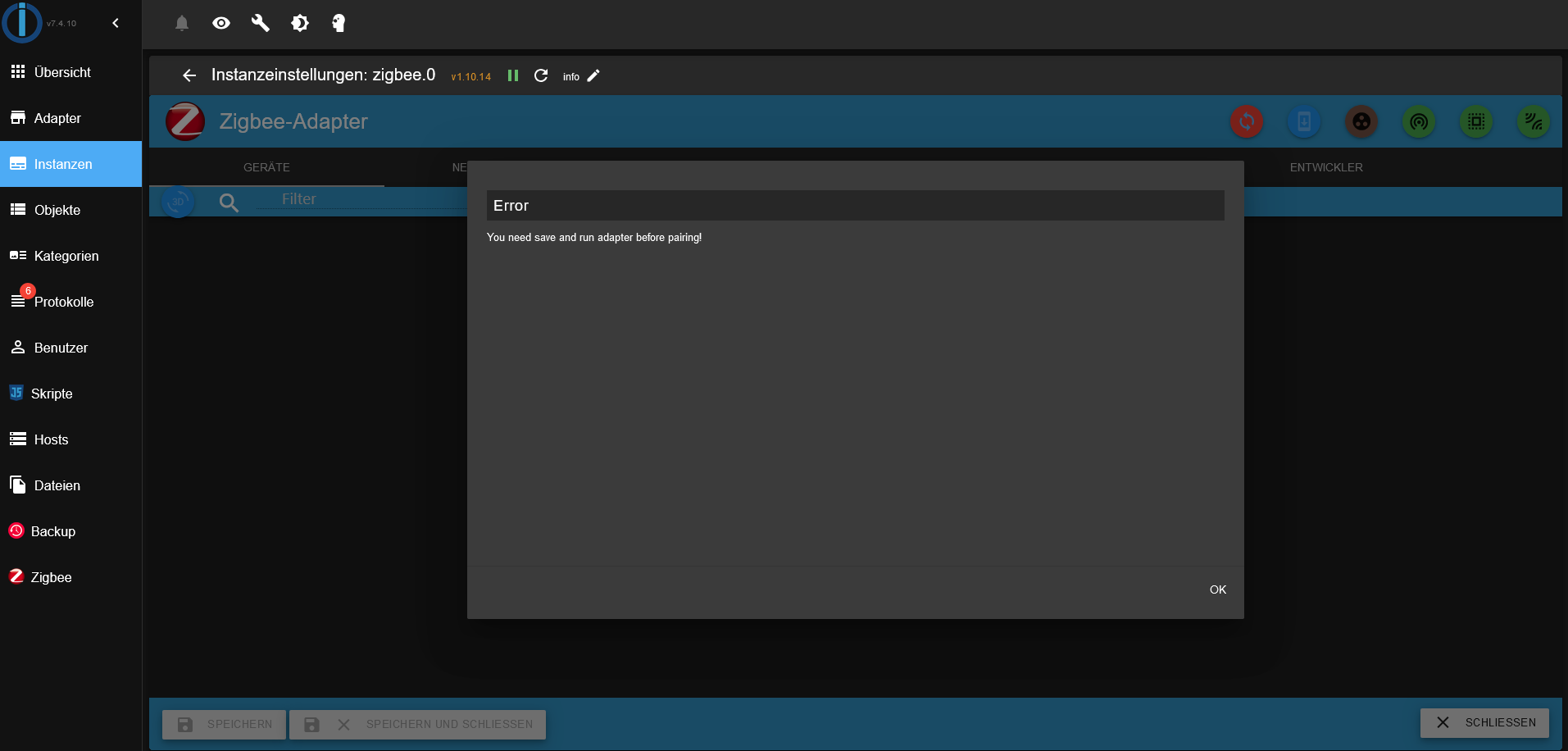
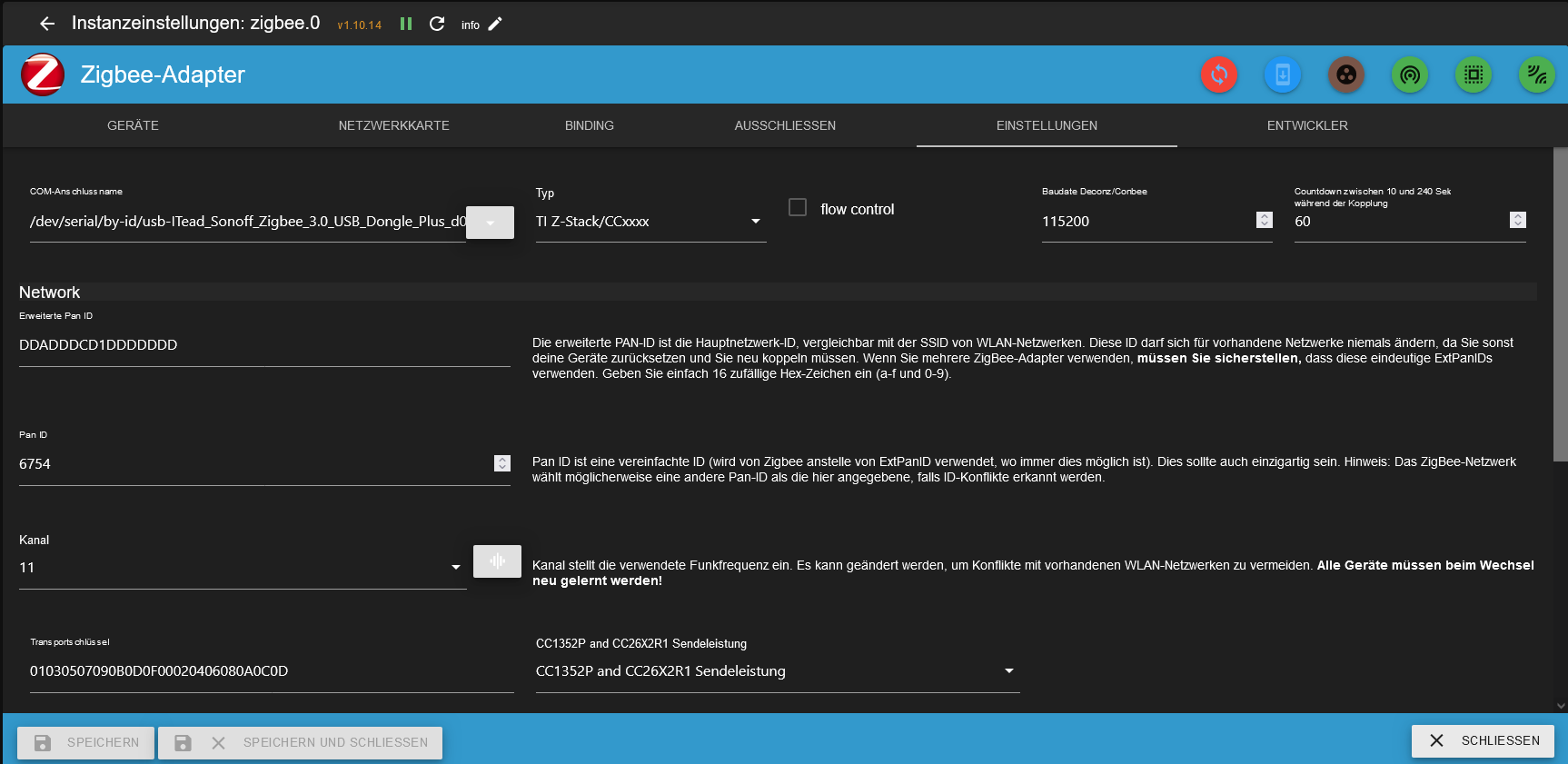
pi@raspberrypi4:~ $ more /opt/iobroker/iobroker-data/zigbee_0/nvbackup.json
{
  "metadata": {
    "format": "zigpy/open-coordinator-backup",
    "version": 1,
    "source": "zigbee-herdsman@2.1.9",
    "internal": {
      "date": "2025-01-15T10:13:49.921Z",
      "znpVersion": 1
    }
  },
  "stack_specific": {
    "zstack": {
      "tclk_seed": "f8aa5c854a84512950b4f0ace0f1d52a"
    }
  },
  "coordinator_ieee": "00124b002f899ee1",
  "pan_id": "1a62",
  "extended_pan_id": "00124b002f899ee1",
  "nwk_update_id": 0,
  "security_level": 5,
  "channel": 11,
  "channel_mask": [
    11
  ],
  "network_key": {
    "key": "01030507090b0d0f00020406080a0c0d",
    "sequence_number": 0,
    "frame_counter": 3751
  },
  "devices": []
}
So ok?
========== Start marking the full check here ===========

```bash
Script v.2024-12-09 Raspbian+zigbee diag+masking

*** BASE SYSTEM ***
 Static hostname: raspberrypi4
       Icon name: computer
Operating System: Debian GNU/Linux 12 (bookworm)
          Kernel: Linux 6.6.62+rpt-rpi-v8
    Architecture: arm64
OS is similar to:

Model           : Raspberry Pi 4 Model B Rev 1.1
Docker          : false
Virtualization  : none
Kernel          : aarch64
Userland        : 64 bit

Systemuptime and Load:
 11:27:39 up 36 min,  3 users,  load average: 0.31, 0.23, 0.38
CPU threads: 4


*** LIFE CYCLE STATUS ***
Operating System is the current Debian stable version codenamed 'bookworm'!

*** RASPBERRY THROTTLING ***
Current issues:
No throttling issues detected.

Previously detected issues:
No throttling issues detected.

*** TIME AND TIMEZONES ***
               Local time: Wed 2025-01-15 11:27:39 CET
           Universal time: Wed 2025-01-15 10:27:39 UTC
                 RTC time: n/a
                Time zone: Europe/Berlin (CET, +0100)
System clock synchronized: yes
              NTP service: active
          RTC in local TZ: no

*** Users and Groups ***
User that called 'iob diag':
pi
HOME=/home/pi
GROUPS=pi adm dialout cdrom sudo audio video plugdev games users input render netdev lpadmin gpio i2c spi iobroker

User that is running 'js-controller':
iobroker
HOME=/home/iobroker
GROUPS=iobroker tty dialout audio video plugdev bluetooth gpio i2c

*** DISPLAY-SERVER SETUP ***
Display-Server: true
Desktop:
Terminal:       tty

System is booting into 'graphical.target'. Usually a server is running in 'multi-user.target'. Please set BootTarget to 'multi-user.target' or r                                                                                             un 'iobroker fix'

*** MEMORY ***
               total        used        free      shared  buff/cache   available
Mem:            4.0G        1.1G        311M         23M        2.7G        2.9G
Swap:           536M          0B        536M
Total:          4.5G        1.1G        848M

Active iob-Instances:   6

         3791 M total memory
         1057 M used memory
         1491 M active memory
         1736 M inactive memory
          296 M free memory
           57 M buffer memory
         2478 M swap cache
          511 M total swap
            0 M used swap
          511 M free swap

*** top - Table Of Processes  ***
top - 11:27:40 up 36 min,  3 users,  load average: 0.31, 0.23, 0.38
Tasks: 212 total,   1 running, 211 sleeping,   0 stopped,   0 zombie
%Cpu(s):  0.0 us, 20.0 sy,  0.0 ni, 80.0 id,  0.0 wa,  0.0 hi,  0.0 si,  0.0 st
MiB Mem :   3791.9 total,    295.6 free,   1058.5 used,   2535.6 buff/cache
MiB Swap:    512.0 total,    512.0 free,      0.0 used.   2733.4 avail Mem

*** FAILED SERVICES ***

  UNIT LOAD ACTIVE SUB DESCRIPTION
0 loaded units listed.


*** DMESG CRITICAL ERRORS ***
No critical errors detected

*** FILESYSTEM ***
Filesystem     Type      Size  Used Avail Use% Mounted on
udev           devtmpfs  1.6G     0  1.6G   0% /dev
tmpfs          tmpfs     380M  1.3M  378M   1% /run
/dev/mmcblk0p2 ext4       58G   16G   40G  28% /
tmpfs          tmpfs     1.9G  224K  1.9G   1% /dev/shm
tmpfs          tmpfs     5.0M   16K  5.0M   1% /run/lock
/dev/mmcblk0p1 vfat      510M   67M  444M  14% /boot/firmware
tmpfs          tmpfs     380M   52K  380M   1% /run/user/1000

Messages concerning ext4 filesystem in dmesg:
[Wed Jan 15 10:51:14 2025] Kernel command line: coherent_pool=1M 8250.nr_uarts=0 snd_bcm2835.enable_headphones=0 cgroup_disable=memory numa_poli                                                                                             cy=interleave snd_bcm2835.enable_headphones=1 snd_bcm2835.enable_hdmi=1 snd_bcm2835.enable_hdmi=0  smsc95xx.macaddr=DC:A6:32:59:78:CF vc_mem.mem                                                                                             _base=0x3ec00000 vc_mem.mem_size=0x40000000  console=ttyS0,115200 console=tty1 root=PARTUUID=fe563e6f-02 rootfstype=ext4 fsck.repair=yes rootwai                                                                                             t quiet splash plymouth.ignore-serial-consoles
[Wed Jan 15 10:51:16 2025] EXT4-fs (mmcblk0p2): mounted filesystem d4ba6ec5-aeed-4cda-967b-d004c1b2cb5c ro with ordered data mode. Quota mode: n                                                                                             one.
[Wed Jan 15 10:51:18 2025] EXT4-fs (mmcblk0p2): re-mounted d4ba6ec5-aeed-4cda-967b-d004c1b2cb5c r/w. Quota mode: none.

Show mounted filesystems:
TARGET               SOURCE         FSTYPE      OPTIONS
/                    /dev/mmcblk0p2 ext4        rw,noatime,commit=600
|-/run/user/1000/doc portal         fuse.portal rw,nosuid,nodev,relatime,user_id=1000,group_id=1000
`-/boot/firmware     /dev/mmcblk0p1 vfat        rw,relatime,fmask=0022,dmask=0022,codepage=437,iocharset=ascii,shortname=mixed,errors=remount-ro

Files in neuralgic directories:

/var:
978M    /var/
232M    /var/lib
184M    /var/cache
174M    /var/cache/apt
135M    /var/lib/apt/lists

Archived and active journals take up 47.8M in the file system.

/opt/iobroker/backups:
4.0K    /opt/iobroker/backups/

/opt/iobroker/iobroker-data:
807M    /opt/iobroker/iobroker-data/
800M    /opt/iobroker/iobroker-data/files
617M    /opt/iobroker/iobroker-data/files/javascript.admin
560M    /opt/iobroker/iobroker-data/files/javascript.admin/static
558M    /opt/iobroker/iobroker-data/files/javascript.admin/static/js

The five largest files in iobroker-data are:
8.7M    /opt/iobroker/iobroker-data/files/javascript.admin/static/js/838.0aa41cb0.chunk.js.map
8.6M    /opt/iobroker/iobroker-data/files/javascript.admin/static/js/310.89a60ae1.chunk.js.map
7.4M    /opt/iobroker/iobroker-data/files/admin.admin/custom/static/js/vendors-node_modules_iobroker_adapter-react-v5_node_modules_mui_icons-mat                                                                                             erial_esm_index_js.d7ed606b.chunk.js.map
7.0M    /opt/iobroker/iobroker-data/files/javascript.admin/static/js/675.a9c6d34a.chunk.js.map
7.0M    /opt/iobroker/iobroker-data/files/javascript.admin/static/js/675.7e9d7842.chunk.js.map

USB-Devices by-id:
USB-Sticks -  Avoid direct links to /dev/tty* in your adapter setups, please always prefer the links 'by-id':

/dev/serial/by-id/usb-ITead_Sonoff_Zigbee_3.0_USB_Dongle_Plus_d0b9e07e2555ef11b63a5b73cc32aab1-if00-port0

*** ZigBee Settings ***

Your zigbee.0 COM-Port is matching 'by-id'. Very good!
Zigbee Network Settings on your coordinator/in nvbackup are:

zigbee.0
Extended Pan ID:
00124b002f899ee1
Pan ID:
6754
Channel:
11
Network Key:
01030507090b0d0f00020406080a0c0d

*** NodeJS-Installation ***

/usr/bin/nodejs         v20.18.1
/usr/bin/node           v20.18.1
/usr/bin/npm            10.8.2
/usr/bin/npx            10.8.2
/usr/bin/corepack       0.29.4

nodejs:
  Installed: 20.18.1-1nodesource1
  Candidate: 20.18.1-1nodesource1
  Version table:
 *** 20.18.1-1nodesource1 1001
        500 https://deb.nodesource.com/node_20.x nodistro/main arm64 Packages
        100 /var/lib/dpkg/status
     20.18.0-1nodesource1 1001
        500 https://deb.nodesource.com/node_20.x nodistro/main arm64 Packages
     20.17.0-1nodesource1 1001
        500 https://deb.nodesource.com/node_20.x nodistro/main arm64 Packages
     20.16.0-1nodesource1 1001
        500 https://deb.nodesource.com/node_20.x nodistro/main arm64 Packages
     20.15.1-1nodesource1 1001
        500 https://deb.nodesource.com/node_20.x nodistro/main arm64 Packages
     20.15.0-1nodesource1 1001
        500 https://deb.nodesource.com/node_20.x nodistro/main arm64 Packages
     20.14.0-1nodesource1 1001
        500 https://deb.nodesource.com/node_20.x nodistro/main arm64 Packages
     20.13.1-1nodesource1 1001
        500 https://deb.nodesource.com/node_20.x nodistro/main arm64 Packages
     20.13.0-1nodesource1 1001
        500 https://deb.nodesource.com/node_20.x nodistro/main arm64 Packages
     20.12.2-1nodesource1 1001
        500 https://deb.nodesource.com/node_20.x nodistro/main arm64 Packages
     20.12.1-1nodesource1 1001
        500 https://deb.nodesource.com/node_20.x nodistro/main arm64 Packages
     20.12.0-1nodesource1 1001
        500 https://deb.nodesource.com/node_20.x nodistro/main arm64 Packages
     20.11.1-1nodesource1 1001
        500 https://deb.nodesource.com/node_20.x nodistro/main arm64 Packages
     20.11.0-1nodesource1 1001
        500 https://deb.nodesource.com/node_20.x nodistro/main arm64 Packages
     20.10.0-1nodesource1 1001
        500 https://deb.nodesource.com/node_20.x nodistro/main arm64 Packages
     20.9.0-1nodesource1 1001
        500 https://deb.nodesource.com/node_20.x nodistro/main arm64 Packages
     20.8.1-1nodesource1 1001
        500 https://deb.nodesource.com/node_20.x nodistro/main arm64 Packages
     20.8.0-1nodesource1 1001
        500 https://deb.nodesource.com/node_20.x nodistro/main arm64 Packages
     20.7.0-1nodesource1 1001
        500 https://deb.nodesource.com/node_20.x nodistro/main arm64 Packages
     20.6.1-1nodesource1 1001
        500 https://deb.nodesource.com/node_20.x nodistro/main arm64 Packages
     20.6.0-1nodesource1 1001
        500 https://deb.nodesource.com/node_20.x nodistro/main arm64 Packages
     20.5.1-1nodesource1 1001
        500 https://deb.nodesource.com/node_20.x nodistro/main arm64 Packages
     20.5.0-1nodesource1 1001
        500 https://deb.nodesource.com/node_20.x nodistro/main arm64 Packages
     20.4.0-1nodesource1 1001
        500 https://deb.nodesource.com/node_20.x nodistro/main arm64 Packages
     20.3.1-1nodesource1 1001
        500 https://deb.nodesource.com/node_20.x nodistro/main arm64 Packages
     20.3.0-1nodesource1 1001
        500 https://deb.nodesource.com/node_20.x nodistro/main arm64 Packages
     20.2.0-1nodesource1 1001
        500 https://deb.nodesource.com/node_20.x nodistro/main arm64 Packages
     20.1.0-1nodesource1 1001
        500 https://deb.nodesource.com/node_20.x nodistro/main arm64 Packages
     20.0.0-1nodesource1 1001
        500 https://deb.nodesource.com/node_20.x nodistro/main arm64 Packages
     18.19.0+dfsg-6~deb12u2 500
        500 http://deb.debian.org/debian bookworm/main arm64 Packages
     18.19.0+dfsg-6~deb12u1 500
        500 http://deb.debian.org/debian-security bookworm-security/main arm64 Packages

Temp directories causing deletion problem: 0
No problems detected

Errors in npm tree: 0
No problems detected

*** ioBroker-Installation ***

ioBroker Status
iobroker is running on this host.


Objects type: jsonl
States  type: jsonl

Hosts:
raspberrypi4        raspberrypi4 (version: 7.0.6, hostname: raspberrypi4  , alive, uptime: 1641)

Core adapters versions
js-controller:  7.0.6
admin:          7.4.10
javascript:     8.8.3

nodejs modules from github:     0

Adapter State
+ system.adapter.admin.0                  : admin                 : raspberrypi4                             -  enabled, port: 8081, bind: 0.0.0                                                                                             .0, run as: admin
+ system.adapter.backitup.0               : backitup              : raspberrypi4                             -  enabled
+ system.adapter.discovery.0              : discovery             : raspberrypi4                             -  enabled
+ system.adapter.javascript.0             : javascript            : raspberrypi4                             -  enabled
  system.adapter.ping.0                   : ping                  : raspberrypi4                             - disabled
  system.adapter.weatherunderground.0     : weatherunderground    : raspberrypi4                             - disabled
+ system.adapter.zigbee.0                 : zigbee                : raspberrypi4                             -  enabled, port: /dev/serial/by-id                                                                                             /usb-ITead_Sonoff_Zigbee_3.0_USB_Dongle_Plus_d0b9e07e2555ef11b63a5b73cc32aab1-if00-port0

+ instance is alive

Enabled adapters with bindings
+ system.adapter.admin.0                  : admin                 : raspberrypi4                             -  enabled, port: 8081, bind: 0.0.0                                                                                             .0, run as: admin
+ system.adapter.zigbee.0                 : zigbee                : raspberrypi4                             -  enabled, port: /dev/serial/by-id                                                                                             /usb-ITead_Sonoff_Zigbee_3.0_USB_Dongle_Plus_d0b9e07e2555ef11b63a5b73cc32aab1-if00-port0

ioBroker-Repositories
┌──────────────────────────────────────────────────────────────────────────────────────────────
│ (index) │ name     │ url                                                     │ auto upgrade │
├──────────────────────────────────────────────────────────────────────────────────────────────
│ 0       │ 'stable' │ 'http://download.iobroker.net/sources-dist.json'        │ false        │
│ 1       │ 'beta'   │ 'http://download.iobroker.net/sources-dist-latest.json' │ false        │
└──────────────────────────────────────────────────────────────────────────────────────────────

Active repo(s): stable
Upgrade policy: none

Installed ioBroker-Instances
Used repository: stable
Adapter    "admin"        : 7.4.10   , installed 7.4.10
Adapter    "backitup"     : 3.0.31   , installed 3.0.31
Adapter    "discovery"    : 5.0.0    , installed 5.0.0
Adapter    "javascript"   : 8.8.3    , installed 8.8.3
Controller "js-controller": 7.0.6    , installed 7.0.6
Adapter    "ping"         : 1.6.2    , installed 1.6.2
Adapter    "weatherunderground": 3.7.0, installed 3.7.0
Adapter    "zigbee"       : 1.10.14  , installed 1.10.14

Objects and States
Please stand by - This may take a while
Objects:        1104
States:         387

*** OS-Repositories and Updates ***
Hit:1 http://deb.debian.org/debian bookworm InRelease
Hit:2 http://deb.debian.org/debian-security bookworm-security InRelease
Hit:3 http://deb.debian.org/debian bookworm-updates InRelease
Hit:4 http://archive.raspberrypi.com/debian bookworm InRelease
Hit:5 https://deb.nodesource.com/node_20.x nodistro InRelease
Reading package lists... Done
Pending Updates: 0

*** Listening Ports ***
Active Internet connections (only servers)
Proto Recv-Q Send-Q Local Address           Foreign Address         State       User       Inode      PID/Program name
tcp        0      0 0.0.0.0:22              0.0.0.0:*               LISTEN      0          6349       664/sshd: /usr/sbin
tcp        0      0 127.0.0.1:9000          0.0.0.0:*               LISTEN      1001       41355      10398/iobroker.js-c
tcp        0      0 127.0.0.1:9001          0.0.0.0:*               LISTEN      1001       41350      10398/iobroker.js-c
tcp        0      0 127.0.0.1:631           0.0.0.0:*               LISTEN      0          3637       652/cupsd
tcp6       0      0 ::1:631                 :::*                    LISTEN      0          3636       652/cupsd
tcp6       0      0 :::22                   :::*                    LISTEN      0          6360       664/sshd: /usr/sbin
tcp6       0      0 :::8081                 :::*                    LISTEN      1001       41430      10416/io.admin.0
udp        0      0 0.0.0.0:34015           0.0.0.0:*                           104        752        462/avahi-daemon: r
udp        0      0 0.0.0.0:5353            0.0.0.0:*                           104        750        462/avahi-daemon: r
udp        0      0 0.0.0.0:5678            0.0.0.0:*                           1001       46315      10486/io.discovery.
udp6       0      0 :::43052                :::*                                104        753        462/avahi-daemon: r
udp6       0      0 fe80::de81:dad3:c9a:546 :::*                                0          8216       594/NetworkManager
udp6       0      0 :::5353                 :::*                                104        751        462/avahi-daemon: r

*** Log File - Last 25 Lines ***

2025-01-15 11:15:01.908  - info: zigbee.0 (11082) Zigbee: disabling joining new devices.
2025-01-15 11:15:01.928  - info: zigbee.0 (11082) terminating
2025-01-15 11:15:01.930  - info: zigbee.0 (11082) Terminated (ADAPTER_REQUESTED_TERMINATION): Without reason
2025-01-15 11:15:01.958  - info: host.raspberrypi4 stopInstance system.adapter.zigbee.0 send kill signal
2025-01-15 11:15:02.404  - info: zigbee.0 (11082) terminating
2025-01-15 11:15:02.490  - info: host.raspberrypi4 instance system.adapter.zigbee.0 terminated with code 11 (ADAPTER_REQUESTED_TERMINATION)
2025-01-15 11:15:14.426  - info: host.raspberrypi4 "system.adapter.zigbee.0" enabled
2025-01-15 11:15:14.941  - info: host.raspberrypi4 instance system.adapter.zigbee.0 in version "1.10.14" started with pid 11102
2025-01-15 11:15:16.376  - info: admin.0 (10416) <== Disconnect system.user.admin from ::ffff:192.168.178.25
2025-01-15 11:15:19.588  - info: zigbee.0 (11102) starting. Version 1.10.14 in /opt/iobroker/node_modules/iobroker.zigbee, node: v20.18.1, js-co                                                                                             ntroller: 7.0.6
2025-01-15 11:15:19.692  - info: zigbee.0 (11102) Starting Zigbee  npm ...
2025-01-15 11:15:20.080  - info: zigbee.0 (11102) Installed Version: iobroker.zigbee@1.10.14
2025-01-15 11:15:20.715  - error: zigbee.0 (11102) Starting zigbee-herdsman problem : "startup failed - configuration-adapter mismatch - see log                                                                                             s above for more information"
2025-01-15 11:15:20.715  - error: zigbee.0 (11102) Failed to start Zigbee
2025-01-15 11:15:20.717  - error: zigbee.0 (11102) Error herdsman start
2025-01-15 11:15:30.719  - info: zigbee.0 (11102) Try to reconnect. 1 attempts left
2025-01-15 11:15:30.721  - info: zigbee.0 (11102) Starting Zigbee  npm ...
2025-01-15 11:15:30.745  - info: zigbee.0 (11102) Installed Version: iobroker.zigbee@1.10.14
2025-01-15 11:15:30.950  - error: zigbee.0 (11102) Starting zigbee-herdsman problem : "Error Resource temporarily unavailable Cannot lock port"
2025-01-15 11:15:30.951  - error: zigbee.0 (11102) Failed to start Zigbee
2025-01-15 11:15:30.952  - error: zigbee.0 (11102) Error herdsman start
2025-01-15 11:17:26.307  - info: admin.0 (10416) ==> Connected system.user.admin from ::ffff:192.168.178.25
2025-01-15 11:17:26.588  - info: zigbee.0 (11102) List of port: [{"path":"/dev/ttyUSB0","manufacturer":"ITead","serialNumber":"d0b9e07e2555ef11b                                                                                             63a5b73cc32aab1","pnpId":"usb-ITead_Sonoff_Zigbee_3.0_USB_Dongle_Plus_d0b9e07e2555ef11b63a5b73cc32aab1-if00-port0","vendorId":"10c4","productId"                                                                                             :"ea60"}]
2025-01-15 11:21:21.352  - info: admin.0 (10416) <== Disconnect system.user.admin from ::ffff:192.168.178.25
2025-01-15 11:21:21.366  - info: admin.0 (10416) <== Disconnect system.user.admin from ::ffff:192.168.178.25 admin
============ Mark until here for C&P =============
iob diag has finished.
Press any key for a summary
-
@asgothian said in Zigbee Stick plötzlich nicht mehr grün CC2531 / Sonoff:
more /opt/iobroker/iobroker-data/zigbee_0/nvbackup.json
Hi,
hier die Screenshots und der Log, ich bekomme auch jedes mal wenn ich auf den Adapter gehe folgenden Error
und ich möchte jetzt auch alles neu aufsetzen, ist kein problem, will alles frisch haben
pi@raspberrypi4:~ $ more /opt/iobroker/iobroker-data/zigbee_0/nvbackup.json
{
  "metadata": {
    "format": "zigpy/open-coordinator-backup",
    "version": 1,
    "source": "zigbee-herdsman@2.1.9",
    "internal": {
      "date": "2025-01-15T10:13:49.921Z",
      "znpVersion": 1
    }
  },
  "stack_specific": {
    "zstack": {
      "tclk_seed": "f8aa5c854a84512950b4f0ace0f1d52a"
    }
  },
  "coordinator_ieee": "00124b002f899ee1",
  "pan_id": "1a62",
  "extended_pan_id": "00124b002f899ee1",
  "nwk_update_id": 0,
  "security_level": 5,
  "channel": 11,
  "channel_mask": [
    11
  ],
  "network_key": {
    "key": "01030507090b0d0f00020406080a0c0d",
    "sequence_number": 0,
    "frame_counter": 3751
  },
  "devices": []
}
So ok?
========== Start marking the full check here ===========

```bash
Script v.2024-12-09 Raspbian+zigbee diag+masking

*** BASE SYSTEM ***
 Static hostname: raspberrypi4
       Icon name: computer
Operating System: Debian GNU/Linux 12 (bookworm)
          Kernel: Linux 6.6.62+rpt-rpi-v8
    Architecture: arm64
OS is similar to:

Model           : Raspberry Pi 4 Model B Rev 1.1
Docker          : false
Virtualization  : none
Kernel          : aarch64
Userland        : 64 bit

Systemuptime and Load:
 11:27:39 up 36 min,  3 users,  load average: 0.31, 0.23, 0.38
CPU threads: 4


*** LIFE CYCLE STATUS ***
Operating System is the current Debian stable version codenamed 'bookworm'!

*** RASPBERRY THROTTLING ***
Current issues:
No throttling issues detected.

Previously detected issues:
No throttling issues detected.

*** TIME AND TIMEZONES ***
               Local time: Wed 2025-01-15 11:27:39 CET
           Universal time: Wed 2025-01-15 10:27:39 UTC
                 RTC time: n/a
                Time zone: Europe/Berlin (CET, +0100)
System clock synchronized: yes
              NTP service: active
          RTC in local TZ: no

*** Users and Groups ***
User that called 'iob diag':
pi
HOME=/home/pi
GROUPS=pi adm dialout cdrom sudo audio video plugdev games users input render netdev lpadmin gpio i2c spi iobroker

User that is running 'js-controller':
iobroker
HOME=/home/iobroker
GROUPS=iobroker tty dialout audio video plugdev bluetooth gpio i2c

*** DISPLAY-SERVER SETUP ***
Display-Server: true
Desktop:
Terminal:       tty

System is booting into 'graphical.target'. Usually a server is running in 'multi-user.target'. Please set BootTarget to 'multi-user.target' or r                                                                                             un 'iobroker fix'

*** MEMORY ***
               total        used        free      shared  buff/cache   available
Mem:            4.0G        1.1G        311M         23M        2.7G        2.9G
Swap:           536M          0B        536M
Total:          4.5G        1.1G        848M

Active iob-Instances:   6

         3791 M total memory
         1057 M used memory
         1491 M active memory
         1736 M inactive memory
          296 M free memory
           57 M buffer memory
         2478 M swap cache
          511 M total swap
            0 M used swap
          511 M free swap

*** top - Table Of Processes  ***
top - 11:27:40 up 36 min,  3 users,  load average: 0.31, 0.23, 0.38
Tasks: 212 total,   1 running, 211 sleeping,   0 stopped,   0 zombie
%Cpu(s):  0.0 us, 20.0 sy,  0.0 ni, 80.0 id,  0.0 wa,  0.0 hi,  0.0 si,  0.0 st
MiB Mem :   3791.9 total,    295.6 free,   1058.5 used,   2535.6 buff/cache
MiB Swap:    512.0 total,    512.0 free,      0.0 used.   2733.4 avail Mem

*** FAILED SERVICES ***

  UNIT LOAD ACTIVE SUB DESCRIPTION
0 loaded units listed.


*** DMESG CRITICAL ERRORS ***
No critical errors detected

*** FILESYSTEM ***
Filesystem     Type      Size  Used Avail Use% Mounted on
udev           devtmpfs  1.6G     0  1.6G   0% /dev
tmpfs          tmpfs     380M  1.3M  378M   1% /run
/dev/mmcblk0p2 ext4       58G   16G   40G  28% /
tmpfs          tmpfs     1.9G  224K  1.9G   1% /dev/shm
tmpfs          tmpfs     5.0M   16K  5.0M   1% /run/lock
/dev/mmcblk0p1 vfat      510M   67M  444M  14% /boot/firmware
tmpfs          tmpfs     380M   52K  380M   1% /run/user/1000

Messages concerning ext4 filesystem in dmesg:
[Wed Jan 15 10:51:14 2025] Kernel command line: coherent_pool=1M 8250.nr_uarts=0 snd_bcm2835.enable_headphones=0 cgroup_disable=memory numa_poli                                                                                             cy=interleave snd_bcm2835.enable_headphones=1 snd_bcm2835.enable_hdmi=1 snd_bcm2835.enable_hdmi=0  smsc95xx.macaddr=DC:A6:32:59:78:CF vc_mem.mem                                                                                             _base=0x3ec00000 vc_mem.mem_size=0x40000000  console=ttyS0,115200 console=tty1 root=PARTUUID=fe563e6f-02 rootfstype=ext4 fsck.repair=yes rootwai                                                                                             t quiet splash plymouth.ignore-serial-consoles
[Wed Jan 15 10:51:16 2025] EXT4-fs (mmcblk0p2): mounted filesystem d4ba6ec5-aeed-4cda-967b-d004c1b2cb5c ro with ordered data mode. Quota mode: n                                                                                             one.
[Wed Jan 15 10:51:18 2025] EXT4-fs (mmcblk0p2): re-mounted d4ba6ec5-aeed-4cda-967b-d004c1b2cb5c r/w. Quota mode: none.

Show mounted filesystems:
TARGET               SOURCE         FSTYPE      OPTIONS
/                    /dev/mmcblk0p2 ext4        rw,noatime,commit=600
|-/run/user/1000/doc portal         fuse.portal rw,nosuid,nodev,relatime,user_id=1000,group_id=1000
`-/boot/firmware     /dev/mmcblk0p1 vfat        rw,relatime,fmask=0022,dmask=0022,codepage=437,iocharset=ascii,shortname=mixed,errors=remount-ro

Files in neuralgic directories:

/var:
978M    /var/
232M    /var/lib
184M    /var/cache
174M    /var/cache/apt
135M    /var/lib/apt/lists

Archived and active journals take up 47.8M in the file system.

/opt/iobroker/backups:
4.0K    /opt/iobroker/backups/

/opt/iobroker/iobroker-data:
807M    /opt/iobroker/iobroker-data/
800M    /opt/iobroker/iobroker-data/files
617M    /opt/iobroker/iobroker-data/files/javascript.admin
560M    /opt/iobroker/iobroker-data/files/javascript.admin/static
558M    /opt/iobroker/iobroker-data/files/javascript.admin/static/js

The five largest files in iobroker-data are:
8.7M    /opt/iobroker/iobroker-data/files/javascript.admin/static/js/838.0aa41cb0.chunk.js.map
8.6M    /opt/iobroker/iobroker-data/files/javascript.admin/static/js/310.89a60ae1.chunk.js.map
7.4M    /opt/iobroker/iobroker-data/files/admin.admin/custom/static/js/vendors-node_modules_iobroker_adapter-react-v5_node_modules_mui_icons-mat                                                                                             erial_esm_index_js.d7ed606b.chunk.js.map
7.0M    /opt/iobroker/iobroker-data/files/javascript.admin/static/js/675.a9c6d34a.chunk.js.map
7.0M    /opt/iobroker/iobroker-data/files/javascript.admin/static/js/675.7e9d7842.chunk.js.map

USB-Devices by-id:
USB-Sticks -  Avoid direct links to /dev/tty* in your adapter setups, please always prefer the links 'by-id':

/dev/serial/by-id/usb-ITead_Sonoff_Zigbee_3.0_USB_Dongle_Plus_d0b9e07e2555ef11b63a5b73cc32aab1-if00-port0

*** ZigBee Settings ***

Your zigbee.0 COM-Port is matching 'by-id'. Very good!
Zigbee Network Settings on your coordinator/in nvbackup are:

zigbee.0
Extended Pan ID:
00124b002f899ee1
Pan ID:
6754
Channel:
11
Network Key:
01030507090b0d0f00020406080a0c0d

*** NodeJS-Installation ***

/usr/bin/nodejs         v20.18.1
/usr/bin/node           v20.18.1
/usr/bin/npm            10.8.2
/usr/bin/npx            10.8.2
/usr/bin/corepack       0.29.4

nodejs:
  Installed: 20.18.1-1nodesource1
  Candidate: 20.18.1-1nodesource1
  Version table:
 *** 20.18.1-1nodesource1 1001
        500 https://deb.nodesource.com/node_20.x nodistro/main arm64 Packages
        100 /var/lib/dpkg/status
     20.18.0-1nodesource1 1001
        500 https://deb.nodesource.com/node_20.x nodistro/main arm64 Packages
     20.17.0-1nodesource1 1001
        500 https://deb.nodesource.com/node_20.x nodistro/main arm64 Packages
     20.16.0-1nodesource1 1001
        500 https://deb.nodesource.com/node_20.x nodistro/main arm64 Packages
     20.15.1-1nodesource1 1001
        500 https://deb.nodesource.com/node_20.x nodistro/main arm64 Packages
     20.15.0-1nodesource1 1001
        500 https://deb.nodesource.com/node_20.x nodistro/main arm64 Packages
     20.14.0-1nodesource1 1001
        500 https://deb.nodesource.com/node_20.x nodistro/main arm64 Packages
     20.13.1-1nodesource1 1001
        500 https://deb.nodesource.com/node_20.x nodistro/main arm64 Packages
     20.13.0-1nodesource1 1001
        500 https://deb.nodesource.com/node_20.x nodistro/main arm64 Packages
     20.12.2-1nodesource1 1001
        500 https://deb.nodesource.com/node_20.x nodistro/main arm64 Packages
     20.12.1-1nodesource1 1001
        500 https://deb.nodesource.com/node_20.x nodistro/main arm64 Packages
     20.12.0-1nodesource1 1001
        500 https://deb.nodesource.com/node_20.x nodistro/main arm64 Packages
     20.11.1-1nodesource1 1001
        500 https://deb.nodesource.com/node_20.x nodistro/main arm64 Packages
     20.11.0-1nodesource1 1001
        500 https://deb.nodesource.com/node_20.x nodistro/main arm64 Packages
     20.10.0-1nodesource1 1001
        500 https://deb.nodesource.com/node_20.x nodistro/main arm64 Packages
     20.9.0-1nodesource1 1001
        500 https://deb.nodesource.com/node_20.x nodistro/main arm64 Packages
     20.8.1-1nodesource1 1001
        500 https://deb.nodesource.com/node_20.x nodistro/main arm64 Packages
     20.8.0-1nodesource1 1001
        500 https://deb.nodesource.com/node_20.x nodistro/main arm64 Packages
     20.7.0-1nodesource1 1001
        500 https://deb.nodesource.com/node_20.x nodistro/main arm64 Packages
     20.6.1-1nodesource1 1001
        500 https://deb.nodesource.com/node_20.x nodistro/main arm64 Packages
     20.6.0-1nodesource1 1001
        500 https://deb.nodesource.com/node_20.x nodistro/main arm64 Packages
     20.5.1-1nodesource1 1001
        500 https://deb.nodesource.com/node_20.x nodistro/main arm64 Packages
     20.5.0-1nodesource1 1001
        500 https://deb.nodesource.com/node_20.x nodistro/main arm64 Packages
     20.4.0-1nodesource1 1001
        500 https://deb.nodesource.com/node_20.x nodistro/main arm64 Packages
     20.3.1-1nodesource1 1001
        500 https://deb.nodesource.com/node_20.x nodistro/main arm64 Packages
     20.3.0-1nodesource1 1001
        500 https://deb.nodesource.com/node_20.x nodistro/main arm64 Packages
     20.2.0-1nodesource1 1001
        500 https://deb.nodesource.com/node_20.x nodistro/main arm64 Packages
     20.1.0-1nodesource1 1001
        500 https://deb.nodesource.com/node_20.x nodistro/main arm64 Packages
     20.0.0-1nodesource1 1001
        500 https://deb.nodesource.com/node_20.x nodistro/main arm64 Packages
     18.19.0+dfsg-6~deb12u2 500
        500 http://deb.debian.org/debian bookworm/main arm64 Packages
     18.19.0+dfsg-6~deb12u1 500
        500 http://deb.debian.org/debian-security bookworm-security/main arm64 Packages

Temp directories causing deletion problem: 0
No problems detected

Errors in npm tree: 0
No problems detected

*** ioBroker-Installation ***

ioBroker Status
iobroker is running on this host.


Objects type: jsonl
States  type: jsonl

Hosts:
raspberrypi4        raspberrypi4 (version: 7.0.6, hostname: raspberrypi4  , alive, uptime: 1641)

Core adapters versions
js-controller:  7.0.6
admin:          7.4.10
javascript:     8.8.3

nodejs modules from github:     0

Adapter State
+ system.adapter.admin.0                  : admin                 : raspberrypi4                             -  enabled, port: 8081, bind: 0.0.0                                                                                             .0, run as: admin
+ system.adapter.backitup.0               : backitup              : raspberrypi4                             -  enabled
+ system.adapter.discovery.0              : discovery             : raspberrypi4                             -  enabled
+ system.adapter.javascript.0             : javascript            : raspberrypi4                             -  enabled
  system.adapter.ping.0                   : ping                  : raspberrypi4                             - disabled
  system.adapter.weatherunderground.0     : weatherunderground    : raspberrypi4                             - disabled
+ system.adapter.zigbee.0                 : zigbee                : raspberrypi4                             -  enabled, port: /dev/serial/by-id                                                                                             /usb-ITead_Sonoff_Zigbee_3.0_USB_Dongle_Plus_d0b9e07e2555ef11b63a5b73cc32aab1-if00-port0

+ instance is alive

Enabled adapters with bindings
+ system.adapter.admin.0                  : admin                 : raspberrypi4                             -  enabled, port: 8081, bind: 0.0.0                                                                                             .0, run as: admin
+ system.adapter.zigbee.0                 : zigbee                : raspberrypi4                             -  enabled, port: /dev/serial/by-id                                                                                             /usb-ITead_Sonoff_Zigbee_3.0_USB_Dongle_Plus_d0b9e07e2555ef11b63a5b73cc32aab1-if00-port0

ioBroker-Repositories
┌──────────────────────────────────────────────────────────────────────────────────────────────
│ (index) │ name     │ url                                                     │ auto upgrade │
├──────────────────────────────────────────────────────────────────────────────────────────────
│ 0       │ 'stable' │ 'http://download.iobroker.net/sources-dist.json'        │ false        │
│ 1       │ 'beta'   │ 'http://download.iobroker.net/sources-dist-latest.json' │ false        │
└──────────────────────────────────────────────────────────────────────────────────────────────

Active repo(s): stable
Upgrade policy: none

Installed ioBroker-Instances
Used repository: stable
Adapter    "admin"        : 7.4.10   , installed 7.4.10
Adapter    "backitup"     : 3.0.31   , installed 3.0.31
Adapter    "discovery"    : 5.0.0    , installed 5.0.0
Adapter    "javascript"   : 8.8.3    , installed 8.8.3
Controller "js-controller": 7.0.6    , installed 7.0.6
Adapter    "ping"         : 1.6.2    , installed 1.6.2
Adapter    "weatherunderground": 3.7.0, installed 3.7.0
Adapter    "zigbee"       : 1.10.14  , installed 1.10.14

Objects and States
Please stand by - This may take a while
Objects:        1104
States:         387

*** OS-Repositories and Updates ***
Hit:1 http://deb.debian.org/debian bookworm InRelease
Hit:2 http://deb.debian.org/debian-security bookworm-security InRelease
Hit:3 http://deb.debian.org/debian bookworm-updates InRelease
Hit:4 http://archive.raspberrypi.com/debian bookworm InRelease
Hit:5 https://deb.nodesource.com/node_20.x nodistro InRelease
Reading package lists... Done
Pending Updates: 0

*** Listening Ports ***
Active Internet connections (only servers)
Proto Recv-Q Send-Q Local Address           Foreign Address         State       User       Inode      PID/Program name
tcp        0      0 0.0.0.0:22              0.0.0.0:*               LISTEN      0          6349       664/sshd: /usr/sbin
tcp        0      0 127.0.0.1:9000          0.0.0.0:*               LISTEN      1001       41355      10398/iobroker.js-c
tcp        0      0 127.0.0.1:9001          0.0.0.0:*               LISTEN      1001       41350      10398/iobroker.js-c
tcp        0      0 127.0.0.1:631           0.0.0.0:*               LISTEN      0          3637       652/cupsd
tcp6       0      0 ::1:631                 :::*                    LISTEN      0          3636       652/cupsd
tcp6       0      0 :::22                   :::*                    LISTEN      0          6360       664/sshd: /usr/sbin
tcp6       0      0 :::8081                 :::*                    LISTEN      1001       41430      10416/io.admin.0
udp        0      0 0.0.0.0:34015           0.0.0.0:*                           104        752        462/avahi-daemon: r
udp        0      0 0.0.0.0:5353            0.0.0.0:*                           104        750        462/avahi-daemon: r
udp        0      0 0.0.0.0:5678            0.0.0.0:*                           1001       46315      10486/io.discovery.
udp6       0      0 :::43052                :::*                                104        753        462/avahi-daemon: r
udp6       0      0 fe80::de81:dad3:c9a:546 :::*                                0          8216       594/NetworkManager
udp6       0      0 :::5353                 :::*                                104        751        462/avahi-daemon: r

*** Log File - Last 25 Lines ***

2025-01-15 11:15:01.908  - info: zigbee.0 (11082) Zigbee: disabling joining new devices.
2025-01-15 11:15:01.928  - info: zigbee.0 (11082) terminating
2025-01-15 11:15:01.930  - info: zigbee.0 (11082) Terminated (ADAPTER_REQUESTED_TERMINATION): Without reason
2025-01-15 11:15:01.958  - info: host.raspberrypi4 stopInstance system.adapter.zigbee.0 send kill signal
2025-01-15 11:15:02.404  - info: zigbee.0 (11082) terminating
2025-01-15 11:15:02.490  - info: host.raspberrypi4 instance system.adapter.zigbee.0 terminated with code 11 (ADAPTER_REQUESTED_TERMINATION)
2025-01-15 11:15:14.426  - info: host.raspberrypi4 "system.adapter.zigbee.0" enabled
2025-01-15 11:15:14.941  - info: host.raspberrypi4 instance system.adapter.zigbee.0 in version "1.10.14" started with pid 11102
2025-01-15 11:15:16.376  - info: admin.0 (10416) <== Disconnect system.user.admin from ::ffff:192.168.178.25
2025-01-15 11:15:19.588  - info: zigbee.0 (11102) starting. Version 1.10.14 in /opt/iobroker/node_modules/iobroker.zigbee, node: v20.18.1, js-co                                                                                             ntroller: 7.0.6
2025-01-15 11:15:19.692  - info: zigbee.0 (11102) Starting Zigbee  npm ...
2025-01-15 11:15:20.080  - info: zigbee.0 (11102) Installed Version: iobroker.zigbee@1.10.14
2025-01-15 11:15:20.715  - error: zigbee.0 (11102) Starting zigbee-herdsman problem : "startup failed - configuration-adapter mismatch - see log                                                                                             s above for more information"
2025-01-15 11:15:20.715  - error: zigbee.0 (11102) Failed to start Zigbee
2025-01-15 11:15:20.717  - error: zigbee.0 (11102) Error herdsman start
2025-01-15 11:15:30.719  - info: zigbee.0 (11102) Try to reconnect. 1 attempts left
2025-01-15 11:15:30.721  - info: zigbee.0 (11102) Starting Zigbee  npm ...
2025-01-15 11:15:30.745  - info: zigbee.0 (11102) Installed Version: iobroker.zigbee@1.10.14
2025-01-15 11:15:30.950  - error: zigbee.0 (11102) Starting zigbee-herdsman problem : "Error Resource temporarily unavailable Cannot lock port"
2025-01-15 11:15:30.951  - error: zigbee.0 (11102) Failed to start Zigbee
2025-01-15 11:15:30.952  - error: zigbee.0 (11102) Error herdsman start
2025-01-15 11:17:26.307  - info: admin.0 (10416) ==> Connected system.user.admin from ::ffff:192.168.178.25
2025-01-15 11:17:26.588  - info: zigbee.0 (11102) List of port: [{"path":"/dev/ttyUSB0","manufacturer":"ITead","serialNumber":"d0b9e07e2555ef11b                                                                                             63a5b73cc32aab1","pnpId":"usb-ITead_Sonoff_Zigbee_3.0_USB_Dongle_Plus_d0b9e07e2555ef11b63a5b73cc32aab1-if00-port0","vendorId":"10c4","productId"                                                                                             :"ea60"}]
2025-01-15 11:21:21.352  - info: admin.0 (10416) <== Disconnect system.user.admin from ::ffff:192.168.178.25
2025-01-15 11:21:21.366  - info: admin.0 (10416) <== Disconnect system.user.admin from ::ffff:192.168.178.25 admin
============ Mark until here for C&P =============
iob diag has finished.
Press any key for a summary
@fruchtzwergi sagte in Zigbee Stick plötzlich nicht mehr grün CC2531 / Sonoff:
Die Werte aus den
*** ZigBee Settings ***
musst du jetzt in der Instanz einstellen.
Dann sollte sich zumindest der Eintrag zu
Starting zigbee-herdsman problem : "startup failed - configuration-adapter mismatch - see log
erledigen.
-
@fruchtzwergi sagte in Zigbee Stick plötzlich nicht mehr grün CC2531 / Sonoff:
Die Werte aus den
*** ZigBee Settings ***
musst du jetzt in der Instanz einstellen.
Dann sollte sich zumindest der Eintrag zu
Starting zigbee-herdsman problem : "startup failed - configuration-adapter mismatch - see log
erledigen.
Das wars, er ist grün, ich werd bekloppt, kannst du mir das für mich als noob bitte erklären? Ich hab doch alles komplett neu eingerichtet usw, warum muss ich da solche werte aus logs eintragen?
-
Das wars, er ist grün, ich werd bekloppt, kannst du mir das für mich als noob bitte erklären? Ich hab doch alles komplett neu eingerichtet usw, warum muss ich da solche werte aus logs eintragen?
@fruchtzwergi sagte in Zigbee Stick plötzlich nicht mehr grün CC2531 / Sonoff:
Das wars, er ist grün, ich werd bekloppt, kannst du mir das für mich als noob bitte erklären? Ich hab doch alles komplett neu eingerichtet usw, warum muss ich da solche werte aus logs eintragen?
Ich kann dir das erklären:
wenn du den Adapter aufsetzt und das erste mal mit eingetragenem Seriellen port startest wird er durchstarten - dabei braucht er für den ersten Start nach der Installation durchaus 1 - 2 Minuten, und wird ggf. 1. neu gestartet. In diesem Zusammenhang wird auch die Konfiguration des Systems gespeichert (nvbackup.json)
Wenn du in der Folge die Konfiguration anpasst dann stimmt die Konfiguration nicht mehr mit der abgesicherten überein. Um nicht 'aus versehen' das Zigbee Netz zu zerstören wird der Adapter in diesem Zustand nicht gestartet, sondern es kommt die Meldung über die unpassend Konfiguration.
An dieser Stelle gibt es 2 Möglichkeiten das zu lösen:
- Adapter anhalten, Dateien löschen (shepherd.db, nvbackup.json), Adapter starten. In diesem Fall muss man alle Geräte neu anlernen
- Adapter anhalten, Konfiguration so anpassen das sie zum nvbackup.json passt, Adapter starten. In diesem Fall bleibt das Netz erhalten.
An die notwendigen Werte kommt man manuell (wie ich geschrieben hatte) oder die neuste Version des iobroker Diag Skript, wie @Thomas-Braun geschrieben hat.
A.
-
Das wars, er ist grün, ich werd bekloppt, kannst du mir das für mich als noob bitte erklären? Ich hab doch alles komplett neu eingerichtet usw, warum muss ich da solche werte aus logs eintragen?
@fruchtzwergi Das wäre so als ob du dir eine neue Haustür einbaust.
kann man machen, aber wenn du mit dem alten Schlüssel ins Haus willst, musst du das Schloss zurücktauschen.kein Support per PN! - Fragen im Forum stellen - Benutzt das Voting rechts unten im Beitrag wenn er euch geholfen hat.
Das Forum freut sich über eine Spende. Benutzt dazu den Spendenbutton oben rechts. Danke!
der Installationsfixer: curl -fsL https://iobroker.net/fix.sh | bash - -
@fruchtzwergi Das wäre so als ob du dir eine neue Haustür einbaust.
kann man machen, aber wenn du mit dem alten Schlüssel ins Haus willst, musst du das Schloss zurücktauschen.Anders herum. Das Schloss ist das alte geblieben, du musst dir einen Nachschlüssel mit dem dazu passenden Bart fertigen.



Hey! Du scheinst an dieser Unterhaltung interessiert zu sein, hast aber noch kein Konto.
Hast du es satt, bei jedem Besuch durch die gleichen Beiträge zu scrollen? Wenn du dich für ein Konto anmeldest, kommst du immer genau dorthin zurück, wo du zuvor warst, und kannst dich über neue Antworten benachrichtigen lassen (entweder per E-Mail oder Push-Benachrichtigung). Du kannst auch Lesezeichen speichern und Beiträge positiv bewerten, um anderen Community-Mitgliedern deine Wertschätzung zu zeigen.
Mit deinem Input könnte dieser Beitrag noch besser werden 💗
Registrieren AnmeldenSupport us
261
Online33.1k
Benutzende83.7k
Themen1.3m
Beiträge