



Skip to content
  • Home
  • Aktuell
  • Tags
  • 0 Ungelesen 0
  • Kategorien
  • Unreplied
  • Beliebt
  • GitHub
  • Docu
  • Hilfe
Skins
  • Light
  • Brite
  • Cerulean
  • Cosmo
  • Flatly
  • Journal
  • Litera
  • Lumen
  • Lux
  • Materia
  • Minty
  • Morph
  • Pulse
  • Sandstone
  • Simplex
  • Sketchy
  • Spacelab
  • United
  • Yeti
  • Zephyr
  • Dark
  • Cyborg
  • Darkly
  • Quartz
  • Slate
  • Solar
  • Superhero
  • Vapor

  • Standard: (Kein Skin)
  • Kein Skin
Einklappen
ioBroker Logo

Community Forum

donate donate
  1. ioBroker Community Home
  2. Deutsch
  3. ioBroker Allgemein
  4. iobroker nach Einspielen Backup nicht mehr erreichbar

NEWS

  • Monatsrückblick Januar/Februar 2026 ist online!
    BluefoxB
    Bluefox
    17
    1
    562

  • Jahresrückblick 2025 – unser neuer Blogbeitrag ist online! ✨
    BluefoxB
    Bluefox
    17
    1
    5.5k

  • Neuer Blogbeitrag: Monatsrückblick - Dezember 2025 🎄
    BluefoxB
    Bluefox
    13
    1
    1.4k

iobroker nach Einspielen Backup nicht mehr erreichbar

Geplant Angeheftet Gesperrt Verschoben ioBroker Allgemein
26 Beiträge 3 Kommentatoren 2.0k Aufrufe 3 Watching
  • Älteste zuerst
  • Neuste zuerst
  • Meiste Stimmen
Antworten
  • In einem neuen Thema antworten
Anmelden zum Antworten
Dieses Thema wurde gelöscht. Nur Nutzer mit entsprechenden Rechten können es sehen.
  • T Offline
    T Offline
    Tombir
    schrieb am zuletzt editiert von
    #1

    Hallo,
    ich bin derzeit dabei, mein System von Buster auf Bookworm zu bringen.
    iobroker habe ich installiert und mit BackItUp meine Daten zurück gespielt.
    Leider ist iobroker unter IP:8081 nicht mehr erreichbar.

    Meine Lösungs-Versuche (auf Basis einiger Beiträge in diesem Forum) mit

    iob update 
    iob upgrade all -y
    iobroker fix
    

    waren nicht erfolgreich.

    Bei iob diag kommt immer

    iob diag needs to be updated. Please execute 'iobroker fix' first.
    

    Kann mir jemand helfen?

    HomoranH Thomas BraunT 2 Antworten Letzte Antwort
    0
    • T Tombir

      Hallo,
      ich bin derzeit dabei, mein System von Buster auf Bookworm zu bringen.
      iobroker habe ich installiert und mit BackItUp meine Daten zurück gespielt.
      Leider ist iobroker unter IP:8081 nicht mehr erreichbar.

      Meine Lösungs-Versuche (auf Basis einiger Beiträge in diesem Forum) mit

      iob update 
      iob upgrade all -y
      iobroker fix
      

      waren nicht erfolgreich.

      Bei iob diag kommt immer

      iob diag needs to be updated. Please execute 'iobroker fix' first.
      

      Kann mir jemand helfen?

      HomoranH Nicht stören
      HomoranH Nicht stören
      Homoran
      Global Moderator Administrators
      schrieb am zuletzt editiert von
      #2

      @tombir sagte in iobroker nach Einspielen Backup nicht mehr erreichbar:

      Bei iob diag kommt immer

      dann mach das doch!

      Was kommt dann?

      kein Support per PN! - Fragen im Forum stellen -
      Benutzt das Voting rechts unten im Beitrag wenn er euch geholfen hat.
      Das Forum freut sich über eine Spende. Benutzt dazu den Spendenbutton im Header. Danke!
      der Installationsfixer: curl -fsL https://iobroker.net/fix.sh | bash -

      T 1 Antwort Letzte Antwort
      0
      • T Tombir

        Hallo,
        ich bin derzeit dabei, mein System von Buster auf Bookworm zu bringen.
        iobroker habe ich installiert und mit BackItUp meine Daten zurück gespielt.
        Leider ist iobroker unter IP:8081 nicht mehr erreichbar.

        Meine Lösungs-Versuche (auf Basis einiger Beiträge in diesem Forum) mit

        iob update 
        iob upgrade all -y
        iobroker fix
        

        waren nicht erfolgreich.

        Bei iob diag kommt immer

        iob diag needs to be updated. Please execute 'iobroker fix' first.
        

        Kann mir jemand helfen?

        Thomas BraunT Online
        Thomas BraunT Online
        Thomas Braun
        Most Active
        schrieb am zuletzt editiert von Thomas Braun
        #3

        @tombir

        Falls Raspberry OS:
        Versuch die Beta-Version für Raspbian von hier:

        https://forum.iobroker.net/topic/59549/iob-diag-skript

        mein System von Buster auf Bookworm zu bringen.

        Ich hoffer per Neuinstallation von Bookworm und nicht per in-line-Upgrade.

        Linux-Werkzeugkasten:
        https://forum.iobroker.net/topic/42952/der-kleine-iobroker-linux-werkzeugkasten
        NodeJS Fixer Skript:
        https://forum.iobroker.net/topic/68035/iob-node-fix-skript
        iob_diag: curl -sLf -o diag.sh https://iobroker.net/diag.sh && bash diag.sh

        T 1 Antwort Letzte Antwort
        0
        • HomoranH Homoran

          @tombir sagte in iobroker nach Einspielen Backup nicht mehr erreichbar:

          Bei iob diag kommt immer

          dann mach das doch!

          Was kommt dann?

          T Offline
          T Offline
          Tombir
          schrieb am zuletzt editiert von
          #4

          @homoran

          Gerade als ich den Beitrag abgeschickt hatte, hat sich iobroker wieder zurück gemeldet.
          Allerdings habe ich ein neues Problem:
          Ich sehe die Adapter nicht. Statt dessen kommt das:
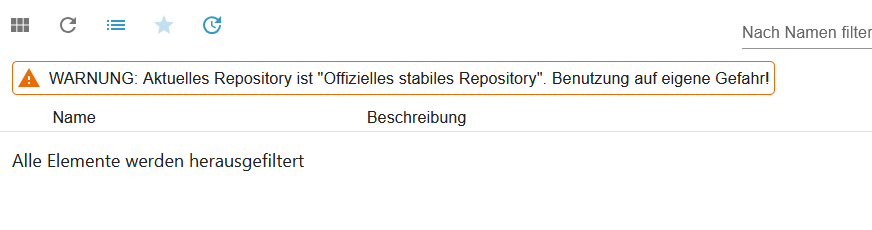
          Keine Adapter zu sehen.png

          HomoranH 1 Antwort Letzte Antwort
          0
          • T Tombir

            @homoran

            Gerade als ich den Beitrag abgeschickt hatte, hat sich iobroker wieder zurück gemeldet.
            Allerdings habe ich ein neues Problem:
            Ich sehe die Adapter nicht. Statt dessen kommt das:
            Keine Adapter zu sehen.png

            HomoranH Nicht stören
            HomoranH Nicht stören
            Homoran
            Global Moderator Administrators
            schrieb am zuletzt editiert von
            #5

            @tombir sagte in iobroker nach Einspielen Backup nicht mehr erreichbar:

            Ich sehe die Adapter nicht.

            sieh mal auf die unterste Zeile und schalt die Filter aus

            kein Support per PN! - Fragen im Forum stellen -
            Benutzt das Voting rechts unten im Beitrag wenn er euch geholfen hat.
            Das Forum freut sich über eine Spende. Benutzt dazu den Spendenbutton im Header. Danke!
            der Installationsfixer: curl -fsL https://iobroker.net/fix.sh | bash -

            T 1 Antwort Letzte Antwort
            0
            • HomoranH Homoran

              @tombir sagte in iobroker nach Einspielen Backup nicht mehr erreichbar:

              Ich sehe die Adapter nicht.

              sieh mal auf die unterste Zeile und schalt die Filter aus

              T Offline
              T Offline
              Tombir
              schrieb am zuletzt editiert von
              #6

              @homoran said in iobroker nach Einspielen Backup nicht mehr erreichbar:

              sieh mal auf die unterste Zeile und schalt die Filter aus

              Super, hat funktioniert!

              Leider geht iob diag noch immer nicht, auch wenn ich iob fix ausgeführt habe.
              Und vis funktioniert auch noch nicht.

              HomoranH T 2 Antworten Letzte Antwort
              0
              • T Tombir

                @homoran said in iobroker nach Einspielen Backup nicht mehr erreichbar:

                sieh mal auf die unterste Zeile und schalt die Filter aus

                Super, hat funktioniert!

                Leider geht iob diag noch immer nicht, auch wenn ich iob fix ausgeführt habe.
                Und vis funktioniert auch noch nicht.

                HomoranH Nicht stören
                HomoranH Nicht stören
                Homoran
                Global Moderator Administrators
                schrieb am zuletzt editiert von
                #7

                @tombir sagte in iobroker nach Einspielen Backup nicht mehr erreichbar:

                auch wenn ich iob fix ausgeführt habe.

                @homoran sagte in iobroker nach Einspielen Backup nicht mehr erreichbar:

                Was kommt dann?

                oder

                @thomas-braun sagte in iobroker nach Einspielen Backup nicht mehr erreichbar:

                @tombir
                Falls Raspberry OS:
                Versuch die Beta-Version für Raspbian von hier:
                https://forum.iobroker.net/topic/59549/iob-diag-skript

                bitte mehr Informationen!

                kein Support per PN! - Fragen im Forum stellen -
                Benutzt das Voting rechts unten im Beitrag wenn er euch geholfen hat.
                Das Forum freut sich über eine Spende. Benutzt dazu den Spendenbutton im Header. Danke!
                der Installationsfixer: curl -fsL https://iobroker.net/fix.sh | bash -

                T 1 Antwort Letzte Antwort
                0
                • T Tombir

                  @homoran said in iobroker nach Einspielen Backup nicht mehr erreichbar:

                  sieh mal auf die unterste Zeile und schalt die Filter aus

                  Super, hat funktioniert!

                  Leider geht iob diag noch immer nicht, auch wenn ich iob fix ausgeführt habe.
                  Und vis funktioniert auch noch nicht.

                  T Offline
                  T Offline
                  Tombir
                  schrieb am zuletzt editiert von
                  #8

                  @tombir said in iobroker nach Einspielen Backup nicht mehr erreichbar:

                  Und vis funktioniert auch noch nicht.

                  Vis funktioniert nun auch wieder, ich musste noch die Adapter starten (hatte ich nicht gleich gesehen, dass sie noch aus waren)

                  Seltsam ist aber: iob diag funktioniert nach wie vor nicht.

                  1 Antwort Letzte Antwort
                  0
                  • HomoranH Homoran

                    @tombir sagte in iobroker nach Einspielen Backup nicht mehr erreichbar:

                    auch wenn ich iob fix ausgeführt habe.

                    @homoran sagte in iobroker nach Einspielen Backup nicht mehr erreichbar:

                    Was kommt dann?

                    oder

                    @thomas-braun sagte in iobroker nach Einspielen Backup nicht mehr erreichbar:

                    @tombir
                    Falls Raspberry OS:
                    Versuch die Beta-Version für Raspbian von hier:
                    https://forum.iobroker.net/topic/59549/iob-diag-skript

                    bitte mehr Informationen!

                    T Offline
                    T Offline
                    Tombir
                    schrieb am zuletzt editiert von
                    #9

                    @homoran

                    Hier die Infos zu iob fix

                    pi@raspberrypi:~ $ iobroker fix
                    library: loaded
                    Library version=2024-10-22
                    
                    ==========================================================================
                    
                        Welcome to the ioBroker installation fixer!
                        Script version: 2024-10-22
                    
                        You might need to enter your password a couple of times.
                    
                    ==========================================================================
                    
                    
                    ==========================================================================
                        Installing prerequisites (1/5)
                    ==========================================================================
                    
                    Hit:1 http://raspbian.raspberrypi.com/raspbian bookworm InRelease
                    Hit:2 https://deb.nodesource.com/node_20.x nodistro InRelease
                    Hit:3 http://archive.raspberrypi.com/debian bookworm InRelease
                    Reading package lists... Done
                    W: http://raspbian.raspberrypi.com/raspbian/dists/bookworm/InRelease: Key is stored in legacy trusted.gpg keyring (/etc/apt/trusted.gpg), see the DEPRECATION section in apt-key(8) for details.
                    
                    ==========================================================================
                        Checking ioBroker user and directory permissions (2/5)
                    ==========================================================================
                    
                    Created /etc/sudoers.d/iobroker
                    Fixing directory permissions...
                    
                    ==========================================================================
                        Check and cleanup npm temporary directories (3/5)
                    ==========================================================================
                    
                    Done.
                    
                    ==========================================================================
                        Database maintenance (4/5)
                    ==========================================================================
                    
                    Checking for uncompressed JSONL databases... This might take a while!
                    
                    Compressing /opt/iobroker/iobroker-data/states.jsonl
                    Compressing /opt/iobroker/iobroker-data/objects.jsonl
                    Compressed 2 JSONL files. Done
                    
                    ==========================================================================
                        Checking autostart (5/5)
                    ==========================================================================
                    
                    ==== AUTHENTICATING FOR org.freedesktop.systemd1.manage-units ====
                    Authentication is required to stop 'iobroker.service'.
                    Authenticating as: ,,, (pi)
                    Password:
                    ==== AUTHENTICATION COMPLETE ====
                    Enabling autostart...
                    Autostart enabled!
                    
                    ==========================================================================
                    
                        Your installation was fixed successfully
                        Run iobroker start to start ioBroker again!
                    
                    ==========================================================================
                    
                    pi@raspberrypi:~ $
                    
                    
                    HomoranH 1 Antwort Letzte Antwort
                    0
                    • T Tombir

                      @homoran

                      Hier die Infos zu iob fix

                      pi@raspberrypi:~ $ iobroker fix
                      library: loaded
                      Library version=2024-10-22
                      
                      ==========================================================================
                      
                          Welcome to the ioBroker installation fixer!
                          Script version: 2024-10-22
                      
                          You might need to enter your password a couple of times.
                      
                      ==========================================================================
                      
                      
                      ==========================================================================
                          Installing prerequisites (1/5)
                      ==========================================================================
                      
                      Hit:1 http://raspbian.raspberrypi.com/raspbian bookworm InRelease
                      Hit:2 https://deb.nodesource.com/node_20.x nodistro InRelease
                      Hit:3 http://archive.raspberrypi.com/debian bookworm InRelease
                      Reading package lists... Done
                      W: http://raspbian.raspberrypi.com/raspbian/dists/bookworm/InRelease: Key is stored in legacy trusted.gpg keyring (/etc/apt/trusted.gpg), see the DEPRECATION section in apt-key(8) for details.
                      
                      ==========================================================================
                          Checking ioBroker user and directory permissions (2/5)
                      ==========================================================================
                      
                      Created /etc/sudoers.d/iobroker
                      Fixing directory permissions...
                      
                      ==========================================================================
                          Check and cleanup npm temporary directories (3/5)
                      ==========================================================================
                      
                      Done.
                      
                      ==========================================================================
                          Database maintenance (4/5)
                      ==========================================================================
                      
                      Checking for uncompressed JSONL databases... This might take a while!
                      
                      Compressing /opt/iobroker/iobroker-data/states.jsonl
                      Compressing /opt/iobroker/iobroker-data/objects.jsonl
                      Compressed 2 JSONL files. Done
                      
                      ==========================================================================
                          Checking autostart (5/5)
                      ==========================================================================
                      
                      ==== AUTHENTICATING FOR org.freedesktop.systemd1.manage-units ====
                      Authentication is required to stop 'iobroker.service'.
                      Authenticating as: ,,, (pi)
                      Password:
                      ==== AUTHENTICATION COMPLETE ====
                      Enabling autostart...
                      Autostart enabled!
                      
                      ==========================================================================
                      
                          Your installation was fixed successfully
                          Run iobroker start to start ioBroker again!
                      
                      ==========================================================================
                      
                      pi@raspberrypi:~ $
                      
                      
                      HomoranH Nicht stören
                      HomoranH Nicht stören
                      Homoran
                      Global Moderator Administrators
                      schrieb am zuletzt editiert von Homoran
                      #10

                      @tombir sagte in iobroker nach Einspielen Backup nicht mehr erreichbar:

                      Hier die Infos zu iob fix

                      ist es ein Raspi?
                      sieht danach aus!

                      wenn ja, ist es die verlinkte Variante für den Raspi?

                      kein Support per PN! - Fragen im Forum stellen -
                      Benutzt das Voting rechts unten im Beitrag wenn er euch geholfen hat.
                      Das Forum freut sich über eine Spende. Benutzt dazu den Spendenbutton im Header. Danke!
                      der Installationsfixer: curl -fsL https://iobroker.net/fix.sh | bash -

                      T 1 Antwort Letzte Antwort
                      0
                      • HomoranH Homoran

                        @tombir sagte in iobroker nach Einspielen Backup nicht mehr erreichbar:

                        Hier die Infos zu iob fix

                        ist es ein Raspi?
                        sieht danach aus!

                        wenn ja, ist es die verlinkte Variante für den Raspi?

                        T Offline
                        T Offline
                        Tombir
                        schrieb am zuletzt editiert von
                        #11

                        @homoran said in iobroker nach Einspielen Backup nicht mehr erreichbar:

                        ist es ein Raspi?
                        sieht danach aus!
                        wenn ja, ist es die verlinkte Variante für den Raspi?

                        Ja, es ist ein Raspi4
                        Was meinst du mit "verlinkte Variante"?

                        Ach ja, und wenn ich iobroker starte kommt nur das:

                        
                        pi@raspberrypi:~ $ iobroker start
                        pi@raspberrypi:~ $
                        
                        
                        HomoranH 1 Antwort Letzte Antwort
                        0
                        • T Tombir

                          @homoran said in iobroker nach Einspielen Backup nicht mehr erreichbar:

                          ist es ein Raspi?
                          sieht danach aus!
                          wenn ja, ist es die verlinkte Variante für den Raspi?

                          Ja, es ist ein Raspi4
                          Was meinst du mit "verlinkte Variante"?

                          Ach ja, und wenn ich iobroker starte kommt nur das:

                          
                          pi@raspberrypi:~ $ iobroker start
                          pi@raspberrypi:~ $
                          
                          
                          HomoranH Nicht stören
                          HomoranH Nicht stören
                          Homoran
                          Global Moderator Administrators
                          schrieb am zuletzt editiert von
                          #12

                          @tombir sagte in iobroker nach Einspielen Backup nicht mehr erreichbar:

                          Was meinst du mit "verlinkte Variante"?

                          das hier
                          @thomas-braun sagte in iobroker nach Einspielen Backup nicht mehr erreichbar:

                          @tombir
                          Falls Raspberry OS:
                          Versuch die Beta-Version für Raspbian von hier:
                          https://forum.iobroker.net/topic/59549/iob-diag-skript

                          kein Support per PN! - Fragen im Forum stellen -
                          Benutzt das Voting rechts unten im Beitrag wenn er euch geholfen hat.
                          Das Forum freut sich über eine Spende. Benutzt dazu den Spendenbutton im Header. Danke!
                          der Installationsfixer: curl -fsL https://iobroker.net/fix.sh | bash -

                          T 1 Antwort Letzte Antwort
                          0
                          • HomoranH Homoran

                            @tombir sagte in iobroker nach Einspielen Backup nicht mehr erreichbar:

                            Was meinst du mit "verlinkte Variante"?

                            das hier
                            @thomas-braun sagte in iobroker nach Einspielen Backup nicht mehr erreichbar:

                            @tombir
                            Falls Raspberry OS:
                            Versuch die Beta-Version für Raspbian von hier:
                            https://forum.iobroker.net/topic/59549/iob-diag-skript

                            T Offline
                            T Offline
                            Tombir
                            schrieb am zuletzt editiert von
                            #13

                            @homoran

                            Ich habe nicht die verlinkte Beta-Version, sonder die Lite-Version von der Raspberry Pi Seite (über den Raspberry Pi Imager).

                            HomoranH 1 Antwort Letzte Antwort
                            0
                            • T Tombir

                              @homoran

                              Ich habe nicht die verlinkte Beta-Version, sonder die Lite-Version von der Raspberry Pi Seite (über den Raspberry Pi Imager).

                              HomoranH Nicht stören
                              HomoranH Nicht stören
                              Homoran
                              Global Moderator Administrators
                              schrieb am zuletzt editiert von
                              #14

                              @tombir sagte in iobroker nach Einspielen Backup nicht mehr erreichbar:

                              @homoran

                              Ich habe nicht die verlinkte Beta-Version, sonder die Lite-Version von der Raspberry Pi Seite (über den Raspberry Pi Imager).

                              Das ist die Beta-Version des iob-fix, nicht des Betriebssystems.

                              die normale Version hat im Moment ein Problem mit dem Raspberrypi OS

                              kein Support per PN! - Fragen im Forum stellen -
                              Benutzt das Voting rechts unten im Beitrag wenn er euch geholfen hat.
                              Das Forum freut sich über eine Spende. Benutzt dazu den Spendenbutton im Header. Danke!
                              der Installationsfixer: curl -fsL https://iobroker.net/fix.sh | bash -

                              1 Antwort Letzte Antwort
                              0
                              • Thomas BraunT Thomas Braun

                                @tombir

                                Falls Raspberry OS:
                                Versuch die Beta-Version für Raspbian von hier:

                                https://forum.iobroker.net/topic/59549/iob-diag-skript

                                mein System von Buster auf Bookworm zu bringen.

                                Ich hoffer per Neuinstallation von Bookworm und nicht per in-line-Upgrade.

                                T Offline
                                T Offline
                                Tombir
                                schrieb am zuletzt editiert von
                                #15

                                @thomas-braun said in iobroker nach Einspielen Backup nicht mehr erreichbar:

                                Falls Raspberry OS:
                                Versuch die Beta-Version für Raspbian von hier:
                                https://forum.iobroker.net/topic/59549/iob-diag-skript

                                mein System von Buster auf Bookworm zu bringen.

                                Ich hoffer per Neuinstallation von Bookworm und nicht per in-line-Upgrade.

                                Dein Beitrag ist von 2022. Sind die zu Beginn stehenden Links noch aktuell?

                                Thomas BraunT HomoranH 2 Antworten Letzte Antwort
                                0
                                • T Tombir

                                  @thomas-braun said in iobroker nach Einspielen Backup nicht mehr erreichbar:

                                  Falls Raspberry OS:
                                  Versuch die Beta-Version für Raspbian von hier:
                                  https://forum.iobroker.net/topic/59549/iob-diag-skript

                                  mein System von Buster auf Bookworm zu bringen.

                                  Ich hoffer per Neuinstallation von Bookworm und nicht per in-line-Upgrade.

                                  Dein Beitrag ist von 2022. Sind die zu Beginn stehenden Links noch aktuell?

                                  Thomas BraunT Online
                                  Thomas BraunT Online
                                  Thomas Braun
                                  Most Active
                                  schrieb am zuletzt editiert von
                                  #16

                                  @tombir sagte in iobroker nach Einspielen Backup nicht mehr erreichbar:

                                  Dein Beitrag ist von 2022. Sind die zu Beginn stehenden Links noch aktuell?

                                  Ja. Ganz aktuell. Die Variante für Raspberry ist ganz frisch angelegt, weil eben die vom ioBroker mitgelieferte Version gerade klemmt.

                                  Linux-Werkzeugkasten:
                                  https://forum.iobroker.net/topic/42952/der-kleine-iobroker-linux-werkzeugkasten
                                  NodeJS Fixer Skript:
                                  https://forum.iobroker.net/topic/68035/iob-node-fix-skript
                                  iob_diag: curl -sLf -o diag.sh https://iobroker.net/diag.sh && bash diag.sh

                                  1 Antwort Letzte Antwort
                                  0
                                  • T Tombir

                                    @thomas-braun said in iobroker nach Einspielen Backup nicht mehr erreichbar:

                                    Falls Raspberry OS:
                                    Versuch die Beta-Version für Raspbian von hier:
                                    https://forum.iobroker.net/topic/59549/iob-diag-skript

                                    mein System von Buster auf Bookworm zu bringen.

                                    Ich hoffer per Neuinstallation von Bookworm und nicht per in-line-Upgrade.

                                    Dein Beitrag ist von 2022. Sind die zu Beginn stehenden Links noch aktuell?

                                    HomoranH Nicht stören
                                    HomoranH Nicht stören
                                    Homoran
                                    Global Moderator Administrators
                                    schrieb am zuletzt editiert von Homoran
                                    #17

                                    @tombir

                                    mach bitte was da im Post steht

                                    curl https://raw.githubusercontent.com/Grothesk242/ioBroker/refs/heads/Raspbian/diag.sh > iob_diag.sh
                                    chmod 744 iob_diag.sh
                                    ./iob_diag.sh
                                    

                                    kein Support per PN! - Fragen im Forum stellen -
                                    Benutzt das Voting rechts unten im Beitrag wenn er euch geholfen hat.
                                    Das Forum freut sich über eine Spende. Benutzt dazu den Spendenbutton im Header. Danke!
                                    der Installationsfixer: curl -fsL https://iobroker.net/fix.sh | bash -

                                    T 1 Antwort Letzte Antwort
                                    0
                                    • HomoranH Homoran

                                      @tombir

                                      mach bitte was da im Post steht

                                      curl https://raw.githubusercontent.com/Grothesk242/ioBroker/refs/heads/Raspbian/diag.sh > iob_diag.sh
                                      chmod 744 iob_diag.sh
                                      ./iob_diag.sh
                                      
                                      T Offline
                                      T Offline
                                      Tombir
                                      schrieb am zuletzt editiert von
                                      #18

                                      @homoran said in iobroker nach Einspielen Backup nicht mehr erreichbar:

                                      ./iob_diag.sh

                                      
                                      ========== Start marking the full check here ===========
                                      
                                      ```bash
                                      Script v.2024-10-26 Raspbian
                                      
                                      *** BASE SYSTEM ***
                                       Static hostname: raspberrypi
                                             Icon name: computer
                                      Operating System: Raspbian GNU/Linux 12 (bookworm)
                                                Kernel: Linux 6.6.51+rpt-rpi-v8
                                          Architecture: arm64
                                      OS is similar to: debian
                                      
                                      Model           : Raspberry Pi 4 Model B Rev 1.2
                                      Docker          : false
                                      Virtualization  : none
                                      Kernel          : aarch64
                                      Userland        : 32 bit
                                      
                                      Systemuptime and Load:
                                       13:02:20 up  1:13,  1 user,  load average: 0.68, 0.75, 0.65
                                      CPU threads: 4
                                      
                                      
                                      *** LIFE CYCLE STATUS ***
                                      Operating System is the current Debian stable version codenamed 'bookworm'!
                                      
                                      *** RASPBERRY THROTTLING ***
                                      Current issues:
                                      No throttling issues detected.
                                      
                                      Previously detected issues:
                                      No throttling issues detected.
                                      
                                      *** TIME AND TIMEZONES ***
                                                     Local time: Wed 2024-11-06 13:02:21 CET
                                                 Universal time: Wed 2024-11-06 12:02:21 UTC
                                                       RTC time: n/a
                                                      Time zone: Europe/Berlin (CET, +0100)
                                      System clock synchronized: yes
                                                    NTP service: active
                                                RTC in local TZ: no
                                      
                                      *** Users and Groups ***
                                      User that called 'iob diag':
                                      pi
                                      HOME=/home/pi
                                      GROUPS=pi adm dialout cdrom sudo audio video plugdev games users input render netdev gpio i2c spi iobroker
                                      
                                      User that is running 'js-controller':
                                      iobroker
                                      HOME=/home/iobroker
                                      GROUPS=iobroker tty dialout audio video plugdev bluetooth gpio i2c
                                      
                                      *** DISPLAY-SERVER SETUP ***
                                      Display-Server: false
                                      Desktop:
                                      Terminal:       tty
                                      
                                      *** MEMORY ***
                                                     total        used        free      shared  buff/cache   available
                                      Mem:            4.0G        1.1G        2.3G        1.2M        706M        2.9G
                                      Swap:           209M          0B        209M
                                      Total:          4.2G        1.1G        2.5G
                                      
                                      Active iob-Instances:   21
                                      
                                               3791 M total memory
                                               1007 M used memory
                                                971 M active memory
                                                437 M inactive memory
                                               2187 M free memory
                                                 80 M buffer memory
                                                593 M swap cache
                                                199 M total swap
                                                  0 M used swap
                                                199 M free swap
                                      
                                      *** top - Table Of Processes  ***
                                      top - 13:02:21 up  1:13,  1 user,  load average: 0.68, 0.75, 0.65
                                      Tasks: 183 total,   2 running, 181 sleeping,   0 stopped,   0 zombie
                                      %Cpu(s):  0.0 us, 20.0 sy,  0.0 ni, 80.0 id,  0.0 wa,  0.0 hi,  0.0 si,  0.0 st
                                      MiB Mem :   3792.0 total,   2186.9 free,   1007.6 used,    674.4 buff/cache
                                      MiB Swap:    200.0 total,    200.0 free,      0.0 used.   2784.4 avail Mem
                                      
                                      *** FAILED SERVICES ***
                                      
                                        UNIT LOAD ACTIVE SUB DESCRIPTION
                                      0 loaded units listed.
                                      
                                      
                                      *** DMESG CRITICAL ERRORS ***
                                      No critical errors detected
                                      
                                      *** FILESYSTEM ***
                                      Filesystem     Type      Size  Used Avail Use% Mounted on
                                      udev           devtmpfs  1.6G     0  1.6G   0% /dev
                                      tmpfs          tmpfs     380M  1.2M  379M   1% /run
                                      /dev/mmcblk0p2 ext4       29G  5.8G   22G  22% /
                                      tmpfs          tmpfs     1.9G     0  1.9G   0% /dev/shm
                                      tmpfs          tmpfs     5.0M   16K  5.0M   1% /run/lock
                                      /dev/mmcblk0p1 vfat      510M   97M  414M  19% /boot/firmware
                                      tmpfs          tmpfs     380M     0  380M   0% /run/user/1000
                                      
                                      Messages concerning ext4 filesystem in dmesg:
                                      [Wed Nov  6 11:48:29 2024] Kernel command line: coherent_pool=1M 8250.nr_uarts=0 snd_bcm2835.enable_headphones=0 snd_bcm2835.enable_headphones=1 snd_bcm2835.enable_hdmi=1 snd_bcm2835.enable_hdmi=0  smsc95xx.macaddr=DC:A6:32:EA:20:D4 vc_mem.mem_base=0x3ec00000 vc_mem.mem_size=0x40000000  console=ttyS0,115200 console=tty1 root=PARTUUID=1f7ac24d-02 rootfstype=ext4 fsck.repair=yes rootwait
                                      [Wed Nov  6 11:48:32 2024] EXT4-fs (mmcblk0p2): mounted filesystem da446b36-5471-4511-8f90-c08e4ba7eb83 ro with ordered data mode. Quota mode: none.
                                      [Wed Nov  6 11:48:33 2024] EXT4-fs (mmcblk0p2): re-mounted da446b36-5471-4511-8f90-c08e4ba7eb83 r/w. Quota mode: none.
                                      
                                      Show mounted filesystems:
                                      TARGET           SOURCE         FSTYPE OPTIONS
                                      /                /dev/mmcblk0p2 ext4   rw,noatime
                                      `-/boot/firmware /dev/mmcblk0p1 vfat   rw,relatime,fmask=0022,dmask=0022,codepage=437,iocharset=ascii,shortname=mixed,errors=remount-ro
                                      
                                      Files in neuralgic directories:
                                      
                                      /var:
                                      541M    /var/
                                      160M    /var/cache
                                      155M    /var/cache/apt
                                      108M    /var/lib
                                      79M     /var/cache/apt/archives
                                      
                                      Archived and active journals take up 72.0M in the file system.
                                      
                                      /opt/iobroker/backups:
                                      102M    /opt/iobroker/backups/
                                      
                                      /opt/iobroker/iobroker-data:
                                      939M    /opt/iobroker/iobroker-data/
                                      886M    /opt/iobroker/iobroker-data/files
                                      617M    /opt/iobroker/iobroker-data/files/javascript.admin
                                      560M    /opt/iobroker/iobroker-data/files/javascript.admin/static
                                      558M    /opt/iobroker/iobroker-data/files/javascript.admin/static/js
                                      
                                      The five largest files in iobroker-data are:
                                      26M     /opt/iobroker/iobroker-data/files/echarts/static/js/main.41cee985.js.map
                                      26M     /opt/iobroker/iobroker-data/files/echarts.admin/chart/static/js/main.41cee985.js.map
                                      24M     /opt/iobroker/iobroker-data/files/web.admin/static/js/main.135279a0.js.map
                                      24M     /opt/iobroker/iobroker-data/files/echarts.admin/static/js/main.70a15e1f.js.map
                                      18M     /opt/iobroker/iobroker-data/files/echarts/preview/static/js/main.5fe9c7da.js.map
                                      
                                      USB-Devices by-id:
                                      USB-Sticks -  Avoid direct links to /dev/tty* in your adapter setups, please always prefer the links 'by-id':
                                      
                                      No Devices found 'by-id'
                                      
                                      *** NodeJS-Installation ***
                                      
                                      /usr/bin/nodejs         v20.18.0
                                      /usr/bin/node           v20.18.0
                                      /usr/bin/npm            10.8.2
                                      /usr/bin/npx            10.8.2
                                      /usr/bin/corepack       0.29.3
                                      
                                      nodejs:
                                        Installed: 20.18.0-1nodesource1
                                        Candidate: 20.18.0-1nodesource1
                                        Version table:
                                       *** 20.18.0-1nodesource1 1001
                                              500 https://deb.nodesource.com/node_20.x nodistro/main armhf Packages
                                              100 /var/lib/dpkg/status
                                           20.17.0-1nodesource1 1001
                                              500 https://deb.nodesource.com/node_20.x nodistro/main armhf Packages
                                           20.16.0-1nodesource1 1001
                                              500 https://deb.nodesource.com/node_20.x nodistro/main armhf Packages
                                           20.15.1-1nodesource1 1001
                                              500 https://deb.nodesource.com/node_20.x nodistro/main armhf Packages
                                           20.15.0-1nodesource1 1001
                                              500 https://deb.nodesource.com/node_20.x nodistro/main armhf Packages
                                           20.14.0-1nodesource1 1001
                                              500 https://deb.nodesource.com/node_20.x nodistro/main armhf Packages
                                           20.13.1-1nodesource1 1001
                                              500 https://deb.nodesource.com/node_20.x nodistro/main armhf Packages
                                           20.13.0-1nodesource1 1001
                                              500 https://deb.nodesource.com/node_20.x nodistro/main armhf Packages
                                           20.12.2-1nodesource1 1001
                                              500 https://deb.nodesource.com/node_20.x nodistro/main armhf Packages
                                           20.12.1-1nodesource1 1001
                                              500 https://deb.nodesource.com/node_20.x nodistro/main armhf Packages
                                           20.12.0-1nodesource1 1001
                                              500 https://deb.nodesource.com/node_20.x nodistro/main armhf Packages
                                           20.11.1-1nodesource1 1001
                                              500 https://deb.nodesource.com/node_20.x nodistro/main armhf Packages
                                           20.11.0-1nodesource1 1001
                                              500 https://deb.nodesource.com/node_20.x nodistro/main armhf Packages
                                           20.10.0-1nodesource1 1001
                                              500 https://deb.nodesource.com/node_20.x nodistro/main armhf Packages
                                           20.9.0-1nodesource1 1001
                                              500 https://deb.nodesource.com/node_20.x nodistro/main armhf Packages
                                           20.8.1-1nodesource1 1001
                                              500 https://deb.nodesource.com/node_20.x nodistro/main armhf Packages
                                           20.8.0-1nodesource1 1001
                                              500 https://deb.nodesource.com/node_20.x nodistro/main armhf Packages
                                           20.7.0-1nodesource1 1001
                                              500 https://deb.nodesource.com/node_20.x nodistro/main armhf Packages
                                           20.6.1-1nodesource1 1001
                                              500 https://deb.nodesource.com/node_20.x nodistro/main armhf Packages
                                           20.6.0-1nodesource1 1001
                                              500 https://deb.nodesource.com/node_20.x nodistro/main armhf Packages
                                           20.5.1-1nodesource1 1001
                                              500 https://deb.nodesource.com/node_20.x nodistro/main armhf Packages
                                           20.5.0-1nodesource1 1001
                                              500 https://deb.nodesource.com/node_20.x nodistro/main armhf Packages
                                           20.4.0-1nodesource1 1001
                                              500 https://deb.nodesource.com/node_20.x nodistro/main armhf Packages
                                           20.3.1-1nodesource1 1001
                                              500 https://deb.nodesource.com/node_20.x nodistro/main armhf Packages
                                           20.3.0-1nodesource1 1001
                                              500 https://deb.nodesource.com/node_20.x nodistro/main armhf Packages
                                           20.2.0-1nodesource1 1001
                                              500 https://deb.nodesource.com/node_20.x nodistro/main armhf Packages
                                           20.1.0-1nodesource1 1001
                                              500 https://deb.nodesource.com/node_20.x nodistro/main armhf Packages
                                           20.0.0-1nodesource1 1001
                                              500 https://deb.nodesource.com/node_20.x nodistro/main armhf Packages
                                           18.19.0+dfsg-6~deb12u2+rpi1 500
                                              500 http://raspbian.raspberrypi.com/raspbian bookworm/main armhf Packages
                                      
                                      Temp directories causing deletion problem: 0
                                      No problems detected
                                      
                                      Errors in npm tree: 0
                                      No problems detected
                                      
                                      *** ioBroker-Installation ***
                                      
                                      ioBroker Status
                                      iobroker is running on this host.
                                      
                                      
                                      Objects type: jsonl
                                      States  type: jsonl
                                      
                                      Hosts:
                                      raspberrypi         raspberrypi (version: 6.0.11, hostname: raspberrypi   , alive, uptime: 1413)
                                      
                                      Core adapters versions
                                      js-controller:  6.0.11
                                      admin:          7.1.5
                                      javascript:     8.8.3
                                      
                                      nodejs modules from github:     0
                                      
                                      Adapter State
                                      + system.adapter.admin.0                  : admin                 : raspberrypi                              -  enabled, port: 8081, bind: 0.0.0.0 (SSL), run as: admin
                                      + system.adapter.backitup.0               : backitup              : raspberrypi                              -  enabled
                                      + system.adapter.discovery.0              : discovery             : raspberrypi                              -  enabled
                                      + system.adapter.ds18b20.0                : ds18b20               : raspberrypi                              -  enabled
                                        system.adapter.echarts.0                : echarts               : raspberrypi                              - disabled
                                        system.adapter.flot.0                   : flot                  : raspberrypi                              - disabled
                                      + system.adapter.fritzdect.0              : fritzdect             : raspberrypi                              -  enabled
                                      + system.adapter.fronius-wattpilot.0      : fronius-wattpilot     : raspberrypi                              -  enabled
                                      + system.adapter.fronius-wattpilot.1      : fronius-wattpilot     : raspberrypi                              -  enabled
                                      + system.adapter.fronius.0                : fronius               : raspberrypi                              -  enabled
                                      + system.adapter.history.0                : history               : raspberrypi                              -  enabled
                                      + system.adapter.influxdb.0               : influxdb              : raspberrypi                              -  enabled, port: 8086
                                        system.adapter.info.0                   : info                  : raspberrypi                              -  enabled
                                      + system.adapter.javascript.0             : javascript            : raspberrypi                              -  enabled
                                        system.adapter.mqtt-client.0            : mqtt-client           : raspberrypi                              - disabled, port: 1883
                                      + system.adapter.mqtt.0                   : mqtt                  : raspberrypi                              -  enabled, port: 1884, bind: 192.168.178.22
                                      + system.adapter.netatmo.0                : netatmo               : raspberrypi                              -  enabled
                                        system.adapter.ocpp.0                   : ocpp                  : raspberrypi                              - disabled, port: 9220
                                        system.adapter.onvif.0                  : onvif                 : raspberrypi                              - disabled
                                      + system.adapter.parser.0                 : parser                : raspberrypi                              -  enabled
                                      + system.adapter.ping.0                   : ping                  : raspberrypi                              -  enabled
                                      + system.adapter.rpi2.0                   : rpi2                  : raspberrypi                              -  enabled
                                      + system.adapter.sonoff.0                 : sonoff                : raspberrypi                              -  enabled, port: 1883, bind: 0.0.0.0
                                      + system.adapter.tr-064.0                 : tr-064                : raspberrypi                              -  enabled
                                      + system.adapter.tuya.0                   : tuya                  : raspberrypi                              -  enabled
                                        system.adapter.vis-hqwidgets.0          : vis-hqwidgets         : raspberrypi                              - disabled
                                        system.adapter.vis-timeandweather.0     : vis-timeandweather    : raspberrypi                              - disabled
                                        system.adapter.vis.0                    : vis                   : raspberrypi                              -  enabled
                                      + system.adapter.web.0                    : web                   : raspberrypi                              -  enabled, port: 8082, bind: 0.0.0.0, run as: admin
                                      
                                      + instance is alive
                                      
                                      Enabled adapters with bindings
                                      + system.adapter.admin.0                  : admin                 : raspberrypi                              -  enabled, port: 8081, bind: 0.0.0.0 (SSL), run as: admin
                                      + system.adapter.influxdb.0               : influxdb              : raspberrypi                              -  enabled, port: 8086
                                      + system.adapter.mqtt.0                   : mqtt                  : raspberrypi                              -  enabled, port: 1884, bind: 192.168.178.22
                                      + system.adapter.sonoff.0                 : sonoff                : raspberrypi                              -  enabled, port: 1883, bind: 0.0.0.0
                                      + system.adapter.web.0                    : web                   : raspberrypi                              -  enabled, port: 8082, bind: 0.0.0.0, run as: admin
                                      
                                      ioBroker-Repositories
                                      ┌─────────┬──────────┬─────────────────────────────────────────────────────────┬──────────────┐
                                      │ (index) │ name     │ url                                                     │ auto upgrade │
                                      ├─────────┼──────────┼─────────────────────────────────────────────────────────┼──────────────┤
                                      │ 0       │ 'stable' │ 'http://download.iobroker.net/sources-dist.json'        │ false        │
                                      │ 1       │ 'beta'   │ 'http://download.iobroker.net/sources-dist-latest.json' │ false        │
                                      └─────────┴──────────┴─────────────────────────────────────────────────────────┴──────────────┘
                                      
                                      Active repo(s): stable
                                      Upgrade policy: none
                                      
                                      Installed ioBroker-Instances
                                      Used repository: stable
                                      Adapter    "admin"        : 7.1.5    , installed 7.1.5
                                      Adapter    "backitup"     : 3.0.25   , installed 3.0.25
                                      Adapter    "discovery"    : 5.0.0    , installed 5.0.0
                                      Adapter    "ds18b20"      : 2.0.5    , installed 2.0.5
                                      Adapter    "echarts"      : 1.9.2    , installed 1.9.2
                                      Adapter    "flot"         : 1.12.0   , installed 1.12.0
                                      Adapter    "fritzdect"    : 2.5.11   , installed 2.5.11
                                      Adapter    "fronius"      : 2.1.1    , installed 2.1.1
                                      Adapter    "fronius-wattpilot": 4.6.3, installed 4.6.3
                                      Adapter    "history"      : 3.0.1    , installed 3.0.1
                                      Adapter    "influxdb"     : 4.0.2    , installed 4.0.2
                                      Adapter    "javascript"   : 8.8.3    , installed 8.8.3
                                      Controller "js-controller": 6.0.11   , installed 6.0.11
                                      Adapter    "mqtt"         : 6.1.2    , installed 6.1.2
                                      Adapter    "mqtt-client"  : 2.0.0    , installed 2.0.0
                                      Adapter    "netatmo"      : 3.1.0    , installed 3.1.0
                                      Adapter    "ocpp"         : 0.12.5   , installed 0.12.5
                                      Adapter    "onvif"        : 1.1.4    , installed 1.1.4
                                      Adapter    "parser"       : 2.2.4    , installed 2.2.4
                                      Adapter    "ping"         : 1.6.2    , installed 1.6.2
                                      Adapter    "rpi2"         : 2.2.1    , installed 2.2.1
                                      Adapter    "simple-api"   : 2.8.0    , installed 2.8.0
                                      Adapter    "socketio"     : 6.7.1    , installed 6.7.1
                                      Adapter    "sonoff"       : 3.1.2    , installed 3.1.2
                                      Adapter    "tr-064"       : 4.3.0    , installed 4.3.0
                                      Adapter    "tuya"         : 3.16.0   , installed 3.16.0
                                      Adapter    "vis"          : 1.5.6    , installed 1.5.6
                                      Adapter    "vis-hqwidgets": 1.5.1    , installed 1.5.1
                                      Adapter    "vis-timeandweather": 1.2.2, installed 1.2.2
                                      Adapter    "web"          : 6.2.5    , installed 6.2.5
                                      Adapter    "ws"           : 2.6.2    , installed 2.6.2
                                      
                                      Objects and States
                                      Please stand by - This may take a while
                                      Objects:        2292
                                      States:         1749
                                      
                                      *** OS-Repositories and Updates ***
                                      W: http://raspbian.raspberrypi.com/raspbian/dists/bookworm/InRelease: Key is stored in legacy trusted.gpg keyring (/etc/apt/trusted.gpg), see the DEPRECATION section in apt-key(8) for details.
                                      Hit:1 http://raspbian.raspberrypi.com/raspbian bookworm InRelease
                                      Hit:2 http://archive.raspberrypi.com/debian bookworm InRelease
                                      Hit:3 https://deb.nodesource.com/node_20.x nodistro InRelease
                                      Reading package lists... Done
                                      W: http://raspbian.raspberrypi.com/raspbian/dists/bookworm/InRelease: Key is stored in legacy trusted.gpg keyring (/etc/apt/trusted.gpg), see the DEPRECATION section in apt-key(8) for details.
                                      Pending Updates: 0
                                      
                                      *** Listening Ports ***
                                      Active Internet connections (only servers)
                                      Proto Recv-Q Send-Q Local Address           Foreign Address         State       User       Inode      PID/Program name
                                      tcp        0      0 0.0.0.0:22              0.0.0.0:*               LISTEN      0          6358       671/sshd: /usr/sbin
                                      tcp        0      0 192.168.178.22:1884     0.0.0.0:*               LISTEN      1001       25682      3514/io.mqtt.0
                                      tcp        0      0 127.0.0.1:9000          0.0.0.0:*               LISTEN      1001       24487      3380/iobroker.js-co
                                      tcp        0      0 127.0.0.1:9001          0.0.0.0:*               LISTEN      1001       24482      3380/iobroker.js-co
                                      tcp        0      0 0.0.0.0:1883            0.0.0.0:*               LISTEN      1001       27751      3583/io.sonoff.0
                                      tcp6       0      0 :::22                   :::*                    LISTEN      0          6360       671/sshd: /usr/sbin
                                      tcp6       0      0 :::8081                 :::*                    LISTEN      1001       23436      3398/io.admin.0
                                      tcp6       0      0 :::8082                 :::*                    LISTEN      1001       28003      3782/io.web.0
                                      udp        0      0 0.0.0.0:45008           0.0.0.0:*                           104        6050       481/avahi-daemon: r
                                      udp        0      0 0.0.0.0:6666            0.0.0.0:*                           1001       27821      3620/io.tuya.0
                                      udp        0      0 0.0.0.0:6667            0.0.0.0:*                           1001       27822      3620/io.tuya.0
                                      udp        0      0 0.0.0.0:5353            0.0.0.0:*                           104        6048       481/avahi-daemon: r
                                      udp6       0      0 fe80::a43:7c3b:eb47:546 :::*                                0          4901       616/NetworkManager
                                      udp6       0      0 :::5353                 :::*                                104        6049       481/avahi-daemon: r
                                      udp6       0      0 :::34047                :::*                                104        6051       481/avahi-daemon: r
                                      
                                      *** Log File - Last 25 Lines ***
                                      
                                      2024-11-06 13:02:51.685  - info: influxdb.0 (3450) Connecting http://localhost:8086/ ...
                                      2024-11-06 13:02:51.685  - info: influxdb.0 (3450) Influx DB Version used: 1.x
                                      2024-11-06 13:02:51.690  - error: influxdb.0 (3450) AggregateError
                                      2024-11-06 13:02:58.590  - warn: ds18b20.0 (3656) Error reading sensor 28-0000058675a4: Error: ENOENT: no such file or directory, open '/sys/bus/w1/devices/28-0000058675a4/w1_slave'
                                      2024-11-06 13:02:58.622  - warn: ds18b20.0 (3656) Error reading sensor 28-000005869946: Error: ENOENT: no such file or directory, open '/sys/bus/w1/devices/28-000005869946/w1_slave'
                                      2024-11-06 13:02:58.670  - warn: ds18b20.0 (3656) Error reading sensor 28-000005866a64: Error: ENOENT: no such file or directory, open '/sys/bus/w1/devices/28-000005866a64/w1_slave'
                                      2024-11-06 13:02:58.706  - warn: ds18b20.0 (3656) Error reading sensor 28-000005867310: Error: ENOENT: no such file or directory, open '/sys/bus/w1/devices/28-000005867310/w1_slave'
                                      2024-11-06 13:03:00.005  - info: javascript.0 (3469) script.js.Heizstab_für_Warmwasser: WW-Merker0
                                      2024-11-06 13:03:00.006  - info: javascript.0 (3469) script.js.Heizstab_für_Warmwasser: Heizstab AUTO 2
                                      2024-11-06 13:03:00.006  - info: javascript.0 (3469) script.js.Heizstab_für_Warmwasser: Heizstab aus
                                      2024-11-06 13:03:00.006  - info: javascript.0 (3469) script.js.Heizstab_für_Warmwasser: Netzeispeisung kleiner 1500 Watt 2740.6
                                      2024-11-06 13:03:00.010  - info: javascript.0 (3469) script.js.Nulleinspeisung_Garage2: Netzleistung 2741
                                      2024-11-06 13:03:00.010  - info: javascript.0 (3469) script.js.Nulleinspeisung_Garage2: PV-Garage 62
                                      2024-11-06 13:03:00.010  - info: javascript.0 (3469) script.js.Nulleinspeisung_Garage2: Batterie-Leistung -1
                                      2024-11-06 13:03:00.010  - info: javascript.0 (3469) script.js.Nulleinspeisung_Garage2: Batterie-Kapazität 10
                                      2024-11-06 13:03:01.690  - info: influxdb.0 (3450) Connecting http://localhost:8086/ ...
                                      2024-11-06 13:03:01.690  - info: influxdb.0 (3450) Influx DB Version used: 1.x
                                      2024-11-06 13:03:01.694  - error: influxdb.0 (3450) AggregateError
                                      2024-11-06 13:03:08.591  - warn: ds18b20.0 (3656) Error reading sensor 28-0000058675a4: Error: ENOENT: no such file or directory, open '/sys/bus/w1/devices/28-0000058675a4/w1_slave'
                                      2024-11-06 13:03:08.623  - warn: ds18b20.0 (3656) Error reading sensor 28-000005869946: Error: ENOENT: no such file or directory, open '/sys/bus/w1/devices/28-000005869946/w1_slave'
                                      2024-11-06 13:03:08.671  - warn: ds18b20.0 (3656) Error reading sensor 28-000005866a64: Error: ENOENT: no such file or directory, open '/sys/bus/w1/devices/28-000005866a64/w1_slave'
                                      2024-11-06 13:03:08.706  - warn: ds18b20.0 (3656) Error reading sensor 28-000005867310: Error: ENOENT: no such file or directory, open '/sys/bus/w1/devices/28-000005867310/w1_slave'
                                      2024-11-06 13:03:11.695  - info: influxdb.0 (3450) Connecting http://localhost:8086/ ...
                                      2024-11-06 13:03:11.695  - info: influxdb.0 (3450) Influx DB Version used: 1.x
                                      2024-11-06 13:03:11.701  - error: influxdb.0 (3450) AggregateError
                                      
                                      
                                      T 1 Antwort Letzte Antwort
                                      0
                                      • T Tombir

                                        @homoran said in iobroker nach Einspielen Backup nicht mehr erreichbar:

                                        ./iob_diag.sh

                                        
                                        ========== Start marking the full check here ===========
                                        
                                        ```bash
                                        Script v.2024-10-26 Raspbian
                                        
                                        *** BASE SYSTEM ***
                                         Static hostname: raspberrypi
                                               Icon name: computer
                                        Operating System: Raspbian GNU/Linux 12 (bookworm)
                                                  Kernel: Linux 6.6.51+rpt-rpi-v8
                                            Architecture: arm64
                                        OS is similar to: debian
                                        
                                        Model           : Raspberry Pi 4 Model B Rev 1.2
                                        Docker          : false
                                        Virtualization  : none
                                        Kernel          : aarch64
                                        Userland        : 32 bit
                                        
                                        Systemuptime and Load:
                                         13:02:20 up  1:13,  1 user,  load average: 0.68, 0.75, 0.65
                                        CPU threads: 4
                                        
                                        
                                        *** LIFE CYCLE STATUS ***
                                        Operating System is the current Debian stable version codenamed 'bookworm'!
                                        
                                        *** RASPBERRY THROTTLING ***
                                        Current issues:
                                        No throttling issues detected.
                                        
                                        Previously detected issues:
                                        No throttling issues detected.
                                        
                                        *** TIME AND TIMEZONES ***
                                                       Local time: Wed 2024-11-06 13:02:21 CET
                                                   Universal time: Wed 2024-11-06 12:02:21 UTC
                                                         RTC time: n/a
                                                        Time zone: Europe/Berlin (CET, +0100)
                                        System clock synchronized: yes
                                                      NTP service: active
                                                  RTC in local TZ: no
                                        
                                        *** Users and Groups ***
                                        User that called 'iob diag':
                                        pi
                                        HOME=/home/pi
                                        GROUPS=pi adm dialout cdrom sudo audio video plugdev games users input render netdev gpio i2c spi iobroker
                                        
                                        User that is running 'js-controller':
                                        iobroker
                                        HOME=/home/iobroker
                                        GROUPS=iobroker tty dialout audio video plugdev bluetooth gpio i2c
                                        
                                        *** DISPLAY-SERVER SETUP ***
                                        Display-Server: false
                                        Desktop:
                                        Terminal:       tty
                                        
                                        *** MEMORY ***
                                                       total        used        free      shared  buff/cache   available
                                        Mem:            4.0G        1.1G        2.3G        1.2M        706M        2.9G
                                        Swap:           209M          0B        209M
                                        Total:          4.2G        1.1G        2.5G
                                        
                                        Active iob-Instances:   21
                                        
                                                 3791 M total memory
                                                 1007 M used memory
                                                  971 M active memory
                                                  437 M inactive memory
                                                 2187 M free memory
                                                   80 M buffer memory
                                                  593 M swap cache
                                                  199 M total swap
                                                    0 M used swap
                                                  199 M free swap
                                        
                                        *** top - Table Of Processes  ***
                                        top - 13:02:21 up  1:13,  1 user,  load average: 0.68, 0.75, 0.65
                                        Tasks: 183 total,   2 running, 181 sleeping,   0 stopped,   0 zombie
                                        %Cpu(s):  0.0 us, 20.0 sy,  0.0 ni, 80.0 id,  0.0 wa,  0.0 hi,  0.0 si,  0.0 st
                                        MiB Mem :   3792.0 total,   2186.9 free,   1007.6 used,    674.4 buff/cache
                                        MiB Swap:    200.0 total,    200.0 free,      0.0 used.   2784.4 avail Mem
                                        
                                        *** FAILED SERVICES ***
                                        
                                          UNIT LOAD ACTIVE SUB DESCRIPTION
                                        0 loaded units listed.
                                        
                                        
                                        *** DMESG CRITICAL ERRORS ***
                                        No critical errors detected
                                        
                                        *** FILESYSTEM ***
                                        Filesystem     Type      Size  Used Avail Use% Mounted on
                                        udev           devtmpfs  1.6G     0  1.6G   0% /dev
                                        tmpfs          tmpfs     380M  1.2M  379M   1% /run
                                        /dev/mmcblk0p2 ext4       29G  5.8G   22G  22% /
                                        tmpfs          tmpfs     1.9G     0  1.9G   0% /dev/shm
                                        tmpfs          tmpfs     5.0M   16K  5.0M   1% /run/lock
                                        /dev/mmcblk0p1 vfat      510M   97M  414M  19% /boot/firmware
                                        tmpfs          tmpfs     380M     0  380M   0% /run/user/1000
                                        
                                        Messages concerning ext4 filesystem in dmesg:
                                        [Wed Nov  6 11:48:29 2024] Kernel command line: coherent_pool=1M 8250.nr_uarts=0 snd_bcm2835.enable_headphones=0 snd_bcm2835.enable_headphones=1 snd_bcm2835.enable_hdmi=1 snd_bcm2835.enable_hdmi=0  smsc95xx.macaddr=DC:A6:32:EA:20:D4 vc_mem.mem_base=0x3ec00000 vc_mem.mem_size=0x40000000  console=ttyS0,115200 console=tty1 root=PARTUUID=1f7ac24d-02 rootfstype=ext4 fsck.repair=yes rootwait
                                        [Wed Nov  6 11:48:32 2024] EXT4-fs (mmcblk0p2): mounted filesystem da446b36-5471-4511-8f90-c08e4ba7eb83 ro with ordered data mode. Quota mode: none.
                                        [Wed Nov  6 11:48:33 2024] EXT4-fs (mmcblk0p2): re-mounted da446b36-5471-4511-8f90-c08e4ba7eb83 r/w. Quota mode: none.
                                        
                                        Show mounted filesystems:
                                        TARGET           SOURCE         FSTYPE OPTIONS
                                        /                /dev/mmcblk0p2 ext4   rw,noatime
                                        `-/boot/firmware /dev/mmcblk0p1 vfat   rw,relatime,fmask=0022,dmask=0022,codepage=437,iocharset=ascii,shortname=mixed,errors=remount-ro
                                        
                                        Files in neuralgic directories:
                                        
                                        /var:
                                        541M    /var/
                                        160M    /var/cache
                                        155M    /var/cache/apt
                                        108M    /var/lib
                                        79M     /var/cache/apt/archives
                                        
                                        Archived and active journals take up 72.0M in the file system.
                                        
                                        /opt/iobroker/backups:
                                        102M    /opt/iobroker/backups/
                                        
                                        /opt/iobroker/iobroker-data:
                                        939M    /opt/iobroker/iobroker-data/
                                        886M    /opt/iobroker/iobroker-data/files
                                        617M    /opt/iobroker/iobroker-data/files/javascript.admin
                                        560M    /opt/iobroker/iobroker-data/files/javascript.admin/static
                                        558M    /opt/iobroker/iobroker-data/files/javascript.admin/static/js
                                        
                                        The five largest files in iobroker-data are:
                                        26M     /opt/iobroker/iobroker-data/files/echarts/static/js/main.41cee985.js.map
                                        26M     /opt/iobroker/iobroker-data/files/echarts.admin/chart/static/js/main.41cee985.js.map
                                        24M     /opt/iobroker/iobroker-data/files/web.admin/static/js/main.135279a0.js.map
                                        24M     /opt/iobroker/iobroker-data/files/echarts.admin/static/js/main.70a15e1f.js.map
                                        18M     /opt/iobroker/iobroker-data/files/echarts/preview/static/js/main.5fe9c7da.js.map
                                        
                                        USB-Devices by-id:
                                        USB-Sticks -  Avoid direct links to /dev/tty* in your adapter setups, please always prefer the links 'by-id':
                                        
                                        No Devices found 'by-id'
                                        
                                        *** NodeJS-Installation ***
                                        
                                        /usr/bin/nodejs         v20.18.0
                                        /usr/bin/node           v20.18.0
                                        /usr/bin/npm            10.8.2
                                        /usr/bin/npx            10.8.2
                                        /usr/bin/corepack       0.29.3
                                        
                                        nodejs:
                                          Installed: 20.18.0-1nodesource1
                                          Candidate: 20.18.0-1nodesource1
                                          Version table:
                                         *** 20.18.0-1nodesource1 1001
                                                500 https://deb.nodesource.com/node_20.x nodistro/main armhf Packages
                                                100 /var/lib/dpkg/status
                                             20.17.0-1nodesource1 1001
                                                500 https://deb.nodesource.com/node_20.x nodistro/main armhf Packages
                                             20.16.0-1nodesource1 1001
                                                500 https://deb.nodesource.com/node_20.x nodistro/main armhf Packages
                                             20.15.1-1nodesource1 1001
                                                500 https://deb.nodesource.com/node_20.x nodistro/main armhf Packages
                                             20.15.0-1nodesource1 1001
                                                500 https://deb.nodesource.com/node_20.x nodistro/main armhf Packages
                                             20.14.0-1nodesource1 1001
                                                500 https://deb.nodesource.com/node_20.x nodistro/main armhf Packages
                                             20.13.1-1nodesource1 1001
                                                500 https://deb.nodesource.com/node_20.x nodistro/main armhf Packages
                                             20.13.0-1nodesource1 1001
                                                500 https://deb.nodesource.com/node_20.x nodistro/main armhf Packages
                                             20.12.2-1nodesource1 1001
                                                500 https://deb.nodesource.com/node_20.x nodistro/main armhf Packages
                                             20.12.1-1nodesource1 1001
                                                500 https://deb.nodesource.com/node_20.x nodistro/main armhf Packages
                                             20.12.0-1nodesource1 1001
                                                500 https://deb.nodesource.com/node_20.x nodistro/main armhf Packages
                                             20.11.1-1nodesource1 1001
                                                500 https://deb.nodesource.com/node_20.x nodistro/main armhf Packages
                                             20.11.0-1nodesource1 1001
                                                500 https://deb.nodesource.com/node_20.x nodistro/main armhf Packages
                                             20.10.0-1nodesource1 1001
                                                500 https://deb.nodesource.com/node_20.x nodistro/main armhf Packages
                                             20.9.0-1nodesource1 1001
                                                500 https://deb.nodesource.com/node_20.x nodistro/main armhf Packages
                                             20.8.1-1nodesource1 1001
                                                500 https://deb.nodesource.com/node_20.x nodistro/main armhf Packages
                                             20.8.0-1nodesource1 1001
                                                500 https://deb.nodesource.com/node_20.x nodistro/main armhf Packages
                                             20.7.0-1nodesource1 1001
                                                500 https://deb.nodesource.com/node_20.x nodistro/main armhf Packages
                                             20.6.1-1nodesource1 1001
                                                500 https://deb.nodesource.com/node_20.x nodistro/main armhf Packages
                                             20.6.0-1nodesource1 1001
                                                500 https://deb.nodesource.com/node_20.x nodistro/main armhf Packages
                                             20.5.1-1nodesource1 1001
                                                500 https://deb.nodesource.com/node_20.x nodistro/main armhf Packages
                                             20.5.0-1nodesource1 1001
                                                500 https://deb.nodesource.com/node_20.x nodistro/main armhf Packages
                                             20.4.0-1nodesource1 1001
                                                500 https://deb.nodesource.com/node_20.x nodistro/main armhf Packages
                                             20.3.1-1nodesource1 1001
                                                500 https://deb.nodesource.com/node_20.x nodistro/main armhf Packages
                                             20.3.0-1nodesource1 1001
                                                500 https://deb.nodesource.com/node_20.x nodistro/main armhf Packages
                                             20.2.0-1nodesource1 1001
                                                500 https://deb.nodesource.com/node_20.x nodistro/main armhf Packages
                                             20.1.0-1nodesource1 1001
                                                500 https://deb.nodesource.com/node_20.x nodistro/main armhf Packages
                                             20.0.0-1nodesource1 1001
                                                500 https://deb.nodesource.com/node_20.x nodistro/main armhf Packages
                                             18.19.0+dfsg-6~deb12u2+rpi1 500
                                                500 http://raspbian.raspberrypi.com/raspbian bookworm/main armhf Packages
                                        
                                        Temp directories causing deletion problem: 0
                                        No problems detected
                                        
                                        Errors in npm tree: 0
                                        No problems detected
                                        
                                        *** ioBroker-Installation ***
                                        
                                        ioBroker Status
                                        iobroker is running on this host.
                                        
                                        
                                        Objects type: jsonl
                                        States  type: jsonl
                                        
                                        Hosts:
                                        raspberrypi         raspberrypi (version: 6.0.11, hostname: raspberrypi   , alive, uptime: 1413)
                                        
                                        Core adapters versions
                                        js-controller:  6.0.11
                                        admin:          7.1.5
                                        javascript:     8.8.3
                                        
                                        nodejs modules from github:     0
                                        
                                        Adapter State
                                        + system.adapter.admin.0                  : admin                 : raspberrypi                              -  enabled, port: 8081, bind: 0.0.0.0 (SSL), run as: admin
                                        + system.adapter.backitup.0               : backitup              : raspberrypi                              -  enabled
                                        + system.adapter.discovery.0              : discovery             : raspberrypi                              -  enabled
                                        + system.adapter.ds18b20.0                : ds18b20               : raspberrypi                              -  enabled
                                          system.adapter.echarts.0                : echarts               : raspberrypi                              - disabled
                                          system.adapter.flot.0                   : flot                  : raspberrypi                              - disabled
                                        + system.adapter.fritzdect.0              : fritzdect             : raspberrypi                              -  enabled
                                        + system.adapter.fronius-wattpilot.0      : fronius-wattpilot     : raspberrypi                              -  enabled
                                        + system.adapter.fronius-wattpilot.1      : fronius-wattpilot     : raspberrypi                              -  enabled
                                        + system.adapter.fronius.0                : fronius               : raspberrypi                              -  enabled
                                        + system.adapter.history.0                : history               : raspberrypi                              -  enabled
                                        + system.adapter.influxdb.0               : influxdb              : raspberrypi                              -  enabled, port: 8086
                                          system.adapter.info.0                   : info                  : raspberrypi                              -  enabled
                                        + system.adapter.javascript.0             : javascript            : raspberrypi                              -  enabled
                                          system.adapter.mqtt-client.0            : mqtt-client           : raspberrypi                              - disabled, port: 1883
                                        + system.adapter.mqtt.0                   : mqtt                  : raspberrypi                              -  enabled, port: 1884, bind: 192.168.178.22
                                        + system.adapter.netatmo.0                : netatmo               : raspberrypi                              -  enabled
                                          system.adapter.ocpp.0                   : ocpp                  : raspberrypi                              - disabled, port: 9220
                                          system.adapter.onvif.0                  : onvif                 : raspberrypi                              - disabled
                                        + system.adapter.parser.0                 : parser                : raspberrypi                              -  enabled
                                        + system.adapter.ping.0                   : ping                  : raspberrypi                              -  enabled
                                        + system.adapter.rpi2.0                   : rpi2                  : raspberrypi                              -  enabled
                                        + system.adapter.sonoff.0                 : sonoff                : raspberrypi                              -  enabled, port: 1883, bind: 0.0.0.0
                                        + system.adapter.tr-064.0                 : tr-064                : raspberrypi                              -  enabled
                                        + system.adapter.tuya.0                   : tuya                  : raspberrypi                              -  enabled
                                          system.adapter.vis-hqwidgets.0          : vis-hqwidgets         : raspberrypi                              - disabled
                                          system.adapter.vis-timeandweather.0     : vis-timeandweather    : raspberrypi                              - disabled
                                          system.adapter.vis.0                    : vis                   : raspberrypi                              -  enabled
                                        + system.adapter.web.0                    : web                   : raspberrypi                              -  enabled, port: 8082, bind: 0.0.0.0, run as: admin
                                        
                                        + instance is alive
                                        
                                        Enabled adapters with bindings
                                        + system.adapter.admin.0                  : admin                 : raspberrypi                              -  enabled, port: 8081, bind: 0.0.0.0 (SSL), run as: admin
                                        + system.adapter.influxdb.0               : influxdb              : raspberrypi                              -  enabled, port: 8086
                                        + system.adapter.mqtt.0                   : mqtt                  : raspberrypi                              -  enabled, port: 1884, bind: 192.168.178.22
                                        + system.adapter.sonoff.0                 : sonoff                : raspberrypi                              -  enabled, port: 1883, bind: 0.0.0.0
                                        + system.adapter.web.0                    : web                   : raspberrypi                              -  enabled, port: 8082, bind: 0.0.0.0, run as: admin
                                        
                                        ioBroker-Repositories
                                        ┌─────────┬──────────┬─────────────────────────────────────────────────────────┬──────────────┐
                                        │ (index) │ name     │ url                                                     │ auto upgrade │
                                        ├─────────┼──────────┼─────────────────────────────────────────────────────────┼──────────────┤
                                        │ 0       │ 'stable' │ 'http://download.iobroker.net/sources-dist.json'        │ false        │
                                        │ 1       │ 'beta'   │ 'http://download.iobroker.net/sources-dist-latest.json' │ false        │
                                        └─────────┴──────────┴─────────────────────────────────────────────────────────┴──────────────┘
                                        
                                        Active repo(s): stable
                                        Upgrade policy: none
                                        
                                        Installed ioBroker-Instances
                                        Used repository: stable
                                        Adapter    "admin"        : 7.1.5    , installed 7.1.5
                                        Adapter    "backitup"     : 3.0.25   , installed 3.0.25
                                        Adapter    "discovery"    : 5.0.0    , installed 5.0.0
                                        Adapter    "ds18b20"      : 2.0.5    , installed 2.0.5
                                        Adapter    "echarts"      : 1.9.2    , installed 1.9.2
                                        Adapter    "flot"         : 1.12.0   , installed 1.12.0
                                        Adapter    "fritzdect"    : 2.5.11   , installed 2.5.11
                                        Adapter    "fronius"      : 2.1.1    , installed 2.1.1
                                        Adapter    "fronius-wattpilot": 4.6.3, installed 4.6.3
                                        Adapter    "history"      : 3.0.1    , installed 3.0.1
                                        Adapter    "influxdb"     : 4.0.2    , installed 4.0.2
                                        Adapter    "javascript"   : 8.8.3    , installed 8.8.3
                                        Controller "js-controller": 6.0.11   , installed 6.0.11
                                        Adapter    "mqtt"         : 6.1.2    , installed 6.1.2
                                        Adapter    "mqtt-client"  : 2.0.0    , installed 2.0.0
                                        Adapter    "netatmo"      : 3.1.0    , installed 3.1.0
                                        Adapter    "ocpp"         : 0.12.5   , installed 0.12.5
                                        Adapter    "onvif"        : 1.1.4    , installed 1.1.4
                                        Adapter    "parser"       : 2.2.4    , installed 2.2.4
                                        Adapter    "ping"         : 1.6.2    , installed 1.6.2
                                        Adapter    "rpi2"         : 2.2.1    , installed 2.2.1
                                        Adapter    "simple-api"   : 2.8.0    , installed 2.8.0
                                        Adapter    "socketio"     : 6.7.1    , installed 6.7.1
                                        Adapter    "sonoff"       : 3.1.2    , installed 3.1.2
                                        Adapter    "tr-064"       : 4.3.0    , installed 4.3.0
                                        Adapter    "tuya"         : 3.16.0   , installed 3.16.0
                                        Adapter    "vis"          : 1.5.6    , installed 1.5.6
                                        Adapter    "vis-hqwidgets": 1.5.1    , installed 1.5.1
                                        Adapter    "vis-timeandweather": 1.2.2, installed 1.2.2
                                        Adapter    "web"          : 6.2.5    , installed 6.2.5
                                        Adapter    "ws"           : 2.6.2    , installed 2.6.2
                                        
                                        Objects and States
                                        Please stand by - This may take a while
                                        Objects:        2292
                                        States:         1749
                                        
                                        *** OS-Repositories and Updates ***
                                        W: http://raspbian.raspberrypi.com/raspbian/dists/bookworm/InRelease: Key is stored in legacy trusted.gpg keyring (/etc/apt/trusted.gpg), see the DEPRECATION section in apt-key(8) for details.
                                        Hit:1 http://raspbian.raspberrypi.com/raspbian bookworm InRelease
                                        Hit:2 http://archive.raspberrypi.com/debian bookworm InRelease
                                        Hit:3 https://deb.nodesource.com/node_20.x nodistro InRelease
                                        Reading package lists... Done
                                        W: http://raspbian.raspberrypi.com/raspbian/dists/bookworm/InRelease: Key is stored in legacy trusted.gpg keyring (/etc/apt/trusted.gpg), see the DEPRECATION section in apt-key(8) for details.
                                        Pending Updates: 0
                                        
                                        *** Listening Ports ***
                                        Active Internet connections (only servers)
                                        Proto Recv-Q Send-Q Local Address           Foreign Address         State       User       Inode      PID/Program name
                                        tcp        0      0 0.0.0.0:22              0.0.0.0:*               LISTEN      0          6358       671/sshd: /usr/sbin
                                        tcp        0      0 192.168.178.22:1884     0.0.0.0:*               LISTEN      1001       25682      3514/io.mqtt.0
                                        tcp        0      0 127.0.0.1:9000          0.0.0.0:*               LISTEN      1001       24487      3380/iobroker.js-co
                                        tcp        0      0 127.0.0.1:9001          0.0.0.0:*               LISTEN      1001       24482      3380/iobroker.js-co
                                        tcp        0      0 0.0.0.0:1883            0.0.0.0:*               LISTEN      1001       27751      3583/io.sonoff.0
                                        tcp6       0      0 :::22                   :::*                    LISTEN      0          6360       671/sshd: /usr/sbin
                                        tcp6       0      0 :::8081                 :::*                    LISTEN      1001       23436      3398/io.admin.0
                                        tcp6       0      0 :::8082                 :::*                    LISTEN      1001       28003      3782/io.web.0
                                        udp        0      0 0.0.0.0:45008           0.0.0.0:*                           104        6050       481/avahi-daemon: r
                                        udp        0      0 0.0.0.0:6666            0.0.0.0:*                           1001       27821      3620/io.tuya.0
                                        udp        0      0 0.0.0.0:6667            0.0.0.0:*                           1001       27822      3620/io.tuya.0
                                        udp        0      0 0.0.0.0:5353            0.0.0.0:*                           104        6048       481/avahi-daemon: r
                                        udp6       0      0 fe80::a43:7c3b:eb47:546 :::*                                0          4901       616/NetworkManager
                                        udp6       0      0 :::5353                 :::*                                104        6049       481/avahi-daemon: r
                                        udp6       0      0 :::34047                :::*                                104        6051       481/avahi-daemon: r
                                        
                                        *** Log File - Last 25 Lines ***
                                        
                                        2024-11-06 13:02:51.685  - info: influxdb.0 (3450) Connecting http://localhost:8086/ ...
                                        2024-11-06 13:02:51.685  - info: influxdb.0 (3450) Influx DB Version used: 1.x
                                        2024-11-06 13:02:51.690  - error: influxdb.0 (3450) AggregateError
                                        2024-11-06 13:02:58.590  - warn: ds18b20.0 (3656) Error reading sensor 28-0000058675a4: Error: ENOENT: no such file or directory, open '/sys/bus/w1/devices/28-0000058675a4/w1_slave'
                                        2024-11-06 13:02:58.622  - warn: ds18b20.0 (3656) Error reading sensor 28-000005869946: Error: ENOENT: no such file or directory, open '/sys/bus/w1/devices/28-000005869946/w1_slave'
                                        2024-11-06 13:02:58.670  - warn: ds18b20.0 (3656) Error reading sensor 28-000005866a64: Error: ENOENT: no such file or directory, open '/sys/bus/w1/devices/28-000005866a64/w1_slave'
                                        2024-11-06 13:02:58.706  - warn: ds18b20.0 (3656) Error reading sensor 28-000005867310: Error: ENOENT: no such file or directory, open '/sys/bus/w1/devices/28-000005867310/w1_slave'
                                        2024-11-06 13:03:00.005  - info: javascript.0 (3469) script.js.Heizstab_für_Warmwasser: WW-Merker0
                                        2024-11-06 13:03:00.006  - info: javascript.0 (3469) script.js.Heizstab_für_Warmwasser: Heizstab AUTO 2
                                        2024-11-06 13:03:00.006  - info: javascript.0 (3469) script.js.Heizstab_für_Warmwasser: Heizstab aus
                                        2024-11-06 13:03:00.006  - info: javascript.0 (3469) script.js.Heizstab_für_Warmwasser: Netzeispeisung kleiner 1500 Watt 2740.6
                                        2024-11-06 13:03:00.010  - info: javascript.0 (3469) script.js.Nulleinspeisung_Garage2: Netzleistung 2741
                                        2024-11-06 13:03:00.010  - info: javascript.0 (3469) script.js.Nulleinspeisung_Garage2: PV-Garage 62
                                        2024-11-06 13:03:00.010  - info: javascript.0 (3469) script.js.Nulleinspeisung_Garage2: Batterie-Leistung -1
                                        2024-11-06 13:03:00.010  - info: javascript.0 (3469) script.js.Nulleinspeisung_Garage2: Batterie-Kapazität 10
                                        2024-11-06 13:03:01.690  - info: influxdb.0 (3450) Connecting http://localhost:8086/ ...
                                        2024-11-06 13:03:01.690  - info: influxdb.0 (3450) Influx DB Version used: 1.x
                                        2024-11-06 13:03:01.694  - error: influxdb.0 (3450) AggregateError
                                        2024-11-06 13:03:08.591  - warn: ds18b20.0 (3656) Error reading sensor 28-0000058675a4: Error: ENOENT: no such file or directory, open '/sys/bus/w1/devices/28-0000058675a4/w1_slave'
                                        2024-11-06 13:03:08.623  - warn: ds18b20.0 (3656) Error reading sensor 28-000005869946: Error: ENOENT: no such file or directory, open '/sys/bus/w1/devices/28-000005869946/w1_slave'
                                        2024-11-06 13:03:08.671  - warn: ds18b20.0 (3656) Error reading sensor 28-000005866a64: Error: ENOENT: no such file or directory, open '/sys/bus/w1/devices/28-000005866a64/w1_slave'
                                        2024-11-06 13:03:08.706  - warn: ds18b20.0 (3656) Error reading sensor 28-000005867310: Error: ENOENT: no such file or directory, open '/sys/bus/w1/devices/28-000005867310/w1_slave'
                                        2024-11-06 13:03:11.695  - info: influxdb.0 (3450) Connecting http://localhost:8086/ ...
                                        2024-11-06 13:03:11.695  - info: influxdb.0 (3450) Influx DB Version used: 1.x
                                        2024-11-06 13:03:11.701  - error: influxdb.0 (3450) AggregateError
                                        
                                        
                                        T Offline
                                        T Offline
                                        Tombir
                                        schrieb am zuletzt editiert von
                                        #19

                                        und hier das Summary

                                        ======================= SUMMARY =======================
                                                                v.2024-10-26 Raspbian
                                        
                                        
                                         Static hostname: raspberrypi
                                               Icon name: computer
                                        Operating System: Raspbian GNU/Linux 12 (bookworm)
                                                  Kernel: Linux 6.6.51+rpt-rpi-v8
                                            Architecture: arm64
                                        
                                        Installation:           native
                                        Kernel:                 aarch64
                                        Userland:               32 bit
                                        Timezone:               Europe/Berlin (CET, +0100)
                                        User-ID:                1000
                                        Display-Server:         false
                                        Boot Target:            multi-user.target
                                        
                                        Pending OS-Updates:     0
                                        Pending iob updates:    0
                                        
                                        Nodejs-Installation:
                                        /usr/bin/nodejs         v20.18.0
                                        /usr/bin/node           v20.18.0
                                        /usr/bin/npm            10.8.2
                                        /usr/bin/npx            10.8.2
                                        /usr/bin/corepack       0.29.3
                                        
                                        Recommended versions are nodejs 20.18.0 and npm 10.8.2
                                        nodeJS installation is correct
                                        
                                        MEMORY:
                                                       total        used        free      shared  buff/cache   available
                                        Mem:            4.0G        1.1G        2.3G        1.2M        717M        2.9G
                                        Swap:           209M          0B        209M
                                        Total:          4.2G        1.1G        2.5G
                                        
                                        Active iob-Instances:   21
                                        Upgrade policy: none
                                        
                                        ioBroker Core:          js-controller           6.0.11
                                                                admin                   7.1.5
                                        
                                        ioBroker Status:        iobroker is running on this host.
                                        
                                        
                                        Objects type: jsonl
                                        States  type: jsonl
                                        
                                        Status admin and web instance:
                                        + system.adapter.admin.0                  : admin                 : raspberrypi                              -  enabled, port: 8081, bind: 0.0.0.0 (SSL), run as: admin
                                        + system.adapter.web.0                    : web                   : raspberrypi                              -  enabled, port: 8082, bind: 0.0.0.0, run as: admin
                                        
                                        Objects:                2292
                                        States:                 1749
                                        
                                        Size of iob-Database:
                                        
                                        7.6M    /opt/iobroker/iobroker-data/objects.jsonl
                                        5.4M    /opt/iobroker/iobroker-data/states.jsonl
                                        
                                        
                                        Operating System is the current Debian stable version codenamed 'bookworm'!
                                        
                                        =================== END OF SUMMARY ====================
                                        
                                        HomoranH Thomas BraunT 2 Antworten Letzte Antwort
                                        0
                                        • T Tombir

                                          und hier das Summary

                                          ======================= SUMMARY =======================
                                                                  v.2024-10-26 Raspbian
                                          
                                          
                                           Static hostname: raspberrypi
                                                 Icon name: computer
                                          Operating System: Raspbian GNU/Linux 12 (bookworm)
                                                    Kernel: Linux 6.6.51+rpt-rpi-v8
                                              Architecture: arm64
                                          
                                          Installation:           native
                                          Kernel:                 aarch64
                                          Userland:               32 bit
                                          Timezone:               Europe/Berlin (CET, +0100)
                                          User-ID:                1000
                                          Display-Server:         false
                                          Boot Target:            multi-user.target
                                          
                                          Pending OS-Updates:     0
                                          Pending iob updates:    0
                                          
                                          Nodejs-Installation:
                                          /usr/bin/nodejs         v20.18.0
                                          /usr/bin/node           v20.18.0
                                          /usr/bin/npm            10.8.2
                                          /usr/bin/npx            10.8.2
                                          /usr/bin/corepack       0.29.3
                                          
                                          Recommended versions are nodejs 20.18.0 and npm 10.8.2
                                          nodeJS installation is correct
                                          
                                          MEMORY:
                                                         total        used        free      shared  buff/cache   available
                                          Mem:            4.0G        1.1G        2.3G        1.2M        717M        2.9G
                                          Swap:           209M          0B        209M
                                          Total:          4.2G        1.1G        2.5G
                                          
                                          Active iob-Instances:   21
                                          Upgrade policy: none
                                          
                                          ioBroker Core:          js-controller           6.0.11
                                                                  admin                   7.1.5
                                          
                                          ioBroker Status:        iobroker is running on this host.
                                          
                                          
                                          Objects type: jsonl
                                          States  type: jsonl
                                          
                                          Status admin and web instance:
                                          + system.adapter.admin.0                  : admin                 : raspberrypi                              -  enabled, port: 8081, bind: 0.0.0.0 (SSL), run as: admin
                                          + system.adapter.web.0                    : web                   : raspberrypi                              -  enabled, port: 8082, bind: 0.0.0.0, run as: admin
                                          
                                          Objects:                2292
                                          States:                 1749
                                          
                                          Size of iob-Database:
                                          
                                          7.6M    /opt/iobroker/iobroker-data/objects.jsonl
                                          5.4M    /opt/iobroker/iobroker-data/states.jsonl
                                          
                                          
                                          Operating System is the current Debian stable version codenamed 'bookworm'!
                                          
                                          =================== END OF SUMMARY ====================
                                          
                                          HomoranH Nicht stören
                                          HomoranH Nicht stören
                                          Homoran
                                          Global Moderator Administrators
                                          schrieb am zuletzt editiert von
                                          #20

                                          @tombir und dein iobroker läuft nicht?
                                          kann dazu keine Probleme sehen?

                                          kein Support per PN! - Fragen im Forum stellen -
                                          Benutzt das Voting rechts unten im Beitrag wenn er euch geholfen hat.
                                          Das Forum freut sich über eine Spende. Benutzt dazu den Spendenbutton im Header. Danke!
                                          der Installationsfixer: curl -fsL https://iobroker.net/fix.sh | bash -

                                          T 1 Antwort Letzte Antwort
                                          0
                                          Antworten
                                          • In einem neuen Thema antworten
                                          Anmelden zum Antworten
                                          • Älteste zuerst
                                          • Neuste zuerst
                                          • Meiste Stimmen


                                          Support us

                                          ioBroker
                                          Community Adapters
                                          Donate
                                          FAQ Cloud / IOT
                                          HowTo: Node.js-Update
                                          HowTo: Backup/Restore
                                          Downloads
                                          BLOG

                                          435

                                          Online

                                          32.7k

                                          Benutzer

                                          82.6k

                                          Themen

                                          1.3m

                                          Beiträge
                                          Community
                                          Impressum | Datenschutz-Bestimmungen | Nutzungsbedingungen | Einwilligungseinstellungen
                                          ioBroker Community 2014-2025
                                          logo
                                          • Anmelden

                                          • Du hast noch kein Konto? Registrieren

                                          • Anmelden oder registrieren, um zu suchen
                                          • Erster Beitrag
                                            Letzter Beitrag
                                          0
                                          • Home
                                          • Aktuell
                                          • Tags
                                          • Ungelesen 0
                                          • Kategorien
                                          • Unreplied
                                          • Beliebt
                                          • GitHub
                                          • Docu
                                          • Hilfe