




Anzeige Zeit/Datum - Fehler bei Update & InfluxDB
-
@thomas-braun said in Anzeige Zeit/Datum - Fehler bei Update & InfluxDB:
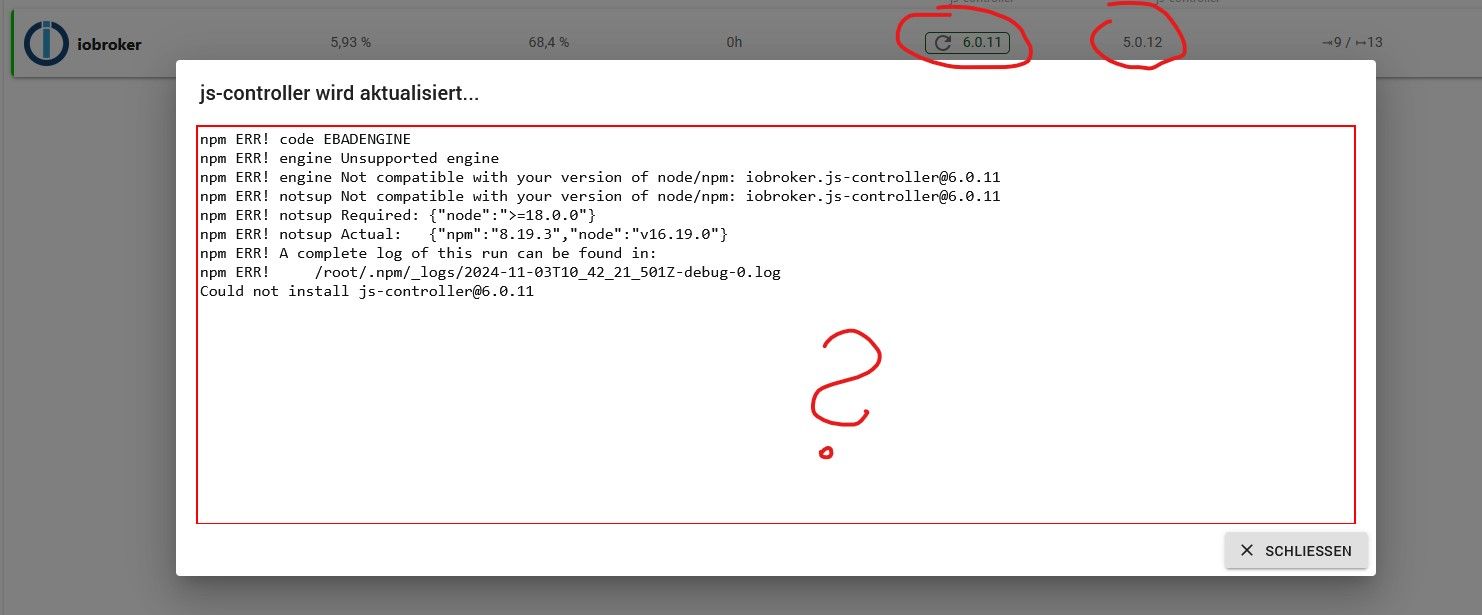
Veraltetes nodejs.
Schau dir das gesamte Konstrukt an, am besten periob diagin der Langfassung.
Da kommt diese Fehlermeldung:
*** iob diag is starting up, please wait *** iob diag needs to be updated. Please execute 'iobroker fix' first. dogfight76@iobroker:~ $ iobroker fix Your system is booting into 'graphical.target', which means that a user interface or desktop is available. Usually a server is running without a desktop to have more RAM available. Do you want to switch to 'multi-user.target'? (y/N) library: loaded Library version=2024-10-22 ioBroker or some processes are still running: 3934547 iobroker.js-con 3934565 io.admin.0 3934603 io.influxdb.0 3934622 io.mqtt.0 3934647 io.cloud.0 3934666 io.backitup.0 3934681 io.web.0 3934721 io.vis-inventwo 3934736 io.time-switch. 3934778 io.javascript.0 Please stop them first and try again! dogfight76@iobroker:~ $iob stop iob fix iob start iob diag -
-
Hat funktioniert. Was brauchst du jetzt ?
@dogfight76 sagte in Anzeige Zeit/Datum - Fehler bei Update & InfluxDB:
Was brauchst du jetzt ?
Alles. Die Langfassung halt.
-
War im Text ein Code hinterlegt für das Update des js-controllers:
You are running nodejs v16.20.2. Do you want to install recommended version 20.18.0?Dann kam dies oben
-
War im Text ein Code hinterlegt für das Update des js-controllers:
You are running nodejs v16.20.2. Do you want to install recommended version 20.18.0?Dann kam dies oben
Ja, willst du.
Du willst aber auch die Ausgabe von iob diag posten. -
Alles hier im Code-Spoiler ? Passt soviel da rein ?
-
Alles hier im Code-Spoiler ? Passt soviel da rein ?
Ja. Aber BITTE nicht im Spoiler. CodeTags reichen. Die sind in der Ausgabe auch bereits enthalten. Muss man nur 1:1 hier reinkopieren.
-
Es kam jetzt nach Abschluss nur das "Summary", das soll ich hier posten. Korrekt ?
Copy text starting here:

```bash
======================= SUMMARY =======================
                        v.2024-10-19


   Static hostname: iobroker
         Icon name: computer
  Operating System: Debian GNU/Linux 11 (bullseye)
            Kernel: Linux 5.15.61-v8+
      Architecture: arm64

Installation:           native
Kernel:                 aarch64
Userland:               64 bit
Timezone:               Europe/Berlin (CET, +0100)
User-ID:                1000
Display-Server:         false
Boot Target:            graphical.target

Pending OS-Updates:     319
Pending iob updates:    10

Nodejs-Installation:
nodejs:                 N/A
/usr/bin/node           v16.20.2
/usr/bin/npm            8.19.4
/usr/bin/npx            8.19.4
/usr/bin/corepack       0.17.0

Recommended versions are nodejs 20.18.0 and npm 10.8.2
*** nodejs is NOT correctly installed ***
Wrong installation path detected. This needs to be fixed.

Please execute
iob nodejs-update
to fix these errors.

MEMORY:
               total        used        free      shared  buff/cache   available
Mem:            3.8G        571M        964M         35M        2.3G        3.1G
Swap:            99M          0B         99M
Total:          3.9G        571M        1.1G

Active iob-Instances:   1
Active repo(s): stable

ioBroker Core:          js-controller           5.0.12
                        admin                   7.1.5

ioBroker Status:        iobroker is not running on this host.


Objects type: jsonl
States  type: jsonl

Status admin and web instance:
  system.adapter.admin.0                  : admin                 : iobroker                                 -  enabled, port: 8081, bind: 0.0.0.0, run as: admin
  system.adapter.web.0                    : web                   : iobroker                                 -  enabled, port: 8082, bind: 0.0.0.0, run as: admin

Objects:                989
States:                 790

Size of iob-Database:

6.4M    /opt/iobroker/iobroker-data/objects.jsonl
352K    /opt/iobroker/iobroker-data/states.jsonl


Debian Release codenamed 'bullseye' reached its END OF LIFE and needs to be updated to the latest stable release '' NOW!

=================== END OF SUMMARY ====================
=== Mark text until here for copying ===
-
Es kam jetzt nach Abschluss nur das "Summary", das soll ich hier posten. Korrekt ?
Copy text starting here:

```bash
======================= SUMMARY =======================
                        v.2024-10-19


   Static hostname: iobroker
         Icon name: computer
  Operating System: Debian GNU/Linux 11 (bullseye)
            Kernel: Linux 5.15.61-v8+
      Architecture: arm64

Installation:           native
Kernel:                 aarch64
Userland:               64 bit
Timezone:               Europe/Berlin (CET, +0100)
User-ID:                1000
Display-Server:         false
Boot Target:            graphical.target

Pending OS-Updates:     319
Pending iob updates:    10

Nodejs-Installation:
nodejs:                 N/A
/usr/bin/node           v16.20.2
/usr/bin/npm            8.19.4
/usr/bin/npx            8.19.4
/usr/bin/corepack       0.17.0

Recommended versions are nodejs 20.18.0 and npm 10.8.2
*** nodejs is NOT correctly installed ***
Wrong installation path detected. This needs to be fixed.

Please execute
iob nodejs-update
to fix these errors.

MEMORY:
               total        used        free      shared  buff/cache   available
Mem:            3.8G        571M        964M         35M        2.3G        3.1G
Swap:            99M          0B         99M
Total:          3.9G        571M        1.1G

Active iob-Instances:   1
Active repo(s): stable

ioBroker Core:          js-controller           5.0.12
                        admin                   7.1.5

ioBroker Status:        iobroker is not running on this host.


Objects type: jsonl
States  type: jsonl

Status admin and web instance:
  system.adapter.admin.0                  : admin                 : iobroker                                 -  enabled, port: 8081, bind: 0.0.0.0, run as: admin
  system.adapter.web.0                    : web                   : iobroker                                 -  enabled, port: 8082, bind: 0.0.0.0, run as: admin

Objects:                989
States:                 790

Size of iob-Database:

6.4M    /opt/iobroker/iobroker-data/objects.jsonl
352K    /opt/iobroker/iobroker-data/states.jsonl


Debian Release codenamed 'bullseye' reached its END OF LIFE and needs to be updated to the latest stable release '' NOW!

=================== END OF SUMMARY ====================
=== Mark text until here for copying ===
Nein, die LANGfassung. Das ist der Kram davor.
-
An den Inhalt komme ich ja nicht mehr. Ist nur das übrig geblieben......wie kopiere ich die Langfassung dann ?
-
An den Inhalt komme ich ja nicht mehr. Ist nur das übrig geblieben......wie kopiere ich die Langfassung dann ?
Dann lass es nochmal laufen.
Und es kommt eine Tastaturabfrage, bevor die Zusammenfassung eingeblendet wird.
Da halt nix drücken und die Langfassung kopieren. -
Ok, bin dran !
Moment bitte....... -
Langversion:
========== Start marking the full check here ===========

```bash
Script v.2024-10-19

*** BASE SYSTEM ***
   Static hostname: iobroker
         Icon name: computer
  Operating System: Debian GNU/Linux 11 (bullseye)
            Kernel: Linux 5.15.61-v8+
      Architecture: arm64
OS is similar to:

Model           : Raspberry Pi 4 Model B Rev 1.2
Docker          : false
Virtualization  : none
Kernel          : aarch64
Userland        : 64 bit

Systemuptime and Load:
 13:39:34 up 385 days, 17:02,  3 users,  load average: 0.25, 0.27, 0.41
CPU threads: 4


*** LIFE CYCLE STATUS ***
Debian Release codenamed 'bullseye' reached its END OF LIFE and needs to be updated to the latest stable release '' NOW!

*** RASPBERRY THROTTLING ***
Current issues:
No throttling issues detected.

Previously detected issues:
No throttling issues detected.

*** TIME AND TIMEZONES ***
               Local time: Sun 2024-11-03 13:39:34 CET
           Universal time: Sun 2024-11-03 12:39:34 UTC
                 RTC time: n/a
                Time zone: Europe/Berlin (CET, +0100)
System clock synchronized: yes
              NTP service: active
          RTC in local TZ: no

*** Users and Groups ***
User that called 'iob diag':
dogfight76
HOME=/home/dogfight76
GROUPS=dogfight76 adm dialout cdrom sudo audio video plugdev games users input render netdev lpadmin gpio i2c spi iobroker

User that is running 'js-controller':
js-controller is not running

*** DISPLAY-SERVER SETUP ***
Display-Server: false
Desktop:
Terminal:       tty

System is booting into 'graphical.target'. Usually a server is running in 'multi-user.target'. Please set BootTarget to 'multi-user.target' or run 'iobroker fix'

*** MEMORY ***
               total        used        free      shared  buff/cache   available
Mem:            3.8G        573M        962M         35M        2.3G        3.1G
Swap:            99M          0B         99M
Total:          3.9G        573M        1.1G

Active iob-Instances:   1

         3794 M total memory
          573 M used memory
          799 M active memory
         1661 M inactive memory
          961 M free memory
          232 M buffer memory
         2025 M swap cache
           99 M total swap
            0 M used swap
           99 M free swap

*** top - Table Of Processes  ***
top - 13:39:35 up 385 days, 17:02,  3 users,  load average: 0.25, 0.27, 0.41
Tasks: 181 total,   1 running, 180 sleeping,   0 stopped,   0 zombie
%Cpu(s):  0.0 us,  4.3 sy,  0.0 ni, 95.7 id,  0.0 wa,  0.0 hi,  0.0 si,  0.0 st
MiB Mem :   3794.4 total,    961.7 free,    574.0 used,   2258.7 buff/cache
MiB Swap:    100.0 total,    100.0 free,      0.0 used.   3054.2 avail Mem

*** FAILED SERVICES ***

  UNIT             LOAD   ACTIVE SUB    DESCRIPTION
* iobroker.service loaded failed failed ioBroker Server

LOAD   = Reflects whether the unit definition was properly loaded.
ACTIVE = The high-level unit activation state, i.e. generalization of SUB.
SUB    = The low-level unit activation state, values depend on unit type.
1 loaded units listed.


*** DMESG CRITICAL ERRORS ***
No critical errors detected

*** FILESYSTEM ***
Filesystem     Type      Size  Used Avail Use% Mounted on
/dev/root      ext4       59G  6.4G   50G  12% /
devtmpfs       devtmpfs  1.7G     0  1.7G   0% /dev
tmpfs          tmpfs     1.9G     0  1.9G   0% /dev/shm
tmpfs          tmpfs     759M  1.2M  758M   1% /run
tmpfs          tmpfs     5.0M  4.0K  5.0M   1% /run/lock
/dev/mmcblk0p1 vfat      255M   31M  225M  12% /boot
tmpfs          tmpfs     380M   20K  380M   1% /run/user/1000

Messages concerning ext4 filesystem in dmesg:
[Sat Oct 14 21:37:17 2023] Kernel command line: coherent_pool=1M 8250.nr_uarts=0 snd_bcm2835.enable_compat_alsa=0 snd_bcm2835.enable_hdmi=1  smsc95xx.macaddr=DC:A6:32:98:E4:44 vc_mem.mem_base=0x3ec00000 vc_mem.mem_size=0x40000000  console=ttyS0,115200 console=tty1 root=PARTUUID=e31b91e6-02 rootfstype=ext4 fsck.repair=yes rootwait quiet splash plymouth.ignore-serial-consoles
[Sat Oct 14 21:37:18 2023] EXT4-fs (mmcblk0p2): mounted filesystem with ordered data mode. Opts: (null). Quota mode: none.
[Sat Oct 14 21:37:18 2023] VFS: Mounted root (ext4 filesystem) readonly on device 179:2.
[Sat Oct 14 21:37:20 2023] EXT4-fs (mmcblk0p2): re-mounted. Opts: (null). Quota mode: none.

Show mounted filesystems:
TARGET  SOURCE         FSTYPE OPTIONS
/       /dev/mmcblk0p2 ext4   rw,noatime
`-/boot /dev/mmcblk0p1 vfat   rw,relatime,fmask=0022,dmask=0022,codepage=437,iocharset=ascii,shortname=mixed,errors=remount-ro

Files in neuralgic directories:

/var:
1.6G    /var/
1.1G    /var/log/journal/7d1338ad4ea145258230302c11232948
1.1G    /var/log/journal
1.1G    /var/log
259M    /var/cache

Archived and active journals take up 1.0G in the file system.

/opt/iobroker/backups:
91M     /opt/iobroker/backups/

/opt/iobroker/iobroker-data:
216M    /opt/iobroker/iobroker-data/
169M    /opt/iobroker/iobroker-data/files
52M     /opt/iobroker/iobroker-data/files/javascript.admin
40M     /opt/iobroker/iobroker-data/backup-objects
34M     /opt/iobroker/iobroker-data/files/javascript.admin/static

The five largest files in iobroker-data are:
24M     /opt/iobroker/iobroker-data/files/web.admin/static/js/main.135279a0.js.map
8.5M    /opt/iobroker/iobroker-data/files/web.admin/static/js/main.135279a0.js
7.1M    /opt/iobroker/iobroker-data/files/javascript.admin/static/js/610.f22de4ab.chunk.js.map
7.0M    /opt/iobroker/iobroker-data/files/admin.admin/custom/static/js/vendors-node_modules_mui_icons-material_esm_index_js.0c96b194.chunk.js.map
6.4M    /opt/iobroker/iobroker-data/objects.jsonl

USB-Devices by-id:
USB-Sticks -  Avoid direct links to /dev/tty* in your adapter setups, please always prefer the links 'by-id':

No Devices found 'by-id'

*** NodeJS-Installation ***

nodejs:                 N/A
/usr/bin/node           v16.20.2
/usr/bin/npm            8.19.4
/usr/bin/npx            8.19.4
/usr/bin/corepack       0.17.0
*** nodejs is NOT correctly installed ***

nodejs:
  Installed: 16.20.2-deb-1nodesource1
  Candidate: 20.18.0-1nodesource1
  Version table:
     20.18.0-1nodesource1 1001
        500 https://deb.nodesource.com/node_20.x nodistro/main arm64 Packages
     20.17.0-1nodesource1 1001
        500 https://deb.nodesource.com/node_20.x nodistro/main arm64 Packages
     20.16.0-1nodesource1 1001
        500 https://deb.nodesource.com/node_20.x nodistro/main arm64 Packages
     20.15.1-1nodesource1 1001
        500 https://deb.nodesource.com/node_20.x nodistro/main arm64 Packages
     20.15.0-1nodesource1 1001
        500 https://deb.nodesource.com/node_20.x nodistro/main arm64 Packages
     20.14.0-1nodesource1 1001
        500 https://deb.nodesource.com/node_20.x nodistro/main arm64 Packages
     20.13.1-1nodesource1 1001
        500 https://deb.nodesource.com/node_20.x nodistro/main arm64 Packages
     20.13.0-1nodesource1 1001
        500 https://deb.nodesource.com/node_20.x nodistro/main arm64 Packages
     20.12.2-1nodesource1 1001
        500 https://deb.nodesource.com/node_20.x nodistro/main arm64 Packages
     20.12.1-1nodesource1 1001
        500 https://deb.nodesource.com/node_20.x nodistro/main arm64 Packages
     20.12.0-1nodesource1 1001
        500 https://deb.nodesource.com/node_20.x nodistro/main arm64 Packages
     20.11.1-1nodesource1 1001
        500 https://deb.nodesource.com/node_20.x nodistro/main arm64 Packages
     20.11.0-1nodesource1 1001
        500 https://deb.nodesource.com/node_20.x nodistro/main arm64 Packages
     20.10.0-1nodesource1 1001
        500 https://deb.nodesource.com/node_20.x nodistro/main arm64 Packages
     20.9.0-1nodesource1 1001
        500 https://deb.nodesource.com/node_20.x nodistro/main arm64 Packages
     20.8.1-1nodesource1 1001
        500 https://deb.nodesource.com/node_20.x nodistro/main arm64 Packages
     20.8.0-1nodesource1 1001
        500 https://deb.nodesource.com/node_20.x nodistro/main arm64 Packages
     20.7.0-1nodesource1 1001
        500 https://deb.nodesource.com/node_20.x nodistro/main arm64 Packages
     20.6.1-1nodesource1 1001
        500 https://deb.nodesource.com/node_20.x nodistro/main arm64 Packages
     20.6.0-1nodesource1 1001
        500 https://deb.nodesource.com/node_20.x nodistro/main arm64 Packages
     20.5.1-1nodesource1 1001
        500 https://deb.nodesource.com/node_20.x nodistro/main arm64 Packages
     20.5.0-1nodesource1 1001
        500 https://deb.nodesource.com/node_20.x nodistro/main arm64 Packages
     20.4.0-1nodesource1 1001
        500 https://deb.nodesource.com/node_20.x nodistro/main arm64 Packages
     20.3.1-1nodesource1 1001
        500 https://deb.nodesource.com/node_20.x nodistro/main arm64 Packages
     20.3.0-1nodesource1 1001
        500 https://deb.nodesource.com/node_20.x nodistro/main arm64 Packages
     20.2.0-1nodesource1 1001
        500 https://deb.nodesource.com/node_20.x nodistro/main arm64 Packages
     20.1.0-1nodesource1 1001
        500 https://deb.nodesource.com/node_20.x nodistro/main arm64 Packages
     20.0.0-1nodesource1 1001
        500 https://deb.nodesource.com/node_20.x nodistro/main arm64 Packages
 *** 16.20.2-deb-1nodesource1 100
        100 /var/lib/dpkg/status
     12.22.12~dfsg-1~deb11u5 500
        500 http://security.debian.org/debian-security bullseye-security/main arm64 Packages
     12.22.12~dfsg-1~deb11u4 500
        500 http://deb.debian.org/debian bullseye/main arm64 Packages

Temp directories causing deletion problem: 0
No problems detected

Errors in npm tree: 0
No problems detected

*** ioBroker-Installation ***

ioBroker Status
iobroker is not running on this host.


Objects type: jsonl
States  type: jsonl

Hosts:
iobroker            iobroker (version: 5.0.12, hostname: iobroker      , alive, uptime: 197)

Core adapters versions
js-controller:  5.0.12
admin:          7.1.5
javascript:     7.1.4

nodejs modules from github:     2
+-- iobroker.time-switch@2.2.2 (git+ssh://git@github.com/walli545/ioBroker.time-switch.git#45b5addb484d270dcac6d1bfdb1a9f86b444d80e)
+-- iobroker.vis-materialdesign@0.5.94 (git+ssh://git@github.com/Scrounger/ioBroker.vis-materialdesign.git#8b7529d493f223dfc4f1d1f632553fcb35bbcc92)

Adapter State
  system.adapter.admin.0                  : admin                 : iobroker                                 -  enabled, port: 8081, bind: 0.0.0.0, run as: admin
  system.adapter.backitup.0               : backitup              : iobroker                                 -  enabled
  system.adapter.chromecast.0             : chromecast            : iobroker                                 - disabled
  system.adapter.cloud.0                  : cloud                 : iobroker                                 -  enabled
  system.adapter.discovery.0              : discovery             : iobroker                                 - disabled
  system.adapter.fritzdect.0              : fritzdect             : iobroker                                 - disabled
  system.adapter.history.0                : history               : iobroker                                 - disabled
  system.adapter.hm-rega.0                : hm-rega               : iobroker                                 - disabled
  system.adapter.hm-rpc.0                 : hm-rpc                : iobroker                                 - disabled, port: 18701
  system.adapter.hm-rpc.1                 : hm-rpc                : iobroker                                 - disabled, port: 12001
  system.adapter.hm-rpc.2                 : hm-rpc                : iobroker                                 - disabled, port: 12010
  system.adapter.influxdb.0               : influxdb              : iobroker                                 -  enabled, port: 8086
  system.adapter.jarvis.0                 : jarvis                : iobroker                                 - disabled
  system.adapter.javascript.0             : javascript            : iobroker                                 -  enabled
  system.adapter.mqtt.0                   : mqtt                  : iobroker                                 -  enabled, port: 8885, bind: 192.168.178.140
  system.adapter.net-tools.0              : net-tools             : iobroker                                 - disabled
  system.adapter.ping.0                   : ping                  : iobroker                                 - disabled
  system.adapter.solarlog.0               : solarlog              : iobroker                                 - disabled, port: 80
  system.adapter.time-switch.0            : time-switch           : iobroker                                 -  enabled
  system.adapter.tr-064.0                 : tr-064                : iobroker                                 - disabled
  system.adapter.vis-inventwo.0           : vis-inventwo          : iobroker                                 -  enabled
  system.adapter.vis-timeandweather.0     : vis-timeandweather    : iobroker                                 -  enabled
  system.adapter.vis.0                    : vis                   : iobroker                                 -  enabled
  system.adapter.web.0                    : web                   : iobroker                                 -  enabled, port: 8082, bind: 0.0.0.0, run as: admin

+ instance is alive

Enabled adapters with bindings
  system.adapter.admin.0                  : admin                 : iobroker                                 -  enabled, port: 8081, bind: 0.0.0.0, run as: admin
  system.adapter.influxdb.0               : influxdb              : iobroker                                 -  enabled, port: 8086
  system.adapter.mqtt.0                   : mqtt                  : iobroker                                 -  enabled, port: 8885, bind: 192.168.178.140
  system.adapter.web.0                    : web                   : iobroker                                 -  enabled, port: 8082, bind: 0.0.0.0, run as: admin

ioBroker-Repositories
stable        : http://download.iobroker.net/sources-dist.json
beta          : http://download.iobroker.net/sources-dist-latest.json

Active repo(s): stable

Installed ioBroker-Instances
Used repository: stable
Adapter    "admin"        : 7.1.5    , installed 7.1.5
Adapter    "backitup"     : 3.0.25   , installed 2.5.10 [Updatable]
Adapter    "chromecast"   : 3.4.1    , installed 2.3.1  [Updatable]
Adapter    "cloud"        : 5.0.1    , installed 5.0.1
Adapter    "discovery"    : 5.0.0    , installed 3.1.0  [Updatable]
Adapter    "fritzdect"    : 2.5.11   , installed 2.2.6  [Updatable]
Adapter    "history"      : 3.0.1    , installed 3.0.1
Adapter    "hm-rega"      : 5.1.0    , installed 3.0.40 [Updatable]
Adapter    "hm-rpc"       : 2.0.2    , installed 1.15.16 [Updatable]
Adapter    "influxdb"     : 4.0.2    , installed 4.0.2
Adapter    "jarvis"       : 3.1.8    , installed 3.1.8
Adapter    "javascript"   : 8.8.3    , installed 7.1.4  [Updatable]
Controller "js-controller": 6.0.11   , installed 5.0.12 [Updatable]
Adapter    "mqtt"         : 6.1.2    , installed 6.1.2
Adapter    "net-tools"    : 1.0.11   , installed 0.2.0  [Updatable]
Adapter    "ping"         : 1.6.2    , installed 1.6.2
Adapter    "simple-api"   : 2.8.0    , installed 2.8.0
Adapter    "socketio"     : 6.7.1    , installed 6.7.1
Adapter    "solarlog"     : 2.3.0    , installed 2.2.5  [Updatable]
Adapter    "tr-064"       : 4.3.0    , installed 4.3.0
Adapter    "vis"          : 1.5.6    , installed 1.5.6
Adapter    "vis-inventwo" : 3.3.4    , installed 3.3.4
Adapter    "vis-materialdesign": 0.5.9, installed 0.5.94
Adapter    "vis-timeandweather": 1.2.2, installed 1.2.2
Adapter    "web"          : 6.2.5    , installed 6.2.5
Adapter    "ws"           : 2.6.2    , installed 2.6.2

Objects and States
Please stand by - This may take a while
Objects:        989
States:         790

*** OS-Repositories and Updates ***
Hit:1 http://deb.debian.org/debian bullseye InRelease
Hit:2 http://security.debian.org/debian-security bullseye-security InRelease
Hit:3 http://archive.raspberrypi.org/debian bullseye InRelease
Hit:4 http://deb.debian.org/debian bullseye-updates InRelease
Hit:5 https://deb.nodesource.com/node_20.x nodistro InRelease
Reading package lists...
Pending Updates: 319

*** Listening Ports ***
Active Internet connections (only servers)
Proto Recv-Q Send-Q Local Address           Foreign Address         State       User       Inode      PID/Program name
tcp        0      0 0.0.0.0:22              0.0.0.0:*               LISTEN      0          11229      559/sshd: /usr/sbin
tcp        0      0 127.0.0.1:631           0.0.0.0:*               LISTEN      0          18069559   3929826/cupsd
tcp6       0      0 :::22                   :::*                    LISTEN      0          11240      559/sshd: /usr/sbin
tcp6       0      0 ::1:631                 :::*                    LISTEN      0          18069558   3929826/cupsd
udp        0      0 0.0.0.0:5353            0.0.0.0:*                           108        11154      399/avahi-daemon: r
udp        0      0 0.0.0.0:53292           0.0.0.0:*                           108        11156      399/avahi-daemon: r
udp        0      0 0.0.0.0:68              0.0.0.0:*                           0          13063      479/dhcpcd
udp        0      0 0.0.0.0:631             0.0.0.0:*                           0          18068882   3929827/cups-browse
udp6       0      0 :::48058                :::*                                108        11157      399/avahi-daemon: r
udp6       0      0 :::5353                 :::*                                108        11155      399/avahi-daemon: r
udp6       0      0 :::546                  :::*                                0          17537999   479/dhcpcd

*** Log File - Last 25 Lines ***

2024-11-03 13:26:15.900  - info: host.iobroker stopInstance system.adapter.backitup.0 send kill signal
2024-11-03 13:26:15.901  - info: host.iobroker stopInstance system.adapter.web.0 send kill signal
2024-11-03 13:26:15.901  - info: host.iobroker stopInstance system.adapter.vis-inventwo.0 send kill signal
2024-11-03 13:26:15.902  - info: host.iobroker stopInstance system.adapter.time-switch.0 send kill signal
2024-11-03 13:26:15.904  - info: mqtt.0 (3937682) Terminated (NO_ERROR): Without reason
2024-11-03 13:26:16.249  - info: cloud.0 (3937725) terminating
2024-11-03 13:26:16.259  - info: vis-inventwo.0 (3937817) terminating
2024-11-03 13:26:16.259  - info: backitup.0 (3937750) terminating
2024-11-03 13:26:16.267  - info: web.0 (3937775) terminating
2024-11-03 13:26:16.266  - info: admin.0 (3937625) terminating
2024-11-03 13:26:16.270  - info: web.0 (3937775) Terminated (NO_ERROR): Without reason
2024-11-03 13:26:16.273  - info: time-switch.0 (3937843) terminating
2024-11-03 13:26:16.275  - info: mqtt.0 (3937682) terminating
2024-11-03 13:26:16.276  - info: javascript.0 (3937647) terminating
2024-11-03 13:26:16.601  - info: host.iobroker instance system.adapter.influxdb.0 terminated with code 0 (NO_ERROR)
2024-11-03 13:26:16.603  - info: host.iobroker instance system.adapter.cloud.0 terminated with code 0 (NO_ERROR)
2024-11-03 13:26:16.604  - info: host.iobroker instance system.adapter.vis-inventwo.0 terminated with code 0 (NO_ERROR)
2024-11-03 13:26:16.644  - info: host.iobroker instance system.adapter.backitup.0 terminated with code 0 (NO_ERROR)
2024-11-03 13:26:16.727  - info: host.iobroker instance system.adapter.admin.0 terminated with code 0 (NO_ERROR)
2024-11-03 13:26:16.729  - info: host.iobroker instance system.adapter.javascript.0 terminated with code 0 (NO_ERROR)
2024-11-03 13:26:16.729  - info: host.iobroker instance system.adapter.time-switch.0 terminated with code 0 (NO_ERROR)
2024-11-03 13:26:16.753  - info: host.iobroker instance system.adapter.mqtt.0 terminated with code 0 (NO_ERROR)
2024-11-03 13:26:16.831  - info: host.iobroker instance system.adapter.web.0 terminated with code 0 (NO_ERROR)
2024-11-03 13:26:16.831  - info: host.iobroker All instances are stopped.
2024-11-03 13:26:17.064  - info: host.iobroker terminated
============ Mark until here for C&P =============
iob diag has finished.
Press any key for a summary
-
Langversion:
========== Start marking the full check here ===========

```bash
Script v.2024-10-19

*** BASE SYSTEM ***
   Static hostname: iobroker
         Icon name: computer
  Operating System: Debian GNU/Linux 11 (bullseye)
            Kernel: Linux 5.15.61-v8+
      Architecture: arm64
OS is similar to:

Model           : Raspberry Pi 4 Model B Rev 1.2
Docker          : false
Virtualization  : none
Kernel          : aarch64
Userland        : 64 bit

Systemuptime and Load:
 13:39:34 up 385 days, 17:02,  3 users,  load average: 0.25, 0.27, 0.41
CPU threads: 4


*** LIFE CYCLE STATUS ***
Debian Release codenamed 'bullseye' reached its END OF LIFE and needs to be updated to the latest stable release '' NOW!

*** RASPBERRY THROTTLING ***
Current issues:
No throttling issues detected.

Previously detected issues:
No throttling issues detected.

*** TIME AND TIMEZONES ***
               Local time: Sun 2024-11-03 13:39:34 CET
           Universal time: Sun 2024-11-03 12:39:34 UTC
                 RTC time: n/a
                Time zone: Europe/Berlin (CET, +0100)
System clock synchronized: yes
              NTP service: active
          RTC in local TZ: no

*** Users and Groups ***
User that called 'iob diag':
dogfight76
HOME=/home/dogfight76
GROUPS=dogfight76 adm dialout cdrom sudo audio video plugdev games users input render netdev lpadmin gpio i2c spi iobroker

User that is running 'js-controller':
js-controller is not running

*** DISPLAY-SERVER SETUP ***
Display-Server: false
Desktop:
Terminal:       tty

System is booting into 'graphical.target'. Usually a server is running in 'multi-user.target'. Please set BootTarget to 'multi-user.target' or run 'iobroker fix'

*** MEMORY ***
               total        used        free      shared  buff/cache   available
Mem:            3.8G        573M        962M         35M        2.3G        3.1G
Swap:            99M          0B         99M
Total:          3.9G        573M        1.1G

Active iob-Instances:   1

         3794 M total memory
          573 M used memory
          799 M active memory
         1661 M inactive memory
          961 M free memory
          232 M buffer memory
         2025 M swap cache
           99 M total swap
            0 M used swap
           99 M free swap

*** top - Table Of Processes  ***
top - 13:39:35 up 385 days, 17:02,  3 users,  load average: 0.25, 0.27, 0.41
Tasks: 181 total,   1 running, 180 sleeping,   0 stopped,   0 zombie
%Cpu(s):  0.0 us,  4.3 sy,  0.0 ni, 95.7 id,  0.0 wa,  0.0 hi,  0.0 si,  0.0 st
MiB Mem :   3794.4 total,    961.7 free,    574.0 used,   2258.7 buff/cache
MiB Swap:    100.0 total,    100.0 free,      0.0 used.   3054.2 avail Mem

*** FAILED SERVICES ***

  UNIT             LOAD   ACTIVE SUB    DESCRIPTION
* iobroker.service loaded failed failed ioBroker Server

LOAD   = Reflects whether the unit definition was properly loaded.
ACTIVE = The high-level unit activation state, i.e. generalization of SUB.
SUB    = The low-level unit activation state, values depend on unit type.
1 loaded units listed.


*** DMESG CRITICAL ERRORS ***
No critical errors detected

*** FILESYSTEM ***
Filesystem     Type      Size  Used Avail Use% Mounted on
/dev/root      ext4       59G  6.4G   50G  12% /
devtmpfs       devtmpfs  1.7G     0  1.7G   0% /dev
tmpfs          tmpfs     1.9G     0  1.9G   0% /dev/shm
tmpfs          tmpfs     759M  1.2M  758M   1% /run
tmpfs          tmpfs     5.0M  4.0K  5.0M   1% /run/lock
/dev/mmcblk0p1 vfat      255M   31M  225M  12% /boot
tmpfs          tmpfs     380M   20K  380M   1% /run/user/1000

Messages concerning ext4 filesystem in dmesg:
[Sat Oct 14 21:37:17 2023] Kernel command line: coherent_pool=1M 8250.nr_uarts=0 snd_bcm2835.enable_compat_alsa=0 snd_bcm2835.enable_hdmi=1  smsc95xx.macaddr=DC:A6:32:98:E4:44 vc_mem.mem_base=0x3ec00000 vc_mem.mem_size=0x40000000  console=ttyS0,115200 console=tty1 root=PARTUUID=e31b91e6-02 rootfstype=ext4 fsck.repair=yes rootwait quiet splash plymouth.ignore-serial-consoles
[Sat Oct 14 21:37:18 2023] EXT4-fs (mmcblk0p2): mounted filesystem with ordered data mode. Opts: (null). Quota mode: none.
[Sat Oct 14 21:37:18 2023] VFS: Mounted root (ext4 filesystem) readonly on device 179:2.
[Sat Oct 14 21:37:20 2023] EXT4-fs (mmcblk0p2): re-mounted. Opts: (null). Quota mode: none.

Show mounted filesystems:
TARGET  SOURCE         FSTYPE OPTIONS
/       /dev/mmcblk0p2 ext4   rw,noatime
`-/boot /dev/mmcblk0p1 vfat   rw,relatime,fmask=0022,dmask=0022,codepage=437,iocharset=ascii,shortname=mixed,errors=remount-ro

Files in neuralgic directories:

/var:
1.6G    /var/
1.1G    /var/log/journal/7d1338ad4ea145258230302c11232948
1.1G    /var/log/journal
1.1G    /var/log
259M    /var/cache

Archived and active journals take up 1.0G in the file system.

/opt/iobroker/backups:
91M     /opt/iobroker/backups/

/opt/iobroker/iobroker-data:
216M    /opt/iobroker/iobroker-data/
169M    /opt/iobroker/iobroker-data/files
52M     /opt/iobroker/iobroker-data/files/javascript.admin
40M     /opt/iobroker/iobroker-data/backup-objects
34M     /opt/iobroker/iobroker-data/files/javascript.admin/static

The five largest files in iobroker-data are:
24M     /opt/iobroker/iobroker-data/files/web.admin/static/js/main.135279a0.js.map
8.5M    /opt/iobroker/iobroker-data/files/web.admin/static/js/main.135279a0.js
7.1M    /opt/iobroker/iobroker-data/files/javascript.admin/static/js/610.f22de4ab.chunk.js.map
7.0M    /opt/iobroker/iobroker-data/files/admin.admin/custom/static/js/vendors-node_modules_mui_icons-material_esm_index_js.0c96b194.chunk.js.map
6.4M    /opt/iobroker/iobroker-data/objects.jsonl

USB-Devices by-id:
USB-Sticks -  Avoid direct links to /dev/tty* in your adapter setups, please always prefer the links 'by-id':

No Devices found 'by-id'

*** NodeJS-Installation ***

nodejs:                 N/A
/usr/bin/node           v16.20.2
/usr/bin/npm            8.19.4
/usr/bin/npx            8.19.4
/usr/bin/corepack       0.17.0
*** nodejs is NOT correctly installed ***

nodejs:
  Installed: 16.20.2-deb-1nodesource1
  Candidate: 20.18.0-1nodesource1
  Version table:
     20.18.0-1nodesource1 1001
        500 https://deb.nodesource.com/node_20.x nodistro/main arm64 Packages
     20.17.0-1nodesource1 1001
        500 https://deb.nodesource.com/node_20.x nodistro/main arm64 Packages
     20.16.0-1nodesource1 1001
        500 https://deb.nodesource.com/node_20.x nodistro/main arm64 Packages
     20.15.1-1nodesource1 1001
        500 https://deb.nodesource.com/node_20.x nodistro/main arm64 Packages
     20.15.0-1nodesource1 1001
        500 https://deb.nodesource.com/node_20.x nodistro/main arm64 Packages
     20.14.0-1nodesource1 1001
        500 https://deb.nodesource.com/node_20.x nodistro/main arm64 Packages
     20.13.1-1nodesource1 1001
        500 https://deb.nodesource.com/node_20.x nodistro/main arm64 Packages
     20.13.0-1nodesource1 1001
        500 https://deb.nodesource.com/node_20.x nodistro/main arm64 Packages
     20.12.2-1nodesource1 1001
        500 https://deb.nodesource.com/node_20.x nodistro/main arm64 Packages
     20.12.1-1nodesource1 1001
        500 https://deb.nodesource.com/node_20.x nodistro/main arm64 Packages
     20.12.0-1nodesource1 1001
        500 https://deb.nodesource.com/node_20.x nodistro/main arm64 Packages
     20.11.1-1nodesource1 1001
        500 https://deb.nodesource.com/node_20.x nodistro/main arm64 Packages
     20.11.0-1nodesource1 1001
        500 https://deb.nodesource.com/node_20.x nodistro/main arm64 Packages
     20.10.0-1nodesource1 1001
        500 https://deb.nodesource.com/node_20.x nodistro/main arm64 Packages
     20.9.0-1nodesource1 1001
        500 https://deb.nodesource.com/node_20.x nodistro/main arm64 Packages
     20.8.1-1nodesource1 1001
        500 https://deb.nodesource.com/node_20.x nodistro/main arm64 Packages
     20.8.0-1nodesource1 1001
        500 https://deb.nodesource.com/node_20.x nodistro/main arm64 Packages
     20.7.0-1nodesource1 1001
        500 https://deb.nodesource.com/node_20.x nodistro/main arm64 Packages
     20.6.1-1nodesource1 1001
        500 https://deb.nodesource.com/node_20.x nodistro/main arm64 Packages
     20.6.0-1nodesource1 1001
        500 https://deb.nodesource.com/node_20.x nodistro/main arm64 Packages
     20.5.1-1nodesource1 1001
        500 https://deb.nodesource.com/node_20.x nodistro/main arm64 Packages
     20.5.0-1nodesource1 1001
        500 https://deb.nodesource.com/node_20.x nodistro/main arm64 Packages
     20.4.0-1nodesource1 1001
        500 https://deb.nodesource.com/node_20.x nodistro/main arm64 Packages
     20.3.1-1nodesource1 1001
        500 https://deb.nodesource.com/node_20.x nodistro/main arm64 Packages
     20.3.0-1nodesource1 1001
        500 https://deb.nodesource.com/node_20.x nodistro/main arm64 Packages
     20.2.0-1nodesource1 1001
        500 https://deb.nodesource.com/node_20.x nodistro/main arm64 Packages
     20.1.0-1nodesource1 1001
        500 https://deb.nodesource.com/node_20.x nodistro/main arm64 Packages
     20.0.0-1nodesource1 1001
        500 https://deb.nodesource.com/node_20.x nodistro/main arm64 Packages
 *** 16.20.2-deb-1nodesource1 100
        100 /var/lib/dpkg/status
     12.22.12~dfsg-1~deb11u5 500
        500 http://security.debian.org/debian-security bullseye-security/main arm64 Packages
     12.22.12~dfsg-1~deb11u4 500
        500 http://deb.debian.org/debian bullseye/main arm64 Packages

Temp directories causing deletion problem: 0
No problems detected

Errors in npm tree: 0
No problems detected

*** ioBroker-Installation ***

ioBroker Status
iobroker is not running on this host.


Objects type: jsonl
States  type: jsonl

Hosts:
iobroker            iobroker (version: 5.0.12, hostname: iobroker      , alive, uptime: 197)

Core adapters versions
js-controller:  5.0.12
admin:          7.1.5
javascript:     7.1.4

nodejs modules from github:     2
+-- iobroker.time-switch@2.2.2 (git+ssh://git@github.com/walli545/ioBroker.time-switch.git#45b5addb484d270dcac6d1bfdb1a9f86b444d80e)
+-- iobroker.vis-materialdesign@0.5.94 (git+ssh://git@github.com/Scrounger/ioBroker.vis-materialdesign.git#8b7529d493f223dfc4f1d1f632553fcb35bbcc92)

Adapter State
  system.adapter.admin.0                  : admin                 : iobroker                                 -  enabled, port: 8081, bind: 0.0.0.0, run as: admin
  system.adapter.backitup.0               : backitup              : iobroker                                 -  enabled
  system.adapter.chromecast.0             : chromecast            : iobroker                                 - disabled
  system.adapter.cloud.0                  : cloud                 : iobroker                                 -  enabled
  system.adapter.discovery.0              : discovery             : iobroker                                 - disabled
  system.adapter.fritzdect.0              : fritzdect             : iobroker                                 - disabled
  system.adapter.history.0                : history               : iobroker                                 - disabled
  system.adapter.hm-rega.0                : hm-rega               : iobroker                                 - disabled
  system.adapter.hm-rpc.0                 : hm-rpc                : iobroker                                 - disabled, port: 18701
  system.adapter.hm-rpc.1                 : hm-rpc                : iobroker                                 - disabled, port: 12001
  system.adapter.hm-rpc.2                 : hm-rpc                : iobroker                                 - disabled, port: 12010
  system.adapter.influxdb.0               : influxdb              : iobroker                                 -  enabled, port: 8086
  system.adapter.jarvis.0                 : jarvis                : iobroker                                 - disabled
  system.adapter.javascript.0             : javascript            : iobroker                                 -  enabled
  system.adapter.mqtt.0                   : mqtt                  : iobroker                                 -  enabled, port: 8885, bind: 192.168.178.140
  system.adapter.net-tools.0              : net-tools             : iobroker                                 - disabled
  system.adapter.ping.0                   : ping                  : iobroker                                 - disabled
  system.adapter.solarlog.0               : solarlog              : iobroker                                 - disabled, port: 80
  system.adapter.time-switch.0            : time-switch           : iobroker                                 -  enabled
  system.adapter.tr-064.0                 : tr-064                : iobroker                                 - disabled
  system.adapter.vis-inventwo.0           : vis-inventwo          : iobroker                                 -  enabled
  system.adapter.vis-timeandweather.0     : vis-timeandweather    : iobroker                                 -  enabled
  system.adapter.vis.0                    : vis                   : iobroker                                 -  enabled
  system.adapter.web.0                    : web                   : iobroker                                 -  enabled, port: 8082, bind: 0.0.0.0, run as: admin

+ instance is alive

Enabled adapters with bindings
  system.adapter.admin.0                  : admin                 : iobroker                                 -  enabled, port: 8081, bind: 0.0.0.0, run as: admin
  system.adapter.influxdb.0               : influxdb              : iobroker                                 -  enabled, port: 8086
  system.adapter.mqtt.0                   : mqtt                  : iobroker                                 -  enabled, port: 8885, bind: 192.168.178.140
  system.adapter.web.0                    : web                   : iobroker                                 -  enabled, port: 8082, bind: 0.0.0.0, run as: admin

ioBroker-Repositories
stable        : http://download.iobroker.net/sources-dist.json
beta          : http://download.iobroker.net/sources-dist-latest.json

Active repo(s): stable

Installed ioBroker-Instances
Used repository: stable
Adapter    "admin"        : 7.1.5    , installed 7.1.5
Adapter    "backitup"     : 3.0.25   , installed 2.5.10 [Updatable]
Adapter    "chromecast"   : 3.4.1    , installed 2.3.1  [Updatable]
Adapter    "cloud"        : 5.0.1    , installed 5.0.1
Adapter    "discovery"    : 5.0.0    , installed 3.1.0  [Updatable]
Adapter    "fritzdect"    : 2.5.11   , installed 2.2.6  [Updatable]
Adapter    "history"      : 3.0.1    , installed 3.0.1
Adapter    "hm-rega"      : 5.1.0    , installed 3.0.40 [Updatable]
Adapter    "hm-rpc"       : 2.0.2    , installed 1.15.16 [Updatable]
Adapter    "influxdb"     : 4.0.2    , installed 4.0.2
Adapter    "jarvis"       : 3.1.8    , installed 3.1.8
Adapter    "javascript"   : 8.8.3    , installed 7.1.4  [Updatable]
Controller "js-controller": 6.0.11   , installed 5.0.12 [Updatable]
Adapter    "mqtt"         : 6.1.2    , installed 6.1.2
Adapter    "net-tools"    : 1.0.11   , installed 0.2.0  [Updatable]
Adapter    "ping"         : 1.6.2    , installed 1.6.2
Adapter    "simple-api"   : 2.8.0    , installed 2.8.0
Adapter    "socketio"     : 6.7.1    , installed 6.7.1
Adapter    "solarlog"     : 2.3.0    , installed 2.2.5  [Updatable]
Adapter    "tr-064"       : 4.3.0    , installed 4.3.0
Adapter    "vis"          : 1.5.6    , installed 1.5.6
Adapter    "vis-inventwo" : 3.3.4    , installed 3.3.4
Adapter    "vis-materialdesign": 0.5.9, installed 0.5.94
Adapter    "vis-timeandweather": 1.2.2, installed 1.2.2
Adapter    "web"          : 6.2.5    , installed 6.2.5
Adapter    "ws"           : 2.6.2    , installed 2.6.2

Objects and States
Please stand by - This may take a while
Objects:        989
States:         790

*** OS-Repositories and Updates ***
Hit:1 http://deb.debian.org/debian bullseye InRelease
Hit:2 http://security.debian.org/debian-security bullseye-security InRelease
Hit:3 http://archive.raspberrypi.org/debian bullseye InRelease
Hit:4 http://deb.debian.org/debian bullseye-updates InRelease
Hit:5 https://deb.nodesource.com/node_20.x nodistro InRelease
Reading package lists...
Pending Updates: 319

*** Listening Ports ***
Active Internet connections (only servers)
Proto Recv-Q Send-Q Local Address           Foreign Address         State       User       Inode      PID/Program name
tcp        0      0 0.0.0.0:22              0.0.0.0:*               LISTEN      0          11229      559/sshd: /usr/sbin
tcp        0      0 127.0.0.1:631           0.0.0.0:*               LISTEN      0          18069559   3929826/cupsd
tcp6       0      0 :::22                   :::*                    LISTEN      0          11240      559/sshd: /usr/sbin
tcp6       0      0 ::1:631                 :::*                    LISTEN      0          18069558   3929826/cupsd
udp        0      0 0.0.0.0:5353            0.0.0.0:*                           108        11154      399/avahi-daemon: r
udp        0      0 0.0.0.0:53292           0.0.0.0:*                           108        11156      399/avahi-daemon: r
udp        0      0 0.0.0.0:68              0.0.0.0:*                           0          13063      479/dhcpcd
udp        0      0 0.0.0.0:631             0.0.0.0:*                           0          18068882   3929827/cups-browse
udp6       0      0 :::48058                :::*                                108        11157      399/avahi-daemon: r
udp6       0      0 :::5353                 :::*                                108        11155      399/avahi-daemon: r
udp6       0      0 :::546                  :::*                                0          17537999   479/dhcpcd

*** Log File - Last 25 Lines ***

2024-11-03 13:26:15.900  - info: host.iobroker stopInstance system.adapter.backitup.0 send kill signal
2024-11-03 13:26:15.901  - info: host.iobroker stopInstance system.adapter.web.0 send kill signal
2024-11-03 13:26:15.901  - info: host.iobroker stopInstance system.adapter.vis-inventwo.0 send kill signal
2024-11-03 13:26:15.902  - info: host.iobroker stopInstance system.adapter.time-switch.0 send kill signal
2024-11-03 13:26:15.904  - info: mqtt.0 (3937682) Terminated (NO_ERROR): Without reason
2024-11-03 13:26:16.249  - info: cloud.0 (3937725) terminating
2024-11-03 13:26:16.259  - info: vis-inventwo.0 (3937817) terminating
2024-11-03 13:26:16.259  - info: backitup.0 (3937750) terminating
2024-11-03 13:26:16.267  - info: web.0 (3937775) terminating
2024-11-03 13:26:16.266  - info: admin.0 (3937625) terminating
2024-11-03 13:26:16.270  - info: web.0 (3937775) Terminated (NO_ERROR): Without reason
2024-11-03 13:26:16.273  - info: time-switch.0 (3937843) terminating
2024-11-03 13:26:16.275  - info: mqtt.0 (3937682) terminating
2024-11-03 13:26:16.276  - info: javascript.0 (3937647) terminating
2024-11-03 13:26:16.601  - info: host.iobroker instance system.adapter.influxdb.0 terminated with code 0 (NO_ERROR)
2024-11-03 13:26:16.603  - info: host.iobroker instance system.adapter.cloud.0 terminated with code 0 (NO_ERROR)
2024-11-03 13:26:16.604  - info: host.iobroker instance system.adapter.vis-inventwo.0 terminated with code 0 (NO_ERROR)
2024-11-03 13:26:16.644  - info: host.iobroker instance system.adapter.backitup.0 terminated with code 0 (NO_ERROR)
2024-11-03 13:26:16.727  - info: host.iobroker instance system.adapter.admin.0 terminated with code 0 (NO_ERROR)
2024-11-03 13:26:16.729  - info: host.iobroker instance system.adapter.javascript.0 terminated with code 0 (NO_ERROR)
2024-11-03 13:26:16.729  - info: host.iobroker instance system.adapter.time-switch.0 terminated with code 0 (NO_ERROR)
2024-11-03 13:26:16.753  - info: host.iobroker instance system.adapter.mqtt.0 terminated with code 0 (NO_ERROR)
2024-11-03 13:26:16.831  - info: host.iobroker instance system.adapter.web.0 terminated with code 0 (NO_ERROR)
2024-11-03 13:26:16.831  - info: host.iobroker All instances are stopped.
2024-11-03 13:26:17.064  - info: host.iobroker terminated
============ Mark until here for C&P =============
iob diag has finished.
Press any key for a summary
Bring das ganze Ding beizeiten auf das aktuelle Release 'Bookworm'.
Geht aber bei RaspberryOS nur per kompletter Neuinstallation.Die Zeit ist jedenfalls richtig konfiguriert.
js-controller is not running
Warum nicht?
System is booting into 'graphical.target'. Usually a server is running in 'multi-user.target'. Please set BootTarget to 'multi-user.target' or run 'iobroker fix'
sudo systemctl set-default multi-user.targetPending Updates: 319
Glückwunsch... Dein Betriebssystem möchte so dann und wann mal etwas Pflege erfahren...
sudo apt update
sudo apt full-upgrade
sudo reboot
Wenn die Kiste wieder läuft:
iob update iob upgrade all -y iob stop iob upgrade self iob start -
Bring das ganze Ding beizeiten auf das aktuelle Release 'Bookworm'.
Geht aber bei RaspberryOS nur per kompletter Neuinstallation.Die Zeit ist jedenfalls richtig konfiguriert.
js-controller is not running
Warum nicht?
System is booting into 'graphical.target'. Usually a server is running in 'multi-user.target'. Please set BootTarget to 'multi-user.target' or run 'iobroker fix'
sudo systemctl set-default multi-user.targetPending Updates: 319
Glückwunsch... Dein Betriebssystem möchte so dann und wann mal etwas Pflege erfahren...
sudo apt update
sudo apt full-upgrade
sudo reboot
Wenn die Kiste wieder läuft:
iob update iob upgrade all -y iob stop iob upgrade self iob start@thomas-braun said in Anzeige Zeit/Datum - Fehler bei Update & InfluxDB:
sudo systemctl set-default multi-user.target
Dann kam das hier:
dogfight76@iobroker:~ $ sudo systemctl set-default multi-user.target Removed /etc/systemd/system/default.target. Created symlink /etc/systemd/system/default.target → /lib/systemd/system/multi-user.target. dogfight76@iobroker:~ $ -
@thomas-braun said in Anzeige Zeit/Datum - Fehler bei Update & InfluxDB:
sudo systemctl set-default multi-user.target
Dann kam das hier:
dogfight76@iobroker:~ $ sudo systemctl set-default multi-user.target Removed /etc/systemd/system/default.target. Created symlink /etc/systemd/system/default.target → /lib/systemd/system/multi-user.target. dogfight76@iobroker:~ $Ja, das ist richtig.
-
Dann ist der PI jetzt beim full-upgrade !
Werde den Rest dann so abarbeiten. Dann ist alles erledigt ?
Gruß
-
Dann ist der PI jetzt beim full-upgrade !
Werde den Rest dann so abarbeiten. Dann ist alles erledigt ?
Gruß
Wenn du damit durch bist nochmal die Langfassung posten.
-
Es kam jetzt das hier:
Fetched 387 MB in 1min 21s (4,757 kB/s)
Reading changelogs... Done


apt-listchanges: News
---------------------

cups (2.3.3op2-3+deb11u4) bullseye; urgency=medium

  This release addresses a security issue (CVE-2023-32360) which allows
  unauthorized users to fetch documents over local or remote networks.
  Since this is a configuration fix, it might be that it does not reach you if you
  are updating 'cups-daemon' (rather than doing a fresh installation).
  Please double check your /etc/cups/cupsd.conf file, whether it limits the access
  to CUPS-Get-Document with something like the following
  >  <Limit CUPS-Get-Document>
  >    AuthType Default
  >    Require user @OWNER @SYSTEM
  >    Order deny,allow
  >   </Limit>
  (The important line is the 'AuthType Default' in this section)

 -- Thorsten Alteholz <debian@alteholz.de>  Tue, 19 Sep 2023 21:20:27 +0200

(press q to quit)E: Sub-process /usr/bin/apt-listchanges --apt || test $? -lt 10 received signal 2.
E: Failure running script /usr/bin/apt-listchanges --apt || test $? -lt 10
dogfight76@iobroker:~ $
Trotzdem deine Liste weiter abarebiten ?
-
Es kam jetzt das hier:
Fetched 387 MB in 1min 21s (4,757 kB/s)
Reading changelogs... Done


apt-listchanges: News
---------------------

cups (2.3.3op2-3+deb11u4) bullseye; urgency=medium

  This release addresses a security issue (CVE-2023-32360) which allows
  unauthorized users to fetch documents over local or remote networks.
  Since this is a configuration fix, it might be that it does not reach you if you
  are updating 'cups-daemon' (rather than doing a fresh installation).
  Please double check your /etc/cups/cupsd.conf file, whether it limits the access
  to CUPS-Get-Document with something like the following
  >  <Limit CUPS-Get-Document>
  >    AuthType Default
  >    Require user @OWNER @SYSTEM
  >    Order deny,allow
  >   </Limit>
  (The important line is the 'AuthType Default' in this section)

 -- Thorsten Alteholz <debian@alteholz.de>  Tue, 19 Sep 2023 21:20:27 +0200

(press q to quit)E: Sub-process /usr/bin/apt-listchanges --apt || test $? -lt 10 received signal 2.
E: Failure running script /usr/bin/apt-listchanges --apt || test $? -lt 10
dogfight76@iobroker:~ $
Trotzdem deine Liste weiter abarebiten ?
@dogfight76 sagte in Anzeige Zeit/Datum - Fehler bei Update & InfluxDB:
Es kam jetzt das hier:
Ja, das ist eines der von dir vernachlässigten Sicherheitsupdates...
Und ganz eigentlich sollte CUPS auch gar nicht auf dem System laufen, außer du betreibst da einen Drucker dran.


Hey! Du scheinst an dieser Unterhaltung interessiert zu sein, hast aber noch kein Konto.
Hast du es satt, bei jedem Besuch durch die gleichen Beiträge zu scrollen? Wenn du dich für ein Konto anmeldest, kommst du immer genau dorthin zurück, wo du zuvor warst, und kannst dich über neue Antworten benachrichtigen lassen (entweder per E-Mail oder Push-Benachrichtigung). Du kannst auch Lesezeichen speichern und Beiträge positiv bewerten, um anderen Community-Mitgliedern deine Wertschätzung zu zeigen.
Mit deinem Input könnte dieser Beitrag noch besser werden 💗
Registrieren AnmeldenSupport us
393
Online33.0k
Benutzer83.5k
Themen1.3m
Beiträge