




[Gelöst] Alexa - Geräte reagieren nicht mehr
-
@da_woody
mia culpa========== Start marking the full check here =========== Script v.2024-10-19 *** BASE SYSTEM *** Hardware Vendor : Synology Kernel : x86_64 Userland : 64 bit Docker : v9.1.1 Virtualization : Docker Kernel : x86_64 Userland : 64 bit Systemuptime and Load: 11:02:48 up 1:32, 0 user, load average: 1.57, 1.48, 2.06 CPU threads: 4 *** LIFE CYCLE STATUS *** Unknown release codenamed ''. Please check yourself if the Operating System is actively maintained. *** TIME AND TIMEZONES *** Mon Oct 21 09:02:48 UTC 2024 Mon Oct 21 11:02:48 CEST 2024 CEST +0200 Etc/UTC *** Users and Groups *** User that called 'iob diag': root HOME=/root GROUPS=root User that is running 'js-controller': iobroker HOME=/opt/iobroker GROUPS=iobroker tty dialout audio video plugdev *** DISPLAY-SERVER SETUP *** Display-Server: false Desktop: Terminal: *** MEMORY *** total used free shared buff/cache available Mem: 12G 6.0G 278M 148M 6.6G 6.4G Swap: 9.6G 51M 9.5G Total: 21G 6.1G 9.8G Active iob-Instances: 42 11822 M total memory 5720 M used memory 5573 M active memory 4202 M inactive memory 265 M free memory 15 M buffer memory 6273 M swap cache 9143 M total swap 49 M used swap 9094 M free swap *** top - Table Of Processes *** top - 11:02:48 up 1:32, 0 user, load average: 1.57, 1.48, 2.06 Tasks: 46 total, 1 running, 45 sleeping, 0 stopped, 0 zombie %Cpu(s): 0.0 us, 50.0 sy, 0.0 ni, 50.0 id, 0.0 wa, 0.0 hi, 0.0 si, 0.0 st MiB Mem : 11822.1 total, 263.8 free, 5722.7 used, 6289.3 buff/cache MiB Swap: 9143.9 total, 9094.5 free, 49.4 used. 6099.5 avail Mem *** DMESG CRITICAL ERRORS *** No critical errors detected *** FILESYSTEM *** Filesystem Type Size Used Avail Use% Mounted on /dev/mapper/cachedev_0 btrfs 7.0T 2.0T 5.0T 29% / tmpfs tmpfs 64M 0 64M 0% /dev tmpfs tmpfs 5.8G 0 5.8G 0% /sys/fs/cgroup shm tmpfs 64M 0 64M 0% /dev/shm /dev/mapper/cachedev_0 btrfs 7.0T 2.0T 5.0T 29% /opt/iobroker /dev/mapper/cachedev_0 btrfs 7.0T 2.0T 5.0T 29% /etc/hosts tmpfs tmpfs 5.8G 0 5.8G 0% /proc/acpi tmpfs tmpfs 5.8G 0 5.8G 0% /proc/scsi tmpfs tmpfs 5.8G 0 5.8G 0% /sys/firmware Messages concerning ext4 filesystem in dmesg: [Mon Oct 21 09:30:50 2024] EXT4-fs (md0): couldn't mount as ext3 due to feature incompatibilities [Mon Oct 21 09:30:50 2024] EXT4-fs (md0): mounted filesystem with ordered data mode. Opts: (null) [Mon Oct 21 09:30:51 2024] EXT4-fs (md0): couldn't mount as ext3 due to feature incompatibilities [Mon Oct 21 09:30:51 2024] EXT4-fs (md0): mounted filesystem with ordered data mode. Opts: (null) [Mon Oct 21 09:30:56 2024] EXT4-fs (md0): couldn't mount as ext3 due to feature incompatibilities [Mon Oct 21 09:30:56 2024] EXT4-fs (md0): mounted filesystem with ordered data mode. Opts: (null) [Mon Oct 21 09:30:57 2024] EXT4-fs (md0): couldn't mount as ext3 due to feature incompatibilities [Mon Oct 21 09:30:57 2024] EXT4-fs (md0): mounted filesystem with ordered data mode. Opts: barrier=1 [Mon Oct 21 09:32:14 2024] EXT4-fs (loop0): mounted filesystem with ordered data mode. Opts: (null) Show mounted filesystems: TARGET SOURCE FSTYPE OPTIONS / /dev/mapper/cachedev_0[/@syno/@docker/btrfs/subvolumes/d0da882db770853523f873ac478c26d97178e91ced4edd23e43bbcbc3faff250] btrfs rw,nodev,relatime,ssd,synoacl,space_cache=v2,auto_reclaim_space,metadata_ratio=50,syno_allocator,subvolid=3717,subvol=/@syno/@docker/btrfs/subvolumes/d0da882db770853523f873ac478c26d97178e91ced4edd23e43bbcbc3faff250 |-/opt/iobroker /dev/mapper/cachedev_0[/@syno/docker/ioBroker_data] btrfs rw,nodev,relatime,ssd,synoacl,space_cache=v2,auto_reclaim_space,metadata_ratio=50,syno_allocator,subvolid=259,subvol=/@syno/docker/ioBroker_data |-/opt/userscripts /dev/mapper/cachedev_0[/@syno/docker/userscripts] btrfs rw,nodev,relatime,ssd,synoacl,space_cache=v2,auto_reclaim_space,metadata_ratio=50,syno_allocator,subvolid=259,subvol=/@syno/docker/userscripts |-/etc/resolv.conf /dev/mapper/cachedev_0[/@syno/@docker/containers/d2bc4a1fdf829e456d5ca93c9d5d815829f4572f4fdeae36884f4dfd61ea0bb2/resolv.conf] btrfs rw,nodev,relatime,ssd,synoacl,space_cache=v2,auto_reclaim_space,metadata_ratio=50,syno_allocator,subvolid=257,subvol=/@syno/@docker/containers/d2bc4a1fdf829e456d5ca93c9d5d815829f4572f4fdeae36884f4dfd61ea0bb2/resolv.conf |-/etc/hostname /dev/mapper/cachedev_0[/@syno/@docker/containers/d2bc4a1fdf829e456d5ca93c9d5d815829f4572f4fdeae36884f4dfd61ea0bb2/hostname] btrfs rw,nodev,relatime,ssd,synoacl,space_cache=v2,auto_reclaim_space,metadata_ratio=50,syno_allocator,subvolid=257,subvol=/@syno/@docker/containers/d2bc4a1fdf829e456d5ca93c9d5d815829f4572f4fdeae36884f4dfd61ea0bb2/hostname `-/etc/hosts /dev/mapper/cachedev_0[/@syno/@docker/containers/d2bc4a1fdf829e456d5ca93c9d5d815829f4572f4fdeae36884f4dfd61ea0bb2/hosts] btrfs rw,nodev,relatime,ssd,synoacl,space_cache=v2,auto_reclaim_space,metadata_ratio=50,syno_allocator,subvolid=257,subvol=/@syno/@docker/containers/d2bc4a1fdf829e456d5ca93c9d5d815829f4572f4fdeae36884f4dfd61ea0bb2/hosts Files in neuralgic directories: /var: 39M /var/ 37M /var/lib 19M /var/lib/apt/lists 19M /var/lib/apt 18M /var/lib/dpkg /opt/iobroker/backups: 629M /opt/iobroker/backups/ 339M /opt/iobroker/backups/Doorbird 323M /opt/iobroker/backups/Doorbird/Motion 17M /opt/iobroker/backups/Doorbird/Doorbell 1.5M /opt/iobroker/backups/scripts /opt/iobroker/iobroker-data: 1.6G /opt/iobroker/iobroker-data/ 1.1G /opt/iobroker/iobroker-data/files 615M /opt/iobroker/iobroker-data/files/javascript.admin 558M /opt/iobroker/iobroker-data/files/javascript.admin/static 556M /opt/iobroker/iobroker-data/files/javascript.admin/static/js The five largest files in iobroker-data are: 38M /opt/iobroker/iobroker-data/objects.jsonl 35M /opt/iobroker/iobroker-data/objects.json.bak2 35M /opt/iobroker/iobroker-data/files/devices.admin/static/js/main.24f2bb56.js.map 29M /opt/iobroker/iobroker-data/states.jsonl 24M /opt/iobroker/iobroker-data/files/web.admin/static/js/main.135279a0.js.map USB-Devices by-id: USB-Sticks - Avoid direct links to /dev/tty* in your adapter setups, please always prefer the links 'by-id': No Devices found 'by-id' HINT: Your zigbee.0 COM-Port is NOT matching 'by-id'. Please check your setting: /dev/ttyUSB0 *** NodeJS-Installation *** /usr/bin/nodejs v18.20.4 /usr/bin/node v18.20.4 /usr/bin/npm 10.7.0 /usr/bin/npx 10.7.0 /usr/bin/corepack 0.28.0 nodejs: Installed: 18.20.4-1nodesource1 Candidate: 18.20.4-1nodesource1 Version table: *** 18.20.4-1nodesource1 1001 1001 https://deb.nodesource.com/node_18.x nodistro/main amd64 Packages 100 /var/lib/dpkg/status 18.20.3-1nodesource1 1001 1001 https://deb.nodesource.com/node_18.x nodistro/main amd64 Packages 18.20.2-1nodesource1 1001 1001 https://deb.nodesource.com/node_18.x nodistro/main amd64 Packages 18.20.1-1nodesource1 1001 1001 https://deb.nodesource.com/node_18.x nodistro/main amd64 Packages 18.20.0-1nodesource1 1001 1001 https://deb.nodesource.com/node_18.x nodistro/main amd64 Packages 18.19.1-1nodesource1 1001 1001 https://deb.nodesource.com/node_18.x nodistro/main amd64 Packages 18.19.0+dfsg-6~deb12u2 500 500 http://deb.debian.org/debian bookworm/main amd64 Packages 18.19.0+dfsg-6~deb12u1 500 500 http://deb.debian.org/debian-security bookworm-security/main amd64 Packages 18.19.0-1nodesource1 1001 1001 https://deb.nodesource.com/node_18.x nodistro/main amd64 Packages 18.18.2-1nodesource1 1001 1001 https://deb.nodesource.com/node_18.x nodistro/main amd64 Packages 18.18.1-1nodesource1 1001 1001 https://deb.nodesource.com/node_18.x nodistro/main amd64 Packages 18.18.0-1nodesource1 1001 1001 https://deb.nodesource.com/node_18.x nodistro/main amd64 Packages 18.17.1-1nodesource1 1001 1001 https://deb.nodesource.com/node_18.x nodistro/main amd64 Packages 18.17.0-1nodesource1 1001 1001 https://deb.nodesource.com/node_18.x nodistro/main amd64 Packages 18.16.1-1nodesource1 1001 1001 https://deb.nodesource.com/node_18.x nodistro/main amd64 Packages 18.16.0-1nodesource1 1001 1001 https://deb.nodesource.com/node_18.x nodistro/main amd64 Packages 18.15.0-1nodesource1 1001 1001 https://deb.nodesource.com/node_18.x nodistro/main amd64 Packages 18.14.2-1nodesource1 1001 1001 https://deb.nodesource.com/node_18.x nodistro/main amd64 Packages 18.14.1-1nodesource1 1001 1001 https://deb.nodesource.com/node_18.x nodistro/main amd64 Packages 18.14.0-1nodesource1 1001 1001 https://deb.nodesource.com/node_18.x nodistro/main amd64 Packages 18.13.0-1nodesource1 1001 1001 https://deb.nodesource.com/node_18.x nodistro/main amd64 Packages 18.12.0-1nodesource1 1001 1001 https://deb.nodesource.com/node_18.x nodistro/main amd64 Packages 18.11.0-1nodesource1 1001 1001 https://deb.nodesource.com/node_18.x nodistro/main amd64 Packages 18.10.0-1nodesource1 1001 1001 https://deb.nodesource.com/node_18.x nodistro/main amd64 Packages 18.9.1-1nodesource1 1001 1001 https://deb.nodesource.com/node_18.x nodistro/main amd64 Packages 18.9.0-1nodesource1 1001 1001 https://deb.nodesource.com/node_18.x nodistro/main amd64 Packages 18.8.0-1nodesource1 1001 1001 https://deb.nodesource.com/node_18.x nodistro/main amd64 Packages 18.7.0-1nodesource1 1001 1001 https://deb.nodesource.com/node_18.x nodistro/main amd64 Packages 18.6.0-1nodesource1 1001 1001 https://deb.nodesource.com/node_18.x nodistro/main amd64 Packages 18.5.0-1nodesource1 1001 1001 https://deb.nodesource.com/node_18.x nodistro/main amd64 Packages 18.4.0-1nodesource1 1001 1001 https://deb.nodesource.com/node_18.x nodistro/main amd64 Packages 18.3.0-1nodesource1 1001 1001 https://deb.nodesource.com/node_18.x nodistro/main amd64 Packages 18.2.0-1nodesource1 1001 1001 https://deb.nodesource.com/node_18.x nodistro/main amd64 Packages 18.1.0-1nodesource1 1001 1001 https://deb.nodesource.com/node_18.x nodistro/main amd64 Packages 18.0.0-1nodesource1 1001 1001 https://deb.nodesource.com/node_18.x nodistro/main amd64 Packages Temp directories causing deletion problem: 0 No problems detected Errors in npm tree: 0 No problems detected *** ioBroker-Installation *** ioBroker Status iobroker is running on this host. Objects type: jsonl States type: jsonl Hosts: ioBroker ioBroker (version: 6.0.11, hostname: ioBroker , alive, uptime: 1673) iobroker-slave iobroker-slave (version: 6.0.11, hostname: iobroker-slave, alive, uptime: 1657) Core adapters versions js-controller: 6.0.11 admin: 7.1.5 javascript: 8.8.3 nodejs modules from github: 8 +-- iobroker.jablotron@0.1.3 (git+ssh://git@github.com/DEV2DEV-DE/ioBroker.jablotron.git#dc1b1e9d33abbd52148eb75e0a6d64f0cefbef19) +-- iobroker.javascript@8.8.3 (git+ssh://git@github.com/ioBroker/ioBroker.javascript.git#840d03855636c4271971afc202532d008c22d264) +-- iobroker.mbus@2.7.0 (git+ssh://git@github.com/Apollon77/ioBroker.mbus.git#98a7dec9f646d76637fceca690092e6175665472) +-- iobroker.spritmonitor@0.0.2-beta.10 (git+ssh://git@github.com/ice987987/ioBroker.spritmonitor.git#9ae450bb73048774252ab422c33750af4f6f3904) +-- iobroker.tapo@0.3.3 (git+ssh://git@github.com/TA2k/ioBroker.tapo.git#a0e9a3b930c67eceaee5f97d2a48094434838d36) +-- iobroker.tibberconnect@0.0.10 (git+ssh://git@github.com/Codibris/ioBroker.tibberconnect.git#3d3cb4129718fbaf00fcdc00b23d1a68e35d2c83) +-- iobroker.tibberlink@3.5.1 (git+ssh://git@github.com/Hombach/ioBroker.tibberlink.git#6352b26d3016d46845aff2d6d5b81a7041794292) +-- iobroker.vw-connect@0.6.0 (git+ssh://git@github.com/ta2k/ioBroker.vw-connect.git#1bea7002b834d672f998717c2232223d4d1d13af) Adapter State + system.adapter.admin.0 : admin : ioBroker - enabled, port: 8081, bind: 0.0.0.0, run as: admin + system.adapter.alexa2.0 : alexa2 : ioBroker - enabled + system.adapter.backitup.0 : backitup : ioBroker - enabled + system.adapter.backitup.1 : backitup : iobroker-slave - enabled system.adapter.cameras.0 : cameras : ioBroker - disabled, port: 8200, bind: 127.0.0.1 system.adapter.daswetter.0 : daswetter : ioBroker - enabled + system.adapter.device-reminder.0 : device-reminder : ioBroker - enabled system.adapter.devices.0 : devices : iobroker-slave - enabled + system.adapter.doorbird.0 : doorbird : ioBroker - enabled system.adapter.dysonairpurifier.0 : dysonairpurifier : ioBroker - disabled + system.adapter.energiefluss.0 : energiefluss : ioBroker - enabled + system.adapter.followthesun.0 : followthesun : ioBroker - enabled + system.adapter.hs100.0 : hs100 : ioBroker - enabled + system.adapter.hue.0 : hue : ioBroker - enabled, port: 443 system.adapter.ical.0 : ical : ioBroker - enabled system.adapter.icons-icons8.0 : icons-icons8 : ioBroker - enabled system.adapter.icons-mfd-png.0 : icons-mfd-png : ioBroker - enabled system.adapter.icons-mfd-svg.0 : icons-mfd-svg : ioBroker - enabled system.adapter.icons-open-icon-library-png.0: icons-open-icon-library-png: ioBroker - enabled + system.adapter.influxdb.0 : influxdb : ioBroker - enabled, port: 8086 + system.adapter.influxdb.1 : influxdb : ioBroker - enabled, port: 8086 + system.adapter.jablotron.0 : jablotron : ioBroker - enabled + system.adapter.javascript.0 : javascript : ioBroker - enabled system.adapter.mbus.0 : mbus : ioBroker - disabled, port: 3493 + system.adapter.mihome-vacuum.0 : mihome-vacuum : ioBroker - enabled, port: 54321 + system.adapter.mihome-vacuum.1 : mihome-vacuum : ioBroker - enabled, port: 54321 system.adapter.modbus.0 : modbus : ioBroker - disabled + system.adapter.mqtt.0 : mqtt : ioBroker - enabled, port: 1883, bind: 0.0.0.0 + system.adapter.node-red.0 : node-red : iobroker-slave - enabled, port: 1880, bind: 0.0.0.0 system.adapter.node-red.1 : node-red : ioBroker - disabled, port: 1880, bind: 0.0.0.0 + system.adapter.nut.0 : nut : ioBroker - enabled + system.adapter.openknx.0 : openknx : ioBroker - enabled system.adapter.openweathermap.0 : openweathermap : ioBroker - enabled + system.adapter.ping.0 : ping : ioBroker - enabled + system.adapter.pushover.0 : pushover : ioBroker - enabled + system.adapter.pvforecast.0 : pvforecast : ioBroker - enabled + system.adapter.shelly.0 : shelly : ioBroker - enabled, port: 1882, bind: 10.1.1.5 + system.adapter.simple-api.0 : simple-api : ioBroker - enabled, port: 8087, bind: 0.0.0.0, run as: admin + system.adapter.smartmeter.0 : smartmeter : ioBroker - enabled + system.adapter.sonos.0 : sonos : ioBroker - enabled + system.adapter.sourceanalytix.0 : sourceanalytix : ioBroker - enabled + system.adapter.spritmonitor.0 : spritmonitor : ioBroker - enabled + system.adapter.tapo.0 : tapo : ioBroker - enabled + system.adapter.telegram.0 : telegram : ioBroker - enabled, port: 8443, bind: 0.0.0.0 + system.adapter.text2command.0 : text2command : ioBroker - enabled + system.adapter.tibberlink.0 : tibberlink : ioBroker - enabled + system.adapter.trashschedule.0 : trashschedule : ioBroker - enabled + system.adapter.tuya.0 : tuya : ioBroker - enabled + system.adapter.unifi.0 : unifi : ioBroker - enabled + system.adapter.viessmannapi.0 : viessmannapi : ioBroker - enabled system.adapter.vis-hqwidgets.0 : vis-hqwidgets : ioBroker - enabled system.adapter.vis-icontwo.0 : vis-icontwo : ioBroker - enabled + system.adapter.vis-inventwo.0 : vis-inventwo : ioBroker - enabled system.adapter.vis-jqui-mfd.0 : vis-jqui-mfd : ioBroker - enabled system.adapter.vis-material-webfont.0 : vis-material-webfont : ioBroker - enabled system.adapter.vis-materialdesign.0 : vis-materialdesign : ioBroker - enabled system.adapter.vis-metro.0 : vis-metro : ioBroker - enabled system.adapter.vis-players.0 : vis-players : ioBroker - enabled system.adapter.vis-timeandweather.0 : vis-timeandweather : ioBroker - enabled system.adapter.vis.0 : vis : ioBroker - enabled + system.adapter.vw-connect.0 : vw-connect : ioBroker - enabled + system.adapter.web.0 : web : ioBroker - enabled, port: 8082, bind: 0.0.0.0, run as: admin + system.adapter.zigbee.0 : zigbee : iobroker-slave - enabled, port: /dev/ttyUSB0 + instance is alive Enabled adapters with bindings + system.adapter.admin.0 : admin : ioBroker - enabled, port: 8081, bind: 0.0.0.0, run as: admin + system.adapter.hue.0 : hue : ioBroker - enabled, port: 443 + system.adapter.influxdb.0 : influxdb : ioBroker - enabled, port: 8086 + system.adapter.influxdb.1 : influxdb : ioBroker - enabled, port: 8086 + system.adapter.mihome-vacuum.0 : mihome-vacuum : ioBroker - enabled, port: 54321 + system.adapter.mihome-vacuum.1 : mihome-vacuum : ioBroker - enabled, port: 54321 + system.adapter.mqtt.0 : mqtt : ioBroker - enabled, port: 1883, bind: 0.0.0.0 + system.adapter.node-red.0 : node-red : iobroker-slave - enabled, port: 1880, bind: 0.0.0.0 + system.adapter.shelly.0 : shelly : ioBroker - enabled, port: 1882, bind: 10.1.1.5 + system.adapter.simple-api.0 : simple-api : ioBroker - enabled, port: 8087, bind: 0.0.0.0, run as: admin + system.adapter.telegram.0 : telegram : ioBroker - enabled, port: 8443, bind: 0.0.0.0 + system.adapter.web.0 : web : ioBroker - enabled, port: 8082, bind: 0.0.0.0, run as: admin + system.adapter.zigbee.0 : zigbee : iobroker-slave - enabled, port: /dev/ttyUSB0 ioBroker-Repositories ┌─────────┬────────────────────┬─────────────────────────────────────────────────────────┬──────────────┐ │ (index) │ name │ url │ auto upgrade │ ├─────────┼────────────────────┼─────────────────────────────────────────────────────────┼──────────────┤ │ 0 │ 'Stable (default)' │ 'http://download.iobroker.net/sources-dist.json' │ true │ │ 1 │ 'Beta (latest)' │ 'http://download.iobroker.net/sources-dist-latest.json' │ false │ │ 2 │ 'List' │ 'http://download.iobroker.net/list.html' │ false │ └─────────┴────────────────────┴─────────────────────────────────────────────────────────┴──────────────┘ Active repo(s): Stable (default) Upgrade policy: patch Installed ioBroker-Instances Used repository: Stable (default) Cannot download repository hash file from "http://download.iobroker.net/sources-dist-hash.json": aborted Adapter "admin" : 7.1.5 , installed 7.1.5 Adapter "alexa2" : 3.26.5 , installed 3.26.5 Adapter "backitup" : 3.0.25 , installed 3.0.25 Adapter "cameras" : 2.1.2 , installed 2.1.2 Adapter "daswetter" : 3.1.16 , installed 3.1.16 Adapter "device-reminder": 3.1.2 , installed 3.1.2 Adapter "doorbird" : 2.0.0 , installed 2.0.0 Adapter "dysonairpurifier": 3.2.3 , installed 3.2.3 Adapter "energiefluss" : 3.6.1 , installed 3.6.1 Adapter "followthesun" : 0.5.1 , installed 0.5.1 Adapter "hs100" : 2.2.0 , installed 2.2.0 Adapter "hue" : 3.12.0 , installed 3.12.0 Adapter "ical" : 1.15.0 , installed 1.15.0 Adapter "icons-icons8" : 0.0.1 , installed 0.0.1 Adapter "icons-mfd-png": 1.2.1 , installed 1.2.1 Adapter "icons-mfd-svg": 1.2.0 , installed 1.2.0 Adapter "icons-open-icon-library-png": 0.1.2, installed 0.1.2 Adapter "influxdb" : 4.0.2 , installed 4.0.2 Adapter "jablotron" : 0.1.3 , installed 0.1.3 Adapter "javascript" : 8.8.3 , installed 8.8.3 Controller "js-controller": 6.0.11 , installed 6.0.11 Adapter "mbus" : 2.7.0 , installed 2.7.0 Adapter "mihome-vacuum": 4.2.0 , installed 4.2.0 Adapter "modbus" : 6.3.2 , installed 6.3.2 Adapter "mqtt" : 6.1.2 , installed 6.1.2 Adapter "node-red" : 5.2.1 , installed 5.2.1 Adapter "nut" : 1.6.0 , installed 1.6.0 Adapter "openknx" : 0.9.0 , installed 0.7.0 [Updatable] Adapter "openweathermap": 1.1.2 , installed 1.1.2 Adapter "ping" : 1.6.2 , installed 1.6.2 Adapter "pushover" : 4.1.0 , installed 4.1.0 Adapter "pvforecast" : 3.0.0 , installed 3.0.0 Adapter "shelly" : 8.2.1 , installed 8.2.1 Adapter "simple-api" : 2.8.0 , installed 2.8.0 Adapter "smartmeter" : 3.4.0 , installed 3.4.0 Adapter "socketio" : 6.7.1 , installed 6.7.1 Adapter "sonos" : 3.0.0 , installed 3.0.0 Adapter "telegram" : 3.9.0 , installed 3.9.0 Adapter "text2command" : 3.0.3 , installed 3.0.3 Adapter "tibberlink" : 3.4.10 , installed 3.5.1 Adapter "trashschedule": 3.3.0 , installed 3.3.0 Adapter "tuya" : 3.16.0 , installed 3.16.0 Adapter "unifi" : 0.7.0 , installed 0.7.0 Adapter "viessmannapi" : 2.3.0 , installed 2.3.0 Adapter "vis" : 1.5.6 , installed 1.5.6 Adapter "vis-hqwidgets": 1.5.1 , installed 1.5.1 Adapter "vis-icontwo" : 1.5.0 , installed 1.5.0 Adapter "vis-inventwo" : 3.3.4 , installed 3.3.4 Adapter "vis-jqui-mfd" : 1.1.1 , installed 1.1.1 Adapter "vis-materialdesign": 0.5.9, installed 0.5.9 Adapter "vis-metro" : 1.2.0 , installed 1.2.0 Adapter "vis-players" : 0.1.6 , installed 0.1.6 Adapter "vis-rgraph" : 0.0.2 , installed 0.0.2 Adapter "vis-timeandweather": 1.2.2, installed 1.2.2 Adapter "web" : 6.2.5 , installed 6.2.5 Adapter "ws" : 2.6.2 , installed 2.6.2 Adapter "zigbee" : 1.10.3 , installed 1.10.3 Objects and States Please stand by - This may take a while Objects: 26969 States: 23347 *** OS-Repositories and Updates *** Hit:1 http://deb.debian.org/debian bookworm InRelease Hit:2 http://deb.debian.org/debian bookworm-updates InRelease Hit:3 http://deb.debian.org/debian-security bookworm-security InRelease Hit:4 https://deb.nodesource.com/node_18.x nodistro InRelease Reading package lists... Pending Updates: 0 *** Listening Ports *** Active Internet connections (only servers) Proto Recv-Q Send-Q Local Address Foreign Address State User Inode PID/Program name tcp 0 0 10.1.0.1:8100 0.0.0.0:* LISTEN 1000 845424 - tcp 0 0 0.0.0.0:9000 0.0.0.0:* LISTEN 1000 742643 - tcp 0 0 0.0.0.0:9001 0.0.0.0:* LISTEN 1000 739941 - tcp 0 0 127.0.0.11:44407 0.0.0.0:* LISTEN 0 734875 - tcp6 0 0 :::3500 :::* LISTEN 1000 749767 - tcp6 0 0 :::8081 :::* LISTEN 1000 740119 - tcp6 0 0 :::8082 :::* LISTEN 1000 760148 - tcp6 0 0 :::8087 :::* LISTEN 1000 762097 - udp 0 0 0.0.0.0:53421 0.0.0.0:* 1000 750748 - udp 0 0 0.0.0.0:53422 0.0.0.0:* 1000 755103 - udp 0 0 127.0.0.11:45913 0.0.0.0:* 0 734874 - udp 0 0 0.0.0.0:54315 0.0.0.0:* 1000 751514 - udp 0 0 0.0.0.0:5683 0.0.0.0:* 1000 755873 - udp 0 0 0.0.0.0:6666 0.0.0.0:* 1000 760072 - udp 0 0 0.0.0.0:6667 0.0.0.0:* 1000 760073 - *** Log File - Last 25 Lines *** 2024-10-21 10:47:31.595 - info: mqtt.0 (1671) Publishing state mqtt.0.solaranzeige.huawei.wochentag 2024-10-21 10:47:31.595 - info: mqtt.0 (1671) Publishing state mqtt.0.solaranzeige.huawei.datum 2024-10-21 10:47:31.596 - info: mqtt.0 (1671) Publishing state mqtt.0.solaranzeige.huawei.uhrzeit 2024-10-21 10:47:31.596 - info: mqtt.0 (1671) Publishing state mqtt.0.solaranzeige.huawei.influxadresse 2024-10-21 10:47:31.596 - info: mqtt.0 (1671) Publishing state mqtt.0.solaranzeige.huawei.influxport 2024-10-21 10:47:31.596 - info: mqtt.0 (1671) Publishing state mqtt.0.solaranzeige.huawei.influxuser 2024-10-21 10:47:31.596 - info: mqtt.0 (1671) Publishing state mqtt.0.solaranzeige.huawei.influxpassword 2024-10-21 10:47:31.596 - info: mqtt.0 (1671) Publishing state mqtt.0.solaranzeige.huawei.influxdbname 2024-10-21 10:47:31.597 - info: mqtt.0 (1671) Publishing state mqtt.0.solaranzeige.huawei.influxdaylight 2024-10-21 10:47:31.597 - info: mqtt.0 (1671) Publishing state mqtt.0.solaranzeige.huawei.influxdblokal 2024-10-21 10:47:31.597 - info: mqtt.0 (1671) Publishing state mqtt.0.solaranzeige.huawei.influxssl 2024-10-21 10:47:31.597 - info: mqtt.0 (1671) Publishing state mqtt.0.solaranzeige.huawei.demodaten 2024-10-21 10:47:31.597 - info: mqtt.0 (1671) Publishing state mqtt.0.homeassistant.status 2024-10-21 10:47:31.597 - info: mqtt.0 (1671) Publishing state mqtt.0.test 2024-10-21 10:47:31.598 - info: mqtt.0 (1671) Publishing state mqtt.0.solaranzeige.test.test 2024-10-21 10:47:32.169 - info: mqtt.0 (1671) All states published 2024-10-21 10:49:16.192 - info: javascript.0 (202) script.js.Doorbird.OpenDoor: Tür wurde geöffnet von: Kathi 2024-10-21 11:00:00.037 - info: host.ioBroker instance system.adapter.ical.0 in version "1.15.0" started with pid 3312 2024-10-21 11:00:00.162 - info: javascript.0 (202) script.js.common.Zentralfunktionen.Astrozeiten_in_Datenpunkte: Astro: Gültige Zeiten: [aktueller Tag: 7] | [nächster Tag: 7] | [Aktualisiert: 0] | Aktuelle Tageszeit: später Vormittag | Kommende Tageszeit: Mittag 2024-10-21 11:00:10.900 - info: host.ioBroker instance system.adapter.ical.0 having pid 3312 terminated with code 0 (NO_ERROR) 2024-10-21 11:00:23.035 - info: host.ioBroker instance system.adapter.daswetter.0 in version "3.1.16" started with pid 3355 2024-10-21 11:00:35.974 - info: host.ioBroker instance system.adapter.daswetter.0 having pid 3355 terminated with code 11 (ADAPTER_REQUESTED_TERMINATION) 2024-10-21 11:01:38.078 - info: javascript.0 (202) script.js.common.Verbraucher.Switch-HWR: Hue-Switch - Waschmaschine = 1002 2024-10-21 11:01:38.550 - info: javascript.0 (202) script.js.common.Verbraucher.Switch-HWR: Hue-Switch - Waschmaschine = 1002 2024-10-21 11:01:48.542 - info: javascript.0 (202) script.js.common.Verbraucher.Switch-HWR: Hue-Switch - Waschmaschine = 1002 ============ Mark until here for C&P ============= iob diag has finished.@hant0r
Das Einzige was ich Dir sagen kann ist, dass Du Dein Docker-Image von 9.1.1 auf 10.0.0 anheben musst für Nodejs 20 (latest v9 wäre auch 9.1.2). Ob das aber das Problem löst, kann ich nicht beurteilen.Markus
Bitte beachten:
Hinweise für gute Forenbeiträge
Maßnahmen zum Schutz des Forums -
@hant0r
Das Einzige was ich Dir sagen kann ist, dass Du Dein Docker-Image von 9.1.1 auf 10.0.0 anheben musst für Nodejs 20 (latest v9 wäre auch 9.1.2). Ob das aber das Problem löst, kann ich nicht beurteilen. -
@samson71
So bin nun auf Version 10 :)
NodeRed lässt sich innerhalb von ioBroker aber immer noch nicht öffnen.========== Start marking the full check here =========== Script v.2024-10-19 *** BASE SYSTEM *** Hardware Vendor : Synology Kernel : x86_64 Userland : 64 bit Docker : v10.0.0 Virtualization : Docker Kernel : x86_64 Userland : 64 bit Systemuptime and Load: 12:28:51 up 2:58, 0 user, load average: 2.51, 2.39, 2.18 CPU threads: 4 *** LIFE CYCLE STATUS *** Unknown release codenamed ''. Please check yourself if the Operating System is actively maintained. *** TIME AND TIMEZONES *** Mon Oct 21 10:28:51 UTC 2024 Mon Oct 21 12:28:51 CEST 2024 CEST +0200 Etc/UTC *** Users and Groups *** User that called 'iob diag': root HOME=/root GROUPS=root User that is running 'js-controller': iobroker HOME=/opt/iobroker GROUPS=iobroker tty dialout audio video plugdev *** DISPLAY-SERVER SETUP *** Display-Server: false Desktop: Terminal: *** MEMORY *** total used free shared buff/cache available Mem: 12G 5.3G 319M 147M 7.3G 7.1G Swap: 9.6G 95M 9.5G Total: 21G 5.3G 9.8G Active iob-Instances: 42 11822 M total memory 5008 M used memory 5857 M active memory 4104 M inactive memory 303 M free memory 20 M buffer memory 6942 M swap cache 9143 M total swap 90 M used swap 9053 M free swap *** top - Table Of Processes *** top - 12:28:52 up 2:58, 0 user, load average: 2.47, 2.38, 2.18 Tasks: 46 total, 2 running, 44 sleeping, 0 stopped, 0 zombie %Cpu(s): 0.0 us, 0.0 sy, 0.0 ni,100.0 id, 0.0 wa, 0.0 hi, 0.0 si, 0.0 st MiB Mem : 11822.1 total, 302.4 free, 5009.0 used, 6963.5 buff/cache MiB Swap: 9143.9 total, 9053.1 free, 90.8 used. 6813.1 avail Mem *** DMESG CRITICAL ERRORS *** No critical errors detected *** FILESYSTEM *** Filesystem Type Size Used Avail Use% Mounted on /dev/mapper/cachedev_0 btrfs 7.0T 2.0T 5.0T 29% / tmpfs tmpfs 64M 0 64M 0% /dev tmpfs tmpfs 5.8G 0 5.8G 0% /sys/fs/cgroup shm tmpfs 64M 0 64M 0% /dev/shm /dev/mapper/cachedev_0 btrfs 7.0T 2.0T 5.0T 29% /opt/userscripts /dev/mapper/cachedev_0 btrfs 7.0T 2.0T 5.0T 29% /etc/hosts tmpfs tmpfs 5.8G 0 5.8G 0% /proc/acpi tmpfs tmpfs 5.8G 0 5.8G 0% /proc/scsi tmpfs tmpfs 5.8G 0 5.8G 0% /sys/firmware Messages concerning ext4 filesystem in dmesg: [Mon Oct 21 09:30:50 2024] EXT4-fs (md0): couldn't mount as ext3 due to feature incompatibilities [Mon Oct 21 09:30:50 2024] EXT4-fs (md0): mounted filesystem with ordered data mode. Opts: (null) [Mon Oct 21 09:30:51 2024] EXT4-fs (md0): couldn't mount as ext3 due to feature incompatibilities [Mon Oct 21 09:30:51 2024] EXT4-fs (md0): mounted filesystem with ordered data mode. Opts: (null) [Mon Oct 21 09:30:56 2024] EXT4-fs (md0): couldn't mount as ext3 due to feature incompatibilities [Mon Oct 21 09:30:56 2024] EXT4-fs (md0): mounted filesystem with ordered data mode. Opts: (null) [Mon Oct 21 09:30:57 2024] EXT4-fs (md0): couldn't mount as ext3 due to feature incompatibilities [Mon Oct 21 09:30:57 2024] EXT4-fs (md0): mounted filesystem with ordered data mode. Opts: barrier=1 [Mon Oct 21 09:32:14 2024] EXT4-fs (loop0): mounted filesystem with ordered data mode. Opts: (null) Show mounted filesystems: TARGET SOURCE FSTYPE OPTIONS / /dev/mapper/cachedev_0[/@syno/@docker/btrfs/subvolumes/c2b15a3e833836e6da787d233446ae3804fc6db06265af79ef2c8f42737601a0] btrfs rw,nodev,relatime,ssd,synoacl,space_cache=v2,auto_reclaim_space,metadata_ratio=50,syno_allocator,subvolid=3981,subvol=/@syno/@docker/btrfs/subvolumes/c2b15a3e833836e6da787d233446ae3804fc6db06265af79ef2c8f42737601a0 |-/opt/userscripts /dev/mapper/cachedev_0[/@syno/docker/userscripts] btrfs rw,nodev,relatime,ssd,synoacl,space_cache=v2,auto_reclaim_space,metadata_ratio=50,syno_allocator,subvolid=259,subvol=/@syno/docker/userscripts |-/opt/iobroker /dev/mapper/cachedev_0[/@syno/docker/ioBroker_data] btrfs rw,nodev,relatime,ssd,synoacl,space_cache=v2,auto_reclaim_space,metadata_ratio=50,syno_allocator,subvolid=259,subvol=/@syno/docker/ioBroker_data |-/etc/resolv.conf /dev/mapper/cachedev_0[/@syno/@docker/containers/49d967840f2c6469a3d6e81af42c835c14961f840646beadad9f9ae2b7654bd8/resolv.conf] btrfs rw,nodev,relatime,ssd,synoacl,space_cache=v2,auto_reclaim_space,metadata_ratio=50,syno_allocator,subvolid=257,subvol=/@syno/@docker/containers/49d967840f2c6469a3d6e81af42c835c14961f840646beadad9f9ae2b7654bd8/resolv.conf |-/etc/hostname /dev/mapper/cachedev_0[/@syno/@docker/containers/49d967840f2c6469a3d6e81af42c835c14961f840646beadad9f9ae2b7654bd8/hostname] btrfs rw,nodev,relatime,ssd,synoacl,space_cache=v2,auto_reclaim_space,metadata_ratio=50,syno_allocator,subvolid=257,subvol=/@syno/@docker/containers/49d967840f2c6469a3d6e81af42c835c14961f840646beadad9f9ae2b7654bd8/hostname `-/etc/hosts /dev/mapper/cachedev_0[/@syno/@docker/containers/49d967840f2c6469a3d6e81af42c835c14961f840646beadad9f9ae2b7654bd8/hosts] btrfs rw,nodev,relatime,ssd,synoacl,space_cache=v2,auto_reclaim_space,metadata_ratio=50,syno_allocator,subvolid=257,subvol=/@syno/@docker/containers/49d967840f2c6469a3d6e81af42c835c14961f840646beadad9f9ae2b7654bd8/hosts Files in neuralgic directories: /var: 34M /var/ 32M /var/lib 19M /var/lib/apt/lists 19M /var/lib/apt 13M /var/lib/dpkg /opt/iobroker/backups: 629M /opt/iobroker/backups/ 339M /opt/iobroker/backups/Doorbird 323M /opt/iobroker/backups/Doorbird/Motion 17M /opt/iobroker/backups/Doorbird/Doorbell 1.5M /opt/iobroker/backups/scripts /opt/iobroker/iobroker-data: 1.6G /opt/iobroker/iobroker-data/ 1.1G /opt/iobroker/iobroker-data/files 615M /opt/iobroker/iobroker-data/files/javascript.admin 558M /opt/iobroker/iobroker-data/files/javascript.admin/static 556M /opt/iobroker/iobroker-data/files/javascript.admin/static/js The five largest files in iobroker-data are: 35M /opt/iobroker/iobroker-data/objects.json.bak2 35M /opt/iobroker/iobroker-data/files/devices.admin/static/js/main.24f2bb56.js.map 29M /opt/iobroker/iobroker-data/objects.jsonl 24M /opt/iobroker/iobroker-data/files/web.admin/static/js/main.135279a0.js.map 24M /opt/iobroker/iobroker-data/files/modbus.admin/static/js/main.6a71b34c.js.map USB-Devices by-id: USB-Sticks - Avoid direct links to /dev/tty* in your adapter setups, please always prefer the links 'by-id': No Devices found 'by-id' HINT: Your zigbee.0 COM-Port is NOT matching 'by-id'. Please check your setting: /dev/ttyUSB0 *** NodeJS-Installation *** /usr/bin/nodejs v20.18.0 /usr/bin/node v20.18.0 /usr/bin/npm 10.8.2 /usr/bin/npx 10.8.2 /usr/bin/corepack 0.29.3 nodejs: Installed: 20.18.0-1nodesource1 Candidate: 20.18.0-1nodesource1 Version table: *** 20.18.0-1nodesource1 1001 500 https://deb.nodesource.com/node_20.x nodistro/main amd64 Packages 100 /var/lib/dpkg/status 20.17.0-1nodesource1 1001 500 https://deb.nodesource.com/node_20.x nodistro/main amd64 Packages 20.16.0-1nodesource1 1001 500 https://deb.nodesource.com/node_20.x nodistro/main amd64 Packages 20.15.1-1nodesource1 1001 500 https://deb.nodesource.com/node_20.x nodistro/main amd64 Packages 20.15.0-1nodesource1 1001 500 https://deb.nodesource.com/node_20.x nodistro/main amd64 Packages 20.14.0-1nodesource1 1001 500 https://deb.nodesource.com/node_20.x nodistro/main amd64 Packages 20.13.1-1nodesource1 1001 500 https://deb.nodesource.com/node_20.x nodistro/main amd64 Packages 20.13.0-1nodesource1 1001 500 https://deb.nodesource.com/node_20.x nodistro/main amd64 Packages 20.12.2-1nodesource1 1001 500 https://deb.nodesource.com/node_20.x nodistro/main amd64 Packages 20.12.1-1nodesource1 1001 500 https://deb.nodesource.com/node_20.x nodistro/main amd64 Packages 20.12.0-1nodesource1 1001 500 https://deb.nodesource.com/node_20.x nodistro/main amd64 Packages 20.11.1-1nodesource1 1001 500 https://deb.nodesource.com/node_20.x nodistro/main amd64 Packages 20.11.0-1nodesource1 1001 500 https://deb.nodesource.com/node_20.x nodistro/main amd64 Packages 20.10.0-1nodesource1 1001 500 https://deb.nodesource.com/node_20.x nodistro/main amd64 Packages 20.9.0-1nodesource1 1001 500 https://deb.nodesource.com/node_20.x nodistro/main amd64 Packages 20.8.1-1nodesource1 1001 500 https://deb.nodesource.com/node_20.x nodistro/main amd64 Packages 20.8.0-1nodesource1 1001 500 https://deb.nodesource.com/node_20.x nodistro/main amd64 Packages 20.7.0-1nodesource1 1001 500 https://deb.nodesource.com/node_20.x nodistro/main amd64 Packages 20.6.1-1nodesource1 1001 500 https://deb.nodesource.com/node_20.x nodistro/main amd64 Packages 20.6.0-1nodesource1 1001 500 https://deb.nodesource.com/node_20.x nodistro/main amd64 Packages 20.5.1-1nodesource1 1001 500 https://deb.nodesource.com/node_20.x nodistro/main amd64 Packages 20.5.0-1nodesource1 1001 500 https://deb.nodesource.com/node_20.x nodistro/main amd64 Packages 20.4.0-1nodesource1 1001 500 https://deb.nodesource.com/node_20.x nodistro/main amd64 Packages 20.3.1-1nodesource1 1001 500 https://deb.nodesource.com/node_20.x nodistro/main amd64 Packages 20.3.0-1nodesource1 1001 500 https://deb.nodesource.com/node_20.x nodistro/main amd64 Packages 20.2.0-1nodesource1 1001 500 https://deb.nodesource.com/node_20.x nodistro/main amd64 Packages 20.1.0-1nodesource1 1001 500 https://deb.nodesource.com/node_20.x nodistro/main amd64 Packages 20.0.0-1nodesource1 1001 500 https://deb.nodesource.com/node_20.x nodistro/main amd64 Packages 18.19.0+dfsg-6~deb12u2 500 500 http://deb.debian.org/debian bookworm/main amd64 Packages 18.19.0+dfsg-6~deb12u1 500 500 http://deb.debian.org/debian-security bookworm-security/main amd64 Packages Temp directories causing deletion problem: 0 No problems detected Errors in npm tree: 0 No problems detected *** ioBroker-Installation *** ioBroker Status iobroker is running on this host. Objects type: jsonl States type: jsonl Hosts: ioBroker ioBroker (version: 6.0.11, hostname: ioBroker , alive, uptime: 726) iobroker-slave iobroker-slave (version: 6.0.11, hostname: iobroker-slave, alive, uptime: 3136) Core adapters versions js-controller: 6.0.11 admin: 7.1.5 javascript: 8.8.3 nodejs modules from github: 8 +-- iobroker.jablotron@0.1.3 (git+ssh://git@github.com/DEV2DEV-DE/ioBroker.jablotron.git#dc1b1e9d33abbd52148eb75e0a6d64f0cefbef19) +-- iobroker.javascript@8.8.3 (git+ssh://git@github.com/ioBroker/ioBroker.javascript.git#840d03855636c4271971afc202532d008c22d264) +-- iobroker.mbus@2.7.0 (git+ssh://git@github.com/Apollon77/ioBroker.mbus.git#98a7dec9f646d76637fceca690092e6175665472) +-- iobroker.spritmonitor@0.0.2-beta.10 (git+ssh://git@github.com/ice987987/ioBroker.spritmonitor.git#9ae450bb73048774252ab422c33750af4f6f3904) +-- iobroker.tapo@0.3.3 (git+ssh://git@github.com/TA2k/ioBroker.tapo.git#a0e9a3b930c67eceaee5f97d2a48094434838d36) +-- iobroker.tibberconnect@0.0.10 (git+ssh://git@github.com/Codibris/ioBroker.tibberconnect.git#3d3cb4129718fbaf00fcdc00b23d1a68e35d2c83) +-- iobroker.tibberlink@3.5.1 (git+ssh://git@github.com/Hombach/ioBroker.tibberlink.git#6352b26d3016d46845aff2d6d5b81a7041794292) +-- iobroker.vw-connect@0.6.0 (git+ssh://git@github.com/ta2k/ioBroker.vw-connect.git#1bea7002b834d672f998717c2232223d4d1d13af) Adapter State + system.adapter.admin.0 : admin : ioBroker - enabled, port: 8081, bind: 0.0.0.0, run as: admin + system.adapter.alexa2.0 : alexa2 : ioBroker - enabled + system.adapter.backitup.0 : backitup : ioBroker - enabled + system.adapter.backitup.1 : backitup : iobroker-slave - enabled system.adapter.cameras.0 : cameras : ioBroker - disabled, port: 8200, bind: 127.0.0.1 system.adapter.daswetter.0 : daswetter : ioBroker - enabled + system.adapter.device-reminder.0 : device-reminder : ioBroker - enabled system.adapter.devices.0 : devices : iobroker-slave - enabled + system.adapter.doorbird.0 : doorbird : ioBroker - enabled system.adapter.dysonairpurifier.0 : dysonairpurifier : ioBroker - disabled + system.adapter.energiefluss.0 : energiefluss : ioBroker - enabled + system.adapter.followthesun.0 : followthesun : ioBroker - enabled + system.adapter.hs100.0 : hs100 : ioBroker - enabled + system.adapter.hue.0 : hue : ioBroker - enabled, port: 443 system.adapter.ical.0 : ical : ioBroker - enabled system.adapter.icons-icons8.0 : icons-icons8 : ioBroker - enabled system.adapter.icons-mfd-png.0 : icons-mfd-png : ioBroker - enabled system.adapter.icons-mfd-svg.0 : icons-mfd-svg : ioBroker - enabled system.adapter.icons-open-icon-library-png.0: icons-open-icon-library-png: ioBroker - enabled + system.adapter.influxdb.0 : influxdb : ioBroker - enabled, port: 8086 + system.adapter.influxdb.1 : influxdb : ioBroker - enabled, port: 8086 + system.adapter.jablotron.0 : jablotron : ioBroker - enabled + system.adapter.javascript.0 : javascript : ioBroker - enabled system.adapter.mbus.0 : mbus : ioBroker - disabled, port: 3493 + system.adapter.mihome-vacuum.0 : mihome-vacuum : ioBroker - enabled, port: 54321 + system.adapter.mihome-vacuum.1 : mihome-vacuum : ioBroker - enabled, port: 54321 system.adapter.modbus.0 : modbus : ioBroker - disabled + system.adapter.mqtt.0 : mqtt : ioBroker - enabled, port: 1883, bind: 0.0.0.0 + system.adapter.node-red.0 : node-red : iobroker-slave - enabled, port: 1880, bind: 0.0.0.0 system.adapter.node-red.1 : node-red : ioBroker - disabled, port: 1880, bind: 0.0.0.0 + system.adapter.nut.0 : nut : ioBroker - enabled + system.adapter.openknx.0 : openknx : ioBroker - enabled system.adapter.openweathermap.0 : openweathermap : ioBroker - enabled + system.adapter.ping.0 : ping : ioBroker - enabled + system.adapter.pushover.0 : pushover : ioBroker - enabled + system.adapter.pvforecast.0 : pvforecast : ioBroker - enabled + system.adapter.shelly.0 : shelly : ioBroker - enabled, port: 1882, bind: 10.1.1.5 + system.adapter.simple-api.0 : simple-api : ioBroker - enabled, port: 8087, bind: 0.0.0.0, run as: admin + system.adapter.smartmeter.0 : smartmeter : ioBroker - enabled + system.adapter.sonos.0 : sonos : ioBroker - enabled + system.adapter.sourceanalytix.0 : sourceanalytix : ioBroker - enabled + system.adapter.spritmonitor.0 : spritmonitor : ioBroker - enabled + system.adapter.tapo.0 : tapo : ioBroker - enabled + system.adapter.telegram.0 : telegram : ioBroker - enabled, port: 8443, bind: 0.0.0.0 + system.adapter.text2command.0 : text2command : ioBroker - enabled + system.adapter.tibberlink.0 : tibberlink : ioBroker - enabled + system.adapter.trashschedule.0 : trashschedule : ioBroker - enabled + system.adapter.tuya.0 : tuya : ioBroker - enabled + system.adapter.unifi.0 : unifi : ioBroker - enabled + system.adapter.viessmannapi.0 : viessmannapi : ioBroker - enabled system.adapter.vis-hqwidgets.0 : vis-hqwidgets : ioBroker - enabled system.adapter.vis-icontwo.0 : vis-icontwo : ioBroker - enabled + system.adapter.vis-inventwo.0 : vis-inventwo : ioBroker - enabled system.adapter.vis-jqui-mfd.0 : vis-jqui-mfd : ioBroker - enabled system.adapter.vis-material-webfont.0 : vis-material-webfont : ioBroker - enabled system.adapter.vis-materialdesign.0 : vis-materialdesign : ioBroker - enabled system.adapter.vis-metro.0 : vis-metro : ioBroker - enabled system.adapter.vis-players.0 : vis-players : ioBroker - enabled system.adapter.vis-timeandweather.0 : vis-timeandweather : ioBroker - enabled system.adapter.vis.0 : vis : ioBroker - enabled + system.adapter.vw-connect.0 : vw-connect : ioBroker - enabled + system.adapter.web.0 : web : ioBroker - enabled, port: 8082, bind: 0.0.0.0, run as: admin + system.adapter.zigbee.0 : zigbee : iobroker-slave - enabled, port: /dev/ttyUSB0 + instance is alive Enabled adapters with bindings + system.adapter.admin.0 : admin : ioBroker - enabled, port: 8081, bind: 0.0.0.0, run as: admin + system.adapter.hue.0 : hue : ioBroker - enabled, port: 443 + system.adapter.influxdb.0 : influxdb : ioBroker - enabled, port: 8086 + system.adapter.influxdb.1 : influxdb : ioBroker - enabled, port: 8086 + system.adapter.mihome-vacuum.0 : mihome-vacuum : ioBroker - enabled, port: 54321 + system.adapter.mihome-vacuum.1 : mihome-vacuum : ioBroker - enabled, port: 54321 + system.adapter.mqtt.0 : mqtt : ioBroker - enabled, port: 1883, bind: 0.0.0.0 + system.adapter.node-red.0 : node-red : iobroker-slave - enabled, port: 1880, bind: 0.0.0.0 + system.adapter.shelly.0 : shelly : ioBroker - enabled, port: 1882, bind: 10.1.1.5 + system.adapter.simple-api.0 : simple-api : ioBroker - enabled, port: 8087, bind: 0.0.0.0, run as: admin + system.adapter.telegram.0 : telegram : ioBroker - enabled, port: 8443, bind: 0.0.0.0 + system.adapter.web.0 : web : ioBroker - enabled, port: 8082, bind: 0.0.0.0, run as: admin + system.adapter.zigbee.0 : zigbee : iobroker-slave - enabled, port: /dev/ttyUSB0 ioBroker-Repositories ┌─────────┬────────────────────┬─────────────────────────────────────────────────────────┬──────────────┐ │ (index) │ name │ url │ auto upgrade │ ├─────────┼────────────────────┼─────────────────────────────────────────────────────────┼──────────────┤ │ 0 │ 'Stable (default)' │ 'http://download.iobroker.net/sources-dist.json' │ true │ │ 1 │ 'Beta (latest)' │ 'http://download.iobroker.net/sources-dist-latest.json' │ false │ │ 2 │ 'List' │ 'http://download.iobroker.net/list.html' │ false │ └─────────┴────────────────────┴─────────────────────────────────────────────────────────┴──────────────┘ Active repo(s): Stable (default) Upgrade policy: patch Installed ioBroker-Instances Used repository: Stable (default) Adapter "admin" : 7.1.5 , installed 7.1.5 Adapter "alexa2" : 3.26.5 , installed 3.26.5 Adapter "backitup" : 3.0.25 , installed 3.0.25 Adapter "cameras" : 2.1.2 , installed 2.1.2 Adapter "daswetter" : 3.1.16 , installed 3.1.16 Adapter "device-reminder": 3.1.2 , installed 3.1.2 Adapter "doorbird" : 2.0.0 , installed 2.0.0 Adapter "dysonairpurifier": 3.2.3 , installed 3.2.3 Adapter "energiefluss" : 3.6.1 , installed 3.6.1 Adapter "followthesun" : 0.5.1 , installed 0.5.1 Adapter "hs100" : 2.2.0 , installed 2.2.0 Adapter "hue" : 3.12.0 , installed 3.12.0 Adapter "ical" : 1.15.0 , installed 1.15.0 Adapter "icons-icons8" : 0.0.1 , installed 0.0.1 Adapter "icons-mfd-png": 1.2.1 , installed 1.2.1 Adapter "icons-mfd-svg": 1.2.0 , installed 1.2.0 Adapter "icons-open-icon-library-png": 0.1.2, installed 0.1.2 Adapter "influxdb" : 4.0.2 , installed 4.0.2 Adapter "jablotron" : 0.1.3 , installed 0.1.3 Adapter "javascript" : 8.8.3 , installed 8.8.3 Controller "js-controller": 6.0.11 , installed 6.0.11 Adapter "mbus" : 2.7.0 , installed 2.7.0 Adapter "mihome-vacuum": 4.2.0 , installed 4.2.0 Adapter "modbus" : 6.3.2 , installed 6.3.2 Adapter "mqtt" : 6.1.2 , installed 6.1.2 Adapter "node-red" : 5.2.1 , installed 5.2.1 Adapter "nut" : 1.6.0 , installed 1.6.0 Adapter "openknx" : 0.9.0 , installed 0.7.0 [Updatable] Adapter "openweathermap": 1.1.2 , installed 1.1.2 Adapter "ping" : 1.6.2 , installed 1.6.2 Adapter "pushover" : 4.1.0 , installed 4.1.0 Adapter "pvforecast" : 3.0.0 , installed 3.0.0 Adapter "shelly" : 8.2.1 , installed 8.2.1 Adapter "simple-api" : 2.8.0 , installed 2.8.0 Adapter "smartmeter" : 3.4.0 , installed 3.4.0 Adapter "socketio" : 6.7.1 , installed 6.7.1 Adapter "sonos" : 3.0.0 , installed 3.0.0 Adapter "telegram" : 3.9.0 , installed 3.9.0 Adapter "text2command" : 3.0.3 , installed 3.0.3 Adapter "tibberlink" : 3.4.10 , installed 3.5.1 Adapter "trashschedule": 3.3.0 , installed 3.3.0 Adapter "tuya" : 3.16.0 , installed 3.16.0 Adapter "unifi" : 0.7.0 , installed 0.7.0 Adapter "viessmannapi" : 2.3.0 , installed 2.3.0 Adapter "vis" : 1.5.6 , installed 1.5.6 Adapter "vis-hqwidgets": 1.5.1 , installed 1.5.1 Adapter "vis-icontwo" : 1.5.0 , installed 1.5.0 Adapter "vis-inventwo" : 3.3.4 , installed 3.3.4 Adapter "vis-jqui-mfd" : 1.1.1 , installed 1.1.1 Adapter "vis-materialdesign": 0.5.9, installed 0.5.9 Adapter "vis-metro" : 1.2.0 , installed 1.2.0 Adapter "vis-players" : 0.1.6 , installed 0.1.6 Adapter "vis-rgraph" : 0.0.2 , installed 0.0.2 Adapter "vis-timeandweather": 1.2.2, installed 1.2.2 Adapter "web" : 6.2.5 , installed 6.2.5 Adapter "ws" : 2.6.2 , installed 2.6.2 Adapter "zigbee" : 1.10.3 , installed 1.10.3 Objects and States Please stand by - This may take a while Objects: 26969 States: 23419 *** OS-Repositories and Updates *** Hit:1 http://deb.debian.org/debian bookworm InRelease Hit:2 http://deb.debian.org/debian bookworm-updates InRelease Hit:3 http://deb.debian.org/debian-security bookworm-security InRelease Hit:4 https://deb.nodesource.com/node_20.x nodistro InRelease Reading package lists... Pending Updates: 0 *** Listening Ports *** Active Internet connections (only servers) Proto Recv-Q Send-Q Local Address Foreign Address State User Inode PID/Program name tcp 0 0 10.1.0.1:8100 0.0.0.0:* LISTEN 1000 1671508 - tcp 0 0 127.0.0.11:35365 0.0.0.0:* LISTEN 0 1650777 - tcp 0 0 0.0.0.0:9000 0.0.0.0:* LISTEN 1000 1651429 - tcp 0 0 0.0.0.0:9001 0.0.0.0:* LISTEN 1000 1657631 - tcp6 0 0 :::3500 :::* LISTEN 1000 1653573 - tcp6 0 0 :::8081 :::* LISTEN 1000 1659405 - tcp6 0 0 :::8082 :::* LISTEN 1000 1671493 - tcp6 0 0 :::8087 :::* LISTEN 1000 1677436 - udp 0 0 127.0.0.11:34303 0.0.0.0:* 0 1650776 - udp 0 0 0.0.0.0:53421 0.0.0.0:* 1000 1664540 - udp 0 0 0.0.0.0:53422 0.0.0.0:* 1000 1665311 - udp 0 0 0.0.0.0:5683 0.0.0.0:* 1000 1665591 - udp 0 0 0.0.0.0:6666 0.0.0.0:* 1000 1671412 - udp 0 0 0.0.0.0:6667 0.0.0.0:* 1000 1671413 - udp 0 0 0.0.0.0:56567 0.0.0.0:* 1000 1664947 - *** Log File - Last 25 Lines *** 2024-10-21 12:19:41.529 - info: energiefluss.0 (971) starting. Version 3.6.1 in /opt/iobroker/node_modules/iobroker.energiefluss, node: v20.18.0, js-controller: 6.0.11 2024-10-21 12:19:41.563 - info: energiefluss.0 (971) Starting Energiefluss Adapter 2024-10-21 12:19:42.114 - info: energiefluss.0 (971) Method "deleteState" is deprecated and will be removed in js-controller 7, use "delObject" instead 2024-10-21 12:19:42.126 - info: energiefluss.0 (971) Adapter started and listening to 18 States 2024-10-21 12:19:42.801 - info: sourceanalytix.0 (807) Initialization of javascript.0.ShellyVerbrauch.SHPLG-S#208C4F#1.Relay0.gesamt successfully 2024-10-21 12:19:42.804 - info: sourceanalytix.0 (807) Initialising (5 of 9) "javascript.0.ShellyVerbrauch.SHPLG-S#2176BA#1.Relay0.gesamt" 2024-10-21 12:19:45.653 - info: tapo.0 (911) Start first Update 2024-10-21 12:19:46.350 - info: sourceanalytix.0 (807) Initialization of javascript.0.ShellyVerbrauch.SHPLG-S#2176BA#1.Relay0.gesamt successfully 2024-10-21 12:19:46.351 - info: sourceanalytix.0 (807) Initialising (6 of 9) "javascript.0.ShellyVerbrauch.SHPLG-S#5773B0#1.Relay0.gesamt" 2024-10-21 12:19:48.792 - info: sourceanalytix.0 (807) Initialization of javascript.0.ShellyVerbrauch.SHPLG-S#5773B0#1.Relay0.gesamt successfully 2024-10-21 12:19:48.793 - info: sourceanalytix.0 (807) Initialising (7 of 9) "javascript.0.ShellyVerbrauch.SHPLG-S#578088#1.Relay0.gesamt" 2024-10-21 12:19:50.511 - info: sourceanalytix.0 (807) Initialization of javascript.0.ShellyVerbrauch.SHPLG-S#578088#1.Relay0.gesamt successfully 2024-10-21 12:19:50.511 - info: sourceanalytix.0 (807) Initialising (8 of 9) "javascript.0.ShellyVerbrauch.SHPLG-S#AB969F#1.Relay0.gesamt" 2024-10-21 12:19:52.350 - info: sourceanalytix.0 (807) Initialization of javascript.0.ShellyVerbrauch.SHPLG-S#AB969F#1.Relay0.gesamt successfully 2024-10-21 12:19:52.351 - info: sourceanalytix.0 (807) Initialising (9 of 9) "javascript.0.ShellyVerbrauch.SHPLG-S#B582F5#1.Relay0.gesamt" 2024-10-21 12:19:53.535 - info: sourceanalytix.0 (807) Initialization of javascript.0.ShellyVerbrauch.SHPLG-S#B582F5#1.Relay0.gesamt successfully 2024-10-21 12:19:53.544 - info: sourceanalytix.0 (807) Successfully activated SourceAnalytix for 9 of 9 states, will do my Job until you stop me! 2024-10-21 12:19:58.405 - info: alexa2.0 (436) Subscribing to states... 2024-10-21 12:20:00.139 - info: alexa2.0 (436) Alexa-Push-Connection (macDms = true) established. Disable Polling 2024-10-21 12:20:11.758 - info: pvforecast.0 (949) Starting internal update cron (every 15 Minutes) for timezone: Europe/Berlin 2024-10-21 12:20:23.112 - info: alexa2.0 (436) Initialization Done ... 2024-10-21 12:23:31.035 - info: host.ioBroker instance system.adapter.openweathermap.0 in version "1.1.2" started with pid 1212 2024-10-21 12:23:34.216 - info: openweathermap.0 (1212) starting. Version 1.1.2 in /opt/iobroker/node_modules/iobroker.openweathermap, node: v20.18.0, js-controller: 6.0.11 2024-10-21 12:23:49.101 - info: openweathermap.0 (1212) Terminated (NO_ERROR): Without reason 2024-10-21 12:23:49.627 - info: host.ioBroker instance system.adapter.openweathermap.0 having pid 1212 terminated with code 0 (NO_ERROR) ============ Mark until here for C&P ============= iob diag has finished. -
@da_woody
mia culpa========== Start marking the full check here =========== Script v.2024-10-19 *** BASE SYSTEM *** Hardware Vendor : Synology Kernel : x86_64 Userland : 64 bit Docker : v9.1.1 Virtualization : Docker Kernel : x86_64 Userland : 64 bit Systemuptime and Load: 11:02:48 up 1:32, 0 user, load average: 1.57, 1.48, 2.06 CPU threads: 4 *** LIFE CYCLE STATUS *** Unknown release codenamed ''. Please check yourself if the Operating System is actively maintained. *** TIME AND TIMEZONES *** Mon Oct 21 09:02:48 UTC 2024 Mon Oct 21 11:02:48 CEST 2024 CEST +0200 Etc/UTC *** Users and Groups *** User that called 'iob diag': root HOME=/root GROUPS=root User that is running 'js-controller': iobroker HOME=/opt/iobroker GROUPS=iobroker tty dialout audio video plugdev *** DISPLAY-SERVER SETUP *** Display-Server: false Desktop: Terminal: *** MEMORY *** total used free shared buff/cache available Mem: 12G 6.0G 278M 148M 6.6G 6.4G Swap: 9.6G 51M 9.5G Total: 21G 6.1G 9.8G Active iob-Instances: 42 11822 M total memory 5720 M used memory 5573 M active memory 4202 M inactive memory 265 M free memory 15 M buffer memory 6273 M swap cache 9143 M total swap 49 M used swap 9094 M free swap *** top - Table Of Processes *** top - 11:02:48 up 1:32, 0 user, load average: 1.57, 1.48, 2.06 Tasks: 46 total, 1 running, 45 sleeping, 0 stopped, 0 zombie %Cpu(s): 0.0 us, 50.0 sy, 0.0 ni, 50.0 id, 0.0 wa, 0.0 hi, 0.0 si, 0.0 st MiB Mem : 11822.1 total, 263.8 free, 5722.7 used, 6289.3 buff/cache MiB Swap: 9143.9 total, 9094.5 free, 49.4 used. 6099.5 avail Mem *** DMESG CRITICAL ERRORS *** No critical errors detected *** FILESYSTEM *** Filesystem Type Size Used Avail Use% Mounted on /dev/mapper/cachedev_0 btrfs 7.0T 2.0T 5.0T 29% / tmpfs tmpfs 64M 0 64M 0% /dev tmpfs tmpfs 5.8G 0 5.8G 0% /sys/fs/cgroup shm tmpfs 64M 0 64M 0% /dev/shm /dev/mapper/cachedev_0 btrfs 7.0T 2.0T 5.0T 29% /opt/iobroker /dev/mapper/cachedev_0 btrfs 7.0T 2.0T 5.0T 29% /etc/hosts tmpfs tmpfs 5.8G 0 5.8G 0% /proc/acpi tmpfs tmpfs 5.8G 0 5.8G 0% /proc/scsi tmpfs tmpfs 5.8G 0 5.8G 0% /sys/firmware Messages concerning ext4 filesystem in dmesg: [Mon Oct 21 09:30:50 2024] EXT4-fs (md0): couldn't mount as ext3 due to feature incompatibilities [Mon Oct 21 09:30:50 2024] EXT4-fs (md0): mounted filesystem with ordered data mode. Opts: (null) [Mon Oct 21 09:30:51 2024] EXT4-fs (md0): couldn't mount as ext3 due to feature incompatibilities [Mon Oct 21 09:30:51 2024] EXT4-fs (md0): mounted filesystem with ordered data mode. Opts: (null) [Mon Oct 21 09:30:56 2024] EXT4-fs (md0): couldn't mount as ext3 due to feature incompatibilities [Mon Oct 21 09:30:56 2024] EXT4-fs (md0): mounted filesystem with ordered data mode. Opts: (null) [Mon Oct 21 09:30:57 2024] EXT4-fs (md0): couldn't mount as ext3 due to feature incompatibilities [Mon Oct 21 09:30:57 2024] EXT4-fs (md0): mounted filesystem with ordered data mode. Opts: barrier=1 [Mon Oct 21 09:32:14 2024] EXT4-fs (loop0): mounted filesystem with ordered data mode. Opts: (null) Show mounted filesystems: TARGET SOURCE FSTYPE OPTIONS / /dev/mapper/cachedev_0[/@syno/@docker/btrfs/subvolumes/d0da882db770853523f873ac478c26d97178e91ced4edd23e43bbcbc3faff250] btrfs rw,nodev,relatime,ssd,synoacl,space_cache=v2,auto_reclaim_space,metadata_ratio=50,syno_allocator,subvolid=3717,subvol=/@syno/@docker/btrfs/subvolumes/d0da882db770853523f873ac478c26d97178e91ced4edd23e43bbcbc3faff250 |-/opt/iobroker /dev/mapper/cachedev_0[/@syno/docker/ioBroker_data] btrfs rw,nodev,relatime,ssd,synoacl,space_cache=v2,auto_reclaim_space,metadata_ratio=50,syno_allocator,subvolid=259,subvol=/@syno/docker/ioBroker_data |-/opt/userscripts /dev/mapper/cachedev_0[/@syno/docker/userscripts] btrfs rw,nodev,relatime,ssd,synoacl,space_cache=v2,auto_reclaim_space,metadata_ratio=50,syno_allocator,subvolid=259,subvol=/@syno/docker/userscripts |-/etc/resolv.conf /dev/mapper/cachedev_0[/@syno/@docker/containers/d2bc4a1fdf829e456d5ca93c9d5d815829f4572f4fdeae36884f4dfd61ea0bb2/resolv.conf] btrfs rw,nodev,relatime,ssd,synoacl,space_cache=v2,auto_reclaim_space,metadata_ratio=50,syno_allocator,subvolid=257,subvol=/@syno/@docker/containers/d2bc4a1fdf829e456d5ca93c9d5d815829f4572f4fdeae36884f4dfd61ea0bb2/resolv.conf |-/etc/hostname /dev/mapper/cachedev_0[/@syno/@docker/containers/d2bc4a1fdf829e456d5ca93c9d5d815829f4572f4fdeae36884f4dfd61ea0bb2/hostname] btrfs rw,nodev,relatime,ssd,synoacl,space_cache=v2,auto_reclaim_space,metadata_ratio=50,syno_allocator,subvolid=257,subvol=/@syno/@docker/containers/d2bc4a1fdf829e456d5ca93c9d5d815829f4572f4fdeae36884f4dfd61ea0bb2/hostname `-/etc/hosts /dev/mapper/cachedev_0[/@syno/@docker/containers/d2bc4a1fdf829e456d5ca93c9d5d815829f4572f4fdeae36884f4dfd61ea0bb2/hosts] btrfs rw,nodev,relatime,ssd,synoacl,space_cache=v2,auto_reclaim_space,metadata_ratio=50,syno_allocator,subvolid=257,subvol=/@syno/@docker/containers/d2bc4a1fdf829e456d5ca93c9d5d815829f4572f4fdeae36884f4dfd61ea0bb2/hosts Files in neuralgic directories: /var: 39M /var/ 37M /var/lib 19M /var/lib/apt/lists 19M /var/lib/apt 18M /var/lib/dpkg /opt/iobroker/backups: 629M /opt/iobroker/backups/ 339M /opt/iobroker/backups/Doorbird 323M /opt/iobroker/backups/Doorbird/Motion 17M /opt/iobroker/backups/Doorbird/Doorbell 1.5M /opt/iobroker/backups/scripts /opt/iobroker/iobroker-data: 1.6G /opt/iobroker/iobroker-data/ 1.1G /opt/iobroker/iobroker-data/files 615M /opt/iobroker/iobroker-data/files/javascript.admin 558M /opt/iobroker/iobroker-data/files/javascript.admin/static 556M /opt/iobroker/iobroker-data/files/javascript.admin/static/js The five largest files in iobroker-data are: 38M /opt/iobroker/iobroker-data/objects.jsonl 35M /opt/iobroker/iobroker-data/objects.json.bak2 35M /opt/iobroker/iobroker-data/files/devices.admin/static/js/main.24f2bb56.js.map 29M /opt/iobroker/iobroker-data/states.jsonl 24M /opt/iobroker/iobroker-data/files/web.admin/static/js/main.135279a0.js.map USB-Devices by-id: USB-Sticks - Avoid direct links to /dev/tty* in your adapter setups, please always prefer the links 'by-id': No Devices found 'by-id' HINT: Your zigbee.0 COM-Port is NOT matching 'by-id'. Please check your setting: /dev/ttyUSB0 *** NodeJS-Installation *** /usr/bin/nodejs v18.20.4 /usr/bin/node v18.20.4 /usr/bin/npm 10.7.0 /usr/bin/npx 10.7.0 /usr/bin/corepack 0.28.0 nodejs: Installed: 18.20.4-1nodesource1 Candidate: 18.20.4-1nodesource1 Version table: *** 18.20.4-1nodesource1 1001 1001 https://deb.nodesource.com/node_18.x nodistro/main amd64 Packages 100 /var/lib/dpkg/status 18.20.3-1nodesource1 1001 1001 https://deb.nodesource.com/node_18.x nodistro/main amd64 Packages 18.20.2-1nodesource1 1001 1001 https://deb.nodesource.com/node_18.x nodistro/main amd64 Packages 18.20.1-1nodesource1 1001 1001 https://deb.nodesource.com/node_18.x nodistro/main amd64 Packages 18.20.0-1nodesource1 1001 1001 https://deb.nodesource.com/node_18.x nodistro/main amd64 Packages 18.19.1-1nodesource1 1001 1001 https://deb.nodesource.com/node_18.x nodistro/main amd64 Packages 18.19.0+dfsg-6~deb12u2 500 500 http://deb.debian.org/debian bookworm/main amd64 Packages 18.19.0+dfsg-6~deb12u1 500 500 http://deb.debian.org/debian-security bookworm-security/main amd64 Packages 18.19.0-1nodesource1 1001 1001 https://deb.nodesource.com/node_18.x nodistro/main amd64 Packages 18.18.2-1nodesource1 1001 1001 https://deb.nodesource.com/node_18.x nodistro/main amd64 Packages 18.18.1-1nodesource1 1001 1001 https://deb.nodesource.com/node_18.x nodistro/main amd64 Packages 18.18.0-1nodesource1 1001 1001 https://deb.nodesource.com/node_18.x nodistro/main amd64 Packages 18.17.1-1nodesource1 1001 1001 https://deb.nodesource.com/node_18.x nodistro/main amd64 Packages 18.17.0-1nodesource1 1001 1001 https://deb.nodesource.com/node_18.x nodistro/main amd64 Packages 18.16.1-1nodesource1 1001 1001 https://deb.nodesource.com/node_18.x nodistro/main amd64 Packages 18.16.0-1nodesource1 1001 1001 https://deb.nodesource.com/node_18.x nodistro/main amd64 Packages 18.15.0-1nodesource1 1001 1001 https://deb.nodesource.com/node_18.x nodistro/main amd64 Packages 18.14.2-1nodesource1 1001 1001 https://deb.nodesource.com/node_18.x nodistro/main amd64 Packages 18.14.1-1nodesource1 1001 1001 https://deb.nodesource.com/node_18.x nodistro/main amd64 Packages 18.14.0-1nodesource1 1001 1001 https://deb.nodesource.com/node_18.x nodistro/main amd64 Packages 18.13.0-1nodesource1 1001 1001 https://deb.nodesource.com/node_18.x nodistro/main amd64 Packages 18.12.0-1nodesource1 1001 1001 https://deb.nodesource.com/node_18.x nodistro/main amd64 Packages 18.11.0-1nodesource1 1001 1001 https://deb.nodesource.com/node_18.x nodistro/main amd64 Packages 18.10.0-1nodesource1 1001 1001 https://deb.nodesource.com/node_18.x nodistro/main amd64 Packages 18.9.1-1nodesource1 1001 1001 https://deb.nodesource.com/node_18.x nodistro/main amd64 Packages 18.9.0-1nodesource1 1001 1001 https://deb.nodesource.com/node_18.x nodistro/main amd64 Packages 18.8.0-1nodesource1 1001 1001 https://deb.nodesource.com/node_18.x nodistro/main amd64 Packages 18.7.0-1nodesource1 1001 1001 https://deb.nodesource.com/node_18.x nodistro/main amd64 Packages 18.6.0-1nodesource1 1001 1001 https://deb.nodesource.com/node_18.x nodistro/main amd64 Packages 18.5.0-1nodesource1 1001 1001 https://deb.nodesource.com/node_18.x nodistro/main amd64 Packages 18.4.0-1nodesource1 1001 1001 https://deb.nodesource.com/node_18.x nodistro/main amd64 Packages 18.3.0-1nodesource1 1001 1001 https://deb.nodesource.com/node_18.x nodistro/main amd64 Packages 18.2.0-1nodesource1 1001 1001 https://deb.nodesource.com/node_18.x nodistro/main amd64 Packages 18.1.0-1nodesource1 1001 1001 https://deb.nodesource.com/node_18.x nodistro/main amd64 Packages 18.0.0-1nodesource1 1001 1001 https://deb.nodesource.com/node_18.x nodistro/main amd64 Packages Temp directories causing deletion problem: 0 No problems detected Errors in npm tree: 0 No problems detected *** ioBroker-Installation *** ioBroker Status iobroker is running on this host. Objects type: jsonl States type: jsonl Hosts: ioBroker ioBroker (version: 6.0.11, hostname: ioBroker , alive, uptime: 1673) iobroker-slave iobroker-slave (version: 6.0.11, hostname: iobroker-slave, alive, uptime: 1657) Core adapters versions js-controller: 6.0.11 admin: 7.1.5 javascript: 8.8.3 nodejs modules from github: 8 +-- iobroker.jablotron@0.1.3 (git+ssh://git@github.com/DEV2DEV-DE/ioBroker.jablotron.git#dc1b1e9d33abbd52148eb75e0a6d64f0cefbef19) +-- iobroker.javascript@8.8.3 (git+ssh://git@github.com/ioBroker/ioBroker.javascript.git#840d03855636c4271971afc202532d008c22d264) +-- iobroker.mbus@2.7.0 (git+ssh://git@github.com/Apollon77/ioBroker.mbus.git#98a7dec9f646d76637fceca690092e6175665472) +-- iobroker.spritmonitor@0.0.2-beta.10 (git+ssh://git@github.com/ice987987/ioBroker.spritmonitor.git#9ae450bb73048774252ab422c33750af4f6f3904) +-- iobroker.tapo@0.3.3 (git+ssh://git@github.com/TA2k/ioBroker.tapo.git#a0e9a3b930c67eceaee5f97d2a48094434838d36) +-- iobroker.tibberconnect@0.0.10 (git+ssh://git@github.com/Codibris/ioBroker.tibberconnect.git#3d3cb4129718fbaf00fcdc00b23d1a68e35d2c83) +-- iobroker.tibberlink@3.5.1 (git+ssh://git@github.com/Hombach/ioBroker.tibberlink.git#6352b26d3016d46845aff2d6d5b81a7041794292) +-- iobroker.vw-connect@0.6.0 (git+ssh://git@github.com/ta2k/ioBroker.vw-connect.git#1bea7002b834d672f998717c2232223d4d1d13af) Adapter State + system.adapter.admin.0 : admin : ioBroker - enabled, port: 8081, bind: 0.0.0.0, run as: admin + system.adapter.alexa2.0 : alexa2 : ioBroker - enabled + system.adapter.backitup.0 : backitup : ioBroker - enabled + system.adapter.backitup.1 : backitup : iobroker-slave - enabled system.adapter.cameras.0 : cameras : ioBroker - disabled, port: 8200, bind: 127.0.0.1 system.adapter.daswetter.0 : daswetter : ioBroker - enabled + system.adapter.device-reminder.0 : device-reminder : ioBroker - enabled system.adapter.devices.0 : devices : iobroker-slave - enabled + system.adapter.doorbird.0 : doorbird : ioBroker - enabled system.adapter.dysonairpurifier.0 : dysonairpurifier : ioBroker - disabled + system.adapter.energiefluss.0 : energiefluss : ioBroker - enabled + system.adapter.followthesun.0 : followthesun : ioBroker - enabled + system.adapter.hs100.0 : hs100 : ioBroker - enabled + system.adapter.hue.0 : hue : ioBroker - enabled, port: 443 system.adapter.ical.0 : ical : ioBroker - enabled system.adapter.icons-icons8.0 : icons-icons8 : ioBroker - enabled system.adapter.icons-mfd-png.0 : icons-mfd-png : ioBroker - enabled system.adapter.icons-mfd-svg.0 : icons-mfd-svg : ioBroker - enabled system.adapter.icons-open-icon-library-png.0: icons-open-icon-library-png: ioBroker - enabled + system.adapter.influxdb.0 : influxdb : ioBroker - enabled, port: 8086 + system.adapter.influxdb.1 : influxdb : ioBroker - enabled, port: 8086 + system.adapter.jablotron.0 : jablotron : ioBroker - enabled + system.adapter.javascript.0 : javascript : ioBroker - enabled system.adapter.mbus.0 : mbus : ioBroker - disabled, port: 3493 + system.adapter.mihome-vacuum.0 : mihome-vacuum : ioBroker - enabled, port: 54321 + system.adapter.mihome-vacuum.1 : mihome-vacuum : ioBroker - enabled, port: 54321 system.adapter.modbus.0 : modbus : ioBroker - disabled + system.adapter.mqtt.0 : mqtt : ioBroker - enabled, port: 1883, bind: 0.0.0.0 + system.adapter.node-red.0 : node-red : iobroker-slave - enabled, port: 1880, bind: 0.0.0.0 system.adapter.node-red.1 : node-red : ioBroker - disabled, port: 1880, bind: 0.0.0.0 + system.adapter.nut.0 : nut : ioBroker - enabled + system.adapter.openknx.0 : openknx : ioBroker - enabled system.adapter.openweathermap.0 : openweathermap : ioBroker - enabled + system.adapter.ping.0 : ping : ioBroker - enabled + system.adapter.pushover.0 : pushover : ioBroker - enabled + system.adapter.pvforecast.0 : pvforecast : ioBroker - enabled + system.adapter.shelly.0 : shelly : ioBroker - enabled, port: 1882, bind: 10.1.1.5 + system.adapter.simple-api.0 : simple-api : ioBroker - enabled, port: 8087, bind: 0.0.0.0, run as: admin + system.adapter.smartmeter.0 : smartmeter : ioBroker - enabled + system.adapter.sonos.0 : sonos : ioBroker - enabled + system.adapter.sourceanalytix.0 : sourceanalytix : ioBroker - enabled + system.adapter.spritmonitor.0 : spritmonitor : ioBroker - enabled + system.adapter.tapo.0 : tapo : ioBroker - enabled + system.adapter.telegram.0 : telegram : ioBroker - enabled, port: 8443, bind: 0.0.0.0 + system.adapter.text2command.0 : text2command : ioBroker - enabled + system.adapter.tibberlink.0 : tibberlink : ioBroker - enabled + system.adapter.trashschedule.0 : trashschedule : ioBroker - enabled + system.adapter.tuya.0 : tuya : ioBroker - enabled + system.adapter.unifi.0 : unifi : ioBroker - enabled + system.adapter.viessmannapi.0 : viessmannapi : ioBroker - enabled system.adapter.vis-hqwidgets.0 : vis-hqwidgets : ioBroker - enabled system.adapter.vis-icontwo.0 : vis-icontwo : ioBroker - enabled + system.adapter.vis-inventwo.0 : vis-inventwo : ioBroker - enabled system.adapter.vis-jqui-mfd.0 : vis-jqui-mfd : ioBroker - enabled system.adapter.vis-material-webfont.0 : vis-material-webfont : ioBroker - enabled system.adapter.vis-materialdesign.0 : vis-materialdesign : ioBroker - enabled system.adapter.vis-metro.0 : vis-metro : ioBroker - enabled system.adapter.vis-players.0 : vis-players : ioBroker - enabled system.adapter.vis-timeandweather.0 : vis-timeandweather : ioBroker - enabled system.adapter.vis.0 : vis : ioBroker - enabled + system.adapter.vw-connect.0 : vw-connect : ioBroker - enabled + system.adapter.web.0 : web : ioBroker - enabled, port: 8082, bind: 0.0.0.0, run as: admin + system.adapter.zigbee.0 : zigbee : iobroker-slave - enabled, port: /dev/ttyUSB0 + instance is alive Enabled adapters with bindings + system.adapter.admin.0 : admin : ioBroker - enabled, port: 8081, bind: 0.0.0.0, run as: admin + system.adapter.hue.0 : hue : ioBroker - enabled, port: 443 + system.adapter.influxdb.0 : influxdb : ioBroker - enabled, port: 8086 + system.adapter.influxdb.1 : influxdb : ioBroker - enabled, port: 8086 + system.adapter.mihome-vacuum.0 : mihome-vacuum : ioBroker - enabled, port: 54321 + system.adapter.mihome-vacuum.1 : mihome-vacuum : ioBroker - enabled, port: 54321 + system.adapter.mqtt.0 : mqtt : ioBroker - enabled, port: 1883, bind: 0.0.0.0 + system.adapter.node-red.0 : node-red : iobroker-slave - enabled, port: 1880, bind: 0.0.0.0 + system.adapter.shelly.0 : shelly : ioBroker - enabled, port: 1882, bind: 10.1.1.5 + system.adapter.simple-api.0 : simple-api : ioBroker - enabled, port: 8087, bind: 0.0.0.0, run as: admin + system.adapter.telegram.0 : telegram : ioBroker - enabled, port: 8443, bind: 0.0.0.0 + system.adapter.web.0 : web : ioBroker - enabled, port: 8082, bind: 0.0.0.0, run as: admin + system.adapter.zigbee.0 : zigbee : iobroker-slave - enabled, port: /dev/ttyUSB0 ioBroker-Repositories ┌─────────┬────────────────────┬─────────────────────────────────────────────────────────┬──────────────┐ │ (index) │ name │ url │ auto upgrade │ ├─────────┼────────────────────┼─────────────────────────────────────────────────────────┼──────────────┤ │ 0 │ 'Stable (default)' │ 'http://download.iobroker.net/sources-dist.json' │ true │ │ 1 │ 'Beta (latest)' │ 'http://download.iobroker.net/sources-dist-latest.json' │ false │ │ 2 │ 'List' │ 'http://download.iobroker.net/list.html' │ false │ └─────────┴────────────────────┴─────────────────────────────────────────────────────────┴──────────────┘ Active repo(s): Stable (default) Upgrade policy: patch Installed ioBroker-Instances Used repository: Stable (default) Cannot download repository hash file from "http://download.iobroker.net/sources-dist-hash.json": aborted Adapter "admin" : 7.1.5 , installed 7.1.5 Adapter "alexa2" : 3.26.5 , installed 3.26.5 Adapter "backitup" : 3.0.25 , installed 3.0.25 Adapter "cameras" : 2.1.2 , installed 2.1.2 Adapter "daswetter" : 3.1.16 , installed 3.1.16 Adapter "device-reminder": 3.1.2 , installed 3.1.2 Adapter "doorbird" : 2.0.0 , installed 2.0.0 Adapter "dysonairpurifier": 3.2.3 , installed 3.2.3 Adapter "energiefluss" : 3.6.1 , installed 3.6.1 Adapter "followthesun" : 0.5.1 , installed 0.5.1 Adapter "hs100" : 2.2.0 , installed 2.2.0 Adapter "hue" : 3.12.0 , installed 3.12.0 Adapter "ical" : 1.15.0 , installed 1.15.0 Adapter "icons-icons8" : 0.0.1 , installed 0.0.1 Adapter "icons-mfd-png": 1.2.1 , installed 1.2.1 Adapter "icons-mfd-svg": 1.2.0 , installed 1.2.0 Adapter "icons-open-icon-library-png": 0.1.2, installed 0.1.2 Adapter "influxdb" : 4.0.2 , installed 4.0.2 Adapter "jablotron" : 0.1.3 , installed 0.1.3 Adapter "javascript" : 8.8.3 , installed 8.8.3 Controller "js-controller": 6.0.11 , installed 6.0.11 Adapter "mbus" : 2.7.0 , installed 2.7.0 Adapter "mihome-vacuum": 4.2.0 , installed 4.2.0 Adapter "modbus" : 6.3.2 , installed 6.3.2 Adapter "mqtt" : 6.1.2 , installed 6.1.2 Adapter "node-red" : 5.2.1 , installed 5.2.1 Adapter "nut" : 1.6.0 , installed 1.6.0 Adapter "openknx" : 0.9.0 , installed 0.7.0 [Updatable] Adapter "openweathermap": 1.1.2 , installed 1.1.2 Adapter "ping" : 1.6.2 , installed 1.6.2 Adapter "pushover" : 4.1.0 , installed 4.1.0 Adapter "pvforecast" : 3.0.0 , installed 3.0.0 Adapter "shelly" : 8.2.1 , installed 8.2.1 Adapter "simple-api" : 2.8.0 , installed 2.8.0 Adapter "smartmeter" : 3.4.0 , installed 3.4.0 Adapter "socketio" : 6.7.1 , installed 6.7.1 Adapter "sonos" : 3.0.0 , installed 3.0.0 Adapter "telegram" : 3.9.0 , installed 3.9.0 Adapter "text2command" : 3.0.3 , installed 3.0.3 Adapter "tibberlink" : 3.4.10 , installed 3.5.1 Adapter "trashschedule": 3.3.0 , installed 3.3.0 Adapter "tuya" : 3.16.0 , installed 3.16.0 Adapter "unifi" : 0.7.0 , installed 0.7.0 Adapter "viessmannapi" : 2.3.0 , installed 2.3.0 Adapter "vis" : 1.5.6 , installed 1.5.6 Adapter "vis-hqwidgets": 1.5.1 , installed 1.5.1 Adapter "vis-icontwo" : 1.5.0 , installed 1.5.0 Adapter "vis-inventwo" : 3.3.4 , installed 3.3.4 Adapter "vis-jqui-mfd" : 1.1.1 , installed 1.1.1 Adapter "vis-materialdesign": 0.5.9, installed 0.5.9 Adapter "vis-metro" : 1.2.0 , installed 1.2.0 Adapter "vis-players" : 0.1.6 , installed 0.1.6 Adapter "vis-rgraph" : 0.0.2 , installed 0.0.2 Adapter "vis-timeandweather": 1.2.2, installed 1.2.2 Adapter "web" : 6.2.5 , installed 6.2.5 Adapter "ws" : 2.6.2 , installed 2.6.2 Adapter "zigbee" : 1.10.3 , installed 1.10.3 Objects and States Please stand by - This may take a while Objects: 26969 States: 23347 *** OS-Repositories and Updates *** Hit:1 http://deb.debian.org/debian bookworm InRelease Hit:2 http://deb.debian.org/debian bookworm-updates InRelease Hit:3 http://deb.debian.org/debian-security bookworm-security InRelease Hit:4 https://deb.nodesource.com/node_18.x nodistro InRelease Reading package lists... Pending Updates: 0 *** Listening Ports *** Active Internet connections (only servers) Proto Recv-Q Send-Q Local Address Foreign Address State User Inode PID/Program name tcp 0 0 10.1.0.1:8100 0.0.0.0:* LISTEN 1000 845424 - tcp 0 0 0.0.0.0:9000 0.0.0.0:* LISTEN 1000 742643 - tcp 0 0 0.0.0.0:9001 0.0.0.0:* LISTEN 1000 739941 - tcp 0 0 127.0.0.11:44407 0.0.0.0:* LISTEN 0 734875 - tcp6 0 0 :::3500 :::* LISTEN 1000 749767 - tcp6 0 0 :::8081 :::* LISTEN 1000 740119 - tcp6 0 0 :::8082 :::* LISTEN 1000 760148 - tcp6 0 0 :::8087 :::* LISTEN 1000 762097 - udp 0 0 0.0.0.0:53421 0.0.0.0:* 1000 750748 - udp 0 0 0.0.0.0:53422 0.0.0.0:* 1000 755103 - udp 0 0 127.0.0.11:45913 0.0.0.0:* 0 734874 - udp 0 0 0.0.0.0:54315 0.0.0.0:* 1000 751514 - udp 0 0 0.0.0.0:5683 0.0.0.0:* 1000 755873 - udp 0 0 0.0.0.0:6666 0.0.0.0:* 1000 760072 - udp 0 0 0.0.0.0:6667 0.0.0.0:* 1000 760073 - *** Log File - Last 25 Lines *** 2024-10-21 10:47:31.595 - info: mqtt.0 (1671) Publishing state mqtt.0.solaranzeige.huawei.wochentag 2024-10-21 10:47:31.595 - info: mqtt.0 (1671) Publishing state mqtt.0.solaranzeige.huawei.datum 2024-10-21 10:47:31.596 - info: mqtt.0 (1671) Publishing state mqtt.0.solaranzeige.huawei.uhrzeit 2024-10-21 10:47:31.596 - info: mqtt.0 (1671) Publishing state mqtt.0.solaranzeige.huawei.influxadresse 2024-10-21 10:47:31.596 - info: mqtt.0 (1671) Publishing state mqtt.0.solaranzeige.huawei.influxport 2024-10-21 10:47:31.596 - info: mqtt.0 (1671) Publishing state mqtt.0.solaranzeige.huawei.influxuser 2024-10-21 10:47:31.596 - info: mqtt.0 (1671) Publishing state mqtt.0.solaranzeige.huawei.influxpassword 2024-10-21 10:47:31.596 - info: mqtt.0 (1671) Publishing state mqtt.0.solaranzeige.huawei.influxdbname 2024-10-21 10:47:31.597 - info: mqtt.0 (1671) Publishing state mqtt.0.solaranzeige.huawei.influxdaylight 2024-10-21 10:47:31.597 - info: mqtt.0 (1671) Publishing state mqtt.0.solaranzeige.huawei.influxdblokal 2024-10-21 10:47:31.597 - info: mqtt.0 (1671) Publishing state mqtt.0.solaranzeige.huawei.influxssl 2024-10-21 10:47:31.597 - info: mqtt.0 (1671) Publishing state mqtt.0.solaranzeige.huawei.demodaten 2024-10-21 10:47:31.597 - info: mqtt.0 (1671) Publishing state mqtt.0.homeassistant.status 2024-10-21 10:47:31.597 - info: mqtt.0 (1671) Publishing state mqtt.0.test 2024-10-21 10:47:31.598 - info: mqtt.0 (1671) Publishing state mqtt.0.solaranzeige.test.test 2024-10-21 10:47:32.169 - info: mqtt.0 (1671) All states published 2024-10-21 10:49:16.192 - info: javascript.0 (202) script.js.Doorbird.OpenDoor: Tür wurde geöffnet von: Kathi 2024-10-21 11:00:00.037 - info: host.ioBroker instance system.adapter.ical.0 in version "1.15.0" started with pid 3312 2024-10-21 11:00:00.162 - info: javascript.0 (202) script.js.common.Zentralfunktionen.Astrozeiten_in_Datenpunkte: Astro: Gültige Zeiten: [aktueller Tag: 7] | [nächster Tag: 7] | [Aktualisiert: 0] | Aktuelle Tageszeit: später Vormittag | Kommende Tageszeit: Mittag 2024-10-21 11:00:10.900 - info: host.ioBroker instance system.adapter.ical.0 having pid 3312 terminated with code 0 (NO_ERROR) 2024-10-21 11:00:23.035 - info: host.ioBroker instance system.adapter.daswetter.0 in version "3.1.16" started with pid 3355 2024-10-21 11:00:35.974 - info: host.ioBroker instance system.adapter.daswetter.0 having pid 3355 terminated with code 11 (ADAPTER_REQUESTED_TERMINATION) 2024-10-21 11:01:38.078 - info: javascript.0 (202) script.js.common.Verbraucher.Switch-HWR: Hue-Switch - Waschmaschine = 1002 2024-10-21 11:01:38.550 - info: javascript.0 (202) script.js.common.Verbraucher.Switch-HWR: Hue-Switch - Waschmaschine = 1002 2024-10-21 11:01:48.542 - info: javascript.0 (202) script.js.common.Verbraucher.Switch-HWR: Hue-Switch - Waschmaschine = 1002 ============ Mark until here for C&P ============= iob diag has finished.@hant0r schon ok, mit nodered kann ich dir nicht helfen.
systemupdate sollte aber immer vorrangig sein.
allerdings verstehe ich auch nicht, warum du nodered für alexa brauchst. meine shelly dingens werden über den skill automatisch erkannt.gruß vom Woody
HAPPINESS is not a DESTINATION, it's a WAY of LIFE! -
@hant0r schon ok, mit nodered kann ich dir nicht helfen.
systemupdate sollte aber immer vorrangig sein.
allerdings verstehe ich auch nicht, warum du nodered für alexa brauchst. meine shelly dingens werden über den skill automatisch erkannt.@da_woody sagte in Alexa - Geräte reagieren nicht mehr:
allerdings verstehe ich auch nicht, warum du nodered für alexa brauchst
Weil man damit ganz leicht eigene Geräte für Alexa anlegen kann. So kann ich meine Rollläden und die Markise mit Alexa steuern (und noch einiges anderes). Das ginge sonst nicht (ohne ioBroker-Cloud).
-
@dr-bakterius
iob fixhast Du schon ausgeführt? Alexa krams braucht den Port 80, den 'schaltet' der fix wieder nutzbar.
Ansonsten in den Node-Red-Adapter Einstellungen den Sicherheismodus aktivieren und gucken, ob Du dann drau kommst. Der Sicherheitmodus deaktiviert die Nodes alle, um hängende 'Programme' bearbeiten zu können.
-
@da_woody sagte in Alexa - Geräte reagieren nicht mehr:
allerdings verstehe ich auch nicht, warum du nodered für alexa brauchst
Weil man damit ganz leicht eigene Geräte für Alexa anlegen kann. So kann ich meine Rollläden und die Markise mit Alexa steuern (und noch einiges anderes). Das ginge sonst nicht (ohne ioBroker-Cloud).
@dr-bakterius sagte in Alexa - Geräte reagieren nicht mehr:
@da_woody sagte in Alexa - Geräte reagieren nicht mehr:
allerdings verstehe ich auch nicht, warum du nodered für alexa brauchst
Weil man damit ganz leicht eigene Geräte für Alexa anlegen kann. So kann ich meine Rollläden und die Markise mit Alexa steuern (und noch einiges anderes). Das ginge sonst nicht (ohne ioBroker-Cloud).
Genau so ist es. Ich nutze es, um Geräte zu simulieren, um Digne wie Rolladen, KNX Komponenten und Co zu steuern.
@peterfido sagte in Alexa - Geräte reagieren nicht mehr:
hast Du schon ausgeführt? Alexa krams braucht den Port 80, den 'schaltet' der fix wieder nutzbar.
Habe ich ausgeführt, da sonst der "diag" Befehl nicht funktionierte. Mal sehen ob es geholfen hat.
Seltsam ist ja aber, dass es mal klappt und dann wieder nicht.Ich werde es mal die Tage beobachten
-
Habes es nun paar Tage beobachtet. Gefühlt ist es etwas besser geworden, aber es kommt dennoch vor, dass die Alexa sagt "Das Gerät antwortet nicht" ... im ioBroker steht nichts im Log.
Öffne ich Node-Red, um es dort ggf. zu debuggen, geht es natürlich wieder als wäre nichts gewesen :( -
Ich habe es nun oft bemerkt, Alexa sagt erst "Gerät reagiert leider nicht", man wartet paar Sekunden und versuche es erneut und es funktioniert.
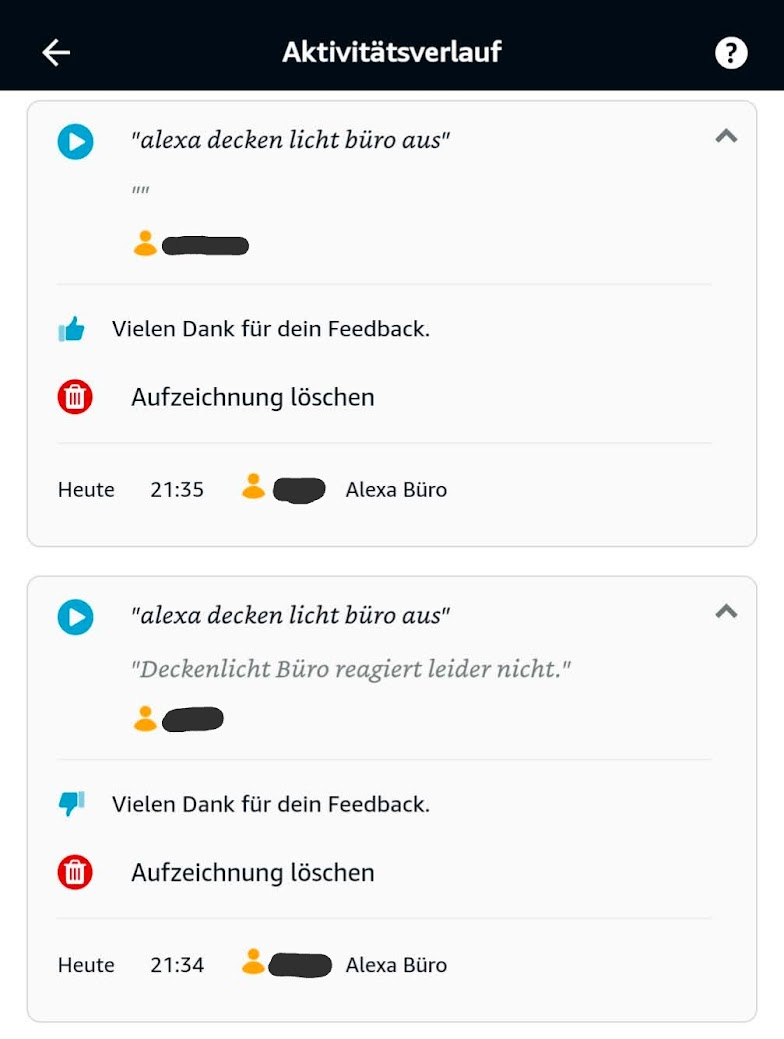
Im Node-Red kommt im Debug auch nichts an, wenn Alexa das Gerät nicht findet. Würde daher Node-Red ausschließen (oder?)
-
Ich habe es nun oft bemerkt, Alexa sagt erst "Gerät reagiert leider nicht", man wartet paar Sekunden und versuche es erneut und es funktioniert.
Im Node-Red kommt im Debug auch nichts an, wenn Alexa das Gerät nicht findet. Würde daher Node-Red ausschließen (oder?)
@hant0r sschon mal das komplette Netzwerk neu gestartet? Alle Echos, und LAN, WLAN, Zigbee-Geräte?
Ro75.
SERVER = Beelink U59 16GB DDR4 RAM 512GB SSD, FB 7490, FritzDect 200+301+440, ConBee II, Zigbee Aqara Sensoren + NOUS A1Z, NOUS A1T, Philips Hue ** ioBroker, REDIS, influxdb2, Grafana, PiHole, Plex-Mediaserver, paperless-ngx (Docker), MariaDB + phpmyadmin *** VIS-Runtime = Intel NUC 8GB RAM 128GB SSD + 24" Touchscreen
-
@hant0r sschon mal das komplette Netzwerk neu gestartet? Alle Echos, und LAN, WLAN, Zigbee-Geräte?
Ro75.
-
@hant0r sagte in Alexa - Geräte reagieren nicht mehr:
Aber auch die Batterie betriebenen Zigbee Geräte?
Nein. Aber Router (FB?), Echos...
Ro75.
SERVER = Beelink U59 16GB DDR4 RAM 512GB SSD, FB 7490, FritzDect 200+301+440, ConBee II, Zigbee Aqara Sensoren + NOUS A1Z, NOUS A1T, Philips Hue ** ioBroker, REDIS, influxdb2, Grafana, PiHole, Plex-Mediaserver, paperless-ngx (Docker), MariaDB + phpmyadmin *** VIS-Runtime = Intel NUC 8GB RAM 128GB SSD + 24" Touchscreen
-
Und den Rechner auf dem der ioBroker läuft nicht vergessen!
Nachdem heute ja die Zeitumstellung war, könnte man den FI testen und so automatisch alle Geräte die am Strom hängen auch neu starten.
-
Und den Rechner auf dem der ioBroker läuft nicht vergessen!
Nachdem heute ja die Zeitumstellung war, könnte man den FI testen und so automatisch alle Geräte die am Strom hängen auch neu starten.
@dr-bakterius sagte in Alexa - Geräte reagieren nicht mehr:
Und den Rechner auf dem der ioBroker läuft nicht vergessen!
Nachdem heute ja die Zeitumstellung war, könnte man den FI testen und so automatisch alle Geräte die am Strom hängen auch neu starten.
nuja, das könnte bei raspis mit sd eventuell ungesund sein... mir hats bei stromausfall schon meinen synology router gekillt.
gruß vom Woody
HAPPINESS is not a DESTINATION, it's a WAY of LIFE! -
@dr-bakterius sagte in Alexa - Geräte reagieren nicht mehr:
Und den Rechner auf dem der ioBroker läuft nicht vergessen!
Nachdem heute ja die Zeitumstellung war, könnte man den FI testen und so automatisch alle Geräte die am Strom hängen auch neu starten.
nuja, das könnte bei raspis mit sd eventuell ungesund sein... mir hats bei stromausfall schon meinen synology router gekillt.
@da_woody sagte in Alexa - Geräte reagieren nicht mehr:
das könnte bei raspis mit sd eventuell ungesund sein...
Nicht nur für die. Das findet kein Gerät wirklich prickelnd.
-
@da_woody sagte in Alexa - Geräte reagieren nicht mehr:
das könnte bei raspis mit sd eventuell ungesund sein...
Nicht nur für die. Das findet kein Gerät wirklich prickelnd.
@thomas-braun klar, mein server hats bis jetzt aber überlebt... ;)
wollte damit nur sagen, alles runterfahren, dann kann man FI testen und alles in der richtigen reihenfolge wieder starten.
mein kabelrouter ist als reines modem in betrieb. nach so einem blödsinn kam es schon vor, daß sich der router, oder ein pc beim provider angemeldet hat, weil der kabelrouter zu spät dran war mit einloggen. ergo, kein inet zugriff. anruf bei kabel+, reset vom kabeldingens, klappt wieder. geht schneller, als alles wieder selbst neu starten. -
@hant0r sagte in Alexa - Geräte reagieren nicht mehr:
Aber auch die Batterie betriebenen Zigbee Geräte?
Nein. Aber Router (FB?), Echos...
Ro75.
@ro75 sagte in Alexa - Geräte reagieren nicht mehr:
Nein. Aber Router (FB?), Echos...
Ro75.
Habe ich alle mal neu gestartet.
Als Netzwerk setze ich auch das Unifi-System ohne FritzBox etc. - da geht das zum Glück recht easy :)@dr-bakterius sagte in Alexa - Geräte reagieren nicht mehr:
Nachdem heute ja die Zeitumstellung war, könnte man den FI testen und so automatisch alle Geräte die am Strom hängen auch neu starten.
Würde bei mir nicht viel passieren, es hängt alles hinter einer USV, genau damit es mir meine Synology und Rest nicht killt ;)
.
Ich beobachte das Verhalten mal weiter -
@dr-bakterius sagte in Alexa - Geräte reagieren nicht mehr:
Und den Rechner auf dem der ioBroker läuft nicht vergessen!
Nachdem heute ja die Zeitumstellung war, könnte man den FI testen und so automatisch alle Geräte die am Strom hängen auch neu starten.
nuja, das könnte bei raspis mit sd eventuell ungesund sein... mir hats bei stromausfall schon meinen synology router gekillt.
@da_woody sagte in Alexa - Geräte reagieren nicht mehr:
nuja, das könnte bei raspis mit sd eventuell ungesund sein... mir hats bei stromausfall schon meinen synology router gekillt.
Deshalb investiert man auch in eine USV. Einen unangekündigten Stromausfall kann es immer geben. Oder eine Spannungsspitze. Aber natürlich fährt man vor einem FI-Test empfindliche Geräte kontrolliert herunter (wenn sie nicht von einer USV gebuffert werden).
-
@ro75 sagte in Alexa - Geräte reagieren nicht mehr:
Nein. Aber Router (FB?), Echos...
Ro75.
Habe ich alle mal neu gestartet.
Als Netzwerk setze ich auch das Unifi-System ohne FritzBox etc. - da geht das zum Glück recht easy :)@dr-bakterius sagte in Alexa - Geräte reagieren nicht mehr:
Nachdem heute ja die Zeitumstellung war, könnte man den FI testen und so automatisch alle Geräte die am Strom hängen auch neu starten.
Würde bei mir nicht viel passieren, es hängt alles hinter einer USV, genau damit es mir meine Synology und Rest nicht killt ;)
.
Ich beobachte das Verhalten mal weiter@hant0r sagte in Alexa - Geräte reagieren nicht mehr:
es hängt alles hinter einer USV
Auch sämtliche Aktoren (Shelly, Tasmota-Steckdosen, ESP, ...)? Meine Rechner und das gesamte Netzwerk (Modem, USG, Switche, Accesspoints) hängen auch bei mir an einer USV. Die werden natürlich kontrolliert neu gestartet wenn es notwendig ist.
-
@da_woody sagte in Alexa - Geräte reagieren nicht mehr:
nuja, das könnte bei raspis mit sd eventuell ungesund sein... mir hats bei stromausfall schon meinen synology router gekillt.
Deshalb investiert man auch in eine USV. Einen unangekündigten Stromausfall kann es immer geben. Oder eine Spannungsspitze. Aber natürlich fährt man vor einem FI-Test empfindliche Geräte kontrolliert herunter (wenn sie nicht von einer USV gebuffert werden).
@dr-bakterius hast Recht, bin da noch faul. Der Server in der Werkstatt ist ja an einer usv. Der Router im Haus noch nicht.
Tipps für neue Geräte?gruß vom Woody
HAPPINESS is not a DESTINATION, it's a WAY of LIFE!






Hey! Du scheinst an dieser Unterhaltung interessiert zu sein, hast aber noch kein Konto.
Hast du es satt, bei jedem Besuch durch die gleichen Beiträge zu scrollen? Wenn du dich für ein Konto anmeldest, kommst du immer genau dorthin zurück, wo du zuvor warst, und kannst dich über neue Antworten benachrichtigen lassen (entweder per E-Mail oder Push-Benachrichtigung). Du kannst auch Lesezeichen speichern und Beiträge positiv bewerten, um anderen Community-Mitgliedern deine Wertschätzung zu zeigen.
Mit deinem Input könnte dieser Beitrag noch besser werden 💗
Registrieren AnmeldenSupport us
481
Online33.0k
Benutzer83.6k
Themen1.3m
Beiträge