



Skip to content
  • Home
  • Aktuell
  • Tags
  • 0 Ungelesen 0
  • Kategorien
  • Unreplied
  • Beliebt
  • GitHub
  • Docu
  • Hilfe
Skins
  • Light
  • Brite
  • Cerulean
  • Cosmo
  • Flatly
  • Journal
  • Litera
  • Lumen
  • Lux
  • Materia
  • Minty
  • Morph
  • Pulse
  • Sandstone
  • Simplex
  • Sketchy
  • Spacelab
  • United
  • Yeti
  • Zephyr
  • Dark
  • Cyborg
  • Darkly
  • Quartz
  • Slate
  • Solar
  • Superhero
  • Vapor

  • Standard: (Kein Skin)
  • Kein Skin
Einklappen
ioBroker Logo

Community Forum

donate donate
  1. ioBroker Community Home
  2. Deutsch
  3. Off Topic
  4. Grafana
  5. "Unauthorized" Meldung beim Sign in in Grafana

NEWS

  • Weihnachtsangebot 2025! 🎄
    BluefoxB
    Bluefox
    22
    1
    1.1k

  • UPDATE 31.10.: Amazon Alexa - ioBroker Skill läuft aus ?
    apollon77A
    apollon77
    48
    3
    9.1k

  • Monatsrückblick – September 2025
    BluefoxB
    Bluefox
    14
    1
    2.4k

"Unauthorized" Meldung beim Sign in in Grafana

Geplant Angeheftet Gesperrt Verschoben Grafana
123 Beiträge 9 Kommentatoren 8.8k Aufrufe 7 Watching
  • Älteste zuerst
  • Neuste zuerst
  • Meiste Stimmen
Antworten
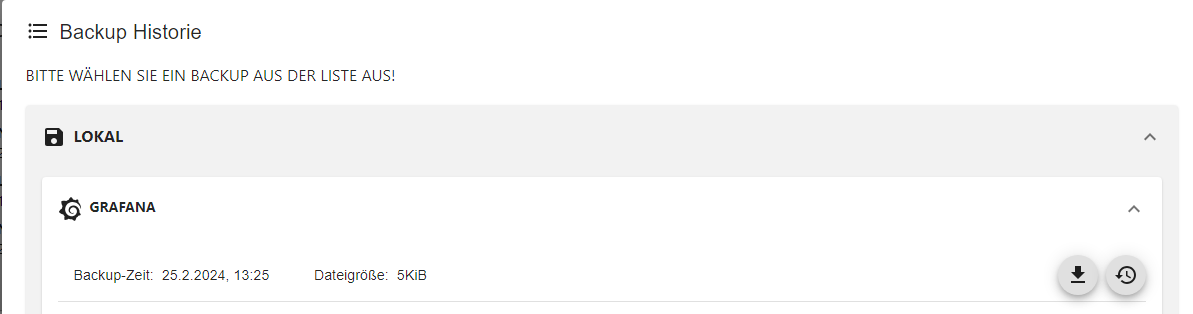
  • In einem neuen Thema antworten
Anmelden zum Antworten
Dieses Thema wurde gelöscht. Nur Nutzer mit entsprechenden Rechten können es sehen.
  • W wibear

    @ro75 sagte in "Unauthorized" Meldung beim Sign in in Grafana:

    Die Kiste mal neu starten.

    zum 2. Mal neu gestartet ohne Erfolg.
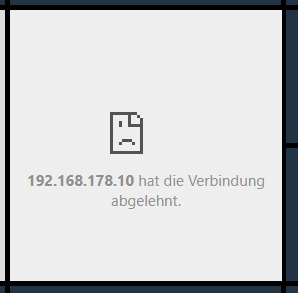
    43f046b4-4cd4-4f01-866c-5de0d4dd9f76-grafik.png

    Ro75R Offline
    Ro75R Offline
    Ro75
    schrieb am zuletzt editiert von Ro75
    #58

    @wibear mach die Änderung in der ini rückgängig. Was passiert dann? Ist Grafana im Docker?

    Ro75.

    SERVER = Beelink U59 16GB DDR4 RAM 512GB SSD, FB 7490, FritzDect 200+301+440, ConBee II, Zigbee Aqara Sensoren + NOUS A1Z, NOUS A1T, Philips Hue ** ioBroker, REDIS, influxdb2, Grafana, PiHole, Plex-Mediaserver, paperless-ngx (Docker), MariaDB + phpmyadmin *** VIS-Runtime = Intel NUC 8GB RAM 128GB SSD + 24" Touchscreen

    W 2 Antworten Letzte Antwort
    0
    • Ro75R Ro75

      @wibear mach die Änderung in der ini rückgängig. Was passiert dann? Ist Grafana im Docker?

      Ro75.

      W Offline
      W Offline
      wibear
      schrieb am zuletzt editiert von
      #59

      @ro75 sagte in "Unauthorized" Meldung beim Sign in in Grafana:

      noch einmal

      bitte siehe oben (vor einer minute)

      1 Antwort Letzte Antwort
      0
      • Ro75R Ro75

        @wibear mach die Änderung in der ini rückgängig. Was passiert dann? Ist Grafana im Docker?

        Ro75.

        W Offline
        W Offline
        wibear
        schrieb am zuletzt editiert von
        #60

        @ro75 sagte in "Unauthorized" Meldung beim Sign in in Grafana:

        mach die Änderung in der ini rückgängig. Was passiert dann? Ist Grafana im Docker?

        Habe rückgängig gemacht:

        
        wibear@iobroker-pi:~ $ systemctl status grafana-server
        ● grafana-server.service - Grafana instance
             Loaded: loaded (/lib/systemd/system/grafana-server.service; enabled; vendor preset: enabled)
             Active: failed (Result: exit-code) since Sat 2024-10-19 11:48:35 CEST; 38s ago
               Docs: http://docs.grafana.org
            Process: 3461 ExecStart=/usr/share/grafana/bin/grafana server --config=${CONF_FILE} --pidfile=${PID_FILE_DIR}/grafan>
           Main PID: 3461 (code=exited, status=1/FAILURE)
                CPU: 391ms
        
        Oct 19 11:48:35 iobroker-pi systemd[1]: grafana-server.service: Scheduled restart job, restart counter is at 5.
        Oct 19 11:48:35 iobroker-pi systemd[1]: Stopped Grafana instance.
        Oct 19 11:48:35 iobroker-pi systemd[1]: grafana-server.service: Start request repeated too quickly.
        Oct 19 11:48:35 iobroker-pi systemd[1]: grafana-server.service: Failed with result 'exit-code'.
        Oct 19 11:48:35 iobroker-pi systemd[1]: Failed to start Grafana instance.
        lines 1-13/13 (END)


        Auf Raspberry läuft IOBroker und Raspberrymatic, kein Docker.

        Ro75R 1 Antwort Letzte Antwort
        0
        • W wibear

          @ro75 sagte in "Unauthorized" Meldung beim Sign in in Grafana:

          mach die Änderung in der ini rückgängig. Was passiert dann? Ist Grafana im Docker?

          Habe rückgängig gemacht:

          
          wibear@iobroker-pi:~ $ systemctl status grafana-server
          ● grafana-server.service - Grafana instance
               Loaded: loaded (/lib/systemd/system/grafana-server.service; enabled; vendor preset: enabled)
               Active: failed (Result: exit-code) since Sat 2024-10-19 11:48:35 CEST; 38s ago
                 Docs: http://docs.grafana.org
              Process: 3461 ExecStart=/usr/share/grafana/bin/grafana server --config=${CONF_FILE} --pidfile=${PID_FILE_DIR}/grafan>
             Main PID: 3461 (code=exited, status=1/FAILURE)
                  CPU: 391ms
          
          Oct 19 11:48:35 iobroker-pi systemd[1]: grafana-server.service: Scheduled restart job, restart counter is at 5.
          Oct 19 11:48:35 iobroker-pi systemd[1]: Stopped Grafana instance.
          Oct 19 11:48:35 iobroker-pi systemd[1]: grafana-server.service: Start request repeated too quickly.
          Oct 19 11:48:35 iobroker-pi systemd[1]: grafana-server.service: Failed with result 'exit-code'.
          Oct 19 11:48:35 iobroker-pi systemd[1]: Failed to start Grafana instance.
          lines 1-13/13 (END)


          Auf Raspberry läuft IOBroker und Raspberrymatic, kein Docker.

          Ro75R Offline
          Ro75R Offline
          Ro75
          schrieb am zuletzt editiert von
          #61

          @wibear wie bzw. mit was hast du die ini geändert. Ggfs. mal die ini hier posten.

          Ro75.

          SERVER = Beelink U59 16GB DDR4 RAM 512GB SSD, FB 7490, FritzDect 200+301+440, ConBee II, Zigbee Aqara Sensoren + NOUS A1Z, NOUS A1T, Philips Hue ** ioBroker, REDIS, influxdb2, Grafana, PiHole, Plex-Mediaserver, paperless-ngx (Docker), MariaDB + phpmyadmin *** VIS-Runtime = Intel NUC 8GB RAM 128GB SSD + 24" Touchscreen

          W 2 Antworten Letzte Antwort
          0
          • Ro75R Ro75

            @wibear wie bzw. mit was hast du die ini geändert. Ggfs. mal die ini hier posten.

            Ro75.

            W Offline
            W Offline
            wibear
            schrieb am zuletzt editiert von
            #62

            @ro75

            Geändert mit nano: sudo nano /etc/grafana/grafana.ini

            Beim Versuch sie mit FileZilla runterzuladen kommt eine Fehlermeldung konnte nicht gestartet werden.
            Womit kann ich sie noch runterladen?

            F 1 Antwort Letzte Antwort
            0
            • W wibear

              @ro75

              Geändert mit nano: sudo nano /etc/grafana/grafana.ini

              Beim Versuch sie mit FileZilla runterzuladen kommt eine Fehlermeldung konnte nicht gestartet werden.
              Womit kann ich sie noch runterladen?

              F Offline
              F Offline
              funkydoc
              schrieb am zuletzt editiert von
              #63

              @wibear genauso habe ich es auch gemacht, mit sudo nano ….
              Dann nach dem String gesucht, geändert, abgespeichert und Grafana neu gestartet. Fertig und läuft.

              1 Antwort Letzte Antwort
              0
              • Ro75R Ro75

                @wibear wie bzw. mit was hast du die ini geändert. Ggfs. mal die ini hier posten.

                Ro75.

                W Offline
                W Offline
                wibear
                schrieb am zuletzt editiert von
                #64

                @ro75

                Ich habe ein Grafana-Backup. Vielleicht damit versuchen?

                Ro75R 1 Antwort Letzte Antwort
                0
                • W wibear

                  @ro75

                  Ich habe ein Grafana-Backup. Vielleicht damit versuchen?

                  Ro75R Offline
                  Ro75R Offline
                  Ro75
                  schrieb am zuletzt editiert von
                  #65

                  @wibear was bedeutet Backup genau?

                  Ro75.

                  SERVER = Beelink U59 16GB DDR4 RAM 512GB SSD, FB 7490, FritzDect 200+301+440, ConBee II, Zigbee Aqara Sensoren + NOUS A1Z, NOUS A1T, Philips Hue ** ioBroker, REDIS, influxdb2, Grafana, PiHole, Plex-Mediaserver, paperless-ngx (Docker), MariaDB + phpmyadmin *** VIS-Runtime = Intel NUC 8GB RAM 128GB SSD + 24" Touchscreen

                  W 1 Antwort Letzte Antwort
                  0
                  • Ro75R Ro75

                    @wibear was bedeutet Backup genau?

                    Ro75.

                    W Offline
                    W Offline
                    wibear
                    schrieb am zuletzt editiert von
                    #66

                    @ro75

                    764b28dd-5129-4887-9543-3056d38fd573-grafik.png

                    Ro75R 1 Antwort Letzte Antwort
                    0
                    • W wibear

                      @ro75

                      764b28dd-5129-4887-9543-3056d38fd573-grafik.png

                      Ro75R Offline
                      Ro75R Offline
                      Ro75
                      schrieb am zuletzt editiert von
                      #67

                      @wibear Das sind ja nur die "Diagramme" drin, aber doch nicht Grafana selbst. Keine Ahnung. Hattest du schon einmal

                      iob diag
                      

                      gemacht und die Langfassung gepostet?

                      Ro75.

                      SERVER = Beelink U59 16GB DDR4 RAM 512GB SSD, FB 7490, FritzDect 200+301+440, ConBee II, Zigbee Aqara Sensoren + NOUS A1Z, NOUS A1T, Philips Hue ** ioBroker, REDIS, influxdb2, Grafana, PiHole, Plex-Mediaserver, paperless-ngx (Docker), MariaDB + phpmyadmin *** VIS-Runtime = Intel NUC 8GB RAM 128GB SSD + 24" Touchscreen

                      W 2 Antworten Letzte Antwort
                      0
                      • Ro75R Ro75

                        @wibear Das sind ja nur die "Diagramme" drin, aber doch nicht Grafana selbst. Keine Ahnung. Hattest du schon einmal

                        iob diag
                        

                        gemacht und die Langfassung gepostet?

                        Ro75.

                        W Offline
                        W Offline
                        wibear
                        schrieb am zuletzt editiert von
                        #68

                        @ro75

                        Summary:

                        ```bash
                        ======================= SUMMARY =======================
                                                v.2024-08-12
                        
                        
                           Static hostname: iobroker-pi
                                 Icon name: computer
                          Operating System: Raspbian GNU/Linux 11 (bullseye)
                                    Kernel: Linux 6.1.21-v7l+
                              Architecture: arm
                        
                        Installation:           native
                        Kernel:                 armv7l
                        Userland:               32 bit
                        Timezone:               Europe/Berlin (CEST, +0200)
                        User-ID:                1000
                        Display-Server:         true
                        Boot Target:            multi-user.target
                        
                        Pending OS-Updates:     1
                        Pending iob updates:    0
                        
                        Nodejs-Installation:
                        /usr/bin/nodejs         v20.18.0
                        /usr/bin/node           v20.18.0
                        /usr/bin/npm            10.8.2
                        /usr/bin/npx            10.8.2
                        /usr/bin/corepack       0.29.3
                        
                        Recommended versions are nodejs 20.18.0 and npm 10.8.2
                        Your nodejs installation is correct
                        
                        MEMORY:
                                       total        used        free      shared  buff/cache   available
                        Mem:            3.9G        1.3G        728M        0.0K        1.8G        2.5G
                        Swap:            99M        5.0M         94M
                        Total:          4.0G        1.3G        823M
                        
                        Active iob-Instances:   24
                        Upgrade policy: patch
                        
                        ioBroker Core:          js-controller           6.0.11
                                                admin                   7.1.5
                        
                        ioBroker Status:        iobroker is running on this host.
                        
                        
                        Objects type: jsonl
                        States  type: jsonl
                        
                        Status admin and web instance:
                        + system.adapter.admin.0                  : admin                 : iobroker-pi                              -  enabled, port: 8081, bind: 0.0.0.0, run as: admin
                        + system.adapter.web.0                    : web                   : iobroker-pi                              -  enabled, port: 8082, bind: 0.0.0.0, run as: admin
                        
                        Objects:                7086
                        States:                 5970
                        
                        Size of iob-Database:
                        
                        18M     /opt/iobroker/iobroker-data/objects.jsonl
                        8.5M    /opt/iobroker/iobroker-data/states.jsonl


                        =================== END OF SUMMARY ====================


                        ```bash
                        Skript v.2024-08-12
                        
                        *** BASE SYSTEM ***
                           Static hostname: iobroker-pi
                                 Icon name: computer
                          Operating System: Raspbian GNU/Linux 11 (bullseye)
                                    Kernel: Linux 6.1.21-v7l+
                              Architecture: arm
                        OS is similar to: debian
                        
                        Model           : Raspberry Pi 4 Model B Rev 1.5
                        Docker          : false
                        Virtualization  : none
                        Kernel          : armv7l
                        Userland        : 32 bit
                        
                        Systemuptime and Load:
                         12:15:40 up 38 min,  1 user,  load average: 0.92, 0.85, 0.61
                        CPU threads: 4
                        
                        
                        *** RASPBERRY THROTTLING ***
                        Current issues:
                        No throttling issues detected.
                        
                        Previously detected issues:
                        No throttling issues detected.
                        
                        *** Time and Time Zones ***
                                       Local time: Sat 2024-10-19 12:15:40 CEST
                                   Universal time: Sat 2024-10-19 10:15:40 UTC
                                         RTC time: n/a
                                        Time zone: Europe/Berlin (CEST, +0200)
                        System clock synchronized: yes
                                      NTP service: active
                                  RTC in local TZ: no
                        
                        *** Users and Groups ***
                        User that called 'iob diag':
                        wibear
                        HOME=/home/wibear
                        GROUPS=wibear adm dialout cdrom sudo audio video plugdev games users input render netdev gpio i2c spi iobroker
                        
                        User that is running 'js-controller':
                        iobroker
                        HOME=/home/iobroker
                        GROUPS=iobroker tty dialout audio video plugdev bluetooth gpio i2c
                        
                        *** Display-Server-Setup ***
                        Display-Server: true
                        Desktop:
                        Terminal:       tty
                        Boot Target:    multi-user.target
                        
                        *** MEMORY ***
                                       total        used        free      shared  buff/cache   available
                        Mem:            3.9G        1.3G        727M        0.0K        1.9G        2.5G
                        Swap:            99M        5.0M         94M
                        Total:          4.0G        1.3G        822M
                        
                        Active iob-Instances:   24
                        
                                 3887 M total memory
                                 1308 M used memory
                                  302 M active memory
                                 2729 M inactive memory
                                  727 M free memory
                                   86 M buffer memory
                                 1764 M swap cache
                                   99 M total swap
                                    5 M used swap
                                   94 M free swap
                        
                        *** top - Table Of Processes  ***
                        top - 12:15:41 up 38 min,  1 user,  load average: 0.92, 0.85, 0.61
                        Tasks: 205 total,   2 running, 203 sleeping,   0 stopped,   0 zombie
                        %Cpu(s):  6.1 us,  0.0 sy,  0.0 ni, 93.9 id,  0.0 wa,  0.0 hi,  0.0 si,  0.0 st
                        MiB Mem :   3887.9 total,    727.9 free,   1308.5 used,   1851.5 buff/cache
                        MiB Swap:    100.0 total,     95.0 free,      5.0 used.   2470.9 avail Mem
                        
                        *** FAILED SERVICES ***
                        
                          UNIT                   LOAD   ACTIVE SUB    DESCRIPTION
                        * grafana-server.service loaded failed failed Grafana instance
                        
                        LOAD   = Reflects whether the unit definition was properly loaded.
                        ACTIVE = The high-level unit activation state, i.e. generalization of SUB.
                        SUB    = The low-level unit activation state, values depend on unit type.
                        1 loaded units listed.
                        
                        *** FILESYSTEM ***
                        Filesystem     Type      Size  Used Avail Use% Mounted on
                        /dev/root      ext4       55G   11G   42G  21% /
                        devtmpfs       devtmpfs  1.7G     0  1.7G   0% /dev
                        tmpfs          tmpfs     1.9G     0  1.9G   0% /dev/shm
                        tmpfs          tmpfs     778M  1.1M  777M   1% /run
                        tmpfs          tmpfs     5.0M  4.0K  5.0M   1% /run/lock
                        /dev/sda1      vfat      255M   60M  196M  24% /boot
                        tmpfs          tmpfs     389M     0  389M   0% /run/user/1000
                        
                        Messages concerning ext4 filesystem in dmesg:
                        [Sat Oct 19 11:37:16 2024] Kernel command line: coherent_pool=1M 8250.nr_uarts=1 snd_bcm2835.enable_headphones=0 snd_bcm2835.enable_headphones=1 snd_bcm2835.enable_hdmi=1 snd_bcm2835.enable_hdmi=0  smsc95xx.macaddr=D8:3A:DD:E1:EF:16 vc_mem.mem_base=0x3f000000 vc_mem.mem_size=0x3f600000  console=tty1 root=PARTUUID=e605bf32-02 rootfstype=ext4 fsck.repair=yes rootwait
                        [Sat Oct 19 11:37:17 2024] EXT4-fs (sda2): INFO: recovery required on readonly filesystem
                        [Sat Oct 19 11:37:17 2024] EXT4-fs (sda2): write access will be enabled during recovery
                        [Sat Oct 19 11:37:17 2024] EXT4-fs (sda2): recovery complete
                        [Sat Oct 19 11:37:17 2024] EXT4-fs (sda2): mounted filesystem with ordered data mode. Quota mode: none.
                        [Sat Oct 19 11:37:17 2024] VFS: Mounted root (ext4 filesystem) readonly on device 8:2.
                        [Sat Oct 19 11:37:18 2024] EXT4-fs (sda2): re-mounted. Quota mode: none.
                        
                        Show mounted filesystems:
                        TARGET  SOURCE    FSTYPE OPTIONS
                        /       /dev/sda2 ext4   rw,noatime
                        `-/boot /dev/sda1 vfat   rw,relatime,fmask=0022,dmask=0022,codepage=437,iocharset=ascii,shortname=mixed,errors=remount-ro
                        
                        Files in neuralgic directories:
                        
                        /var:
                        du: cannot access '/var/lib/lxcfs/cgroup': Input/output error
                        3.8G    /var/
                        2.0G    /var/log
                        1.5G    /var/log/journal/6462312882a642219bbda7aff5f4f5b9
                        1.5G    /var/log/journal
                        943M    /var/cache
                        
                        Archived and active journals take up 1.4G in the file system.
                        
                        /opt/iobroker/backups:
                        82M     /opt/iobroker/backups/
                        
                        /opt/iobroker/iobroker-data:
                        909M    /opt/iobroker/iobroker-data/
                        754M    /opt/iobroker/iobroker-data/files
                        617M    /opt/iobroker/iobroker-data/files/javascript.admin
                        560M    /opt/iobroker/iobroker-data/files/javascript.admin/static
                        558M    /opt/iobroker/iobroker-data/files/javascript.admin/static/js
                        
                        The five largest files in iobroker-data are:
                        24M     /opt/iobroker/iobroker-data/files/web.admin/static/js/main.135279a0.js.map
                        18M     /opt/iobroker/iobroker-data/objects.jsonl
                        12M     /opt/iobroker/iobroker-data/files/backitup.admin/static/js/main.bd24114f.js
                        8.8M    /opt/iobroker/iobroker-data/states.jsonl
                        8.7M    /opt/iobroker/iobroker-data/files/javascript.admin/static/js/838.0aa41cb0.chunk.js.map
                        
                        USB-Devices by-id:
                        USB-Sticks -  Avoid direct links to /dev/tty* in your adapter setups, please always prefer the links 'by-id':
                        
                        No Devices found 'by-id'


                        *** NodeJS-Installation ***
                        
                        /usr/bin/nodejs         v20.18.0
                        /usr/bin/node           v20.18.0
                        /usr/bin/npm            10.8.2
                        /usr/bin/npx            10.8.2
                        /usr/bin/corepack       0.29.3
                        
                        
                        nodejs:
                          Installed: 20.18.0-1nodesource1
                          Candidate: 20.18.0-1nodesource1
                          Version table:
                         *** 20.18.0-1nodesource1 600
                                500 https://deb.nodesource.com/node_20.x nodistro/main armhf Packages
                                100 /var/lib/dpkg/status
                             20.17.0-1nodesource1 600
                                500 https://deb.nodesource.com/node_20.x nodistro/main armhf Packages
                             20.16.0-1nodesource1 600
                                500 https://deb.nodesource.com/node_20.x nodistro/main armhf Packages
                             20.15.1-1nodesource1 600
                                500 https://deb.nodesource.com/node_20.x nodistro/main armhf Packages
                             20.15.0-1nodesource1 600
                                500 https://deb.nodesource.com/node_20.x nodistro/main armhf Packages
                             20.14.0-1nodesource1 600
                                500 https://deb.nodesource.com/node_20.x nodistro/main armhf Packages
                             20.13.1-1nodesource1 600
                                500 https://deb.nodesource.com/node_20.x nodistro/main armhf Packages
                             20.13.0-1nodesource1 600
                                500 https://deb.nodesource.com/node_20.x nodistro/main armhf Packages
                             20.12.2-1nodesource1 600
                                500 https://deb.nodesource.com/node_20.x nodistro/main armhf Packages
                             20.12.1-1nodesource1 600
                                500 https://deb.nodesource.com/node_20.x nodistro/main armhf Packages
                             20.12.0-1nodesource1 600
                                500 https://deb.nodesource.com/node_20.x nodistro/main armhf Packages
                             20.11.1-1nodesource1 600
                                500 https://deb.nodesource.com/node_20.x nodistro/main armhf Packages
                             20.11.0-1nodesource1 600
                                500 https://deb.nodesource.com/node_20.x nodistro/main armhf Packages
                             20.10.0-1nodesource1 600
                                500 https://deb.nodesource.com/node_20.x nodistro/main armhf Packages
                             20.9.0-1nodesource1 600
                                500 https://deb.nodesource.com/node_20.x nodistro/main armhf Packages
                             20.8.1-1nodesource1 600
                                500 https://deb.nodesource.com/node_20.x nodistro/main armhf Packages
                             20.8.0-1nodesource1 600
                                500 https://deb.nodesource.com/node_20.x nodistro/main armhf Packages
                             20.7.0-1nodesource1 600
                                500 https://deb.nodesource.com/node_20.x nodistro/main armhf Packages
                             20.6.1-1nodesource1 600
                                500 https://deb.nodesource.com/node_20.x nodistro/main armhf Packages
                             20.6.0-1nodesource1 600
                                500 https://deb.nodesource.com/node_20.x nodistro/main armhf Packages
                             20.5.1-1nodesource1 600
                                500 https://deb.nodesource.com/node_20.x nodistro/main armhf Packages
                             20.5.0-1nodesource1 600
                                500 https://deb.nodesource.com/node_20.x nodistro/main armhf Packages
                             20.4.0-1nodesource1 600
                                500 https://deb.nodesource.com/node_20.x nodistro/main armhf Packages
                             20.3.1-1nodesource1 600
                                500 https://deb.nodesource.com/node_20.x nodistro/main armhf Packages
                             20.3.0-1nodesource1 600
                                500 https://deb.nodesource.com/node_20.x nodistro/main armhf Packages
                             20.2.0-1nodesource1 600
                                500 https://deb.nodesource.com/node_20.x nodistro/main armhf Packages
                             20.1.0-1nodesource1 600
                                500 https://deb.nodesource.com/node_20.x nodistro/main armhf Packages
                             20.0.0-1nodesource1 600
                                500 https://deb.nodesource.com/node_20.x nodistro/main armhf Packages
                             12.22.12~dfsg-1~deb11u5 500
                                500 http://raspbian.raspberrypi.org/raspbian bullseye/main armhf Packages
                        
                        Temp directories causing npm8 problem: 0
                        No problems detected
                        
                        Errors in npm tree:
                        
                        *** ioBroker-Installation ***
                        
                        ioBroker Status
                        iobroker is running on this host.
                        
                        
                        Objects type: jsonl
                        States  type: jsonl
                        
                        Core adapters versions
                        js-controller:  6.0.11
                        admin:          7.1.5
                        javascript:     8.8.3
                        
                        nodejs modules from github:     1
                        +-- iobroker.vw-connect@0.5.3 (git+ssh://git@github.com/TA2k/ioBroker.vw-connect.git#b5fbfb41f65b8a1efb646e9efb68f1cbd1627d27)
                        
                        Adapter State
                        + system.adapter.admin.0                  : admin                 : iobroker-pi                              -  enabled, port: 8081, bind: 0.0.0.0, run as: admin
                        + system.adapter.alexa2.0                 : alexa2                : iobroker-pi                              -  enabled
                        + system.adapter.backitup.0               : backitup              : iobroker-pi                              -  enabled
                        + system.adapter.device-reminder.0        : device-reminder       : iobroker-pi                              -  enabled
                        + system.adapter.discovery.0              : discovery             : iobroker-pi                              -  enabled
                        + system.adapter.ems-esp.0                : ems-esp               : iobroker-pi                              -  enabled
                          system.adapter.energiefluss-erweitert.0 : energiefluss-erweitert: iobroker-pi                              - disabled
                          system.adapter.energiefluss.0           : energiefluss          : iobroker-pi                              - disabled
                        + system.adapter.fb-checkpresence.0       : fb-checkpresence      : iobroker-pi                              -  enabled
                        + system.adapter.fritzdect.0              : fritzdect             : iobroker-pi                              -  enabled
                          system.adapter.habpanel.0               : habpanel              : iobroker-pi                              -  enabled
                        + system.adapter.history.0                : history               : iobroker-pi                              -  enabled
                        + system.adapter.hm-rega.0                : hm-rega               : iobroker-pi                              -  enabled
                        + system.adapter.hm-rpc.0                 : hm-rpc                : iobroker-pi                              -  enabled, port: 18701
                        + system.adapter.hm-rpc.1                 : hm-rpc                : iobroker-pi                              -  enabled, port: 12001
                        + system.adapter.hm-rpc.2                 : hm-rpc                : iobroker-pi                              -  enabled, port: 12010
                        + system.adapter.influxdb.0               : influxdb              : iobroker-pi                              -  enabled, port: 8086
                        + system.adapter.javascript.0             : javascript            : iobroker-pi                              -  enabled
                        + system.adapter.mqtt.0                   : mqtt                  : iobroker-pi                              -  enabled, port: 1883, bind: 192.168.178.10
                          system.adapter.netatmo-crawler.0        : netatmo-crawler       : iobroker-pi                              -  enabled
                        + system.adapter.rpi2.0                   : rpi2                  : iobroker-pi                              -  enabled
                        + system.adapter.shelly.0                 : shelly                : iobroker-pi                              -  enabled, port: 1882, bind: 0.0.0.0
                        + system.adapter.simple-api.0             : simple-api            : iobroker-pi                              -  enabled, port: 8087, bind: 0.0.0.0, run as: admin
                        + system.adapter.tr-064.0                 : tr-064                : iobroker-pi                              -  enabled
                          system.adapter.tuya.0                   : tuya                  : iobroker-pi                              - disabled
                        + system.adapter.vw-connect.0             : vw-connect            : iobroker-pi                              -  enabled
                          system.adapter.weatherunderground.0     : weatherunderground    : iobroker-pi                              - disabled
                        + system.adapter.web.0                    : web                   : iobroker-pi                              -  enabled, port: 8082, bind: 0.0.0.0, run as: admin
                        + system.adapter.whatsapp-cmb.0           : whatsapp-cmb          : iobroker-pi                              -  enabled
                        
                        + instance is alive
                        
                        Enabled adapters with bindings
                        + system.adapter.admin.0                  : admin                 : iobroker-pi                              -  enabled, port: 8081, bind: 0.0.0.0, run as: admin
                        + system.adapter.hm-rpc.0                 : hm-rpc                : iobroker-pi                              -  enabled, port: 18701
                        + system.adapter.hm-rpc.1                 : hm-rpc                : iobroker-pi                              -  enabled, port: 12001
                        + system.adapter.hm-rpc.2                 : hm-rpc                : iobroker-pi                              -  enabled, port: 12010
                        + system.adapter.influxdb.0               : influxdb              : iobroker-pi                              -  enabled, port: 8086
                        + system.adapter.mqtt.0                   : mqtt                  : iobroker-pi                              -  enabled, port: 1883, bind: 192.168.178.10
                        + system.adapter.shelly.0                 : shelly                : iobroker-pi                              -  enabled, port: 1882, bind: 0.0.0.0
                        + system.adapter.simple-api.0             : simple-api            : iobroker-pi                              -  enabled, port: 8087, bind: 0.0.0.0, run as: admin
                        + system.adapter.web.0                    : web                   : iobroker-pi                              -  enabled, port: 8082, bind: 0.0.0.0, run as: admin
                        
                        ioBroker-Repositories
                        ┌─────────┬──────────┬─────────────────────────────────────────────────────────┬──────────────┐
                        │ (index) │ name     │ url                                                     │ auto upgrade │
                        ├─────────┼──────────┼─────────────────────────────────────────────────────────┼──────────────┤
                        │ 0       │ 'stable' │ 'http://download.iobroker.net/sources-dist.json'        │ true         │
                        │ 1       │ 'beta'   │ 'http://download.iobroker.net/sources-dist-latest.json' │ false        │
                        └─────────┴──────────┴─────────────────────────────────────────────────────────┴──────────────┘
                        
                        Active repo(s): stable
                        Upgrade policy: patch
                        
                        Installed ioBroker-Instances
                        Used repository: stable
                        Adapter    "admin"        : 7.1.5    , installed 7.1.5
                        Adapter    "alexa2"       : 3.26.5   , installed 3.26.5
                        Adapter    "backitup"     : 3.0.25   , installed 3.0.25
                        Adapter    "device-reminder": 3.1.2  , installed 3.1.2
                        Adapter    "discovery"    : 5.0.0    , installed 5.0.0
                        Adapter    "ems-esp"      : 4.8.0    , installed 4.8.0
                        Adapter    "energiefluss" : 3.6.1    , installed 3.6.1
                        Adapter    "energiefluss-erweitert": 0.4.1, installed 0.4.1
                        Adapter    "fb-checkpresence": 1.2.5 , installed 1.2.5
                        Adapter    "fritzdect"    : 2.5.11   , installed 2.5.11
                        Adapter    "habpanel"     : 0.5.0    , installed 0.5.0
                        Adapter    "history"      : 3.0.1    , installed 3.0.1
                        Adapter    "hm-rega"      : 5.1.0    , installed 5.1.0
                        Adapter    "hm-rpc"       : 2.0.2    , installed 2.0.2
                        Adapter    "influxdb"     : 4.0.2    , installed 4.0.2
                        Adapter    "javascript"   : 8.8.3    , installed 8.8.3
                        Controller "js-controller": 6.0.11   , installed 6.0.11
                        Adapter    "mqtt"         : 6.1.2    , installed 6.1.2
                        Adapter    "netatmo-crawler": 0.8.1  , installed 0.8.1
                        Adapter    "rpi2"         : 1.3.2    , installed 1.3.2
                        Adapter    "shelly"       : 8.2.1    , installed 8.2.1
                        Adapter    "simple-api"   : 2.8.0    , installed 2.8.0
                        Adapter    "socketio"     : 6.7.1    , installed 6.7.1
                        Adapter    "tr-064"       : 4.3.0    , installed 4.3.0
                        Adapter    "tuya"         : 3.16.0   , installed 3.16.0
                        Adapter    "weatherunderground": 3.7.0, installed 3.7.0
                        Adapter    "web"          : 6.2.5    , installed 6.2.5
                        Adapter    "whatsapp-cmb" : 0.3.0    , installed 0.3.0
                        Adapter    "ws"           : 2.6.2    , installed 2.6.2
                        
                        Objects and States
                        Please stand by - This may take a while
                        Objects:        7086
                        States:         5970
                        
                        *** OS-Repositories and Updates ***
                        Hit:1 http://raspbian.raspberrypi.org/raspbian bullseye InRelease
                        Hit:2 https://packages.grafana.com/oss/deb stable InRelease
                        Hit:3 https://deb.nodesource.com/node_20.x nodistro InRelease
                        Hit:4 http://archive.raspberrypi.org/debian bullseye InRelease
                        Hit:5 https://apt.pivccu.de/piVCCU stable InRelease
                        Hit:6 https://repos.influxdata.com/debian bullseye InRelease
                        Reading package lists...
                        Pending Updates: 1
                        
                        *** Listening Ports ***
                        Active Internet connections (only servers)
                        Proto Recv-Q Send-Q Local Address           Foreign Address         State       User       Inode      PID/Program name
                        tcp        0      0 192.168.178.10:1883     0.0.0.0:*               LISTEN      1001       20835      2442/io.mqtt.0
                        tcp        0      0 192.168.178.10:18701    0.0.0.0:*               LISTEN      1001       17102      2163/io.hm-rpc.0
                        tcp        0      0 0.0.0.0:22              0.0.0.0:*               LISTEN      0          11850      831/sshd: /usr/sbin
                        tcp        0      0 127.0.0.1:8088          0.0.0.0:*               LISTEN      999        11838      784/influxd
                        tcp        0      0 192.168.178.10:12001    0.0.0.0:*               LISTEN      1001       19800      2386/io.hm-rpc.1
                        tcp        0      0 192.168.178.10:12010    0.0.0.0:*               LISTEN      1001       17232      2426/io.hm-rpc.2
                        tcp        0      0 10.0.3.1:53             0.0.0.0:*               LISTEN      0          11881      878/dnsmasq
                        tcp        0      0 0.0.0.0:1882            0.0.0.0:*               LISTEN      1001       21089      2543/io.shelly.0
                        tcp        0      0 127.0.0.1:9001          0.0.0.0:*               LISTEN      1001       16138      1621/iobroker.js-co
                        tcp        0      0 127.0.0.1:9000          0.0.0.0:*               LISTEN      1001       16726      1621/iobroker.js-co
                        tcp6       0      0 :::22                   :::*                    LISTEN      0          11852      831/sshd: /usr/sbin
                        tcp6       0      0 :::8082                 :::*                    LISTEN      1001       21177      2638/io.web.0
                        tcp6       0      0 :::8081                 :::*                    LISTEN      1001       16824      1828/io.admin.0
                        tcp6       0      0 :::8087                 :::*                    LISTEN      1001       21153      2621/io.simple-api.
                        tcp6       0      0 :::8086                 :::*                    LISTEN      999        16087      784/influxd
                        udp        0      0 0.0.0.0:5353            0.0.0.0:*                           108        12690      368/avahi-daemon: r
                        udp        0      0 10.0.3.1:53             0.0.0.0:*                           0          11880      878/dnsmasq
                        udp        0      0 0.0.0.0:67              0.0.0.0:*                           0          11877      878/dnsmasq
                        udp        0      0 0.0.0.0:68              0.0.0.0:*                           0          14528      611/dhclient
                        udp        0      0 0.0.0.0:40577           0.0.0.0:*                           108        12692      368/avahi-daemon: r
                        udp6       0      0 :::5353                 :::*                                108        12691      368/avahi-daemon: r
                        udp6       0      0 :::60456                :::*                                108        12693      368/avahi-daemon: r
                        
                        *** Log File - Last 25 Lines ***
                        
                        2024-10-19 12:00:07.986  - info: netatmo-crawler.0 (4265) Getting data for stationid:70:ee:50:33:0f:3e
                        2024-10-19 12:00:11.082  - info: netatmo-crawler.0 (4265) Terminated (ADAPTER_REQUESTED_TERMINATION): Everything done. Going to terminate till next schedule
                        2024-10-19 12:00:11.615  - info: host.iobroker-pi instance system.adapter.netatmo-crawler.0 having pid 4265 terminated with code 11 (ADAPTER_REQUESTED_TERMINATION)
                        2024-10-19 12:01:40.325  - info: javascript.0 (1927) script.js.common.Pumpensteuerung: 12.7
                        2024-10-19 12:03:10.939  - info: javascript.0 (1927) script.js.common.Pumpensteuerung: 12.7
                        2024-10-19 12:05:05.023  - info: host.iobroker-pi instance system.adapter.netatmo-crawler.0 in version "0.8.1" started with pid 4608
                        2024-10-19 12:05:07.958  - info: netatmo-crawler.0 (4608) starting. Version 0.8.1 in /opt/iobroker/node_modules/iobroker.netatmo-crawler, node: v20.18.0, js-controller: 6.0.11
                        2024-10-19 12:05:08.027  - info: netatmo-crawler.0 (4608) Getting data for stationid:70:ee:50:33:0f:3e
                        2024-10-19 12:05:09.323  - info: netatmo-crawler.0 (4608) Terminated (ADAPTER_REQUESTED_TERMINATION): Everything done. Going to terminate till next schedule
                        2024-10-19 12:05:09.856  - info: host.iobroker-pi instance system.adapter.netatmo-crawler.0 having pid 4608 terminated with code 11 (ADAPTER_REQUESTED_TERMINATION)
                        2024-10-19 12:08:33.508  - info: admin.0 (1828) ==> Connected system.user.admin from ::ffff:192.168.178.33
                        2024-10-19 12:10:05.025  - info: host.iobroker-pi instance system.adapter.netatmo-crawler.0 in version "0.8.1" started with pid 4939
                        2024-10-19 12:10:07.943  - info: netatmo-crawler.0 (4939) starting. Version 0.8.1 in /opt/iobroker/node_modules/iobroker.netatmo-crawler, node: v20.18.0, js-controller: 6.0.11
                        2024-10-19 12:10:08.008  - info: netatmo-crawler.0 (4939) Getting data for stationid:70:ee:50:33:0f:3e
                        2024-10-19 12:10:09.580  - info: netatmo-crawler.0 (4939) Terminated (ADAPTER_REQUESTED_TERMINATION): Everything done. Going to terminate till next schedule
                        2024-10-19 12:10:10.111  - info: host.iobroker-pi instance system.adapter.netatmo-crawler.0 having pid 4939 terminated with code 11 (ADAPTER_REQUESTED_TERMINATION)
                        2024-10-19 12:10:25.733  - info: javascript.0 (1927) script.js.common.Pumpensteuerung: 12.7
                        2024-10-19 12:11:10.407  - info: javascript.0 (1927) script.js.common.Pumpensteuerung: 12.8
                        2024-10-19 12:14:10.520  - info: javascript.0 (1927) script.js.common.Pumpensteuerung: 12.7
                        2024-10-19 12:14:55.567  - info: javascript.0 (1927) script.js.common.Pumpensteuerung: 12.6
                        2024-10-19 12:15:05.024  - info: host.iobroker-pi instance system.adapter.netatmo-crawler.0 in version "0.8.1" started with pid 6289
                        2024-10-19 12:15:08.067  - info: netatmo-crawler.0 (6289) starting. Version 0.8.1 in /opt/iobroker/node_modules/iobroker.netatmo-crawler, node: v20.18.0, js-controller: 6.0.11
                        2024-10-19 12:15:08.134  - info: netatmo-crawler.0 (6289) Getting data for stationid:70:ee:50:33:0f:3e
                        2024-10-19 12:15:11.479  - info: netatmo-crawler.0 (6289) Terminated (ADAPTER_REQUESTED_TERMINATION): Everything done. Going to terminate till next schedule
                        2024-10-19 12:15:12.015  - info: host.iobroker-pi instance system.adapter.netatmo-crawler.0 having pid 6289 terminated with code 11 (ADAPTER_REQUESTED_TERMINATION)
                        
                        
                        Ro75R 1 Antwort Letzte Antwort
                        0
                        • Ro75R Ro75

                          @wibear Das sind ja nur die "Diagramme" drin, aber doch nicht Grafana selbst. Keine Ahnung. Hattest du schon einmal

                          iob diag
                          

                          gemacht und die Langfassung gepostet?

                          Ro75.

                          W Offline
                          W Offline
                          wibear
                          schrieb am zuletzt editiert von
                          #69

                          @ro75 sagte in "Unauthorized" Meldung beim Sign in in Grafana:

                          Das sind ja nur die "Diagramme" drin, aber doch nicht Grafana selbst.

                          Ich habe auch diesen Backup vor ein paar Tagen gemacht:

                          88bdc49f-5d67-4c18-9d58-3b35845706fa-grafik.png

                          Ro75R Thomas BraunT 2 Antworten Letzte Antwort
                          0
                          • W wibear

                            @ro75

                            Summary:

                            ```bash
                            ======================= SUMMARY =======================
                                                    v.2024-08-12
                            
                            
                               Static hostname: iobroker-pi
                                     Icon name: computer
                              Operating System: Raspbian GNU/Linux 11 (bullseye)
                                        Kernel: Linux 6.1.21-v7l+
                                  Architecture: arm
                            
                            Installation:           native
                            Kernel:                 armv7l
                            Userland:               32 bit
                            Timezone:               Europe/Berlin (CEST, +0200)
                            User-ID:                1000
                            Display-Server:         true
                            Boot Target:            multi-user.target
                            
                            Pending OS-Updates:     1
                            Pending iob updates:    0
                            
                            Nodejs-Installation:
                            /usr/bin/nodejs         v20.18.0
                            /usr/bin/node           v20.18.0
                            /usr/bin/npm            10.8.2
                            /usr/bin/npx            10.8.2
                            /usr/bin/corepack       0.29.3
                            
                            Recommended versions are nodejs 20.18.0 and npm 10.8.2
                            Your nodejs installation is correct
                            
                            MEMORY:
                                           total        used        free      shared  buff/cache   available
                            Mem:            3.9G        1.3G        728M        0.0K        1.8G        2.5G
                            Swap:            99M        5.0M         94M
                            Total:          4.0G        1.3G        823M
                            
                            Active iob-Instances:   24
                            Upgrade policy: patch
                            
                            ioBroker Core:          js-controller           6.0.11
                                                    admin                   7.1.5
                            
                            ioBroker Status:        iobroker is running on this host.
                            
                            
                            Objects type: jsonl
                            States  type: jsonl
                            
                            Status admin and web instance:
                            + system.adapter.admin.0                  : admin                 : iobroker-pi                              -  enabled, port: 8081, bind: 0.0.0.0, run as: admin
                            + system.adapter.web.0                    : web                   : iobroker-pi                              -  enabled, port: 8082, bind: 0.0.0.0, run as: admin
                            
                            Objects:                7086
                            States:                 5970
                            
                            Size of iob-Database:
                            
                            18M     /opt/iobroker/iobroker-data/objects.jsonl
                            8.5M    /opt/iobroker/iobroker-data/states.jsonl


                            =================== END OF SUMMARY ====================


                            ```bash
                            Skript v.2024-08-12
                            
                            *** BASE SYSTEM ***
                               Static hostname: iobroker-pi
                                     Icon name: computer
                              Operating System: Raspbian GNU/Linux 11 (bullseye)
                                        Kernel: Linux 6.1.21-v7l+
                                  Architecture: arm
                            OS is similar to: debian
                            
                            Model           : Raspberry Pi 4 Model B Rev 1.5
                            Docker          : false
                            Virtualization  : none
                            Kernel          : armv7l
                            Userland        : 32 bit
                            
                            Systemuptime and Load:
                             12:15:40 up 38 min,  1 user,  load average: 0.92, 0.85, 0.61
                            CPU threads: 4
                            
                            
                            *** RASPBERRY THROTTLING ***
                            Current issues:
                            No throttling issues detected.
                            
                            Previously detected issues:
                            No throttling issues detected.
                            
                            *** Time and Time Zones ***
                                           Local time: Sat 2024-10-19 12:15:40 CEST
                                       Universal time: Sat 2024-10-19 10:15:40 UTC
                                             RTC time: n/a
                                            Time zone: Europe/Berlin (CEST, +0200)
                            System clock synchronized: yes
                                          NTP service: active
                                      RTC in local TZ: no
                            
                            *** Users and Groups ***
                            User that called 'iob diag':
                            wibear
                            HOME=/home/wibear
                            GROUPS=wibear adm dialout cdrom sudo audio video plugdev games users input render netdev gpio i2c spi iobroker
                            
                            User that is running 'js-controller':
                            iobroker
                            HOME=/home/iobroker
                            GROUPS=iobroker tty dialout audio video plugdev bluetooth gpio i2c
                            
                            *** Display-Server-Setup ***
                            Display-Server: true
                            Desktop:
                            Terminal:       tty
                            Boot Target:    multi-user.target
                            
                            *** MEMORY ***
                                           total        used        free      shared  buff/cache   available
                            Mem:            3.9G        1.3G        727M        0.0K        1.9G        2.5G
                            Swap:            99M        5.0M         94M
                            Total:          4.0G        1.3G        822M
                            
                            Active iob-Instances:   24
                            
                                     3887 M total memory
                                     1308 M used memory
                                      302 M active memory
                                     2729 M inactive memory
                                      727 M free memory
                                       86 M buffer memory
                                     1764 M swap cache
                                       99 M total swap
                                        5 M used swap
                                       94 M free swap
                            
                            *** top - Table Of Processes  ***
                            top - 12:15:41 up 38 min,  1 user,  load average: 0.92, 0.85, 0.61
                            Tasks: 205 total,   2 running, 203 sleeping,   0 stopped,   0 zombie
                            %Cpu(s):  6.1 us,  0.0 sy,  0.0 ni, 93.9 id,  0.0 wa,  0.0 hi,  0.0 si,  0.0 st
                            MiB Mem :   3887.9 total,    727.9 free,   1308.5 used,   1851.5 buff/cache
                            MiB Swap:    100.0 total,     95.0 free,      5.0 used.   2470.9 avail Mem
                            
                            *** FAILED SERVICES ***
                            
                              UNIT                   LOAD   ACTIVE SUB    DESCRIPTION
                            * grafana-server.service loaded failed failed Grafana instance
                            
                            LOAD   = Reflects whether the unit definition was properly loaded.
                            ACTIVE = The high-level unit activation state, i.e. generalization of SUB.
                            SUB    = The low-level unit activation state, values depend on unit type.
                            1 loaded units listed.
                            
                            *** FILESYSTEM ***
                            Filesystem     Type      Size  Used Avail Use% Mounted on
                            /dev/root      ext4       55G   11G   42G  21% /
                            devtmpfs       devtmpfs  1.7G     0  1.7G   0% /dev
                            tmpfs          tmpfs     1.9G     0  1.9G   0% /dev/shm
                            tmpfs          tmpfs     778M  1.1M  777M   1% /run
                            tmpfs          tmpfs     5.0M  4.0K  5.0M   1% /run/lock
                            /dev/sda1      vfat      255M   60M  196M  24% /boot
                            tmpfs          tmpfs     389M     0  389M   0% /run/user/1000
                            
                            Messages concerning ext4 filesystem in dmesg:
                            [Sat Oct 19 11:37:16 2024] Kernel command line: coherent_pool=1M 8250.nr_uarts=1 snd_bcm2835.enable_headphones=0 snd_bcm2835.enable_headphones=1 snd_bcm2835.enable_hdmi=1 snd_bcm2835.enable_hdmi=0  smsc95xx.macaddr=D8:3A:DD:E1:EF:16 vc_mem.mem_base=0x3f000000 vc_mem.mem_size=0x3f600000  console=tty1 root=PARTUUID=e605bf32-02 rootfstype=ext4 fsck.repair=yes rootwait
                            [Sat Oct 19 11:37:17 2024] EXT4-fs (sda2): INFO: recovery required on readonly filesystem
                            [Sat Oct 19 11:37:17 2024] EXT4-fs (sda2): write access will be enabled during recovery
                            [Sat Oct 19 11:37:17 2024] EXT4-fs (sda2): recovery complete
                            [Sat Oct 19 11:37:17 2024] EXT4-fs (sda2): mounted filesystem with ordered data mode. Quota mode: none.
                            [Sat Oct 19 11:37:17 2024] VFS: Mounted root (ext4 filesystem) readonly on device 8:2.
                            [Sat Oct 19 11:37:18 2024] EXT4-fs (sda2): re-mounted. Quota mode: none.
                            
                            Show mounted filesystems:
                            TARGET  SOURCE    FSTYPE OPTIONS
                            /       /dev/sda2 ext4   rw,noatime
                            `-/boot /dev/sda1 vfat   rw,relatime,fmask=0022,dmask=0022,codepage=437,iocharset=ascii,shortname=mixed,errors=remount-ro
                            
                            Files in neuralgic directories:
                            
                            /var:
                            du: cannot access '/var/lib/lxcfs/cgroup': Input/output error
                            3.8G    /var/
                            2.0G    /var/log
                            1.5G    /var/log/journal/6462312882a642219bbda7aff5f4f5b9
                            1.5G    /var/log/journal
                            943M    /var/cache
                            
                            Archived and active journals take up 1.4G in the file system.
                            
                            /opt/iobroker/backups:
                            82M     /opt/iobroker/backups/
                            
                            /opt/iobroker/iobroker-data:
                            909M    /opt/iobroker/iobroker-data/
                            754M    /opt/iobroker/iobroker-data/files
                            617M    /opt/iobroker/iobroker-data/files/javascript.admin
                            560M    /opt/iobroker/iobroker-data/files/javascript.admin/static
                            558M    /opt/iobroker/iobroker-data/files/javascript.admin/static/js
                            
                            The five largest files in iobroker-data are:
                            24M     /opt/iobroker/iobroker-data/files/web.admin/static/js/main.135279a0.js.map
                            18M     /opt/iobroker/iobroker-data/objects.jsonl
                            12M     /opt/iobroker/iobroker-data/files/backitup.admin/static/js/main.bd24114f.js
                            8.8M    /opt/iobroker/iobroker-data/states.jsonl
                            8.7M    /opt/iobroker/iobroker-data/files/javascript.admin/static/js/838.0aa41cb0.chunk.js.map
                            
                            USB-Devices by-id:
                            USB-Sticks -  Avoid direct links to /dev/tty* in your adapter setups, please always prefer the links 'by-id':
                            
                            No Devices found 'by-id'


                            *** NodeJS-Installation ***
                            
                            /usr/bin/nodejs         v20.18.0
                            /usr/bin/node           v20.18.0
                            /usr/bin/npm            10.8.2
                            /usr/bin/npx            10.8.2
                            /usr/bin/corepack       0.29.3
                            
                            
                            nodejs:
                              Installed: 20.18.0-1nodesource1
                              Candidate: 20.18.0-1nodesource1
                              Version table:
                             *** 20.18.0-1nodesource1 600
                                    500 https://deb.nodesource.com/node_20.x nodistro/main armhf Packages
                                    100 /var/lib/dpkg/status
                                 20.17.0-1nodesource1 600
                                    500 https://deb.nodesource.com/node_20.x nodistro/main armhf Packages
                                 20.16.0-1nodesource1 600
                                    500 https://deb.nodesource.com/node_20.x nodistro/main armhf Packages
                                 20.15.1-1nodesource1 600
                                    500 https://deb.nodesource.com/node_20.x nodistro/main armhf Packages
                                 20.15.0-1nodesource1 600
                                    500 https://deb.nodesource.com/node_20.x nodistro/main armhf Packages
                                 20.14.0-1nodesource1 600
                                    500 https://deb.nodesource.com/node_20.x nodistro/main armhf Packages
                                 20.13.1-1nodesource1 600
                                    500 https://deb.nodesource.com/node_20.x nodistro/main armhf Packages
                                 20.13.0-1nodesource1 600
                                    500 https://deb.nodesource.com/node_20.x nodistro/main armhf Packages
                                 20.12.2-1nodesource1 600
                                    500 https://deb.nodesource.com/node_20.x nodistro/main armhf Packages
                                 20.12.1-1nodesource1 600
                                    500 https://deb.nodesource.com/node_20.x nodistro/main armhf Packages
                                 20.12.0-1nodesource1 600
                                    500 https://deb.nodesource.com/node_20.x nodistro/main armhf Packages
                                 20.11.1-1nodesource1 600
                                    500 https://deb.nodesource.com/node_20.x nodistro/main armhf Packages
                                 20.11.0-1nodesource1 600
                                    500 https://deb.nodesource.com/node_20.x nodistro/main armhf Packages
                                 20.10.0-1nodesource1 600
                                    500 https://deb.nodesource.com/node_20.x nodistro/main armhf Packages
                                 20.9.0-1nodesource1 600
                                    500 https://deb.nodesource.com/node_20.x nodistro/main armhf Packages
                                 20.8.1-1nodesource1 600
                                    500 https://deb.nodesource.com/node_20.x nodistro/main armhf Packages
                                 20.8.0-1nodesource1 600
                                    500 https://deb.nodesource.com/node_20.x nodistro/main armhf Packages
                                 20.7.0-1nodesource1 600
                                    500 https://deb.nodesource.com/node_20.x nodistro/main armhf Packages
                                 20.6.1-1nodesource1 600
                                    500 https://deb.nodesource.com/node_20.x nodistro/main armhf Packages
                                 20.6.0-1nodesource1 600
                                    500 https://deb.nodesource.com/node_20.x nodistro/main armhf Packages
                                 20.5.1-1nodesource1 600
                                    500 https://deb.nodesource.com/node_20.x nodistro/main armhf Packages
                                 20.5.0-1nodesource1 600
                                    500 https://deb.nodesource.com/node_20.x nodistro/main armhf Packages
                                 20.4.0-1nodesource1 600
                                    500 https://deb.nodesource.com/node_20.x nodistro/main armhf Packages
                                 20.3.1-1nodesource1 600
                                    500 https://deb.nodesource.com/node_20.x nodistro/main armhf Packages
                                 20.3.0-1nodesource1 600
                                    500 https://deb.nodesource.com/node_20.x nodistro/main armhf Packages
                                 20.2.0-1nodesource1 600
                                    500 https://deb.nodesource.com/node_20.x nodistro/main armhf Packages
                                 20.1.0-1nodesource1 600
                                    500 https://deb.nodesource.com/node_20.x nodistro/main armhf Packages
                                 20.0.0-1nodesource1 600
                                    500 https://deb.nodesource.com/node_20.x nodistro/main armhf Packages
                                 12.22.12~dfsg-1~deb11u5 500
                                    500 http://raspbian.raspberrypi.org/raspbian bullseye/main armhf Packages
                            
                            Temp directories causing npm8 problem: 0
                            No problems detected
                            
                            Errors in npm tree:
                            
                            *** ioBroker-Installation ***
                            
                            ioBroker Status
                            iobroker is running on this host.
                            
                            
                            Objects type: jsonl
                            States  type: jsonl
                            
                            Core adapters versions
                            js-controller:  6.0.11
                            admin:          7.1.5
                            javascript:     8.8.3
                            
                            nodejs modules from github:     1
                            +-- iobroker.vw-connect@0.5.3 (git+ssh://git@github.com/TA2k/ioBroker.vw-connect.git#b5fbfb41f65b8a1efb646e9efb68f1cbd1627d27)
                            
                            Adapter State
                            + system.adapter.admin.0                  : admin                 : iobroker-pi                              -  enabled, port: 8081, bind: 0.0.0.0, run as: admin
                            + system.adapter.alexa2.0                 : alexa2                : iobroker-pi                              -  enabled
                            + system.adapter.backitup.0               : backitup              : iobroker-pi                              -  enabled
                            + system.adapter.device-reminder.0        : device-reminder       : iobroker-pi                              -  enabled
                            + system.adapter.discovery.0              : discovery             : iobroker-pi                              -  enabled
                            + system.adapter.ems-esp.0                : ems-esp               : iobroker-pi                              -  enabled
                              system.adapter.energiefluss-erweitert.0 : energiefluss-erweitert: iobroker-pi                              - disabled
                              system.adapter.energiefluss.0           : energiefluss          : iobroker-pi                              - disabled
                            + system.adapter.fb-checkpresence.0       : fb-checkpresence      : iobroker-pi                              -  enabled
                            + system.adapter.fritzdect.0              : fritzdect             : iobroker-pi                              -  enabled
                              system.adapter.habpanel.0               : habpanel              : iobroker-pi                              -  enabled
                            + system.adapter.history.0                : history               : iobroker-pi                              -  enabled
                            + system.adapter.hm-rega.0                : hm-rega               : iobroker-pi                              -  enabled
                            + system.adapter.hm-rpc.0                 : hm-rpc                : iobroker-pi                              -  enabled, port: 18701
                            + system.adapter.hm-rpc.1                 : hm-rpc                : iobroker-pi                              -  enabled, port: 12001
                            + system.adapter.hm-rpc.2                 : hm-rpc                : iobroker-pi                              -  enabled, port: 12010
                            + system.adapter.influxdb.0               : influxdb              : iobroker-pi                              -  enabled, port: 8086
                            + system.adapter.javascript.0             : javascript            : iobroker-pi                              -  enabled
                            + system.adapter.mqtt.0                   : mqtt                  : iobroker-pi                              -  enabled, port: 1883, bind: 192.168.178.10
                              system.adapter.netatmo-crawler.0        : netatmo-crawler       : iobroker-pi                              -  enabled
                            + system.adapter.rpi2.0                   : rpi2                  : iobroker-pi                              -  enabled
                            + system.adapter.shelly.0                 : shelly                : iobroker-pi                              -  enabled, port: 1882, bind: 0.0.0.0
                            + system.adapter.simple-api.0             : simple-api            : iobroker-pi                              -  enabled, port: 8087, bind: 0.0.0.0, run as: admin
                            + system.adapter.tr-064.0                 : tr-064                : iobroker-pi                              -  enabled
                              system.adapter.tuya.0                   : tuya                  : iobroker-pi                              - disabled
                            + system.adapter.vw-connect.0             : vw-connect            : iobroker-pi                              -  enabled
                              system.adapter.weatherunderground.0     : weatherunderground    : iobroker-pi                              - disabled
                            + system.adapter.web.0                    : web                   : iobroker-pi                              -  enabled, port: 8082, bind: 0.0.0.0, run as: admin
                            + system.adapter.whatsapp-cmb.0           : whatsapp-cmb          : iobroker-pi                              -  enabled
                            
                            + instance is alive
                            
                            Enabled adapters with bindings
                            + system.adapter.admin.0                  : admin                 : iobroker-pi                              -  enabled, port: 8081, bind: 0.0.0.0, run as: admin
                            + system.adapter.hm-rpc.0                 : hm-rpc                : iobroker-pi                              -  enabled, port: 18701
                            + system.adapter.hm-rpc.1                 : hm-rpc                : iobroker-pi                              -  enabled, port: 12001
                            + system.adapter.hm-rpc.2                 : hm-rpc                : iobroker-pi                              -  enabled, port: 12010
                            + system.adapter.influxdb.0               : influxdb              : iobroker-pi                              -  enabled, port: 8086
                            + system.adapter.mqtt.0                   : mqtt                  : iobroker-pi                              -  enabled, port: 1883, bind: 192.168.178.10
                            + system.adapter.shelly.0                 : shelly                : iobroker-pi                              -  enabled, port: 1882, bind: 0.0.0.0
                            + system.adapter.simple-api.0             : simple-api            : iobroker-pi                              -  enabled, port: 8087, bind: 0.0.0.0, run as: admin
                            + system.adapter.web.0                    : web                   : iobroker-pi                              -  enabled, port: 8082, bind: 0.0.0.0, run as: admin
                            
                            ioBroker-Repositories
                            ┌─────────┬──────────┬─────────────────────────────────────────────────────────┬──────────────┐
                            │ (index) │ name     │ url                                                     │ auto upgrade │
                            ├─────────┼──────────┼─────────────────────────────────────────────────────────┼──────────────┤
                            │ 0       │ 'stable' │ 'http://download.iobroker.net/sources-dist.json'        │ true         │
                            │ 1       │ 'beta'   │ 'http://download.iobroker.net/sources-dist-latest.json' │ false        │
                            └─────────┴──────────┴─────────────────────────────────────────────────────────┴──────────────┘
                            
                            Active repo(s): stable
                            Upgrade policy: patch
                            
                            Installed ioBroker-Instances
                            Used repository: stable
                            Adapter    "admin"        : 7.1.5    , installed 7.1.5
                            Adapter    "alexa2"       : 3.26.5   , installed 3.26.5
                            Adapter    "backitup"     : 3.0.25   , installed 3.0.25
                            Adapter    "device-reminder": 3.1.2  , installed 3.1.2
                            Adapter    "discovery"    : 5.0.0    , installed 5.0.0
                            Adapter    "ems-esp"      : 4.8.0    , installed 4.8.0
                            Adapter    "energiefluss" : 3.6.1    , installed 3.6.1
                            Adapter    "energiefluss-erweitert": 0.4.1, installed 0.4.1
                            Adapter    "fb-checkpresence": 1.2.5 , installed 1.2.5
                            Adapter    "fritzdect"    : 2.5.11   , installed 2.5.11
                            Adapter    "habpanel"     : 0.5.0    , installed 0.5.0
                            Adapter    "history"      : 3.0.1    , installed 3.0.1
                            Adapter    "hm-rega"      : 5.1.0    , installed 5.1.0
                            Adapter    "hm-rpc"       : 2.0.2    , installed 2.0.2
                            Adapter    "influxdb"     : 4.0.2    , installed 4.0.2
                            Adapter    "javascript"   : 8.8.3    , installed 8.8.3
                            Controller "js-controller": 6.0.11   , installed 6.0.11
                            Adapter    "mqtt"         : 6.1.2    , installed 6.1.2
                            Adapter    "netatmo-crawler": 0.8.1  , installed 0.8.1
                            Adapter    "rpi2"         : 1.3.2    , installed 1.3.2
                            Adapter    "shelly"       : 8.2.1    , installed 8.2.1
                            Adapter    "simple-api"   : 2.8.0    , installed 2.8.0
                            Adapter    "socketio"     : 6.7.1    , installed 6.7.1
                            Adapter    "tr-064"       : 4.3.0    , installed 4.3.0
                            Adapter    "tuya"         : 3.16.0   , installed 3.16.0
                            Adapter    "weatherunderground": 3.7.0, installed 3.7.0
                            Adapter    "web"          : 6.2.5    , installed 6.2.5
                            Adapter    "whatsapp-cmb" : 0.3.0    , installed 0.3.0
                            Adapter    "ws"           : 2.6.2    , installed 2.6.2
                            
                            Objects and States
                            Please stand by - This may take a while
                            Objects:        7086
                            States:         5970
                            
                            *** OS-Repositories and Updates ***
                            Hit:1 http://raspbian.raspberrypi.org/raspbian bullseye InRelease
                            Hit:2 https://packages.grafana.com/oss/deb stable InRelease
                            Hit:3 https://deb.nodesource.com/node_20.x nodistro InRelease
                            Hit:4 http://archive.raspberrypi.org/debian bullseye InRelease
                            Hit:5 https://apt.pivccu.de/piVCCU stable InRelease
                            Hit:6 https://repos.influxdata.com/debian bullseye InRelease
                            Reading package lists...
                            Pending Updates: 1
                            
                            *** Listening Ports ***
                            Active Internet connections (only servers)
                            Proto Recv-Q Send-Q Local Address           Foreign Address         State       User       Inode      PID/Program name
                            tcp        0      0 192.168.178.10:1883     0.0.0.0:*               LISTEN      1001       20835      2442/io.mqtt.0
                            tcp        0      0 192.168.178.10:18701    0.0.0.0:*               LISTEN      1001       17102      2163/io.hm-rpc.0
                            tcp        0      0 0.0.0.0:22              0.0.0.0:*               LISTEN      0          11850      831/sshd: /usr/sbin
                            tcp        0      0 127.0.0.1:8088          0.0.0.0:*               LISTEN      999        11838      784/influxd
                            tcp        0      0 192.168.178.10:12001    0.0.0.0:*               LISTEN      1001       19800      2386/io.hm-rpc.1
                            tcp        0      0 192.168.178.10:12010    0.0.0.0:*               LISTEN      1001       17232      2426/io.hm-rpc.2
                            tcp        0      0 10.0.3.1:53             0.0.0.0:*               LISTEN      0          11881      878/dnsmasq
                            tcp        0      0 0.0.0.0:1882            0.0.0.0:*               LISTEN      1001       21089      2543/io.shelly.0
                            tcp        0      0 127.0.0.1:9001          0.0.0.0:*               LISTEN      1001       16138      1621/iobroker.js-co
                            tcp        0      0 127.0.0.1:9000          0.0.0.0:*               LISTEN      1001       16726      1621/iobroker.js-co
                            tcp6       0      0 :::22                   :::*                    LISTEN      0          11852      831/sshd: /usr/sbin
                            tcp6       0      0 :::8082                 :::*                    LISTEN      1001       21177      2638/io.web.0
                            tcp6       0      0 :::8081                 :::*                    LISTEN      1001       16824      1828/io.admin.0
                            tcp6       0      0 :::8087                 :::*                    LISTEN      1001       21153      2621/io.simple-api.
                            tcp6       0      0 :::8086                 :::*                    LISTEN      999        16087      784/influxd
                            udp        0      0 0.0.0.0:5353            0.0.0.0:*                           108        12690      368/avahi-daemon: r
                            udp        0      0 10.0.3.1:53             0.0.0.0:*                           0          11880      878/dnsmasq
                            udp        0      0 0.0.0.0:67              0.0.0.0:*                           0          11877      878/dnsmasq
                            udp        0      0 0.0.0.0:68              0.0.0.0:*                           0          14528      611/dhclient
                            udp        0      0 0.0.0.0:40577           0.0.0.0:*                           108        12692      368/avahi-daemon: r
                            udp6       0      0 :::5353                 :::*                                108        12691      368/avahi-daemon: r
                            udp6       0      0 :::60456                :::*                                108        12693      368/avahi-daemon: r
                            
                            *** Log File - Last 25 Lines ***
                            
                            2024-10-19 12:00:07.986  - info: netatmo-crawler.0 (4265) Getting data for stationid:70:ee:50:33:0f:3e
                            2024-10-19 12:00:11.082  - info: netatmo-crawler.0 (4265) Terminated (ADAPTER_REQUESTED_TERMINATION): Everything done. Going to terminate till next schedule
                            2024-10-19 12:00:11.615  - info: host.iobroker-pi instance system.adapter.netatmo-crawler.0 having pid 4265 terminated with code 11 (ADAPTER_REQUESTED_TERMINATION)
                            2024-10-19 12:01:40.325  - info: javascript.0 (1927) script.js.common.Pumpensteuerung: 12.7
                            2024-10-19 12:03:10.939  - info: javascript.0 (1927) script.js.common.Pumpensteuerung: 12.7
                            2024-10-19 12:05:05.023  - info: host.iobroker-pi instance system.adapter.netatmo-crawler.0 in version "0.8.1" started with pid 4608
                            2024-10-19 12:05:07.958  - info: netatmo-crawler.0 (4608) starting. Version 0.8.1 in /opt/iobroker/node_modules/iobroker.netatmo-crawler, node: v20.18.0, js-controller: 6.0.11
                            2024-10-19 12:05:08.027  - info: netatmo-crawler.0 (4608) Getting data for stationid:70:ee:50:33:0f:3e
                            2024-10-19 12:05:09.323  - info: netatmo-crawler.0 (4608) Terminated (ADAPTER_REQUESTED_TERMINATION): Everything done. Going to terminate till next schedule
                            2024-10-19 12:05:09.856  - info: host.iobroker-pi instance system.adapter.netatmo-crawler.0 having pid 4608 terminated with code 11 (ADAPTER_REQUESTED_TERMINATION)
                            2024-10-19 12:08:33.508  - info: admin.0 (1828) ==> Connected system.user.admin from ::ffff:192.168.178.33
                            2024-10-19 12:10:05.025  - info: host.iobroker-pi instance system.adapter.netatmo-crawler.0 in version "0.8.1" started with pid 4939
                            2024-10-19 12:10:07.943  - info: netatmo-crawler.0 (4939) starting. Version 0.8.1 in /opt/iobroker/node_modules/iobroker.netatmo-crawler, node: v20.18.0, js-controller: 6.0.11
                            2024-10-19 12:10:08.008  - info: netatmo-crawler.0 (4939) Getting data for stationid:70:ee:50:33:0f:3e
                            2024-10-19 12:10:09.580  - info: netatmo-crawler.0 (4939) Terminated (ADAPTER_REQUESTED_TERMINATION): Everything done. Going to terminate till next schedule
                            2024-10-19 12:10:10.111  - info: host.iobroker-pi instance system.adapter.netatmo-crawler.0 having pid 4939 terminated with code 11 (ADAPTER_REQUESTED_TERMINATION)
                            2024-10-19 12:10:25.733  - info: javascript.0 (1927) script.js.common.Pumpensteuerung: 12.7
                            2024-10-19 12:11:10.407  - info: javascript.0 (1927) script.js.common.Pumpensteuerung: 12.8
                            2024-10-19 12:14:10.520  - info: javascript.0 (1927) script.js.common.Pumpensteuerung: 12.7
                            2024-10-19 12:14:55.567  - info: javascript.0 (1927) script.js.common.Pumpensteuerung: 12.6
                            2024-10-19 12:15:05.024  - info: host.iobroker-pi instance system.adapter.netatmo-crawler.0 in version "0.8.1" started with pid 6289
                            2024-10-19 12:15:08.067  - info: netatmo-crawler.0 (6289) starting. Version 0.8.1 in /opt/iobroker/node_modules/iobroker.netatmo-crawler, node: v20.18.0, js-controller: 6.0.11
                            2024-10-19 12:15:08.134  - info: netatmo-crawler.0 (6289) Getting data for stationid:70:ee:50:33:0f:3e
                            2024-10-19 12:15:11.479  - info: netatmo-crawler.0 (6289) Terminated (ADAPTER_REQUESTED_TERMINATION): Everything done. Going to terminate till next schedule
                            2024-10-19 12:15:12.015  - info: host.iobroker-pi instance system.adapter.netatmo-crawler.0 having pid 6289 terminated with code 11 (ADAPTER_REQUESTED_TERMINATION)
                            
                            
                            Ro75R Offline
                            Ro75R Offline
                            Ro75
                            schrieb am zuletzt editiert von
                            #70

                            @wibear tja, möglicherweise ist das die Folge von

                            [Sat Oct 19 11:37:17 2024] EXT4-fs (sda2): INFO: recovery required on readonly filesystem
                            [Sat Oct 19 11:37:17 2024] EXT4-fs (sda2): write access will be enabled during recovery
                            [Sat Oct 19 11:37:17 2024] EXT4-fs (sda2): recovery complete
                            

                            Das Dateisystem hat(te) einen Treffer. Da kann u.U. noch einiges "defekt" sein. Grafana könnte auch davon betroffen sein.

                            Ro75.

                            SERVER = Beelink U59 16GB DDR4 RAM 512GB SSD, FB 7490, FritzDect 200+301+440, ConBee II, Zigbee Aqara Sensoren + NOUS A1Z, NOUS A1T, Philips Hue ** ioBroker, REDIS, influxdb2, Grafana, PiHole, Plex-Mediaserver, paperless-ngx (Docker), MariaDB + phpmyadmin *** VIS-Runtime = Intel NUC 8GB RAM 128GB SSD + 24" Touchscreen

                            1 Antwort Letzte Antwort
                            0
                            • W wibear

                              @ro75 sagte in "Unauthorized" Meldung beim Sign in in Grafana:

                              Das sind ja nur die "Diagramme" drin, aber doch nicht Grafana selbst.

                              Ich habe auch diesen Backup vor ein paar Tagen gemacht:

                              88bdc49f-5d67-4c18-9d58-3b35845706fa-grafik.png

                              Ro75R Offline
                              Ro75R Offline
                              Ro75
                              schrieb am zuletzt editiert von
                              #71

                              @wibear sagte in "Unauthorized" Meldung beim Sign in in Grafana:

                              Ich habe auch diesen Backup vor ein paar Tagen gemacht:

                              nix anderes.

                              Ro75.

                              SERVER = Beelink U59 16GB DDR4 RAM 512GB SSD, FB 7490, FritzDect 200+301+440, ConBee II, Zigbee Aqara Sensoren + NOUS A1Z, NOUS A1T, Philips Hue ** ioBroker, REDIS, influxdb2, Grafana, PiHole, Plex-Mediaserver, paperless-ngx (Docker), MariaDB + phpmyadmin *** VIS-Runtime = Intel NUC 8GB RAM 128GB SSD + 24" Touchscreen

                              1 Antwort Letzte Antwort
                              0
                              • W wibear

                                @ro75 sagte in "Unauthorized" Meldung beim Sign in in Grafana:

                                Das sind ja nur die "Diagramme" drin, aber doch nicht Grafana selbst.

                                Ich habe auch diesen Backup vor ein paar Tagen gemacht:

                                88bdc49f-5d67-4c18-9d58-3b35845706fa-grafik.png

                                Thomas BraunT Online
                                Thomas BraunT Online
                                Thomas Braun
                                Most Active
                                schrieb am zuletzt editiert von
                                #72

                                @wibear

                                Da über kurz oder lang ohnehin eine komplette Neuinstallation des Betriebssystems ins Haus steht kannst du es auch jetzt in Angriff nehmen.

                                Linux-Werkzeugkasten:
                                https://forum.iobroker.net/topic/42952/der-kleine-iobroker-linux-werkzeugkasten
                                NodeJS Fixer Skript:
                                https://forum.iobroker.net/topic/68035/iob-node-fix-skript
                                iob_diag: curl -sLf -o diag.sh https://iobroker.net/diag.sh && bash diag.sh

                                W 1 Antwort Letzte Antwort
                                0
                                • Thomas BraunT Thomas Braun

                                  @wibear

                                  Da über kurz oder lang ohnehin eine komplette Neuinstallation des Betriebssystems ins Haus steht kannst du es auch jetzt in Angriff nehmen.

                                  W Offline
                                  W Offline
                                  wibear
                                  schrieb am zuletzt editiert von
                                  #73

                                  @thomas-braun

                                  Was meinst Du unter Neuinstallation??

                                  Thomas BraunT 1 Antwort Letzte Antwort
                                  0
                                  • W wibear

                                    @thomas-braun

                                    Was meinst Du unter Neuinstallation??

                                    Thomas BraunT Online
                                    Thomas BraunT Online
                                    Thomas Braun
                                    Most Active
                                    schrieb am zuletzt editiert von
                                    #74

                                    @wibear sagte in "Unauthorized" Meldung beim Sign in in Grafana:

                                    Was meinst Du unter Neuinstallation??

                                    Damit meine ich eine Neuinstallation.
                                    Dein Raspberry 11 'Bullseye' (32Bit) kann ohnehin nicht auf das aktuelle Release 12 'Bookworm' (64Bit) gebracht werden. Musst du also neuinstallieren. Ganz unabhängig von Grafana.

                                    Linux-Werkzeugkasten:
                                    https://forum.iobroker.net/topic/42952/der-kleine-iobroker-linux-werkzeugkasten
                                    NodeJS Fixer Skript:
                                    https://forum.iobroker.net/topic/68035/iob-node-fix-skript
                                    iob_diag: curl -sLf -o diag.sh https://iobroker.net/diag.sh && bash diag.sh

                                    W 1 Antwort Letzte Antwort
                                    0
                                    • Thomas BraunT Thomas Braun

                                      @wibear sagte in "Unauthorized" Meldung beim Sign in in Grafana:

                                      Was meinst Du unter Neuinstallation??

                                      Damit meine ich eine Neuinstallation.
                                      Dein Raspberry 11 'Bullseye' (32Bit) kann ohnehin nicht auf das aktuelle Release 12 'Bookworm' (64Bit) gebracht werden. Musst du also neuinstallieren. Ganz unabhängig von Grafana.

                                      W Offline
                                      W Offline
                                      wibear
                                      schrieb am zuletzt editiert von
                                      #75

                                      @thomas-braun

                                      Würdest Du das bitte etwas genauer erläutern? Heißt es, dass meine jetzige Installation, in die ich wie etliche andere Nutzer jede Menge Zeit investiert habe, unbrauchbar geworden ist und wir wieder von vorne anfangen müssen?

                                      Thomas BraunT 1 Antwort Letzte Antwort
                                      0
                                      • W wibear

                                        @thomas-braun

                                        Würdest Du das bitte etwas genauer erläutern? Heißt es, dass meine jetzige Installation, in die ich wie etliche andere Nutzer jede Menge Zeit investiert habe, unbrauchbar geworden ist und wir wieder von vorne anfangen müssen?

                                        Thomas BraunT Online
                                        Thomas BraunT Online
                                        Thomas Braun
                                        Most Active
                                        schrieb am zuletzt editiert von
                                        #76

                                        @wibear sagte in "Unauthorized" Meldung beim Sign in in Grafana:

                                        Heißt es, dass meine jetzige Installation, in die ich wie etliche andere Nutzer jede Menge Zeit investiert habe, unbrauchbar geworden ist und wir wieder von vorne anfangen müssen?

                                        Das heißt, das du wie üblich Backups anlegst und mit diesen Backups auf ein neuinstalliertes System umziehst.
                                        Wie etliche andere Nutzer auch schon. Da muss auch nix 'von vorne' angefangen werden, weil du ja die Daten im Backup hast.

                                        Linux-Werkzeugkasten:
                                        https://forum.iobroker.net/topic/42952/der-kleine-iobroker-linux-werkzeugkasten
                                        NodeJS Fixer Skript:
                                        https://forum.iobroker.net/topic/68035/iob-node-fix-skript
                                        iob_diag: curl -sLf -o diag.sh https://iobroker.net/diag.sh && bash diag.sh

                                        W 2 Antworten Letzte Antwort
                                        0
                                        • Thomas BraunT Thomas Braun

                                          @wibear sagte in "Unauthorized" Meldung beim Sign in in Grafana:

                                          Heißt es, dass meine jetzige Installation, in die ich wie etliche andere Nutzer jede Menge Zeit investiert habe, unbrauchbar geworden ist und wir wieder von vorne anfangen müssen?

                                          Das heißt, das du wie üblich Backups anlegst und mit diesen Backups auf ein neuinstalliertes System umziehst.
                                          Wie etliche andere Nutzer auch schon. Da muss auch nix 'von vorne' angefangen werden, weil du ja die Daten im Backup hast.

                                          W Offline
                                          W Offline
                                          wibear
                                          schrieb am zuletzt editiert von
                                          #77

                                          @thomas-braun sagte in "Unauthorized" Meldung beim Sign in in Grafana:

                                          Das heißt, das du wie üblich Backups anlegst und mit diesen Backups auf ein neuinstalliertes System umziehst.

                                          Wird es dafür irgendeine Anleitung o.ä. geben, da diese Neuinstallation (Umstieg von 32- auf 64-bit ?) etwas komplexer ausfallen dürfte?

                                          Gibt's eine Möglichkeit, grafana.ini runterzuladen und/oder durch eine andere zu ersetzen? Bei mir begann der Ärger mit deren Änderung.

                                          Ro75R Thomas BraunT 2 Antworten Letzte Antwort
                                          0
                                          Antworten
                                          • In einem neuen Thema antworten
                                          Anmelden zum Antworten
                                          • Älteste zuerst
                                          • Neuste zuerst
                                          • Meiste Stimmen


                                          Support us

                                          ioBroker
                                          Community Adapters
                                          Donate

                                          670

                                          Online

                                          32.5k

                                          Benutzer

                                          81.6k

                                          Themen

                                          1.3m

                                          Beiträge
                                          Community
                                          Impressum | Datenschutz-Bestimmungen | Nutzungsbedingungen | Einwilligungseinstellungen
                                          ioBroker Community 2014-2025
                                          logo
                                          • Anmelden

                                          • Du hast noch kein Konto? Registrieren

                                          • Anmelden oder registrieren, um zu suchen
                                          • Erster Beitrag
                                            Letzter Beitrag
                                          0
                                          • Home
                                          • Aktuell
                                          • Tags
                                          • Ungelesen 0
                                          • Kategorien
                                          • Unreplied
                                          • Beliebt
                                          • GitHub
                                          • Docu
                                          • Hilfe