Skip to content
  • Home
  • Aktuell
  • Tags
  • 0 Ungelesen 0
  • Kategorien
  • Unreplied
  • Beliebt
  • GitHub
  • Docu
  • Hilfe
Skins
  • Light
  • Brite
  • Cerulean
  • Cosmo
  • Flatly
  • Journal
  • Litera
  • Lumen
  • Lux
  • Materia
  • Minty
  • Morph
  • Pulse
  • Sandstone
  • Simplex
  • Sketchy
  • Spacelab
  • United
  • Yeti
  • Zephyr
  • Dark
  • Cyborg
  • Darkly
  • Quartz
  • Slate
  • Solar
  • Superhero
  • Vapor

  • Standard: (Kein Skin)
  • Kein Skin
Einklappen
ioBroker Logo

Community Forum

donate donate
  1. ioBroker Community Home
  2. Deutsch
  3. Einsteigerfragen
  4. Einbindung von Geräten
  5. Wallbox Heidelberg über RS 485 steuern.
NEWS

  • Neuer Blogbeitrag: Monatsrückblick - Dezember 2025 🎄
    BluefoxB
    Bluefox
    10
    1
    320

  • Weihnachtsangebot 2025! 🎄
    BluefoxB
    Bluefox
    24
    1
    1.5k

  • UPDATE 31.10.: Amazon Alexa - ioBroker Skill läuft aus ?
    apollon77A
    apollon77
    48
    3
    9.5k

Wallbox Heidelberg über RS 485 steuern.

Geplant Angeheftet Gesperrt Verschoben Einbindung von Geräten
49 Beiträge 3 Kommentatoren 3.5k Aufrufe 1 Watching
  • Älteste zuerst
  • Neuste zuerst
  • Meiste Stimmen
Antworten
  • In einem neuen Thema antworten
Anmelden zum Antworten
Dieses Thema wurde gelöscht. Nur Nutzer mit entsprechenden Rechten können es sehen.
  • Thomas BraunT Thomas Braun

    @karl-heinz1

    iob update 
    iob upgrade
    iob stop
    iob start
    

    Wenn es nicht läuft,

    iob diag
    
    K Offline
    K Offline
    Karl-Heinz1
    schrieb am zuletzt editiert von
    #33

    @thomas-braun

    das ist das Ergebnis:

    Copy text starting here:
    
    ```bash
    ======================= SUMMARY =======================
    			v.2024-08-12
    
    
       Static hostname: raspberrypi
             Icon name: computer
      Operating System: Debian GNU/Linux 11 (bullseye)
                Kernel: Linux 6.1.21-v8+
          Architecture: arm64
    
    Installation: 		native
    Kernel: 		aarch64
    Userland: 		64 bit
    Timezone: 		Europe/Berlin (CEST, +0200)
    User-ID: 		1000
    Display-Server: 	false
    Boot Target: 		multi-user.target
    
    Pending OS-Updates: 	0
    Pending iob updates: 	1
    
    Nodejs-Installation:
    /usr/bin/nodejs 	v20.18.0
    /usr/bin/node 		v20.18.0
    /usr/bin/npm 		10.8.2
    /usr/bin/npx 		10.8.2
    /usr/bin/corepack 	0.29.3
    
    Recommended versions are nodejs 20.18.0 and npm 10.8.2
    Your nodejs installation is correct
    
    MEMORY: 
                   total        used        free      shared  buff/cache   available
    Mem:            3.8G        1.4G        518M        1.0M        1.9G        2.3G
    Swap:            99M          0B         99M
    Total:          3.9G        1.4G        618M
    
    Active iob-Instances: 	20
    Upgrade policy: none
    
    ioBroker Core: 		js-controller 		6.0.11
    			admin 			7.2.1
    
    ioBroker Status: 	iobroker is running on this host.
    
    
    Objects type: jsonl
    States  type: jsonl
    
    Status admin and web instance:
    + system.adapter.admin.0                  : admin                 : raspberrypi                              -  enabled, port: 8081, bind: 0.0.0.0, run as: admin
    + system.adapter.web.0                    : web                   : raspberrypi                              -  enabled, port: 8082, bind: 0.0.0.0, run as: admin
    
    Objects: 		4025
    States: 		3682
    
    Size of iob-Database:
    
    13M	/opt/iobroker/iobroker-data/objects.jsonl
    7.8M	/opt/iobroker/iobroker-data/states.jsonl


    =================== END OF SUMMARY ====================
    

    === Mark text until here for copying ===

    Thomas BraunT 1 Antwort Letzte Antwort
    0
    • K Karl-Heinz1

      @thomas-braun

      das ist das Ergebnis:

      Copy text starting here:
      
      ```bash
      ======================= SUMMARY =======================
      			v.2024-08-12
      
      
         Static hostname: raspberrypi
               Icon name: computer
        Operating System: Debian GNU/Linux 11 (bullseye)
                  Kernel: Linux 6.1.21-v8+
            Architecture: arm64
      
      Installation: 		native
      Kernel: 		aarch64
      Userland: 		64 bit
      Timezone: 		Europe/Berlin (CEST, +0200)
      User-ID: 		1000
      Display-Server: 	false
      Boot Target: 		multi-user.target
      
      Pending OS-Updates: 	0
      Pending iob updates: 	1
      
      Nodejs-Installation:
      /usr/bin/nodejs 	v20.18.0
      /usr/bin/node 		v20.18.0
      /usr/bin/npm 		10.8.2
      /usr/bin/npx 		10.8.2
      /usr/bin/corepack 	0.29.3
      
      Recommended versions are nodejs 20.18.0 and npm 10.8.2
      Your nodejs installation is correct
      
      MEMORY: 
                     total        used        free      shared  buff/cache   available
      Mem:            3.8G        1.4G        518M        1.0M        1.9G        2.3G
      Swap:            99M          0B         99M
      Total:          3.9G        1.4G        618M
      
      Active iob-Instances: 	20
      Upgrade policy: none
      
      ioBroker Core: 		js-controller 		6.0.11
      			admin 			7.2.1
      
      ioBroker Status: 	iobroker is running on this host.
      
      
      Objects type: jsonl
      States  type: jsonl
      
      Status admin and web instance:
      + system.adapter.admin.0                  : admin                 : raspberrypi                              -  enabled, port: 8081, bind: 0.0.0.0, run as: admin
      + system.adapter.web.0                    : web                   : raspberrypi                              -  enabled, port: 8082, bind: 0.0.0.0, run as: admin
      
      Objects: 		4025
      States: 		3682
      
      Size of iob-Database:
      
      13M	/opt/iobroker/iobroker-data/objects.jsonl
      7.8M	/opt/iobroker/iobroker-data/states.jsonl


      =================== END OF SUMMARY ====================
      

      === Mark text until here for copying ===

      Thomas BraunT Online
      Thomas BraunT Online
      Thomas Braun
      Most Active
      schrieb am zuletzt editiert von
      #34

      @karl-heinz1 sagte in Wallbox Heidelberg über RS 485 steuern.:

      Pending iob updates: 1

      Da hängt doch immer noch was in der Pipeline.

      Linux-Werkzeugkasten:
      https://forum.iobroker.net/topic/42952/der-kleine-iobroker-linux-werkzeugkasten
      NodeJS Fixer Skript:
      https://forum.iobroker.net/topic/68035/iob-node-fix-skript
      iob_diag: curl -sLf -o diag.sh https://iobroker.net/diag.sh && bash diag.sh

      K 1 Antwort Letzte Antwort
      0
      • Thomas BraunT Thomas Braun

        @karl-heinz1 sagte in Wallbox Heidelberg über RS 485 steuern.:

        Pending iob updates: 1

        Da hängt doch immer noch was in der Pipeline.

        K Offline
        K Offline
        Karl-Heinz1
        schrieb am zuletzt editiert von
        #35

        @thomas-braun

        was kann ich dagegegen tun ?

        Thomas BraunT 1 Antwort Letzte Antwort
        0
        • K Karl-Heinz1

          @thomas-braun

          was kann ich dagegegen tun ?

          Thomas BraunT Online
          Thomas BraunT Online
          Thomas Braun
          Most Active
          schrieb am zuletzt editiert von
          #36

          @karl-heinz1 sagte in Wallbox Heidelberg über RS 485 steuern.:

          was kann ich dagegegen tun ?

          Was hängt denn da noch?

          iob update
          iob upgrade all
          

          Linux-Werkzeugkasten:
          https://forum.iobroker.net/topic/42952/der-kleine-iobroker-linux-werkzeugkasten
          NodeJS Fixer Skript:
          https://forum.iobroker.net/topic/68035/iob-node-fix-skript
          iob_diag: curl -sLf -o diag.sh https://iobroker.net/diag.sh && bash diag.sh

          K 1 Antwort Letzte Antwort
          0
          • Thomas BraunT Thomas Braun

            @karl-heinz1 sagte in Wallbox Heidelberg über RS 485 steuern.:

            was kann ich dagegegen tun ?

            Was hängt denn da noch?

            iob update
            iob upgrade all
            
            K Offline
            K Offline
            Karl-Heinz1
            schrieb am zuletzt editiert von
            #37

            @thomas-braun

            Ich weiss nicht, was da hängen könnte, ist immer noch so.

            Ergebnis:

            ```bash
            ======================= SUMMARY =======================
            			v.2024-08-12
            
            
               Static hostname: raspberrypi
                     Icon name: computer
              Operating System: Debian GNU/Linux 11 (bullseye)
                        Kernel: Linux 6.1.21-v8+
                  Architecture: arm64
            
            Installation: 		native
            Kernel: 		aarch64
            Userland: 		64 bit
            Timezone: 		Europe/Berlin (CEST, +0200)
            User-ID: 		1000
            Display-Server: 	false
            Boot Target: 		multi-user.target
            
            Pending OS-Updates: 	0
            Pending iob updates: 	1
            
            Nodejs-Installation:
            /usr/bin/nodejs 	v20.18.0
            /usr/bin/node 		v20.18.0
            /usr/bin/npm 		10.8.2
            /usr/bin/npx 		10.8.2
            /usr/bin/corepack 	0.29.3
            
            Recommended versions are nodejs 20.18.0 and npm 10.8.2
            Your nodejs installation is correct
            
            MEMORY: 
                           total        used        free      shared  buff/cache   available
            Mem:            3.8G        1.5G        452M        1.0M        1.9G        2.3G
            Swap:            99M          0B         99M
            Total:          3.9G        1.5G        552M
            
            Active iob-Instances: 	20
            Upgrade policy: none
            
            ioBroker Core: 		js-controller 		6.0.11
            			admin 			7.2.1
            
            ioBroker Status: 	iobroker is running on this host.
            
            
            Objects type: jsonl
            States  type: jsonl
            
            Status admin and web instance:
            + system.adapter.admin.0                  : admin                 : raspberrypi                              -  enabled, port: 8081, bind: 0.0.0.0, run as: admin
            + system.adapter.web.0                    : web                   : raspberrypi                              -  enabled, port: 8082, bind: 0.0.0.0, run as: admin
            
            Objects: 		4025
            States: 		3666
            
            Size of iob-Database:
            
            14M	/opt/iobroker/iobroker-data/objects.jsonl
            7.2M	/opt/iobroker/iobroker-data/states.jsonl


            =================== END OF SUMMARY ====================
            
            Thomas BraunT 1 Antwort Letzte Antwort
            0
            • K Karl-Heinz1

              @thomas-braun

              Ich weiss nicht, was da hängen könnte, ist immer noch so.

              Ergebnis:

              ```bash
              ======================= SUMMARY =======================
              			v.2024-08-12
              
              
                 Static hostname: raspberrypi
                       Icon name: computer
                Operating System: Debian GNU/Linux 11 (bullseye)
                          Kernel: Linux 6.1.21-v8+
                    Architecture: arm64
              
              Installation: 		native
              Kernel: 		aarch64
              Userland: 		64 bit
              Timezone: 		Europe/Berlin (CEST, +0200)
              User-ID: 		1000
              Display-Server: 	false
              Boot Target: 		multi-user.target
              
              Pending OS-Updates: 	0
              Pending iob updates: 	1
              
              Nodejs-Installation:
              /usr/bin/nodejs 	v20.18.0
              /usr/bin/node 		v20.18.0
              /usr/bin/npm 		10.8.2
              /usr/bin/npx 		10.8.2
              /usr/bin/corepack 	0.29.3
              
              Recommended versions are nodejs 20.18.0 and npm 10.8.2
              Your nodejs installation is correct
              
              MEMORY: 
                             total        used        free      shared  buff/cache   available
              Mem:            3.8G        1.5G        452M        1.0M        1.9G        2.3G
              Swap:            99M          0B         99M
              Total:          3.9G        1.5G        552M
              
              Active iob-Instances: 	20
              Upgrade policy: none
              
              ioBroker Core: 		js-controller 		6.0.11
              			admin 			7.2.1
              
              ioBroker Status: 	iobroker is running on this host.
              
              
              Objects type: jsonl
              States  type: jsonl
              
              Status admin and web instance:
              + system.adapter.admin.0                  : admin                 : raspberrypi                              -  enabled, port: 8081, bind: 0.0.0.0, run as: admin
              + system.adapter.web.0                    : web                   : raspberrypi                              -  enabled, port: 8082, bind: 0.0.0.0, run as: admin
              
              Objects: 		4025
              States: 		3666
              
              Size of iob-Database:
              
              14M	/opt/iobroker/iobroker-data/objects.jsonl
              7.2M	/opt/iobroker/iobroker-data/states.jsonl


              =================== END OF SUMMARY ====================
              
              Thomas BraunT Online
              Thomas BraunT Online
              Thomas Braun
              Most Active
              schrieb am zuletzt editiert von
              #38

              @karl-heinz1
              Dann zeig halt mal die Ausgaben zu

              iob update
              

              Da steht drin was hängt.

              Linux-Werkzeugkasten:
              https://forum.iobroker.net/topic/42952/der-kleine-iobroker-linux-werkzeugkasten
              NodeJS Fixer Skript:
              https://forum.iobroker.net/topic/68035/iob-node-fix-skript
              iob_diag: curl -sLf -o diag.sh https://iobroker.net/diag.sh && bash diag.sh

              K 1 Antwort Letzte Antwort
              0
              • Thomas BraunT Thomas Braun

                @karl-heinz1
                Dann zeig halt mal die Ausgaben zu

                iob update
                

                Da steht drin was hängt.

                K Offline
                K Offline
                Karl-Heinz1
                schrieb am zuletzt editiert von
                #39

                @thomas-braun

                === Mark text until here for copying ===
                pi@raspberrypi:~ $ iob update
                Used repository: beta
                Adapter    "admin"        : 7.2.1    , installed 7.2.1
                Adapter    "backitup"     : 3.0.25   , installed 3.0.25
                Adapter    "chromecast"   : 3.4.1    , installed 3.4.1
                Adapter    "cloud"        : 5.0.1    , installed 5.0.1
                Adapter    "discovery"    : 5.0.0    , installed 5.0.0
                Adapter    "ds18b20"      : 2.0.5    , installed 2.0.5
                Adapter    "flot"         : 1.12.0   , installed 1.12.0
                Adapter    "growatt"      : 3.2.5    , installed 3.2.5
                Adapter    "history"      : 3.0.1    , installed 3.0.1
                Adapter    "icons-material-png": 0.1.0, installed 0.1.0
                Adapter    "icons-mfd-svg": 1.2.0    , installed 1.2.0
                Adapter    "icons-open-icon-library-png": 0.1.2, installed 0.1.3
                Adapter    "icons-ultimate-png": 1.0.1, installed 1.0.1
                Adapter    "iot"          : 3.4.2    , installed 3.4.2
                Adapter    "jarvis"       : 3.2.0-rc.5, installed 3.2.0-rc.5
                Adapter    "javascript"   : 8.8.3    , installed 8.8.3
                Controller "js-controller": 7.0.0    , installed 6.0.11 [Updatable]
                Adapter    "modbus"       : 6.3.2    , installed 6.3.2
                Adapter    "mqtt"         : 6.1.2    , installed 6.1.2
                Adapter    "net-tools"    : 1.0.11   , installed 1.0.11
                Adapter    "node-red"     : 5.2.1    , installed 5.2.1
                Adapter    "pushover"     : 4.1.0    , installed 4.1.0
                Adapter    "shelly"       : 8.2.1    , installed 8.2.1
                Adapter    "simple-api"   : 2.8.0    , installed 2.8.0
                Adapter    "smartcontrol" : 2.0.1    , installed 2.0.1
                Adapter    "socketio"     : 6.7.1    , installed 6.7.1
                Adapter    "sonoff"       : 3.1.2    , installed 3.1.2
                Adapter    "vis"          : 1.5.6    , installed 1.5.6
                Adapter    "vis-material-advanced": 1.7.4, installed 1.7.4
                Adapter    "vis-materialdesign": 0.5.9, installed 0.5.9
                Adapter    "vis-rgraph"   : 0.0.2    , installed 0.0.2
                Adapter    "web"          : 6.3.1    , installed 6.3.1
                Adapter    "ws"           : 2.6.2    , installed 2.6.2
                pi@raspberrypi:~ $ 
                
                
                Thomas BraunT K 2 Antworten Letzte Antwort
                0
                • K Karl-Heinz1

                  @thomas-braun

                  === Mark text until here for copying ===
                  pi@raspberrypi:~ $ iob update
                  Used repository: beta
                  Adapter    "admin"        : 7.2.1    , installed 7.2.1
                  Adapter    "backitup"     : 3.0.25   , installed 3.0.25
                  Adapter    "chromecast"   : 3.4.1    , installed 3.4.1
                  Adapter    "cloud"        : 5.0.1    , installed 5.0.1
                  Adapter    "discovery"    : 5.0.0    , installed 5.0.0
                  Adapter    "ds18b20"      : 2.0.5    , installed 2.0.5
                  Adapter    "flot"         : 1.12.0   , installed 1.12.0
                  Adapter    "growatt"      : 3.2.5    , installed 3.2.5
                  Adapter    "history"      : 3.0.1    , installed 3.0.1
                  Adapter    "icons-material-png": 0.1.0, installed 0.1.0
                  Adapter    "icons-mfd-svg": 1.2.0    , installed 1.2.0
                  Adapter    "icons-open-icon-library-png": 0.1.2, installed 0.1.3
                  Adapter    "icons-ultimate-png": 1.0.1, installed 1.0.1
                  Adapter    "iot"          : 3.4.2    , installed 3.4.2
                  Adapter    "jarvis"       : 3.2.0-rc.5, installed 3.2.0-rc.5
                  Adapter    "javascript"   : 8.8.3    , installed 8.8.3
                  Controller "js-controller": 7.0.0    , installed 6.0.11 [Updatable]
                  Adapter    "modbus"       : 6.3.2    , installed 6.3.2
                  Adapter    "mqtt"         : 6.1.2    , installed 6.1.2
                  Adapter    "net-tools"    : 1.0.11   , installed 1.0.11
                  Adapter    "node-red"     : 5.2.1    , installed 5.2.1
                  Adapter    "pushover"     : 4.1.0    , installed 4.1.0
                  Adapter    "shelly"       : 8.2.1    , installed 8.2.1
                  Adapter    "simple-api"   : 2.8.0    , installed 2.8.0
                  Adapter    "smartcontrol" : 2.0.1    , installed 2.0.1
                  Adapter    "socketio"     : 6.7.1    , installed 6.7.1
                  Adapter    "sonoff"       : 3.1.2    , installed 3.1.2
                  Adapter    "vis"          : 1.5.6    , installed 1.5.6
                  Adapter    "vis-material-advanced": 1.7.4, installed 1.7.4
                  Adapter    "vis-materialdesign": 0.5.9, installed 0.5.9
                  Adapter    "vis-rgraph"   : 0.0.2    , installed 0.0.2
                  Adapter    "web"          : 6.3.1    , installed 6.3.1
                  Adapter    "ws"           : 2.6.2    , installed 2.6.2
                  pi@raspberrypi:~ $ 
                  
                  
                  Thomas BraunT Online
                  Thomas BraunT Online
                  Thomas Braun
                  Most Active
                  schrieb am zuletzt editiert von Thomas Braun
                  #40

                  @karl-heinz1 sagte in Wallbox Heidelberg über RS 485 steuern.:

                  Used repository: beta

                  Stell das auf stable um.

                  Zuvor

                  iob upgrade admin@7.2.0
                  

                  Linux-Werkzeugkasten:
                  https://forum.iobroker.net/topic/42952/der-kleine-iobroker-linux-werkzeugkasten
                  NodeJS Fixer Skript:
                  https://forum.iobroker.net/topic/68035/iob-node-fix-skript
                  iob_diag: curl -sLf -o diag.sh https://iobroker.net/diag.sh && bash diag.sh

                  K 1 Antwort Letzte Antwort
                  0
                  • K Karl-Heinz1

                    @thomas-braun

                    === Mark text until here for copying ===
                    pi@raspberrypi:~ $ iob update
                    Used repository: beta
                    Adapter    "admin"        : 7.2.1    , installed 7.2.1
                    Adapter    "backitup"     : 3.0.25   , installed 3.0.25
                    Adapter    "chromecast"   : 3.4.1    , installed 3.4.1
                    Adapter    "cloud"        : 5.0.1    , installed 5.0.1
                    Adapter    "discovery"    : 5.0.0    , installed 5.0.0
                    Adapter    "ds18b20"      : 2.0.5    , installed 2.0.5
                    Adapter    "flot"         : 1.12.0   , installed 1.12.0
                    Adapter    "growatt"      : 3.2.5    , installed 3.2.5
                    Adapter    "history"      : 3.0.1    , installed 3.0.1
                    Adapter    "icons-material-png": 0.1.0, installed 0.1.0
                    Adapter    "icons-mfd-svg": 1.2.0    , installed 1.2.0
                    Adapter    "icons-open-icon-library-png": 0.1.2, installed 0.1.3
                    Adapter    "icons-ultimate-png": 1.0.1, installed 1.0.1
                    Adapter    "iot"          : 3.4.2    , installed 3.4.2
                    Adapter    "jarvis"       : 3.2.0-rc.5, installed 3.2.0-rc.5
                    Adapter    "javascript"   : 8.8.3    , installed 8.8.3
                    Controller "js-controller": 7.0.0    , installed 6.0.11 [Updatable]
                    Adapter    "modbus"       : 6.3.2    , installed 6.3.2
                    Adapter    "mqtt"         : 6.1.2    , installed 6.1.2
                    Adapter    "net-tools"    : 1.0.11   , installed 1.0.11
                    Adapter    "node-red"     : 5.2.1    , installed 5.2.1
                    Adapter    "pushover"     : 4.1.0    , installed 4.1.0
                    Adapter    "shelly"       : 8.2.1    , installed 8.2.1
                    Adapter    "simple-api"   : 2.8.0    , installed 2.8.0
                    Adapter    "smartcontrol" : 2.0.1    , installed 2.0.1
                    Adapter    "socketio"     : 6.7.1    , installed 6.7.1
                    Adapter    "sonoff"       : 3.1.2    , installed 3.1.2
                    Adapter    "vis"          : 1.5.6    , installed 1.5.6
                    Adapter    "vis-material-advanced": 1.7.4, installed 1.7.4
                    Adapter    "vis-materialdesign": 0.5.9, installed 0.5.9
                    Adapter    "vis-rgraph"   : 0.0.2    , installed 0.0.2
                    Adapter    "web"          : 6.3.1    , installed 6.3.1
                    Adapter    "ws"           : 2.6.2    , installed 2.6.2
                    pi@raspberrypi:~ $ 
                    
                    
                    K Offline
                    K Offline
                    Karl-Heinz1
                    schrieb am zuletzt editiert von
                    #41

                    @karl-heinz1

                    wie macht man das ?

                    1 Antwort Letzte Antwort
                    0
                    • Thomas BraunT Thomas Braun

                      @karl-heinz1 sagte in Wallbox Heidelberg über RS 485 steuern.:

                      Used repository: beta

                      Stell das auf stable um.

                      Zuvor

                      iob upgrade admin@7.2.0
                      
                      K Offline
                      K Offline
                      Karl-Heinz1
                      schrieb am zuletzt editiert von
                      #42

                      @thomas-braun

                      ja, danke, sieht gut aus. Läuft.

                      Thomas BraunT 1 Antwort Letzte Antwort
                      0
                      • K Karl-Heinz1

                        @thomas-braun

                        ja, danke, sieht gut aus. Läuft.

                        Thomas BraunT Online
                        Thomas BraunT Online
                        Thomas Braun
                        Most Active
                        schrieb am zuletzt editiert von
                        #43

                        @karl-heinz1

                        Und was reitet dich das beta-Repo freizuschaufeln?

                        Stell das auf Stable zurück, dann ziehst du dir auch mit geringerer Wahrscheinlichkeit einen fehlerhaften Adapter rein.

                        Linux-Werkzeugkasten:
                        https://forum.iobroker.net/topic/42952/der-kleine-iobroker-linux-werkzeugkasten
                        NodeJS Fixer Skript:
                        https://forum.iobroker.net/topic/68035/iob-node-fix-skript
                        iob_diag: curl -sLf -o diag.sh https://iobroker.net/diag.sh && bash diag.sh

                        K 2 Antworten Letzte Antwort
                        0
                        • Thomas BraunT Thomas Braun

                          @karl-heinz1

                          Und was reitet dich das beta-Repo freizuschaufeln?

                          Stell das auf Stable zurück, dann ziehst du dir auch mit geringerer Wahrscheinlichkeit einen fehlerhaften Adapter rein.

                          K Offline
                          K Offline
                          Karl-Heinz1
                          schrieb am zuletzt editiert von
                          #44

                          @thomas-braun

                          Ich habe auf stabile umgestellt, scheint einwandfrei zu laufen.

                          Ursprung meines Threads war aber die Frage, warum der Modbus Adapter nicht grün wird.

                          K 1 Antwort Letzte Antwort
                          0
                          • Thomas BraunT Thomas Braun

                            @karl-heinz1

                            Und was reitet dich das beta-Repo freizuschaufeln?

                            Stell das auf Stable zurück, dann ziehst du dir auch mit geringerer Wahrscheinlichkeit einen fehlerhaften Adapter rein.

                            K Offline
                            K Offline
                            Karl-Heinz1
                            schrieb am zuletzt editiert von
                            #45

                            @thomas-braun

                            Ich habe folgendes festgestellt, was anders ist, kann das jetzt ein Fehler sein.

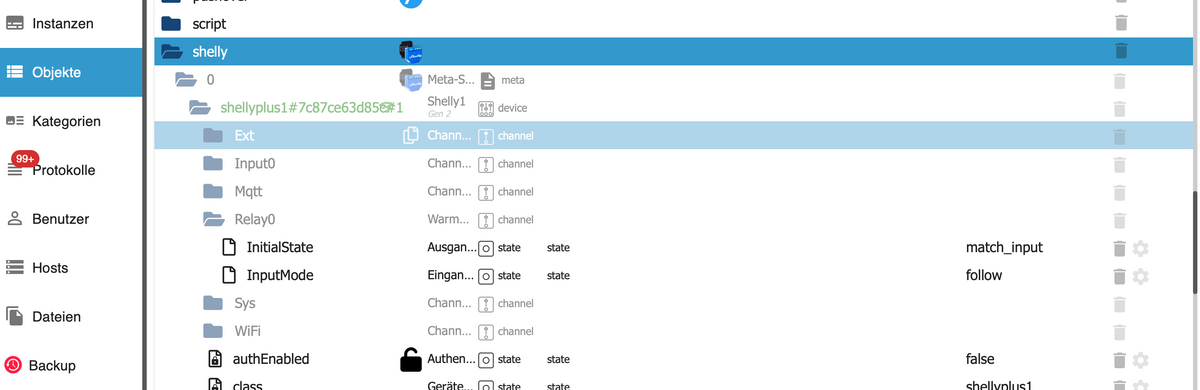
                            In den Objekten sind jetzt die einzelnen Ordner hellblau und es fehlt der Zustand z.B. true oder false. Es sind auch Datenpunkte nicht da, fehlen dort.
                            Ich glaube , das war vorher nicht.

                            Das ist nur wieder zu sehen, wenn ich auf Skripte gehe und dort den Datenpunkt anwähle.
                            Ich glaube den Zustand konnte ich vorher auch in den Objekten sehen.
                            Siehe Screenshots:
                            Bildschirmfoto 2024-10-08 um 09.42.07.png

                            hier ssssist alle vorhanden.

                            Bildschirmfoto 2024-10-08 um 09.43.00.png

                            1 Antwort Letzte Antwort
                            0
                            • K Karl-Heinz1

                              @thomas-braun

                              Ich habe auf stabile umgestellt, scheint einwandfrei zu laufen.

                              Ursprung meines Threads war aber die Frage, warum der Modbus Adapter nicht grün wird.

                              K Offline
                              K Offline
                              Karl-Heinz1
                              schrieb am zuletzt editiert von
                              #46

                              @karl-heinz1 sagte in Wallbox Heidelberg über RS 485 steuern.:

                              @thomas-braun

                              Ich habe auf stabile umgestellt, scheint einwandfrei zu laufen.

                              Ursprung meines Threads war aber die Frage, warum der Modbus Adapter nicht grün wird.

                              Der Modbus Adapter wird jetzt grün, aber ich weiss nicht wo ich Register auslesen kann bzw. was ich wo eingeben muss.
                              Hier das Ausgabe von iob updates:

                              pi@raspberrypi:~ $ iob update
                              Used repository: stable
                              Adapter    "admin"        : 7.1.5    , installed 7.2.0
                              Adapter    "backitup"     : 3.0.25   , installed 3.0.20 [Updatable]
                              Adapter    "chromecast"   : 3.4.1    , installed 3.4.1
                              Adapter    "cloud"        : 5.0.1    , installed 5.0.1
                              Adapter    "discovery"    : 5.0.0    , installed 5.0.0
                              Adapter    "ds18b20"      : 2.0.5    , installed 2.0.5
                              Adapter    "flot"         : 1.12.0   , installed 1.12.0
                              Adapter    "growatt"      : 3.2.5    , installed 3.2.5
                              Adapter    "history"      : 3.0.1    , installed 3.0.1
                              Adapter    "icons-material-png": 0.1.0, installed 0.1.0
                              Adapter    "icons-mfd-svg": 1.2.0    , installed 1.2.0
                              Adapter    "icons-open-icon-library-png": 0.1.2, installed 0.1.3
                              Adapter    "icons-ultimate-png": 1.0.1, installed 1.0.1
                              Adapter    "iot"          : 3.3.0    , installed 3.4.2
                              Adapter    "jarvis"       : 3.1.8    , installed 3.1.8
                              Adapter    "javascript"   : 8.8.3    , installed 8.8.2  [Updatable]
                              Controller "js-controller": 6.0.11   , installed 6.0.11
                              Adapter    "modbus"       : 6.3.2    , installed 6.3.2
                              Adapter    "mqtt"         : 6.1.2    , installed 6.1.1  [Updatable]
                              Adapter    "net-tools"    : 1.0.11   , installed 1.0.11
                              Adapter    "node-red"     : 5.2.1    , installed 5.2.1
                              Adapter    "pushover"     : 4.1.0    , installed 4.1.0
                              Adapter    "shelly"       : 8.2.1    , installed 8.2.1
                              Adapter    "simple-api"   : 2.8.0    , installed 2.8.0
                              Adapter    "smartcontrol" : 2.0.1    , installed 2.0.1
                              Adapter    "socketio"     : 6.7.1    , installed 6.7.1
                              Adapter    "sonoff"       : 3.1.2    , installed 3.1.2
                              Adapter    "vis"          : 1.5.6    , installed 1.5.6
                              Adapter    "vis-material-advanced": 1.7.4, installed 1.7.4
                              Adapter    "vis-materialdesign": 0.5.9, installed 0.5.9
                              Adapter    "vis-rgraph"   : 0.0.2    , installed 0.0.2
                              Adapter    "web"          : 6.2.5    , installed 6.3.1
                              Adapter    "ws"           : 2.6.2    , installed 2.6.2
                              pi@raspberrypi:~ $ 


                              und hier eine Auszug vom Register:

                              Bildschirmfoto 2024-10-30 um 18.11.21.png

                              HomoranH 1 Antwort Letzte Antwort
                              0
                              • K Karl-Heinz1

                                @karl-heinz1 sagte in Wallbox Heidelberg über RS 485 steuern.:

                                @thomas-braun

                                Ich habe auf stabile umgestellt, scheint einwandfrei zu laufen.

                                Ursprung meines Threads war aber die Frage, warum der Modbus Adapter nicht grün wird.

                                Der Modbus Adapter wird jetzt grün, aber ich weiss nicht wo ich Register auslesen kann bzw. was ich wo eingeben muss.
                                Hier das Ausgabe von iob updates:

                                pi@raspberrypi:~ $ iob update
                                Used repository: stable
                                Adapter    "admin"        : 7.1.5    , installed 7.2.0
                                Adapter    "backitup"     : 3.0.25   , installed 3.0.20 [Updatable]
                                Adapter    "chromecast"   : 3.4.1    , installed 3.4.1
                                Adapter    "cloud"        : 5.0.1    , installed 5.0.1
                                Adapter    "discovery"    : 5.0.0    , installed 5.0.0
                                Adapter    "ds18b20"      : 2.0.5    , installed 2.0.5
                                Adapter    "flot"         : 1.12.0   , installed 1.12.0
                                Adapter    "growatt"      : 3.2.5    , installed 3.2.5
                                Adapter    "history"      : 3.0.1    , installed 3.0.1
                                Adapter    "icons-material-png": 0.1.0, installed 0.1.0
                                Adapter    "icons-mfd-svg": 1.2.0    , installed 1.2.0
                                Adapter    "icons-open-icon-library-png": 0.1.2, installed 0.1.3
                                Adapter    "icons-ultimate-png": 1.0.1, installed 1.0.1
                                Adapter    "iot"          : 3.3.0    , installed 3.4.2
                                Adapter    "jarvis"       : 3.1.8    , installed 3.1.8
                                Adapter    "javascript"   : 8.8.3    , installed 8.8.2  [Updatable]
                                Controller "js-controller": 6.0.11   , installed 6.0.11
                                Adapter    "modbus"       : 6.3.2    , installed 6.3.2
                                Adapter    "mqtt"         : 6.1.2    , installed 6.1.1  [Updatable]
                                Adapter    "net-tools"    : 1.0.11   , installed 1.0.11
                                Adapter    "node-red"     : 5.2.1    , installed 5.2.1
                                Adapter    "pushover"     : 4.1.0    , installed 4.1.0
                                Adapter    "shelly"       : 8.2.1    , installed 8.2.1
                                Adapter    "simple-api"   : 2.8.0    , installed 2.8.0
                                Adapter    "smartcontrol" : 2.0.1    , installed 2.0.1
                                Adapter    "socketio"     : 6.7.1    , installed 6.7.1
                                Adapter    "sonoff"       : 3.1.2    , installed 3.1.2
                                Adapter    "vis"          : 1.5.6    , installed 1.5.6
                                Adapter    "vis-material-advanced": 1.7.4, installed 1.7.4
                                Adapter    "vis-materialdesign": 0.5.9, installed 0.5.9
                                Adapter    "vis-rgraph"   : 0.0.2    , installed 0.0.2
                                Adapter    "web"          : 6.2.5    , installed 6.3.1
                                Adapter    "ws"           : 2.6.2    , installed 2.6.2
                                pi@raspberrypi:~ $ 


                                und hier eine Auszug vom Register:

                                Bildschirmfoto 2024-10-30 um 18.11.21.png

                                HomoranH Nicht stören
                                HomoranH Nicht stören
                                Homoran
                                Global Moderator Administrators
                                schrieb am zuletzt editiert von
                                #47

                                @karl-heinz1 sagte in Wallbox Heidelberg über RS 485 steuern.:

                                aber ich weiss nicht wo ich Register auslesen kann bzw. was ich wo eingeben muss.

                                in der Tabelle der Inputregister in der Modbus-Instanz

                                kein Support per PN! - Fragen im Forum stellen - es gibt fast nichts, was nicht auch für andere interessant ist.

                                Benutzt das Voting rechts unten im Beitrag wenn er euch geholfen hat.

                                der Installationsfixer: curl -fsL https://iobroker.net/fix.sh | bash -

                                K 1 Antwort Letzte Antwort
                                0
                                • HomoranH Homoran

                                  @karl-heinz1 sagte in Wallbox Heidelberg über RS 485 steuern.:

                                  aber ich weiss nicht wo ich Register auslesen kann bzw. was ich wo eingeben muss.

                                  in der Tabelle der Inputregister in der Modbus-Instanz

                                  K Offline
                                  K Offline
                                  Karl-Heinz1
                                  schrieb am zuletzt editiert von
                                  #48

                                  @homoran

                                  Unten habe ich einen Auszug Bus Adr. 100 und 101 kopiert

                                  100
                                  R
                                  04 - readInputRegister
                                  uint16
                                  Hardware configuration maximal current
                                  0...16
                                  10 = 10A
                                  -
                                  V 1.0.0
                                  101
                                  R
                                  04 - readInputRegister
                                  uint16
                                  Hardware configuration minimal current
                                  0...16
                                  7 = 7A
                                  

                                  Das hier steht dann in den Datenpunkten für 100 und 101.

                                  Bildschirmfoto 2024-10-30 um 23.28.21.png

                                  da kann ich nichts mit anfangen.

                                  HomoranH 1 Antwort Letzte Antwort
                                  0
                                  • K Karl-Heinz1

                                    @homoran

                                    Unten habe ich einen Auszug Bus Adr. 100 und 101 kopiert

                                    100
                                    R
                                    04 - readInputRegister
                                    uint16
                                    Hardware configuration maximal current
                                    0...16
                                    10 = 10A
                                    -
                                    V 1.0.0
                                    101
                                    R
                                    04 - readInputRegister
                                    uint16
                                    Hardware configuration minimal current
                                    0...16
                                    7 = 7A
                                    

                                    Das hier steht dann in den Datenpunkten für 100 und 101.

                                    Bildschirmfoto 2024-10-30 um 23.28.21.png

                                    da kann ich nichts mit anfangen.

                                    HomoranH Nicht stören
                                    HomoranH Nicht stören
                                    Homoran
                                    Global Moderator Administrators
                                    schrieb am zuletzt editiert von Homoran
                                    #49

                                    @karl-heinz1 sagte in Wallbox Heidelberg über RS 485 steuern.:

                                    da kann ich nichts mit anfangen.

                                    ich auch nicht.

                                    ist das die

                                    @homoran sagte in Wallbox Heidelberg über RS 485 steuern.:

                                    Tabelle der Inputregister in der Modbus-Instanz

                                    ???

                                    passt auch nicht zu
                                    @karl-heinz1 sagte in Wallbox Heidelberg über RS 485 steuern.:

                                    hier eine Auszug vom Register:

                                    kein Support per PN! - Fragen im Forum stellen - es gibt fast nichts, was nicht auch für andere interessant ist.

                                    Benutzt das Voting rechts unten im Beitrag wenn er euch geholfen hat.

                                    der Installationsfixer: curl -fsL https://iobroker.net/fix.sh | bash -

                                    1 Antwort Letzte Antwort
                                    0
                                    Antworten
                                    • In einem neuen Thema antworten
                                    Anmelden zum Antworten
                                    • Älteste zuerst
                                    • Neuste zuerst
                                    • Meiste Stimmen


                                    Support us

                                    ioBroker
                                    Community Adapters
                                    Donate

                                    772

                                    Online

                                    32.5k

                                    Benutzer

                                    81.7k

                                    Themen

                                    1.3m

                                    Beiträge
                                    Community
                                    Impressum | Datenschutz-Bestimmungen | Nutzungsbedingungen | Einwilligungseinstellungen
                                    ioBroker Community 2014-2025
                                    logo
                                    • Anmelden

                                    • Du hast noch kein Konto? Registrieren

                                    • Anmelden oder registrieren, um zu suchen
                                    • Erster Beitrag
                                      Letzter Beitrag
                                    0
                                    • Home
                                    • Aktuell
                                    • Tags
                                    • Ungelesen 0
                                    • Kategorien
                                    • Unreplied
                                    • Beliebt
                                    • GitHub
                                    • Docu
                                    • Hilfe