




Admin Probleme während des Installierens (gelöst)
-
@fuxsism sagte in Kann IoBroker nicht mehr aufrufen:
Das Update er Node läuft Imme rnoch... er ist kräftig am installieren und am installieren...
Ja, das System schraubt jetzt die versäumten 246 Updates rein.
Davon wäre vermutlich ein Großteil gar nicht erforderlich, wenn du nicht da einen vollen Desktopt mit Druckerserver, Videoplayer usw. am Start hättest...@thomas-braun
Hallo! Ich habe gerade selbiges Problem! Admin Adapter aktualisiert, wurde abgebrochen aufgrund irgendeines cannot fetch Problemes ( Habe leider keinen Screenshot davon) und habe dann dieses Fenster bekommen: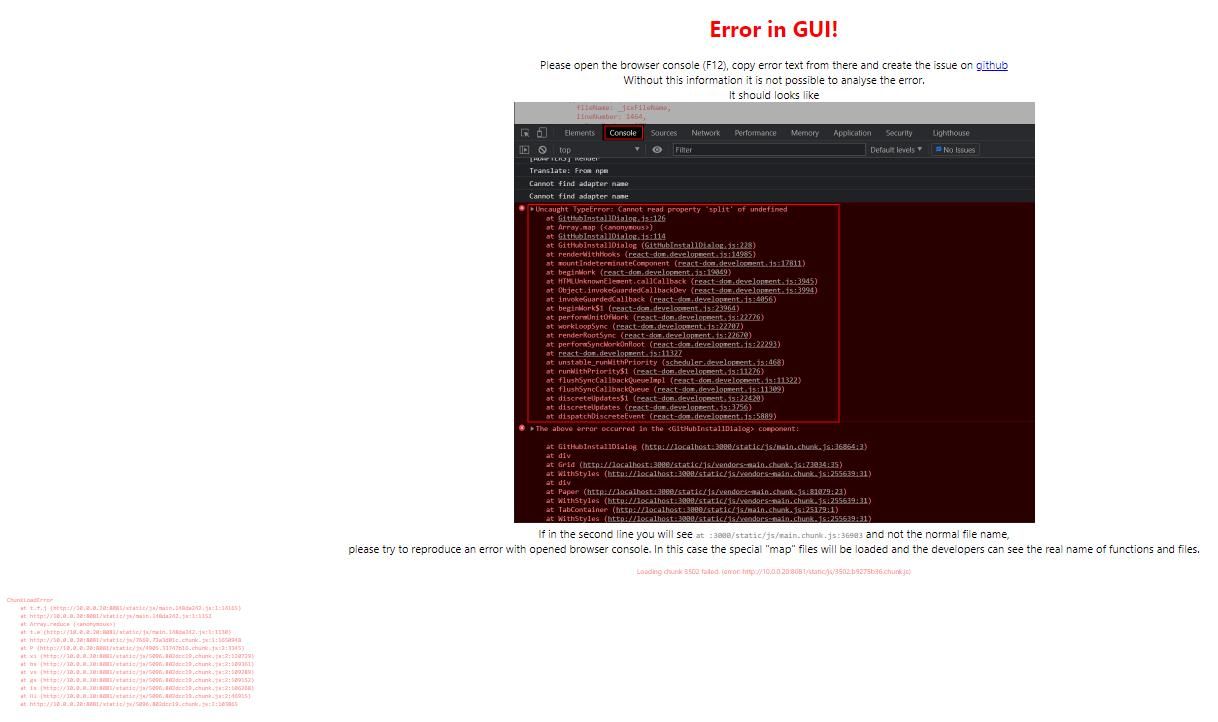 .
.iob diag sagt das:
======================= SUMMARY =======================
                        v.2024-05-22


 Static hostname: iobroker
       Icon name: computer-container
         Chassis: container ☐
  Virtualization: lxc
Operating System: Ubuntu 24.04.1 LTS
          Kernel: Linux 6.8.12-1-pve
    Architecture: x86-64

Installation:           lxc
Kernel:                 x86_64
Userland:               64 bit
Timezone:               Europe/Vienna (CEST, +0200)
User-ID:                1000
Display-Server:         true
Boot Target:            graphical.target

Pending OS-Updates:     33
Pending iob updates:    0

Nodejs-Installation:
/usr/bin/nodejs         v20.17.0
/usr/bin/node           v20.17.0
/usr/bin/npm            10.8.2
/usr/bin/npx            10.8.2
/usr/bin/corepack       0.29.3

Recommended versions are nodejs 20.17.0 and npm 10.8.2
Your nodejs installation is correct

MEMORY:
               total        used        free      shared  buff/cache   available
Mem:            8.6G        4.9G        721M         69K        3.0G        3.7G
Swap:           536M        535M        1.0M
Total:          9.1G        5.4G        723M

Active iob-Instances:   41
Upgrade policy: none

ioBroker Core:          js-controller           6.0.11
                        admin                   7.1.2

ioBroker Status:        iobroker is running on this host.


Objects type: jsonl
States  type: redis

Status admin and web instance:
+ system.adapter.admin.0                  : admin                 : iobroker                                 -  enabled, port: 8081, bind: 0.0.0.0, run as: admin
+ system.adapter.web.0                    : web                   : iobroker                                 -  enabled, port: 8082, bind: 10.0.0.20, run as: admin
+ system.adapter.web.1                    : web                   : iobroker                                 -  enabled, port: 20002, bind: 0.0.0.0, run as: admin

Objects:                22320
States:                 19248

Size of iob-Database:

40M     /opt/iobroker/iobroker-data/objects.jsonl
228K    /opt/iobroker/iobroker-data/states.jsonl

=================== END OF SUMMARY ====================
Also ich denke mein System ist ziemlich aktuell!
Wie installiere ich den admin 7.1.3 denn manuell über die Konsole?
-
@thomas-braun
Hallo! Ich habe gerade selbiges Problem! Admin Adapter aktualisiert, wurde abgebrochen aufgrund irgendeines cannot fetch Problemes ( Habe leider keinen Screenshot davon) und habe dann dieses Fenster bekommen: .iob diag sagt das:
======================= SUMMARY =======================
                        v.2024-05-22


 Static hostname: iobroker
       Icon name: computer-container
         Chassis: container ☐
  Virtualization: lxc
Operating System: Ubuntu 24.04.1 LTS
          Kernel: Linux 6.8.12-1-pve
    Architecture: x86-64

Installation:           lxc
Kernel:                 x86_64
Userland:               64 bit
Timezone:               Europe/Vienna (CEST, +0200)
User-ID:                1000
Display-Server:         true
Boot Target:            graphical.target

Pending OS-Updates:     33
Pending iob updates:    0

Nodejs-Installation:
/usr/bin/nodejs         v20.17.0
/usr/bin/node           v20.17.0
/usr/bin/npm            10.8.2
/usr/bin/npx            10.8.2
/usr/bin/corepack       0.29.3

Recommended versions are nodejs 20.17.0 and npm 10.8.2
Your nodejs installation is correct

MEMORY:
               total        used        free      shared  buff/cache   available
Mem:            8.6G        4.9G        721M         69K        3.0G        3.7G
Swap:           536M        535M        1.0M
Total:          9.1G        5.4G        723M

Active iob-Instances:   41
Upgrade policy: none

ioBroker Core:          js-controller           6.0.11
                        admin                   7.1.2

ioBroker Status:        iobroker is running on this host.


Objects type: jsonl
States  type: redis

Status admin and web instance:
+ system.adapter.admin.0                  : admin                 : iobroker                                 -  enabled, port: 8081, bind: 0.0.0.0, run as: admin
+ system.adapter.web.0                    : web                   : iobroker                                 -  enabled, port: 8082, bind: 10.0.0.20, run as: admin
+ system.adapter.web.1                    : web                   : iobroker                                 -  enabled, port: 20002, bind: 0.0.0.0, run as: admin

Objects:                22320
States:                 19248

Size of iob-Database:

40M     /opt/iobroker/iobroker-data/objects.jsonl
228K    /opt/iobroker/iobroker-data/states.jsonl

=================== END OF SUMMARY ====================
Also ich denke mein System ist ziemlich aktuell!
Wie installiere ich den admin 7.1.3 denn manuell über die Konsole?
@worxweis sagte in Kann IoBroker nicht mehr aufrufen:
Wie installiere ich den admin 7.1.3 denn manuell über die Konsole?
Eigenes Problem --> Eigener Thread
-
@thomas-braun
Hallo! Ich habe gerade selbiges Problem! Admin Adapter aktualisiert, wurde abgebrochen aufgrund irgendeines cannot fetch Problemes ( Habe leider keinen Screenshot davon) und habe dann dieses Fenster bekommen: .iob diag sagt das:
======================= SUMMARY =======================
                        v.2024-05-22


 Static hostname: iobroker
       Icon name: computer-container
         Chassis: container ☐
  Virtualization: lxc
Operating System: Ubuntu 24.04.1 LTS
          Kernel: Linux 6.8.12-1-pve
    Architecture: x86-64

Installation:           lxc
Kernel:                 x86_64
Userland:               64 bit
Timezone:               Europe/Vienna (CEST, +0200)
User-ID:                1000
Display-Server:         true
Boot Target:            graphical.target

Pending OS-Updates:     33
Pending iob updates:    0

Nodejs-Installation:
/usr/bin/nodejs         v20.17.0
/usr/bin/node           v20.17.0
/usr/bin/npm            10.8.2
/usr/bin/npx            10.8.2
/usr/bin/corepack       0.29.3

Recommended versions are nodejs 20.17.0 and npm 10.8.2
Your nodejs installation is correct

MEMORY:
               total        used        free      shared  buff/cache   available
Mem:            8.6G        4.9G        721M         69K        3.0G        3.7G
Swap:           536M        535M        1.0M
Total:          9.1G        5.4G        723M

Active iob-Instances:   41
Upgrade policy: none

ioBroker Core:          js-controller           6.0.11
                        admin                   7.1.2

ioBroker Status:        iobroker is running on this host.


Objects type: jsonl
States  type: redis

Status admin and web instance:
+ system.adapter.admin.0                  : admin                 : iobroker                                 -  enabled, port: 8081, bind: 0.0.0.0, run as: admin
+ system.adapter.web.0                    : web                   : iobroker                                 -  enabled, port: 8082, bind: 10.0.0.20, run as: admin
+ system.adapter.web.1                    : web                   : iobroker                                 -  enabled, port: 20002, bind: 0.0.0.0, run as: admin

Objects:                22320
States:                 19248

Size of iob-Database:

40M     /opt/iobroker/iobroker-data/objects.jsonl
228K    /opt/iobroker/iobroker-data/states.jsonl

=================== END OF SUMMARY ====================
Also ich denke mein System ist ziemlich aktuell!
Wie installiere ich den admin 7.1.3 denn manuell über die Konsole?
-
@worxweis sagte in Kann IoBroker nicht mehr aufrufen:
Wie installiere ich den admin 7.1.3 denn manuell über die Konsole?
Eigenes Problem --> Eigener Thread
-
Sorry, habe jetzt die iobroker-Oberfläche nochmal ganz normal aufgerufen und sie funktioniert wieder. Auch der Admin sieht aus, als wäre er aktuell auf 1.7,2.
@worxweis sagte in Kann IoBroker nicht mehr aufrufen:
Sorry, habe jetzt die iobroker-Oberfläche nochmal ganz normal aufgerufen und sie funktioniert wieder. Auch der Admin sieht aus, als wäre er aktuell auf 1.7,2.
Aber auch für dich gilt:
Updates einspielen und den Desktop AUS!


Hey! Du scheinst an dieser Unterhaltung interessiert zu sein, hast aber noch kein Konto.
Hast du es satt, bei jedem Besuch durch die gleichen Beiträge zu scrollen? Wenn du dich für ein Konto anmeldest, kommst du immer genau dorthin zurück, wo du zuvor warst, und kannst dich über neue Antworten benachrichtigen lassen (entweder per E-Mail oder Push-Benachrichtigung). Du kannst auch Lesezeichen speichern und Beiträge positiv bewerten, um anderen Community-Mitgliedern deine Wertschätzung zu zeigen.
Mit deinem Input könnte dieser Beitrag noch besser werden 💗
Registrieren Anmelden161
Online33.0k
Benutzende83.7k
Themen1.3m
Beiträge