




Backitup macht keine Backups mehr
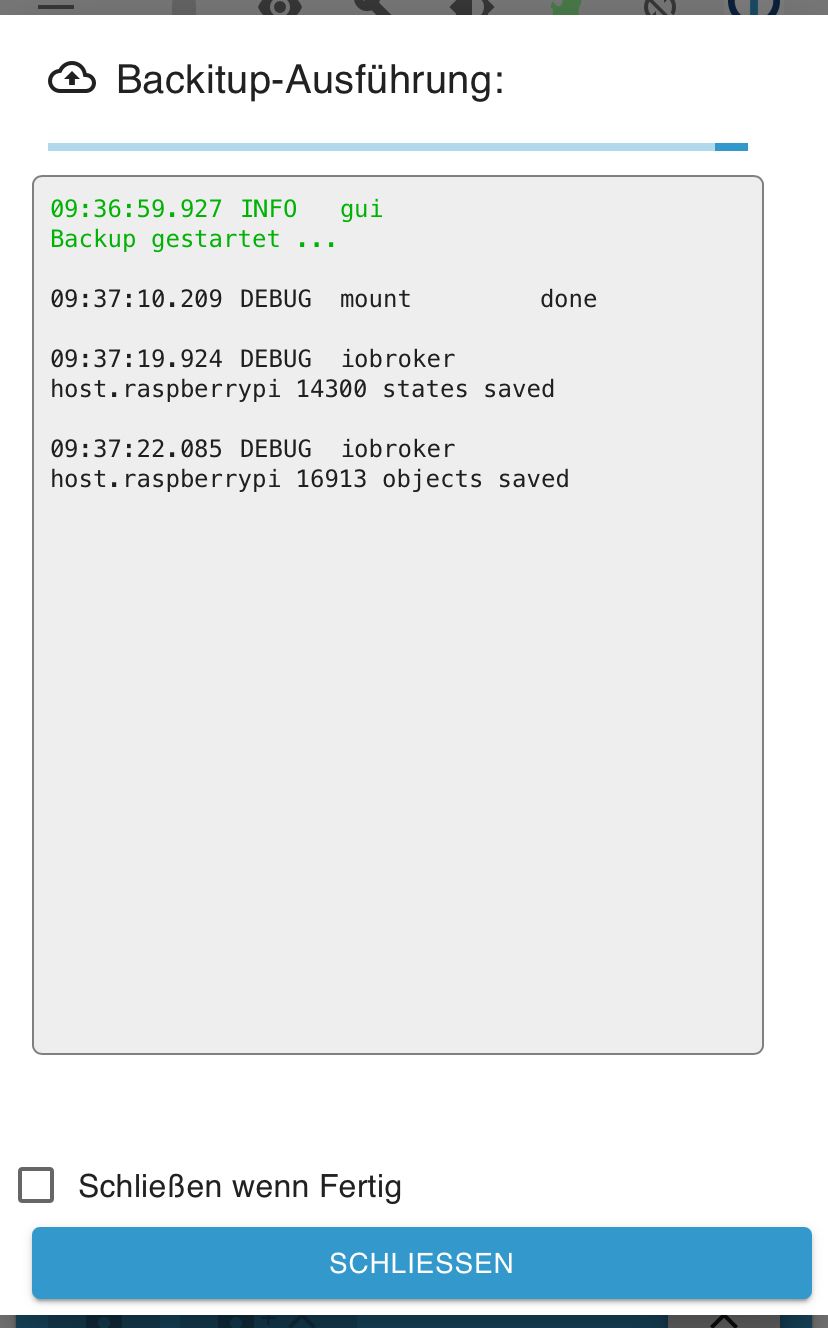
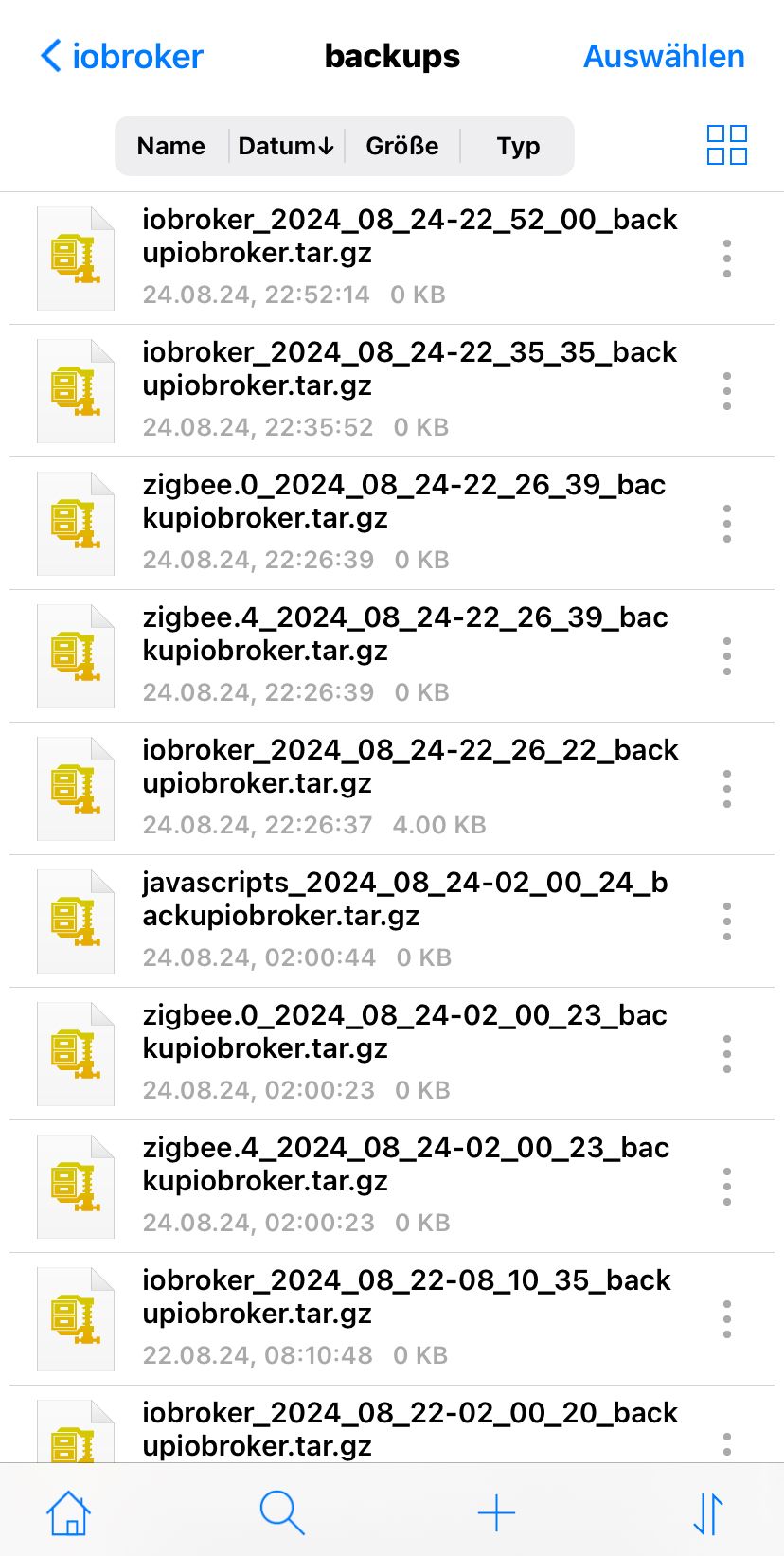
-
@homoran
Ich weiß, es ist kein Argument wenn es immer getan hat und plötzlich nicht mehr geht.
Deswegen bin ich da um Hilfe zu suchen :)Den gesamten iob diag output hab ich oben gepostet - einmal den gesamten Verlauf und Anfangs die Summary.
Habs aber gerne nochmal erneut gestartet:======== Start marking the full check here ========= Skript v.2024-05-22 *** BASE SYSTEM *** Static hostname: raspberrypi Icon name: computer Operating System: Raspbian GNU/Linux 11 (bullseye) Kernel: Linux 6.6.33-v8+ Architecture: arm64 Model : Raspberry Pi 4 Model B Rev 1.1 Docker : false Virtualization : none Kernel : aarch64 Userland : 32 bit Systemuptime and Load: 16:54:50 up 3:21, 1 user, load average: 2.44, 3.20, 3.43 CPU threads: 4 *** RASPBERRY THROTTLING *** Current issues: No throttling issues detected. Previously detected issues: No throttling issues detected. *** Time and Time Zones *** Local time: Sun 2024-08-25 16:54:50 CEST Universal time: Sun 2024-08-25 14:54:50 UTC RTC time: n/a Time zone: Europe/Berlin (CEST, +0200) System clock synchronized: yes NTP service: active RTC in local TZ: no *** Users and Groups *** User that called 'iob diag': pi HOME=/home/pi GROUPS=pi adm dialout cdrom sudo audio video plugdev games users input netdev bluetooth lpadmin gpio i2c spi iobroker User that is running 'js-controller': iobroker HOME=/home/iobroker GROUPS=iobroker tty dialout audio video plugdev bluetooth lpadmin gpio i2c *** Display-Server-Setup *** Display-Server: false Desktop: Terminal: tty Boot Target: graphical.target *** MEMORY *** total used free shared buff/cache available Mem: 3.8G 2.3G 346M 0.0K 1.1G 1.4G Swap: 99M 78M 21M Total: 3.9G 2.4G 368M Active iob-Instances: 36 3791 M total memory 2313 M used memory 1618 M active memory 1614 M inactive memory 346 M free memory 159 M buffer memory 971 M swap cache 99 M total swap 78 M used swap 21 M free swap *** top - Table Of Processes *** top - 16:54:50 up 3:21, 1 user, load average: 2.44, 3.20, 3.43 Tasks: 215 total, 3 running, 212 sleeping, 0 stopped, 0 zombie %Cpu(s): 29.9 us, 7.5 sy, 0.0 ni, 61.2 id, 0.0 wa, 0.0 hi, 1.5 si, 0.0 st MiB Mem : 3791.1 total, 345.4 free, 2315.0 used, 1130.7 buff/cache MiB Swap: 100.0 total, 21.4 free, 78.6 used. 1400.1 avail Mem *** FAILED SERVICES *** UNIT LOAD ACTIVE SUB DESCRIPTION * haveged.service loaded failed failed Entropy Daemon based on the HAVEGE algorithm LOAD = Reflects whether the unit definition was properly loaded. ACTIVE = The high-level unit activation state, i.e. generalization of SUB. SUB = The low-level unit activation state, values depend on unit type. 1 loaded units listed. *** FILESYSTEM *** Filesystem Type Size Used Avail Use% Mounted on /dev/root ext4 114G 37G 72G 34% / devtmpfs devtmpfs 1.6G 0 1.6G 0% /dev tmpfs tmpfs 1.9G 0 1.9G 0% /dev/shm tmpfs tmpfs 759M 1.1M 758M 1% /run tmpfs tmpfs 5.0M 4.0K 5.0M 1% /run/lock /dev/sda1 vfat 253M 64M 189M 26% /boot //192.168.178.1/fritz.nas/ioBroker_Backup cifs 1.5G 1.5G 0 100% /opt/iobroker/backups tmpfs tmpfs 380M 4.0K 380M 1% /run/user/1000 Messages concerning ext4 filesystem in dmesg: [Sun Aug 25 13:33:42 2024] Kernel command line: coherent_pool=1M 8250.nr_uarts=1 snd_bcm2835.enable_headphones=0 snd_bcm2835.enable_headphones=1 snd_bcm2835.enable_hdmi=1 clk_ignore_unused smsc95xx.macaddr=DC:A6:32:3F:8D:D8 vc_mem.mem_base=0x3eb00000 vc_mem.mem_size=0x3ff00000 console=tty1 root=PARTUUID=738a4d67-02 rootfstype=ext4 elevator=deadline fsck.repair=yes rootwait [Sun Aug 25 13:33:44 2024] EXT4-fs (sda2): mounted filesystem 45e99191-771b-4e12-a526-0779148892cb ro with ordered data mode. Quota mode: none. [Sun Aug 25 13:33:44 2024] VFS: Mounted root (ext4 filesystem) readonly on device 8:2. [Sun Aug 25 13:33:46 2024] EXT4-fs (sda2): re-mounted 45e99191-771b-4e12-a526-0779148892cb r/w. Quota mode: none. Show mounted filesystems: TARGET SOURCE FSTYPE OPTIONS / /dev/sda2 ext4 rw,noatime |-/dev devtmpfs devtmpfs rw,relatime,size=1676444k,nr_inodes=419111,mode=755 | |-/dev/shm tmpfs tmpfs rw,nosuid,nodev | |-/dev/pts devpts devpts rw,nosuid,noexec,relatime,gid=5,mode=620,ptmxmode=000 | `-/dev/mqueue mqueue mqueue rw,nosuid,nodev,noexec,relatime |-/proc proc proc rw,relatime | `-/proc/sys/fs/binfmt_misc systemd-1 autofs rw,relatime,fd=30,pgrp=1,timeout=0,minproto=5,maxproto=5,direct,pipe_ino=3600 |-/sys sysfs sysfs rw,nosuid,nodev,noexec,relatime | |-/sys/kernel/security securityfs securityfs rw,nosuid,nodev,noexec,relatime | |-/sys/fs/cgroup cgroup2 cgroup2 rw,nosuid,nodev,noexec,relatime,nsdelegate,memory_recursiveprot | |-/sys/fs/pstore pstore pstore rw,nosuid,nodev,noexec,relatime | |-/sys/fs/bpf bpf bpf rw,nosuid,nodev,noexec,relatime,mode=700 | |-/sys/kernel/debug debugfs debugfs rw,nosuid,nodev,noexec,relatime | |-/sys/kernel/tracing tracefs tracefs rw,nosuid,nodev,noexec,relatime | |-/sys/kernel/config configfs configfs rw,nosuid,nodev,noexec,relatime | `-/sys/fs/fuse/connections fusectl fusectl rw,nosuid,nodev,noexec,relatime |-/run tmpfs tmpfs rw,nosuid,nodev,size=776408k,nr_inodes=819200,mode=755 | |-/run/lock tmpfs tmpfs rw,nosuid,nodev,noexec,relatime,size=5120k | |-/run/rpc_pipefs sunrpc rpc_pipefs rw,relatime | `-/run/user/1000 tmpfs tmpfs rw,nosuid,nodev,relatime,size=388204k,nr_inodes=97051,mode=700,uid=1000,gid=1000 |-/boot /dev/sda1 vfat rw,relatime,fmask=0022,dmask=0022,codepage=437,iocharset=ascii,shortname=mixed,flush,errors=remount-ro `-/opt/iobroker/backups //192.168.178.1/fritz.nas/ioBroker_Backup cifs rw,relatime,vers=1.0,cache=strict,username=ioBroker_Backup,uid=1001,forceuid,gid=1001,forcegid,addr=192.168.178.1,file_mode=0777,dir_mode=0777,soft,nounix,serverino,mapposix,reparse=nfs,rsize=61440,wsize=65536,bsize=1048576,retrans=1,echo_interval=60,actimeo=1,closetimeo=1 Files in neuralgic directories: /var: 1.5G /var/ 560M /var/cache 553M /var/cache/apt 489M /var/cache/apt/archives 395M /var/lib Archived and active journals take up 360.0M in the file system. /opt/iobroker/backups: 1.5G /opt/iobroker/backups/ /opt/iobroker/iobroker-data: 1.9G /opt/iobroker/iobroker-data/ 1.4G /opt/iobroker/iobroker-data/files 493M /opt/iobroker/iobroker-data/files/javascript.admin 461M /opt/iobroker/iobroker-data/files/javascript.admin/static 460M /opt/iobroker/iobroker-data/files/javascript.admin/static/js The five largest files in iobroker-data are: 62M /opt/iobroker/iobroker-data/objects.jsonl 38M /opt/iobroker/iobroker-data/files/iot.admin/static/js/main.d3d286bd.js.map 28M /opt/iobroker/iobroker-data/states.jsonl 24M /opt/iobroker/iobroker-data/files/vis-2/static/js/main.f305bc29.js.map 24M /opt/iobroker/iobroker-data/files/vis-2/static/js/main.8e80ccb0.js.map USB-Devices by-id: USB-Sticks - Avoid direct links to /dev/tty* in your adapter setups, please always prefer the links 'by-id': /dev/serial/by-id/usb-Silicon_Labs_Sonoff_Zigbee_3.0_USB_Dongle_Plus_0001-if00-port0 HINT: Your zigbee.0 COM-Port is NOT matching 'by-id'. Please check your setting: /dev/ttyUSB0 *** NodeJS-Installation *** /usr/bin/nodejs v20.17.0 /usr/bin/node v20.17.0 /usr/bin/npm 10.8.2 /usr/bin/npx 10.8.2 /usr/bin/corepack 0.29.3 nodejs: Installed: 20.17.0-1nodesource1 Candidate: 20.17.0-1nodesource1 Version table: *** 20.17.0-1nodesource1 1001 500 https://deb.nodesource.com/node_20.x nodistro/main armhf Packages 100 /var/lib/dpkg/status 20.16.0-1nodesource1 1001 500 https://deb.nodesource.com/node_20.x nodistro/main armhf Packages 20.15.1-1nodesource1 1001 500 https://deb.nodesource.com/node_20.x nodistro/main armhf Packages 20.15.0-1nodesource1 1001 500 https://deb.nodesource.com/node_20.x nodistro/main armhf Packages 20.14.0-1nodesource1 1001 500 https://deb.nodesource.com/node_20.x nodistro/main armhf Packages 20.13.1-1nodesource1 1001 500 https://deb.nodesource.com/node_20.x nodistro/main armhf Packages 20.13.0-1nodesource1 1001 500 https://deb.nodesource.com/node_20.x nodistro/main armhf Packages 20.12.2-1nodesource1 1001 500 https://deb.nodesource.com/node_20.x nodistro/main armhf Packages 20.12.1-1nodesource1 1001 500 https://deb.nodesource.com/node_20.x nodistro/main armhf Packages 20.12.0-1nodesource1 1001 500 https://deb.nodesource.com/node_20.x nodistro/main armhf Packages 20.11.1-1nodesource1 1001 500 https://deb.nodesource.com/node_20.x nodistro/main armhf Packages 20.11.0-1nodesource1 1001 500 https://deb.nodesource.com/node_20.x nodistro/main armhf Packages 20.10.0-1nodesource1 1001 500 https://deb.nodesource.com/node_20.x nodistro/main armhf Packages 20.9.0-1nodesource1 1001 500 https://deb.nodesource.com/node_20.x nodistro/main armhf Packages 20.8.1-1nodesource1 1001 500 https://deb.nodesource.com/node_20.x nodistro/main armhf Packages 20.8.0-1nodesource1 1001 500 https://deb.nodesource.com/node_20.x nodistro/main armhf Packages 20.7.0-1nodesource1 1001 500 https://deb.nodesource.com/node_20.x nodistro/main armhf Packages 20.6.1-1nodesource1 1001 500 https://deb.nodesource.com/node_20.x nodistro/main armhf Packages 20.6.0-1nodesource1 1001 500 https://deb.nodesource.com/node_20.x nodistro/main armhf Packages 20.5.1-1nodesource1 1001 500 https://deb.nodesource.com/node_20.x nodistro/main armhf Packages 20.5.0-1nodesource1 1001 500 https://deb.nodesource.com/node_20.x nodistro/main armhf Packages 20.4.0-1nodesource1 1001 500 https://deb.nodesource.com/node_20.x nodistro/main armhf Packages 20.3.1-1nodesource1 1001 500 https://deb.nodesource.com/node_20.x nodistro/main armhf Packages 20.3.0-1nodesource1 1001 500 https://deb.nodesource.com/node_20.x nodistro/main armhf Packages 20.2.0-1nodesource1 1001 500 https://deb.nodesource.com/node_20.x nodistro/main armhf Packages 20.1.0-1nodesource1 1001 500 https://deb.nodesource.com/node_20.x nodistro/main armhf Packages 20.0.0-1nodesource1 1001 500 https://deb.nodesource.com/node_20.x nodistro/main armhf Packages 12.22.12~dfsg-1~deb11u4 500 500 http://raspbian.raspberrypi.org/raspbian bullseye/main armhf Packages Temp directories causing npm8 problem: 0 No problems detected Errors in npm tree: *** ioBroker-Installation *** ioBroker Status iobroker is running on this host. Objects type: jsonl States type: jsonl Core adapters versions js-controller: 6.0.11 admin: 7.0.25 javascript: 8.8.2 nodejs modules from github: 3 | `-- miio@0.15.4 (git+ssh://git@github.com/JoJ123/miio.git#e9df5ba6d5d5cd7730d40898e2e225f008a60dbd) +-- iobroker.smartgarden@2.0.1 (git+ssh://git@github.com/jpgorganizer/ioBroker.smartgarden.git#1c1680cf959165cad9c530633f5e75c017766d2d) +-- iobroker.vis-materialdesign@0.5.94 (git+ssh://git@github.com/Scrounger/ioBroker.vis-materialdesign.git#8b7529d493f223dfc4f1d1f632553fcb35bbcc92) Adapter State + system.adapter.admin.0 : admin : raspberrypi - enabled, port: 8081, bind: 0.0.0.0, run as: admin + system.adapter.alexa2.0 : alexa2 : raspberrypi - enabled + system.adapter.backitup.0 : backitup : raspberrypi - enabled + system.adapter.ble.0 : ble : raspberrypi - enabled system.adapter.cameras.0 : cameras : raspberrypi - disabled, port: 8200, bind: 127.0.0.1 + system.adapter.cloud.0 : cloud : raspberrypi - enabled + system.adapter.countdown.0 : countdown : raspberrypi - enabled + system.adapter.discovery.0 : discovery : raspberrypi - enabled system.adapter.easee.0 : easee : raspberrypi - disabled system.adapter.epson_ecotank_et_2750.0 : epson_ecotank_et_2750 : raspberrypi - disabled + system.adapter.fullybrowser.0 : fullybrowser : raspberrypi - enabled + system.adapter.govee-local.0 : govee-local : raspberrypi - enabled + system.adapter.hm-rega.0 : hm-rega : raspberrypi - enabled + system.adapter.hm-rpc.0 : hm-rpc : raspberrypi - enabled, port: 0 + system.adapter.hm-rpc.2 : hm-rpc : raspberrypi - enabled, port: 12010 + system.adapter.hue.0 : hue : raspberrypi - enabled, port: 443 system.adapter.ical.0 : ical : raspberrypi - enabled system.adapter.icons-mfd-svg.0 : icons-mfd-svg : raspberrypi - enabled + system.adapter.info.0 : info : raspberrypi - enabled + system.adapter.iot.0 : iot : raspberrypi - enabled + system.adapter.javascript.0 : javascript : raspberrypi - enabled + system.adapter.lgtv.0 : lgtv : raspberrypi - enabled system.adapter.meater.0 : meater : raspberrypi - disabled + system.adapter.mercedesme.0 : mercedesme : raspberrypi - enabled system.adapter.mihome-airpurifier.0 : mihome-airpurifier : raspberrypi - disabled + system.adapter.mihome-vacuum.0 : mihome-vacuum : raspberrypi - enabled, port: 54321 system.adapter.mobile.0 : mobile : raspberrypi - disabled system.adapter.puppeteer.0 : puppeteer : raspberrypi - disabled + system.adapter.roborock.0 : roborock : raspberrypi - enabled + system.adapter.rpi2.0 : rpi2 : raspberrypi - enabled + system.adapter.shelly.0 : shelly : raspberrypi - enabled, port: 1882, bind: 0.0.0.0 + system.adapter.simple-api.0 : simple-api : raspberrypi - enabled, port: 8087, bind: 0.0.0.0, run as: admin + system.adapter.smartgarden.0 : smartgarden : raspberrypi - enabled + system.adapter.socketio.0 : socketio : raspberrypi - enabled, port: 8084, bind: 0.0.0.0, run as: admin + system.adapter.sonoff.0 : sonoff : raspberrypi - enabled, port: 1883, bind: 0.0.0.0 + system.adapter.telegram.0 : telegram : raspberrypi - enabled, port: 8443, bind: 0.0.0.0 + system.adapter.telegram.1 : telegram : raspberrypi - enabled, port: 8443, bind: 0.0.0.0 + system.adapter.tr-064.0 : tr-064 : raspberrypi - enabled + system.adapter.trashschedule.0 : trashschedule : raspberrypi - enabled + system.adapter.tuya.0 : tuya : raspberrypi - enabled system.adapter.vis-2-widgets-energy.0 : vis-2-widgets-energy : raspberrypi - enabled system.adapter.vis-2-widgets-gauges.0 : vis-2-widgets-gauges : raspberrypi - enabled system.adapter.vis-2-widgets-inventwo.0 : vis-2-widgets-inventwo: raspberrypi - enabled system.adapter.vis-2-widgets-jaeger-design.0: vis-2-widgets-jaeger-design: raspberrypi - enabled system.adapter.vis-2-widgets-material.0 : vis-2-widgets-material: raspberrypi - enabled system.adapter.vis-2-widgets-ovarious.0 : vis-2-widgets-ovarious: raspberrypi - enabled system.adapter.vis-2-widgets-radar-trap.0: vis-2-widgets-radar-trap: raspberrypi - enabled system.adapter.vis-2-widgets-sweethome3d.0: vis-2-widgets-sweethome3d: raspberrypi - enabled + system.adapter.vis-2.0 : vis-2 : raspberrypi - enabled system.adapter.vis-colorpicker.0 : vis-colorpicker : raspberrypi - enabled system.adapter.vis-google-fonts.0 : vis-google-fonts : raspberrypi - enabled system.adapter.vis-history.0 : vis-history : raspberrypi - enabled system.adapter.vis-hqwidgets.0 : vis-hqwidgets : raspberrypi - enabled system.adapter.vis-icontwo.0 : vis-icontwo : raspberrypi - enabled system.adapter.vis-inventwo.0 : vis-inventwo : raspberrypi - disabled system.adapter.vis-material-advanced.0 : vis-material-advanced : raspberrypi - enabled system.adapter.vis-material.0 : vis-material : raspberrypi - enabled system.adapter.vis-timeandweather.0 : vis-timeandweather : raspberrypi - enabled system.adapter.vis.0 : vis : raspberrypi - enabled + system.adapter.web.0 : web : raspberrypi - enabled, port: 8082, bind: 0.0.0.0, run as: admin system.adapter.wireless-mbus.0 : wireless-mbus : raspberrypi - disabled system.adapter.wlanthermo.0 : wlanthermo : raspberrypi - disabled + system.adapter.yeelight-2.0 : yeelight-2 : raspberrypi - enabled system.adapter.youtube.0 : youtube : raspberrypi - disabled + system.adapter.zigbee.0 : zigbee : raspberrypi - enabled, port: /dev/ttyUSB0 + instance is alive Enabled adapters with bindings + system.adapter.admin.0 : admin : raspberrypi - enabled, port: 8081, bind: 0.0.0.0, run as: admin + system.adapter.hm-rpc.0 : hm-rpc : raspberrypi - enabled, port: 0 + system.adapter.hm-rpc.2 : hm-rpc : raspberrypi - enabled, port: 12010 + system.adapter.hue.0 : hue : raspberrypi - enabled, port: 443 + system.adapter.mihome-vacuum.0 : mihome-vacuum : raspberrypi - enabled, port: 54321 + system.adapter.shelly.0 : shelly : raspberrypi - enabled, port: 1882, bind: 0.0.0.0 + system.adapter.simple-api.0 : simple-api : raspberrypi - enabled, port: 8087, bind: 0.0.0.0, run as: admin + system.adapter.socketio.0 : socketio : raspberrypi - enabled, port: 8084, bind: 0.0.0.0, run as: admin + system.adapter.sonoff.0 : sonoff : raspberrypi - enabled, port: 1883, bind: 0.0.0.0 + system.adapter.telegram.0 : telegram : raspberrypi - enabled, port: 8443, bind: 0.0.0.0 + system.adapter.telegram.1 : telegram : raspberrypi - enabled, port: 8443, bind: 0.0.0.0 + system.adapter.web.0 : web : raspberrypi - enabled, port: 8082, bind: 0.0.0.0, run as: admin + system.adapter.zigbee.0 : zigbee : raspberrypi - enabled, port: /dev/ttyUSB0 ioBroker-Repositories ┌─────────┬──────────┬─────────────────────────────────────────────────────────┬──────────────┐ │ (index) │ name │ url │ auto upgrade │ ├─────────┼──────────┼─────────────────────────────────────────────────────────┼──────────────┤ │ 0 │ 'stable' │ 'http://download.iobroker.net/sources-dist.json' │ false │ │ 1 │ 'beta' │ 'http://download.iobroker.net/sources-dist-latest.json' │ false │ └─────────┴──────────┴─────────────────────────────────────────────────────────┴──────────────┘ Active repo(s): beta Upgrade policy: none Installed ioBroker-Instances Used repository: beta Adapter "admin" : 7.0.25 , installed 7.0.25 Adapter "alexa2" : 3.26.5 , installed 3.26.5 Adapter "backitup" : 3.0.20 , installed 3.0.20 Adapter "ble" : 0.14.0 , installed 0.14.0 Adapter "cameras" : 2.1.2 , installed 2.1.2 Adapter "cloud" : 5.0.1 , installed 5.0.1 Adapter "countdown" : 2.2.0 , installed 2.2.0 Adapter "discovery" : 5.0.0 , installed 5.0.0 Adapter "easee" : 1.0.10 , installed 1.0.10 Adapter "epson_ecotank_et_2750": 0.0.12, installed 0.0.12 Adapter "fullybrowser" : 3.0.12 , installed 3.0.12 Adapter "govee-local" : 0.2.7 , installed 0.2.7 Adapter "hm-rega" : 5.0.0 , installed 5.0.0 Adapter "hm-rpc" : 2.0.0 , installed 2.0.0 Adapter "hue" : 3.12.0 , installed 3.12.0 Adapter "ical" : 1.15.0 , installed 1.15.0 Adapter "icons-eclipse-smarthome-classic": 1.0.0, installed 1.0.0 Adapter "icons-freepic": 1.0.0 , installed 1.0.0 Adapter "icons-mfd-svg": 1.2.0 , installed 1.2.0 Adapter "icons-smarthome": 1.0.0 , installed 1.0.0 Adapter "iot" : 3.3.0 , installed 3.3.0 Adapter "javascript" : 8.8.2 , installed 8.8.2 Controller "js-controller": 6.0.11 , installed 6.0.11 Adapter "lgtv" : 2.2.0 , installed 2.2.0 Adapter "meater" : 1.1.1 , installed 1.1.1 Adapter "mercedesme" : 0.2.3 , installed 0.2.3 Adapter "mihome-airpurifier": 0.1.8, installed 0.1.8 Adapter "mihome-vacuum": 4.2.0 , installed 4.2.0 Adapter "mobile" : 1.0.1 , installed 1.0.1 Adapter "notification-manager": 1.2.0, installed 1.2.0 Adapter "puppeteer" : 0.3.0 , installed 0.3.0 Adapter "roborock" : 0.6.6 , installed 0.6.6 Adapter "rpi2" : 2.0.0 , installed 2.0.0 Adapter "shelly" : 8.0.0 , installed 7.0.0 [Updatable] Adapter "simple-api" : 2.8.0 , installed 2.8.0 Adapter "smartgarden" : 2.0.1 , installed 2.0.1 Adapter "socketio" : 6.7.1 , installed 6.7.1 Adapter "sonoff" : 3.1.2 , installed 3.1.2 Adapter "telegram" : 3.9.0 , installed 3.9.0 Adapter "tr-064" : 4.3.0 , installed 4.3.0 Adapter "trashschedule": 3.3.0 , installed 3.3.0 Adapter "tuya" : 3.16.0 , installed 3.16.0 Adapter "vis" : 1.5.6 , installed 1.5.6 Adapter "vis-2" : 2.9.64 , installed 2.9.64 Adapter "vis-2-widgets-energy": 1.0.2, installed 1.0.2 Adapter "vis-2-widgets-gauges": 1.1.0, installed 1.1.0 Adapter "vis-2-widgets-inventwo": 0.1.11, installed 0.1.11 Adapter "vis-2-widgets-jaeger-design": 1.2.7, installed 1.2.7 Adapter "vis-2-widgets-material": 1.4.10, installed 1.4.10 Adapter "vis-2-widgets-ovarious": 0.1.8, installed 0.1.8 Adapter "vis-2-widgets-radar-trap": 2.3.0, installed 2.3.0 Adapter "vis-2-widgets-sweethome3d": 0.2.0, installed 0.2.0 Adapter "vis-colorpicker": 2.0.3 , installed 2.0.3 Adapter "vis-google-fonts": 1.0.4 , installed 1.0.4 Adapter "vis-history" : 1.0.0 , installed 1.0.0 Adapter "vis-homekittiles": 0.3.1 , installed 0.3.1 Adapter "vis-hqwidgets": 1.5.1 , installed 1.5.1 Adapter "vis-icontwo" : 1.6.3 , installed 1.6.3 Adapter "vis-inventwo" : 3.3.4 , installed 3.3.4 Adapter "vis-material" : 0.1.3 , installed 0.1.3 Adapter "vis-material-advanced": 1.7.4, installed 1.7.4 Adapter "vis-materialdesign": 0.5.9, installed 0.5.94 Adapter "vis-timeandweather": 1.2.2, installed 1.2.2 Adapter "web" : 6.3.0 , installed 6.3.0 Adapter "welcome" : 0.3.0 , installed 0.3.0 Adapter "wireless-mbus": 0.9.3 , installed 0.9.3 Adapter "ws" : 2.6.2 , installed 2.6.2 Adapter "yeelight-2" : 1.4.0 , installed 1.4.0 Adapter "youtube" : 5.0.0 , installed 5.0.0 Adapter "zigbee" : 1.10.3 , installed 1.10.3 Objects and States Please stand by - This may take a while Objects: 16901 States: 14300 *** OS-Repositories and Updates *** Hit:1 http://raspbian.raspberrypi.org/raspbian bullseye InRelease Hit:2 http://archive.raspberrypi.org/debian bullseye InRelease Hit:3 https://downloads.plex.tv/repo/deb public InRelease Hit:4 https://deb.nodesource.com/node_20.x nodistro InRelease Reading package lists... Pending Updates: 0 *** Listening Ports *** Active Internet connections (only servers) Proto Recv-Q Send-Q Local Address Foreign Address State User Inode PID/Program name tcp 0 0 127.0.0.1:9001 0.0.0.0:* LISTEN 1001 5977 538/iobroker.js-con tcp 0 0 127.0.0.1:9000 0.0.0.0:* LISTEN 1001 5982 538/iobroker.js-con tcp 0 0 0.0.0.0:1883 0.0.0.0:* LISTEN 1001 9014 1724/io.sonoff.0 tcp 0 0 0.0.0.0:1882 0.0.0.0:* LISTEN 1001 14645 2273/io.shelly.0 tcp 0 0 192.168.178.41:12010 0.0.0.0:* LISTEN 1001 10736 1562/io.hm-rpc.2 tcp 0 0 0.0.0.0:631 0.0.0.0:* LISTEN 0 6672 535/cupsd tcp 0 0 192.168.178.41:2001 0.0.0.0:* LISTEN 1001 10608 1410/io.hm-rpc.0 tcp 0 0 0.0.0.0:22 0.0.0.0:* LISTEN 0 5666 573/sshd: /usr/sbin tcp 0 0 0.0.0.0:53 0.0.0.0:* LISTEN 0 6551 634/dnsmasq tcp 0 0 0.0.0.0:80 0.0.0.0:* LISTEN 1000 6515 380/deCONZ tcp 0 0 0.0.0.0:443 0.0.0.0:* LISTEN 1000 4948 380/deCONZ tcp6 0 0 :::8081 :::* LISTEN 1001 34218 7607/io.admin.0 tcp6 0 0 :::8082 :::* LISTEN 1001 16471 2740/io.web.0 tcp6 0 0 :::8084 :::* LISTEN 1001 14926 2617/io.socketio.0 tcp6 0 0 :::8087 :::* LISTEN 1001 19092 3537/io.simple-api. tcp6 0 0 :::3306 :::* LISTEN 115 6702 693/mariadbd tcp6 0 0 :::631 :::* LISTEN 0 6673 535/cupsd tcp6 0 0 :::3000 :::* LISTEN 1001 19137 3641/io.fullybrowse tcp6 0 0 :::22 :::* LISTEN 0 5668 573/sshd: /usr/sbin tcp6 0 0 :::53 :::* LISTEN 0 6553 634/dnsmasq udp 0 896 0.0.0.0:53421 0.0.0.0:* 1001 12525 2188/io.mihome-vacu udp 0 0 0.0.0.0:6666 0.0.0.0:* 1001 11890 1918/io.tuya.0 udp 0 0 0.0.0.0:6667 0.0.0.0:* 1001 11891 1918/io.tuya.0 udp 0 0 0.0.0.0:631 0.0.0.0:* 0 7270 739/cups-browsed udp 0 0 0.0.0.0:5353 0.0.0.0:* 108 6371 372/avahi-daemon: r udp 0 0 0.0.0.0:1900 0.0.0.0:* 1000 4951 380/deCONZ udp 0 0 0.0.0.0:4002 0.0.0.0:* 1001 12743 2449/io.govee-local udp 0 0 0.0.0.0:53244 0.0.0.0:* 108 6373 372/avahi-daemon: r udp 0 0 0.0.0.0:53 0.0.0.0:* 0 6550 634/dnsmasq udp6 0 0 :::57598 :::* 108 6374 372/avahi-daemon: r udp6 0 0 fe80::2286:d247:9b3:546 :::* 0 7075 407/NetworkManager udp6 0 0 :::5353 :::* 108 6372 372/avahi-daemon: r udp6 0 0 :::53 :::* 0 6552 634/dnsmasq *** Log File - Last 25 Lines *** 2024-08-25 14:30:07.647 - debug: backitup.0 (9325) detect backup file 20 from NAS: iobroker_2024_08_16-02_00_20_backupiobroker.tar.gz 2024-08-25 14:30:07.647 - debug: backitup.0 (9325) detect backup file 21 from NAS: iobroker_2024_08_24-22_26_22_backupiobroker.tar.gz 2024-08-25 14:30:10.531 - debug: backitup.0 (9325) detect backup file 1 from onedrive: iobroker_2024_07_23-02_00_20_backupiobroker.tar.gz 2024-08-25 14:30:10.532 - debug: backitup.0 (9325) detect backup file 2 from onedrive: iobroker_2024_07_26-02_00_23_backupiobroker.tar.gz 2024-08-25 14:30:10.532 - debug: backitup.0 (9325) detect backup file 3 from onedrive: iobroker_2024_07_28-02_00_20_backupiobroker.tar.gz 2024-08-25 14:30:10.532 - debug: backitup.0 (9325) detect backup file 4 from onedrive: iobroker_2024_07_30-02_00_20_backupiobroker.tar.gz 2024-08-25 14:30:10.533 - debug: backitup.0 (9325) detect backup file 5 from onedrive: iobroker_2024_08_03-02_00_20_backupiobroker.tar.gz 2024-08-25 14:30:10.533 - debug: backitup.0 (9325) detect backup file 6 from onedrive: iobroker_2024_08_04-02_00_20_backupiobroker.tar.gz 2024-08-25 14:30:10.533 - debug: backitup.0 (9325) detect backup file 7 from onedrive: iobroker_2024_08_24-22_26_22_backupiobroker.tar.gz 2024-08-25 14:30:10.535 - debug: backitup.0 (9325) detect last backup file: iobroker_2024_08_24-22_26_22_backupiobroker.tar.gz 2024-08-25 14:30:14.044 - debug: backitup.0 (9325) mount activ... umount in 2 Seconds!! 2024-08-25 14:30:14.799 - silly: backitup.0 (9325) States system redis pmessage io.messagebox.system.adapter.backitup.0/io.messagebox.system.adapter.backitup.0:{"command":"getSystemInfo","message":null,"from":"system.adapter.admin.0","callback":{"message":null,"id":38,"ack":false,"time":1724589014796},"_id":9262014} 2024-08-25 14:30:14.804 - silly: backitup.0 (9325) sendTo "getSystemInfo" to system.adapter.admin.0 from system.adapter.backitup.0 2024-08-25 14:30:16.088 - debug: backitup.0 (9325) umount successfully completed 2024-08-25 14:30:16.771 - silly: backitup.0 (9325) States user redis pmessage backitup.0.oneClick.*/backitup.0.oneClick.iobroker:{"val":true,"ack":false,"ts":1724589016769,"q":0,"from":"system.adapter.admin.0","user":"system.user.admin","lc":1724589016769} 2024-08-25 14:30:16.860 - debug: backitup.0 (9325) Backup has started ... 2024-08-25 14:30:26.863 - debug: backitup.0 (9325) [iobroker/mount] cifs-mount command: "sudo mount -t cifs -o username=ioBroker_Backup,password=****,rw,forceuid,uid=iobroker,forcegid,gid=iobroker,file_mode=0777,dir_mode=0777,vers=1.0 //192.168.178.1/fritz.nas/ioBroker_Backup /opt/iobroker/backups" 2024-08-25 14:30:26.939 - debug: backitup.0 (9325) [iobroker/mount] first mount attempt with smb option failed. try next mount attempt without smb option ... 2024-08-25 14:30:26.940 - debug: backitup.0 (9325) [iobroker/mount] cifs-mount command: "sudo mount -t cifs -o username=ioBroker_Backup,password=****,rw,forceuid,uid=iobroker,forcegid,gid=iobroker,file_mode=0777,dir_mode=0777 //192.168.178.1/fritz.nas/ioBroker_Backup /opt/iobroker/backups" 2024-08-25 14:30:27.018 - debug: backitup.0 (9325) [iobroker/mount] mount successfully completed 2024-08-25 14:30:27.020 - debug: backitup.0 (9325) [iobroker/mount] done 2024-08-25 14:30:35.201 - debug: backitup.0 (9325) [iobroker/iobroker] host.raspberrypi 14300 states saved 2024-08-25 14:30:37.179 - debug: backitup.0 (9325) [iobroker/iobroker] host.raspberrypi 16913 objects saved 2024-08-25 14:32:05.394 - debug: backitup.0 (9325) file ".mount" cannot deleted: Error: ENOENT: no such file or directory, unlink '/opt/iobroker/iobroker-data/backitup.mount' 2024-08-25 16:43:43.959 - info: host.raspberrypi Updating repository "beta" under "http://download.iobroker.net/sources-dist-latest.json" ============ Mark until here for C&P ============= iob diag has finished. Press any key for a summaryund hier dann das Summary:
Copy text starting here:

======================= SUMMARY =======================
                        v.2024-05-22


   Static hostname: raspberrypi
         Icon name: computer
  Operating System: Raspbian GNU/Linux 11 (bullseye)
            Kernel: Linux 6.6.33-v8+
      Architecture: arm64

Installation:           native
Kernel:                 aarch64
Userland:               32 bit
Timezone:               Europe/Berlin (CEST, +0200)
User-ID:                1000
Display-Server:         false
Boot Target:            graphical.target

Pending OS-Updates:     0
Pending iob updates:    1

Nodejs-Installation:
/usr/bin/nodejs         v20.17.0
/usr/bin/node           v20.17.0
/usr/bin/npm            10.8.2
/usr/bin/npx            10.8.2
/usr/bin/corepack       0.29.3

Recommended versions are nodejs 20.17.0 and npm 10.8.2
Your nodejs installation is correct

MEMORY:
               total        used        free      shared  buff/cache   available
Mem:            3.8G        2.3G        386M        0.0K        1.1G        1.4G
Swap:            99M         99M        0.0K
Total:          3.9G        2.4G        386M

Active iob-Instances:   36
Upgrade policy: none

ioBroker Core:          js-controller           6.0.11
                        admin                   7.0.25

ioBroker Status:        iobroker is running on this host.


Objects type: jsonl
States  type: jsonl

Status admin and web instance:
+ system.adapter.admin.0                  : admin                 : raspberrypi                              -  enabled, port: 8081, bind: 0.0.0.0, run as: admin
+ system.adapter.web.0                    : web                   : raspberrypi                              -  enabled, port: 8082, bind: 0.0.0.0, run as: admin

Objects:                16901
States:                 14300

Size of iob-Database:

62M     /opt/iobroker/iobroker-data/objects.jsonl
15M     /opt/iobroker/iobroker-data/objects.json.migrated
15M     /opt/iobroker/iobroker-data/objects.json.bak.migrated
12M     /opt/iobroker/iobroker-data/objects_original.json
28M     /opt/iobroker/iobroker-data/states.jsonl
4.5M    /opt/iobroker/iobroker-data/states.json.migrated
4.5M    /opt/iobroker/iobroker-data/states.json.bak.migrated


=================== END OF SUMMARY ====================

=== Mark text until here for copying ===
pi@raspberrypi:/opt/iobroker $
nochmal meine Frage: Ist es möglich das Verzeichnis /opt/iobroker/iobroker_data in eine neue ioBroker Installation zu kopieren und somit die Daten wiederherstellen?
Oder geht das ausschließlich über die Restore Funktion und einer "echten" Backup-Datei?@tobi-1 sagte in Backitup macht keine Backups mehr:
Den gesamten iob diag output hab ich oben gepostet
sorry, aber hierauf
@homoran sagte in Backitup macht keine Backups mehr:
@tobi-1 sagte in Backitup macht keine Backups mehr:
- haveged.service loaded failed failed Entropy Daemon based on the HAVEGE algorithm
was klemmt da?
@tobi-1 sagte in Backitup macht keine Backups mehr:
[Sun Aug 25 09:46:05 2024] EXT4-fs (sda2): 11 orphan inodes deleted
oha, sda2 defekt???
steht hier gar nicht drin!
*** FILESYSTEM ***
Filesystem     Type      Size  Used Avail Use% Mounted on
/dev/root      ext4      114G   37G   72G  34% /
devtmpfs       devtmpfs  1.6G     0  1.6G   0% /dev
tmpfs          tmpfs     1.9G     0  1.9G   0% /dev/shm
tmpfs          tmpfs     759M  1.1M  758M   1% /run
tmpfs          tmpfs     5.0M  4.0K  5.0M   1% /run/lock
/dev/sda1      vfat      253M   64M  189M  26% /boot
tmpfs          tmpfs     380M  4.0K  380M   1% /run/user/1000
hab ich keine Antwort gefunden
-
@tobi-1 sagte in Backitup macht keine Backups mehr:
Den gesamten iob diag output hab ich oben gepostet
sorry, aber hierauf
@homoran sagte in Backitup macht keine Backups mehr:
@tobi-1 sagte in Backitup macht keine Backups mehr:
- haveged.service loaded failed failed Entropy Daemon based on the HAVEGE algorithm
was klemmt da?
@tobi-1 sagte in Backitup macht keine Backups mehr:
[Sun Aug 25 09:46:05 2024] EXT4-fs (sda2): 11 orphan inodes deleted
oha, sda2 defekt???
steht hier gar nicht drin!
*** FILESYSTEM ***
Filesystem     Type      Size  Used Avail Use% Mounted on
/dev/root      ext4      114G   37G   72G  34% /
devtmpfs       devtmpfs  1.6G     0  1.6G   0% /dev
tmpfs          tmpfs     1.9G     0  1.9G   0% /dev/shm
tmpfs          tmpfs     759M  1.1M  758M   1% /run
tmpfs          tmpfs     5.0M  4.0K  5.0M   1% /run/lock
/dev/sda1      vfat      253M   64M  189M  26% /boot
tmpfs          tmpfs     380M  4.0K  380M   1% /run/user/1000
hab ich keine Antwort gefunden
@homoran
Naja, vielleicht indirekt im nächsten Beitrag.
Ich kanns nicht beantworten, und ob die SSD Defekt ist kann ich auch nicht beurteilen.
Sie ist neu (ca. Ende Mai 2024), und habe sonst auch keine Auffälligkeiten.und was bei
haveged.service loaded failed failed Entropy Daemon based on the HAVEGE algorithmklemmt.. Keine Ahnung was das ist?!
Sehe das jetzt auch das erste Mal in der ioBroker Diagnose. -
@homoran
Naja, vielleicht indirekt im nächsten Beitrag.
Ich kanns nicht beantworten, und ob die SSD Defekt ist kann ich auch nicht beurteilen.
Sie ist neu (ca. Ende Mai 2024), und habe sonst auch keine Auffälligkeiten.und was bei
haveged.service loaded failed failed Entropy Daemon based on the HAVEGE algorithmklemmt.. Keine Ahnung was das ist?!
Sehe das jetzt auch das erste Mal in der ioBroker Diagnose. -
@homoran
Naja, vielleicht indirekt im nächsten Beitrag.
Ich kanns nicht beantworten, und ob die SSD Defekt ist kann ich auch nicht beurteilen.
Sie ist neu (ca. Ende Mai 2024), und habe sonst auch keine Auffälligkeiten.und was bei
haveged.service loaded failed failed Entropy Daemon based on the HAVEGE algorithmklemmt.. Keine Ahnung was das ist?!
Sehe das jetzt auch das erste Mal in der ioBroker Diagnose.@tobi-1 sagte in Backitup macht keine Backups mehr:
ob die SSD Defekt ist kann ich auch nicht beurteilen.
ist sie!
-
Ich wollte mich jetzt nochmal kurz mit einem Statusupdate melden.
Vorweg, ich habe die SSD (noch) nicht getauscht und auch keine Neuinstallation vom OS oder ioBroker durchgeführt, jedoch habe ich das Problem erstmal anders gelöst bekommen.
Im Pfad /opt/iobroker/iobroker-data/backitup/ gibt es die Datei backitup.0.log die mir einen Hinweis gegeben hat, den ich sonst in keinem Log in ioBroker gesehen habe:
[{"1724531172529":"[DEBUG] [mount] mount activ... umount is started before mount!!\n[DEBUG] [mount] umount successfully completed\n[DEBUG] [mount] cifs-mount command: \"sudo mount -t cifs -o username=ioBroker_Backup,password=****,rw,forceuid,uid=iobroker,forcegid,gid=iobroker,file_mode=0777,dir_mode=0777,vers=1.0 //192.168.178.1/fritz.nas/ioBroker_Backup /opt/iobroker/backups\"\n[DEBUG] [mount] mount successfully completed\n[DEBUG] [mount] done\n[DEBUG] [iobroker] host.raspberrypi 14300 states saved\n[DEBUG] [iobroker] host.raspberrypi 16913 objects saved\n[ERROR] [iobroker] host.raspberrypi Cannot pack directory /opt/iobroker/node_modules/iobroker.js-controller/tmp/backup: EIO: i/o error, write\n\n[ERROR] [iobroker] host.raspberrypi Backup not created: EIO: i/o error, write\n\n[DEBUG] [iobroker] Cannot create backup: EIO: i/o error, write\n[DEBUG] [iobroker] done\n[DEBUG] [zigbee] found zigbee database: zigbee.0,zigbee.4\n[DEBUG] [zigbee] done\n[WARN] [javascripts] Javascript tmp directory \"/opt/iobroker/backups/tmpScripts\" cannot created ... Error: ENOSPC: no space left on device, mkdir '/opt/iobroker/backups/tmpScripts'\n[ERROR] [javascripts] script.json cannot be written: Error: ENOENT: no such file or directory, open '/opt/iobroker/backups/tmpScripts/script.json'\n[DEBUG] [javascripts] found Script:
[……..]
Aufgrund der Zeile
Error: ENOSPC: no space left on device, mkdir '/opt/iobroker/backups/tmpScripts'\n[ERROR]habe ich das Verzeichnis /opt/iobroker/backups/ geleert (Ordnerinhalt waren ca. 1,4GB an Backupdateien), und dann funktionierten die Backups über BackitUp oder shell Befehl iob backup direkt wieder wie gewohnt.
Speicherplatz ist genug frei auf der SSD:
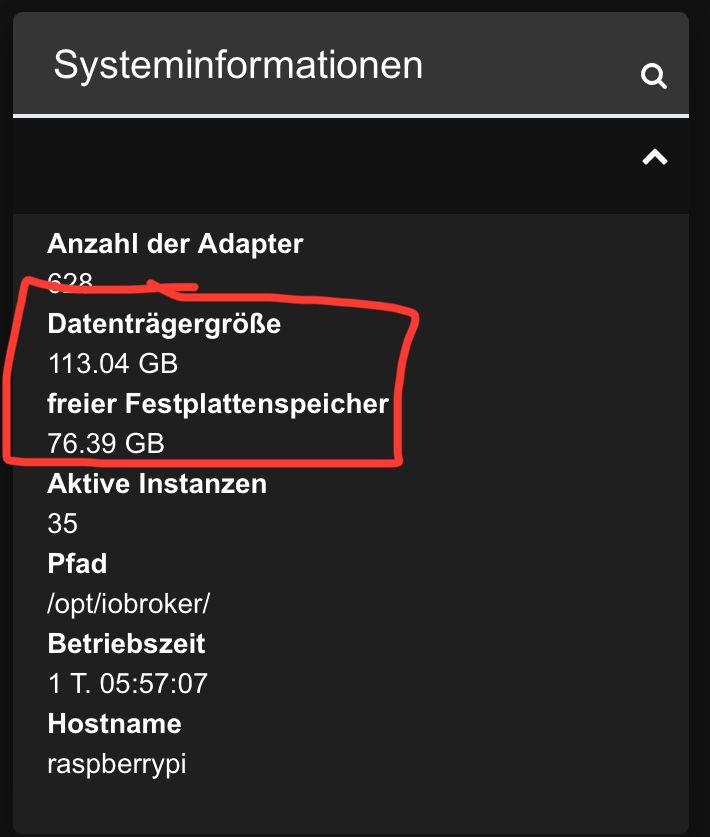
Ich bin weiterhin kein Linux-Experte, und ja, mag sein dass das Filesystem einen Schuss hat oder sogar die SSD Defekt ist.
Zumindest sind jetzt wieder Backups möglich und ich kann damit (und den ganzen anderen Backups aus Vis2 usw..) jetzt das System neu aufspielen. -
Ich wollte mich jetzt nochmal kurz mit einem Statusupdate melden.
Vorweg, ich habe die SSD (noch) nicht getauscht und auch keine Neuinstallation vom OS oder ioBroker durchgeführt, jedoch habe ich das Problem erstmal anders gelöst bekommen.
Im Pfad /opt/iobroker/iobroker-data/backitup/ gibt es die Datei backitup.0.log die mir einen Hinweis gegeben hat, den ich sonst in keinem Log in ioBroker gesehen habe:
[{"1724531172529":"[DEBUG] [mount] mount activ... umount is started before mount!!\n[DEBUG] [mount] umount successfully completed\n[DEBUG] [mount] cifs-mount command: \"sudo mount -t cifs -o username=ioBroker_Backup,password=****,rw,forceuid,uid=iobroker,forcegid,gid=iobroker,file_mode=0777,dir_mode=0777,vers=1.0 //192.168.178.1/fritz.nas/ioBroker_Backup /opt/iobroker/backups\"\n[DEBUG] [mount] mount successfully completed\n[DEBUG] [mount] done\n[DEBUG] [iobroker] host.raspberrypi 14300 states saved\n[DEBUG] [iobroker] host.raspberrypi 16913 objects saved\n[ERROR] [iobroker] host.raspberrypi Cannot pack directory /opt/iobroker/node_modules/iobroker.js-controller/tmp/backup: EIO: i/o error, write\n\n[ERROR] [iobroker] host.raspberrypi Backup not created: EIO: i/o error, write\n\n[DEBUG] [iobroker] Cannot create backup: EIO: i/o error, write\n[DEBUG] [iobroker] done\n[DEBUG] [zigbee] found zigbee database: zigbee.0,zigbee.4\n[DEBUG] [zigbee] done\n[WARN] [javascripts] Javascript tmp directory \"/opt/iobroker/backups/tmpScripts\" cannot created ... Error: ENOSPC: no space left on device, mkdir '/opt/iobroker/backups/tmpScripts'\n[ERROR] [javascripts] script.json cannot be written: Error: ENOENT: no such file or directory, open '/opt/iobroker/backups/tmpScripts/script.json'\n[DEBUG] [javascripts] found Script:
[……..]
Aufgrund der Zeile
Error: ENOSPC: no space left on device, mkdir '/opt/iobroker/backups/tmpScripts'\n[ERROR]habe ich das Verzeichnis /opt/iobroker/backups/ geleert (Ordnerinhalt waren ca. 1,4GB an Backupdateien), und dann funktionierten die Backups über BackitUp oder shell Befehl iob backup direkt wieder wie gewohnt.
Speicherplatz ist genug frei auf der SSD:
Ich bin weiterhin kein Linux-Experte, und ja, mag sein dass das Filesystem einen Schuss hat oder sogar die SSD Defekt ist.
Zumindest sind jetzt wieder Backups möglich und ich kann damit (und den ganzen anderen Backups aus Vis2 usw..) jetzt das System neu aufspielen.Da hab ich übersehen, dass der NAS komplett zu ist:
Filesystem                                Type      Size  Used Avail Use% Mounted on
//192.168.178.1/fritz.nas/ioBroker_Backup cifs      1.5G  1.5G     0 100% /opt/iobroker/backups
1,5GB ist jetzt auch nicht so wirklich üppig viel.
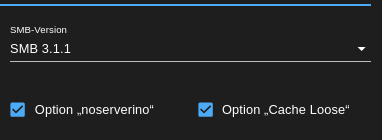
Die mount-Optionen würde ich aber auch auf SMB v3.11, noserverino und Cache Loose setzen.
-
Da hab ich übersehen, dass der NAS komplett zu ist:
Filesystem                                Type      Size  Used Avail Use% Mounted on
//192.168.178.1/fritz.nas/ioBroker_Backup cifs      1.5G  1.5G     0 100% /opt/iobroker/backups
1,5GB ist jetzt auch nicht so wirklich üppig viel.
Die mount-Optionen würde ich aber auch auf SMB v3.11, noserverino und Cache Loose setzen.
-
@thomas-braun
nein, nicht die NAS war voll.
Ich habe die Speicherung auf NAS sogar deaktiviert.Es ging um den Speicherplatz auf der SSD vom Raspberry im Pfad /opt/iobroker/backups/
Wie du der obigen Ausgabe entnehmen kannst ist auf /opt/iobroker/backups aber das NAS per CIFS/SMB gemountet. Mit 1,5GB.
Wenn du in /opt/iobroker/backups schreibst ist das physisch auf dem Datenträger der in der FritzBox als NAS freigegeben ist.
-
Wie du der obigen Ausgabe entnehmen kannst ist auf /opt/iobroker/backups aber das NAS per CIFS/SMB gemountet. Mit 1,5GB.
Wenn du in /opt/iobroker/backups schreibst ist das physisch auf dem Datenträger der in der FritzBox als NAS freigegeben ist.
-
@thomas-braun
Wahrscheinlich wirds dann am besten sein die Speicherung auf der NAS deaktivieren und nur noch im OneDrive hochladen.
Da gibts mehr SpeicherOder einen größeren Datenträger an die FritzBox hängen. Oder verwendest du da nur den internen Speicher? Scheint mir bei 1,5GB fast der Fall zu sein.
-
Oder einen größeren Datenträger an die FritzBox hängen. Oder verwendest du da nur den internen Speicher? Scheint mir bei 1,5GB fast der Fall zu sein.
@thomas-braun sagte in Backitup macht keine Backups mehr:
Oder einen größeren Datenträger an die FritzBox hängen. Oder verwendest du da nur den internen Speicher? Scheint mir bei 1,5GB fast der Fall zu sein.
Ja, der interne Speicher. Hab keinen externen Speicher dran.
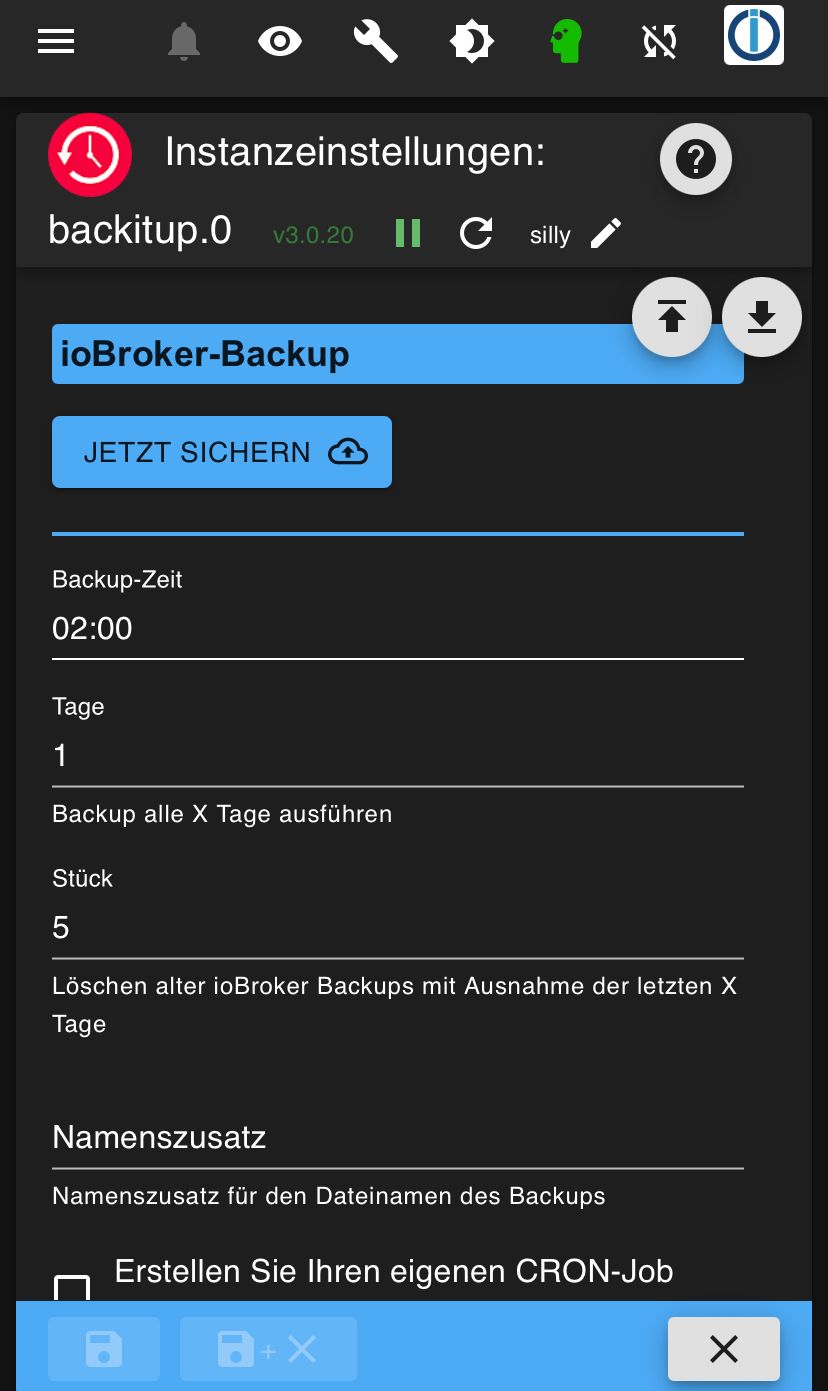
Früher hat BackitUp immer nur die letzten 5 Backups behalten und die älteren gelöscht. Deshalb gabs nie ein Problem
Edit:
Ist auch weiterhin so eingestellt, aber hat wohl nicht funktioniert
-
@thomas-braun sagte in Backitup macht keine Backups mehr:
Oder einen größeren Datenträger an die FritzBox hängen. Oder verwendest du da nur den internen Speicher? Scheint mir bei 1,5GB fast der Fall zu sein.
Ja, der interne Speicher. Hab keinen externen Speicher dran.
Früher hat BackitUp immer nur die letzten 5 Backups behalten und die älteren gelöscht. Deshalb gabs nie ein Problem
Edit:
Ist auch weiterhin so eingestellt, aber hat wohl nicht funktioniert
Mit 1,5GB kommste halt nicht weit, jenachdem was da alles wie oft und wie lange abgelegt werden soll. Häng dir doch einen USB-Stick an die Box, die ist zwar nicht besonders flott als NAS, aber für ein paar Backups automatisiert in der Nacht reicht es aus. Hab ich hier auch so laufen.
Linux-Werkzeugkasten:
https://forum.iobroker.net/topic/42952/der-kleine-iobroker-linux-werkzeugkasten
NodeJS Fixer Skript:
https://forum.iobroker.net/topic/68035/iob-node-fix-skript
iob_diag: curl -sLf -o diag.sh https://iobroker.net/diag.sh && bash diag.sh -
@thomas-braun sagte in Backitup macht keine Backups mehr:
Oder einen größeren Datenträger an die FritzBox hängen. Oder verwendest du da nur den internen Speicher? Scheint mir bei 1,5GB fast der Fall zu sein.
Ja, der interne Speicher. Hab keinen externen Speicher dran.
Früher hat BackitUp immer nur die letzten 5 Backups behalten und die älteren gelöscht. Deshalb gabs nie ein Problem
Edit:
Ist auch weiterhin so eingestellt, aber hat wohl nicht funktioniert
Gerade Uhrzeiten sind übrigens bei Backups auf Geschichten wie google drive, one drive und Konsorten erfahrungsgemäß ungünstig. Da tummeln sich nämlich alle gleichzeitig. Nimm 3:34 oder sowas krummes.
-
Gerade Uhrzeiten sind übrigens bei Backups auf Geschichten wie google drive, one drive und Konsorten erfahrungsgemäß ungünstig. Da tummeln sich nämlich alle gleichzeitig. Nimm 3:34 oder sowas krummes.
@thomas-braun sagte in Backitup macht keine Backups mehr:
Gerade Uhrzeiten sind übrigens bei Backups auf Geschichten wie google drive, one drive und Konsorten erfahrungsgemäß ungünstig. Da tummeln sich nämlich alle gleichzeitig. Nimm 3:34 oder sowas krummes.
Guter Hinweis und vielen Dank für die Unterstützung!
-
@thomas-braun sagte in Backitup macht keine Backups mehr:
Gerade Uhrzeiten sind übrigens bei Backups auf Geschichten wie google drive, one drive und Konsorten erfahrungsgemäß ungünstig. Da tummeln sich nämlich alle gleichzeitig. Nimm 3:34 oder sowas krummes.
Guter Hinweis und vielen Dank für die Unterstützung!
-
Mit 1,5GB kommste halt nicht weit, jenachdem was da alles wie oft und wie lange abgelegt werden soll. Häng dir doch einen USB-Stick an die Box, die ist zwar nicht besonders flott als NAS, aber für ein paar Backups automatisiert in der Nacht reicht es aus. Hab ich hier auch so laufen.
@thomas-braun sagte in Backitup macht keine Backups mehr:
Mit 1,5GB kommste halt nicht weit,
@Tobi-1
bei mir ist 1 Backup schon 3GB groß
(so viel ist aber nicht unbedingt üblich) -
@thomas-braun sagte in Backitup macht keine Backups mehr:
Mit 1,5GB kommste halt nicht weit,
@Tobi-1
bei mir ist 1 Backup schon 3GB groß
(so viel ist aber nicht unbedingt üblich)@homoran sagte in Backitup macht keine Backups mehr:
@thomas-braun sagte in Backitup macht keine Backups mehr:
Mit 1,5GB kommste halt nicht weit,
@Tobi-1
bei mir ist 1 Backup schon 3GB groß
(so viel ist aber nicht unbedingt üblich)So groß sind meine Backups nicht.
Üblicherweise um die 100MB pro Nacht.
Das Problem war am Ende wirklich, dass die alten Backups nicht mehr gelöscht werden.
Evtl ist das trotzdem ein Bug im Adapter, oder ein Fehler in meinem System.Der interne Speicher der Fritzbox hat immer gereicht und jetzt hat sich halt zuviel angesammelt.

Hey! Du scheinst an dieser Unterhaltung interessiert zu sein, hast aber noch kein Konto.
Hast du es satt, bei jedem Besuch durch die gleichen Beiträge zu scrollen? Wenn du dich für ein Konto anmeldest, kommst du immer genau dorthin zurück, wo du zuvor warst, und kannst dich über neue Antworten benachrichtigen lassen (entweder per E-Mail oder Push-Benachrichtigung). Du kannst auch Lesezeichen speichern und Beiträge positiv bewerten, um anderen Community-Mitgliedern deine Wertschätzung zu zeigen.
Mit deinem Input könnte dieser Beitrag noch besser werden 💗
Registrieren Anmelden456
Online33.0k
Benutzende83.7k
Themen1.3m
Beiträge