




Test Adapter Philips-TV v0.2.x
-
@adri525 Das sieht gut aus.
Wahrscheinlich ist dein Problem eher ein Fall für @Thomas-Braun und iob diag
Vorab gesagt: Die MAC muss immer Großbuchstaben haben und der PIN darf nur Zahlen beinhalten.
Welchen Browser nutzt du, welche Admin Version hast du und bist du mit Windows oder Linux unterwegs?
Du kannst nun mehrere Möglichkeiten ausprobieren:
Adapter löschen: Bitte links Adapter auswählen, dann den Expertmodus aktivieren, den Adapter suchen und die Mülltonnenzeichen drücken. Danach in deiner Konsole das eingebeniob stop iob fix iob startDanach am besten deinen Cache vom Browser leeren und eine neu Instanz von philips-tv unter adpter hinzufügen. Jetzt dann bitte nur deine IP eintragen und den Pairing Button drücken.
Kommt dann wieder deine Fehlermeldung dann bitte mal das probieren.
Javascript Adapter installieren und 2 Javascripte anlegen.
Das erst mit diesem Inhalt füllen..ggf. deine IP anpassen.
sendTo("philips-tv.0", "pairing", "192.168.1.50"
, async function (result) {
    console.log(result);
});
In das 2te diesen Inhalt kopieren und speichern. Hier musst du später die 0000 mit dem Code auf deinem Fernseher ersetzen.
sendTo("philips-tv.0", "submitPin", "0000"
, async function (result) {
    console.log(result);
});
Nun starte das erste Script mit deiner IP und deaktiviere es nach 3 Sekunden. Hier sollte nun der Code in deinem Fernseher erscheinen (hoffentlich)
Dann die 0000 mit den Code ersetzen und dieses Script starten und den Adapter NICHT neu starten.
Was kannst du im Log sehen?
Gruß//Lucky
@lucky_esa sagte in Test Adapter Philips-TV v0.2.x:
@adri525 Das sieht gut aus.
Wahrscheinlich ist dein Problem eher ein Fall für @Thomas-Braun und iob diag
Vorab gesagt: Die MAC muss immer Großbuchstaben haben und der PIN darf nur Zahlen beinhalten.
Welchen Browser nutzt du, welche Admin Version hast du und bist du mit Windows oder Linux unterwegs?
Du kannst nun mehrere Möglichkeiten ausprobieren:
Adapter löschen: Bitte links Adapter auswählen, dann den Expertmodus aktivieren, den Adapter suchen und die Mülltonnenzeichen drücken. Danach in deiner Konsole das eingebeniob stop iob fix iob startDanach am besten deinen Cache vom Browser leeren und eine neu Instanz von philips-tv unter adpter hinzufügen. Jetzt dann bitte nur deine IP eintragen und den Pairing Button drücken.
Kommt dann wieder deine Fehlermeldung dann bitte mal das probieren.
Javascript Adapter installieren und 2 Javascripte anlegen.
Das erst mit diesem Inhalt füllen..ggf. deine IP anpassen.
sendTo("philips-tv.0", "pairing", "192.168.1.50"
, async function (result) {
    console.log(result);
});
In das 2te diesen Inhalt kopieren und speichern. Hier musst du später die 0000 mit dem Code auf deinem Fernseher ersetzen.
sendTo("philips-tv.0", "submitPin", "0000"
, async function (result) {
    console.log(result);
});
Nun starte das erste Script mit deiner IP und deaktiviere es nach 3 Sekunden. Hier sollte nun der Code in deinem Fernseher erscheinen (hoffentlich)
Dann die 0000 mit den Code ersetzen und dieses Script starten und den Adapter NICHT neu starten.
Was kannst du im Log sehen?
Gruß//Lucky
Moinsen, ich bekomme den Adapter nicht mehr installiert. :-( was mache ich falsch? gibt es tipps und tricks?
$ iobroker url AlCalzone/ioBroker.philips-tv --host raspberrypi --debug install AlCalzone/ioBroker.philips-tv NPM version: 9.5.1 Installing AlCalzone/ioBroker.philips-tv... (System call) changed 1 package in 47s184 packages are looking for funding run `npm fund` for details upload [1] philips-tv.admin /opt/iobroker/node_modules/iobroker.philips-tv/admin/jsonConfig.json jsonConfig.json application/json upload [0] philips-tv.admin /opt/iobroker/node_modules/iobroker.philips-tv/admin/philips-tv.png philips-tv.png image/png Process exited with code 0 -
@lucky_esa sagte in Test Adapter Philips-TV v0.2.x:
@adri525 Das sieht gut aus.
Wahrscheinlich ist dein Problem eher ein Fall für @Thomas-Braun und iob diag
Vorab gesagt: Die MAC muss immer Großbuchstaben haben und der PIN darf nur Zahlen beinhalten.
Welchen Browser nutzt du, welche Admin Version hast du und bist du mit Windows oder Linux unterwegs?
Du kannst nun mehrere Möglichkeiten ausprobieren:
Adapter löschen: Bitte links Adapter auswählen, dann den Expertmodus aktivieren, den Adapter suchen und die Mülltonnenzeichen drücken. Danach in deiner Konsole das eingebeniob stop iob fix iob startDanach am besten deinen Cache vom Browser leeren und eine neu Instanz von philips-tv unter adpter hinzufügen. Jetzt dann bitte nur deine IP eintragen und den Pairing Button drücken.
Kommt dann wieder deine Fehlermeldung dann bitte mal das probieren.
Javascript Adapter installieren und 2 Javascripte anlegen.
Das erst mit diesem Inhalt füllen..ggf. deine IP anpassen.
sendTo("philips-tv.0", "pairing", "192.168.1.50"
, async function (result) {
    console.log(result);
});
In das 2te diesen Inhalt kopieren und speichern. Hier musst du später die 0000 mit dem Code auf deinem Fernseher ersetzen.
sendTo("philips-tv.0", "submitPin", "0000"
, async function (result) {
    console.log(result);
});
Nun starte das erste Script mit deiner IP und deaktiviere es nach 3 Sekunden. Hier sollte nun der Code in deinem Fernseher erscheinen (hoffentlich)
Dann die 0000 mit den Code ersetzen und dieses Script starten und den Adapter NICHT neu starten.
Was kannst du im Log sehen?
Gruß//Lucky
Moinsen, ich bekomme den Adapter nicht mehr installiert. :-( was mache ich falsch? gibt es tipps und tricks?
$ iobroker url AlCalzone/ioBroker.philips-tv --host raspberrypi --debug install AlCalzone/ioBroker.philips-tv NPM version: 9.5.1 Installing AlCalzone/ioBroker.philips-tv... (System call) changed 1 package in 47s184 packages are looking for funding run `npm fund` for details upload [1] philips-tv.admin /opt/iobroker/node_modules/iobroker.philips-tv/admin/jsonConfig.json jsonConfig.json application/json upload [0] philips-tv.admin /opt/iobroker/node_modules/iobroker.philips-tv/admin/philips-tv.png philips-tv.png image/png Process exited with code 0@paradoxe-situation sagte in Test Adapter Philips-TV v0.2.x:
Process exited with code 0
klingt doch erst mal gut!
was sagt die Langfassung von
iob diag? -
@lucky_esa sagte in Test Adapter Philips-TV v0.2.x:
@adri525 Das sieht gut aus.
Wahrscheinlich ist dein Problem eher ein Fall für @Thomas-Braun und iob diag
Vorab gesagt: Die MAC muss immer Großbuchstaben haben und der PIN darf nur Zahlen beinhalten.
Welchen Browser nutzt du, welche Admin Version hast du und bist du mit Windows oder Linux unterwegs?
Du kannst nun mehrere Möglichkeiten ausprobieren:
Adapter löschen: Bitte links Adapter auswählen, dann den Expertmodus aktivieren, den Adapter suchen und die Mülltonnenzeichen drücken. Danach in deiner Konsole das eingebeniob stop iob fix iob startDanach am besten deinen Cache vom Browser leeren und eine neu Instanz von philips-tv unter adpter hinzufügen. Jetzt dann bitte nur deine IP eintragen und den Pairing Button drücken.
Kommt dann wieder deine Fehlermeldung dann bitte mal das probieren.
Javascript Adapter installieren und 2 Javascripte anlegen.
Das erst mit diesem Inhalt füllen..ggf. deine IP anpassen.
sendTo("philips-tv.0", "pairing", "192.168.1.50"
, async function (result) {
    console.log(result);
});
In das 2te diesen Inhalt kopieren und speichern. Hier musst du später die 0000 mit dem Code auf deinem Fernseher ersetzen.
sendTo("philips-tv.0", "submitPin", "0000"
, async function (result) {
    console.log(result);
});
Nun starte das erste Script mit deiner IP und deaktiviere es nach 3 Sekunden. Hier sollte nun der Code in deinem Fernseher erscheinen (hoffentlich)
Dann die 0000 mit den Code ersetzen und dieses Script starten und den Adapter NICHT neu starten.
Was kannst du im Log sehen?
Gruß//Lucky
Moinsen, ich bekomme den Adapter nicht mehr installiert. :-( was mache ich falsch? gibt es tipps und tricks?
$ iobroker url AlCalzone/ioBroker.philips-tv --host raspberrypi --debug install AlCalzone/ioBroker.philips-tv NPM version: 9.5.1 Installing AlCalzone/ioBroker.philips-tv... (System call) changed 1 package in 47s184 packages are looking for funding run `npm fund` for details upload [1] philips-tv.admin /opt/iobroker/node_modules/iobroker.philips-tv/admin/jsonConfig.json jsonConfig.json application/json upload [0] philips-tv.admin /opt/iobroker/node_modules/iobroker.philips-tv/admin/philips-tv.png philips-tv.png image/png Process exited with code 0@paradoxe-situation sagte in Test Adapter Philips-TV v0.2.x:
NPM version: 9.5.1
Weist auf eine alte und/oder falsche Installation von nodejs hin. Bring das erstmal auf Stand:
iob stop iob fix iob nodejs-update -
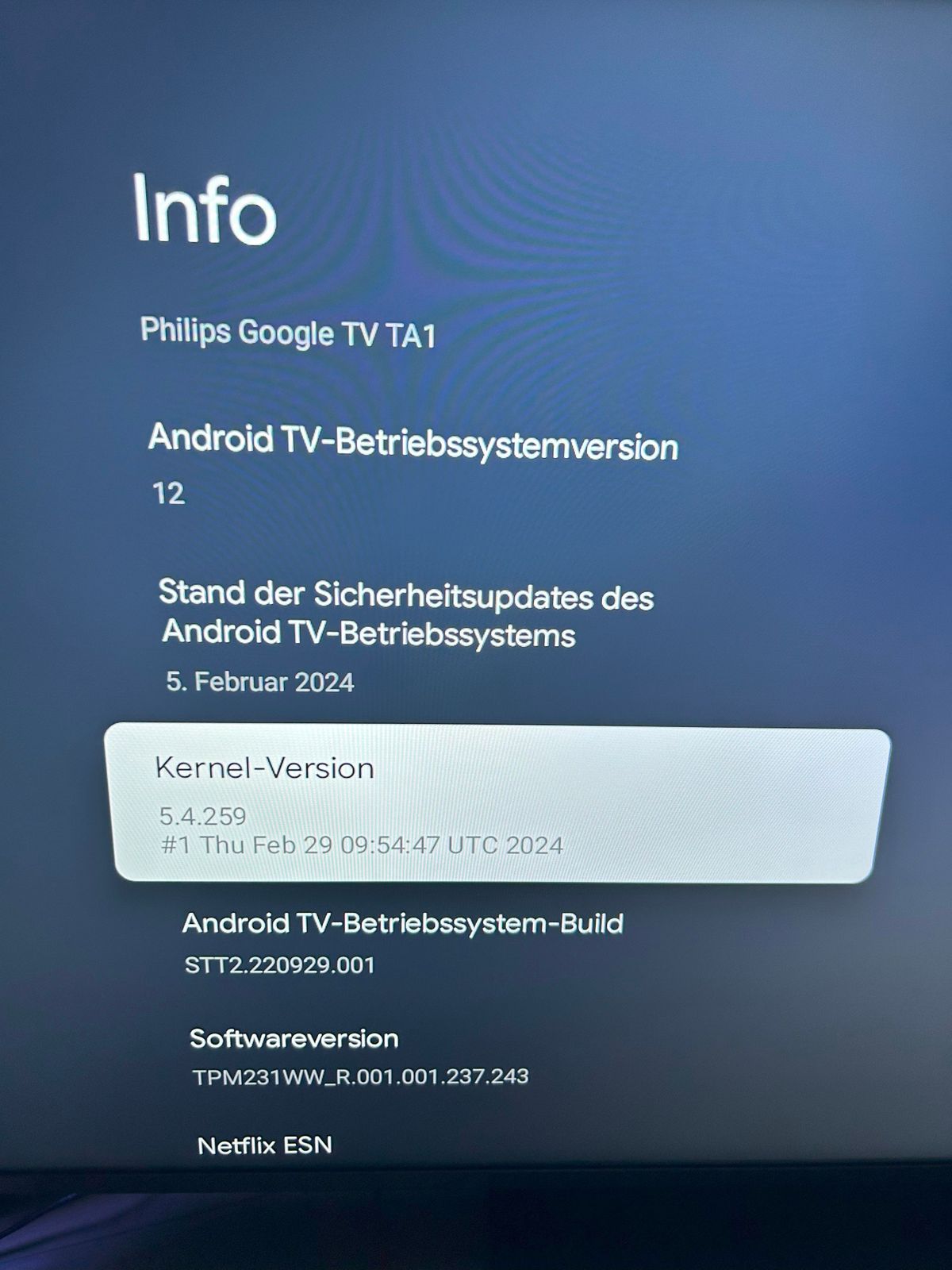
@lucky_esa Zur Info, mein Problem aus Post https://forum.iobroker.net/post/1169762 mit dem Pairen mittels des Buttons im Adapter selbst besteht weiterhin, allerdings konnte ich den TV durch die 2 Javaskripte von dir pairen. Eventuell kannst du dies ja irgendwie in den Adapter integrieren. Übrigens mein TV hat Andoid 12, einige hier schreiben ja von Android 11, eventuell ist das 12er OS das Problem? Allerdings hat die Paarung vor ~ 3/4 Jahr ohne Probleme mit dem Button im Adapter funktioniert.
@prinzvonbillair sagte in Test Adapter Philips-TV v0.2.x:
@lucky_esa Zur Info, mein Problem aus Post https://forum.iobroker.net/post/1169762 mit dem Pairen mittels des Buttons im Adapter selbst besteht weiterhin, allerdings konnte ich den TV durch die 2 Javaskripte von dir pairen. Eventuell kannst du dies ja irgendwie in den Adapter integrieren. Übrigens mein TV hat Andoid 12, einige hier schreiben ja von Android 11, eventuell ist das 12er OS das Problem? Allerdings hat die Paarung vor ~ 3/4 Jahr ohne Probleme mit dem Button im Adapter funktioniert.!
Die 2 Scripte machen das was eigentlich der Adapter machen sollte. In meinen Augen ist das ein issues in der jsonConfig.json. Hier muss der Entwickler wahrscheinlich mal die Datei anpassen.
Des Weiteren nutzt dieser Adapter das Package "request" was nicht mehr angewendet werden sollte.Gruß//Lucky
-
Das Pairing Problem sollte mit 0.5.4 gefixt sein, anscheinend hat sich was im Verhalten von JSON Config verändert.
Hier könnt ihr mich unterstützen.
-
Das Pairing Problem sollte mit 0.5.4 gefixt sein, anscheinend hat sich was im Verhalten von JSON Config verändert.
@foxriver76 sagte in Test Adapter Philips-TV v0.2.x:
Das Pairing Problem sollte mit 0.5.4 gefixt sein, anscheinend hat sich was im Verhalten von JSON Config verändert.
Moin,
das mit dem Pairing hat mit der 0.5.4 tatsächlich funktioniert, aber dafür bekomme ich im Log jetzt immer folgende Meldung:
2024-08-14 20:57:51.828 - info: philips-tv.0 (86167) starting. Version 0.5.4 (non-npm: AlCalzone/ioBroker.philips-tv) in /opt/iobroker/node_modules/iobroker.philips-tv, node: v20.16.0, js-controller: 6.0.9
2024-08-14 20:57:51.839 - info: philips-tv.0 (86167) Starting with ip "x.x.x.x" (API v6 - Android)
2024-08-14 20:58:05.558 - error: philips-tv.0 (86167) Could not poll API: Unexpected end of JSON input
2024-08-14 20:58:11.108 - error: philips-tv.0 (86167) Could not poll API: Unexpected end of JSON input
2024-08-14 20:58:16.743 - error: philips-tv.0 (86167) Could not poll API: Unexpected end of JSON input
gruß
MarcPress any key to continue or any other to quit
-
@foxriver76 sagte in Test Adapter Philips-TV v0.2.x:
Das Pairing Problem sollte mit 0.5.4 gefixt sein, anscheinend hat sich was im Verhalten von JSON Config verändert.
Moin,
das mit dem Pairing hat mit der 0.5.4 tatsächlich funktioniert, aber dafür bekomme ich im Log jetzt immer folgende Meldung:
2024-08-14 20:57:51.828 - info: philips-tv.0 (86167) starting. Version 0.5.4 (non-npm: AlCalzone/ioBroker.philips-tv) in /opt/iobroker/node_modules/iobroker.philips-tv, node: v20.16.0, js-controller: 6.0.9
2024-08-14 20:57:51.839 - info: philips-tv.0 (86167) Starting with ip "x.x.x.x" (API v6 - Android)
2024-08-14 20:58:05.558 - error: philips-tv.0 (86167) Could not poll API: Unexpected end of JSON input
2024-08-14 20:58:11.108 - error: philips-tv.0 (86167) Could not poll API: Unexpected end of JSON input
2024-08-14 20:58:16.743 - error: philips-tv.0 (86167) Could not poll API: Unexpected end of JSON input
gruß
MarcHabe genau das gleiche Problem mit meinem 75PUS8108/12 TV.
Gibt es schon eine Lösung?
Obwohl der Adapter nicht grün ist funktionieren dennoch einige Buttons und manche Datenpunkte werden aktualisiert und das trotz andauernder Fehlermeldung im Log:
Could not poll API: Unexpected end of JSON input@fenriswolf sagte in Test Adapter Philips-TV v0.2.x:
@foxriver76 sagte in Test Adapter Philips-TV v0.2.x:
Das Pairing Problem sollte mit 0.5.4 gefixt sein, anscheinend hat sich was im Verhalten von JSON Config verändert.
Moin,
das mit dem Pairing hat mit der 0.5.4 tatsächlich funktioniert, aber dafür bekomme ich im Log jetzt immer folgende Meldung:
2024-08-14 20:57:51.828 - info: philips-tv.0 (86167) starting. Version 0.5.4 (non-npm: AlCalzone/ioBroker.philips-tv) in /opt/iobroker/node_modules/iobroker.philips-tv, node: v20.16.0, js-controller: 6.0.9
2024-08-14 20:57:51.839 - info: philips-tv.0 (86167) Starting with ip "x.x.x.x" (API v6 - Android)
2024-08-14 20:58:05.558 - error: philips-tv.0 (86167) Could not poll API: Unexpected end of JSON input
2024-08-14 20:58:11.108 - error: philips-tv.0 (86167) Could not poll API: Unexpected end of JSON input
2024-08-14 20:58:16.743 - error: philips-tv.0 (86167) Could not poll API: Unexpected end of JSON input
gruß
Marc -
Habe genau das gleiche Problem mit meinem 75PUS8108/12 TV.
Gibt es schon eine Lösung?
Obwohl der Adapter nicht grün ist funktionieren dennoch einige Buttons und manche Datenpunkte werden aktualisiert und das trotz andauernder Fehlermeldung im Log:
Could not poll API: Unexpected end of JSON input@fenriswolf sagte in Test Adapter Philips-TV v0.2.x:
@foxriver76 sagte in Test Adapter Philips-TV v0.2.x:
Das Pairing Problem sollte mit 0.5.4 gefixt sein, anscheinend hat sich was im Verhalten von JSON Config verändert.
Moin,
das mit dem Pairing hat mit der 0.5.4 tatsächlich funktioniert, aber dafür bekomme ich im Log jetzt immer folgende Meldung:
2024-08-14 20:57:51.828 - info: philips-tv.0 (86167) starting. Version 0.5.4 (non-npm: AlCalzone/ioBroker.philips-tv) in /opt/iobroker/node_modules/iobroker.philips-tv, node: v20.16.0, js-controller: 6.0.9
2024-08-14 20:57:51.839 - info: philips-tv.0 (86167) Starting with ip "x.x.x.x" (API v6 - Android)
2024-08-14 20:58:05.558 - error: philips-tv.0 (86167) Could not poll API: Unexpected end of JSON input
2024-08-14 20:58:11.108 - error: philips-tv.0 (86167) Could not poll API: Unexpected end of JSON input
2024-08-14 20:58:16.743 - error: philips-tv.0 (86167) Could not poll API: Unexpected end of JSON input
gruß
Marc@domi920 sagte in Test Adapter Philips-TV v0.2.x:
75PUS8108/12
Stop mal den Adapter und restarte den Fernseher unter Einstellung/system. Danach mal den Adapter starten...Kommt dann noch immer diese Fehler?
-
@domi920 sagte in Test Adapter Philips-TV v0.2.x:
75PUS8108/12
Stop mal den Adapter und restarte den Fernseher unter Einstellung/system. Danach mal den Adapter starten...Kommt dann noch immer diese Fehler?
@lucky_esa Leider gibt es keine Möglichkeit den TV über die Einstellungen neu zu starten:
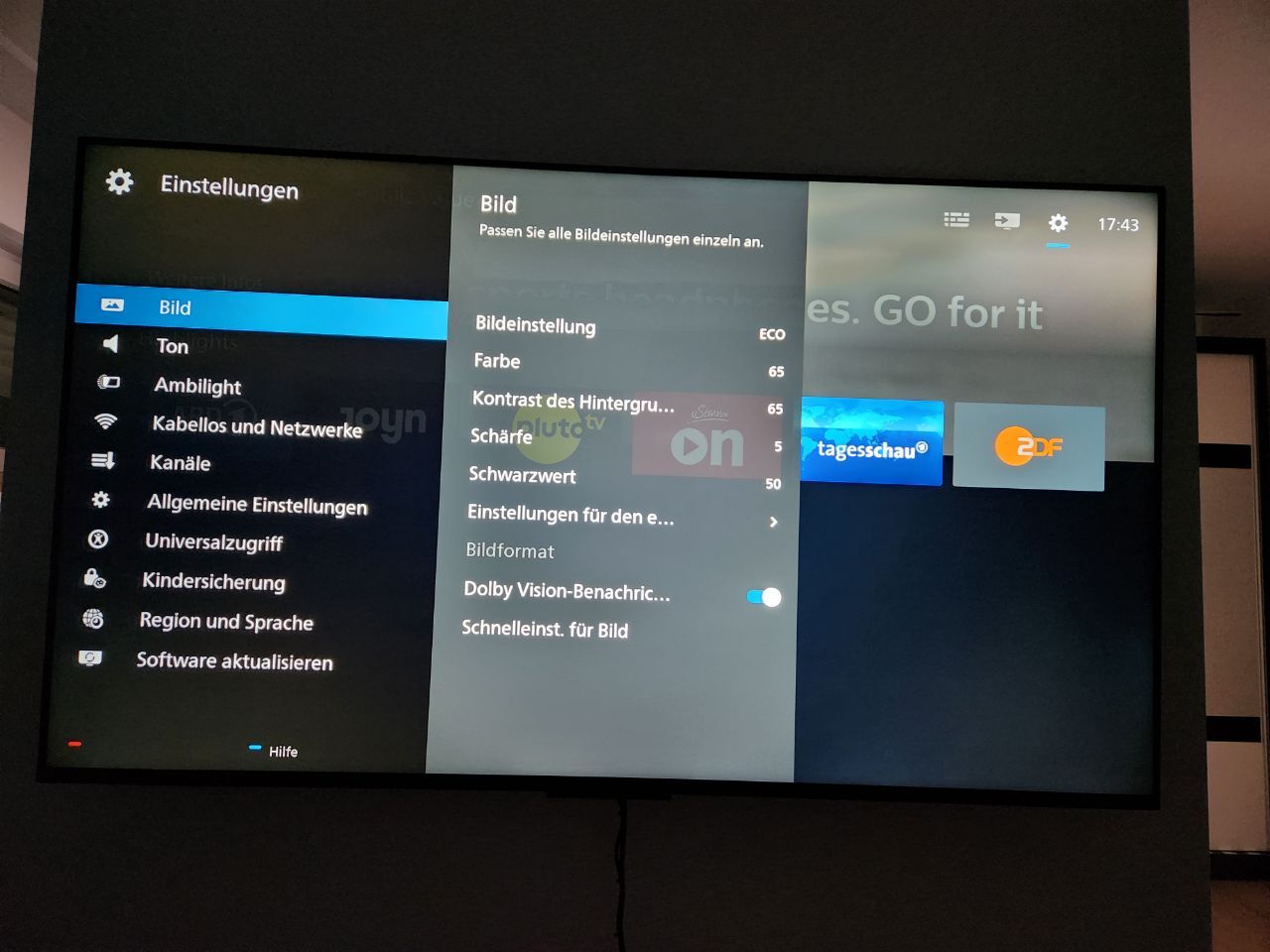
Habe den TV dafür ausgesteckt und 1 Minute gewartet und wieder neu gestartet.
Leider kommt die Fehlermeldung wieder.
Also erst ist der Adapter grün und nach wenigen Sekunden wieder orange und die Fehlermeldung kommt. -
@lucky_esa Leider gibt es keine Möglichkeit den TV über die Einstellungen neu zu starten:
Habe den TV dafür ausgesteckt und 1 Minute gewartet und wieder neu gestartet.
Leider kommt die Fehlermeldung wieder.
Also erst ist der Adapter grün und nach wenigen Sekunden wieder orange und die Fehlermeldung kommt. -
@lucky_esa Hier ein Auszug:
27
12
Log-Größe: 1.6 MB

philips-tv.0
Zeit
debug
Nachricht

philips-tv.0
2024-08-25 14:38:28.883	error	Could not poll API: Unexpected end of JSON input

philips-tv.0
2024-08-25 14:38:23.586	error	Could not poll API: Unexpected end of JSON input

philips-tv.0
2024-08-25 14:38:18.335	error	Could not poll API: Unexpected end of JSON input

philips-tv.0
2024-08-25 14:38:13.259	debug	Sending key "VolumeDown"

philips-tv.0
2024-08-25 14:38:13.259	debug	state change philips-tv.0.keys.volumeDown: false

philips-tv.0
2024-08-25 14:38:13.102	error	Could not poll API: Unexpected end of JSON input

philips-tv.0
2024-08-25 14:38:07.852	error	Could not poll API: Unexpected end of JSON input

philips-tv.0
2024-08-25 14:38:02.613	error	Could not poll API: Unexpected end of JSON input

philips-tv.0
2024-08-25 14:37:57.282	error	Could not poll API: Unexpected end of JSON input

philips-tv.0
2024-08-25 14:37:51.992	error	Could not poll API: Unexpected end of JSON input

philips-tv.0
2024-08-25 14:37:46.696	error	Could not poll API: Unexpected end of JSON input

philips-tv.0
2024-08-25 14:37:44.350	debug	Sending key "VolumeUp"

philips-tv.0
2024-08-25 14:37:44.350	debug	state change philips-tv.0.keys.volumeUp: true

philips-tv.0
2024-08-25 14:37:41.453	error	Could not poll API: Unexpected end of JSON input

philips-tv.0
2024-08-25 14:37:39.302	debug	Sending key "VolumeUp"

philips-tv.0
2024-08-25 14:37:39.301	debug	state change philips-tv.0.keys.volumeUp: true

philips-tv.0
2024-08-25 14:37:36.251	error	Could not poll API: Unexpected end of JSON input

philips-tv.0
2024-08-25 14:37:30.998	error	Could not poll API: Unexpected end of JSON input

philips-tv.0
2024-08-25 14:37:25.738	error	Could not poll API: Unexpected end of JSON input

philips-tv.0
2024-08-25 14:37:20.448	error	Could not poll API: Unexpected end of JSON input

philips-tv.0
2024-08-25 14:37:14.913	debug	No Ambilight plus Hue support: {"statusCode":404,"body":"<html><head><title>Not Found</title></head><body>Not Found</body></html>","headers":{"date":"Sun, 25 Aug 2024 12:37:14 GMT","connection":"close","content-type":"text/html; charset=utf-8","cache-control":"no-cache","access-control-allow-origin":"*","content-length":"72"},"request":{"uri":{"protocol":"https:","slashes":true,"auth":null,"host":"192.162.1.101:1926","port":"1926","hostname":"192.162.1.101","hash":null,"search":null,"query":null,"pathname":"/6/HueLamp/power","path":"/6/HueLamp/power","href":"https://192.162.1.101:1926/6/HueLamp/power"},"method":"GET","headers":{}}}

philips-tv.0
2024-08-25 14:37:14.621	debug	No app launch support: {"statusCode":403,"body":"<html><head><title>Forbidden</title></head><body>Forbidden</body></html>","headers":{"date":"Sun, 25 Aug 2024 12:37:14 GMT","connection":"close","content-type":"text/html; charset=utf-8","cache-control":"no-cache","access-control-allow-origin":"*","content-length":"72"},"request":{"uri":{"protocol":"https:","slashes":true,"auth":null,"host":"192.162.1.101:1926","port":"1926","hostname":"192.162.1.101","hash":null,"search":null,"query":null,"pathname":"/6/applications","path":"/6/applications","href":"https://192.162.1.101:1926/6/applications"},"method":"GET","headers":{}}}

philips-tv.0
2024-08-25 14:37:09.370	info	Starting with ip "192.162.1.101" (API v6 - Android)

philips-tv.0
2024-08-25 14:37:09.362	info	starting. Version 0.5.4 (non-npm: AlCalzone/ioBroker.philips-tv) in /opt/iobroker/node_modules/iobroker.philips-tv, node: v20.16.0, js-controller: 6.0.9

philips-tv.0
2024-08-25 14:37:09.173	debug	States connected to redis: 127.0.0.1:9000

philips-tv.0
2024-08-25 14:37:09.110	debug	States create User PubSub Client

philips-tv.0
2024-08-25 14:37:09.110	debug	States create System PubSub Client

philips-tv.0
2024-08-25 14:37:09.097	debug	Redis States: Use Redis connection: 127.0.0.1:9000

philips-tv.0
2024-08-25 14:37:09.075	debug	Objects connected to redis: 127.0.0.1:9001

philips-tv.0
2024-08-25 14:37:09.071	debug	Objects client initialize lua scripts

philips-tv.0
2024-08-25 14:37:09.033	debug	Objects create User PubSub Client

philips-tv.0
2024-08-25 14:37:09.032	debug	Objects create System PubSub Client

philips-tv.0
2024-08-25 14:37:08.988	debug	Objects client ready ... initialize now

philips-tv.0
2024-08-25 14:37:08.965	debug	Redis Objects: Use Redis connection: 127.0.0.1:9001
Die Lautstärkeregelung funktioniert

-
@lucky_esa Hier ein Auszug:
27
12
Log-Größe: 1.6 MB

philips-tv.0
Zeit
debug
Nachricht

philips-tv.0
2024-08-25 14:38:28.883	error	Could not poll API: Unexpected end of JSON input

philips-tv.0
2024-08-25 14:38:23.586	error	Could not poll API: Unexpected end of JSON input

philips-tv.0
2024-08-25 14:38:18.335	error	Could not poll API: Unexpected end of JSON input

philips-tv.0
2024-08-25 14:38:13.259	debug	Sending key "VolumeDown"

philips-tv.0
2024-08-25 14:38:13.259	debug	state change philips-tv.0.keys.volumeDown: false

philips-tv.0
2024-08-25 14:38:13.102	error	Could not poll API: Unexpected end of JSON input

philips-tv.0
2024-08-25 14:38:07.852	error	Could not poll API: Unexpected end of JSON input

philips-tv.0
2024-08-25 14:38:02.613	error	Could not poll API: Unexpected end of JSON input

philips-tv.0
2024-08-25 14:37:57.282	error	Could not poll API: Unexpected end of JSON input

philips-tv.0
2024-08-25 14:37:51.992	error	Could not poll API: Unexpected end of JSON input

philips-tv.0
2024-08-25 14:37:46.696	error	Could not poll API: Unexpected end of JSON input

philips-tv.0
2024-08-25 14:37:44.350	debug	Sending key "VolumeUp"

philips-tv.0
2024-08-25 14:37:44.350	debug	state change philips-tv.0.keys.volumeUp: true

philips-tv.0
2024-08-25 14:37:41.453	error	Could not poll API: Unexpected end of JSON input

philips-tv.0
2024-08-25 14:37:39.302	debug	Sending key "VolumeUp"

philips-tv.0
2024-08-25 14:37:39.301	debug	state change philips-tv.0.keys.volumeUp: true

philips-tv.0
2024-08-25 14:37:36.251	error	Could not poll API: Unexpected end of JSON input

philips-tv.0
2024-08-25 14:37:30.998	error	Could not poll API: Unexpected end of JSON input

philips-tv.0
2024-08-25 14:37:25.738	error	Could not poll API: Unexpected end of JSON input

philips-tv.0
2024-08-25 14:37:20.448	error	Could not poll API: Unexpected end of JSON input

philips-tv.0
2024-08-25 14:37:14.913	debug	No Ambilight plus Hue support: {"statusCode":404,"body":"<html><head><title>Not Found</title></head><body>Not Found</body></html>","headers":{"date":"Sun, 25 Aug 2024 12:37:14 GMT","connection":"close","content-type":"text/html; charset=utf-8","cache-control":"no-cache","access-control-allow-origin":"*","content-length":"72"},"request":{"uri":{"protocol":"https:","slashes":true,"auth":null,"host":"192.162.1.101:1926","port":"1926","hostname":"192.162.1.101","hash":null,"search":null,"query":null,"pathname":"/6/HueLamp/power","path":"/6/HueLamp/power","href":"https://192.162.1.101:1926/6/HueLamp/power"},"method":"GET","headers":{}}}

philips-tv.0
2024-08-25 14:37:14.621	debug	No app launch support: {"statusCode":403,"body":"<html><head><title>Forbidden</title></head><body>Forbidden</body></html>","headers":{"date":"Sun, 25 Aug 2024 12:37:14 GMT","connection":"close","content-type":"text/html; charset=utf-8","cache-control":"no-cache","access-control-allow-origin":"*","content-length":"72"},"request":{"uri":{"protocol":"https:","slashes":true,"auth":null,"host":"192.162.1.101:1926","port":"1926","hostname":"192.162.1.101","hash":null,"search":null,"query":null,"pathname":"/6/applications","path":"/6/applications","href":"https://192.162.1.101:1926/6/applications"},"method":"GET","headers":{}}}

philips-tv.0
2024-08-25 14:37:09.370	info	Starting with ip "192.162.1.101" (API v6 - Android)

philips-tv.0
2024-08-25 14:37:09.362	info	starting. Version 0.5.4 (non-npm: AlCalzone/ioBroker.philips-tv) in /opt/iobroker/node_modules/iobroker.philips-tv, node: v20.16.0, js-controller: 6.0.9

philips-tv.0
2024-08-25 14:37:09.173	debug	States connected to redis: 127.0.0.1:9000

philips-tv.0
2024-08-25 14:37:09.110	debug	States create User PubSub Client

philips-tv.0
2024-08-25 14:37:09.110	debug	States create System PubSub Client

philips-tv.0
2024-08-25 14:37:09.097	debug	Redis States: Use Redis connection: 127.0.0.1:9000

philips-tv.0
2024-08-25 14:37:09.075	debug	Objects connected to redis: 127.0.0.1:9001

philips-tv.0
2024-08-25 14:37:09.071	debug	Objects client initialize lua scripts

philips-tv.0
2024-08-25 14:37:09.033	debug	Objects create User PubSub Client

philips-tv.0
2024-08-25 14:37:09.032	debug	Objects create System PubSub Client

philips-tv.0
2024-08-25 14:37:08.988	debug	Objects client ready ... initialize now

philips-tv.0
2024-08-25 14:37:08.965	debug	Redis Objects: Use Redis connection: 127.0.0.1:9001
Die Lautstärkeregelung funktioniert
@domi920 sagte in Test Adapter Philips-TV v0.2.x:
6/6/applications
Poste mal den Inhalt von https://192.168.1.101:1926/6/system
Entferne aber bitte die Seriennummer. -
@domi920 sagte in Test Adapter Philips-TV v0.2.x:
6/6/applications
Poste mal den Inhalt von https://192.168.1.101:1926/6/system
Entferne aber bitte die Seriennummer.@Lucky_ESA
Hier bitte:{ "menulanguage": "German", "name": "75PUS8108/12", "country": "Germany", "serialnumber_encrypted": "ENTFERNT", "softwareversion_encrypted": "K2kseVsmQFgkd15gKkJ+atJJI6kYBl5fIhF2Isg2DFHegH9Cg/LU4b6H/tjCh/AJ", "model_encrypted": "K2kseVsmQFgkd15gKkJ+ahs1fLaY49yyZSxQD2RFgy0=", "deviceid_encrypted": "K2kseVsmQFgkd15gKkJ+arzW4E7OQEjAjzaJpAc3qtQ=", "nettvversion": "", "epgsource": "no_epg", "api_version": { "Major": 6, "Minor": 1, "Patch": 0 }, "featuring": { "jsonfeatures": { "recordings": [ "List", "Schedule", "Manage" ], "ambilight": [ "Ambilight" ], "textentry": [ "context_based", "initial_string_available" ], "inputkey": [ "key", "unicode" ], "pointer": [ "context_based" ], "activities": [ "browser" ], "alexa": [ "ssl_available" ] }, "systemfeatures": { "tvtype": "consumer", "content": [ "dmr" ], "pairing_type": "digest_auth_pairing", "secured_transport": true, "os_type": "Linux" } } } -
@lucky_esa Leider gibt es keine Möglichkeit den TV über die Einstellungen neu zu starten:
Habe den TV dafür ausgesteckt und 1 Minute gewartet und wieder neu gestartet.
Leider kommt die Fehlermeldung wieder.
Also erst ist der Adapter grün und nach wenigen Sekunden wieder orange und die Fehlermeldung kommt.@domi920 said in Test Adapter Philips-TV v0.2.x:
Leider gibt es keine Möglichkeit den TV über die Einstellungen neu zu starten:
Android-Gerät?
In den Einstellungen "Häufige Einstellungen" - "Alle Einstellungen" - "Android-Einstellungen" - "Geräteeinstellungen" - ganz nach unten scrollen :-)–--------------------------------------------------------------------------------------
- Smart mit: Rasp 4B / ioBroker / Conbee2 / Trådfri / Xiaomi / HUE / Logitech Harmony / Aqara / Easee Wallbox / Hyundai Ioniq / Alexa / Google Home / Fully Kiosk / VIS
-
@domi920 said in Test Adapter Philips-TV v0.2.x:
Leider gibt es keine Möglichkeit den TV über die Einstellungen neu zu starten:
Android-Gerät?
In den Einstellungen "Häufige Einstellungen" - "Alle Einstellungen" - "Android-Einstellungen" - "Geräteeinstellungen" - ganz nach unten scrollen :-)@michaelnorge sagte in Test Adapter Philips-TV v0.2.x:
@domi920 said in Test Adapter Philips-TV v0.2.x:
Leider gibt es keine Möglichkeit den TV über die Einstellungen neu zu starten:
Android-Gerät?
In den Einstellungen "Häufige Einstellungen" - "Alle Einstellungen" - "Android-Einstellungen" - "Geräteeinstellungen" - ganz nach unten scrollen :-)Nein es ist kein Android System
-
@michaelnorge sagte in Test Adapter Philips-TV v0.2.x:
@domi920 said in Test Adapter Philips-TV v0.2.x:
Leider gibt es keine Möglichkeit den TV über die Einstellungen neu zu starten:
Android-Gerät?
In den Einstellungen "Häufige Einstellungen" - "Alle Einstellungen" - "Android-Einstellungen" - "Geräteeinstellungen" - ganz nach unten scrollen :-)Nein es ist kein Android System
-
Nein es ist kein Android System
Kenne jetzt nicht alle Einstellungen vom Adapter aber musst du dann nicht jointspace statt android auswählen?
Gruß//Lucky
@lucky_esa sagte in Test Adapter Philips-TV v0.2.x:
Nein es ist kein Android System
Kenne jetzt nicht alle Einstellungen vom Adapter aber musst du dann nicht jointspace statt android auswählen?
Gruß//Lucky
Dann kann man kein Pairing Starten im Adapter und dadurch auch keine Verbindung herstellen.
Der TV zeigt dann erst einen Pin an wenn man das Pairing einmal macht.Außerdem funktioniert dann gar nichts mehr:
philips-tv.0 2024-08-27 13:43:19.144 error Could not poll API: {"statusCode":403,"body":"<html><head><title>Forbidden</title></head><body>Forbidden</body></html>","headers":{"date":"Tue, 27 Aug 2024 11:43:18 GMT","connection":"close","content-type":"text/html; charset=utf-8","cache-control":"no-cache","access-control-allow-origin":"*","content-length":"72"},"request":{"uri":{"protocol":"http:","slashes":true,"auth":null,"host":"192.162.1.101:1925","port":"1925","hostname":"192.162.1.101","hash":null,"search":null,"query":null,"pathname":"/6/audio/volume","path":"/6/audio/volume","href":"http://192.162.1.101:1925/6/audio/volume"},"method":"GET","headers":{}}} philips-tv.0 2024-08-27 13:43:14.137 error Could not poll API: {"statusCode":403,"body":"<html><head><title>Forbidden</title></head><body>Forbidden</body></html>","headers":{"date":"Tue, 27 Aug 2024 11:43:13 GMT","connection":"close","content-type":"text/html; charset=utf-8","cache-control":"no-cache","access-control-allow-origin":"*","content-length":"72"},"request":{"uri":{"protocol":"http:","slashes":true,"auth":null,"host":"192.162.1.101:1925","port":"1925","hostname":"192.162.1.101","hash":null,"search":null,"query":null,"pathname":"/6/audio/volume","path":"/6/audio/volume","href":"http://192.162.1.101:1925/6/audio/volume"},"method":"GET","headers":{}}} philips-tv.0 2024-08-27 13:43:09.132 error Could not poll API: {"statusCode":403,"body":"<html><head><title>Forbidden</title></head><body>Forbidden</body></html>","headers":{"date":"Tue, 27 Aug 2024 11:43:08 GMT","connection":"close","content-type":"text/html; charset=utf-8","cache-control":"no-cache","access-control-allow-origin":"*","content-length":"72"},"request":{"uri":{"protocol":"http:","slashes":true,"auth":null,"host":"192.162.1.101:1925","port":"1925","hostname":"192.162.1.101","hash":null,"search":null,"query":null,"pathname":"/6/audio/volume","path":"/6/audio/volume","href":"http://192.162.1.101:1925/6/audio/volume"},"method":"GET","headers":{}}} philips-tv.0 2024-08-27 13:43:06.192 error Could not send key "VolumeDown": {"statusCode":403,"body":"<html><head><title>Forbidden</title></head><body>Forbidden</body></html>","headers":{"date":"Tue, 27 Aug 2024 11:43:05 GMT","connection":"close","content-type":"text/html; charset=utf-8","cache-control":"no-cache","access-control-allow-origin":"*","content-length":"72"},"request":{"uri":{"protocol":"http:","slashes":true,"auth":null,"host":"192.162.1.101:1925","port":"1925","hostname":"192.162.1.101","hash":null,"search":null,"query":null,"pathname":"/6/input/key","path":"/6/input/key","href":"http://192.162.1.101:1925/6/input/key"},"method":"POST","headers":{"content-length":20}}} philips-tv.0 2024-08-27 13:43:06.187 debug Sending key "VolumeDown" philips-tv.0 2024-08-27 13:43:06.187 debug state change philips-tv.0.keys.volumeDown: true philips-tv.0 2024-08-27 13:43:04.601 error Could not send key "YellowColour": {"statusCode":403,"body":"<html><head><title>Forbidden</title></head><body>Forbidden</body></html>","headers":{"date":"Tue, 27 Aug 2024 11:43:03 GMT","connection":"close","content-type":"text/html; charset=utf-8","cache-control":"no-cache","access-control-allow-origin":"*","content-length":"72"},"request":{"uri":{"protocol":"http:","slashes":true,"auth":null,"host":"192.162.1.101:1925","port":"1925","hostname":"192.162.1.101","hash":null,"search":null,"query":null,"pathname":"/6/input/key","path":"/6/input/key","href":"http://192.162.1.101:1925/6/input/key"},"method":"POST","headers":{"content-length":22}}} philips-tv.0 2024-08-27 13:43:04.597 debug Sending key "YellowColour" philips-tv.0 2024-08-27 13:43:04.597 debug state change philips-tv.0.keys.yellowColour: true philips-tv.0 2024-08-27 13:43:04.124 error Could not poll API: {"statusCode":403,"body":"<html><head><title>Forbidden</title></head><body>Forbidden</body></html>","headers":{"date":"Tue, 27 Aug 2024 11:43:03 GMT","connection":"close","content-type":"text/html; charset=utf-8","cache-control":"no-cache","access-control-allow-origin":"*","content-length":"72"},"request":{"uri":{"protocol":"http:","slashes":true,"auth":null,"host":"192.162.1.101:1925","port":"1925","hostname":"192.162.1.101","hash":null,"search":null,"query":null,"pathname":"/6/audio/volume","path":"/6/audio/volume","href":"http://192.162.1.101:1925/6/audio/volume"},"method":"GET","headers":{}}} philips-tv.0 2024-08-27 13:43:03.304 error Could not send key "VolumeUp": {"statusCode":403,"body":"<html><head><title>Forbidden</title></head><body>Forbidden</body></html>","headers":{"date":"Tue, 27 Aug 2024 11:43:02 GMT","connection":"close","content-type":"text/html; charset=utf-8","cache-control":"no-cache","access-control-allow-origin":"*","content-length":"72"},"request":{"uri":{"protocol":"http:","slashes":true,"auth":null,"host":"192.162.1.101:1925","port":"1925","hostname":"192.162.1.101","hash":null,"search":null,"query":null,"pathname":"/6/input/key","path":"/6/input/key","href":"http://192.162.1.101:1925/6/input/key"},"method":"POST","headers":{"content-length":18}}} philips-tv.0 2024-08-27 13:43:03.301 debug Sending key "VolumeUp" philips-tv.0 2024-08-27 13:43:03.300 debug state change philips-tv.0.keys.volumeUp: true philips-tv.0 2024-08-27 13:43:00.877 error Could not send key "VolumeUp": {"statusCode":403,"body":"<html><head><title>Forbidden</title></head><body>Forbidden</body></html>","headers":{"date":"Tue, 27 Aug 2024 11:42:59 GMT","connection":"close","content-type":"text/html; charset=utf-8","cache-control":"no-cache","access-control-allow-origin":"*","content-length":"72"},"request":{"uri":{"protocol":"http:","slashes":true,"auth":null,"host":"192.162.1.101:1925","port":"1925","hostname":"192.162.1.101","hash":null,"search":null,"query":null,"pathname":"/6/input/key","path":"/6/input/key","href":"http://192.162.1.101:1925/6/input/key"},"method":"POST","headers":{"content-length":18}}} philips-tv.0 2024-08-27 13:43:00.873 debug Sending key "VolumeUp" philips-tv.0 2024-08-27 13:43:00.873 debug state change philips-tv.0.keys.volumeUp: true philips-tv.0 2024-08-27 13:42:59.119 error Could not poll API: {"statusCode":403,"body":"<html><head><title>Forbidden</title></head><body>Forbidden</body></html>","headers":{"date":"Tue, 27 Aug 2024 11:42:58 GMT","connection":"close","content-type":"text/html; charset=utf-8","cache-control":"no-cache","access-control-allow-origin":"*","content-length":"72"},"request":{"uri":{"protocol":"http:","slashes":true,"auth":null,"host":"192.162.1.101:1925","port":"1925","hostname":"192.162.1.101","hash":null,"search":null,"query":null,"pathname":"/6/audio/volume","path":"/6/audio/volume","href":"http://192.162.1.101:1925/6/audio/volume"},"method":"GET","headers":{}}} philips-tv.0 2024-08-27 13:42:54.072 error Could not poll API: {"statusCode":403,"body":"<html><head><title>Forbidden</title></head><body>Forbidden</body></html>","headers":{"date":"Tue, 27 Aug 2024 11:42:53 GMT","connection":"close","content-type":"text/html; charset=utf-8","cache-control":"no-cache","access-control-allow-origin":"*","content-length":"72"},"request":{"uri":{"protocol":"http:","slashes":true,"auth":null,"host":"192.162.1.101:1925","port":"1925","hostname":"192.162.1.101","hash":null,"search":null,"query":null,"pathname":"/6/audio/volume","path":"/6/audio/volume","href":"http://192.162.1.101:1925/6/audio/volume"},"method":"GET","headers":{}}} philips-tv.0 2024-08-27 13:42:49.065 error Could not poll API: {"statusCode":403,"body":"<html><head><title>Forbidden</title></head><body>Forbidden</body></html>","headers":{"date":"Tue, 27 Aug 2024 11:42:48 GMT","connection":"close","content-type":"text/html; charset=utf-8","cache-control":"no-cache","access-control-allow-origin":"*","content-length":"72"},"request":{"uri":{"protocol":"http:","slashes":true,"auth":null,"host":"192.162.1.101:1925","port":"1925","hostname":"192.162.1.101","hash":null,"search":null,"query":null,"pathname":"/6/audio/volume","path":"/6/audio/volume","href":"http://192.162.1.101:1925/6/audio/volume"},"method":"GET","headers":{}}} philips-tv.0 2024-08-27 13:42:44.055 error Could not poll API: {"statusCode":403,"body":"<html><head><title>Forbidden</title></head><body>Forbidden</body></html>","headers":{"date":"Tue, 27 Aug 2024 11:42:43 GMT","connection":"close","content-type":"text/html; charset=utf-8","cache-control":"no-cache","access-control-allow-origin":"*","content-length":"72"},"request":{"uri":{"protocol":"http:","slashes":true,"auth":null,"host":"192.162.1.101:1925","port":"1925","hostname":"192.162.1.101","hash":null,"search":null,"query":null,"pathname":"/6/audio/volume","path":"/6/audio/volume","href":"http://192.162.1.101:1925/6/audio/volume"},"method":"GET","headers":{}}} philips-tv.0 2024-08-27 13:42:39.034 info Starting with ip "192.162.1.101" (API v6 - Jointspace) philips-tv.0 2024-08-27 13:42:39.024 info starting. Version 0.5.4 (non-npm: AlCalzone/ioBroker.philips-tv) in /opt/iobroker/node_modules/iobroker.philips-tv, node: v20.16.0, js-controller: 6.0.9 philips-tv.0 2024-08-27 13:42:38.832 debug States connected to redis: 127.0.0.1:9000 philips-tv.0 2024-08-27 13:42:38.769 debug States create User PubSub Client philips-tv.0 2024-08-27 13:42:38.768 debug States create System PubSub Client philips-tv.0 2024-08-27 13:42:38.756 debug Redis States: Use Redis connection: 127.0.0.1:9000 philips-tv.0 2024-08-27 13:42:38.735 debug Objects connected to redis: 127.0.0.1:9001 philips-tv.0 2024-08-27 13:42:38.731 debug Objects client initialize lua scripts philips-tv.0 2024-08-27 13:42:38.697 debug Objects create User PubSub Client philips-tv.0 2024-08-27 13:42:38.696 debug Objects create System PubSub Client philips-tv.0 2024-08-27 13:42:38.695 debug Objects client ready ... initialize now philips-tv.0 2024-08-27 13:42:38.674 debug Redis Objects: Use Redis connection: 127.0.0.1:9001 -
@lucky_esa sagte in Test Adapter Philips-TV v0.2.x:
Nein es ist kein Android System
Kenne jetzt nicht alle Einstellungen vom Adapter aber musst du dann nicht jointspace statt android auswählen?
Gruß//Lucky
Dann kann man kein Pairing Starten im Adapter und dadurch auch keine Verbindung herstellen.
Der TV zeigt dann erst einen Pin an wenn man das Pairing einmal macht.Außerdem funktioniert dann gar nichts mehr:
philips-tv.0 2024-08-27 13:43:19.144 error Could not poll API: {"statusCode":403,"body":"<html><head><title>Forbidden</title></head><body>Forbidden</body></html>","headers":{"date":"Tue, 27 Aug 2024 11:43:18 GMT","connection":"close","content-type":"text/html; charset=utf-8","cache-control":"no-cache","access-control-allow-origin":"*","content-length":"72"},"request":{"uri":{"protocol":"http:","slashes":true,"auth":null,"host":"192.162.1.101:1925","port":"1925","hostname":"192.162.1.101","hash":null,"search":null,"query":null,"pathname":"/6/audio/volume","path":"/6/audio/volume","href":"http://192.162.1.101:1925/6/audio/volume"},"method":"GET","headers":{}}} philips-tv.0 2024-08-27 13:43:14.137 error Could not poll API: {"statusCode":403,"body":"<html><head><title>Forbidden</title></head><body>Forbidden</body></html>","headers":{"date":"Tue, 27 Aug 2024 11:43:13 GMT","connection":"close","content-type":"text/html; charset=utf-8","cache-control":"no-cache","access-control-allow-origin":"*","content-length":"72"},"request":{"uri":{"protocol":"http:","slashes":true,"auth":null,"host":"192.162.1.101:1925","port":"1925","hostname":"192.162.1.101","hash":null,"search":null,"query":null,"pathname":"/6/audio/volume","path":"/6/audio/volume","href":"http://192.162.1.101:1925/6/audio/volume"},"method":"GET","headers":{}}} philips-tv.0 2024-08-27 13:43:09.132 error Could not poll API: {"statusCode":403,"body":"<html><head><title>Forbidden</title></head><body>Forbidden</body></html>","headers":{"date":"Tue, 27 Aug 2024 11:43:08 GMT","connection":"close","content-type":"text/html; charset=utf-8","cache-control":"no-cache","access-control-allow-origin":"*","content-length":"72"},"request":{"uri":{"protocol":"http:","slashes":true,"auth":null,"host":"192.162.1.101:1925","port":"1925","hostname":"192.162.1.101","hash":null,"search":null,"query":null,"pathname":"/6/audio/volume","path":"/6/audio/volume","href":"http://192.162.1.101:1925/6/audio/volume"},"method":"GET","headers":{}}} philips-tv.0 2024-08-27 13:43:06.192 error Could not send key "VolumeDown": {"statusCode":403,"body":"<html><head><title>Forbidden</title></head><body>Forbidden</body></html>","headers":{"date":"Tue, 27 Aug 2024 11:43:05 GMT","connection":"close","content-type":"text/html; charset=utf-8","cache-control":"no-cache","access-control-allow-origin":"*","content-length":"72"},"request":{"uri":{"protocol":"http:","slashes":true,"auth":null,"host":"192.162.1.101:1925","port":"1925","hostname":"192.162.1.101","hash":null,"search":null,"query":null,"pathname":"/6/input/key","path":"/6/input/key","href":"http://192.162.1.101:1925/6/input/key"},"method":"POST","headers":{"content-length":20}}} philips-tv.0 2024-08-27 13:43:06.187 debug Sending key "VolumeDown" philips-tv.0 2024-08-27 13:43:06.187 debug state change philips-tv.0.keys.volumeDown: true philips-tv.0 2024-08-27 13:43:04.601 error Could not send key "YellowColour": {"statusCode":403,"body":"<html><head><title>Forbidden</title></head><body>Forbidden</body></html>","headers":{"date":"Tue, 27 Aug 2024 11:43:03 GMT","connection":"close","content-type":"text/html; charset=utf-8","cache-control":"no-cache","access-control-allow-origin":"*","content-length":"72"},"request":{"uri":{"protocol":"http:","slashes":true,"auth":null,"host":"192.162.1.101:1925","port":"1925","hostname":"192.162.1.101","hash":null,"search":null,"query":null,"pathname":"/6/input/key","path":"/6/input/key","href":"http://192.162.1.101:1925/6/input/key"},"method":"POST","headers":{"content-length":22}}} philips-tv.0 2024-08-27 13:43:04.597 debug Sending key "YellowColour" philips-tv.0 2024-08-27 13:43:04.597 debug state change philips-tv.0.keys.yellowColour: true philips-tv.0 2024-08-27 13:43:04.124 error Could not poll API: {"statusCode":403,"body":"<html><head><title>Forbidden</title></head><body>Forbidden</body></html>","headers":{"date":"Tue, 27 Aug 2024 11:43:03 GMT","connection":"close","content-type":"text/html; charset=utf-8","cache-control":"no-cache","access-control-allow-origin":"*","content-length":"72"},"request":{"uri":{"protocol":"http:","slashes":true,"auth":null,"host":"192.162.1.101:1925","port":"1925","hostname":"192.162.1.101","hash":null,"search":null,"query":null,"pathname":"/6/audio/volume","path":"/6/audio/volume","href":"http://192.162.1.101:1925/6/audio/volume"},"method":"GET","headers":{}}} philips-tv.0 2024-08-27 13:43:03.304 error Could not send key "VolumeUp": {"statusCode":403,"body":"<html><head><title>Forbidden</title></head><body>Forbidden</body></html>","headers":{"date":"Tue, 27 Aug 2024 11:43:02 GMT","connection":"close","content-type":"text/html; charset=utf-8","cache-control":"no-cache","access-control-allow-origin":"*","content-length":"72"},"request":{"uri":{"protocol":"http:","slashes":true,"auth":null,"host":"192.162.1.101:1925","port":"1925","hostname":"192.162.1.101","hash":null,"search":null,"query":null,"pathname":"/6/input/key","path":"/6/input/key","href":"http://192.162.1.101:1925/6/input/key"},"method":"POST","headers":{"content-length":18}}} philips-tv.0 2024-08-27 13:43:03.301 debug Sending key "VolumeUp" philips-tv.0 2024-08-27 13:43:03.300 debug state change philips-tv.0.keys.volumeUp: true philips-tv.0 2024-08-27 13:43:00.877 error Could not send key "VolumeUp": {"statusCode":403,"body":"<html><head><title>Forbidden</title></head><body>Forbidden</body></html>","headers":{"date":"Tue, 27 Aug 2024 11:42:59 GMT","connection":"close","content-type":"text/html; charset=utf-8","cache-control":"no-cache","access-control-allow-origin":"*","content-length":"72"},"request":{"uri":{"protocol":"http:","slashes":true,"auth":null,"host":"192.162.1.101:1925","port":"1925","hostname":"192.162.1.101","hash":null,"search":null,"query":null,"pathname":"/6/input/key","path":"/6/input/key","href":"http://192.162.1.101:1925/6/input/key"},"method":"POST","headers":{"content-length":18}}} philips-tv.0 2024-08-27 13:43:00.873 debug Sending key "VolumeUp" philips-tv.0 2024-08-27 13:43:00.873 debug state change philips-tv.0.keys.volumeUp: true philips-tv.0 2024-08-27 13:42:59.119 error Could not poll API: {"statusCode":403,"body":"<html><head><title>Forbidden</title></head><body>Forbidden</body></html>","headers":{"date":"Tue, 27 Aug 2024 11:42:58 GMT","connection":"close","content-type":"text/html; charset=utf-8","cache-control":"no-cache","access-control-allow-origin":"*","content-length":"72"},"request":{"uri":{"protocol":"http:","slashes":true,"auth":null,"host":"192.162.1.101:1925","port":"1925","hostname":"192.162.1.101","hash":null,"search":null,"query":null,"pathname":"/6/audio/volume","path":"/6/audio/volume","href":"http://192.162.1.101:1925/6/audio/volume"},"method":"GET","headers":{}}} philips-tv.0 2024-08-27 13:42:54.072 error Could not poll API: {"statusCode":403,"body":"<html><head><title>Forbidden</title></head><body>Forbidden</body></html>","headers":{"date":"Tue, 27 Aug 2024 11:42:53 GMT","connection":"close","content-type":"text/html; charset=utf-8","cache-control":"no-cache","access-control-allow-origin":"*","content-length":"72"},"request":{"uri":{"protocol":"http:","slashes":true,"auth":null,"host":"192.162.1.101:1925","port":"1925","hostname":"192.162.1.101","hash":null,"search":null,"query":null,"pathname":"/6/audio/volume","path":"/6/audio/volume","href":"http://192.162.1.101:1925/6/audio/volume"},"method":"GET","headers":{}}} philips-tv.0 2024-08-27 13:42:49.065 error Could not poll API: {"statusCode":403,"body":"<html><head><title>Forbidden</title></head><body>Forbidden</body></html>","headers":{"date":"Tue, 27 Aug 2024 11:42:48 GMT","connection":"close","content-type":"text/html; charset=utf-8","cache-control":"no-cache","access-control-allow-origin":"*","content-length":"72"},"request":{"uri":{"protocol":"http:","slashes":true,"auth":null,"host":"192.162.1.101:1925","port":"1925","hostname":"192.162.1.101","hash":null,"search":null,"query":null,"pathname":"/6/audio/volume","path":"/6/audio/volume","href":"http://192.162.1.101:1925/6/audio/volume"},"method":"GET","headers":{}}} philips-tv.0 2024-08-27 13:42:44.055 error Could not poll API: {"statusCode":403,"body":"<html><head><title>Forbidden</title></head><body>Forbidden</body></html>","headers":{"date":"Tue, 27 Aug 2024 11:42:43 GMT","connection":"close","content-type":"text/html; charset=utf-8","cache-control":"no-cache","access-control-allow-origin":"*","content-length":"72"},"request":{"uri":{"protocol":"http:","slashes":true,"auth":null,"host":"192.162.1.101:1925","port":"1925","hostname":"192.162.1.101","hash":null,"search":null,"query":null,"pathname":"/6/audio/volume","path":"/6/audio/volume","href":"http://192.162.1.101:1925/6/audio/volume"},"method":"GET","headers":{}}} philips-tv.0 2024-08-27 13:42:39.034 info Starting with ip "192.162.1.101" (API v6 - Jointspace) philips-tv.0 2024-08-27 13:42:39.024 info starting. Version 0.5.4 (non-npm: AlCalzone/ioBroker.philips-tv) in /opt/iobroker/node_modules/iobroker.philips-tv, node: v20.16.0, js-controller: 6.0.9 philips-tv.0 2024-08-27 13:42:38.832 debug States connected to redis: 127.0.0.1:9000 philips-tv.0 2024-08-27 13:42:38.769 debug States create User PubSub Client philips-tv.0 2024-08-27 13:42:38.768 debug States create System PubSub Client philips-tv.0 2024-08-27 13:42:38.756 debug Redis States: Use Redis connection: 127.0.0.1:9000 philips-tv.0 2024-08-27 13:42:38.735 debug Objects connected to redis: 127.0.0.1:9001 philips-tv.0 2024-08-27 13:42:38.731 debug Objects client initialize lua scripts philips-tv.0 2024-08-27 13:42:38.697 debug Objects create User PubSub Client philips-tv.0 2024-08-27 13:42:38.696 debug Objects create System PubSub Client philips-tv.0 2024-08-27 13:42:38.695 debug Objects client ready ... initialize now philips-tv.0 2024-08-27 13:42:38.674 debug Redis Objects: Use Redis connection: 127.0.0.1:9001 -
Gibt es eine Auflistung, welche Funktionen der Adapter kann?
Hintergrund: Ich habe schon einen Enigma2 Receiver in ioBroker angebunden der über HDMI den TV Steuert. Wäre schön zu wissen ob ich mit diesen Adapter noch mehr Funktionen am TV nutzen kann.





Hey! Du scheinst an dieser Unterhaltung interessiert zu sein, hast aber noch kein Konto.
Hast du es satt, bei jedem Besuch durch die gleichen Beiträge zu scrollen? Wenn du dich für ein Konto anmeldest, kommst du immer genau dorthin zurück, wo du zuvor warst, und kannst dich über neue Antworten benachrichtigen lassen (entweder per E-Mail oder Push-Benachrichtigung). Du kannst auch Lesezeichen speichern und Beiträge positiv bewerten, um anderen Community-Mitgliedern deine Wertschätzung zu zeigen.
Mit deinem Input könnte dieser Beitrag noch besser werden 💗
Registrieren AnmeldenSupport us
466
Online33.0k
Benutzer83.6k
Themen1.3m
Beiträge