




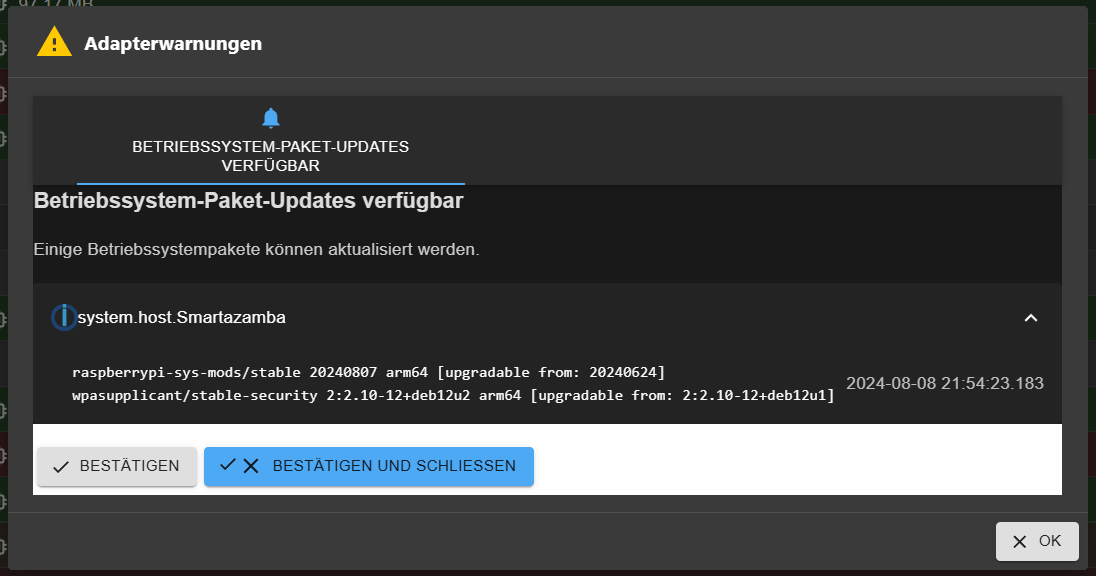
Einige Betriebssystempakete können aktualisiert werden.
-
@rushmed sagte in Einige Betriebssystempakete können aktualisiert werden.:
In der Ausgabe steht dass alles aktuell ist.
jetzt?
nachdem du
@rushmed sagte in Einige Betriebssystempakete können aktualisiert werden.:
Use 'sudo apt autoremove' to remove them.
gemacht hattest?
@martinp sagte in Einige Betriebssystempakete können aktualisiert werden.:
@rushmed und trotz des Reboot gibt es weiterhin diese Meldung im Iobroker?
Auch nach löschen des Browsercache?
Wenn ja, bitte die Langfassung von
iob diag@homoran sagte in Einige Betriebssystempakete können aktualisiert werden.:
sudo apt autoremove
Mit anschließendem reboot hat nich geholfen.
Skript v.2024-05-22 *** BASE SYSTEM *** Static hostname: Smartazamba Icon name: computer Operating System: Debian GNU/Linux 12 (bookworm) Kernel: Linux 6.6.31+rpt-rpi-v8 Architecture: arm64 Model : Raspberry Pi 4 Model B Rev 1.4 Docker : false Virtualization : none Kernel : aarch64 Userland : 64 bit Systemuptime and Load: 19:24:41 up 16 min, 2 users, load average: 2.60, 3.87, 2.94 CPU threads: 4 *** RASPBERRY THROTTLING *** Current issues: No throttling issues detected. Previously detected issues: No throttling issues detected. *** Time and Time Zones *** Local time: Fri 2024-08-09 19:24:41 CEST Universal time: Fri 2024-08-09 17:24:41 UTC RTC time: n/a Time zone: Europe/Berlin (CEST, +0200) System clock synchronized: yes NTP service: active RTC in local TZ: no *** Users and Groups *** User that called 'iob diag': pi HOME=/home/pi GROUPS=pi adm dialout cdrom sudo audio video plugdev games users input render netdev gpio i2c spi iobroker User that is running 'js-controller': iobroker HOME=/home/iobroker GROUPS=iobroker tty dialout audio video plugdev bluetooth gpio i2c *** Display-Server-Setup *** Display-Server: false Desktop: Terminal: tty Boot Target: multi-user.target *** MEMORY *** total used free shared buff/cache available Mem: 8.2G 2.9G 2.8G 3.0M 2.5G 5.3G Swap: 0B 0B 0B Total: 8.2G 2.9G 2.8G Active iob-Instances: 36 7809 M total memory 2800 M used memory 3529 M active memory 1286 M inactive memory 2712 M free memory 373 M buffer memory 2055 M swap cache 0 M total swap 0 M used swap 0 M free swap *** top - Table Of Processes *** top - 19:24:41 up 16 min, 2 users, load average: 2.60, 3.87, 2.94 Tasks: 220 total, 2 running, 218 sleeping, 0 stopped, 0 zombie %Cpu(s): 66.7 us, 33.3 sy, 0.0 ni, 0.0 id, 0.0 wa, 0.0 hi, 0.0 si, 0.0 st MiB Mem : 7809.0 total, 2701.2 free, 2811.7 used, 2429.1 buff/cache MiB Swap: 0.0 total, 0.0 free, 0.0 used. 4997.3 avail Mem *** FAILED SERVICES *** UNIT LOAD ACTIVE SUB DESCRIPTION 0 loaded units listed. *** FILESYSTEM *** Filesystem Type Size Used Avail Use% Mounted on /dev/root ext4 110G 24G 83G 23% / devtmpfs devtmpfs 3.6G 0 3.6G 0% /dev tmpfs tmpfs 3.9G 0 3.9G 0% /dev/shm tmpfs tmpfs 1.6G 2.9M 1.6G 1% /run tmpfs tmpfs 5.0M 16K 5.0M 1% /run/lock /dev/sda1 vfat 253M 44M 209M 18% /boot/firmware /dev/sdc ext4 5.5T 3.5T 1.8T 67% /media/HDD2 /dev/sdb1 ext4 4.6T 3.5T 875G 81% /media/HDD1 tmpfs tmpfs 781M 0 781M 0% /run/user/1000 Messages concerning ext4 filesystem in dmesg: [Fri Aug 9 19:08:33 2024] Kernel command line: coherent_pool=1M 8250.nr_uarts=1 snd_bcm2835.enable_headphones=0 snd_bcm2835.enable_headphones=1 snd_bcm2835.enable_hdmi=1 snd_bcm2835.enable_hdmi=0 smsc95xx.macaddr=DC:A6:32:E2:C4:A5 vc_mem.mem_base=0x3eb00000 vc_mem.mem_size=0x3ff00000 console=ttyAMA0,115200 console=tty1 root=PARTUUID=5bc7cbe7-02 rootfstype=ext4 fsck.repair=yes rootwait [Fri Aug 9 19:08:36 2024] EXT4-fs (sda2): mounted filesystem 1943b829-a99b-45b8-9fe5-7136dbea4c4a ro with ordered data mode. Quota mode: none. [Fri Aug 9 19:08:36 2024] VFS: Mounted root (ext4 filesystem) readonly on device 8:2. [Fri Aug 9 19:08:52 2024] EXT4-fs (sda2): re-mounted 1943b829-a99b-45b8-9fe5-7136dbea4c4a r/w. Quota mode: none. [Fri Aug 9 19:08:55 2024] EXT4-fs (sdc): mounted filesystem b85c7b90-8154-43e5-bcae-a07f1c446bec r/w with ordered data mode. Quota mode: none. [Fri Aug 9 19:08:56 2024] EXT4-fs (sdb1): mounted filesystem f79cb025-aab2-4bd5-bd49-84de9b0f60b4 r/w with ordered data mode. Quota mode: none. Show mounted filesystems: TARGET SOURCE FSTYPE OPTIONS / /dev/sda2 ext4 rw,noatime |-/dev devtmpfs devtmpfs rw,relatime,size=3733652k,nr_inodes=933413,mode=755 | |-/dev/shm tmpfs tmpfs rw,nosuid,nodev | |-/dev/pts devpts devpts rw,nosuid,noexec,relatime,gid=5,mode=620,ptmxmode=000 | `-/dev/mqueue mqueue mqueue rw,nosuid,nodev,noexec,relatime |-/proc proc proc rw,relatime | `-/proc/sys/fs/binfmt_misc systemd-1 autofs rw,relatime,fd=30,pgrp=1,timeout=0,minproto=5,maxproto=5,direct,pipe_ino=3405 | `-/proc/sys/fs/binfmt_misc binfmt_misc binfmt_misc rw,nosuid,nodev,noexec,relatime |-/sys sysfs sysfs rw,nosuid,nodev,noexec,relatime | |-/sys/kernel/security securityfs securityfs rw,nosuid,nodev,noexec,relatime | |-/sys/fs/cgroup cgroup2 cgroup2 rw,nosuid,nodev,noexec,relatime,nsdelegate,memory_recursiveprot | |-/sys/fs/pstore pstore pstore rw,nosuid,nodev,noexec,relatime | |-/sys/fs/bpf bpf bpf rw,nosuid,nodev,noexec,relatime,mode=700 | |-/sys/kernel/debug debugfs debugfs rw,nosuid,nodev,noexec,relatime | |-/sys/kernel/tracing tracefs tracefs rw,nosuid,nodev,noexec,relatime | |-/sys/fs/fuse/connections fusectl fusectl rw,nosuid,nodev,noexec,relatime | `-/sys/kernel/config configfs configfs rw,nosuid,nodev,noexec,relatime |-/run tmpfs tmpfs rw,nosuid,nodev,size=1599292k,nr_inodes=819200,mode=755 | |-/run/lock tmpfs tmpfs rw,nosuid,nodev,noexec,relatime,size=5120k | |-/run/credentials/systemd-sysctl.service ramfs ramfs ro,nosuid,nodev,noexec,relatime,mode=700 | |-/run/credentials/systemd-sysusers.service ramfs ramfs ro,nosuid,nodev,noexec,relatime,mode=700 | |-/run/credentials/systemd-tmpfiles-setup-dev.service ramfs ramfs ro,nosuid,nodev,noexec,relatime,mode=700 | |-/run/rpc_pipefs sunrpc rpc_pipefs rw,relatime | |-/run/credentials/systemd-tmpfiles-setup.service ramfs ramfs ro,nosuid,nodev,noexec,relatime,mode=700 | `-/run/user/1000 tmpfs tmpfs rw,nosuid,nodev,relatime,size=799644k,nr_inodes=199911,mode=700,uid=1000,gid=1000 |-/boot/firmware /dev/sda1 vfat rw,relatime,fmask=0022,dmask=0022,codepage=437,iocharset=ascii,shortname=mixed,flush,errors=remount-ro |-/media/HDD2 /dev/sdc ext4 rw,nosuid,nodev,noexec,relatime `-/media/HDD1 /dev/sdb1 ext4 rw,nosuid,nodev,noexec,relatime Files in neuralgic directories: /var: 6.6G /var/ 3.4G /var/log 2.7G /var/log/journal/3dd7c02f298247188f8650087c821e8c 2.7G /var/log/journal 616M /var/cache Archived and active journals take up 2.6G in the file system. /opt/iobroker/backups: 2.6G /opt/iobroker/backups/ /opt/iobroker/iobroker-data: 987M /opt/iobroker/iobroker-data/ 650M /opt/iobroker/iobroker-data/files 441M /opt/iobroker/iobroker-data/files/javascript.admin 409M /opt/iobroker/iobroker-data/files/javascript.admin/static 408M /opt/iobroker/iobroker-data/files/javascript.admin/static/js The five largest files in iobroker-data are: 60M /opt/iobroker/iobroker-data/states.jsonl 38M /opt/iobroker/iobroker-data/files/iot.admin/static/js/main.d3d286bd.js.map 36M /opt/iobroker/iobroker-data/objects.jsonl 27M /opt/iobroker/iobroker-data/files/backitup.admin/static/js/main.ce422ec2.js.map 24M /opt/iobroker/iobroker-data/files/web.admin/static/js/main.135279a0.js.map USB-Devices by-id: USB-Sticks - Avoid direct links to /dev/tty* in your adapter setups, please always prefer the links 'by-id': /dev/serial/by-id/usb-ITead_Sonoff_Zigbee_3.0_USB_Dongle_Plus_b875aef9f419ec118e7074e5f01c6278-if00-port0 /dev/serial/by-id/usb-Silicon_Labs_CP2102_USB_to_UART_Bridge_Controller_0052-if00-port0 /dev/serial/by-id/usb-Silicon_Labs_CP2102_USB_to_UART_Bridge_Controller_0063-if00-port0 Your zigbee.0 COM-Port is matching 'by-id'. Very good! HINT: Your zigbee.1 COM-Port is NOT matching 'by-id'. Please check your setting: tcp *** NodeJS-Installation *** /usr/bin/nodejs v20.16.0 /usr/bin/node v20.16.0 /usr/bin/npm 10.8.1 /usr/bin/npx 10.8.1 /usr/bin/corepack 0.28.2 nodejs: Installed: 20.16.0-1nodesource1 Candidate: 20.16.0-1nodesource1 Version table: *** 20.16.0-1nodesource1 1001 500 https://deb.nodesource.com/node_20.x nodistro/main arm64 Packages 100 /var/lib/dpkg/status 20.15.1-1nodesource1 1001 500 https://deb.nodesource.com/node_20.x nodistro/main arm64 Packages 20.15.0-1nodesource1 1001 500 https://deb.nodesource.com/node_20.x nodistro/main arm64 Packages 20.14.0-1nodesource1 1001 500 https://deb.nodesource.com/node_20.x nodistro/main arm64 Packages 20.13.1-1nodesource1 1001 500 https://deb.nodesource.com/node_20.x nodistro/main arm64 Packages 20.13.0-1nodesource1 1001 500 https://deb.nodesource.com/node_20.x nodistro/main arm64 Packages 20.12.2-1nodesource1 1001 500 https://deb.nodesource.com/node_20.x nodistro/main arm64 Packages 20.12.1-1nodesource1 1001 500 https://deb.nodesource.com/node_20.x nodistro/main arm64 Packages 20.12.0-1nodesource1 1001 500 https://deb.nodesource.com/node_20.x nodistro/main arm64 Packages 20.11.1-1nodesource1 1001 500 https://deb.nodesource.com/node_20.x nodistro/main arm64 Packages 20.11.0-1nodesource1 1001 500 https://deb.nodesource.com/node_20.x nodistro/main arm64 Packages 20.10.0-1nodesource1 1001 500 https://deb.nodesource.com/node_20.x nodistro/main arm64 Packages 20.9.0-1nodesource1 1001 500 https://deb.nodesource.com/node_20.x nodistro/main arm64 Packages 20.8.1-1nodesource1 1001 500 https://deb.nodesource.com/node_20.x nodistro/main arm64 Packages 20.8.0-1nodesource1 1001 500 https://deb.nodesource.com/node_20.x nodistro/main arm64 Packages 20.7.0-1nodesource1 1001 500 https://deb.nodesource.com/node_20.x nodistro/main arm64 Packages 20.6.1-1nodesource1 1001 500 https://deb.nodesource.com/node_20.x nodistro/main arm64 Packages 20.6.0-1nodesource1 1001 500 https://deb.nodesource.com/node_20.x nodistro/main arm64 Packages 20.5.1-1nodesource1 1001 500 https://deb.nodesource.com/node_20.x nodistro/main arm64 Packages 20.5.0-1nodesource1 1001 500 https://deb.nodesource.com/node_20.x nodistro/main arm64 Packages 20.4.0-1nodesource1 1001 500 https://deb.nodesource.com/node_20.x nodistro/main arm64 Packages 20.3.1-1nodesource1 1001 500 https://deb.nodesource.com/node_20.x nodistro/main arm64 Packages 20.3.0-1nodesource1 1001 500 https://deb.nodesource.com/node_20.x nodistro/main arm64 Packages 20.2.0-1nodesource1 1001 500 https://deb.nodesource.com/node_20.x nodistro/main arm64 Packages 20.1.0-1nodesource1 1001 500 https://deb.nodesource.com/node_20.x nodistro/main arm64 Packages 20.0.0-1nodesource1 1001 500 https://deb.nodesource.com/node_20.x nodistro/main arm64 Packages 18.19.0+dfsg-6~deb12u2 500 500 http://deb.debian.org/debian bookworm/main arm64 Packages 18.19.0+dfsg-6~deb12u1 500 500 http://security.debian.org/debian-security bookworm-security/main arm64 Packages Temp directories causing npm8 problem: 0 No problems detected Errors in npm tree: *** ioBroker-Installation *** ioBroker Status iobroker is running on this host. Objects type: jsonl States type: jsonl Core adapters versions js-controller: 6.0.9 admin: 7.0.22 javascript: 8.7.6 nodejs modules from github: 2 +-- iobroker.esphome@0.5.0-beta.10 (git+ssh://git@github.com/DrozmotiX/ioBroker.esphome.git#6b97f67d1d1ce6af3a0e598ba77eec8f570a0854) | `-- kodi-ws@2.4.4 (git+https://git@github.com/iobroker-community-adapters/kodi-ws.git#ad5a1fdc5cd0a282e6818ff152594b5d32535103) Adapter State + system.adapter.admin.0 : admin : Smartazamba - enabled, port: 8081, bind: 0.0.0.0, run as: admin + system.adapter.alexa2.0 : alexa2 : Smartazamba - enabled + system.adapter.awtrix-light.0 : awtrix-light : Smartazamba - enabled + system.adapter.awtrix-light.1 : awtrix-light : Smartazamba - enabled + system.adapter.backitup.0 : backitup : Smartazamba - enabled system.adapter.denon.0 : denon : Smartazamba - disabled + system.adapter.device-watcher.0 : device-watcher : Smartazamba - enabled + system.adapter.deyeidc.0 : deyeidc : Smartazamba - enabled, port: 8899 system.adapter.esphome.0 : esphome : Smartazamba - disabled system.adapter.habpanel.0 : habpanel : Smartazamba - disabled system.adapter.hass.0 : hass : Smartazamba - disabled, port: 8123 + system.adapter.hue.0 : hue : Smartazamba - enabled, port: 443 system.adapter.ical.0 : ical : Smartazamba - enabled + system.adapter.influxdb.0 : influxdb : Smartazamba - enabled, port: 8086 + system.adapter.iot.0 : iot : Smartazamba - enabled + system.adapter.javascript.0 : javascript : Smartazamba - enabled system.adapter.kodi.0 : kodi : Smartazamba - disabled, port: 9090 + system.adapter.logparser.0 : logparser : Smartazamba - enabled + system.adapter.mihome-vacuum.0 : mihome-vacuum : Smartazamba - enabled, port: 54321 + system.adapter.mihome-vacuum.1 : mihome-vacuum : Smartazamba - enabled, port: 54321 + system.adapter.mqtt.0 : mqtt : Smartazamba - enabled, port: 1883, bind: 0.0.0.0 + system.adapter.philips-tv.0 : philips-tv : Smartazamba - enabled + system.adapter.ping.0 : ping : Smartazamba - enabled + system.adapter.pixelit.0 : pixelit : Smartazamba - enabled system.adapter.pixelit.1 : pixelit : Smartazamba - disabled system.adapter.pixelit.2 : pixelit : Smartazamba - disabled + system.adapter.proxmox.0 : proxmox : Smartazamba - enabled, port: 8006 + system.adapter.shelly.0 : shelly : Smartazamba - enabled, port: 1882, bind: 0.0.0.0 + system.adapter.shuttercontrol.0 : shuttercontrol : Smartazamba - enabled + system.adapter.simple-api.0 : simple-api : Smartazamba - enabled, port: 8087, bind: 0.0.0.0, run as: admin + system.adapter.smartmeter.0 : smartmeter : Smartazamba - enabled + system.adapter.smartmeter.1 : smartmeter : Smartazamba - enabled + system.adapter.sonoff.0 : sonoff : Smartazamba - enabled, port: 1884, bind: 0.0.0.0 + system.adapter.sourceanalytix.0 : sourceanalytix : Smartazamba - enabled + system.adapter.telegram.0 : telegram : Smartazamba - enabled, port: 8443, bind: 0.0.0.0 + system.adapter.telegram.1 : telegram : Smartazamba - enabled, port: 8443, bind: 0.0.0.0 + system.adapter.unifi.0 : unifi : Smartazamba - enabled system.adapter.weatherunderground.0 : weatherunderground : Smartazamba - enabled + system.adapter.web.0 : web : Smartazamba - enabled, port: 8082, bind: 0.0.0.0, run as: admin + system.adapter.windows-control.0 : windows-control : Smartazamba - enabled system.adapter.wiobrowser.0 : wiobrowser : Smartazamba - disabled, port: 5000 + system.adapter.wled.0 : wled : Smartazamba - enabled + system.adapter.ws.0 : ws : Smartazamba - enabled, port: 8084, bind: 0.0.0.0, run as: admin + system.adapter.zigbee.0 : zigbee : Smartazamba - enabled, port: /dev/serial/by-id/usb-ITead_Sonoff_Zigbee_3.0_USB_Dongle_Plus_b875aef9f419ec118e7074e5f01c6278-if00-port0 + system.adapter.zigbee.1 : zigbee : Smartazamba - enabled, port: tcp://192.168.178.42:6638 + instance is alive Enabled adapters with bindings + system.adapter.admin.0 : admin : Smartazamba - enabled, port: 8081, bind: 0.0.0.0, run as: admin + system.adapter.deyeidc.0 : deyeidc : Smartazamba - enabled, port: 8899 + system.adapter.hue.0 : hue : Smartazamba - enabled, port: 443 + system.adapter.influxdb.0 : influxdb : Smartazamba - enabled, port: 8086 + system.adapter.mihome-vacuum.0 : mihome-vacuum : Smartazamba - enabled, port: 54321 + system.adapter.mihome-vacuum.1 : mihome-vacuum : Smartazamba - enabled, port: 54321 + system.adapter.mqtt.0 : mqtt : Smartazamba - enabled, port: 1883, bind: 0.0.0.0 + system.adapter.proxmox.0 : proxmox : Smartazamba - enabled, port: 8006 + system.adapter.shelly.0 : shelly : Smartazamba - enabled, port: 1882, bind: 0.0.0.0 + system.adapter.simple-api.0 : simple-api : Smartazamba - enabled, port: 8087, bind: 0.0.0.0, run as: admin + system.adapter.sonoff.0 : sonoff : Smartazamba - enabled, port: 1884, bind: 0.0.0.0 + system.adapter.telegram.0 : telegram : Smartazamba - enabled, port: 8443, bind: 0.0.0.0 + system.adapter.telegram.1 : telegram : Smartazamba - enabled, port: 8443, bind: 0.0.0.0 + system.adapter.web.0 : web : Smartazamba - enabled, port: 8082, bind: 0.0.0.0, run as: admin + system.adapter.ws.0 : ws : Smartazamba - enabled, port: 8084, bind: 0.0.0.0, run as: admin + system.adapter.zigbee.0 : zigbee : Smartazamba - enabled, port: /dev/serial/by-id/usb-ITead_Sonoff_Zigbee_3.0_USB_Dongle_Plus_b875aef9f419ec118e7074e5f01c6278-if00-port0 + system.adapter.zigbee.1 : zigbee : Smartazamba - enabled, port: tcp://192.168.178.42:6638 ioBroker-Repositories ┌─────────┬────────────────────┬─────────────────────────────────────────────────────────┬──────────────┐ │ (index) │ name │ url │ auto upgrade │ ├─────────┼────────────────────┼─────────────────────────────────────────────────────────┼──────────────┤ │ 0 │ 'Stable (default)' │ 'http://download.iobroker.net/sources-dist.json' │ false │ │ 1 │ 'Beta (latest)' │ 'http://download.iobroker.net/sources-dist-latest.json' │ false │ │ 2 │ 'latest live' │ 'http://iobroker.live/repo/sources-dist-latest.json' │ false │ └─────────┴────────────────────┴─────────────────────────────────────────────────────────┴──────────────┘ Active repo(s): Stable (default) Upgrade policy: none Installed ioBroker-Instances Used repository: Stable (default) Adapter "admin" : 7.0.22 , installed 7.0.22 Adapter "alexa2" : 3.26.5 , installed 3.26.5 Adapter "awtrix-light" : 1.2.1 , installed 1.2.1 Adapter "backitup" : 3.0.16 , installed 3.0.16 Adapter "denon" : 1.15.12 , installed 1.15.12 Adapter "device-watcher": 2.12.1 , installed 2.12.1 Adapter "deyeidc" : 0.0.16 , installed 0.0.16 Adapter "habpanel" : 0.5.0 , installed 0.5.0 Adapter "hass" : 1.4.0 , installed 1.4.0 Adapter "hue" : 3.11.0 , installed 3.11.0 Adapter "ical" : 1.15.0 , installed 1.15.0 Adapter "influxdb" : 4.0.2 , installed 4.0.2 Adapter "iot" : 3.3.0 , installed 3.3.0 Adapter "javascript" : 8.7.6 , installed 8.7.6 Controller "js-controller": 6.0.9 , installed 6.0.9 Adapter "kodi" : 3.1.0 , installed 3.1.0 Adapter "logparser" : 2.2.2 , installed 2.2.2 Adapter "mihome-vacuum": 4.2.0 , installed 4.2.0 Adapter "mqtt" : 5.2.0 , installed 5.2.0 Adapter "philips-tv" : 0.5.3 , installed 0.5.3 Adapter "ping" : 1.6.2 , installed 1.6.2 Adapter "pixelit" : 1.1.3 , installed 1.1.3 Adapter "proxmox" : 2.3.0 , installed 2.3.0 Adapter "shelly" : 7.0.0 , installed 7.0.0 Adapter "shuttercontrol": 1.7.3 , installed 1.7.3 Adapter "simple-api" : 2.8.0 , installed 2.8.0 Adapter "smartmeter" : 3.4.0 , installed 3.4.0 Adapter "socketio" : 6.7.1 , installed 6.7.1 Adapter "sonoff" : 3.1.0 , installed 3.1.0 Adapter "telegram" : 3.3.2 , installed 3.3.2 Adapter "unifi" : 0.7.0 , installed 0.7.0 Adapter "weatherunderground": 3.7.0, installed 3.7.0 Adapter "web" : 6.2.5 , installed 6.2.5 Adapter "windows-control": 0.1.5 , installed 0.1.5 Adapter "wiobrowser" : 2.0.2 , installed 2.0.2 Adapter "wled" : 0.7.2 , installed 0.7.2 Adapter "ws" : 2.6.2 , installed 2.6.2 Adapter "zigbee" : 1.10.3 , installed 1.10.3 Objects and States Please stand by - This may take a while Objects: 23225 States: 16314 *** OS-Repositories and Updates *** Hit:1 http://deb.debian.org/debian bookworm InRelease Hit:2 http://security.debian.org/debian-security bookworm-security InRelease Hit:3 http://deb.debian.org/debian bookworm-updates InRelease Hit:4 http://archive.raspberrypi.org/debian bookworm InRelease Ign:5 https://deb.nodesource.com/node_20.x nodistro InRelease Hit:6 https://apt.grafana.com stable InRelease Hit:7 https://repos.influxdata.com/debian stable InRelease Ign:5 https://deb.nodesource.com/node_20.x nodistro InRelease Hit:5 https://deb.nodesource.com/node_20.x nodistro InRelease Reading package lists... Pending Updates: 0 *** Listening Ports *** Active Internet connections (only servers) Proto Recv-Q Send-Q Local Address Foreign Address State User Inode PID/Program name tcp 0 0 0.0.0.0:445 0.0.0.0:* LISTEN 0 6850 822/smbd tcp 0 0 0.0.0.0:22 0.0.0.0:* LISTEN 0 5761 643/sshd: /usr/sbin tcp 0 0 127.0.0.1:9001 0.0.0.0:* LISTEN 1002 20643 4353/iobroker.js-co tcp 0 0 127.0.0.1:9000 0.0.0.0:* LISTEN 1002 20648 4353/iobroker.js-co tcp 0 0 0.0.0.0:139 0.0.0.0:* LISTEN 0 6851 822/smbd tcp 0 0 0.0.0.0:1882 0.0.0.0:* LISTEN 1002 25376 5248/io.shelly.0 tcp 0 0 0.0.0.0:1883 0.0.0.0:* LISTEN 1002 22678 5217/io.mqtt.0 tcp 0 0 0.0.0.0:1884 0.0.0.0:* LISTEN 1002 21440 5602/io.sonoff.0 tcp6 0 0 :::445 :::* LISTEN 0 6848 822/smbd tcp6 0 0 :::21 :::* LISTEN 0 1791 634/vsftpd tcp6 0 0 :::22 :::* LISTEN 0 5763 643/sshd: /usr/sbin tcp6 0 0 :::139 :::* LISTEN 0 6849 822/smbd tcp6 0 0 :::3000 :::* LISTEN 109 6901 952/grafana tcp6 0 0 :::8081 :::* LISTEN 1002 21773 4399/io.admin.0 tcp6 0 0 :::8082 :::* LISTEN 1002 27718 6439/io.web.0 tcp6 0 0 :::8084 :::* LISTEN 1002 26075 6757/io.ws.0 tcp6 0 0 :::8086 :::* LISTEN 999 1966 742/influxd tcp6 0 0 :::8087 :::* LISTEN 1002 26660 6403/io.simple-api. udp 0 0 0.0.0.0:5353 0.0.0.0:* 1002 23492 6469/io.wled.0 udp 0 0 0.0.0.0:5353 0.0.0.0:* 108 3851 492/avahi-daemon: r udp 0 0 0.0.0.0:56360 0.0.0.0:* 108 3853 492/avahi-daemon: r udp 0 0 192.168.178.255:137 0.0.0.0:* 0 4939 799/nmbd udp 0 0 192.168.178.20:137 0.0.0.0:* 0 4938 799/nmbd udp 0 0 0.0.0.0:137 0.0.0.0:* 0 4926 799/nmbd udp 0 0 192.168.178.255:138 0.0.0.0:* 0 4941 799/nmbd udp 0 0 192.168.178.20:138 0.0.0.0:* 0 4940 799/nmbd udp 0 0 0.0.0.0:138 0.0.0.0:* 0 4927 799/nmbd udp 0 0 0.0.0.0:53421 0.0.0.0:* 1002 25089 5648/io.mihome-vacu udp 0 0 0.0.0.0:53422 0.0.0.0:* 1002 23094 5668/io.mihome-vacu udp6 0 0 :::58325 :::* 108 3854 492/avahi-daemon: r udp6 0 0 :::5353 :::* 108 3852 492/avahi-daemon: r udp6 0 0 fe80::7572:1640:817:546 :::* 0 1926 578/NetworkManager *** Log File - Last 25 Lines *** 2024-08-09 19:21:30.472 - info: mihome-vacuum.0 (5648) change states from State control.fan_power mihome-vacuum.0.rooms.275001039118.roomFanPower 2024-08-09 19:21:30.473 - info: mihome-vacuum.0 (5648) change states from State control.fan_power mihome-vacuum.0.rooms.275001043945.roomFanPower 2024-08-09 19:21:30.474 - info: mihome-vacuum.0 (5648) change states from State control.fan_power mihome-vacuum.0.rooms.275001043946.roomFanPower 2024-08-09 19:22:01.200 - info: alexa2.0 (4856) Unknown Device, but enabling commands, Try it and report back if commands work. 2024-08-09 19:22:01.208 - info: alexa2.0 (4856) Report to developer as GitHub issue with details for device. Please grab full next line pot. from logfile on disk if cutted 2024-08-09 19:22:01.209 - info: alexa2.0 (4856) Device-type:A203FC0H3THJQH - Kateryna's Alexa app for WearOS watch (Alexa on Wear) (SPEECH_RECOGNIZER_USS,DIALOG_INTERFACE_VERSION,MICROPHONE,TIMERS_ALARMS_NOTIFICATIONS_VOLUME,SUPPORTS_LOCALE_SWITCH,PEONY,ADAPTIVE_LISTENING,SET_LOCALE,ASCENDING_ALARM_VOLUME,REMINDERS,SUPPORTS_LOCALE,SOUND_SETTINGS,VOLUME_SETTING,GEOLOCATION,SET_TIME_ZONE,CUSTOM_ALARM_TONE,TIMERS_AND_ALARMS,MULTI_WAKEWORDS_SUPPORTED,EARCONS) 2024-08-09 19:23:02.830 - error: javascript.0 (4799) script.js.Alexa: Cannot parse "": SyntaxError: Unexpected end of JSON input 2024-08-09 19:23:02.832 - error: javascript.0 (4799) script.js.Alexa: Cannot parse "": SyntaxError: Unexpected end of JSON input 2024-08-09 19:23:02.834 - error: javascript.0 (4799) script.js.Alexa: Cannot parse "": SyntaxError: Unexpected end of JSON input 2024-08-09 19:23:02.835 - error: javascript.0 (4799) script.js.Alexa: Cannot parse "": SyntaxError: Unexpected end of JSON input 2024-08-09 19:23:02.837 - error: javascript.0 (4799) script.js.Alexa: Cannot parse "": SyntaxError: Unexpected end of JSON input 2024-08-09 19:23:03.094 - error: javascript.0 (4799) script.js.Alexa: TypeError: Cannot read properties of null (reading 'indexOf') 2024-08-09 19:23:03.096 - error: javascript.0 (4799) at Object.<anonymous> (script.js.Alexa:41:84) 2024-08-09 19:23:03.096 - error: javascript.0 (4799) at Object.callback (/opt/iobroker/node_modules/iobroker.javascript/lib/sandbox.js:1452:38) 2024-08-09 19:23:03.097 - error: javascript.0 (4799) at Object.stateChange (/opt/iobroker/node_modules/iobroker.javascript/main.js:645:29) 2024-08-09 19:23:03.097 - error: javascript.0 (4799) at Immediate.<anonymous> (/opt/iobroker/node_modules/@iobroker/js-controller-adapter/src/lib/adapter/adapter.ts:11053:62) 2024-08-09 19:23:03.098 - error: javascript.0 (4799) at processImmediate (node:internal/timers:483:21) 2024-08-09 19:23:06.092 - info: alexa2.0 (4856) Subscribing to states... 2024-08-09 19:23:08.440 - info: alexa2.0 (4856) Alexa-Push-Connection (macDms = true) established. Disable Polling 2024-08-09 19:23:40.106 - info: alexa2.0 (4856) Initialization Done ... 2024-08-09 19:25:21.649 - info: host.Smartazamba instance system.adapter.weatherunderground.0 in version "3.7.0" started with pid 14168 2024-08-09 19:25:32.942 - info: weatherunderground.0 (14168) starting. Version 3.7.0 in /opt/iobroker/node_modules/iobroker.weatherunderground, node: v20.16.0, js-controller: 6.0.9 2024-08-09 19:25:46.938 - info: weatherunderground.0 (14168) Terminated (NO_ERROR): Without reason 2024-08-09 19:25:47.454 - warn: weatherunderground.0 (14168) get state error: Connection is closed. 2024-08-09 19:25:47.542 - info: host.Smartazamba instance system.adapter.weatherunderground.0 having pid 14168 terminated with code 0 (NO_ERROR) -
@homoran sagte in Einige Betriebssystempakete können aktualisiert werden.:
sudo apt autoremove
Mit anschließendem reboot hat nich geholfen.
Skript v.2024-05-22 *** BASE SYSTEM *** Static hostname: Smartazamba Icon name: computer Operating System: Debian GNU/Linux 12 (bookworm) Kernel: Linux 6.6.31+rpt-rpi-v8 Architecture: arm64 Model : Raspberry Pi 4 Model B Rev 1.4 Docker : false Virtualization : none Kernel : aarch64 Userland : 64 bit Systemuptime and Load: 19:24:41 up 16 min, 2 users, load average: 2.60, 3.87, 2.94 CPU threads: 4 *** RASPBERRY THROTTLING *** Current issues: No throttling issues detected. Previously detected issues: No throttling issues detected. *** Time and Time Zones *** Local time: Fri 2024-08-09 19:24:41 CEST Universal time: Fri 2024-08-09 17:24:41 UTC RTC time: n/a Time zone: Europe/Berlin (CEST, +0200) System clock synchronized: yes NTP service: active RTC in local TZ: no *** Users and Groups *** User that called 'iob diag': pi HOME=/home/pi GROUPS=pi adm dialout cdrom sudo audio video plugdev games users input render netdev gpio i2c spi iobroker User that is running 'js-controller': iobroker HOME=/home/iobroker GROUPS=iobroker tty dialout audio video plugdev bluetooth gpio i2c *** Display-Server-Setup *** Display-Server: false Desktop: Terminal: tty Boot Target: multi-user.target *** MEMORY *** total used free shared buff/cache available Mem: 8.2G 2.9G 2.8G 3.0M 2.5G 5.3G Swap: 0B 0B 0B Total: 8.2G 2.9G 2.8G Active iob-Instances: 36 7809 M total memory 2800 M used memory 3529 M active memory 1286 M inactive memory 2712 M free memory 373 M buffer memory 2055 M swap cache 0 M total swap 0 M used swap 0 M free swap *** top - Table Of Processes *** top - 19:24:41 up 16 min, 2 users, load average: 2.60, 3.87, 2.94 Tasks: 220 total, 2 running, 218 sleeping, 0 stopped, 0 zombie %Cpu(s): 66.7 us, 33.3 sy, 0.0 ni, 0.0 id, 0.0 wa, 0.0 hi, 0.0 si, 0.0 st MiB Mem : 7809.0 total, 2701.2 free, 2811.7 used, 2429.1 buff/cache MiB Swap: 0.0 total, 0.0 free, 0.0 used. 4997.3 avail Mem *** FAILED SERVICES *** UNIT LOAD ACTIVE SUB DESCRIPTION 0 loaded units listed. *** FILESYSTEM *** Filesystem Type Size Used Avail Use% Mounted on /dev/root ext4 110G 24G 83G 23% / devtmpfs devtmpfs 3.6G 0 3.6G 0% /dev tmpfs tmpfs 3.9G 0 3.9G 0% /dev/shm tmpfs tmpfs 1.6G 2.9M 1.6G 1% /run tmpfs tmpfs 5.0M 16K 5.0M 1% /run/lock /dev/sda1 vfat 253M 44M 209M 18% /boot/firmware /dev/sdc ext4 5.5T 3.5T 1.8T 67% /media/HDD2 /dev/sdb1 ext4 4.6T 3.5T 875G 81% /media/HDD1 tmpfs tmpfs 781M 0 781M 0% /run/user/1000 Messages concerning ext4 filesystem in dmesg: [Fri Aug 9 19:08:33 2024] Kernel command line: coherent_pool=1M 8250.nr_uarts=1 snd_bcm2835.enable_headphones=0 snd_bcm2835.enable_headphones=1 snd_bcm2835.enable_hdmi=1 snd_bcm2835.enable_hdmi=0 smsc95xx.macaddr=DC:A6:32:E2:C4:A5 vc_mem.mem_base=0x3eb00000 vc_mem.mem_size=0x3ff00000 console=ttyAMA0,115200 console=tty1 root=PARTUUID=5bc7cbe7-02 rootfstype=ext4 fsck.repair=yes rootwait [Fri Aug 9 19:08:36 2024] EXT4-fs (sda2): mounted filesystem 1943b829-a99b-45b8-9fe5-7136dbea4c4a ro with ordered data mode. Quota mode: none. [Fri Aug 9 19:08:36 2024] VFS: Mounted root (ext4 filesystem) readonly on device 8:2. [Fri Aug 9 19:08:52 2024] EXT4-fs (sda2): re-mounted 1943b829-a99b-45b8-9fe5-7136dbea4c4a r/w. Quota mode: none. [Fri Aug 9 19:08:55 2024] EXT4-fs (sdc): mounted filesystem b85c7b90-8154-43e5-bcae-a07f1c446bec r/w with ordered data mode. Quota mode: none. [Fri Aug 9 19:08:56 2024] EXT4-fs (sdb1): mounted filesystem f79cb025-aab2-4bd5-bd49-84de9b0f60b4 r/w with ordered data mode. Quota mode: none. Show mounted filesystems: TARGET SOURCE FSTYPE OPTIONS / /dev/sda2 ext4 rw,noatime |-/dev devtmpfs devtmpfs rw,relatime,size=3733652k,nr_inodes=933413,mode=755 | |-/dev/shm tmpfs tmpfs rw,nosuid,nodev | |-/dev/pts devpts devpts rw,nosuid,noexec,relatime,gid=5,mode=620,ptmxmode=000 | `-/dev/mqueue mqueue mqueue rw,nosuid,nodev,noexec,relatime |-/proc proc proc rw,relatime | `-/proc/sys/fs/binfmt_misc systemd-1 autofs rw,relatime,fd=30,pgrp=1,timeout=0,minproto=5,maxproto=5,direct,pipe_ino=3405 | `-/proc/sys/fs/binfmt_misc binfmt_misc binfmt_misc rw,nosuid,nodev,noexec,relatime |-/sys sysfs sysfs rw,nosuid,nodev,noexec,relatime | |-/sys/kernel/security securityfs securityfs rw,nosuid,nodev,noexec,relatime | |-/sys/fs/cgroup cgroup2 cgroup2 rw,nosuid,nodev,noexec,relatime,nsdelegate,memory_recursiveprot | |-/sys/fs/pstore pstore pstore rw,nosuid,nodev,noexec,relatime | |-/sys/fs/bpf bpf bpf rw,nosuid,nodev,noexec,relatime,mode=700 | |-/sys/kernel/debug debugfs debugfs rw,nosuid,nodev,noexec,relatime | |-/sys/kernel/tracing tracefs tracefs rw,nosuid,nodev,noexec,relatime | |-/sys/fs/fuse/connections fusectl fusectl rw,nosuid,nodev,noexec,relatime | `-/sys/kernel/config configfs configfs rw,nosuid,nodev,noexec,relatime |-/run tmpfs tmpfs rw,nosuid,nodev,size=1599292k,nr_inodes=819200,mode=755 | |-/run/lock tmpfs tmpfs rw,nosuid,nodev,noexec,relatime,size=5120k | |-/run/credentials/systemd-sysctl.service ramfs ramfs ro,nosuid,nodev,noexec,relatime,mode=700 | |-/run/credentials/systemd-sysusers.service ramfs ramfs ro,nosuid,nodev,noexec,relatime,mode=700 | |-/run/credentials/systemd-tmpfiles-setup-dev.service ramfs ramfs ro,nosuid,nodev,noexec,relatime,mode=700 | |-/run/rpc_pipefs sunrpc rpc_pipefs rw,relatime | |-/run/credentials/systemd-tmpfiles-setup.service ramfs ramfs ro,nosuid,nodev,noexec,relatime,mode=700 | `-/run/user/1000 tmpfs tmpfs rw,nosuid,nodev,relatime,size=799644k,nr_inodes=199911,mode=700,uid=1000,gid=1000 |-/boot/firmware /dev/sda1 vfat rw,relatime,fmask=0022,dmask=0022,codepage=437,iocharset=ascii,shortname=mixed,flush,errors=remount-ro |-/media/HDD2 /dev/sdc ext4 rw,nosuid,nodev,noexec,relatime `-/media/HDD1 /dev/sdb1 ext4 rw,nosuid,nodev,noexec,relatime Files in neuralgic directories: /var: 6.6G /var/ 3.4G /var/log 2.7G /var/log/journal/3dd7c02f298247188f8650087c821e8c 2.7G /var/log/journal 616M /var/cache Archived and active journals take up 2.6G in the file system. /opt/iobroker/backups: 2.6G /opt/iobroker/backups/ /opt/iobroker/iobroker-data: 987M /opt/iobroker/iobroker-data/ 650M /opt/iobroker/iobroker-data/files 441M /opt/iobroker/iobroker-data/files/javascript.admin 409M /opt/iobroker/iobroker-data/files/javascript.admin/static 408M /opt/iobroker/iobroker-data/files/javascript.admin/static/js The five largest files in iobroker-data are: 60M /opt/iobroker/iobroker-data/states.jsonl 38M /opt/iobroker/iobroker-data/files/iot.admin/static/js/main.d3d286bd.js.map 36M /opt/iobroker/iobroker-data/objects.jsonl 27M /opt/iobroker/iobroker-data/files/backitup.admin/static/js/main.ce422ec2.js.map 24M /opt/iobroker/iobroker-data/files/web.admin/static/js/main.135279a0.js.map USB-Devices by-id: USB-Sticks - Avoid direct links to /dev/tty* in your adapter setups, please always prefer the links 'by-id': /dev/serial/by-id/usb-ITead_Sonoff_Zigbee_3.0_USB_Dongle_Plus_b875aef9f419ec118e7074e5f01c6278-if00-port0 /dev/serial/by-id/usb-Silicon_Labs_CP2102_USB_to_UART_Bridge_Controller_0052-if00-port0 /dev/serial/by-id/usb-Silicon_Labs_CP2102_USB_to_UART_Bridge_Controller_0063-if00-port0 Your zigbee.0 COM-Port is matching 'by-id'. Very good! HINT: Your zigbee.1 COM-Port is NOT matching 'by-id'. Please check your setting: tcp *** NodeJS-Installation *** /usr/bin/nodejs v20.16.0 /usr/bin/node v20.16.0 /usr/bin/npm 10.8.1 /usr/bin/npx 10.8.1 /usr/bin/corepack 0.28.2 nodejs: Installed: 20.16.0-1nodesource1 Candidate: 20.16.0-1nodesource1 Version table: *** 20.16.0-1nodesource1 1001 500 https://deb.nodesource.com/node_20.x nodistro/main arm64 Packages 100 /var/lib/dpkg/status 20.15.1-1nodesource1 1001 500 https://deb.nodesource.com/node_20.x nodistro/main arm64 Packages 20.15.0-1nodesource1 1001 500 https://deb.nodesource.com/node_20.x nodistro/main arm64 Packages 20.14.0-1nodesource1 1001 500 https://deb.nodesource.com/node_20.x nodistro/main arm64 Packages 20.13.1-1nodesource1 1001 500 https://deb.nodesource.com/node_20.x nodistro/main arm64 Packages 20.13.0-1nodesource1 1001 500 https://deb.nodesource.com/node_20.x nodistro/main arm64 Packages 20.12.2-1nodesource1 1001 500 https://deb.nodesource.com/node_20.x nodistro/main arm64 Packages 20.12.1-1nodesource1 1001 500 https://deb.nodesource.com/node_20.x nodistro/main arm64 Packages 20.12.0-1nodesource1 1001 500 https://deb.nodesource.com/node_20.x nodistro/main arm64 Packages 20.11.1-1nodesource1 1001 500 https://deb.nodesource.com/node_20.x nodistro/main arm64 Packages 20.11.0-1nodesource1 1001 500 https://deb.nodesource.com/node_20.x nodistro/main arm64 Packages 20.10.0-1nodesource1 1001 500 https://deb.nodesource.com/node_20.x nodistro/main arm64 Packages 20.9.0-1nodesource1 1001 500 https://deb.nodesource.com/node_20.x nodistro/main arm64 Packages 20.8.1-1nodesource1 1001 500 https://deb.nodesource.com/node_20.x nodistro/main arm64 Packages 20.8.0-1nodesource1 1001 500 https://deb.nodesource.com/node_20.x nodistro/main arm64 Packages 20.7.0-1nodesource1 1001 500 https://deb.nodesource.com/node_20.x nodistro/main arm64 Packages 20.6.1-1nodesource1 1001 500 https://deb.nodesource.com/node_20.x nodistro/main arm64 Packages 20.6.0-1nodesource1 1001 500 https://deb.nodesource.com/node_20.x nodistro/main arm64 Packages 20.5.1-1nodesource1 1001 500 https://deb.nodesource.com/node_20.x nodistro/main arm64 Packages 20.5.0-1nodesource1 1001 500 https://deb.nodesource.com/node_20.x nodistro/main arm64 Packages 20.4.0-1nodesource1 1001 500 https://deb.nodesource.com/node_20.x nodistro/main arm64 Packages 20.3.1-1nodesource1 1001 500 https://deb.nodesource.com/node_20.x nodistro/main arm64 Packages 20.3.0-1nodesource1 1001 500 https://deb.nodesource.com/node_20.x nodistro/main arm64 Packages 20.2.0-1nodesource1 1001 500 https://deb.nodesource.com/node_20.x nodistro/main arm64 Packages 20.1.0-1nodesource1 1001 500 https://deb.nodesource.com/node_20.x nodistro/main arm64 Packages 20.0.0-1nodesource1 1001 500 https://deb.nodesource.com/node_20.x nodistro/main arm64 Packages 18.19.0+dfsg-6~deb12u2 500 500 http://deb.debian.org/debian bookworm/main arm64 Packages 18.19.0+dfsg-6~deb12u1 500 500 http://security.debian.org/debian-security bookworm-security/main arm64 Packages Temp directories causing npm8 problem: 0 No problems detected Errors in npm tree: *** ioBroker-Installation *** ioBroker Status iobroker is running on this host. Objects type: jsonl States type: jsonl Core adapters versions js-controller: 6.0.9 admin: 7.0.22 javascript: 8.7.6 nodejs modules from github: 2 +-- iobroker.esphome@0.5.0-beta.10 (git+ssh://git@github.com/DrozmotiX/ioBroker.esphome.git#6b97f67d1d1ce6af3a0e598ba77eec8f570a0854) | `-- kodi-ws@2.4.4 (git+https://git@github.com/iobroker-community-adapters/kodi-ws.git#ad5a1fdc5cd0a282e6818ff152594b5d32535103) Adapter State + system.adapter.admin.0 : admin : Smartazamba - enabled, port: 8081, bind: 0.0.0.0, run as: admin + system.adapter.alexa2.0 : alexa2 : Smartazamba - enabled + system.adapter.awtrix-light.0 : awtrix-light : Smartazamba - enabled + system.adapter.awtrix-light.1 : awtrix-light : Smartazamba - enabled + system.adapter.backitup.0 : backitup : Smartazamba - enabled system.adapter.denon.0 : denon : Smartazamba - disabled + system.adapter.device-watcher.0 : device-watcher : Smartazamba - enabled + system.adapter.deyeidc.0 : deyeidc : Smartazamba - enabled, port: 8899 system.adapter.esphome.0 : esphome : Smartazamba - disabled system.adapter.habpanel.0 : habpanel : Smartazamba - disabled system.adapter.hass.0 : hass : Smartazamba - disabled, port: 8123 + system.adapter.hue.0 : hue : Smartazamba - enabled, port: 443 system.adapter.ical.0 : ical : Smartazamba - enabled + system.adapter.influxdb.0 : influxdb : Smartazamba - enabled, port: 8086 + system.adapter.iot.0 : iot : Smartazamba - enabled + system.adapter.javascript.0 : javascript : Smartazamba - enabled system.adapter.kodi.0 : kodi : Smartazamba - disabled, port: 9090 + system.adapter.logparser.0 : logparser : Smartazamba - enabled + system.adapter.mihome-vacuum.0 : mihome-vacuum : Smartazamba - enabled, port: 54321 + system.adapter.mihome-vacuum.1 : mihome-vacuum : Smartazamba - enabled, port: 54321 + system.adapter.mqtt.0 : mqtt : Smartazamba - enabled, port: 1883, bind: 0.0.0.0 + system.adapter.philips-tv.0 : philips-tv : Smartazamba - enabled + system.adapter.ping.0 : ping : Smartazamba - enabled + system.adapter.pixelit.0 : pixelit : Smartazamba - enabled system.adapter.pixelit.1 : pixelit : Smartazamba - disabled system.adapter.pixelit.2 : pixelit : Smartazamba - disabled + system.adapter.proxmox.0 : proxmox : Smartazamba - enabled, port: 8006 + system.adapter.shelly.0 : shelly : Smartazamba - enabled, port: 1882, bind: 0.0.0.0 + system.adapter.shuttercontrol.0 : shuttercontrol : Smartazamba - enabled + system.adapter.simple-api.0 : simple-api : Smartazamba - enabled, port: 8087, bind: 0.0.0.0, run as: admin + system.adapter.smartmeter.0 : smartmeter : Smartazamba - enabled + system.adapter.smartmeter.1 : smartmeter : Smartazamba - enabled + system.adapter.sonoff.0 : sonoff : Smartazamba - enabled, port: 1884, bind: 0.0.0.0 + system.adapter.sourceanalytix.0 : sourceanalytix : Smartazamba - enabled + system.adapter.telegram.0 : telegram : Smartazamba - enabled, port: 8443, bind: 0.0.0.0 + system.adapter.telegram.1 : telegram : Smartazamba - enabled, port: 8443, bind: 0.0.0.0 + system.adapter.unifi.0 : unifi : Smartazamba - enabled system.adapter.weatherunderground.0 : weatherunderground : Smartazamba - enabled + system.adapter.web.0 : web : Smartazamba - enabled, port: 8082, bind: 0.0.0.0, run as: admin + system.adapter.windows-control.0 : windows-control : Smartazamba - enabled system.adapter.wiobrowser.0 : wiobrowser : Smartazamba - disabled, port: 5000 + system.adapter.wled.0 : wled : Smartazamba - enabled + system.adapter.ws.0 : ws : Smartazamba - enabled, port: 8084, bind: 0.0.0.0, run as: admin + system.adapter.zigbee.0 : zigbee : Smartazamba - enabled, port: /dev/serial/by-id/usb-ITead_Sonoff_Zigbee_3.0_USB_Dongle_Plus_b875aef9f419ec118e7074e5f01c6278-if00-port0 + system.adapter.zigbee.1 : zigbee : Smartazamba - enabled, port: tcp://192.168.178.42:6638 + instance is alive Enabled adapters with bindings + system.adapter.admin.0 : admin : Smartazamba - enabled, port: 8081, bind: 0.0.0.0, run as: admin + system.adapter.deyeidc.0 : deyeidc : Smartazamba - enabled, port: 8899 + system.adapter.hue.0 : hue : Smartazamba - enabled, port: 443 + system.adapter.influxdb.0 : influxdb : Smartazamba - enabled, port: 8086 + system.adapter.mihome-vacuum.0 : mihome-vacuum : Smartazamba - enabled, port: 54321 + system.adapter.mihome-vacuum.1 : mihome-vacuum : Smartazamba - enabled, port: 54321 + system.adapter.mqtt.0 : mqtt : Smartazamba - enabled, port: 1883, bind: 0.0.0.0 + system.adapter.proxmox.0 : proxmox : Smartazamba - enabled, port: 8006 + system.adapter.shelly.0 : shelly : Smartazamba - enabled, port: 1882, bind: 0.0.0.0 + system.adapter.simple-api.0 : simple-api : Smartazamba - enabled, port: 8087, bind: 0.0.0.0, run as: admin + system.adapter.sonoff.0 : sonoff : Smartazamba - enabled, port: 1884, bind: 0.0.0.0 + system.adapter.telegram.0 : telegram : Smartazamba - enabled, port: 8443, bind: 0.0.0.0 + system.adapter.telegram.1 : telegram : Smartazamba - enabled, port: 8443, bind: 0.0.0.0 + system.adapter.web.0 : web : Smartazamba - enabled, port: 8082, bind: 0.0.0.0, run as: admin + system.adapter.ws.0 : ws : Smartazamba - enabled, port: 8084, bind: 0.0.0.0, run as: admin + system.adapter.zigbee.0 : zigbee : Smartazamba - enabled, port: /dev/serial/by-id/usb-ITead_Sonoff_Zigbee_3.0_USB_Dongle_Plus_b875aef9f419ec118e7074e5f01c6278-if00-port0 + system.adapter.zigbee.1 : zigbee : Smartazamba - enabled, port: tcp://192.168.178.42:6638 ioBroker-Repositories ┌─────────┬────────────────────┬─────────────────────────────────────────────────────────┬──────────────┐ │ (index) │ name │ url │ auto upgrade │ ├─────────┼────────────────────┼─────────────────────────────────────────────────────────┼──────────────┤ │ 0 │ 'Stable (default)' │ 'http://download.iobroker.net/sources-dist.json' │ false │ │ 1 │ 'Beta (latest)' │ 'http://download.iobroker.net/sources-dist-latest.json' │ false │ │ 2 │ 'latest live' │ 'http://iobroker.live/repo/sources-dist-latest.json' │ false │ └─────────┴────────────────────┴─────────────────────────────────────────────────────────┴──────────────┘ Active repo(s): Stable (default) Upgrade policy: none Installed ioBroker-Instances Used repository: Stable (default) Adapter "admin" : 7.0.22 , installed 7.0.22 Adapter "alexa2" : 3.26.5 , installed 3.26.5 Adapter "awtrix-light" : 1.2.1 , installed 1.2.1 Adapter "backitup" : 3.0.16 , installed 3.0.16 Adapter "denon" : 1.15.12 , installed 1.15.12 Adapter "device-watcher": 2.12.1 , installed 2.12.1 Adapter "deyeidc" : 0.0.16 , installed 0.0.16 Adapter "habpanel" : 0.5.0 , installed 0.5.0 Adapter "hass" : 1.4.0 , installed 1.4.0 Adapter "hue" : 3.11.0 , installed 3.11.0 Adapter "ical" : 1.15.0 , installed 1.15.0 Adapter "influxdb" : 4.0.2 , installed 4.0.2 Adapter "iot" : 3.3.0 , installed 3.3.0 Adapter "javascript" : 8.7.6 , installed 8.7.6 Controller "js-controller": 6.0.9 , installed 6.0.9 Adapter "kodi" : 3.1.0 , installed 3.1.0 Adapter "logparser" : 2.2.2 , installed 2.2.2 Adapter "mihome-vacuum": 4.2.0 , installed 4.2.0 Adapter "mqtt" : 5.2.0 , installed 5.2.0 Adapter "philips-tv" : 0.5.3 , installed 0.5.3 Adapter "ping" : 1.6.2 , installed 1.6.2 Adapter "pixelit" : 1.1.3 , installed 1.1.3 Adapter "proxmox" : 2.3.0 , installed 2.3.0 Adapter "shelly" : 7.0.0 , installed 7.0.0 Adapter "shuttercontrol": 1.7.3 , installed 1.7.3 Adapter "simple-api" : 2.8.0 , installed 2.8.0 Adapter "smartmeter" : 3.4.0 , installed 3.4.0 Adapter "socketio" : 6.7.1 , installed 6.7.1 Adapter "sonoff" : 3.1.0 , installed 3.1.0 Adapter "telegram" : 3.3.2 , installed 3.3.2 Adapter "unifi" : 0.7.0 , installed 0.7.0 Adapter "weatherunderground": 3.7.0, installed 3.7.0 Adapter "web" : 6.2.5 , installed 6.2.5 Adapter "windows-control": 0.1.5 , installed 0.1.5 Adapter "wiobrowser" : 2.0.2 , installed 2.0.2 Adapter "wled" : 0.7.2 , installed 0.7.2 Adapter "ws" : 2.6.2 , installed 2.6.2 Adapter "zigbee" : 1.10.3 , installed 1.10.3 Objects and States Please stand by - This may take a while Objects: 23225 States: 16314 *** OS-Repositories and Updates *** Hit:1 http://deb.debian.org/debian bookworm InRelease Hit:2 http://security.debian.org/debian-security bookworm-security InRelease Hit:3 http://deb.debian.org/debian bookworm-updates InRelease Hit:4 http://archive.raspberrypi.org/debian bookworm InRelease Ign:5 https://deb.nodesource.com/node_20.x nodistro InRelease Hit:6 https://apt.grafana.com stable InRelease Hit:7 https://repos.influxdata.com/debian stable InRelease Ign:5 https://deb.nodesource.com/node_20.x nodistro InRelease Hit:5 https://deb.nodesource.com/node_20.x nodistro InRelease Reading package lists... Pending Updates: 0 *** Listening Ports *** Active Internet connections (only servers) Proto Recv-Q Send-Q Local Address Foreign Address State User Inode PID/Program name tcp 0 0 0.0.0.0:445 0.0.0.0:* LISTEN 0 6850 822/smbd tcp 0 0 0.0.0.0:22 0.0.0.0:* LISTEN 0 5761 643/sshd: /usr/sbin tcp 0 0 127.0.0.1:9001 0.0.0.0:* LISTEN 1002 20643 4353/iobroker.js-co tcp 0 0 127.0.0.1:9000 0.0.0.0:* LISTEN 1002 20648 4353/iobroker.js-co tcp 0 0 0.0.0.0:139 0.0.0.0:* LISTEN 0 6851 822/smbd tcp 0 0 0.0.0.0:1882 0.0.0.0:* LISTEN 1002 25376 5248/io.shelly.0 tcp 0 0 0.0.0.0:1883 0.0.0.0:* LISTEN 1002 22678 5217/io.mqtt.0 tcp 0 0 0.0.0.0:1884 0.0.0.0:* LISTEN 1002 21440 5602/io.sonoff.0 tcp6 0 0 :::445 :::* LISTEN 0 6848 822/smbd tcp6 0 0 :::21 :::* LISTEN 0 1791 634/vsftpd tcp6 0 0 :::22 :::* LISTEN 0 5763 643/sshd: /usr/sbin tcp6 0 0 :::139 :::* LISTEN 0 6849 822/smbd tcp6 0 0 :::3000 :::* LISTEN 109 6901 952/grafana tcp6 0 0 :::8081 :::* LISTEN 1002 21773 4399/io.admin.0 tcp6 0 0 :::8082 :::* LISTEN 1002 27718 6439/io.web.0 tcp6 0 0 :::8084 :::* LISTEN 1002 26075 6757/io.ws.0 tcp6 0 0 :::8086 :::* LISTEN 999 1966 742/influxd tcp6 0 0 :::8087 :::* LISTEN 1002 26660 6403/io.simple-api. udp 0 0 0.0.0.0:5353 0.0.0.0:* 1002 23492 6469/io.wled.0 udp 0 0 0.0.0.0:5353 0.0.0.0:* 108 3851 492/avahi-daemon: r udp 0 0 0.0.0.0:56360 0.0.0.0:* 108 3853 492/avahi-daemon: r udp 0 0 192.168.178.255:137 0.0.0.0:* 0 4939 799/nmbd udp 0 0 192.168.178.20:137 0.0.0.0:* 0 4938 799/nmbd udp 0 0 0.0.0.0:137 0.0.0.0:* 0 4926 799/nmbd udp 0 0 192.168.178.255:138 0.0.0.0:* 0 4941 799/nmbd udp 0 0 192.168.178.20:138 0.0.0.0:* 0 4940 799/nmbd udp 0 0 0.0.0.0:138 0.0.0.0:* 0 4927 799/nmbd udp 0 0 0.0.0.0:53421 0.0.0.0:* 1002 25089 5648/io.mihome-vacu udp 0 0 0.0.0.0:53422 0.0.0.0:* 1002 23094 5668/io.mihome-vacu udp6 0 0 :::58325 :::* 108 3854 492/avahi-daemon: r udp6 0 0 :::5353 :::* 108 3852 492/avahi-daemon: r udp6 0 0 fe80::7572:1640:817:546 :::* 0 1926 578/NetworkManager *** Log File - Last 25 Lines *** 2024-08-09 19:21:30.472 - info: mihome-vacuum.0 (5648) change states from State control.fan_power mihome-vacuum.0.rooms.275001039118.roomFanPower 2024-08-09 19:21:30.473 - info: mihome-vacuum.0 (5648) change states from State control.fan_power mihome-vacuum.0.rooms.275001043945.roomFanPower 2024-08-09 19:21:30.474 - info: mihome-vacuum.0 (5648) change states from State control.fan_power mihome-vacuum.0.rooms.275001043946.roomFanPower 2024-08-09 19:22:01.200 - info: alexa2.0 (4856) Unknown Device, but enabling commands, Try it and report back if commands work. 2024-08-09 19:22:01.208 - info: alexa2.0 (4856) Report to developer as GitHub issue with details for device. Please grab full next line pot. from logfile on disk if cutted 2024-08-09 19:22:01.209 - info: alexa2.0 (4856) Device-type:A203FC0H3THJQH - Kateryna's Alexa app for WearOS watch (Alexa on Wear) (SPEECH_RECOGNIZER_USS,DIALOG_INTERFACE_VERSION,MICROPHONE,TIMERS_ALARMS_NOTIFICATIONS_VOLUME,SUPPORTS_LOCALE_SWITCH,PEONY,ADAPTIVE_LISTENING,SET_LOCALE,ASCENDING_ALARM_VOLUME,REMINDERS,SUPPORTS_LOCALE,SOUND_SETTINGS,VOLUME_SETTING,GEOLOCATION,SET_TIME_ZONE,CUSTOM_ALARM_TONE,TIMERS_AND_ALARMS,MULTI_WAKEWORDS_SUPPORTED,EARCONS) 2024-08-09 19:23:02.830 - error: javascript.0 (4799) script.js.Alexa: Cannot parse "": SyntaxError: Unexpected end of JSON input 2024-08-09 19:23:02.832 - error: javascript.0 (4799) script.js.Alexa: Cannot parse "": SyntaxError: Unexpected end of JSON input 2024-08-09 19:23:02.834 - error: javascript.0 (4799) script.js.Alexa: Cannot parse "": SyntaxError: Unexpected end of JSON input 2024-08-09 19:23:02.835 - error: javascript.0 (4799) script.js.Alexa: Cannot parse "": SyntaxError: Unexpected end of JSON input 2024-08-09 19:23:02.837 - error: javascript.0 (4799) script.js.Alexa: Cannot parse "": SyntaxError: Unexpected end of JSON input 2024-08-09 19:23:03.094 - error: javascript.0 (4799) script.js.Alexa: TypeError: Cannot read properties of null (reading 'indexOf') 2024-08-09 19:23:03.096 - error: javascript.0 (4799) at Object.<anonymous> (script.js.Alexa:41:84) 2024-08-09 19:23:03.096 - error: javascript.0 (4799) at Object.callback (/opt/iobroker/node_modules/iobroker.javascript/lib/sandbox.js:1452:38) 2024-08-09 19:23:03.097 - error: javascript.0 (4799) at Object.stateChange (/opt/iobroker/node_modules/iobroker.javascript/main.js:645:29) 2024-08-09 19:23:03.097 - error: javascript.0 (4799) at Immediate.<anonymous> (/opt/iobroker/node_modules/@iobroker/js-controller-adapter/src/lib/adapter/adapter.ts:11053:62) 2024-08-09 19:23:03.098 - error: javascript.0 (4799) at processImmediate (node:internal/timers:483:21) 2024-08-09 19:23:06.092 - info: alexa2.0 (4856) Subscribing to states... 2024-08-09 19:23:08.440 - info: alexa2.0 (4856) Alexa-Push-Connection (macDms = true) established. Disable Polling 2024-08-09 19:23:40.106 - info: alexa2.0 (4856) Initialization Done ... 2024-08-09 19:25:21.649 - info: host.Smartazamba instance system.adapter.weatherunderground.0 in version "3.7.0" started with pid 14168 2024-08-09 19:25:32.942 - info: weatherunderground.0 (14168) starting. Version 3.7.0 in /opt/iobroker/node_modules/iobroker.weatherunderground, node: v20.16.0, js-controller: 6.0.9 2024-08-09 19:25:46.938 - info: weatherunderground.0 (14168) Terminated (NO_ERROR): Without reason 2024-08-09 19:25:47.454 - warn: weatherunderground.0 (14168) get state error: Connection is closed. 2024-08-09 19:25:47.542 - info: host.Smartazamba instance system.adapter.weatherunderground.0 having pid 14168 terminated with code 0 (NO_ERROR)@rushmed sagte in Einige Betriebssystempakete können aktualisiert werden.:
Pending Updates: 0
da ist nichts mehr offen.
Warum der admin darauf besteht ist mir ein RätselAuch sonst sehe ich nichts besorgniserregendes, lediglich ein kleiner Hinweis
@rushmed sagte in Einige Betriebssystempakete können aktualisiert werden.:
Your zigbee.1 COM-Port is NOT matching 'by-id'. Please check your setting:
tcpdürfte aber ein LAN Interface sein, oder?
-
@rushmed sagte in Einige Betriebssystempakete können aktualisiert werden.:
Pending Updates: 0
da ist nichts mehr offen.
Warum der admin darauf besteht ist mir ein RätselAuch sonst sehe ich nichts besorgniserregendes, lediglich ein kleiner Hinweis
@rushmed sagte in Einige Betriebssystempakete können aktualisiert werden.:
Your zigbee.1 COM-Port is NOT matching 'by-id'. Please check your setting:
tcpdürfte aber ein LAN Interface sein, oder?
@homoran sagte in Einige Betriebssystempakete können aktualisiert werden.:
dürfte aber ein LAN Interface sein, oder?
Ja genau. Danke für die Prüfung.
-
@homoran sagte in Einige Betriebssystempakete können aktualisiert werden.:
dürfte aber ein LAN Interface sein, oder?
Ja genau. Danke für die Prüfung.
Und wenn du die Meldung einfach nur 'Bestätigst'?
Die dürfte aktuell dann nicht mehr aufpoppen.OT: Ich freu mich, das der Code für zigbee-Sticks auch in komplexeren Setups funktioniert.
Das konnte ich nämlich nicht so gut testen. -
Und wenn du die Meldung einfach nur 'Bestätigst'?
Die dürfte aktuell dann nicht mehr aufpoppen.OT: Ich freu mich, das der Code für zigbee-Sticks auch in komplexeren Setups funktioniert.
Das konnte ich nämlich nicht so gut testen.@thomas-braun fehlt da ggfs eine apt paketquelle?
Intel(R) Celeron(R) CPU N3000 @1.04GHz 8G RAM 480G SSD * Virtualization : unprivileged lxc container on Proxmox * 6 GByte RAM für den iobroker Container * Remote-Access über Wireguard meiner Fritzbox
-
@thomas-braun fehlt da ggfs eine apt paketquelle?
@martinp
Ich denke, da lügt einfach mal wieder die GUI.
Die Meldungen zu Updates werden nicht in 'Echtzeit' abgeglichen. Ich glaube, die setzen sich nicht mal von alleine zurück. Da muss man aktiv 'Bestätigen und schließen' klick0rn. -
Und wenn du die Meldung einfach nur 'Bestätigst'?
Die dürfte aktuell dann nicht mehr aufpoppen.OT: Ich freu mich, das der Code für zigbee-Sticks auch in komplexeren Setups funktioniert.
Das konnte ich nämlich nicht so gut testen.@thomas-braun sagte in Einige Betriebssystempakete können aktualisiert werden.:
Und wenn du die Meldung einfach nur 'Bestätigst'?
Das hat geklappt.
-
@thomas-braun sagte in Einige Betriebssystempakete können aktualisiert werden.:
Und wenn du die Meldung einfach nur 'Bestätigst'?
Das hat geklappt.
-
Kurze Frage noch. Wäre mein Updatebefehl so okay oder mache ich mir da etwas kaputt?
sudo apt update && iob stop && sudo apt full-upgrade --yes && sudo apt autoremove -y && sudo rebootTechnisch funktionert das.
Würde ich aber niemals so machen lassen. Da gibst du viel zu sehr die Zügel aus der Hand.
Gerade beim autoremove besser 2x hinschauen, was da entfernt werden soll. Manchmal haut es dir nämlich auch wesentliche Pakete raus. -
Technisch funktionert das.
Würde ich aber niemals so machen lassen. Da gibst du viel zu sehr die Zügel aus der Hand.
Gerade beim autoremove besser 2x hinschauen, was da entfernt werden soll. Manchmal haut es dir nämlich auch wesentliche Pakete raus.@thomas-braun sagte in Einige Betriebssystempakete können aktualisiert werden.:
Manchmal haut es dir nämlich auch wesentliche Pakete raus.Und wie erkenne ich als Nichtfachmann welche Pakete wesentlich sind?
–
Ciao, Gerhard
-
@thomas-braun sagte in Einige Betriebssystempakete können aktualisiert werden.:
Manchmal haut es dir nämlich auch wesentliche Pakete raus.Und wie erkenne ich als Nichtfachmann welche Pakete wesentlich sind?
@linedancer sagte in Einige Betriebssystempakete können aktualisiert werden.:
Und wie erkenne ich als Nichtfachmann welche Pakete wesentlich sind?
Gar nicht, vermutlich. Da muss man sein System schon etwas kennenlernen.
Und ggfls. nachlesen was ein Paket macht. -
OT:
Ich hab mir vor einigen Monaten auf einem Windows10 Notebook ein Dual Boot mit Linux Mint installiert.
Dort werden natürlich in unregelmäßigen Abständen Updates angeboten, die ich mit einem Klick auf installiere auf das System Spielen kann. Ich hab noch nie hinterfragt, was da installiert wird und siehe da, es gab noch nie Probleme.
Die Welt kann so einfach sein.OT OT:
Das Notebook ist, wenn es unter Linux gebootet wird, erheblich performanter, macht deutlich mehr Spaß.–
Ciao, Gerhard
-
OT:
Ich hab mir vor einigen Monaten auf einem Windows10 Notebook ein Dual Boot mit Linux Mint installiert.
Dort werden natürlich in unregelmäßigen Abständen Updates angeboten, die ich mit einem Klick auf installiere auf das System Spielen kann. Ich hab noch nie hinterfragt, was da installiert wird und siehe da, es gab noch nie Probleme.
Die Welt kann so einfach sein.OT OT:
Das Notebook ist, wenn es unter Linux gebootet wird, erheblich performanter, macht deutlich mehr Spaß.@linedancer sagte in Einige Betriebssystempakete können aktualisiert werden.:
Ich hab noch nie hinterfragt, was da installiert wird
Das ist der entscheidende Satz. Warum auch? Bei Windows macht das niemand - klick und drauf. Bei Android läuft es im Hintergrund automatisch - fertig Bei IOS, keine Ahung - habe ich nicht, aber wird wohl so ähnlich sein.
Also warum bei Linux alles hinterfragen. Regelmäßig alles machen und gut.
Ro75.
-
@linedancer sagte in Einige Betriebssystempakete können aktualisiert werden.:
Ich hab noch nie hinterfragt, was da installiert wird
Das ist der entscheidende Satz. Warum auch? Bei Windows macht das niemand - klick und drauf. Bei Android läuft es im Hintergrund automatisch - fertig Bei IOS, keine Ahung - habe ich nicht, aber wird wohl so ähnlich sein.
Also warum bei Linux alles hinterfragen. Regelmäßig alles machen und gut.
Ro75.
@ro75 sagte in Einige Betriebssystempakete können aktualisiert werden.:
@linedancer sagte in Einige Betriebssystempakete können aktualisiert werden.:
Ich hab noch nie hinterfragt, was da installiert wird
Das ist der entscheidende Satz. Warum auch? Bei Windows macht das niemand - klick und drauf. Bei Android läuft es im Hintergrund automatisch - fertig Bei IOS, keine Ahung - habe ich nicht, aber wird wohl so ähnlich sein.
Also warum bei Linux alles hinterfragen. Regelmäßig alles machen und gut.
Ro75.
Bei Linux hat man, im Gegensatz zu den von Dir genannten weiteren Betriebssystemen, aber die Möglichkeit, sich einfach weitere Paketquellen einzubinden. Repository genannt. Oft gibt es Software ja nicht aus dem hauseigenen Repo, so dass das erst einmal eine gute Wahl sein kann. Nur ist es so, dass damit eben auch die gegenseitigen Abhängigkeiten steigen. Was im hauseigenen Repo noch als aktuell gilt (Debian ist da ja eher konservativ, was auch gut ist) wird bei einem anderen möglicherweise als veraltet angesehen. Dann versucht apt (bei Debian) eben, die aktuelle Version, erst einmal egal in welchem Repo die liegt) zu installieren und die Abhängigkeiten aufzulösen. Und das kann schiefgehen.
Ich hatte schon einen Mint-Rechner, auf dem ein derartiges Update den kompletten Desktop deinstallieren wollte, bei Debian auch schon andere wichtige Pakete. Wenn man es merkt, kann man das Update abbrechen und gegebenenfalls mit Pinning Versionen festsetzen. Wenn man mit „-yes“ im Befehl gleich einfach alles erlaubt, dann ist das Problem da und man merkst es erst, wenn es passiert ist.
Deshalb schadet es nix, wenn man sich etwas mit seinem System beschäftigt und auch verstehen versucht, was ein Befehl da denn nun genau gerade ausgelöst hat und was als nächstes passiert.
Gruss, Jürgen
-
@ro75 sagte in Einige Betriebssystempakete können aktualisiert werden.:
@linedancer sagte in Einige Betriebssystempakete können aktualisiert werden.:
Ich hab noch nie hinterfragt, was da installiert wird
Das ist der entscheidende Satz. Warum auch? Bei Windows macht das niemand - klick und drauf. Bei Android läuft es im Hintergrund automatisch - fertig Bei IOS, keine Ahung - habe ich nicht, aber wird wohl so ähnlich sein.
Also warum bei Linux alles hinterfragen. Regelmäßig alles machen und gut.
Ro75.
Bei Linux hat man, im Gegensatz zu den von Dir genannten weiteren Betriebssystemen, aber die Möglichkeit, sich einfach weitere Paketquellen einzubinden. Repository genannt. Oft gibt es Software ja nicht aus dem hauseigenen Repo, so dass das erst einmal eine gute Wahl sein kann. Nur ist es so, dass damit eben auch die gegenseitigen Abhängigkeiten steigen. Was im hauseigenen Repo noch als aktuell gilt (Debian ist da ja eher konservativ, was auch gut ist) wird bei einem anderen möglicherweise als veraltet angesehen. Dann versucht apt (bei Debian) eben, die aktuelle Version, erst einmal egal in welchem Repo die liegt) zu installieren und die Abhängigkeiten aufzulösen. Und das kann schiefgehen.
Ich hatte schon einen Mint-Rechner, auf dem ein derartiges Update den kompletten Desktop deinstallieren wollte, bei Debian auch schon andere wichtige Pakete. Wenn man es merkt, kann man das Update abbrechen und gegebenenfalls mit Pinning Versionen festsetzen. Wenn man mit „-yes“ im Befehl gleich einfach alles erlaubt, dann ist das Problem da und man merkst es erst, wenn es passiert ist.
Deshalb schadet es nix, wenn man sich etwas mit seinem System beschäftigt und auch verstehen versucht, was ein Befehl da denn nun genau gerade ausgelöst hat und was als nächstes passiert.
Gruss, Jürgen
@wildbill Das geht jetzt allerdings schon ziemlich in die Tiefe, während
@wildbill sagte in Einige Betriebssystempakete können aktualisiert werden.:
schadet es nix, wenn man sich etwas mit seinem System beschäftigt und auch verstehen versucht,
doch jedem ans Herz gelegt weden sollte
-
@wildbill Das geht jetzt allerdings schon ziemlich in die Tiefe, während
@wildbill sagte in Einige Betriebssystempakete können aktualisiert werden.:
schadet es nix, wenn man sich etwas mit seinem System beschäftigt und auch verstehen versucht,
doch jedem ans Herz gelegt weden sollte
@homoran Naja, klar geht es etwas in die Tiefe, aber so gut wie jeder, der Debian oder Ubuntu verwendet, wird irgendwann in seiner "Laufbahn" ein Repo einbinden. Sei es, weil es die Software eben nicht von Haus aus gibt, oder in irgendeinem tollen YT-Video erzählt wird, dass man nur so an die hypersuperaktuellste Version von irgendwas (influx, redis, ...) kommt. Und da ja leider viele dahin "erzogen" wurden, dass wirklich nur die aktuellste Version die beste ist, ist das, denke ich, nix, was nicht den Allerweltsuser betrifft. Sieht man ja hier im Forum alltäglich, wieviele Newbies oder auch Alteingesessene im Beta-Zweig unterwegs sind, weil stable ja veraltet ist und man doch immer die aktuellste Version, am Besten direkt aus NPM/Github, verwenden will.
Diejenigen, die nach "never change a runnig system" handeln, die wird das alles eh nicht erreichen, die ärgern sich nur über Meldungen in iobroker und schlagen hier auf, was das soll...Gruss, Jürgen
-
@homoran Naja, klar geht es etwas in die Tiefe, aber so gut wie jeder, der Debian oder Ubuntu verwendet, wird irgendwann in seiner "Laufbahn" ein Repo einbinden. Sei es, weil es die Software eben nicht von Haus aus gibt, oder in irgendeinem tollen YT-Video erzählt wird, dass man nur so an die hypersuperaktuellste Version von irgendwas (influx, redis, ...) kommt. Und da ja leider viele dahin "erzogen" wurden, dass wirklich nur die aktuellste Version die beste ist, ist das, denke ich, nix, was nicht den Allerweltsuser betrifft. Sieht man ja hier im Forum alltäglich, wieviele Newbies oder auch Alteingesessene im Beta-Zweig unterwegs sind, weil stable ja veraltet ist und man doch immer die aktuellste Version, am Besten direkt aus NPM/Github, verwenden will.
Diejenigen, die nach "never change a runnig system" handeln, die wird das alles eh nicht erreichen, die ärgern sich nur über Meldungen in iobroker und schlagen hier auf, was das soll...Gruss, Jürgen
Ja, genauso ist das. Ein Spagat.
Die einen machen gar nix am System, könnte ja was kaputt gehen und da man von diesem Linux ja keine Ahnung hat und auch sonst niemand im Umfeld lässt man es einfach versumpfen.
Die anderen klatschen wild 'irgendwas von irgendwoher' in das System. Die Quellen müssen aber unter Umständen genau zur Distribution und zum Release passen.Deswegen im 'Phantastische Repos'-Thread auch der Hinweis:
Obacht: Weniger ist mehr! Repos von außerhalb der Heim-Distribution können alles mögliche an Software in allen möglichen Zuständen enthalten. Außerdem kann z. B. ein dist-upgrade komplizierter werden, je mehr Fremd-Repos aktiv sind.
Also genau überlegen, ob man das wirklich alles von extern beziehen muss.https://forum.iobroker.net/topic/59231/phantastische-repositories-und-wo-sie-zu-finden-sind
-
Ja, genauso ist das. Ein Spagat.
Die einen machen gar nix am System, könnte ja was kaputt gehen und da man von diesem Linux ja keine Ahnung hat und auch sonst niemand im Umfeld lässt man es einfach versumpfen.
Die anderen klatschen wild 'irgendwas von irgendwoher' in das System. Die Quellen müssen aber unter Umständen genau zur Distribution und zum Release passen.Deswegen im 'Phantastische Repos'-Thread auch der Hinweis:
Obacht: Weniger ist mehr! Repos von außerhalb der Heim-Distribution können alles mögliche an Software in allen möglichen Zuständen enthalten. Außerdem kann z. B. ein dist-upgrade komplizierter werden, je mehr Fremd-Repos aktiv sind.
Also genau überlegen, ob man das wirklich alles von extern beziehen muss.https://forum.iobroker.net/topic/59231/phantastische-repositories-und-wo-sie-zu-finden-sind
Synology DS218+ & 2 x Fujitsu Esprimo (VM/Container) + FritzBox7590 + 2 AVM 3000 Repeater & Homematic & HUE & Osram & Xiaomi, NPM 10.9.8, Nodejs 22.23.2 ,JS Controller 7.2.2 ,Admin 8.0.4
-
Ja, genauso ist das. Ein Spagat.
Die einen machen gar nix am System, könnte ja was kaputt gehen und da man von diesem Linux ja keine Ahnung hat und auch sonst niemand im Umfeld lässt man es einfach versumpfen.
Die anderen klatschen wild 'irgendwas von irgendwoher' in das System. Die Quellen müssen aber unter Umständen genau zur Distribution und zum Release passen.Deswegen im 'Phantastische Repos'-Thread auch der Hinweis:
Obacht: Weniger ist mehr! Repos von außerhalb der Heim-Distribution können alles mögliche an Software in allen möglichen Zuständen enthalten. Außerdem kann z. B. ein dist-upgrade komplizierter werden, je mehr Fremd-Repos aktiv sind.
Also genau überlegen, ob man das wirklich alles von extern beziehen muss.https://forum.iobroker.net/topic/59231/phantastische-repositories-und-wo-sie-zu-finden-sind
@thomas-braun Wobei das die meisten der „Kandidaten“ ja dann doch eh nicht lesen oder beachten.
Willst Du nicht einen Youtube-Kanal aufmachen und da alles schön mit bunten Bildchen und Live-Screenshots untermauern. Bissl Werbung mit rein, und Du bist ein gemachter Mann und bekommst von Herstellern Deiner Wahl kostenlos alles Möglich gestellt. Wenn Du als Titel „Der allerheisseste Shit zu iobroker“ oder so wählst, wirst Du damit genug derer erreichen, die es zu erreichen gilt.
Gruss, Jürgen






Hey! Du scheinst an dieser Unterhaltung interessiert zu sein, hast aber noch kein Konto.
Hast du es satt, bei jedem Besuch durch die gleichen Beiträge zu scrollen? Wenn du dich für ein Konto anmeldest, kommst du immer genau dorthin zurück, wo du zuvor warst, und kannst dich über neue Antworten benachrichtigen lassen (entweder per E-Mail oder Push-Benachrichtigung). Du kannst auch Lesezeichen speichern und Beiträge positiv bewerten, um anderen Community-Mitgliedern deine Wertschätzung zu zeigen.
Mit deinem Input könnte dieser Beitrag noch besser werden 💗
Registrieren AnmeldenSupport us
487
Online33.0k
Benutzer83.6k
Themen1.3m
Beiträge