




Nach Node JS updat kein Login mehr
-
@thomas-braun said in Nach Node JS updat kein Login mehr:
iob diag
======== Start marking the full check here =========
Skript v.2024-05-22

*** BASE SYSTEM ***
   Static hostname: raspberrypi
         Icon name: computer
  Operating System: Raspbian GNU/Linux 11 (bullseye)
            Kernel: Linux 6.1.21-v8+
      Architecture: arm64

Model           : Raspberry Pi 4 Model B Rev 1.4
Docker          : false
Virtualization  : none
Kernel          : aarch64
Userland        : 32 bit

Systemuptime and Load:
 20:56:11 up  1:32,  1 user,  load average: 0.21, 0.36, 1.20
CPU threads: 4


*** RASPBERRY THROTTLING ***
Current issues:
No throttling issues detected.

Previously detected issues:
No throttling issues detected.

*** Time and Time Zones ***
               Local time: Sun 2024-07-14 20:56:11 CEST
           Universal time: Sun 2024-07-14 18:56:11 UTC
                 RTC time: n/a
                Time zone: Europe/Vienna (CEST, +0200)
System clock synchronized: yes
              NTP service: active
          RTC in local TZ: no

*** Users and Groups ***
User that called 'iob diag':
pi
HOME=/home/pi
GROUPS=pi adm dialout cdrom sudo audio video plugdev games users input render netdev gpio i2c spi iobroker

User that is running 'js-controller':
iobroker
HOME=/home/iobroker
GROUPS=iobroker tty dialout audio video plugdev bluetooth gpio i2c

*** Display-Server-Setup ***
Display-Server: false
Desktop:
Terminal:       tty
Boot Target:    graphical.target

*** MEMORY ***
               total        used        free      shared  buff/cache   available
Mem:            7.8G        440M        6.5G        0.0K        875M        7.2G
Swap:            99M          0B         99M
Total:          7.9G        440M        6.6G

Active iob-Instances:   9

         7812 M total memory
          440 M used memory
          473 M active memory
          669 M inactive memory
         6496 M free memory
          148 M buffer memory
          726 M swap cache
           99 M total swap
            0 M used swap
           99 M free swap

*** top - Table Of Processes  ***
top - 20:56:11 up  1:32,  1 user,  load average: 0.21, 0.36, 1.20
Tasks: 164 total,   1 running, 163 sleeping,   0 stopped,   0 zombie
%Cpu(s): 26.1 us,  4.3 sy,  0.0 ni, 68.1 id,  0.0 wa,  0.0 hi,  1.4 si,  0.0 st
MiB Mem :   7812.3 total,   6495.4 free,    441.3 used,    875.6 buff/cache
MiB Swap:    100.0 total,    100.0 free,      0.0 used.   7248.4 avail Mem

*** FAILED SERVICES ***

  UNIT LOAD ACTIVE SUB DESCRIPTION
0 loaded units listed.

*** FILESYSTEM ***
Filesystem     Type      Size  Used Avail Use% Mounted on
/dev/root      ext4       29G  4.5G   23G  17% /
devtmpfs       devtmpfs  3.6G     0  3.6G   0% /dev
tmpfs          tmpfs     3.9G     0  3.9G   0% /dev/shm
tmpfs          tmpfs     1.6G  840K  1.6G   1% /run
tmpfs          tmpfs     5.0M  4.0K  5.0M   1% /run/lock
/dev/mmcblk0p1 vfat      253M   51M  202M  20% /boot
/dev/sda1      fuseblk   7.5G   24M  7.5G   1% /media/usbstick
tmpfs          tmpfs     782M     0  782M   0% /run/user/1000

Messages concerning ext4 filesystem in dmesg:
[Sun Jul 14 19:23:34 2024] Kernel command line: coherent_pool=1M 8250.nr_uarts=0 snd_bcm2835.enable_headphones=0 snd_bcm2835.enable_headphones=1 snd_bcm2835.enable_hdmi=1 snd_bcm2835.enable_hdmi=0  smsc95xx.macaddr=DC:A6:32:D5:EA:5E vc_mem.mem_base=0x3ec00000 vc_mem.mem_size=0x40000000  console=ttyS0,115200 console=tty1 root=PARTUUID=bd5a9205-02 rootfstype=ext4 fsck.repair=yes rootwait
[Sun Jul 14 19:23:35 2024] EXT4-fs (mmcblk0p2): mounted filesystem with ordered data mode. Quota mode: none.
[Sun Jul 14 19:23:35 2024] VFS: Mounted root (ext4 filesystem) readonly on device 179:2.
[Sun Jul 14 19:23:38 2024] EXT4-fs (mmcblk0p2): re-mounted. Quota mode: none.

Show mounted filesystems:
TARGET                       SOURCE         FSTYPE     OPTIONS
/                            /dev/mmcblk0p2 ext4       rw,noatime
|-/dev                       devtmpfs       devtmpfs   rw,relatime,size=3735680k,nr_inodes=933920,mode=755
| |-/dev/shm                 tmpfs          tmpfs      rw,nosuid,nodev
| |-/dev/pts                 devpts         devpts     rw,nosuid,noexec,relatime,gid=5,mode=620,ptmxmode=000
| `-/dev/mqueue              mqueue         mqueue     rw,nosuid,nodev,noexec,relatime
|-/proc                      proc           proc       rw,relatime
| `-/proc/sys/fs/binfmt_misc systemd-1      autofs     rw,relatime,fd=30,pgrp=1,timeout=0,minproto=5,maxproto=5,direct
|-/sys                       sysfs          sysfs      rw,nosuid,nodev,noexec,relatime
| |-/sys/kernel/security     securityfs     securityfs rw,nosuid,nodev,noexec,relatime
| |-/sys/fs/cgroup           cgroup2        cgroup2    rw,nosuid,nodev,noexec,relatime,nsdelegate,memory_recursiveprot
| |-/sys/fs/pstore           pstore         pstore     rw,nosuid,nodev,noexec,relatime
| |-/sys/fs/bpf              bpf            bpf        rw,nosuid,nodev,noexec,relatime,mode=700
| |-/sys/kernel/debug        debugfs        debugfs    rw,nosuid,nodev,noexec,relatime
| |-/sys/kernel/tracing      tracefs        tracefs    rw,nosuid,nodev,noexec,relatime
| |-/sys/kernel/config       configfs       configfs   rw,nosuid,nodev,noexec,relatime
| `-/sys/fs/fuse/connections fusectl        fusectl    rw,nosuid,nodev,noexec,relatime
|-/run                       tmpfs          tmpfs      rw,nosuid,nodev,size=1599964k,nr_inodes=819200,mode=755
| |-/run/lock                tmpfs          tmpfs      rw,nosuid,nodev,noexec,relatime,size=5120k
| |-/run/rpc_pipefs          sunrpc         rpc_pipefs rw,relatime
| `-/run/user/1000           tmpfs          tmpfs      rw,nosuid,nodev,relatime,size=799980k,nr_inodes=199995,mode=700,uid=1000,gid=1000
|-/boot                      /dev/mmcblk0p1 vfat       rw,relatime,fmask=0022,dmask=0022,codepage=437,iocharset=ascii,shortname=mixed,errors=remount-ro
`-/media/usbstick            /dev/sda1      fuseblk    rw,relatime,user_id=0,group_id=0,allow_other,blksize=4096

Files in neuralgic directories:

/var:
1.5G    /var/
1.2G    /var/log/journal/ce513f1a44ff4c9dbd382eb66e08c51e
1.2G    /var/log/journal
1.2G    /var/log
153M    /var/cache

Archived and active journals take up 1.1G in the file system.

/opt/iobroker/backups:
39M     /opt/iobroker/backups/

/opt/iobroker/iobroker-data:
213M    /opt/iobroker/iobroker-data/
119M    /opt/iobroker/iobroker-data/files
71M     /opt/iobroker/iobroker-data/backup-objects
48M     /opt/iobroker/iobroker-data/files/javascript.admin
32M     /opt/iobroker/iobroker-data/files/javascript.admin/static

The five largest files in iobroker-data are:
13M     /opt/iobroker/iobroker-data/objects.jsonl
12M     /opt/iobroker/iobroker-data/files/javascript.admin/static/js/790.1eb1f33b.chunk.js.map
6.3M    /opt/iobroker/iobroker-data/files/admin.admin/custom/static/js/vendors-node_modules_iobroker_adapter-react-v5_assets_devices_parseNames_js-node_modules_iobr-99c23e.847b8ad9.chunk.js.map
6.2M    /opt/iobroker/iobroker-data/files/javascript.admin/static/js/790.1eb1f33b.chunk.js
4.6M    /opt/iobroker/iobroker-data/files/javascript.admin/vs/language/typescript/tsWorker.js

USB-Devices by-id:
USB-Sticks -  Avoid direct links to /dev/tty* in your adapter setups, please always prefer the links 'by-id':

/dev/serial/by-id/usb-1a86_USB2.0-Ser_-if00-port0


*** NodeJS-Installation ***

/usr/bin/nodejs         v20.15.1
/usr/bin/node           v20.15.1
/usr/bin/npm            10.7.0
/usr/bin/npx            10.7.0
/usr/bin/corepack       0.28.1


nodejs:
  Installed: 20.15.1-1nodesource1
  Candidate: 20.15.1-1nodesource1
  Version table:
 *** 20.15.1-1nodesource1 600
        500 https://deb.nodesource.com/node_20.x nodistro/main armhf Packages
        100 /var/lib/dpkg/status
     20.15.0-1nodesource1 600
        500 https://deb.nodesource.com/node_20.x nodistro/main armhf Packages
     20.14.0-1nodesource1 600
        500 https://deb.nodesource.com/node_20.x nodistro/main armhf Packages
     20.13.1-1nodesource1 600
        500 https://deb.nodesource.com/node_20.x nodistro/main armhf Packages
     20.13.0-1nodesource1 600
        500 https://deb.nodesource.com/node_20.x nodistro/main armhf Packages
     20.12.2-1nodesource1 600
        500 https://deb.nodesource.com/node_20.x nodistro/main armhf Packages
     20.12.1-1nodesource1 600
        500 https://deb.nodesource.com/node_20.x nodistro/main armhf Packages
     20.12.0-1nodesource1 600
        500 https://deb.nodesource.com/node_20.x nodistro/main armhf Packages
     20.11.1-1nodesource1 600
        500 https://deb.nodesource.com/node_20.x nodistro/main armhf Packages
     20.11.0-1nodesource1 600
        500 https://deb.nodesource.com/node_20.x nodistro/main armhf Packages
     20.10.0-1nodesource1 600
        500 https://deb.nodesource.com/node_20.x nodistro/main armhf Packages
     20.9.0-1nodesource1 600
        500 https://deb.nodesource.com/node_20.x nodistro/main armhf Packages
     20.8.1-1nodesource1 600
        500 https://deb.nodesource.com/node_20.x nodistro/main armhf Packages
     20.8.0-1nodesource1 600
        500 https://deb.nodesource.com/node_20.x nodistro/main armhf Packages
     20.7.0-1nodesource1 600
        500 https://deb.nodesource.com/node_20.x nodistro/main armhf Packages
     20.6.1-1nodesource1 600
        500 https://deb.nodesource.com/node_20.x nodistro/main armhf Packages
     20.6.0-1nodesource1 600
        500 https://deb.nodesource.com/node_20.x nodistro/main armhf Packages
     20.5.1-1nodesource1 600
        500 https://deb.nodesource.com/node_20.x nodistro/main armhf Packages
     20.5.0-1nodesource1 600
        500 https://deb.nodesource.com/node_20.x nodistro/main armhf Packages
     20.4.0-1nodesource1 600
        500 https://deb.nodesource.com/node_20.x nodistro/main armhf Packages
     20.3.1-1nodesource1 600
        500 https://deb.nodesource.com/node_20.x nodistro/main armhf Packages
     20.3.0-1nodesource1 600
        500 https://deb.nodesource.com/node_20.x nodistro/main armhf Packages
     20.2.0-1nodesource1 600
        500 https://deb.nodesource.com/node_20.x nodistro/main armhf Packages
     20.1.0-1nodesource1 600
        500 https://deb.nodesource.com/node_20.x nodistro/main armhf Packages
     20.0.0-1nodesource1 600
        500 https://deb.nodesource.com/node_20.x nodistro/main armhf Packages
     12.22.12~dfsg-1~deb11u4 500
        500 http://raspbian.raspberrypi.org/raspbian bullseye/main armhf Packages

Temp directories causing npm8 problem: 0
No problems detected

Errors in npm tree:

*** ioBroker-Installation ***

ioBroker Status
iobroker is running on this host.


Objects type: jsonl
States  type: jsonl

Core adapters versions
js-controller:  5.0.19
admin:          6.2.22
javascript:     6.0.3

nodejs modules from github:     0

Adapter State
  system.adapter.admin.0                  : admin                 : raspberrypi                              -  enabled, port: 8081, bind: 0.0.0.0, run as: admin
+ system.adapter.backitup.0               : backitup              : raspberrypi                              -  enabled
+ system.adapter.daikin.0                 : daikin                : raspberrypi                              -  enabled
  system.adapter.daswetter.0              : daswetter             : raspberrypi                              -  enabled
  system.adapter.discovery.0              : discovery             : raspberrypi                              -  enabled
+ system.adapter.hm-rega.0                : hm-rega               : raspberrypi                              -  enabled
+ system.adapter.hm-rpc.0                 : hm-rpc                : raspberrypi                              -  enabled, port: 0
+ system.adapter.hmip.0                   : hmip                  : raspberrypi                              -  enabled
  system.adapter.icons-mfd-svg.0          : icons-mfd-svg         : raspberrypi                              - disabled
+ system.adapter.javascript.0             : javascript            : raspberrypi                              -  enabled
  system.adapter.vis-hqwidgets.0          : vis-hqwidgets         : raspberrypi                              - disabled
  system.adapter.vis-map.0                : vis-map               : raspberrypi                              - disabled
  system.adapter.vis-material-advanced.0  : vis-material-advanced : raspberrypi                              - disabled
  system.adapter.vis-timeandweather.0     : vis-timeandweather    : raspberrypi                              - disabled
  system.adapter.vis.0                    : vis                   : raspberrypi                              -  enabled
  system.adapter.weatherunderground.0     : weatherunderground    : raspberrypi                              -  enabled
  system.adapter.web.0                    : web                   : raspberrypi                              -  enabled, port: 8082, bind: 0.0.0.0, run as: admin
+ system.adapter.wled.0                   : wled                  : raspberrypi                              -  enabled
+ system.adapter.yahka.0                  : yahka                 : raspberrypi                              -  enabled

+ instance is alive

Enabled adapters with bindings
  system.adapter.admin.0                  : admin                 : raspberrypi                              -  enabled, port: 8081, bind: 0.0.0.0, run as: admin
+ system.adapter.hm-rpc.0                 : hm-rpc                : raspberrypi                              -  enabled, port: 0
  system.adapter.web.0                    : web                   : raspberrypi                              -  enabled, port: 8082, bind: 0.0.0.0, run as: admin

ioBroker-Repositories
stable        : http://download.iobroker.net/sources-dist.json
beta          : http://download.iobroker.net/sources-dist-latest.json

Active repo(s): stable

Installed ioBroker-Instances
Used repository: stable
Adapter    "admin"        : 6.17.14  , installed 6.2.22 [Updatable]
Adapter    "backitup"     : 2.11.0   , installed 2.4.10 [Updatable]
Adapter    "daikin"       : 1.4.2    , installed 1.4.2
Adapter    "daswetter"    : 3.1.15   , installed 3.1.3  [Updatable]
Adapter    "discovery"    : 4.5.0    , installed 3.0.5  [Updatable]
Adapter    "hm-rega"      : 4.0.0    , installed 3.0.40 [Updatable]
Adapter    "hm-rpc"       : 1.17.0   , installed 1.15.12 [Updatable]
Adapter    "hmip"         : 1.23.3   , installed 1.18.0 [Updatable]
Adapter    "icons-mfd-svg": 1.2.0    , installed 1.1.0  [Updatable]
Adapter    "javascript"   : 8.3.1    , installed 6.0.3  [Updatable]
Controller "js-controller": 5.0.19   , installed 5.0.19
Adapter    "simple-api"   : 2.8.0    , installed 2.7.1  [Updatable]
Adapter    "socketio"     : 6.7.0    , installed 4.2.0  [Updatable]
Adapter    "vis"          : 1.5.6    , installed 1.4.15 [Updatable]
Adapter    "vis-hqwidgets": 1.5.1    , installed 1.3.0  [Updatable]
Adapter    "vis-map"      : 1.0.5    , installed 1.0.4  [Updatable]
Adapter    "vis-material-advanced": 1.7.4, installed 1.7.2 [Updatable]
Adapter    "vis-timeandweather": 1.2.2, installed 1.2.2
Adapter    "weatherunderground": 3.7.0, installed 3.4.2 [Updatable]
Adapter    "web"          : 6.2.5    , installed 4.3.0  [Updatable]
Adapter    "wled"         : 0.7.2    , installed 0.6.7  [Updatable]
Adapter    "ws"           : 2.6.1    , installed 1.3.0  [Updatable]
Adapter    "yahka"        : 1.0.3    , installed 0.13.1 [Updatable]

Objects and States
Please stand by - This may take a while
Objects:        2121
States:         1796

*** OS-Repositories and Updates ***
Hit:1 http://raspbian.raspberrypi.org/raspbian bullseye InRelease
Hit:2 http://archive.raspberrypi.org/debian bullseye InRelease
Hit:3 https://deb.nodesource.com/node_20.x nodistro InRelease
Reading package lists...
Pending Updates: 0

*** Listening Ports ***
Active Internet connections (only servers)
Proto Recv-Q Send-Q Local Address           Foreign Address         State       User       Inode      PID/Program name
tcp        0      0 127.0.0.1:9000          0.0.0.0:*               LISTEN      1001       32622      4352/iobroker.js-co
tcp        0      0 127.0.0.1:9001          0.0.0.0:*               LISTEN      1001       32617      4352/iobroker.js-co
tcp        0      0 127.0.0.1:39021         0.0.0.0:*               LISTEN      1001       35385      4730/io.yahka.0
tcp        0      0 0.0.0.0:22              0.0.0.0:*               LISTEN      0          12213      540/sshd: /usr/sbin
tcp6       0      0 :::38887                :::*                    LISTEN      1001       35194      4730/io.yahka.0
tcp6       0      0 :::22                   :::*                    LISTEN      0          12215      540/sshd: /usr/sbin
udp        0      0 0.0.0.0:68              0.0.0.0:*                           0          15378      669/dhcpcd
udp        0      0 0.0.0.0:5353            0.0.0.0:*                           1001       35195      4730/io.yahka.0
udp        0      0 0.0.0.0:5353            0.0.0.0:*                           1001       35957      4671/io.wled.0
udp        0      0 0.0.0.0:5353            0.0.0.0:*                           108        12144      401/avahi-daemon: r
udp        0      0 0.0.0.0:34991           0.0.0.0:*                           108        12146      401/avahi-daemon: r
udp6       0      0 :::5353                 :::*                                108        12145      401/avahi-daemon: r
udp6       0      0 :::51278                :::*                                108        12147      401/avahi-daemon: r

*** Log File - Last 25 Lines ***

2024-07-14 20:55:39.030  - info: hm-rpc.0 (5519) Terminated (NO_ERROR): Without reason
2024-07-14 20:55:39.657  - info: host.raspberrypi instance system.adapter.hm-rpc.0 terminated with code 0 (NO_ERROR)
2024-07-14 20:55:39.658  - info: host.raspberrypi Restart adapter system.adapter.hm-rpc.0 because enabled
2024-07-14 20:56:06.044  - error: hm-rega.0 (4410) CCU 10.0.0.3 unreachable
2024-07-14 20:56:09.786  - info: host.raspberrypi instance system.adapter.hm-rpc.0 started with pid 5537
2024-07-14 20:56:12.537  - info: hm-rpc.0 (5537) starting. Version 1.15.12 in /opt/iobroker/node_modules/iobroker.hm-rpc, node: v20.15.1, js-controller: 5.0.19
2024-07-14 20:56:12.682  - info: hm-rpc.0 (5537) xmlrpc server is trying to listen on 10.0.0.10:2001
2024-07-14 20:56:12.683  - info: hm-rpc.0 (5537) xmlrpc client is trying to connect to 10.0.0.3:2001/ with ["http://10.0.0.10:2001","raspberrypi:hm-rpc.0:055bf09dd9b483c029ffa58fca3d6c16"]
2024-07-14 20:56:12.714  - error: hm-rpc.0 (5537) Init not possible, going to stop: connect ECONNREFUSED 10.0.0.3:2001
2024-07-14 20:56:36.049  - error: hm-rega.0 (4410) CCU 10.0.0.3 unreachable
2024-07-14 20:56:36.278  - info: daikin.0 (4409) Daikin Device initialized with Error :Cannot parse response: <html>
<body>
<h1>File is not found.</h1>
please enter correct url.
</body>
</html>

2024-07-14 20:56:36.278  - info: daikin.0 (4409) Retry init in 60 seconds
2024-07-14 20:56:42.711  - error: hm-rpc.0 (5537) Init not possible, going to stop: connect ECONNREFUSED 10.0.0.3:2001
2024-07-14 20:56:42.717  - info: hm-rpc.0 (5537) xmlrpc -> 10.0.0.3:2001/ init ["http://10.0.0.10:2001",""]
2024-07-14 20:56:42.723  - error: hm-rpc.0 (5537) Cannot call init: [http://10.0.0.10:2001, ""] connect ECONNREFUSED 10.0.0.3:2001
2024-07-14 20:56:42.729  - info: hm-rpc.0 (5537) terminating
2024-07-14 20:56:42.730  - info: hm-rpc.0 (5537) Terminated (NO_ERROR): Without reason
2024-07-14 20:56:43.288  - info: host.raspberrypi instance system.adapter.hm-rpc.0 terminated with code 0 (NO_ERROR)
2024-07-14 20:56:43.289  - info: host.raspberrypi Restart adapter system.adapter.hm-rpc.0 because enabled
============ Mark until here for C&P =============
iob diag has finished.
Press any key for a summary
die V20 ist oben danke schonmal für eure hilfe
-
@thomas-braun said in Nach Node JS updat kein Login mehr:
iob diag
======== Start marking the full check here =========
Skript v.2024-05-22

*** BASE SYSTEM ***
   Static hostname: raspberrypi
         Icon name: computer
  Operating System: Raspbian GNU/Linux 11 (bullseye)
            Kernel: Linux 6.1.21-v8+
      Architecture: arm64

Model           : Raspberry Pi 4 Model B Rev 1.4
Docker          : false
Virtualization  : none
Kernel          : aarch64
Userland        : 32 bit

Systemuptime and Load:
 20:56:11 up  1:32,  1 user,  load average: 0.21, 0.36, 1.20
CPU threads: 4


*** RASPBERRY THROTTLING ***
Current issues:
No throttling issues detected.

Previously detected issues:
No throttling issues detected.

*** Time and Time Zones ***
               Local time: Sun 2024-07-14 20:56:11 CEST
           Universal time: Sun 2024-07-14 18:56:11 UTC
                 RTC time: n/a
                Time zone: Europe/Vienna (CEST, +0200)
System clock synchronized: yes
              NTP service: active
          RTC in local TZ: no

*** Users and Groups ***
User that called 'iob diag':
pi
HOME=/home/pi
GROUPS=pi adm dialout cdrom sudo audio video plugdev games users input render netdev gpio i2c spi iobroker

User that is running 'js-controller':
iobroker
HOME=/home/iobroker
GROUPS=iobroker tty dialout audio video plugdev bluetooth gpio i2c

*** Display-Server-Setup ***
Display-Server: false
Desktop:
Terminal:       tty
Boot Target:    graphical.target

*** MEMORY ***
               total        used        free      shared  buff/cache   available
Mem:            7.8G        440M        6.5G        0.0K        875M        7.2G
Swap:            99M          0B         99M
Total:          7.9G        440M        6.6G

Active iob-Instances:   9

         7812 M total memory
          440 M used memory
          473 M active memory
          669 M inactive memory
         6496 M free memory
          148 M buffer memory
          726 M swap cache
           99 M total swap
            0 M used swap
           99 M free swap

*** top - Table Of Processes  ***
top - 20:56:11 up  1:32,  1 user,  load average: 0.21, 0.36, 1.20
Tasks: 164 total,   1 running, 163 sleeping,   0 stopped,   0 zombie
%Cpu(s): 26.1 us,  4.3 sy,  0.0 ni, 68.1 id,  0.0 wa,  0.0 hi,  1.4 si,  0.0 st
MiB Mem :   7812.3 total,   6495.4 free,    441.3 used,    875.6 buff/cache
MiB Swap:    100.0 total,    100.0 free,      0.0 used.   7248.4 avail Mem

*** FAILED SERVICES ***

  UNIT LOAD ACTIVE SUB DESCRIPTION
0 loaded units listed.

*** FILESYSTEM ***
Filesystem     Type      Size  Used Avail Use% Mounted on
/dev/root      ext4       29G  4.5G   23G  17% /
devtmpfs       devtmpfs  3.6G     0  3.6G   0% /dev
tmpfs          tmpfs     3.9G     0  3.9G   0% /dev/shm
tmpfs          tmpfs     1.6G  840K  1.6G   1% /run
tmpfs          tmpfs     5.0M  4.0K  5.0M   1% /run/lock
/dev/mmcblk0p1 vfat      253M   51M  202M  20% /boot
/dev/sda1      fuseblk   7.5G   24M  7.5G   1% /media/usbstick
tmpfs          tmpfs     782M     0  782M   0% /run/user/1000

Messages concerning ext4 filesystem in dmesg:
[Sun Jul 14 19:23:34 2024] Kernel command line: coherent_pool=1M 8250.nr_uarts=0 snd_bcm2835.enable_headphones=0 snd_bcm2835.enable_headphones=1 snd_bcm2835.enable_hdmi=1 snd_bcm2835.enable_hdmi=0  smsc95xx.macaddr=DC:A6:32:D5:EA:5E vc_mem.mem_base=0x3ec00000 vc_mem.mem_size=0x40000000  console=ttyS0,115200 console=tty1 root=PARTUUID=bd5a9205-02 rootfstype=ext4 fsck.repair=yes rootwait
[Sun Jul 14 19:23:35 2024] EXT4-fs (mmcblk0p2): mounted filesystem with ordered data mode. Quota mode: none.
[Sun Jul 14 19:23:35 2024] VFS: Mounted root (ext4 filesystem) readonly on device 179:2.
[Sun Jul 14 19:23:38 2024] EXT4-fs (mmcblk0p2): re-mounted. Quota mode: none.

Show mounted filesystems:
TARGET                       SOURCE         FSTYPE     OPTIONS
/                            /dev/mmcblk0p2 ext4       rw,noatime
|-/dev                       devtmpfs       devtmpfs   rw,relatime,size=3735680k,nr_inodes=933920,mode=755
| |-/dev/shm                 tmpfs          tmpfs      rw,nosuid,nodev
| |-/dev/pts                 devpts         devpts     rw,nosuid,noexec,relatime,gid=5,mode=620,ptmxmode=000
| `-/dev/mqueue              mqueue         mqueue     rw,nosuid,nodev,noexec,relatime
|-/proc                      proc           proc       rw,relatime
| `-/proc/sys/fs/binfmt_misc systemd-1      autofs     rw,relatime,fd=30,pgrp=1,timeout=0,minproto=5,maxproto=5,direct
|-/sys                       sysfs          sysfs      rw,nosuid,nodev,noexec,relatime
| |-/sys/kernel/security     securityfs     securityfs rw,nosuid,nodev,noexec,relatime
| |-/sys/fs/cgroup           cgroup2        cgroup2    rw,nosuid,nodev,noexec,relatime,nsdelegate,memory_recursiveprot
| |-/sys/fs/pstore           pstore         pstore     rw,nosuid,nodev,noexec,relatime
| |-/sys/fs/bpf              bpf            bpf        rw,nosuid,nodev,noexec,relatime,mode=700
| |-/sys/kernel/debug        debugfs        debugfs    rw,nosuid,nodev,noexec,relatime
| |-/sys/kernel/tracing      tracefs        tracefs    rw,nosuid,nodev,noexec,relatime
| |-/sys/kernel/config       configfs       configfs   rw,nosuid,nodev,noexec,relatime
| `-/sys/fs/fuse/connections fusectl        fusectl    rw,nosuid,nodev,noexec,relatime
|-/run                       tmpfs          tmpfs      rw,nosuid,nodev,size=1599964k,nr_inodes=819200,mode=755
| |-/run/lock                tmpfs          tmpfs      rw,nosuid,nodev,noexec,relatime,size=5120k
| |-/run/rpc_pipefs          sunrpc         rpc_pipefs rw,relatime
| `-/run/user/1000           tmpfs          tmpfs      rw,nosuid,nodev,relatime,size=799980k,nr_inodes=199995,mode=700,uid=1000,gid=1000
|-/boot                      /dev/mmcblk0p1 vfat       rw,relatime,fmask=0022,dmask=0022,codepage=437,iocharset=ascii,shortname=mixed,errors=remount-ro
`-/media/usbstick            /dev/sda1      fuseblk    rw,relatime,user_id=0,group_id=0,allow_other,blksize=4096

Files in neuralgic directories:

/var:
1.5G    /var/
1.2G    /var/log/journal/ce513f1a44ff4c9dbd382eb66e08c51e
1.2G    /var/log/journal
1.2G    /var/log
153M    /var/cache

Archived and active journals take up 1.1G in the file system.

/opt/iobroker/backups:
39M     /opt/iobroker/backups/

/opt/iobroker/iobroker-data:
213M    /opt/iobroker/iobroker-data/
119M    /opt/iobroker/iobroker-data/files
71M     /opt/iobroker/iobroker-data/backup-objects
48M     /opt/iobroker/iobroker-data/files/javascript.admin
32M     /opt/iobroker/iobroker-data/files/javascript.admin/static

The five largest files in iobroker-data are:
13M     /opt/iobroker/iobroker-data/objects.jsonl
12M     /opt/iobroker/iobroker-data/files/javascript.admin/static/js/790.1eb1f33b.chunk.js.map
6.3M    /opt/iobroker/iobroker-data/files/admin.admin/custom/static/js/vendors-node_modules_iobroker_adapter-react-v5_assets_devices_parseNames_js-node_modules_iobr-99c23e.847b8ad9.chunk.js.map
6.2M    /opt/iobroker/iobroker-data/files/javascript.admin/static/js/790.1eb1f33b.chunk.js
4.6M    /opt/iobroker/iobroker-data/files/javascript.admin/vs/language/typescript/tsWorker.js

USB-Devices by-id:
USB-Sticks -  Avoid direct links to /dev/tty* in your adapter setups, please always prefer the links 'by-id':

/dev/serial/by-id/usb-1a86_USB2.0-Ser_-if00-port0


*** NodeJS-Installation ***

/usr/bin/nodejs         v20.15.1
/usr/bin/node           v20.15.1
/usr/bin/npm            10.7.0
/usr/bin/npx            10.7.0
/usr/bin/corepack       0.28.1


nodejs:
  Installed: 20.15.1-1nodesource1
  Candidate: 20.15.1-1nodesource1
  Version table:
 *** 20.15.1-1nodesource1 600
        500 https://deb.nodesource.com/node_20.x nodistro/main armhf Packages
        100 /var/lib/dpkg/status
     20.15.0-1nodesource1 600
        500 https://deb.nodesource.com/node_20.x nodistro/main armhf Packages
     20.14.0-1nodesource1 600
        500 https://deb.nodesource.com/node_20.x nodistro/main armhf Packages
     20.13.1-1nodesource1 600
        500 https://deb.nodesource.com/node_20.x nodistro/main armhf Packages
     20.13.0-1nodesource1 600
        500 https://deb.nodesource.com/node_20.x nodistro/main armhf Packages
     20.12.2-1nodesource1 600
        500 https://deb.nodesource.com/node_20.x nodistro/main armhf Packages
     20.12.1-1nodesource1 600
        500 https://deb.nodesource.com/node_20.x nodistro/main armhf Packages
     20.12.0-1nodesource1 600
        500 https://deb.nodesource.com/node_20.x nodistro/main armhf Packages
     20.11.1-1nodesource1 600
        500 https://deb.nodesource.com/node_20.x nodistro/main armhf Packages
     20.11.0-1nodesource1 600
        500 https://deb.nodesource.com/node_20.x nodistro/main armhf Packages
     20.10.0-1nodesource1 600
        500 https://deb.nodesource.com/node_20.x nodistro/main armhf Packages
     20.9.0-1nodesource1 600
        500 https://deb.nodesource.com/node_20.x nodistro/main armhf Packages
     20.8.1-1nodesource1 600
        500 https://deb.nodesource.com/node_20.x nodistro/main armhf Packages
     20.8.0-1nodesource1 600
        500 https://deb.nodesource.com/node_20.x nodistro/main armhf Packages
     20.7.0-1nodesource1 600
        500 https://deb.nodesource.com/node_20.x nodistro/main armhf Packages
     20.6.1-1nodesource1 600
        500 https://deb.nodesource.com/node_20.x nodistro/main armhf Packages
     20.6.0-1nodesource1 600
        500 https://deb.nodesource.com/node_20.x nodistro/main armhf Packages
     20.5.1-1nodesource1 600
        500 https://deb.nodesource.com/node_20.x nodistro/main armhf Packages
     20.5.0-1nodesource1 600
        500 https://deb.nodesource.com/node_20.x nodistro/main armhf Packages
     20.4.0-1nodesource1 600
        500 https://deb.nodesource.com/node_20.x nodistro/main armhf Packages
     20.3.1-1nodesource1 600
        500 https://deb.nodesource.com/node_20.x nodistro/main armhf Packages
     20.3.0-1nodesource1 600
        500 https://deb.nodesource.com/node_20.x nodistro/main armhf Packages
     20.2.0-1nodesource1 600
        500 https://deb.nodesource.com/node_20.x nodistro/main armhf Packages
     20.1.0-1nodesource1 600
        500 https://deb.nodesource.com/node_20.x nodistro/main armhf Packages
     20.0.0-1nodesource1 600
        500 https://deb.nodesource.com/node_20.x nodistro/main armhf Packages
     12.22.12~dfsg-1~deb11u4 500
        500 http://raspbian.raspberrypi.org/raspbian bullseye/main armhf Packages

Temp directories causing npm8 problem: 0
No problems detected

Errors in npm tree:

*** ioBroker-Installation ***

ioBroker Status
iobroker is running on this host.


Objects type: jsonl
States  type: jsonl

Core adapters versions
js-controller:  5.0.19
admin:          6.2.22
javascript:     6.0.3

nodejs modules from github:     0

Adapter State
  system.adapter.admin.0                  : admin                 : raspberrypi                              -  enabled, port: 8081, bind: 0.0.0.0, run as: admin
+ system.adapter.backitup.0               : backitup              : raspberrypi                              -  enabled
+ system.adapter.daikin.0                 : daikin                : raspberrypi                              -  enabled
  system.adapter.daswetter.0              : daswetter             : raspberrypi                              -  enabled
  system.adapter.discovery.0              : discovery             : raspberrypi                              -  enabled
+ system.adapter.hm-rega.0                : hm-rega               : raspberrypi                              -  enabled
+ system.adapter.hm-rpc.0                 : hm-rpc                : raspberrypi                              -  enabled, port: 0
+ system.adapter.hmip.0                   : hmip                  : raspberrypi                              -  enabled
  system.adapter.icons-mfd-svg.0          : icons-mfd-svg         : raspberrypi                              - disabled
+ system.adapter.javascript.0             : javascript            : raspberrypi                              -  enabled
  system.adapter.vis-hqwidgets.0          : vis-hqwidgets         : raspberrypi                              - disabled
  system.adapter.vis-map.0                : vis-map               : raspberrypi                              - disabled
  system.adapter.vis-material-advanced.0  : vis-material-advanced : raspberrypi                              - disabled
  system.adapter.vis-timeandweather.0     : vis-timeandweather    : raspberrypi                              - disabled
  system.adapter.vis.0                    : vis                   : raspberrypi                              -  enabled
  system.adapter.weatherunderground.0     : weatherunderground    : raspberrypi                              -  enabled
  system.adapter.web.0                    : web                   : raspberrypi                              -  enabled, port: 8082, bind: 0.0.0.0, run as: admin
+ system.adapter.wled.0                   : wled                  : raspberrypi                              -  enabled
+ system.adapter.yahka.0                  : yahka                 : raspberrypi                              -  enabled

+ instance is alive

Enabled adapters with bindings
  system.adapter.admin.0                  : admin                 : raspberrypi                              -  enabled, port: 8081, bind: 0.0.0.0, run as: admin
+ system.adapter.hm-rpc.0                 : hm-rpc                : raspberrypi                              -  enabled, port: 0
  system.adapter.web.0                    : web                   : raspberrypi                              -  enabled, port: 8082, bind: 0.0.0.0, run as: admin

ioBroker-Repositories
stable        : http://download.iobroker.net/sources-dist.json
beta          : http://download.iobroker.net/sources-dist-latest.json

Active repo(s): stable

Installed ioBroker-Instances
Used repository: stable
Adapter    "admin"        : 6.17.14  , installed 6.2.22 [Updatable]
Adapter    "backitup"     : 2.11.0   , installed 2.4.10 [Updatable]
Adapter    "daikin"       : 1.4.2    , installed 1.4.2
Adapter    "daswetter"    : 3.1.15   , installed 3.1.3  [Updatable]
Adapter    "discovery"    : 4.5.0    , installed 3.0.5  [Updatable]
Adapter    "hm-rega"      : 4.0.0    , installed 3.0.40 [Updatable]
Adapter    "hm-rpc"       : 1.17.0   , installed 1.15.12 [Updatable]
Adapter    "hmip"         : 1.23.3   , installed 1.18.0 [Updatable]
Adapter    "icons-mfd-svg": 1.2.0    , installed 1.1.0  [Updatable]
Adapter    "javascript"   : 8.3.1    , installed 6.0.3  [Updatable]
Controller "js-controller": 5.0.19   , installed 5.0.19
Adapter    "simple-api"   : 2.8.0    , installed 2.7.1  [Updatable]
Adapter    "socketio"     : 6.7.0    , installed 4.2.0  [Updatable]
Adapter    "vis"          : 1.5.6    , installed 1.4.15 [Updatable]
Adapter    "vis-hqwidgets": 1.5.1    , installed 1.3.0  [Updatable]
Adapter    "vis-map"      : 1.0.5    , installed 1.0.4  [Updatable]
Adapter    "vis-material-advanced": 1.7.4, installed 1.7.2 [Updatable]
Adapter    "vis-timeandweather": 1.2.2, installed 1.2.2
Adapter    "weatherunderground": 3.7.0, installed 3.4.2 [Updatable]
Adapter    "web"          : 6.2.5    , installed 4.3.0  [Updatable]
Adapter    "wled"         : 0.7.2    , installed 0.6.7  [Updatable]
Adapter    "ws"           : 2.6.1    , installed 1.3.0  [Updatable]
Adapter    "yahka"        : 1.0.3    , installed 0.13.1 [Updatable]

Objects and States
Please stand by - This may take a while
Objects:        2121
States:         1796

*** OS-Repositories and Updates ***
Hit:1 http://raspbian.raspberrypi.org/raspbian bullseye InRelease
Hit:2 http://archive.raspberrypi.org/debian bullseye InRelease
Hit:3 https://deb.nodesource.com/node_20.x nodistro InRelease
Reading package lists...
Pending Updates: 0

*** Listening Ports ***
Active Internet connections (only servers)
Proto Recv-Q Send-Q Local Address           Foreign Address         State       User       Inode      PID/Program name
tcp        0      0 127.0.0.1:9000          0.0.0.0:*               LISTEN      1001       32622      4352/iobroker.js-co
tcp        0      0 127.0.0.1:9001          0.0.0.0:*               LISTEN      1001       32617      4352/iobroker.js-co
tcp        0      0 127.0.0.1:39021         0.0.0.0:*               LISTEN      1001       35385      4730/io.yahka.0
tcp        0      0 0.0.0.0:22              0.0.0.0:*               LISTEN      0          12213      540/sshd: /usr/sbin
tcp6       0      0 :::38887                :::*                    LISTEN      1001       35194      4730/io.yahka.0
tcp6       0      0 :::22                   :::*                    LISTEN      0          12215      540/sshd: /usr/sbin
udp        0      0 0.0.0.0:68              0.0.0.0:*                           0          15378      669/dhcpcd
udp        0      0 0.0.0.0:5353            0.0.0.0:*                           1001       35195      4730/io.yahka.0
udp        0      0 0.0.0.0:5353            0.0.0.0:*                           1001       35957      4671/io.wled.0
udp        0      0 0.0.0.0:5353            0.0.0.0:*                           108        12144      401/avahi-daemon: r
udp        0      0 0.0.0.0:34991           0.0.0.0:*                           108        12146      401/avahi-daemon: r
udp6       0      0 :::5353                 :::*                                108        12145      401/avahi-daemon: r
udp6       0      0 :::51278                :::*                                108        12147      401/avahi-daemon: r

*** Log File - Last 25 Lines ***

2024-07-14 20:55:39.030  - info: hm-rpc.0 (5519) Terminated (NO_ERROR): Without reason
2024-07-14 20:55:39.657  - info: host.raspberrypi instance system.adapter.hm-rpc.0 terminated with code 0 (NO_ERROR)
2024-07-14 20:55:39.658  - info: host.raspberrypi Restart adapter system.adapter.hm-rpc.0 because enabled
2024-07-14 20:56:06.044  - error: hm-rega.0 (4410) CCU 10.0.0.3 unreachable
2024-07-14 20:56:09.786  - info: host.raspberrypi instance system.adapter.hm-rpc.0 started with pid 5537
2024-07-14 20:56:12.537  - info: hm-rpc.0 (5537) starting. Version 1.15.12 in /opt/iobroker/node_modules/iobroker.hm-rpc, node: v20.15.1, js-controller: 5.0.19
2024-07-14 20:56:12.682  - info: hm-rpc.0 (5537) xmlrpc server is trying to listen on 10.0.0.10:2001
2024-07-14 20:56:12.683  - info: hm-rpc.0 (5537) xmlrpc client is trying to connect to 10.0.0.3:2001/ with ["http://10.0.0.10:2001","raspberrypi:hm-rpc.0:055bf09dd9b483c029ffa58fca3d6c16"]
2024-07-14 20:56:12.714  - error: hm-rpc.0 (5537) Init not possible, going to stop: connect ECONNREFUSED 10.0.0.3:2001
2024-07-14 20:56:36.049  - error: hm-rega.0 (4410) CCU 10.0.0.3 unreachable
2024-07-14 20:56:36.278  - info: daikin.0 (4409) Daikin Device initialized with Error :Cannot parse response: <html>
<body>
<h1>File is not found.</h1>
please enter correct url.
</body>
</html>

2024-07-14 20:56:36.278  - info: daikin.0 (4409) Retry init in 60 seconds
2024-07-14 20:56:42.711  - error: hm-rpc.0 (5537) Init not possible, going to stop: connect ECONNREFUSED 10.0.0.3:2001
2024-07-14 20:56:42.717  - info: hm-rpc.0 (5537) xmlrpc -> 10.0.0.3:2001/ init ["http://10.0.0.10:2001",""]
2024-07-14 20:56:42.723  - error: hm-rpc.0 (5537) Cannot call init: [http://10.0.0.10:2001, ""] connect ECONNREFUSED 10.0.0.3:2001
2024-07-14 20:56:42.729  - info: hm-rpc.0 (5537) terminating
2024-07-14 20:56:42.730  - info: hm-rpc.0 (5537) Terminated (NO_ERROR): Without reason
2024-07-14 20:56:43.288  - info: host.raspberrypi instance system.adapter.hm-rpc.0 terminated with code 0 (NO_ERROR)
2024-07-14 20:56:43.289  - info: host.raspberrypi Restart adapter system.adapter.hm-rpc.0 because enabled
============ Mark until here for C&P =============
iob diag has finished.
Press any key for a summary
die V20 ist oben danke schonmal für eure hilfe
-
@thomas-braun said in Nach Node JS updat kein Login mehr:
iob diag
======== Start marking the full check here =========
Skript v.2024-05-22

*** BASE SYSTEM ***
   Static hostname: raspberrypi
         Icon name: computer
  Operating System: Raspbian GNU/Linux 11 (bullseye)
            Kernel: Linux 6.1.21-v8+
      Architecture: arm64

Model           : Raspberry Pi 4 Model B Rev 1.4
Docker          : false
Virtualization  : none
Kernel          : aarch64
Userland        : 32 bit

Systemuptime and Load:
 20:56:11 up  1:32,  1 user,  load average: 0.21, 0.36, 1.20
CPU threads: 4


*** RASPBERRY THROTTLING ***
Current issues:
No throttling issues detected.

Previously detected issues:
No throttling issues detected.

*** Time and Time Zones ***
               Local time: Sun 2024-07-14 20:56:11 CEST
           Universal time: Sun 2024-07-14 18:56:11 UTC
                 RTC time: n/a
                Time zone: Europe/Vienna (CEST, +0200)
System clock synchronized: yes
              NTP service: active
          RTC in local TZ: no

*** Users and Groups ***
User that called 'iob diag':
pi
HOME=/home/pi
GROUPS=pi adm dialout cdrom sudo audio video plugdev games users input render netdev gpio i2c spi iobroker

User that is running 'js-controller':
iobroker
HOME=/home/iobroker
GROUPS=iobroker tty dialout audio video plugdev bluetooth gpio i2c

*** Display-Server-Setup ***
Display-Server: false
Desktop:
Terminal:       tty
Boot Target:    graphical.target

*** MEMORY ***
               total        used        free      shared  buff/cache   available
Mem:            7.8G        440M        6.5G        0.0K        875M        7.2G
Swap:            99M          0B         99M
Total:          7.9G        440M        6.6G

Active iob-Instances:   9

         7812 M total memory
          440 M used memory
          473 M active memory
          669 M inactive memory
         6496 M free memory
          148 M buffer memory
          726 M swap cache
           99 M total swap
            0 M used swap
           99 M free swap

*** top - Table Of Processes  ***
top - 20:56:11 up  1:32,  1 user,  load average: 0.21, 0.36, 1.20
Tasks: 164 total,   1 running, 163 sleeping,   0 stopped,   0 zombie
%Cpu(s): 26.1 us,  4.3 sy,  0.0 ni, 68.1 id,  0.0 wa,  0.0 hi,  1.4 si,  0.0 st
MiB Mem :   7812.3 total,   6495.4 free,    441.3 used,    875.6 buff/cache
MiB Swap:    100.0 total,    100.0 free,      0.0 used.   7248.4 avail Mem

*** FAILED SERVICES ***

  UNIT LOAD ACTIVE SUB DESCRIPTION
0 loaded units listed.

*** FILESYSTEM ***
Filesystem     Type      Size  Used Avail Use% Mounted on
/dev/root      ext4       29G  4.5G   23G  17% /
devtmpfs       devtmpfs  3.6G     0  3.6G   0% /dev
tmpfs          tmpfs     3.9G     0  3.9G   0% /dev/shm
tmpfs          tmpfs     1.6G  840K  1.6G   1% /run
tmpfs          tmpfs     5.0M  4.0K  5.0M   1% /run/lock
/dev/mmcblk0p1 vfat      253M   51M  202M  20% /boot
/dev/sda1      fuseblk   7.5G   24M  7.5G   1% /media/usbstick
tmpfs          tmpfs     782M     0  782M   0% /run/user/1000

Messages concerning ext4 filesystem in dmesg:
[Sun Jul 14 19:23:34 2024] Kernel command line: coherent_pool=1M 8250.nr_uarts=0 snd_bcm2835.enable_headphones=0 snd_bcm2835.enable_headphones=1 snd_bcm2835.enable_hdmi=1 snd_bcm2835.enable_hdmi=0  smsc95xx.macaddr=DC:A6:32:D5:EA:5E vc_mem.mem_base=0x3ec00000 vc_mem.mem_size=0x40000000  console=ttyS0,115200 console=tty1 root=PARTUUID=bd5a9205-02 rootfstype=ext4 fsck.repair=yes rootwait
[Sun Jul 14 19:23:35 2024] EXT4-fs (mmcblk0p2): mounted filesystem with ordered data mode. Quota mode: none.
[Sun Jul 14 19:23:35 2024] VFS: Mounted root (ext4 filesystem) readonly on device 179:2.
[Sun Jul 14 19:23:38 2024] EXT4-fs (mmcblk0p2): re-mounted. Quota mode: none.

Show mounted filesystems:
TARGET                       SOURCE         FSTYPE     OPTIONS
/                            /dev/mmcblk0p2 ext4       rw,noatime
|-/dev                       devtmpfs       devtmpfs   rw,relatime,size=3735680k,nr_inodes=933920,mode=755
| |-/dev/shm                 tmpfs          tmpfs      rw,nosuid,nodev
| |-/dev/pts                 devpts         devpts     rw,nosuid,noexec,relatime,gid=5,mode=620,ptmxmode=000
| `-/dev/mqueue              mqueue         mqueue     rw,nosuid,nodev,noexec,relatime
|-/proc                      proc           proc       rw,relatime
| `-/proc/sys/fs/binfmt_misc systemd-1      autofs     rw,relatime,fd=30,pgrp=1,timeout=0,minproto=5,maxproto=5,direct
|-/sys                       sysfs          sysfs      rw,nosuid,nodev,noexec,relatime
| |-/sys/kernel/security     securityfs     securityfs rw,nosuid,nodev,noexec,relatime
| |-/sys/fs/cgroup           cgroup2        cgroup2    rw,nosuid,nodev,noexec,relatime,nsdelegate,memory_recursiveprot
| |-/sys/fs/pstore           pstore         pstore     rw,nosuid,nodev,noexec,relatime
| |-/sys/fs/bpf              bpf            bpf        rw,nosuid,nodev,noexec,relatime,mode=700
| |-/sys/kernel/debug        debugfs        debugfs    rw,nosuid,nodev,noexec,relatime
| |-/sys/kernel/tracing      tracefs        tracefs    rw,nosuid,nodev,noexec,relatime
| |-/sys/kernel/config       configfs       configfs   rw,nosuid,nodev,noexec,relatime
| `-/sys/fs/fuse/connections fusectl        fusectl    rw,nosuid,nodev,noexec,relatime
|-/run                       tmpfs          tmpfs      rw,nosuid,nodev,size=1599964k,nr_inodes=819200,mode=755
| |-/run/lock                tmpfs          tmpfs      rw,nosuid,nodev,noexec,relatime,size=5120k
| |-/run/rpc_pipefs          sunrpc         rpc_pipefs rw,relatime
| `-/run/user/1000           tmpfs          tmpfs      rw,nosuid,nodev,relatime,size=799980k,nr_inodes=199995,mode=700,uid=1000,gid=1000
|-/boot                      /dev/mmcblk0p1 vfat       rw,relatime,fmask=0022,dmask=0022,codepage=437,iocharset=ascii,shortname=mixed,errors=remount-ro
`-/media/usbstick            /dev/sda1      fuseblk    rw,relatime,user_id=0,group_id=0,allow_other,blksize=4096

Files in neuralgic directories:

/var:
1.5G    /var/
1.2G    /var/log/journal/ce513f1a44ff4c9dbd382eb66e08c51e
1.2G    /var/log/journal
1.2G    /var/log
153M    /var/cache

Archived and active journals take up 1.1G in the file system.

/opt/iobroker/backups:
39M     /opt/iobroker/backups/

/opt/iobroker/iobroker-data:
213M    /opt/iobroker/iobroker-data/
119M    /opt/iobroker/iobroker-data/files
71M     /opt/iobroker/iobroker-data/backup-objects
48M     /opt/iobroker/iobroker-data/files/javascript.admin
32M     /opt/iobroker/iobroker-data/files/javascript.admin/static

The five largest files in iobroker-data are:
13M     /opt/iobroker/iobroker-data/objects.jsonl
12M     /opt/iobroker/iobroker-data/files/javascript.admin/static/js/790.1eb1f33b.chunk.js.map
6.3M    /opt/iobroker/iobroker-data/files/admin.admin/custom/static/js/vendors-node_modules_iobroker_adapter-react-v5_assets_devices_parseNames_js-node_modules_iobr-99c23e.847b8ad9.chunk.js.map
6.2M    /opt/iobroker/iobroker-data/files/javascript.admin/static/js/790.1eb1f33b.chunk.js
4.6M    /opt/iobroker/iobroker-data/files/javascript.admin/vs/language/typescript/tsWorker.js

USB-Devices by-id:
USB-Sticks -  Avoid direct links to /dev/tty* in your adapter setups, please always prefer the links 'by-id':

/dev/serial/by-id/usb-1a86_USB2.0-Ser_-if00-port0


*** NodeJS-Installation ***

/usr/bin/nodejs         v20.15.1
/usr/bin/node           v20.15.1
/usr/bin/npm            10.7.0
/usr/bin/npx            10.7.0
/usr/bin/corepack       0.28.1


nodejs:
  Installed: 20.15.1-1nodesource1
  Candidate: 20.15.1-1nodesource1
  Version table:
 *** 20.15.1-1nodesource1 600
        500 https://deb.nodesource.com/node_20.x nodistro/main armhf Packages
        100 /var/lib/dpkg/status
     20.15.0-1nodesource1 600
        500 https://deb.nodesource.com/node_20.x nodistro/main armhf Packages
     20.14.0-1nodesource1 600
        500 https://deb.nodesource.com/node_20.x nodistro/main armhf Packages
     20.13.1-1nodesource1 600
        500 https://deb.nodesource.com/node_20.x nodistro/main armhf Packages
     20.13.0-1nodesource1 600
        500 https://deb.nodesource.com/node_20.x nodistro/main armhf Packages
     20.12.2-1nodesource1 600
        500 https://deb.nodesource.com/node_20.x nodistro/main armhf Packages
     20.12.1-1nodesource1 600
        500 https://deb.nodesource.com/node_20.x nodistro/main armhf Packages
     20.12.0-1nodesource1 600
        500 https://deb.nodesource.com/node_20.x nodistro/main armhf Packages
     20.11.1-1nodesource1 600
        500 https://deb.nodesource.com/node_20.x nodistro/main armhf Packages
     20.11.0-1nodesource1 600
        500 https://deb.nodesource.com/node_20.x nodistro/main armhf Packages
     20.10.0-1nodesource1 600
        500 https://deb.nodesource.com/node_20.x nodistro/main armhf Packages
     20.9.0-1nodesource1 600
        500 https://deb.nodesource.com/node_20.x nodistro/main armhf Packages
     20.8.1-1nodesource1 600
        500 https://deb.nodesource.com/node_20.x nodistro/main armhf Packages
     20.8.0-1nodesource1 600
        500 https://deb.nodesource.com/node_20.x nodistro/main armhf Packages
     20.7.0-1nodesource1 600
        500 https://deb.nodesource.com/node_20.x nodistro/main armhf Packages
     20.6.1-1nodesource1 600
        500 https://deb.nodesource.com/node_20.x nodistro/main armhf Packages
     20.6.0-1nodesource1 600
        500 https://deb.nodesource.com/node_20.x nodistro/main armhf Packages
     20.5.1-1nodesource1 600
        500 https://deb.nodesource.com/node_20.x nodistro/main armhf Packages
     20.5.0-1nodesource1 600
        500 https://deb.nodesource.com/node_20.x nodistro/main armhf Packages
     20.4.0-1nodesource1 600
        500 https://deb.nodesource.com/node_20.x nodistro/main armhf Packages
     20.3.1-1nodesource1 600
        500 https://deb.nodesource.com/node_20.x nodistro/main armhf Packages
     20.3.0-1nodesource1 600
        500 https://deb.nodesource.com/node_20.x nodistro/main armhf Packages
     20.2.0-1nodesource1 600
        500 https://deb.nodesource.com/node_20.x nodistro/main armhf Packages
     20.1.0-1nodesource1 600
        500 https://deb.nodesource.com/node_20.x nodistro/main armhf Packages
     20.0.0-1nodesource1 600
        500 https://deb.nodesource.com/node_20.x nodistro/main armhf Packages
     12.22.12~dfsg-1~deb11u4 500
        500 http://raspbian.raspberrypi.org/raspbian bullseye/main armhf Packages

Temp directories causing npm8 problem: 0
No problems detected

Errors in npm tree:

*** ioBroker-Installation ***

ioBroker Status
iobroker is running on this host.


Objects type: jsonl
States  type: jsonl

Core adapters versions
js-controller:  5.0.19
admin:          6.2.22
javascript:     6.0.3

nodejs modules from github:     0

Adapter State
  system.adapter.admin.0                  : admin                 : raspberrypi                              -  enabled, port: 8081, bind: 0.0.0.0, run as: admin
+ system.adapter.backitup.0               : backitup              : raspberrypi                              -  enabled
+ system.adapter.daikin.0                 : daikin                : raspberrypi                              -  enabled
  system.adapter.daswetter.0              : daswetter             : raspberrypi                              -  enabled
  system.adapter.discovery.0              : discovery             : raspberrypi                              -  enabled
+ system.adapter.hm-rega.0                : hm-rega               : raspberrypi                              -  enabled
+ system.adapter.hm-rpc.0                 : hm-rpc                : raspberrypi                              -  enabled, port: 0
+ system.adapter.hmip.0                   : hmip                  : raspberrypi                              -  enabled
  system.adapter.icons-mfd-svg.0          : icons-mfd-svg         : raspberrypi                              - disabled
+ system.adapter.javascript.0             : javascript            : raspberrypi                              -  enabled
  system.adapter.vis-hqwidgets.0          : vis-hqwidgets         : raspberrypi                              - disabled
  system.adapter.vis-map.0                : vis-map               : raspberrypi                              - disabled
  system.adapter.vis-material-advanced.0  : vis-material-advanced : raspberrypi                              - disabled
  system.adapter.vis-timeandweather.0     : vis-timeandweather    : raspberrypi                              - disabled
  system.adapter.vis.0                    : vis                   : raspberrypi                              -  enabled
  system.adapter.weatherunderground.0     : weatherunderground    : raspberrypi                              -  enabled
  system.adapter.web.0                    : web                   : raspberrypi                              -  enabled, port: 8082, bind: 0.0.0.0, run as: admin
+ system.adapter.wled.0                   : wled                  : raspberrypi                              -  enabled
+ system.adapter.yahka.0                  : yahka                 : raspberrypi                              -  enabled

+ instance is alive

Enabled adapters with bindings
  system.adapter.admin.0                  : admin                 : raspberrypi                              -  enabled, port: 8081, bind: 0.0.0.0, run as: admin
+ system.adapter.hm-rpc.0                 : hm-rpc                : raspberrypi                              -  enabled, port: 0
  system.adapter.web.0                    : web                   : raspberrypi                              -  enabled, port: 8082, bind: 0.0.0.0, run as: admin

ioBroker-Repositories
stable        : http://download.iobroker.net/sources-dist.json
beta          : http://download.iobroker.net/sources-dist-latest.json

Active repo(s): stable

Installed ioBroker-Instances
Used repository: stable
Adapter    "admin"        : 6.17.14  , installed 6.2.22 [Updatable]
Adapter    "backitup"     : 2.11.0   , installed 2.4.10 [Updatable]
Adapter    "daikin"       : 1.4.2    , installed 1.4.2
Adapter    "daswetter"    : 3.1.15   , installed 3.1.3  [Updatable]
Adapter    "discovery"    : 4.5.0    , installed 3.0.5  [Updatable]
Adapter    "hm-rega"      : 4.0.0    , installed 3.0.40 [Updatable]
Adapter    "hm-rpc"       : 1.17.0   , installed 1.15.12 [Updatable]
Adapter    "hmip"         : 1.23.3   , installed 1.18.0 [Updatable]
Adapter    "icons-mfd-svg": 1.2.0    , installed 1.1.0  [Updatable]
Adapter    "javascript"   : 8.3.1    , installed 6.0.3  [Updatable]
Controller "js-controller": 5.0.19   , installed 5.0.19
Adapter    "simple-api"   : 2.8.0    , installed 2.7.1  [Updatable]
Adapter    "socketio"     : 6.7.0    , installed 4.2.0  [Updatable]
Adapter    "vis"          : 1.5.6    , installed 1.4.15 [Updatable]
Adapter    "vis-hqwidgets": 1.5.1    , installed 1.3.0  [Updatable]
Adapter    "vis-map"      : 1.0.5    , installed 1.0.4  [Updatable]
Adapter    "vis-material-advanced": 1.7.4, installed 1.7.2 [Updatable]
Adapter    "vis-timeandweather": 1.2.2, installed 1.2.2
Adapter    "weatherunderground": 3.7.0, installed 3.4.2 [Updatable]
Adapter    "web"          : 6.2.5    , installed 4.3.0  [Updatable]
Adapter    "wled"         : 0.7.2    , installed 0.6.7  [Updatable]
Adapter    "ws"           : 2.6.1    , installed 1.3.0  [Updatable]
Adapter    "yahka"        : 1.0.3    , installed 0.13.1 [Updatable]

Objects and States
Please stand by - This may take a while
Objects:        2121
States:         1796

*** OS-Repositories and Updates ***
Hit:1 http://raspbian.raspberrypi.org/raspbian bullseye InRelease
Hit:2 http://archive.raspberrypi.org/debian bullseye InRelease
Hit:3 https://deb.nodesource.com/node_20.x nodistro InRelease
Reading package lists...
Pending Updates: 0

*** Listening Ports ***
Active Internet connections (only servers)
Proto Recv-Q Send-Q Local Address           Foreign Address         State       User       Inode      PID/Program name
tcp        0      0 127.0.0.1:9000          0.0.0.0:*               LISTEN      1001       32622      4352/iobroker.js-co
tcp        0      0 127.0.0.1:9001          0.0.0.0:*               LISTEN      1001       32617      4352/iobroker.js-co
tcp        0      0 127.0.0.1:39021         0.0.0.0:*               LISTEN      1001       35385      4730/io.yahka.0
tcp        0      0 0.0.0.0:22              0.0.0.0:*               LISTEN      0          12213      540/sshd: /usr/sbin
tcp6       0      0 :::38887                :::*                    LISTEN      1001       35194      4730/io.yahka.0
tcp6       0      0 :::22                   :::*                    LISTEN      0          12215      540/sshd: /usr/sbin
udp        0      0 0.0.0.0:68              0.0.0.0:*                           0          15378      669/dhcpcd
udp        0      0 0.0.0.0:5353            0.0.0.0:*                           1001       35195      4730/io.yahka.0
udp        0      0 0.0.0.0:5353            0.0.0.0:*                           1001       35957      4671/io.wled.0
udp        0      0 0.0.0.0:5353            0.0.0.0:*                           108        12144      401/avahi-daemon: r
udp        0      0 0.0.0.0:34991           0.0.0.0:*                           108        12146      401/avahi-daemon: r
udp6       0      0 :::5353                 :::*                                108        12145      401/avahi-daemon: r
udp6       0      0 :::51278                :::*                                108        12147      401/avahi-daemon: r

*** Log File - Last 25 Lines ***

2024-07-14 20:55:39.030  - info: hm-rpc.0 (5519) Terminated (NO_ERROR): Without reason
2024-07-14 20:55:39.657  - info: host.raspberrypi instance system.adapter.hm-rpc.0 terminated with code 0 (NO_ERROR)
2024-07-14 20:55:39.658  - info: host.raspberrypi Restart adapter system.adapter.hm-rpc.0 because enabled
2024-07-14 20:56:06.044  - error: hm-rega.0 (4410) CCU 10.0.0.3 unreachable
2024-07-14 20:56:09.786  - info: host.raspberrypi instance system.adapter.hm-rpc.0 started with pid 5537
2024-07-14 20:56:12.537  - info: hm-rpc.0 (5537) starting. Version 1.15.12 in /opt/iobroker/node_modules/iobroker.hm-rpc, node: v20.15.1, js-controller: 5.0.19
2024-07-14 20:56:12.682  - info: hm-rpc.0 (5537) xmlrpc server is trying to listen on 10.0.0.10:2001
2024-07-14 20:56:12.683  - info: hm-rpc.0 (5537) xmlrpc client is trying to connect to 10.0.0.3:2001/ with ["http://10.0.0.10:2001","raspberrypi:hm-rpc.0:055bf09dd9b483c029ffa58fca3d6c16"]
2024-07-14 20:56:12.714  - error: hm-rpc.0 (5537) Init not possible, going to stop: connect ECONNREFUSED 10.0.0.3:2001
2024-07-14 20:56:36.049  - error: hm-rega.0 (4410) CCU 10.0.0.3 unreachable
2024-07-14 20:56:36.278  - info: daikin.0 (4409) Daikin Device initialized with Error :Cannot parse response: <html>
<body>
<h1>File is not found.</h1>
please enter correct url.
</body>
</html>

2024-07-14 20:56:36.278  - info: daikin.0 (4409) Retry init in 60 seconds
2024-07-14 20:56:42.711  - error: hm-rpc.0 (5537) Init not possible, going to stop: connect ECONNREFUSED 10.0.0.3:2001
2024-07-14 20:56:42.717  - info: hm-rpc.0 (5537) xmlrpc -> 10.0.0.3:2001/ init ["http://10.0.0.10:2001",""]
2024-07-14 20:56:42.723  - error: hm-rpc.0 (5537) Cannot call init: [http://10.0.0.10:2001, ""] connect ECONNREFUSED 10.0.0.3:2001
2024-07-14 20:56:42.729  - info: hm-rpc.0 (5537) terminating
2024-07-14 20:56:42.730  - info: hm-rpc.0 (5537) Terminated (NO_ERROR): Without reason
2024-07-14 20:56:43.288  - info: host.raspberrypi instance system.adapter.hm-rpc.0 terminated with code 0 (NO_ERROR)
2024-07-14 20:56:43.289  - info: host.raspberrypi Restart adapter system.adapter.hm-rpc.0 because enabled
============ Mark until here for C&P =============
iob diag has finished.
Press any key for a summary
die V20 ist oben danke schonmal für eure hilfe
@mike-eg6 sagte in Nach Node JS updat kein Login mehr:
system.adapter.admin.0 : admin : raspberrypi - enabled, port: 8081, bind: 0.0.0.0, run as: admin
der läuft auch nicht
versuch mal
iob start admin.0 -
Boot Target: graphical.target
sudo systemctl set-default multi-user.targetDann ein
iob start adminUnd dann den ganzen Stau bei den updates auflösen...
iob update iob upgrade all -y -
Boot Target: graphical.target
sudo systemctl set-default multi-user.targetDann ein
iob start adminUnd dann den ganzen Stau bei den updates auflösen...
iob update iob upgrade all -y -
@thomas-braun puhh gerettet
1000 Dank jetzt läuft er wieder danke vielmals
lg mikeHast du die Updates eingespielt? Sonst kippt dir das früher oder später wieder weg.
-
Hast du die Updates eingespielt? Sonst kippt dir das früher oder später wieder weg.
@thomas-braun
ja hab ich gemacht dank dir
lg mike -
@thomas-braun
ja hab ich gemacht dank dir
lg mike -
@mike-eg6 hab schon wieder ein problem jetzt komm ich schon wieder nicht rein das komische ist wenn ich den Befehl ausführe passiert nix
iob diag
lg mike
-
Hallo , hab auf meinem Raspberry pi nach langer Zeit ein Update vom IO Broker gemacht und den Node JS von 14 auf 22 geupdatet und jetzt funktioniert der IO broker nichtmehr Bzw, wenn ich den IO Broker über das Webfenster aufrufen will mit der IP kommt immer ein Seiten _ Ladenfehler.
wenn ich über Putty den befehl Iobroker fix starte findet er auch keine fehler
was soll ich jetzt machen?lg mike
@mike-eg6 sagte in Nach Node JS updat kein Login mehr:
nach langer Zeit ein Update
ist vielleicht die Karte mittlerweile in die Knie gegangen?
-
@mike-eg6 hab schon wieder ein problem jetzt komm ich schon wieder nicht rein das komische ist wenn ich den Befehl ausführe passiert nix
iob diag
lg mike
-
pi@raspberrypi:~ $ systemctl status iobroker.service
● iobroker.service - ioBroker Server
     Loaded: loaded (/lib/systemd/system/iobroker.service; enabled; vendor pres>
     Active: inactive (dead) (Result: exit-code) since Tue 2024-07-23 17:46:53 >
       Docs: http://iobroker.net
   Main PID: 5849 (code=exited, status=1/FAILURE)
        CPU: 2.279s

Jul 23 17:46:53 raspberrypi systemd[1]: Stopped ioBroker Server.
Jul 23 17:46:53 raspberrypi systemd[1]: iobroker.service: Consumed 2.279s CPU t>
...skipping...
● iobroker.service - ioBroker Server
     Loaded: loaded (/lib/systemd/system/iobroker.service; enabled; vendor pres>
     Active: inactive (dead) (Result: exit-code) since Tue 2024-07-23 17:46:53 >
       Docs: http://iobroker.net
   Main PID: 5849 (code=exited, status=1/FAILURE)
        CPU: 2.279s

Jul 23 17:46:53 raspberrypi systemd[1]: Stopped ioBroker Server.
Jul 23 17:46:53 raspberrypi systemd[1]: iobroker.service: Consumed 2.279s CPU t>
~
~
~
~
~
~
~
~
~
~
~
~
~
~
...skipping...
● iobroker.service - ioBroker Server
     Loaded: loaded (/lib/systemd/system/iobroker.service; enabled; vendor pres>
     Active: inactive (dead) (Result: exit-code) since Tue 2024-07-23 17:46:53 >
       Docs: http://iobroker.net
   Main PID: 5849 (code=exited, status=1/FAILURE)
        CPU: 2.279s

Jul 23 17:46:53 raspberrypi systemd[1]: Stopped ioBroker Server.
Jul 23 17:46:53 raspberrypi systemd[1]: iobroker.service: Consumed 2.279s CPU t>
~
~
~
~
~
~
~
~
~
~
~
~
~
~
...skipping...
● iobroker.service - ioBroker Server
     Loaded: loaded (/lib/systemd/system/iobroker.service; enabled; vendor pres>
     Active: inactive (dead) (Result: exit-code) since Tue 2024-07-23 17:46:53 >
       Docs: http://iobroker.net
   Main PID: 5849 (code=exited, status=1/FAILURE)
        CPU: 2.279s

Jul 23 17:46:53 raspberrypi systemd[1]: Stopped ioBroker Server.
Jul 23 17:46:53 raspberrypi systemd[1]: iobroker.service: Consumed 2.279s CPU t>
~
~
~
~
~
~
~
~
~
~
~
~
~
~
...skipping...
● iobroker.service - ioBroker Server
     Loaded: loaded (/lib/systemd/system/iobroker.service; enabled; vendor pres>
     Active: inactive (dead) (Result: exit-code) since Tue 2024-07-23 17:46:53 >
       Docs: http://iobroker.net
   Main PID: 5849 (code=exited, status=1/FAILURE)
        CPU: 2.279s

Jul 23 17:46:53 raspberrypi systemd[1]: Stopped ioBroker Server.
Jul 23 17:46:53 raspberrypi systemd[1]: iobroker.service: Consumed 2.279s CPU t>
~
~
~
~
~
~
~
~
~
~
~
~
~
~
set mark: ...skipping...
● iobroker.service - ioBroker Server
● iobroker.service - ioBroker Server
     Loaded: loaded (/lib/systemd/system/iobroker.service; enabled; vendor pres>
     Active: inactive (dead) (Result: exit-code) since Tue 2024-07-23 17:46:53 >
       Docs: http://iobroker.net
   Main PID: 5849 (code=exited, status=1/FAILURE)
        CPU: 2.279s

Jul 23 17:46:53 raspberrypi systemd[1]: Stopped ioBroker Server.
Jul 23 17:46:53 raspberrypi systemd[1]: iobroker.service: Consumed 2.279s CPU t>
~
~
~
~
~
~
~
~
~
~
~
~
~
~
...skipping...
● iobroker.service - ioBroker Server
● iobroker.service - ioBroker Server
     Loaded: loaded (/lib/systemd/system/iobroker.service; enabled; vendor pres>
     Active: inactive (dead) (Result: exit-code) since Tue 2024-07-23 17:46:53 >
       Docs: http://iobroker.net
   Main PID: 5849 (code=exited, status=1/FAILURE)
        CPU: 2.279s

Jul 23 17:46:53 raspberrypi systemd[1]: Stopped ioBroker Server.
Jul 23 17:46:53 raspberrypi systemd[1]: iobroker.service: Consumed 2.279s CPU t>
~
~
~
~
~
~
~
~
~
~
~
~
~
~
...skipping...
● iobroker.service - ioBroker Server
     Loaded: loaded (/lib/systemd/system/iobroker.service; enabled; vendor pres>
     Active: inactive (dead) (Result: exit-code) since Tue 2024-07-23 17:46:53 >
       Docs: http://iobroker.net
   Main PID: 5849 (code=exited, status=1/FAILURE)
        CPU: 2.279s

Jul 23 17:46:53 raspberrypi systemd[1]: Stopped ioBroker Server.
Jul 23 17:46:53 raspberrypi systemd[1]: iobroker.service: Consumed 2.279s CPU t>
~
~
~
~
~
~
~
~
~
~
~
~
~
~
Log file is already in use  (press RETURN)
MOD-EDIT: Code in code-tags gesetzt!
-
pi@raspberrypi:~ $ systemctl status iobroker.service
● iobroker.service - ioBroker Server
     Loaded: loaded (/lib/systemd/system/iobroker.service; enabled; vendor pres>
     Active: inactive (dead) (Result: exit-code) since Tue 2024-07-23 17:46:53 >
       Docs: http://iobroker.net
   Main PID: 5849 (code=exited, status=1/FAILURE)
        CPU: 2.279s

Jul 23 17:46:53 raspberrypi systemd[1]: Stopped ioBroker Server.
Jul 23 17:46:53 raspberrypi systemd[1]: iobroker.service: Consumed 2.279s CPU t>
...skipping...
● iobroker.service - ioBroker Server
     Loaded: loaded (/lib/systemd/system/iobroker.service; enabled; vendor pres>
     Active: inactive (dead) (Result: exit-code) since Tue 2024-07-23 17:46:53 >
       Docs: http://iobroker.net
   Main PID: 5849 (code=exited, status=1/FAILURE)
        CPU: 2.279s

Jul 23 17:46:53 raspberrypi systemd[1]: Stopped ioBroker Server.
Jul 23 17:46:53 raspberrypi systemd[1]: iobroker.service: Consumed 2.279s CPU t>
~
~
~
~
~
~
~
~
~
~
~
~
~
~
...skipping...
● iobroker.service - ioBroker Server
     Loaded: loaded (/lib/systemd/system/iobroker.service; enabled; vendor pres>
     Active: inactive (dead) (Result: exit-code) since Tue 2024-07-23 17:46:53 >
       Docs: http://iobroker.net
   Main PID: 5849 (code=exited, status=1/FAILURE)
        CPU: 2.279s

Jul 23 17:46:53 raspberrypi systemd[1]: Stopped ioBroker Server.
Jul 23 17:46:53 raspberrypi systemd[1]: iobroker.service: Consumed 2.279s CPU t>
~
~
~
~
~
~
~
~
~
~
~
~
~
~
...skipping...
● iobroker.service - ioBroker Server
     Loaded: loaded (/lib/systemd/system/iobroker.service; enabled; vendor pres>
     Active: inactive (dead) (Result: exit-code) since Tue 2024-07-23 17:46:53 >
       Docs: http://iobroker.net
   Main PID: 5849 (code=exited, status=1/FAILURE)
        CPU: 2.279s

Jul 23 17:46:53 raspberrypi systemd[1]: Stopped ioBroker Server.
Jul 23 17:46:53 raspberrypi systemd[1]: iobroker.service: Consumed 2.279s CPU t>
~
~
~
~
~
~
~
~
~
~
~
~
~
~
...skipping...
● iobroker.service - ioBroker Server
     Loaded: loaded (/lib/systemd/system/iobroker.service; enabled; vendor pres>
     Active: inactive (dead) (Result: exit-code) since Tue 2024-07-23 17:46:53 >
       Docs: http://iobroker.net
   Main PID: 5849 (code=exited, status=1/FAILURE)
        CPU: 2.279s

Jul 23 17:46:53 raspberrypi systemd[1]: Stopped ioBroker Server.
Jul 23 17:46:53 raspberrypi systemd[1]: iobroker.service: Consumed 2.279s CPU t>
~
~
~
~
~
~
~
~
~
~
~
~
~
~
set mark: ...skipping...
● iobroker.service - ioBroker Server
● iobroker.service - ioBroker Server
     Loaded: loaded (/lib/systemd/system/iobroker.service; enabled; vendor pres>
     Active: inactive (dead) (Result: exit-code) since Tue 2024-07-23 17:46:53 >
       Docs: http://iobroker.net
   Main PID: 5849 (code=exited, status=1/FAILURE)
        CPU: 2.279s

Jul 23 17:46:53 raspberrypi systemd[1]: Stopped ioBroker Server.
Jul 23 17:46:53 raspberrypi systemd[1]: iobroker.service: Consumed 2.279s CPU t>
~
~
~
~
~
~
~
~
~
~
~
~
~
~
...skipping...
● iobroker.service - ioBroker Server
● iobroker.service - ioBroker Server
     Loaded: loaded (/lib/systemd/system/iobroker.service; enabled; vendor pres>
     Active: inactive (dead) (Result: exit-code) since Tue 2024-07-23 17:46:53 >
       Docs: http://iobroker.net
   Main PID: 5849 (code=exited, status=1/FAILURE)
        CPU: 2.279s

Jul 23 17:46:53 raspberrypi systemd[1]: Stopped ioBroker Server.
Jul 23 17:46:53 raspberrypi systemd[1]: iobroker.service: Consumed 2.279s CPU t>
~
~
~
~
~
~
~
~
~
~
~
~
~
~
...skipping...
● iobroker.service - ioBroker Server
     Loaded: loaded (/lib/systemd/system/iobroker.service; enabled; vendor pres>
     Active: inactive (dead) (Result: exit-code) since Tue 2024-07-23 17:46:53 >
       Docs: http://iobroker.net
   Main PID: 5849 (code=exited, status=1/FAILURE)
        CPU: 2.279s

Jul 23 17:46:53 raspberrypi systemd[1]: Stopped ioBroker Server.
Jul 23 17:46:53 raspberrypi systemd[1]: iobroker.service: Consumed 2.279s CPU t>
~
~
~
~
~
~
~
~
~
~
~
~
~
~
Log file is already in use  (press RETURN)
MOD-EDIT: Code in code-tags gesetzt!
@mike-eg6 sagte in Nach Node JS updat kein Login mehr:
Active: inactive (dead)
Da läuft halt nix.
sudo systemctl start iobroker.serviceoder mal ordentlich neustarten.
-
@thomas-braun said in Nach Node JS updat kein Login mehr:
curl -L -o diag.sh https://iobroker.net/diag.sh && bash diag.sh
pi@raspberrypi:~ $ curl -L -o diag.sh https://iobroker.net/diag.sh && bash diag.sh
  % Total    % Received % Xferd  Average Speed   Time    Time     Time  Current
                                 Dload  Upload   Total   Spent    Left  Speed
100   169  100   169    0     0    366      0 --:--:-- --:--:-- --:--:--   366
 69 23302   69 16126    0     0  10859      0  0:00:02  0:00:01  0:00:01  174k
curl: (23) Failure writing output to destination
pi@raspberrypi:~ $
MOD-EDIT: Code in code-tags gesetzt!
-
@mike-eg6 sagte in Nach Node JS updat kein Login mehr:
Active: inactive (dead)
Da läuft halt nix.
sudo systemctl start iobroker.serviceoder mal ordentlich neustarten.
@thomas-braun said in Nach Node JS updat kein Login mehr:
sudo systemctl start iobroker.service
der Befehl ändert nix
-
@thomas-braun said in Nach Node JS updat kein Login mehr:
sudo systemctl start iobroker.service
der Befehl ändert nix
@mike-eg6 dann nochmal die Frage
@homoran sagte in Nach Node JS updat kein Login mehr:
@mike-eg6 sagte in Nach Node JS updat kein Login mehr:
nach langer Zeit ein Update
ist vielleicht die Karte mittlerweile in die Knie gegangen?
kein Support per PN! - Fragen im Forum stellen - Benutzt das Voting rechts unten im Beitrag wenn er euch geholfen hat.
Das Forum freut sich über eine Spende. Benutzt dazu den Spendenbutton oben rechts. Danke!
der Installationsfixer: curl -fsL https://iobroker.net/fix.sh | bash - -
@mike-eg6 dann nochmal die Frage
@homoran sagte in Nach Node JS updat kein Login mehr:
@mike-eg6 sagte in Nach Node JS updat kein Login mehr:
nach langer Zeit ein Update
ist vielleicht die Karte mittlerweile in die Knie gegangen?
-
@thomas-braun said in Nach Node JS updat kein Login mehr:
curl -L -o diag.sh https://iobroker.net/diag.sh && bash diag.sh
pi@raspberrypi:~ $ curl -L -o diag.sh https://iobroker.net/diag.sh && bash diag.sh
  % Total    % Received % Xferd  Average Speed   Time    Time     Time  Current
                                 Dload  Upload   Total   Spent    Left  Speed
100   169  100   169    0     0    366      0 --:--:-- --:--:-- --:--:--   366
 69 23302   69 16126    0     0  10859      0  0:00:02  0:00:01  0:00:01  174k
curl: (23) Failure writing output to destination
pi@raspberrypi:~ $
MOD-EDIT: Code in code-tags gesetzt!
@mike-eg6 sagte in Nach Node JS updat kein Login mehr:
curl: (23) Failure writing output to destination
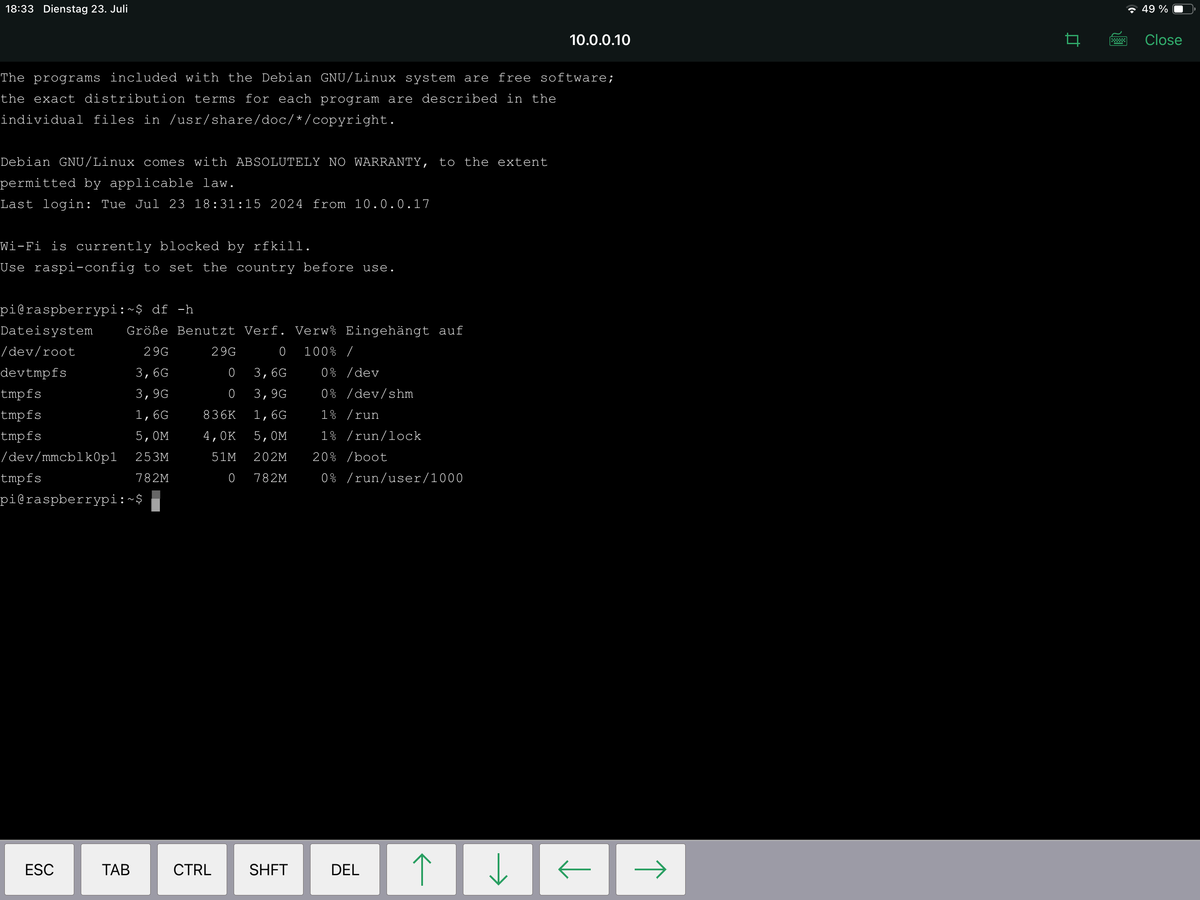
Vermutlich ist das Dateisystem rappelvoll.
df -hsagt?
-
@mike-eg6 sagte in Nach Node JS updat kein Login mehr:
curl: (23) Failure writing output to destination
Vermutlich ist das Dateisystem rappelvoll.
df -hsagt?


Hey! Du scheinst an dieser Unterhaltung interessiert zu sein, hast aber noch kein Konto.
Hast du es satt, bei jedem Besuch durch die gleichen Beiträge zu scrollen? Wenn du dich für ein Konto anmeldest, kommst du immer genau dorthin zurück, wo du zuvor warst, und kannst dich über neue Antworten benachrichtigen lassen (entweder per E-Mail oder Push-Benachrichtigung). Du kannst auch Lesezeichen speichern und Beiträge positiv bewerten, um anderen Community-Mitgliedern deine Wertschätzung zu zeigen.
Mit deinem Input könnte dieser Beitrag noch besser werden 💗
Registrieren AnmeldenSupport us
377
Online33.0k
Benutzer83.6k
Themen1.3m
Beiträge