




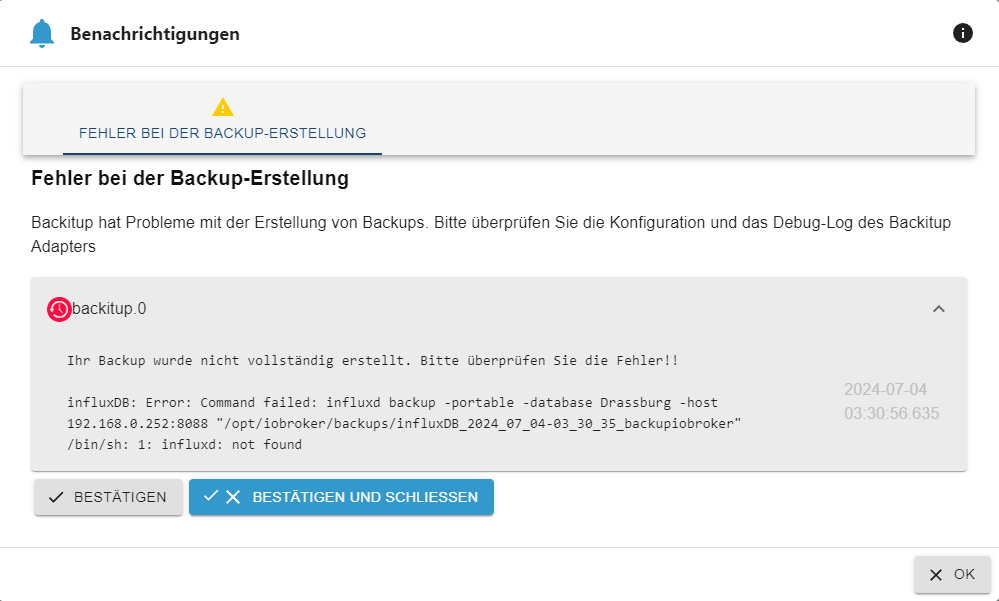
seit einigen tagen error bei backitup mit influxdb
-
Bitte in der nachfolgenden Übersicht die mit ... bzw x gekennzeichneten Felder ausfüllen und im Anschluss an die Tabelle auf Linux Systemen den Output des Commands iob diag einfügen.
Hinweis: Das Eröffnen eines Issues hier ersetzt NICHT das Anlegen eine Issues im Repository des Adapters. Fehlerbehebungen werden ausschließlich über Issues getrackt.
DANKE
Bitte ausfüllen:
- Adaptername: ...
backitup - Link zu Adapterrepository: www.github.com...
https://github.com/simatec/ioBroker.backitup - Adapterversion: ...
v3.0.8 - js-controller Version: ...
6.0.6 - Admin Version: ...
v7.0.11 - Hardwaresystem: NUC, Pi4 ...
mini-atx mit proxmox aktuell
grafana, influxdb und tasmoadmin in einer VM - Arbeitsspeicher: ...xGB
- Festplattenart: SD-Karte, SSD, HDD, ...
- Betriebssystem: ...
- Nodejs-Version: ...
- NPM-Version: ...
- Installationsart: Skript oder Manuell ?
- Image, Docker genutzt: Ja - Nein
- Ort, Name der Imagedatei: ...
Linux User bitte hier den Output von iob diag einfügen.
Skript v.2024-05-22 *** BASE SYSTEM *** Static hostname: ioBroker Icon name: computer-vm Chassis: vm 🖴 Virtualization: kvm Operating System: Debian GNU/Linux 12 (bookworm) Kernel: Linux 6.1.0-22-amd64 Architecture: x86-64 Hardware Vendor: QEMU Hardware Model: Standard PC _i440FX + PIIX, 1996_ Firmware Version: rel-1.16.3-0-ga6ed6b701f0a-prebuilt.qemu.org model name : Common KVM processor Docker : false Virtualization : kvm Kernel : x86_64 Userland : 64 bit Systemuptime and Load: 15:50:36 up 3 days, 8:22, 2 users, load average: 1.12, 0.90, 0.89 CPU threads: 4 *** Time and Time Zones *** Local time: Thu 2024-07-04 15:50:36 CEST Universal time: Thu 2024-07-04 13:50:36 UTC RTC time: Thu 2024-07-04 13:50:36 Time zone: Europe/Vienna (CEST, +0200) System clock synchronized: yes NTP service: active RTC in local TZ: no *** Users and Groups *** User that called 'iob diag': woody HOME=/home/woody GROUPS=woody adm cdrom floppy sudo audio dip video plugdev netdev iobroker User that is running 'js-controller': iobroker HOME=/home/iobroker GROUPS=iobroker tty dialout audio video plugdev *** Display-Server-Setup *** Display-Server: false Desktop: Terminal: tty Boot Target: graphical.target *** MEMORY *** total used free shared buff/cache available Mem: 6.2G 3.5G 1.2G 540K 1.7G 2.7G Swap: 1.0G 0B 1.0G Total: 7.2G 3.5G 2.3G Active iob-Instances: 33 5925 M total memory 3373 M used memory 675 M active memory 3811 M inactive memory 1171 M free memory 330 M buffer memory 1303 M swap cache 974 M total swap 0 M used swap 974 M free swap *** top - Table Of Processes *** top - 15:50:37 up 3 days, 8:22, 2 users, load average: 1.12, 0.90, 0.89 Tasks: 137 total, 5 running, 132 sleeping, 0 stopped, 0 zombie %Cpu(s): 0.0 us, 0.0 sy, 0.0 ni,100.0 id, 0.0 wa, 0.0 hi, 0.0 si, 0.0 st MiB Mem : 5925.2 total, 1170.3 free, 3374.9 used, 1633.6 buff/cache MiB Swap: 975.0 total, 975.0 free, 0.0 used. 2550.3 avail Mem *** FAILED SERVICES *** UNIT LOAD ACTIVE SUB DESCRIPTION 0 loaded units listed. *** FILESYSTEM *** Filesystem Type Size Used Avail Use% Mounted on udev devtmpfs 2.9G 0 2.9G 0% /dev tmpfs tmpfs 593M 524K 593M 1% /run /dev/sda1 ext4 97G 20G 73G 22% / tmpfs tmpfs 2.9G 0 2.9G 0% /dev/shm tmpfs tmpfs 5.0M 4.0K 5.0M 1% /run/lock tmpfs tmpfs 593M 0 593M 0% /run/user/1000 Messages concerning ext4 filesystem in dmesg: [Mon Jul 1 07:28:14 2024] EXT4-fs (sda1): mounted filesystem with ordered data mode. Quota mode: none. [Mon Jul 1 07:28:14 2024] EXT4-fs (sda1): re-mounted. Quota mode: none. Show mounted filesystems: TARGET SOURCE FSTYPE OPTIONS / /dev/sda1 ext4 rw,relatime,errors=remount-ro |-/sys sysfs sysfs rw,nosuid,nodev,noexec,relatime | |-/sys/kernel/security securityfs securityfs rw,nosuid,nodev,noexec,relatime | |-/sys/fs/cgroup cgroup2 cgroup2 rw,nosuid,nodev,noexec,relatime,nsdelegate,memory_recursiveprot | |-/sys/fs/pstore pstore pstore rw,nosuid,nodev,noexec,relatime | |-/sys/fs/bpf bpf bpf rw,nosuid,nodev,noexec,relatime,mode=700 | |-/sys/kernel/tracing tracefs tracefs rw,nosuid,nodev,noexec,relatime | |-/sys/kernel/debug debugfs debugfs rw,nosuid,nodev,noexec,relatime | |-/sys/kernel/config configfs configfs rw,nosuid,nodev,noexec,relatime | `-/sys/fs/fuse/connections fusectl fusectl rw,nosuid,nodev,noexec,relatime |-/proc proc proc rw,nosuid,nodev,noexec,relatime | `-/proc/sys/fs/binfmt_misc systemd-1 autofs rw,relatime,fd=30,pgrp=1,timeout=0,minproto=5,maxproto=5,direct,pipe_ino=1760 | `-/proc/sys/fs/binfmt_misc binfmt_misc binfmt_misc rw,nosuid,nodev,noexec,relatime |-/dev udev devtmpfs rw,nosuid,relatime,size=3014616k,nr_inodes=753654,mode=755,inode64 | |-/dev/pts devpts devpts rw,nosuid,noexec,relatime,gid=5,mode=620,ptmxmode=000 | |-/dev/shm tmpfs tmpfs rw,nosuid,nodev,inode64 | |-/dev/hugepages hugetlbfs hugetlbfs rw,relatime,pagesize=2M | `-/dev/mqueue mqueue mqueue rw,nosuid,nodev,noexec,relatime `-/run tmpfs tmpfs rw,nosuid,nodev,noexec,relatime,size=606744k,mode=755,inode64 |-/run/lock tmpfs tmpfs rw,nosuid,nodev,noexec,relatime,size=5120k,inode64 |-/run/credentials/systemd-sysusers.service ramfs ramfs ro,nosuid,nodev,noexec,relatime,mode=700 |-/run/credentials/systemd-sysctl.service ramfs ramfs ro,nosuid,nodev,noexec,relatime,mode=700 |-/run/credentials/systemd-tmpfiles-setup-dev.service ramfs ramfs ro,nosuid,nodev,noexec,relatime,mode=700 |-/run/credentials/systemd-tmpfiles-setup.service ramfs ramfs ro,nosuid,nodev,noexec,relatime,mode=700 |-/run/rpc_pipefs sunrpc rpc_pipefs rw,relatime `-/run/user/1000 tmpfs tmpfs rw,nosuid,nodev,relatime,size=606740k,nr_inodes=151685,mode=700,uid=1000,gid=1000,inode64 Files in neuralgic directories: /var: 5.0G /var/ 4.0G /var/log/journal/6285e535af59466aa3856f0d231ada92 4.0G /var/log/journal 4.0G /var/log 775M /var/cache Archived and active journals take up 3.9G in the file system. /opt/iobroker/backups: 827M /opt/iobroker/backups/ /opt/iobroker/iobroker-data: 992M /opt/iobroker/iobroker-data/ 642M /opt/iobroker/iobroker-data/files 299M /opt/iobroker/iobroker-data/files/javascript.admin 265M /opt/iobroker/iobroker-data/files/javascript.admin/static 264M /opt/iobroker/iobroker-data/files/javascript.admin/static/js The five largest files in iobroker-data are: 44M /opt/iobroker/iobroker-data/objects.jsonl 38M /opt/iobroker/iobroker-data/files/iot.admin/static/js/main.d3d286bd.js.map 33M /opt/iobroker/iobroker-data/files/meteoalarm.admin/geocodes.json 27M /opt/iobroker/iobroker-data/files/backitup.admin/static/js/main.b8817d66.js.map 24M /opt/iobroker/iobroker-data/files/scenes.admin/static/js/main.1e6546bb.js.map USB-Devices by-id: USB-Sticks - Avoid direct links to /dev/tty* in your adapter setups, please always prefer the links 'by-id': No Devices found 'by-id' *** NodeJS-Installation *** /usr/bin/nodejs v20.15.0 /usr/bin/node v20.15.0 /usr/bin/npm 10.7.0 /usr/bin/npx 10.7.0 /usr/bin/corepack 0.28.1 nodejs: Installed: 20.15.0-1nodesource1 Candidate: 20.15.0-1nodesource1 Version table: *** 20.15.0-1nodesource1 1001 500 https://deb.nodesource.com/node_20.x nodistro/main amd64 Packages 100 /var/lib/dpkg/status 20.14.0-1nodesource1 1001 500 https://deb.nodesource.com/node_20.x nodistro/main amd64 Packages 20.13.1-1nodesource1 1001 500 https://deb.nodesource.com/node_20.x nodistro/main amd64 Packages 20.13.0-1nodesource1 1001 500 https://deb.nodesource.com/node_20.x nodistro/main amd64 Packages 20.12.2-1nodesource1 1001 500 https://deb.nodesource.com/node_20.x nodistro/main amd64 Packages 20.12.1-1nodesource1 1001 500 https://deb.nodesource.com/node_20.x nodistro/main amd64 Packages 20.12.0-1nodesource1 1001 500 https://deb.nodesource.com/node_20.x nodistro/main amd64 Packages 20.11.1-1nodesource1 1001 500 https://deb.nodesource.com/node_20.x nodistro/main amd64 Packages 20.11.0-1nodesource1 1001 500 https://deb.nodesource.com/node_20.x nodistro/main amd64 Packages 20.10.0-1nodesource1 1001 500 https://deb.nodesource.com/node_20.x nodistro/main amd64 Packages 20.9.0-1nodesource1 1001 500 https://deb.nodesource.com/node_20.x nodistro/main amd64 Packages 20.8.1-1nodesource1 1001 500 https://deb.nodesource.com/node_20.x nodistro/main amd64 Packages 20.8.0-1nodesource1 1001 500 https://deb.nodesource.com/node_20.x nodistro/main amd64 Packages 20.7.0-1nodesource1 1001 500 https://deb.nodesource.com/node_20.x nodistro/main amd64 Packages 20.6.1-1nodesource1 1001 500 https://deb.nodesource.com/node_20.x nodistro/main amd64 Packages 20.6.0-1nodesource1 1001 500 https://deb.nodesource.com/node_20.x nodistro/main amd64 Packages 20.5.1-1nodesource1 1001 500 https://deb.nodesource.com/node_20.x nodistro/main amd64 Packages 20.5.0-1nodesource1 1001 500 https://deb.nodesource.com/node_20.x nodistro/main amd64 Packages 20.4.0-1nodesource1 1001 500 https://deb.nodesource.com/node_20.x nodistro/main amd64 Packages 20.3.1-1nodesource1 1001 500 https://deb.nodesource.com/node_20.x nodistro/main amd64 Packages 20.3.0-1nodesource1 1001 500 https://deb.nodesource.com/node_20.x nodistro/main amd64 Packages 20.2.0-1nodesource1 1001 500 https://deb.nodesource.com/node_20.x nodistro/main amd64 Packages 20.1.0-1nodesource1 1001 500 https://deb.nodesource.com/node_20.x nodistro/main amd64 Packages 20.0.0-1nodesource1 1001 500 https://deb.nodesource.com/node_20.x nodistro/main amd64 Packages 18.19.0+dfsg-6~deb12u2 500 500 http://deb.debian.org/debian bookworm/main amd64 Packages 18.19.0+dfsg-6~deb12u1 500 500 http://security.debian.org/debian-security bookworm-security/main amd64 Packages Temp directories causing npm8 problem: 0 No problems detected Errors in npm tree: *** ioBroker-Installation *** ioBroker Status iobroker is running on this host. Objects type: jsonl States type: jsonl Core adapters versions js-controller: 6.0.6 admin: 7.0.11 javascript: 8.6.0 nodejs modules from github: 4 +-- iobroker.energiefluss-erweitert@0.5.0-alpha.0 (git+ssh://git@github.com/SKB-CGN/ioBroker.energiefluss-erweitert.git#b4fed0cd561253a3e30eb7c319c9a4c6e21aeeda) +-- iobroker.energiefluss@3.6.0 (git+ssh://git@github.com/SKB-CGN/ioBroker.energiefluss.git#53944cad71449ceaa41c275f432df5423f218054) +-- iobroker.klipper-moonraker@0.0.4 (git+ssh://git@github.com/DrozmotiX/ioBroker.klipper-moonraker.git#4adef3ab69e5ff232d0d740fe3e0f560bca3c27e) | +-- syno@3.0.0 (git+ssh://git@github.com/MeisterTR/syno.git#0104a973d33fe332aa6b1ab5be7fe8c57d3c68b0) Adapter State + system.adapter.admin.0 : admin : ioBroker - enabled, port: 8081, bind: 0.0.0.0, run as: admin + system.adapter.alexa2.0 : alexa2 : ioBroker - enabled system.adapter.alias-manager.0 : alias-manager : ioBroker - disabled + system.adapter.backitup.0 : backitup : ioBroker - enabled system.adapter.birthdays.0 : birthdays : ioBroker - enabled + system.adapter.cloud.0 : cloud : ioBroker - enabled system.adapter.daswetter.0 : daswetter : ioBroker - enabled + system.adapter.device-reminder.0 : device-reminder : ioBroker - enabled + system.adapter.device-watcher.0 : device-watcher : ioBroker - enabled + system.adapter.energiefluss-erweitert.0 : energiefluss-erweitert: ioBroker - enabled + system.adapter.energiefluss.0 : energiefluss : ioBroker - enabled + system.adapter.fronius.0 : fronius : ioBroker - enabled + system.adapter.gruenbeck.0 : gruenbeck : ioBroker - enabled system.adapter.ical.0 : ical : ioBroker - enabled system.adapter.ical.1 : ical : ioBroker - enabled system.adapter.ical.2 : ical : ioBroker - enabled system.adapter.ical.3 : ical : ioBroker - enabled + system.adapter.influxdb.0 : influxdb : ioBroker - enabled, port: 8086 + system.adapter.iot.0 : iot : ioBroker - enabled + system.adapter.iqontrol.0 : iqontrol : ioBroker - enabled + system.adapter.javascript.0 : javascript : ioBroker - enabled system.adapter.klipper-moonraker.0 : klipper-moonraker : ioBroker - disabled system.adapter.meteoalarm.0 : meteoalarm : ioBroker - enabled system.adapter.meteoalarm.1 : meteoalarm : ioBroker - enabled system.adapter.mqtt.0 : mqtt : ioBroker - disabled, port: 1885, bind: 0.0.0.0 + system.adapter.octoprint.0 : octoprint : ioBroker - enabled system.adapter.openweathermap.0 : openweathermap : ioBroker - enabled + system.adapter.pi-hole.0 : pi-hole : ioBroker - enabled + system.adapter.ping.0 : ping : ioBroker - enabled + system.adapter.proxmox.0 : proxmox : ioBroker - enabled, port: 8006 + system.adapter.rest-api.0 : rest-api : ioBroker - enabled, port: 8093, bind: 0.0.0.0, run as: woody + system.adapter.roborock.0 : roborock : ioBroker - enabled + system.adapter.scenes.0 : scenes : ioBroker - enabled + system.adapter.shelly.0 : shelly : ioBroker - enabled, bind: 0.0.0.0 + system.adapter.shelly.1 : shelly : ioBroker - enabled, port: 1882, bind: 0.0.0.0 + system.adapter.shuttercontrol.0 : shuttercontrol : ioBroker - enabled + system.adapter.simple-api.0 : simple-api : ioBroker - enabled, port: 8087, bind: 0.0.0.0, run as: admin + system.adapter.smartcontrol.0 : smartcontrol : ioBroker - enabled + system.adapter.socketio.0 : socketio : ioBroker - enabled, port: 8084, bind: 0.0.0.0, run as: admin + system.adapter.sonoff.0 : sonoff : ioBroker - enabled, port: 1883, bind: 192.168.0.250 system.adapter.srm.0 : srm : ioBroker - disabled, port: 8001 + system.adapter.synology.0 : synology : ioBroker - enabled, port: 5001 + system.adapter.synology.1 : synology : ioBroker - enabled, port: 4001 + system.adapter.trashschedule.0 : trashschedule : ioBroker - enabled system.adapter.vis.0 : vis : ioBroker - enabled system.adapter.weatherunderground.0 : weatherunderground : ioBroker - disabled + system.adapter.web.0 : web : ioBroker - enabled, port: 8082, bind: 0.0.0.0, run as: admin + instance is alive Enabled adapters with bindings + system.adapter.admin.0 : admin : ioBroker - enabled, port: 8081, bind: 0.0.0.0, run as: admin + system.adapter.influxdb.0 : influxdb : ioBroker - enabled, port: 8086 + system.adapter.proxmox.0 : proxmox : ioBroker - enabled, port: 8006 + system.adapter.rest-api.0 : rest-api : ioBroker - enabled, port: 8093, bind: 0.0.0.0, run as: woody + system.adapter.shelly.1 : shelly : ioBroker - enabled, port: 1882, bind: 0.0.0.0 + system.adapter.simple-api.0 : simple-api : ioBroker - enabled, port: 8087, bind: 0.0.0.0, run as: admin + system.adapter.socketio.0 : socketio : ioBroker - enabled, port: 8084, bind: 0.0.0.0, run as: admin + system.adapter.sonoff.0 : sonoff : ioBroker - enabled, port: 1883, bind: 192.168.0.250 + system.adapter.synology.0 : synology : ioBroker - enabled, port: 5001 + system.adapter.synology.1 : synology : ioBroker - enabled, port: 4001 + system.adapter.web.0 : web : ioBroker - enabled, port: 8082, bind: 0.0.0.0, run as: admin ioBroker-Repositories Stable (default): http://download.iobroker.net/sources-dist.json Beta (latest) : http://download.iobroker.net/sources-dist-latest.json Active repo(s): Beta (latest) Installed ioBroker-Instances Used repository: Beta (latest) Adapter "admin" : 7.0.11 , installed 7.0.11 Adapter "alexa2" : 3.26.5 , installed 3.26.5 Adapter "alias-manager": 1.2.6 , installed 1.2.6 Adapter "backitup" : 3.0.8 , installed 3.0.8 Adapter "birthdays" : 3.0.1 , installed 3.0.1 Adapter "cloud" : 5.0.1 , installed 5.0.1 Adapter "daswetter" : 3.1.15 , installed 3.1.15 Adapter "device-reminder": 3.1.2 , installed 3.1.2 Adapter "device-watcher": 2.12.1 , installed 2.12.1 Adapter "energiefluss" : 3.6.0 , installed 3.6.0 Adapter "energiefluss-erweitert": 0.4.1, installed 0.5.0-alpha.0 Adapter "fronius" : 2.1.0 , installed 2.1.0 Adapter "gruenbeck" : 0.0.43 , installed 0.0.43 Adapter "ical" : 1.15.0 , installed 1.15.0 Adapter "influxdb" : 4.0.2 , installed 4.0.2 Adapter "iot" : 3.3.0 , installed 3.3.0 Adapter "iqontrol" : 2.3.0 , installed 2.3.0 Adapter "javascript" : 8.6.0 , installed 8.6.0 Controller "js-controller": 6.0.6 , installed 6.0.6 Adapter "meteoalarm" : 3.0.2 , installed 3.0.2 Adapter "mqtt" : 5.2.0 , installed 5.2.0 Adapter "octoprint" : 5.1.0 , installed 5.1.0 Adapter "openweathermap": 1.0.4 , installed 1.0.4 Adapter "pi-hole" : 1.3.6 , installed 1.3.6 Adapter "ping" : 1.6.2 , installed 1.6.2 Adapter "proxmox" : 2.3.0 , installed 2.3.0 Adapter "rest-api" : 2.0.1 , installed 2.0.1 Adapter "roborock" : 0.6.4 , installed 0.6.4 Adapter "scenes" : 3.2.1 , installed 3.2.1 Adapter "shelly" : 7.0.0 , installed 7.0.0 Adapter "shuttercontrol": 1.7.3 , installed 1.7.3 Adapter "simple-api" : 2.8.0 , installed 2.8.0 Adapter "smartcontrol" : 2.0.1 , installed 2.0.1 Adapter "socketio" : 6.7.1 , installed 6.7.1 Adapter "sonoff" : 3.1.0 , installed 3.1.0 Adapter "srm" : 0.2.0 , installed 0.2.0 Adapter "synology" : 3.1.0 , installed 3.1.0 Adapter "trashschedule": 3.3.0 , installed 3.3.0 Adapter "vis" : 1.5.6 , installed 1.5.6 Adapter "weatherunderground": 3.7.0, installed 3.7.0 Adapter "web" : 6.3.0 , installed 6.3.0 Adapter "ws" : 2.6.2 , installed 2.6.2 Objects and States Please stand by - This may take a while Objects: 25860 States: 19396 *** OS-Repositories and Updates *** Hit:1 http://security.debian.org/debian-security bookworm-security InRelease Hit:2 http://deb.debian.org/debian bookworm InRelease Hit:3 http://deb.debian.org/debian bookworm-updates InRelease Hit:4 https://deb.nodesource.com/node_20.x nodistro InRelease Reading package lists... Pending Updates: 0 *** Listening Ports *** Active Internet connections (only servers) Proto Recv-Q Send-Q Local Address Foreign Address State User Inode PID/Program name tcp 0 0 127.0.0.1:9001 0.0.0.0:* LISTEN 1001 15806 457/iobroker.js-con tcp 0 0 127.0.0.1:9000 0.0.0.0:* LISTEN 1001 14041 457/iobroker.js-con tcp 0 0 0.0.0.0:22 0.0.0.0:* LISTEN 0 4509092 81770/sshd: /usr/sb tcp 0 0 0.0.0.0:111 0.0.0.0:* LISTEN 0 13122 1/init tcp 0 0 127.0.0.1:6010 0.0.0.0:* LISTEN 1000 14988855 260364/sshd: woody@ tcp 0 0 0.0.0.0:1882 0.0.0.0:* LISTEN 1001 18635 899/io.shelly.1 tcp 0 0 0.0.0.0:6969 0.0.0.0:* LISTEN 1000 14993595 260841/nc tcp 0 0 192.168.0.250:1883 0.0.0.0:* LISTEN 1001 17664 858/io.sonoff.0 tcp6 0 0 :::22 :::* LISTEN 0 4509103 81770/sshd: /usr/sb tcp6 0 0 :::111 :::* LISTEN 0 13124 1/init tcp6 0 0 ::1:6010 :::* LISTEN 1000 14988854 260364/sshd: woody@ tcp6 0 0 :::6824 :::* LISTEN 1001 14246 595/io.roborock.0 tcp6 0 0 :::7906 :::* LISTEN 1001 14247 595/io.roborock.0 tcp6 0 0 :::8084 :::* LISTEN 1001 20490 1197/io.socketio.0 tcp6 0 0 :::8087 :::* LISTEN 1001 18362 1160/io.simple-api. tcp6 0 0 :::8081 :::* LISTEN 1001 14948069 259687/io.admin.0 tcp6 0 0 :::8082 :::* LISTEN 1001 20757 1253/io.web.0 tcp6 0 0 :::8093 :::* LISTEN 1001 20782 1290/io.rest-api.0 udp 0 0 0.0.0.0:68 0.0.0.0:* 0 14748 401/dhclient udp 0 0 0.0.0.0:111 0.0.0.0:* 0 13123 1/init udp 0 0 0.0.0.0:5683 0.0.0.0:* 1001 18442 828/io.shelly.0 udp6 0 0 :::111 :::* 0 13125 1/init *** Log File - Last 25 Lines *** 2024-07-04 15:37:07.863 - info: host.ioBroker instance system.adapter.admin.0 started with pid 259687 2024-07-04 15:37:12.396 - info: iqontrol.0 (111685) COUNTER Adapter-Monitor Red: 0 of 32 2024-07-04 15:37:12.636 - info: iqontrol.0 (111685) CALCULATION Adapter-Monitor Red+Yellow has changed 2024-07-04 15:37:12.636 - info: iqontrol.0 (111685) COMBINATION Adapter-Monitor HTML has changed 2024-07-04 15:37:12.654 - info: iqontrol.0 (111685) CALCULATION Adapter-Monitor Red+Yellow_LIST has changed 2024-07-04 15:37:12.716 - info: iqontrol.0 (111685) CALCULATION Adapter-Monitor Red+Yellow_LIST_JSON has changed 2024-07-04 15:37:12.735 - info: iqontrol.0 (111685) CALCULATION Adapter-Monitor Red+Yellow_NAMES_LIST has changed 2024-07-04 15:37:18.031 - info: iqontrol.0 (111685) COUNTER Adapter-Monitor Yellow: 1 of 32 2024-07-04 15:37:18.271 - info: iqontrol.0 (111685) COUNTER Adapter-Monitor Green: 31 of 32 2024-07-04 15:37:18.481 - info: iqontrol.0 (111685) CALCULATION Adapter-Monitor Green+Grey has changed 2024-07-04 15:37:18.487 - info: iqontrol.0 (111685) CALCULATION Adapter-Monitor Green+Grey_LIST has changed 2024-07-04 15:37:18.502 - info: iqontrol.0 (111685) CALCULATION Adapter-Monitor Green+Grey_LIST_JSON has changed 2024-07-04 15:37:18.513 - info: iqontrol.0 (111685) CALCULATION Adapter-Monitor Green+Grey_NAMES_LIST has changed 2024-07-04 15:37:18.515 - info: iqontrol.0 (111685) COMBINATION Adapter-Monitor HTML has changed 2024-07-04 15:37:30.290 - info: host.ioBroker Updating repository "Beta (latest)" under "http://download.iobroker.net/sources-dist-latest.json" 2024-07-04 15:40:16.014 - info: host.ioBroker instance system.adapter.meteoalarm.0 started with pid 259894 2024-07-04 15:40:20.348 - info: host.ioBroker instance system.adapter.meteoalarm.0 having pid 259894 terminated with code 11 (ADAPTER_REQUESTED_TERMINATION) 2024-07-04 15:40:38.222 - info: host.ioBroker instance system.adapter.meteoalarm.1 started with pid 259913 2024-07-04 15:40:43.444 - info: host.ioBroker instance system.adapter.meteoalarm.1 having pid 259913 terminated with code 11 (ADAPTER_REQUESTED_TERMINATION) 2024-07-04 15:45:00.052 - info: javascript.0 (554) script.js.common.Überwachung.Shelly_Verbrauch_0: Shelly Verbrauch: Verbrauchswerte aktualisiert: 7 | Reboots korrigiert: 0 | Unveränderte Werte: 52 2024-07-04 15:45:00.090 - info: javascript.0 (554) script.js.common.Überwachung.Shelly_Verbrauch_1: Shelly Verbrauch: Verbrauchswerte aktualisiert: 0 | Reboots korrigiert: 0 | Unveränderte Werte: 1 2024-07-04 15:50:16.012 - info: host.ioBroker instance system.adapter.meteoalarm.0 started with pid 260434 2024-07-04 15:50:21.252 - info: host.ioBroker instance system.adapter.meteoalarm.0 having pid 260434 terminated with code 11 (ADAPTER_REQUESTED_TERMINATION) 2024-07-04 15:50:38.550 - info: host.ioBroker instance system.adapter.meteoalarm.1 started with pid 260659 2024-07-04 15:50:47.268 - info: host.ioBroker instance system.adapter.meteoalarm.1 having pid 260659 terminated with code 11 (ADAPTER_REQUESTED_TERMINATION)influxdb-client installiert?
Ich vermisse das influxdb-Repository in deinen Paketquellen. - Adaptername: ...
-
influxdb-client installiert?
Ich vermisse das influxdb-Repository in deinen Paketquellen.@thomas-braun influxdb ist in der v4.0.2 installiert.
Da gab's eigentlich keine Probleme. Seit ca 2 Wochen bekomme ich die Meldung.
In proxmox wird imho die ganze VM gesichert, sollte ja kein Problem machen. Nicht deine Welt, ich weiß.
Was soll ich tun, deiner Meinung nach?gruß vom Woody
HAPPINESS is not a DESTINATION, it's a WAY of LIFE! -
@thomas-braun influxdb ist in der v4.0.2 installiert.
Da gab's eigentlich keine Probleme. Seit ca 2 Wochen bekomme ich die Meldung.
In proxmox wird imho die ganze VM gesichert, sollte ja kein Problem machen. Nicht deine Welt, ich weiß.
Was soll ich tun, deiner Meinung nach?@da_woody sagte in seit einigen tagen error bei backitup mit influxdb:
influxdb ist in der v4.0.2 installiert.
Das ist die Version vom Adapter. Es wurde aber direkt nach Influxdb gefragt. Und die Frage nach dem influxdb-client ist noch offen.
Ro75.
SERVER = Beelink U59 16GB DDR4 RAM 512GB SSD, FB 7490, FritzDect 200+301+440, ConBee II, Zigbee Aqara Sensoren + NOUS A1Z, NOUS A1T, Philips Hue ** ioBroker, REDIS, influxdb2, Grafana, PiHole, Plex-Mediaserver, paperless-ngx (Docker), MariaDB + phpmyadmin *** VIS-Runtime = Intel NUC 8GB RAM 128GB SSD + 24" Touchscreen
-
@thomas-braun influxdb ist in der v4.0.2 installiert.
Da gab's eigentlich keine Probleme. Seit ca 2 Wochen bekomme ich die Meldung.
In proxmox wird imho die ganze VM gesichert, sollte ja kein Problem machen. Nicht deine Welt, ich weiß.
Was soll ich tun, deiner Meinung nach?@da_woody sagte in seit einigen tagen error bei backitup mit influxdb:
Was soll ich tun, deiner Meinung nach?
sudo apt update
apt policy influxdb*
Aber da wird nicht viel kommen, weil halt die Quelle für influx nicht angelegt ist.
-
@da_woody sagte in seit einigen tagen error bei backitup mit influxdb:
influxdb ist in der v4.0.2 installiert.
Das ist die Version vom Adapter. Es wurde aber direkt nach Influxdb gefragt. Und die Frage nach dem influxdb-client ist noch offen.
Ro75.
@ro75 sorry, bin etwas bepisst heute. kleiner auftrag zum lasern, laser gestorben... naja.
ok, influxdb ist v1. wollte die 3 dinger schon in eigene LXCs basteln, aber nachdem die v2 am abdanken ist, hab ichs gelassen. auch wenn da nix weitergeht.
client ist InfluxDBStudio falls du das meinst.gruß vom Woody
HAPPINESS is not a DESTINATION, it's a WAY of LIFE! -
@ro75 sorry, bin etwas bepisst heute. kleiner auftrag zum lasern, laser gestorben... naja.
ok, influxdb ist v1. wollte die 3 dinger schon in eigene LXCs basteln, aber nachdem die v2 am abdanken ist, hab ichs gelassen. auch wenn da nix weitergeht.
client ist InfluxDBStudio falls du das meinst.Für ein Backup braucht es LOKAL immer den passenden influxdb-client.
-
@da_woody sagte in seit einigen tagen error bei backitup mit influxdb:
Was soll ich tun, deiner Meinung nach?
sudo apt update
apt policy influxdb*
Aber da wird nicht viel kommen, weil halt die Quelle für influx nicht angelegt ist.
@thomas-braun rischtisch.
habs gerade auf der gemeinsamen VM gemacht. ioB ist ja eine eigene VM.woody@Debian:~$ apt policy influxdb* influxdb-client: Installiert: (keine) Installationskandidat: 1.6.7~rc0-1+b5 Versionstabelle: 1.6.7~rc0-1+b5 500 500 http://ftp.debian.org/debian bullseye/main amd64 Packages influxdb-dev: Installiert: (keine) Installationskandidat: (keine) Versionstabelle: influxdb: Installiert: 1.7.10-1 Installationskandidat: 1.7.10-1 Versionstabelle: *** 1.7.10-1 100 100 /var/lib/dpkg/status 1.6.7~rc0-1+b5 500 500 http://ftp.debian.org/debian bullseye/main amd64 Packages woody@Debian:~$gruß vom Woody
HAPPINESS is not a DESTINATION, it's a WAY of LIFE! -
@thomas-braun rischtisch.
habs gerade auf der gemeinsamen VM gemacht. ioB ist ja eine eigene VM.woody@Debian:~$ apt policy influxdb* influxdb-client: Installiert: (keine) Installationskandidat: 1.6.7~rc0-1+b5 Versionstabelle: 1.6.7~rc0-1+b5 500 500 http://ftp.debian.org/debian bullseye/main amd64 Packages influxdb-dev: Installiert: (keine) Installationskandidat: (keine) Versionstabelle: influxdb: Installiert: 1.7.10-1 Installationskandidat: 1.7.10-1 Versionstabelle: *** 1.7.10-1 100 100 /var/lib/dpkg/status 1.6.7~rc0-1+b5 500 500 http://ftp.debian.org/debian bullseye/main amd64 Packages woody@Debian:~$@da_woody sagte in seit einigen tagen error bei backitup mit influxdb:
Installiert: (keine)
Und genau das sagt dir die Meldung von oben auch.
Der Installationskandidat: 1.6.7~rc0-1+b5 ist aus dem hauseigenen Debian-Repo, der muss nicht unbedingt zur laufenden Version (welche ist es?) der Datenbank passen.Versionstabelle: *** 1.7.10-1 100 100 /var/lib/dpkg/statusZeigt aber eine Version 'von irgendwoher', jedenfalls existiert dazu kein Repo mehr.
-
@thomas-braun rischtisch.
habs gerade auf der gemeinsamen VM gemacht. ioB ist ja eine eigene VM.woody@Debian:~$ apt policy influxdb* influxdb-client: Installiert: (keine) Installationskandidat: 1.6.7~rc0-1+b5 Versionstabelle: 1.6.7~rc0-1+b5 500 500 http://ftp.debian.org/debian bullseye/main amd64 Packages influxdb-dev: Installiert: (keine) Installationskandidat: (keine) Versionstabelle: influxdb: Installiert: 1.7.10-1 Installationskandidat: 1.7.10-1 Versionstabelle: *** 1.7.10-1 100 100 /var/lib/dpkg/status 1.6.7~rc0-1+b5 500 500 http://ftp.debian.org/debian bullseye/main amd64 Packages woody@Debian:~$influxdb: Installed: (none) Candidate: 1.8.10-1 Version table: 1.8.10-1 500 500 https://repos.influxdata.com/debian stable/main arm64 Packages 100 /var/lib/dpkg/status 1.6.7~rc0-2+b4 500 500 http://deb.debian.org/debian trixie/main arm64 PackagesInstallier die 1.8.10-1 aus dem influxdata-Repo, die hat soweit ich weiß den client direkt mit an Bord.
-
influxdb:
  Installed: (none)
  Candidate: 1.8.10-1
  Version table:
     1.8.10-1 500
        500 https://repos.influxdata.com/debian stable/main arm64 Packages
        100 /var/lib/dpkg/status
     1.6.7~rc0-2+b4 500
        500 http://deb.debian.org/debian trixie/main arm64 Packages
Installier die 1.8.10-1 aus dem influxdata-Repo, die hat soweit ich weiß den client direkt mit an Bord.
@thomas-braun moin. hmm, wo und wie muss die hin?
hab eben noch auf der ioBroker VM nachgeschaut. das obige ist ja von der grafana/influx/tasmoadmin VMwoody@ioBroker:~$ apt policy influxdb* influxdb-client: Installiert: (keine) Installationskandidat: 1.6.7~rc0-1+b13 Versionstabelle: 1.6.7~rc0-1+b13 500 500 http://deb.debian.org/debian bookworm/main amd64 Packages influxdb-dev: Installiert: (keine) Installationskandidat: (keine) Versionstabelle: influxdb: Installiert: (keine) Installationskandidat: 1.6.7~rc0-1+b13 Versionstabelle: 1.6.7~rc0-1+b13 500 500 http://deb.debian.org/debian bookworm/main amd64 Packages woody@ioBroker:~$sorry, aber linux werd ich einfach nie so ganz kapieren. warum hat das bis vor kurzem keine fehlermeldung gegeben?
gruß vom Woody
HAPPINESS is not a DESTINATION, it's a WAY of LIFE! -
@thomas-braun moin. hmm, wo und wie muss die hin?
hab eben noch auf der ioBroker VM nachgeschaut. das obige ist ja von der grafana/influx/tasmoadmin VMwoody@ioBroker:~$ apt policy influxdb* influxdb-client: Installiert: (keine) Installationskandidat: 1.6.7~rc0-1+b13 Versionstabelle: 1.6.7~rc0-1+b13 500 500 http://deb.debian.org/debian bookworm/main amd64 Packages influxdb-dev: Installiert: (keine) Installationskandidat: (keine) Versionstabelle: influxdb: Installiert: (keine) Installationskandidat: 1.6.7~rc0-1+b13 Versionstabelle: 1.6.7~rc0-1+b13 500 500 http://deb.debian.org/debian bookworm/main amd64 Packages woody@ioBroker:~$sorry, aber linux werd ich einfach nie so ganz kapieren. warum hat das bis vor kurzem keine fehlermeldung gegeben?
Was meinst du mit
wo und wie
muss die hin?Du solltest das influxdb -Repo anlegen und dann von dort influxdb in der Version 1.8 installieren.
-
@thomas-braun auf welcher VM, der ioB, der influxdb, oder auf beiden? wie lege ich das repo an? wie installiere ich dann die 1.8?
in deinem werkzeugkasten find ich dazu nichts...gruß vom Woody
HAPPINESS is not a DESTINATION, it's a WAY of LIFE! -
@thomas-braun auf welcher VM, der ioB, der influxdb, oder auf beiden? wie lege ich das repo an? wie installiere ich dann die 1.8?
in deinem werkzeugkasten find ich dazu nichts...@da_woody wo lief es denn bisher bzw wo möchtest du es zukünftig laufen lassen?
Wenn du umzieht, musst du auch deine Datenbank Restore.
Influx muss so oder so auf deiner iob VM installiert sein, sonst funktioniert kein Backup der Datenbank via backitupumgestiegen von Proxmox auf Unraid
-
@thomas-braun auf welcher VM, der ioB, der influxdb, oder auf beiden? wie lege ich das repo an? wie installiere ich dann die 1.8?
in deinem werkzeugkasten find ich dazu nichts...Such den 'Phantastische Repos ' Thread von mir. Da steht das influxdb-Zeug dabei.
Das Paket 'influxdb' muss dann auf dem Client installiert werden, eine anderweitig laufender influxdb-Server vorausgesetzt. -
Such den 'Phantastische Repos ' Thread von mir. Da steht das influxdb-Zeug dabei.
Das Paket 'influxdb' muss dann auf dem Client installiert werden, eine anderweitig laufender influxdb-Server vorausgesetzt. -
@da_woody wo lief es denn bisher bzw wo möchtest du es zukünftig laufen lassen?
Wenn du umzieht, musst du auch deine Datenbank Restore.
Influx muss so oder so auf deiner iob VM installiert sein, sonst funktioniert kein Backup der Datenbank via backitup@crunchip sagte in seit einigen tagen error bei backitup mit influxdb:
@da_woody wo lief es denn bisher bzw wo möchtest du es zukünftig laufen lassen?
Im Moment werd ich an den VMs nichts ändern. Erst wenn influxdb 3 kommt...
Wenn du umzieht, musst du auch deine Datenbank Restore.
Da wär es sinnvoll die DB neu aufziehen. Sind durch unwissen zuviele unnötige DPs drinnen.
Influx muss so oder so auf deiner iob VM installiert sein, sonst funktioniert kein Backup der Datenbank via backitup
Tnx schau ich in Ruhe durch...
Auch an @Thomas-Braun und @simatec





Hey! Du scheinst an dieser Unterhaltung interessiert zu sein, hast aber noch kein Konto.
Hast du es satt, bei jedem Besuch durch die gleichen Beiträge zu scrollen? Wenn du dich für ein Konto anmeldest, kommst du immer genau dorthin zurück, wo du zuvor warst, und kannst dich über neue Antworten benachrichtigen lassen (entweder per E-Mail oder Push-Benachrichtigung). Du kannst auch Lesezeichen speichern und Beiträge positiv bewerten, um anderen Community-Mitgliedern deine Wertschätzung zu zeigen.
Mit deinem Input könnte dieser Beitrag noch besser werden 💗
Registrieren AnmeldenSupport us
377
Online33.0k
Benutzer83.6k
Themen1.3m
Beiträge