




Homeconnect Fehlermeldung
-
@thomas-braun wie kann ich mich im iobroker abmelden? Finde da keinen Button.
@timowald sagte in Homeconnect Fehlermeldung:
wie kann ich mich im iobroker abmelden?
Was meinst du?
In der Kommandozeile gibt es natürllich nix zu klicken, sondern nur Kommandos.
exitz. B.
-
@timowald sagte in Homeconnect Fehlermeldung:
wie kann ich mich im iobroker abmelden?
Was meinst du?
In der Kommandozeile gibt es natürllich nix zu klicken, sondern nur Kommandos.
exitz. B.
-
@thomas-braun Na wie kann ich im iobroker den Benutzer wechseln?
@timowald sagte in Homeconnect Fehlermeldung:
Na wie kann ich im iobroker den Benutzer wechseln?
Was willste denn da wechseln? Du loggst dich AUSSCHLIEßLICH als
timoein. root und iobroker als username sind verboten. -
@timowald sagte in Homeconnect Fehlermeldung:
Na wie kann ich im iobroker den Benutzer wechseln?
Was willste denn da wechseln? Du loggst dich AUSSCHLIEßLICH als
timoein. root und iobroker als username sind verboten.@thomas-braun Ich bin als Admin eingeloggt. Finde aber keine button um much abzumelden.
-
@thomas-braun Ich bin als Admin eingeloggt. Finde aber keine button um much abzumelden.
-
@thomas-braun Ich bin als Admin eingeloggt. Finde aber keine button um much abzumelden.
In der Web-GUI (admin) des iobrokers?
Da bin ich immer als admin angemeldet. -
In der Web-GUI (admin) des iobrokers?
Da bin ich immer als admin angemeldet.@thomas-braun Ok, dann ist das richtig. In Proxmox bin ich als root angemeldet.
-
@tt-tom Hier mal der LOG nach 3 Minuten.
Jede Minute passiert etwas.2024-07-04 16:52:01.914 - info: host.iobroker "system.adapter.homeconnect.0" enabled 2024-07-04 16:52:02.309 - info: host.iobroker instance system.adapter.homeconnect.0 started with pid 101249 2024-07-04 16:52:03.207 - debug: homeconnect.0 (101249) Redis Objects: Use Redis connection: 127.0.0.1:9001 2024-07-04 16:52:03.275 - debug: homeconnect.0 (101249) Objects client ready ... initialize now 2024-07-04 16:52:03.277 - debug: homeconnect.0 (101249) Objects create System PubSub Client 2024-07-04 16:52:03.277 - debug: homeconnect.0 (101249) Objects create User PubSub Client 2024-07-04 16:52:03.441 - debug: homeconnect.0 (101249) Objects client initialize lua scripts 2024-07-04 16:52:03.446 - debug: homeconnect.0 (101249) Objects connected to redis: 127.0.0.1:9001 2024-07-04 16:52:03.535 - debug: homeconnect.0 (101249) Redis States: Use Redis connection: 127.0.0.1:9000 2024-07-04 16:52:03.638 - debug: homeconnect.0 (101249) States create System PubSub Client 2024-07-04 16:52:03.639 - debug: homeconnect.0 (101249) States create User PubSub Client 2024-07-04 16:52:03.768 - debug: homeconnect.0 (101249) States connected to redis: 127.0.0.1:9000 2024-07-04 16:52:03.837 - debug: homeconnect.0 (101249) Plugin sentry Initialize Plugin (enabled=true) 2024-07-04 16:52:04.158 - info: homeconnect.0 (101249) starting. Version 1.4.1 in /opt/iobroker/node_modules/iobroker.homeconnect, node: v18.17.1, js-controller: 5.0.19 2024-07-04 16:52:04.231 - debug: homeconnect.0 (101249) Found current session 2024-07-04 16:52:04.232 - debug: homeconnect.0 (101249) Refresh Token 2024-07-04 16:52:04.554 - debug: homeconnect.0 (101249) {"access_token":"eyJ4LWVudiI6IlBSRCIsImFsZyI6IlJTMjU2IiwieC1yZWciOiJFVSIsImtpZCI6InJldS1wcm9kdWN0aW9uIn0.eyJmZ3JwIjpbXSwiY2x0eSI6InByaXZhdGUiLCJzdWIiOiIxYzQwMzQyZS1kMGNlLTQzYzktODcwOS05MmY5NDZmNGIxYjAiLCJhdWQiOiIwODI1MTJCREVCOEFGNDUyNjBBRUQ5Q0U1QjBDRjNCRTVDM0IxRUI4RkRGRDI2Q0FBNTRDNzZFN0UyRDhDNTJGIiwic3RhZ2UiOiJQUkQiLCJhenAiOiIwODI1MTJCREVCOEFGNDUyNjBBRUQ5Q0U1QjBDRjNCRTVDM0IxRUI4RkRGRDI2Q0FBNTRDNzZFN0UyRDhDNTJGIiwic2NvcGUiOlsiSWRlbnRpZnlBcHBsaWFuY2UiLCJNb25pdG9yIiwiU2V0dGluZ3MiLCJDb250cm9sIl0sImlzcyI6IkVVOlBSRDowIiwiZXhwIjoxNzIwMTkxMTI0LCJyZWdpb24iOiJFVSIsImlhdCI6MTcyMDEwNDcyNCwianRpIjoiNWEyMmMwZTAtOTE5Ni00MDNlLThiYjAtN2FmZTAxNDQ3NDBlIn0.h05vzbNvOhLkpk6CTBVW8QUDpCTpPUzI9tHoDJGyPFqpNtX-oifpS7gRj_5KGQAb7ifxkzM_etF_wuvUVIHPVSSkSO0UWHaxQRHw8DLgyUKLTVDM4T7FAJ8cHAz6YM-e4_cd1Fbg8bq_O3-OYyMuWIQ1_w7Gp3X3tkUYiT5F1YEhQxHANgGGAtjrUUuw1AEnhIAmzmmJiX_6tYLFunAJ69zXrdc-ilE-BdVuLN6Yo6bonvayzI265D4bmLwIww_4x7enGUsUoLlkNx3ZDf4dEV1SWrZn2M6lwoMqxwzgdLQgGKCUdO7bIwD1mxLRoJzgV3kE6gEpLOKSPSs4XlDQOA","expires_in":86400,"id_token":"eyJ4LWVudiI6IlBSRCIsImFsZyI6IlJTMjU2IiwieC1yZWciOiJFVSIsImtpZCI6InJldS1wcm9kdWN0aW9uIn0.eyJmZ3JwIjpbXSwiY2x0eSI6InByaXZhdGUiLCJzdWIiOiIxYzQwMzQyZS1kMGNlLTQzYzktODcwOS05MmY5NDZmNGIxYjAiLCJhdWQiOiIwODI1MTJCREVCOEFGNDUyNjBBRUQ5Q0U1QjBDRjNCRTVDM0IxRUI4RkRGRDI2Q0FBNTRDNzZFN0UyRDhDNTJGIiwic3RhZ2UiOiJQUkQiLCJhenAiOiIwODI1MTJCREVCOEFGNDUyNjBBRUQ5Q0U1QjBDRjNCRTVDM0IxRUI4RkRGRDI2Q0FBNTRDNzZFN0UyRDhDNTJGIiwic2NvcGUiOlsiSWRlbnRpZnlBcHBsaWFuY2UiLCJNb25pdG9yIiwiU2V0dGluZ3MiLCJDb250cm9sIl0sImlzcyI6IkVVOlBSRDowIiwiZXhwIjoxNzIwMTkxMTI0LCJyZWdpb24iOiJFVSIsImlhdCI6MTcyMDEwNDcyNCwianRpIjoiNWEyMmMwZTAtOTE5Ni00MDNlLThiYjAtN2FmZTAxNDQ3NDBlIn0.h05vzbNvOhLkpk6CTBVW8QUDpCTpPUzI9tHoDJGyPFqpNtX-oifpS7gRj_5KGQAb7ifxkzM_etF_wuvUVIHPVSSkSO0UWHaxQRHw8DLgyUKLTVDM4T7FAJ8cHAz6YM-e4_cd1Fbg8bq_O3-OYyMuWIQ1_w7Gp3X3tkUYiT5F1YEhQxHANgGGAtjrUUuw1AEnhIAmzmmJiX_6tYLFunAJ69zXrdc-ilE-BdVuLN6Yo6bonvayzI265D4bmLwIww_4x7enGUsUoLlkNx3ZDf4dEV1SWrZn2M6lwoMqxwzgdLQgGKCUdO7bIwD1mxLRoJzgV3kE6gEpLOKSPSs4XlDQOA","refresh_token":"eyJyZWdpb24iOiJFVSIsInN0YWdlIjoiUFJEIiwiY3JlZiI6IjA4MjUxMkJEIiwidG9rZW4iOiJiZThjOTA5OC1hYmZlLTQ3N2ItODAwMi1kMzQwYjJhYjVjZmQiLCJjbHR5IjoicHJpdmF0ZSIsIngtcmVnIjoiRVUiLCJ4LWVudiI6IlBSRCJ9","scope":"IdentifyAppliance Monitor Settings Control","token_type":"Bearer"} 2024-07-04 16:52:04.555 - debug: homeconnect.0 (101249) Get device list 2024-07-04 16:52:04.735 - error: homeconnect.0 (101249) AxiosError: Request failed with status code 429 2024-07-04 16:52:04.736 - error: homeconnect.0 (101249) {"error":{"description":"The rate limit \"1000 calls in 1 day\" was reached. Requests are blocked during the remaining period of 85880 seconds.","key":"429"}} 2024-07-04 16:52:04.737 - debug: homeconnect.0 (101249) Start EventStream 2024-07-04 16:52:04.838 - error: homeconnect.0 (101249) 429 Too Many Requests 2024-07-04 16:52:04.838 - error: homeconnect.0 (101249) Start Event Stream Error: {"type":"error","status":429,"message":"Too Many Requests"} 2024-07-04 16:52:04.838 - info: homeconnect.0 (101249) Too many requests. Please wait 24h. 2024-07-04 16:52:14.813 - error: wled.0 (22162) Sending command to WLED device + http://192.168.9.91/json failed with error Error: connect ETIMEDOUT 192.168.9.91:80 2024-07-04 16:52:14.814 - error: wled.0 (22162) Sending command to WLED device + http://192.168.9.91/json failed with error Error: connect ETIMEDOUT 192.168.9.91:80 2024-07-04 16:52:40.625 - info: solax.0 (21770) State value to set for "solax.0.data.json" has to be type "string" but received type "number" 2024-07-04 16:53:14.742 - info: homeconnect.0 (101249) Keep Alive failed Reconnect EventStream 2024-07-04 16:53:14.743 - debug: homeconnect.0 (101249) Start EventStream 2024-07-04 16:53:14.817 - error: homeconnect.0 (101249) 429 Too Many Requests 2024-07-04 16:53:14.818 - error: homeconnect.0 (101249) Start Event Stream Error: {"type":"error","status":429,"message":"Too Many Requests"} 2024-07-04 16:53:14.818 - info: homeconnect.0 (101249) Too many requests. Please wait 24h. 2024-07-04 16:53:16.253 - error: wled.0 (22162) Sending command to WLED device + http://192.168.9.91/json failed with error Error: connect ETIMEDOUT 192.168.9.91:80 2024-07-04 16:53:16.254 - error: wled.0 (22162) Sending command to WLED device + http://192.168.9.91/json failed with error Error: connect ETIMEDOUT 192.168.9.91:80 2024-07-04 16:54:13.597 - error: wled.0 (22162) Sending command to WLED device + http://192.168.9.91/json failed with error Error: connect ETIMEDOUT 192.168.9.91:80 2024-07-04 16:54:13.598 - error: wled.0 (22162) Sending command to WLED device + http://192.168.9.91/json failed with error Error: connect ETIMEDOUT 192.168.9.91:80 2024-07-04 16:54:24.749 - info: homeconnect.0 (101249) Keep Alive failed Reconnect EventStream 2024-07-04 16:54:24.750 - debug: homeconnect.0 (101249) Start EventStream 2024-07-04 16:54:24.826 - error: homeconnect.0 (101249) 429 Too Many Requests 2024-07-04 16:54:24.826 - error: homeconnect.0 (101249) Start Event Stream Error: {"type":"error","status":429,"message":"Too Many Requests"} 2024-07-04 16:54:24.826 - info: homeconnect.0 (101249) Too many requests. Please wait 24h. 2024-07-04 16:55:15.037 - error: wled.0 (22162) Sending command to WLED device + http://192.168.9.91/json failed with error Error: connect ETIMEDOUT 192.168.9.91:80 2024-07-04 16:55:15.038 - error: wled.0 (22162) Sending command to WLED device + http://192.168.9.91/json failed with error Error: connect ETIMEDOUT 192.168.9.91:80 2024-07-04 16:55:34.756 - info: homeconnect.0 (101249) Keep Alive failed Reconnect EventStream 2024-07-04 16:55:34.756 - debug: homeconnect.0 (101249) Start EventStream 2024-07-04 16:55:34.862 - error: homeconnect.0 (101249) 429 Too Many Requests 2024-07-04 16:55:34.862 - error: homeconnect.0 (101249) Start Event Stream Error: {"type":"error","status":429,"message":"Too Many Requests"} 2024-07-04 16:55:34.862 - info: homeconnect.0 (101249) Too many requests. Please wait 24h. -
@haselchen diese Einstellung habe ich im VIS2 Adapter nicht.
-
Wieso VIS?
Aber ich hab mich vertan. Hab an den HAM Adapter gedacht.
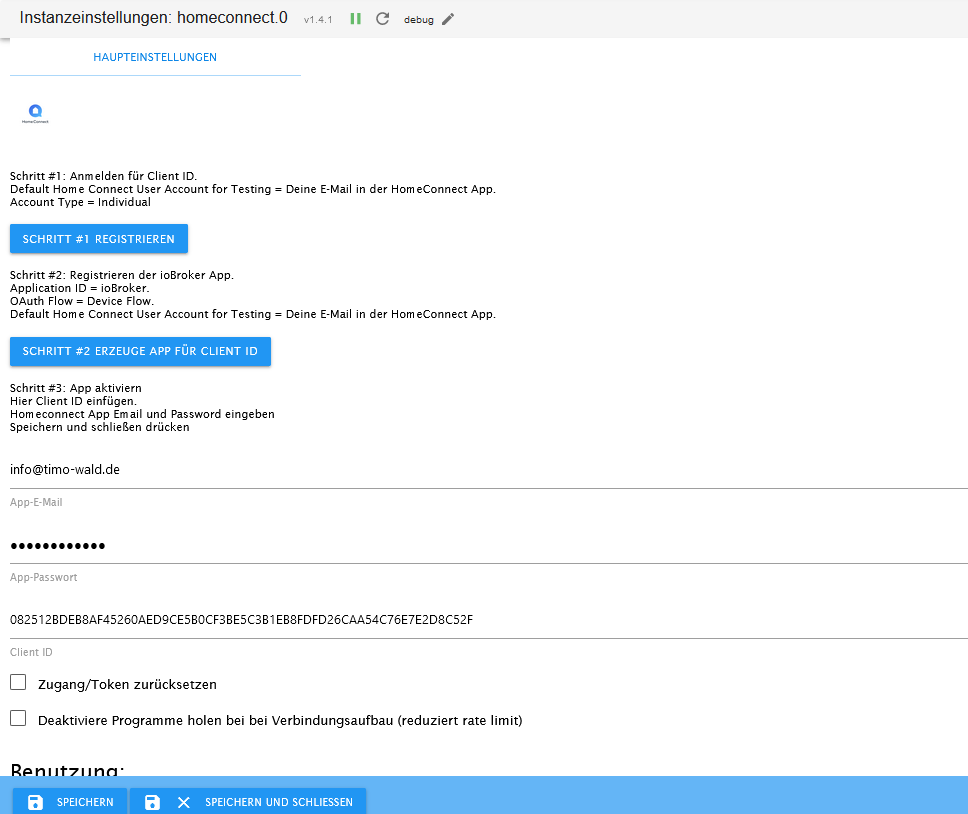
Dann aber jetzt , Screenshot bitte von den Homeconnect Einstellungen im Adapter.@haselchen Hallo hier der Screenshot von meinem Homeconnect Adapter.
-
@haselchen wo gibt es bei dem Adapter ein Polling Intervall zum einstellen?
-
@haselchen Hallo hier der Screenshot von meinem Homeconnect Adapter.
-
wie ist jetzt der aktuelle Status vom Adapter? Setzte ihn mal jetzt auf debug und starte ihn einmal durch.
@tt-tom So sieht der LOG nach dem Starten aus.
2024-07-05 12:49:57.741 - info: admin.0 (17537) ==> Connected system.user.admin from ::ffff:192.168.9.241 2024-07-05 12:49:59.994 - info: admin.0 (17537) <== Disconnect system.user.admin from ::ffff:192.168.9.241 2024-07-05 12:50:03.903 - info: luxtronik2.0 (16839) Heatpump busy, will retry later 2024-07-05 12:50:12.630 - info: host.iobroker "system.adapter.homeconnect.0" enabled 2024-07-05 12:50:13.014 - info: host.iobroker instance system.adapter.homeconnect.0 started with pid 32710 2024-07-05 12:50:13.903 - debug: homeconnect.0 (32710) Redis Objects: Use Redis connection: 127.0.0.1:9001 2024-07-05 12:50:13.969 - debug: homeconnect.0 (32710) Objects client ready ... initialize now 2024-07-05 12:50:13.970 - debug: homeconnect.0 (32710) Objects create System PubSub Client 2024-07-05 12:50:13.971 - debug: homeconnect.0 (32710) Objects create User PubSub Client 2024-07-05 12:50:14.125 - debug: homeconnect.0 (32710) Objects client initialize lua scripts 2024-07-05 12:50:14.131 - debug: homeconnect.0 (32710) Objects connected to redis: 127.0.0.1:9001 2024-07-05 12:50:14.239 - debug: homeconnect.0 (32710) Redis States: Use Redis connection: 127.0.0.1:9000 2024-07-05 12:50:14.290 - debug: homeconnect.0 (32710) States create System PubSub Client 2024-07-05 12:50:14.291 - debug: homeconnect.0 (32710) States create User PubSub Client 2024-07-05 12:50:14.423 - debug: homeconnect.0 (32710) States connected to redis: 127.0.0.1:9000 2024-07-05 12:50:14.511 - debug: homeconnect.0 (32710) Plugin sentry Initialize Plugin (enabled=true) 2024-07-05 12:50:14.849 - info: homeconnect.0 (32710) starting. Version 1.4.1 in /opt/iobroker/node_modules/iobroker.homeconnect, node: v20.15.0, js-controller: 5.0.19 2024-07-05 12:50:14.909 - debug: homeconnect.0 (32710) Found current session 2024-07-05 12:50:14.910 - debug: homeconnect.0 (32710) Refresh Token 2024-07-05 12:50:15.220 - debug: homeconnect.0 (32710) -
@tt-tom So sieht der LOG nach dem Starten aus.
2024-07-05 12:49:57.741 - info: admin.0 (17537) ==> Connected system.user.admin from ::ffff:192.168.9.241 2024-07-05 12:49:59.994 - info: admin.0 (17537) <== Disconnect system.user.admin from ::ffff:192.168.9.241 2024-07-05 12:50:03.903 - info: luxtronik2.0 (16839) Heatpump busy, will retry later 2024-07-05 12:50:12.630 - info: host.iobroker "system.adapter.homeconnect.0" enabled 2024-07-05 12:50:13.014 - info: host.iobroker instance system.adapter.homeconnect.0 started with pid 32710 2024-07-05 12:50:13.903 - debug: homeconnect.0 (32710) Redis Objects: Use Redis connection: 127.0.0.1:9001 2024-07-05 12:50:13.969 - debug: homeconnect.0 (32710) Objects client ready ... initialize now 2024-07-05 12:50:13.970 - debug: homeconnect.0 (32710) Objects create System PubSub Client 2024-07-05 12:50:13.971 - debug: homeconnect.0 (32710) Objects create User PubSub Client 2024-07-05 12:50:14.125 - debug: homeconnect.0 (32710) Objects client initialize lua scripts 2024-07-05 12:50:14.131 - debug: homeconnect.0 (32710) Objects connected to redis: 127.0.0.1:9001 2024-07-05 12:50:14.239 - debug: homeconnect.0 (32710) Redis States: Use Redis connection: 127.0.0.1:9000 2024-07-05 12:50:14.290 - debug: homeconnect.0 (32710) States create System PubSub Client 2024-07-05 12:50:14.291 - debug: homeconnect.0 (32710) States create User PubSub Client 2024-07-05 12:50:14.423 - debug: homeconnect.0 (32710) States connected to redis: 127.0.0.1:9000 2024-07-05 12:50:14.511 - debug: homeconnect.0 (32710) Plugin sentry Initialize Plugin (enabled=true) 2024-07-05 12:50:14.849 - info: homeconnect.0 (32710) starting. Version 1.4.1 in /opt/iobroker/node_modules/iobroker.homeconnect, node: v20.15.0, js-controller: 5.0.19 2024-07-05 12:50:14.909 - debug: homeconnect.0 (32710) Found current session 2024-07-05 12:50:14.910 - debug: homeconnect.0 (32710) Refresh Token 2024-07-05 12:50:15.220 - debug: homeconnect.0 (32710) -
@timowald hat der Connect geklappt? Wenn ja, dann lass mal laufen und kontrolliere mal nach 2h ob es Auffälligkeiten gibt.
-
@timowald
Was sagt denn das log, hat es die Geräte gefunden. Du kannst in der Protokollansicht nach dem Adapter filtern. Zeig doch mal was er bist jetzt gemacht hat.Gruß Tom
Wenn meine Hilfe erfolgreich war, benutze bitte das Voting unten rechts im Beitrag
Public Transport
https://github.com/tt-tom17/ioBroker.public-transport
https://github.com/tt-tom17/ioBroker.public-transport/wikiNSPanel Adapter Wiki
https://github.com/ticaki/ioBroker.nspanel-lovelace-ui/wiki -
@timowald
Was sagt denn das log, hat es die Geräte gefunden. Du kannst in der Protokollansicht nach dem Adapter filtern. Zeig doch mal was er bist jetzt gemacht hat. -
@haselchen
Wie er schreibt kommen keine Daten. Frage ist, ob er nach dem Connect auch die Geräte findet bzw auslesen kann.@TimoWald
Wie sieht es denn in der App aus. Bekommst du da alles angezeigt?Gruß Tom
Wenn meine Hilfe erfolgreich war, benutze bitte das Voting unten rechts im Beitrag
Public Transport
https://github.com/tt-tom17/ioBroker.public-transport
https://github.com/tt-tom17/ioBroker.public-transport/wikiNSPanel Adapter Wiki
https://github.com/ticaki/ioBroker.nspanel-lovelace-ui/wiki


Hey! Du scheinst an dieser Unterhaltung interessiert zu sein, hast aber noch kein Konto.
Hast du es satt, bei jedem Besuch durch die gleichen Beiträge zu scrollen? Wenn du dich für ein Konto anmeldest, kommst du immer genau dorthin zurück, wo du zuvor warst, und kannst dich über neue Antworten benachrichtigen lassen (entweder per E-Mail oder Push-Benachrichtigung). Du kannst auch Lesezeichen speichern und Beiträge positiv bewerten, um anderen Community-Mitgliedern deine Wertschätzung zu zeigen.
Mit deinem Input könnte dieser Beitrag noch besser werden 💗
Registrieren Anmelden199
Online33.0k
Benutzende83.7k
Themen1.3m
Beiträge