

Skip to content
  • Home
  • Aktuell
  • Tags
  • 0 Ungelesen 0
  • Kategorien
  • Unreplied
  • Beliebt
  • GitHub
  • Docu
  • Hilfe
Skins
  • Light
  • Brite
  • Cerulean
  • Cosmo
  • Flatly
  • Journal
  • Litera
  • Lumen
  • Lux
  • Materia
  • Minty
  • Morph
  • Pulse
  • Sandstone
  • Simplex
  • Sketchy
  • Spacelab
  • United
  • Yeti
  • Zephyr
  • Dark
  • Cyborg
  • Darkly
  • Quartz
  • Slate
  • Solar
  • Superhero
  • Vapor

  • Standard: (Kein Skin)
  • Kein Skin
Einklappen
ioBroker Logo

Community Forum

donate donate
  1. ioBroker Community Home
  2. Deutsch
  3. Hardware
  4. S0 - Signal mit Wemos D1 Mini erzeugen?

NEWS

  • Neuer Blogbeitrag: Monatsrückblick - Dezember 2025 🎄
    BluefoxB
    Bluefox
    11
    1
    529

  • Weihnachtsangebot 2025! 🎄
    BluefoxB
    Bluefox
    24
    1
    1.7k

  • UPDATE 31.10.: Amazon Alexa - ioBroker Skill läuft aus ?
    apollon77A
    apollon77
    48
    3
    9.6k

S0 - Signal mit Wemos D1 Mini erzeugen?

Geplant Angeheftet Gesperrt Verschoben Hardware
wemos d1 minis0-signalwärmepumpepv-anlagepv-überschusswärmepumpe pv photovoltaikfronius wechselrichter
78 Beiträge 7 Kommentatoren 12.2k Aufrufe 7 Watching
  • Älteste zuerst
  • Neuste zuerst
  • Meiste Stimmen
Antworten
  • In einem neuen Thema antworten
Anmelden zum Antworten
Dieses Thema wurde gelöscht. Nur Nutzer mit entsprechenden Rechten können es sehen.
  • D Dieter_P

    @mistral
    War für mich nur eine Option um die Schwankung von 10% etwas erklärbarer zu machen. 5% Widerstände dürften wohl kaum noch zum Einsatz kommen und da hätte man ggf etwas optimieren können indem du die Widerstände vorher ausmist und wählst. Aber bei 1% kann man sich das schenken ;)

    Klingt gut, lass mal wissen wenn es in Funktion läuft.

    M Offline
    M Offline
    Mistral
    schrieb am zuletzt editiert von Mistral
    #46

    @dieter_p
    Vielen Dank und ja, werde mich dann gerne wieder melden. Bis es läuft, wird es wahrscheinlich noch etwas dauern: Ich warte noch auf das PCB, welches ich dafür erstellt und bestellt habe (aktuell erst auf einem breadboard) und noch auf ein paar kleinere Komponenten.
    Betreffs Schwankung gehe ich ziemlich sicher vom Optokoppler aus: Dort ist für den 4N35 bei LTSpice keine Komponente direkt dabei und ich musste dies daher im Internet suchen. Und mein 4N35 Optokoppler hatte ich bei mir bereits "herumliegen" und weiss auch nicht, von welchem Hersteller dieser ist.

    1 Antwort Letzte Antwort
    0
    • D Dieter_P

      @mistral
      War für mich nur eine Option um die Schwankung von 10% etwas erklärbarer zu machen. 5% Widerstände dürften wohl kaum noch zum Einsatz kommen und da hätte man ggf etwas optimieren können indem du die Widerstände vorher ausmist und wählst. Aber bei 1% kann man sich das schenken ;)

      Klingt gut, lass mal wissen wenn es in Funktion läuft.

      M Offline
      M Offline
      Mistral
      schrieb am zuletzt editiert von Mistral
      #47

      @dieter_p Ist jetzt in Funktion und läuft :-)
      Wie gut die Regelung seitens der WP ist, kann ich noch nicht beurteilen, aber das S0 Signal wird bei mir einwandfrei übermittelt und anhand der aktuellen PV Einspeiseleistung berechnet.
      Vielen Dank!

      A 1 Antwort Letzte Antwort
      1
      • M Mistral

        @dieter_p Ist jetzt in Funktion und läuft :-)
        Wie gut die Regelung seitens der WP ist, kann ich noch nicht beurteilen, aber das S0 Signal wird bei mir einwandfrei übermittelt und anhand der aktuellen PV Einspeiseleistung berechnet.
        Vielen Dank!

        A Offline
        A Offline
        Andy123Andy1
        schrieb am zuletzt editiert von Andy123Andy1
        #48

        @mistral Guten Morgen, ich suche gerade auch nach einer Lösung ein S0 Signal zu erzeugen. Kannst du die verwendetet Hardware und evtl. den Code der Öffentlichkeit zur Verfügung stellen? Dann brauche ich nicht alles neu Recherchieren und Testen :)

        Das ist die benötigte Hardware wenn ich es richtig aus den vorherigen Post lese:
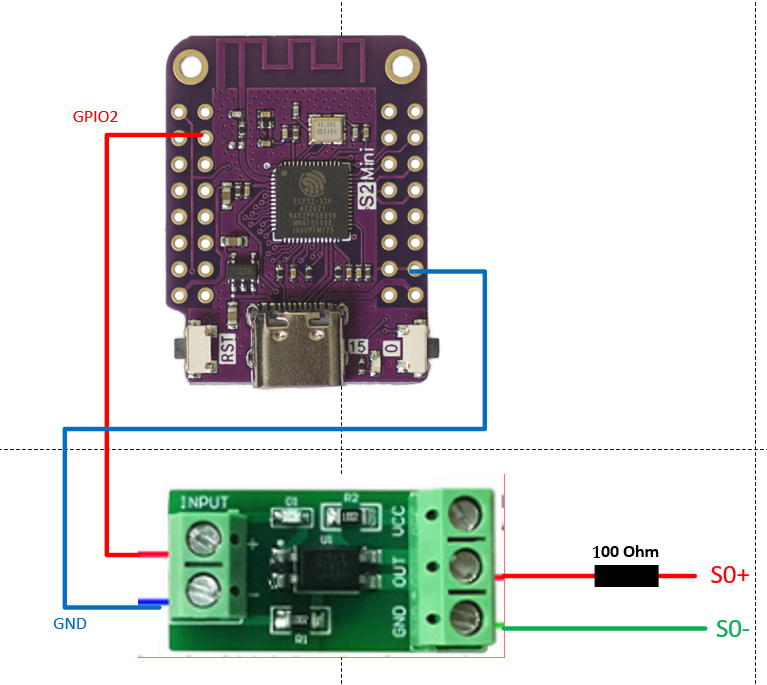
        1675434481039-d6d9c7f4-3b51-4f12-9c83-7a71a0238e2c-grafik.png

        Wenn jetzt noch jemand einen Code Schnipsel hätte wäre ich glücklich :)

        Hab mal rumprobiert hier mein Ergebnis:

        #include <ESP8266WiFi.h>
        #include <PubSubClient.h>
        
        // WiFi configuration
        const char* ssid = "your_SSID";
        const char* password = "your_PASSWORD";
        
        // MQTT configuration
        const char* mqtt_server = "broker_address";
        const char* mqtt_topic = "energy/consumption";
        const int mqtt_port = 1883;
        
        // S0 Pin configuration
        const int s0Pin = 7; // Pin connected to the S0 output signal
        
        // Timing variables
        unsigned long pulseDuration = 100; // Duration of each pulse in milliseconds
        unsigned long pulseInterval = 720; // Interval between pulses in milliseconds (initial value)
        
        // WiFi and MQTT clients
        WiFiClient espClient;
        PubSubClient client(espClient);
        
        // Function to handle received MQTT messages
        void callback(char* topic, byte* payload, unsigned int length) {
          char message[length + 1];
          strncpy(message, (char*)payload, length);
          message[length] = '\0';
        
          float kWh = atof(message); // Convert received message to float
        
          // Assuming 1000 pulses per kWh and 3600 seconds in an hour
          pulseInterval = (3600 * 1000) / (kWh * 1000) - pulseDuration;
        }
        
        void setup() {
          // Set the S0 pin as an output
          pinMode(s0Pin, OUTPUT);
        
          // Initialize Serial for debugging
          Serial.begin(115200);
        
          // Connect to WiFi
          setup_wifi();
        
          // Set up MQTT client
          client.setServer(mqtt_server, mqtt_port);
          client.setCallback(callback);
        
          // Connect to MQTT broker
          reconnect();
        }
        
        void loop() {
          if (!client.connected()) {
            reconnect();
          }
          client.loop();
        
          // Generate a pulse
          digitalWrite(s0Pin, HIGH);  // Set the S0 pin HIGH
          delay(pulseDuration);       // Wait for the pulse duration
          digitalWrite(s0Pin, LOW);   // Set the S0 pin LOW
          delay(pulseInterval);       // Wait for the interval before the next pulse
        }
        
        void setup_wifi() {
          delay(10);
          // Connect to WiFi
          Serial.println();
          Serial.print("Connecting to ");
          Serial.println(ssid);
        
          WiFi.begin(ssid, password);
        
          while (WiFi.status() != WL_CONNECTED) {
            delay(500);
            Serial.print(".");
          }
        
          Serial.println("");
          Serial.println("WiFi connected");
          Serial.println("IP address: ");
          Serial.println(WiFi.localIP());
        }
        
        void reconnect() {
          // Loop until we're reconnected
          while (!client.connected()) {
            Serial.print("Attempting MQTT connection...");
            // Attempt to connect
            if (client.connect("ESP8266Client")) {
              Serial.println("connected");
              // Subscribe to topic
              client.subscribe(mqtt_topic);
            } else {
              Serial.print("failed, rc=");
              Serial.print(client.state());
              Serial.println(" try again in 5 seconds");
              // Wait 5 seconds before retrying
              delay(5000);
            }
          }
        }


        Hab leider kein Oszilloskop um das mal zu prüfen.

        D 1 Antwort Letzte Antwort
        0
        • A Andy123Andy1

          @mistral Guten Morgen, ich suche gerade auch nach einer Lösung ein S0 Signal zu erzeugen. Kannst du die verwendetet Hardware und evtl. den Code der Öffentlichkeit zur Verfügung stellen? Dann brauche ich nicht alles neu Recherchieren und Testen :)

          Das ist die benötigte Hardware wenn ich es richtig aus den vorherigen Post lese:

          1675434481039-d6d9c7f4-3b51-4f12-9c83-7a71a0238e2c-grafik.png

          Wenn jetzt noch jemand einen Code Schnipsel hätte wäre ich glücklich :)

          Hab mal rumprobiert hier mein Ergebnis:

          #include <ESP8266WiFi.h>
          #include <PubSubClient.h>
          
          // WiFi configuration
          const char* ssid = "your_SSID";
          const char* password = "your_PASSWORD";
          
          // MQTT configuration
          const char* mqtt_server = "broker_address";
          const char* mqtt_topic = "energy/consumption";
          const int mqtt_port = 1883;
          
          // S0 Pin configuration
          const int s0Pin = 7; // Pin connected to the S0 output signal
          
          // Timing variables
          unsigned long pulseDuration = 100; // Duration of each pulse in milliseconds
          unsigned long pulseInterval = 720; // Interval between pulses in milliseconds (initial value)
          
          // WiFi and MQTT clients
          WiFiClient espClient;
          PubSubClient client(espClient);
          
          // Function to handle received MQTT messages
          void callback(char* topic, byte* payload, unsigned int length) {
            char message[length + 1];
            strncpy(message, (char*)payload, length);
            message[length] = '\0';
          
            float kWh = atof(message); // Convert received message to float
          
            // Assuming 1000 pulses per kWh and 3600 seconds in an hour
            pulseInterval = (3600 * 1000) / (kWh * 1000) - pulseDuration;
          }
          
          void setup() {
            // Set the S0 pin as an output
            pinMode(s0Pin, OUTPUT);
          
            // Initialize Serial for debugging
            Serial.begin(115200);
          
            // Connect to WiFi
            setup_wifi();
          
            // Set up MQTT client
            client.setServer(mqtt_server, mqtt_port);
            client.setCallback(callback);
          
            // Connect to MQTT broker
            reconnect();
          }
          
          void loop() {
            if (!client.connected()) {
              reconnect();
            }
            client.loop();
          
            // Generate a pulse
            digitalWrite(s0Pin, HIGH);  // Set the S0 pin HIGH
            delay(pulseDuration);       // Wait for the pulse duration
            digitalWrite(s0Pin, LOW);   // Set the S0 pin LOW
            delay(pulseInterval);       // Wait for the interval before the next pulse
          }
          
          void setup_wifi() {
            delay(10);
            // Connect to WiFi
            Serial.println();
            Serial.print("Connecting to ");
            Serial.println(ssid);
          
            WiFi.begin(ssid, password);
          
            while (WiFi.status() != WL_CONNECTED) {
              delay(500);
              Serial.print(".");
            }
          
            Serial.println("");
            Serial.println("WiFi connected");
            Serial.println("IP address: ");
            Serial.println(WiFi.localIP());
          }
          
          void reconnect() {
            // Loop until we're reconnected
            while (!client.connected()) {
              Serial.print("Attempting MQTT connection...");
              // Attempt to connect
              if (client.connect("ESP8266Client")) {
                Serial.println("connected");
                // Subscribe to topic
                client.subscribe(mqtt_topic);
              } else {
                Serial.print("failed, rc=");
                Serial.print(client.state());
                Serial.println(" try again in 5 seconds");
                // Wait 5 seconds before retrying
                delay(5000);
              }
            }
          }


          Hab leider kein Oszilloskop um das mal zu prüfen.

          D Offline
          D Offline
          Dieter_P
          schrieb am zuletzt editiert von Dieter_P
          #49

          Hab leider kein Oszilloskop um das mal zu prüfen.

          Wenn Du mir einen "easy" weg erklärst wie ich das in den ESP32 reinbekomme, schließe ich mal ein Oszi dran an.

          A 1 Antwort Letzte Antwort
          0
          • D Dieter_P

            Hab leider kein Oszilloskop um das mal zu prüfen.

            Wenn Du mir einen "easy" weg erklärst wie ich das in den ESP32 reinbekomme, schließe ich mal ein Oszi dran an.

            A Offline
            A Offline
            Andy123Andy1
            schrieb am zuletzt editiert von Andy123Andy1
            #50

            @dieter_p Ich würde das mit Adurino IDE auf einen ESP flashen.

            Hier der Code vereinfacht und ohne Wifi & MQTT. Das sollte jetzt 5kwH abbilden.

            // S0 Pin configuration
            const int s0Pin = 7; // Pin connected to the S0 output signal
            
            // Timing variables
            unsigned long pulseDuration = 100; // Duration of each pulse in milliseconds
            // replaced with static value
            unsigned long pulseInterval = (3600 * 1000) / (5 * 1000) - pulseDuration; // Interval between pulses in milliseconds (initial value)
            
            
            void setup() {
              // Set the S0 pin as an output
              pinMode(s0Pin, OUTPUT);
            
              // Initialize Serial for debugging
              Serial.begin(115200);
            }
            
            void loop() {
              // Generate a pulse
              digitalWrite(s0Pin, HIGH);  // Set the S0 pin HIGH
              delay(pulseDuration);       // Wait for the pulse duration
              digitalWrite(s0Pin, LOW);   // Set the S0 pin LOW
              delay(pulseInterval);       // Wait for the interval before the next pulse
            }


            D 2 Antworten Letzte Antwort
            0
            • A Andy123Andy1

              @dieter_p Ich würde das mit Adurino IDE auf einen ESP flashen.

              Hier der Code vereinfacht und ohne Wifi & MQTT. Das sollte jetzt 5kwH abbilden.

              // S0 Pin configuration
              const int s0Pin = 7; // Pin connected to the S0 output signal
              
              // Timing variables
              unsigned long pulseDuration = 100; // Duration of each pulse in milliseconds
              // replaced with static value
              unsigned long pulseInterval = (3600 * 1000) / (5 * 1000) - pulseDuration; // Interval between pulses in milliseconds (initial value)
              
              
              void setup() {
                // Set the S0 pin as an output
                pinMode(s0Pin, OUTPUT);
              
                // Initialize Serial for debugging
                Serial.begin(115200);
              }
              
              void loop() {
                // Generate a pulse
                digitalWrite(s0Pin, HIGH);  // Set the S0 pin HIGH
                delay(pulseDuration);       // Wait for the pulse duration
                digitalWrite(s0Pin, LOW);   // Set the S0 pin LOW
                delay(pulseInterval);       // Wait for the interval before the next pulse
              }


              D Offline
              D Offline
              Dieter_P
              schrieb am zuletzt editiert von Dieter_P
              #51

              @andy123andy1 said in S0 - Signal mit Wemos D1 Mini erzeugen?:

              @dieter_p Ich würde das mit Adurino IDE auf einen ESP flashen.

              Bin Tasmota/ESPEasy verseucht, aber wird man ja nicht dümmer durch etwas Neues zu probieren. Starte mal bei mir die Umgebung aufzusetzen und melde mich.

              Alternativ die "dumme" Frage eine .bin datei daraus kannst Du mir nicht erzeugen und ich flashe sie einfach auf den ESP?

              A 1 Antwort Letzte Antwort
              0
              • D Dieter_P

                @andy123andy1 said in S0 - Signal mit Wemos D1 Mini erzeugen?:

                @dieter_p Ich würde das mit Adurino IDE auf einen ESP flashen.

                Bin Tasmota/ESPEasy verseucht, aber wird man ja nicht dümmer durch etwas Neues zu probieren. Starte mal bei mir die Umgebung aufzusetzen und melde mich.

                Alternativ die "dumme" Frage eine .bin datei daraus kannst Du mir nicht erzeugen und ich flashe sie einfach auf den ESP?

                A Offline
                A Offline
                Andy123Andy1
                schrieb am zuletzt editiert von
                #52

                Doch das geht ich müsste nur welchen welchen ESP.

                D 1 Antwort Letzte Antwort
                0
                • A Andy123Andy1

                  Doch das geht ich müsste nur welchen welchen ESP.

                  D Offline
                  D Offline
                  Dieter_P
                  schrieb am zuletzt editiert von Dieter_P
                  #53

                  @andy123andy1

                  Hab einen ESP32 S2 hier (wie auf der Zeichnung/Screenshot)

                  Edit: den configurierten S0 Pin hast Du in der letzten Version rausgenommen, bleibt bei GPIO 7 ?

                  A 1 Antwort Letzte Antwort
                  0
                  • D Dieter_P

                    @andy123andy1

                    Hab einen ESP32 S2 hier (wie auf der Zeichnung/Screenshot)

                    Edit: den configurierten S0 Pin hast Du in der letzten Version rausgenommen, bleibt bei GPIO 7 ?

                    A Offline
                    A Offline
                    Andy123Andy1
                    schrieb am zuletzt editiert von Andy123Andy1
                    #54

                    @dieter_p

                    sketch_jun25a.ino.bin

                    ist die 7

                    D 1 Antwort Letzte Antwort
                    1
                    • A Andy123Andy1

                      @dieter_p

                      sketch_jun25a.ino.bin

                      ist die 7

                      D Offline
                      D Offline
                      Dieter_P
                      schrieb am zuletzt editiert von
                      #55

                      @andy123andy1

                      kann keine Funktion/Signalpuls messen

                      Hab zum Test nochmal ESPEasy zum Vergleich genutzt und hier lässt sich ein Puls messen.

                      A 1 Antwort Letzte Antwort
                      0
                      • D Dieter_P

                        @andy123andy1

                        kann keine Funktion/Signalpuls messen

                        Hab zum Test nochmal ESPEasy zum Vergleich genutzt und hier lässt sich ein Puls messen.

                        A Offline
                        A Offline
                        Andy123Andy1
                        schrieb am zuletzt editiert von
                        #56

                        Komisch nochmal das gleiche mit PIN 2

                        sketch_jun25a.ino.bin

                        D 1 Antwort Letzte Antwort
                        0
                        • A Andy123Andy1

                          Komisch nochmal das gleiche mit PIN 2

                          sketch_jun25a.ino.bin

                          D Offline
                          D Offline
                          Dieter_P
                          schrieb am zuletzt editiert von
                          #57

                          @andy123andy1

                          bisher nein und mit ESPEasy alles wie gehabt:
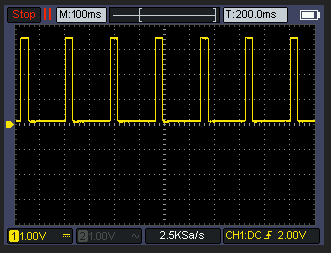
                          71546929-9cdb-465d-8acc-26a5739b9bca-grafik.png

                          Der ESP32S2 ist am seriellen Anschluß etwas speziell, daher sehe ich im Moment keine Log/Terminal Daten ob er überhaupt startet.

                          Gucke mal ob ich was anderes hier hab.

                          1 Antwort Letzte Antwort
                          0
                          • A Andy123Andy1

                            @dieter_p Ich würde das mit Adurino IDE auf einen ESP flashen.

                            Hier der Code vereinfacht und ohne Wifi & MQTT. Das sollte jetzt 5kwH abbilden.

                            // S0 Pin configuration
                            const int s0Pin = 7; // Pin connected to the S0 output signal
                            
                            // Timing variables
                            unsigned long pulseDuration = 100; // Duration of each pulse in milliseconds
                            // replaced with static value
                            unsigned long pulseInterval = (3600 * 1000) / (5 * 1000) - pulseDuration; // Interval between pulses in milliseconds (initial value)
                            
                            
                            void setup() {
                              // Set the S0 pin as an output
                              pinMode(s0Pin, OUTPUT);
                            
                              // Initialize Serial for debugging
                              Serial.begin(115200);
                            }
                            
                            void loop() {
                              // Generate a pulse
                              digitalWrite(s0Pin, HIGH);  // Set the S0 pin HIGH
                              delay(pulseDuration);       // Wait for the pulse duration
                              digitalWrite(s0Pin, LOW);   // Set the S0 pin LOW
                              delay(pulseInterval);       // Wait for the interval before the next pulse
                            }


                            D Offline
                            D Offline
                            Dieter_P
                            schrieb am zuletzt editiert von
                            #58

                            @andy123andy1 said in S0 - Signal mit Wemos D1 Mini erzeugen?:

                            // S0 Pin configuration
                            const int s0Pin = 7; // Pin connected to the S0 output signal

                            // Timing variables
                            unsigned long pulseDuration = 100; // Duration of each pulse in milliseconds
                            // replaced with static value
                            unsigned long pulseInterval = (3600 * 1000) / (5 * 1000) - pulseDuration; // Interval between pulses in milliseconds (initial value)

                            void setup() {
                            // Set the S0 pin as an output
                            pinMode(s0Pin, OUTPUT);

                            // Initialize Serial for debugging
                            Serial.begin(115200);
                            }

                            void loop() {
                            // Generate a pulse
                            digitalWrite(s0Pin, HIGH); // Set the S0 pin HIGH
                            delay(pulseDuration); // Wait for the pulse duration
                            digitalWrite(s0Pin, LOW); // Set the S0 pin LOW
                            delay(pulseInterval); // Wait for the interval before the next pulse
                            }

                            So, hab das mal selbst unter Adruino IDE auf den ESP geladen.
                            Funtioniert:
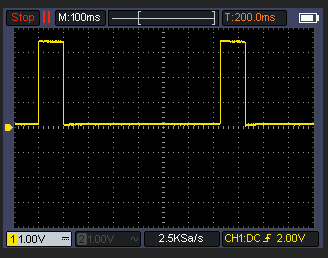
                            8565b262-37ba-46b1-b844-bdba82af2544-grafik.png

                            A 1 Antwort Letzte Antwort
                            0
                            • D Dieter_P

                              @andy123andy1 said in S0 - Signal mit Wemos D1 Mini erzeugen?:

                              // S0 Pin configuration
                              const int s0Pin = 7; // Pin connected to the S0 output signal

                              // Timing variables
                              unsigned long pulseDuration = 100; // Duration of each pulse in milliseconds
                              // replaced with static value
                              unsigned long pulseInterval = (3600 * 1000) / (5 * 1000) - pulseDuration; // Interval between pulses in milliseconds (initial value)

                              void setup() {
                              // Set the S0 pin as an output
                              pinMode(s0Pin, OUTPUT);

                              // Initialize Serial for debugging
                              Serial.begin(115200);
                              }

                              void loop() {
                              // Generate a pulse
                              digitalWrite(s0Pin, HIGH); // Set the S0 pin HIGH
                              delay(pulseDuration); // Wait for the pulse duration
                              digitalWrite(s0Pin, LOW); // Set the S0 pin LOW
                              delay(pulseInterval); // Wait for the interval before the next pulse
                              }

                              So, hab das mal selbst unter Adruino IDE auf den ESP geladen.
                              Funtioniert:
                              8565b262-37ba-46b1-b844-bdba82af2544-grafik.png

                              A Offline
                              A Offline
                              Andy123Andy1
                              schrieb am zuletzt editiert von
                              #59

                              Richtig cool. Dann kann man dem code von oben und dem bischen Hardware sich das s0 signal für die lwp bauen. Ich hab mal 3 von den PC817 bestellt und werde mal testen, ob die lwp was versteht.

                              A 1 Antwort Letzte Antwort
                              0
                              • A Andy123Andy1

                                Richtig cool. Dann kann man dem code von oben und dem bischen Hardware sich das s0 signal für die lwp bauen. Ich hab mal 3 von den PC817 bestellt und werde mal testen, ob die lwp was versteht.

                                A Offline
                                A Offline
                                Andy123Andy1
                                schrieb am zuletzt editiert von Andy123Andy1
                                #60

                                Kleines update das ist jetzt das finale "script" auf einem Adurino Nano. Der sendet pauschal 2kwH an die LWP. Man kann wenn man will über eine USB/Serial Verbindung die richtige kwH in Fließkomma (1.3 etc) setzen. Bei mir hängt der Nano am USB vom "NAS".

                                const int s0Pin = 7; // Pin connected to the S0 output signal
                                
                                // Timing variables
                                unsigned long pulseDuration = 100; // Duration of each pulse in milliseconds
                                unsigned long pulseInterval = 3500; // Interval between pulses in milliseconds (initial value)
                                float kWh = 1.0; // Initial kWh value
                                
                                unsigned long previousMillis = 0; // Store the last time a pulse was generated
                                unsigned long pulseEndMillis = 0; // Store the end time of the pulse
                                bool pulseActive = false; // Flag to track pulse state
                                
                                void setup() {
                                  // Set the S0 pin as an output
                                  pinMode(s0Pin, OUTPUT);
                                
                                  // Initialize Serial for communication
                                  Serial.begin(115200);
                                  while (!Serial) {
                                    ; // Wait for the serial port to connect. Needed for native USB port only
                                  }
                                
                                  Serial.println("Enter kWh value:");
                                }
                                
                                void loop() {
                                  // Check if data is available on the serial port
                                  if (Serial.available() > 0) {
                                    String input = Serial.readStringUntil('\n'); // Read the input
                                    kWh = input.toFloat(); // Convert input to float
                                
                                    if (kWh > 0) {
                                      // Calculate pulse interval based on kWh value
                                      pulseInterval = (3600.0 * 1000.0) / (kWh * 1000.0) - pulseDuration;
                                      Serial.print("Updated kWh: ");
                                      Serial.println(kWh);
                                      Serial.print("Updated pulse interval: ");
                                      Serial.println(pulseInterval);
                                    }
                                  }
                                
                                  unsigned long currentMillis = millis();
                                
                                  // Check if it's time to generate a new pulse
                                  if (currentMillis - previousMillis >= pulseInterval && !pulseActive) {
                                    // Save the last time a pulse was started
                                    previousMillis = currentMillis;
                                    
                                    // Start the pulse
                                    digitalWrite(s0Pin, HIGH);
                                    pulseEndMillis = currentMillis + pulseDuration;
                                    pulseActive = true;
                                  }
                                
                                  // Check if it's time to end the pulse
                                  if (pulseActive && currentMillis >= pulseEndMillis) {
                                    digitalWrite(s0Pin, LOW);
                                    pulseActive = false;
                                  }
                                }
                                

                                senden vom pc aus könnte so aussehen:

                                import serial
                                import time
                                
                                # Configure the serial port and baud rate
                                ser = serial.Serial('/dev/ttyUSB0', 115200)  # Change 'COM3' to the appropriate port for your system
                                time.sleep(2)  # Give some time to establish the connection
                                
                                def send_kwh_value(kwh):
                                    ser.write(f"{kwh}\n".encode())  # Send kWh value as a string with newline
                                    time.sleep(1)  # Give some time for the Arduino to process and respond
                                
                                    # Read response lines from the serial port
                                    response_lines = []
                                    while ser.in_waiting > 0:
                                        line = ser.readline().decode('utf-8').rstrip()
                                        response_lines.append(line)
                                    
                                    return response_lines
                                
                                # Example usage
                                response = send_kwh_value(5.0)  # Send 5.0 kWh value
                                for line in response:
                                    print(line)
                                
                                ser.close()
                                
                                
                                D 1 Antwort Letzte Antwort
                                0
                                • A Andy123Andy1

                                  Kleines update das ist jetzt das finale "script" auf einem Adurino Nano. Der sendet pauschal 2kwH an die LWP. Man kann wenn man will über eine USB/Serial Verbindung die richtige kwH in Fließkomma (1.3 etc) setzen. Bei mir hängt der Nano am USB vom "NAS".

                                  const int s0Pin = 7; // Pin connected to the S0 output signal
                                  
                                  // Timing variables
                                  unsigned long pulseDuration = 100; // Duration of each pulse in milliseconds
                                  unsigned long pulseInterval = 3500; // Interval between pulses in milliseconds (initial value)
                                  float kWh = 1.0; // Initial kWh value
                                  
                                  unsigned long previousMillis = 0; // Store the last time a pulse was generated
                                  unsigned long pulseEndMillis = 0; // Store the end time of the pulse
                                  bool pulseActive = false; // Flag to track pulse state
                                  
                                  void setup() {
                                    // Set the S0 pin as an output
                                    pinMode(s0Pin, OUTPUT);
                                  
                                    // Initialize Serial for communication
                                    Serial.begin(115200);
                                    while (!Serial) {
                                      ; // Wait for the serial port to connect. Needed for native USB port only
                                    }
                                  
                                    Serial.println("Enter kWh value:");
                                  }
                                  
                                  void loop() {
                                    // Check if data is available on the serial port
                                    if (Serial.available() > 0) {
                                      String input = Serial.readStringUntil('\n'); // Read the input
                                      kWh = input.toFloat(); // Convert input to float
                                  
                                      if (kWh > 0) {
                                        // Calculate pulse interval based on kWh value
                                        pulseInterval = (3600.0 * 1000.0) / (kWh * 1000.0) - pulseDuration;
                                        Serial.print("Updated kWh: ");
                                        Serial.println(kWh);
                                        Serial.print("Updated pulse interval: ");
                                        Serial.println(pulseInterval);
                                      }
                                    }
                                  
                                    unsigned long currentMillis = millis();
                                  
                                    // Check if it's time to generate a new pulse
                                    if (currentMillis - previousMillis >= pulseInterval && !pulseActive) {
                                      // Save the last time a pulse was started
                                      previousMillis = currentMillis;
                                      
                                      // Start the pulse
                                      digitalWrite(s0Pin, HIGH);
                                      pulseEndMillis = currentMillis + pulseDuration;
                                      pulseActive = true;
                                    }
                                  
                                    // Check if it's time to end the pulse
                                    if (pulseActive && currentMillis >= pulseEndMillis) {
                                      digitalWrite(s0Pin, LOW);
                                      pulseActive = false;
                                    }
                                  }
                                  

                                  senden vom pc aus könnte so aussehen:

                                  import serial
                                  import time
                                  
                                  # Configure the serial port and baud rate
                                  ser = serial.Serial('/dev/ttyUSB0', 115200)  # Change 'COM3' to the appropriate port for your system
                                  time.sleep(2)  # Give some time to establish the connection
                                  
                                  def send_kwh_value(kwh):
                                      ser.write(f"{kwh}\n".encode())  # Send kWh value as a string with newline
                                      time.sleep(1)  # Give some time for the Arduino to process and respond
                                  
                                      # Read response lines from the serial port
                                      response_lines = []
                                      while ser.in_waiting > 0:
                                          line = ser.readline().decode('utf-8').rstrip()
                                          response_lines.append(line)
                                      
                                      return response_lines
                                  
                                  # Example usage
                                  response = send_kwh_value(5.0)  # Send 5.0 kWh value
                                  for line in response:
                                      print(line)
                                  
                                  ser.close()
                                  
                                  
                                  D Offline
                                  D Offline
                                  Dieter_P
                                  schrieb am zuletzt editiert von Dieter_P
                                  #61

                                  @andy123andy1

                                  Bist Du sicher das es hier nicht um die Leistung -> W geht?

                                  A 1 Antwort Letzte Antwort
                                  0
                                  • D Dieter_P

                                    @andy123andy1

                                    Bist Du sicher das es hier nicht um die Leistung -> W geht?

                                    A Offline
                                    A Offline
                                    Andy123Andy1
                                    schrieb am zuletzt editiert von
                                    #62

                                    @dieter_p

                                    also laut wikipedia sind es kWh

                                    https://de.wikipedia.org/wiki/Stromzähler

                                    A 1 Antwort Letzte Antwort
                                    0
                                    • A Andy123Andy1

                                      @dieter_p

                                      also laut wikipedia sind es kWh

                                      https://de.wikipedia.org/wiki/Stromzähler

                                      A Offline
                                      A Offline
                                      Andy123Andy1
                                      schrieb am zuletzt editiert von
                                      #63

                                      @andy123andy1

                                      Mit Watt müsste das so aussehen.

                                      const int s0Pin = 7; // Pin connected to the S0 output signal
                                      
                                      // Timing variables
                                      unsigned long pulseDuration = 100; // Duration of each pulse in milliseconds
                                      unsigned long pulseInterval = 3600000 / 1000 - pulseDuration; // Interval between pulses in milliseconds (initial value)
                                      float watts = 1000.0; // Initial watts value
                                      
                                      unsigned long previousMillis = 0; // Store the last time a pulse was generated
                                      unsigned long pulseEndMillis = 0; // Store the end time of the pulse
                                      bool pulseActive = false; // Flag to track pulse state
                                      
                                      void setup() {
                                        // Set the S0 pin as an output
                                        pinMode(s0Pin, OUTPUT);
                                      
                                        // Initialize Serial for communication
                                        Serial.begin(115200);
                                        while (!Serial) {
                                          ; // Wait for the serial port to connect. Needed for native USB port only
                                        }
                                      
                                        Serial.println("Enter watts value:");
                                      }
                                      
                                      void loop() {
                                        // Check if data is available on the serial port
                                        if (Serial.available() > 0) {
                                          String input = Serial.readStringUntil('\n'); // Read the input
                                          watts = input.toFloat(); // Convert input to float
                                      
                                          if (watts > 0) {
                                            // Calculate pulse interval based on watts value
                                            pulseInterval = (3600.0 * 1000.0) / watts - pulseDuration;
                                            Serial.print("Updated watts: ");
                                            Serial.println(watts);
                                            Serial.print("Updated pulse interval: ");
                                            Serial.println(pulseInterval);
                                          }
                                        }
                                      
                                        unsigned long currentMillis = millis();
                                      
                                        // Check if it's time to generate a new pulse
                                        if (currentMillis - previousMillis >= pulseInterval && !pulseActive) {
                                          // Save the last time a pulse was started
                                          previousMillis = currentMillis;
                                          
                                          // Start the pulse
                                          digitalWrite(s0Pin, HIGH);
                                          pulseEndMillis = currentMillis + pulseDuration;
                                          pulseActive = true;
                                        }
                                      
                                        // Check if it's time to end the pulse
                                        if (pulseActive && currentMillis >= pulseEndMillis) {
                                          digitalWrite(s0Pin, LOW);
                                          pulseActive = false;
                                        }
                                      }
                                      

                                      bzw.

                                      import serial
                                      import time
                                      
                                      # Configure the serial port and baud rate
                                      ser = serial.Serial('COM3', 115200)  # Change 'COM3' to the appropriate port for your system
                                      time.sleep(2)  # Give some time to establish the connection
                                      
                                      def send_watts_value(watts):
                                          ser.write(f"{watts}\n".encode())  # Send watts value as a string with newline
                                          time.sleep(1)  # Give some time for the Arduino to process and respond
                                      
                                          # Read response lines from the serial port
                                          response_lines = []
                                          while ser.in_waiting > 0:
                                              line = ser.readline().decode('utf-8').rstrip()
                                              response_lines.append(line)
                                          
                                          return response_lines
                                      
                                      # Example usage
                                      response = send_watts_value(1000.0)  # Send 1000 watts value
                                      for line in response:
                                          print(line)
                                      
                                      response = send_watts_value(1500.5)  # Send 1500.5 watts value
                                      for line in response:
                                          print(line)
                                      
                                      ser.close()
                                      

                                      Dann kann man Watt senden.

                                      A 1 Antwort Letzte Antwort
                                      0
                                      • A Andy123Andy1

                                        @andy123andy1

                                        Mit Watt müsste das so aussehen.

                                        const int s0Pin = 7; // Pin connected to the S0 output signal
                                        
                                        // Timing variables
                                        unsigned long pulseDuration = 100; // Duration of each pulse in milliseconds
                                        unsigned long pulseInterval = 3600000 / 1000 - pulseDuration; // Interval between pulses in milliseconds (initial value)
                                        float watts = 1000.0; // Initial watts value
                                        
                                        unsigned long previousMillis = 0; // Store the last time a pulse was generated
                                        unsigned long pulseEndMillis = 0; // Store the end time of the pulse
                                        bool pulseActive = false; // Flag to track pulse state
                                        
                                        void setup() {
                                          // Set the S0 pin as an output
                                          pinMode(s0Pin, OUTPUT);
                                        
                                          // Initialize Serial for communication
                                          Serial.begin(115200);
                                          while (!Serial) {
                                            ; // Wait for the serial port to connect. Needed for native USB port only
                                          }
                                        
                                          Serial.println("Enter watts value:");
                                        }
                                        
                                        void loop() {
                                          // Check if data is available on the serial port
                                          if (Serial.available() > 0) {
                                            String input = Serial.readStringUntil('\n'); // Read the input
                                            watts = input.toFloat(); // Convert input to float
                                        
                                            if (watts > 0) {
                                              // Calculate pulse interval based on watts value
                                              pulseInterval = (3600.0 * 1000.0) / watts - pulseDuration;
                                              Serial.print("Updated watts: ");
                                              Serial.println(watts);
                                              Serial.print("Updated pulse interval: ");
                                              Serial.println(pulseInterval);
                                            }
                                          }
                                        
                                          unsigned long currentMillis = millis();
                                        
                                          // Check if it's time to generate a new pulse
                                          if (currentMillis - previousMillis >= pulseInterval && !pulseActive) {
                                            // Save the last time a pulse was started
                                            previousMillis = currentMillis;
                                            
                                            // Start the pulse
                                            digitalWrite(s0Pin, HIGH);
                                            pulseEndMillis = currentMillis + pulseDuration;
                                            pulseActive = true;
                                          }
                                        
                                          // Check if it's time to end the pulse
                                          if (pulseActive && currentMillis >= pulseEndMillis) {
                                            digitalWrite(s0Pin, LOW);
                                            pulseActive = false;
                                          }
                                        }
                                        

                                        bzw.

                                        import serial
                                        import time
                                        
                                        # Configure the serial port and baud rate
                                        ser = serial.Serial('COM3', 115200)  # Change 'COM3' to the appropriate port for your system
                                        time.sleep(2)  # Give some time to establish the connection
                                        
                                        def send_watts_value(watts):
                                            ser.write(f"{watts}\n".encode())  # Send watts value as a string with newline
                                            time.sleep(1)  # Give some time for the Arduino to process and respond
                                        
                                            # Read response lines from the serial port
                                            response_lines = []
                                            while ser.in_waiting > 0:
                                                line = ser.readline().decode('utf-8').rstrip()
                                                response_lines.append(line)
                                            
                                            return response_lines
                                        
                                        # Example usage
                                        response = send_watts_value(1000.0)  # Send 1000 watts value
                                        for line in response:
                                            print(line)
                                        
                                        response = send_watts_value(1500.5)  # Send 1500.5 watts value
                                        for line in response:
                                            print(line)
                                        
                                        ser.close()
                                        

                                        Dann kann man Watt senden.

                                        A Offline
                                        A Offline
                                        Andy123Andy1
                                        schrieb am zuletzt editiert von
                                        #64

                                        Ich hab mal alles angeschlossen wo sieht man den ob es funktioniert?

                                        D 1 Antwort Letzte Antwort
                                        0
                                        • A Andy123Andy1

                                          Ich hab mal alles angeschlossen wo sieht man den ob es funktioniert?

                                          D Offline
                                          D Offline
                                          Dieter_P
                                          schrieb am zuletzt editiert von Dieter_P
                                          #65

                                          @andy123andy1
                                          "Da wo es qualmt". Sorry aber das klingt sehr "sportlich". Zu Deiner "lwp" nehme an Luftwärmepumpe, sollte sich etwas in deren Handbuch finden lassen und würde empfehlen vorher die erwartbaren Funktionen in Erfahrung zu bringen um keine Schäden & Gefahren zu erzeugen und die Funktion auch Bestimmungsgemäß zu nutzen.

                                          A 1 Antwort Letzte Antwort
                                          0
                                          Antworten
                                          • In einem neuen Thema antworten
                                          Anmelden zum Antworten
                                          • Älteste zuerst
                                          • Neuste zuerst
                                          • Meiste Stimmen


                                          Support us

                                          ioBroker
                                          Community Adapters
                                          Donate

                                          822

                                          Online

                                          32.5k

                                          Benutzer

                                          81.8k

                                          Themen

                                          1.3m

                                          Beiträge
                                          Community
                                          Impressum | Datenschutz-Bestimmungen | Nutzungsbedingungen | Einwilligungseinstellungen
                                          ioBroker Community 2014-2025
                                          logo
                                          • Anmelden

                                          • Du hast noch kein Konto? Registrieren

                                          • Anmelden oder registrieren, um zu suchen
                                          • Erster Beitrag
                                            Letzter Beitrag
                                          0
                                          • Home
                                          • Aktuell
                                          • Tags
                                          • Ungelesen 0
                                          • Kategorien
                                          • Unreplied
                                          • Beliebt
                                          • GitHub
                                          • Docu
                                          • Hilfe