




(Close) User PI Kein Zugang / Berechtigung
-
Hallo, ich habe mir grade mein neu aufgesetztes System stubellig gemacht.
Wollte zuletzt eine schreib Berichtigung innerhalb der Ordners /home/pi/Videos setzten.
Nun kann der Iobroker dort nicht mehr schreiben.
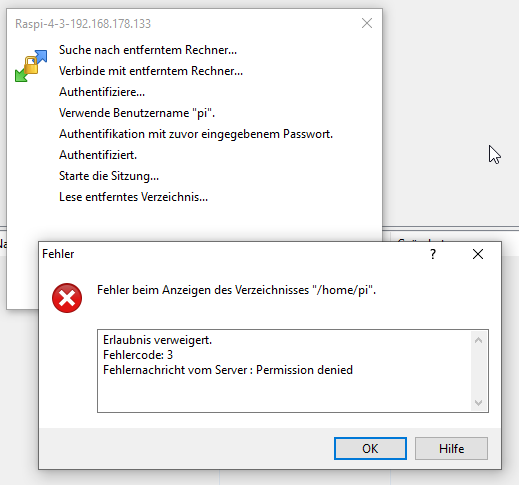
Auch wenn ich mich über die Konsole anmelden möchte klappt es nicht.login as: pi pi@192.168.178.133's password: Linux raspberrypi 6.6.28+rpt-rpi-v8 #1 SMP PREEMPT Debian 1:6.6.28-1+rpt1 (2024- 04-22) aarch64 The programs included with the Debian GNU/Linux system are free software; the exact distribution terms for each program are described in the individual files in /usr/share/doc/*/copyright. Debian GNU/Linux comes with ABSOLUTELY NO WARRANTY, to the extent permitted by applicable law. Last login: Thu May 23 23:48:39 2024 Could not chdir to home directory /home/pi: Permission denied -bash: /home/pi/.bash_profile: Permission denied pi@raspberrypi:/$Könntet ihr mir die Befehle sagen wie ich die Berechtigung für pi wieder hinbekomme?
sourceanalytix.0
2024-05-23 23:51:32.937	error	Troubleshoot Data 0_userdata.0.Strom.9-3-3_Solar-Genutzt custom Data : {"common":{"name":"9-3-3_Solar-Genutzt","desc":"Manuell erzeugt","role":"value","type":"number","read":true,"unit":"kWh","write":true,"def":"","custom":{"sourceanalytix.0":{"enabled":true,"selectedUnit":"Detect automatically","deviceResetLogicEnabled":true,"threshold":1,"start_day":52.316,"start_week":46.209,"start_month":52.316,"start_quarter":0,"start_year":0,"selectedPrice":"ElectricityDay","consumption":true,"meter_values":true,"valueAtDeviceReset":52.316,"valueAtDeviceInit":0,"cumulativeValue":52.316}}},"type":"state","native":{},"_id":"0_userdata.0.Strom.9-3-3_Solar-Genutzt","acl":{"object":1636,"state":1636,"owner":"system.user.admin","ownerGroup":"system.group.administrator"},"from":"system.adapter.sourceanalytix.0","user":"system.user.admin","ts":1714514460088}

sourceanalytix.0
2024-05-23 23:51:32.931	error	Check settings for 0_userdata.0.Strom.9-3-3_Solar-Genutzt ! Known valueAtDeviceReset : (52.316) > known cumulative value (52.315000000000005) cannot proceed

shelly.0
2024-05-23 23:51:13.712	error	[MQTT] Unable to get mqttprefix of client with id "shellyplus2pm-fcb467a6c634"

cloud.3
2024-05-23 23:50:50.347	error	Cloud says: timeout

onvif.0
2024-05-23 23:50:45.040	error	Error Error: ONVIF SOAP Fault: HTTP Error: 401 Unauthorized

onvif.0
2024-05-23 23:50:45.039	error	Failed to login to 192.168.178.151:888 with Manni:& ******W

onvif.0
2024-05-23 23:50:44.997	error	Error Error: ONVIF SOAP Fault: Sender not Authorized. Invalid username or password! You still have 0 attempt(s).

onvif.0
2024-05-23 23:50:44.996	error	Failed to login to 192.168.178.48:80 with Manni:& ******W

onvif.0
2024-05-23 23:50:44.547	error	Error Error: ONVIF SOAP Fault: HTTP Error: 401 Unauthorized

onvif.0
2024-05-23 23:50:44.546	error	Failed to login to 192.168.178.150:888 with Manni:& ******W

onvif.0
2024-05-23 23:50:44.014	error	Error: connect EHOSTUNREACH 192.168.178.110:8080 at TCPConnectWrap.afterConnect [as oncomplete] (node:net:1555:16)

onvif.0
2024-05-23 23:50:44.009	error	You can change user and password under object and edit device or delete device under objects and restart adapter

onvif.0
2024-05-23 23:50:44.008	error	Error initializing device: Error: connect EHOSTUNREACH 192.168.178.110:8080 device: {"id":"192_168_178_110_8080","name":"IPCAM C6F0SfZ0N0P3L0

onvif.0
2024-05-23 23:50:44.006	error	Data: null XML: undefined

cloud.3
2024-05-23 23:50:20.912	error	Cloud says: timeout
host.raspberrypi
2024-05-23 23:48:36.622	error	iobroker npm-install: host.raspberrypi Unknown packetName info. Please install packages from outside the repository using npm!
Gruß Yoda
Stand 05.2025
Raspberry5,linux,arm64,CPUs:4,Geschwindigkeit:2400 MHz,Modell:Cortex-A76,RAM:15.8 GB,Node.js:v20.19.2 -
Hallo, ich habe mir grade mein neu aufgesetztes System stubellig gemacht.
Wollte zuletzt eine schreib Berichtigung innerhalb der Ordners /home/pi/Videos setzten.
Nun kann der Iobroker dort nicht mehr schreiben.
Auch wenn ich mich über die Konsole anmelden möchte klappt es nicht.login as: pi pi@192.168.178.133's password: Linux raspberrypi 6.6.28+rpt-rpi-v8 #1 SMP PREEMPT Debian 1:6.6.28-1+rpt1 (2024- 04-22) aarch64 The programs included with the Debian GNU/Linux system are free software; the exact distribution terms for each program are described in the individual files in /usr/share/doc/*/copyright. Debian GNU/Linux comes with ABSOLUTELY NO WARRANTY, to the extent permitted by applicable law. Last login: Thu May 23 23:48:39 2024 Could not chdir to home directory /home/pi: Permission denied -bash: /home/pi/.bash_profile: Permission denied pi@raspberrypi:/$Könntet ihr mir die Befehle sagen wie ich die Berechtigung für pi wieder hinbekomme?
sourceanalytix.0 2024-05-23 23:51:32.937 error Troubleshoot Data 0_userdata.0.Strom.9-3-3_Solar-Genutzt custom Data : {"common":{"name":"9-3-3_Solar-Genutzt","desc":"Manuell erzeugt","role":"value","type":"number","read":true,"unit":"kWh","write":true,"def":"","custom":{"sourceanalytix.0":{"enabled":true,"selectedUnit":"Detect automatically","deviceResetLogicEnabled":true,"threshold":1,"start_day":52.316,"start_week":46.209,"start_month":52.316,"start_quarter":0,"start_year":0,"selectedPrice":"ElectricityDay","consumption":true,"meter_values":true,"valueAtDeviceReset":52.316,"valueAtDeviceInit":0,"cumulativeValue":52.316}}},"type":"state","native":{},"_id":"0_userdata.0.Strom.9-3-3_Solar-Genutzt","acl":{"object":1636,"state":1636,"owner":"system.user.admin","ownerGroup":"system.group.administrator"},"from":"system.adapter.sourceanalytix.0","user":"system.user.admin","ts":1714514460088} sourceanalytix.0 2024-05-23 23:51:32.931 error Check settings for 0_userdata.0.Strom.9-3-3_Solar-Genutzt ! Known valueAtDeviceReset : (52.316) > known cumulative value (52.315000000000005) cannot proceed shelly.0 2024-05-23 23:51:13.712 error [MQTT] Unable to get mqttprefix of client with id "shellyplus2pm-fcb467a6c634" cloud.3 2024-05-23 23:50:50.347 error Cloud says: timeout onvif.0 2024-05-23 23:50:45.040 error Error Error: ONVIF SOAP Fault: HTTP Error: 401 Unauthorized onvif.0 2024-05-23 23:50:45.039 error Failed to login to 192.168.178.151:888 with Manni:& ******W onvif.0 2024-05-23 23:50:44.997 error Error Error: ONVIF SOAP Fault: Sender not Authorized. Invalid username or password! You still have 0 attempt(s). onvif.0 2024-05-23 23:50:44.996 error Failed to login to 192.168.178.48:80 with Manni:& ******W onvif.0 2024-05-23 23:50:44.547 error Error Error: ONVIF SOAP Fault: HTTP Error: 401 Unauthorized onvif.0 2024-05-23 23:50:44.546 error Failed to login to 192.168.178.150:888 with Manni:& ******W onvif.0 2024-05-23 23:50:44.014 error Error: connect EHOSTUNREACH 192.168.178.110:8080 at TCPConnectWrap.afterConnect [as oncomplete] (node:net:1555:16) onvif.0 2024-05-23 23:50:44.009 error You can change user and password under object and edit device or delete device under objects and restart adapter onvif.0 2024-05-23 23:50:44.008 error Error initializing device: Error: connect EHOSTUNREACH 192.168.178.110:8080 device: {"id":"192_168_178_110_8080","name":"IPCAM C6F0SfZ0N0P3L0 onvif.0 2024-05-23 23:50:44.006 error Data: null XML: undefined cloud.3 2024-05-23 23:50:20.912 error Cloud says: timeout host.raspberrypi 2024-05-23 23:48:36.622 error iobroker npm-install: host.raspberrypi Unknown packetName info. Please install packages from outside the repository using npm!@yoda sagte in User PI Kein Zugang / Berechtigung:
Nun kann der Iobroker dort nicht mehr schreiben.
Der user iobroker soll auch in /home/pi nix schreiben.
sudo ls -lah /home/pi/.bash_profilesagt z. B.?
Linux-Werkzeugkasten:
https://forum.iobroker.net/topic/42952/der-kleine-iobroker-linux-werkzeugkasten
NodeJS Fixer Skript:
https://forum.iobroker.net/topic/68035/iob-node-fix-skript
iob_diag: curl -sLf -o diag.sh https://iobroker.net/diag.sh && bash diag.sh -
@yoda sagte in User PI Kein Zugang / Berechtigung:
Nun kann der Iobroker dort nicht mehr schreiben.
Der user iobroker soll auch in /home/pi nix schreiben.
sudo ls -lah /home/pi/.bash_profilesagt z. B.?
@thomas-braun sagte in User PI Kein Zugang / Berechtigung:
sudo ls - lah /home/pi/.bash_profile
login as: pi
pi@192.168.178.133's password:
Linux raspberrypi 6.6.28+rpt-rpi-v8 #1 SMP PREEMPT Debian 1:6.6.28-1+rpt1 (2024-04-22) aarch64

The programs included with the Debian GNU/Linux system are free software;
the exact distribution terms for each program are described in the
individual files in /usr/share/doc/*/copyright.

Debian GNU/Linux comes with ABSOLUTELY NO WARRANTY, to the extent
permitted by applicable law.
Last login: Fri May 24 00:28:20 2024 from 192.168.178.166
Could not chdir to home directory /home/pi: Permission denied
-bash: /home/pi/.bash_profile: Permission denied
pi@raspberrypi:/$ sudo ls - lah /home/pi/.bash_profile
ls: cannot access '-': No such file or directory
ls: cannot access 'lah': No such file or directory
ls: cannot access '/home/pi/.bash_profile': No such file or directory
pi@raspberrypi:/$
Glaube der loggt sich schon nicht mehr richtig ein...
Gruß Yoda
Stand 05.2025
Raspberry5,linux,arm64,CPUs:4,Geschwindigkeit:2400 MHz,Modell:Cortex-A76,RAM:15.8 GB,Node.js:v20.19.2 -
@thomas-braun sagte in User PI Kein Zugang / Berechtigung:
sudo ls - lah /home/pi/.bash_profile
login as: pi
pi@192.168.178.133's password:
Linux raspberrypi 6.6.28+rpt-rpi-v8 #1 SMP PREEMPT Debian 1:6.6.28-1+rpt1 (2024-04-22) aarch64

The programs included with the Debian GNU/Linux system are free software;
the exact distribution terms for each program are described in the
individual files in /usr/share/doc/*/copyright.

Debian GNU/Linux comes with ABSOLUTELY NO WARRANTY, to the extent
permitted by applicable law.
Last login: Fri May 24 00:28:20 2024 from 192.168.178.166
Could not chdir to home directory /home/pi: Permission denied
-bash: /home/pi/.bash_profile: Permission denied
pi@raspberrypi:/$ sudo ls - lah /home/pi/.bash_profile
ls: cannot access '-': No such file or directory
ls: cannot access 'lah': No such file or directory
ls: cannot access '/home/pi/.bash_profile': No such file or directory
pi@raspberrypi:/$
Glaube der loggt sich schon nicht mehr richtig ein...
Linux-Werkzeugkasten:
https://forum.iobroker.net/topic/42952/der-kleine-iobroker-linux-werkzeugkasten
NodeJS Fixer Skript:
https://forum.iobroker.net/topic/68035/iob-node-fix-skript
iob_diag: curl -sLf -o diag.sh https://iobroker.net/diag.sh && bash diag.sh -
@thomas-braun sagte in User PI Kein Zugang / Berechtigung:
sudo ls -lah /home/pi/.bash_profile
login as: pi pi@192.168.178.133's password: Linux raspberrypi 6.6.28+rpt-rpi-v8 #1 SMP PREEMPT Debian 1:6.6.28-1+rpt1 (2024-04-22) aarch64 The programs included with the Debian GNU/Linux system are free software; the exact distribution terms for each program are described in the individual files in /usr/share/doc/*/copyright. Debian GNU/Linux comes with ABSOLUTELY NO WARRANTY, to the extent permitted by applicable law. Last login: Fri May 24 00:29:50 2024 from 192.168.178.166 Could not chdir to home directory /home/pi: Permission denied -bash: /home/pi/.bash_profile: Permission denied pi@raspberrypi:/$ sudo ls -lah /home/pi/.bash_profile ls: cannot access '/home/pi/.bash_profile': No such file or directory pi@raspberrypi:/$ -
@thomas-braun sagte in User PI Kein Zugang / Berechtigung:
sudo ls - lah /home/pi/.bash_profile
login as: pi
pi@192.168.178.133's password:
Linux raspberrypi 6.6.28+rpt-rpi-v8 #1 SMP PREEMPT Debian 1:6.6.28-1+rpt1 (2024-04-22) aarch64

The programs included with the Debian GNU/Linux system are free software;
the exact distribution terms for each program are described in the
individual files in /usr/share/doc/*/copyright.

Debian GNU/Linux comes with ABSOLUTELY NO WARRANTY, to the extent
permitted by applicable law.
Last login: Fri May 24 00:28:20 2024 from 192.168.178.166
Could not chdir to home directory /home/pi: Permission denied
-bash: /home/pi/.bash_profile: Permission denied
pi@raspberrypi:/$ sudo ls - lah /home/pi/.bash_profile
ls: cannot access '-': No such file or directory
ls: cannot access 'lah': No such file or directory
ls: cannot access '/home/pi/.bash_profile': No such file or directory
pi@raspberrypi:/$
Glaube der loggt sich schon nicht mehr richtig ein...
@yoda
Undls -lah /home/Linux-Werkzeugkasten:
https://forum.iobroker.net/topic/42952/der-kleine-iobroker-linux-werkzeugkasten
NodeJS Fixer Skript:
https://forum.iobroker.net/topic/68035/iob-node-fix-skript
iob_diag: curl -sLf -o diag.sh https://iobroker.net/diag.sh && bash diag.sh -
@yoda
Undls -lah /home/@thomas-braun sagte in User PI Kein Zugang / Berechtigung:
ls -lah /home/
pi@raspberrypi:/$ ls -lah /home/
total 16K
drwxr-xr-x  4 root     root     4.0K May 22 19:42 .
drwxr-xr-x 18 root     root     4.0K Mar 15 16:12 ..
drwxr-xr-x  5 iobroker iobroker 4.0K May 22 23:14 iobroker
drwx------ 18 root     root     4.0K May 23 19:04 pi
pi@raspberrypi:/$
da kommt was
Gruß Yoda
Stand 05.2025
Raspberry5,linux,arm64,CPUs:4,Geschwindigkeit:2400 MHz,Modell:Cortex-A76,RAM:15.8 GB,Node.js:v20.19.2 -
@thomas-braun sagte in User PI Kein Zugang / Berechtigung:
ls -lah /home/
pi@raspberrypi:/$ ls -lah /home/
total 16K
drwxr-xr-x  4 root     root     4.0K May 22 19:42 .
drwxr-xr-x 18 root     root     4.0K Mar 15 16:12 ..
drwxr-xr-x  5 iobroker iobroker 4.0K May 22 23:14 iobroker
drwx------ 18 root     root     4.0K May 23 19:04 pi
pi@raspberrypi:/$
da kommt was
@yoda sagte in User PI Kein Zugang / Berechtigung:
drwx------ 18 root root 4.0K May 23 19:04 pi
Das ist klar. Da hast du mit root-Rechten an einer Stelle herumgefummelt, an der man das besser bleiben lässt.
Wie man ohnehin nicht mit sudo/root um sich wirft...sudo chown -R pi:pi /home/piLinux-Werkzeugkasten:
https://forum.iobroker.net/topic/42952/der-kleine-iobroker-linux-werkzeugkasten
NodeJS Fixer Skript:
https://forum.iobroker.net/topic/68035/iob-node-fix-skript
iob_diag: curl -sLf -o diag.sh https://iobroker.net/diag.sh && bash diag.sh -
@yoda sagte in User PI Kein Zugang / Berechtigung:
drwx------ 18 root root 4.0K May 23 19:04 pi
Das ist klar. Da hast du mit root-Rechten an einer Stelle herumgefummelt, an der man das besser bleiben lässt.
Wie man ohnehin nicht mit sudo/root um sich wirft...sudo chown -R pi:pi /home/pi@thomas-braun hab vielen lieben Dank für deine Hilfe.
ja wollte eigentlich nur die Berechtigung vom Video Ordner setzten :-(
hatte ich mir so vor jahren mal Notiert - Notitz wird nun weg geschmissensieht nun so aus:
pi@raspberrypi:/$ sudo chown -R  pi:pi /home/pi
pi@raspberrypi:/$ ls -lah /home/
total 16K
drwxr-xr-x  4 root     root     4.0K May 22 19:42 .
drwxr-xr-x 18 root     root     4.0K Mar 15 16:12 ..
drwxr-xr-x  5 iobroker iobroker 4.0K May 22 23:14 iobroker
drwx------ 18 pi       pi       4.0K May 23 19:04 pi
pi@raspberrypi:/$
Neuanmeldung übers terminal und berechtigung pi sehen wieder gut aus.
login as: pi
pi@192.168.178.133's password:
Linux raspberrypi 6.6.28+rpt-rpi-v8 #1 SMP PREEMPT Debian 1:6.6.28-1+rpt1 (2024-04-22) aarch64

The programs included with the Debian GNU/Linux system are free software;
the exact distribution terms for each program are described in the
individual files in /usr/share/doc/*/copyright.

Debian GNU/Linux comes with ABSOLUTELY NO WARRANTY, to the extent
permitted by applicable law.
Last login: Fri May 24 00:33:06 2024 from 192.168.178.166
pi@raspberrypi:~ $
Das Thema mit Bilder auf Raspi ablegen und per Telegramm senden würde ich separat mal schreiben.
Nach dem der Raspi nun auf 64 Bit umgestellt wurde läuft soweit alles wieder, nur das Thema Bilder ablegen und senden wäre noch offen.Nochmals Danke für deine Hilfe !
Gruß Yoda
Stand 05.2025
Raspberry5,linux,arm64,CPUs:4,Geschwindigkeit:2400 MHz,Modell:Cortex-A76,RAM:15.8 GB,Node.js:v20.19.2 -
@thomas-braun hab vielen lieben Dank für deine Hilfe.
ja wollte eigentlich nur die Berechtigung vom Video Ordner setzten :-(
hatte ich mir so vor jahren mal Notiert - Notitz wird nun weg geschmissensieht nun so aus:
pi@raspberrypi:/$ sudo chown -R  pi:pi /home/pi
pi@raspberrypi:/$ ls -lah /home/
total 16K
drwxr-xr-x  4 root     root     4.0K May 22 19:42 .
drwxr-xr-x 18 root     root     4.0K Mar 15 16:12 ..
drwxr-xr-x  5 iobroker iobroker 4.0K May 22 23:14 iobroker
drwx------ 18 pi       pi       4.0K May 23 19:04 pi
pi@raspberrypi:/$
Neuanmeldung übers terminal und berechtigung pi sehen wieder gut aus.
login as: pi
pi@192.168.178.133's password:
Linux raspberrypi 6.6.28+rpt-rpi-v8 #1 SMP PREEMPT Debian 1:6.6.28-1+rpt1 (2024-04-22) aarch64

The programs included with the Debian GNU/Linux system are free software;
the exact distribution terms for each program are described in the
individual files in /usr/share/doc/*/copyright.

Debian GNU/Linux comes with ABSOLUTELY NO WARRANTY, to the extent
permitted by applicable law.
Last login: Fri May 24 00:33:06 2024 from 192.168.178.166
pi@raspberrypi:~ $
Das Thema mit Bilder auf Raspi ablegen und per Telegramm senden würde ich separat mal schreiben.
Nach dem der Raspi nun auf 64 Bit umgestellt wurde läuft soweit alles wieder, nur das Thema Bilder ablegen und senden wäre noch offen.Nochmals Danke für deine Hilfe !
@yoda sagte in User PI Kein Zugang / Berechtigung:
nur das Thema Bilder ablegen und senden wäre noch offen.
Sinnvollerweise natürlich aus Verzeichnissen heraus, auf die der ioBroker von Natur aus Zugriff hat. Also dessen /home oder das data-Verzeichnis in /opt/iobroker
Linux-Werkzeugkasten:
https://forum.iobroker.net/topic/42952/der-kleine-iobroker-linux-werkzeugkasten
NodeJS Fixer Skript:
https://forum.iobroker.net/topic/68035/iob-node-fix-skript
iob_diag: curl -sLf -o diag.sh https://iobroker.net/diag.sh && bash diag.sh -
@yoda sagte in User PI Kein Zugang / Berechtigung:
nur das Thema Bilder ablegen und senden wäre noch offen.
Sinnvollerweise natürlich aus Verzeichnissen heraus, auf die der ioBroker von Natur aus Zugriff hat. Also dessen /home oder das data-Verzeichnis in /opt/iobroker
@thomas-braun alles klar gehe ich morgen mal an



Hey! Du scheinst an dieser Unterhaltung interessiert zu sein, hast aber noch kein Konto.
Hast du es satt, bei jedem Besuch durch die gleichen Beiträge zu scrollen? Wenn du dich für ein Konto anmeldest, kommst du immer genau dorthin zurück, wo du zuvor warst, und kannst dich über neue Antworten benachrichtigen lassen (entweder per E-Mail oder Push-Benachrichtigung). Du kannst auch Lesezeichen speichern und Beiträge positiv bewerten, um anderen Community-Mitgliedern deine Wertschätzung zu zeigen.
Mit deinem Input könnte dieser Beitrag noch besser werden 💗
Registrieren Anmelden411
Online33.0k
Benutzende83.7k
Themen1.3m
Beiträge