




Lovelace start PRoblem
-
Hallo Zusammen,
ich wollte Lovelace probieren aber die Instanz hat ein Problem verursacht.Nach der Installation ist die Instanz gestartet. Ich ging in die Ansicht, um ein Dashboard zu erstellen, aber nach ein paar Minuten wurde mir „Verbindung verloren“ angezeigt und meine Instanz ist gestopt und man kann die nicht mehr starten, ist das bei euch auch passiert?
Danke!!
lovelace.0 2024-04-25 11:03:07.789 warn Alias alias.0.Salon.thermotat_Salon.SET has no target 12 lovelace.0 2024-04-25 11:03:06.950 info http server listening on port 8091 lovelace.0 2024-04-25 11:03:06.804 info starting. Version 4.1.8 in /opt/iobroker/node_modules/iobroker.lovelace, node: v18.17.1, js-controller: 5.0.19 host.ubuntu 2024-04-25 11:03:03.126 info instance system.adapter.lovelace.0 started with pid 615795 host.ubuntu 2024-04-25 11:02:32.919 info Restart adapter system.adapter.lovelace.0 because enabled host.ubuntu 2024-04-25 11:02:32.919 error instance system.adapter.lovelace.0 terminated with code 6 (UNCAUGHT_EXCEPTION) lovelace.0 2024-04-25 11:02:32.261 warn Terminated (UNCAUGHT_EXCEPTION): Without reason lovelace.0 2024-04-25 11:02:32.259 info terminating lovelace.0 2024-04-25 11:02:32.254 info cleaned everything up...@esmax666 sagte in Lovelace start PRoblem:
Am Rande:
node: v18.17.1
Auf einen aktuellen Stand / das aktuelle nodesource-Repo bringen.
iob nodejs-update -
@esmax666 sagte in Lovelace start PRoblem:
Am Rande:
node: v18.17.1
Auf einen aktuellen Stand / das aktuelle nodesource-Repo bringen.
iob nodejs-update@thomas-braun
update habe probiert mit
war das nicht richtig?
ich bekomme das
oBroker nodejs updater 2023-10-13

Recommended nodejs-version is: 18.20.2
Checking your installation now. Please be patient!

Your current setup is:
/usr/bin/nodejs         v18.20.2
/usr/bin/node           v18.20.2
/usr/bin/npm            10.5.0
/usr/bin/npx            10.5.0
/usr/bin/corepack       0.25.2

We found these nodejs versions available for installation:

nodejs:
  Installed: 18.20.2-1nodesource1
  Candidate: 18.20.2-1nodesource1
  Version table:
 *** 18.20.2-1nodesource1 1001
        500 https://deb.nodesource.com/node_18.x nodistro/main arm64 Packages
        100 /var/lib/dpkg/status
     18.20.1-1nodesource1 1001
        500 https://deb.nodesource.com/node_18.x nodistro/main arm64 Packages
     18.20.0-1nodesource1 1001
        500 https://deb.nodesource.com/node_18.x nodistro/main arm64 Packages
     18.19.1-1nodesource1 1001
        500 https://deb.nodesource.com/node_18.x nodistro/main arm64 Packages
     18.19.0-1nodesource1 1001
        500 https://deb.nodesource.com/node_18.x nodistro/main arm64 Packages
     18.18.2-1nodesource1 1001
        500 https://deb.nodesource.com/node_18.x nodistro/main arm64 Packages
     18.18.1-1nodesource1 1001
        500 https://deb.nodesource.com/node_18.x nodistro/main arm64 Packages
     18.18.0-1nodesource1 1001
        500 https://deb.nodesource.com/node_18.x nodistro/main arm64 Packages
     18.17.1-1nodesource1 1001
        500 https://deb.nodesource.com/node_18.x nodistro/main arm64 Packages
     18.17.0-1nodesource1 1001
        500 https://deb.nodesource.com/node_18.x nodistro/main arm64 Packages
     18.16.1-1nodesource1 1001
        500 https://deb.nodesource.com/node_18.x nodistro/main arm64 Packages
     18.16.0-1nodesource1 1001
        500 https://deb.nodesource.com/node_18.x nodistro/main arm64 Packages
     18.15.0-1nodesource1 1001
        500 https://deb.nodesource.com/node_18.x nodistro/main arm64 Packages
     18.14.2-1nodesource1 1001
        500 https://deb.nodesource.com/node_18.x nodistro/main arm64 Packages
     18.14.1-1nodesource1 1001
        500 https://deb.nodesource.com/node_18.x nodistro/main arm64 Packages
     18.14.0-1nodesource1 1001
        500 https://deb.nodesource.com/node_18.x nodistro/main arm64 Packages
     18.13.0+dfsg1-1ubuntu2 500
        500 http://ports.ubuntu.com/ubuntu-ports lunar/universe arm64 Packages
     18.13.0-1nodesource1 1001
        500 https://deb.nodesource.com/node_18.x nodistro/main arm64 Packages
     18.12.0-1nodesource1 1001
        500 https://deb.nodesource.com/node_18.x nodistro/main arm64 Packages
     18.11.0-1nodesource1 1001
        500 https://deb.nodesource.com/node_18.x nodistro/main arm64 Packages
     18.10.0-1nodesource1 1001
        500 https://deb.nodesource.com/node_18.x nodistro/main arm64 Packages
     18.9.1-1nodesource1 1001
        500 https://deb.nodesource.com/node_18.x nodistro/main arm64 Packages
     18.9.0-1nodesource1 1001
        500 https://deb.nodesource.com/node_18.x nodistro/main arm64 Packages
     18.8.0-1nodesource1 1001
        500 https://deb.nodesource.com/node_18.x nodistro/main arm64 Packages
     18.7.0-1nodesource1 1001
        500 https://deb.nodesource.com/node_18.x nodistro/main arm64 Packages
     18.6.0-1nodesource1 1001
        500 https://deb.nodesource.com/node_18.x nodistro/main arm64 Packages
     18.5.0-1nodesource1 1001
        500 https://deb.nodesource.com/node_18.x nodistro/main arm64 Packages
     18.4.0-1nodesource1 1001
        500 https://deb.nodesource.com/node_18.x nodistro/main arm64 Packages
     18.3.0-1nodesource1 1001
        500 https://deb.nodesource.com/node_18.x nodistro/main arm64 Packages
     18.2.0-1nodesource1 1001
        500 https://deb.nodesource.com/node_18.x nodistro/main arm64 Packages
     18.1.0-1nodesource1 1001
        500 https://deb.nodesource.com/node_18.x nodistro/main arm64 Packages
     18.0.0-1nodesource1 1001
        500 https://deb.nodesource.com/node_18.x nodistro/main arm64 Packages


Nothing to do - Your installation is using the correct paths.
Nothing to do - Your version is the recommended one.

You can now keep your whole system up-to-date using the usual 'sudo apt update &                                        & sudo apt full-upgrade' commands.
Please DO NOT USE node version managers like 'nvm', 'n' and others in parallel.                                         They will break your current installation!
das hatte ich noch gemacht
iob stop
sudo apt update && sudo apt full-upgrade
iob fix
iob nodejs-update
sudo reboot
@david-g said in Lovelace start PRoblem:
Die Funktion muss glaube nicht sein.
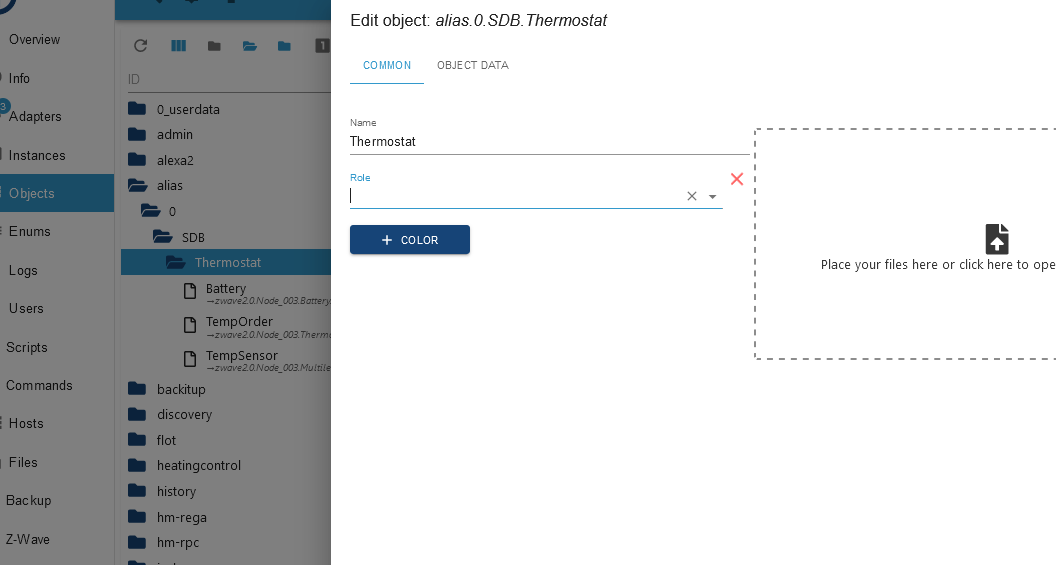
Dein "view" sieht nicht gleich wie bei mir, da hast du ein Adpater noch dazu oder ? ich dachte man braucht nicht mehr etwas wie linkeddevice oder device?
Bei mir ist das so (Nativ) <- ich dachte man kann mit nativ Alias arbeiten ohne extra adapter
-
@thomas-braun
update habe probiert mitwar das nicht richtig?
ich bekomme das
oBroker nodejs updater 2023-10-13

Recommended nodejs-version is: 18.20.2
Checking your installation now. Please be patient!

Your current setup is:
/usr/bin/nodejs         v18.20.2
/usr/bin/node           v18.20.2
/usr/bin/npm            10.5.0
/usr/bin/npx            10.5.0
/usr/bin/corepack       0.25.2

We found these nodejs versions available for installation:

nodejs:
  Installed: 18.20.2-1nodesource1
  Candidate: 18.20.2-1nodesource1
  Version table:
 *** 18.20.2-1nodesource1 1001
        500 https://deb.nodesource.com/node_18.x nodistro/main arm64 Packages
        100 /var/lib/dpkg/status
     18.20.1-1nodesource1 1001
        500 https://deb.nodesource.com/node_18.x nodistro/main arm64 Packages
     18.20.0-1nodesource1 1001
        500 https://deb.nodesource.com/node_18.x nodistro/main arm64 Packages
     18.19.1-1nodesource1 1001
        500 https://deb.nodesource.com/node_18.x nodistro/main arm64 Packages
     18.19.0-1nodesource1 1001
        500 https://deb.nodesource.com/node_18.x nodistro/main arm64 Packages
     18.18.2-1nodesource1 1001
        500 https://deb.nodesource.com/node_18.x nodistro/main arm64 Packages
     18.18.1-1nodesource1 1001
        500 https://deb.nodesource.com/node_18.x nodistro/main arm64 Packages
     18.18.0-1nodesource1 1001
        500 https://deb.nodesource.com/node_18.x nodistro/main arm64 Packages
     18.17.1-1nodesource1 1001
        500 https://deb.nodesource.com/node_18.x nodistro/main arm64 Packages
     18.17.0-1nodesource1 1001
        500 https://deb.nodesource.com/node_18.x nodistro/main arm64 Packages
     18.16.1-1nodesource1 1001
        500 https://deb.nodesource.com/node_18.x nodistro/main arm64 Packages
     18.16.0-1nodesource1 1001
        500 https://deb.nodesource.com/node_18.x nodistro/main arm64 Packages
     18.15.0-1nodesource1 1001
        500 https://deb.nodesource.com/node_18.x nodistro/main arm64 Packages
     18.14.2-1nodesource1 1001
        500 https://deb.nodesource.com/node_18.x nodistro/main arm64 Packages
     18.14.1-1nodesource1 1001
        500 https://deb.nodesource.com/node_18.x nodistro/main arm64 Packages
     18.14.0-1nodesource1 1001
        500 https://deb.nodesource.com/node_18.x nodistro/main arm64 Packages
     18.13.0+dfsg1-1ubuntu2 500
        500 http://ports.ubuntu.com/ubuntu-ports lunar/universe arm64 Packages
     18.13.0-1nodesource1 1001
        500 https://deb.nodesource.com/node_18.x nodistro/main arm64 Packages
     18.12.0-1nodesource1 1001
        500 https://deb.nodesource.com/node_18.x nodistro/main arm64 Packages
     18.11.0-1nodesource1 1001
        500 https://deb.nodesource.com/node_18.x nodistro/main arm64 Packages
     18.10.0-1nodesource1 1001
        500 https://deb.nodesource.com/node_18.x nodistro/main arm64 Packages
     18.9.1-1nodesource1 1001
        500 https://deb.nodesource.com/node_18.x nodistro/main arm64 Packages
     18.9.0-1nodesource1 1001
        500 https://deb.nodesource.com/node_18.x nodistro/main arm64 Packages
     18.8.0-1nodesource1 1001
        500 https://deb.nodesource.com/node_18.x nodistro/main arm64 Packages
     18.7.0-1nodesource1 1001
        500 https://deb.nodesource.com/node_18.x nodistro/main arm64 Packages
     18.6.0-1nodesource1 1001
        500 https://deb.nodesource.com/node_18.x nodistro/main arm64 Packages
     18.5.0-1nodesource1 1001
        500 https://deb.nodesource.com/node_18.x nodistro/main arm64 Packages
     18.4.0-1nodesource1 1001
        500 https://deb.nodesource.com/node_18.x nodistro/main arm64 Packages
     18.3.0-1nodesource1 1001
        500 https://deb.nodesource.com/node_18.x nodistro/main arm64 Packages
     18.2.0-1nodesource1 1001
        500 https://deb.nodesource.com/node_18.x nodistro/main arm64 Packages
     18.1.0-1nodesource1 1001
        500 https://deb.nodesource.com/node_18.x nodistro/main arm64 Packages
     18.0.0-1nodesource1 1001
        500 https://deb.nodesource.com/node_18.x nodistro/main arm64 Packages


Nothing to do - Your installation is using the correct paths.
Nothing to do - Your version is the recommended one.

You can now keep your whole system up-to-date using the usual 'sudo apt update &                                        & sudo apt full-upgrade' commands.
Please DO NOT USE node version managers like 'nvm', 'n' and others in parallel.                                         They will break your current installation!
das hatte ich noch gemacht
iob stop
sudo apt update && sudo apt full-upgrade
iob fix
iob nodejs-update
sudo reboot
@david-g said in Lovelace start PRoblem:
Die Funktion muss glaube nicht sein.
Dein "view" sieht nicht gleich wie bei mir, da hast du ein Adpater noch dazu oder ? ich dachte man braucht nicht mehr etwas wie linkeddevice oder device?
Bei mir ist das so (Nativ) <- ich dachte man kann mit nativ Alias arbeiten ohne extra adapter
@esmax666 sagte in Lovelace start PRoblem:
war das nicht richtig?
Keine Ahnung was du da gemacht hast.
Aber reboote die Kiste mal sauber, in den 200 Tagen uptime war mit Sicherheit auch ein Update dazwischen, das einen Neustart benötigt.iob stop sudo reboot -
@esmax666 sagte in Lovelace start PRoblem:
war das nicht richtig?
Keine Ahnung was du da gemacht hast.
Aber reboote die Kiste mal sauber, in den 200 Tagen uptime war mit Sicherheit auch ein Update dazwischen, das einen Neustart benötigt.iob stop sudo rebootich habe doch oben geschrieben das ich ein restart gemacht habe mit „sudo reboot“. k.a. voher kommen die 200 Tage ohne reboot?
kein ahnung warum hat er das nichts aktualisiert aber reboot habe ich gemacht… -
@esmax666 sagte in Lovelace start PRoblem:
war das nicht richtig?
Keine Ahnung was du da gemacht hast.
Aber reboote die Kiste mal sauber, in den 200 Tagen uptime war mit Sicherheit auch ein Update dazwischen, das einen Neustart benötigt.iob stop sudo rebootsudo apt update && sudo apt full-upgrade Hit:1 http://ports.ubuntu.com/ubuntu-ports lunar InRelease Hit:2 http://ports.ubuntu.com/ubuntu-ports lunar-updates InRelease Hit:3 http://ports.ubuntu.com/ubuntu-ports lunar-backports InRelease Hit:4 http://ports.ubuntu.com/ubuntu-ports lunar-security InRelease Hit:5 https://deb.nodesource.com/node_18.x nodistro InRelease Reading package lists... Done Building dependency tree... Done Reading state information... Done All packages are up to date. Reading package lists... Done Building dependency tree... Done Reading state information... Done Calculating upgrade... Done 0 upgraded, 0 newly installed, 0 to remove and 0 not upgraded.ioBroker nodejs updater 2023-10-13 Recommended nodejs-version is: 18.20.2 Checking your installation now. Please be patient! Your current setup is: /usr/bin/nodejs v18.20.2 /usr/bin/node v18.20.2 /usr/bin/npm 10.5.0 /usr/bin/npx 10.5.0 /usr/bin/corepack 0.25.2 We found these nodejs versions available for installation: nodejs: Installed: 18.20.2-1nodesource1 Candidate: 18.20.2-1nodesource1 Version table: *** 18.20.2-1nodesource1 1001 500 https://deb.nodesource.com/node_18.x nodistro/main arm64 Packages 100 /var/lib/dpkg/status 18.20.1-1nodesource1 1001 500 https://deb.nodesource.com/node_18.x nodistro/main arm64 Packages 18.20.0-1nodesource1 1001 500 https://deb.nodesource.com/node_18.x nodistro/main arm64 Packages 18.19.1-1nodesource1 1001 500 https://deb.nodesource.com/node_18.x nodistro/main arm64 Packages 18.19.0-1nodesource1 1001 500 https://deb.nodesource.com/node_18.x nodistro/main arm64 Packages 18.18.2-1nodesource1 1001 500 https://deb.nodesource.com/node_18.x nodistro/main arm64 Packages 18.18.1-1nodesource1 1001 500 https://deb.nodesource.com/node_18.x nodistro/main arm64 Packages 18.18.0-1nodesource1 1001 500 https://deb.nodesource.com/node_18.x nodistro/main arm64 Packages 18.17.1-1nodesource1 1001 500 https://deb.nodesource.com/node_18.x nodistro/main arm64 Packages 18.17.0-1nodesource1 1001 500 https://deb.nodesource.com/node_18.x nodistro/main arm64 Packages 18.16.1-1nodesource1 1001 500 https://deb.nodesource.com/node_18.x nodistro/main arm64 Packages 18.16.0-1nodesource1 1001 500 https://deb.nodesource.com/node_18.x nodistro/main arm64 Packages 18.15.0-1nodesource1 1001 500 https://deb.nodesource.com/node_18.x nodistro/main arm64 Packages 18.14.2-1nodesource1 1001 500 https://deb.nodesource.com/node_18.x nodistro/main arm64 Packages 18.14.1-1nodesource1 1001 500 https://deb.nodesource.com/node_18.x nodistro/main arm64 Packages 18.14.0-1nodesource1 1001 500 https://deb.nodesource.com/node_18.x nodistro/main arm64 Packages 18.13.0+dfsg1-1ubuntu2 500 500 http://ports.ubuntu.com/ubuntu-ports lunar/universe arm64 Packages 18.13.0-1nodesource1 1001 500 https://deb.nodesource.com/node_18.x nodistro/main arm64 Packages 18.12.0-1nodesource1 1001 500 https://deb.nodesource.com/node_18.x nodistro/main arm64 Packages 18.11.0-1nodesource1 1001 500 https://deb.nodesource.com/node_18.x nodistro/main arm64 Packages 18.10.0-1nodesource1 1001 500 https://deb.nodesource.com/node_18.x nodistro/main arm64 Packages 18.9.1-1nodesource1 1001 500 https://deb.nodesource.com/node_18.x nodistro/main arm64 Packages 18.9.0-1nodesource1 1001 500 https://deb.nodesource.com/node_18.x nodistro/main arm64 Packages 18.8.0-1nodesource1 1001 500 https://deb.nodesource.com/node_18.x nodistro/main arm64 Packages 18.7.0-1nodesource1 1001 500 https://deb.nodesource.com/node_18.x nodistro/main arm64 Packages 18.6.0-1nodesource1 1001 500 https://deb.nodesource.com/node_18.x nodistro/main arm64 Packages 18.5.0-1nodesource1 1001 500 https://deb.nodesource.com/node_18.x nodistro/main arm64 Packages 18.4.0-1nodesource1 1001 500 https://deb.nodesource.com/node_18.x nodistro/main arm64 Packages 18.3.0-1nodesource1 1001 500 https://deb.nodesource.com/node_18.x nodistro/main arm64 Packages 18.2.0-1nodesource1 1001 500 https://deb.nodesource.com/node_18.x nodistro/main arm64 Packages 18.1.0-1nodesource1 1001 500 https://deb.nodesource.com/node_18.x nodistro/main arm64 Packages 18.0.0-1nodesource1 1001 500 https://deb.nodesource.com/node_18.x nodistro/main arm64 Packages Nothing to do - Your installation is using the correct paths. Nothing to do - Your version is the recommended one. You can now keep your whole system up-to-date using the usual 'sudo apt update && sudo apt full-upgrade' commands. Please DO NOT USE node version managers like 'nvm', 'n' and others in parallel. They will break your current installation! -
sudo apt update && sudo apt full-upgrade
Hit:1 http://ports.ubuntu.com/ubuntu-ports lunar InRelease
Hit:2 http://ports.ubuntu.com/ubuntu-ports lunar-updates InRelease
Hit:3 http://ports.ubuntu.com/ubuntu-ports lunar-backports InRelease
Hit:4 http://ports.ubuntu.com/ubuntu-ports lunar-security InRelease
Hit:5 https://deb.nodesource.com/node_18.x nodistro InRelease
Reading package lists... Done
Building dependency tree... Done
Reading state information... Done
All packages are up to date.
Reading package lists... Done
Building dependency tree... Done
Reading state information... Done
Calculating upgrade... Done
0 upgraded, 0 newly installed, 0 to remove and 0 not upgraded.
ioBroker nodejs updater 2023-10-13 Recommended nodejs-version is: 18.20.2 Checking your installation now. Please be patient! Your current setup is: /usr/bin/nodejs v18.20.2 /usr/bin/node v18.20.2 /usr/bin/npm 10.5.0 /usr/bin/npx 10.5.0 /usr/bin/corepack 0.25.2 We found these nodejs versions available for installation: nodejs: Installed: 18.20.2-1nodesource1 Candidate: 18.20.2-1nodesource1 Version table: *** 18.20.2-1nodesource1 1001 500 https://deb.nodesource.com/node_18.x nodistro/main arm64 Packages 100 /var/lib/dpkg/status 18.20.1-1nodesource1 1001 500 https://deb.nodesource.com/node_18.x nodistro/main arm64 Packages 18.20.0-1nodesource1 1001 500 https://deb.nodesource.com/node_18.x nodistro/main arm64 Packages 18.19.1-1nodesource1 1001 500 https://deb.nodesource.com/node_18.x nodistro/main arm64 Packages 18.19.0-1nodesource1 1001 500 https://deb.nodesource.com/node_18.x nodistro/main arm64 Packages 18.18.2-1nodesource1 1001 500 https://deb.nodesource.com/node_18.x nodistro/main arm64 Packages 18.18.1-1nodesource1 1001 500 https://deb.nodesource.com/node_18.x nodistro/main arm64 Packages 18.18.0-1nodesource1 1001 500 https://deb.nodesource.com/node_18.x nodistro/main arm64 Packages 18.17.1-1nodesource1 1001 500 https://deb.nodesource.com/node_18.x nodistro/main arm64 Packages 18.17.0-1nodesource1 1001 500 https://deb.nodesource.com/node_18.x nodistro/main arm64 Packages 18.16.1-1nodesource1 1001 500 https://deb.nodesource.com/node_18.x nodistro/main arm64 Packages 18.16.0-1nodesource1 1001 500 https://deb.nodesource.com/node_18.x nodistro/main arm64 Packages 18.15.0-1nodesource1 1001 500 https://deb.nodesource.com/node_18.x nodistro/main arm64 Packages 18.14.2-1nodesource1 1001 500 https://deb.nodesource.com/node_18.x nodistro/main arm64 Packages 18.14.1-1nodesource1 1001 500 https://deb.nodesource.com/node_18.x nodistro/main arm64 Packages 18.14.0-1nodesource1 1001 500 https://deb.nodesource.com/node_18.x nodistro/main arm64 Packages 18.13.0+dfsg1-1ubuntu2 500 500 http://ports.ubuntu.com/ubuntu-ports lunar/universe arm64 Packages 18.13.0-1nodesource1 1001 500 https://deb.nodesource.com/node_18.x nodistro/main arm64 Packages 18.12.0-1nodesource1 1001 500 https://deb.nodesource.com/node_18.x nodistro/main arm64 Packages 18.11.0-1nodesource1 1001 500 https://deb.nodesource.com/node_18.x nodistro/main arm64 Packages 18.10.0-1nodesource1 1001 500 https://deb.nodesource.com/node_18.x nodistro/main arm64 Packages 18.9.1-1nodesource1 1001 500 https://deb.nodesource.com/node_18.x nodistro/main arm64 Packages 18.9.0-1nodesource1 1001 500 https://deb.nodesource.com/node_18.x nodistro/main arm64 Packages 18.8.0-1nodesource1 1001 500 https://deb.nodesource.com/node_18.x nodistro/main arm64 Packages 18.7.0-1nodesource1 1001 500 https://deb.nodesource.com/node_18.x nodistro/main arm64 Packages 18.6.0-1nodesource1 1001 500 https://deb.nodesource.com/node_18.x nodistro/main arm64 Packages 18.5.0-1nodesource1 1001 500 https://deb.nodesource.com/node_18.x nodistro/main arm64 Packages 18.4.0-1nodesource1 1001 500 https://deb.nodesource.com/node_18.x nodistro/main arm64 Packages 18.3.0-1nodesource1 1001 500 https://deb.nodesource.com/node_18.x nodistro/main arm64 Packages 18.2.0-1nodesource1 1001 500 https://deb.nodesource.com/node_18.x nodistro/main arm64 Packages 18.1.0-1nodesource1 1001 500 https://deb.nodesource.com/node_18.x nodistro/main arm64 Packages 18.0.0-1nodesource1 1001 500 https://deb.nodesource.com/node_18.x nodistro/main arm64 Packages Nothing to do - Your installation is using the correct paths. Nothing to do - Your version is the recommended one. You can now keep your whole system up-to-date using the usual 'sudo apt update && sudo apt full-upgrade' commands. Please DO NOT USE node version managers like 'nvm', 'n' and others in parallel. They will break your current installation!Dein 'Lunar Lobster' ist ohnehin verendet. Installier da die aktuelle LTS-Version von ubuntu. Oder das aktuelle Debian-Release.
-
@esmax666 sagte in Lovelace start PRoblem:
da hast du ein Adpater noch dazu oder
Hab grad nochmal geschaut. Ist wirklich wohl kein Standarte. Dann inszallier ihn einfach ganz normal nach. Der ist es
https://github.com/ioBroker/ioBroker.devicesFindest du ganz normal im iobroker Repro.
-
Dein 'Lunar Lobster' ist ohnehin verendet. Installier da die aktuelle LTS-Version von ubuntu. Oder das aktuelle Debian-Release.
@thomas-braun Lunar ist doch noch weiter updated, aber ist egal habe ich aktuliasert

nodeversion ist auch jetzt updatedHit:1 http://ports.ubuntu.com/ubuntu-ports noble InRelease Hit:2 http://ports.ubuntu.com/ubuntu-ports noble-updates InRelease Hit:3 http://ports.ubuntu.com/ubuntu-ports noble-security InRelease Hit:4 http://ports.ubuntu.com/ubuntu-ports noble-backports InRelease Reading package lists... Done Building dependency tree... Done Reading state information... Done All packages are up to date. Reading package lists... Done Building dependency tree... Done Reading state information... Done Calculating upgrade... Done 0 upgraded, 0 newly installed, 0 to remove and 0 not upgraded.ioBroker nodejs updater 2023-10-13 Recommended nodejs-version is: 18.20.2 Checking your installation now. Please be patient! Your current setup is: /usr/bin/nodejs v18.20.2 /usr/bin/node v18.20.2 /usr/bin/npm 10.5.0 /usr/bin/npx 10.5.0 /usr/bin/corepack 0.25.2 We found these nodejs versions available for installation: nodejs: Installed: 18.20.2-1nodesource1 Candidate: 18.20.2-1nodesource1 Version table: *** 18.20.2-1nodesource1 100 100 /var/lib/dpkg/status 18.19.1+dfsg-6ubuntu5 500 500 http://ports.ubuntu.com/ubuntu-ports noble/universe arm64 Packages Nothing to do - Your installation is using the correct paths. Nothing to do - Your version is the recommended one. You can now keep your whole system up-to-date using the usual 'sudo apt update & & sudo apt full-upgrade' commands. Please DO NOT USE node version managers like 'nvm', 'n' and others in parallel. They will break your current installation! -
@thomas-braun Lunar ist doch noch weiter updated, aber ist egal habe ich aktuliasert
nodeversion ist auch jetzt updatedHit:1 http://ports.ubuntu.com/ubuntu-ports noble InRelease Hit:2 http://ports.ubuntu.com/ubuntu-ports noble-updates InRelease Hit:3 http://ports.ubuntu.com/ubuntu-ports noble-security InRelease Hit:4 http://ports.ubuntu.com/ubuntu-ports noble-backports InRelease Reading package lists... Done Building dependency tree... Done Reading state information... Done All packages are up to date. Reading package lists... Done Building dependency tree... Done Reading state information... Done Calculating upgrade... Done 0 upgraded, 0 newly installed, 0 to remove and 0 not upgraded.ioBroker nodejs updater 2023-10-13 Recommended nodejs-version is: 18.20.2 Checking your installation now. Please be patient! Your current setup is: /usr/bin/nodejs v18.20.2 /usr/bin/node v18.20.2 /usr/bin/npm 10.5.0 /usr/bin/npx 10.5.0 /usr/bin/corepack 0.25.2 We found these nodejs versions available for installation: nodejs: Installed: 18.20.2-1nodesource1 Candidate: 18.20.2-1nodesource1 Version table: *** 18.20.2-1nodesource1 100 100 /var/lib/dpkg/status 18.19.1+dfsg-6ubuntu5 500 500 http://ports.ubuntu.com/ubuntu-ports noble/universe arm64 Packages Nothing to do - Your installation is using the correct paths. Nothing to do - Your version is the recommended one. You can now keep your whole system up-to-date using the usual 'sudo apt update & & sudo apt full-upgrade' commands. Please DO NOT USE node version managers like 'nvm', 'n' and others in parallel. They will break your current installation!@esmax666 sagte in Lovelace start PRoblem:
Lunar ist doch noch weiter updated,
Nein, der hat im Januar 2024 sein EndOfLife gehabt.
Und lass das nodesource-Repo aktiv! Bzw. leg das wieder an. -
@esmax666 sagte in Lovelace start PRoblem:
da hast du ein Adpater noch dazu oder
Hab grad nochmal geschaut. Ist wirklich wohl kein Standarte. Dann inszallier ihn einfach ganz normal nach. Der ist es
https://github.com/ioBroker/ioBroker.devicesFindest du ganz normal im iobroker Repro.
@david-g said in Lovelace start PRoblem:
Hab grad nochmal geschaut. Ist wirklich wohl kein Standarte. Dann inszallier ihn einfach ganz normal nach. Der ist es
https://github.com/ioBroker/ioBroker.devices
Findest du ganz normal im iobroker Repro.Also das heisst "lovelace" funtionniert nur mit Device adapter ? slstam ich irgenwo ein Video gesehen wo jemand auch alias arbeitet und trotzdem ein paar gerät erkennt hat :/
-
@esmax666 sagte in Lovelace start PRoblem:
Lunar ist doch noch weiter updated,
Nein, der hat im Januar 2024 sein EndOfLife gehabt.
Und lass das nodesource-Repo aktiv! Bzw. leg das wieder an.@thomas-braun said in Lovelace start PRoblem:
Und lass das nodesource-Repo aktiv! Bzw. leg das wieder an.
Was habe ich gemacht ?
 und wie mache das wieder an, k.a was das ist :/
 -
@thomas-braun said in Lovelace start PRoblem:
Und lass das nodesource-Repo aktiv! Bzw. leg das wieder an.
Was habe ich gemacht ?
und wie mache das wieder an, k.a was das ist :/@esmax666 sagte in Lovelace start PRoblem:
Was habe ich gemacht ?
Das weiß ich nicht. Jedenfalls hat du kein nodesource.list file auf deiner Kiste.
iob nodejs-update 18 -
@esmax666 sagte in Lovelace start PRoblem:
Was habe ich gemacht ?
Das weiß ich nicht. Jedenfalls hat du kein nodesource.list file auf deiner Kiste.
iob nodejs-update 18@thomas-braun
ok fertigich hoffe das es jetzt ok ist
nodejs updater 2023-10-13 Recommended nodejs-version is: 18.20.2 Checking your installation now. Please be patient! Your current setup is: /usr/bin/nodejs v18.20.2 /usr/bin/node v18.20.2 /usr/bin/npm 10.5.0 /usr/bin/npx 10.5.0 /usr/bin/corepack 0.25.2 We found these nodejs versions available for installation: nodejs: Installed: 18.20.2-1nodesource1 Candidate: 18.20.2-1nodesource1 Version table: *** 18.20.2-1nodesource1 1001 500 https://deb.nodesource.com/node_18.x nodistro/main arm64 Packages 100 /var/lib/dpkg/status 18.20.1-1nodesource1 1001 500 https://deb.nodesource.com/node_18.x nodistro/main arm64 Packages 18.20.0-1nodesource1 1001 500 https://deb.nodesource.com/node_18.x nodistro/main arm64 Packages 18.19.1+dfsg-6ubuntu5 500 500 http://ports.ubuntu.com/ubuntu-ports noble/universe arm64 Packages 18.19.1-1nodesource1 1001 500 https://deb.nodesource.com/node_18.x nodistro/main arm64 Packages 18.19.0-1nodesource1 1001 500 https://deb.nodesource.com/node_18.x nodistro/main arm64 Packages 18.18.2-1nodesource1 1001 500 https://deb.nodesource.com/node_18.x nodistro/main arm64 Packages 18.18.1-1nodesource1 1001 500 https://deb.nodesource.com/node_18.x nodistro/main arm64 Packages 18.18.0-1nodesource1 1001 500 https://deb.nodesource.com/node_18.x nodistro/main arm64 Packages 18.17.1-1nodesource1 1001 500 https://deb.nodesource.com/node_18.x nodistro/main arm64 Packages 18.17.0-1nodesource1 1001 500 https://deb.nodesource.com/node_18.x nodistro/main arm64 Packages 18.16.1-1nodesource1 1001 500 https://deb.nodesource.com/node_18.x nodistro/main arm64 Packages 18.16.0-1nodesource1 1001 500 https://deb.nodesource.com/node_18.x nodistro/main arm64 Packages 18.15.0-1nodesource1 1001 500 https://deb.nodesource.com/node_18.x nodistro/main arm64 Packages 18.14.2-1nodesource1 1001 500 https://deb.nodesource.com/node_18.x nodistro/main arm64 Packages 18.14.1-1nodesource1 1001 500 https://deb.nodesource.com/node_18.x nodistro/main arm64 Packages 18.14.0-1nodesource1 1001 500 https://deb.nodesource.com/node_18.x nodistro/main arm64 Packages 18.13.0-1nodesource1 1001 500 https://deb.nodesource.com/node_18.x nodistro/main arm64 Packages 18.12.0-1nodesource1 1001 500 https://deb.nodesource.com/node_18.x nodistro/main arm64 Packages 18.11.0-1nodesource1 1001 500 https://deb.nodesource.com/node_18.x nodistro/main arm64 Packages 18.10.0-1nodesource1 1001 500 https://deb.nodesource.com/node_18.x nodistro/main arm64 Packages 18.9.1-1nodesource1 1001 500 https://deb.nodesource.com/node_18.x nodistro/main arm64 Packages 18.9.0-1nodesource1 1001 500 https://deb.nodesource.com/node_18.x nodistro/main arm64 Packages 18.8.0-1nodesource1 1001 500 https://deb.nodesource.com/node_18.x nodistro/main arm64 Packages 18.7.0-1nodesource1 1001 500 https://deb.nodesource.com/node_18.x nodistro/main arm64 Packages 18.6.0-1nodesource1 1001 500 https://deb.nodesource.com/node_18.x nodistro/main arm64 Packages 18.5.0-1nodesource1 1001 500 https://deb.nodesource.com/node_18.x nodistro/main arm64 Packages 18.4.0-1nodesource1 1001 500 https://deb.nodesource.com/node_18.x nodistro/main arm64 Packages 18.3.0-1nodesource1 1001 500 https://deb.nodesource.com/node_18.x nodistro/main arm64 Packages 18.2.0-1nodesource1 1001 500 https://deb.nodesource.com/node_18.x nodistro/main arm64 Packages 18.1.0-1nodesource1 1001 500 https://deb.nodesource.com/node_18.x nodistro/main arm64 Packages 18.0.0-1nodesource1 1001 500 https://deb.nodesource.com/node_18.x nodistro/main arm64 Packages Nothing to do - Your installation is using the correct paths. Nothing to do - Your version is the recommended one. You can now keep your whole system up-to-date using the usual 'sudo apt update && sudo apt full-upgrade' commands. Please DO NOT USE node version managers like 'nvm', 'n' and others in parallel. They will break your current installation! -
@david-g said in Lovelace start PRoblem:
Hab grad nochmal geschaut. Ist wirklich wohl kein Standarte. Dann inszallier ihn einfach ganz normal nach. Der ist es
https://github.com/ioBroker/ioBroker.devices
Findest du ganz normal im iobroker Repro.Also das heisst "lovelace" funtionniert nur mit Device adapter ? slstam ich irgenwo ein Video gesehen wo jemand auch alias arbeitet und trotzdem ein paar gerät erkennt hat :/
@esmax666 sagte in Lovelace start PRoblem:
Also das heisst "lovelace" funtionniert nur mit Device adapter ? slstam ich irgenwo ein Video gesehen wo jemand auch alias arbeitet und trotzdem ein paar gerät erkennt hat
Jain,
es liegt daran welche Geräte man hat und wie diese eingebunden sind.
Woher soll lovelace wissen was es für ein Gerät ist und welche Datenpunkte dazu gehören, wenn es keine anhaltspunkte hat was was ist?Dein z-wave legt wie es aussieht eine sehr wilde Datenstruktur an und die DPs haben auch keine entsprechenden Rollen. Woher soll da welcher Adapter auch immer was zuordnen können?
Ich nutze HomaticIP über eine CCU. Der Adapter legt alles sauber an und es klappt, sobald ich einen Raum vergebe.
Das wird dann auch gefunden.Falls du deine Geräte in Alexa oder Google Home bringen möchtest, hast du genau das selbe Vorgehen wie bei lovelace. Auch diese Adapter benötigen ein paar Infos.....
Bei Geräten mir nur einem DP, ist es natürlich über das Zahnrad viel leichter.
-
@esmax666 sagte in Lovelace start PRoblem:
Also das heisst "lovelace" funtionniert nur mit Device adapter ? slstam ich irgenwo ein Video gesehen wo jemand auch alias arbeitet und trotzdem ein paar gerät erkennt hat
Jain,
es liegt daran welche Geräte man hat und wie diese eingebunden sind.
Woher soll lovelace wissen was es für ein Gerät ist und welche Datenpunkte dazu gehören, wenn es keine anhaltspunkte hat was was ist?Dein z-wave legt wie es aussieht eine sehr wilde Datenstruktur an und die DPs haben auch keine entsprechenden Rollen. Woher soll da welcher Adapter auch immer was zuordnen können?
Ich nutze HomaticIP über eine CCU. Der Adapter legt alles sauber an und es klappt, sobald ich einen Raum vergebe.
Das wird dann auch gefunden.Falls du deine Geräte in Alexa oder Google Home bringen möchtest, hast du genau das selbe Vorgehen wie bei lovelace. Auch diese Adapter benötigen ein paar Infos.....
Bei Geräten mir nur einem DP, ist es natürlich über das Zahnrad viel leichter.
@david-g
ok ich werde das adapter später probieren :)
Das heisst in Home assistant zum beispiel die müssen auch dann mit "Alias" arbeiten oder ?Hast du auch HeatingControl ?
könntest du etwas machen für Lovelece ? da ich eher weniger skript erfahung habe denke ich am ende muss VIS + Lovelece haben -
@david-g
ok ich werde das adapter später probieren :)
Das heisst in Home assistant zum beispiel die müssen auch dann mit "Alias" arbeiten oder ?Hast du auch HeatingControl ?
könntest du etwas machen für Lovelece ? da ich eher weniger skript erfahung habe denke ich am ende muss VIS + Lovelece habenHA geht mit den Sachen ganz anders um.
Da sind die Integration (deren Adapter) schon so geschrieben, dass das alles funktioniert.Iobroker hatte diesen Ansatz früher noch nicht. So weit ich weiß, wird da aber dran gearbeitet.
Heating Control nutze ich nicht. Aber das hat ja auch nichts mit einer Visualisierung zu tun.
Ich denke, man sollte sich für eins entscheiden. Vis oder lovelace (oder sonst was).
-
HA geht mit den Sachen ganz anders um.
Da sind die Integration (deren Adapter) schon so geschrieben, dass das alles funktioniert.Iobroker hatte diesen Ansatz früher noch nicht. So weit ich weiß, wird da aber dran gearbeitet.
Heating Control nutze ich nicht. Aber das hat ja auch nichts mit einer Visualisierung zu tun.
Ich denke, man sollte sich für eins entscheiden. Vis oder lovelace (oder sonst was).
@david-g ach so ok, ja ich habe das heute früh probiert,
also loveless + HA macht das wirklich alles automatisch das ist wirklich crazy, alles zwave geräte sind schon da und sogar auf dashboard. die haben das wirklich gut gemacht aber mit VIS1/2 kann man besser personalisieren (finde ich)
ich will nur ein bisschen beide probieren :)


Hey! Du scheinst an dieser Unterhaltung interessiert zu sein, hast aber noch kein Konto.
Hast du es satt, bei jedem Besuch durch die gleichen Beiträge zu scrollen? Wenn du dich für ein Konto anmeldest, kommst du immer genau dorthin zurück, wo du zuvor warst, und kannst dich über neue Antworten benachrichtigen lassen (entweder per E-Mail oder Push-Benachrichtigung). Du kannst auch Lesezeichen speichern und Beiträge positiv bewerten, um anderen Community-Mitgliedern deine Wertschätzung zu zeigen.
Mit deinem Input könnte dieser Beitrag noch besser werden 💗
Registrieren AnmeldenSupport us
258
Online33.0k
Benutzer83.6k
Themen1.3m
Beiträge