




Test Adapter Midea Geräten v1.x.x


-
@Hc-Yami
es wurde mir beim start vorgang rechts angezeigt...
Den Auszug habe ich aus dem Event Logger

-
Wie kann ich meine Midea Waschmaschine verbinden? Der Adapter scheint nicht mehr zu funktionieren
-
Wie kann ich meine Midea Waschmaschine verbinden? Der Adapter scheint nicht mehr zu funktionieren
-
@mpl1338
Bitte mal folgendes Homebridge plugin via Homebridge adapter testen
https://github.com/kovapatrik/homebridge-midea-platform/@tombox hab zwar den Homebridge Adapter, aber das Midea Plugin schaff ich nicht zu installieren.
Abgesehen davon bekomme ich bei dem ioBroker.midea Adapter einen Error 25 beim Versuch zu Installieren. Musste mein ioBroker System wegen einer defekten microSD neu einrichten, ist komplett jungfräulich und alle anderen Adapter laufen problemlos durch.
Auch der "alte" Midea Adapter direkt aus den ioBroker Adaptern (ohne GitHub) lässt sich installieren.
Auch andere GitHub Adapter lassen sich installieren (zB. Lovelace).
$ iobroker url TA2k/ioBroker.midea --host RasPi-SmartHome --debug install TA2k/ioBroker.midea NPM version: 10.2.3 Installing TA2k/ioBroker.midea... (System call) npm ERR! code 1 npm ERR! create a virtual environment using python3 -m venv path/to/venv.npm ERR! Then use path/to/venv/bin/python and path/to/venv/bin/pip. Makenpm ERR! sure you have python3-full installed.npm ERR! npm ERR! For more information visit http://rptl.io/venvnpm ERR! npm ERR! note: If you believe this is a mistake, please contact your Python installation or OS distribution provider. You can override this, at the risk of breaking your Python installation or OS, by passing --break-system-packages.npm ERR! hint: See PEP 668 for the detailed specification.npm ERR! npm ERR! at checkExecSyncError (node:child_process:890:11)npm ERR! at execSync (node:child_process:962:15)npm ERR! at checkPreconditions (/home/iobroker/.npm/_cacache/tmp/git-clone5KCUDq/pythonPackages.js:44:16) npm ERR! at Object.<anonymous> (/home/iobroker/.npm/_cacache/tmp/git-clone5KCUDq/pythonPackages.js:4:15)npm ERR! at Module._compile (node:internal/modules/cjs/loader:1356:14)npm ERR! at Module._extensions..js (node:internal/modules/cjs/loader:1414:10)npm ERR! at Module.load (node:internal/modules/cjs/loader:1197:32)npm ERR! at Module._load (node:internal/modules/cjs/loader:1013:12)npm ERR! at Function.executeUserEntryPoint [as runMain] (node:internal/modules/run_main:128:12) {npm ERR! status: 1,npm ERR! signal: null,npm ERR! output: [npm ERR! null,npm ERR! <Buffer >,npm ERR! <Buffer 65 72 72 6f 72 3a 20 65 78 74 65 72 6e 61 6c 6c 79 2d 6d 61 6e 61 67 65 64 2d 65 6e 76 69 72 6f 6e 6d 65 6e 74 0a 0a c3 97 20 54 68 69 73 20 65 6e 76 ... 748 more bytes>npm ERR! ],npm ERR! pid: 19042,npm ERR! stdout: <Buffer >,npm ERR! stderr: <Buffer 65 72 72 6f 72 3a 20 65 78 74 65 72 6e 61 6c 6c 79 2d 6d 61 6e 61 67 65 64 2d 65 6e 76 69 72 6f 6e 6d 65 6e 74 0a 0a c3 97 20 54 68 69 73 20 65 6e 76 ... 748 more bytes>npm ERR! }npm ERR! npm ERR! Local pip installation failed. Please install via 'sudo apt install python3-pip'npm ERR! npm WARN using --force Recommended protections disabled.npm ERR! error: externally-managed-environmentnpm ERR! npm ERR! × This environment is externally managednpm ERR! ╰─> To install Python packages system-wide, try apt installnpm ERR! python3-xyz, where xyz is the package you are trying tonpm ERR! install.npm ERR! npm ERR! If you wish to install a non-Debian-packaged Python package,npm ERR! create a virtual environment using python3 -m venv path/to/venv.npm ERR! Then use path/to/venv/bin/python and path/to/venv/bin/pip. Makenpm ERR! sure you have python3-full installed.npm ERR! npm ERR! For more information visit http://rptl.io/venvnpm ERR! npm ERR! note: If you believe this is a mistake, please contact your Python installation or OS distribution provider. You can override this, at the risk of breaking your Python installation or OS, by passing --break-system-packages.npm ERR! hint: See PEP 668 for the detailed specification.npm ERR! --2024-01-15 12:35:58-- https://bootstrap.pypa.io/get-pip.pynpm ERR! Auflösen des Hostnamens bootstrap.pypa.io (bootstrap.pypa.io)… 151.101.0.175, 151.101.64.175, 151.101.128.175, ...npm ERR! Verbindungsaufbau zu bootstrap.pypa.io (bootstrap.pypa.io)|151.101.0.175|:443 … verbunden.npm ERR! HTTP-Anforderung gesendet, auf Antwort wird gewartet … 200 OKnpm ERR! Länge: 2634817 (2,5M) [text/x-python]npm ERR! Wird in »get-pip.py« gespeichert.npm ERR! npm ERR! 0K .......... .......... .......... .......... .......... 1% 1,89M 1snpm ERR! 50K .......... .......... .......... .......... .......... 3% 2,45M 1snpm ERR! 100K .......... .......... .......... .......... .......... 5% 2,60M 1snpm ERR! 150K .......... .......... .......... .......... .......... 7% 3,07M 1snpm ERR! 200K .......... .......... .......... .......... .......... 9% 2,50M 1snpm ERR! 250K .......... .......... .......... .......... .......... 11% 2,20M 1snpm ERR! 300K .......... .......... .......... .......... .......... 13% 2,40M 1snpm ERR! 350K .......... .......... .......... .......... .......... 15% 3,12M 1snpm ERR! 400K .......... .......... .......... .......... .......... 17% 1,89M 1snpm ERR! 450K .......... .......... .......... .......... .......... 19% 3,21M 1snpm ERR! 500K .......... .......... .......... .......... .......... 21% 3,12M 1snpm ERR! 550K .......... .......... .......... .......... .......... 23% 3,08M 1snpm ERR! 600K .......... .......... .......... .......... .......... 25% 3,16M 1snpm ERR! 650K .......... .......... .......... .......... .......... 27% 2,05M 1snpm ERR! 700K .......... .......... .......... .......... .......... 29% 2,59M 1snpm ERR! 750K .......... .......... .......... .......... .......... 31% 2,91M 1snpm ERR! 800K .......... .......... .......... .......... .......... 33% 2,45M 1snpm ERR! 850K .......... .......... .......... .......... .......... 34% 2,69M 1snpm ERR! 900K .......... .......... .......... .......... .......... 36% 2,84M 1snpm ERR! 950K .......... .......... .......... .......... .......... 38% 3,24M 1snpm ERR! 1000K .......... .......... .......... .......... .......... 40% 2,71M 1snpm ERR! 1050K .......... .......... .......... .......... .......... 42% 2,26M 1snpm ERR! 1100K .......... .......... .......... .......... .......... 44% 3,59M 1snpm ERR! 1150K .......... .......... .......... .......... .......... 46% 2,92M 1snpm ERR! 1200K .......... .......... .......... .......... .......... 48% 3,21M 0snpm ERR! 1250K .......... .......... .......... .......... .......... 50% 3,10M 0s npm ERR! 1300K .......... .......... .......... .......... .......... 52% 2,96M 0snpm ERR! 1350K .......... .......... .......... .......... .......... 54% 2,14M 0snpm ERR! 1400K .......... .......... .......... .......... .......... 56% 3,25M 0snpm ERR! 1450K .......... .......... .......... .......... .......... 58% 3,19M 0snpm ERR! 1500K .......... .......... .......... .......... .......... 60% 1,83M 0snpm ERR! 1550K .......... .......... .......... .......... .......... 62% 1,92M 0snpm ERR! 1600K .......... .......... .......... .......... .......... 64% 2,09M 0snpm ERR! 1650K .......... .......... .......... .......... .......... 66% 2,09M 0snpm ERR! 1700K .......... .......... .......... .......... .......... 68% 1,58M 0snpm ERR! 1750K .......... .......... .......... .......... .......... 69% 2,36M 0snpm ERR! 1800K .......... .......... .......... .......... .......... 71% 1,84M 0snpm ERR! 1850K .......... .......... .......... .......... .......... 73% 2,14M 0snpm ERR! 1900K .......... .......... .......... .......... .......... 75% 2,46M 0snpm ERR! 1950K .......... .......... .......... .......... .......... 77% 2,56M 0snpm ERR! 2000K .......... .......... .......... .......... .......... 79% 1,65M 0snpm ERR! 2050K .......... .......... .......... .......... .......... 81% 2,57M 0snpm ERR! 2100K .......... .......... .......... .......... .......... 83% 2,61M 0snpm ERR! 2150K .......... .......... .......... .......... .......... 85% 2,72M 0snpm ERR! 2200K .......... .......... .......... .......... .......... 87% 2,28M 0snpm ERR! 2250K .......... .......... .......... .......... .......... 89% 3,05M 0snpm ERR! 2300K .......... .......... .......... .......... .......... 91% 2,06M 0snpm ERR! 2350K .......... .......... .......... .......... .......... 93% 2,52M 0snpm ERR! 2400K .......... .......... .......... .......... .......... 95% 2,57M 0snpm ERR! 2450K .......... .......... .......... .......... .......... 97% 2,70M 0snpm ERR! 2500K .......... .......... .......... .......... .......... 99% 2,58M 0snpm ERR! 2550K .......... .......... ... 100% 2,60M=1,0snpm ERR! npm ERR! 2024-01-15 12:36:00 (2,47 MB/s) - »get-pip.py« gespeichert [2634817/2634817]npm ERR! npm ERR! error: externally-managed-environmentnpm ERR! npm ERR! × This environment is externally managednpm ERR! ╰─> To install Python packages system-wide, try apt installnpm ERR! python3-xyz, where xyz is the package you are trying tonpm ERR! install.npm ERR! npm ERR! If you wish to install a non-Debian-packaged Python package,npm ERR! create a virtual environment using python3 -m venv path/to/venv.npm ERR! Then use path/to/venv/bin/python and path/to/venv/bin/pip. Makenpm ERR! sure you have python3-full installed.npm ERR! npm ERR! A complete log of this run can be found in: /home/iobroker/.npm/_logs/2024-01-15T11_35_28_707Z-debug-0.log npm ERR! code 1npm ERR! git dep preparation failednpm ERR! command /usr/bin/node /usr/lib/node_modules/npm/bin/npm-cli.js install --force --cache=/home/iobroker/.npm --prefer-offline=false --prefer-online=false --offline=false --no-progress --no-save --no-audit --include=dev --include=peer --include=optional --no-package-lock-only --no-dry-runnpm ERR! > iobroker.midea@0.1.0 postinstallnpm ERR! > node ./pythonPackages.jsnpm ERR! npm ERR! npm ERR! Start Python package installationnpm ERR! Python 3.11.2npm ERR! npm ERR! Python 3 foundnpm ERR! npm ERR! pip not found. Try to install local.npm ERR! Error: Command failed: python3 get-pip.py --usernpm ERR! error: externally-managed-environmentnpm ERR! npm ERR! × This environment is externally managednpm ERR! ╰─> To install Python packages system-wide, try apt installnpm ERR! python3-xyz, where xyz is the package you are trying tonpm ERR! install.npm ERR! npm ERR! If you wish to install a non-Debian-packaged Python package,npm ERR! create a virtual environment using python3 -m venv path/to/venv.npm ERR! Then use path/to/venv/bin/python and path/to/venv/bin/pip. Makenpm ERR! sure you have python3-full installed.npm ERR! npm ERR! For more information visit http://rptl.io/venvnpm ERR! npm ERR! note: If you believe this is a mistake, please contact your Python installation or OS distribution provider. You can override this, at the risk of breaking your Python installation or OS, by passing --break-system-packages.npm ERR! hint: See PEP 668 for the detailed specification.npm ERR! npm ERR! at checkExecSyncError (node:child_process:890:11)npm ERR! at execSync (node:child_process:962:15)npm ERR! at checkPreconditions (/home/iobroker/.npm/_cacache/tmp/git-clone5KCUDq/pythonPackages.js:44:16)npm ERR! at Object.<anonymous> (/home/iobroker/.npm/_cacache/tmp/git-clone5KCUDq/pythonPackages.js:4:15)npm ERR! at Module._compile (node:internal/modules/cjs/loader:1356:14)npm ERR! at Module._extensions..js (node:internal/modules/cjs/loader:1414:10)npm ERR! at Module.load (node:internal/modules/cjs/loader:1197:32)npm ERR! at Module._load (node:internal/modules/cjs/loader:1013:12)npm ERR! at Function.executeUserEntryPoint [as runMain] (node:internal/modules/run_main:128:12) {npm ERR! status: 1,npm ERR! signal: null,npm ERR! output: [npm ERR! null,npm ERR! <Buffer >,npm ERR! <Buffer 65 72 72 6f 72 3a 20 65 78 74 65 72 6e 61 6c 6c 79 2d 6d 61 6e 61 67 65 64 2d 65 6e 76 69 72 6f 6e 6d 65 6e 74 0a 0a c3 97 20 54 68 69 73 20 65 6e 76 ... 748 more bytes>npm ERR! ],npm ERR! pid: 19042,npm ERR! stdout: <Buffer >,npm ERR! stderr: <Buffer 65 72 72 6f 72 3a 20 65 78 74 65 72 6e 61 6c 6c 79 2d 6d 61 6e 61 67 65 64 2d 65 6e 76 69 72 6f 6e 6d 65 6e 74 0a 0a c3 97 20 54 68 69 73 20 65 6e 76 ... 748 more bytes>npm ERR! }npm ERR! npm ERR! Local pip installation failed. Please install via 'sudo apt install python3-pip'npm ERR! npm WARN using --force Recommended protections disabled.npm ERR! error: externally-managed-environmentnpm ERR! npm ERR! × This environment is externally managednpm ERR! ╰─> To install Python packages system-wide, try apt installnpm ERR! python3-xyz, where xyz is the package you are trying tonpm ERR! install.npm ERR! npm ERR! If you wish to install a non-Debian-packaged Python package,npm ERR! create a virtual environment using python3 -m venv path/to/venv.npm ERR! Then use path/to/venv/bin/python and path/to/venv/bin/pip. Makenpm ERR! sure you have python3-full installed.npm ERR! npm ERR! For more information visit http://rptl.io/venvnpm ERR! npm ERR! note: If you believe this is a mistake, please contact your Python installation or OS distribution provider. You can override this, at the risk of breaking your Python installation or OS, by passing --break-system-packages.npm ERR! hint: See PEP 668 for the detailed specification.npm ERR! --2024-01-15 12:35:58-- https://bootstrap.pypa.io/get-pip.pynpm ERR! Auflösen des Hostnamens bootstrap.pypa.io (bootstrap.pypa.io)… 151.101.0.175, 151.101.64.175, 151.101.128.175, ...npm ERR! Verbindungsaufbau zu bootstrap.pypa.io (bootstrap.pypa.io)|151.101.0.175|:443 … verbunden.npm ERR! HTTP-Anforderung gesendet, auf Antwort wird gewartet … 200 OKnpm ERR! Länge: 2634817 (2,5M) [text/x-python]npm ERR! Wird in »get-pip.py« gespeichert.npm ERR! npm ERR! 0K .......... .......... .......... .......... .......... 1% 1,89M 1snpm ERR! 50K .......... .......... .......... .......... .......... 3% 2,45M 1snpm ERR! 100K .......... .......... .......... .......... .......... 5% 2,60M 1snpm ERR! 150K .......... .......... .......... .......... .......... 7% 3,07M 1snpm ERR! 200K .......... .......... .......... .......... .......... 9% 2,50M 1snpm ERR! 250K .......... .......... .......... .......... .......... 11% 2,20M 1snpm ERR! 300K .......... .......... .......... .......... .......... 13% 2,40M 1snpm ERR! 350K .......... .......... .......... .......... .......... 15% 3,12M 1snpm ERR! 400K .......... .......... .......... .......... .......... 17% 1,89M 1snpm ERR! 450K .......... .......... .......... .......... .......... 19% 3,21M 1snpm ERR! 500K .......... .......... .......... .......... .......... 21% 3,12M 1snpm ERR! 550K .......... .......... .......... .......... .......... 23% 3,08M 1snpm ERR! 600K .......... .......... .......... .......... .......... 25% 3,16M 1snpm ERR! 650K .......... .......... .......... .......... .......... 27% 2,05M 1snpm ERR! 700K .......... .......... .......... .......... .......... 29% 2,59M 1snpm ERR! 750K .......... .......... .......... .......... .......... 31% 2,91M 1snpm ERR! 800K .......... .......... .......... .......... .......... 33% 2,45M 1snpm ERR! 850K .......... .......... .......... .......... .......... 34% 2,69M 1snpm ERR! 900K .......... .......... .......... .......... .......... 36% 2,84M 1snpm ERR! 950K .......... .......... .......... .......... .......... 38% 3,24M 1snpm ERR! 1000K .......... .......... .......... .......... .......... 40% 2,71M 1snpm ERR! 1050K .......... .......... .......... .......... .......... 42% 2,26M 1snpm ERR! 1100K .......... .......... .......... .......... .......... 44% 3,59M 1snpm ERR! 1150K .......... .......... .......... .......... .......... 46% 2,92M 1snpm ERR! 1200K .......... .......... .......... .......... .......... 48% 3,21M 0snpm ERR! 1250K .......... .......... .......... .......... .......... 50% 3,10M 0snpm ERR! 1300K .......... .......... .......... .......... .......... 52% 2,96M 0snpm ERR! 1350K .......... .......... .......... .......... .......... 54% 2,14M 0snpm ERR! 1400K .......... .......... .......... .......... .......... 56% 3,25M 0snpm ERR! 1450K .......... .......... .......... .......... .......... 58% 3,19M 0snpm ERR! 1500K .......... .......... .......... .......... .......... 60% 1,83M 0snpm ERR! 1550K .......... .......... .......... .......... .......... 62% 1,92M 0snpm ERR! 1600K .......... .......... .......... .......... .......... 64% 2,09M 0snpm ERR! 1650K .......... .......... .......... .......... .......... 66% 2,09M 0snpm ERR! 1700K .......... .......... .......... .......... .......... 68% 1,58M 0snpm ERR! 1750K .......... .......... .......... .......... .......... 69% 2,36M 0snpm ERR! 1800K .......... .......... .......... .......... .......... 71% 1,84M 0snpm ERR! 1850K .......... .......... .......... .......... .......... 73% 2,14M 0snpm ERR! 1900K .......... .......... .......... .......... .......... 75% 2,46M 0snpm ERR! 1950K .......... .......... .......... .......... .......... 77% 2,56M 0snpm ERR! 2000K .......... .......... .......... .......... .......... 79% 1,65M 0snpm ERR! 2050K .......... .......... .......... .......... .......... 81% 2,57M 0snpm ERR! 2100K .......... .......... .......... .......... .......... 83% 2,61M 0snpm ERR! 2150K .......... .......... .......... .......... .......... 85% 2,72M 0snpm ERR! 2200K .......... .......... .......... .......... .......... 87% 2,28M 0snpm ERR! 2250K .......... .......... .......... .......... .......... 89% 3,05M 0snpm ERR! 2300K .......... .......... .......... .......... .......... 91% 2,06M 0snpm ERR! 2350K .......... .......... .......... .......... .......... 93% 2,52M 0snpm ERR! 2400K .......... .......... .......... .......... .......... 95% 2,57M 0snpm ERR! 2450K .......... .......... .......... .......... .......... 97% 2,70M 0snpm ERR! 2500K .......... .......... .......... .......... .......... 99% 2,58M 0snpm ERR! 2550K .......... .......... ... 100% 2,60M=1,0snpm ERR! npm ERR! 2024-01-15 12:36:00 (2,47 MB/s) - »get-pip.py« gespeichert [2634817/2634817]npm ERR! npm ERR! error: externally-managed-environmentnpm ERR! npm ERR! × This environment is externally managednpm ERR! ╰─> To install Python packages system-wide, try apt installnpm ERR! python3-xyz, where xyz is the package you are trying tonpm ERR! install.npm ERR! npm ERR! If you wish to install a non-Debian-packaged Python package,npm ERR! create a virtual environment using python3 -m venv path/to/venv.npm ERR! Then use path/to/venv/bin/python and path/to/venv/bin/pip. Makenpm ERR! sure you have python3-full installed.npm ERR! npm ERR! For more information visit http://rptl.io/venvnpm ERR! npm ERR! note: If you believe this is a mistake, please contact your Python installation or OS distribution provider. You can override this, at the risk of breaking your Python installation or OS, by passing --break-system-packages.npm ERR! hint: See PEP 668 for the detailed specification.npm ERR! npm ERR! code 1npm ERR! npm ERR! path /home/iobroker/.npm/_cacache/tmp/git-clone5KCUDqnpm ERR! npm ERR! command failednpm ERR! npm ERR! command sh -c node ./pythonPackages.jsnpm ERR! npm ERR! npm ERR! A complete log of this run can be found in: /home/iobroker/.npm/_logs/2024-01-15T11_35_40_233Z-debug-0.lognpm ERR! A complete log of this run can be found in: /home/iobroker/.npm/_logs/2024-01-15T11_35_28_707Z-debug-0.log host.RasPi-SmartHome Cannot install TA2k/ioBroker.midea: 1 ERROR: Process exited with code 25``` -
@tombox hab zwar den Homebridge Adapter, aber das Midea Plugin schaff ich nicht zu installieren.
Abgesehen davon bekomme ich bei dem ioBroker.midea Adapter einen Error 25 beim Versuch zu Installieren. Musste mein ioBroker System wegen einer defekten microSD neu einrichten, ist komplett jungfräulich und alle anderen Adapter laufen problemlos durch.
Auch der "alte" Midea Adapter direkt aus den ioBroker Adaptern (ohne GitHub) lässt sich installieren.
Auch andere GitHub Adapter lassen sich installieren (zB. Lovelace).
$ iobroker url TA2k/ioBroker.midea --host RasPi-SmartHome --debug install TA2k/ioBroker.midea NPM version: 10.2.3 Installing TA2k/ioBroker.midea... (System call) npm ERR! code 1 npm ERR! create a virtual environment using python3 -m venv path/to/venv.npm ERR! Then use path/to/venv/bin/python and path/to/venv/bin/pip. Makenpm ERR! sure you have python3-full installed.npm ERR! npm ERR! For more information visit http://rptl.io/venvnpm ERR! npm ERR! note: If you believe this is a mistake, please contact your Python installation or OS distribution provider. You can override this, at the risk of breaking your Python installation or OS, by passing --break-system-packages.npm ERR! hint: See PEP 668 for the detailed specification.npm ERR! npm ERR! at checkExecSyncError (node:child_process:890:11)npm ERR! at execSync (node:child_process:962:15)npm ERR! at checkPreconditions (/home/iobroker/.npm/_cacache/tmp/git-clone5KCUDq/pythonPackages.js:44:16) npm ERR! at Object.<anonymous> (/home/iobroker/.npm/_cacache/tmp/git-clone5KCUDq/pythonPackages.js:4:15)npm ERR! at Module._compile (node:internal/modules/cjs/loader:1356:14)npm ERR! at Module._extensions..js (node:internal/modules/cjs/loader:1414:10)npm ERR! at Module.load (node:internal/modules/cjs/loader:1197:32)npm ERR! at Module._load (node:internal/modules/cjs/loader:1013:12)npm ERR! at Function.executeUserEntryPoint [as runMain] (node:internal/modules/run_main:128:12) {npm ERR! status: 1,npm ERR! signal: null,npm ERR! output: [npm ERR! null,npm ERR! <Buffer >,npm ERR! <Buffer 65 72 72 6f 72 3a 20 65 78 74 65 72 6e 61 6c 6c 79 2d 6d 61 6e 61 67 65 64 2d 65 6e 76 69 72 6f 6e 6d 65 6e 74 0a 0a c3 97 20 54 68 69 73 20 65 6e 76 ... 748 more bytes>npm ERR! ],npm ERR! pid: 19042,npm ERR! stdout: <Buffer >,npm ERR! stderr: <Buffer 65 72 72 6f 72 3a 20 65 78 74 65 72 6e 61 6c 6c 79 2d 6d 61 6e 61 67 65 64 2d 65 6e 76 69 72 6f 6e 6d 65 6e 74 0a 0a c3 97 20 54 68 69 73 20 65 6e 76 ... 748 more bytes>npm ERR! }npm ERR! npm ERR! Local pip installation failed. Please install via 'sudo apt install python3-pip'npm ERR! npm WARN using --force Recommended protections disabled.npm ERR! error: externally-managed-environmentnpm ERR! npm ERR! × This environment is externally managednpm ERR! ╰─> To install Python packages system-wide, try apt installnpm ERR! python3-xyz, where xyz is the package you are trying tonpm ERR! install.npm ERR! npm ERR! If you wish to install a non-Debian-packaged Python package,npm ERR! create a virtual environment using python3 -m venv path/to/venv.npm ERR! Then use path/to/venv/bin/python and path/to/venv/bin/pip. Makenpm ERR! sure you have python3-full installed.npm ERR! npm ERR! For more information visit http://rptl.io/venvnpm ERR! npm ERR! note: If you believe this is a mistake, please contact your Python installation or OS distribution provider. You can override this, at the risk of breaking your Python installation or OS, by passing --break-system-packages.npm ERR! hint: See PEP 668 for the detailed specification.npm ERR! --2024-01-15 12:35:58-- https://bootstrap.pypa.io/get-pip.pynpm ERR! Auflösen des Hostnamens bootstrap.pypa.io (bootstrap.pypa.io)… 151.101.0.175, 151.101.64.175, 151.101.128.175, ...npm ERR! Verbindungsaufbau zu bootstrap.pypa.io (bootstrap.pypa.io)|151.101.0.175|:443 … verbunden.npm ERR! HTTP-Anforderung gesendet, auf Antwort wird gewartet … 200 OKnpm ERR! Länge: 2634817 (2,5M) [text/x-python]npm ERR! Wird in »get-pip.py« gespeichert.npm ERR! npm ERR! 0K .......... .......... .......... .......... .......... 1% 1,89M 1snpm ERR! 50K .......... .......... .......... .......... .......... 3% 2,45M 1snpm ERR! 100K .......... .......... .......... .......... .......... 5% 2,60M 1snpm ERR! 150K .......... .......... .......... .......... .......... 7% 3,07M 1snpm ERR! 200K .......... .......... .......... .......... .......... 9% 2,50M 1snpm ERR! 250K .......... .......... .......... .......... .......... 11% 2,20M 1snpm ERR! 300K .......... .......... .......... .......... .......... 13% 2,40M 1snpm ERR! 350K .......... .......... .......... .......... .......... 15% 3,12M 1snpm ERR! 400K .......... .......... .......... .......... .......... 17% 1,89M 1snpm ERR! 450K .......... .......... .......... .......... .......... 19% 3,21M 1snpm ERR! 500K .......... .......... .......... .......... .......... 21% 3,12M 1snpm ERR! 550K .......... .......... .......... .......... .......... 23% 3,08M 1snpm ERR! 600K .......... .......... .......... .......... .......... 25% 3,16M 1snpm ERR! 650K .......... .......... .......... .......... .......... 27% 2,05M 1snpm ERR! 700K .......... .......... .......... .......... .......... 29% 2,59M 1snpm ERR! 750K .......... .......... .......... .......... .......... 31% 2,91M 1snpm ERR! 800K .......... .......... .......... .......... .......... 33% 2,45M 1snpm ERR! 850K .......... .......... .......... .......... .......... 34% 2,69M 1snpm ERR! 900K .......... .......... .......... .......... .......... 36% 2,84M 1snpm ERR! 950K .......... .......... .......... .......... .......... 38% 3,24M 1snpm ERR! 1000K .......... .......... .......... .......... .......... 40% 2,71M 1snpm ERR! 1050K .......... .......... .......... .......... .......... 42% 2,26M 1snpm ERR! 1100K .......... .......... .......... .......... .......... 44% 3,59M 1snpm ERR! 1150K .......... .......... .......... .......... .......... 46% 2,92M 1snpm ERR! 1200K .......... .......... .......... .......... .......... 48% 3,21M 0snpm ERR! 1250K .......... .......... .......... .......... .......... 50% 3,10M 0s npm ERR! 1300K .......... .......... .......... .......... .......... 52% 2,96M 0snpm ERR! 1350K .......... .......... .......... .......... .......... 54% 2,14M 0snpm ERR! 1400K .......... .......... .......... .......... .......... 56% 3,25M 0snpm ERR! 1450K .......... .......... .......... .......... .......... 58% 3,19M 0snpm ERR! 1500K .......... .......... .......... .......... .......... 60% 1,83M 0snpm ERR! 1550K .......... .......... .......... .......... .......... 62% 1,92M 0snpm ERR! 1600K .......... .......... .......... .......... .......... 64% 2,09M 0snpm ERR! 1650K .......... .......... .......... .......... .......... 66% 2,09M 0snpm ERR! 1700K .......... .......... .......... .......... .......... 68% 1,58M 0snpm ERR! 1750K .......... .......... .......... .......... .......... 69% 2,36M 0snpm ERR! 1800K .......... .......... .......... .......... .......... 71% 1,84M 0snpm ERR! 1850K .......... .......... .......... .......... .......... 73% 2,14M 0snpm ERR! 1900K .......... .......... .......... .......... .......... 75% 2,46M 0snpm ERR! 1950K .......... .......... .......... .......... .......... 77% 2,56M 0snpm ERR! 2000K .......... .......... .......... .......... .......... 79% 1,65M 0snpm ERR! 2050K .......... .......... .......... .......... .......... 81% 2,57M 0snpm ERR! 2100K .......... .......... .......... .......... .......... 83% 2,61M 0snpm ERR! 2150K .......... .......... .......... .......... .......... 85% 2,72M 0snpm ERR! 2200K .......... .......... .......... .......... .......... 87% 2,28M 0snpm ERR! 2250K .......... .......... .......... .......... .......... 89% 3,05M 0snpm ERR! 2300K .......... .......... .......... .......... .......... 91% 2,06M 0snpm ERR! 2350K .......... .......... .......... .......... .......... 93% 2,52M 0snpm ERR! 2400K .......... .......... .......... .......... .......... 95% 2,57M 0snpm ERR! 2450K .......... .......... .......... .......... .......... 97% 2,70M 0snpm ERR! 2500K .......... .......... .......... .......... .......... 99% 2,58M 0snpm ERR! 2550K .......... .......... ... 100% 2,60M=1,0snpm ERR! npm ERR! 2024-01-15 12:36:00 (2,47 MB/s) - »get-pip.py« gespeichert [2634817/2634817]npm ERR! npm ERR! error: externally-managed-environmentnpm ERR! npm ERR! × This environment is externally managednpm ERR! ╰─> To install Python packages system-wide, try apt installnpm ERR! python3-xyz, where xyz is the package you are trying tonpm ERR! install.npm ERR! npm ERR! If you wish to install a non-Debian-packaged Python package,npm ERR! create a virtual environment using python3 -m venv path/to/venv.npm ERR! Then use path/to/venv/bin/python and path/to/venv/bin/pip. Makenpm ERR! sure you have python3-full installed.npm ERR! npm ERR! A complete log of this run can be found in: /home/iobroker/.npm/_logs/2024-01-15T11_35_28_707Z-debug-0.log npm ERR! code 1npm ERR! git dep preparation failednpm ERR! command /usr/bin/node /usr/lib/node_modules/npm/bin/npm-cli.js install --force --cache=/home/iobroker/.npm --prefer-offline=false --prefer-online=false --offline=false --no-progress --no-save --no-audit --include=dev --include=peer --include=optional --no-package-lock-only --no-dry-runnpm ERR! > iobroker.midea@0.1.0 postinstallnpm ERR! > node ./pythonPackages.jsnpm ERR! npm ERR! npm ERR! Start Python package installationnpm ERR! Python 3.11.2npm ERR! npm ERR! Python 3 foundnpm ERR! npm ERR! pip not found. Try to install local.npm ERR! Error: Command failed: python3 get-pip.py --usernpm ERR! error: externally-managed-environmentnpm ERR! npm ERR! × This environment is externally managednpm ERR! ╰─> To install Python packages system-wide, try apt installnpm ERR! python3-xyz, where xyz is the package you are trying tonpm ERR! install.npm ERR! npm ERR! If you wish to install a non-Debian-packaged Python package,npm ERR! create a virtual environment using python3 -m venv path/to/venv.npm ERR! Then use path/to/venv/bin/python and path/to/venv/bin/pip. Makenpm ERR! sure you have python3-full installed.npm ERR! npm ERR! For more information visit http://rptl.io/venvnpm ERR! npm ERR! note: If you believe this is a mistake, please contact your Python installation or OS distribution provider. You can override this, at the risk of breaking your Python installation or OS, by passing --break-system-packages.npm ERR! hint: See PEP 668 for the detailed specification.npm ERR! npm ERR! at checkExecSyncError (node:child_process:890:11)npm ERR! at execSync (node:child_process:962:15)npm ERR! at checkPreconditions (/home/iobroker/.npm/_cacache/tmp/git-clone5KCUDq/pythonPackages.js:44:16)npm ERR! at Object.<anonymous> (/home/iobroker/.npm/_cacache/tmp/git-clone5KCUDq/pythonPackages.js:4:15)npm ERR! at Module._compile (node:internal/modules/cjs/loader:1356:14)npm ERR! at Module._extensions..js (node:internal/modules/cjs/loader:1414:10)npm ERR! at Module.load (node:internal/modules/cjs/loader:1197:32)npm ERR! at Module._load (node:internal/modules/cjs/loader:1013:12)npm ERR! at Function.executeUserEntryPoint [as runMain] (node:internal/modules/run_main:128:12) {npm ERR! status: 1,npm ERR! signal: null,npm ERR! output: [npm ERR! null,npm ERR! <Buffer >,npm ERR! <Buffer 65 72 72 6f 72 3a 20 65 78 74 65 72 6e 61 6c 6c 79 2d 6d 61 6e 61 67 65 64 2d 65 6e 76 69 72 6f 6e 6d 65 6e 74 0a 0a c3 97 20 54 68 69 73 20 65 6e 76 ... 748 more bytes>npm ERR! ],npm ERR! pid: 19042,npm ERR! stdout: <Buffer >,npm ERR! stderr: <Buffer 65 72 72 6f 72 3a 20 65 78 74 65 72 6e 61 6c 6c 79 2d 6d 61 6e 61 67 65 64 2d 65 6e 76 69 72 6f 6e 6d 65 6e 74 0a 0a c3 97 20 54 68 69 73 20 65 6e 76 ... 748 more bytes>npm ERR! }npm ERR! npm ERR! Local pip installation failed. Please install via 'sudo apt install python3-pip'npm ERR! npm WARN using --force Recommended protections disabled.npm ERR! error: externally-managed-environmentnpm ERR! npm ERR! × This environment is externally managednpm ERR! ╰─> To install Python packages system-wide, try apt installnpm ERR! python3-xyz, where xyz is the package you are trying tonpm ERR! install.npm ERR! npm ERR! If you wish to install a non-Debian-packaged Python package,npm ERR! create a virtual environment using python3 -m venv path/to/venv.npm ERR! Then use path/to/venv/bin/python and path/to/venv/bin/pip. Makenpm ERR! sure you have python3-full installed.npm ERR! npm ERR! For more information visit http://rptl.io/venvnpm ERR! npm ERR! note: If you believe this is a mistake, please contact your Python installation or OS distribution provider. You can override this, at the risk of breaking your Python installation or OS, by passing --break-system-packages.npm ERR! hint: See PEP 668 for the detailed specification.npm ERR! --2024-01-15 12:35:58-- https://bootstrap.pypa.io/get-pip.pynpm ERR! Auflösen des Hostnamens bootstrap.pypa.io (bootstrap.pypa.io)… 151.101.0.175, 151.101.64.175, 151.101.128.175, ...npm ERR! Verbindungsaufbau zu bootstrap.pypa.io (bootstrap.pypa.io)|151.101.0.175|:443 … verbunden.npm ERR! HTTP-Anforderung gesendet, auf Antwort wird gewartet … 200 OKnpm ERR! Länge: 2634817 (2,5M) [text/x-python]npm ERR! Wird in »get-pip.py« gespeichert.npm ERR! npm ERR! 0K .......... .......... .......... .......... .......... 1% 1,89M 1snpm ERR! 50K .......... .......... .......... .......... .......... 3% 2,45M 1snpm ERR! 100K .......... .......... .......... .......... .......... 5% 2,60M 1snpm ERR! 150K .......... .......... .......... .......... .......... 7% 3,07M 1snpm ERR! 200K .......... .......... .......... .......... .......... 9% 2,50M 1snpm ERR! 250K .......... .......... .......... .......... .......... 11% 2,20M 1snpm ERR! 300K .......... .......... .......... .......... .......... 13% 2,40M 1snpm ERR! 350K .......... .......... .......... .......... .......... 15% 3,12M 1snpm ERR! 400K .......... .......... .......... .......... .......... 17% 1,89M 1snpm ERR! 450K .......... .......... .......... .......... .......... 19% 3,21M 1snpm ERR! 500K .......... .......... .......... .......... .......... 21% 3,12M 1snpm ERR! 550K .......... .......... .......... .......... .......... 23% 3,08M 1snpm ERR! 600K .......... .......... .......... .......... .......... 25% 3,16M 1snpm ERR! 650K .......... .......... .......... .......... .......... 27% 2,05M 1snpm ERR! 700K .......... .......... .......... .......... .......... 29% 2,59M 1snpm ERR! 750K .......... .......... .......... .......... .......... 31% 2,91M 1snpm ERR! 800K .......... .......... .......... .......... .......... 33% 2,45M 1snpm ERR! 850K .......... .......... .......... .......... .......... 34% 2,69M 1snpm ERR! 900K .......... .......... .......... .......... .......... 36% 2,84M 1snpm ERR! 950K .......... .......... .......... .......... .......... 38% 3,24M 1snpm ERR! 1000K .......... .......... .......... .......... .......... 40% 2,71M 1snpm ERR! 1050K .......... .......... .......... .......... .......... 42% 2,26M 1snpm ERR! 1100K .......... .......... .......... .......... .......... 44% 3,59M 1snpm ERR! 1150K .......... .......... .......... .......... .......... 46% 2,92M 1snpm ERR! 1200K .......... .......... .......... .......... .......... 48% 3,21M 0snpm ERR! 1250K .......... .......... .......... .......... .......... 50% 3,10M 0snpm ERR! 1300K .......... .......... .......... .......... .......... 52% 2,96M 0snpm ERR! 1350K .......... .......... .......... .......... .......... 54% 2,14M 0snpm ERR! 1400K .......... .......... .......... .......... .......... 56% 3,25M 0snpm ERR! 1450K .......... .......... .......... .......... .......... 58% 3,19M 0snpm ERR! 1500K .......... .......... .......... .......... .......... 60% 1,83M 0snpm ERR! 1550K .......... .......... .......... .......... .......... 62% 1,92M 0snpm ERR! 1600K .......... .......... .......... .......... .......... 64% 2,09M 0snpm ERR! 1650K .......... .......... .......... .......... .......... 66% 2,09M 0snpm ERR! 1700K .......... .......... .......... .......... .......... 68% 1,58M 0snpm ERR! 1750K .......... .......... .......... .......... .......... 69% 2,36M 0snpm ERR! 1800K .......... .......... .......... .......... .......... 71% 1,84M 0snpm ERR! 1850K .......... .......... .......... .......... .......... 73% 2,14M 0snpm ERR! 1900K .......... .......... .......... .......... .......... 75% 2,46M 0snpm ERR! 1950K .......... .......... .......... .......... .......... 77% 2,56M 0snpm ERR! 2000K .......... .......... .......... .......... .......... 79% 1,65M 0snpm ERR! 2050K .......... .......... .......... .......... .......... 81% 2,57M 0snpm ERR! 2100K .......... .......... .......... .......... .......... 83% 2,61M 0snpm ERR! 2150K .......... .......... .......... .......... .......... 85% 2,72M 0snpm ERR! 2200K .......... .......... .......... .......... .......... 87% 2,28M 0snpm ERR! 2250K .......... .......... .......... .......... .......... 89% 3,05M 0snpm ERR! 2300K .......... .......... .......... .......... .......... 91% 2,06M 0snpm ERR! 2350K .......... .......... .......... .......... .......... 93% 2,52M 0snpm ERR! 2400K .......... .......... .......... .......... .......... 95% 2,57M 0snpm ERR! 2450K .......... .......... .......... .......... .......... 97% 2,70M 0snpm ERR! 2500K .......... .......... .......... .......... .......... 99% 2,58M 0snpm ERR! 2550K .......... .......... ... 100% 2,60M=1,0snpm ERR! npm ERR! 2024-01-15 12:36:00 (2,47 MB/s) - »get-pip.py« gespeichert [2634817/2634817]npm ERR! npm ERR! error: externally-managed-environmentnpm ERR! npm ERR! × This environment is externally managednpm ERR! ╰─> To install Python packages system-wide, try apt installnpm ERR! python3-xyz, where xyz is the package you are trying tonpm ERR! install.npm ERR! npm ERR! If you wish to install a non-Debian-packaged Python package,npm ERR! create a virtual environment using python3 -m venv path/to/venv.npm ERR! Then use path/to/venv/bin/python and path/to/venv/bin/pip. Makenpm ERR! sure you have python3-full installed.npm ERR! npm ERR! For more information visit http://rptl.io/venvnpm ERR! npm ERR! note: If you believe this is a mistake, please contact your Python installation or OS distribution provider. You can override this, at the risk of breaking your Python installation or OS, by passing --break-system-packages.npm ERR! hint: See PEP 668 for the detailed specification.npm ERR! npm ERR! code 1npm ERR! npm ERR! path /home/iobroker/.npm/_cacache/tmp/git-clone5KCUDqnpm ERR! npm ERR! command failednpm ERR! npm ERR! command sh -c node ./pythonPackages.jsnpm ERR! npm ERR! npm ERR! A complete log of this run can be found in: /home/iobroker/.npm/_logs/2024-01-15T11_35_40_233Z-debug-0.lognpm ERR! A complete log of this run can be found in: /home/iobroker/.npm/_logs/2024-01-15T11_35_28_707Z-debug-0.log host.RasPi-SmartHome Cannot install TA2k/ioBroker.midea: 1 ERROR: Process exited with code 25```@astuermer die GitHub Variante benötigt python3 installiert aber an der Version wird nicht gearbeitet
für midea geräte ist die Empfehlung HomeAssistent -
@maxpd sagte in Test Adapter Midea Dimstal Klimaanlagen v0.0.x:
Wie finde ich vor dem Kauf heraus ob das klappt?
Gar nicht :-) Ein Restrisiko bleibt immer.Aber die von mir beschriebene Methode im Post https://forum.iobroker.net/post/915989 sollte auf jeden Fall funktionieren.
Du nimmst dann den Adapter um die Werte zu erhalten,
und wenn du einen Steuerbefehl senden willst musst du das halt über einen Scriptaufruf machen.Eventuell funktioniert irgendwann auch wieder die normale Methode.
Ich habe die Klimaanlage erst seit 2 Monaten - aber viel mehr als ein und aus sowie Temperatur setzen mache ich nicht.
Und - steuern solltest du die auch eher im 15 bis 30 Minuten intervall, also nicht ständig ein- und ausschalten. Die Anlage macht das schon, Wunschtemperatur setzen, einschalten, maximal ob noch ob diese Klimatisieren (also Heizen und Kühlen) oder nur Heizen soll.Klar wenn die heizt sind das bei mir 2kW (mit 2 Innengeräten). Wenn die Temperatur gehalten wird aber viel weniger (um die 100W?)
@bananajoe Habe seid kurzem auch einen Midea Klimaanlage. Das example.py von (https://github.com/mill1000/midea-msmart?tab=readme-ov-file#usage) funktioniert einwandfrei. Nur hab ich keine Ahnung wie man das per Script vom ioBroker aufrufen kann. Für eine kleine Hilfestellung oder Beispiel wäre ich dankbar.

-
@bananajoe Habe seid kurzem auch einen Midea Klimaanlage. Das example.py von (https://github.com/mill1000/midea-msmart?tab=readme-ov-file#usage) funktioniert einwandfrei. Nur hab ich keine Ahnung wie man das per Script vom ioBroker aufrufen kann. Für eine kleine Hilfestellung oder Beispiel wäre ich dankbar.
@reinosmart ich habe mir dafür in Blockly eine Funktion gebaut:
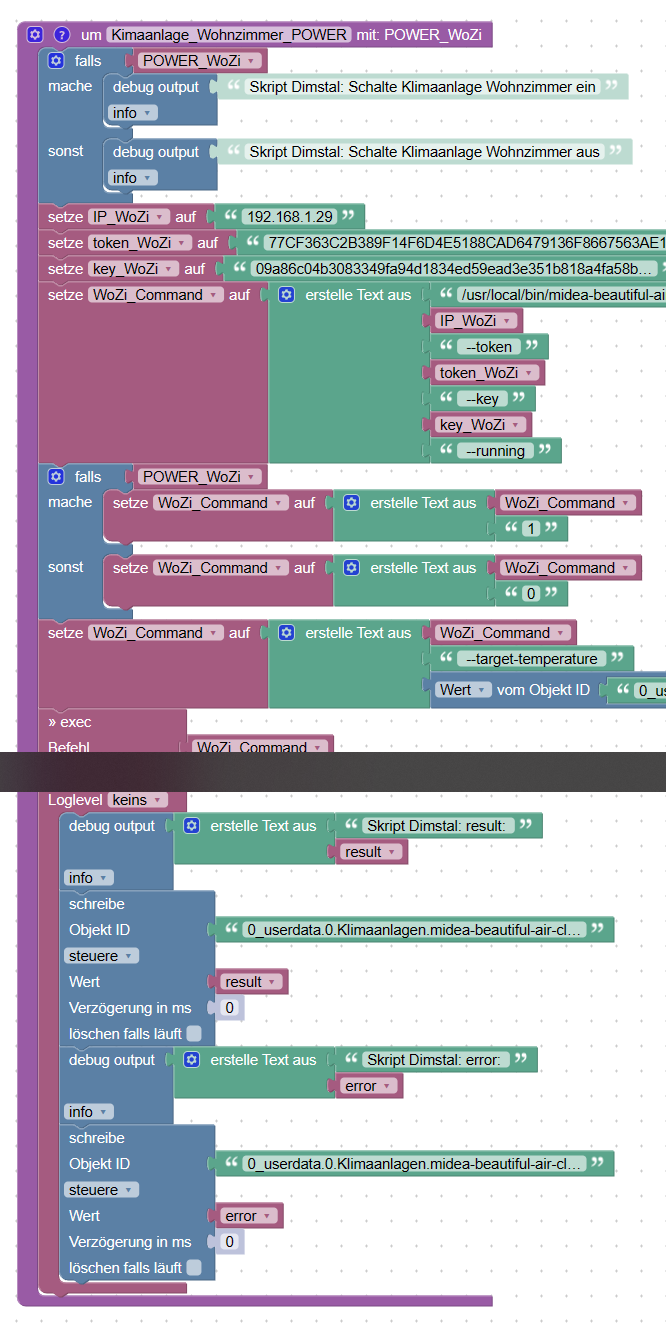
<block xmlns="https://developers.google.com/blockly/xml" type="procedures_defnoreturn" id="m_Q3E2-w5$,8%@x@?w[J" x="88" y="-4887"> <mutation> <arg name="POWER_WoZi" varid="xZ/8NCYPyanE0Dft!/,x"></arg> </mutation> <field name="NAME">Kimaanlage_Wohnzimmer_POWER</field> <comment pinned="false" h="80" w="160">Beschreibe diese Funktion …</comment> <statement name="STACK"> <block type="controls_if" id="ZJ{;m;|?QG3`domD-Z!n"> <mutation else="1"></mutation> <value name="IF0"> <block type="variables_get" id="#4}ei}YFYz`k%m,7Qhq`"> <field name="VAR" id="xZ/8NCYPyanE0Dft!/,x">POWER_WoZi</field> </block> </value> <statement name="DO0"> <block type="debug" id="..88WtLZ=9g$io1,.]dR"> <field name="Severity">log</field> <value name="TEXT"> <shadow type="text" id="36Vf6sa+nk}r4XEPk/;i"> <field name="TEXT">Skript Dimstal: Schalte Klimaanlage Wohnzimmer ein</field> </shadow> </value> </block> </statement> <statement name="ELSE"> <block type="debug" id="?H-BZ5sRAZ[)!,Pw|NK,"> <field name="Severity">log</field> <value name="TEXT"> <shadow type="text" id="P4*pbn?,.{KL$l^7nqj+"> <field name="TEXT">Skript Dimstal: Schalte Klimaanlage Wohnzimmer aus</field> </shadow> </value> </block> </statement> <next> <block type="variables_set" id="XAHyGEgR7MY({6EB=wgI"> <field name="VAR" id=":6Hm{=/CHh()Mg%6_Jci">IP_WoZi</field> <value name="VALUE"> <block type="text" id="Tq9i89g8/76xXY?plh,i"> <field name="TEXT">192.168.1.29</field> </block> </value> <next> <block type="variables_set" id="D|/={/Kr$S#3ps.]?py$"> <field name="VAR" id="}2xz}9=#.ejFm1bGz`MI">token_WoZi</field> <value name="VALUE"> <block type="text" id="q!}H:sLWi$wrAi(~mVT+"> <field name="TEXT">77CF363C2B389F14F6D4E5188CAD6479136F8667563AE1BD894C7EF8A012861A1F73C48496607D037E509CD0BB5E1CA032530A74C267909FFF5F32EC9173EE7E</field> </block> </value> <next> <block type="variables_set" id="S[8i92QVRM%[41Yk~fH5"> <field name="VAR" id=",{2$Z?RVjG6+,4#/!@pY">key_WoZi</field> <value name="VALUE"> <block type="text" id="XO0Wx(BJJxD0%9|bBW.4"> <field name="TEXT">09a86c04b3083349fa94d1834ed59ead3e351b818a4fa58b6537878443d0ac74</field> </block> </value> <next> <block type="variables_set" id="1}xRkabXyKi~^k?*1qa["> <field name="VAR" id="pRa6*%xa4C$r=cn:VMF0">WoZi_Command</field> <value name="VALUE"> <block type="text_join" id="/.elH,-WZdturL#Kil5="> <mutation items="7"></mutation> <value name="ADD0"> <block type="text" id="/$CL7B.~c2h)~hgvNdNE"> <field name="TEXT">/usr/local/bin/midea-beautiful-air-cli set --ip </field> </block> </value> <value name="ADD1"> <block type="variables_get" id="uCKo*2ZZ/=UDdC_6%GNj"> <field name="VAR" id=":6Hm{=/CHh()Mg%6_Jci">IP_WoZi</field> </block> </value> <value name="ADD2"> <block type="text" id="JC{Xj+]~Jb|L7m{M?EjZ"> <field name="TEXT"> --token </field> </block> </value> <value name="ADD3"> <block type="variables_get" id="]v=^B***..t;B$v(#W[2"> <field name="VAR" id="}2xz}9=#.ejFm1bGz`MI">token_WoZi</field> </block> </value> <value name="ADD4"> <block type="text" id="vKLDYNGy6^Fl]-LnAWV^"> <field name="TEXT"> --key </field> </block> </value> <value name="ADD5"> <block type="variables_get" id="6taY~HsC?_AN}n[+BJou"> <field name="VAR" id=",{2$Z?RVjG6+,4#/!@pY">key_WoZi</field> </block> </value> <value name="ADD6"> <block type="text" id="yMN$%}1-i|;6J#+5q*F3"> <field name="TEXT"> --running </field> </block> </value> </block> </value> <next> <block type="controls_if" id="6+t;lPeU`~;qBnA.Hp/i"> <mutation else="1"></mutation> <value name="IF0"> <block type="variables_get" id="{Y0vU}b3Q+M~Y7?r%qs7"> <field name="VAR" id="xZ/8NCYPyanE0Dft!/,x">POWER_WoZi</field> </block> </value> <statement name="DO0"> <block type="variables_set" id="w[ig31JB9|Gzd8~[PdGZ"> <field name="VAR" id="pRa6*%xa4C$r=cn:VMF0">WoZi_Command</field> <value name="VALUE"> <block type="text_join" id="ol0)cZ)XI}1A2kq5dUBC"> <mutation items="2"></mutation> <value name="ADD0"> <block type="variables_get" id="1Ks_{UbQ3M`]ANrwj$]."> <field name="VAR" id="pRa6*%xa4C$r=cn:VMF0">WoZi_Command</field> </block> </value> <value name="ADD1"> <block type="text" id="Em@541Yq~n#jE`=W0V[A"> <field name="TEXT">1</field> </block> </value> </block> </value> </block> </statement> <statement name="ELSE"> <block type="variables_set" id="Pg.X6PJ6_NN6N2A1g;Tx"> <field name="VAR" id="pRa6*%xa4C$r=cn:VMF0">WoZi_Command</field> <value name="VALUE"> <block type="text_join" id="Y9-yJFvBK;Wh#u8%nB2@"> <mutation items="2"></mutation> <value name="ADD0"> <block type="variables_get" id="6{Wj_!i%o?@-tfgG=H}e"> <field name="VAR" id="pRa6*%xa4C$r=cn:VMF0">WoZi_Command</field> </block> </value> <value name="ADD1"> <block type="text" id="aBb%T1K+zyN{qWd4cTT8"> <field name="TEXT">0</field> </block> </value> </block> </value> </block> </statement> <next> <block type="variables_set" id="D?:G]Z77JF4JZrt?KZ=S"> <field name="VAR" id="pRa6*%xa4C$r=cn:VMF0">WoZi_Command</field> <value name="VALUE"> <block type="text_join" id="|s=[h50(?e*smAkq={OU"> <mutation items="3"></mutation> <value name="ADD0"> <block type="variables_get" id="eH(iz_,8O=}a;T.$}BY9"> <field name="VAR" id="pRa6*%xa4C$r=cn:VMF0">WoZi_Command</field> </block> </value> <value name="ADD1"> <block type="text" id="YRD-9!0/u]~vWFN(88Sc"> <field name="TEXT"> --target-temperature </field> </block> </value> <value name="ADD2"> <block type="get_value_var" id="=VNNF.xU^A@}oy(%7@5|"> <field name="ATTR">val</field> <value name="OID"> <shadow type="field_oid" id="u:T|1d@OFI!U;;xZTN.|"> <field name="oid">Object ID</field> </shadow> <block type="text" id="5|JOU%t3ZV29Z,,GY`/i"> <field name="TEXT">0_userdata.0.Klimaanlagen.midea-beautiful-air-cli.WoZi-Zieltemperatur</field> </block> </value> </block> </value> </block> </value> <next> <block type="exec" id="s{fgaZERaY`](9./3$|="> <mutation xmlns="http://www.w3.org/1999/xhtml" with_statement="true"></mutation> <field name="WITH_STATEMENT">TRUE</field> <field name="LOG"></field> <value name="COMMAND"> <shadow type="text" id="-?ZJ*%t}ZwDvf(x2bg2#"> <field name="TEXT">text</field> </shadow> <block type="variables_get" id="G9^MEr8.mU]{+,rA{wAA"> <field name="VAR" id="pRa6*%xa4C$r=cn:VMF0">WoZi_Command</field> </block> </value> <statement name="STATEMENT"> <block type="debug" id="cSIbg%OCgF{36gal#|Dh"> <field name="Severity">log</field> <value name="TEXT"> <shadow type="text" id="K:*#cub1@?^{M-?4hBA5"> <field name="TEXT">test</field> </shadow> <block type="text_join" id="Cal_ZWLqKWAOXBpoyfL$"> <mutation items="2"></mutation> <value name="ADD0"> <block type="text" id="bA?}^(e9ffU`:99C6g[."> <field name="TEXT">Skript Dimstal: result: </field> </block> </value> <value name="ADD1"> <block type="variables_get" id="cY%u]Y`F.iN!KdXBb-F$"> <field name="VAR" id="v1tJ=X1Dxjm)9@K3sp9^">result</field> </block> </value> </block> </value> <next> <block type="control_ex" id="-@:U_VXZPrJP8iBvC,/G"> <field name="TYPE">false</field> <field name="CLEAR_RUNNING">FALSE</field> <value name="OID"> <shadow type="field_oid" id="TB4?A]S7YGe`xRftih06"> <field name="oid">Object ID</field> </shadow> <block type="text" id="nG6crqAD[_Q]``}6ST5~"> <field name="TEXT">0_userdata.0.Klimaanlagen.midea-beautiful-air-cli.WoZi-Last-Result</field> </block> </value> <value name="VALUE"> <shadow type="logic_boolean" id="nixb+%_3P?R%Cw.4+sA_"> <field name="BOOL">TRUE</field> </shadow> <block type="variables_get" id="lS!-IOC_-XBeYo}.|c3e"> <field name="VAR" id="v1tJ=X1Dxjm)9@K3sp9^">result</field> </block> </value> <value name="DELAY_MS"> <shadow type="math_number" id="_I`A($R7zB7Us_tI[Vwa"> <field name="NUM">0</field> </shadow> </value> <next> <block type="debug" id="pE=k$.X5}YZ9cRwKtPO~"> <field name="Severity">log</field> <value name="TEXT"> <shadow type="text" id="K:*#cub1@?^{M-?4hBA5"> <field name="TEXT">test</field> </shadow> <block type="text_join" id="RMR~/|uyq$xJwe/Uoal|"> <mutation items="2"></mutation> <value name="ADD0"> <block type="text" id="P}*t(lRknQ4qI=R(.qfE"> <field name="TEXT">Skript Dimstal: error: </field> </block> </value> <value name="ADD1"> <block type="variables_get" id="?!(E3Q=d=36BSJ3:v*07"> <field name="VAR" id="O(_d_WuVVqXPz|rnP*Vs">error</field> </block> </value> </block> </value> <next> <block type="control_ex" id="A5T(05Zp$z!wFEjvvyfE"> <field name="TYPE">false</field> <field name="CLEAR_RUNNING">FALSE</field> <value name="OID"> <shadow type="field_oid" id="TB4?A]S7YGe`xRftih06"> <field name="oid">Object ID</field> </shadow> <block type="text" id="ymuE=iEcfonlDJ}F0HDN"> <field name="TEXT">0_userdata.0.Klimaanlagen.midea-beautiful-air-cli.WoZi-Last-Error</field> </block> </value> <value name="VALUE"> <shadow type="logic_boolean" id="nixb+%_3P?R%Cw.4+sA_"> <field name="BOOL">TRUE</field> </shadow> <block type="variables_get" id="jX~ac1)9wN=$+:oZX~Mw"> <field name="VAR" id="O(_d_WuVVqXPz|rnP*Vs">error</field> </block> </value> <value name="DELAY_MS"> <shadow type="math_number" id="?nf{m]ZE~Cp{=@7,H|I("> <field name="NUM">0</field> </shadow> </value> </block> </next> </block> </next> </block> </next> </block> </statement> </block> </next> </block> </next> </block> </next> </block> </next> </block> </next> </block> </next> </block> </next> </block> </statement> </block>Du musst dir die IP, Token und Key auf dein Gerät anpassen.
Und beim WoZi_Command den Pfad zur CLI anpassen (ich sehe du hast das unter Windows)Dann kannst du das später einfach als Funktion mit
WahroderFalschaufrufen: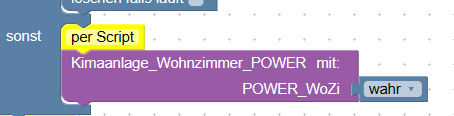
Wobei ich zumeist über Alexa steuere, ich habe also den Skill installiert und kann per
-textCommandsteuern:
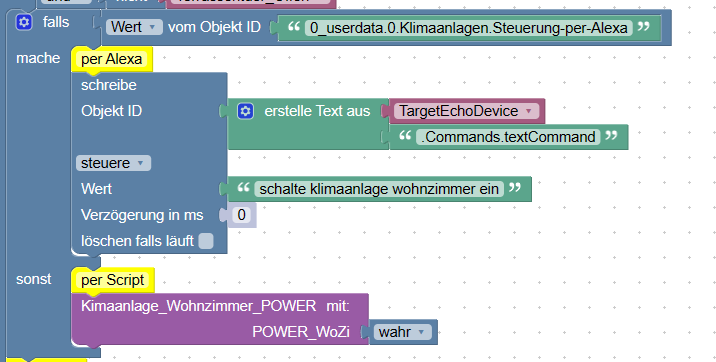
In meiner VIS habe ich ein Widget mit dem ich zwischen den beiden Methoden umschalten kann ohne gleich das Skript ändern zu müssen.
-
@reinosmart ich habe mir dafür in Blockly eine Funktion gebaut:
<block xmlns="https://developers.google.com/blockly/xml" type="procedures_defnoreturn" id="m_Q3E2-w5$,8%@x@?w[J" x="88" y="-4887"> <mutation> <arg name="POWER_WoZi" varid="xZ/8NCYPyanE0Dft!/,x"></arg> </mutation> <field name="NAME">Kimaanlage_Wohnzimmer_POWER</field> <comment pinned="false" h="80" w="160">Beschreibe diese Funktion …</comment> <statement name="STACK"> <block type="controls_if" id="ZJ{;m;|?QG3`domD-Z!n"> <mutation else="1"></mutation> <value name="IF0"> <block type="variables_get" id="#4}ei}YFYz`k%m,7Qhq`"> <field name="VAR" id="xZ/8NCYPyanE0Dft!/,x">POWER_WoZi</field> </block> </value> <statement name="DO0"> <block type="debug" id="..88WtLZ=9g$io1,.]dR"> <field name="Severity">log</field> <value name="TEXT"> <shadow type="text" id="36Vf6sa+nk}r4XEPk/;i"> <field name="TEXT">Skript Dimstal: Schalte Klimaanlage Wohnzimmer ein</field> </shadow> </value> </block> </statement> <statement name="ELSE"> <block type="debug" id="?H-BZ5sRAZ[)!,Pw|NK,"> <field name="Severity">log</field> <value name="TEXT"> <shadow type="text" id="P4*pbn?,.{KL$l^7nqj+"> <field name="TEXT">Skript Dimstal: Schalte Klimaanlage Wohnzimmer aus</field> </shadow> </value> </block> </statement> <next> <block type="variables_set" id="XAHyGEgR7MY({6EB=wgI"> <field name="VAR" id=":6Hm{=/CHh()Mg%6_Jci">IP_WoZi</field> <value name="VALUE"> <block type="text" id="Tq9i89g8/76xXY?plh,i"> <field name="TEXT">192.168.1.29</field> </block> </value> <next> <block type="variables_set" id="D|/={/Kr$S#3ps.]?py$"> <field name="VAR" id="}2xz}9=#.ejFm1bGz`MI">token_WoZi</field> <value name="VALUE"> <block type="text" id="q!}H:sLWi$wrAi(~mVT+"> <field name="TEXT">77CF363C2B389F14F6D4E5188CAD6479136F8667563AE1BD894C7EF8A012861A1F73C48496607D037E509CD0BB5E1CA032530A74C267909FFF5F32EC9173EE7E</field> </block> </value> <next> <block type="variables_set" id="S[8i92QVRM%[41Yk~fH5"> <field name="VAR" id=",{2$Z?RVjG6+,4#/!@pY">key_WoZi</field> <value name="VALUE"> <block type="text" id="XO0Wx(BJJxD0%9|bBW.4"> <field name="TEXT">09a86c04b3083349fa94d1834ed59ead3e351b818a4fa58b6537878443d0ac74</field> </block> </value> <next> <block type="variables_set" id="1}xRkabXyKi~^k?*1qa["> <field name="VAR" id="pRa6*%xa4C$r=cn:VMF0">WoZi_Command</field> <value name="VALUE"> <block type="text_join" id="/.elH,-WZdturL#Kil5="> <mutation items="7"></mutation> <value name="ADD0"> <block type="text" id="/$CL7B.~c2h)~hgvNdNE"> <field name="TEXT">/usr/local/bin/midea-beautiful-air-cli set --ip </field> </block> </value> <value name="ADD1"> <block type="variables_get" id="uCKo*2ZZ/=UDdC_6%GNj"> <field name="VAR" id=":6Hm{=/CHh()Mg%6_Jci">IP_WoZi</field> </block> </value> <value name="ADD2"> <block type="text" id="JC{Xj+]~Jb|L7m{M?EjZ"> <field name="TEXT"> --token </field> </block> </value> <value name="ADD3"> <block type="variables_get" id="]v=^B***..t;B$v(#W[2"> <field name="VAR" id="}2xz}9=#.ejFm1bGz`MI">token_WoZi</field> </block> </value> <value name="ADD4"> <block type="text" id="vKLDYNGy6^Fl]-LnAWV^"> <field name="TEXT"> --key </field> </block> </value> <value name="ADD5"> <block type="variables_get" id="6taY~HsC?_AN}n[+BJou"> <field name="VAR" id=",{2$Z?RVjG6+,4#/!@pY">key_WoZi</field> </block> </value> <value name="ADD6"> <block type="text" id="yMN$%}1-i|;6J#+5q*F3"> <field name="TEXT"> --running </field> </block> </value> </block> </value> <next> <block type="controls_if" id="6+t;lPeU`~;qBnA.Hp/i"> <mutation else="1"></mutation> <value name="IF0"> <block type="variables_get" id="{Y0vU}b3Q+M~Y7?r%qs7"> <field name="VAR" id="xZ/8NCYPyanE0Dft!/,x">POWER_WoZi</field> </block> </value> <statement name="DO0"> <block type="variables_set" id="w[ig31JB9|Gzd8~[PdGZ"> <field name="VAR" id="pRa6*%xa4C$r=cn:VMF0">WoZi_Command</field> <value name="VALUE"> <block type="text_join" id="ol0)cZ)XI}1A2kq5dUBC"> <mutation items="2"></mutation> <value name="ADD0"> <block type="variables_get" id="1Ks_{UbQ3M`]ANrwj$]."> <field name="VAR" id="pRa6*%xa4C$r=cn:VMF0">WoZi_Command</field> </block> </value> <value name="ADD1"> <block type="text" id="Em@541Yq~n#jE`=W0V[A"> <field name="TEXT">1</field> </block> </value> </block> </value> </block> </statement> <statement name="ELSE"> <block type="variables_set" id="Pg.X6PJ6_NN6N2A1g;Tx"> <field name="VAR" id="pRa6*%xa4C$r=cn:VMF0">WoZi_Command</field> <value name="VALUE"> <block type="text_join" id="Y9-yJFvBK;Wh#u8%nB2@"> <mutation items="2"></mutation> <value name="ADD0"> <block type="variables_get" id="6{Wj_!i%o?@-tfgG=H}e"> <field name="VAR" id="pRa6*%xa4C$r=cn:VMF0">WoZi_Command</field> </block> </value> <value name="ADD1"> <block type="text" id="aBb%T1K+zyN{qWd4cTT8"> <field name="TEXT">0</field> </block> </value> </block> </value> </block> </statement> <next> <block type="variables_set" id="D?:G]Z77JF4JZrt?KZ=S"> <field name="VAR" id="pRa6*%xa4C$r=cn:VMF0">WoZi_Command</field> <value name="VALUE"> <block type="text_join" id="|s=[h50(?e*smAkq={OU"> <mutation items="3"></mutation> <value name="ADD0"> <block type="variables_get" id="eH(iz_,8O=}a;T.$}BY9"> <field name="VAR" id="pRa6*%xa4C$r=cn:VMF0">WoZi_Command</field> </block> </value> <value name="ADD1"> <block type="text" id="YRD-9!0/u]~vWFN(88Sc"> <field name="TEXT"> --target-temperature </field> </block> </value> <value name="ADD2"> <block type="get_value_var" id="=VNNF.xU^A@}oy(%7@5|"> <field name="ATTR">val</field> <value name="OID"> <shadow type="field_oid" id="u:T|1d@OFI!U;;xZTN.|"> <field name="oid">Object ID</field> </shadow> <block type="text" id="5|JOU%t3ZV29Z,,GY`/i"> <field name="TEXT">0_userdata.0.Klimaanlagen.midea-beautiful-air-cli.WoZi-Zieltemperatur</field> </block> </value> </block> </value> </block> </value> <next> <block type="exec" id="s{fgaZERaY`](9./3$|="> <mutation xmlns="http://www.w3.org/1999/xhtml" with_statement="true"></mutation> <field name="WITH_STATEMENT">TRUE</field> <field name="LOG"></field> <value name="COMMAND"> <shadow type="text" id="-?ZJ*%t}ZwDvf(x2bg2#"> <field name="TEXT">text</field> </shadow> <block type="variables_get" id="G9^MEr8.mU]{+,rA{wAA"> <field name="VAR" id="pRa6*%xa4C$r=cn:VMF0">WoZi_Command</field> </block> </value> <statement name="STATEMENT"> <block type="debug" id="cSIbg%OCgF{36gal#|Dh"> <field name="Severity">log</field> <value name="TEXT"> <shadow type="text" id="K:*#cub1@?^{M-?4hBA5"> <field name="TEXT">test</field> </shadow> <block type="text_join" id="Cal_ZWLqKWAOXBpoyfL$"> <mutation items="2"></mutation> <value name="ADD0"> <block type="text" id="bA?}^(e9ffU`:99C6g[."> <field name="TEXT">Skript Dimstal: result: </field> </block> </value> <value name="ADD1"> <block type="variables_get" id="cY%u]Y`F.iN!KdXBb-F$"> <field name="VAR" id="v1tJ=X1Dxjm)9@K3sp9^">result</field> </block> </value> </block> </value> <next> <block type="control_ex" id="-@:U_VXZPrJP8iBvC,/G"> <field name="TYPE">false</field> <field name="CLEAR_RUNNING">FALSE</field> <value name="OID"> <shadow type="field_oid" id="TB4?A]S7YGe`xRftih06"> <field name="oid">Object ID</field> </shadow> <block type="text" id="nG6crqAD[_Q]``}6ST5~"> <field name="TEXT">0_userdata.0.Klimaanlagen.midea-beautiful-air-cli.WoZi-Last-Result</field> </block> </value> <value name="VALUE"> <shadow type="logic_boolean" id="nixb+%_3P?R%Cw.4+sA_"> <field name="BOOL">TRUE</field> </shadow> <block type="variables_get" id="lS!-IOC_-XBeYo}.|c3e"> <field name="VAR" id="v1tJ=X1Dxjm)9@K3sp9^">result</field> </block> </value> <value name="DELAY_MS"> <shadow type="math_number" id="_I`A($R7zB7Us_tI[Vwa"> <field name="NUM">0</field> </shadow> </value> <next> <block type="debug" id="pE=k$.X5}YZ9cRwKtPO~"> <field name="Severity">log</field> <value name="TEXT"> <shadow type="text" id="K:*#cub1@?^{M-?4hBA5"> <field name="TEXT">test</field> </shadow> <block type="text_join" id="RMR~/|uyq$xJwe/Uoal|"> <mutation items="2"></mutation> <value name="ADD0"> <block type="text" id="P}*t(lRknQ4qI=R(.qfE"> <field name="TEXT">Skript Dimstal: error: </field> </block> </value> <value name="ADD1"> <block type="variables_get" id="?!(E3Q=d=36BSJ3:v*07"> <field name="VAR" id="O(_d_WuVVqXPz|rnP*Vs">error</field> </block> </value> </block> </value> <next> <block type="control_ex" id="A5T(05Zp$z!wFEjvvyfE"> <field name="TYPE">false</field> <field name="CLEAR_RUNNING">FALSE</field> <value name="OID"> <shadow type="field_oid" id="TB4?A]S7YGe`xRftih06"> <field name="oid">Object ID</field> </shadow> <block type="text" id="ymuE=iEcfonlDJ}F0HDN"> <field name="TEXT">0_userdata.0.Klimaanlagen.midea-beautiful-air-cli.WoZi-Last-Error</field> </block> </value> <value name="VALUE"> <shadow type="logic_boolean" id="nixb+%_3P?R%Cw.4+sA_"> <field name="BOOL">TRUE</field> </shadow> <block type="variables_get" id="jX~ac1)9wN=$+:oZX~Mw"> <field name="VAR" id="O(_d_WuVVqXPz|rnP*Vs">error</field> </block> </value> <value name="DELAY_MS"> <shadow type="math_number" id="?nf{m]ZE~Cp{=@7,H|I("> <field name="NUM">0</field> </shadow> </value> </block> </next> </block> </next> </block> </next> </block> </statement> </block> </next> </block> </next> </block> </next> </block> </next> </block> </next> </block> </next> </block> </next> </block> </statement> </block>Du musst dir die IP, Token und Key auf dein Gerät anpassen.
Und beim WoZi_Command den Pfad zur CLI anpassen (ich sehe du hast das unter Windows)Dann kannst du das später einfach als Funktion mit
WahroderFalschaufrufen:Wobei ich zumeist über Alexa steuere, ich habe also den Skill installiert und kann per
-textCommandsteuern:
In meiner VIS habe ich ein Widget mit dem ich zwischen den beiden Methoden umschalten kann ohne gleich das Skript ändern zu müssen.
@bananajoe Danke für die schnelle Antwort. Ich glaube dein Blockly hilft mir weiter, war da total auf dem Holzweg.
-
@reinosmart ich habe mir dafür in Blockly eine Funktion gebaut:
<block xmlns="https://developers.google.com/blockly/xml" type="procedures_defnoreturn" id="m_Q3E2-w5$,8%@x@?w[J" x="88" y="-4887"> <mutation> <arg name="POWER_WoZi" varid="xZ/8NCYPyanE0Dft!/,x"></arg> </mutation> <field name="NAME">Kimaanlage_Wohnzimmer_POWER</field> <comment pinned="false" h="80" w="160">Beschreibe diese Funktion …</comment> <statement name="STACK"> <block type="controls_if" id="ZJ{;m;|?QG3`domD-Z!n"> <mutation else="1"></mutation> <value name="IF0"> <block type="variables_get" id="#4}ei}YFYz`k%m,7Qhq`"> <field name="VAR" id="xZ/8NCYPyanE0Dft!/,x">POWER_WoZi</field> </block> </value> <statement name="DO0"> <block type="debug" id="..88WtLZ=9g$io1,.]dR"> <field name="Severity">log</field> <value name="TEXT"> <shadow type="text" id="36Vf6sa+nk}r4XEPk/;i"> <field name="TEXT">Skript Dimstal: Schalte Klimaanlage Wohnzimmer ein</field> </shadow> </value> </block> </statement> <statement name="ELSE"> <block type="debug" id="?H-BZ5sRAZ[)!,Pw|NK,"> <field name="Severity">log</field> <value name="TEXT"> <shadow type="text" id="P4*pbn?,.{KL$l^7nqj+"> <field name="TEXT">Skript Dimstal: Schalte Klimaanlage Wohnzimmer aus</field> </shadow> </value> </block> </statement> <next> <block type="variables_set" id="XAHyGEgR7MY({6EB=wgI"> <field name="VAR" id=":6Hm{=/CHh()Mg%6_Jci">IP_WoZi</field> <value name="VALUE"> <block type="text" id="Tq9i89g8/76xXY?plh,i"> <field name="TEXT">192.168.1.29</field> </block> </value> <next> <block type="variables_set" id="D|/={/Kr$S#3ps.]?py$"> <field name="VAR" id="}2xz}9=#.ejFm1bGz`MI">token_WoZi</field> <value name="VALUE"> <block type="text" id="q!}H:sLWi$wrAi(~mVT+"> <field name="TEXT">77CF363C2B389F14F6D4E5188CAD6479136F8667563AE1BD894C7EF8A012861A1F73C48496607D037E509CD0BB5E1CA032530A74C267909FFF5F32EC9173EE7E</field> </block> </value> <next> <block type="variables_set" id="S[8i92QVRM%[41Yk~fH5"> <field name="VAR" id=",{2$Z?RVjG6+,4#/!@pY">key_WoZi</field> <value name="VALUE"> <block type="text" id="XO0Wx(BJJxD0%9|bBW.4"> <field name="TEXT">09a86c04b3083349fa94d1834ed59ead3e351b818a4fa58b6537878443d0ac74</field> </block> </value> <next> <block type="variables_set" id="1}xRkabXyKi~^k?*1qa["> <field name="VAR" id="pRa6*%xa4C$r=cn:VMF0">WoZi_Command</field> <value name="VALUE"> <block type="text_join" id="/.elH,-WZdturL#Kil5="> <mutation items="7"></mutation> <value name="ADD0"> <block type="text" id="/$CL7B.~c2h)~hgvNdNE"> <field name="TEXT">/usr/local/bin/midea-beautiful-air-cli set --ip </field> </block> </value> <value name="ADD1"> <block type="variables_get" id="uCKo*2ZZ/=UDdC_6%GNj"> <field name="VAR" id=":6Hm{=/CHh()Mg%6_Jci">IP_WoZi</field> </block> </value> <value name="ADD2"> <block type="text" id="JC{Xj+]~Jb|L7m{M?EjZ"> <field name="TEXT"> --token </field> </block> </value> <value name="ADD3"> <block type="variables_get" id="]v=^B***..t;B$v(#W[2"> <field name="VAR" id="}2xz}9=#.ejFm1bGz`MI">token_WoZi</field> </block> </value> <value name="ADD4"> <block type="text" id="vKLDYNGy6^Fl]-LnAWV^"> <field name="TEXT"> --key </field> </block> </value> <value name="ADD5"> <block type="variables_get" id="6taY~HsC?_AN}n[+BJou"> <field name="VAR" id=",{2$Z?RVjG6+,4#/!@pY">key_WoZi</field> </block> </value> <value name="ADD6"> <block type="text" id="yMN$%}1-i|;6J#+5q*F3"> <field name="TEXT"> --running </field> </block> </value> </block> </value> <next> <block type="controls_if" id="6+t;lPeU`~;qBnA.Hp/i"> <mutation else="1"></mutation> <value name="IF0"> <block type="variables_get" id="{Y0vU}b3Q+M~Y7?r%qs7"> <field name="VAR" id="xZ/8NCYPyanE0Dft!/,x">POWER_WoZi</field> </block> </value> <statement name="DO0"> <block type="variables_set" id="w[ig31JB9|Gzd8~[PdGZ"> <field name="VAR" id="pRa6*%xa4C$r=cn:VMF0">WoZi_Command</field> <value name="VALUE"> <block type="text_join" id="ol0)cZ)XI}1A2kq5dUBC"> <mutation items="2"></mutation> <value name="ADD0"> <block type="variables_get" id="1Ks_{UbQ3M`]ANrwj$]."> <field name="VAR" id="pRa6*%xa4C$r=cn:VMF0">WoZi_Command</field> </block> </value> <value name="ADD1"> <block type="text" id="Em@541Yq~n#jE`=W0V[A"> <field name="TEXT">1</field> </block> </value> </block> </value> </block> </statement> <statement name="ELSE"> <block type="variables_set" id="Pg.X6PJ6_NN6N2A1g;Tx"> <field name="VAR" id="pRa6*%xa4C$r=cn:VMF0">WoZi_Command</field> <value name="VALUE"> <block type="text_join" id="Y9-yJFvBK;Wh#u8%nB2@"> <mutation items="2"></mutation> <value name="ADD0"> <block type="variables_get" id="6{Wj_!i%o?@-tfgG=H}e"> <field name="VAR" id="pRa6*%xa4C$r=cn:VMF0">WoZi_Command</field> </block> </value> <value name="ADD1"> <block type="text" id="aBb%T1K+zyN{qWd4cTT8"> <field name="TEXT">0</field> </block> </value> </block> </value> </block> </statement> <next> <block type="variables_set" id="D?:G]Z77JF4JZrt?KZ=S"> <field name="VAR" id="pRa6*%xa4C$r=cn:VMF0">WoZi_Command</field> <value name="VALUE"> <block type="text_join" id="|s=[h50(?e*smAkq={OU"> <mutation items="3"></mutation> <value name="ADD0"> <block type="variables_get" id="eH(iz_,8O=}a;T.$}BY9"> <field name="VAR" id="pRa6*%xa4C$r=cn:VMF0">WoZi_Command</field> </block> </value> <value name="ADD1"> <block type="text" id="YRD-9!0/u]~vWFN(88Sc"> <field name="TEXT"> --target-temperature </field> </block> </value> <value name="ADD2"> <block type="get_value_var" id="=VNNF.xU^A@}oy(%7@5|"> <field name="ATTR">val</field> <value name="OID"> <shadow type="field_oid" id="u:T|1d@OFI!U;;xZTN.|"> <field name="oid">Object ID</field> </shadow> <block type="text" id="5|JOU%t3ZV29Z,,GY`/i"> <field name="TEXT">0_userdata.0.Klimaanlagen.midea-beautiful-air-cli.WoZi-Zieltemperatur</field> </block> </value> </block> </value> </block> </value> <next> <block type="exec" id="s{fgaZERaY`](9./3$|="> <mutation xmlns="http://www.w3.org/1999/xhtml" with_statement="true"></mutation> <field name="WITH_STATEMENT">TRUE</field> <field name="LOG"></field> <value name="COMMAND"> <shadow type="text" id="-?ZJ*%t}ZwDvf(x2bg2#"> <field name="TEXT">text</field> </shadow> <block type="variables_get" id="G9^MEr8.mU]{+,rA{wAA"> <field name="VAR" id="pRa6*%xa4C$r=cn:VMF0">WoZi_Command</field> </block> </value> <statement name="STATEMENT"> <block type="debug" id="cSIbg%OCgF{36gal#|Dh"> <field name="Severity">log</field> <value name="TEXT"> <shadow type="text" id="K:*#cub1@?^{M-?4hBA5"> <field name="TEXT">test</field> </shadow> <block type="text_join" id="Cal_ZWLqKWAOXBpoyfL$"> <mutation items="2"></mutation> <value name="ADD0"> <block type="text" id="bA?}^(e9ffU`:99C6g[."> <field name="TEXT">Skript Dimstal: result: </field> </block> </value> <value name="ADD1"> <block type="variables_get" id="cY%u]Y`F.iN!KdXBb-F$"> <field name="VAR" id="v1tJ=X1Dxjm)9@K3sp9^">result</field> </block> </value> </block> </value> <next> <block type="control_ex" id="-@:U_VXZPrJP8iBvC,/G"> <field name="TYPE">false</field> <field name="CLEAR_RUNNING">FALSE</field> <value name="OID"> <shadow type="field_oid" id="TB4?A]S7YGe`xRftih06"> <field name="oid">Object ID</field> </shadow> <block type="text" id="nG6crqAD[_Q]``}6ST5~"> <field name="TEXT">0_userdata.0.Klimaanlagen.midea-beautiful-air-cli.WoZi-Last-Result</field> </block> </value> <value name="VALUE"> <shadow type="logic_boolean" id="nixb+%_3P?R%Cw.4+sA_"> <field name="BOOL">TRUE</field> </shadow> <block type="variables_get" id="lS!-IOC_-XBeYo}.|c3e"> <field name="VAR" id="v1tJ=X1Dxjm)9@K3sp9^">result</field> </block> </value> <value name="DELAY_MS"> <shadow type="math_number" id="_I`A($R7zB7Us_tI[Vwa"> <field name="NUM">0</field> </shadow> </value> <next> <block type="debug" id="pE=k$.X5}YZ9cRwKtPO~"> <field name="Severity">log</field> <value name="TEXT"> <shadow type="text" id="K:*#cub1@?^{M-?4hBA5"> <field name="TEXT">test</field> </shadow> <block type="text_join" id="RMR~/|uyq$xJwe/Uoal|"> <mutation items="2"></mutation> <value name="ADD0"> <block type="text" id="P}*t(lRknQ4qI=R(.qfE"> <field name="TEXT">Skript Dimstal: error: </field> </block> </value> <value name="ADD1"> <block type="variables_get" id="?!(E3Q=d=36BSJ3:v*07"> <field name="VAR" id="O(_d_WuVVqXPz|rnP*Vs">error</field> </block> </value> </block> </value> <next> <block type="control_ex" id="A5T(05Zp$z!wFEjvvyfE"> <field name="TYPE">false</field> <field name="CLEAR_RUNNING">FALSE</field> <value name="OID"> <shadow type="field_oid" id="TB4?A]S7YGe`xRftih06"> <field name="oid">Object ID</field> </shadow> <block type="text" id="ymuE=iEcfonlDJ}F0HDN"> <field name="TEXT">0_userdata.0.Klimaanlagen.midea-beautiful-air-cli.WoZi-Last-Error</field> </block> </value> <value name="VALUE"> <shadow type="logic_boolean" id="nixb+%_3P?R%Cw.4+sA_"> <field name="BOOL">TRUE</field> </shadow> <block type="variables_get" id="jX~ac1)9wN=$+:oZX~Mw"> <field name="VAR" id="O(_d_WuVVqXPz|rnP*Vs">error</field> </block> </value> <value name="DELAY_MS"> <shadow type="math_number" id="?nf{m]ZE~Cp{=@7,H|I("> <field name="NUM">0</field> </shadow> </value> </block> </next> </block> </next> </block> </next> </block> </statement> </block> </next> </block> </next> </block> </next> </block> </next> </block> </next> </block> </next> </block> </next> </block> </statement> </block>Du musst dir die IP, Token und Key auf dein Gerät anpassen.
Und beim WoZi_Command den Pfad zur CLI anpassen (ich sehe du hast das unter Windows)Dann kannst du das später einfach als Funktion mit
WahroderFalschaufrufen:Wobei ich zumeist über Alexa steuere, ich habe also den Skill installiert und kann per
-textCommandsteuern:
In meiner VIS habe ich ein Widget mit dem ich zwischen den beiden Methoden umschalten kann ohne gleich das Skript ändern zu müssen.
@bananajoe Leider komme ich damit auch nicht weiter. Selbst wenn ich nur den 'help' Befehl abschicke
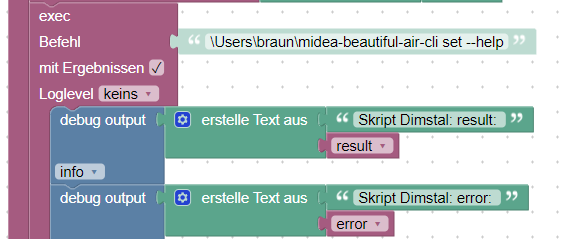 kommt eine für mich nicht interpretierbare Fehlermeldung.
13:24:30.027 info javascript.0 (10152) script.js.Midea_test: exec: \Users\braun\midea-beautiful-air-cli set --help
13:24:30.866 info javascript.0 (10152) script.js.Midea_test: Skript Dimstal: result:
13:24:30.867 info javascript.0 (10152) script.js.Midea_test: Skript Dimstal: error: Error: Command failed: \Users\braun\midea-beautiful-air-cli set --help Traceback (most recent call last): File "<frozen runpy>", line 198, in _run_module_as_main File "<frozen runpy>", line 88, in run_code File "C:\Users\braun\midea-beautiful-air-cli.exe_main.py", line 4, in <module> ModuleNotFoundError: No module named 'midea_beautiful'
13:24:33.413 info javascript.0 (10152) Stop script script.js.Midea_testWenn man das über die console macht funktioniert alles einwandfrei.
-
@bananajoe Leider komme ich damit auch nicht weiter. Selbst wenn ich nur den 'help' Befehl abschicke
kommt eine für mich nicht interpretierbare Fehlermeldung.13:24:30.027 info javascript.0 (10152) script.js.Midea_test: exec: \Users\braun\midea-beautiful-air-cli set --help
13:24:30.866 info javascript.0 (10152) script.js.Midea_test: Skript Dimstal: result:
13:24:30.867 info javascript.0 (10152) script.js.Midea_test: Skript Dimstal: error: Error: Command failed: \Users\braun\midea-beautiful-air-cli set --help Traceback (most recent call last): File "<frozen runpy>", line 198, in _run_module_as_main File "<frozen runpy>", line 88, in run_code File "C:\Users\braun\midea-beautiful-air-cli.exe_main.py", line 4, in <module> ModuleNotFoundError: No module named 'midea_beautiful'
13:24:33.413 info javascript.0 (10152) Stop script script.js.Midea_testWenn man das über die console macht funktioniert alles einwandfrei.
@reinosmart
du musst vermutlich den Python-Interpreter voran setzen. also diepython.exeinklusive Pfad
Dein Benutzerprofil weis das es.pymit dem Interpreter öffnen muss, das vom iobroker vermutlich nichtDie Module sind ggf. nur für deinen Benutzer "braun" installiert, das Skript wird aber unter dem Benutzer "iobroker" ausgeführt vermute ich (steht am Dienst dran wenn du dir Verwaltung => Dienste ansiehst
-
@reinosmart
du musst vermutlich den Python-Interpreter voran setzen. also diepython.exeinklusive Pfad
Dein Benutzerprofil weis das es.pymit dem Interpreter öffnen muss, das vom iobroker vermutlich nichtDie Module sind ggf. nur für deinen Benutzer "braun" installiert, das Skript wird aber unter dem Benutzer "iobroker" ausgeführt vermute ich (steht am Dienst dran wenn du dir Verwaltung => Dienste ansiehst
Hallo
Ich verwende den Adapter nun schon sehr lange erfolgreich.
Im Vergangenen Jahr ist nun neben meinen 2 Dimstal noch eine original Midea vom Typ Kids hinzu gekommen. diese lässt sich wie die anderen auch über die Net Home App steuern, leider jedoch nicht über den Adapter Midea im Iobroker.
Mein Adapter hat de Klima aber gefunden und Aktualisiert auch die Werte wenn ich die über Fernbedienung oder app ändere. nur vom iobroker ist keine Steuerung möglich
Midea App version 0.0.7
wollte auch schon auf 0.0.4 runter weil ich das gelesen hatte, aber wo finde ich die ?
-
Hallo
Ich verwende den Adapter nun schon sehr lange erfolgreich.
Im Vergangenen Jahr ist nun neben meinen 2 Dimstal noch eine original Midea vom Typ Kids hinzu gekommen. diese lässt sich wie die anderen auch über die Net Home App steuern, leider jedoch nicht über den Adapter Midea im Iobroker.
Mein Adapter hat de Klima aber gefunden und Aktualisiert auch die Werte wenn ich die über Fernbedienung oder app ändere. nur vom iobroker ist keine Steuerung möglich
Midea App version 0.0.7
wollte auch schon auf 0.0.4 runter weil ich das gelesen hatte, aber wo finde ich die ?@audiraudi das Problem mit dem "nicht steuern" haben scheinbar die neueren Geräte. Den Status kann ich mit meiner Dimstal-Anlage ja schön per Adapter auslesen, nur das steuern geht wie bei deiner Kids-Anlage nicht.
Lösung A ist den Alexa-Skill zu installieren, darüber klappt das steuern (über den TextCommand Datenpunkt eines beliebigen Echos "Schalte Klimaanlage Wohnzimmer ein").
Lösung B wäre über die
midea-beautiful-air-cli, die wirft bei mir zwar auch einige Fehler (die ich auskommentiert habe, irgendwo weiter oben im Thema), schaltet aberLösung C wäre den USB-Dongle gegen einen anderen auszutauschen der mit einer anderen Software geflasht ist, ich meine es ging dann per MQTT. Die habe ich auch gekauft ... und liegen hier jetzt irgendwo rum. Müsste auch weiter oben im Thema irgendwo auftauchen.
-
@bananajoe
Danke
Lösung A wäre eine OptionLösung B .... so fit in den Sachen bin ich nicht.. müsste ich mir mal genau durchlesen wie das mit dem Iobroker geht ... gibt es dazu irgendwo eine Anleitung ?
Lösung C ist keine Option und ich glaub das geht mit den neuen auch nicht mehr, ich meine da steckt gar kein Stick mehr sondern das WLan ist onbord, ist bei meiner neuen Dimstal auch so aber die kann ich steuern ..
Ich glaub die Kids ist etwas anders, die hat ja auch den folgesensor und die Fernbedienung ist viel einfacher ..
-
@bananajoe
Danke
Lösung A wäre eine OptionLösung B .... so fit in den Sachen bin ich nicht.. müsste ich mir mal genau durchlesen wie das mit dem Iobroker geht ... gibt es dazu irgendwo eine Anleitung ?
Lösung C ist keine Option und ich glaub das geht mit den neuen auch nicht mehr, ich meine da steckt gar kein Stick mehr sondern das WLan ist onbord, ist bei meiner neuen Dimstal auch so aber die kann ich steuern ..
Ich glaub die Kids ist etwas anders, die hat ja auch den folgesensor und die Fernbedienung ist viel einfacher ..
@audiraudi Ich habe Lösung D vergessen
Lösung D : Ein IR-Sender bei dem du die wichtigsten Sachen der Fernbedienung anlernst und den du dann über ioBroker steuern kannst. Feedback bekommst du ja trotzdem über dem Adapter.
Ich würde einen IR-Sender auf Tasmota-Basis nehmen. Die lassen sich dann komplett über MQTT ansteuern. Ich hatte mit Broadlink angefangen, aber der Adapter wird nicht mehr gepflegt und es ist umständlich die Sender einzubinden.
Ich hatte dann alles vom Broadlink auf Tasmota-IR "umgelernt" und da sieht man erst wieviel Müll da mit aufgezeichnet/gesendet wurde, beim Tasmota-IR erkennt man immer klar den eigentlichen Befehl, auch wenn der mehrmals gesendet wurde.Die Broadlink wurden als "Lösung" auch mit im Dimstalshop angeboten, das ganze sollte also grundsätzlich funktionieren.
Die Alexa-Lösung nutze ich zu Hause eigentlich nur zum ein und ausschalten, wenn es manuell ist dann eben per Zuruf. Die Fernbedienung habe ich nur in der Hand um zwischen Automatik oder Heizen umzustellen (wobei das auch auf Zuruf geht, genau wie die Temperatur setzen).
Alternativ per App um zu kontrollieren -
@audiraudi Ich habe Lösung D vergessen
Lösung D : Ein IR-Sender bei dem du die wichtigsten Sachen der Fernbedienung anlernst und den du dann über ioBroker steuern kannst. Feedback bekommst du ja trotzdem über dem Adapter.
Ich würde einen IR-Sender auf Tasmota-Basis nehmen. Die lassen sich dann komplett über MQTT ansteuern. Ich hatte mit Broadlink angefangen, aber der Adapter wird nicht mehr gepflegt und es ist umständlich die Sender einzubinden.
Ich hatte dann alles vom Broadlink auf Tasmota-IR "umgelernt" und da sieht man erst wieviel Müll da mit aufgezeichnet/gesendet wurde, beim Tasmota-IR erkennt man immer klar den eigentlichen Befehl, auch wenn der mehrmals gesendet wurde.Die Broadlink wurden als "Lösung" auch mit im Dimstalshop angeboten, das ganze sollte also grundsätzlich funktionieren.
Die Alexa-Lösung nutze ich zu Hause eigentlich nur zum ein und ausschalten, wenn es manuell ist dann eben per Zuruf. Die Fernbedienung habe ich nur in der Hand um zwischen Automatik oder Heizen umzustellen (wobei das auch auf Zuruf geht, genau wie die Temperatur setzen).
Alternativ per App um zu kontrollieren@bananajoe
Die IR Lösung wäre auch ne Idee, aber nur über Broadlink, leider steige ich bei MQTT nicht durch, ich habe das schon einige male auf neue versucht um unsere Wallbox zu steuern..hast du vielleicht ein top Tutorial für MQTT auf iobroker?
Die Automatik der Klima nutzen ich schon lange nicht mehr, ich hatte den Fall das meine erste Klima am morgen erstmal gut am Heizen war um am Nachmittag dann zu kühlen, klar das AKW braucht was zu tun, aber seither mache ich die Logik eigentlich über Iobroker.
Eigentlich läuft die Klima 1 nur über iobroker, ich weiß gar nicht wo die Fernbedienung ist :-)
ist alles in Abhängigkeit mit PV und Temperatur sowie Luftfeuchte ... was schonmal verstellt wird ist die wunschtemperatur
-
@audiraudi MQTT ist schrecklich unspektakulär ... man richtet den Broker ein, gibt in seinen Endgeräten den Broker als MQTT-Ziel ein und das war es auch schon. Dann hat man Datenpunkte.
Unter
mqtt.0.cmnd.namedesgeraetes.IRSend
kann man dann reinschreiben was man senden will,Hier ist eine schöne Anleitung: https://www.smarthomejetzt.de/blitzwolf-bw-rc1-infrarot-hub-mit-tasmota-flashen-und-in-iobroker-mit-mqtt-und-web-request-einbinden/
Die Klima steht bei mir im Sommer auf Automatik da ich festgestellt habe das damit der Verbrauch geringer und es trotzdem kalt ist.
Im Winter steht diese auf Heizen weil dann mehr warme Luft kommt. Meist ist ja gar keiner da wenn die Anlage da mit 26 Grad bläst, es geht darum alles einmal durchzuwärmen.Ansonsten nutze ich bei der Steuerung nur "ein" und "aus" aus iobroker heraus (immer wenn der Akku voll ist bzw. wenn ich gar nicht genug Strom in den Akku pumpen kann)
-
Hallo ich nutze diesen Adapter auch seit längerer Zeit, ichhabe einen Luftentfeuchter im Keller und die Meldung das der Tank leer ist benutzt, seit einiger Zeit funktioniert das nicht mehr.
Der Datenpunkt existiert auch nicht mehr in der Stuktur : midea.0.31885837422757.tank_fullJemand eine Idee woran das liegen könnte ? Der Adapter v0.0.7 selbst ist grün.
-
@maxpd alle Dimstal mit WLAN sollten gehen. Mit den zuvor beschriebenen Einschränkungen (Werte abgreifen geht super, Steuerung klappt nicht bei allen, dann aber über Umwege.
Ich habe den Alexa-Skill installiert und darüber klappt das Super (ein/aus, Wunschtemperatur setzen, heizen, kühlen etc.), die Fernbedienung nutze ich eigentlich nie.
@bananajoe Hallo lese oft mit deine Beiträge sind klasse, so wie du es gemacht hast hatte ich es auch aber es lief nie störungsfrei daher habe ich heute mal alles gelöscht und neu aufgestellt nun habe ich Probleme die Klimaanlage ( Dimstal ) wieder in IOT / Alexageräte eizubinden A weiß ich nicht welschen datenpunkt ich nehmen soll und b da war meine ich was mit Objekt Daten in die was hinzugefügt werden muss kannst du mir Netterweise tips geben …. Liebe grüße Markus


Hey! Du scheinst an dieser Unterhaltung interessiert zu sein, hast aber noch kein Konto.
Hast du es satt, bei jedem Besuch durch die gleichen Beiträge zu scrollen? Wenn du dich für ein Konto anmeldest, kommst du immer genau dorthin zurück, wo du zuvor warst, und kannst dich über neue Antworten benachrichtigen lassen (entweder per E-Mail oder Push-Benachrichtigung). Du kannst auch Lesezeichen speichern und Beiträge positiv bewerten, um anderen Community-Mitgliedern deine Wertschätzung zu zeigen.
Mit deinem Input könnte dieser Beitrag noch besser werden 💗
Registrieren AnmeldenSupport us
473
Online33.0k
Benutzer83.6k
Themen1.3m
Beiträge