




Installation iobroker.systeminfo über NPM geht nicht
-
@ich77 said in Installation iobroker.systeminfo über NPM geht nicht:
ich habe den Systeminfo Adapter versucht zu installieren. Da ich ihn in der Liste der Adapter nicht gefunden habe, habe ich ihn über
Der Adapter ist in allen Repositories verfügbar

ich habe den Systeminfo Adapter versucht zu installieren. Da ich ihn in der Liste der Adapter nicht gefunden habe, habe ich ihn über
npm i iobroker.systeminfoversucht zu installieren. NPM ist auch ohne Fehler durchgelaufen, aber der Adapter ist weiterhin nicht zu finden.
Eine GANZ GANZ schlechte Idee. Niemans direkt mit npm herumtun. Je nachdem welchen (falschen) User dur verwendest oder in welchem (falschen) Verzeichnis du dies ausführst kannst du die ganze Installation abschießen ...
Auch mit
iobroker add iobroker.systeminfokann ich keine Instanz erzeugen. Kann mir da jemand helfen?
Ev. hast du ja mit npm i schon was verbogen.
Geh in admin und such nochmal nach dem Adapter.
Ev. klick auf "Nach update suchen" um die Repositories manuell zu refereshen.
Schau ins log ob da ein fehler auftritt.Was eine ev. schiefe Installation via npm betrifft kann die @Thmas-Braun am besten helfen.
Hang mal einen iob diag full output hier an.@mcm57 Vielen Dank, das war mir nicht bewusst...
Hier der iob full output:
======================= SUMMARY ======================= v.2023-10-10 Static hostname: raspberrypi Icon name: computer Operating System: Raspbian GNU/Linux 11 (bullseye) Kernel: Linux 6.1.21-v8+ Architecture: arm64 Installation: native Kernel: aarch64 Userland: armhf Timezone: Europe/Berlin (CEST, +0200) User-ID: 1000 X-Server: true Boot Target: graphical.target Pending OS-Updates: 0 Error: Object "system.repositories" not found Pending iob updates: 0 Nodejs-Installation: /usr/bin/nodejs v18.20.1 /usr/bin/node v18.20.1 /usr/bin/npm 10.5.0 /usr/bin/npx 10.5.0 /usr/bin/corepack 0.25.2 Recommended versions are nodejs 18.20.1 and npm 10.5.0 Your nodejs installation is correct MEMORY: total used free shared buff/cache available Mem: 3.8G 2.4G 651M 135M 752M 1.2G Swap: 10M 10M 0.0K Total: 3.8G 2.4G 651M Active iob-Instances: 28 List is empty ioBroker Core: js-controller 5.0.19 admin 6.13.16 ioBroker Status: iobroker is running on this host. Objects type: jsonl States type: jsonl Status admin and web instance: + system.adapter.admin.0 : admin : raspberrypi - enabled, port: 8081, bind: 192.168.0.11, run as: admin + system.adapter.web.0 : web : raspberrypi - enabled, port: 8082, bind: 0.0.0.0, run as: admin Objects: 14943 States: 14903 Size of iob-Database: 14M /opt/iobroker/iobroker-data/objects.jsonl 11M /opt/iobroker/iobroker-data/objects.json.migrated 11M /opt/iobroker/iobroker-data/objects.json.bak.migrated 21M /opt/iobroker/iobroker-data/states.jsonl 2.5M /opt/iobroker/iobroker-data/states.json.migrated 2.5M /opt/iobroker/iobroker-data/states.json.bak.migrated =================== END OF SUMMARY ==================== -
@mcm57 Vielen Dank, das war mir nicht bewusst...
Hier der iob full output:
======================= SUMMARY ======================= v.2023-10-10 Static hostname: raspberrypi Icon name: computer Operating System: Raspbian GNU/Linux 11 (bullseye) Kernel: Linux 6.1.21-v8+ Architecture: arm64 Installation: native Kernel: aarch64 Userland: armhf Timezone: Europe/Berlin (CEST, +0200) User-ID: 1000 X-Server: true Boot Target: graphical.target Pending OS-Updates: 0 Error: Object "system.repositories" not found Pending iob updates: 0 Nodejs-Installation: /usr/bin/nodejs v18.20.1 /usr/bin/node v18.20.1 /usr/bin/npm 10.5.0 /usr/bin/npx 10.5.0 /usr/bin/corepack 0.25.2 Recommended versions are nodejs 18.20.1 and npm 10.5.0 Your nodejs installation is correct MEMORY: total used free shared buff/cache available Mem: 3.8G 2.4G 651M 135M 752M 1.2G Swap: 10M 10M 0.0K Total: 3.8G 2.4G 651M Active iob-Instances: 28 List is empty ioBroker Core: js-controller 5.0.19 admin 6.13.16 ioBroker Status: iobroker is running on this host. Objects type: jsonl States type: jsonl Status admin and web instance: + system.adapter.admin.0 : admin : raspberrypi - enabled, port: 8081, bind: 192.168.0.11, run as: admin + system.adapter.web.0 : web : raspberrypi - enabled, port: 8082, bind: 0.0.0.0, run as: admin Objects: 14943 States: 14903 Size of iob-Database: 14M /opt/iobroker/iobroker-data/objects.jsonl 11M /opt/iobroker/iobroker-data/objects.json.migrated 11M /opt/iobroker/iobroker-data/objects.json.bak.migrated 21M /opt/iobroker/iobroker-data/states.jsonl 2.5M /opt/iobroker/iobroker-data/states.json.migrated 2.5M /opt/iobroker/iobroker-data/states.json.bak.migrated =================== END OF SUMMARY ====================@ich77 sagte in Installation iobroker.systeminfo über NPM geht nicht:
Hier der iob full output:
Nein, das ist die Zusammenfassung.
X-Server: true
Boot Target: graphical.targetAusschalten.
sudo systemctl set-default multi-user.targetDie Meldung
Error: Object "system.repositories" not found
ist auch verdächtig. Die Repos müssen natürlich gefunden werden.
Zeig mal die vollständige Ausgabe. -
@ich77 sagte in Installation iobroker.systeminfo über NPM geht nicht:
Hier der iob full output:
Nein, das ist die Zusammenfassung.
X-Server: true
Boot Target: graphical.targetAusschalten.
sudo systemctl set-default multi-user.targetDie Meldung
Error: Object "system.repositories" not found
ist auch verdächtig. Die Repos müssen natürlich gefunden werden.
Zeig mal die vollständige Ausgabe.Sorry, hier kommt die komplette Diagnose:
Skript v.2023-10-10 *** BASE SYSTEM *** Static hostname: raspberrypi Icon name: computer Operating System: Raspbian GNU/Linux 11 (bullseye) Kernel: Linux 6.1.21-v8+ Architecture: arm64 Model : Raspberry Pi 4 Model B Rev 1.1 Docker : false Virtualization : none Kernel : aarch64 Userland : armhf Systemuptime and Load: 12:50:35 up 43 days, 2:06, 3 users, load average: 0.90, 0.92, 0.99 CPU threads: 4 *** RASPBERRY THROTTLING *** Current issues: No throttling issues detected. Previously detected issues: No throttling issues detected. *** Time and Time Zones *** Local time: Wed 2024-04-10 12:50:35 CEST Universal time: Wed 2024-04-10 10:50:35 UTC RTC time: n/a Time zone: Europe/Berlin (CEST, +0200) System clock synchronized: yes NTP service: active RTC in local TZ: no *** User and Groups *** pi /home/pi pi adm dialout cdrom sudo audio video plugdev games users input netdev lpadmin gpio i2c spi iobroker *** X-Server-Setup *** X-Server: true Desktop: Terminal: tty Boot Target: graphical.target *** MEMORY *** total used free shared buff/cache available Mem: 3.8G 2.4G 121M 133M 1.3G 1.2G Swap: 10M 10M 0.0K Total: 3.8G 2.4G 121M 3794 M total memory 2358 M used memory 456 M active memory 2743 M inactive memory 120 M free memory 9 M buffer memory 1305 M swap cache 10 M total swap 10 M used swap 0 M free swap Raspberry only: oom events: 0 lifetime oom required: 0 Mbytes total time in oom handler: 0 ms max time spent in oom handler: 0 ms *** FAILED SERVICES *** UNIT LOAD ACTIVE SUB DESCRIPTION 0 loaded units listed. *** FILESYSTEM *** Filesystem Type Size Used Avail Use% Mounted on /dev/root ext4 59G 37G 19G 67% / devtmpfs devtmpfs 1.7G 0 1.7G 0% /dev tmpfs tmpfs 1.9G 33M 1.9G 2% /dev/shm tmpfs tmpfs 759M 4.7M 755M 1% /run tmpfs tmpfs 5.0M 4.0K 5.0M 1% /run/lock /dev/mmcblk0p1 vfat 253M 51M 202M 20% /boot tmpfs tmpfs 380M 20K 380M 1% /run/user/1000 /dev/sda1 fuseblk 1.9T 916G 948G 50% /media/pi/Bilder_Videos Messages concerning ext4 filesystem in dmesg: [Tue Feb 27 09:43:56 2024] Kernel command line: coherent_pool=1M 8250.nr_uarts=0 snd_bcm2835.enable_headphones=0 snd_bcm2835.enable_headphones=1 snd_bcm2835.enable_hdmi=1 snd_bcm2835.enable_hdmi=0 video=HDMI-A-1:1280x800M@60 smsc95xx.macaddr=DC:A6:32:1C:48:25 vc_mem.mem_base=0x3ec00000 vc_mem.mem_size=0x40000000 console=ttyS0,115200 console=tty1 root=PARTUUID=a61d233f-02 rootfstype=ext4 fsck.repair=yes rootwait quiet splash plymouth.ignore-serial-consoles [Tue Feb 27 09:43:57 2024] EXT4-fs (mmcblk0p2): mounted filesystem with ordered data mode. Quota mode: none. [Tue Feb 27 09:43:57 2024] VFS: Mounted root (ext4 filesystem) readonly on device 179:2. [Tue Feb 27 09:44:00 2024] EXT4-fs (mmcblk0p2): re-mounted. Quota mode: none. Show mounted filesystems \(real ones only\): TARGET SOURCE FSTYPE OPTIONS / /dev/mmcblk0p2 ext4 rw,noatime |-/boot /dev/mmcblk0p1 vfat rw,relatime,fmask=0022,dmask=0022,codepage=437,iocharset=ascii,shortname=mixed,flush,errors=remount-ro `-/media/pi/Bilder_Videos /dev/sda1 fuseblk rw,nosuid,nodev,relatime,user_id=0,group_id=0,default_permissions,allow_other,blksize=4096 Files in neuralgic directories: /var: 12G /var/ 7.6G /var/lib 7.5G /var/lib/mysql 7.3G /var/lib/mysql/ioBrokerDB 1.8G /var/log/journal/86e24053a87844d8a883148b7c0d4f2e Archived and active journals take up 1.7G in the file system. /opt/iobroker/backups: 4.7G /opt/iobroker/backups/ /opt/iobroker/iobroker-data: 1.9G /opt/iobroker/iobroker-data/ 1.7G /opt/iobroker/iobroker-data/files 1.4G /opt/iobroker/iobroker-data/files/ring.0/doorbell_43089236 1.4G /opt/iobroker/iobroker-data/files/ring.0 168M /opt/iobroker/iobroker-data/backup-objects The five largest files in iobroker-data are: 41M /opt/iobroker/iobroker-data/files/material/static/js/main.c5478f66.js.map 33M /opt/iobroker/iobroker-data/files/iot.admin/static/js/main.1797d034.js.map 22M /opt/iobroker/iobroker-data/files/web.admin/static/js/main.c05ba1d3.js.map 19M /opt/iobroker/iobroker-data/files/text2command.admin/static/js/main.02fc3820.js.map 17M /opt/iobroker/iobroker-data/states.jsonl USB-Devices by-id: USB-Sticks - Avoid direct links to /dev/* in your adapter setups, please always prefer the links 'by-id': find: '/dev/serial/by-id/': No such file or directory *** NodeJS-Installation *** /usr/bin/nodejs v18.20.1 /usr/bin/node v18.20.1 /usr/bin/npm 10.5.0 /usr/bin/npx 10.5.0 /usr/bin/corepack 0.25.2 nodejs: Installed: 18.20.1-1nodesource1 Candidate: 18.20.1-1nodesource1 Version table: *** 18.20.1-1nodesource1 1001 500 https://deb.nodesource.com/node_18.x nodistro/main armhf Packages 100 /var/lib/dpkg/status 18.20.0-1nodesource1 1001 500 https://deb.nodesource.com/node_18.x nodistro/main armhf Packages 18.19.1-1nodesource1 1001 500 https://deb.nodesource.com/node_18.x nodistro/main armhf Packages 18.19.0-1nodesource1 1001 500 https://deb.nodesource.com/node_18.x nodistro/main armhf Packages 18.18.2-1nodesource1 1001 500 https://deb.nodesource.com/node_18.x nodistro/main armhf Packages 18.18.1-1nodesource1 1001 500 https://deb.nodesource.com/node_18.x nodistro/main armhf Packages 18.18.0-1nodesource1 1001 500 https://deb.nodesource.com/node_18.x nodistro/main armhf Packages 18.17.1-1nodesource1 1001 500 https://deb.nodesource.com/node_18.x nodistro/main armhf Packages 18.17.0-1nodesource1 1001 500 https://deb.nodesource.com/node_18.x nodistro/main armhf Packages 18.16.1-1nodesource1 1001 500 https://deb.nodesource.com/node_18.x nodistro/main armhf Packages 18.16.0-1nodesource1 1001 500 https://deb.nodesource.com/node_18.x nodistro/main armhf Packages 18.15.0-1nodesource1 1001 500 https://deb.nodesource.com/node_18.x nodistro/main armhf Packages 18.14.2-1nodesource1 1001 500 https://deb.nodesource.com/node_18.x nodistro/main armhf Packages 18.14.1-1nodesource1 1001 500 https://deb.nodesource.com/node_18.x nodistro/main armhf Packages 18.14.0-1nodesource1 1001 500 https://deb.nodesource.com/node_18.x nodistro/main armhf Packages 18.13.0-1nodesource1 1001 500 https://deb.nodesource.com/node_18.x nodistro/main armhf Packages 18.12.0-1nodesource1 1001 500 https://deb.nodesource.com/node_18.x nodistro/main armhf Packages 18.11.0-1nodesource1 1001 500 https://deb.nodesource.com/node_18.x nodistro/main armhf Packages 18.10.0-1nodesource1 1001 500 https://deb.nodesource.com/node_18.x nodistro/main armhf Packages 18.9.1-1nodesource1 1001 500 https://deb.nodesource.com/node_18.x nodistro/main armhf Packages 18.9.0-1nodesource1 1001 500 https://deb.nodesource.com/node_18.x nodistro/main armhf Packages 18.8.0-1nodesource1 1001 500 https://deb.nodesource.com/node_18.x nodistro/main armhf Packages 18.7.0-1nodesource1 1001 500 https://deb.nodesource.com/node_18.x nodistro/main armhf Packages 18.6.0-1nodesource1 1001 500 https://deb.nodesource.com/node_18.x nodistro/main armhf Packages 18.5.0-1nodesource1 1001 500 https://deb.nodesource.com/node_18.x nodistro/main armhf Packages 18.4.0-1nodesource1 1001 500 https://deb.nodesource.com/node_18.x nodistro/main armhf Packages 18.3.0-1nodesource1 1001 500 https://deb.nodesource.com/node_18.x nodistro/main armhf Packages 18.2.0-1nodesource1 1001 500 https://deb.nodesource.com/node_18.x nodistro/main armhf Packages 18.1.0-1nodesource1 1001 500 https://deb.nodesource.com/node_18.x nodistro/main armhf Packages 18.0.0-1nodesource1 1001 500 https://deb.nodesource.com/node_18.x nodistro/main armhf Packages 12.22.12~dfsg-1~deb11u4 500 500 http://raspbian.raspberrypi.org/raspbian bullseye/main armhf Packages Temp directories causing npm8 problem: 0 No problems detected Errors in npm tree: *** ioBroker-Installation *** ioBroker Status iobroker is running on this host. Objects type: jsonl States type: jsonl Core adapters versions js-controller: 5.0.19 admin: 6.13.16 javascript: 7.8.0 Adapters from github: 0 Adapter State + system.adapter.admin.0 : admin : raspberrypi - enabled, port: 8081, bind: 192.168.0.11, run as: admin + system.adapter.alexa2.0 : alexa2 : raspberrypi - enabled + system.adapter.backitup.0 : backitup : raspberrypi - enabled + system.adapter.deconz.0 : deconz : raspberrypi - enabled, port: 80 system.adapter.discovery.0 : discovery : raspberrypi - disabled system.adapter.dwd.0 : dwd : raspberrypi - disabled system.adapter.flot.0 : flot : raspberrypi - disabled + system.adapter.hm-rega.0 : hm-rega : raspberrypi - enabled + system.adapter.hm-rega.1 : hm-rega : raspberrypi - enabled system.adapter.hm-rpc.0 : hm-rpc : raspberrypi - disabled, port: 12001 + system.adapter.hm-rpc.1 : hm-rpc : raspberrypi - enabled, port: 12001 + system.adapter.hm-rpc.2 : hm-rpc : raspberrypi - enabled, port: 12010 system.adapter.ical.0 : ical : raspberrypi - disabled system.adapter.icons-mfd-svg.0 : icons-mfd-svg : raspberrypi - enabled system.adapter.info.0 : info : raspberrypi - disabled + system.adapter.iot.0 : iot : raspberrypi - enabled + system.adapter.javascript.0 : javascript : raspberrypi - enabled system.adapter.linux-control.0 : linux-control : raspberrypi - disabled system.adapter.material.0 : material : raspberrypi - disabled system.adapter.mobile.0 : mobile : raspberrypi - disabled + system.adapter.mqtt.0 : mqtt : raspberrypi - enabled, port: 8884, bind: 0.0.0.0 + system.adapter.mqtt.1 : mqtt : raspberrypi - enabled, port: 1883, bind: 0.0.0.0 + system.adapter.musiccast.0 : musiccast : raspberrypi - enabled system.adapter.parser.0 : parser : raspberrypi - disabled system.adapter.ping.0 : ping : raspberrypi - disabled system.adapter.rickshaw.0 : rickshaw : raspberrypi - disabled system.adapter.ring.0 : ring : raspberrypi - enabled + system.adapter.rpi2.0 : rpi2 : raspberrypi - enabled system.adapter.samsung.0 : samsung : raspberrypi - disabled system.adapter.scenes.0 : scenes : raspberrypi - disabled + system.adapter.shelly.0 : shelly : raspberrypi - enabled, port: 1882, bind: 0.0.0.0 + system.adapter.shelly.1 : shelly : raspberrypi - enabled, port: 1882, bind: 0.0.0.0 + system.adapter.signal-cmb.0 : signal-cmb : raspberrypi - enabled + system.adapter.signal-cmb.1 : signal-cmb : raspberrypi - enabled system.adapter.simple-api.0 : simple-api : raspberrypi - disabled, port: 8087, bind: 0.0.0.0, run as: admin + system.adapter.sonoff.0 : sonoff : raspberrypi - enabled, port: 1883, bind: 0.0.0.0 + system.adapter.sql.0 : sql : raspberrypi - enabled, port: 3306 + system.adapter.telegram.0 : telegram : raspberrypi - enabled, port: 8443, bind: 0.0.0.0 system.adapter.text2command.0 : text2command : raspberrypi - disabled + system.adapter.tr-064.0 : tr-064 : raspberrypi - enabled + system.adapter.tuya.0 : tuya : raspberrypi - enabled system.adapter.vis-canvas-gauges.0 : vis-canvas-gauges : raspberrypi - disabled system.adapter.vis-colorpicker.0 : vis-colorpicker : raspberrypi - disabled system.adapter.vis-fancyswitch.0 : vis-fancyswitch : raspberrypi - disabled system.adapter.vis-google-fonts.0 : vis-google-fonts : raspberrypi - enabled system.adapter.vis-history.0 : vis-history : raspberrypi - disabled system.adapter.vis-hqwidgets.0 : vis-hqwidgets : raspberrypi - disabled system.adapter.vis-jqui-mfd.0 : vis-jqui-mfd : raspberrypi - disabled system.adapter.vis-justgage.0 : vis-justgage : raspberrypi - disabled system.adapter.vis-keyboard.0 : vis-keyboard : raspberrypi - disabled system.adapter.vis-map.0 : vis-map : raspberrypi - disabled system.adapter.vis-material-advanced.0 : vis-material-advanced : raspberrypi - enabled system.adapter.vis-material-webfont.0 : vis-material-webfont : raspberrypi - enabled system.adapter.vis-materialdesign.0 : vis-materialdesign : raspberrypi - enabled system.adapter.vis-metro.0 : vis-metro : raspberrypi - disabled system.adapter.vis-plumb.0 : vis-plumb : raspberrypi - disabled system.adapter.vis-rgraph.0 : vis-rgraph : raspberrypi - disabled system.adapter.vis-timeandweather.0 : vis-timeandweather : raspberrypi - disabled system.adapter.vis-weather.0 : vis-weather : raspberrypi - disabled system.adapter.vis.0 : vis : raspberrypi - enabled + system.adapter.web.0 : web : raspberrypi - enabled, port: 8082, bind: 0.0.0.0, run as: admin + system.adapter.whatsapp-cmb.0 : whatsapp-cmb : raspberrypi - enabled + system.adapter.whatsapp-cmb.1 : whatsapp-cmb : raspberrypi - enabled + system.adapter.wifilight.0 : wifilight : raspberrypi - enabled system.adapter.yamaha.0 : yamaha : raspberrypi - disabled + instance is alive Enabled adapters with bindings + system.adapter.admin.0 : admin : raspberrypi - enabled, port: 8081, bind: 192.168.0.11, run as: admin + system.adapter.deconz.0 : deconz : raspberrypi - enabled, port: 80 + system.adapter.hm-rpc.1 : hm-rpc : raspberrypi - enabled, port: 12001 + system.adapter.hm-rpc.2 : hm-rpc : raspberrypi - enabled, port: 12010 + system.adapter.mqtt.0 : mqtt : raspberrypi - enabled, port: 8884, bind: 0.0.0.0 + system.adapter.mqtt.1 : mqtt : raspberrypi - enabled, port: 1883, bind: 0.0.0.0 + system.adapter.shelly.0 : shelly : raspberrypi - enabled, port: 1882, bind: 0.0.0.0 + system.adapter.shelly.1 : shelly : raspberrypi - enabled, port: 1882, bind: 0.0.0.0 + system.adapter.sonoff.0 : sonoff : raspberrypi - enabled, port: 1883, bind: 0.0.0.0 + system.adapter.sql.0 : sql : raspberrypi - enabled, port: 3306 + system.adapter.telegram.0 : telegram : raspberrypi - enabled, port: 8443, bind: 0.0.0.0 + system.adapter.web.0 : web : raspberrypi - enabled, port: 8082, bind: 0.0.0.0, run as: admin ioBroker-Repositories List is empty Installed ioBroker-Instances Error: Object "system.repositories" not found Objects and States Please stand by - This may take a while Objects: 14943 States: 14903 *** OS-Repositories and Updates *** Hit:1 http://archive.raspberrypi.org/debian bullseye InRelease Hit:2 http://raspbian.raspberrypi.org/raspbian bullseye InRelease Hit:3 https://deb.nodesource.com/node_18.x nodistro InRelease Reading package lists... Pending Updates: 0 *** Listening Ports *** Active Internet connections (only servers) Proto Recv-Q Send-Q Local Address Foreign Address State User Inode PID/Program name tcp 0 0 192.168.0.11:8081 0.0.0.0:* LISTEN 1001 162803956 24495/io.admin.0 tcp 0 0 0.0.0.0:1883 0.0.0.0:* LISTEN 1001 162802341 24768/io.sonoff.0 tcp 0 0 0.0.0.0:1882 0.0.0.0:* LISTEN 1001 162807433 24841/io.shelly.1 tcp 0 0 192.168.0.11:12010 0.0.0.0:* LISTEN 1001 162805579 24687/io.hm-rpc.2 tcp 0 0 192.168.0.11:12001 0.0.0.0:* LISTEN 1001 162805878 24670/io.hm-rpc.1 tcp 0 0 127.0.0.1:3306 0.0.0.0:* LISTEN 115 69887029 5841/mariadbd tcp 0 0 127.0.0.1:9000 0.0.0.0:* LISTEN 1001 162802823 24476/iobroker.js-c tcp 0 0 127.0.0.1:9001 0.0.0.0:* LISTEN 1001 162803919 24476/iobroker.js-c tcp 0 0 0.0.0.0:445 0.0.0.0:* LISTEN 0 162764632 21209/smbd tcp 0 0 127.0.0.1:631 0.0.0.0:* LISTEN 0 168220849 2944/cupsd tcp 0 0 0.0.0.0:139 0.0.0.0:* LISTEN 0 162764633 21209/smbd tcp 0 0 0.0.0.0:8200 0.0.0.0:* LISTEN 116 16494 426/minidlnad tcp 0 0 0.0.0.0:22 0.0.0.0:* LISTEN 0 15573 641/sshd: /usr/sbin tcp 0 0 0.0.0.0:52051 0.0.0.0:* LISTEN 1000 15828 428/MyMediaForAlexa tcp 0 0 0.0.0.0:52050 0.0.0.0:* LISTEN 1000 15832 428/MyMediaForAlexa tcp6 0 0 :::8082 :::* LISTEN 1001 162806550 24953/io.web.0 tcp6 0 0 ::1:631 :::* LISTEN 0 168220848 2944/cupsd tcp6 0 0 :::445 :::* LISTEN 0 162764630 21209/smbd tcp6 0 0 :::139 :::* LISTEN 0 162764631 21209/smbd tcp6 0 0 :::80 :::* LISTEN 0 16484 708/apache2 tcp6 0 0 :::22 :::* LISTEN 0 15575 641/sshd: /usr/sbin udp 0 0 0.0.0.0:6666 0.0.0.0:* 1001 162802586 24795/io.tuya.0 udp 0 0 0.0.0.0:6667 0.0.0.0:* 1001 162802587 24795/io.tuya.0 udp 0 0 0.0.0.0:631 0.0.0.0:* 0 168220870 2946/cups-browsed udp 0 0 224.0.0.251:5353 0.0.0.0:* 1000 169098528 20280/chromium-brow udp 0 0 192.168.0.11:5353 0.0.0.0:* 1001 162802437 24780/io.tr-064.0 udp 0 0 0.0.0.0:5353 0.0.0.0:* 108 14986 401/avahi-daemon: r udp 0 0 0.0.0.0:5683 0.0.0.0:* 1001 162802342 24717/io.shelly.0 udp 0 0 192.168.0.11:50873 0.0.0.0:* 116 157842955 426/minidlnad udp 0 0 0.0.0.0:1900 0.0.0.0:* 1001 162802629 24867/io.deconz.0 udp 0 0 239.255.255.250:1900 0.0.0.0:* 116 16493 426/minidlnad udp 0 0 0.0.0.0:68 0.0.0.0:* 0 15727 508/dhcpcd udp 0 0 192.168.0.255:137 0.0.0.0:* 0 162766453 21206/nmbd udp 0 0 192.168.0.11:137 0.0.0.0:* 0 162766452 21206/nmbd udp 0 0 0.0.0.0:137 0.0.0.0:* 0 162766436 21206/nmbd udp 0 0 192.168.0.255:138 0.0.0.0:* 0 162766455 21206/nmbd udp 0 0 192.168.0.11:138 0.0.0.0:* 0 162766454 21206/nmbd udp 0 0 0.0.0.0:138 0.0.0.0:* 0 162766437 21206/nmbd udp 0 0 0.0.0.0:41100 0.0.0.0:* 1001 162806609 24896/io.musiccast. udp 0 0 0.0.0.0:47518 0.0.0.0:* 108 14988 401/avahi-daemon: r udp6 0 0 :::546 :::* 0 15822 508/dhcpcd udp6 0 0 :::5353 :::* 108 14987 401/avahi-daemon: r udp6 0 0 :::1900 :::* 1001 162802631 24867/io.deconz.0 udp6 0 0 :::1900 :::* 1001 162802630 24867/io.deconz.0 udp6 0 0 :::49382 :::* 108 14989 401/avahi-daemon: r *** Log File - Last 25 Lines *** 2024-04-10 12:52:01.774 - info: javascript.0 (10029) script.js.common.Auto_PSA_Car_Conntect: javascript.0.PSA.energy.0.charging.plugged: false 2024-04-10 12:52:01.774 - info: javascript.0 (10029) script.js.common.Auto_PSA_Car_Conntect: javascript.0.PSA.energy.0.charging.status: Disconnected 2024-04-10 12:52:01.775 - info: javascript.0 (10029) script.js.common.Auto_PSA_Car_Conntect: javascript.0.PSA.energy.0.level: 81 2024-04-10 12:52:01.775 - info: javascript.0 (10029) script.js.common.Auto_PSA_Car_Conntect: javascript.0.PSA.energy.0.type: Electric 2024-04-10 12:52:01.775 - info: javascript.0 (10029) script.js.common.Auto_PSA_Car_Conntect: javascript.0.PSA.environment.air.temp: 12 2024-04-10 12:52:01.775 - info: javascript.0 (10029) script.js.common.Auto_PSA_Car_Conntect: javascript.0.PSA.environment.luminosity.day: true 2024-04-10 12:52:01.776 - info: javascript.0 (10029) script.js.common.Auto_PSA_Car_Conntect: javascript.0.PSA.ignition.type: Stop 2024-04-10 12:52:01.776 - info: javascript.0 (10029) script.js.common.Auto_PSA_Car_Conntect: javascript.0.PSA.kinetic.moving: false 2024-04-10 12:52:01.776 - info: javascript.0 (10029) script.js.common.Auto_PSA_Car_Conntect: javascript.0.PSA.last_position.type: Feature 2024-04-10 12:52:01.777 - info: javascript.0 (10029) script.js.common.Auto_PSA_Car_Conntect: javascript.0.PSA.last_position.geometry.coordinates.0: 7.40059 2024-04-10 12:52:01.777 - info: javascript.0 (10029) script.js.common.Auto_PSA_Car_Conntect: javascript.0.PSA.last_position.geometry.coordinates.1: 51.41124 2024-04-10 12:52:01.777 - info: javascript.0 (10029) script.js.common.Auto_PSA_Car_Conntect: javascript.0.PSA.last_position.geometry.coordinates.2: 200 2024-04-10 12:52:01.777 - info: javascript.0 (10029) script.js.common.Auto_PSA_Car_Conntect: javascript.0.PSA.last_position.geometry.type: Point 2024-04-10 12:52:01.777 - info: javascript.0 (10029) script.js.common.Auto_PSA_Car_Conntect: javascript.0.PSA.last_position.properties.heading: 40 2024-04-10 12:52:01.777 - info: javascript.0 (10029) script.js.common.Auto_PSA_Car_Conntect: javascript.0.PSA.last_position.properties.signal_quality: 9 2024-04-10 12:52:01.778 - info: javascript.0 (10029) script.js.common.Auto_PSA_Car_Conntect: javascript.0.PSA.last_position.properties.type: Acquire 2024-04-10 12:52:01.778 - info: javascript.0 (10029) script.js.common.Auto_PSA_Car_Conntect: javascript.0.PSA.last_position.properties.updated_at: 2024-04-10 08:43:00+00:00 2024-04-10 12:52:01.778 - info: javascript.0 (10029) script.js.common.Auto_PSA_Car_Conntect: javascript.0.PSA.preconditionning.air_conditioning.status: Disabled 2024-04-10 12:52:01.778 - info: javascript.0 (10029) script.js.common.Auto_PSA_Car_Conntect: javascript.0.PSA.preconditionning.air_conditioning.updated_at: 2024-04-10 09:35:59+00:00 2024-04-10 12:52:01.778 - info: javascript.0 (10029) script.js.common.Auto_PSA_Car_Conntect: javascript.0.PSA.preconditionning.air_conditioning.created_at: 2024-04-10 09:35:59+00:00 2024-04-10 12:52:01.779 - info: javascript.0 (10029) script.js.common.Auto_PSA_Car_Conntect: javascript.0.PSA.privacy.state: None 2024-04-10 12:52:01.779 - info: javascript.0 (10029) script.js.common.Auto_PSA_Car_Conntect: javascript.0.PSA.service.type: Electric 2024-04-10 12:52:01.779 - info: javascript.0 (10029) script.js.common.Auto_PSA_Car_Conntect: javascript.0.PSA.timed_odometer.updated_at: 2024-04-10 09:35:59+00:00 2024-04-10 12:52:01.779 - info: javascript.0 (10029) script.js.common.Auto_PSA_Car_Conntect: javascript.0.PSA.timed_odometer.mileage: 29609.4 2024-04-10 12:52:06.860 - info: tr-064.0 (24780) forEachConfiguredDevice: in GetSpecificHostEntry 3(iphone-XXX/xx:xx:xx:xx:3E:27 ) device seems offline but we never saw it since adapter was started:Error: sendSOAPActionRequest Error action=GetSpecificHostEntry serviceType=urn:dslforum-org:service:Hosts:1: 500 - {"code":500}Das Boot Target steht so, da ich einen Monitor dran habe...
-
Sorry, hier kommt die komplette Diagnose:
Skript v.2023-10-10 *** BASE SYSTEM *** Static hostname: raspberrypi Icon name: computer Operating System: Raspbian GNU/Linux 11 (bullseye) Kernel: Linux 6.1.21-v8+ Architecture: arm64 Model : Raspberry Pi 4 Model B Rev 1.1 Docker : false Virtualization : none Kernel : aarch64 Userland : armhf Systemuptime and Load: 12:50:35 up 43 days, 2:06, 3 users, load average: 0.90, 0.92, 0.99 CPU threads: 4 *** RASPBERRY THROTTLING *** Current issues: No throttling issues detected. Previously detected issues: No throttling issues detected. *** Time and Time Zones *** Local time: Wed 2024-04-10 12:50:35 CEST Universal time: Wed 2024-04-10 10:50:35 UTC RTC time: n/a Time zone: Europe/Berlin (CEST, +0200) System clock synchronized: yes NTP service: active RTC in local TZ: no *** User and Groups *** pi /home/pi pi adm dialout cdrom sudo audio video plugdev games users input netdev lpadmin gpio i2c spi iobroker *** X-Server-Setup *** X-Server: true Desktop: Terminal: tty Boot Target: graphical.target *** MEMORY *** total used free shared buff/cache available Mem: 3.8G 2.4G 121M 133M 1.3G 1.2G Swap: 10M 10M 0.0K Total: 3.8G 2.4G 121M 3794 M total memory 2358 M used memory 456 M active memory 2743 M inactive memory 120 M free memory 9 M buffer memory 1305 M swap cache 10 M total swap 10 M used swap 0 M free swap Raspberry only: oom events: 0 lifetime oom required: 0 Mbytes total time in oom handler: 0 ms max time spent in oom handler: 0 ms *** FAILED SERVICES *** UNIT LOAD ACTIVE SUB DESCRIPTION 0 loaded units listed. *** FILESYSTEM *** Filesystem Type Size Used Avail Use% Mounted on /dev/root ext4 59G 37G 19G 67% / devtmpfs devtmpfs 1.7G 0 1.7G 0% /dev tmpfs tmpfs 1.9G 33M 1.9G 2% /dev/shm tmpfs tmpfs 759M 4.7M 755M 1% /run tmpfs tmpfs 5.0M 4.0K 5.0M 1% /run/lock /dev/mmcblk0p1 vfat 253M 51M 202M 20% /boot tmpfs tmpfs 380M 20K 380M 1% /run/user/1000 /dev/sda1 fuseblk 1.9T 916G 948G 50% /media/pi/Bilder_Videos Messages concerning ext4 filesystem in dmesg: [Tue Feb 27 09:43:56 2024] Kernel command line: coherent_pool=1M 8250.nr_uarts=0 snd_bcm2835.enable_headphones=0 snd_bcm2835.enable_headphones=1 snd_bcm2835.enable_hdmi=1 snd_bcm2835.enable_hdmi=0 video=HDMI-A-1:1280x800M@60 smsc95xx.macaddr=DC:A6:32:1C:48:25 vc_mem.mem_base=0x3ec00000 vc_mem.mem_size=0x40000000 console=ttyS0,115200 console=tty1 root=PARTUUID=a61d233f-02 rootfstype=ext4 fsck.repair=yes rootwait quiet splash plymouth.ignore-serial-consoles [Tue Feb 27 09:43:57 2024] EXT4-fs (mmcblk0p2): mounted filesystem with ordered data mode. Quota mode: none. [Tue Feb 27 09:43:57 2024] VFS: Mounted root (ext4 filesystem) readonly on device 179:2. [Tue Feb 27 09:44:00 2024] EXT4-fs (mmcblk0p2): re-mounted. Quota mode: none. Show mounted filesystems \(real ones only\): TARGET SOURCE FSTYPE OPTIONS / /dev/mmcblk0p2 ext4 rw,noatime |-/boot /dev/mmcblk0p1 vfat rw,relatime,fmask=0022,dmask=0022,codepage=437,iocharset=ascii,shortname=mixed,flush,errors=remount-ro `-/media/pi/Bilder_Videos /dev/sda1 fuseblk rw,nosuid,nodev,relatime,user_id=0,group_id=0,default_permissions,allow_other,blksize=4096 Files in neuralgic directories: /var: 12G /var/ 7.6G /var/lib 7.5G /var/lib/mysql 7.3G /var/lib/mysql/ioBrokerDB 1.8G /var/log/journal/86e24053a87844d8a883148b7c0d4f2e Archived and active journals take up 1.7G in the file system. /opt/iobroker/backups: 4.7G /opt/iobroker/backups/ /opt/iobroker/iobroker-data: 1.9G /opt/iobroker/iobroker-data/ 1.7G /opt/iobroker/iobroker-data/files 1.4G /opt/iobroker/iobroker-data/files/ring.0/doorbell_43089236 1.4G /opt/iobroker/iobroker-data/files/ring.0 168M /opt/iobroker/iobroker-data/backup-objects The five largest files in iobroker-data are: 41M /opt/iobroker/iobroker-data/files/material/static/js/main.c5478f66.js.map 33M /opt/iobroker/iobroker-data/files/iot.admin/static/js/main.1797d034.js.map 22M /opt/iobroker/iobroker-data/files/web.admin/static/js/main.c05ba1d3.js.map 19M /opt/iobroker/iobroker-data/files/text2command.admin/static/js/main.02fc3820.js.map 17M /opt/iobroker/iobroker-data/states.jsonl USB-Devices by-id: USB-Sticks - Avoid direct links to /dev/* in your adapter setups, please always prefer the links 'by-id': find: '/dev/serial/by-id/': No such file or directory *** NodeJS-Installation *** /usr/bin/nodejs v18.20.1 /usr/bin/node v18.20.1 /usr/bin/npm 10.5.0 /usr/bin/npx 10.5.0 /usr/bin/corepack 0.25.2 nodejs: Installed: 18.20.1-1nodesource1 Candidate: 18.20.1-1nodesource1 Version table: *** 18.20.1-1nodesource1 1001 500 https://deb.nodesource.com/node_18.x nodistro/main armhf Packages 100 /var/lib/dpkg/status 18.20.0-1nodesource1 1001 500 https://deb.nodesource.com/node_18.x nodistro/main armhf Packages 18.19.1-1nodesource1 1001 500 https://deb.nodesource.com/node_18.x nodistro/main armhf Packages 18.19.0-1nodesource1 1001 500 https://deb.nodesource.com/node_18.x nodistro/main armhf Packages 18.18.2-1nodesource1 1001 500 https://deb.nodesource.com/node_18.x nodistro/main armhf Packages 18.18.1-1nodesource1 1001 500 https://deb.nodesource.com/node_18.x nodistro/main armhf Packages 18.18.0-1nodesource1 1001 500 https://deb.nodesource.com/node_18.x nodistro/main armhf Packages 18.17.1-1nodesource1 1001 500 https://deb.nodesource.com/node_18.x nodistro/main armhf Packages 18.17.0-1nodesource1 1001 500 https://deb.nodesource.com/node_18.x nodistro/main armhf Packages 18.16.1-1nodesource1 1001 500 https://deb.nodesource.com/node_18.x nodistro/main armhf Packages 18.16.0-1nodesource1 1001 500 https://deb.nodesource.com/node_18.x nodistro/main armhf Packages 18.15.0-1nodesource1 1001 500 https://deb.nodesource.com/node_18.x nodistro/main armhf Packages 18.14.2-1nodesource1 1001 500 https://deb.nodesource.com/node_18.x nodistro/main armhf Packages 18.14.1-1nodesource1 1001 500 https://deb.nodesource.com/node_18.x nodistro/main armhf Packages 18.14.0-1nodesource1 1001 500 https://deb.nodesource.com/node_18.x nodistro/main armhf Packages 18.13.0-1nodesource1 1001 500 https://deb.nodesource.com/node_18.x nodistro/main armhf Packages 18.12.0-1nodesource1 1001 500 https://deb.nodesource.com/node_18.x nodistro/main armhf Packages 18.11.0-1nodesource1 1001 500 https://deb.nodesource.com/node_18.x nodistro/main armhf Packages 18.10.0-1nodesource1 1001 500 https://deb.nodesource.com/node_18.x nodistro/main armhf Packages 18.9.1-1nodesource1 1001 500 https://deb.nodesource.com/node_18.x nodistro/main armhf Packages 18.9.0-1nodesource1 1001 500 https://deb.nodesource.com/node_18.x nodistro/main armhf Packages 18.8.0-1nodesource1 1001 500 https://deb.nodesource.com/node_18.x nodistro/main armhf Packages 18.7.0-1nodesource1 1001 500 https://deb.nodesource.com/node_18.x nodistro/main armhf Packages 18.6.0-1nodesource1 1001 500 https://deb.nodesource.com/node_18.x nodistro/main armhf Packages 18.5.0-1nodesource1 1001 500 https://deb.nodesource.com/node_18.x nodistro/main armhf Packages 18.4.0-1nodesource1 1001 500 https://deb.nodesource.com/node_18.x nodistro/main armhf Packages 18.3.0-1nodesource1 1001 500 https://deb.nodesource.com/node_18.x nodistro/main armhf Packages 18.2.0-1nodesource1 1001 500 https://deb.nodesource.com/node_18.x nodistro/main armhf Packages 18.1.0-1nodesource1 1001 500 https://deb.nodesource.com/node_18.x nodistro/main armhf Packages 18.0.0-1nodesource1 1001 500 https://deb.nodesource.com/node_18.x nodistro/main armhf Packages 12.22.12~dfsg-1~deb11u4 500 500 http://raspbian.raspberrypi.org/raspbian bullseye/main armhf Packages Temp directories causing npm8 problem: 0 No problems detected Errors in npm tree: *** ioBroker-Installation *** ioBroker Status iobroker is running on this host. Objects type: jsonl States type: jsonl Core adapters versions js-controller: 5.0.19 admin: 6.13.16 javascript: 7.8.0 Adapters from github: 0 Adapter State + system.adapter.admin.0 : admin : raspberrypi - enabled, port: 8081, bind: 192.168.0.11, run as: admin + system.adapter.alexa2.0 : alexa2 : raspberrypi - enabled + system.adapter.backitup.0 : backitup : raspberrypi - enabled + system.adapter.deconz.0 : deconz : raspberrypi - enabled, port: 80 system.adapter.discovery.0 : discovery : raspberrypi - disabled system.adapter.dwd.0 : dwd : raspberrypi - disabled system.adapter.flot.0 : flot : raspberrypi - disabled + system.adapter.hm-rega.0 : hm-rega : raspberrypi - enabled + system.adapter.hm-rega.1 : hm-rega : raspberrypi - enabled system.adapter.hm-rpc.0 : hm-rpc : raspberrypi - disabled, port: 12001 + system.adapter.hm-rpc.1 : hm-rpc : raspberrypi - enabled, port: 12001 + system.adapter.hm-rpc.2 : hm-rpc : raspberrypi - enabled, port: 12010 system.adapter.ical.0 : ical : raspberrypi - disabled system.adapter.icons-mfd-svg.0 : icons-mfd-svg : raspberrypi - enabled system.adapter.info.0 : info : raspberrypi - disabled + system.adapter.iot.0 : iot : raspberrypi - enabled + system.adapter.javascript.0 : javascript : raspberrypi - enabled system.adapter.linux-control.0 : linux-control : raspberrypi - disabled system.adapter.material.0 : material : raspberrypi - disabled system.adapter.mobile.0 : mobile : raspberrypi - disabled + system.adapter.mqtt.0 : mqtt : raspberrypi - enabled, port: 8884, bind: 0.0.0.0 + system.adapter.mqtt.1 : mqtt : raspberrypi - enabled, port: 1883, bind: 0.0.0.0 + system.adapter.musiccast.0 : musiccast : raspberrypi - enabled system.adapter.parser.0 : parser : raspberrypi - disabled system.adapter.ping.0 : ping : raspberrypi - disabled system.adapter.rickshaw.0 : rickshaw : raspberrypi - disabled system.adapter.ring.0 : ring : raspberrypi - enabled + system.adapter.rpi2.0 : rpi2 : raspberrypi - enabled system.adapter.samsung.0 : samsung : raspberrypi - disabled system.adapter.scenes.0 : scenes : raspberrypi - disabled + system.adapter.shelly.0 : shelly : raspberrypi - enabled, port: 1882, bind: 0.0.0.0 + system.adapter.shelly.1 : shelly : raspberrypi - enabled, port: 1882, bind: 0.0.0.0 + system.adapter.signal-cmb.0 : signal-cmb : raspberrypi - enabled + system.adapter.signal-cmb.1 : signal-cmb : raspberrypi - enabled system.adapter.simple-api.0 : simple-api : raspberrypi - disabled, port: 8087, bind: 0.0.0.0, run as: admin + system.adapter.sonoff.0 : sonoff : raspberrypi - enabled, port: 1883, bind: 0.0.0.0 + system.adapter.sql.0 : sql : raspberrypi - enabled, port: 3306 + system.adapter.telegram.0 : telegram : raspberrypi - enabled, port: 8443, bind: 0.0.0.0 system.adapter.text2command.0 : text2command : raspberrypi - disabled + system.adapter.tr-064.0 : tr-064 : raspberrypi - enabled + system.adapter.tuya.0 : tuya : raspberrypi - enabled system.adapter.vis-canvas-gauges.0 : vis-canvas-gauges : raspberrypi - disabled system.adapter.vis-colorpicker.0 : vis-colorpicker : raspberrypi - disabled system.adapter.vis-fancyswitch.0 : vis-fancyswitch : raspberrypi - disabled system.adapter.vis-google-fonts.0 : vis-google-fonts : raspberrypi - enabled system.adapter.vis-history.0 : vis-history : raspberrypi - disabled system.adapter.vis-hqwidgets.0 : vis-hqwidgets : raspberrypi - disabled system.adapter.vis-jqui-mfd.0 : vis-jqui-mfd : raspberrypi - disabled system.adapter.vis-justgage.0 : vis-justgage : raspberrypi - disabled system.adapter.vis-keyboard.0 : vis-keyboard : raspberrypi - disabled system.adapter.vis-map.0 : vis-map : raspberrypi - disabled system.adapter.vis-material-advanced.0 : vis-material-advanced : raspberrypi - enabled system.adapter.vis-material-webfont.0 : vis-material-webfont : raspberrypi - enabled system.adapter.vis-materialdesign.0 : vis-materialdesign : raspberrypi - enabled system.adapter.vis-metro.0 : vis-metro : raspberrypi - disabled system.adapter.vis-plumb.0 : vis-plumb : raspberrypi - disabled system.adapter.vis-rgraph.0 : vis-rgraph : raspberrypi - disabled system.adapter.vis-timeandweather.0 : vis-timeandweather : raspberrypi - disabled system.adapter.vis-weather.0 : vis-weather : raspberrypi - disabled system.adapter.vis.0 : vis : raspberrypi - enabled + system.adapter.web.0 : web : raspberrypi - enabled, port: 8082, bind: 0.0.0.0, run as: admin + system.adapter.whatsapp-cmb.0 : whatsapp-cmb : raspberrypi - enabled + system.adapter.whatsapp-cmb.1 : whatsapp-cmb : raspberrypi - enabled + system.adapter.wifilight.0 : wifilight : raspberrypi - enabled system.adapter.yamaha.0 : yamaha : raspberrypi - disabled + instance is alive Enabled adapters with bindings + system.adapter.admin.0 : admin : raspberrypi - enabled, port: 8081, bind: 192.168.0.11, run as: admin + system.adapter.deconz.0 : deconz : raspberrypi - enabled, port: 80 + system.adapter.hm-rpc.1 : hm-rpc : raspberrypi - enabled, port: 12001 + system.adapter.hm-rpc.2 : hm-rpc : raspberrypi - enabled, port: 12010 + system.adapter.mqtt.0 : mqtt : raspberrypi - enabled, port: 8884, bind: 0.0.0.0 + system.adapter.mqtt.1 : mqtt : raspberrypi - enabled, port: 1883, bind: 0.0.0.0 + system.adapter.shelly.0 : shelly : raspberrypi - enabled, port: 1882, bind: 0.0.0.0 + system.adapter.shelly.1 : shelly : raspberrypi - enabled, port: 1882, bind: 0.0.0.0 + system.adapter.sonoff.0 : sonoff : raspberrypi - enabled, port: 1883, bind: 0.0.0.0 + system.adapter.sql.0 : sql : raspberrypi - enabled, port: 3306 + system.adapter.telegram.0 : telegram : raspberrypi - enabled, port: 8443, bind: 0.0.0.0 + system.adapter.web.0 : web : raspberrypi - enabled, port: 8082, bind: 0.0.0.0, run as: admin ioBroker-Repositories List is empty Installed ioBroker-Instances Error: Object "system.repositories" not found Objects and States Please stand by - This may take a while Objects: 14943 States: 14903 *** OS-Repositories and Updates *** Hit:1 http://archive.raspberrypi.org/debian bullseye InRelease Hit:2 http://raspbian.raspberrypi.org/raspbian bullseye InRelease Hit:3 https://deb.nodesource.com/node_18.x nodistro InRelease Reading package lists... Pending Updates: 0 *** Listening Ports *** Active Internet connections (only servers) Proto Recv-Q Send-Q Local Address Foreign Address State User Inode PID/Program name tcp 0 0 192.168.0.11:8081 0.0.0.0:* LISTEN 1001 162803956 24495/io.admin.0 tcp 0 0 0.0.0.0:1883 0.0.0.0:* LISTEN 1001 162802341 24768/io.sonoff.0 tcp 0 0 0.0.0.0:1882 0.0.0.0:* LISTEN 1001 162807433 24841/io.shelly.1 tcp 0 0 192.168.0.11:12010 0.0.0.0:* LISTEN 1001 162805579 24687/io.hm-rpc.2 tcp 0 0 192.168.0.11:12001 0.0.0.0:* LISTEN 1001 162805878 24670/io.hm-rpc.1 tcp 0 0 127.0.0.1:3306 0.0.0.0:* LISTEN 115 69887029 5841/mariadbd tcp 0 0 127.0.0.1:9000 0.0.0.0:* LISTEN 1001 162802823 24476/iobroker.js-c tcp 0 0 127.0.0.1:9001 0.0.0.0:* LISTEN 1001 162803919 24476/iobroker.js-c tcp 0 0 0.0.0.0:445 0.0.0.0:* LISTEN 0 162764632 21209/smbd tcp 0 0 127.0.0.1:631 0.0.0.0:* LISTEN 0 168220849 2944/cupsd tcp 0 0 0.0.0.0:139 0.0.0.0:* LISTEN 0 162764633 21209/smbd tcp 0 0 0.0.0.0:8200 0.0.0.0:* LISTEN 116 16494 426/minidlnad tcp 0 0 0.0.0.0:22 0.0.0.0:* LISTEN 0 15573 641/sshd: /usr/sbin tcp 0 0 0.0.0.0:52051 0.0.0.0:* LISTEN 1000 15828 428/MyMediaForAlexa tcp 0 0 0.0.0.0:52050 0.0.0.0:* LISTEN 1000 15832 428/MyMediaForAlexa tcp6 0 0 :::8082 :::* LISTEN 1001 162806550 24953/io.web.0 tcp6 0 0 ::1:631 :::* LISTEN 0 168220848 2944/cupsd tcp6 0 0 :::445 :::* LISTEN 0 162764630 21209/smbd tcp6 0 0 :::139 :::* LISTEN 0 162764631 21209/smbd tcp6 0 0 :::80 :::* LISTEN 0 16484 708/apache2 tcp6 0 0 :::22 :::* LISTEN 0 15575 641/sshd: /usr/sbin udp 0 0 0.0.0.0:6666 0.0.0.0:* 1001 162802586 24795/io.tuya.0 udp 0 0 0.0.0.0:6667 0.0.0.0:* 1001 162802587 24795/io.tuya.0 udp 0 0 0.0.0.0:631 0.0.0.0:* 0 168220870 2946/cups-browsed udp 0 0 224.0.0.251:5353 0.0.0.0:* 1000 169098528 20280/chromium-brow udp 0 0 192.168.0.11:5353 0.0.0.0:* 1001 162802437 24780/io.tr-064.0 udp 0 0 0.0.0.0:5353 0.0.0.0:* 108 14986 401/avahi-daemon: r udp 0 0 0.0.0.0:5683 0.0.0.0:* 1001 162802342 24717/io.shelly.0 udp 0 0 192.168.0.11:50873 0.0.0.0:* 116 157842955 426/minidlnad udp 0 0 0.0.0.0:1900 0.0.0.0:* 1001 162802629 24867/io.deconz.0 udp 0 0 239.255.255.250:1900 0.0.0.0:* 116 16493 426/minidlnad udp 0 0 0.0.0.0:68 0.0.0.0:* 0 15727 508/dhcpcd udp 0 0 192.168.0.255:137 0.0.0.0:* 0 162766453 21206/nmbd udp 0 0 192.168.0.11:137 0.0.0.0:* 0 162766452 21206/nmbd udp 0 0 0.0.0.0:137 0.0.0.0:* 0 162766436 21206/nmbd udp 0 0 192.168.0.255:138 0.0.0.0:* 0 162766455 21206/nmbd udp 0 0 192.168.0.11:138 0.0.0.0:* 0 162766454 21206/nmbd udp 0 0 0.0.0.0:138 0.0.0.0:* 0 162766437 21206/nmbd udp 0 0 0.0.0.0:41100 0.0.0.0:* 1001 162806609 24896/io.musiccast. udp 0 0 0.0.0.0:47518 0.0.0.0:* 108 14988 401/avahi-daemon: r udp6 0 0 :::546 :::* 0 15822 508/dhcpcd udp6 0 0 :::5353 :::* 108 14987 401/avahi-daemon: r udp6 0 0 :::1900 :::* 1001 162802631 24867/io.deconz.0 udp6 0 0 :::1900 :::* 1001 162802630 24867/io.deconz.0 udp6 0 0 :::49382 :::* 108 14989 401/avahi-daemon: r *** Log File - Last 25 Lines *** 2024-04-10 12:52:01.774 - info: javascript.0 (10029) script.js.common.Auto_PSA_Car_Conntect: javascript.0.PSA.energy.0.charging.plugged: false 2024-04-10 12:52:01.774 - info: javascript.0 (10029) script.js.common.Auto_PSA_Car_Conntect: javascript.0.PSA.energy.0.charging.status: Disconnected 2024-04-10 12:52:01.775 - info: javascript.0 (10029) script.js.common.Auto_PSA_Car_Conntect: javascript.0.PSA.energy.0.level: 81 2024-04-10 12:52:01.775 - info: javascript.0 (10029) script.js.common.Auto_PSA_Car_Conntect: javascript.0.PSA.energy.0.type: Electric 2024-04-10 12:52:01.775 - info: javascript.0 (10029) script.js.common.Auto_PSA_Car_Conntect: javascript.0.PSA.environment.air.temp: 12 2024-04-10 12:52:01.775 - info: javascript.0 (10029) script.js.common.Auto_PSA_Car_Conntect: javascript.0.PSA.environment.luminosity.day: true 2024-04-10 12:52:01.776 - info: javascript.0 (10029) script.js.common.Auto_PSA_Car_Conntect: javascript.0.PSA.ignition.type: Stop 2024-04-10 12:52:01.776 - info: javascript.0 (10029) script.js.common.Auto_PSA_Car_Conntect: javascript.0.PSA.kinetic.moving: false 2024-04-10 12:52:01.776 - info: javascript.0 (10029) script.js.common.Auto_PSA_Car_Conntect: javascript.0.PSA.last_position.type: Feature 2024-04-10 12:52:01.777 - info: javascript.0 (10029) script.js.common.Auto_PSA_Car_Conntect: javascript.0.PSA.last_position.geometry.coordinates.0: 7.40059 2024-04-10 12:52:01.777 - info: javascript.0 (10029) script.js.common.Auto_PSA_Car_Conntect: javascript.0.PSA.last_position.geometry.coordinates.1: 51.41124 2024-04-10 12:52:01.777 - info: javascript.0 (10029) script.js.common.Auto_PSA_Car_Conntect: javascript.0.PSA.last_position.geometry.coordinates.2: 200 2024-04-10 12:52:01.777 - info: javascript.0 (10029) script.js.common.Auto_PSA_Car_Conntect: javascript.0.PSA.last_position.geometry.type: Point 2024-04-10 12:52:01.777 - info: javascript.0 (10029) script.js.common.Auto_PSA_Car_Conntect: javascript.0.PSA.last_position.properties.heading: 40 2024-04-10 12:52:01.777 - info: javascript.0 (10029) script.js.common.Auto_PSA_Car_Conntect: javascript.0.PSA.last_position.properties.signal_quality: 9 2024-04-10 12:52:01.778 - info: javascript.0 (10029) script.js.common.Auto_PSA_Car_Conntect: javascript.0.PSA.last_position.properties.type: Acquire 2024-04-10 12:52:01.778 - info: javascript.0 (10029) script.js.common.Auto_PSA_Car_Conntect: javascript.0.PSA.last_position.properties.updated_at: 2024-04-10 08:43:00+00:00 2024-04-10 12:52:01.778 - info: javascript.0 (10029) script.js.common.Auto_PSA_Car_Conntect: javascript.0.PSA.preconditionning.air_conditioning.status: Disabled 2024-04-10 12:52:01.778 - info: javascript.0 (10029) script.js.common.Auto_PSA_Car_Conntect: javascript.0.PSA.preconditionning.air_conditioning.updated_at: 2024-04-10 09:35:59+00:00 2024-04-10 12:52:01.778 - info: javascript.0 (10029) script.js.common.Auto_PSA_Car_Conntect: javascript.0.PSA.preconditionning.air_conditioning.created_at: 2024-04-10 09:35:59+00:00 2024-04-10 12:52:01.779 - info: javascript.0 (10029) script.js.common.Auto_PSA_Car_Conntect: javascript.0.PSA.privacy.state: None 2024-04-10 12:52:01.779 - info: javascript.0 (10029) script.js.common.Auto_PSA_Car_Conntect: javascript.0.PSA.service.type: Electric 2024-04-10 12:52:01.779 - info: javascript.0 (10029) script.js.common.Auto_PSA_Car_Conntect: javascript.0.PSA.timed_odometer.updated_at: 2024-04-10 09:35:59+00:00 2024-04-10 12:52:01.779 - info: javascript.0 (10029) script.js.common.Auto_PSA_Car_Conntect: javascript.0.PSA.timed_odometer.mileage: 29609.4 2024-04-10 12:52:06.860 - info: tr-064.0 (24780) forEachConfiguredDevice: in GetSpecificHostEntry 3(iphone-XXX/xx:xx:xx:xx:3E:27 ) device seems offline but we never saw it since adapter was started:Error: sendSOAPActionRequest Error action=GetSpecificHostEntry serviceType=urn:dslforum-org:service:Hosts:1: 500 - {"code":500}Das Boot Target steht so, da ich einen Monitor dran habe...
@ich77 sagte in Installation iobroker.systeminfo über NPM geht nicht:
Kernel : aarch64
Userland : armhfMix aus 64 und 32 Bit. Solltest du beizeiten durch eine NEUinstallation von Raspberry OS 12 'Bookworm' gerade rücken.
ioBroker-Repositories
List is emptyInstalled ioBroker-Instances
Error: Object "system.repositories" not foundDa sind keine Repos angelegt. Deswegen funktionieren bei dir auch keine Installationen. Ich komme nur gerade nicht gut an meine Liste heran, vielleicht kann dir jemand anders die URLs einflüstern.
Linux-Werkzeugkasten:
https://forum.iobroker.net/topic/42952/der-kleine-iobroker-linux-werkzeugkasten
NodeJS Fixer Skript:
https://forum.iobroker.net/topic/68035/iob-node-fix-skript
iob_diag: curl -sLf -o diag.sh https://iobroker.net/diag.sh && bash diag.sh -
@ich77 sagte in Installation iobroker.systeminfo über NPM geht nicht:
Kernel : aarch64
Userland : armhfMix aus 64 und 32 Bit. Solltest du beizeiten durch eine NEUinstallation von Raspberry OS 12 'Bookworm' gerade rücken.
ioBroker-Repositories
List is emptyInstalled ioBroker-Instances
Error: Object "system.repositories" not foundDa sind keine Repos angelegt. Deswegen funktionieren bei dir auch keine Installationen. Ich komme nur gerade nicht gut an meine Liste heran, vielleicht kann dir jemand anders die URLs einflüstern.
-
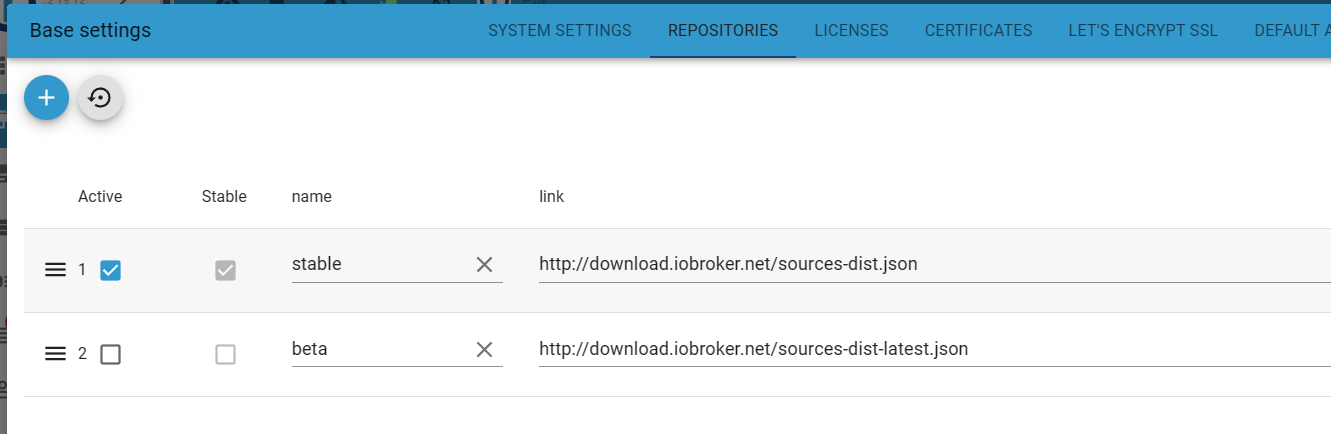
Aber drück einfach den Reset Button oben (Pfeil gegen Uhrzeigersinn) der sollte die Repoeinträge resetten
-
@ich77 sagte in Installation iobroker.systeminfo über NPM geht nicht:
Kernel : aarch64
Userland : armhfMix aus 64 und 32 Bit. Solltest du beizeiten durch eine NEUinstallation von Raspberry OS 12 'Bookworm' gerade rücken.
ioBroker-Repositories
List is emptyInstalled ioBroker-Instances
Error: Object "system.repositories" not foundDa sind keine Repos angelegt. Deswegen funktionieren bei dir auch keine Installationen. Ich komme nur gerade nicht gut an meine Liste heran, vielleicht kann dir jemand anders die URLs einflüstern.
@thomas-braun Danke, werde die Neuinstallation mal angehen, wenn ich etwas Ruhe habe!
-
@mcm57
Vielen Dank, das erzeugt die Einträge und wenn ich dann "Speichern und Schließen" drücke geht das Fenster zu, wenn ich es dann wieder öffne ist es wieder leer???
Mache ich da was falsch?@ich77 sagte in Installation iobroker.systeminfo über NPM geht nicht:
Mache ich da was falsch?
Mach es über die Kommandozeile
iob repo add stable DIE_ENTSPRECHENDE_URL iob repo set stable iob repo show -
@ich77 sagte in Installation iobroker.systeminfo über NPM geht nicht:
Mache ich da was falsch?
Mach es über die Kommandozeile
iob repo add stable DIE_ENTSPRECHENDE_URL iob repo set stable iob repo show@thomas-braun
Da scheint noch was mehr zu klemmen, bekomme folgende Ausgabe:pi@raspberrypi:~ $ iob repo add stable http://download.iobroker.net/sources-dist.json Cannot add repository location: Repository "stable" yet exists: http://download.iobroker.net/sources-dist.json -
@thomas-braun
Da scheint noch was mehr zu klemmen, bekomme folgende Ausgabe:pi@raspberrypi:~ $ iob repo add stable http://download.iobroker.net/sources-dist.json Cannot add repository location: Repository "stable" yet exists: http://download.iobroker.net/sources-dist.json -
-
Leider dieses...
pi@raspberrypi:~ $ iob update Error: Object "system.repositories" not found pi@raspberrypi:~ $ iob repo show List is empty@ich77
Da ist irgendwas total krumm....iob repo add stabil http://download.iobroker.net/sources-dist.json iob repo set stabil iob repo showLinux-Werkzeugkasten:
https://forum.iobroker.net/topic/42952/der-kleine-iobroker-linux-werkzeugkasten
NodeJS Fixer Skript:
https://forum.iobroker.net/topic/68035/iob-node-fix-skript
iob_diag: curl -sLf -o diag.sh https://iobroker.net/diag.sh && bash diag.sh -
@ich77
Da ist irgendwas total krumm....iob repo add stabil http://download.iobroker.net/sources-dist.json iob repo set stabil iob repo show -
Weiß zwar nicht warum, aber jetzt funktioniert alles wieder und ich kann den Adapter installieren!
Vielen Dank!
-
So sieht es jetzt aus:
pi@raspberrypi:~ $ iob repo show stable : http://download.iobroker.net/sources-dist.json beta : http://download.iobroker.net/sources-dist-latest.json stabil : http://download.iobroker.net/sources-dist.json Active repo(s): stable, stabil pi@raspberrypi:~ $ iob update Used repositories: stable, stabil Adapter "admin" : 6.13.16 , installed 6.13.16 Adapter "alexa2" : 3.26.4 , installed 3.26.4 Adapter "backitup" : 2.10.11 , installed 2.10.11 Adapter "deconz" : 1.4.0 , installed 1.4.0 Adapter "discovery" : 4.4.0 , installed 4.4.0 Adapter "dwd" : 2.8.5 , installed 2.8.5 Adapter "flot" : 1.12.0 , installed 1.12.0 Adapter "hm-rega" : 4.0.0 , installed 4.0.0 Adapter "hm-rpc" : 1.16.0 , installed 1.16.0 Adapter "ical" : 1.14.3 , installed 1.14.3 Adapter "icons-mfd-svg": 1.2.0 , installed 1.2.0 Adapter "iot" : 2.0.11 , installed 2.0.11 Adapter "javascript" : 7.8.0 , installed 7.8.0 Controller "js-controller": 5.0.19 , installed 5.0.19 Adapter "linux-control": 1.1.5 , installed 1.1.5 Adapter "material" : 1.3.1 , installed 1.3.1 Adapter "mobile" : 1.0.1 , installed 1.0.1 Adapter "mqtt" : 5.2.0 , installed 5.2.0 Adapter "mqtt-client" : 1.7.0 , installed 1.7.0 Adapter "musiccast" : 1.1.3 , installed 1.1.3 Adapter "parser" : 2.1.0 , installed 2.1.0 Adapter "ping" : 1.6.2 , installed 1.6.2 Adapter "rickshaw" : 1.0.0 , installed 1.0.0 Adapter "ring" : 5.0.10 , installed 5.0.10 Adapter "rpi2" : 1.3.2 , installed 1.3.2 Adapter "samsung" : 0.5.11 , installed 0.5.11 Adapter "scenes" : 2.3.9 , installed 2.3.9 Adapter "shelly" : 6.8.0 , installed 6.8.0 Adapter "signal-cmb" : 0.3.0 , installed 0.3.0 Adapter "simple-api" : 2.7.2 , installed 2.7.2 Adapter "socketio" : 6.6.1 , installed 6.6.1 Adapter "sonoff" : 3.0.3 , installed 3.0.3 Adapter "sql" : 2.2.0 , installed 2.2.0 Adapter "telegram" : 3.1.0 , installed 3.1.0 Adapter "text2command" : 3.0.3 , installed 3.0.3 Adapter "tr-064" : 4.2.18 , installed 4.2.18 Adapter "tuya" : 3.15.0 , installed 3.15.0 Adapter "vis" : 1.5.4 , installed 1.5.4 Adapter "vis-canvas-gauges": 1.0.1, installed 1.0.1 Adapter "vis-colorpicker": 2.0.3 , installed 2.0.3 Adapter "vis-fancyswitch": 1.1.0 , installed 1.1.0 Adapter "vis-google-fonts": 1.0.4 , installed 1.0.4 Adapter "vis-history" : 1.0.0 , installed 1.0.0 Adapter "vis-hqwidgets": 1.4.0 , installed 1.4.0 Adapter "vis-jqui-mfd" : 1.0.12 , installed 1.0.12 Adapter "vis-justgage" : 2.1.0 , installed 2.1.0 Adapter "vis-keyboard" : 0.0.2 , installed 0.0.2 Adapter "vis-map" : 1.0.5 , installed 1.0.5 Adapter "vis-material-advanced": 1.7.4, installed 1.7.4 Adapter "vis-materialdesign": 0.5.9, installed 0.5.9 Adapter "vis-metro" : 1.2.0 , installed 1.2.0 Adapter "vis-plumb" : 1.0.2 , installed 1.0.2 Adapter "vis-rgraph" : 0.0.2 , installed 0.0.2 Adapter "vis-timeandweather": 1.2.2, installed 1.2.2 Adapter "vis-weather" : 2.5.9 , installed 2.5.9 Adapter "web" : 6.2.3 , installed 6.2.3 Adapter "whatsapp-cmb" : 0.2.3 , installed 0.2.3 Adapter "wifilight" : 1.1.4 , installed 1.1.4 Adapter "ws" : 2.5.11 , installed 2.5.11 Adapter "yamaha" : 0.5.3 , installed 0.5.3 pi@raspberrypi:~ $ -
@ich77
Da ist irgendwas total krumm....iob repo add stabil http://download.iobroker.net/sources-dist.json iob repo set stabil iob repo show@thomas-braun sagte in Installation iobroker.systeminfo über NPM geht nicht:
Da ist irgendwas total krumm....
Vor kurzem hatten wir hier schonmal so ein Fall, wo das ganze Objekt
system.repositoriesweg war. Das scheint dann zu komischen Seiteneffekten zu führen. Die Frage ist, wie das Objekt gelöscht werden kann. -
So sieht es jetzt aus:
pi@raspberrypi:~ $ iob repo show stable : http://download.iobroker.net/sources-dist.json beta : http://download.iobroker.net/sources-dist-latest.json stabil : http://download.iobroker.net/sources-dist.json Active repo(s): stable, stabil pi@raspberrypi:~ $ iob update Used repositories: stable, stabil Adapter "admin" : 6.13.16 , installed 6.13.16 Adapter "alexa2" : 3.26.4 , installed 3.26.4 Adapter "backitup" : 2.10.11 , installed 2.10.11 Adapter "deconz" : 1.4.0 , installed 1.4.0 Adapter "discovery" : 4.4.0 , installed 4.4.0 Adapter "dwd" : 2.8.5 , installed 2.8.5 Adapter "flot" : 1.12.0 , installed 1.12.0 Adapter "hm-rega" : 4.0.0 , installed 4.0.0 Adapter "hm-rpc" : 1.16.0 , installed 1.16.0 Adapter "ical" : 1.14.3 , installed 1.14.3 Adapter "icons-mfd-svg": 1.2.0 , installed 1.2.0 Adapter "iot" : 2.0.11 , installed 2.0.11 Adapter "javascript" : 7.8.0 , installed 7.8.0 Controller "js-controller": 5.0.19 , installed 5.0.19 Adapter "linux-control": 1.1.5 , installed 1.1.5 Adapter "material" : 1.3.1 , installed 1.3.1 Adapter "mobile" : 1.0.1 , installed 1.0.1 Adapter "mqtt" : 5.2.0 , installed 5.2.0 Adapter "mqtt-client" : 1.7.0 , installed 1.7.0 Adapter "musiccast" : 1.1.3 , installed 1.1.3 Adapter "parser" : 2.1.0 , installed 2.1.0 Adapter "ping" : 1.6.2 , installed 1.6.2 Adapter "rickshaw" : 1.0.0 , installed 1.0.0 Adapter "ring" : 5.0.10 , installed 5.0.10 Adapter "rpi2" : 1.3.2 , installed 1.3.2 Adapter "samsung" : 0.5.11 , installed 0.5.11 Adapter "scenes" : 2.3.9 , installed 2.3.9 Adapter "shelly" : 6.8.0 , installed 6.8.0 Adapter "signal-cmb" : 0.3.0 , installed 0.3.0 Adapter "simple-api" : 2.7.2 , installed 2.7.2 Adapter "socketio" : 6.6.1 , installed 6.6.1 Adapter "sonoff" : 3.0.3 , installed 3.0.3 Adapter "sql" : 2.2.0 , installed 2.2.0 Adapter "telegram" : 3.1.0 , installed 3.1.0 Adapter "text2command" : 3.0.3 , installed 3.0.3 Adapter "tr-064" : 4.2.18 , installed 4.2.18 Adapter "tuya" : 3.15.0 , installed 3.15.0 Adapter "vis" : 1.5.4 , installed 1.5.4 Adapter "vis-canvas-gauges": 1.0.1, installed 1.0.1 Adapter "vis-colorpicker": 2.0.3 , installed 2.0.3 Adapter "vis-fancyswitch": 1.1.0 , installed 1.1.0 Adapter "vis-google-fonts": 1.0.4 , installed 1.0.4 Adapter "vis-history" : 1.0.0 , installed 1.0.0 Adapter "vis-hqwidgets": 1.4.0 , installed 1.4.0 Adapter "vis-jqui-mfd" : 1.0.12 , installed 1.0.12 Adapter "vis-justgage" : 2.1.0 , installed 2.1.0 Adapter "vis-keyboard" : 0.0.2 , installed 0.0.2 Adapter "vis-map" : 1.0.5 , installed 1.0.5 Adapter "vis-material-advanced": 1.7.4, installed 1.7.4 Adapter "vis-materialdesign": 0.5.9, installed 0.5.9 Adapter "vis-metro" : 1.2.0 , installed 1.2.0 Adapter "vis-plumb" : 1.0.2 , installed 1.0.2 Adapter "vis-rgraph" : 0.0.2 , installed 0.0.2 Adapter "vis-timeandweather": 1.2.2, installed 1.2.2 Adapter "vis-weather" : 2.5.9 , installed 2.5.9 Adapter "web" : 6.2.3 , installed 6.2.3 Adapter "whatsapp-cmb" : 0.2.3 , installed 0.2.3 Adapter "wifilight" : 1.1.4 , installed 1.1.4 Adapter "ws" : 2.5.11 , installed 2.5.11 Adapter "yamaha" : 0.5.3 , installed 0.5.3 pi@raspberrypi:~ $Linux-Werkzeugkasten:
https://forum.iobroker.net/topic/42952/der-kleine-iobroker-linux-werkzeugkasten
NodeJS Fixer Skript:
https://forum.iobroker.net/topic/68035/iob-node-fix-skript
iob_diag: curl -sLf -o diag.sh https://iobroker.net/diag.sh && bash diag.sh -
Vorsicht
stable ist richtig
STABIL ist zumindest ungewöhnlich. Ich vermute mal hat sich Thomas vertippt.
stable und beta sind die richtigen Namen.Wenn du nicht 150% eindeutschen willst, deaktiviere / lösche STABIL
Entwicklung u Betreuung: envertech-pv, hoymiles-ms, ns-client, pid, snmp Adapter;
Support Repositoryverwaltung.Wer 'nen Kaffee spendieren will: https://paypal.me
-
Vorsicht
stable ist richtig
STABIL ist zumindest ungewöhnlich. Ich vermute mal hat sich Thomas vertippt.
stable und beta sind die richtigen Namen.Wenn du nicht 150% eindeutschen willst, deaktiviere / lösche STABIL
@mcm57 sagte in Installation iobroker.systeminfo über NPM geht nicht:
STABIL ist zumindest ungewöhnlich. Ich vermute mal hat sich Thomas vertippt.
Nee, das ist absichtlich so, weil
stable
wohl noch irgendwo im System klebte:Cannot add repository location: Repository "stable" yet exists: http://download.iobroker.net/sources-dist.json
Man könnte versuchen jetzt wieder aus stabil ein stable zu machen.
Linux-Werkzeugkasten:
https://forum.iobroker.net/topic/42952/der-kleine-iobroker-linux-werkzeugkasten
NodeJS Fixer Skript:
https://forum.iobroker.net/topic/68035/iob-node-fix-skript
iob_diag: curl -sLf -o diag.sh https://iobroker.net/diag.sh && bash diag.sh -
@mcm57 sagte in Installation iobroker.systeminfo über NPM geht nicht:
STABIL ist zumindest ungewöhnlich. Ich vermute mal hat sich Thomas vertippt.
Nee, das ist absichtlich so, weil
stable
wohl noch irgendwo im System klebte:Cannot add repository location: Repository "stable" yet exists: http://download.iobroker.net/sources-dist.json
Man könnte versuchen jetzt wieder aus stabil ein stable zu machen.
@thomas-braun
OK - dann misch ich mich nicht weiter ein :-)
DANKE für deine Hilfe.



Hey! Du scheinst an dieser Unterhaltung interessiert zu sein, hast aber noch kein Konto.
Hast du es satt, bei jedem Besuch durch die gleichen Beiträge zu scrollen? Wenn du dich für ein Konto anmeldest, kommst du immer genau dorthin zurück, wo du zuvor warst, und kannst dich über neue Antworten benachrichtigen lassen (entweder per E-Mail oder Push-Benachrichtigung). Du kannst auch Lesezeichen speichern und Beiträge positiv bewerten, um anderen Community-Mitgliedern deine Wertschätzung zu zeigen.
Mit deinem Input könnte dieser Beitrag noch besser werden 💗
Registrieren Anmelden358
Online33.0k
Benutzende83.7k
Themen1.3m
Beiträge