




Philips HUE : Bedeutung der Datenpunkte (ZigBee Adapter)
-
@legro schau mal nach ob du mit dem Effekt „blink“ arbeiten kannst. Der existiert ggf. Als datenpunkt, ansonsten als send_payload mit {“effect”:”blink”}
Was auch noch interessant ist - wird das device von den exposes oder den vom zigbee adapter manuell erzeugten states gesteuert. Dazu bitte die device Bezeichnung in die Ausschlussliste eingtragen und den Adapter neu starten.
A.
@asgothian sagte in Philips HUE : Bedeutung der Datenpunkte (ZigBee Adapter):
Nachdem ich eine wahre Odyssee in Sachen Linux hinter mir habe - @Thomas-Braun hat mich glücklicherweise kräftig unterstützt - kann ich mich nun endlich wieder dem ZigBee-Adapter widmen.
.. ansonsten als send_payload mit {“effect”:”blink”}
Hurra! Das funktioniert.
Was auch noch interessant ist - wird das device von den exposes oder den vom zigbee adapter manuell erzeugten states gesteuert. Dazu bitte die device Bezeichnung in die Ausschlussliste eingtragen und den Adapter neu starten.
Ich steuere die Lampe entweder direkt über die Oberfläche des Adapters oder über die vom Adapter erzeugten Datenpunkten im ioBroker. Was du mit exposes meinst, verstehe ich leider erst gar nicht.
Raspberry Pi 5 mit 8GB + 120GB SSD + Coordinator COD-m + ioBroker ..
-
@asgothian sagte in Philips HUE : Bedeutung der Datenpunkte (ZigBee Adapter):
Nachdem ich eine wahre Odyssee in Sachen Linux hinter mir habe - @Thomas-Braun hat mich glücklicherweise kräftig unterstützt - kann ich mich nun endlich wieder dem ZigBee-Adapter widmen.
.. ansonsten als send_payload mit {“effect”:”blink”}
Hurra! Das funktioniert.
Was auch noch interessant ist - wird das device von den exposes oder den vom zigbee adapter manuell erzeugten states gesteuert. Dazu bitte die device Bezeichnung in die Ausschlussliste eingtragen und den Adapter neu starten.
Ich steuere die Lampe entweder direkt über die Oberfläche des Adapters oder über die vom Adapter erzeugten Datenpunkten im ioBroker. Was du mit exposes meinst, verstehe ich leider erst gar nicht.
@legro sagte in Philips HUE : Bedeutung der Datenpunkte (ZigBee Adapter):
Nachdem ich eine wahre Odyssee in Sachen Linux hinter mir habe
Die ist aber noch nicht zuende.
sudo apt update
sudo apt full-upgrade
apt policy nodejs
sagt nun?
-
@legro sagte in Philips HUE : Bedeutung der Datenpunkte (ZigBee Adapter):
Nachdem ich eine wahre Odyssee in Sachen Linux hinter mir habe
Die ist aber noch nicht zuende.
sudo apt update
sudo apt full-upgrade
apt policy nodejs
sagt nun?
@thomas-braun sagte in Philips HUE : Bedeutung der Datenpunkte (ZigBee Adapter):
apt policy nodejs
.. sagt folgendes ..
pi@raspiBullseye:~ $ apt policy nodejs
nodejs:
  Installed: 18.19.1-1nodesource1
  Candidate: 18.19.1-1nodesource1
  Version table:
 *** 18.19.1-1nodesource1 1001
        500 https://deb.nodesource.com/node_18.x nodistro/main arm64 Packages
        100 /var/lib/dpkg/status
     18.19.0+dfsg-6~deb12u1 500
        500 http://security.debian.org/debian-security bookworm-security/main arm64 Packages
     18.19.0-1nodesource1 1001
        500 https://deb.nodesource.com/node_18.x nodistro/main arm64 Packages
     18.18.2-1nodesource1 1001
        500 https://deb.nodesource.com/node_18.x nodistro/main arm64 Packages
     18.18.1-1nodesource1 1001
        500 https://deb.nodesource.com/node_18.x nodistro/main arm64 Packages
     18.18.0-1nodesource1 1001
        500 https://deb.nodesource.com/node_18.x nodistro/main arm64 Packages
     18.17.1-1nodesource1 1001
        500 https://deb.nodesource.com/node_18.x nodistro/main arm64 Packages
     18.17.0-1nodesource1 1001
        500 https://deb.nodesource.com/node_18.x nodistro/main arm64 Packages
     18.16.1-1nodesource1 1001
        500 https://deb.nodesource.com/node_18.x nodistro/main arm64 Packages
     18.16.0-1nodesource1 1001
        500 https://deb.nodesource.com/node_18.x nodistro/main arm64 Packages
     18.15.0-1nodesource1 1001
        500 https://deb.nodesource.com/node_18.x nodistro/main arm64 Packages
     18.14.2-1nodesource1 1001
        500 https://deb.nodesource.com/node_18.x nodistro/main arm64 Packages
     18.14.1-1nodesource1 1001
        500 https://deb.nodesource.com/node_18.x nodistro/main arm64 Packages
     18.14.0-1nodesource1 1001
        500 https://deb.nodesource.com/node_18.x nodistro/main arm64 Packages
     18.13.0+dfsg1-1 500
        500 http://deb.debian.org/debian bookworm/main arm64 Packages
     18.13.0-1nodesource1 1001
        500 https://deb.nodesource.com/node_18.x nodistro/main arm64 Packages
     18.12.0-1nodesource1 1001
        500 https://deb.nodesource.com/node_18.x nodistro/main arm64 Packages
     18.11.0-1nodesource1 1001
        500 https://deb.nodesource.com/node_18.x nodistro/main arm64 Packages
     18.10.0-1nodesource1 1001
        500 https://deb.nodesource.com/node_18.x nodistro/main arm64 Packages
     18.9.1-1nodesource1 1001
        500 https://deb.nodesource.com/node_18.x nodistro/main arm64 Packages
     18.9.0-1nodesource1 1001
        500 https://deb.nodesource.com/node_18.x nodistro/main arm64 Packages
     18.8.0-1nodesource1 1001
        500 https://deb.nodesource.com/node_18.x nodistro/main arm64 Packages
     18.7.0-1nodesource1 1001
        500 https://deb.nodesource.com/node_18.x nodistro/main arm64 Packages
     18.6.0-1nodesource1 1001
        500 https://deb.nodesource.com/node_18.x nodistro/main arm64 Packages
     18.5.0-1nodesource1 1001
        500 https://deb.nodesource.com/node_18.x nodistro/main arm64 Packages
     18.4.0-1nodesource1 1001
        500 https://deb.nodesource.com/node_18.x nodistro/main arm64 Packages
     18.3.0-1nodesource1 1001
        500 https://deb.nodesource.com/node_18.x nodistro/main arm64 Packages
     18.2.0-1nodesource1 1001
        500 https://deb.nodesource.com/node_18.x nodistro/main arm64 Packages
     18.1.0-1nodesource1 1001
        500 https://deb.nodesource.com/node_18.x nodistro/main arm64 Packages
     18.0.0-1nodesource1 1001
        500 https://deb.nodesource.com/node_18.x nodistro/main arm64 Packages
Diese drei Zeilen hatte ich fast genau so eingegeben. Ich hatte lediglich upgrade anstelle von full-upgrade ausgeführt. Der Unterschied: Bei letzterem wurde piVCCU3 erneut aktualisiert.
Raspberry Pi 5 mit 8GB + 120GB SSD + Coordinator COD-m + ioBroker ..
-
@thomas-braun sagte in Philips HUE : Bedeutung der Datenpunkte (ZigBee Adapter):
apt policy nodejs
.. sagt folgendes ..
pi@raspiBullseye:~ $ apt policy nodejs
nodejs:
  Installed: 18.19.1-1nodesource1
  Candidate: 18.19.1-1nodesource1
  Version table:
 *** 18.19.1-1nodesource1 1001
        500 https://deb.nodesource.com/node_18.x nodistro/main arm64 Packages
        100 /var/lib/dpkg/status
     18.19.0+dfsg-6~deb12u1 500
        500 http://security.debian.org/debian-security bookworm-security/main arm64 Packages
     18.19.0-1nodesource1 1001
        500 https://deb.nodesource.com/node_18.x nodistro/main arm64 Packages
     18.18.2-1nodesource1 1001
        500 https://deb.nodesource.com/node_18.x nodistro/main arm64 Packages
     18.18.1-1nodesource1 1001
        500 https://deb.nodesource.com/node_18.x nodistro/main arm64 Packages
     18.18.0-1nodesource1 1001
        500 https://deb.nodesource.com/node_18.x nodistro/main arm64 Packages
     18.17.1-1nodesource1 1001
        500 https://deb.nodesource.com/node_18.x nodistro/main arm64 Packages
     18.17.0-1nodesource1 1001
        500 https://deb.nodesource.com/node_18.x nodistro/main arm64 Packages
     18.16.1-1nodesource1 1001
        500 https://deb.nodesource.com/node_18.x nodistro/main arm64 Packages
     18.16.0-1nodesource1 1001
        500 https://deb.nodesource.com/node_18.x nodistro/main arm64 Packages
     18.15.0-1nodesource1 1001
        500 https://deb.nodesource.com/node_18.x nodistro/main arm64 Packages
     18.14.2-1nodesource1 1001
        500 https://deb.nodesource.com/node_18.x nodistro/main arm64 Packages
     18.14.1-1nodesource1 1001
        500 https://deb.nodesource.com/node_18.x nodistro/main arm64 Packages
     18.14.0-1nodesource1 1001
        500 https://deb.nodesource.com/node_18.x nodistro/main arm64 Packages
     18.13.0+dfsg1-1 500
        500 http://deb.debian.org/debian bookworm/main arm64 Packages
     18.13.0-1nodesource1 1001
        500 https://deb.nodesource.com/node_18.x nodistro/main arm64 Packages
     18.12.0-1nodesource1 1001
        500 https://deb.nodesource.com/node_18.x nodistro/main arm64 Packages
     18.11.0-1nodesource1 1001
        500 https://deb.nodesource.com/node_18.x nodistro/main arm64 Packages
     18.10.0-1nodesource1 1001
        500 https://deb.nodesource.com/node_18.x nodistro/main arm64 Packages
     18.9.1-1nodesource1 1001
        500 https://deb.nodesource.com/node_18.x nodistro/main arm64 Packages
     18.9.0-1nodesource1 1001
        500 https://deb.nodesource.com/node_18.x nodistro/main arm64 Packages
     18.8.0-1nodesource1 1001
        500 https://deb.nodesource.com/node_18.x nodistro/main arm64 Packages
     18.7.0-1nodesource1 1001
        500 https://deb.nodesource.com/node_18.x nodistro/main arm64 Packages
     18.6.0-1nodesource1 1001
        500 https://deb.nodesource.com/node_18.x nodistro/main arm64 Packages
     18.5.0-1nodesource1 1001
        500 https://deb.nodesource.com/node_18.x nodistro/main arm64 Packages
     18.4.0-1nodesource1 1001
        500 https://deb.nodesource.com/node_18.x nodistro/main arm64 Packages
     18.3.0-1nodesource1 1001
        500 https://deb.nodesource.com/node_18.x nodistro/main arm64 Packages
     18.2.0-1nodesource1 1001
        500 https://deb.nodesource.com/node_18.x nodistro/main arm64 Packages
     18.1.0-1nodesource1 1001
        500 https://deb.nodesource.com/node_18.x nodistro/main arm64 Packages
     18.0.0-1nodesource1 1001
        500 https://deb.nodesource.com/node_18.x nodistro/main arm64 Packages
Diese drei Zeilen hatte ich fast genau so eingegeben. Ich hatte lediglich upgrade anstelle von full-upgrade ausgeführt. Der Unterschied: Bei letzterem wurde piVCCU3 erneut aktualisiert.
-
@asgothian sagte in Philips HUE : Bedeutung der Datenpunkte (ZigBee Adapter):
Nachdem ich eine wahre Odyssee in Sachen Linux hinter mir habe - @Thomas-Braun hat mich glücklicherweise kräftig unterstützt - kann ich mich nun endlich wieder dem ZigBee-Adapter widmen.
.. ansonsten als send_payload mit {“effect”:”blink”}
Hurra! Das funktioniert.
Was auch noch interessant ist - wird das device von den exposes oder den vom zigbee adapter manuell erzeugten states gesteuert. Dazu bitte die device Bezeichnung in die Ausschlussliste eingtragen und den Adapter neu starten.
Ich steuere die Lampe entweder direkt über die Oberfläche des Adapters oder über die vom Adapter erzeugten Datenpunkten im ioBroker. Was du mit exposes meinst, verstehe ich leider erst gar nicht.
@legro sagte in Philips HUE : Bedeutung der Datenpunkte (ZigBee Adapter):.
Ich steuere die Lampe entweder direkt über die Oberfläche des Adapters oder über die vom Adapter erzeugten Datenpunkten im ioBroker. Was du mit exposes meinst, verstehe ich leider erst gar nicht.
Dazu muss ich einen kleinen Exkurs in die Vergangenheit machen. Früher war es so das wir für alle zigbee Geräte die datenpunkte explizit im Zigbee Adapter definieren mussten. Das war viel Arbeit und hat zu seltsamen Konstellationen bei den Datenpunkten geführt. Dann wurde im zigbee-herdsman-converters das System der “exposes” etabliert. Darüber geben die converter für jedes Gerät vor welche datenpunkte angelegt wérden sollen. Das haben wir auch übernommen - allerdings wurde aus Kompatibilitätsgründen darauf verzichtet die explizit im zigbee-Adapter definierten datenpunkte zu entfernen.
Für Geräte die vor 2020 integriert wurden gilt daher das sie ggf. Über explizit im zigbee adapter definierte states gesteuert werden. Dieses Verhalten kann übersteuert werden - dafür gibt es in der Konfiguration die „Ausschluss-Liste“. Alle Gerätetypen die in dieser Liste aufgeführt werden ignorieren die im Zigbee-Adapter definierten states und nutzen die exposes der zigbee-herdsman-converter als Template für die zu nutzenden datenpunkte.
A.
-
@thomas-braun sagte in Philips HUE : Bedeutung der Datenpunkte (ZigBee Adapter):
Dann sollte jetzt die Zusammenfassung von
iob diagauch anders aussehen.
In der Tat, das tut sie.

======================= SUMMARY =======================
			v.2023-10-10


 Static hostname: raspiBullseye
       Icon name: computer
Operating System: Debian GNU/Linux 12 (bookworm)
          Kernel: Linux 6.1.21-v8+
    Architecture: arm64

Installation: 		native
Kernel: 		aarch64
Userland: 		arm64
Timezone: 		Europe/Berlin (CET, +0100)
User-ID: 		1000
X-Server: 		false
Boot Target: 		multi-user.target

Pending OS-Updates: 	0
Pending iob updates: 	12

Nodejs-Installation: 	/usr/bin/nodejs 	v18.19.1
			/usr/bin/node 		v18.19.1
			/usr/bin/npm 		10.2.4
			/usr/bin/npx 		10.2.4
			/usr/bin/corepack 	0.22.0

Recommended versions are nodejs 18.19.1 and npm 10.2.4
Your nodejs installation is correct

MEMORY:
               total        used        free      shared  buff/cache   available
Mem:            8.2G        3.5G        1.5G        1.1M        3.4G        4.7G
Swap:           104M          0B        104M
Total:          8.3G        3.5G        1.6G

Active iob-Instances: 	34
Active repo(s): stable

ioBroker Core: 		js-controller 		5.0.12
			admin 			6.13.15

ioBroker Status: 	iobroker is running on this host.


Objects type: jsonl
States  type: jsonl

Status admin and web instance:
+ system.adapter.admin.0                  : admin                 : raspiBullseye                            -  enabled, port: 8081, bind: 0.0.0.0, run as: admin
+ system.adapter.web.0                    : web                   : raspiBullseye                            -  enabled, port: 8082, bind: 0.0.0.0, run as: admin

Objects: 		23857
States: 		18685

Size of iob-Database:

41M	/opt/iobroker/iobroker-data/objects.jsonl
9.9M	/opt/iobroker/iobroker-data/states.jsonl


=================== END OF SUMMARY ====================
Für mich sieht's so aus wie : erstmalig ohne Fehl und Tadel.
Raspberry Pi 5 mit 8GB + 120GB SSD + Coordinator COD-m + ioBroker ..
-
@thomas-braun sagte in Philips HUE : Bedeutung der Datenpunkte (ZigBee Adapter):
Dann sollte jetzt die Zusammenfassung von
iob diagauch anders aussehen.
In der Tat, das tut sie.
======================= SUMMARY =======================
			v.2023-10-10


 Static hostname: raspiBullseye
       Icon name: computer
Operating System: Debian GNU/Linux 12 (bookworm)
          Kernel: Linux 6.1.21-v8+
    Architecture: arm64

Installation: 		native
Kernel: 		aarch64
Userland: 		arm64
Timezone: 		Europe/Berlin (CET, +0100)
User-ID: 		1000
X-Server: 		false
Boot Target: 		multi-user.target

Pending OS-Updates: 	0
Pending iob updates: 	12

Nodejs-Installation: 	/usr/bin/nodejs 	v18.19.1
			/usr/bin/node 		v18.19.1
			/usr/bin/npm 		10.2.4
			/usr/bin/npx 		10.2.4
			/usr/bin/corepack 	0.22.0

Recommended versions are nodejs 18.19.1 and npm 10.2.4
Your nodejs installation is correct

MEMORY:
               total        used        free      shared  buff/cache   available
Mem:            8.2G        3.5G        1.5G        1.1M        3.4G        4.7G
Swap:           104M          0B        104M
Total:          8.3G        3.5G        1.6G

Active iob-Instances: 	34
Active repo(s): stable

ioBroker Core: 		js-controller 		5.0.12
			admin 			6.13.15

ioBroker Status: 	iobroker is running on this host.


Objects type: jsonl
States  type: jsonl

Status admin and web instance:
+ system.adapter.admin.0                  : admin                 : raspiBullseye                            -  enabled, port: 8081, bind: 0.0.0.0, run as: admin
+ system.adapter.web.0                    : web                   : raspiBullseye                            -  enabled, port: 8082, bind: 0.0.0.0, run as: admin

Objects: 		23857
States: 		18685

Size of iob-Database:

41M	/opt/iobroker/iobroker-data/objects.jsonl
9.9M	/opt/iobroker/iobroker-data/states.jsonl


=================== END OF SUMMARY ====================
Für mich sieht's so aus wie : erstmalig ohne Fehl und Tadel.
@legro sagte in Philips HUE : Bedeutung der Datenpunkte (ZigBee Adapter):
Nicht ganz ohne Fehl und Tadel.
Kernel: Linux 6.1.21-v8+Da steht bei einer richtigen Installation ein Kernel 6.6.20 drin.
Pending iob updates: 12
Und da soll Null drin stehen. ioBroker updaten!
-
@legro sagte in Philips HUE : Bedeutung der Datenpunkte (ZigBee Adapter):.
Ich steuere die Lampe entweder direkt über die Oberfläche des Adapters oder über die vom Adapter erzeugten Datenpunkten im ioBroker. Was du mit exposes meinst, verstehe ich leider erst gar nicht.
Dazu muss ich einen kleinen Exkurs in die Vergangenheit machen. Früher war es so das wir für alle zigbee Geräte die datenpunkte explizit im Zigbee Adapter definieren mussten. Das war viel Arbeit und hat zu seltsamen Konstellationen bei den Datenpunkten geführt. Dann wurde im zigbee-herdsman-converters das System der “exposes” etabliert. Darüber geben die converter für jedes Gerät vor welche datenpunkte angelegt wérden sollen. Das haben wir auch übernommen - allerdings wurde aus Kompatibilitätsgründen darauf verzichtet die explizit im zigbee-Adapter definierten datenpunkte zu entfernen.
Für Geräte die vor 2020 integriert wurden gilt daher das sie ggf. Über explizit im zigbee adapter definierte states gesteuert werden. Dieses Verhalten kann übersteuert werden - dafür gibt es in der Konfiguration die „Ausschluss-Liste“. Alle Gerätetypen die in dieser Liste aufgeführt werden ignorieren die im Zigbee-Adapter definierten states und nutzen die exposes der zigbee-herdsman-converter als Template für die zu nutzenden datenpunkte.
A.
@asgothian sagte in Philips HUE : Bedeutung der Datenpunkte (ZigBee Adapter):
Dazu muss ich einen kleinen Exkurs in die Vergangenheit machen. ..
Das Ganze werde ich mir wohl noch mehrmals zu Gemüte führen müssen, bis ich alles verstanden habe. Mein vorläufiges Verständnis: Es wird alles über Payload gesteuert mittels eine JSON gesteuert à la {"option" : "wert"}. Oder liege ich damit daneben?
Vielen Dank für deine ausführlichen Erläuterungen.
-
@thomas-braun sagte in Philips HUE : Bedeutung der Datenpunkte (ZigBee Adapter):
Nicht ganz ohne Fehl und Tadel.
Kernel: Linux 6.1.21-v8+Da steht bei einer richtigen Installation ein Kernel 6.6.20 drin.
Pending iob updates: 12
Und da soll Null drin stehen. ioBroker updaten!
Ich habe nach Anleitung den ioBroker aktualisiert. Statt 12 sind's nun immer noch 11 pending updates. Sind damit die Adapter gemeint; in der iob diag Ausgabe werden 11 Adapter als updatable angezeigt. Diese sind jedoch bereits auf der aktuellen Version aus dem staple Repository.
Wie krieg' ich die Kernel Version auf 6.6.20? Auf der Website von Raspberry steht, das man statt apt den Befehl apt-get verwenden sollte. Ist das der Grund, warum es nicht klappt?
Irgendwie kommt mir das wie ein Fass ohne Boden vor.
Hier die vollständige Ausgabe von iob diag ..
Skript v.2023-10-10 *** BASE SYSTEM *** Static hostname: raspiBullseye Icon name: computer Operating System: Debian GNU/Linux 12 (bookworm) Kernel: Linux 6.1.21-v8+ Architecture: arm64 Model : Raspberry Pi 4 Model B Rev 1.4 Docker : false Virtualization : none Kernel : aarch64 Userland : arm64 Systemuptime and Load: 16:23:12 up 1:23, 3 users, load average: 0.30, 0.95, 1.33 CPU threads: 4 *** RASPBERRY THROTTLING *** Current issues: No throttling issues detected. Previously detected issues: No throttling issues detected. *** Time and Time Zones *** Local time: Mon 2024-03-25 16:23:12 CET Universal time: Mon 2024-03-25 15:23:12 UTC RTC time: n/a Time zone: Europe/Berlin (CET, +0100) System clock synchronized: yes NTP service: active RTC in local TZ: no *** User and Groups *** pi /home/pi pi adm dialout cdrom sudo audio video plugdev games users input render netdev gpio i2c spi iobroker *** X-Server-Setup *** X-Server: false Desktop: Terminal: tty Boot Target: multi-user.target *** MEMORY *** total used free shared buff/cache available Mem: 8.2G 795M 4.2G 1.1M 3.3G 7.4G Swap: 104M 0B 104M Total: 8.3G 795M 4.3G 7811 M total memory 758 M used memory 2059 M active memory 1469 M inactive memory 4011 M free memory 157 M buffer memory 3030 M swap cache 99 M total swap 0 M used swap 99 M free swap Raspberry only: oom events: 0 lifetime oom required: 0 Mbytes total time in oom handler: 0 ms max time spent in oom handler: 0 ms *** FAILED SERVICES *** UNIT LOAD ACTIVE SUB DESCRIPTION * iobroker.service loaded failed failed ioBroker Server LOAD = Reflects whether the unit definition was properly loaded. ACTIVE = The high-level unit activation state, i.e. generalization of SUB. SUB = The low-level unit activation state, values depend on unit type. 1 loaded units listed. *** FILESYSTEM *** Filesystem Type Size Used Avail Use% Mounted on /dev/root ext4 110G 9.8G 96G 10% / devtmpfs devtmpfs 3.6G 0 3.6G 0% /dev tmpfs tmpfs 3.9G 0 3.9G 0% /dev/shm tmpfs tmpfs 1.6G 964K 1.6G 1% /run tmpfs tmpfs 5.0M 16K 5.0M 1% /run/lock /dev/sda1 vfat 253M 32M 221M 13% /boot tmpfs tmpfs 782M 0 782M 0% /run/user/1000 Messages concerning ext4 filesystem in dmesg: [Mon Mar 25 14:59:56 2024] Kernel command line: coherent_pool=1M 8250.nr_uarts=1 snd_bcm2835.enable_headphones=0 snd_bcm2835.enable_headphones=1 snd_bcm2835.enable_hdmi=1 snd_bcm2835.enable_hdmi=0 smsc95xx.macaddr=DC:A6:32:BE:B7:5E vc_mem.mem_base=0x3eb00000 vc_mem.mem_size=0x3ff00000 console=tty1 root=PARTUUID=5ace6bce-02 rootfstype=ext4 fsck.repair=yes rootwait [Mon Mar 25 14:59:58 2024] EXT4-fs (sda2): INFO: recovery required on readonly filesystem [Mon Mar 25 14:59:58 2024] EXT4-fs (sda2): write access will be enabled during recovery [Mon Mar 25 14:59:58 2024] EXT4-fs (sda2): orphan cleanup on readonly fs [Mon Mar 25 14:59:58 2024] EXT4-fs (sda2): 5 orphan inodes deleted [Mon Mar 25 14:59:58 2024] EXT4-fs (sda2): recovery complete [Mon Mar 25 14:59:58 2024] EXT4-fs (sda2): mounted filesystem with ordered data mode. Quota mode: none. [Mon Mar 25 14:59:58 2024] VFS: Mounted root (ext4 filesystem) readonly on device 8:2. [Mon Mar 25 15:00:00 2024] EXT4-fs (sda2): re-mounted. Quota mode: none. Show mounted filesystems \(real ones only\): TARGET SOURCE FSTYPE OPTIONS / /dev/sda2 ext4 rw,noatime `-/boot /dev/sda1 vfat rw,relatime,fmask=0022,dmask=0022,codepage=437,iocharset=ascii,shortname=mixed,flush,errors=remount-ro Files in neuralgic directories: /var: 4.4G /var/ 2.2G /var/log 2.1G /var/log/journal/71ce3d9ea88f4118a23250ffbeda1105 2.1G /var/log/journal 1.8G /var/lib Archived and active journals take up 2.0G in the file system. /opt/iobroker/backups: 16K /opt/iobroker/backups/ /opt/iobroker/iobroker-data: 437M /opt/iobroker/iobroker-data/ 296M /opt/iobroker/iobroker-data/files 97M /opt/iobroker/iobroker-data/backup-objects 67M /opt/iobroker/iobroker-data/files/javascript.admin 48M /opt/iobroker/iobroker-data/files/javascript.admin/static The five largest files in iobroker-data are: 24M /opt/iobroker/iobroker-data/states.jsonl 22M /opt/iobroker/iobroker-data/objects.jsonl 22M /opt/iobroker/iobroker-data/files/web.admin/static/js/main.c05ba1d3.js.map 22M /opt/iobroker/iobroker-data/files/modbus.admin/static/js/main.578d79d9.js.map 8.9M /opt/iobroker/iobroker-data/files/scenes.admin/static/js/2.7de3299d.chunk.js.map USB-Devices by-id: USB-Sticks - Avoid direct links to /dev/* in your adapter setups, please always prefer the links 'by-id': /dev/serial/by-id/usb-Texas_Instruments_XDS110__03.00.00.20__Embed_with_CMSIS-DAP_L1100QXL-if00 /dev/serial/by-id/usb-Texas_Instruments_XDS110__03.00.00.20__Embed_with_CMSIS-DAP_L1100QXL-if03 *** NodeJS-Installation *** /usr/bin/nodejs v18.19.1 /usr/bin/node v18.19.1 /usr/bin/npm 10.2.4 /usr/bin/npx 10.2.4 /usr/bin/corepack 0.22.0 nodejs: Installed: 18.19.1-1nodesource1 Candidate: 18.19.1-1nodesource1 Version table: *** 18.19.1-1nodesource1 1001 500 https://deb.nodesource.com/node_18.x nodistro/main arm64 Packages 100 /var/lib/dpkg/status 18.19.0+dfsg-6~deb12u1 500 500 http://security.debian.org/debian-security bookworm-security/main arm64 Packages 18.19.0-1nodesource1 1001 500 https://deb.nodesource.com/node_18.x nodistro/main arm64 Packages 18.18.2-1nodesource1 1001 500 https://deb.nodesource.com/node_18.x nodistro/main arm64 Packages 18.18.1-1nodesource1 1001 500 https://deb.nodesource.com/node_18.x nodistro/main arm64 Packages 18.18.0-1nodesource1 1001 500 https://deb.nodesource.com/node_18.x nodistro/main arm64 Packages 18.17.1-1nodesource1 1001 500 https://deb.nodesource.com/node_18.x nodistro/main arm64 Packages 18.17.0-1nodesource1 1001 500 https://deb.nodesource.com/node_18.x nodistro/main arm64 Packages 18.16.1-1nodesource1 1001 500 https://deb.nodesource.com/node_18.x nodistro/main arm64 Packages 18.16.0-1nodesource1 1001 500 https://deb.nodesource.com/node_18.x nodistro/main arm64 Packages 18.15.0-1nodesource1 1001 500 https://deb.nodesource.com/node_18.x nodistro/main arm64 Packages 18.14.2-1nodesource1 1001 500 https://deb.nodesource.com/node_18.x nodistro/main arm64 Packages 18.14.1-1nodesource1 1001 500 https://deb.nodesource.com/node_18.x nodistro/main arm64 Packages 18.14.0-1nodesource1 1001 500 https://deb.nodesource.com/node_18.x nodistro/main arm64 Packages 18.13.0+dfsg1-1 500 500 http://deb.debian.org/debian bookworm/main arm64 Packages 18.13.0-1nodesource1 1001 500 https://deb.nodesource.com/node_18.x nodistro/main arm64 Packages 18.12.0-1nodesource1 1001 500 https://deb.nodesource.com/node_18.x nodistro/main arm64 Packages 18.11.0-1nodesource1 1001 500 https://deb.nodesource.com/node_18.x nodistro/main arm64 Packages 18.10.0-1nodesource1 1001 500 https://deb.nodesource.com/node_18.x nodistro/main arm64 Packages 18.9.1-1nodesource1 1001 500 https://deb.nodesource.com/node_18.x nodistro/main arm64 Packages 18.9.0-1nodesource1 1001 500 https://deb.nodesource.com/node_18.x nodistro/main arm64 Packages 18.8.0-1nodesource1 1001 500 https://deb.nodesource.com/node_18.x nodistro/main arm64 Packages 18.7.0-1nodesource1 1001 500 https://deb.nodesource.com/node_18.x nodistro/main arm64 Packages 18.6.0-1nodesource1 1001 500 https://deb.nodesource.com/node_18.x nodistro/main arm64 Packages 18.5.0-1nodesource1 1001 500 https://deb.nodesource.com/node_18.x nodistro/main arm64 Packages 18.4.0-1nodesource1 1001 500 https://deb.nodesource.com/node_18.x nodistro/main arm64 Packages 18.3.0-1nodesource1 1001 500 https://deb.nodesource.com/node_18.x nodistro/main arm64 Packages 18.2.0-1nodesource1 1001 500 https://deb.nodesource.com/node_18.x nodistro/main arm64 Packages 18.1.0-1nodesource1 1001 500 https://deb.nodesource.com/node_18.x nodistro/main arm64 Packages 18.0.0-1nodesource1 1001 500 https://deb.nodesource.com/node_18.x nodistro/main arm64 Packages Temp directories causing npm8 problem: 0 No problems detected Errors in npm tree: *** ioBroker-Installation *** ioBroker Status iobroker is not running on this host. Objects type: jsonl States type: jsonl Core adapters versions js-controller: 5.0.19 admin: 6.13.15 javascript: 7.1.6 Adapters from github: 0 Adapter State system.adapter.admin.0 : admin : raspiBullseye - enabled, port: 8081, bind: 0.0.0.0, run as: admin system.adapter.apple-find-me.0 : apple-find-me : raspiBullseye - disabled system.adapter.apple-find-me.1 : apple-find-me : raspiBullseye - disabled system.adapter.apple-find-me.2 : apple-find-me : raspiBullseye - disabled system.adapter.backitup.0 : backitup : raspiBullseye - enabled system.adapter.birthdays.0 : birthdays : raspiBullseye - enabled system.adapter.bydhvs.0 : bydhvs : raspiBullseye - enabled system.adapter.daikin.0 : daikin : raspiBullseye - enabled system.adapter.daikin.1 : daikin : raspiBullseye - enabled system.adapter.daikin.2 : daikin : raspiBullseye - enabled system.adapter.daswetter.0 : daswetter : raspiBullseye - enabled system.adapter.device-reminder.0 : device-reminder : raspiBullseye - enabled system.adapter.dwd.0 : dwd : raspiBullseye - enabled system.adapter.feiertage.0 : feiertage : raspiBullseye - enabled system.adapter.fronius.0 : fronius : raspiBullseye - enabled system.adapter.hm-rega.0 : hm-rega : raspiBullseye - enabled system.adapter.hm-rpc.0 : hm-rpc : raspiBullseye - enabled, port: 0 system.adapter.hm-rpc.1 : hm-rpc : raspiBullseye - enabled, port: 0 system.adapter.hue.0 : hue : raspiBullseye - enabled, port: 80 system.adapter.ical.0 : ical : raspiBullseye - enabled system.adapter.icons-addictive-flavour-png.0: icons-addictive-flavour-png: raspiBullseye - disabled system.adapter.icons-fatcow-hosting.0 : icons-fatcow-hosting : raspiBullseye - enabled system.adapter.icons-icons8.0 : icons-icons8 : raspiBullseye - disabled system.adapter.icons-mfd-png.0 : icons-mfd-png : raspiBullseye - disabled system.adapter.icons-mfd-svg.0 : icons-mfd-svg : raspiBullseye - disabled system.adapter.influxdb.0 : influxdb : raspiBullseye - enabled, port: 8086 system.adapter.info.0 : info : raspiBullseye - enabled system.adapter.javascript.0 : javascript : raspiBullseye - enabled system.adapter.modbus.0 : modbus : raspiBullseye - disabled system.adapter.modbus.1 : modbus : raspiBullseye - disabled system.adapter.modbus.2 : modbus : raspiBullseye - enabled system.adapter.netatmo.0 : netatmo : raspiBullseye - enabled system.adapter.nuki-extended.0 : nuki-extended : raspiBullseye - enabled system.adapter.pushover.0 : pushover : raspiBullseye - enabled system.adapter.rpi2.0 : rpi2 : raspiBullseye - enabled system.adapter.scenes.0 : scenes : raspiBullseye - enabled system.adapter.shelly.0 : shelly : raspiBullseye - enabled, port: 1882, bind: 0.0.0.0 system.adapter.simple-api.0 : simple-api : raspiBullseye - enabled, port: 8087, bind: 0.0.0.0, run as: admin system.adapter.tankerkoenig.0 : tankerkoenig : raspiBullseye - enabled system.adapter.telegram.0 : telegram : raspiBullseye - enabled, port: 8443, bind: 0.0.0.0 system.adapter.tr-064.0 : tr-064 : raspiBullseye - enabled system.adapter.trashschedule.0 : trashschedule : raspiBullseye - enabled system.adapter.tuya.0 : tuya : raspiBullseye - enabled system.adapter.viessmannapi.0 : viessmannapi : raspiBullseye - enabled system.adapter.vis-fancyswitch.0 : vis-fancyswitch : raspiBullseye - disabled system.adapter.vis-hqwidgets.0 : vis-hqwidgets : raspiBullseye - disabled system.adapter.vis-icontwo.0 : vis-icontwo : raspiBullseye - disabled system.adapter.vis-inventwo.0 : vis-inventwo : raspiBullseye - enabled system.adapter.vis-jqui-mfd.0 : vis-jqui-mfd : raspiBullseye - disabled system.adapter.vis-map.0 : vis-map : raspiBullseye - disabled system.adapter.vis-material-advanced.0 : vis-material-advanced : raspiBullseye - disabled system.adapter.vis-metro.0 : vis-metro : raspiBullseye - disabled system.adapter.vis-timeandweather.0 : vis-timeandweather : raspiBullseye - disabled system.adapter.vis.0 : vis : raspiBullseye - enabled system.adapter.web.0 : web : raspiBullseye - enabled, port: 8082, bind: 0.0.0.0, run as: admin system.adapter.yahka.0 : yahka : raspiBullseye - enabled system.adapter.zigbee.0 : zigbee : raspiBullseye - enabled, port: /dev/serial/by-id/usb-Texas_Instruments_XDS110__03.00.00.20__Embed_with_CMSIS-DAP_L1100QXL-if00 + instance is alive Enabled adapters with bindings system.adapter.admin.0 : admin : raspiBullseye - enabled, port: 8081, bind: 0.0.0.0, run as: admin system.adapter.hm-rpc.0 : hm-rpc : raspiBullseye - enabled, port: 0 system.adapter.hm-rpc.1 : hm-rpc : raspiBullseye - enabled, port: 0 system.adapter.hue.0 : hue : raspiBullseye - enabled, port: 80 system.adapter.influxdb.0 : influxdb : raspiBullseye - enabled, port: 8086 system.adapter.shelly.0 : shelly : raspiBullseye - enabled, port: 1882, bind: 0.0.0.0 system.adapter.simple-api.0 : simple-api : raspiBullseye - enabled, port: 8087, bind: 0.0.0.0, run as: admin system.adapter.telegram.0 : telegram : raspiBullseye - enabled, port: 8443, bind: 0.0.0.0 system.adapter.web.0 : web : raspiBullseye - enabled, port: 8082, bind: 0.0.0.0, run as: admin system.adapter.zigbee.0 : zigbee : raspiBullseye - enabled, port: /dev/serial/by-id/usb-Texas_Instruments_XDS110__03.00.00.20__Embed_with_CMSIS-DAP_L1100QXL-if00 ioBroker-Repositories stable : http://download.iobroker.net/sources-dist.json beta : http://download.iobroker.net/sources-dist-latest.json live-beta : http://iobroker.live/repo/sources-dist-latest.json live-stable : http://iobroker.live/repo/sources-dist.json Active repo(s): stable Installed ioBroker-Instances Used repository: stable Adapter "admin" : 6.13.16 , installed 6.13.15 [Updatable] Adapter "backitup" : 2.10.11 , installed 2.10.11 Adapter "birthdays" : 2.4.1 , installed 2.4.1 Adapter "bydhvs" : 1.5.0 , installed 1.5.0 Adapter "daikin" : 1.4.2 , installed 1.4.2 Adapter "daswetter" : 3.1.13 , installed 3.1.13 Adapter "device-reminder": 3.1.2 , installed 1.2.9 [Updatable] Adapter "dwd" : 2.8.5 , installed 2.8.5 Adapter "feiertage" : 1.1.4 , installed 1.1.4 Adapter "fronius" : 2.0.2 , installed 1.1.3 [Updatable] Adapter "fronius-solarweb": 0.0.3 , installed 0.0.3 Adapter "hm-rega" : 4.0.0 , installed 4.0.0 Adapter "hm-rpc" : 1.16.0 , installed 1.16.0 Adapter "hue" : 3.10.2 , installed 3.10.2 Adapter "ical" : 1.13.3 , installed 1.13.3 Adapter "icons-addictive-flavour-png": 0.1.0, installed 0.1.0 Adapter "icons-fatcow-hosting": 0.1.0, installed 0.1.0 Adapter "icons-icons8" : 0.0.1 , installed 0.0.1 Adapter "icons-mfd-png": 1.2.1 , installed 1.2.1 Adapter "icons-mfd-svg": 1.2.0 , installed 1.2.0 Adapter "influxdb" : 4.0.2 , installed 3.2.0 [Updatable] Adapter "javascript" : 7.8.0 , installed 7.1.6 [Updatable] Controller "js-controller": 5.0.19 , installed 5.0.19 Adapter "modbus" : 6.1.0 , installed 6.1.0 Adapter "netatmo" : 3.1.0 , installed 3.1.0 Adapter "nuki-extended": 2.6.5 , installed 2.6.5 Adapter "pushover" : 3.0.6 , installed 3.0.6 Adapter "rpi2" : 1.3.2 , installed 1.3.2 Adapter "scenes" : 2.3.9 , installed 2.3.9 Adapter "shelly" : 6.8.0 , installed 6.6.1 [Updatable] Adapter "simple-api" : 2.7.2 , installed 2.7.2 Adapter "socketio" : 6.6.0 , installed 6.6.0 Adapter "tankerkoenig" : 3.3.7 , installed 2.1.1 [Updatable] Adapter "telegram" : 3.1.0 , installed 3.0.1 [Updatable] Adapter "tr-064" : 4.2.18 , installed 4.2.18 Adapter "trashschedule": 3.2.0 , installed 2.3.0 [Updatable] Adapter "tuya" : 3.15.0 , installed 3.15.0 Adapter "viessmannapi" : 2.3.0 , installed 2.3.0 Adapter "vis" : 1.5.4 , installed 1.5.4 Adapter "vis-fancyswitch": 1.1.0 , installed 1.1.0 Adapter "vis-hqwidgets": 1.4.0 , installed 1.4.0 Adapter "vis-icontwo" : 1.5.0 , installed 1.3.0 [Updatable] Adapter "vis-inventwo" : 3.3.3 , installed 3.3.3 Adapter "vis-jqui-mfd" : 1.0.12 , installed 1.0.12 Adapter "vis-map" : 1.0.5 , installed 1.0.4 [Updatable] Adapter "vis-material-advanced": 1.7.4, installed 1.7.4 Adapter "vis-metro" : 1.2.0 , installed 1.2.0 Adapter "vis-timeandweather": 1.2.2, installed 1.2.2 Adapter "web" : 6.2.3 , installed 6.2.3 Adapter "ws" : 2.5.10 , installed 2.5.10 Adapter "yahka" : 1.0.3 , installed 1.0.3 Adapter "zigbee" : 1.10.1 , installed 1.10.1 Objects and States Please stand by - This may take a while Objects: 23856 States: 18685 *** OS-Repositories and Updates *** Hit:1 http://archive.raspberrypi.org/debian bookworm InRelease Hit:2 http://deb.debian.org/debian bookworm InRelease Hit:3 http://deb.debian.org/debian bookworm-updates InRelease Hit:4 http://security.debian.org/debian-security bookworm-security InRelease Hit:5 https://apt.grafana.com stable InRelease Hit:6 https://repos.influxdata.com/debian stable InRelease Hit:7 https://deb.nodesource.com/node_18.x nodistro InRelease Hit:8 https://apt.pivccu.de/piVCCU stable InRelease Reading package lists... Pending Updates: 0 *** Listening Ports *** Active Internet connections (only servers) Proto Recv-Q Send-Q Local Address Foreign Address State User Inode PID/Program name tcp 0 0 10.0.3.1:53 0.0.0.0:* LISTEN 0 12987 996/dnsmasq tcp 0 0 0.0.0.0:1883 0.0.0.0:* LISTEN 112 12949 924/mosquitto tcp 0 0 0.0.0.0:22 0.0.0.0:* LISTEN 0 15458 928/sshd: /usr/sbin tcp 0 0 192.168.4.58:3000 0.0.0.0:* LISTEN 111 15540 1064/grafana tcp6 0 0 :::1883 :::* LISTEN 112 12950 924/mosquitto tcp6 0 0 :::22 :::* LISTEN 0 15460 928/sshd: /usr/sbin tcp6 0 0 :::8086 :::* LISTEN 999 15502 891/influxd udp 0 0 0.0.0.0:56773 0.0.0.0:* 108 1723 429/avahi-daemon: r udp 0 0 10.0.3.1:53 0.0.0.0:* 0 12986 996/dnsmasq udp 0 0 0.0.0.0:67 0.0.0.0:* 0 12983 996/dnsmasq udp 0 0 0.0.0.0:68 0.0.0.0:* 0 14766 773/dhclient udp 0 0 0.0.0.0:5353 0.0.0.0:* 108 1721 429/avahi-daemon: r udp6 0 0 :::42119 :::* 108 1724 429/avahi-daemon: r udp6 0 0 :::5353 :::* 108 1722 429/avahi-daemon: r *** Log File - Last 25 Lines *** 2024-03-25 16:19:04.649 - error: host.raspiBullseye Caught by controller[0]: at Redis.sendCommand (/opt/iobroker/node_modules/ioredis/built/redis/index.js:636:24) 2024-03-25 16:19:04.650 - error: host.raspiBullseye Caught by controller[0]: at Redis.get (/opt/iobroker/node_modules/ioredis/built/commander.js:122:25) 2024-03-25 16:19:04.650 - error: host.raspiBullseye Caught by controller[0]: at StateRedisClient.setState (/opt/iobroker/node_modules/@iobroker/db-states-redis/src/lib/states/statesInRedisClient.ts:726:40) 2024-03-25 16:19:04.651 - error: host.raspiBullseye Caught by controller[0]: at Shelly._setState (/opt/iobroker/node_modules/@iobroker/js-controller-adapter/src/lib/adapter/adapter.ts:7711:34) 2024-03-25 16:19:04.651 - error: host.raspiBullseye Caught by controller[0]: at runNextTicks (node:internal/process/task_queues:60:5) 2024-03-25 16:19:04.652 - error: host.raspiBullseye Caught by controller[0]: at processImmediate (node:internal/timers:447:9) 2024-03-25 16:19:04.652 - warn: host.raspiBullseye instance system.adapter.shelly.0 terminated due to SIGTERM 2024-03-25 16:19:04.652 - info: host.raspiBullseye instance system.adapter.shelly.0 terminated with code null () 2024-03-25 16:19:04.653 - info: host.raspiBullseye All instances are stopped. 2024-03-25 16:19:04.771 - warn: host.raspiBullseye instance system.adapter.zigbee.0 terminated due to SIGTERM 2024-03-25 16:19:04.772 - info: host.raspiBullseye instance system.adapter.zigbee.0 terminated with code null () 2024-03-25 16:19:04.772 - info: host.raspiBullseye All instances are stopped. 2024-03-25 16:19:04.841 - warn: host.raspiBullseye instance system.adapter.web.0 terminated due to SIGTERM 2024-03-25 16:19:04.842 - info: host.raspiBullseye instance system.adapter.web.0 terminated with code null () 2024-03-25 16:19:04.842 - info: host.raspiBullseye All instances are stopped. 2024-03-25 16:19:04.842 - warn: host.raspiBullseye instance system.adapter.fronius.0 terminated due to SIGTERM 2024-03-25 16:19:04.842 - info: host.raspiBullseye instance system.adapter.fronius.0 terminated with code null () 2024-03-25 16:19:04.843 - info: host.raspiBullseye All instances are stopped. 2024-03-25 16:19:04.880 - warn: host.raspiBullseye instance system.adapter.tankerkoenig.0 terminated due to SIGTERM 2024-03-25 16:19:04.880 - info: host.raspiBullseye instance system.adapter.tankerkoenig.0 terminated with code null () 2024-03-25 16:19:04.881 - info: host.raspiBullseye All instances are stopped. 2024-03-25 16:19:04.960 - warn: host.raspiBullseye instance system.adapter.tuya.0 terminated due to SIGTERM 2024-03-25 16:19:04.960 - info: host.raspiBullseye instance system.adapter.tuya.0 terminated with code null () 2024-03-25 16:19:04.961 - info: host.raspiBullseye All instances are stopped. 2024-03-25 16:19:05.036 - info: host.raspiBullseye terminatedDie Zusammenfassung liefert nun ..
======================= SUMMARY =======================
			v.2023-10-10

 Static hostname: raspiBullseye
       Icon name: computer
Operating System: Debian GNU/Linux 12 (bookworm)
          Kernel: Linux 6.1.21-v8+
    Architecture: arm64

Installation: 		native
Kernel: 		aarch64
Userland: 		arm64
Timezone: 		Europe/Berlin (CET, +0100)
User-ID: 		1000
X-Server: 		false
Boot Target: 		multi-user.target

Pending OS-Updates: 	0
Pending iob updates: 	11

Nodejs-Installation: 	/usr/bin/nodejs 	v18.19.1
			/usr/bin/node 		v18.19.1
			/usr/bin/npm 		10.2.4
			/usr/bin/npx 		10.2.4
			/usr/bin/corepack 	0.22.0

Recommended versions are nodejs 18.19.1 and npm 10.2.4
Your nodejs installation is correct

MEMORY:
               total        used        free      shared  buff/cache   available
Mem:            8.2G        797M        4.2G        1.1M        3.3G        7.4G
Swap:           104M          0B        104M
Total:          8.3G        797M        4.3G

Active iob-Instances: 	1
Active repo(s): stable

ioBroker Core: 		js-controller 		5.0.19
			admin 			6.13.15

ioBroker Status: 	iobroker is not running on this host.


Objects type: jsonl
States  type: jsonl

Status admin and web instance:
  system.adapter.admin.0                  : admin                 : raspiBullseye                            -  enabled, port: 8081, bind: 0.0.0.0, run as: admin
  system.adapter.web.0                    : web                   : raspiBullseye                            -  enabled, port: 8082, bind: 0.0.0.0, run as: admin

Objects: 		23856
States: 		18685

Size of iob-Database:

22M	/opt/iobroker/iobroker-data/objects.jsonl
24M	/opt/iobroker/iobroker-data/states.jsonl

=================== END OF SUMMARY ====================
Raspberry Pi 5 mit 8GB + 120GB SSD + Coordinator COD-m + ioBroker ..
-
@thomas-braun sagte in Philips HUE : Bedeutung der Datenpunkte (ZigBee Adapter):
Nicht ganz ohne Fehl und Tadel.
Kernel: Linux 6.1.21-v8+Da steht bei einer richtigen Installation ein Kernel 6.6.20 drin.
Pending iob updates: 12
Und da soll Null drin stehen. ioBroker updaten!
Ich habe nach Anleitung den ioBroker aktualisiert. Statt 12 sind's nun immer noch 11 pending updates. Sind damit die Adapter gemeint; in der iob diag Ausgabe werden 11 Adapter als updatable angezeigt. Diese sind jedoch bereits auf der aktuellen Version aus dem staple Repository.
Wie krieg' ich die Kernel Version auf 6.6.20? Auf der Website von Raspberry steht, das man statt apt den Befehl apt-get verwenden sollte. Ist das der Grund, warum es nicht klappt?
Irgendwie kommt mir das wie ein Fass ohne Boden vor.
Hier die vollständige Ausgabe von iob diag ..
Skript v.2023-10-10 *** BASE SYSTEM *** Static hostname: raspiBullseye Icon name: computer Operating System: Debian GNU/Linux 12 (bookworm) Kernel: Linux 6.1.21-v8+ Architecture: arm64 Model : Raspberry Pi 4 Model B Rev 1.4 Docker : false Virtualization : none Kernel : aarch64 Userland : arm64 Systemuptime and Load: 16:23:12 up 1:23, 3 users, load average: 0.30, 0.95, 1.33 CPU threads: 4 *** RASPBERRY THROTTLING *** Current issues: No throttling issues detected. Previously detected issues: No throttling issues detected. *** Time and Time Zones *** Local time: Mon 2024-03-25 16:23:12 CET Universal time: Mon 2024-03-25 15:23:12 UTC RTC time: n/a Time zone: Europe/Berlin (CET, +0100) System clock synchronized: yes NTP service: active RTC in local TZ: no *** User and Groups *** pi /home/pi pi adm dialout cdrom sudo audio video plugdev games users input render netdev gpio i2c spi iobroker *** X-Server-Setup *** X-Server: false Desktop: Terminal: tty Boot Target: multi-user.target *** MEMORY *** total used free shared buff/cache available Mem: 8.2G 795M 4.2G 1.1M 3.3G 7.4G Swap: 104M 0B 104M Total: 8.3G 795M 4.3G 7811 M total memory 758 M used memory 2059 M active memory 1469 M inactive memory 4011 M free memory 157 M buffer memory 3030 M swap cache 99 M total swap 0 M used swap 99 M free swap Raspberry only: oom events: 0 lifetime oom required: 0 Mbytes total time in oom handler: 0 ms max time spent in oom handler: 0 ms *** FAILED SERVICES *** UNIT LOAD ACTIVE SUB DESCRIPTION * iobroker.service loaded failed failed ioBroker Server LOAD = Reflects whether the unit definition was properly loaded. ACTIVE = The high-level unit activation state, i.e. generalization of SUB. SUB = The low-level unit activation state, values depend on unit type. 1 loaded units listed. *** FILESYSTEM *** Filesystem Type Size Used Avail Use% Mounted on /dev/root ext4 110G 9.8G 96G 10% / devtmpfs devtmpfs 3.6G 0 3.6G 0% /dev tmpfs tmpfs 3.9G 0 3.9G 0% /dev/shm tmpfs tmpfs 1.6G 964K 1.6G 1% /run tmpfs tmpfs 5.0M 16K 5.0M 1% /run/lock /dev/sda1 vfat 253M 32M 221M 13% /boot tmpfs tmpfs 782M 0 782M 0% /run/user/1000 Messages concerning ext4 filesystem in dmesg: [Mon Mar 25 14:59:56 2024] Kernel command line: coherent_pool=1M 8250.nr_uarts=1 snd_bcm2835.enable_headphones=0 snd_bcm2835.enable_headphones=1 snd_bcm2835.enable_hdmi=1 snd_bcm2835.enable_hdmi=0 smsc95xx.macaddr=DC:A6:32:BE:B7:5E vc_mem.mem_base=0x3eb00000 vc_mem.mem_size=0x3ff00000 console=tty1 root=PARTUUID=5ace6bce-02 rootfstype=ext4 fsck.repair=yes rootwait [Mon Mar 25 14:59:58 2024] EXT4-fs (sda2): INFO: recovery required on readonly filesystem [Mon Mar 25 14:59:58 2024] EXT4-fs (sda2): write access will be enabled during recovery [Mon Mar 25 14:59:58 2024] EXT4-fs (sda2): orphan cleanup on readonly fs [Mon Mar 25 14:59:58 2024] EXT4-fs (sda2): 5 orphan inodes deleted [Mon Mar 25 14:59:58 2024] EXT4-fs (sda2): recovery complete [Mon Mar 25 14:59:58 2024] EXT4-fs (sda2): mounted filesystem with ordered data mode. Quota mode: none. [Mon Mar 25 14:59:58 2024] VFS: Mounted root (ext4 filesystem) readonly on device 8:2. [Mon Mar 25 15:00:00 2024] EXT4-fs (sda2): re-mounted. Quota mode: none. Show mounted filesystems \(real ones only\): TARGET SOURCE FSTYPE OPTIONS / /dev/sda2 ext4 rw,noatime `-/boot /dev/sda1 vfat rw,relatime,fmask=0022,dmask=0022,codepage=437,iocharset=ascii,shortname=mixed,flush,errors=remount-ro Files in neuralgic directories: /var: 4.4G /var/ 2.2G /var/log 2.1G /var/log/journal/71ce3d9ea88f4118a23250ffbeda1105 2.1G /var/log/journal 1.8G /var/lib Archived and active journals take up 2.0G in the file system. /opt/iobroker/backups: 16K /opt/iobroker/backups/ /opt/iobroker/iobroker-data: 437M /opt/iobroker/iobroker-data/ 296M /opt/iobroker/iobroker-data/files 97M /opt/iobroker/iobroker-data/backup-objects 67M /opt/iobroker/iobroker-data/files/javascript.admin 48M /opt/iobroker/iobroker-data/files/javascript.admin/static The five largest files in iobroker-data are: 24M /opt/iobroker/iobroker-data/states.jsonl 22M /opt/iobroker/iobroker-data/objects.jsonl 22M /opt/iobroker/iobroker-data/files/web.admin/static/js/main.c05ba1d3.js.map 22M /opt/iobroker/iobroker-data/files/modbus.admin/static/js/main.578d79d9.js.map 8.9M /opt/iobroker/iobroker-data/files/scenes.admin/static/js/2.7de3299d.chunk.js.map USB-Devices by-id: USB-Sticks - Avoid direct links to /dev/* in your adapter setups, please always prefer the links 'by-id': /dev/serial/by-id/usb-Texas_Instruments_XDS110__03.00.00.20__Embed_with_CMSIS-DAP_L1100QXL-if00 /dev/serial/by-id/usb-Texas_Instruments_XDS110__03.00.00.20__Embed_with_CMSIS-DAP_L1100QXL-if03 *** NodeJS-Installation *** /usr/bin/nodejs v18.19.1 /usr/bin/node v18.19.1 /usr/bin/npm 10.2.4 /usr/bin/npx 10.2.4 /usr/bin/corepack 0.22.0 nodejs: Installed: 18.19.1-1nodesource1 Candidate: 18.19.1-1nodesource1 Version table: *** 18.19.1-1nodesource1 1001 500 https://deb.nodesource.com/node_18.x nodistro/main arm64 Packages 100 /var/lib/dpkg/status 18.19.0+dfsg-6~deb12u1 500 500 http://security.debian.org/debian-security bookworm-security/main arm64 Packages 18.19.0-1nodesource1 1001 500 https://deb.nodesource.com/node_18.x nodistro/main arm64 Packages 18.18.2-1nodesource1 1001 500 https://deb.nodesource.com/node_18.x nodistro/main arm64 Packages 18.18.1-1nodesource1 1001 500 https://deb.nodesource.com/node_18.x nodistro/main arm64 Packages 18.18.0-1nodesource1 1001 500 https://deb.nodesource.com/node_18.x nodistro/main arm64 Packages 18.17.1-1nodesource1 1001 500 https://deb.nodesource.com/node_18.x nodistro/main arm64 Packages 18.17.0-1nodesource1 1001 500 https://deb.nodesource.com/node_18.x nodistro/main arm64 Packages 18.16.1-1nodesource1 1001 500 https://deb.nodesource.com/node_18.x nodistro/main arm64 Packages 18.16.0-1nodesource1 1001 500 https://deb.nodesource.com/node_18.x nodistro/main arm64 Packages 18.15.0-1nodesource1 1001 500 https://deb.nodesource.com/node_18.x nodistro/main arm64 Packages 18.14.2-1nodesource1 1001 500 https://deb.nodesource.com/node_18.x nodistro/main arm64 Packages 18.14.1-1nodesource1 1001 500 https://deb.nodesource.com/node_18.x nodistro/main arm64 Packages 18.14.0-1nodesource1 1001 500 https://deb.nodesource.com/node_18.x nodistro/main arm64 Packages 18.13.0+dfsg1-1 500 500 http://deb.debian.org/debian bookworm/main arm64 Packages 18.13.0-1nodesource1 1001 500 https://deb.nodesource.com/node_18.x nodistro/main arm64 Packages 18.12.0-1nodesource1 1001 500 https://deb.nodesource.com/node_18.x nodistro/main arm64 Packages 18.11.0-1nodesource1 1001 500 https://deb.nodesource.com/node_18.x nodistro/main arm64 Packages 18.10.0-1nodesource1 1001 500 https://deb.nodesource.com/node_18.x nodistro/main arm64 Packages 18.9.1-1nodesource1 1001 500 https://deb.nodesource.com/node_18.x nodistro/main arm64 Packages 18.9.0-1nodesource1 1001 500 https://deb.nodesource.com/node_18.x nodistro/main arm64 Packages 18.8.0-1nodesource1 1001 500 https://deb.nodesource.com/node_18.x nodistro/main arm64 Packages 18.7.0-1nodesource1 1001 500 https://deb.nodesource.com/node_18.x nodistro/main arm64 Packages 18.6.0-1nodesource1 1001 500 https://deb.nodesource.com/node_18.x nodistro/main arm64 Packages 18.5.0-1nodesource1 1001 500 https://deb.nodesource.com/node_18.x nodistro/main arm64 Packages 18.4.0-1nodesource1 1001 500 https://deb.nodesource.com/node_18.x nodistro/main arm64 Packages 18.3.0-1nodesource1 1001 500 https://deb.nodesource.com/node_18.x nodistro/main arm64 Packages 18.2.0-1nodesource1 1001 500 https://deb.nodesource.com/node_18.x nodistro/main arm64 Packages 18.1.0-1nodesource1 1001 500 https://deb.nodesource.com/node_18.x nodistro/main arm64 Packages 18.0.0-1nodesource1 1001 500 https://deb.nodesource.com/node_18.x nodistro/main arm64 Packages Temp directories causing npm8 problem: 0 No problems detected Errors in npm tree: *** ioBroker-Installation *** ioBroker Status iobroker is not running on this host. Objects type: jsonl States type: jsonl Core adapters versions js-controller: 5.0.19 admin: 6.13.15 javascript: 7.1.6 Adapters from github: 0 Adapter State system.adapter.admin.0 : admin : raspiBullseye - enabled, port: 8081, bind: 0.0.0.0, run as: admin system.adapter.apple-find-me.0 : apple-find-me : raspiBullseye - disabled system.adapter.apple-find-me.1 : apple-find-me : raspiBullseye - disabled system.adapter.apple-find-me.2 : apple-find-me : raspiBullseye - disabled system.adapter.backitup.0 : backitup : raspiBullseye - enabled system.adapter.birthdays.0 : birthdays : raspiBullseye - enabled system.adapter.bydhvs.0 : bydhvs : raspiBullseye - enabled system.adapter.daikin.0 : daikin : raspiBullseye - enabled system.adapter.daikin.1 : daikin : raspiBullseye - enabled system.adapter.daikin.2 : daikin : raspiBullseye - enabled system.adapter.daswetter.0 : daswetter : raspiBullseye - enabled system.adapter.device-reminder.0 : device-reminder : raspiBullseye - enabled system.adapter.dwd.0 : dwd : raspiBullseye - enabled system.adapter.feiertage.0 : feiertage : raspiBullseye - enabled system.adapter.fronius.0 : fronius : raspiBullseye - enabled system.adapter.hm-rega.0 : hm-rega : raspiBullseye - enabled system.adapter.hm-rpc.0 : hm-rpc : raspiBullseye - enabled, port: 0 system.adapter.hm-rpc.1 : hm-rpc : raspiBullseye - enabled, port: 0 system.adapter.hue.0 : hue : raspiBullseye - enabled, port: 80 system.adapter.ical.0 : ical : raspiBullseye - enabled system.adapter.icons-addictive-flavour-png.0: icons-addictive-flavour-png: raspiBullseye - disabled system.adapter.icons-fatcow-hosting.0 : icons-fatcow-hosting : raspiBullseye - enabled system.adapter.icons-icons8.0 : icons-icons8 : raspiBullseye - disabled system.adapter.icons-mfd-png.0 : icons-mfd-png : raspiBullseye - disabled system.adapter.icons-mfd-svg.0 : icons-mfd-svg : raspiBullseye - disabled system.adapter.influxdb.0 : influxdb : raspiBullseye - enabled, port: 8086 system.adapter.info.0 : info : raspiBullseye - enabled system.adapter.javascript.0 : javascript : raspiBullseye - enabled system.adapter.modbus.0 : modbus : raspiBullseye - disabled system.adapter.modbus.1 : modbus : raspiBullseye - disabled system.adapter.modbus.2 : modbus : raspiBullseye - enabled system.adapter.netatmo.0 : netatmo : raspiBullseye - enabled system.adapter.nuki-extended.0 : nuki-extended : raspiBullseye - enabled system.adapter.pushover.0 : pushover : raspiBullseye - enabled system.adapter.rpi2.0 : rpi2 : raspiBullseye - enabled system.adapter.scenes.0 : scenes : raspiBullseye - enabled system.adapter.shelly.0 : shelly : raspiBullseye - enabled, port: 1882, bind: 0.0.0.0 system.adapter.simple-api.0 : simple-api : raspiBullseye - enabled, port: 8087, bind: 0.0.0.0, run as: admin system.adapter.tankerkoenig.0 : tankerkoenig : raspiBullseye - enabled system.adapter.telegram.0 : telegram : raspiBullseye - enabled, port: 8443, bind: 0.0.0.0 system.adapter.tr-064.0 : tr-064 : raspiBullseye - enabled system.adapter.trashschedule.0 : trashschedule : raspiBullseye - enabled system.adapter.tuya.0 : tuya : raspiBullseye - enabled system.adapter.viessmannapi.0 : viessmannapi : raspiBullseye - enabled system.adapter.vis-fancyswitch.0 : vis-fancyswitch : raspiBullseye - disabled system.adapter.vis-hqwidgets.0 : vis-hqwidgets : raspiBullseye - disabled system.adapter.vis-icontwo.0 : vis-icontwo : raspiBullseye - disabled system.adapter.vis-inventwo.0 : vis-inventwo : raspiBullseye - enabled system.adapter.vis-jqui-mfd.0 : vis-jqui-mfd : raspiBullseye - disabled system.adapter.vis-map.0 : vis-map : raspiBullseye - disabled system.adapter.vis-material-advanced.0 : vis-material-advanced : raspiBullseye - disabled system.adapter.vis-metro.0 : vis-metro : raspiBullseye - disabled system.adapter.vis-timeandweather.0 : vis-timeandweather : raspiBullseye - disabled system.adapter.vis.0 : vis : raspiBullseye - enabled system.adapter.web.0 : web : raspiBullseye - enabled, port: 8082, bind: 0.0.0.0, run as: admin system.adapter.yahka.0 : yahka : raspiBullseye - enabled system.adapter.zigbee.0 : zigbee : raspiBullseye - enabled, port: /dev/serial/by-id/usb-Texas_Instruments_XDS110__03.00.00.20__Embed_with_CMSIS-DAP_L1100QXL-if00 + instance is alive Enabled adapters with bindings system.adapter.admin.0 : admin : raspiBullseye - enabled, port: 8081, bind: 0.0.0.0, run as: admin system.adapter.hm-rpc.0 : hm-rpc : raspiBullseye - enabled, port: 0 system.adapter.hm-rpc.1 : hm-rpc : raspiBullseye - enabled, port: 0 system.adapter.hue.0 : hue : raspiBullseye - enabled, port: 80 system.adapter.influxdb.0 : influxdb : raspiBullseye - enabled, port: 8086 system.adapter.shelly.0 : shelly : raspiBullseye - enabled, port: 1882, bind: 0.0.0.0 system.adapter.simple-api.0 : simple-api : raspiBullseye - enabled, port: 8087, bind: 0.0.0.0, run as: admin system.adapter.telegram.0 : telegram : raspiBullseye - enabled, port: 8443, bind: 0.0.0.0 system.adapter.web.0 : web : raspiBullseye - enabled, port: 8082, bind: 0.0.0.0, run as: admin system.adapter.zigbee.0 : zigbee : raspiBullseye - enabled, port: /dev/serial/by-id/usb-Texas_Instruments_XDS110__03.00.00.20__Embed_with_CMSIS-DAP_L1100QXL-if00 ioBroker-Repositories stable : http://download.iobroker.net/sources-dist.json beta : http://download.iobroker.net/sources-dist-latest.json live-beta : http://iobroker.live/repo/sources-dist-latest.json live-stable : http://iobroker.live/repo/sources-dist.json Active repo(s): stable Installed ioBroker-Instances Used repository: stable Adapter "admin" : 6.13.16 , installed 6.13.15 [Updatable] Adapter "backitup" : 2.10.11 , installed 2.10.11 Adapter "birthdays" : 2.4.1 , installed 2.4.1 Adapter "bydhvs" : 1.5.0 , installed 1.5.0 Adapter "daikin" : 1.4.2 , installed 1.4.2 Adapter "daswetter" : 3.1.13 , installed 3.1.13 Adapter "device-reminder": 3.1.2 , installed 1.2.9 [Updatable] Adapter "dwd" : 2.8.5 , installed 2.8.5 Adapter "feiertage" : 1.1.4 , installed 1.1.4 Adapter "fronius" : 2.0.2 , installed 1.1.3 [Updatable] Adapter "fronius-solarweb": 0.0.3 , installed 0.0.3 Adapter "hm-rega" : 4.0.0 , installed 4.0.0 Adapter "hm-rpc" : 1.16.0 , installed 1.16.0 Adapter "hue" : 3.10.2 , installed 3.10.2 Adapter "ical" : 1.13.3 , installed 1.13.3 Adapter "icons-addictive-flavour-png": 0.1.0, installed 0.1.0 Adapter "icons-fatcow-hosting": 0.1.0, installed 0.1.0 Adapter "icons-icons8" : 0.0.1 , installed 0.0.1 Adapter "icons-mfd-png": 1.2.1 , installed 1.2.1 Adapter "icons-mfd-svg": 1.2.0 , installed 1.2.0 Adapter "influxdb" : 4.0.2 , installed 3.2.0 [Updatable] Adapter "javascript" : 7.8.0 , installed 7.1.6 [Updatable] Controller "js-controller": 5.0.19 , installed 5.0.19 Adapter "modbus" : 6.1.0 , installed 6.1.0 Adapter "netatmo" : 3.1.0 , installed 3.1.0 Adapter "nuki-extended": 2.6.5 , installed 2.6.5 Adapter "pushover" : 3.0.6 , installed 3.0.6 Adapter "rpi2" : 1.3.2 , installed 1.3.2 Adapter "scenes" : 2.3.9 , installed 2.3.9 Adapter "shelly" : 6.8.0 , installed 6.6.1 [Updatable] Adapter "simple-api" : 2.7.2 , installed 2.7.2 Adapter "socketio" : 6.6.0 , installed 6.6.0 Adapter "tankerkoenig" : 3.3.7 , installed 2.1.1 [Updatable] Adapter "telegram" : 3.1.0 , installed 3.0.1 [Updatable] Adapter "tr-064" : 4.2.18 , installed 4.2.18 Adapter "trashschedule": 3.2.0 , installed 2.3.0 [Updatable] Adapter "tuya" : 3.15.0 , installed 3.15.0 Adapter "viessmannapi" : 2.3.0 , installed 2.3.0 Adapter "vis" : 1.5.4 , installed 1.5.4 Adapter "vis-fancyswitch": 1.1.0 , installed 1.1.0 Adapter "vis-hqwidgets": 1.4.0 , installed 1.4.0 Adapter "vis-icontwo" : 1.5.0 , installed 1.3.0 [Updatable] Adapter "vis-inventwo" : 3.3.3 , installed 3.3.3 Adapter "vis-jqui-mfd" : 1.0.12 , installed 1.0.12 Adapter "vis-map" : 1.0.5 , installed 1.0.4 [Updatable] Adapter "vis-material-advanced": 1.7.4, installed 1.7.4 Adapter "vis-metro" : 1.2.0 , installed 1.2.0 Adapter "vis-timeandweather": 1.2.2, installed 1.2.2 Adapter "web" : 6.2.3 , installed 6.2.3 Adapter "ws" : 2.5.10 , installed 2.5.10 Adapter "yahka" : 1.0.3 , installed 1.0.3 Adapter "zigbee" : 1.10.1 , installed 1.10.1 Objects and States Please stand by - This may take a while Objects: 23856 States: 18685 *** OS-Repositories and Updates *** Hit:1 http://archive.raspberrypi.org/debian bookworm InRelease Hit:2 http://deb.debian.org/debian bookworm InRelease Hit:3 http://deb.debian.org/debian bookworm-updates InRelease Hit:4 http://security.debian.org/debian-security bookworm-security InRelease Hit:5 https://apt.grafana.com stable InRelease Hit:6 https://repos.influxdata.com/debian stable InRelease Hit:7 https://deb.nodesource.com/node_18.x nodistro InRelease Hit:8 https://apt.pivccu.de/piVCCU stable InRelease Reading package lists... Pending Updates: 0 *** Listening Ports *** Active Internet connections (only servers) Proto Recv-Q Send-Q Local Address Foreign Address State User Inode PID/Program name tcp 0 0 10.0.3.1:53 0.0.0.0:* LISTEN 0 12987 996/dnsmasq tcp 0 0 0.0.0.0:1883 0.0.0.0:* LISTEN 112 12949 924/mosquitto tcp 0 0 0.0.0.0:22 0.0.0.0:* LISTEN 0 15458 928/sshd: /usr/sbin tcp 0 0 192.168.4.58:3000 0.0.0.0:* LISTEN 111 15540 1064/grafana tcp6 0 0 :::1883 :::* LISTEN 112 12950 924/mosquitto tcp6 0 0 :::22 :::* LISTEN 0 15460 928/sshd: /usr/sbin tcp6 0 0 :::8086 :::* LISTEN 999 15502 891/influxd udp 0 0 0.0.0.0:56773 0.0.0.0:* 108 1723 429/avahi-daemon: r udp 0 0 10.0.3.1:53 0.0.0.0:* 0 12986 996/dnsmasq udp 0 0 0.0.0.0:67 0.0.0.0:* 0 12983 996/dnsmasq udp 0 0 0.0.0.0:68 0.0.0.0:* 0 14766 773/dhclient udp 0 0 0.0.0.0:5353 0.0.0.0:* 108 1721 429/avahi-daemon: r udp6 0 0 :::42119 :::* 108 1724 429/avahi-daemon: r udp6 0 0 :::5353 :::* 108 1722 429/avahi-daemon: r *** Log File - Last 25 Lines *** 2024-03-25 16:19:04.649 - error: host.raspiBullseye Caught by controller[0]: at Redis.sendCommand (/opt/iobroker/node_modules/ioredis/built/redis/index.js:636:24) 2024-03-25 16:19:04.650 - error: host.raspiBullseye Caught by controller[0]: at Redis.get (/opt/iobroker/node_modules/ioredis/built/commander.js:122:25) 2024-03-25 16:19:04.650 - error: host.raspiBullseye Caught by controller[0]: at StateRedisClient.setState (/opt/iobroker/node_modules/@iobroker/db-states-redis/src/lib/states/statesInRedisClient.ts:726:40) 2024-03-25 16:19:04.651 - error: host.raspiBullseye Caught by controller[0]: at Shelly._setState (/opt/iobroker/node_modules/@iobroker/js-controller-adapter/src/lib/adapter/adapter.ts:7711:34) 2024-03-25 16:19:04.651 - error: host.raspiBullseye Caught by controller[0]: at runNextTicks (node:internal/process/task_queues:60:5) 2024-03-25 16:19:04.652 - error: host.raspiBullseye Caught by controller[0]: at processImmediate (node:internal/timers:447:9) 2024-03-25 16:19:04.652 - warn: host.raspiBullseye instance system.adapter.shelly.0 terminated due to SIGTERM 2024-03-25 16:19:04.652 - info: host.raspiBullseye instance system.adapter.shelly.0 terminated with code null () 2024-03-25 16:19:04.653 - info: host.raspiBullseye All instances are stopped. 2024-03-25 16:19:04.771 - warn: host.raspiBullseye instance system.adapter.zigbee.0 terminated due to SIGTERM 2024-03-25 16:19:04.772 - info: host.raspiBullseye instance system.adapter.zigbee.0 terminated with code null () 2024-03-25 16:19:04.772 - info: host.raspiBullseye All instances are stopped. 2024-03-25 16:19:04.841 - warn: host.raspiBullseye instance system.adapter.web.0 terminated due to SIGTERM 2024-03-25 16:19:04.842 - info: host.raspiBullseye instance system.adapter.web.0 terminated with code null () 2024-03-25 16:19:04.842 - info: host.raspiBullseye All instances are stopped. 2024-03-25 16:19:04.842 - warn: host.raspiBullseye instance system.adapter.fronius.0 terminated due to SIGTERM 2024-03-25 16:19:04.842 - info: host.raspiBullseye instance system.adapter.fronius.0 terminated with code null () 2024-03-25 16:19:04.843 - info: host.raspiBullseye All instances are stopped. 2024-03-25 16:19:04.880 - warn: host.raspiBullseye instance system.adapter.tankerkoenig.0 terminated due to SIGTERM 2024-03-25 16:19:04.880 - info: host.raspiBullseye instance system.adapter.tankerkoenig.0 terminated with code null () 2024-03-25 16:19:04.881 - info: host.raspiBullseye All instances are stopped. 2024-03-25 16:19:04.960 - warn: host.raspiBullseye instance system.adapter.tuya.0 terminated due to SIGTERM 2024-03-25 16:19:04.960 - info: host.raspiBullseye instance system.adapter.tuya.0 terminated with code null () 2024-03-25 16:19:04.961 - info: host.raspiBullseye All instances are stopped. 2024-03-25 16:19:05.036 - info: host.raspiBullseye terminatedDie Zusammenfassung liefert nun ..
======================= SUMMARY ======================= v.2023-10-10 Static hostname: raspiBullseye Icon name: computer Operating System: Debian GNU/Linux 12 (bookworm) Kernel: Linux 6.1.21-v8+ Architecture: arm64 Installation: native Kernel: aarch64 Userland: arm64 Timezone: Europe/Berlin (CET, +0100) User-ID: 1000 X-Server: false Boot Target: multi-user.target Pending OS-Updates: 0 Pending iob updates: 11 Nodejs-Installation: /usr/bin/nodejs v18.19.1 /usr/bin/node v18.19.1 /usr/bin/npm 10.2.4 /usr/bin/npx 10.2.4 /usr/bin/corepack 0.22.0 Recommended versions are nodejs 18.19.1 and npm 10.2.4 Your nodejs installation is correct MEMORY: total used free shared buff/cache available Mem: 8.2G 797M 4.2G 1.1M 3.3G 7.4G Swap: 104M 0B 104M Total: 8.3G 797M 4.3G Active iob-Instances: 1 Active repo(s): stable ioBroker Core: js-controller 5.0.19 admin 6.13.15 ioBroker Status: iobroker is not running on this host. Objects type: jsonl States type: jsonl Status admin and web instance: system.adapter.admin.0 : admin : raspiBullseye - enabled, port: 8081, bind: 0.0.0.0, run as: admin system.adapter.web.0 : web : raspiBullseye - enabled, port: 8082, bind: 0.0.0.0, run as: admin Objects: 23856 States: 18685 Size of iob-Database: 22M /opt/iobroker/iobroker-data/objects.jsonl 24M /opt/iobroker/iobroker-data/states.jsonl =================== END OF SUMMARY ====================@legro sagte in Philips HUE : Bedeutung der Datenpunkte (ZigBee Adapter):
Wie krieg' ich die Kernel Version auf 6.6.20?
Gar nicht. Neuinstallation von Raspberry OS 12, wie überall empfohlen.
iob update
iob upgrade all
liefert?
-
@thomas-braun sagte in Philips HUE : Bedeutung der Datenpunkte (ZigBee Adapter):
Nicht ganz ohne Fehl und Tadel.
Kernel: Linux 6.1.21-v8+Da steht bei einer richtigen Installation ein Kernel 6.6.20 drin.
Pending iob updates: 12
Und da soll Null drin stehen. ioBroker updaten!
Ich habe nach Anleitung den ioBroker aktualisiert. Statt 12 sind's nun immer noch 11 pending updates. Sind damit die Adapter gemeint; in der iob diag Ausgabe werden 11 Adapter als updatable angezeigt. Diese sind jedoch bereits auf der aktuellen Version aus dem staple Repository.
Wie krieg' ich die Kernel Version auf 6.6.20? Auf der Website von Raspberry steht, das man statt apt den Befehl apt-get verwenden sollte. Ist das der Grund, warum es nicht klappt?
Irgendwie kommt mir das wie ein Fass ohne Boden vor.
Hier die vollständige Ausgabe von iob diag ..
Skript v.2023-10-10 *** BASE SYSTEM *** Static hostname: raspiBullseye Icon name: computer Operating System: Debian GNU/Linux 12 (bookworm) Kernel: Linux 6.1.21-v8+ Architecture: arm64 Model : Raspberry Pi 4 Model B Rev 1.4 Docker : false Virtualization : none Kernel : aarch64 Userland : arm64 Systemuptime and Load: 16:23:12 up 1:23, 3 users, load average: 0.30, 0.95, 1.33 CPU threads: 4 *** RASPBERRY THROTTLING *** Current issues: No throttling issues detected. Previously detected issues: No throttling issues detected. *** Time and Time Zones *** Local time: Mon 2024-03-25 16:23:12 CET Universal time: Mon 2024-03-25 15:23:12 UTC RTC time: n/a Time zone: Europe/Berlin (CET, +0100) System clock synchronized: yes NTP service: active RTC in local TZ: no *** User and Groups *** pi /home/pi pi adm dialout cdrom sudo audio video plugdev games users input render netdev gpio i2c spi iobroker *** X-Server-Setup *** X-Server: false Desktop: Terminal: tty Boot Target: multi-user.target *** MEMORY *** total used free shared buff/cache available Mem: 8.2G 795M 4.2G 1.1M 3.3G 7.4G Swap: 104M 0B 104M Total: 8.3G 795M 4.3G 7811 M total memory 758 M used memory 2059 M active memory 1469 M inactive memory 4011 M free memory 157 M buffer memory 3030 M swap cache 99 M total swap 0 M used swap 99 M free swap Raspberry only: oom events: 0 lifetime oom required: 0 Mbytes total time in oom handler: 0 ms max time spent in oom handler: 0 ms *** FAILED SERVICES *** UNIT LOAD ACTIVE SUB DESCRIPTION * iobroker.service loaded failed failed ioBroker Server LOAD = Reflects whether the unit definition was properly loaded. ACTIVE = The high-level unit activation state, i.e. generalization of SUB. SUB = The low-level unit activation state, values depend on unit type. 1 loaded units listed. *** FILESYSTEM *** Filesystem Type Size Used Avail Use% Mounted on /dev/root ext4 110G 9.8G 96G 10% / devtmpfs devtmpfs 3.6G 0 3.6G 0% /dev tmpfs tmpfs 3.9G 0 3.9G 0% /dev/shm tmpfs tmpfs 1.6G 964K 1.6G 1% /run tmpfs tmpfs 5.0M 16K 5.0M 1% /run/lock /dev/sda1 vfat 253M 32M 221M 13% /boot tmpfs tmpfs 782M 0 782M 0% /run/user/1000 Messages concerning ext4 filesystem in dmesg: [Mon Mar 25 14:59:56 2024] Kernel command line: coherent_pool=1M 8250.nr_uarts=1 snd_bcm2835.enable_headphones=0 snd_bcm2835.enable_headphones=1 snd_bcm2835.enable_hdmi=1 snd_bcm2835.enable_hdmi=0 smsc95xx.macaddr=DC:A6:32:BE:B7:5E vc_mem.mem_base=0x3eb00000 vc_mem.mem_size=0x3ff00000 console=tty1 root=PARTUUID=5ace6bce-02 rootfstype=ext4 fsck.repair=yes rootwait [Mon Mar 25 14:59:58 2024] EXT4-fs (sda2): INFO: recovery required on readonly filesystem [Mon Mar 25 14:59:58 2024] EXT4-fs (sda2): write access will be enabled during recovery [Mon Mar 25 14:59:58 2024] EXT4-fs (sda2): orphan cleanup on readonly fs [Mon Mar 25 14:59:58 2024] EXT4-fs (sda2): 5 orphan inodes deleted [Mon Mar 25 14:59:58 2024] EXT4-fs (sda2): recovery complete [Mon Mar 25 14:59:58 2024] EXT4-fs (sda2): mounted filesystem with ordered data mode. Quota mode: none. [Mon Mar 25 14:59:58 2024] VFS: Mounted root (ext4 filesystem) readonly on device 8:2. [Mon Mar 25 15:00:00 2024] EXT4-fs (sda2): re-mounted. Quota mode: none. Show mounted filesystems \(real ones only\): TARGET SOURCE FSTYPE OPTIONS / /dev/sda2 ext4 rw,noatime `-/boot /dev/sda1 vfat rw,relatime,fmask=0022,dmask=0022,codepage=437,iocharset=ascii,shortname=mixed,flush,errors=remount-ro Files in neuralgic directories: /var: 4.4G /var/ 2.2G /var/log 2.1G /var/log/journal/71ce3d9ea88f4118a23250ffbeda1105 2.1G /var/log/journal 1.8G /var/lib Archived and active journals take up 2.0G in the file system. /opt/iobroker/backups: 16K /opt/iobroker/backups/ /opt/iobroker/iobroker-data: 437M /opt/iobroker/iobroker-data/ 296M /opt/iobroker/iobroker-data/files 97M /opt/iobroker/iobroker-data/backup-objects 67M /opt/iobroker/iobroker-data/files/javascript.admin 48M /opt/iobroker/iobroker-data/files/javascript.admin/static The five largest files in iobroker-data are: 24M /opt/iobroker/iobroker-data/states.jsonl 22M /opt/iobroker/iobroker-data/objects.jsonl 22M /opt/iobroker/iobroker-data/files/web.admin/static/js/main.c05ba1d3.js.map 22M /opt/iobroker/iobroker-data/files/modbus.admin/static/js/main.578d79d9.js.map 8.9M /opt/iobroker/iobroker-data/files/scenes.admin/static/js/2.7de3299d.chunk.js.map USB-Devices by-id: USB-Sticks - Avoid direct links to /dev/* in your adapter setups, please always prefer the links 'by-id': /dev/serial/by-id/usb-Texas_Instruments_XDS110__03.00.00.20__Embed_with_CMSIS-DAP_L1100QXL-if00 /dev/serial/by-id/usb-Texas_Instruments_XDS110__03.00.00.20__Embed_with_CMSIS-DAP_L1100QXL-if03 *** NodeJS-Installation *** /usr/bin/nodejs v18.19.1 /usr/bin/node v18.19.1 /usr/bin/npm 10.2.4 /usr/bin/npx 10.2.4 /usr/bin/corepack 0.22.0 nodejs: Installed: 18.19.1-1nodesource1 Candidate: 18.19.1-1nodesource1 Version table: *** 18.19.1-1nodesource1 1001 500 https://deb.nodesource.com/node_18.x nodistro/main arm64 Packages 100 /var/lib/dpkg/status 18.19.0+dfsg-6~deb12u1 500 500 http://security.debian.org/debian-security bookworm-security/main arm64 Packages 18.19.0-1nodesource1 1001 500 https://deb.nodesource.com/node_18.x nodistro/main arm64 Packages 18.18.2-1nodesource1 1001 500 https://deb.nodesource.com/node_18.x nodistro/main arm64 Packages 18.18.1-1nodesource1 1001 500 https://deb.nodesource.com/node_18.x nodistro/main arm64 Packages 18.18.0-1nodesource1 1001 500 https://deb.nodesource.com/node_18.x nodistro/main arm64 Packages 18.17.1-1nodesource1 1001 500 https://deb.nodesource.com/node_18.x nodistro/main arm64 Packages 18.17.0-1nodesource1 1001 500 https://deb.nodesource.com/node_18.x nodistro/main arm64 Packages 18.16.1-1nodesource1 1001 500 https://deb.nodesource.com/node_18.x nodistro/main arm64 Packages 18.16.0-1nodesource1 1001 500 https://deb.nodesource.com/node_18.x nodistro/main arm64 Packages 18.15.0-1nodesource1 1001 500 https://deb.nodesource.com/node_18.x nodistro/main arm64 Packages 18.14.2-1nodesource1 1001 500 https://deb.nodesource.com/node_18.x nodistro/main arm64 Packages 18.14.1-1nodesource1 1001 500 https://deb.nodesource.com/node_18.x nodistro/main arm64 Packages 18.14.0-1nodesource1 1001 500 https://deb.nodesource.com/node_18.x nodistro/main arm64 Packages 18.13.0+dfsg1-1 500 500 http://deb.debian.org/debian bookworm/main arm64 Packages 18.13.0-1nodesource1 1001 500 https://deb.nodesource.com/node_18.x nodistro/main arm64 Packages 18.12.0-1nodesource1 1001 500 https://deb.nodesource.com/node_18.x nodistro/main arm64 Packages 18.11.0-1nodesource1 1001 500 https://deb.nodesource.com/node_18.x nodistro/main arm64 Packages 18.10.0-1nodesource1 1001 500 https://deb.nodesource.com/node_18.x nodistro/main arm64 Packages 18.9.1-1nodesource1 1001 500 https://deb.nodesource.com/node_18.x nodistro/main arm64 Packages 18.9.0-1nodesource1 1001 500 https://deb.nodesource.com/node_18.x nodistro/main arm64 Packages 18.8.0-1nodesource1 1001 500 https://deb.nodesource.com/node_18.x nodistro/main arm64 Packages 18.7.0-1nodesource1 1001 500 https://deb.nodesource.com/node_18.x nodistro/main arm64 Packages 18.6.0-1nodesource1 1001 500 https://deb.nodesource.com/node_18.x nodistro/main arm64 Packages 18.5.0-1nodesource1 1001 500 https://deb.nodesource.com/node_18.x nodistro/main arm64 Packages 18.4.0-1nodesource1 1001 500 https://deb.nodesource.com/node_18.x nodistro/main arm64 Packages 18.3.0-1nodesource1 1001 500 https://deb.nodesource.com/node_18.x nodistro/main arm64 Packages 18.2.0-1nodesource1 1001 500 https://deb.nodesource.com/node_18.x nodistro/main arm64 Packages 18.1.0-1nodesource1 1001 500 https://deb.nodesource.com/node_18.x nodistro/main arm64 Packages 18.0.0-1nodesource1 1001 500 https://deb.nodesource.com/node_18.x nodistro/main arm64 Packages Temp directories causing npm8 problem: 0 No problems detected Errors in npm tree: *** ioBroker-Installation *** ioBroker Status iobroker is not running on this host. Objects type: jsonl States type: jsonl Core adapters versions js-controller: 5.0.19 admin: 6.13.15 javascript: 7.1.6 Adapters from github: 0 Adapter State system.adapter.admin.0 : admin : raspiBullseye - enabled, port: 8081, bind: 0.0.0.0, run as: admin system.adapter.apple-find-me.0 : apple-find-me : raspiBullseye - disabled system.adapter.apple-find-me.1 : apple-find-me : raspiBullseye - disabled system.adapter.apple-find-me.2 : apple-find-me : raspiBullseye - disabled system.adapter.backitup.0 : backitup : raspiBullseye - enabled system.adapter.birthdays.0 : birthdays : raspiBullseye - enabled system.adapter.bydhvs.0 : bydhvs : raspiBullseye - enabled system.adapter.daikin.0 : daikin : raspiBullseye - enabled system.adapter.daikin.1 : daikin : raspiBullseye - enabled system.adapter.daikin.2 : daikin : raspiBullseye - enabled system.adapter.daswetter.0 : daswetter : raspiBullseye - enabled system.adapter.device-reminder.0 : device-reminder : raspiBullseye - enabled system.adapter.dwd.0 : dwd : raspiBullseye - enabled system.adapter.feiertage.0 : feiertage : raspiBullseye - enabled system.adapter.fronius.0 : fronius : raspiBullseye - enabled system.adapter.hm-rega.0 : hm-rega : raspiBullseye - enabled system.adapter.hm-rpc.0 : hm-rpc : raspiBullseye - enabled, port: 0 system.adapter.hm-rpc.1 : hm-rpc : raspiBullseye - enabled, port: 0 system.adapter.hue.0 : hue : raspiBullseye - enabled, port: 80 system.adapter.ical.0 : ical : raspiBullseye - enabled system.adapter.icons-addictive-flavour-png.0: icons-addictive-flavour-png: raspiBullseye - disabled system.adapter.icons-fatcow-hosting.0 : icons-fatcow-hosting : raspiBullseye - enabled system.adapter.icons-icons8.0 : icons-icons8 : raspiBullseye - disabled system.adapter.icons-mfd-png.0 : icons-mfd-png : raspiBullseye - disabled system.adapter.icons-mfd-svg.0 : icons-mfd-svg : raspiBullseye - disabled system.adapter.influxdb.0 : influxdb : raspiBullseye - enabled, port: 8086 system.adapter.info.0 : info : raspiBullseye - enabled system.adapter.javascript.0 : javascript : raspiBullseye - enabled system.adapter.modbus.0 : modbus : raspiBullseye - disabled system.adapter.modbus.1 : modbus : raspiBullseye - disabled system.adapter.modbus.2 : modbus : raspiBullseye - enabled system.adapter.netatmo.0 : netatmo : raspiBullseye - enabled system.adapter.nuki-extended.0 : nuki-extended : raspiBullseye - enabled system.adapter.pushover.0 : pushover : raspiBullseye - enabled system.adapter.rpi2.0 : rpi2 : raspiBullseye - enabled system.adapter.scenes.0 : scenes : raspiBullseye - enabled system.adapter.shelly.0 : shelly : raspiBullseye - enabled, port: 1882, bind: 0.0.0.0 system.adapter.simple-api.0 : simple-api : raspiBullseye - enabled, port: 8087, bind: 0.0.0.0, run as: admin system.adapter.tankerkoenig.0 : tankerkoenig : raspiBullseye - enabled system.adapter.telegram.0 : telegram : raspiBullseye - enabled, port: 8443, bind: 0.0.0.0 system.adapter.tr-064.0 : tr-064 : raspiBullseye - enabled system.adapter.trashschedule.0 : trashschedule : raspiBullseye - enabled system.adapter.tuya.0 : tuya : raspiBullseye - enabled system.adapter.viessmannapi.0 : viessmannapi : raspiBullseye - enabled system.adapter.vis-fancyswitch.0 : vis-fancyswitch : raspiBullseye - disabled system.adapter.vis-hqwidgets.0 : vis-hqwidgets : raspiBullseye - disabled system.adapter.vis-icontwo.0 : vis-icontwo : raspiBullseye - disabled system.adapter.vis-inventwo.0 : vis-inventwo : raspiBullseye - enabled system.adapter.vis-jqui-mfd.0 : vis-jqui-mfd : raspiBullseye - disabled system.adapter.vis-map.0 : vis-map : raspiBullseye - disabled system.adapter.vis-material-advanced.0 : vis-material-advanced : raspiBullseye - disabled system.adapter.vis-metro.0 : vis-metro : raspiBullseye - disabled system.adapter.vis-timeandweather.0 : vis-timeandweather : raspiBullseye - disabled system.adapter.vis.0 : vis : raspiBullseye - enabled system.adapter.web.0 : web : raspiBullseye - enabled, port: 8082, bind: 0.0.0.0, run as: admin system.adapter.yahka.0 : yahka : raspiBullseye - enabled system.adapter.zigbee.0 : zigbee : raspiBullseye - enabled, port: /dev/serial/by-id/usb-Texas_Instruments_XDS110__03.00.00.20__Embed_with_CMSIS-DAP_L1100QXL-if00 + instance is alive Enabled adapters with bindings system.adapter.admin.0 : admin : raspiBullseye - enabled, port: 8081, bind: 0.0.0.0, run as: admin system.adapter.hm-rpc.0 : hm-rpc : raspiBullseye - enabled, port: 0 system.adapter.hm-rpc.1 : hm-rpc : raspiBullseye - enabled, port: 0 system.adapter.hue.0 : hue : raspiBullseye - enabled, port: 80 system.adapter.influxdb.0 : influxdb : raspiBullseye - enabled, port: 8086 system.adapter.shelly.0 : shelly : raspiBullseye - enabled, port: 1882, bind: 0.0.0.0 system.adapter.simple-api.0 : simple-api : raspiBullseye - enabled, port: 8087, bind: 0.0.0.0, run as: admin system.adapter.telegram.0 : telegram : raspiBullseye - enabled, port: 8443, bind: 0.0.0.0 system.adapter.web.0 : web : raspiBullseye - enabled, port: 8082, bind: 0.0.0.0, run as: admin system.adapter.zigbee.0 : zigbee : raspiBullseye - enabled, port: /dev/serial/by-id/usb-Texas_Instruments_XDS110__03.00.00.20__Embed_with_CMSIS-DAP_L1100QXL-if00 ioBroker-Repositories stable : http://download.iobroker.net/sources-dist.json beta : http://download.iobroker.net/sources-dist-latest.json live-beta : http://iobroker.live/repo/sources-dist-latest.json live-stable : http://iobroker.live/repo/sources-dist.json Active repo(s): stable Installed ioBroker-Instances Used repository: stable Adapter "admin" : 6.13.16 , installed 6.13.15 [Updatable] Adapter "backitup" : 2.10.11 , installed 2.10.11 Adapter "birthdays" : 2.4.1 , installed 2.4.1 Adapter "bydhvs" : 1.5.0 , installed 1.5.0 Adapter "daikin" : 1.4.2 , installed 1.4.2 Adapter "daswetter" : 3.1.13 , installed 3.1.13 Adapter "device-reminder": 3.1.2 , installed 1.2.9 [Updatable] Adapter "dwd" : 2.8.5 , installed 2.8.5 Adapter "feiertage" : 1.1.4 , installed 1.1.4 Adapter "fronius" : 2.0.2 , installed 1.1.3 [Updatable] Adapter "fronius-solarweb": 0.0.3 , installed 0.0.3 Adapter "hm-rega" : 4.0.0 , installed 4.0.0 Adapter "hm-rpc" : 1.16.0 , installed 1.16.0 Adapter "hue" : 3.10.2 , installed 3.10.2 Adapter "ical" : 1.13.3 , installed 1.13.3 Adapter "icons-addictive-flavour-png": 0.1.0, installed 0.1.0 Adapter "icons-fatcow-hosting": 0.1.0, installed 0.1.0 Adapter "icons-icons8" : 0.0.1 , installed 0.0.1 Adapter "icons-mfd-png": 1.2.1 , installed 1.2.1 Adapter "icons-mfd-svg": 1.2.0 , installed 1.2.0 Adapter "influxdb" : 4.0.2 , installed 3.2.0 [Updatable] Adapter "javascript" : 7.8.0 , installed 7.1.6 [Updatable] Controller "js-controller": 5.0.19 , installed 5.0.19 Adapter "modbus" : 6.1.0 , installed 6.1.0 Adapter "netatmo" : 3.1.0 , installed 3.1.0 Adapter "nuki-extended": 2.6.5 , installed 2.6.5 Adapter "pushover" : 3.0.6 , installed 3.0.6 Adapter "rpi2" : 1.3.2 , installed 1.3.2 Adapter "scenes" : 2.3.9 , installed 2.3.9 Adapter "shelly" : 6.8.0 , installed 6.6.1 [Updatable] Adapter "simple-api" : 2.7.2 , installed 2.7.2 Adapter "socketio" : 6.6.0 , installed 6.6.0 Adapter "tankerkoenig" : 3.3.7 , installed 2.1.1 [Updatable] Adapter "telegram" : 3.1.0 , installed 3.0.1 [Updatable] Adapter "tr-064" : 4.2.18 , installed 4.2.18 Adapter "trashschedule": 3.2.0 , installed 2.3.0 [Updatable] Adapter "tuya" : 3.15.0 , installed 3.15.0 Adapter "viessmannapi" : 2.3.0 , installed 2.3.0 Adapter "vis" : 1.5.4 , installed 1.5.4 Adapter "vis-fancyswitch": 1.1.0 , installed 1.1.0 Adapter "vis-hqwidgets": 1.4.0 , installed 1.4.0 Adapter "vis-icontwo" : 1.5.0 , installed 1.3.0 [Updatable] Adapter "vis-inventwo" : 3.3.3 , installed 3.3.3 Adapter "vis-jqui-mfd" : 1.0.12 , installed 1.0.12 Adapter "vis-map" : 1.0.5 , installed 1.0.4 [Updatable] Adapter "vis-material-advanced": 1.7.4, installed 1.7.4 Adapter "vis-metro" : 1.2.0 , installed 1.2.0 Adapter "vis-timeandweather": 1.2.2, installed 1.2.2 Adapter "web" : 6.2.3 , installed 6.2.3 Adapter "ws" : 2.5.10 , installed 2.5.10 Adapter "yahka" : 1.0.3 , installed 1.0.3 Adapter "zigbee" : 1.10.1 , installed 1.10.1 Objects and States Please stand by - This may take a while Objects: 23856 States: 18685 *** OS-Repositories and Updates *** Hit:1 http://archive.raspberrypi.org/debian bookworm InRelease Hit:2 http://deb.debian.org/debian bookworm InRelease Hit:3 http://deb.debian.org/debian bookworm-updates InRelease Hit:4 http://security.debian.org/debian-security bookworm-security InRelease Hit:5 https://apt.grafana.com stable InRelease Hit:6 https://repos.influxdata.com/debian stable InRelease Hit:7 https://deb.nodesource.com/node_18.x nodistro InRelease Hit:8 https://apt.pivccu.de/piVCCU stable InRelease Reading package lists... Pending Updates: 0 *** Listening Ports *** Active Internet connections (only servers) Proto Recv-Q Send-Q Local Address Foreign Address State User Inode PID/Program name tcp 0 0 10.0.3.1:53 0.0.0.0:* LISTEN 0 12987 996/dnsmasq tcp 0 0 0.0.0.0:1883 0.0.0.0:* LISTEN 112 12949 924/mosquitto tcp 0 0 0.0.0.0:22 0.0.0.0:* LISTEN 0 15458 928/sshd: /usr/sbin tcp 0 0 192.168.4.58:3000 0.0.0.0:* LISTEN 111 15540 1064/grafana tcp6 0 0 :::1883 :::* LISTEN 112 12950 924/mosquitto tcp6 0 0 :::22 :::* LISTEN 0 15460 928/sshd: /usr/sbin tcp6 0 0 :::8086 :::* LISTEN 999 15502 891/influxd udp 0 0 0.0.0.0:56773 0.0.0.0:* 108 1723 429/avahi-daemon: r udp 0 0 10.0.3.1:53 0.0.0.0:* 0 12986 996/dnsmasq udp 0 0 0.0.0.0:67 0.0.0.0:* 0 12983 996/dnsmasq udp 0 0 0.0.0.0:68 0.0.0.0:* 0 14766 773/dhclient udp 0 0 0.0.0.0:5353 0.0.0.0:* 108 1721 429/avahi-daemon: r udp6 0 0 :::42119 :::* 108 1724 429/avahi-daemon: r udp6 0 0 :::5353 :::* 108 1722 429/avahi-daemon: r *** Log File - Last 25 Lines *** 2024-03-25 16:19:04.649 - error: host.raspiBullseye Caught by controller[0]: at Redis.sendCommand (/opt/iobroker/node_modules/ioredis/built/redis/index.js:636:24) 2024-03-25 16:19:04.650 - error: host.raspiBullseye Caught by controller[0]: at Redis.get (/opt/iobroker/node_modules/ioredis/built/commander.js:122:25) 2024-03-25 16:19:04.650 - error: host.raspiBullseye Caught by controller[0]: at StateRedisClient.setState (/opt/iobroker/node_modules/@iobroker/db-states-redis/src/lib/states/statesInRedisClient.ts:726:40) 2024-03-25 16:19:04.651 - error: host.raspiBullseye Caught by controller[0]: at Shelly._setState (/opt/iobroker/node_modules/@iobroker/js-controller-adapter/src/lib/adapter/adapter.ts:7711:34) 2024-03-25 16:19:04.651 - error: host.raspiBullseye Caught by controller[0]: at runNextTicks (node:internal/process/task_queues:60:5) 2024-03-25 16:19:04.652 - error: host.raspiBullseye Caught by controller[0]: at processImmediate (node:internal/timers:447:9) 2024-03-25 16:19:04.652 - warn: host.raspiBullseye instance system.adapter.shelly.0 terminated due to SIGTERM 2024-03-25 16:19:04.652 - info: host.raspiBullseye instance system.adapter.shelly.0 terminated with code null () 2024-03-25 16:19:04.653 - info: host.raspiBullseye All instances are stopped. 2024-03-25 16:19:04.771 - warn: host.raspiBullseye instance system.adapter.zigbee.0 terminated due to SIGTERM 2024-03-25 16:19:04.772 - info: host.raspiBullseye instance system.adapter.zigbee.0 terminated with code null () 2024-03-25 16:19:04.772 - info: host.raspiBullseye All instances are stopped. 2024-03-25 16:19:04.841 - warn: host.raspiBullseye instance system.adapter.web.0 terminated due to SIGTERM 2024-03-25 16:19:04.842 - info: host.raspiBullseye instance system.adapter.web.0 terminated with code null () 2024-03-25 16:19:04.842 - info: host.raspiBullseye All instances are stopped. 2024-03-25 16:19:04.842 - warn: host.raspiBullseye instance system.adapter.fronius.0 terminated due to SIGTERM 2024-03-25 16:19:04.842 - info: host.raspiBullseye instance system.adapter.fronius.0 terminated with code null () 2024-03-25 16:19:04.843 - info: host.raspiBullseye All instances are stopped. 2024-03-25 16:19:04.880 - warn: host.raspiBullseye instance system.adapter.tankerkoenig.0 terminated due to SIGTERM 2024-03-25 16:19:04.880 - info: host.raspiBullseye instance system.adapter.tankerkoenig.0 terminated with code null () 2024-03-25 16:19:04.881 - info: host.raspiBullseye All instances are stopped. 2024-03-25 16:19:04.960 - warn: host.raspiBullseye instance system.adapter.tuya.0 terminated due to SIGTERM 2024-03-25 16:19:04.960 - info: host.raspiBullseye instance system.adapter.tuya.0 terminated with code null () 2024-03-25 16:19:04.961 - info: host.raspiBullseye All instances are stopped. 2024-03-25 16:19:05.036 - info: host.raspiBullseye terminatedDie Zusammenfassung liefert nun ..
======================= SUMMARY ======================= v.2023-10-10 Static hostname: raspiBullseye Icon name: computer Operating System: Debian GNU/Linux 12 (bookworm) Kernel: Linux 6.1.21-v8+ Architecture: arm64 Installation: native Kernel: aarch64 Userland: arm64 Timezone: Europe/Berlin (CET, +0100) User-ID: 1000 X-Server: false Boot Target: multi-user.target Pending OS-Updates: 0 Pending iob updates: 11 Nodejs-Installation: /usr/bin/nodejs v18.19.1 /usr/bin/node v18.19.1 /usr/bin/npm 10.2.4 /usr/bin/npx 10.2.4 /usr/bin/corepack 0.22.0 Recommended versions are nodejs 18.19.1 and npm 10.2.4 Your nodejs installation is correct MEMORY: total used free shared buff/cache available Mem: 8.2G 797M 4.2G 1.1M 3.3G 7.4G Swap: 104M 0B 104M Total: 8.3G 797M 4.3G Active iob-Instances: 1 Active repo(s): stable ioBroker Core: js-controller 5.0.19 admin 6.13.15 ioBroker Status: iobroker is not running on this host. Objects type: jsonl States type: jsonl Status admin and web instance: system.adapter.admin.0 : admin : raspiBullseye - enabled, port: 8081, bind: 0.0.0.0, run as: admin system.adapter.web.0 : web : raspiBullseye - enabled, port: 8082, bind: 0.0.0.0, run as: admin Objects: 23856 States: 18685 Size of iob-Database: 22M /opt/iobroker/iobroker-data/objects.jsonl 24M /opt/iobroker/iobroker-data/states.jsonl =================== END OF SUMMARY ====================@legro sagte in Philips HUE : Bedeutung der Datenpunkte (ZigBee Adapter):
Und warum wurden da verwaiste Dateifragmente gelöscht?
[Mon Mar 25 14:59:58 2024] EXT4-fs (sda2): orphan cleanup on readonly fs
[Mon Mar 25 14:59:58 2024] EXT4-fs (sda2): 5 orphan inodes deletedFahr die Kiste IMMER sauber herunter. Mit
sudo shutdown nowoder Restart per
sudo reboot -
@legro sagte in Philips HUE : Bedeutung der Datenpunkte (ZigBee Adapter):
Und warum wurden da verwaiste Dateifragmente gelöscht?
[Mon Mar 25 14:59:58 2024] EXT4-fs (sda2): orphan cleanup on readonly fs
[Mon Mar 25 14:59:58 2024] EXT4-fs (sda2): 5 orphan inodes deletedFahr die Kiste IMMER sauber herunter. Mit
sudo shutdown nowoder Restart per
sudo reboot@thomas-braun sagte in Philips HUE : Bedeutung der Datenpunkte (ZigBee Adapter):
Bei den anstehenden Updates habe ich jetzt Klarheit. Ich konnte die meisten anstehenden Aktualisierungen durchführen. Insgesamt verbleiben vier Adapter, die ich keineswegs aktualisieren möchte, da ich dazu anschließend meine Skripte ändern müsste. Das muss alles noch warten.
Und warum wurden da verwaiste Dateifragmente gelöscht?
[Mon Mar 25 14:59:58 2024] EXT4-fs (sda2): orphan cleanup on readonly fs
[Mon Mar 25 14:59:58 2024] EXT4-fs (sda2): 5 orphan inodes deletedWas meinst du damit?
Fahr die Kiste IMMER sauber herunter. Mit
sudo shutdown nowoder Restart per
sudo rebootDas mache ich selbstverständlich. Darüber hinaus gibt es an meinem Gehäuse, in das der Raspberry Pi 4 verbaut ist, eine Taste, die beim Drücken von 4s einen sauberen shutdown auslöst.
Nun nochmals zu einem möglichen Kernel Update ..
Auf der Website von raspberrypi.com wird beschrieben, dass das Raspberry OS ggf. auch Kernel Updates umfassen kann. Nun könnten zwei Dinge bei mir vorliegen ..
- mein Raspberry OS ist bereits auf dem neuesten Stand, weil keine neuere Version seitens des Herstellers derzeit angeboten wird.
- Bei meinem vielen Herumprobieren habe ich vielleicht das ein oder andere verbastelt, sodass die vorgesehene Aktualisierungen mittels apt nicht mehr funktionieren.
Die Aktualisierungen von Buster, über Bullseye bis hin zu Bookworm haben so manche Spuren und Ungereimtheiten in meinem System hinterlassen. Wie dem auch sei, ich sollte mein System unbedingt demnächst einmal neu aufsetzen.
Ich erinnere mich noch allzu gut an einen solchen Versuch. Von wegen: Neues System installieren und ein Backup aus dem alten System mittels BackItUp aufspielen. Das ging damals gewaltig in die Hose. YAHKA wollte gar nicht mehr, der ZigBee-Adapter zickte rum, InfluxDB und Grafana wollten auch nicht mehr so recht,.. Mittlerweile hat BackItUp ja viele Fehlerbereinigungen und Ergänzungen erfahren. Da werden sich hoffentlich die Probleme von damals zumindest verringert haben.
Raspberry Pi 5 mit 8GB + 120GB SSD + Coordinator COD-m + ioBroker ..
-
@thomas-braun sagte in Philips HUE : Bedeutung der Datenpunkte (ZigBee Adapter):
Bei den anstehenden Updates habe ich jetzt Klarheit. Ich konnte die meisten anstehenden Aktualisierungen durchführen. Insgesamt verbleiben vier Adapter, die ich keineswegs aktualisieren möchte, da ich dazu anschließend meine Skripte ändern müsste. Das muss alles noch warten.
Und warum wurden da verwaiste Dateifragmente gelöscht?
[Mon Mar 25 14:59:58 2024] EXT4-fs (sda2): orphan cleanup on readonly fs
[Mon Mar 25 14:59:58 2024] EXT4-fs (sda2): 5 orphan inodes deletedWas meinst du damit?
Fahr die Kiste IMMER sauber herunter. Mit
sudo shutdown nowoder Restart per
sudo rebootDas mache ich selbstverständlich. Darüber hinaus gibt es an meinem Gehäuse, in das der Raspberry Pi 4 verbaut ist, eine Taste, die beim Drücken von 4s einen sauberen shutdown auslöst.
Nun nochmals zu einem möglichen Kernel Update ..
Auf der Website von raspberrypi.com wird beschrieben, dass das Raspberry OS ggf. auch Kernel Updates umfassen kann. Nun könnten zwei Dinge bei mir vorliegen ..
- mein Raspberry OS ist bereits auf dem neuesten Stand, weil keine neuere Version seitens des Herstellers derzeit angeboten wird.
- Bei meinem vielen Herumprobieren habe ich vielleicht das ein oder andere verbastelt, sodass die vorgesehene Aktualisierungen mittels apt nicht mehr funktionieren.
Die Aktualisierungen von Buster, über Bullseye bis hin zu Bookworm haben so manche Spuren und Ungereimtheiten in meinem System hinterlassen. Wie dem auch sei, ich sollte mein System unbedingt demnächst einmal neu aufsetzen.
Ich erinnere mich noch allzu gut an einen solchen Versuch. Von wegen: Neues System installieren und ein Backup aus dem alten System mittels BackItUp aufspielen. Das ging damals gewaltig in die Hose. YAHKA wollte gar nicht mehr, der ZigBee-Adapter zickte rum, InfluxDB und Grafana wollten auch nicht mehr so recht,.. Mittlerweile hat BackItUp ja viele Fehlerbereinigungen und Ergänzungen erfahren. Da werden sich hoffentlich die Probleme von damals zumindest verringert haben.
@legro sagte in Philips HUE : Bedeutung der Datenpunkte (ZigBee Adapter):
Insgesamt verbleiben vier Adapter, die ich keineswegs aktualisieren möchte
Da kommst du nicht drum herum, früher oder später.
Was meinst du damit?
Damit meine ich entsprechende Meldungen im log. Wenn du die Kiste immer sauber herunterfährst ist dein Dateisystem im Eimer.
Nun nochmals zu einem möglichen Kernel Update ..
mein Raspberry OS ist bereits auf dem neuesten Stand, weil keine neuere Version seitens des Herstellers derzeit angeboten wird.
Bei meinem vielen Herumprobieren habe ich vielleicht das ein oder andere verbastelt, sodass die vorgesehene Aktualisierungen mittels apt nicht mehr funktionieren.Weder noch. Mit Raspberry OS 12 wurden so grundlegende Änderungen im Bootvorgang getätigt, das das bisherige Verfahren nicht mehr funktioniert und immer den alten Kernel bootet, nicht den neuen.
Die Aktualisierungen von Buster, über Bullseye bis hin zu Bookworm haben so manche Spuren und Ungereimtheiten in meinem System hinterlassen.
Siehe oben. Ein Dist-Upgrade von Bullseye zu Bookworm ist so kompliziert, das da in diesem Fall nur die Neuinstallation von Bullseye vorgesehen ist. Ist übrigens die grundsätzliche Empfehlung bei jedem Release-Wechsel.
Von wegen: Neues System installieren und ein Backup aus dem alten System mittels BackItUp aufspielen.
Genau das solltest du tun. Von einer stabilen Ausgangsbasis ist das auch kein Thema. Aber dafür MUSS das Alt-System in allen Belangen auf Stand sein.
-
@legro schau mal nach ob du mit dem Effekt „blink“ arbeiten kannst. Der existiert ggf. Als datenpunkt, ansonsten als send_payload mit {“effect”:”blink”}
Was auch noch interessant ist - wird das device von den exposes oder den vom zigbee adapter manuell erzeugten states gesteuert. Dazu bitte die device Bezeichnung in die Ausschlussliste eingtragen und den Adapter neu starten.
A.
@asgothian sagte in Philips HUE : Bedeutung der Datenpunkte (ZigBee Adapter):
@legro schau mal nach ob du mit dem Effekt „blink“ arbeiten kannst. Der existiert ggf. Als datenpunkt, ansonsten als send_payload mit {“effect”:”blink”}
Mittlerweile fand ich, dass dein Vorschlag zur Steuerung der Lampe eine von mehreren Optionen ist. Unter dem Punkt effect gibt es eine Vielzahl von Optionen, die ich jedoch nicht alle in ihrer Wirkung einordnen kann - scheinen doch einige keine Funktion zu haben. Der Effekt breathe zeigt eine für meine Zwecke geeignete Wirkung: Die Lampe atmet sozusagen ein und aus (langsam pulsierende Helligkeit)
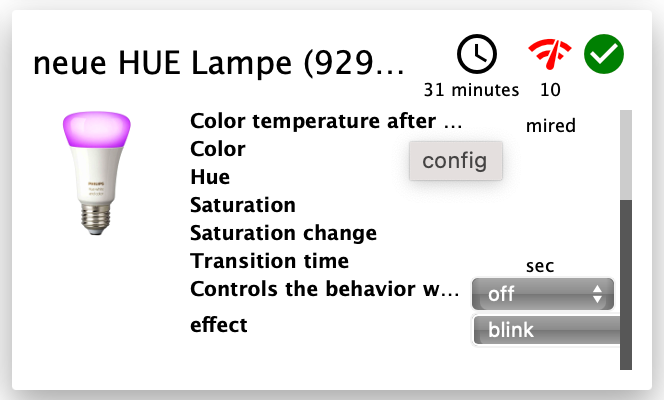
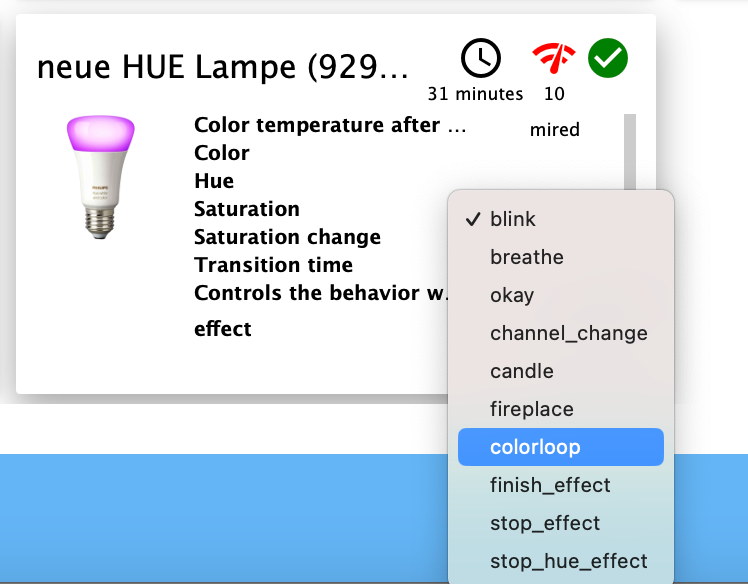
Führt eigentlich ein Löschen der Lampe im Adapter nicht zu einem Werksreset? Ich habe diesen Reset letztendlich über die HUE-App hinbekommen, indem ich die an den ZigBee-Adapter gebundene Lampe über ihre Serien-Nr suchen ließ.
Raspberry Pi 5 mit 8GB + 120GB SSD + Coordinator COD-m + ioBroker ..
-
@asgothian sagte in Philips HUE : Bedeutung der Datenpunkte (ZigBee Adapter):
@legro schau mal nach ob du mit dem Effekt „blink“ arbeiten kannst. Der existiert ggf. Als datenpunkt, ansonsten als send_payload mit {“effect”:”blink”}
Mittlerweile fand ich, dass dein Vorschlag zur Steuerung der Lampe eine von mehreren Optionen ist. Unter dem Punkt effect gibt es eine Vielzahl von Optionen, die ich jedoch nicht alle in ihrer Wirkung einordnen kann - scheinen doch einige keine Funktion zu haben. Der Effekt breathe zeigt eine für meine Zwecke geeignete Wirkung: Die Lampe atmet sozusagen ein und aus (langsam pulsierende Helligkeit)
Führt eigentlich ein Löschen der Lampe im Adapter nicht zu einem Werksreset? Ich habe diesen Reset letztendlich über die HUE-App hinbekommen, indem ich die an den ZigBee-Adapter gebundene Lampe über ihre Serien-Nr suchen ließ.
@legro sagte in Philips HUE : Bedeutung der Datenpunkte (ZigBee Adapter):
Führt eigentlich ein Löschen der Lampe im Adapter nicht zu einem Werksreset? Ich habe diesen Reset letztendlich über die HUE-App hinbekommen, indem ich die an den ZigBee-Adapter gebundene Lampe über ihre Serien-Nr suchen ließ.
Du sollt die Leuchte nicht löschen sondern hier eintragen, und dann nach einem Adapter-Neustart ein state cleanup durchführen.
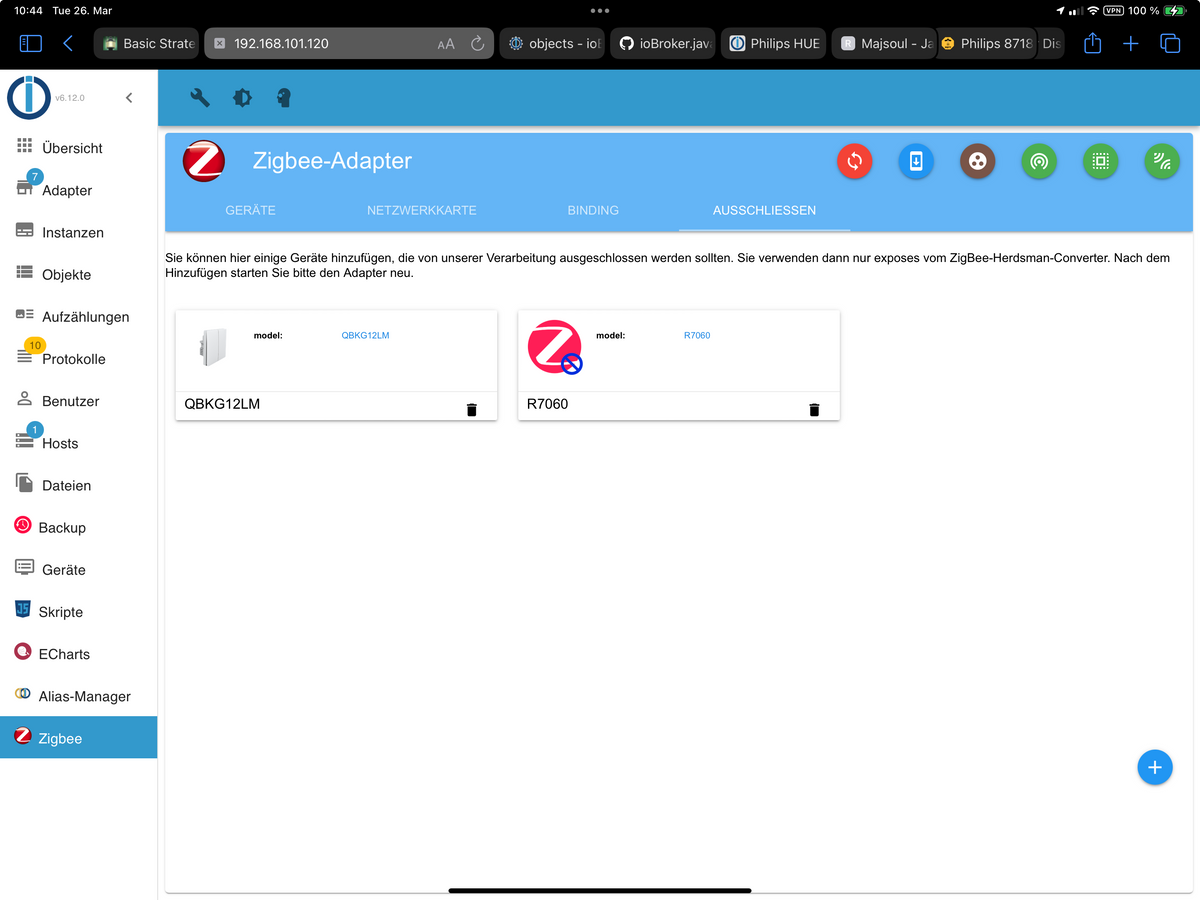 (Rotes Icon im Bild)
Ansonsten führt das löschen zu einem reset, wenn der adapter mit dem Gerät beim löschen kommunizieren kann. Wenn man ein Gerät per “force” löscht dann nicht.
A.


Hey! Du scheinst an dieser Unterhaltung interessiert zu sein, hast aber noch kein Konto.
Hast du es satt, bei jedem Besuch durch die gleichen Beiträge zu scrollen? Wenn du dich für ein Konto anmeldest, kommst du immer genau dorthin zurück, wo du zuvor warst, und kannst dich über neue Antworten benachrichtigen lassen (entweder per E-Mail oder Push-Benachrichtigung). Du kannst auch Lesezeichen speichern und Beiträge positiv bewerten, um anderen Community-Mitgliedern deine Wertschätzung zu zeigen.
Mit deinem Input könnte dieser Beitrag noch besser werden 💗
Registrieren AnmeldenSupport us
313
Online33.0k
Benutzer83.6k
Themen1.3m
Beiträge