



Skip to content
  • Home
  • Aktuell
  • Tags
  • 0 Ungelesen 0
  • Kategorien
  • Unreplied
  • Beliebt
  • GitHub
  • Docu
  • Hilfe
Skins
  • Light
  • Brite
  • Cerulean
  • Cosmo
  • Flatly
  • Journal
  • Litera
  • Lumen
  • Lux
  • Materia
  • Minty
  • Morph
  • Pulse
  • Sandstone
  • Simplex
  • Sketchy
  • Spacelab
  • United
  • Yeti
  • Zephyr
  • Dark
  • Cyborg
  • Darkly
  • Quartz
  • Slate
  • Solar
  • Superhero
  • Vapor

  • Standard: (Kein Skin)
  • Kein Skin
Einklappen
ioBroker Logo

Community Forum

donate donate
  1. ioBroker Community Home
  2. Deutsch
  3. Tester
  4. Test Adapter TrashSchedule

NEWS

  • UPDATE 31.10.: Amazon Alexa - ioBroker Skill läuft aus ?
    apollon77A
    apollon77
    48
    3
    8.7k

  • Monatsrückblick – September 2025
    BluefoxB
    Bluefox
    13
    1
    2.2k

  • Neues Video "KI im Smart Home" - ioBroker plus n8n
    BluefoxB
    Bluefox
    16
    1
    3.2k

Test Adapter TrashSchedule

Geplant Angeheftet Gesperrt Verschoben Tester
adaptercalendaricalkalendermülltrash
1.4k Beiträge 185 Kommentatoren 513.2k Aufrufe 170 Watching
  • Älteste zuerst
  • Neuste zuerst
  • Meiste Stimmen
Antworten
  • In einem neuen Thema antworten
Anmelden zum Antworten
Dieses Thema wurde gelöscht. Nur Nutzer mit entsprechenden Rechten können es sehen.
  • Virus2K12V Virus2K12

    @thomas-braun sagt: das alles läuft

    Thomas BraunT Online
    Thomas BraunT Online
    Thomas Braun
    Most Active
    schrieb am zuletzt editiert von Thomas Braun
    #1359

    @virus2k12 sagte in Test Adapter TrashSchedule:

    sagt: das alles läuft

    Zeigen, nix nacherzählen.

    Linux-Werkzeugkasten:
    https://forum.iobroker.net/topic/42952/der-kleine-iobroker-linux-werkzeugkasten
    NodeJS Fixer Skript:
    https://forum.iobroker.net/topic/68035/iob-node-fix-skript
    iob_diag: curl -sLf -o diag.sh https://iobroker.net/diag.sh && bash diag.sh

    Virus2K12V 1 Antwort Letzte Antwort
    0
    • Thomas BraunT Thomas Braun

      @virus2k12 sagte in Test Adapter TrashSchedule:

      sagt: das alles läuft

      Zeigen, nix nacherzählen.

      Virus2K12V Offline
      Virus2K12V Offline
      Virus2K12
      schrieb am zuletzt editiert von Negalein
      #1360

      @thomas-braun

      pi@raspberrypi:~ $ systemctl status iobroker.service
      * iobroker.service - ioBroker Server
           Loaded: loaded (/lib/systemd/system/iobroker.service; enabled; preset: ena>
           Active: active (running) since Thu 2024-03-07 13:41:39 CET; 27min ago
             Docs: http://iobroker.net
         Main PID: 1239 (iobroker.js-con)
            Tasks: 374 (limit: 4915)
              CPU: 1h 6min 20.668s
           CGroup: /system.slice/iobroker.service
                   |-1239 iobroker.js-controller
                   |-1454 io.admin.0
                   |-1466 io.history.0
                   |-1505 io.javascript.0
                   |-1525 io.telegram.0
                   |-1560 io.alexa2.0
                   |-1576 io.backitup.0
                   |-1614 io.hmip.0
                   |-1621 io.hue.0
                   |-1667 io.mqtt-client.0
                   |-1706 io.mqtt.1
                   |-1718 io.shelly.0
                   |-1759 io.sonoff.0
                   |-1773 io.tr-064.0
                   |-1801 io.tr-064.1
                   |-1812 io.tuya.0
                   |-1870 io.wifilight.0
                   |-1890 io.awtrix-light.0
                   |-1924 io.bring.0
                   |-1972 io.device-watcher.0
                   |-1983 io.discovery.0
                   |-2027 io.echarts.0
                   |-2068 io.hue-extended.0
                   |-2087 io.info.0
                   |-2160 io.simple-api.0
                   |-2171 io.snmp.0
                   |-2182 io.text2command.0
                   |-2211 io.trashschedule.0
                   |-2252 io.vesync.0
                   |-2263 io.vis-2.0
                   |-2305 io.vis-inventwo.0
                   |-2342 io.web.0
                   |-2349 io.wled.0
                   `-2372 io.ws.0
      
      Mar 07 13:42:13 raspberrypi bash[1239]: host.raspberrypi check instance "system>
      Mar 07 13:42:13 raspberrypi bash[1239]: host.raspberrypi check instance "system>
      Mar 07 13:42:13 raspberrypi bash[1239]: host.raspberrypi check instance "system>
      Mar 07 13:42:13 raspberrypi bash[1239]: host.raspberrypi check instance "system>
      Mar 07 13:42:13 raspberrypi bash[1239]: host.raspberrypi check instance "system>
      Mar 07 13:42:13 raspberrypi bash[1239]: host.raspberrypi check instance "system>
      Mar 07 13:42:13 raspberrypi bash[1239]: host.raspberrypi check instance "system>
      Mar 07 13:42:13 raspberrypi bash[1239]: host.raspberrypi check instance "system>
      Mar 07 13:42:25 raspberrypi bash[1239]: ================================== > LO>
      Mar 07 13:42:28 raspberrypi bash[1239]: Send diag info: {"uuid":"a2e3c321-5dd7->
      pi@raspberrypi:~ $
      
      Thomas BraunT 1 Antwort Letzte Antwort
      0
      • Virus2K12V Virus2K12

        @thomas-braun

        pi@raspberrypi:~ $ systemctl status iobroker.service
        * iobroker.service - ioBroker Server
             Loaded: loaded (/lib/systemd/system/iobroker.service; enabled; preset: ena>
             Active: active (running) since Thu 2024-03-07 13:41:39 CET; 27min ago
               Docs: http://iobroker.net
           Main PID: 1239 (iobroker.js-con)
              Tasks: 374 (limit: 4915)
                CPU: 1h 6min 20.668s
             CGroup: /system.slice/iobroker.service
                     |-1239 iobroker.js-controller
                     |-1454 io.admin.0
                     |-1466 io.history.0
                     |-1505 io.javascript.0
                     |-1525 io.telegram.0
                     |-1560 io.alexa2.0
                     |-1576 io.backitup.0
                     |-1614 io.hmip.0
                     |-1621 io.hue.0
                     |-1667 io.mqtt-client.0
                     |-1706 io.mqtt.1
                     |-1718 io.shelly.0
                     |-1759 io.sonoff.0
                     |-1773 io.tr-064.0
                     |-1801 io.tr-064.1
                     |-1812 io.tuya.0
                     |-1870 io.wifilight.0
                     |-1890 io.awtrix-light.0
                     |-1924 io.bring.0
                     |-1972 io.device-watcher.0
                     |-1983 io.discovery.0
                     |-2027 io.echarts.0
                     |-2068 io.hue-extended.0
                     |-2087 io.info.0
                     |-2160 io.simple-api.0
                     |-2171 io.snmp.0
                     |-2182 io.text2command.0
                     |-2211 io.trashschedule.0
                     |-2252 io.vesync.0
                     |-2263 io.vis-2.0
                     |-2305 io.vis-inventwo.0
                     |-2342 io.web.0
                     |-2349 io.wled.0
                     `-2372 io.ws.0
        
        Mar 07 13:42:13 raspberrypi bash[1239]: host.raspberrypi check instance "system>
        Mar 07 13:42:13 raspberrypi bash[1239]: host.raspberrypi check instance "system>
        Mar 07 13:42:13 raspberrypi bash[1239]: host.raspberrypi check instance "system>
        Mar 07 13:42:13 raspberrypi bash[1239]: host.raspberrypi check instance "system>
        Mar 07 13:42:13 raspberrypi bash[1239]: host.raspberrypi check instance "system>
        Mar 07 13:42:13 raspberrypi bash[1239]: host.raspberrypi check instance "system>
        Mar 07 13:42:13 raspberrypi bash[1239]: host.raspberrypi check instance "system>
        Mar 07 13:42:13 raspberrypi bash[1239]: host.raspberrypi check instance "system>
        Mar 07 13:42:25 raspberrypi bash[1239]: ================================== > LO>
        Mar 07 13:42:28 raspberrypi bash[1239]: Send diag info: {"uuid":"a2e3c321-5dd7->
        pi@raspberrypi:~ $
        
        Thomas BraunT Online
        Thomas BraunT Online
        Thomas Braun
        Most Active
        schrieb am zuletzt editiert von Thomas Braun
        #1361

        @virus2k12

        Ruf das mal auf:

        curl -L -o diag.sh https://iobroker.net/diag.sh && bash diag.sh
        

        Dürfte ein Netzwerk-Thema sein.

        Linux-Werkzeugkasten:
        https://forum.iobroker.net/topic/42952/der-kleine-iobroker-linux-werkzeugkasten
        NodeJS Fixer Skript:
        https://forum.iobroker.net/topic/68035/iob-node-fix-skript
        iob_diag: curl -sLf -o diag.sh https://iobroker.net/diag.sh && bash diag.sh

        1 Antwort Letzte Antwort
        0
        • CodierknechtC Codierknecht

          @virus2k12
          Wie sieht denn Dein Schedule dazu aus?
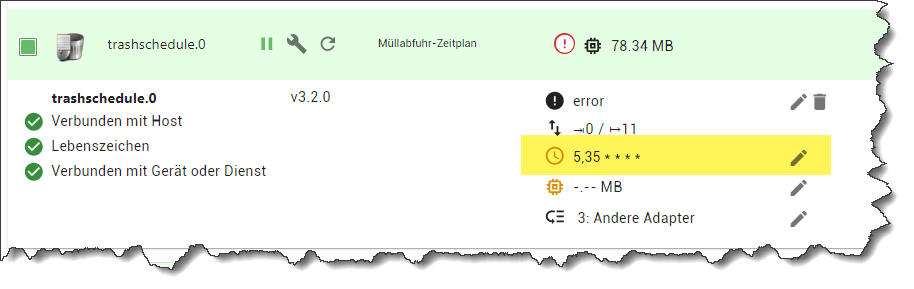
          d098dd19-f037-48d7-9fa8-46b5538eb232-image.png

          haus-automatisierungH Online
          haus-automatisierungH Online
          haus-automatisierung
          Developer Most Active
          schrieb am zuletzt editiert von haus-automatisierung
          #1362

          @codierknecht sagte in Test Adapter TrashSchedule:

          @virus2k12
          Wie sieht denn Dein Schedule dazu aus?

          d098dd19-f037-48d7-9fa8-46b5538eb232-image.png

          Warum hast Du denn einen Neustart-Zeitplan für die Instanz hinterlegt? Ist nicht notwendig.

          @codierknecht sagte in Test Adapter TrashSchedule:

          Wird das überhaupt gebraucht?

          Nein. Das startet ja bei Dir die Instanz 2x jede Stunde neu. Warum sollte man das tun? Wäre das nötig, würde der Adapter das mitbringen. Ist halt auch eine Option für Experten und deswegen (aus Gründen) nur im Expertenmodus sichtbar.

          🧑‍🎓 Autor des beliebten ioBroker-Master-Kurses
          🎥 Tutorials rund um das Thema DIY-Smart-Home: https://haus-automatisierung.com/
          📚 Meine inoffizielle ioBroker Dokumentation

          CodierknechtC 1 Antwort Letzte Antwort
          0
          • haus-automatisierungH haus-automatisierung

            @codierknecht sagte in Test Adapter TrashSchedule:

            @virus2k12
            Wie sieht denn Dein Schedule dazu aus?

            d098dd19-f037-48d7-9fa8-46b5538eb232-image.png

            Warum hast Du denn einen Neustart-Zeitplan für die Instanz hinterlegt? Ist nicht notwendig.

            @codierknecht sagte in Test Adapter TrashSchedule:

            Wird das überhaupt gebraucht?

            Nein. Das startet ja bei Dir die Instanz 2x jede Stunde neu. Warum sollte man das tun? Wäre das nötig, würde der Adapter das mitbringen. Ist halt auch eine Option für Experten und deswegen (aus Gründen) nur im Expertenmodus sichtbar.

            CodierknechtC Online
            CodierknechtC Online
            Codierknecht
            Developer Most Active
            schrieb am zuletzt editiert von
            #1363

            @haus-automatisierung
            Wie gesagt: Keine Ahnung, warum das drin ist.
            Vielleicht mal zu Testzwecken reingekommen und vergessen wieder zu entfernen.

            "Any fool can write code that a computer can understand. Good programmers write code that humans can understand." (Martin Fowler, "Refactoring")

            Proxmox 9.1.1 LXC|8 GB|Core i7-6700
            HmIP|ZigBee|Tasmota|Unifi
            Zabbix Certified Specialist
            Konnte ich Dir helfen? Dann benutze bitte das Voting unten rechts im Beitrag

            haus-automatisierungH 1 Antwort Letzte Antwort
            0
            • CodierknechtC Codierknecht

              @haus-automatisierung
              Wie gesagt: Keine Ahnung, warum das drin ist.
              Vielleicht mal zu Testzwecken reingekommen und vergessen wieder zu entfernen.

              haus-automatisierungH Online
              haus-automatisierungH Online
              haus-automatisierung
              Developer Most Active
              schrieb am zuletzt editiert von
              #1364

              @codierknecht sagte in Test Adapter TrashSchedule:

              Vielleicht mal zu Testzwecken reingekommen

              Expertenmodus einfach immer auslassen (wozu braucht man den überhaupt?) :)

              🧑‍🎓 Autor des beliebten ioBroker-Master-Kurses
              🎥 Tutorials rund um das Thema DIY-Smart-Home: https://haus-automatisierung.com/
              📚 Meine inoffizielle ioBroker Dokumentation

              CodierknechtC 1 Antwort Letzte Antwort
              0
              • haus-automatisierungH haus-automatisierung

                @codierknecht sagte in Test Adapter TrashSchedule:

                Vielleicht mal zu Testzwecken reingekommen

                Expertenmodus einfach immer auslassen (wozu braucht man den überhaupt?) :)

                CodierknechtC Online
                CodierknechtC Online
                Codierknecht
                Developer Most Active
                schrieb am zuletzt editiert von
                #1365

                @haus-automatisierung sagte in Test Adapter TrashSchedule:

                Expertenmodus einfach immer auslassen

                Ist er auch - in der Regel.
                Und wenn ich ihn einschalte, dann nicht dauerhaft.

                @haus-automatisierung sagte in Test Adapter TrashSchedule:

                wozu braucht man den überhaupt?

                Um z.B. mal den Loglevel zu verändern.
                Oder das Schedule für beispielsweise "iCal" oder "DasWetter", damit die ihre Daten nicht zu vollen Stunde holen.

                "Any fool can write code that a computer can understand. Good programmers write code that humans can understand." (Martin Fowler, "Refactoring")

                Proxmox 9.1.1 LXC|8 GB|Core i7-6700
                HmIP|ZigBee|Tasmota|Unifi
                Zabbix Certified Specialist
                Konnte ich Dir helfen? Dann benutze bitte das Voting unten rechts im Beitrag

                haus-automatisierungH 1 Antwort Letzte Antwort
                0
                • CodierknechtC Codierknecht

                  @haus-automatisierung sagte in Test Adapter TrashSchedule:

                  Expertenmodus einfach immer auslassen

                  Ist er auch - in der Regel.
                  Und wenn ich ihn einschalte, dann nicht dauerhaft.

                  @haus-automatisierung sagte in Test Adapter TrashSchedule:

                  wozu braucht man den überhaupt?

                  Um z.B. mal den Loglevel zu verändern.
                  Oder das Schedule für beispielsweise "iCal" oder "DasWetter", damit die ihre Daten nicht zu vollen Stunde holen.

                  haus-automatisierungH Online
                  haus-automatisierungH Online
                  haus-automatisierung
                  Developer Most Active
                  schrieb am zuletzt editiert von
                  #1366

                  @codierknecht sagte in Test Adapter TrashSchedule:

                  Oder das Schedule für beispielsweise "iCal" oder "DasWetter"

                  Für Schedule-Adapter kann man den Zeitplan auch ohne Expertenmodus anpassen :)

                  🧑‍🎓 Autor des beliebten ioBroker-Master-Kurses
                  🎥 Tutorials rund um das Thema DIY-Smart-Home: https://haus-automatisierung.com/
                  📚 Meine inoffizielle ioBroker Dokumentation

                  CodierknechtC 1 Antwort Letzte Antwort
                  0
                  • haus-automatisierungH haus-automatisierung

                    @codierknecht sagte in Test Adapter TrashSchedule:

                    Oder das Schedule für beispielsweise "iCal" oder "DasWetter"

                    Für Schedule-Adapter kann man den Zeitplan auch ohne Expertenmodus anpassen :)

                    CodierknechtC Online
                    CodierknechtC Online
                    Codierknecht
                    Developer Most Active
                    schrieb am zuletzt editiert von
                    #1367

                    @haus-automatisierung
                    Stimmt. Das mache ich halt so selten ;-)

                    Für Loglevel braucht man den EM trotzdem. Aber eben auch nur sehr selten.

                    "Any fool can write code that a computer can understand. Good programmers write code that humans can understand." (Martin Fowler, "Refactoring")

                    Proxmox 9.1.1 LXC|8 GB|Core i7-6700
                    HmIP|ZigBee|Tasmota|Unifi
                    Zabbix Certified Specialist
                    Konnte ich Dir helfen? Dann benutze bitte das Voting unten rechts im Beitrag

                    1 Antwort Letzte Antwort
                    0
                    • DJMarc75D DJMarc75

                      @haus-automatisierung

                      Hab mir eben auch mal den Adapter gegönnt ;)

                      @codierknecht sagte in Test Adapter TrashSchedule:

                      Bei mir funktioniert die 3.2.0 auch mit Loglevel "Info" völlig problemlos.

                      Dito

                      @virus2k12 sagte in Test Adapter TrashSchedule:

                      möchte wissen woran das liegt.

                      vll zeigst Du uns mal die Ausgabe von:

                      iob diag
                      
                      Virus2K12V Offline
                      Virus2K12V Offline
                      Virus2K12
                      schrieb am zuletzt editiert von
                      #1368

                      @djmarc75
                      Copy text starting here:

                      ======================= SUMMARY =======================
                      			v.2023-10-25
                      
                      
                       Static hostname: raspberrypi
                             Icon name: computer
                      Operating System: Raspbian GNU/Linux 12 (bookworm)
                                Kernel: Linux 5.10.103-v7l+
                          Architecture: arm
                      
                      Installation: 		native
                      Kernel: 		armv7l
                      Userland: 		armhf
                      Timezone: 		Europe/Berlin (CET, +0100)
                      User-ID: 		1000
                      X-Server: 		true
                      Boot Target: 		graphical.target
                      
                      Pending OS-Updates: 	0
                      Pending iob updates: 	1
                      
                      Nodejs-Installation: 	/usr/bin/nodejs 	v18.19.1
                      			/usr/bin/node 		v18.19.1
                      			/usr/bin/npm 		10.5.0
                      			/usr/bin/npx 		10.5.0
                      			/usr/bin/corepack 	0.22.0
                      
                      Recommended versions are nodejs 18.19.1 and npm 10.2.4
                      Your nodejs installation is correct
                      
                      MEMORY: 
                                     total        used        free      shared  buff/cache   available
                      Mem:            4.0G        3.0G        487M         13M        705M        1.0G
                      Swap:           104M        104M        4.1K
                      Total:          4.1G        3.1G        487M
                      
                      Active iob-Instances: 	34
                      Active repo(s): Beta (latest)
                      
                      ioBroker Core: 		js-controller 		5.0.19
                      			admin 			6.15.2
                      
                      ioBroker Status: 	iobroker is running on this host.
                      
                      
                      Objects type: jsonl
                      States  type: jsonl
                      
                      Status admin and web instance:
                      + system.adapter.admin.0                  : admin                 : raspberrypi                              -  enabled, compact disabled, port: 8081, bind: 0.0.0.0, run as: admin
                      + system.adapter.web.0                    : web                   : raspberrypi                              -  enabled, compact disabled, port: 8082, bind: 0.0.0.0, run as: admin
                      
                      Objects: 		21621
                      States: 		14503
                      
                      Size of iob-Database:
                      
                      27M	/opt/iobroker/iobroker-data/objects.jsonl
                      115M	/opt/iobroker/iobroker-data/states.jsonl


                      =================== END OF SUMMARY ====================
                      

                      === Mark text until here for copying ===

                      Thomas BraunT 1 Antwort Letzte Antwort
                      0
                      • Virus2K12V Virus2K12

                        @djmarc75
                        Copy text starting here:

                        ======================= SUMMARY =======================
                        			v.2023-10-25
                        
                        
                         Static hostname: raspberrypi
                               Icon name: computer
                        Operating System: Raspbian GNU/Linux 12 (bookworm)
                                  Kernel: Linux 5.10.103-v7l+
                            Architecture: arm
                        
                        Installation: 		native
                        Kernel: 		armv7l
                        Userland: 		armhf
                        Timezone: 		Europe/Berlin (CET, +0100)
                        User-ID: 		1000
                        X-Server: 		true
                        Boot Target: 		graphical.target
                        
                        Pending OS-Updates: 	0
                        Pending iob updates: 	1
                        
                        Nodejs-Installation: 	/usr/bin/nodejs 	v18.19.1
                        			/usr/bin/node 		v18.19.1
                        			/usr/bin/npm 		10.5.0
                        			/usr/bin/npx 		10.5.0
                        			/usr/bin/corepack 	0.22.0
                        
                        Recommended versions are nodejs 18.19.1 and npm 10.2.4
                        Your nodejs installation is correct
                        
                        MEMORY: 
                                       total        used        free      shared  buff/cache   available
                        Mem:            4.0G        3.0G        487M         13M        705M        1.0G
                        Swap:           104M        104M        4.1K
                        Total:          4.1G        3.1G        487M
                        
                        Active iob-Instances: 	34
                        Active repo(s): Beta (latest)
                        
                        ioBroker Core: 		js-controller 		5.0.19
                        			admin 			6.15.2
                        
                        ioBroker Status: 	iobroker is running on this host.
                        
                        
                        Objects type: jsonl
                        States  type: jsonl
                        
                        Status admin and web instance:
                        + system.adapter.admin.0                  : admin                 : raspberrypi                              -  enabled, compact disabled, port: 8081, bind: 0.0.0.0, run as: admin
                        + system.adapter.web.0                    : web                   : raspberrypi                              -  enabled, compact disabled, port: 8082, bind: 0.0.0.0, run as: admin
                        
                        Objects: 		21621
                        States: 		14503
                        
                        Size of iob-Database:
                        
                        27M	/opt/iobroker/iobroker-data/objects.jsonl
                        115M	/opt/iobroker/iobroker-data/states.jsonl


                        =================== END OF SUMMARY ====================
                        

                        === Mark text until here for copying ===

                        Thomas BraunT Online
                        Thomas BraunT Online
                        Thomas Braun
                        Most Active
                        schrieb am zuletzt editiert von Thomas Braun
                        #1369

                        @virus2k12

                        Da stimmt was nicht mit npm.

                        iob stop
                        sudo apt install --reinstall nodejs
                        iob restart
                        

                        Und dann nochmal die Langfassung von iob diag.
                        Finger von npm lassen!

                        Linux-Werkzeugkasten:
                        https://forum.iobroker.net/topic/42952/der-kleine-iobroker-linux-werkzeugkasten
                        NodeJS Fixer Skript:
                        https://forum.iobroker.net/topic/68035/iob-node-fix-skript
                        iob_diag: curl -sLf -o diag.sh https://iobroker.net/diag.sh && bash diag.sh

                        CodierknechtC 1 Antwort Letzte Antwort
                        0
                        • Thomas BraunT Thomas Braun

                          @virus2k12

                          Da stimmt was nicht mit npm.

                          iob stop
                          sudo apt install --reinstall nodejs
                          iob restart
                          

                          Und dann nochmal die Langfassung von iob diag.
                          Finger von npm lassen!

                          CodierknechtC Online
                          CodierknechtC Online
                          Codierknecht
                          Developer Most Active
                          schrieb am zuletzt editiert von
                          #1370

                          @Virus2K12

                          ... und den Desktop ausschalten.

                          "Any fool can write code that a computer can understand. Good programmers write code that humans can understand." (Martin Fowler, "Refactoring")

                          Proxmox 9.1.1 LXC|8 GB|Core i7-6700
                          HmIP|ZigBee|Tasmota|Unifi
                          Zabbix Certified Specialist
                          Konnte ich Dir helfen? Dann benutze bitte das Voting unten rechts im Beitrag

                          Thomas BraunT 1 Antwort Letzte Antwort
                          1
                          • CodierknechtC Codierknecht

                            @Virus2K12

                            ... und den Desktop ausschalten.

                            Thomas BraunT Online
                            Thomas BraunT Online
                            Thomas Braun
                            Most Active
                            schrieb am zuletzt editiert von
                            #1371

                            @codierknecht sagte in Test Adapter TrashSchedule:

                            @Virus2K12

                            ... und den Desktop ausschalten.

                            Oh, ganz übersehen. Natürlich.
                            Und auch mal prüfen, ob die Hardware nicht 64Bit verträgt.

                            Linux-Werkzeugkasten:
                            https://forum.iobroker.net/topic/42952/der-kleine-iobroker-linux-werkzeugkasten
                            NodeJS Fixer Skript:
                            https://forum.iobroker.net/topic/68035/iob-node-fix-skript
                            iob_diag: curl -sLf -o diag.sh https://iobroker.net/diag.sh && bash diag.sh

                            1 Antwort Letzte Antwort
                            0
                            • Virus2K12V Offline
                              Virus2K12V Offline
                              Virus2K12
                              schrieb am zuletzt editiert von
                              #1372

                              Desktop aus und reinstall nodejs gemacht.
                              Hier jetzt erst einmal die lange Fassung von iob diag
                              ======== Start marking the full check here =========

                              Skript v.2023-10-25
                              
                              *** BASE SYSTEM ***
                               Static hostname: raspberrypi
                                     Icon name: computer
                              Operating System: Raspbian GNU/Linux 12 (bookworm)
                                        Kernel: Linux 5.10.103-v7l+
                                  Architecture: arm
                              
                              Model		: Raspberry Pi 4 Model B Rev 1.1
                              Docker          : false
                              Virtualization  : none
                              Kernel          : armv7l
                              Userland        : armhf
                              
                              Systemuptime and Load:
                               11:46:10 up 4 min,  1 user,  load average: 4.35, 2.76, 1.17
                              CPU threads: 4
                              
                              
                              *** RASPBERRY THROTTLING ***
                              Current issues:
                              No throttling issues detected.
                              
                              Previously detected issues:
                              No throttling issues detected.
                              
                              *** Time and Time Zones ***
                                             Local time: Fri 2024-03-08 11:46:10 CET
                                         Universal time: Fri 2024-03-08 10:46:10 UTC
                                               RTC time: n/a
                                              Time zone: Europe/Berlin (CET, +0100)
                              System clock synchronized: yes
                                            NTP service: active
                                        RTC in local TZ: no
                              
                              *** User and Groups ***
                              pi
                              /home/pi
                              pi adm dialout cdrom sudo audio video plugdev games users input netdev lpadmin gpio i2c spi iobroker
                              
                              *** X-Server-Setup ***
                              X-Server: 	false
                              Desktop: 	
                              Terminal: 	tty
                              Boot Target: 	multi-user.target
                              
                              *** MEMORY ***
                                             total        used        free      shared  buff/cache   available
                              Mem:            4.0G        2.4G        670M        4.8M        1.1G        1.6G
                              Swap:           104M          0B        104M
                              Total:          4.1G        2.4G        775M
                              
                                       3837 M total memory
                                       2303 M used memory
                                        235 M active memory
                                       2842 M inactive memory
                                        638 M free memory
                                        244 M buffer memory
                                        788 M swap cache
                                         99 M total swap
                                          0 M used swap
                                         99 M free swap
                              
                              Raspberry only:
                              oom events: 0
                              lifetime oom required: 0 Mbytes
                              total time in oom handler: 0 ms
                              max time spent in oom handler: 0 ms
                              
                              
                              *** FAILED SERVICES ***
                              
                                UNIT             LOAD   ACTIVE SUB    DESCRIPTION                                                  
                              * influxdb.service loaded failed failed InfluxDB is an open-source, distributed, time series database
                              
                              LOAD   = Reflects whether the unit definition was properly loaded.
                              ACTIVE = The high-level unit activation state, i.e. generalization of SUB.
                              SUB    = The low-level unit activation state, values depend on unit type.
                              1 loaded units listed.
                              
                              *** FILESYSTEM ***
                              Filesystem     Type      Size  Used Avail Use% Mounted on
                              /dev/root      ext4      219G   24G  185G  12% /
                              devtmpfs       devtmpfs  1.8G     0  1.8G   0% /dev
                              tmpfs          tmpfs     1.9G   16K  1.9G   1% /dev/shm
                              tmpfs          tmpfs     768M  2.1M  766M   1% /run
                              tmpfs          tmpfs     5.0M   12K  5.0M   1% /run/lock
                              /dev/loop1     squashfs   43M   43M     0 100% /snap/certbot/3642
                              /dev/loop2     squashfs   91M   91M     0 100% /snap/core/16207
                              /dev/loop0     squashfs   42M   42M     0 100% /snap/certbot/3568
                              /dev/loop4     squashfs   54M   54M     0 100% /snap/core20/2106
                              /dev/loop3     squashfs   91M   91M     0 100% /snap/core/16575
                              /dev/loop5     squashfs   54M   54M     0 100% /snap/core20/2185
                              /dev/sda1      vfat      253M   93M  160M  37% /boot
                              tmpfs          tmpfs     384M   80K  384M   1% /run/user/1000
                              
                              Messages concerning ext4 filesystem in dmesg:
                              [Fri Mar  8 11:41:23 2024] Kernel command line: coherent_pool=1M 8250.nr_uarts=1 snd_bcm2835.enable_compat_alsa=0 snd_bcm2835.enable_hdmi=1 video=HDMI-A-1:1920x1080M@60D smsc95xx.macaddr=DC:A6:32:4F:AC:15 vc_mem.mem_base=0x3eb00000 vc_mem.mem_size=0x3ff00000  console=ttyAMA0,115200 console=tty1 root=PARTUUID=048e52a3-02 rootfstype=ext4 elevator=deadline fsck.repair=yes rootwait quiet splash plymouth.ignore-serial-consoles fsck.mode=force cfg80211.ieee80211_regdom=DE
                              [Fri Mar  8 11:41:27 2024] EXT4-fs (sda2): mounted filesystem with ordered data mode. Opts: (null)
                              [Fri Mar  8 11:41:27 2024] VFS: Mounted root (ext4 filesystem) readonly on device 8:2.
                              [Fri Mar  8 11:42:02 2024] EXT4-fs (sda2): re-mounted. Opts: (null)
                              
                              Show mounted filesystems:
                              TARGET                         SOURCE      FSTYPE      OPTIONS
                              /                              /dev/sda2   ext4        rw,noatime
                              |-/dev                         devtmpfs    devtmpfs    rw,relatime,size=1800056k,nr_inodes=84157,mode=755
                              | |-/dev/shm                   tmpfs       tmpfs       rw,nosuid,nodev
                              | |-/dev/pts                   devpts      devpts      rw,nosuid,noexec,relatime,gid=5,mode=620,ptmxmode=000
                              | `-/dev/mqueue                mqueue      mqueue      rw,nosuid,nodev,noexec,relatime
                              |-/proc                        proc        proc        rw,relatime
                              | `-/proc/sys/fs/binfmt_misc   systemd-1   autofs      rw,relatime,fd=29,pgrp=1,timeout=0,minproto=5,maxproto=5,direct
                              |   `-/proc/sys/fs/binfmt_misc binfmt_misc binfmt_misc rw,nosuid,nodev,noexec,relatime
                              |-/sys                         sysfs       sysfs       rw,nosuid,nodev,noexec,relatime
                              | |-/sys/kernel/security       securityfs  securityfs  rw,nosuid,nodev,noexec,relatime
                              | |-/sys/fs/cgroup             cgroup2     cgroup2     rw,nosuid,nodev,noexec,relatime,nsdelegate,memory_recursiveprot
                              | |-/sys/fs/bpf                none        bpf         rw,nosuid,nodev,noexec,relatime,mode=700
                              | |-/sys/kernel/debug          debugfs     debugfs     rw,nosuid,nodev,noexec,relatime
                              | |-/sys/kernel/tracing        tracefs     tracefs     rw,nosuid,nodev,noexec,relatime
                              | |-/sys/fs/fuse/connections   fusectl     fusectl     rw,nosuid,nodev,noexec,relatime
                              | `-/sys/kernel/config         configfs    configfs    rw,nosuid,nodev,noexec,relatime
                              |-/run                         tmpfs       tmpfs       rw,nosuid,nodev,size=785972k,nr_inodes=819200,mode=755
                              | |-/run/lock                  tmpfs       tmpfs       rw,nosuid,nodev,noexec,relatime,size=5120k
                              | |-/run/credentials/systemd-sysctl.service
                              | |                            none        ramfs       ro,nosuid,nodev,noexec,relatime,mode=700
                              | |-/run/credentials/systemd-sysusers.service
                              | |                            none        ramfs       ro,nosuid,nodev,noexec,relatime,mode=700
                              | |-/run/credentials/systemd-tmpfiles-setup-dev.service
                              | |                            none        ramfs       ro,nosuid,nodev,noexec,relatime,mode=700
                              | |-/run/rpc_pipefs            sunrpc      rpc_pipefs  rw,relatime
                              | |-/run/credentials/systemd-tmpfiles-setup.service
                              | |                            none        ramfs       ro,nosuid,nodev,noexec,relatime,mode=700
                              | `-/run/user/1000             tmpfs       tmpfs       rw,nosuid,nodev,relatime,size=392984k,nr_inodes=98246,mode=700,uid=1000,gid=1000
                              |-/snap/certbot/3642           /dev/loop1  squashfs    ro,nodev,relatime
                              |-/snap/core/16207             /dev/loop2  squashfs    ro,nodev,relatime
                              |-/snap/certbot/3568           /dev/loop0  squashfs    ro,nodev,relatime
                              |-/snap/core20/2106            /dev/loop4  squashfs    ro,nodev,relatime
                              |-/snap/core/16575             /dev/loop3  squashfs    ro,nodev,relatime
                              |-/snap/core20/2185            /dev/loop5  squashfs    ro,nodev,relatime
                              `-/boot                        /dev/sda1   vfat        rw,relatime,fmask=0022,dmask=0022,codepage=437,iocharset=ascii,shortname=mixed,errors=remount-r
                              
                              Files in neuralgic directories:
                              
                              /var:
                              3.6G	/var/
                              2.1G	/var/log
                              1.9G	/var/log/journal/a86ff8ac034a41cc8294fe68053416f8
                              1.9G	/var/log/journal
                              1.3G	/var/lib
                              
                              Archived and active journals take up 1.8G in the file system.
                              
                              /opt/iobroker/backups:
                              178M	/opt/iobroker/backups/
                              
                              /opt/iobroker/iobroker-data:
                              741M	/opt/iobroker/iobroker-data/
                              523M	/opt/iobroker/iobroker-data/files
                              89M	/opt/iobroker/iobroker-data/files/echarts.admin
                              80M	/opt/iobroker/iobroker-data/backup-objects
                              57M	/opt/iobroker/iobroker-data/files/javascript.admin
                              
                              The five largest files in iobroker-data are:
                              du: cannot access '/opt/iobroker/iobroker-data/files/vis-2/c3ec73ec5450fb4cac984fc867dd54eb.js': No such file or directory
                              du: cannot access '/opt/iobroker/iobroker-data/files/vis-2/c351437da7e800bc3d9409c431052f9c.js': No such file or directory
                              109M	/opt/iobroker/iobroker-data/states.jsonl
                              35M	/opt/iobroker/iobroker-data/files/devices.admin/static/js/main.24f2bb56.js.map
                              31M	/opt/iobroker/iobroker-data/objects.jsonl
                              24M	/opt/iobroker/iobroker-data/files/web.admin/static/js/main.135279a0.js.map
                              24M	/opt/iobroker/iobroker-data/files/echarts/static/js/main.2b7495c2.js.map
                              
                              USB-Devices by-id:
                              USB-Sticks -  Avoid direct links to /dev/* in your adapter setups, please always prefer the links 'by-id':
                              
                              
                              *** NodeJS-Installation ***
                              
                              /usr/bin/nodejs 	v18.19.1
                              /usr/bin/node 		v18.19.1
                              /usr/bin/npm 		10.2.4
                              /usr/bin/npx 		10.2.4
                              /usr/bin/corepack 	0.22.0
                              
                              
                              nodejs:
                                Installed: 18.19.1-1nodesource1
                                Candidate: 18.19.1-1nodesource1
                                Version table:
                               *** 18.19.1-1nodesource1 600
                                      500 https://deb.nodesource.com/node_18.x nodistro/main armhf Packages
                                      100 /var/lib/dpkg/status
                                   18.19.0+dfsg-6~deb12u1+rpi1 500
                                      500 http://raspbian.raspberrypi.org/raspbian bookworm/main armhf Packages
                                   18.19.0-1nodesource1 600
                                      500 https://deb.nodesource.com/node_18.x nodistro/main armhf Packages
                                   18.18.2-1nodesource1 600
                                      500 https://deb.nodesource.com/node_18.x nodistro/main armhf Packages
                                   18.18.1-1nodesource1 600
                                      500 https://deb.nodesource.com/node_18.x nodistro/main armhf Packages
                                   18.18.0-1nodesource1 600
                                      500 https://deb.nodesource.com/node_18.x nodistro/main armhf Packages
                                   18.17.1-1nodesource1 600
                                      500 https://deb.nodesource.com/node_18.x nodistro/main armhf Packages
                                   18.17.0-1nodesource1 600
                                      500 https://deb.nodesource.com/node_18.x nodistro/main armhf Packages
                                   18.16.1-1nodesource1 600
                                      500 https://deb.nodesource.com/node_18.x nodistro/main armhf Packages
                                   18.16.0-1nodesource1 600
                                      500 https://deb.nodesource.com/node_18.x nodistro/main armhf Packages
                                   18.15.0-1nodesource1 600
                                      500 https://deb.nodesource.com/node_18.x nodistro/main armhf Packages
                                   18.14.2-1nodesource1 600
                                      500 https://deb.nodesource.com/node_18.x nodistro/main armhf Packages
                                   18.14.1-1nodesource1 600
                                      500 https://deb.nodesource.com/node_18.x nodistro/main armhf Packages
                                   18.14.0-1nodesource1 600
                                      500 https://deb.nodesource.com/node_18.x nodistro/main armhf Packages
                                   18.13.0-1nodesource1 600
                                      500 https://deb.nodesource.com/node_18.x nodistro/main armhf Packages
                                   18.12.0-1nodesource1 600
                                      500 https://deb.nodesource.com/node_18.x nodistro/main armhf Packages
                                   18.11.0-1nodesource1 600
                                      500 https://deb.nodesource.com/node_18.x nodistro/main armhf Packages
                                   18.10.0-1nodesource1 600
                                      500 https://deb.nodesource.com/node_18.x nodistro/main armhf Packages
                                   18.9.1-1nodesource1 600
                                      500 https://deb.nodesource.com/node_18.x nodistro/main armhf Packages
                                   18.9.0-1nodesource1 600
                                      500 https://deb.nodesource.com/node_18.x nodistro/main armhf Packages
                                   18.8.0-1nodesource1 600
                                      500 https://deb.nodesource.com/node_18.x nodistro/main armhf Packages
                                   18.7.0-1nodesource1 600
                                      500 https://deb.nodesource.com/node_18.x nodistro/main armhf Packages
                                   18.6.0-1nodesource1 600
                                      500 https://deb.nodesource.com/node_18.x nodistro/main armhf Packages
                                   18.5.0-1nodesource1 600
                                      500 https://deb.nodesource.com/node_18.x nodistro/main armhf Packages
                                   18.4.0-1nodesource1 600
                                      500 https://deb.nodesource.com/node_18.x nodistro/main armhf Packages
                                   18.3.0-1nodesource1 600
                                      500 https://deb.nodesource.com/node_18.x nodistro/main armhf Packages
                                   18.2.0-1nodesource1 600
                                      500 https://deb.nodesource.com/node_18.x nodistro/main armhf Packages
                                   18.1.0-1nodesource1 600
                                      500 https://deb.nodesource.com/node_18.x nodistro/main armhf Packages
                                   18.0.0-1nodesource1 600
                                      500 https://deb.nodesource.com/node_18.x nodistro/main armhf Packages
                              
                              Temp directories causing npm8 problem: 0
                              No problems detected
                              
                              Errors in npm tree:
                              
                              *** ioBroker-Installation ***
                              
                              ioBroker Status
                              iobroker is running on this host.
                              
                              
                              Objects type: jsonl
                              States  type: jsonl
                              
                              Core adapters versions
                              js-controller: 	5.0.19
                              admin: 		6.15.2
                              javascript: 	7.8.0
                              
                              Adapters from github: 	1
                              
                              Adapter State
                              + system.adapter.admin.0                  : admin                 : raspberrypi                              -  enabled, compact disabled, port: 8081, bind: 0.0.0.0, run as: admin
                              + system.adapter.alexa2.0                 : alexa2                : raspberrypi                              -  enabled, compact disabled
                              + system.adapter.awtrix-light.0           : awtrix-light          : raspberrypi                              -  enabled, compact disabled
                              + system.adapter.backitup.0               : backitup              : raspberrypi                              -  enabled, compact disabled
                              + system.adapter.bring.0                  : bring                 : raspberrypi                              -  enabled, compact disabled
                                system.adapter.daswetter.0              : daswetter             : raspberrypi                              -  enabled, compact disabled
                              + system.adapter.device-watcher.0         : device-watcher        : raspberrypi                              -  enabled, compact disabled
                                system.adapter.devices.0                : devices               : raspberrypi                              -  enabled
                              + system.adapter.discovery.0              : discovery             : raspberrypi                              -  enabled, compact disabled
                                system.adapter.dwd.0                    : dwd                   : raspberrypi                              -  enabled, compact disabled
                              + system.adapter.echarts.0                : echarts               : raspberrypi                              -  enabled, compact disabled
                                system.adapter.flot.0                   : flot                  : raspberrypi                              -  enabled
                              + system.adapter.history.0                : history               : raspberrypi                              -  enabled, compact disabled
                              + system.adapter.hmip.0                   : hmip                  : raspberrypi                              -  enabled, compact disabled
                              + system.adapter.hue-extended.0           : hue-extended          : raspberrypi                              -  enabled, compact disabled
                              + system.adapter.hue.0                    : hue                   : raspberrypi                              -  enabled, compact disabled, port: 80
                                system.adapter.ical.0                   : ical                  : raspberrypi                              -  enabled, compact disabled
                                system.adapter.icons-addictive-flavour-png.0: icons-addictive-flavour-png: raspberrypi                              -  enabled
                                system.adapter.icons-fatcow-hosting.0   : icons-fatcow-hosting  : raspberrypi                              -  enabled
                                system.adapter.icons-icons8.0           : icons-icons8          : raspberrypi                              -  enabled
                                system.adapter.icons-material-png.0     : icons-material-png    : raspberrypi                              -  enabled
                                system.adapter.icons-mfd-svg.0          : icons-mfd-svg         : raspberrypi                              -  enabled
                              + system.adapter.info.0                   : info                  : raspberrypi                              -  enabled, compact disabled
                              + system.adapter.javascript.0             : javascript            : raspberrypi                              -  enabled, compact disabled
                              + system.adapter.mqtt-client.0            : mqtt-client           : raspberrypi                              -  enabled, compact disabled, port: 1884
                                system.adapter.mqtt.0                   : mqtt                  : raspberrypi                              - disabled, compact disabled, port: 1883, bind: 0.0.0.0
                              + system.adapter.mqtt.1                   : mqtt                  : raspberrypi                              -  enabled, compact disabled, port: 1884, bind: 0.0.0.0
                                system.adapter.netatmo-crawler.1        : netatmo-crawler       : raspberrypi                              -  enabled, compact disabled
                              + system.adapter.shelly.0                 : shelly                : raspberrypi                              -  enabled, compact disabled, port: 1882, bind: 0.0.0.0
                              + system.adapter.simple-api.0             : simple-api            : raspberrypi                              -  enabled, compact disabled, port: 8087, bind: 0.0.0.0, run as: admin
                              + system.adapter.snmp.0                   : snmp                  : raspberrypi                              -  enabled, compact disabled
                              + system.adapter.sonoff.0                 : sonoff                : raspberrypi                              -  enabled, compact disabled, port: 1883, bind: 0.0.0.0
                              + system.adapter.telegram.0               : telegram              : raspberrypi                              -  enabled, compact disabled, port: 8443, bind: 0.0.0.0
                              + system.adapter.text2command.0           : text2command          : raspberrypi                              -  enabled, compact disabled
                              + system.adapter.tr-064.0                 : tr-064                : raspberrypi                              -  enabled, compact disabled
                              + system.adapter.tr-064.1                 : tr-064                : raspberrypi                              -  enabled, compact disabled
                              + system.adapter.trashschedule.0          : trashschedule         : raspberrypi                              -  enabled, compact disabled
                              + system.adapter.tuya.0                   : tuya                  : raspberrypi                              -  enabled, compact disabled
                              + system.adapter.vesync.0                 : vesync                : raspberrypi                              -  enabled, compact disabled
                                system.adapter.vis-2-widgets-material.0 : vis-2-widgets-material: raspberrypi                              -  enabled
                              + system.adapter.vis-2.0                  : vis-2                 : raspberrypi                              -  enabled, compact disabled
                                system.adapter.vis-canvas-gauges.0      : vis-canvas-gauges     : raspberrypi                              -  enabled
                                system.adapter.vis-google-fonts.0       : vis-google-fonts      : raspberrypi                              -  enabled, compact disabled
                                system.adapter.vis-history.0            : vis-history           : raspberrypi                              -  enabled
                                system.adapter.vis-homekittiles.0       : vis-homekittiles      : raspberrypi                              -  enabled
                                system.adapter.vis-hqwidgets.0          : vis-hqwidgets         : raspberrypi                              -  enabled
                                system.adapter.vis-icontwo.0            : vis-icontwo           : raspberrypi                              -  enabled, compact disabled
                              + system.adapter.vis-inventwo.0           : vis-inventwo          : raspberrypi                              -  enabled, compact disabled
                                system.adapter.vis-map.0                : vis-map               : raspberrypi                              -  enabled
                                system.adapter.vis-material-advanced.0  : vis-material-advanced : raspberrypi                              -  enabled
                                system.adapter.vis-material-webfont.0   : vis-material-webfont  : raspberrypi                              -  enabled
                                system.adapter.vis-material.0           : vis-material          : raspberrypi                              -  enabled
                                system.adapter.vis-materialdesign.0     : vis-materialdesign    : raspberrypi                              -  enabled
                                system.adapter.vis-owl.0                : vis-owl               : raspberrypi                              -  enabled
                                system.adapter.vis-timeandweather.0     : vis-timeandweather    : raspberrypi                              -  enabled
                                system.adapter.vis.0                    : vis                   : raspberrypi                              - disabled, compact disabled
                                system.adapter.weatherunderground.0     : weatherunderground    : raspberrypi                              - disabled, compact disabled
                              + system.adapter.web.0                    : web                   : raspberrypi                              -  enabled, compact disabled, port: 8082, bind: 0.0.0.0, run as: admin
                              + system.adapter.wifilight.0              : wifilight             : raspberrypi                              -  enabled
                              + system.adapter.wled.0                   : wled                  : raspberrypi                              -  enabled, compact disabled
                              + system.adapter.ws.0                     : ws                    : raspberrypi                              -  enabled, compact disabled, port: 8084, bind: 0.0.0.0, run as: admin
                              
                              + instance is alive
                              
                              Enabled adapters with bindings
                              + system.adapter.admin.0                  : admin                 : raspberrypi                              -  enabled, compact disabled, port: 8081, bind: 0.0.0.0, run as: admin
                              + system.adapter.hue.0                    : hue                   : raspberrypi                              -  enabled, compact disabled, port: 80
                              + system.adapter.mqtt-client.0            : mqtt-client           : raspberrypi                              -  enabled, compact disabled, port: 1884
                              + system.adapter.mqtt.1                   : mqtt                  : raspberrypi                              -  enabled, compact disabled, port: 1884, bind: 0.0.0.0
                              + system.adapter.shelly.0                 : shelly                : raspberrypi                              -  enabled, compact disabled, port: 1882, bind: 0.0.0.0
                              + system.adapter.simple-api.0             : simple-api            : raspberrypi                              -  enabled, compact disabled, port: 8087, bind: 0.0.0.0, run as: admin
                              + system.adapter.sonoff.0                 : sonoff                : raspberrypi                              -  enabled, compact disabled, port: 1883, bind: 0.0.0.0
                              + system.adapter.telegram.0               : telegram              : raspberrypi                              -  enabled, compact disabled, port: 8443, bind: 0.0.0.0
                              + system.adapter.web.0                    : web                   : raspberrypi                              -  enabled, compact disabled, port: 8082, bind: 0.0.0.0, run as: admin
                              + system.adapter.ws.0                     : ws                    : raspberrypi                              -  enabled, compact disabled, port: 8084, bind: 0.0.0.0, run as: admin
                              
                              ioBroker-Repositories
                              Beta (latest) : http://download.iobroker.net/sources-dist-latest.json
                              
                              Active repo(s): Beta (latest)
                              
                              Installed ioBroker-Instances
                              Used repository: Beta (latest)
                              Adapter    "admin"        : 6.15.2   , installed 6.15.2
                              Adapter    "alexa2"       : 3.26.4   , installed 3.26.4
                              Adapter    "awtrix-light" : 0.15.0   , installed 0.15.0
                              Adapter    "backitup"     : 2.11.0   , installed 2.11.0
                              Adapter    "bring"        : 1.8.4    , installed 1.8.4
                              Adapter    "daswetter"    : 3.1.13   , installed 3.1.13
                              Adapter    "device-watcher": 2.10.5  , installed 2.10.5
                              Adapter    "devices"      : 1.1.5    , installed 1.1.5
                              Adapter    "discovery"    : 4.4.0    , installed 4.4.0
                              Adapter    "dwd"          : 2.8.5    , installed 2.8.5
                              Adapter    "echarts"      : 1.7.2    , installed 1.7.2
                              Adapter    "espresense"   : 0.4.4    , installed 0.4.4
                              Adapter    "flot"         : 1.12.0   , installed 1.12.0
                              Adapter    "history"      : 3.0.1    , installed 3.0.1
                              Adapter    "hmip"         : 1.22.0   , installed 1.22.0
                              Adapter    "hue"          : 3.10.2   , installed 3.10.2
                              Adapter    "hue-extended" : 2.0.0    , installed 2.0.0
                              Adapter    "ical"         : 1.14.3   , installed 1.14.3
                              Adapter    "icons-addictive-flavour-png": 0.1.0, installed 0.1.0
                              Adapter    "icons-fatcow-hosting": 0.1.0, installed 0.1.0
                              Adapter    "icons-icons8" : 0.0.1    , installed 0.0.1
                              Adapter    "icons-material-png": 0.1.0, installed 0.1.0
                              Adapter    "icons-mfd-svg": 1.2.0    , installed 1.2.0
                              Adapter    "info"         : 2.0.0    , installed 2.0.0
                              Adapter    "javascript"   : 7.8.0    , installed 7.8.0
                              Controller "js-controller": 5.0.19   , installed 5.0.19
                              Adapter    "mqtt"         : 5.2.0    , installed 5.2.0
                              Adapter    "mqtt-client"  : 1.7.0    , installed 1.7.0
                              Adapter    "netatmo-crawler": 0.8.1  , installed 0.8.1
                              Adapter    "shelly"       : 6.8.0    , installed 6.8.0
                              Adapter    "simple-api"   : 2.7.2    , installed 2.7.2
                              Adapter    "snmp"         : 3.1.0    , installed 3.1.0
                              Adapter    "socketio"     : 6.6.1    , installed 6.6.1
                              Adapter    "sonoff"       : 3.0.3    , installed 3.0.3
                              Adapter    "telegram"     : 3.1.0    , installed 3.1.0
                              Adapter    "text2command" : 3.0.3    , installed 3.0.3
                              Adapter    "tr-064"       : 4.2.18   , installed 4.2.18
                              Adapter    "trashschedule": 3.2.0    , installed 2.3.0  [Updatable]
                              Adapter    "tuya"         : 3.15.0   , installed 3.15.0
                              Adapter    "vesync"       : 0.0.7    , installed 0.0.7
                              Adapter    "vis"          : 1.5.4    , installed 1.5.4
                              Adapter    "vis-2"        : 2.9.40   , installed 2.9.40
                              Adapter    "vis-2-widgets-material": 1.3.25, installed 1.3.25
                              Adapter    "vis-2-widgets-sweethome3d": 0.1.6, installed 0.1.6
                              Adapter    "vis-canvas-gauges": 1.0.1, installed 1.0.1
                              Adapter    "vis-google-fonts": 1.0.4 , installed 1.0.4
                              Adapter    "vis-history"  : 1.0.0    , installed 1.0.0
                              Adapter    "vis-homekittiles": 0.0.9 , installed 0.0.9
                              Adapter    "vis-hqwidgets": 1.5.1    , installed 1.5.1
                              Adapter    "vis-icontwo"  : 1.5.0    , installed 1.5.0
                              Adapter    "vis-inventwo" : 3.3.4    , installed 3.3.4
                              Adapter    "vis-map"      : 1.1.0    , installed 1.1.0
                              Adapter    "vis-material" : 0.1.3    , installed 0.1.3
                              Adapter    "vis-material-advanced": 1.7.4, installed 1.7.4
                              Adapter    "vis-material-webfont": 0.0.3, installed 0.0.3
                              Adapter    "vis-materialdesign": 0.5.9, installed 0.5.9
                              Adapter    "vis-timeandweather": 1.2.2, installed 1.2.2
                              Adapter    "weatherunderground": 3.6.0, installed 3.6.0
                              Adapter    "web"          : 6.2.5    , installed 6.2.5
                              Adapter    "wifilight"    : 1.1.4    , installed 1.1.4
                              Adapter    "wled"         : 0.7.2    , installed 0.7.2
                              Adapter    "ws"           : 2.5.11   , installed 2.5.11
                              
                              Objects and States
                              Please stand by - This may take a while
                              Objects: 	21668
                              States: 	14569
                              
                              *** OS-Repositories and Updates ***
                              Hit:1 http://linux.teamviewer.com/deb stable InRelease
                              Hit:2 http://raspbian.raspberrypi.org/raspbian bookworm InRelease                                                                                    
                              Hit:3 http://archive.raspberrypi.org/debian bookworm InRelease                                                                                       
                              Hit:4 https://deb.nodesource.com/node_18.x nodistro InRelease                                                                                        
                              Hit:5 https://packages.sury.org/php buster InRelease                                                                   
                              Update rpimonitor Packages Status
                              Reading package lists... Done
                              Pending Updates: 0
                              
                              *** Listening Ports ***
                              Netid          State           Recv-Q          Send-Q                                 Local Address:Port                    Peer Address:Port         Process                                                                                                                                               
                              udp            UNCONN          0               0                                            0.0.0.0:6666                         0.0.0.0:*             users:(("io.tuya.0",pid=1804,fd=37))                                                                                                                 
                              udp            UNCONN          0               0                                            0.0.0.0:6667                         0.0.0.0:*             users:(("io.tuya.0",pid=1804,fd=38))                                                                                                                 
                              udp            UNCONN          0               0                                            0.0.0.0:5683                         0.0.0.0:*             users:(("io.shelly.0",pid=1704,fd=32))                                                                                                               
                              udp            UNCONN          0               0                                          127.0.0.1:53                           0.0.0.0:*             users:(("connmand",pid=570,fd=11))                                                                                                                   
                              udp            UNCONN          0               0                                            0.0.0.0:33903                        0.0.0.0:*             users:(("io.snmp.0",pid=2100,fd=29))                                                                                                                 
                              udp            UNCONN          0               0                                            0.0.0.0:631                          0.0.0.0:*             users:(("cups-browsed",pid=1293,fd=7))                                                                                                               
                              udp            UNCONN          0               0                                    192.168.178.255:137                          0.0.0.0:*             users:(("nmbd",pid=1341,fd=17))                                                                                                                      
                              udp            UNCONN          0               0                                     192.168.178.51:137                          0.0.0.0:*             users:(("nmbd",pid=1341,fd=16))                                                                                                                      
                              udp            UNCONN          0               0                                            0.0.0.0:137                          0.0.0.0:*             users:(("nmbd",pid=1341,fd=14))                                                                                                                      
                              udp            UNCONN          0               0                                    192.168.178.255:138                          0.0.0.0:*             users:(("nmbd",pid=1341,fd=19))                                                                                                                      
                              udp            UNCONN          0               0                                     192.168.178.51:138                          0.0.0.0:*             users:(("nmbd",pid=1341,fd=18))                                                                                                                      
                              udp            UNCONN          0               0                                            0.0.0.0:138                          0.0.0.0:*             users:(("nmbd",pid=1341,fd=15))                                                                                                                      
                              udp            UNCONN          0               0                                            0.0.0.0:45212                        0.0.0.0:*             users:(("connmand",pid=570,fd=21))                                                                                                                   
                              udp            UNCONN          0               0                                            0.0.0.0:5353                         0.0.0.0:*             users:(("io.wled.0",pid=2673,fd=21))                                                                                                                 
                              udp            UNCONN          0               0                                     192.168.178.51:5353                         0.0.0.0:*             users:(("io.tr-064.1",pid=1762,fd=29))                                                                                                               
                              udp            UNCONN          0               0                                     192.168.178.51:5353                         0.0.0.0:*             users:(("io.tr-064.0",pid=1736,fd=30))                                                                                                               
                              udp            UNCONN          0               0                                            0.0.0.0:5353                         0.0.0.0:*             users:(("avahi-daemon",pid=456,fd=12))                                                                                                               
                              udp            UNCONN          0               0                                            0.0.0.0:47932                        0.0.0.0:*             users:(("avahi-daemon",pid=456,fd=14))                                                                                                               
                              udp            UNCONN          0               0                                                  *:50208                              *:*             users:(("avahi-daemon",pid=456,fd=15))                                                                                                               
                              udp            UNCONN          0               0                                                  *:546                                *:*             users:(("connmand",pid=570,fd=18))                                                                                                                   
                              udp            UNCONN          23616           0                        [fe80::ac64:680b:efa1:4b03]:546                                *:*             users:(("NetworkManager",pid=569,fd=24))                                                                                                             
                              udp            UNCONN          0               0                                              [::1]:53                                 *:*             users:(("connmand",pid=570,fd=12))                                                                                                                   
                              udp            UNCONN          0               0                                                  *:5353                               *:*             users:(("avahi-daemon",pid=456,fd=13))                                                                                                               
                              tcp            LISTEN          0               128                                        127.0.0.1:5939                         0.0.0.0:*             users:(("teamviewerd",pid=1322,fd=12))                                                                                                               
                              tcp            LISTEN          0               4096                                         0.0.0.0:8083                         0.0.0.0:*             users:(("motion",pid=866,fd=5))                                                                                                                      
                              tcp            LISTEN          0               10                                      127.0.0.1%lo:53                           0.0.0.0:*             users:(("connmand",pid=570,fd=13))                                                                                                                   
                              tcp            LISTEN          0               128                                          0.0.0.0:22                           0.0.0.0:*             users:(("sshd",pid=707,fd=3))                                                                                                                        
                              tcp            LISTEN          0               128                                        127.0.0.1:631                          0.0.0.0:*             users:(("cupsd",pid=617,fd=7))                                                                                                                       
                              tcp            LISTEN          0               5                                            0.0.0.0:8888                         0.0.0.0:*             users:(("rpimonitord",pid=754,fd=4))                                                                                                                 
                              tcp            LISTEN          0               511                                          0.0.0.0:1883                         0.0.0.0:*             users:(("io.sonoff.0",pid=1711,fd=34))                                                                                                               
                              tcp            LISTEN          0               511                                          0.0.0.0:1884                         0.0.0.0:*             users:(("io.mqtt.1",pid=1666,fd=29))                                                                                                                 
                              tcp            LISTEN          0               50                                           0.0.0.0:445                          0.0.0.0:*             users:(("smbd",pid=1348,fd=31))                                                                                                                      
                              tcp            LISTEN          0               128                                          0.0.0.0:8765                         0.0.0.0:*             users:(("meyectl",pid=470,fd=12))                                                                                                                    
                              tcp            LISTEN          0               4096                                         0.0.0.0:7999                         0.0.0.0:*             users:(("motion",pid=866,fd=7))                                                                                                                      
                              tcp            LISTEN          0               511                                        127.0.0.1:9000                         0.0.0.0:*             users:(("iobroker.js-con",pid=1306,fd=27))                                                                                                           
                              tcp            LISTEN          0               511                                        127.0.0.1:9001                         0.0.0.0:*             users:(("iobroker.js-con",pid=1306,fd=21))                                                                                                           
                              tcp            LISTEN          0               80                                         127.0.0.1:3306                         0.0.0.0:*             users:(("mariadbd",pid=714,fd=27))                                                                                                                   
                              tcp            LISTEN          0               50                                           0.0.0.0:139                          0.0.0.0:*             users:(("smbd",pid=1348,fd=32))                                                                                                                      
                              tcp            LISTEN          0               511                                        127.0.0.1:6379                         0.0.0.0:*             users:(("redis-server",pid=620,fd=6))                                                                                                                
                              tcp            LISTEN          0               511                                                *:80                                 *:*             users:(("apache2",pid=799,fd=4),("apache2",pid=797,fd=4),("apache2",pid=796,fd=4),("apache2",pid=795,fd=4),("apache2",pid=794,fd=4),("apache2",pid=793,fd=4),("apache2",pid=739,fd=4))
                              tcp            LISTEN          0               511                                                *:8081                               *:*             users:(("io.admin.0",pid=1419,fd=29))                                                                                                                
                              tcp            LISTEN          0               511                                                *:8082                               *:*             users:(("io.web.0",pid=2666,fd=29))                                                                                                                  
                              tcp            LISTEN          0               511                                                *:8084                               *:*             users:(("io.ws.0",pid=2703,fd=28))                                                                                                                   
                              tcp            LISTEN          0               10                                          [::1]%lo:53                              [::]:*             users:(("connmand",pid=570,fd=14))                                                                                                                   
                              tcp            LISTEN          0               128                                             [::]:22                              [::]:*             users:(("sshd",pid=707,fd=4))                                                                                                                        
                              tcp            LISTEN          0               511                                                *:8087                               *:*             users:(("io.simple-api.0",pid=2067,fd=28))                                                                                                           
                              tcp            LISTEN          0               128                                            [::1]:631                             [::]:*             users:(("cupsd",pid=617,fd=6))                                                                                                                       
                              tcp            LISTEN          0               4096                                               *:3000                               *:*             users:(("grafana-server",pid=1295,fd=11))                                                                                                            
                              tcp            LISTEN          0               50                                              [::]:445                             [::]:*             users:(("smbd",pid=1348,fd=29))                                                                                                                      
                              tcp            LISTEN          0               511                                            [::1]:6379                            [::]:*             users:(("redis-server",pid=620,fd=7))                                                                                                                
                              tcp            LISTEN          0               50                                              [::]:139                             [::]:*             users:(("smbd",pid=1348,fd=30))                                                                                                                      
                              
                              *** Log File - Last 25 Lines ***
                              
                              2024-03-08 11:46:19.657  - error: daswetter.0 (2725) exception in await insertIntoList [Error: Could not check object existence of daswetter.0.NextDaysDetailed.Location_1.Day_1.Hour_7.humidity_value: Cannot check object existence of "daswetter.0.NextDaysDetailed.Location_1.Day_1.Hour_7.humidity_value": Connection is closed.]
                              2024-03-08 11:46:19.659  - error: daswetter.0 (2725) Cannot check object existence of "daswetter.0.NextDaysDetailed.Location_1.Day_1.Hour_7.pressure_value": Connection is closed.
                              2024-03-08 11:46:19.660  - error: daswetter.0 (2725) exception in await insertIntoList [Error: Could not check object existence of daswetter.0.NextDaysDetailed.Location_1.Day_1.Hour_7.pressure_value: Cannot check object existence of "daswetter.0.NextDaysDetailed.Location_1.Day_1.Hour_7.pressure_value": Connection is closed.]
                              2024-03-08 11:46:19.662  - error: daswetter.0 (2725) Cannot check object existence of "daswetter.0.NextDaysDetailed.Location_1.Day_1.Hour_7.clouds_value": Connection is closed.
                              2024-03-08 11:46:19.664  - error: daswetter.0 (2725) exception in await insertIntoList [Error: Could not check object existence of daswetter.0.NextDaysDetailed.Location_1.Day_1.Hour_7.clouds_value: Cannot check object existence of "daswetter.0.NextDaysDetailed.Location_1.Day_1.Hour_7.clouds_value": Connection is closed.]
                              2024-03-08 11:46:19.666  - error: daswetter.0 (2725) Cannot check object existence of "daswetter.0.NextDaysDetailed.Location_1.Day_1.Hour_7.snowline_value": Connection is closed.
                              2024-03-08 11:46:19.667  - error: daswetter.0 (2725) exception in await insertIntoList [Error: Could not check object existence of daswetter.0.NextDaysDetailed.Location_1.Day_1.Hour_7.snowline_value: Cannot check object existence of "daswetter.0.NextDaysDetailed.Location_1.Day_1.Hour_7.snowline_value": Connection is closed.]
                              2024-03-08 11:46:19.669  - error: daswetter.0 (2725) Cannot check object existence of "daswetter.0.NextDaysDetailed.Location_1.Day_1.Hour_7.windchill_value": Connection is closed.
                              2024-03-08 11:46:19.671  - error: daswetter.0 (2725) exception in await insertIntoList [Error: Could not check object existence of daswetter.0.NextDaysDetailed.Location_1.Day_1.Hour_7.windchill_value: Cannot check object existence of "daswetter.0.NextDaysDetailed.Location_1.Day_1.Hour_7.windchill_value": Connection is closed.]
                              2024-03-08 11:46:19.673  - error: daswetter.0 (2725) Cannot check object existence of "daswetter.0.NextDaysDetailed.Location_1.Day_1.Hour_7.uv_index_value": Connection is closed.
                              2024-03-08 11:46:19.675  - error: daswetter.0 (2725) exception in await insertIntoList [Error: Could not check object existence of daswetter.0.NextDaysDetailed.Location_1.Day_1.Hour_7.uv_index_value: Cannot check object existence of "daswetter.0.NextDaysDetailed.Location_1.Day_1.Hour_7.uv_index_value": Connection is closed.]
                              2024-03-08 11:46:19.677  - error: daswetter.0 (2725) Cannot check object existence of "daswetter.0.NextDaysDetailed.Location_1.Day_1.Hour_8": Connection is closed.
                              2024-03-08 11:46:19.680  - error: daswetter.0 (2725) exception in await insertIntoList [Error: Could not check object existence of daswetter.0.NextDaysDetailed.Location_1.Day_1.Hour_8: Cannot check object existence of "daswetter.0.NextDaysDetailed.Location_1.Day_1.Hour_8": Connection is closed.]
                              2024-03-08 11:46:19.682  - error: daswetter.0 (2725) Cannot check object existence of "daswetter.0.NextDaysDetailed.Location_1.Day_1.Hour_8.hour_value": Connection is closed.
                              2024-03-08 11:46:19.684  - error: daswetter.0 (2725) exception in await insertIntoList [Error: Could not check object existence of daswetter.0.NextDaysDetailed.Location_1.Day_1.Hour_8.hour_value: Cannot check object existence of "daswetter.0.NextDaysDetailed.Location_1.Day_1.Hour_8.hour_value": Connection is closed.]
                              2024-03-08 11:46:20.212  - error: host.raspberrypi instance system.adapter.daswetter.0 terminated with code 15 (UNKNOWN_ERROR)
                              2024-03-08 11:46:21.158  - info: tuya.0 (1804) bf047f0676f4973f71uyin: Error on Reconnect (7): connect EHOSTUNREACH 192.168.178.59:6668
                              2024-03-08 11:46:35.239  - info: tuya.0 (1804) bf7e8a579d18ba290elhqa: Error on Reconnect (7): connect EHOSTUNREACH 192.168.178.34:6668
                              2024-03-08 11:46:40.760  - info: info.0 (2015) State value to set for "info.0.sysinfo.network.stats.iface0.rx_sec" has to be stringified but received type "number"
                              2024-03-08 11:46:40.844  - info: info.0 (2015) State value to set for "info.0.sysinfo.network.stats.iface0.tx_sec" has to be stringified but received type "number"
                              2024-03-08 11:47:01.160  - error: vesync.0 (2220) {"traceId":"1709894813723","code":-11302030,"msg":"device timeout","module":null,"stacktrace":null,"result":null}
                              2024-03-08 11:47:42.466  - info: info.0 (2015) State value to set for "info.0.sysinfo.network.stats.iface0.rx_sec" has to be stringified but received type "number"
                              2024-03-08 11:47:42.960  - info: info.0 (2015) State value to set for "info.0.sysinfo.network.stats.iface0.tx_sec" has to be stringified but received type "number"
                              2024-03-08 11:48:40.996  - info: info.0 (2015) State value to set for "info.0.sysinfo.network.stats.iface0.rx_sec" has to be stringified but received type "number"
                              2024-03-08 11:48:41.296  - info: info.0 (2015) State value to set for "info.0.sysinfo.network.stats.iface0.tx_sec" has to be stringified but received type "number"


                              ============ Mark until here for C&P =============

                              iob diag has finished.

                              Press any key for a summary

                              Thomas BraunT 1 Antwort Letzte Antwort
                              0
                              • Virus2K12V Offline
                                Virus2K12V Offline
                                Virus2K12
                                schrieb am zuletzt editiert von
                                #1373

                                zusammenfassung iob_diag

                                ======================= SUMMARY =======================
                                			v.2023-10-25
                                
                                
                                 Static hostname: raspberrypi
                                       Icon name: computer
                                Operating System: Raspbian GNU/Linux 12 (bookworm)
                                          Kernel: Linux 5.10.103-v7l+
                                    Architecture: arm
                                
                                Installation: 		native
                                Kernel: 		armv7l
                                Userland: 		armhf
                                Timezone: 		Europe/Berlin (CET, +0100)
                                User-ID: 		1000
                                X-Server: 		false
                                Boot Target: 		multi-user.target
                                
                                Pending OS-Updates: 	0
                                Pending iob updates: 	1
                                
                                Nodejs-Installation: 	/usr/bin/nodejs 	v18.19.1
                                			/usr/bin/node 		v18.19.1
                                			/usr/bin/npm 		10.2.4
                                			/usr/bin/npx 		10.2.4
                                			/usr/bin/corepack 	0.22.0
                                
                                Recommended versions are nodejs 18.19.1 and npm 10.2.4
                                Your nodejs installation is correct
                                
                                MEMORY: 
                                               total        used        free      shared  buff/cache   available
                                Mem:            4.0G        2.7G        223M        4.8M        1.3G        1.3G
                                Swap:           104M          0B        104M
                                Total:          4.1G        2.7G        328M
                                
                                Active iob-Instances: 	34
                                Active repo(s): Beta (latest)
                                
                                ioBroker Core: 		js-controller 		5.0.19
                                			admin 			6.15.2
                                
                                ioBroker Status: 	iobroker is running on this host.
                                
                                
                                Objects type: jsonl
                                States  type: jsonl
                                
                                Status admin and web instance:
                                + system.adapter.admin.0                  : admin                 : raspberrypi                              -  enabled, compact disabled, port: 8081, bind: 0.0.0.0, run as: admin
                                + system.adapter.web.0                    : web                   : raspberrypi                              -  enabled, compact disabled, port: 8082, bind: 0.0.0.0, run as: admin
                                
                                Objects: 		21668
                                States: 		14569
                                
                                Size of iob-Database:
                                
                                32M	/opt/iobroker/iobroker-data/objects.jsonl
                                112M	/opt/iobroker/iobroker-data/states.jsonl


                                =================== END OF SUMMARY ====================
                                
                                1 Antwort Letzte Antwort
                                0
                                • Virus2K12V Virus2K12

                                  Desktop aus und reinstall nodejs gemacht.
                                  Hier jetzt erst einmal die lange Fassung von iob diag
                                  ======== Start marking the full check here =========

                                  Skript v.2023-10-25
                                  
                                  *** BASE SYSTEM ***
                                   Static hostname: raspberrypi
                                         Icon name: computer
                                  Operating System: Raspbian GNU/Linux 12 (bookworm)
                                            Kernel: Linux 5.10.103-v7l+
                                      Architecture: arm
                                  
                                  Model		: Raspberry Pi 4 Model B Rev 1.1
                                  Docker          : false
                                  Virtualization  : none
                                  Kernel          : armv7l
                                  Userland        : armhf
                                  
                                  Systemuptime and Load:
                                   11:46:10 up 4 min,  1 user,  load average: 4.35, 2.76, 1.17
                                  CPU threads: 4
                                  
                                  
                                  *** RASPBERRY THROTTLING ***
                                  Current issues:
                                  No throttling issues detected.
                                  
                                  Previously detected issues:
                                  No throttling issues detected.
                                  
                                  *** Time and Time Zones ***
                                                 Local time: Fri 2024-03-08 11:46:10 CET
                                             Universal time: Fri 2024-03-08 10:46:10 UTC
                                                   RTC time: n/a
                                                  Time zone: Europe/Berlin (CET, +0100)
                                  System clock synchronized: yes
                                                NTP service: active
                                            RTC in local TZ: no
                                  
                                  *** User and Groups ***
                                  pi
                                  /home/pi
                                  pi adm dialout cdrom sudo audio video plugdev games users input netdev lpadmin gpio i2c spi iobroker
                                  
                                  *** X-Server-Setup ***
                                  X-Server: 	false
                                  Desktop: 	
                                  Terminal: 	tty
                                  Boot Target: 	multi-user.target
                                  
                                  *** MEMORY ***
                                                 total        used        free      shared  buff/cache   available
                                  Mem:            4.0G        2.4G        670M        4.8M        1.1G        1.6G
                                  Swap:           104M          0B        104M
                                  Total:          4.1G        2.4G        775M
                                  
                                           3837 M total memory
                                           2303 M used memory
                                            235 M active memory
                                           2842 M inactive memory
                                            638 M free memory
                                            244 M buffer memory
                                            788 M swap cache
                                             99 M total swap
                                              0 M used swap
                                             99 M free swap
                                  
                                  Raspberry only:
                                  oom events: 0
                                  lifetime oom required: 0 Mbytes
                                  total time in oom handler: 0 ms
                                  max time spent in oom handler: 0 ms
                                  
                                  
                                  *** FAILED SERVICES ***
                                  
                                    UNIT             LOAD   ACTIVE SUB    DESCRIPTION                                                  
                                  * influxdb.service loaded failed failed InfluxDB is an open-source, distributed, time series database
                                  
                                  LOAD   = Reflects whether the unit definition was properly loaded.
                                  ACTIVE = The high-level unit activation state, i.e. generalization of SUB.
                                  SUB    = The low-level unit activation state, values depend on unit type.
                                  1 loaded units listed.
                                  
                                  *** FILESYSTEM ***
                                  Filesystem     Type      Size  Used Avail Use% Mounted on
                                  /dev/root      ext4      219G   24G  185G  12% /
                                  devtmpfs       devtmpfs  1.8G     0  1.8G   0% /dev
                                  tmpfs          tmpfs     1.9G   16K  1.9G   1% /dev/shm
                                  tmpfs          tmpfs     768M  2.1M  766M   1% /run
                                  tmpfs          tmpfs     5.0M   12K  5.0M   1% /run/lock
                                  /dev/loop1     squashfs   43M   43M     0 100% /snap/certbot/3642
                                  /dev/loop2     squashfs   91M   91M     0 100% /snap/core/16207
                                  /dev/loop0     squashfs   42M   42M     0 100% /snap/certbot/3568
                                  /dev/loop4     squashfs   54M   54M     0 100% /snap/core20/2106
                                  /dev/loop3     squashfs   91M   91M     0 100% /snap/core/16575
                                  /dev/loop5     squashfs   54M   54M     0 100% /snap/core20/2185
                                  /dev/sda1      vfat      253M   93M  160M  37% /boot
                                  tmpfs          tmpfs     384M   80K  384M   1% /run/user/1000
                                  
                                  Messages concerning ext4 filesystem in dmesg:
                                  [Fri Mar  8 11:41:23 2024] Kernel command line: coherent_pool=1M 8250.nr_uarts=1 snd_bcm2835.enable_compat_alsa=0 snd_bcm2835.enable_hdmi=1 video=HDMI-A-1:1920x1080M@60D smsc95xx.macaddr=DC:A6:32:4F:AC:15 vc_mem.mem_base=0x3eb00000 vc_mem.mem_size=0x3ff00000  console=ttyAMA0,115200 console=tty1 root=PARTUUID=048e52a3-02 rootfstype=ext4 elevator=deadline fsck.repair=yes rootwait quiet splash plymouth.ignore-serial-consoles fsck.mode=force cfg80211.ieee80211_regdom=DE
                                  [Fri Mar  8 11:41:27 2024] EXT4-fs (sda2): mounted filesystem with ordered data mode. Opts: (null)
                                  [Fri Mar  8 11:41:27 2024] VFS: Mounted root (ext4 filesystem) readonly on device 8:2.
                                  [Fri Mar  8 11:42:02 2024] EXT4-fs (sda2): re-mounted. Opts: (null)
                                  
                                  Show mounted filesystems:
                                  TARGET                         SOURCE      FSTYPE      OPTIONS
                                  /                              /dev/sda2   ext4        rw,noatime
                                  |-/dev                         devtmpfs    devtmpfs    rw,relatime,size=1800056k,nr_inodes=84157,mode=755
                                  | |-/dev/shm                   tmpfs       tmpfs       rw,nosuid,nodev
                                  | |-/dev/pts                   devpts      devpts      rw,nosuid,noexec,relatime,gid=5,mode=620,ptmxmode=000
                                  | `-/dev/mqueue                mqueue      mqueue      rw,nosuid,nodev,noexec,relatime
                                  |-/proc                        proc        proc        rw,relatime
                                  | `-/proc/sys/fs/binfmt_misc   systemd-1   autofs      rw,relatime,fd=29,pgrp=1,timeout=0,minproto=5,maxproto=5,direct
                                  |   `-/proc/sys/fs/binfmt_misc binfmt_misc binfmt_misc rw,nosuid,nodev,noexec,relatime
                                  |-/sys                         sysfs       sysfs       rw,nosuid,nodev,noexec,relatime
                                  | |-/sys/kernel/security       securityfs  securityfs  rw,nosuid,nodev,noexec,relatime
                                  | |-/sys/fs/cgroup             cgroup2     cgroup2     rw,nosuid,nodev,noexec,relatime,nsdelegate,memory_recursiveprot
                                  | |-/sys/fs/bpf                none        bpf         rw,nosuid,nodev,noexec,relatime,mode=700
                                  | |-/sys/kernel/debug          debugfs     debugfs     rw,nosuid,nodev,noexec,relatime
                                  | |-/sys/kernel/tracing        tracefs     tracefs     rw,nosuid,nodev,noexec,relatime
                                  | |-/sys/fs/fuse/connections   fusectl     fusectl     rw,nosuid,nodev,noexec,relatime
                                  | `-/sys/kernel/config         configfs    configfs    rw,nosuid,nodev,noexec,relatime
                                  |-/run                         tmpfs       tmpfs       rw,nosuid,nodev,size=785972k,nr_inodes=819200,mode=755
                                  | |-/run/lock                  tmpfs       tmpfs       rw,nosuid,nodev,noexec,relatime,size=5120k
                                  | |-/run/credentials/systemd-sysctl.service
                                  | |                            none        ramfs       ro,nosuid,nodev,noexec,relatime,mode=700
                                  | |-/run/credentials/systemd-sysusers.service
                                  | |                            none        ramfs       ro,nosuid,nodev,noexec,relatime,mode=700
                                  | |-/run/credentials/systemd-tmpfiles-setup-dev.service
                                  | |                            none        ramfs       ro,nosuid,nodev,noexec,relatime,mode=700
                                  | |-/run/rpc_pipefs            sunrpc      rpc_pipefs  rw,relatime
                                  | |-/run/credentials/systemd-tmpfiles-setup.service
                                  | |                            none        ramfs       ro,nosuid,nodev,noexec,relatime,mode=700
                                  | `-/run/user/1000             tmpfs       tmpfs       rw,nosuid,nodev,relatime,size=392984k,nr_inodes=98246,mode=700,uid=1000,gid=1000
                                  |-/snap/certbot/3642           /dev/loop1  squashfs    ro,nodev,relatime
                                  |-/snap/core/16207             /dev/loop2  squashfs    ro,nodev,relatime
                                  |-/snap/certbot/3568           /dev/loop0  squashfs    ro,nodev,relatime
                                  |-/snap/core20/2106            /dev/loop4  squashfs    ro,nodev,relatime
                                  |-/snap/core/16575             /dev/loop3  squashfs    ro,nodev,relatime
                                  |-/snap/core20/2185            /dev/loop5  squashfs    ro,nodev,relatime
                                  `-/boot                        /dev/sda1   vfat        rw,relatime,fmask=0022,dmask=0022,codepage=437,iocharset=ascii,shortname=mixed,errors=remount-r
                                  
                                  Files in neuralgic directories:
                                  
                                  /var:
                                  3.6G	/var/
                                  2.1G	/var/log
                                  1.9G	/var/log/journal/a86ff8ac034a41cc8294fe68053416f8
                                  1.9G	/var/log/journal
                                  1.3G	/var/lib
                                  
                                  Archived and active journals take up 1.8G in the file system.
                                  
                                  /opt/iobroker/backups:
                                  178M	/opt/iobroker/backups/
                                  
                                  /opt/iobroker/iobroker-data:
                                  741M	/opt/iobroker/iobroker-data/
                                  523M	/opt/iobroker/iobroker-data/files
                                  89M	/opt/iobroker/iobroker-data/files/echarts.admin
                                  80M	/opt/iobroker/iobroker-data/backup-objects
                                  57M	/opt/iobroker/iobroker-data/files/javascript.admin
                                  
                                  The five largest files in iobroker-data are:
                                  du: cannot access '/opt/iobroker/iobroker-data/files/vis-2/c3ec73ec5450fb4cac984fc867dd54eb.js': No such file or directory
                                  du: cannot access '/opt/iobroker/iobroker-data/files/vis-2/c351437da7e800bc3d9409c431052f9c.js': No such file or directory
                                  109M	/opt/iobroker/iobroker-data/states.jsonl
                                  35M	/opt/iobroker/iobroker-data/files/devices.admin/static/js/main.24f2bb56.js.map
                                  31M	/opt/iobroker/iobroker-data/objects.jsonl
                                  24M	/opt/iobroker/iobroker-data/files/web.admin/static/js/main.135279a0.js.map
                                  24M	/opt/iobroker/iobroker-data/files/echarts/static/js/main.2b7495c2.js.map
                                  
                                  USB-Devices by-id:
                                  USB-Sticks -  Avoid direct links to /dev/* in your adapter setups, please always prefer the links 'by-id':
                                  
                                  
                                  *** NodeJS-Installation ***
                                  
                                  /usr/bin/nodejs 	v18.19.1
                                  /usr/bin/node 		v18.19.1
                                  /usr/bin/npm 		10.2.4
                                  /usr/bin/npx 		10.2.4
                                  /usr/bin/corepack 	0.22.0
                                  
                                  
                                  nodejs:
                                    Installed: 18.19.1-1nodesource1
                                    Candidate: 18.19.1-1nodesource1
                                    Version table:
                                   *** 18.19.1-1nodesource1 600
                                          500 https://deb.nodesource.com/node_18.x nodistro/main armhf Packages
                                          100 /var/lib/dpkg/status
                                       18.19.0+dfsg-6~deb12u1+rpi1 500
                                          500 http://raspbian.raspberrypi.org/raspbian bookworm/main armhf Packages
                                       18.19.0-1nodesource1 600
                                          500 https://deb.nodesource.com/node_18.x nodistro/main armhf Packages
                                       18.18.2-1nodesource1 600
                                          500 https://deb.nodesource.com/node_18.x nodistro/main armhf Packages
                                       18.18.1-1nodesource1 600
                                          500 https://deb.nodesource.com/node_18.x nodistro/main armhf Packages
                                       18.18.0-1nodesource1 600
                                          500 https://deb.nodesource.com/node_18.x nodistro/main armhf Packages
                                       18.17.1-1nodesource1 600
                                          500 https://deb.nodesource.com/node_18.x nodistro/main armhf Packages
                                       18.17.0-1nodesource1 600
                                          500 https://deb.nodesource.com/node_18.x nodistro/main armhf Packages
                                       18.16.1-1nodesource1 600
                                          500 https://deb.nodesource.com/node_18.x nodistro/main armhf Packages
                                       18.16.0-1nodesource1 600
                                          500 https://deb.nodesource.com/node_18.x nodistro/main armhf Packages
                                       18.15.0-1nodesource1 600
                                          500 https://deb.nodesource.com/node_18.x nodistro/main armhf Packages
                                       18.14.2-1nodesource1 600
                                          500 https://deb.nodesource.com/node_18.x nodistro/main armhf Packages
                                       18.14.1-1nodesource1 600
                                          500 https://deb.nodesource.com/node_18.x nodistro/main armhf Packages
                                       18.14.0-1nodesource1 600
                                          500 https://deb.nodesource.com/node_18.x nodistro/main armhf Packages
                                       18.13.0-1nodesource1 600
                                          500 https://deb.nodesource.com/node_18.x nodistro/main armhf Packages
                                       18.12.0-1nodesource1 600
                                          500 https://deb.nodesource.com/node_18.x nodistro/main armhf Packages
                                       18.11.0-1nodesource1 600
                                          500 https://deb.nodesource.com/node_18.x nodistro/main armhf Packages
                                       18.10.0-1nodesource1 600
                                          500 https://deb.nodesource.com/node_18.x nodistro/main armhf Packages
                                       18.9.1-1nodesource1 600
                                          500 https://deb.nodesource.com/node_18.x nodistro/main armhf Packages
                                       18.9.0-1nodesource1 600
                                          500 https://deb.nodesource.com/node_18.x nodistro/main armhf Packages
                                       18.8.0-1nodesource1 600
                                          500 https://deb.nodesource.com/node_18.x nodistro/main armhf Packages
                                       18.7.0-1nodesource1 600
                                          500 https://deb.nodesource.com/node_18.x nodistro/main armhf Packages
                                       18.6.0-1nodesource1 600
                                          500 https://deb.nodesource.com/node_18.x nodistro/main armhf Packages
                                       18.5.0-1nodesource1 600
                                          500 https://deb.nodesource.com/node_18.x nodistro/main armhf Packages
                                       18.4.0-1nodesource1 600
                                          500 https://deb.nodesource.com/node_18.x nodistro/main armhf Packages
                                       18.3.0-1nodesource1 600
                                          500 https://deb.nodesource.com/node_18.x nodistro/main armhf Packages
                                       18.2.0-1nodesource1 600
                                          500 https://deb.nodesource.com/node_18.x nodistro/main armhf Packages
                                       18.1.0-1nodesource1 600
                                          500 https://deb.nodesource.com/node_18.x nodistro/main armhf Packages
                                       18.0.0-1nodesource1 600
                                          500 https://deb.nodesource.com/node_18.x nodistro/main armhf Packages
                                  
                                  Temp directories causing npm8 problem: 0
                                  No problems detected
                                  
                                  Errors in npm tree:
                                  
                                  *** ioBroker-Installation ***
                                  
                                  ioBroker Status
                                  iobroker is running on this host.
                                  
                                  
                                  Objects type: jsonl
                                  States  type: jsonl
                                  
                                  Core adapters versions
                                  js-controller: 	5.0.19
                                  admin: 		6.15.2
                                  javascript: 	7.8.0
                                  
                                  Adapters from github: 	1
                                  
                                  Adapter State
                                  + system.adapter.admin.0                  : admin                 : raspberrypi                              -  enabled, compact disabled, port: 8081, bind: 0.0.0.0, run as: admin
                                  + system.adapter.alexa2.0                 : alexa2                : raspberrypi                              -  enabled, compact disabled
                                  + system.adapter.awtrix-light.0           : awtrix-light          : raspberrypi                              -  enabled, compact disabled
                                  + system.adapter.backitup.0               : backitup              : raspberrypi                              -  enabled, compact disabled
                                  + system.adapter.bring.0                  : bring                 : raspberrypi                              -  enabled, compact disabled
                                    system.adapter.daswetter.0              : daswetter             : raspberrypi                              -  enabled, compact disabled
                                  + system.adapter.device-watcher.0         : device-watcher        : raspberrypi                              -  enabled, compact disabled
                                    system.adapter.devices.0                : devices               : raspberrypi                              -  enabled
                                  + system.adapter.discovery.0              : discovery             : raspberrypi                              -  enabled, compact disabled
                                    system.adapter.dwd.0                    : dwd                   : raspberrypi                              -  enabled, compact disabled
                                  + system.adapter.echarts.0                : echarts               : raspberrypi                              -  enabled, compact disabled
                                    system.adapter.flot.0                   : flot                  : raspberrypi                              -  enabled
                                  + system.adapter.history.0                : history               : raspberrypi                              -  enabled, compact disabled
                                  + system.adapter.hmip.0                   : hmip                  : raspberrypi                              -  enabled, compact disabled
                                  + system.adapter.hue-extended.0           : hue-extended          : raspberrypi                              -  enabled, compact disabled
                                  + system.adapter.hue.0                    : hue                   : raspberrypi                              -  enabled, compact disabled, port: 80
                                    system.adapter.ical.0                   : ical                  : raspberrypi                              -  enabled, compact disabled
                                    system.adapter.icons-addictive-flavour-png.0: icons-addictive-flavour-png: raspberrypi                              -  enabled
                                    system.adapter.icons-fatcow-hosting.0   : icons-fatcow-hosting  : raspberrypi                              -  enabled
                                    system.adapter.icons-icons8.0           : icons-icons8          : raspberrypi                              -  enabled
                                    system.adapter.icons-material-png.0     : icons-material-png    : raspberrypi                              -  enabled
                                    system.adapter.icons-mfd-svg.0          : icons-mfd-svg         : raspberrypi                              -  enabled
                                  + system.adapter.info.0                   : info                  : raspberrypi                              -  enabled, compact disabled
                                  + system.adapter.javascript.0             : javascript            : raspberrypi                              -  enabled, compact disabled
                                  + system.adapter.mqtt-client.0            : mqtt-client           : raspberrypi                              -  enabled, compact disabled, port: 1884
                                    system.adapter.mqtt.0                   : mqtt                  : raspberrypi                              - disabled, compact disabled, port: 1883, bind: 0.0.0.0
                                  + system.adapter.mqtt.1                   : mqtt                  : raspberrypi                              -  enabled, compact disabled, port: 1884, bind: 0.0.0.0
                                    system.adapter.netatmo-crawler.1        : netatmo-crawler       : raspberrypi                              -  enabled, compact disabled
                                  + system.adapter.shelly.0                 : shelly                : raspberrypi                              -  enabled, compact disabled, port: 1882, bind: 0.0.0.0
                                  + system.adapter.simple-api.0             : simple-api            : raspberrypi                              -  enabled, compact disabled, port: 8087, bind: 0.0.0.0, run as: admin
                                  + system.adapter.snmp.0                   : snmp                  : raspberrypi                              -  enabled, compact disabled
                                  + system.adapter.sonoff.0                 : sonoff                : raspberrypi                              -  enabled, compact disabled, port: 1883, bind: 0.0.0.0
                                  + system.adapter.telegram.0               : telegram              : raspberrypi                              -  enabled, compact disabled, port: 8443, bind: 0.0.0.0
                                  + system.adapter.text2command.0           : text2command          : raspberrypi                              -  enabled, compact disabled
                                  + system.adapter.tr-064.0                 : tr-064                : raspberrypi                              -  enabled, compact disabled
                                  + system.adapter.tr-064.1                 : tr-064                : raspberrypi                              -  enabled, compact disabled
                                  + system.adapter.trashschedule.0          : trashschedule         : raspberrypi                              -  enabled, compact disabled
                                  + system.adapter.tuya.0                   : tuya                  : raspberrypi                              -  enabled, compact disabled
                                  + system.adapter.vesync.0                 : vesync                : raspberrypi                              -  enabled, compact disabled
                                    system.adapter.vis-2-widgets-material.0 : vis-2-widgets-material: raspberrypi                              -  enabled
                                  + system.adapter.vis-2.0                  : vis-2                 : raspberrypi                              -  enabled, compact disabled
                                    system.adapter.vis-canvas-gauges.0      : vis-canvas-gauges     : raspberrypi                              -  enabled
                                    system.adapter.vis-google-fonts.0       : vis-google-fonts      : raspberrypi                              -  enabled, compact disabled
                                    system.adapter.vis-history.0            : vis-history           : raspberrypi                              -  enabled
                                    system.adapter.vis-homekittiles.0       : vis-homekittiles      : raspberrypi                              -  enabled
                                    system.adapter.vis-hqwidgets.0          : vis-hqwidgets         : raspberrypi                              -  enabled
                                    system.adapter.vis-icontwo.0            : vis-icontwo           : raspberrypi                              -  enabled, compact disabled
                                  + system.adapter.vis-inventwo.0           : vis-inventwo          : raspberrypi                              -  enabled, compact disabled
                                    system.adapter.vis-map.0                : vis-map               : raspberrypi                              -  enabled
                                    system.adapter.vis-material-advanced.0  : vis-material-advanced : raspberrypi                              -  enabled
                                    system.adapter.vis-material-webfont.0   : vis-material-webfont  : raspberrypi                              -  enabled
                                    system.adapter.vis-material.0           : vis-material          : raspberrypi                              -  enabled
                                    system.adapter.vis-materialdesign.0     : vis-materialdesign    : raspberrypi                              -  enabled
                                    system.adapter.vis-owl.0                : vis-owl               : raspberrypi                              -  enabled
                                    system.adapter.vis-timeandweather.0     : vis-timeandweather    : raspberrypi                              -  enabled
                                    system.adapter.vis.0                    : vis                   : raspberrypi                              - disabled, compact disabled
                                    system.adapter.weatherunderground.0     : weatherunderground    : raspberrypi                              - disabled, compact disabled
                                  + system.adapter.web.0                    : web                   : raspberrypi                              -  enabled, compact disabled, port: 8082, bind: 0.0.0.0, run as: admin
                                  + system.adapter.wifilight.0              : wifilight             : raspberrypi                              -  enabled
                                  + system.adapter.wled.0                   : wled                  : raspberrypi                              -  enabled, compact disabled
                                  + system.adapter.ws.0                     : ws                    : raspberrypi                              -  enabled, compact disabled, port: 8084, bind: 0.0.0.0, run as: admin
                                  
                                  + instance is alive
                                  
                                  Enabled adapters with bindings
                                  + system.adapter.admin.0                  : admin                 : raspberrypi                              -  enabled, compact disabled, port: 8081, bind: 0.0.0.0, run as: admin
                                  + system.adapter.hue.0                    : hue                   : raspberrypi                              -  enabled, compact disabled, port: 80
                                  + system.adapter.mqtt-client.0            : mqtt-client           : raspberrypi                              -  enabled, compact disabled, port: 1884
                                  + system.adapter.mqtt.1                   : mqtt                  : raspberrypi                              -  enabled, compact disabled, port: 1884, bind: 0.0.0.0
                                  + system.adapter.shelly.0                 : shelly                : raspberrypi                              -  enabled, compact disabled, port: 1882, bind: 0.0.0.0
                                  + system.adapter.simple-api.0             : simple-api            : raspberrypi                              -  enabled, compact disabled, port: 8087, bind: 0.0.0.0, run as: admin
                                  + system.adapter.sonoff.0                 : sonoff                : raspberrypi                              -  enabled, compact disabled, port: 1883, bind: 0.0.0.0
                                  + system.adapter.telegram.0               : telegram              : raspberrypi                              -  enabled, compact disabled, port: 8443, bind: 0.0.0.0
                                  + system.adapter.web.0                    : web                   : raspberrypi                              -  enabled, compact disabled, port: 8082, bind: 0.0.0.0, run as: admin
                                  + system.adapter.ws.0                     : ws                    : raspberrypi                              -  enabled, compact disabled, port: 8084, bind: 0.0.0.0, run as: admin
                                  
                                  ioBroker-Repositories
                                  Beta (latest) : http://download.iobroker.net/sources-dist-latest.json
                                  
                                  Active repo(s): Beta (latest)
                                  
                                  Installed ioBroker-Instances
                                  Used repository: Beta (latest)
                                  Adapter    "admin"        : 6.15.2   , installed 6.15.2
                                  Adapter    "alexa2"       : 3.26.4   , installed 3.26.4
                                  Adapter    "awtrix-light" : 0.15.0   , installed 0.15.0
                                  Adapter    "backitup"     : 2.11.0   , installed 2.11.0
                                  Adapter    "bring"        : 1.8.4    , installed 1.8.4
                                  Adapter    "daswetter"    : 3.1.13   , installed 3.1.13
                                  Adapter    "device-watcher": 2.10.5  , installed 2.10.5
                                  Adapter    "devices"      : 1.1.5    , installed 1.1.5
                                  Adapter    "discovery"    : 4.4.0    , installed 4.4.0
                                  Adapter    "dwd"          : 2.8.5    , installed 2.8.5
                                  Adapter    "echarts"      : 1.7.2    , installed 1.7.2
                                  Adapter    "espresense"   : 0.4.4    , installed 0.4.4
                                  Adapter    "flot"         : 1.12.0   , installed 1.12.0
                                  Adapter    "history"      : 3.0.1    , installed 3.0.1
                                  Adapter    "hmip"         : 1.22.0   , installed 1.22.0
                                  Adapter    "hue"          : 3.10.2   , installed 3.10.2
                                  Adapter    "hue-extended" : 2.0.0    , installed 2.0.0
                                  Adapter    "ical"         : 1.14.3   , installed 1.14.3
                                  Adapter    "icons-addictive-flavour-png": 0.1.0, installed 0.1.0
                                  Adapter    "icons-fatcow-hosting": 0.1.0, installed 0.1.0
                                  Adapter    "icons-icons8" : 0.0.1    , installed 0.0.1
                                  Adapter    "icons-material-png": 0.1.0, installed 0.1.0
                                  Adapter    "icons-mfd-svg": 1.2.0    , installed 1.2.0
                                  Adapter    "info"         : 2.0.0    , installed 2.0.0
                                  Adapter    "javascript"   : 7.8.0    , installed 7.8.0
                                  Controller "js-controller": 5.0.19   , installed 5.0.19
                                  Adapter    "mqtt"         : 5.2.0    , installed 5.2.0
                                  Adapter    "mqtt-client"  : 1.7.0    , installed 1.7.0
                                  Adapter    "netatmo-crawler": 0.8.1  , installed 0.8.1
                                  Adapter    "shelly"       : 6.8.0    , installed 6.8.0
                                  Adapter    "simple-api"   : 2.7.2    , installed 2.7.2
                                  Adapter    "snmp"         : 3.1.0    , installed 3.1.0
                                  Adapter    "socketio"     : 6.6.1    , installed 6.6.1
                                  Adapter    "sonoff"       : 3.0.3    , installed 3.0.3
                                  Adapter    "telegram"     : 3.1.0    , installed 3.1.0
                                  Adapter    "text2command" : 3.0.3    , installed 3.0.3
                                  Adapter    "tr-064"       : 4.2.18   , installed 4.2.18
                                  Adapter    "trashschedule": 3.2.0    , installed 2.3.0  [Updatable]
                                  Adapter    "tuya"         : 3.15.0   , installed 3.15.0
                                  Adapter    "vesync"       : 0.0.7    , installed 0.0.7
                                  Adapter    "vis"          : 1.5.4    , installed 1.5.4
                                  Adapter    "vis-2"        : 2.9.40   , installed 2.9.40
                                  Adapter    "vis-2-widgets-material": 1.3.25, installed 1.3.25
                                  Adapter    "vis-2-widgets-sweethome3d": 0.1.6, installed 0.1.6
                                  Adapter    "vis-canvas-gauges": 1.0.1, installed 1.0.1
                                  Adapter    "vis-google-fonts": 1.0.4 , installed 1.0.4
                                  Adapter    "vis-history"  : 1.0.0    , installed 1.0.0
                                  Adapter    "vis-homekittiles": 0.0.9 , installed 0.0.9
                                  Adapter    "vis-hqwidgets": 1.5.1    , installed 1.5.1
                                  Adapter    "vis-icontwo"  : 1.5.0    , installed 1.5.0
                                  Adapter    "vis-inventwo" : 3.3.4    , installed 3.3.4
                                  Adapter    "vis-map"      : 1.1.0    , installed 1.1.0
                                  Adapter    "vis-material" : 0.1.3    , installed 0.1.3
                                  Adapter    "vis-material-advanced": 1.7.4, installed 1.7.4
                                  Adapter    "vis-material-webfont": 0.0.3, installed 0.0.3
                                  Adapter    "vis-materialdesign": 0.5.9, installed 0.5.9
                                  Adapter    "vis-timeandweather": 1.2.2, installed 1.2.2
                                  Adapter    "weatherunderground": 3.6.0, installed 3.6.0
                                  Adapter    "web"          : 6.2.5    , installed 6.2.5
                                  Adapter    "wifilight"    : 1.1.4    , installed 1.1.4
                                  Adapter    "wled"         : 0.7.2    , installed 0.7.2
                                  Adapter    "ws"           : 2.5.11   , installed 2.5.11
                                  
                                  Objects and States
                                  Please stand by - This may take a while
                                  Objects: 	21668
                                  States: 	14569
                                  
                                  *** OS-Repositories and Updates ***
                                  Hit:1 http://linux.teamviewer.com/deb stable InRelease
                                  Hit:2 http://raspbian.raspberrypi.org/raspbian bookworm InRelease                                                                                    
                                  Hit:3 http://archive.raspberrypi.org/debian bookworm InRelease                                                                                       
                                  Hit:4 https://deb.nodesource.com/node_18.x nodistro InRelease                                                                                        
                                  Hit:5 https://packages.sury.org/php buster InRelease                                                                   
                                  Update rpimonitor Packages Status
                                  Reading package lists... Done
                                  Pending Updates: 0
                                  
                                  *** Listening Ports ***
                                  Netid          State           Recv-Q          Send-Q                                 Local Address:Port                    Peer Address:Port         Process                                                                                                                                               
                                  udp            UNCONN          0               0                                            0.0.0.0:6666                         0.0.0.0:*             users:(("io.tuya.0",pid=1804,fd=37))                                                                                                                 
                                  udp            UNCONN          0               0                                            0.0.0.0:6667                         0.0.0.0:*             users:(("io.tuya.0",pid=1804,fd=38))                                                                                                                 
                                  udp            UNCONN          0               0                                            0.0.0.0:5683                         0.0.0.0:*             users:(("io.shelly.0",pid=1704,fd=32))                                                                                                               
                                  udp            UNCONN          0               0                                          127.0.0.1:53                           0.0.0.0:*             users:(("connmand",pid=570,fd=11))                                                                                                                   
                                  udp            UNCONN          0               0                                            0.0.0.0:33903                        0.0.0.0:*             users:(("io.snmp.0",pid=2100,fd=29))                                                                                                                 
                                  udp            UNCONN          0               0                                            0.0.0.0:631                          0.0.0.0:*             users:(("cups-browsed",pid=1293,fd=7))                                                                                                               
                                  udp            UNCONN          0               0                                    192.168.178.255:137                          0.0.0.0:*             users:(("nmbd",pid=1341,fd=17))                                                                                                                      
                                  udp            UNCONN          0               0                                     192.168.178.51:137                          0.0.0.0:*             users:(("nmbd",pid=1341,fd=16))                                                                                                                      
                                  udp            UNCONN          0               0                                            0.0.0.0:137                          0.0.0.0:*             users:(("nmbd",pid=1341,fd=14))                                                                                                                      
                                  udp            UNCONN          0               0                                    192.168.178.255:138                          0.0.0.0:*             users:(("nmbd",pid=1341,fd=19))                                                                                                                      
                                  udp            UNCONN          0               0                                     192.168.178.51:138                          0.0.0.0:*             users:(("nmbd",pid=1341,fd=18))                                                                                                                      
                                  udp            UNCONN          0               0                                            0.0.0.0:138                          0.0.0.0:*             users:(("nmbd",pid=1341,fd=15))                                                                                                                      
                                  udp            UNCONN          0               0                                            0.0.0.0:45212                        0.0.0.0:*             users:(("connmand",pid=570,fd=21))                                                                                                                   
                                  udp            UNCONN          0               0                                            0.0.0.0:5353                         0.0.0.0:*             users:(("io.wled.0",pid=2673,fd=21))                                                                                                                 
                                  udp            UNCONN          0               0                                     192.168.178.51:5353                         0.0.0.0:*             users:(("io.tr-064.1",pid=1762,fd=29))                                                                                                               
                                  udp            UNCONN          0               0                                     192.168.178.51:5353                         0.0.0.0:*             users:(("io.tr-064.0",pid=1736,fd=30))                                                                                                               
                                  udp            UNCONN          0               0                                            0.0.0.0:5353                         0.0.0.0:*             users:(("avahi-daemon",pid=456,fd=12))                                                                                                               
                                  udp            UNCONN          0               0                                            0.0.0.0:47932                        0.0.0.0:*             users:(("avahi-daemon",pid=456,fd=14))                                                                                                               
                                  udp            UNCONN          0               0                                                  *:50208                              *:*             users:(("avahi-daemon",pid=456,fd=15))                                                                                                               
                                  udp            UNCONN          0               0                                                  *:546                                *:*             users:(("connmand",pid=570,fd=18))                                                                                                                   
                                  udp            UNCONN          23616           0                        [fe80::ac64:680b:efa1:4b03]:546                                *:*             users:(("NetworkManager",pid=569,fd=24))                                                                                                             
                                  udp            UNCONN          0               0                                              [::1]:53                                 *:*             users:(("connmand",pid=570,fd=12))                                                                                                                   
                                  udp            UNCONN          0               0                                                  *:5353                               *:*             users:(("avahi-daemon",pid=456,fd=13))                                                                                                               
                                  tcp            LISTEN          0               128                                        127.0.0.1:5939                         0.0.0.0:*             users:(("teamviewerd",pid=1322,fd=12))                                                                                                               
                                  tcp            LISTEN          0               4096                                         0.0.0.0:8083                         0.0.0.0:*             users:(("motion",pid=866,fd=5))                                                                                                                      
                                  tcp            LISTEN          0               10                                      127.0.0.1%lo:53                           0.0.0.0:*             users:(("connmand",pid=570,fd=13))                                                                                                                   
                                  tcp            LISTEN          0               128                                          0.0.0.0:22                           0.0.0.0:*             users:(("sshd",pid=707,fd=3))                                                                                                                        
                                  tcp            LISTEN          0               128                                        127.0.0.1:631                          0.0.0.0:*             users:(("cupsd",pid=617,fd=7))                                                                                                                       
                                  tcp            LISTEN          0               5                                            0.0.0.0:8888                         0.0.0.0:*             users:(("rpimonitord",pid=754,fd=4))                                                                                                                 
                                  tcp            LISTEN          0               511                                          0.0.0.0:1883                         0.0.0.0:*             users:(("io.sonoff.0",pid=1711,fd=34))                                                                                                               
                                  tcp            LISTEN          0               511                                          0.0.0.0:1884                         0.0.0.0:*             users:(("io.mqtt.1",pid=1666,fd=29))                                                                                                                 
                                  tcp            LISTEN          0               50                                           0.0.0.0:445                          0.0.0.0:*             users:(("smbd",pid=1348,fd=31))                                                                                                                      
                                  tcp            LISTEN          0               128                                          0.0.0.0:8765                         0.0.0.0:*             users:(("meyectl",pid=470,fd=12))                                                                                                                    
                                  tcp            LISTEN          0               4096                                         0.0.0.0:7999                         0.0.0.0:*             users:(("motion",pid=866,fd=7))                                                                                                                      
                                  tcp            LISTEN          0               511                                        127.0.0.1:9000                         0.0.0.0:*             users:(("iobroker.js-con",pid=1306,fd=27))                                                                                                           
                                  tcp            LISTEN          0               511                                        127.0.0.1:9001                         0.0.0.0:*             users:(("iobroker.js-con",pid=1306,fd=21))                                                                                                           
                                  tcp            LISTEN          0               80                                         127.0.0.1:3306                         0.0.0.0:*             users:(("mariadbd",pid=714,fd=27))                                                                                                                   
                                  tcp            LISTEN          0               50                                           0.0.0.0:139                          0.0.0.0:*             users:(("smbd",pid=1348,fd=32))                                                                                                                      
                                  tcp            LISTEN          0               511                                        127.0.0.1:6379                         0.0.0.0:*             users:(("redis-server",pid=620,fd=6))                                                                                                                
                                  tcp            LISTEN          0               511                                                *:80                                 *:*             users:(("apache2",pid=799,fd=4),("apache2",pid=797,fd=4),("apache2",pid=796,fd=4),("apache2",pid=795,fd=4),("apache2",pid=794,fd=4),("apache2",pid=793,fd=4),("apache2",pid=739,fd=4))
                                  tcp            LISTEN          0               511                                                *:8081                               *:*             users:(("io.admin.0",pid=1419,fd=29))                                                                                                                
                                  tcp            LISTEN          0               511                                                *:8082                               *:*             users:(("io.web.0",pid=2666,fd=29))                                                                                                                  
                                  tcp            LISTEN          0               511                                                *:8084                               *:*             users:(("io.ws.0",pid=2703,fd=28))                                                                                                                   
                                  tcp            LISTEN          0               10                                          [::1]%lo:53                              [::]:*             users:(("connmand",pid=570,fd=14))                                                                                                                   
                                  tcp            LISTEN          0               128                                             [::]:22                              [::]:*             users:(("sshd",pid=707,fd=4))                                                                                                                        
                                  tcp            LISTEN          0               511                                                *:8087                               *:*             users:(("io.simple-api.0",pid=2067,fd=28))                                                                                                           
                                  tcp            LISTEN          0               128                                            [::1]:631                             [::]:*             users:(("cupsd",pid=617,fd=6))                                                                                                                       
                                  tcp            LISTEN          0               4096                                               *:3000                               *:*             users:(("grafana-server",pid=1295,fd=11))                                                                                                            
                                  tcp            LISTEN          0               50                                              [::]:445                             [::]:*             users:(("smbd",pid=1348,fd=29))                                                                                                                      
                                  tcp            LISTEN          0               511                                            [::1]:6379                            [::]:*             users:(("redis-server",pid=620,fd=7))                                                                                                                
                                  tcp            LISTEN          0               50                                              [::]:139                             [::]:*             users:(("smbd",pid=1348,fd=30))                                                                                                                      
                                  
                                  *** Log File - Last 25 Lines ***
                                  
                                  2024-03-08 11:46:19.657  - error: daswetter.0 (2725) exception in await insertIntoList [Error: Could not check object existence of daswetter.0.NextDaysDetailed.Location_1.Day_1.Hour_7.humidity_value: Cannot check object existence of "daswetter.0.NextDaysDetailed.Location_1.Day_1.Hour_7.humidity_value": Connection is closed.]
                                  2024-03-08 11:46:19.659  - error: daswetter.0 (2725) Cannot check object existence of "daswetter.0.NextDaysDetailed.Location_1.Day_1.Hour_7.pressure_value": Connection is closed.
                                  2024-03-08 11:46:19.660  - error: daswetter.0 (2725) exception in await insertIntoList [Error: Could not check object existence of daswetter.0.NextDaysDetailed.Location_1.Day_1.Hour_7.pressure_value: Cannot check object existence of "daswetter.0.NextDaysDetailed.Location_1.Day_1.Hour_7.pressure_value": Connection is closed.]
                                  2024-03-08 11:46:19.662  - error: daswetter.0 (2725) Cannot check object existence of "daswetter.0.NextDaysDetailed.Location_1.Day_1.Hour_7.clouds_value": Connection is closed.
                                  2024-03-08 11:46:19.664  - error: daswetter.0 (2725) exception in await insertIntoList [Error: Could not check object existence of daswetter.0.NextDaysDetailed.Location_1.Day_1.Hour_7.clouds_value: Cannot check object existence of "daswetter.0.NextDaysDetailed.Location_1.Day_1.Hour_7.clouds_value": Connection is closed.]
                                  2024-03-08 11:46:19.666  - error: daswetter.0 (2725) Cannot check object existence of "daswetter.0.NextDaysDetailed.Location_1.Day_1.Hour_7.snowline_value": Connection is closed.
                                  2024-03-08 11:46:19.667  - error: daswetter.0 (2725) exception in await insertIntoList [Error: Could not check object existence of daswetter.0.NextDaysDetailed.Location_1.Day_1.Hour_7.snowline_value: Cannot check object existence of "daswetter.0.NextDaysDetailed.Location_1.Day_1.Hour_7.snowline_value": Connection is closed.]
                                  2024-03-08 11:46:19.669  - error: daswetter.0 (2725) Cannot check object existence of "daswetter.0.NextDaysDetailed.Location_1.Day_1.Hour_7.windchill_value": Connection is closed.
                                  2024-03-08 11:46:19.671  - error: daswetter.0 (2725) exception in await insertIntoList [Error: Could not check object existence of daswetter.0.NextDaysDetailed.Location_1.Day_1.Hour_7.windchill_value: Cannot check object existence of "daswetter.0.NextDaysDetailed.Location_1.Day_1.Hour_7.windchill_value": Connection is closed.]
                                  2024-03-08 11:46:19.673  - error: daswetter.0 (2725) Cannot check object existence of "daswetter.0.NextDaysDetailed.Location_1.Day_1.Hour_7.uv_index_value": Connection is closed.
                                  2024-03-08 11:46:19.675  - error: daswetter.0 (2725) exception in await insertIntoList [Error: Could not check object existence of daswetter.0.NextDaysDetailed.Location_1.Day_1.Hour_7.uv_index_value: Cannot check object existence of "daswetter.0.NextDaysDetailed.Location_1.Day_1.Hour_7.uv_index_value": Connection is closed.]
                                  2024-03-08 11:46:19.677  - error: daswetter.0 (2725) Cannot check object existence of "daswetter.0.NextDaysDetailed.Location_1.Day_1.Hour_8": Connection is closed.
                                  2024-03-08 11:46:19.680  - error: daswetter.0 (2725) exception in await insertIntoList [Error: Could not check object existence of daswetter.0.NextDaysDetailed.Location_1.Day_1.Hour_8: Cannot check object existence of "daswetter.0.NextDaysDetailed.Location_1.Day_1.Hour_8": Connection is closed.]
                                  2024-03-08 11:46:19.682  - error: daswetter.0 (2725) Cannot check object existence of "daswetter.0.NextDaysDetailed.Location_1.Day_1.Hour_8.hour_value": Connection is closed.
                                  2024-03-08 11:46:19.684  - error: daswetter.0 (2725) exception in await insertIntoList [Error: Could not check object existence of daswetter.0.NextDaysDetailed.Location_1.Day_1.Hour_8.hour_value: Cannot check object existence of "daswetter.0.NextDaysDetailed.Location_1.Day_1.Hour_8.hour_value": Connection is closed.]
                                  2024-03-08 11:46:20.212  - error: host.raspberrypi instance system.adapter.daswetter.0 terminated with code 15 (UNKNOWN_ERROR)
                                  2024-03-08 11:46:21.158  - info: tuya.0 (1804) bf047f0676f4973f71uyin: Error on Reconnect (7): connect EHOSTUNREACH 192.168.178.59:6668
                                  2024-03-08 11:46:35.239  - info: tuya.0 (1804) bf7e8a579d18ba290elhqa: Error on Reconnect (7): connect EHOSTUNREACH 192.168.178.34:6668
                                  2024-03-08 11:46:40.760  - info: info.0 (2015) State value to set for "info.0.sysinfo.network.stats.iface0.rx_sec" has to be stringified but received type "number"
                                  2024-03-08 11:46:40.844  - info: info.0 (2015) State value to set for "info.0.sysinfo.network.stats.iface0.tx_sec" has to be stringified but received type "number"
                                  2024-03-08 11:47:01.160  - error: vesync.0 (2220) {"traceId":"1709894813723","code":-11302030,"msg":"device timeout","module":null,"stacktrace":null,"result":null}
                                  2024-03-08 11:47:42.466  - info: info.0 (2015) State value to set for "info.0.sysinfo.network.stats.iface0.rx_sec" has to be stringified but received type "number"
                                  2024-03-08 11:47:42.960  - info: info.0 (2015) State value to set for "info.0.sysinfo.network.stats.iface0.tx_sec" has to be stringified but received type "number"
                                  2024-03-08 11:48:40.996  - info: info.0 (2015) State value to set for "info.0.sysinfo.network.stats.iface0.rx_sec" has to be stringified but received type "number"
                                  2024-03-08 11:48:41.296  - info: info.0 (2015) State value to set for "info.0.sysinfo.network.stats.iface0.tx_sec" has to be stringified but received type "number"


                                  ============ Mark until here for C&P =============

                                  iob diag has finished.

                                  Press any key for a summary

                                  Thomas BraunT Online
                                  Thomas BraunT Online
                                  Thomas Braun
                                  Most Active
                                  schrieb am zuletzt editiert von Thomas Braun
                                  #1374

                                  @virus2k12

                                  Hast du das per Dist-Upgrade von einer Vorversion auf 'Debian 12 - Bookworm' gebracht (bzw. es versucht?).
                                  Das funktioniert nicht. Neuinstallation von Null an.

                                  Linux-Werkzeugkasten:
                                  https://forum.iobroker.net/topic/42952/der-kleine-iobroker-linux-werkzeugkasten
                                  NodeJS Fixer Skript:
                                  https://forum.iobroker.net/topic/68035/iob-node-fix-skript
                                  iob_diag: curl -sLf -o diag.sh https://iobroker.net/diag.sh && bash diag.sh

                                  Virus2K12V 1 Antwort Letzte Antwort
                                  0
                                  • Thomas BraunT Thomas Braun

                                    @virus2k12

                                    Hast du das per Dist-Upgrade von einer Vorversion auf 'Debian 12 - Bookworm' gebracht (bzw. es versucht?).
                                    Das funktioniert nicht. Neuinstallation von Null an.

                                    Virus2K12V Offline
                                    Virus2K12V Offline
                                    Virus2K12
                                    schrieb am zuletzt editiert von Virus2K12
                                    #1375

                                    @thomas-braun ja, von bullseye auf bookworm, aber schon vor ewigkeiten. Lief auch die ganze Zeit ohne Probleme.
                                    Zuletzt habe ich eine smb Freigabe für verschieden Verzeichnisse gemacht, kann es daran liegen zwecks Zugriffsrechte etc. ?

                                    Thomas BraunT 1 Antwort Letzte Antwort
                                    0
                                    • Virus2K12V Virus2K12

                                      @thomas-braun ja, von bullseye auf bookworm, aber schon vor ewigkeiten. Lief auch die ganze Zeit ohne Probleme.
                                      Zuletzt habe ich eine smb Freigabe für verschieden Verzeichnisse gemacht, kann es daran liegen zwecks Zugriffsrechte etc. ?

                                      Thomas BraunT Online
                                      Thomas BraunT Online
                                      Thomas Braun
                                      Most Active
                                      schrieb am zuletzt editiert von Thomas Braun
                                      #1376

                                      @virus2k12

                                      Lief auch die ganze Zeit ohne Probleme.

                                      Aber nicht richtig.
                                      Der Kernel ist z. B. noch aus Bullseye-Zeiten.

                                      Linux-Werkzeugkasten:
                                      https://forum.iobroker.net/topic/42952/der-kleine-iobroker-linux-werkzeugkasten
                                      NodeJS Fixer Skript:
                                      https://forum.iobroker.net/topic/68035/iob-node-fix-skript
                                      iob_diag: curl -sLf -o diag.sh https://iobroker.net/diag.sh && bash diag.sh

                                      1 Antwort Letzte Antwort
                                      0
                                      • Virus2K12V Offline
                                        Virus2K12V Offline
                                        Virus2K12
                                        schrieb am zuletzt editiert von
                                        #1377

                                        Problem gelöst. Node, npm und iob deinstalliert, Kernelupdate gemacht, node, npm und iob neu installiert und alles läuft.

                                        Thomas BraunT 1 Antwort Letzte Antwort
                                        0
                                        • Virus2K12V Virus2K12

                                          Problem gelöst. Node, npm und iob deinstalliert, Kernelupdate gemacht, node, npm und iob neu installiert und alles läuft.

                                          Thomas BraunT Online
                                          Thomas BraunT Online
                                          Thomas Braun
                                          Most Active
                                          schrieb am zuletzt editiert von
                                          #1378

                                          @virus2k12

                                          Du hockst aber immer noch auf einer 32Bit-Version.

                                          Linux-Werkzeugkasten:
                                          https://forum.iobroker.net/topic/42952/der-kleine-iobroker-linux-werkzeugkasten
                                          NodeJS Fixer Skript:
                                          https://forum.iobroker.net/topic/68035/iob-node-fix-skript
                                          iob_diag: curl -sLf -o diag.sh https://iobroker.net/diag.sh && bash diag.sh

                                          1 Antwort Letzte Antwort
                                          0
                                          Antworten
                                          • In einem neuen Thema antworten
                                          Anmelden zum Antworten
                                          • Älteste zuerst
                                          • Neuste zuerst
                                          • Meiste Stimmen


                                          Support us

                                          ioBroker
                                          Community Adapters
                                          Donate

                                          809

                                          Online

                                          32.4k

                                          Benutzer

                                          81.5k

                                          Themen

                                          1.3m

                                          Beiträge
                                          Community
                                          Impressum | Datenschutz-Bestimmungen | Nutzungsbedingungen | Einwilligungseinstellungen
                                          ioBroker Community 2014-2025
                                          logo
                                          • Anmelden

                                          • Du hast noch kein Konto? Registrieren

                                          • Anmelden oder registrieren, um zu suchen
                                          • Erster Beitrag
                                            Letzter Beitrag
                                          0
                                          • Home
                                          • Aktuell
                                          • Tags
                                          • Ungelesen 0
                                          • Kategorien
                                          • Unreplied
                                          • Beliebt
                                          • GitHub
                                          • Docu
                                          • Hilfe


