Skip to content
  • Home
  • Aktuell
  • Tags
  • 0 Ungelesen 0
  • Kategorien
  • Unreplied
  • Beliebt
  • GitHub
  • Docu
  • Hilfe
Skins
  • Light
  • Brite
  • Cerulean
  • Cosmo
  • Flatly
  • Journal
  • Litera
  • Lumen
  • Lux
  • Materia
  • Minty
  • Morph
  • Pulse
  • Sandstone
  • Simplex
  • Sketchy
  • Spacelab
  • United
  • Yeti
  • Zephyr
  • Dark
  • Cyborg
  • Darkly
  • Quartz
  • Slate
  • Solar
  • Superhero
  • Vapor

  • Standard: (Kein Skin)
  • Kein Skin
Einklappen
ioBroker Logo

Community Forum

donate donate
  1. ioBroker Community Home
  2. Deutsch
  3. ioBroker Allgemein
  4. Fehler Backitup Grafana

NEWS

  • UPDATE 31.10.: Amazon Alexa - ioBroker Skill läuft aus ?
    apollon77A
    apollon77
    48
    3
    8.7k

  • Monatsrückblick – September 2025
    BluefoxB
    Bluefox
    13
    1
    2.2k

  • Neues Video "KI im Smart Home" - ioBroker plus n8n
    BluefoxB
    Bluefox
    16
    1
    3.2k

Fehler Backitup Grafana

Geplant Angeheftet Gesperrt Verschoben ioBroker Allgemein
94 Beiträge 7 Kommentatoren 8.7k Aufrufe 6 Watching
  • Älteste zuerst
  • Neuste zuerst
  • Meiste Stimmen
Antworten
  • In einem neuen Thema antworten
Anmelden zum Antworten
Dieses Thema wurde gelöscht. Nur Nutzer mit entsprechenden Rechten können es sehen.
  • G Gr33n93

    @marc-berg

    Nein, ich habe nur einen Admin Nutzer mit einem anderen Namen als Admin und dieser ist auch eingetragen. Wenn ich Admin als Nutzer eingebe, bekomme ich die Fehlermeldung 401 was bedeutet das die Anfrage unautorisiert ist.

    simatecS Offline
    simatecS Offline
    simatec
    Developer Most Active
    schrieb am zuletzt editiert von
    #5

    @gr33n93 https://github.com/simatec/ioBroker.backitup/wiki/ioBroker.backitup-Wiki-Deutsch#grafana-backup

    • Besuche meine Github Seite
    • Beitrag hat geholfen oder willst du mich unterstützen
    • HowTo Restore ioBroker
    G 1 Antwort Letzte Antwort
    0
    • Marc BergM Marc Berg

      @gr33n93

      Und der andere User + der Serviceaccount hat die vollen Rechte?
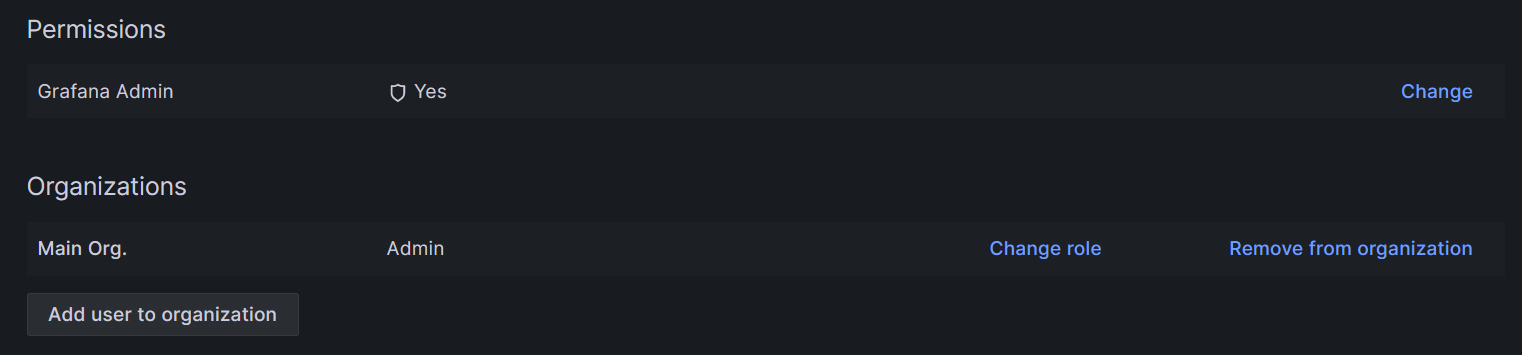
      0ac8b422-6aff-40bb-94b2-66363e369849-grafik.png

      ff87fdd8-0c4c-4eef-8808-32dbcd2e28c6-grafik.png

      Gibt es mehrere Organisations in Grafana?

      G Offline
      G Offline
      Gr33n93
      schrieb am zuletzt editiert von Gr33n93
      #6

      @marc-berg

      Screenshot 2024-03-06 102131.png

      Richtig.

      Nein, es gibt nur eine Organisation.

      1 Antwort Letzte Antwort
      0
      • simatecS simatec

        @gr33n93 https://github.com/simatec/ioBroker.backitup/wiki/ioBroker.backitup-Wiki-Deutsch#grafana-backup

        G Offline
        G Offline
        Gr33n93
        schrieb am zuletzt editiert von
        #7

        @simatec

        Das habe ich mir schon vor dem Post durchgelesen und ist so wie dort beschrieben erledigt.
        Die Fehlermeldung bleibt.

        Marc BergM simatecS 2 Antworten Letzte Antwort
        0
        • G Gr33n93

          @simatec

          Das habe ich mir schon vor dem Post durchgelesen und ist so wie dort beschrieben erledigt.
          Die Fehlermeldung bleibt.

          Marc BergM Offline
          Marc BergM Offline
          Marc Berg
          Most Active
          schrieb am zuletzt editiert von
          #8

          @gr33n93

          Mich irritieren die kryptischen Dashboard-Namen. Hast du mal ein Backup zurückgespielt?

          Als letzter Schritt hilft wahrscheinlich, mal komplett neu anzufangen. Die bestehenden Dashboards per JSON exportieren und auf einer frischen Installation wieder zu importieren.

          NUC10I3+Ubuntu+Docker+ioBroker+influxDB2+Node Red+RabbitMQ+Grafana

          Pi-hole, Traefik, Checkmk, Conbee II+Zigbee2MQTT, ESPSomfy-RTS, LoRaWAN, Arduino, KiCad

          Benutzt das Voting im Beitrag, wenn er euch geholfen hat.

          G 1 Antwort Letzte Antwort
          0
          • Marc BergM Marc Berg

            @gr33n93

            Mich irritieren die kryptischen Dashboard-Namen. Hast du mal ein Backup zurückgespielt?

            Als letzter Schritt hilft wahrscheinlich, mal komplett neu anzufangen. Die bestehenden Dashboards per JSON exportieren und auf einer frischen Installation wieder zu importieren.

            G Offline
            G Offline
            Gr33n93
            schrieb am zuletzt editiert von
            #9

            @marc-berg

            Die Namen der Dashboards, werden von Grafana als uid ausgegeben.
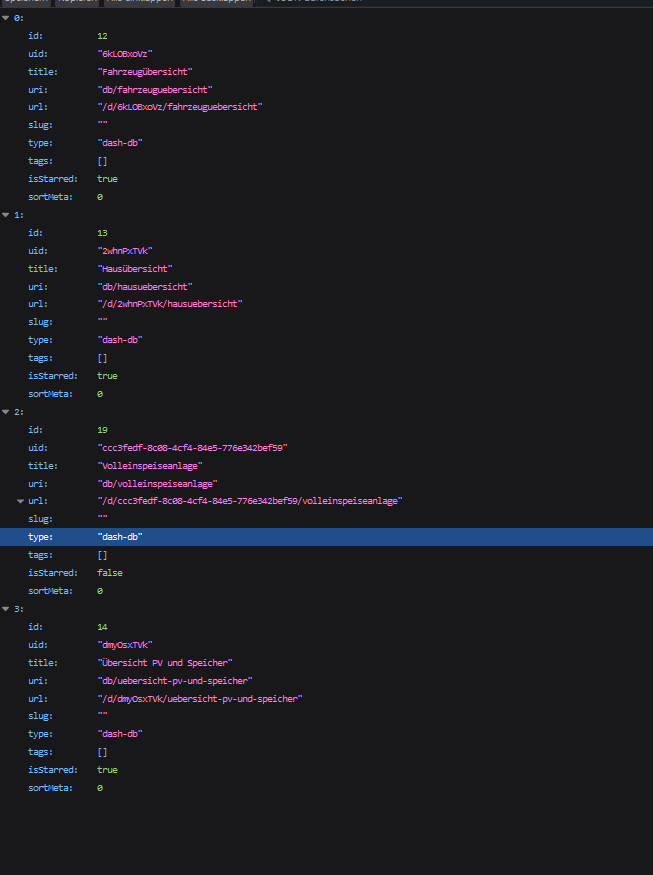
            Screenshot 2024-03-06 104912.png

            Ich setze mal eben was auf und schau, ob es da dann funktioniert.

            1 Antwort Letzte Antwort
            0
            • G Gr33n93

              @simatec

              Das habe ich mir schon vor dem Post durchgelesen und ist so wie dort beschrieben erledigt.
              Die Fehlermeldung bleibt.

              simatecS Offline
              simatecS Offline
              simatec
              Developer Most Active
              schrieb am zuletzt editiert von
              #10

              @gr33n93 sagte in Fehler Backitup Grafana:

              Das habe ich mir schon vor dem Post durchgelesen und ist so wie dort beschrieben erledigt.

              Naja nicht wirklich... Du benutzt nicht den User "Admin" und auch nicht den Servicetoken für den Admin User

              • Besuche meine Github Seite
              • Beitrag hat geholfen oder willst du mich unterstützen
              • HowTo Restore ioBroker
              G M 2 Antworten Letzte Antwort
              0
              • simatecS simatec

                @gr33n93 sagte in Fehler Backitup Grafana:

                Das habe ich mir schon vor dem Post durchgelesen und ist so wie dort beschrieben erledigt.

                Naja nicht wirklich... Du benutzt nicht den User "Admin" und auch nicht den Servicetoken für den Admin User

                G Offline
                G Offline
                Gr33n93
                schrieb am zuletzt editiert von
                #11

                @simatec Ich sehe da kein Problem.
                Ich erzeuge den Nutzer admin und richte diesen ein.
                Anmerken möchte ich aber, das es nicht Sinn der Sache ist, einen admin Nutzer mit dem Namen admin am Leben halten zu müssen, nur um Back-ups zu erzeugen.

                Ich teste und berichte.

                simatecS 1 Antwort Letzte Antwort
                0
                • G Gr33n93

                  @simatec Ich sehe da kein Problem.
                  Ich erzeuge den Nutzer admin und richte diesen ein.
                  Anmerken möchte ich aber, das es nicht Sinn der Sache ist, einen admin Nutzer mit dem Namen admin am Leben halten zu müssen, nur um Back-ups zu erzeugen.

                  Ich teste und berichte.

                  simatecS Offline
                  simatecS Offline
                  simatec
                  Developer Most Active
                  schrieb am zuletzt editiert von
                  #12

                  @gr33n93 sagte in Fehler Backitup Grafana:

                  @simatec Ich sehe da kein Problem.
                  Ich erzeuge den Nutzer admin und richte diesen ein.
                  Anmerken möchte ich aber, das es nicht Sinn der Sache ist, einen admin Nutzer mit dem Namen admin am Leben halten zu müssen, nur um Back-ups zu erzeugen.

                  Ich teste und berichte.

                  So ist es aber leider und genau aus diesem Grund habe ich es in der Anleitung erfasst.
                  Wenn du es aber so nicht umsetzen magst, dann wird das Backup halt nicht funktionieren...

                  • Besuche meine Github Seite
                  • Beitrag hat geholfen oder willst du mich unterstützen
                  • HowTo Restore ioBroker
                  Marc BergM G 2 Antworten Letzte Antwort
                  0
                  • simatecS simatec

                    @gr33n93 sagte in Fehler Backitup Grafana:

                    @simatec Ich sehe da kein Problem.
                    Ich erzeuge den Nutzer admin und richte diesen ein.
                    Anmerken möchte ich aber, das es nicht Sinn der Sache ist, einen admin Nutzer mit dem Namen admin am Leben halten zu müssen, nur um Back-ups zu erzeugen.

                    Ich teste und berichte.

                    So ist es aber leider und genau aus diesem Grund habe ich es in der Anleitung erfasst.
                    Wenn du es aber so nicht umsetzen magst, dann wird das Backup halt nicht funktionieren...

                    Marc BergM Offline
                    Marc BergM Offline
                    Marc Berg
                    Most Active
                    schrieb am zuletzt editiert von
                    #13

                    @simatec sagte in Fehler Backitup Grafana:

                    So ist es aber leider und genau aus diesem Grund habe ich es in der Anleitung erfasst.
                    Wenn du es aber so nicht umsetzen magst, dann wird das Backup halt nicht funktionieren...

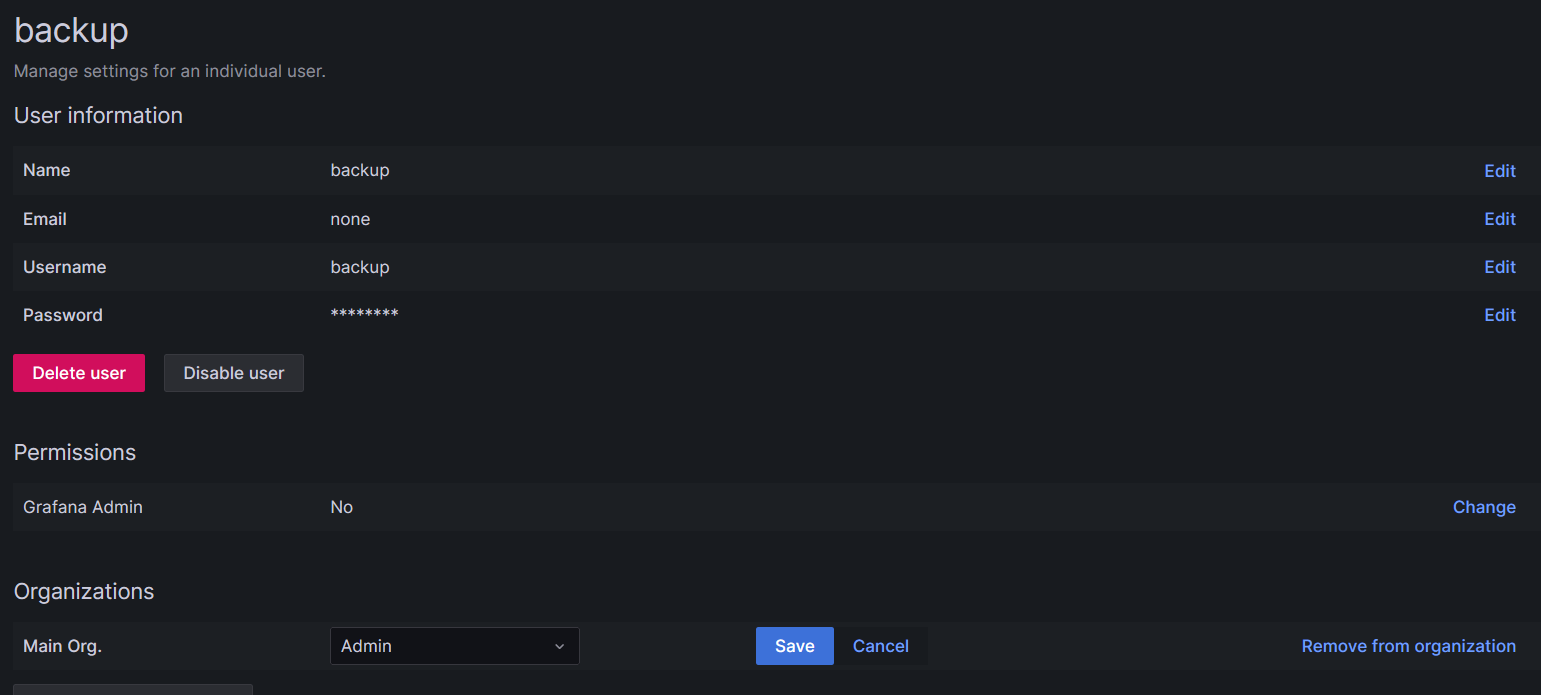
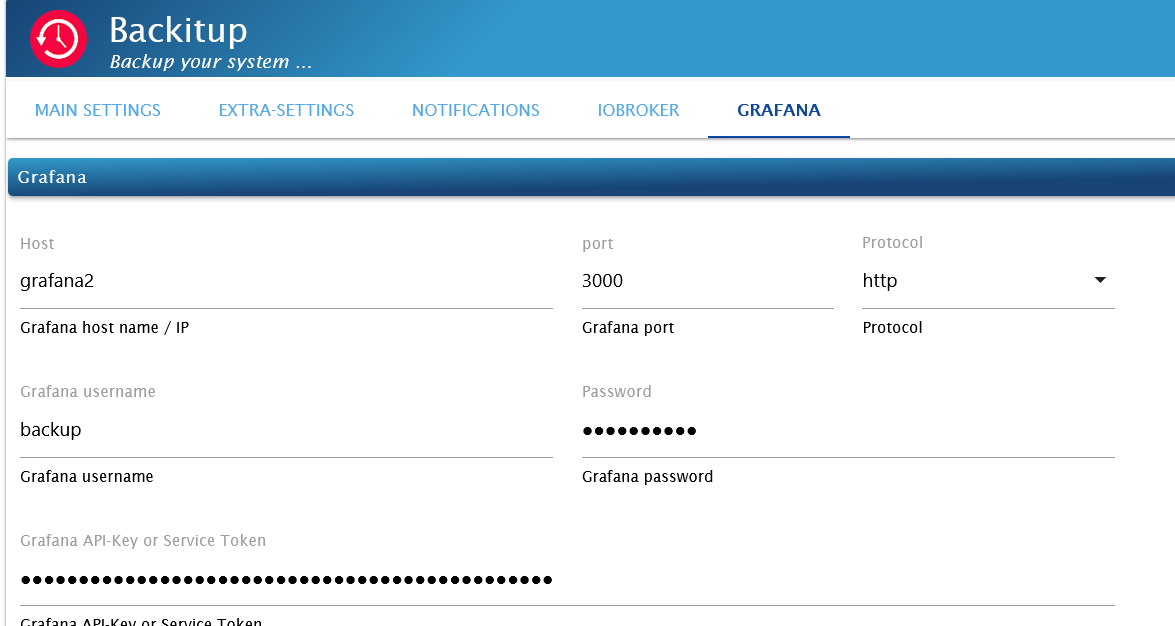
                    Ich weiß, dass das Nutzen des "Admin" Users schon oft bei der Fehlerbehebung geholfen hat, so ganz nachvollziehen kann ich es aber nicht. Bei mir läuft ein Grafana Backup (und Restore) auch mit einem Nutzer "backup" ohne Probleme.


                    9aea69c6-3249-4dd5-bb21-eb6390eef1b9-grafik.png


                    7d516999-f3d6-472b-8d77-40c3935a4acf-grafik.png

                    [DEBUG] [grafana] - Start Grafana Backup ...
                    [DEBUG] [grafana] - Created grafana_tmp directory: "/opt/iobroker/backups/grafana_tmp"
                    [DEBUG] [grafana] - Created dashboard directory
                    [DEBUG] [grafana] - Created dashboards_manually_restore directory
                    [DEBUG] [grafana] - Created datasource directory
                    [DEBUG] [grafana] - start Grafana request ...
                    [DEBUG] [grafana] - Grafana is available ... Status: 200
                    [DEBUG] [grafana] - found Dashboard: checkmk
                    [DEBUG] [grafana] - found Dashboard: heizung
                    [DEBUG] [grafana] - found Dashboard: wetter-temperaturen
                    [DEBUG] [grafana] - found Dashboard: elektro
                    [DEBUG] [grafana] - found Dashboard: wasserstande
                    [DEBUG] [grafana] - found Dashboard: gasverbrauch
                    [DEBUG] [grafana] - found Dashboard: waschmaschine
                    [DEBUG] [grafana] - start Grafana backup compress ...
                    [DEBUG] [grafana] - Backup created: /opt/iobroker/backups/grafana_2024_03_06-13_10_28_backupiobroker.tar.gz
                    [DEBUG] [grafana] - Try deleting the Grafana tmp directory: "/opt/iobroker/backups/grafana_tmp"
                    [DEBUG] [grafana] - Grafana tmp directory "/opt/iobroker/backups/grafana_tmp" successfully deleted
                    [DEBUG] [grafana] - done
                    

                    NUC10I3+Ubuntu+Docker+ioBroker+influxDB2+Node Red+RabbitMQ+Grafana

                    Pi-hole, Traefik, Checkmk, Conbee II+Zigbee2MQTT, ESPSomfy-RTS, LoRaWAN, Arduino, KiCad

                    Benutzt das Voting im Beitrag, wenn er euch geholfen hat.

                    simatecS 1 Antwort Letzte Antwort
                    0
                    • simatecS simatec

                      @gr33n93 sagte in Fehler Backitup Grafana:

                      @simatec Ich sehe da kein Problem.
                      Ich erzeuge den Nutzer admin und richte diesen ein.
                      Anmerken möchte ich aber, das es nicht Sinn der Sache ist, einen admin Nutzer mit dem Namen admin am Leben halten zu müssen, nur um Back-ups zu erzeugen.

                      Ich teste und berichte.

                      So ist es aber leider und genau aus diesem Grund habe ich es in der Anleitung erfasst.
                      Wenn du es aber so nicht umsetzen magst, dann wird das Backup halt nicht funktionieren...

                      G Offline
                      G Offline
                      Gr33n93
                      schrieb am zuletzt editiert von Gr33n93
                      #14

                      @simatec
                      Ich kann es auch nicht nachvollziehen.

                      Ich habe nun Folgendes gemacht.

                      In Grafana nutzer wieder in admin umbenannt, dann getestet und festgestellt, dass der Fehler identisch ist.
                      Dann noch das Servicekonto auch mit dem Namen admin erstellt, dann getestet und es geht tatsächlich.

                      [DEBUG] [grafana] - Start Grafana Backup ...
                      [DEBUG] [grafana] - Created grafana_tmp directory: "/opt/iobroker/backups/grafana_tmp"
                      [DEBUG] [grafana] - Created dashboard directory
                      [DEBUG] [grafana] - Created dashboards_manually_restore directory
                      [DEBUG] [grafana] - Created datasource directory
                      [DEBUG] [grafana] - start Grafana request ...
                      [DEBUG] [grafana] - Grafana is available ... Status: 200
                      [DEBUG] [grafana] - found Dashboard: volleinspeiseanlage
                      [DEBUG] [grafana] - found Dashboard: fahrzeuguebersicht
                      [DEBUG] [grafana] - found Dashboard: hausuebersicht
                      [DEBUG] [grafana] - found Dashboard: uebersicht-pv-und-speicher
                      [DEBUG] [grafana] - start Grafana backup compress ...
                      [DEBUG] [grafana] - Backup created: /opt/iobroker/backups/grafana_2024_03_06-14_47_40_Sicheung_IOBroker_und_Verbindungen_backupiobroker.tar.gz
                      [DEBUG] [grafana] - Try deleting the Grafana tmp directory: "/opt/iobroker/backups/grafana_tmp"
                      [DEBUG] [grafana] - Grafana tmp directory "/opt/iobroker/backups/grafana_tmp" successfully deleted
                      [DEBUG] [grafana] - done
                      

                      Auch die UID wird nicht mehr angezeigt.
                      Mir wäre es viel lieber, den Namen admin komplett als Zugang in jedem System zu entfernen. Na ja, evtl kann man da ja eine Überarbeitung anregen.

                      Fazit: man halte sich an die Anleitung.

                      Nachtrag: Leider war die Funktion nur von kurzer Dauer. 2-mal hat es funktioniert und nun ist der bekannte Fehler wieder da.
                      Ich suche mal weiter. Was wir nun wissen, ist, dass es nicht an dem Namen Admin liegt.

                      Nachtrag: Wenn Grafana 10.4 auf einem externen Gerät läuft, ist das Back-up egal ob admin oder nicht kein Problem.
                      Wenn jemand eine Idee hat warum dies so ist, immer her damit

                      simatecS 1 Antwort Letzte Antwort
                      0
                      • G Gr33n93

                        @simatec
                        Ich kann es auch nicht nachvollziehen.

                        Ich habe nun Folgendes gemacht.

                        In Grafana nutzer wieder in admin umbenannt, dann getestet und festgestellt, dass der Fehler identisch ist.
                        Dann noch das Servicekonto auch mit dem Namen admin erstellt, dann getestet und es geht tatsächlich.

                        [DEBUG] [grafana] - Start Grafana Backup ...
                        [DEBUG] [grafana] - Created grafana_tmp directory: "/opt/iobroker/backups/grafana_tmp"
                        [DEBUG] [grafana] - Created dashboard directory
                        [DEBUG] [grafana] - Created dashboards_manually_restore directory
                        [DEBUG] [grafana] - Created datasource directory
                        [DEBUG] [grafana] - start Grafana request ...
                        [DEBUG] [grafana] - Grafana is available ... Status: 200
                        [DEBUG] [grafana] - found Dashboard: volleinspeiseanlage
                        [DEBUG] [grafana] - found Dashboard: fahrzeuguebersicht
                        [DEBUG] [grafana] - found Dashboard: hausuebersicht
                        [DEBUG] [grafana] - found Dashboard: uebersicht-pv-und-speicher
                        [DEBUG] [grafana] - start Grafana backup compress ...
                        [DEBUG] [grafana] - Backup created: /opt/iobroker/backups/grafana_2024_03_06-14_47_40_Sicheung_IOBroker_und_Verbindungen_backupiobroker.tar.gz
                        [DEBUG] [grafana] - Try deleting the Grafana tmp directory: "/opt/iobroker/backups/grafana_tmp"
                        [DEBUG] [grafana] - Grafana tmp directory "/opt/iobroker/backups/grafana_tmp" successfully deleted
                        [DEBUG] [grafana] - done
                        

                        Auch die UID wird nicht mehr angezeigt.
                        Mir wäre es viel lieber, den Namen admin komplett als Zugang in jedem System zu entfernen. Na ja, evtl kann man da ja eine Überarbeitung anregen.

                        Fazit: man halte sich an die Anleitung.

                        Nachtrag: Leider war die Funktion nur von kurzer Dauer. 2-mal hat es funktioniert und nun ist der bekannte Fehler wieder da.
                        Ich suche mal weiter. Was wir nun wissen, ist, dass es nicht an dem Namen Admin liegt.

                        Nachtrag: Wenn Grafana 10.4 auf einem externen Gerät läuft, ist das Back-up egal ob admin oder nicht kein Problem.
                        Wenn jemand eine Idee hat warum dies so ist, immer her damit

                        simatecS Offline
                        simatecS Offline
                        simatec
                        Developer Most Active
                        schrieb am zuletzt editiert von
                        #15

                        @gr33n93 Es hat nichts mit dem Namen "Admin" zu tun, sondern mit den Rechten innerhalb von Grafana.
                        Da kann Backitup nichts machen. Zugriff auf die API von Grafana braucht es halt für das backup. Und die hat der Admin.
                        Nur weil du einen User in "admin" umbenennst, hat er noch lange nicht die Rechte des Admins.

                        • Besuche meine Github Seite
                        • Beitrag hat geholfen oder willst du mich unterstützen
                        • HowTo Restore ioBroker
                        G 1 Antwort Letzte Antwort
                        0
                        • Marc BergM Marc Berg

                          @simatec sagte in Fehler Backitup Grafana:

                          So ist es aber leider und genau aus diesem Grund habe ich es in der Anleitung erfasst.
                          Wenn du es aber so nicht umsetzen magst, dann wird das Backup halt nicht funktionieren...

                          Ich weiß, dass das Nutzen des "Admin" Users schon oft bei der Fehlerbehebung geholfen hat, so ganz nachvollziehen kann ich es aber nicht. Bei mir läuft ein Grafana Backup (und Restore) auch mit einem Nutzer "backup" ohne Probleme.


                          9aea69c6-3249-4dd5-bb21-eb6390eef1b9-grafik.png


                          7d516999-f3d6-472b-8d77-40c3935a4acf-grafik.png

                          [DEBUG] [grafana] - Start Grafana Backup ...
                          [DEBUG] [grafana] - Created grafana_tmp directory: "/opt/iobroker/backups/grafana_tmp"
                          [DEBUG] [grafana] - Created dashboard directory
                          [DEBUG] [grafana] - Created dashboards_manually_restore directory
                          [DEBUG] [grafana] - Created datasource directory
                          [DEBUG] [grafana] - start Grafana request ...
                          [DEBUG] [grafana] - Grafana is available ... Status: 200
                          [DEBUG] [grafana] - found Dashboard: checkmk
                          [DEBUG] [grafana] - found Dashboard: heizung
                          [DEBUG] [grafana] - found Dashboard: wetter-temperaturen
                          [DEBUG] [grafana] - found Dashboard: elektro
                          [DEBUG] [grafana] - found Dashboard: wasserstande
                          [DEBUG] [grafana] - found Dashboard: gasverbrauch
                          [DEBUG] [grafana] - found Dashboard: waschmaschine
                          [DEBUG] [grafana] - start Grafana backup compress ...
                          [DEBUG] [grafana] - Backup created: /opt/iobroker/backups/grafana_2024_03_06-13_10_28_backupiobroker.tar.gz
                          [DEBUG] [grafana] - Try deleting the Grafana tmp directory: "/opt/iobroker/backups/grafana_tmp"
                          [DEBUG] [grafana] - Grafana tmp directory "/opt/iobroker/backups/grafana_tmp" successfully deleted
                          [DEBUG] [grafana] - done
                          

                          simatecS Offline
                          simatecS Offline
                          simatec
                          Developer Most Active
                          schrieb am zuletzt editiert von
                          #16

                          @marc-berg Ich denke der Restore wird somit aber ein Problem... Glaub zum schreiben der API muss es der Admin sein.
                          Steht in aber in der Grafana API gut beschrieben.

                          • Besuche meine Github Seite
                          • Beitrag hat geholfen oder willst du mich unterstützen
                          • HowTo Restore ioBroker
                          Marc BergM 1 Antwort Letzte Antwort
                          0
                          • simatecS simatec

                            @marc-berg Ich denke der Restore wird somit aber ein Problem... Glaub zum schreiben der API muss es der Admin sein.
                            Steht in aber in der Grafana API gut beschrieben.

                            Marc BergM Offline
                            Marc BergM Offline
                            Marc Berg
                            Most Active
                            schrieb am zuletzt editiert von
                            #17

                            @simatec sagte in Fehler Backitup Grafana:

                            Ich denke der Restore wird somit aber ein Problem...

                            Nein.

                            @marc-berg sagte in Fehler Backitup Grafana:

                            Bei mir läuft ein Grafana Backup (und Restore) auch mit einem Nutzer "backup" ohne Probleme.

                            NUC10I3+Ubuntu+Docker+ioBroker+influxDB2+Node Red+RabbitMQ+Grafana

                            Pi-hole, Traefik, Checkmk, Conbee II+Zigbee2MQTT, ESPSomfy-RTS, LoRaWAN, Arduino, KiCad

                            Benutzt das Voting im Beitrag, wenn er euch geholfen hat.

                            simatecS 1 Antwort Letzte Antwort
                            0
                            • Marc BergM Marc Berg

                              @simatec sagte in Fehler Backitup Grafana:

                              Ich denke der Restore wird somit aber ein Problem...

                              Nein.

                              @marc-berg sagte in Fehler Backitup Grafana:

                              Bei mir läuft ein Grafana Backup (und Restore) auch mit einem Nutzer "backup" ohne Probleme.

                              simatecS Offline
                              simatecS Offline
                              simatec
                              Developer Most Active
                              schrieb am zuletzt editiert von
                              #18

                              @marc-berg Welche Grafana Version läuft aktuell bei dir?

                              • Besuche meine Github Seite
                              • Beitrag hat geholfen oder willst du mich unterstützen
                              • HowTo Restore ioBroker
                              Marc BergM 1 Antwort Letzte Antwort
                              0
                              • simatecS simatec

                                @marc-berg Welche Grafana Version läuft aktuell bei dir?

                                Marc BergM Offline
                                Marc BergM Offline
                                Marc Berg
                                Most Active
                                schrieb am zuletzt editiert von
                                #19

                                @simatec sagte in Fehler Backitup Grafana:

                                Welche Grafana Version läuft aktuell bei dir?

                                10.3.3 und (gerade mit einer lokalen Grafana-Installation getestet) 10.4

                                NUC10I3+Ubuntu+Docker+ioBroker+influxDB2+Node Red+RabbitMQ+Grafana

                                Pi-hole, Traefik, Checkmk, Conbee II+Zigbee2MQTT, ESPSomfy-RTS, LoRaWAN, Arduino, KiCad

                                Benutzt das Voting im Beitrag, wenn er euch geholfen hat.

                                1 Antwort Letzte Antwort
                                0
                                • simatecS simatec

                                  @gr33n93 Es hat nichts mit dem Namen "Admin" zu tun, sondern mit den Rechten innerhalb von Grafana.
                                  Da kann Backitup nichts machen. Zugriff auf die API von Grafana braucht es halt für das backup. Und die hat der Admin.
                                  Nur weil du einen User in "admin" umbenennst, hat er noch lange nicht die Rechte des Admins.

                                  G Offline
                                  G Offline
                                  Gr33n93
                                  schrieb am zuletzt editiert von
                                  #20

                                  @simatec
                                  Ich hätte es etwas besser erklären sollen, was ich meine mit der Benamung Admin.
                                  Immer wenn ich davon spreche, habe ich natürlich auch dem Nutzer admin die Adminrechte gegeben.
                                  Leider hat dies überhaupt keine Auswirkung auf das Backup. Es kann meiner Erfahrung nach jeder Nutzer mit Adminrechten ein Backup machen.

                                  Marc BergM 1 Antwort Letzte Antwort
                                  0
                                  • G Gr33n93

                                    Re: backitup Fehlermeldung

                                    Ist das Problem jetzt gelöst?

                                    Ich hätte da etwas in eine ähnliche Richtung, bei dem ich nicht so richtig weiß, wo ich anfangen soll.
                                    Die Adapter und auch das System sind aktuell.
                                    Grafana läuft im selben System wie auch der Iobroker.
                                    Einstellungen und Token wurden geprüft und sind Inordnung.
                                    Grafana ist in der Version 10.3.3 Installiert.
                                    Die Info, was beim Backup als Fehlermeldung kommt, poste ich unten, so wie auch die Daten aus iob diag.

                                    Meldung beim Backup:

                                    [DEBUG] [grafana] - Start Grafana Backup ...
                                    [DEBUG] [grafana] - Created grafana_tmp directory: "/opt/iobroker/backups/grafana_tmp"
                                    [DEBUG] [grafana] - Created dashboard directory
                                    [DEBUG] [grafana] - Created dashboards_manually_restore directory
                                    [DEBUG] [grafana] - Created datasource directory
                                    [DEBUG] [grafana] - start Grafana request ...
                                    [DEBUG] [grafana] - Grafana is available ... Status: 200
                                    [ERROR] [grafana] - Error on Grafana Dashoard 2whnPxTVk backup: AxiosError: Request failed with status code 500
                                    [DEBUG] [grafana] - found Dashboard: hausuebersicht
                                    [ERROR] [grafana] - Error on Grafana Dashoard backup: TypeError: Cannot read properties of undefined (reading 'data')
                                    [DEBUG] [grafana] - start Grafana backup compress ...
                                    [ERROR] [grafana] - Error on Grafana Dashoard dmyOsxTVk backup: AxiosError: Request failed with status code 500
                                    [DEBUG] [grafana] - found Dashboard: uebersicht-pv-und-speicher
                                    [ERROR] [grafana] - Error on Grafana Dashoard 6kLOBxoVz backup: AxiosError: Request failed with status code 500
                                    [DEBUG] [grafana] - found Dashboard: fahrzeuguebersicht
                                    [ERROR] [grafana] - Error on Grafana Dashoard ccc3fedf-8c08-4cf4-84e5-776e342bef59 backup: AxiosError: Request failed with status code 500
                                    [DEBUG] [grafana] - found Dashboard: volleinspeiseanlage
                                    [DEBUG] [grafana] - Try deleting the Grafana tmp directory: "/opt/iobroker/backups/grafana_tmp"
                                    [DEBUG] [grafana] - Grafana tmp directory "/opt/iobroker/backups/grafana_tmp" successfully deleted
                                    [ERROR] [grafana] - cannot found Grafana Backup files
                                    [DEBUG] [grafana] - done
                                    

                                    Info iob diag:

                                    Skript v.2023-10-10
                                    
                                    *** BASE SYSTEM ***
                                     Static hostname: iobroker
                                           Icon name: computer-vm
                                             Chassis: vm
                                      Virtualization: kvm
                                    Operating System: Ubuntu 22.04.4 LTS
                                              Kernel: Linux 5.15.0-97-generic
                                        Architecture: x86-64
                                     Hardware Vendor: QEMU
                                      Hardware Model: Standard PC _i440FX + PIIX, 1996_
                                    
                                    model name      : Common KVM processor
                                    Docker          : false
                                    Virtualization  : kvm
                                    Kernel          : x86_64
                                    Userland        : amd64
                                    
                                    Systemuptime and Load:
                                     09:15:49 up  1:14,  2 users,  load average: 0.56, 0.49, 0.67
                                    CPU threads: 16
                                    
                                    
                                    *** Time and Time Zones ***
                                                   Local time: Wed 2024-03-06 09:15:49 CET
                                               Universal time: Wed 2024-03-06 08:15:49 UTC
                                                     RTC time: Wed 2024-03-06 08:15:48
                                                    Time zone: Europe/Berlin (CET, +0100)
                                    System clock synchronized: yes
                                                  NTP service: active
                                              RTC in local TZ: no
                                    
                                    *** User and Groups ***
                                    nils
                                    /home/nils
                                    nils adm cdrom sudo dip plugdev lxd iobroker
                                    
                                    *** X-Server-Setup ***
                                    X-Server:       false
                                    Desktop:
                                    Terminal:       tty
                                    Boot Target:    graphical.target
                                    
                                    *** MEMORY ***
                                                   total        used        free      shared  buff/cache   available
                                    Mem:            9.9G        3.8G        1.4G         13M        4.7G        5.9G
                                    Swap:           2.9G          0B        2.9G
                                    Total:           12G        3.8G        4.3G
                                    
                                             9940 M total memory
                                             3823 M used memory
                                             1268 M active memory
                                             6611 M inactive memory
                                             1440 M free memory
                                              194 M buffer memory
                                             4482 M swap cache
                                             2906 M total swap
                                                0 M used swap
                                             2906 M free swap
                                    
                                    *** FAILED SERVICES ***
                                    
                                      UNIT LOAD ACTIVE SUB DESCRIPTION
                                    0 loaded units listed.
                                    
                                    *** FILESYSTEM ***
                                    Filesystem                        Type   Size  Used Avail Use% Mounted on
                                    tmpfs                             tmpfs  995M  1.2M  993M   1% /run
                                    /dev/mapper/ubuntu--vg-ubuntu--lv ext4   106G   27G   75G  27% /
                                    tmpfs                             tmpfs  4.9G  1.1M  4.9G   1% /dev/shm
                                    tmpfs                             tmpfs  5.0M     0  5.0M   0% /run/lock
                                    /dev/sda2                         ext4   2.0G  253M  1.6G  14% /boot
                                    tmpfs                             tmpfs  995M  4.0K  995M   1% /run/user/1000
                                    
                                    Messages concerning ext4 filesystem in dmesg:
                                    [Wed Mar  6 08:00:51 2024] EXT4-fs (dm-0): mounted filesystem with ordered data mode. Opts: (null). Quota mode: none.
                                    [Wed Mar  6 08:00:52 2024] EXT4-fs (dm-0): re-mounted. Opts: (null). Quota mode: none.
                                    [Wed Mar  6 08:00:55 2024] EXT4-fs (sda2): mounted filesystem with ordered data mode. Opts: (null). Quota mode: none.
                                    
                                    Show mounted filesystems \(real ones only\):
                                    TARGET              SOURCE                            FSTYPE   OPTIONS
                                    /                   /dev/mapper/ubuntu--vg-ubuntu--lv ext4     rw,relatime
                                    |-/snap/core20/2105 /dev/loop0                        squashfs ro,nodev,relatime,errors=continue
                                    |-/snap/core20/2182 /dev/loop1                        squashfs ro,nodev,relatime,errors=continue
                                    |-/snap/lxd/23991   /dev/loop2                        squashfs ro,nodev,relatime,errors=continue
                                    |-/snap/lxd/24061   /dev/loop3                        squashfs ro,nodev,relatime,errors=continue
                                    |-/snap/snapd/20671 /dev/loop5                        squashfs ro,nodev,relatime,errors=continue
                                    |-/boot             /dev/sda2                         ext4     rw,relatime
                                    `-/snap/snapd/21184 /dev/loop6                        squashfs ro,nodev,relatime,errors=continue
                                    
                                    Files in neuralgic directories:
                                    
                                    /var:
                                    8.5G    /var/
                                    5.2G    /var/lib
                                    4.3G    /var/lib/influxdb
                                    4.2G    /var/lib/influxdb/data
                                    3.6G    /var/lib/influxdb/data/Pi Ueberwachung/autogen
                                    
                                    Archived and active journals take up 1.8G in the file system.
                                    
                                    /opt/iobroker/backups:
                                    6.3G    /opt/iobroker/backups/
                                    
                                    /opt/iobroker/iobroker-data:
                                    641M    /opt/iobroker/iobroker-data/
                                    492M    /opt/iobroker/iobroker-data/files
                                    92M     /opt/iobroker/iobroker-data/backup-objects
                                    89M     /opt/iobroker/iobroker-data/files/echarts.admin
                                    57M     /opt/iobroker/iobroker-data/files/javascript.admin
                                    
                                    The five largest files in iobroker-data are:
                                    41M     /opt/iobroker/iobroker-data/files/material/static/js/main.c5478f66.js.map
                                    35M     /opt/iobroker/iobroker-data/files/devices.admin/static/js/main.24f2bb56.js.map
                                    24M     /opt/iobroker/iobroker-data/files/echarts/static/js/main.2b7495c2.js.map
                                    24M     /opt/iobroker/iobroker-data/files/echarts.admin/chart/static/js/main.2b7495c2.js.map
                                    23M     /opt/iobroker/iobroker-data/files/echarts.admin/static/js/main.245b61c0.js.map
                                    
                                    USB-Devices by-id:
                                    USB-Sticks -  Avoid direct links to /dev/* in your adapter setups, please always prefer the links 'by-id':
                                    
                                    /dev/serial/by-id/usb-1a86_USB_Serial-if00-port0
                                    
                                    *** NodeJS-Installation ***
                                    
                                    /usr/bin/nodejs         v18.19.1
                                    /usr/bin/node           v18.19.1
                                    /usr/bin/npm            10.2.4
                                    /usr/bin/npx            10.2.4
                                    /usr/bin/corepack       0.22.0
                                    
                                    
                                    nodejs:
                                      Installed: 18.19.1-1nodesource1
                                      Candidate: 18.19.1-1nodesource1
                                      Version table:
                                     *** 18.19.1-1nodesource1 500
                                            500 https://deb.nodesource.com/node_18.x nodistro/main amd64 Packages
                                            100 /var/lib/dpkg/status
                                         18.19.0-1nodesource1 500
                                            500 https://deb.nodesource.com/node_18.x nodistro/main amd64 Packages
                                         18.18.2-1nodesource1 500
                                            500 https://deb.nodesource.com/node_18.x nodistro/main amd64 Packages
                                         18.18.1-1nodesource1 500
                                            500 https://deb.nodesource.com/node_18.x nodistro/main amd64 Packages
                                         18.18.0-1nodesource1 500
                                            500 https://deb.nodesource.com/node_18.x nodistro/main amd64 Packages
                                         18.17.1-1nodesource1 500
                                            500 https://deb.nodesource.com/node_18.x nodistro/main amd64 Packages
                                         18.17.0-1nodesource1 500
                                            500 https://deb.nodesource.com/node_18.x nodistro/main amd64 Packages
                                         18.16.1-1nodesource1 500
                                            500 https://deb.nodesource.com/node_18.x nodistro/main amd64 Packages
                                         18.16.0-1nodesource1 500
                                            500 https://deb.nodesource.com/node_18.x nodistro/main amd64 Packages
                                         18.15.0-1nodesource1 500
                                            500 https://deb.nodesource.com/node_18.x nodistro/main amd64 Packages
                                         18.14.2-1nodesource1 500
                                            500 https://deb.nodesource.com/node_18.x nodistro/main amd64 Packages
                                         18.14.1-1nodesource1 500
                                            500 https://deb.nodesource.com/node_18.x nodistro/main amd64 Packages
                                         18.14.0-1nodesource1 500
                                            500 https://deb.nodesource.com/node_18.x nodistro/main amd64 Packages
                                         18.13.0-1nodesource1 500
                                            500 https://deb.nodesource.com/node_18.x nodistro/main amd64 Packages
                                         18.12.0-1nodesource1 500
                                            500 https://deb.nodesource.com/node_18.x nodistro/main amd64 Packages
                                         18.11.0-1nodesource1 500
                                            500 https://deb.nodesource.com/node_18.x nodistro/main amd64 Packages
                                         18.10.0-1nodesource1 500
                                            500 https://deb.nodesource.com/node_18.x nodistro/main amd64 Packages
                                         18.9.1-1nodesource1 500
                                            500 https://deb.nodesource.com/node_18.x nodistro/main amd64 Packages
                                         18.9.0-1nodesource1 500
                                            500 https://deb.nodesource.com/node_18.x nodistro/main amd64 Packages
                                         18.8.0-1nodesource1 500
                                            500 https://deb.nodesource.com/node_18.x nodistro/main amd64 Packages
                                         18.7.0-1nodesource1 500
                                            500 https://deb.nodesource.com/node_18.x nodistro/main amd64 Packages
                                         18.6.0-1nodesource1 500
                                            500 https://deb.nodesource.com/node_18.x nodistro/main amd64 Packages
                                         18.5.0-1nodesource1 500
                                            500 https://deb.nodesource.com/node_18.x nodistro/main amd64 Packages
                                         18.4.0-1nodesource1 500
                                            500 https://deb.nodesource.com/node_18.x nodistro/main amd64 Packages
                                         18.3.0-1nodesource1 500
                                            500 https://deb.nodesource.com/node_18.x nodistro/main amd64 Packages
                                         18.2.0-1nodesource1 500
                                            500 https://deb.nodesource.com/node_18.x nodistro/main amd64 Packages
                                         18.1.0-1nodesource1 500
                                            500 https://deb.nodesource.com/node_18.x nodistro/main amd64 Packages
                                         18.0.0-1nodesource1 500
                                            500 https://deb.nodesource.com/node_18.x nodistro/main amd64 Packages
                                         12.22.9~dfsg-1ubuntu3.4 500
                                            500 http://de.archive.ubuntu.com/ubuntu jammy-updates/universe amd64 Packages
                                            500 http://de.archive.ubuntu.com/ubuntu jammy-security/universe amd64 Packages
                                         12.22.9~dfsg-1ubuntu3 500
                                            500 http://de.archive.ubuntu.com/ubuntu jammy/universe amd64 Packages
                                    
                                    Temp directories causing npm8 problem: 0
                                    No problems detected
                                    
                                    Errors in npm tree:
                                    
                                    *** ioBroker-Installation ***
                                    
                                    ioBroker Status
                                    iobroker is running on this host.
                                    
                                    
                                    Objects type: jsonl
                                    States  type: jsonl
                                    
                                    Core adapters versions
                                    js-controller:  5.0.19
                                    admin:          6.13.16
                                    javascript:     7.8.0
                                    
                                    Adapters from github:   0
                                    
                                    Adapter State
                                    + system.adapter.admin.0                  : admin                 : iobroker                                 -  enabled, port: 8081, bind: 0.0.0.0, run as: admin
                                      system.adapter.alias-manager.0          : alias-manager         : iobroker                                 -  enabled
                                      system.adapter.awattar.0                : awattar               : iobroker                                 - disabled
                                    + system.adapter.backitup.0               : backitup              : iobroker                                 -  enabled
                                    + system.adapter.daikin.0                 : daikin                : iobroker                                 -  enabled
                                      system.adapter.daswetter.0              : daswetter             : iobroker                                 -  enabled
                                      system.adapter.devices.0                : devices               : iobroker                                 -  enabled
                                    + system.adapter.discovery.0              : discovery             : iobroker                                 -  enabled
                                    + system.adapter.echarts.0                : echarts               : iobroker                                 -  enabled
                                    + system.adapter.ecovacs-deebot.0         : ecovacs-deebot        : iobroker                                 -  enabled
                                    + system.adapter.email.0                  : email                 : iobroker                                 -  enabled
                                    + system.adapter.energiefluss.0           : energiefluss          : iobroker                                 -  enabled
                                    + system.adapter.hmip.0                   : hmip                  : iobroker                                 -  enabled
                                      system.adapter.ical.0                   : ical                  : iobroker                                 - disabled
                                    + system.adapter.influxdb.0               : influxdb              : iobroker                                 -  enabled, port: 8086
                                    + system.adapter.iqontrol.0               : iqontrol              : iobroker                                 -  enabled
                                    + system.adapter.javascript.0             : javascript            : iobroker                                 -  enabled
                                      system.adapter.meteoalarm.0             : meteoalarm            : iobroker                                 -  enabled
                                    + system.adapter.midea.0                  : midea                 : iobroker                                 -  enabled
                                      system.adapter.modbus.1                 : modbus                : iobroker                                 - disabled
                                    + system.adapter.modbus.2                 : modbus                : iobroker                                 -  enabled
                                    + system.adapter.mqtt.0                   : mqtt                  : iobroker                                 -  enabled, port: 1883, bind: 0.0.0.0
                                    + system.adapter.mqtt.1                   : mqtt                  : iobroker                                 -  enabled, port: 1883, bind: 0.0.0.0
                                    + system.adapter.mqtt.2                   : mqtt                  : iobroker                                 -  enabled, port: 1888, bind: 0.0.0.0
                                    + system.adapter.mqtt.4                   : mqtt                  : iobroker                                 -  enabled, port: 1885, bind: 0.0.0.0
                                    + system.adapter.myenergi.0               : myenergi              : iobroker                                 -  enabled
                                    + system.adapter.node-red.0               : node-red              : iobroker                                 -  enabled, port: 1880, bind: 192.168.178.211
                                      system.adapter.octoprint.0              : octoprint             : iobroker                                 - disabled
                                    + system.adapter.plenticore.0             : plenticore            : iobroker                                 -  enabled, port: 80
                                    + system.adapter.plenticore.1             : plenticore            : iobroker                                 -  enabled, port: 80
                                    + system.adapter.roborock.0               : roborock              : iobroker                                 -  enabled
                                    + system.adapter.shelly.0                 : shelly                : iobroker                                 -  enabled, port: 1882, bind: 0.0.0.0
                                    + system.adapter.shelly.1                 : shelly                : iobroker                                 -  enabled, port: 1884, bind: 0.0.0.0
                                      system.adapter.sql.0                    : sql                   : iobroker                                 - disabled
                                    + system.adapter.synology.0               : synology              : iobroker                                 -  enabled, port: 5001
                                      system.adapter.telegram.0               : telegram              : iobroker                                 - disabled, port: 8443, bind: 0.0.0.0
                                    + system.adapter.tesla-motors.0           : tesla-motors          : iobroker                                 -  enabled
                                      system.adapter.trashschedule.0          : trashschedule         : iobroker                                 - disabled
                                    + system.adapter.tuya.0                   : tuya                  : iobroker                                 -  enabled
                                    + system.adapter.web.0                    : web                   : iobroker                                 -  enabled, port: 8082, bind: 0.0.0.0, run as: admin
                                    + system.adapter.wled.0                   : wled                  : iobroker                                 -  enabled
                                    + system.adapter.zigbee.0                 : zigbee                : iobroker                                 -  enabled, port: /dev/ttyUSB0
                                    
                                    + instance is alive
                                    
                                    Enabled adapters with bindings
                                    + system.adapter.admin.0                  : admin                 : iobroker                                 -  enabled, port: 8081, bind: 0.0.0.0, run as: admin
                                    + system.adapter.influxdb.0               : influxdb              : iobroker                                 -  enabled, port: 8086
                                    + system.adapter.mqtt.0                   : mqtt                  : iobroker                                 -  enabled, port: 1883, bind: 0.0.0.0
                                    + system.adapter.mqtt.1                   : mqtt                  : iobroker                                 -  enabled, port: 1883, bind: 0.0.0.0
                                    + system.adapter.mqtt.2                   : mqtt                  : iobroker                                 -  enabled, port: 1888, bind: 0.0.0.0
                                    + system.adapter.mqtt.4                   : mqtt                  : iobroker                                 -  enabled, port: 1885, bind: 0.0.0.0
                                    + system.adapter.node-red.0               : node-red              : iobroker                                 -  enabled, port: 1880, bind: 192.168.178.211
                                    + system.adapter.plenticore.0             : plenticore            : iobroker                                 -  enabled, port: 80
                                    + system.adapter.plenticore.1             : plenticore            : iobroker                                 -  enabled, port: 80
                                    + system.adapter.shelly.0                 : shelly                : iobroker                                 -  enabled, port: 1882, bind: 0.0.0.0
                                    + system.adapter.shelly.1                 : shelly                : iobroker                                 -  enabled, port: 1884, bind: 0.0.0.0
                                    + system.adapter.synology.0               : synology              : iobroker                                 -  enabled, port: 5001
                                    + system.adapter.web.0                    : web                   : iobroker                                 -  enabled, port: 8082, bind: 0.0.0.0, run as: admin
                                    + system.adapter.zigbee.0                 : zigbee                : iobroker                                 -  enabled, port: /dev/ttyUSB0
                                    
                                    ioBroker-Repositories
                                    stable        : http://download.iobroker.net/sources-dist.json
                                    beta          : http://download.iobroker.net/sources-dist-latest.json
                                    
                                    Active repo(s): stable
                                    
                                    Installed ioBroker-Instances
                                    Used repository: stable
                                    Adapter    "admin"        : 6.13.16  , installed 6.13.16
                                    Adapter    "alias-manager": 1.2.6    , installed 1.2.6
                                    Adapter    "awattar"      : 1.0.6    , installed 1.0.6
                                    Adapter    "b-control-em" : 0.3.1    , installed 0.3.1
                                    Adapter    "backitup"     : 2.10.11  , installed 2.10.11
                                    Adapter    "bosesoundtouch": 0.10.3  , installed 0.10.3
                                    Adapter    "bydhvs"       : 1.5.0    , installed 1.5.0
                                    Adapter    "daikin"       : 1.4.2    , installed 1.4.2
                                    Adapter    "daswetter"    : 3.1.13   , installed 3.1.13
                                    Adapter    "devices"      : 1.1.5    , installed 1.1.5
                                    Adapter    "discovery"    : 4.2.0    , installed 4.2.0
                                    Adapter    "echarts"      : 1.7.2    , installed 1.7.2
                                    Adapter    "ecovacs-deebot": 1.4.14  , installed 1.4.14
                                    Adapter    "email"        : 1.2.2    , installed 1.2.2
                                    Adapter    "energiefluss" : 3.6.0    , installed 3.6.0
                                    Adapter    "fb-checkpresence": 1.2.4 , installed 1.2.4
                                    Adapter    "heatingcontrol": 2.12.3  , installed 2.12.3
                                    Adapter    "hid-community": 0.3.0    , installed 0.3.0
                                    Adapter    "hmip"         : 1.22.0   , installed 1.22.0
                                    Adapter    "ical"         : 1.13.3   , installed 1.13.3
                                    Adapter    "influxdb"     : 4.0.2    , installed 4.0.2
                                    Adapter    "iqontrol"     : 2.3.0    , installed 2.3.0
                                    Adapter    "jarvis"       : 3.1.8    , installed 3.1.8
                                    Adapter    "javascript"   : 7.8.0    , installed 7.8.0
                                    Controller "js-controller": 5.0.19   , installed 5.0.19
                                    Adapter    "lovelace"     : 4.1.2    , installed 4.1.2
                                    Adapter    "material"     : 1.3.1    , installed 1.3.1
                                    Adapter    "mclighting"   : 0.1.2    , installed 0.1.2
                                    Adapter    "meteoalarm"   : 2.3.7    , installed 2.3.7
                                    Adapter    "midea"        : 0.0.7    , installed 0.0.7
                                    Adapter    "modbus"       : 6.1.0    , installed 6.1.0
                                    Adapter    "mqtt"         : 5.2.0    , installed 5.2.0
                                    Adapter    "mqtt-client"  : 1.7.0    , installed 1.7.0
                                    Adapter    "myenergi"     : 0.0.3    , installed 0.0.3
                                    Adapter    "node-red"     : 5.1.0    , installed 5.1.0
                                    Adapter    "nut"          : 1.6.0    , installed 1.6.0
                                    Adapter    "octoprint"    : 5.1.0    , installed 5.1.0
                                    Adapter    "openweathermap": 1.0.4   , installed 1.0.4
                                    Adapter    "operating-hours": 1.0.6  , installed 1.0.6
                                    Adapter    "plenticore"   : 2.2.0    , installed 2.2.0
                                    Adapter    "proxmox"      : 2.2.3    , installed 2.2.3
                                    Adapter    "pvforecast"   : 2.9.1    , installed 2.9.1
                                    Adapter    "renault"      : 0.0.15   , installed 0.0.21
                                    Adapter    "roborock"     : 0.4.4    , installed 0.4.4
                                    Adapter    "rpi2"         : 1.3.2    , installed 1.3.2
                                    Adapter    "shelly"       : 6.6.1    , installed 6.6.1
                                    Adapter    "simple-api"   : 2.7.2    , installed 2.7.2
                                    Adapter    "snmp"         : 3.1.0    , installed 3.1.0
                                    Adapter    "socketio"     : 6.6.0    , installed 6.6.0
                                    Adapter    "sql"          : 2.2.0    , installed 2.2.0
                                    Adapter    "synology"     : 3.0.1    , installed 3.0.1
                                    Adapter    "telegram"     : 3.1.0    , installed 3.1.0
                                    Adapter    "tesla-motors" : 1.3.2    , installed 1.3.2
                                    Adapter    "tr-064"       : 4.2.18   , installed 4.2.18
                                    Adapter    "trashschedule": 3.2.0    , installed 3.2.0
                                    Adapter    "tronity"      : 1.1.1    , installed 1.1.1
                                    Adapter    "tuya"         : 3.15.0   , installed 3.15.0
                                    Adapter    "vis"          : 1.5.4    , installed 1.5.4
                                    Adapter    "vis-2-widgets-energy": 0.3.9, installed 0.3.9
                                    Adapter    "web"          : 6.2.3    , installed 6.2.3
                                    Adapter    "whatsapp-cmb" : 0.2.3    , installed 0.2.3
                                    Adapter    "withings"     : 0.0.13   , installed 0.0.13
                                    Adapter    "wled"         : 0.7.2    , installed 0.7.2
                                    Adapter    "ws"           : 2.5.10   , installed 2.5.10
                                    Adapter    "zigbee"       : 1.10.1   , installed 1.10.1
                                    Adapter    "zigbee2mqtt"  : 2.13.4   , installed 2.13.4
                                    
                                    Objects and States
                                    Please stand by - This may take a while
                                    Objects:        21323
                                    States:         20289
                                    
                                    *** OS-Repositories and Updates ***
                                    Hit:1 http://de.archive.ubuntu.com/ubuntu jammy InRelease
                                    Hit:2 https://repos.influxdata.com/debian stable InRelease
                                    Hit:3 https://apt.grafana.com stable InRelease
                                    Hit:4 http://de.archive.ubuntu.com/ubuntu jammy-updates InRelease
                                    Hit:5 http://de.archive.ubuntu.com/ubuntu jammy-backports InRelease
                                    Hit:6 https://deb.nodesource.com/node_18.x nodistro InRelease
                                    Hit:7 http://de.archive.ubuntu.com/ubuntu jammy-security InRelease
                                    Hit:8 https://apt.postgresql.org/pub/repos/apt jammy-pgdg InRelease
                                    Reading package lists...
                                    Pending Updates: 0
                                    
                                    *** Listening Ports ***
                                    Active Internet connections (only servers)
                                    Proto Recv-Q Send-Q Local Address           Foreign Address         State       User       Inode      PID/Program name
                                    tcp        0      0 0.0.0.0:1888            0.0.0.0:*               LISTEN      1001       105138     5456/io.mqtt.2
                                    tcp        0      0 0.0.0.0:1889            0.0.0.0:*               LISTEN      1001       105139     5456/io.mqtt.2
                                    tcp        0      0 0.0.0.0:1884            0.0.0.0:*               LISTEN      1001       106050     5409/io.shelly.1
                                    tcp        0      0 0.0.0.0:1885            0.0.0.0:*               LISTEN      1001       108751     5501/io.mqtt.4
                                    tcp        0      0 127.0.0.1:9000          0.0.0.0:*               LISTEN      1001       102246     5208/iobroker.js-co
                                    tcp        0      0 127.0.0.1:9001          0.0.0.0:*               LISTEN      1001       102239     5208/iobroker.js-co
                                    tcp        0      0 0.0.0.0:111             0.0.0.0:*               LISTEN      0          21580      1/init
                                    tcp        0      0 0.0.0.0:22              0.0.0.0:*               LISTEN      0          21947      761/sshd: /usr/sbin
                                    tcp        0      0 192.168.178.211:1880    0.0.0.0:*               LISTEN      1001       105036     5321/node-red
                                    tcp        0      0 127.0.0.53:53           0.0.0.0:*               LISTEN      101        14785      695/systemd-resolve
                                    tcp        0      0 127.0.0.1:5432          0.0.0.0:*               LISTEN      117        24247      814/postgres
                                    tcp        0      0 127.0.0.1:8088          0.0.0.0:*               LISTEN      997        26638      746/influxd
                                    tcp6       0      0 :::1984                 :::*                    LISTEN      1001       112761     5736/go2rtc_linux_a
                                    tcp6       0      0 :::8554                 :::*                    LISTEN      1001       111062     5736/go2rtc_linux_a
                                    tcp6       0      0 :::8555                 :::*                    LISTEN      1001       112763     5736/go2rtc_linux_a
                                    tcp6       0      0 :::111                  :::*                    LISTEN      0          14558      1/init
                                    tcp6       0      0 :::22                   :::*                    LISTEN      0          21949      761/sshd: /usr/sbin
                                    tcp6       0      0 :::3000                 :::*                    LISTEN      115        23099      1033/grafana
                                    tcp6       0      0 :::8086                 :::*                    LISTEN      997        21029      746/influxd
                                    tcp6       0      0 :::8081                 :::*                    LISTEN      1001       104221     5226/io.admin.0
                                    tcp6       0      0 :::8082                 :::*                    LISTEN      1001       107398     5643/io.web.0
                                    udp        0      0 0.0.0.0:5353            0.0.0.0:*                           1001       110194     5759/io.wled.0
                                    udp        0      0 0.0.0.0:5683            0.0.0.0:*                           1001       105094     5394/io.shelly.0
                                    udp        0      0 0.0.0.0:6666            0.0.0.0:*                           1001       105160     5471/io.tuya.0
                                    udp        0      0 0.0.0.0:6667            0.0.0.0:*                           1001       105161     5471/io.tuya.0
                                    udp        0      0 127.0.0.53:53           0.0.0.0:*                           101        14784      695/systemd-resolve
                                    udp        0      0 192.168.178.211:68      0.0.0.0:*                           100        21910      693/systemd-network
                                    udp        0      0 0.0.0.0:111             0.0.0.0:*                           0          20689      1/init
                                    udp6       0      0 :::111                  :::*                                0          21581      1/init
                                    
                                    *** Log File - Last 25 Lines ***
                                    
                                    2024-03-06 09:10:43.855  - info: roborock.0 (5704) State value to set for "roborock.0.Devices.7kzxryUsjL884nt4sZIv6E.deviceStatus.last_clean_t" has to be type "number" but received type "string"
                                    2024-03-06 09:11:09.404  - info: influxdb.0 (5276) No Data
                                    2024-03-06 09:11:39.403  - info: influxdb.0 (5276) No Data
                                    2024-03-06 09:11:43.850  - info: roborock.0 (5704) State value to set for "roborock.0.Devices.7kzxryUsjL884nt4sZIv6E.deviceStatus.last_clean_t" has to be type "number" but received type "string"
                                    2024-03-06 09:12:09.404  - info: influxdb.0 (5276) No Data
                                    2024-03-06 09:12:39.402  - info: influxdb.0 (5276) No Data
                                    2024-03-06 09:12:43.891  - info: roborock.0 (5704) State value to set for "roborock.0.Devices.7kzxryUsjL884nt4sZIv6E.deviceStatus.last_clean_t" has to be type "number" but received type "string"
                                    2024-03-06 09:13:09.423  - info: influxdb.0 (5276) No Data
                                    2024-03-06 09:13:27.319  - warn: zigbee.0 (5424) DeviceAvailability:Stopping to ping 0xa4c138fe2a71004a TS0503B after 4 ping attempts
                                    2024-03-06 09:13:39.424  - info: influxdb.0 (5276) No Data
                                    2024-03-06 09:13:41.002  - warn: zigbee.0 (5424) DeviceAvailability:Stopping to ping 0x00158d0005826f99 371000002 after 4 ping attempts
                                    2024-03-06 09:13:43.855  - info: roborock.0 (5704) State value to set for "roborock.0.Devices.7kzxryUsjL884nt4sZIv6E.deviceStatus.last_clean_t" has to be type "number" but received type "string"
                                    2024-03-06 09:14:09.424  - info: influxdb.0 (5276) No Data
                                    2024-03-06 09:14:39.424  - info: influxdb.0 (5276) No Data
                                    2024-03-06 09:14:43.862  - info: roborock.0 (5704) State value to set for "roborock.0.Devices.7kzxryUsjL884nt4sZIv6E.deviceStatus.last_clean_t" has to be type "number" but received type "string"
                                    2024-03-06 09:15:00.013  - info: host.iobroker instance system.adapter.daswetter.0 started with pid 6774
                                    2024-03-06 09:15:00.626  - info: daswetter.0 (6774) starting. Version 3.1.13 in /opt/iobroker/node_modules/iobroker.daswetter, node: v18.19.1, js-controller: 5.0.19
                                    2024-03-06 09:15:04.895  - info: daswetter.0 (6774) still wrong data structure from server received! repaired...
                                    2024-03-06 09:15:06.115  - info: daswetter.0 (6774) Terminated (ADAPTER_REQUESTED_TERMINATION): All data handled, adapter stopped until next scheduled moment
                                    2024-03-06 09:15:06.620  - info: daswetter.0 (6774) cleaned everything up...
                                    2024-03-06 09:15:06.628  - info: host.iobroker instance system.adapter.daswetter.0 terminated with code 11 (ADAPTER_REQUESTED_TERMINATION)
                                    2024-03-06 09:15:09.424  - info: influxdb.0 (5276) No Data
                                    2024-03-06 09:15:39.424  - info: influxdb.0 (5276) No Data
                                    2024-03-06 09:15:43.935  - info: roborock.0 (5704) State value to set for "roborock.0.Devices.7kzxryUsjL884nt4sZIv6E.deviceStatus.last_clean_t" has to be type "number" but received type "string"
                                    2024-03-06 09:16:09.425  - info: influxdb.0 (5276) No Data
                                    
                                    
                                    G Offline
                                    G Offline
                                    Gr33n93
                                    schrieb am zuletzt editiert von Gr33n93
                                    #21

                                    Nach etwas Suchen habe ich den Grund nun endlich gefunden.
                                    Es war eine langsame Sata SSD. Sobald das Backup startet und bei der Influx DB ankommt, läuft währenddessen nur noch der Backup Job. Grafana antwortet in dem Moment nicht mehr, dadurch kommt der Fehler zustande.
                                    Dies ist auch der Grund, warum es ab und an funktioniert hat.

                                    1 Antwort Letzte Antwort
                                    0
                                    • G Gr33n93

                                      @simatec
                                      Ich hätte es etwas besser erklären sollen, was ich meine mit der Benamung Admin.
                                      Immer wenn ich davon spreche, habe ich natürlich auch dem Nutzer admin die Adminrechte gegeben.
                                      Leider hat dies überhaupt keine Auswirkung auf das Backup. Es kann meiner Erfahrung nach jeder Nutzer mit Adminrechten ein Backup machen.

                                      Marc BergM Offline
                                      Marc BergM Offline
                                      Marc Berg
                                      Most Active
                                      schrieb am zuletzt editiert von
                                      #22

                                      @gr33n93 sagte in Fehler Backitup Grafana:

                                      Es kann meiner Erfahrung nach jeder Nutzer mit Adminrechten ein Backup machen.

                                      Für ein Backup reicht sogar die Rolle "Viewer". Das Restore läuft allerdings nur mit mindestens der Rolle "Admin" für den User und der Rolle "Editor" für den Serviceaccount.

                                      NUC10I3+Ubuntu+Docker+ioBroker+influxDB2+Node Red+RabbitMQ+Grafana

                                      Pi-hole, Traefik, Checkmk, Conbee II+Zigbee2MQTT, ESPSomfy-RTS, LoRaWAN, Arduino, KiCad

                                      Benutzt das Voting im Beitrag, wenn er euch geholfen hat.

                                      G 1 Antwort Letzte Antwort
                                      0
                                      • Marc BergM Marc Berg

                                        @gr33n93 sagte in Fehler Backitup Grafana:

                                        Es kann meiner Erfahrung nach jeder Nutzer mit Adminrechten ein Backup machen.

                                        Für ein Backup reicht sogar die Rolle "Viewer". Das Restore läuft allerdings nur mit mindestens der Rolle "Admin" für den User und der Rolle "Editor" für den Serviceaccount.

                                        G Offline
                                        G Offline
                                        Gr33n93
                                        schrieb am zuletzt editiert von
                                        #23

                                        @marc-berg Steht das auch in der Grafana API?

                                        Marc BergM 1 Antwort Letzte Antwort
                                        0
                                        • G Gr33n93

                                          @marc-berg Steht das auch in der Grafana API?

                                          Marc BergM Offline
                                          Marc BergM Offline
                                          Marc Berg
                                          Most Active
                                          schrieb am zuletzt editiert von
                                          #24

                                          @gr33n93 sagte in Fehler Backitup Grafana:

                                          Steht das auch in der Grafana API?

                                          Keine Ahnung, ist empirisch ermittelt.

                                          NUC10I3+Ubuntu+Docker+ioBroker+influxDB2+Node Red+RabbitMQ+Grafana

                                          Pi-hole, Traefik, Checkmk, Conbee II+Zigbee2MQTT, ESPSomfy-RTS, LoRaWAN, Arduino, KiCad

                                          Benutzt das Voting im Beitrag, wenn er euch geholfen hat.

                                          1 Antwort Letzte Antwort
                                          0
                                          Antworten
                                          • In einem neuen Thema antworten
                                          Anmelden zum Antworten
                                          • Älteste zuerst
                                          • Neuste zuerst
                                          • Meiste Stimmen


                                          Support us

                                          ioBroker
                                          Community Adapters
                                          Donate
                                          FAQ Cloud / IOT
                                          HowTo: Node.js-Update
                                          HowTo: Backup/Restore
                                          Downloads
                                          BLOG

                                          909

                                          Online

                                          32.4k

                                          Benutzer

                                          81.5k

                                          Themen

                                          1.3m

                                          Beiträge
                                          Community
                                          Impressum | Datenschutz-Bestimmungen | Nutzungsbedingungen | Einwilligungseinstellungen
                                          ioBroker Community 2014-2025
                                          logo
                                          • Anmelden

                                          • Du hast noch kein Konto? Registrieren

                                          • Anmelden oder registrieren, um zu suchen
                                          • Erster Beitrag
                                            Letzter Beitrag
                                          0
                                          • Home
                                          • Aktuell
                                          • Tags
                                          • Ungelesen 0
                                          • Kategorien
                                          • Unreplied
                                          • Beliebt
                                          • GitHub
                                          • Docu
                                          • Hilfe