Skip to content
  • Home
  • Aktuell
  • Tags
  • 0 Ungelesen 0
  • Kategorien
  • Unreplied
  • Beliebt
  • GitHub
  • Docu
  • Hilfe
Skins
  • Light
  • Brite
  • Cerulean
  • Cosmo
  • Flatly
  • Journal
  • Litera
  • Lumen
  • Lux
  • Materia
  • Minty
  • Morph
  • Pulse
  • Sandstone
  • Simplex
  • Sketchy
  • Spacelab
  • United
  • Yeti
  • Zephyr
  • Dark
  • Cyborg
  • Darkly
  • Quartz
  • Slate
  • Solar
  • Superhero
  • Vapor

  • Standard: (Kein Skin)
  • Kein Skin
Einklappen
ioBroker Logo

Community Forum

donate donate
  1. ioBroker Community Home
  2. Deutsch
  3. ioBroker Allgemein
  4. ioBroker als Docker & ble.0

NEWS

  • Neuer Blogbeitrag: Monatsrückblick - Dezember 2025 🎄
    BluefoxB
    Bluefox
    11
    1
    513

  • Weihnachtsangebot 2025! 🎄
    BluefoxB
    Bluefox
    24
    1
    1.7k

  • UPDATE 31.10.: Amazon Alexa - ioBroker Skill läuft aus ?
    apollon77A
    apollon77
    48
    3
    9.6k

ioBroker als Docker & ble.0

Geplant Angeheftet Gesperrt Verschoben ioBroker Allgemein
28 Beiträge 5 Kommentatoren 2.7k Aufrufe 6 Watching
  • Älteste zuerst
  • Neuste zuerst
  • Meiste Stimmen
Antworten
  • In einem neuen Thema antworten
Anmelden zum Antworten
Dieses Thema wurde gelöscht. Nur Nutzer mit entsprechenden Rechten können es sehen.
  • Thomas BraunT Thomas Braun

    @mor9oth sagte in ioBroker als Docker & ble.0:

    Falsch installiert?

    Offenbar. Im falschen Verzeichnis gestanden, vermute ich. Schmeiß den Kram komplett raus und installiert den ble nochmal neu.

    M Offline
    M Offline
    Mor9oth
    schrieb am zuletzt editiert von
    #15

    @thomas-braun said in ioBroker als Docker & ble.0:

    ble nochmal neu.

    Habe ich neu installiert und dann wieder geprüft mit:

    npm ls @abandonware/bluetooth-hci-socket
    

    Allerdings ist es dann wieder empty:

    iobroker.inst@3.0.0 /opt/iobroker
    └── (empty)
    
    root@iobroker:/opt/iobroker# 
    

    Was mich extrem wundert! Das Modul, meintest du ja, muss ich (eigentlich) nicht extra installieren.

    npm install @abandonware/bluetooth-hci-socket
    
    Thomas BraunT 1 Antwort Letzte Antwort
    0
    • M Mor9oth

      @thomas-braun said in ioBroker als Docker & ble.0:

      ble nochmal neu.

      Habe ich neu installiert und dann wieder geprüft mit:

      npm ls @abandonware/bluetooth-hci-socket
      

      Allerdings ist es dann wieder empty:

      iobroker.inst@3.0.0 /opt/iobroker
      └── (empty)
      
      root@iobroker:/opt/iobroker# 
      

      Was mich extrem wundert! Das Modul, meintest du ja, muss ich (eigentlich) nicht extra installieren.

      npm install @abandonware/bluetooth-hci-socket
      
      Thomas BraunT Online
      Thomas BraunT Online
      Thomas Braun
      Most Active
      schrieb am zuletzt editiert von
      #16

      @mor9oth

      Richtig, muss man nicht.

      Linux-Werkzeugkasten:
      https://forum.iobroker.net/topic/42952/der-kleine-iobroker-linux-werkzeugkasten
      NodeJS Fixer Skript:
      https://forum.iobroker.net/topic/68035/iob-node-fix-skript
      iob_diag: curl -sLf -o diag.sh https://iobroker.net/diag.sh && bash diag.sh

      1 Antwort Letzte Antwort
      0
      • M Mor9oth

        @marc-berg said in ioBroker als Docker & ble.0:

        Nein. Du musst (wie die Meldung auch sagt) /dev/hci0 mit der --device Option einbinden.

        @marc-berg
        Hey! Danke für die Antwort. Bekomme es leider nicht hin. Dass ich Stacks verwende, habe ich wohl vergessen zu schreiben.
        Laut dieser Quelle: https://gdevillele.github.io/compose/compose-file/ müsste es mit compose analog zur Option: "--device" so gehen:

        devices:
          - "/dev/hci0:/dev/hci0"
        

        Der ble.0 hat aber weiterhin keine Verbindung zum Host

        Ansosnten habe ich ziemlich viel wie das probiert:

        devices:/dev/hci0 --device
        

        Funktioniert alles nicht! Kann mir bitte jemand sagen, wie /dev/hci0 als device eingebunden wird?

        So sieht mein Stack aus:

        version: '3.8'
        services:
          iobroker:
            container_name: iobroker
            hostname: iobroker  
            image: buanet/iobroker:latest
            restart: always
            networks:
              macvlan-network:
                ipv4_address: xxx.xxx.xxx.xxx
            ports:
              - '8081:8081'
            volumes:
              - type: volume
                source: data
                target: /opt/iobroker
                volume:
                  nocopy: true
        networks:
          macvlan-network:
            external: 
              name: macvlan-network
        volumes:
          data:
        
        GlasfaserG Offline
        GlasfaserG Offline
        Glasfaser
        schrieb am zuletzt editiert von
        #17

        @mor9oth sagte in ioBroker als Docker & ble.0:

          volume: 
              nocopy: true                                                  
        

        gehört nicht in den Compose von ioBroker

        Synology 918+ 16GB - ioBroker in Docker v9 , VISO auf Trekstor Primebook C13 13,3" , Hikvision Domkameras mit Surveillance Station .. CCU RaspberryMatic in Synology VM .. Zigbee CC2538+CC2592 .. Sonoff .. KNX .. Modbus ..

        1 Antwort Letzte Antwort
        1
        • GlasfaserG Glasfaser

          @mor9oth sagte in ioBroker als Docker & ble.0:

          Falsch installiert?

          Zeige mal die Full Ausgabe von

          iob diag
          

          denn ... man kennt gar nicht deine Basis !

          M Offline
          M Offline
          Mor9oth
          schrieb am zuletzt editiert von
          #18

          @glasfaser said in ioBroker als Docker & ble.0:

          Zeige mal die Full Ausgabe von
          iob diag

          denn ... man kennt gar nicht deine Basis !

          Reicht die Summary aus?

          ======================= SUMMARY =======================
                                  v.2023-10-10
          
          
          Model           : Raspberry Pi 4 Model B Rev 1.1
          Kernel          : aarch64
          Userland        : arm64
          Docker          : v9.1.1
          
          Installation:           Docker
          Kernel:                 aarch64
          Userland:               arm64
          Timezone:               Etc/UTC
          User-ID:                0
          X-Server:               false
          
          
          Pending OS-Updates:     0
          Pending iob updates:    0
          
          Nodejs-Installation:    /usr/bin/nodejs         v18.19.0
                                  /usr/bin/node           v18.19.0
                                  /usr/bin/npm            10.2.3
                                  /usr/bin/npx            10.2.3
                                  /usr/bin/corepack       0.22.0
          
          Recommended versions are nodejs 18.19.0 and npm 10.2.3
          Your nodejs installation is correct
          
          MEMORY: 
                         total        used        free      shared  buff/cache   available
          Mem:            4.0G        874M        1.5G        7.4M        1.7G        3.1G
          Swap:           104M          0B        104M
          Total:          4.1G        874M        1.6G
          
          Active iob-Instances:   4
          Active repo(s): stable
          
          ioBroker Core:          js-controller           5.0.17
                                  admin                   6.13.16
          
          ioBroker Status:        iobroker is running on this host.
          
          
          Objects type: jsonl
          States  type: jsonl
          
          Status admin and web instance:
          + system.adapter.admin.0                  : admin                 : iobroker                                 -  enabled, port: 8081, bind: 0.0.0.0 (SSL), run as: admin
          
          Objects:                146
          States:                 108
          
          Size of iob-Database:
          
          8.3M    /opt/iobroker/iobroker-data/objects.jsonl
          2.1M    /opt/iobroker/iobroker-data/states.jsonl


          =================== END OF SUMMARY ====================
          

          === Mark text until here for copying ===

          Thomas BraunT 1 Antwort Letzte Antwort
          0
          • M Mor9oth

            @glasfaser said in ioBroker als Docker & ble.0:

            Zeige mal die Full Ausgabe von
            iob diag

            denn ... man kennt gar nicht deine Basis !

            Reicht die Summary aus?

            ======================= SUMMARY =======================
                                    v.2023-10-10
            
            
            Model           : Raspberry Pi 4 Model B Rev 1.1
            Kernel          : aarch64
            Userland        : arm64
            Docker          : v9.1.1
            
            Installation:           Docker
            Kernel:                 aarch64
            Userland:               arm64
            Timezone:               Etc/UTC
            User-ID:                0
            X-Server:               false
            
            
            Pending OS-Updates:     0
            Pending iob updates:    0
            
            Nodejs-Installation:    /usr/bin/nodejs         v18.19.0
                                    /usr/bin/node           v18.19.0
                                    /usr/bin/npm            10.2.3
                                    /usr/bin/npx            10.2.3
                                    /usr/bin/corepack       0.22.0
            
            Recommended versions are nodejs 18.19.0 and npm 10.2.3
            Your nodejs installation is correct
            
            MEMORY: 
                           total        used        free      shared  buff/cache   available
            Mem:            4.0G        874M        1.5G        7.4M        1.7G        3.1G
            Swap:           104M          0B        104M
            Total:          4.1G        874M        1.6G
            
            Active iob-Instances:   4
            Active repo(s): stable
            
            ioBroker Core:          js-controller           5.0.17
                                    admin                   6.13.16
            
            ioBroker Status:        iobroker is running on this host.
            
            
            Objects type: jsonl
            States  type: jsonl
            
            Status admin and web instance:
            + system.adapter.admin.0                  : admin                 : iobroker                                 -  enabled, port: 8081, bind: 0.0.0.0 (SSL), run as: admin
            
            Objects:                146
            States:                 108
            
            Size of iob-Database:
            
            8.3M    /opt/iobroker/iobroker-data/objects.jsonl
            2.1M    /opt/iobroker/iobroker-data/states.jsonl


            =================== END OF SUMMARY ====================
            

            === Mark text until here for copying ===

            Thomas BraunT Online
            Thomas BraunT Online
            Thomas Braun
            Most Active
            schrieb am zuletzt editiert von
            #19

            @mor9oth sagte in ioBroker als Docker & ble.0:

            Reicht die Summary aus?

            Nein. Poste die Langfassung.

            Linux-Werkzeugkasten:
            https://forum.iobroker.net/topic/42952/der-kleine-iobroker-linux-werkzeugkasten
            NodeJS Fixer Skript:
            https://forum.iobroker.net/topic/68035/iob-node-fix-skript
            iob_diag: curl -sLf -o diag.sh https://iobroker.net/diag.sh && bash diag.sh

            M 1 Antwort Letzte Antwort
            0
            • Thomas BraunT Thomas Braun

              @mor9oth sagte in ioBroker als Docker & ble.0:

              Reicht die Summary aus?

              Nein. Poste die Langfassung.

              M Offline
              M Offline
              Mor9oth
              schrieb am zuletzt editiert von Homoran
              #20

              @thomas-braun said in ioBroker als Docker & ble.0:

              @mor9oth sagte in ioBroker als Docker & ble.0:

              Reicht die Summary aus?

              Nein. Poste die Langfassung.

              ok!

              ======== Start marking the full check here =========

              Skript v.2023-10-10
              
              *** BASE SYSTEM ***
              cat: /sys/devices/virtual/dmi/id/sys_vendor: No such file or directory
              Hardware Vendor : 
              Kernel          : aarch64
              Userland        : arm64
              Docker          : v9.1.1
              Virtualization  : Docker
              Kernel          : aarch64
              Userland        : arm64
              
              Systemuptime and Load:
               23:54:15 up 1 day,  3:25,  0 user,  load average: 0.79, 0.50, 0.40
              CPU threads: 4
              
              
              *** Time and Time Zones ***
              Thu Feb  8 22:54:15 UTC 2024
              Thu Feb  8 23:54:15 CET 2024
              CET +0100
              Etc/UTC
              
              *** User and Groups ***
              root
              /root
              root
              
              *** X-Server-Setup ***
              X-Server:       false
              Desktop: 
              Terminal: 
              
              
              *** MEMORY ***
                             total        used        free      shared  buff/cache   available
              Mem:            4.0G        985M        1.2G        7.4M        1.8G        3.0G
              Swap:           104M          0B        104M
              Total:          4.1G        985M        1.4G
              
                       3793 M total memory
                        939 M used memory
                       1974 M active memory
                        380 M inactive memory
                       1187 M free memory
                        145 M buffer memory
                       1582 M swap cache
                         99 M total swap
                          0 M used swap
                         99 M free swap
              
              *** FILESYSTEM ***
              Filesystem     Type     Size  Used Avail Use% Mounted on
              overlay        overlay  917G  8.9G  871G   2% /
              tmpfs          tmpfs     64M     0   64M   0% /dev
              shm            tmpfs     64M     0   64M   0% /dev/shm
              /dev/root      ext4     917G  8.9G  871G   2% /opt/iobroker
              tmpfs          tmpfs    1.9G     0  1.9G   0% /proc/asound
              tmpfs          tmpfs    1.9G     0  1.9G   0% /sys/firmware
              
              Messages concerning ext4 filesystem in dmesg:
              dmesg: read kernel buffer failed: Operation not permitted
              
              Show mounted filesystems \(real ones only\):
              TARGET           SOURCE                                                                                                             FSTYPE OPTIONS
              /opt/iobroker    /dev/root[/var/lib/docker/volumes/iobroker_data/_data]                                                             ext4   rw,noatime
              /etc/resolv.conf /dev/root[/var/lib/docker/containers/752a4d492d9ce74f0231e9be00680fb7f138089fa1df8aca04cf30a685d9c975/resolv.conf] ext4   rw,noatime
              /etc/hostname    /dev/root[/var/lib/docker/containers/752a4d492d9ce74f0231e9be00680fb7f138089fa1df8aca04cf30a685d9c975/hostname]    ext4   rw,noatime
              /etc/hosts       /dev/root[/var/lib/docker/containers/752a4d492d9ce74f0231e9be00680fb7f138089fa1df8aca04cf30a685d9c975/hosts]       ext4   rw,noatime
              
              Files in neuralgic directories:
              
              /var:
              16M     /var/
              14M     /var/lib
              13M     /var/lib/dpkg
              12M     /var/lib/dpkg/info
              1.9M    /var/cache


              /opt/iobroker/backups:
              28M     /opt/iobroker/backups/
              
              /opt/iobroker/iobroker-data:
              62M     /opt/iobroker/iobroker-data/
              34M     /opt/iobroker/iobroker-data/backup-objects
              18M     /opt/iobroker/iobroker-data/files
              13M     /opt/iobroker/iobroker-data/files/admin.admin/custom/static/js
              13M     /opt/iobroker/iobroker-data/files/admin.admin/custom/static
              
              The five largest files in iobroker-data are:
              8.4M    /opt/iobroker/iobroker-data/objects.jsonl
              6.3M    /opt/iobroker/iobroker-data/files/admin.admin/custom/static/js/vendors-node_modules_iobroker_adapter-react-v5_assets_devices_parseNames_js-node_modules_iobr-99c23e.847b8ad9.chunk.js.map
              2.8M    /opt/iobroker/iobroker-data/files/admin.admin/custom/static/js/vendors-node_modules_iobroker_adapter-react-v5_assets_devices_parseNames_js-node_modules_iobr-99c23e.847b8ad9.chunk.js
              2.6M    /opt/iobroker/iobroker-data/files/ble.admin/build/index.js.map
              2.3M    /opt/iobroker/iobroker-data/states.jsonl
              
              USB-Devices by-id:
              USB-Sticks -  Avoid direct links to /dev/* in your adapter setups, please always prefer the links 'by-id':
              
              find: '/dev/serial/by-id/': No such file or directory
              
              *** NodeJS-Installation ***
              
              /usr/bin/nodejs         v18.19.0
              /usr/bin/node           v18.19.0
              /usr/bin/npm            10.2.3
              /usr/bin/npx            10.2.3
              /usr/bin/corepack       0.22.0
              
              
              nodejs:
                Installed: 18.19.0-1nodesource1
                Candidate: 18.19.0-1nodesource1
                Version table:
               *** 18.19.0-1nodesource1 100
                      100 /var/lib/dpkg/status
              
              Temp directories causing npm8 problem: 0
              No problems detected
              
              Errors in npm tree:
              
              *** ioBroker-Installation ***
              
              ioBroker Status
              iobroker is running on this host.
              
              
              Objects type: jsonl
              States  type: jsonl
              
              Core adapters versions
              js-controller:  5.0.17
              admin:          6.13.16
              javascript:     "javascript" not found
              
              Adapters from github:   0
              
              Adapter State
              + system.adapter.admin.0                  : admin                 : iobroker                                 -  enabled, port: 8081, bind: 0.0.0.0 (SSL), run as: admin
              + system.adapter.backitup.0               : backitup              : iobroker                                 -  enabled
              + system.adapter.ble.0                    : ble                   : iobroker                                 -  enabled
              + system.adapter.discovery.0              : discovery             : iobroker                                 -  enabled
              
              + instance is alive
              
              Enabled adapters with bindings
              + system.adapter.admin.0                  : admin                 : iobroker                                 -  enabled, port: 8081, bind: 0.0.0.0 (SSL), run as: admin
              
              ioBroker-Repositories
              stable        : http://download.iobroker.net/sources-dist.json
              beta          : http://download.iobroker.net/sources-dist-latest.json
              
              Active repo(s): stable
              
              Installed ioBroker-Instances
              Used repository: stable
              Adapter    "admin"        : 6.13.16  , installed 6.13.16
              Adapter    "backitup"     : 2.9.8    , installed 2.9.8
              Adapter    "ble"          : 0.14.0   , installed 0.14.0
              Adapter    "discovery"    : 4.2.0    , installed 4.2.0
              Controller "js-controller": 5.0.17   , installed 5.0.17
              
              Objects and States
              Please stand by - This may take a while
              Objects:        168
              States:         124
              
              *** OS-Repositories and Updates ***
              Hit:1 http://deb.debian.org/debian bookworm InRelease
              Hit:2 http://deb.debian.org/debian bookworm-updates InRelease
              Hit:3 http://deb.debian.org/debian-security bookworm-security InRelease
              Hit:4 https://deb.nodesource.com/node_18.x nodistro InRelease
              Reading package lists...
              Pending Updates: 0
              
              *** Listening Ports ***
              Active Internet connections (only servers)
              Proto Recv-Q Send-Q Local Address           Foreign Address         State       User       Inode      PID/Program name    
              tcp        0      0 127.0.0.1:9001          0.0.0.0:*               LISTEN      1000       1494640    -                   
              tcp        0      0 127.0.0.1:9000          0.0.0.0:*               LISTEN      1000       1496144    -                   
              tcp        0      0 127.0.0.11:38775        0.0.0.0:*               LISTEN      0          1491329    -                   
              tcp6       0      0 :::8081                 :::*                    LISTEN      1000       1493783    -                   
              udp        0      0 127.0.0.11:42246        0.0.0.0:*                           0          1491328    -                   
              
              *** Log File - Last 25 Lines ***
              
              2024-02-08 23:53:28.636  - info: host.iobroker Updating repository "stable" under "http://download.iobroker.net/sources-dist.json"
              2024-02-08 23:53:30.265  - info: admin.0 (654) Repository received successfully.
              2024-02-08 23:53:31.035  - info: discovery.0 (696) starting. Version 4.2.0 in /opt/iobroker/node_modules/iobroker.discovery, node: v18.19.0, js-controller: 5.0.17
              2024-02-08 23:53:31.757  - info: host.iobroker instance system.adapter.backitup.0 started with pid 715
              2024-02-08 23:53:31.926  - info: admin.0 (654) failed connection to socket.io from ::ffff:192.168.178.18: Passport was not initialized
              2024-02-08 23:53:34.598  - info: backitup.0 (715) starting. Version 2.9.8 in /opt/iobroker/node_modules/iobroker.backitup, node: v18.19.0, js-controller: 5.0.17
              2024-02-08 23:53:34.670  - info: admin.0 (654) ==> Connected system.user.admin from ::ffff:192.168.178.18
              2024-02-08 23:53:34.684  - info: backitup.0 (715) [iobroker] backup will be activated at 02:40 every 1 day(s)
              2024-02-08 23:53:35.813  - error: backitup.0 (715) Error: Command failed: sudo mount :/sharename/backupDir /opt/iobroker/backups
              mount.nfs: Failed to resolve server : Name or service not known
              
              2024-02-08 23:53:35.950  - info: host.iobroker instance system.adapter.ble.0 started with pid 734
              2024-02-08 23:53:38.231  - info: ble.0 (734) starting. Version 0.14.0 in /opt/iobroker/node_modules/iobroker.ble, node: v18.19.0, js-controller: 5.0.17
              2024-02-08 23:53:38.290  - info: ble.0 (734) loaded plugins: Xiaomi, mi-flora, ruuvi-tag, BTHome, _default
              2024-02-08 23:53:38.291  - info: ble.0 (734) enabled plugins: _default
              2024-02-08 23:53:38.293  - info: ble.0 (734) monitored services: 
              2024-02-08 23:53:38.360  - info: ble.0 (734) starting scanner process...
              2024-02-08 23:53:38.682  - error: ble.0 (734) Cannot find module '@abandonware/bluetooth-hci-socket'
              Require stack:
              - /opt/iobroker/node_modules/@abandonware/noble/lib/hci-socket/hci.js
              - /opt/iobroker/node_modules/@abandonware/noble/lib/hci-socket/bindings.js
              - /opt/iobroker/node_modules/@abandonware/noble/lib/resolve-bindings.js
              - /opt/iobroker/node_modules/@abandonware/noble/with-custom-binding.js
              - /opt/iobroker/node_modules/@abandonware/noble/index.js
              - /opt/iobroker/node_modules/iobroker.ble/build/scanProcess.js


              ============ Mark until here for C&P =============

              iob diag has finished.

              1 Antwort Letzte Antwort
              0
              • GlasfaserG Glasfaser

                @mor9oth sagte in ioBroker als Docker & ble.0:

                Hat vielleicht noch jemand anderes hier einen Lösungsansatz?

                Ich lese hier still mit ...
                und finde es amüsant das du Pakete hier installierst

                sudo apt-get install bluetooth bluez libbluetooth-dev libudev-dev libcap2-bin

                und nicht über den Hinweis :

                @marc-berg sagte in ioBroker als Docker & ble.0:
                Dazu gibt es die "PACKAGES" Umgebungsvariable.
                Man sollte nichts manuell in den Container installieren, weil das beim nächsten Deploy wieder weg ist.

                und auch nicht den Hinweis zu "Deploy" beachtest .

                und dazu auch Beta Tester bist :

                image: buanet/iobroker:latest

                Siehe auch hier zu ble :

                https://forum.iobroker.net/post/504523

                M Offline
                M Offline
                Mor9oth
                schrieb am zuletzt editiert von Mor9oth
                #21

                @glasfaser said in ioBroker als Docker & ble.0:

                Hat vielleicht noch jemand anderes hier einen Lösungsansatz?

                Ich lese hier still mit ...
                und finde es amüsant das du Pakete hier installierst

                sudo apt-get install bluetooth bluez libbluetooth-dev libudev-dev libcap2-bin

                und nicht über den Hinweis :

                @marc-berg sagte in ioBroker als Docker & ble.0:
                Dazu gibt es die "PACKAGES" Umgebungsvariable.
                Man sollte nichts manuell in den Container installieren, weil das beim nächsten Deploy wieder weg ist.

                und auch nicht den Hinweis zu "Deploy" beachtest .
                und dazu auch Beta Tester bist :

                image: buanet/iobroker:latest

                Siehe auch hier zu ble :
                https://forum.iobroker.net/post/504523

                Autsch! Da hab ich wohl paar Dinge missverstanden!
                Dein Link hat aber geholfen!

                Das Package ist nun im Stack und das latest habe ich entfernt. Nur das mit dem Device:

                   devices:
                      - "/dev/hci0:/dev/hci0"
                

                Erzeugt eine Fehlermeldung beim Speichern/Deployen des Stacks.

                So sieht das Stack nun aus:

                version: '3.8'
                services:
                  iobroker:
                    container_name: iobroker
                    hostname: iobroker  
                    image: buanet/iobroker
                    restart: always
                    environment:
                      - PACKAGES=bluetooth bluez libbluetooth-dev libudev-dev libcap2-bin
                    networks:
                      macvlan-network:
                        ipv4_address: xxx.xxx.xxx.xxx
                    ports:
                      - '8081:8081'
                    devices:
                      - "/dev/hci0:/dev/hci0"
                    volumes:
                      - type: volume
                        source: data
                        target: /opt/iobroker
                
                networks:
                  macvlan-network:
                    external: 
                      name: macvlan-network
                volumes:
                  data:
                

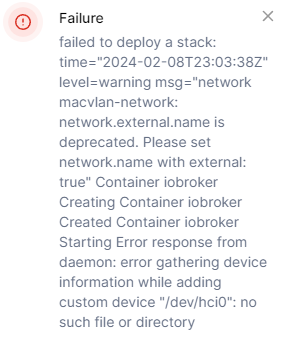
                Fehlermeldung: "dev/hci0": no such file or directory

                GlasfaserG 1 Antwort Letzte Antwort
                0
                • ? Offline
                  ? Offline
                  Ein ehemaliger Benutzer
                  schrieb am zuletzt editiert von Ein ehemaliger Benutzer
                  #22

                  @mor9oth

                  Hi,

                  versuche mal anstatt den " ein ' und das wirds gewesen sein! >??

                  Warum hast du bei MacVlan Ports gemappt? kannste eigentlich weglassen... einfach mal ein # vor die Eintraege machen..

                  M 1 Antwort Letzte Antwort
                  0
                  • M Mor9oth

                    @glasfaser said in ioBroker als Docker & ble.0:

                    Hat vielleicht noch jemand anderes hier einen Lösungsansatz?

                    Ich lese hier still mit ...
                    und finde es amüsant das du Pakete hier installierst

                    sudo apt-get install bluetooth bluez libbluetooth-dev libudev-dev libcap2-bin

                    und nicht über den Hinweis :

                    @marc-berg sagte in ioBroker als Docker & ble.0:
                    Dazu gibt es die "PACKAGES" Umgebungsvariable.
                    Man sollte nichts manuell in den Container installieren, weil das beim nächsten Deploy wieder weg ist.

                    und auch nicht den Hinweis zu "Deploy" beachtest .
                    und dazu auch Beta Tester bist :

                    image: buanet/iobroker:latest

                    Siehe auch hier zu ble :
                    https://forum.iobroker.net/post/504523

                    Autsch! Da hab ich wohl paar Dinge missverstanden!
                    Dein Link hat aber geholfen!

                    Das Package ist nun im Stack und das latest habe ich entfernt. Nur das mit dem Device:

                       devices:
                          - "/dev/hci0:/dev/hci0"
                    

                    Erzeugt eine Fehlermeldung beim Speichern/Deployen des Stacks.

                    So sieht das Stack nun aus:

                    version: '3.8'
                    services:
                      iobroker:
                        container_name: iobroker
                        hostname: iobroker  
                        image: buanet/iobroker
                        restart: always
                        environment:
                          - PACKAGES=bluetooth bluez libbluetooth-dev libudev-dev libcap2-bin
                        networks:
                          macvlan-network:
                            ipv4_address: xxx.xxx.xxx.xxx
                        ports:
                          - '8081:8081'
                        devices:
                          - "/dev/hci0:/dev/hci0"
                        volumes:
                          - type: volume
                            source: data
                            target: /opt/iobroker
                    
                    networks:
                      macvlan-network:
                        external: 
                          name: macvlan-network
                    volumes:
                      data:
                    

                    Fehlermeldung: "dev/hci0": no such file or directory

                    GlasfaserG Offline
                    GlasfaserG Offline
                    Glasfaser
                    schrieb am zuletzt editiert von
                    #23

                    @mor9oth sagte in ioBroker als Docker & ble.0:

                    Fehlermeldung: "dev/hci0": no such file or directory

                    Gegenfrage ... was ich so hier von oben noch unten nicht erlese , hast du schon geschaut ob es überhaupt vorhanden ist ( nicht im Docker )

                    mit

                    ls -al /dev/hci*
                    

                    Synology 918+ 16GB - ioBroker in Docker v9 , VISO auf Trekstor Primebook C13 13,3" , Hikvision Domkameras mit Surveillance Station .. CCU RaspberryMatic in Synology VM .. Zigbee CC2538+CC2592 .. Sonoff .. KNX .. Modbus ..

                    M 1 Antwort Letzte Antwort
                    0
                    • ? Ein ehemaliger Benutzer

                      @mor9oth

                      Hi,

                      versuche mal anstatt den " ein ' und das wirds gewesen sein! >??

                      Warum hast du bei MacVlan Ports gemappt? kannste eigentlich weglassen... einfach mal ein # vor die Eintraege machen..

                      M Offline
                      M Offline
                      Mor9oth
                      schrieb am zuletzt editiert von
                      #24

                      @ilovegym said in ioBroker als Docker & ble.0:

                      @mor9oth

                      Hi,

                      versuche mal anstatt den " ein ' und das wirds gewesen sein! >??

                      Warum hast du bei MacVlan Ports gemappt? kannste eigentlich weglassen... einfach mal ein # vor die Eintraege machen..

                      Habe ich mal versucht mit '' anstatt "". Führt aber beides zum gleichen Fehler.
                      chrome_luaW1usLdk.png

                      Oh klar, die Ports brauche ich mit MacVlan ja nicht … Danke!

                      GlasfaserG 1 Antwort Letzte Antwort
                      0
                      • M Mor9oth

                        @ilovegym said in ioBroker als Docker & ble.0:

                        @mor9oth

                        Hi,

                        versuche mal anstatt den " ein ' und das wirds gewesen sein! >??

                        Warum hast du bei MacVlan Ports gemappt? kannste eigentlich weglassen... einfach mal ein # vor die Eintraege machen..

                        Habe ich mal versucht mit '' anstatt "". Führt aber beides zum gleichen Fehler.

                        chrome_luaW1usLdk.png

                        Oh klar, die Ports brauche ich mit MacVlan ja nicht … Danke!

                        GlasfaserG Offline
                        GlasfaserG Offline
                        Glasfaser
                        schrieb am zuletzt editiert von
                        #25

                        @mor9oth

                        Steht doch da ... nicht vorhanden

                        .
                        7185f40d-94dd-4af8-a308-a3eb6758e3af-grafik.png

                        Synology 918+ 16GB - ioBroker in Docker v9 , VISO auf Trekstor Primebook C13 13,3" , Hikvision Domkameras mit Surveillance Station .. CCU RaspberryMatic in Synology VM .. Zigbee CC2538+CC2592 .. Sonoff .. KNX .. Modbus ..

                        1 Antwort Letzte Antwort
                        0
                        • GlasfaserG Glasfaser

                          @mor9oth sagte in ioBroker als Docker & ble.0:

                          Fehlermeldung: "dev/hci0": no such file or directory

                          Gegenfrage ... was ich so hier von oben noch unten nicht erlese , hast du schon geschaut ob es überhaupt vorhanden ist ( nicht im Docker )

                          mit

                          ls -al /dev/hci*
                          
                          M Offline
                          M Offline
                          Mor9oth
                          schrieb am zuletzt editiert von
                          #26

                          @glasfaser said in ioBroker als Docker & ble.0:

                          @mor9oth sagte in ioBroker als Docker & ble.0:

                          Fehlermeldung: "dev/hci0": no such file or directory

                          Gegenfrage ... was ich so hier von oben noch unten nicht erlese , hast du schon geschaut ob es überhaupt vorhanden ist ( nicht im Docker )

                          mit

                          ls -al /dev/hci*
                          

                          Hmm! Ich dachte, dass ich das am Host mit hciconfig auch sehe:

                          putty_vIZtox3KqL.png

                          Dein Befehl im Host führt aber auch dazu:

                          ls -al /dev/hci*
                          ls: cannot access '/dev/hci*': No such file or directory
                          

                          Ich verstehe halt nicht, warum es nicht mehr durchgereicht wird. Es hatte ja schon mal im MacVlan funktioniert.

                          GlasfaserG 1 Antwort Letzte Antwort
                          0
                          • M Mor9oth

                            @glasfaser said in ioBroker als Docker & ble.0:

                            @mor9oth sagte in ioBroker als Docker & ble.0:

                            Fehlermeldung: "dev/hci0": no such file or directory

                            Gegenfrage ... was ich so hier von oben noch unten nicht erlese , hast du schon geschaut ob es überhaupt vorhanden ist ( nicht im Docker )

                            mit

                            ls -al /dev/hci*
                            

                            Hmm! Ich dachte, dass ich das am Host mit hciconfig auch sehe:
                            putty_vIZtox3KqL.png

                            Dein Befehl im Host führt aber auch dazu:

                            ls -al /dev/hci*
                            ls: cannot access '/dev/hci*': No such file or directory
                            

                            Ich verstehe halt nicht, warum es nicht mehr durchgereicht wird. Es hatte ja schon mal im MacVlan funktioniert.

                            GlasfaserG Offline
                            GlasfaserG Offline
                            Glasfaser
                            schrieb am zuletzt editiert von
                            #27

                            @mor9oth sagte in ioBroker als Docker & ble.0:

                            Es hatte ja schon mal im MacVlan funktioniert.

                            ich kenne es nur mit

                            net=host mode

                            und das es nicht per --device funktioniert

                            Synology 918+ 16GB - ioBroker in Docker v9 , VISO auf Trekstor Primebook C13 13,3" , Hikvision Domkameras mit Surveillance Station .. CCU RaspberryMatic in Synology VM .. Zigbee CC2538+CC2592 .. Sonoff .. KNX .. Modbus ..

                            M 1 Antwort Letzte Antwort
                            0
                            • GlasfaserG Glasfaser

                              @mor9oth sagte in ioBroker als Docker & ble.0:

                              Es hatte ja schon mal im MacVlan funktioniert.

                              ich kenne es nur mit

                              net=host mode

                              und das es nicht per --device funktioniert

                              M Offline
                              M Offline
                              Mor9oth
                              schrieb am zuletzt editiert von
                              #28

                              @glasfaser said in ioBroker als Docker & ble.0:

                              @mor9oth sagte in ioBroker als Docker & ble.0:

                              Es hatte ja schon mal im MacVlan funktioniert.

                              ich kenne es nur mit

                              net=host mode

                              und das es nicht per --device funktioniert

                              Wenn ich keine Lösung finde, bzw. nicht mehr rekonstruiert bekomme, wie es mal funktioniert hatte, würde ich dann wohl das Netzwerk auf Host ändern um den ble.0 funktionsfähig zu haben.


                              1 Antwort Letzte Antwort
                              0
                              Antworten
                              • In einem neuen Thema antworten
                              Anmelden zum Antworten
                              • Älteste zuerst
                              • Neuste zuerst
                              • Meiste Stimmen


                              Support us

                              ioBroker
                              Community Adapters
                              Donate
                              FAQ Cloud / IOT
                              HowTo: Node.js-Update
                              HowTo: Backup/Restore
                              Downloads
                              BLOG

                              368

                              Online

                              32.5k

                              Benutzer

                              81.8k

                              Themen

                              1.3m

                              Beiträge
                              Community
                              Impressum | Datenschutz-Bestimmungen | Nutzungsbedingungen | Einwilligungseinstellungen
                              ioBroker Community 2014-2025
                              logo
                              • Anmelden

                              • Du hast noch kein Konto? Registrieren

                              • Anmelden oder registrieren, um zu suchen
                              • Erster Beitrag
                                Letzter Beitrag
                              0
                              • Home
                              • Aktuell
                              • Tags
                              • Ungelesen 0
                              • Kategorien
                              • Unreplied
                              • Beliebt
                              • GitHub
                              • Docu
                              • Hilfe