




Ertrag (Tag, Monat, Jahr) berechnen und in Datei speichern
-
pi@raspberrypi:~ $ sudo apt update
Hit:1 http://deb.debian.org/debian bullseye InRelease
Hit:2 http://deb.debian.org/debian bullseye-updates InRelease
Hit:3 http://security.debian.org/debian-security bullseye-security InRelease
Hit:4 https://repos.influxdata.com/debian stable InRelease
Hit:5 https://deb.nodesource.com/node_18.x nodistro InRelease
Hit:6 https://apt.grafana.com stable InRelease
Hit:7 http://archive.raspberrypi.org/debian bullseye InRelease
Get:8 https://dl.cloudsmith.io/public/evcc/stable/deb/debian bullseye InRelease [5,127 B]
Fetched 5,127 B in 2s (2,799 B/s)
Reading package lists... Done
Building dependency tree... Done
Reading state information... Done
2 packages can be upgraded. Run 'apt list --upgradable' to see them.
pi@raspberrypi:~ $
und
pi@raspberrypi:~ $ apt policy influxdb* influxdb2-cli: Installed: (none) Candidate: 2.7.3-1 Version table: 2.7.3-1 500 500 https://repos.influxdata.com/debian stable/main arm64 Packages 2.7.1-2 500 500 https://repos.influxdata.com/debian stable/main arm64 Packages 2.6.1 500 500 https://repos.influxdata.com/debian stable/main arm64 Packages 2.6.0 500 500 https://repos.influxdata.com/debian stable/main arm64 Packages 2.5.0 500 500 https://repos.influxdata.com/debian stable/main arm64 Packages 2.4.0 500 500 https://repos.influxdata.com/debian stable/main arm64 Packages 2.3.0 500 500 https://repos.influxdata.com/debian stable/main arm64 Packages influxdb-client: Installed: (none) Candidate: 1.6.7~rc0-1+b5 Version table: 1.6.7~rc0-1+b5 500 500 http://deb.debian.org/debian bullseye/main arm64 Packages influxdb-dev: Installed: (none) Candidate: (none) Version table: influxdb2-client: Installed: (none) Candidate: 2.7.1-1 Version table: 2.7.1-1 500 500 https://repos.influxdata.com/debian stable/main arm64 Packages influxdb: Installed: (none) Candidate: 1.8.10-1 Version table: 1.8.10-1 500 500 https://repos.influxdata.com/debian stable/main arm64 Packages 1.6.7~rc0-1+b5 500 500 http://deb.debian.org/debian bullseye/main arm64 Packages 100 /var/lib/dpkg/status influxdb2: Installed: 2.7.4-1 Candidate: 2.7.4-1 Version table: *** 2.7.4-1 500 500 https://repos.influxdata.com/debian stable/main arm64 Packages 100 /var/lib/dpkg/status 2.7.3-1 500 500 https://repos.influxdata.com/debian stable/main arm64 Packages 2.7.1-1 500 500 https://repos.influxdata.com/debian stable/main arm64 Packages 2.7.0-1 500 500 https://repos.influxdata.com/debian stable/main arm64 Packages 2.6.1-1 500 500 https://repos.influxdata.com/debian stable/main arm64 Packages 2.6.0-1 500 500 https://repos.influxdata.com/debian stable/main arm64 Packages 2.5.1-1 500 500 https://repos.influxdata.com/debian stable/main arm64 Packages 2.4.0-1 500 500 https://repos.influxdata.com/debian stable/main arm64 Packages 2.3.0-1 500 500 https://repos.influxdata.com/debian stable/main arm64 Packages 2.2.0 500 500 https://repos.influxdata.com/debian stable/main arm64 Packages pi@raspberrypi:~ $ -
schaut ok aus
pi@raspberrypi:~ $ sudo apt full-upgrade Reading package lists... Done Building dependency tree... Done Reading state information... Done Calculating upgrade... Done The following package was automatically installed and is no longer required: raspinfo Use 'sudo apt autoremove' to remove it. The following NEW packages will be installed: kms++-utils musl raspi-utils The following packages will be upgraded: grafana raspinfo 2 upgraded, 3 newly installed, 0 to remove and 0 not upgraded. Need to get 101 MB of archives. After this operation, 68.9 MB of additional disk space will be used. Do you want to continue? [Y/n] Get:1 http://deb.debian.org/debian bullseye/main arm64 musl arm64 1.2.2-1 [399 kB] Get:2 http://archive.raspberrypi.org/debian bullseye/main arm64 kms++-utils arm64 0~git20221104~171243+adc05b6-1 [81.4 kB] Get:3 http://archive.raspberrypi.org/debian bullseye/main arm64 raspinfo all 20230123-1 [2,564 B] Get:4 http://archive.raspberrypi.org/debian bullseye/main arm64 raspi-utils arm64 20230123-1 [41.8 kB] Get:5 https://apt.grafana.com stable/main arm64 grafana arm64 10.2.3 [100 MB] Fetched 101 MB in 19s (5,315 kB/s) Reading changelogs... Done Selecting previously unselected package musl:arm64. (Reading database ... 59837 files and directories currently installed.) Preparing to unpack .../musl_1.2.2-1_arm64.deb ... Unpacking musl:arm64 (1.2.2-1) ... Preparing to unpack .../grafana_10.2.3_arm64.deb ... Unpacking grafana (10.2.3) over (9.2.4) ... Selecting previously unselected package kms++-utils. Preparing to unpack .../kms++-utils_0~git20221104~171243+adc05b6-1_arm64.deb ... Unpacking kms++-utils (0~git20221104~171243+adc05b6-1) ... Preparing to unpack .../raspinfo_20230123-1_all.deb ... Unpacking raspinfo (20230123-1) over (20190624-1) ... Selecting previously unselected package raspi-utils. Preparing to unpack .../raspi-utils_20230123-1_arm64.deb ... Unpacking raspi-utils (20230123-1) ... Setting up kms++-utils (0~git20221104~171243+adc05b6-1) ... Setting up musl:arm64 (1.2.2-1) ... Setting up grafana (10.2.3) ... Installing new version of config file /etc/init.d/grafana-server ... Installing new version of config file /usr/lib/systemd/system/grafana-server.service ... Restarting grafana-server service... OK Setting up raspi-utils (20230123-1) ... Setting up raspinfo (20230123-1) ... Processing triggers for man-db (2.9.4-2) ... pi@raspberrypi:~ $ -
schaut ok aus
pi@raspberrypi:~ $ sudo apt full-upgrade Reading package lists... Done Building dependency tree... Done Reading state information... Done Calculating upgrade... Done The following package was automatically installed and is no longer required: raspinfo Use 'sudo apt autoremove' to remove it. The following NEW packages will be installed: kms++-utils musl raspi-utils The following packages will be upgraded: grafana raspinfo 2 upgraded, 3 newly installed, 0 to remove and 0 not upgraded. Need to get 101 MB of archives. After this operation, 68.9 MB of additional disk space will be used. Do you want to continue? [Y/n] Get:1 http://deb.debian.org/debian bullseye/main arm64 musl arm64 1.2.2-1 [399 kB] Get:2 http://archive.raspberrypi.org/debian bullseye/main arm64 kms++-utils arm64 0~git20221104~171243+adc05b6-1 [81.4 kB] Get:3 http://archive.raspberrypi.org/debian bullseye/main arm64 raspinfo all 20230123-1 [2,564 B] Get:4 http://archive.raspberrypi.org/debian bullseye/main arm64 raspi-utils arm64 20230123-1 [41.8 kB] Get:5 https://apt.grafana.com stable/main arm64 grafana arm64 10.2.3 [100 MB] Fetched 101 MB in 19s (5,315 kB/s) Reading changelogs... Done Selecting previously unselected package musl:arm64. (Reading database ... 59837 files and directories currently installed.) Preparing to unpack .../musl_1.2.2-1_arm64.deb ... Unpacking musl:arm64 (1.2.2-1) ... Preparing to unpack .../grafana_10.2.3_arm64.deb ... Unpacking grafana (10.2.3) over (9.2.4) ... Selecting previously unselected package kms++-utils. Preparing to unpack .../kms++-utils_0~git20221104~171243+adc05b6-1_arm64.deb ... Unpacking kms++-utils (0~git20221104~171243+adc05b6-1) ... Preparing to unpack .../raspinfo_20230123-1_all.deb ... Unpacking raspinfo (20230123-1) over (20190624-1) ... Selecting previously unselected package raspi-utils. Preparing to unpack .../raspi-utils_20230123-1_arm64.deb ... Unpacking raspi-utils (20230123-1) ... Setting up kms++-utils (0~git20221104~171243+adc05b6-1) ... Setting up musl:arm64 (1.2.2-1) ... Setting up grafana (10.2.3) ... Installing new version of config file /etc/init.d/grafana-server ... Installing new version of config file /usr/lib/systemd/system/grafana-server.service ... Restarting grafana-server service... OK Setting up raspi-utils (20230123-1) ... Setting up raspinfo (20230123-1) ... Processing triggers for man-db (2.9.4-2) ... pi@raspberrypi:~ $Jetzt solltest du wieder 'auf Spur' sein.
Schau dir das Bild jetzt in Gänze an.iob diaggibt dir den Überblick.
-
======== Start marking the full check here =========
Skript v.2023-10-10

*** BASE SYSTEM ***
   Static hostname: raspberrypi
         Icon name: computer
  Operating System: Debian GNU/Linux 11 (bullseye)
            Kernel: Linux 6.1.21-v8+
      Architecture: arm64

Model           : Raspberry Pi 4 Model B Rev 1.4
Docker          : false
Virtualization  : none
Kernel          : aarch64
Userland        : arm64

Systemuptime and Load:
 18:00:00 up 13 min,  1 user,  load average: 0.48, 0.49, 0.39
CPU threads: 4


*** RASPBERRY THROTTLING ***
Current issues:
No throttling issues detected.

Previously detected issues:
No throttling issues detected.

*** Time and Time Zones ***
               Local time: Mon 2024-01-08 18:00:00 CET
           Universal time: Mon 2024-01-08 17:00:00 UTC
                 RTC time: n/a
                Time zone: Europe/Berlin (CET, +0100)
System clock synchronized: yes
              NTP service: active
          RTC in local TZ: no

*** User and Groups ***
pi
/home/pi
pi adm dialout cdrom sudo audio video plugdev games users input render netdev gpio i2c spi iobroker

*** X-Server-Setup ***
X-Server:       false
Desktop:
Terminal:       tty
Boot Target:    multi-user.target

*** MEMORY ***
               total        used        free      shared  buff/cache   available
Mem:            7.8G        1.2G        5.4G        1.0M        1.3G        6.5G
Swap:            99M          0B         99M
Total:          7.9G        1.2G        5.5G

         7811 M total memory
         1169 M used memory
         1509 M active memory
          760 M inactive memory
         5389 M free memory
           49 M buffer memory
         1202 M swap cache
           99 M total swap
            0 M used swap
           99 M free swap

Raspberry only:
oom events: 0
lifetime oom required: 0 Mbytes
total time in oom handler: 0 ms
max time spent in oom handler: 0 ms

*** FAILED SERVICES ***

  UNIT LOAD ACTIVE SUB DESCRIPTION
0 loaded units listed.

*** FILESYSTEM ***
Filesystem     Type      Size  Used Avail Use% Mounted on
/dev/root      ext4      220G  5.7G  206G   3% /
devtmpfs       devtmpfs  3.6G     0  3.6G   0% /dev
tmpfs          tmpfs     3.9G     0  3.9G   0% /dev/shm
tmpfs          tmpfs     1.6G  1.2M  1.6G   1% /run
tmpfs          tmpfs     5.0M  4.0K  5.0M   1% /run/lock
/dev/sda1      vfat      255M   31M  225M  13% /boot
tmpfs          tmpfs     782M     0  782M   0% /run/user/1000

Messages concerning ext4 filesystem in dmesg:
[Mon Jan  8 17:46:59 2024] Kernel command line: coherent_pool=1M 8250.nr_uarts=0 snd_bcm2835.enable_headphones=0 snd_bcm2835.enable_headphones=1 snd_bcm2835.enable_hdmi=1 snd_bcm2835.enable_hdmi=0  smsc95xx.macaddr=E4:5F:01:5F:78:11 vc_mem.mem_base=0x3eb00000 vc_mem.mem_size=0x3ff00000  console=ttyS0,115200 console=tty1 root=PARTUUID=c382a905-02 rootfstype=ext4 fsck.repair=yes rootwait
[Mon Jan  8 17:47:01 2024] EXT4-fs (sda2): mounted filesystem with ordered data mode. Quota mode: none.
[Mon Jan  8 17:47:01 2024] VFS: Mounted root (ext4 filesystem) readonly on device 8:2.
[Mon Jan  8 17:47:02 2024] EXT4-fs (sda2): re-mounted. Quota mode: none.

Show mounted filesystems \(real ones only\):
TARGET  SOURCE    FSTYPE OPTIONS
/       /dev/sda2 ext4   rw,noatime
`-/boot /dev/sda1 vfat   rw,relatime,fmask=0022,dmask=0022,codepage=437,iocharset=ascii,shortname=mixed,errors=remount-ro

Files in neuralgic directories:

/var:
2.4G    /var/
1.1G    /var/log/journal/06df86f59cbd48888af076fdae20e584
1.1G    /var/log/journal
1.1G    /var/log
903M    /var/lib

Archived and active journals take up 1.0G in the file system.

/opt/iobroker/backups:
9.2M    /opt/iobroker/backups/

/opt/iobroker/iobroker-data:
192M    /opt/iobroker/iobroker-data/
113M    /opt/iobroker/iobroker-data/files
67M     /opt/iobroker/iobroker-data/files/javascript.admin
55M     /opt/iobroker/iobroker-data/backup-objects
48M     /opt/iobroker/iobroker-data/files/javascript.admin/static

The five largest files in iobroker-data are:
22M     /opt/iobroker/iobroker-data/files/modbus.admin/static/js/main.b5f6766c.js.map
21M     /opt/iobroker/iobroker-data/objects.jsonl
8.9M    /opt/iobroker/iobroker-data/files/modbus.admin/static/js/main.b5f6766c.js
7.5M    /opt/iobroker/iobroker-data/files/javascript.admin/static/js/691.26ff76ce.chunk.js.map
7.1M    /opt/iobroker/iobroker-data/files/javascript.admin/static/js/610.d3cce782.chunk.js.map

USB-Devices by-id:
USB-Sticks -  Avoid direct links to /dev/* in your adapter setups, please always prefer the links 'by-id':

find: '/dev/serial/by-id/': No such file or directory

*** NodeJS-Installation ***

/usr/bin/nodejs         v18.19.0
/usr/bin/node           v18.19.0
/usr/bin/npm            10.2.3
/usr/bin/npx            10.2.3
/usr/bin/corepack       0.22.0


nodejs:
  Installed: 18.19.0-1nodesource1
  Candidate: 18.19.0-1nodesource1
  Version table:
 *** 18.19.0-1nodesource1 1001
        500 https://deb.nodesource.com/node_18.x nodistro/main arm64 Packages
        100 /var/lib/dpkg/status
     18.18.2-1nodesource1 1001
        500 https://deb.nodesource.com/node_18.x nodistro/main arm64 Packages
     18.18.1-1nodesource1 1001
        500 https://deb.nodesource.com/node_18.x nodistro/main arm64 Packages
     18.18.0-1nodesource1 1001
        500 https://deb.nodesource.com/node_18.x nodistro/main arm64 Packages
     18.17.1-1nodesource1 1001
        500 https://deb.nodesource.com/node_18.x nodistro/main arm64 Packages
     18.17.0-1nodesource1 1001
        500 https://deb.nodesource.com/node_18.x nodistro/main arm64 Packages
     18.16.1-1nodesource1 1001
        500 https://deb.nodesource.com/node_18.x nodistro/main arm64 Packages
     18.16.0-1nodesource1 1001
        500 https://deb.nodesource.com/node_18.x nodistro/main arm64 Packages
     18.15.0-1nodesource1 1001
        500 https://deb.nodesource.com/node_18.x nodistro/main arm64 Packages
     18.14.2-1nodesource1 1001
        500 https://deb.nodesource.com/node_18.x nodistro/main arm64 Packages
     18.14.1-1nodesource1 1001
        500 https://deb.nodesource.com/node_18.x nodistro/main arm64 Packages
     18.14.0-1nodesource1 1001
        500 https://deb.nodesource.com/node_18.x nodistro/main arm64 Packages
     18.13.0-1nodesource1 1001
        500 https://deb.nodesource.com/node_18.x nodistro/main arm64 Packages
     18.12.0-1nodesource1 1001
        500 https://deb.nodesource.com/node_18.x nodistro/main arm64 Packages
     18.11.0-1nodesource1 1001
        500 https://deb.nodesource.com/node_18.x nodistro/main arm64 Packages
     18.10.0-1nodesource1 1001
        500 https://deb.nodesource.com/node_18.x nodistro/main arm64 Packages
     18.9.1-1nodesource1 1001
        500 https://deb.nodesource.com/node_18.x nodistro/main arm64 Packages
     18.9.0-1nodesource1 1001
        500 https://deb.nodesource.com/node_18.x nodistro/main arm64 Packages
     18.8.0-1nodesource1 1001
        500 https://deb.nodesource.com/node_18.x nodistro/main arm64 Packages
     18.7.0-1nodesource1 1001
        500 https://deb.nodesource.com/node_18.x nodistro/main arm64 Packages
     18.6.0-1nodesource1 1001
        500 https://deb.nodesource.com/node_18.x nodistro/main arm64 Packages
     18.5.0-1nodesource1 1001
        500 https://deb.nodesource.com/node_18.x nodistro/main arm64 Packages
     18.4.0-1nodesource1 1001
        500 https://deb.nodesource.com/node_18.x nodistro/main arm64 Packages
     18.3.0-1nodesource1 1001
        500 https://deb.nodesource.com/node_18.x nodistro/main arm64 Packages
     18.2.0-1nodesource1 1001
        500 https://deb.nodesource.com/node_18.x nodistro/main arm64 Packages
     18.1.0-1nodesource1 1001
        500 https://deb.nodesource.com/node_18.x nodistro/main arm64 Packages
     18.0.0-1nodesource1 1001
        500 https://deb.nodesource.com/node_18.x nodistro/main arm64 Packages
     12.22.12~dfsg-1~deb11u4 500
        500 http://deb.debian.org/debian bullseye/main arm64 Packages
        500 http://security.debian.org/debian-security bullseye-security/main arm64 Packages

Temp directories causing npm8 problem: 0
No problems detected

Errors in npm tree:

*** ioBroker-Installation ***

ioBroker Status
iobroker is running on this host.


Objects type: jsonl
States  type: jsonl

Core adapters versions
js-controller:  5.0.17
admin:          6.12.0
javascript:     7.1.6

Adapters from github:   2

Adapter State
+ system.adapter.admin.0                  : admin                 : raspberrypi                              -  enabled, port: 8081, bind: 0.0.0.0 (SSL), run as: admin
+ system.adapter.backitup.0               : backitup              : raspberrypi                              -  enabled
+ system.adapter.discovery.0              : discovery             : raspberrypi                              -  enabled
+ system.adapter.email.0                  : email                 : raspberrypi                              -  enabled
+ system.adapter.influxdb.0               : influxdb              : raspberrypi                              -  enabled, port: 8086
+ system.adapter.javascript.0             : javascript            : raspberrypi                              -  enabled
+ system.adapter.modbus.0                 : modbus                : raspberrypi                              -  enabled
  system.adapter.modbus.1                 : modbus                : raspberrypi                              - disabled
+ system.adapter.mqtt.0                   : mqtt                  : raspberrypi                              -  enabled, port: 1883, bind: 0.0.0.0
+ system.adapter.shelly.0                 : shelly                : raspberrypi                              -  enabled, port: 1882, bind: 0.0.0.0
+ system.adapter.shelly.1                 : shelly                : raspberrypi                              -  enabled, port: 1882, bind: 0.0.0.0
  system.adapter.solaredge.0              : solaredge             : raspberrypi                              - disabled
  system.adapter.solarlog.0               : solarlog              : raspberrypi                              - disabled, port: 80
+ system.adapter.sonoff.0                 : sonoff                : raspberrypi                              -  enabled, port: 1884, bind: 0.0.0.0
+ system.adapter.sourceanalytix.0         : sourceanalytix        : raspberrypi                              -  enabled
+ system.adapter.wolf.0                   : wolf                  : raspberrypi                              -  enabled, port: 12004, bind: 0.0.0.0

+ instance is alive

Enabled adapters with bindings
+ system.adapter.admin.0                  : admin                 : raspberrypi                              -  enabled, port: 8081, bind: 0.0.0.0 (SSL), run as: admin
+ system.adapter.influxdb.0               : influxdb              : raspberrypi                              -  enabled, port: 8086
+ system.adapter.mqtt.0                   : mqtt                  : raspberrypi                              -  enabled, port: 1883, bind: 0.0.0.0
+ system.adapter.shelly.0                 : shelly                : raspberrypi                              -  enabled, port: 1882, bind: 0.0.0.0
+ system.adapter.shelly.1                 : shelly                : raspberrypi                              -  enabled, port: 1882, bind: 0.0.0.0
+ system.adapter.sonoff.0                 : sonoff                : raspberrypi                              -  enabled, port: 1884, bind: 0.0.0.0
+ system.adapter.wolf.0                   : wolf                  : raspberrypi                              -  enabled, port: 12004, bind: 0.0.0.0

ioBroker-Repositories
stable        : http://download.iobroker.net/sources-dist.json
beta          : http://download.iobroker.net/sources-dist-latest.json

Active repo(s): stable

Installed ioBroker-Instances
Used repository: stable
Adapter    "admin"        : 6.12.0   , installed 6.12.0
Adapter    "backitup"     : 2.9.8    , installed 2.9.8
Adapter    "discovery"    : 4.2.0    , installed 4.2.0
Adapter    "email"        : 1.2.1    , installed 1.2.1
Adapter    "influxdb"     : 3.2.0    , installed 3.2.0
Adapter    "javascript"   : 7.1.6    , installed 7.1.6
Controller "js-controller": 5.0.17   , installed 5.0.17
Adapter    "modbus"       : 6.0.1    , installed 6.0.1
Adapter    "mqtt"         : 5.1.0    , installed 5.1.0
Adapter    "shelly"       : 6.6.1    , installed 6.6.1
Adapter    "solarlog"     : 2.2.8    , installed 2.2.8
Adapter    "sonoff"       : 3.0.3    , installed 3.0.3
Adapter    "wolf"         : 1.7.0    , installed 1.7.0

Objects and States
Please stand by - This may take a while
Objects:        3856
States:         3341

*** OS-Repositories and Updates ***
Hit:1 http://security.debian.org/debian-security bullseye-security InRelease
Hit:2 http://deb.debian.org/debian bullseye InRelease
Hit:3 http://deb.debian.org/debian bullseye-updates InRelease
Hit:4 https://repos.influxdata.com/debian stable InRelease
Hit:5 http://archive.raspberrypi.org/debian bullseye InRelease
Get:6 https://dl.cloudsmith.io/public/evcc/stable/deb/debian bullseye InRelease [5127 B]
Hit:7 https://apt.grafana.com stable InRelease
Hit:8 https://deb.nodesource.com/node_18.x nodistro InRelease
Fetched 5127 B in 2s (2723 B/s)
Reading package lists...
Pending Updates: 0

*** Listening Ports ***
Active Internet connections (only servers)
Proto Recv-Q Send-Q Local Address           Foreign Address         State       User       Inode      PID/Program name
tcp        0      0 127.0.0.1:9000          0.0.0.0:*               LISTEN      1001       15375      889/iobroker.js-con
tcp        0      0 127.0.0.1:9001          0.0.0.0:*               LISTEN      1001       15368      889/iobroker.js-con
tcp        0      0 0.0.0.0:12004           0.0.0.0:*               LISTEN      1001       16425      988/io.wolf.0
tcp        0      0 0.0.0.0:22              0.0.0.0:*               LISTEN      0          13710      542/sshd: /usr/sbin
tcp        0      0 0.0.0.0:1883            0.0.0.0:*               LISTEN      1001       15489      1035/io.mqtt.0
tcp        0      0 0.0.0.0:1882            0.0.0.0:*               LISTEN      1001       14994      1065/io.shelly.1
tcp        0      0 0.0.0.0:1884            0.0.0.0:*               LISTEN      1001       15512      1050/io.sonoff.0
tcp6       0      0 :::7070                 :::*                    LISTEN      112        24220      2003/evcc
tcp6       0      0 :::3000                 :::*                    LISTEN      111        23600      1868/grafana
tcp6       0      0 :::8081                 :::*                    LISTEN      1001       13891      916/io.admin.0
tcp6       0      0 :::8086                 :::*                    LISTEN      110        12249      768/influxd
tcp6       0      0 :::502                  :::*                    LISTEN      112        24218      2003/evcc
tcp6       0      0 :::22                   :::*                    LISTEN      0          13712      542/sshd: /usr/sbin
tcp6       0      0 :::80                   :::*                    LISTEN      0          14638      553/apache2
udp        0      0 0.0.0.0:5353            0.0.0.0:*                           108        12071      391/avahi-daemon: r
udp        0      0 0.0.0.0:5683            0.0.0.0:*                           1001       16495      1020/io.shelly.0
udp        0      0 0.0.0.0:51516           0.0.0.0:*                           1001       30382      -
udp        0      0 0.0.0.0:52317           0.0.0.0:*                           108        12073      391/avahi-daemon: r
udp        0      0 0.0.0.0:68              0.0.0.0:*                           0          13720      762/dhcpcd
udp6       0      0 :::5353                 :::*                                108        12072      391/avahi-daemon: r
udp6       0      0 :::49554                :::*                                108        12074      391/avahi-daemon: r
udp6       0      0 :::546                  :::*                                0          13805      762/dhcpcd

*** Log File - Last 25 Lines ***

2024-01-08 17:59:47.868  - info: influxdb.0 (938) Influx DB Version used: 2.x
2024-01-08 17:59:47.876  - error: influxdb.0 (938) HttpError: unauthorized access
2024-01-08 17:59:57.875  - info: influxdb.0 (938) Connecting http://localhost:8086/ ...
2024-01-08 17:59:57.876  - info: influxdb.0 (938) Influx DB Version used: 2.x
2024-01-08 17:59:57.881  - error: influxdb.0 (938) HttpError: unauthorized access
2024-01-08 18:00:00.195  - info: javascript.0 (954) script.js.Strom_Shelly_Verbrauch-Historie_mqtt: Shelly Verbrauch: Verbrauchswerte aktualisiert: 1 | Reboots korrigiert: 0 | Unveränderte Werte: 0
2024-01-08 18:00:00.283  - info: javascript.0 (954) script.js.Strom_Shelly_Verbrauchs-Historie: Shelly Verbrauch: Verbrauchswerte aktualisiert: 26 | Reboots korrigiert: 0 | Unveränderte Werte: 51
2024-01-08 18:00:07.882  - info: influxdb.0 (938) Connecting http://localhost:8086/ ...
2024-01-08 18:00:07.882  - info: influxdb.0 (938) Influx DB Version used: 2.x
2024-01-08 18:00:07.887  - error: influxdb.0 (938) HttpError: unauthorized access
2024-01-08 18:00:17.889  - info: influxdb.0 (938) Connecting http://localhost:8086/ ...
2024-01-08 18:00:17.889  - info: influxdb.0 (938) Influx DB Version used: 2.x
2024-01-08 18:00:17.894  - error: influxdb.0 (938) HttpError: unauthorized access
2024-01-08 18:00:27.897  - info: influxdb.0 (938) Connecting http://localhost:8086/ ...
2024-01-08 18:00:27.898  - info: influxdb.0 (938) Influx DB Version used: 2.x
2024-01-08 18:00:27.906  - error: influxdb.0 (938) HttpError: unauthorized access
2024-01-08 18:00:37.906  - info: influxdb.0 (938) Connecting http://localhost:8086/ ...
2024-01-08 18:00:37.907  - info: influxdb.0 (938) Influx DB Version used: 2.x
2024-01-08 18:00:37.915  - error: influxdb.0 (938) HttpError: unauthorized access
2024-01-08 18:00:47.916  - info: influxdb.0 (938) Connecting http://localhost:8086/ ...
2024-01-08 18:00:47.916  - info: influxdb.0 (938) Influx DB Version used: 2.x
2024-01-08 18:00:47.921  - error: influxdb.0 (938) HttpError: unauthorized access
2024-01-08 18:00:57.921  - info: influxdb.0 (938) Connecting http://localhost:8086/ ...
2024-01-08 18:00:57.921  - info: influxdb.0 (938) Influx DB Version used: 2.x
2024-01-08 18:00:57.927  - error: influxdb.0 (938) HttpError: unauthorized access
============ Mark until here for C&P =============
iob diag has finished.
Press any key for a summary
unten sind noch Fehler ?
-
bitte:
======================= SUMMARY =======================
                        v.2023-10-10


   Static hostname: raspberrypi
         Icon name: computer
  Operating System: Debian GNU/Linux 11 (bullseye)
            Kernel: Linux 6.1.21-v8+
      Architecture: arm64

Installation:           native
Kernel:                 aarch64
Userland:               arm64
Timezone:               Europe/Berlin (CET, +0100)
User-ID:                1000
X-Server:               false
Boot Target:            multi-user.target

Pending OS-Updates:     0
Pending iob updates:    0

Nodejs-Installation:    /usr/bin/nodejs         v18.19.0
                        /usr/bin/node           v18.19.0
                        /usr/bin/npm            10.2.3
                        /usr/bin/npx            10.2.3
                        /usr/bin/corepack       0.22.0

Recommended versions are nodejs 18.19.0 and npm 10.2.3
Your nodejs installation is correct

MEMORY:
               total        used        free      shared  buff/cache   available
Mem:            7.8G        1.6G        4.9G        1.0M        1.3G        6.1G
Swap:            99M          0B         99M
Total:          7.9G        1.6G        5.0G

Active iob-Instances:   14
Active repo(s): stable

ioBroker Core:          js-controller           5.0.17
                        admin                   6.12.0

ioBroker Status:        iobroker is running on this host.


Objects type: jsonl
States  type: jsonl

Status admin and web instance:
+ system.adapter.admin.0                  : admin                 : raspberrypi                              -  enabled, port: 8081, bind: 0.0.0.0 (SSL), run as: admin

Objects:                3856
States:                 3341

Size of iob-Database:

21M     /opt/iobroker/iobroker-data/objects.jsonl
6.9M    /opt/iobroker/iobroker-data/states.jsonl


=================== END OF SUMMARY ====================
=== Mark text until here for copying ===
pi@raspberrypi:~ $ -
bitte:
======================= SUMMARY =======================
                        v.2023-10-10


   Static hostname: raspberrypi
         Icon name: computer
  Operating System: Debian GNU/Linux 11 (bullseye)
            Kernel: Linux 6.1.21-v8+
      Architecture: arm64

Installation:           native
Kernel:                 aarch64
Userland:               arm64
Timezone:               Europe/Berlin (CET, +0100)
User-ID:                1000
X-Server:               false
Boot Target:            multi-user.target

Pending OS-Updates:     0
Pending iob updates:    0

Nodejs-Installation:    /usr/bin/nodejs         v18.19.0
                        /usr/bin/node           v18.19.0
                        /usr/bin/npm            10.2.3
                        /usr/bin/npx            10.2.3
                        /usr/bin/corepack       0.22.0

Recommended versions are nodejs 18.19.0 and npm 10.2.3
Your nodejs installation is correct

MEMORY:
               total        used        free      shared  buff/cache   available
Mem:            7.8G        1.6G        4.9G        1.0M        1.3G        6.1G
Swap:            99M          0B         99M
Total:          7.9G        1.6G        5.0G

Active iob-Instances:   14
Active repo(s): stable

ioBroker Core:          js-controller           5.0.17
                        admin                   6.12.0

ioBroker Status:        iobroker is running on this host.


Objects type: jsonl
States  type: jsonl

Status admin and web instance:
+ system.adapter.admin.0                  : admin                 : raspberrypi                              -  enabled, port: 8081, bind: 0.0.0.0 (SSL), run as: admin

Objects:                3856
States:                 3341

Size of iob-Database:

21M     /opt/iobroker/iobroker-data/objects.jsonl
6.9M    /opt/iobroker/iobroker-data/states.jsonl


=================== END OF SUMMARY ====================
=== Mark text until here for copying ===
pi@raspberrypi:~ $Das System ist jetzt grundsätzlich richtig.
Bei den Fehlern aus dem Log kann dir vermutlich @Marc-Berg weiterhelfen. Von influxdb hab ich nämlich keine Ahnung. -
Vielen Danke.
Das heißt ich kann jetzt immer über den Paketmanager gehen?Der Influx Adapter läuft jetzt nicht mehr:
influxdb.0 2024-01-08 18:38:49.775 error HttpError: unauthorized access influxdb.0 2024-01-08 18:38:49.769 info Influx DB Version used: 2.x influxdb.0 2024-01-08 18:38:49.769 info Connecting http://localhost:8086/ ... -
Vielen Danke.
Das heißt ich kann jetzt immer über den Paketmanager gehen?Der Influx Adapter läuft jetzt nicht mehr:
influxdb.0 2024-01-08 18:38:49.775 error HttpError: unauthorized access influxdb.0 2024-01-08 18:38:49.769 info Influx DB Version used: 2.x influxdb.0 2024-01-08 18:38:49.769 info Connecting http://localhost:8086/ ...@bitwicht sagte in Ertrag (Tag, Monat, Jahr) berechnen und in Datei speichern:
Das heißt ich kann jetzt immer über den Paketmanager gehen?
Ja, das schwimmt jetzt alles beim Paketmanager mit.
Persudo apt update sudo apt full-upgraderegelmäßig dabei bleiben.
-
jetzt habe ich aber ein Problem.
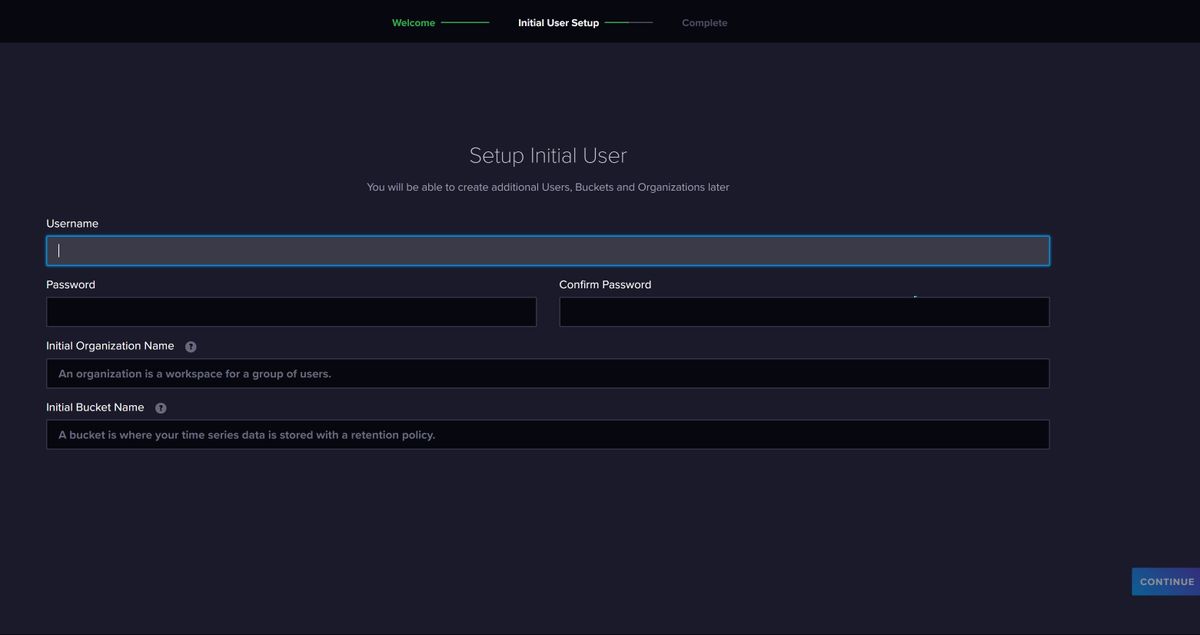
Wenn ich auf die Weboberfläche der Influx gehe, kommt "Get Started"Sind jetzt alle meine Daten weg ?
-
jetzt habe ich aber ein Problem.
Wenn ich auf die Weboberfläche der Influx gehe, kommt "Get Started"Sind jetzt alle meine Daten weg ?
@bitwicht sagte in Ertrag (Tag, Monat, Jahr) berechnen und in Datei speichern:
Sind jetzt alle meine Daten weg ?
Das musst du @Marc-Berg fragen. Wie gesagt, ich verwende influxdb nicht. Da müssen irgendwie irgendwo irgendwelche Tokens (Die hast du noch?) hinterlegt werden, wenn ich das richtig weiß.
-
@Thomas Braun
Ich warte mal auf @Marc-Berg
Ich habe die Token noch aber es sieht so aus als ob die Influx komplett neu ist.
Auf der Weboberfläche kommt "Get Started" und ich soll den Admin User neu vergeben, etc.
Dann müsste man wohl die alten Datenbanken reinholen können.
-
ok ich warte mal ab bis Marc online ist und hoffe das er es fixen kann.
Habe etwas Panik das meine Daten weg sind@bitwicht sagte in Ertrag (Tag, Monat, Jahr) berechnen und in Datei speichern:
Habe etwas Panik das meine Daten weg sind
Panik müsstest du nur haben, wenn du kein Backup hast, oder?
Zeig mal das Ergebnis von
sudo find / \( -path /proc -o -path /dev -o -path /sys -o -path /lost+found -o -path /mnt \) -prune -false -o -name *.bolt -
ich bin mir auch nicht sicher ob ich eins habe. ich habe den backitup aktiviert, aber was der macht oder auch nicht habe ich noch nicht geprüft.
hier:
pi@raspberrypi:~ $ sudo find / \( -path /proc -o -path /dev -o -path /sys -o -path /lost+found -o -path /mnt \) -prune -false -o -name *.bolt
/var/lib/influxdb/influxd.bolt
/var/lib/influxdb/.influxdbv2/influxd.bolt
pi@raspberrypi:~ $
Es kommt das initale Setup.
-
ich bin mir auch nicht sicher ob ich eins habe. ich habe den backitup aktiviert, aber was der macht oder auch nicht habe ich noch nicht geprüft.
hier:
pi@raspberrypi:~ $ sudo find / \( -path /proc -o -path /dev -o -path /sys -o -path /lost+found -o -path /mnt \) -prune -false -o -name *.bolt
/var/lib/influxdb/influxd.bolt
/var/lib/influxdb/.influxdbv2/influxd.bolt
pi@raspberrypi:~ $
Es kommt das initale Setup.
@bitwicht sagte in Ertrag (Tag, Monat, Jahr) berechnen und in Datei speichern:
/var/lib/influxdb/influxd.bolt
ls -lah /var/lib/influxdb ls -lah /var/lib/influxdb/.influxdbv2 ls -la /opt/iobroker/backups/influx* -
pi@raspberrypi:~ $ ls -lah /var/lib/influxdb
ls: cannot open directory '/var/lib/influxdb': Permission denied
muss ich die influx erst stoppen oder per sudo ?
@bitwicht sagte in Ertrag (Tag, Monat, Jahr) berechnen und in Datei speichern:
er per sudo ?
sorry, sudo vergessen
-
pi@raspberrypi:~ $ sudo ls -lah /var/lib/influxdb
total 200K
drwxr-x---  8 influxdb influxdb 4.0K Jan  8 17:47 .
drwxr-xr-x 31 root     root     4.0K Jan  6 07:46 ..
drwxr-xr-x  3 influxdb influxdb 4.0K Nov 14  2022 .cache
drwxr-xr-x  3 influxdb influxdb 4.0K Nov 14  2022 data
drwxr-x---  4 influxdb influxdb 4.0K Jan  8 17:47 engine
-rw-------  1 influxdb influxdb  64K Jan  8 17:47 influxd.bolt
drwx------  3 influxdb influxdb 4.0K Nov 14  2022 .influxdbv2
-rw-r-----  1 influxdb influxdb    4 Jan  8 17:47 influxd.pid
-rw-r-----  1 influxdb influxdb 120K Jan  8 17:47 influxd.sqlite
drwxr-xr-x  2 influxdb influxdb 4.0K Nov 14  2022 meta
drwx------  3 influxdb influxdb 4.0K Nov 14  2022 wal
pi@raspberrypi:~ $ sudo ls -lah /var/lib/influxdb/.influxdbv2
total 220K
drwx------ 3 influxdb influxdb 4.0K Nov 14  2022 .
drwxr-x--- 8 influxdb influxdb 4.0K Jan  8 17:47 ..
drwxr-xr-x 5 influxdb influxdb 4.0K Nov 14  2022 engine
-rw------- 1 influxdb influxdb 128K Jan  8 17:44 influxd.bolt
-rw-r--r-- 1 influxdb influxdb 108K Nov 14  2022 influxd.sqlite
pi@raspberrypi:~ $ sudo ls -la /opt/iobroker/backups/influx*
ls: cannot access '/opt/iobroker/backups/influx*': No such file or directory
pi@raspberrypi:~ $
cannot access '/opt/iobroker/backups/influx*': No such file or directory
-
pi@raspberrypi:~ $ sudo ls -lah /var/lib/influxdb
total 200K
drwxr-x---  8 influxdb influxdb 4.0K Jan  8 17:47 .
drwxr-xr-x 31 root     root     4.0K Jan  6 07:46 ..
drwxr-xr-x  3 influxdb influxdb 4.0K Nov 14  2022 .cache
drwxr-xr-x  3 influxdb influxdb 4.0K Nov 14  2022 data
drwxr-x---  4 influxdb influxdb 4.0K Jan  8 17:47 engine
-rw-------  1 influxdb influxdb  64K Jan  8 17:47 influxd.bolt
drwx------  3 influxdb influxdb 4.0K Nov 14  2022 .influxdbv2
-rw-r-----  1 influxdb influxdb    4 Jan  8 17:47 influxd.pid
-rw-r-----  1 influxdb influxdb 120K Jan  8 17:47 influxd.sqlite
drwxr-xr-x  2 influxdb influxdb 4.0K Nov 14  2022 meta
drwx------  3 influxdb influxdb 4.0K Nov 14  2022 wal
pi@raspberrypi:~ $ sudo ls -lah /var/lib/influxdb/.influxdbv2
total 220K
drwx------ 3 influxdb influxdb 4.0K Nov 14  2022 .
drwxr-x--- 8 influxdb influxdb 4.0K Jan  8 17:47 ..
drwxr-xr-x 5 influxdb influxdb 4.0K Nov 14  2022 engine
-rw------- 1 influxdb influxdb 128K Jan  8 17:44 influxd.bolt
-rw-r--r-- 1 influxdb influxdb 108K Nov 14  2022 influxd.sqlite
pi@raspberrypi:~ $ sudo ls -la /opt/iobroker/backups/influx*
ls: cannot access '/opt/iobroker/backups/influx*': No such file or directory
pi@raspberrypi:~ $
cannot access '/opt/iobroker/backups/influx*': No such file or directory


Hey! Du scheinst an dieser Unterhaltung interessiert zu sein, hast aber noch kein Konto.
Hast du es satt, bei jedem Besuch durch die gleichen Beiträge zu scrollen? Wenn du dich für ein Konto anmeldest, kommst du immer genau dorthin zurück, wo du zuvor warst, und kannst dich über neue Antworten benachrichtigen lassen (entweder per E-Mail oder Push-Benachrichtigung). Du kannst auch Lesezeichen speichern und Beiträge positiv bewerten, um anderen Community-Mitgliedern deine Wertschätzung zu zeigen.
Mit deinem Input könnte dieser Beitrag noch besser werden 💗
Registrieren AnmeldenSupport us
467
Online33.0k
Benutzer83.6k
Themen1.3m
Beiträge