



Weiter zum Inhalt
  • Home
  • Aktuell
  • Tags
  • 0 Ungelesen 0
  • Kategorien
  • Unreplied
  • Beliebt
  • GitHub
  • Docu
  • Hilfe
Skins
  • Hell
  • Brite
  • Cerulean
  • Cosmo
  • Flatly
  • Journal
  • Litera
  • Lumen
  • Lux
  • Materia
  • Minty
  • Morph
  • Pulse
  • Sandstone
  • Simplex
  • Sketchy
  • Spacelab
  • United
  • Yeti
  • Zephyr
  • Dunkel
  • Cyborg
  • Darkly
  • Quartz
  • Slate
  • Solar
  • Superhero
  • Vapor

  • Standard: (Kein Skin)
  • Kein Skin
Einklappen
ioBroker Logo

Community Forum

donate donate
  1. ioBroker Community Home
  2. Deutsch
  3. ioBroker Allgemein
  4. [gelöst]BackitUp Einstell. Syn. NAS & Wiederherst. ioBroker
NEWS

  • Neuer ioBroker-Blog online: Monatsrückblick März/April 2026
    BluefoxB
    Bluefox
    8
    1
    472

  • Verwendung von KI bitte immer deutlich kennzeichnen
    HomoranH
    Homoran
    10
    1
    392

  • Monatsrückblick Januar/Februar 2026 ist online!
    BluefoxB
    Bluefox
    18
    1
    978

[gelöst]BackitUp Einstell. Syn. NAS & Wiederherst. ioBroker
Geplant Angeheftet Gesperrt Verschoben ioBroker Allgemein
31 Beiträge 5 Kommentatoren 2.6k Aufrufe 4 Beobachtet
  • Älteste zuerst
  • Neuste zuerst
  • Meiste Stimmen
Antworten
  • In einem neuen Thema antworten
Anmelden zum Antworten
Dieses Thema wurde gelöscht. Nur Nutzer mit entsprechenden Rechten können es sehen.
  • Meister MopperM Meister Mopper

    @peter666666 sagte in BackitUp Einstellungen für Synology NAS:

    Jetzt hoffe ich das das Wiederherstellen funktioniert

    Das kannst du ja mit einem anderen lxc (Nummer/Namen ändern, vorher aber den Laufenden abschalten) prüfen.

    P Offline
    P Offline
    Peter666666
    schrieb am zuletzt editiert von Peter666666
    #10

    @meister-mopper habe das Backup iobroker (NAS) jetzt wiederhergestellt. Dann kam ein Fenster mit dem Log und nach ein Sekunden stand unten DONE. Jetzt kann ich nicht mehr auf den iobroker (NUC) zugreifen (Safari kann die Seite nicht öffnen) :(

    OFFtopic: Wiso steht bei Laufwerksspeicher nur 93Gb? Habe eine 512Gb SSD verbaut

    Bild 30.12.23 um 19.27.jpeg

    LG Peter

    Intel NUC i5 / 16GB RAM / 512GB SSD
    Synology DS220+ 10GB RAM / 8TB

    DJMarc75D Meister MopperM 3 Antworten Letzte Antwort
    0
    • P Peter666666

      @meister-mopper habe das Backup iobroker (NAS) jetzt wiederhergestellt. Dann kam ein Fenster mit dem Log und nach ein Sekunden stand unten DONE. Jetzt kann ich nicht mehr auf den iobroker (NUC) zugreifen (Safari kann die Seite nicht öffnen) :(

      OFFtopic: Wiso steht bei Laufwerksspeicher nur 93Gb? Habe eine 512Gb SSD verbaut

      Bild 30.12.23 um 19.27.jpeg

      DJMarc75D Offline
      DJMarc75D Offline
      DJMarc75
      schrieb am zuletzt editiert von
      #11

      @peter666666 sagte in BackitUp Einstellungen für Synology NAS:

      Jetzt kann ich nicht mehr auf den iobroker (NUC) zugreifen (Safari kann die Seite nicht öffnen)

      es würde schon Sinn machen wenn Du "warten" würdest bis die ganzen Adapter neu gebaut wurden.
      Mal so mindestens ne Stunde Finger weg von den Eingabegeräten ;)

      Lehrling seit 1975 !!!
      Beitrag geholfen ? dann gerne ein upvote rechts unten im Beitrag klicken ;)
      https://forum.iobroker.net/topic/51555/hinweise-f%C3%BCr-gute-forenbeitr%C3%A4ge

      P 1 Antwort Letzte Antwort
      1
      • DJMarc75D DJMarc75

        @peter666666 sagte in BackitUp Einstellungen für Synology NAS:

        Jetzt kann ich nicht mehr auf den iobroker (NUC) zugreifen (Safari kann die Seite nicht öffnen)

        es würde schon Sinn machen wenn Du "warten" würdest bis die ganzen Adapter neu gebaut wurden.
        Mal so mindestens ne Stunde Finger weg von den Eingabegeräten ;)

        P Offline
        P Offline
        Peter666666
        schrieb am zuletzt editiert von
        #12

        @djmarc75 Oha- dachte nicht das es so lange dauert. Dann wart ich mal :)

        LG Peter

        Intel NUC i5 / 16GB RAM / 512GB SSD
        Synology DS220+ 10GB RAM / 8TB

        Meister MopperM 1 Antwort Letzte Antwort
        0
        • P Peter666666

          @djmarc75 Oha- dachte nicht das es so lange dauert. Dann wart ich mal :)

          Meister MopperM Online
          Meister MopperM Online
          Meister Mopper
          Most Active
          schrieb am zuletzt editiert von
          #13

          @peter666666 sagte in BackitUp Einstellungen für Synology NAS:

          Dann wart ich mal

          Kannst ja zuschauen, was da gerade läuft.

          Geh über ssh in der Konsole auf den Server und lass es dir mit

          tail -f /opt/iobroker/log/iobroker.current.log
          

          anzeigen.

          Proxmox und HA - dank KI/AI endlich "blocklyfrei"

          1 Antwort Letzte Antwort
          0
          • P Peter666666

            @meister-mopper habe das Backup iobroker (NAS) jetzt wiederhergestellt. Dann kam ein Fenster mit dem Log und nach ein Sekunden stand unten DONE. Jetzt kann ich nicht mehr auf den iobroker (NUC) zugreifen (Safari kann die Seite nicht öffnen) :(

            OFFtopic: Wiso steht bei Laufwerksspeicher nur 93Gb? Habe eine 512Gb SSD verbaut

            Bild 30.12.23 um 19.27.jpeg

            Meister MopperM Online
            Meister MopperM Online
            Meister Mopper
            Most Active
            schrieb am zuletzt editiert von
            #14

            @peter666666 sagte in BackitUp Einstellungen für Synology NAS:

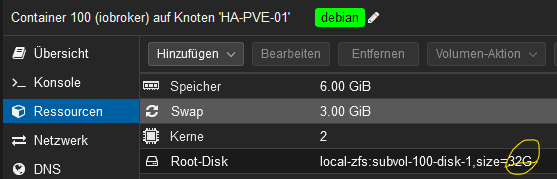
            OFFtopic: Wiso steht bei Laufwerksspeicher nur 93Gb? Habe eine 512Gb SSD verbaut

            Das hast du beim Einrichten des lxc selbst bestimmt.
            c135b0d7-0d60-4576-a3ff-c2defadb7c7e-grafik.png

            Proxmox und HA - dank KI/AI endlich "blocklyfrei"

            P 1 Antwort Letzte Antwort
            0
            • Meister MopperM Meister Mopper

              @peter666666 sagte in BackitUp Einstellungen für Synology NAS:

              OFFtopic: Wiso steht bei Laufwerksspeicher nur 93Gb? Habe eine 512Gb SSD verbaut

              Das hast du beim Einrichten des lxc selbst bestimmt.

              c135b0d7-0d60-4576-a3ff-c2defadb7c7e-grafik.png

              P Offline
              P Offline
              Peter666666
              schrieb am zuletzt editiert von
              #15

              @meister-mopper Das Foto bei mir ist aber nicht von dem Container sondern vom proxmox

              LG Peter

              Intel NUC i5 / 16GB RAM / 512GB SSD
              Synology DS220+ 10GB RAM / 8TB

              Meister MopperM 1 Antwort Letzte Antwort
              0
              • P Peter666666

                @meister-mopper habe das Backup iobroker (NAS) jetzt wiederhergestellt. Dann kam ein Fenster mit dem Log und nach ein Sekunden stand unten DONE. Jetzt kann ich nicht mehr auf den iobroker (NUC) zugreifen (Safari kann die Seite nicht öffnen) :(

                OFFtopic: Wiso steht bei Laufwerksspeicher nur 93Gb? Habe eine 512Gb SSD verbaut

                Bild 30.12.23 um 19.27.jpeg

                DJMarc75D Offline
                DJMarc75D Offline
                DJMarc75
                schrieb am zuletzt editiert von
                #16

                @peter666666 sagte in BackitUp Einstellungen für Synology NAS:

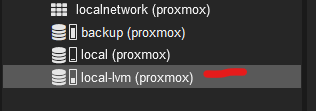
                nur 93Gb? Habe eine 512Gb SSD verbaut

                Das sind die 100 GB welche Du beim Einrichten dem Proxmox zugewiesen hast:

                Schau hier und Dir wird die komplette Kapazität angezeigt:
                Screenshot 2023-12-30 195608.png

                Lehrling seit 1975 !!!
                Beitrag geholfen ? dann gerne ein upvote rechts unten im Beitrag klicken ;)
                https://forum.iobroker.net/topic/51555/hinweise-f%C3%BCr-gute-forenbeitr%C3%A4ge

                P 1 Antwort Letzte Antwort
                1
                • DJMarc75D DJMarc75

                  @peter666666 sagte in BackitUp Einstellungen für Synology NAS:

                  nur 93Gb? Habe eine 512Gb SSD verbaut

                  Das sind die 100 GB welche Du beim Einrichten dem Proxmox zugewiesen hast:

                  Schau hier und Dir wird die komplette Kapazität angezeigt:

                  Screenshot 2023-12-30 195608.png

                  P Offline
                  P Offline
                  Peter666666
                  schrieb am zuletzt editiert von
                  #17

                  @djmarc75 danke - kann man das noch ändern?

                  LG Peter

                  Intel NUC i5 / 16GB RAM / 512GB SSD
                  Synology DS220+ 10GB RAM / 8TB

                  1 Antwort Letzte Antwort
                  0
                  • P Peter666666

                    @meister-mopper Das Foto bei mir ist aber nicht von dem Container sondern vom proxmox

                    Meister MopperM Online
                    Meister MopperM Online
                    Meister Mopper
                    Most Active
                    schrieb am zuletzt editiert von
                    #18

                    @peter666666 sagte in BackitUp Einstellungen für Synology NAS:

                    Das Foto bei mir ist aber nicht von dem Container sondern vom proxmox

                    😀 Sei dir sicher, deine Proxmox-Lernkurve wird in den nächsten Tagen/Wochen/Monaten erheblich nach oben gehen.

                    Proxmox und HA - dank KI/AI endlich "blocklyfrei"

                    P 1 Antwort Letzte Antwort
                    1
                    • Meister MopperM Meister Mopper

                      @peter666666 sagte in BackitUp Einstellungen für Synology NAS:

                      Das Foto bei mir ist aber nicht von dem Container sondern vom proxmox

                      😀 Sei dir sicher, deine Proxmox-Lernkurve wird in den nächsten Tagen/Wochen/Monaten erheblich nach oben gehen.

                      P Offline
                      P Offline
                      Peter666666
                      schrieb am zuletzt editiert von
                      #19

                      @meister-mopper das wäre gut :) der neue iobroker ist nicht mehr erreichbar :(

                      LG Peter

                      Intel NUC i5 / 16GB RAM / 512GB SSD
                      Synology DS220+ 10GB RAM / 8TB

                      Thomas BraunT 1 Antwort Letzte Antwort
                      0
                      • Meister MopperM Online
                        Meister MopperM Online
                        Meister Mopper
                        Most Active
                        schrieb am zuletzt editiert von
                        #20

                        @peter666666 sagte in BackitUp Einstellungen für Synology NAS:

                        der neue iobroker ist nicht mehr erreichbar

                        In der Konsole iob diag sagt was?

                        Proxmox und HA - dank KI/AI endlich "blocklyfrei"

                        P 1 Antwort Letzte Antwort
                        0
                        • P Peter666666

                          @meister-mopper das wäre gut :) der neue iobroker ist nicht mehr erreichbar :(

                          Thomas BraunT Online
                          Thomas BraunT Online
                          Thomas Braun
                          Most Active
                          schrieb am zuletzt editiert von
                          #21

                          @peter666666 sagte in BackitUp Einstellungen für Synology NAS:

                          der neue iobroker ist nicht mehr erreichbar

                          Ist das Backup überhaupt schon durch? Sprich ist Ruhe im Log?

                          Linux-Werkzeugkasten:
                          https://forum.iobroker.net/topic/42952/der-kleine-iobroker-linux-werkzeugkasten
                          NodeJS Fixer Skript:
                          https://forum.iobroker.net/topic/68035/iob-node-fix-skript
                          iob_diag: curl -sLf -o diag.sh https://iobroker.net/diag.sh && bash diag.sh

                          P 1 Antwort Letzte Antwort
                          0
                          • Thomas BraunT Thomas Braun

                            @peter666666 sagte in BackitUp Einstellungen für Synology NAS:

                            der neue iobroker ist nicht mehr erreichbar

                            Ist das Backup überhaupt schon durch? Sprich ist Ruhe im Log?

                            P Offline
                            P Offline
                            Peter666666
                            schrieb am zuletzt editiert von
                            #22

                            @thomas-braun

                            Bild 30.12.23 um 20.18.jpeg

                            wenn ich von der Konsole weg klicke und dann wieder auf die Konsole ist diese leer. Wie sehe ich wieder das was dargestellt wurde?

                            LG Peter

                            Intel NUC i5 / 16GB RAM / 512GB SSD
                            Synology DS220+ 10GB RAM / 8TB

                            DJMarc75D 1 Antwort Letzte Antwort
                            0
                            • P Peter666666

                              @thomas-braun

                              Bild 30.12.23 um 20.18.jpeg

                              wenn ich von der Konsole weg klicke und dann wieder auf die Konsole ist diese leer. Wie sehe ich wieder das was dargestellt wurde?

                              DJMarc75D Offline
                              DJMarc75D Offline
                              DJMarc75
                              schrieb am zuletzt editiert von
                              #23

                              @peter666666 sagte in BackitUp Einstellungen für Synology NAS:

                              Konsole

                              Bitte nicht in der Konsole innerhalb Proxmox.
                              Nutze eine Terminalsoftware und logge Dich dort per IP vom Container ein !

                              Lehrling seit 1975 !!!
                              Beitrag geholfen ? dann gerne ein upvote rechts unten im Beitrag klicken ;)
                              https://forum.iobroker.net/topic/51555/hinweise-f%C3%BCr-gute-forenbeitr%C3%A4ge

                              1 Antwort Letzte Antwort
                              0
                              • Meister MopperM Meister Mopper

                                @peter666666 sagte in BackitUp Einstellungen für Synology NAS:

                                der neue iobroker ist nicht mehr erreichbar

                                In der Konsole iob diag sagt was?

                                P Offline
                                P Offline
                                Peter666666
                                schrieb am zuletzt editiert von Peter666666
                                #24

                                @meister-mopper sagte in BackitUp Einstellungen für Synology NAS:

                                iob diag

                                Skript v.2023-10-10
                                
                                *** BASE SYSTEM ***
                                 Static hostname: ioBroker
                                       Icon name: computer-container
                                         Chassis: container ☐
                                  Virtualization: lxc
                                Operating System: Debian GNU/Linux 12 (bookworm)
                                          Kernel: Linux 6.5.11-7-pve
                                    Architecture: x86-64
                                
                                model name      : AMD Ryzen 9 4900H with Radeon Graphics
                                Docker          : false
                                Virtualization  : lxc
                                Kernel          : x86_64
                                Userland        : amd64
                                
                                Systemuptime and Load:
                                 20:34:58 up 5 min,  2 users,  load average: 0.27, 0.27, 0.13
                                CPU threads: 16
                                
                                
                                *** Time and Time Zones ***
                                               Local time: Sat 2023-12-30 20:34:58 CET
                                           Universal time: Sat 2023-12-30 19:34:58 UTC
                                                 RTC time: n/a
                                                Time zone: Europe/Berlin (CET, +0100)
                                System clock synchronized: yes
                                              NTP service: inactive
                                          RTC in local TZ: no
                                
                                *** User and Groups ***
                                peter
                                /home/peter
                                peter sudo users iobroker
                                
                                *** X-Server-Setup ***
                                X-Server:       false
                                Desktop: 
                                Terminal: 
                                Boot Target:    graphical.target
                                
                                *** MEMORY ***
                                               total        used        free      shared  buff/cache   available
                                Mem:            6.4G        566M        5.4G        114K        471M        5.9G
                                Swap:           536M          0B        536M
                                Total:          7.0G        566M        5.9G
                                
                                         6144 M total memory
                                          540 M used memory
                                          566 M active memory
                                          343 M inactive memory
                                         5153 M free memory
                                            0 M buffer memory
                                          450 M swap cache
                                          512 M total swap
                                            0 M used swap
                                          512 M free swap
                                
                                *** FAILED SERVICES ***
                                
                                  UNIT                    LOAD   ACTIVE SUB    DESCRIPTION
                                * run-rpc_pipefs.mount    loaded failed failed RPC Pipe File System
                                * sys-kernel-config.mount loaded failed failed Kernel Configuration File System
                                
                                LOAD   = Reflects whether the unit definition was properly loaded.
                                ACTIVE = The high-level unit activation state, i.e. generalization of SUB.
                                SUB    = The low-level unit activation state, values depend on unit type.
                                2 loaded units listed.
                                
                                *** FILESYSTEM ***
                                Filesystem                       Type      Size  Used Avail Use% Mounted on
                                /dev/mapper/pve-vm--100--disk--0 ext4       63G  4.0G   56G   7% /
                                none                             tmpfs     492K  4.0K  488K   1% /dev
                                udev                             devtmpfs   16G     0   16G   0% /dev/tty
                                tmpfs                            tmpfs      16G     0   16G   0% /dev/shm
                                tmpfs                            tmpfs     6.2G  108K  6.2G   1% /run
                                tmpfs                            tmpfs     5.0M     0  5.0M   0% /run/lock
                                
                                Messages concerning ext4 filesystem in dmesg:
                                dmesg: read kernel buffer failed: Operation not permitted
                                
                                Show mounted filesystems \(real ones only\):
                                TARGET SOURCE                           FSTYPE OPTIONS
                                /      /dev/mapper/pve-vm--100--disk--0 ext4   rw,relatime,stripe=16
                                
                                Files in neuralgic directories:
                                
                                /var:
                                420M    /var/
                                244M    /var/cache
                                240M    /var/cache/apt
                                164M    /var/cache/apt/archives
                                151M    /var/lib
                                
                                Hint: You are currently not seeing messages from other users and the system.
                                      Users in groups 'adm', 'systemd-journal' can see all messages.
                                      Pass -q to turn off this notice.
                                Archived and active journals take up 8.0M in the file system.
                                
                                /opt/iobroker/backups:
                                69M     /opt/iobroker/backups/
                                
                                /opt/iobroker/iobroker-data:
                                355M    /opt/iobroker/iobroker-data/
                                292M    /opt/iobroker/iobroker-data/files
                                78M     /opt/iobroker/iobroker-data/files/icons-open-icon-library-png
                                67M     /opt/iobroker/iobroker-data/files/javascript.admin
                                48M     /opt/iobroker/iobroker-data/files/javascript.admin/static
                                
                                The five largest files in iobroker-data are:
                                37M     /opt/iobroker/iobroker-data/objects.jsonl
                                25M     /opt/iobroker/iobroker-data/states.jsonl
                                21M     /opt/iobroker/iobroker-data/files/web.admin/static/js/main.aaea95f8.js.map
                                8.3M    /opt/iobroker/iobroker-data/files/web.admin/static/js/main.aaea95f8.js
                                7.5M    /opt/iobroker/iobroker-data/files/javascript.admin/static/js/691.26ff76ce.chunk.js.map
                                
                                USB-Devices by-id:
                                USB-Sticks -  Avoid direct links to /dev/* in your adapter setups, please always prefer the links 'by-id':
                                
                                find: '/dev/serial/by-id/': No such file or directory
                                
                                *** NodeJS-Installation ***
                                
                                /usr/bin/nodejs         v18.19.0
                                /usr/bin/node           v18.19.0
                                /usr/bin/npm            9.2.0
                                /usr/bin/npx            9.2.0
                                /home/iobroker/.diag.sh: line 281: corepack: command not found
                                 
                                *** nodejs is NOT correctly installed ***
                                
                                nodejs:
                                  Installed: 18.19.0+dfsg-6~deb12u1
                                  Candidate: 18.19.0+dfsg-6~deb12u1
                                  Version table:
                                 *** 18.19.0+dfsg-6~deb12u1 500
                                        500 http://security.debian.org bookworm-security/main amd64 Packages
                                        100 /var/lib/dpkg/status
                                     18.19.0-1nodesource1 500
                                        500 https://deb.nodesource.com/node_18.x nodistro/main amd64 Packages
                                     18.18.2-1nodesource1 500
                                        500 https://deb.nodesource.com/node_18.x nodistro/main amd64 Packages
                                     18.18.1-1nodesource1 500
                                        500 https://deb.nodesource.com/node_18.x nodistro/main amd64 Packages
                                     18.18.0-1nodesource1 500
                                        500 https://deb.nodesource.com/node_18.x nodistro/main amd64 Packages
                                     18.17.1-1nodesource1 500
                                        500 https://deb.nodesource.com/node_18.x nodistro/main amd64 Packages
                                     18.17.0-1nodesource1 500
                                        500 https://deb.nodesource.com/node_18.x nodistro/main amd64 Packages
                                     18.16.1-1nodesource1 500
                                        500 https://deb.nodesource.com/node_18.x nodistro/main amd64 Packages
                                     18.16.0-1nodesource1 500
                                        500 https://deb.nodesource.com/node_18.x nodistro/main amd64 Packages
                                     18.15.0-1nodesource1 500
                                        500 https://deb.nodesource.com/node_18.x nodistro/main amd64 Packages
                                     18.14.2-1nodesource1 500
                                        500 https://deb.nodesource.com/node_18.x nodistro/main amd64 Packages
                                     18.14.1-1nodesource1 500
                                        500 https://deb.nodesource.com/node_18.x nodistro/main amd64 Packages
                                     18.14.0-1nodesource1 500
                                        500 https://deb.nodesource.com/node_18.x nodistro/main amd64 Packages
                                     18.13.0+dfsg1-1 500
                                        500 http://deb.debian.org/debian bookworm/main amd64 Packages
                                     18.13.0-1nodesource1 500
                                        500 https://deb.nodesource.com/node_18.x nodistro/main amd64 Packages
                                     18.12.0-1nodesource1 500
                                        500 https://deb.nodesource.com/node_18.x nodistro/main amd64 Packages
                                     18.11.0-1nodesource1 500
                                        500 https://deb.nodesource.com/node_18.x nodistro/main amd64 Packages
                                     18.10.0-1nodesource1 500
                                        500 https://deb.nodesource.com/node_18.x nodistro/main amd64 Packages
                                     18.9.1-1nodesource1 500
                                        500 https://deb.nodesource.com/node_18.x nodistro/main amd64 Packages
                                     18.9.0-1nodesource1 500
                                        500 https://deb.nodesource.com/node_18.x nodistro/main amd64 Packages
                                     18.8.0-1nodesource1 500
                                        500 https://deb.nodesource.com/node_18.x nodistro/main amd64 Packages
                                     18.7.0-1nodesource1 500
                                        500 https://deb.nodesource.com/node_18.x nodistro/main amd64 Packages
                                     18.6.0-1nodesource1 500
                                        500 https://deb.nodesource.com/node_18.x nodistro/main amd64 Packages
                                     18.5.0-1nodesource1 500
                                        500 https://deb.nodesource.com/node_18.x nodistro/main amd64 Packages
                                     18.4.0-1nodesource1 500
                                        500 https://deb.nodesource.com/node_18.x nodistro/main amd64 Packages
                                     18.3.0-1nodesource1 500
                                        500 https://deb.nodesource.com/node_18.x nodistro/main amd64 Packages
                                     18.2.0-1nodesource1 500
                                        500 https://deb.nodesource.com/node_18.x nodistro/main amd64 Packages
                                     18.1.0-1nodesource1 500
                                        500 https://deb.nodesource.com/node_18.x nodistro/main amd64 Packages
                                     18.0.0-1nodesource1 500
                                        500 https://deb.nodesource.com/node_18.x nodistro/main amd64 Packages
                                
                                Temp directories causing npm8 problem: 0
                                No problems detected
                                
                                Errors in npm tree:
                                
                                *** ioBroker-Installation ***
                                
                                ioBroker Status
                                iobroker is running on this host.
                                
                                
                                Objects type: jsonl
                                States  type: jsonl
                                
                                Core adapters versions
                                js-controller:  5.0.17
                                admin:          6.12.0
                                javascript:     7.1.6
                                
                                Adapters from github:   5
                                
                                Adapter State
                                + system.adapter.admin.0                  : admin                 : ioBroker                                 -  enabled, port: 8081, bind: 0.0.0.0 (SSL), run as: admin
                                  system.adapter.awattar.0                : awattar               : ioBroker                                 - disabled
                                + system.adapter.backitup.0               : backitup              : ioBroker                                 -  enabled
                                  system.adapter.bmw.0                    : bmw                   : ioBroker                                 - disabled
                                  system.adapter.cloud.1                  : cloud                 : ioBroker                                 - disabled
                                  system.adapter.daswetter.0              : daswetter             : ioBroker                                 - disabled
                                  system.adapter.discovery.0              : discovery             : ioBroker                                 - disabled
                                  system.adapter.energiefluss-erweitert.0 : energiefluss-erweitert: ioBroker                                 - disabled
                                  system.adapter.energiefluss.0           : energiefluss          : ioBroker                                 - disabled
                                  system.adapter.flot.0                   : flot                  : ioBroker                                 - disabled
                                  system.adapter.fullybrowser.0           : fullybrowser          : ioBroker                                 - disabled
                                  system.adapter.go-e.0                   : go-e                  : ioBroker                                 - disabled
                                  system.adapter.history.0                : history               : ioBroker                                 - disabled
                                  system.adapter.homeconnect.0            : homeconnect           : ioBroker                                 - disabled
                                  system.adapter.icons-fatcow-hosting.0   : icons-fatcow-hosting  : ioBroker                                 - disabled
                                  system.adapter.icons-mfd-png.0          : icons-mfd-png         : ioBroker                                 - disabled
                                  system.adapter.icons-mfd-svg.0          : icons-mfd-svg         : ioBroker                                 - disabled
                                  system.adapter.icons-open-icon-library-png.0: icons-open-icon-library-png: ioBroker                                 - disabled
                                  system.adapter.info.0                   : info                  : ioBroker                                 - disabled
                                  system.adapter.jarvis.0                 : jarvis                : ioBroker                                 - disabled
                                  system.adapter.javascript.0             : javascript            : ioBroker                                 - disabled
                                  system.adapter.lgtv.0                   : lgtv                  : ioBroker                                 - disabled
                                  system.adapter.linktap.0                : linktap               : ioBroker                                 - disabled
                                  system.adapter.meross.0                 : meross                : ioBroker                                 - disabled
                                  system.adapter.mielecloudservice.0      : mielecloudservice     : ioBroker                                 - disabled
                                  system.adapter.mqtt.0                   : mqtt                  : ioBroker                                 - disabled, port: 1883, bind: 0.0.0.0
                                  system.adapter.netatmo.0                : netatmo               : ioBroker                                 - disabled
                                  system.adapter.node-red.0               : node-red              : ioBroker                                 - disabled, port: 1880, bind: 0.0.0.0
                                  system.adapter.pushover.0               : pushover              : ioBroker                                 - disabled
                                  system.adapter.ring.0                   : ring                  : ioBroker                                 - disabled
                                  system.adapter.shelly.0                 : shelly                : ioBroker                                 - disabled, port: 1882, bind: 0.0.0.0
                                  system.adapter.sourceanalytix.0         : sourceanalytix        : ioBroker                                 - disabled
                                  system.adapter.synology.0               : synology              : ioBroker                                 - disabled, port: 5000
                                  system.adapter.vis-bars.0               : vis-bars              : ioBroker                                 - disabled
                                  system.adapter.vis-canvas-gauges.0      : vis-canvas-gauges     : ioBroker                                 - disabled
                                  system.adapter.vis-history.0            : vis-history           : ioBroker                                 - disabled
                                  system.adapter.vis-hqwidgets.0          : vis-hqwidgets         : ioBroker                                 - disabled
                                  system.adapter.vis-icontwo.0            : vis-icontwo           : ioBroker                                 - disabled
                                  system.adapter.vis-inventwo.0           : vis-inventwo          : ioBroker                                 - disabled
                                  system.adapter.vis-jqui-mfd.0           : vis-jqui-mfd          : ioBroker                                 - disabled
                                  system.adapter.vis-metro.0              : vis-metro             : ioBroker                                 - disabled
                                  system.adapter.vis-timeandweather.0     : vis-timeandweather    : ioBroker                                 - disabled
                                  system.adapter.vis.0                    : vis                   : ioBroker                                 - disabled
                                  system.adapter.weatherunderground.0     : weatherunderground    : ioBroker                                 - disabled
                                  system.adapter.web.0                    : web                   : ioBroker                                 - disabled, port: 8082, bind: 0.0.0.0, run as: admin
                                
                                + instance is alive
                                
                                Enabled adapters with bindings
                                + system.adapter.admin.0                  : admin                 : ioBroker                                 -  enabled, port: 8081, bind: 0.0.0.0 (SSL), run as: admin
                                
                                ioBroker-Repositories
                                stable        : http://download.iobroker.net/sources-dist.json
                                beta          : http://download.iobroker.net/sources-dist-latest.json
                                
                                Active repo(s): stable
                                
                                Installed ioBroker-Instances
                                Used repository: stable
                                Adapter    "admin"        : 6.12.0   , installed 6.12.0
                                Adapter    "awattar"      : 1.0.6    , installed 1.0.6
                                Adapter    "backitup"     : 2.9.8    , installed 2.9.8
                                Adapter    "bmw"          : 2.5.7    , installed 2.7.2
                                Adapter    "cloud"        : 4.4.1    , installed 4.4.1
                                Adapter    "daswetter"    : 3.1.11   , installed 3.1.11
                                Adapter    "discovery"    : 4.2.0    , installed 4.2.0
                                Adapter    "flot"         : 1.12.0   , installed 1.12.0
                                Adapter    "fullybrowser" : 3.0.6    , installed 3.0.9
                                Adapter    "go-e"         : 1.0.29   , installed 1.0.29
                                Adapter    "history"      : 3.0.1    , installed 3.0.1
                                Adapter    "homeconnect"  : 1.1.1    , installed 1.3.0
                                Adapter    "icons-fatcow-hosting": 0.1.0, installed 0.1.0
                                Adapter    "icons-mfd-png": 1.2.1    , installed 1.2.1
                                Adapter    "icons-mfd-svg": 1.1.0    , installed 1.2.0
                                Adapter    "icons-open-icon-library-png": 0.1.2, installed 0.1.2
                                Adapter    "info"         : 2.0.0    , installed 2.0.0
                                Adapter    "jarvis"       : 3.1.8    , installed 3.1.8
                                Adapter    "javascript"   : 7.1.6    , installed 7.1.6
                                Controller "js-controller": 5.0.17   , installed 5.0.17
                                Adapter    "lgtv"         : 2.1.2    , installed 2.1.2
                                Adapter    "linktap"      : 0.3.0    , installed 0.3.0
                                Adapter    "meross"       : 1.16.1   , installed 1.16.1
                                Adapter    "mielecloudservice": 6.5.4, installed 6.5.4
                                Adapter    "mqtt"         : 5.1.0    , installed 5.1.0
                                Adapter    "netatmo"      : 3.1.0    , installed 3.1.0
                                Adapter    "node-red"     : 4.0.3    , installed 4.0.3
                                Adapter    "pushover"     : 3.0.6    , installed 3.0.6
                                Adapter    "ring"         : 5.0.10   , installed 5.0.10
                                Adapter    "shelly"       : 6.6.1    , installed 6.6.1
                                Adapter    "simple-api"   : 2.7.2    , installed 2.7.2
                                Adapter    "socketio"     : 6.6.0    , installed 6.6.0
                                Adapter    "synology"     : 3.0.1    , installed 3.0.1
                                Adapter    "vis"          : 1.5.4    , installed 1.5.4
                                Adapter    "vis-bars"     : 0.1.4    , installed 0.1.4
                                Adapter    "vis-canvas-gauges": 1.0.1, installed 1.0.1
                                Adapter    "vis-history"  : 1.0.0    , installed 1.0.0
                                Adapter    "vis-hqwidgets": 1.4.0    , installed 1.4.0
                                Adapter    "vis-icontwo"  : 1.3.0    , installed 1.0.0  [Updatable]
                                Adapter    "vis-inventwo" : 3.3.3    , installed 3.3.3
                                Adapter    "vis-jqui-mfd" : 1.0.12   , installed 1.0.12
                                Adapter    "vis-metro"    : 1.2.0    , installed 1.2.0
                                Adapter    "vis-timeandweather": 1.2.2, installed 1.2.2
                                Adapter    "weatherunderground": 3.6.0, installed 3.6.0
                                Adapter    "web"          : 6.1.10   , installed 6.1.10
                                Adapter    "ws"           : 2.5.8    , installed 2.5.8
                                
                                Objects and States
                                Please stand by - This may take a while
                                Objects:        12335
                                States:         11187
                                
                                *** OS-Repositories and Updates ***
                                Hit:1 http://deb.debian.org/debian bookworm InRelease
                                Hit:2 http://security.debian.org bookworm-security InRelease
                                Hit:3 http://deb.debian.org/debian bookworm-updates InRelease
                                Hit:4 https://deb.nodesource.com/node_18.x nodistro InRelease
                                Reading package lists...
                                Pending Updates: 0
                                
                                *** Listening Ports ***
                                Active Internet connections (only servers)
                                Proto Recv-Q Send-Q Local Address           Foreign Address         State       User       Inode      PID/Program name    
                                tcp        0      0 127.0.0.1:9001          0.0.0.0:*               LISTEN      1001       21861      132/iobroker.js-con 
                                tcp        0      0 127.0.0.1:9000          0.0.0.0:*               LISTEN      1001       21868      132/iobroker.js-con 
                                tcp        0      0 127.0.0.1:25            0.0.0.0:*               LISTEN      0          39257      296/master          
                                tcp        0      0 0.0.0.0:111             0.0.0.0:*               LISTEN      0          39125      1/init              
                                tcp6       0      0 :::111                  :::*                    LISTEN      0          39127      1/init              
                                tcp6       0      0 :::22                   :::*                    LISTEN      0          22946      1/init              
                                tcp6       0      0 :::8081                 :::*                    LISTEN      1001       32375      307/io.admin.0      
                                tcp6       0      0 ::1:25                  :::*                    LISTEN      0          39258      296/master          
                                udp        0      0 0.0.0.0:111             0.0.0.0:*                           0          39126      1/init              
                                udp6       0      0 :::111                  :::*                                0          39128      1/init              
                                
                                *** Log File - Last 25 Lines ***
                                
                                2023-12-30 20:29:26.991  - info: host.ioBroker ip addresses: 192.168.0.40 fe80::be24:11ff:fe98:9608
                                2023-12-30 20:29:27.978  - info: host.ioBroker connected to Objects and States
                                2023-12-30 20:29:27.995  - info: host.ioBroker added notifications configuration of host
                                2023-12-30 20:29:28.282  - info: host.ioBroker Delete state "system.host.ioBroker.versions.nodeCurrent"
                                2023-12-30 20:29:28.283  - info: host.ioBroker 45 instances found
                                2023-12-30 20:29:28.301  - info: host.ioBroker starting 2 instances
                                2023-12-30 20:29:28.364  - info: host.ioBroker Delete state "system.host.ioBroker.versions.nodeNewest"
                                2023-12-30 20:29:28.414  - info: host.ioBroker instance system.adapter.admin.0 started with pid 307
                                2023-12-30 20:29:28.417  - info: host.ioBroker Delete state "system.host.ioBroker.versions.nodeNewestNext"
                                2023-12-30 20:29:28.460  - info: host.ioBroker Delete state "system.host.ioBroker.versions.npmCurrent"
                                2023-12-30 20:29:28.504  - info: host.ioBroker Delete state "system.host.ioBroker.versions.npmNewest"
                                2023-12-30 20:29:28.547  - info: host.ioBroker Delete state "system.host.ioBroker.versions.npmNewestNext"
                                2023-12-30 20:29:28.592  - info: host.ioBroker Some obsolete host states deleted.
                                2023-12-30 20:29:29.452  - info: admin.0 (307) starting. Version 6.12.0 in /opt/iobroker/node_modules/iobroker.admin, node: v18.19.0, js-controller: 5.0.17
                                2023-12-30 20:29:29.467  - info: admin.0 (307) requesting all objects
                                2023-12-30 20:29:30.256  - info: admin.0 (307) received all objects
                                2023-12-30 20:29:30.479  - info: admin.0 (307) Request actual repository...
                                2023-12-30 20:29:30.511  - info: admin.0 (307) Secure socket.io server listening on port 8081
                                2023-12-30 20:29:30.513  - info: admin.0 (307) https server listening on port 8081
                                2023-12-30 20:29:30.514  - info: admin.0 (307) Use link "https://127.0.0.1:8081" to configure.
                                2023-12-30 20:29:30.865  - info: host.ioBroker Updating repository "stable" under "http://download.iobroker.net/sources-dist.json"
                                2023-12-30 20:29:32.778  - info: host.ioBroker instance system.adapter.backitup.0 started with pid 334
                                2023-12-30 20:29:32.823  - info: admin.0 (307) Repository received successfully.
                                2023-12-30 20:29:33.758  - info: backitup.0 (334) starting. Version 2.9.8 in /opt/iobroker/node_modules/iobroker.backitup, node: v18.19.0, js-controller: 5.0.17
                                2023-12-30 20:29:33.901  - info: backitup.0 (334) [iobroker] backup will be activated at 02:40 every 1 day(s)
                                
                                ======================= SUMMARY =======================
                                                        v.2023-10-10
                                
                                
                                 Static hostname: ioBroker
                                       Icon name: computer-container
                                         Chassis: container ☐
                                  Virtualization: lxc
                                Operating System: Debian GNU/Linux 12 (bookworm)
                                          Kernel: Linux 6.5.11-7-pve
                                    Architecture: x86-64
                                
                                Installation:           lxc
                                Kernel:                 x86_64
                                Userland:               amd64
                                Timezone:               Europe/Berlin (CET, +0100)
                                User-ID:                1000
                                X-Server:               false
                                Boot Target:            graphical.target
                                
                                Pending OS-Updates:     0
                                Pending iob updates:    1
                                
                                Nodejs-Installation:    /usr/bin/nodejs         v18.19.0
                                                        /usr/bin/node           v18.19.0
                                                        /usr/bin/npm            9.2.0
                                                        /usr/bin/npx            9.2.0
                                /home/iobroker/.diag.sh: line 490: corepack: command not found
                                                         
                                
                                Recommended versions are nodejs 18.19.0 and npm 10.2.3
                                *** nodejs is NOT correctly installed ***
                                Wrong installation path detected. This needs to be fixed
                                
                                Please check
                                https://forum.iobroker.net/topic/35090/howto-nodejs-installation-und-upgrades-unter-debian
                                for more information on how to fix these errors.
                                
                                MEMORY: 
                                               total        used        free      shared  buff/cache   available
                                Mem:            6.4G        635M        5.3G        114K        471M        5.8G
                                Swap:           536M          0B        536M
                                Total:          7.0G        635M        5.9G
                                
                                Active iob-Instances:   3
                                Active repo(s): stable
                                
                                ioBroker Core:          js-controller           5.0.17
                                                        admin                   6.12.0
                                
                                ioBroker Status:        iobroker is running on this host.
                                
                                
                                Objects type: jsonl
                                States  type: jsonl
                                
                                Status admin and web instance:
                                + system.adapter.admin.0                  : admin                 : ioBroker                                 -  enabled, port: 8081, bind: 0.0.0.0 (SSL), run as: admin
                                  system.adapter.web.0                    : web                   : ioBroker                                 - disabled, port: 8082, bind: 0.0.0.0, run as: admin
                                
                                Objects:                12335
                                States:                 11187
                                
                                Size of iob-Database:
                                
                                37M     /opt/iobroker/iobroker-data/objects.jsonl
                                25M     /opt/iobroker/iobroker-data/states.jsonl


                                =================== END OF SUMMARY ====================
                                

                                LG Peter

                                Intel NUC i5 / 16GB RAM / 512GB SSD
                                Synology DS220+ 10GB RAM / 8TB

                                Thomas BraunT 1 Antwort Letzte Antwort
                                0
                                • P Peter666666

                                  @meister-mopper sagte in BackitUp Einstellungen für Synology NAS:

                                  iob diag

                                  Skript v.2023-10-10
                                  
                                  *** BASE SYSTEM ***
                                   Static hostname: ioBroker
                                         Icon name: computer-container
                                           Chassis: container ☐
                                    Virtualization: lxc
                                  Operating System: Debian GNU/Linux 12 (bookworm)
                                            Kernel: Linux 6.5.11-7-pve
                                      Architecture: x86-64
                                  
                                  model name      : AMD Ryzen 9 4900H with Radeon Graphics
                                  Docker          : false
                                  Virtualization  : lxc
                                  Kernel          : x86_64
                                  Userland        : amd64
                                  
                                  Systemuptime and Load:
                                   20:34:58 up 5 min,  2 users,  load average: 0.27, 0.27, 0.13
                                  CPU threads: 16
                                  
                                  
                                  *** Time and Time Zones ***
                                                 Local time: Sat 2023-12-30 20:34:58 CET
                                             Universal time: Sat 2023-12-30 19:34:58 UTC
                                                   RTC time: n/a
                                                  Time zone: Europe/Berlin (CET, +0100)
                                  System clock synchronized: yes
                                                NTP service: inactive
                                            RTC in local TZ: no
                                  
                                  *** User and Groups ***
                                  peter
                                  /home/peter
                                  peter sudo users iobroker
                                  
                                  *** X-Server-Setup ***
                                  X-Server:       false
                                  Desktop: 
                                  Terminal: 
                                  Boot Target:    graphical.target
                                  
                                  *** MEMORY ***
                                                 total        used        free      shared  buff/cache   available
                                  Mem:            6.4G        566M        5.4G        114K        471M        5.9G
                                  Swap:           536M          0B        536M
                                  Total:          7.0G        566M        5.9G
                                  
                                           6144 M total memory
                                            540 M used memory
                                            566 M active memory
                                            343 M inactive memory
                                           5153 M free memory
                                              0 M buffer memory
                                            450 M swap cache
                                            512 M total swap
                                              0 M used swap
                                            512 M free swap
                                  
                                  *** FAILED SERVICES ***
                                  
                                    UNIT                    LOAD   ACTIVE SUB    DESCRIPTION
                                  * run-rpc_pipefs.mount    loaded failed failed RPC Pipe File System
                                  * sys-kernel-config.mount loaded failed failed Kernel Configuration File System
                                  
                                  LOAD   = Reflects whether the unit definition was properly loaded.
                                  ACTIVE = The high-level unit activation state, i.e. generalization of SUB.
                                  SUB    = The low-level unit activation state, values depend on unit type.
                                  2 loaded units listed.
                                  
                                  *** FILESYSTEM ***
                                  Filesystem                       Type      Size  Used Avail Use% Mounted on
                                  /dev/mapper/pve-vm--100--disk--0 ext4       63G  4.0G   56G   7% /
                                  none                             tmpfs     492K  4.0K  488K   1% /dev
                                  udev                             devtmpfs   16G     0   16G   0% /dev/tty
                                  tmpfs                            tmpfs      16G     0   16G   0% /dev/shm
                                  tmpfs                            tmpfs     6.2G  108K  6.2G   1% /run
                                  tmpfs                            tmpfs     5.0M     0  5.0M   0% /run/lock
                                  
                                  Messages concerning ext4 filesystem in dmesg:
                                  dmesg: read kernel buffer failed: Operation not permitted
                                  
                                  Show mounted filesystems \(real ones only\):
                                  TARGET SOURCE                           FSTYPE OPTIONS
                                  /      /dev/mapper/pve-vm--100--disk--0 ext4   rw,relatime,stripe=16
                                  
                                  Files in neuralgic directories:
                                  
                                  /var:
                                  420M    /var/
                                  244M    /var/cache
                                  240M    /var/cache/apt
                                  164M    /var/cache/apt/archives
                                  151M    /var/lib
                                  
                                  Hint: You are currently not seeing messages from other users and the system.
                                        Users in groups 'adm', 'systemd-journal' can see all messages.
                                        Pass -q to turn off this notice.
                                  Archived and active journals take up 8.0M in the file system.
                                  
                                  /opt/iobroker/backups:
                                  69M     /opt/iobroker/backups/
                                  
                                  /opt/iobroker/iobroker-data:
                                  355M    /opt/iobroker/iobroker-data/
                                  292M    /opt/iobroker/iobroker-data/files
                                  78M     /opt/iobroker/iobroker-data/files/icons-open-icon-library-png
                                  67M     /opt/iobroker/iobroker-data/files/javascript.admin
                                  48M     /opt/iobroker/iobroker-data/files/javascript.admin/static
                                  
                                  The five largest files in iobroker-data are:
                                  37M     /opt/iobroker/iobroker-data/objects.jsonl
                                  25M     /opt/iobroker/iobroker-data/states.jsonl
                                  21M     /opt/iobroker/iobroker-data/files/web.admin/static/js/main.aaea95f8.js.map
                                  8.3M    /opt/iobroker/iobroker-data/files/web.admin/static/js/main.aaea95f8.js
                                  7.5M    /opt/iobroker/iobroker-data/files/javascript.admin/static/js/691.26ff76ce.chunk.js.map
                                  
                                  USB-Devices by-id:
                                  USB-Sticks -  Avoid direct links to /dev/* in your adapter setups, please always prefer the links 'by-id':
                                  
                                  find: '/dev/serial/by-id/': No such file or directory
                                  
                                  *** NodeJS-Installation ***
                                  
                                  /usr/bin/nodejs         v18.19.0
                                  /usr/bin/node           v18.19.0
                                  /usr/bin/npm            9.2.0
                                  /usr/bin/npx            9.2.0
                                  /home/iobroker/.diag.sh: line 281: corepack: command not found
                                   
                                  *** nodejs is NOT correctly installed ***
                                  
                                  nodejs:
                                    Installed: 18.19.0+dfsg-6~deb12u1
                                    Candidate: 18.19.0+dfsg-6~deb12u1
                                    Version table:
                                   *** 18.19.0+dfsg-6~deb12u1 500
                                          500 http://security.debian.org bookworm-security/main amd64 Packages
                                          100 /var/lib/dpkg/status
                                       18.19.0-1nodesource1 500
                                          500 https://deb.nodesource.com/node_18.x nodistro/main amd64 Packages
                                       18.18.2-1nodesource1 500
                                          500 https://deb.nodesource.com/node_18.x nodistro/main amd64 Packages
                                       18.18.1-1nodesource1 500
                                          500 https://deb.nodesource.com/node_18.x nodistro/main amd64 Packages
                                       18.18.0-1nodesource1 500
                                          500 https://deb.nodesource.com/node_18.x nodistro/main amd64 Packages
                                       18.17.1-1nodesource1 500
                                          500 https://deb.nodesource.com/node_18.x nodistro/main amd64 Packages
                                       18.17.0-1nodesource1 500
                                          500 https://deb.nodesource.com/node_18.x nodistro/main amd64 Packages
                                       18.16.1-1nodesource1 500
                                          500 https://deb.nodesource.com/node_18.x nodistro/main amd64 Packages
                                       18.16.0-1nodesource1 500
                                          500 https://deb.nodesource.com/node_18.x nodistro/main amd64 Packages
                                       18.15.0-1nodesource1 500
                                          500 https://deb.nodesource.com/node_18.x nodistro/main amd64 Packages
                                       18.14.2-1nodesource1 500
                                          500 https://deb.nodesource.com/node_18.x nodistro/main amd64 Packages
                                       18.14.1-1nodesource1 500
                                          500 https://deb.nodesource.com/node_18.x nodistro/main amd64 Packages
                                       18.14.0-1nodesource1 500
                                          500 https://deb.nodesource.com/node_18.x nodistro/main amd64 Packages
                                       18.13.0+dfsg1-1 500
                                          500 http://deb.debian.org/debian bookworm/main amd64 Packages
                                       18.13.0-1nodesource1 500
                                          500 https://deb.nodesource.com/node_18.x nodistro/main amd64 Packages
                                       18.12.0-1nodesource1 500
                                          500 https://deb.nodesource.com/node_18.x nodistro/main amd64 Packages
                                       18.11.0-1nodesource1 500
                                          500 https://deb.nodesource.com/node_18.x nodistro/main amd64 Packages
                                       18.10.0-1nodesource1 500
                                          500 https://deb.nodesource.com/node_18.x nodistro/main amd64 Packages
                                       18.9.1-1nodesource1 500
                                          500 https://deb.nodesource.com/node_18.x nodistro/main amd64 Packages
                                       18.9.0-1nodesource1 500
                                          500 https://deb.nodesource.com/node_18.x nodistro/main amd64 Packages
                                       18.8.0-1nodesource1 500
                                          500 https://deb.nodesource.com/node_18.x nodistro/main amd64 Packages
                                       18.7.0-1nodesource1 500
                                          500 https://deb.nodesource.com/node_18.x nodistro/main amd64 Packages
                                       18.6.0-1nodesource1 500
                                          500 https://deb.nodesource.com/node_18.x nodistro/main amd64 Packages
                                       18.5.0-1nodesource1 500
                                          500 https://deb.nodesource.com/node_18.x nodistro/main amd64 Packages
                                       18.4.0-1nodesource1 500
                                          500 https://deb.nodesource.com/node_18.x nodistro/main amd64 Packages
                                       18.3.0-1nodesource1 500
                                          500 https://deb.nodesource.com/node_18.x nodistro/main amd64 Packages
                                       18.2.0-1nodesource1 500
                                          500 https://deb.nodesource.com/node_18.x nodistro/main amd64 Packages
                                       18.1.0-1nodesource1 500
                                          500 https://deb.nodesource.com/node_18.x nodistro/main amd64 Packages
                                       18.0.0-1nodesource1 500
                                          500 https://deb.nodesource.com/node_18.x nodistro/main amd64 Packages
                                  
                                  Temp directories causing npm8 problem: 0
                                  No problems detected
                                  
                                  Errors in npm tree:
                                  
                                  *** ioBroker-Installation ***
                                  
                                  ioBroker Status
                                  iobroker is running on this host.
                                  
                                  
                                  Objects type: jsonl
                                  States  type: jsonl
                                  
                                  Core adapters versions
                                  js-controller:  5.0.17
                                  admin:          6.12.0
                                  javascript:     7.1.6
                                  
                                  Adapters from github:   5
                                  
                                  Adapter State
                                  + system.adapter.admin.0                  : admin                 : ioBroker                                 -  enabled, port: 8081, bind: 0.0.0.0 (SSL), run as: admin
                                    system.adapter.awattar.0                : awattar               : ioBroker                                 - disabled
                                  + system.adapter.backitup.0               : backitup              : ioBroker                                 -  enabled
                                    system.adapter.bmw.0                    : bmw                   : ioBroker                                 - disabled
                                    system.adapter.cloud.1                  : cloud                 : ioBroker                                 - disabled
                                    system.adapter.daswetter.0              : daswetter             : ioBroker                                 - disabled
                                    system.adapter.discovery.0              : discovery             : ioBroker                                 - disabled
                                    system.adapter.energiefluss-erweitert.0 : energiefluss-erweitert: ioBroker                                 - disabled
                                    system.adapter.energiefluss.0           : energiefluss          : ioBroker                                 - disabled
                                    system.adapter.flot.0                   : flot                  : ioBroker                                 - disabled
                                    system.adapter.fullybrowser.0           : fullybrowser          : ioBroker                                 - disabled
                                    system.adapter.go-e.0                   : go-e                  : ioBroker                                 - disabled
                                    system.adapter.history.0                : history               : ioBroker                                 - disabled
                                    system.adapter.homeconnect.0            : homeconnect           : ioBroker                                 - disabled
                                    system.adapter.icons-fatcow-hosting.0   : icons-fatcow-hosting  : ioBroker                                 - disabled
                                    system.adapter.icons-mfd-png.0          : icons-mfd-png         : ioBroker                                 - disabled
                                    system.adapter.icons-mfd-svg.0          : icons-mfd-svg         : ioBroker                                 - disabled
                                    system.adapter.icons-open-icon-library-png.0: icons-open-icon-library-png: ioBroker                                 - disabled
                                    system.adapter.info.0                   : info                  : ioBroker                                 - disabled
                                    system.adapter.jarvis.0                 : jarvis                : ioBroker                                 - disabled
                                    system.adapter.javascript.0             : javascript            : ioBroker                                 - disabled
                                    system.adapter.lgtv.0                   : lgtv                  : ioBroker                                 - disabled
                                    system.adapter.linktap.0                : linktap               : ioBroker                                 - disabled
                                    system.adapter.meross.0                 : meross                : ioBroker                                 - disabled
                                    system.adapter.mielecloudservice.0      : mielecloudservice     : ioBroker                                 - disabled
                                    system.adapter.mqtt.0                   : mqtt                  : ioBroker                                 - disabled, port: 1883, bind: 0.0.0.0
                                    system.adapter.netatmo.0                : netatmo               : ioBroker                                 - disabled
                                    system.adapter.node-red.0               : node-red              : ioBroker                                 - disabled, port: 1880, bind: 0.0.0.0
                                    system.adapter.pushover.0               : pushover              : ioBroker                                 - disabled
                                    system.adapter.ring.0                   : ring                  : ioBroker                                 - disabled
                                    system.adapter.shelly.0                 : shelly                : ioBroker                                 - disabled, port: 1882, bind: 0.0.0.0
                                    system.adapter.sourceanalytix.0         : sourceanalytix        : ioBroker                                 - disabled
                                    system.adapter.synology.0               : synology              : ioBroker                                 - disabled, port: 5000
                                    system.adapter.vis-bars.0               : vis-bars              : ioBroker                                 - disabled
                                    system.adapter.vis-canvas-gauges.0      : vis-canvas-gauges     : ioBroker                                 - disabled
                                    system.adapter.vis-history.0            : vis-history           : ioBroker                                 - disabled
                                    system.adapter.vis-hqwidgets.0          : vis-hqwidgets         : ioBroker                                 - disabled
                                    system.adapter.vis-icontwo.0            : vis-icontwo           : ioBroker                                 - disabled
                                    system.adapter.vis-inventwo.0           : vis-inventwo          : ioBroker                                 - disabled
                                    system.adapter.vis-jqui-mfd.0           : vis-jqui-mfd          : ioBroker                                 - disabled
                                    system.adapter.vis-metro.0              : vis-metro             : ioBroker                                 - disabled
                                    system.adapter.vis-timeandweather.0     : vis-timeandweather    : ioBroker                                 - disabled
                                    system.adapter.vis.0                    : vis                   : ioBroker                                 - disabled
                                    system.adapter.weatherunderground.0     : weatherunderground    : ioBroker                                 - disabled
                                    system.adapter.web.0                    : web                   : ioBroker                                 - disabled, port: 8082, bind: 0.0.0.0, run as: admin
                                  
                                  + instance is alive
                                  
                                  Enabled adapters with bindings
                                  + system.adapter.admin.0                  : admin                 : ioBroker                                 -  enabled, port: 8081, bind: 0.0.0.0 (SSL), run as: admin
                                  
                                  ioBroker-Repositories
                                  stable        : http://download.iobroker.net/sources-dist.json
                                  beta          : http://download.iobroker.net/sources-dist-latest.json
                                  
                                  Active repo(s): stable
                                  
                                  Installed ioBroker-Instances
                                  Used repository: stable
                                  Adapter    "admin"        : 6.12.0   , installed 6.12.0
                                  Adapter    "awattar"      : 1.0.6    , installed 1.0.6
                                  Adapter    "backitup"     : 2.9.8    , installed 2.9.8
                                  Adapter    "bmw"          : 2.5.7    , installed 2.7.2
                                  Adapter    "cloud"        : 4.4.1    , installed 4.4.1
                                  Adapter    "daswetter"    : 3.1.11   , installed 3.1.11
                                  Adapter    "discovery"    : 4.2.0    , installed 4.2.0
                                  Adapter    "flot"         : 1.12.0   , installed 1.12.0
                                  Adapter    "fullybrowser" : 3.0.6    , installed 3.0.9
                                  Adapter    "go-e"         : 1.0.29   , installed 1.0.29
                                  Adapter    "history"      : 3.0.1    , installed 3.0.1
                                  Adapter    "homeconnect"  : 1.1.1    , installed 1.3.0
                                  Adapter    "icons-fatcow-hosting": 0.1.0, installed 0.1.0
                                  Adapter    "icons-mfd-png": 1.2.1    , installed 1.2.1
                                  Adapter    "icons-mfd-svg": 1.1.0    , installed 1.2.0
                                  Adapter    "icons-open-icon-library-png": 0.1.2, installed 0.1.2
                                  Adapter    "info"         : 2.0.0    , installed 2.0.0
                                  Adapter    "jarvis"       : 3.1.8    , installed 3.1.8
                                  Adapter    "javascript"   : 7.1.6    , installed 7.1.6
                                  Controller "js-controller": 5.0.17   , installed 5.0.17
                                  Adapter    "lgtv"         : 2.1.2    , installed 2.1.2
                                  Adapter    "linktap"      : 0.3.0    , installed 0.3.0
                                  Adapter    "meross"       : 1.16.1   , installed 1.16.1
                                  Adapter    "mielecloudservice": 6.5.4, installed 6.5.4
                                  Adapter    "mqtt"         : 5.1.0    , installed 5.1.0
                                  Adapter    "netatmo"      : 3.1.0    , installed 3.1.0
                                  Adapter    "node-red"     : 4.0.3    , installed 4.0.3
                                  Adapter    "pushover"     : 3.0.6    , installed 3.0.6
                                  Adapter    "ring"         : 5.0.10   , installed 5.0.10
                                  Adapter    "shelly"       : 6.6.1    , installed 6.6.1
                                  Adapter    "simple-api"   : 2.7.2    , installed 2.7.2
                                  Adapter    "socketio"     : 6.6.0    , installed 6.6.0
                                  Adapter    "synology"     : 3.0.1    , installed 3.0.1
                                  Adapter    "vis"          : 1.5.4    , installed 1.5.4
                                  Adapter    "vis-bars"     : 0.1.4    , installed 0.1.4
                                  Adapter    "vis-canvas-gauges": 1.0.1, installed 1.0.1
                                  Adapter    "vis-history"  : 1.0.0    , installed 1.0.0
                                  Adapter    "vis-hqwidgets": 1.4.0    , installed 1.4.0
                                  Adapter    "vis-icontwo"  : 1.3.0    , installed 1.0.0  [Updatable]
                                  Adapter    "vis-inventwo" : 3.3.3    , installed 3.3.3
                                  Adapter    "vis-jqui-mfd" : 1.0.12   , installed 1.0.12
                                  Adapter    "vis-metro"    : 1.2.0    , installed 1.2.0
                                  Adapter    "vis-timeandweather": 1.2.2, installed 1.2.2
                                  Adapter    "weatherunderground": 3.6.0, installed 3.6.0
                                  Adapter    "web"          : 6.1.10   , installed 6.1.10
                                  Adapter    "ws"           : 2.5.8    , installed 2.5.8
                                  
                                  Objects and States
                                  Please stand by - This may take a while
                                  Objects:        12335
                                  States:         11187
                                  
                                  *** OS-Repositories and Updates ***
                                  Hit:1 http://deb.debian.org/debian bookworm InRelease
                                  Hit:2 http://security.debian.org bookworm-security InRelease
                                  Hit:3 http://deb.debian.org/debian bookworm-updates InRelease
                                  Hit:4 https://deb.nodesource.com/node_18.x nodistro InRelease
                                  Reading package lists...
                                  Pending Updates: 0
                                  
                                  *** Listening Ports ***
                                  Active Internet connections (only servers)
                                  Proto Recv-Q Send-Q Local Address           Foreign Address         State       User       Inode      PID/Program name    
                                  tcp        0      0 127.0.0.1:9001          0.0.0.0:*               LISTEN      1001       21861      132/iobroker.js-con 
                                  tcp        0      0 127.0.0.1:9000          0.0.0.0:*               LISTEN      1001       21868      132/iobroker.js-con 
                                  tcp        0      0 127.0.0.1:25            0.0.0.0:*               LISTEN      0          39257      296/master          
                                  tcp        0      0 0.0.0.0:111             0.0.0.0:*               LISTEN      0          39125      1/init              
                                  tcp6       0      0 :::111                  :::*                    LISTEN      0          39127      1/init              
                                  tcp6       0      0 :::22                   :::*                    LISTEN      0          22946      1/init              
                                  tcp6       0      0 :::8081                 :::*                    LISTEN      1001       32375      307/io.admin.0      
                                  tcp6       0      0 ::1:25                  :::*                    LISTEN      0          39258      296/master          
                                  udp        0      0 0.0.0.0:111             0.0.0.0:*                           0          39126      1/init              
                                  udp6       0      0 :::111                  :::*                                0          39128      1/init              
                                  
                                  *** Log File - Last 25 Lines ***
                                  
                                  2023-12-30 20:29:26.991  - info: host.ioBroker ip addresses: 192.168.0.40 fe80::be24:11ff:fe98:9608
                                  2023-12-30 20:29:27.978  - info: host.ioBroker connected to Objects and States
                                  2023-12-30 20:29:27.995  - info: host.ioBroker added notifications configuration of host
                                  2023-12-30 20:29:28.282  - info: host.ioBroker Delete state "system.host.ioBroker.versions.nodeCurrent"
                                  2023-12-30 20:29:28.283  - info: host.ioBroker 45 instances found
                                  2023-12-30 20:29:28.301  - info: host.ioBroker starting 2 instances
                                  2023-12-30 20:29:28.364  - info: host.ioBroker Delete state "system.host.ioBroker.versions.nodeNewest"
                                  2023-12-30 20:29:28.414  - info: host.ioBroker instance system.adapter.admin.0 started with pid 307
                                  2023-12-30 20:29:28.417  - info: host.ioBroker Delete state "system.host.ioBroker.versions.nodeNewestNext"
                                  2023-12-30 20:29:28.460  - info: host.ioBroker Delete state "system.host.ioBroker.versions.npmCurrent"
                                  2023-12-30 20:29:28.504  - info: host.ioBroker Delete state "system.host.ioBroker.versions.npmNewest"
                                  2023-12-30 20:29:28.547  - info: host.ioBroker Delete state "system.host.ioBroker.versions.npmNewestNext"
                                  2023-12-30 20:29:28.592  - info: host.ioBroker Some obsolete host states deleted.
                                  2023-12-30 20:29:29.452  - info: admin.0 (307) starting. Version 6.12.0 in /opt/iobroker/node_modules/iobroker.admin, node: v18.19.0, js-controller: 5.0.17
                                  2023-12-30 20:29:29.467  - info: admin.0 (307) requesting all objects
                                  2023-12-30 20:29:30.256  - info: admin.0 (307) received all objects
                                  2023-12-30 20:29:30.479  - info: admin.0 (307) Request actual repository...
                                  2023-12-30 20:29:30.511  - info: admin.0 (307) Secure socket.io server listening on port 8081
                                  2023-12-30 20:29:30.513  - info: admin.0 (307) https server listening on port 8081
                                  2023-12-30 20:29:30.514  - info: admin.0 (307) Use link "https://127.0.0.1:8081" to configure.
                                  2023-12-30 20:29:30.865  - info: host.ioBroker Updating repository "stable" under "http://download.iobroker.net/sources-dist.json"
                                  2023-12-30 20:29:32.778  - info: host.ioBroker instance system.adapter.backitup.0 started with pid 334
                                  2023-12-30 20:29:32.823  - info: admin.0 (307) Repository received successfully.
                                  2023-12-30 20:29:33.758  - info: backitup.0 (334) starting. Version 2.9.8 in /opt/iobroker/node_modules/iobroker.backitup, node: v18.19.0, js-controller: 5.0.17
                                  2023-12-30 20:29:33.901  - info: backitup.0 (334) [iobroker] backup will be activated at 02:40 every 1 day(s)
                                  
                                  ======================= SUMMARY =======================
                                                          v.2023-10-10
                                  
                                  
                                   Static hostname: ioBroker
                                         Icon name: computer-container
                                           Chassis: container ☐
                                    Virtualization: lxc
                                  Operating System: Debian GNU/Linux 12 (bookworm)
                                            Kernel: Linux 6.5.11-7-pve
                                      Architecture: x86-64
                                  
                                  Installation:           lxc
                                  Kernel:                 x86_64
                                  Userland:               amd64
                                  Timezone:               Europe/Berlin (CET, +0100)
                                  User-ID:                1000
                                  X-Server:               false
                                  Boot Target:            graphical.target
                                  
                                  Pending OS-Updates:     0
                                  Pending iob updates:    1
                                  
                                  Nodejs-Installation:    /usr/bin/nodejs         v18.19.0
                                                          /usr/bin/node           v18.19.0
                                                          /usr/bin/npm            9.2.0
                                                          /usr/bin/npx            9.2.0
                                  /home/iobroker/.diag.sh: line 490: corepack: command not found
                                                           
                                  
                                  Recommended versions are nodejs 18.19.0 and npm 10.2.3
                                  *** nodejs is NOT correctly installed ***
                                  Wrong installation path detected. This needs to be fixed
                                  
                                  Please check
                                  https://forum.iobroker.net/topic/35090/howto-nodejs-installation-und-upgrades-unter-debian
                                  for more information on how to fix these errors.
                                  
                                  MEMORY: 
                                                 total        used        free      shared  buff/cache   available
                                  Mem:            6.4G        635M        5.3G        114K        471M        5.8G
                                  Swap:           536M          0B        536M
                                  Total:          7.0G        635M        5.9G
                                  
                                  Active iob-Instances:   3
                                  Active repo(s): stable
                                  
                                  ioBroker Core:          js-controller           5.0.17
                                                          admin                   6.12.0
                                  
                                  ioBroker Status:        iobroker is running on this host.
                                  
                                  
                                  Objects type: jsonl
                                  States  type: jsonl
                                  
                                  Status admin and web instance:
                                  + system.adapter.admin.0                  : admin                 : ioBroker                                 -  enabled, port: 8081, bind: 0.0.0.0 (SSL), run as: admin
                                    system.adapter.web.0                    : web                   : ioBroker                                 - disabled, port: 8082, bind: 0.0.0.0, run as: admin
                                  
                                  Objects:                12335
                                  States:                 11187
                                  
                                  Size of iob-Database:
                                  
                                  37M     /opt/iobroker/iobroker-data/objects.jsonl
                                  25M     /opt/iobroker/iobroker-data/states.jsonl


                                  =================== END OF SUMMARY ====================
                                  
                                  Thomas BraunT Online
                                  Thomas BraunT Online
                                  Thomas Braun
                                  Most Active
                                  schrieb am zuletzt editiert von
                                  #25

                                  @peter666666

                                  Da wird die falsche nodejs-Version vom Installer herangezogen. Fix hier:

                                  https://forum.iobroker.net/topic/71478/plötzliche-probleme-durch-nodejs-dfsg-version

                                  Linux-Werkzeugkasten:
                                  https://forum.iobroker.net/topic/42952/der-kleine-iobroker-linux-werkzeugkasten
                                  NodeJS Fixer Skript:
                                  https://forum.iobroker.net/topic/68035/iob-node-fix-skript
                                  iob_diag: curl -sLf -o diag.sh https://iobroker.net/diag.sh && bash diag.sh

                                  P 1 Antwort Letzte Antwort
                                  1
                                  • Thomas BraunT Thomas Braun

                                    @peter666666

                                    Da wird die falsche nodejs-Version vom Installer herangezogen. Fix hier:

                                    https://forum.iobroker.net/topic/71478/plötzliche-probleme-durch-nodejs-dfsg-version

                                    P Offline
                                    P Offline
                                    Peter666666
                                    schrieb am zuletzt editiert von
                                    #26

                                    @thomas-braun danke. Habe die 3 Zeilen ausgeführt und ist durchgelaufen. Leider kann ich den broker danach trotzdem nicht aufrufen

                                    LG Peter

                                    Intel NUC i5 / 16GB RAM / 512GB SSD
                                    Synology DS220+ 10GB RAM / 8TB

                                    Thomas BraunT 1 Antwort Letzte Antwort
                                    0
                                    • P Peter666666

                                      @thomas-braun danke. Habe die 3 Zeilen ausgeführt und ist durchgelaufen. Leider kann ich den broker danach trotzdem nicht aufrufen

                                      Thomas BraunT Online
                                      Thomas BraunT Online
                                      Thomas Braun
                                      Most Active
                                      schrieb am zuletzt editiert von
                                      #27

                                      @peter666666 sagte in BackitUp Einstellungen für Synology NAS:

                                      Leider kann ich den broker danach trotzdem nicht aufrufen

                                      Aber

                                      iob diag
                                      

                                      kannst du danach nochmal aufrufen.

                                      Linux-Werkzeugkasten:
                                      https://forum.iobroker.net/topic/42952/der-kleine-iobroker-linux-werkzeugkasten
                                      NodeJS Fixer Skript:
                                      https://forum.iobroker.net/topic/68035/iob-node-fix-skript
                                      iob_diag: curl -sLf -o diag.sh https://iobroker.net/diag.sh && bash diag.sh

                                      P 2 Antworten Letzte Antwort
                                      1
                                      • Thomas BraunT Thomas Braun

                                        @peter666666 sagte in BackitUp Einstellungen für Synology NAS:

                                        Leider kann ich den broker danach trotzdem nicht aufrufen

                                        Aber

                                        iob diag
                                        

                                        kannst du danach nochmal aufrufen.

                                        P Offline
                                        P Offline
                                        Peter666666
                                        schrieb am zuletzt editiert von Peter666666
                                        #28

                                        @thomas-braun

                                        ======= Start marking the full check here =========
                                        
                                        Skript v.2023-10-10
                                        
                                        *** BASE SYSTEM ***
                                         Static hostname: ioBroker
                                               Icon name: computer-container
                                                 Chassis: container ☐
                                          Virtualization: lxc
                                        Operating System: Debian GNU/Linux 12 (bookworm)
                                                  Kernel: Linux 6.5.11-7-pve
                                            Architecture: x86-64
                                        
                                        model name      : AMD Ryzen 9 4900H with Radeon Graphics
                                        Docker          : false
                                        Virtualization  : lxc
                                        Kernel          : x86_64
                                        Userland        : amd64
                                        
                                        Systemuptime and Load:
                                         20:56:44 up 6 min,  2 users,  load average: 0.14, 0.20, 0.16
                                        CPU threads: 16
                                        
                                        
                                        *** Time and Time Zones ***
                                                       Local time: Sat 2023-12-30 20:56:44 CET
                                                   Universal time: Sat 2023-12-30 19:56:44 UTC
                                                         RTC time: n/a
                                                        Time zone: Europe/Berlin (CET, +0100)
                                        System clock synchronized: yes
                                                      NTP service: inactive
                                                  RTC in local TZ: no
                                        
                                        *** User and Groups ***
                                        peter
                                        /home/peter
                                        peter sudo users iobroker
                                        
                                        *** X-Server-Setup ***
                                        X-Server:       false
                                        Desktop: 
                                        Terminal: 
                                        Boot Target:    graphical.target
                                        
                                        *** MEMORY ***
                                                       total        used        free      shared  buff/cache   available
                                        Mem:            6.4G        682M        5.3G        114K        480M        5.8G
                                        Swap:           536M          0B        536M
                                        Total:          7.0G        682M        5.8G
                                        
                                                 6144 M total memory
                                                  650 M used memory
                                                  684 M active memory
                                                  344 M inactive memory
                                                 5035 M free memory
                                                    0 M buffer memory
                                                  458 M swap cache
                                                  512 M total swap
                                                    0 M used swap
                                                  512 M free swap
                                        
                                        *** FAILED SERVICES ***
                                        
                                          UNIT                    LOAD   ACTIVE SUB    DESCRIPTION
                                        * run-rpc_pipefs.mount    loaded failed failed RPC Pipe File System
                                        * sys-kernel-config.mount loaded failed failed Kernel Configuration File System
                                        
                                        LOAD   = Reflects whether the unit definition was properly loaded.
                                        ACTIVE = The high-level unit activation state, i.e. generalization of SUB.
                                        SUB    = The low-level unit activation state, values depend on unit type.
                                        2 loaded units listed.
                                        
                                        *** FILESYSTEM ***
                                        Filesystem                       Type      Size  Used Avail Use% Mounted on
                                        /dev/mapper/pve-vm--100--disk--0 ext4       63G  4.1G   56G   7% /
                                        none                             tmpfs     492K  4.0K  488K   1% /dev
                                        udev                             devtmpfs   16G     0   16G   0% /dev/tty
                                        tmpfs                            tmpfs      16G     0   16G   0% /dev/shm
                                        tmpfs                            tmpfs     6.2G  108K  6.2G   1% /run
                                        tmpfs                            tmpfs     5.0M     0  5.0M   0% /run/lock
                                        
                                        Messages concerning ext4 filesystem in dmesg:
                                        dmesg: read kernel buffer failed: Operation not permitted
                                        
                                        Show mounted filesystems \(real ones only\):
                                        TARGET SOURCE                           FSTYPE OPTIONS
                                        /      /dev/mapper/pve-vm--100--disk--0 ext4   rw,relatime,stripe=16
                                        
                                        Files in neuralgic directories:
                                        
                                        /var:
                                        418M    /var/
                                        244M    /var/cache
                                        240M    /var/cache/apt
                                        164M    /var/cache/apt/archives
                                        149M    /var/lib
                                        
                                        Hint: You are currently not seeing messages from other users and the system.
                                              Users in groups 'adm', 'systemd-journal' can see all messages.
                                              Pass -q to turn off this notice.
                                        Archived and active journals take up 8.0M in the file system.
                                        
                                        /opt/iobroker/backups:
                                        69M     /opt/iobroker/backups/
                                        
                                        /opt/iobroker/iobroker-data:
                                        355M    /opt/iobroker/iobroker-data/
                                        292M    /opt/iobroker/iobroker-data/files
                                        78M     /opt/iobroker/iobroker-data/files/icons-open-icon-library-png
                                        67M     /opt/iobroker/iobroker-data/files/javascript.admin
                                        48M     /opt/iobroker/iobroker-data/files/javascript.admin/static
                                        
                                        The five largest files in iobroker-data are:
                                        38M     /opt/iobroker/iobroker-data/objects.jsonl
                                        25M     /opt/iobroker/iobroker-data/states.jsonl
                                        21M     /opt/iobroker/iobroker-data/files/web.admin/static/js/main.aaea95f8.js.map
                                        8.3M    /opt/iobroker/iobroker-data/files/web.admin/static/js/main.aaea95f8.js
                                        7.5M    /opt/iobroker/iobroker-data/files/javascript.admin/static/js/691.26ff76ce.chunk.js.map
                                        
                                        USB-Devices by-id:
                                        USB-Sticks -  Avoid direct links to /dev/* in your adapter setups, please always prefer the links 'by-id':
                                        
                                        find: '/dev/serial/by-id/': No such file or directory
                                        
                                        *** NodeJS-Installation ***
                                        
                                        /usr/bin/nodejs         v18.19.0
                                        /usr/bin/node           v18.19.0
                                        /usr/bin/npm            10.2.3
                                        /usr/bin/npx            10.2.3
                                        /usr/bin/corepack       0.22.0
                                        
                                        
                                        nodejs:
                                          Installed: 18.19.0-1nodesource1
                                          Candidate: 18.19.0-1nodesource1
                                          Version table:
                                             18.19.0+dfsg-6~deb12u1 500
                                                500 http://security.debian.org bookworm-security/main amd64 Packages
                                         *** 18.19.0-1nodesource1 1001
                                                500 https://deb.nodesource.com/node_18.x nodistro/main amd64 Packages
                                                100 /var/lib/dpkg/status
                                             18.18.2-1nodesource1 1001
                                                500 https://deb.nodesource.com/node_18.x nodistro/main amd64 Packages
                                             18.18.1-1nodesource1 1001
                                                500 https://deb.nodesource.com/node_18.x nodistro/main amd64 Packages
                                             18.18.0-1nodesource1 1001
                                                500 https://deb.nodesource.com/node_18.x nodistro/main amd64 Packages
                                             18.17.1-1nodesource1 1001
                                                500 https://deb.nodesource.com/node_18.x nodistro/main amd64 Packages
                                             18.17.0-1nodesource1 1001
                                                500 https://deb.nodesource.com/node_18.x nodistro/main amd64 Packages
                                             18.16.1-1nodesource1 1001
                                                500 https://deb.nodesource.com/node_18.x nodistro/main amd64 Packages
                                             18.16.0-1nodesource1 1001
                                                500 https://deb.nodesource.com/node_18.x nodistro/main amd64 Packages
                                             18.15.0-1nodesource1 1001
                                                500 https://deb.nodesource.com/node_18.x nodistro/main amd64 Packages
                                             18.14.2-1nodesource1 1001
                                                500 https://deb.nodesource.com/node_18.x nodistro/main amd64 Packages
                                             18.14.1-1nodesource1 1001
                                                500 https://deb.nodesource.com/node_18.x nodistro/main amd64 Packages
                                             18.14.0-1nodesource1 1001
                                                500 https://deb.nodesource.com/node_18.x nodistro/main amd64 Packages
                                             18.13.0+dfsg1-1 500
                                                500 http://deb.debian.org/debian bookworm/main amd64 Packages
                                             18.13.0-1nodesource1 1001
                                                500 https://deb.nodesource.com/node_18.x nodistro/main amd64 Packages
                                             18.12.0-1nodesource1 1001
                                                500 https://deb.nodesource.com/node_18.x nodistro/main amd64 Packages
                                             18.11.0-1nodesource1 1001
                                                500 https://deb.nodesource.com/node_18.x nodistro/main amd64 Packages
                                             18.10.0-1nodesource1 1001
                                                500 https://deb.nodesource.com/node_18.x nodistro/main amd64 Packages
                                             18.9.1-1nodesource1 1001
                                                500 https://deb.nodesource.com/node_18.x nodistro/main amd64 Packages
                                             18.9.0-1nodesource1 1001
                                                500 https://deb.nodesource.com/node_18.x nodistro/main amd64 Packages
                                             18.8.0-1nodesource1 1001
                                                500 https://deb.nodesource.com/node_18.x nodistro/main amd64 Packages
                                             18.7.0-1nodesource1 1001
                                                500 https://deb.nodesource.com/node_18.x nodistro/main amd64 Packages
                                             18.6.0-1nodesource1 1001
                                                500 https://deb.nodesource.com/node_18.x nodistro/main amd64 Packages
                                             18.5.0-1nodesource1 1001
                                                500 https://deb.nodesource.com/node_18.x nodistro/main amd64 Packages
                                             18.4.0-1nodesource1 1001
                                                500 https://deb.nodesource.com/node_18.x nodistro/main amd64 Packages
                                             18.3.0-1nodesource1 1001
                                                500 https://deb.nodesource.com/node_18.x nodistro/main amd64 Packages
                                             18.2.0-1nodesource1 1001
                                                500 https://deb.nodesource.com/node_18.x nodistro/main amd64 Packages
                                             18.1.0-1nodesource1 1001
                                                500 https://deb.nodesource.com/node_18.x nodistro/main amd64 Packages
                                             18.0.0-1nodesource1 1001
                                                500 https://deb.nodesource.com/node_18.x nodistro/main amd64 Packages
                                        
                                        Temp directories causing npm8 problem: 0
                                        No problems detected
                                        
                                        Errors in npm tree:
                                        
                                        *** ioBroker-Installation ***
                                        
                                        ioBroker Status
                                        iobroker is running on this host.
                                        
                                        
                                        Objects type: jsonl
                                        States  type: jsonl
                                        
                                        Core adapters versions
                                        js-controller:  5.0.17
                                        admin:          6.12.0
                                        javascript:     7.1.6
                                        
                                        Adapters from github:   5
                                        
                                        Adapter State
                                        + system.adapter.admin.0                  : admin                 : ioBroker                                 -  enabled, port: 8081, bind: 0.0.0.0 (SSL), run as: admin
                                          system.adapter.awattar.0                : awattar               : ioBroker                                 - disabled
                                        + system.adapter.backitup.0               : backitup              : ioBroker                                 -  enabled
                                          system.adapter.bmw.0                    : bmw                   : ioBroker                                 - disabled
                                          system.adapter.cloud.1                  : cloud                 : ioBroker                                 - disabled
                                          system.adapter.daswetter.0              : daswetter             : ioBroker                                 - disabled
                                          system.adapter.discovery.0              : discovery             : ioBroker                                 - disabled
                                          system.adapter.energiefluss-erweitert.0 : energiefluss-erweitert: ioBroker                                 - disabled
                                          system.adapter.energiefluss.0           : energiefluss          : ioBroker                                 - disabled
                                          system.adapter.flot.0                   : flot                  : ioBroker                                 - disabled
                                          system.adapter.fullybrowser.0           : fullybrowser          : ioBroker                                 - disabled
                                          system.adapter.go-e.0                   : go-e                  : ioBroker                                 - disabled
                                          system.adapter.history.0                : history               : ioBroker                                 - disabled
                                          system.adapter.homeconnect.0            : homeconnect           : ioBroker                                 - disabled
                                          system.adapter.icons-fatcow-hosting.0   : icons-fatcow-hosting  : ioBroker                                 - disabled
                                          system.adapter.icons-mfd-png.0          : icons-mfd-png         : ioBroker                                 - disabled
                                          system.adapter.icons-mfd-svg.0          : icons-mfd-svg         : ioBroker                                 - disabled
                                          system.adapter.icons-open-icon-library-png.0: icons-open-icon-library-png: ioBroker                                 - disabled
                                          system.adapter.info.0                   : info                  : ioBroker                                 - disabled
                                          system.adapter.jarvis.0                 : jarvis                : ioBroker                                 - disabled
                                          system.adapter.javascript.0             : javascript            : ioBroker                                 - disabled
                                          system.adapter.lgtv.0                   : lgtv                  : ioBroker                                 - disabled
                                          system.adapter.linktap.0                : linktap               : ioBroker                                 - disabled
                                          system.adapter.meross.0                 : meross                : ioBroker                                 - disabled
                                          system.adapter.mielecloudservice.0      : mielecloudservice     : ioBroker                                 - disabled
                                          system.adapter.mqtt.0                   : mqtt                  : ioBroker                                 - disabled, port: 1883, bind: 0.0.0.0
                                          system.adapter.netatmo.0                : netatmo               : ioBroker                                 - disabled
                                          system.adapter.node-red.0               : node-red              : ioBroker                                 - disabled, port: 1880, bind: 0.0.0.0
                                          system.adapter.pushover.0               : pushover              : ioBroker                                 - disabled
                                          system.adapter.ring.0                   : ring                  : ioBroker                                 - disabled
                                          system.adapter.shelly.0                 : shelly                : ioBroker                                 - disabled, port: 1882, bind: 0.0.0.0
                                          system.adapter.sourceanalytix.0         : sourceanalytix        : ioBroker                                 - disabled
                                          system.adapter.synology.0               : synology              : ioBroker                                 - disabled, port: 5000
                                          system.adapter.vis-bars.0               : vis-bars              : ioBroker                                 - disabled
                                          system.adapter.vis-canvas-gauges.0      : vis-canvas-gauges     : ioBroker                                 - disabled
                                          system.adapter.vis-history.0            : vis-history           : ioBroker                                 - disabled
                                          system.adapter.vis-hqwidgets.0          : vis-hqwidgets         : ioBroker                                 - disabled
                                          system.adapter.vis-icontwo.0            : vis-icontwo           : ioBroker                                 - disabled
                                          system.adapter.vis-inventwo.0           : vis-inventwo          : ioBroker                                 - disabled
                                          system.adapter.vis-jqui-mfd.0           : vis-jqui-mfd          : ioBroker                                 - disabled
                                          system.adapter.vis-metro.0              : vis-metro             : ioBroker                                 - disabled
                                          system.adapter.vis-timeandweather.0     : vis-timeandweather    : ioBroker                                 - disabled
                                          system.adapter.vis.0                    : vis                   : ioBroker                                 - disabled
                                          system.adapter.weatherunderground.0     : weatherunderground    : ioBroker                                 - disabled
                                          system.adapter.web.0                    : web                   : ioBroker                                 - disabled, port: 8082, bind: 0.0.0.0, run as: admin
                                        
                                        + instance is alive
                                        
                                        Enabled adapters with bindings
                                        + system.adapter.admin.0                  : admin                 : ioBroker                                 -  enabled, port: 8081, bind: 0.0.0.0 (SSL), run as: admin
                                        
                                        ioBroker-Repositories
                                        stable        : http://download.iobroker.net/sources-dist.json
                                        beta          : http://download.iobroker.net/sources-dist-latest.json
                                        
                                        Active repo(s): stable
                                        
                                        Installed ioBroker-Instances
                                        Used repository: stable
                                        Adapter    "admin"        : 6.12.0   , installed 6.12.0
                                        Adapter    "awattar"      : 1.0.6    , installed 1.0.6
                                        Adapter    "backitup"     : 2.9.8    , installed 2.9.8
                                        Adapter    "bmw"          : 2.5.7    , installed 2.7.2
                                        Adapter    "cloud"        : 4.4.1    , installed 4.4.1
                                        Adapter    "daswetter"    : 3.1.11   , installed 3.1.11
                                        Adapter    "discovery"    : 4.2.0    , installed 4.2.0
                                        Adapter    "flot"         : 1.12.0   , installed 1.12.0
                                        Adapter    "fullybrowser" : 3.0.6    , installed 3.0.9
                                        Adapter    "go-e"         : 1.0.29   , installed 1.0.29
                                        Adapter    "history"      : 3.0.1    , installed 3.0.1
                                        Adapter    "homeconnect"  : 1.1.1    , installed 1.3.0
                                        Adapter    "icons-fatcow-hosting": 0.1.0, installed 0.1.0
                                        Adapter    "icons-mfd-png": 1.2.1    , installed 1.2.1
                                        Adapter    "icons-mfd-svg": 1.1.0    , installed 1.2.0
                                        Adapter    "icons-open-icon-library-png": 0.1.2, installed 0.1.2
                                        Adapter    "info"         : 2.0.0    , installed 2.0.0
                                        Adapter    "jarvis"       : 3.1.8    , installed 3.1.8
                                        Adapter    "javascript"   : 7.1.6    , installed 7.1.6
                                        Controller "js-controller": 5.0.17   , installed 5.0.17
                                        Adapter    "lgtv"         : 2.1.2    , installed 2.1.2
                                        Adapter    "linktap"      : 0.3.0    , installed 0.3.0
                                        Adapter    "meross"       : 1.16.1   , installed 1.16.1
                                        Adapter    "mielecloudservice": 6.5.4, installed 6.5.4
                                        Adapter    "mqtt"         : 5.1.0    , installed 5.1.0
                                        Adapter    "netatmo"      : 3.1.0    , installed 3.1.0
                                        Adapter    "node-red"     : 4.0.3    , installed 4.0.3
                                        Adapter    "pushover"     : 3.0.6    , installed 3.0.6
                                        Adapter    "ring"         : 5.0.10   , installed 5.0.10
                                        Adapter    "shelly"       : 6.6.1    , installed 6.6.1
                                        Adapter    "simple-api"   : 2.7.2    , installed 2.7.2
                                        Adapter    "socketio"     : 6.6.0    , installed 6.6.0
                                        Adapter    "synology"     : 3.0.1    , installed 3.0.1
                                        Adapter    "vis"          : 1.5.4    , installed 1.5.4
                                        Adapter    "vis-bars"     : 0.1.4    , installed 0.1.4
                                        Adapter    "vis-canvas-gauges": 1.0.1, installed 1.0.1
                                        Adapter    "vis-history"  : 1.0.0    , installed 1.0.0
                                        Adapter    "vis-hqwidgets": 1.4.0    , installed 1.4.0
                                        Adapter    "vis-icontwo"  : 1.3.0    , installed 1.0.0  [Updatable]
                                        Adapter    "vis-inventwo" : 3.3.3    , installed 3.3.3
                                        Adapter    "vis-jqui-mfd" : 1.0.12   , installed 1.0.12
                                        Adapter    "vis-metro"    : 1.2.0    , installed 1.2.0
                                        Adapter    "vis-timeandweather": 1.2.2, installed 1.2.2
                                        Adapter    "weatherunderground": 3.6.0, installed 3.6.0
                                        Adapter    "web"          : 6.1.10   , installed 6.1.10
                                        Adapter    "ws"           : 2.5.8    , installed 2.5.8
                                        
                                        Objects and States
                                        Please stand by - This may take a while
                                        Objects:        12335
                                        States:         11187
                                        
                                        *** OS-Repositories and Updates ***
                                        Hit:1 http://security.debian.org bookworm-security InRelease
                                        Hit:2 http://deb.debian.org/debian bookworm InRelease
                                        Hit:3 http://deb.debian.org/debian bookworm-updates InRelease
                                        Hit:4 https://deb.nodesource.com/node_18.x nodistro InRelease
                                        Reading package lists...
                                        Pending Updates: 0
                                        
                                        *** Listening Ports ***
                                        Active Internet connections (only servers)
                                        Proto Recv-Q Send-Q Local Address           Foreign Address         State       User       Inode      PID/Program name    
                                        tcp        0      0 127.0.0.1:9001          0.0.0.0:*               LISTEN      1001       86880      132/iobroker.js-con 
                                        tcp        0      0 127.0.0.1:9000          0.0.0.0:*               LISTEN      1001       94002      132/iobroker.js-con 
                                        tcp        0      0 0.0.0.0:111             0.0.0.0:*               LISTEN      0          94294      1/init              
                                        tcp        0      0 127.0.0.1:25            0.0.0.0:*               LISTEN      0          92839      296/master          
                                        tcp6       0      0 :::8081                 :::*                    LISTEN      1001       97424      307/io.admin.0      
                                        tcp6       0      0 ::1:25                  :::*                    LISTEN      0          92840      296/master          
                                        tcp6       0      0 :::111                  :::*                    LISTEN      0          94296      1/init              
                                        tcp6       0      0 :::22                   :::*                    LISTEN      0          88211      1/init              
                                        udp        0      0 0.0.0.0:111             0.0.0.0:*                           0          94295      1/init              
                                        udp6       0      0 :::111                  :::*                                0          94297      1/init              
                                        
                                        *** Log File - Last 25 Lines ***
                                        
                                        2023-12-30 20:49:54.840  - info: host.ioBroker ip addresses: 192.168.0.40 fe80::be24:11ff:fe98:9608
                                        2023-12-30 20:49:55.836  - info: host.ioBroker connected to Objects and States
                                        2023-12-30 20:49:55.850  - info: host.ioBroker added notifications configuration of host
                                        2023-12-30 20:49:56.094  - info: host.ioBroker Delete state "system.host.ioBroker.versions.nodeCurrent"
                                        2023-12-30 20:49:56.094  - info: host.ioBroker 45 instances found
                                        2023-12-30 20:49:56.109  - info: host.ioBroker starting 2 instances
                                        2023-12-30 20:49:56.187  - info: host.ioBroker instance system.adapter.admin.0 started with pid 307
                                        2023-12-30 20:49:56.225  - info: host.ioBroker Delete state "system.host.ioBroker.versions.nodeNewest"
                                        2023-12-30 20:49:56.268  - info: host.ioBroker Delete state "system.host.ioBroker.versions.nodeNewestNext"
                                        2023-12-30 20:49:56.312  - info: host.ioBroker Delete state "system.host.ioBroker.versions.npmCurrent"
                                        2023-12-30 20:49:56.356  - info: host.ioBroker Delete state "system.host.ioBroker.versions.npmNewest"
                                        2023-12-30 20:49:56.399  - info: host.ioBroker Delete state "system.host.ioBroker.versions.npmNewestNext"
                                        2023-12-30 20:49:56.444  - info: host.ioBroker Some obsolete host states deleted.
                                        2023-12-30 20:49:56.904  - info: admin.0 (307) starting. Version 6.12.0 in /opt/iobroker/node_modules/iobroker.admin, node: v18.19.0, js-controller: 5.0.17
                                        2023-12-30 20:49:56.914  - info: admin.0 (307) requesting all objects
                                        2023-12-30 20:49:57.490  - info: admin.0 (307) received all objects
                                        2023-12-30 20:49:57.616  - info: admin.0 (307) Request actual repository...
                                        2023-12-30 20:49:57.656  - info: admin.0 (307) Secure socket.io server listening on port 8081
                                        2023-12-30 20:49:57.656  - info: admin.0 (307) https server listening on port 8081
                                        2023-12-30 20:49:57.657  - info: admin.0 (307) Use link "https://127.0.0.1:8081" to configure.
                                        2023-12-30 20:49:57.909  - info: host.ioBroker Updating repository "stable" under "http://download.iobroker.net/sources-dist.json"
                                        2023-12-30 20:49:58.793  - info: admin.0 (307) Repository received successfully.
                                        2023-12-30 20:50:00.150  - info: host.ioBroker instance system.adapter.backitup.0 started with pid 334
                                        2023-12-30 20:50:00.672  - info: backitup.0 (334) starting. Version 2.9.8 in /opt/iobroker/node_modules/iobroker.backitup, node: v18.19.0, js-controller: 5.0.17
                                        2023-12-30 20:50:00.692  - info: backitup.0 (334) [iobroker] backup will be activated at 02:40 every 1 day(s)


                                        ============ Mark until here for C&P =============
                                        
                                        ======================= SUMMARY =======================
                                                                v.2023-10-10
                                        
                                        
                                         Static hostname: ioBroker
                                               Icon name: computer-container
                                                 Chassis: container ☐
                                          Virtualization: lxc
                                        Operating System: Debian GNU/Linux 12 (bookworm)
                                                  Kernel: Linux 6.5.11-7-pve
                                            Architecture: x86-64
                                        
                                        Installation:           lxc
                                        Kernel:                 x86_64
                                        Userland:               amd64
                                        Timezone:               Europe/Berlin (CET, +0100)
                                        User-ID:                1000
                                        X-Server:               false
                                        Boot Target:            graphical.target
                                        
                                        Pending OS-Updates:     0
                                        Pending iob updates:    1
                                        
                                        Nodejs-Installation:    /usr/bin/nodejs         v18.19.0
                                                                /usr/bin/node           v18.19.0
                                                                /usr/bin/npm            10.2.3
                                                                /usr/bin/npx            10.2.3
                                                                /usr/bin/corepack       0.22.0
                                        
                                        Recommended versions are nodejs 18.19.0 and npm 10.2.3
                                        Your nodejs installation is correct
                                        
                                        MEMORY: 
                                                       total        used        free      shared  buff/cache   available
                                        Mem:            6.4G        703M        5.3G        114K        480M        5.7G
                                        Swap:           536M          0B        536M
                                        Total:          7.0G        703M        5.8G
                                        
                                        Active iob-Instances:   3
                                        Active repo(s): stable
                                        
                                        ioBroker Core:          js-controller           5.0.17
                                                                admin                   6.12.0
                                        
                                        ioBroker Status:        iobroker is running on this host.
                                        
                                        
                                        Objects type: jsonl
                                        States  type: jsonl
                                        
                                        Status admin and web instance:
                                        + system.adapter.admin.0                  : admin                 : ioBroker                                 -  enabled, port: 8081, bind: 0.0.0.0 (SSL), run as: admin
                                          system.adapter.web.0                    : web                   : ioBroker                                 - disabled, port: 8082, bind: 0.0.0.0, run as: admin
                                        
                                        Objects:                12335
                                        States:                 11187
                                        
                                        Size of iob-Database:
                                        
                                        38M     /opt/iobroker/iobroker-data/objects.jsonl
                                        25M     /opt/iobroker/iobroker-data/states.jsonl


                                        =================== END OF SUMMARY ====================
                                        

                                        LG Peter

                                        Intel NUC i5 / 16GB RAM / 512GB SSD
                                        Synology DS220+ 10GB RAM / 8TB

                                        1 Antwort Letzte Antwort
                                        0
                                        • Thomas BraunT Thomas Braun

                                          @peter666666 sagte in BackitUp Einstellungen für Synology NAS:

                                          Leider kann ich den broker danach trotzdem nicht aufrufen

                                          Aber

                                          iob diag
                                          

                                          kannst du danach nochmal aufrufen.

                                          P Offline
                                          P Offline
                                          Peter666666
                                          schrieb am zuletzt editiert von Peter666666
                                          #29

                                          @thomas-braun in Zeile 31 steht jetzt "Your nodejs installation is correct". das müßte jetzt passen oder?

                                          LG Peter

                                          Intel NUC i5 / 16GB RAM / 512GB SSD
                                          Synology DS220+ 10GB RAM / 8TB

                                          Thomas BraunT 1 Antwort Letzte Antwort
                                          0

                                          Hey! Du scheinst an dieser Unterhaltung interessiert zu sein, hast aber noch kein Konto.

                                          Hast du es satt, bei jedem Besuch durch die gleichen Beiträge zu scrollen? Wenn du dich für ein Konto anmeldest, kommst du immer genau dorthin zurück, wo du zuvor warst, und kannst dich über neue Antworten benachrichtigen lassen (entweder per E-Mail oder Push-Benachrichtigung). Du kannst auch Lesezeichen speichern und Beiträge positiv bewerten, um anderen Community-Mitgliedern deine Wertschätzung zu zeigen.

                                          Mit deinem Input könnte dieser Beitrag noch besser werden 💗

                                          Registrieren Anmelden
                                          Antworten
                                          • In einem neuen Thema antworten
                                          Anmelden zum Antworten
                                          • Älteste zuerst
                                          • Neuste zuerst
                                          • Meiste Stimmen


                                          Support us

                                          ioBroker
                                          Community Adapters
                                          Donate
                                          FAQ Cloud / IOT
                                          HowTo: Node.js-Update
                                          HowTo: Backup/Restore
                                          Downloads
                                          BLOG

                                          590

                                          Online

                                          32.8k

                                          Benutzer

                                          82.8k

                                          Themen

                                          1.3m

                                          Beiträge
                                          Community
                                          Impressum | Datenschutz-Bestimmungen | Nutzungsbedingungen | Einwilligungseinstellungen
                                          ioBroker Community 2014-2025
                                          logo
                                          • Anmelden

                                          • Du hast noch kein Konto? Registrieren

                                          • Anmelden oder registrieren, um zu suchen
                                          • Erster Beitrag
                                            Letzter Beitrag
                                          0
                                          • Home
                                          • Aktuell
                                          • Tags
                                          • Ungelesen 0
                                          • Kategorien
                                          • Unreplied
                                          • Beliebt
                                          • GitHub
                                          • Docu
                                          • Hilfe
