




hm-rpc Probleme
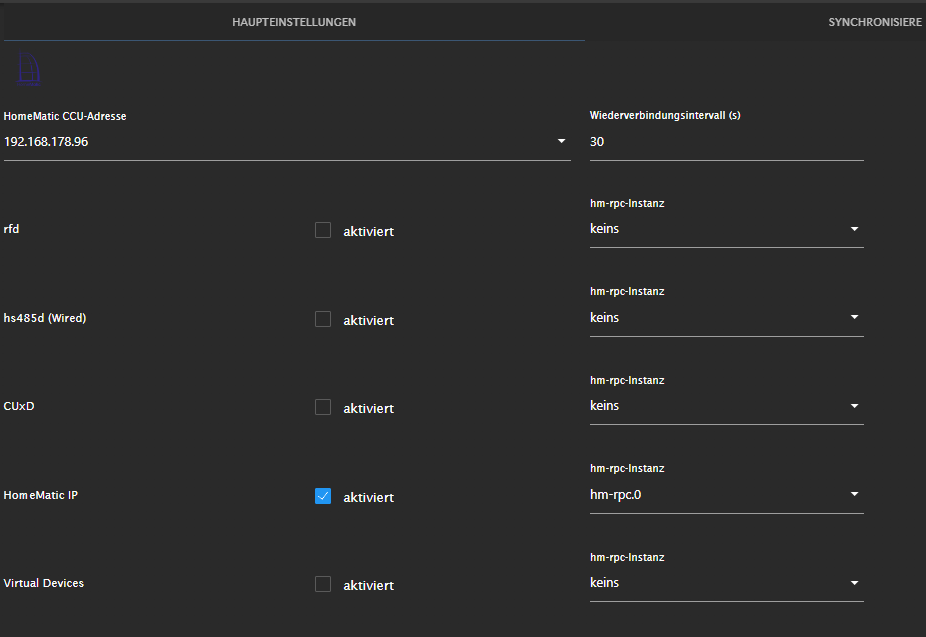
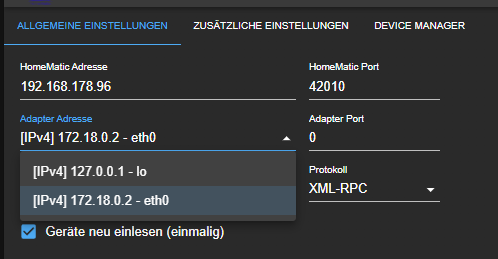
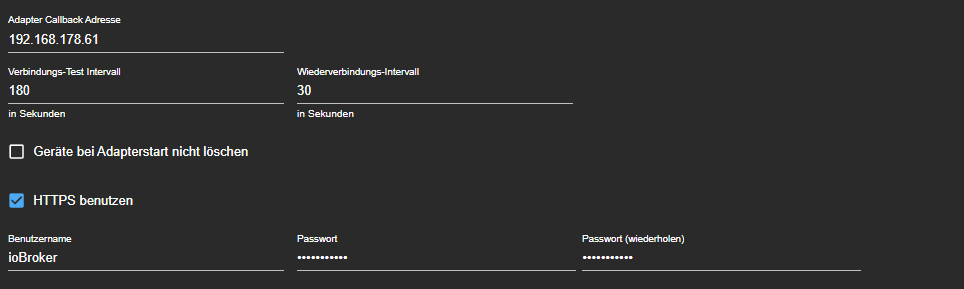
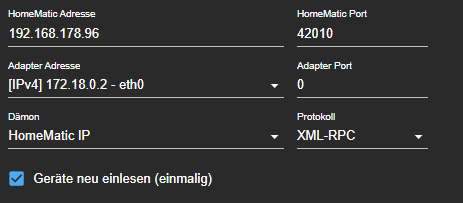
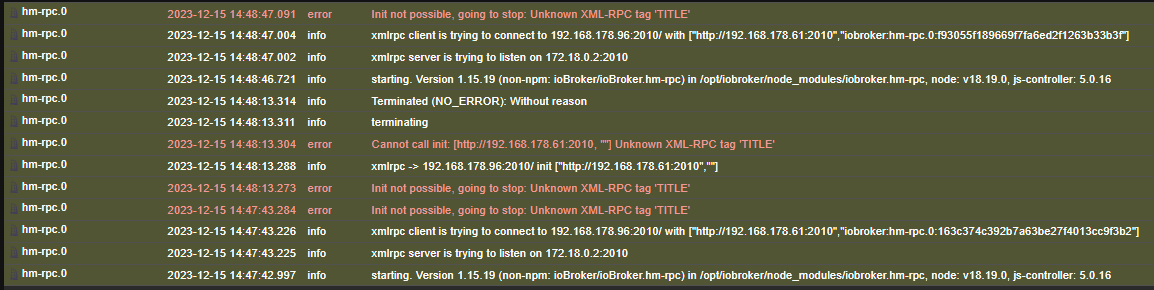
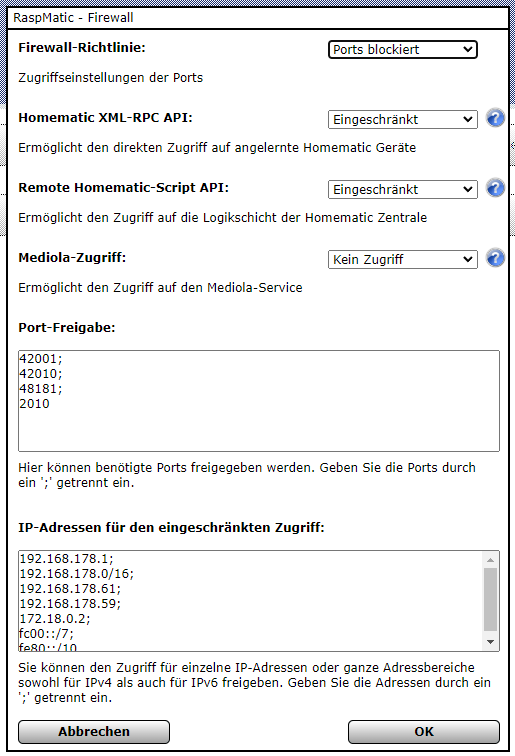

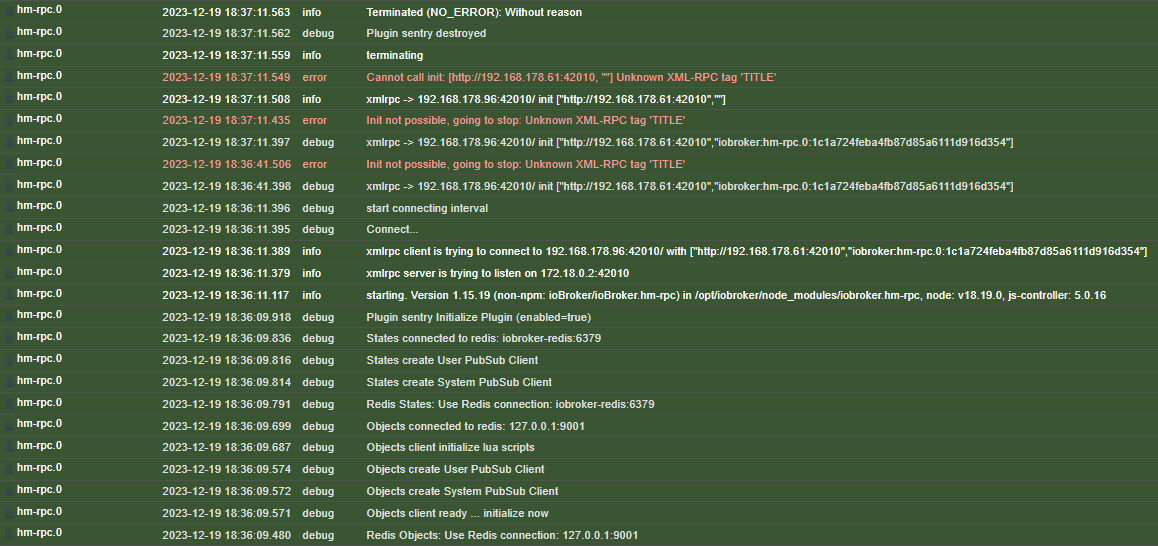
-
Das war der Benutzer iobroker:
2023-12-28 12:11:15: (../src/mod_auth.c.850) password doesn't match for / username: Y\rTKVYU\x14 IP: 192.168.178.61und das war der Benutzer test:
2023-12-28 13:40:20: (../src/mod_auth.c.850) password doesn't match for / username: D\x07EM IP: 192.168.178.61Selbst mit dem Admin bekomme ich keine Verbindung über den RPC zur RM
@mephisto090 stimmt wenigstens die ip?
-
@mephisto090 stimmt wenigstens die ip?
@homoran said in hm-rpc Probleme:
@mephisto090 stimmt wenigstens die ip?
jap das ist die vom iobroker
-
@homoran said in hm-rpc Probleme:
@mephisto090 stimmt wenigstens die ip?
jap das ist die vom iobroker
@mephisto090 sagte in hm-rpc Probleme:
@homoran said in hm-rpc Probleme:
@mephisto090 stimmt wenigstens die ip?
jap das ist die vom iobroker
mir ist nicht bekannt dass usernamen verschlüsselt werden, wäre aber möglich
-
@mephisto090 sagte in hm-rpc Probleme:
@homoran said in hm-rpc Probleme:
@mephisto090 stimmt wenigstens die ip?
jap das ist die vom iobroker
mir ist nicht bekannt dass usernamen verschlüsselt werden, wäre aber möglich
-
@homoran ich meine es geht jetzt ohne Benutzer aber es sollte doch eigentlich auch mit gehen oder nicht?
@mephisto090 sagte in hm-rpc Probleme:
@homoran ich meine es geht jetzt ohne Benutzer aber es sollte doch eigentlich auch mit gehen oder nicht?
Natürlich!
geht bei mir mit piVCCU auch -
@mephisto090 sagte in hm-rpc Probleme:
@homoran ich meine es geht jetzt ohne Benutzer aber es sollte doch eigentlich auch mit gehen oder nicht?
Natürlich!
geht bei mir mit piVCCU auch -
@homoran wo liegt das Problem. Am Adapter?
@mephisto090 sagte in hm-rpc Probleme:
@homoran wo liegt das Problem. Am Adapter?
Bin auch schon am suchen ... sollte eigentlich im Klartext erscheinen .
https://redmine.lighttpd.net/issues/3216
(mod_auth.c.850) password doesn't match for /tmp username: myusername IP: 10.10.10.10
Synology 918+ 16GB - ioBroker in Docker v9 , VISO auf Trekstor Primebook C13 13,3" , Hikvision Domkameras mit Surveillance Station .. CCU RaspberryMatic in Synology VM .. Zigbee CC2538+CC2592 .. Sonoff .. KNX .. Modbus ..
-
@mephisto090 sagte in hm-rpc Probleme:
@homoran wo liegt das Problem. Am Adapter?
Bin auch schon am suchen ... sollte eigentlich im Klartext erscheinen .
https://redmine.lighttpd.net/issues/3216
(mod_auth.c.850) password doesn't match for /tmp username: myusername IP: 10.10.10.10
@glasfaser ich hab in meinem syslog gar nichts vergleichbares mit auth oder user gefunden
kein Support per PN! - Fragen im Forum stellen - Benutzt das Voting rechts unten im Beitrag wenn er euch geholfen hat.
Das Forum freut sich über eine Spende. Benutzt dazu den Spendenbutton oben rechts. Danke!
der Installationsfixer: curl -fsL https://iobroker.net/fix.sh | bash - -
@glasfaser ich hab in meinem syslog gar nichts vergleichbares mit auth oder user gefunden
-
@glasfaser sagte in hm-rpc Probleme:
Aus dem Thread:
der erste Satz in deinem Link
Ich werde nun mal IPV6 wieder aktivieren
passt genau zu meinem allerersten Verdacht, dass das Netz mit IPv6 Probleme haben könnte
EDIT:
Ich hoffe ich bringe hier gerade nicht drei Threads durcheinander.kein Support per PN! - Fragen im Forum stellen - Benutzt das Voting rechts unten im Beitrag wenn er euch geholfen hat.
Das Forum freut sich über eine Spende. Benutzt dazu den Spendenbutton oben rechts. Danke!
der Installationsfixer: curl -fsL https://iobroker.net/fix.sh | bash - -
@glasfaser sagte in hm-rpc Probleme:
Aus dem Thread:
der erste Satz in deinem Link
Ich werde nun mal IPV6 wieder aktivieren
passt genau zu meinem allerersten Verdacht, dass das Netz mit IPv6 Probleme haben könnte
EDIT:
Ich hoffe ich bringe hier gerade nicht drei Threads durcheinander.oder
2023-12-28 12:06:54: (../src/gw_backend.c.274) establishing connection failed: socket: tcp:127.0.0.1:8183: Connection refused
Mappe den Port 8183:8183 auch mal weiter . ( Firewall )
https://groups.google.com/g/homekey-app/c/Lhrq3oqnXJA/m/ZjaDggHbvQYJ?pli=1
EDIT :
Issues :##https://github.com/jens-maus/RaspberryMatic/issues/2415
-
oder
2023-12-28 12:06:54: (../src/gw_backend.c.274) establishing connection failed: socket: tcp:127.0.0.1:8183: Connection refused
Mappe den Port 8183:8183 auch mal weiter . ( Firewall )
https://groups.google.com/g/homekey-app/c/Lhrq3oqnXJA/m/ZjaDggHbvQYJ?pli=1
EDIT :
Issues :##https://github.com/jens-maus/RaspberryMatic/issues/2415
@glasfaser said in hm-rpc Probleme:
Mappe den Port 8183:8183 auch mal weiter . ( Firewall )
Habe ich. Jetzt steht es Plain da
2023-12-29 15:40:03: (../src/server.c.2078) server stopped by UID = 0 PID = 27178
2023-12-29 15:40:03: (../src/server.c.1704) server started (lighttpd/1.4.69)
2023-12-29 15:40:33: (../src/mod_auth.c.850) password doesn't match for /rega.exe username: ioBroker IP: 192.168.178.61
2023-12-29 15:41:03: (../src/mod_auth.c.850) password doesn't match for /rega.exe username: ioBroker IP: 192.168.178.61
2023-12-29 15:41:33: (../src/mod_auth.c.850) password doesn't match for /rega.exe username: ioBroker IP: 192.168.178.61
2023-12-29 15:42:03: (../src/mod_auth.c.850) password doesn't match for /rega.exe username: ioBroker IP: 192.168.178.61
2023-12-29 15:42:33: (../src/mod_auth.c.850) password doesn't match for /rega.exe username: ioBroker IP: 192.168.178.61
2023-12-29 15:43:03: (../src/mod_auth.c.850) password doesn't match for /rega.exe username: ioBroker IP: 192.168.178.61
2023-12-29 15:43:33: (../src/mod_auth.c.850) password doesn't match for /rega.exe username: ioBroker IP: 192.168.178.61
2023-12-29 15:44:04: (../src/mod_auth.c.850) password doesn't match for /rega.exe username: ioBroker IP: 192.168.178.61
2023-12-29 15:44:33: (../src/mod_auth.c.850) password doesn't match for /rega.exe username: ioBroker IP: 192.168.178.61
2023-12-29 15:45:04: (../src/mod_auth.c.850) password doesn't match for /rega.exe username: ioBroker IP: 192.168.178.61
2023-12-29 15:45:34: (../src/mod_auth.c.850) password doesn't match for /rega.exe username: ioBroker IP: 192.168.178.61
2023-12-29 15:46:04: (../src/mod_auth.c.850) password doesn't match for /rega.exe username: ioBroker IP: 192.168.178.61
Das einloggen mit Nutzerdaten geht trotzdem nicht
-
@glasfaser said in hm-rpc Probleme:
Mappe den Port 8183:8183 auch mal weiter . ( Firewall )
Habe ich. Jetzt steht es Plain da
2023-12-29 15:40:03: (../src/server.c.2078) server stopped by UID = 0 PID = 27178
2023-12-29 15:40:03: (../src/server.c.1704) server started (lighttpd/1.4.69)
2023-12-29 15:40:33: (../src/mod_auth.c.850) password doesn't match for /rega.exe username: ioBroker IP: 192.168.178.61
2023-12-29 15:41:03: (../src/mod_auth.c.850) password doesn't match for /rega.exe username: ioBroker IP: 192.168.178.61
2023-12-29 15:41:33: (../src/mod_auth.c.850) password doesn't match for /rega.exe username: ioBroker IP: 192.168.178.61
2023-12-29 15:42:03: (../src/mod_auth.c.850) password doesn't match for /rega.exe username: ioBroker IP: 192.168.178.61
2023-12-29 15:42:33: (../src/mod_auth.c.850) password doesn't match for /rega.exe username: ioBroker IP: 192.168.178.61
2023-12-29 15:43:03: (../src/mod_auth.c.850) password doesn't match for /rega.exe username: ioBroker IP: 192.168.178.61
2023-12-29 15:43:33: (../src/mod_auth.c.850) password doesn't match for /rega.exe username: ioBroker IP: 192.168.178.61
2023-12-29 15:44:04: (../src/mod_auth.c.850) password doesn't match for /rega.exe username: ioBroker IP: 192.168.178.61
2023-12-29 15:44:33: (../src/mod_auth.c.850) password doesn't match for /rega.exe username: ioBroker IP: 192.168.178.61
2023-12-29 15:45:04: (../src/mod_auth.c.850) password doesn't match for /rega.exe username: ioBroker IP: 192.168.178.61
2023-12-29 15:45:34: (../src/mod_auth.c.850) password doesn't match for /rega.exe username: ioBroker IP: 192.168.178.61
2023-12-29 15:46:04: (../src/mod_auth.c.850) password doesn't match for /rega.exe username: ioBroker IP: 192.168.178.61
Das einloggen mit Nutzerdaten geht trotzdem nicht
@mephisto090 sagte in hm-rpc Probleme:
username: ioBroker
jetzt taucht auch der Benutzer auf.
Ich selber habe es ohne https , Benutzer und Passwort laufen . ( Ist ja alles im Haus ) -
@glasfaser said in hm-rpc Probleme:
Mappe den Port 8183:8183 auch mal weiter . ( Firewall )
Habe ich. Jetzt steht es Plain da
2023-12-29 15:40:03: (../src/server.c.2078) server stopped by UID = 0 PID = 27178
2023-12-29 15:40:03: (../src/server.c.1704) server started (lighttpd/1.4.69)
2023-12-29 15:40:33: (../src/mod_auth.c.850) password doesn't match for /rega.exe username: ioBroker IP: 192.168.178.61
2023-12-29 15:41:03: (../src/mod_auth.c.850) password doesn't match for /rega.exe username: ioBroker IP: 192.168.178.61
2023-12-29 15:41:33: (../src/mod_auth.c.850) password doesn't match for /rega.exe username: ioBroker IP: 192.168.178.61
2023-12-29 15:42:03: (../src/mod_auth.c.850) password doesn't match for /rega.exe username: ioBroker IP: 192.168.178.61
2023-12-29 15:42:33: (../src/mod_auth.c.850) password doesn't match for /rega.exe username: ioBroker IP: 192.168.178.61
2023-12-29 15:43:03: (../src/mod_auth.c.850) password doesn't match for /rega.exe username: ioBroker IP: 192.168.178.61
2023-12-29 15:43:33: (../src/mod_auth.c.850) password doesn't match for /rega.exe username: ioBroker IP: 192.168.178.61
2023-12-29 15:44:04: (../src/mod_auth.c.850) password doesn't match for /rega.exe username: ioBroker IP: 192.168.178.61
2023-12-29 15:44:33: (../src/mod_auth.c.850) password doesn't match for /rega.exe username: ioBroker IP: 192.168.178.61
2023-12-29 15:45:04: (../src/mod_auth.c.850) password doesn't match for /rega.exe username: ioBroker IP: 192.168.178.61
2023-12-29 15:45:34: (../src/mod_auth.c.850) password doesn't match for /rega.exe username: ioBroker IP: 192.168.178.61
2023-12-29 15:46:04: (../src/mod_auth.c.850) password doesn't match for /rega.exe username: ioBroker IP: 192.168.178.61
Das einloggen mit Nutzerdaten geht trotzdem nicht
@mephisto090 sagte in hm-rpc Probleme:
Das einloggen mit Nutzerdaten geht trotzdem nicht
ioBroker != iobroker
-
@glasfaser said in hm-rpc Probleme:
ist deine Liste gekürzt ...
denn du nutzt Redis , ist der Redis Server außerhalb des Containers !?version: "3.4" services: iobroker: container_name: Iobroker image: buanet/iobroker:latest pull_policy: always hostname: iobroker restart: always labels: - "autoheal=true" - "com.centurylinklabs.watchtower.enable=true" healthcheck: test: ["CMD", "curl", "-f", "http://localhost:8081"] interval: 30s timeout: 2s retries: 2 start_period: 3m30s networks: io-network: ipv4_address: 172.18.0.2 ports: - "1884:1884" - "8081-8083:8081-8083" - "8400:8400" - "42010:42010" - "2010:2010" environment: - IOB_STATESDB_HOST=iobroker-redis - IOB_STATESDB_PORT=6379 - IOB_STATESDB_TYPE=redis - IOB_BACKITUP_EXTDB=true - PACKAGES=default-mysql-client redis-tools - TZ=Europe/Berlin volumes: - io-data:/opt/iobroker - userscripts:/opt/userscripts depends_on: redis: condition: service_healthy #mem_swappiness: -1 redis: container_name: Iobroker-Redis image: redis:7 hostname: iobroker-redis restart: always labels: - "autoheal=true" - "com.centurylinklabs.watchtower.enable=true" healthcheck: test: [ "CMD", "redis-cli", "--raw", "incr", "ping" ] interval: 30s timeout: 2s retries: 2 start_period: 20s networks: io-network: ipv4_address: 172.18.0.3 volumes: - redis-data:/data #mem_swappiness: -1 deconz: image: deconzcommunity/deconz:stable container_name: Iobroker-Deconz hostname: iobroker-deconz pull_policy: always restart: always privileged: true # This is important! Without it, the deCONZ image won't be able to connect to Conbee II. ports: - 4080:80 - 4443:443 - 5900:5900 volumes: - /etc/localtime:/etc/localtime:ro - deconz:/opt/deCONZ devices: - /dev/ttyACM0 # This is the USB device that Conbee II is running on. environment: - TZ=Europe/Berlin - DECONZ_WEB_PORT=80 - DECONZ_WS_PORT=443 - DEBUG_INFO=1 - DEBUG_APS=0 - DEBUG_ZCL=0 - DEBUG_ZDP=0 - DEBUG_OTA=0 - DEBUG_HTTP=0 - DECONZ_DEVICE=/dev/ttyACM0 # This is the USB device that Conbee II is running on. - DECONZ_START_VERBOSE=0 - DECONZ_VNC_MODE=1 - DECONZ_VNC_PORT=5900 - DECONZ_VNC_PASSWORD=***** logging: driver: "json-file" options: max-size: "50m" networks: io-network: ipv4_address: 172.18.0.4 volumes: userscripts: io-data: redis-data: deconz: networks: io-network: name: io-network driver: bridge ipam: config: - subnet: 172.18.0.0/16 gateway: 172.18.0.1 ip_range: 172.18.0.1/24@mephisto090 sagte in hm-rpc Probleme:
    labels:

      - "autoheal=true"

      - "com.centurylinklabs.watchtower.enable=true"

    healthcheck:

      test: ["CMD", "curl", "-f", "http://localhost:8081"]

      interval: 30s

      timeout: 2s

      retries: 2

      start_period: 3m30s
Ist OT ..
Watchtower ist mir klar ...
Aber healthcheck hat das Image doch selber !?
bzw. wo hast du die Compose her !? -
@mephisto090 sagte in hm-rpc Probleme:
Das einloggen mit Nutzerdaten geht trotzdem nicht
ioBroker != iobroker
@homoran said in hm-rpc Probleme:
@mephisto090 sagte in hm-rpc Probleme:
Das einloggen mit Nutzerdaten geht trotzdem nicht
ioBroker != iobroker
habe beides probiert. Er zeigt komischerweise immer ioBroker an. Habe sogar kleingeschrieben den Nutzer neu angelegt.
@glasfaser said in hm-rpc Probleme:
Ist OT ..
Watchtower ist mir klar ...
Aber healthcheck hat das Image doch selber !?
bzw. wo hast du die Compose her !?Habe ich mir irgendwann mal selbst zusammengebaut
-
@homoran said in hm-rpc Probleme:
@mephisto090 sagte in hm-rpc Probleme:
Das einloggen mit Nutzerdaten geht trotzdem nicht
ioBroker != iobroker
habe beides probiert. Er zeigt komischerweise immer ioBroker an. Habe sogar kleingeschrieben den Nutzer neu angelegt.
@glasfaser said in hm-rpc Probleme:
Ist OT ..
Watchtower ist mir klar ...
Aber healthcheck hat das Image doch selber !?
bzw. wo hast du die Compose her !?Habe ich mir irgendwann mal selbst zusammengebaut
@mephisto090 sagte in hm-rpc Probleme:
Er zeigt komischerweise immer ioBroker an. Habe sogar kleingeschrieben den Nutzer neu angelegt.
hast du noch andere hm-rpc Instanzen?
-
@mephisto090 sagte in hm-rpc Probleme:
Er zeigt komischerweise immer ioBroker an. Habe sogar kleingeschrieben den Nutzer neu angelegt.
hast du noch andere hm-rpc Instanzen?
@homoran said in hm-rpc Probleme:
@mephisto090 sagte in hm-rpc Probleme:
Er zeigt komischerweise immer ioBroker an. Habe sogar kleingeschrieben den Nutzer neu angelegt.
hast du noch andere hm-rpc Instanzen?
Nein, da ich nur HmIP Geräte habe.
-
@homoran said in hm-rpc Probleme:
@mephisto090 sagte in hm-rpc Probleme:
Er zeigt komischerweise immer ioBroker an. Habe sogar kleingeschrieben den Nutzer neu angelegt.
hast du noch andere hm-rpc Instanzen?
Nein, da ich nur HmIP Geräte habe.
@mephisto090 boote mal beides neu!
ccu und iob -
@mephisto090 boote mal beides neu!
ccu und iob@homoran said in hm-rpc Probleme:
@mephisto090 boote mal beides neu!
ccu und iobHatte ich bei beiden um die Portweiterleitung eingeben zu können

Hey! Du scheinst an dieser Unterhaltung interessiert zu sein, hast aber noch kein Konto.
Hast du es satt, bei jedem Besuch durch die gleichen Beiträge zu scrollen? Wenn du dich für ein Konto anmeldest, kommst du immer genau dorthin zurück, wo du zuvor warst, und kannst dich über neue Antworten benachrichtigen lassen (entweder per E-Mail oder Push-Benachrichtigung). Du kannst auch Lesezeichen speichern und Beiträge positiv bewerten, um anderen Community-Mitgliedern deine Wertschätzung zu zeigen.
Mit deinem Input könnte dieser Beitrag noch besser werden 💗
Registrieren Anmelden446
Online33.0k
Benutzende83.7k
Themen1.3m
Beiträge