




[gelöst] Adapter lassen sich nicht Installieren!
-
HI Forum, erst einmal ein frohes rest Fest für alle...
Ich habe IOBroker neu aufgesetzt und npm, sowie node aktualisiert sowie iobroker fix ausgeführt.
Your installation was fixed successfully
Run iobroker start to start ioBroker again!pi@raspberrypi:/opt/iobroker $ npm -v
9.6.7
pi@raspberrypi:/opt/iobroker $ node -v
v18.17.1Admin v6.12.0
js-controller 5.0.17Jedoch wenn ich einen Adapter installieren möchte ist das + zum hinzufügen ausgegraut...
Es lässt sich kein Adapter installieren, vor dem Neustart, war es so, dass das Fenster zwar auf geht aber er nicht angefangen hat zu Installieren....Hat da wer eine Idee was ich noch machen muss?
MFG Schweizer
-
@homoran sagte in Adapter lassen sich nicht Installieren!:
Operating System: Raspbian GNU/Linux 10 (buster)
wie kann ich es unkompliziert Updaten? Ich versuche schon seid 2 wochen das ganze ans laufen zu bekommen und bin bisher nicht so weit wie heute gekommen das alles einigermassen auf den aktuellen stand sich befindet...
MFG Schweizer
@schweiz sagte in Adapter lassen sich nicht Installieren!:
wie kann ich es unkompliziert Updaten?
gar nicht!
nimm eine neue Karte, installier darauf das aktuelle OS lite,
Anschließend piVCCU nach der Schritt für Schritt Anleitung von Alex Reinert
dann iobroker per Einzeilerfertig!
für den unwahrscheinlichen Notfall hast du noch deine alte Installation
-
HI Forum, erst einmal ein frohes rest Fest für alle...
Ich habe IOBroker neu aufgesetzt und npm, sowie node aktualisiert sowie iobroker fix ausgeführt.
Your installation was fixed successfully
Run iobroker start to start ioBroker again!pi@raspberrypi:/opt/iobroker $ npm -v
9.6.7
pi@raspberrypi:/opt/iobroker $ node -v
v18.17.1Admin v6.12.0
js-controller 5.0.17Jedoch wenn ich einen Adapter installieren möchte ist das + zum hinzufügen ausgegraut...
Es lässt sich kein Adapter installieren, vor dem Neustart, war es so, dass das Fenster zwar auf geht aber er nicht angefangen hat zu Installieren....Hat da wer eine Idee was ich noch machen muss?
MFG Schweizer
@schweiz Zeit mal einen Screenshot bitte
-
@schweiz Zeit mal einen Screenshot bitte
-
MFG Schweizer
@schweiz bitte due Langfassung von
iob diag -
HI Forum, erst einmal ein frohes rest Fest für alle...
Ich habe IOBroker neu aufgesetzt und npm, sowie node aktualisiert sowie iobroker fix ausgeführt.
Your installation was fixed successfully
Run iobroker start to start ioBroker again!pi@raspberrypi:/opt/iobroker $ npm -v
9.6.7
pi@raspberrypi:/opt/iobroker $ node -v
v18.17.1Admin v6.12.0
js-controller 5.0.17Jedoch wenn ich einen Adapter installieren möchte ist das + zum hinzufügen ausgegraut...
Es lässt sich kein Adapter installieren, vor dem Neustart, war es so, dass das Fenster zwar auf geht aber er nicht angefangen hat zu Installieren....Hat da wer eine Idee was ich noch machen muss?
MFG Schweizer
Zuerst mal nodejs auf eine aktuelle, stabile Basis setzen.
iob fix
iob nodejs-update
Dann weitersehen.
-
Copy text starting here:
======================= SUMMARY =======================
                        v.2023-10-10


   Static hostname: raspberrypi
         Icon name: computer
  Operating System: Raspbian GNU/Linux 10 (buster)
            Kernel: Linux 5.10.103-v7l+
      Architecture: arm

Installation:           native
Kernel:                 armv7l
Userland:               armhf
Timezone:               Europe/London (GMT, +0000)
User-ID:                1000
X-Server:               false
Boot Target:            graphical.target

Pending OS-Updates:     0
Pending iob updates:    1

Nodejs-Installation:    /usr/bin/nodejs         v18.17.1
                        /usr/bin/node           v18.17.1
                        /usr/bin/npm            9.6.7
                        /usr/bin/npx            9.6.7
                        /usr/bin/corepack       0.18.0

Recommended versions are nodejs 18.19.0 and npm 10.2.3
Your nodejs installation is correct

MEMORY:
              total        used        free      shared  buff/cache   available
Mem:           3.8G        408M        3.0G         16M        465M        3.3G
Swap:           99M          0B         99M
Total:         3.9G        408M        3.1G

Active iob-Instances:   3
Active repo(s): stable

ioBroker Core:          js-controller           5.0.17
                        admin                   6.12.0

ioBroker Status:        iobroker is running on this host.


Objects type: jsonl
States  type: jsonl

Status admin and web instance:
+ system.adapter.admin.0                  : admin                 : raspberrypi                              -  enabled, port: 8081, bind: 0.0.0.0, run as: admin

Objects:                569
States:                 490

Size of iob-Database:

7.9M    /opt/iobroker/iobroker-data/objects.jsonl
4.0M    /opt/iobroker/iobroker-data/objects.json.migrated
4.0M    /opt/iobroker/iobroker-data/objects.json.bak.migrated
1.8M    /opt/iobroker/iobroker-data/states.jsonl
208K    /opt/iobroker/iobroker-data/states.json.migrated
208K    /opt/iobroker/iobroker-data/states.json.bak.migrated


=================== END OF SUMMARY ====================
======== Start marking the full check here =========
Skript v.2023-10-10

*** BASE SYSTEM ***
   Static hostname: raspberrypi
         Icon name: computer
  Operating System: Raspbian GNU/Linux 10 (buster)
            Kernel: Linux 5.10.103-v7l+
      Architecture: arm

Model           : Raspberry Pi 4 Model B Rev 1.1
Docker          : false
Virtualization  : none
Kernel          : armv7l
Userland        : armhf

Systemuptime and Load:
 12:38:09 up  1:32,  1 user,  load average: 0.49, 0.31, 0.12
CPU threads: 4


*** RASPBERRY THROTTLING ***
Current issues:
No throttling issues detected.

Previously detected issues:
No throttling issues detected.

*** Time and Time Zones ***
               Local time: Tue 2023-12-26 12:38:09 GMT
           Universal time: Tue 2023-12-26 12:38:09 UTC
                 RTC time: n/a
                Time zone: Europe/London (GMT, +0000)
System clock synchronized: yes
              NTP service: active
          RTC in local TZ: no

*** User and Groups ***
pi
/home/pi
pi adm dialout cdrom sudo audio video plugdev games users input netdev gpio i2c spi iobroker

*** X-Server-Setup ***
X-Server:       false
Desktop:
Terminal:       tty
Boot Target:    graphical.target

*** MEMORY ***
              total        used        free      shared  buff/cache   available
Mem:           3.8G        394M        3.0G         16M        465M        3.3G
Swap:           99M          0B         99M
Total:         3.9G        394M        3.1G

         3838 M total memory
          394 M used memory
          243 M active memory
          522 M inactive memory
         2978 M free memory
           65 M buffer memory
          400 M swap cache
           99 M total swap
            0 M used swap
           99 M free swap

Raspberry only:
oom events: 0
lifetime oom required: 0 Mbytes
total time in oom handler: 0 ms
max time spent in oom handler: 0 ms

*** FAILED SERVICES ***

0 loaded units listed. Pass --all to see loaded but inactive units, too.
To show all installed unit files use 'systemctl list-unit-files'.

*** FILESYSTEM ***
Filesystem     Type      Size  Used Avail Use% Mounted on
/dev/root      ext4       59G  3.1G   53G   6% /
devtmpfs       devtmpfs  1.8G     0  1.8G   0% /dev
tmpfs          tmpfs     1.9G     0  1.9G   0% /dev/shm
tmpfs          tmpfs     1.9G   17M  1.9G   1% /run
tmpfs          tmpfs     5.0M  4.0K  5.0M   1% /run/lock
tmpfs          tmpfs     1.9G     0  1.9G   0% /sys/fs/cgroup
/dev/mmcblk0p1 vfat      253M   49M  204M  20% /boot
tmpfs          tmpfs     384M     0  384M   0% /run/user/1000

Messages concerning ext4 filesystem in dmesg:
[Tue Dec 26 11:05:36 2023] Kernel command line: coherent_pool=1M 8250.nr_uarts=1 snd_bcm2835.enable_compat_alsa=0 snd_bcm2835.enable_hdmi=1  smsc95xx.macaddr=DC:A6:32:29:88:49 vc_mem.mem_base=0x3ec00000 vc_mem.mem_size=0x40000000  dwc_otg.lpm_enable=0 console=tty1 root=PARTUUID=e52a9d10-02 rootfstype=ext4 elevator=deadline fsck.repair=yes rootwait
[Tue Dec 26 11:05:36 2023] EXT4-fs (mmcblk0p2): mounted filesystem with ordered data mode. Opts: (null)
[Tue Dec 26 11:05:36 2023] VFS: Mounted root (ext4 filesystem) readonly on device 179:2.
[Tue Dec 26 11:05:38 2023] EXT4-fs (mmcblk0p2): re-mounted. Opts: (null)

Show mounted filesystems \(real ones only\):
TARGET        SOURCE         FSTYPE OPTIONS
/             /dev/mmcblk0p2 ext4   rw,noatime
|-/sys/fs/bpf none           bpf    rw,nosuid,nodev,noexec,relatime,mode=700
`-/boot       /dev/mmcblk0p1 vfat   rw,relatime,fmask=0022,dmask=0022,codepage=437,iocharset=ascii,shortname=mixed,errors=remount-ro

Files in neuralgic directories:

/var:
827M    /var/
621M    /var/lib
518M    /var/lib/piVCCU3
467M    /var/lib/piVCCU3/rootfs
192M    /var/lib/piVCCU3/rootfs/usr

Archived and active journals take up 16.0M in the file system.

/opt/iobroker/backups:
du: cannot access '/opt/iobroker/backups/': No such file or directory

/opt/iobroker/iobroker-data:
26M     /opt/iobroker/iobroker-data/
4.3M    /opt/iobroker/iobroker-data/backup-objects
3.3M    /opt/iobroker/iobroker-data/files
2.7M    /opt/iobroker/iobroker-data/files/info.admin
2.4M    /opt/iobroker/iobroker-data/files/info.admin/lib

The five largest files in iobroker-data are:
7.9M    /opt/iobroker/iobroker-data/objects.jsonl
4.0M    /opt/iobroker/iobroker-data/objects.json.migrated
4.0M    /opt/iobroker/iobroker-data/objects.json.bak.migrated
1.8M    /opt/iobroker/iobroker-data/states.jsonl
1.3M    /opt/iobroker/iobroker-data/backup-objects/2023-12-26_10-34_objects.json.gz

USB-Devices by-id:
USB-Sticks -  Avoid direct links to /dev/* in your adapter setups, please always prefer the links 'by-id':

find: '/dev/serial/by-id/': No such file or directory

*** NodeJS-Installation ***

/usr/bin/nodejs         v18.17.1
/usr/bin/node           v18.17.1
/usr/bin/npm            9.6.7
/usr/bin/npx            9.6.7
/usr/bin/corepack       0.18.0


nodejs:
  Installed: 18.17.1-deb-1nodesource1
  Candidate: 18.17.1-deb-1nodesource1
  Version table:
 *** 18.17.1-deb-1nodesource1 500
        500 https://deb.nodesource.com/node_18.x buster/main armhf Packages
        100 /var/lib/dpkg/status
     10.24.0~dfsg-1~deb10u3 500
        500 http://raspbian.raspberrypi.org/raspbian buster/main armhf Packages

Temp directories causing npm8 problem: 0
No problems detected

Errors in npm tree:
npm ERR! code ELSPROBLEMS
npm ERR! invalid: iobroker.admin@6.12.0 /opt/iobroker/node_modules/iobroker.admin
npm ERR! invalid: iobroker.discovery@4.2.0 /opt/iobroker/node_modules/iobroker.discovery
npm ERR! invalid: iobroker.info@1.9.18 /opt/iobroker/node_modules/iobroker.info

npm ERR! A complete log of this run can be found in: /home/pi/.npm/_logs/2023-12-26T12_38_16_510Z-debug-0.log

*** ioBroker-Installation ***

ioBroker Status
iobroker is running on this host.


Objects type: jsonl
States  type: jsonl

Core adapters versions
js-controller:  5.0.17
admin:          6.12.0
javascript:     "javascript" not found

npm ERR! code ELSPROBLEMS
npm ERR! invalid: iobroker.admin@6.12.0 /opt/iobroker/node_modules/iobroker.admin
npm ERR! invalid: iobroker.discovery@4.2.0 /opt/iobroker/node_modules/iobroker.discovery
npm ERR! invalid: iobroker.info@1.9.18 /opt/iobroker/node_modules/iobroker.info

npm ERR! A complete log of this run can be found in: /home/pi/.npm/_logs/2023-12-26T12_38_32_278Z-debug-0.log
Adapters from github:   0

Adapter State
+ system.adapter.admin.0                  : admin                 : raspberrypi                              -  enabled, port: 8081, bind: 0.0.0.0, run as: admin
+ system.adapter.discovery.0              : discovery             : raspberrypi                              -  enabled
  system.adapter.info.0                   : info                  : raspberrypi                              - disabled

+ instance is alive

Enabled adapters with bindings
+ system.adapter.admin.0                  : admin                 : raspberrypi                              -  enabled, port: 8081, bind: 0.0.0.0, run as: admin

ioBroker-Repositories
stable        : http://download.iobroker.net/sources-dist.json
beta          : http://download.iobroker.net/sources-dist-latest.json

Active repo(s): stable

Installed ioBroker-Instances
Used repository: stable
Adapter    "admin"        : 6.12.0   , installed 6.12.0
Adapter    "discovery"    : 4.2.0    , installed 4.2.0
Adapter    "info"         : 2.0.0    , installed 1.9.18 [Updatable]
Controller "js-controller": 5.0.17   , installed 5.0.17

Objects and States
Please stand by - This may take a while
Objects:        569
States:         490

*** OS-Repositories and Updates ***
Hit:1 http://archive.raspberrypi.org/debian buster InRelease
Hit:2 http://raspbian.raspberrypi.org/raspbian buster InRelease
Hit:3 https://apt.pivccu.de/piVCCU stable InRelease
Hit:4 https://deb.nodesource.com/node_18.x buster InRelease
Reading package lists...
Pending Updates: 0

*** Listening Ports ***
Active Internet connections (only servers)
Proto Recv-Q Send-Q Local Address           Foreign Address         State       User       Inode      PID/Program name
tcp        0      0 0.0.0.0:22              0.0.0.0:*               LISTEN      0          17965      638/sshd
tcp        0      0 127.0.0.1:9000          0.0.0.0:*               LISTEN      1001       15859      601/iobroker.js-con
tcp        0      0 127.0.0.1:9001          0.0.0.0:*               LISTEN      1001       17970      601/iobroker.js-con
tcp6       0      0 :::8081                 :::*                    LISTEN      1001       17998      667/io.admin.0
tcp6       0      0 :::22                   :::*                    LISTEN      0          17967      638/sshd
udp        0      0 0.0.0.0:68              0.0.0.0:*                           0          17456      505/dhclient
udp        0      0 0.0.0.0:5353            0.0.0.0:*                           108        16795      429/avahi-daemon: r
udp        0      0 0.0.0.0:49397           0.0.0.0:*                           108        16797      429/avahi-daemon: r
udp6       0      0 :::5353                 :::*                                108        16796      429/avahi-daemon: r
udp6       0      0 :::54658                :::*                                108        16798      429/avahi-daemon: r

*** Log File - Last 25 Lines ***

2023-12-26 12:25:47.511  - info: admin.0 (667) <== Disconnect system.user.admin from ::ffff:192.168.2.116 admin
2023-12-26 12:25:47.512  - info: admin.0 (667) <== Disconnect system.user.admin from ::ffff:192.168.2.116 admin
2023-12-26 12:25:47.513  - info: admin.0 (667) <== Disconnect system.user.admin from ::ffff:192.168.2.116 admin
2023-12-26 12:25:47.584  - info: admin.0 (667) ==> Connected system.user.admin from ::ffff:192.168.2.116
2023-12-26 12:25:47.593  - info: admin.0 (667) ==> Connected system.user.admin from ::ffff:192.168.2.116
2023-12-26 12:25:47.594  - info: admin.0 (667) ==> Connected system.user.admin from ::ffff:192.168.2.116
2023-12-26 12:25:47.595  - info: admin.0 (667) ==> Connected system.user.admin from ::ffff:192.168.2.116
2023-12-26 12:25:47.596  - info: admin.0 (667) ==> Connected system.user.admin from ::ffff:192.168.2.116
2023-12-26 12:25:47.602  - info: admin.0 (667) <== Disconnect system.user.admin from ::ffff:192.168.2.116 admin
2023-12-26 12:25:47.664  - info: admin.0 (667) <== Disconnect system.user.admin from ::ffff:192.168.2.116 admin
2023-12-26 12:25:47.667  - info: admin.0 (667) <== Disconnect system.user.admin from ::ffff:192.168.2.116 admin
2023-12-26 12:25:47.668  - info: admin.0 (667) <== Disconnect system.user.admin from ::ffff:192.168.2.116 admin
2023-12-26 12:25:47.669  - info: admin.0 (667) <== Disconnect system.user.admin from ::ffff:192.168.2.116 admin
2023-12-26 12:25:47.670  - info: admin.0 (667) <== Disconnect system.user.admin from ::ffff:192.168.2.116 admin
2023-12-26 12:25:47.728  - info: admin.0 (667) ==> Connected system.user.admin from ::ffff:192.168.2.116
2023-12-26 12:25:47.729  - info: admin.0 (667) ==> Connected system.user.admin from ::ffff:192.168.2.116
2023-12-26 12:25:47.730  - info: admin.0 (667) ==> Connected system.user.admin from ::ffff:192.168.2.116
2023-12-26 12:25:47.731  - info: admin.0 (667) ==> Connected system.user.admin from ::ffff:192.168.2.116
2023-12-26 12:25:47.761  - info: admin.0 (667) ==> Connected system.user.admin from ::ffff:192.168.2.116
2023-12-26 12:25:47.765  - info: admin.0 (667) ==> Connected system.user.admin from ::ffff:192.168.2.116
2023-12-26 12:25:47.785  - info: admin.0 (667) <== Disconnect system.user.admin from ::ffff:192.168.2.116 admin
2023-12-26 12:25:47.788  - info: admin.0 (667) <== Disconnect system.user.admin from ::ffff:192.168.2.116 admin
2023-12-26 12:25:47.789  - info: admin.0 (667) <== Disconnect system.user.admin from ::ffff:192.168.2.116 admin
2023-12-26 12:25:47.790  - info: admin.0 (667) <== Disconnect system.user.admin from ::ffff:192.168.2.116 admin
2023-12-26 12:25:47.794  - info: admin.0 (667) <== Disconnect system.user.admin from ::ffff:192.168.2.116 admin
MFG Schweizer
-
Copy text starting here:
======================= SUMMARY =======================
                        v.2023-10-10


   Static hostname: raspberrypi
         Icon name: computer
  Operating System: Raspbian GNU/Linux 10 (buster)
            Kernel: Linux 5.10.103-v7l+
      Architecture: arm

Installation:           native
Kernel:                 armv7l
Userland:               armhf
Timezone:               Europe/London (GMT, +0000)
User-ID:                1000
X-Server:               false
Boot Target:            graphical.target

Pending OS-Updates:     0
Pending iob updates:    1

Nodejs-Installation:    /usr/bin/nodejs         v18.17.1
                        /usr/bin/node           v18.17.1
                        /usr/bin/npm            9.6.7
                        /usr/bin/npx            9.6.7
                        /usr/bin/corepack       0.18.0

Recommended versions are nodejs 18.19.0 and npm 10.2.3
Your nodejs installation is correct

MEMORY:
              total        used        free      shared  buff/cache   available
Mem:           3.8G        408M        3.0G         16M        465M        3.3G
Swap:           99M          0B         99M
Total:         3.9G        408M        3.1G

Active iob-Instances:   3
Active repo(s): stable

ioBroker Core:          js-controller           5.0.17
                        admin                   6.12.0

ioBroker Status:        iobroker is running on this host.


Objects type: jsonl
States  type: jsonl

Status admin and web instance:
+ system.adapter.admin.0                  : admin                 : raspberrypi                              -  enabled, port: 8081, bind: 0.0.0.0, run as: admin

Objects:                569
States:                 490

Size of iob-Database:

7.9M    /opt/iobroker/iobroker-data/objects.jsonl
4.0M    /opt/iobroker/iobroker-data/objects.json.migrated
4.0M    /opt/iobroker/iobroker-data/objects.json.bak.migrated
1.8M    /opt/iobroker/iobroker-data/states.jsonl
208K    /opt/iobroker/iobroker-data/states.json.migrated
208K    /opt/iobroker/iobroker-data/states.json.bak.migrated


=================== END OF SUMMARY ====================
======== Start marking the full check here =========
Skript v.2023-10-10

*** BASE SYSTEM ***
   Static hostname: raspberrypi
         Icon name: computer
  Operating System: Raspbian GNU/Linux 10 (buster)
            Kernel: Linux 5.10.103-v7l+
      Architecture: arm

Model           : Raspberry Pi 4 Model B Rev 1.1
Docker          : false
Virtualization  : none
Kernel          : armv7l
Userland        : armhf

Systemuptime and Load:
 12:38:09 up  1:32,  1 user,  load average: 0.49, 0.31, 0.12
CPU threads: 4


*** RASPBERRY THROTTLING ***
Current issues:
No throttling issues detected.

Previously detected issues:
No throttling issues detected.

*** Time and Time Zones ***
               Local time: Tue 2023-12-26 12:38:09 GMT
           Universal time: Tue 2023-12-26 12:38:09 UTC
                 RTC time: n/a
                Time zone: Europe/London (GMT, +0000)
System clock synchronized: yes
              NTP service: active
          RTC in local TZ: no

*** User and Groups ***
pi
/home/pi
pi adm dialout cdrom sudo audio video plugdev games users input netdev gpio i2c spi iobroker

*** X-Server-Setup ***
X-Server:       false
Desktop:
Terminal:       tty
Boot Target:    graphical.target

*** MEMORY ***
              total        used        free      shared  buff/cache   available
Mem:           3.8G        394M        3.0G         16M        465M        3.3G
Swap:           99M          0B         99M
Total:         3.9G        394M        3.1G

         3838 M total memory
          394 M used memory
          243 M active memory
          522 M inactive memory
         2978 M free memory
           65 M buffer memory
          400 M swap cache
           99 M total swap
            0 M used swap
           99 M free swap

Raspberry only:
oom events: 0
lifetime oom required: 0 Mbytes
total time in oom handler: 0 ms
max time spent in oom handler: 0 ms

*** FAILED SERVICES ***

0 loaded units listed. Pass --all to see loaded but inactive units, too.
To show all installed unit files use 'systemctl list-unit-files'.

*** FILESYSTEM ***
Filesystem     Type      Size  Used Avail Use% Mounted on
/dev/root      ext4       59G  3.1G   53G   6% /
devtmpfs       devtmpfs  1.8G     0  1.8G   0% /dev
tmpfs          tmpfs     1.9G     0  1.9G   0% /dev/shm
tmpfs          tmpfs     1.9G   17M  1.9G   1% /run
tmpfs          tmpfs     5.0M  4.0K  5.0M   1% /run/lock
tmpfs          tmpfs     1.9G     0  1.9G   0% /sys/fs/cgroup
/dev/mmcblk0p1 vfat      253M   49M  204M  20% /boot
tmpfs          tmpfs     384M     0  384M   0% /run/user/1000

Messages concerning ext4 filesystem in dmesg:
[Tue Dec 26 11:05:36 2023] Kernel command line: coherent_pool=1M 8250.nr_uarts=1 snd_bcm2835.enable_compat_alsa=0 snd_bcm2835.enable_hdmi=1  smsc95xx.macaddr=DC:A6:32:29:88:49 vc_mem.mem_base=0x3ec00000 vc_mem.mem_size=0x40000000  dwc_otg.lpm_enable=0 console=tty1 root=PARTUUID=e52a9d10-02 rootfstype=ext4 elevator=deadline fsck.repair=yes rootwait
[Tue Dec 26 11:05:36 2023] EXT4-fs (mmcblk0p2): mounted filesystem with ordered data mode. Opts: (null)
[Tue Dec 26 11:05:36 2023] VFS: Mounted root (ext4 filesystem) readonly on device 179:2.
[Tue Dec 26 11:05:38 2023] EXT4-fs (mmcblk0p2): re-mounted. Opts: (null)

Show mounted filesystems \(real ones only\):
TARGET        SOURCE         FSTYPE OPTIONS
/             /dev/mmcblk0p2 ext4   rw,noatime
|-/sys/fs/bpf none           bpf    rw,nosuid,nodev,noexec,relatime,mode=700
`-/boot       /dev/mmcblk0p1 vfat   rw,relatime,fmask=0022,dmask=0022,codepage=437,iocharset=ascii,shortname=mixed,errors=remount-ro

Files in neuralgic directories:

/var:
827M    /var/
621M    /var/lib
518M    /var/lib/piVCCU3
467M    /var/lib/piVCCU3/rootfs
192M    /var/lib/piVCCU3/rootfs/usr

Archived and active journals take up 16.0M in the file system.

/opt/iobroker/backups:
du: cannot access '/opt/iobroker/backups/': No such file or directory

/opt/iobroker/iobroker-data:
26M     /opt/iobroker/iobroker-data/
4.3M    /opt/iobroker/iobroker-data/backup-objects
3.3M    /opt/iobroker/iobroker-data/files
2.7M    /opt/iobroker/iobroker-data/files/info.admin
2.4M    /opt/iobroker/iobroker-data/files/info.admin/lib

The five largest files in iobroker-data are:
7.9M    /opt/iobroker/iobroker-data/objects.jsonl
4.0M    /opt/iobroker/iobroker-data/objects.json.migrated
4.0M    /opt/iobroker/iobroker-data/objects.json.bak.migrated
1.8M    /opt/iobroker/iobroker-data/states.jsonl
1.3M    /opt/iobroker/iobroker-data/backup-objects/2023-12-26_10-34_objects.json.gz

USB-Devices by-id:
USB-Sticks -  Avoid direct links to /dev/* in your adapter setups, please always prefer the links 'by-id':

find: '/dev/serial/by-id/': No such file or directory

*** NodeJS-Installation ***

/usr/bin/nodejs         v18.17.1
/usr/bin/node           v18.17.1
/usr/bin/npm            9.6.7
/usr/bin/npx            9.6.7
/usr/bin/corepack       0.18.0


nodejs:
  Installed: 18.17.1-deb-1nodesource1
  Candidate: 18.17.1-deb-1nodesource1
  Version table:
 *** 18.17.1-deb-1nodesource1 500
        500 https://deb.nodesource.com/node_18.x buster/main armhf Packages
        100 /var/lib/dpkg/status
     10.24.0~dfsg-1~deb10u3 500
        500 http://raspbian.raspberrypi.org/raspbian buster/main armhf Packages

Temp directories causing npm8 problem: 0
No problems detected

Errors in npm tree:
npm ERR! code ELSPROBLEMS
npm ERR! invalid: iobroker.admin@6.12.0 /opt/iobroker/node_modules/iobroker.admin
npm ERR! invalid: iobroker.discovery@4.2.0 /opt/iobroker/node_modules/iobroker.discovery
npm ERR! invalid: iobroker.info@1.9.18 /opt/iobroker/node_modules/iobroker.info

npm ERR! A complete log of this run can be found in: /home/pi/.npm/_logs/2023-12-26T12_38_16_510Z-debug-0.log

*** ioBroker-Installation ***

ioBroker Status
iobroker is running on this host.


Objects type: jsonl
States  type: jsonl

Core adapters versions
js-controller:  5.0.17
admin:          6.12.0
javascript:     "javascript" not found

npm ERR! code ELSPROBLEMS
npm ERR! invalid: iobroker.admin@6.12.0 /opt/iobroker/node_modules/iobroker.admin
npm ERR! invalid: iobroker.discovery@4.2.0 /opt/iobroker/node_modules/iobroker.discovery
npm ERR! invalid: iobroker.info@1.9.18 /opt/iobroker/node_modules/iobroker.info

npm ERR! A complete log of this run can be found in: /home/pi/.npm/_logs/2023-12-26T12_38_32_278Z-debug-0.log
Adapters from github:   0

Adapter State
+ system.adapter.admin.0                  : admin                 : raspberrypi                              -  enabled, port: 8081, bind: 0.0.0.0, run as: admin
+ system.adapter.discovery.0              : discovery             : raspberrypi                              -  enabled
  system.adapter.info.0                   : info                  : raspberrypi                              - disabled

+ instance is alive

Enabled adapters with bindings
+ system.adapter.admin.0                  : admin                 : raspberrypi                              -  enabled, port: 8081, bind: 0.0.0.0, run as: admin

ioBroker-Repositories
stable        : http://download.iobroker.net/sources-dist.json
beta          : http://download.iobroker.net/sources-dist-latest.json

Active repo(s): stable

Installed ioBroker-Instances
Used repository: stable
Adapter    "admin"        : 6.12.0   , installed 6.12.0
Adapter    "discovery"    : 4.2.0    , installed 4.2.0
Adapter    "info"         : 2.0.0    , installed 1.9.18 [Updatable]
Controller "js-controller": 5.0.17   , installed 5.0.17

Objects and States
Please stand by - This may take a while
Objects:        569
States:         490

*** OS-Repositories and Updates ***
Hit:1 http://archive.raspberrypi.org/debian buster InRelease
Hit:2 http://raspbian.raspberrypi.org/raspbian buster InRelease
Hit:3 https://apt.pivccu.de/piVCCU stable InRelease
Hit:4 https://deb.nodesource.com/node_18.x buster InRelease
Reading package lists...
Pending Updates: 0

*** Listening Ports ***
Active Internet connections (only servers)
Proto Recv-Q Send-Q Local Address           Foreign Address         State       User       Inode      PID/Program name
tcp        0      0 0.0.0.0:22              0.0.0.0:*               LISTEN      0          17965      638/sshd
tcp        0      0 127.0.0.1:9000          0.0.0.0:*               LISTEN      1001       15859      601/iobroker.js-con
tcp        0      0 127.0.0.1:9001          0.0.0.0:*               LISTEN      1001       17970      601/iobroker.js-con
tcp6       0      0 :::8081                 :::*                    LISTEN      1001       17998      667/io.admin.0
tcp6       0      0 :::22                   :::*                    LISTEN      0          17967      638/sshd
udp        0      0 0.0.0.0:68              0.0.0.0:*                           0          17456      505/dhclient
udp        0      0 0.0.0.0:5353            0.0.0.0:*                           108        16795      429/avahi-daemon: r
udp        0      0 0.0.0.0:49397           0.0.0.0:*                           108        16797      429/avahi-daemon: r
udp6       0      0 :::5353                 :::*                                108        16796      429/avahi-daemon: r
udp6       0      0 :::54658                :::*                                108        16798      429/avahi-daemon: r

*** Log File - Last 25 Lines ***

2023-12-26 12:25:47.511  - info: admin.0 (667) <== Disconnect system.user.admin from ::ffff:192.168.2.116 admin
2023-12-26 12:25:47.512  - info: admin.0 (667) <== Disconnect system.user.admin from ::ffff:192.168.2.116 admin
2023-12-26 12:25:47.513  - info: admin.0 (667) <== Disconnect system.user.admin from ::ffff:192.168.2.116 admin
2023-12-26 12:25:47.584  - info: admin.0 (667) ==> Connected system.user.admin from ::ffff:192.168.2.116
2023-12-26 12:25:47.593  - info: admin.0 (667) ==> Connected system.user.admin from ::ffff:192.168.2.116
2023-12-26 12:25:47.594  - info: admin.0 (667) ==> Connected system.user.admin from ::ffff:192.168.2.116
2023-12-26 12:25:47.595  - info: admin.0 (667) ==> Connected system.user.admin from ::ffff:192.168.2.116
2023-12-26 12:25:47.596  - info: admin.0 (667) ==> Connected system.user.admin from ::ffff:192.168.2.116
2023-12-26 12:25:47.602  - info: admin.0 (667) <== Disconnect system.user.admin from ::ffff:192.168.2.116 admin
2023-12-26 12:25:47.664  - info: admin.0 (667) <== Disconnect system.user.admin from ::ffff:192.168.2.116 admin
2023-12-26 12:25:47.667  - info: admin.0 (667) <== Disconnect system.user.admin from ::ffff:192.168.2.116 admin
2023-12-26 12:25:47.668  - info: admin.0 (667) <== Disconnect system.user.admin from ::ffff:192.168.2.116 admin
2023-12-26 12:25:47.669  - info: admin.0 (667) <== Disconnect system.user.admin from ::ffff:192.168.2.116 admin
2023-12-26 12:25:47.670  - info: admin.0 (667) <== Disconnect system.user.admin from ::ffff:192.168.2.116 admin
2023-12-26 12:25:47.728  - info: admin.0 (667) ==> Connected system.user.admin from ::ffff:192.168.2.116
2023-12-26 12:25:47.729  - info: admin.0 (667) ==> Connected system.user.admin from ::ffff:192.168.2.116
2023-12-26 12:25:47.730  - info: admin.0 (667) ==> Connected system.user.admin from ::ffff:192.168.2.116
2023-12-26 12:25:47.731  - info: admin.0 (667) ==> Connected system.user.admin from ::ffff:192.168.2.116
2023-12-26 12:25:47.761  - info: admin.0 (667) ==> Connected system.user.admin from ::ffff:192.168.2.116
2023-12-26 12:25:47.765  - info: admin.0 (667) ==> Connected system.user.admin from ::ffff:192.168.2.116
2023-12-26 12:25:47.785  - info: admin.0 (667) <== Disconnect system.user.admin from ::ffff:192.168.2.116 admin
2023-12-26 12:25:47.788  - info: admin.0 (667) <== Disconnect system.user.admin from ::ffff:192.168.2.116 admin
2023-12-26 12:25:47.789  - info: admin.0 (667) <== Disconnect system.user.admin from ::ffff:192.168.2.116 admin
2023-12-26 12:25:47.790  - info: admin.0 (667) <== Disconnect system.user.admin from ::ffff:192.168.2.116 admin
2023-12-26 12:25:47.794  - info: admin.0 (667) <== Disconnect system.user.admin from ::ffff:192.168.2.116 admin
MFG Schweizer
@schweiz sagte in Adapter lassen sich nicht Installieren!:
Operating System: Raspbian GNU/Linux 10 (buster)
viel zu alt!
@schweiz sagte in Adapter lassen sich nicht Installieren!:
usr/bin/node v18.17.1
auch nicht aktuell
sieht irgendwie nicht neu aufgesetzt aus.
-
@schweiz sagte in Adapter lassen sich nicht Installieren!:
Operating System: Raspbian GNU/Linux 10 (buster)
viel zu alt!
@schweiz sagte in Adapter lassen sich nicht Installieren!:
usr/bin/node v18.17.1
auch nicht aktuell
sieht irgendwie nicht neu aufgesetzt aus.
@homoran sagte in Adapter lassen sich nicht Installieren!:
Operating System: Raspbian GNU/Linux 10 (buster)
wie kann ich es unkompliziert Updaten? Ich versuche schon seid 2 wochen das ganze ans laufen zu bekommen und bin bisher nicht so weit wie heute gekommen das alles einigermassen auf den aktuellen stand sich befindet...
MFG Schweizer
-
@homoran sagte in Adapter lassen sich nicht Installieren!:
Operating System: Raspbian GNU/Linux 10 (buster)
wie kann ich es unkompliziert Updaten? Ich versuche schon seid 2 wochen das ganze ans laufen zu bekommen und bin bisher nicht so weit wie heute gekommen das alles einigermassen auf den aktuellen stand sich befindet...
MFG Schweizer
@schweiz sagte in Adapter lassen sich nicht Installieren!:
wie kann ich es unkompliziert Updaten?
Gar nicht. Das einzig sinnvolle ist eine Neuinstallation von Raspberry OS 12 'Boowkworm' in der 64Bit - Lite Version.
-
@homoran sagte in Adapter lassen sich nicht Installieren!:
Operating System: Raspbian GNU/Linux 10 (buster)
wie kann ich es unkompliziert Updaten? Ich versuche schon seid 2 wochen das ganze ans laufen zu bekommen und bin bisher nicht so weit wie heute gekommen das alles einigermassen auf den aktuellen stand sich befindet...
MFG Schweizer
@schweiz sagte in Adapter lassen sich nicht Installieren!:
wie kann ich es unkompliziert Updaten?
gar nicht!
nimm eine neue Karte, installier darauf das aktuelle OS lite,
Anschließend piVCCU nach der Schritt für Schritt Anleitung von Alex Reinert
dann iobroker per Einzeilerfertig!
für den unwahrscheinlichen Notfall hast du noch deine alte Installation
-
@schweiz sagte in Adapter lassen sich nicht Installieren!:
wie kann ich es unkompliziert Updaten?
gar nicht!
nimm eine neue Karte, installier darauf das aktuelle OS lite,
Anschließend piVCCU nach der Schritt für Schritt Anleitung von Alex Reinert
dann iobroker per Einzeilerfertig!
für den unwahrscheinlichen Notfall hast du noch deine alte Installation
-
raspberrypi:~ $ sudo apt install raspberrypi-kernel-headers pivccu-modules-dkms
Reading package lists... Done
Building dependency tree... Done
Reading state information... Done
E: Unable to locate package pivccu-modules-dkms
hinzufügen geht nicht, oder bin zu blöde, füge ich das ein.... passiert einfach nix! :( auch wenn ich das sudo apt update weglasse...
wget -q -O - https://apt.debmatic.de/debmatic/public.key | sudo tee /usr/share/keyrings/debmatic.asc
echo "deb [signed-by=/usr/share/keyrings/debmatic.asc] https://apt.debmatic.de/debmatic stable main" | sudo tee /etc/apt/sources.list.d/debmatic.list
sudo apt update
MOD-EDIT: Code in code-tags gesetzt!
MFG Schweizer
-
raspberrypi:~ $ sudo apt install raspberrypi-kernel-headers pivccu-modules-dkms
Reading package lists... Done
Building dependency tree... Done
Reading state information... Done
E: Unable to locate package pivccu-modules-dkms
hinzufügen geht nicht, oder bin zu blöde, füge ich das ein.... passiert einfach nix! :( auch wenn ich das sudo apt update weglasse...
wget -q -O - https://apt.debmatic.de/debmatic/public.key | sudo tee /usr/share/keyrings/debmatic.asc
echo "deb [signed-by=/usr/share/keyrings/debmatic.asc] https://apt.debmatic.de/debmatic stable main" | sudo tee /etc/apt/sources.list.d/debmatic.list
sudo apt update
MOD-EDIT: Code in code-tags gesetzt!
MFG Schweizer
@schweiz piVCCU oder debmatic?
-
@homoran piVCCU
john@raspberrypi:~ $ sudo apt install pivccu-modules-raspberrypi
Reading package lists... Done
Building dependency tree... Done
Reading state information... Done
E: Unable to locate package pivccu-modules-raspberrypi
john@raspberrypi:~ $ sudo apt install pivccu-modules-raspberrypi
Reading package lists... Done
Building dependency tree... Done
Reading state information... Done
E: Unable to locate package pivccu-modules-raspberrypi
john@raspberrypi:~ $ echo "deb [signed-by=/usr/share/keyrings/debmatic.asc] http                                                                                                                     s://apt.debmatic.de/debmatic stable main" | sudo tee /etc/apt/sources.list.d/deb                                                                                                                     matic.list
deb [signed-by=/usr/share/keyrings/debmatic.asc] https://apt.debmatic.de/debmati                                                                                                                     c stable main
john@raspberrypi:~ $ sudo apt update
Hit:1 http://deb.debian.org/debian bookworm InRelease
Get:2 http://archive.raspberrypi.com/debian bookworm InRelease [23.6 kB]
Get:3 http://deb.debian.org/debian-security bookworm-security InRelease [48.0 kB                                                                                                                     ]
Get:4 http://deb.debian.org/debian bookworm-updates InRelease [52.1 kB]
Get:5 https://apt.debmatic.de/debmatic stable InRelease [13.6 kB]
Get:6 http://deb.debian.org/debian-security bookworm-security/main arm64 Package                                                                                                                     s [128 kB]
Get:7 http://deb.debian.org/debian-security bookworm-security/main armhf Package                                                                                                                     s [125 kB]
Get:8 http://deb.debian.org/debian-security bookworm-security/main Translation-e                                                                                                                     n [77.3 kB]
Get:9 http://archive.raspberrypi.com/debian bookworm/main armhf Packages [360 kB                                                                                                                     ]
Get:10 http://archive.raspberrypi.com/debian bookworm/main arm64 Packages [351 k                                                                                                                     B]
Get:11 http://deb.debian.org/debian bookworm-updates/main armhf Packages [10.9 k                                                                                                                     B]
Get:12 http://deb.debian.org/debian bookworm-updates/main arm64 Packages [11.4 k                                                                                                                     B]
Get:13 http://deb.debian.org/debian bookworm-updates/main Translation-en [13.1 k                                                                                                                     B]
Err:5 https://apt.debmatic.de/debmatic stable InRelease
  The following signatures couldn't be verified because the public key is not av                                                                                                                     ailable: NO_PUBKEY 541230BA05C38BC4
Reading package lists... Done
W: GPG error: https://apt.debmatic.de/debmatic stable InRelease: The following s                                                                                                                     ignatures couldn't be verified because the public key is not available: NO_PUBKE                                                                                                                     Y 541230BA05C38BC4
E: The repository 'https://apt.debmatic.de/debmatic stable InRelease' is not sig                                                                                                                     ned.
N: Updating from such a repository can't be done securely, and is therefore disa                                                                                                                     bled by default.
N: See apt-secure(8) manpage for repository creation and user configuration deta                                                                                                                     ils.
john@raspberrypi:~ $ sudo apt install build-essential bison flex libssl-dev
Reading package lists... Done
Building dependency tree... Done
Reading state information... Done
build-essential is already the newest version (12.9).
bison is already the newest version (2:3.8.2+dfsg-1+b1).
flex is already the newest version (2.6.4-8.2).
libssl-dev is already the newest version (3.0.11-1~deb12u2+rpt1).
0 upgraded, 0 newly installed, 0 to remove and 9 not upgraded.
john@raspberrypi:~ $ sudo apt install raspberrypi-kernel-headers pivccu-modules-                                                                                                                     dkm
Reading package lists... Done
Building dependency tree... Done
Reading state information... Done
E: Unable to locate package pivccu-modules-dkm
john@raspberrypi:~ $
john@raspberrypi:~ $ echo "deb [signed-by=/usr/share/keyrings/debmatic.asc] https://apt.debmatic.de/debmatic stable main" | sudo tee /etc/apt/sources.list.d/debmatic.list
deb [signed-by=/usr/share/keyrings/debmatic.asc] https://apt.debmatic.de/debmatic stable main
john@raspberrypi:~ $ sudo apt update
Hit:1 http://deb.debian.org/debian bookworm InRelease
Get:2 http://archive.raspberrypi.com/debian bookworm InRelease [23.6 kB]
Get:3 http://deb.debian.org/debian-security bookworm-security InRelease [48.0 kB]
Get:4 http://deb.debian.org/debian bookworm-updates InRelease [52.1 kB]
Get:5 https://apt.debmatic.de/debmatic stable InRelease [13.6 kB]
Get:6 http://deb.debian.org/debian-security bookworm-security/main arm64 Packages [128 kB]
Get:7 http://deb.debian.org/debian-security bookworm-security/main armhf Packages [125 kB]
Get:8 http://deb.debian.org/debian-security bookworm-security/main Translation-en [77.3 kB]
Get:9 http://archive.raspberrypi.com/debian bookworm/main armhf Packages [360 kB]
Get:10 http://archive.raspberrypi.com/debian bookworm/main arm64 Packages [351 kB]
Get:11 http://deb.debian.org/debian bookworm-updates/main armhf Packages [10.9 kB]
Get:12 http://deb.debian.org/debian bookworm-updates/main arm64 Packages [11.4 kB]
Get:13 http://deb.debian.org/debian bookworm-updates/main Translation-en [13.1 kB]
Err:5 https://apt.debmatic.de/debmatic stable InRelease
  The following signatures couldn't be verified because the public key is not available: NO_PUBKEY 541230BA05C38BC4
Reading package lists... Done
W: GPG error: https://apt.debmatic.de/debmatic stable InRelease: The following signatures couldn't be verified because the public key is not available: NO_PUBKEY 541230BA05C38BC4
E: The repository 'https://apt.debmatic.de/debmatic stable InRelease' is not signed.
N: Updating from such a repository can't be done securely, and is therefore disabled by default.
N: See apt-secure(8) manpage for repository creation and user configuration details.
john@raspberrypi:~ $ sudo apt install build-essential bison flex libssl-dev
Reading package lists... Done
Building dependency tree... Done
Reading state information... Done
build-essential is already the newest version (12.9).
bison is already the newest version (2:3.8.2+dfsg-1+b1).
flex is already the newest version (2.6.4-8.2).
libssl-dev is already the newest version (3.0.11-1~deb12u2+rpt1).
0 upgraded, 0 newly installed, 0 to remove and 9 not upgraded.
john@raspberrypi:~ $ sudo apt install raspberrypi-kernel-headers pivccu-modules-dkm
Reading package lists... Done
Building dependency tree... Done
Reading state information... Done
E: Unable to locate package pivccu-modules-dkm
john@raspberrypi:~ $
MFG Schweizer
-
@homoran piVCCU
john@raspberrypi:~ $ sudo apt install pivccu-modules-raspberrypi
Reading package lists... Done
Building dependency tree... Done
Reading state information... Done
E: Unable to locate package pivccu-modules-raspberrypi
john@raspberrypi:~ $ sudo apt install pivccu-modules-raspberrypi
Reading package lists... Done
Building dependency tree... Done
Reading state information... Done
E: Unable to locate package pivccu-modules-raspberrypi
john@raspberrypi:~ $ echo "deb [signed-by=/usr/share/keyrings/debmatic.asc] http                                                                                                                     s://apt.debmatic.de/debmatic stable main" | sudo tee /etc/apt/sources.list.d/deb                                                                                                                     matic.list
deb [signed-by=/usr/share/keyrings/debmatic.asc] https://apt.debmatic.de/debmati                                                                                                                     c stable main
john@raspberrypi:~ $ sudo apt update
Hit:1 http://deb.debian.org/debian bookworm InRelease
Get:2 http://archive.raspberrypi.com/debian bookworm InRelease [23.6 kB]
Get:3 http://deb.debian.org/debian-security bookworm-security InRelease [48.0 kB                                                                                                                     ]
Get:4 http://deb.debian.org/debian bookworm-updates InRelease [52.1 kB]
Get:5 https://apt.debmatic.de/debmatic stable InRelease [13.6 kB]
Get:6 http://deb.debian.org/debian-security bookworm-security/main arm64 Package                                                                                                                     s [128 kB]
Get:7 http://deb.debian.org/debian-security bookworm-security/main armhf Package                                                                                                                     s [125 kB]
Get:8 http://deb.debian.org/debian-security bookworm-security/main Translation-e                                                                                                                     n [77.3 kB]
Get:9 http://archive.raspberrypi.com/debian bookworm/main armhf Packages [360 kB                                                                                                                     ]
Get:10 http://archive.raspberrypi.com/debian bookworm/main arm64 Packages [351 k                                                                                                                     B]
Get:11 http://deb.debian.org/debian bookworm-updates/main armhf Packages [10.9 k                                                                                                                     B]
Get:12 http://deb.debian.org/debian bookworm-updates/main arm64 Packages [11.4 k                                                                                                                     B]
Get:13 http://deb.debian.org/debian bookworm-updates/main Translation-en [13.1 k                                                                                                                     B]
Err:5 https://apt.debmatic.de/debmatic stable InRelease
  The following signatures couldn't be verified because the public key is not av                                                                                                                     ailable: NO_PUBKEY 541230BA05C38BC4
Reading package lists... Done
W: GPG error: https://apt.debmatic.de/debmatic stable InRelease: The following s                                                                                                                     ignatures couldn't be verified because the public key is not available: NO_PUBKE                                                                                                                     Y 541230BA05C38BC4
E: The repository 'https://apt.debmatic.de/debmatic stable InRelease' is not sig                                                                                                                     ned.
N: Updating from such a repository can't be done securely, and is therefore disa                                                                                                                     bled by default.
N: See apt-secure(8) manpage for repository creation and user configuration deta                                                                                                                     ils.
john@raspberrypi:~ $ sudo apt install build-essential bison flex libssl-dev
Reading package lists... Done
Building dependency tree... Done
Reading state information... Done
build-essential is already the newest version (12.9).
bison is already the newest version (2:3.8.2+dfsg-1+b1).
flex is already the newest version (2.6.4-8.2).
libssl-dev is already the newest version (3.0.11-1~deb12u2+rpt1).
0 upgraded, 0 newly installed, 0 to remove and 9 not upgraded.
john@raspberrypi:~ $ sudo apt install raspberrypi-kernel-headers pivccu-modules-                                                                                                                     dkm
Reading package lists... Done
Building dependency tree... Done
Reading state information... Done
E: Unable to locate package pivccu-modules-dkm
john@raspberrypi:~ $
john@raspberrypi:~ $ echo "deb [signed-by=/usr/share/keyrings/debmatic.asc] https://apt.debmatic.de/debmatic stable main" | sudo tee /etc/apt/sources.list.d/debmatic.list
deb [signed-by=/usr/share/keyrings/debmatic.asc] https://apt.debmatic.de/debmatic stable main
john@raspberrypi:~ $ sudo apt update
Hit:1 http://deb.debian.org/debian bookworm InRelease
Get:2 http://archive.raspberrypi.com/debian bookworm InRelease [23.6 kB]
Get:3 http://deb.debian.org/debian-security bookworm-security InRelease [48.0 kB]
Get:4 http://deb.debian.org/debian bookworm-updates InRelease [52.1 kB]
Get:5 https://apt.debmatic.de/debmatic stable InRelease [13.6 kB]
Get:6 http://deb.debian.org/debian-security bookworm-security/main arm64 Packages [128 kB]
Get:7 http://deb.debian.org/debian-security bookworm-security/main armhf Packages [125 kB]
Get:8 http://deb.debian.org/debian-security bookworm-security/main Translation-en [77.3 kB]
Get:9 http://archive.raspberrypi.com/debian bookworm/main armhf Packages [360 kB]
Get:10 http://archive.raspberrypi.com/debian bookworm/main arm64 Packages [351 kB]
Get:11 http://deb.debian.org/debian bookworm-updates/main armhf Packages [10.9 kB]
Get:12 http://deb.debian.org/debian bookworm-updates/main arm64 Packages [11.4 kB]
Get:13 http://deb.debian.org/debian bookworm-updates/main Translation-en [13.1 kB]
Err:5 https://apt.debmatic.de/debmatic stable InRelease
  The following signatures couldn't be verified because the public key is not available: NO_PUBKEY 541230BA05C38BC4
Reading package lists... Done
W: GPG error: https://apt.debmatic.de/debmatic stable InRelease: The following signatures couldn't be verified because the public key is not available: NO_PUBKEY 541230BA05C38BC4
E: The repository 'https://apt.debmatic.de/debmatic stable InRelease' is not signed.
N: Updating from such a repository can't be done securely, and is therefore disabled by default.
N: See apt-secure(8) manpage for repository creation and user configuration details.
john@raspberrypi:~ $ sudo apt install build-essential bison flex libssl-dev
Reading package lists... Done
Building dependency tree... Done
Reading state information... Done
build-essential is already the newest version (12.9).
bison is already the newest version (2:3.8.2+dfsg-1+b1).
flex is already the newest version (2.6.4-8.2).
libssl-dev is already the newest version (3.0.11-1~deb12u2+rpt1).
0 upgraded, 0 newly installed, 0 to remove and 9 not upgraded.
john@raspberrypi:~ $ sudo apt install raspberrypi-kernel-headers pivccu-modules-dkm
Reading package lists... Done
Building dependency tree... Done
Reading state information... Done
E: Unable to locate package pivccu-modules-dkm
john@raspberrypi:~ $
MFG Schweizer
@schweiz sagte in Adapter lassen sich nicht Installieren!:
john@raspberrypi:~ $ echo "deb [signed-by=/usr/share/keyrings/debmatic.asc] http
und warum dann das debmatic repo?
falsche Anleitung?
-
@schweiz sagte in Adapter lassen sich nicht Installieren!:
john@raspberrypi:~ $ echo "deb [signed-by=/usr/share/keyrings/debmatic.asc] http
und warum dann das debmatic repo?
falsche Anleitung?
nehme ich die Anleitung von https://github.com/alexreinert/piVCCU/blob/master/docs/setup/raspberrypi.md
logge mich ein und erster schritt passiert schon nix... oder es dauert zu lange und ich bin ungeduldig...
wget -q -O - https://apt.pivccu.de/piVCCU/public.key | sudo tee /usr/share/keyrings/pivccu.ascLast login: Tue Dec 26 14:45:45 2023 from 192.168.2.116 john@raspberrypi:~ $ wget -q -O - https://apt.pivccu.de/piVCCU/public.key | sudo tee /usr/share/keyrings/pivccu.asc ^C john@raspberrypi:~ $ echo "deb [signed-by=/usr/share/keyrings/pivccu.asc] https://apt.pivccu.de/piVCCU stable main" | sudo tee /etc/apt/sources.list.d/pivccu.list deb [signed-by=/usr/share/keyrings/pivccu.asc] https://apt.pivccu.de/piVCCU stable main john@raspberrypi:~ $ sudo apt update Hit:1 http://deb.debian.org/debian bookworm InRelease Hit:2 http://deb.debian.org/debian-security bookworm-security InRelease Hit:3 http://archive.raspberrypi.com/debian bookworm InRelease Hit:4 http://deb.debian.org/debian bookworm-updates InRelease Get:5 https://apt.debmatic.de/debmatic stable InRelease [13.6 kB] Get:6 https://apt.pivccu.de/piVCCU stable InRelease [13.6 kB] Err:5 https://apt.debmatic.de/debmatic stable InRelease The following signatures couldn't be verified because the public key is not available: NO_PUBKEY 541230BA05C38BC4 Err:6 https://apt.pivccu.de/piVCCU stable InRelease The following signatures couldn't be verified because the public key is not available: NO_PUBKEY 541230BA05C38BC4 Reading package lists... Done W: GPG error: https://apt.debmatic.de/debmatic stable InRelease: The following signatures couldn't be verified because the public key is not available: NO_PUBKEY 541230BA05C38BC4 E: The repository 'https://apt.debmatic.de/debmatic stable InRelease' is not signed. N: Updating from such a repository can't be done securely, and is therefore disabled by default. N: See apt-secure(8) manpage for repository creation and user configuration details. W: GPG error: https://apt.pivccu.de/piVCCU stable InRelease: The following signatures couldn't be verified because the public key is not available: NO_PUBKEY 541230BA05C38BC4 E: The repository 'https://apt.pivccu.de/piVCCU stable InRelease' is not signed. N: Updating from such a repository can't be done securely, and is therefore disabled by default. N: See apt-secure(8) manpage for repository creation and user configuration details. john@raspberrypi:~ $ sudo apt install build-essential bison flex libssl-dev Reading package lists... Done Building dependency tree... Done Reading state information... Done build-essential is already the newest version (12.9). bison is already the newest version (2:3.8.2+dfsg-1+b1). flex is already the newest version (2.6.4-8.2). libssl-dev is already the newest version (3.0.11-1~deb12u2+rpt1). 0 upgraded, 0 newly installed, 0 to remove and 0 not upgraded. john@raspberrypi:~ $ sudo apt install raspberrypi-kernel-headers pivccu-modules-dkms Reading package lists... Done Building dependency tree... Done Reading state information... Done E: Unable to locate package pivccu-modules-dkms john@raspberrypi:~ $MFG Schweizer
-
nehme ich die Anleitung von https://github.com/alexreinert/piVCCU/blob/master/docs/setup/raspberrypi.md
logge mich ein und erster schritt passiert schon nix... oder es dauert zu lange und ich bin ungeduldig...
wget -q -O - https://apt.pivccu.de/piVCCU/public.key | sudo tee /usr/share/keyrings/pivccu.ascLast login: Tue Dec 26 14:45:45 2023 from 192.168.2.116 john@raspberrypi:~ $ wget -q -O - https://apt.pivccu.de/piVCCU/public.key | sudo tee /usr/share/keyrings/pivccu.asc ^C john@raspberrypi:~ $ echo "deb [signed-by=/usr/share/keyrings/pivccu.asc] https://apt.pivccu.de/piVCCU stable main" | sudo tee /etc/apt/sources.list.d/pivccu.list deb [signed-by=/usr/share/keyrings/pivccu.asc] https://apt.pivccu.de/piVCCU stable main john@raspberrypi:~ $ sudo apt update Hit:1 http://deb.debian.org/debian bookworm InRelease Hit:2 http://deb.debian.org/debian-security bookworm-security InRelease Hit:3 http://archive.raspberrypi.com/debian bookworm InRelease Hit:4 http://deb.debian.org/debian bookworm-updates InRelease Get:5 https://apt.debmatic.de/debmatic stable InRelease [13.6 kB] Get:6 https://apt.pivccu.de/piVCCU stable InRelease [13.6 kB] Err:5 https://apt.debmatic.de/debmatic stable InRelease The following signatures couldn't be verified because the public key is not available: NO_PUBKEY 541230BA05C38BC4 Err:6 https://apt.pivccu.de/piVCCU stable InRelease The following signatures couldn't be verified because the public key is not available: NO_PUBKEY 541230BA05C38BC4 Reading package lists... Done W: GPG error: https://apt.debmatic.de/debmatic stable InRelease: The following signatures couldn't be verified because the public key is not available: NO_PUBKEY 541230BA05C38BC4 E: The repository 'https://apt.debmatic.de/debmatic stable InRelease' is not signed. N: Updating from such a repository can't be done securely, and is therefore disabled by default. N: See apt-secure(8) manpage for repository creation and user configuration details. W: GPG error: https://apt.pivccu.de/piVCCU stable InRelease: The following signatures couldn't be verified because the public key is not available: NO_PUBKEY 541230BA05C38BC4 E: The repository 'https://apt.pivccu.de/piVCCU stable InRelease' is not signed. N: Updating from such a repository can't be done securely, and is therefore disabled by default. N: See apt-secure(8) manpage for repository creation and user configuration details. john@raspberrypi:~ $ sudo apt install build-essential bison flex libssl-dev Reading package lists... Done Building dependency tree... Done Reading state information... Done build-essential is already the newest version (12.9). bison is already the newest version (2:3.8.2+dfsg-1+b1). flex is already the newest version (2.6.4-8.2). libssl-dev is already the newest version (3.0.11-1~deb12u2+rpt1). 0 upgraded, 0 newly installed, 0 to remove and 0 not upgraded. john@raspberrypi:~ $ sudo apt install raspberrypi-kernel-headers pivccu-modules-dkms Reading package lists... Done Building dependency tree... Done Reading state information... Done E: Unable to locate package pivccu-modules-dkms john@raspberrypi:~ $MFG Schweizer
@schweiz sagte in Adapter lassen sich nicht Installieren!:
logge mich ein und erster schritt passiert schon nix..
warten!
Ein Abbruch mit STRG-C führt dazu, dass dir die Basis für die weiteren Befehle fehlt -
@schweiz sagte in Adapter lassen sich nicht Installieren!:
logge mich ein und erster schritt passiert schon nix..
warten!
Ein Abbruch mit STRG-C führt dazu, dass dir die Basis für die weiteren Befehle fehltnunja, etwas weiter bin ich nun aber es lässt sich nicht Insatllieren, der Key ist ungültig?
john@raspberrypi:~ $ john@raspberrypi:~ $ wget -q -O - https://apt.pivccu.de/piVCCU/public.key | sudo                                                                                                                      tee /usr/share/keyrings/pivccu.asc
-----BEGIN PGP PUBLIC KEY BLOCK-----
Version: GnuPG v1.4.14 (GNU/Linux)

mQENBFJsL6IBCADMlaNsEi/      --    gelöscht     --
-----END PGP PUBLIC KEY BLOCK-----
john@raspberrypi:~ $ echo "deb [signed-by=/usr/share/keyrings/pivccu.asc] https:                                                                                                                     //apt.pivccu.de/piVCCU stable main" | sudo tee /etc/apt/sources.list.d/pivccu.li                                                                                                                     st
sudo apt update

deb [signed-by=/usr/share/keyrings/pivccu.asc] https://apt.pivccu.de/piVCCU stab                                                                                                                     le main
Hit:1 http://deb.debian.org/debian bookworm InRelease
Hit:2 http://archive.raspberrypi.com/debian bookworm InRelease
Hit:3 http://deb.debian.org/debian-security bookworm-security InRelease
Hit:4 http://deb.debian.org/debian bookworm-updates InRelease
Get:5 https://apt.pivccu.de/piVCCU stable InRelease [13.6 kB]
Get:6 https://apt.debmatic.de/debmatic stable InRelease [13.6 kB]
Get:7 https://apt.pivccu.de/piVCCU stable/main arm64 Packages [14.0 kB]
Get:8 https://apt.pivccu.de/piVCCU stable/main armhf Packages [14.2 kB]
Err:6 https://apt.debmatic.de/debmatic stable InRelease
  The following signatures couldn't be verified because the public key is not av                                                                                                                     ailable: NO_PUBKEY 541230BA05C38BC4
Reading package lists... Done
W: GPG error: https://apt.debmatic.de/debmatic stable InRelease: The following s                                                                                                                     ignatures couldn't be verified because the public key is not available: NO_PUBKE                                                                                                                     john@raspberrypi:~ $ manpage for repository creation and user configuration deta
-bash: john@raspberrypi:~: command not found
-bash: -----BEGIN: command not found
-bash: syntax error near unexpected token `('
-bash: G E L Ö S C H T Fm: No such file or directory
-
Hit:1 http://deb.debian.org/debian bookworm InRelease
Hit:2 http://deb.debian.org/debian-security bookworm-security InRelease
Hit:3 http://archive.raspberrypi.com/debian bookworm InRelease
Hit:4 http://deb.debian.org/debian bookworm-updates InRelease
Get:5 https://apt.pivccu.de/piVCCU stable InRelease [13.6 kB]
Get:6 https://apt.debmatic.de/debmatic stable InRelease [13.6 kB]
Err:5 https://apt.pivccu.de/piVCCU stable InRelease
  The following signatures couldn't be verified because the public key is not available: NO_PUBKEY 541230BA05C38BC4
Err:6 https://apt.debmatic.de/debmatic stable InRelease
  The following signatures couldn't be verified because the public key is not available: NO_PUBKEY 541230BA05C38BC4
Reading package lists... Done
N: Ignoring file 'pivccu.li' in directory '/etc/apt/sources.list.d/' as it has an invalid filename extension
W: An error occurred during the signature verification. The repository is not updated and the previous index files will be used. GPG error: https://apt.pivccu.de/piVCCU stable InRelease: The following signatures couldn't be verified because the public key is not available: NO_PUBKEY 541230BA05C38BC4
W: GPG error: https://apt.debmatic.de/debmatic stable InRelease: The following signatures couldn't be verified because the public key is not available: NO_PUBKEY 541230BA05C38BC4
E: The repository 'https://apt.debmatic.de/debmatic stable InRelease' is not signed.
N: Updating from such a repository can't be done securely, and is therefore disabled by default.
N: See apt-secure(8) manpage for repository creation and user configuration details.
MOD-EDIT: Code in code-tags gesetzt und Key gelöscht!
MFG Schweizer
-
nunja, etwas weiter bin ich nun aber es lässt sich nicht Insatllieren, der Key ist ungültig?
john@raspberrypi:~ $ john@raspberrypi:~ $ wget -q -O - https://apt.pivccu.de/piVCCU/public.key | sudo                                                                                                                      tee /usr/share/keyrings/pivccu.asc
-----BEGIN PGP PUBLIC KEY BLOCK-----
Version: GnuPG v1.4.14 (GNU/Linux)

mQENBFJsL6IBCADMlaNsEi/      --    gelöscht     --
-----END PGP PUBLIC KEY BLOCK-----
john@raspberrypi:~ $ echo "deb [signed-by=/usr/share/keyrings/pivccu.asc] https:                                                                                                                     //apt.pivccu.de/piVCCU stable main" | sudo tee /etc/apt/sources.list.d/pivccu.li                                                                                                                     st
sudo apt update

deb [signed-by=/usr/share/keyrings/pivccu.asc] https://apt.pivccu.de/piVCCU stab                                                                                                                     le main
Hit:1 http://deb.debian.org/debian bookworm InRelease
Hit:2 http://archive.raspberrypi.com/debian bookworm InRelease
Hit:3 http://deb.debian.org/debian-security bookworm-security InRelease
Hit:4 http://deb.debian.org/debian bookworm-updates InRelease
Get:5 https://apt.pivccu.de/piVCCU stable InRelease [13.6 kB]
Get:6 https://apt.debmatic.de/debmatic stable InRelease [13.6 kB]
Get:7 https://apt.pivccu.de/piVCCU stable/main arm64 Packages [14.0 kB]
Get:8 https://apt.pivccu.de/piVCCU stable/main armhf Packages [14.2 kB]
Err:6 https://apt.debmatic.de/debmatic stable InRelease
  The following signatures couldn't be verified because the public key is not av                                                                                                                     ailable: NO_PUBKEY 541230BA05C38BC4
Reading package lists... Done
W: GPG error: https://apt.debmatic.de/debmatic stable InRelease: The following s                                                                                                                     ignatures couldn't be verified because the public key is not available: NO_PUBKE                                                                                                                     john@raspberrypi:~ $ manpage for repository creation and user configuration deta
-bash: john@raspberrypi:~: command not found
-bash: -----BEGIN: command not found
-bash: syntax error near unexpected token `('
-bash: G E L Ö S C H T Fm: No such file or directory
-
Hit:1 http://deb.debian.org/debian bookworm InRelease
Hit:2 http://deb.debian.org/debian-security bookworm-security InRelease
Hit:3 http://archive.raspberrypi.com/debian bookworm InRelease
Hit:4 http://deb.debian.org/debian bookworm-updates InRelease
Get:5 https://apt.pivccu.de/piVCCU stable InRelease [13.6 kB]
Get:6 https://apt.debmatic.de/debmatic stable InRelease [13.6 kB]
Err:5 https://apt.pivccu.de/piVCCU stable InRelease
  The following signatures couldn't be verified because the public key is not available: NO_PUBKEY 541230BA05C38BC4
Err:6 https://apt.debmatic.de/debmatic stable InRelease
  The following signatures couldn't be verified because the public key is not available: NO_PUBKEY 541230BA05C38BC4
Reading package lists... Done
N: Ignoring file 'pivccu.li' in directory '/etc/apt/sources.list.d/' as it has an invalid filename extension
W: An error occurred during the signature verification. The repository is not updated and the previous index files will be used. GPG error: https://apt.pivccu.de/piVCCU stable InRelease: The following signatures couldn't be verified because the public key is not available: NO_PUBKEY 541230BA05C38BC4
W: GPG error: https://apt.debmatic.de/debmatic stable InRelease: The following signatures couldn't be verified because the public key is not available: NO_PUBKEY 541230BA05C38BC4
E: The repository 'https://apt.debmatic.de/debmatic stable InRelease' is not signed.
N: Updating from such a repository can't be done securely, and is therefore disabled by default.
N: See apt-secure(8) manpage for repository creation and user configuration details.
MOD-EDIT: Code in code-tags gesetzt und Key gelöscht!
MFG Schweizer
ich bin mal einfach weiter gegangen in der Install
john@raspberrypi:~ $ sudo apt install build-essential bison flex libssl-dev
Reading package lists... Done
Building dependency tree... Done
Reading state information... Done
build-essential is already the newest version (12.9).
bison is already the newest version (2:3.8.2+dfsg-1+b1).
flex is already the newest version (2.6.4-8.2).
libssl-dev is already the newest version (3.0.11-1~deb12u2+rpt1).
0 upgraded, 0 newly installed, 0 to remove and 0 not upgraded.
N: Ignoring file 'pivccu.li' in directory '/etc/apt/sources.list.d/' as it has an invalid filename extension
john@raspberrypi:~ $ sudo apt install raspberrypi-kernel-headers pivccu-modules-dkms
Reading package lists... Done
Building dependency tree... Done
Reading state information... Done
The following additional packages will be installed:
  dkms
Suggested packages:
  menu
The following NEW packages will be installed:
  dkms pivccu-modules-dkms raspberrypi-kernel-headers
0 upgraded, 3 newly installed, 0 to remove and 0 not upgraded.
Need to get 10.3 MB of archives.
After this operation, 65.0 MB of additional disk space will be used.
N: Ignoring file 'pivccu.li' in directory '/etc/apt/sources.list.d/' as it has an invalid filename extension
Do you want to continue? [Y/n] y
Get:1 http://deb.debian.org/debian bookworm/main arm64 dkms all 3.0.10-8+deb12u1 [48.7 kB]
Get:2 http://archive.raspberrypi.com/debian bookworm/main arm64 raspberrypi-kernel-headers arm64 1:1.20230405-1 [10.2 MB]
Get:3 https://apt.pivccu.de/piVCCU stable/main arm64 pivccu-modules-dkms all 1.0.84 [43.1 kB]
Fetched 10.3 MB in 4s (2,853 kB/s)
N: Ignoring file 'pivccu.li' in directory '/etc/apt/sources.list.d/' as it has an invalid filename extension
Preconfiguring packages ...
Selecting previously unselected package dkms.
(Reading database ... 55552 files and directories currently installed.)
Preparing to unpack .../dkms_3.0.10-8+deb12u1_all.deb ...
Unpacking dkms (3.0.10-8+deb12u1) ...
Setting up dkms (3.0.10-8+deb12u1) ...
Selecting previously unselected package pivccu-modules-dkms.
(Reading database ... 55576 files and directories currently installed.)
Preparing to unpack .../pivccu-modules-dkms_1.0.84_all.deb ...
Unpacking pivccu-modules-dkms (1.0.84) ...
Selecting previously unselected package raspberrypi-kernel-headers.
Preparing to unpack .../raspberrypi-kernel-headers_1%3a1.20230405-1_arm64.deb ...
Unpacking raspberrypi-kernel-headers (1:1.20230405-1) ...
Setting up raspberrypi-kernel-headers (1:1.20230405-1) ...
run-parts: executing /etc/kernel/header_postinst.d/dkms 6.1.21+
dkms: autoinstall for kernel 6.1.21+ was skipped since the kernel headers for this kernel do not seem to be installed.
run-parts: executing /etc/kernel/header_postinst.d/dkms 6.1.21-v7+
dkms: autoinstall for kernel 6.1.21-v7+ was skipped since the kernel headers for this kernel do not seem to be installed.
run-parts: executing /etc/kernel/header_postinst.d/dkms 6.1.21-v7l+
dkms: autoinstall for kernel 6.1.21-v7l+ was skipped since the kernel headers for this kernel do not seem to be installed.
run-parts: executing /etc/kernel/header_postinst.d/dkms 6.1.21-v8+
dkms: running auto installation service for kernel 6.1.21-v8+.
dkms: autoinstall for kernel: 6.1.21-v8+.
Setting up pivccu-modules-dkms (1.0.84) ...
Ensure non mixed processor architecure ... Done
Create kernel modules ... Done
Enable DKMS service ... Done
Processing triggers for man-db (2.11.2-2) ...
mal einen neustart machen...
MFG Schweizer
-
ich bin mal einfach weiter gegangen in der Install
john@raspberrypi:~ $ sudo apt install build-essential bison flex libssl-dev
Reading package lists... Done
Building dependency tree... Done
Reading state information... Done
build-essential is already the newest version (12.9).
bison is already the newest version (2:3.8.2+dfsg-1+b1).
flex is already the newest version (2.6.4-8.2).
libssl-dev is already the newest version (3.0.11-1~deb12u2+rpt1).
0 upgraded, 0 newly installed, 0 to remove and 0 not upgraded.
N: Ignoring file 'pivccu.li' in directory '/etc/apt/sources.list.d/' as it has an invalid filename extension
john@raspberrypi:~ $ sudo apt install raspberrypi-kernel-headers pivccu-modules-dkms
Reading package lists... Done
Building dependency tree... Done
Reading state information... Done
The following additional packages will be installed:
  dkms
Suggested packages:
  menu
The following NEW packages will be installed:
  dkms pivccu-modules-dkms raspberrypi-kernel-headers
0 upgraded, 3 newly installed, 0 to remove and 0 not upgraded.
Need to get 10.3 MB of archives.
After this operation, 65.0 MB of additional disk space will be used.
N: Ignoring file 'pivccu.li' in directory '/etc/apt/sources.list.d/' as it has an invalid filename extension
Do you want to continue? [Y/n] y
Get:1 http://deb.debian.org/debian bookworm/main arm64 dkms all 3.0.10-8+deb12u1 [48.7 kB]
Get:2 http://archive.raspberrypi.com/debian bookworm/main arm64 raspberrypi-kernel-headers arm64 1:1.20230405-1 [10.2 MB]
Get:3 https://apt.pivccu.de/piVCCU stable/main arm64 pivccu-modules-dkms all 1.0.84 [43.1 kB]
Fetched 10.3 MB in 4s (2,853 kB/s)
N: Ignoring file 'pivccu.li' in directory '/etc/apt/sources.list.d/' as it has an invalid filename extension
Preconfiguring packages ...
Selecting previously unselected package dkms.
(Reading database ... 55552 files and directories currently installed.)
Preparing to unpack .../dkms_3.0.10-8+deb12u1_all.deb ...
Unpacking dkms (3.0.10-8+deb12u1) ...
Setting up dkms (3.0.10-8+deb12u1) ...
Selecting previously unselected package pivccu-modules-dkms.
(Reading database ... 55576 files and directories currently installed.)
Preparing to unpack .../pivccu-modules-dkms_1.0.84_all.deb ...
Unpacking pivccu-modules-dkms (1.0.84) ...
Selecting previously unselected package raspberrypi-kernel-headers.
Preparing to unpack .../raspberrypi-kernel-headers_1%3a1.20230405-1_arm64.deb ...
Unpacking raspberrypi-kernel-headers (1:1.20230405-1) ...
Setting up raspberrypi-kernel-headers (1:1.20230405-1) ...
run-parts: executing /etc/kernel/header_postinst.d/dkms 6.1.21+
dkms: autoinstall for kernel 6.1.21+ was skipped since the kernel headers for this kernel do not seem to be installed.
run-parts: executing /etc/kernel/header_postinst.d/dkms 6.1.21-v7+
dkms: autoinstall for kernel 6.1.21-v7+ was skipped since the kernel headers for this kernel do not seem to be installed.
run-parts: executing /etc/kernel/header_postinst.d/dkms 6.1.21-v7l+
dkms: autoinstall for kernel 6.1.21-v7l+ was skipped since the kernel headers for this kernel do not seem to be installed.
run-parts: executing /etc/kernel/header_postinst.d/dkms 6.1.21-v8+
dkms: running auto installation service for kernel 6.1.21-v8+.
dkms: autoinstall for kernel: 6.1.21-v8+.
Setting up pivccu-modules-dkms (1.0.84) ...
Ensure non mixed processor architecure ... Done
Create kernel modules ... Done
Enable DKMS service ... Done
Processing triggers for man-db (2.11.2-2) ...
mal einen neustart machen...
MFG Schweizer
@schweiz sagte in Adapter lassen sich nicht Installieren!:
ich bin mal einfach weiter gegangen in der Install
warum?
was war da mit dem Key?
ich hatte mal keine Zeit!
@schweiz sagte in Adapter lassen sich nicht Installieren!:
mal einen neustart machen...
warum?
der ist noch nicht fertigimmer warten bis der Prompt wieder erscheint!
hast du anscheinend auch ganz oben nicht gemacht.
und zieh mal das putty Fenster größer damit die Zeilen vollständig sind
das debmatic repo spukt da auch noch rum.Mach am besten alles komplett neu.
und dann Zeile für Zeile abarbeiten bis der Prompt kommt, dann erst weitermachen.Was für ein Pi ist das denn?


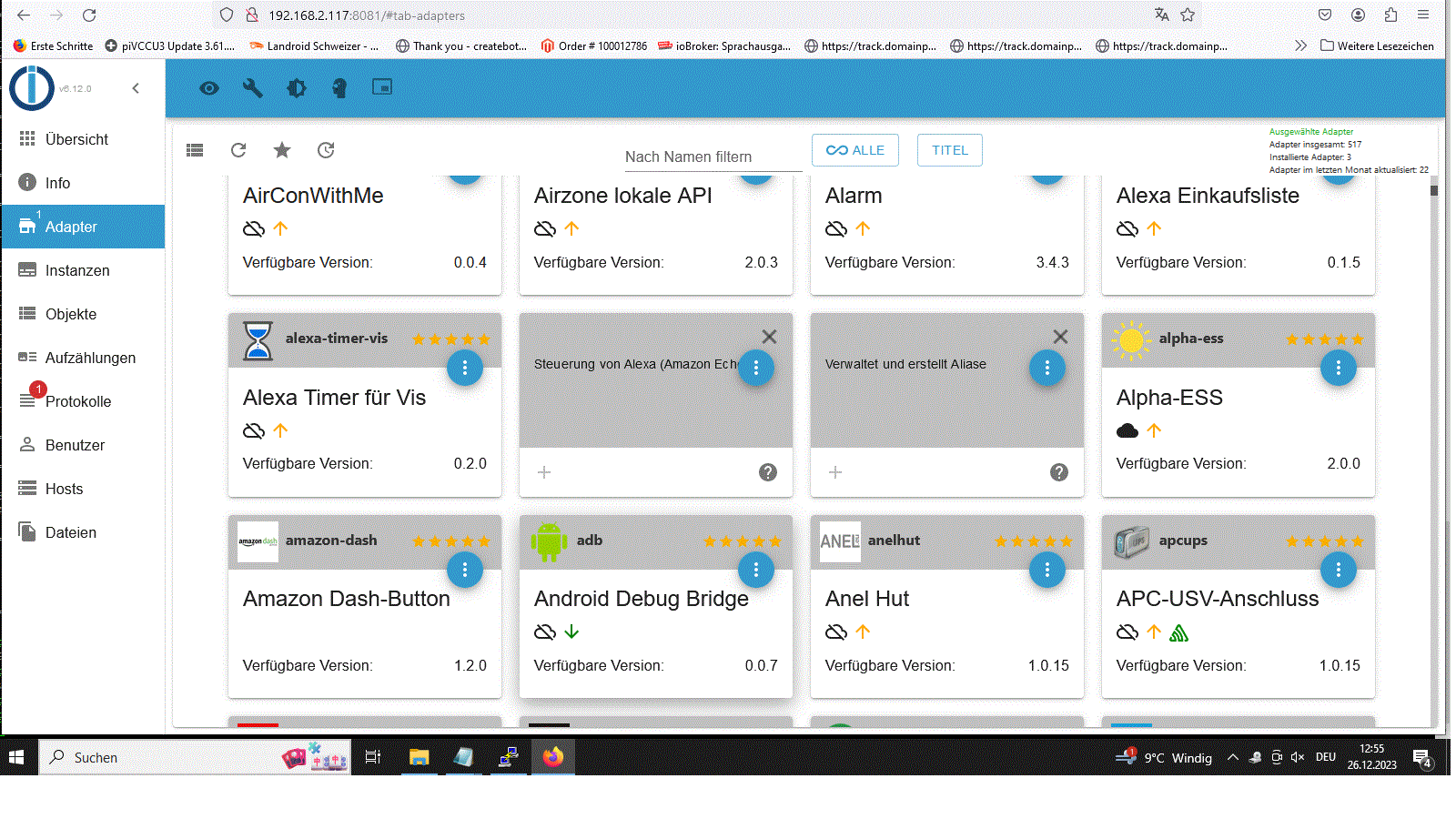
Hey! Du scheinst an dieser Unterhaltung interessiert zu sein, hast aber noch kein Konto.
Hast du es satt, bei jedem Besuch durch die gleichen Beiträge zu scrollen? Wenn du dich für ein Konto anmeldest, kommst du immer genau dorthin zurück, wo du zuvor warst, und kannst dich über neue Antworten benachrichtigen lassen (entweder per E-Mail oder Push-Benachrichtigung). Du kannst auch Lesezeichen speichern und Beiträge positiv bewerten, um anderen Community-Mitgliedern deine Wertschätzung zu zeigen.
Mit deinem Input könnte dieser Beitrag noch besser werden 💗
Registrieren Anmelden414
Online33.0k
Benutzende83.7k
Themen1.3m
Beiträge