




System updaten raspberry + iobroker + node
-
Bitte Texte aus der Konsole in CodeTags eingebettet posten.
iob stop
iob fix
ausführen. Danach wird
iob diagvorhanden sein.
======== Start marking the full check here ========= Skript v.2023-10-10 *** BASE SYSTEM *** Static hostname: raspberrypi Icon name: computer Operating System: Raspbian GNU/Linux 10 (buster) Kernel: Linux 5.4.72-v7l+ Architecture: arm Model : Raspberry Pi 4 Model B Rev 1.4 Docker : false Virtualization : none Kernel : armv7l Userland : armhf Systemuptime and Load: 10:45:37 up 419 days, 17:11, 1 user, load average: 0.40, 0.70, 0.50 CPU threads: 4 *** RASPBERRY THROTTLING *** Current issues: No throttling issues detected. Previously detected issues: No throttling issues detected. *** Time and Time Zones *** Local time: Mon 2023-12-18 10:45:37 GMT Universal time: Mon 2023-12-18 10:45:37 UTC RTC time: n/a Time zone: Europe/London (GMT, +0000) System clock synchronized: yes NTP service: active RTC in local TZ: no *** User and Groups *** pi /home/pi pi adm dialout cdrom sudo audio video plugdev games users input netdev gpio i2c spi iobroker *** X-Server-Setup *** X-Server: false Desktop: Terminal: tty Boot Target: graphical.target *** MEMORY *** total used free shared buff/cache available Mem: 7.9G 850M 5.8G 400M 1.2G 6.6G Swap: 99M 0B 99M Total: 8.0G 850M 5.9G 7875 M total memory 850 M used memory 1117 M active memory 829 M inactive memory 5779 M free memory 144 M buffer memory 1101 M swap cache 99 M total swap 0 M used swap 99 M free swap Raspberry only: oom events: 0 lifetime oom required: 0 Mbytes total time in oom handler: 0 ms max time spent in oom handler: 0 ms *** FAILED SERVICES *** 0 loaded units listed. Pass --all to see loaded but inactive units, too. To show all installed unit files use 'systemctl list-unit-files'. *** FILESYSTEM *** Filesystem Type Size Used Avail Use% Mounted on /dev/root ext4 59G 3.9G 53G 7% / devtmpfs devtmpfs 3.8G 0 3.8G 0% /dev tmpfs tmpfs 3.9G 0 3.9G 0% /dev/shm tmpfs tmpfs 3.9G 401M 3.5G 11% /run tmpfs tmpfs 5.0M 4.0K 5.0M 1% /run/lock tmpfs tmpfs 3.9G 0 3.9G 0% /sys/fs/cgroup /dev/mmcblk0p1 vfat 253M 55M 198M 22% /boot tmpfs tmpfs 788M 0 788M 0% /run/user/1000 Messages concerning ext4 filesystem in dmesg: [Mon Oct 24 18:34:35 2022] Kernel command line: coherent_pool=1M 8250.nr_uarts=0 snd_bcm2835.enable_compat_alsa=0 snd_bcm2835.enable_hdmi=1 snd_bcm2835.enable_headphones=1 smsc95xx.macaddr=DC:A6:32:D5:EF:A1 vc_mem.mem_base=0x3ec00000 vc_mem.mem_size=0x40000000 console=ttyS0,115200 console=tty1 root=PARTUUID=39b6b4e5-02 rootfstype=ext4 elevator=deadline fsck.repair=yes rootwait [Mon Oct 24 18:34:36 2022] EXT4-fs (mmcblk0p2): INFO: recovery required on readonly filesystem [Mon Oct 24 18:34:36 2022] EXT4-fs (mmcblk0p2): write access will be enabled during recovery [Mon Oct 24 18:34:36 2022] EXT4-fs (mmcblk0p2): orphan cleanup on readonly fs [Mon Oct 24 18:34:36 2022] EXT4-fs (mmcblk0p2): 5 orphan inodes deleted [Mon Oct 24 18:34:36 2022] EXT4-fs (mmcblk0p2): recovery complete [Mon Oct 24 18:34:36 2022] EXT4-fs (mmcblk0p2): mounted filesystem with ordered data mode. Opts: (null) [Mon Oct 24 18:34:36 2022] VFS: Mounted root (ext4 filesystem) readonly on device 179:2. [Mon Oct 24 18:34:38 2022] EXT4-fs (mmcblk0p2): re-mounted. Opts: (null) Show mounted filesystems \(real ones only\): TARGET SOURCE FSTYPE OPTIONS / /dev/mmcblk0p2 ext4 rw,noatime |-/sys/fs/bpf none bpf rw,nosuid,nodev,noexec,relatime,mode=700 `-/boot /dev/mmcblk0p1 vfat rw,relatime,fmask=0022,dmask=0022,codepage=437,iocharset=ascii,shortname=mixed,errors=remount-ro Files in neuralgic directories: /var: 416M /var/ 217M /var/cache 212M /var/cache/apt 153M /var/cache/apt/archives 96M /var/lib Archived and active journals take up 400.0M in the file system. /opt/iobroker/backups: 20M /opt/iobroker/backups/ /opt/iobroker/iobroker-data: 215M /opt/iobroker/iobroker-data/ 106M /opt/iobroker/iobroker-data/files 79M /opt/iobroker/iobroker-data/backup-objects 48M /opt/iobroker/iobroker-data/files/javascript.admin 32M /opt/iobroker/iobroker-data/files/javascript.admin/static The five largest files in iobroker-data are: 12M /opt/iobroker/iobroker-data/files/javascript.admin/static/js/790.1eb1f33b.chunk.js.map 8.3M /opt/iobroker/iobroker-data/objects.jsonl 6.3M /opt/iobroker/iobroker-data/files/admin.admin/custom/static/js/vendors-node_modules_iobroker_adapter-react-v5_assets_devices_parseNames_js-node_modules_iobr-99c23e.847b8ad9.chunk.js.map 6.2M /opt/iobroker/iobroker-data/files/javascript.admin/static/js/790.1eb1f33b.chunk.js 6.1M /opt/iobroker/iobroker-data/files/iot.admin/static/js/2.e9a02d96.chunk.js.map USB-Devices by-id: USB-Sticks - Avoid direct links to /dev/* in your adapter setups, please always prefer the links 'by-id': /dev/serial/by-id/usb-EnOcean_GmbH_EnOcean_USB_300_DC_FT41KIFB-if00-port0 /dev/serial/by-id/usb-1a86_USB_Serial-if00-port0 *** NodeJS-Installation *** /usr/bin/nodejs v12.22.2 /usr/bin/node v12.22.2 /usr/bin/npm 6.14.13 /usr/bin/npx 6.14.13 /home/iobroker/.diag.sh: line 281: corepack: command not found *** nodejs is NOT correctly installed *** nodejs: Installed: 12.22.2-1nodesource1 Candidate: 12.22.12-deb-1nodesource1 Version table: 12.22.12-deb-1nodesource1 500 500 https://deb.nodesource.com/node_12.x buster/main armhf Packages *** 12.22.2-1nodesource1 100 100 /var/lib/dpkg/status 10.24.0~dfsg-1~deb10u1 500 500 http://raspbian.raspberrypi.org/raspbian buster/main armhf Packages Temp directories causing npm8 problem: 0 No problems detected Errors in npm tree: *** ioBroker-Installation *** ioBroker Status iobroker is running on this host. Objects type: jsonl States type: jsonl Core adapters versions js-controller: 4.0.23 admin: 6.2.22 javascript: 6.0.3 Adapters from github: 3 Adapter State + system.adapter.admin.0 : admin : raspberrypi - enabled, port: 8081, bind: 0.0.0.0, run as: admin + system.adapter.alexa2.0 : alexa2 : raspberrypi - enabled system.adapter.cloud.0 : cloud : raspberrypi - disabled + system.adapter.discovery.0 : discovery : raspberrypi - enabled system.adapter.doorbird.0 : doorbird : raspberrypi - enabled + system.adapter.enocean.0 : enocean : raspberrypi - enabled + system.adapter.info.0 : info : raspberrypi - enabled + system.adapter.iot.0 : iot : raspberrypi - enabled + system.adapter.javascript.0 : javascript : raspberrypi - enabled + system.adapter.sayit.0 : sayit : raspberrypi - enabled, port: 0 + system.adapter.shelly.0 : shelly : raspberrypi - enabled, port: 1882, bind: 192.168.0.122 system.adapter.sonos.0 : sonos : raspberrypi - disabled + system.adapter.terminal.0 : terminal : raspberrypi - enabled, port: 8088, bind: 0.0.0.0, run as: admin + system.adapter.web.0 : web : raspberrypi - enabled, port: 8082, bind: 0.0.0.0, run as: admin + system.adapter.yahka.0 : yahka : raspberrypi - enabled + system.adapter.yahka.1 : yahka : raspberrypi - enabled + system.adapter.yahka.2 : yahka : raspberrypi - enabled + system.adapter.zigbee.0 : zigbee : raspberrypi - enabled, port: /dev/serial/by-id/usb-1a86_USB_Serial-if00-port0 + instance is alive Enabled adapters with bindings + system.adapter.admin.0 : admin : raspberrypi - enabled, port: 8081, bind: 0.0.0.0, run as: admin + system.adapter.sayit.0 : sayit : raspberrypi - enabled, port: 0 + system.adapter.shelly.0 : shelly : raspberrypi - enabled, port: 1882, bind: 192.168.0.122 + system.adapter.terminal.0 : terminal : raspberrypi - enabled, port: 8088, bind: 0.0.0.0, run as: admin + system.adapter.web.0 : web : raspberrypi - enabled, port: 8082, bind: 0.0.0.0, run as: admin + system.adapter.zigbee.0 : zigbee : raspberrypi - enabled, port: /dev/serial/by-id/usb-1a86_USB_Serial-if00-port0 ioBroker-Repositories stable : http://download.iobroker.net/sources-dist.json beta : http://download.iobroker.net/sources-dist-latest.json Active repo(s): stable Installed ioBroker-Instances Used repository: stable Adapter "admin" : 6.12.0 , installed 6.2.22 [Updatable] Adapter "alexa2" : 3.26.3 , installed 3.23.2 [Updatable] Adapter "cloud" : 4.4.1 , installed 4.2.2 [Updatable] Adapter "discovery" : 4.2.0 , installed 3.0.5 [Updatable] Adapter "doorbird" : 1.3.0 , installed 0.1.5 [Updatable] Adapter "info" : 2.0.0 , installed 1.9.19 [Updatable] Adapter "iot" : 2.0.11 , installed 1.11.9 [Updatable] Adapter "javascript" : 7.1.6 , installed 6.0.3 [Updatable] Controller "js-controller": 5.0.17 , installed 4.0.23 [Updatable] Adapter "sayit" : 3.0.5 , installed 1.12.3 [Updatable] Adapter "shelly" : 6.6.1 , installed 4.0.7 [Updatable] Adapter "simple-api" : 2.7.2 , installed 2.7.0 [Updatable] Adapter "socketio" : 6.6.0 , installed 4.2.0 [Updatable] Adapter "sonos" : 3.0.0 , installed 2.2.3 [Updatable] Adapter "sony-bravia" : 1.0.9 , installed 1.0.9 Adapter "terminal" : 1.0.0 , installed 0.2.6 [Updatable] Adapter "web" : 6.1.10 , installed 4.3.0 [Updatable] Adapter "ws" : 2.5.8 , installed 1.3.0 [Updatable] Adapter "yahka" : 1.0.3 , installed 0.13.1 [Updatable] Adapter "zigbee" : 1.8.24 , installed 1.8.10 [Updatable] Objects and States Please stand by - This may take a while Objects: 5746 States: 4775 *** OS-Repositories and Updates *** E: Repository 'http://archive.raspberrypi.org/debian buster InRelease' changed its 'Suite' value from 'testing' to 'oldoldstable' E: Repository 'http://raspbian.raspberrypi.org/raspbian buster InRelease' changed its 'Suite' value from 'stable' to 'oldoldstable' Pending Updates: 132 *** Listening Ports *** Active Internet connections (only servers) Proto Recv-Q Send-Q Local Address Foreign Address State User Inode PID/Program name tcp 0 0 127.0.0.1:38307 0.0.0.0:* LISTEN 1001 131216559 14146/io.yahka.0 tcp 0 0 127.0.0.1:41925 0.0.0.0:* LISTEN 1001 131216564 14146/io.yahka.0 tcp 0 0 127.0.0.1:33989 0.0.0.0:* LISTEN 1001 131216547 14146/io.yahka.0 tcp 0 0 127.0.0.1:41703 0.0.0.0:* LISTEN 1001 131217334 14807/io.yahka.1 tcp 0 0 127.0.0.1:9000 0.0.0.0:* LISTEN 1001 131213641 13946/iobroker.js-c tcp 0 0 127.0.0.1:9001 0.0.0.0:* LISTEN 1001 131213634 13946/iobroker.js-c tcp 0 0 127.0.0.1:45291 0.0.0.0:* LISTEN 1001 131219694 14146/io.yahka.0 tcp 0 0 127.0.0.1:43851 0.0.0.0:* LISTEN 1001 131217891 14807/io.yahka.1 tcp 0 0 127.0.0.1:43631 0.0.0.0:* LISTEN 1001 131216552 14146/io.yahka.0 tcp 0 0 127.0.0.1:34769 0.0.0.0:* LISTEN 1001 131218669 14840/io.yahka.2 tcp 0 0 127.0.0.1:38131 0.0.0.0:* LISTEN 1001 131220567 14840/io.yahka.2 tcp 0 0 0.0.0.0:22 0.0.0.0:* LISTEN 0 16813 572/sshd tcp 0 0 127.0.0.1:33561 0.0.0.0:* LISTEN 1001 131218665 14840/io.yahka.2 tcp 0 0 127.0.0.1:42905 0.0.0.0:* LISTEN 1001 131216015 14807/io.yahka.1 tcp 0 0 127.0.0.1:37211 0.0.0.0:* LISTEN 1001 131219699 14146/io.yahka.0 tcp6 0 0 :::38783 :::* LISTEN 1001 131216908 14807/io.yahka.1 tcp6 0 0 :::42977 :::* LISTEN 1001 131214296 14146/io.yahka.0 tcp6 0 0 :::34243 :::* LISTEN 1001 131217947 14840/io.yahka.2 tcp6 0 0 :::36049 :::* LISTEN 1001 131214295 14146/io.yahka.0 tcp6 0 0 :::8081 :::* LISTEN 1001 131213697 13964/io.admin.0 tcp6 0 0 :::8082 :::* LISTEN 1001 131215920 14730/io.web.0 tcp6 0 0 :::22 :::* LISTEN 0 16815 572/sshd tcp6 0 0 :::8088 :::* LISTEN 1001 131217864 14781/io.terminal.0 udp 0 0 0.0.0.0:5683 0.0.0.0:* 1001 131218481 14650/io.shelly.0 udp 0 0 0.0.0.0:68 0.0.0.0:* 0 14315 564/dhcpcd udp 0 0 0.0.0.0:5353 0.0.0.0:* 1001 131217948 14840/io.yahka.2 udp 0 0 0.0.0.0:5353 0.0.0.0:* 1001 131216909 14807/io.yahka.1 udp 0 0 0.0.0.0:5353 0.0.0.0:* 1001 131214300 14146/io.yahka.0 udp 0 0 0.0.0.0:5353 0.0.0.0:* 1001 131214297 14146/io.yahka.0 udp 0 0 0.0.0.0:5353 0.0.0.0:* 108 15108 382/avahi-daemon: r udp 0 0 0.0.0.0:43289 0.0.0.0:* 108 15110 382/avahi-daemon: r udp6 0 0 :::546 :::* 0 31124735 564/dhcpcd udp6 0 0 :::5353 :::* 108 15109 382/avahi-daemon: r udp6 0 0 :::42292 :::* 108 15111 382/avahi-daemon: r *** Log File - Last 25 Lines *** 2023-12-18 10:40:51.439 - info: host.raspberrypi Restart adapter system.adapter.doorbird.0 because enabled 2023-12-18 10:41:17.821 - info: alexa2.0 (14089) Unknown Device, but enabling commands, Try it and report back if commands work. 2023-12-18 10:41:17.821 - info: alexa2.0 (14089) Report to developer as GitHub issue with details for device. Please grab full next line pot. from logfile on disk if cutted 2023-12-18 10:41:17.822 - info: alexa2.0 (14089) Device-type:A2RG3FY1YV97SS - Sascha's Sonos Move (Sonos Move) (HANDS_FREE,SET_LOCALE,DEEZER,DIALOG_INTERFACE_VERSION,SLEEP,VOLUME_SETTING,TIDAL,SUPPORTS_CONNECTED_HOME_CLOUD_ONLY,SOUND_SETTINGS,SUPPORTS_LOCALE,MULTI_WAKEWORDS_SUPPORTED,CUSTOM_ALARM_TONE,SIRIUSXM,I_HEART_RADIO,ADAPTIVE_LISTENING,GOLDFISH,CHANGE_NAME,MICROPHONE,TIMERS_ALARMS_NOTIFICATIONS_VOLUME,SPEECH_RECOGNIZER_USS,APPLE_MUSIC,FAR_FIELD,AUDIO_PLAYER,EARCONS,SUPPORTS_LOCALE_SWITCH,SET_TIME_ZONE,REMINDERS,DREAM_TRAINING,MUSIC_SKILL,AMAZON_MUSIC,DEREGISTER_DEVICE,KINDLE_BOOKS,AUDIBLE,PERSISTENT_CONNECTION,TUNE_IN,ASCENDING_ALARM_VOLUME,TIMERS_AND_ALARMS) 2023-12-18 10:41:21.475 - info: host.raspberrypi instance system.adapter.doorbird.0 started with pid 15127 2023-12-18 10:41:24.179 - info: doorbird.0 (15127) starting. Version 0.1.5 (non-npm: https://github.com/BuZZy1337/ioBroker.doorbird/tarball/47440ddff9a9074ef1e0beb8ff7b7f2a6e368efb) in /opt/iobroker/node_modules/iobroker.doorbird, node: v12.22.2, js-controller: 4.0.23 2023-12-18 10:41:24.275 - error: doorbird.0 (15127) uncaught exception: listen EADDRNOTAVAIL: address not available 192.168.0.122:8100 2023-12-18 10:41:24.277 - error: doorbird.0 (15127) Error: listen EADDRNOTAVAIL: address not available 192.168.0.122:8100 at Server.setupListenHandle [as _listen2] (net.js:1299:21) at listenInCluster (net.js:1364:12) at doListen (net.js:1501:7) at processTicksAndRejections (internal/process/task_queues.js:85:21) 2023-12-18 10:41:24.278 - error: doorbird.0 (15127) Exception-Code: EADDRNOTAVAIL: listen EADDRNOTAVAIL: address not available 192.168.0.122:8100 2023-12-18 10:41:24.299 - info: doorbird.0 (15127) terminating 2023-12-18 10:41:24.300 - warn: doorbird.0 (15127) Terminated (UNCAUGHT_EXCEPTION): Without reason 2023-12-18 10:41:24.899 - error: host.raspberrypi instance system.adapter.doorbird.0 terminated with code 6 (UNCAUGHT_EXCEPTION) 2023-12-18 10:41:24.900 - info: host.raspberrypi Restart adapter system.adapter.doorbird.0 because enabled 2023-12-18 10:41:24.900 - warn: host.raspberrypi Do not restart adapter system.adapter.doorbird.0 because restart loop detected 2023-12-18 10:41:32.861 - info: alexa2.0 (14089) No smart home devices to query 2023-12-18 10:41:36.052 - info: alexa2.0 (14089) Subscribing to states... 2023-12-18 10:41:36.056 - info: alexa2.0 (14089) Deleting the following states: ["Smart-Home-Devices.0a811299-fb7f-4ea9-b76c-42ce750e89b6.lowerSetpoint","Smart-Home-Devices.0a811299-fb7f-4ea9-b76c-42ce750e89b6.lowerSetpoint-scale","Smart-Home-Devices.0a811299-fb7f-4ea9-b76c-42ce750e89b6.upperSetpoint","Smart-Home-Devices.0a811299-fb7f-4ea9-b76c-42ce750e89b6.upperSetpoint-scale","Smart-Home-Devices.9182c302-7eb1-4d03-a40b-a0f305a5dea7.lowerSetpoint","Smart-Home-Devices.9182c302-7eb1-4d03-a40b-a0f305a5dea7.lowerSetpoint-scale","Smart-Home-Devices.9182c302-7eb1-4d03-a40b-a0f305a5dea7.upperSetpoint","Smart-Home-Devices.9182c302-7eb1-4d03-a40b-a0f305a5dea7.upperSetpoint-scale","Smart-Home-Devices.715097f8-0444-409a-ba9b-97c872c95c91.lowerSetpoint","Smart-Home-Devices.715097f8-0444-409a-ba9b-97c872c95c91.lowerSetpoint-scale","Smart-Home-Devices.715097f8-0444-409a-ba9b-97c872c95c91.upperSetpoint","Smart-Home-Devices.715097f8-0444-409a-ba9b-97c872c95c91.upperSetpoint-scale","Smart-Home-Devices.770c27df-9728-4765-b41e-011704586681.lowerSetpoint","Smart-Home-Devices.770c27df-9728-4765-b41e-011704586681.lowerSetpoint-scale","Smart-Home-Devices.770c27df-9728-4765-b41e-011704586681.upperSetpoint","Smart-Home-Devices.770c27df-9728-4765-b41e-011704586681.upperSetpoint-scale"] 2023-12-18 10:41:37.858 - info: alexa2.0 (14089) Alexa-Push-Connection (macDms = true) established. Disable Polling 2023-12-18 10:41:52.977 - info: alexa2.0 (14089) Initialization Done ... 2023-12-18 10:45:27.558 - info: enocean.0 (14745) state 0584df18.CMD changed: 1 (ack = false) state: {"val":1,"ack":false,"ts":1702896327553,"q":0,"from":"system.adapter.yahka.0","user":"system.user.admin","lc":1702896327553} 2023-12-18 10:45:28.908 - info: enocean.0 (14745) state 0584df18.CMD changed: 0 (ack = false) state: {"val":0,"ack":false,"ts":1702896328901,"q":0,"from":"system.adapter.yahka.0","user":"system.user.admin","lc":1702896328901} -
======== Start marking the full check here ========= Skript v.2023-10-10 *** BASE SYSTEM *** Static hostname: raspberrypi Icon name: computer Operating System: Raspbian GNU/Linux 10 (buster) Kernel: Linux 5.4.72-v7l+ Architecture: arm Model : Raspberry Pi 4 Model B Rev 1.4 Docker : false Virtualization : none Kernel : armv7l Userland : armhf Systemuptime and Load: 10:45:37 up 419 days, 17:11, 1 user, load average: 0.40, 0.70, 0.50 CPU threads: 4 *** RASPBERRY THROTTLING *** Current issues: No throttling issues detected. Previously detected issues: No throttling issues detected. *** Time and Time Zones *** Local time: Mon 2023-12-18 10:45:37 GMT Universal time: Mon 2023-12-18 10:45:37 UTC RTC time: n/a Time zone: Europe/London (GMT, +0000) System clock synchronized: yes NTP service: active RTC in local TZ: no *** User and Groups *** pi /home/pi pi adm dialout cdrom sudo audio video plugdev games users input netdev gpio i2c spi iobroker *** X-Server-Setup *** X-Server: false Desktop: Terminal: tty Boot Target: graphical.target *** MEMORY *** total used free shared buff/cache available Mem: 7.9G 850M 5.8G 400M 1.2G 6.6G Swap: 99M 0B 99M Total: 8.0G 850M 5.9G 7875 M total memory 850 M used memory 1117 M active memory 829 M inactive memory 5779 M free memory 144 M buffer memory 1101 M swap cache 99 M total swap 0 M used swap 99 M free swap Raspberry only: oom events: 0 lifetime oom required: 0 Mbytes total time in oom handler: 0 ms max time spent in oom handler: 0 ms *** FAILED SERVICES *** 0 loaded units listed. Pass --all to see loaded but inactive units, too. To show all installed unit files use 'systemctl list-unit-files'. *** FILESYSTEM *** Filesystem Type Size Used Avail Use% Mounted on /dev/root ext4 59G 3.9G 53G 7% / devtmpfs devtmpfs 3.8G 0 3.8G 0% /dev tmpfs tmpfs 3.9G 0 3.9G 0% /dev/shm tmpfs tmpfs 3.9G 401M 3.5G 11% /run tmpfs tmpfs 5.0M 4.0K 5.0M 1% /run/lock tmpfs tmpfs 3.9G 0 3.9G 0% /sys/fs/cgroup /dev/mmcblk0p1 vfat 253M 55M 198M 22% /boot tmpfs tmpfs 788M 0 788M 0% /run/user/1000 Messages concerning ext4 filesystem in dmesg: [Mon Oct 24 18:34:35 2022] Kernel command line: coherent_pool=1M 8250.nr_uarts=0 snd_bcm2835.enable_compat_alsa=0 snd_bcm2835.enable_hdmi=1 snd_bcm2835.enable_headphones=1 smsc95xx.macaddr=DC:A6:32:D5:EF:A1 vc_mem.mem_base=0x3ec00000 vc_mem.mem_size=0x40000000 console=ttyS0,115200 console=tty1 root=PARTUUID=39b6b4e5-02 rootfstype=ext4 elevator=deadline fsck.repair=yes rootwait [Mon Oct 24 18:34:36 2022] EXT4-fs (mmcblk0p2): INFO: recovery required on readonly filesystem [Mon Oct 24 18:34:36 2022] EXT4-fs (mmcblk0p2): write access will be enabled during recovery [Mon Oct 24 18:34:36 2022] EXT4-fs (mmcblk0p2): orphan cleanup on readonly fs [Mon Oct 24 18:34:36 2022] EXT4-fs (mmcblk0p2): 5 orphan inodes deleted [Mon Oct 24 18:34:36 2022] EXT4-fs (mmcblk0p2): recovery complete [Mon Oct 24 18:34:36 2022] EXT4-fs (mmcblk0p2): mounted filesystem with ordered data mode. Opts: (null) [Mon Oct 24 18:34:36 2022] VFS: Mounted root (ext4 filesystem) readonly on device 179:2. [Mon Oct 24 18:34:38 2022] EXT4-fs (mmcblk0p2): re-mounted. Opts: (null) Show mounted filesystems \(real ones only\): TARGET SOURCE FSTYPE OPTIONS / /dev/mmcblk0p2 ext4 rw,noatime |-/sys/fs/bpf none bpf rw,nosuid,nodev,noexec,relatime,mode=700 `-/boot /dev/mmcblk0p1 vfat rw,relatime,fmask=0022,dmask=0022,codepage=437,iocharset=ascii,shortname=mixed,errors=remount-ro Files in neuralgic directories: /var: 416M /var/ 217M /var/cache 212M /var/cache/apt 153M /var/cache/apt/archives 96M /var/lib Archived and active journals take up 400.0M in the file system. /opt/iobroker/backups: 20M /opt/iobroker/backups/ /opt/iobroker/iobroker-data: 215M /opt/iobroker/iobroker-data/ 106M /opt/iobroker/iobroker-data/files 79M /opt/iobroker/iobroker-data/backup-objects 48M /opt/iobroker/iobroker-data/files/javascript.admin 32M /opt/iobroker/iobroker-data/files/javascript.admin/static The five largest files in iobroker-data are: 12M /opt/iobroker/iobroker-data/files/javascript.admin/static/js/790.1eb1f33b.chunk.js.map 8.3M /opt/iobroker/iobroker-data/objects.jsonl 6.3M /opt/iobroker/iobroker-data/files/admin.admin/custom/static/js/vendors-node_modules_iobroker_adapter-react-v5_assets_devices_parseNames_js-node_modules_iobr-99c23e.847b8ad9.chunk.js.map 6.2M /opt/iobroker/iobroker-data/files/javascript.admin/static/js/790.1eb1f33b.chunk.js 6.1M /opt/iobroker/iobroker-data/files/iot.admin/static/js/2.e9a02d96.chunk.js.map USB-Devices by-id: USB-Sticks - Avoid direct links to /dev/* in your adapter setups, please always prefer the links 'by-id': /dev/serial/by-id/usb-EnOcean_GmbH_EnOcean_USB_300_DC_FT41KIFB-if00-port0 /dev/serial/by-id/usb-1a86_USB_Serial-if00-port0 *** NodeJS-Installation *** /usr/bin/nodejs v12.22.2 /usr/bin/node v12.22.2 /usr/bin/npm 6.14.13 /usr/bin/npx 6.14.13 /home/iobroker/.diag.sh: line 281: corepack: command not found *** nodejs is NOT correctly installed *** nodejs: Installed: 12.22.2-1nodesource1 Candidate: 12.22.12-deb-1nodesource1 Version table: 12.22.12-deb-1nodesource1 500 500 https://deb.nodesource.com/node_12.x buster/main armhf Packages *** 12.22.2-1nodesource1 100 100 /var/lib/dpkg/status 10.24.0~dfsg-1~deb10u1 500 500 http://raspbian.raspberrypi.org/raspbian buster/main armhf Packages Temp directories causing npm8 problem: 0 No problems detected Errors in npm tree: *** ioBroker-Installation *** ioBroker Status iobroker is running on this host. Objects type: jsonl States type: jsonl Core adapters versions js-controller: 4.0.23 admin: 6.2.22 javascript: 6.0.3 Adapters from github: 3 Adapter State + system.adapter.admin.0 : admin : raspberrypi - enabled, port: 8081, bind: 0.0.0.0, run as: admin + system.adapter.alexa2.0 : alexa2 : raspberrypi - enabled system.adapter.cloud.0 : cloud : raspberrypi - disabled + system.adapter.discovery.0 : discovery : raspberrypi - enabled system.adapter.doorbird.0 : doorbird : raspberrypi - enabled + system.adapter.enocean.0 : enocean : raspberrypi - enabled + system.adapter.info.0 : info : raspberrypi - enabled + system.adapter.iot.0 : iot : raspberrypi - enabled + system.adapter.javascript.0 : javascript : raspberrypi - enabled + system.adapter.sayit.0 : sayit : raspberrypi - enabled, port: 0 + system.adapter.shelly.0 : shelly : raspberrypi - enabled, port: 1882, bind: 192.168.0.122 system.adapter.sonos.0 : sonos : raspberrypi - disabled + system.adapter.terminal.0 : terminal : raspberrypi - enabled, port: 8088, bind: 0.0.0.0, run as: admin + system.adapter.web.0 : web : raspberrypi - enabled, port: 8082, bind: 0.0.0.0, run as: admin + system.adapter.yahka.0 : yahka : raspberrypi - enabled + system.adapter.yahka.1 : yahka : raspberrypi - enabled + system.adapter.yahka.2 : yahka : raspberrypi - enabled + system.adapter.zigbee.0 : zigbee : raspberrypi - enabled, port: /dev/serial/by-id/usb-1a86_USB_Serial-if00-port0 + instance is alive Enabled adapters with bindings + system.adapter.admin.0 : admin : raspberrypi - enabled, port: 8081, bind: 0.0.0.0, run as: admin + system.adapter.sayit.0 : sayit : raspberrypi - enabled, port: 0 + system.adapter.shelly.0 : shelly : raspberrypi - enabled, port: 1882, bind: 192.168.0.122 + system.adapter.terminal.0 : terminal : raspberrypi - enabled, port: 8088, bind: 0.0.0.0, run as: admin + system.adapter.web.0 : web : raspberrypi - enabled, port: 8082, bind: 0.0.0.0, run as: admin + system.adapter.zigbee.0 : zigbee : raspberrypi - enabled, port: /dev/serial/by-id/usb-1a86_USB_Serial-if00-port0 ioBroker-Repositories stable : http://download.iobroker.net/sources-dist.json beta : http://download.iobroker.net/sources-dist-latest.json Active repo(s): stable Installed ioBroker-Instances Used repository: stable Adapter "admin" : 6.12.0 , installed 6.2.22 [Updatable] Adapter "alexa2" : 3.26.3 , installed 3.23.2 [Updatable] Adapter "cloud" : 4.4.1 , installed 4.2.2 [Updatable] Adapter "discovery" : 4.2.0 , installed 3.0.5 [Updatable] Adapter "doorbird" : 1.3.0 , installed 0.1.5 [Updatable] Adapter "info" : 2.0.0 , installed 1.9.19 [Updatable] Adapter "iot" : 2.0.11 , installed 1.11.9 [Updatable] Adapter "javascript" : 7.1.6 , installed 6.0.3 [Updatable] Controller "js-controller": 5.0.17 , installed 4.0.23 [Updatable] Adapter "sayit" : 3.0.5 , installed 1.12.3 [Updatable] Adapter "shelly" : 6.6.1 , installed 4.0.7 [Updatable] Adapter "simple-api" : 2.7.2 , installed 2.7.0 [Updatable] Adapter "socketio" : 6.6.0 , installed 4.2.0 [Updatable] Adapter "sonos" : 3.0.0 , installed 2.2.3 [Updatable] Adapter "sony-bravia" : 1.0.9 , installed 1.0.9 Adapter "terminal" : 1.0.0 , installed 0.2.6 [Updatable] Adapter "web" : 6.1.10 , installed 4.3.0 [Updatable] Adapter "ws" : 2.5.8 , installed 1.3.0 [Updatable] Adapter "yahka" : 1.0.3 , installed 0.13.1 [Updatable] Adapter "zigbee" : 1.8.24 , installed 1.8.10 [Updatable] Objects and States Please stand by - This may take a while Objects: 5746 States: 4775 *** OS-Repositories and Updates *** E: Repository 'http://archive.raspberrypi.org/debian buster InRelease' changed its 'Suite' value from 'testing' to 'oldoldstable' E: Repository 'http://raspbian.raspberrypi.org/raspbian buster InRelease' changed its 'Suite' value from 'stable' to 'oldoldstable' Pending Updates: 132 *** Listening Ports *** Active Internet connections (only servers) Proto Recv-Q Send-Q Local Address Foreign Address State User Inode PID/Program name tcp 0 0 127.0.0.1:38307 0.0.0.0:* LISTEN 1001 131216559 14146/io.yahka.0 tcp 0 0 127.0.0.1:41925 0.0.0.0:* LISTEN 1001 131216564 14146/io.yahka.0 tcp 0 0 127.0.0.1:33989 0.0.0.0:* LISTEN 1001 131216547 14146/io.yahka.0 tcp 0 0 127.0.0.1:41703 0.0.0.0:* LISTEN 1001 131217334 14807/io.yahka.1 tcp 0 0 127.0.0.1:9000 0.0.0.0:* LISTEN 1001 131213641 13946/iobroker.js-c tcp 0 0 127.0.0.1:9001 0.0.0.0:* LISTEN 1001 131213634 13946/iobroker.js-c tcp 0 0 127.0.0.1:45291 0.0.0.0:* LISTEN 1001 131219694 14146/io.yahka.0 tcp 0 0 127.0.0.1:43851 0.0.0.0:* LISTEN 1001 131217891 14807/io.yahka.1 tcp 0 0 127.0.0.1:43631 0.0.0.0:* LISTEN 1001 131216552 14146/io.yahka.0 tcp 0 0 127.0.0.1:34769 0.0.0.0:* LISTEN 1001 131218669 14840/io.yahka.2 tcp 0 0 127.0.0.1:38131 0.0.0.0:* LISTEN 1001 131220567 14840/io.yahka.2 tcp 0 0 0.0.0.0:22 0.0.0.0:* LISTEN 0 16813 572/sshd tcp 0 0 127.0.0.1:33561 0.0.0.0:* LISTEN 1001 131218665 14840/io.yahka.2 tcp 0 0 127.0.0.1:42905 0.0.0.0:* LISTEN 1001 131216015 14807/io.yahka.1 tcp 0 0 127.0.0.1:37211 0.0.0.0:* LISTEN 1001 131219699 14146/io.yahka.0 tcp6 0 0 :::38783 :::* LISTEN 1001 131216908 14807/io.yahka.1 tcp6 0 0 :::42977 :::* LISTEN 1001 131214296 14146/io.yahka.0 tcp6 0 0 :::34243 :::* LISTEN 1001 131217947 14840/io.yahka.2 tcp6 0 0 :::36049 :::* LISTEN 1001 131214295 14146/io.yahka.0 tcp6 0 0 :::8081 :::* LISTEN 1001 131213697 13964/io.admin.0 tcp6 0 0 :::8082 :::* LISTEN 1001 131215920 14730/io.web.0 tcp6 0 0 :::22 :::* LISTEN 0 16815 572/sshd tcp6 0 0 :::8088 :::* LISTEN 1001 131217864 14781/io.terminal.0 udp 0 0 0.0.0.0:5683 0.0.0.0:* 1001 131218481 14650/io.shelly.0 udp 0 0 0.0.0.0:68 0.0.0.0:* 0 14315 564/dhcpcd udp 0 0 0.0.0.0:5353 0.0.0.0:* 1001 131217948 14840/io.yahka.2 udp 0 0 0.0.0.0:5353 0.0.0.0:* 1001 131216909 14807/io.yahka.1 udp 0 0 0.0.0.0:5353 0.0.0.0:* 1001 131214300 14146/io.yahka.0 udp 0 0 0.0.0.0:5353 0.0.0.0:* 1001 131214297 14146/io.yahka.0 udp 0 0 0.0.0.0:5353 0.0.0.0:* 108 15108 382/avahi-daemon: r udp 0 0 0.0.0.0:43289 0.0.0.0:* 108 15110 382/avahi-daemon: r udp6 0 0 :::546 :::* 0 31124735 564/dhcpcd udp6 0 0 :::5353 :::* 108 15109 382/avahi-daemon: r udp6 0 0 :::42292 :::* 108 15111 382/avahi-daemon: r *** Log File - Last 25 Lines *** 2023-12-18 10:40:51.439 - info: host.raspberrypi Restart adapter system.adapter.doorbird.0 because enabled 2023-12-18 10:41:17.821 - info: alexa2.0 (14089) Unknown Device, but enabling commands, Try it and report back if commands work. 2023-12-18 10:41:17.821 - info: alexa2.0 (14089) Report to developer as GitHub issue with details for device. Please grab full next line pot. from logfile on disk if cutted 2023-12-18 10:41:17.822 - info: alexa2.0 (14089) Device-type:A2RG3FY1YV97SS - Sascha's Sonos Move (Sonos Move) (HANDS_FREE,SET_LOCALE,DEEZER,DIALOG_INTERFACE_VERSION,SLEEP,VOLUME_SETTING,TIDAL,SUPPORTS_CONNECTED_HOME_CLOUD_ONLY,SOUND_SETTINGS,SUPPORTS_LOCALE,MULTI_WAKEWORDS_SUPPORTED,CUSTOM_ALARM_TONE,SIRIUSXM,I_HEART_RADIO,ADAPTIVE_LISTENING,GOLDFISH,CHANGE_NAME,MICROPHONE,TIMERS_ALARMS_NOTIFICATIONS_VOLUME,SPEECH_RECOGNIZER_USS,APPLE_MUSIC,FAR_FIELD,AUDIO_PLAYER,EARCONS,SUPPORTS_LOCALE_SWITCH,SET_TIME_ZONE,REMINDERS,DREAM_TRAINING,MUSIC_SKILL,AMAZON_MUSIC,DEREGISTER_DEVICE,KINDLE_BOOKS,AUDIBLE,PERSISTENT_CONNECTION,TUNE_IN,ASCENDING_ALARM_VOLUME,TIMERS_AND_ALARMS) 2023-12-18 10:41:21.475 - info: host.raspberrypi instance system.adapter.doorbird.0 started with pid 15127 2023-12-18 10:41:24.179 - info: doorbird.0 (15127) starting. Version 0.1.5 (non-npm: https://github.com/BuZZy1337/ioBroker.doorbird/tarball/47440ddff9a9074ef1e0beb8ff7b7f2a6e368efb) in /opt/iobroker/node_modules/iobroker.doorbird, node: v12.22.2, js-controller: 4.0.23 2023-12-18 10:41:24.275 - error: doorbird.0 (15127) uncaught exception: listen EADDRNOTAVAIL: address not available 192.168.0.122:8100 2023-12-18 10:41:24.277 - error: doorbird.0 (15127) Error: listen EADDRNOTAVAIL: address not available 192.168.0.122:8100 at Server.setupListenHandle [as _listen2] (net.js:1299:21) at listenInCluster (net.js:1364:12) at doListen (net.js:1501:7) at processTicksAndRejections (internal/process/task_queues.js:85:21) 2023-12-18 10:41:24.278 - error: doorbird.0 (15127) Exception-Code: EADDRNOTAVAIL: listen EADDRNOTAVAIL: address not available 192.168.0.122:8100 2023-12-18 10:41:24.299 - info: doorbird.0 (15127) terminating 2023-12-18 10:41:24.300 - warn: doorbird.0 (15127) Terminated (UNCAUGHT_EXCEPTION): Without reason 2023-12-18 10:41:24.899 - error: host.raspberrypi instance system.adapter.doorbird.0 terminated with code 6 (UNCAUGHT_EXCEPTION) 2023-12-18 10:41:24.900 - info: host.raspberrypi Restart adapter system.adapter.doorbird.0 because enabled 2023-12-18 10:41:24.900 - warn: host.raspberrypi Do not restart adapter system.adapter.doorbird.0 because restart loop detected 2023-12-18 10:41:32.861 - info: alexa2.0 (14089) No smart home devices to query 2023-12-18 10:41:36.052 - info: alexa2.0 (14089) Subscribing to states... 2023-12-18 10:41:36.056 - info: alexa2.0 (14089) Deleting the following states: ["Smart-Home-Devices.0a811299-fb7f-4ea9-b76c-42ce750e89b6.lowerSetpoint","Smart-Home-Devices.0a811299-fb7f-4ea9-b76c-42ce750e89b6.lowerSetpoint-scale","Smart-Home-Devices.0a811299-fb7f-4ea9-b76c-42ce750e89b6.upperSetpoint","Smart-Home-Devices.0a811299-fb7f-4ea9-b76c-42ce750e89b6.upperSetpoint-scale","Smart-Home-Devices.9182c302-7eb1-4d03-a40b-a0f305a5dea7.lowerSetpoint","Smart-Home-Devices.9182c302-7eb1-4d03-a40b-a0f305a5dea7.lowerSetpoint-scale","Smart-Home-Devices.9182c302-7eb1-4d03-a40b-a0f305a5dea7.upperSetpoint","Smart-Home-Devices.9182c302-7eb1-4d03-a40b-a0f305a5dea7.upperSetpoint-scale","Smart-Home-Devices.715097f8-0444-409a-ba9b-97c872c95c91.lowerSetpoint","Smart-Home-Devices.715097f8-0444-409a-ba9b-97c872c95c91.lowerSetpoint-scale","Smart-Home-Devices.715097f8-0444-409a-ba9b-97c872c95c91.upperSetpoint","Smart-Home-Devices.715097f8-0444-409a-ba9b-97c872c95c91.upperSetpoint-scale","Smart-Home-Devices.770c27df-9728-4765-b41e-011704586681.lowerSetpoint","Smart-Home-Devices.770c27df-9728-4765-b41e-011704586681.lowerSetpoint-scale","Smart-Home-Devices.770c27df-9728-4765-b41e-011704586681.upperSetpoint","Smart-Home-Devices.770c27df-9728-4765-b41e-011704586681.upperSetpoint-scale"] 2023-12-18 10:41:37.858 - info: alexa2.0 (14089) Alexa-Push-Connection (macDms = true) established. Disable Polling 2023-12-18 10:41:52.977 - info: alexa2.0 (14089) Initialization Done ... 2023-12-18 10:45:27.558 - info: enocean.0 (14745) state 0584df18.CMD changed: 1 (ack = false) state: {"val":1,"ack":false,"ts":1702896327553,"q":0,"from":"system.adapter.yahka.0","user":"system.user.admin","lc":1702896327553} 2023-12-18 10:45:28.908 - info: enocean.0 (14745) state 0584df18.CMD changed: 0 (ack = false) state: {"val":0,"ack":false,"ts":1702896328901,"q":0,"from":"system.adapter.yahka.0","user":"system.user.admin","lc":1702896328901}Zeitzone falsch.
sudo timedatectl set-timezone "Europe/Berlin"Dein Dateisystem hat einen Treffer:
[Mon Oct 24 18:34:36 2022] EXT4-fs (mmcblk0p2): 5 orphan inodes deletedDie Pending Updates: 132 zuerst einspielen:
sudo apt update
iob stop
sudo apt full-upgrade
iob nodejs-update
sudo reboot
Wenn der Server wieder auf die Beine gekommen ist:
iob update
iob upgrade all -y
iob stop
iob upgrade self
iob start
Dann davon ein Backup extern ablegen und das ganze System NEU als Raspberry OS 64Bit Lite installieren. Dort das Backup wieder einspielen, fertig.
-
Zeitzone falsch.
sudo timedatectl set-timezone "Europe/Berlin"Dein Dateisystem hat einen Treffer:
[Mon Oct 24 18:34:36 2022] EXT4-fs (mmcblk0p2): 5 orphan inodes deletedDie Pending Updates: 132 zuerst einspielen:
sudo apt update
iob stop
sudo apt full-upgrade
iob nodejs-update
sudo reboot
Wenn der Server wieder auf die Beine gekommen ist:
iob update
iob upgrade all -y
iob stop
iob upgrade self
iob start
Dann davon ein Backup extern ablegen und das ganze System NEU als Raspberry OS 64Bit Lite installieren. Dort das Backup wieder einspielen, fertig.
@thomas-braun
für mich als Noob:- Zeitzone korrigieren
sudo timedatectl set-timezone "Europe/Berlin"- diese Befehle ausführen:
sudo apt update iob stop sudo apt full-upgrade iob nodejs-update sudo reboot- diese Befehle ausführen:
iob update
iob upgrade all -y
iob stop
iob upgrade self
iob start
Wie ich dann ein Backup extern ablegen kann muss ich dann noch recherchieren.
Dann mache ich quasi den pi platt und setze es mit raspberry 64 OS bit Lite neu auf und spiele dann das backup ein? -
@thomas-braun
für mich als Noob:- Zeitzone korrigieren
sudo timedatectl set-timezone "Europe/Berlin"- diese Befehle ausführen:
sudo apt update iob stop sudo apt full-upgrade iob nodejs-update sudo reboot- diese Befehle ausführen:
iob update
iob upgrade all -y
iob stop
iob upgrade self
iob start
Wie ich dann ein Backup extern ablegen kann muss ich dann noch recherchieren.
Dann mache ich quasi den pi platt und setze es mit raspberry 64 OS bit Lite neu auf und spiele dann das backup ein?@theariba sagte in System updaten raspberry + iobroker + node:
Dann mache ich quasi den pi platt und setze es mit raspberry 64 OS bit Lite neu auf und spiele dann das backup ein?
Ja, das ist der Plan.
-
@theariba sagte in System updaten raspberry + iobroker + node:
Dann mache ich quasi den pi platt und setze es mit raspberry 64 OS bit Lite neu auf und spiele dann das backup ein?
Ja, das ist der Plan.
-
@thomas-braun
Ok. Werde nachher mal die Befehle so durchführen.
Kannst du mir evtl. Sagen wie ich das mit dem Backup auf usb Stick oder so hinbekomme?
Und wie macht man den Pi platt und setzt ihn neu auf?@theariba sagte in System updaten raspberry + iobroker + node:
Kannst du mir evtl. Sagen wie ich das mit dem Backup auf usb Stick oder so hinbekomme?
Ich würde es per Backitup-Adapter machen.
Und wie macht man den Pi platt und setzt ihn neu auf?
https://forum.iobroker.net/topic/51869/installation-auf-raspi-einfacher-geht-s-nicht
-
@theariba sagte in System updaten raspberry + iobroker + node:
Kannst du mir evtl. Sagen wie ich das mit dem Backup auf usb Stick oder so hinbekomme?
Ich würde es per Backitup-Adapter machen.
Und wie macht man den Pi platt und setzt ihn neu auf?
https://forum.iobroker.net/topic/51869/installation-auf-raspi-einfacher-geht-s-nicht
@thomas-braun so, habe die erste Runde der Befehle mal ausgeführt. Nun Backitup Adapter installiert und versuche ein Backup auf Google Drive zu erstellen. Finde leider keinen USB Stick gerade...
wie kann ich sehen ob es erfolgreich war bzw. ob alles dabei ist? Am wichtigsiten ist mir mein Enocean Adapter...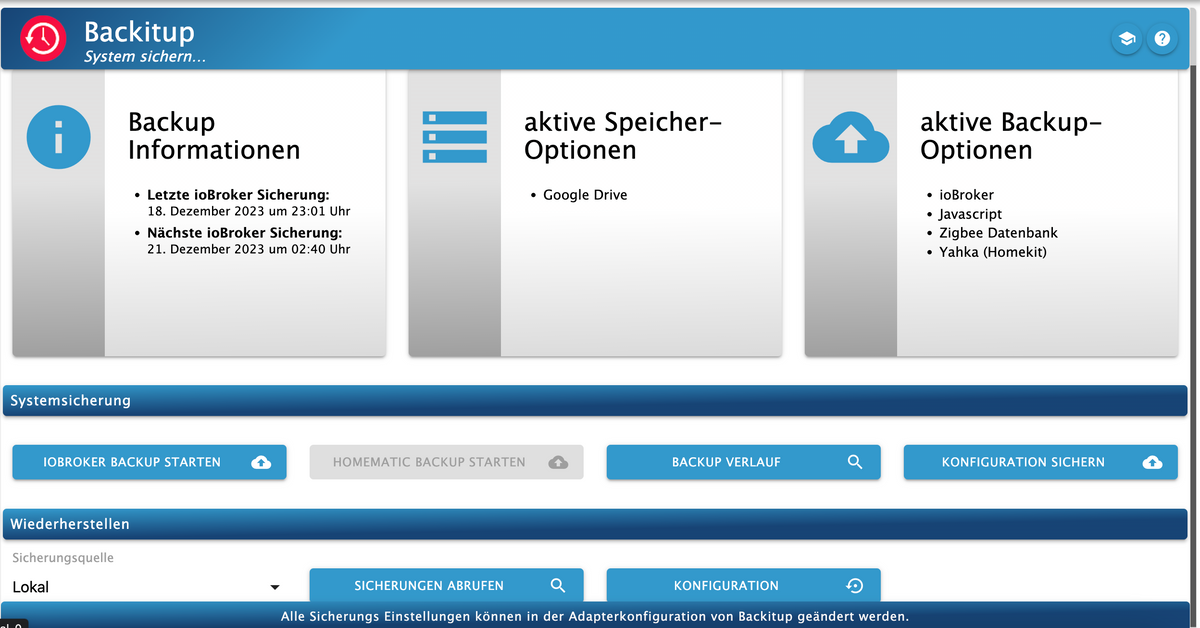
-
@thomas-braun so, habe die erste Runde der Befehle mal ausgeführt. Nun Backitup Adapter installiert und versuche ein Backup auf Google Drive zu erstellen. Finde leider keinen USB Stick gerade...
wie kann ich sehen ob es erfolgreich war bzw. ob alles dabei ist? Am wichtigsiten ist mir mein Enocean Adapter...Im Backup sind die Adapter und deren Einstellungen enthalten.
-
Im Backup sind die Adapter und deren Einstellungen enthalten.
-
@thomas-braun ok danke. Habe irgendwie Bedenken dass ich mir das zerschiesse. Warum genau empfiehlt es sich denn das Raspberry OS zu aktualisieren?
@theariba sagte in System updaten raspberry + iobroker + node:
Warum genau empfiehlt es sich denn das Raspberry OS zu aktualisieren?
Weil deine Version 10 'Buster' abgekündigt wurde, das EndOfLife erreicht hat und weil du da seinerzeit eine 32Bit-Version installiert hast, mittlerweile aber die 64Bit-Variante die besser für einen Raspberry Pi geeignete ist.
Und ganz allgemein, weil man seinen Softwarestack immer auf Stand hält.
-
@thomas-braun ok alles klar. Dann mache ich mich da heute Abend mal dran. Kurz zum Verständnis der Vorgehensweise:
- Über den Backitup auf einen beliebigen USB Stick das Backup ablegen.
Dafür gebe ich im Backitup Adapter unter NAS/Kopieren den Pfad /media/usbstick/backupDir an. Muss ich hier sonst noch etwas beachten? - Dann formatiere ich die SD Karte, und setze dann das neue OS so auf wie in deiner Beschreibung
- Wie spielt man dann das Backup wieder auf?
Die Geräte muss ich sicher nicht mehr neu einlernen?
Sorry aber ich habe ein wenig Schiss :)
- Über den Backitup auf einen beliebigen USB Stick das Backup ablegen.
-
ich würde lieber eine neue SD-Karte nehmen. dann hast du a) die alte zur Sicherheit noch zur Hand und b) das Risiko, das die SD-Karte bereits einen Hau hat (wegen den verwaisten inodes) ist weg.
@oliverio ok verstehe. Bedeutet das sobald ich die alte Karte einstecke habe ich den aktuellen Stand wieder und das funktioniert alles wie gehabt? Habe ich das mit dem Backup soweit richtig verstanden? Wie füge ich das dann wieder auf im neuen System ein? Muss ich dazu einen neuen iobroker aufsetzen oder geht das über Befehle? bspw. hole dir die Datei vom USB Stick?
-
@oliverio ok verstehe. Bedeutet das sobald ich die alte Karte einstecke habe ich den aktuellen Stand wieder und das funktioniert alles wie gehabt? Habe ich das mit dem Backup soweit richtig verstanden? Wie füge ich das dann wieder auf im neuen System ein? Muss ich dazu einen neuen iobroker aufsetzen oder geht das über Befehle? bspw. hole dir die Datei vom USB Stick?
@theariba sagte in System updaten raspberry + iobroker + node:
ok verstehe. Bedeutet das sobald ich die alte Karte einstecke habe ich den aktuellen Stand wieder und das funktioniert alles wie gehabt?
ja, das ist wie die Festplatte wechseln. Wenn die alte wieder einbaust, dann gehts genau mit dem letzten stand weiter. der raspi ist nur hardware und hat kein weiteres "Gedächtnis".
Dann kannst du zur Not immer mal noch nachschauen -
Hallo, ich habe gerade mein Raspi OS neu aufgesetzt auf TRIXIE.
Vorher habe ich alle diese Backups gemacht.
Der iobroker backup konnte ich auch wieder einspielen. Beim Wiedereinspielen des influxdb-Backup bricht er aber immer ab mit "ECONNREFUSED"Das LOG sagt zwischendurch auch File /opt/iobroker/backups/influxDB_2026_05_24-14_00_39_backupiobroker.tar.gz not found
Das ist aber nicht wirklich der Pfad, an dem sie liegt. In der Backitup-Instanz ist vielmehr unter FTP eingetragen: "/iobrokerbackups/backupDir". Dieser wird auch aufgerufen, dort wird sie gefunden, aber bei Aufruf: ECONNREFUSED.
Auch ein Hochladen der Datei auf lokal führt nicht dazu, dass sie angezeigt wird, wenn man als restore-Quelle "lokal" angibt.
Kann jemand helfen?Ach ja: Die Option, die alter DB zu löschen vor wem Wiederherstellen, ist gesetzt!
-
Hallo, ich habe gerade mein Raspi OS neu aufgesetzt auf TRIXIE.
Vorher habe ich alle diese Backups gemacht.
Der iobroker backup konnte ich auch wieder einspielen. Beim Wiedereinspielen des influxdb-Backup bricht er aber immer ab mit "ECONNREFUSED"Das LOG sagt zwischendurch auch File /opt/iobroker/backups/influxDB_2026_05_24-14_00_39_backupiobroker.tar.gz not found
Das ist aber nicht wirklich der Pfad, an dem sie liegt. In der Backitup-Instanz ist vielmehr unter FTP eingetragen: "/iobrokerbackups/backupDir". Dieser wird auch aufgerufen, dort wird sie gefunden, aber bei Aufruf: ECONNREFUSED.
Auch ein Hochladen der Datei auf lokal führt nicht dazu, dass sie angezeigt wird, wenn man als restore-Quelle "lokal" angibt.
Kann jemand helfen?Ach ja: Die Option, die alter DB zu löschen vor wem Wiederherstellen, ist gesetzt!
Ich würde das auch nicht per ollem ftp machen sondern per NFS / CIFS, je nachdem was da auf dem NAS verfügbar ist.
Ist aber auch am Thema des Threads vorbei.
-
Danke, das habe ich schon früher versucht. FTP lief am stabilsten.
Es geht ja nun um ein Restore - da möchte ich die gleiche Technik nehmen, mit der die Daten angelegt wurden.
Aber was ist ECONNREFUSED? -
OK, mal probiert. Wenn ich NAS (CFIS) wähle, ruft Backitup beim Restore das Verzeichnis auf, und
- zeigt bei iobroker und Javascript nur die jeweils letzten Backups (obwohl da mehrere sind)
- zeigt NICHT das InfluxDB-Backup, obwohl es im selben Verzeichnis liegt (und bei FTP angezeigt wird). Es sind beides tar.gz"
-
OK, mal probiert. Wenn ich NAS (CFIS) wähle, ruft Backitup beim Restore das Verzeichnis auf, und
- zeigt bei iobroker und Javascript nur die jeweils letzten Backups (obwohl da mehrere sind)
- zeigt NICHT das InfluxDB-Backup, obwohl es im selben Verzeichnis liegt (und bei FTP angezeigt wird). Es sind beides tar.gz"
Bei CIFS muss der mount-Punkt aber auch leer sein.


Hey! Du scheinst an dieser Unterhaltung interessiert zu sein, hast aber noch kein Konto.
Hast du es satt, bei jedem Besuch durch die gleichen Beiträge zu scrollen? Wenn du dich für ein Konto anmeldest, kommst du immer genau dorthin zurück, wo du zuvor warst, und kannst dich über neue Antworten benachrichtigen lassen (entweder per E-Mail oder Push-Benachrichtigung). Du kannst auch Lesezeichen speichern und Beiträge positiv bewerten, um anderen Community-Mitgliedern deine Wertschätzung zu zeigen.
Mit deinem Input könnte dieser Beitrag noch besser werden 💗
Registrieren AnmeldenSupport us
404
Online33.0k
Benutzer83.5k
Themen1.3m
Beiträge