




Update auf neuen NODE.JS und nichts geht mehr
-
@sven-schumacher sagte in Update auf neuen NODE.JS und nichts geht mehr:
Also was für Informationen könnten helfen?
Ausgabe von
iob diag======== Start marking the full check here =========
Skript v.2023-10-10

*** BASE SYSTEM ***
   Static hostname: iobroker2
         Icon name: computer
  Operating System: Debian GNU/Linux 11 (bullseye)
            Kernel: Linux 6.1.21-v8+
      Architecture: arm64

Model           : Raspberry Pi 4 Model B Rev 1.5
Docker          : false
Virtualization  : none
Kernel          : aarch64
Userland        : arm64

Systemuptime and Load:
 22:56:02 up  7:18,  1 user,  load average: 0.41, 0.12, 0.04
CPU threads: 4


*** RASPBERRY THROTTLING ***
Current issues:
No throttling issues detected.

Previously detected issues:
No throttling issues detected.

*** Time and Time Zones ***
               Local time: Tue 2023-11-28 22:56:02 CET
           Universal time: Tue 2023-11-28 21:56:02 UTC
                 RTC time: n/a
                Time zone: Europe/Berlin (CET, +0100)
System clock synchronized: yes
              NTP service: active
          RTC in local TZ: no

*** User and Groups ***
iobroker
/home/iobroker
iobroker adm tty dialout cdrom sudo audio video plugdev games users input render netdev bluetooth gpio i2c spi

*** X-Server-Setup ***
X-Server:       false
Desktop:
Terminal:       tty
Boot Target:    multi-user.target

*** MEMORY ***
               total        used        free      shared  buff/cache   available
Mem:            7.8G        1.1G        6.2G        1.0M        512M        6.6G
Swap:            99M          0B         99M
Total:          7.9G        1.1G        6.3G

         7812 M total memory
         1097 M used memory
         1289 M active memory
          207 M inactive memory
         6202 M free memory
           47 M buffer memory
          465 M swap cache
           99 M total swap
            0 M used swap
           99 M free swap

Raspberry only:
oom events: 0
lifetime oom required: 0 Mbytes
total time in oom handler: 0 ms
max time spent in oom handler: 0 ms

*** FAILED SERVICES ***

  UNIT LOAD ACTIVE SUB DESCRIPTION
0 loaded units listed.

*** FILESYSTEM ***
Filesystem     Type      Size  Used Avail Use% Mounted on
/dev/root      ext4       29G  5.6G   22G  21% /
devtmpfs       devtmpfs  3.6G     0  3.6G   0% /dev
tmpfs          tmpfs     3.9G     0  3.9G   0% /dev/shm
tmpfs          tmpfs     1.6G  1.2M  1.6G   1% /run
tmpfs          tmpfs     5.0M  4.0K  5.0M   1% /run/lock
/dev/mmcblk0p1 vfat      255M   31M  225M  13% /boot
tmpfs          tmpfs     782M     0  782M   0% /run/user/1000

Messages concerning ext4 filesystem in dmesg:
[Tue Nov 28 15:37:48 2023] Kernel command line: coherent_pool=1M 8250.nr_uarts=0 snd_bcm2835.enable_headphones=0 snd_bcm2835.enable_headphones=1 snd_bcm2835.enable_hdmi=1 snd_bcm2835.enable_hdmi=0  smsc95xx.macaddr=D8:3A:DD:46:09:79 vc_mem.mem_base=0x3ec00000 vc_mem.mem_size=0x40000000  console=ttyS0,115200 console=tty1 root=PARTUUID=4662fcaa-02 rootfstype=ext4 fsck.repair=yes rootwait
[Tue Nov 28 15:37:49 2023] EXT4-fs (mmcblk0p2): mounted filesystem with ordered data mode. Quota mode: none.
[Tue Nov 28 15:37:49 2023] VFS: Mounted root (ext4 filesystem) readonly on device 179:2.
[Tue Nov 28 15:37:51 2023] EXT4-fs (mmcblk0p2): re-mounted. Quota mode: none.

Show mounted filesystems \(real ones only\):
TARGET  SOURCE         FSTYPE OPTIONS
/       /dev/mmcblk0p2 ext4   rw,noatime,commit=600
`-/boot /dev/mmcblk0p1 vfat   rw,relatime,fmask=0022,dmask=0022,codepage=437,iocharset=ascii,shortname=mixed,errors=remount-ro

Files in neuralgic directories:

/var:
1.9G    /var/
766M    /var/cache
761M    /var/cache/apt
660M    /var/cache/apt/archives
641M    /var/lib

Archived and active journals take up 336.0M in the file system.

/opt/iobroker/backups:
192M    /opt/iobroker/backups/

/opt/iobroker/iobroker-data:
217M    /opt/iobroker/iobroker-data/
121M    /opt/iobroker/iobroker-data/files
67M     /opt/iobroker/iobroker-data/files/javascript.admin
67M     /opt/iobroker/iobroker-data/backup-objects
48M     /opt/iobroker/iobroker-data/files/javascript.admin/static

The five largest files in iobroker-data are:
21M     /opt/iobroker/iobroker-data/files/web.admin/static/js/main.aaea95f8.js.map
20M     /opt/iobroker/iobroker-data/objects.jsonl
8.3M    /opt/iobroker/iobroker-data/files/web.admin/static/js/main.aaea95f8.js
7.5M    /opt/iobroker/iobroker-data/files/javascript.admin/static/js/691.26ff76ce.chunk.js.map
7.1M    /opt/iobroker/iobroker-data/files/javascript.admin/static/js/610.d3cce782.chunk.js.map

USB-Devices by-id:
USB-Sticks -  Avoid direct links to /dev/* in your adapter setups, please always prefer the links 'by-id':

find: '/dev/serial/by-id/': No such file or directory

*** NodeJS-Installation ***

/usr/bin/nodejs         v18.18.2
/usr/bin/node           v18.18.2
/usr/bin/npm            10.2.4
/usr/bin/npx            10.2.4
/usr/bin/corepack       0.19.0


nodejs:
  Installed: 18.18.2-1nodesource1
  Candidate: 18.18.2-1nodesource1
  Version table:
 *** 18.18.2-1nodesource1 500
        500 https://deb.nodesource.com/node_18.x nodistro/main arm64 Packages
        100 /var/lib/dpkg/status
     18.18.1-1nodesource1 500
        500 https://deb.nodesource.com/node_18.x nodistro/main arm64 Packages
     18.18.0-1nodesource1 500
        500 https://deb.nodesource.com/node_18.x nodistro/main arm64 Packages
     18.17.1-1nodesource1 500
        500 https://deb.nodesource.com/node_18.x nodistro/main arm64 Packages
     18.17.0-1nodesource1 500
        500 https://deb.nodesource.com/node_18.x nodistro/main arm64 Packages
     18.16.1-1nodesource1 500
        500 https://deb.nodesource.com/node_18.x nodistro/main arm64 Packages
     18.16.0-1nodesource1 500
        500 https://deb.nodesource.com/node_18.x nodistro/main arm64 Packages
     18.15.0-1nodesource1 500
        500 https://deb.nodesource.com/node_18.x nodistro/main arm64 Packages
     18.14.2-1nodesource1 500
        500 https://deb.nodesource.com/node_18.x nodistro/main arm64 Packages
     18.14.1-1nodesource1 500
        500 https://deb.nodesource.com/node_18.x nodistro/main arm64 Packages
     18.14.0-1nodesource1 500
        500 https://deb.nodesource.com/node_18.x nodistro/main arm64 Packages
     18.13.0-1nodesource1 500
        500 https://deb.nodesource.com/node_18.x nodistro/main arm64 Packages
     18.12.0-1nodesource1 500
        500 https://deb.nodesource.com/node_18.x nodistro/main arm64 Packages
     18.11.0-1nodesource1 500
        500 https://deb.nodesource.com/node_18.x nodistro/main arm64 Packages
     18.10.0-1nodesource1 500
        500 https://deb.nodesource.com/node_18.x nodistro/main arm64 Packages
     18.9.1-1nodesource1 500
        500 https://deb.nodesource.com/node_18.x nodistro/main arm64 Packages
     18.9.0-1nodesource1 500
        500 https://deb.nodesource.com/node_18.x nodistro/main arm64 Packages
     18.8.0-1nodesource1 500
        500 https://deb.nodesource.com/node_18.x nodistro/main arm64 Packages
     18.7.0-1nodesource1 500
        500 https://deb.nodesource.com/node_18.x nodistro/main arm64 Packages
     18.6.0-1nodesource1 500
        500 https://deb.nodesource.com/node_18.x nodistro/main arm64 Packages
     18.5.0-1nodesource1 500
        500 https://deb.nodesource.com/node_18.x nodistro/main arm64 Packages
     18.4.0-1nodesource1 500
        500 https://deb.nodesource.com/node_18.x nodistro/main arm64 Packages
     18.3.0-1nodesource1 500
        500 https://deb.nodesource.com/node_18.x nodistro/main arm64 Packages
     18.2.0-1nodesource1 500
        500 https://deb.nodesource.com/node_18.x nodistro/main arm64 Packages
     18.1.0-1nodesource1 500
        500 https://deb.nodesource.com/node_18.x nodistro/main arm64 Packages
     18.0.0-1nodesource1 500
        500 https://deb.nodesource.com/node_18.x nodistro/main arm64 Packages
     12.22.12~dfsg-1~deb11u4 500
        500 http://deb.debian.org/debian bullseye/main arm64 Packages
        500 http://security.debian.org/debian-security bullseye-security/main arm64 Packages

Temp directories causing npm8 problem: 0
No problems detected

Errors in npm tree:

*** ioBroker-Installation ***

ioBroker Status
iobroker is running on this host.


Objects type: jsonl
States  type: jsonl

Core adapters versions
js-controller:  5.0.16
admin:          6.12.0
javascript:     7.1.6

Adapters from github:   0

Adapter State
  system.adapter.acme.0                   : acme                  : iobroker2                                - disabled, port: 81, bind: 0.0.0.0
+ system.adapter.admin.0                  : admin                 : iobroker2                                -  enabled, port: 8081, bind: 0.0.0.0, run as: admin
+ system.adapter.backitup.0               : backitup              : iobroker2                                -  enabled
+ system.adapter.followthesun.0           : followthesun          : iobroker2                                -  enabled
+ system.adapter.hmip.0                   : hmip                  : iobroker2                                -  enabled
+ system.adapter.javascript.0             : javascript            : iobroker2                                -  enabled
+ system.adapter.mqtt.0                   : mqtt                  : iobroker2                                -  enabled, port: 1883, bind: 0.0.0.0
+ system.adapter.mqtt.1                   : mqtt                  : iobroker2                                -  enabled, port: 1885, bind: 0.0.0.0
+ system.adapter.mqtt.3                   : mqtt                  : iobroker2                                -  enabled, port: 1887, bind: 0.0.0.0
+ system.adapter.node-red.0               : node-red              : iobroker2                                -  enabled, port: 1880, bind: 0.0.0.0 (SSL)
+ system.adapter.sql.0                    : sql                   : iobroker2                                -  enabled, port: 3306

+ instance is alive

Enabled adapters with bindings
+ system.adapter.admin.0                  : admin                 : iobroker2                                -  enabled, port: 8081, bind: 0.0.0.0, run as: admin
+ system.adapter.mqtt.0                   : mqtt                  : iobroker2                                -  enabled, port: 1883, bind: 0.0.0.0
+ system.adapter.mqtt.1                   : mqtt                  : iobroker2                                -  enabled, port: 1885, bind: 0.0.0.0
+ system.adapter.mqtt.3                   : mqtt                  : iobroker2                                -  enabled, port: 1887, bind: 0.0.0.0
+ system.adapter.node-red.0               : node-red              : iobroker2                                -  enabled, port: 1880, bind: 0.0.0.0 (SSL)
+ system.adapter.sql.0                    : sql                   : iobroker2                                -  enabled, port: 3306

ioBroker-Repositories
stable        : http://download.iobroker.net/sources-dist.json
beta          : http://download.iobroker.net/sources-dist-latest.json

Active repo(s): stable

Installed ioBroker-Instances
Used repository: stable
Adapter    "acme"         : 0.1.2    , installed 0.1.2
Adapter    "admin"        : 6.12.0   , installed 6.12.0
Adapter    "backitup"     : 2.8.7    , installed 2.8.7
Adapter    "followthesun" : 0.4.2    , installed 0.4.2
Adapter    "hmip"         : 1.20.0   , installed 1.20.0
Adapter    "javascript"   : 7.1.6    , installed 7.1.6
Controller "js-controller": 5.0.16   , installed 5.0.16
Adapter    "mqtt"         : 5.1.0    , installed 5.1.0
Adapter    "node-red"     : 4.0.3    , installed 4.0.3
Adapter    "simple-api"   : 2.7.2    , installed 2.7.2
Adapter    "socketio"     : 6.6.0    , installed 6.6.0
Adapter    "sql"          : 2.2.0    , installed 2.2.0
Adapter    "web"          : 6.1.10   , installed 6.1.10
Adapter    "ws"           : 2.5.8    , installed 2.5.8

Objects and States
Please stand by - This may take a while
Objects:        2340
States:         1983

*** OS-Repositories and Updates ***
Hit:1 http://deb.debian.org/debian bullseye InRelease
Hit:2 http://security.debian.org/debian-security bullseye-security InRelease
Hit:3 http://deb.debian.org/debian bullseye-updates InRelease
Hit:4 http://archive.raspberrypi.org/debian bullseye InRelease
Hit:5 https://packages.grafana.com/enterprise/deb stable InRelease
Hit:6 https://packages.grafana.com/oss/deb stable InRelease
Hit:7 https://deb.nodesource.com/node_18.x nodistro InRelease
Reading package lists...
Pending Updates: 0

*** Listening Ports ***
Active Internet connections (only servers)
Proto Recv-Q Send-Q Local Address           Foreign Address         State       User       Inode      PID/Program name
tcp        0      0 0.0.0.0:1880            0.0.0.0:*               LISTEN      1000       18081      989/node-red
tcp        0      0 0.0.0.0:1883            0.0.0.0:*               LISTEN      1000       14273      1181/io.mqtt.0
tcp        0      0 0.0.0.0:1884            0.0.0.0:*               LISTEN      1000       14274      1181/io.mqtt.0
tcp        0      0 0.0.0.0:1885            0.0.0.0:*               LISTEN      1000       18059      1327/io.mqtt.1
tcp        0      0 0.0.0.0:1886            0.0.0.0:*               LISTEN      1000       18060      1327/io.mqtt.1
tcp        0      0 0.0.0.0:1887            0.0.0.0:*               LISTEN      1000       16614      1403/io.mqtt.3
tcp        0      0 127.0.0.1:6010          0.0.0.0:*               LISTEN      1000       69968      7621/sshd: iobroker
tcp        0      0 127.0.0.1:9001          0.0.0.0:*               LISTEN      1000       846        491/iobroker.js-con
tcp        0      0 127.0.0.1:9000          0.0.0.0:*               LISTEN      1000       850        491/iobroker.js-con
tcp        0      0 0.0.0.0:22              0.0.0.0:*               LISTEN      0          14662      545/sshd: /usr/sbin
tcp        0      0 0.0.0.0:3306            0.0.0.0:*               LISTEN      110        13736      595/mariadbd
tcp6       0      0 ::1:6010                :::*                    LISTEN      1000       69967      7621/sshd: iobroker
tcp6       0      0 :::22                   :::*                    LISTEN      0          14664      545/sshd: /usr/sbin
tcp6       0      0 :::8081                 :::*                    LISTEN      1000       2031       776/io.admin.0
tcp6       0      0 :::3000                 :::*                    LISTEN      111        16494      854/grafana
udp        0      0 0.0.0.0:68              0.0.0.0:*                           0          13762      853/dhcpcd
udp        0      0 0.0.0.0:5353            0.0.0.0:*                           108        1743       386/avahi-daemon: r
udp        0      0 0.0.0.0:35918           0.0.0.0:*                           108        1745       386/avahi-daemon: r
udp6       0      0 :::546                  :::*                                0          39701      853/dhcpcd
udp6       0      0 :::5353                 :::*                                108        1744       386/avahi-daemon: r
udp6       0      0 :::50716                :::*                                108        1746       386/avahi-daemon: r

*** Log File - Last 25 Lines ***

2023-11-28 22:45:01.728  - info: javascript.0 (860) script.js.common.Kachelmann-Messwerte: State exists, updating...
2023-11-28 22:45:01.728  - info: javascript.0 (860) script.js.common.Kachelmann-Messwerte: State exists, updating...
2023-11-28 22:45:01.729  - info: javascript.0 (860) script.js.common.Kachelmann-Messwerte: State exists, updating...
2023-11-28 22:45:01.729  - info: javascript.0 (860) script.js.common.Kachelmann-Messwerte: State exists, updating...
2023-11-28 22:45:01.729  - info: javascript.0 (860) script.js.common.Kachelmann-Messwerte: State exists, updating...
2023-11-28 22:45:01.730  - info: javascript.0 (860) script.js.common.Kachelmann-Messwerte: State exists, updating...
2023-11-28 22:45:01.730  - info: javascript.0 (860) script.js.common.Kachelmann-Messwerte: State exists, updating...
2023-11-28 22:45:01.730  - info: javascript.0 (860) script.js.common.Kachelmann-Messwerte: State exists, updating...
2023-11-28 22:45:01.731  - info: javascript.0 (860) script.js.common.Kachelmann-Messwerte: State exists, updating...
2023-11-28 22:45:01.731  - info: javascript.0 (860) script.js.common.Kachelmann-Messwerte: State exists, updating...
2023-11-28 22:45:01.731  - info: javascript.0 (860) script.js.common.Kachelmann-Messwerte: State exists, updating...
2023-11-28 22:45:01.732  - info: javascript.0 (860) script.js.common.Kachelmann-Messwerte: State exists, updating...
2023-11-28 22:45:01.732  - info: javascript.0 (860) script.js.common.Kachelmann-Messwerte: State exists, updating...
2023-11-28 22:45:01.732  - info: javascript.0 (860) script.js.common.Kachelmann-Messwerte: State exists, updating...
2023-11-28 22:45:01.732  - info: javascript.0 (860) script.js.common.Kachelmann-Messwerte: State exists, updating...
2023-11-28 22:45:01.733  - info: javascript.0 (860) script.js.common.Kachelmann-Messwerte: State exists, updating...
2023-11-28 22:45:01.733  - info: javascript.0 (860) script.js.common.Kachelmann-Messwerte: State exists, updating...
2023-11-28 22:45:01.733  - info: javascript.0 (860) script.js.common.Kachelmann-Messwerte: State exists, updating...
2023-11-28 22:45:01.734  - info: javascript.0 (860) script.js.common.Kachelmann-Messwerte: State exists, updating...
2023-11-28 22:45:01.734  - info: javascript.0 (860) script.js.common.Kachelmann-Messwerte: State exists, updating...
2023-11-28 22:45:01.734  - info: javascript.0 (860) script.js.common.Kachelmann-Messwerte: State exists, updating...
2023-11-28 22:45:01.735  - info: javascript.0 (860) script.js.common.Kachelmann-Messwerte: State exists, updating...
2023-11-28 22:45:01.735  - info: javascript.0 (860) script.js.common.Kachelmann-Messwerte: State exists, updating...
2023-11-28 22:45:01.735  - info: javascript.0 (860) script.js.common.Kachelmann-Messwerte: State exists, updating...
2023-11-28 22:45:01.736  - info: javascript.0 (860) script.js.common.Kachelmann-Messwerte: State exists, updating...
============ Mark until here for C&P =============
iob diag has finished.
======================= SUMMARY ======================= v.2023-10-10 Static hostname: iobroker2 Icon name: computer Operating System: Debian GNU/Linux 11 (bullseye) Kernel: Linux 6.1.21-v8+ Architecture: arm64 Installation: native Kernel: aarch64 Userland: arm64 Timezone: Europe/Berlin (CET, +0100) User-ID: 1000 X-Server: false Boot Target: multi-user.target Pending OS-Updates: 0 Pending iob updates: 0 Nodejs-Installation: /usr/bin/nodejs v18.18.2 /usr/bin/node v18.18.2 /usr/bin/npm 10.2.4 /usr/bin/npx 10.2.4 /usr/bin/corepack 0.19.0 Recommended versions are nodejs and npm Your nodejs installation is correct MEMORY: total used free shared buff/cache available Mem: 7.8G 1.2G 5.9G 1.0M 787M 6.5G Swap: 99M 0B 99M Total: 7.9G 1.2G 6.0G Active iob-Instances: 11 Active repo(s): stable ioBroker Core: js-controller 5.0.16 admin 6.12.0 ioBroker Status: iobroker is running on this host. Objects type: jsonl States type: jsonl Status admin and web instance: + system.adapter.admin.0 : admin : iobroker2 - enabled, port: 8081, bind: 0.0.0.0, run as: admin Objects: 2340 States: 1983 Size of iob-Database: 20M /opt/iobroker/iobroker-data/objects.jsonl 1.7M /opt/iobroker/iobroker-data/states.jsonl =================== END OF SUMMARY ==================== -
======== Start marking the full check here =========
Skript v.2023-10-10

*** BASE SYSTEM ***
   Static hostname: iobroker2
         Icon name: computer
  Operating System: Debian GNU/Linux 11 (bullseye)
            Kernel: Linux 6.1.21-v8+
      Architecture: arm64

Model           : Raspberry Pi 4 Model B Rev 1.5
Docker          : false
Virtualization  : none
Kernel          : aarch64
Userland        : arm64

Systemuptime and Load:
 22:56:02 up  7:18,  1 user,  load average: 0.41, 0.12, 0.04
CPU threads: 4


*** RASPBERRY THROTTLING ***
Current issues:
No throttling issues detected.

Previously detected issues:
No throttling issues detected.

*** Time and Time Zones ***
               Local time: Tue 2023-11-28 22:56:02 CET
           Universal time: Tue 2023-11-28 21:56:02 UTC
                 RTC time: n/a
                Time zone: Europe/Berlin (CET, +0100)
System clock synchronized: yes
              NTP service: active
          RTC in local TZ: no

*** User and Groups ***
iobroker
/home/iobroker
iobroker adm tty dialout cdrom sudo audio video plugdev games users input render netdev bluetooth gpio i2c spi

*** X-Server-Setup ***
X-Server:       false
Desktop:
Terminal:       tty
Boot Target:    multi-user.target

*** MEMORY ***
               total        used        free      shared  buff/cache   available
Mem:            7.8G        1.1G        6.2G        1.0M        512M        6.6G
Swap:            99M          0B         99M
Total:          7.9G        1.1G        6.3G

         7812 M total memory
         1097 M used memory
         1289 M active memory
          207 M inactive memory
         6202 M free memory
           47 M buffer memory
          465 M swap cache
           99 M total swap
            0 M used swap
           99 M free swap

Raspberry only:
oom events: 0
lifetime oom required: 0 Mbytes
total time in oom handler: 0 ms
max time spent in oom handler: 0 ms

*** FAILED SERVICES ***

  UNIT LOAD ACTIVE SUB DESCRIPTION
0 loaded units listed.

*** FILESYSTEM ***
Filesystem     Type      Size  Used Avail Use% Mounted on
/dev/root      ext4       29G  5.6G   22G  21% /
devtmpfs       devtmpfs  3.6G     0  3.6G   0% /dev
tmpfs          tmpfs     3.9G     0  3.9G   0% /dev/shm
tmpfs          tmpfs     1.6G  1.2M  1.6G   1% /run
tmpfs          tmpfs     5.0M  4.0K  5.0M   1% /run/lock
/dev/mmcblk0p1 vfat      255M   31M  225M  13% /boot
tmpfs          tmpfs     782M     0  782M   0% /run/user/1000

Messages concerning ext4 filesystem in dmesg:
[Tue Nov 28 15:37:48 2023] Kernel command line: coherent_pool=1M 8250.nr_uarts=0 snd_bcm2835.enable_headphones=0 snd_bcm2835.enable_headphones=1 snd_bcm2835.enable_hdmi=1 snd_bcm2835.enable_hdmi=0  smsc95xx.macaddr=D8:3A:DD:46:09:79 vc_mem.mem_base=0x3ec00000 vc_mem.mem_size=0x40000000  console=ttyS0,115200 console=tty1 root=PARTUUID=4662fcaa-02 rootfstype=ext4 fsck.repair=yes rootwait
[Tue Nov 28 15:37:49 2023] EXT4-fs (mmcblk0p2): mounted filesystem with ordered data mode. Quota mode: none.
[Tue Nov 28 15:37:49 2023] VFS: Mounted root (ext4 filesystem) readonly on device 179:2.
[Tue Nov 28 15:37:51 2023] EXT4-fs (mmcblk0p2): re-mounted. Quota mode: none.

Show mounted filesystems \(real ones only\):
TARGET  SOURCE         FSTYPE OPTIONS
/       /dev/mmcblk0p2 ext4   rw,noatime,commit=600
`-/boot /dev/mmcblk0p1 vfat   rw,relatime,fmask=0022,dmask=0022,codepage=437,iocharset=ascii,shortname=mixed,errors=remount-ro

Files in neuralgic directories:

/var:
1.9G    /var/
766M    /var/cache
761M    /var/cache/apt
660M    /var/cache/apt/archives
641M    /var/lib

Archived and active journals take up 336.0M in the file system.

/opt/iobroker/backups:
192M    /opt/iobroker/backups/

/opt/iobroker/iobroker-data:
217M    /opt/iobroker/iobroker-data/
121M    /opt/iobroker/iobroker-data/files
67M     /opt/iobroker/iobroker-data/files/javascript.admin
67M     /opt/iobroker/iobroker-data/backup-objects
48M     /opt/iobroker/iobroker-data/files/javascript.admin/static

The five largest files in iobroker-data are:
21M     /opt/iobroker/iobroker-data/files/web.admin/static/js/main.aaea95f8.js.map
20M     /opt/iobroker/iobroker-data/objects.jsonl
8.3M    /opt/iobroker/iobroker-data/files/web.admin/static/js/main.aaea95f8.js
7.5M    /opt/iobroker/iobroker-data/files/javascript.admin/static/js/691.26ff76ce.chunk.js.map
7.1M    /opt/iobroker/iobroker-data/files/javascript.admin/static/js/610.d3cce782.chunk.js.map

USB-Devices by-id:
USB-Sticks -  Avoid direct links to /dev/* in your adapter setups, please always prefer the links 'by-id':

find: '/dev/serial/by-id/': No such file or directory

*** NodeJS-Installation ***

/usr/bin/nodejs         v18.18.2
/usr/bin/node           v18.18.2
/usr/bin/npm            10.2.4
/usr/bin/npx            10.2.4
/usr/bin/corepack       0.19.0


nodejs:
  Installed: 18.18.2-1nodesource1
  Candidate: 18.18.2-1nodesource1
  Version table:
 *** 18.18.2-1nodesource1 500
        500 https://deb.nodesource.com/node_18.x nodistro/main arm64 Packages
        100 /var/lib/dpkg/status
     18.18.1-1nodesource1 500
        500 https://deb.nodesource.com/node_18.x nodistro/main arm64 Packages
     18.18.0-1nodesource1 500
        500 https://deb.nodesource.com/node_18.x nodistro/main arm64 Packages
     18.17.1-1nodesource1 500
        500 https://deb.nodesource.com/node_18.x nodistro/main arm64 Packages
     18.17.0-1nodesource1 500
        500 https://deb.nodesource.com/node_18.x nodistro/main arm64 Packages
     18.16.1-1nodesource1 500
        500 https://deb.nodesource.com/node_18.x nodistro/main arm64 Packages
     18.16.0-1nodesource1 500
        500 https://deb.nodesource.com/node_18.x nodistro/main arm64 Packages
     18.15.0-1nodesource1 500
        500 https://deb.nodesource.com/node_18.x nodistro/main arm64 Packages
     18.14.2-1nodesource1 500
        500 https://deb.nodesource.com/node_18.x nodistro/main arm64 Packages
     18.14.1-1nodesource1 500
        500 https://deb.nodesource.com/node_18.x nodistro/main arm64 Packages
     18.14.0-1nodesource1 500
        500 https://deb.nodesource.com/node_18.x nodistro/main arm64 Packages
     18.13.0-1nodesource1 500
        500 https://deb.nodesource.com/node_18.x nodistro/main arm64 Packages
     18.12.0-1nodesource1 500
        500 https://deb.nodesource.com/node_18.x nodistro/main arm64 Packages
     18.11.0-1nodesource1 500
        500 https://deb.nodesource.com/node_18.x nodistro/main arm64 Packages
     18.10.0-1nodesource1 500
        500 https://deb.nodesource.com/node_18.x nodistro/main arm64 Packages
     18.9.1-1nodesource1 500
        500 https://deb.nodesource.com/node_18.x nodistro/main arm64 Packages
     18.9.0-1nodesource1 500
        500 https://deb.nodesource.com/node_18.x nodistro/main arm64 Packages
     18.8.0-1nodesource1 500
        500 https://deb.nodesource.com/node_18.x nodistro/main arm64 Packages
     18.7.0-1nodesource1 500
        500 https://deb.nodesource.com/node_18.x nodistro/main arm64 Packages
     18.6.0-1nodesource1 500
        500 https://deb.nodesource.com/node_18.x nodistro/main arm64 Packages
     18.5.0-1nodesource1 500
        500 https://deb.nodesource.com/node_18.x nodistro/main arm64 Packages
     18.4.0-1nodesource1 500
        500 https://deb.nodesource.com/node_18.x nodistro/main arm64 Packages
     18.3.0-1nodesource1 500
        500 https://deb.nodesource.com/node_18.x nodistro/main arm64 Packages
     18.2.0-1nodesource1 500
        500 https://deb.nodesource.com/node_18.x nodistro/main arm64 Packages
     18.1.0-1nodesource1 500
        500 https://deb.nodesource.com/node_18.x nodistro/main arm64 Packages
     18.0.0-1nodesource1 500
        500 https://deb.nodesource.com/node_18.x nodistro/main arm64 Packages
     12.22.12~dfsg-1~deb11u4 500
        500 http://deb.debian.org/debian bullseye/main arm64 Packages
        500 http://security.debian.org/debian-security bullseye-security/main arm64 Packages

Temp directories causing npm8 problem: 0
No problems detected

Errors in npm tree:

*** ioBroker-Installation ***

ioBroker Status
iobroker is running on this host.


Objects type: jsonl
States  type: jsonl

Core adapters versions
js-controller:  5.0.16
admin:          6.12.0
javascript:     7.1.6

Adapters from github:   0

Adapter State
  system.adapter.acme.0                   : acme                  : iobroker2                                - disabled, port: 81, bind: 0.0.0.0
+ system.adapter.admin.0                  : admin                 : iobroker2                                -  enabled, port: 8081, bind: 0.0.0.0, run as: admin
+ system.adapter.backitup.0               : backitup              : iobroker2                                -  enabled
+ system.adapter.followthesun.0           : followthesun          : iobroker2                                -  enabled
+ system.adapter.hmip.0                   : hmip                  : iobroker2                                -  enabled
+ system.adapter.javascript.0             : javascript            : iobroker2                                -  enabled
+ system.adapter.mqtt.0                   : mqtt                  : iobroker2                                -  enabled, port: 1883, bind: 0.0.0.0
+ system.adapter.mqtt.1                   : mqtt                  : iobroker2                                -  enabled, port: 1885, bind: 0.0.0.0
+ system.adapter.mqtt.3                   : mqtt                  : iobroker2                                -  enabled, port: 1887, bind: 0.0.0.0
+ system.adapter.node-red.0               : node-red              : iobroker2                                -  enabled, port: 1880, bind: 0.0.0.0 (SSL)
+ system.adapter.sql.0                    : sql                   : iobroker2                                -  enabled, port: 3306

+ instance is alive

Enabled adapters with bindings
+ system.adapter.admin.0                  : admin                 : iobroker2                                -  enabled, port: 8081, bind: 0.0.0.0, run as: admin
+ system.adapter.mqtt.0                   : mqtt                  : iobroker2                                -  enabled, port: 1883, bind: 0.0.0.0
+ system.adapter.mqtt.1                   : mqtt                  : iobroker2                                -  enabled, port: 1885, bind: 0.0.0.0
+ system.adapter.mqtt.3                   : mqtt                  : iobroker2                                -  enabled, port: 1887, bind: 0.0.0.0
+ system.adapter.node-red.0               : node-red              : iobroker2                                -  enabled, port: 1880, bind: 0.0.0.0 (SSL)
+ system.adapter.sql.0                    : sql                   : iobroker2                                -  enabled, port: 3306

ioBroker-Repositories
stable        : http://download.iobroker.net/sources-dist.json
beta          : http://download.iobroker.net/sources-dist-latest.json

Active repo(s): stable

Installed ioBroker-Instances
Used repository: stable
Adapter    "acme"         : 0.1.2    , installed 0.1.2
Adapter    "admin"        : 6.12.0   , installed 6.12.0
Adapter    "backitup"     : 2.8.7    , installed 2.8.7
Adapter    "followthesun" : 0.4.2    , installed 0.4.2
Adapter    "hmip"         : 1.20.0   , installed 1.20.0
Adapter    "javascript"   : 7.1.6    , installed 7.1.6
Controller "js-controller": 5.0.16   , installed 5.0.16
Adapter    "mqtt"         : 5.1.0    , installed 5.1.0
Adapter    "node-red"     : 4.0.3    , installed 4.0.3
Adapter    "simple-api"   : 2.7.2    , installed 2.7.2
Adapter    "socketio"     : 6.6.0    , installed 6.6.0
Adapter    "sql"          : 2.2.0    , installed 2.2.0
Adapter    "web"          : 6.1.10   , installed 6.1.10
Adapter    "ws"           : 2.5.8    , installed 2.5.8

Objects and States
Please stand by - This may take a while
Objects:        2340
States:         1983

*** OS-Repositories and Updates ***
Hit:1 http://deb.debian.org/debian bullseye InRelease
Hit:2 http://security.debian.org/debian-security bullseye-security InRelease
Hit:3 http://deb.debian.org/debian bullseye-updates InRelease
Hit:4 http://archive.raspberrypi.org/debian bullseye InRelease
Hit:5 https://packages.grafana.com/enterprise/deb stable InRelease
Hit:6 https://packages.grafana.com/oss/deb stable InRelease
Hit:7 https://deb.nodesource.com/node_18.x nodistro InRelease
Reading package lists...
Pending Updates: 0

*** Listening Ports ***
Active Internet connections (only servers)
Proto Recv-Q Send-Q Local Address           Foreign Address         State       User       Inode      PID/Program name
tcp        0      0 0.0.0.0:1880            0.0.0.0:*               LISTEN      1000       18081      989/node-red
tcp        0      0 0.0.0.0:1883            0.0.0.0:*               LISTEN      1000       14273      1181/io.mqtt.0
tcp        0      0 0.0.0.0:1884            0.0.0.0:*               LISTEN      1000       14274      1181/io.mqtt.0
tcp        0      0 0.0.0.0:1885            0.0.0.0:*               LISTEN      1000       18059      1327/io.mqtt.1
tcp        0      0 0.0.0.0:1886            0.0.0.0:*               LISTEN      1000       18060      1327/io.mqtt.1
tcp        0      0 0.0.0.0:1887            0.0.0.0:*               LISTEN      1000       16614      1403/io.mqtt.3
tcp        0      0 127.0.0.1:6010          0.0.0.0:*               LISTEN      1000       69968      7621/sshd: iobroker
tcp        0      0 127.0.0.1:9001          0.0.0.0:*               LISTEN      1000       846        491/iobroker.js-con
tcp        0      0 127.0.0.1:9000          0.0.0.0:*               LISTEN      1000       850        491/iobroker.js-con
tcp        0      0 0.0.0.0:22              0.0.0.0:*               LISTEN      0          14662      545/sshd: /usr/sbin
tcp        0      0 0.0.0.0:3306            0.0.0.0:*               LISTEN      110        13736      595/mariadbd
tcp6       0      0 ::1:6010                :::*                    LISTEN      1000       69967      7621/sshd: iobroker
tcp6       0      0 :::22                   :::*                    LISTEN      0          14664      545/sshd: /usr/sbin
tcp6       0      0 :::8081                 :::*                    LISTEN      1000       2031       776/io.admin.0
tcp6       0      0 :::3000                 :::*                    LISTEN      111        16494      854/grafana
udp        0      0 0.0.0.0:68              0.0.0.0:*                           0          13762      853/dhcpcd
udp        0      0 0.0.0.0:5353            0.0.0.0:*                           108        1743       386/avahi-daemon: r
udp        0      0 0.0.0.0:35918           0.0.0.0:*                           108        1745       386/avahi-daemon: r
udp6       0      0 :::546                  :::*                                0          39701      853/dhcpcd
udp6       0      0 :::5353                 :::*                                108        1744       386/avahi-daemon: r
udp6       0      0 :::50716                :::*                                108        1746       386/avahi-daemon: r

*** Log File - Last 25 Lines ***

2023-11-28 22:45:01.728  - info: javascript.0 (860) script.js.common.Kachelmann-Messwerte: State exists, updating...
2023-11-28 22:45:01.728  - info: javascript.0 (860) script.js.common.Kachelmann-Messwerte: State exists, updating...
2023-11-28 22:45:01.729  - info: javascript.0 (860) script.js.common.Kachelmann-Messwerte: State exists, updating...
2023-11-28 22:45:01.729  - info: javascript.0 (860) script.js.common.Kachelmann-Messwerte: State exists, updating...
2023-11-28 22:45:01.729  - info: javascript.0 (860) script.js.common.Kachelmann-Messwerte: State exists, updating...
2023-11-28 22:45:01.730  - info: javascript.0 (860) script.js.common.Kachelmann-Messwerte: State exists, updating...
2023-11-28 22:45:01.730  - info: javascript.0 (860) script.js.common.Kachelmann-Messwerte: State exists, updating...
2023-11-28 22:45:01.730  - info: javascript.0 (860) script.js.common.Kachelmann-Messwerte: State exists, updating...
2023-11-28 22:45:01.731  - info: javascript.0 (860) script.js.common.Kachelmann-Messwerte: State exists, updating...
2023-11-28 22:45:01.731  - info: javascript.0 (860) script.js.common.Kachelmann-Messwerte: State exists, updating...
2023-11-28 22:45:01.731  - info: javascript.0 (860) script.js.common.Kachelmann-Messwerte: State exists, updating...
2023-11-28 22:45:01.732  - info: javascript.0 (860) script.js.common.Kachelmann-Messwerte: State exists, updating...
2023-11-28 22:45:01.732  - info: javascript.0 (860) script.js.common.Kachelmann-Messwerte: State exists, updating...
2023-11-28 22:45:01.732  - info: javascript.0 (860) script.js.common.Kachelmann-Messwerte: State exists, updating...
2023-11-28 22:45:01.732  - info: javascript.0 (860) script.js.common.Kachelmann-Messwerte: State exists, updating...
2023-11-28 22:45:01.733  - info: javascript.0 (860) script.js.common.Kachelmann-Messwerte: State exists, updating...
2023-11-28 22:45:01.733  - info: javascript.0 (860) script.js.common.Kachelmann-Messwerte: State exists, updating...
2023-11-28 22:45:01.733  - info: javascript.0 (860) script.js.common.Kachelmann-Messwerte: State exists, updating...
2023-11-28 22:45:01.734  - info: javascript.0 (860) script.js.common.Kachelmann-Messwerte: State exists, updating...
2023-11-28 22:45:01.734  - info: javascript.0 (860) script.js.common.Kachelmann-Messwerte: State exists, updating...
2023-11-28 22:45:01.734  - info: javascript.0 (860) script.js.common.Kachelmann-Messwerte: State exists, updating...
2023-11-28 22:45:01.735  - info: javascript.0 (860) script.js.common.Kachelmann-Messwerte: State exists, updating...
2023-11-28 22:45:01.735  - info: javascript.0 (860) script.js.common.Kachelmann-Messwerte: State exists, updating...
2023-11-28 22:45:01.735  - info: javascript.0 (860) script.js.common.Kachelmann-Messwerte: State exists, updating...
2023-11-28 22:45:01.736  - info: javascript.0 (860) script.js.common.Kachelmann-Messwerte: State exists, updating...
============ Mark until here for C&P =============
iob diag has finished.
======================= SUMMARY ======================= v.2023-10-10 Static hostname: iobroker2 Icon name: computer Operating System: Debian GNU/Linux 11 (bullseye) Kernel: Linux 6.1.21-v8+ Architecture: arm64 Installation: native Kernel: aarch64 Userland: arm64 Timezone: Europe/Berlin (CET, +0100) User-ID: 1000 X-Server: false Boot Target: multi-user.target Pending OS-Updates: 0 Pending iob updates: 0 Nodejs-Installation: /usr/bin/nodejs v18.18.2 /usr/bin/node v18.18.2 /usr/bin/npm 10.2.4 /usr/bin/npx 10.2.4 /usr/bin/corepack 0.19.0 Recommended versions are nodejs and npm Your nodejs installation is correct MEMORY: total used free shared buff/cache available Mem: 7.8G 1.2G 5.9G 1.0M 787M 6.5G Swap: 99M 0B 99M Total: 7.9G 1.2G 6.0G Active iob-Instances: 11 Active repo(s): stable ioBroker Core: js-controller 5.0.16 admin 6.12.0 ioBroker Status: iobroker is running on this host. Objects type: jsonl States type: jsonl Status admin and web instance: + system.adapter.admin.0 : admin : iobroker2 - enabled, port: 8081, bind: 0.0.0.0, run as: admin Objects: 2340 States: 1983 Size of iob-Database: 20M /opt/iobroker/iobroker-data/objects.jsonl 1.7M /opt/iobroker/iobroker-data/states.jsonl =================== END OF SUMMARY ====================Ich würde sagen, das Kachelmann-Ding tickt da aus.
script.js.common.Kachelmann-Messwerte
-
@thomas-braun Das Script ist von mir selber ;) Und es läuft unverändert seit mindestens 6 Monaten. Es erzeugt nur ein bisschen viel Debug-Info.
Also das Logfile sah immer so aus. Es werden jede Stunde Daten dort abgerufen und es sind sicher 50 States, die dann ein Update bekommen.Allerdings sehe ich die Daten dann normal auch in Grafana, wo seit vielen Stunden nichts mehr neues angezeigt wird.
-
@thomas-braun Das Script ist von mir selber ;) Und es läuft unverändert seit mindestens 6 Monaten. Es erzeugt nur ein bisschen viel Debug-Info.
Also das Logfile sah immer so aus. Es werden jede Stunde Daten dort abgerufen und es sind sicher 50 States, die dann ein Update bekommen.Allerdings sehe ich die Daten dann normal auch in Grafana, wo seit vielen Stunden nichts mehr neues angezeigt wird.
Aber warum ballert das Ding im Millisekunden-Takt ins Log? Komplett unnötig. Und bremst das ganze aus und rappelt auch auf das Dateisystem.
Linux-Werkzeugkasten:
https://forum.iobroker.net/topic/42952/der-kleine-iobroker-linux-werkzeugkasten
NodeJS Fixer Skript:
https://forum.iobroker.net/topic/68035/iob-node-fix-skript
iob_diag: curl -sLf -o diag.sh https://iobroker.net/diag.sh && bash diag.sh -
Aber warum ballert das Ding im Millisekunden-Takt ins Log? Komplett unnötig. Und bremst das ganze aus und rappelt auch auf das Dateisystem.
@thomas-braun wie gesagt: AUCH ein guter Punkt, den ich sicher angehen werde, sobald ich wieder auf das System zugreifen kann.
-
Naja ... ich komme per SSH auf alles darauf. Dort habe ich auch alles überprüft und noch einmal neu installiert.
Die Admin-Instanz habe ich entfernt und neu angelegt, was in der Vergangenheit oft geholfen hat.Im Unterschied zum defekten Admin läuft der IOBROKER aber wohl gar nicht wirklich, denn Grafana zeigt seit dem Vorfall keine neuen Werte mehr an.
Also was für Informationen könnten helfen?
Was für Ratschläge?iobroker status iobroker is running on this host.iobroker update Used repository: stable Adapter "acme" : 0.1.2 , installed 0.1.2 Adapter "admin" : 6.12.0 , installed 6.12.0 Adapter "backitup" : 2.8.7 , installed 2.8.7 Adapter "followthesun" : 0.4.2 , installed 0.4.2 Adapter "hmip" : 1.20.0 , installed 1.20.0 Adapter "javascript" : 7.1.6 , installed 7.1.6 Controller "js-controller": 5.0.16 , installed 5.0.16 Adapter "mqtt" : 5.1.0 , installed 5.1.0 Adapter "node-red" : 4.0.3 , installed 4.0.3 Adapter "simple-api" : 2.7.2 , installed 2.7.2 Adapter "socketio" : 6.6.0 , installed 6.6.0 Adapter "sql" : 2.2.0 , installed 2.2.0 Adapter "web" : 6.1.10 , installed 6.1.10 Adapter "ws" : 2.5.8 , installed 2.5.8@sven-schumacher sagte in Update auf neuen NODE.JS und nichts geht mehr:
Im Unterschied zum defekten Admin läuft der IOBROKER aber wohl gar nicht wirklich
Was ist denn nun genau dein Problem? Ich verstehe den Satz nicht.
Bis auf das Logfile vollkachelnde Skript ist da nichts auffälliges zu sehen.
Linux-Werkzeugkasten:
https://forum.iobroker.net/topic/42952/der-kleine-iobroker-linux-werkzeugkasten
NodeJS Fixer Skript:
https://forum.iobroker.net/topic/68035/iob-node-fix-skript
iob_diag: curl -sLf -o diag.sh https://iobroker.net/diag.sh && bash diag.sh -
@thomas-braun wie gesagt: AUCH ein guter Punkt, den ich sicher angehen werde, sobald ich wieder auf das System zugreifen kann.
@sven-schumacher
Das script läuft nicht wie erwartet -iobroker stop javascript.0dann sollte es mit dem Zugriff klappen... kann auch was anders sein, aber 3 log Einträge jede ms ist schon kritisch. was sagt den htop oder top?edit kannst gerne das Skript zeigen, dann schaue ich mal drüber.
-
@sven-schumacher sagte in Update auf neuen NODE.JS und nichts geht mehr:
Im Unterschied zum defekten Admin läuft der IOBROKER aber wohl gar nicht wirklich
Was ist denn nun genau dein Problem? Ich verstehe den Satz nicht.
Bis auf das Logfile vollkachelnde Skript ist da nichts auffälliges zu sehen.
@thomas-braun also: heute Nacht irgendwann hat sich der Zugriff wieder repariert...
Und auch in Grafana sind wieder Werte. Über 8h war beides nicht möglich. Ich weiß nicht, was heute Nacht passiert ist. Ich habe vor dem Beitrag in Forum alles gemacht, was man machen konnte. Aber ohne Zugriff zu bekommen oder Werte in Grafana zu sehen.
Kann der Aufruf von dem Script, mit dem ich den Status erfassen konnte, irgendetwas repariert haben?
-
@sven-schumacher
Das script läuft nicht wie erwartet -iobroker stop javascript.0dann sollte es mit dem Zugriff klappen... kann auch was anders sein, aber 3 log Einträge jede ms ist schon kritisch. was sagt den htop oder top?edit kannst gerne das Skript zeigen, dann schaue ich mal drüber.
@ticaki dafür mache ich gerne ein neues Thema auf. Hat ja vermutlich nichts mit dem Problem zu tun.
-
@thomas-braun also: heute Nacht irgendwann hat sich der Zugriff wieder repariert...
Und auch in Grafana sind wieder Werte. Über 8h war beides nicht möglich. Ich weiß nicht, was heute Nacht passiert ist. Ich habe vor dem Beitrag in Forum alles gemacht, was man machen konnte. Aber ohne Zugriff zu bekommen oder Werte in Grafana zu sehen.
Kann der Aufruf von dem Script, mit dem ich den Status erfassen konnte, irgendetwas repariert haben?
@sven-schumacher sagte in Update auf neuen NODE.JS und nichts geht mehr:
Kann der Aufruf von dem Script, mit dem ich den Status erfassen konnte, irgendetwas repariert haben?
Nein, das liest nur aus, führt aber keine Änderungen durch.
-
======== Start marking the full check here =========
Skript v.2023-10-10

*** BASE SYSTEM ***
   Static hostname: iobroker2
         Icon name: computer
  Operating System: Debian GNU/Linux 11 (bullseye)
            Kernel: Linux 6.1.21-v8+
      Architecture: arm64

Model           : Raspberry Pi 4 Model B Rev 1.5
Docker          : false
Virtualization  : none
Kernel          : aarch64
Userland        : arm64

Systemuptime and Load:
 22:56:02 up  7:18,  1 user,  load average: 0.41, 0.12, 0.04
CPU threads: 4


*** RASPBERRY THROTTLING ***
Current issues:
No throttling issues detected.

Previously detected issues:
No throttling issues detected.

*** Time and Time Zones ***
               Local time: Tue 2023-11-28 22:56:02 CET
           Universal time: Tue 2023-11-28 21:56:02 UTC
                 RTC time: n/a
                Time zone: Europe/Berlin (CET, +0100)
System clock synchronized: yes
              NTP service: active
          RTC in local TZ: no

*** User and Groups ***
iobroker
/home/iobroker
iobroker adm tty dialout cdrom sudo audio video plugdev games users input render netdev bluetooth gpio i2c spi

*** X-Server-Setup ***
X-Server:       false
Desktop:
Terminal:       tty
Boot Target:    multi-user.target

*** MEMORY ***
               total        used        free      shared  buff/cache   available
Mem:            7.8G        1.1G        6.2G        1.0M        512M        6.6G
Swap:            99M          0B         99M
Total:          7.9G        1.1G        6.3G

         7812 M total memory
         1097 M used memory
         1289 M active memory
          207 M inactive memory
         6202 M free memory
           47 M buffer memory
          465 M swap cache
           99 M total swap
            0 M used swap
           99 M free swap

Raspberry only:
oom events: 0
lifetime oom required: 0 Mbytes
total time in oom handler: 0 ms
max time spent in oom handler: 0 ms

*** FAILED SERVICES ***

  UNIT LOAD ACTIVE SUB DESCRIPTION
0 loaded units listed.

*** FILESYSTEM ***
Filesystem     Type      Size  Used Avail Use% Mounted on
/dev/root      ext4       29G  5.6G   22G  21% /
devtmpfs       devtmpfs  3.6G     0  3.6G   0% /dev
tmpfs          tmpfs     3.9G     0  3.9G   0% /dev/shm
tmpfs          tmpfs     1.6G  1.2M  1.6G   1% /run
tmpfs          tmpfs     5.0M  4.0K  5.0M   1% /run/lock
/dev/mmcblk0p1 vfat      255M   31M  225M  13% /boot
tmpfs          tmpfs     782M     0  782M   0% /run/user/1000

Messages concerning ext4 filesystem in dmesg:
[Tue Nov 28 15:37:48 2023] Kernel command line: coherent_pool=1M 8250.nr_uarts=0 snd_bcm2835.enable_headphones=0 snd_bcm2835.enable_headphones=1 snd_bcm2835.enable_hdmi=1 snd_bcm2835.enable_hdmi=0  smsc95xx.macaddr=D8:3A:DD:46:09:79 vc_mem.mem_base=0x3ec00000 vc_mem.mem_size=0x40000000  console=ttyS0,115200 console=tty1 root=PARTUUID=4662fcaa-02 rootfstype=ext4 fsck.repair=yes rootwait
[Tue Nov 28 15:37:49 2023] EXT4-fs (mmcblk0p2): mounted filesystem with ordered data mode. Quota mode: none.
[Tue Nov 28 15:37:49 2023] VFS: Mounted root (ext4 filesystem) readonly on device 179:2.
[Tue Nov 28 15:37:51 2023] EXT4-fs (mmcblk0p2): re-mounted. Quota mode: none.

Show mounted filesystems \(real ones only\):
TARGET  SOURCE         FSTYPE OPTIONS
/       /dev/mmcblk0p2 ext4   rw,noatime,commit=600
`-/boot /dev/mmcblk0p1 vfat   rw,relatime,fmask=0022,dmask=0022,codepage=437,iocharset=ascii,shortname=mixed,errors=remount-ro

Files in neuralgic directories:

/var:
1.9G    /var/
766M    /var/cache
761M    /var/cache/apt
660M    /var/cache/apt/archives
641M    /var/lib

Archived and active journals take up 336.0M in the file system.

/opt/iobroker/backups:
192M    /opt/iobroker/backups/

/opt/iobroker/iobroker-data:
217M    /opt/iobroker/iobroker-data/
121M    /opt/iobroker/iobroker-data/files
67M     /opt/iobroker/iobroker-data/files/javascript.admin
67M     /opt/iobroker/iobroker-data/backup-objects
48M     /opt/iobroker/iobroker-data/files/javascript.admin/static

The five largest files in iobroker-data are:
21M     /opt/iobroker/iobroker-data/files/web.admin/static/js/main.aaea95f8.js.map
20M     /opt/iobroker/iobroker-data/objects.jsonl
8.3M    /opt/iobroker/iobroker-data/files/web.admin/static/js/main.aaea95f8.js
7.5M    /opt/iobroker/iobroker-data/files/javascript.admin/static/js/691.26ff76ce.chunk.js.map
7.1M    /opt/iobroker/iobroker-data/files/javascript.admin/static/js/610.d3cce782.chunk.js.map

USB-Devices by-id:
USB-Sticks -  Avoid direct links to /dev/* in your adapter setups, please always prefer the links 'by-id':

find: '/dev/serial/by-id/': No such file or directory

*** NodeJS-Installation ***

/usr/bin/nodejs         v18.18.2
/usr/bin/node           v18.18.2
/usr/bin/npm            10.2.4
/usr/bin/npx            10.2.4
/usr/bin/corepack       0.19.0


nodejs:
  Installed: 18.18.2-1nodesource1
  Candidate: 18.18.2-1nodesource1
  Version table:
 *** 18.18.2-1nodesource1 500
        500 https://deb.nodesource.com/node_18.x nodistro/main arm64 Packages
        100 /var/lib/dpkg/status
     18.18.1-1nodesource1 500
        500 https://deb.nodesource.com/node_18.x nodistro/main arm64 Packages
     18.18.0-1nodesource1 500
        500 https://deb.nodesource.com/node_18.x nodistro/main arm64 Packages
     18.17.1-1nodesource1 500
        500 https://deb.nodesource.com/node_18.x nodistro/main arm64 Packages
     18.17.0-1nodesource1 500
        500 https://deb.nodesource.com/node_18.x nodistro/main arm64 Packages
     18.16.1-1nodesource1 500
        500 https://deb.nodesource.com/node_18.x nodistro/main arm64 Packages
     18.16.0-1nodesource1 500
        500 https://deb.nodesource.com/node_18.x nodistro/main arm64 Packages
     18.15.0-1nodesource1 500
        500 https://deb.nodesource.com/node_18.x nodistro/main arm64 Packages
     18.14.2-1nodesource1 500
        500 https://deb.nodesource.com/node_18.x nodistro/main arm64 Packages
     18.14.1-1nodesource1 500
        500 https://deb.nodesource.com/node_18.x nodistro/main arm64 Packages
     18.14.0-1nodesource1 500
        500 https://deb.nodesource.com/node_18.x nodistro/main arm64 Packages
     18.13.0-1nodesource1 500
        500 https://deb.nodesource.com/node_18.x nodistro/main arm64 Packages
     18.12.0-1nodesource1 500
        500 https://deb.nodesource.com/node_18.x nodistro/main arm64 Packages
     18.11.0-1nodesource1 500
        500 https://deb.nodesource.com/node_18.x nodistro/main arm64 Packages
     18.10.0-1nodesource1 500
        500 https://deb.nodesource.com/node_18.x nodistro/main arm64 Packages
     18.9.1-1nodesource1 500
        500 https://deb.nodesource.com/node_18.x nodistro/main arm64 Packages
     18.9.0-1nodesource1 500
        500 https://deb.nodesource.com/node_18.x nodistro/main arm64 Packages
     18.8.0-1nodesource1 500
        500 https://deb.nodesource.com/node_18.x nodistro/main arm64 Packages
     18.7.0-1nodesource1 500
        500 https://deb.nodesource.com/node_18.x nodistro/main arm64 Packages
     18.6.0-1nodesource1 500
        500 https://deb.nodesource.com/node_18.x nodistro/main arm64 Packages
     18.5.0-1nodesource1 500
        500 https://deb.nodesource.com/node_18.x nodistro/main arm64 Packages
     18.4.0-1nodesource1 500
        500 https://deb.nodesource.com/node_18.x nodistro/main arm64 Packages
     18.3.0-1nodesource1 500
        500 https://deb.nodesource.com/node_18.x nodistro/main arm64 Packages
     18.2.0-1nodesource1 500
        500 https://deb.nodesource.com/node_18.x nodistro/main arm64 Packages
     18.1.0-1nodesource1 500
        500 https://deb.nodesource.com/node_18.x nodistro/main arm64 Packages
     18.0.0-1nodesource1 500
        500 https://deb.nodesource.com/node_18.x nodistro/main arm64 Packages
     12.22.12~dfsg-1~deb11u4 500
        500 http://deb.debian.org/debian bullseye/main arm64 Packages
        500 http://security.debian.org/debian-security bullseye-security/main arm64 Packages

Temp directories causing npm8 problem: 0
No problems detected

Errors in npm tree:

*** ioBroker-Installation ***

ioBroker Status
iobroker is running on this host.


Objects type: jsonl
States  type: jsonl

Core adapters versions
js-controller:  5.0.16
admin:          6.12.0
javascript:     7.1.6

Adapters from github:   0

Adapter State
  system.adapter.acme.0                   : acme                  : iobroker2                                - disabled, port: 81, bind: 0.0.0.0
+ system.adapter.admin.0                  : admin                 : iobroker2                                -  enabled, port: 8081, bind: 0.0.0.0, run as: admin
+ system.adapter.backitup.0               : backitup              : iobroker2                                -  enabled
+ system.adapter.followthesun.0           : followthesun          : iobroker2                                -  enabled
+ system.adapter.hmip.0                   : hmip                  : iobroker2                                -  enabled
+ system.adapter.javascript.0             : javascript            : iobroker2                                -  enabled
+ system.adapter.mqtt.0                   : mqtt                  : iobroker2                                -  enabled, port: 1883, bind: 0.0.0.0
+ system.adapter.mqtt.1                   : mqtt                  : iobroker2                                -  enabled, port: 1885, bind: 0.0.0.0
+ system.adapter.mqtt.3                   : mqtt                  : iobroker2                                -  enabled, port: 1887, bind: 0.0.0.0
+ system.adapter.node-red.0               : node-red              : iobroker2                                -  enabled, port: 1880, bind: 0.0.0.0 (SSL)
+ system.adapter.sql.0                    : sql                   : iobroker2                                -  enabled, port: 3306

+ instance is alive

Enabled adapters with bindings
+ system.adapter.admin.0                  : admin                 : iobroker2                                -  enabled, port: 8081, bind: 0.0.0.0, run as: admin
+ system.adapter.mqtt.0                   : mqtt                  : iobroker2                                -  enabled, port: 1883, bind: 0.0.0.0
+ system.adapter.mqtt.1                   : mqtt                  : iobroker2                                -  enabled, port: 1885, bind: 0.0.0.0
+ system.adapter.mqtt.3                   : mqtt                  : iobroker2                                -  enabled, port: 1887, bind: 0.0.0.0
+ system.adapter.node-red.0               : node-red              : iobroker2                                -  enabled, port: 1880, bind: 0.0.0.0 (SSL)
+ system.adapter.sql.0                    : sql                   : iobroker2                                -  enabled, port: 3306

ioBroker-Repositories
stable        : http://download.iobroker.net/sources-dist.json
beta          : http://download.iobroker.net/sources-dist-latest.json

Active repo(s): stable

Installed ioBroker-Instances
Used repository: stable
Adapter    "acme"         : 0.1.2    , installed 0.1.2
Adapter    "admin"        : 6.12.0   , installed 6.12.0
Adapter    "backitup"     : 2.8.7    , installed 2.8.7
Adapter    "followthesun" : 0.4.2    , installed 0.4.2
Adapter    "hmip"         : 1.20.0   , installed 1.20.0
Adapter    "javascript"   : 7.1.6    , installed 7.1.6
Controller "js-controller": 5.0.16   , installed 5.0.16
Adapter    "mqtt"         : 5.1.0    , installed 5.1.0
Adapter    "node-red"     : 4.0.3    , installed 4.0.3
Adapter    "simple-api"   : 2.7.2    , installed 2.7.2
Adapter    "socketio"     : 6.6.0    , installed 6.6.0
Adapter    "sql"          : 2.2.0    , installed 2.2.0
Adapter    "web"          : 6.1.10   , installed 6.1.10
Adapter    "ws"           : 2.5.8    , installed 2.5.8

Objects and States
Please stand by - This may take a while
Objects:        2340
States:         1983

*** OS-Repositories and Updates ***
Hit:1 http://deb.debian.org/debian bullseye InRelease
Hit:2 http://security.debian.org/debian-security bullseye-security InRelease
Hit:3 http://deb.debian.org/debian bullseye-updates InRelease
Hit:4 http://archive.raspberrypi.org/debian bullseye InRelease
Hit:5 https://packages.grafana.com/enterprise/deb stable InRelease
Hit:6 https://packages.grafana.com/oss/deb stable InRelease
Hit:7 https://deb.nodesource.com/node_18.x nodistro InRelease
Reading package lists...
Pending Updates: 0

*** Listening Ports ***
Active Internet connections (only servers)
Proto Recv-Q Send-Q Local Address           Foreign Address         State       User       Inode      PID/Program name
tcp        0      0 0.0.0.0:1880            0.0.0.0:*               LISTEN      1000       18081      989/node-red
tcp        0      0 0.0.0.0:1883            0.0.0.0:*               LISTEN      1000       14273      1181/io.mqtt.0
tcp        0      0 0.0.0.0:1884            0.0.0.0:*               LISTEN      1000       14274      1181/io.mqtt.0
tcp        0      0 0.0.0.0:1885            0.0.0.0:*               LISTEN      1000       18059      1327/io.mqtt.1
tcp        0      0 0.0.0.0:1886            0.0.0.0:*               LISTEN      1000       18060      1327/io.mqtt.1
tcp        0      0 0.0.0.0:1887            0.0.0.0:*               LISTEN      1000       16614      1403/io.mqtt.3
tcp        0      0 127.0.0.1:6010          0.0.0.0:*               LISTEN      1000       69968      7621/sshd: iobroker
tcp        0      0 127.0.0.1:9001          0.0.0.0:*               LISTEN      1000       846        491/iobroker.js-con
tcp        0      0 127.0.0.1:9000          0.0.0.0:*               LISTEN      1000       850        491/iobroker.js-con
tcp        0      0 0.0.0.0:22              0.0.0.0:*               LISTEN      0          14662      545/sshd: /usr/sbin
tcp        0      0 0.0.0.0:3306            0.0.0.0:*               LISTEN      110        13736      595/mariadbd
tcp6       0      0 ::1:6010                :::*                    LISTEN      1000       69967      7621/sshd: iobroker
tcp6       0      0 :::22                   :::*                    LISTEN      0          14664      545/sshd: /usr/sbin
tcp6       0      0 :::8081                 :::*                    LISTEN      1000       2031       776/io.admin.0
tcp6       0      0 :::3000                 :::*                    LISTEN      111        16494      854/grafana
udp        0      0 0.0.0.0:68              0.0.0.0:*                           0          13762      853/dhcpcd
udp        0      0 0.0.0.0:5353            0.0.0.0:*                           108        1743       386/avahi-daemon: r
udp        0      0 0.0.0.0:35918           0.0.0.0:*                           108        1745       386/avahi-daemon: r
udp6       0      0 :::546                  :::*                                0          39701      853/dhcpcd
udp6       0      0 :::5353                 :::*                                108        1744       386/avahi-daemon: r
udp6       0      0 :::50716                :::*                                108        1746       386/avahi-daemon: r

*** Log File - Last 25 Lines ***

2023-11-28 22:45:01.728  - info: javascript.0 (860) script.js.common.Kachelmann-Messwerte: State exists, updating...
2023-11-28 22:45:01.728  - info: javascript.0 (860) script.js.common.Kachelmann-Messwerte: State exists, updating...
2023-11-28 22:45:01.729  - info: javascript.0 (860) script.js.common.Kachelmann-Messwerte: State exists, updating...
2023-11-28 22:45:01.729  - info: javascript.0 (860) script.js.common.Kachelmann-Messwerte: State exists, updating...
2023-11-28 22:45:01.729  - info: javascript.0 (860) script.js.common.Kachelmann-Messwerte: State exists, updating...
2023-11-28 22:45:01.730  - info: javascript.0 (860) script.js.common.Kachelmann-Messwerte: State exists, updating...
2023-11-28 22:45:01.730  - info: javascript.0 (860) script.js.common.Kachelmann-Messwerte: State exists, updating...
2023-11-28 22:45:01.730  - info: javascript.0 (860) script.js.common.Kachelmann-Messwerte: State exists, updating...
2023-11-28 22:45:01.731  - info: javascript.0 (860) script.js.common.Kachelmann-Messwerte: State exists, updating...
2023-11-28 22:45:01.731  - info: javascript.0 (860) script.js.common.Kachelmann-Messwerte: State exists, updating...
2023-11-28 22:45:01.731  - info: javascript.0 (860) script.js.common.Kachelmann-Messwerte: State exists, updating...
2023-11-28 22:45:01.732  - info: javascript.0 (860) script.js.common.Kachelmann-Messwerte: State exists, updating...
2023-11-28 22:45:01.732  - info: javascript.0 (860) script.js.common.Kachelmann-Messwerte: State exists, updating...
2023-11-28 22:45:01.732  - info: javascript.0 (860) script.js.common.Kachelmann-Messwerte: State exists, updating...
2023-11-28 22:45:01.732  - info: javascript.0 (860) script.js.common.Kachelmann-Messwerte: State exists, updating...
2023-11-28 22:45:01.733  - info: javascript.0 (860) script.js.common.Kachelmann-Messwerte: State exists, updating...
2023-11-28 22:45:01.733  - info: javascript.0 (860) script.js.common.Kachelmann-Messwerte: State exists, updating...
2023-11-28 22:45:01.733  - info: javascript.0 (860) script.js.common.Kachelmann-Messwerte: State exists, updating...
2023-11-28 22:45:01.734  - info: javascript.0 (860) script.js.common.Kachelmann-Messwerte: State exists, updating...
2023-11-28 22:45:01.734  - info: javascript.0 (860) script.js.common.Kachelmann-Messwerte: State exists, updating...
2023-11-28 22:45:01.734  - info: javascript.0 (860) script.js.common.Kachelmann-Messwerte: State exists, updating...
2023-11-28 22:45:01.735  - info: javascript.0 (860) script.js.common.Kachelmann-Messwerte: State exists, updating...
2023-11-28 22:45:01.735  - info: javascript.0 (860) script.js.common.Kachelmann-Messwerte: State exists, updating...
2023-11-28 22:45:01.735  - info: javascript.0 (860) script.js.common.Kachelmann-Messwerte: State exists, updating...
2023-11-28 22:45:01.736  - info: javascript.0 (860) script.js.common.Kachelmann-Messwerte: State exists, updating...
============ Mark until here for C&P =============
iob diag has finished.
======================= SUMMARY ======================= v.2023-10-10 Static hostname: iobroker2 Icon name: computer Operating System: Debian GNU/Linux 11 (bullseye) Kernel: Linux 6.1.21-v8+ Architecture: arm64 Installation: native Kernel: aarch64 Userland: arm64 Timezone: Europe/Berlin (CET, +0100) User-ID: 1000 X-Server: false Boot Target: multi-user.target Pending OS-Updates: 0 Pending iob updates: 0 Nodejs-Installation: /usr/bin/nodejs v18.18.2 /usr/bin/node v18.18.2 /usr/bin/npm 10.2.4 /usr/bin/npx 10.2.4 /usr/bin/corepack 0.19.0 Recommended versions are nodejs and npm Your nodejs installation is correct MEMORY: total used free shared buff/cache available Mem: 7.8G 1.2G 5.9G 1.0M 787M 6.5G Swap: 99M 0B 99M Total: 7.9G 1.2G 6.0G Active iob-Instances: 11 Active repo(s): stable ioBroker Core: js-controller 5.0.16 admin 6.12.0 ioBroker Status: iobroker is running on this host. Objects type: jsonl States type: jsonl Status admin and web instance: + system.adapter.admin.0 : admin : iobroker2 - enabled, port: 8081, bind: 0.0.0.0, run as: admin Objects: 2340 States: 1983 Size of iob-Database: 20M /opt/iobroker/iobroker-data/objects.jsonl 1.7M /opt/iobroker/iobroker-data/states.jsonl =================== END OF SUMMARY ====================@sven-schumacher sagte in Update auf neuen NODE.JS und nichts geht mehr:
Nodejs-Installation: /usr/bin/nodejs v18.18.2
/usr/bin/node v18.18.2
/usr/bin/npm 10.2.4
/usr/bin/npx 10.2.4
/usr/bin/corepack 0.19.0das passt nicht zusammen ... so :
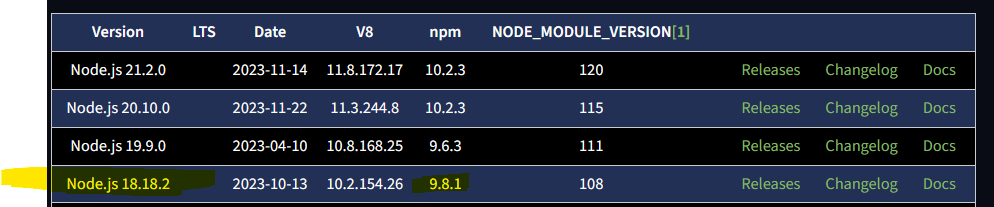
Synology 918+ 16GB - ioBroker in Docker v9 , VISO auf Trekstor Primebook C13 13,3" , Hikvision Domkameras mit Surveillance Station .. CCU RaspberryMatic in Synology VM .. Zigbee CC2538+CC2592 .. Sonoff .. KNX .. Modbus ..
-
@sven-schumacher sagte in Update auf neuen NODE.JS und nichts geht mehr:
Nodejs-Installation: /usr/bin/nodejs v18.18.2
/usr/bin/node v18.18.2
/usr/bin/npm 10.2.4
/usr/bin/npx 10.2.4
/usr/bin/corepack 0.19.0das passt nicht zusammen ... so :
@glasfaser das ist nicht von mir, das Bild. Oder?
-
@glasfaser das ist nicht von mir, das Bild. Oder?
Das Bild zeigt, wie es sein sollte. Dein Log obendrüber zeigt, wie es NICHT sein sollte. ;)
-
@glasfaser das ist nicht von mir, das Bild. Oder?
sudo apt install --reinstall nodejssollte das korrigieren.
Lass die Finger von npm-Updates, egal ob das irgendwo im Terminal als Empfehlung drin steht.



Hey! Du scheinst an dieser Unterhaltung interessiert zu sein, hast aber noch kein Konto.
Hast du es satt, bei jedem Besuch durch die gleichen Beiträge zu scrollen? Wenn du dich für ein Konto anmeldest, kommst du immer genau dorthin zurück, wo du zuvor warst, und kannst dich über neue Antworten benachrichtigen lassen (entweder per E-Mail oder Push-Benachrichtigung). Du kannst auch Lesezeichen speichern und Beiträge positiv bewerten, um anderen Community-Mitgliedern deine Wertschätzung zu zeigen.
Mit deinem Input könnte dieser Beitrag noch besser werden 💗
Registrieren Anmelden231
Online33.0k
Benutzende83.7k
Themen1.3m
Beiträge