Skip to content
  • Home
  • Aktuell
  • Tags
  • 0 Ungelesen 0
  • Kategorien
  • Unreplied
  • Beliebt
  • GitHub
  • Docu
  • Hilfe
Skins
  • Light
  • Brite
  • Cerulean
  • Cosmo
  • Flatly
  • Journal
  • Litera
  • Lumen
  • Lux
  • Materia
  • Minty
  • Morph
  • Pulse
  • Sandstone
  • Simplex
  • Sketchy
  • Spacelab
  • United
  • Yeti
  • Zephyr
  • Dark
  • Cyborg
  • Darkly
  • Quartz
  • Slate
  • Solar
  • Superhero
  • Vapor

  • Standard: (Kein Skin)
  • Kein Skin
Einklappen
ioBroker Logo

Community Forum

donate donate
  1. ioBroker Community Home
  2. Deutsch
  3. ioBroker Allgemein
  4. IOBroker/Raspi unregelmäßig nicht erreichbar Hilfe

NEWS

  • UPDATE 31.10.: Amazon Alexa - ioBroker Skill läuft aus ?
    apollon77A
    apollon77
    48
    3
    8.9k

  • Monatsrückblick – September 2025
    BluefoxB
    Bluefox
    13
    1
    2.3k

  • Neues Video "KI im Smart Home" - ioBroker plus n8n
    BluefoxB
    Bluefox
    16
    1
    3.6k

IOBroker/Raspi unregelmäßig nicht erreichbar Hilfe

Geplant Angeheftet Gesperrt Verschoben ioBroker Allgemein
21 Beiträge 4 Kommentatoren 1.5k Aufrufe 3 Watching
  • Älteste zuerst
  • Neuste zuerst
  • Meiste Stimmen
Antworten
  • In einem neuen Thema antworten
Anmelden zum Antworten
Dieses Thema wurde gelöscht. Nur Nutzer mit entsprechenden Rechten können es sehen.
  • D Dellishelly

    Hi zusammen,

    ich habe seit ein paar Tagen das Problem, dass immer wieder (1-2mal am Tag)
    der Raspberry und IOBroker nicht mehr erreichbar sind.
    Weder über den Webbrowser noch über SSH.

    Es hilft hier dann tatsächlich nur noch der Stecker :-(
    Ich Habe keine größeren Änderungen vorgenommen. Letzte Änderungen waren ein paar zusätzliche Shelly per MQTT angebunden.

    Ich hab schonmal ein Diag gemacht

    ======================= SUMMARY =======================
    			v.2023-10-10
    
    
     Static hostname: raspberrypi
           Icon name: computer
    Operating System: Debian GNU/Linux 12 (bookworm)
              Kernel: Linux 6.1.0-rpi4-rpi-v8
        Architecture: arm64
    
    Installation: 		native
    Kernel: 		aarch64
    Userland: 		arm64
    Timezone: 		Europe/Berlin (CET, +0100)
    User-ID: 		1000
    X-Server: 		false
    Boot Target: 		graphical.target
    
    Pending OS-Updates: 	73
    Pending iob updates: 	1
    
    Nodejs-Installation: 	/usr/bin/nodejs 	v18.18.2
    			/usr/bin/node 		v18.18.2
    			/usr/bin/npm 		9.8.1
    			/usr/bin/npx 		9.8.1
    			/usr/bin/corepack 	0.19.0
    
    Recommended versions are nodejs 18.18.2 and npm 9.8.1
    Your nodejs installation is correct
    
    MEMORY: 
                   total        used        free      shared  buff/cache   available
    Mem:            4.0G        2.5G        527M         15M        1.0G        1.5G
    Swap:           104M          0B        104M
    Total:          4.1G        2.5G        632M
    
    Active iob-Instances: 	26
    Active repo(s): stable
    
    ioBroker Core: 		js-controller 		5.0.16
    			admin 			6.12.0
    
    ioBroker Status: 	iobroker is running on this host.
    
    
    Objects type: jsonl
    States  type: jsonl
    
    Status admin and web instance:
    + system.adapter.admin.0                  : admin                 : raspberrypi                              -  enabled, port: 8081, bind: 0.0.0.0, run as: admin
    + system.adapter.web.0                    : web                   : raspberrypi                              -  enabled, port: 8082, bind: 0.0.0.0, run as: admin
    
    Objects: 		9601
    States: 		7798
    
    Size of iob-Database:
    
    16M	/opt/iobroker/iobroker-data/objects.jsonl
    59M	/opt/iobroker/iobroker-data/states.jsonl


    =================== END OF SUMMARY ====================
    

    @Thomas-Braun hast du hier eine Idee woran das liegen könnte ?

    Vielen Dank schonmal vorab

    paul53P Offline
    paul53P Offline
    paul53
    schrieb am zuletzt editiert von
    #2

    @dellishelly sagte: Diag gemacht

    Das sieht unproblematisch aus. Wurde es kurz nach einem Neustart oder kurz vor einem Absturz gemacht?

    Bitte verzichtet auf Chat-Nachrichten, denn die Handhabung ist grauenhaft !
    Produktiv: RPi 2 mit S.USV, HM-MOD-RPI und SLC-USB-Stick mit root fs

    D 1 Antwort Letzte Antwort
    0
    • paul53P paul53

      @dellishelly sagte: Diag gemacht

      Das sieht unproblematisch aus. Wurde es kurz nach einem Neustart oder kurz vor einem Absturz gemacht?

      D Offline
      D Offline
      Dellishelly
      schrieb am zuletzt editiert von
      #3

      @paul53
      ja das ist direkt nach einem Neustart
      Ich bekomme ja keinen Zugriff per ssh wenn er nicht erreichbar ist.

      paul53P 1 Antwort Letzte Antwort
      0
      • D Dellishelly

        @paul53
        ja das ist direkt nach einem Neustart
        Ich bekomme ja keinen Zugriff per ssh wenn er nicht erreichbar ist.

        paul53P Offline
        paul53P Offline
        paul53
        schrieb am zuletzt editiert von paul53
        #4

        @dellishelly sagte: das ist direkt nach einem Neustart

        Dann beobachte mit "top" den verfügbaren RAM im Tagesverlauf.

        Bitte verzichtet auf Chat-Nachrichten, denn die Handhabung ist grauenhaft !
        Produktiv: RPi 2 mit S.USV, HM-MOD-RPI und SLC-USB-Stick mit root fs

        D 1 Antwort Letzte Antwort
        0
        • paul53P paul53

          @dellishelly sagte: das ist direkt nach einem Neustart

          Dann beobachte mit "top" den verfügbaren RAM im Tagesverlauf.

          D Offline
          D Offline
          Dellishelly
          schrieb am zuletzt editiert von
          #5

          @paul53

          was meinst du mit top ?

          paul53P 1 Antwort Letzte Antwort
          0
          • D Dellishelly

            @paul53

            was meinst du mit top ?

            paul53P Offline
            paul53P Offline
            paul53
            schrieb am zuletzt editiert von
            #6

            @dellishelly sagte: was meinst du mit top ?

            Der Konsolenbefehl "top" zeigt permanent den RAM-Bedarf an, bis "top" per ^C beendet wird. Mit Shift-m (großes M) werden die Prozesse nach RAM-Verbrauch sortiert.

            Bitte verzichtet auf Chat-Nachrichten, denn die Handhabung ist grauenhaft !
            Produktiv: RPi 2 mit S.USV, HM-MOD-RPI und SLC-USB-Stick mit root fs

            1 Antwort Letzte Antwort
            0
            • D Dellishelly

              Hi zusammen,

              ich habe seit ein paar Tagen das Problem, dass immer wieder (1-2mal am Tag)
              der Raspberry und IOBroker nicht mehr erreichbar sind.
              Weder über den Webbrowser noch über SSH.

              Es hilft hier dann tatsächlich nur noch der Stecker :-(
              Ich Habe keine größeren Änderungen vorgenommen. Letzte Änderungen waren ein paar zusätzliche Shelly per MQTT angebunden.

              Ich hab schonmal ein Diag gemacht

              ======================= SUMMARY =======================
              			v.2023-10-10
              
              
               Static hostname: raspberrypi
                     Icon name: computer
              Operating System: Debian GNU/Linux 12 (bookworm)
                        Kernel: Linux 6.1.0-rpi4-rpi-v8
                  Architecture: arm64
              
              Installation: 		native
              Kernel: 		aarch64
              Userland: 		arm64
              Timezone: 		Europe/Berlin (CET, +0100)
              User-ID: 		1000
              X-Server: 		false
              Boot Target: 		graphical.target
              
              Pending OS-Updates: 	73
              Pending iob updates: 	1
              
              Nodejs-Installation: 	/usr/bin/nodejs 	v18.18.2
              			/usr/bin/node 		v18.18.2
              			/usr/bin/npm 		9.8.1
              			/usr/bin/npx 		9.8.1
              			/usr/bin/corepack 	0.19.0
              
              Recommended versions are nodejs 18.18.2 and npm 9.8.1
              Your nodejs installation is correct
              
              MEMORY: 
                             total        used        free      shared  buff/cache   available
              Mem:            4.0G        2.5G        527M         15M        1.0G        1.5G
              Swap:           104M          0B        104M
              Total:          4.1G        2.5G        632M
              
              Active iob-Instances: 	26
              Active repo(s): stable
              
              ioBroker Core: 		js-controller 		5.0.16
              			admin 			6.12.0
              
              ioBroker Status: 	iobroker is running on this host.
              
              
              Objects type: jsonl
              States  type: jsonl
              
              Status admin and web instance:
              + system.adapter.admin.0                  : admin                 : raspberrypi                              -  enabled, port: 8081, bind: 0.0.0.0, run as: admin
              + system.adapter.web.0                    : web                   : raspberrypi                              -  enabled, port: 8082, bind: 0.0.0.0, run as: admin
              
              Objects: 		9601
              States: 		7798
              
              Size of iob-Database:
              
              16M	/opt/iobroker/iobroker-data/objects.jsonl
              59M	/opt/iobroker/iobroker-data/states.jsonl


              =================== END OF SUMMARY ====================
              

              @Thomas-Braun hast du hier eine Idee woran das liegen könnte ?

              Vielen Dank schonmal vorab

              Thomas BraunT Online
              Thomas BraunT Online
              Thomas Braun
              Most Active
              schrieb am zuletzt editiert von
              #7

              @dellishelly sagte in IOBroker/Raspi unregelmäßig nicht erreichbar Hilfe:

              Pending OS-Updates: 73 > Pending iob updates: 1

              Bring das System auf Stand

              Linux-Werkzeugkasten:
              https://forum.iobroker.net/topic/42952/der-kleine-iobroker-linux-werkzeugkasten
              NodeJS Fixer Skript:
              https://forum.iobroker.net/topic/68035/iob-node-fix-skript
              iob_diag: curl -sLf -o diag.sh https://iobroker.net/diag.sh && bash diag.sh

              D 1 Antwort Letzte Antwort
              0
              • Thomas BraunT Thomas Braun

                @dellishelly sagte in IOBroker/Raspi unregelmäßig nicht erreichbar Hilfe:

                Pending OS-Updates: 73 > Pending iob updates: 1

                Bring das System auf Stand

                D Offline
                D Offline
                Dellishelly
                schrieb am zuletzt editiert von
                #8

                @thomas-braun

                das hatte ich vergessen zu erwähnen

                sudo apt update
                sudo apt full-upgrade
                sudo reboot
                

                habe ich zwischenzeitlich schon gemacht

                das hier ist jetzt die aktuelle RAM Auslastung

                top - 14:38:13 up 13 min,  3 users,  load average: 0.50, 1.30, 1.06
                Tasks: 209 total,   1 running, 208 sleeping,   0 stopped,   0 zombie
                %Cpu(s):  6.8 us,  1.1 sy,  0.0 ni, 91.7 id,  0.0 wa,  0.0 hi,  0.4 si,  0.0 st 
                MiB Mem :   3793.2 total,    597.2 free,   2137.3 used,   1149.2 buff/cache     
                MiB Swap:    100.0 total,    100.0 free,      0.0 used.   1655.9 avail Mem
                

                könnte das mein Problem sein ?

                PID USER      PR  NI    VIRT    RES    SHR S  %CPU  %MEM     TIME+ COMMAND                                         
                   5320 iobroker  20   0 5520700 490452  44108 S   7.5  12.6   1:56.58 iobroker.js-con                                 
                   5377 iobroker  20   0  925432 330816  42328 S   2.0   8.5   0:51.28 io.javascript.0                                 
                   5339 iobroker  20   0  933208 133892  43548 S   0.0   3.4   0:14.43 io.admin.0                                      
                   5655 iobroker  20   0 5182156 114520  50288 S   0.0   2.9   0:12.51 io.ring.0                                       
                   5486 iobroker  20   0  705292 103216  37192 S   5.9   2.7   0:36.42 io.shelly.0                                     
                   5501 iobroker  20   0  698476  98484  37280 S   2.6   2.5   0:23.52 io.shelly.1                                     
                   5542 iobroker  20   0 9280008  98236  44924 S   0.0   2.5   0:07.28 io.backitup.0                                   
                   6121 iobroker  20   0 5296112  94096  43164 S   0.3   2.4   0:09.28 io.worx.0                                       
                   5392 iobroker  20   0  954424  89772  38396 S   0.0   2.3   0:23.62 io.alexa2.0                                     
                    889 pi        20   0  562000  88764  63876 S   0.0   2.3   0:01.10 wayfire                                         
                   5576 iobroker  20   0 5012632  86832  39144 S   0.0   2.2   0:11.14 io.fb-checkpres                                 
                   5422 iobroker  20   0  683920  85856  42828 S   1.3   2.2   0:06.00 io.hm-rpc.0                                     
                   5407 iobroker  20   0  684540  84680  42416 S   1.0   2.2   0:13.45 io.hm-rega.0                                    
                   5709 iobroker  20   0  682140  84340  42328 S   0.3   2.2   0:12.10 io.sourceanalyt                                 
                   5441 iobroker  20   0  685872  83128  42376 S   0.0   2.1   0:05.33 io.hm-rpc.1                                     
                   5644 iobroker  20   0  755396  82688  37948 S   0.0   2.1   0:06.36 io.iot.0                                        
                   5516 iobroker  20   0  688528  81724  37132 S   0.0   2.1   0:08.34 io.sonoff.0                                     
                   5471 iobroker  20   0  685836  81320  37132 S   0.0   2.1   0:04.57 io.mqtt.1                                       
                   5887 iobroker  20   0  750332  80004  38012 S   3.9   2.1   0:05.63 io.web.0                                        
                   5557 iobroker  20   0 5136504  79132  39980 S   0.3   2.0   0:05.28 io.botvac.0                                     
                   5621 iobroker  20   0  814544  78540  37892 S   0.0   2.0   0:08.88 io.info.0                                       
                   5361 iobroker  20   0  748796  75388  37132 S   0.0   1.9   0:10.71 io.history.0                                    
                   5456 iobroker  20   0  679700  74372  37132 S   0.3   1.9   0:03.96 io.mqtt.0                                       
                   5531 iobroker  20   0  678356  70752  37120 S   0.0   1.8   0:04.26 io.discovery.0                                  
                   5606 iobroker  20   0  940212  70276  37956 S   0.0   1.8   0:04.76 io.govee.0                                      
                   5738 iobroker  20   0  675076  68108  37068 S   0.0   1.8   0:03.67 io.vis-inventwo
                
                Thomas BraunT paul53P 2 Antworten Letzte Antwort
                0
                • D Dellishelly

                  @thomas-braun

                  das hatte ich vergessen zu erwähnen

                  sudo apt update
                  sudo apt full-upgrade
                  sudo reboot
                  

                  habe ich zwischenzeitlich schon gemacht

                  das hier ist jetzt die aktuelle RAM Auslastung

                  top - 14:38:13 up 13 min,  3 users,  load average: 0.50, 1.30, 1.06
                  Tasks: 209 total,   1 running, 208 sleeping,   0 stopped,   0 zombie
                  %Cpu(s):  6.8 us,  1.1 sy,  0.0 ni, 91.7 id,  0.0 wa,  0.0 hi,  0.4 si,  0.0 st 
                  MiB Mem :   3793.2 total,    597.2 free,   2137.3 used,   1149.2 buff/cache     
                  MiB Swap:    100.0 total,    100.0 free,      0.0 used.   1655.9 avail Mem
                  

                  könnte das mein Problem sein ?

                  PID USER      PR  NI    VIRT    RES    SHR S  %CPU  %MEM     TIME+ COMMAND                                         
                     5320 iobroker  20   0 5520700 490452  44108 S   7.5  12.6   1:56.58 iobroker.js-con                                 
                     5377 iobroker  20   0  925432 330816  42328 S   2.0   8.5   0:51.28 io.javascript.0                                 
                     5339 iobroker  20   0  933208 133892  43548 S   0.0   3.4   0:14.43 io.admin.0                                      
                     5655 iobroker  20   0 5182156 114520  50288 S   0.0   2.9   0:12.51 io.ring.0                                       
                     5486 iobroker  20   0  705292 103216  37192 S   5.9   2.7   0:36.42 io.shelly.0                                     
                     5501 iobroker  20   0  698476  98484  37280 S   2.6   2.5   0:23.52 io.shelly.1                                     
                     5542 iobroker  20   0 9280008  98236  44924 S   0.0   2.5   0:07.28 io.backitup.0                                   
                     6121 iobroker  20   0 5296112  94096  43164 S   0.3   2.4   0:09.28 io.worx.0                                       
                     5392 iobroker  20   0  954424  89772  38396 S   0.0   2.3   0:23.62 io.alexa2.0                                     
                      889 pi        20   0  562000  88764  63876 S   0.0   2.3   0:01.10 wayfire                                         
                     5576 iobroker  20   0 5012632  86832  39144 S   0.0   2.2   0:11.14 io.fb-checkpres                                 
                     5422 iobroker  20   0  683920  85856  42828 S   1.3   2.2   0:06.00 io.hm-rpc.0                                     
                     5407 iobroker  20   0  684540  84680  42416 S   1.0   2.2   0:13.45 io.hm-rega.0                                    
                     5709 iobroker  20   0  682140  84340  42328 S   0.3   2.2   0:12.10 io.sourceanalyt                                 
                     5441 iobroker  20   0  685872  83128  42376 S   0.0   2.1   0:05.33 io.hm-rpc.1                                     
                     5644 iobroker  20   0  755396  82688  37948 S   0.0   2.1   0:06.36 io.iot.0                                        
                     5516 iobroker  20   0  688528  81724  37132 S   0.0   2.1   0:08.34 io.sonoff.0                                     
                     5471 iobroker  20   0  685836  81320  37132 S   0.0   2.1   0:04.57 io.mqtt.1                                       
                     5887 iobroker  20   0  750332  80004  38012 S   3.9   2.1   0:05.63 io.web.0                                        
                     5557 iobroker  20   0 5136504  79132  39980 S   0.3   2.0   0:05.28 io.botvac.0                                     
                     5621 iobroker  20   0  814544  78540  37892 S   0.0   2.0   0:08.88 io.info.0                                       
                     5361 iobroker  20   0  748796  75388  37132 S   0.0   1.9   0:10.71 io.history.0                                    
                     5456 iobroker  20   0  679700  74372  37132 S   0.3   1.9   0:03.96 io.mqtt.0                                       
                     5531 iobroker  20   0  678356  70752  37120 S   0.0   1.8   0:04.26 io.discovery.0                                  
                     5606 iobroker  20   0  940212  70276  37956 S   0.0   1.8   0:04.76 io.govee.0                                      
                     5738 iobroker  20   0  675076  68108  37068 S   0.0   1.8   0:03.67 io.vis-inventwo
                  
                  Thomas BraunT Online
                  Thomas BraunT Online
                  Thomas Braun
                  Most Active
                  schrieb am zuletzt editiert von
                  #9

                  @dellishelly

                  Schalt den Desktop schonmal aus...

                  Linux-Werkzeugkasten:
                  https://forum.iobroker.net/topic/42952/der-kleine-iobroker-linux-werkzeugkasten
                  NodeJS Fixer Skript:
                  https://forum.iobroker.net/topic/68035/iob-node-fix-skript
                  iob_diag: curl -sLf -o diag.sh https://iobroker.net/diag.sh && bash diag.sh

                  D 1 Antwort Letzte Antwort
                  0
                  • Thomas BraunT Thomas Braun

                    @dellishelly

                    Schalt den Desktop schonmal aus...

                    D Offline
                    D Offline
                    Dellishelly
                    schrieb am zuletzt editiert von
                    #10

                    @thomas-braun

                    Was meinst du damit ? Welche Instanz ?

                    Thomas BraunT 1 Antwort Letzte Antwort
                    0
                    • D Dellishelly

                      @thomas-braun

                      das hatte ich vergessen zu erwähnen

                      sudo apt update
                      sudo apt full-upgrade
                      sudo reboot
                      

                      habe ich zwischenzeitlich schon gemacht

                      das hier ist jetzt die aktuelle RAM Auslastung

                      top - 14:38:13 up 13 min,  3 users,  load average: 0.50, 1.30, 1.06
                      Tasks: 209 total,   1 running, 208 sleeping,   0 stopped,   0 zombie
                      %Cpu(s):  6.8 us,  1.1 sy,  0.0 ni, 91.7 id,  0.0 wa,  0.0 hi,  0.4 si,  0.0 st 
                      MiB Mem :   3793.2 total,    597.2 free,   2137.3 used,   1149.2 buff/cache     
                      MiB Swap:    100.0 total,    100.0 free,      0.0 used.   1655.9 avail Mem
                      

                      könnte das mein Problem sein ?

                      PID USER      PR  NI    VIRT    RES    SHR S  %CPU  %MEM     TIME+ COMMAND                                         
                         5320 iobroker  20   0 5520700 490452  44108 S   7.5  12.6   1:56.58 iobroker.js-con                                 
                         5377 iobroker  20   0  925432 330816  42328 S   2.0   8.5   0:51.28 io.javascript.0                                 
                         5339 iobroker  20   0  933208 133892  43548 S   0.0   3.4   0:14.43 io.admin.0                                      
                         5655 iobroker  20   0 5182156 114520  50288 S   0.0   2.9   0:12.51 io.ring.0                                       
                         5486 iobroker  20   0  705292 103216  37192 S   5.9   2.7   0:36.42 io.shelly.0                                     
                         5501 iobroker  20   0  698476  98484  37280 S   2.6   2.5   0:23.52 io.shelly.1                                     
                         5542 iobroker  20   0 9280008  98236  44924 S   0.0   2.5   0:07.28 io.backitup.0                                   
                         6121 iobroker  20   0 5296112  94096  43164 S   0.3   2.4   0:09.28 io.worx.0                                       
                         5392 iobroker  20   0  954424  89772  38396 S   0.0   2.3   0:23.62 io.alexa2.0                                     
                          889 pi        20   0  562000  88764  63876 S   0.0   2.3   0:01.10 wayfire                                         
                         5576 iobroker  20   0 5012632  86832  39144 S   0.0   2.2   0:11.14 io.fb-checkpres                                 
                         5422 iobroker  20   0  683920  85856  42828 S   1.3   2.2   0:06.00 io.hm-rpc.0                                     
                         5407 iobroker  20   0  684540  84680  42416 S   1.0   2.2   0:13.45 io.hm-rega.0                                    
                         5709 iobroker  20   0  682140  84340  42328 S   0.3   2.2   0:12.10 io.sourceanalyt                                 
                         5441 iobroker  20   0  685872  83128  42376 S   0.0   2.1   0:05.33 io.hm-rpc.1                                     
                         5644 iobroker  20   0  755396  82688  37948 S   0.0   2.1   0:06.36 io.iot.0                                        
                         5516 iobroker  20   0  688528  81724  37132 S   0.0   2.1   0:08.34 io.sonoff.0                                     
                         5471 iobroker  20   0  685836  81320  37132 S   0.0   2.1   0:04.57 io.mqtt.1                                       
                         5887 iobroker  20   0  750332  80004  38012 S   3.9   2.1   0:05.63 io.web.0                                        
                         5557 iobroker  20   0 5136504  79132  39980 S   0.3   2.0   0:05.28 io.botvac.0                                     
                         5621 iobroker  20   0  814544  78540  37892 S   0.0   2.0   0:08.88 io.info.0                                       
                         5361 iobroker  20   0  748796  75388  37132 S   0.0   1.9   0:10.71 io.history.0                                    
                         5456 iobroker  20   0  679700  74372  37132 S   0.3   1.9   0:03.96 io.mqtt.0                                       
                         5531 iobroker  20   0  678356  70752  37120 S   0.0   1.8   0:04.26 io.discovery.0                                  
                         5606 iobroker  20   0  940212  70276  37956 S   0.0   1.8   0:04.76 io.govee.0                                      
                         5738 iobroker  20   0  675076  68108  37068 S   0.0   1.8   0:03.67 io.vis-inventwo
                      
                      paul53P Offline
                      paul53P Offline
                      paul53
                      schrieb am zuletzt editiert von
                      #11

                      @dellishelly sagte: aktuelle RAM Auslastung

                      1,65 GB RAM verfügbar sieht gut aus. Die Frage ist: Bleibt es dabei?

                      Bitte verzichtet auf Chat-Nachrichten, denn die Handhabung ist grauenhaft !
                      Produktiv: RPi 2 mit S.USV, HM-MOD-RPI und SLC-USB-Stick mit root fs

                      1 Antwort Letzte Antwort
                      0
                      • D Dellishelly

                        @thomas-braun

                        Was meinst du damit ? Welche Instanz ?

                        Thomas BraunT Online
                        Thomas BraunT Online
                        Thomas Braun
                        Most Active
                        schrieb am zuletzt editiert von
                        #12

                        @dellishelly

                        sudo systemctl set-default multi-user.target
                        sudo reboot 
                        

                        Und dann die Langfassung von

                        iob diag 
                        

                        Linux-Werkzeugkasten:
                        https://forum.iobroker.net/topic/42952/der-kleine-iobroker-linux-werkzeugkasten
                        NodeJS Fixer Skript:
                        https://forum.iobroker.net/topic/68035/iob-node-fix-skript
                        iob_diag: curl -sLf -o diag.sh https://iobroker.net/diag.sh && bash diag.sh

                        D 3 Antworten Letzte Antwort
                        0
                        • Thomas BraunT Thomas Braun

                          @dellishelly

                          sudo systemctl set-default multi-user.target
                          sudo reboot 
                          

                          Und dann die Langfassung von

                          iob diag 
                          
                          D Offline
                          D Offline
                          Dellishelly
                          schrieb am zuletzt editiert von Dellishelly
                          #13

                          @thomas-braun

                          fällt dir hier was auf ? Bzw. Kann ich hier noch Änderungen vornehmen ?
                          Merkwürdig finde ich die hohe RAM Nutzung des Javaskript Adapters.
                          Warum auch immer verringert sie sich nicht, wenn ich Skripte abschalte.

                          Skript v.2023-10-10
                          
                          *** BASE SYSTEM ***
                           Static hostname: raspberrypi
                                 Icon name: computer
                          Operating System: Debian GNU/Linux 12 (bookworm)
                                    Kernel: Linux 6.1.0-rpi6-rpi-v8
                              Architecture: arm64
                          
                          Model		: Raspberry Pi 4 Model B Rev 1.1
                          Docker          : false
                          Virtualization  : none
                          Kernel          : aarch64
                          Userland        : arm64
                          
                          Systemuptime and Load:
                           14:58:23 up 0 min,  3 users,  load average: 3.12, 0.92, 0.32
                          CPU threads: 4
                          
                          
                          *** RASPBERRY THROTTLING ***
                          Current issues:
                          No throttling issues detected.
                          
                          Previously detected issues:
                          No throttling issues detected.
                          
                          *** Time and Time Zones ***
                                         Local time: Sun 2023-11-26 14:58:23 CET
                                     Universal time: Sun 2023-11-26 13:58:23 UTC
                                           RTC time: n/a
                                          Time zone: Europe/Berlin (CET, +0100)
                          System clock synchronized: yes
                                        NTP service: active
                                    RTC in local TZ: no
                          
                          *** User and Groups ***
                          pi
                          /home/pi
                          pi adm dialout cdrom sudo audio video plugdev games users input render netdev lpadmin gpio i2c spi iobroker
                          
                          *** X-Server-Setup ***
                          X-Server: 	false
                          Desktop: 	
                          Terminal: 	tty
                          Boot Target: 	multi-user.target
                          
                          *** MEMORY ***
                                         total        used        free      shared  buff/cache   available
                          Mem:            4.0G        1.6G        2.0G        1.3M        415M        2.3G
                          Swap:           104M          0B        104M
                          Total:          4.1G        1.6G        2.1G
                          
                                   3793 M total memory
                                   1559 M used memory
                                   1614 M active memory
                                    168 M inactive memory
                                   1908 M free memory
                                     32 M buffer memory
                                    364 M swap cache
                                     99 M total swap
                                      0 M used swap
                                     99 M free swap
                          
                          Raspberry only:
                          oom events: 0
                          lifetime oom required: 0 Mbytes
                          total time in oom handler: 0 ms
                          max time spent in oom handler: 0 ms
                          
                          *** FAILED SERVICES ***
                          
                            UNIT LOAD ACTIVE SUB DESCRIPTION
                          0 loaded units listed.
                          
                          *** FILESYSTEM ***
                          Filesystem     Type      Size  Used Avail Use% Mounted on
                          udev           devtmpfs  1.6G     0  1.6G   0% /dev
                          tmpfs          tmpfs     380M  1.2M  379M   1% /run
                          /dev/mmcblk0p2 ext4      117G  8.4G  103G   8% /
                          tmpfs          tmpfs     1.9G  8.0K  1.9G   1% /dev/shm
                          tmpfs          tmpfs     5.0M   16K  5.0M   1% /run/lock
                          /dev/mmcblk0p1 vfat      510M   74M  437M  15% /boot/firmware
                          tmpfs          tmpfs     380M   32K  380M   1% /run/user/1000
                          
                          Messages concerning ext4 filesystem in dmesg:
                          [Sun Nov 26 14:57:31 2023] Kernel command line: coherent_pool=1M 8250.nr_uarts=0 snd_bcm2835.enable_headphones=0 snd_bcm2835.enable_headphones=1 snd_bcm2835.enable_hdmi=1 snd_bcm2835.enable_hdmi=0  smsc95xx.macaddr=DC:A6:32:03:AA:48 vc_mem.mem_base=0x3ec00000 vc_mem.mem_size=0x40000000  console=ttyS0,115200 console=tty1 root=PARTUUID=7b922a4f-02 rootfstype=ext4 fsck.repair=yes rootwait quiet splash plymouth.ignore-serial-consoles cfg80211.ieee80211_regdom=DE
                          [Sun Nov 26 14:57:34 2023] EXT4-fs (mmcblk0p2): mounted filesystem with ordered data mode. Quota mode: none.
                          [Sun Nov 26 14:57:36 2023] EXT4-fs (mmcblk0p2): re-mounted. Quota mode: none.
                          
                          Show mounted filesystems \(real ones only\):
                          TARGET           SOURCE         FSTYPE OPTIONS
                          /                /dev/mmcblk0p2 ext4   rw,noatime,commit=600
                          `-/boot/firmware /dev/mmcblk0p1 vfat   rw,relatime,fmask=0022,dmask=0022,codepage=437,iocharset=ascii,shortname=mixed,errors=remount-ro
                          
                          Files in neuralgic directories:
                          
                          /var:
                          609M	/var/
                          193M	/var/lib
                          179M	/var/cache
                          171M	/var/cache/apt
                          136M	/var/log/journal/71a51bd5530c4f1183a8e75acbd0fd40
                          
                          Archived and active journals take up 135.1M in the file system.
                          
                          /opt/iobroker/backups:
                          370M	/opt/iobroker/backups/
                          
                          /opt/iobroker/iobroker-data:
                          1.2G	/opt/iobroker/iobroker-data/
                          564M	/opt/iobroker/iobroker-data/backup-objects
                          518M	/opt/iobroker/iobroker-data/files
                          118M	/opt/iobroker/iobroker-data/files/ring.0
                          78M	/opt/iobroker/iobroker-data/files/icons-open-icon-library-png
                          
                          The five largest files in iobroker-data are:
                          61M	/opt/iobroker/iobroker-data/states.jsonl
                          35M	/opt/iobroker/iobroker-data/files/devices.admin/static/js/main.24f2bb56.js.map
                          33M	/opt/iobroker/iobroker-data/files/iot.admin/static/js/main.1797d034.js.map
                          21M	/opt/iobroker/iobroker-data/files/web.admin/static/js/main.aaea95f8.js.map
                          21M	/opt/iobroker/iobroker-data/backup-objects/2023-11-26_10-50_states.jsonl.gz
                          
                          USB-Devices by-id:
                          USB-Sticks -  Avoid direct links to /dev/* in your adapter setups, please always prefer the links 'by-id':
                          
                          find: '/dev/serial/by-id/': No such file or directory
                          
                          *** NodeJS-Installation ***
                          
                          /usr/bin/nodejs 	v18.18.2
                          /usr/bin/node 		v18.18.2
                          /usr/bin/npm 		9.8.1
                          /usr/bin/npx 		9.8.1
                          /usr/bin/corepack 	0.19.0
                          
                          
                          nodejs:
                            Installed: 18.18.2-1nodesource1
                            Candidate: 18.18.2-1nodesource1
                            Version table:
                           *** 18.18.2-1nodesource1 500
                                  500 https://deb.nodesource.com/node_18.x nodistro/main arm64 Packages
                                  100 /var/lib/dpkg/status
                               18.18.1-1nodesource1 500
                                  500 https://deb.nodesource.com/node_18.x nodistro/main arm64 Packages
                               18.18.0-1nodesource1 500
                                  500 https://deb.nodesource.com/node_18.x nodistro/main arm64 Packages
                               18.17.1-1nodesource1 500
                                  500 https://deb.nodesource.com/node_18.x nodistro/main arm64 Packages
                               18.17.0-1nodesource1 500
                                  500 https://deb.nodesource.com/node_18.x nodistro/main arm64 Packages
                               18.16.1-1nodesource1 500
                                  500 https://deb.nodesource.com/node_18.x nodistro/main arm64 Packages
                               18.16.0-1nodesource1 500
                                  500 https://deb.nodesource.com/node_18.x nodistro/main arm64 Packages
                               18.15.0-1nodesource1 500
                                  500 https://deb.nodesource.com/node_18.x nodistro/main arm64 Packages
                               18.14.2-1nodesource1 500
                                  500 https://deb.nodesource.com/node_18.x nodistro/main arm64 Packages
                               18.14.1-1nodesource1 500
                                  500 https://deb.nodesource.com/node_18.x nodistro/main arm64 Packages
                               18.14.0-1nodesource1 500
                                  500 https://deb.nodesource.com/node_18.x nodistro/main arm64 Packages
                               18.13.0+dfsg1-1 500
                                  500 http://deb.debian.org/debian bookworm/main arm64 Packages
                               18.13.0-1nodesource1 500
                                  500 https://deb.nodesource.com/node_18.x nodistro/main arm64 Packages
                               18.12.0-1nodesource1 500
                                  500 https://deb.nodesource.com/node_18.x nodistro/main arm64 Packages
                               18.11.0-1nodesource1 500
                                  500 https://deb.nodesource.com/node_18.x nodistro/main arm64 Packages
                               18.10.0-1nodesource1 500
                                  500 https://deb.nodesource.com/node_18.x nodistro/main arm64 Packages
                               18.9.1-1nodesource1 500
                                  500 https://deb.nodesource.com/node_18.x nodistro/main arm64 Packages
                               18.9.0-1nodesource1 500
                                  500 https://deb.nodesource.com/node_18.x nodistro/main arm64 Packages
                               18.8.0-1nodesource1 500
                                  500 https://deb.nodesource.com/node_18.x nodistro/main arm64 Packages
                               18.7.0-1nodesource1 500
                                  500 https://deb.nodesource.com/node_18.x nodistro/main arm64 Packages
                               18.6.0-1nodesource1 500
                                  500 https://deb.nodesource.com/node_18.x nodistro/main arm64 Packages
                               18.5.0-1nodesource1 500
                                  500 https://deb.nodesource.com/node_18.x nodistro/main arm64 Packages
                               18.4.0-1nodesource1 500
                                  500 https://deb.nodesource.com/node_18.x nodistro/main arm64 Packages
                               18.3.0-1nodesource1 500
                                  500 https://deb.nodesource.com/node_18.x nodistro/main arm64 Packages
                               18.2.0-1nodesource1 500
                                  500 https://deb.nodesource.com/node_18.x nodistro/main arm64 Packages
                               18.1.0-1nodesource1 500
                                  500 https://deb.nodesource.com/node_18.x nodistro/main arm64 Packages
                               18.0.0-1nodesource1 500
                                  500 https://deb.nodesource.com/node_18.x nodistro/main arm64 Packages
                          
                          Temp directories causing npm8 problem: 0
                          No problems detected
                          
                          Errors in npm tree:
                          
                          *** ioBroker-Installation ***
                          
                          ioBroker Status
                          iobroker is running on this host.
                          
                          
                          Objects type: jsonl
                          States  type: jsonl
                          
                          Core adapters versions
                          js-controller: 	5.0.16
                          admin: 		6.12.0
                          javascript: 	7.1.6
                          
                          Adapters from github: 	4
                          
                          Adapter State
                          + system.adapter.admin.0                  : admin                 : raspberrypi                              -  enabled, port: 8081, bind: 0.0.0.0, run as: admin
                          + system.adapter.alexa2.0                 : alexa2                : raspberrypi                              -  enabled
                          + system.adapter.backitup.0               : backitup              : raspberrypi                              -  enabled
                          + system.adapter.botvac.0                 : botvac                : raspberrypi                              -  enabled
                            system.adapter.cloud.0                  : cloud                 : raspberrypi                              - disabled
                            system.adapter.devices.0                : devices               : raspberrypi                              - disabled
                          + system.adapter.discovery.0              : discovery             : raspberrypi                              -  enabled
                          + system.adapter.fb-checkpresence.0       : fb-checkpresence      : raspberrypi                              -  enabled
                            system.adapter.feiertage.0              : feiertage             : raspberrypi                              -  enabled
                            system.adapter.flot.0                   : flot                  : raspberrypi                              - disabled
                          + system.adapter.govee.0                  : govee                 : raspberrypi                              -  enabled
                          + system.adapter.history.0                : history               : raspberrypi                              -  enabled
                          + system.adapter.hm-rega.0                : hm-rega               : raspberrypi                              -  enabled
                          + system.adapter.hm-rpc.0                 : hm-rpc                : raspberrypi                              -  enabled, port: 0
                          + system.adapter.hm-rpc.1                 : hm-rpc                : raspberrypi                              -  enabled, port: 0
                            system.adapter.icons-fatcow-hosting.0   : icons-fatcow-hosting  : raspberrypi                              - disabled
                            system.adapter.icons-icons8.0           : icons-icons8          : raspberrypi                              - disabled
                            system.adapter.icons-mfd-svg.0          : icons-mfd-svg         : raspberrypi                              - disabled
                            system.adapter.icons-open-icon-library-png.0: icons-open-icon-library-png: raspberrypi                              - disabled
                          + system.adapter.info.0                   : info                  : raspberrypi                              -  enabled
                            system.adapter.intex.0                  : intex                 : raspberrypi                              - disabled, port: 8990
                          + system.adapter.iot.0                    : iot                   : raspberrypi                              -  enabled
                          + system.adapter.javascript.0             : javascript            : raspberrypi                              -  enabled
                          + system.adapter.mqtt.0                   : mqtt                  : raspberrypi                              -  enabled, port: 1883, bind: 0.0.0.0
                          + system.adapter.mqtt.1                   : mqtt                  : raspberrypi                              -  enabled, port: 1887, bind: 0.0.0.0
                            system.adapter.nanoleaf-lightpanels.0   : nanoleaf-lightpanels  : raspberrypi                              - disabled, port: 16021
                            system.adapter.ring.0                   : ring                  : raspberrypi                              -  enabled
                            system.adapter.roomba.0                 : roomba                : raspberrypi                              - disabled
                          + system.adapter.shelly.0                 : shelly                : raspberrypi                              -  enabled, port: 1882, bind: 0.0.0.0
                          + system.adapter.shelly.1                 : shelly                : raspberrypi                              -  enabled, port: 1882, bind: 0.0.0.0
                          + system.adapter.sonoff.0                 : sonoff                : raspberrypi                              -  enabled, port: 1884, bind: 0.0.0.0
                          + system.adapter.sourceanalytix.0         : sourceanalytix        : raspberrypi                              -  enabled
                            system.adapter.telegram.1               : telegram              : raspberrypi                              - disabled, port: 8443, bind: 0.0.0.0
                            system.adapter.vis-colorpicker.0        : vis-colorpicker       : raspberrypi                              - disabled
                            system.adapter.vis-fancyswitch.0        : vis-fancyswitch       : raspberrypi                              - disabled
                            system.adapter.vis-hqwidgets.0          : vis-hqwidgets         : raspberrypi                              - disabled
                            system.adapter.vis-icontwo.0            : vis-icontwo           : raspberrypi                              - disabled
                            system.adapter.vis-inventwo.0           : vis-inventwo          : raspberrypi                              -  enabled
                            system.adapter.vis-jqui-mfd.0           : vis-jqui-mfd          : raspberrypi                              - disabled
                            system.adapter.vis-justgage.0           : vis-justgage          : raspberrypi                              - disabled
                            system.adapter.vis-material-advanced.0  : vis-material-advanced : raspberrypi                              - disabled
                            system.adapter.vis-materialdesign.0     : vis-materialdesign    : raspberrypi                              - disabled
                            system.adapter.vis-metro.0              : vis-metro             : raspberrypi                              - disabled
                            system.adapter.vis-plumb.0              : vis-plumb             : raspberrypi                              - disabled
                            system.adapter.vis-rgraph.0             : vis-rgraph            : raspberrypi                              - disabled
                            system.adapter.vis-timeandweather.0     : vis-timeandweather    : raspberrypi                              - disabled
                            system.adapter.vis.0                    : vis                   : raspberrypi                              -  enabled
                            system.adapter.web.0                    : web                   : raspberrypi                              -  enabled, port: 8082, bind: 0.0.0.0, run as: admin
                            system.adapter.worx.0                   : worx                  : raspberrypi                              -  enabled
                          
                          + instance is alive
                          
                          Enabled adapters with bindings
                          + system.adapter.admin.0                  : admin                 : raspberrypi                              -  enabled, port: 8081, bind: 0.0.0.0, run as: admin
                          + system.adapter.hm-rpc.0                 : hm-rpc                : raspberrypi                              -  enabled, port: 0
                          + system.adapter.hm-rpc.1                 : hm-rpc                : raspberrypi                              -  enabled, port: 0
                          + system.adapter.mqtt.0                   : mqtt                  : raspberrypi                              -  enabled, port: 1883, bind: 0.0.0.0
                          + system.adapter.mqtt.1                   : mqtt                  : raspberrypi                              -  enabled, port: 1887, bind: 0.0.0.0
                          + system.adapter.shelly.0                 : shelly                : raspberrypi                              -  enabled, port: 1882, bind: 0.0.0.0
                          + system.adapter.shelly.1                 : shelly                : raspberrypi                              -  enabled, port: 1882, bind: 0.0.0.0
                          + system.adapter.sonoff.0                 : sonoff                : raspberrypi                              -  enabled, port: 1884, bind: 0.0.0.0
                            system.adapter.web.0                    : web                   : raspberrypi                              -  enabled, port: 8082, bind: 0.0.0.0, run as: admin
                          
                          ioBroker-Repositories
                          stable        : http://download.iobroker.net/sources-dist.json
                          beta          : http://download.iobroker.net/sources-dist-latest.json
                          
                          Active repo(s): stable
                          
                          Installed ioBroker-Instances
                          Used repository: stable
                          Adapter    "admin"        : 6.12.0   , installed 6.12.0
                          Adapter    "alexa2"       : 3.26.1   , installed 3.26.1
                          Adapter    "backitup"     : 2.8.7    , installed 2.8.7
                          Adapter    "botvac"       : 2.0.1    , installed 2.0.1
                          Adapter    "cloud"        : 4.4.1    , installed 4.4.1
                          Adapter    "devices"      : 1.1.5    , installed 1.1.5
                          Adapter    "discovery"    : 4.2.0    , installed 4.2.0
                          Adapter    "fb-checkpresence": 1.2.2 , installed 1.2.2
                          Adapter    "feiertage"    : 1.1.4    , installed 1.1.4
                          Adapter    "flot"         : 1.12.0   , installed 1.12.0
                          Adapter    "history"      : 3.0.1    , installed 3.0.1
                          Adapter    "hm-rega"      : 4.0.0    , installed 4.0.0
                          Adapter    "hm-rpc"       : 1.15.19  , installed 1.15.19
                          Adapter    "icons-fatcow-hosting": 0.1.0, installed 0.1.0
                          Adapter    "icons-icons8" : 0.0.1    , installed 0.0.1
                          Adapter    "icons-mfd-svg": 1.1.0    , installed 1.1.0
                          Adapter    "icons-open-icon-library-png": 0.1.2, installed 0.1.3
                          Adapter    "info"         : 2.0.0    , installed 2.0.0
                          Adapter    "intex"        : 0.1.5    , installed 0.1.5
                          Adapter    "iot"          : 2.0.11   , installed 2.0.11
                          Adapter    "javascript"   : 7.1.6    , installed 7.1.6
                          Controller "js-controller": 5.0.16   , installed 5.0.16
                          Adapter    "mqtt"         : 5.1.0    , installed 5.1.0
                          Adapter    "nanoleaf-lightpanels": 1.4.0, installed 1.4.0
                          Adapter    "net-tools"    : 0.2.0    , installed 0.2.0
                          Adapter    "ring"         : 5.0.10   , installed 5.0.10
                          Adapter    "roomba"       : 1.2.2    , installed 1.2.2
                          Adapter    "rpi2"         : 1.3.2    , installed 1.3.2
                          Adapter    "shelly"       : 6.6.1    , installed 6.6.1
                          Adapter    "simple-api"   : 2.7.2    , installed 2.7.2
                          Adapter    "smartthings"  : 0.0.4    , installed 0.0.4
                          Adapter    "socketio"     : 6.6.0    , installed 6.6.0
                          Adapter    "sonoff"       : 3.0.3    , installed 3.0.3
                          Adapter    "sonos"        : 3.0.0    , installed 3.0.0
                          Adapter    "telegram"     : 2.0.1    , installed 2.0.1
                          Adapter    "vis"          : 1.4.16   , installed 1.4.16
                          Adapter    "vis-colorpicker": 2.0.3  , installed 2.0.3
                          Adapter    "vis-fancyswitch": 1.1.0  , installed 1.1.0
                          Adapter    "vis-hqwidgets": 1.4.0    , installed 1.4.0
                          Adapter    "vis-icontwo"  : 0.97.1   , installed 0.97.1
                          Adapter    "vis-inventwo" : 3.3.3    , installed 3.3.3
                          Adapter    "vis-jqui-mfd" : 1.0.12   , installed 1.0.12
                          Adapter    "vis-justgage" : 2.0.2    , installed 2.0.2
                          Adapter    "vis-material-advanced": 1.7.4, installed 1.7.4
                          Adapter    "vis-metro"    : 1.2.0    , installed 1.2.0
                          Adapter    "vis-plumb"    : 1.0.2    , installed 1.0.2
                          Adapter    "vis-rgraph"   : 0.0.2    , installed 0.0.2
                          Adapter    "vis-timeandweather": 1.2.2, installed 1.2.2
                          Adapter    "web"          : 6.1.10   , installed 6.1.10
                          Adapter    "worx"         : 2.3.4    , installed 2.3.4
                          Adapter    "ws"           : 2.5.8    , installed 2.5.8
                          
                          Objects and States
                          Please stand by - This may take a while
                          Objects: 	9601
                          States: 	7792
                          
                          *** OS-Repositories and Updates ***
                          Hit:1 http://archive.raspberrypi.com/debian bookworm InRelease
                          Hit:2 http://deb.debian.org/debian bookworm InRelease
                          Hit:3 http://deb.debian.org/debian-security bookworm-security InRelease
                          Hit:4 http://deb.debian.org/debian bookworm-updates InRelease
                          Hit:5 https://deb.nodesource.com/node_18.x nodistro InRelease
                          Reading package lists...
                          Pending Updates: 0
                          
                          *** Listening Ports ***
                          Active Internet connections (only servers)
                          Proto Recv-Q Send-Q Local Address           Foreign Address         State       User       Inode      PID/Program name    
                          tcp        0      0 192.168.72.73:2001      0.0.0.0:*               LISTEN      1001       16328      1132/io.hm-rpc.0    
                          tcp        0      0 0.0.0.0:1884            0.0.0.0:*               LISTEN      1001       19079      1361/io.sonoff.0    
                          tcp        0      0 0.0.0.0:1887            0.0.0.0:*               LISTEN      1001       18007      1259/io.mqtt.1      
                          tcp        0      0 0.0.0.0:1883            0.0.0.0:*               LISTEN      1001       18893      1182/io.mqtt.0      
                          tcp        0      0 0.0.0.0:1882            0.0.0.0:*               LISTEN      1001       19008      1314/io.shelly.0    
                          tcp        0      0 127.0.0.1:9001          0.0.0.0:*               LISTEN      1001       15860      746/iobroker.js-con 
                          tcp        0      0 127.0.0.1:9000          0.0.0.0:*               LISTEN      1001       17226      746/iobroker.js-con 
                          tcp        0      0 127.0.0.1:631           0.0.0.0:*               LISTEN      0          12154      745/cupsd           
                          tcp        0      0 0.0.0.0:22              0.0.0.0:*               LISTEN      0          15831      766/sshd: /usr/sbin 
                          tcp        0      0 192.168.72.73:8701      0.0.0.0:*               LISTEN      1001       18784      1148/io.hm-rpc.1    
                          tcp6       0      0 :::8081                 :::*                    LISTEN      1001       17599      986/io.admin.0      
                          tcp6       0      0 :::8082                 :::*                    LISTEN      1001       21955      1834/io.web.0       
                          tcp6       0      0 :::22                   :::*                    LISTEN      0          15833      766/sshd: /usr/sbin 
                          tcp6       0      0 ::1:631                 :::*                    LISTEN      0          12153      745/cupsd           
                          udp        0      0 0.0.0.0:631             0.0.0.0:*                           0          17183      848/cups-browsed    
                          udp        0      0 0.0.0.0:54297           0.0.0.0:*                           104        13930      524/avahi-daemon: r 
                          udp        0      0 0.0.0.0:5353            0.0.0.0:*                           104        13928      524/avahi-daemon: r 
                          udp        0      0 0.0.0.0:5683            0.0.0.0:*                           1001       19625      1350/io.shelly.1    
                          udp6       0      0 :::49897                :::*                                104        13931      524/avahi-daemon: r 
                          udp6       0      0 :::5353                 :::*                                104        13929      524/avahi-daemon: r 
                          
                          *** Log File - Last 25 Lines ***
                          
                          2023-11-26 14:59:45.777  - info: shelly.0 (1314) [MQTT] Device with client id "shellyplus1-7c87ce58ee84" connected!
                          2023-11-26 14:59:47.608  - info: worx.0 (2065) Multi-ZoneKeeper found! Create State : zoneKeeper
                          2023-11-26 14:59:47.929  - info: worx.0 (2065) DoubleShedule found, create states...
                          2023-11-26 14:59:48.077  - error: shelly.0 (1314) [MQTT] Unable to get mqttprefix of client with id "shellyplusplugs-a0a3b3e8930c"
                          2023-11-26 14:59:48.134  - error: shelly.0 (1314) [MQTT] Unable to get mqttprefix of client with id "shellyplusplugs-e465b84186c8"
                          2023-11-26 14:59:48.136  - error: shelly.0 (1314) [MQTT] Unable to get mqttprefix of client with id "shellyplusplugs-a0a3b3e7b280"
                          2023-11-26 14:59:48.149  - info: worx.0 (2065) OneTimeShedule found, create states...
                          2023-11-26 14:59:48.156  - error: shelly.0 (1314) [MQTT] Unable to get mqttprefix of client with id "shelly1mini-348518e0e22c"
                          2023-11-26 14:59:48.161  - error: shelly.0 (1314) [MQTT] Unable to get mqttprefix of client with id "shelly1mini-348518dedb58"
                          2023-11-26 14:59:48.179  - error: shelly.0 (1314) [MQTT] Unable to get mqttprefix of client with id "shellyplusplugs-d48afc577870"
                          2023-11-26 14:59:48.364  - info: worx.0 (2065) Firmware found, create states...
                          2023-11-26 14:59:48.657  - info: worx.0 (2065) Create folder activityLog and set states.
                          2023-11-26 14:59:49.017  - info: worx.0 (2065) Create product folder and states for WR141E
                          2023-11-26 14:59:49.787  - info: sourceanalytix.0 (1640) Initialization of shelly.1.SHPLG-S#F1B339#1.Relay0.Energy successfully
                          2023-11-26 14:59:49.789  - info: sourceanalytix.0 (1640) Initialising "sonoff.0.DVES_1E7328.SENSOR.LK13BE.total_in" | (2 of 2)
                          2023-11-26 14:59:50.736  - info: worx.0 (2065) Torque control found, create states...
                          2023-11-26 14:59:50.804  - info: worx.0 (2065) Autolock found! Create State : AutoLock
                          2023-11-26 14:59:50.813  - info: worx.0 (2065) Autolock found! Create State : AutoLockTimer
                          2023-11-26 14:59:51.048  - info: worx.0 (2065) Start MQTT connection
                          2023-11-26 14:59:51.741  - info: worx.0 (2065) Request Counter: 1
                          2023-11-26 14:59:57.085  - info: sourceanalytix.0 (1640) Initialization of sonoff.0.DVES_1E7328.SENSOR.LK13BE.total_in successfully
                          2023-11-26 14:59:57.185  - info: sourceanalytix.0 (1640) Successfully activated SourceAnalytix for all 2 of 2 states, will do my Job until you stop me!
                          2023-11-26 15:00:02.429  - warn: hm-rega.0 (1105) Script "!# polling.fn 1.3 !# !# Dieses Script gibt die Werte aller Systemvariablen als J" ignored, because still pending.
                          2023-11-26 15:00:02.431  - warn: hm-rega.0 (1105) Script "!# programs.fn 1.3 !# Dieses Script gibt eine Liste der Programme als JSON Strin" ignored, because still pending.
                          2023-11-26 15:00:04.911  - info: admin.0 (986) ==> Connected system.user.admin from ::ffff:192.168.72.85
                          
                          
                          1 Antwort Letzte Antwort
                          0
                          • Thomas BraunT Thomas Braun

                            @dellishelly

                            sudo systemctl set-default multi-user.target
                            sudo reboot 
                            

                            Und dann die Langfassung von

                            iob diag 
                            
                            D Offline
                            D Offline
                            Dellishelly
                            schrieb am zuletzt editiert von
                            #14

                            @thomas-braun

                            und die web Instanz hat sich in der letzten Stunde verdoppelt. Ohne erkennbaren Grund

                              PID USER      PR  NI    VIRT    RES    SHR S  %CPU  %MEM     TIME+ COMMAND                                         
                                746 iobroker  20   0 5752704 738060  43480 S   4.6  19.0  11:24.63 iobroker.js-con                                 
                               1065 iobroker  20   0  942428 351172  42120 S   1.0   9.0   2:16.65 io.javascript.0                                 
                                986 iobroker  20   0 1044720 203768  43424 S   0.3   5.2   1:35.36 io.admin.0                                      
                               1834 iobroker  20   0 1000824 144616  38492 S   1.3   3.7   1:23.39 io.web.0                                        
                               3734 iobroker  20   0 5192716 140504  51920 S   0.0   3.6   0:41.81 io.ring.0                                       
                               1350 iobroker  20   0  711016 113332  37112 S   2.3   2.9   2:04.16 io.shelly.1                                     
                               1314 iobroker  20   0  711752 112884  37012 S   1.3   2.9   3:33.09 io.shelly.0                                     
                               1403 iobroker  20   0 9349172 100784  44772 S   0.0   2.6   0:12.64 io.backitup.0                                   
                               1082 iobroker  20   0  961228  97824  37668 S   0.0   2.5   0:40.70 io.alexa2.0                                     
                               1433 iobroker  20   0 5021584  97676  38992 S   0.7   2.5   1:03.90 io.fb-checkpres                                 
                               2065 iobroker  20   0 5309524  94612  43424 S   0.0   2.4   0:22.91 io.worx.0                                       
                               1105 iobroker  20   0  889172  93736  42228 S   1.0   2.4   1:03.89 io.hm-rega.0                                    
                               1132 iobroker  20   0  689528  90368  42640 S   0.7   2.3   0:19.57 io.hm-rpc.0                                     
                               1361 iobroker  20   0  694180  86528  36964 S   0.0   2.2   0:38.29 io.sonoff.0                                     
                               1148 iobroker  20   0  690068  86192  42192 S   0.3   2.2   0:17.60 io.hm-rpc.1                                     
                               1557 iobroker  20   0  757908  85824  37804 S   0.0   2.2   0:11.56 io.iot.0                                        
                               1017 iobroker  20   0  755944  85388  36880 S   0.0   2.2   0:23.28 io.history.0                                    
                               1418 iobroker  20   0 5146268  85340  39816 S   0.0   2.2   0:18.13 io.botvac.0                                     
                               1259 iobroker  20   0  690720  83412  36940 S   0.0   2.1   0:09.88 io.mqtt.1                                       
                               1640 iobroker  20   0  684060  82948  42176 S   0.0   2.1   0:27.62 io.sourceanalyt                                 
                               1524 iobroker  20   0  886112  81972  37740 S   0.0   2.1   0:15.70 io.info.0                                       
                               1489 iobroker  20   0  950940  79940  37804 S   0.0   2.1   0:16.33 io.govee.0                                      
                               1182 iobroker  20   0  682452  73764  36932 S   0.0   1.9   0:09.21 io.mqtt.0                                       
                               1388 iobroker  20   0  680760  72420  36964 S   0.3   1.9   0:09.26 io.discovery.0                                  
                               1695 iobroker  20   0  678712  70684  36908 S   0.0   1.8   0:08.42 io.vis-inventwo     
                            
                            1 Antwort Letzte Antwort
                            0
                            • Thomas BraunT Thomas Braun

                              @dellishelly

                              sudo systemctl set-default multi-user.target
                              sudo reboot 
                              

                              Und dann die Langfassung von

                              iob diag 
                              
                              D Offline
                              D Offline
                              Dellishelly
                              schrieb am zuletzt editiert von Dellishelly
                              #15

                              @thomas-braun
                              @Homoran

                              Hallo nochmal,

                              Hab alles gemacht wie von dir angedacht.
                              Grad eben ist er schon wieder „abgestürzt“.

                              Das hier ist die Fehlermeldung die ich in der VIS bekomme.
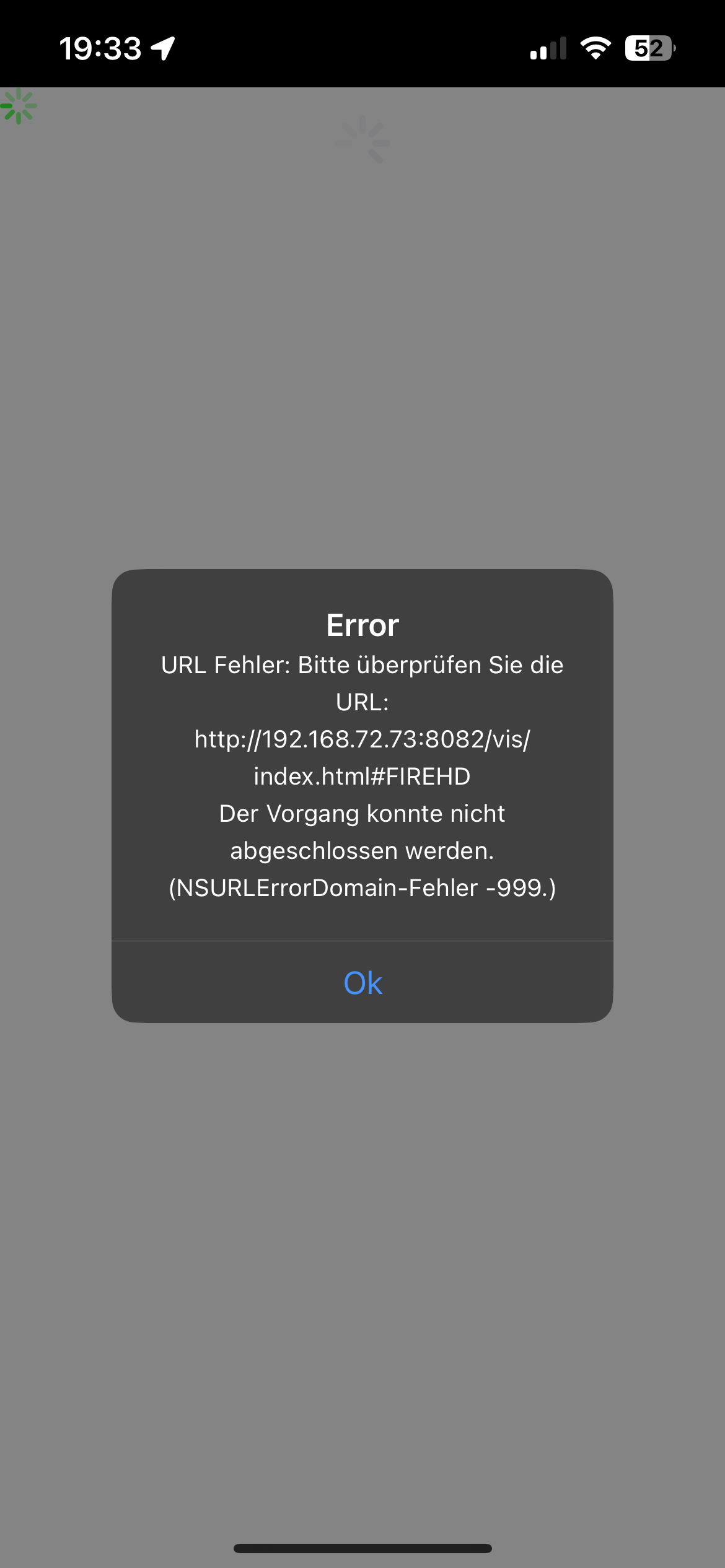
                              IMG_1913.png

                              Danke schonmal für deine Hilfe!!!

                              1 Antwort Letzte Antwort
                              0
                              • D Dellishelly

                                Hi zusammen,

                                ich habe seit ein paar Tagen das Problem, dass immer wieder (1-2mal am Tag)
                                der Raspberry und IOBroker nicht mehr erreichbar sind.
                                Weder über den Webbrowser noch über SSH.

                                Es hilft hier dann tatsächlich nur noch der Stecker :-(
                                Ich Habe keine größeren Änderungen vorgenommen. Letzte Änderungen waren ein paar zusätzliche Shelly per MQTT angebunden.

                                Ich hab schonmal ein Diag gemacht

                                ======================= SUMMARY =======================
                                			v.2023-10-10
                                
                                
                                 Static hostname: raspberrypi
                                       Icon name: computer
                                Operating System: Debian GNU/Linux 12 (bookworm)
                                          Kernel: Linux 6.1.0-rpi4-rpi-v8
                                    Architecture: arm64
                                
                                Installation: 		native
                                Kernel: 		aarch64
                                Userland: 		arm64
                                Timezone: 		Europe/Berlin (CET, +0100)
                                User-ID: 		1000
                                X-Server: 		false
                                Boot Target: 		graphical.target
                                
                                Pending OS-Updates: 	73
                                Pending iob updates: 	1
                                
                                Nodejs-Installation: 	/usr/bin/nodejs 	v18.18.2
                                			/usr/bin/node 		v18.18.2
                                			/usr/bin/npm 		9.8.1
                                			/usr/bin/npx 		9.8.1
                                			/usr/bin/corepack 	0.19.0
                                
                                Recommended versions are nodejs 18.18.2 and npm 9.8.1
                                Your nodejs installation is correct
                                
                                MEMORY: 
                                               total        used        free      shared  buff/cache   available
                                Mem:            4.0G        2.5G        527M         15M        1.0G        1.5G
                                Swap:           104M          0B        104M
                                Total:          4.1G        2.5G        632M
                                
                                Active iob-Instances: 	26
                                Active repo(s): stable
                                
                                ioBroker Core: 		js-controller 		5.0.16
                                			admin 			6.12.0
                                
                                ioBroker Status: 	iobroker is running on this host.
                                
                                
                                Objects type: jsonl
                                States  type: jsonl
                                
                                Status admin and web instance:
                                + system.adapter.admin.0                  : admin                 : raspberrypi                              -  enabled, port: 8081, bind: 0.0.0.0, run as: admin
                                + system.adapter.web.0                    : web                   : raspberrypi                              -  enabled, port: 8082, bind: 0.0.0.0, run as: admin
                                
                                Objects: 		9601
                                States: 		7798
                                
                                Size of iob-Database:
                                
                                16M	/opt/iobroker/iobroker-data/objects.jsonl
                                59M	/opt/iobroker/iobroker-data/states.jsonl


                                =================== END OF SUMMARY ====================
                                

                                @Thomas-Braun hast du hier eine Idee woran das liegen könnte ?

                                Vielen Dank schonmal vorab

                                Chris 1C Offline
                                Chris 1C Offline
                                Chris 1
                                schrieb am zuletzt editiert von Chris 1
                                #16

                                @dellishelly Falls Du von SD-Karte arbeitest - wie lange ist Deine SD Karte schon im Einsatz?

                                Ich muss hier meinen Banana bpi m5 bei Gelegenheit wohl auch auf Festplatte umstellen, da ich, über den Sommer hinweg, eine hohe Frequenz an Write Zugriffen habe, was wohl binnen 12 Monaten eine SD frisst.

                                Würde mal präventiv ein Backup der SD Karte machen - falls es morgen schlimmer wird.

                                bpi-m5 (ioBroker), rock3a (postgreSQL), lamobo R1 (OpenWRT), Tasmota-ZB, Tasmota-IR

                                D 1 Antwort Letzte Antwort
                                0
                                • Chris 1C Chris 1

                                  @dellishelly Falls Du von SD-Karte arbeitest - wie lange ist Deine SD Karte schon im Einsatz?

                                  Ich muss hier meinen Banana bpi m5 bei Gelegenheit wohl auch auf Festplatte umstellen, da ich, über den Sommer hinweg, eine hohe Frequenz an Write Zugriffen habe, was wohl binnen 12 Monaten eine SD frisst.

                                  Würde mal präventiv ein Backup der SD Karte machen - falls es morgen schlimmer wird.

                                  D Offline
                                  D Offline
                                  Dellishelly
                                  schrieb am zuletzt editiert von
                                  #17

                                  @chris-1

                                  Die Karte ist seit 4 Wochen drin.
                                  Also „nagelneu“

                                  Kann die Karte gleich mal tauschen. Hab noch eine OVP da

                                  Chris 1C 1 Antwort Letzte Antwort
                                  1
                                  • D Dellishelly

                                    @chris-1

                                    Die Karte ist seit 4 Wochen drin.
                                    Also „nagelneu“

                                    Kann die Karte gleich mal tauschen. Hab noch eine OVP da

                                    Chris 1C Offline
                                    Chris 1C Offline
                                    Chris 1
                                    schrieb am zuletzt editiert von
                                    #18

                                    @dellishelly Na bei 4 Wochen sollte das noch kein Problem darstellen, wenn Du nicht im 60sec Takt ettliches schreibst.

                                    bpi-m5 (ioBroker), rock3a (postgreSQL), lamobo R1 (OpenWRT), Tasmota-ZB, Tasmota-IR

                                    D 1 Antwort Letzte Antwort
                                    0
                                    • Chris 1C Chris 1

                                      @dellishelly Na bei 4 Wochen sollte das noch kein Problem darstellen, wenn Du nicht im 60sec Takt ettliches schreibst.

                                      D Offline
                                      D Offline
                                      Dellishelly
                                      schrieb am zuletzt editiert von
                                      #19

                                      @chris-1

                                      Die Frage ist wie ich das überprüfen kann??
                                      Und was zählt alles zu schreibzugriffen ?

                                      Chris 1C 1 Antwort Letzte Antwort
                                      0
                                      • D Dellishelly

                                        @chris-1

                                        Die Frage ist wie ich das überprüfen kann??
                                        Und was zählt alles zu schreibzugriffen ?

                                        Chris 1C Offline
                                        Chris 1C Offline
                                        Chris 1
                                        schrieb am zuletzt editiert von Chris 1
                                        #20

                                        @dellishelly Keine Ahnung, wie man das überprüfen kann.

                                        Schreibzugriff ist... ja halt Schreibzugriff. Jede geschriebene Logzeile, jeder gespeicherte Wert - halt immer, wenn Du etwas neu auf den Datenträger schickst.

                                        Ich erfasse zB über das Sommerhalbjahr nicht täglich sondern stündlich sehr viele Werte zur Ostsee und jeder einzelne Datenpunkt stellt halt einen Schreibzugriff dar.
                                        Dazu kommen jedwede Form von Daten der Hausautomatisierung.

                                        Schau Dir mal mittels "tail -f <zigbee-log>" an, was da so pausenlos rein kommt.
                                        Wenn Du das dann alles archivierst (psql oder was auch immer Deine Datenbank ist), dann wird das schnell sehr viel.
                                        Hier empfiehlt sich auch (soweit sinnig/vertretbar) "nur bei Änderung" zu speichern.

                                        bpi-m5 (ioBroker), rock3a (postgreSQL), lamobo R1 (OpenWRT), Tasmota-ZB, Tasmota-IR

                                        Chris 1C 1 Antwort Letzte Antwort
                                        0
                                        • Chris 1C Chris 1

                                          @dellishelly Keine Ahnung, wie man das überprüfen kann.

                                          Schreibzugriff ist... ja halt Schreibzugriff. Jede geschriebene Logzeile, jeder gespeicherte Wert - halt immer, wenn Du etwas neu auf den Datenträger schickst.

                                          Ich erfasse zB über das Sommerhalbjahr nicht täglich sondern stündlich sehr viele Werte zur Ostsee und jeder einzelne Datenpunkt stellt halt einen Schreibzugriff dar.
                                          Dazu kommen jedwede Form von Daten der Hausautomatisierung.

                                          Schau Dir mal mittels "tail -f <zigbee-log>" an, was da so pausenlos rein kommt.
                                          Wenn Du das dann alles archivierst (psql oder was auch immer Deine Datenbank ist), dann wird das schnell sehr viel.
                                          Hier empfiehlt sich auch (soweit sinnig/vertretbar) "nur bei Änderung" zu speichern.

                                          Chris 1C Offline
                                          Chris 1C Offline
                                          Chris 1
                                          schrieb am zuletzt editiert von Chris 1
                                          #21

                                          Schreibzugriffe:
                                          Wenn Du in Deinem ioBroker unterm Strich 48 Werte minütlich abfragst, dann sind das potentiell an die 70.000 Werte (Schreib-Zugriffe) pro Tag.

                                          Wenn sich davon jedoch nur 12 Werte (zb Temperatur) 12x am Tag ändern, dann sind das gerade mal 144.

                                          Mein Zigbee Tür-Kontakt berichtet alle 60sec davon, ob die Tür offen, oder geschlossen ist, unabhängig davon, ob die Tür geöffnet wurde, oder nicht.
                                          Dies bedeutet 1.440 Übertragungen/Tag PLUS die handvoll Status-Wechsel, wo die Tür wirklich geöffnet wurde.
                                          Bei 8-10x real Tür-Status erkennst Du, wo das hin läuft

                                          bpi-m5 (ioBroker), rock3a (postgreSQL), lamobo R1 (OpenWRT), Tasmota-ZB, Tasmota-IR

                                          1 Antwort Letzte Antwort
                                          0
                                          Antworten
                                          • In einem neuen Thema antworten
                                          Anmelden zum Antworten
                                          • Älteste zuerst
                                          • Neuste zuerst
                                          • Meiste Stimmen


                                          Support us

                                          ioBroker
                                          Community Adapters
                                          Donate
                                          FAQ Cloud / IOT
                                          HowTo: Node.js-Update
                                          HowTo: Backup/Restore
                                          Downloads
                                          BLOG

                                          779

                                          Online

                                          32.5k

                                          Benutzer

                                          81.6k

                                          Themen

                                          1.3m

                                          Beiträge
                                          Community
                                          Impressum | Datenschutz-Bestimmungen | Nutzungsbedingungen | Einwilligungseinstellungen
                                          ioBroker Community 2014-2025
                                          logo
                                          • Anmelden

                                          • Du hast noch kein Konto? Registrieren

                                          • Anmelden oder registrieren, um zu suchen
                                          • Erster Beitrag
                                            Letzter Beitrag
                                          0
                                          • Home
                                          • Aktuell
                                          • Tags
                                          • Ungelesen 0
                                          • Kategorien
                                          • Unreplied
                                          • Beliebt
                                          • GitHub
                                          • Docu
                                          • Hilfe