




Test Adapter Midea Geräten v1.x.x


-
@bananajoe danke für die Hilfe,
aber wie du merkst, kenne ich mich in diesem Bereich sehr wenig aus und lerne durch Hinweise und Tipps von euch mit hinzu.
Ich werde es heute abend mal probieren ob es damit klappt.@meto304 sagte in Test Adapter Midea Dimstal Klimaanlagen v0.0.x:
kenne ich mich in diesem Bereich sehr wenig aus und lerne durch Hinweise und Tipps von euch mit hinzu
ich bin seit 34 Jahren in der IT tätig. Und auch ich muss täglich Fehlermeldungen googlen und lerne noch täglich dazu / etwas neues. Und auch ich verstehe nicht immer alles im ersten Anlauf.
Das mit "kenn ich mich nicht mit aus" muss man irgendwann mal beiseite schieben und sich unvoreingenommen einfach anschauen was da kommt. Du hast einen Befehl eingegeben und der hat gemeckert:
esphome: error: unrecognized arguments: --verbose
Du musst ja nicht jeden Befehl "können", du musst nur lernen wie Befehle funktionieren (und man deren Hilfe liest).Deine Lektion für heute ist:
- fast jeder Linux-Befehl kennt einen Verbose Befehl. Dann wird der Befehl in der Regel sehr gesprächig und zeigt mehr Details an zu dem was er da tut
- die meisten Befehle kennen dafür
-vund--verbose. Deine Version kann nur-v. Manchen kenn auch Abstufungen wie-v,-vvund-vvv. Das steht immer in der Hilfe dazu die man mit-hoder--helpaufruft. - Wenn eine Meldung
usage: esphome [-h] [-v] [-q] [-s key value] command ...kommt stimmt ein Parameter nicht, auch das machen fast alle Befehle so.
-
@meto304 sagte in Test Adapter Midea Dimstal Klimaanlagen v0.0.x:
kenne ich mich in diesem Bereich sehr wenig aus und lerne durch Hinweise und Tipps von euch mit hinzu
ich bin seit 34 Jahren in der IT tätig. Und auch ich muss täglich Fehlermeldungen googlen und lerne noch täglich dazu / etwas neues. Und auch ich verstehe nicht immer alles im ersten Anlauf.
Das mit "kenn ich mich nicht mit aus" muss man irgendwann mal beiseite schieben und sich unvoreingenommen einfach anschauen was da kommt. Du hast einen Befehl eingegeben und der hat gemeckert:
esphome: error: unrecognized arguments: --verbose
Du musst ja nicht jeden Befehl "können", du musst nur lernen wie Befehle funktionieren (und man deren Hilfe liest).Deine Lektion für heute ist:
- fast jeder Linux-Befehl kennt einen Verbose Befehl. Dann wird der Befehl in der Regel sehr gesprächig und zeigt mehr Details an zu dem was er da tut
- die meisten Befehle kennen dafür
-vund--verbose. Deine Version kann nur-v. Manchen kenn auch Abstufungen wie-v,-vvund-vvv. Das steht immer in der Hilfe dazu die man mit-hoder--helpaufruft. - Wenn eine Meldung
usage: esphome [-h] [-v] [-q] [-s key value] command ...kommt stimmt ein Parameter nicht, auch das machen fast alle Befehle so.
@bananajoe ich danke dir für die lehrreichen Worte und die Mühe mit der Erklärung.....
(esphome-venv) C:\Users\Documents\mideaesp>esphome -v run 1r.yaml
INFO ESPHome 2023.9.3
INFO Reading configuration 1r.yaml...
Failed config
nun kommt die meldung failed config.
Was wird alles geprüft, damit config gültig ist?Danke
-
@bananajoe ich danke dir für die lehrreichen Worte und die Mühe mit der Erklärung.....
(esphome-venv) C:\Users\Documents\mideaesp>esphome -v run 1r.yaml
INFO ESPHome 2023.9.3
INFO Reading configuration 1r.yaml...
Failed config
nun kommt die meldung failed config.
Was wird alles geprüft, damit config gültig ist?Danke
@BananaJoe
habe jetzt nochmals versucht die aus der YAML Datei eine Bin-Datei zu erzeugen, dazu habe ich einfach unverändert den Auszug von @Matzebhv genommen.Es kommt nach wie vor die Meldung config failed.
Wie sieht denn eine richtige config im yaml format aus?Grüße
-
@BananaJoe
habe jetzt nochmals versucht die aus der YAML Datei eine Bin-Datei zu erzeugen, dazu habe ich einfach unverändert den Auszug von @Matzebhv genommen.Es kommt nach wie vor die Meldung config failed.
Wie sieht denn eine richtige config im yaml format aus?Grüße
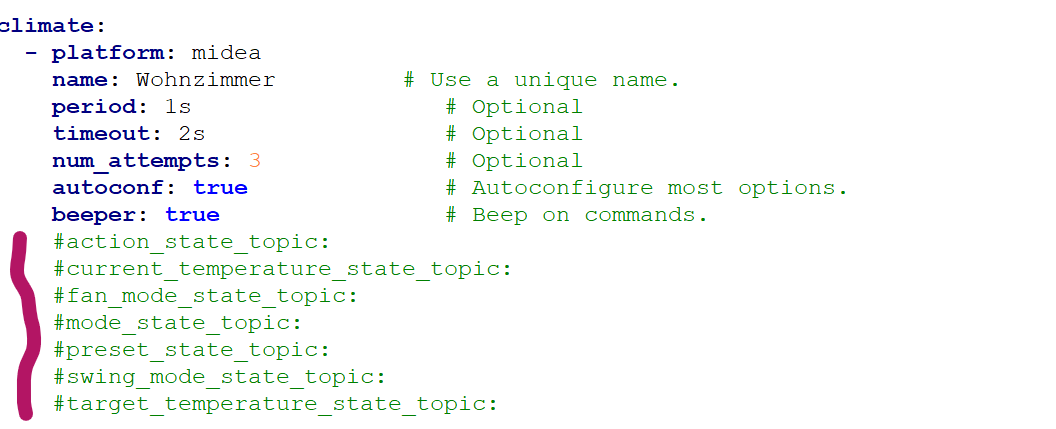
nach dem ich alles auskommentiert habe, und Stück für Stück das compilen versucht habe, bin ich nun soweit, dass wenn ich diesen lila markierten Bereich weglasse, ich erfolgreich die .bin-Datei erstellen kann.
für was wird diese Sektion benötigt?
-
nach dem ich alles auskommentiert habe, und Stück für Stück das compilen versucht habe, bin ich nun soweit, dass wenn ich diesen lila markierten Bereich weglasse, ich erfolgreich die .bin-Datei erstellen kann.
für was wird diese Sektion benötigt?
@meto304
Moin,
habe gerade meinen Luftentfeuchter DF-20DEN7-WF in den Winterschlaf geschickt.
Wollte mal sehen, ob ich an den Schwimmerschalter einen zwave-Fenstersensor hängen kann.
Leider baulich nicht so gut geeignet. Dabei habe ich auch mal nach der Steuerung geschaut.
Da ist dieser USB-Stick angestöpselt "Midea EU SK105 EU SK103 WiFi Air Modul"
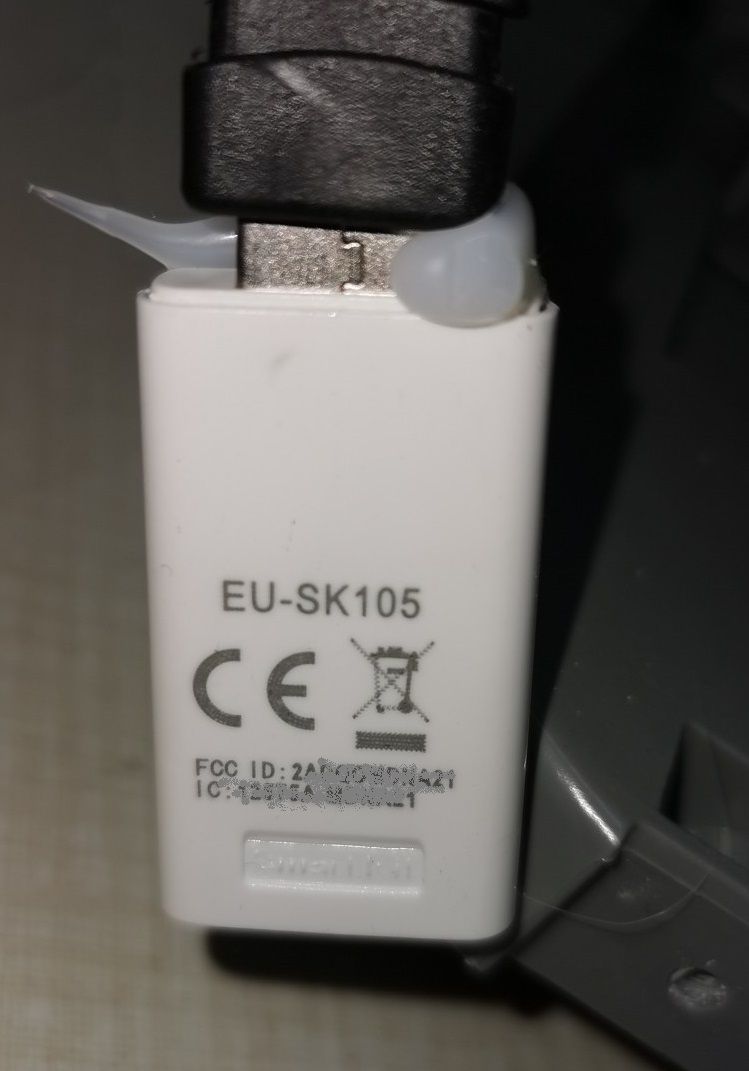
Das mit mit dem Tank nervt mich schon, nicht mal ne Push über die "Smart Home" - App kommt.
Würde der ESP-Stick da helfen??
-
@meto304
Moin,
habe gerade meinen Luftentfeuchter DF-20DEN7-WF in den Winterschlaf geschickt.
Wollte mal sehen, ob ich an den Schwimmerschalter einen zwave-Fenstersensor hängen kann.
Leider baulich nicht so gut geeignet. Dabei habe ich auch mal nach der Steuerung geschaut.
Da ist dieser USB-Stick angestöpselt "Midea EU SK105 EU SK103 WiFi Air Modul"
Das mit mit dem Tank nervt mich schon, nicht mal ne Push über die "Smart Home" - App kommt.
Würde der ESP-Stick da helfen??
@friedhofsblond leider kann ich dir da nicht weiter helfen, da ich kenne mich da leider zu wenig aus.
Sorry
-
@meto304
Moin,
habe gerade meinen Luftentfeuchter DF-20DEN7-WF in den Winterschlaf geschickt.
Wollte mal sehen, ob ich an den Schwimmerschalter einen zwave-Fenstersensor hängen kann.
Leider baulich nicht so gut geeignet. Dabei habe ich auch mal nach der Steuerung geschaut.
Da ist dieser USB-Stick angestöpselt "Midea EU SK105 EU SK103 WiFi Air Modul"
Das mit mit dem Tank nervt mich schon, nicht mal ne Push über die "Smart Home" - App kommt.
Würde der ESP-Stick da helfen??
@friedhofsblond Naja, da steht extra das der nur für Klimaanlagen ist meine ich.
-
@Meto304 ich habe es nun hinbekommen.
Leider alles irgendwie ein bisschen komisch beschrieben.Hier meine yaml, welche funktionsfähig ist:
esphome:

  name: air-conditioner
  platform: ESP8266
  board: esp12e
  name_add_mac_suffix: true

mqtt:
  broker:           # die IP-Adresse die deine ioBroker Instanz hat
  port: 1883        # Port für die MQTT Instanz, Standardmäßig 1883
  username:         # Benutzername deiner mqtt Instanz
  password:         # Kennwort deiner mqtt Instanz


wifi:
  ap:
    ssid: "AC-wifi"          # Fallback, falls der Stick sich nicht mit deinem WLAN verbinden kann
    password: "slwf01pro"
  networks:
  - ssid:                    # Name deines WLANs ohne Anführungszeichen
    password:                # Kennwort deines WLANs

captive_portal:

# Enable logging
logger:
  baud_rate: 0

uart:
  tx_pin: 1
  rx_pin: 3
  baud_rate: 9600

climate:
  - platform: midea
    name: klimaanlage           # Name deiner Klimaanlage
    period: 1s                  # Optional
    timeout: 2s                 # Optional
    num_attempts: 3             # Optional
    autoconf: true              # Autoconfigure most options.
    beeper: true                # Beep on commands.
    visual:                     # Optional. Example of visual settings override.
      min_temperature: 17 °C    # min: 17
      max_temperature: 30 °C    # max: 30
      temperature_step: 0.5 °C  # min: 0.5
    supported_modes:            # All capabilities in this section detected by autoconf.
      - FAN_ONLY                # This capability is always used.
      - HEAT_COOL
      - COOL
      - HEAT
      - DRY
    custom_fan_modes:
      - SILENT
      - TURBO
    supported_presets:          # All capabilities in this section detected by autoconf.
      - ECO
      - BOOST
      - SLEEP                   # This capability is always used.
    custom_presets:             # All capabilities in this section detected by autoconf.
      - FREEZE_PROTECTION
    supported_swing_modes:
      - VERTICAL                # This capability is always used.
      - HORIZONTAL
      - BOTH
    outdoor_temperature:        # Optional. Meine Klimaanlage kann das.
      name: Temp
    #power_usage:                # Optional. Meine Klimaanlage kann das nicht, gegeben falls aktivieren, falls deine die Funktionalität hat.
      #name: Power
    humidity_setpoint:          # Optional. Meine Klimaanlage kann das nicht, gegeben falls aktivieren, falls deine die Funktionalität hat.
      name: Humidity


web_server:
  port: 80
Abweichend hier, ist dass der Fallback AP bestehen bleibt und du dich direkt mit deinem WLAN verbinden kannst. Zusätzlich sind die Objekte, die nicht benötigt werden gelöscht/auskommentiert.
Nachdem die firmware.bin geflasht wurde, befindet sich diese unter
DER ORDNER IN DEM DU GEFLASHT HAST.esphome\build\air-conditioner.pioenvs\air-conditioner\firmware.binDiese dann einfach via. OTA einspielen. Ich habe dies immer über den Fallback AP getan, also über die 192.168.4.1.
Danach war der Stick mit meinem WLAN verbunden. Nachdem die Klimaanlage eingeschaltet wurde, konnte ich diese über ioBroker/MQTT steuern: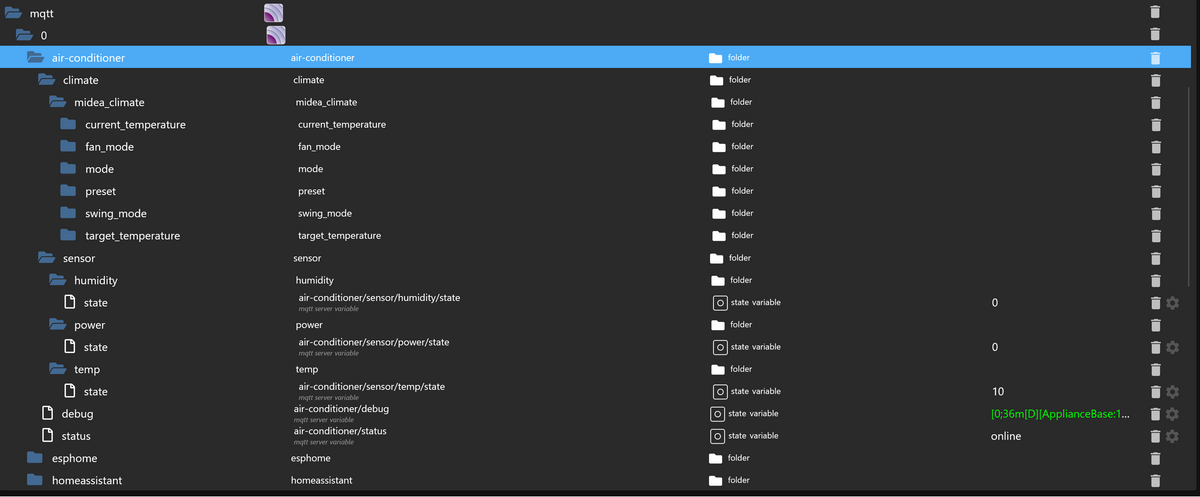
-
@Meto304 ich habe es nun hinbekommen.
Leider alles irgendwie ein bisschen komisch beschrieben.Hier meine yaml, welche funktionsfähig ist:
esphome:

  name: air-conditioner
  platform: ESP8266
  board: esp12e
  name_add_mac_suffix: true

mqtt:
  broker:           # die IP-Adresse die deine ioBroker Instanz hat
  port: 1883        # Port für die MQTT Instanz, Standardmäßig 1883
  username:         # Benutzername deiner mqtt Instanz
  password:         # Kennwort deiner mqtt Instanz


wifi:
  ap:
    ssid: "AC-wifi"          # Fallback, falls der Stick sich nicht mit deinem WLAN verbinden kann
    password: "slwf01pro"
  networks:
  - ssid:                    # Name deines WLANs ohne Anführungszeichen
    password:                # Kennwort deines WLANs

captive_portal:

# Enable logging
logger:
  baud_rate: 0

uart:
  tx_pin: 1
  rx_pin: 3
  baud_rate: 9600

climate:
  - platform: midea
    name: klimaanlage           # Name deiner Klimaanlage
    period: 1s                  # Optional
    timeout: 2s                 # Optional
    num_attempts: 3             # Optional
    autoconf: true              # Autoconfigure most options.
    beeper: true                # Beep on commands.
    visual:                     # Optional. Example of visual settings override.
      min_temperature: 17 °C    # min: 17
      max_temperature: 30 °C    # max: 30
      temperature_step: 0.5 °C  # min: 0.5
    supported_modes:            # All capabilities in this section detected by autoconf.
      - FAN_ONLY                # This capability is always used.
      - HEAT_COOL
      - COOL
      - HEAT
      - DRY
    custom_fan_modes:
      - SILENT
      - TURBO
    supported_presets:          # All capabilities in this section detected by autoconf.
      - ECO
      - BOOST
      - SLEEP                   # This capability is always used.
    custom_presets:             # All capabilities in this section detected by autoconf.
      - FREEZE_PROTECTION
    supported_swing_modes:
      - VERTICAL                # This capability is always used.
      - HORIZONTAL
      - BOTH
    outdoor_temperature:        # Optional. Meine Klimaanlage kann das.
      name: Temp
    #power_usage:                # Optional. Meine Klimaanlage kann das nicht, gegeben falls aktivieren, falls deine die Funktionalität hat.
      #name: Power
    humidity_setpoint:          # Optional. Meine Klimaanlage kann das nicht, gegeben falls aktivieren, falls deine die Funktionalität hat.
      name: Humidity


web_server:
  port: 80
Abweichend hier, ist dass der Fallback AP bestehen bleibt und du dich direkt mit deinem WLAN verbinden kannst. Zusätzlich sind die Objekte, die nicht benötigt werden gelöscht/auskommentiert.
Nachdem die firmware.bin geflasht wurde, befindet sich diese unter
DER ORDNER IN DEM DU GEFLASHT HAST.esphome\build\air-conditioner.pioenvs\air-conditioner\firmware.binDiese dann einfach via. OTA einspielen. Ich habe dies immer über den Fallback AP getan, also über die 192.168.4.1.
Danach war der Stick mit meinem WLAN verbunden. Nachdem die Klimaanlage eingeschaltet wurde, konnte ich diese über ioBroker/MQTT steuern:@hc-yami sagte in Test Adapter Midea Dimstal Klimaanlagen v0.0.x:
@Meto304 ich habe es nun hinbekommen.
Leider alles irgendwie ein bisschen komisch beschrieben.Hier meine yaml, welche funktionsfähig ist:
esphome:

  name: air-conditioner
  platform: ESP8266
  board: esp12e
  name_add_mac_suffix: true

mqtt:
  broker:           # die IP-Adresse die deine ioBroker Instanz hat
  port: 1883        # Port für die MQTT Instanz, Standardmäßig 1883
  username:         # Benutzername deiner mqtt Instanz
  password:         # Kennwort deiner mqtt Instanz


wifi:
  ap:
    ssid: "AC-wifi"          # Fallback, falls der Stick sich nicht mit deinem WLAN verbinden kann
    password: "slwf01pro"
  networks:
  - ssid:                    # Name deines WLANs ohne Anführungszeichen
    password:                # Kennwort deines WLANs

captive_portal:

# Enable logging
logger:
  baud_rate: 0

uart:
  tx_pin: 1
  rx_pin: 3
  baud_rate: 9600

climate:
  - platform: midea
    name: klimaanlage           # Name deiner Klimaanlage
    period: 1s                  # Optional
    timeout: 2s                 # Optional
    num_attempts: 3             # Optional
    autoconf: true              # Autoconfigure most options.
    beeper: true                # Beep on commands.
    visual:                     # Optional. Example of visual settings override.
      min_temperature: 17 °C    # min: 17
      max_temperature: 30 °C    # max: 30
      temperature_step: 0.5 °C  # min: 0.5
    supported_modes:            # All capabilities in this section detected by autoconf.
      - FAN_ONLY                # This capability is always used.
      - HEAT_COOL
      - COOL
      - HEAT
      - DRY
    custom_fan_modes:
      - SILENT
      - TURBO
    supported_presets:          # All capabilities in this section detected by autoconf.
      - ECO
      - BOOST
      - SLEEP                   # This capability is always used.
    custom_presets:             # All capabilities in this section detected by autoconf.
      - FREEZE_PROTECTION
    supported_swing_modes:
      - VERTICAL                # This capability is always used.
      - HORIZONTAL
      - BOTH
    outdoor_temperature:        # Optional. Meine Klimaanlage kann das.
      name: Temp
    #power_usage:                # Optional. Meine Klimaanlage kann das nicht, gegeben falls aktivieren, falls deine die Funktionalität hat.
      #name: Power
    humidity_setpoint:          # Optional. Meine Klimaanlage kann das nicht, gegeben falls aktivieren, falls deine die Funktionalität hat.
      name: Humidity


web_server:
  port: 80
Abweichend hier, ist dass der Fallback AP bestehen bleibt und du dich direkt mit deinem WLAN verbinden kannst. Zusätzlich sind die Objekte, die nicht benötigt werden gelöscht/auskommentiert.
Nachdem die firmware.bin geflasht wurde, befindet sich diese unter
DER ORDNER IN DEM DU GEFLASHT HAST.esphome\build\air-conditioner.pioenvs\air-conditioner\firmware.binDiese dann einfach via. OTA einspielen. Ich habe dies immer über den Fallback AP getan, also über die 192.168.4.1.
Danach war der Stick mit meinem WLAN verbunden. Nachdem die Klimaanlage eingeschaltet wurde, konnte ich diese über ioBroker/MQTT steuern:@Hc-Yami soweit hat alles geklappt...
Bei booten kommt die Meldung: MQTT connectedleider wird aber im Iobroker nicht angezeigt...
Wie kann ich das weitere vorgehen prüfen?Danke
-
@hc-yami sagte in Test Adapter Midea Dimstal Klimaanlagen v0.0.x:
@Meto304 ich habe es nun hinbekommen.
Leider alles irgendwie ein bisschen komisch beschrieben.Hier meine yaml, welche funktionsfähig ist:
esphome:

  name: air-conditioner
  platform: ESP8266
  board: esp12e
  name_add_mac_suffix: true

mqtt:
  broker:           # die IP-Adresse die deine ioBroker Instanz hat
  port: 1883        # Port für die MQTT Instanz, Standardmäßig 1883
  username:         # Benutzername deiner mqtt Instanz
  password:         # Kennwort deiner mqtt Instanz


wifi:
  ap:
    ssid: "AC-wifi"          # Fallback, falls der Stick sich nicht mit deinem WLAN verbinden kann
    password: "slwf01pro"
  networks:
  - ssid:                    # Name deines WLANs ohne Anführungszeichen
    password:                # Kennwort deines WLANs

captive_portal:

# Enable logging
logger:
  baud_rate: 0

uart:
  tx_pin: 1
  rx_pin: 3
  baud_rate: 9600

climate:
  - platform: midea
    name: klimaanlage           # Name deiner Klimaanlage
    period: 1s                  # Optional
    timeout: 2s                 # Optional
    num_attempts: 3             # Optional
    autoconf: true              # Autoconfigure most options.
    beeper: true                # Beep on commands.
    visual:                     # Optional. Example of visual settings override.
      min_temperature: 17 °C    # min: 17
      max_temperature: 30 °C    # max: 30
      temperature_step: 0.5 °C  # min: 0.5
    supported_modes:            # All capabilities in this section detected by autoconf.
      - FAN_ONLY                # This capability is always used.
      - HEAT_COOL
      - COOL
      - HEAT
      - DRY
    custom_fan_modes:
      - SILENT
      - TURBO
    supported_presets:          # All capabilities in this section detected by autoconf.
      - ECO
      - BOOST
      - SLEEP                   # This capability is always used.
    custom_presets:             # All capabilities in this section detected by autoconf.
      - FREEZE_PROTECTION
    supported_swing_modes:
      - VERTICAL                # This capability is always used.
      - HORIZONTAL
      - BOTH
    outdoor_temperature:        # Optional. Meine Klimaanlage kann das.
      name: Temp
    #power_usage:                # Optional. Meine Klimaanlage kann das nicht, gegeben falls aktivieren, falls deine die Funktionalität hat.
      #name: Power
    humidity_setpoint:          # Optional. Meine Klimaanlage kann das nicht, gegeben falls aktivieren, falls deine die Funktionalität hat.
      name: Humidity


web_server:
  port: 80
Abweichend hier, ist dass der Fallback AP bestehen bleibt und du dich direkt mit deinem WLAN verbinden kannst. Zusätzlich sind die Objekte, die nicht benötigt werden gelöscht/auskommentiert.
Nachdem die firmware.bin geflasht wurde, befindet sich diese unter
DER ORDNER IN DEM DU GEFLASHT HAST.esphome\build\air-conditioner.pioenvs\air-conditioner\firmware.binDiese dann einfach via. OTA einspielen. Ich habe dies immer über den Fallback AP getan, also über die 192.168.4.1.
Danach war der Stick mit meinem WLAN verbunden. Nachdem die Klimaanlage eingeschaltet wurde, konnte ich diese über ioBroker/MQTT steuern:@Hc-Yami soweit hat alles geklappt...
Bei booten kommt die Meldung: MQTT connectedleider wird aber im Iobroker nicht angezeigt...
Wie kann ich das weitere vorgehen prüfen?Danke
-
@Hc-Yami
es wurde mir beim start vorgang rechts angezeigt...
Den Auszug habe ich aus dem Event Logger

-
Wie kann ich meine Midea Waschmaschine verbinden? Der Adapter scheint nicht mehr zu funktionieren
-
Wie kann ich meine Midea Waschmaschine verbinden? Der Adapter scheint nicht mehr zu funktionieren
-
@mpl1338
Bitte mal folgendes Homebridge plugin via Homebridge adapter testen
https://github.com/kovapatrik/homebridge-midea-platform/@tombox hab zwar den Homebridge Adapter, aber das Midea Plugin schaff ich nicht zu installieren.
Abgesehen davon bekomme ich bei dem ioBroker.midea Adapter einen Error 25 beim Versuch zu Installieren. Musste mein ioBroker System wegen einer defekten microSD neu einrichten, ist komplett jungfräulich und alle anderen Adapter laufen problemlos durch.
Auch der "alte" Midea Adapter direkt aus den ioBroker Adaptern (ohne GitHub) lässt sich installieren.
Auch andere GitHub Adapter lassen sich installieren (zB. Lovelace).
$ iobroker url TA2k/ioBroker.midea --host RasPi-SmartHome --debug install TA2k/ioBroker.midea NPM version: 10.2.3 Installing TA2k/ioBroker.midea... (System call) npm ERR! code 1 npm ERR! create a virtual environment using python3 -m venv path/to/venv.npm ERR! Then use path/to/venv/bin/python and path/to/venv/bin/pip. Makenpm ERR! sure you have python3-full installed.npm ERR! npm ERR! For more information visit http://rptl.io/venvnpm ERR! npm ERR! note: If you believe this is a mistake, please contact your Python installation or OS distribution provider. You can override this, at the risk of breaking your Python installation or OS, by passing --break-system-packages.npm ERR! hint: See PEP 668 for the detailed specification.npm ERR! npm ERR! at checkExecSyncError (node:child_process:890:11)npm ERR! at execSync (node:child_process:962:15)npm ERR! at checkPreconditions (/home/iobroker/.npm/_cacache/tmp/git-clone5KCUDq/pythonPackages.js:44:16) npm ERR! at Object.<anonymous> (/home/iobroker/.npm/_cacache/tmp/git-clone5KCUDq/pythonPackages.js:4:15)npm ERR! at Module._compile (node:internal/modules/cjs/loader:1356:14)npm ERR! at Module._extensions..js (node:internal/modules/cjs/loader:1414:10)npm ERR! at Module.load (node:internal/modules/cjs/loader:1197:32)npm ERR! at Module._load (node:internal/modules/cjs/loader:1013:12)npm ERR! at Function.executeUserEntryPoint [as runMain] (node:internal/modules/run_main:128:12) {npm ERR! status: 1,npm ERR! signal: null,npm ERR! output: [npm ERR! null,npm ERR! <Buffer >,npm ERR! <Buffer 65 72 72 6f 72 3a 20 65 78 74 65 72 6e 61 6c 6c 79 2d 6d 61 6e 61 67 65 64 2d 65 6e 76 69 72 6f 6e 6d 65 6e 74 0a 0a c3 97 20 54 68 69 73 20 65 6e 76 ... 748 more bytes>npm ERR! ],npm ERR! pid: 19042,npm ERR! stdout: <Buffer >,npm ERR! stderr: <Buffer 65 72 72 6f 72 3a 20 65 78 74 65 72 6e 61 6c 6c 79 2d 6d 61 6e 61 67 65 64 2d 65 6e 76 69 72 6f 6e 6d 65 6e 74 0a 0a c3 97 20 54 68 69 73 20 65 6e 76 ... 748 more bytes>npm ERR! }npm ERR! npm ERR! Local pip installation failed. Please install via 'sudo apt install python3-pip'npm ERR! npm WARN using --force Recommended protections disabled.npm ERR! error: externally-managed-environmentnpm ERR! npm ERR! × This environment is externally managednpm ERR! ╰─> To install Python packages system-wide, try apt installnpm ERR! python3-xyz, where xyz is the package you are trying tonpm ERR! install.npm ERR! npm ERR! If you wish to install a non-Debian-packaged Python package,npm ERR! create a virtual environment using python3 -m venv path/to/venv.npm ERR! Then use path/to/venv/bin/python and path/to/venv/bin/pip. Makenpm ERR! sure you have python3-full installed.npm ERR! npm ERR! For more information visit http://rptl.io/venvnpm ERR! npm ERR! note: If you believe this is a mistake, please contact your Python installation or OS distribution provider. You can override this, at the risk of breaking your Python installation or OS, by passing --break-system-packages.npm ERR! hint: See PEP 668 for the detailed specification.npm ERR! --2024-01-15 12:35:58-- https://bootstrap.pypa.io/get-pip.pynpm ERR! Auflösen des Hostnamens bootstrap.pypa.io (bootstrap.pypa.io)… 151.101.0.175, 151.101.64.175, 151.101.128.175, ...npm ERR! Verbindungsaufbau zu bootstrap.pypa.io (bootstrap.pypa.io)|151.101.0.175|:443 … verbunden.npm ERR! HTTP-Anforderung gesendet, auf Antwort wird gewartet … 200 OKnpm ERR! Länge: 2634817 (2,5M) [text/x-python]npm ERR! Wird in »get-pip.py« gespeichert.npm ERR! npm ERR! 0K .......... .......... .......... .......... .......... 1% 1,89M 1snpm ERR! 50K .......... .......... .......... .......... .......... 3% 2,45M 1snpm ERR! 100K .......... .......... .......... .......... .......... 5% 2,60M 1snpm ERR! 150K .......... .......... .......... .......... .......... 7% 3,07M 1snpm ERR! 200K .......... .......... .......... .......... .......... 9% 2,50M 1snpm ERR! 250K .......... .......... .......... .......... .......... 11% 2,20M 1snpm ERR! 300K .......... .......... .......... .......... .......... 13% 2,40M 1snpm ERR! 350K .......... .......... .......... .......... .......... 15% 3,12M 1snpm ERR! 400K .......... .......... .......... .......... .......... 17% 1,89M 1snpm ERR! 450K .......... .......... .......... .......... .......... 19% 3,21M 1snpm ERR! 500K .......... .......... .......... .......... .......... 21% 3,12M 1snpm ERR! 550K .......... .......... .......... .......... .......... 23% 3,08M 1snpm ERR! 600K .......... .......... .......... .......... .......... 25% 3,16M 1snpm ERR! 650K .......... .......... .......... .......... .......... 27% 2,05M 1snpm ERR! 700K .......... .......... .......... .......... .......... 29% 2,59M 1snpm ERR! 750K .......... .......... .......... .......... .......... 31% 2,91M 1snpm ERR! 800K .......... .......... .......... .......... .......... 33% 2,45M 1snpm ERR! 850K .......... .......... .......... .......... .......... 34% 2,69M 1snpm ERR! 900K .......... .......... .......... .......... .......... 36% 2,84M 1snpm ERR! 950K .......... .......... .......... .......... .......... 38% 3,24M 1snpm ERR! 1000K .......... .......... .......... .......... .......... 40% 2,71M 1snpm ERR! 1050K .......... .......... .......... .......... .......... 42% 2,26M 1snpm ERR! 1100K .......... .......... .......... .......... .......... 44% 3,59M 1snpm ERR! 1150K .......... .......... .......... .......... .......... 46% 2,92M 1snpm ERR! 1200K .......... .......... .......... .......... .......... 48% 3,21M 0snpm ERR! 1250K .......... .......... .......... .......... .......... 50% 3,10M 0s npm ERR! 1300K .......... .......... .......... .......... .......... 52% 2,96M 0snpm ERR! 1350K .......... .......... .......... .......... .......... 54% 2,14M 0snpm ERR! 1400K .......... .......... .......... .......... .......... 56% 3,25M 0snpm ERR! 1450K .......... .......... .......... .......... .......... 58% 3,19M 0snpm ERR! 1500K .......... .......... .......... .......... .......... 60% 1,83M 0snpm ERR! 1550K .......... .......... .......... .......... .......... 62% 1,92M 0snpm ERR! 1600K .......... .......... .......... .......... .......... 64% 2,09M 0snpm ERR! 1650K .......... .......... .......... .......... .......... 66% 2,09M 0snpm ERR! 1700K .......... .......... .......... .......... .......... 68% 1,58M 0snpm ERR! 1750K .......... .......... .......... .......... .......... 69% 2,36M 0snpm ERR! 1800K .......... .......... .......... .......... .......... 71% 1,84M 0snpm ERR! 1850K .......... .......... .......... .......... .......... 73% 2,14M 0snpm ERR! 1900K .......... .......... .......... .......... .......... 75% 2,46M 0snpm ERR! 1950K .......... .......... .......... .......... .......... 77% 2,56M 0snpm ERR! 2000K .......... .......... .......... .......... .......... 79% 1,65M 0snpm ERR! 2050K .......... .......... .......... .......... .......... 81% 2,57M 0snpm ERR! 2100K .......... .......... .......... .......... .......... 83% 2,61M 0snpm ERR! 2150K .......... .......... .......... .......... .......... 85% 2,72M 0snpm ERR! 2200K .......... .......... .......... .......... .......... 87% 2,28M 0snpm ERR! 2250K .......... .......... .......... .......... .......... 89% 3,05M 0snpm ERR! 2300K .......... .......... .......... .......... .......... 91% 2,06M 0snpm ERR! 2350K .......... .......... .......... .......... .......... 93% 2,52M 0snpm ERR! 2400K .......... .......... .......... .......... .......... 95% 2,57M 0snpm ERR! 2450K .......... .......... .......... .......... .......... 97% 2,70M 0snpm ERR! 2500K .......... .......... .......... .......... .......... 99% 2,58M 0snpm ERR! 2550K .......... .......... ... 100% 2,60M=1,0snpm ERR! npm ERR! 2024-01-15 12:36:00 (2,47 MB/s) - »get-pip.py« gespeichert [2634817/2634817]npm ERR! npm ERR! error: externally-managed-environmentnpm ERR! npm ERR! × This environment is externally managednpm ERR! ╰─> To install Python packages system-wide, try apt installnpm ERR! python3-xyz, where xyz is the package you are trying tonpm ERR! install.npm ERR! npm ERR! If you wish to install a non-Debian-packaged Python package,npm ERR! create a virtual environment using python3 -m venv path/to/venv.npm ERR! Then use path/to/venv/bin/python and path/to/venv/bin/pip. Makenpm ERR! sure you have python3-full installed.npm ERR! npm ERR! A complete log of this run can be found in: /home/iobroker/.npm/_logs/2024-01-15T11_35_28_707Z-debug-0.log npm ERR! code 1npm ERR! git dep preparation failednpm ERR! command /usr/bin/node /usr/lib/node_modules/npm/bin/npm-cli.js install --force --cache=/home/iobroker/.npm --prefer-offline=false --prefer-online=false --offline=false --no-progress --no-save --no-audit --include=dev --include=peer --include=optional --no-package-lock-only --no-dry-runnpm ERR! > iobroker.midea@0.1.0 postinstallnpm ERR! > node ./pythonPackages.jsnpm ERR! npm ERR! npm ERR! Start Python package installationnpm ERR! Python 3.11.2npm ERR! npm ERR! Python 3 foundnpm ERR! npm ERR! pip not found. Try to install local.npm ERR! Error: Command failed: python3 get-pip.py --usernpm ERR! error: externally-managed-environmentnpm ERR! npm ERR! × This environment is externally managednpm ERR! ╰─> To install Python packages system-wide, try apt installnpm ERR! python3-xyz, where xyz is the package you are trying tonpm ERR! install.npm ERR! npm ERR! If you wish to install a non-Debian-packaged Python package,npm ERR! create a virtual environment using python3 -m venv path/to/venv.npm ERR! Then use path/to/venv/bin/python and path/to/venv/bin/pip. Makenpm ERR! sure you have python3-full installed.npm ERR! npm ERR! For more information visit http://rptl.io/venvnpm ERR! npm ERR! note: If you believe this is a mistake, please contact your Python installation or OS distribution provider. You can override this, at the risk of breaking your Python installation or OS, by passing --break-system-packages.npm ERR! hint: See PEP 668 for the detailed specification.npm ERR! npm ERR! at checkExecSyncError (node:child_process:890:11)npm ERR! at execSync (node:child_process:962:15)npm ERR! at checkPreconditions (/home/iobroker/.npm/_cacache/tmp/git-clone5KCUDq/pythonPackages.js:44:16)npm ERR! at Object.<anonymous> (/home/iobroker/.npm/_cacache/tmp/git-clone5KCUDq/pythonPackages.js:4:15)npm ERR! at Module._compile (node:internal/modules/cjs/loader:1356:14)npm ERR! at Module._extensions..js (node:internal/modules/cjs/loader:1414:10)npm ERR! at Module.load (node:internal/modules/cjs/loader:1197:32)npm ERR! at Module._load (node:internal/modules/cjs/loader:1013:12)npm ERR! at Function.executeUserEntryPoint [as runMain] (node:internal/modules/run_main:128:12) {npm ERR! status: 1,npm ERR! signal: null,npm ERR! output: [npm ERR! null,npm ERR! <Buffer >,npm ERR! <Buffer 65 72 72 6f 72 3a 20 65 78 74 65 72 6e 61 6c 6c 79 2d 6d 61 6e 61 67 65 64 2d 65 6e 76 69 72 6f 6e 6d 65 6e 74 0a 0a c3 97 20 54 68 69 73 20 65 6e 76 ... 748 more bytes>npm ERR! ],npm ERR! pid: 19042,npm ERR! stdout: <Buffer >,npm ERR! stderr: <Buffer 65 72 72 6f 72 3a 20 65 78 74 65 72 6e 61 6c 6c 79 2d 6d 61 6e 61 67 65 64 2d 65 6e 76 69 72 6f 6e 6d 65 6e 74 0a 0a c3 97 20 54 68 69 73 20 65 6e 76 ... 748 more bytes>npm ERR! }npm ERR! npm ERR! Local pip installation failed. Please install via 'sudo apt install python3-pip'npm ERR! npm WARN using --force Recommended protections disabled.npm ERR! error: externally-managed-environmentnpm ERR! npm ERR! × This environment is externally managednpm ERR! ╰─> To install Python packages system-wide, try apt installnpm ERR! python3-xyz, where xyz is the package you are trying tonpm ERR! install.npm ERR! npm ERR! If you wish to install a non-Debian-packaged Python package,npm ERR! create a virtual environment using python3 -m venv path/to/venv.npm ERR! Then use path/to/venv/bin/python and path/to/venv/bin/pip. Makenpm ERR! sure you have python3-full installed.npm ERR! npm ERR! For more information visit http://rptl.io/venvnpm ERR! npm ERR! note: If you believe this is a mistake, please contact your Python installation or OS distribution provider. You can override this, at the risk of breaking your Python installation or OS, by passing --break-system-packages.npm ERR! hint: See PEP 668 for the detailed specification.npm ERR! --2024-01-15 12:35:58-- https://bootstrap.pypa.io/get-pip.pynpm ERR! Auflösen des Hostnamens bootstrap.pypa.io (bootstrap.pypa.io)… 151.101.0.175, 151.101.64.175, 151.101.128.175, ...npm ERR! Verbindungsaufbau zu bootstrap.pypa.io (bootstrap.pypa.io)|151.101.0.175|:443 … verbunden.npm ERR! HTTP-Anforderung gesendet, auf Antwort wird gewartet … 200 OKnpm ERR! Länge: 2634817 (2,5M) [text/x-python]npm ERR! Wird in »get-pip.py« gespeichert.npm ERR! npm ERR! 0K .......... .......... .......... .......... .......... 1% 1,89M 1snpm ERR! 50K .......... .......... .......... .......... .......... 3% 2,45M 1snpm ERR! 100K .......... .......... .......... .......... .......... 5% 2,60M 1snpm ERR! 150K .......... .......... .......... .......... .......... 7% 3,07M 1snpm ERR! 200K .......... .......... .......... .......... .......... 9% 2,50M 1snpm ERR! 250K .......... .......... .......... .......... .......... 11% 2,20M 1snpm ERR! 300K .......... .......... .......... .......... .......... 13% 2,40M 1snpm ERR! 350K .......... .......... .......... .......... .......... 15% 3,12M 1snpm ERR! 400K .......... .......... .......... .......... .......... 17% 1,89M 1snpm ERR! 450K .......... .......... .......... .......... .......... 19% 3,21M 1snpm ERR! 500K .......... .......... .......... .......... .......... 21% 3,12M 1snpm ERR! 550K .......... .......... .......... .......... .......... 23% 3,08M 1snpm ERR! 600K .......... .......... .......... .......... .......... 25% 3,16M 1snpm ERR! 650K .......... .......... .......... .......... .......... 27% 2,05M 1snpm ERR! 700K .......... .......... .......... .......... .......... 29% 2,59M 1snpm ERR! 750K .......... .......... .......... .......... .......... 31% 2,91M 1snpm ERR! 800K .......... .......... .......... .......... .......... 33% 2,45M 1snpm ERR! 850K .......... .......... .......... .......... .......... 34% 2,69M 1snpm ERR! 900K .......... .......... .......... .......... .......... 36% 2,84M 1snpm ERR! 950K .......... .......... .......... .......... .......... 38% 3,24M 1snpm ERR! 1000K .......... .......... .......... .......... .......... 40% 2,71M 1snpm ERR! 1050K .......... .......... .......... .......... .......... 42% 2,26M 1snpm ERR! 1100K .......... .......... .......... .......... .......... 44% 3,59M 1snpm ERR! 1150K .......... .......... .......... .......... .......... 46% 2,92M 1snpm ERR! 1200K .......... .......... .......... .......... .......... 48% 3,21M 0snpm ERR! 1250K .......... .......... .......... .......... .......... 50% 3,10M 0snpm ERR! 1300K .......... .......... .......... .......... .......... 52% 2,96M 0snpm ERR! 1350K .......... .......... .......... .......... .......... 54% 2,14M 0snpm ERR! 1400K .......... .......... .......... .......... .......... 56% 3,25M 0snpm ERR! 1450K .......... .......... .......... .......... .......... 58% 3,19M 0snpm ERR! 1500K .......... .......... .......... .......... .......... 60% 1,83M 0snpm ERR! 1550K .......... .......... .......... .......... .......... 62% 1,92M 0snpm ERR! 1600K .......... .......... .......... .......... .......... 64% 2,09M 0snpm ERR! 1650K .......... .......... .......... .......... .......... 66% 2,09M 0snpm ERR! 1700K .......... .......... .......... .......... .......... 68% 1,58M 0snpm ERR! 1750K .......... .......... .......... .......... .......... 69% 2,36M 0snpm ERR! 1800K .......... .......... .......... .......... .......... 71% 1,84M 0snpm ERR! 1850K .......... .......... .......... .......... .......... 73% 2,14M 0snpm ERR! 1900K .......... .......... .......... .......... .......... 75% 2,46M 0snpm ERR! 1950K .......... .......... .......... .......... .......... 77% 2,56M 0snpm ERR! 2000K .......... .......... .......... .......... .......... 79% 1,65M 0snpm ERR! 2050K .......... .......... .......... .......... .......... 81% 2,57M 0snpm ERR! 2100K .......... .......... .......... .......... .......... 83% 2,61M 0snpm ERR! 2150K .......... .......... .......... .......... .......... 85% 2,72M 0snpm ERR! 2200K .......... .......... .......... .......... .......... 87% 2,28M 0snpm ERR! 2250K .......... .......... .......... .......... .......... 89% 3,05M 0snpm ERR! 2300K .......... .......... .......... .......... .......... 91% 2,06M 0snpm ERR! 2350K .......... .......... .......... .......... .......... 93% 2,52M 0snpm ERR! 2400K .......... .......... .......... .......... .......... 95% 2,57M 0snpm ERR! 2450K .......... .......... .......... .......... .......... 97% 2,70M 0snpm ERR! 2500K .......... .......... .......... .......... .......... 99% 2,58M 0snpm ERR! 2550K .......... .......... ... 100% 2,60M=1,0snpm ERR! npm ERR! 2024-01-15 12:36:00 (2,47 MB/s) - »get-pip.py« gespeichert [2634817/2634817]npm ERR! npm ERR! error: externally-managed-environmentnpm ERR! npm ERR! × This environment is externally managednpm ERR! ╰─> To install Python packages system-wide, try apt installnpm ERR! python3-xyz, where xyz is the package you are trying tonpm ERR! install.npm ERR! npm ERR! If you wish to install a non-Debian-packaged Python package,npm ERR! create a virtual environment using python3 -m venv path/to/venv.npm ERR! Then use path/to/venv/bin/python and path/to/venv/bin/pip. Makenpm ERR! sure you have python3-full installed.npm ERR! npm ERR! For more information visit http://rptl.io/venvnpm ERR! npm ERR! note: If you believe this is a mistake, please contact your Python installation or OS distribution provider. You can override this, at the risk of breaking your Python installation or OS, by passing --break-system-packages.npm ERR! hint: See PEP 668 for the detailed specification.npm ERR! npm ERR! code 1npm ERR! npm ERR! path /home/iobroker/.npm/_cacache/tmp/git-clone5KCUDqnpm ERR! npm ERR! command failednpm ERR! npm ERR! command sh -c node ./pythonPackages.jsnpm ERR! npm ERR! npm ERR! A complete log of this run can be found in: /home/iobroker/.npm/_logs/2024-01-15T11_35_40_233Z-debug-0.lognpm ERR! A complete log of this run can be found in: /home/iobroker/.npm/_logs/2024-01-15T11_35_28_707Z-debug-0.log host.RasPi-SmartHome Cannot install TA2k/ioBroker.midea: 1 ERROR: Process exited with code 25``` -
@tombox hab zwar den Homebridge Adapter, aber das Midea Plugin schaff ich nicht zu installieren.
Abgesehen davon bekomme ich bei dem ioBroker.midea Adapter einen Error 25 beim Versuch zu Installieren. Musste mein ioBroker System wegen einer defekten microSD neu einrichten, ist komplett jungfräulich und alle anderen Adapter laufen problemlos durch.
Auch der "alte" Midea Adapter direkt aus den ioBroker Adaptern (ohne GitHub) lässt sich installieren.
Auch andere GitHub Adapter lassen sich installieren (zB. Lovelace).
$ iobroker url TA2k/ioBroker.midea --host RasPi-SmartHome --debug install TA2k/ioBroker.midea NPM version: 10.2.3 Installing TA2k/ioBroker.midea... (System call) npm ERR! code 1 npm ERR! create a virtual environment using python3 -m venv path/to/venv.npm ERR! Then use path/to/venv/bin/python and path/to/venv/bin/pip. Makenpm ERR! sure you have python3-full installed.npm ERR! npm ERR! For more information visit http://rptl.io/venvnpm ERR! npm ERR! note: If you believe this is a mistake, please contact your Python installation or OS distribution provider. You can override this, at the risk of breaking your Python installation or OS, by passing --break-system-packages.npm ERR! hint: See PEP 668 for the detailed specification.npm ERR! npm ERR! at checkExecSyncError (node:child_process:890:11)npm ERR! at execSync (node:child_process:962:15)npm ERR! at checkPreconditions (/home/iobroker/.npm/_cacache/tmp/git-clone5KCUDq/pythonPackages.js:44:16) npm ERR! at Object.<anonymous> (/home/iobroker/.npm/_cacache/tmp/git-clone5KCUDq/pythonPackages.js:4:15)npm ERR! at Module._compile (node:internal/modules/cjs/loader:1356:14)npm ERR! at Module._extensions..js (node:internal/modules/cjs/loader:1414:10)npm ERR! at Module.load (node:internal/modules/cjs/loader:1197:32)npm ERR! at Module._load (node:internal/modules/cjs/loader:1013:12)npm ERR! at Function.executeUserEntryPoint [as runMain] (node:internal/modules/run_main:128:12) {npm ERR! status: 1,npm ERR! signal: null,npm ERR! output: [npm ERR! null,npm ERR! <Buffer >,npm ERR! <Buffer 65 72 72 6f 72 3a 20 65 78 74 65 72 6e 61 6c 6c 79 2d 6d 61 6e 61 67 65 64 2d 65 6e 76 69 72 6f 6e 6d 65 6e 74 0a 0a c3 97 20 54 68 69 73 20 65 6e 76 ... 748 more bytes>npm ERR! ],npm ERR! pid: 19042,npm ERR! stdout: <Buffer >,npm ERR! stderr: <Buffer 65 72 72 6f 72 3a 20 65 78 74 65 72 6e 61 6c 6c 79 2d 6d 61 6e 61 67 65 64 2d 65 6e 76 69 72 6f 6e 6d 65 6e 74 0a 0a c3 97 20 54 68 69 73 20 65 6e 76 ... 748 more bytes>npm ERR! }npm ERR! npm ERR! Local pip installation failed. Please install via 'sudo apt install python3-pip'npm ERR! npm WARN using --force Recommended protections disabled.npm ERR! error: externally-managed-environmentnpm ERR! npm ERR! × This environment is externally managednpm ERR! ╰─> To install Python packages system-wide, try apt installnpm ERR! python3-xyz, where xyz is the package you are trying tonpm ERR! install.npm ERR! npm ERR! If you wish to install a non-Debian-packaged Python package,npm ERR! create a virtual environment using python3 -m venv path/to/venv.npm ERR! Then use path/to/venv/bin/python and path/to/venv/bin/pip. Makenpm ERR! sure you have python3-full installed.npm ERR! npm ERR! For more information visit http://rptl.io/venvnpm ERR! npm ERR! note: If you believe this is a mistake, please contact your Python installation or OS distribution provider. You can override this, at the risk of breaking your Python installation or OS, by passing --break-system-packages.npm ERR! hint: See PEP 668 for the detailed specification.npm ERR! --2024-01-15 12:35:58-- https://bootstrap.pypa.io/get-pip.pynpm ERR! Auflösen des Hostnamens bootstrap.pypa.io (bootstrap.pypa.io)… 151.101.0.175, 151.101.64.175, 151.101.128.175, ...npm ERR! Verbindungsaufbau zu bootstrap.pypa.io (bootstrap.pypa.io)|151.101.0.175|:443 … verbunden.npm ERR! HTTP-Anforderung gesendet, auf Antwort wird gewartet … 200 OKnpm ERR! Länge: 2634817 (2,5M) [text/x-python]npm ERR! Wird in »get-pip.py« gespeichert.npm ERR! npm ERR! 0K .......... .......... .......... .......... .......... 1% 1,89M 1snpm ERR! 50K .......... .......... .......... .......... .......... 3% 2,45M 1snpm ERR! 100K .......... .......... .......... .......... .......... 5% 2,60M 1snpm ERR! 150K .......... .......... .......... .......... .......... 7% 3,07M 1snpm ERR! 200K .......... .......... .......... .......... .......... 9% 2,50M 1snpm ERR! 250K .......... .......... .......... .......... .......... 11% 2,20M 1snpm ERR! 300K .......... .......... .......... .......... .......... 13% 2,40M 1snpm ERR! 350K .......... .......... .......... .......... .......... 15% 3,12M 1snpm ERR! 400K .......... .......... .......... .......... .......... 17% 1,89M 1snpm ERR! 450K .......... .......... .......... .......... .......... 19% 3,21M 1snpm ERR! 500K .......... .......... .......... .......... .......... 21% 3,12M 1snpm ERR! 550K .......... .......... .......... .......... .......... 23% 3,08M 1snpm ERR! 600K .......... .......... .......... .......... .......... 25% 3,16M 1snpm ERR! 650K .......... .......... .......... .......... .......... 27% 2,05M 1snpm ERR! 700K .......... .......... .......... .......... .......... 29% 2,59M 1snpm ERR! 750K .......... .......... .......... .......... .......... 31% 2,91M 1snpm ERR! 800K .......... .......... .......... .......... .......... 33% 2,45M 1snpm ERR! 850K .......... .......... .......... .......... .......... 34% 2,69M 1snpm ERR! 900K .......... .......... .......... .......... .......... 36% 2,84M 1snpm ERR! 950K .......... .......... .......... .......... .......... 38% 3,24M 1snpm ERR! 1000K .......... .......... .......... .......... .......... 40% 2,71M 1snpm ERR! 1050K .......... .......... .......... .......... .......... 42% 2,26M 1snpm ERR! 1100K .......... .......... .......... .......... .......... 44% 3,59M 1snpm ERR! 1150K .......... .......... .......... .......... .......... 46% 2,92M 1snpm ERR! 1200K .......... .......... .......... .......... .......... 48% 3,21M 0snpm ERR! 1250K .......... .......... .......... .......... .......... 50% 3,10M 0s npm ERR! 1300K .......... .......... .......... .......... .......... 52% 2,96M 0snpm ERR! 1350K .......... .......... .......... .......... .......... 54% 2,14M 0snpm ERR! 1400K .......... .......... .......... .......... .......... 56% 3,25M 0snpm ERR! 1450K .......... .......... .......... .......... .......... 58% 3,19M 0snpm ERR! 1500K .......... .......... .......... .......... .......... 60% 1,83M 0snpm ERR! 1550K .......... .......... .......... .......... .......... 62% 1,92M 0snpm ERR! 1600K .......... .......... .......... .......... .......... 64% 2,09M 0snpm ERR! 1650K .......... .......... .......... .......... .......... 66% 2,09M 0snpm ERR! 1700K .......... .......... .......... .......... .......... 68% 1,58M 0snpm ERR! 1750K .......... .......... .......... .......... .......... 69% 2,36M 0snpm ERR! 1800K .......... .......... .......... .......... .......... 71% 1,84M 0snpm ERR! 1850K .......... .......... .......... .......... .......... 73% 2,14M 0snpm ERR! 1900K .......... .......... .......... .......... .......... 75% 2,46M 0snpm ERR! 1950K .......... .......... .......... .......... .......... 77% 2,56M 0snpm ERR! 2000K .......... .......... .......... .......... .......... 79% 1,65M 0snpm ERR! 2050K .......... .......... .......... .......... .......... 81% 2,57M 0snpm ERR! 2100K .......... .......... .......... .......... .......... 83% 2,61M 0snpm ERR! 2150K .......... .......... .......... .......... .......... 85% 2,72M 0snpm ERR! 2200K .......... .......... .......... .......... .......... 87% 2,28M 0snpm ERR! 2250K .......... .......... .......... .......... .......... 89% 3,05M 0snpm ERR! 2300K .......... .......... .......... .......... .......... 91% 2,06M 0snpm ERR! 2350K .......... .......... .......... .......... .......... 93% 2,52M 0snpm ERR! 2400K .......... .......... .......... .......... .......... 95% 2,57M 0snpm ERR! 2450K .......... .......... .......... .......... .......... 97% 2,70M 0snpm ERR! 2500K .......... .......... .......... .......... .......... 99% 2,58M 0snpm ERR! 2550K .......... .......... ... 100% 2,60M=1,0snpm ERR! npm ERR! 2024-01-15 12:36:00 (2,47 MB/s) - »get-pip.py« gespeichert [2634817/2634817]npm ERR! npm ERR! error: externally-managed-environmentnpm ERR! npm ERR! × This environment is externally managednpm ERR! ╰─> To install Python packages system-wide, try apt installnpm ERR! python3-xyz, where xyz is the package you are trying tonpm ERR! install.npm ERR! npm ERR! If you wish to install a non-Debian-packaged Python package,npm ERR! create a virtual environment using python3 -m venv path/to/venv.npm ERR! Then use path/to/venv/bin/python and path/to/venv/bin/pip. Makenpm ERR! sure you have python3-full installed.npm ERR! npm ERR! A complete log of this run can be found in: /home/iobroker/.npm/_logs/2024-01-15T11_35_28_707Z-debug-0.log npm ERR! code 1npm ERR! git dep preparation failednpm ERR! command /usr/bin/node /usr/lib/node_modules/npm/bin/npm-cli.js install --force --cache=/home/iobroker/.npm --prefer-offline=false --prefer-online=false --offline=false --no-progress --no-save --no-audit --include=dev --include=peer --include=optional --no-package-lock-only --no-dry-runnpm ERR! > iobroker.midea@0.1.0 postinstallnpm ERR! > node ./pythonPackages.jsnpm ERR! npm ERR! npm ERR! Start Python package installationnpm ERR! Python 3.11.2npm ERR! npm ERR! Python 3 foundnpm ERR! npm ERR! pip not found. Try to install local.npm ERR! Error: Command failed: python3 get-pip.py --usernpm ERR! error: externally-managed-environmentnpm ERR! npm ERR! × This environment is externally managednpm ERR! ╰─> To install Python packages system-wide, try apt installnpm ERR! python3-xyz, where xyz is the package you are trying tonpm ERR! install.npm ERR! npm ERR! If you wish to install a non-Debian-packaged Python package,npm ERR! create a virtual environment using python3 -m venv path/to/venv.npm ERR! Then use path/to/venv/bin/python and path/to/venv/bin/pip. Makenpm ERR! sure you have python3-full installed.npm ERR! npm ERR! For more information visit http://rptl.io/venvnpm ERR! npm ERR! note: If you believe this is a mistake, please contact your Python installation or OS distribution provider. You can override this, at the risk of breaking your Python installation or OS, by passing --break-system-packages.npm ERR! hint: See PEP 668 for the detailed specification.npm ERR! npm ERR! at checkExecSyncError (node:child_process:890:11)npm ERR! at execSync (node:child_process:962:15)npm ERR! at checkPreconditions (/home/iobroker/.npm/_cacache/tmp/git-clone5KCUDq/pythonPackages.js:44:16)npm ERR! at Object.<anonymous> (/home/iobroker/.npm/_cacache/tmp/git-clone5KCUDq/pythonPackages.js:4:15)npm ERR! at Module._compile (node:internal/modules/cjs/loader:1356:14)npm ERR! at Module._extensions..js (node:internal/modules/cjs/loader:1414:10)npm ERR! at Module.load (node:internal/modules/cjs/loader:1197:32)npm ERR! at Module._load (node:internal/modules/cjs/loader:1013:12)npm ERR! at Function.executeUserEntryPoint [as runMain] (node:internal/modules/run_main:128:12) {npm ERR! status: 1,npm ERR! signal: null,npm ERR! output: [npm ERR! null,npm ERR! <Buffer >,npm ERR! <Buffer 65 72 72 6f 72 3a 20 65 78 74 65 72 6e 61 6c 6c 79 2d 6d 61 6e 61 67 65 64 2d 65 6e 76 69 72 6f 6e 6d 65 6e 74 0a 0a c3 97 20 54 68 69 73 20 65 6e 76 ... 748 more bytes>npm ERR! ],npm ERR! pid: 19042,npm ERR! stdout: <Buffer >,npm ERR! stderr: <Buffer 65 72 72 6f 72 3a 20 65 78 74 65 72 6e 61 6c 6c 79 2d 6d 61 6e 61 67 65 64 2d 65 6e 76 69 72 6f 6e 6d 65 6e 74 0a 0a c3 97 20 54 68 69 73 20 65 6e 76 ... 748 more bytes>npm ERR! }npm ERR! npm ERR! Local pip installation failed. Please install via 'sudo apt install python3-pip'npm ERR! npm WARN using --force Recommended protections disabled.npm ERR! error: externally-managed-environmentnpm ERR! npm ERR! × This environment is externally managednpm ERR! ╰─> To install Python packages system-wide, try apt installnpm ERR! python3-xyz, where xyz is the package you are trying tonpm ERR! install.npm ERR! npm ERR! If you wish to install a non-Debian-packaged Python package,npm ERR! create a virtual environment using python3 -m venv path/to/venv.npm ERR! Then use path/to/venv/bin/python and path/to/venv/bin/pip. Makenpm ERR! sure you have python3-full installed.npm ERR! npm ERR! For more information visit http://rptl.io/venvnpm ERR! npm ERR! note: If you believe this is a mistake, please contact your Python installation or OS distribution provider. You can override this, at the risk of breaking your Python installation or OS, by passing --break-system-packages.npm ERR! hint: See PEP 668 for the detailed specification.npm ERR! --2024-01-15 12:35:58-- https://bootstrap.pypa.io/get-pip.pynpm ERR! Auflösen des Hostnamens bootstrap.pypa.io (bootstrap.pypa.io)… 151.101.0.175, 151.101.64.175, 151.101.128.175, ...npm ERR! Verbindungsaufbau zu bootstrap.pypa.io (bootstrap.pypa.io)|151.101.0.175|:443 … verbunden.npm ERR! HTTP-Anforderung gesendet, auf Antwort wird gewartet … 200 OKnpm ERR! Länge: 2634817 (2,5M) [text/x-python]npm ERR! Wird in »get-pip.py« gespeichert.npm ERR! npm ERR! 0K .......... .......... .......... .......... .......... 1% 1,89M 1snpm ERR! 50K .......... .......... .......... .......... .......... 3% 2,45M 1snpm ERR! 100K .......... .......... .......... .......... .......... 5% 2,60M 1snpm ERR! 150K .......... .......... .......... .......... .......... 7% 3,07M 1snpm ERR! 200K .......... .......... .......... .......... .......... 9% 2,50M 1snpm ERR! 250K .......... .......... .......... .......... .......... 11% 2,20M 1snpm ERR! 300K .......... .......... .......... .......... .......... 13% 2,40M 1snpm ERR! 350K .......... .......... .......... .......... .......... 15% 3,12M 1snpm ERR! 400K .......... .......... .......... .......... .......... 17% 1,89M 1snpm ERR! 450K .......... .......... .......... .......... .......... 19% 3,21M 1snpm ERR! 500K .......... .......... .......... .......... .......... 21% 3,12M 1snpm ERR! 550K .......... .......... .......... .......... .......... 23% 3,08M 1snpm ERR! 600K .......... .......... .......... .......... .......... 25% 3,16M 1snpm ERR! 650K .......... .......... .......... .......... .......... 27% 2,05M 1snpm ERR! 700K .......... .......... .......... .......... .......... 29% 2,59M 1snpm ERR! 750K .......... .......... .......... .......... .......... 31% 2,91M 1snpm ERR! 800K .......... .......... .......... .......... .......... 33% 2,45M 1snpm ERR! 850K .......... .......... .......... .......... .......... 34% 2,69M 1snpm ERR! 900K .......... .......... .......... .......... .......... 36% 2,84M 1snpm ERR! 950K .......... .......... .......... .......... .......... 38% 3,24M 1snpm ERR! 1000K .......... .......... .......... .......... .......... 40% 2,71M 1snpm ERR! 1050K .......... .......... .......... .......... .......... 42% 2,26M 1snpm ERR! 1100K .......... .......... .......... .......... .......... 44% 3,59M 1snpm ERR! 1150K .......... .......... .......... .......... .......... 46% 2,92M 1snpm ERR! 1200K .......... .......... .......... .......... .......... 48% 3,21M 0snpm ERR! 1250K .......... .......... .......... .......... .......... 50% 3,10M 0snpm ERR! 1300K .......... .......... .......... .......... .......... 52% 2,96M 0snpm ERR! 1350K .......... .......... .......... .......... .......... 54% 2,14M 0snpm ERR! 1400K .......... .......... .......... .......... .......... 56% 3,25M 0snpm ERR! 1450K .......... .......... .......... .......... .......... 58% 3,19M 0snpm ERR! 1500K .......... .......... .......... .......... .......... 60% 1,83M 0snpm ERR! 1550K .......... .......... .......... .......... .......... 62% 1,92M 0snpm ERR! 1600K .......... .......... .......... .......... .......... 64% 2,09M 0snpm ERR! 1650K .......... .......... .......... .......... .......... 66% 2,09M 0snpm ERR! 1700K .......... .......... .......... .......... .......... 68% 1,58M 0snpm ERR! 1750K .......... .......... .......... .......... .......... 69% 2,36M 0snpm ERR! 1800K .......... .......... .......... .......... .......... 71% 1,84M 0snpm ERR! 1850K .......... .......... .......... .......... .......... 73% 2,14M 0snpm ERR! 1900K .......... .......... .......... .......... .......... 75% 2,46M 0snpm ERR! 1950K .......... .......... .......... .......... .......... 77% 2,56M 0snpm ERR! 2000K .......... .......... .......... .......... .......... 79% 1,65M 0snpm ERR! 2050K .......... .......... .......... .......... .......... 81% 2,57M 0snpm ERR! 2100K .......... .......... .......... .......... .......... 83% 2,61M 0snpm ERR! 2150K .......... .......... .......... .......... .......... 85% 2,72M 0snpm ERR! 2200K .......... .......... .......... .......... .......... 87% 2,28M 0snpm ERR! 2250K .......... .......... .......... .......... .......... 89% 3,05M 0snpm ERR! 2300K .......... .......... .......... .......... .......... 91% 2,06M 0snpm ERR! 2350K .......... .......... .......... .......... .......... 93% 2,52M 0snpm ERR! 2400K .......... .......... .......... .......... .......... 95% 2,57M 0snpm ERR! 2450K .......... .......... .......... .......... .......... 97% 2,70M 0snpm ERR! 2500K .......... .......... .......... .......... .......... 99% 2,58M 0snpm ERR! 2550K .......... .......... ... 100% 2,60M=1,0snpm ERR! npm ERR! 2024-01-15 12:36:00 (2,47 MB/s) - »get-pip.py« gespeichert [2634817/2634817]npm ERR! npm ERR! error: externally-managed-environmentnpm ERR! npm ERR! × This environment is externally managednpm ERR! ╰─> To install Python packages system-wide, try apt installnpm ERR! python3-xyz, where xyz is the package you are trying tonpm ERR! install.npm ERR! npm ERR! If you wish to install a non-Debian-packaged Python package,npm ERR! create a virtual environment using python3 -m venv path/to/venv.npm ERR! Then use path/to/venv/bin/python and path/to/venv/bin/pip. Makenpm ERR! sure you have python3-full installed.npm ERR! npm ERR! For more information visit http://rptl.io/venvnpm ERR! npm ERR! note: If you believe this is a mistake, please contact your Python installation or OS distribution provider. You can override this, at the risk of breaking your Python installation or OS, by passing --break-system-packages.npm ERR! hint: See PEP 668 for the detailed specification.npm ERR! npm ERR! code 1npm ERR! npm ERR! path /home/iobroker/.npm/_cacache/tmp/git-clone5KCUDqnpm ERR! npm ERR! command failednpm ERR! npm ERR! command sh -c node ./pythonPackages.jsnpm ERR! npm ERR! npm ERR! A complete log of this run can be found in: /home/iobroker/.npm/_logs/2024-01-15T11_35_40_233Z-debug-0.lognpm ERR! A complete log of this run can be found in: /home/iobroker/.npm/_logs/2024-01-15T11_35_28_707Z-debug-0.log host.RasPi-SmartHome Cannot install TA2k/ioBroker.midea: 1 ERROR: Process exited with code 25```@astuermer die GitHub Variante benötigt python3 installiert aber an der Version wird nicht gearbeitet
für midea geräte ist die Empfehlung HomeAssistent -
@maxpd sagte in Test Adapter Midea Dimstal Klimaanlagen v0.0.x:
Wie finde ich vor dem Kauf heraus ob das klappt?
Gar nicht :-) Ein Restrisiko bleibt immer.Aber die von mir beschriebene Methode im Post https://forum.iobroker.net/post/915989 sollte auf jeden Fall funktionieren.
Du nimmst dann den Adapter um die Werte zu erhalten,
und wenn du einen Steuerbefehl senden willst musst du das halt über einen Scriptaufruf machen.Eventuell funktioniert irgendwann auch wieder die normale Methode.
Ich habe die Klimaanlage erst seit 2 Monaten - aber viel mehr als ein und aus sowie Temperatur setzen mache ich nicht.
Und - steuern solltest du die auch eher im 15 bis 30 Minuten intervall, also nicht ständig ein- und ausschalten. Die Anlage macht das schon, Wunschtemperatur setzen, einschalten, maximal ob noch ob diese Klimatisieren (also Heizen und Kühlen) oder nur Heizen soll.Klar wenn die heizt sind das bei mir 2kW (mit 2 Innengeräten). Wenn die Temperatur gehalten wird aber viel weniger (um die 100W?)
@bananajoe Habe seid kurzem auch einen Midea Klimaanlage. Das example.py von (https://github.com/mill1000/midea-msmart?tab=readme-ov-file#usage) funktioniert einwandfrei. Nur hab ich keine Ahnung wie man das per Script vom ioBroker aufrufen kann. Für eine kleine Hilfestellung oder Beispiel wäre ich dankbar.




Hey! Du scheinst an dieser Unterhaltung interessiert zu sein, hast aber noch kein Konto.
Hast du es satt, bei jedem Besuch durch die gleichen Beiträge zu scrollen? Wenn du dich für ein Konto anmeldest, kommst du immer genau dorthin zurück, wo du zuvor warst, und kannst dich über neue Antworten benachrichtigen lassen (entweder per E-Mail oder Push-Benachrichtigung). Du kannst auch Lesezeichen speichern und Beiträge positiv bewerten, um anderen Community-Mitgliedern deine Wertschätzung zu zeigen.
Mit deinem Input könnte dieser Beitrag noch besser werden 💗
Registrieren AnmeldenSupport us
465
Online33.0k
Benutzer83.6k
Themen1.3m
Beiträge