




Test Adapter onvif camera v1.x.x



-
@mars mal i debug log laufen lassen dann sollte alle 30min kommen "Reconnecting to XXXXX" kommt das bei dir
-
@tombox iobroker.current.log.html
habs mal hier hochgeladen, pw's sind test pw's@burak-hüseyinoglu ist ein wenig kurz über längerer zeit mit eventuellen events wäre gut
und mit onvif device manager testen ob der events sieht
-
@tombox ich habe das Log Level auf debug gestellt für den ONVIF Adapter und konnte keine Nachricht finden mit dem "Reconnecting" Stichwort.
-
Hi ich habe ein neuen Adapter für ONVIF Kameras geschrieben, da die bisherigen Adapter nicht mehr gewartet werden und ich kein snapshot bei meiner Kamera erhalten habe.
Zum Installieren:
https://github.com/iobroker-community-adapters/ioBroker.onvifFür die aktuelle Version
 bitte das latest Repo auswählen: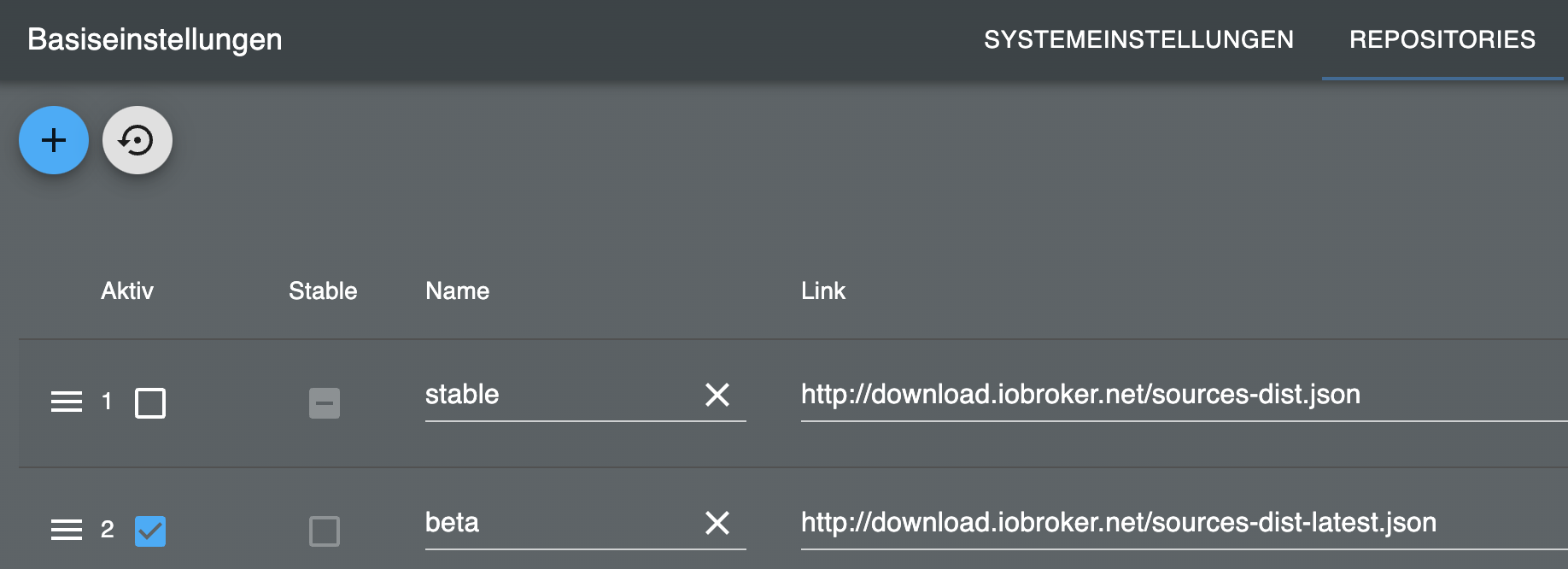
Kameras hinzufügen
Discovery:
Bei jedem Adapterstart wird mit dem in der Einstellungen eingetragen Benutzername und Passwort eine Discovery durchgeführt und versuch sich in die Kamera einzuloggen. Falls die Kamera noch nicht unter Objekte hinzugefügt wurde.
In den Einstellungen kann man die Discovery manuell ausführen. Falls die Kameras unterschiedliche Zugangsdaten haben müssen die jeweils eingegeben werden und eine discovery durchgeführt werden. Im Log sieht man Details zu dem Prozess.
Damit eine Kamera neu erkannt wird muss sie einfach unter Objekte gelöscht werden.
Manuelle Suche
Es können Kameras manuell gesucht werden, falls Discovery nicht funktioniert. Dazu muss eine IP Range und Ports eingegeben und manuell ausgeführt werden. Im Log sieht man Details zu dem Prozess.
Datenpunkte
onvif.0.IP_PORT.events Events der Kamera wie z.b. Bewegungserkennung
onvif.0.IP_PORT.general Generelle Information über die Kameras
onvif.0.IP_PORT.infos Informationen über die Kamera werden nur bei Adapterstart aktualisiert oder bei remote.refresh
Video und Snapshot URL:
onvif.0.IP_PORT.infos.streamUris.MediaProfile_Channel1_MainStream.snapshotUrl.urionvif.0.IP_PORT.remote Steuerung der Kamera
onvif.0.IP_PORT.remote.refresh Aktualisierung der Infodaten
onvif.0.IP_PORT.remote.gotoHomePosition PTZ Kamera in die HomePosition setzen
onvif.0.IP_PORT.remote.gotoPreset PTZ Kamera Preset Nummer auswählen
onvif.0.IP_PORT.remote.snapshot Speichert ein snapshot unter onvif.0.IP_PORT.snapshot
Message
Adapter nimmt Message "snapshot" entgegen und gibt ein Bild zurück
sendTo("onvif.0", "snapshot", "192_168_178_100_80", (result) => {
  if (result) {
    sendTo("telegram.0", {
      text: result,
      type: "photo",
      caption: "Kamera 2",
    });
  }
});
Bewegungsmeldung zu Telegram
on("onvif.0.192_168_178_100_80.events.RuleEngine/CellMotionDetector/Motion", (obj) => {
  if (obj.state.val === true) {
    sendTo("onvif.0", "snapshot", "192_168_178_100_80", (result) => {
      if (result) {
        sendTo("telegram.0", {
          text: result,
          type: "photo",
          caption: "Camera 2",
        });
      }
    });
  }
});
Snapshot Server in vis einbinden
Der Adapter bietet ein Snapshot Server ohne Passwort an. Dazu Server aktivieren in den Instanzeinstellungen und dann kann der aktuelle Snapshot http://iobrokerIp:8095/CAMERAIP_PORT z.B. http://192.168.0.1:8095/192_168_0_1_80 abgerufen werden.
In der Vis ein Image Widget einfügen und die Url als Quelle angeben und eine Updatezeit auswählen

Stream in vis einbinden
go2rtsp Docker
Ein Stream wird normalerweise via rtsp stream bereitgestellt. Eine Umwandlung via motion eye ist sehr resourcen aufwändig und hat ein Verzögerng. Ein Umwandlung in webrtc ist schneller und resourcenschonender. Meine Empfehlung ist ein go2rtsp. Dazu muss ein Docker von alexxit/go2rtc erstellt werden.
https://hub.docker.com/r/alexxit/go2rtcOder go2rtc lokal zu installieren:
https://www.youtube.com/watch?v=4VEEpRYerZg
https://forum.iobroker.net/post/1031526image: alexxit/go2rtc network_mode: host # important for WebRTC, HomeKit, UDP cameras privileged: true # only for FFmpeg hardware transcoding restart: unless-stopped # autorestart on fail or config change from WebUI environment: - TZ=Europe/Berlin # timezone in logs volumes: - "~/go2rtc:/config" # folder for go2rtc.yaml file (edit from WebUI)Es muss ein Volume für den Pfad /config und das network als host eingestellt werden.
Dann ist go2rtsp erreichbar über
http://IP:1984Dann kann man ein Stream hinzufügen. Die Stream url findet man z.B. unter
onvif.0.IP_PORT.infos.streamUris.ProfileName.live_stream_tcp.uri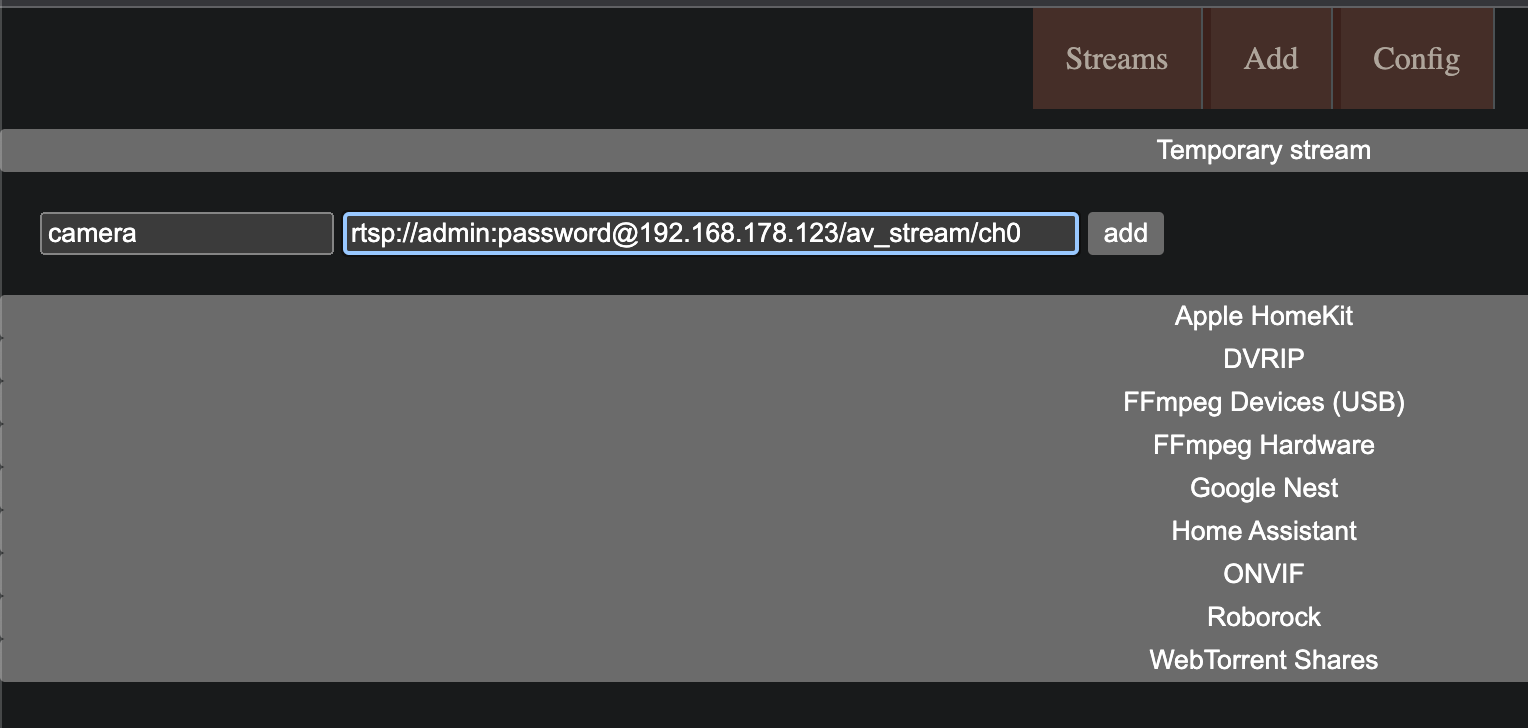
Stream als iFrame einfügen
Das Widget
iFramein der Vis hinzufügen und als Quelle den stream link von go2rtsp verwendenhttp://192.168.178.1:1984/stream.html?src=camera&mode=webrtcUnter links kann noch die Art des Players ausgewählt werden (Mikrofon)
Rtsp2Web Docker
Eine Alternative ist ein RTSPtoWeb Docker. Dies ist aber von der Einrichtun komplizierter.
Dazu muss ein Docker von ghcr.io/deepch/rtsptoweb:latest erstellt werden.FFMpeg Unterstützung
Wenn die Kamera keine Snapshot Unterstützng hat wird mit ffmpeg ein snapshot aus dem rtsp stream erzeugt.
Snapshot Server in vis einbinden
Der Adapter bietet ein Snapshot Server ohne Passwort an. Dazu Server aktivieren in den Instanzeinstellungen und dann kann der aktuelle Snapshot http://iobrokerIp:8095/CAMERAIP_PORT z.B. http://192.168.0.1:8095/192_168_0_1_80 abgerufen werden.
In der Vis ein Image Widget einfügen und die Url als Quelle angeben und eine Updatezeit auswählen
Snapshot in vis einbinden
Wenn möglich die snapshotUri verwenden z.B.
onvif.0.IP_PORT.infos.streamUris.MediaProfile_Channel1_MainStream.snapshotUrl.uriDen Datenpunkt nicht als Stream verwenden, da sonst die Festplatte zu hohe Last hat.
Den Datenpunkt aktualisieren via t onvif.0.IP_PORT.remote.snapshot
Den Datenpunkt onvif.0.IP_PORT.snapshot ein
String img srcelement zuordnen

Oder als Alternative falls String img src nicht funktioniert
Den Datenpunkt onvif.0.IP_PORT.snapshot alsHTMLelement in die vis einfügen mit folgendem Inhalt<img src="{onvif.0.IP_PORT.snapshot}" width="500px" />@tombox Erstmal super arbeit.
Ich konnte den onvif adapter erfolgreich im IOBroker aktivieren und finde auch die Kamera.
Ich habe eine Hikam A9 Kamera verbunden und würde nun gerne die Events näher verstehen.
Heißt: Wenn eine Bewebung per OnVif als Event erkannt wird, soll eine andere IoBroker Variable den Status true erhalten.
Per MotionEye ist gerade die Nachterkennung eher "mäßig" mit der Normalen HiKam app funktioniert aber die personen erkennung und auch der Nachtmodus richtig gut.
Kannst du mir erklären, wie genau ich die Events tiefer auswerten kann? Speziell: Bewegung erkannt?
Im Forum hatte ich dazu leider nix gefunden.
Danke -
@mars schick mal ein log über 1h per mail zu
tombox2020@gmail.com@tombox
Ich hab wie in deiner Anleitung beschrieben RSTPtoWEB installiert und den Livestream im HTML Widget eingebunden.
Wenn ich die einzelne VIS-Seite in der Runtime öffne klappt das auch wunderbar. Oben die "Multiview" unten die "Single View" im HTMl Widget mit Skript.
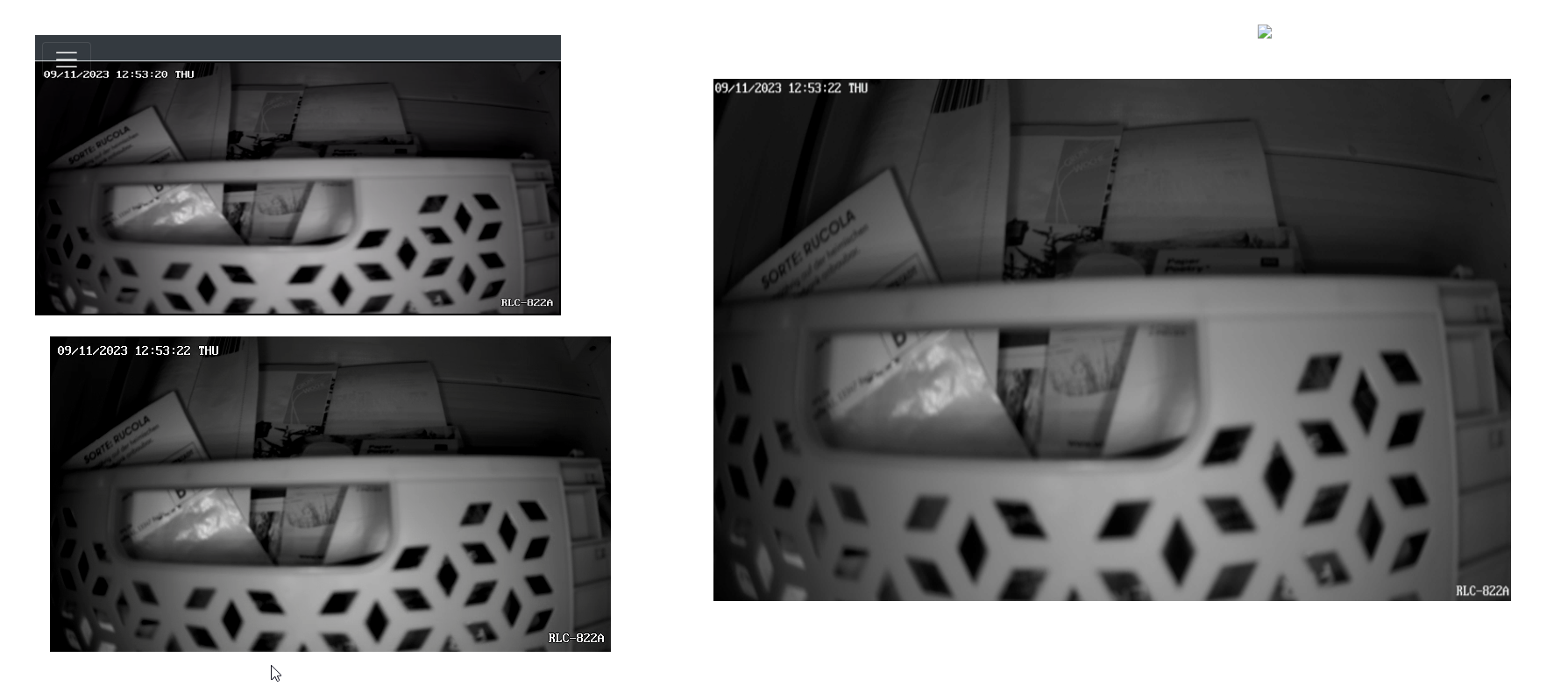
Wenn ich das ganze über meine reguläre VIS mit View in Widget aufrufe bleibt das HTML Widget leer, bzw. es werden nur die Player Tasten (ohne Funktion) angezeigt.
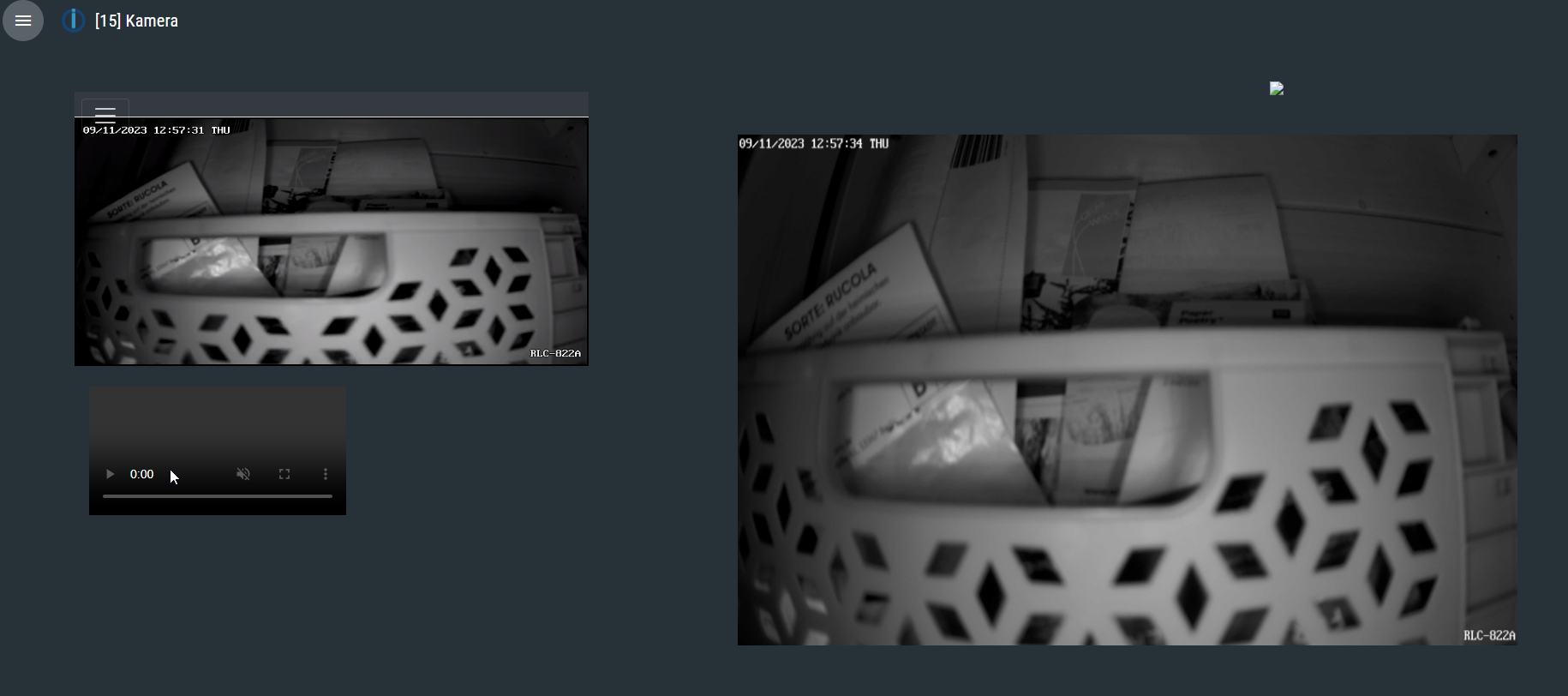
In der Browserkonsole wird auch kein Fehler angemeckert. Hast du eine Idee woran das liegen könnte? -
@tombox Erstmal super arbeit.
Ich konnte den onvif adapter erfolgreich im IOBroker aktivieren und finde auch die Kamera.
Ich habe eine Hikam A9 Kamera verbunden und würde nun gerne die Events näher verstehen.
Heißt: Wenn eine Bewebung per OnVif als Event erkannt wird, soll eine andere IoBroker Variable den Status true erhalten.
Per MotionEye ist gerade die Nachterkennung eher "mäßig" mit der Normalen HiKam app funktioniert aber die personen erkennung und auch der Nachtmodus richtig gut.
Kannst du mir erklären, wie genau ich die Events tiefer auswerten kann? Speziell: Bewegung erkannt?
Im Forum hatte ich dazu leider nix gefunden.
Danke -
@tombox
Ich hab wie in deiner Anleitung beschrieben RSTPtoWEB installiert und den Livestream im HTML Widget eingebunden.
Wenn ich die einzelne VIS-Seite in der Runtime öffne klappt das auch wunderbar. Oben die "Multiview" unten die "Single View" im HTMl Widget mit Skript.
Wenn ich das ganze über meine reguläre VIS mit View in Widget aufrufe bleibt das HTML Widget leer, bzw. es werden nur die Player Tasten (ohne Funktion) angezeigt.
In der Browserkonsole wird auch kein Fehler angemeckert. Hast du eine Idee woran das liegen könnte?@bommel_030 mmh eigentlich nicht müsste eigentlich was im log sein wenn du die streams einzeln hinzufügst geht das?
-
@bommel_030 mmh eigentlich nicht müsste eigentlich was im log sein wenn du die streams einzeln hinzufügst geht das?
@tombox
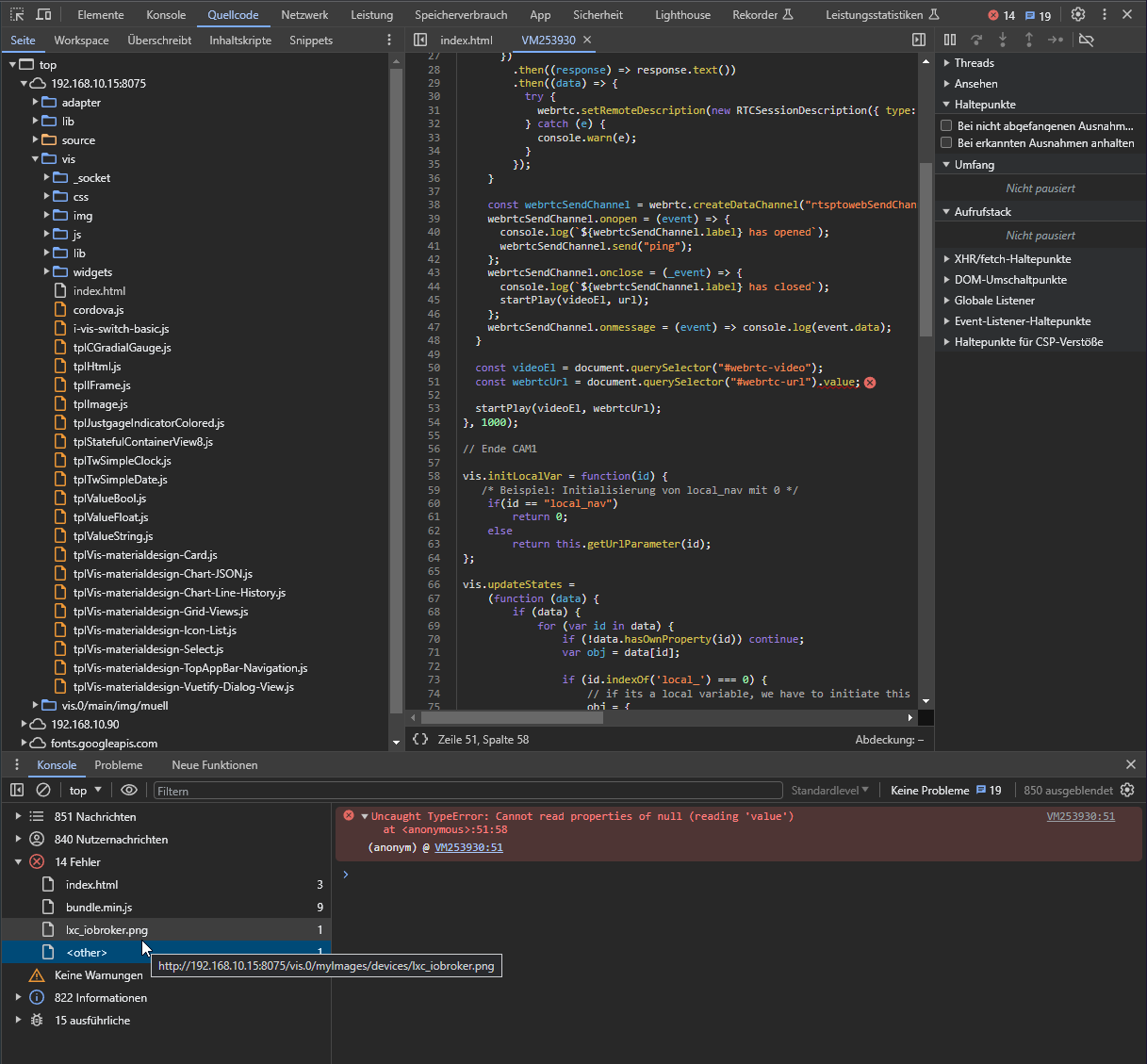
Sorry schon mal für den Screenshot... Wenn ich eine Seite nur mit dem HTML Stream anlege (im View in Widget) geht es leider auch nicht.
Das sind die Fehler die in der Konsole kommen. Bis auf den markierten kommen die auch bei der "Einzelseite" mit den 2 Streams und dem Snapshot.const webrtcUrl = document.querySelector("#webrtc-url").value;Da kann ich aber keinen Fehler erkennen/verstehen.
-
@tombox
Sorry schon mal für den Screenshot... Wenn ich eine Seite nur mit dem HTML Stream anlege (im View in Widget) geht es leider auch nicht.
Das sind die Fehler die in der Konsole kommen. Bis auf den markierten kommen die auch bei der "Einzelseite" mit den 2 Streams und dem Snapshot.const webrtcUrl = document.querySelector("#webrtc-url").value;Da kann ich aber keinen Fehler erkennen/verstehen.
@bommel_030 in der vis gibt es nicht ds Objekt mit id webrtc-url hast du ein html mit Objekt
<input
type="hidden"
name="webrtc-url"
id="webrtc-url" ....angelegt
-
@bommel_030 in der vis gibt es nicht ds Objekt mit id webrtc-url hast du ein html mit Objekt
<input
type="hidden"
name="webrtc-url"
id="webrtc-url" ....angelegt
@tombox
Ich hab ein Basic HTML Widget und dort diesen Inhalt.<input type="hidden" name="webrtc-url" id="webrtc-url" value="http://192.168.10.99:8083/stream/27aec28e-6181-4753-9acd-0456a75f0289/channel/0/webrtc" /> <video id="webrtc-video" autoplay muted playsinline controls style="max-width: 100%; max-height: 100%;"></video> -
@tombox
Ich hab ein Basic HTML Widget und dort diesen Inhalt.<input type="hidden" name="webrtc-url" id="webrtc-url" value="http://192.168.10.99:8083/stream/27aec28e-6181-4753-9acd-0456a75f0289/channel/0/webrtc" /> <video id="webrtc-video" autoplay muted playsinline controls style="max-width: 100%; max-height: 100%;"></video> -
@tombox
Danke, ab 15000 geht es. -
hallo zusammen
Ich habe eine Ctronics Camera bei mir im Eingangsbereich und möchte das Bild in vis einbinden.
Ich habe die Snapshot Ip direkt in ein I-Frame eingebunden. Bild sehe ich nachdem ich benutzer und Paswort eingegeben habe.
Sobald ich die IP mit Benutzer und Passwort eingebe ,kommt kein Bild mehr.
Jetzt habe ich den Onvif Adapter installiert ,Kamera wurde gefunden, Server habe ich gestartet ,die Adressse in das HTML Widget eingegeben.. Bild sehe ich leider nur manchmal sonst kommt im log folgende Fehlermeldung.Error getting snapshot via digest: {"data":{"type":"Buffer","data":[60,104,116,109,108,62,13,10,60,104,101,97,100,62,13,10,60,116,105,116,108,101,62,76,111,103,105,110,60,47,116,105,116,108,101,62,13,10,60,109,101,116,97,32,99,111,110,116,101,110,116,61,34,116,101,120,116,47,104,116,109,108,34,59,32,99,104,97,114,115,101,116,61,34,117,116,102,45,56,34,32,104,116,116,112,45,101,113,117,105,118,61,34,99,111,110,116,101,110,116,45,116,121,112,101,34,62,13,10,60,77,69,84,65,32,72,84,84,80,45,69,81,85,73,86,61,34,67,111,110,116,101,110,116,45,83,99,114,105,112,116,45,84,121,112,101,34,32,67,79,78,84,69,78,84,61,34,116,101,120,116,47,106,97,118,97,115,99,114,105,112,116,34,62,13,10,60,77,69,84,65,32,104,116,116,112,45,101,113,117,105,118,61,34,80,114,97,103,109,97,34,32,67,79,78,84,69,78,84,61,34,110,111,45,99,97,99,104,101,34,62,13,10,60,77,69,84,65,32,72,84,84,80,45,69,81,85,73,86,61,34,67,97,99,104,101,45,67,111,110,116,114,111,108,34,32,67,79,78,84,69,78,84,61,34,110,111,45,99,97,99,104,101,34,62,13,10,60,109,101,116,97,32,72,84,84,80,45,69,81,85,73,86,61,34,69,120,112,105,114,101,115,34,32,67,79,78,84,69,78,84,61,34,83,117,110,44,32,49,50,32,78,111,118,32,50,48,50,51,32,49,49,58,53,50,58,48,52,32,71,77,84,34,62,13,10,60,47,104,101,97,100,62,13,10,60,98,111,100,121,62,13,10,69,114,114,111,114,58,32,117,115,101,114,110,97,109,101,32,111,114,32,112,97,115,115,119,111,114,100,32,101,114,114,111,114,44,112,108,101,97,115,101,32,105,110,112,117,116,32,97,103,97,105,110,46,13,10,60,47,98,111,100,121,62,13,10,60,47,104,116,109,108,62,13,10]},"status":401,"statusCode":401,"statusText":"Unauthorized","headers":{"date":"Sun, 12 Nov 2023 11:52:04 GMT","last-modified":"Sun, 12 Nov 2023 11:52:04 GMT","connection":"close","cache-control":"no-cache,no-store","www-authenticate":"Basic realm=\"\""},"url":"http://192.168.178.43/tmpfs/auto.jpg","redirected":false,"requestUrls":["http://192.168.178.43/tmpfs/auto.jpg"],"res":{"status":401,"statusCode":401,"statusText":"Unauthorized","headers":{"date":"Sun, 12 Nov 2023 11:52:04 GMT","last-modified":"Sun, 12 Nov 2023 11:52:04 GMT","connection":"close","cache-control":"no-cache,no-store","www-authenticate":"Basic realm=\"\""},"size":0,"aborted":false,"rt":9.597,"keepAliveSocket":true,"requestUrls":["http://192.168.178.43/tmpfs/auto.jpg"],"timing":{"queuing":0.271,"connected":3.328,"requestHeadersSent":3.486,"requestSent":3.628,"waiting":8.596,"contentDownload":9.07},"socket":{"id":40,"localAddress":"192.168.178.38","localPort":36596,"remoteAddress":"192.168.178.43","remotePort":80,"remoteFamily":"IPv4","bytesWritten":143,"bytesRead":635,"handledRequests":1,"handledResponses":1,"connectedTime":"2023-11-12T11:52:05.104Z"},"retries":0,"socketErrorRetries":0}}Was mache ich falsch?
Danke
Knusterus -
hallo zusammen
Ich habe eine Ctronics Camera bei mir im Eingangsbereich und möchte das Bild in vis einbinden.
Ich habe die Snapshot Ip direkt in ein I-Frame eingebunden. Bild sehe ich nachdem ich benutzer und Paswort eingegeben habe.
Sobald ich die IP mit Benutzer und Passwort eingebe ,kommt kein Bild mehr.
Jetzt habe ich den Onvif Adapter installiert ,Kamera wurde gefunden, Server habe ich gestartet ,die Adressse in das HTML Widget eingegeben.. Bild sehe ich leider nur manchmal sonst kommt im log folgende Fehlermeldung.Error getting snapshot via digest: {"data":{"type":"Buffer","data":[60,104,116,109,108,62,13,10,60,104,101,97,100,62,13,10,60,116,105,116,108,101,62,76,111,103,105,110,60,47,116,105,116,108,101,62,13,10,60,109,101,116,97,32,99,111,110,116,101,110,116,61,34,116,101,120,116,47,104,116,109,108,34,59,32,99,104,97,114,115,101,116,61,34,117,116,102,45,56,34,32,104,116,116,112,45,101,113,117,105,118,61,34,99,111,110,116,101,110,116,45,116,121,112,101,34,62,13,10,60,77,69,84,65,32,72,84,84,80,45,69,81,85,73,86,61,34,67,111,110,116,101,110,116,45,83,99,114,105,112,116,45,84,121,112,101,34,32,67,79,78,84,69,78,84,61,34,116,101,120,116,47,106,97,118,97,115,99,114,105,112,116,34,62,13,10,60,77,69,84,65,32,104,116,116,112,45,101,113,117,105,118,61,34,80,114,97,103,109,97,34,32,67,79,78,84,69,78,84,61,34,110,111,45,99,97,99,104,101,34,62,13,10,60,77,69,84,65,32,72,84,84,80,45,69,81,85,73,86,61,34,67,97,99,104,101,45,67,111,110,116,114,111,108,34,32,67,79,78,84,69,78,84,61,34,110,111,45,99,97,99,104,101,34,62,13,10,60,109,101,116,97,32,72,84,84,80,45,69,81,85,73,86,61,34,69,120,112,105,114,101,115,34,32,67,79,78,84,69,78,84,61,34,83,117,110,44,32,49,50,32,78,111,118,32,50,48,50,51,32,49,49,58,53,50,58,48,52,32,71,77,84,34,62,13,10,60,47,104,101,97,100,62,13,10,60,98,111,100,121,62,13,10,69,114,114,111,114,58,32,117,115,101,114,110,97,109,101,32,111,114,32,112,97,115,115,119,111,114,100,32,101,114,114,111,114,44,112,108,101,97,115,101,32,105,110,112,117,116,32,97,103,97,105,110,46,13,10,60,47,98,111,100,121,62,13,10,60,47,104,116,109,108,62,13,10]},"status":401,"statusCode":401,"statusText":"Unauthorized","headers":{"date":"Sun, 12 Nov 2023 11:52:04 GMT","last-modified":"Sun, 12 Nov 2023 11:52:04 GMT","connection":"close","cache-control":"no-cache,no-store","www-authenticate":"Basic realm=\"\""},"url":"http://192.168.178.43/tmpfs/auto.jpg","redirected":false,"requestUrls":["http://192.168.178.43/tmpfs/auto.jpg"],"res":{"status":401,"statusCode":401,"statusText":"Unauthorized","headers":{"date":"Sun, 12 Nov 2023 11:52:04 GMT","last-modified":"Sun, 12 Nov 2023 11:52:04 GMT","connection":"close","cache-control":"no-cache,no-store","www-authenticate":"Basic realm=\"\""},"size":0,"aborted":false,"rt":9.597,"keepAliveSocket":true,"requestUrls":["http://192.168.178.43/tmpfs/auto.jpg"],"timing":{"queuing":0.271,"connected":3.328,"requestHeadersSent":3.486,"requestSent":3.628,"waiting":8.596,"contentDownload":9.07},"socket":{"id":40,"localAddress":"192.168.178.38","localPort":36596,"remoteAddress":"192.168.178.43","remotePort":80,"remoteFamily":"IPv4","bytesWritten":143,"bytesRead":635,"handledRequests":1,"handledResponses":1,"connectedTime":"2023-11-12T11:52:05.104Z"},"retries":0,"socketErrorRetries":0}}Was mache ich falsch?
Danke
Knusterus@knusterus Er sagt username password falsch. Die GitHub version sollte auch ein bessere Fehlermeldung haben bitte mal testen
-
@knusterus Er sagt username password falsch. Die GitHub version sollte auch ein bessere Fehlermeldung haben bitte mal testen
-
@tombox
hallo ist die neuste Versio 1.1.1. Ich habe jetzt das Passwort und auch den Benutzernamen mehrfach neu eingegeben .
Aber ohne Erfolg. Gestern ging es ja auch schon mal.
Was kann ich noch tun?@knusterus said in Test Adapter onvif camera v1.0.0:
@tombox
hallo ist die neuste Versio 1.1.1. Ich habe jetzt das Passwort und auch den Benutzernamen mehrfach neu eingegeben .
Aber ohne Erfolg. Gestern ging es ja auch schon mal.
Was kann ich noch tun?
Das ist die erste Fehlermeldung nach Neustart und Neuinsallation vom Adapter.Used invalid characters: onvif.0.192_168_178_43_8080.infos.streamUris.SecondStreamProfile".snapshotUrl.uri changed to onvif.0.192_168_178_43_8080.infos.streamUris.SecondStreamProfile_.snapshotUrl.uriadmin.0 2023-11-12 16:42:06.470 warn onvif has an invalid jsonConfig: [{"instancePath":"/items/_discover","schemaPath":"#/definitions/sendToProps/additionalProperties","keyword":"additionalProperties","params":{"additionalProperty":"showProcessing"},"message":"must NOT have additional properties"}]Habe jetzt den adapter nochmal komplett gelöscht und die Version von Github installiert. Das oben ist die erste Fehlermeldung die kommt., wenn ich den Adapter neu starte.
-
@knusterus said in Test Adapter onvif camera v1.0.0:
@tombox
hallo ist die neuste Versio 1.1.1. Ich habe jetzt das Passwort und auch den Benutzernamen mehrfach neu eingegeben .
Aber ohne Erfolg. Gestern ging es ja auch schon mal.
Was kann ich noch tun?
Das ist die erste Fehlermeldung nach Neustart und Neuinsallation vom Adapter.Used invalid characters: onvif.0.192_168_178_43_8080.infos.streamUris.SecondStreamProfile".snapshotUrl.uri changed to onvif.0.192_168_178_43_8080.infos.streamUris.SecondStreamProfile_.snapshotUrl.uriadmin.0 2023-11-12 16:42:06.470 warn onvif has an invalid jsonConfig: [{"instancePath":"/items/_discover","schemaPath":"#/definitions/sendToProps/additionalProperties","keyword":"additionalProperties","params":{"additionalProperty":"showProcessing"},"message":"must NOT have additional properties"}]Habe jetzt den adapter nochmal komplett gelöscht und die Version von Github installiert. Das oben ist die erste Fehlermeldung die kommt., wenn ich den Adapter neu starte.
@knusterus admin adapter ist aktuell? ansonsten sind es keine kritischen Fehler
-
@knusterus admin adapter ist aktuell? ansonsten sind es keine kritischen Fehler
@tombox
alles auf dem neusten Stand. admin Version 6.12.0 Sonst keine Fehler.Hier nochmal die komplette Fehlerliste. Ich hoffe Du findest den Fehler
onvif.0
2023-11-12 19:18:52.881	warn	State "onvif.0.192_168_178_43_8080.infos.streamUris.SecondStreamProfile".http_stream.timeout" has no existing object, this might lead to an error in future versions

onvif.0
2023-11-12 19:18:52.818	warn	Used invalid characters: onvif.0.192_168_178_43_8080.infos.streamUris.SecondStreamProfile".http_stream.timeout changed to onvif.0.192_168_178_43_8080.infos.streamUris.SecondStreamProfile_.http_stream.timeout

onvif.0
2023-11-12 19:18:52.785	warn	State "onvif.0.192_168_178_43_8080.infos.streamUris.SecondStreamProfile".http_stream.invalidAfterReboot" has no existing object, this might lead to an error in future versions

onvif.0
2023-11-12 19:18:52.736	warn	Used invalid characters: onvif.0.192_168_178_43_8080.infos.streamUris.SecondStreamProfile".http_stream.invalidAfterReboot changed to onvif.0.192_168_178_43_8080.infos.streamUris.SecondStreamProfile_.http_stream.invalidAfterReboot

onvif.0
2023-11-12 19:18:52.695	warn	State "onvif.0.192_168_178_43_8080.infos.streamUris.SecondStreamProfile".http_stream.invalidAfterConnect" has no existing object, this might lead to an error in future versions

onvif.0
2023-11-12 19:18:52.536	warn	Used invalid characters: onvif.0.192_168_178_43_8080.infos.streamUris.SecondStreamProfile".http_stream.invalidAfterConnect changed to onvif.0.192_168_178_43_8080.infos.streamUris.SecondStreamProfile_.http_stream.invalidAfterConnect

onvif.0
2023-11-12 19:18:52.449	warn	State "onvif.0.192_168_178_43_8080.infos.streamUris.SecondStreamProfile".http_stream.uri" has no existing object, this might lead to an error in future versions

onvif.0
2023-11-12 19:18:52.202	warn	Used invalid characters: onvif.0.192_168_178_43_8080.infos.streamUris.SecondStreamProfile".http_stream.uri changed to onvif.0.192_168_178_43_8080.infos.streamUris.SecondStreamProfile_.http_stream.uri

onvif.0
2023-11-12 19:18:52.181	info	Starting snapshot server

onvif.0
2023-11-12 19:18:52.180	info	Finished onvif discovery

onvif.0
2023-11-12 19:18:52.153	warn	State "onvif.0.192_168_178_43_8080.infos.streamUris.SecondStreamProfile".live_stream_multicast.timeout" has no existing object, this might lead to an error in future versions

onvif.0
2023-11-12 19:18:52.065	warn	Used invalid characters: onvif.0.192_168_178_43_8080.infos.streamUris.SecondStreamProfile".live_stream_multicast.timeout changed to onvif.0.192_168_178_43_8080.infos.streamUris.SecondStreamProfile_.live_stream_multicast.timeout

onvif.0
2023-11-12 19:18:52.038	warn	State "onvif.0.192_168_178_43_8080.infos.streamUris.SecondStreamProfile".live_stream_multicast.invalidAfterReboot" has no existing object, this might lead to an error in future versions

onvif.0
2023-11-12 19:18:51.979	warn	Used invalid characters: onvif.0.192_168_178_43_8080.infos.streamUris.SecondStreamProfile".live_stream_multicast.invalidAfterReboot changed to onvif.0.192_168_178_43_8080.infos.streamUris.SecondStreamProfile_.live_stream_multicast.invalidAfterReboot

onvif.0
2023-11-12 19:18:51.941	warn	State "onvif.0.192_168_178_43_8080.infos.streamUris.SecondStreamProfile".live_stream_multicast.invalidAfterConnect" has no existing object, this might lead to an error in future versions

onvif.0
2023-11-12 19:18:51.877	warn	Used invalid characters: onvif.0.192_168_178_43_8080.infos.streamUris.SecondStreamProfile".live_stream_multicast.invalidAfterConnect changed to onvif.0.192_168_178_43_8080.infos.streamUris.SecondStreamProfile_.live_stream_multicast.invalidAfterConnect

onvif.0
2023-11-12 19:18:51.833	warn	State "onvif.0.192_168_178_43_8080.infos.streamUris.SecondStreamProfile".live_stream_multicast.uri" has no existing object, this might lead to an error in future versions

onvif.0
2023-11-12 19:18:51.683	warn	Used invalid characters: onvif.0.192_168_178_43_8080.infos.streamUris.SecondStreamProfile".live_stream_multicast.uri changed to onvif.0.192_168_178_43_8080.infos.streamUris.SecondStreamProfile_.live_stream_multicast.uri

onvif.0
2023-11-12 19:18:51.625	warn	State "onvif.0.192_168_178_43_8080.infos.streamUris.SecondStreamProfile".live_stream_udp.timeout" has no existing object, this might lead to an error in future versions

onvif.0
2023-11-12 19:18:51.553	warn	Used invalid characters: onvif.0.192_168_178_43_8080.infos.streamUris.SecondStreamProfile".live_stream_udp.timeout changed to onvif.0.192_168_178_43_8080.infos.streamUris.SecondStreamProfile_.live_stream_udp.timeout

onvif.0
2023-11-12 19:18:51.531	warn	State "onvif.0.192_168_178_43_8080.infos.streamUris.SecondStreamProfile".live_stream_udp.invalidAfterReboot" has no existing object, this might lead to an error in future versions

onvif.0
2023-11-12 19:18:51.462	warn	Used invalid characters: onvif.0.192_168_178_43_8080.infos.streamUris.SecondStreamProfile".live_stream_udp.invalidAfterReboot changed to onvif.0.192_168_178_43_8080.infos.streamUris.SecondStreamProfile_.live_stream_udp.invalidAfterReboot

onvif.0
2023-11-12 19:18:51.418	warn	State "onvif.0.192_168_178_43_8080.infos.streamUris.SecondStreamProfile".live_stream_udp.invalidAfterConnect" has no existing object, this might lead to an error in future versions

onvif.0
2023-11-12 19:18:51.368	warn	Used invalid characters: onvif.0.192_168_178_43_8080.infos.streamUris.SecondStreamProfile".live_stream_udp.invalidAfterConnect changed to onvif.0.192_168_178_43_8080.infos.streamUris.SecondStreamProfile_.live_stream_udp.invalidAfterConnect

onvif.0
2023-11-12 19:18:51.337	warn	State "onvif.0.192_168_178_43_8080.infos.streamUris.SecondStreamProfile".live_stream_udp.uri" has no existing object, this might lead to an error in future versions

onvif.0
2023-11-12 19:18:51.249	warn	Used invalid characters: onvif.0.192_168_178_43_8080.infos.streamUris.SecondStreamProfile".live_stream_udp.uri changed to onvif.0.192_168_178_43_8080.infos.streamUris.SecondStreamProfile_.live_stream_udp.uri

onvif.0
2023-11-12 19:18:51.173	warn	State "onvif.0.192_168_178_43_8080.infos.streamUris.SecondStreamProfile".live_stream_tcp.timeout" has no existing object, this might lead to an error in future versions

onvif.0
2023-11-12 19:18:51.104	warn	Used invalid characters: onvif.0.192_168_178_43_8080.infos.streamUris.SecondStreamProfile".live_stream_tcp.timeout changed to onvif.0.192_168_178_43_8080.infos.streamUris.SecondStreamProfile_.live_stream_tcp.timeout

onvif.0
2023-11-12 19:18:51.049	warn	State "onvif.0.192_168_178_43_8080.infos.streamUris.SecondStreamProfile".live_stream_tcp.invalidAfterReboot" has no existing object, this might lead to an error in future versions

onvif.0
2023-11-12 19:18:50.943	warn	Used invalid characters: onvif.0.192_168_178_43_8080.infos.streamUris.SecondStreamProfile".live_stream_tcp.invalidAfterReboot changed to onvif.0.192_168_178_43_8080.infos.streamUris.SecondStreamProfile_.live_stream_tcp.invalidAfterReboot

onvif.0
2023-11-12 19:18:50.919	warn	State "onvif.0.192_168_178_43_8080.infos.streamUris.SecondStreamProfile".live_stream_tcp.invalidAfterConnect" has no existing object, this might lead to an error in future versions

onvif.0
2023-11-12 19:18:50.751	warn	Used invalid characters: onvif.0.192_168_178_43_8080.infos.streamUris.SecondStreamProfile".live_stream_tcp.invalidAfterConnect changed to onvif.0.192_168_178_43_8080.infos.streamUris.SecondStreamProfile_.live_stream_tcp.invalidAfterConnect

onvif.0
2023-11-12 19:18:50.503	warn	State "onvif.0.192_168_178_43_8080.infos.streamUris.SecondStreamProfile".live_stream_tcp.uri" has no existing object, this might lead to an error in future versions

onvif.0
2023-11-12 19:18:50.324	warn	Used invalid characters: onvif.0.192_168_178_43_8080.infos.streamUris.SecondStreamProfile".live_stream_tcp.uri changed to onvif.0.192_168_178_43_8080.infos.streamUris.SecondStreamProfile_.live_stream_tcp.uri

onvif.0
2023-11-12 19:18:50.273	warn	State "onvif.0.192_168_178_43_8080.infos.streamUris.SecondStreamProfile".snapshotUrl.timeout" has no existing object, this might lead to an error in future versions

onvif.0
2023-11-12 19:18:50.189	warn	Used invalid characters: onvif.0.192_168_178_43_8080.infos.streamUris.SecondStreamProfile".snapshotUrl.timeout changed to onvif.0.192_168_178_43_8080.infos.streamUris.SecondStreamProfile_.snapshotUrl.timeout

onvif.0
2023-11-12 19:18:50.115	warn	State "onvif.0.192_168_178_43_8080.infos.streamUris.SecondStreamProfile".snapshotUrl.invalidAfterReboot" has no existing object, this might lead to an error in future versions

onvif.0
2023-11-12 19:18:50.014	warn	Used invalid characters: onvif.0.192_168_178_43_8080.infos.streamUris.SecondStreamProfile".snapshotUrl.invalidAfterReboot changed to onvif.0.192_168_178_43_8080.infos.streamUris.SecondStreamProfile_.snapshotUrl.invalidAfterReboot

onvif.0
2023-11-12 19:18:49.983	warn	State "onvif.0.192_168_178_43_8080.infos.streamUris.SecondStreamProfile".snapshotUrl.invalidAfterConnect" has no existing object, this might lead to an error in future versions

onvif.0
2023-11-12 19:18:49.930	warn	Used invalid characters: onvif.0.192_168_178_43_8080.infos.streamUris.SecondStreamProfile".snapshotUrl.invalidAfterConnect changed to onvif.0.192_168_178_43_8080.infos.streamUris.SecondStreamProfile_.snapshotUrl.invalidAfterConnect

onvif.0
2023-11-12 19:18:49.906	warn	State "onvif.0.192_168_178_43_8080.infos.streamUris.SecondStreamProfile".snapshotUrl.uri" has no existing object, this might lead to an error in future versions

onvif.0
2023-11-12 19:18:49.849	warn	Used invalid characters: onvif.0.192_168_178_43_8080.infos.streamUris.SecondStreamProfile".snapshotUrl.uri changed to onvif.0.192_168_178_43_8080.infos.streamUris.SecondStreamProfile_.snapshotUrl.uri

onvif.0
2023-11-12 19:18:47.984	info	Device successful initialized: 192.168.178.25:8080

onvif.0
2023-11-12 19:18:47.928	info	Device successful initialized: 192.168.178.30:8080

onvif.0
2023-11-12 19:18:47.322	info	Try to login to 192.168.178.30:8080 with admin:v****5

onvif.0
2023-11-12 19:18:47.317	info	Discovery Reply from 192.168.178.30 (IPCAM) () (http://192.168.178.30:8080/onvif/devices) (urn:uuid:5f5a69c2-e0ae-504f-829b-E8ABFA40520D)

onvif.0
2023-11-12 19:18:47.289	info	Skip device 192.168.178.43 because it is already configured via iobroker object. Delete the device under objects for reconfigure.

onvif.0
2023-11-12 19:18:47.286	info	Discovery Reply from 192.168.178.43 (IPCAM) (HD-53NV1080HSD) (http://192.168.178.43:8080/onvif/device_service) (um:uuid:5f5a69c2-e0ae-504f-829b-203233397E7B)

onvif.0
2023-11-12 19:18:47.258	info	Try to login to 192.168.178.25:8080 with admin:v****5

onvif.0
2023-11-12 19:18:47.253	info	Discovery Reply from 192.168.178.25 (IPCAM) () (http://192.168.178.25:8080/onvif/devices) (urn:uuid:5f5a69c2-e0ae-504f-829b-E8ABFA405567)

onvif.0
2023-11-12 19:18:47.175	info	Start onvif discovery

onvif.0
2023-11-12 19:18:46.396	info	Device successful initialized: 192.168.178.43:8080

onvif.0
2023-11-12 19:18:46.238	info	Found Adapter Device: onvif.0.192_168_178_43_8080 IPCAM C6F0SgZ3N0P6L2 192.168.178.43:8080

onvif.0
2023-11-12 19:18:46.130	info	starting. Version 1.1.1 (non-npm: iobroker-community-adapters/ioBroker.onvif) in /opt/iobroker/node_modules/iobroker.onvif, node: v18.17.0, js-controller: 5.0.12
host.iobroker
2023-11-12 19:18:41.328	info	instance system.adapter.onvif.0 started with pid 175534
host.iobroker
2023-11-12 19:18:39.163	info	instance system.adapter.onvif.0 terminated with code 11 (ADAPTER_REQUESTED_TERMINATION)

onvif.0
2023-11-12 19:18:38.531	info	terminating
host.iobroker
2023-11-12 19:18:38.206	info	stopInstance system.adapter.onvif.0 send kill signal

onvif.0
2023-11-12 19:18:38.030	info	Terminated (ADAPTER_REQUESTED_TERMINATION): Without reason

onvif.0
2023-11-12 19:18:38.029	info	terminating

onvif.0
2023-11-12 19:18:38.027	info	Got terminate signal TERMINATE_YOURSELF
host.iobroker
2023-11-12 19:18:38.024	info	stopInstance system.adapter.onvif.0 (force=false, process=true)

admin.0
2023-11-12 19:18:10.395	warn	onvif has an invalid jsonConfig: [{"instancePath":"/items/_discover","schemaPath":"#/definitions/sendToProps/additionalProperties","keyword":"additionalProperties","params":{"additionalProperty":"showProcessing"},"message":"must NOT have additional properties"}]
Danke schon mal für deine Mühe
Knusterus -
@tombox
alles auf dem neusten Stand. admin Version 6.12.0 Sonst keine Fehler.Hier nochmal die komplette Fehlerliste. Ich hoffe Du findest den Fehler
onvif.0
2023-11-12 19:18:52.881	warn	State "onvif.0.192_168_178_43_8080.infos.streamUris.SecondStreamProfile".http_stream.timeout" has no existing object, this might lead to an error in future versions

onvif.0
2023-11-12 19:18:52.818	warn	Used invalid characters: onvif.0.192_168_178_43_8080.infos.streamUris.SecondStreamProfile".http_stream.timeout changed to onvif.0.192_168_178_43_8080.infos.streamUris.SecondStreamProfile_.http_stream.timeout

onvif.0
2023-11-12 19:18:52.785	warn	State "onvif.0.192_168_178_43_8080.infos.streamUris.SecondStreamProfile".http_stream.invalidAfterReboot" has no existing object, this might lead to an error in future versions

onvif.0
2023-11-12 19:18:52.736	warn	Used invalid characters: onvif.0.192_168_178_43_8080.infos.streamUris.SecondStreamProfile".http_stream.invalidAfterReboot changed to onvif.0.192_168_178_43_8080.infos.streamUris.SecondStreamProfile_.http_stream.invalidAfterReboot

onvif.0
2023-11-12 19:18:52.695	warn	State "onvif.0.192_168_178_43_8080.infos.streamUris.SecondStreamProfile".http_stream.invalidAfterConnect" has no existing object, this might lead to an error in future versions

onvif.0
2023-11-12 19:18:52.536	warn	Used invalid characters: onvif.0.192_168_178_43_8080.infos.streamUris.SecondStreamProfile".http_stream.invalidAfterConnect changed to onvif.0.192_168_178_43_8080.infos.streamUris.SecondStreamProfile_.http_stream.invalidAfterConnect

onvif.0
2023-11-12 19:18:52.449	warn	State "onvif.0.192_168_178_43_8080.infos.streamUris.SecondStreamProfile".http_stream.uri" has no existing object, this might lead to an error in future versions

onvif.0
2023-11-12 19:18:52.202	warn	Used invalid characters: onvif.0.192_168_178_43_8080.infos.streamUris.SecondStreamProfile".http_stream.uri changed to onvif.0.192_168_178_43_8080.infos.streamUris.SecondStreamProfile_.http_stream.uri

onvif.0
2023-11-12 19:18:52.181	info	Starting snapshot server

onvif.0
2023-11-12 19:18:52.180	info	Finished onvif discovery

onvif.0
2023-11-12 19:18:52.153	warn	State "onvif.0.192_168_178_43_8080.infos.streamUris.SecondStreamProfile".live_stream_multicast.timeout" has no existing object, this might lead to an error in future versions

onvif.0
2023-11-12 19:18:52.065	warn	Used invalid characters: onvif.0.192_168_178_43_8080.infos.streamUris.SecondStreamProfile".live_stream_multicast.timeout changed to onvif.0.192_168_178_43_8080.infos.streamUris.SecondStreamProfile_.live_stream_multicast.timeout

onvif.0
2023-11-12 19:18:52.038	warn	State "onvif.0.192_168_178_43_8080.infos.streamUris.SecondStreamProfile".live_stream_multicast.invalidAfterReboot" has no existing object, this might lead to an error in future versions

onvif.0
2023-11-12 19:18:51.979	warn	Used invalid characters: onvif.0.192_168_178_43_8080.infos.streamUris.SecondStreamProfile".live_stream_multicast.invalidAfterReboot changed to onvif.0.192_168_178_43_8080.infos.streamUris.SecondStreamProfile_.live_stream_multicast.invalidAfterReboot

onvif.0
2023-11-12 19:18:51.941	warn	State "onvif.0.192_168_178_43_8080.infos.streamUris.SecondStreamProfile".live_stream_multicast.invalidAfterConnect" has no existing object, this might lead to an error in future versions

onvif.0
2023-11-12 19:18:51.877	warn	Used invalid characters: onvif.0.192_168_178_43_8080.infos.streamUris.SecondStreamProfile".live_stream_multicast.invalidAfterConnect changed to onvif.0.192_168_178_43_8080.infos.streamUris.SecondStreamProfile_.live_stream_multicast.invalidAfterConnect

onvif.0
2023-11-12 19:18:51.833	warn	State "onvif.0.192_168_178_43_8080.infos.streamUris.SecondStreamProfile".live_stream_multicast.uri" has no existing object, this might lead to an error in future versions

onvif.0
2023-11-12 19:18:51.683	warn	Used invalid characters: onvif.0.192_168_178_43_8080.infos.streamUris.SecondStreamProfile".live_stream_multicast.uri changed to onvif.0.192_168_178_43_8080.infos.streamUris.SecondStreamProfile_.live_stream_multicast.uri

onvif.0
2023-11-12 19:18:51.625	warn	State "onvif.0.192_168_178_43_8080.infos.streamUris.SecondStreamProfile".live_stream_udp.timeout" has no existing object, this might lead to an error in future versions

onvif.0
2023-11-12 19:18:51.553	warn	Used invalid characters: onvif.0.192_168_178_43_8080.infos.streamUris.SecondStreamProfile".live_stream_udp.timeout changed to onvif.0.192_168_178_43_8080.infos.streamUris.SecondStreamProfile_.live_stream_udp.timeout

onvif.0
2023-11-12 19:18:51.531	warn	State "onvif.0.192_168_178_43_8080.infos.streamUris.SecondStreamProfile".live_stream_udp.invalidAfterReboot" has no existing object, this might lead to an error in future versions

onvif.0
2023-11-12 19:18:51.462	warn	Used invalid characters: onvif.0.192_168_178_43_8080.infos.streamUris.SecondStreamProfile".live_stream_udp.invalidAfterReboot changed to onvif.0.192_168_178_43_8080.infos.streamUris.SecondStreamProfile_.live_stream_udp.invalidAfterReboot

onvif.0
2023-11-12 19:18:51.418	warn	State "onvif.0.192_168_178_43_8080.infos.streamUris.SecondStreamProfile".live_stream_udp.invalidAfterConnect" has no existing object, this might lead to an error in future versions

onvif.0
2023-11-12 19:18:51.368	warn	Used invalid characters: onvif.0.192_168_178_43_8080.infos.streamUris.SecondStreamProfile".live_stream_udp.invalidAfterConnect changed to onvif.0.192_168_178_43_8080.infos.streamUris.SecondStreamProfile_.live_stream_udp.invalidAfterConnect

onvif.0
2023-11-12 19:18:51.337	warn	State "onvif.0.192_168_178_43_8080.infos.streamUris.SecondStreamProfile".live_stream_udp.uri" has no existing object, this might lead to an error in future versions

onvif.0
2023-11-12 19:18:51.249	warn	Used invalid characters: onvif.0.192_168_178_43_8080.infos.streamUris.SecondStreamProfile".live_stream_udp.uri changed to onvif.0.192_168_178_43_8080.infos.streamUris.SecondStreamProfile_.live_stream_udp.uri

onvif.0
2023-11-12 19:18:51.173	warn	State "onvif.0.192_168_178_43_8080.infos.streamUris.SecondStreamProfile".live_stream_tcp.timeout" has no existing object, this might lead to an error in future versions

onvif.0
2023-11-12 19:18:51.104	warn	Used invalid characters: onvif.0.192_168_178_43_8080.infos.streamUris.SecondStreamProfile".live_stream_tcp.timeout changed to onvif.0.192_168_178_43_8080.infos.streamUris.SecondStreamProfile_.live_stream_tcp.timeout

onvif.0
2023-11-12 19:18:51.049	warn	State "onvif.0.192_168_178_43_8080.infos.streamUris.SecondStreamProfile".live_stream_tcp.invalidAfterReboot" has no existing object, this might lead to an error in future versions

onvif.0
2023-11-12 19:18:50.943	warn	Used invalid characters: onvif.0.192_168_178_43_8080.infos.streamUris.SecondStreamProfile".live_stream_tcp.invalidAfterReboot changed to onvif.0.192_168_178_43_8080.infos.streamUris.SecondStreamProfile_.live_stream_tcp.invalidAfterReboot

onvif.0
2023-11-12 19:18:50.919	warn	State "onvif.0.192_168_178_43_8080.infos.streamUris.SecondStreamProfile".live_stream_tcp.invalidAfterConnect" has no existing object, this might lead to an error in future versions

onvif.0
2023-11-12 19:18:50.751	warn	Used invalid characters: onvif.0.192_168_178_43_8080.infos.streamUris.SecondStreamProfile".live_stream_tcp.invalidAfterConnect changed to onvif.0.192_168_178_43_8080.infos.streamUris.SecondStreamProfile_.live_stream_tcp.invalidAfterConnect

onvif.0
2023-11-12 19:18:50.503	warn	State "onvif.0.192_168_178_43_8080.infos.streamUris.SecondStreamProfile".live_stream_tcp.uri" has no existing object, this might lead to an error in future versions

onvif.0
2023-11-12 19:18:50.324	warn	Used invalid characters: onvif.0.192_168_178_43_8080.infos.streamUris.SecondStreamProfile".live_stream_tcp.uri changed to onvif.0.192_168_178_43_8080.infos.streamUris.SecondStreamProfile_.live_stream_tcp.uri

onvif.0
2023-11-12 19:18:50.273	warn	State "onvif.0.192_168_178_43_8080.infos.streamUris.SecondStreamProfile".snapshotUrl.timeout" has no existing object, this might lead to an error in future versions

onvif.0
2023-11-12 19:18:50.189	warn	Used invalid characters: onvif.0.192_168_178_43_8080.infos.streamUris.SecondStreamProfile".snapshotUrl.timeout changed to onvif.0.192_168_178_43_8080.infos.streamUris.SecondStreamProfile_.snapshotUrl.timeout

onvif.0
2023-11-12 19:18:50.115	warn	State "onvif.0.192_168_178_43_8080.infos.streamUris.SecondStreamProfile".snapshotUrl.invalidAfterReboot" has no existing object, this might lead to an error in future versions

onvif.0
2023-11-12 19:18:50.014	warn	Used invalid characters: onvif.0.192_168_178_43_8080.infos.streamUris.SecondStreamProfile".snapshotUrl.invalidAfterReboot changed to onvif.0.192_168_178_43_8080.infos.streamUris.SecondStreamProfile_.snapshotUrl.invalidAfterReboot

onvif.0
2023-11-12 19:18:49.983	warn	State "onvif.0.192_168_178_43_8080.infos.streamUris.SecondStreamProfile".snapshotUrl.invalidAfterConnect" has no existing object, this might lead to an error in future versions

onvif.0
2023-11-12 19:18:49.930	warn	Used invalid characters: onvif.0.192_168_178_43_8080.infos.streamUris.SecondStreamProfile".snapshotUrl.invalidAfterConnect changed to onvif.0.192_168_178_43_8080.infos.streamUris.SecondStreamProfile_.snapshotUrl.invalidAfterConnect

onvif.0
2023-11-12 19:18:49.906	warn	State "onvif.0.192_168_178_43_8080.infos.streamUris.SecondStreamProfile".snapshotUrl.uri" has no existing object, this might lead to an error in future versions

onvif.0
2023-11-12 19:18:49.849	warn	Used invalid characters: onvif.0.192_168_178_43_8080.infos.streamUris.SecondStreamProfile".snapshotUrl.uri changed to onvif.0.192_168_178_43_8080.infos.streamUris.SecondStreamProfile_.snapshotUrl.uri

onvif.0
2023-11-12 19:18:47.984	info	Device successful initialized: 192.168.178.25:8080

onvif.0
2023-11-12 19:18:47.928	info	Device successful initialized: 192.168.178.30:8080

onvif.0
2023-11-12 19:18:47.322	info	Try to login to 192.168.178.30:8080 with admin:v****5

onvif.0
2023-11-12 19:18:47.317	info	Discovery Reply from 192.168.178.30 (IPCAM) () (http://192.168.178.30:8080/onvif/devices) (urn:uuid:5f5a69c2-e0ae-504f-829b-E8ABFA40520D)

onvif.0
2023-11-12 19:18:47.289	info	Skip device 192.168.178.43 because it is already configured via iobroker object. Delete the device under objects for reconfigure.

onvif.0
2023-11-12 19:18:47.286	info	Discovery Reply from 192.168.178.43 (IPCAM) (HD-53NV1080HSD) (http://192.168.178.43:8080/onvif/device_service) (um:uuid:5f5a69c2-e0ae-504f-829b-203233397E7B)

onvif.0
2023-11-12 19:18:47.258	info	Try to login to 192.168.178.25:8080 with admin:v****5

onvif.0
2023-11-12 19:18:47.253	info	Discovery Reply from 192.168.178.25 (IPCAM) () (http://192.168.178.25:8080/onvif/devices) (urn:uuid:5f5a69c2-e0ae-504f-829b-E8ABFA405567)

onvif.0
2023-11-12 19:18:47.175	info	Start onvif discovery

onvif.0
2023-11-12 19:18:46.396	info	Device successful initialized: 192.168.178.43:8080

onvif.0
2023-11-12 19:18:46.238	info	Found Adapter Device: onvif.0.192_168_178_43_8080 IPCAM C6F0SgZ3N0P6L2 192.168.178.43:8080

onvif.0
2023-11-12 19:18:46.130	info	starting. Version 1.1.1 (non-npm: iobroker-community-adapters/ioBroker.onvif) in /opt/iobroker/node_modules/iobroker.onvif, node: v18.17.0, js-controller: 5.0.12
host.iobroker
2023-11-12 19:18:41.328	info	instance system.adapter.onvif.0 started with pid 175534
host.iobroker
2023-11-12 19:18:39.163	info	instance system.adapter.onvif.0 terminated with code 11 (ADAPTER_REQUESTED_TERMINATION)

onvif.0
2023-11-12 19:18:38.531	info	terminating
host.iobroker
2023-11-12 19:18:38.206	info	stopInstance system.adapter.onvif.0 send kill signal

onvif.0
2023-11-12 19:18:38.030	info	Terminated (ADAPTER_REQUESTED_TERMINATION): Without reason

onvif.0
2023-11-12 19:18:38.029	info	terminating

onvif.0
2023-11-12 19:18:38.027	info	Got terminate signal TERMINATE_YOURSELF
host.iobroker
2023-11-12 19:18:38.024	info	stopInstance system.adapter.onvif.0 (force=false, process=true)

admin.0
2023-11-12 19:18:10.395	warn	onvif has an invalid jsonConfig: [{"instancePath":"/items/_discover","schemaPath":"#/definitions/sendToProps/additionalProperties","keyword":"additionalProperties","params":{"additionalProperty":"showProcessing"},"message":"must NOT have additional properties"}]
Danke schon mal für deine Mühe
Knusterus@knusterus bitte mal GitHub version testen aber ist nicht die Ursache für ein problem



Hey! Du scheinst an dieser Unterhaltung interessiert zu sein, hast aber noch kein Konto.
Hast du es satt, bei jedem Besuch durch die gleichen Beiträge zu scrollen? Wenn du dich für ein Konto anmeldest, kommst du immer genau dorthin zurück, wo du zuvor warst, und kannst dich über neue Antworten benachrichtigen lassen (entweder per E-Mail oder Push-Benachrichtigung). Du kannst auch Lesezeichen speichern und Beiträge positiv bewerten, um anderen Community-Mitgliedern deine Wertschätzung zu zeigen.
Mit deinem Input könnte dieser Beitrag noch besser werden 💗
Registrieren AnmeldenSupport us
446
Online33.1k
Benutzende84.0k
Themen1.4m
Beiträge