



Skip to content
  • Home
  • Aktuell
  • Tags
  • 0 Ungelesen 0
  • Kategorien
  • Unreplied
  • Beliebt
  • GitHub
  • Docu
  • Hilfe
Skins
  • Light
  • Brite
  • Cerulean
  • Cosmo
  • Flatly
  • Journal
  • Litera
  • Lumen
  • Lux
  • Materia
  • Minty
  • Morph
  • Pulse
  • Sandstone
  • Simplex
  • Sketchy
  • Spacelab
  • United
  • Yeti
  • Zephyr
  • Dark
  • Cyborg
  • Darkly
  • Quartz
  • Slate
  • Solar
  • Superhero
  • Vapor

  • Standard: (Kein Skin)
  • Kein Skin
Einklappen
ioBroker Logo

Community Forum

donate donate
  1. ioBroker Community Home
  2. Deutsch
  3. Error/Bug
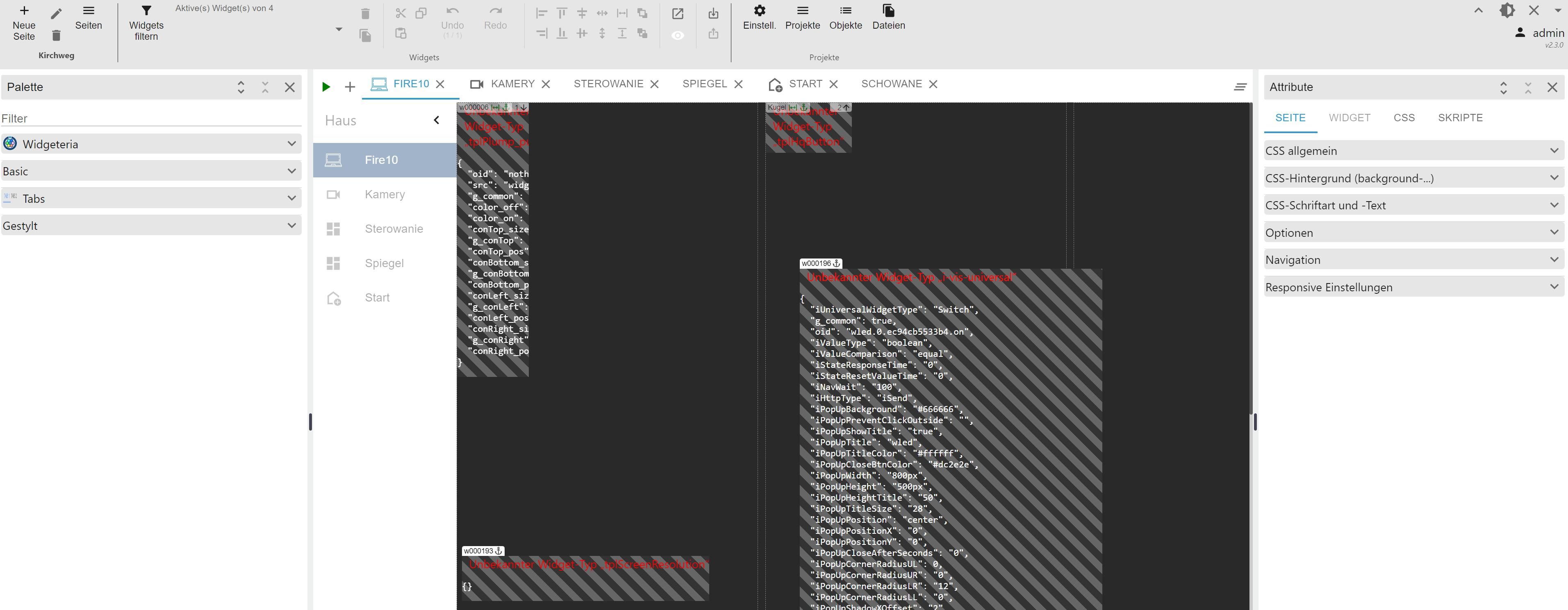
  4. VIS 2 update auf 2.3.0 keine Widgets mehr
NEWS

  • Jahresrückblick 2025 – unser neuer Blogbeitrag ist online! ✨
    BluefoxB
    Bluefox
    10
    1
    64

  • Neuer Blogbeitrag: Monatsrückblick - Dezember 2025 🎄
    BluefoxB
    Bluefox
    11
    1
    554

  • Weihnachtsangebot 2025! 🎄
    BluefoxB
    Bluefox
    24
    1
    1.7k

VIS 2 update auf 2.3.0 keine Widgets mehr

Geplant Angeheftet Gesperrt Verschoben Error/Bug
27 Beiträge 5 Kommentatoren 1.4k Aufrufe 5 Watching
  • Älteste zuerst
  • Neuste zuerst
  • Meiste Stimmen
Antworten
  • In einem neuen Thema antworten
Anmelden zum Antworten
Dieses Thema wurde gelöscht. Nur Nutzer mit entsprechenden Rechten können es sehen.
  • GlasfaserG Glasfaser

    @edi1975 sagte in VIS 2 update auf 2.3.0 keine Widgets mehr:

    host.iobroker Unknown packetName vis-2.

    Falscher Befehl !

    So :

    Wie wird es aktualisiert?
    
    Wenn es im Rahmen der Tests neue Versionen gibt werden diese ebenfalls manuell installiert. Die Befehle sind dann (hier am Beispiel des Haupt-Paketes - ist dann identisch für die anderen):
    
    cd /opt/iobroker
    npm i iobroker.vis-2-beta@latest
    iob upload vis-2-beta
    
    
    sigi234S Online
    sigi234S Online
    sigi234
    Forum Testing Most Active
    schrieb am zuletzt editiert von sigi234
    #8

    @glasfaser sagte in VIS 2 update auf 2.3.0 keine Widgets mehr:

    Falscher Befehl !
    So :

    Auch Falsch!
    Zitat:
    Damit gesagt ist vis-2 als neuer Adapter seit ein paar Tagen im beta Repository und vis2-beta ist nicht mehr verfügbar und bekommt auch keine Updates mehr.
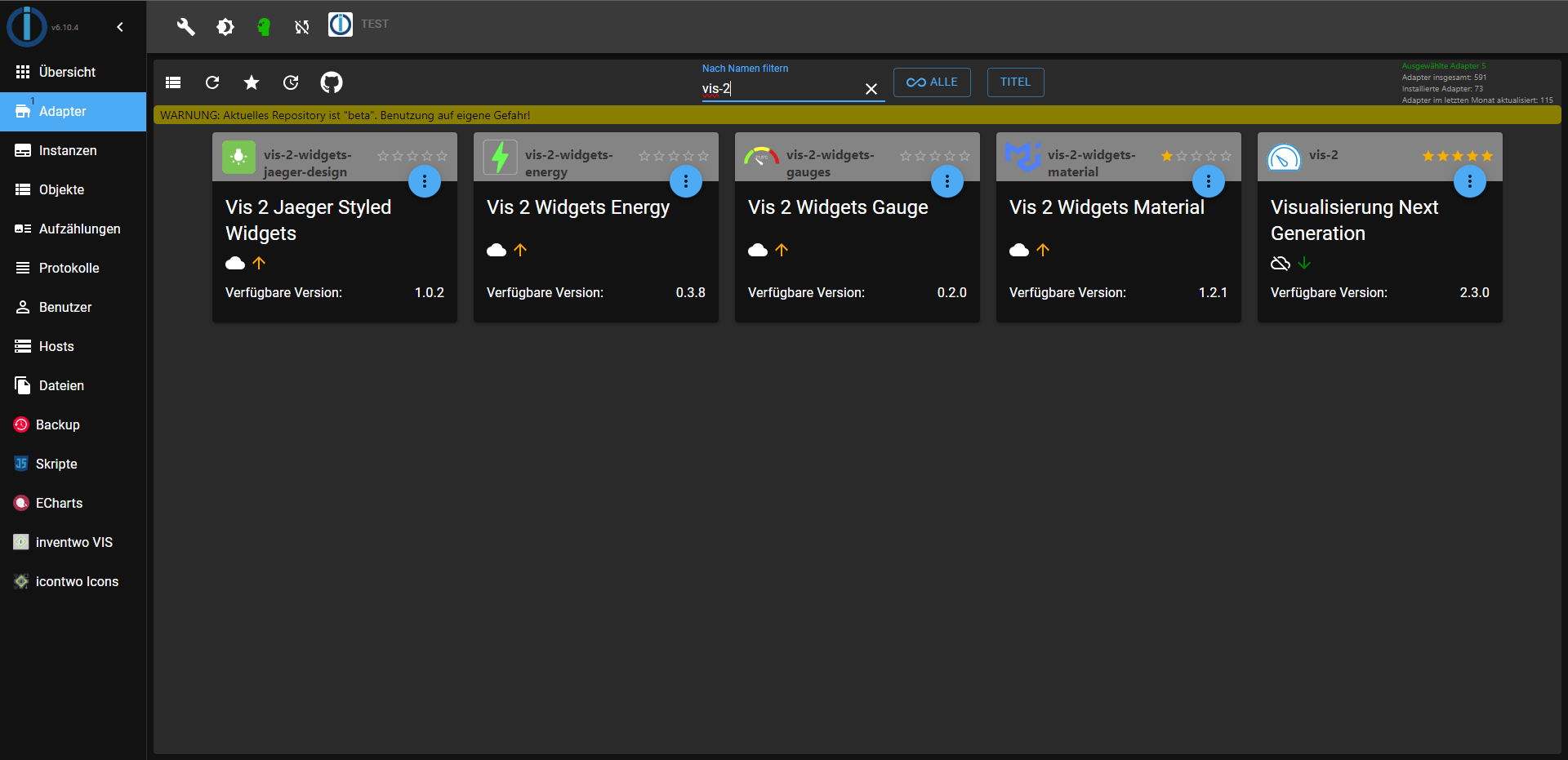
    Screenshot (345).png

    Bitte benutzt das Voting rechts unten im Beitrag wenn er euch geholfen hat.
    Immer Daten sichern!

    1 Antwort Letzte Antwort
    1
    • FeuersturmF Feuersturm

      @glasfaser sagte in VIS 2 update auf 2.3.0 keine Widgets mehr:

      Falscher Befehl !

      vis-2-beta wird doch nicht mehr weiter entwickelt. Die Entwicklung findet jetzt über den vis-2 Adapter statt (siehe https://forum.iobroker.net/topic/67676/vis-2-0-neuer-adapter-als-beta)

      GlasfaserG Offline
      GlasfaserG Offline
      Glasfaser
      schrieb am zuletzt editiert von
      #9

      @feuersturm
      @sigi234

      OK , habe nur die Fehlermeldung von @edi1975 gesehen mit :

      host.iobroker Unknown packetName vis-2.

      und da ich noch nicht vis-2 nutze , habe ich noch die Alpha im Kopf gehabt ;)

      Synology 918+ 16GB - ioBroker in Docker v9 , VISO auf Trekstor Primebook C13 13,3" , Hikvision Domkameras mit Surveillance Station .. CCU RaspberryMatic in Synology VM .. Zigbee CC2538+CC2592 .. Sonoff .. KNX .. Modbus ..

      1 Antwort Letzte Antwort
      0
      • FeuersturmF Feuersturm

        @edi1975 Lösch doch einfach mal deinen vis-2 Adapter und installiere ihn so über den Admin (falls du im stable repository unterwegs bist, alternativ bei den Adaptern einfach nach vis-2 suchen)

        71284f90-6216-47d5-8dd5-8998b5ee9159-grafik.png

        Was sagt die Langfassung von iob diag auf der Konsole?

        E Offline
        E Offline
        edi1975
        schrieb am zuletzt editiert von
        #10

        @feuersturm
        Gelöscht neu installiert und ist alles wider da.
        Warum Backup Wiederherstellung hat nicht das Geschäft?
        Danke für Hilfe.

        FeuersturmF 1 Antwort Letzte Antwort
        0
        • E edi1975

          @feuersturm
          Gelöscht neu installiert und ist alles wider da.
          Warum Backup Wiederherstellung hat nicht das Geschäft?
          Danke für Hilfe.

          FeuersturmF Online
          FeuersturmF Online
          Feuersturm
          schrieb am zuletzt editiert von
          #11

          @edi1975 sagte in VIS 2 update auf 2.3.0 keine Widgets mehr:

          Warum Backup Wiederherstellung hat nicht das Geschäft?

          Gute Frage. Hierzu müsste man tiefer abtauchen. Wie hast du dein Backup gemacht, wie hast du es zurück gespielt. War das Backup auf der gleichen Version vom js-controller?

          E 2 Antworten Letzte Antwort
          0
          • FeuersturmF Feuersturm

            @edi1975 sagte in VIS 2 update auf 2.3.0 keine Widgets mehr:

            Warum Backup Wiederherstellung hat nicht das Geschäft?

            Gute Frage. Hierzu müsste man tiefer abtauchen. Wie hast du dein Backup gemacht, wie hast du es zurück gespielt. War das Backup auf der gleichen Version vom js-controller?

            E Offline
            E Offline
            edi1975
            schrieb am zuletzt editiert von
            #12

            @feuersturm
            über Backup Adapter
            Zwischenablagebild (2).jpg

            FeuersturmF 1 Antwort Letzte Antwort
            0
            • FeuersturmF Feuersturm

              @edi1975 sagte in VIS 2 update auf 2.3.0 keine Widgets mehr:

              Warum Backup Wiederherstellung hat nicht das Geschäft?

              Gute Frage. Hierzu müsste man tiefer abtauchen. Wie hast du dein Backup gemacht, wie hast du es zurück gespielt. War das Backup auf der gleichen Version vom js-controller?

              E Offline
              E Offline
              edi1975
              schrieb am zuletzt editiert von
              #13

              @feuersturm sagte in VIS 2 update auf 2.3.0 keine Widgets mehr:

              War das Backup auf der gleichen Version vom js-controller?

              Ja

              1 Antwort Letzte Antwort
              0
              • E edi1975

                @feuersturm
                über Backup Adapter
                Zwischenablagebild (2).jpg

                FeuersturmF Online
                FeuersturmF Online
                Feuersturm
                schrieb am zuletzt editiert von
                #14

                @edi1975 Dann solltest du mal deine Backups testen ob sie sich wiederherstellen lassen oder ob du das Problem reproduzieren kannst.

                E 1 Antwort Letzte Antwort
                0
                • FeuersturmF Feuersturm

                  @edi1975 Dann solltest du mal deine Backups testen ob sie sich wiederherstellen lassen oder ob du das Problem reproduzieren kannst.

                  E Offline
                  E Offline
                  edi1975
                  schrieb am zuletzt editiert von
                  #15

                  @feuersturm
                  Was ist mit mein ioBroker los?
                  Backup gemacht und sofort wiederherstellt wenn ist fertig alle Adapter sin rot außer Admin und Backup.
                  In Protokolle kommen Meldungen das Adapter nicht gefunden und wird installiert nach lange zeit alles grün außer in VIS-2 alle Wigets sind noch nicht da. Ich habe kein Lust wider ioBroker von 0 anfangen.

                  host.iobroker 2023-10-05 21:13:33.944	warn	startInstance cannot find adapter "heos@2.1.0". Try to install it... 1 attempt
                  host.iobroker 2023-10-05 21:14:21.651	warn	startInstance cannot find adapter "iot@2.0.11". Try to install it... 1 attempt
                  host.iobroker 2023-10-05 21:13:57.892	warn	startInstance cannot find adapter "info@2.0.0". Try to install it... 1 attempt
                  host.iobroker 2023-10-05 21:18:30.082	warn	startInstance cannot find adapter "vis-2-widgets-energy@0.3.8". Try to install it... 1 attempt
                  host.iobroker 2023-10-05 21:19:33.215	warn	startInstance cannot find adapter "vis-2@2.3.0". Try to install it... 1 attempt
                  host.iobroker 2023-10-05 21:28:41.005	warn	startInstance cannot find adapter "web@6.1.2". Try to install it... 1 attempt
                  
                  FeuersturmF GlasfaserG 2 Antworten Letzte Antwort
                  0
                  • E edi1975

                    @feuersturm
                    Was ist mit mein ioBroker los?
                    Backup gemacht und sofort wiederherstellt wenn ist fertig alle Adapter sin rot außer Admin und Backup.
                    In Protokolle kommen Meldungen das Adapter nicht gefunden und wird installiert nach lange zeit alles grün außer in VIS-2 alle Wigets sind noch nicht da. Ich habe kein Lust wider ioBroker von 0 anfangen.

                    host.iobroker 2023-10-05 21:13:33.944	warn	startInstance cannot find adapter "heos@2.1.0". Try to install it... 1 attempt
                    host.iobroker 2023-10-05 21:14:21.651	warn	startInstance cannot find adapter "iot@2.0.11". Try to install it... 1 attempt
                    host.iobroker 2023-10-05 21:13:57.892	warn	startInstance cannot find adapter "info@2.0.0". Try to install it... 1 attempt
                    host.iobroker 2023-10-05 21:18:30.082	warn	startInstance cannot find adapter "vis-2-widgets-energy@0.3.8". Try to install it... 1 attempt
                    host.iobroker 2023-10-05 21:19:33.215	warn	startInstance cannot find adapter "vis-2@2.3.0". Try to install it... 1 attempt
                    host.iobroker 2023-10-05 21:28:41.005	warn	startInstance cannot find adapter "web@6.1.2". Try to install it... 1 attempt
                    
                    FeuersturmF Online
                    FeuersturmF Online
                    Feuersturm
                    schrieb am zuletzt editiert von
                    #16

                    @edi1975 Was mit deinem ioBroker los ist weiß ich nicht, die :crystal_ball: ist kaputt ;-)

                    Bitte wie oben schon einmal angefordert einmal die Langfassung von iob diag hier in Codetags posten. Dazu auf der SSH Konsole einfach folgendes eingeben:

                    iob diag
                    

                    Eine Wiederherstellung kann lange Zeit >1h in Anspruch nehmen, hier einfach das System in Ruhe lassen und warten bis keine regelmäßigen Updates mehr im Log kommen.
                    Wenn es danach nicht funktioniert, bitte hier mal ein vollständigs Log posten. 4 Zeilen helfen da leider nicht weiter.

                    Ich kann heute Abend parallel mal bei mir testen, ob sich mein System mit vis-2 wieder sauber wiederherstellen lässt.

                    E 1 Antwort Letzte Antwort
                    0
                    • E edi1975

                      @feuersturm
                      Was ist mit mein ioBroker los?
                      Backup gemacht und sofort wiederherstellt wenn ist fertig alle Adapter sin rot außer Admin und Backup.
                      In Protokolle kommen Meldungen das Adapter nicht gefunden und wird installiert nach lange zeit alles grün außer in VIS-2 alle Wigets sind noch nicht da. Ich habe kein Lust wider ioBroker von 0 anfangen.

                      host.iobroker 2023-10-05 21:13:33.944	warn	startInstance cannot find adapter "heos@2.1.0". Try to install it... 1 attempt
                      host.iobroker 2023-10-05 21:14:21.651	warn	startInstance cannot find adapter "iot@2.0.11". Try to install it... 1 attempt
                      host.iobroker 2023-10-05 21:13:57.892	warn	startInstance cannot find adapter "info@2.0.0". Try to install it... 1 attempt
                      host.iobroker 2023-10-05 21:18:30.082	warn	startInstance cannot find adapter "vis-2-widgets-energy@0.3.8". Try to install it... 1 attempt
                      host.iobroker 2023-10-05 21:19:33.215	warn	startInstance cannot find adapter "vis-2@2.3.0". Try to install it... 1 attempt
                      host.iobroker 2023-10-05 21:28:41.005	warn	startInstance cannot find adapter "web@6.1.2". Try to install it... 1 attempt
                      
                      GlasfaserG Offline
                      GlasfaserG Offline
                      Glasfaser
                      schrieb am zuletzt editiert von
                      #17

                      @edi1975 sagte in VIS 2 update auf 2.3.0 keine Widgets mehr:

                      Ich habe kein Lust wider ioBroker von 0 anfangen.

                      Nur eine Empfehlung,
                      man sollte nicht auf einem produktiven ioBroker es gleich damit versuchen ,
                      Vis-2 war Alpha , dann aktuell jetzt in Beta also kann immer noch etwas passieren / nicht richtig laufen .

                      Und wie ich sehe , hast du sonst alles in Stable !

                      Synology 918+ 16GB - ioBroker in Docker v9 , VISO auf Trekstor Primebook C13 13,3" , Hikvision Domkameras mit Surveillance Station .. CCU RaspberryMatic in Synology VM .. Zigbee CC2538+CC2592 .. Sonoff .. KNX .. Modbus ..

                      1 Antwort Letzte Antwort
                      0
                      • FeuersturmF Feuersturm

                        @edi1975 Was mit deinem ioBroker los ist weiß ich nicht, die :crystal_ball: ist kaputt ;-)

                        Bitte wie oben schon einmal angefordert einmal die Langfassung von iob diag hier in Codetags posten. Dazu auf der SSH Konsole einfach folgendes eingeben:

                        iob diag
                        

                        Eine Wiederherstellung kann lange Zeit >1h in Anspruch nehmen, hier einfach das System in Ruhe lassen und warten bis keine regelmäßigen Updates mehr im Log kommen.
                        Wenn es danach nicht funktioniert, bitte hier mal ein vollständigs Log posten. 4 Zeilen helfen da leider nicht weiter.

                        Ich kann heute Abend parallel mal bei mir testen, ob sich mein System mit vis-2 wieder sauber wiederherstellen lässt.

                        E Offline
                        E Offline
                        edi1975
                        schrieb am zuletzt editiert von
                        #18

                        @feuersturm sagte in VIS 2 update auf 2.3.0 keine Widgets mehr:

                        iob diag

                        OK Repositories ist jetzt auf Beta deswegen Updates zeigt.

                        *** ioBroker Diagnosis ***
                        
                        Please stretch the window of your terminal programm (puTTY) as wide as possible or switch to full screen
                        
                        The following checks may give hints to potential malconfigurations or errors, please post them in our forum:
                        
                        https://forum.iobroker.net
                        
                        Just copy and paste the Summary Page, including the ``` characters at start and end.
                        It helps us to help you!
                        
                        Press any key to continue
                        
                        ======== Start marking the full check here =========
                        
                        Skript v.2023-06-20
                        
                        *** BASE SYSTEM ***
                           Static hostname: iobroker
                                 Icon name: computer
                                Machine ID: 14803bb7a50c4def81086c9b741cdd12
                                   Boot ID: bca142a15bfd4377aef46189724c0809
                          Operating System: Debian GNU/Linux 11 (bullseye)
                                    Kernel: Linux 6.1.21-v8+
                              Architecture: arm64
                        
                        Model		: Raspberry Pi 4 Model B Rev 1.4
                        Docker          : false
                        Virtualization  : none
                        Kernel          : aarch64
                        Userland        : arm64
                        
                        Systemuptime and Load:
                         20:08:39 up 23:37,  3 users,  load average: 1.04, 0.85, 0.78
                        CPU threads: 4
                        
                        Raspberry only:
                        throttled=0x0
                        Other values than 0x0 hint to temperature/voltage problems
                        temp=47.7'C
                        volt=0.9160V
                        
                        *** Time and Time Zones ***
                                       Local time: Fri 2023-10-06 20:08:39 CEST
                                   Universal time: Fri 2023-10-06 18:08:39 UTC
                                         RTC time: n/a
                                        Time zone: Europe/Berlin (CEST, +0200)
                        System clock synchronized: yes
                                      NTP service: active
                                  RTC in local TZ: no
                        
                        *** User and Groups ***
                        edi_admin
                        /home/edi_admin
                        edi_admin adm dialout cdrom sudo audio video plugdev games users input render netdev lpadmin gpio i2c spi iobroker
                        
                        *** X-Server-Setup ***
                        X-Server: 	true
                        Desktop: 	
                        Terminal: 	tty
                        Boot Target: 	graphical.target
                        
                        *** MEMORY ***
                                       total        used        free      shared  buff/cache   available
                        Mem:            7.8G        3.4G        325M         51M        4.1G        4.2G
                        Swap:            99M          0B         99M
                        Total:          7.9G        3.4G        425M
                        
                                 7811 M total memory
                                 3422 M used memory
                                 4783 M active memory
                                 2274 M inactive memory
                                  325 M free memory
                                  295 M buffer memory
                                 3767 M swap cache
                                   99 M total swap
                                    0 M used swap
                                   99 M free swap
                        
                        Raspberry only:
                        oom events: 0
                        lifetime oom required: 0 Mbytes
                        total time in oom handler: 0 ms
                        max time spent in oom handler: 0 ms
                        
                        *** FILESYSTEM ***
                        Filesystem                      Type      Size  Used Avail Use% Mounted on
                        /dev/root                       ext4      117G  8.3G  103G   8% /
                        devtmpfs                        devtmpfs  3.6G     0  3.6G   0% /dev
                        tmpfs                           tmpfs     3.9G     0  3.9G   0% /dev/shm
                        tmpfs                           tmpfs     1.6G  1.3M  1.6G   1% /run
                        tmpfs                           tmpfs     5.0M  4.0K  5.0M   1% /run/lock
                        /dev/sda1                       vfat      251M   31M  220M  13% /boot
                        tmpfs                           tmpfs     782M   24K  782M   1% /run/user/1000
                        //192.168.178.7/Backup-ioBroker cifs      2.7T  1.6T  1.2T  58% /opt/iobroker/backups
                        
                        Messages concerning ext4 filesystem in dmesg:
                        
                        Show mounted filesystems (real ones only):
                        TARGET                  SOURCE                          FSTYPE OPTIONS
                        /                       /dev/sda2                       ext4   rw,noatime,stripe=8191
                        |-/boot                 /dev/sda1                       vfat   rw,relatime,fmask=0022,dmask=0022,codepage=437,iocharset=ascii,shortname=mixed,errors=remount-ro
                        `-/opt/iobroker/backups //192.168.178.7/Backup-ioBroker cifs   rw,relatime,vers=3.1.1,cache=strict,username=edi_admin,uid=1001,noforceuid,gid=1001,noforcegid,addr=192.168.178.7,file_mode=0777,dir_mode=0777,soft,nounix,serverino,mapposix,rsize=4194304,wsize=4194304,bsize=1048576,echo_interval=60,actimeo=1,closetimeo=5
                        
                        Files in neuralgic directories:
                        
                        /var:
                        1.6G	/var/
                        994M	/var/log
                        969M	/var/log/journal/14803bb7a50c4def81086c9b741cdd12
                        969M	/var/log/journal
                        288M	/var/cache
                        
                        Archived and active journals take up 968.0M in the file system.
                        
                        /opt/iobroker/backups:
                        1.1G	/opt/iobroker/backups/
                        
                        /opt/iobroker/iobroker-data:
                        697M	/opt/iobroker/iobroker-data/
                        565M	/opt/iobroker/iobroker-data/files
                        174M	/opt/iobroker/iobroker-data/files/vis-2
                        90M	/opt/iobroker/iobroker-data/files/vis
                        82M	/opt/iobroker/iobroker-data/files/vis/widgets
                        
                        The five largest files in iobroker-data are:
                        35M	/opt/iobroker/iobroker-data/files/devices.admin/static/js/main.24f2bb56.js.map
                        33M	/opt/iobroker/iobroker-data/files/iot.admin/static/js/main.1797d034.js.map
                        21M	/opt/iobroker/iobroker-data/files/web.admin/static/js/main.edf7552a.js.map
                        19M	/opt/iobroker/iobroker-data/files/vis-2/static/js/main.d3c12542.js.map
                        18M	/opt/iobroker/iobroker-data/files/s7.admin/static/js/main.59233a80.js.map
                        
                        *** NodeJS-Installation ***
                        
                        /usr/bin/nodejs 	v18.17.1
                        /usr/bin/node 		v18.17.1
                        /usr/bin/npm 		9.6.7
                        /usr/bin/npx 		9.6.7
                        
                        
                        nodejs:
                          Installed: 18.17.1-deb-1nodesource1
                          Candidate: 18.17.1-deb-1nodesource1
                          Version table:
                         *** 18.17.1-deb-1nodesource1 500
                                500 https://deb.nodesource.com/node_18.x bullseye/main arm64 Packages
                                100 /var/lib/dpkg/status
                             12.22.12~dfsg-1~deb11u4 500
                                500 http://security.debian.org/debian-security bullseye-security/main arm64 Packages
                             12.22.12~dfsg-1~deb11u3 500
                                500 http://deb.debian.org/debian bullseye/main arm64 Packages
                        
                        Temp directories causing npm8 problem: 0
                        No problems detected
                        
                        Errors in npm tree: 0
                        
                        *** ioBroker-Installation ***
                        
                        ioBroker Status
                        iobroker is running on this host.
                        
                        
                        Objects type: jsonl
                        States  type: jsonl
                        
                        No configuration change needed.
                        
                        
                        Multihost discovery server: disabled
                        Discovery authentication:   enabled
                        Persistent activation:      disabled
                        Objects:                    jsonl on 127.0.0.1
                        States:                     jsonl on 127.0.0.1
                        
                        Core adapters versions
                        js-controller: 	5.0.12
                        admin: 		6.10.2
                        javascript: 	7.1.4
                        
                        Adapters from github: 	2
                        
                        Adapter State
                        + system.adapter.admin.0                  : admin                 : iobroker                                 -  enabled, port: 8081, bind: 0.0.0.0, run as: admin
                        + system.adapter.alexa2.0                 : alexa2                : iobroker                                 -  enabled
                          system.adapter.alias-manager.0          : alias-manager         : iobroker                                 -  enabled
                        + system.adapter.awtrix-light.0           : awtrix-light          : iobroker                                 -  enabled
                        + system.adapter.backitup.0               : backitup              : iobroker                                 -  enabled
                          system.adapter.birthdays.0              : birthdays             : iobroker                                 -  enabled
                        + system.adapter.cloud.0                  : cloud                 : iobroker                                 -  enabled
                        + system.adapter.denon.0                  : denon                 : iobroker                                 -  enabled
                          system.adapter.devices.0                : devices               : iobroker                                 -  enabled
                        + system.adapter.discovery.0              : discovery             : iobroker                                 -  enabled
                        + system.adapter.doorbird.0               : doorbird              : iobroker                                 -  enabled
                        + system.adapter.ems-esp.0                : ems-esp               : iobroker                                 -  enabled
                        + system.adapter.enigma2.0                : enigma2               : iobroker                                 -  enabled
                        + system.adapter.fhem.0                   : fhem                  : iobroker                                 -  enabled, port: 7072
                        + system.adapter.fullybrowser.0           : fullybrowser          : iobroker                                 -  enabled
                        + system.adapter.harmony.0                : harmony               : iobroker                                 -  enabled
                        + system.adapter.heos.0                   : heos                  : iobroker                                 -  enabled
                          system.adapter.ical.0                   : ical                  : iobroker                                 -  enabled
                          system.adapter.ical.1                   : ical                  : iobroker                                 -  enabled
                          system.adapter.icons-mfd-png.0          : icons-mfd-png         : iobroker                                 -  enabled
                          system.adapter.icons-mfd-svg.0          : icons-mfd-svg         : iobroker                                 -  enabled
                        + system.adapter.influxdb.0               : influxdb              : iobroker                                 -  enabled, port: 8086
                        + system.adapter.info.0                   : info                  : iobroker                                 -  enabled
                        + system.adapter.iot.0                    : iot                   : iobroker                                 -  enabled
                        + system.adapter.javascript.0             : javascript            : iobroker                                 -  enabled
                        + system.adapter.lightcontrol.0           : lightcontrol          : iobroker                                 -  enabled
                          system.adapter.mqtt-client.0            : mqtt-client           : iobroker                                 - disabled, port: 1883
                        + system.adapter.mqtt.0                   : mqtt                  : iobroker                                 -  enabled, port: 1883, bind: 0.0.0.0
                          system.adapter.mqtt.1                   : mqtt                  : iobroker                                 - disabled, port: 1883, bind: 0.0.0.0
                        + system.adapter.node-red.0               : node-red              : iobroker                                 -  enabled, port: 1880, bind: 0.0.0.0
                        + system.adapter.rpi2.0                   : rpi2                  : iobroker                                 -  enabled
                        + system.adapter.s7.0                     : s7                    : iobroker                                 -  enabled
                        + system.adapter.sainlogic.0              : sainlogic             : iobroker                                 -  enabled, port: 1080, bind: 0.0.0.0
                        + system.adapter.shelly.0                 : shelly                : iobroker                                 -  enabled, port: 1882, bind: 192.168.178.26
                        + system.adapter.shuttercontrol.0         : shuttercontrol        : iobroker                                 -  enabled
                        + system.adapter.simple-api.0             : simple-api            : iobroker                                 -  enabled, port: 8087, bind: 0.0.0.0, run as: admin
                        + system.adapter.socketio.0               : socketio              : iobroker                                 -  enabled, port: 8084, bind: 0.0.0.0, run as: admin
                        + system.adapter.sonoff.0                 : sonoff                : iobroker                                 -  enabled, port: 1884, bind: 192.168.178.26
                        + system.adapter.tankerkoenig.0           : tankerkoenig          : iobroker                                 -  enabled
                        + system.adapter.telegram.0               : telegram              : iobroker                                 -  enabled, port: 8443, bind: 0.0.0.0
                        + system.adapter.time-switch.0            : time-switch           : iobroker                                 -  enabled
                        + system.adapter.trashschedule.0          : trashschedule         : iobroker                                 -  enabled
                        + system.adapter.unifi.0                  : unifi                 : iobroker                                 -  enabled
                          system.adapter.vis-2-widgets-energy.0   : vis-2-widgets-energy  : iobroker                                 -  enabled
                          system.adapter.vis-2-widgets-gauges.0   : vis-2-widgets-gauges  : iobroker                                 -  enabled
                          system.adapter.vis-2-widgets-material.0 : vis-2-widgets-material: iobroker                                 -  enabled
                        + system.adapter.vis-2.0                  : vis-2                 : iobroker                                 -  enabled
                          system.adapter.vis-bars.0               : vis-bars              : iobroker                                 -  enabled
                          system.adapter.vis-colorpicker.0        : vis-colorpicker       : iobroker                                 -  enabled
                          system.adapter.vis-fancyswitch.0        : vis-fancyswitch       : iobroker                                 -  enabled
                          system.adapter.vis-hqwidgets.0          : vis-hqwidgets         : iobroker                                 -  enabled
                          system.adapter.vis-icontwo.0            : vis-icontwo           : iobroker                                 -  enabled
                        + system.adapter.vis-inventwo.0           : vis-inventwo          : iobroker                                 -  enabled
                          system.adapter.vis-jqui-mfd.0           : vis-jqui-mfd          : iobroker                                 -  enabled
                          system.adapter.vis-justgage.0           : vis-justgage          : iobroker                                 -  enabled
                          system.adapter.vis-lcars.0              : vis-lcars             : iobroker                                 -  enabled
                          system.adapter.vis-material-advanced.0  : vis-material-advanced : iobroker                                 -  enabled
                          system.adapter.vis-material.0           : vis-material          : iobroker                                 -  enabled
                          system.adapter.vis-materialdesign.0     : vis-materialdesign    : iobroker                                 -  enabled
                          system.adapter.vis-metro.0              : vis-metro             : iobroker                                 -  enabled
                          system.adapter.vis-players.0            : vis-players           : iobroker                                 -  enabled
                          system.adapter.vis-plumb.0              : vis-plumb             : iobroker                                 -  enabled
                          system.adapter.vis-timeandweather.0     : vis-timeandweather    : iobroker                                 -  enabled
                          system.adapter.vis.0                    : vis                   : iobroker                                 - disabled
                        + system.adapter.web.0                    : web                   : iobroker                                 -  enabled, port: 8082, bind: 0.0.0.0, run as: admin
                        + system.adapter.wled.0                   : wled                  : iobroker                                 -  enabled
                        + system.adapter.yeelight-2.0             : yeelight-2            : iobroker                                 -  enabled
                        + system.adapter.zigbee2mqtt.0            : zigbee2mqtt           : iobroker                                 -  enabled
                        
                        + instance is alive
                        
                        Enabled adapters with bindings
                        + system.adapter.admin.0                  : admin                 : iobroker                                 -  enabled, port: 8081, bind: 0.0.0.0, run as: admin
                        + system.adapter.fhem.0                   : fhem                  : iobroker                                 -  enabled, port: 7072
                        + system.adapter.influxdb.0               : influxdb              : iobroker                                 -  enabled, port: 8086
                        + system.adapter.mqtt.0                   : mqtt                  : iobroker                                 -  enabled, port: 1883, bind: 0.0.0.0
                        + system.adapter.node-red.0               : node-red              : iobroker                                 -  enabled, port: 1880, bind: 0.0.0.0
                        + system.adapter.sainlogic.0              : sainlogic             : iobroker                                 -  enabled, port: 1080, bind: 0.0.0.0
                        + system.adapter.shelly.0                 : shelly                : iobroker                                 -  enabled, port: 1882, bind: 192.168.178.26
                        + system.adapter.simple-api.0             : simple-api            : iobroker                                 -  enabled, port: 8087, bind: 0.0.0.0, run as: admin
                        + system.adapter.socketio.0               : socketio              : iobroker                                 -  enabled, port: 8084, bind: 0.0.0.0, run as: admin
                        + system.adapter.sonoff.0                 : sonoff                : iobroker                                 -  enabled, port: 1884, bind: 192.168.178.26
                        + system.adapter.telegram.0               : telegram              : iobroker                                 -  enabled, port: 8443, bind: 0.0.0.0
                        + system.adapter.web.0                    : web                   : iobroker                                 -  enabled, port: 8082, bind: 0.0.0.0, run as: admin
                        
                        ioBroker-Repositories
                        stable        : http://download.iobroker.net/sources-dist.json
                        beta          : http://download.iobroker.net/sources-dist-latest.json
                        
                        Active repo(s): beta
                        
                        Installed ioBroker-Instances
                        Used repository: beta
                        Adapter    "admin"        : 6.10.4   , installed 6.10.2 [Updatable]
                        Adapter    "alexa2"       : 3.25.2   , installed 3.25.2
                        Adapter    "alias-manager": 1.2.6    , installed 1.2.6
                        Adapter    "awtrix-light" : 0.9.1    , installed 0.8.0  [Updatable]
                        Adapter    "backitup"     : 2.8.2    , installed 2.8.1  [Updatable]
                        Adapter    "birthdays"    : 2.3.1    , installed 2.3.1
                        Adapter    "cloud"        : 4.4.1    , installed 4.4.1
                        Adapter    "denon"        : 1.15.4   , installed 1.15.4
                        Adapter    "devices"      : 1.1.5    , installed 1.1.5
                        Adapter    "discovery"    : 4.1.0    , installed 4.0.0  [Updatable]
                        Adapter    "doorbird"     : 1.3.0    , installed 1.2.4  [Updatable]
                        Adapter    "ems-esp"      : 2.4.1    , installed 2.4.1
                        Adapter    "enigma2"      : 2.0.5    , installed 2.0.5
                        Adapter    "fhem"         : 2.0.5    , installed 2.0.5
                        Adapter    "fullybrowser" : 2.1.2    , installed 2.1.2
                        Adapter    "harmony"      : 1.2.2    , installed 1.2.2
                        Adapter    "heos"         : 2.1.0    , installed 2.1.0
                        Adapter    "ical"         : 1.13.3   , installed 1.13.3
                        Adapter    "icons-mfd-png": 1.1.0    , installed 1.1.0
                        Adapter    "icons-mfd-svg": 1.1.0    , installed 1.1.0
                        Adapter    "influxdb"     : 3.2.0    , installed 3.2.0
                        Adapter    "info"         : 2.0.0    , installed 2.0.0
                        Adapter    "iot"          : 2.0.11   , installed 2.0.11
                        Adapter    "javascript"   : 7.1.4    , installed 7.1.4
                        Controller "js-controller": 5.0.12   , installed 5.0.12
                        Adapter    "lightcontrol" : 0.4.0    , installed 0.4.0
                        Adapter    "mqtt"         : 5.0.0    , installed 5.0.0
                        Adapter    "mqtt-client"  : 1.6.5    , installed 1.6.4  [Updatable]
                        Adapter    "node-red"     : 4.0.3    , installed 4.0.3
                        Adapter    "rpi2"         : 1.3.2    , installed 1.3.2
                        Adapter    "s7"           : 1.3.15   , installed 1.3.15
                        Adapter    "sainlogic"    : 0.10.5   , installed 0.10.5
                        Adapter    "shelly"       : 6.4.5    , installed 6.4.1  [Updatable]
                        Adapter    "shuttercontrol": 1.6.2   , installed 1.6.2
                        Adapter    "simple-api"   : 2.7.2    , installed 2.7.2
                        Adapter    "socketio"     : 6.5.6    , installed 6.5.5  [Updatable]
                        Adapter    "sonoff"       : 3.0.3    , installed 2.5.7  [Updatable]
                        Adapter    "tankerkoenig" : 3.3.7    , installed 3.3.7
                        Adapter    "telegram"     : 1.16.0   , installed 1.16.0
                        Adapter    "time-switch"  : 2.2.2    , installed 2.2.2
                        Adapter    "trashschedule": 2.2.0    , installed 2.2.0
                        Adapter    "unifi"        : 0.6.6    , installed 0.6.6
                        Adapter    "vis"          : 1.4.16   , installed 1.4.16
                        Adapter    "vis-2"        : 2.3.0    , installed 2.3.0
                        Adapter    "vis-2-widgets-energy": 0.3.8, installed 0.3.8
                        Adapter    "vis-2-widgets-gauges": 0.2.0, installed 0.2.0
                        Adapter    "vis-2-widgets-material": 1.2.1, installed 1.2.1
                        Adapter    "vis-bars"     : 0.1.4    , installed 0.1.4
                        Adapter    "vis-colorpicker": 2.0.3  , installed 2.0.3
                        Adapter    "vis-fancyswitch": 1.1.0  , installed 1.1.0
                        Adapter    "vis-hqwidgets": 1.4.0    , installed 1.4.0
                        Adapter    "vis-icontwo"  : 0.96.0   , installed 0.96.0
                        Adapter    "vis-inventwo" : 3.3.3    , installed 3.3.3
                        Adapter    "vis-jqui-mfd" : 1.0.12   , installed 1.0.12
                        Adapter    "vis-justgage" : 1.0.2    , installed 1.0.2
                        Adapter    "vis-lcars"    : 1.1.1    , installed 1.1.1
                        Adapter    "vis-material" : 0.1.3    , installed 0.1.3
                        Adapter    "vis-material-advanced": 1.7.4, installed 1.7.4
                        Adapter    "vis-materialdesign": 0.5.9, installed 0.5.9
                        Adapter    "vis-metro"    : 1.2.0    , installed 1.2.0
                        Adapter    "vis-players"  : 0.1.6    , installed 0.1.6
                        Adapter    "vis-plumb"    : 1.0.2    , installed 1.0.2
                        Adapter    "vis-timeandweather": 1.2.2, installed 1.2.2
                        Adapter    "web"          : 6.1.3    , installed 6.1.2  [Updatable]
                        Adapter    "wled"         : 0.7.1    , installed 0.7.0  [Updatable]
                        Adapter    "ws"           : 2.5.6    , installed 2.5.5  [Updatable]
                        Adapter    "yeelight-2"   : 1.2.1    , installed 1.2.1
                        Adapter    "zigbee2mqtt"  : 2.13.2   , installed 2.13.1 [Updatable]
                        
                        Objects and States
                        Please stand by - This may take a while
                        Objects: 	10532
                        States: 	9152
                        
                        *** OS-Repositories and Updates ***
                        Hit:1 http://security.debian.org/debian-security bullseye-security InRelease
                        Hit:2 http://deb.debian.org/debian bullseye InRelease
                        Hit:3 http://deb.debian.org/debian bullseye-updates InRelease
                        Hit:4 http://archive.raspberrypi.org/debian bullseye InRelease
                        Hit:5 http://giteduberger.fr rpimonitor/ InRelease
                        Get:6 https://deb.nodesource.com/node_18.x bullseye InRelease [4586 B]
                        Update rpimonitor Packages Status
                        Fetched 4586 B in 2s (2356 B/s)
                        Reading package lists...
                        Pending Updates: 25
                        
                        *** Listening Ports ***
                        Active Internet connections (only servers)
                        Proto Recv-Q Send-Q Local Address           Foreign Address         State       User       Inode      PID/Program name    
                        tcp        0      0 0.0.0.0:22              0.0.0.0:*               LISTEN      0          14269      621/sshd: /usr/sbin 
                        tcp        0      0 0.0.0.0:8888            0.0.0.0:*               LISTEN      0          16462      677/perl            
                        tcp        0      0 0.0.0.0:1080            0.0.0.0:*               LISTEN      1001       50949      11834/io.sainlogic. 
                        tcp        0      0 0.0.0.0:5900            0.0.0.0:*               LISTEN      0          14323      608/vncserver-x11-c 
                        tcp        0      0 0.0.0.0:1883            0.0.0.0:*               LISTEN      1001       39707      7652/io.mqtt.0      
                        tcp        0      0 0.0.0.0:1880            0.0.0.0:*               LISTEN      1001       38242      7247/node-red       
                        tcp        0      0 127.0.0.1:9001          0.0.0.0:*               LISTEN      1001       37337      6556/iobroker.js-co 
                        tcp        0      0 127.0.0.1:9000          0.0.0.0:*               LISTEN      1001       35603      6556/iobroker.js-co 
                        tcp        0      0 127.0.0.1:631           0.0.0.0:*               LISTEN      0          147718     26659/cupsd         
                        tcp        0      0 127.0.0.1:6010          0.0.0.0:*               LISTEN      1000       899600     127695/sshd: edi_ad 
                        tcp        0      0 192.168.178.26:1882     0.0.0.0:*               LISTEN      1001       44141      9171/io.shelly.0    
                        tcp        0      0 192.168.178.26:1884     0.0.0.0:*               LISTEN      1001       43482      9234/io.sonoff.0    
                        tcp        0      0 0.0.0.0:8100            0.0.0.0:*               LISTEN      1001       44736      9976/io.doorbird.0  
                        tcp6       0      0 :::22                   :::*                    LISTEN      0          14271      621/sshd: /usr/sbin 
                        tcp6       0      0 ::1:6010                :::*                    LISTEN      1000       899599     127695/sshd: edi_ad 
                        tcp6       0      0 :::61991                :::*                    LISTEN      1001       48183      10269/io.harmony.0  
                        tcp6       0      0 ::1:631                 :::*                    LISTEN      0          147717     26659/cupsd         
                        tcp6       0      0 :::5900                 :::*                    LISTEN      0          14322      608/vncserver-x11-c 
                        tcp6       0      0 :::8087                 :::*                    LISTEN      1001       53283      11962/io.simple-api 
                        tcp6       0      0 :::8084                 :::*                    LISTEN      1001       52686      12069/io.socketio.0 
                        tcp6       0      0 :::8082                 :::*                    LISTEN      1001       60297      14019/io.web.0      
                        tcp6       0      0 :::8081                 :::*                    LISTEN      1001       35664      6581/io.admin.0     
                        udp        0      0 0.0.0.0:48671           0.0.0.0:*                           1001       46507      10341/io.heos.0     
                        udp        0      0 0.0.0.0:68              0.0.0.0:*                           0          16587      504/dhcpcd          
                        udp        0      0 0.0.0.0:61991           0.0.0.0:*                           1001       48184      10269/io.harmony.0  
                        udp        0      0 0.0.0.0:631             0.0.0.0:*                           0          146869     26662/cups-browsed  
                        udp        0      0 0.0.0.0:5353            0.0.0.0:*                           1001       60919      14089/io.wled.0     
                        udp        0      0 0.0.0.0:5353            0.0.0.0:*                           108        12112      442/avahi-daemon: r 
                        udp        0      0 0.0.0.0:34211           0.0.0.0:*                           108        12114      442/avahi-daemon: r 
                        udp6       0      0 :::33872                :::*                                108        12115      442/avahi-daemon: r 
                        udp6       0      0 :::5353                 :::*                                108        12113      442/avahi-daemon: r 
                        
                        *** Log File - Last 25 Lines ***
                        
                        2023-10-06 20:10:05.069  - info: web.0 (14019) <== Disconnect system.user.admin from ::ffff:192.168.178.12 
                        2023-10-06 20:10:05.079  - info: web.0 (14019) <== Disconnect system.user.admin from ::ffff:192.168.178.12 
                        2023-10-06 20:10:06.067  - info: web.0 (14019) <== Disconnect system.user.admin from ::ffff:192.168.178.12 
                        2023-10-06 20:10:06.072  - info: web.0 (14019) ==> Connected system.user.admin from ::ffff:192.168.178.12
                        2023-10-06 20:10:06.080  - info: web.0 (14019) <== Disconnect system.user.admin from ::ffff:192.168.178.12 
                        2023-10-06 20:10:07.063  - info: web.0 (14019) ==> Connected system.user.admin from ::ffff:192.168.178.12
                        2023-10-06 20:10:07.066  - info: web.0 (14019) <== Disconnect system.user.admin from ::ffff:192.168.178.12 
                        2023-10-06 20:10:07.075  - info: web.0 (14019) <== Disconnect system.user.admin from ::ffff:192.168.178.12 
                        2023-10-06 20:10:07.078  - info: web.0 (14019) ==> Connected system.user.admin from ::ffff:192.168.178.12
                        2023-10-06 20:10:07.085  - info: web.0 (14019) <== Disconnect system.user.admin from ::ffff:192.168.178.12 
                        2023-10-06 20:10:08.064  - info: web.0 (14019) ==> Connected system.user.admin from ::ffff:192.168.178.12
                        2023-10-06 20:10:08.065  - info: web.0 (14019) <== Disconnect system.user.admin from ::ffff:192.168.178.12 
                        2023-10-06 20:10:08.081  - info: web.0 (14019) <== Disconnect system.user.admin from ::ffff:192.168.178.12 
                        2023-10-06 20:10:08.085  - info: web.0 (14019) ==> Connected system.user.admin from undefined
                        2023-10-06 20:10:08.089  - info: web.0 (14019) <== Disconnect system.user.admin from undefined 
                        2023-10-06 20:10:08.186  - info: web.0 (14019) <== Disconnect system.user.admin from ::ffff:192.168.178.12 
                        2023-10-06 20:10:08.188  - info: web.0 (14019) <== Disconnect system.user.admin from ::ffff:192.168.178.12 
                        2023-10-06 20:10:08.190  - info: web.0 (14019) <== Disconnect system.user.admin from ::ffff:192.168.178.12 
                        2023-10-06 20:10:08.192  - info: web.0 (14019) <== Disconnect system.user.admin from ::ffff:192.168.178.12 
                        2023-10-06 20:10:08.193  - info: web.0 (14019) <== Disconnect system.user.admin from ::ffff:192.168.178.12 
                        2023-10-06 20:10:08.195  - info: web.0 (14019) <== Disconnect system.user.admin from ::ffff:192.168.178.12 
                        2023-10-06 20:10:08.196  - info: web.0 (14019) <== Disconnect system.user.admin from ::ffff:192.168.178.12 
                        2023-10-06 20:10:08.197  - info: web.0 (14019) <== Disconnect system.user.admin from ::ffff:192.168.178.12 
                        2023-10-06 20:10:08.200  - info: web.0 (14019) <== Disconnect system.user.admin from ::ffff:192.168.178.12 
                        2023-10-06 20:10:10.107  - info: web.0 (14019) ==> Connected system.user.admin from ::ffff:192.168.178.12
                        
                        
                        ============ Mark until here for C&P =============
                        
                        iob diag has finished.
                        
                        
                        Press any key for a summary
                        Copy text starting here:
                        
                        ======================= SUMMARY =======================
                        		     v.2023-06-20
                        
                        
                           Static hostname: iobroker
                                 Icon name: computer
                                Machine ID: 14803bb7a50c4def81086c9b741cdd12
                                   Boot ID: bca142a15bfd4377aef46189724c0809
                          Operating System: Debian GNU/Linux 11 (bullseye)
                                    Kernel: Linux 6.1.21-v8+
                              Architecture: arm64
                        
                        Installation: 		native
                        Kernel: 		aarch64
                        Userland: 		arm64
                        Timezone: 		Europe/Berlin (CEST, +0200)
                        User-ID: 		1000
                        X-Server: 		true
                        Boot Target: 		graphical.target
                        
                        Pending OS-Updates: 	25
                        Pending iob updates: 	13
                        
                        Nodejs-Installation: 	/usr/bin/nodejs 	v18.17.1
                        			/usr/bin/node 		v18.17.1
                        			/usr/bin/npm 		9.6.7
                        			/usr/bin/npx 		9.6.7
                        
                        Recommended versions are nodejs 18.x.y and npm 9.x.y
                        Your nodejs installation is correct
                        
                        MEMORY: 
                                       total        used        free      shared  buff/cache   available
                        Mem:            7.8G        3.6G        847M         51M        3.3G        4.0G
                        Swap:            99M          0B         99M
                        Total:          7.9G        3.6G        947M
                        
                        Active iob-Instances: 	41
                        Active repo(s): beta
                        
                        ioBroker Core: 		js-controller 		5.0.12
                        			admin 			6.10.2
                        
                        ioBroker Status: 	iobroker is running on this host.
                        
                        
                        Objects type: jsonl
                        States  type: jsonl
                        
                        Status admin and web instance:
                        + system.adapter.admin.0                  : admin                 : iobroker                                 -  enabled, port: 8081, bind: 0.0.0.0, run as: admin
                        + system.adapter.web.0                    : web                   : iobroker                                 -  enabled, port: 8082, bind: 0.0.0.0, run as: admin
                        
                        Objects: 		10532
                        States: 		9152
                        
                        Size of iob-Database:
                        
                        25M	/opt/iobroker/iobroker-data/objects.jsonl
                        2.2M	/opt/iobroker/iobroker-data/states.jsonl


                        =================== END OF SUMMARY ====================
                        
                        
                        === Mark text until here for copying ===
                        
                        
                        Thomas BraunT 1 Antwort Letzte Antwort
                        0
                        • E edi1975

                          @feuersturm sagte in VIS 2 update auf 2.3.0 keine Widgets mehr:

                          iob diag

                          OK Repositories ist jetzt auf Beta deswegen Updates zeigt.

                          *** ioBroker Diagnosis ***
                          
                          Please stretch the window of your terminal programm (puTTY) as wide as possible or switch to full screen
                          
                          The following checks may give hints to potential malconfigurations or errors, please post them in our forum:
                          
                          https://forum.iobroker.net
                          
                          Just copy and paste the Summary Page, including the ``` characters at start and end.
                          It helps us to help you!
                          
                          Press any key to continue
                          
                          ======== Start marking the full check here =========
                          
                          Skript v.2023-06-20
                          
                          *** BASE SYSTEM ***
                             Static hostname: iobroker
                                   Icon name: computer
                                  Machine ID: 14803bb7a50c4def81086c9b741cdd12
                                     Boot ID: bca142a15bfd4377aef46189724c0809
                            Operating System: Debian GNU/Linux 11 (bullseye)
                                      Kernel: Linux 6.1.21-v8+
                                Architecture: arm64
                          
                          Model		: Raspberry Pi 4 Model B Rev 1.4
                          Docker          : false
                          Virtualization  : none
                          Kernel          : aarch64
                          Userland        : arm64
                          
                          Systemuptime and Load:
                           20:08:39 up 23:37,  3 users,  load average: 1.04, 0.85, 0.78
                          CPU threads: 4
                          
                          Raspberry only:
                          throttled=0x0
                          Other values than 0x0 hint to temperature/voltage problems
                          temp=47.7'C
                          volt=0.9160V
                          
                          *** Time and Time Zones ***
                                         Local time: Fri 2023-10-06 20:08:39 CEST
                                     Universal time: Fri 2023-10-06 18:08:39 UTC
                                           RTC time: n/a
                                          Time zone: Europe/Berlin (CEST, +0200)
                          System clock synchronized: yes
                                        NTP service: active
                                    RTC in local TZ: no
                          
                          *** User and Groups ***
                          edi_admin
                          /home/edi_admin
                          edi_admin adm dialout cdrom sudo audio video plugdev games users input render netdev lpadmin gpio i2c spi iobroker
                          
                          *** X-Server-Setup ***
                          X-Server: 	true
                          Desktop: 	
                          Terminal: 	tty
                          Boot Target: 	graphical.target
                          
                          *** MEMORY ***
                                         total        used        free      shared  buff/cache   available
                          Mem:            7.8G        3.4G        325M         51M        4.1G        4.2G
                          Swap:            99M          0B         99M
                          Total:          7.9G        3.4G        425M
                          
                                   7811 M total memory
                                   3422 M used memory
                                   4783 M active memory
                                   2274 M inactive memory
                                    325 M free memory
                                    295 M buffer memory
                                   3767 M swap cache
                                     99 M total swap
                                      0 M used swap
                                     99 M free swap
                          
                          Raspberry only:
                          oom events: 0
                          lifetime oom required: 0 Mbytes
                          total time in oom handler: 0 ms
                          max time spent in oom handler: 0 ms
                          
                          *** FILESYSTEM ***
                          Filesystem                      Type      Size  Used Avail Use% Mounted on
                          /dev/root                       ext4      117G  8.3G  103G   8% /
                          devtmpfs                        devtmpfs  3.6G     0  3.6G   0% /dev
                          tmpfs                           tmpfs     3.9G     0  3.9G   0% /dev/shm
                          tmpfs                           tmpfs     1.6G  1.3M  1.6G   1% /run
                          tmpfs                           tmpfs     5.0M  4.0K  5.0M   1% /run/lock
                          /dev/sda1                       vfat      251M   31M  220M  13% /boot
                          tmpfs                           tmpfs     782M   24K  782M   1% /run/user/1000
                          //192.168.178.7/Backup-ioBroker cifs      2.7T  1.6T  1.2T  58% /opt/iobroker/backups
                          
                          Messages concerning ext4 filesystem in dmesg:
                          
                          Show mounted filesystems (real ones only):
                          TARGET                  SOURCE                          FSTYPE OPTIONS
                          /                       /dev/sda2                       ext4   rw,noatime,stripe=8191
                          |-/boot                 /dev/sda1                       vfat   rw,relatime,fmask=0022,dmask=0022,codepage=437,iocharset=ascii,shortname=mixed,errors=remount-ro
                          `-/opt/iobroker/backups //192.168.178.7/Backup-ioBroker cifs   rw,relatime,vers=3.1.1,cache=strict,username=edi_admin,uid=1001,noforceuid,gid=1001,noforcegid,addr=192.168.178.7,file_mode=0777,dir_mode=0777,soft,nounix,serverino,mapposix,rsize=4194304,wsize=4194304,bsize=1048576,echo_interval=60,actimeo=1,closetimeo=5
                          
                          Files in neuralgic directories:
                          
                          /var:
                          1.6G	/var/
                          994M	/var/log
                          969M	/var/log/journal/14803bb7a50c4def81086c9b741cdd12
                          969M	/var/log/journal
                          288M	/var/cache
                          
                          Archived and active journals take up 968.0M in the file system.
                          
                          /opt/iobroker/backups:
                          1.1G	/opt/iobroker/backups/
                          
                          /opt/iobroker/iobroker-data:
                          697M	/opt/iobroker/iobroker-data/
                          565M	/opt/iobroker/iobroker-data/files
                          174M	/opt/iobroker/iobroker-data/files/vis-2
                          90M	/opt/iobroker/iobroker-data/files/vis
                          82M	/opt/iobroker/iobroker-data/files/vis/widgets
                          
                          The five largest files in iobroker-data are:
                          35M	/opt/iobroker/iobroker-data/files/devices.admin/static/js/main.24f2bb56.js.map
                          33M	/opt/iobroker/iobroker-data/files/iot.admin/static/js/main.1797d034.js.map
                          21M	/opt/iobroker/iobroker-data/files/web.admin/static/js/main.edf7552a.js.map
                          19M	/opt/iobroker/iobroker-data/files/vis-2/static/js/main.d3c12542.js.map
                          18M	/opt/iobroker/iobroker-data/files/s7.admin/static/js/main.59233a80.js.map
                          
                          *** NodeJS-Installation ***
                          
                          /usr/bin/nodejs 	v18.17.1
                          /usr/bin/node 		v18.17.1
                          /usr/bin/npm 		9.6.7
                          /usr/bin/npx 		9.6.7
                          
                          
                          nodejs:
                            Installed: 18.17.1-deb-1nodesource1
                            Candidate: 18.17.1-deb-1nodesource1
                            Version table:
                           *** 18.17.1-deb-1nodesource1 500
                                  500 https://deb.nodesource.com/node_18.x bullseye/main arm64 Packages
                                  100 /var/lib/dpkg/status
                               12.22.12~dfsg-1~deb11u4 500
                                  500 http://security.debian.org/debian-security bullseye-security/main arm64 Packages
                               12.22.12~dfsg-1~deb11u3 500
                                  500 http://deb.debian.org/debian bullseye/main arm64 Packages
                          
                          Temp directories causing npm8 problem: 0
                          No problems detected
                          
                          Errors in npm tree: 0
                          
                          *** ioBroker-Installation ***
                          
                          ioBroker Status
                          iobroker is running on this host.
                          
                          
                          Objects type: jsonl
                          States  type: jsonl
                          
                          No configuration change needed.
                          
                          
                          Multihost discovery server: disabled
                          Discovery authentication:   enabled
                          Persistent activation:      disabled
                          Objects:                    jsonl on 127.0.0.1
                          States:                     jsonl on 127.0.0.1
                          
                          Core adapters versions
                          js-controller: 	5.0.12
                          admin: 		6.10.2
                          javascript: 	7.1.4
                          
                          Adapters from github: 	2
                          
                          Adapter State
                          + system.adapter.admin.0                  : admin                 : iobroker                                 -  enabled, port: 8081, bind: 0.0.0.0, run as: admin
                          + system.adapter.alexa2.0                 : alexa2                : iobroker                                 -  enabled
                            system.adapter.alias-manager.0          : alias-manager         : iobroker                                 -  enabled
                          + system.adapter.awtrix-light.0           : awtrix-light          : iobroker                                 -  enabled
                          + system.adapter.backitup.0               : backitup              : iobroker                                 -  enabled
                            system.adapter.birthdays.0              : birthdays             : iobroker                                 -  enabled
                          + system.adapter.cloud.0                  : cloud                 : iobroker                                 -  enabled
                          + system.adapter.denon.0                  : denon                 : iobroker                                 -  enabled
                            system.adapter.devices.0                : devices               : iobroker                                 -  enabled
                          + system.adapter.discovery.0              : discovery             : iobroker                                 -  enabled
                          + system.adapter.doorbird.0               : doorbird              : iobroker                                 -  enabled
                          + system.adapter.ems-esp.0                : ems-esp               : iobroker                                 -  enabled
                          + system.adapter.enigma2.0                : enigma2               : iobroker                                 -  enabled
                          + system.adapter.fhem.0                   : fhem                  : iobroker                                 -  enabled, port: 7072
                          + system.adapter.fullybrowser.0           : fullybrowser          : iobroker                                 -  enabled
                          + system.adapter.harmony.0                : harmony               : iobroker                                 -  enabled
                          + system.adapter.heos.0                   : heos                  : iobroker                                 -  enabled
                            system.adapter.ical.0                   : ical                  : iobroker                                 -  enabled
                            system.adapter.ical.1                   : ical                  : iobroker                                 -  enabled
                            system.adapter.icons-mfd-png.0          : icons-mfd-png         : iobroker                                 -  enabled
                            system.adapter.icons-mfd-svg.0          : icons-mfd-svg         : iobroker                                 -  enabled
                          + system.adapter.influxdb.0               : influxdb              : iobroker                                 -  enabled, port: 8086
                          + system.adapter.info.0                   : info                  : iobroker                                 -  enabled
                          + system.adapter.iot.0                    : iot                   : iobroker                                 -  enabled
                          + system.adapter.javascript.0             : javascript            : iobroker                                 -  enabled
                          + system.adapter.lightcontrol.0           : lightcontrol          : iobroker                                 -  enabled
                            system.adapter.mqtt-client.0            : mqtt-client           : iobroker                                 - disabled, port: 1883
                          + system.adapter.mqtt.0                   : mqtt                  : iobroker                                 -  enabled, port: 1883, bind: 0.0.0.0
                            system.adapter.mqtt.1                   : mqtt                  : iobroker                                 - disabled, port: 1883, bind: 0.0.0.0
                          + system.adapter.node-red.0               : node-red              : iobroker                                 -  enabled, port: 1880, bind: 0.0.0.0
                          + system.adapter.rpi2.0                   : rpi2                  : iobroker                                 -  enabled
                          + system.adapter.s7.0                     : s7                    : iobroker                                 -  enabled
                          + system.adapter.sainlogic.0              : sainlogic             : iobroker                                 -  enabled, port: 1080, bind: 0.0.0.0
                          + system.adapter.shelly.0                 : shelly                : iobroker                                 -  enabled, port: 1882, bind: 192.168.178.26
                          + system.adapter.shuttercontrol.0         : shuttercontrol        : iobroker                                 -  enabled
                          + system.adapter.simple-api.0             : simple-api            : iobroker                                 -  enabled, port: 8087, bind: 0.0.0.0, run as: admin
                          + system.adapter.socketio.0               : socketio              : iobroker                                 -  enabled, port: 8084, bind: 0.0.0.0, run as: admin
                          + system.adapter.sonoff.0                 : sonoff                : iobroker                                 -  enabled, port: 1884, bind: 192.168.178.26
                          + system.adapter.tankerkoenig.0           : tankerkoenig          : iobroker                                 -  enabled
                          + system.adapter.telegram.0               : telegram              : iobroker                                 -  enabled, port: 8443, bind: 0.0.0.0
                          + system.adapter.time-switch.0            : time-switch           : iobroker                                 -  enabled
                          + system.adapter.trashschedule.0          : trashschedule         : iobroker                                 -  enabled
                          + system.adapter.unifi.0                  : unifi                 : iobroker                                 -  enabled
                            system.adapter.vis-2-widgets-energy.0   : vis-2-widgets-energy  : iobroker                                 -  enabled
                            system.adapter.vis-2-widgets-gauges.0   : vis-2-widgets-gauges  : iobroker                                 -  enabled
                            system.adapter.vis-2-widgets-material.0 : vis-2-widgets-material: iobroker                                 -  enabled
                          + system.adapter.vis-2.0                  : vis-2                 : iobroker                                 -  enabled
                            system.adapter.vis-bars.0               : vis-bars              : iobroker                                 -  enabled
                            system.adapter.vis-colorpicker.0        : vis-colorpicker       : iobroker                                 -  enabled
                            system.adapter.vis-fancyswitch.0        : vis-fancyswitch       : iobroker                                 -  enabled
                            system.adapter.vis-hqwidgets.0          : vis-hqwidgets         : iobroker                                 -  enabled
                            system.adapter.vis-icontwo.0            : vis-icontwo           : iobroker                                 -  enabled
                          + system.adapter.vis-inventwo.0           : vis-inventwo          : iobroker                                 -  enabled
                            system.adapter.vis-jqui-mfd.0           : vis-jqui-mfd          : iobroker                                 -  enabled
                            system.adapter.vis-justgage.0           : vis-justgage          : iobroker                                 -  enabled
                            system.adapter.vis-lcars.0              : vis-lcars             : iobroker                                 -  enabled
                            system.adapter.vis-material-advanced.0  : vis-material-advanced : iobroker                                 -  enabled
                            system.adapter.vis-material.0           : vis-material          : iobroker                                 -  enabled
                            system.adapter.vis-materialdesign.0     : vis-materialdesign    : iobroker                                 -  enabled
                            system.adapter.vis-metro.0              : vis-metro             : iobroker                                 -  enabled
                            system.adapter.vis-players.0            : vis-players           : iobroker                                 -  enabled
                            system.adapter.vis-plumb.0              : vis-plumb             : iobroker                                 -  enabled
                            system.adapter.vis-timeandweather.0     : vis-timeandweather    : iobroker                                 -  enabled
                            system.adapter.vis.0                    : vis                   : iobroker                                 - disabled
                          + system.adapter.web.0                    : web                   : iobroker                                 -  enabled, port: 8082, bind: 0.0.0.0, run as: admin
                          + system.adapter.wled.0                   : wled                  : iobroker                                 -  enabled
                          + system.adapter.yeelight-2.0             : yeelight-2            : iobroker                                 -  enabled
                          + system.adapter.zigbee2mqtt.0            : zigbee2mqtt           : iobroker                                 -  enabled
                          
                          + instance is alive
                          
                          Enabled adapters with bindings
                          + system.adapter.admin.0                  : admin                 : iobroker                                 -  enabled, port: 8081, bind: 0.0.0.0, run as: admin
                          + system.adapter.fhem.0                   : fhem                  : iobroker                                 -  enabled, port: 7072
                          + system.adapter.influxdb.0               : influxdb              : iobroker                                 -  enabled, port: 8086
                          + system.adapter.mqtt.0                   : mqtt                  : iobroker                                 -  enabled, port: 1883, bind: 0.0.0.0
                          + system.adapter.node-red.0               : node-red              : iobroker                                 -  enabled, port: 1880, bind: 0.0.0.0
                          + system.adapter.sainlogic.0              : sainlogic             : iobroker                                 -  enabled, port: 1080, bind: 0.0.0.0
                          + system.adapter.shelly.0                 : shelly                : iobroker                                 -  enabled, port: 1882, bind: 192.168.178.26
                          + system.adapter.simple-api.0             : simple-api            : iobroker                                 -  enabled, port: 8087, bind: 0.0.0.0, run as: admin
                          + system.adapter.socketio.0               : socketio              : iobroker                                 -  enabled, port: 8084, bind: 0.0.0.0, run as: admin
                          + system.adapter.sonoff.0                 : sonoff                : iobroker                                 -  enabled, port: 1884, bind: 192.168.178.26
                          + system.adapter.telegram.0               : telegram              : iobroker                                 -  enabled, port: 8443, bind: 0.0.0.0
                          + system.adapter.web.0                    : web                   : iobroker                                 -  enabled, port: 8082, bind: 0.0.0.0, run as: admin
                          
                          ioBroker-Repositories
                          stable        : http://download.iobroker.net/sources-dist.json
                          beta          : http://download.iobroker.net/sources-dist-latest.json
                          
                          Active repo(s): beta
                          
                          Installed ioBroker-Instances
                          Used repository: beta
                          Adapter    "admin"        : 6.10.4   , installed 6.10.2 [Updatable]
                          Adapter    "alexa2"       : 3.25.2   , installed 3.25.2
                          Adapter    "alias-manager": 1.2.6    , installed 1.2.6
                          Adapter    "awtrix-light" : 0.9.1    , installed 0.8.0  [Updatable]
                          Adapter    "backitup"     : 2.8.2    , installed 2.8.1  [Updatable]
                          Adapter    "birthdays"    : 2.3.1    , installed 2.3.1
                          Adapter    "cloud"        : 4.4.1    , installed 4.4.1
                          Adapter    "denon"        : 1.15.4   , installed 1.15.4
                          Adapter    "devices"      : 1.1.5    , installed 1.1.5
                          Adapter    "discovery"    : 4.1.0    , installed 4.0.0  [Updatable]
                          Adapter    "doorbird"     : 1.3.0    , installed 1.2.4  [Updatable]
                          Adapter    "ems-esp"      : 2.4.1    , installed 2.4.1
                          Adapter    "enigma2"      : 2.0.5    , installed 2.0.5
                          Adapter    "fhem"         : 2.0.5    , installed 2.0.5
                          Adapter    "fullybrowser" : 2.1.2    , installed 2.1.2
                          Adapter    "harmony"      : 1.2.2    , installed 1.2.2
                          Adapter    "heos"         : 2.1.0    , installed 2.1.0
                          Adapter    "ical"         : 1.13.3   , installed 1.13.3
                          Adapter    "icons-mfd-png": 1.1.0    , installed 1.1.0
                          Adapter    "icons-mfd-svg": 1.1.0    , installed 1.1.0
                          Adapter    "influxdb"     : 3.2.0    , installed 3.2.0
                          Adapter    "info"         : 2.0.0    , installed 2.0.0
                          Adapter    "iot"          : 2.0.11   , installed 2.0.11
                          Adapter    "javascript"   : 7.1.4    , installed 7.1.4
                          Controller "js-controller": 5.0.12   , installed 5.0.12
                          Adapter    "lightcontrol" : 0.4.0    , installed 0.4.0
                          Adapter    "mqtt"         : 5.0.0    , installed 5.0.0
                          Adapter    "mqtt-client"  : 1.6.5    , installed 1.6.4  [Updatable]
                          Adapter    "node-red"     : 4.0.3    , installed 4.0.3
                          Adapter    "rpi2"         : 1.3.2    , installed 1.3.2
                          Adapter    "s7"           : 1.3.15   , installed 1.3.15
                          Adapter    "sainlogic"    : 0.10.5   , installed 0.10.5
                          Adapter    "shelly"       : 6.4.5    , installed 6.4.1  [Updatable]
                          Adapter    "shuttercontrol": 1.6.2   , installed 1.6.2
                          Adapter    "simple-api"   : 2.7.2    , installed 2.7.2
                          Adapter    "socketio"     : 6.5.6    , installed 6.5.5  [Updatable]
                          Adapter    "sonoff"       : 3.0.3    , installed 2.5.7  [Updatable]
                          Adapter    "tankerkoenig" : 3.3.7    , installed 3.3.7
                          Adapter    "telegram"     : 1.16.0   , installed 1.16.0
                          Adapter    "time-switch"  : 2.2.2    , installed 2.2.2
                          Adapter    "trashschedule": 2.2.0    , installed 2.2.0
                          Adapter    "unifi"        : 0.6.6    , installed 0.6.6
                          Adapter    "vis"          : 1.4.16   , installed 1.4.16
                          Adapter    "vis-2"        : 2.3.0    , installed 2.3.0
                          Adapter    "vis-2-widgets-energy": 0.3.8, installed 0.3.8
                          Adapter    "vis-2-widgets-gauges": 0.2.0, installed 0.2.0
                          Adapter    "vis-2-widgets-material": 1.2.1, installed 1.2.1
                          Adapter    "vis-bars"     : 0.1.4    , installed 0.1.4
                          Adapter    "vis-colorpicker": 2.0.3  , installed 2.0.3
                          Adapter    "vis-fancyswitch": 1.1.0  , installed 1.1.0
                          Adapter    "vis-hqwidgets": 1.4.0    , installed 1.4.0
                          Adapter    "vis-icontwo"  : 0.96.0   , installed 0.96.0
                          Adapter    "vis-inventwo" : 3.3.3    , installed 3.3.3
                          Adapter    "vis-jqui-mfd" : 1.0.12   , installed 1.0.12
                          Adapter    "vis-justgage" : 1.0.2    , installed 1.0.2
                          Adapter    "vis-lcars"    : 1.1.1    , installed 1.1.1
                          Adapter    "vis-material" : 0.1.3    , installed 0.1.3
                          Adapter    "vis-material-advanced": 1.7.4, installed 1.7.4
                          Adapter    "vis-materialdesign": 0.5.9, installed 0.5.9
                          Adapter    "vis-metro"    : 1.2.0    , installed 1.2.0
                          Adapter    "vis-players"  : 0.1.6    , installed 0.1.6
                          Adapter    "vis-plumb"    : 1.0.2    , installed 1.0.2
                          Adapter    "vis-timeandweather": 1.2.2, installed 1.2.2
                          Adapter    "web"          : 6.1.3    , installed 6.1.2  [Updatable]
                          Adapter    "wled"         : 0.7.1    , installed 0.7.0  [Updatable]
                          Adapter    "ws"           : 2.5.6    , installed 2.5.5  [Updatable]
                          Adapter    "yeelight-2"   : 1.2.1    , installed 1.2.1
                          Adapter    "zigbee2mqtt"  : 2.13.2   , installed 2.13.1 [Updatable]
                          
                          Objects and States
                          Please stand by - This may take a while
                          Objects: 	10532
                          States: 	9152
                          
                          *** OS-Repositories and Updates ***
                          Hit:1 http://security.debian.org/debian-security bullseye-security InRelease
                          Hit:2 http://deb.debian.org/debian bullseye InRelease
                          Hit:3 http://deb.debian.org/debian bullseye-updates InRelease
                          Hit:4 http://archive.raspberrypi.org/debian bullseye InRelease
                          Hit:5 http://giteduberger.fr rpimonitor/ InRelease
                          Get:6 https://deb.nodesource.com/node_18.x bullseye InRelease [4586 B]
                          Update rpimonitor Packages Status
                          Fetched 4586 B in 2s (2356 B/s)
                          Reading package lists...
                          Pending Updates: 25
                          
                          *** Listening Ports ***
                          Active Internet connections (only servers)
                          Proto Recv-Q Send-Q Local Address           Foreign Address         State       User       Inode      PID/Program name    
                          tcp        0      0 0.0.0.0:22              0.0.0.0:*               LISTEN      0          14269      621/sshd: /usr/sbin 
                          tcp        0      0 0.0.0.0:8888            0.0.0.0:*               LISTEN      0          16462      677/perl            
                          tcp        0      0 0.0.0.0:1080            0.0.0.0:*               LISTEN      1001       50949      11834/io.sainlogic. 
                          tcp        0      0 0.0.0.0:5900            0.0.0.0:*               LISTEN      0          14323      608/vncserver-x11-c 
                          tcp        0      0 0.0.0.0:1883            0.0.0.0:*               LISTEN      1001       39707      7652/io.mqtt.0      
                          tcp        0      0 0.0.0.0:1880            0.0.0.0:*               LISTEN      1001       38242      7247/node-red       
                          tcp        0      0 127.0.0.1:9001          0.0.0.0:*               LISTEN      1001       37337      6556/iobroker.js-co 
                          tcp        0      0 127.0.0.1:9000          0.0.0.0:*               LISTEN      1001       35603      6556/iobroker.js-co 
                          tcp        0      0 127.0.0.1:631           0.0.0.0:*               LISTEN      0          147718     26659/cupsd         
                          tcp        0      0 127.0.0.1:6010          0.0.0.0:*               LISTEN      1000       899600     127695/sshd: edi_ad 
                          tcp        0      0 192.168.178.26:1882     0.0.0.0:*               LISTEN      1001       44141      9171/io.shelly.0    
                          tcp        0      0 192.168.178.26:1884     0.0.0.0:*               LISTEN      1001       43482      9234/io.sonoff.0    
                          tcp        0      0 0.0.0.0:8100            0.0.0.0:*               LISTEN      1001       44736      9976/io.doorbird.0  
                          tcp6       0      0 :::22                   :::*                    LISTEN      0          14271      621/sshd: /usr/sbin 
                          tcp6       0      0 ::1:6010                :::*                    LISTEN      1000       899599     127695/sshd: edi_ad 
                          tcp6       0      0 :::61991                :::*                    LISTEN      1001       48183      10269/io.harmony.0  
                          tcp6       0      0 ::1:631                 :::*                    LISTEN      0          147717     26659/cupsd         
                          tcp6       0      0 :::5900                 :::*                    LISTEN      0          14322      608/vncserver-x11-c 
                          tcp6       0      0 :::8087                 :::*                    LISTEN      1001       53283      11962/io.simple-api 
                          tcp6       0      0 :::8084                 :::*                    LISTEN      1001       52686      12069/io.socketio.0 
                          tcp6       0      0 :::8082                 :::*                    LISTEN      1001       60297      14019/io.web.0      
                          tcp6       0      0 :::8081                 :::*                    LISTEN      1001       35664      6581/io.admin.0     
                          udp        0      0 0.0.0.0:48671           0.0.0.0:*                           1001       46507      10341/io.heos.0     
                          udp        0      0 0.0.0.0:68              0.0.0.0:*                           0          16587      504/dhcpcd          
                          udp        0      0 0.0.0.0:61991           0.0.0.0:*                           1001       48184      10269/io.harmony.0  
                          udp        0      0 0.0.0.0:631             0.0.0.0:*                           0          146869     26662/cups-browsed  
                          udp        0      0 0.0.0.0:5353            0.0.0.0:*                           1001       60919      14089/io.wled.0     
                          udp        0      0 0.0.0.0:5353            0.0.0.0:*                           108        12112      442/avahi-daemon: r 
                          udp        0      0 0.0.0.0:34211           0.0.0.0:*                           108        12114      442/avahi-daemon: r 
                          udp6       0      0 :::33872                :::*                                108        12115      442/avahi-daemon: r 
                          udp6       0      0 :::5353                 :::*                                108        12113      442/avahi-daemon: r 
                          
                          *** Log File - Last 25 Lines ***
                          
                          2023-10-06 20:10:05.069  - info: web.0 (14019) <== Disconnect system.user.admin from ::ffff:192.168.178.12 
                          2023-10-06 20:10:05.079  - info: web.0 (14019) <== Disconnect system.user.admin from ::ffff:192.168.178.12 
                          2023-10-06 20:10:06.067  - info: web.0 (14019) <== Disconnect system.user.admin from ::ffff:192.168.178.12 
                          2023-10-06 20:10:06.072  - info: web.0 (14019) ==> Connected system.user.admin from ::ffff:192.168.178.12
                          2023-10-06 20:10:06.080  - info: web.0 (14019) <== Disconnect system.user.admin from ::ffff:192.168.178.12 
                          2023-10-06 20:10:07.063  - info: web.0 (14019) ==> Connected system.user.admin from ::ffff:192.168.178.12
                          2023-10-06 20:10:07.066  - info: web.0 (14019) <== Disconnect system.user.admin from ::ffff:192.168.178.12 
                          2023-10-06 20:10:07.075  - info: web.0 (14019) <== Disconnect system.user.admin from ::ffff:192.168.178.12 
                          2023-10-06 20:10:07.078  - info: web.0 (14019) ==> Connected system.user.admin from ::ffff:192.168.178.12
                          2023-10-06 20:10:07.085  - info: web.0 (14019) <== Disconnect system.user.admin from ::ffff:192.168.178.12 
                          2023-10-06 20:10:08.064  - info: web.0 (14019) ==> Connected system.user.admin from ::ffff:192.168.178.12
                          2023-10-06 20:10:08.065  - info: web.0 (14019) <== Disconnect system.user.admin from ::ffff:192.168.178.12 
                          2023-10-06 20:10:08.081  - info: web.0 (14019) <== Disconnect system.user.admin from ::ffff:192.168.178.12 
                          2023-10-06 20:10:08.085  - info: web.0 (14019) ==> Connected system.user.admin from undefined
                          2023-10-06 20:10:08.089  - info: web.0 (14019) <== Disconnect system.user.admin from undefined 
                          2023-10-06 20:10:08.186  - info: web.0 (14019) <== Disconnect system.user.admin from ::ffff:192.168.178.12 
                          2023-10-06 20:10:08.188  - info: web.0 (14019) <== Disconnect system.user.admin from ::ffff:192.168.178.12 
                          2023-10-06 20:10:08.190  - info: web.0 (14019) <== Disconnect system.user.admin from ::ffff:192.168.178.12 
                          2023-10-06 20:10:08.192  - info: web.0 (14019) <== Disconnect system.user.admin from ::ffff:192.168.178.12 
                          2023-10-06 20:10:08.193  - info: web.0 (14019) <== Disconnect system.user.admin from ::ffff:192.168.178.12 
                          2023-10-06 20:10:08.195  - info: web.0 (14019) <== Disconnect system.user.admin from ::ffff:192.168.178.12 
                          2023-10-06 20:10:08.196  - info: web.0 (14019) <== Disconnect system.user.admin from ::ffff:192.168.178.12 
                          2023-10-06 20:10:08.197  - info: web.0 (14019) <== Disconnect system.user.admin from ::ffff:192.168.178.12 
                          2023-10-06 20:10:08.200  - info: web.0 (14019) <== Disconnect system.user.admin from ::ffff:192.168.178.12 
                          2023-10-06 20:10:10.107  - info: web.0 (14019) ==> Connected system.user.admin from ::ffff:192.168.178.12
                          
                          
                          ============ Mark until here for C&P =============
                          
                          iob diag has finished.
                          
                          
                          Press any key for a summary
                          Copy text starting here:
                          
                          ======================= SUMMARY =======================
                          		     v.2023-06-20
                          
                          
                             Static hostname: iobroker
                                   Icon name: computer
                                  Machine ID: 14803bb7a50c4def81086c9b741cdd12
                                     Boot ID: bca142a15bfd4377aef46189724c0809
                            Operating System: Debian GNU/Linux 11 (bullseye)
                                      Kernel: Linux 6.1.21-v8+
                                Architecture: arm64
                          
                          Installation: 		native
                          Kernel: 		aarch64
                          Userland: 		arm64
                          Timezone: 		Europe/Berlin (CEST, +0200)
                          User-ID: 		1000
                          X-Server: 		true
                          Boot Target: 		graphical.target
                          
                          Pending OS-Updates: 	25
                          Pending iob updates: 	13
                          
                          Nodejs-Installation: 	/usr/bin/nodejs 	v18.17.1
                          			/usr/bin/node 		v18.17.1
                          			/usr/bin/npm 		9.6.7
                          			/usr/bin/npx 		9.6.7
                          
                          Recommended versions are nodejs 18.x.y and npm 9.x.y
                          Your nodejs installation is correct
                          
                          MEMORY: 
                                         total        used        free      shared  buff/cache   available
                          Mem:            7.8G        3.6G        847M         51M        3.3G        4.0G
                          Swap:            99M          0B         99M
                          Total:          7.9G        3.6G        947M
                          
                          Active iob-Instances: 	41
                          Active repo(s): beta
                          
                          ioBroker Core: 		js-controller 		5.0.12
                          			admin 			6.10.2
                          
                          ioBroker Status: 	iobroker is running on this host.
                          
                          
                          Objects type: jsonl
                          States  type: jsonl
                          
                          Status admin and web instance:
                          + system.adapter.admin.0                  : admin                 : iobroker                                 -  enabled, port: 8081, bind: 0.0.0.0, run as: admin
                          + system.adapter.web.0                    : web                   : iobroker                                 -  enabled, port: 8082, bind: 0.0.0.0, run as: admin
                          
                          Objects: 		10532
                          States: 		9152
                          
                          Size of iob-Database:
                          
                          25M	/opt/iobroker/iobroker-data/objects.jsonl
                          2.2M	/opt/iobroker/iobroker-data/states.jsonl


                          =================== END OF SUMMARY ====================
                          
                          
                          === Mark text until here for copying ===
                          
                          
                          Thomas BraunT Online
                          Thomas BraunT Online
                          Thomas Braun
                          Most Active
                          schrieb am zuletzt editiert von
                          #19

                          @edi1975 sagte in VIS 2 update auf 2.3.0 keine Widgets mehr:

                          X-Server: true

                          Ausschalten.

                          Pending Updates: 25

                          Updaten

                          Linux-Werkzeugkasten:
                          https://forum.iobroker.net/topic/42952/der-kleine-iobroker-linux-werkzeugkasten
                          NodeJS Fixer Skript:
                          https://forum.iobroker.net/topic/68035/iob-node-fix-skript
                          iob_diag: curl -sLf -o diag.sh https://iobroker.net/diag.sh && bash diag.sh

                          1 Antwort Letzte Antwort
                          0
                          • GlasfaserG Offline
                            GlasfaserG Offline
                            Glasfaser
                            schrieb am zuletzt editiert von Glasfaser
                            #20

                            @edi1975 sagte in VIS 2 update auf 2.3.0 keine Widgets mehr:

                            X-Server: true

                            vncserver-x11-c

                            cups-browsed

                            wofür !?

                            Synology 918+ 16GB - ioBroker in Docker v9 , VISO auf Trekstor Primebook C13 13,3" , Hikvision Domkameras mit Surveillance Station .. CCU RaspberryMatic in Synology VM .. Zigbee CC2538+CC2592 .. Sonoff .. KNX .. Modbus ..

                            E 1 Antwort Letzte Antwort
                            0
                            • GlasfaserG Glasfaser

                              @edi1975 sagte in VIS 2 update auf 2.3.0 keine Widgets mehr:

                              X-Server: true

                              vncserver-x11-c

                              cups-browsed

                              wofür !?

                              E Offline
                              E Offline
                              edi1975
                              schrieb am zuletzt editiert von
                              #21

                              @glasfaser sagte in VIS 2 update auf 2.3.0 keine Widgets mehr:

                              vncserver-x11-c

                              also angeschlossen ist noch monitor deswegen Desktop, und vnc für zugriff wen monitor ist aus. Updates weil jetzt ist auf Beta umgeschaltet, aber das hat nichts zu tun mit meinem Problem meine ich so.

                              GlasfaserG Thomas BraunT 2 Antworten Letzte Antwort
                              0
                              • E edi1975

                                @glasfaser sagte in VIS 2 update auf 2.3.0 keine Widgets mehr:

                                vncserver-x11-c

                                also angeschlossen ist noch monitor deswegen Desktop, und vnc für zugriff wen monitor ist aus. Updates weil jetzt ist auf Beta umgeschaltet, aber das hat nichts zu tun mit meinem Problem meine ich so.

                                GlasfaserG Offline
                                GlasfaserG Offline
                                Glasfaser
                                schrieb am zuletzt editiert von Glasfaser
                                #22

                                @edi1975

                                iob upload all


                                einmal durchlaufen lassen ,

                                dann

                                sudo reboot
                                

                                was ist dann !?

                                Synology 918+ 16GB - ioBroker in Docker v9 , VISO auf Trekstor Primebook C13 13,3" , Hikvision Domkameras mit Surveillance Station .. CCU RaspberryMatic in Synology VM .. Zigbee CC2538+CC2592 .. Sonoff .. KNX .. Modbus ..

                                E 1 Antwort Letzte Antwort
                                0
                                • E edi1975

                                  @glasfaser sagte in VIS 2 update auf 2.3.0 keine Widgets mehr:

                                  vncserver-x11-c

                                  also angeschlossen ist noch monitor deswegen Desktop, und vnc für zugriff wen monitor ist aus. Updates weil jetzt ist auf Beta umgeschaltet, aber das hat nichts zu tun mit meinem Problem meine ich so.

                                  Thomas BraunT Online
                                  Thomas BraunT Online
                                  Thomas Braun
                                  Most Active
                                  schrieb am zuletzt editiert von
                                  #23

                                  @edi1975 sagte in VIS 2 update auf 2.3.0 keine Widgets mehr:

                                  also angeschlossen ist noch monitor deswegen Desktop, und vnc für zugriff wen monitor ist aus.

                                  Auf einem Server wird beides nicht benötigt. VNC schon gerade gar nicht.

                                  Linux-Werkzeugkasten:
                                  https://forum.iobroker.net/topic/42952/der-kleine-iobroker-linux-werkzeugkasten
                                  NodeJS Fixer Skript:
                                  https://forum.iobroker.net/topic/68035/iob-node-fix-skript
                                  iob_diag: curl -sLf -o diag.sh https://iobroker.net/diag.sh && bash diag.sh

                                  1 Antwort Letzte Antwort
                                  0
                                  • GlasfaserG Glasfaser

                                    @edi1975

                                    iob upload all


                                    einmal durchlaufen lassen ,

                                    dann

                                    sudo reboot
                                    

                                    was ist dann !?

                                    E Offline
                                    E Offline
                                    edi1975
                                    schrieb am zuletzt editiert von
                                    #24

                                    @glasfaser
                                    durchgeführt aber ioBroker funktioniert jetzt, mein plan ist Proxmox VM alles neu Installieren und immer snapshot machen und Backup dort wird alles klappen, Backup von ioBroker hat mich schon mehr Mals enttäuscht.

                                    GlasfaserG Thomas BraunT FeuersturmF 3 Antworten Letzte Antwort
                                    0
                                    • E edi1975

                                      @glasfaser
                                      durchgeführt aber ioBroker funktioniert jetzt, mein plan ist Proxmox VM alles neu Installieren und immer snapshot machen und Backup dort wird alles klappen, Backup von ioBroker hat mich schon mehr Mals enttäuscht.

                                      GlasfaserG Offline
                                      GlasfaserG Offline
                                      Glasfaser
                                      schrieb am zuletzt editiert von
                                      #25

                                      @edi1975 sagte in VIS 2 update auf 2.3.0 keine Widgets mehr:

                                      VM alles neu Installieren und immer snapshot machen

                                      ist deine Entscheidung ... aber falsch ...
                                      So schleppst du immer Fehler mit

                                      nutze BackitUp

                                      Synology 918+ 16GB - ioBroker in Docker v9 , VISO auf Trekstor Primebook C13 13,3" , Hikvision Domkameras mit Surveillance Station .. CCU RaspberryMatic in Synology VM .. Zigbee CC2538+CC2592 .. Sonoff .. KNX .. Modbus ..

                                      1 Antwort Letzte Antwort
                                      0
                                      • E edi1975

                                        @glasfaser
                                        durchgeführt aber ioBroker funktioniert jetzt, mein plan ist Proxmox VM alles neu Installieren und immer snapshot machen und Backup dort wird alles klappen, Backup von ioBroker hat mich schon mehr Mals enttäuscht.

                                        Thomas BraunT Online
                                        Thomas BraunT Online
                                        Thomas Braun
                                        Most Active
                                        schrieb am zuletzt editiert von
                                        #26

                                        @edi1975 sagte in VIS 2 update auf 2.3.0 keine Widgets mehr:

                                        Backup von ioBroker hat mich schon mehr Mals enttäuscht.

                                        Konkret? Hier hat das immer funktioniert. (Habs aber auch nur zweimal wirklich gebraucht, glaube ich.)

                                        Linux-Werkzeugkasten:
                                        https://forum.iobroker.net/topic/42952/der-kleine-iobroker-linux-werkzeugkasten
                                        NodeJS Fixer Skript:
                                        https://forum.iobroker.net/topic/68035/iob-node-fix-skript
                                        iob_diag: curl -sLf -o diag.sh https://iobroker.net/diag.sh && bash diag.sh

                                        1 Antwort Letzte Antwort
                                        0
                                        • E edi1975

                                          @glasfaser
                                          durchgeführt aber ioBroker funktioniert jetzt, mein plan ist Proxmox VM alles neu Installieren und immer snapshot machen und Backup dort wird alles klappen, Backup von ioBroker hat mich schon mehr Mals enttäuscht.

                                          FeuersturmF Online
                                          FeuersturmF Online
                                          Feuersturm
                                          schrieb am zuletzt editiert von
                                          #27

                                          @edi1975 Ich hab jetzt mal auf meinem Testsystem ein Backup via Konsole durchgeführt und auch einen restore über die Konsole gestartet. Nachdem ich alle Instanzen wieder gestartet habe ließ sich auch vis-2 (editor + runtime) ohne Probleme starten.


                                          1 Antwort Letzte Antwort
                                          0
                                          Antworten
                                          • In einem neuen Thema antworten
                                          Anmelden zum Antworten
                                          • Älteste zuerst
                                          • Neuste zuerst
                                          • Meiste Stimmen


                                          Support us

                                          ioBroker
                                          Community Adapters
                                          Donate

                                          688

                                          Online

                                          32.5k

                                          Benutzer

                                          81.8k

                                          Themen

                                          1.3m

                                          Beiträge
                                          Community
                                          Impressum | Datenschutz-Bestimmungen | Nutzungsbedingungen | Einwilligungseinstellungen
                                          ioBroker Community 2014-2025
                                          logo
                                          • Anmelden

                                          • Du hast noch kein Konto? Registrieren

                                          • Anmelden oder registrieren, um zu suchen
                                          • Erster Beitrag
                                            Letzter Beitrag
                                          0
                                          • Home
                                          • Aktuell
                                          • Tags
                                          • Ungelesen 0
                                          • Kategorien
                                          • Unreplied
                                          • Beliebt
                                          • GitHub
                                          • Docu
                                          • Hilfe
