




ioBroker plötzlich 100% CPU Last, nicht benutzbar
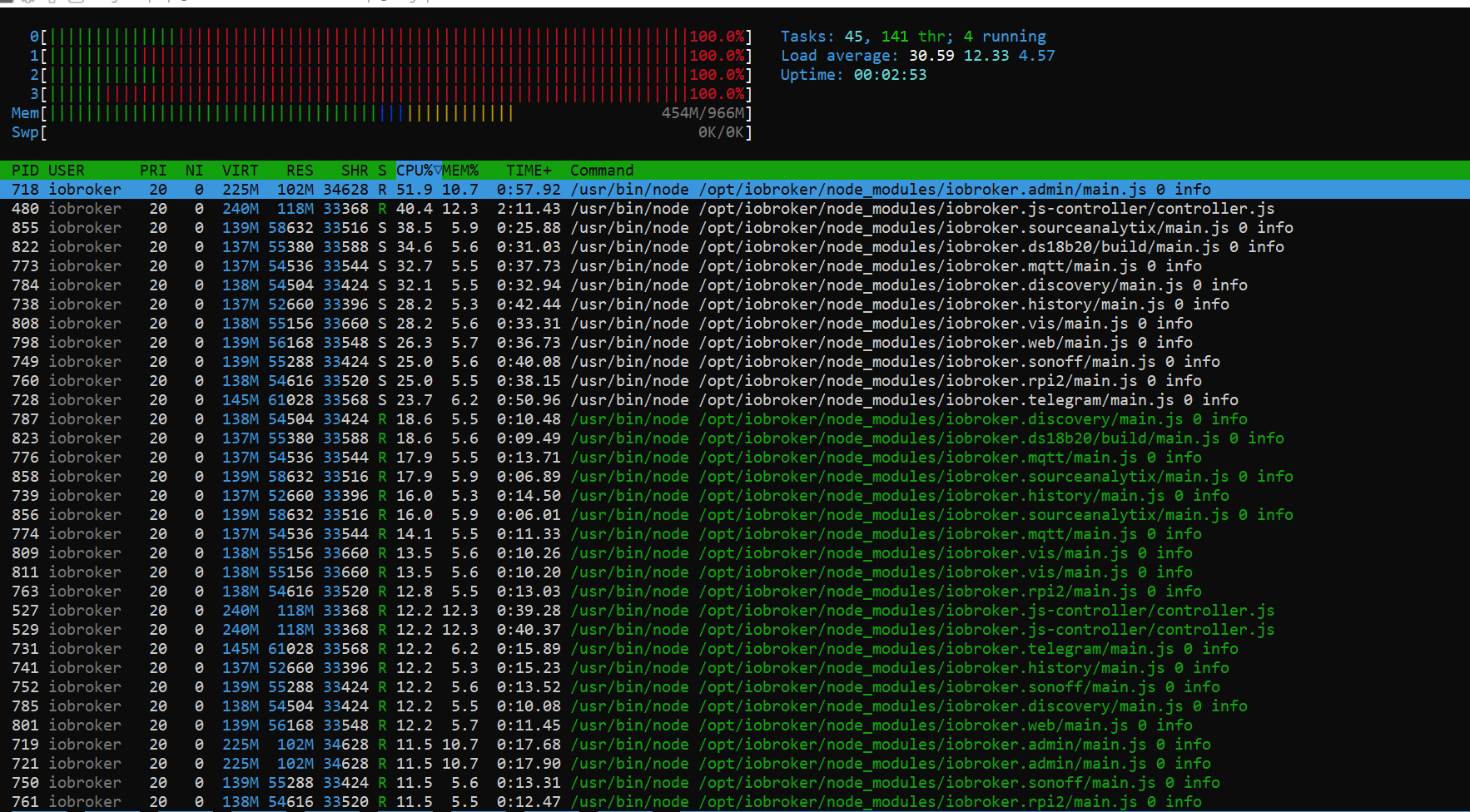
-
Na ja das wird halt irgendein Skript sein, dass bei einer bestimmten Bedingung eine Endlosschleife erzeugt. Musst halt ggf. mal Skripte deaktivieren und beobachten.
-
Na ja das wird halt irgendein Skript sein, dass bei einer bestimmten Bedingung eine Endlosschleife erzeugt. Musst halt ggf. mal Skripte deaktivieren und beobachten.
Hab ich vergessen zu erwähnen, Javascript ist deaktiviert, es sind keine Skripte aktiv.
======================= SUMMARY =======================
                     v.2023-06-20


   Static hostname: klingelpi
         Icon name: computer
        Machine ID: f6bac703100d40e79dfb611c13aa8c78
           Boot ID: c3621310b07d496e99e019ac3a62c493
  Operating System: Raspbian GNU/Linux 11 (bullseye)
            Kernel: Linux 6.1.54-v7+
      Architecture: arm

Installation:           native
Kernel:                 armv7l
Userland:               armhf
Timezone:               Europe/Berlin (CEST, +0200)
User-ID:                1000
X-Server:               false
Boot Target:            multi-user.target

Pending OS-Updates:     0
Pending iob updates:    1

Nodejs-Installation:    /usr/bin/nodejs         v18.18.0
                        /usr/bin/node           v18.18.0
                        /usr/bin/npm            9.8.1
                        /usr/bin/npx            9.8.1

Recommended versions are nodejs 18.x.y and npm 9.x.y
Your nodejs installation is correct

MEMORY:
               total        used        free      shared  buff/cache   available
Mem:            965M        522M        133M        6.0M        309M        377M
Swap:             0B          0B          0B
Total:          965M        522M        133M

Active iob-Instances:   13
Active repo(s): stable

ioBroker Core:          js-controller           5.0.12
                        admin                   6.10.1

ioBroker Status:        iobroker is running on this host.


Objects type: jsonl
States  type: jsonl

Status admin and web instance:
+ system.adapter.admin.0                  : admin                 : klingelpi                                -  enabled, port: 8081, bind: 0.0.0.0, run as: admin
+ system.adapter.web.0                    : web                   : klingelpi                                -  enabled, port: 8082, bind: 0.0.0.0, run as: admin

Objects:                1151
States:                 1011

Size of iob-Database:

12M     /opt/iobroker/iobroker-data/objects.jsonl
4.8M    /opt/iobroker/iobroker-data/states.jsonl


=================== END OF SUMMARY ====================
Skript v.2023-06-20 *** BASE SYSTEM *** Static hostname: klingelpi Icon name: computer Machine ID: f6bac703100d40e79dfb611c13aa8c78 Boot ID: c3621310b07d496e99e019ac3a62c493 Operating System: Raspbian GNU/Linux 11 (bullseye) Kernel: Linux 6.1.54-v7+ Architecture: arm Model : Raspberry Pi 3 Model B Rev 1.2 Docker : false Virtualization : none Kernel : armv7l Userland : armhf Systemuptime and Load: 22:21:41 up 45 min, 1 user, load average: 0.67, 0.71, 0.89 CPU threads: 4 Raspberry only: throttled=0x50005 Other values than 0x0 hint to temperature/voltage problems temp=53.7'C volt=1.2000V *** Time and Time Zones *** Local time: Wed 2023-10-04 22:21:41 CEST Universal time: Wed 2023-10-04 20:21:41 UTC RTC time: n/a Time zone: Europe/Berlin (CEST, +0200) System clock synchronized: yes NTP service: active RTC in local TZ: no *** User and Groups *** pi /home/pi pi adm dialout cdrom sudo audio video plugdev games users input render netdev gpio i2c spi iobroker *** X-Server-Setup *** X-Server: false Desktop: Terminal: tty Boot Target: multi-user.target *** MEMORY *** total used free shared buff/cache available Mem: 965M 506M 245M 3.0M 213M 400M Swap: 0B 0B 0B Total: 965M 506M 245M 965 M total memory 506 M used memory 547 M active memory 100 M inactive memory 245 M free memory 32 M buffer memory 181 M swap cache 0 M total swap 0 M used swap 0 M free swap Raspberry only: oom events: 0 lifetime oom required: 0 Mbytes total time in oom handler: 0 ms max time spent in oom handler: 0 ms *** FILESYSTEM *** Filesystem Type Size Used Avail Use% Mounted on /dev/root ext4 15G 4.2G 9.8G 30% / devtmpfs devtmpfs 355M 0 355M 0% /dev tmpfs tmpfs 483M 0 483M 0% /dev/shm tmpfs tmpfs 194M 3.4M 190M 2% /run tmpfs tmpfs 5.0M 4.0K 5.0M 1% /run/lock tmpfs tmpfs 64M 0 64M 0% /mnt/ramdisk none tmpfs 5.0M 268K 4.8M 6% /var/log /dev/sda1 vfat 255M 52M 204M 21% /boot tmpfs tmpfs 97M 0 97M 0% /run/user/1000 Messages concerning ext4 filesystem in dmesg: [Wed Oct 4 21:35:51 2023] Kernel command line: coherent_pool=1M 8250.nr_uarts=0 snd_bcm2835.enable_headphones=0 snd_bcm2835.enable_headphones=1 snd_bcm2835.enable_hdmi=1 snd_bcm2835.enable_hdmi=0 vc_mem.mem_base=0x3ec00000 vc_mem.mem_size=0x40000000 console=ttyS0,115200 console=tty1 root=PARTUUID=2fc47b31-02 rootfstype=ext4 fsck.repair=yes rootwait [Wed Oct 4 21:35:56 2023] EXT4-fs (sda2): mounted filesystem with ordered data mode. Quota mode: none. [Wed Oct 4 21:35:56 2023] VFS: Mounted root (ext4 filesystem) readonly on device 8:2. [Wed Oct 4 21:36:01 2023] EXT4-fs (sda2): re-mounted. Quota mode: none. [Wed Oct 4 21:36:01 2023] EXT4-fs (sda2): re-mounted. Quota mode: none. Show mounted filesystems (real ones only): TARGET SOURCE FSTYPE OPTIONS / /dev/sda2 ext4 rw,noatime `-/boot /dev/sda1 vfat rw,relatime,fmask=0022,dmask=0022,codepage=437,iocharset=ascii,shortname=mixed,errors=remount-ro Files in neuralgic directories: /var: 286M /var/ 94M /var/lib 90M /var/cache 85M /var/cache/apt 68M /var/lib/apt/lists Archived and active journals take up 2.4M in the file system. /opt/iobroker/backups: 30M /opt/iobroker/backups/ /opt/iobroker/iobroker-data: 370M /opt/iobroker/iobroker-data/ 186M /opt/iobroker/iobroker-data/files 137M /opt/iobroker/iobroker-data/history 72M /opt/iobroker/iobroker-data/files/telegram.admin 52M /opt/iobroker/iobroker-data/files/javascript.admin The five largest files in iobroker-data are: 21M /opt/iobroker/iobroker-data/files/web.admin/static/js/main.edf7552a.js.map 15M /opt/iobroker/iobroker-data/files/telegram.admin/rules/static/js/vendors-node_modules_iobroker_adapter-react-v5_assets_devices_parseNames_d_ts-node_modules_io-1d9f06.44fe4a3f.chunk.js.map 12M /opt/iobroker/iobroker-data/objects.jsonl 8.3M /opt/iobroker/iobroker-data/files/web.admin/static/js/main.edf7552a.js 7.2M /opt/iobroker/iobroker-data/files/telegram.admin/rules/static/js/vendors-node_modules_iobroker_adapter-react-v5_assets_devices_parseNames_d_ts-node_modules_io-1d9f06.44fe4a3f.chunk.js *** NodeJS-Installation *** /usr/bin/nodejs v18.18.0 /usr/bin/node v18.18.0 /usr/bin/npm 9.8.1 /usr/bin/npx 9.8.1 nodejs: Installed: 18.18.0-1nodesource1 Candidate: 18.18.0-1nodesource1 Version table: *** 18.18.0-1nodesource1 500 500 https://deb.nodesource.com/node_18.x nodistro/main armhf Packages 100 /var/lib/dpkg/status 18.17.1-1nodesource1 500 500 https://deb.nodesource.com/node_18.x nodistro/main armhf Packages 18.17.0-1nodesource1 500 500 https://deb.nodesource.com/node_18.x nodistro/main armhf Packages 18.16.1-1nodesource1 500 500 https://deb.nodesource.com/node_18.x nodistro/main armhf Packages 18.16.0-1nodesource1 500 500 https://deb.nodesource.com/node_18.x nodistro/main armhf Packages 18.15.0-1nodesource1 500 500 https://deb.nodesource.com/node_18.x nodistro/main armhf Packages 18.14.2-1nodesource1 500 500 https://deb.nodesource.com/node_18.x nodistro/main armhf Packages 18.14.1-1nodesource1 500 500 https://deb.nodesource.com/node_18.x nodistro/main armhf Packages 18.14.0-1nodesource1 500 500 https://deb.nodesource.com/node_18.x nodistro/main armhf Packages 18.13.0-1nodesource1 500 500 https://deb.nodesource.com/node_18.x nodistro/main armhf Packages 18.12.0-1nodesource1 500 500 https://deb.nodesource.com/node_18.x nodistro/main armhf Packages 18.11.0-1nodesource1 500 500 https://deb.nodesource.com/node_18.x nodistro/main armhf Packages 18.10.0-1nodesource1 500 500 https://deb.nodesource.com/node_18.x nodistro/main armhf Packages 18.9.1-1nodesource1 500 500 https://deb.nodesource.com/node_18.x nodistro/main armhf Packages 18.9.0-1nodesource1 500 500 https://deb.nodesource.com/node_18.x nodistro/main armhf Packages 18.8.0-1nodesource1 500 500 https://deb.nodesource.com/node_18.x nodistro/main armhf Packages 18.7.0-1nodesource1 500 500 https://deb.nodesource.com/node_18.x nodistro/main armhf Packages 18.6.0-1nodesource1 500 500 https://deb.nodesource.com/node_18.x nodistro/main armhf Packages 18.5.0-1nodesource1 500 500 https://deb.nodesource.com/node_18.x nodistro/main armhf Packages 18.4.0-1nodesource1 500 500 https://deb.nodesource.com/node_18.x nodistro/main armhf Packages 18.3.0-1nodesource1 500 500 https://deb.nodesource.com/node_18.x nodistro/main armhf Packages 18.2.0-1nodesource1 500 500 https://deb.nodesource.com/node_18.x nodistro/main armhf Packages 18.1.0-1nodesource1 500 500 https://deb.nodesource.com/node_18.x nodistro/main armhf Packages 18.0.0-1nodesource1 500 500 https://deb.nodesource.com/node_18.x nodistro/main armhf Packages 12.22.12~dfsg-1~deb11u4 500 500 http://raspbian.raspberrypi.org/raspbian bullseye/main armhf Packages Temp directories causing npm8 problem: 0 No problems detected Errors in npm tree: 0 *** ioBroker-Installation *** ioBroker Status iobroker is running on this host. Objects type: jsonl States type: jsonl No configuration change needed. Multihost discovery server: disabled Discovery authentication: enabled Persistent activation: disabled Objects: jsonl on 127.0.0.1 States: jsonl on 127.0.0.1 Core adapters versions js-controller: 5.0.12 admin: 6.10.1 javascript: 7.1.4 Adapters from github: 1 Adapter State + system.adapter.admin.0 : admin : klingelpi - enabled, port: 8081, bind: 0.0.0.0, run as: admin + system.adapter.backitup.0 : backitup : klingelpi - enabled + system.adapter.discovery.0 : discovery : klingelpi - enabled + system.adapter.ds18b20.0 : ds18b20 : klingelpi - enabled + system.adapter.history.0 : history : klingelpi - enabled + system.adapter.javascript.0 : javascript : klingelpi - enabled + system.adapter.mqtt.0 : mqtt : klingelpi - enabled, port: 1883, bind: 0.0.0.0 + system.adapter.rpi2.0 : rpi2 : klingelpi - enabled + system.adapter.sonoff.0 : sonoff : klingelpi - enabled, port: 1885, bind: 0.0.0.0 + system.adapter.sourceanalytix.0 : sourceanalytix : klingelpi - enabled + system.adapter.telegram.0 : telegram : klingelpi - enabled, port: 8443, bind: 0.0.0.0 system.adapter.vis-fancyswitch.0 : vis-fancyswitch : klingelpi - enabled system.adapter.vis.0 : vis : klingelpi - enabled + system.adapter.web.0 : web : klingelpi - enabled, port: 8082, bind: 0.0.0.0, run as: admin + instance is alive Enabled adapters with bindings + system.adapter.admin.0 : admin : klingelpi - enabled, port: 8081, bind: 0.0.0.0, run as: admin + system.adapter.mqtt.0 : mqtt : klingelpi - enabled, port: 1883, bind: 0.0.0.0 + system.adapter.sonoff.0 : sonoff : klingelpi - enabled, port: 1885, bind: 0.0.0.0 + system.adapter.telegram.0 : telegram : klingelpi - enabled, port: 8443, bind: 0.0.0.0 + system.adapter.web.0 : web : klingelpi - enabled, port: 8082, bind: 0.0.0.0, run as: admin ioBroker-Repositories stable : http://download.iobroker.net/sources-dist.json beta : http://download.iobroker.net/sources-dist-latest.json Active repo(s): stable Installed ioBroker-Instances Used repository: stable Adapter "admin" : 6.10.1 , installed 6.10.1 Adapter "backitup" : 2.8.1 , installed 2.8.1 Adapter "discovery" : 3.1.0 , installed 3.1.0 Adapter "ds18b20" : 2.0.4 , installed 2.0.4 Adapter "history" : 2.2.6 , installed 2.2.6 Adapter "javascript" : 7.1.4 , installed 7.1.4 Controller "js-controller": 5.0.12 , installed 5.0.12 Adapter "mqtt" : 4.1.1 , installed 4.1.1 Adapter "rpi2" : 1.3.2 , installed 1.3.2 Adapter "simple-api" : 2.7.2 , installed 2.7.2 Adapter "socketio" : 6.5.5 , installed 6.5.5 Adapter "sonoff" : 2.5.3 , installed 2.5.3 Adapter "telegram" : 1.16.0 , installed 1.16.0 Adapter "vis" : 1.4.16 , installed 1.4.14 [Updatable] Adapter "vis-fancyswitch": 1.1.0 , installed 1.1.0 Adapter "web" : 6.1.2 , installed 6.1.2 Adapter "ws" : 2.5.5 , installed 2.5.5 Objects and States Please stand by - This may take a while Objects: 1151 States: 1011 *** OS-Repositories and Updates *** Hit:1 http://raspbian.raspberrypi.org/raspbian bullseye InRelease Hit:2 http://archive.raspberrypi.org/debian bullseye InRelease Hit:3 https://deb.nodesource.com/node_18.x nodistro InRelease Reading package lists... Pending Updates: 0 *** Listening Ports *** Active Internet connections (only servers) Proto Recv-Q Send-Q Local Address Foreign Address State User Inode PID/Program name tcp 0 0 0.0.0.0:22 0.0.0.0:* LISTEN 0 12878 502/sshd: /usr/sbin tcp 0 0 127.0.0.1:9000 0.0.0.0:* LISTEN 1001 20497 1051/iobroker.js-co tcp 0 0 127.0.0.1:9001 0.0.0.0:* LISTEN 1001 18532 1051/iobroker.js-co tcp 0 0 0.0.0.0:1883 0.0.0.0:* LISTEN 1001 17931 1165/io.mqtt.0 tcp 0 0 0.0.0.0:1885 0.0.0.0:* LISTEN 1001 17865 1141/io.sonoff.0 tcp6 0 0 :::22 :::* LISTEN 0 12880 502/sshd: /usr/sbin tcp6 0 0 :::8082 :::* LISTEN 1001 20280 1228/io.web.0 tcp6 0 0 :::8081 :::* LISTEN 1001 20805 1080/io.admin.0 udp 0 0 0.0.0.0:68 0.0.0.0:* 0 12945 596/dhcpcd udp 0 0 0.0.0.0:42155 0.0.0.0:* 108 13610 392/avahi-daemon: r udp 0 0 0.0.0.0:5353 0.0.0.0:* 108 13608 392/avahi-daemon: r udp6 0 0 :::39560 :::* 108 13611 392/avahi-daemon: r udp6 0 0 :::5353 :::* 108 13609 392/avahi-daemon: r *** Log File - Last 25 Lines *** 2023-10-04 21:45:52.942 - info: web.0 (1228) http server listening on port 8082 2023-10-04 21:45:55.656 - info: vis.0 (1313) starting. Version 1.4.14 in /opt/iobroker/node_modules/iobroker.vis, node: v18.18.0, js-controller: 5.0.12 2023-10-04 21:45:57.277 - info: vis.0 (1313) vis license is OK. 2023-10-04 21:45:58.233 - info: ds18b20.0 (1328) Plugin sentry Sentry Plugin disabled for this process because sending of statistic data is disabled for the system 2023-10-04 21:45:58.926 - info: vis.0 (1313) Terminated (NO_ERROR): Without reason 2023-10-04 21:45:58.980 - info: ds18b20.0 (1328) starting. Version 2.0.4 in /opt/iobroker/node_modules/iobroker.ds18b20, node: v18.18.0, js-controller: 5.0.12 2023-10-04 21:45:59.692 - info: host.klingelpi instance system.adapter.vis.0 terminated while should be started once 2023-10-04 21:46:00.627 - info: sourceanalytix.0 (1343) Plugin sentry Sentry Plugin disabled for this process because sending of statistic data is disabled for the system 2023-10-04 21:46:01.009 - info: sourceanalytix.0 (1343) starting. Version 0.4.14 (non-npm: DrozmotiX/ioBroker.sourceanalytix#87a9b7837569274a136c4fa03ee6fbfd8a20f183) in /opt/iobroker/node_modules/iobroker.sourceanalytix, node: v18.18.0, js-controller: 5.0.12 2023-10-04 21:46:01.088 - info: sourceanalytix.0 (1343) Welcome to SourceAnalytix, making things ready ... 2023-10-04 21:46:01.262 - info: sourceanalytix.0 (1343) Found 1 SourceAnalytix enabled states 2023-10-04 21:46:01.268 - info: sourceanalytix.0 (1343) Initialising (1 of 1) "sonoff.0.Stromzähler.SML_Verbrauch_aktuell" 2023-10-04 21:46:09.548 - info: sourceanalytix.0 (1343) Initialization of sonoff.0.Stromzähler.SML_Verbrauch_aktuell successfully 2023-10-04 21:46:09.582 - info: sourceanalytix.0 (1343) Successfully activated SourceAnalytix for 1 of 1 states, will do my Job until you stop me! 2023-10-04 21:46:58.514 - info: sonoff.0 (1141) Client [Stromzähler] connected with secret 1696448818510_3130 2023-10-04 21:47:03.695 - info: sonoff.0 (1141) Client [Gaszähler] connected with secret 1696448823685_6968 2023-10-04 21:47:03.709 - info: sonoff.0 (1141) Client [3D-Drucker] connected with secret 1696448823691_4299 2023-10-04 22:08:38.699 - info: sonoff.0 (1141) Client [Gaszähler] reconnected. Old secret 1696448823685_6968. New secret 1696450118696_9172 2023-10-04 22:09:19.743 - warn: sonoff.0 (1141) Old client Gaszähler with secret 1696448823685_6968 sends pingreq. Ignore! Actual secret is 1696450118696_9172 2023-10-04 22:13:39.683 - info: sonoff.0 (1141) Client [Gaszähler] reconnected. Old secret 1696450118696_9172. New secret 1696450419682_3320 2023-10-04 22:15:37.657 - warn: sonoff.0 (1141) Old client Gaszähler with secret 1696450118696_9172 sends publish. Ignore! Actual secret is 1696450419682_3320 2023-10-04 22:15:37.663 - warn: sonoff.0 (1141) Old client Gaszähler with secret 1696450118696_9172 sends publish. Ignore! Actual secret is 1696450419682_3320 2023-10-04 22:15:37.665 - warn: sonoff.0 (1141) Old client Gaszähler with secret 1696450118696_9172 sends pingreq. Ignore! Actual secret is 1696450419682_3320 2023-10-04 22:19:36.067 - info: admin.0 (1080) ==> Connected system.user.admin from ::ffff:192.168.1.58 2023-10-04 22:20:46.370 - info: admin.0 (1080) <== Disconnect system.user.admin from ::ffff:192.168.1.58 adminDas ist der Status wenn iobroker wieder läuft.
-
Hab ich vergessen zu erwähnen, Javascript ist deaktiviert, es sind keine Skripte aktiv.
======================= SUMMARY =======================
                     v.2023-06-20


   Static hostname: klingelpi
         Icon name: computer
        Machine ID: f6bac703100d40e79dfb611c13aa8c78
           Boot ID: c3621310b07d496e99e019ac3a62c493
  Operating System: Raspbian GNU/Linux 11 (bullseye)
            Kernel: Linux 6.1.54-v7+
      Architecture: arm

Installation:           native
Kernel:                 armv7l
Userland:               armhf
Timezone:               Europe/Berlin (CEST, +0200)
User-ID:                1000
X-Server:               false
Boot Target:            multi-user.target

Pending OS-Updates:     0
Pending iob updates:    1

Nodejs-Installation:    /usr/bin/nodejs         v18.18.0
                        /usr/bin/node           v18.18.0
                        /usr/bin/npm            9.8.1
                        /usr/bin/npx            9.8.1

Recommended versions are nodejs 18.x.y and npm 9.x.y
Your nodejs installation is correct

MEMORY:
               total        used        free      shared  buff/cache   available
Mem:            965M        522M        133M        6.0M        309M        377M
Swap:             0B          0B          0B
Total:          965M        522M        133M

Active iob-Instances:   13
Active repo(s): stable

ioBroker Core:          js-controller           5.0.12
                        admin                   6.10.1

ioBroker Status:        iobroker is running on this host.


Objects type: jsonl
States  type: jsonl

Status admin and web instance:
+ system.adapter.admin.0                  : admin                 : klingelpi                                -  enabled, port: 8081, bind: 0.0.0.0, run as: admin
+ system.adapter.web.0                    : web                   : klingelpi                                -  enabled, port: 8082, bind: 0.0.0.0, run as: admin

Objects:                1151
States:                 1011

Size of iob-Database:

12M     /opt/iobroker/iobroker-data/objects.jsonl
4.8M    /opt/iobroker/iobroker-data/states.jsonl


=================== END OF SUMMARY ====================
Skript v.2023-06-20 *** BASE SYSTEM *** Static hostname: klingelpi Icon name: computer Machine ID: f6bac703100d40e79dfb611c13aa8c78 Boot ID: c3621310b07d496e99e019ac3a62c493 Operating System: Raspbian GNU/Linux 11 (bullseye) Kernel: Linux 6.1.54-v7+ Architecture: arm Model : Raspberry Pi 3 Model B Rev 1.2 Docker : false Virtualization : none Kernel : armv7l Userland : armhf Systemuptime and Load: 22:21:41 up 45 min, 1 user, load average: 0.67, 0.71, 0.89 CPU threads: 4 Raspberry only: throttled=0x50005 Other values than 0x0 hint to temperature/voltage problems temp=53.7'C volt=1.2000V *** Time and Time Zones *** Local time: Wed 2023-10-04 22:21:41 CEST Universal time: Wed 2023-10-04 20:21:41 UTC RTC time: n/a Time zone: Europe/Berlin (CEST, +0200) System clock synchronized: yes NTP service: active RTC in local TZ: no *** User and Groups *** pi /home/pi pi adm dialout cdrom sudo audio video plugdev games users input render netdev gpio i2c spi iobroker *** X-Server-Setup *** X-Server: false Desktop: Terminal: tty Boot Target: multi-user.target *** MEMORY *** total used free shared buff/cache available Mem: 965M 506M 245M 3.0M 213M 400M Swap: 0B 0B 0B Total: 965M 506M 245M 965 M total memory 506 M used memory 547 M active memory 100 M inactive memory 245 M free memory 32 M buffer memory 181 M swap cache 0 M total swap 0 M used swap 0 M free swap Raspberry only: oom events: 0 lifetime oom required: 0 Mbytes total time in oom handler: 0 ms max time spent in oom handler: 0 ms *** FILESYSTEM *** Filesystem Type Size Used Avail Use% Mounted on /dev/root ext4 15G 4.2G 9.8G 30% / devtmpfs devtmpfs 355M 0 355M 0% /dev tmpfs tmpfs 483M 0 483M 0% /dev/shm tmpfs tmpfs 194M 3.4M 190M 2% /run tmpfs tmpfs 5.0M 4.0K 5.0M 1% /run/lock tmpfs tmpfs 64M 0 64M 0% /mnt/ramdisk none tmpfs 5.0M 268K 4.8M 6% /var/log /dev/sda1 vfat 255M 52M 204M 21% /boot tmpfs tmpfs 97M 0 97M 0% /run/user/1000 Messages concerning ext4 filesystem in dmesg: [Wed Oct 4 21:35:51 2023] Kernel command line: coherent_pool=1M 8250.nr_uarts=0 snd_bcm2835.enable_headphones=0 snd_bcm2835.enable_headphones=1 snd_bcm2835.enable_hdmi=1 snd_bcm2835.enable_hdmi=0 vc_mem.mem_base=0x3ec00000 vc_mem.mem_size=0x40000000 console=ttyS0,115200 console=tty1 root=PARTUUID=2fc47b31-02 rootfstype=ext4 fsck.repair=yes rootwait [Wed Oct 4 21:35:56 2023] EXT4-fs (sda2): mounted filesystem with ordered data mode. Quota mode: none. [Wed Oct 4 21:35:56 2023] VFS: Mounted root (ext4 filesystem) readonly on device 8:2. [Wed Oct 4 21:36:01 2023] EXT4-fs (sda2): re-mounted. Quota mode: none. [Wed Oct 4 21:36:01 2023] EXT4-fs (sda2): re-mounted. Quota mode: none. Show mounted filesystems (real ones only): TARGET SOURCE FSTYPE OPTIONS / /dev/sda2 ext4 rw,noatime `-/boot /dev/sda1 vfat rw,relatime,fmask=0022,dmask=0022,codepage=437,iocharset=ascii,shortname=mixed,errors=remount-ro Files in neuralgic directories: /var: 286M /var/ 94M /var/lib 90M /var/cache 85M /var/cache/apt 68M /var/lib/apt/lists Archived and active journals take up 2.4M in the file system. /opt/iobroker/backups: 30M /opt/iobroker/backups/ /opt/iobroker/iobroker-data: 370M /opt/iobroker/iobroker-data/ 186M /opt/iobroker/iobroker-data/files 137M /opt/iobroker/iobroker-data/history 72M /opt/iobroker/iobroker-data/files/telegram.admin 52M /opt/iobroker/iobroker-data/files/javascript.admin The five largest files in iobroker-data are: 21M /opt/iobroker/iobroker-data/files/web.admin/static/js/main.edf7552a.js.map 15M /opt/iobroker/iobroker-data/files/telegram.admin/rules/static/js/vendors-node_modules_iobroker_adapter-react-v5_assets_devices_parseNames_d_ts-node_modules_io-1d9f06.44fe4a3f.chunk.js.map 12M /opt/iobroker/iobroker-data/objects.jsonl 8.3M /opt/iobroker/iobroker-data/files/web.admin/static/js/main.edf7552a.js 7.2M /opt/iobroker/iobroker-data/files/telegram.admin/rules/static/js/vendors-node_modules_iobroker_adapter-react-v5_assets_devices_parseNames_d_ts-node_modules_io-1d9f06.44fe4a3f.chunk.js *** NodeJS-Installation *** /usr/bin/nodejs v18.18.0 /usr/bin/node v18.18.0 /usr/bin/npm 9.8.1 /usr/bin/npx 9.8.1 nodejs: Installed: 18.18.0-1nodesource1 Candidate: 18.18.0-1nodesource1 Version table: *** 18.18.0-1nodesource1 500 500 https://deb.nodesource.com/node_18.x nodistro/main armhf Packages 100 /var/lib/dpkg/status 18.17.1-1nodesource1 500 500 https://deb.nodesource.com/node_18.x nodistro/main armhf Packages 18.17.0-1nodesource1 500 500 https://deb.nodesource.com/node_18.x nodistro/main armhf Packages 18.16.1-1nodesource1 500 500 https://deb.nodesource.com/node_18.x nodistro/main armhf Packages 18.16.0-1nodesource1 500 500 https://deb.nodesource.com/node_18.x nodistro/main armhf Packages 18.15.0-1nodesource1 500 500 https://deb.nodesource.com/node_18.x nodistro/main armhf Packages 18.14.2-1nodesource1 500 500 https://deb.nodesource.com/node_18.x nodistro/main armhf Packages 18.14.1-1nodesource1 500 500 https://deb.nodesource.com/node_18.x nodistro/main armhf Packages 18.14.0-1nodesource1 500 500 https://deb.nodesource.com/node_18.x nodistro/main armhf Packages 18.13.0-1nodesource1 500 500 https://deb.nodesource.com/node_18.x nodistro/main armhf Packages 18.12.0-1nodesource1 500 500 https://deb.nodesource.com/node_18.x nodistro/main armhf Packages 18.11.0-1nodesource1 500 500 https://deb.nodesource.com/node_18.x nodistro/main armhf Packages 18.10.0-1nodesource1 500 500 https://deb.nodesource.com/node_18.x nodistro/main armhf Packages 18.9.1-1nodesource1 500 500 https://deb.nodesource.com/node_18.x nodistro/main armhf Packages 18.9.0-1nodesource1 500 500 https://deb.nodesource.com/node_18.x nodistro/main armhf Packages 18.8.0-1nodesource1 500 500 https://deb.nodesource.com/node_18.x nodistro/main armhf Packages 18.7.0-1nodesource1 500 500 https://deb.nodesource.com/node_18.x nodistro/main armhf Packages 18.6.0-1nodesource1 500 500 https://deb.nodesource.com/node_18.x nodistro/main armhf Packages 18.5.0-1nodesource1 500 500 https://deb.nodesource.com/node_18.x nodistro/main armhf Packages 18.4.0-1nodesource1 500 500 https://deb.nodesource.com/node_18.x nodistro/main armhf Packages 18.3.0-1nodesource1 500 500 https://deb.nodesource.com/node_18.x nodistro/main armhf Packages 18.2.0-1nodesource1 500 500 https://deb.nodesource.com/node_18.x nodistro/main armhf Packages 18.1.0-1nodesource1 500 500 https://deb.nodesource.com/node_18.x nodistro/main armhf Packages 18.0.0-1nodesource1 500 500 https://deb.nodesource.com/node_18.x nodistro/main armhf Packages 12.22.12~dfsg-1~deb11u4 500 500 http://raspbian.raspberrypi.org/raspbian bullseye/main armhf Packages Temp directories causing npm8 problem: 0 No problems detected Errors in npm tree: 0 *** ioBroker-Installation *** ioBroker Status iobroker is running on this host. Objects type: jsonl States type: jsonl No configuration change needed. Multihost discovery server: disabled Discovery authentication: enabled Persistent activation: disabled Objects: jsonl on 127.0.0.1 States: jsonl on 127.0.0.1 Core adapters versions js-controller: 5.0.12 admin: 6.10.1 javascript: 7.1.4 Adapters from github: 1 Adapter State + system.adapter.admin.0 : admin : klingelpi - enabled, port: 8081, bind: 0.0.0.0, run as: admin + system.adapter.backitup.0 : backitup : klingelpi - enabled + system.adapter.discovery.0 : discovery : klingelpi - enabled + system.adapter.ds18b20.0 : ds18b20 : klingelpi - enabled + system.adapter.history.0 : history : klingelpi - enabled + system.adapter.javascript.0 : javascript : klingelpi - enabled + system.adapter.mqtt.0 : mqtt : klingelpi - enabled, port: 1883, bind: 0.0.0.0 + system.adapter.rpi2.0 : rpi2 : klingelpi - enabled + system.adapter.sonoff.0 : sonoff : klingelpi - enabled, port: 1885, bind: 0.0.0.0 + system.adapter.sourceanalytix.0 : sourceanalytix : klingelpi - enabled + system.adapter.telegram.0 : telegram : klingelpi - enabled, port: 8443, bind: 0.0.0.0 system.adapter.vis-fancyswitch.0 : vis-fancyswitch : klingelpi - enabled system.adapter.vis.0 : vis : klingelpi - enabled + system.adapter.web.0 : web : klingelpi - enabled, port: 8082, bind: 0.0.0.0, run as: admin + instance is alive Enabled adapters with bindings + system.adapter.admin.0 : admin : klingelpi - enabled, port: 8081, bind: 0.0.0.0, run as: admin + system.adapter.mqtt.0 : mqtt : klingelpi - enabled, port: 1883, bind: 0.0.0.0 + system.adapter.sonoff.0 : sonoff : klingelpi - enabled, port: 1885, bind: 0.0.0.0 + system.adapter.telegram.0 : telegram : klingelpi - enabled, port: 8443, bind: 0.0.0.0 + system.adapter.web.0 : web : klingelpi - enabled, port: 8082, bind: 0.0.0.0, run as: admin ioBroker-Repositories stable : http://download.iobroker.net/sources-dist.json beta : http://download.iobroker.net/sources-dist-latest.json Active repo(s): stable Installed ioBroker-Instances Used repository: stable Adapter "admin" : 6.10.1 , installed 6.10.1 Adapter "backitup" : 2.8.1 , installed 2.8.1 Adapter "discovery" : 3.1.0 , installed 3.1.0 Adapter "ds18b20" : 2.0.4 , installed 2.0.4 Adapter "history" : 2.2.6 , installed 2.2.6 Adapter "javascript" : 7.1.4 , installed 7.1.4 Controller "js-controller": 5.0.12 , installed 5.0.12 Adapter "mqtt" : 4.1.1 , installed 4.1.1 Adapter "rpi2" : 1.3.2 , installed 1.3.2 Adapter "simple-api" : 2.7.2 , installed 2.7.2 Adapter "socketio" : 6.5.5 , installed 6.5.5 Adapter "sonoff" : 2.5.3 , installed 2.5.3 Adapter "telegram" : 1.16.0 , installed 1.16.0 Adapter "vis" : 1.4.16 , installed 1.4.14 [Updatable] Adapter "vis-fancyswitch": 1.1.0 , installed 1.1.0 Adapter "web" : 6.1.2 , installed 6.1.2 Adapter "ws" : 2.5.5 , installed 2.5.5 Objects and States Please stand by - This may take a while Objects: 1151 States: 1011 *** OS-Repositories and Updates *** Hit:1 http://raspbian.raspberrypi.org/raspbian bullseye InRelease Hit:2 http://archive.raspberrypi.org/debian bullseye InRelease Hit:3 https://deb.nodesource.com/node_18.x nodistro InRelease Reading package lists... Pending Updates: 0 *** Listening Ports *** Active Internet connections (only servers) Proto Recv-Q Send-Q Local Address Foreign Address State User Inode PID/Program name tcp 0 0 0.0.0.0:22 0.0.0.0:* LISTEN 0 12878 502/sshd: /usr/sbin tcp 0 0 127.0.0.1:9000 0.0.0.0:* LISTEN 1001 20497 1051/iobroker.js-co tcp 0 0 127.0.0.1:9001 0.0.0.0:* LISTEN 1001 18532 1051/iobroker.js-co tcp 0 0 0.0.0.0:1883 0.0.0.0:* LISTEN 1001 17931 1165/io.mqtt.0 tcp 0 0 0.0.0.0:1885 0.0.0.0:* LISTEN 1001 17865 1141/io.sonoff.0 tcp6 0 0 :::22 :::* LISTEN 0 12880 502/sshd: /usr/sbin tcp6 0 0 :::8082 :::* LISTEN 1001 20280 1228/io.web.0 tcp6 0 0 :::8081 :::* LISTEN 1001 20805 1080/io.admin.0 udp 0 0 0.0.0.0:68 0.0.0.0:* 0 12945 596/dhcpcd udp 0 0 0.0.0.0:42155 0.0.0.0:* 108 13610 392/avahi-daemon: r udp 0 0 0.0.0.0:5353 0.0.0.0:* 108 13608 392/avahi-daemon: r udp6 0 0 :::39560 :::* 108 13611 392/avahi-daemon: r udp6 0 0 :::5353 :::* 108 13609 392/avahi-daemon: r *** Log File - Last 25 Lines *** 2023-10-04 21:45:52.942 - info: web.0 (1228) http server listening on port 8082 2023-10-04 21:45:55.656 - info: vis.0 (1313) starting. Version 1.4.14 in /opt/iobroker/node_modules/iobroker.vis, node: v18.18.0, js-controller: 5.0.12 2023-10-04 21:45:57.277 - info: vis.0 (1313) vis license is OK. 2023-10-04 21:45:58.233 - info: ds18b20.0 (1328) Plugin sentry Sentry Plugin disabled for this process because sending of statistic data is disabled for the system 2023-10-04 21:45:58.926 - info: vis.0 (1313) Terminated (NO_ERROR): Without reason 2023-10-04 21:45:58.980 - info: ds18b20.0 (1328) starting. Version 2.0.4 in /opt/iobroker/node_modules/iobroker.ds18b20, node: v18.18.0, js-controller: 5.0.12 2023-10-04 21:45:59.692 - info: host.klingelpi instance system.adapter.vis.0 terminated while should be started once 2023-10-04 21:46:00.627 - info: sourceanalytix.0 (1343) Plugin sentry Sentry Plugin disabled for this process because sending of statistic data is disabled for the system 2023-10-04 21:46:01.009 - info: sourceanalytix.0 (1343) starting. Version 0.4.14 (non-npm: DrozmotiX/ioBroker.sourceanalytix#87a9b7837569274a136c4fa03ee6fbfd8a20f183) in /opt/iobroker/node_modules/iobroker.sourceanalytix, node: v18.18.0, js-controller: 5.0.12 2023-10-04 21:46:01.088 - info: sourceanalytix.0 (1343) Welcome to SourceAnalytix, making things ready ... 2023-10-04 21:46:01.262 - info: sourceanalytix.0 (1343) Found 1 SourceAnalytix enabled states 2023-10-04 21:46:01.268 - info: sourceanalytix.0 (1343) Initialising (1 of 1) "sonoff.0.Stromzähler.SML_Verbrauch_aktuell" 2023-10-04 21:46:09.548 - info: sourceanalytix.0 (1343) Initialization of sonoff.0.Stromzähler.SML_Verbrauch_aktuell successfully 2023-10-04 21:46:09.582 - info: sourceanalytix.0 (1343) Successfully activated SourceAnalytix for 1 of 1 states, will do my Job until you stop me! 2023-10-04 21:46:58.514 - info: sonoff.0 (1141) Client [Stromzähler] connected with secret 1696448818510_3130 2023-10-04 21:47:03.695 - info: sonoff.0 (1141) Client [Gaszähler] connected with secret 1696448823685_6968 2023-10-04 21:47:03.709 - info: sonoff.0 (1141) Client [3D-Drucker] connected with secret 1696448823691_4299 2023-10-04 22:08:38.699 - info: sonoff.0 (1141) Client [Gaszähler] reconnected. Old secret 1696448823685_6968. New secret 1696450118696_9172 2023-10-04 22:09:19.743 - warn: sonoff.0 (1141) Old client Gaszähler with secret 1696448823685_6968 sends pingreq. Ignore! Actual secret is 1696450118696_9172 2023-10-04 22:13:39.683 - info: sonoff.0 (1141) Client [Gaszähler] reconnected. Old secret 1696450118696_9172. New secret 1696450419682_3320 2023-10-04 22:15:37.657 - warn: sonoff.0 (1141) Old client Gaszähler with secret 1696450118696_9172 sends publish. Ignore! Actual secret is 1696450419682_3320 2023-10-04 22:15:37.663 - warn: sonoff.0 (1141) Old client Gaszähler with secret 1696450118696_9172 sends publish. Ignore! Actual secret is 1696450419682_3320 2023-10-04 22:15:37.665 - warn: sonoff.0 (1141) Old client Gaszähler with secret 1696450118696_9172 sends pingreq. Ignore! Actual secret is 1696450419682_3320 2023-10-04 22:19:36.067 - info: admin.0 (1080) ==> Connected system.user.admin from ::ffff:192.168.1.58 2023-10-04 22:20:46.370 - info: admin.0 (1080) <== Disconnect system.user.admin from ::ffff:192.168.1.58 adminDas ist der Status wenn iobroker wieder läuft.
@johnny-bravo sagte in ioBroker plötzlich 100% CPU Last, nicht benutzbar:
Swap: 0B 0B 0B
Spendier dem armen Ding etwas Swap.
Und das ist nicht die Langfassung.
-
Hab ich vergessen zu erwähnen, Javascript ist deaktiviert, es sind keine Skripte aktiv.
======================= SUMMARY =======================
                     v.2023-06-20


   Static hostname: klingelpi
         Icon name: computer
        Machine ID: f6bac703100d40e79dfb611c13aa8c78
           Boot ID: c3621310b07d496e99e019ac3a62c493
  Operating System: Raspbian GNU/Linux 11 (bullseye)
            Kernel: Linux 6.1.54-v7+
      Architecture: arm

Installation:           native
Kernel:                 armv7l
Userland:               armhf
Timezone:               Europe/Berlin (CEST, +0200)
User-ID:                1000
X-Server:               false
Boot Target:            multi-user.target

Pending OS-Updates:     0
Pending iob updates:    1

Nodejs-Installation:    /usr/bin/nodejs         v18.18.0
                        /usr/bin/node           v18.18.0
                        /usr/bin/npm            9.8.1
                        /usr/bin/npx            9.8.1

Recommended versions are nodejs 18.x.y and npm 9.x.y
Your nodejs installation is correct

MEMORY:
               total        used        free      shared  buff/cache   available
Mem:            965M        522M        133M        6.0M        309M        377M
Swap:             0B          0B          0B
Total:          965M        522M        133M

Active iob-Instances:   13
Active repo(s): stable

ioBroker Core:          js-controller           5.0.12
                        admin                   6.10.1

ioBroker Status:        iobroker is running on this host.


Objects type: jsonl
States  type: jsonl

Status admin and web instance:
+ system.adapter.admin.0                  : admin                 : klingelpi                                -  enabled, port: 8081, bind: 0.0.0.0, run as: admin
+ system.adapter.web.0                    : web                   : klingelpi                                -  enabled, port: 8082, bind: 0.0.0.0, run as: admin

Objects:                1151
States:                 1011

Size of iob-Database:

12M     /opt/iobroker/iobroker-data/objects.jsonl
4.8M    /opt/iobroker/iobroker-data/states.jsonl


=================== END OF SUMMARY ====================
Skript v.2023-06-20 *** BASE SYSTEM *** Static hostname: klingelpi Icon name: computer Machine ID: f6bac703100d40e79dfb611c13aa8c78 Boot ID: c3621310b07d496e99e019ac3a62c493 Operating System: Raspbian GNU/Linux 11 (bullseye) Kernel: Linux 6.1.54-v7+ Architecture: arm Model : Raspberry Pi 3 Model B Rev 1.2 Docker : false Virtualization : none Kernel : armv7l Userland : armhf Systemuptime and Load: 22:21:41 up 45 min, 1 user, load average: 0.67, 0.71, 0.89 CPU threads: 4 Raspberry only: throttled=0x50005 Other values than 0x0 hint to temperature/voltage problems temp=53.7'C volt=1.2000V *** Time and Time Zones *** Local time: Wed 2023-10-04 22:21:41 CEST Universal time: Wed 2023-10-04 20:21:41 UTC RTC time: n/a Time zone: Europe/Berlin (CEST, +0200) System clock synchronized: yes NTP service: active RTC in local TZ: no *** User and Groups *** pi /home/pi pi adm dialout cdrom sudo audio video plugdev games users input render netdev gpio i2c spi iobroker *** X-Server-Setup *** X-Server: false Desktop: Terminal: tty Boot Target: multi-user.target *** MEMORY *** total used free shared buff/cache available Mem: 965M 506M 245M 3.0M 213M 400M Swap: 0B 0B 0B Total: 965M 506M 245M 965 M total memory 506 M used memory 547 M active memory 100 M inactive memory 245 M free memory 32 M buffer memory 181 M swap cache 0 M total swap 0 M used swap 0 M free swap Raspberry only: oom events: 0 lifetime oom required: 0 Mbytes total time in oom handler: 0 ms max time spent in oom handler: 0 ms *** FILESYSTEM *** Filesystem Type Size Used Avail Use% Mounted on /dev/root ext4 15G 4.2G 9.8G 30% / devtmpfs devtmpfs 355M 0 355M 0% /dev tmpfs tmpfs 483M 0 483M 0% /dev/shm tmpfs tmpfs 194M 3.4M 190M 2% /run tmpfs tmpfs 5.0M 4.0K 5.0M 1% /run/lock tmpfs tmpfs 64M 0 64M 0% /mnt/ramdisk none tmpfs 5.0M 268K 4.8M 6% /var/log /dev/sda1 vfat 255M 52M 204M 21% /boot tmpfs tmpfs 97M 0 97M 0% /run/user/1000 Messages concerning ext4 filesystem in dmesg: [Wed Oct 4 21:35:51 2023] Kernel command line: coherent_pool=1M 8250.nr_uarts=0 snd_bcm2835.enable_headphones=0 snd_bcm2835.enable_headphones=1 snd_bcm2835.enable_hdmi=1 snd_bcm2835.enable_hdmi=0 vc_mem.mem_base=0x3ec00000 vc_mem.mem_size=0x40000000 console=ttyS0,115200 console=tty1 root=PARTUUID=2fc47b31-02 rootfstype=ext4 fsck.repair=yes rootwait [Wed Oct 4 21:35:56 2023] EXT4-fs (sda2): mounted filesystem with ordered data mode. Quota mode: none. [Wed Oct 4 21:35:56 2023] VFS: Mounted root (ext4 filesystem) readonly on device 8:2. [Wed Oct 4 21:36:01 2023] EXT4-fs (sda2): re-mounted. Quota mode: none. [Wed Oct 4 21:36:01 2023] EXT4-fs (sda2): re-mounted. Quota mode: none. Show mounted filesystems (real ones only): TARGET SOURCE FSTYPE OPTIONS / /dev/sda2 ext4 rw,noatime `-/boot /dev/sda1 vfat rw,relatime,fmask=0022,dmask=0022,codepage=437,iocharset=ascii,shortname=mixed,errors=remount-ro Files in neuralgic directories: /var: 286M /var/ 94M /var/lib 90M /var/cache 85M /var/cache/apt 68M /var/lib/apt/lists Archived and active journals take up 2.4M in the file system. /opt/iobroker/backups: 30M /opt/iobroker/backups/ /opt/iobroker/iobroker-data: 370M /opt/iobroker/iobroker-data/ 186M /opt/iobroker/iobroker-data/files 137M /opt/iobroker/iobroker-data/history 72M /opt/iobroker/iobroker-data/files/telegram.admin 52M /opt/iobroker/iobroker-data/files/javascript.admin The five largest files in iobroker-data are: 21M /opt/iobroker/iobroker-data/files/web.admin/static/js/main.edf7552a.js.map 15M /opt/iobroker/iobroker-data/files/telegram.admin/rules/static/js/vendors-node_modules_iobroker_adapter-react-v5_assets_devices_parseNames_d_ts-node_modules_io-1d9f06.44fe4a3f.chunk.js.map 12M /opt/iobroker/iobroker-data/objects.jsonl 8.3M /opt/iobroker/iobroker-data/files/web.admin/static/js/main.edf7552a.js 7.2M /opt/iobroker/iobroker-data/files/telegram.admin/rules/static/js/vendors-node_modules_iobroker_adapter-react-v5_assets_devices_parseNames_d_ts-node_modules_io-1d9f06.44fe4a3f.chunk.js *** NodeJS-Installation *** /usr/bin/nodejs v18.18.0 /usr/bin/node v18.18.0 /usr/bin/npm 9.8.1 /usr/bin/npx 9.8.1 nodejs: Installed: 18.18.0-1nodesource1 Candidate: 18.18.0-1nodesource1 Version table: *** 18.18.0-1nodesource1 500 500 https://deb.nodesource.com/node_18.x nodistro/main armhf Packages 100 /var/lib/dpkg/status 18.17.1-1nodesource1 500 500 https://deb.nodesource.com/node_18.x nodistro/main armhf Packages 18.17.0-1nodesource1 500 500 https://deb.nodesource.com/node_18.x nodistro/main armhf Packages 18.16.1-1nodesource1 500 500 https://deb.nodesource.com/node_18.x nodistro/main armhf Packages 18.16.0-1nodesource1 500 500 https://deb.nodesource.com/node_18.x nodistro/main armhf Packages 18.15.0-1nodesource1 500 500 https://deb.nodesource.com/node_18.x nodistro/main armhf Packages 18.14.2-1nodesource1 500 500 https://deb.nodesource.com/node_18.x nodistro/main armhf Packages 18.14.1-1nodesource1 500 500 https://deb.nodesource.com/node_18.x nodistro/main armhf Packages 18.14.0-1nodesource1 500 500 https://deb.nodesource.com/node_18.x nodistro/main armhf Packages 18.13.0-1nodesource1 500 500 https://deb.nodesource.com/node_18.x nodistro/main armhf Packages 18.12.0-1nodesource1 500 500 https://deb.nodesource.com/node_18.x nodistro/main armhf Packages 18.11.0-1nodesource1 500 500 https://deb.nodesource.com/node_18.x nodistro/main armhf Packages 18.10.0-1nodesource1 500 500 https://deb.nodesource.com/node_18.x nodistro/main armhf Packages 18.9.1-1nodesource1 500 500 https://deb.nodesource.com/node_18.x nodistro/main armhf Packages 18.9.0-1nodesource1 500 500 https://deb.nodesource.com/node_18.x nodistro/main armhf Packages 18.8.0-1nodesource1 500 500 https://deb.nodesource.com/node_18.x nodistro/main armhf Packages 18.7.0-1nodesource1 500 500 https://deb.nodesource.com/node_18.x nodistro/main armhf Packages 18.6.0-1nodesource1 500 500 https://deb.nodesource.com/node_18.x nodistro/main armhf Packages 18.5.0-1nodesource1 500 500 https://deb.nodesource.com/node_18.x nodistro/main armhf Packages 18.4.0-1nodesource1 500 500 https://deb.nodesource.com/node_18.x nodistro/main armhf Packages 18.3.0-1nodesource1 500 500 https://deb.nodesource.com/node_18.x nodistro/main armhf Packages 18.2.0-1nodesource1 500 500 https://deb.nodesource.com/node_18.x nodistro/main armhf Packages 18.1.0-1nodesource1 500 500 https://deb.nodesource.com/node_18.x nodistro/main armhf Packages 18.0.0-1nodesource1 500 500 https://deb.nodesource.com/node_18.x nodistro/main armhf Packages 12.22.12~dfsg-1~deb11u4 500 500 http://raspbian.raspberrypi.org/raspbian bullseye/main armhf Packages Temp directories causing npm8 problem: 0 No problems detected Errors in npm tree: 0 *** ioBroker-Installation *** ioBroker Status iobroker is running on this host. Objects type: jsonl States type: jsonl No configuration change needed. Multihost discovery server: disabled Discovery authentication: enabled Persistent activation: disabled Objects: jsonl on 127.0.0.1 States: jsonl on 127.0.0.1 Core adapters versions js-controller: 5.0.12 admin: 6.10.1 javascript: 7.1.4 Adapters from github: 1 Adapter State + system.adapter.admin.0 : admin : klingelpi - enabled, port: 8081, bind: 0.0.0.0, run as: admin + system.adapter.backitup.0 : backitup : klingelpi - enabled + system.adapter.discovery.0 : discovery : klingelpi - enabled + system.adapter.ds18b20.0 : ds18b20 : klingelpi - enabled + system.adapter.history.0 : history : klingelpi - enabled + system.adapter.javascript.0 : javascript : klingelpi - enabled + system.adapter.mqtt.0 : mqtt : klingelpi - enabled, port: 1883, bind: 0.0.0.0 + system.adapter.rpi2.0 : rpi2 : klingelpi - enabled + system.adapter.sonoff.0 : sonoff : klingelpi - enabled, port: 1885, bind: 0.0.0.0 + system.adapter.sourceanalytix.0 : sourceanalytix : klingelpi - enabled + system.adapter.telegram.0 : telegram : klingelpi - enabled, port: 8443, bind: 0.0.0.0 system.adapter.vis-fancyswitch.0 : vis-fancyswitch : klingelpi - enabled system.adapter.vis.0 : vis : klingelpi - enabled + system.adapter.web.0 : web : klingelpi - enabled, port: 8082, bind: 0.0.0.0, run as: admin + instance is alive Enabled adapters with bindings + system.adapter.admin.0 : admin : klingelpi - enabled, port: 8081, bind: 0.0.0.0, run as: admin + system.adapter.mqtt.0 : mqtt : klingelpi - enabled, port: 1883, bind: 0.0.0.0 + system.adapter.sonoff.0 : sonoff : klingelpi - enabled, port: 1885, bind: 0.0.0.0 + system.adapter.telegram.0 : telegram : klingelpi - enabled, port: 8443, bind: 0.0.0.0 + system.adapter.web.0 : web : klingelpi - enabled, port: 8082, bind: 0.0.0.0, run as: admin ioBroker-Repositories stable : http://download.iobroker.net/sources-dist.json beta : http://download.iobroker.net/sources-dist-latest.json Active repo(s): stable Installed ioBroker-Instances Used repository: stable Adapter "admin" : 6.10.1 , installed 6.10.1 Adapter "backitup" : 2.8.1 , installed 2.8.1 Adapter "discovery" : 3.1.0 , installed 3.1.0 Adapter "ds18b20" : 2.0.4 , installed 2.0.4 Adapter "history" : 2.2.6 , installed 2.2.6 Adapter "javascript" : 7.1.4 , installed 7.1.4 Controller "js-controller": 5.0.12 , installed 5.0.12 Adapter "mqtt" : 4.1.1 , installed 4.1.1 Adapter "rpi2" : 1.3.2 , installed 1.3.2 Adapter "simple-api" : 2.7.2 , installed 2.7.2 Adapter "socketio" : 6.5.5 , installed 6.5.5 Adapter "sonoff" : 2.5.3 , installed 2.5.3 Adapter "telegram" : 1.16.0 , installed 1.16.0 Adapter "vis" : 1.4.16 , installed 1.4.14 [Updatable] Adapter "vis-fancyswitch": 1.1.0 , installed 1.1.0 Adapter "web" : 6.1.2 , installed 6.1.2 Adapter "ws" : 2.5.5 , installed 2.5.5 Objects and States Please stand by - This may take a while Objects: 1151 States: 1011 *** OS-Repositories and Updates *** Hit:1 http://raspbian.raspberrypi.org/raspbian bullseye InRelease Hit:2 http://archive.raspberrypi.org/debian bullseye InRelease Hit:3 https://deb.nodesource.com/node_18.x nodistro InRelease Reading package lists... Pending Updates: 0 *** Listening Ports *** Active Internet connections (only servers) Proto Recv-Q Send-Q Local Address Foreign Address State User Inode PID/Program name tcp 0 0 0.0.0.0:22 0.0.0.0:* LISTEN 0 12878 502/sshd: /usr/sbin tcp 0 0 127.0.0.1:9000 0.0.0.0:* LISTEN 1001 20497 1051/iobroker.js-co tcp 0 0 127.0.0.1:9001 0.0.0.0:* LISTEN 1001 18532 1051/iobroker.js-co tcp 0 0 0.0.0.0:1883 0.0.0.0:* LISTEN 1001 17931 1165/io.mqtt.0 tcp 0 0 0.0.0.0:1885 0.0.0.0:* LISTEN 1001 17865 1141/io.sonoff.0 tcp6 0 0 :::22 :::* LISTEN 0 12880 502/sshd: /usr/sbin tcp6 0 0 :::8082 :::* LISTEN 1001 20280 1228/io.web.0 tcp6 0 0 :::8081 :::* LISTEN 1001 20805 1080/io.admin.0 udp 0 0 0.0.0.0:68 0.0.0.0:* 0 12945 596/dhcpcd udp 0 0 0.0.0.0:42155 0.0.0.0:* 108 13610 392/avahi-daemon: r udp 0 0 0.0.0.0:5353 0.0.0.0:* 108 13608 392/avahi-daemon: r udp6 0 0 :::39560 :::* 108 13611 392/avahi-daemon: r udp6 0 0 :::5353 :::* 108 13609 392/avahi-daemon: r *** Log File - Last 25 Lines *** 2023-10-04 21:45:52.942 - info: web.0 (1228) http server listening on port 8082 2023-10-04 21:45:55.656 - info: vis.0 (1313) starting. Version 1.4.14 in /opt/iobroker/node_modules/iobroker.vis, node: v18.18.0, js-controller: 5.0.12 2023-10-04 21:45:57.277 - info: vis.0 (1313) vis license is OK. 2023-10-04 21:45:58.233 - info: ds18b20.0 (1328) Plugin sentry Sentry Plugin disabled for this process because sending of statistic data is disabled for the system 2023-10-04 21:45:58.926 - info: vis.0 (1313) Terminated (NO_ERROR): Without reason 2023-10-04 21:45:58.980 - info: ds18b20.0 (1328) starting. Version 2.0.4 in /opt/iobroker/node_modules/iobroker.ds18b20, node: v18.18.0, js-controller: 5.0.12 2023-10-04 21:45:59.692 - info: host.klingelpi instance system.adapter.vis.0 terminated while should be started once 2023-10-04 21:46:00.627 - info: sourceanalytix.0 (1343) Plugin sentry Sentry Plugin disabled for this process because sending of statistic data is disabled for the system 2023-10-04 21:46:01.009 - info: sourceanalytix.0 (1343) starting. Version 0.4.14 (non-npm: DrozmotiX/ioBroker.sourceanalytix#87a9b7837569274a136c4fa03ee6fbfd8a20f183) in /opt/iobroker/node_modules/iobroker.sourceanalytix, node: v18.18.0, js-controller: 5.0.12 2023-10-04 21:46:01.088 - info: sourceanalytix.0 (1343) Welcome to SourceAnalytix, making things ready ... 2023-10-04 21:46:01.262 - info: sourceanalytix.0 (1343) Found 1 SourceAnalytix enabled states 2023-10-04 21:46:01.268 - info: sourceanalytix.0 (1343) Initialising (1 of 1) "sonoff.0.Stromzähler.SML_Verbrauch_aktuell" 2023-10-04 21:46:09.548 - info: sourceanalytix.0 (1343) Initialization of sonoff.0.Stromzähler.SML_Verbrauch_aktuell successfully 2023-10-04 21:46:09.582 - info: sourceanalytix.0 (1343) Successfully activated SourceAnalytix for 1 of 1 states, will do my Job until you stop me! 2023-10-04 21:46:58.514 - info: sonoff.0 (1141) Client [Stromzähler] connected with secret 1696448818510_3130 2023-10-04 21:47:03.695 - info: sonoff.0 (1141) Client [Gaszähler] connected with secret 1696448823685_6968 2023-10-04 21:47:03.709 - info: sonoff.0 (1141) Client [3D-Drucker] connected with secret 1696448823691_4299 2023-10-04 22:08:38.699 - info: sonoff.0 (1141) Client [Gaszähler] reconnected. Old secret 1696448823685_6968. New secret 1696450118696_9172 2023-10-04 22:09:19.743 - warn: sonoff.0 (1141) Old client Gaszähler with secret 1696448823685_6968 sends pingreq. Ignore! Actual secret is 1696450118696_9172 2023-10-04 22:13:39.683 - info: sonoff.0 (1141) Client [Gaszähler] reconnected. Old secret 1696450118696_9172. New secret 1696450419682_3320 2023-10-04 22:15:37.657 - warn: sonoff.0 (1141) Old client Gaszähler with secret 1696450118696_9172 sends publish. Ignore! Actual secret is 1696450419682_3320 2023-10-04 22:15:37.663 - warn: sonoff.0 (1141) Old client Gaszähler with secret 1696450118696_9172 sends publish. Ignore! Actual secret is 1696450419682_3320 2023-10-04 22:15:37.665 - warn: sonoff.0 (1141) Old client Gaszähler with secret 1696450118696_9172 sends pingreq. Ignore! Actual secret is 1696450419682_3320 2023-10-04 22:19:36.067 - info: admin.0 (1080) ==> Connected system.user.admin from ::ffff:192.168.1.58 2023-10-04 22:20:46.370 - info: admin.0 (1080) <== Disconnect system.user.admin from ::ffff:192.168.1.58 adminDas ist der Status wenn iobroker wieder läuft.
@johnny-bravo sagte in ioBroker plötzlich 100% CPU Last, nicht benutzbar:
throttled=0x50005
Die Stromversorgung ist wackelig.
-
@Thomas-Braun
Swap steht nun auf 512MB, Spannungsversorgung ist bei 5,1V (gemessen) mit einer 10000mAh Powerbank welche von einem 5V 3A Netzteil versorgt wird.
Die Kombo läuft so seit Jahren ohne Probleme. Der Swap wird auch nicht angerührt, vorher hat der RAM auch angeblich ausgereicht.Warum werden so viele Threads von iobroker geöffnet, das verstehe ich nicht...
Das Problem bleibt weiterhin bestehen. -
@Thomas-Braun
Swap steht nun auf 512MB, Spannungsversorgung ist bei 5,1V (gemessen) mit einer 10000mAh Powerbank welche von einem 5V 3A Netzteil versorgt wird.
Die Kombo läuft so seit Jahren ohne Probleme. Der Swap wird auch nicht angerührt, vorher hat der RAM auch angeblich ausgereicht.Warum werden so viele Threads von iobroker geöffnet, das verstehe ich nicht...
Das Problem bleibt weiterhin bestehen.@johnny-bravo sagte in ioBroker plötzlich 100% CPU Last, nicht benutzbar:
Der Swap wird auch nicht angerührt, vorher hat der RAM auch angeblich ausgereicht.
SWAP wird auch u. U. vom Kernel verwendet, wenn gerade keine akute Not herrscht. Deswegen sollte man ein wenig zur Hand haben.
-
@Thomas-Braun
Swap steht nun auf 512MB, Spannungsversorgung ist bei 5,1V (gemessen) mit einer 10000mAh Powerbank welche von einem 5V 3A Netzteil versorgt wird.
Die Kombo läuft so seit Jahren ohne Probleme. Der Swap wird auch nicht angerührt, vorher hat der RAM auch angeblich ausgereicht.Warum werden so viele Threads von iobroker geöffnet, das verstehe ich nicht...
Das Problem bleibt weiterhin bestehen.@johnny-bravo sagte in ioBroker plötzlich 100% CPU Last, nicht benutzbar:
Spannungsversorgung ist bei 5,1V (gemessen) mit einer 10000mAh Powerbank welche von einem 5V 3A Netzteil versorgt wird.
Das ist keine ordentliche Stromversorgung. Ganz offenbar nicht.
dmesg -T | grep -i voltagemal anschauen.
-
@johnny-bravo sagte in ioBroker plötzlich 100% CPU Last, nicht benutzbar:
Spannungsversorgung ist bei 5,1V (gemessen) mit einer 10000mAh Powerbank welche von einem 5V 3A Netzteil versorgt wird.
Das ist keine ordentliche Stromversorgung. Ganz offenbar nicht.
dmesg -T | grep -i voltagemal anschauen.
@thomas-braun sagte in ioBroker plötzlich 100% CPU Last, nicht benutzbar:
dmesg -T | grep -i voltage
Ich habe den RPi jetzt mal ohne USV direkt am offiziellen RPi Netzteil angeschlossen - keinerlei Änderung, Auslastung bei 100%, Raspi stürzt ab.
Die throttled Meldung ist mit dem reinen Netzteil verschwunden, da scheint die USV vielleicht stark gealtert zu sein und liefert nicht genug Strom.
-
iob fixdann erstmal alles aus ausser admin
iobroker stop backitup
iobroker stop discovery
iobroker stop ds18b20
iobroker stop history
iobroker stop javascript
iobroker stop mqtt
iobroker stop rpi2
iobroker stop sonoff
iobroker stop sourceanalytix
iobroker stop telegram
iobroker stop vis-fancyswitch
iobroker stop vis
somit sollte nur der admin laufen
-
iob fixdann erstmal alles aus ausser admin
iobroker stop backitup
iobroker stop discovery
iobroker stop ds18b20
iobroker stop history
iobroker stop javascript
iobroker stop mqtt
iobroker stop rpi2
iobroker stop sonoff
iobroker stop sourceanalytix
iobroker stop telegram
iobroker stop vis-fancyswitch
iobroker stop vis
somit sollte nur der admin laufen
Ich konnte das Problem lokalisieren.
Erst dachte ich dass vielleicht das Dateisystem bzw. SD Karte eine Macke hat und habe deswegen ein Backup auf eine neue Karte aufgespielt. Das lieft alles ohne Probleme, auch ohne Swap, mit allen Adaptern und mit der "wackeligen" Spannungsversorgung.Als ich allerdings Node JS von 16 auf 18 laut der Anleitung hier im Forum aktualisiert habe, ging wieder nichts mehr. RPi ausgelastet bis zum geht nicht mehr, und stürzt dann ab.
Ein Downgrade auf Version 16 brachte hier abhilfe und es läuft alles wieder wie es sollte.
Es kann doch nicht sein dass ich der einzige bin der mit Version 18 Probleme hat? -
Ich konnte das Problem lokalisieren.
Erst dachte ich dass vielleicht das Dateisystem bzw. SD Karte eine Macke hat und habe deswegen ein Backup auf eine neue Karte aufgespielt. Das lieft alles ohne Probleme, auch ohne Swap, mit allen Adaptern und mit der "wackeligen" Spannungsversorgung.Als ich allerdings Node JS von 16 auf 18 laut der Anleitung hier im Forum aktualisiert habe, ging wieder nichts mehr. RPi ausgelastet bis zum geht nicht mehr, und stürzt dann ab.
Ein Downgrade auf Version 16 brachte hier abhilfe und es läuft alles wieder wie es sollte.
Es kann doch nicht sein dass ich der einzige bin der mit Version 18 Probleme hat?@johnny-bravo sagte in ioBroker plötzlich 100% CPU Last, nicht benutzbar:
Es kann doch nicht sein dass ich der einzige bin der mit Version 18 Probleme hat?
Genau!
also muss es was anderes sein.
kein Support per PN! - Fragen im Forum stellen -
Benutzt das Voting rechts unten im Beitrag wenn er euch geholfen hat.
Das Forum freut sich über eine Spende. Benutzt dazu den Spendenbutton oben rechts. Danke!
der Installationsfixer: curl -fsL https://iobroker.net/fix.sh | bash - -
@johnny-bravo sagte in ioBroker plötzlich 100% CPU Last, nicht benutzbar:
Es kann doch nicht sein dass ich der einzige bin der mit Version 18 Probleme hat?
Genau!
also muss es was anderes sein.
@homoran sagte in ioBroker plötzlich 100% CPU Last, nicht benutzbar:
also muss es was anderes sein.
Vielleicht ein exotischer Adapter, der mit Node 18 nicht klar kommt?
-
@johnny-bravo sagte in ioBroker plötzlich 100% CPU Last, nicht benutzbar:
Es kann doch nicht sein dass ich der einzige bin der mit Version 18 Probleme hat?
Genau!
also muss es was anderes sein.
-
Aber was? :)
Schalte die Adapter stückweise zu, dann merkst du ja wann die Kiste ausflippt.
-
Aber was? :)
@johnny-bravo sagte in ioBroker plötzlich 100% CPU Last, nicht benutzbar:
Aber was?
Moin,
ich würde mit dem
DiscoveryAdapter anfangen, den braucht man nicht wirklich, kann man gleich Löschen und hat ein paar Ressourcen gespart :)
Denke aber nicht, dass der die Probleme bereitet!VG
Bernd -
Funktioniert nicht. Wenn ich nach dem booten iobroker stoppe und dann nur admin starten will, passiert nichts. Es kommt keine Fehlermeldung oder Bestätigung dass es läuft. Im iobroker log wird auch nichts reingeschrieben. Die Web Oberfläche ist auch nicht erreichbar.
Ich kann nur iobroker "komplett" starten und versuchen die Adapter manuell zu stoppen - das funktioniert aber nicht weil der RPi nach wenigen Minuten abschmiert. Die Adapter brauchen viel zu lange um gestoppt zu werden.
Sobald ich wieder auf v16 umstelle läuft alles wie es soll. Bevor ich iobroker dann starte, führe ich iobroker fix aus, also vor dem Wechsel von v16 und v18 und natürlich anders herum.
Ich verstehe es nicht. -
Funktioniert nicht. Wenn ich nach dem booten iobroker stoppe und dann nur admin starten will, passiert nichts. Es kommt keine Fehlermeldung oder Bestätigung dass es läuft. Im iobroker log wird auch nichts reingeschrieben. Die Web Oberfläche ist auch nicht erreichbar.
Ich kann nur iobroker "komplett" starten und versuchen die Adapter manuell zu stoppen - das funktioniert aber nicht weil der RPi nach wenigen Minuten abschmiert. Die Adapter brauchen viel zu lange um gestoppt zu werden.
Sobald ich wieder auf v16 umstelle läuft alles wie es soll. Bevor ich iobroker dann starte, führe ich iobroker fix aus, also vor dem Wechsel von v16 und v18 und natürlich anders herum.
Ich verstehe es nicht.@johnny-bravo sagte in ioBroker plötzlich 100% CPU Last, nicht benutzbar:
Sobald ich wieder auf v16 umstelle läuft alles wie es soll
5.0.12Könntest du bitte testweise den JS_Controller 5.0.11 installieren !?
-
Funktioniert nicht. Wenn ich nach dem booten iobroker stoppe und dann nur admin starten will, passiert nichts. Es kommt keine Fehlermeldung oder Bestätigung dass es läuft. Im iobroker log wird auch nichts reingeschrieben. Die Web Oberfläche ist auch nicht erreichbar.
Ich kann nur iobroker "komplett" starten und versuchen die Adapter manuell zu stoppen - das funktioniert aber nicht weil der RPi nach wenigen Minuten abschmiert. Die Adapter brauchen viel zu lange um gestoppt zu werden.
Sobald ich wieder auf v16 umstelle läuft alles wie es soll. Bevor ich iobroker dann starte, führe ich iobroker fix aus, also vor dem Wechsel von v16 und v18 und natürlich anders herum.
Ich verstehe es nicht.@johnny-bravo sagte in ioBroker plötzlich 100% CPU Last, nicht benutzbar:
Ich verstehe es nicht.
Moin,
ich lasse jetzt mal meine Fantasie spielen, also das kann völliger Unsinn sein :)
Du hast einen ResPi 3, darauf läuft ein 32Bit Linux, das
nodeJS<= 16 ist dafür ausgelegt, das nodeJS >16 nicht.
Stimmen die Repositorys für nodeJS für ein 32 Bit Linux?VG
Bernd -
@johnny-bravo sagte in ioBroker plötzlich 100% CPU Last, nicht benutzbar:
Ich verstehe es nicht.
Moin,
ich lasse jetzt mal meine Fantasie spielen, also das kann völliger Unsinn sein :)
Du hast einen ResPi 3, darauf läuft ein 32Bit Linux, das
nodeJS<= 16 ist dafür ausgelegt, das nodeJS >16 nicht.
Stimmen die Repositorys für nodeJS für ein 32 Bit Linux?VG
Bernd@dp20eic sagte in ioBroker plötzlich 100% CPU Last, nicht benutzbar:
Du hast einen ResPi 3, darauf läuft ein 32Bit Linux, das nodeJS <= 16 ist dafür ausgelegt, das nodeJS >16 nicht.
Da spielt keine Rolle, apt erkennt die benötigte Architektur.
Richtig ist allerdings, dass für i386 nix mehr gebaut wird. Betrifft aber die arm-Familie nicht.
-
@johnny-bravo sagte in ioBroker plötzlich 100% CPU Last, nicht benutzbar:
Sobald ich wieder auf v16 umstelle läuft alles wie es soll
5.0.12Könntest du bitte testweise den JS_Controller 5.0.11 installieren !?
@glasfaser
Wenn du mir sagst wie, gerne ;)





Hey! Du scheinst an dieser Unterhaltung interessiert zu sein, hast aber noch kein Konto.
Hast du es satt, bei jedem Besuch durch die gleichen Beiträge zu scrollen? Wenn du dich für ein Konto anmeldest, kommst du immer genau dorthin zurück, wo du zuvor warst, und kannst dich über neue Antworten benachrichtigen lassen (entweder per E-Mail oder Push-Benachrichtigung). Du kannst auch Lesezeichen speichern und Beiträge positiv bewerten, um anderen Community-Mitgliedern deine Wertschätzung zu zeigen.
Mit deinem Input könnte dieser Beitrag noch besser werden 💗
Registrieren Anmelden262
Online33.0k
Benutzer83.4k
Themen1.3m
Beiträge